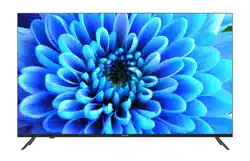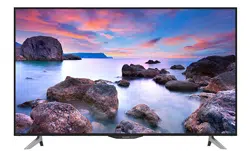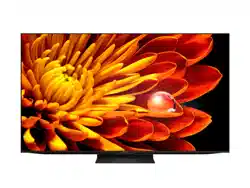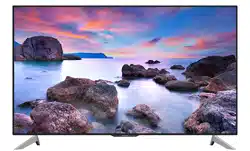
Quick Start Guide
4T-C55GN7000X
4T-C65GN7000X
4T-C75GN7000X
SHARP
A5D-9K90T
4T-C55GN7000X 4T-C65GN7000X
4T-C75GN7000X
刘功霞 2024-02-26
https://global.sharp/restricted/support/aquos/emanual/asia/pdf/gu/android11/Index.html
LED BACKLIGHT TV


CONTENT
PREPARATION ................................................................................................................................................. 1
WARNING AND PRECAUTION .................................................................................................................... 2
TERMINAL DIAGRAM ....................................................................................................................................
TERMINAL CONNECTION ............................................................................................................................
REMOTE CONTROL .......................................................................................................................................
TV SET FUNCTION AND INDICATOR ........................................................................................................
BASIC OPERATION ....................................................................................................................................... 10
End User License Agreement ................................................................................................................... 11
TROUBLE SHOOTING ..................................................................................................................................
SPECIFICATION ............................................................................................................................................ 16
LICENSE .......................................................................................................................................................... 19
5
6
7
8
14
Note:
1). The illustrations in this QSG are only for reference.
2). Avoid pressing the screen to prevent screen damage.
3). Two or more persons are required for safe handling of a large TV to prevent any damages or injuries.
PREPARATION
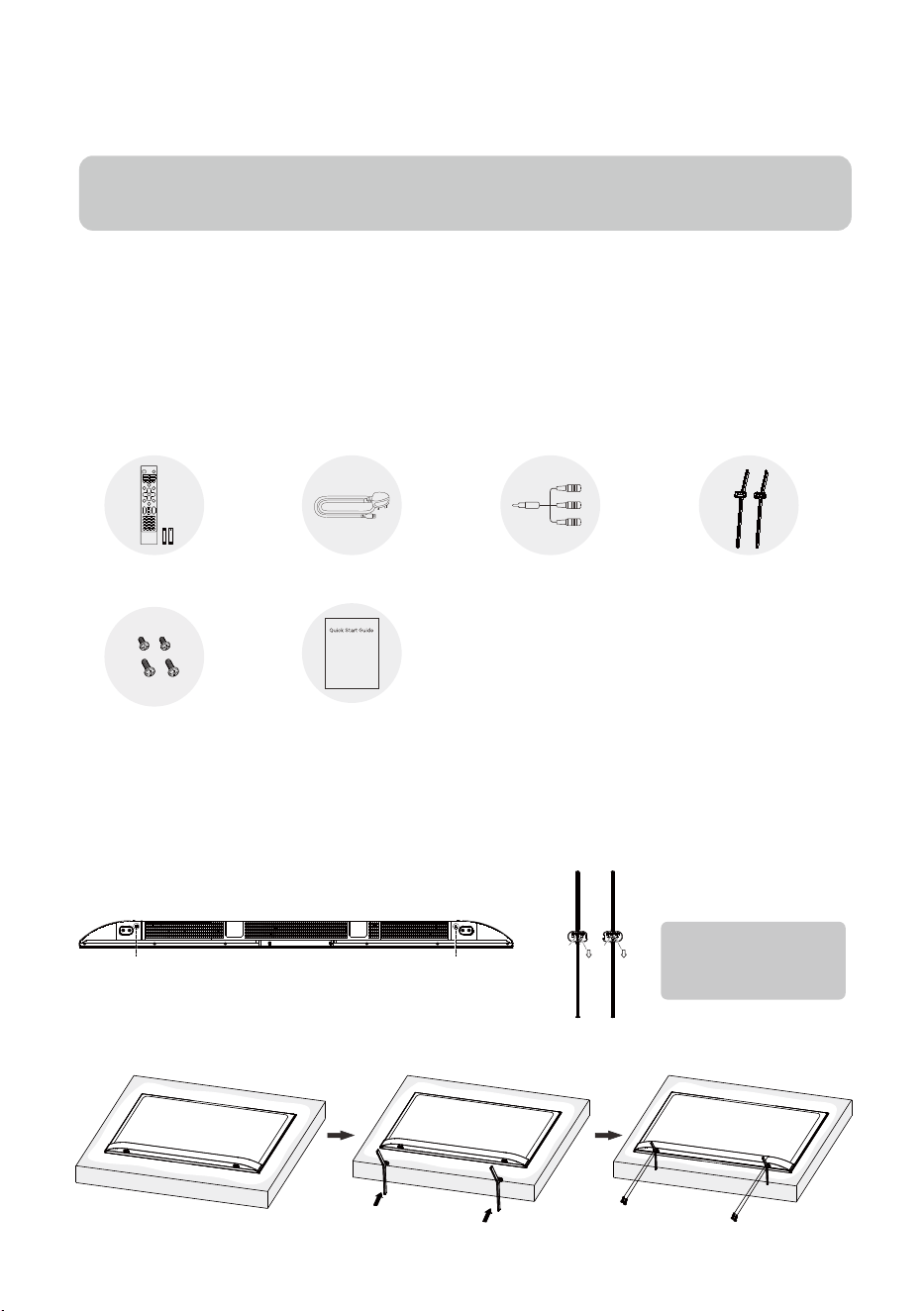
Standard Accessories
Unpacking and Installation
Quick Start Guide
Power Cord AV Converting Cable
TV Stands
Batteries x2 &
Remote Control
Stand Installation Instructions
Step 1: Take out the TV and carefully put it (screen downward) on a stable and flat table with a soft cloth or
cushion on it.
Step 2: Please check to make sure there is the same mark(A/B) on the TV bottom and the correct stand.
Step 3: Fix each stand by fastening two stand screws.
Stand Screws x4
1. Open the package.
2. Take out the TV.
3. Install the TV stands.
4. Connect the power cord.
1
A
AB
B
TV Bottom
TV Stand
Note: The arrow mark on
the stand points to the
screen.
2
Stand base must be attached to prevent the TV set from falling down and cause injuries.
Cleaning — Unplug the AC cord from the AC outlet before cleaning the product. Use a soft damp cloth to clean
the product. Do not use liquid cleaners, aerosol cleaners or chemical cloth to clean it, as such materials may
damage the product.
Water and moisture — Do not use the product near water, such as bathtub, washbasin, kitchen sink, laundry tub,
swimming pool and in a wet basement.
Do not place vases or any other water-filled containers on this product.
The water may spill onto the product causing fire or electric shock.
Stand — Do not place the product on an unstable cart, stand, tripod or table. Doing so can cause the product to
fall, resulting in serious personal injuries as well as damage to the product. Use only a cart, stand, tripod, bracket
or table recommended by the manufacturer or sold with the product. When mounting the product on a wall, be
sure to follow the manufacturer’s instructions. Use only the mounting hardware recommended by the
When relocating the product placed on a cart, it must be moved with utmost care. Sudden stops, excessive
force and uneven floor surface can cause the product to fall from the cart.
Ventilation — The vents and other openings in the cabinet are designed for ventilation. Do not cover or block
these vents and openings since insufficient ventilation can cause overheating and/or shorten the life of the
product. Do not place the product on a bed, sofa, rug or other similar surface, since they can block ventilation
openings. This product is not designed for built-in installation; do not place the product in an enclosed place
such as a bookcase or rack, unless proper ventilation is provided or the manufacturer’s instructions are followed.
The LCD panel used in this product is made of glass. Therefore, it can break when the product is struck forcefully
or with a sharp object. If the LCD panel is broken, be careful not to be injured by broken glass.
heat-generating products (including amplifiers).
To prevent fi re or shock hazard, do not place the AC power cord under the TV set or other heavy items.
Do not place heavy objects on this product or stand on it. Doing so could cause injury if the product overturns.
Take special care near children and pets.
The LCD panel is made with extremely high precision technology, and has 99.99% or more effective pixels.
The 0.01% or less missing pixels or those that are always lit is not a malfunction.
Precautions when transporting the TV
When transporting the TV, never carry it by holding or otherwise putting pressure onto the display. Be sure to
always carry the TV by two people holding it with two hands — one hand on each side of the TV.
Do not display a still picture for a long time, as this could cause an afterimage to remain.
Install the product on the place where the AC cord can be unplugged easily from the AC outlet or from the AC
INPUT terminal on the rear of the product.
•
•
•
•
•
•
•
•
•
•
•
•
•
•
•
•
•
•
Do not install the TV in a location in which it will be subject to water drops such as underneath an air conditioning
unit or in the vicinity of a humidifi er.
Water drops falling onto the TV and water entering inside it may result in fire, electric shock, or malfunctions.
We recommend that you install the TV at least 1m away from the outlet of an air conditioner.
•
•
•
manufacturer.
Heat sources — Keep the product away from heat sources such as radiators, heaters, stoves and other
To prevent fire, never place any type of candle or naked flames on the top or near the TV set.
Intended to alert the user to the presence of non-insulated “dangerous
voltage” within the product’s enclosure that may be of sufficient magnitude
To reduce the risk of electric shock. Do not remove cover (or back). No user serviceable parts inside. Refer
to qualified service personnel. The exclamation point within an equilateral triangle is intended to alert the
user to the presence of important operating and maintenance instructions in the literature accompanying
the appliance.
to constitute a risk of electric shock.
This lightning flash with arrowhead symbol within an equilateral triangle is
CAU T ION
protective earthing connection.(Only for Class I appliance)
If the apparatus doesn’t have the symbol in its rating label and its power cord has three pins, it means
protective earthing connection is needed. The apparatus should be connected to a mains socket outlet
with a protective earthing connection.(Only for Class I appliance)
Protective earthing terminal. The apparatus should be connected to a mains socket outlet with a
3
Mounting on a Wall
with other household wastes throughout the EU. To prevent possible harm to the environment
or human health from uncontrolled waste disposal, recycle it responsibly to promote the
Correct Disposal of this product. This marking indicates that this product should not be disposed
sustainable reuse of material resources. To return your used device, please use the return and
collection systems or contact the retailer where the product was purchased. They can take this product for
environmental safe recycling.
WEEE Directive
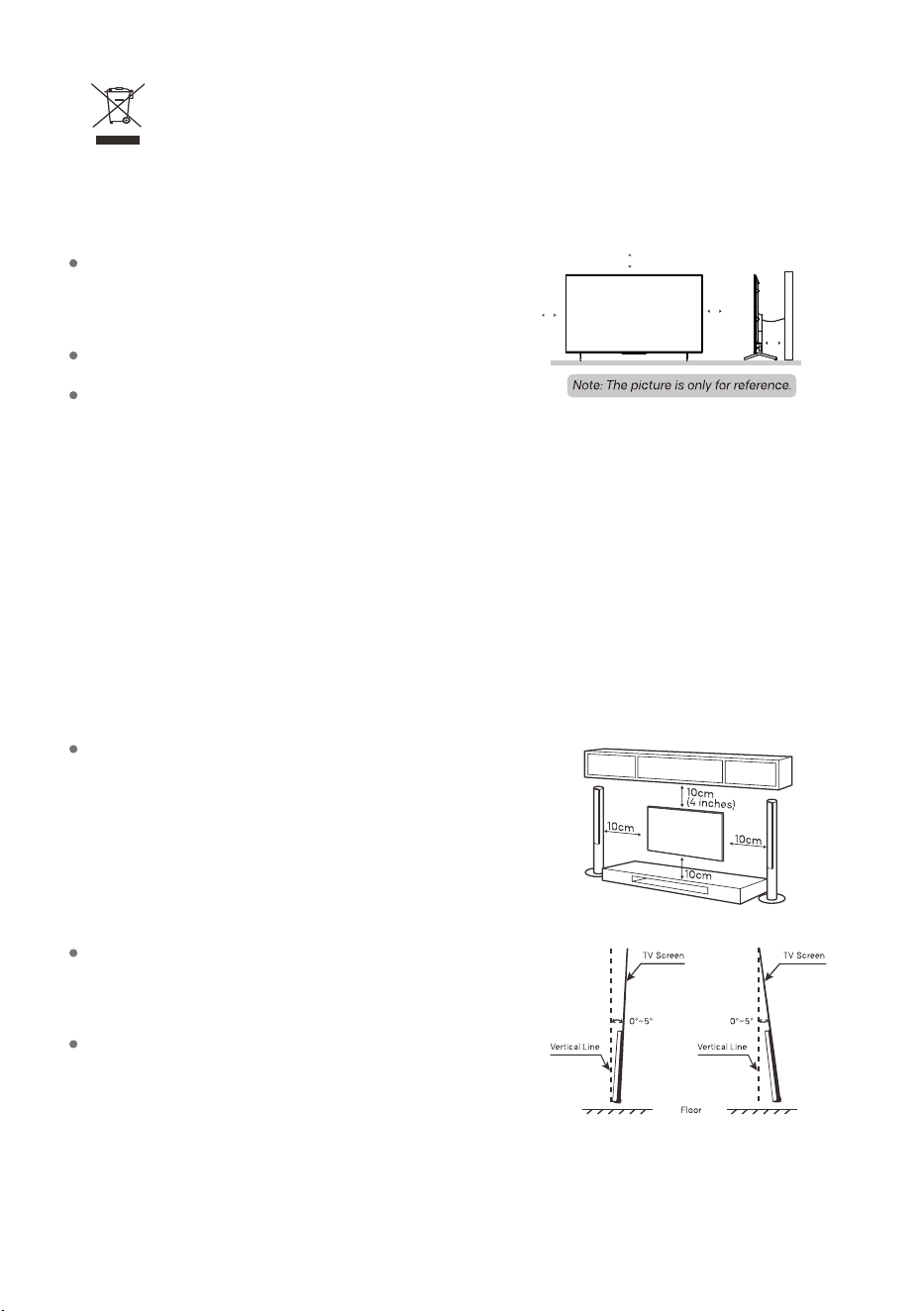
Positioning the TV
Warning: Stability Hazard
A TV set may fall, causing serious personal injury or death. Many injuries, particularly to children, can be
avoided by taking simple precautions such as:
- ALWAYS use cabinets or stands or mounting methods recommended by the manufacturer of the TV set.
Install Display on solid horizontal surface such as a table or
desk. For ventilation, leave a space of at least 10cm free all
around the set. To prevent any fault and unsafe situations,
please do not place any objects on top of the set.
Fix the rear of enclosure to wall(only for some countries)
Tilting Downward Tilting Upward
To prevent product damages or personal injuries, please make
sure that the TV screen is kept upright, or tilted upward or
downward within the angle range of 0 ~5 while mounting the ° °
TV onto the wall.
In case of exceeding the above angle range (0 ~5 ) of tilting ° °
downward, please purchase the auxiliary accessories from the
local dealer to mount the TV for safe installation and usage.
Otherwise, it will not be covered by the warranty and the user
should be liable for all consequences and responsibilities.
An optional wall mount can be used with your TV.
Consult with your local dealer to purchase the recommended
wall mount bracket. Carefully attach the wall mount bracket at
the rear of the TV. Install the wall mount bracket on a solid wall
perpendicular to the floor. If you are attaching the TV to other
building materials, please contact qualified personnel to
install the wall mount. Detailed instructions will be included
with the wall mount. Please use a wall mount bracket where
the device is adequately secured to the wall with enough
space to allow connectivity to external devices.
10CM
10CM
10CM
10cm
- ALWAYS use furniture that can safely support the TV set.
- ALWAYS ensure the TV set is not overhanging the edge of the supporting furniture.
- ALWAYS educate children about the dangers of climbing on furniture to reach the TV set or its controls.
- ALWAYS route cords and cables connected to your TV so they cannot be tripped over, pulled or grabbed.
- NEVER place a TV set in an unstable location.
- NEVER place the TV set on tall furniture (for example, cupboards or bookcases) without anchoring both
the furniture and the TV set to a suitable support.
- NEVER place the TV set on cloth or other materials that may be located between the TV set and supporting
furniture.
- NEVER place items that might tempt children to climb, such as toys and remote controls, on the top of the
TV or furniture on which the TV is placed. If the existing TV set is being retained and relocated, the same
considerations as above should be applied.
4
Precautions For Using Remote Control
press BACK and HOME buttons together to open its pairing mode. For other Bluetooth devices, please
read their own instruction manuals for opening the pairing mode.
Use the remote control by pointing it towards the remote sensor. The items between the remote control
and the remote sensor will interfere the normal operation.
Do not make remote control vibrate violently. Also, do not splash liquid on the remote control, also do not
put the remote control in high humidity place.
Do not place remote control under direct sunlight which will cause deformation of the unit by heat.
pairing mode. For the Bluetooth remote control supplied with the TV (may not be available), you can
When the remote sensor is under direct sunlight or strong lighting, the remote control will not work. If so
please change the lighting or TV's position, or operate the remote control closer to the remote sensor.
Before Bluetooth searching, please make sure you have turned external Bluetooth devices in the
Precautions For Using Battery
battery. Remove the batteries from the remote control unit if you do not intend to use it for a long time.
Please dispose of batteries in compliance with relevant environmental protection regulations.
Please note the batteries polarity, to avoid short circuit.'
Do not put the battery into fire, and charge or decompose the battery.
heat such as sunshine, fire or the like.
Do not use different types of batteries (for example, Manganese and Alkaline batteries) together.
WARNING: The batteries (battery pack or batteries installed) shall not be exposed to excessive
When the battery s voltage is insufficient which affect the use range, you should replace new '
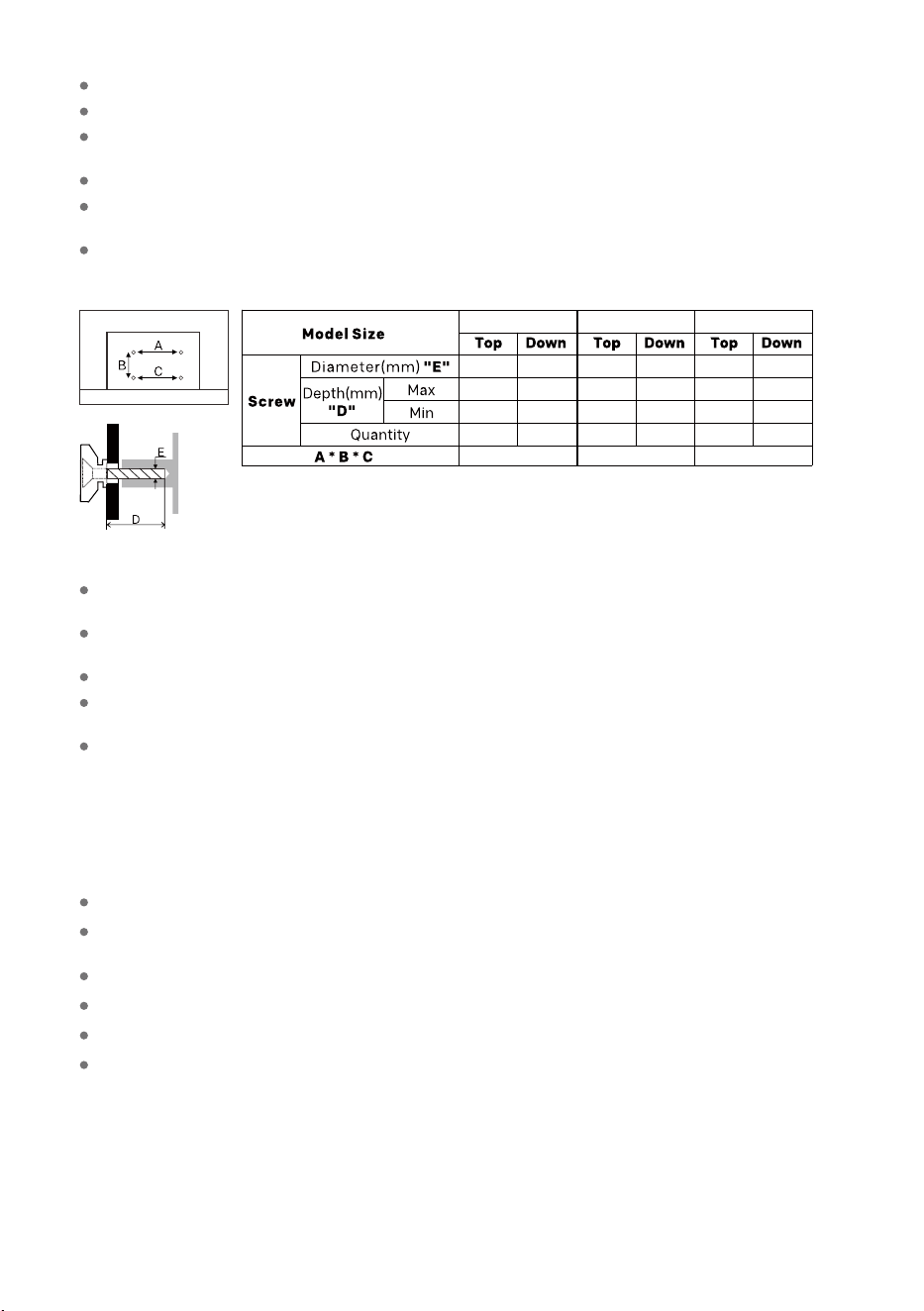
Use the screws and wall mounts that meet the following specifications. Any damages or injuries by misuse
or using an improper accessory are not covered by the warranty.
Remove the stand before installing the TV on a wall mount by performing the stand attachment in reverse.
If you install the TV on a ceiling or slanted wall, it may fall and result in severe injury. Use an authorized wall
mount and contact the local dealer or qualified personnel. Otherwise it is not covered by the warranty.
Do not over tighten the screws as this may cause damage to the TV and void your warranty.
To prevent injury, this appar
atus must be securely attached to the floor/wall in accordance with the
installation instructions.
Disconnect the power before moving or installing the TV. Otherwise electric shock may occur.
Improper using of the battery will cause leakage. So please do as the following methods and use carefully.
M6 M6
28 15
19
10
2 2
200 * 200 * 200
55"
M6 M6
30 30
20
20
2 2
400 * 200 * 400
65"
M6 M6
30 30
28
28
2 2
600 * 400 * 600
75"
5
TERMINAL DIAGRAM
Note:
The pictures are only reference.
Terminal quantities and names may vary depending on the region or model.
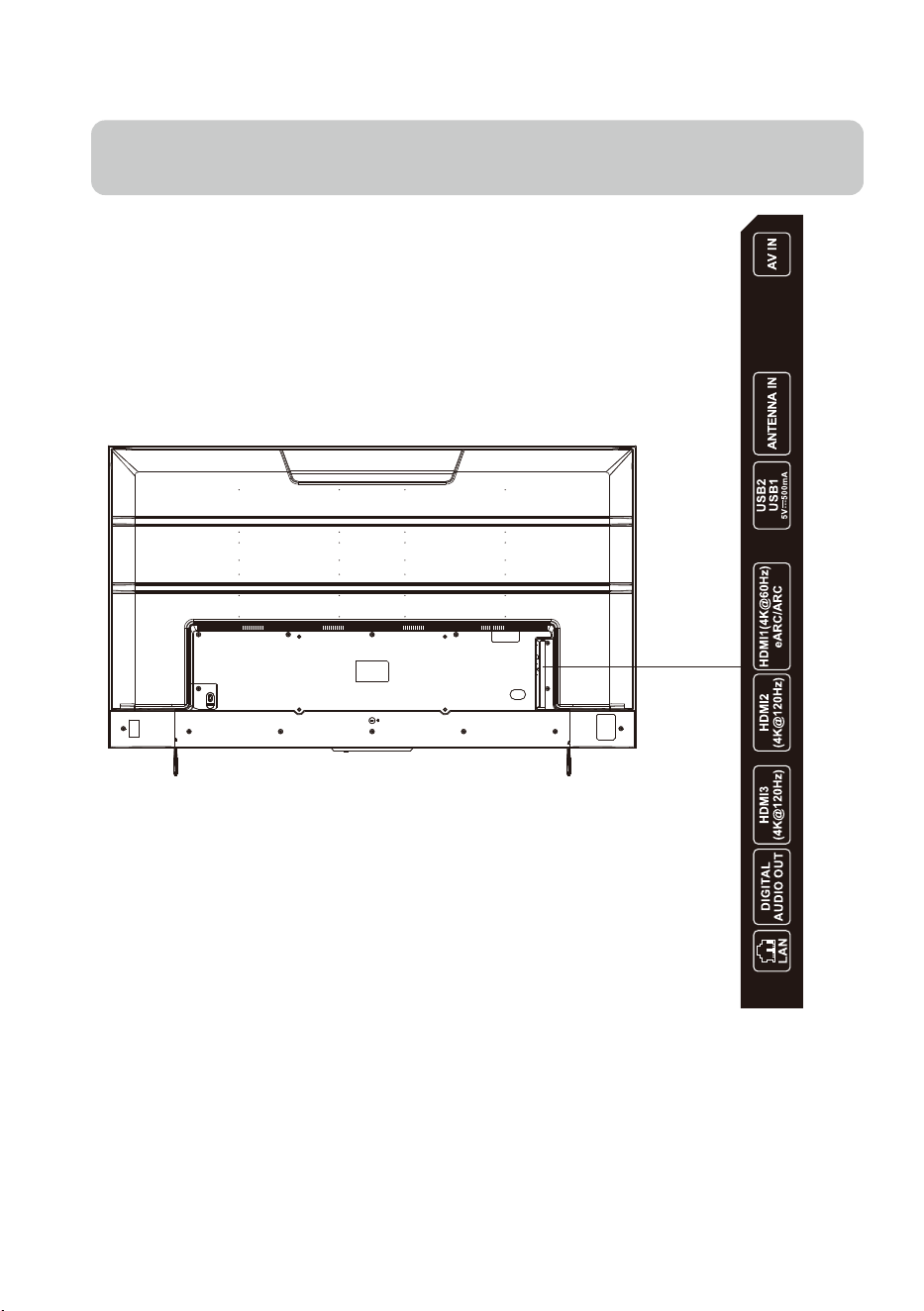
TV (rear view)
ANTENNA IN
Connect a coaxial cable to receive signals
from the antenna or cable.
USB
Connect a USB storage device.
HDMI
Receive digital audio and video signals
from external HDMI devices.
LAN
Wired network port.
AV IN
Receive analog audio and video signals
from external AV devices.
TERMINAL CONNECTION
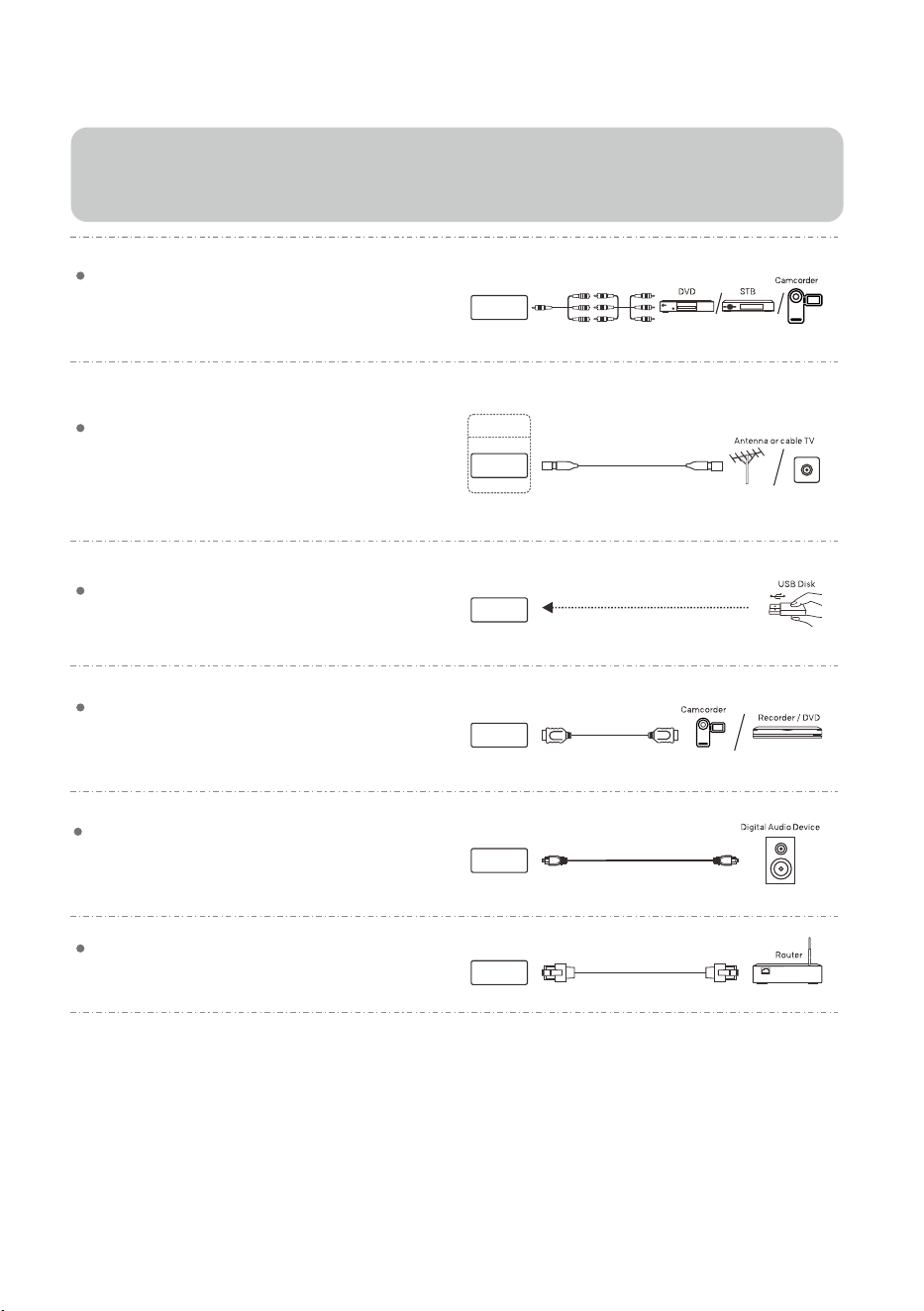
USB
HDMI
LAN
Note:
1). Terminal quantities and names may vary depending on the region or model.
2). External equipments and cables shown herein are not supplied with the TV.
3). To avoid product damage or personal injury, please make sure that you have disconnected the TV power cord before
connecting the external devices.
DIGITAL AUDIO OUT
Use an optical cable to output your TV’s audio
signal to a compatible digital audio receiver.
DIGITAL
AUDIO OUT
AV IN
ANTENNA IN
AIR/CABEL
6
7
REMOTE CONTROL
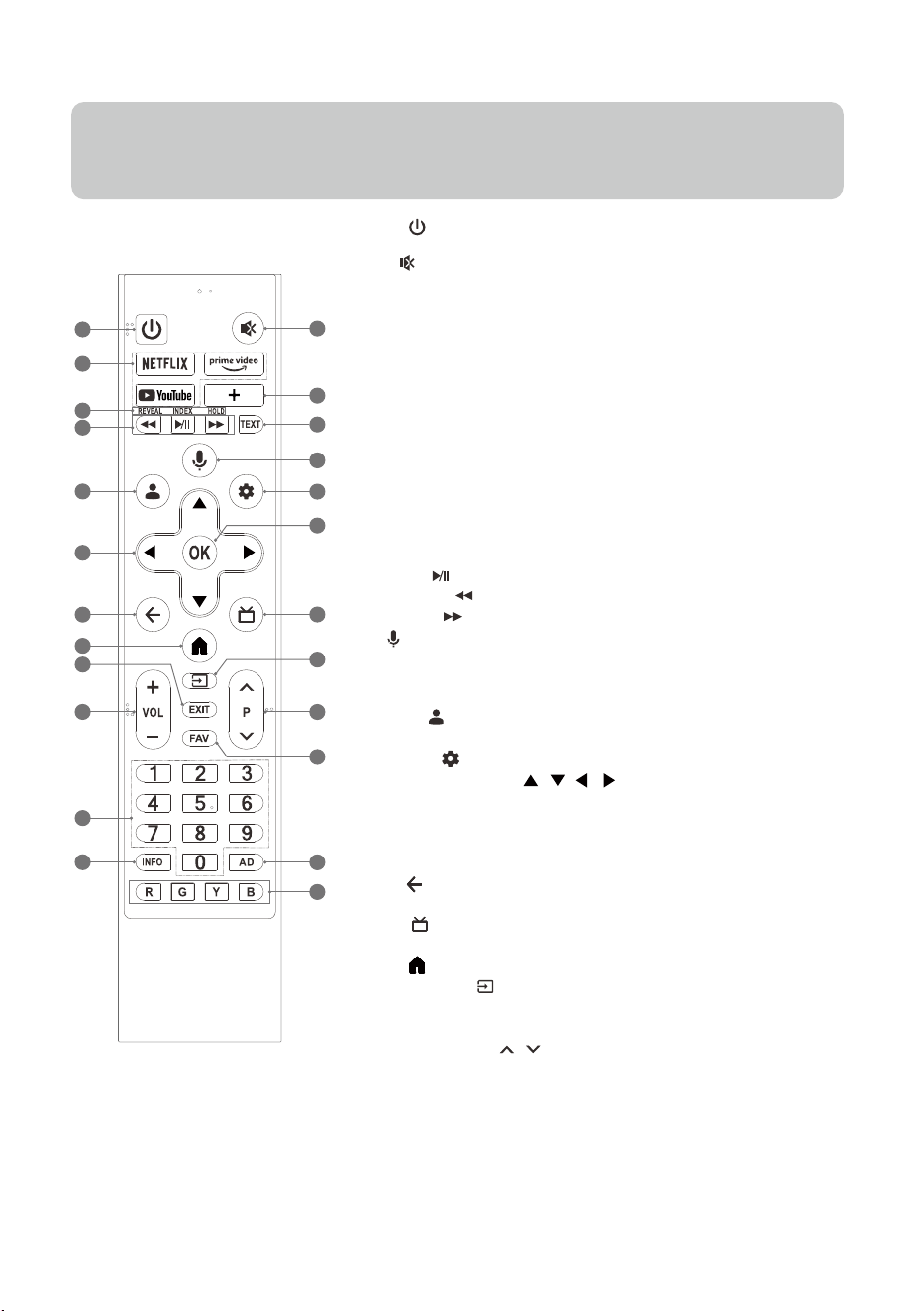
1. POWER ( ): Turn on the TV, short press to fast boot standby state; long
press to turn the TV to shut down standby state
2. MUTE ( ): Mute or restore the TV sound.
3. Application Buttons: Access specific applications quickly and directly.
4. Favorite Button:
*How to assign an app or a system function
• Press Favorite button to display Daily Key.
• Select an app or a system function to assign to Daily Key.
*When an app or a system function is assigned
• Short press Favorite button to open the app or the system function you
assigned.
• Long press Favorite button to display Daily Key screen.
5 & 6. Teletext Buttons
• TEXT: Access or exit the teletext menu.
• REVEAL: Display or hide the concealed information.
• INDEX: Display index page.
• HOLD: Hold the teletext page on screen without updates or changes.
7. Media Player Buttons
• Play/Pause ( ): Start or pause the playback.
• Fast Backward ( ): Fast backward the playback.
• Fast Forward ( ): Fast forward the playback.
8. MIC ( ): Start using the near field voice function.
• Short press MIC button to wake up the voice assistant.
• Long press MIC button to start receiving your voice command. After
your speaking, release MIC button to run voice function.
9. ACCOUNT ( ): Sign in with your Google account to get
the entertainment you love.
10. Dashboard ( ): Access the dashboard of your
11. UP/DOWN/LEFT/RIGHT ( / / / )
Navigate the menu to select the content you need.
• Press UP/DOWN button to switch channels.
12. OK: Confirm, enter or execute the selected item or access
the channel list.
13. BACK ( ): Return to upper-level content, or exit the
current screen.
14. GUIDE ( ): Switch to the TV mode, or access the
Electronic Program Guide in DTV mode.
15. HOME ( ): Access the home screen.
16. INPUT/ SOURCE( ): Access the source menu.
17. EXIT: Exit the current operation.
18. Volume Up/Down (VOL +/-): Adjust the sound volume.
19. Program Up/Down (P / ): Switch channels.
20. FAV: Access the list of favorite channels.
21. Number Buttons (0~9):
Select the channel directly, or input a number.
22. INFO: Access the INFO interface.
23. AD: Adjust audio settings including audio language, sound
tracks, audio type, and so on.
24. Color Buttons (R/G/Y/B):
Execute the prompt function in specific mode.
13
1
18
11
9
7
5
3
17
2
6
4
14
15
21
23
20
19
16
22
12
10
8
24
Note:
1). The image, buttons and functions of remote control may vary depending on the region, model or source.
2). You can press the MIC button to quickly pair the Bluetooth remote control with your TV set.
Google TV .
TM
3). Fast boot standby state: State that the TV quickly stands up
Shut down standby state: State that the power consumption is reduced
8
1 2 3 4 45 6
TV SET FUNCTION AND INDICATOR
Note:
1). The colour of indicators lit in various modes or circumstances may vary depending on the region or model.
2). The voice function may not be available depending on the region, model or language.
Note:
Long press TV control button to turn the TV to shut down standby state when keypad menu isn't displayed.
Note:
If you select "No thanks", how can you set to "Yes, I'm in" without reset the TV?
Please use the following procedure:
1. From the ACCOUNT ( ): , select “Manage accounts” > “Google Assistant” > “Hands-free MIC”.
2.Turn on the Hands-free MIC.
3.Use the far field voice function by saying the hotword: “Ok Google” or “Hey Google” and choose the
"Yes, I'm in".
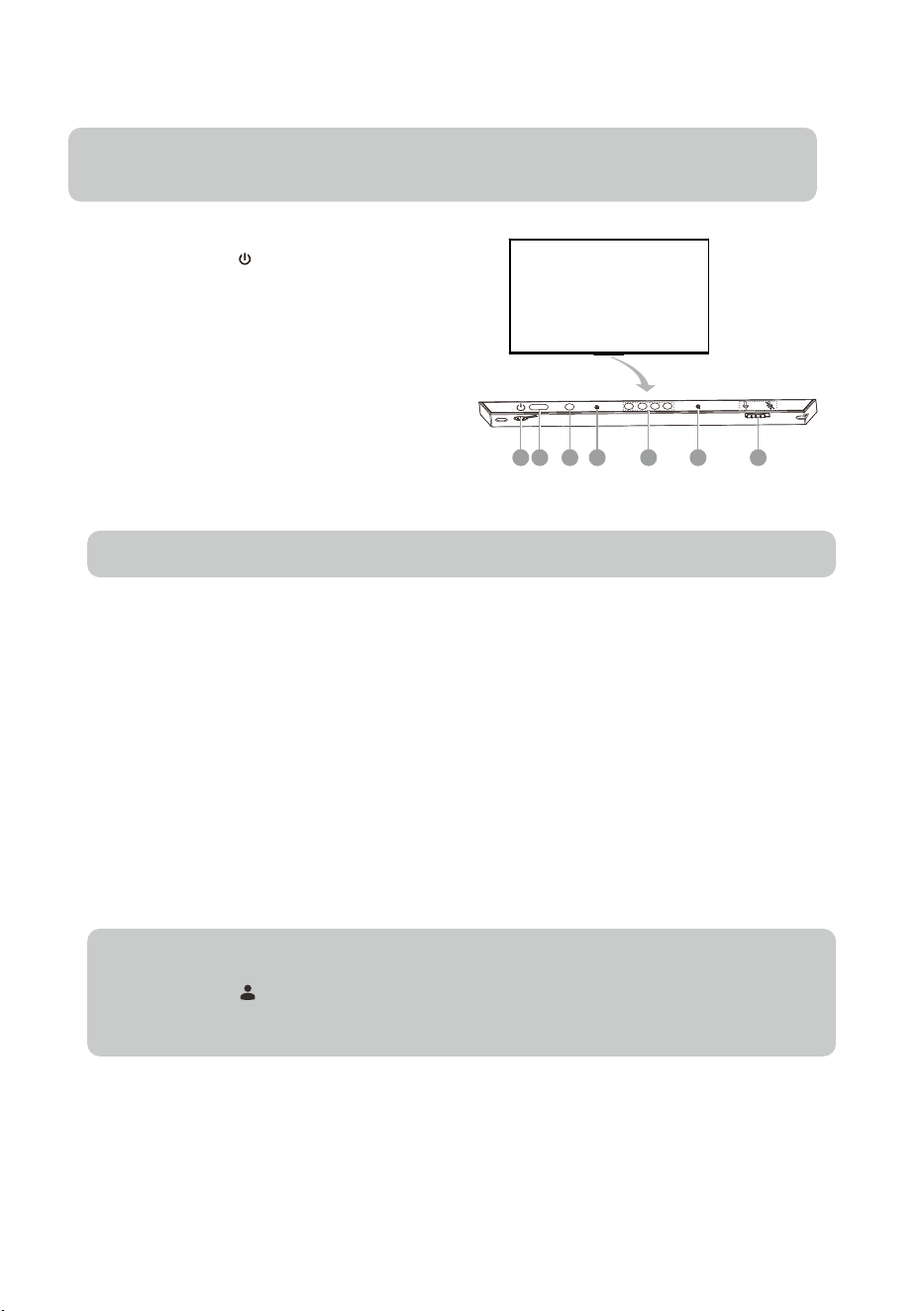
1. TV Control Button( )
*In working status:
When Short press TV Control button the keypad
menu will appear on the bottom of screen.Then
select keypad menu by pressing TV Control button
shortly.
Long press TV Control button to execute the keypad
menu you selected.
2. Remote Sensor
Receive the signal transmitted by the remote control.
3. Power Indicator
Indicate the status of the TV power.
* Lit in red: fast boot standby state/shut down standby state
* Unlit: working mode / power off.
4. Hands free MIC
Microphones of Hands free MIC voice function. It is best to keep yourself within 3 m
eters away from the Hands
free MIC while using the Hands free voice function.
5. Hands free indicator
Indicate the status of Hands free MIC voice function.
* Lit in white: Hands free MIC are turned on,and Hands free MIC voice function is being used.
* Unlit: Hands free MIC voice function is not being used.
* Lit in orange: Hands free MIC are turned off.
6. Switch of Hands free MIC
Turn on or turn off Hands free MIC switch, which is on TV bottom. Only after turning on the Hands free MIC,
successfully connecting your TV to the network and signing in to your Google account, you can start to
use
the Hands free MIC voice function by saying the hotword: “Ok Google” or “Hey Google”.
* In fast boot standby state , which is less energy
saving, press TV control button, which is on TV
bottom to turn on the TV in a short time.
* In shut down standby state, which is more energy
saving, press TV control button, which is on TV
bottom to turn on the TV in a standard time.
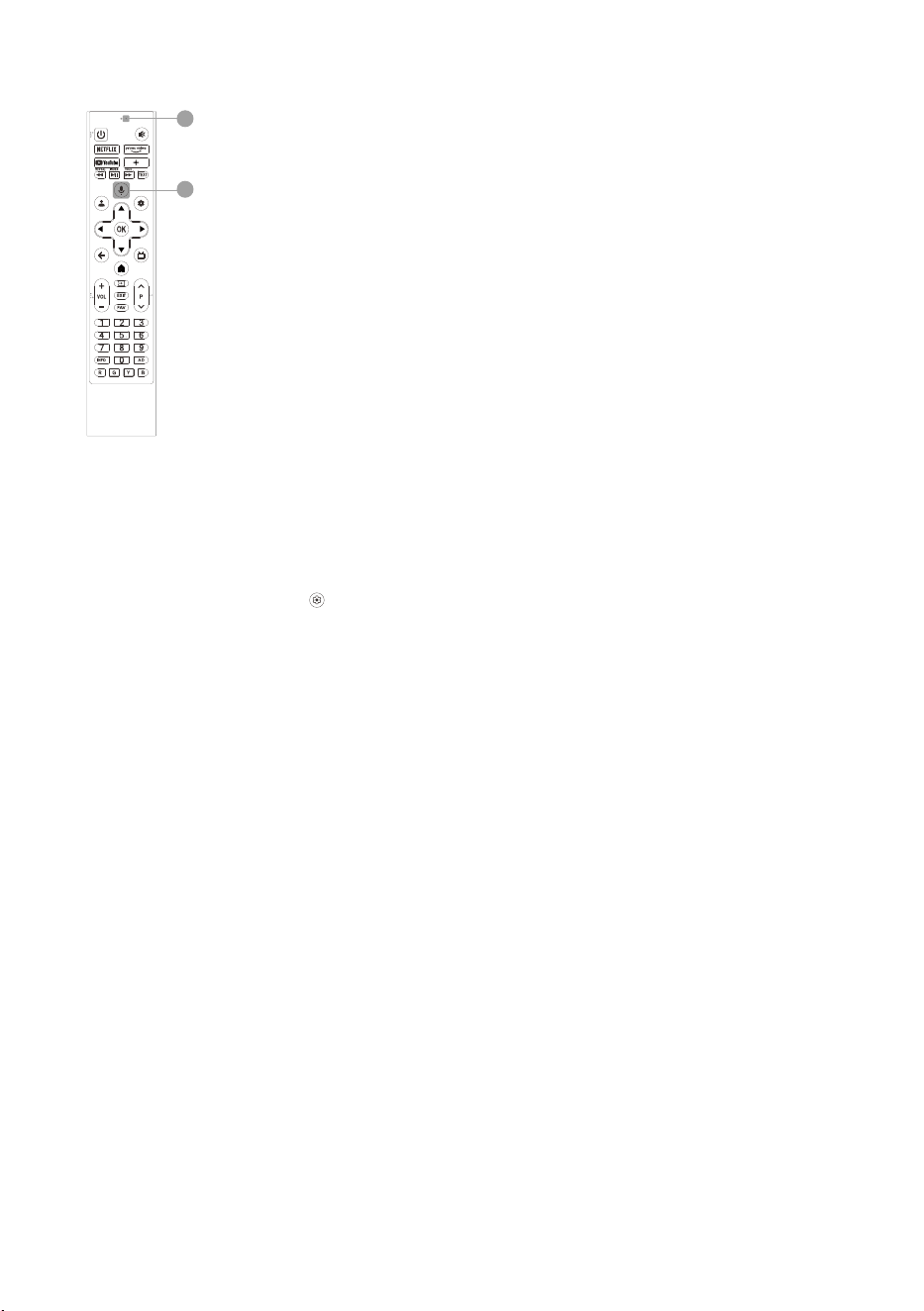
9
Pair Bluetooth remote control with your TV
For the remote control supplied with your TV, please finish pairing with your TV before using it for voice
function. The pairing can be done by just pressing the MIC button on any interface, or at the first step
of "Initial Settings", or in "Settings".
In settings, please refer to the following steps to pair the remote control:
1. Select
Dashboard button → < > icon → Remotes & Accessories → Pair accessory.
2. Press BACK and HOME buttons simultaneously until there shows the name of your Bluetooth remote
control on the TV searching interface.
3. Press OK button to start pairing.
4. It will show “Paired” after Bluetooth remote control is paired with the TV successfully.
®
VOICE CONTROL MIC ON RC
1
2
1. Voice control MIC
Microphone of voice function.
It is best to keep your mouth within 5 centimeters away from the microphone while
using the voice function.
2. MIC button of voice function
Press to start using the voice function. Only after successfully connecting your TV to
the network, pairing the Bluetooth remote control with your TV and signing in to your
Google account, you can press MIC button to start using the voice function.
BASIC OPERATION
10
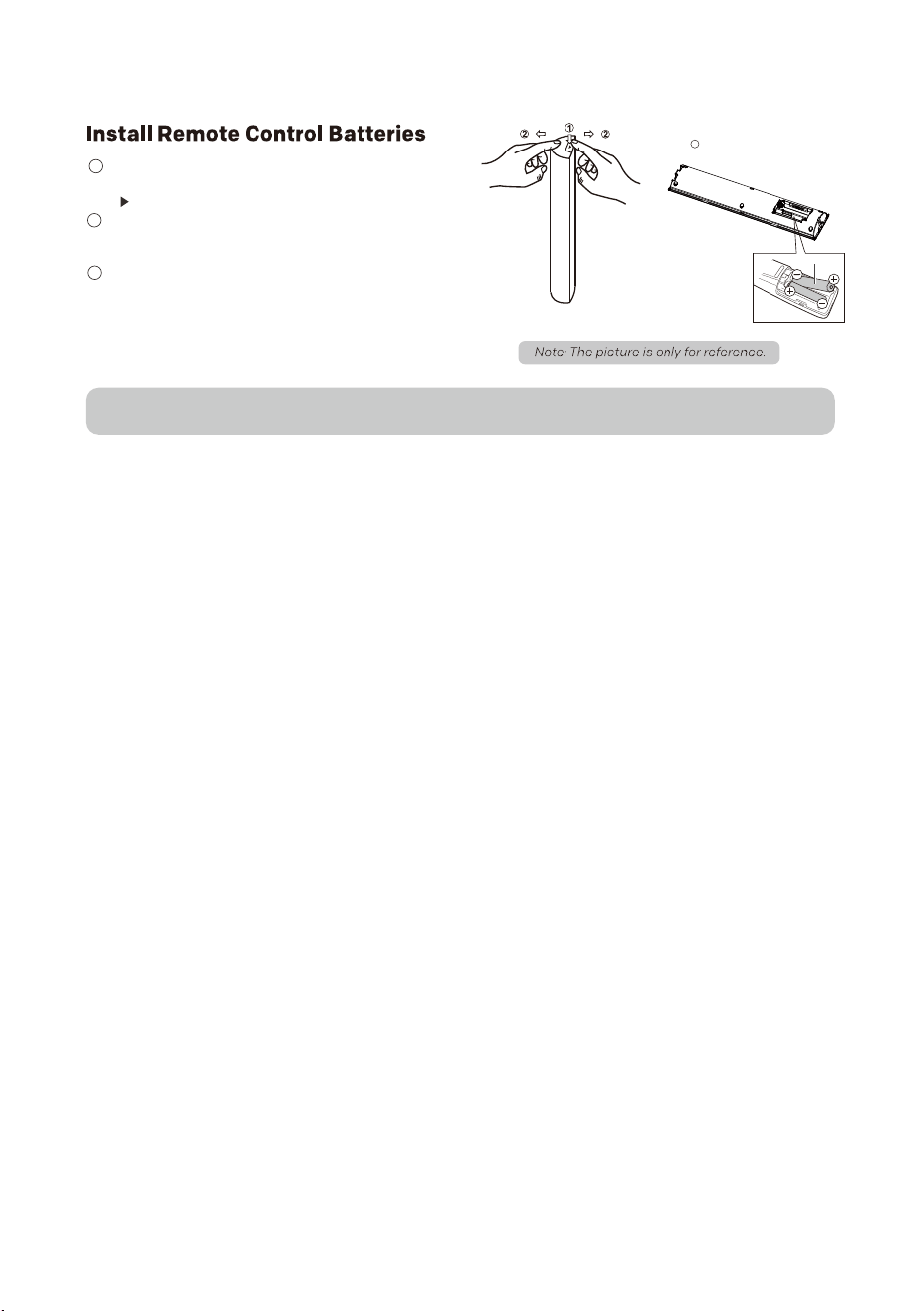
1 . Stand the remote control upside down as shown in
the right illustration and press lightly the part marked
with .
2 . Pressing down, pull the remote control from the both
sides to remove the back cover.
(*It may be hard at first, so please pull with a little force.)
3 . Place two AAA size batteries in the remote control’s
battery compartment, making sure to match the polarity
markings inside the compartment.
(*Make sure to put batteries in the minus (-) side at first.)
3
“AAA” size battery
WARNING:
A battery subjected to extremely low air pressure that may result in an explosion or the leakage of flammable liquid or gas.

End User License Agreement
11
1. General
Please read this agreement carefully before using this TV. Using this TV indicates your acceptance of this
agreement. We reserve all rights not expressly granted to you in this End User License Agreement.
The End User License Agreement ("EULA") is a legal agreement between you(user of this TV) and us (the TV
manufacturer) for the TV software, owned by us, third-party providers or third-party licensors. The TV
software includes software for this TV, including updated or modified software, provided by us or third
parties, whether stored on media or downloaded to this TV via any method, but not open source software.
2.Software License
You can ' t use the TV software except specified herein. We and third-party licensors grant you a limited
license to use the TV software only on this TV. The TV software may create data files automatically and you
agree that any such data files should be deemed as a part of the TV software. The TV software is licensed as
a single product, and you should not separate its component parts for use on other devices unless expressly
authorized by us. The software of a third party may be accompanied by a separate license, in which case you
agree that such third-party license will govern your use of such third-party software .
You agree not to modify, reverse engineer, decompile or disassemble the TV software in whole or in part, or
to use the TV software in whole or in part for any purpose other than allowed under this EULA . In addition ,
you should not TV software. You shall not (1) bypass, modify, defeat or circumvent any of the functions or
protections of the TV software or any mechanisms operatively linked the TV software; or (2) remove, alter,
cover or deface any trademark or notices on the TV software. We and third-party licensors retain all rights
that this EULA does not expressly grant to you.
This TV contains open source software which is subject to open source licenses. Some GPL executables and
LGPL / MPL libraries used in this TV are subject to the GPL2.0/LGPL2.1/MPL1.1 License Agreements. We
hereby offer to deliver, upon request, a copy of the complete corresponding source code for the copyrighted
open source software packages used in this TV for which such offer is requested by the respective licenses.
This offer is valid for a period of three (3) years from the date the distribution of this TV by us. To obtain the
source code, please contact our service center.
3. Software Updates or Modifications
We, or third parties may update or modify the software from time to time, for example, but not limited to, for
the purposes of error correction, improvement of features and enhancement of security features. Such
updates or modifications may change or delete the nature of features or other aspects of the TV software,
including features you may rely on.
The updated or modified software will be provided to you by us or third parties through the network or other
methods. And you may have the right to decide whether or not to accept or install such updates or
modifications according to your actual need. Generally, as for updates or modifications provided by us, we
recommend you to accept or install them for better use of this TV, and for some system-critical updates or
modifications provided by us, which may decide whether or not this TV can be used normally and continu-
ously, we may automatically download and install such updates or modifications in this TV without asking for
your acceptance. As for updates or modifications provided by third parties, you decide completely at your
own discretion, risk or liability.Please do not turn off this TV during software updating , otherwise it may
cause serious problems for which you should be responsible by yourself.
4. Network - Based Services and Contents
This TV has the smart feature which provides access to selected application services ( the services ) from
third - party providers. The smart feature requires a network connection. Your ability to access the services,
and the quality of the services presented, are subject to your network provider ' s service and terms as well
as the network speed you use.
The contents, including but not limited to data, music, sound, audio, images, graphics , likenesses, software,
text, video, messages, tags or other materials, provided by third-party providers, and the availability of the
services are at the sole discretion and under the control of third-party providers. The contents and the
services of each third - party provider are provided pursuant to the terms and conditions of that third - party
provider.
The services and the contents are only used for your own personal, private viewing, and shall not be used for
any viewing or exhibition for which ( or in a venue in which ) an access, or viewing fee is charged, or for any
public exhibition or viewing. The services and the contents are not available in all languages or in all
countries or regions. Third parties make no representation that the services and the contents are appropriate
or available for use in any particular location. To the extent you choose to use or access the services and the
contents, you do at your own initiative and are responsible for compliance with any applicable laws, including
but not limited to applicable local laws and privacy and data collection laws.
Some web pages or videos may not be supported due to network failure, difference of regions or service
interruption, which has nothing to do with this TV. Some models may support apk installation by yourself,
when using this feature, you should ensure the correctness, security, compatibility and legality of the apk
and should be responsible for any obligations thus resulted in . Some models may support installing and
using file manager application by yourself , when using this feature , you should not revise or delete a system

12
file, otherwise it will cause function failure or data loss of this TV, and you should be responsible for any
obligations thus resulted inobligations thus resulted in.
The services and the contents are controlled by third - party providers by means of network and transmission
facilities, which are subject to alteration, suspension, removal, termination or interruption, or invalid access at
any time without further notice in that the manufacturer is unable to control or to be informed of the aforesaid
change. We make a further declaration that we disclaim any responsibility or liability arising from customer's
failure to use the network application services and contents caused by, including but not limited to, failure of
network connection or communication lines, technological updates, or the alteration, suspension, interruption,
termination, disabling, or removal of any services or contents by the network application providers etc.
5. Content Rights
We are not responsible for the contents you may access as a part or via your use of the services that were
created by or are owned by a third party. Any responsibility or liability for the contents shall remain solely with
the creator, owner or licensor of such third - party content, and not with us.
You understand, acknowledge and agree that the contents are protected by the proprietary and intellectual
property rights of the creator, owner or licensor of such third - party content. You must not modify, reverse -
engineer, copy, rent, lease, loan, sell, resell, re-transmit, distribute, trade, publicly display or create derivative
works of any third-party content, either in whole or in part, without obtaining a license from the creator, owner
or licensor.
The content creator, owner or licensor may use Microsoft PlayReady content access technology ("PlayReady")
to protect their intellectual property, including copyrighted content. This TV uses PlayReady technology to
access PlayReady-protected Content and/or WMDRM-protected Content ("WMDRM" means Microsoft Window
Media digital rights management technology). If this TV fails to properly enforce restrictions on Content usage,
the content creator , owner or licensor may require Microsoft Corporation ("Microsoft") to revoke this TV ' s
ability to consume PlayReady-protected Content. Revocation should not affect unprotected Content or
Content protected by other content access technologies. The content creator, owner or licensor may require
you to upgrade PlayReady to access their Content. If you decline an upgrade, you will not be able to access
content that requires the upgrade.
The content creator, owner or licensor may use Widevine DRM content access technology to protect their
intellectual property, including copyrighted content. This TV uses Widevine DRM technology to access
Wldevine DRM-protected Content. If this TV fails to properly enforce restrictions on Content usage, the content
creator, owner or licensor may require Widevine Technologies (a company) to revoke this TV's ability to
consume Widevine DRM-protected Content. Revocation should not affect unprotected Content or Content
protected by other content access technologies. The content creator, owner or licensor may require you to
upgrade Widevine DRM to access their Content. If you decline an upgrade, you will not be able to access
content that requires the upgrade.
6. Use by Minors
If you are a parent or guardian permitting a person under the legal age of majority ("Minor") to use the services
or the contents, you agree to :(1) supervise the Minor's use of the services or the contents. (2) assume all risks
associated with the Minor's use of the services or the contents, including receipt and transmission of
information and materials via the services, and the transactions made for diaital aoods, the services and the
contents. (3) assume any liability resulting from the Minor's use of the services and the contents. (4) be bound
by this EULA for the Minor' s access and use of the services and the contents.
7. Privacy Policy
We don't collect or use any personal information by this TV. However, when you access the applications
provided by third-party providers over which we have no control, third parties may collect or receive certain
information through the use of Cookies or other similar technologies. We are not responsible for the security or
privacy of any information collected by third parties. You should exercise caution and review the privacy
statements applicable to the third-party services you use.
For example, but not limited to, when you watch a video or access the services or contents provided by a third-
party provider. That provider may collect or receive information about this TV (its IP address, device identifies,
etc.), the requested transaction (your request to buy or rent the video), your use of the services and contents,
and so on.
To allow you to access, browse or use the services and the contents, third parties may require you to establish
a user account for which you must provide them with your true, accurate, current and complete information
about yourself. You are responsible for maintaining the confidentiality of any or all of your passwords
associated with any such account.
Third parties may charge fees for access to their contents or services, and in no event will you be charged for
access to any portion or all of the contents and services unless the third-party provider obtains your prior
agreement to pay such charges. If you don't consent to such charges, you may not have access to paid
contents or services for which such charges apply.
When you use the TV software or access the services , third parties may collect data from, control, and/or
monitor this TV, or other devices running or interacting with this TV. We are not responsible and liable for any
activities between you and third parties.

13
8. Disclaimer of Warranty
THE TV SOFTWARE, THE SERVICES AND THE CONTENTS ARE PROVIDED TO YOU "AS IS" AND "AS AVAILABLE"
AND WITHOUT WARRANTIES OF ANY KIND. WE, THIRD-PARTY PROVIDERS AND THIRD-PARTY LICENSORS
DISCLAIM ALL WARRANTIES AND CONDITIONS, EXPRESS ORIMPLIED, INCLUDING BUT NOT LIMITED TO THE
IMPLIED WARRANTIES OF NON-INFRINGEMENT, TITLE, MERCHANTABILITY, AND FITNESS FOR A PARTICULAR
PURPOSE. WE, THIRD-PARTY PROVIDERS AND THIRD-PARTY LICENSORS DO NOT WARRANT THAT THE TV
SOFTWARE, THE SERVICES OR THE CONTENTS WILL MEET YOUR REQUIREMENTS , OR THAT THE OPERATION
OF THE TV SOFTWARE THE SERVICES OR THE CONTENTS WILL BE UNINTERRUPTED OR ERROR FREE.
FURTHERMORE, WE, THIRD-PARTY PROVIDERS AND THIRD-PARTY LICENSORS DO NOT WARRANT OR MAKE
ANY REPRESENTATIONS OR CONDITIONS REGARDINGTHE USE OR THE RESULTS OF THE USE OF THE TV
SOFTWARE, THE SERVICES OR THE CONTENTS IN TERMS OF THEIR CORRECTNESS, ACCURACY, RELIABILITY
OR OTHERWISE. NO ORAL OR WRITTEN INFORMATION OR ADVICE GIVEN BY US SHALL CREATE A WARRANTY
OR CONDITION, OR IN ANY WAY CHANGE THIS DISCLAIMER OF WARRANTY AND CONDITION. SHOULD THE TV
SOFTWARE, MEDIA ON WHICH THE TV SOFTWARE IS FURNISHED, THE SERVICES OR THE CONTENTS PROVE
DEFECTIVE, YOU ASSUME THE ENTIRE COST OF ALL NECESSARY SERVING, REPAIR OR CORRECTION.
YOU UNDERSTAND, ACKNOWLEDGE, AND AGREE THAT THE SERVICES CONTENTS AND RELATED SOFTWARES
ARE PROVIDED BY THIRD-PARTY PROVIDERS OVER WHICH WE HAVE NO CONTROL. THE SELECTION,
PROVISION, QUALITY, PICTURE SIZE AND AVAILABILITY OF SUCH CONTENTS OR SOFTWARE ARE THE SOLE
RESPONSIBILITY OF SUCH THIRD-PARTY PROVIDER OR OTHER THIRD-PARTY PROVIDERS. YOU AGREE TO
COMPLY WITH ANY AND ALL TERMS AND CONDITIONS THAT THE THIRD-PARTY MAY SET FOR ITS SERVICES,
CONTENTS ANO SOFTWARE. YOU UNDERSTAND, ACKNOWLEDGEA, AND AGREE THAT ANY CONTENTS OR
SOFTWARE DOWNLOADED OR OTHERWISE OBTAINED THROUGH USE OF THE SERVICES IS DONE AT YOUR
OWN DISCRETION AND RISK, AND YOU SHOULD BE SOLELY RESPONSIBLE FOR ANY CONSEQUENCES THAT
RESULTS, INCLUDING ANY DAMAGE OR HARM CAUSED BY ANY VIRUS, SPYWARE, WORM OR MALWAER.
9. Limitation of Liability
TO THE EXTENT PERMITTED BY APPLICABLE LAW , WE SHALL NOT BE LIABLE TO YOU, WHETHER IN
CONTRACT, TORT (INCLUDINGNEGLIGENCE), OR ANY THEORY OF LIABILITY, AN WHETHER OR NOT THAT THE
POSSIBILITY OF SUCH DAMAGES OR LOSSES HAS BEEN NOTIFIED TO US, FOR THE FOLLOWING CIRCUM-
STANCES :
(1). ANY INDIRECT, INCIDENTAL, SPECIAL, PUNITIVE OR CONSEQUENTIAL DAMAGES.
(2). ANY LOSS OF INCOME, BUSINESS, ACTUAL OR ANTICIPATED PROFITS, OPPORTUNITY, GOODWILL, OR
REPUTATION (WHETHER DIRECT OR INDIRECT).
(3). ANY DAMAGE TO OR CORRUPTION OF DATA (WHETHER DIRECT OR INDIRECT).
(4). ANY LOSS OR DAMAGE AS A RESULT OF:
(A) USE YOU MAKE OF THE SERVICES.
(B) ANY RELIANCE PLACD BY YOU ON THE COMPLETENESS, ACCURACY OR EXISTENCE OF ANY ADVERTISING.
(C) ANY RELATIONSHIP OR TRANSACTION BETWEEN YOU AND AN THIRD-PARTY PROVIDER OF ANY SERVICE
OR CONTENT, INCLUDING ADVERTISERS AND SPONSORS WHOSE ADVERTISING IS MADE AVAILABL ON OR
VIA THE SERVICES.
(D) ANY CHANGES TO THE SERVICES, OR ANY PERMANENT OR TEMPORARY CESSATION IN THE PROVISION OF
THE SERVICES OR ANY PORTION THEREOF .
10. Dispute Resolution
If a dispute, controversy or difference arising in any way from this EULA or your use of the TV software is not
amicably settled, it shall be subject to the non-exclusive jurisdiction of the courts of the jurisdiction where you
are a resident. Notwithstanding the foregoing, we may apply for injunctive remedies (or an equivalent type of
urgent legal relief) that we deem necessary or appropriate in any jurisdiction.
11. Applicable Law and Severability
This EULA is governed by the laws of the jurisdiction where you are a resident, without regard to its conflict of
law provisions. If any provision of this EULA is held to be void, invalid, unenforceable or illegal, the other
provisions shall remain in full force and effect.
12. Termination
This EULA is effective until terminated. Your rights under this EULA will terminate automatically or otherwise
cease to be effective without notice from us if you fail to comply with any items of this EULA. Upon termination
of this EULA, you shall cease all use of the TV software, and you will have no recourse against us, third-party
licensors or third-party providers.
13. Entire Agreement and Governing Language
This EULA is the entire agreement between you and us relating to the TV software and supersedes all prior or
contemporaneous oral or written communications, proposals and representations with respect to the TV
software or any other subject matter covered by this EULA. Any translation of this EULA is provided only for your
convenience or local requirements. The English version of this EULA shall govern in the event of contradiction or
dispute between English and any non-English versions .

TROUBLE SHOOTING
Before calling a service technician, please check the following table for a possible cause of the symptom and
some solutions.
General Problem / Solution
Change the batteries.
Check if batteries are installed correctly.
Check if main power is connected.
Check if there are some items between remote sensor and remote control.
Remote control does not work
Poor Signal
This is usually caused by interference from electronic equipments or radio interference sources.
Picture and Sound / Solution
Check the signal source.
No picture, no sound
Plug another electrical device into the outlet to check if it is working or turned on.
Check if power plug is in good contact with the outlet.
No sound, picture OK
If no sound, unmute the sound or increase the volume.
Open the sound menu and adjust ‘Balance’.
Abnormal picture
For no color or bad picture quality, you may:
1. Check the signal cable and adjust the antenna.
1. Adjust the color option in menu settings.
Bad TV signal (Display mosaic or snowflakes)
2. Fine tune the channel.
2. Keep the TV at a sufficient distance from other electronic products.
3. Try another channel.
3. Try another channel.
Browser / Solution
Some third-party extensions of the current web page may not be supported, and please close the current
web page.
Browser is forced to be shut down
The current web page may include too many contents which cause there isn’t sufficient memory and the
browser is closed.
Web page can not be displayed completely
Multimedia Player / Solution
‘This file is invalid’ /‘Unsupported audio’ appears , or audio is normal but video is abnormal, or video
is normal but audio is abnormal
The media file maybe damaged, check if the file can be played on the PC.
Check if video and audio codec is supported.
Network / Solution
Make sure the TV has connected to the router successfully.
Network failure
Check if the router works well.
14
Password / Solution
If you forget the password, clear the password using the following procedure:
1. From the Dashboard, select “Settings” > “System” > “About” > “Reset” > “Factory reset”, and then press
ENTER/OK.
2. When you perform a reset, the TV will be returned to the factory preset values, and you need to set the
password again.
NOTE
1. As a precautionary measure, make a note of your password, and keep it in a safe place.
15
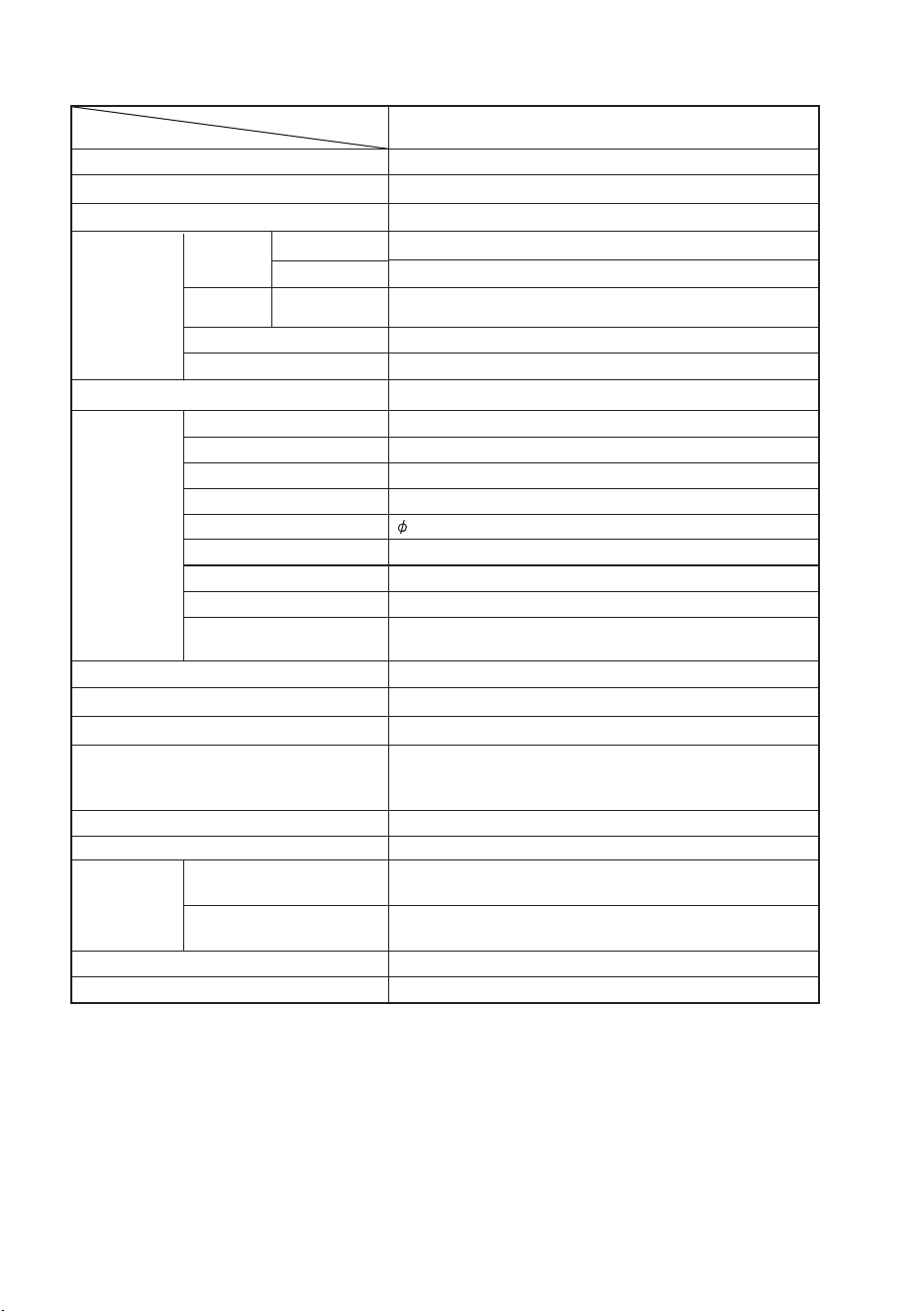
SPECIFICATION
16
W x H x D (mm)
W x H x D (mm)
Model
Item
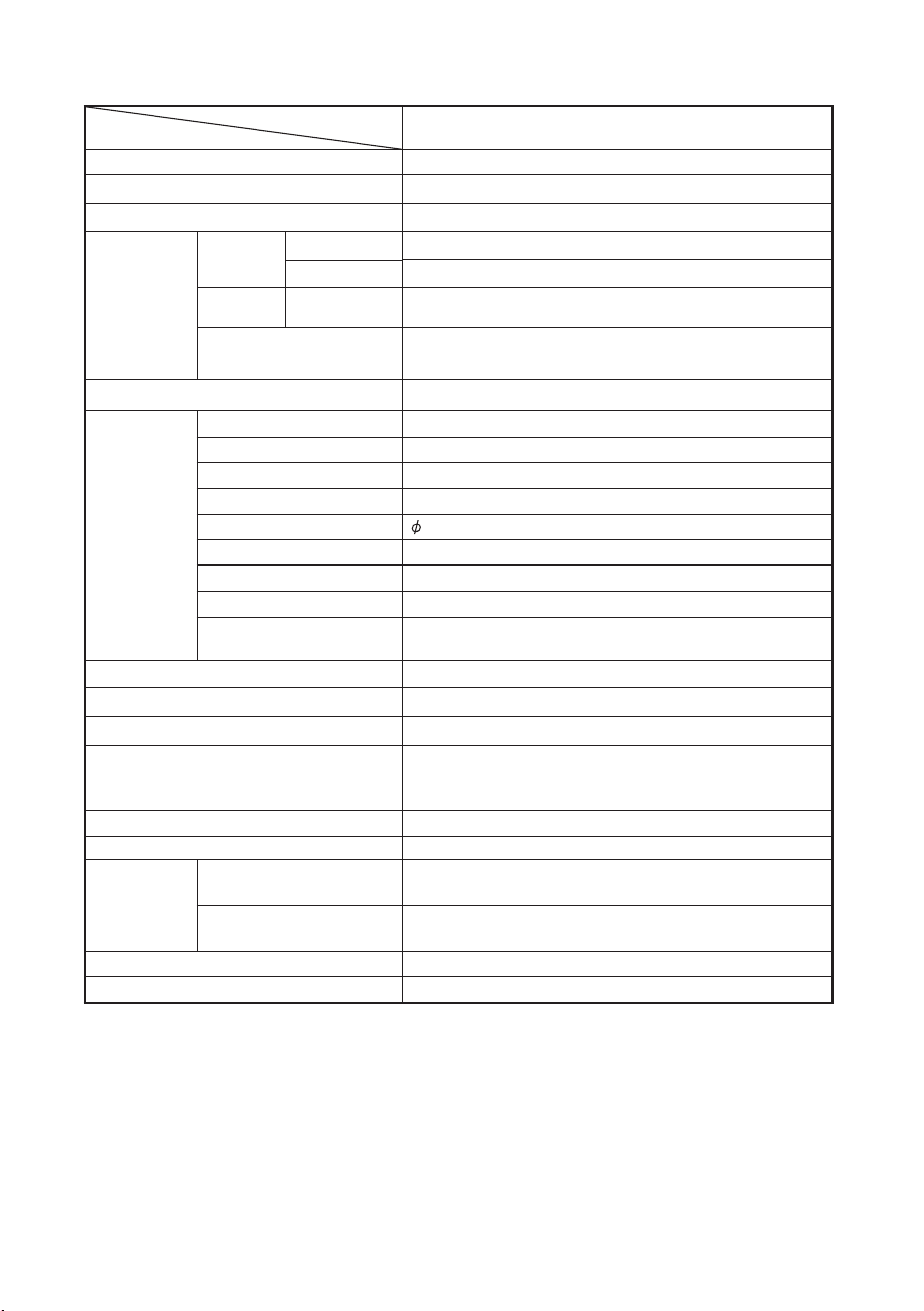
4T-C55GN7000X
139 cmlenapLCD
Resolution
8,294,400 pixels (3840 x 2160)
PAL/SECAM/NTSC 3.58/NTSC 4.43/PAL 60metsysruolocoediV
Audio amplifier
Total 24W (12W x 2)
Terminals
TV function
STEREO/BILINGUAL
TV-tuning system
Analogue
Digital
VHF/UHF
TV-
standard
Receiving
channel
3.5 mm jack (AUDIO in, VIDEO in)
HDMI 1
RF IN 75 Ω DIN type
HDMI 4K, ALLM, eARC/ARC
HDMI 2
HDMI 3
AV IN
USB USB 2.0 (DC5V 500mA output)
USB USB 2.0 (DC5V 500mA output)
LAN (10/100 BASE-T) Network connector
OPTICAL DIGITAL AUDIO
OUT
Optical S/PDIF digital audio output
egaugnalDSO
AC 100 - 240 V, 50/60 HztnemeriuqerrewoP
(0.5W)190W
n (Standby)oitpmusnocrewoP
Wi-Fi Protocol IEEE 802.11 a/b/g/n/ac 2T/2R Dual Band
Wi-Fi Security WPA3-Personal, WPA2-Personal, WPA-Personal
Bluetooth V2.1 + EDR / 4.2 / 5.1
Dimensions
without stand
with stand
Weight without stand (with stand)
Operating temperature 0°C to + 40°C
English/Simplified Chinese/Traditional Chinese/Arabic/
French/Thai/Portuguese/Vietnamese/Russian/Malaysia/
Indonesia
PAL: B/G, D/K, I SECAM: B/G, D/K, K/K1 NTSC: M
DVB-T / DVB-T2 (for Asia only), DTMB (for Hong Kong only)
44.25 - 863.25 MHz
Auto Preset
NICAM: B/G, I, D/K A2 stereo: B/G MTS:M
HDMI 4K, ALLM/VRR (120P)
HDMI 4K, ALLM/VRR (120P)
1228 x 715 x 77
1228 x 773 x 294
12.6 kg (12.8 kg)
0°C to + 40°C
English/Simplified Chinese/Traditional Chinese/Arabic/
French/Thai/Portuguese/Vietnamese/Russian/Malaysia/
Indonesia
W x H x D (mm)
W x H x D (mm)
1448 x 829 x 83
1448 x 904 x 326
18.3 kg (18.7 kg)
Model
Item
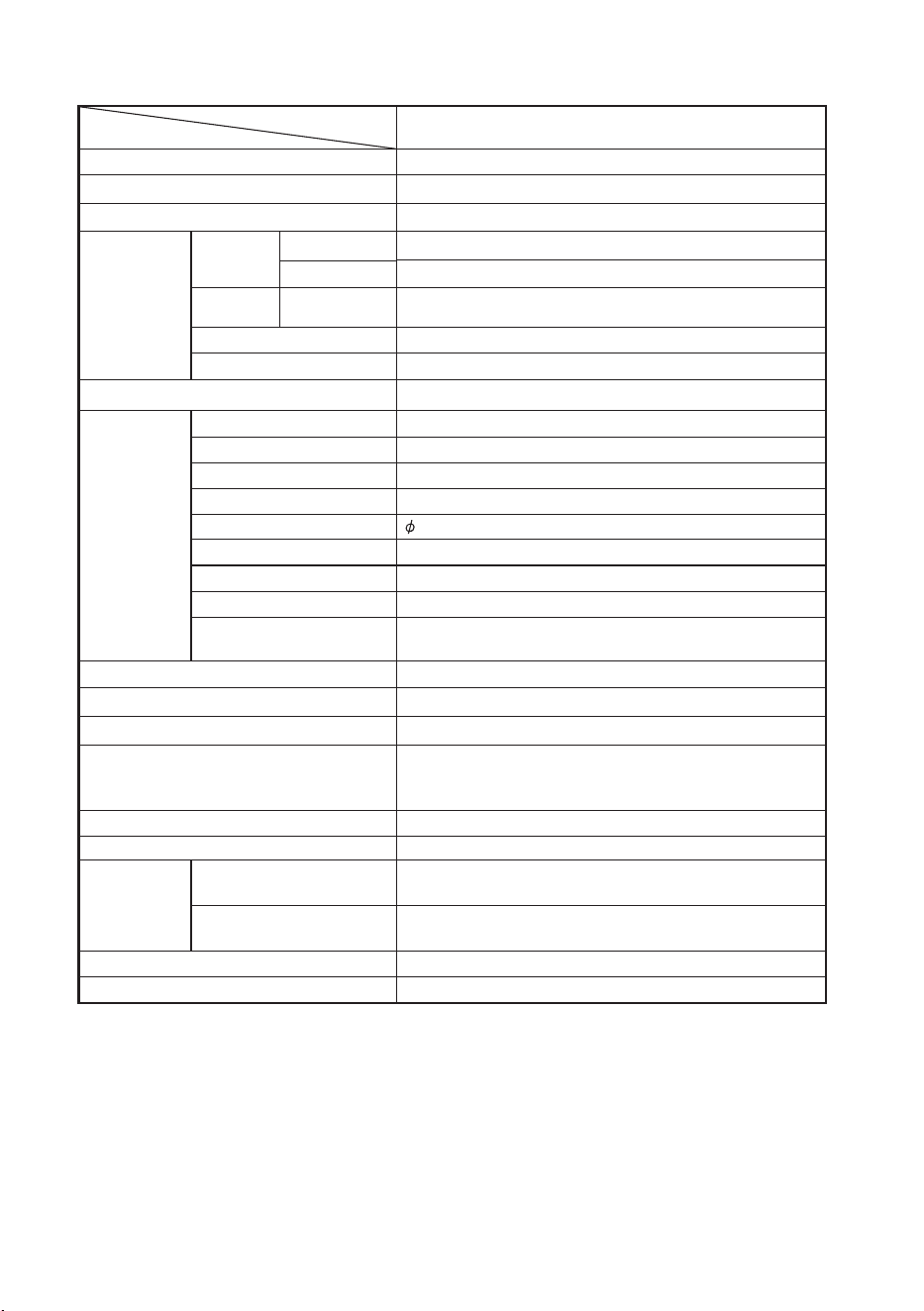
4T-C65GN7000X
164 cmlenapLCD
Resolution
8,294,400 pixels (3840 x 2160)
PAL/SECAM/NTSC 3.58/NTSC 4.43/PAL 60metsysruolocoediV
Audio amplifier
Total 30W (15W x 2)
Terminals
TV function
STEREO/BILINGUAL
TV-tuning system
Analogue
Digital
VHF/UHF
TV-
standard
Receiving
channel
3.5 mm jack (AUDIO in, VIDEO in)
HDMI 1
RF IN 75 Ω DIN type
HDMI 4K, ALLM, eARC/ARC
HDMI 2
HDMI 3
AV IN
USB USB 2.0 (DC5V 500mA output)
USB USB 2.0 (DC5V 500mA output)
LAN (10/100 BASE-T) Network connector
OPTICAL DIGITAL AUDIO
OUT
Optical S/PDIF digital audio output
egaugnalDSO
AC 100 - 240 V, 50/60 HztnemeriuqerrewoP
(0.5W)270W
n (Standby)oitpmusnocrewoP
Wi-Fi Protocol IEEE 802.11 a/b/g/n/ac 2T/2R Dual Band
Wi-Fi Security WPA3-Personal, WPA2-Personal, WPA-Personal
Bluetooth V2.1 + EDR / 4.2 / 5.1
Dimensions
without stand
with stand
Weight without stand (with stand)
Operating temperature 0°C to + 40°C
PAL: B/G, D/K, I SECAM: B/G, D/K, K/K1 NTSC: M
DVB-T / DVB-T2 (for Asia only), DTMB (for Hong Kong only)
44.25 - 863.25 MHz
Auto Preset
NICAM: B/G, I, D/K A2 stereo: B/G MTS:M
HDMI 4K, ALLM/VRR (120P)
HDMI 4K, ALLM/VRR (120P)
17
English/Simplified Chinese/Traditional Chinese/Arabic/
French/Thai/Portuguese/Vietnamese/Russian/Malaysia/
Indonesia
W x H x D (mm)
W x H x D (mm)
1675 x 967 x 88
1675 x 1032 x 326
34.0 kg (34.3 kg)
Model
Item
4T-C75GN7000X
189 cmlenapLCD
Resolution
8,294,400 pixels (3840 x 2160)
PAL/SECAM/NTSC 3.58/NTSC 4.43/PAL 60metsysruolocoediV
Audio amplifier
Total 30W (15W x 2)
Terminals
TV function
STEREO/BILINGUAL
TV-tuning system
Analogue
Digital
VHF/UHF
TV-
standard
Receiving
channel
3.5 mm jack (AUDIO in, VIDEO in)
HDMI 1
RF IN 75 Ω DIN type
HDMI 4K, ALLM, eARC/ARC
HDMI 2
HDMI 3
AV IN
USB USB 2.0 (DC5V 500mA output)
USB USB 2.0 (DC5V 500mA output)
LAN (10/100 BASE-T) Network connector
OPTICAL DIGITAL AUDIO
OUT
Optical S/PDIF digital audio output
egaugnalDSO
AC 100 - 240 V, 50/60 HztnemeriuqerrewoP
(0.5W)360W
n (Standby)oitpmusnocrewoP
Wi-Fi Protocol IEEE 802.11 a/b/g/n/ac 2T/2R Dual Band
Wi-Fi Security WPA3-Personal, WPA2-Personal, WPA-Personal
Bluetooth V2.1 + EDR / 4.2 / 5.1
Dimensions
without stand
with stand
Weight without stand (with stand)
Operating temperature 0°C to + 40°C
PAL: B/G, D/K, I SECAM: B/G, D/K, K/K1 NTSC: M
DVB-T / DVB-T2 (for Asia only), DTMB (for Hong Kong only)
44.25 - 863.25 MHz
Auto Preset
NICAM: B/G, I, D/K A2 stereo: B/G MTS:M
HDMI 4K, ALLM/VRR (120P)
HDMI 4K, ALLM/VRR (120P)
18
Google TV is the name of this device's software experience and a trademark
of Google LLC. Google, YouTube, Chromecast built-in are trademarks of
Google LLC.
The terms HDMI, HDMI High-Definition Multimedia Interface, HDMI Trade dress
and the HDMI Logos are trademarks or registered trademarks of HDMI Licensing
Administrator, Inc.
Dolby, Dolby Vision IQ, Dolby Vision, Dolby Atmos, Dolby Audio, and the
double-D symbol are trademarks of Dolby Laboratories Licensing Corporation.
Manufactured under license from Dolby Laboratories. Confidential unpublished
works. Copyright © 1992-2022 Dolby Laboratories. All rights reserved.
The Bluetooth
Bluetooth SIG, Inc.
®
word mark and logos are registered trademarks owned by
19

SHARP CORPORATION
SHARP CORPORATION
PT. SHARP TRADING INDONESIA
Kawasan Industri KIIC, Jl. Harapan Raya Lot LL 1 & 2
Gedung No. 01, Desa Sirnabaya, Kec. Teluk Jambe Timur
Kabupaten Karawang 41361
NO. REG.:IMKG.2757.11.2022
For Indonesia