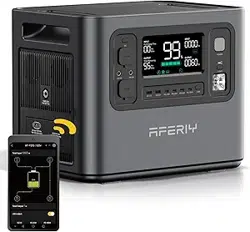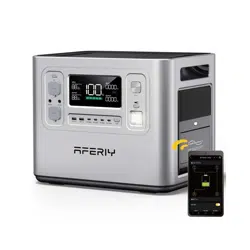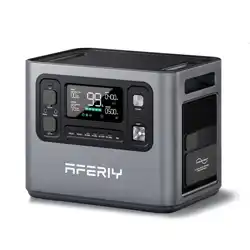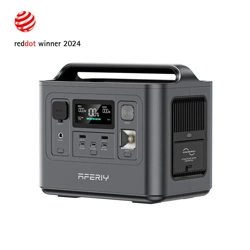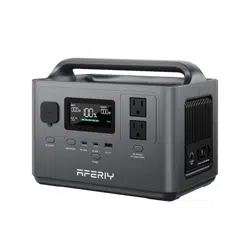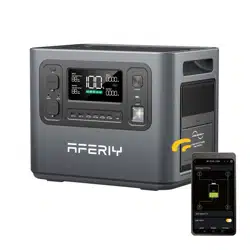
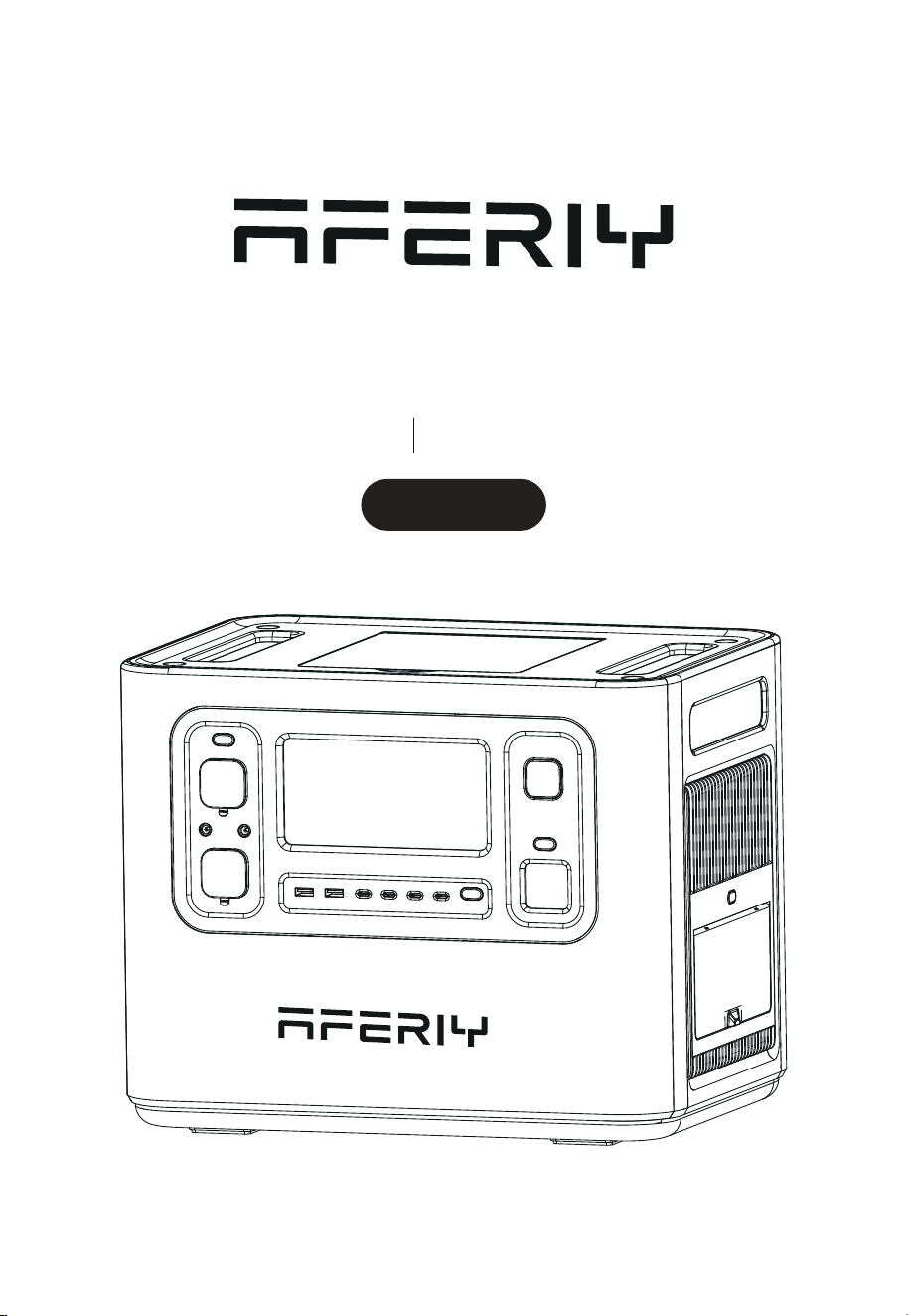
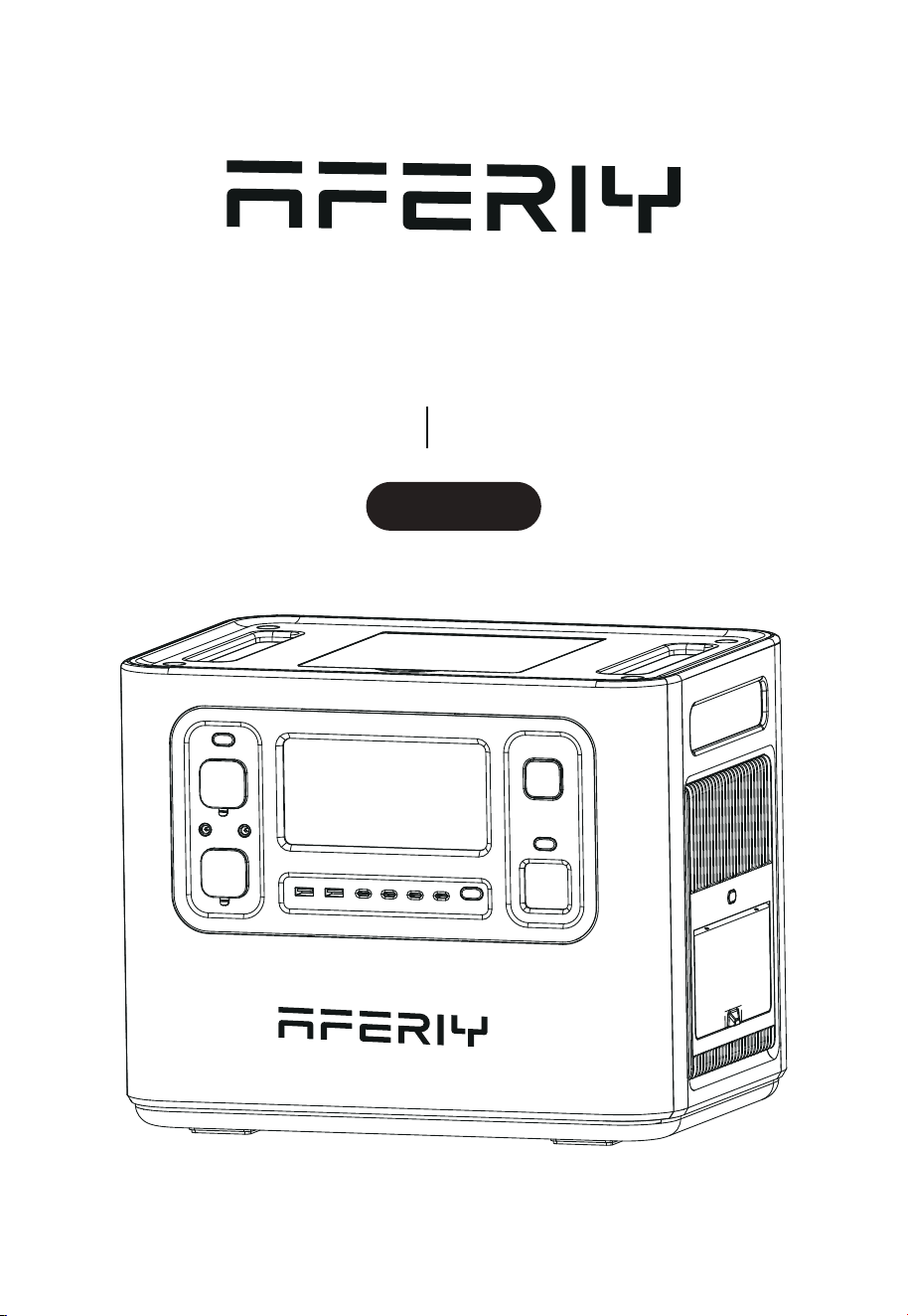
Portable Power Station
AF-P210 User Manual
2400W
Hi dear, thank you very much for purchasing and experiencing the AF-P210 portable
power station. Before operating this product, please carefully read the user manual for
proper operation.
According to the transportation requirements of the international customs for baery
products, the baery level of this product is only less than 35% when it leaves the factory.
Please fully charge the product after unpacking it to start the experience tour of AF-P210.
1. Please avoid long-term storage and use of this product in environ-ments with
high temperature and humidity or direct sunlight to avoid shortened baery life
and other failures. The product should not be close to the fire source, otherwise
it may cause a major fire or accident.
2. This product must not be disassembled or modified. Improper oper-ation may
cause product malfunction or even fire.
3. Be careful not to drop or drop the product from a high place, so as not to
damage the product.
4. Please store or use this product out of the reach of children, other-wise the
product may be dropped or collided and may cause bodily injury to children.
5. Please use our original accessories, and AFERIY will not guarantee the defec-
tive products caused by the use of non-original accessories.
6. Please directly plug in the wall socket to charge the product, do not use exten-
sion cords or cable taps, otherwise there is a risk of damage to the extension
cords and cable taps or even a fire; If the extension socket is plugged in to
charge this product, please do not connect other electrical appliances to this
socket, otherwise the household meter may trip.
7. When the product is not in use or idle, please turn it o and unplug the power
cable. If it needs to be idle for a long time, please consume the product from
a fully charged state to an uncharged state, then recharge it to about 50% of the
baery level and store it. In order to prolong the life of the product, please take
three months as a cycle, operate and keep it in this way.
8. If the product reaches scrap conditions, please discard or recycle the
product in accordance with local laws.
Precautions For Use

Contents
Packing List
Product Introduction
Buon Function Introduction
Introduction of Display Interface
Troubleshooting table
UPS Mode
Connection of Solar Panels
Car Charging
Product Parameter
Baery Specifications
Disclaimer
Warranty Card
01
01
02
05
06
07
08
09
10
10
11
12
1
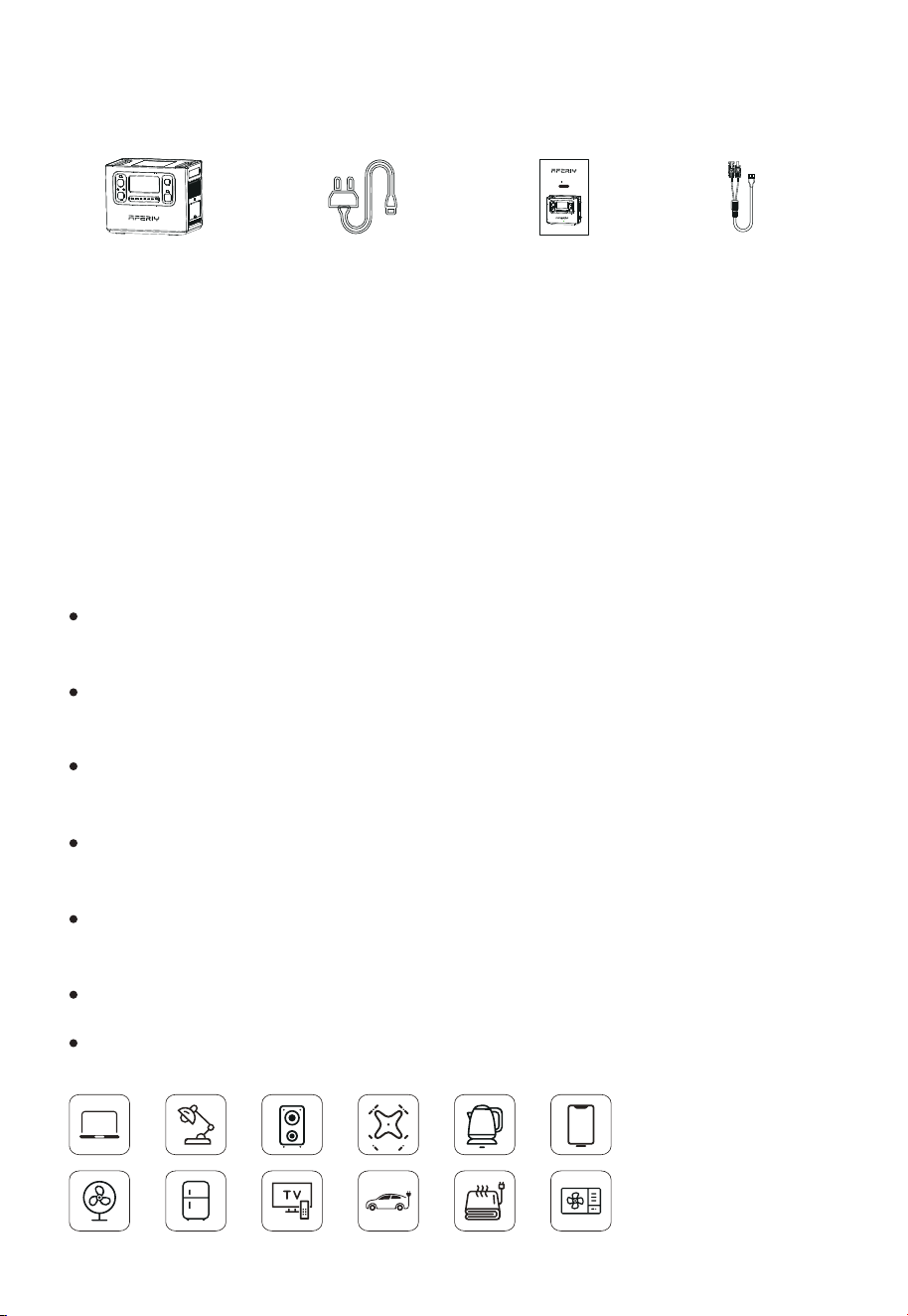
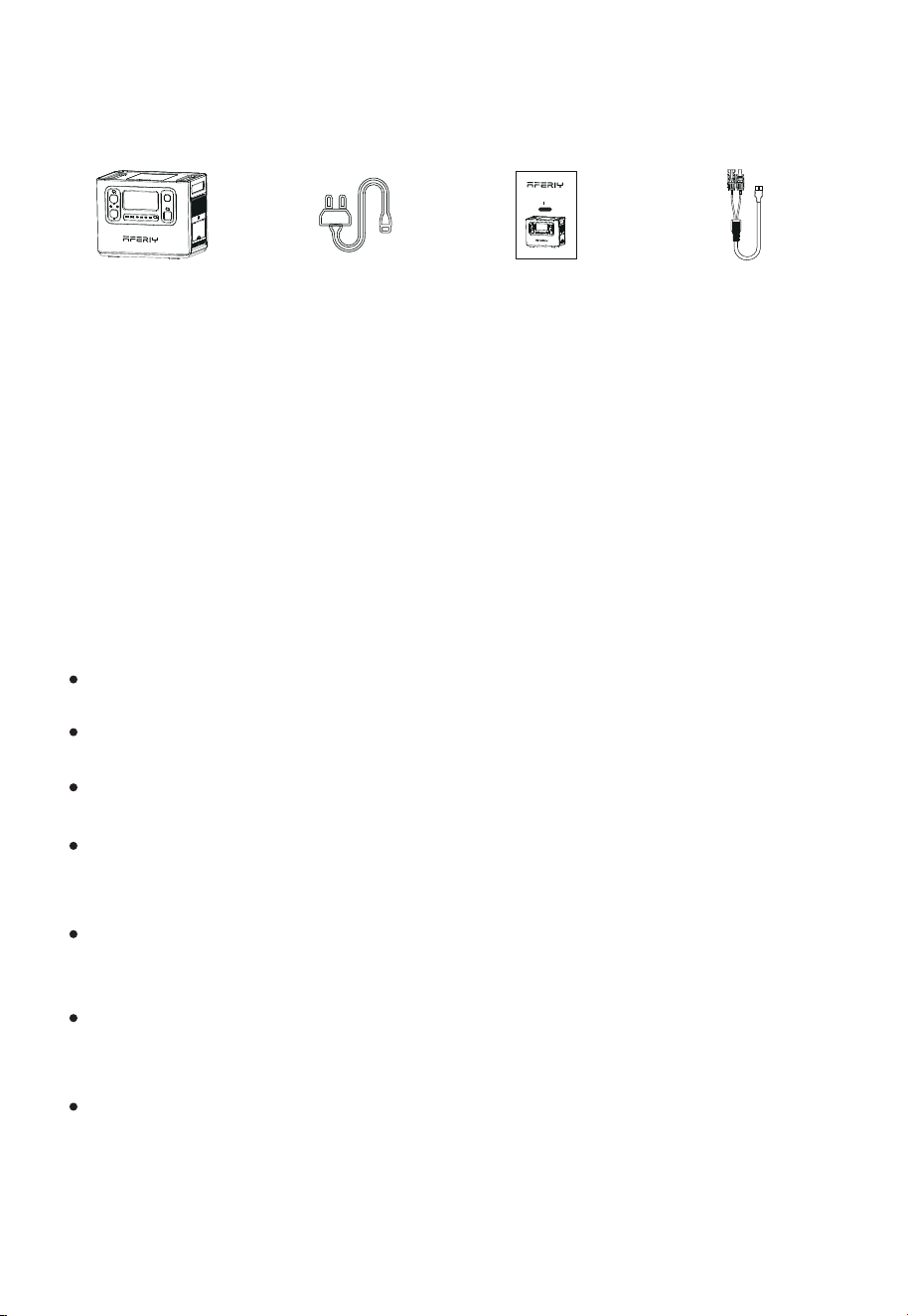
Packing List
Product Introduction
This product is a portable power device with a built-in baery pack with charge/
discharge function. It includes both AC output interface and DC output interface
such as USB output, cigaree lighter output, DC output, etc. It also has functions
such as display, interface control, protection, and alarm. Moreover, this product
can be charged by mains AC, solar panels and vehicle charging.
The following are the main features of this product:
Equipped with EVE brand LiFePo4 baery, the baery capacity is as high as 2048Wh,
and the safety level is extremely high.
2400W pure sine wave AC output can meet almost all daily electronic equipment
and small household appliances.
Two-way fast charging technology is adopted to fully charge the prod-uct within
2 hours.
In UPS mode, the switchover time is less than 10ms which is truly seamless
switching.
AC Charging Cable
MC4-XT90
Portable Power
Station
User Manual
A great verity of output interfaces such as USB-A, Type-C PD3.0, DC5521, XT60,
cigaree lighter output, etc., meet many dierent application scenarios.
IP54 waterproof grade, all interfaces are designed with dust-proof and water-proof.
Portable Power Station
AF-P110 User Manual
1200W
Multiple protection mechanisms such as baery, circuit, structure, etc., guarantee
the product safety.
2
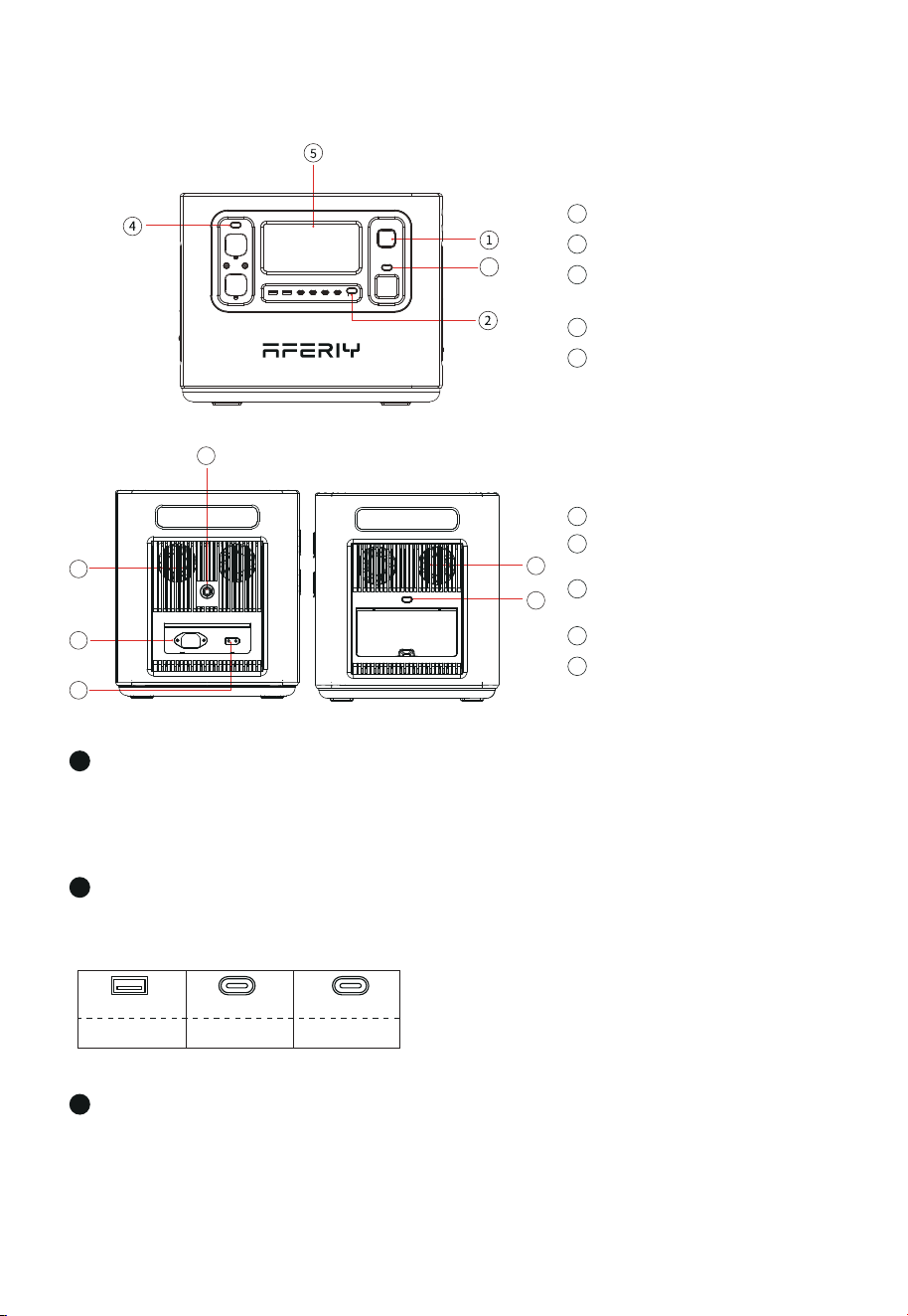
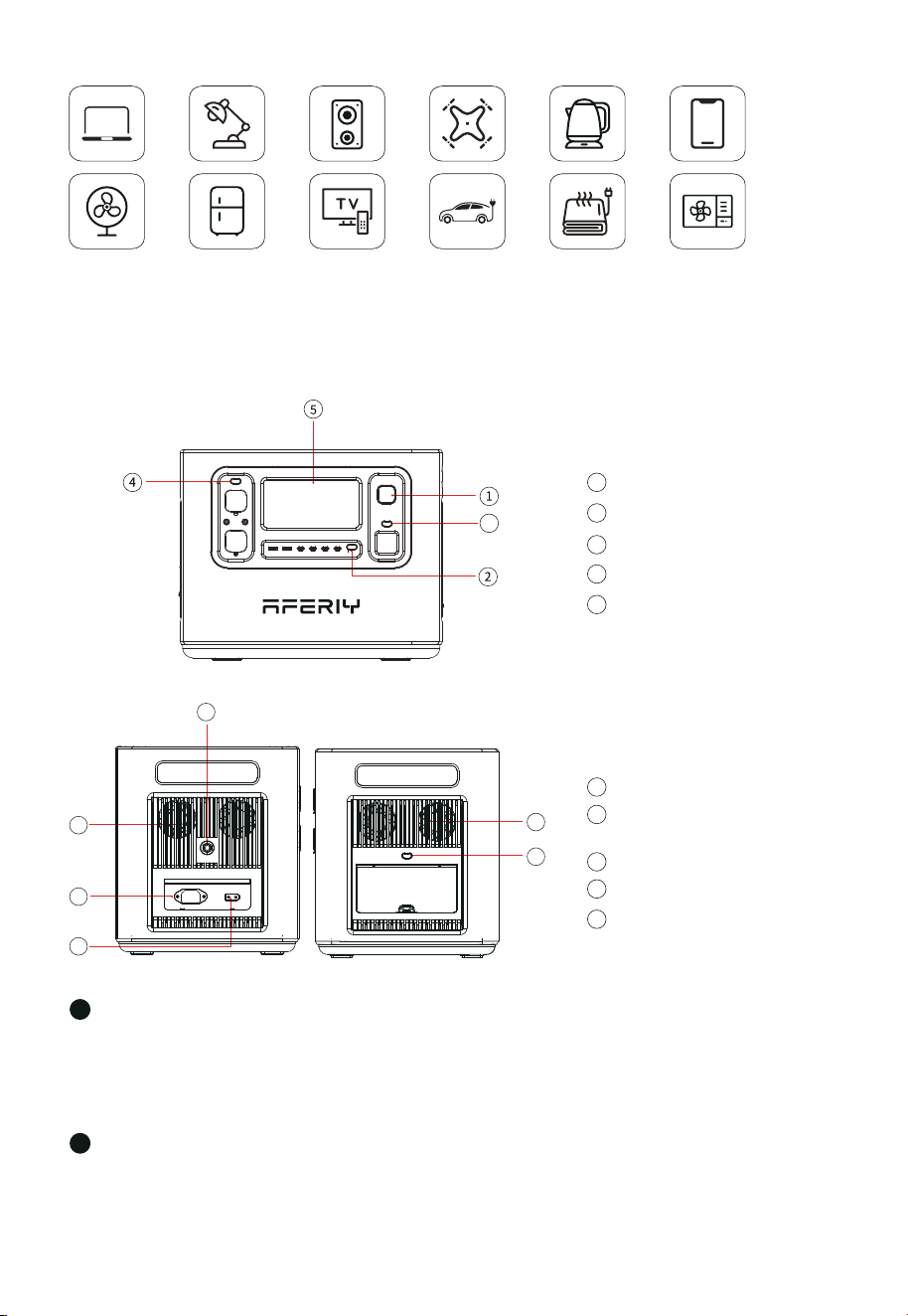
Power ON/OFF Buon
1
USB ON/OFF Buon
2
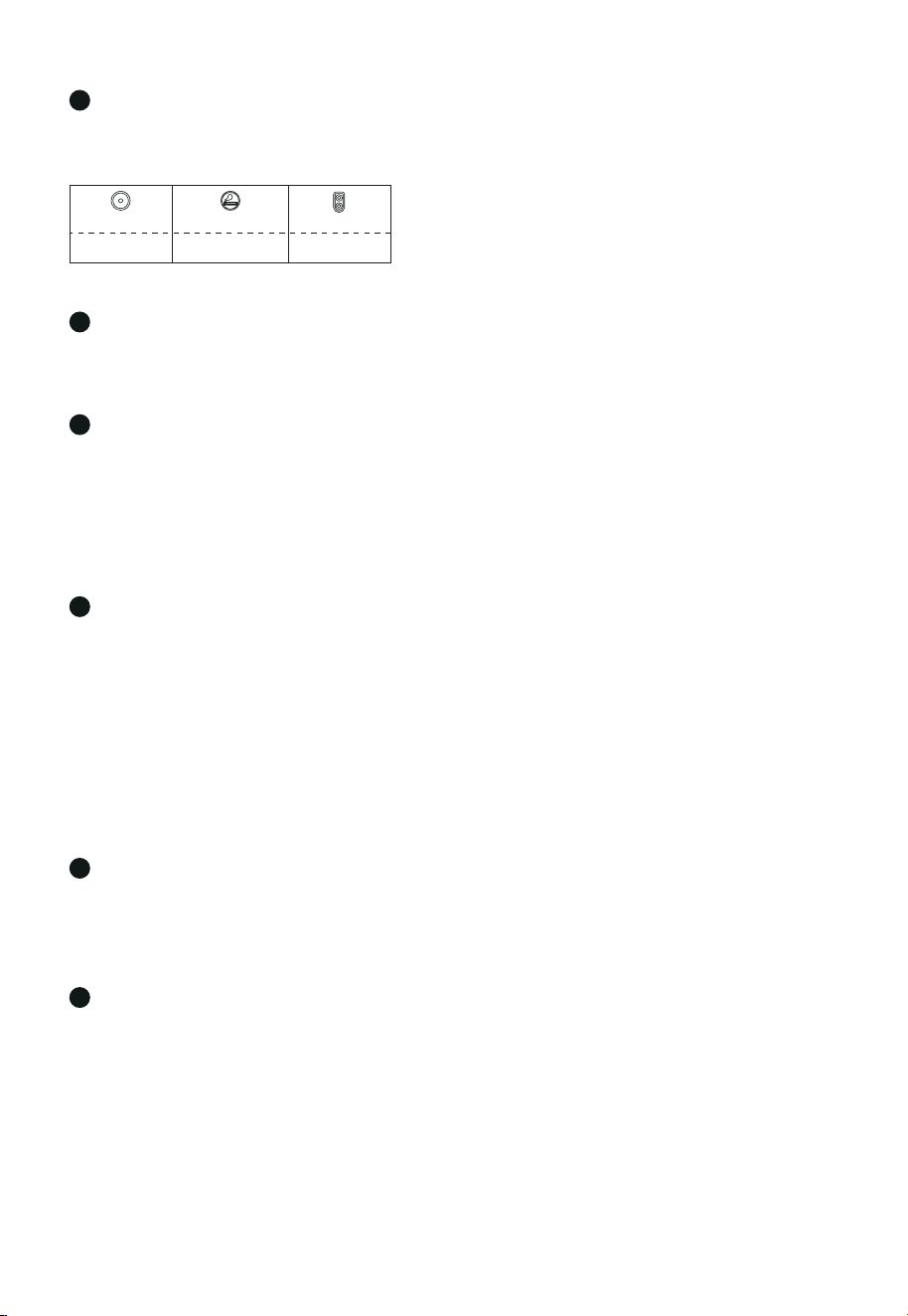
Instructions: Short press the Light buon, the LED lights are all on;short press again,
the LED light enters the SOS mode, short press in turn, enter the strobe mode, and
finally the LED light turns o ( LED in any mode , long press the light buon for ≥ 1
second directly turn o the LED light).
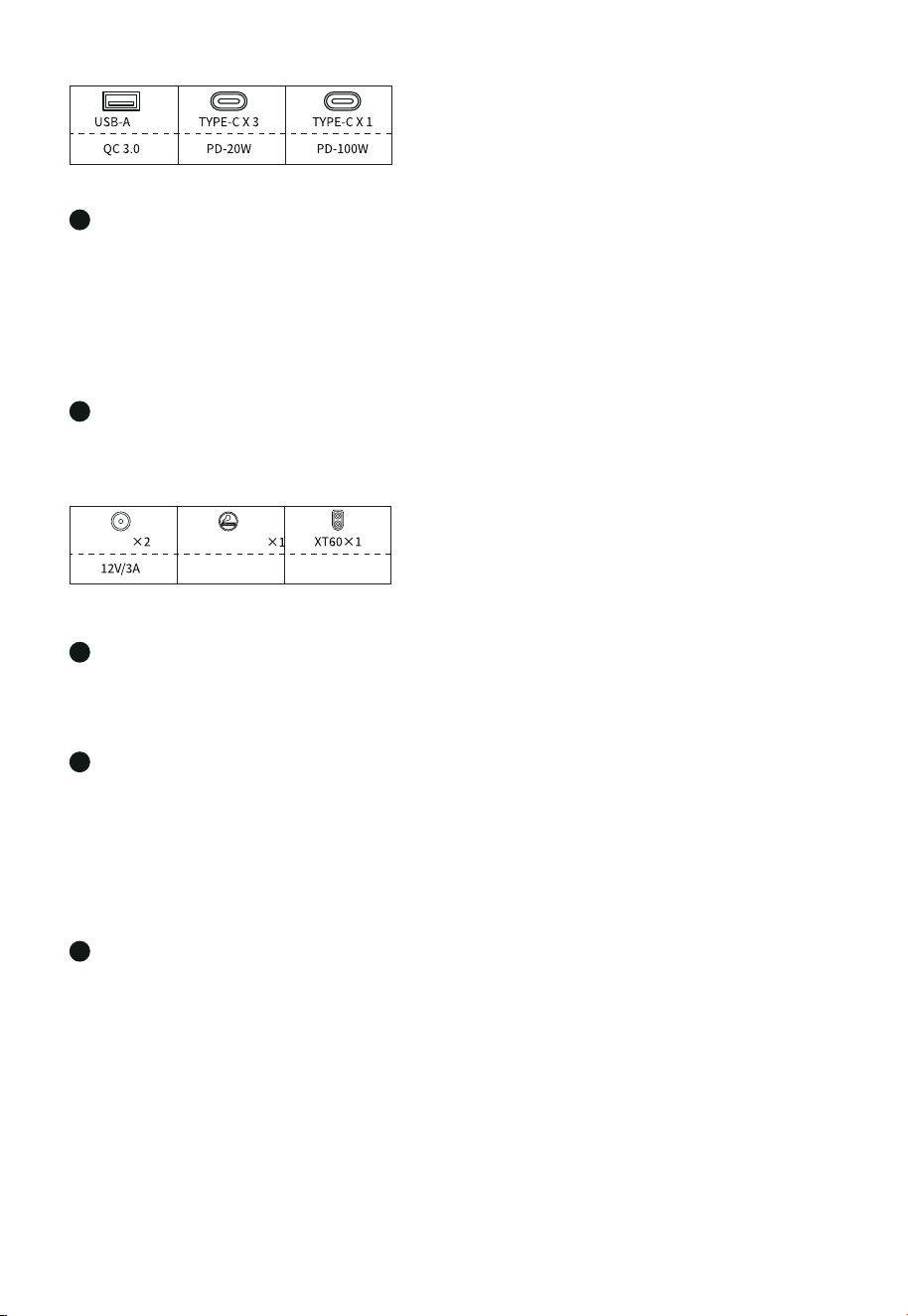
QC 3.0 PD-20W PD-100W
TYPE-C X 1USB-A X 2 TYPE-C X 3
Buon Function Introduction
Power ON/OFF Buon
1
3
LED Light Buon
(Switch to dierent mode)
USB ON/OFF Buon
2
DC ON/OFF Buon
4
LCD Screen
5
XT90 Input Port
( for solar panel)
8
AC input
9
Overload Protection Buon
10
Cooling Air Duct
6
AC Buon
(manually switch to 50/60Hz)
7
Light Buon
Instructions: Press and hold the power buon for 3S to wake up the system, turn on
the LCD display, and press and hold again for 3S to turn it o.
Instructions: Short press the USB buon to turn on the USB output port, and short
press again to turn it o.
3
3
6
6
7
8
10
9
3
Please directly plug in the wall socket to charge the product, do not use extension
cords or cable taps, otherwise there is a risk of damage to the extension cords and
cable taps or even a fire.
Display the product's baery level and usage status tips.
LCD Screen
Cooling Suction/Exhaust Port
When the product reaches the temperature threshold set by the system, the cooling
fan will automatically run, accompanied by a cert-ain fan noise (fan noise below 60dB is
normal). Do not block the cooling suction/exhaust port during use of this product, and
do not place any object within the range of 30CM.
AC Buon (AC output port, the sum of electrical load power should be <2400W)
XT90 Port
This interface supports solar panel input or car charger input. For details, please refer to
"Solar Panel Connection" on page 8 of this manual and "Car Charging" on page 9.
DC ON/OFF Buon
Instructions: Short press the DC buon to turn on the DC output port, and short press
again to turn it o.
※
AC Input
To charge the product by a household socket can achieve 1100W fast charging. It only
takes 2 hours to fully charge from 0 to 100%. When charging in this way, please pay
aention to the following points:
4
Dcoutput X 2
Cigaree port X 1
12V/10A 12V/25A
XT60 X 1
12V/3A
5
6
7
8
9
If the extension socket is plugged in to charge this product, please do not connect
other electrical appliances to this socket, otherwise the household meter may trip.
※
Tap the AC buon to enable the AC output function.
The needed AC input power may vary in dierent time periods. If the input power needs to be
switched, the operations are as follows: Press and hold AC buon for 10s to enter the power
switching mode, the display screen will show the input power seing interface in which the
switched input power can be set; stay at the input power interface of current seings for 5s,
the system will automatically save the input power of current seings and go to the main
interface. The input power can be set at 5 grades: 300W/500W/700W/900W/1100W.

4
Overload Protection Buon
When the power supply current is unstable due to lightning or other reasons, and
there is a large current input at the AC Input, in order to protect the product, the
overload protection function (safety circuit breaker) will activate and cut o the AC
input port.
Please follow the sequence below to restore the AC input function:
1) Turn o the power buon and unplug all ports.
2) After confirming that there is no abnormality in each part, turn on the power buon.
3) Press the overload protection buon, connect the AC Cable to restore the AC input.
10
5
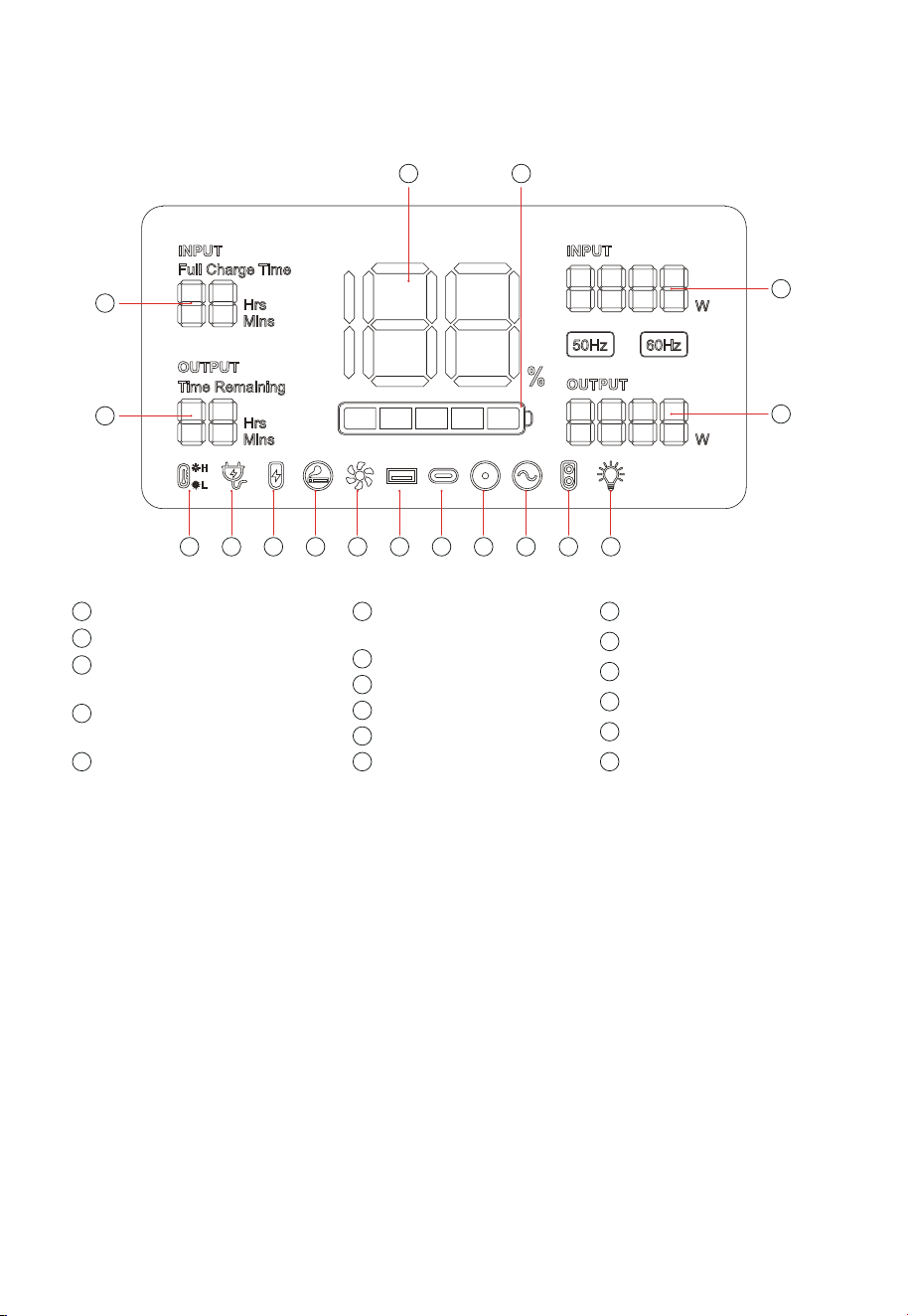
Input and output status: When the product is working, the total input power, total
output power and the cursor corresponding to the working area will be displayed on
the screen.
percentage gradually increases; when the prod-uct baery level is 0, the baery
level percentage icon flashes.
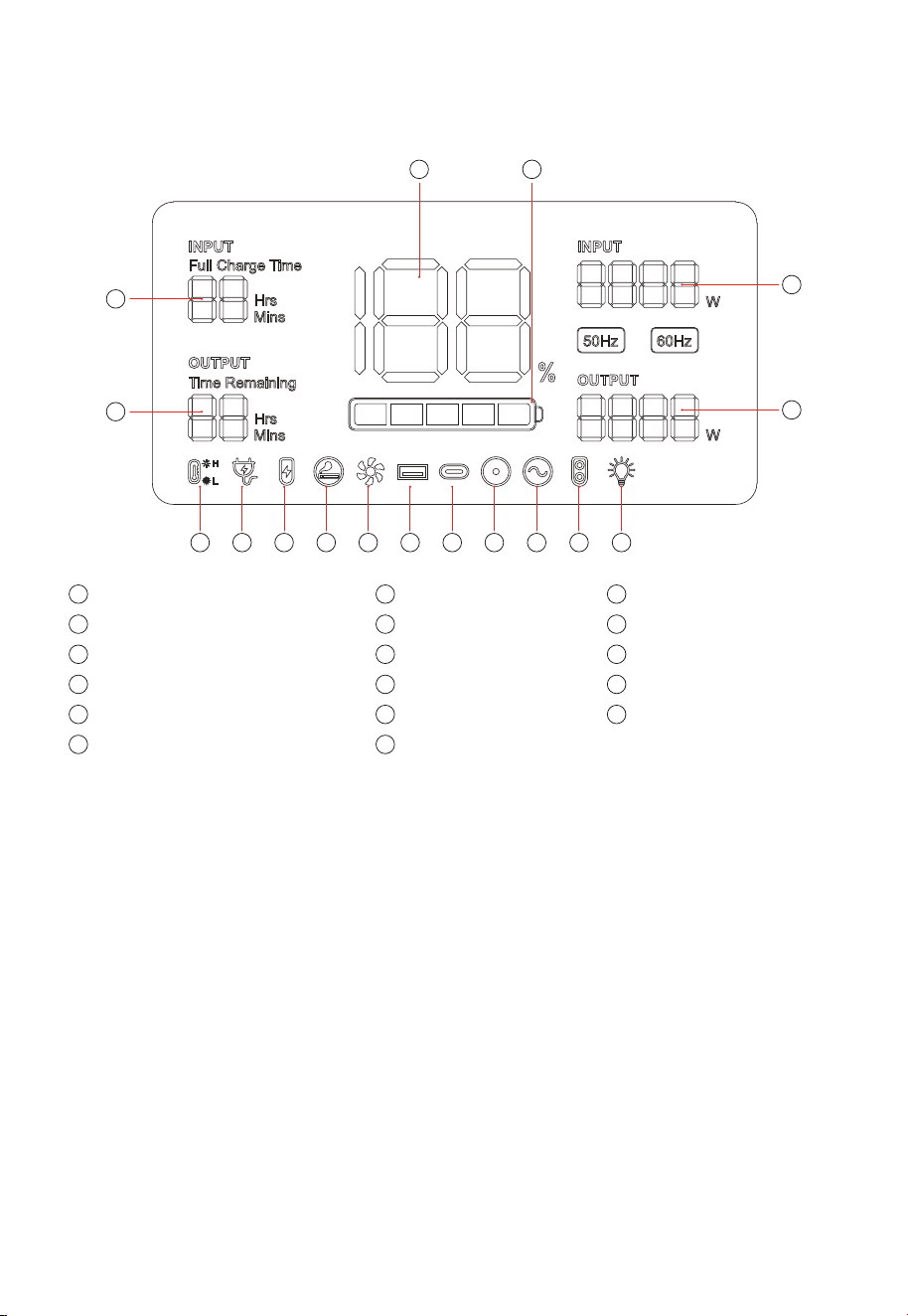
Introduction of Display Interface
14
15
1
2
17 16
3 4 5 6 7 8 9 10 11 12 13
1
Recharging Time
2
Remain Using
5
XT90 Input
4
Connected to the AC
Mains
3
High/Low Temperature
Protection
12
XT60 (12V) Output
13
LED Light
14
Output Power in Total
15
Input Power in Total
16
Baery Progress Bar
17
Baery Level Percentage
6
Cigar Lighter (12V)
Output
7
Fan Status
11
AC Output
10
DC (12V) Output
8
USB Output
9
PD3.0 Output
Screen Display Description
Power display: When the product is in the charging state, the baery progress bar
rotates continuously in the form of a clockwise marquee, and the baery level
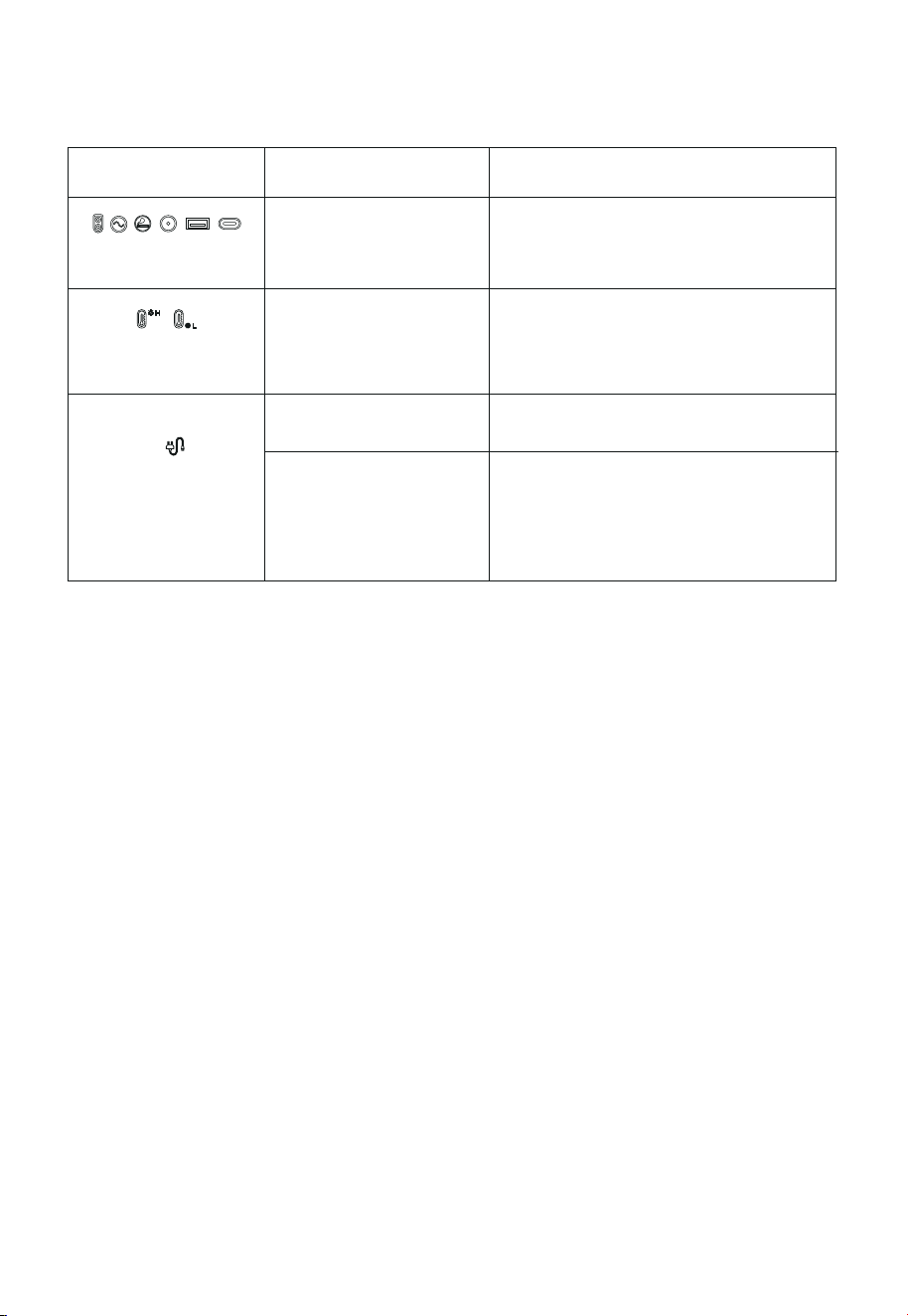
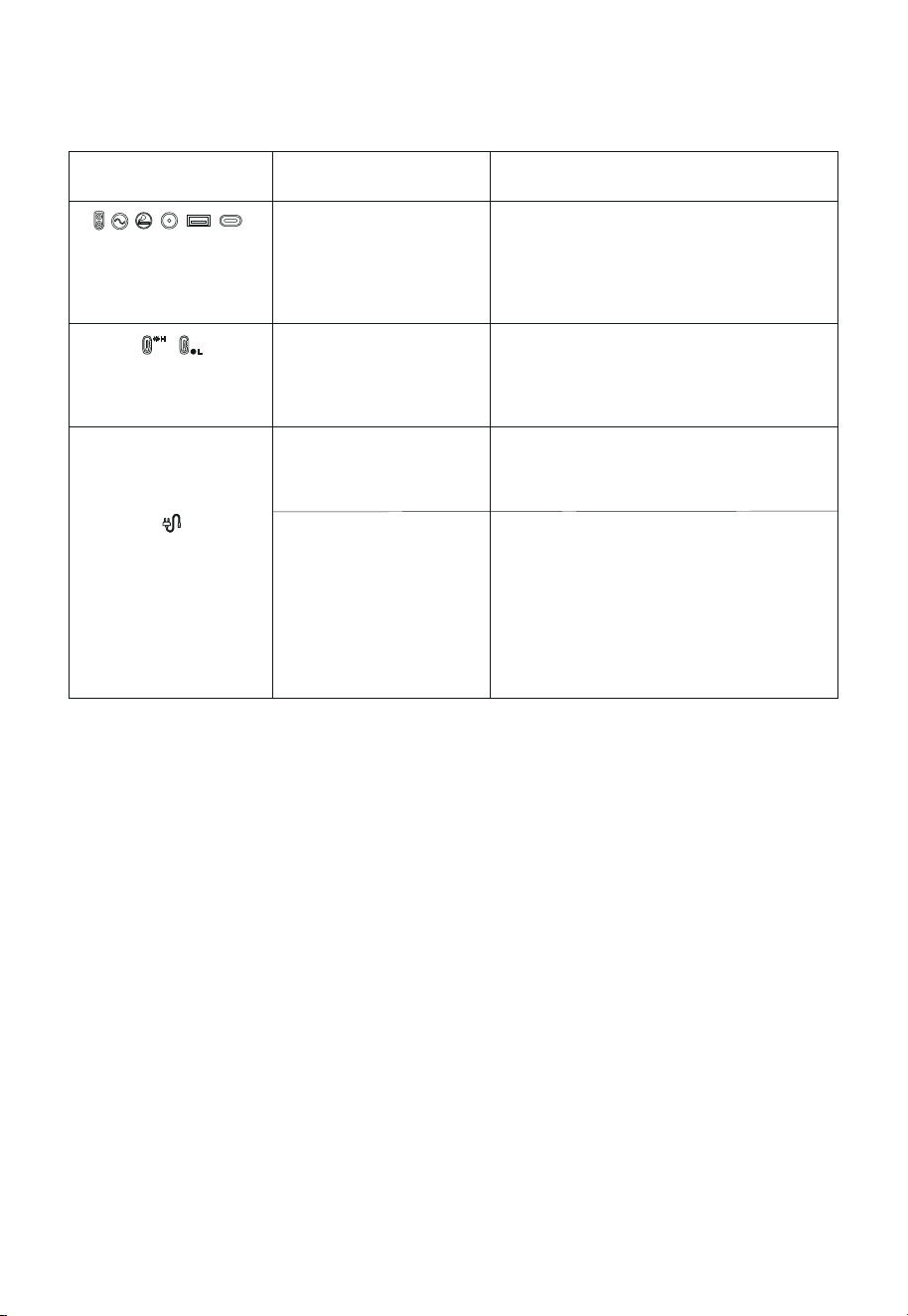
Troubleshooting Table
The output exceeds the
standard and it’s short
-circuited.
Remove the load, and then short press
the switch in the area corresponding to
the icon to remove the alarm
Take the product out of the charging state
remove all loads, turn the power o, wait
for the device to reach a suitable working
temperature, then the alarm is removed .
The temperature of the prod
-uctis too high or too low.
The charging cable is poorly
connected.
1.Turn o the power buon and unplug all ports
Phenomenon Cause
Processing method
The above output icon
flashes and beeps.
The temperature warning
iconflashes and beeps.
The icon of connecting
to the AC mains flashes
and the product cannot
be charged.
3. Press the overload protection buon,
conneche AC cable to restore the AC input
2.After confirming that there are no faults ineach
part, turn the power switch back on.
The overload
protectionfunction is
activated
The overload protection function is enabled
6
lf you have any questions, please feel free to contact us.
Email address: [email protected].
Sincerely.
1. The inadequate light at sunrise or sunset will cause sudden high or low output voltage, which
may cause repeated switch of relay between “ON” and “OFF” status. As a result, the “ON” sound of
the relay will continue all the time. It is recommended to actively disconnect the input of solar
energy after sunset and manually connect the input of solar energy after sunrise. This operation
can both avoid the trouble of continued “ON” sound of the relay and reduce power consumption of
the product.
2. When the relay is turned on, a blue LED indicator will be “ON” in the product, of which the blue
light will penetrate through the ventilation opening at night. This is a normal phenomenon.
3. The long transportation may lead to deviation of displayed baery capacity with actual baery
capacity at the first application. Before normal use of the product, you need to charge the product
to 100% baery capacity, then discharge the product to automatically turn o and recharge to
100% baery capacity.
4. The product has low-temperature charge and discharge protection functions. At the environ-
ments below 0℃, the product will stop charging and continue the normal charging until its
temperature recovers.
5. The power consumption of the product itself may cause error in power collection if the output
power is small, as a result, the displayed output power is 0, and automatic shutdown may occur
after a period of application.
6. The product has smart charging protection function. If the baery capacity reaches 85% in the
process of charge, the charging power will automatically decline, which can raise service life of its
baery.
Notes:
7
UPS Mode
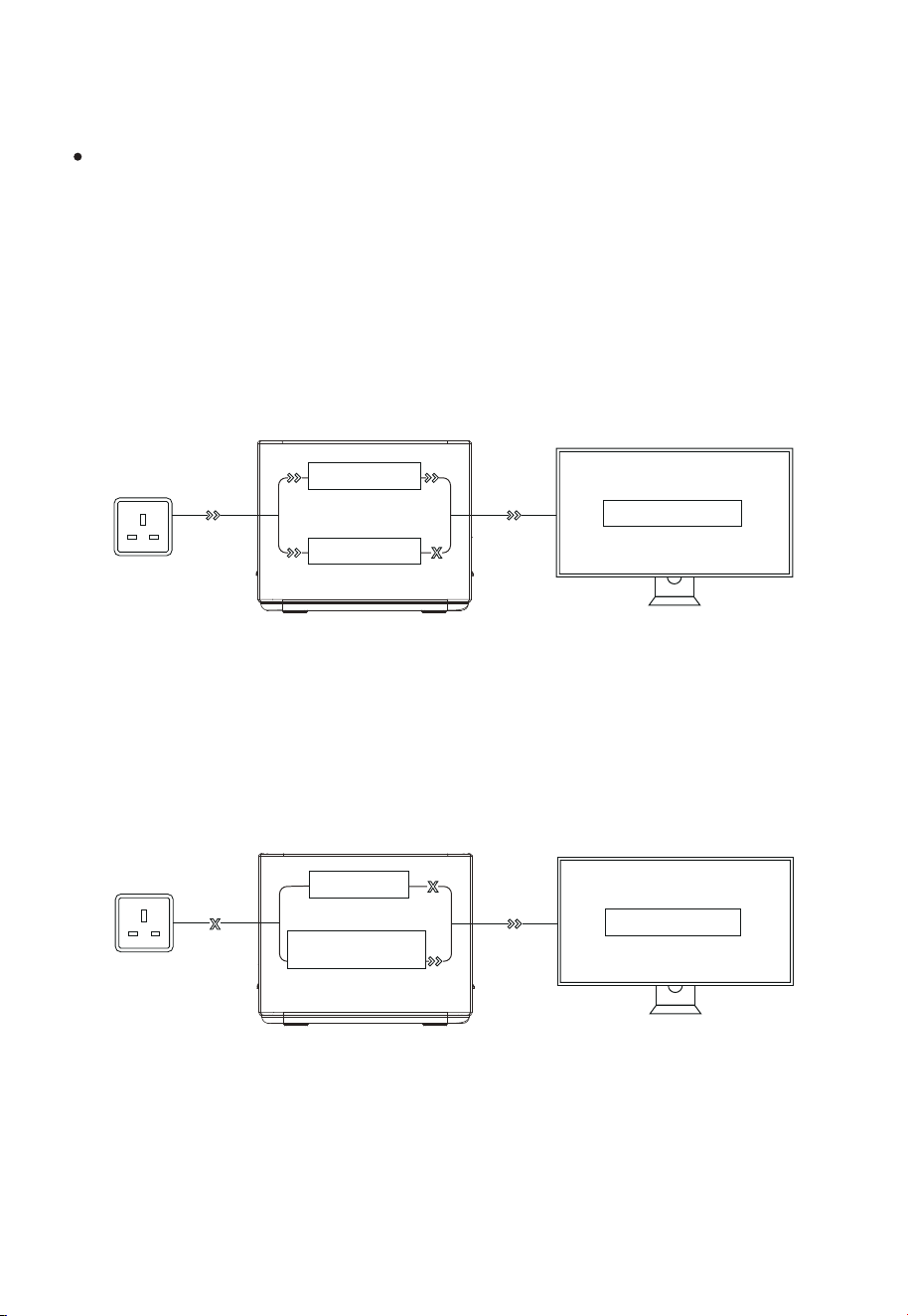
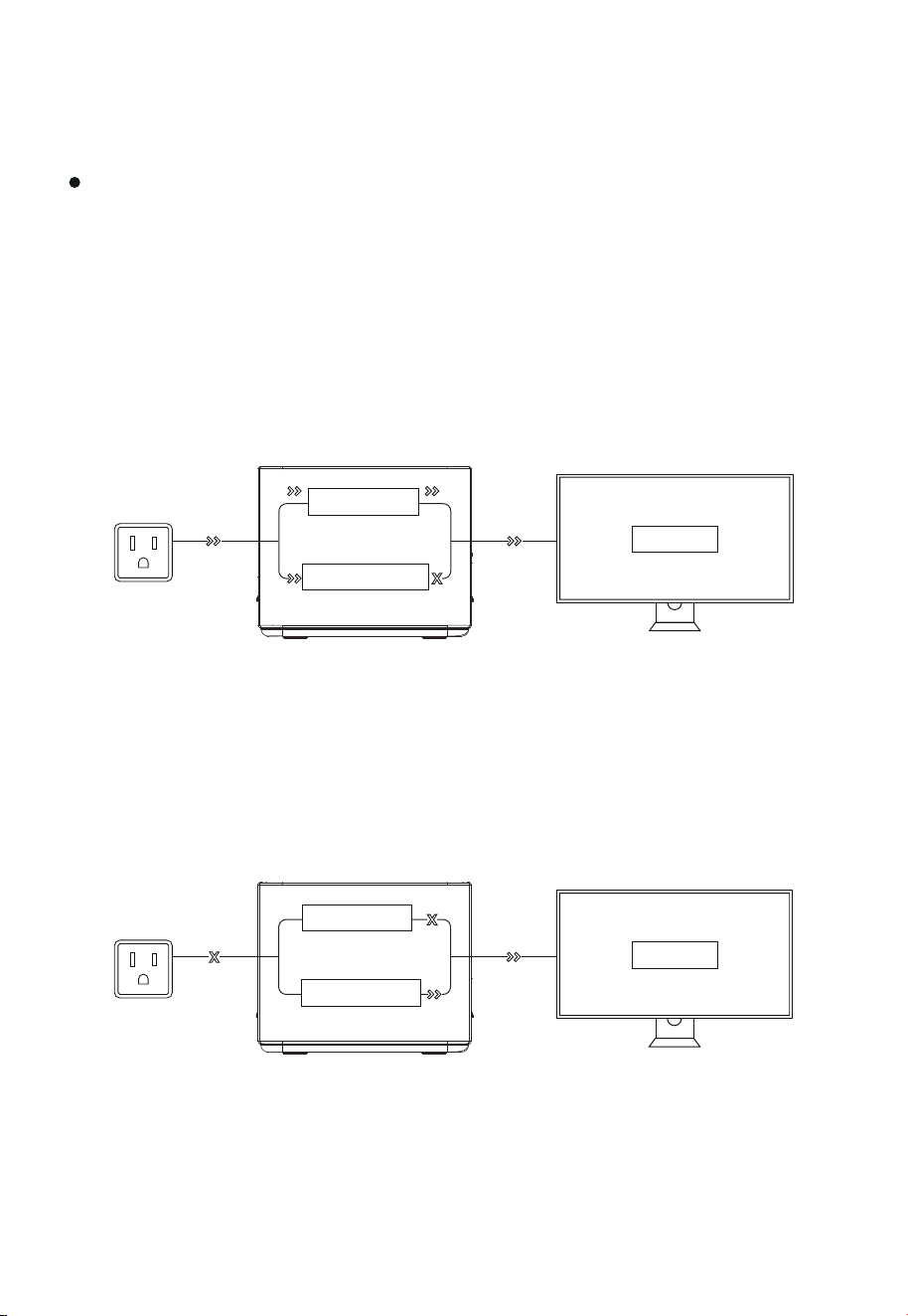
As shown in Pic 1 below, when the product is connected between the wall socket and the
electrical appliance, and the power supply and AC switch of the product are in the ON
state, the product enters the UPS working mode. The AC mains in the socket supplies
power to the electrical appliance through the bypass circuit, and also charges the
product. In this working state, the rated power of the electrical appli-ance must be lower
than 1100W(only 100V-120V), otherwise overload protection may be triggered.
UPS Feature
This product has the function of backup uninterruptible power supply. The usage and
operation precautions are as follows:
As shown in Pic 2 below, when the AC mains at the socket end is disconnected, the
bypass output inside the product stops working, the product switches to a bidirectional
inverter circuit within 10ms, and the circuit outputs supply power to the electrical
appliance to ensure that the electrical appliance is uninterrupted and works normally
during the process.
Bypass circuit
Bidirectional inverter
circuit
load/Equipment
(Pic 1)
load/Equipment
Bypass circuit
Baery charging
(Pic 2)
8
Connection of Solar Panels
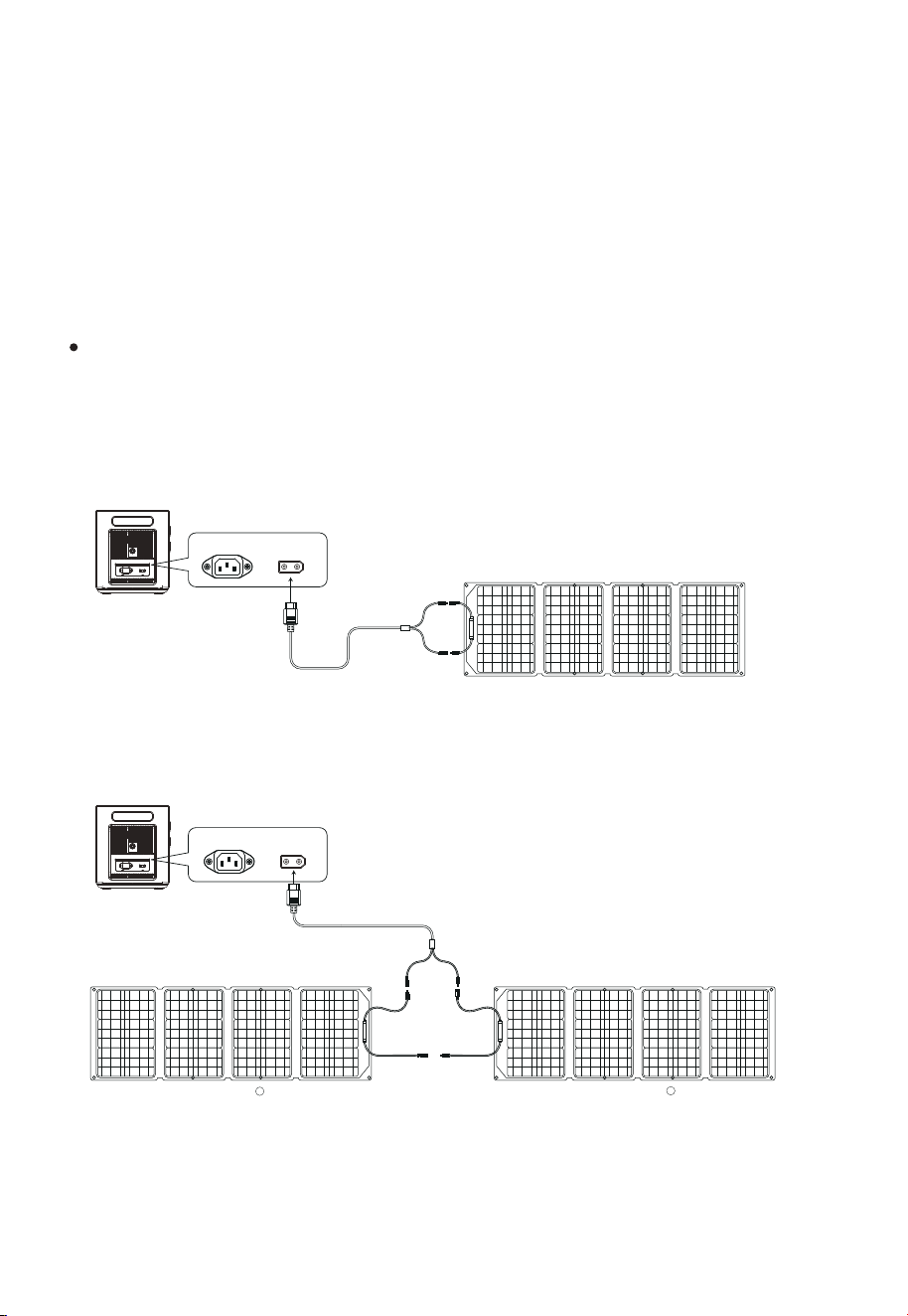
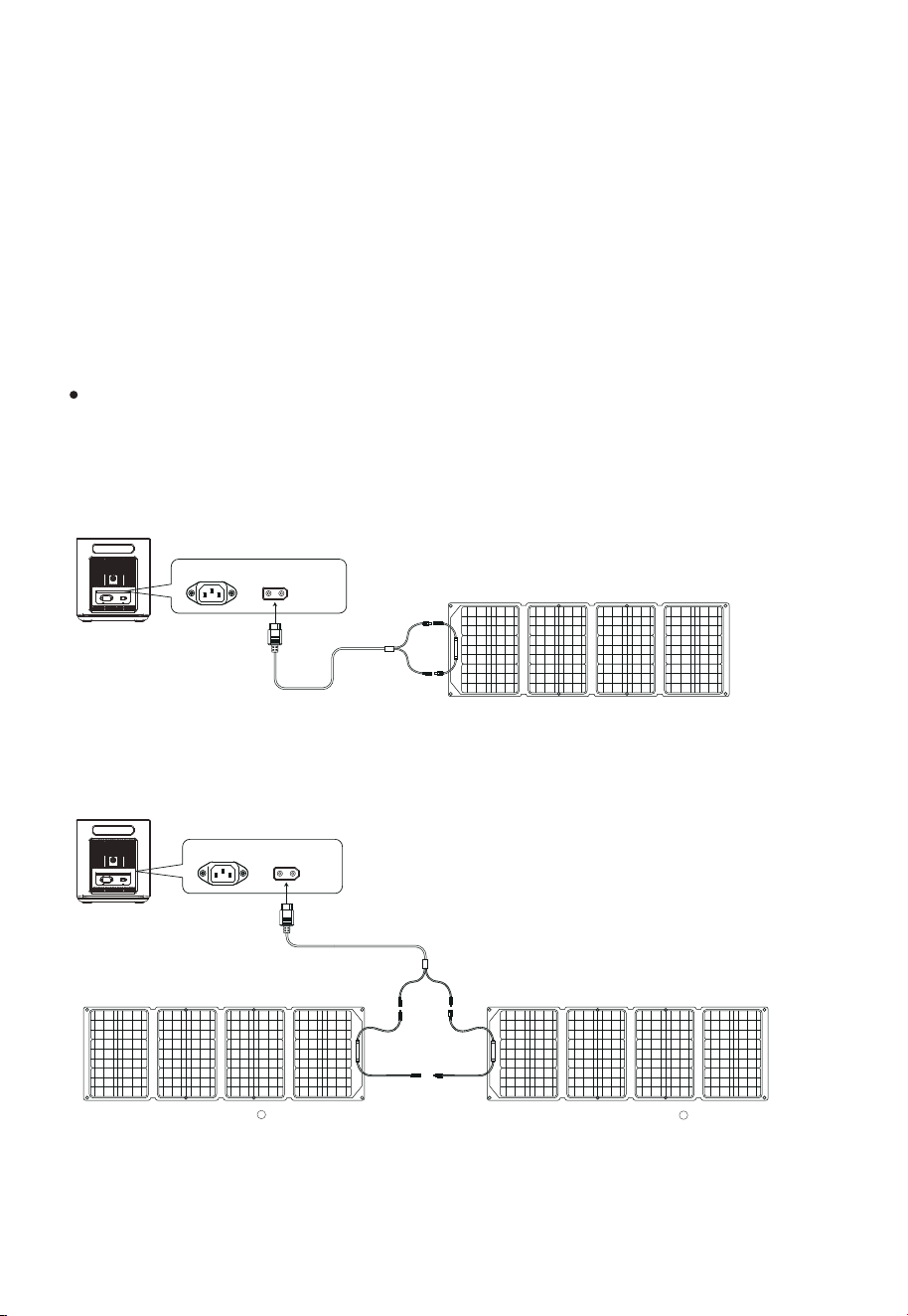
We recommend the following two charging schemes:
Scheme One
Portable Power Station Charging Area
Under the condition of light, this product can be connected to the solar panel and
geing charged. The charging power is determined according to the conditions of
light and weather.
In this charging mode, we support solar panel input within 500W, and the input
voltage cannot exceed 50V, otherwise the product abnor-mality caused by it will not
be covered by the warranty.
Scheme Two
Portable Power Station Charging Area
MC4 to XT90
Solar Panel (Not included in accessories)
AC Input XT90 Port
Portable Power Station
(Not included in accessories)( Not included in accessories)
MC4 to XT90
solar panel
A
AC Input XT90 Port
Portable Power Station
solar panel
B
9
Car Charging
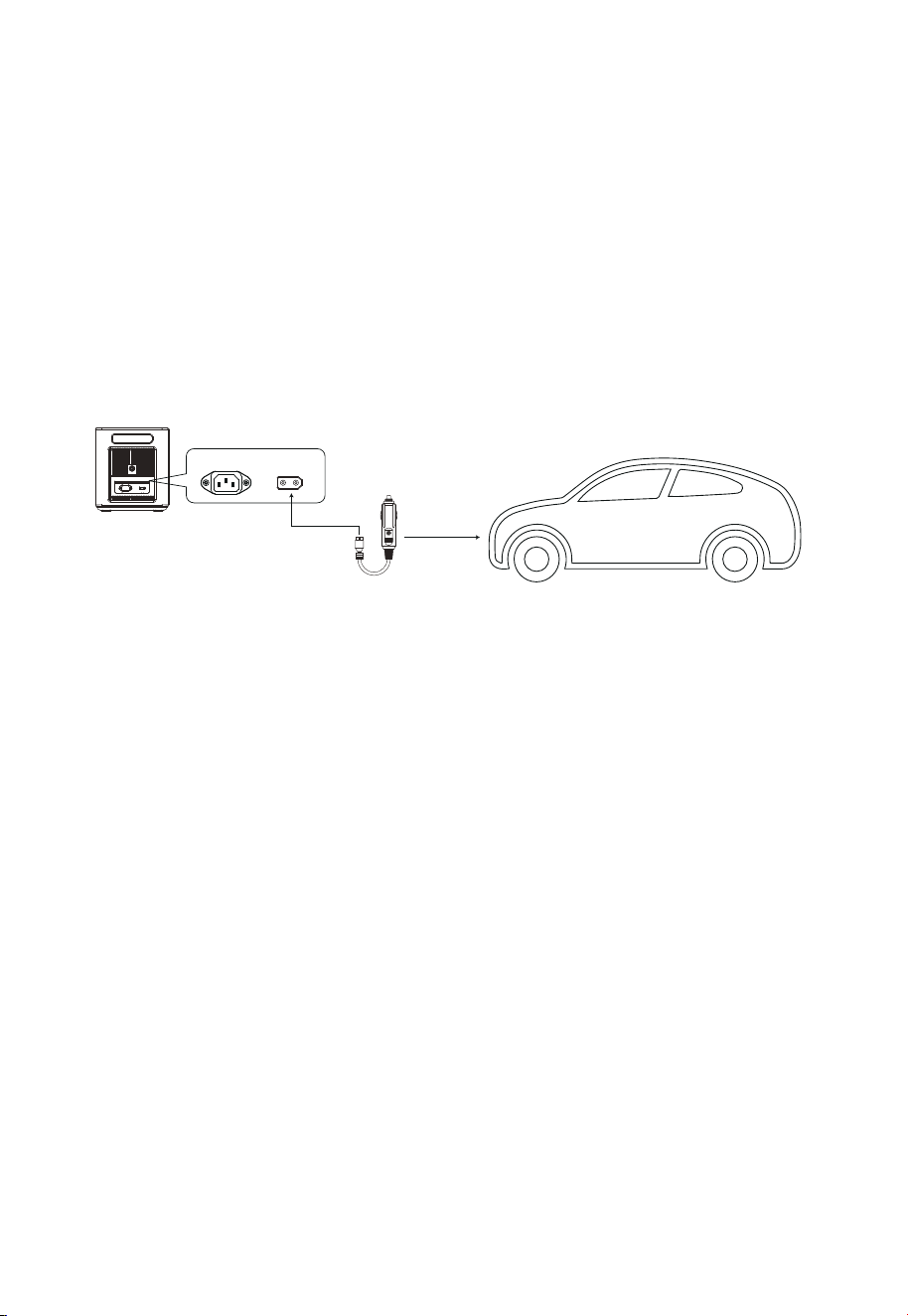
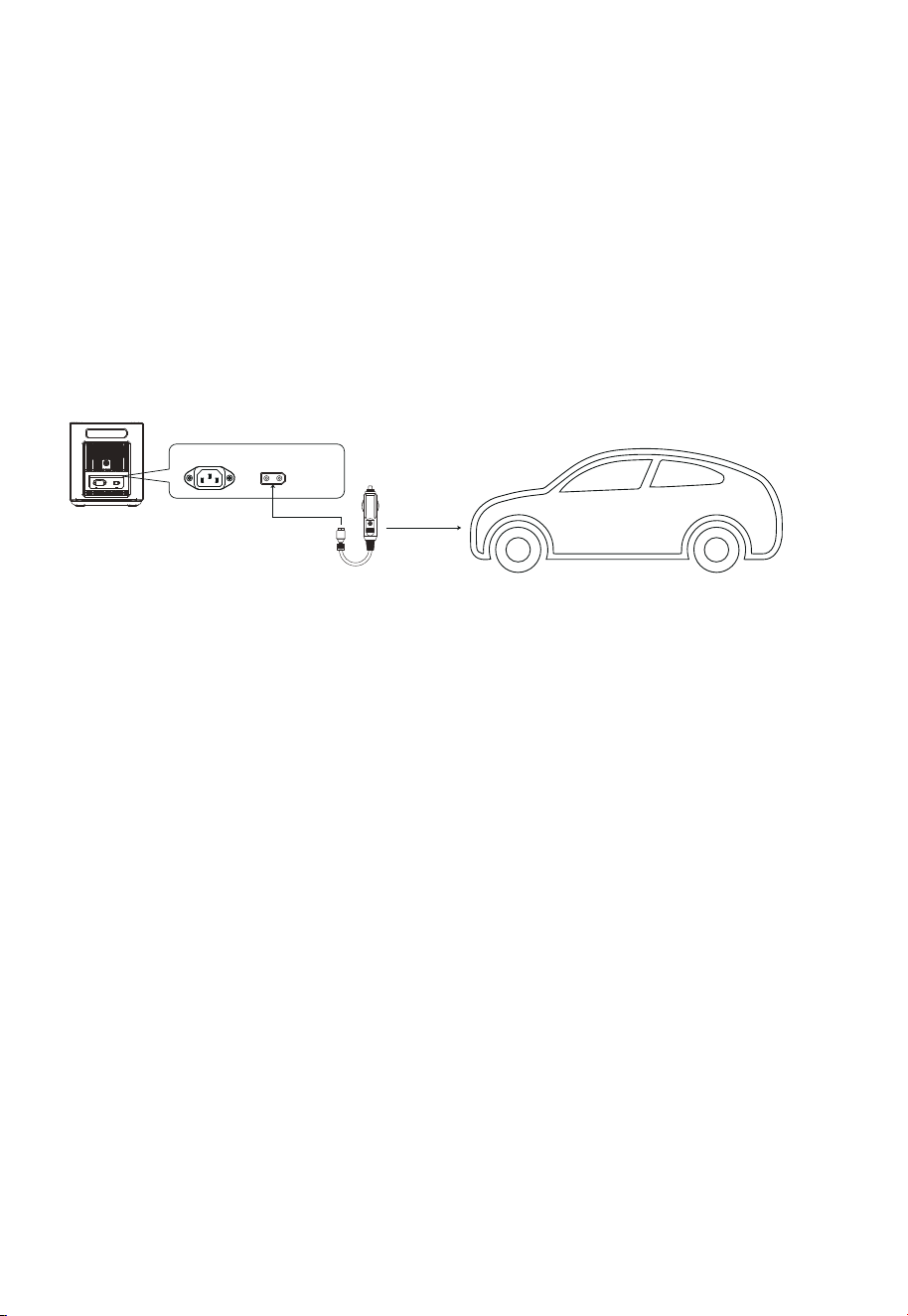
When the car is in the process of starting, connect the car charging port on the car
and the product through the car charging cable to charge the product. The
connection method is shown in the picture below:
This product supports 12V/24V car charger charging, please pay aention to the
following two points when using this method to charge:
Please use it when the car started, otherwise the car baery may be exhausted.
Vehicle charging power is usually in the range of 90W-120W, and the charging
time is long.If fast charging is required, the AC mains charging is recommended.
Car Charging Cable
AC Input XT90 Port
Portable Power Station
※
※
(not included in the packaging)

10
Baery Specifications
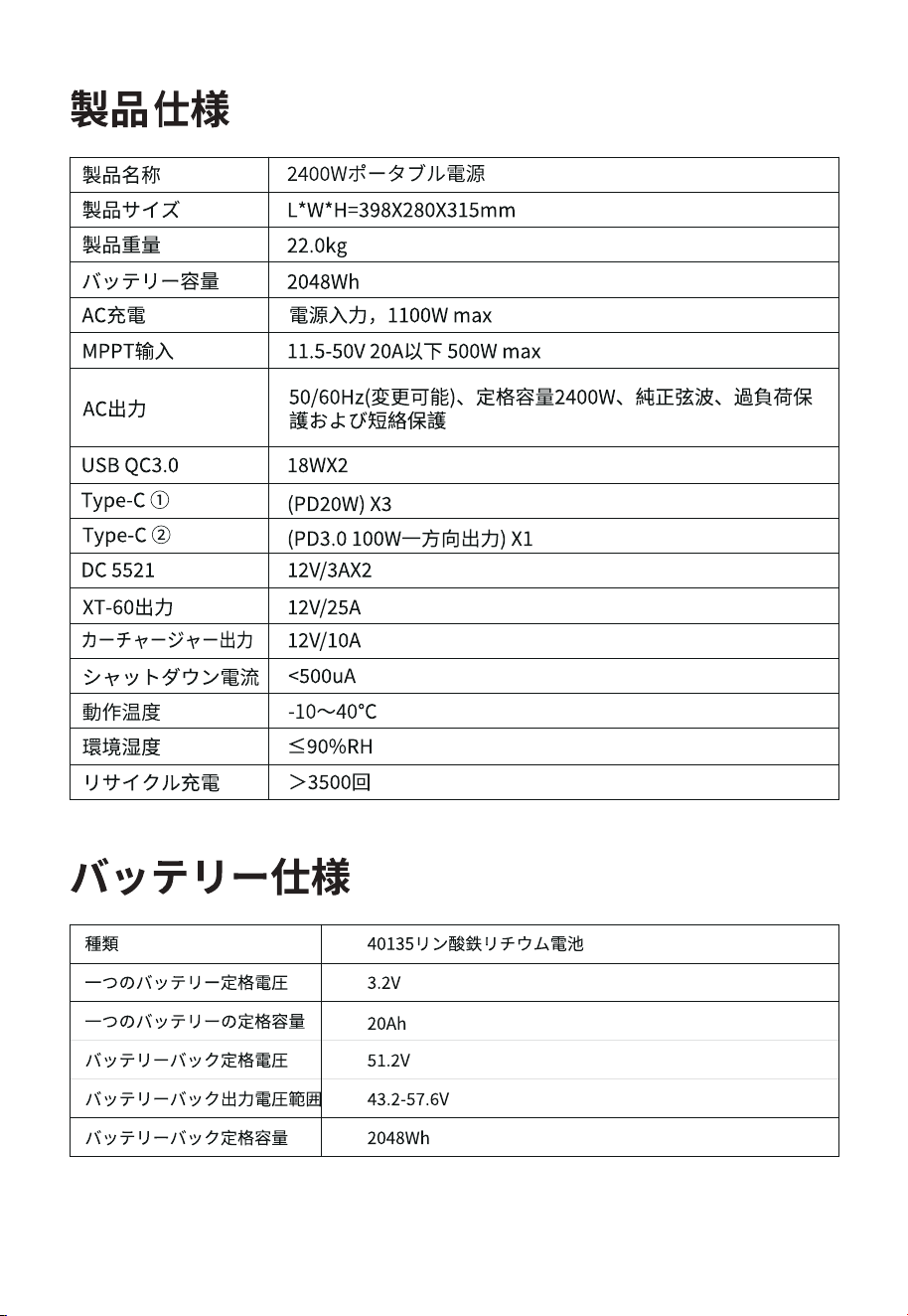
Product Parameter
Cell type
Rated voltage of single baery
Rated capacity of single baery
Rated voltage of baery pack
Output voltage range of the baery pack
Rated capacity of baery pack
Product Name
Dimension
Weight
Capacity
AC Charging
MPPT Input
AC Output
USB QC3.0
Type-C
①
DC 5521
XT-60 Output
Shutdown Current
Working Temperature
Environment Humidity
Type-C
②
Cycle Times
Car Charging Output
2400W Portable Power Station
AC Mains Input, 1100W max
11.5-50V 20A below 500W max
50/60Hz (switchable), rated 2400W, pure sine wave with
overload, short circuit protection
18WX2
(PD20W) X3
> 3500 times
(PD100W)X1 Included PD3.0 protocol
22.0kg
L*W*H=398X280X315mm
2048Wh
12V/10A
12V/25A
12V/3AX2
<500uA
≤90%RH
-10~40℃
40135 LiFePo4
20Ah
2048Wh
43.2-57.6V
51.2V
3.2V

11
Before use, please read the user manual of this product to ensure full understanding
and correct use. After reading, keep the user manual properly for future reference. If
you do not operate this product correct-ly, you could cause serious injury to yourself
or others, or result in damage to the product and property. Once you use this product,
you are deemed to have understood, recognized and accepted all terms and content
of this document. Users undertake to be responsible for their own actions and all
consequences arising therefrom. AFERIY is not responsible for all losses caused by the
user's failure to use the product in accordance with the User Manual.
In compliance with the law, the company has the final right to interpret this document
and all related documents of the product. If it is updated, revised or terminated without
prior notice, please visit the AFERIY oicial website for thelatest product information.
Disclaimer
12
Warranty Card
Name
Address
Tel
Mail
Brand、Order number
Buying date
Fill in the date
Please fill in all the above items.
Warranty Card
This product provides a 24-month warranty service from the date of purchase
If there is a quality problem within the range of normal use, we provide warranty service.
Damage caused by use beyond the normal range of use is not covered by the warranty service.
The content of the warranty scope shall be subject to the content recognized by the company.
Sometimes the specifications and functions of the product will be updated without prior notice.
In the case where the warranty is damaged or altered,and no stamp of the sales store on the
warranty, the warranty service may not be provided.
After purchasing our company’s products, please keep this product together with invoices and
other items. When maintenance services are needed, please provide information according to
our company’s request.
Even within the scope of the warranty, sometimes it will be exchanged for products with the
same function. The shipping and repair fees for products outside the warranty range shall be
paid by the customer.
What is the product failure
2400W
AF-P210
取扱説明書
ポータブル 電 源
本製品をお買い上げいただき、誠にありがとうございます。本製品を正
しく安全に使用するための重要な注意事項を説明しています。必ずご使
用前にこの注意事項を読み、記載事項にしたがって正しくご使用くださ
い。
注意事項
1. 本製品バッテリーを長くご使用し、且つ他の故障を防ぐために、高温多湿、直射日
光を避けて常温で保存してください。火気の近くで使用しないでください。
2. 本製品に分解や改造を施すと、故障になりやすく、さらに火事になる可能性があ
るので、必ずしないでください。
3. 落下や強い衝撃を与えないよう注意してください。
4.お子様が手の届かない場所で、保管・使用してください。
5. 付属品は AFERIY 製の純正品をご使用ください。他の製品によって不具合が発生
する場合、保証の対象外となります。
6. 充電する際に、必ず壁コンセントでご使用ください。延長コードやテーブルタップ
を利用しないでください。延長コードやテーブルタップで充電する際に、その延長コ
ードやテーブルタップの故障が発生、ひいては火事になる可能性もあります。本製品
が充電中の壁コンセントに、他の電気製品と使用しないでください。
7. 本製品が使用しない場合、電源をOFFにし、電源ケーブルも抜いてください。長期
間に保管する場合、バッテリーをゼロまでに消耗し、 再び、50%程度まで充電し、保
管してください。 本製品が長く使用するために、三ヶ月毎、前記の保管方法を行って
くだ さい 。
8.本製品が廃棄処分の条件になる場合、各自治体などが定める方法に基づいて、
廃 棄・回 収 してくだ さ い 。
9.国際海事機関の規定によって、本製品のバッテリーは35%となります。AF-P210を
ご使用する前に、充電してください。

目次
01
01
02
05
06
07
08
09
10
10
11
12
パッケージ内容明細
製品概要
各部の名称
ディスプレイ画面紹介
トラブルシューティングガイド
UPSモード
ソーラーパネル
カーチャージャー
製品仕様
バッテリー仕様
免責事項
保証書
1
パッケージ内容明細
製品概要
本製品は安全性の優れたEVEのリン酸鉄リチウム電池を採用し、2048Wh。
2400Wの純粋な正弦波出力で、デバイスと日常の小型家電製品に対応できます。
急速充電技術を使用し、製品は約 2 時間でフル充電されます。
USB-A、Type-C PD3.0、DC5521、XT60、シガライターソケットなど多様な出力端
子が備えられるので、いろんな場合にも適用します。
UPS(無停電電源装置)機能が搭載されます。切り替え時間は 10ms未満で、
重要設備に安定した電力を供給し続けることができます。
IP54 防水等級です。本製品のあらゆるインターフェースは防塵・防水を設けてい
ます。
バッテリー、回路、構造などにいずれも保護措置を設置するので、より安全
性が高いです。
AC電源ケーブル MC4-XT90ポータブル電源 取扱説明書
2400W
AF-P210
取扱説明書
ポータブル電源
本製品にはバッテリーパックを内蔵しております。本製品は電力入出機能を有する
ポータブル電源です。本製品はAC出力インターフェース付きと共に、USB出力、シガ
ーライター出力、DC出力なども含まれ、同時に表示、インターフェース制御、保護、
およびアラームの機能を備えています。また、本製品は、主電源、ソーラーパネル、お
よび自動車充電によって充電できます。
本製品主な特徴は以下となります。
2
3
6
6
7
8
10
9
各部の名称
電源ボタン
Lightボタン(LEDライト)
USBボタン
DCボタン
LCDディスプレイ
XT90コネクタ
AC入力
過負荷保護ボタン
冷却空気ダクト
ACボタン
(スイッチで50/60Hz入れ替える)
1
3
2
4
5
8
9
10
6
7
使用方法:電源ボタンを3 秒間押し続けてシステムを起動し、LCD ディスプレイをオン
にして、もう一回3 秒間押し続ければ、閉じます。
使用方法:USBボタンを短く押すと USB パネル出力ポートが開き、もう一回短く押す
と閉じます。
1
2
電源ボタン
USBボタン
Lightボタン(LEDライト)
3
使用方法:Lightボタンを短く押すと、LEDライトが点灯し、もう一回短く押すと、LED
ライトがSOSモデルに入り、順番に短く押すと、ストロボモードになり、最後の LED 消
灯(どのモードでも LED LIGHT ボタンを 1 秒以上押し続けると、LEDライトが直接消灯し
ます。)
3
DCボタン
使用方法:DCボタンを短く押すと DC パネル出力ポートが開き、もう一度短く押すと
閉じます。
4
DC入力
シガーライター
12V/10A 12V/25A
LCDディスプレイ
本製品のバッテリー残量と使用状況のヒントを表示します。
5
冷却空気ダクト
本製品がシステムによって設定された温度しきい値に達すると、冷却ファンが自動的に
作動します。その時、ファンの音が聞こえます。 (60dB 以下のファンの音は正常です)。
本製品を使用中に、冷却吸排気口をふさがないでください。30cm以内に物を置かない
でください。
6
ACボタン(AC出力ポート、電気負荷電力の合計が 2400W 未満である
こと。)
ACボタンを押して、AC出力機能をオンにしてください。
7
AC 入力電力は時間帯によって異なる場合があるため、入力電力を切り替える必要があ
る場合は、次のように操作します:AC ボタンを 10 秒間押し続けて、入力電力切替モー
ドに入ります。ディスプレイに入力電力設定画面が表示され、切替入力電力を設定する
ことができます。現在設定されている入力電力画面に 5 秒間留まると、システムは現在
設定されている入力電力を自動的に保存し、メイン画面に戻ります。 入力電力設定に
は 5 段階があります。300W/500W/700W/900W/1100W

4
XT90コネクタ
XT90コネクタは、ソーラーパネル入力またはカーチャージャー入力をサポートしてい
ます。詳細については、この記事の8ページの「ソーラーパネル接続」および9ページ
の「カーチャージャー」を参照してください。
8
AC入力
壁コンセントによって製品を充電する場合には、1100W の急速充電が可能で、フル充
電するにはわずか 2 時間しかかかりません。この方法で充電する場合は、次の点に注
意してください。
9
※ 壁コンセントで充電し、延長コードやケーブルタップの使用は避けてください。
※ 壁コンセントで本製品を充電する場合には、他の電気製品をそのコンセントに接続しないでください。家庭
用メーターがトリップする可能性があります。
過負荷保護ボタン
落雷などの原因で、電流が不安定になる際、AC 端子に大きな電流が入力されている場
合、本製品を保護するため、過負荷保護機能(安全ブレーカー)が作動し、AC 入力ポ
ートを遮断します。
10
以下の手順に従って、本製品の AC 入力機能を復元してください。
1)電源ボタンをオフにして、すべてのポートを取り外します。
2)各部に異常がないことを確認後、電源ボタンをONにします。
3)過負荷保護ボタンを押し、ACラインを接続し、AC 入力を復元します。
5
ディスプレイ画面紹介
13
LEDライト
14
総出力電力
15
総入力電力
16
バッテリー プログレスバー
17
バッテリー残量
1
充電時間
2
使用時間
5
XT90 コネクタ
4
電源へのアクセス
3
高/低温保護
6
シガーライター(12V)出力
12
XT60(12V)出力
7
ファンの状態
11
AC出力
10
DC(12V)出力
8
USB出力
9
PD3.0出力
画面表示の説明
電力表示: 製品が充電状態にある場合、電力進行状況バーは時計回りのマーキーの形で
連続的に回転し、電力パーセンテージが徐々に増加します; 製品電力が ゼロの場合、
電力パーセンテージ アイコンが点滅します。
入出力ステータス:製品が動作しているとき、総入力電力、総出力電力、および作業
領域に対応するカーソルが画面に表示されます。
アラームプロンプト: 詳細については、次のトラブルシューティングガイドの表を参照
してください。
14
15
1
2
17 16
3 4 5 6 7 8 9 10 11 12 13
6
出力過大・短絡
負荷を取り除き、アイコンに対応する領
域のスイッチを短く押すと、アラームが
解除します。
製品を充電状態から外し、すべての負荷
を取り除き、電源を切り、デバイスが適
切な動作温度に戻るのを待って、アラー
ムが解除します。
ケーブルの接続状態と電源の通電を確認
してください。
製品の温度が高すぎるか
低すぎる
充電ケーブルの接続不良
過負荷保護機能作動,過
負荷保護機能が作動する
現象
原因
処理方法
トラブルシューティングガイド
電源接続のロゴが点滅
し、充電できません。
上記の出力アイコンのい
ずれかがビープ音ととも
に点滅します。
温度警告アイコンが点滅
し、ビープ音が鳴ります。
1. 電源ボタンをオフにして、すべてのポー
トを抜く。
2. 各部に異常がないことを確認した後、
電源スイッチを入れ直す。
3.過負荷保護ボタンを押し、ACケーブルを
接続し、AC入力を回復させる。
何か問題があればご遠慮なく、弊社とご連絡くださいね、
Eメールアドレスは:[email protected]
今後ともよろしくお願い申し上げます。
1. 日の出や日没時に1、日の出や日没時、光量不足により出力電圧が変動し、リレーがオンとオフの切り
替えを繰り返し、リレーが起動になる音が常時発生する可能性があります。日没後にソーラー入力を積
極的に切断し、日の出後に手動でソーラー入力を接続することをお勧めします。この操作により、リレー
動作音のトラブルを回避し、本製品の消費電力を低減することができます。
2.製品の内部では、リレーが作動すると靑い表示灯が点灯し、夜間に靑い光が通気口から漏らしていま
すが、これは正常な現象です。
3. 長期間の輸送による衝撃により、始めて製品を使用するときに表示される電力が実際の電力と異な
る場合があります。 まず製品を 100% まで充電してから、自動的にシャットダウンするまで放電し、その
後、通常に使用できるようにするために 100% の電力まで充電する必要があります。
4. 本製品には低温充放電保護機能が有り、0℃以下の環境では充電を停止し、温度が回復するまで正常
に充電できません。
5. 本製品には自身の消費電力量があり、出力電力が低すぎる場合、製品の電力収集にエラーが生じ、出
力電力が 0 と表示され、一定期間の使用後に自動的にシャットダウンする場合があります。
6. 本製品にはインテリジェントな充電保護機能を備えており、充電中にバッテリー残量が 85% に達する
と、自動的に充電電力が減少し、バッテリー寿命が延ばすようになります。
備 考:
77
UPSモード
UPS機能
本製品は、無停電電源装置のバックアップ機能を備えています使用方法と操作上の注
意事項次のようになります。
図 1 に示すように、製品がソケットと電化製品の間に接続され、製品の電源と AC ス
イッチがオンの状態にある場合、製品は UPS 動作モードに入ります。ソケットの主
電源バイパス回路を介して消費者に電力が供給され、同時に製品も充電されます。
この動作状態では、電化製品の定格電力は 1100W(にのみ100V-120V) 未満である必要
があります。そうしないと、過負荷保護がトリガーされる可能性があります。
図 2 に示すように、ソケット側の主電源が切断されると、製品内部のバイパス出力が
停止します。作業停止後、製品は10ms以内に双方向インバータ回路に切り替わり、
回路の出力後、電化製品に電力が供給され、プロセス中に電化製品が中断されず、正
常に動作することが保証されます。
負荷/設備
バイパス回路
バッテリの充電
(图一)
負荷/設備
バイパス回路
双方向インバータ回路
(图二)
8
ソーラーパネル
ソーラーパネル充電
AC入力
XT90コネクタからMC4へと転換するケーブル
XT90コネクタからMC4へと転換するケーブル
XT90コネクタ
AC入力
XT90コネクタ
ソーラーパネル(別売り)
设备
方法一
デバイス充電エリア
方法二
デバイス充電エリア
设备
ソーラーパネル
光の条件の下で、本製品はソーラーパネルに接続され、製品の充電を実現することが
できま太阳能板す。充電電力は、光と天候の条件に応じて決定されます。
この充電モードでは、500W以内のソーラーパネルの利用可能です入力電圧が 50V を超
えてはいけません。超えた場合による製品の異常は保証の対象外となります。
下記の二種類の充電方法をお勧めします。
(別売り)
ソーラーパネル
(別売り)
A
B
9
カーチャージャー
自動車の始動過程で、車内充電ポートと製品を自動車の充電ケーブルで接続して、製
品を充電します。接続方法は図に示されています。
本製品は12Vカーチャージャー/24Vカーチャージャーの充電に対応しておりますが、こ
の方法で充電する場合は以下の2点にご注意ください。
*自動車が始動した状態で行ってください。そうしないと、車のバッテリーが消耗する可能性があります。
*オンボードの充電電力は通常 90W ~ 120W の範囲で、充電時間は長くなります。
デバイス充電エリア XT90コネクタ
设备
カーチャージャーケーブル
(アクセサリに含まず)
10

11
本製品を使用する前に、取扱説明書をよくお読みになり、完全に理解して正しくお使いくだ
さい。お読みになった後、取扱説明書を通常に本製品と保管してください。誤動作によって、
ご自身や他の人に重傷を負わせたり、製品や財産に損害を与える可能性があります。本製
品を使用すると、取扱説明書に書かれているすべての条件と内容を理解、認識、同意した
ものと見なされます。使用者は、自分の行動とそこから生じるすべての結果に対して責任
を負うことを約束します。 AFERIYは、使用者が取扱説明書に従わない使用によって発生し
たすべての損失に責任を負いません。
法律に従って、弊社は取扱説明および製品のすべての関連文書を解釈する最終的な権利を
有します。予告なしに更新、改訂、または終了する場合は、AFERIY公式サイトで最新の製品
情報をご確認ください。
免責事項
12
保証書
保証書
お名前
ご住所
お電話
メール
販売店名、注文番号
お買い上げ日
記入日
上記全ての項目にご記入ください。
本製品はご購入日から24ヶ月間の保証サービスを提供します。
通常の使用範囲で製品の品質に問題が発生した場合に保証を提供します。
製品の購入後本書とレシートなど購入履歴の分かる物を一緒に保管し、保証を受ける場合弊社のご依頼に応
じてご提出ください。
保証書の破損・改変などの不正が認められる場合および、保証書に販売店印がない場合や購入履歴が確認で
きない場合は、保証対象とならない場合が有ります。
適切な使用範囲使用範囲から逸脱した状況での使用に因る損傷は保証されません。
保証の範囲は弊社が定めた内容に準拠します。
保証の範囲内と認められた場合でも、弊社が認める同等機能の製品への交換や、返金で対応する場合が有り
ます。
保証が適用され無い場合の送料を含む修理費用は、お客様の負担となる場合が有ります。
製品の仕様や機能は予告なしに変更される場合が有ります。
不具合内容詳細