- 1 -
Item No. 210470
HANDHELD ELECTRIC POWER SCRUBBER
User Guide
Thank you for purchasing the Handheld Electric Power Scrubber. Please read this manual
thoroughly before operating this device.
SPECIFICATIONS
Input Voltage: 5V-2A
Output Power: 80W
Battery Capacity: 7.4V/2000mAH
Speed Range: 2 gears
Speed: Low grade: 280-300 RPM; High grade: 300-320 RPM
Charging Time: 2.5 hours
WHATS INCLUDED
1 x Electric Cleaning Brush
1 x Conical Brush
1 x Polishing Sponge
1 x Flat Brush
1 x Cleaning Cloth
1 x Fitting Base
1 x Diamond Cleaning Cloth
1 x USB Charging Cable
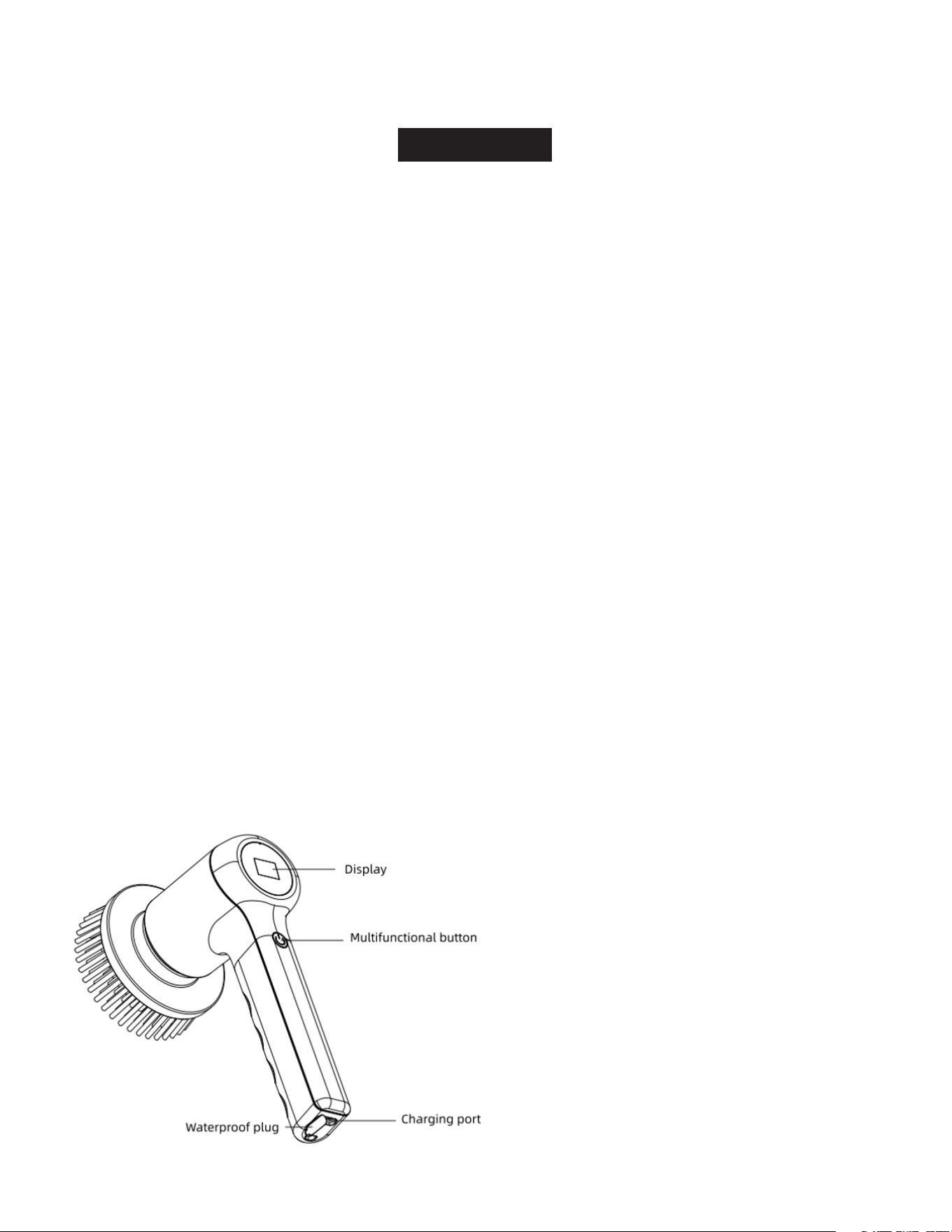
PARTS DESCRIPTION
- 2 -
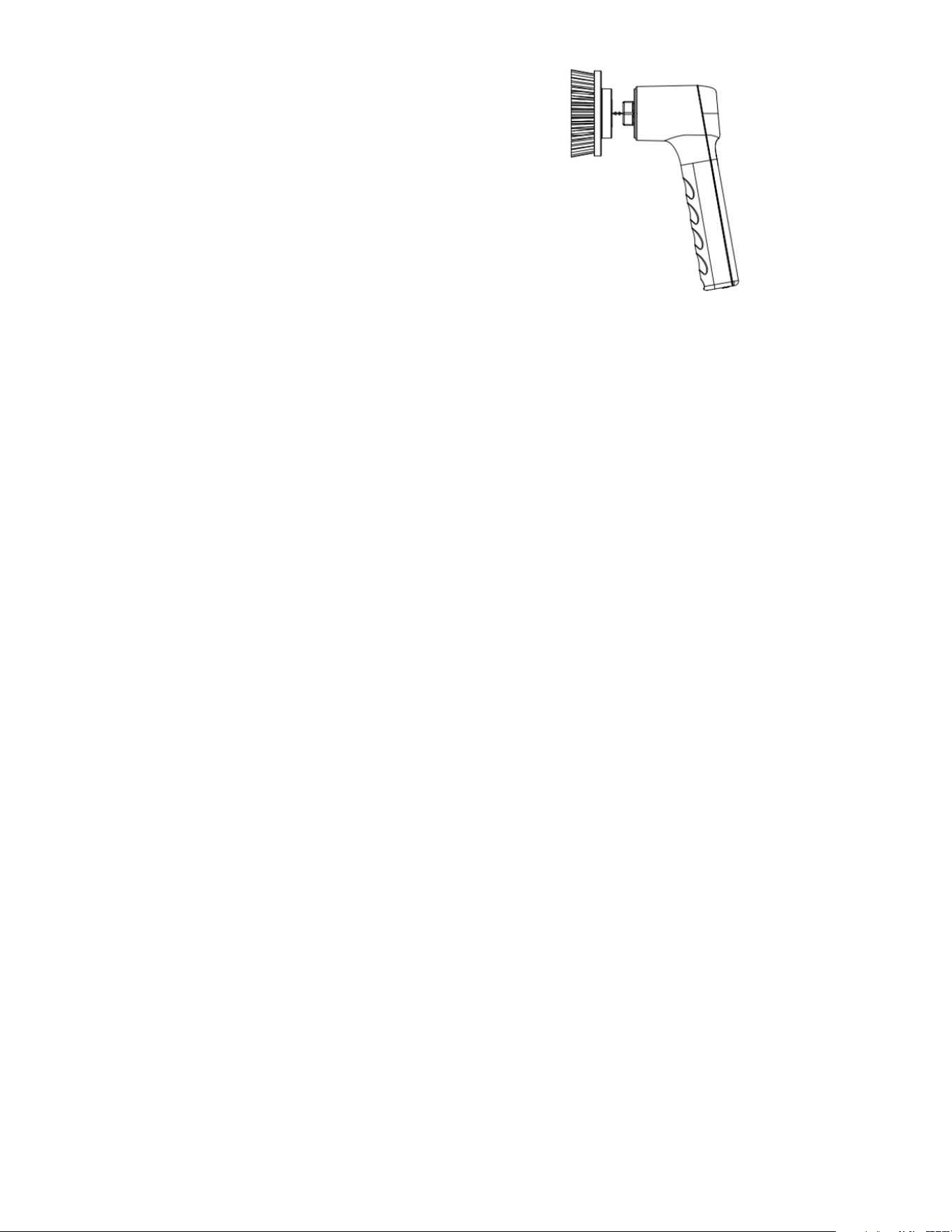
BRUSH HEAD INSTALLATION
The Handheld Electric Power Scrubber’s design
is simple, featuring an easy-to-use buckle system
for installing and removing the brush head. Align
each brush head with the buckle, gently press it,
and listen for a “click” to confirm that it is securely
in place. To remove the brush head, simply pull it
out with light force.
Note:
1. Polishing sponges, cleaning cloths,
and emery pads are consumable items
designed for easy installation and removal using a Velcro method. Customers can easily replace
them with a new brush head when necessary.
2. Slight deformation of the corner pointed brush is a common occurrence, typically caused by
compression during transportation. This deformation will naturally correct itself after the brush is
used or left to rest for some time.
OPERATING INSTRUCTIONS
The Handheld Electric Power Scrubber is designed for one-button operation:
1. Press the button once to start the machine and enter gear 1 (low speed), with a speed of 280-
300 rpm/min.
2. Press the button again to enter gear 2 (high speed), with a speed of 300-320 rpm/min.
3. Press and hold the button for the third time to power off the machine.
Tips: If the brush head is pressed too hard, it will stop rotating to prevent damage. Once the
pressure is released, the Handheld Electric Power Scrubber will automatically resume operation.
During use, avoid pressing too hard to prevent blockages and extend the machine’s lifespan.
INDICATOR LIGHT DESCRIPTION
• At low speed (gear 1), the indicator light rotates slowly.
• At high speed (gear 2), the indicator light rotates quickly.
• During charging, the power number flashes.
• Once fully charged, the battery percentage is always on, and the charging icon stops flashing.

- 3 -
PRECAUTIONS
• During the cleaning process, avoid pressing too hard to prevent the machine from overloading and
triggering shutdown protection.
• This product is IPX7 waterproof and can be washed entirely. However, when using it in or near
water, ensure that the waterproof plug on the rear USB interface is securely closed to prevent
water from entering and damaging the product.
• For optimal cleaning results, use detergent before starting the cleaning process to achieve a more
efficient and faster cleaning effect.
WARRANTY / CUSTOMER SERVICE
This item from SharperImage.com includes a 1-year limited replacement warranty. If you have any
questions not covered in this guide, please call our Customer Service department at 1 (877) 210-
3449. Customer Service agents are available Monday through Friday, 9:00 a.m. to 6:00 p.m. ET.
The SHARPER IMAGE® name and logo are registered trademarks.
©Sharper Image. All Rights Reserved.