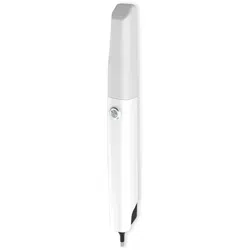

Intraoral Digital Impression Instrument
Instruction for Use
MODEL:PANDA smart p, PANDA smart y
Ziyang Freqty Medical Equipment Co., Ltd.



1. General Information
2. Product Information
3. Product Composition
4. Main Dimension
5. Intended Use and Contraindication
5.1 Intended Use
5.2 Users
5.3 Contraindication
6. Environmental Requirements
7. Working Power Requirements
8. Safety Information
8.1 Prerequisites
8.2 Mechanical Hazards
8.3 Explosion Hazards
8.4 Electrical Safety
8.5 Eye Safety
8.6 Cautions
1
2
3
4
5
5
5
6
7
8
8
8
11
12
12
14
16
CONTENTS

9. Product Hardware Installation Instructions
10. Product Software Description
10.1 Software Operation Configuration Requirements
10.2 Software Basic Information
10.3 Software Installation Method
10.4 Main Software Interface
11. Application Method
11.1 Operating Steps
11.2 Scan Technique
11.3 Calibration
12. Care and Maintenance Methods
13. Service Life
14. Parts List
15. Revision History
16. Legend of Labels and Symbols
17. Other Contents
17.1 Liability of the Manufacturer
17.2 Warranty Description
18. About EMC Descriptions and Risk Warning
19. Customer Support
17
19
19
20
21
21
22
22
23
24
25
28
28
29
29
32
32
32
34
46
1. General Information
The symbols used in this document imply the following:
1
Be sure to observe all warnings!
Please observe all safety information and warnings to prevent personal
injury material damage or damage to your instrument.Safety informa-
tion and warnings are highlighted in this IFU using the words WRNING,
CAUTION.
CAUTION
WARNING
CAUTION
Safety information where hazards such as:loss of data, invalidation of
warranty or service contract, risk of property damage, damage to the
instrument exist if the information is not observed.
Warnings regarding situations where a risk of injury to person exists if
the information is not observed.
2. Product Information
2
Product Name
Model
Manufacturer
Address
Manufacturer
Name
Manufacturer
Contact
Classification
Intraoral Digital Impression Instrument
PANDA smart p, PANDA smart y
When described as PANDA smart, it refers to the above two models.
Ziyang Freqty Medical Equipment Co.,Ltd.
Floor 2-3, unit 7, building 3, No. 222, West Section 3, outer ring road,
Yanjiang District, Ziyang City, 641300,Sichuan Province,P.R. China
Neither class I or class II equipment, DC 5V supplied by computer through
USB. The APPLIED PARTS is classified as TYPE B. IPX0.
PANDA smart p shell is spray painting process, and PANDA smart y shell is anodized oxidation process, there is no other difference
between the two models.
Tel: +86-028-26577388 | E-mail : sales@freqty.com, support@freqty.com
1
2
1
Product consultation: sales@freqty.com. After-sales service: support@freqty.com
2
3. Product Composition
3
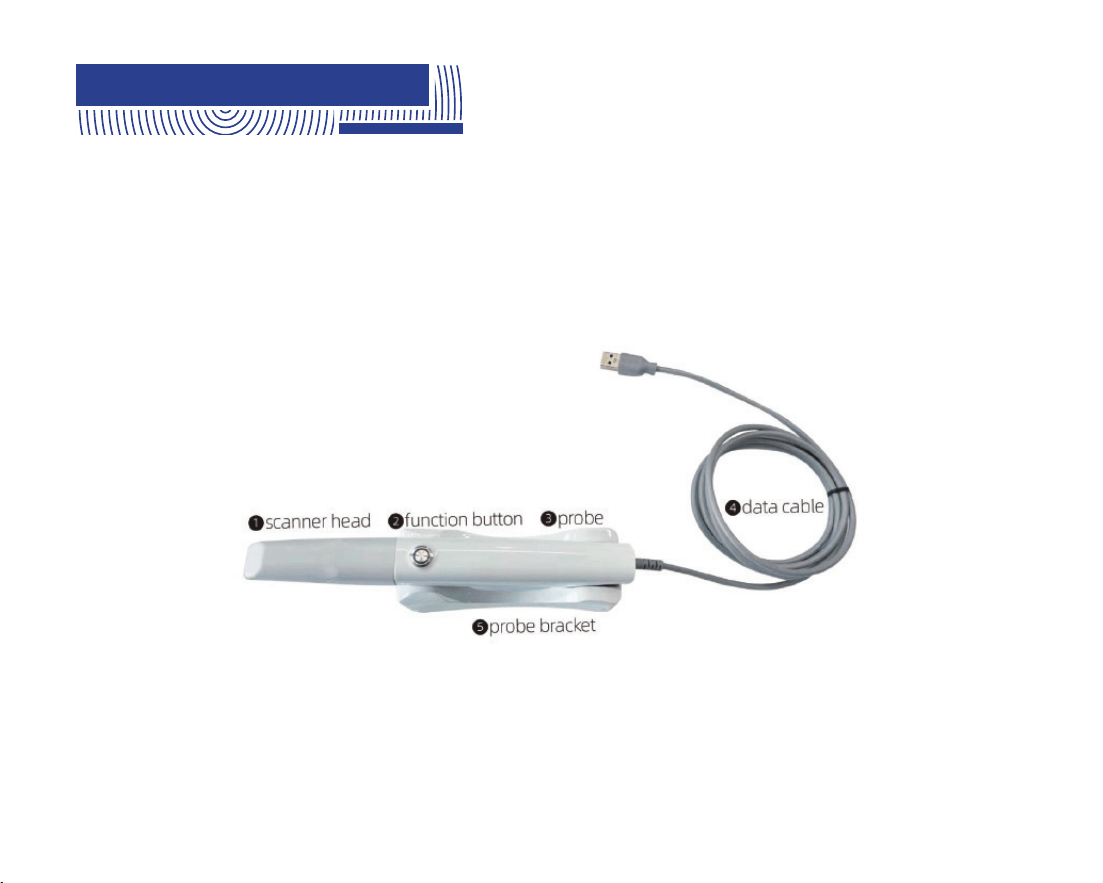
The product is composed of the probe, the calibrator, scanner head, the probe bracket and the
supporting software (release version:P5V1) .
The scanner head is applied part.
The structure of PANDA smart is showed as below Fig.1
Fig.1 structure of PANDA smart
4. Main Dimension
4
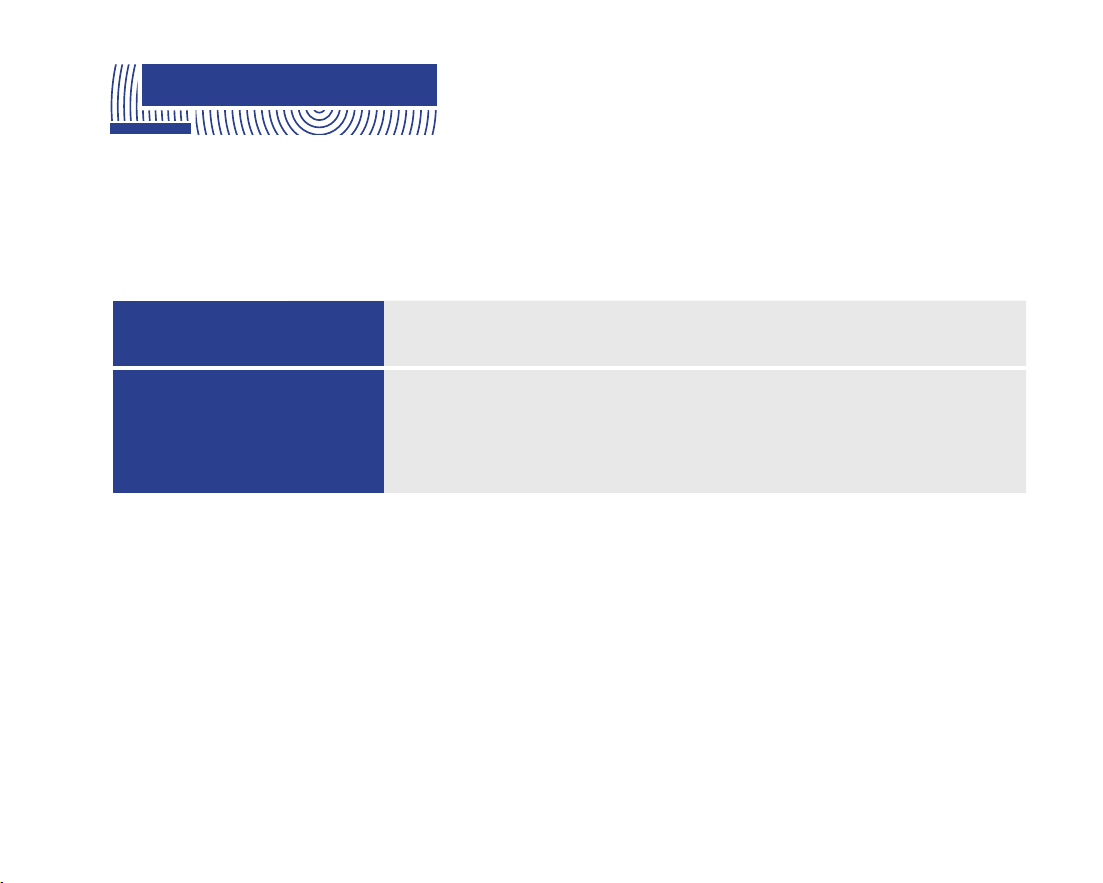
Size of scanner head
Total size
83mm (L) *19 mm(W) *14mm (H)
window:18*16mm
221mm (L) *27mm (W) * 25mm (H)

5. Intended Use and
Contraindication
5
WARNING
Unintended use of instrument can results in physical injury to patients,
operators and damage to the product.
This product uses the optical scanning method to obtain the three-dimensional shape feature
data of the surfaces of teeth, gums and other tissue. It outputs the three-dimensional digital
impression data which can be used in the CAD / CAM denture design and processing.
Dental professionals such as trained physicians, physician assistants, technicians, etc.
5.1 Intended Use
5.2 Users

6
Patients with the following contraindications are not suitable for intraoral digital impressions.
These contraindications include but are not limited to:
1. Patients have oral mucosal disease; patients have mental illness; patients have Parkin-
son's disease; patients have ADHD (Attention Deficit and Hyperactivity Disorder); patients
have epilepsy.
2. If the patient's teeth have very severe black smoke stains that interfere with optical
scanning, the smoke stain area can be sprayed with powder for optical enhancement..When
optically enhanced powder spraying is required, patients suffering from diseases that
cannot accept powder spraying are contraindications, mainly including but not limited to:
allergy or multiple drug allergies, severe respiratory diseases and asthma patients, etc.
3. It should not be used on patients who have or have had photobiological reactions
(including those with excessive sun exposure or porphyria) or who have been treated with
photosensitive drugs (including methoxsalen or chlortetracycline).
5.3 Contraindication
7
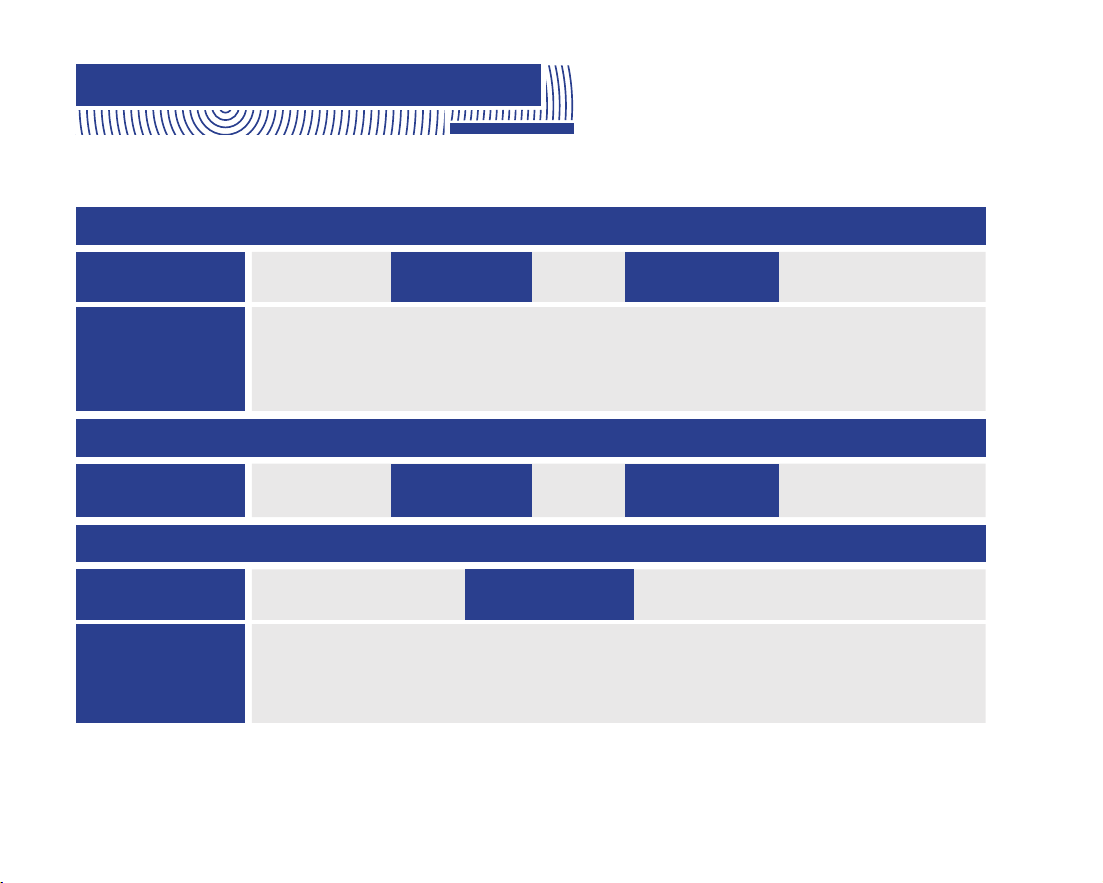
6. Environmental Requirements
Temperature
Operating conditions
Operating
Environment
Relative
Humidity
5℃ ~ 30℃
Home healthcare environment and professional healthcare facility environment.
Indoor operation, prevent direct sunlight and strong lights, and keep away from
electromagnetic sources, cold and heat sources, and vibration sources
≤80%
Atmospheric
Pressure
700hPa ~ 1060hPa
Temperature
Transport conditions
Relative
Humidity
-10℃~55℃ ≤93%
Atmospheric
Pressure
700hPa ~ 1060hPa
Temperature
Storage conditions
Atmospheric
Pressure
Relative
Humidity
-10℃~55℃
700hPa ~ 1060hPa
Well-ventilated, non-corrosive gas chamber. Prevent moisture, corrosion, avoid
direct sunlight.
≤93%

8. Safety Information
8.1 Prerequisites
Read all instructions carefully including all warnings and cautions. You must comply
with the warnings in the IFU to prevent injury to persons and damage to Intraoral
Digital Impression Instrument(hereinafter referred to as instrument). Proper
functionality and safety can only be guaranteed if the safety precautions in this IFU
and on the instrument are observed.
CAUTION
Preventive inspection before use of the instrumen
8
7. Working Power Requirements
Powered by USB3.0 port of computer: 5V⎓, 0.9A
CAUTION
Please examine the instrument for any mechanical damage on:
All enclosures
All cables
Safety can only be guaranteed if NO DAMAGE on the instrument is observed.
9
WARNING
No modification of this instrument is allowed.
Modification of the instrument
Approved software only
Install only approved software to prevent interference with the runtime reliability of
the instrument and programs within it.
CAUTION
10
In case of instrument failure
WARNING
If at any time the instrument malfunctions, or if you suspect in any way that the
instrument is not working correctly:
Remove the instrument from contact with the patient.
Unplug the probe and make sure it cannot be used before it is checked.
Contact your reseller.
DO NOT attempt to open any covers on the instrument.
Proper training
Before you attempt to use the device with patients.
You should be trained to use the device or have read and understood all sections of
this specification describing correct operation.
CAUTION
You should also be thoroughly familiar with the safe operation of the device as
described in this documentation.
11
8.2 Mechanical Hazards
Dropped or damaged instrument
If the probe body is dropped or bumped it should immediately be calibrated before
further use. If calibration fails, please contact your technical service provider. See
instructions on Calibrating the instrument.
CAUTION
WARNING
If you drop a scanner head on the floor, you MUST dispose of it immediately and
NOT use the same scanner head again for scanning.
There is high risk that the mirror in the scanner head has become dislodged and
can fall out.
12
8.3 Explosion Hazards
Environment
WARNING
The product is not designed to be used in environments that are potentially
explosive such as in close proximity to flammable liquids or gases or in
oxygen-enriched atmospheres.
8.4 Electrical Safety
The power interface
Only be connected to the USB interface of UL/CSA 60950-1 certified computer
equipment.
Please contact the manufacturer when the data cable used for power supply
needs to be replaced. Do not replace it by yourself.
CAUTION
13
Stress on cables
All externally connected cables must never be subjected to pulling stress.
CAUTION
Electrical shock
WARNING
There is a risk of electrical if you attempt to access the inside of any part of the
instrument. Only authorized and qualified service personnel may access the
inside of any part of the instrument.
14
8.5 Eye Safety
Disconnected from mains
WARNING
There is no power ON/OFF switch on the instrument therefore the only reliable
means to disconnect the device from mains is unplug the data cable used for
power supply. Do not position the instrument so that it is difficult to unplug the
data cable.
Visible laser.
WARNING
Do not look into the visible laser beam in the process of use, and prohibit the
beam of the scan window (laser window) from directly hitting the operator and the
patient's eyes.
Spilled Liquids
WARNING
Do not bring liquids such as beverages near the instrument.
Do not spill liquids on the instrument.
The laser wavelengths used by the product are 450nm and 520nm, which is a class 1 laser products.
The repetition frequency is 15Hz, and the maximum power was 32.5μW at 450nm and 12.3μW at
520nm.
15
WARNING
The instrument emits white light from the scanner head during operation. The instrument
complies with EN(IEC)62471(Photobiological safety of lamp and lamp systems). However,
we recommend caution when handling the instrument.
A brief glimpse of the light into eye is not dangerous, but do not gaze at the beam or view
directly at it with optical instruments, and do not aim the beam towards other people’s eyes.

16
8.6 Cautions
This product is an optical scanning instrument, during the use of the product must not be vigorously
collision.
Please take good care of the calibrator in the product. Once the calibrator is stained, the performance
of the product will be degraded
This product meets the requirements for electromagnetic compatibility of medical devices in use, but
it is not recommended to use it in environments with strong magnetic fields, strong switches and
strong light sources, otherwise it may affect the performance of the product.
This product can only be connected to the USB port of a computer device that is UL/CSA 60950-1
certified.
After the product is used at the end of its life, the product should be disposed of in accordance with
the requirements of local laws and regulations, or contacted by the manufacturer for recycling and
centralized disposal in accordance with local laws and regulations.

17
When the device is stopped, the probe should be placed on the probe bracket
located on a horizontal table to avoid falling and causing damage due to improper
placement.
This product is a precision optical instrument. Manufacturers and distributors shall
not be liable for the loss of product safety and reliability and performance if the
operator do not operate in accordance with the instructions, or if they do not use the
product in a collision and fall due to improper use. After falling, please check the
product function and calibrate the product with a calibrator. If the calibration fails,
please contact the manufacturer for repair.
9. Product Hardware
Installation Instructions

18
Installation step:
Connect the data cable to the computer USB port, and the function button is
lit up.
Run the scanning software and scan according to the requirements of the
scanning operation. During normal scanning, light is projected from the
scanning window.
After scanning, the data cable should be unplugged to disconnect the device.
Note: When the instrument is working, the power of the heating element on the
scanning head is 0.35w.
1
2
3
1
10. Product Software
Description
10.1 Software Operation Configuration Requirements
This product can only be used by installing software on the computer. The requirement for the recom-
mended configuration of computer hardware is no less than the following configuration:
CPU
GPU
Memory
Hard disk
Display
Intel i7-8700(3.2GHz)and above
NVIDIA GTX1060 (6G) and above
DDR2400 16G and above
Solid state drive SSD 120G and above
Resolution 1920×1080 and above
19
20
10.2 Software Basic Information
Software Name
Release Version
Software
Security Level
Intraoral Digital Impression Instrument Scan Software(PANDA SCANNER)
P5V1
A
Network security: User access control can choose to use user name and password for identity authenti-
cation. The user type is ordinary user. Ordinary users can use the instrument normally and view data results.
The login interface is shown in the Fig.2 below:
Data saving format: standard STL, PLY format and PTY format defined by our company.
Fig.2 Login interface
Account:
Password:
Login Logout
10.3 Software Installation Method
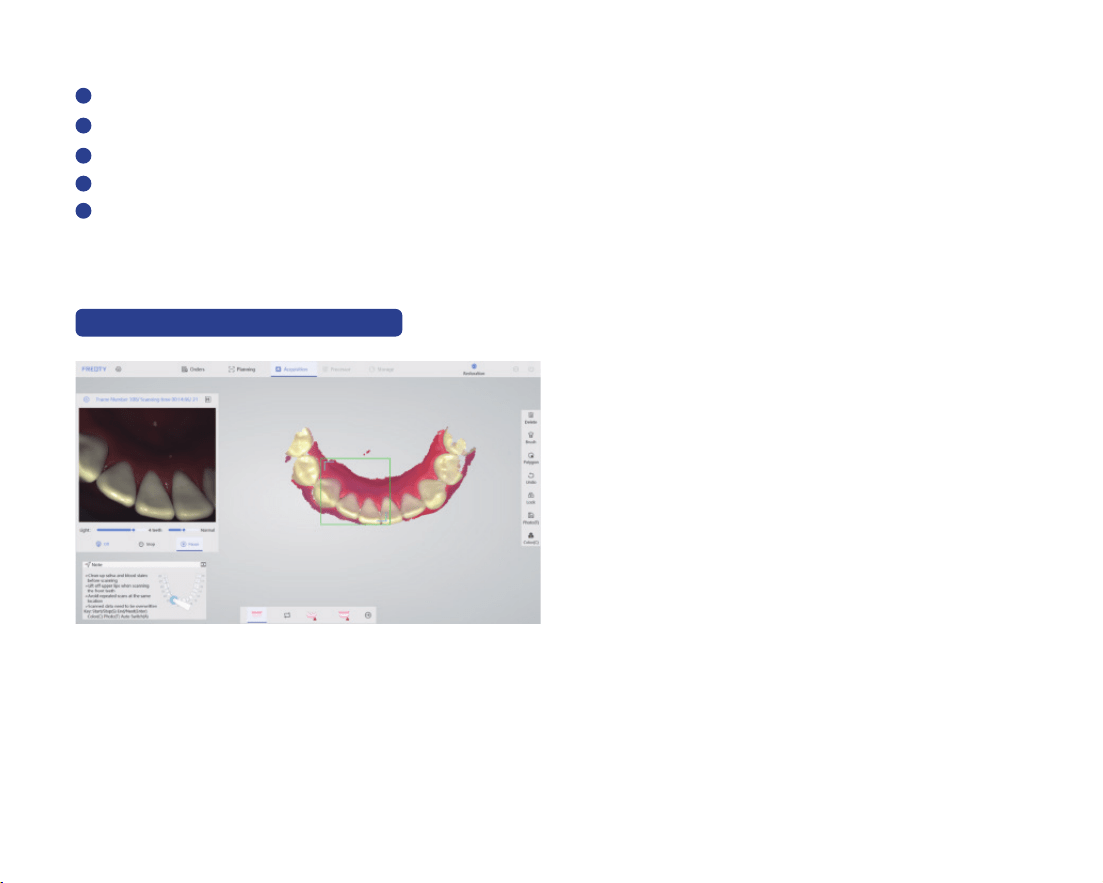
The File name format of installation file in the USB Flash Drive Accompanying is PANDAP5V1 X.X.X
XXX. Full. exe format. The installation steps are as follows:
21
Double-click to open the installation file;
Carefully read the license agreement and choose to agree;
Click next according to the prompts;
The uninstallation is completed, select "Yes" to continue the installation ;
Finished.
The installation steps can be found in the Instrument Software Operation Manual.
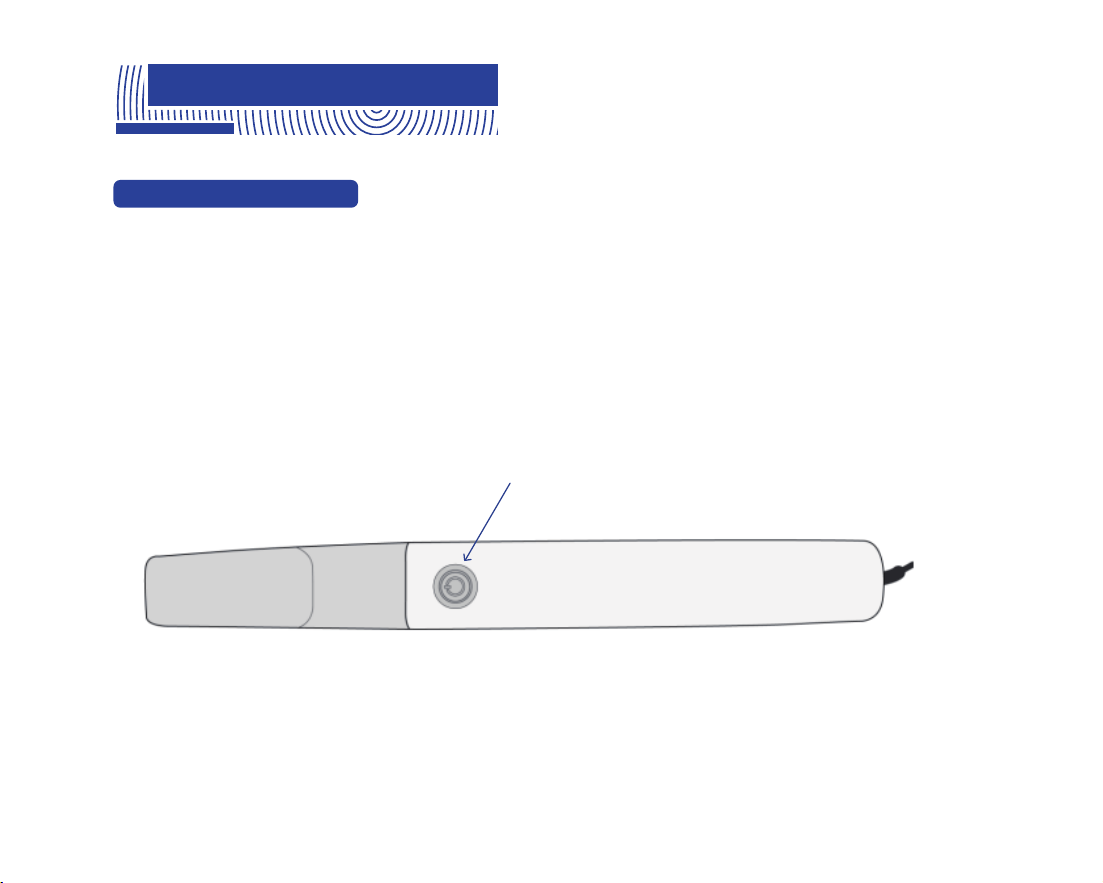
10.4 Main Software Interface
The specific method of use of the software is provided by the company with training materials
and operation manuals.
Fig.3 Main interface
1
2
3
4
5
If the user has not installed the company's software, this interface will not appear.
3
3
22
11. Application Method
11.1 Operating Steps
Follow the instructions for Product Hardware Installation in Chapter 9.
Open the software and scan after the startup is complete.
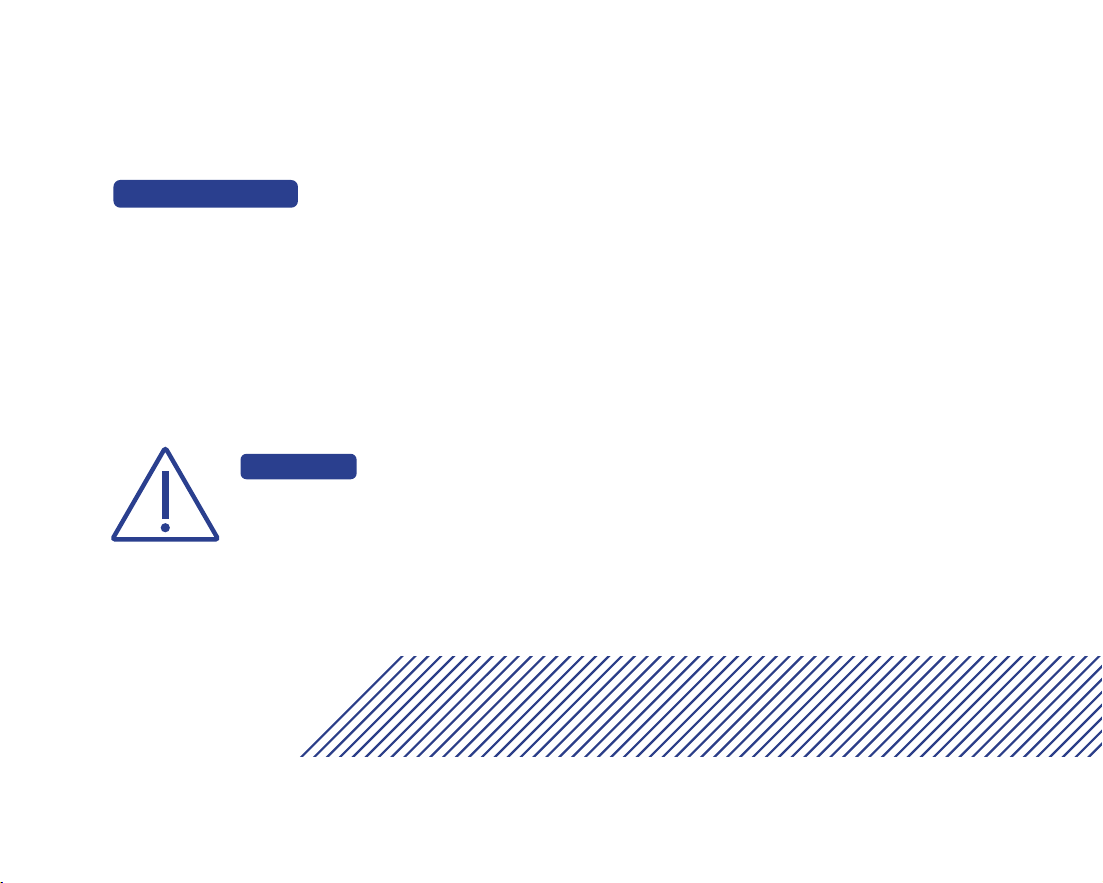
Click the button to start the machine after power-on; Click the button to start scanning after startup,
click the button again to pause scanning, double-click the button to switch the color of the data
model, and hold down the button for three seconds to end scanning.
Function button
Fig.4 Probe planform

11.2 Scan Technique
Hold the probe body in the same way as a pen while scanning, Due to the limitation of the actual space
in the mouth, it is necessary to ensure that the head window of the probe is as close to the tooth
surface as possible (it is recommended to keep it within 2mm) for scanning, and the operation mode of
suddenly far and suddenly near should be avoided.
Axial drag of the probe was the main scanning method, and radial drag of the probe was used in the
scanning of the front teeth and occlusion points. Start scanning from the end teeth, first scan the
oeclusal data, then scan part of the buccal and lingual data, and drag from oeclusal to mesial to scan
the next tooth, and follow the same operation to complete the frame scan of the posterior tooth area.
When entering the lingual surface of the anterior tooth area, drag the probe radial direction left and
right to scan the lingual surface and incisal data, and then scan part of the labial surface data after the
lingual surface is completed.
23
24
11.3 Calibration
According to the usage, it is recommended to use the calibrator to calibrate the product
once a week. The product has not been used for three months, it is recommended to
calibrate before use. When the device is impacted, or the product is moved or vibrated
greatly, or in order to maintain the accuracy of the scanning accuracy, the scanner needs to
be calibrated. Refer to "Operation Manual" for the calibration method.
The calibrator of the product should be properly kept. Once the calibrator is
defaced, the performance of the product will be degraded.
CAUTION
25
Recommended sterilization method:
12. Care and
Maintenance Methods
The product is not expected to have long and frequent oral contact with patients. The scanner
head must be cleaned and sterilized between patients to avoid cross contamination. It is recom-
mended to sterilize the scanner head by means of moist heat steam sterilization (121 °C, 15 min or
134 °C, 6 min).
The scanner head should be replaced when the appearance is damaged or sterilized for 50 times. The
scanner head can be purchased separately from the seller or manufacturer.
Clean the scanner head with soapy water and a soft brush, then place it under running water
for rinsing.
Wipe the water stain on the surface of the scanner head with medical gauze and wipe it
thoroughly with absolute alcohol. Pay special attention to whether there are stains or water
stains on the head mirror. If there is, use another medical gauze to draw the absolute alcohol
and carefully wipe the head mirror. The sample was allowed to stand for two minutes after
wiping.
WARNING
In order to ensure the normal performance of the product, it is recommended
that the times of repeated sterilization of the scanner head shall not more than
50.

26
Keep the outside of the product clean.
If the reflector of the scanner head is stained, users can dip the degreasing cotton into a small
amount of anhydrous alcohol (99.9%), and then gently wipe the reflective surface, rotating from
the center to the periphery. If the reflector is scratched, it needs to be replaced.
In the course of instrument, software errors and warnings can be self-healed by the software.
Serious problems may require shutting down the software and restarting. General hardware
errors can be restored by turning off the power and then turning the power back on. If some-
thing cannot be recovered, contact the manufacturer or the seller.
The maintenance personnel must take laser protective measures during the inspection process,
such as wearing goggles.
Place the scanner head which had been cleaned into 90* 260mm Self-sealing
sterilization pouch (materials: Medical high-temperature dialysis paper and medical
CPP/PET complex film) and seal the sterilization pouch. Then place the packaged
scanner head into sterilizing instrument tray.
Place the sterilizing instrument tray into a small pressure steam sterilizer and set the
sterilization parameters according to the instructions of the small steam sterilizer:
temperature 121 ° C, 15 min, or temperature 134 ° C, 6 min.
27
Replacement instrument parts must be obtained from the manufacturer or manufacturer
approved dealer.
The parts that not supplied by the manufacturer may reduce the accuracy and
safety of the instrument.
CAUTION
WARNING
During the inspection, ensure that there is no person in the direction of laser
irradiation.
Disclaimer: We can provide the necessary information for maintenance instrument to the
users with corresponding maintenance qualifications.
The instrument shall not to be services or maintained in use with a patient.
CAUTION
28
Expected service life: 8 years.
Over period of use, the degradation of the product's main electronic and
optical components may reduce product performance.
CAUTION
Parts Name Quantity
Probe
Probe bracket
Calibrator
Calibrator cable
Scanner head
IFU
Qualified label
Warranty card
Protective Casing
USB flash disk
1
1
1
1
6
1
1
1
1
1
13. Service Life
14. Parts List

15. Revision History
29
16. Legend of Labels
and Symbols
Edition Date
A.00
A.01
A.02
A.03
A.04
2023.02.09
2023.06.21
2023.10.31
2023.12.06
2024.03.07
30
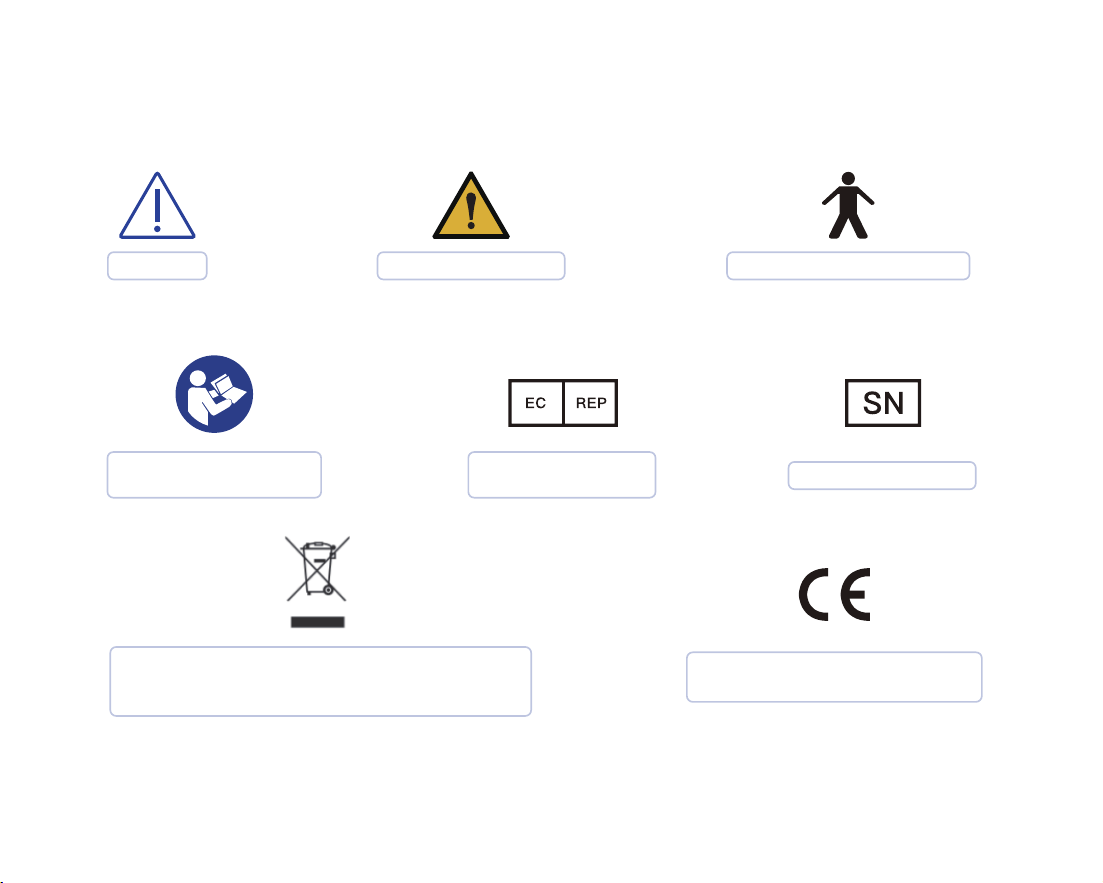
The device should be sent to the special
agencies according to local regulations for
separate collection after its useful life.
CE marking in conformity with
Regulation (EU) 2017/745
Caution
EU Authorized
Representative
General Warning
Type B Application Part
Refer to instruction
manual/ booklet
Serial Number
31
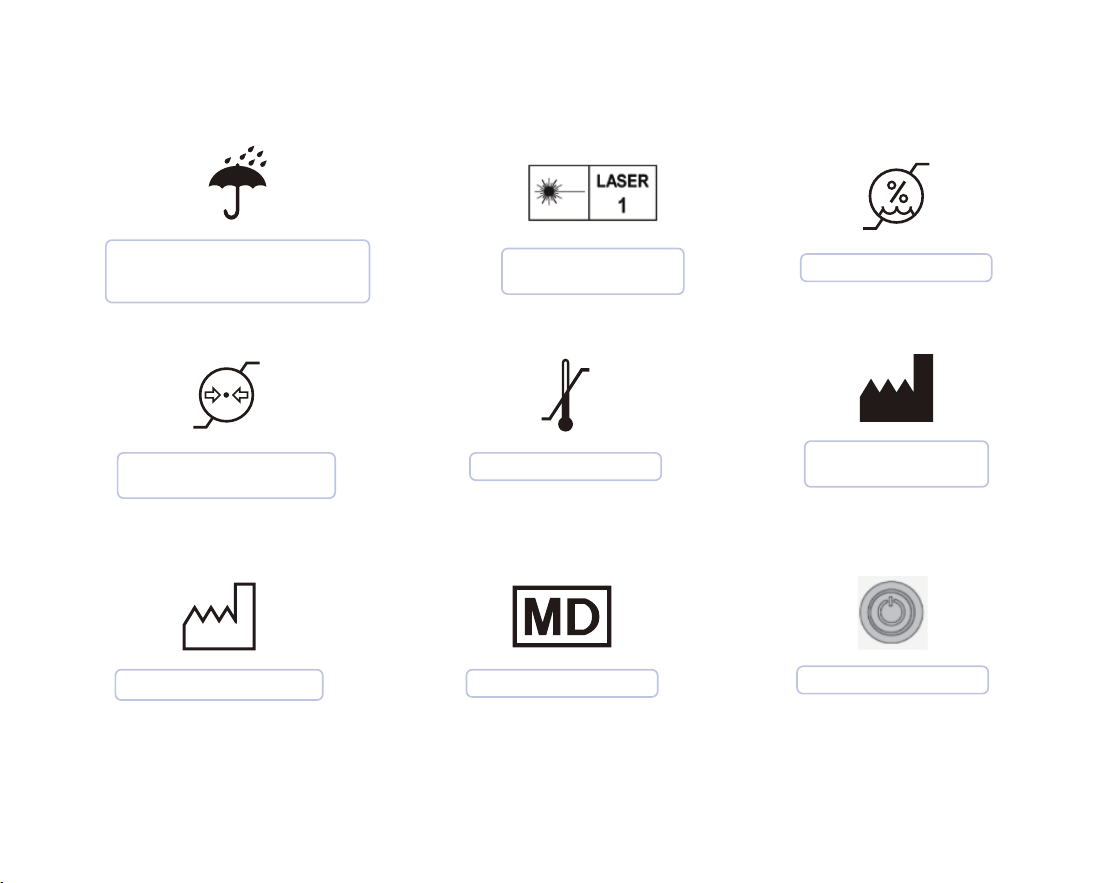
Atmospheric Pressure
Limitation
Temperature Limit
Medical Device
Indicates a medical device
that needs to be protected
from moisture.
Manufacturer
Information
Date of Manufacture
Laser Categories
and Warnings.
Humidity Limitation
Function button

32
17. Other Contents
17.1Liability of the Manufacturer
17.2 Warranty Description
The installation, adjustment, modification, and repair of this product are performed by
persons or organizations approved by the manufacturer or distributor. And the manufacturer
must be able to ensure the safety of the product in accordance with the electrical, environ-
mental, storage, maintenance, and operation requirements of the manual. Responsibility for
reliability and performance.
(1) Non-user subjective destruction within the warranty period, product failure caused only by
product quality;
(2) Product failure caused by force majeure (such as earthquake, flood, typhoon, etc.) during the
warranty period.
The warranty period for this product is two years, calculated from the date of sale (according
to the date of sales invoice).
One of the following cases the company provides free maintenance:

33
(1) Failure of the product due to non-subjective damage by the user during the warranty period;
(2) Failure of the product after the warranty period but within the service period.
(1) The product has been used for more than 8 years;
(2) Product failure caused by subjective destruction of users
One of the following cases the company provides paid maintenance:
We no longer provides maintenance in one of the following situations:

34
18. About EMC Descriptions
and Risk Warning
WARNING
Portable RF communications equipment(including peripherals such as antenna
cables and external antennas) should be used no closer than 30 cm(12inches) to
any part of the product including cables specified by the manufacturer. Otherwise,
degradation of the performance of this equipment could result.
This product has passed the electromagnetic compatibility test and meets the requirements of
EN 60601-1-2 Medical electrical equipment–Part 1-2: General requirements for basic safety
and essential performance–Collateral Standard: Electromagnetic disturbances – Requirements
and tests.
The following application requirements shall be strictly observed during use, otherwise it may
cause electromagnetic interference to other devices or reduce the anti-electromagnetic
interference capability of the therapeutic device, or even lose the basic performance.
This product belongs to the Group 1 Class B equipment specified in IEC/CISPR 11, non-perma-
nent installation equipment, non-living support equipment, and belongs to equipment that is
expected to be directly connected to the public power grid.

35
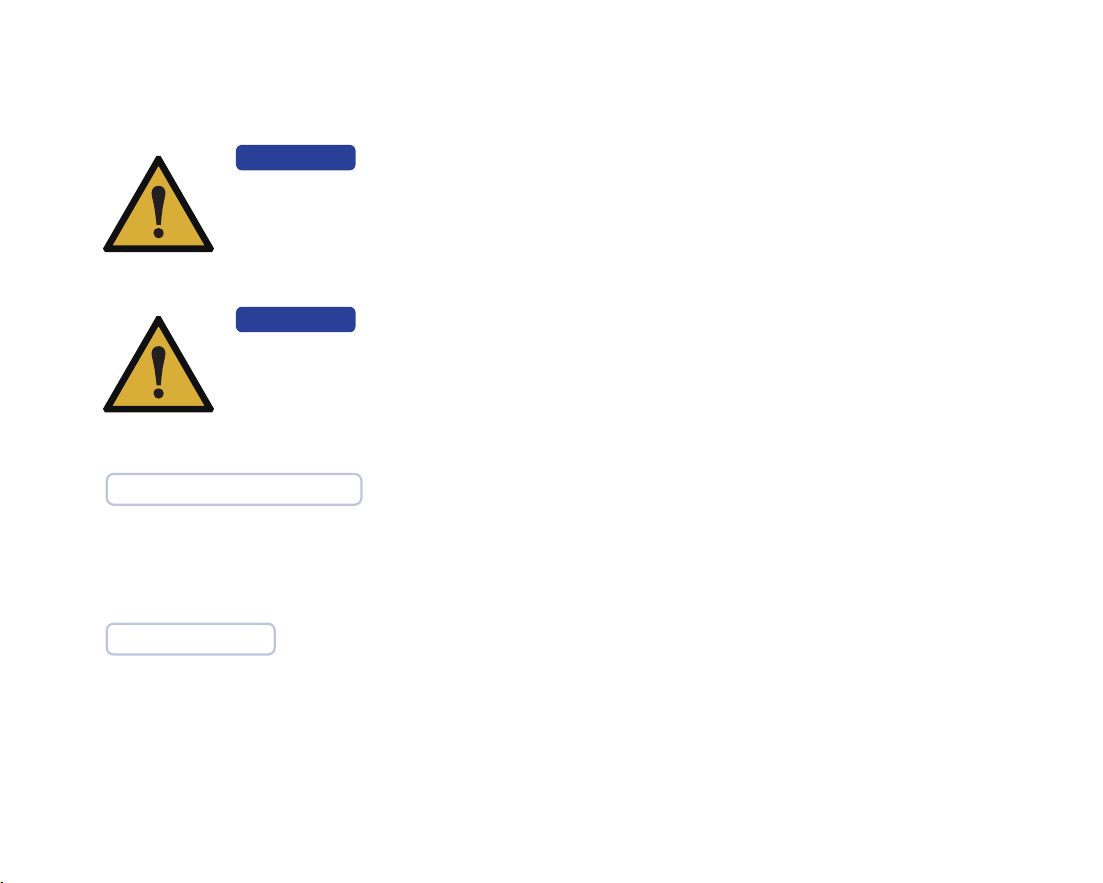
No. Name Cable length (m)
Whether the
cable is
shielded
Remarks
1
1
1.85
0.5
Yes
Yes
Data cable
Data cable of calibrator
\
\
The cable information of this product is as shown in the following table. If there is a fault in the
connection cable, please contact our company for maintenance or replacement. Other-wise it may
cause excessive electromagnetic interference. If there is something wrong with this product, please
contact our company promptly. Do not repair or replace the components yourself, or it may cause
excessive electromagnetic interference.
36
WARNING
The use of accessories or cables outside of the regulations together with equip-
ment and systems may result in increased emissions or reduced immunity of the
equipment or system..
WARNING
This product should not be used near or stacked with other devices. If it must be
used close to or stacked, it should be observed and verified to work properly
under its configuration.
During and after the immunity tests, each function worked as intended, such as parameter, as per IFU.
Pass and Fail Criteria
scanning mode and calibrating mode.
Work mode

37
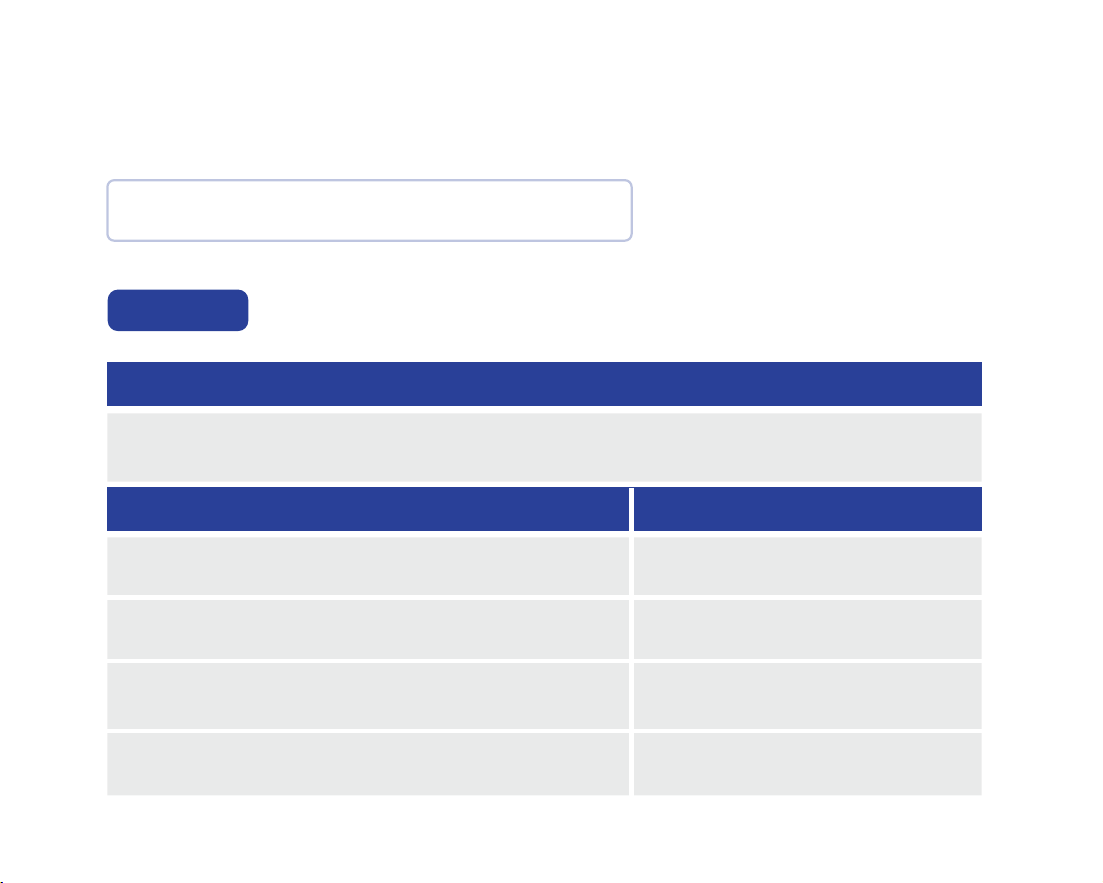
Issue Solution
No image display in
2D image area
2D image flicker
- Make sure the device's USB interface is properly connected to
the computer's USB 3.0 interface.
- Restart the software and scanning device to check if the
image can be displayed normally.
- Check if the modulator is connected properly.
- Replace the USB port of the device with the computer.
- Connect your computer to the Internet.
Trouble Shooting

38
Issue Solution
Scans are easily inter-
rupted and not smooth
Out-sync of data
between 2D and 3D
- Inappropriate scan brightness. For plaster model scanning,
choose 1/2, for resin model scanning, choose 3, for the intraoral
scanning, choose 4, 5 is suitable for patients with darker teeth
in the mouth.
- During scanning, confirm that A above the image area is blue.
If it is black, use the keyboard A key to switch.
- Standardize scanning methods. Ensure coverage of scanned
data with existing data.
- Confirm whether the computer configuration meets the
requirements (higher than or equal to our recommended
configuration).
- Delays caused by too many scans (single jaw scans should be
completed within 3 minutes).
- Uninstall antivirus software or add scanning software to the
whitelist of antivirus software.
- Check the status of windows update. If the update is in
progress or has failed, please restart the computer after the
update is completed before using the scanning software.

39
Solution
Issue Solution
Difficulty for scan
relocation
No 3D data when
scanning
Abnormal interrupt
during scanning
- Ensure that the scanning direction is consistent with the
previous scanning when repositioning
- Avoid long scans.
- Check the status of windows update. If the update is in
progress or has failed, please restart the computer after the
update is completed before using the scanning software.
- Check whether the remaining storage space of drive C is
sufficient.
- Turn off or uninstall anti-virus software.
Recalibration
40
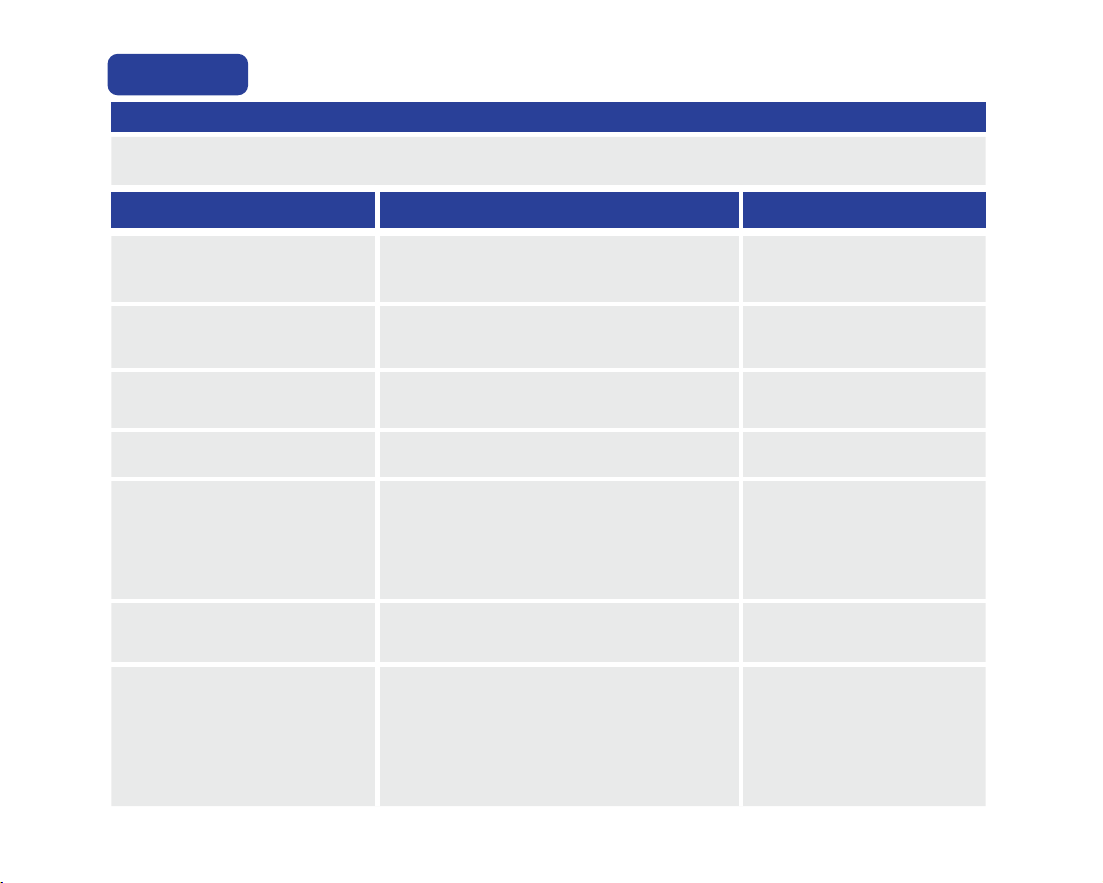
This product declarations to meet
Table 1, Table 2, Table 3 and Table 4 of Contents.
The product intended for use in the electromagnetic environment specified below.
The customers or users should ensure that it is used in such an environment.
RF emission
CISPR 11
Group 1
RF emission
CISPR 11
Class B
Harmonic emission
IEC 61000-3-2
voltage fluctuations / flicker emission
IEC 61000-3-3
Not applicable
Not applicable
Manufacturer's Declaration - Electromagnetic Emissions
Emission measurement
Conformity
Table 1
41
electrostatic discharge
IEC 61000-4-2
Contact:± 8 kV.
Air:± 2kV, ±4kV, ±8kV, ± 15 kV
3 V/m
80 MHz – 2,7 GHz
80 % AM at 1 kHz
3 V/m
80 MHz – 2,7 GHz
80 % AM at 1 kHz
Contact:± 8 kV.
Air:± 2kV, ±4kV, ±8kV,
± 15 kV.
Radiated RF EM fields
IEC 61000-4-3
Electrical fast transientburst
IEC 61000-4-4
Surge
IEC 61000-4-5
Conducted RF
IEC 61000-4-6
Power frequency magnetic field
(50Hz and 60Hz)IEC 61000-4-8
Power input line voltage dips,
short interruptions and voltage
variations
IEC 61000-4-1
3 Vrms:
0,15 MHz – 80 MHz
6 Vrms:
in ISM and amateur radio
bands between
0,15 MHz and 80 MHz
80 % AM at 1 kHz
0% UT
, 0.5 cycle
At 0°, 45°, 90°, 135°, 180°, 225°, 270°
and 315°
0% U
T
, 1 cycle and 70%UT
,25/30
cycles
Single phase:at 0°
0% U
T
, 250/300 cycles
N/A
30A/m. 30A/m.
N/A
± 2 kV for power supply lines.
± 1 kV line(s) to line(s).
± 2 kV line(s) to earth.
N/A
N/A
Manufacturer's Declaration - Electromagnetic Immunity
Immunity Test IEC 60601 Test Level Guidelines Compliance Level
Table 2
The product intended for use in the electromagnetic environment specified below.
The customers or users should ensure that it is used in such an environment.

42
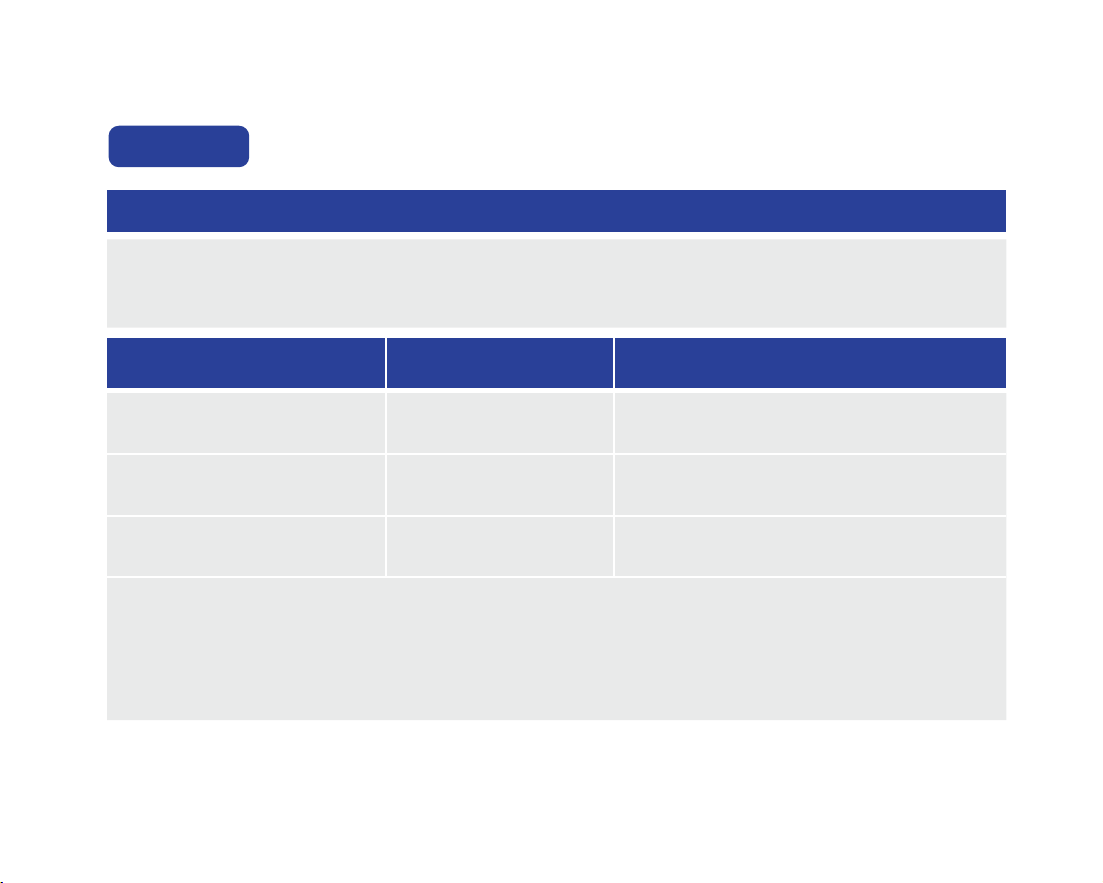
Manufacturer’s declaration-electromagnetic immunity
Test specifications for ENCLOSURE PORT IMMUNITY to RF wireless communications equipment
Test
Frequency
(MHz)
Band
a)
(MHz)
Service
a)
Modulation
b)
Maximum
Power
(W)
Distance
(m)
Immunity Test
Level
(V/m)
Compliance Level
(V/m)
Table 3
The PANDA smart is intended for use in the electromagnetic environment specified below.
The customer or the user of the PANDA smart should assure that it is used in such an environment.
385 380-390 TETRA 400
Pulse
modulation
b)
18 Hz
1,8 0,3 27 27
450 430-470
GMRS 460,
FRS 460
FM c)
±5 kHz
deviation
1 kHz sine
2 0,3 28 28
710
745
780
704-787
LTE
Band 13,
17
Pulse
modulation
b)
217 Hz
0,2 0,3 9 9
810
870
930
800-960
GSM
800/900,
TETRA 800,
iDEN 820,
CDMA 850,
LTE Band 5
Pulse
modulation
b)
18Hz
2 0,3 28 28

43
NOTE: If necessary to achieve the IMMUNITY TEST LEVEL, the distance between the transmitting
antenna and the ME EQUIPMENT or ME SYSTEM may be reduced to 1 m. The 1 m test distance is
permitted by IEC 61000-4-3.
a) For some services, only the uplink frequencies are included.
b) The carrier shall be modulated using a 50 % duty cycle square wave signal.
c) As an alternative to FM modulation, 50 % pulse modulation at 18 Hz may be used because while it does not
represent actual modulation, it would be worst case.
Test
Frequency
(MHz)
Band
a)
(MHz)
Service
a)
Modulation
b)
Maximum
Power
(W)
Distance
(m)
Immunity Test
Level
(V/m)
Compliance Level
(V/m)
(For professional
healthcare)
2450
2400-
2570
Bluetooth,
WLAN,
802.11 b/g/n,
RFID 2450,
LTE Band 7
Pulse
modulation
b)
217 Hz
2 0,3 28 28
5240
5500
5785
5100-
5800
WLAN
802.11
a/n
Pulse
modulation
b)
217 Hz
0,2 0,3 9 9
1720
1845
1970
1700-
1990
GSM 1800;
CDMA 1900;
GSM 1900;
DECT;
LTE Band 1, 3,
4, 25; UMTS
Pulse
modulation
b)
217 Hz
2 0,3 28 28
44
Manufacturer’s declaration-electromagnetic immunity
Test specifications for ENCLOSURE PORT IMMUNITY to proximity magnetic fields
Test Frequency Modulation IMMUNITY TEST LEVEL (A/m)
Table 4
The product intended for use in the electromagnetic environment specified below. The customers or users
should ensure that it is used in such an environment.
30 kHz
CW
8
1 34,2 kHz 65
c)
1 3,56 MHz
Pulse
modulation
b)
2,1 kHz
7,5
c)
Pulse
modulation
b)
50 kHz
a) This test is applicable only to ME EQUIPMENT and ME SYSTEMS intended for use in the HOME
HEALTHCARE ENVIRONMENT .
b) The carrier shall be modulated using a 50 % duty cycle square wave signal.
c) r.m.s., before modulation is applied.

45
Manufacturer Information
Manufacture: Ziyang Freqty Medical Equipment Co., Ltd.
Address: Floor 2-3, unit 7, building 3, No. 222, West Section 3, outer ring
road,Yanjiang District, Ziyang City, 641300,Sichuan Province,P.R. China
Tel: +86-028-26577388
Email: sales@freqty.com
Website: http://www.freqty.com/
European Authorized Representative
Company: SUNGO Europe B.V.
Address: Fascinatio Boulevard 522, Unit 1.7, 2909VA Capelle aan den IJssel, The
Netherlands
Contact: Yan Zhang(Ms.)
Tel /Fax: +31(0)10 3034500; +31(0)2021 11106
E-mail: ec.rep@sungogroup.com; [email protected]om
46
Email: support@freqty.com
Toll Free Number (USA): 888-855-2562
WhatsApp (Global): +86 18108286761
19. Customer Support