
Technical Support and E-Warranty Certificate
www.vevor.com/support
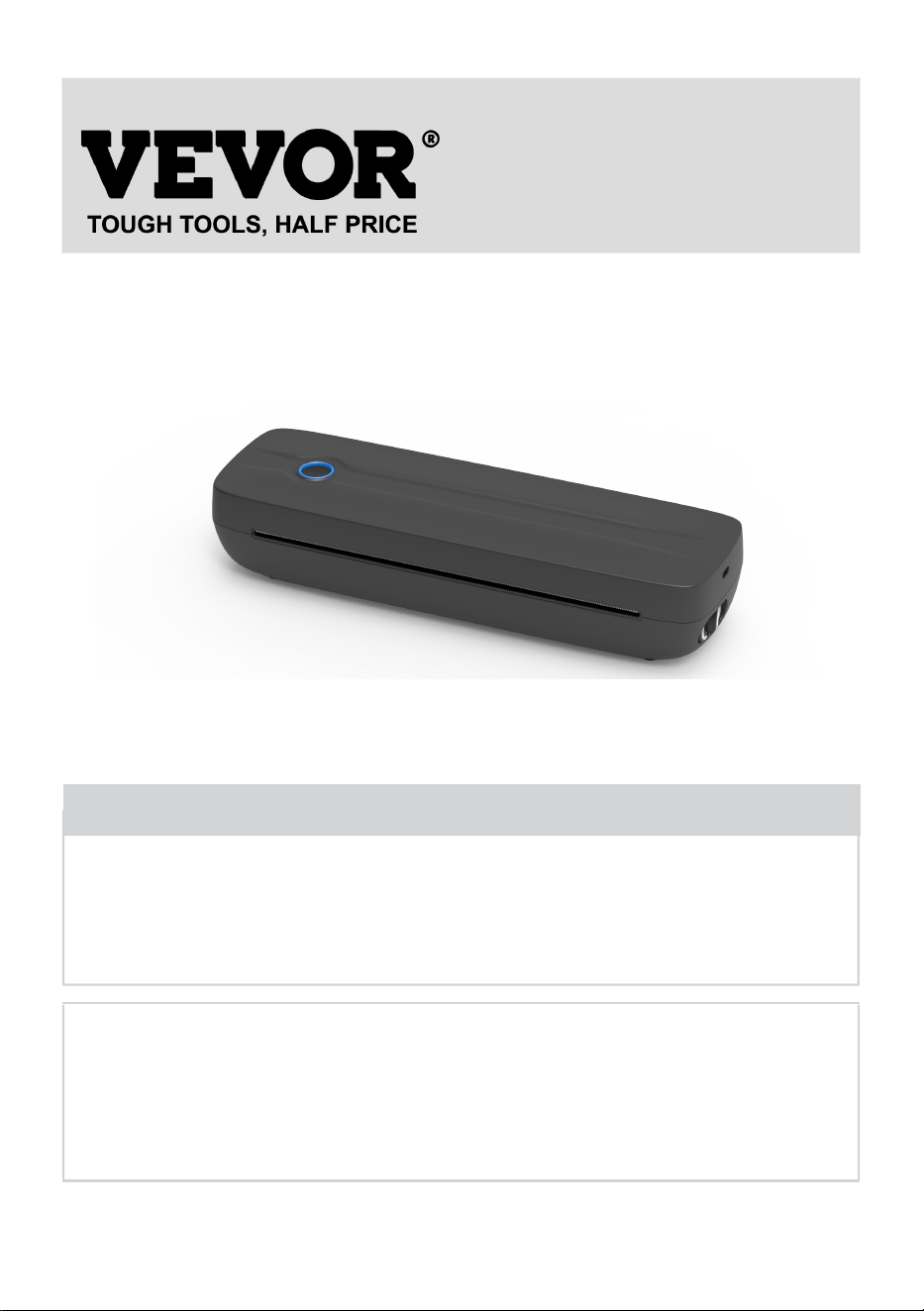
PORTABLE THERMAL PRINTER
USER MANUAL
MODEL NO.: Y80, Y80H
We continue to be committed to provide you tools with competitive price.
"Save Half", "Half Price" or any other similar expressions used by us only represents an
estimate of savings you might benefit from buying certain tools with us compared to the major
top brands and does not necessarily mean to cover all categories of tools offered by us. You
are kindly reminded to verify carefully when you are placing an order with us if you are
actually saving half in comparison with the top major brands.
- 1 -
MODEL: Y80, Y80H
Have product questions? Need technical support? Please feel free to
contact us:
Technical Support and E-Warranty Certificate
www.vevor.com/support
NEED HELP? CONTACT US!
This is the original instruction, please read all manual instructions
carefully before operating. VEVOR reserves a clear interpretation of our
user manual. The appearance of the product shall be subject to the
product you received. Please forgive us that we won't inform you again if
there are any technology or software updates on our product.
Portable Thermal Printer

- 2 -
WARNING:
Please read this manual carefully before using the product. Failure to
do so may result in serious injury.
-The standard of this product is excluded a power adapter. If you use a
power adapter to charge, please purchase a certified 5V/2A power adapter
that meets the standards.
-This is a professional product, please use the original battery
Safety and Precautions
-There is a built-in lithium battery, please do not use it in the environment
with temperature higher than 40℃.Keep away from fire and other heat
sources, and do not place it in the hot sun, such as closed car.
-Children should be charged and used under the supervision of adults.
After full charge, please make sure to pull out the charging line in time to
prevent overheating, short circuit or fire.
-Do not put the product in fire or water to avoid battery short circuit or fire or
burn.
-Working environment:0℃-40℃ ambient temperature, relative humidity,
30%-85%RH Use in (non-condensing) environment, please do not exceed
the recommended temperature range.
*If you suspect that there is a problem with the battery, please contact the
after-sales service center for assistance.
SAVE THE INSTRUCTION
- 3 -
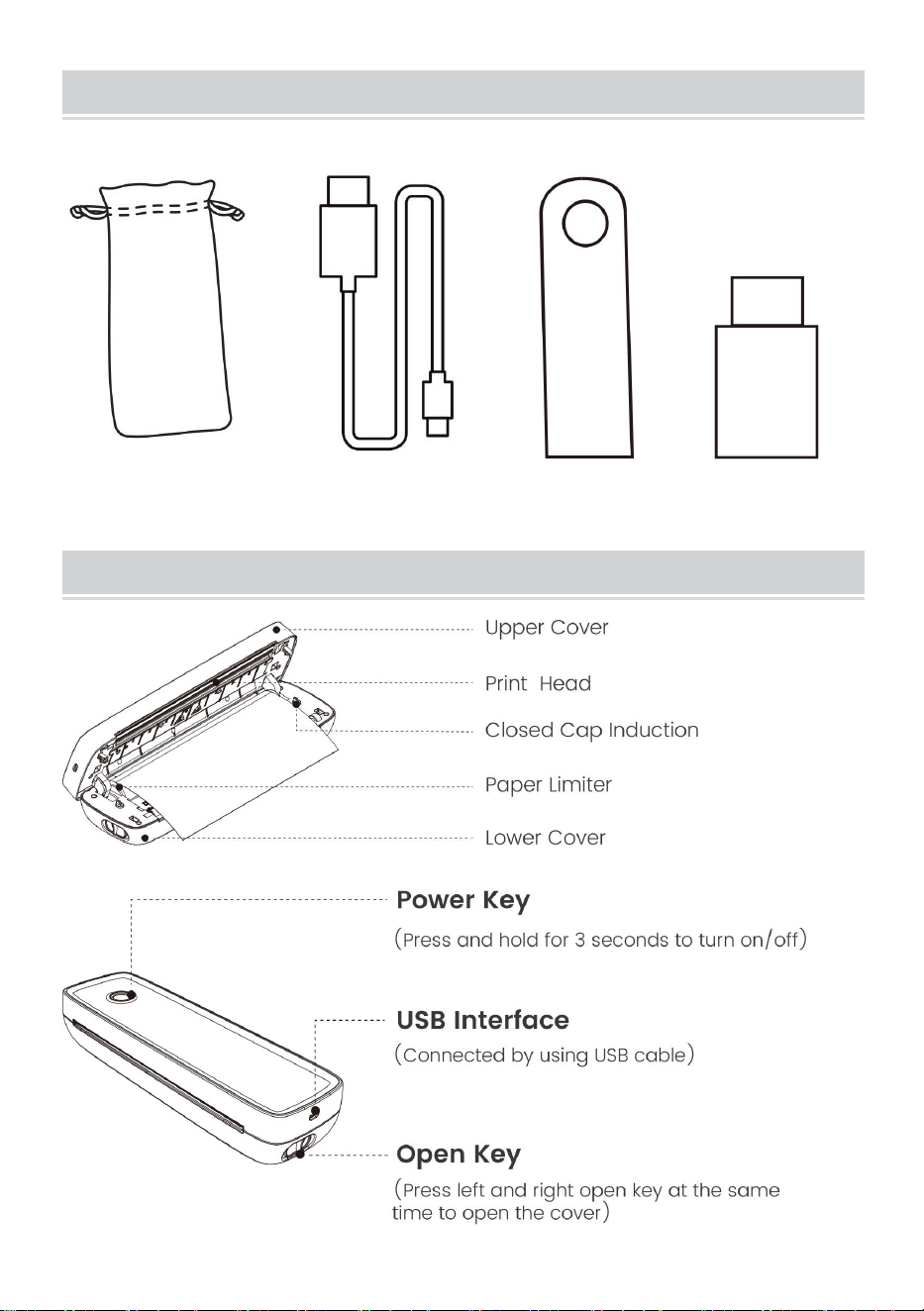
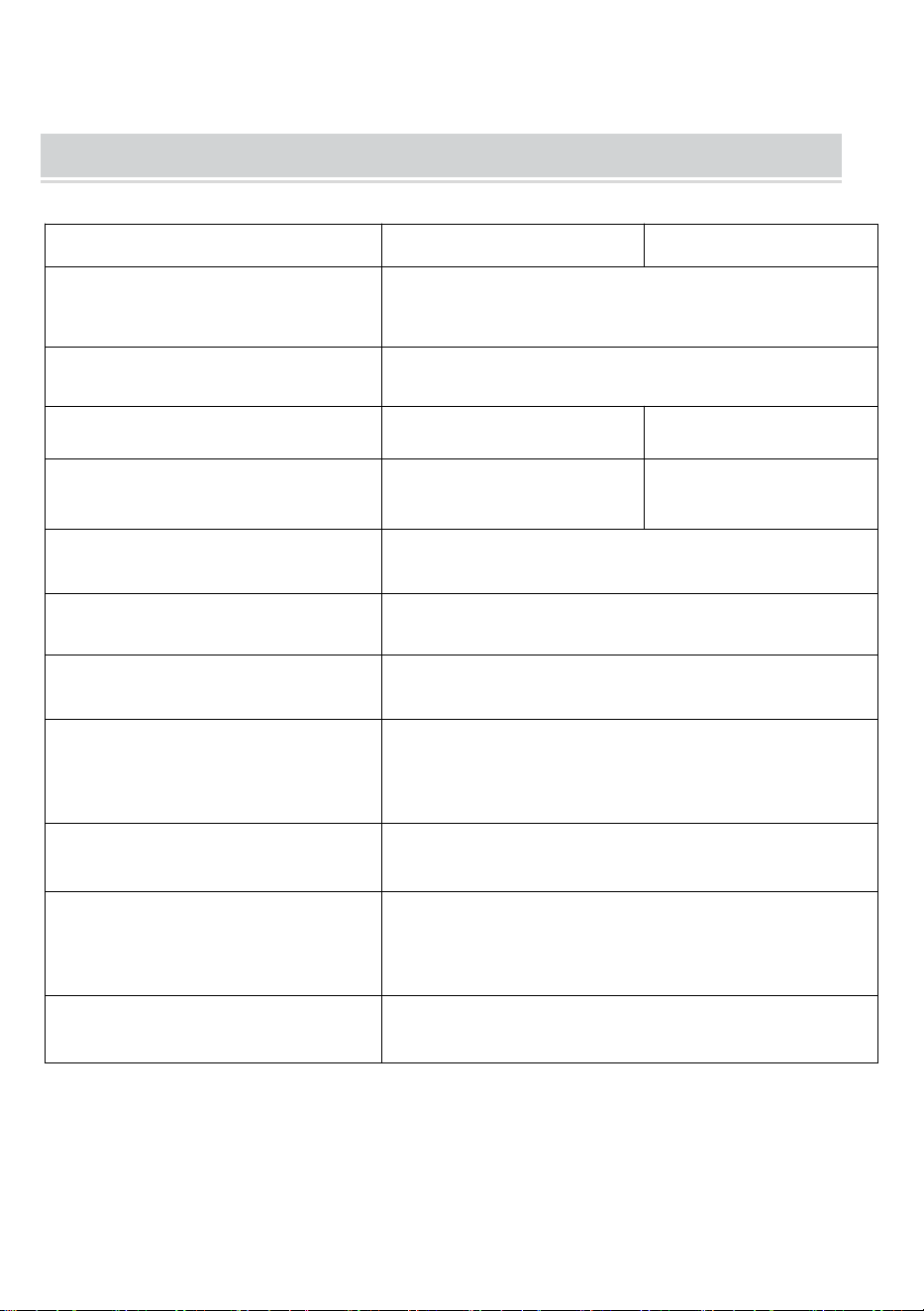
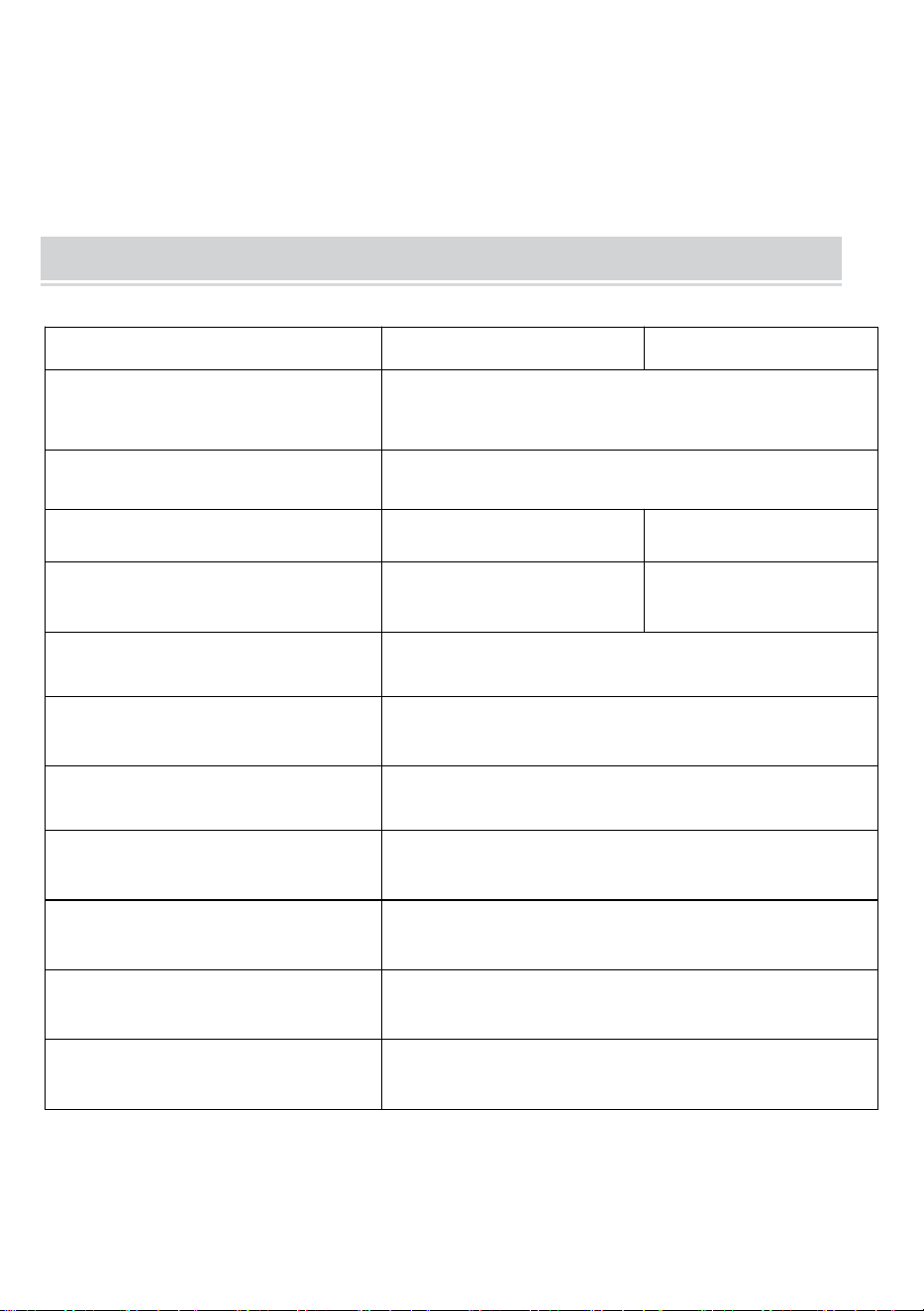
TECHNICAL SPECIFICATIONS
Model
Y80
Y80H
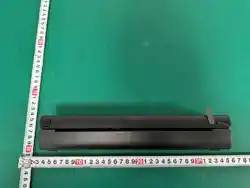
Product Dimensions
(LxWxH)(mm)
290*90*60
Net Weight(kg)
About 0.95
Resolution
203 DPI
300 DPI
Max Printing speed
15mm/S
10mm/S
Input Power
DC 5V 2A
Man-Machine Interface
Key LED Indicator Drive
Communication Interface
USB/BT20&BT4.0
Operating Temperature(℃)
0 ~ +40
Working Humidity
30%~85% RH(No Condensation)
Storage Temperature(℃)
-20 ~ +60
storage Humidity
0%~90% RH(No Condensation)
*Products such as specifications, appearance, and design are
subject to modification without prior notice.
- 4 -
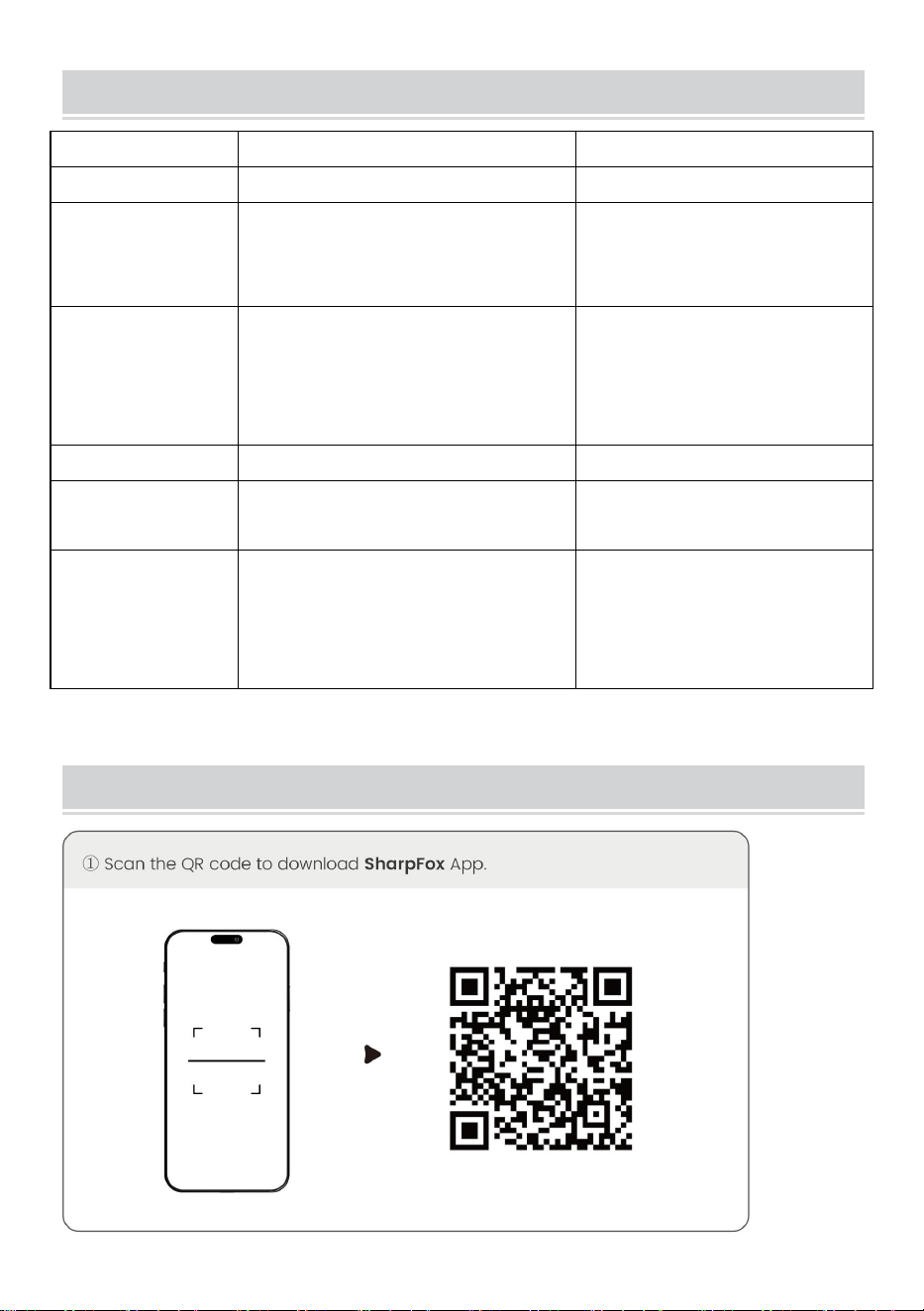
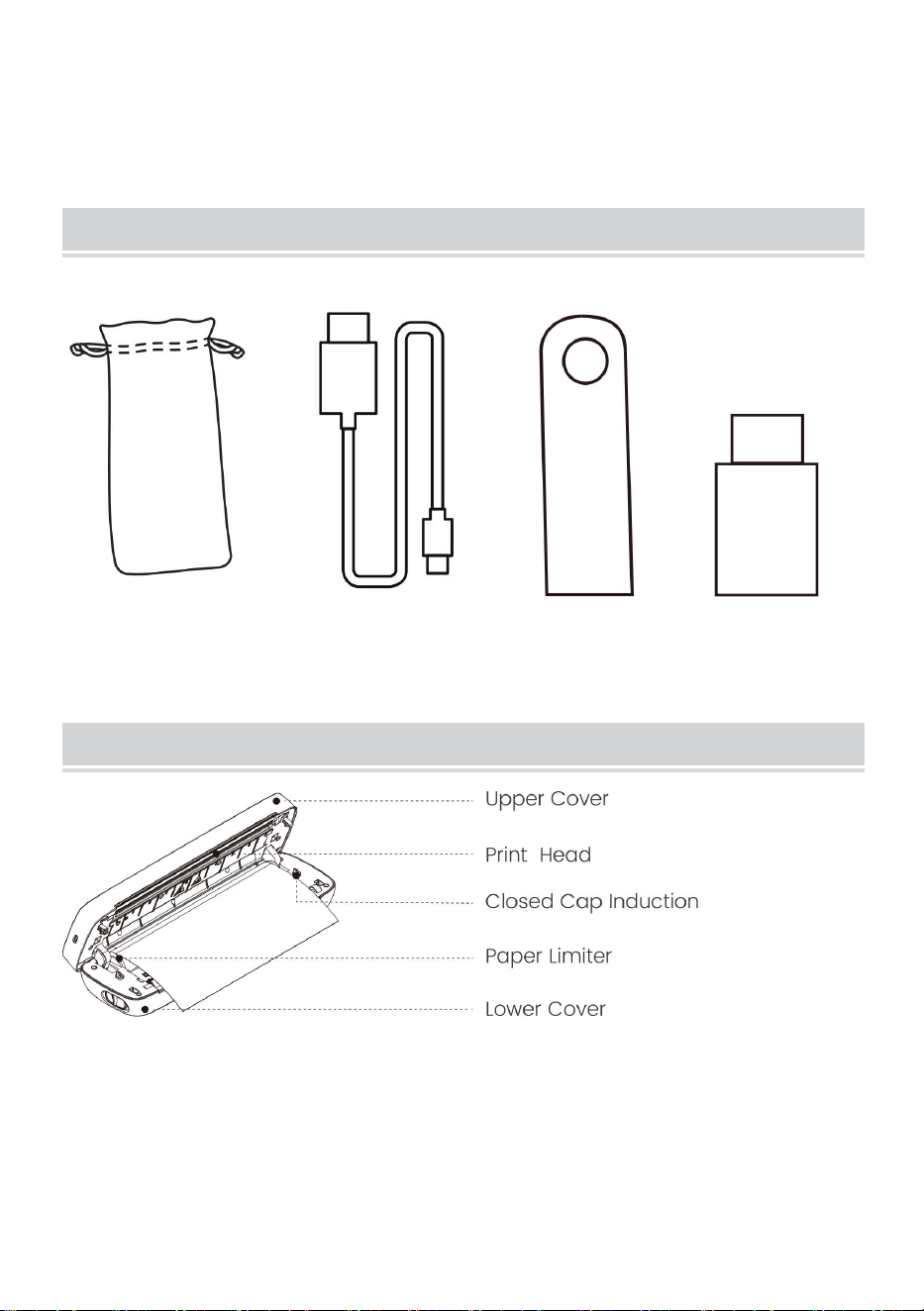
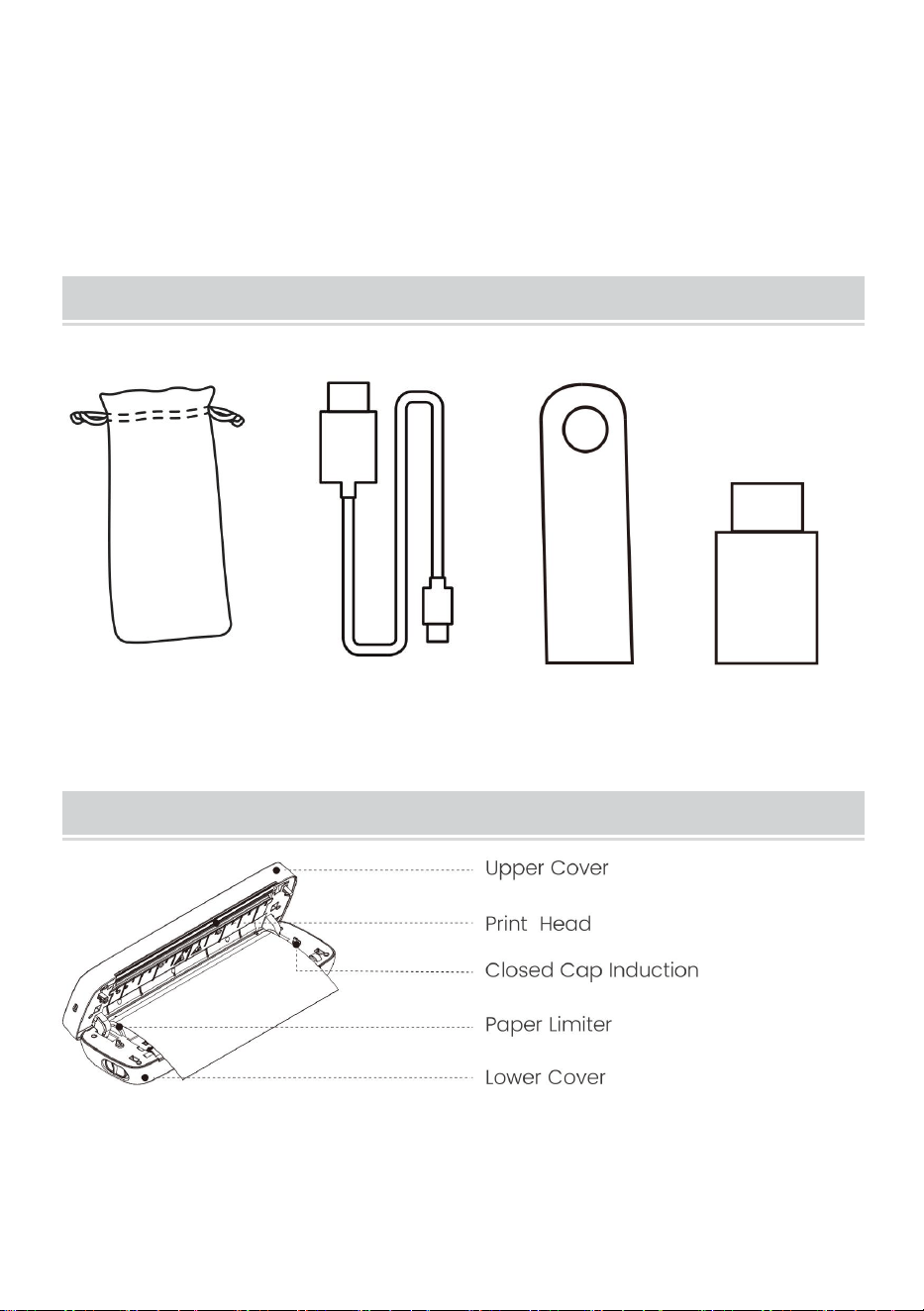
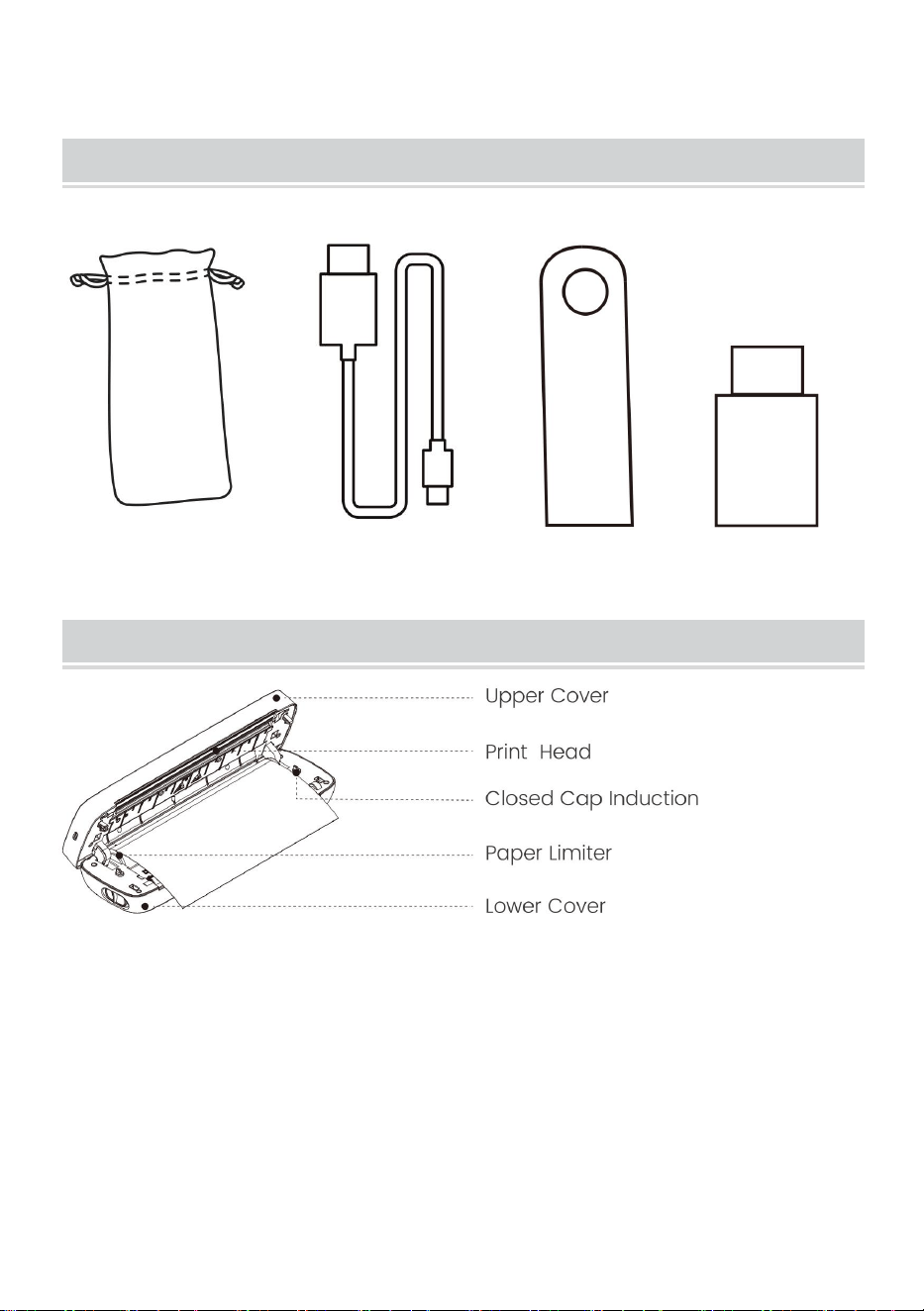
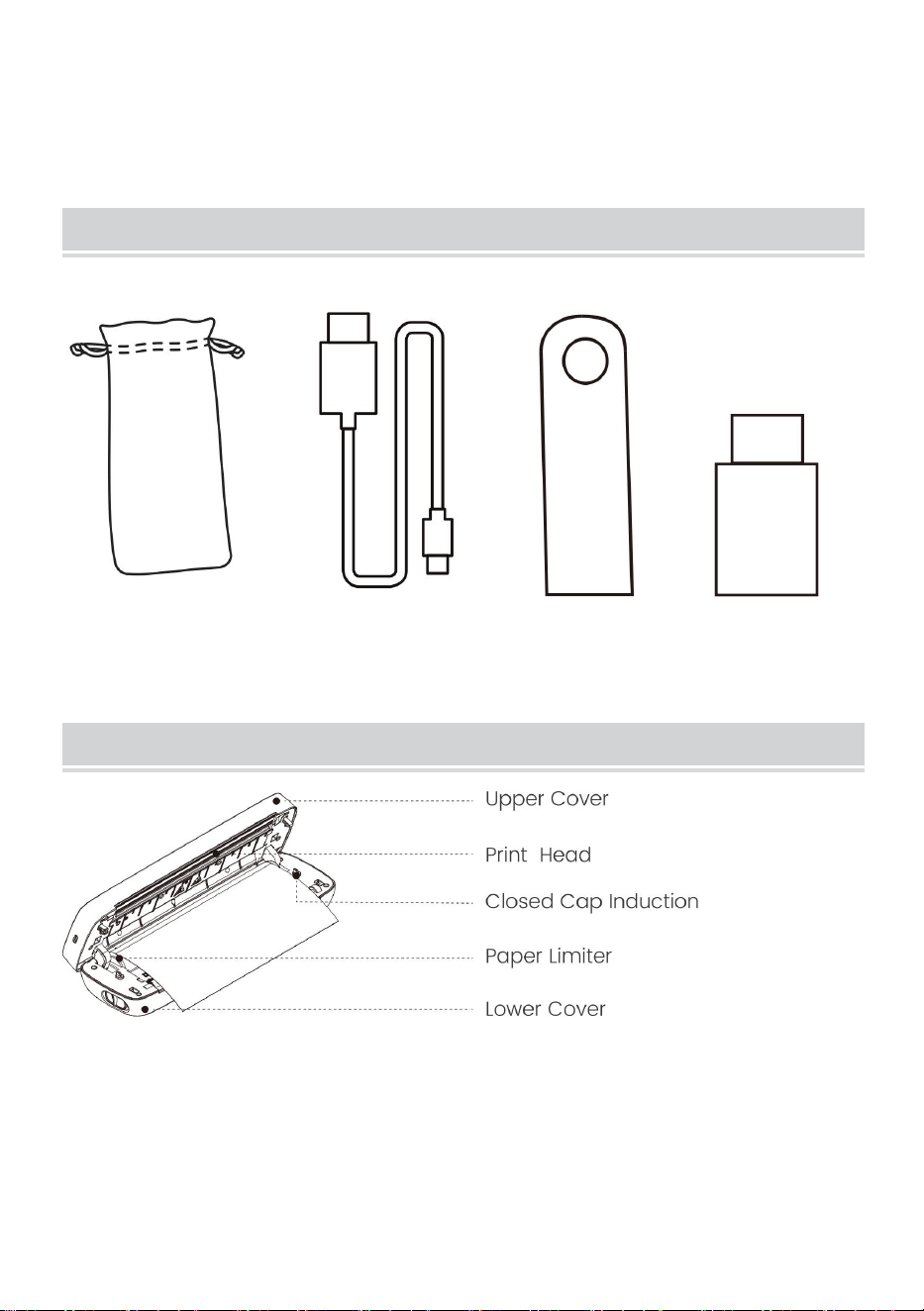
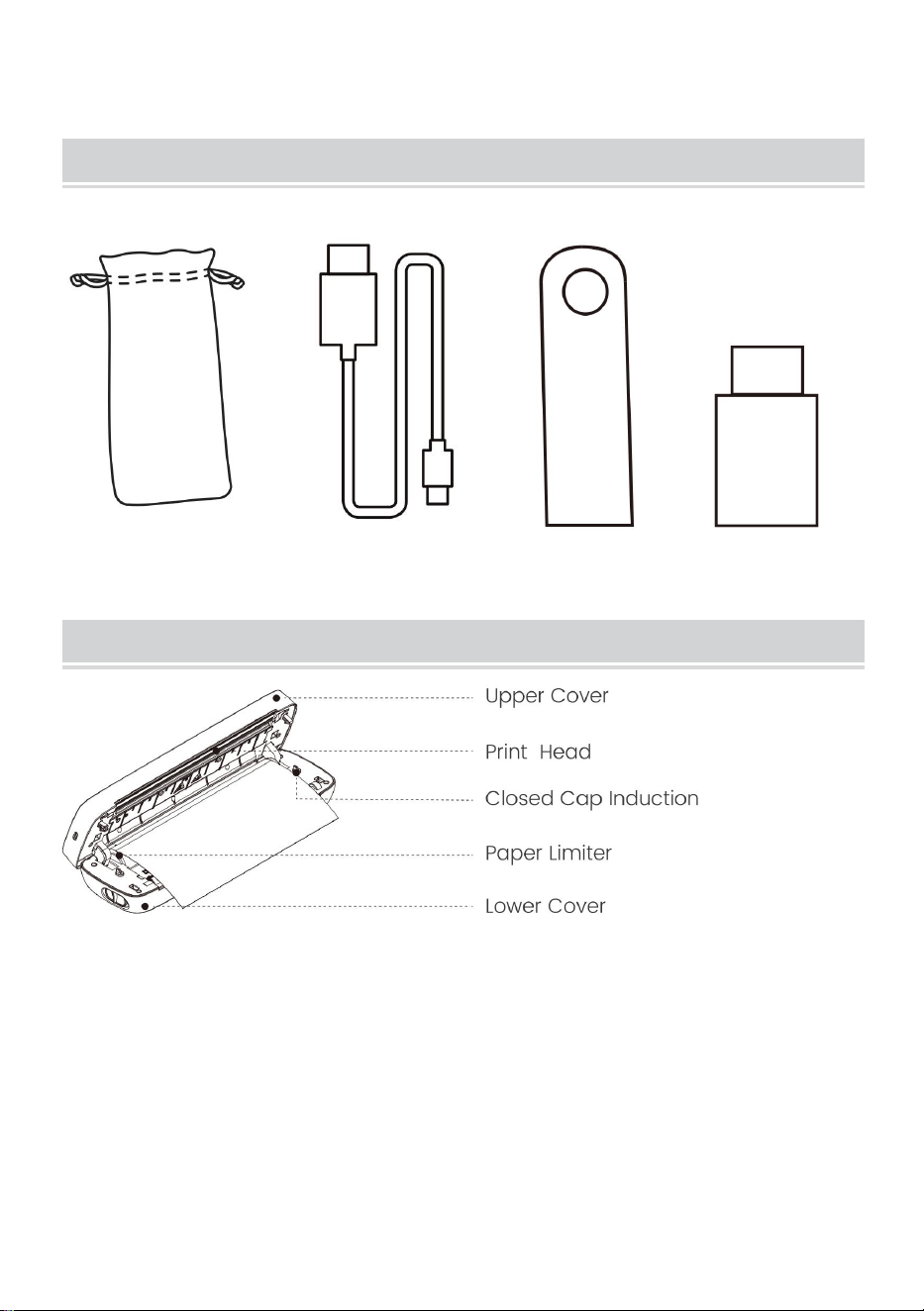
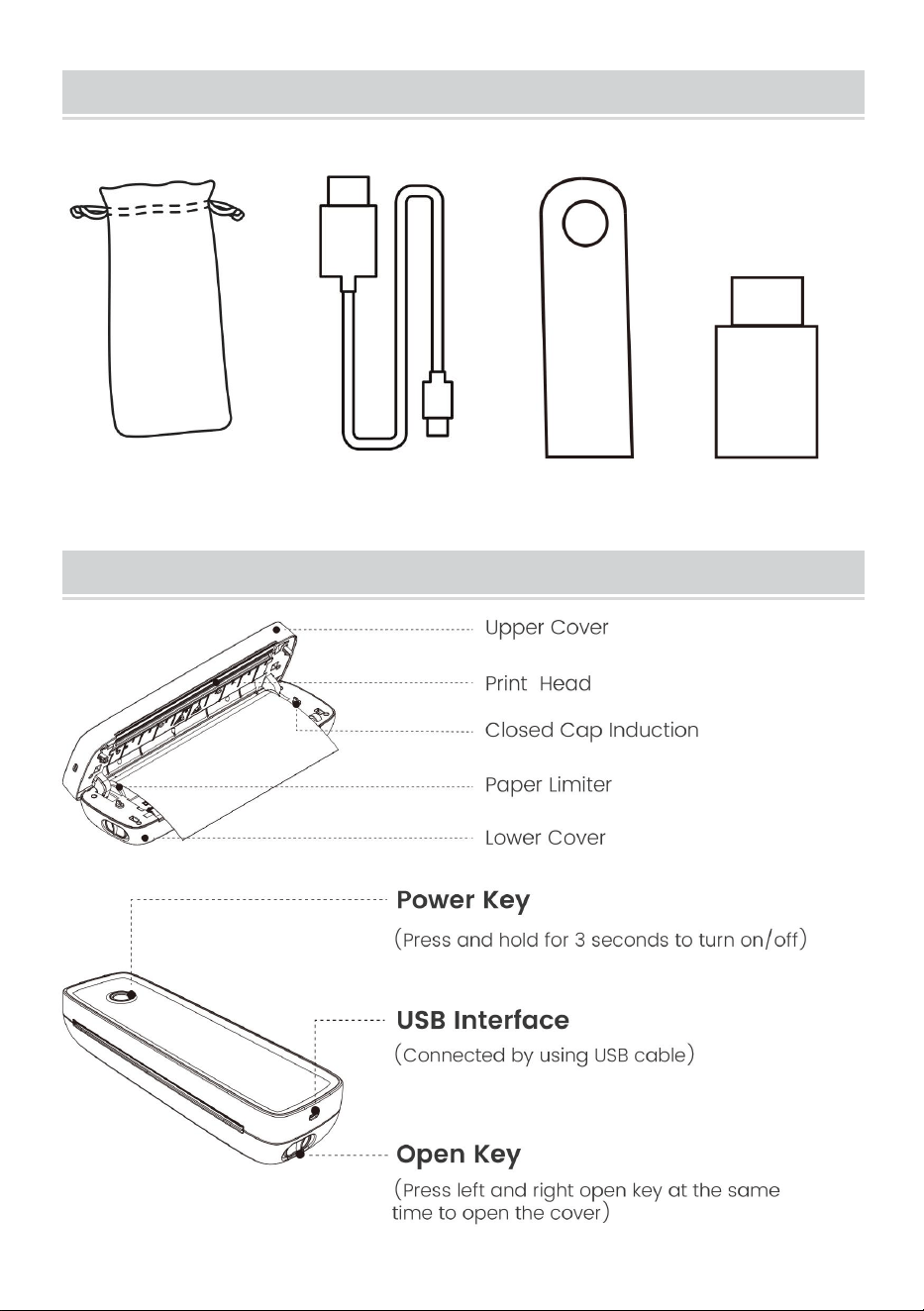
PACKAGE CONTENTS
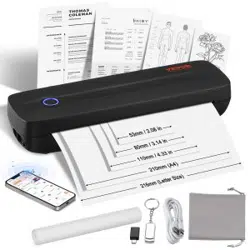
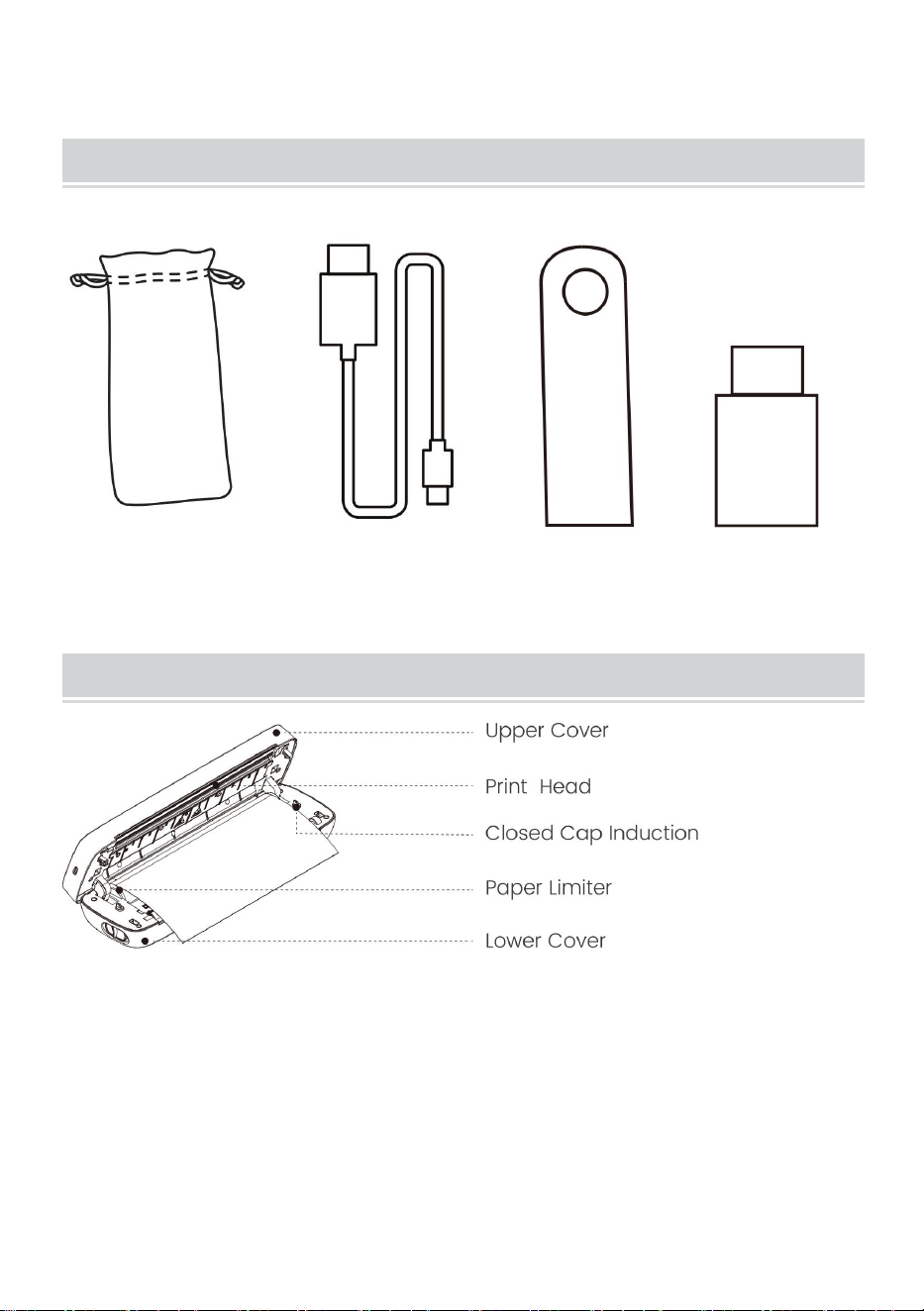
Flannel Bag*1 Data Cable*1 Drive u disk*1 Converter*1
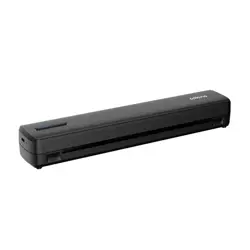
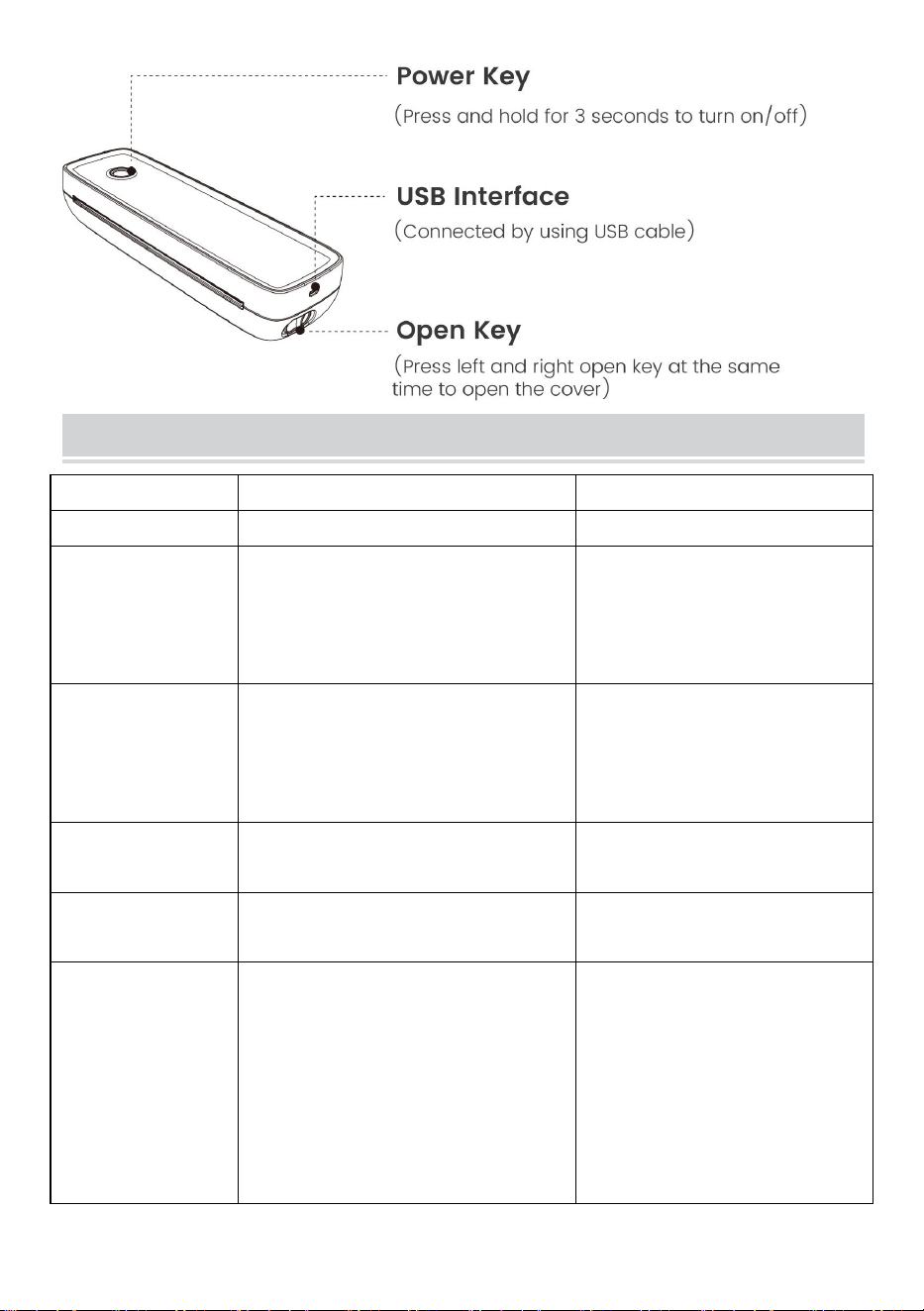
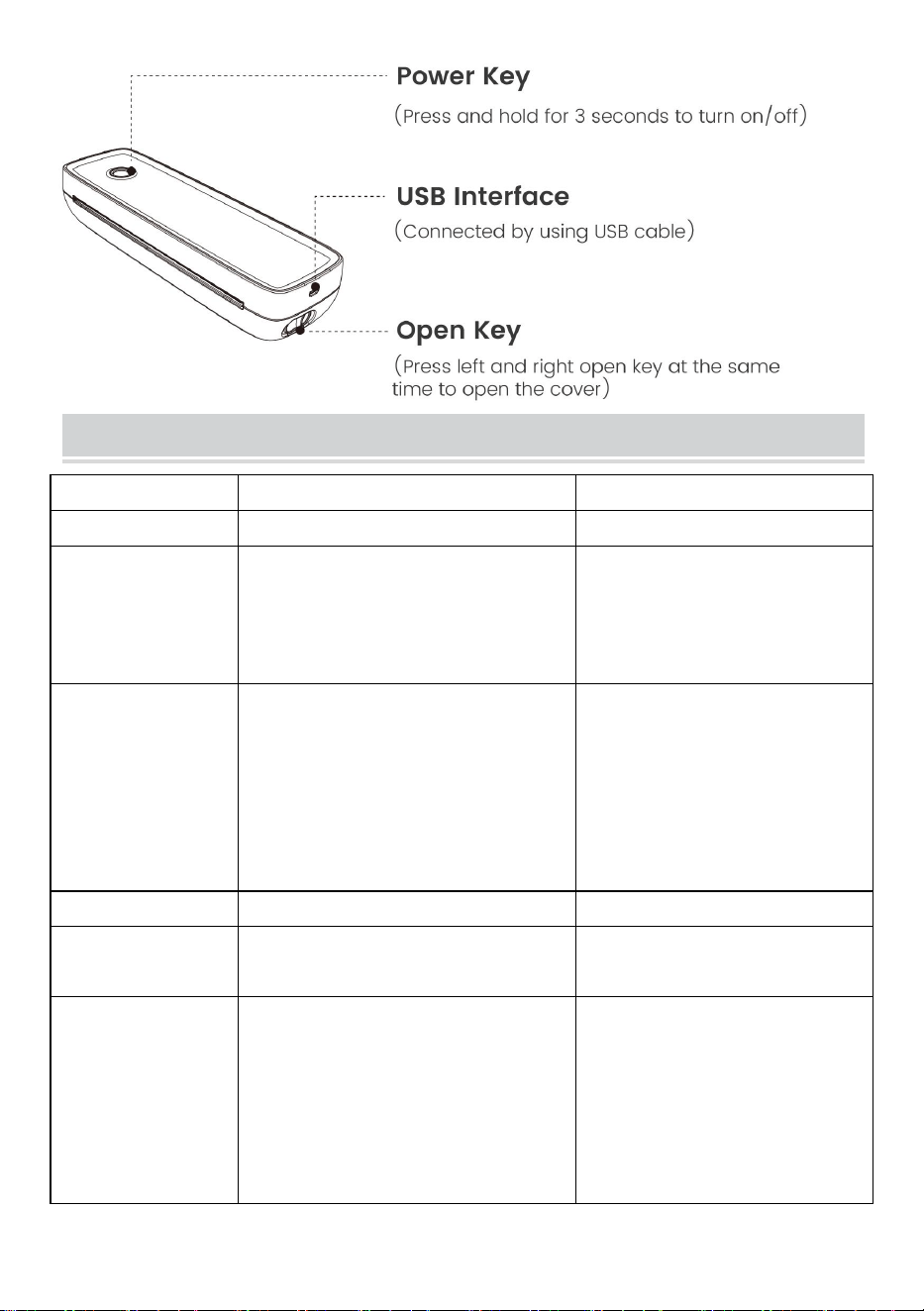
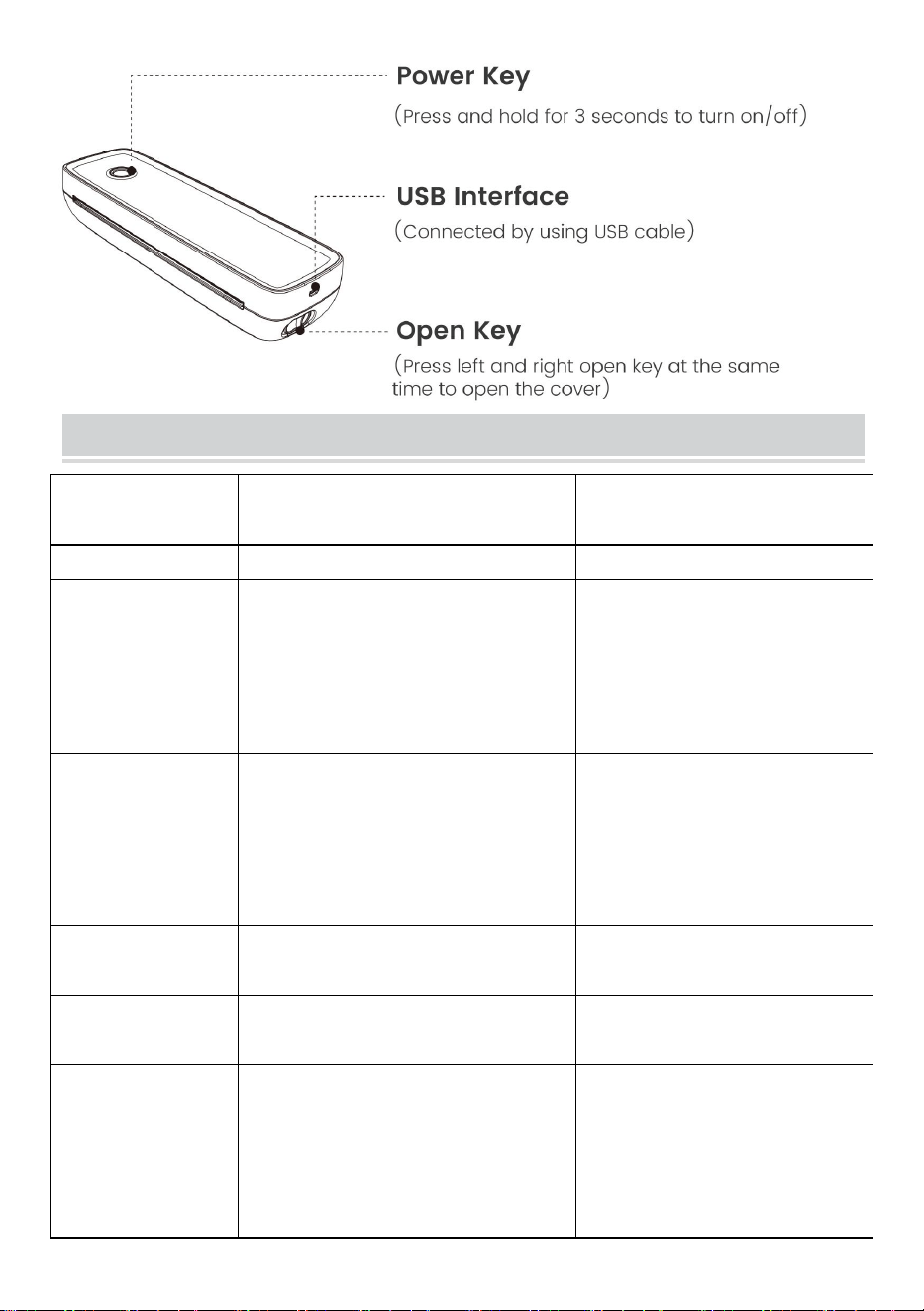
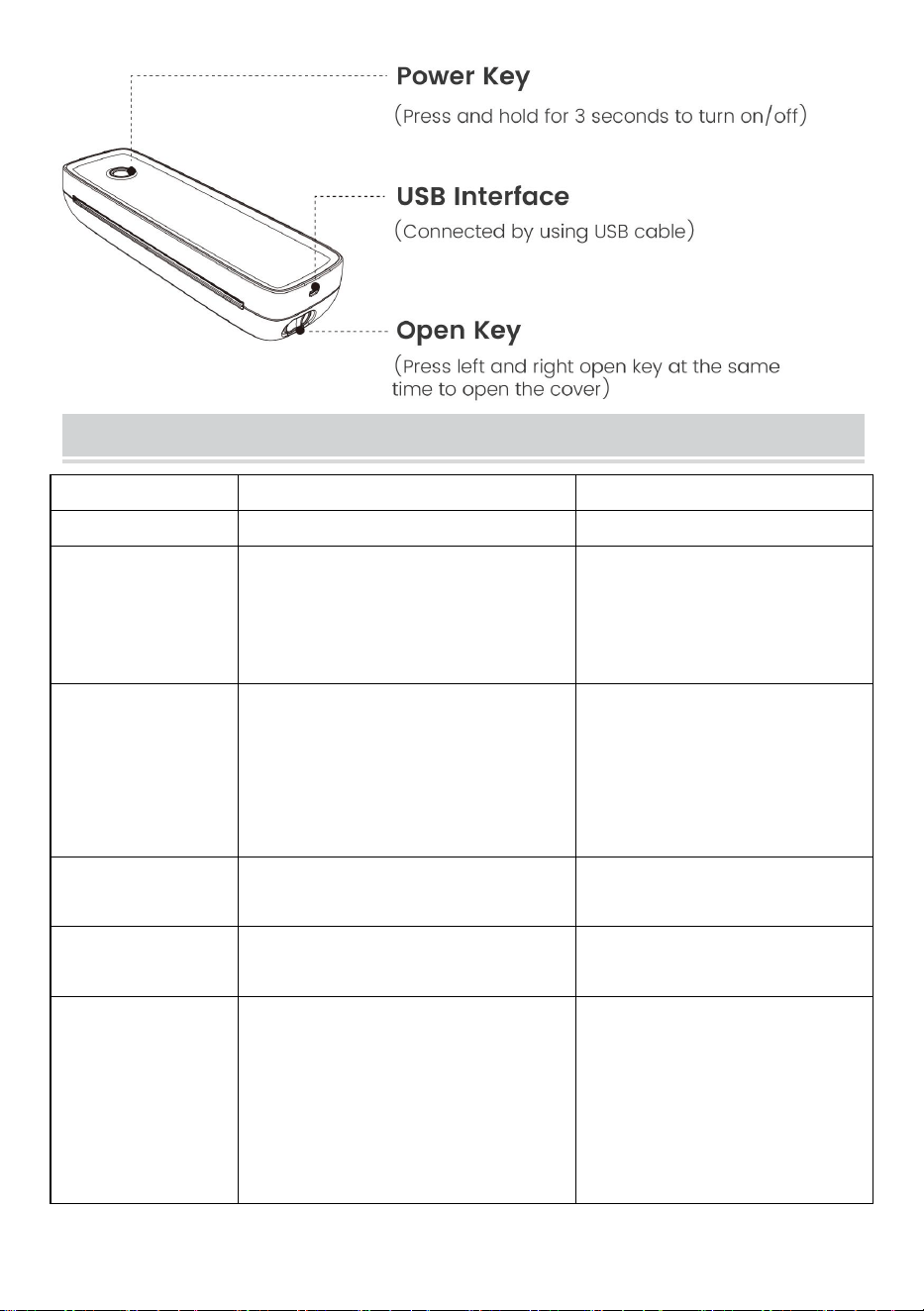
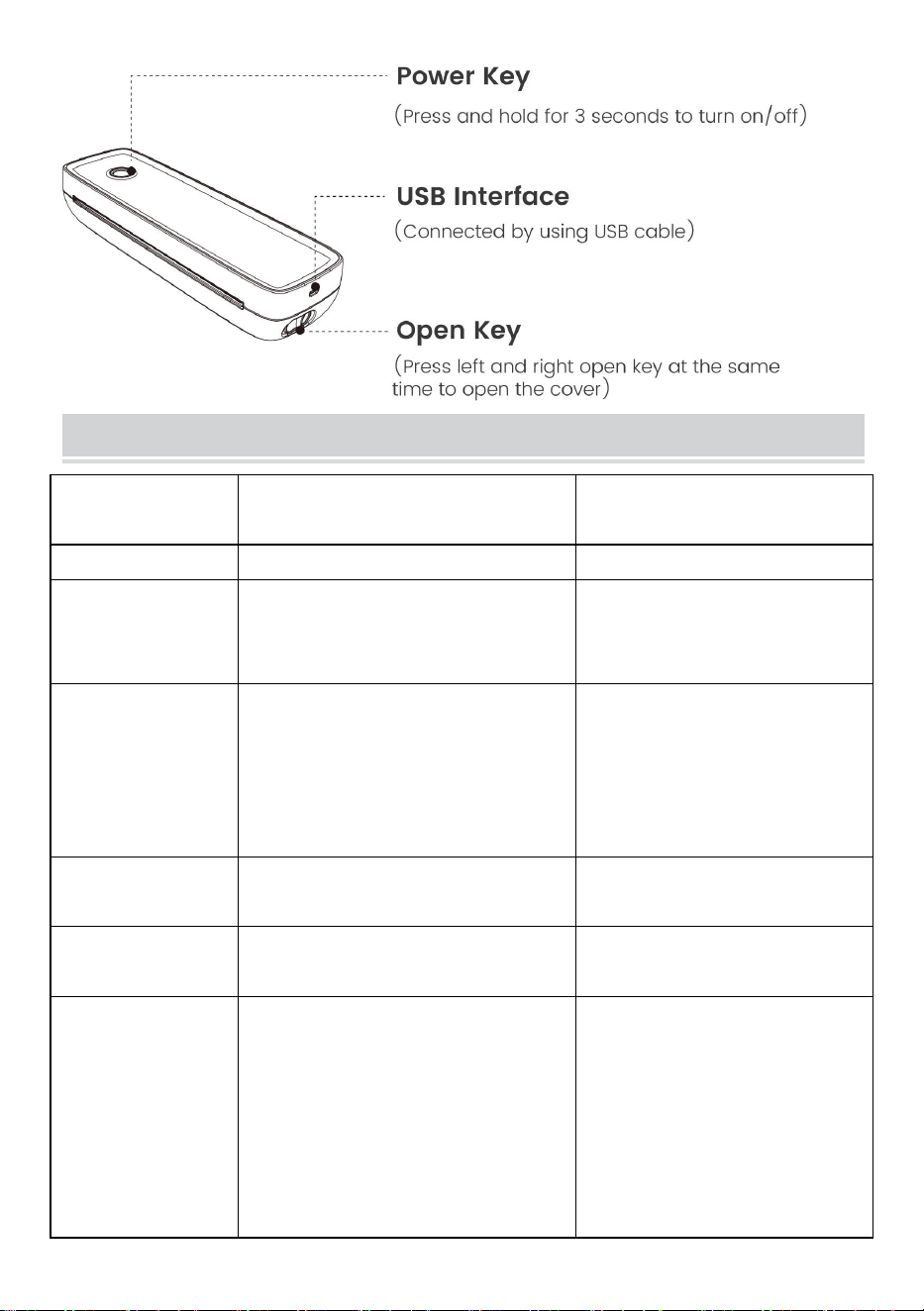
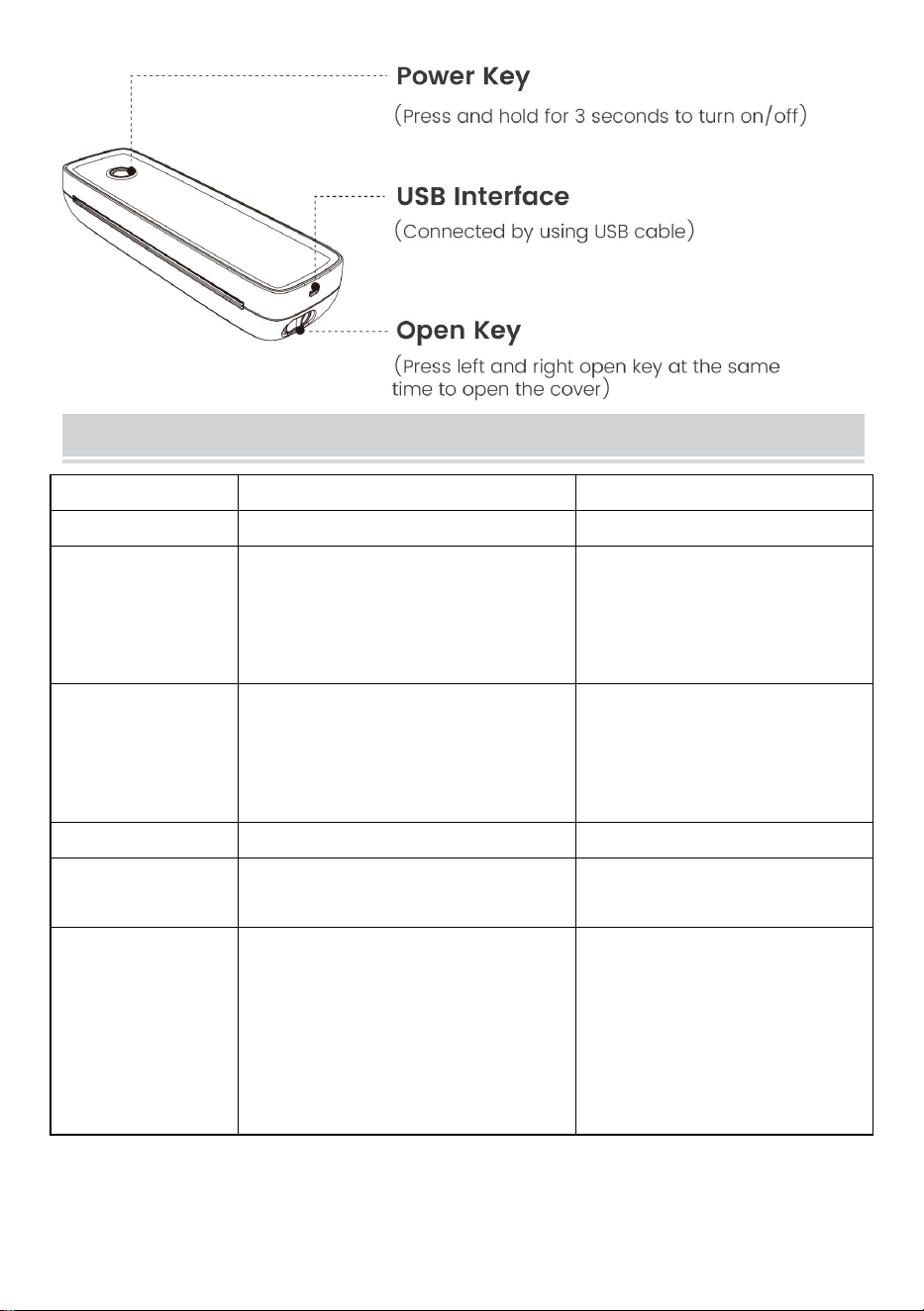
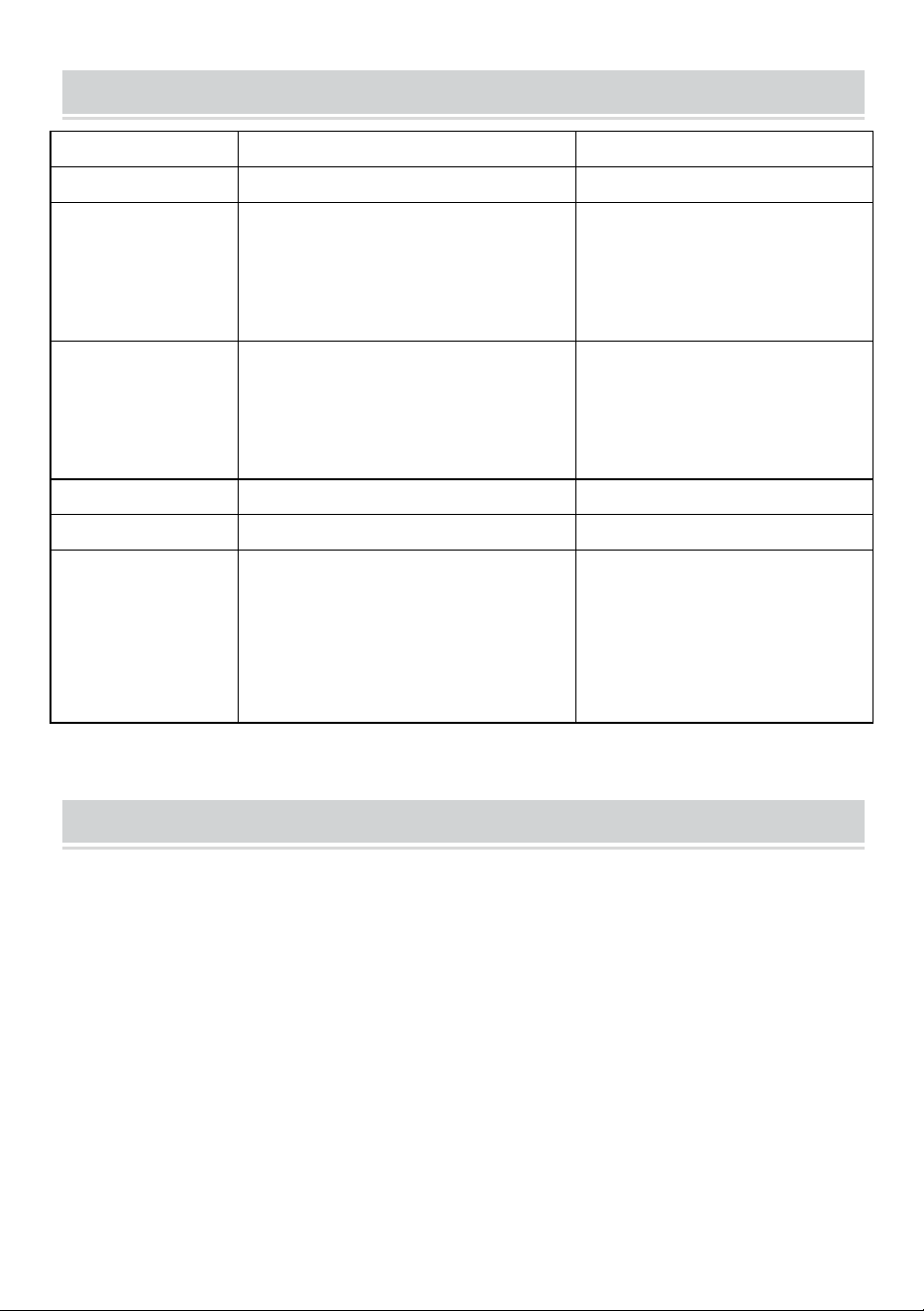
APPEARANCE AND COMPONENT
- 5 -
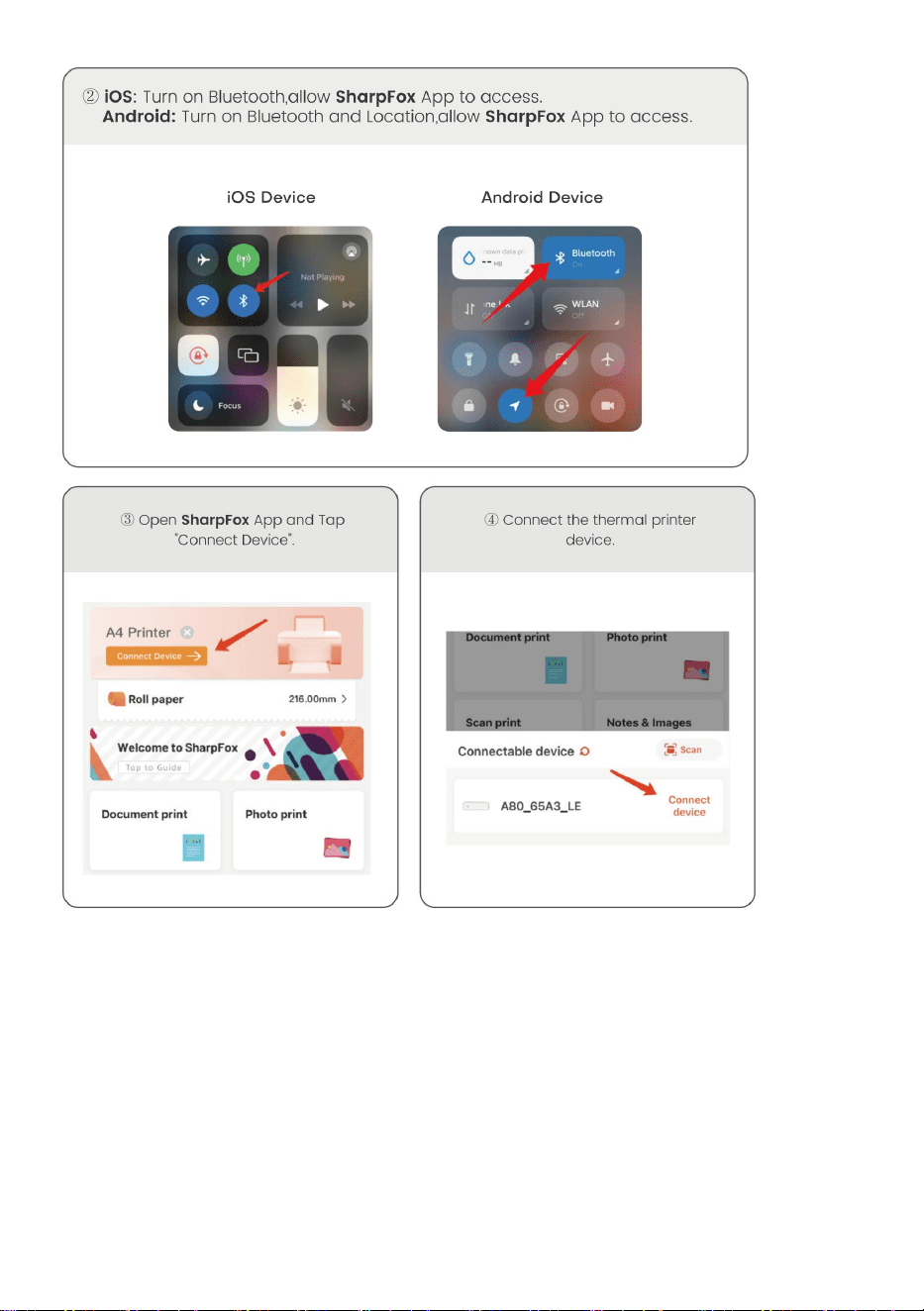
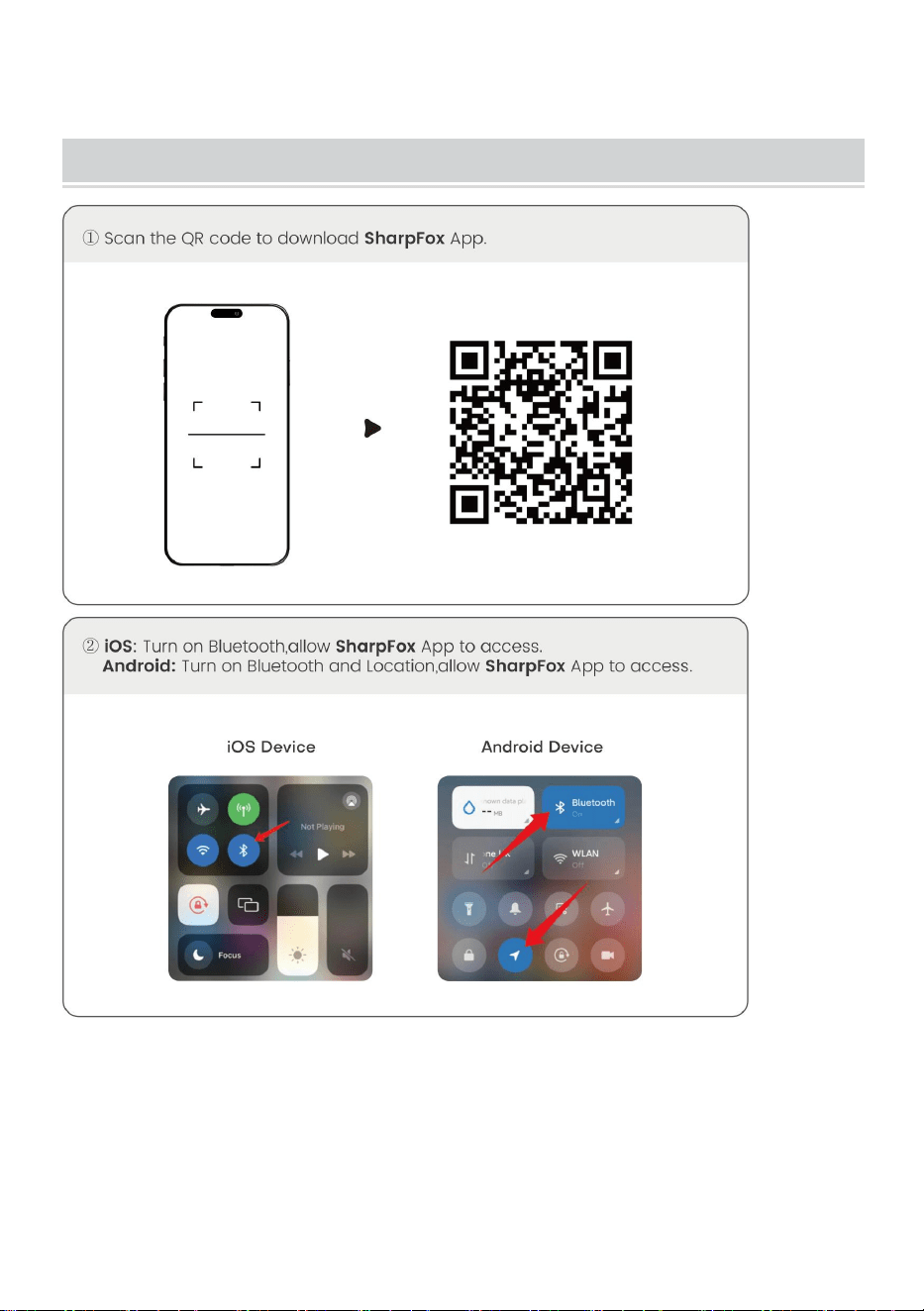
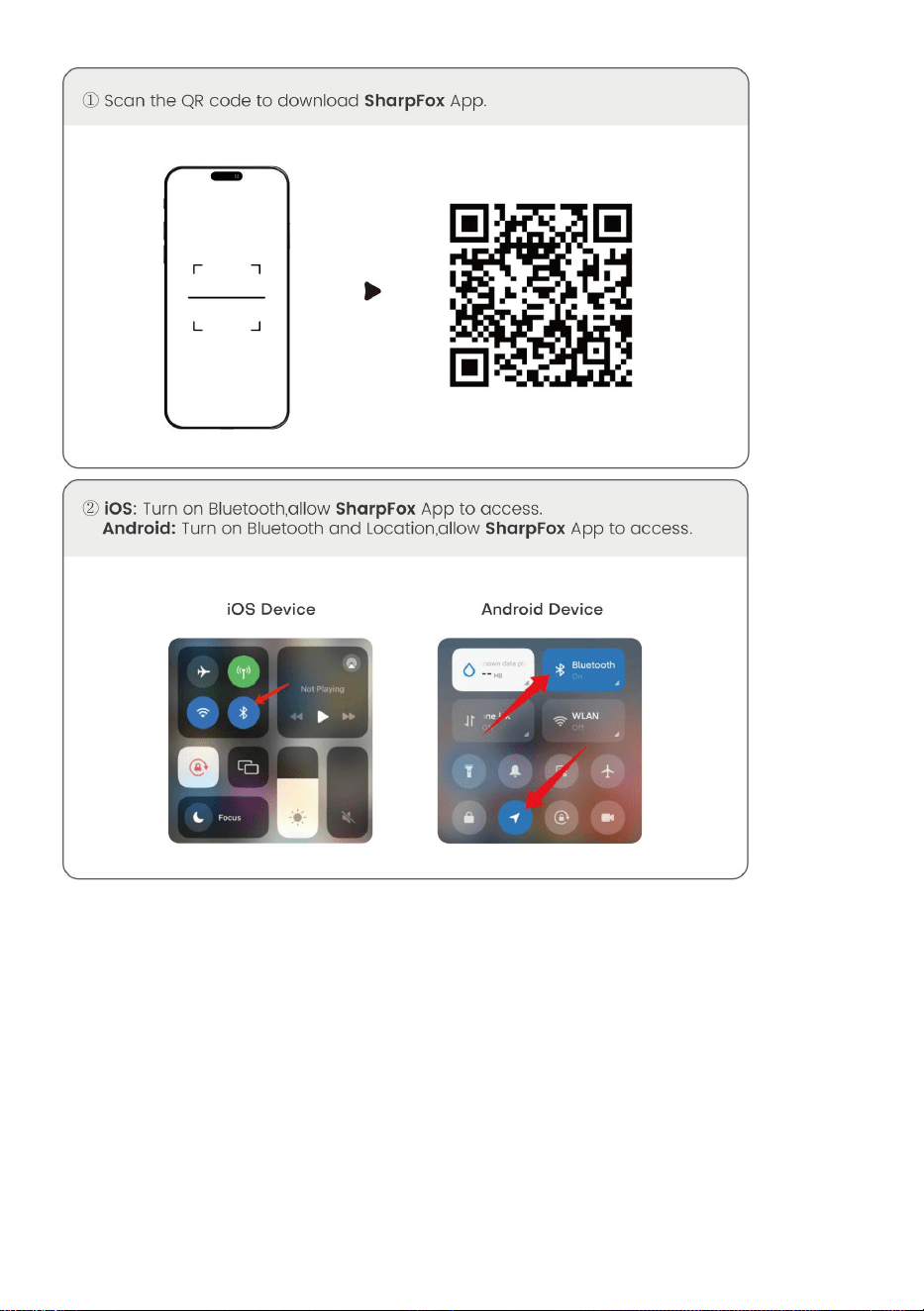
BUTTON OPERATING INSTRUCTIONS
Status
Description
Troubleshoot
Green
Normal operation
Flashing Red
and Green
-Printer head is overheated
-Printer will automatically
resume once the printer
head has cooled down
Red
-Charging
-Top cover open
-No paper
-When fully charged, the
light turns green
-Close the top cover
correctly
Flashing Red
Low electric quantity
Charge the printer
Blue
Bluetooth pairing successfully
Bluetooth connected
successfully
Flashing Blue
Bluetooth is initializing or
initialization failed
Close the App first. Restart
the printer and wait for the
blue light till non-flashing.
Then reconnect the App
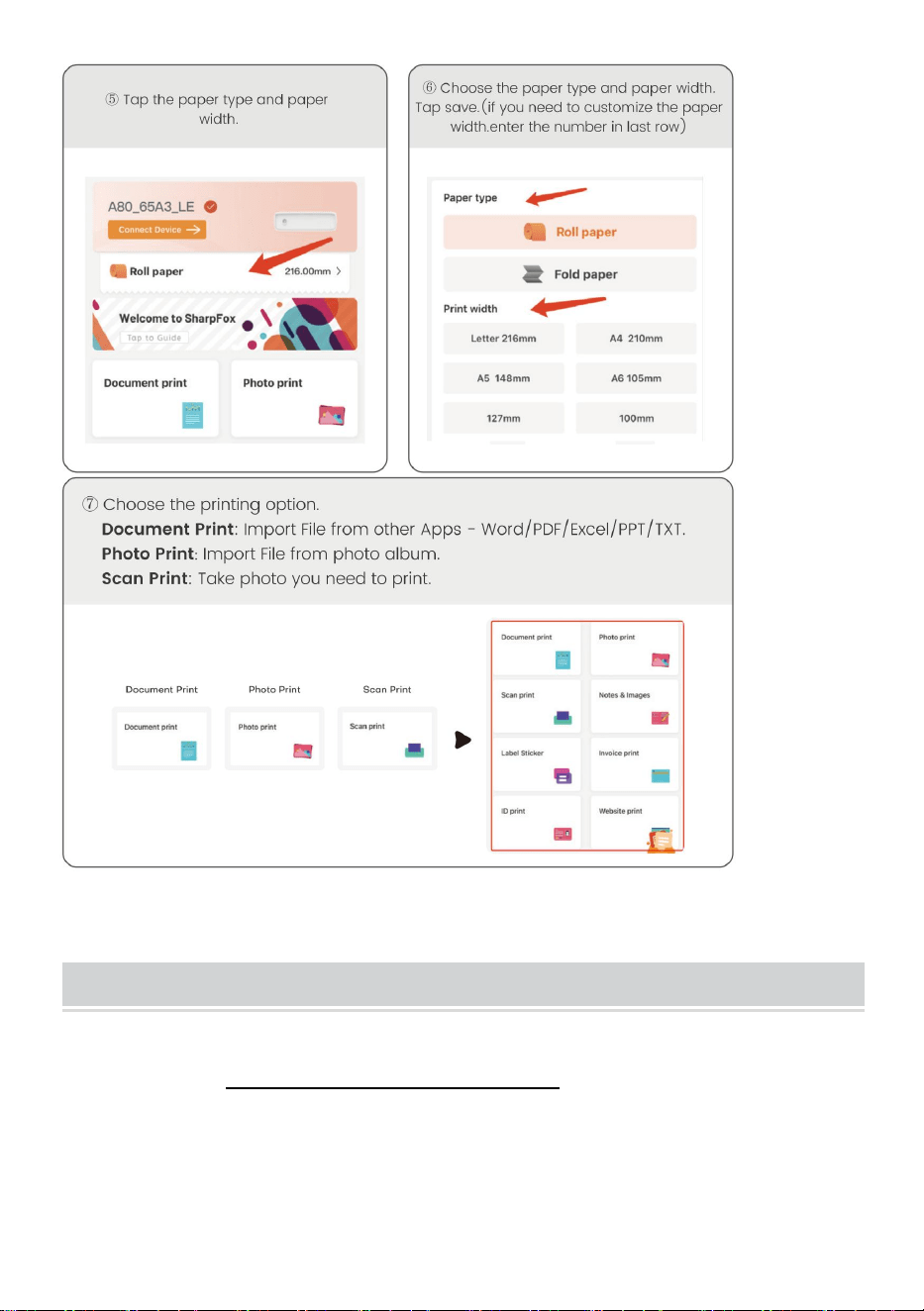
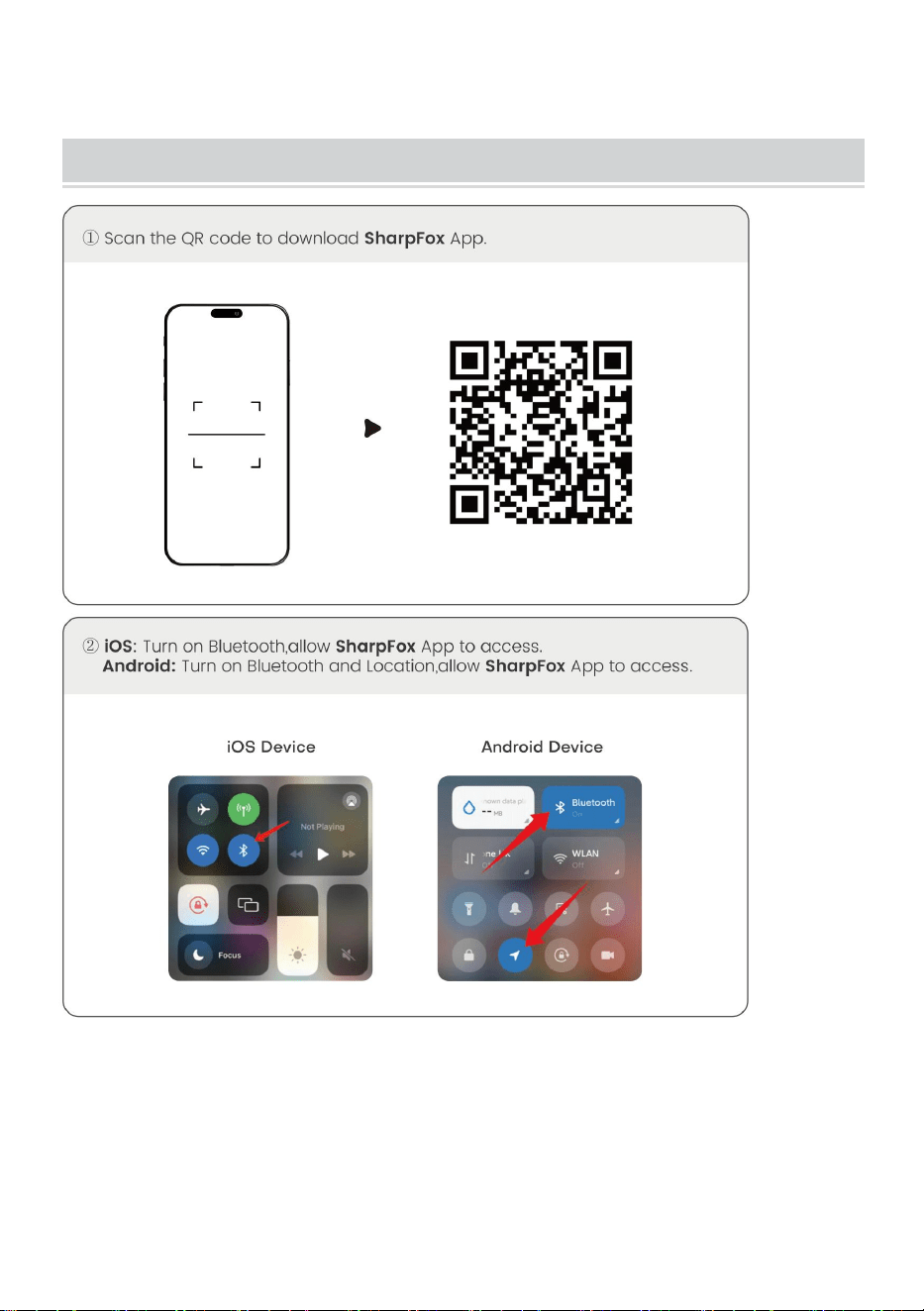
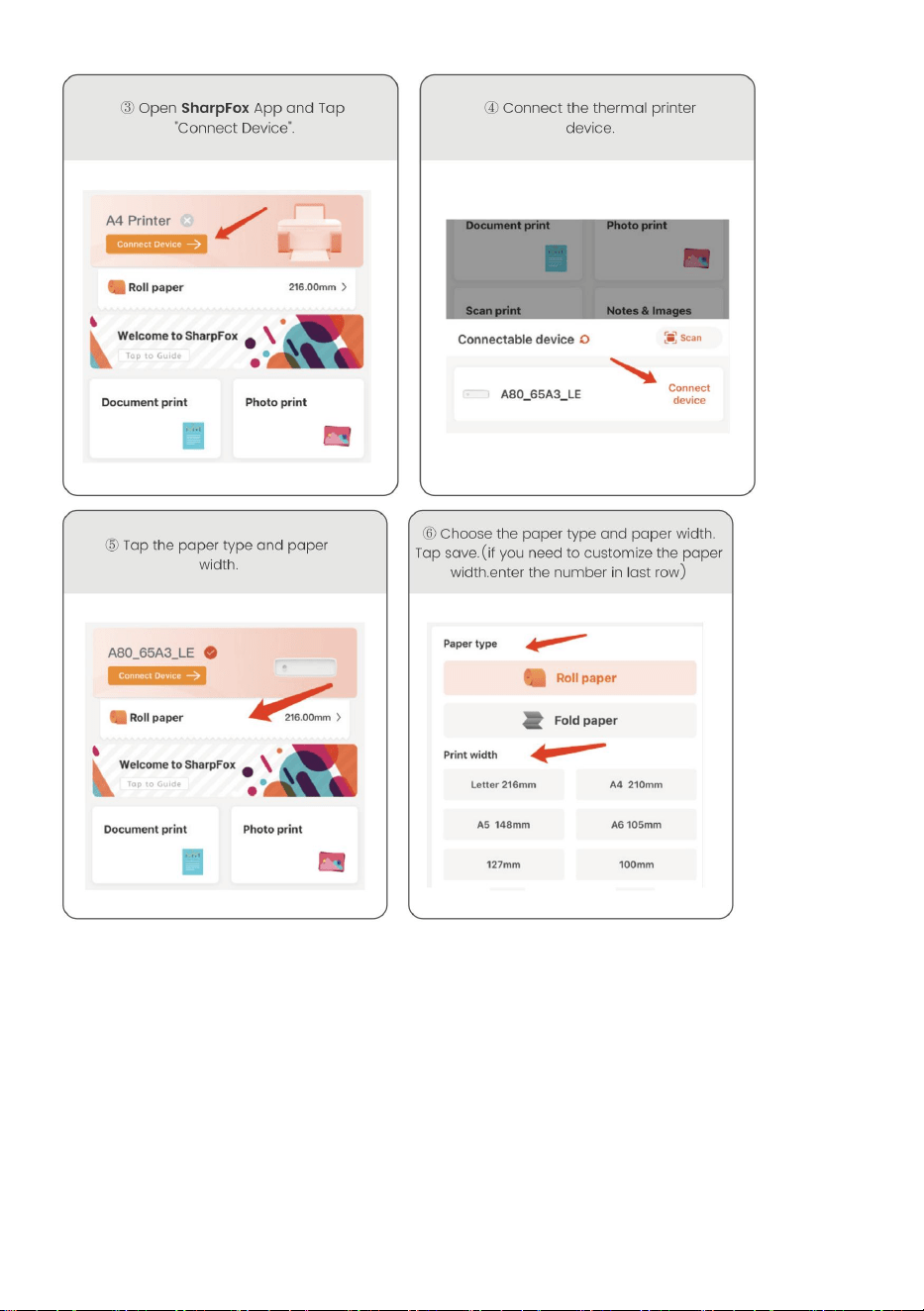
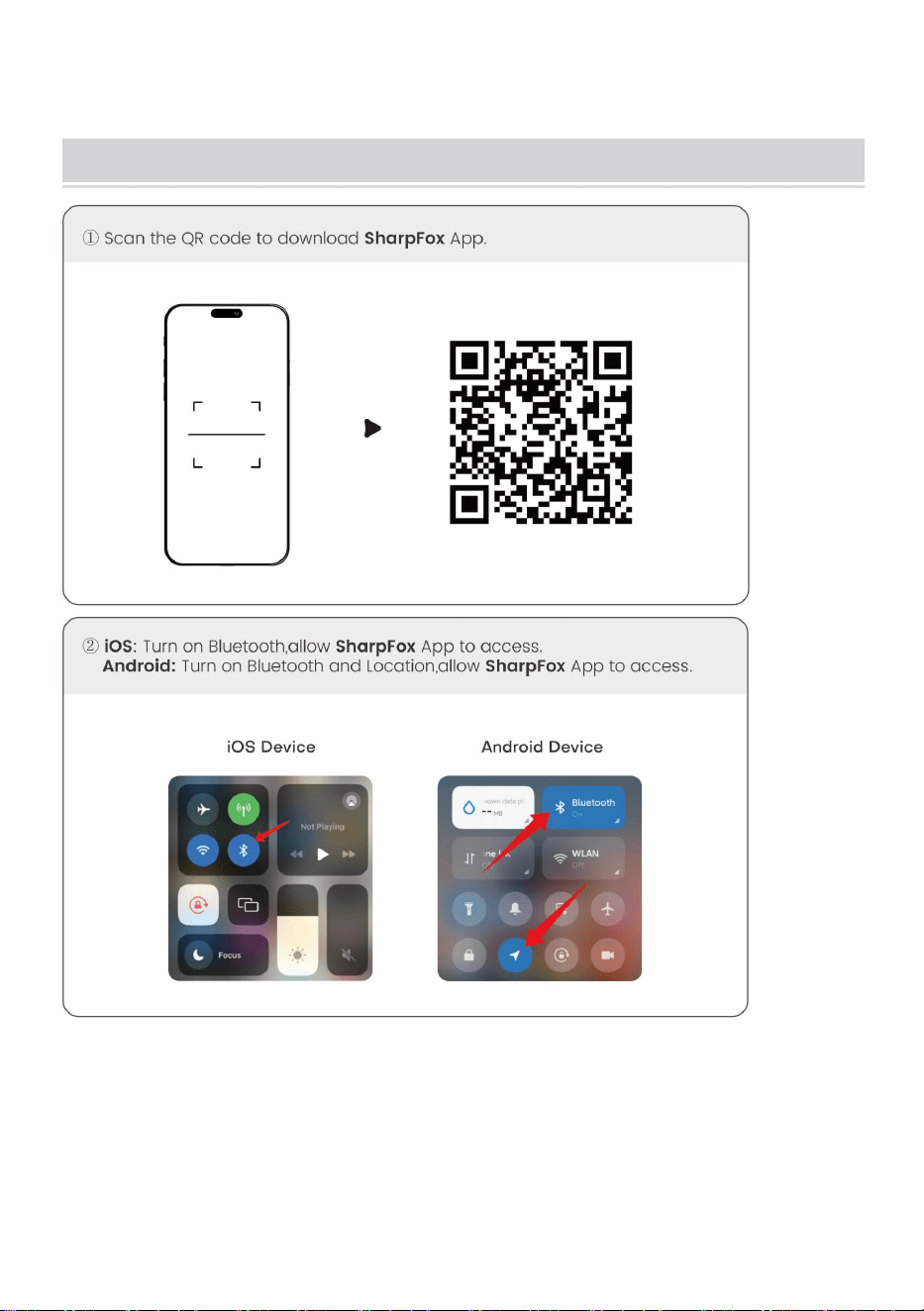
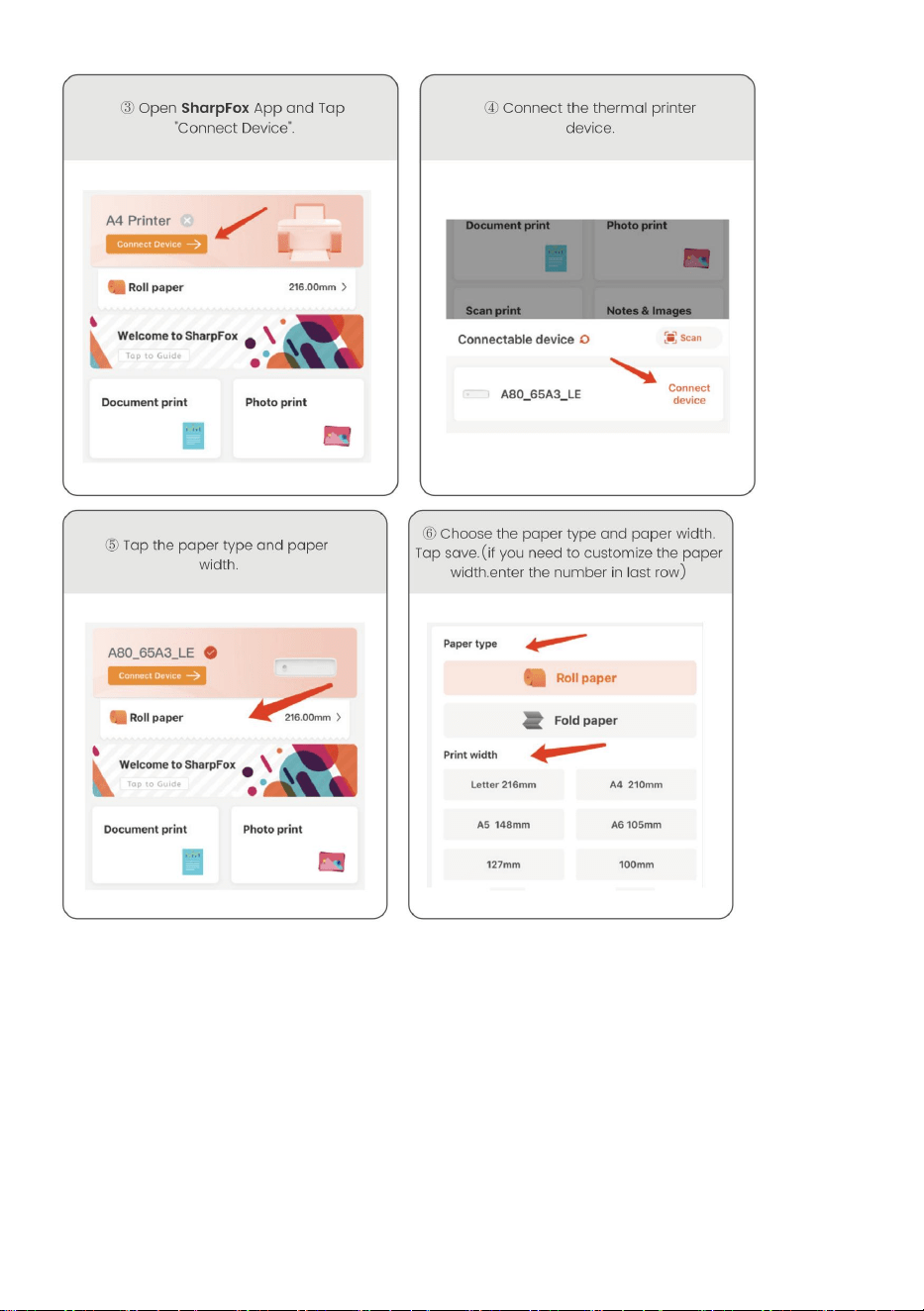
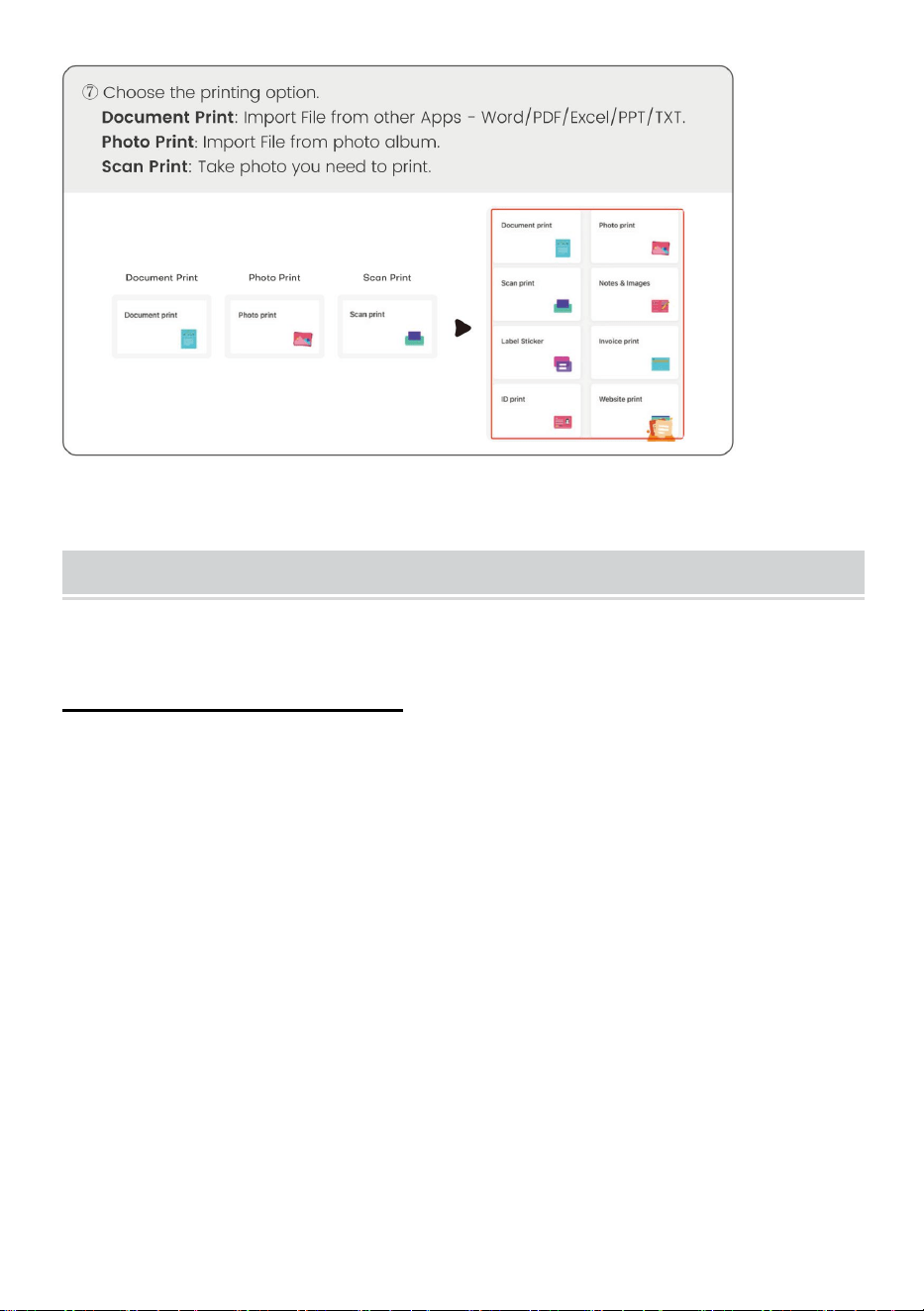
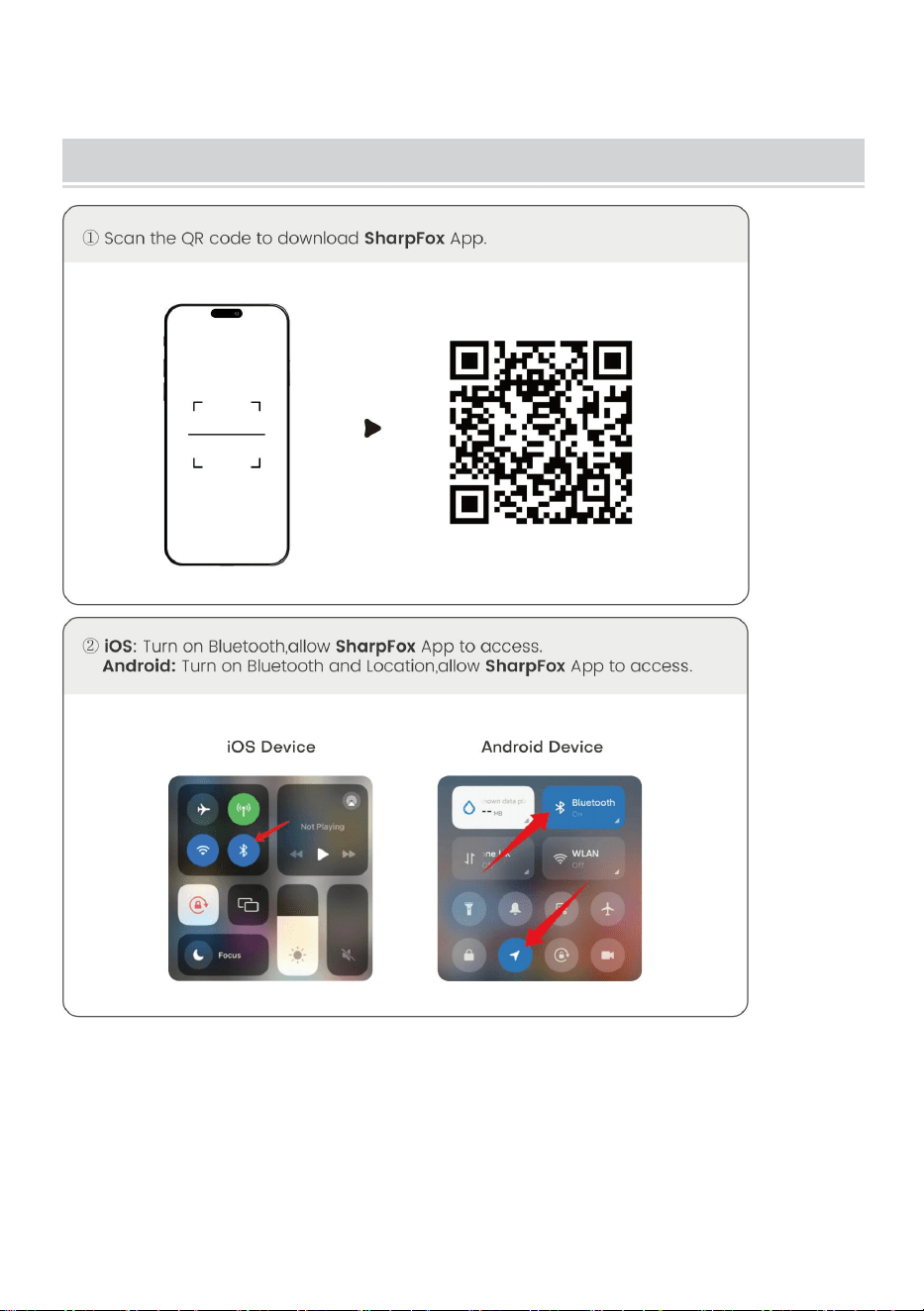
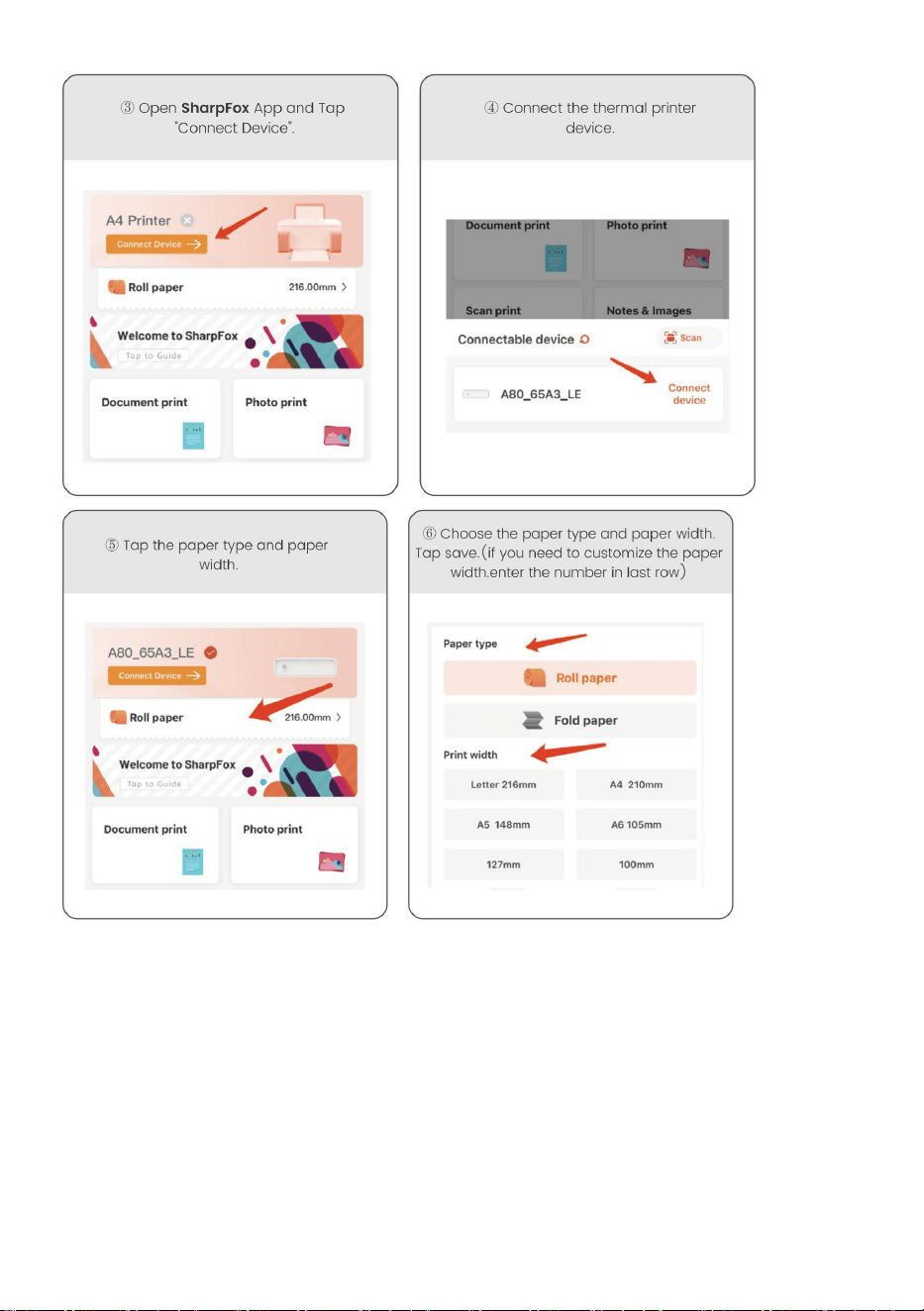
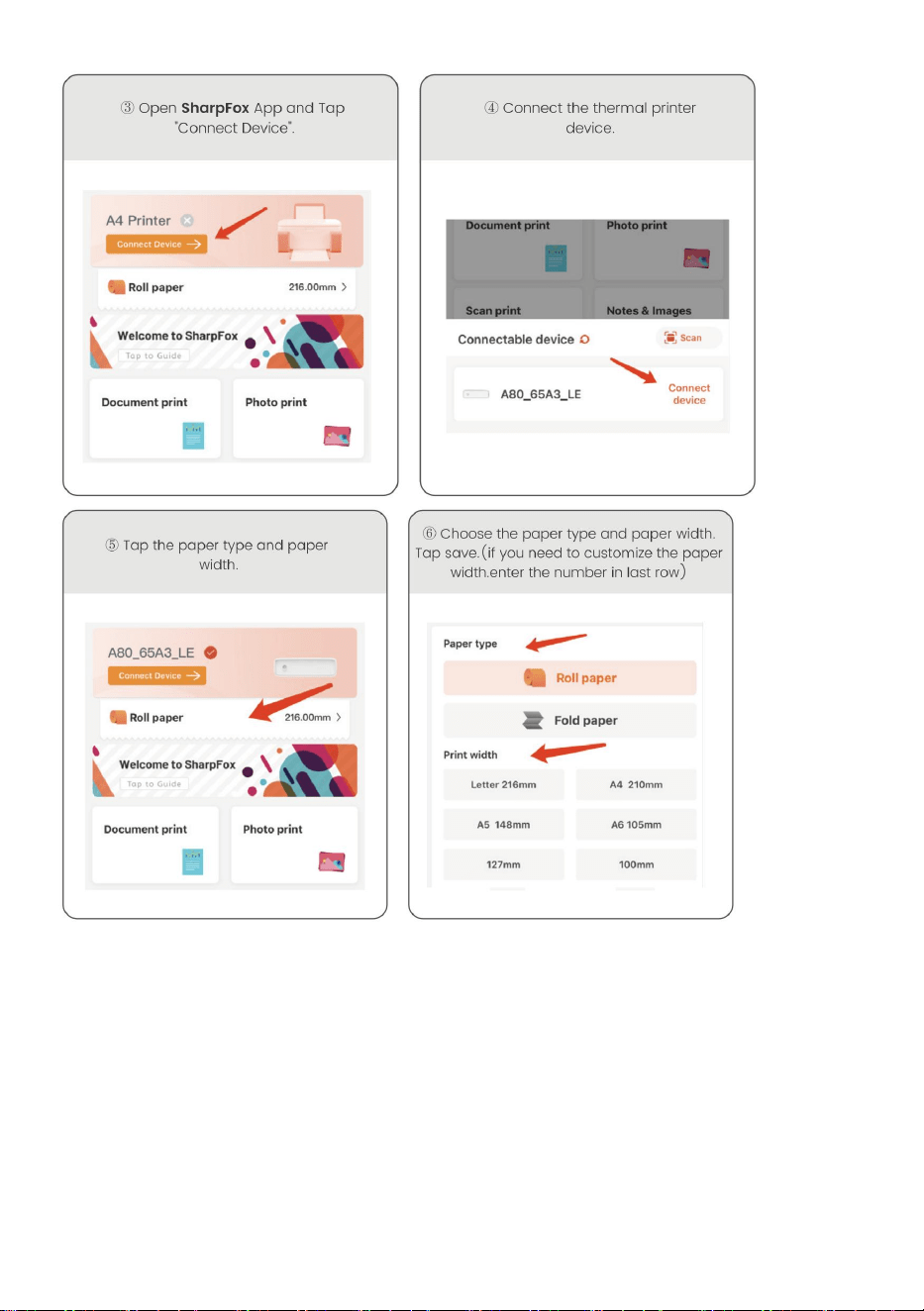
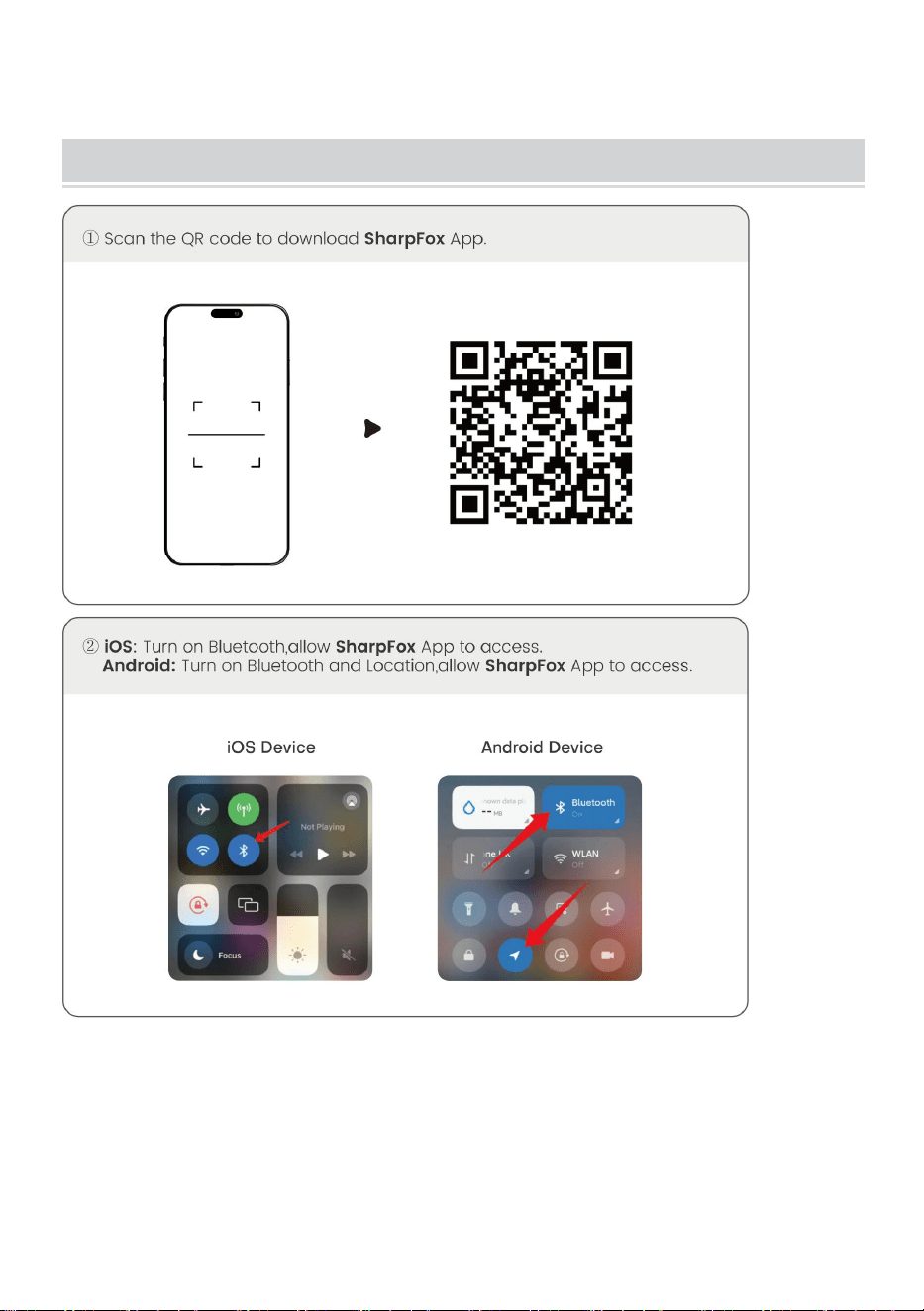
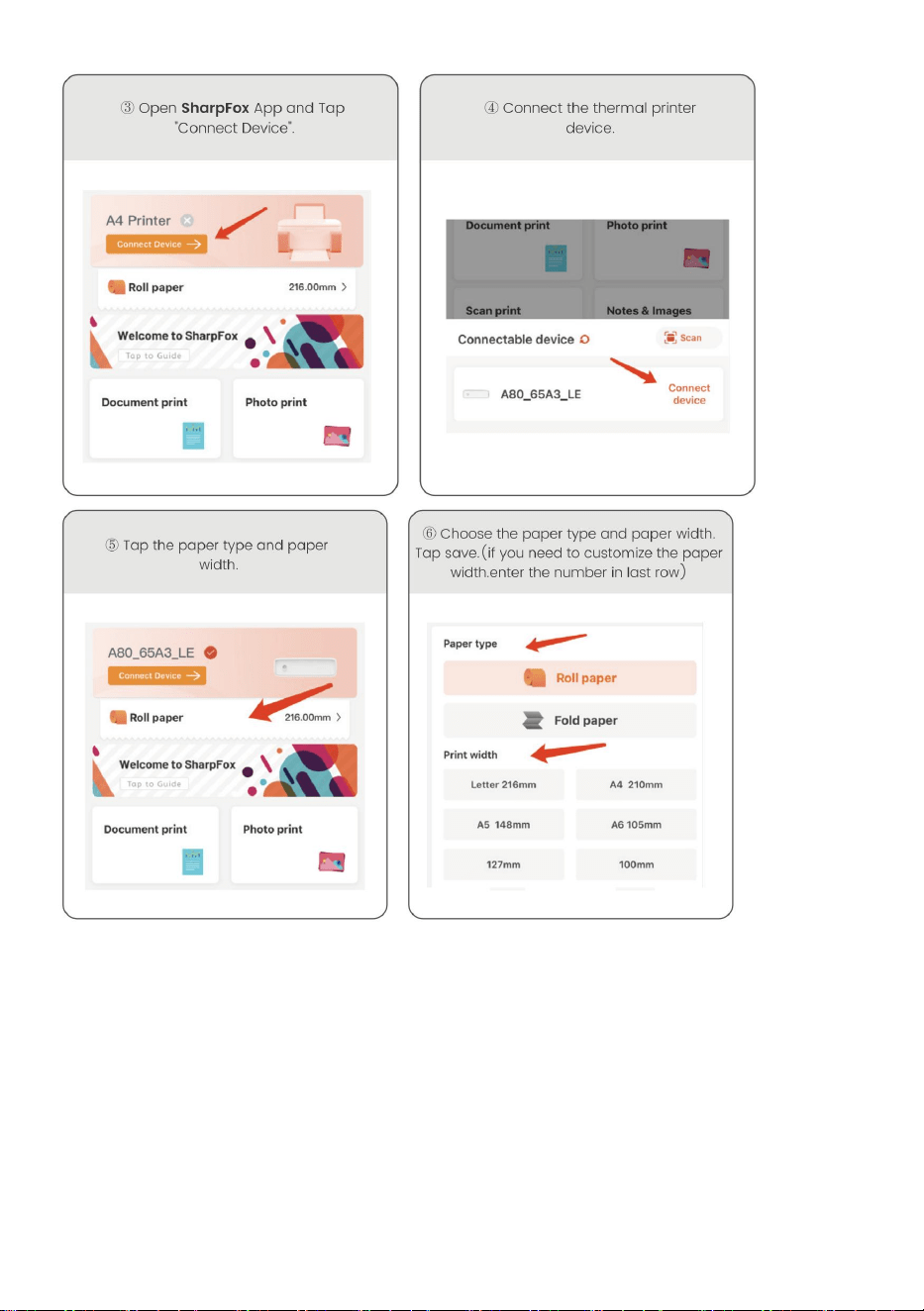
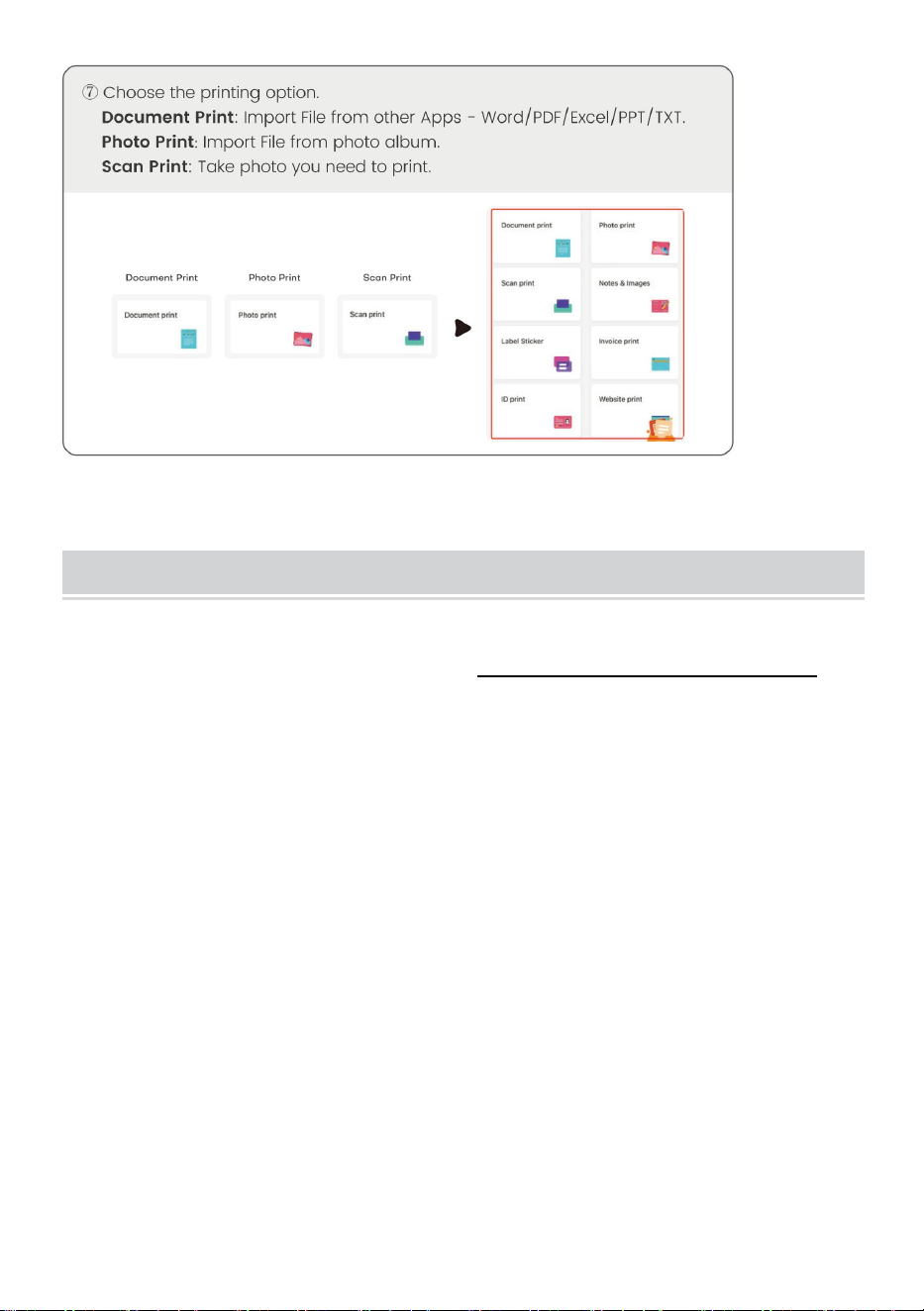
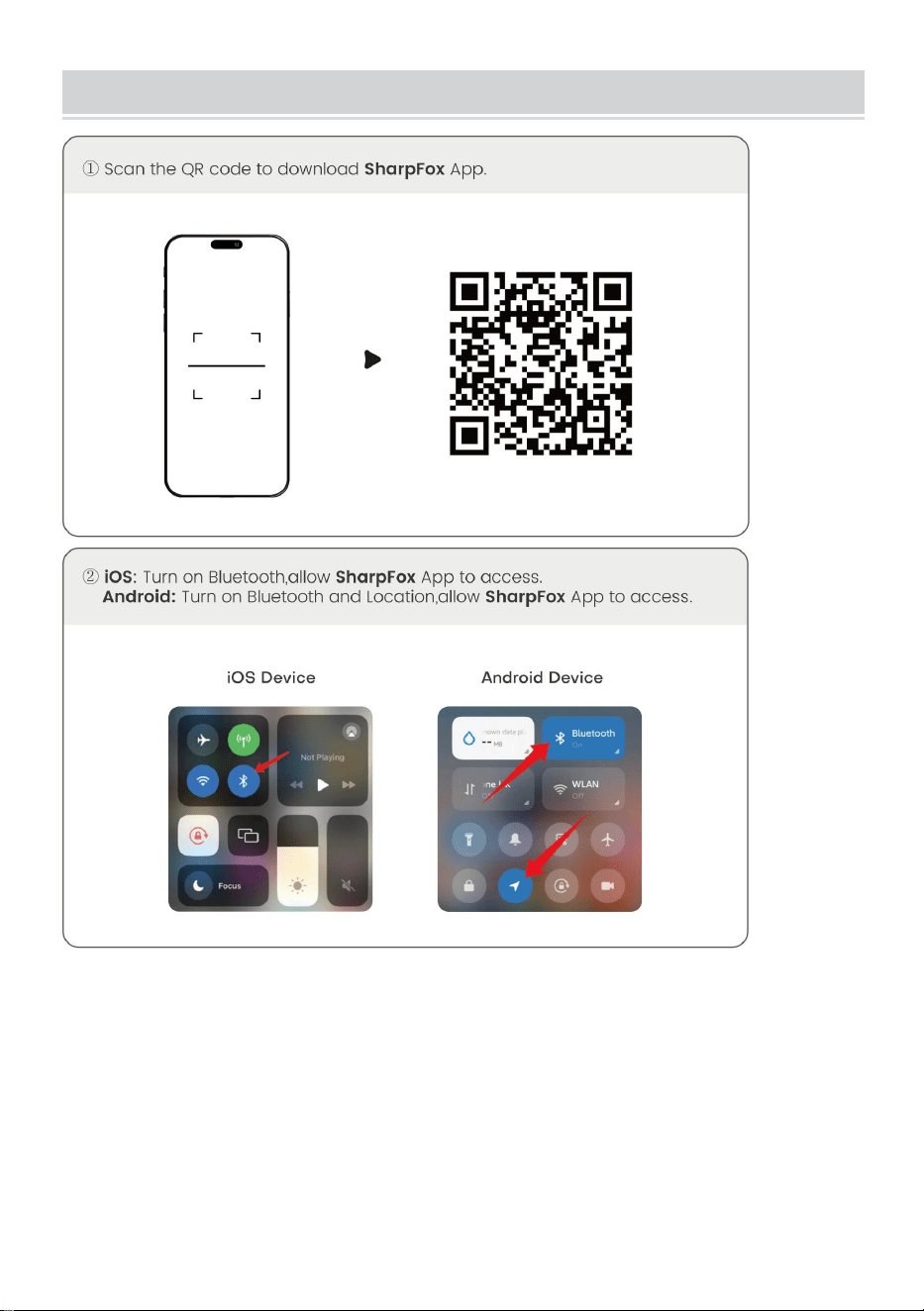
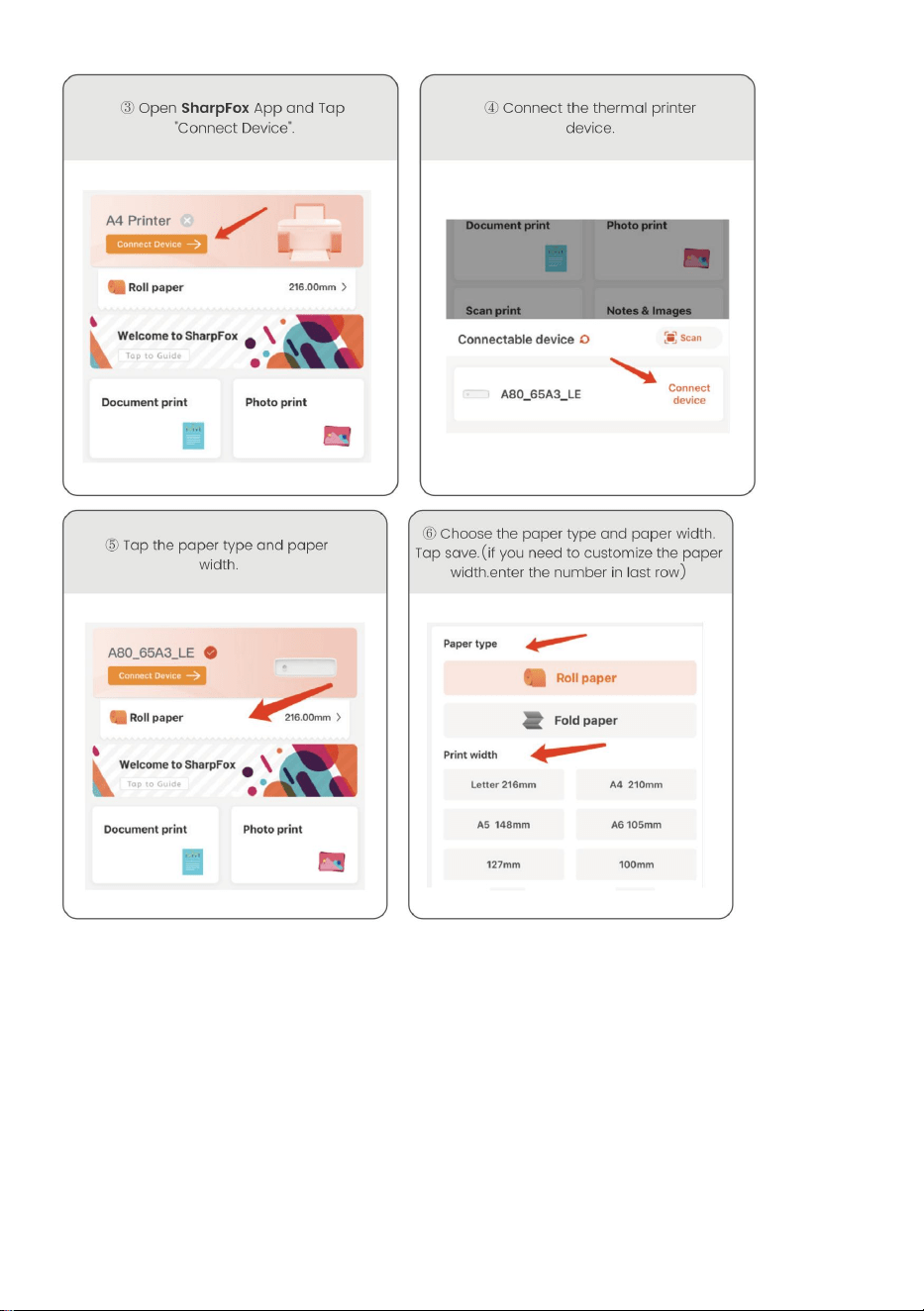
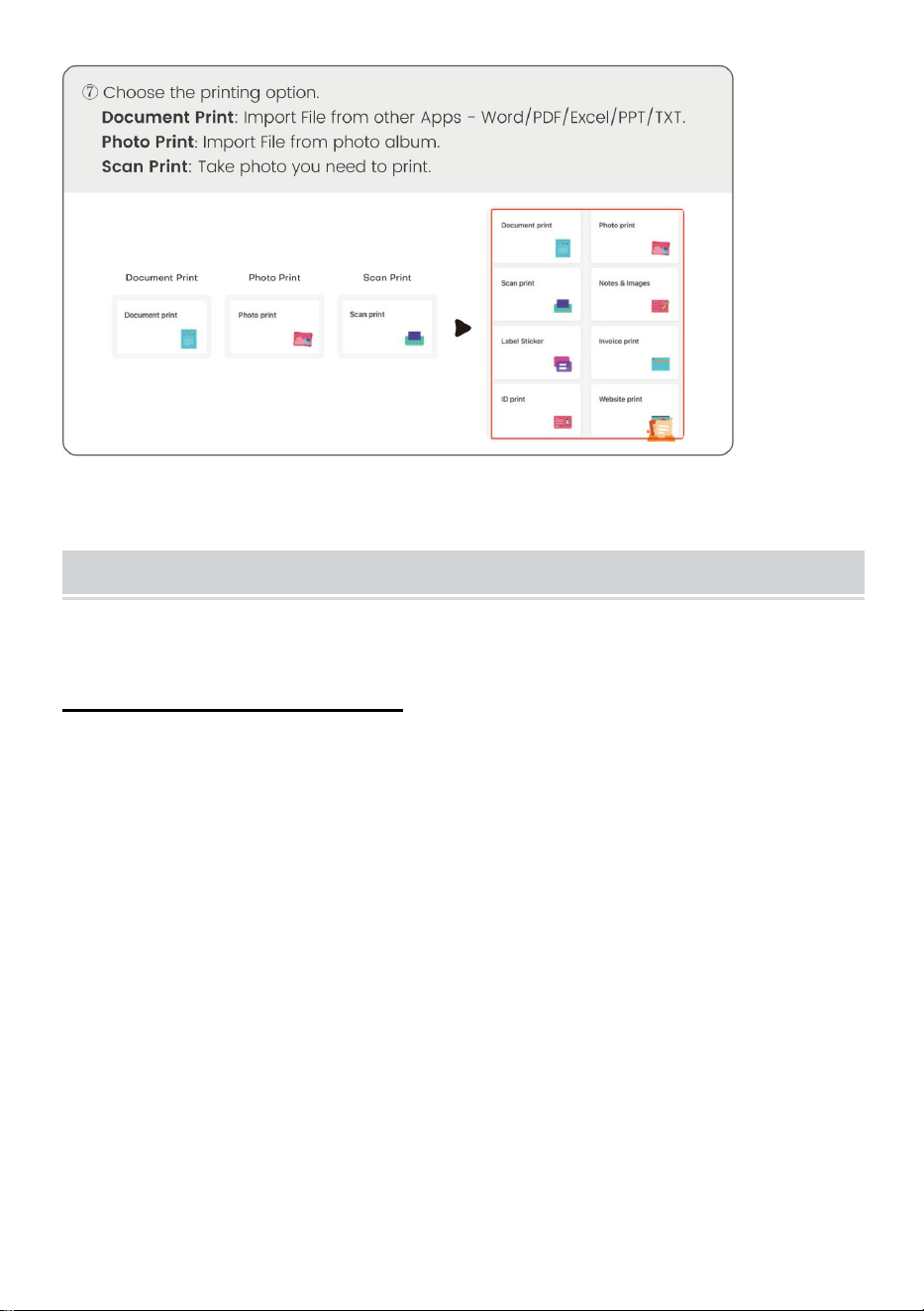
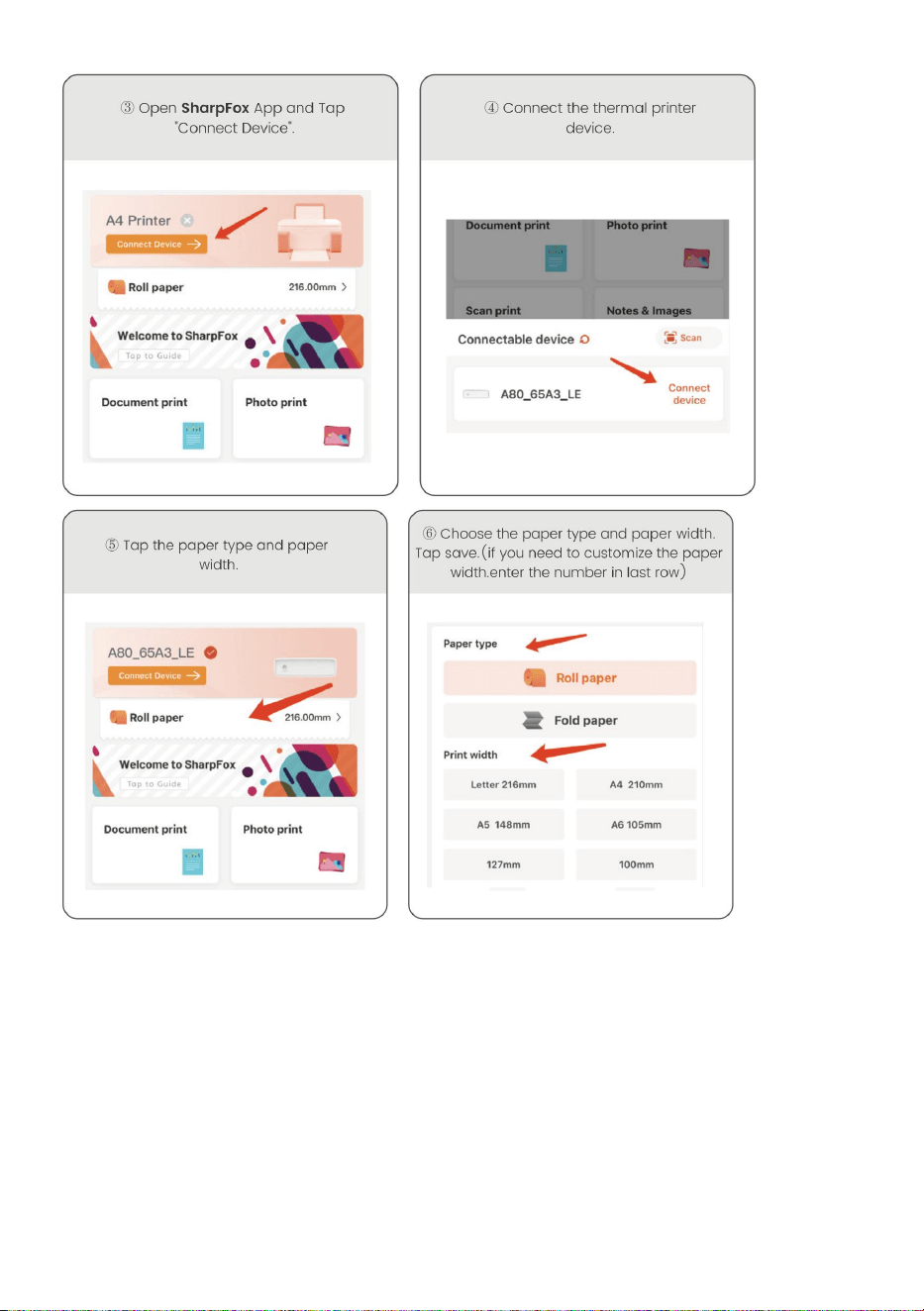
DOWNLOAD VIA APP
- 6 -
- 7 -
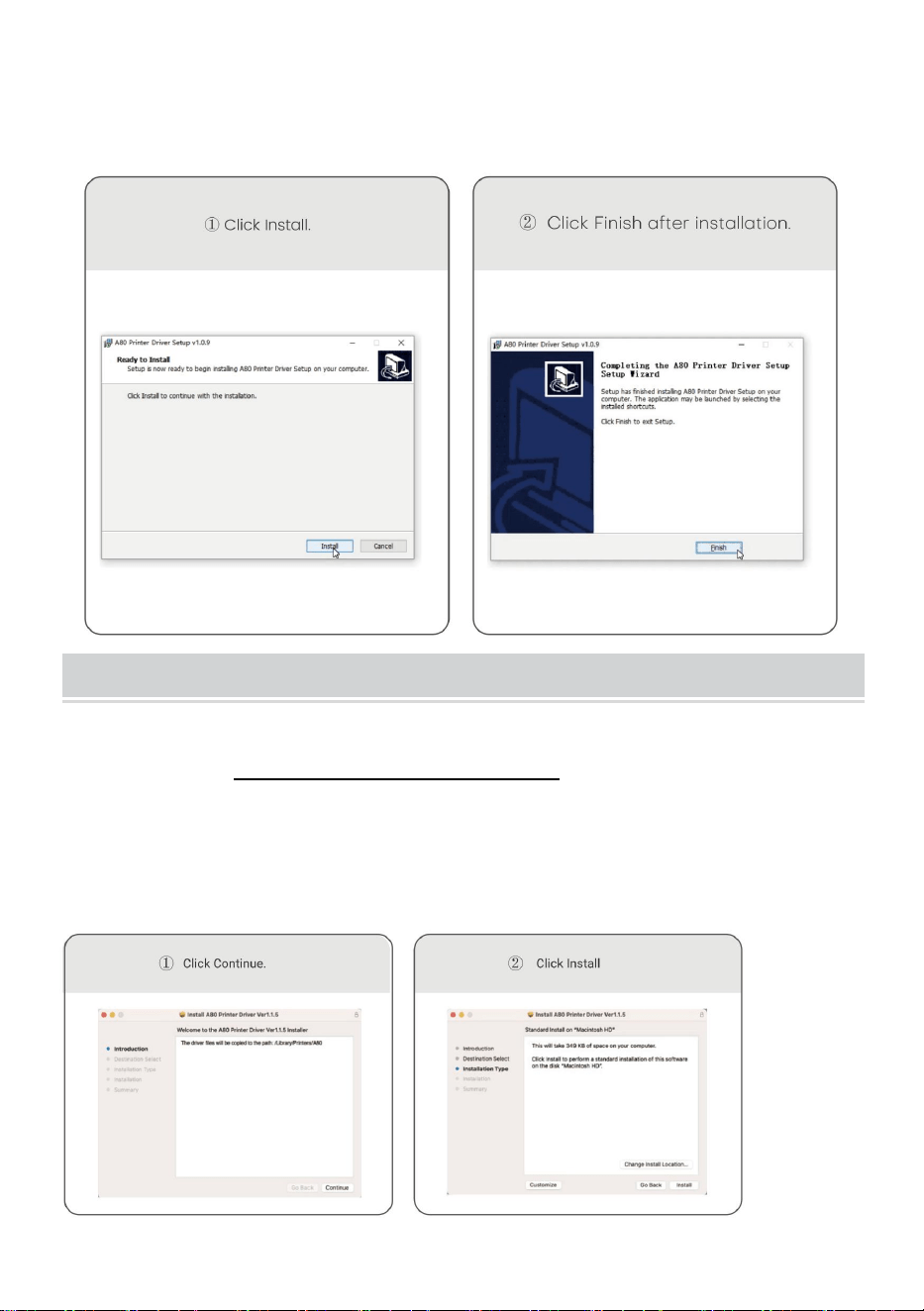
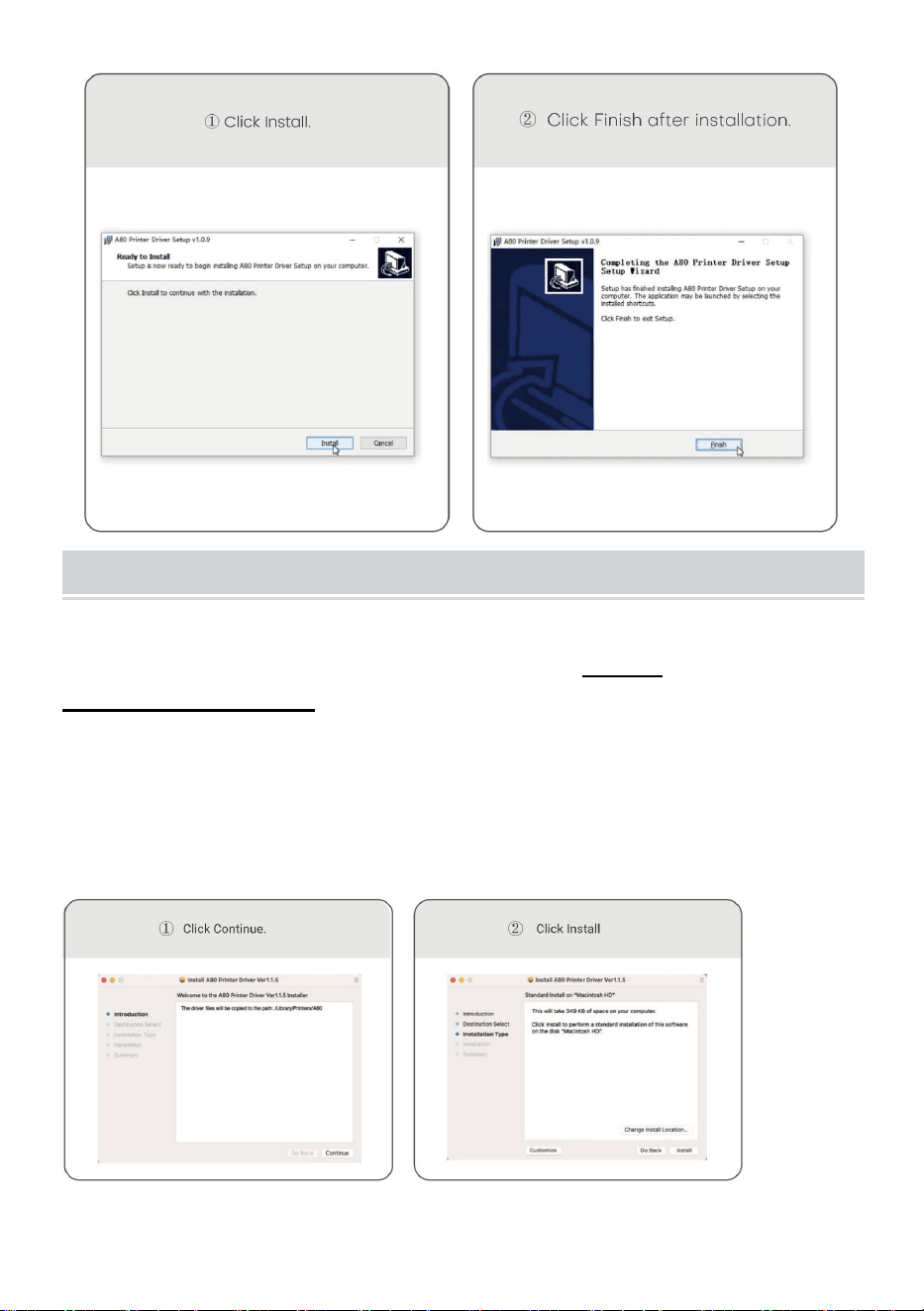
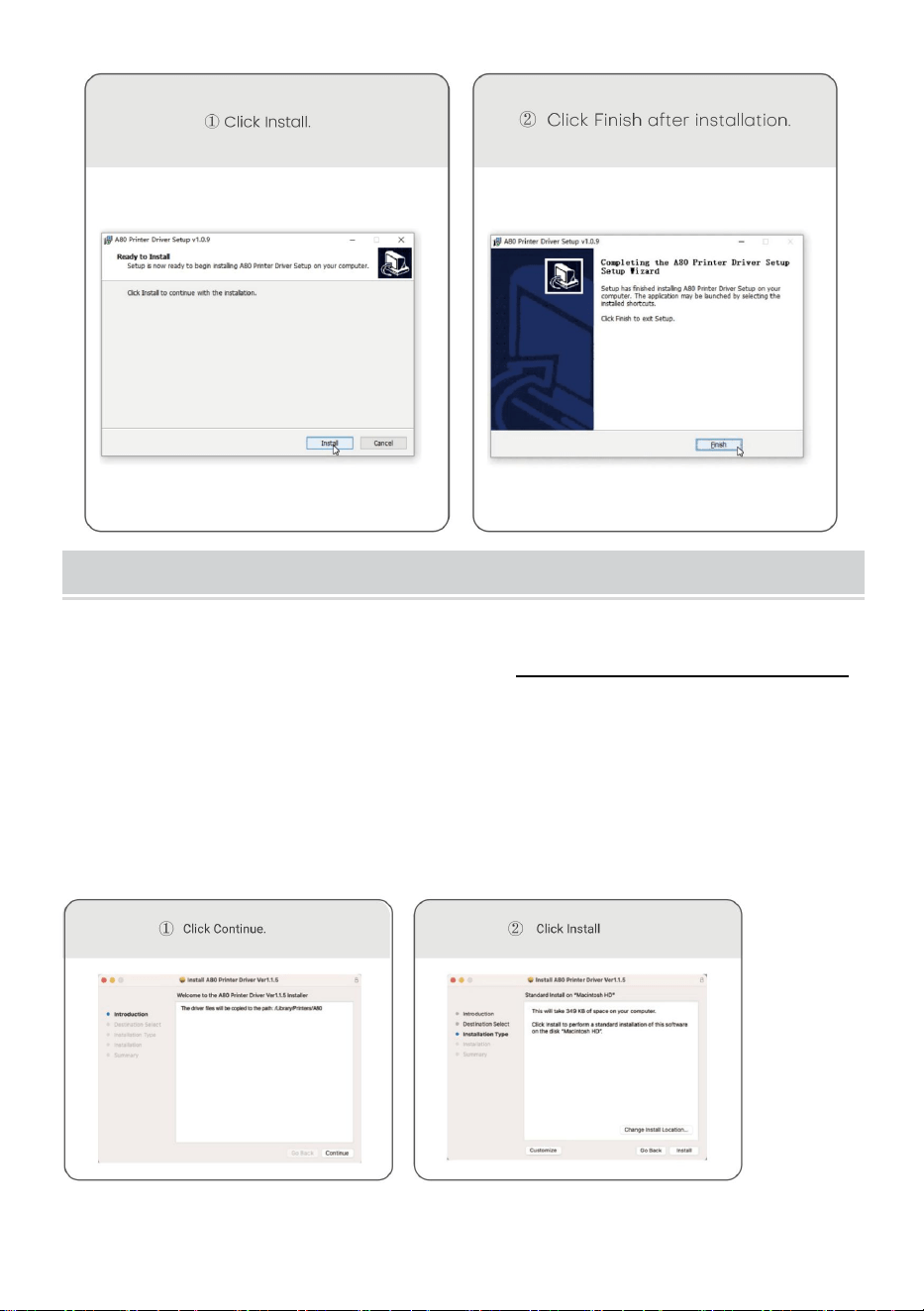
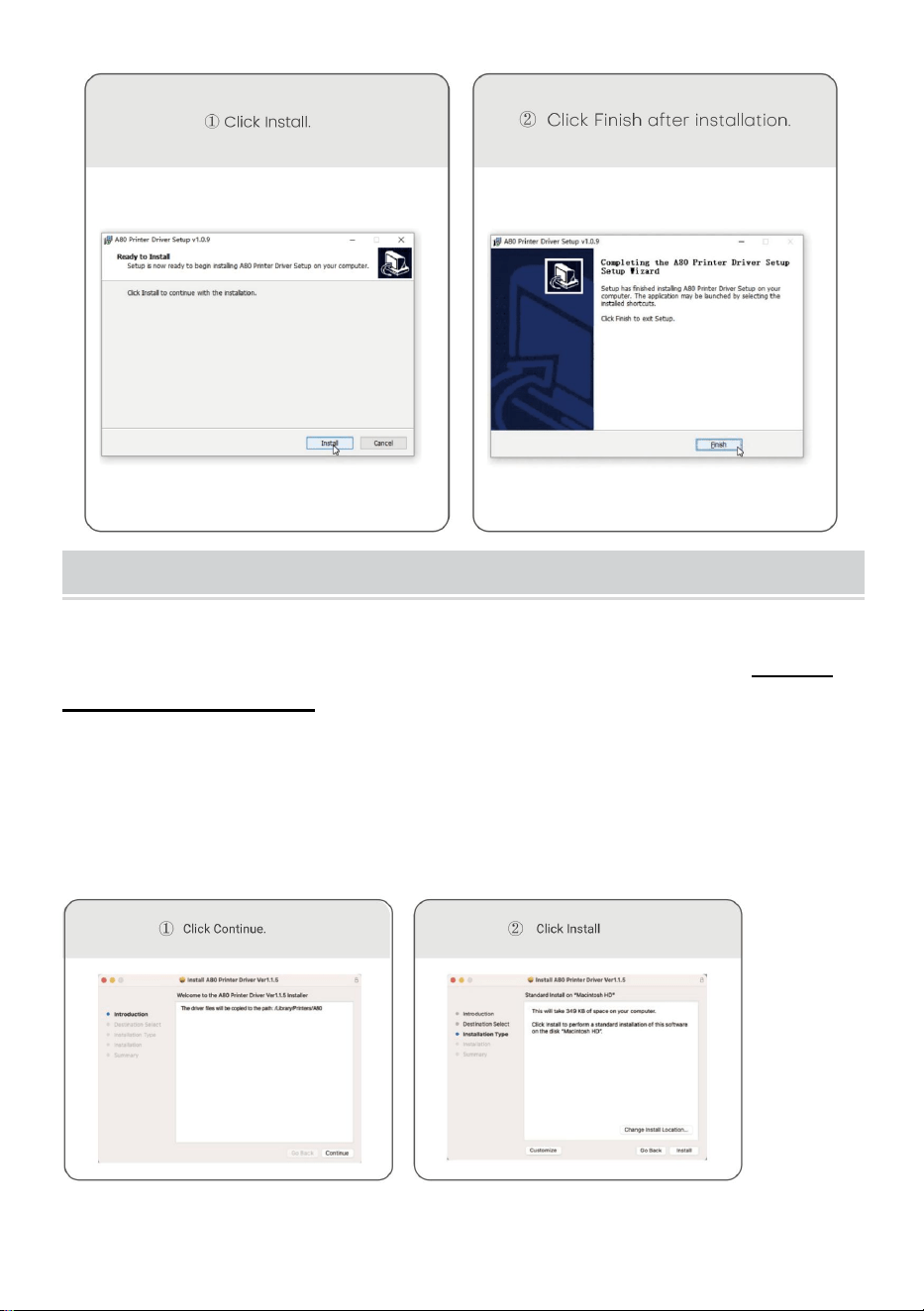
Windows -Thermal Printer Driver Installation
Note: Before installing the driver, turn off the computer antivirus
software.Visit https://help.flashlabel.com, you can download driver
after searching keyword Y80/Y80H.
Turn on the printer. Connect the printer to computer via USB cable.
- 8 -
Double-click the compressed file you downloaded to install the
driver.
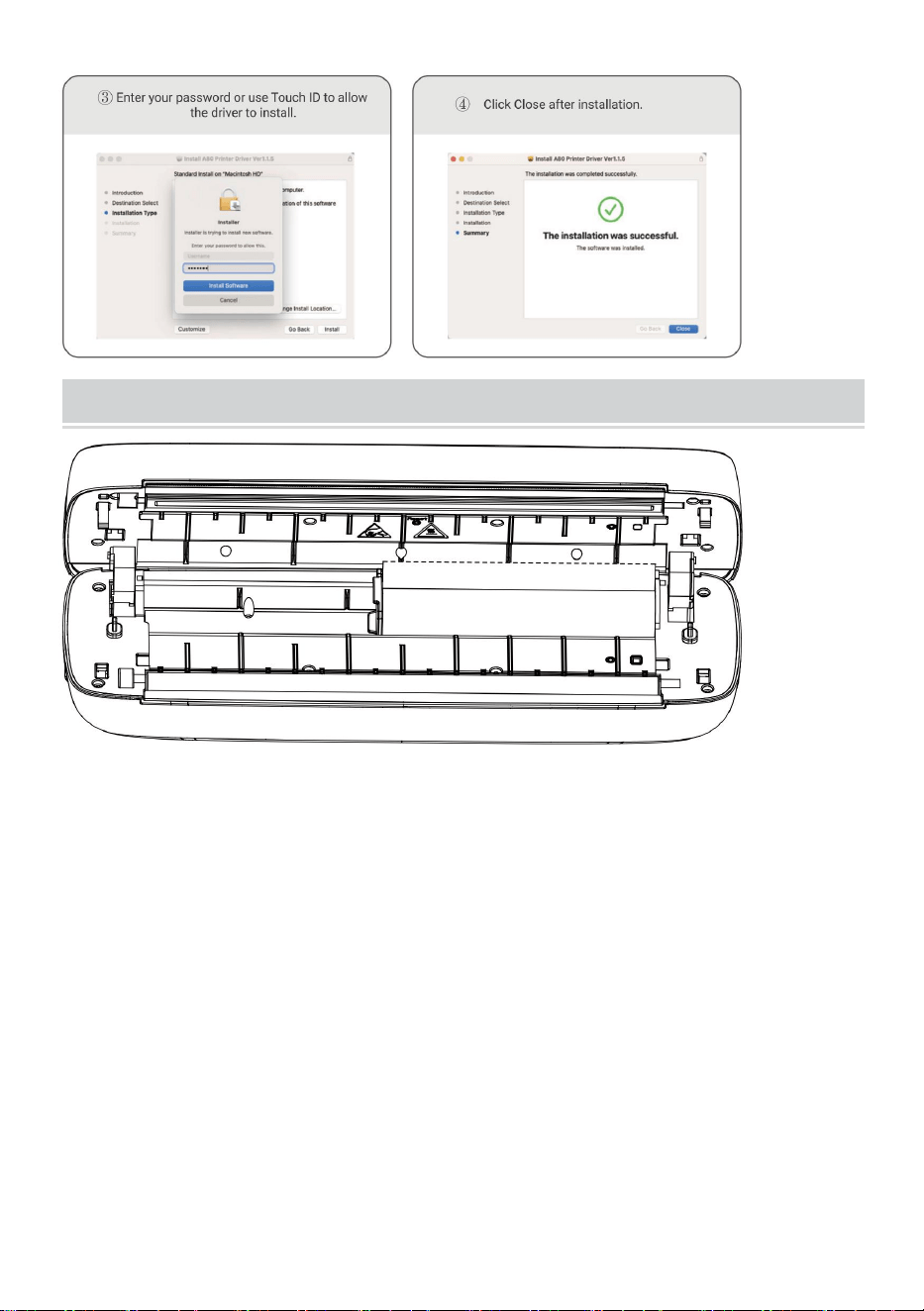
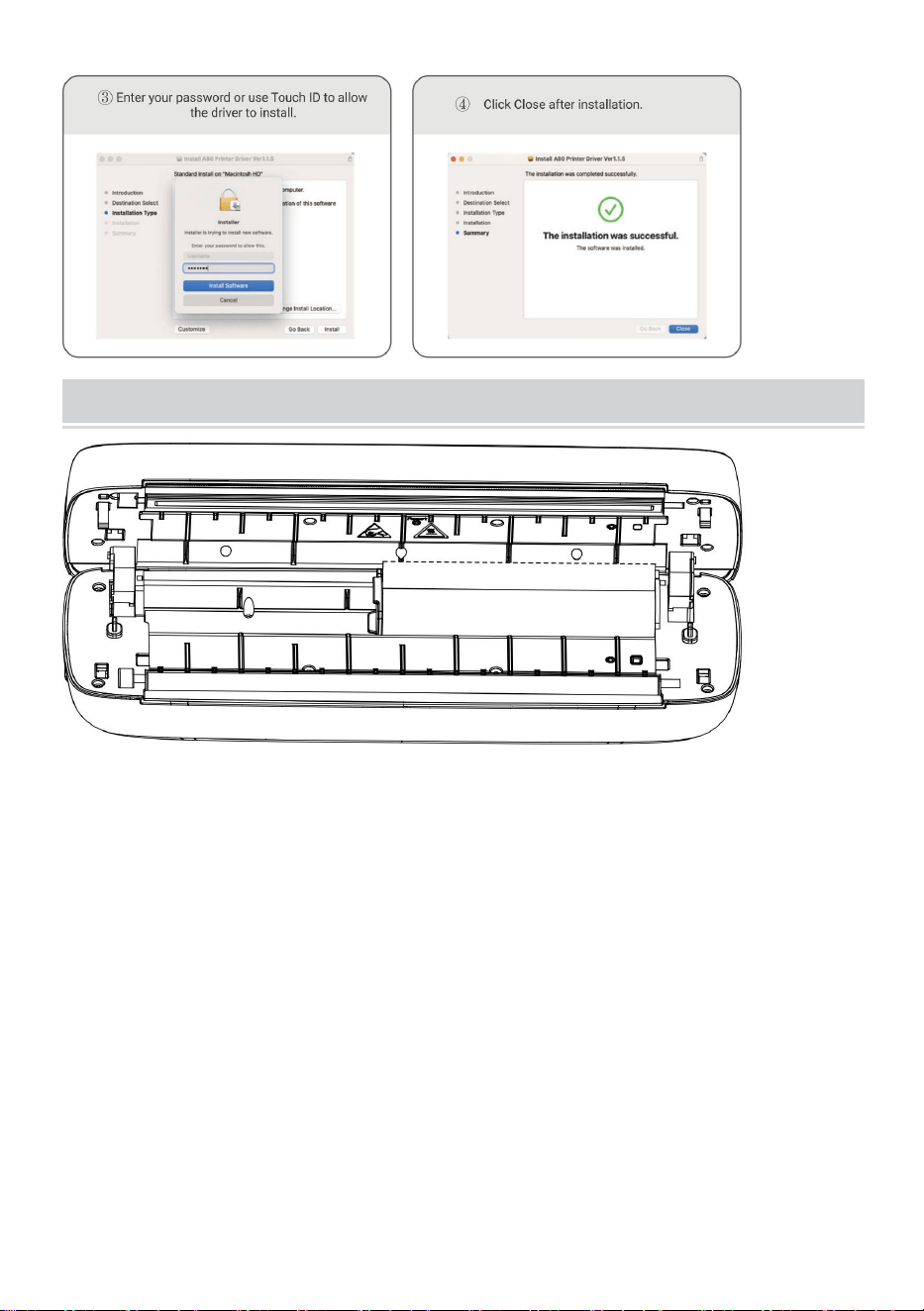
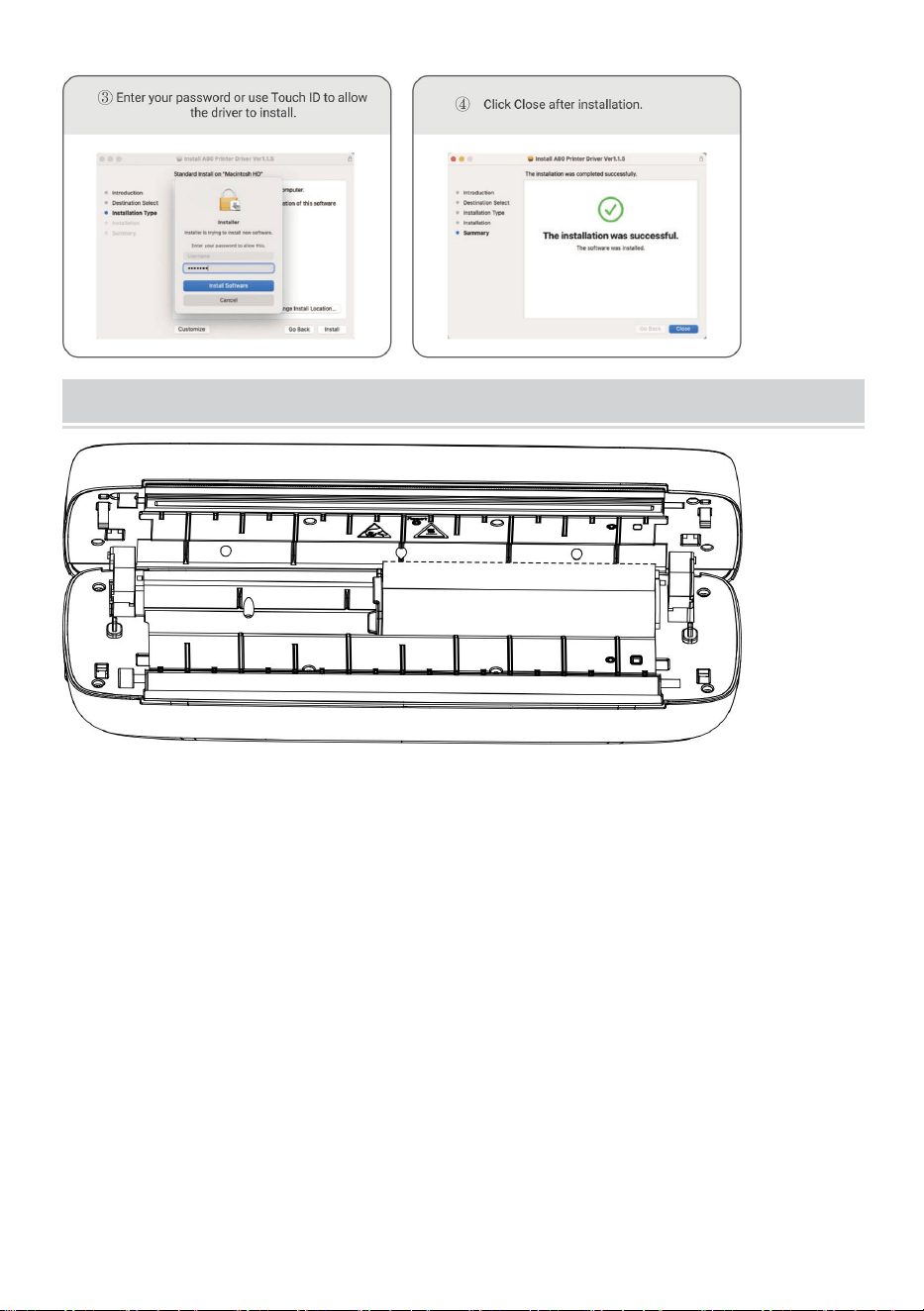
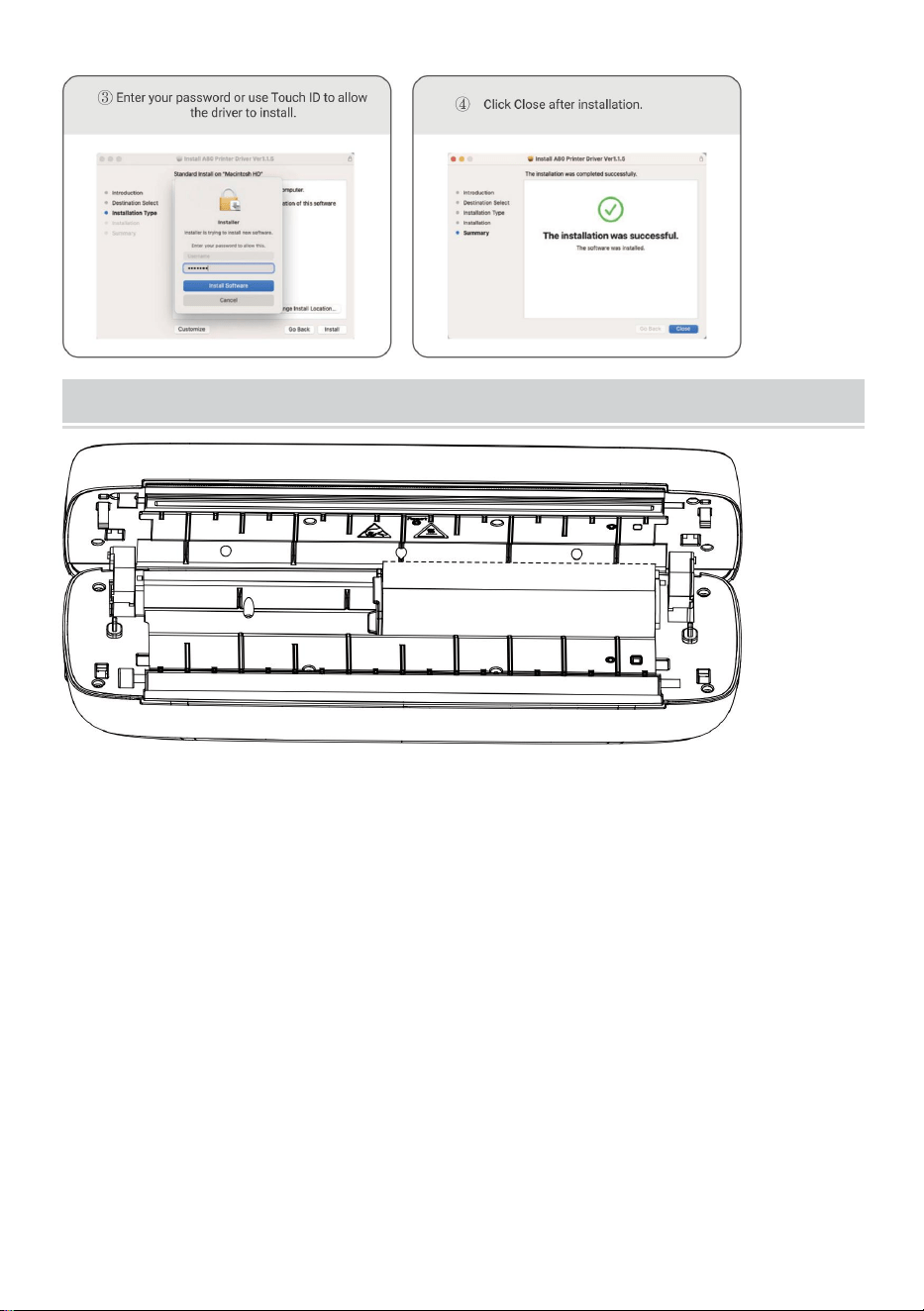
MacOS-Thermal Printer Driver Installation
Note: Before installing the driver, turn off the computer antivirus
software. Visit https: help.flashlabel.com, you can download driver
after searching keyword Y80/Y80H.
Turn on the printer. Connect the printer to computer via USB cable.
Double-click the compressed file you downloaded to install the
driver.
- 9 -
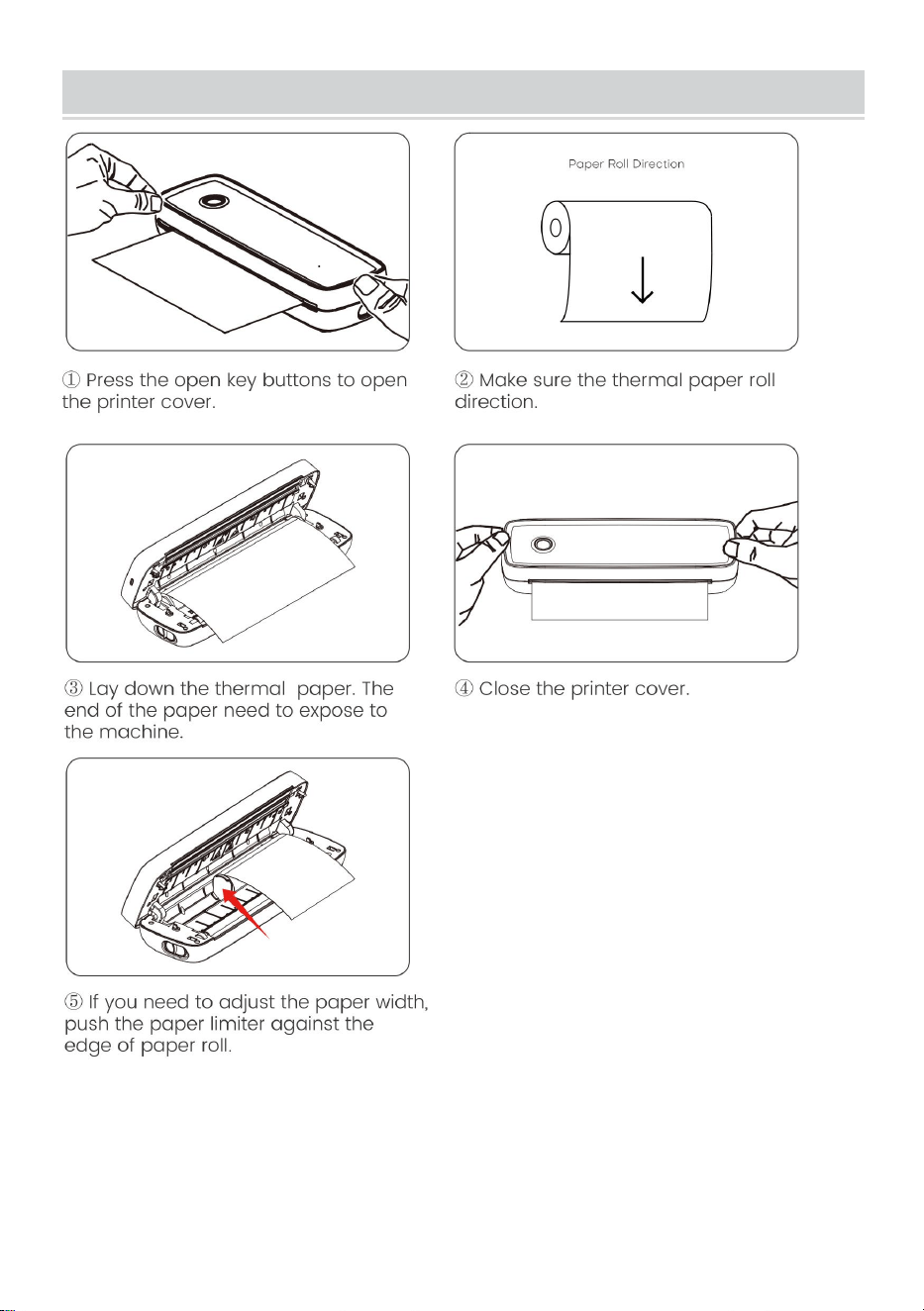
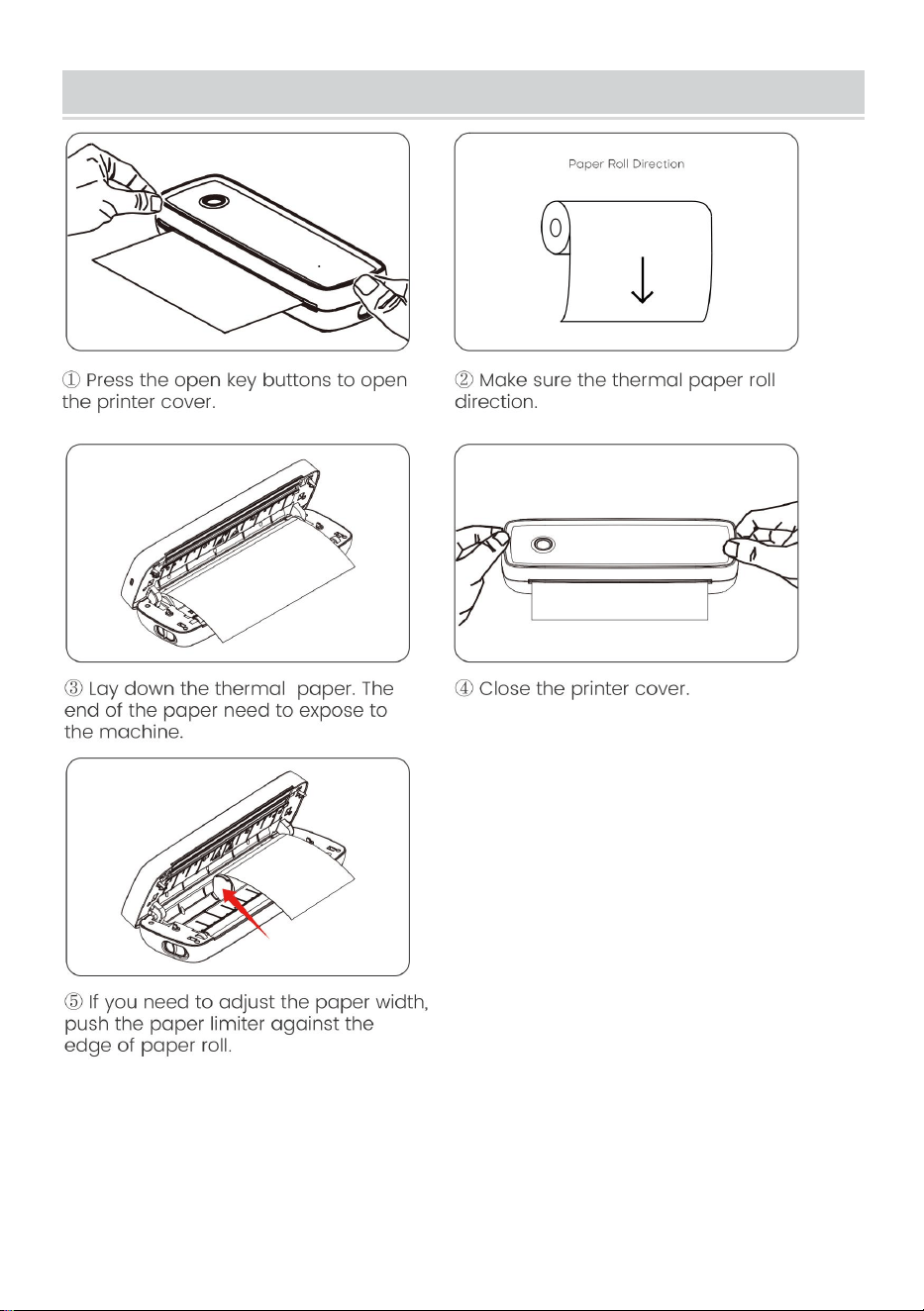
Usage Method
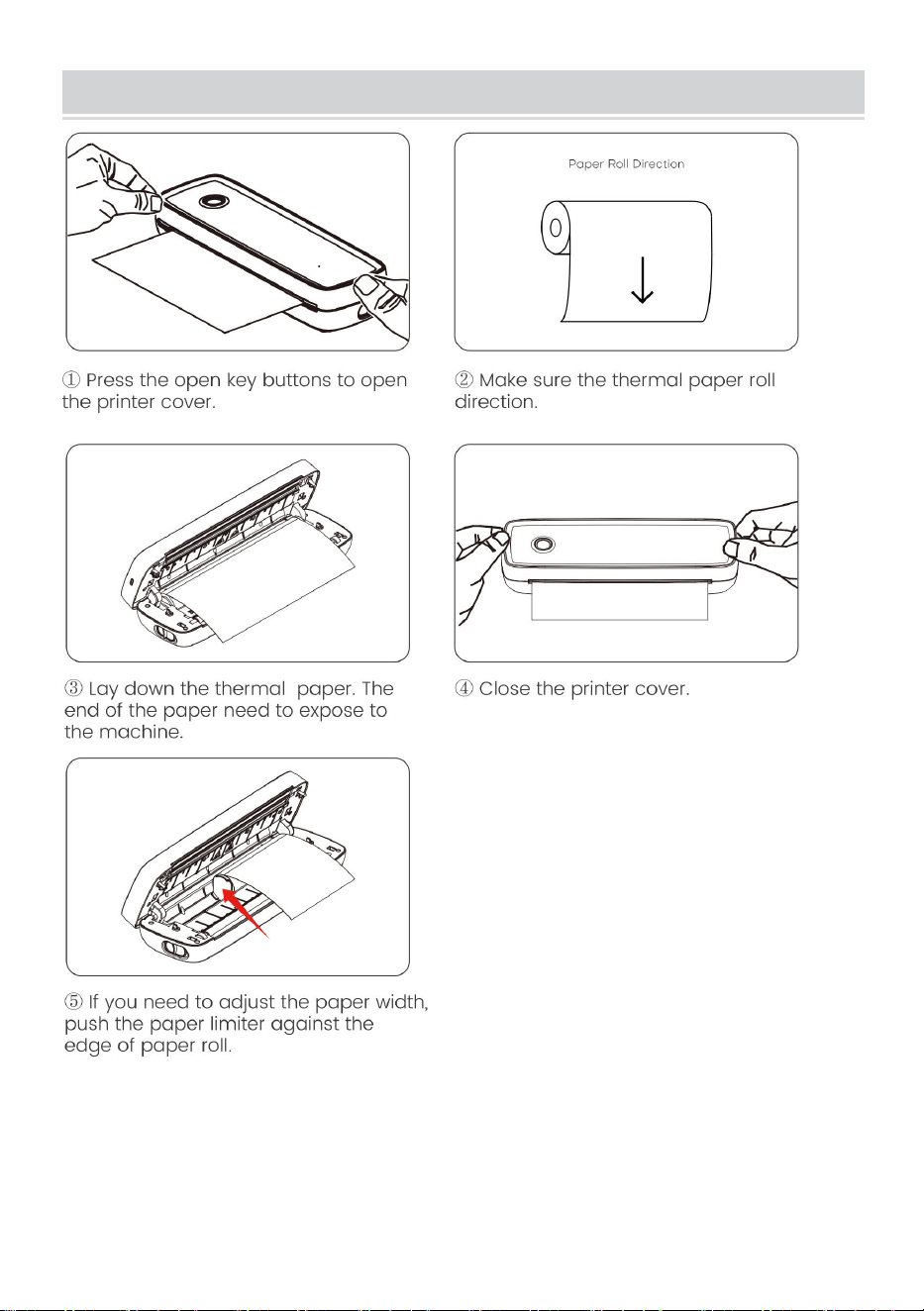
Adjust the paper limiter to fit your paper width.
Paper width available from 2.24 inch to 8.5 inch.
Note: The thermal printer will automatically turn off after 15 minutes
if without any operation.
- 10 -
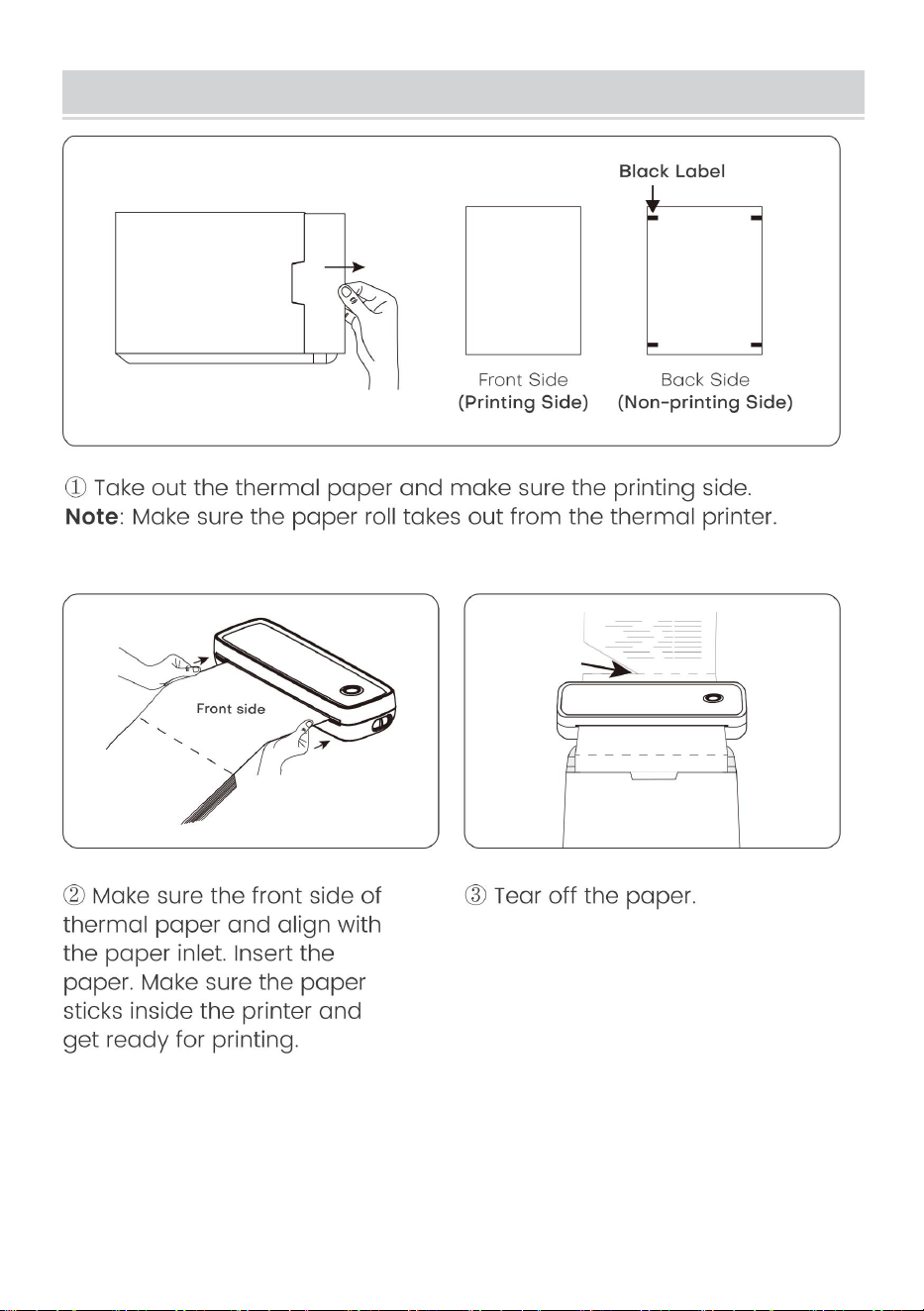
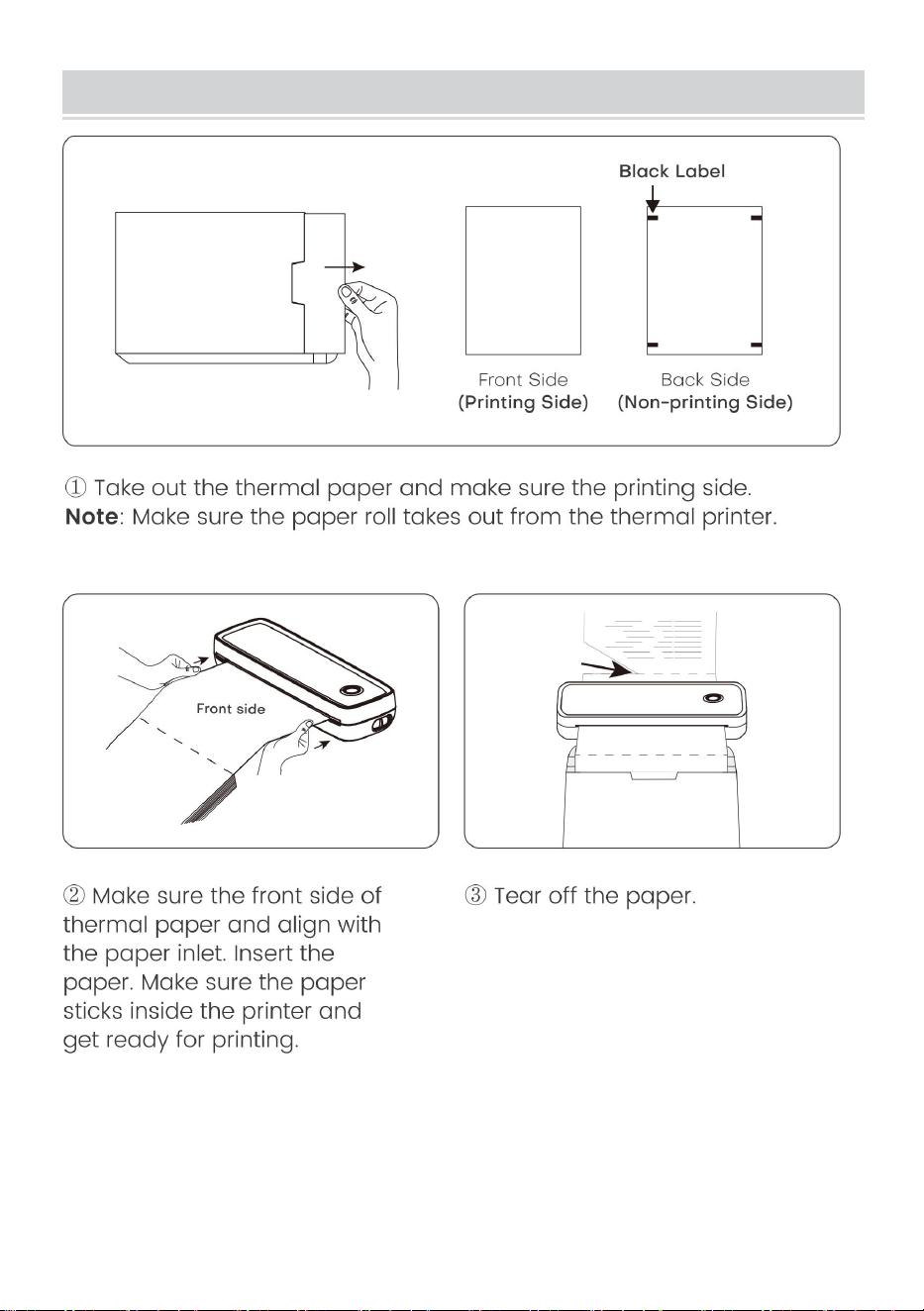
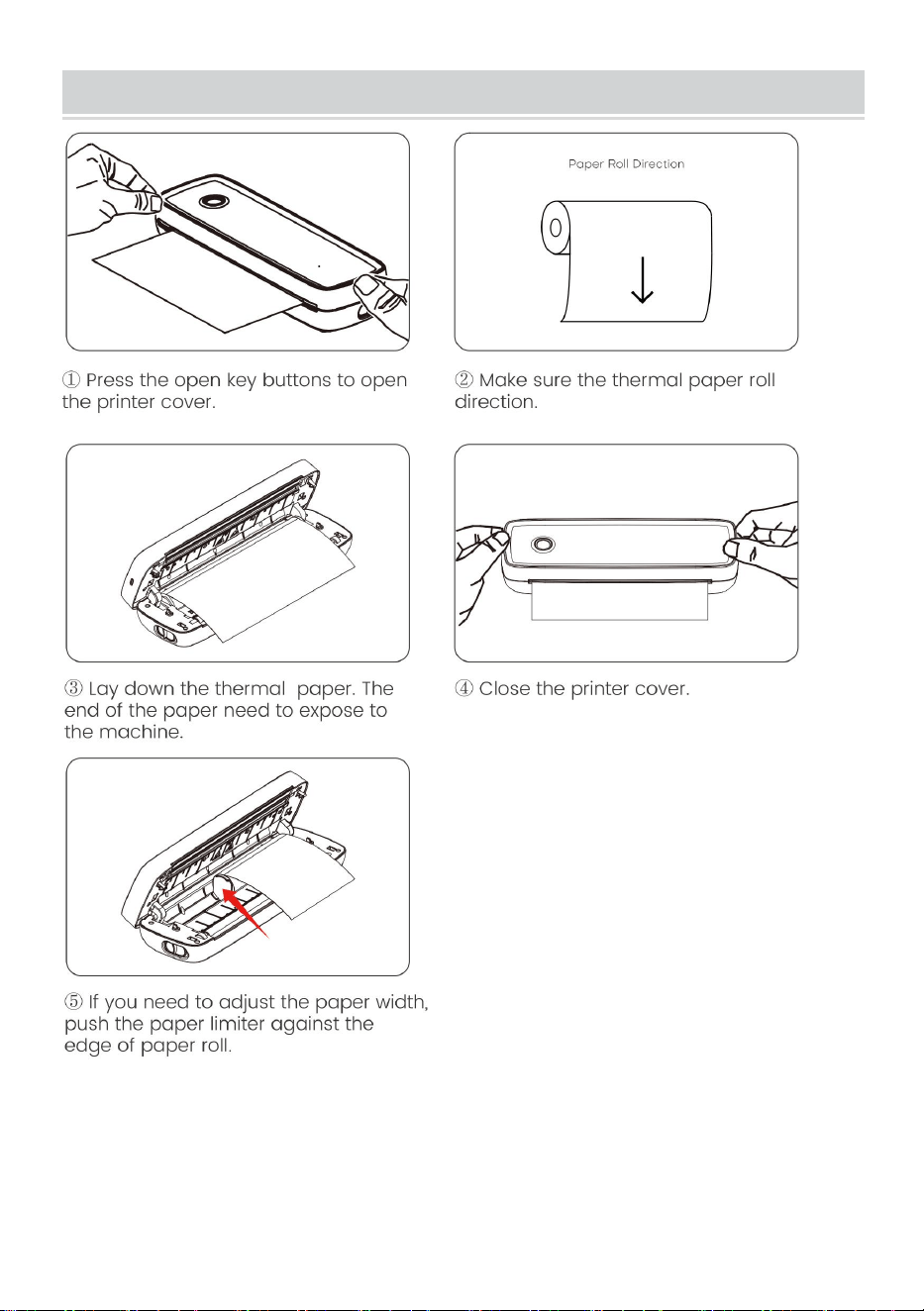
Paper Roll installation Guide
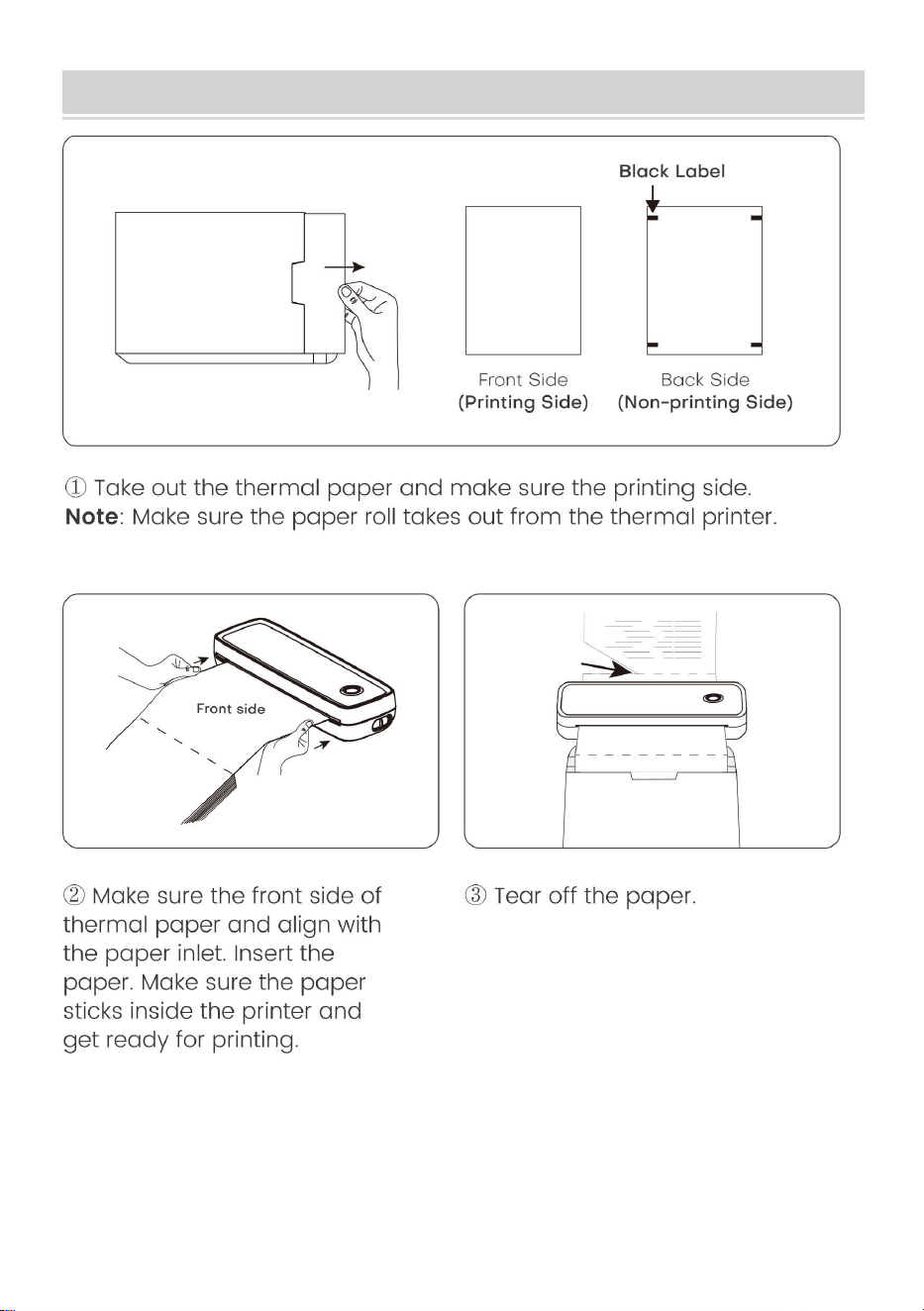
- 11 -
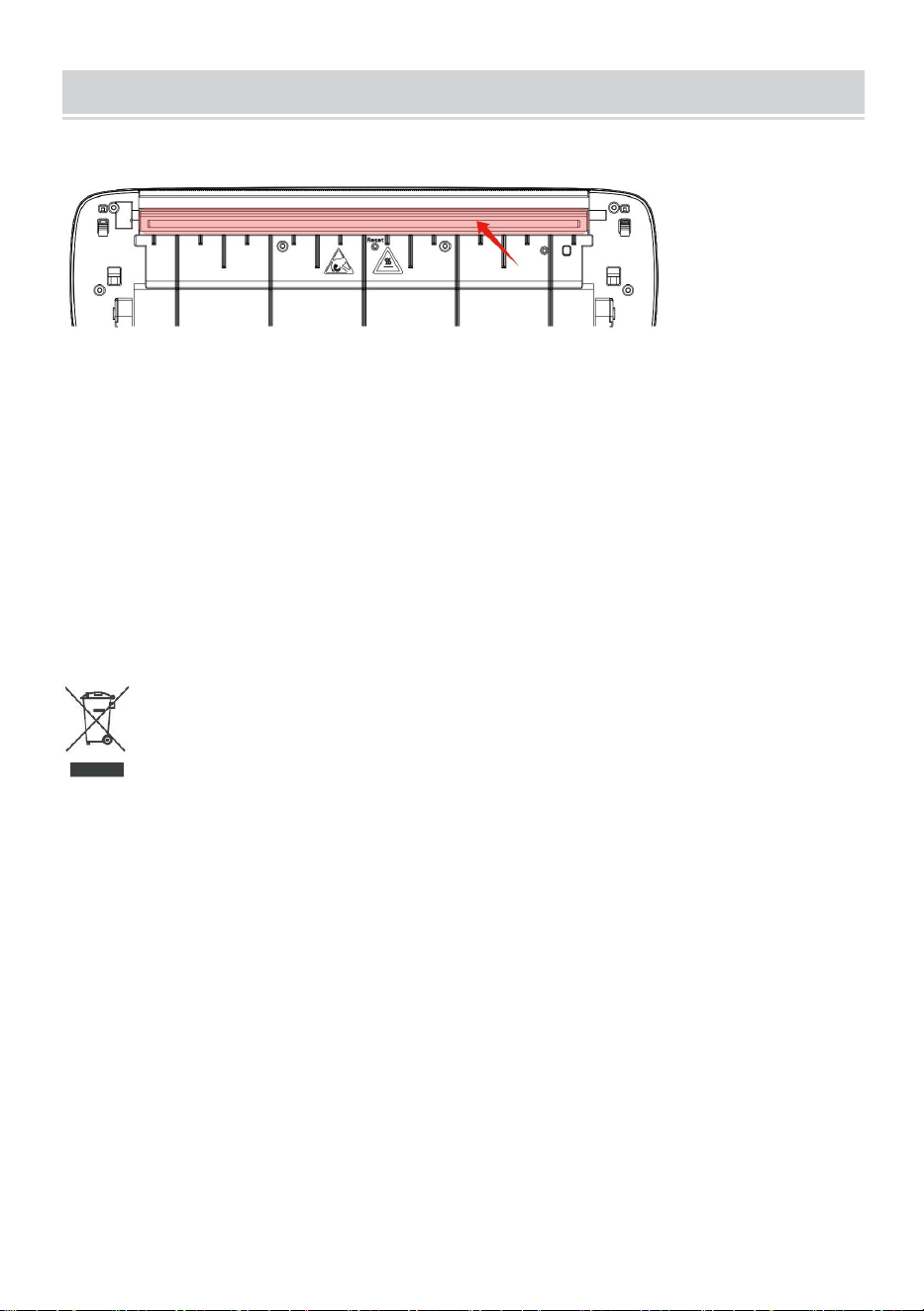
Folded Paper Installation Guide
- 12 -
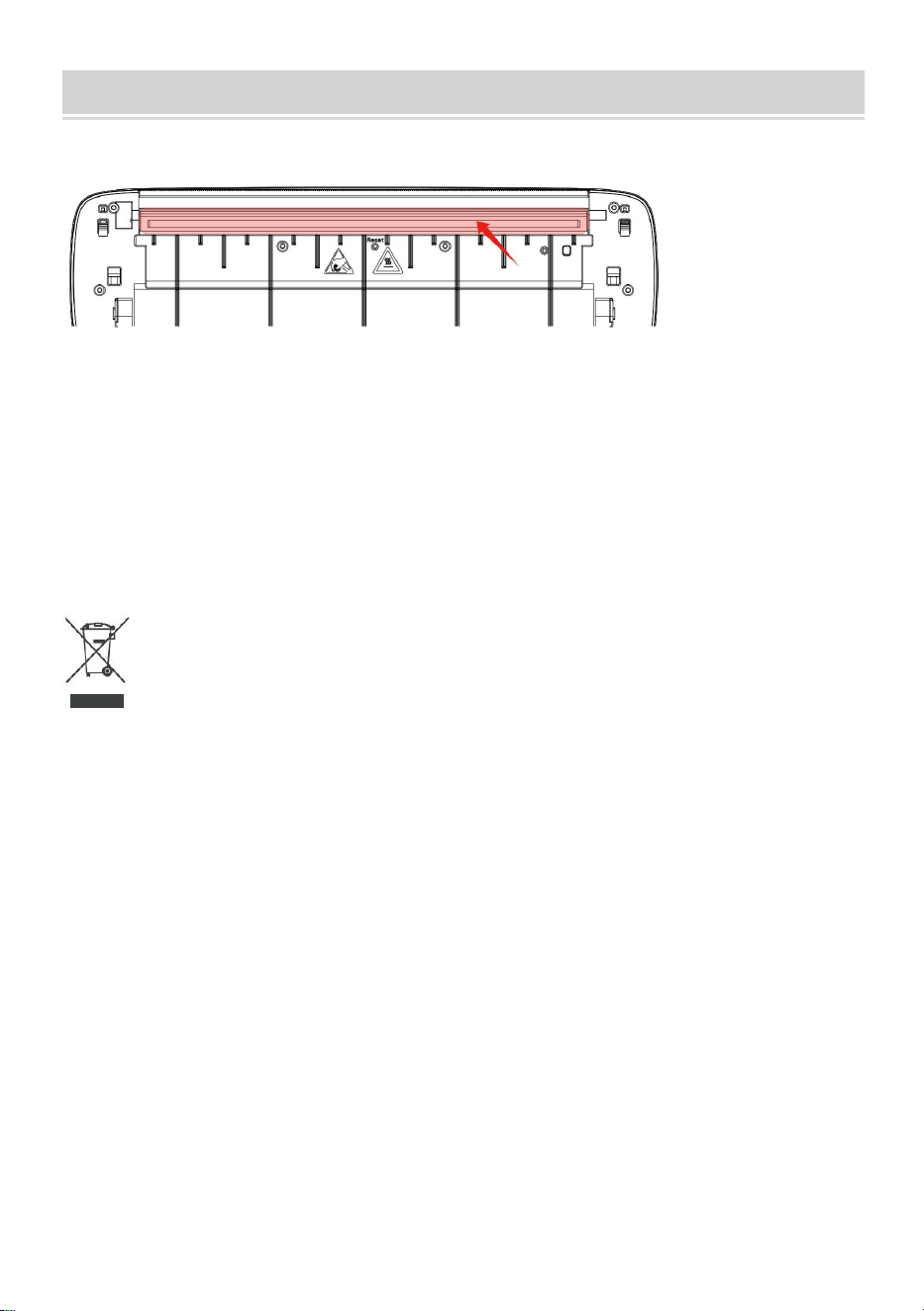
Cleaning and Maintenance
-Please shut down the printer, open the printer cover and take out the
paper roll.
-Dip cotton cloth or cotton swabs into it. On the medical alcohol, along the
printing head center to around the direction of gently wipe.
-After cleaning the print head, do not use the printer immediately. Please
wait 1-2 minutes until the alcohol has completely evaporated.
Correct Disposal:
This product is subject to the provision of european Directive 2012/19/EU.
The symbol showing a wheelie bin crossed through indicates that the
product requires separate refuse collection in the European Union. This
applies to the product and all accessories marked with this symbol.
Products marked as such may not be discarded with normal domestic
waste, but must be taken to acollection point for recycling electrical and
electronic devices.
FCC Information:
CAUTION: Changes or modifications not expressly approved by the party
responsible for compliance could void the user's authority to operate the
equipment!
This device complies with Part 15 of the FCC Rules. Operation is subject to
the following two conditions:

- 13 -
1) This product may cause harmful interference.
2) This product must accept any interference received, including
interference that may cause undesired operation.
WARNING: Changes or modifications to this product not expressly
approved by the party.responsible for compliance could void the user's
authority to operate the product.
Note: This product has been tested and found to comply with the limits for
a Class B digital device pursuant to Part 15 of the FCC Rules, These limits
are designed to provide reasonable protection against harmful interference
in a residential installation.
This product generates, uses and can radiate radio frequency energy, and
if not installed and used in accordance with the instructions, may cause
harmful interference to radio communications. However, there is no
guarantee that interference will not occur in a particular installation. If this
product does cause harmful interference to radio or television
reception,which can be determined by turning the product off and on, the
user is encouraged to try to correct the interference by one or more of the
following measures.
· Reorient or relocate the receiving antenna.
· Increase the distance between the product and receiver.
· Connect the product to an outlet on a circuit different from that to which
the receiver is connected.
· Consult the dealer or an experienced radio/TV technician for assistance.

Address: Shuangchenglu 803nong11hao1602A-1609shi, baoshanqu,
shanghai 200000 CN.
Imported to AUS: SIHAO PTY LTD, 1 ROKEVA STREETEASTWOOD
NSW 2122 Australia
Imported to USA: Sanven Technology Ltd., Suite 250, 9166 Anaheim
Place, Rancho Cucamonga, CA 91730
REP
EC
E-CrossStu GmbH
Mainzer Landstr.69, 60329 Frankfurt am Main.
REP
UK
YH CONSULTING LIMITED.
C/O YH Consulting Limited Office 147, Centurion House,
London Road, Staines-upon-Thames, Surrey, TW18 4AX


Technique Assistance et certificat de garantie électronique
www.vevor.com/support
IMPRIMANTE THERMIQUE PORTATIVE
MANUEL DE L' UTILISATEUR
N° DE MODÈLE : Y80, Y80H
We continue to be committed to provide you tools with competitive price.
"Save Half", "Half Price" or any other similar expressions used by us only represents an
estimate of savings you might benefit from buying certain tools with us compared to the major
top brands and does not necessarily mean to cover all categories of tools offered by us. You
are kindly reminded to verify carefully when you are placing an order with us if you are
actually saving half in comparison with the top major brands.
- 1 -
MODÈLE: Y80, Y80H
Have product questions? Need technical support? Please feel free to
contact us:
Technical Support and E-Warranty Certificate
www.vevor.com/support
NEED HELP? CONTACT US!
This is the original instruction, please read all manual instructions
carefully before operating. VEVOR reserves a clear interpretation of our
user manual. The appearance of the product shall be subject to the
product you received. Please forgive us that we won't inform you again if
there are any technology or software updates on our product.
Portable Thermal Printer

- 2 -
AVERTISSEMENT:
Veuillez lire attentivement ce manuel avant d'utiliser le produit. Ne
pas le faire pourrait entraîner des blessures graves.
-La norme de ce produit exclut un adaptateur secteur . Si vous utilisez un
adaptateur secteur pour charger, veuillez acheter un Adaptateur secteur
certifié 5V/2A conforme aux normes.
-Il s'agit d'un produit professionnel, veuillez utiliser la batterie d'origine
Sécurité et précautions
-Il y a une batterie au lithium intégrée, veuillez ne pas l'utiliser dans le
environnement avec une température supérieure à 40 ℃ . Tenir à l'écart du
feu et d'autres sources de chaleur, et ne le placez pas dans le soleil chaud,
comme une voiture fermée.
-Les enfants doivent être chargés et utilisés sous la surveillance des
adultes. Après une charge complète, assurez-vous de retirer le ligne de
charge à temps pour éviter une surchauffe, un court-circuit ou un incendie.
-Ne mettez pas le produit dans le feu ou dans l'eau pour éviter un
court-circuit de la batterie circuit, un incendie ou une brûlure.
-Environnement de travail : température ambiante de 0 ℃ à -40 ℃ ,
relative humidité, 30 % à 85 % HR. Utilisation dans un environnement
(sans condensation), veuillez ne pas dépasser la plage de température
recommandée.
* Si vous pensez qu'il y a un problème avec la batterie, veuillez contactez
le centre de service après-vente pour obtenir de l'aide.
CONSERVER LES INSTRUCTIONS
- 3 -
TECHNICAL SPECIFICATIONS
Modèle
Y80
Y80H
dimensions du produit
(LxlxH)(mm)
290*90*60
Poids net / kg)
Environ 0,95
Résolution
203 PPP
300 DPI
Vitesse d'impression
maximale
15mm/S
1 0 mm/S
La puissance d'entrée
C.C 5V 2A
Interface Homme-Machine
Clé Indicateur LED Lecteur
Interface de Communication
USB/BT20 et BT4.0
Température de
fonctionnement (℃)
0 ~ +40
Humidité de travail
30 % ~ 85 % RH (sans condensation)
Température de stockage
(℃)
-20 ~ +60
Humidité de stockage
0 % ~ 90 % HR (sans condensation)
*Les produits tels que les spécifications, l'apparence et la conception
sont sujets à modification sans préavis.
- 4 -
PACKAGE CONTENTS
Sac en flanelle*1 Câble de données*1 Lecteur u disque*1
Convertisseur*1
APPEARANCE AND COMPONENT
- 5 -
BUTTON OPERATING INSTRUCTIONS
Statut
Description
Dépanner
Vert
Fonctionnement normal
Rouge
clignotant et vert
-La tête de l'imprimante est en
surchauffe
-L'imprimante sera
automatiquement reprendre
une fois l'imprimante la tête
s'est refroidie
Rouge
-Mise en charge
-Couvercle supérieur ouvert
-Pas de papier
-Une fois complètement
chargé, le le feu devient vert
-Fermez correctement le
capot supérieur
Rouge
clignotant
Faible quantité électrique
Charger l'imprimante
Bleu
Couplage Bluetooth réussi
Bluetooth connecté avec
succès
Bleu clignotant
Bluetooth s'initialise ou
Initialisation échouée
Fermez d'abord
l'application. Redémarrez le
imprimante et attendez la
lumière bleue jusqu'à ce
qu'il ne clignote pas. Puis
reconnectez-vous
l'application
- 6 -
DOWNLOAD VIA APP
- 7 -
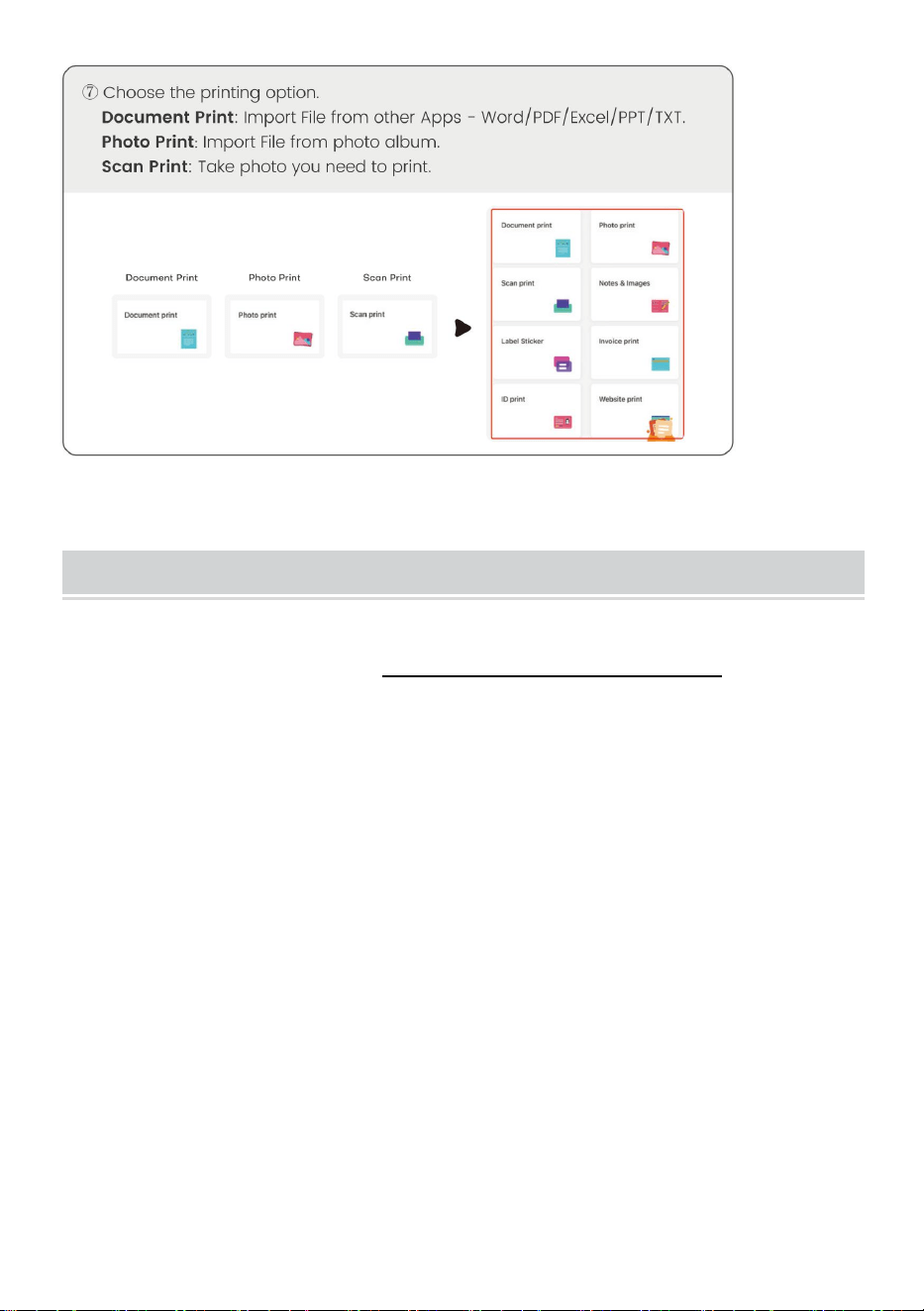
- 8 -
Windows -Thermal Printer Driver Installation
Remarque : avant d'installer le pilote, désactivez le logiciel antivirus
de votre ordinateur. Visitez https://help.flashlabel.com , vous
pouvez télécharger le pilote après la recherche. mot-clé Y 80 /Y80H .
Allumez l'imprimante. Connectez l'imprimante à l'ordinateur via un
câble U S B.
Double-cliquez sur le fichier compressé que vous avez téléchargé
pour installer le pilote.
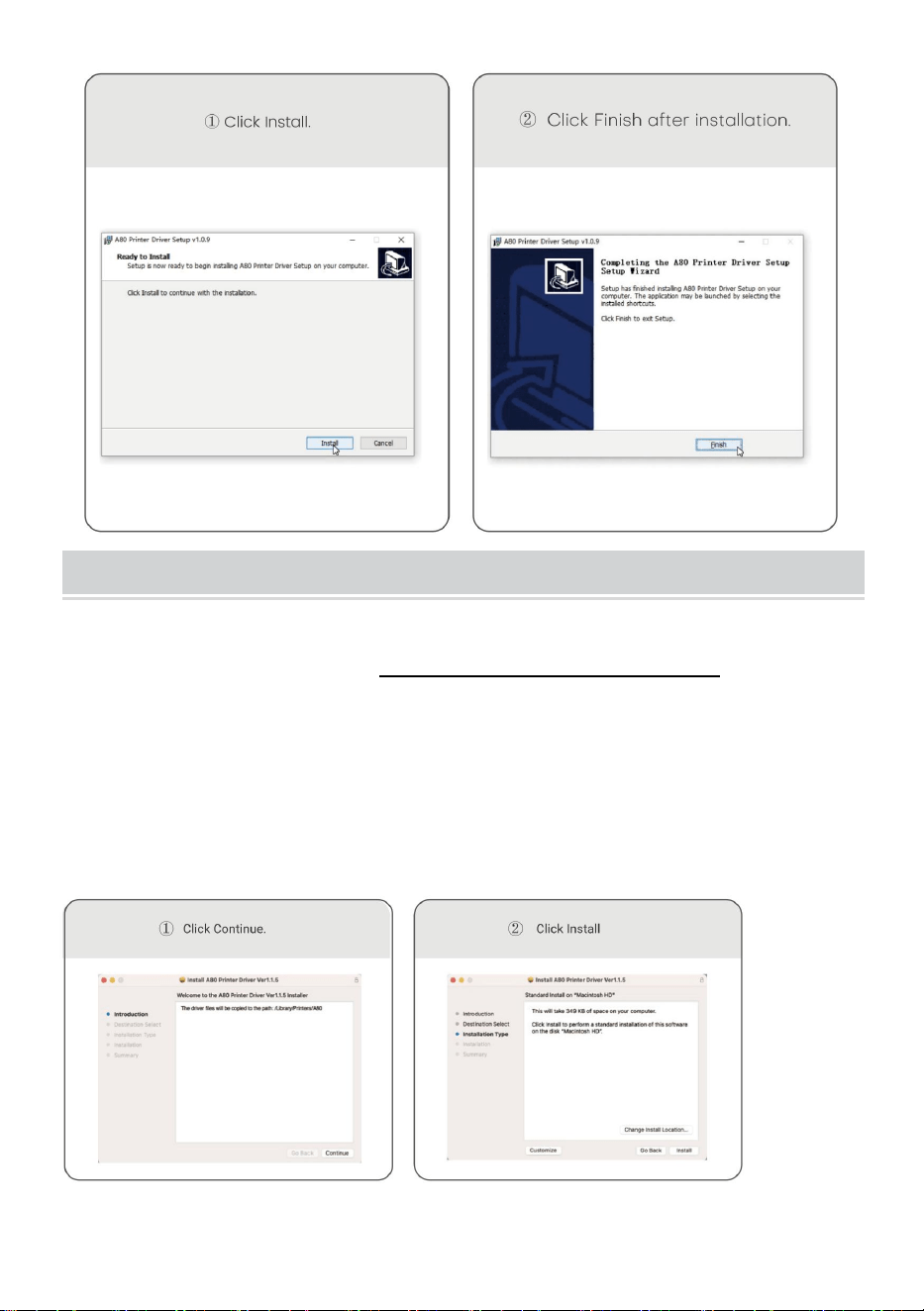
- 9 -
MacOS-Thermal Printer Driver Installation
Remarque : Avant d'installer le pilote, désactivez l'antivirus de
l'ordinateur logiciel. Visitez https : help.flashlabel.com , vous
pouvez télécharger le pilote après avoir recherché le mot-clé Y 80
/Y80H .
Allumez l'imprimante. Connectez l'imprimante à l'ordinateur via un
câble U S B.
Double-cliquez sur le fichier compressé que vous avez téléchargé
pour installer le pilote.
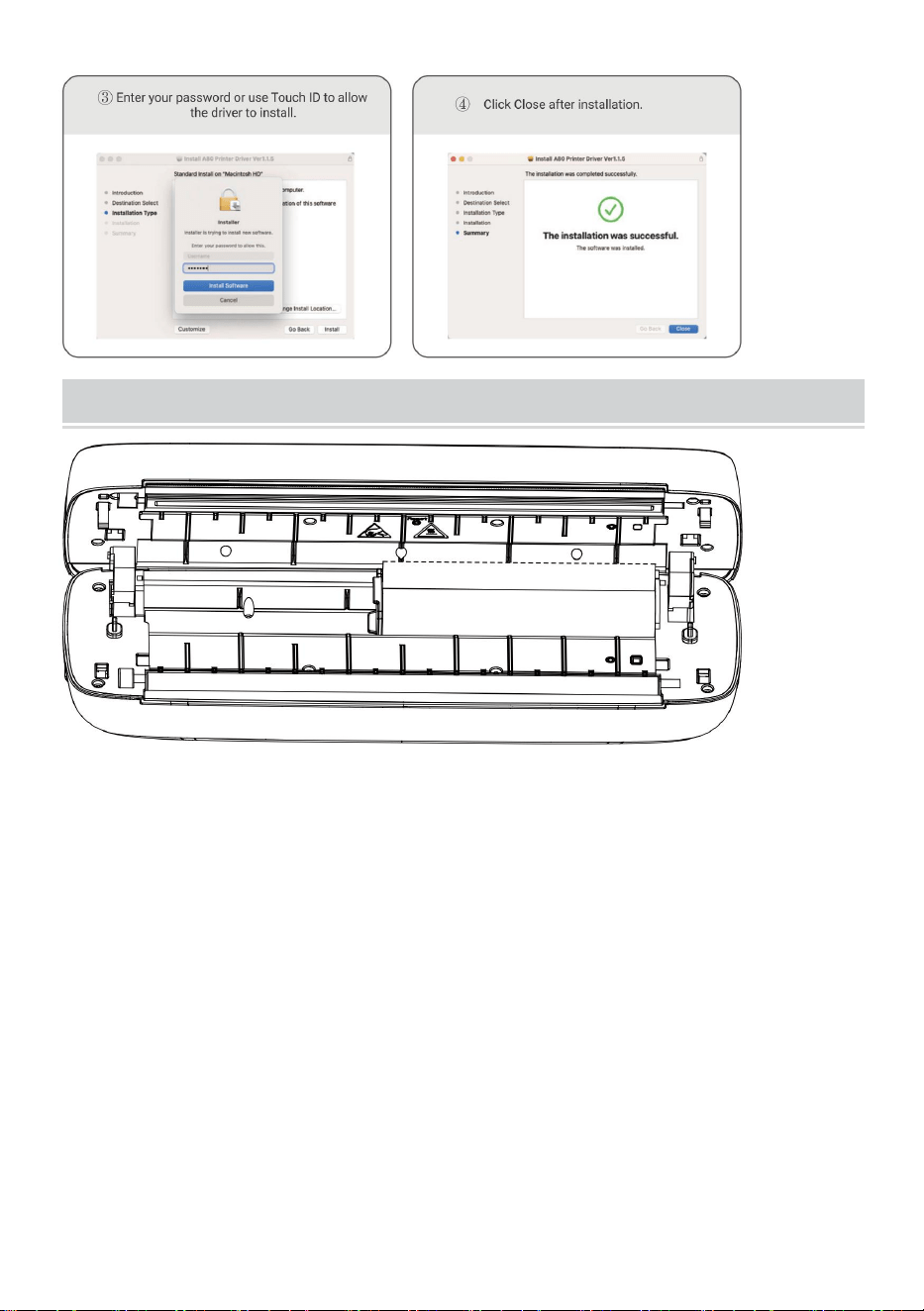
- 10 -
Usage Method
Ajustez le limiteur de papier en fonction de la largeur de votre papier.
Largeur de papier disponible de 2,24 pouces à 8,5 pouces.
Remarque : L'imprimante thermique s'éteindra automatiquement
après 15 minutes si sans aucune opération.
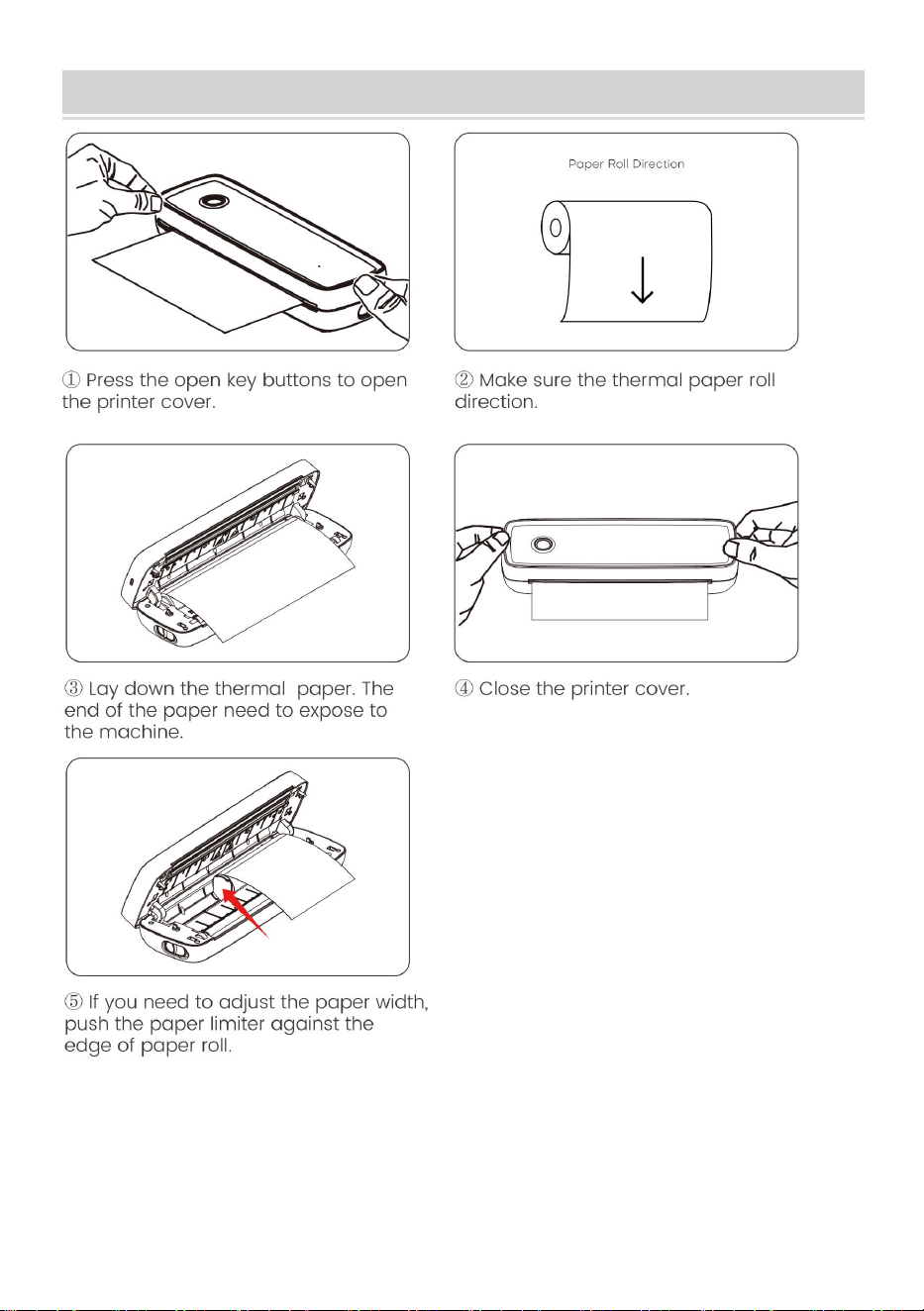
- 11 -
Paper Roll installation Guide
- 12 -
Folded Paper Installation Guide
- 13 -
Cleaning and Maintenance
-Veuillez éteindre l'imprimante, ouvrir le capot de l'imprimante et retirer le
rouleau de papier.
- Trempez-y un chiffon en coton ou des cotons-tiges. Sur l'alcool médical,
le long du centre de la tête d'impression dans le sens de doucement
essuyer.
-Après avoir nettoyé la tête d'impression, n'utilisez pas l'imprimante
immédiatement . Veuillez attendre 1 à 2 minutes jusqu'à ce que l'alcool soit
complètement évaporé.
Élimination correcte :
Ce produit est soumis aux dispositions de la directive européenne
2012/19/UE. Le symbole représentant une poubelle barrée indique que le
produit nécessite une collecte sélective des déchets dans l'Union
européenne. Ceci s'applique au produit et à tous les accessoires marqués
de ce symbole. Les produits marqués comme tels ne doivent pas être jetés
avec les ordures ménagères normales, mais doivent être déposés dans un
point de collecte pour le recyclage des appareils électriques et
électroniques.
Informations FCC :
ATTENTION : Les changements ou modifications non expressément
approuvés par la partie responsable de la conformité pourraient annuler le

- 14 -
droit de l'utilisateur à utiliser l'équipement !
Cet appareil est conforme à la partie 15 des règles FCC. L’exploitation est
soumise aux deux conditions suivantes :
1) Ce produit peut provoquer des interférences nuisibles.
2) Ce produit doit accepter toute interférence reçue, y compris les
interférences susceptibles de provoquer un fonctionnement indésirable.
AVERTISSEMENT : les changements ou modifications apportés à ce
produit non expressément approuvés par la partie responsable de la
conformité pourraient annuler l'autorité de l'utilisateur à utiliser le produit.
Remarque : Ce produit a été testé et déclaré conforme aux limites d'un
appareil numérique de classe B conformément à la partie 15 des règles de
la FCC. Ces limites sont conçues pour fournir une protection raisonnable
contre les interférences nuisibles dans une installation résidentielle.
Ce produit génère, utilise et peut émettre de l'énergie radiofréquence et,
s'il n'est pas installé et utilisé conformément aux instructions, il peut
provoquer des interférences nuisibles aux communications radio.
Cependant, rien ne garantit que des interférences ne se produiront pas
dans une installation particulière. Si ce produit provoque des interférences
nuisibles à la réception radio ou télé, ce qui peut être déterminé en
éteignant et rallumant le produit, l'utilisateur est encouragé à essayer de
corriger les interférences en prenant une ou plusieurs des mesures
suivantes.
· Réorientez ou déplacez l'antenne de réception.
· Augmentez la distance entre le produit et le récepteur.
· Connectez le produit à une prise sur un circuit différent de celui auquel le
récepteur est connecté.
· Consultez le revendeur ou un technicien radio/TV expérimenté pour
obtenir de l'aide.

Adresse : Shuangchenglu 803nong11hao1602A-1609shi, baoshanqu,
Shanghai 200000 CN.
Importé en Australie : SIHAO PTY LTD, 1 ROKEVA STREETESTWOOD
NSW 2122 Australie
Importé aux États-Unis : Sanven Technology Ltd., Suite 250, 9166
Anaheim Place, Rancho Cucamonga, CA 91730
REP
EC
E-CrossStu GmbH
Mainzer Landstr.69, 60329 Frankfurt am Main.
REP
UK
YH CONSULTING LIMITED.
C/O YH Consulting Limited Office 147, Centurion House,
London Road, Staines-upon-Thames, Surrey, TW18 4AX


Technisch Support und E-Garantie-Zertifikat
www.vevor.com/support
TRAGBARER THERMODRUCKER
BENUTZERHANDBUCH
MODELL NR.: Y80, Y80H
We continue to be committed to provide you tools with competitive price.
"Save Half", "Half Price" or any other similar expressions used by us only represents an
estimate of savings you might benefit from buying certain tools with us compared to the major
top brands and does not necessarily mean to cover all categories of tools offered by us. You
are kindly reminded to verify carefully when you are placing an order with us if you are
actually saving half in comparison with the top major brands.
- 1 -
MODELL: Y80, Y80H
Have product questions? Need technical support? Please feel free to
contact us:
Technical Support and E-Warranty Certificate
www.vevor.com/support
NEED HELP? CONTACT US!
This is the original instruction, please read all manual instructions
carefully before operating. VEVOR reserves a clear interpretation of our
user manual. The appearance of the product shall be subject to the
product you received. Please forgive us that we won't inform you again if
there are any technology or software updates on our product.
Portable Thermal Printer

- 2 -
WARNUNG:
Bitte lesen Sie dieses Handbuch vor der Verwendung des Produkts
sorgfältig durch. Andernfalls kann es zu schweren Verletzungen
kommen.
-Der Standard dieses Produkts ist ohne Netzteil . Wenn Sie zum Laden ein
Netzteil verwenden, kaufen Sie bitte ein zertifiziertes 5V/2A-Netzteil, das
den Standards entspricht.
-Dies ist ein professionelles Produkt, bitte verwenden Sie den Originalakku
Sicherheit und Vorsichtsmaßnahmen
-Es gibt eine eingebaute Lithiumbatterie, bitte verwenden Sie sie nicht im
Umgebung mit Temperaturen über 40 °C . Fernhalten von Feuer und
anderen Wärmequellen fern und legen Sie es nicht in den heiße Sonne, z.
B. in einem geschlossenen Auto.
-Kinder sollten unter Aufsicht aufgeladen und verwendet werden von
Erwachsenen. Nach dem vollständigen Laden ziehen Sie bitte unbedingt
den Ladeleitung rechtzeitig, um eine Überhitzung, einen Kurzschluss oder
ein Feuer zu verhindern.
- Werfen Sie das Produkt nicht in Feuer oder Wasser, um einen
Kurzschluss der Batterie zu vermeiden Kurzschluss, Feuer oder
Verbrennungen.
-Arbeitsumgebung:0 ℃ -40 ℃ Umgebungstemperatur, relativ
Luftfeuchtigkeit, 30 % – 85 % relative Luftfeuchtigkeit. Verwenden Sie das
Gerät in einer (nicht kondensierenden) Umgebung. Überschreiten Sie bitte
nicht den empfohlenen Temperaturbereich.
* Wenn Sie den Verdacht haben, dass ein Problem mit der Batterie vorliegt,
- 3 -
Wenden Sie sich für Hilfe an das Kundendienstcenter.
SPEICHERN SIE DIE ANLEITUNG
TECHNICAL SPECIFICATIONS
Modell
Y80
Y80H
Technische Daten
(L x B x H) (mm)
290*90*60
Nettogewicht / kg)
Etwa 0,95
Auflösung
203 DPI
300 DPI
Maximale
Druckgeschwindigkeit
15 mm/Sekunde
1 0 mm/S
Eingangsleistung
Gleichstrom 5 V, 2 A
Mensch-Maschine-Schnittste
lle
Taste LED Anzeige Laufwerk
Kommunikationsinterface
USB/BT20 und BT4.0
Betriebstemperatur (℃)
0 ~ +40
Arbeitsfeuchtigkeit
30 % – 85 % relative Luftfeuchtigkeit (keine
Kondensation)
Lagertemperatur (℃)
-20 ~ +60
Lagerung Luftfeuchtigkeit
0 % ~ 90 % relative Luftfeuchtigkeit (keine
Kondensation)
*Produkte wie Spezifikationen, Aussehen und Design können ohne
vorherige Ankündigung geändert werden.
- 4 -
PACKAGE CONTENTS
Flanell Tasche * 1 Datenkabel * 1 Laufwerk u disk * 1 Konverter
* 1
APPEARANCE AND COMPONENT
- 5 -
BUTTON OPERATING INSTRUCTIONS
Status
Beschreibung
Fehlerbehebung
Grün
Normale Operation
Rot blinkend
und Grün
-Druckkopf ist überhitzt
-Der Drucker wird
automatisch fortsetzen,
sobald der Drucker Kopf ist
abgekühlt
Rot
-Aufladen
-Obere Abdeckung offen
-Kein Papier
-Wenn vollständig
aufgeladen, Ampel wird
grün
- Schließen Sie die obere
Abdeckung
ordnungsgemäß.
Rot blinkend
Geringe Strommenge
Laden Sie den Drucker auf
Blau
Bluetooth-Kopplung erfolgreich
Bluetooth erfolgreich
verbunden
Blau blinkend
Bluetooth wird initialisiert oder
Initialisierung fehlgeschlagen
Schließen Sie zunächst die
App. Starten Sie die
Drucker und warten Sie, bis
das blaue Licht bis es nicht
mehr blinkt. Dann erneut
verbinden die App
- 6 -
DOWNLOAD VIA APP
- 7 -
- 8 -
Windows -Thermal Printer Driver Installation
Hinweis: Schalten Sie vor der Installation des Treibers die
Antivirensoftware des Computers aus. Besuchen Sie
https://help.flashlabel.com . Sie können den Treiber nach der
Suche herunterladen Schlüsselwort Y 80 /Y80H .
Schalten Sie den Drucker ein. Verbinden Sie den Drucker über ein
USB-Kabel mit dem Computer .
Doppelklicken Sie auf die heruntergeladene komprimierte Datei, um
den Treiber zu installieren.
- 9 -
MacOS-Thermal Printer Driver Installation
Hinweis: Schalten Sie vor der Installation des Treibers das
Antivirenprogramm Software. Besuchen Sie https:
help.flashlabel.com , Sie können den Treiber herunterladen nach
der Suche nach dem Schlüsselwort Y 80 /Y80H .
Schalten Sie den Drucker ein. Verbinden Sie den Drucker über ein
USB-Kabel mit dem Computer .
Doppelklicken Sie auf die heruntergeladene komprimierte Datei, um
den Treiber zu installieren.
- 10 -
Usage Method
Passen Sie den Papierbegrenzer an Ihre Papierbreite an.
Papierbreite verfügbar von 2,24 Zoll bis 8,5 Zoll.
Hinweis: Der Thermodrucker schaltet sich automatisch nach 15
Minuten, wenn keine Bedienung erfolgt.
- 11 -
Paper Roll installation Guide
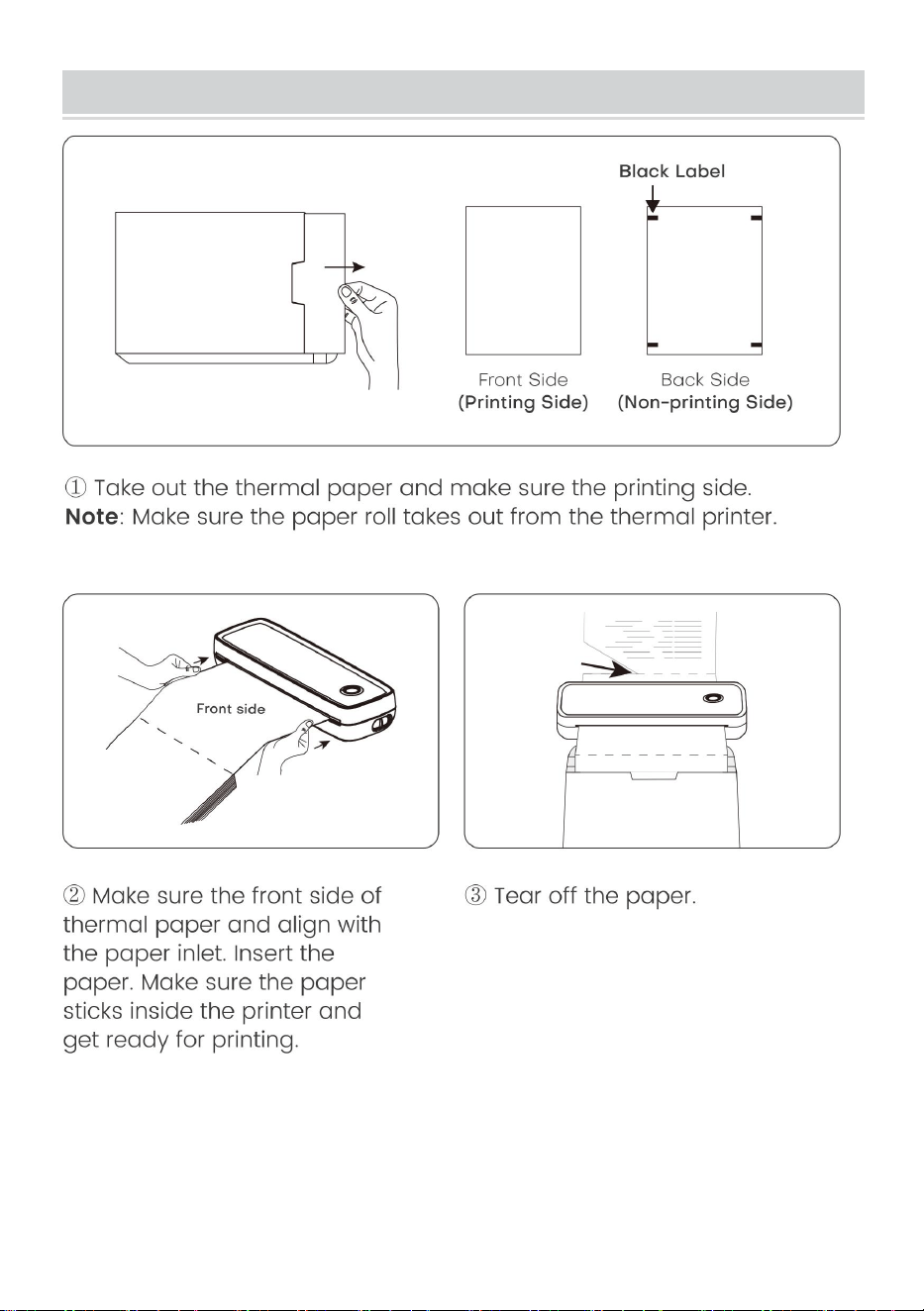
- 12 -
Folded Paper Installation Guide
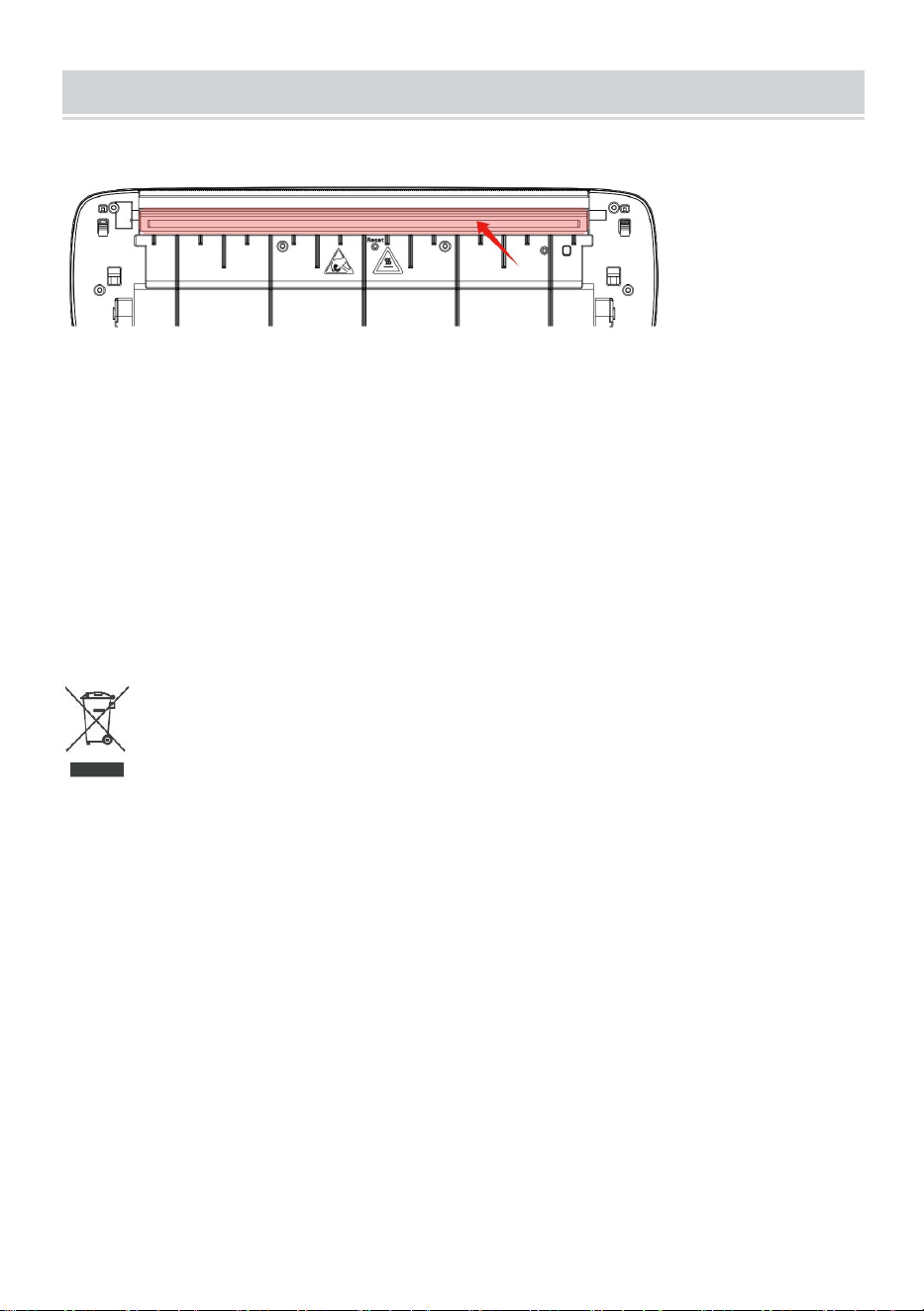
- 13 -
Cleaning and Maintenance
- Bitte schalten Sie den Drucker aus, öffnen Sie die Druckerabdeckung und
nehmen Sie die Papierrolle.
-Tauchen Sie Baumwolltuch oder Wattestäbchen hinein. Auf dem
medizinischen Alkohol, entlang der Druckkopfmitte bis zur Richtung des
sanften wischen.
-Nach der Reinigung des Druckkopfes den Drucker nicht sofort
verwenden . Bitte warten Sie 1-2 Minuten, bis der Alkohol vollständig
verdunstet.
Richtige Entsorgung :
Dieses Produkt unterliegt den Bestimmungen der europäischen Richtlinie
2012/19/EU. Das Symbol einer durchgestrichenen Mülltonne weist darauf
hin, dass dieses Produkt in der Europäischen Union einer getrennten
Müllentsorgung unterliegt. Dies gilt für das Produkt und alle mit diesem
Symbol gekennzeichneten Zubehörteile. So gekennzeichnete Produkte
dürfen nicht im normalen Hausmüll entsorgt werden, sondern müssen an
einer Sammelstelle für das Recycling von elektrischen und elektronischen
Geräten abgegeben werden.
FCC-Informationen:
ACHTUNG: Durch Änderungen oder Modifikationen, die nicht ausdrücklich
von der für die Konformität verantwortlichen Partei genehmigt wurden,

- 14 -
kann die Berechtigung des Benutzers zum Betrieb des Geräts erlöschen!
Dieses Gerät entspricht Teil 15 der FCC-Bestimmungen. Der Betrieb
unterliegt den folgenden zwei Bedingungen:
1) Dieses Produkt kann schädliche Störungen verursachen.
2) Dieses Produkt muss alle empfangenen Störungen tolerieren,
einschließlich Störungen, die einen unerwünschten Betrieb verursachen
können.
WARNUNG: Änderungen oder Modifikationen an diesem Produkt, die nicht
ausdrücklich von der für die Konformität verantwortlichen Partei genehmigt
wurden, können zum Erlöschen der Berechtigung des Benutzers zum
Betrieb des Produkts führen.
Hinweis: Dieses Produkt wurde getestet und entspricht den Grenzwerten
für digitale Geräte der Klasse B gemäß Teil 15 der FCC-Bestimmungen.
Diese Grenzwerte sollen einen angemessenen Schutz gegen schädliche
Störungen bei der Installation in Wohngebieten bieten.
Dieses Produkt erzeugt und verwendet Hochfrequenzenergie und kann
diese auch ausstrahlen. Wenn es nicht gemäß den Anweisungen installiert
und verwendet wird, kann es zu Störungen des Funkverkehrs kommen. Es
gibt jedoch keine Garantie dafür, dass bei einer bestimmten Installation
keine Störungen auftreten. Wenn dieses Produkt Störungen des Radio-
oder Fernsehempfangs verursacht (was durch Ein- und Ausschalten des
Produkts festgestellt werden kann), wird dem Benutzer empfohlen, die
Störungen durch eine oder mehrere der folgenden Maßnahmen zu
beheben.
· Empfangsantenne neu ausrichten oder verlegen.
· Vergrößern Sie den Abstand zwischen Produkt und Empfänger.
· Schließen Sie das Produkt an eine Steckdose eines anderen
Stromkreises an als den, an den der Empfänger angeschlossen ist.
· Wenden Sie sich an den Händler oder einen erfahrenen
Radio-/Fernsehtechniker.

Adresse : Shuangchenglu 803nong11hao1602A-1609shi, Baoshanqu,
Shanghai 200000 CN.
Nach AUS importiert: SIHAO PTY LTD, 1 ROKEVA
STREETEASTWOOD NSW 2122 Australien
Importiert in die USA: Sanven Technology Ltd., Suite 250, 9166 Anaheim
Place, Rancho Cucamonga, CA 91730
REP
EC
E-CrossStu GmbH
Mainzer Landstr.69, 60329 Frankfurt am Main.
REP
UK
YH CONSULTING LIMITED.
C/O YH Consulting Limited Office 147, Centurion House,
London Road, Staines-upon-Thames, Surrey, TW18 4AX


Tecnico Supporto e certificato di garanzia elettronica
www.vevor.com/support
STAMPANTE TERMICA PORTATILE
MANUALE D' USO
MODELLO N.: Y80, Y80H
We continue to be committed to provide you tools with competitive price.
"Save Half", "Half Price" or any other similar expressions used by us only represents an
estimate of savings you might benefit from buying certain tools with us compared to the major
top brands and does not necessarily mean to cover all categories of tools offered by us. You
are kindly reminded to verify carefully when you are placing an order with us if you are
actually saving half in comparison with the top major brands.
- 1 -
MODELLO: Y80, Y80H
Have product questions? Need technical support? Please feel free to
contact us:
Technical Support and E-Warranty Certificate
www.vevor.com/support
NEED HELP? CONTACT US!
This is the original instruction, please read all manual instructions
carefully before operating. VEVOR reserves a clear interpretation of our
user manual. The appearance of the product shall be subject to the
product you received. Please forgive us that we won't inform you again if
there are any technology or software updates on our product.
Portable Thermal Printer

- 2 -
AVVERTIMENTO:
Si prega di leggere attentamente questo manuale prima di utilizzare il
prodotto. In caso contrario, potrebbero verificarsi lesioni gravi.
-Lo standard di questo prodotto è escluso un adattatore di alimentazione .
Se utilizzi un adattatore di alimentazione per caricare, acquistane uno
adattatore di alimentazione certificato da 5 V/2 A che soddisfa gli standard.
-Questo è un prodotto professionale, utilizzare la batteria originale
Sicurezza e precauzioni
-C'è una batteria al litio incorporata, per favore non usarla nel ambiente
con temperatura superiore a 40 ℃ . Tenere lontano dal fuoco e da altre
fonti di calore e non posizionarlo nel sole caldo, come un'auto chiusa.
-I bambini devono essere caricati e utilizzati sotto la supervisione degli
adulti. Dopo la ricarica completa, assicurarsi di estrarre il linea di ricarica in
tempo per evitare surriscaldamento, cortocircuito o incendio.
-Non mettere il prodotto nel fuoco o nell'acqua per evitare che la batteria si
scarichi circuito, incendio o bruciatura.
-Ambiente di lavoro: temperatura ambiente 0 ℃ -40 ℃ , relativa umidità,
30%-85%RH Per l'uso in ambienti (senza condensa), non superare
l'intervallo di temperatura consigliato.
* Se sospetti che ci sia un problema con la batteria, per favore contattare il
centro assistenza post-vendita per assistenza.
SALVA LE ISTRUZIONI
- 3 -
TECHNICAL SPECIFICATIONS
Modello
Y80
Y80H
Dimensioni del prodotto
(LxLxA)(mm)
290*90*60
Peso netto (chilogrammo)
Circa 0,95
Risoluzione
203 DPI
300 DPI
Velocità di stampa massima
15mm/S
10 mm /S
Potenza di ingresso
CC 5 V 2 A
Interfaccia uomo-macchina
Indicatore LED chiave
Interfaccia di comunicazione
USB/BT20 e BT4.0
Temperatura operativa(℃)
0~+40
Umidità di lavoro
30%~85% UR (senza condensa)
Temperatura di stoccaggio
(℃)
-20~+60
Umidità di conservazione
0%~ 90 % UR (senza condensa)
*Prodotti quali specifiche, aspetto e design sono soggetti a modifiche
senza preavviso.
- 4 -
PACKAGE CONTENTS
Borsa di flanella*1 Cavo dati*1 Unità disco*1 Convertitore*1
APPEARANCE AND COMPONENT
- 5 -
BUTTON OPERATING INSTRUCTIONS
Stato
Descrizione
Risoluzione dei
problemi
Verde
Operazione normale
Rosso
lampeggiante e
Verde
-La testina della stampante è
surriscaldata
-La stampante verrà
automaticamente
riprendere una volta che la
stampante la testa si è
raffreddata
Rosso
-Ricarica
-Coperchio superiore aperto
-Niente carta
-Quando è completamente
carico, il la luce diventa
verde
-Chiudere correttamente il
coperchio superiore
Rosso
lampeggiante
Bassa quantità elettrica
Caricare la stampante
Blu
Associazione Bluetooth riuscita
Bluetooth connesso
correttamente
Blu
lampeggiante
Il Bluetooth è in fase di
inizializzazione o
inizializzazione fallita
Chiudi prima l'app. Riavvia il
stampante e attendere la
luce blu finché non
lampeggia. Quindi
riconnettersi l'applicazione
- 6 -
DOWNLOAD VIA APP
- 7 -
- 8 -
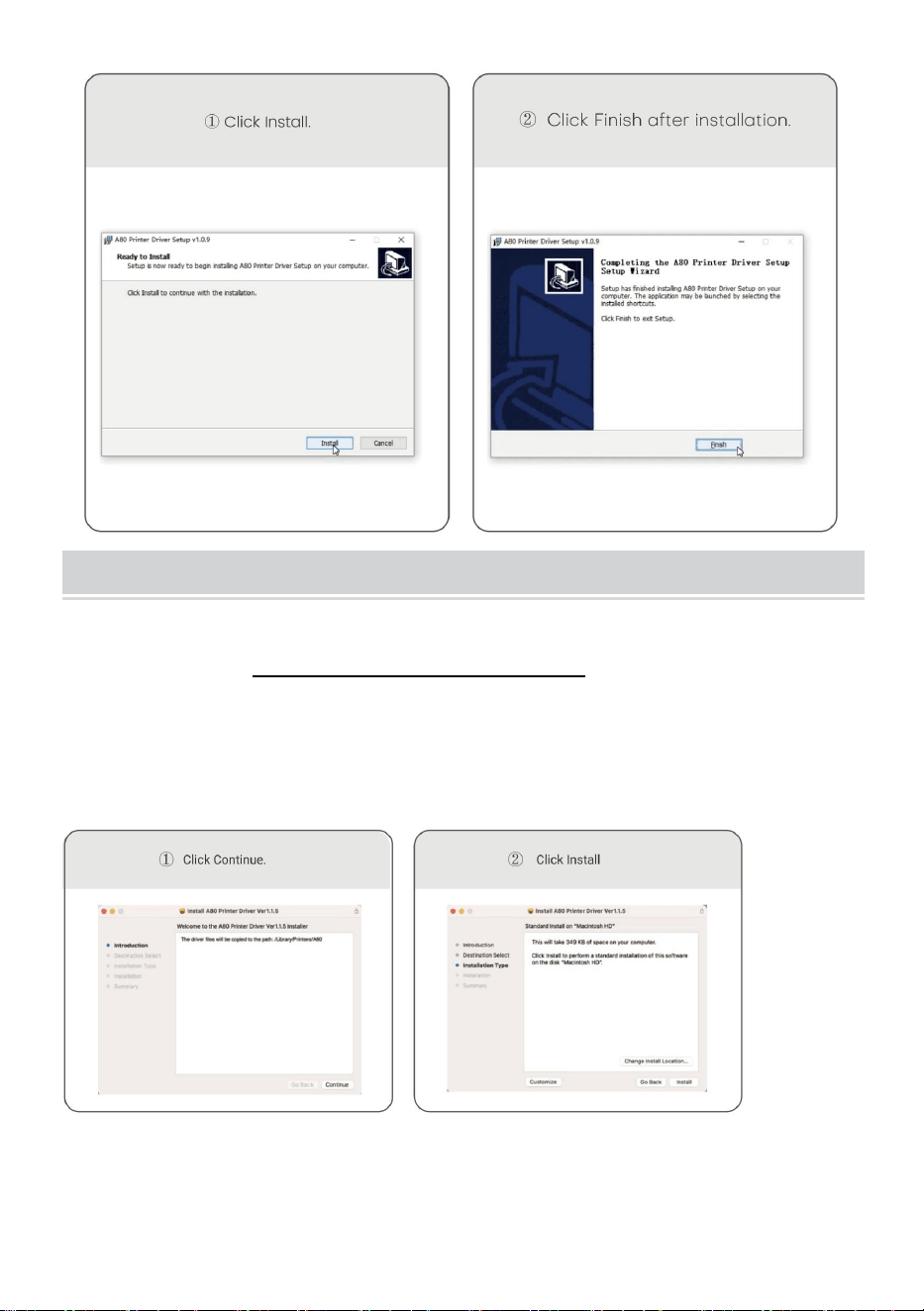
Windows -Thermal Printer Driver Installation
Nota: prima di installare il driver, disattivare il software antivirus del
computer. Visitare https://help.flashlabel.com , è possibile
scaricare il driver dopo la ricerca parola chiave Y 80 /Y80H .
Accendi la stampante. Collegare la stampante al computer tramite
cavo USB .
Fare doppio clic sul file compresso scaricato per installare il driver.
- 9 -
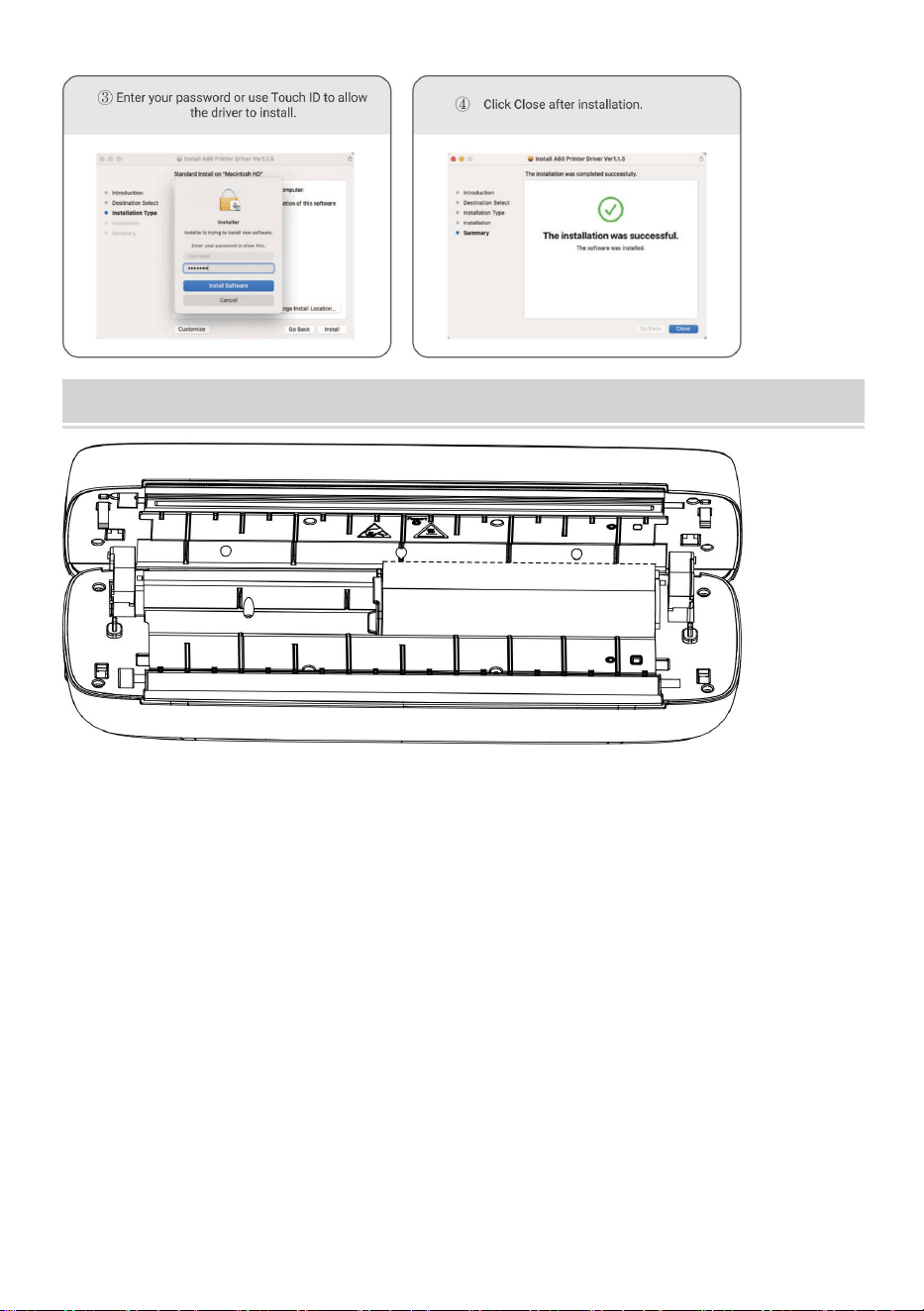
MacOS-Thermal Printer Driver Installation
Nota: prima di installare il driver, disattivare l'antivirus del computer
Software. Visita https: help.flashlabel.com , puoi scaricare il driver
dopo aver cercato la parola chiave Y 80 /Y80H .
Accendi la stampante. Collegare la stampante al computer tramite
cavo USB .
Fare doppio clic sul file compresso scaricato per installare il driver.
- 10 -
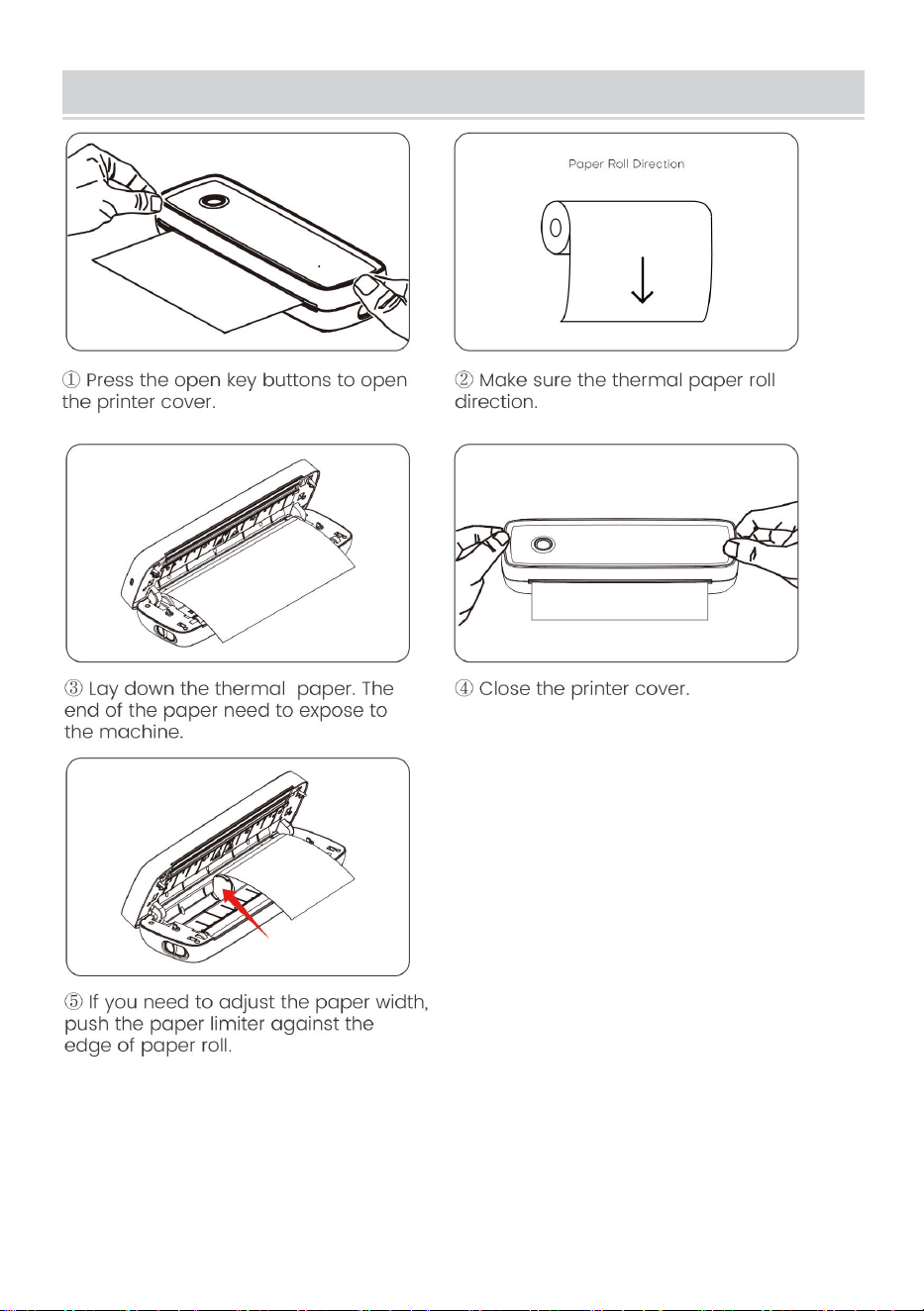
Usage Method
Regolare il limitatore della carta per adattarlo alla larghezza della
carta.
Larghezza carta disponibile da 2,24 pollici a 8,5 pollici.
Nota: la stampante termica si spegnerà automaticamente dopo 15
minuti se senza alcuna operazione.
- 11 -
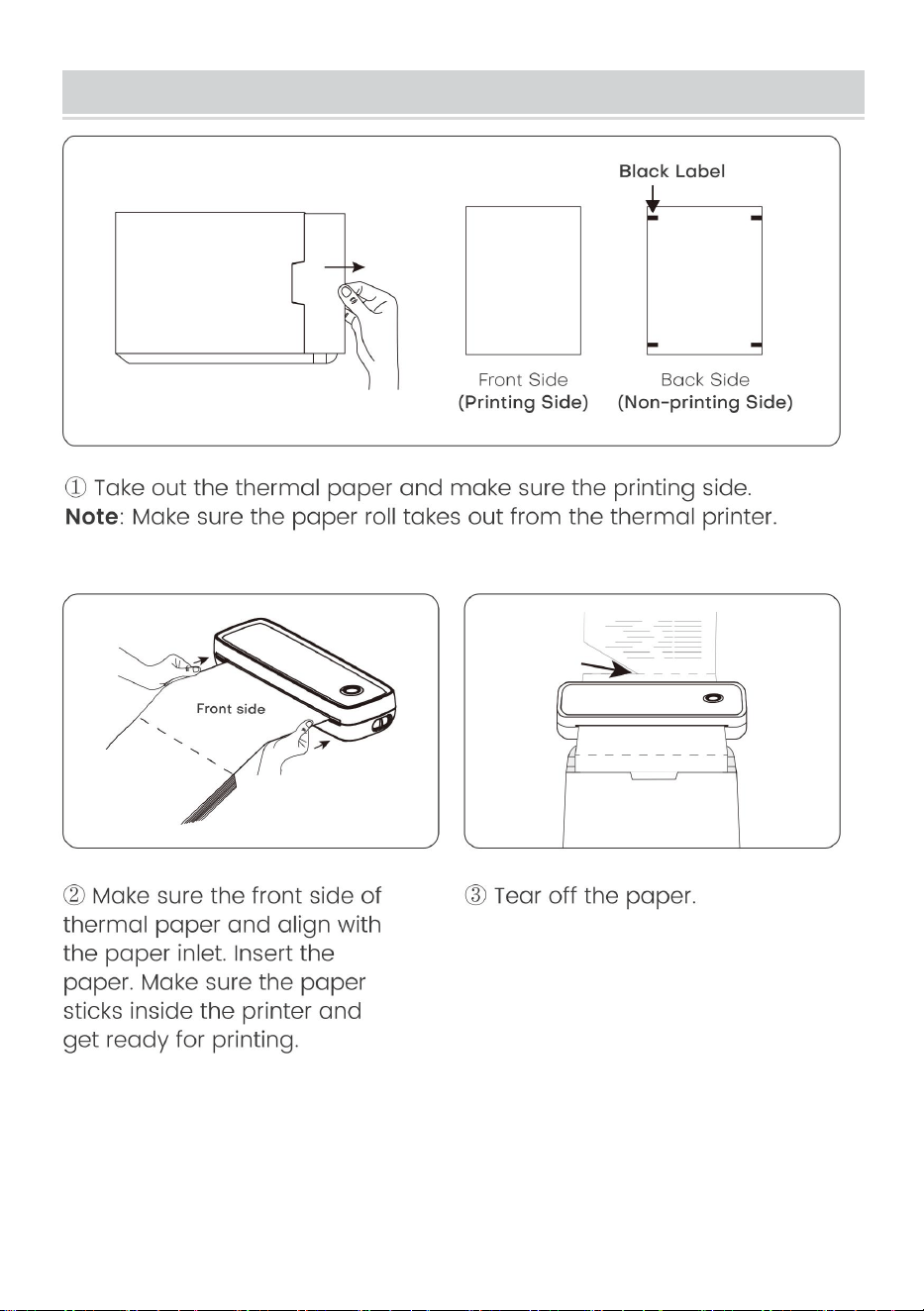
Paper Roll installation Guide
- 12 -
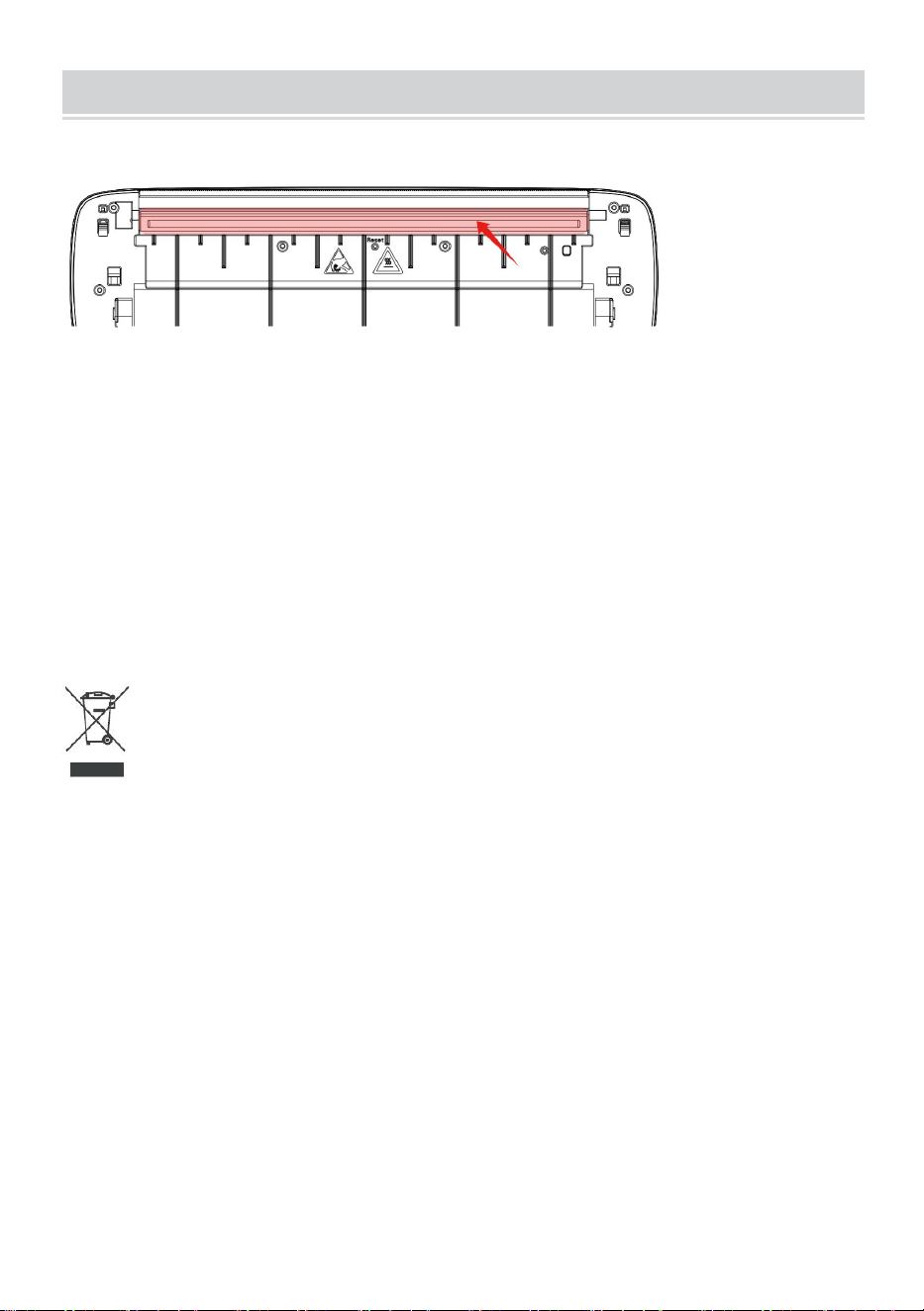
Folded Paper Installation Guide
- 13 -
Cleaning and Maintenance
-Spegnere la stampante, aprire il coperchio della stampante ed estrarla il
rotolo di carta.
-Immergere un panno di cotone o dei bastoncini di cotone. Sull'alcol
medico, lungo il centro della testina di stampa verso la direzione di
delicatamente pulire.
-Dopo aver pulito la testina di stampa, non utilizzare immediatamente la
stampante . Si prega di attendere 1-2 minuti finché l'alcol non sarà
completamente evaporato evaporato.
Smaltimento corretto :
Questo prodotto è soggetto alle disposizioni della Direttiva europea
2012/19/UE. Il simbolo del bidone della spazzatura barrato indica che
nell'Unione Europea il prodotto richiede la raccolta differenziata dei rifiuti.
Ciò vale per il prodotto e tutti gli accessori contrassegnati da questo
simbolo. I prodotti contrassegnati come tali non possono essere smaltiti
con i normali rifiuti domestici, ma devono essere portati in un punto di
raccolta per il riciclaggio di dispositivi elettrici ed elettronici.
Informazioni FCC:
ATTENZIONE: Cambiamenti o modifiche non espressamente approvati
dalla parte responsabile della conformità potrebbero invalidare il diritto
dell'utente a utilizzare l'apparecchiatura!

- 14 -
Questo dispositivo è conforme alla Parte 15 delle norme FCC. Il
funzionamento è soggetto alle seguenti due condizioni:
1) Questo prodotto può causare interferenze dannose.
2) Questo prodotto deve accettare qualsiasi interferenza ricevuta,
comprese le interferenze che potrebbero causare un funzionamento
indesiderato.
AVVERTENZA: cambiamenti o modifiche a questo prodotto non
espressamente approvati dalla parte responsabile della conformità
potrebbero annullare l'autorità dell'utente a utilizzare il prodotto.
Nota: questo prodotto è stato testato ed è risultato conforme ai limiti per un
dispositivo digitale di Classe B ai sensi della Parte 15 delle norme FCC.
Questi limiti sono progettati per fornire una protezione ragionevole contro
interferenze dannose in un'installazione residenziale.
Questo prodotto genera, utilizza e può irradiare energia in radiofrequenza
e, se non installato e utilizzato in conformità con le istruzioni, può causare
interferenze dannose alle comunicazioni radio. Tuttavia, non vi è alcuna
garanzia che non si verifichino interferenze in una particolare installazione.
Se questo prodotto causa interferenze dannose alla ricezione radiofonica o
televisiva, cosa che può essere determinata spegnendo e accendendo il
prodotto, si consiglia all'utente di provare a correggere l'interferenza
adottando una o più delle seguenti misure.
· Riorientare o riposizionare l'antenna ricevente.
· Aumentare la distanza tra il prodotto e il ricevitore.
· Collegare il prodotto ad una presa su un circuito diverso da quello a cui è
collegato il ricevitore.
· Consultare il rivenditore o un tecnico radio/TV esperto per assistenza.

Indirizzo : Shuangchenglu 803nong11hao1602A-1609shi, baoshanqu,
shanghai 200000 CN.
Importato in AUS: SIHAO PTY LTD, 1 ROKEVA STREETEASTWOOD
NSW 2122 Australia
Importato negli Stati Uniti: Sanven Technology Ltd., Suite 250, 9166
Anaheim Place, Rancho Cucamonga, CA 91730
REP
EC
E-CrossStu GmbH
Mainzer Landstr.69, 60329 Frankfurt am Main.
REP
UK
YH CONSULTING LIMITED.
C/O YH Consulting Limited Office 147, Centurion House,
London Road, Staines-upon-Thames, Surrey, TW18 4AX


Técnico Certificado de soporte y garantía electrónica
www.vevor.com/support
IMPRESORA TÉRMICA PORTÁTIL
MANUAL DE USUARIO
N.º DE MODELO: Y80, Y80H
We continue to be committed to provide you tools with competitive price.
"Save Half", "Half Price" or any other similar expressions used by us only represents an
estimate of savings you might benefit from buying certain tools with us compared to the major
top brands and does not necessarily mean to cover all categories of tools offered by us. You
are kindly reminded to verify carefully when you are placing an order with us if you are
actually saving half in comparison with the top major brands.
- 1 -
MODELO: Y80, Y80H
Have product questions? Need technical support? Please feel free to
contact us:
Technical Support and E-Warranty Certificate
www.vevor.com/support
NEED HELP? CONTACT US!
This is the original instruction, please read all manual instructions
carefully before operating. VEVOR reserves a clear interpretation of our
user manual. The appearance of the product shall be subject to the
product you received. Please forgive us that we won't inform you again if
there are any technology or software updates on our product.
Portable Thermal Printer

- 2 -
ADVERTENCIA:
Lea atentamente este manual antes de utilizar el producto. De lo
contrario, podrían producirse lesiones graves.
-El estándar de este producto no incluye un adaptador de corriente . Si
utiliza un adaptador de corriente para cargar, compre un Adaptador de
corriente certificado de 5 V/2 A que cumple con los estándares.
-Este es un producto profesional, utilice la batería original.
Seguridad y precauciones
-Hay una batería de litio incorporada, no la use en el Ambiente con
temperatura superior a 40 ℃ . Mantener alejado del fuego y otras fuentes
de calor, y no lo coloque en el sol caliente, como un coche cerrado.
-Los niños deben ser cargados y utilizados bajo supervisión. de adultos.
Después de la carga completa, asegúrese de sacar el Línea de carga a
tiempo para evitar sobrecalentamiento, cortocircuito o incendio.
-No pongas el producto en fuego o agua para evitar cortocircuitos de la
batería. circuito o incendio o quemadura.
-Entorno de trabajo: 0 ℃ -40 ℃ temperatura ambiente, relativa Humedad,
30%-85%RH. Uso en ambiente (sin condensación), no exceda el rango de
temperatura recomendado.
* Si sospecha que hay un problema con la batería, por favor Póngase en
contacto con el centro de servicio posventa para obtener ayuda.
GUARDE LAS INSTRUCCIONES
- 3 -
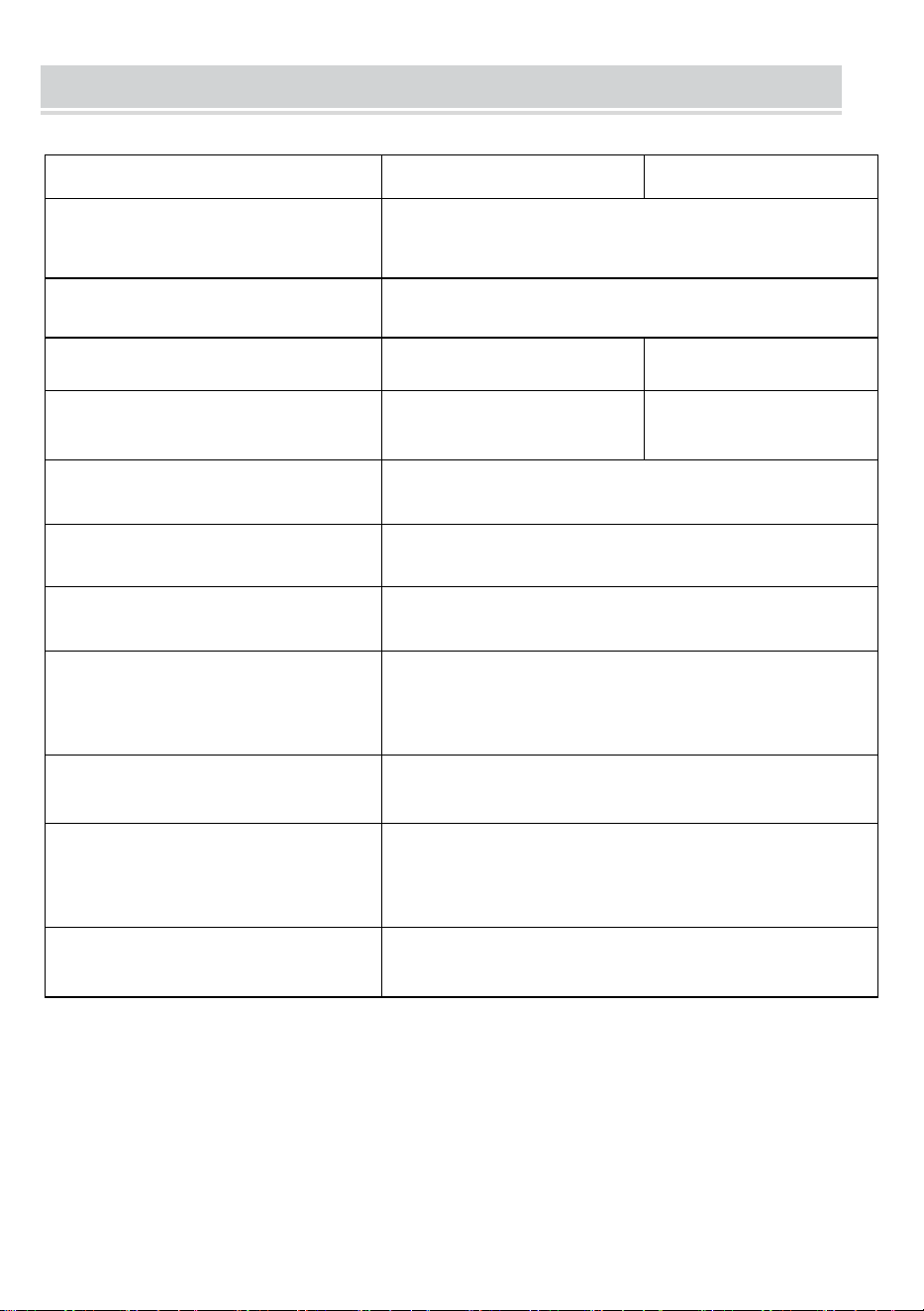
TECHNICAL SPECIFICATIONS
Modelo
Y80
Y80H
Dimensiones del producto
(LxAnxAl)(mm)
290*90*60
Peso neto / kg)
Aproximadamente 0,95
Resolución
203 PPP
300 ppp
Velocidad máxima de
impresión
15 mm/s
1 0 mm/S
Potencia de entrada
CC 5 V 2 A.
Interfaz hombre-máquina
Unidad de indicador LED clave
Interface de comunicación
USB/BT20 y BT4.0
Temperatura de
funcionamiento (℃)
0 ~ +40
Humedad de trabajo
30%~85% RH (sin condensación)
Temperatura de
almacenamiento (℃)
-20 ~ +60
humedad de
almacenamiento
0%~ 90 % RH (sin condensación)
*Productos como especificaciones, apariencia y diseño están
sujetos a modificaciones sin previo aviso.
- 4 -
PACKAGE CONTENTS
Bolsa de franela*1 Cable de datos*1 Unidad de disco u*1
Convertidor*1
APPEARANCE AND COMPONENT
- 5 -
BUTTON OPERATING INSTRUCTIONS
Estado
Descripción
Solucionar problemas
Verde
Operación normal
Rojo
intermitente y
verde
-El cabezal de la impresora está
sobrecalentado.
-La impresora
automáticamente reanudar
una vez que la impresora la
cabeza se ha enfriado
Rojo
-Cargando
-Cubierta superior abierta
-Sin papel
-Cuando esté
completamente cargado, el
la luz se vuelve verde
-Cierra la tapa superior
correctamente
Rojo
intermitente
Baja cantidad eléctrica
Cargar la impresora
Azul
Emparejamiento Bluetooth
exitoso
Bluetooth conectado
correctamente
Azul intermitente
Bluetooth se está inicializando o
inicialización falló
Primero cierre la aplicación.
Reinicie el Impresora y
espere a que se encienda
la luz azul. hasta que no
parpadee. Luego vuelve a
conectarte la aplicación
- 6 -
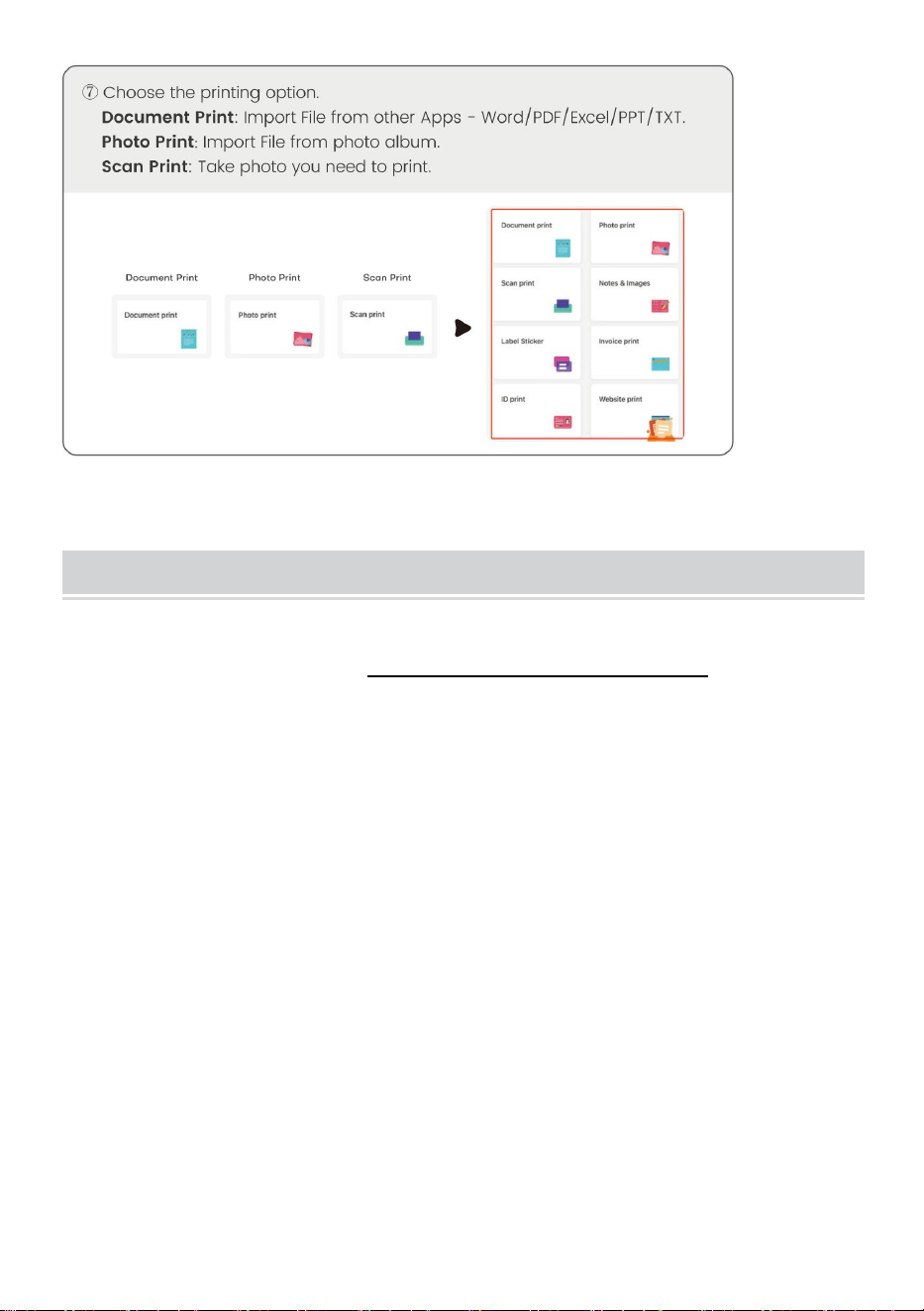
DOWNLOAD VIA APP
- 7 -
- 8 -
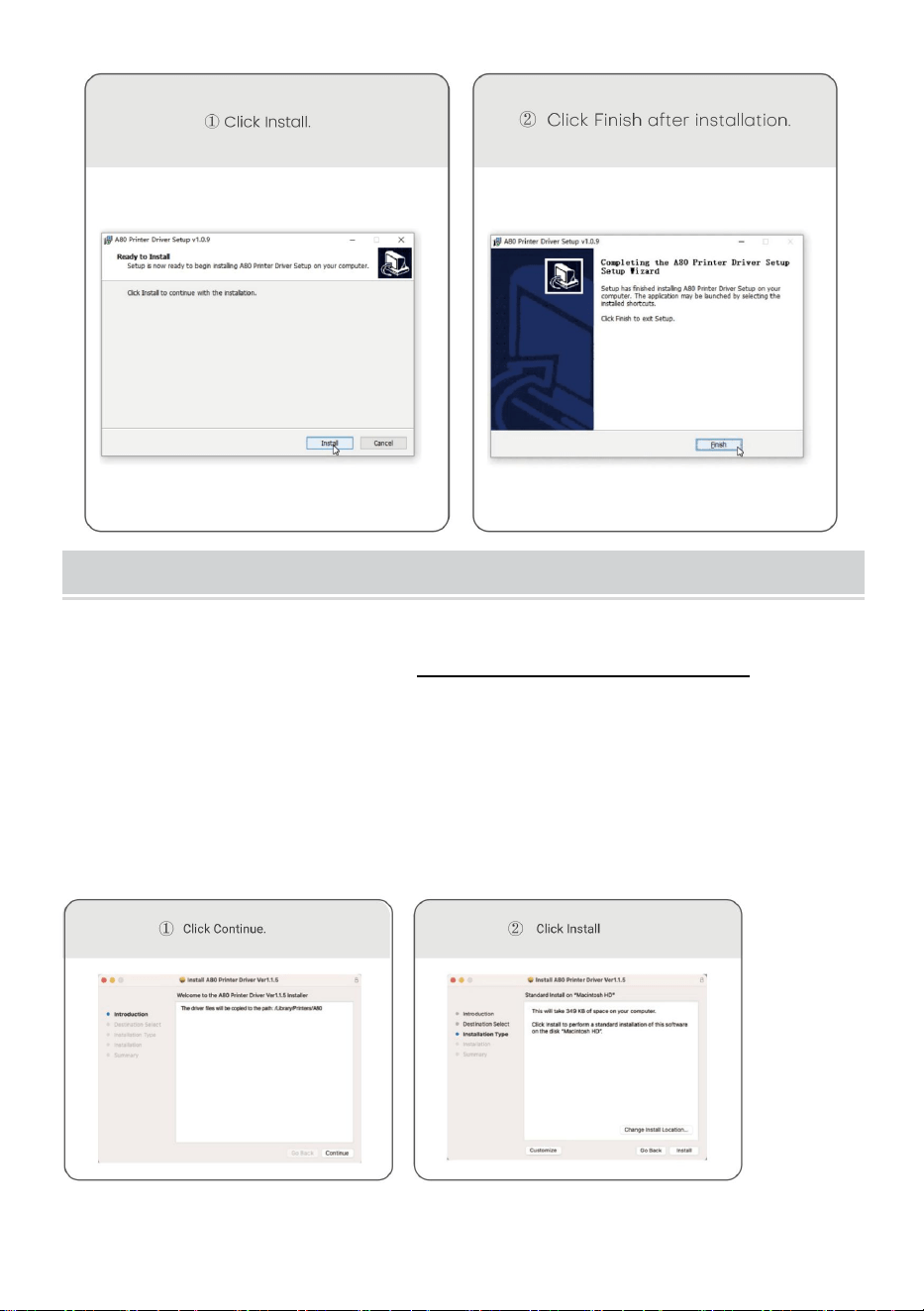
Windows -Thermal Printer Driver Installation
Nota: Antes de instalar el controlador, apague el software antivirus
de la computadora. Visite https://help.flashlabel.com , puede
descargar el controlador después de buscar palabra clave Y 80
/Y80H .
Encienda la impresora. Conecte la impresora a la computadora
mediante un cable USB .
Haga doble clic en el archivo comprimido que descargó para instalar
el controlador.
- 9 -
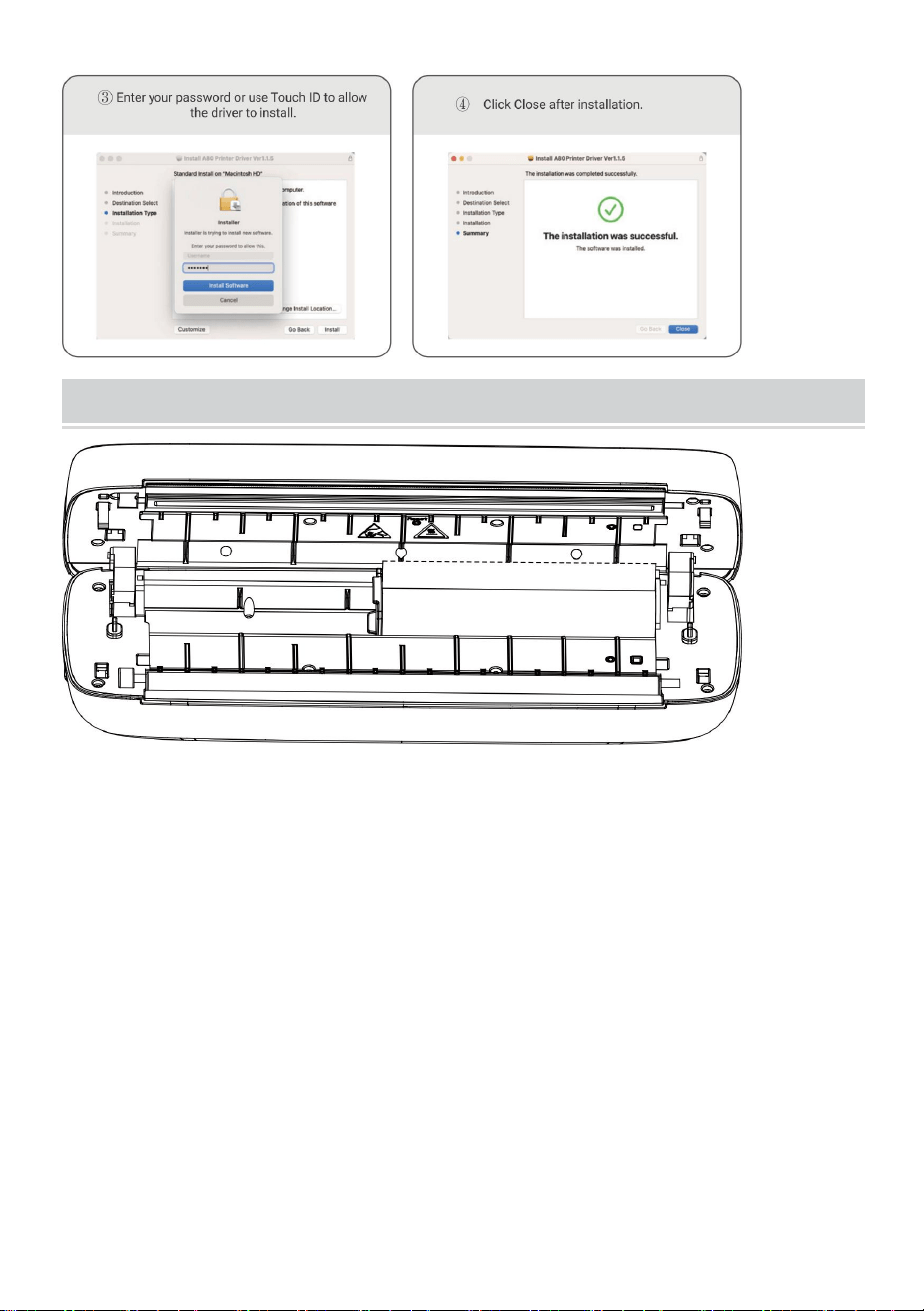
MacOS-Thermal Printer Driver Installation
Nota: antes de instalar el controlador, apague el antivirus de la
computadora. software. Visite https: help.flashlabel.com , puede
descargar el controlador después de buscar la palabra clave Y 80
/Y80H .
Encienda la impresora. Conecte la impresora a la computadora
mediante un cable USB .
Haga doble clic en el archivo comprimido que descargó para instalar
el controlador.
- 10 -
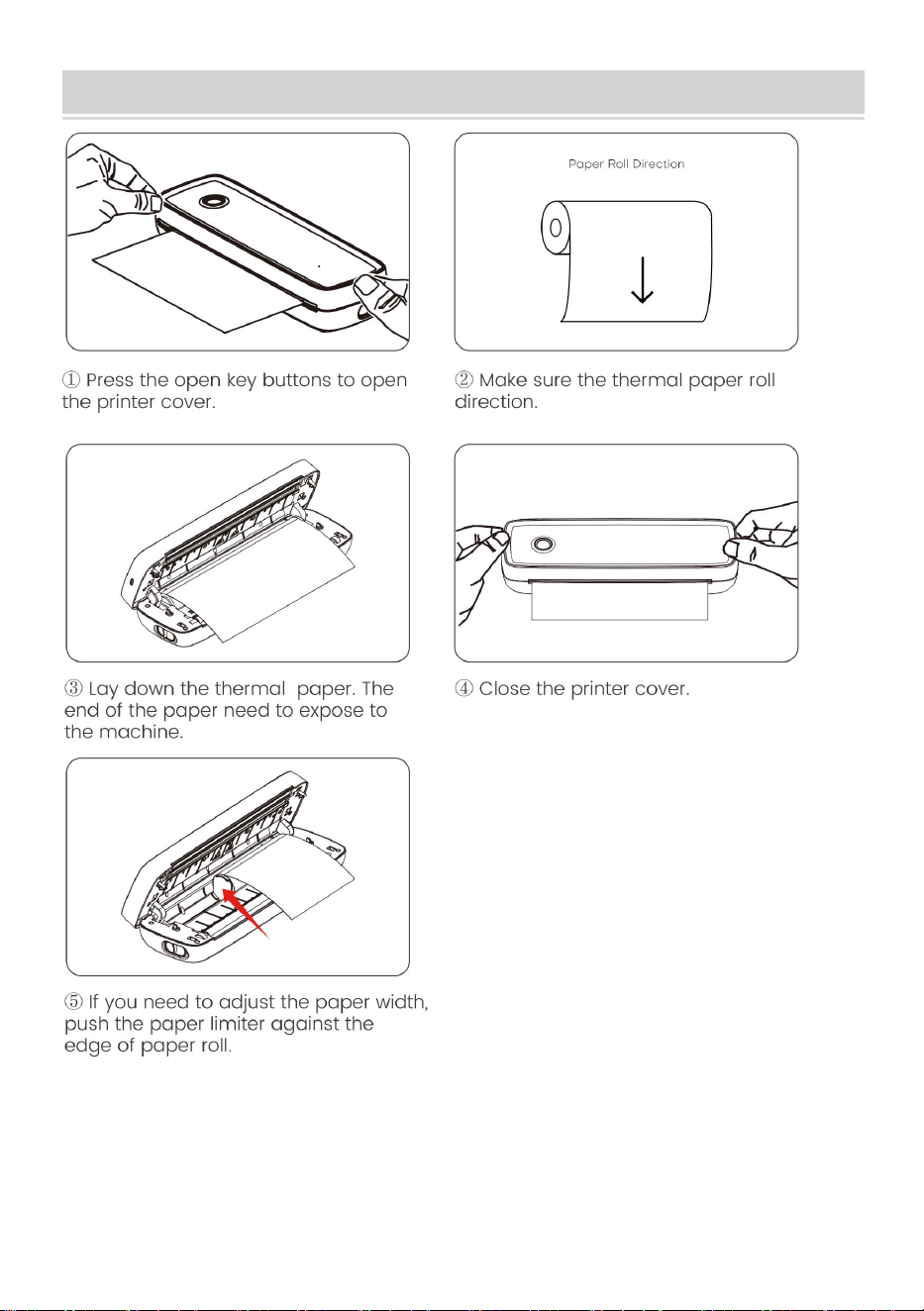
Usage Method
Ajuste el limitador de papel para que se ajuste al ancho del papel.
Ancho de papel disponible desde 2,24 pulgadas hasta 8,5 pulgadas.
Nota: La impresora térmica se apagará automáticamente después
de 15 minutos si no se realiza ninguna operación.
- 11 -
Paper Roll installation Guide
- 12 -
Folded Paper Installation Guide
- 13 -
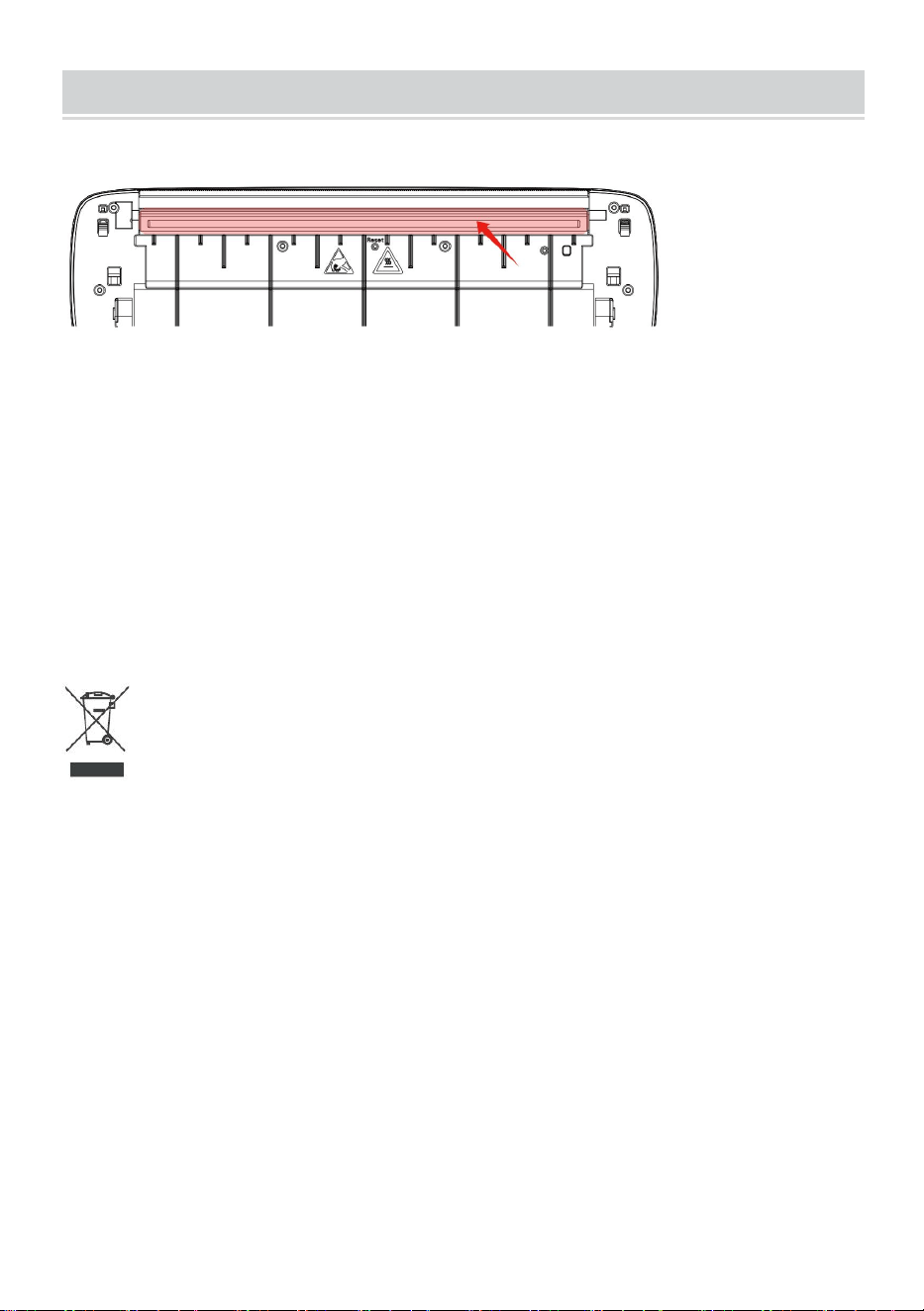
Cleaning and Maintenance
-Apague la impresora, abra la cubierta de la impresora y saque el rollo de
papel.
-Sumerja un paño de algodón o hisopos de algodón en él. Sobre el alcohol
medicinal, a lo largo del centro del cabezal de impresión hasta alrededor
de la dirección de limpiar.
-Después de limpiar el cabezal de impresión, no utilice la impresora
inmediatamente . Espere 1-2 minutos hasta que el alcohol se haya secado
por completo. evaporado.
Eliminación correcta :
Este producto está sujeto a las disposiciones de la Directiva europea
2012/19/UE. El símbolo que muestra un contenedor con ruedas tachado
indica que el producto requiere recogida selectiva de basura en la Unión
Europea. Esto se aplica al producto y a todos los accesorios marcados con
este símbolo. Los productos marcados como tales no podrán desecharse
junto con la basura doméstica normal, sino que deberán llevarse a un
punto de recogida para el reciclaje de aparatos eléctricos y electrónicos.
Información de la FCC:
PRECAUCIÓN: ¡Los cambios o modificaciones no aprobados
expresamente por la parte responsable del cumplimiento podrían anular la
autoridad del usuario para operar el equipo!

- 14 -
Este dispositivo cumple con la Parte 15 de las normas de la FCC. La
operación está sujeta a las dos condiciones siguientes:
1) Este producto puede causar interferencias perjudiciales.
2) Este producto debe aceptar cualquier interferencia recibida, incluidas
las interferencias que puedan provocar un funcionamiento no deseado.
ADVERTENCIA: Los cambios o modificaciones a este producto que no
estén aprobados expresamente por la parte responsable del cumplimiento
podrían anular la autoridad del usuario para operar el producto.
Nota: Este producto ha sido probado y cumple con los límites para un
dispositivo digital Clase B de conformidad con la Parte 15 de las reglas de
la FCC. Estos límites están diseñados para brindar una protección
razonable contra interferencias dañinas en una instalación residencial.
Este producto genera, usa y puede irradiar energía de radiofrecuencia y, si
no se instala y usa de acuerdo con las instrucciones, puede causar
interferencias dañinas en las comunicaciones por radio. Sin embargo, no
hay garantía de que no se produzcan interferencias en una instalación en
particular. Si este producto causa interferencias dañinas en la recepción
de radio o televisión, lo cual se puede determinar apagando y
encendiendo el producto, se recomienda al usuario que intente corregir la
interferencia mediante una o más de las siguientes medidas.
· Reorientar o reubicar la antena receptora.
· Aumentar la distancia entre el producto y el receptor.
· Conecte el producto a una toma de corriente de un circuito diferente al
que está conectado el receptor.
· Consulte al distribuidor o a un técnico experimentado en radio/TV para
obtener ayuda.

Dirección : Shuangchenglu 803nong11hao1602A-1609shi, baoshanqu,
shanghai 200000 CN.
Importado a AUS: SIHAO PTY LTD, 1 ROKEVA STREETEASTWOOD
NSW 2122 Australia
Importado a EE. UU.: Sanven Technology Ltd., Suite 250, 9166 Anaheim
Place, Rancho Cucamonga, CA 91730
REP
EC
E-CrossStu GmbH
Mainzer Landstr.69, 60329 Frankfurt am Main.
REP
UK
YH CONSULTING LIMITED.
C/O YH Consulting Limited Office 147, Centurion House,
London Road, Staines-upon-Thames, Surrey, TW18 4AX


Techniczny Certyfikat wsparcia i e-gwarancji
www.vevor.com/support
PRZENOŚNA DRUKARKA TERMICZNA
INSTRUKCJA OBSŁUGI
NR MODELU: Y80, Y80H
We continue to be committed to provide you tools with competitive price.
"Save Half", "Half Price" or any other similar expressions used by us only represents an
estimate of savings you might benefit from buying certain tools with us compared to the major
top brands and does not necessarily mean to cover all categories of tools offered by us. You
are kindly reminded to verify carefully when you are placing an order with us if you are
actually saving half in comparison with the top major brands.
- 1 -
MODEL: Y80, Y80H
Have product questions? Need technical support? Please feel free to
contact us:
Technical Support and E-Warranty Certificate
www.vevor.com/support
NEED HELP? CONTACT US!
This is the original instruction, please read all manual instructions
carefully before operating. VEVOR reserves a clear interpretation of our
user manual. The appearance of the product shall be subject to the
product you received. Please forgive us that we won't inform you again if
there are any technology or software updates on our product.
Portable Thermal Printer

- 2 -
OSTRZEŻENIE:
Przed użyciem produktu prosimy o dokładne zapoznanie się z
niniejszą instrukcją. Niezastosowanie się do tego może spowodować
poważne obrażenia.
-Standard tego produktu nie obejmuje zasilacza . Jeśli do ładowania
używasz zasilacza, kup zasilacz certyfikowany zasilacz 5V/2A spełniający
standardy.
-Jest to produkt profesjonalny, należy używać oryginalnej baterii
Bezpieczeństwo i środki ostrożności
-Jest wbudowana bateria litowa, proszę nie używać jej w środowisko o
temperaturze wyższej niż 40 ℃ . Trzymaj z daleka od ognia i innych źródeł
ciepła i nie umieszczaj go w pomieszczeniu gorące słońce, np. zamknięty
samochód.
-Dzieci powinny być ładowane i używane pod nadzorem dorosłych. Po
pełnym naładowaniu pamiętaj o wyjęciu baterii przewód ładujący na czas,
aby zapobiec przegrzaniu, zwarciu lub pożarowi.
-Nie wkładaj produktu do ognia lub wody, aby uniknąć rozładowania baterii
obwód lub pożar lub spalenie.
-Środowisko pracy: 0 ℃ -40 ℃ temperatura otoczenia, względna
wilgotność, 30%-85%RH Używaj w środowisku (bez kondensacji), nie
przekraczaj zalecanego zakresu temperatur.
* Jeśli podejrzewasz, że wystąpił problem z baterią, skontaktuj się z nami
skontaktuj się z centrum obsługi posprzedażnej w celu uzyskania pomocy.
ZACHOWAJ INSTRUKCJĘ
- 3 -
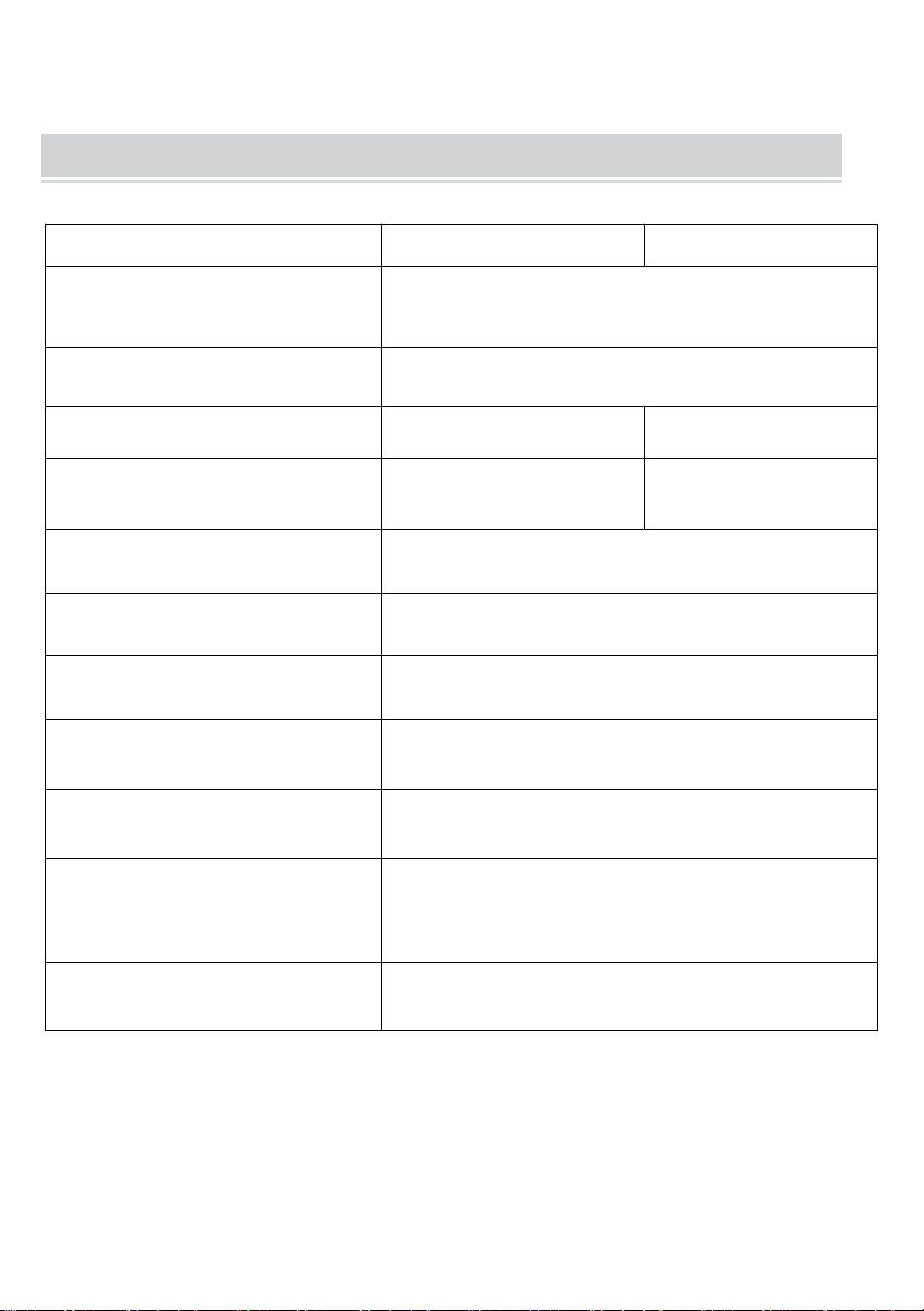
TECHNICAL SPECIFICATIONS
Model
Y80
Y80H
wymiary produktu
(DxSxW) (mm)
290*90*60
Masa netto (kg)
Około 0,95
Rezolucja
203 DPI
300 DPI
Maksymalna prędkość
drukowania
15mm/S
1 0 mm/S
Moc wejściowa
Prąd stały 5V 2A
Interfejs człowiek-maszyna
Kluczowy wskaźnik LED napędu
Interfejs komunikacyjny
USB/BT20 i BT4.0
Temperatura robocza (℃)
0 ~ +40
Wilgotność robocza
30% ~ 85% wilgotności względnej (bez
kondensacji)
Temperatura
przechowywania (℃)
-20 ~ +60
Wilgotność przechowywania
0% ~ 90 % RH (bez kondensacji)
*Produkty takie jak dane techniczne, wygląd i konstrukcja mogą
podlegać modyfikacjom bez wcześniejszego powiadomienia.
- 4 -
PACKAGE CONTENTS
Torba flanelowa*1 Kabel do transmisji danych*1 Dysk twardy*1
Konwerter*1
APPEARANCE AND COMPONENT
- 5 -
BUTTON OPERATING INSTRUCTIONS
Stan
Opis
Rozwiązywanie
problemów
Zielony
Normalna operacja
Miga na
czerwono i
Zielony
-Głowica drukarki jest
przegrzana
-Drukarka zrobi to
automatycznie wznowić po
drukarce głowa ostygła
Czerwony
-Ładowanie
-Górna pokrywa otwarta
-Brak papieru
-Po pełnym naładowaniu,
światło zmienia kolor na
zielony
-Zamknij prawidłowo górną
pokrywę
Miga na
czerwono
Niska ilość energii elektrycznej
Naładuj drukarkę
Niebieski
Pomyślne parowanie Bluetooth
Pomyślnie nawiązano
połączenie Bluetooth
Miga na
niebiesko
Trwa inicjowanie Bluetooth lub
Inicjalizacja nieudana
Najpierw zamknij aplikację.
Uruchom ponownie
drukarkę i poczekaj na
niebieskie światło aż do
momentu, gdy nie będzie
migać. Następnie podłącz
ponownie Aplikacja
- 6 -
DOWNLOAD VIA APP
- 7 -
- 8 -
Windows -Thermal Printer Driver Installation
Uwaga: przed instalacją sterownika wyłącz oprogramowanie
antywirusowe komputera. Odwiedź https://help.flashlabel.com , po
wyszukaniu możesz pobrać sterownik słowo kluczowe Y 80 /Y80H .
Włącz drukarkę. Podłącz drukarkę do komputera za pomocą kabla
USB .
Kliknij dwukrotnie pobrany skompresowany plik, aby zainstalować
sterownik.
- 9 -
MacOS-Thermal Printer Driver Installation
Uwaga: Przed instalacją sterownika wyłącz program antywirusowy
komputera oprogramowanie. Odwiedź https: help.flashlabel.com ,
możesz pobrać sterownik po wyszukaniu słowa kluczowego Y 80
/Y80H .
Włącz drukarkę. Podłącz drukarkę do komputera za pomocą kabla
USB .
Kliknij dwukrotnie pobrany skompresowany plik, aby zainstalować
sterownik.
- 10 -
Usage Method
Dopasuj ogranicznik papieru do szerokości papieru.
Dostępna szerokość papieru od 2,24 cala do 8,5 cala.
Uwaga: Drukarka termiczna wyłączy się automatycznie po 15 minut,
jeśli nie wykonano żadnej operacji.
- 11 -
Paper Roll installation Guide
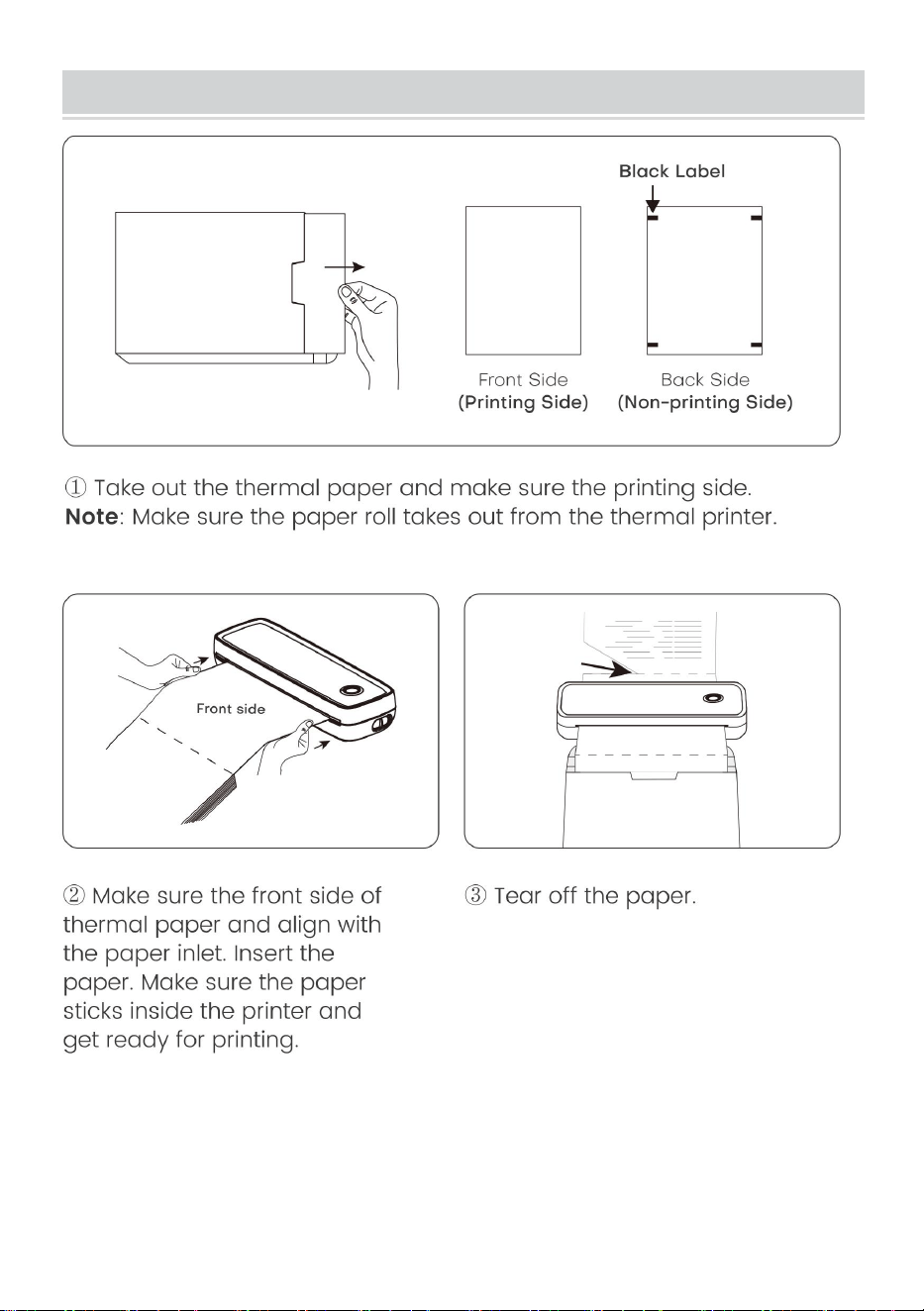
- 12 -
Folded Paper Installation Guide
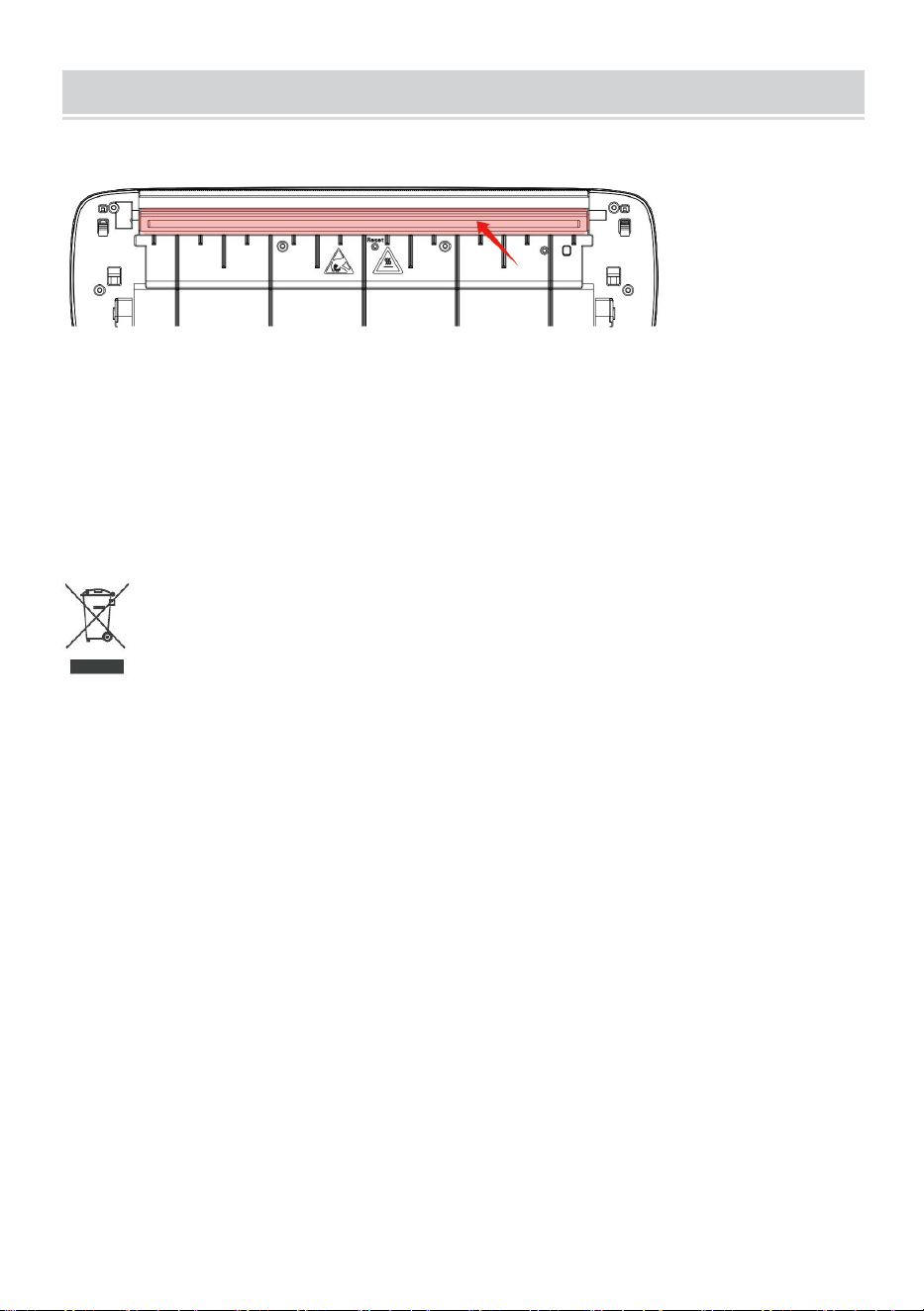
- 13 -
Cleaning and Maintenance
-Wyłącz drukarkę, otwórz pokrywę drukarki i wyjmij rolka papieru.
- Zanurz w nim bawełnianą szmatkę lub waciki. O alkoholu medycznym,
wzdłuż środka głowicy drukującej w kierunku delikatnie wytrzeć.
-Po wyczyszczeniu głowicy drukującej nie należy od razu używać drukarki .
Poczekaj 1-2 minuty, aż alkohol całkowicie się rozpuści odparował.
Prawidłowa utylizacja :
Ten produkt podlega postanowieniom dyrektywy europejskiej 2012/19/UE.
Symbol przekreślonego kosza na śmieci oznacza, że produkt wymaga
selektywnej zbiórki śmieci na terenie Unii Europejskiej. Dotyczy to
produktu i wszystkich akcesoriów oznaczonych tym symbolem. Produktów
oznaczonych jako takie nie można wyrzucać razem ze zwykłymi odpadami
domowymi, lecz należy je przekazać do punktu zbiórki w celu recyklingu
urządzeń elektrycznych i elektronicznych.
Informacje FCC:
UWAGA: Zmiany lub modyfikacje, które nie zostały wyraźnie zatwierdzone
przez stronę odpowiedzialną za zgodność, mogą unieważnić uprawnienia
użytkownika do obsługi urządzenia!
To urządzenie jest zgodne z częścią 15 przepisów FCC. Działanie podlega
następującym dwóm warunkom:

- 14 -
1) Ten produkt może powodować szkodliwe zakłócenia.
2) Ten produkt musi akceptować wszelkie odbierane zakłócenia, w tym
zakłócenia, które mogą powodować niepożądane działanie.
OSTRZEŻENIE: Zmiany lub modyfikacje tego produktu, które nie zostały
wyraźnie zatwierdzone przez stronę odpowiedzialną za zgodność, mogą
unieważnić uprawnienia użytkownika do obsługi produktu.
Uwaga: ten produkt został przetestowany i stwierdzono, że spełnia
ograniczenia dla urządzeń cyfrowych klasy B zgodnie z częścią 15
przepisów FCC. Ograniczenia te mają na celu zapewnienie rozsądnej
ochrony przed szkodliwymi zakłóceniami w instalacjach domowych.
Ten produkt generuje, wykorzystuje i może emitować energię o
częstotliwości radiowej, a jeśli nie zostanie zainstalowany i nie będzie
używany zgodnie z instrukcją, może powodować szkodliwe zakłócenia w
komunikacji radiowej. Nie ma jednak gwarancji, że w konkretnej instalacji
nie wystąpią zakłócenia. Jeśli produkt powoduje szkodliwe zakłócenia w
odbiorze radia lub telewizji, co można stwierdzić poprzez wyłączenie i
włączenie produktu, zachęca się użytkownika do podjęcia próby
skorygowania zakłóceń za pomocą jednego lub kilku z poniższych
środków.
· Zmień orientację lub położenie anteny odbiorczej.
· Zwiększ odległość pomiędzy produktem a odbiornikiem.
· Podłącz produkt do gniazdka w innym obwodzie niż ten, do którego
podłączony jest odbiornik.
· Skonsultuj się ze sprzedawcą lub doświadczonym technikiem
radiowo-telewizyjnym w celu uzyskania pomocy.

Adres : Shuangchenglu 803nong11hao1602A-1609shi, baoshanqu,
szanghaj 200000 CN.
Import do AUS: SIHAO PTY LTD, 1 ROKEVA STREETEASTWOOD NSW
2122 Australia
Import do USA: Sanven Technology Ltd., Suite 250, 9166 Anaheim Place,
Rancho Cucamonga, CA 91730
REP
EC
E-CrossStu GmbH
Mainzer Landstr.69, 60329 Frankfurt am Main.
REP
UK
YH CONSULTING LIMITED.
C/O YH Consulting Limited Office 147, Centurion House,
London Road, Staines-upon-Thames, Surrey, TW18 4AX


Technisch Ondersteuning en e-garantiecertificaat
www.vevor.com/support
DRAAGBARE THERMISCHE PRINTER
HANDLEIDING
MODELNR.: Y80, Y80H
We continue to be committed to provide you tools with competitive price.
"Save Half", "Half Price" or any other similar expressions used by us only represents an
estimate of savings you might benefit from buying certain tools with us compared to the major
top brands and does not necessarily mean to cover all categories of tools offered by us. You
are kindly reminded to verify carefully when you are placing an order with us if you are
actually saving half in comparison with the top major brands.
- 1 -
MODEL: Y80, Y80H
Have product questions? Need technical support? Please feel free to
contact us:
Technical Support and E-Warranty Certificate
www.vevor.com/support
NEED HELP? CONTACT US!
This is the original instruction, please read all manual instructions
carefully before operating. VEVOR reserves a clear interpretation of our
user manual. The appearance of the product shall be subject to the
product you received. Please forgive us that we won't inform you again if
there are any technology or software updates on our product.
Portable Thermal Printer

- 2 -
WAARSCHUWING:
Lees deze handleiding zorgvuldig door voordat u het product
gebruikt. Als u dit niet doet, kan dit leiden tot ernstig letsel.
-De standaard van dit product is exclusief een voedingsadapter . Als u een
voedingsadapter gebruikt om op te laden, koop dan een gecertificeerde
5V/2A voedingsadapter die voldoet aan de normen.
-Dit is een professioneel product, gebruik de originele batterij
Veiligheid en voorzorgsmaatregelen
-Er is een ingebouwde lithiumbatterij, gebruik deze alstublieft niet in de
omgeving met een temperatuur hoger dan 40 ℃ . Blijf weg uit vuur en
andere warmtebronnen en plaats het niet in de hete zon, zoals gesloten
auto.
-Kinderen moeten onder toezicht worden opgeladen en gebruikt van
volwassenen. Zorg ervoor dat u de batterij eruit haalt nadat deze volledig is
opgeladen laadlijn op tijd om oververhitting, kortsluiting of brand te
voorkomen.
-Plaats het product niet in vuur of water om kortsluiting van de batterij te
voorkomen circuit of brand of brandwonden.
-Werkomgeving: 0 ℃ -40 ℃ omgevingstemperatuur, relatief vochtigheid,
30%-85%RH Gebruik in een (niet-condenserende) omgeving, overschrijd
het aanbevolen temperatuurbereik niet.
* Als u vermoedt dat er een probleem is met de batterij, alstublieft Neem
voor hulp contact op met het after-sales servicecentrum.
BEWAAR DE INSTRUCTIE
- 3 -
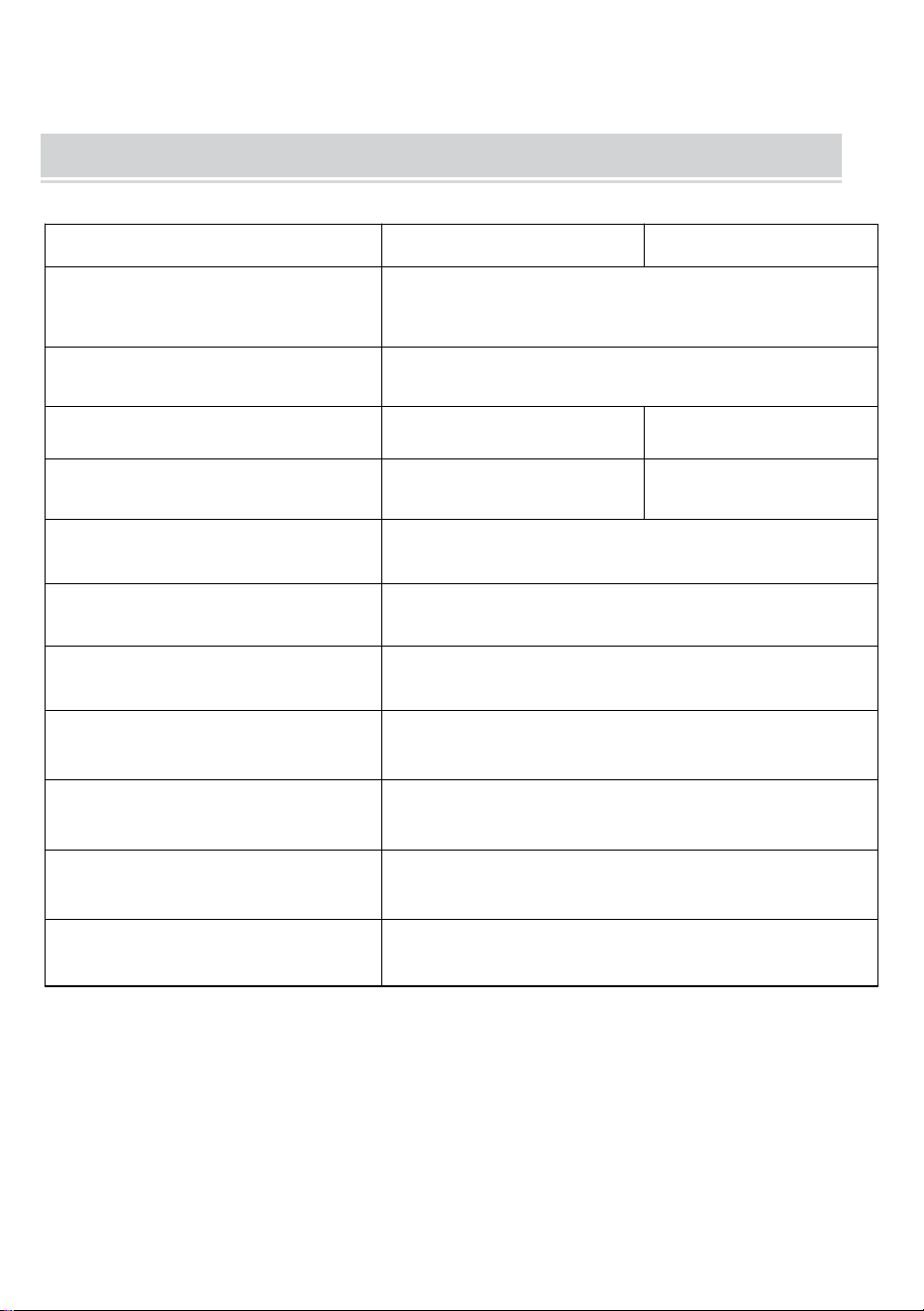
TECHNICAL SPECIFICATIONS
Model
Y80
Y80H
Productafmetingen
(LxBxH)(mm)
290*90*60
Netto gewicht / kg)
Ongeveer 0,95
Oplossing
203 DPI
300 DPI
Maximale afdruksnelheid
15 mm/S
1 0 mm/S
Ingangsvermogen
Gelijkstroom 5V 2A
Mens-machine-interface
Sleutel-LED-indicatoraandrijving
Communicatie-interface
USB/BT20&BT4.0
Bedrijfstemperatuur (℃)
0 ~ +40
Werkvochtigheid
30% ~ 85% relatieve vochtigheid (geen
condensatie)
Opslagtemperatuur (℃)
-20~+60
opslag Vochtigheid
0%~ 90 % RH (geen condensatie)
*Producten zoals specificaties, uiterlijk en ontwerp kunnen zonder
voorafgaande kennisgeving worden gewijzigd.
- 4 -
PACKAGE CONTENTS
Flanellen tas*1 Datakabel*1 Drive u disk*1 Converter*1
APPEARANCE AND COMPONENT
- 5 -
BUTTON OPERATING INSTRUCTIONS
Toestand
Beschrijving
Problemen oplossen
Groente
Normale operatie
Knipperend rood
en Groen
-Printerkop is oververhit
-Printer zal automatisch
zodra de printer wordt
hervat het hoofd is
afgekoeld
Rood
-Opladen
-Bovenklep open
-Geen papier
-Wanneer volledig
opgeladen, wordt de licht
wordt groen
-Sluit de bovenklep correct
Knipperend rood
Lage elektrische hoeveelheid
Laad de printer op
Blauw
Bluetooth-koppeling succesvol
Bluetooth succesvol
verbonden
Knipperend
blauw
Bluetooth is bezig met
initialiseren of initialisatie
gefaald
Sluit eerst de app. Start de
opnieuw op printer en wacht
op het blauwe lampje tot
niet-knipperend. Maak
vervolgens opnieuw
verbinding de app
- 6 -
DOWNLOAD VIA APP
- 7 -
- 8 -
Windows -Thermal Printer Driver Installation
Opmerking: Voordat u het stuurprogramma installeert, schakelt u
de antivirussoftware van de computer uit. Bezoek
https://help.flashlabel.com , u kunt het stuurprogramma
downloaden na het zoeken trefwoord Y 80 /Y80H .
Zet de printer aan. Sluit de printer via een USB-kabel aan op de
computer .
Dubbelklik op het gecomprimeerde bestand dat u hebt gedownload
om het stuurprogramma te installeren.
- 9 -
MacOS-Thermal Printer Driver Installation
Let op: Voordat u het stuurprogramma installeert, schakelt u het
antivirusprogramma van de computer uit software. Bezoek https:
help.flashlabel.com , u kunt het stuurprogramma downloaden na
het zoeken op trefwoord Y 80 /Y80H .
Zet de printer aan. Sluit de printer via een USB-kabel aan op de
computer .
Dubbelklik op het gecomprimeerde bestand dat u hebt gedownload
om het stuurprogramma te installeren.
- 10 -
Usage Method
Pas de papierbegrenzer aan uw papierbreedte aan.
Papierbreedte beschikbaar van 2,24 inch tot 8,5 inch.
Let op: De thermische printer wordt na 15 minuten automatisch
uitgeschakeld minuten als er geen bediening is.
- 11 -
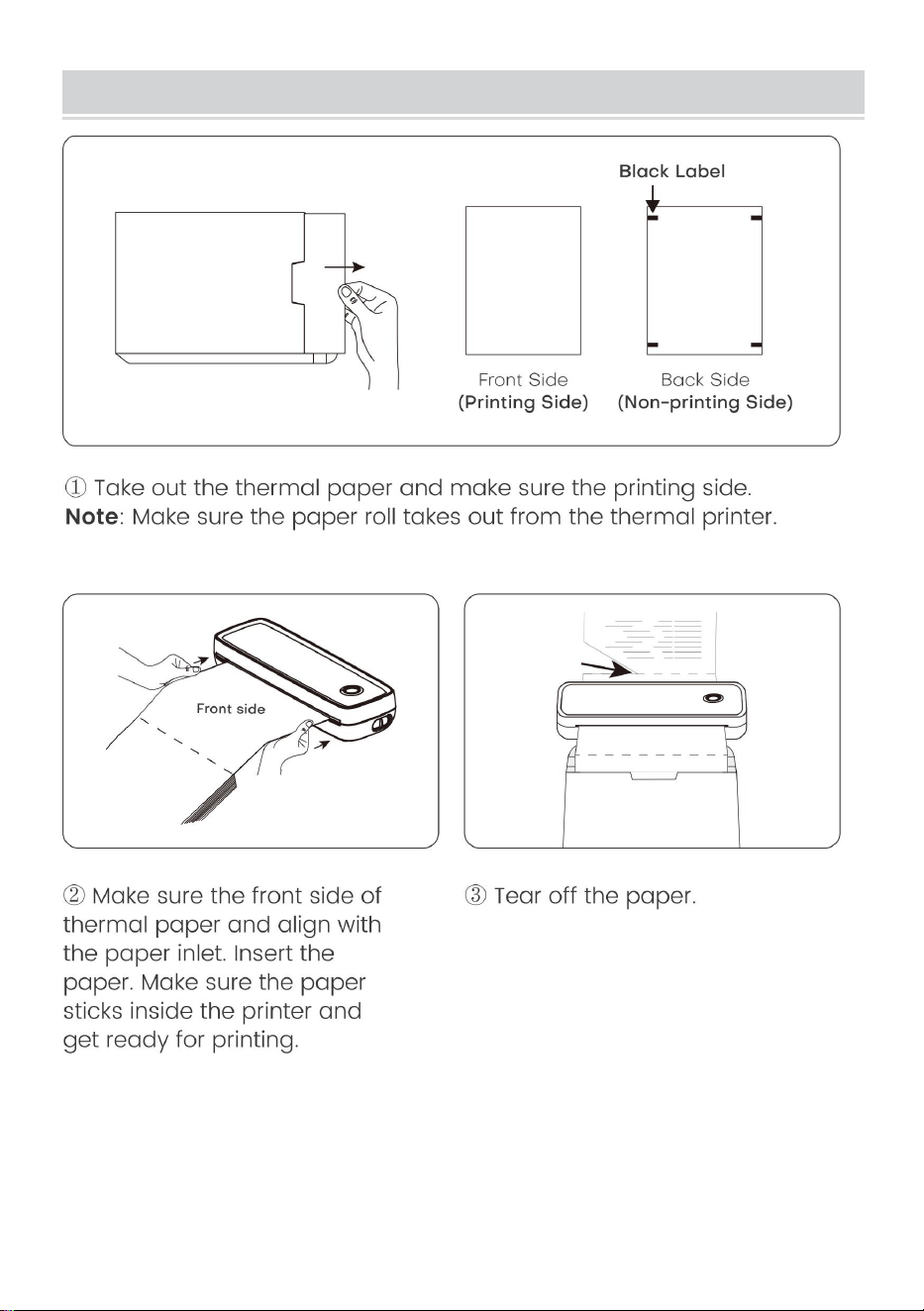
Paper Roll installation Guide
- 12 -
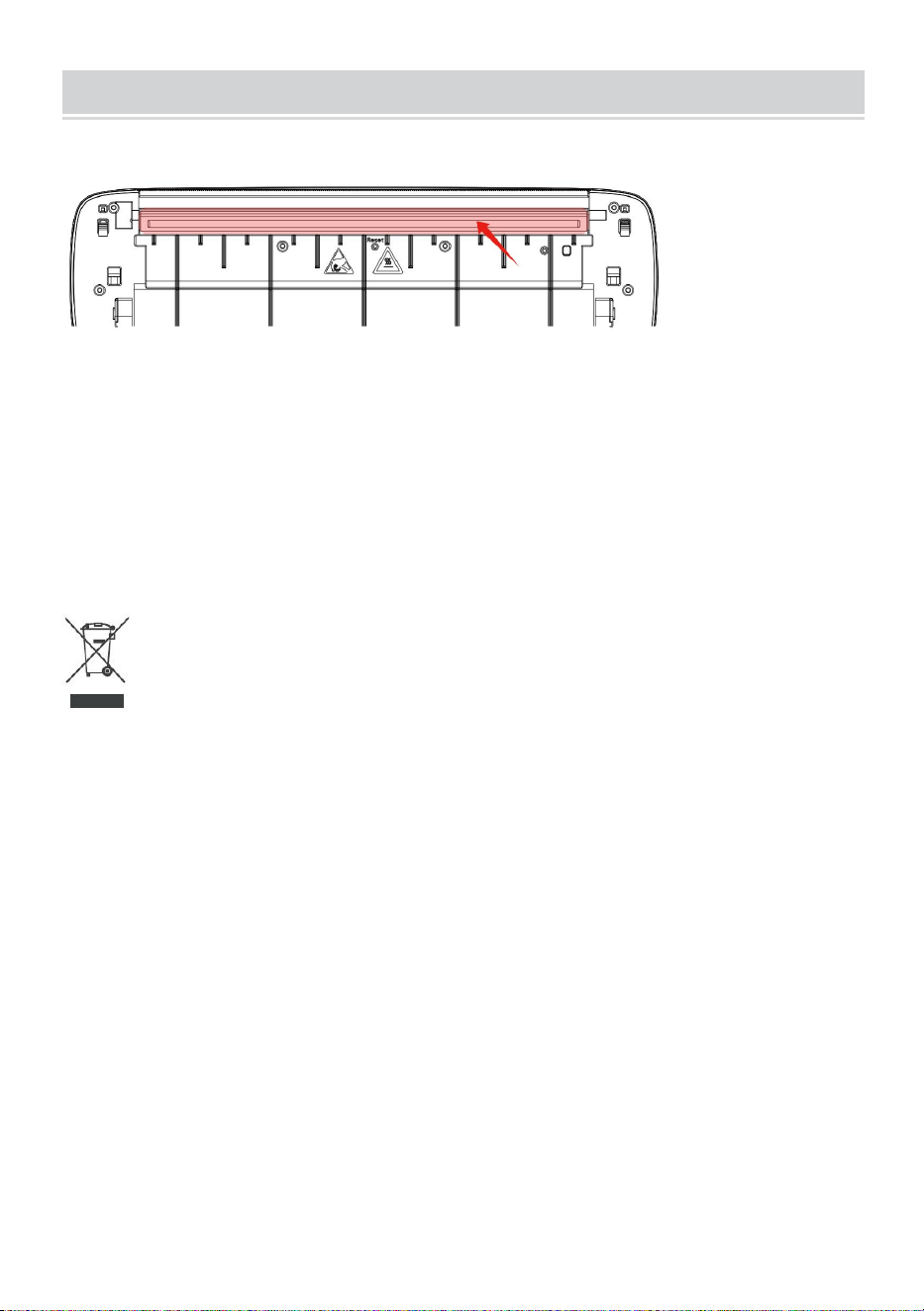
Folded Paper Installation Guide
- 13 -
Cleaning and Maintenance
-Schakel de printer uit, open de printerkap en verwijder deze de papierrol.
-Doop er een katoenen doek of wattenstaafjes in. Over de medische
alcohol, langs het midden van de printkop tot rond de richting van
voorzichtig veeg.
-Gebruik de printer niet onmiddellijk na het reinigen van de printkop .
Wacht 1-2 minuten totdat de alcohol volledig is opgebruikt verdampt.
Correcte verwijdering :
Dit product valt onder de bepalingen van de Europese Richtlijn 2012/19/EU.
Het symbool met een doorgestreepte afvalcontainer geeft aan dat het
product in de Europese Unie een aparte afvalinzameling vereist. Dit geldt
voor het product en alle accessoires die met dit symbool zijn gemarkeerd.
Producten die als zodanig zijn gemarkeerd, mogen niet bij het normale
huisvuil worden weggegooid, maar moeten worden ingeleverd bij een
inzamelpunt voor recycling van elektrische en elektronische apparaten.
FCC-informatie:
LET OP: Wijzigingen of aanpassingen die niet uitdrukkelijk zijn
goedgekeurd door de partij die verantwoordelijk is voor naleving kunnen de
bevoegdheid van de gebruiker om de apparatuur te bedienen ongeldig
maken!
Dit apparaat voldoet aan Deel 15 van de FCC-regels. De werking is

- 14 -
onderworpen aan de volgende twee voorwaarden:
1) Dit product kan schadelijke interferentie veroorzaken.
2) Dit product moet alle ontvangen interferentie accepteren, inclusief
interferentie die een ongewenste werking kan veroorzaken.
WAARSCHUWING: Wijzigingen of aanpassingen aan dit product die niet
uitdrukkelijk zijn goedgekeurd door de partij die verantwoordelijk is voor
naleving kunnen de bevoegdheid van de gebruiker om het product te
bedienen ongeldig maken.
Opmerking: Dit product is getest en voldoet aan de limieten voor een
digitaal apparaat van Klasse B overeenkomstig Deel 15 van de FCC-regels.
Deze limieten zijn bedoeld om redelijke bescherming te bieden tegen
schadelijke interferentie in een residentiële installatie.
Dit product genereert, gebruikt en kan radiofrequentie-energie uitstralen,
en als het niet wordt geïnstalleerd en gebruikt in overeenstemming met de
instructies, kan het schadelijke interferentie aan radiocommunicatie
veroorzaken. Er is echter geen garantie dat er geen interferentie zal
optreden in een bepaalde installatie. Als dit product schadelijke
interferentie veroorzaakt aan radio- of televisieontvangst, wat kan worden
vastgesteld door het product uit en weer in te schakelen, wordt de
gebruiker aangeraden te proberen de interferentie te corrigeren door een
of meer van de volgende maatregelen.
· Heroriënteer of verplaats de ontvangstantenne.
· Vergroot de afstand tussen het product en de ontvanger.
· Sluit het product aan op een stopcontact op een ander circuit dan dat
waarop de ontvanger is aangesloten.
· Raadpleeg de dealer of een ervaren radio-/tv-technicus voor hulp.

Adres : Shuangchenglu 803nong11hao1602A-1609shi, baoshanqu,
shanghai 200000 CN.
Geïmporteerd naar AUS: SIHAO PTY LTD, 1 ROKEVA
STREETEASTWOOD NSW 2122 Australië
Geïmporteerd naar de VS: Sanven Technology Ltd., Suite 250, 9166
Anaheim Place, Rancho Cucamonga, CA 91730
REP
EC
E-CrossStu GmbH
Mainzer Landstr.69, 60329 Frankfurt am Main.
REP
UK
YH CONSULTING LIMITED.
C/O YH Consulting Limited Office 147, Centurion House,
London Road, Staines-upon-Thames, Surrey, TW18 4AX


Teknisk Support och e-garanticertifikat
www.vevor.com/support
BÄRBAR TERMISK SKRIVARE
ANVÄNDARMANUAL
MODELLNR: Y80, Y80H
We continue to be committed to provide you tools with competitive price.
"Save Half", "Half Price" or any other similar expressions used by us only represents an
estimate of savings you might benefit from buying certain tools with us compared to the major
top brands and does not necessarily mean to cover all categories of tools offered by us. You
are kindly reminded to verify carefully when you are placing an order with us if you are
actually saving half in comparison with the top major brands.
- 1 -
MODELL: Y80, Y80H
Have product questions? Need technical support? Please feel free to
contact us:
Technical Support and E-Warranty Certificate
www.vevor.com/support
NEED HELP? CONTACT US!
This is the original instruction, please read all manual instructions
carefully before operating. VEVOR reserves a clear interpretation of our
user manual. The appearance of the product shall be subject to the
product you received. Please forgive us that we won't inform you again if
there are any technology or software updates on our product.
Portable Thermal Printer

- 2 -
VARNING:
Läs denna bruksanvisning noggrant innan du använder produkten.
Underlåtenhet att göra det kan leda till allvarliga skador.
- Standarden för denna produkt är exkluderad en strömadapter . Om du
använder en nätadapter för att ladda, köp en certifierad 5V/2A nätadapter
som uppfyller standarderna.
-Detta är en professionell produkt, använd originalbatteriet
Säkerhet och försiktighetsåtgärder
-Det finns ett inbyggt litiumbatteri, använd det inte i miljö med temperaturer
högre än 40 ℃ . Håll borta från eld och andra värmekällor, och placera den
inte i varm sol, såsom stängd bil.
-Barn ska laddas och användas under uppsikt av vuxna. Efter full laddning,
se till att dra ut den laddledningen i tid för att förhindra överhettning,
kortslutning eller brand.
- Lägg inte produkten i eld eller vatten för att undvika kortslutning av
batteriet krets eller eld eller bränna.
-Arbetsmiljö: 0 ℃ -40 ℃ omgivningstemperatur, relativ luftfuktighet,
30%-85%RH Använd i (icke-kondenserande) miljö, vänligen överskrid inte
det rekommenderade temperaturintervallet.
* Om du misstänker att det finns ett problem med batteriet, vänligen
kontakta servicecentret för att få hjälp.
SPARA INSTRUKTIONEN
- 3 -
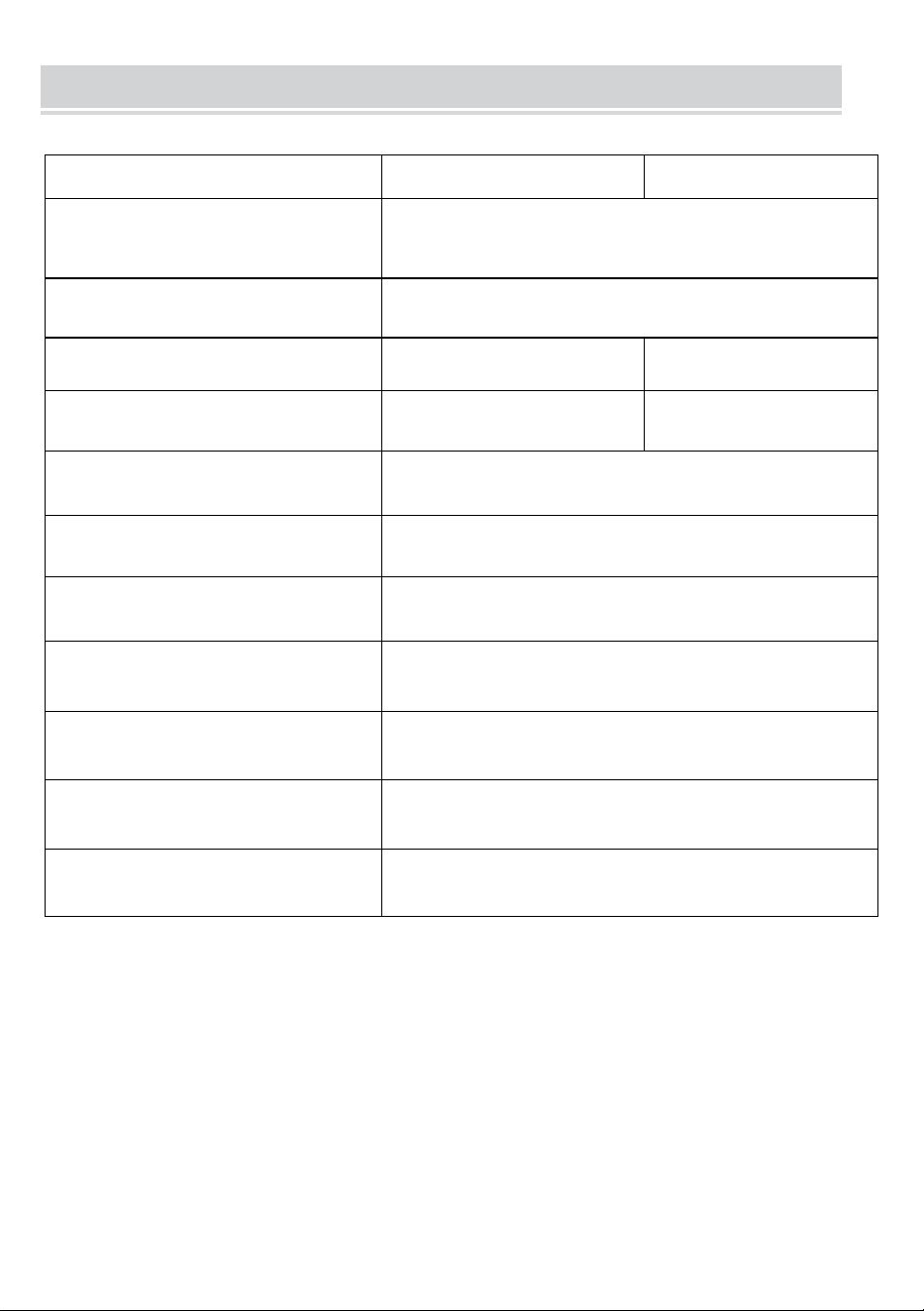
TECHNICAL SPECIFICATIONS
Modell
Y80
Y80H
Produktens mått
(LxBxH)(mm)
290*90*60
Nettovikt (kg)
Cirka 0,95
Upplösning
203 DPI
300 DPI
Max utskriftshastighet
15 mm/S
10 mm /S
Ingångseffekt
DC 5V 2A
Man-Machine Interface
Key LED Indicator Drive
Kommunikationsgränssnitt
USB/BT20&BT4.0
Driftstemperatur (℃)
0 ~ +40
Arbetsfuktighet
30%~85% RH (ingen kondensation)
Förvaringstemperatur (℃)
-20 ~ +60
lagring Fuktighet
0 %~ 90 % RH (Ingen kondensation)
*Produkter som specifikationer, utseende och design kan ändras
utan föregående meddelande.
- 4 -
PACKAGE CONTENTS
Flanellpåse*1 datakabel*1 enhet u disk*1 omvandlare*1
APPEARANCE AND COMPONENT
- 5 -
BUTTON OPERATING INSTRUCTIONS
S tatus
Beskrivning
Felsökning
Grön
Normal drift
Blinkande rött
och grönt
-Skrivarhuvudet är överhettat
-Skrivaren kommer
automatiskt återuppta när
skrivaren huvudet har
svalnat
Röd
-Laddning
- Övre locket öppet
- Inget papper
-När fulladdat, ljuset blir
grönt
-Stäng den övre luckan
korrekt
Blinkande rött
Låg elmängd
Ladda skrivaren
Blå
Bluetooth-parning lyckades
Bluetooth ansluten
Blinkande blått
Bluetooth initieras eller initiering
misslyckades
Stäng appen först. Starta
om skrivaren och vänta på
det blå ljuset tills den inte
blinkar. Anslut sedan igen
appen
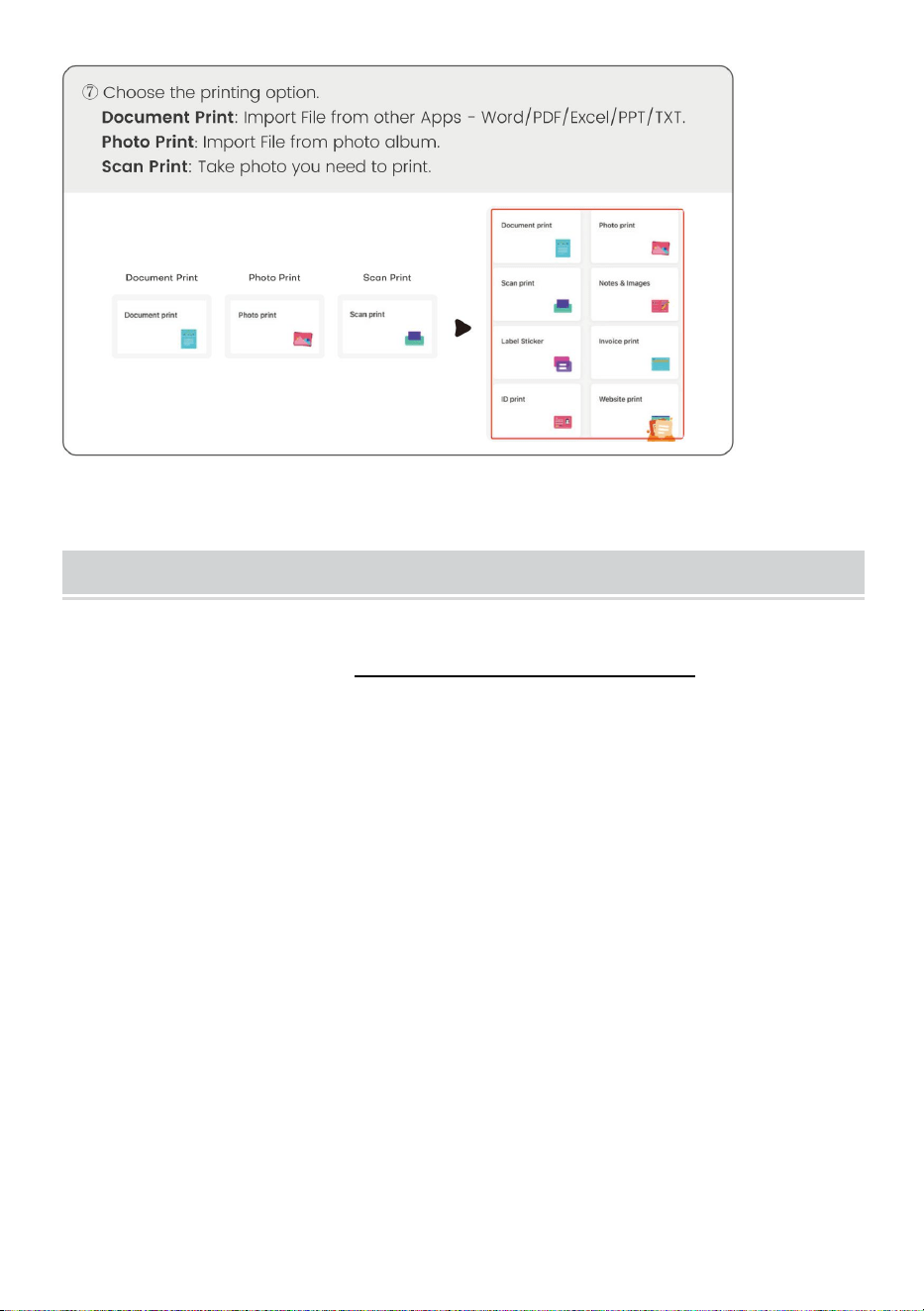
DOWNLOAD VIA APP
- 6 -
- 7 -
- 8 -
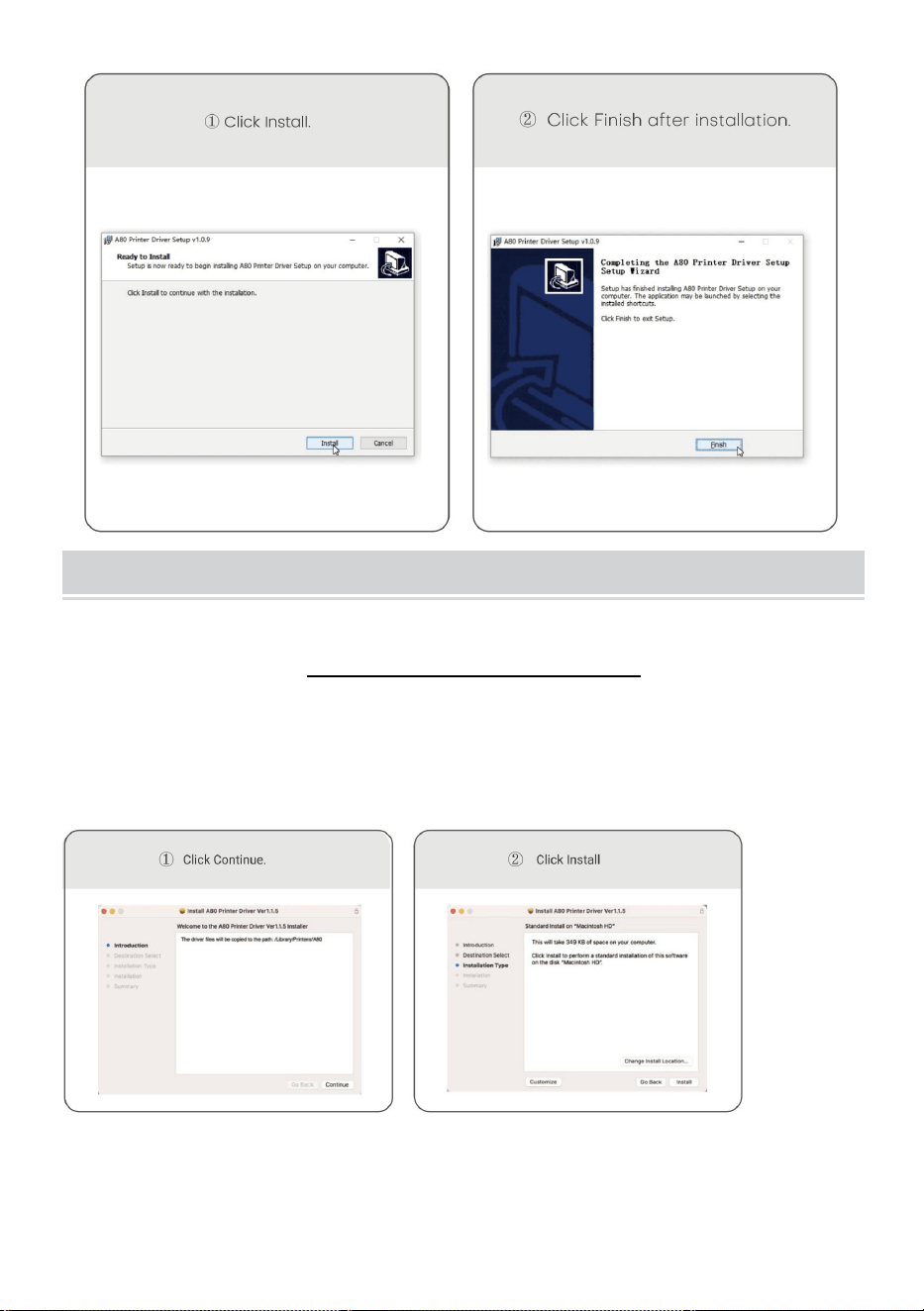
Windows -Thermal Printer Driver Installation
Obs: Innan du installerar drivrutinen, stäng av datorns
antivirusprogram. Besök https://help.flashlabel.com , du kan ladda
ner drivrutinen efter att ha sökt nyckelord Y 80 /Y80H .
Slå på skrivaren. Anslut skrivaren till datorn via US B -kabel.
Dubbelklicka på den komprimerade filen du laddade ner för att
installera drivrutinen.
- 9 -
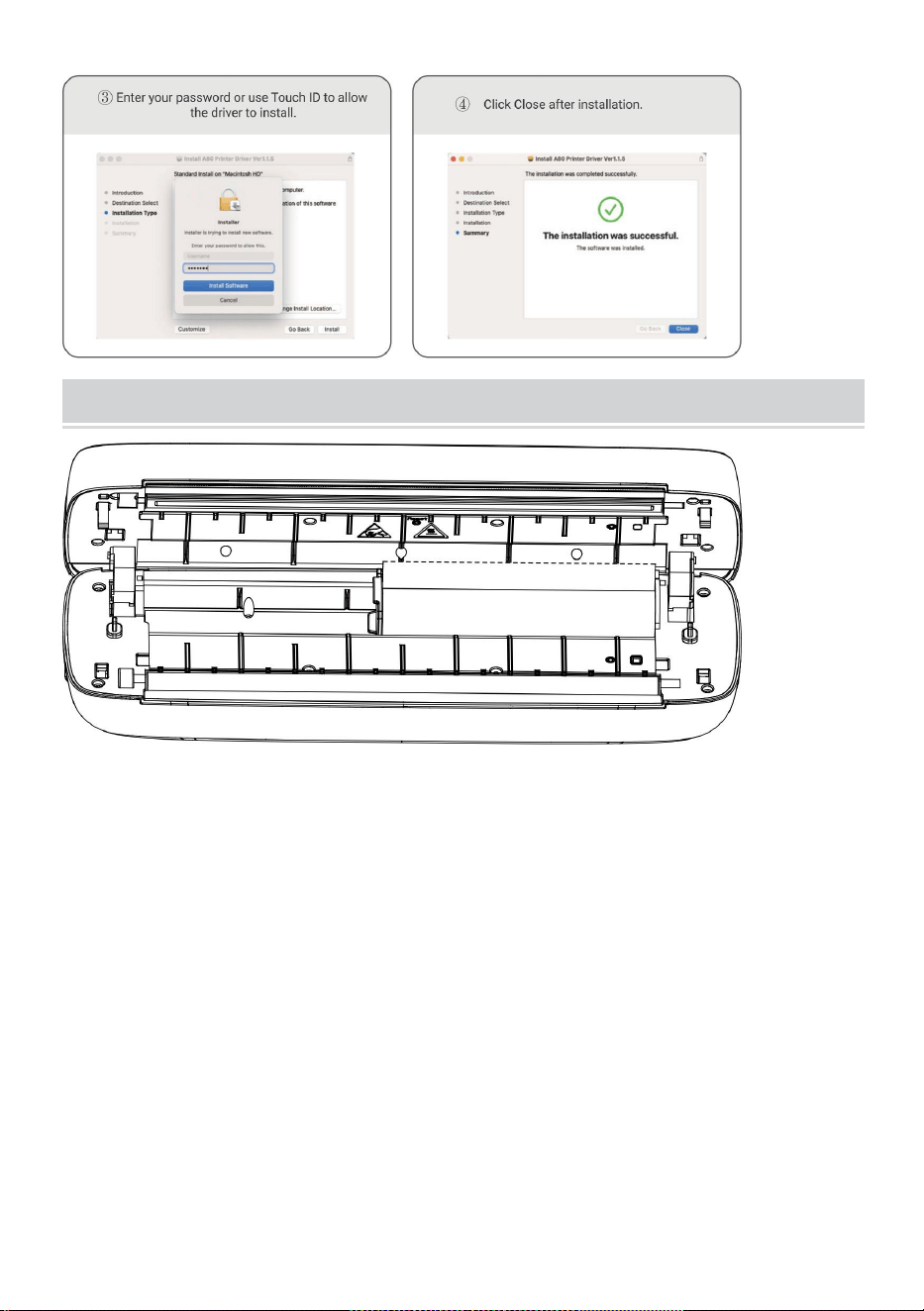
MacOS-Thermal Printer Driver Installation
Obs: Stäng av datorns antivirus innan du installerar drivrutinen
programvara. Besök https: help.flashlabel.com , du kan ladda ner
drivrutinen efter att ha sökt nyckelordet Y 80 /Y80H .
Slå på skrivaren. Anslut skrivaren till datorn via US B -kabel.
Dubbelklicka på den komprimerade filen du laddade ner för att
installera drivrutinen.
- 10 -
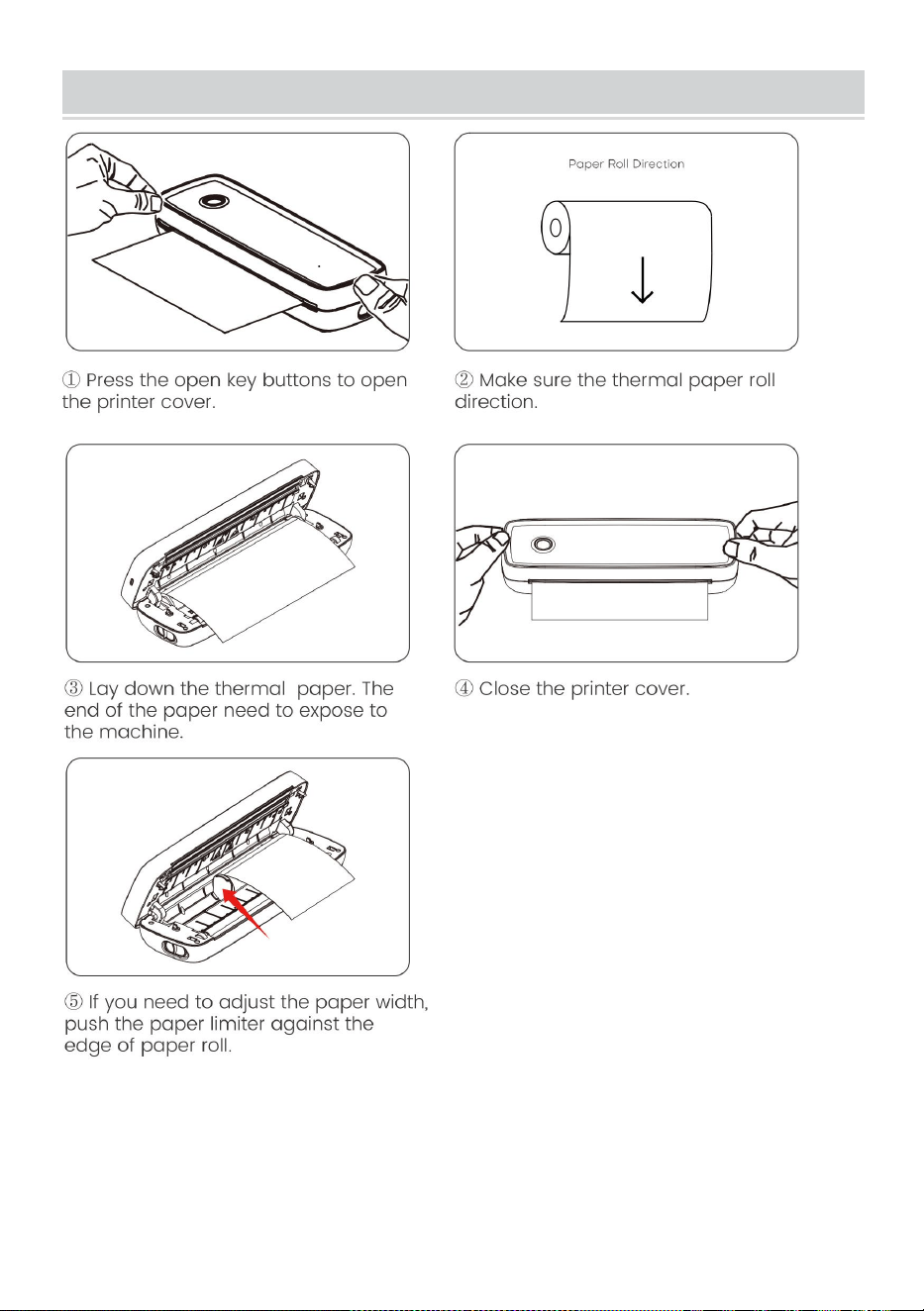
Usage Method
Justera pappersbegränsaren så att den passar din pappersbredd.
Pappersbredd tillgänglig från 2,24 tum till 8,5 tum.
Obs: Den termiska skrivaren stängs av automatiskt efter 15 minuter
om utan någon operation.
- 11 -
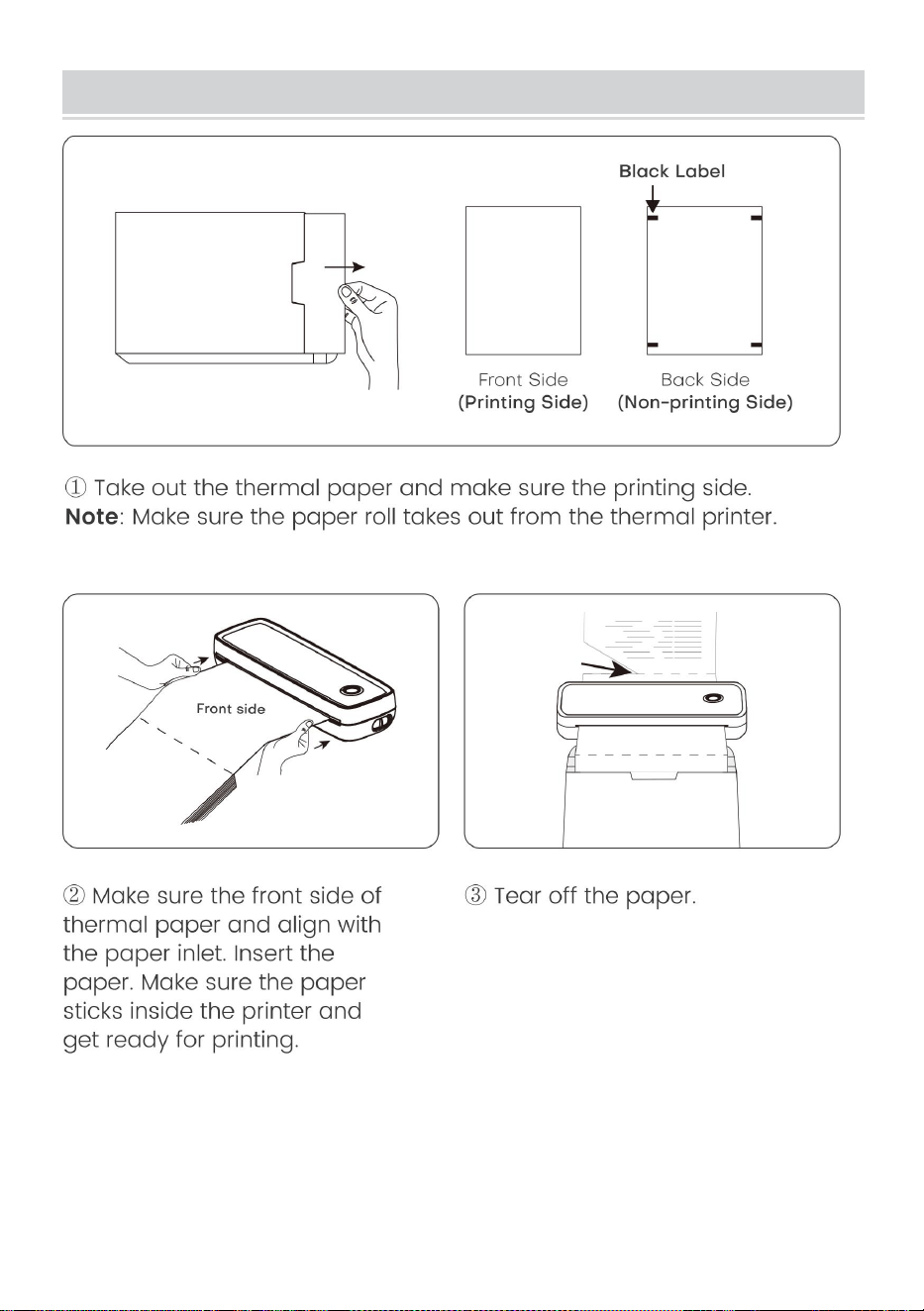
Paper Roll installation Guide
- 12 -
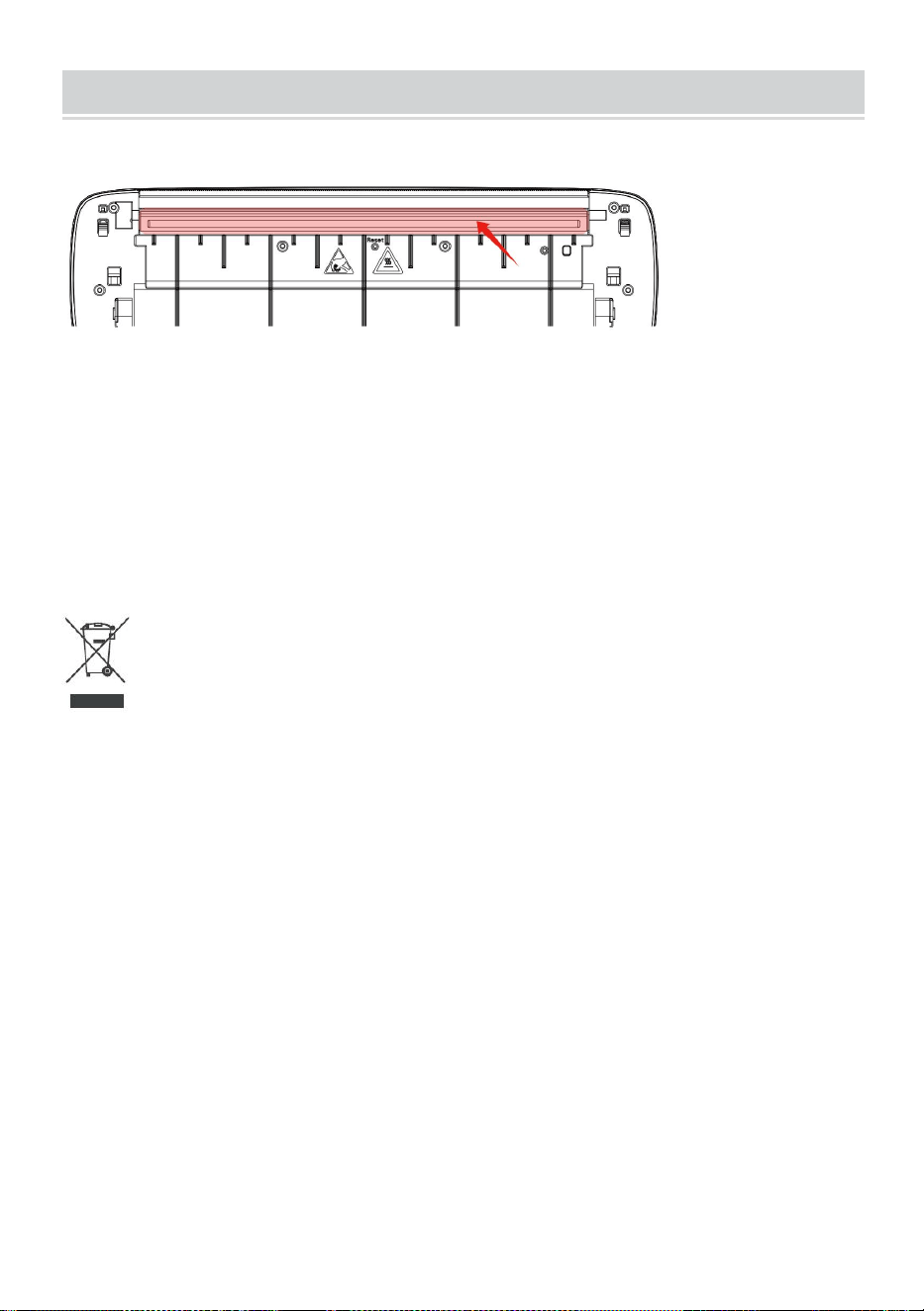
Folded Paper Installation Guide
- 13 -
Cleaning and Maintenance
- Stäng av skrivaren, öppna skrivarluckan och ta ut den pappersrullen.
-Doppa en bomullsduk eller bomullstuss i den. På den medicinska
alkoholen, längs med skrivarhuvudets mitt till runt riktningen av försiktigt
torka.
-Använd inte skrivaren omedelbart efter att ha rengjort skrivhuvudet .
Vänta 1-2 minuter tills alkoholen är helt färdig avdunstat.
Korrekt avfallshantering :
Denna produkt omfattas av bestämmelserna i det europeiska direktivet
2012/19/EU. Symbolen som visar en soptunna korsad anger att produkten
kräver separat sophämtning i EU. Detta gäller för produkten och alla
tillbehör märkta med denna symbol. Produkter märkta som sådana får inte
kasseras tillsammans med vanligt hushållsavfall, utan måste lämnas till en
insamlingsplats för återvinning av elektriska och elektroniska apparater.
FCC-information:
FÖRSIKTIGHET: Ändringar eller modifieringar som inte uttryckligen
godkänts av den part som ansvarar för efterlevnaden kan upphäva
användarens behörighet att använda utrustningen!
Denna enhet uppfyller del 15 av FCC-reglerna. Driften är föremål för
följande två villkor:
1) Denna produkt kan orsaka skadliga störningar.

- 14 -
2) Denna produkt måste acceptera alla mottagna störningar, inklusive
störningar som kan orsaka oönskad funktion.
VARNING: Ändringar eller modifieringar av denna produkt som inte
uttryckligen godkänts av den part som är ansvarig för efterlevnaden kan
upphäva användarens behörighet att använda produkten.
Obs: Denna produkt har testats och befunnits överensstämma med
gränserna för en digital enhet av klass B i enlighet med del 15 av
FCC-reglerna. Dessa gränser är utformade för att ge rimligt skydd mot
skadliga störningar i en bostadsinstallation.
Denna produkt genererar, använder och kan utstråla radiofrekvensenergi,
och om den inte installeras och används i enlighet med instruktionerna kan
den orsaka skadliga störningar på radiokommunikation. Det finns dock
ingen garanti för att störningar inte kommer att inträffa i en viss installation.
Om denna produkt orsakar skadliga störningar på radio- eller
tv-mottagning, vilket kan fastställas genom att stänga av och på produkten,
uppmanas användaren att försöka korrigera störningen med en eller flera
av följande åtgärder.
· Rikta om eller flytta mottagningsantennen.
· Öka avståndet mellan produkten och mottagaren.
· Anslut produkten till ett uttag på en annan krets än den som mottagaren
är ansluten till.
· Kontakta återförsäljaren eller en erfaren radio/TV-tekniker för hjälp.

Adress : Shuangchenglu 803nong11hao1602A-1609shi, baoshanqu,
shanghai 200000 CN.
Importerad till AUS: SIHAO PTY LTD, 1 ROKEVA STREETEASTWOOD
NSW 2122 Australien
Importerad till USA: Sanven Technology Ltd., Suite 250, 9166 Anaheim
Place, Rancho Cucamonga, CA 91730
REP
EC
E-CrossStu GmbH
Mainzer Landstr.69, 60329 Frankfurt am Main.
REP
UK
YH CONSULTING LIMITED.
C/O YH Consulting Limited Office 147, Centurion House,
London Road, Staines-upon-Thames, Surrey, TW18 4AX