1 - 8 8 8 - 5 1 6 - 2 6 3 0
THIS GUIDE CONTAINS
IMPORTANT SAFETY
INFORMATION.
For product assistance
WE CAN HELP
PLEASE READ AND KEEP
FOR FUTURE REFERENCE.
7 DAYS/WEEK
7:00am- 9:00pm CST
Find more at
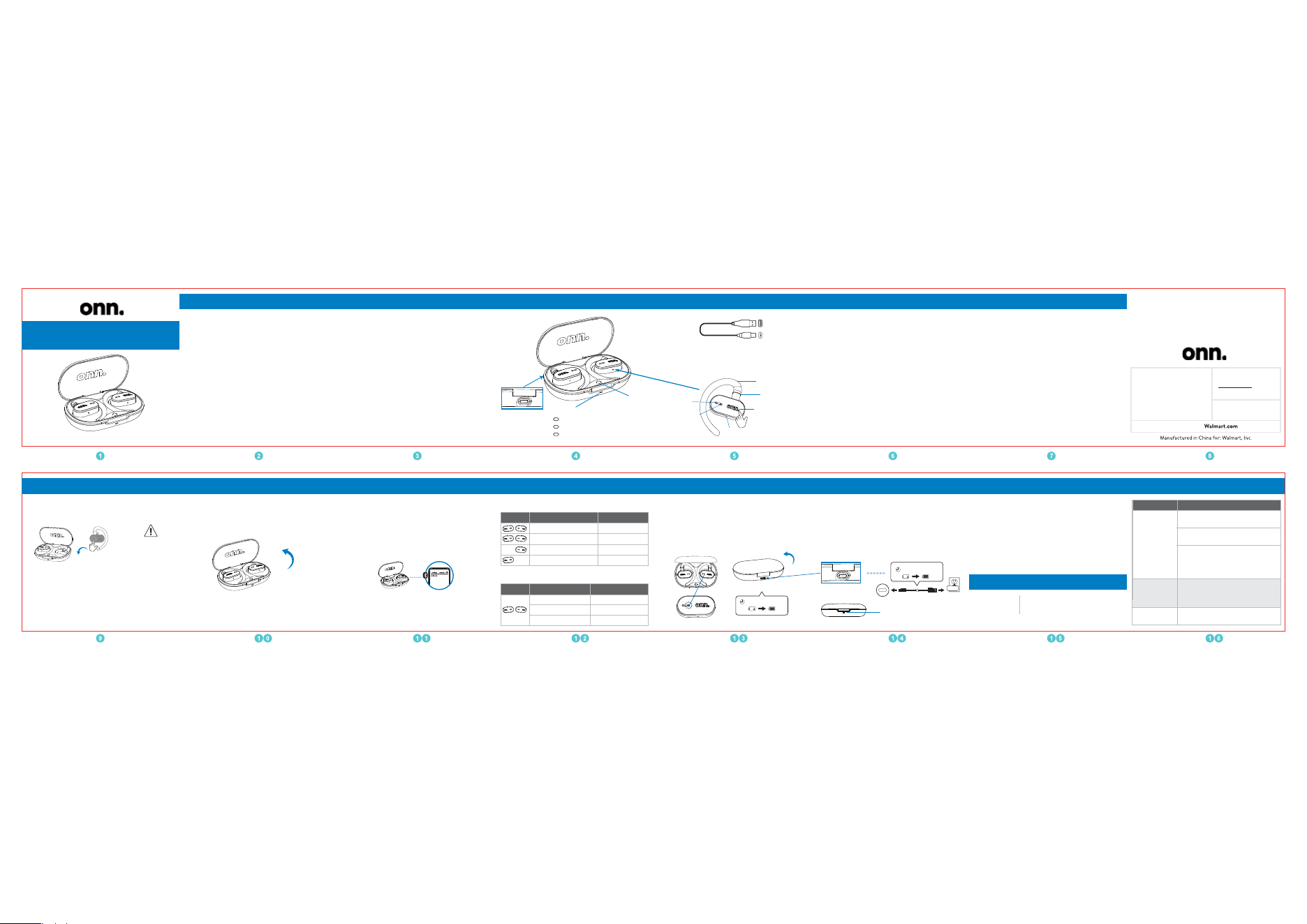
CHARGING
CASE
CHARGING PORT
PAIRING BUTTON
EARPHONE
Multi-angle Arm
Ear Hook
LED INDICATOR
LED INDICATOR
Mic1
Mic2
CHARGING CABLE
100130685-EN-06302023
Contents & Information Overview
USER GUIDE
Wireless Open-Ear Earphones
FCC Statement
CONTENTS & INFORMATION
Features
Power on & Power off
Pairing
First time setup
Phone calls
Play music
Charging
OVERVIEW
SAFETY PRECAUTIONS
OPERATION
CLEANING & CARE
Cleaning
SPECIFICATIONS
TROUBLESHOOTING
•
Adjustable multi-angle open-ear design•
Multi-point Connections•
Bluetooth range: 10m/32.8ft•
Speaker Diameter: 14.2mm
•
•
Dual built-in microphones with environmental noise
cancellation in each earphone
•
24 hours of total playtime (with charging case)
•
Up to 7+ hours of playtime per charge
IPX5 water-resistant*
(applies to the earphones, not to the charging case)
Features
Weight
0.19 lb
TroubleshootingOperation Cleaning & Care
CLEANING
. Never use abrasive pads to clean device.
. Wipe down surfaces with a cleaning cloth.
. Avoid using liquids to clean device.
Specifications
Product Dimensions (L x W x H)
0.31 x 0.2 x 0.09 inches
94.8*59.8*28.5mm
Problem Prevention/Solution
Cannot find
“onn. TWS
Open-Ear Pro”
on my Bluetooth
device.
Ensure Bluetooth function is activated
on Bluetooth device.
Press and hold 2 sec PAIRING BUTTON
on charging case, to let it enter to
pairing mode. Or press and hold 10 sec
to reset this product.
Ensure you have earphones connected
with Bluetooth device, and increase
volume from your Bluetooth device.
Double check if the earphones already
connected with last-time paired device.
Sound is not
produced.
•
•
•
•
•
Cannot power on
Charge the earphones and the
charging case.
Touch Control Area
x 3 Tap (Either one)
Voice assistant
CAUTION
Only use a USB
charging device that
is 5V DC output.
FIRST TIME SETUP
Device may need to be charged before use.
Charging: Red LED light is on
Fully charged
: Green LED light is on
Orange : battery ≤ 50%
Green : battery > 50%
Red : battery ≤ 20%
This equipment has been tested and found to comply with the
limits for a Class B digital device, pursuant to Part 15 of the FCC
Rules. These limits are designed to provide reasonable protection
against harmful interference in a residential installation.This
equipment generates uses and can radiate radio frequency energy
and, if not installed and used in accordance with the instructions,
may cause harmful interference to radio communications.
However, there is no guarantee that interference will not occur in
a particular installation.If this equipment does cause harmful
interference to radio or television reception, which can be
determined by turning the equipment off and on, the user is
encouraged to try to correct the interference by one or more of
the following measures
:
--Reorient or relocate the receiving antenna.
--Increase the separation between the equipment and receiver.
--Connect the equipment into an outlet on a circuit different from
that to which the receiver is connected.
-Consult the dealer or an experienced radio/TV technician for
help.This device complies with part 15 of the FCC Rules. Opera-
tion is subject to the following two conditions
:
(1) This device may not cause harmful interference, and(2) this
device must accept any interference received, including interfer-
ence that may cause undesired operation.
FCC RF exposure statement:
The device has been evaluated to meet general RF exposure
requirement. The device can be used in portable exposure condi-
tion without restriction.
Warning
:
Changes or modifications to this unit not expressly approved
by the party responsible for compliance could void the user's
authority to operate the equipment.
Need help? We're here for you everyday from 7a.m.-9p.m.
CST.Give usa call at 1-888-516-2630.
Produced for Walmart Inc. ,
Bentonville, AR 72716
Safety Precautions
Ver.01 06/30/23
FCCID: 2ADTV-30685
Place earphones back to charging case and close the lid,
earphones will power off automatically.
Open the charging case, earphones will power on and
connect to last paired device automatically.
POWER ON
CHARGE EARPHONES CHARGE THE CASE
POWER OFF
POWER ON & POWER OFF PAIRING
onn. TWS Open-Ear Pro
Place earphones back into charging case, earphones start
to charge when you see a blue LED flash on earphones.
Close the lid, earphones may take up to 1.5 hours to fully
charge when at 0% battery.
It is recommended that you use the provided charging cable,
connect USB-A end to 5V power adapter or other devices,
connect USB-C end to the charging port of the case.
Note: It takes around 2 hours to get the case fully charged
when at 0% battery.
CHARGING
PORT
5V 1A
About 2 hours
About 1.5 hours
HOW TO PAIR WITH ANOTHER DEVICE
HOW TO PAIR WITH 2 DEVICES AT THE SAME TIME
(MULTIPOINT CONNECT)
. Place both earphones back into charging case.
. Keep the lid open meanwhile press and hold the pairing button
for 2 sec, now you can search it from your second device.
. Pairing to a single device disconnect earphones device
they are currently paired to search for earphones on new
device connect earphones.
. When it is not connected to your current device, place both
earphones back to charging case, hold the pairing button
for 2 sec, now you can search it from another device.
1
1
2
2
. Remove the protective films before the first use,
then place both earphones back into charging case
and close the lid.
. When you open the lid again, earphones will enter into
pairing mode automatically.
. Find “onn. TWS Open-Ear Pro” in device Bluetooth
settings.
1
2
3
1
2
3
CHARGING
PHONE CALLS
PLAY MUSIC
x 2 Tap (Either one)
x 2 Tap (Either one)
Hold 2 sec (Either one)
Control Action Result
Answer incoming call
End current call
Reject incoming call
x 2 Tap (Either one)
Control Action Result
Play / Pause
Hold 2 sec (Left one)
Hold 2 sec (Right one)
Previous track
Next track

