ILIFE-V20
User Manual
For more details, please
visit www.iliferobot.com
Robotic vacuum cleaner


Dear Customer,
Thank you for purchasing ILIFE V20 robotic vacuum cleaner!
You've joined the millions of people who clean with robots - the smarter
way to get it done.
Please take a few moments to read this manual and get acquainted with
your robot, to get the best performance from your robot. If you have any
problems with your robot please do not hesitate to contact our customer
service or visit our website at www.iliferobot.com for more information.
Stay connected with us on Facebook and Twitter to enjoy these exclusive
benefits:
- Get support tailored to your specific robot, including answers to questions,
maintenance tips, video demos, live chat and more.
- Get product updates and other valuable information among the first to
find out about new robots, exclusive discounts and special promotions.
Connect with us right now at
Facebook: https://www.facebook.com/ilifeglobal
Twitter: https://twitter.com/ilife_global
Enjoy a thorough cleaning every day!
Best regards,
ILIFE Innovation
For more details, please visit www.iliferobot.com 1
English
ILIFE Customer Service
suppor[email protected]

For more details, please visit www.iliferobot.com2
English
Table of Contents
Safety Instruction ...............................................................................................................3
Product Composition ......................................................................................................5
List of accessories ............................................................................................................................5
Host introduction .............................................................................................................................6
Sensor and structure ......................................................................................................................6
Charging dock ..................................................................................................................................7
Remote control ..................................................................................................................................7
Product Operation .............................................................................................................9
Precautions ........................................................................................................................................9
Charging ...........................................................................................................................................10
Power on/off ...................................................................................................................................11
Sweep/Pause ..................................................................................................................................11
Charge ..............................................................................................................................................11
Automatic sweeping ....................................................................................................................12
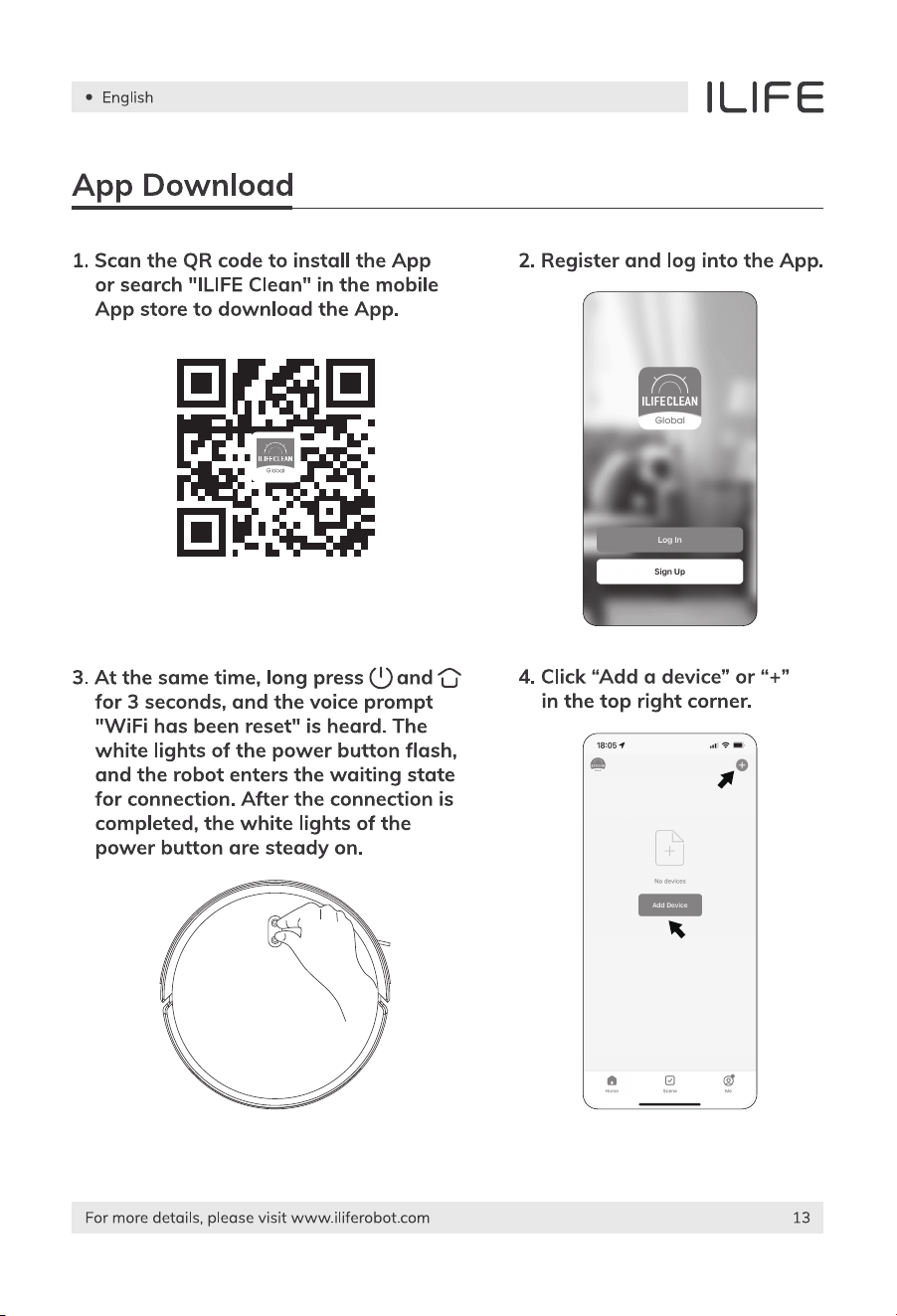
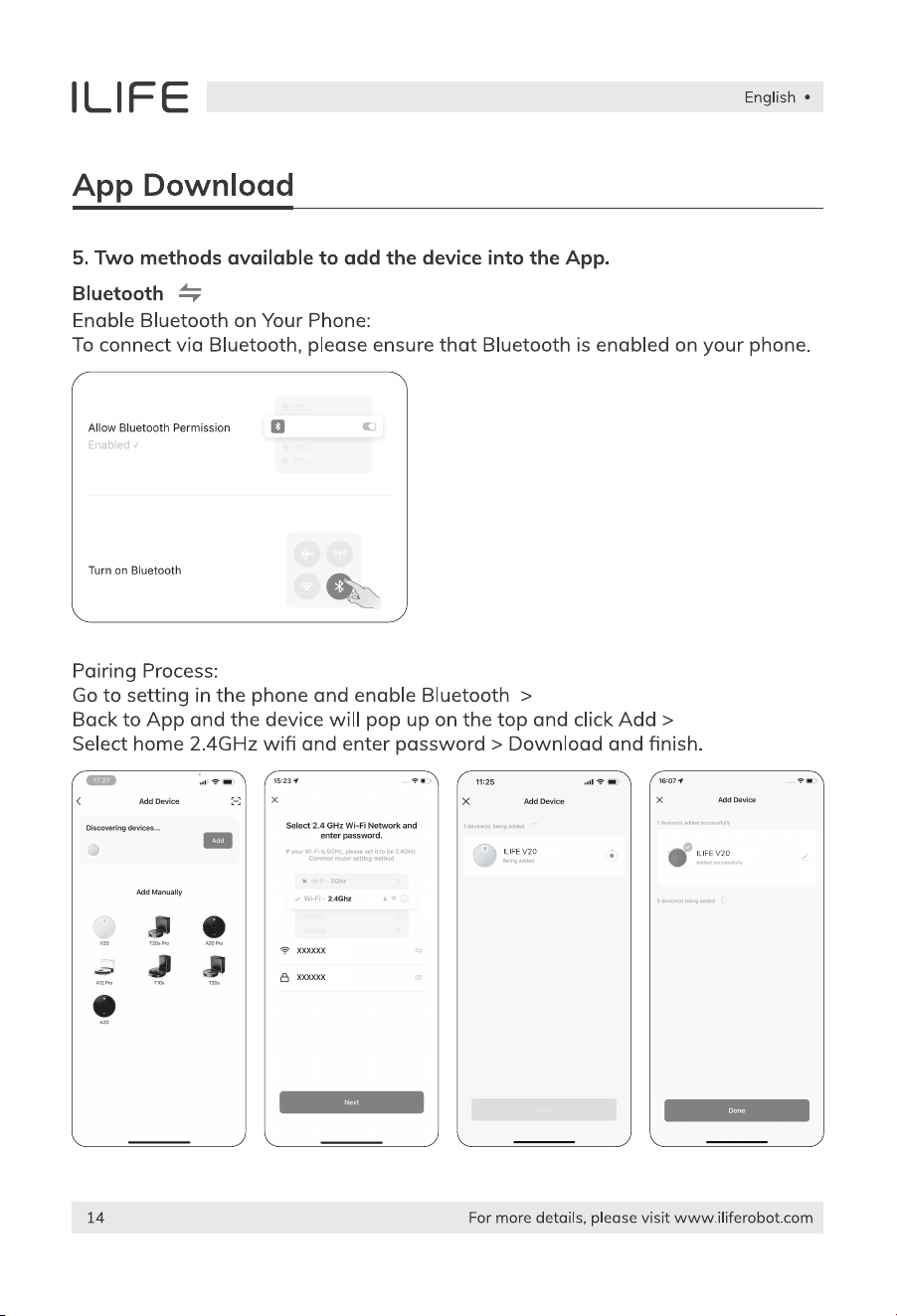
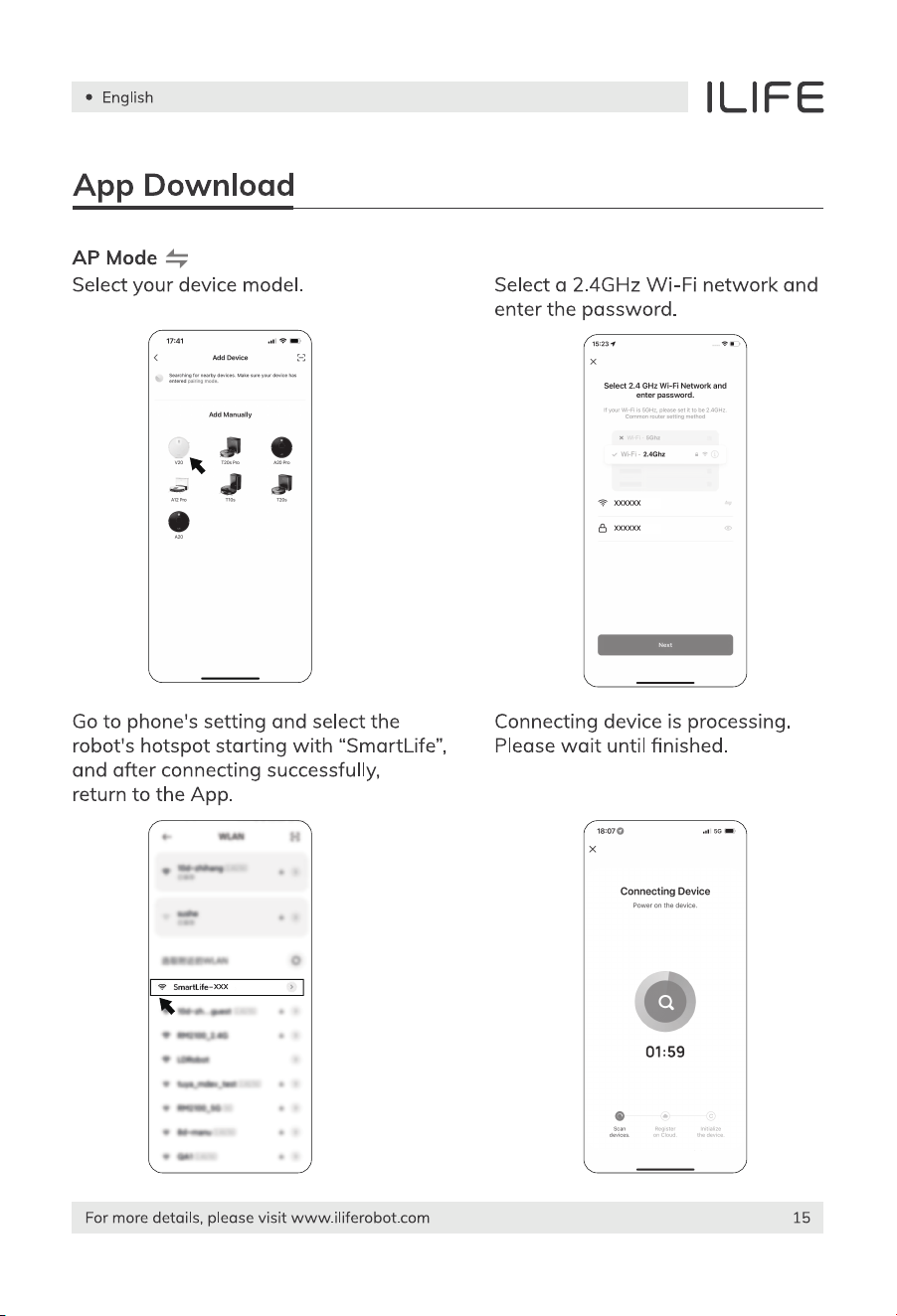
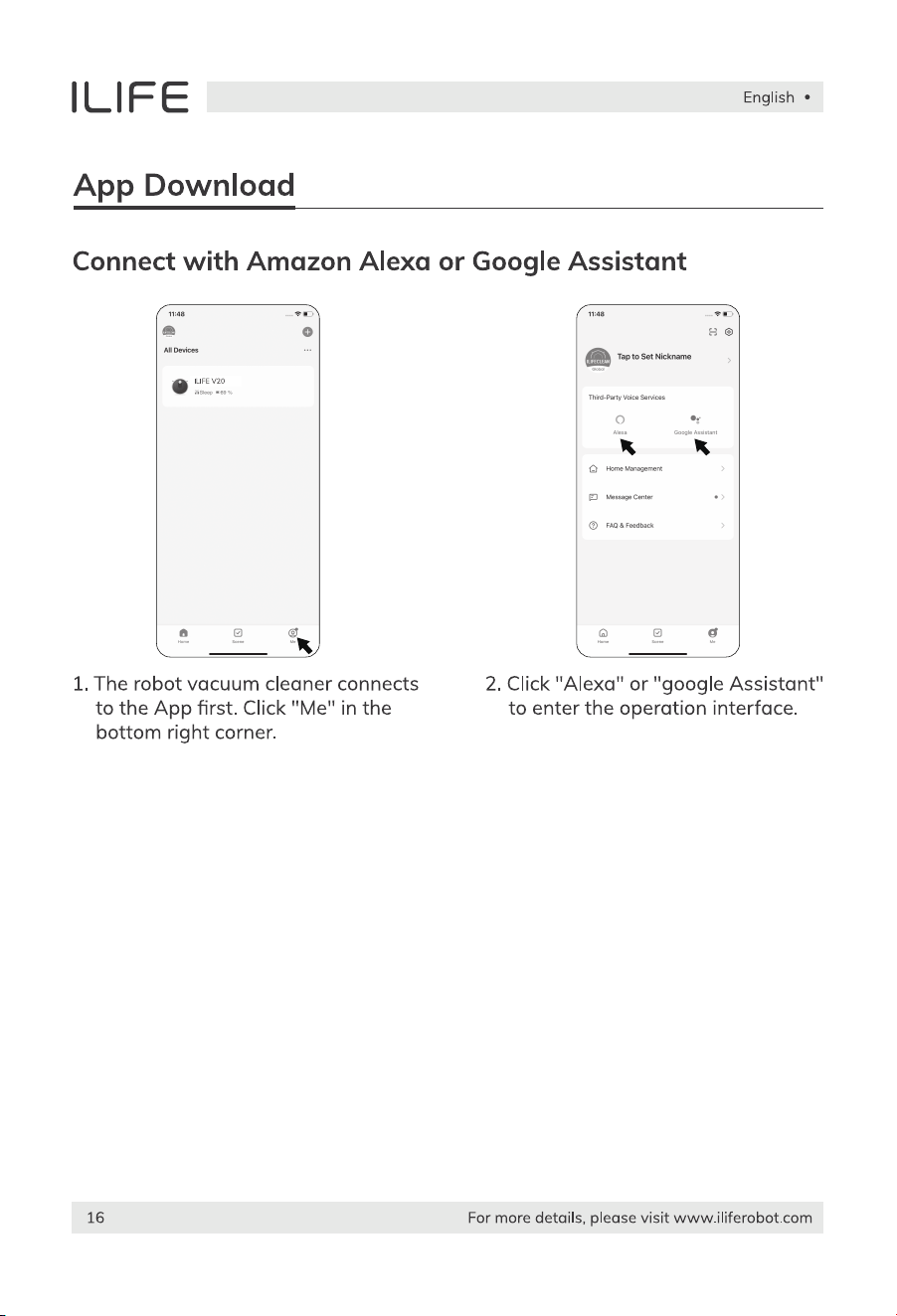
App Download ....................................................................................................................13
Routine Maintenance ...................................................................................................17
Main brush .......................................................................................................................................17
Edge brush ......................................................................................................................................17
Dustbin and filters ........................................................................................................................18
Clean the dustbin ..........................................................................................................................18
Water tank use ..............................................................................................................................19
Other spare parts .........................................................................................................................20
Maintenance of the battery .......................................................................................................21
Normal questions .............................................................................................................22
Product Specification ..................................................................................................23

Safety Instruction
1. This robot should not be used by children under 8 years old or people with
mentally challenged, unless they are under supervision. Do not let children sit
on the robot or use it as a toy.
2. Attend to the robot promptly if an error occurs during cleaning. Before using
the robot, remove all power cords and small objects on the floor. Roll up carpet
tassels and make sure curtains and table cloth are not in contact with the floor.
3. If there are hanging steps or stairs, please test if the robot can detect them
before use. If not, please set up barriers to avoid falling down, and make sure
that the barriers cause no harm to people.
4. Follow the instructions in this user manual. Use factory authorized or
recommended accessories only.
5. Make sure the voltage of the charging dock is compatible with the voltage of
power supply.
6. Use the robot indoor and in a home environment only. Do not use it outdoor,
or in commercial or industrial spaces.
7. Use factory authorized adapter and charging dock only. Do not use
non-rechargeable battery. Refer to “Product Specifications” section for details
about battery standards.
8. Do not soak the robot in water and do not rinse the robot under the faucet.
9. Do not clean the robot with dripping wet cloth.
10. Do not use the robot on floors with ponding water.
11. Do not use the robot near fire or fragile objects.
12. Do not make the cloth, humans hair, finger, or other parts of the body close to
the open or the running mechanism of the robot.
13. Do not use the robot on floors with stones or paper to avoid being stuck.
14. Do not use the robot in areas with any flammables, such as gasoline,
toner and so on. Or use the robot to clean any burning objects, like cigarettes,
ashesor matches, or anything that may cause a fire.
15. Do not use damaged charging dock.
Warnings
English
For more details, please visit www.iliferobot.com 3
Safety Instruction
16. Do not lift up the robot or the charging dock by the power cord, and keep
the power cords away from heat and avoid it being trapped around doors,
sharp edges or corners.
17. Damaged power cords must be repaired by manufacturer’s repair service or
certified technicians.
18. Install dustbin and filters properly before using the robot.
19. Do not use the robot in rooms where babies are sleeping.
20. Do not use damaged power cords or charging dock to recharge the robot.
Do not use the robot if it’s damaged by falling down, or soaking in water.
21. Turn off the power switch if the robot will not be used for a long time.
22. Turn off the power switch before cleaning or maintaining the robot.
23. Unplug power cords from the charging dock before cleaning or maintaining
the robot.
24. Remove battery before discarding the robot.
25. Robot and battery are to be disposed of according to local safety regulations.
26. Do not cremate the robot to avoid the explosion.
27. Follow the instructions in this user manual. Manufacturer is not responsible for
any damages caused by improper use.
English
For more details, please visit www.iliferobot.com4
Note:
This product could not be used by children, mentally challenged people or
people lack of related experience and knowledge (Unless there people
instruct or supervise them).
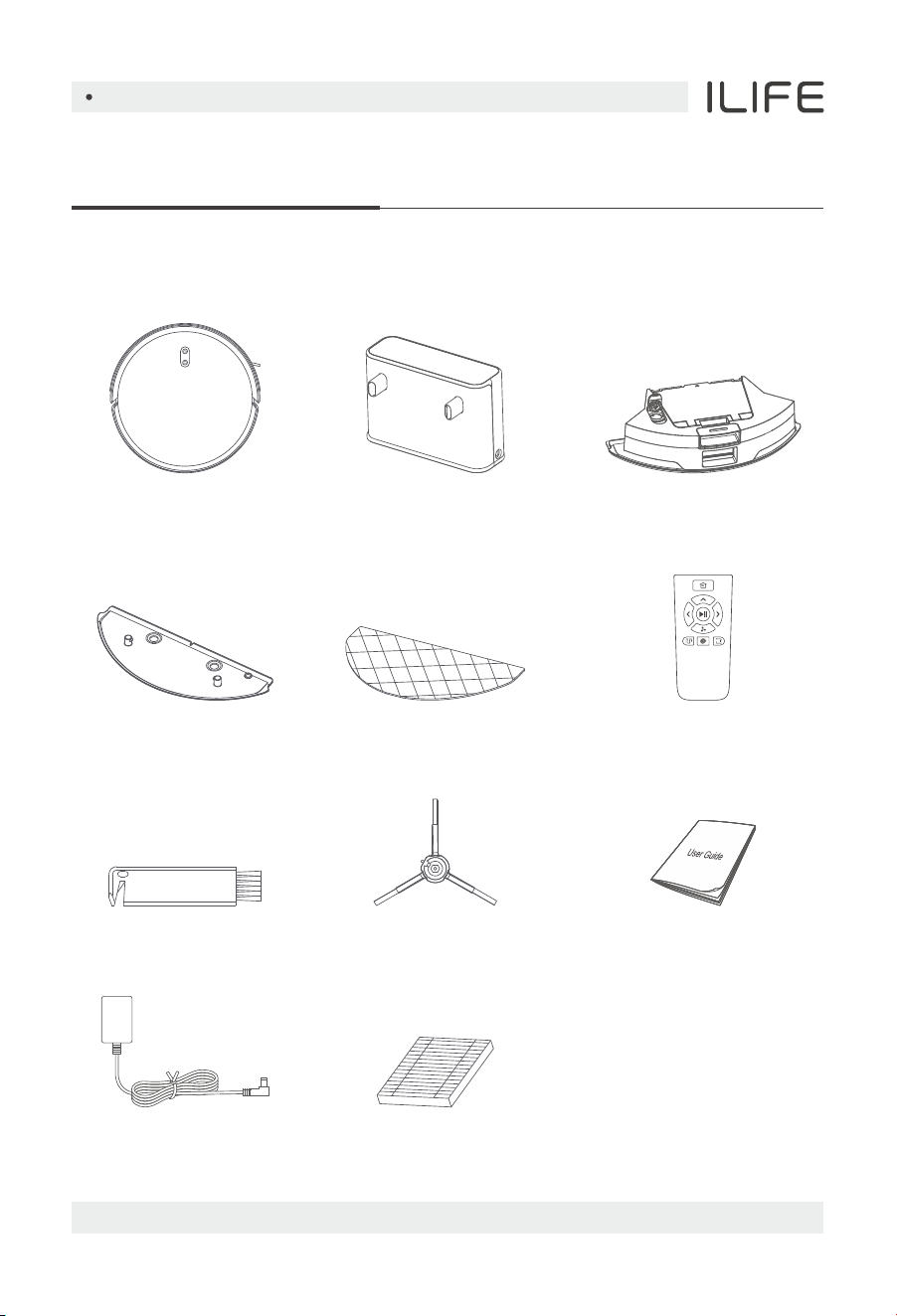
List of accessories
Product Composition
Charging Dock
Extra Side Brush
Mop ClothDuster Component
Cleaning Tool
Main Body
Power Adapter
English
For more details, please visit www.iliferobot.com 5
2-in-1 Dustbin
and Water Tank
User Manual
Filter
Remote Control
Sensor and structure
Product Composition
English
For more details, please visit www.iliferobot.com6
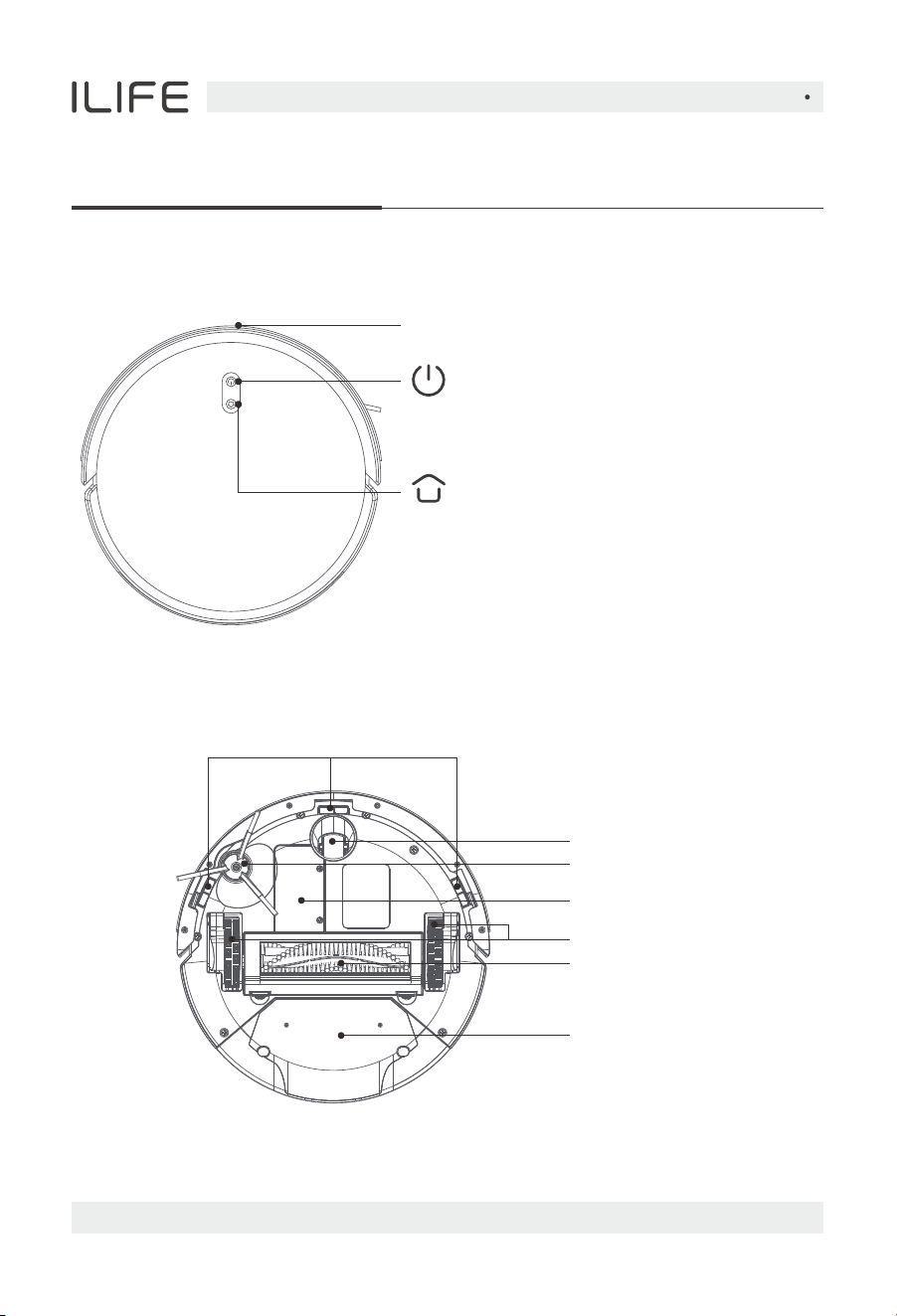
● Short press to start cleaning/pausing
● Long press 3 seconds to power on/off
Point laser sensors
Power on/off/clean/pause
● Short press to recharge/pause
Recharge/pause
● White light: Normal operation/recharging
● Red light: Abnormal status
Light
Host introduction
Universal wheel
Cliff sensors
Battery cover
Left/Right wheel
Side brush
2 in1 Dustbin & water tank
Rolling brush
Product Composition
English
For more details, please visit www.iliferobot.com 7
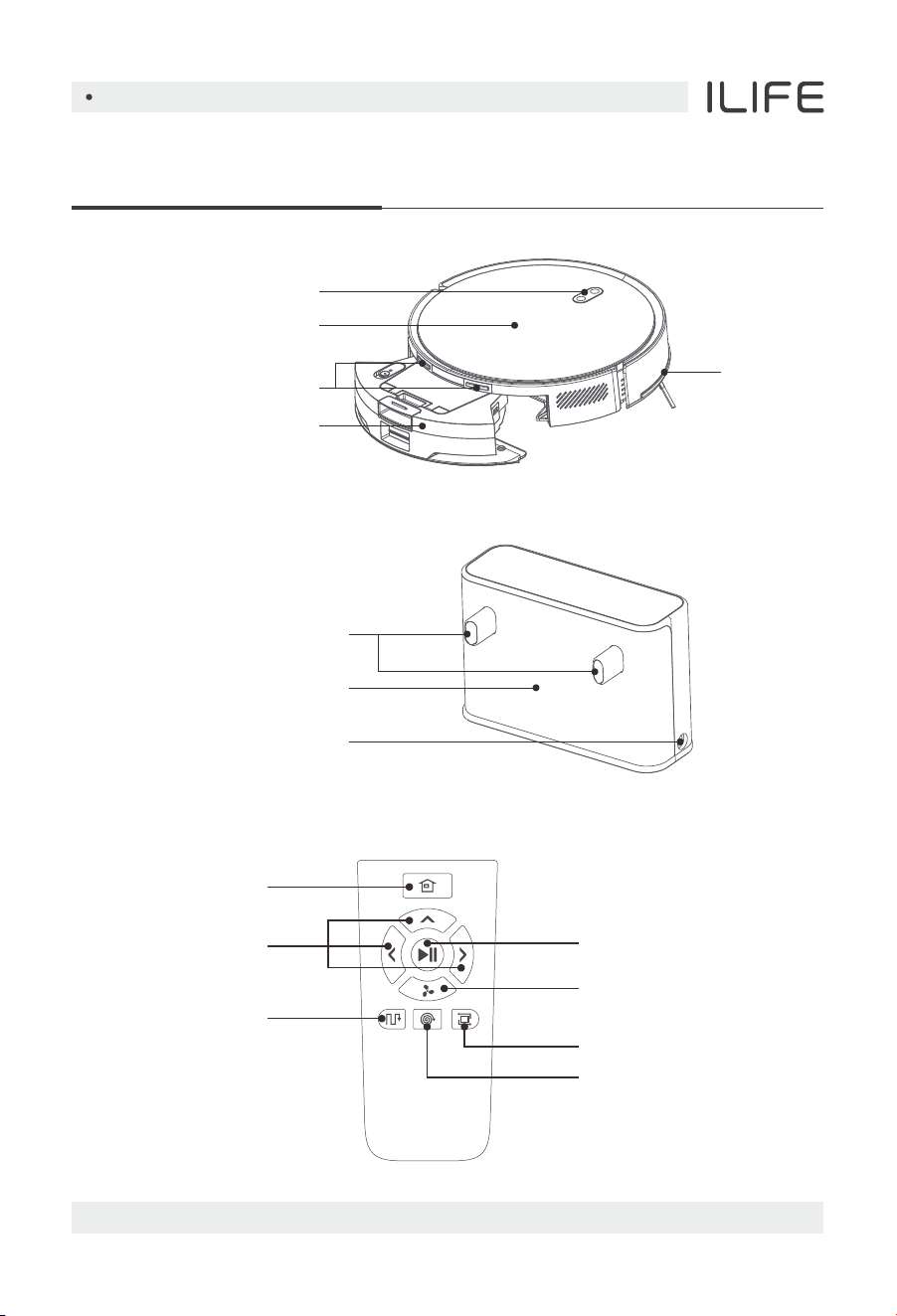
Charging dock
Charging pins
Cable slot
Signal transmitting area
Key
Face cover
Charging pins
Pull-back dustbin
Bumper
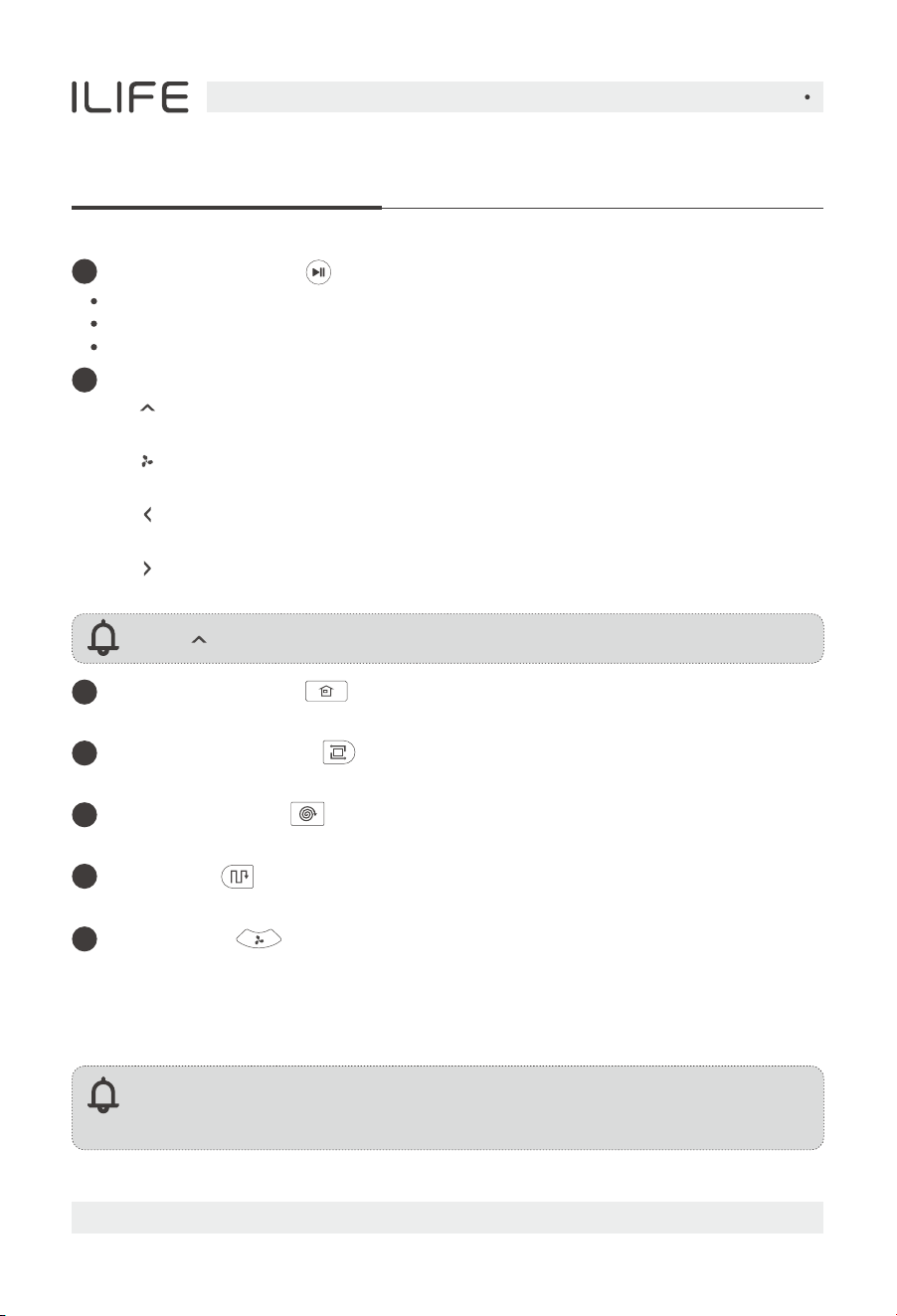
Remote Control
Direction
Start/Pause
Adjustable suction
Edge mode
Spot mode
Path mode
Auto charge button
Product Composition
English
For more details, please visit www.iliferobot.com8
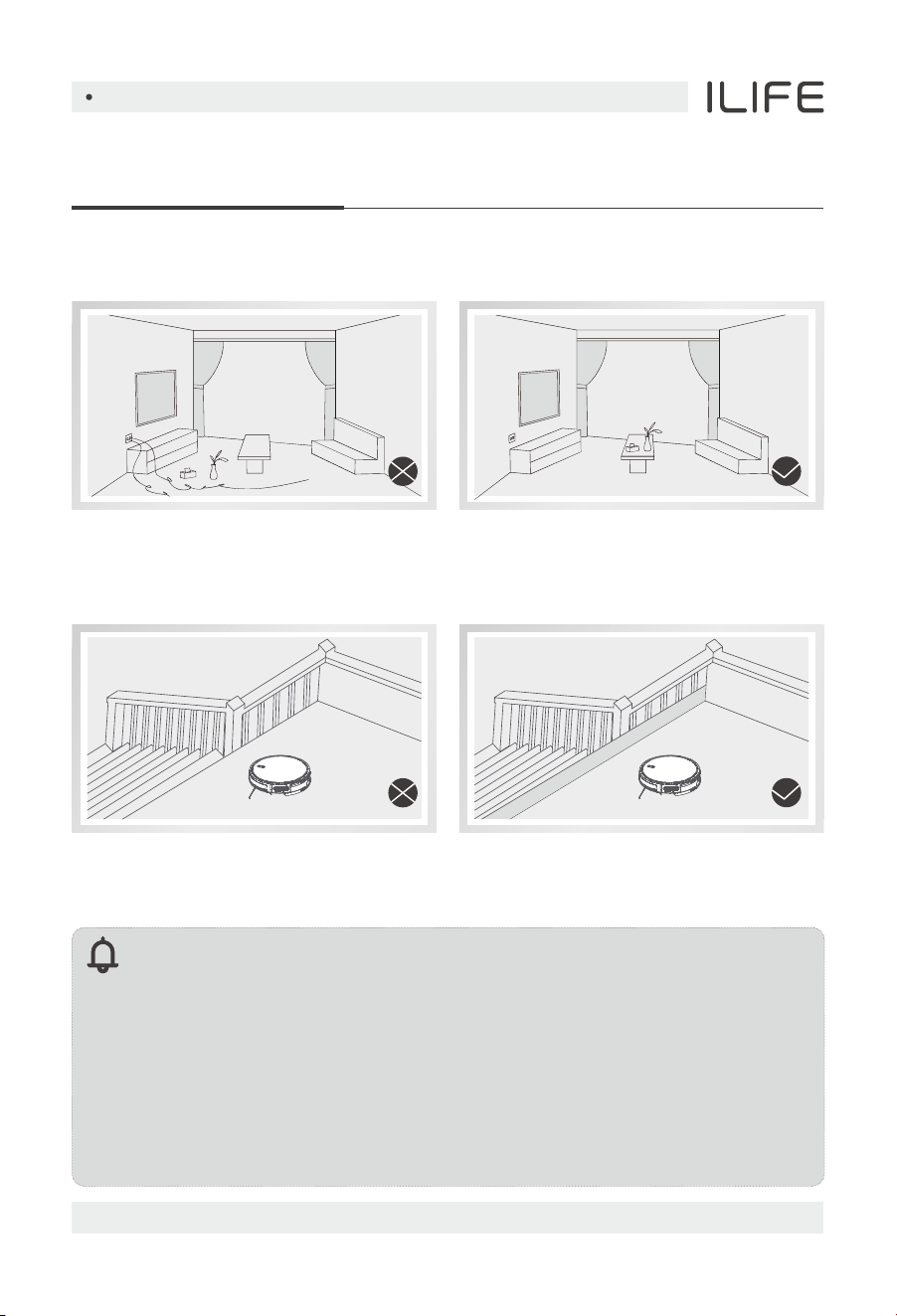
Clean/Pause button
Direction buttons
Note: “ ” cannot be used during a cleaning cycle.
Press the button to switch the robot from sleep mode to idle mode.
1
2
Press the button when in idle mode to start cleaning.
Press the button to Pause the robot during its operation.
A. “ ” Forward
Press the button to move the robot forward.
C. “ ” Left
Press the button and the robot will turn left.
Note:
Please install two AAA/R03 batteries before using the remote control.
Please take out the batteries if the remote control won't be used for a long time.
D. “ ” Right
Press the button and the robot will turn right.
3
Auto charge button
Press the button and the robot will return to the charging dock for recharging.
Spot mode button
5
Press the button to start the spot cleaning.
Path mode
6
Press the button to start cleaning under path mode.
Edge cleaning button
4
Press the button to start border cleaning.
Press the button to switch suction in working mode.
B. “ ” Adjustable suction
MAX mode
7
During the cleaning process, if there is a lot of dust, press this button to
increase the suction power of the robot. Press it again to switch to the
max suction power, press it again to switch to the mute mode suction,
and press it again to switch back to auto mode suction.
English
For more details, please visit www.iliferobot.com 9
Product Operation
Precautions
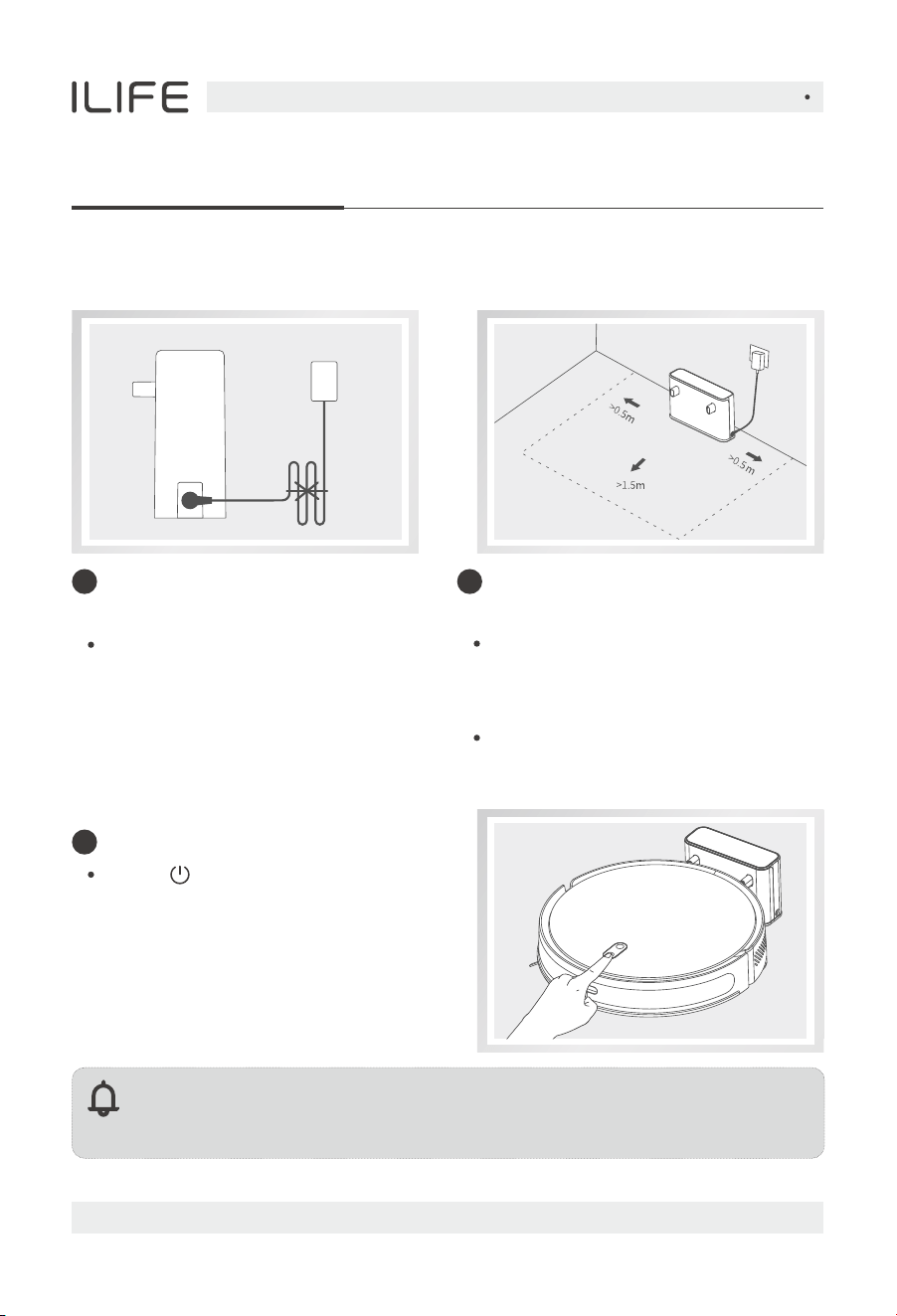
Before starting the vacuum cleaner, clean up wires and sundries scattered on the
ground, and remove easy-to-fall, fragile, valuable and potentially dangerous items.
Avoid being entangled, stuck, dragged or knocked down by the main unit;
otherwise, personal injury or property damage may be caused.
When used in a suspended circumstance, it shall be protected by rails to avoid
accidental falling or pushing other articles from falling; otherwise, personal or
property damage may be caused.
Tips:
1. During the first cleaning process, it is recommended to follow the host
throughout the process to assist in dealing with some possible small
problems, and the host can be cleaned smoothly in the future cleaning.
2. lf some areas do not need to be cleaned or may be stuck, you can set a
forbidden area in the mobile App to block the host from entering the
above areas.
3. Do not let the robot suck up hard or sharp objects (such as decoration
waste, glass, iron nails, etc, otherwise it may scratch the robot and
the ground.
English
For more details, please visit www.iliferobot.com10
Product Operation
1 2
Note:
The battery is insuficient and cannot be turned on, please put the main
unit on the charging dock, and the device will automatically power on.
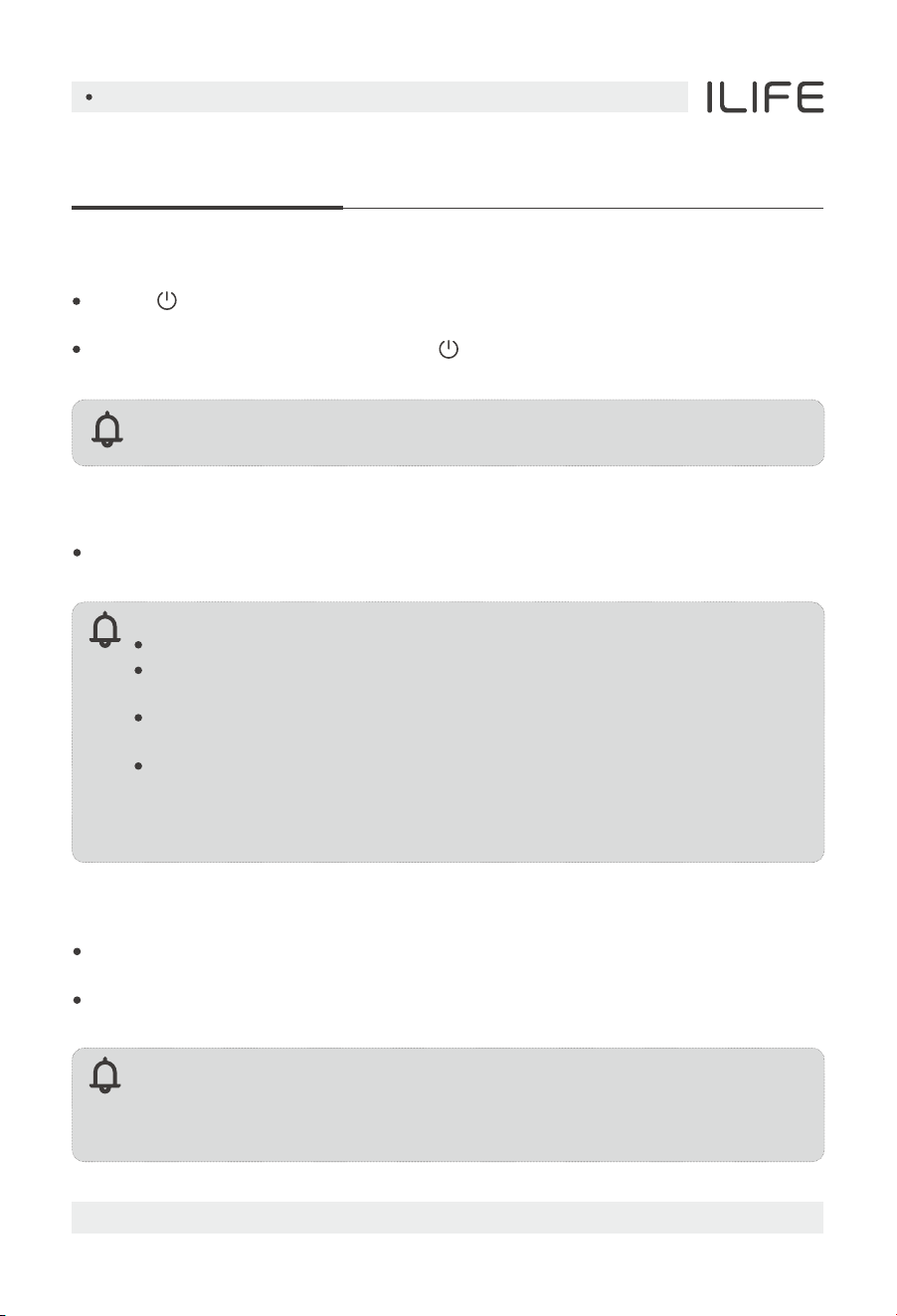
Power on and charge
Press “ ” and hold the button to
turn on, wait for the indicator to be
always on, and then lean the host
against the charging dock to charge,
and the language prompt "charging"
indicates that charging has started.
3
Charging
1.Connect the power cord,
and collect the redundant cable.
Wrap the excess wire around the
spool and plug it in.
Please ensure a space of at least
0.5m on both the left and right sides
of the charging dock, and a space of
at least 1.5m in front of it.
Do not expose the charging dock to
direct sunlight.
Place the charging dock against a
wall, and connect the power supply.
English
For more details, please visit www.iliferobot.com 11
Product Operation
Note:
Note:
The console cannot be powered off while it is charging.
Sweep/Pause
After the boot is completed, short press the upper button of the main machine,
or the mobile App to start cleaning.
Robot vacuums cannot be used to sweep liquids.
If the battery level is less than 15%, you will not be able to perform the
cleaning task, please charge it before continuing cleaning.
When the battery level is lower than 15% during cleaning, the device
will automatically return to the charging dock to recharge.
Please tidy up all kinds of wires on the ground (including the power
cord of the charging dock) before cleaning to avoid the power failure of
electrical appliances and damage to items or wires caused by dragging
the main unit during cleaning.
Note:
lf the main unit does not find the charging cradle, it will automatically return
to the starting position, please manually put the main unit back on the
charging cradle to charge.
Charging
Automatic mode: After cleaning, the host will automatically return to the
charging dock to charge.
Manual mode: In the pause state, short press the button to start the recharge or
the mobile App to start the recharge.
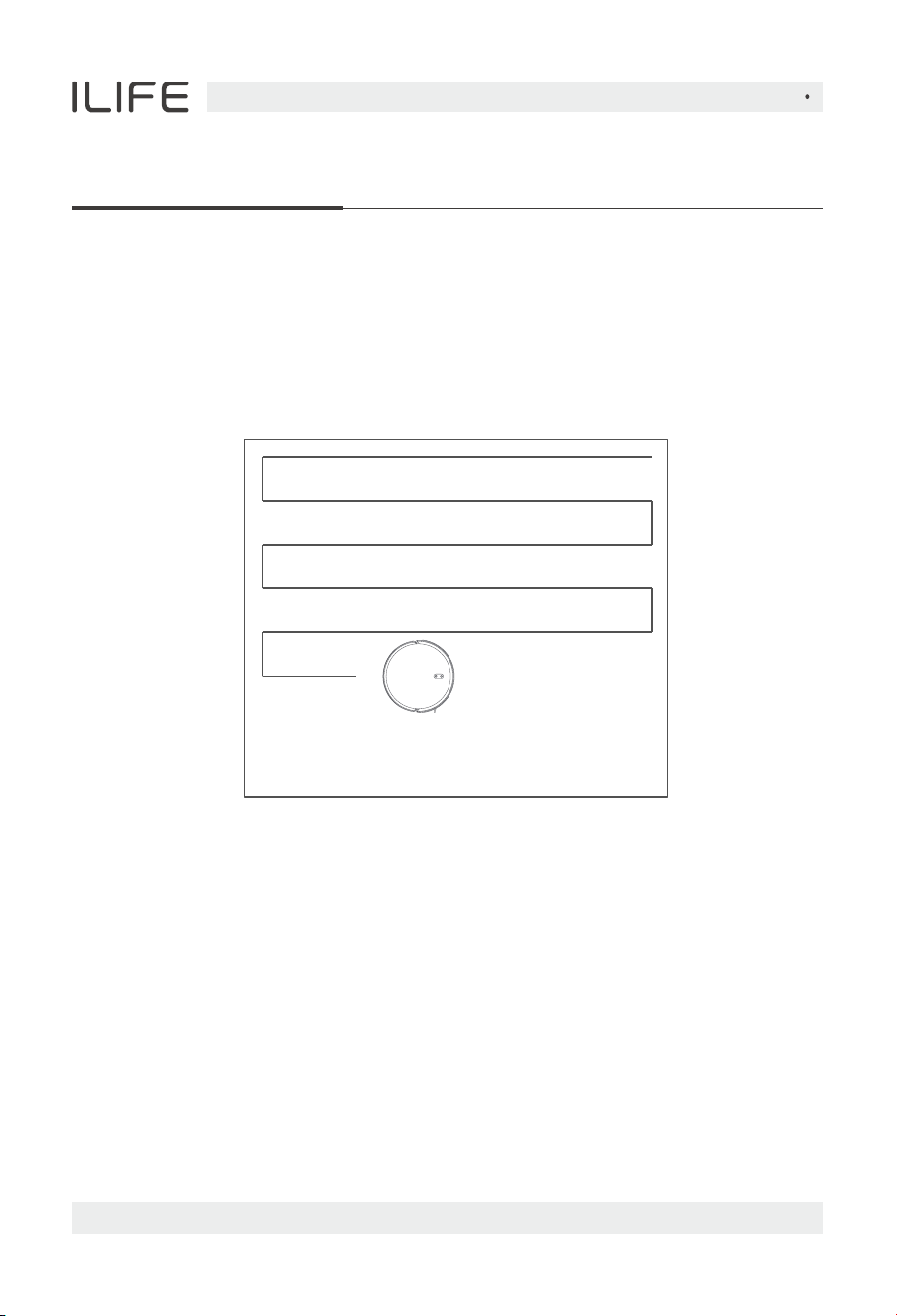
Power on/off
Press “ ” and hold the button for 3 seconds, the indicator light will light up,
and the power on will be successful.
When the machine is standby, press “ ” and hold the button for 3 seconds,
the indicator light will be off, and the machine will be turned off.
English
For more details, please visit www.iliferobot.com12
Product Operation
Automatic sweeping
After starting, the machine will first plan the cleaning path along the edge, and
then plan the cleaning path in the way of bow-shaped filling, and clean the whole
house in an orderly and eficient manner, and the device will automatically return
to the charging dock for charging after the cleaning is completed (the default
cleaning mode of the machine).
Suction adiustment
Using the mobile App, you can choose Silent, Standard, Powerful, Max (MAX)
Make an appointment for cleaning
The mobile App can be used to set a scheduled cleaning time.
The console will automatically start cleaning at the specified time.
Area to be cleaned
Area of completion
English
For more details, please visit www.iliferobot.com 17
Note:
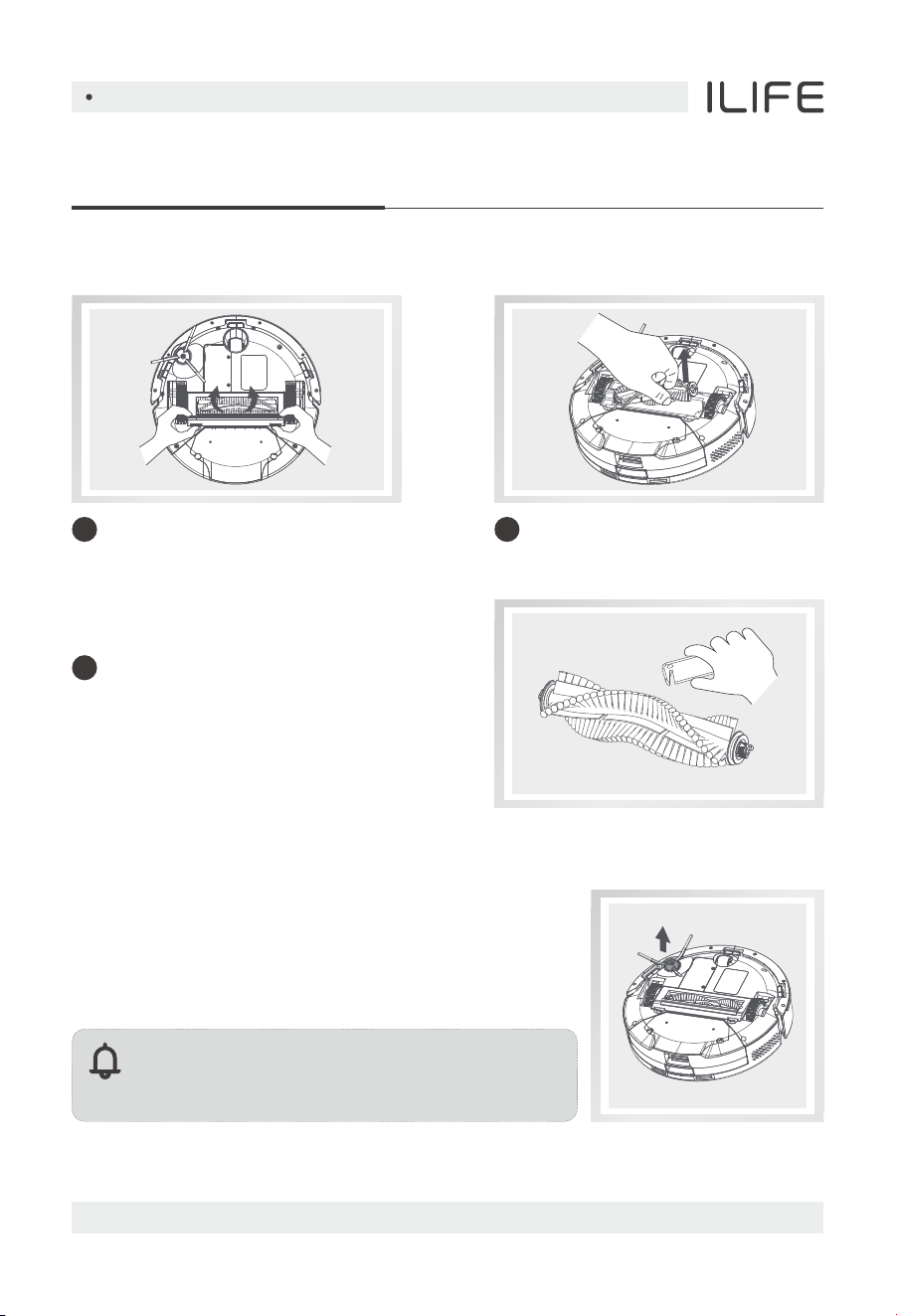
lt is recommended to replace the side brush
every 3 months to ensure the cleaning effect.
Routine Maintenance
Main brush (weekly cleaning recommended)
Edge brush (weekly cleaning recommended)
Flip the machine and hold down the
buckle on the main brush cover and
take out the main brush.
1 Remove the main brush.2
Use the matching cleaning brush to
sweep away the dust in the main brush
and the main brush cavity, and then
clean up the tangles on the main brush.
3
1. Flip the machine and use a Phillips screwdriver to
screw out the side brush screws and pull out the
side brush.
2. Clean the tangled hairs and dirt and put it back on,
and tighten the screws.
English
For more details, please visit www.iliferobot.com18
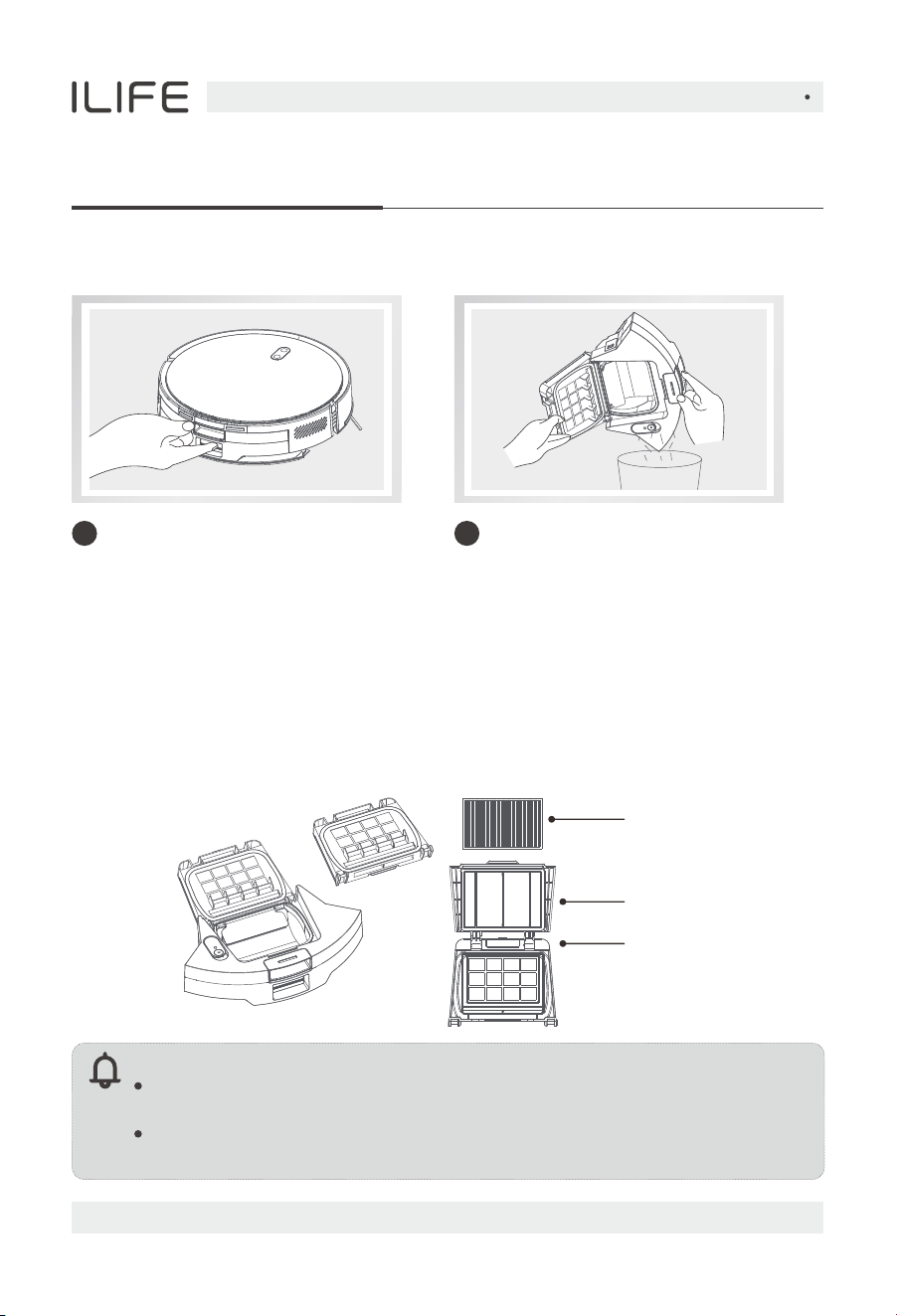
Dustbin and filters (recommended after each cleaning)
Clean the dustbin (it is recommended to clean it once a week)
Routine Maintenance
1. After a long period of use, remove the filter screen and HEPA filter
2. Put the removed primary filter screen and dustbin under the faucet to rinse
(HEPA filter screen cannot be washed)
3. Dry the water droplets after cleaning, dry the filter screen and dustbin,
and wait until it is completely dry before use.
HEPA Strainer
Filter sponge
Primary stent
Please rinse with clean water and do not add any detergent.
Do not use brushes, fingers to clean the filter.
Allow the strainer to dry thoroughly for at least 24 hours.
It is recommended to replace one set of filters every 3 months.
Note:
From the back of the machine,
press and hold and take out the
dustbin.
1
Press and hold the dustbin switch
to open the dustbin and dump the
garbage.
2
English
For more details, please visit www.iliferobot.com 19
Routine Maintenance
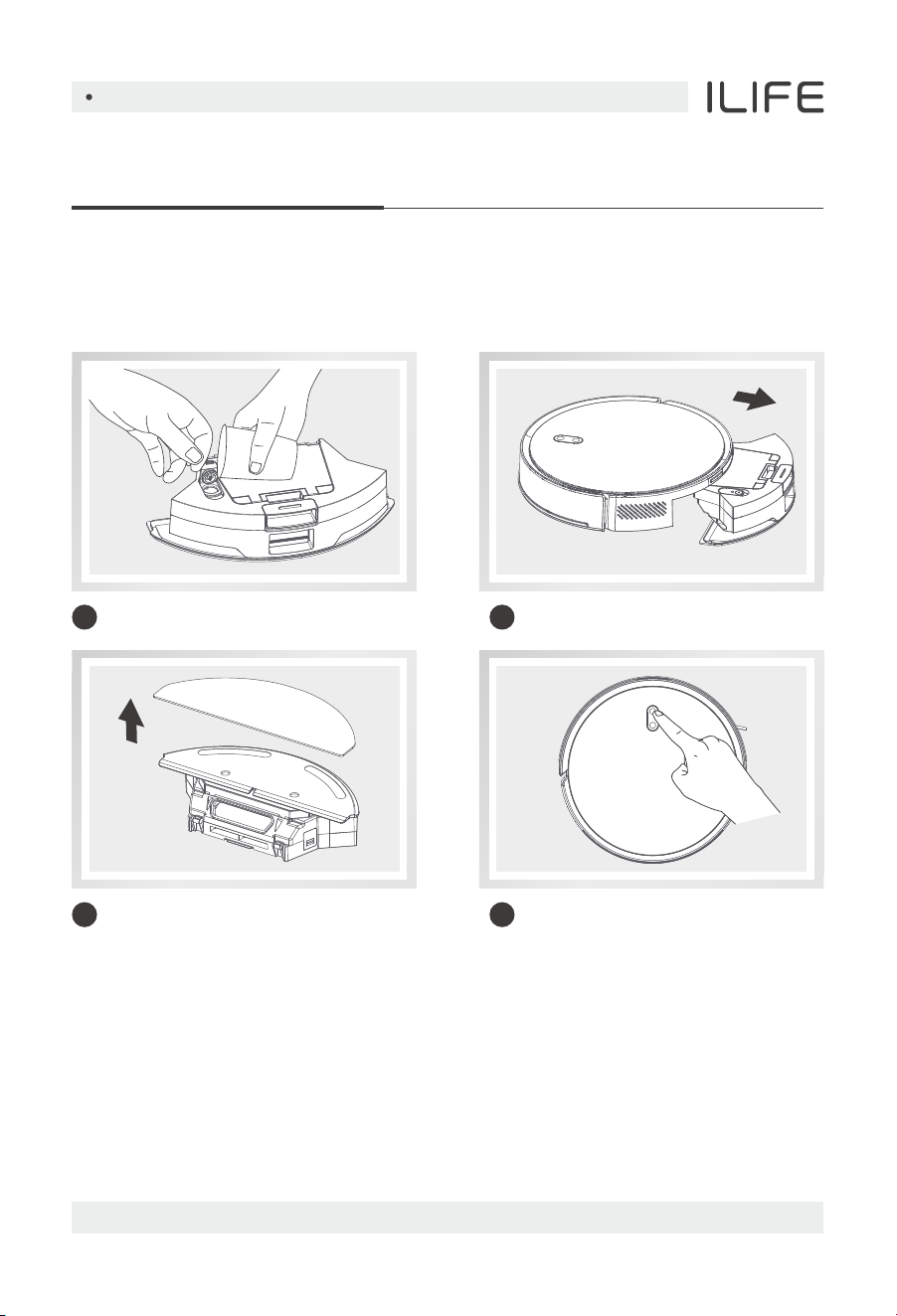
Water tank use
Do not use the mopping function on the carpet, after mopping the floor,
please empty the water tank and remove the rag in time.
Add water
1
Install the tank assembly
2
Install the rag
3
Start mopping
4
English
For more details, please visit www.iliferobot.com20
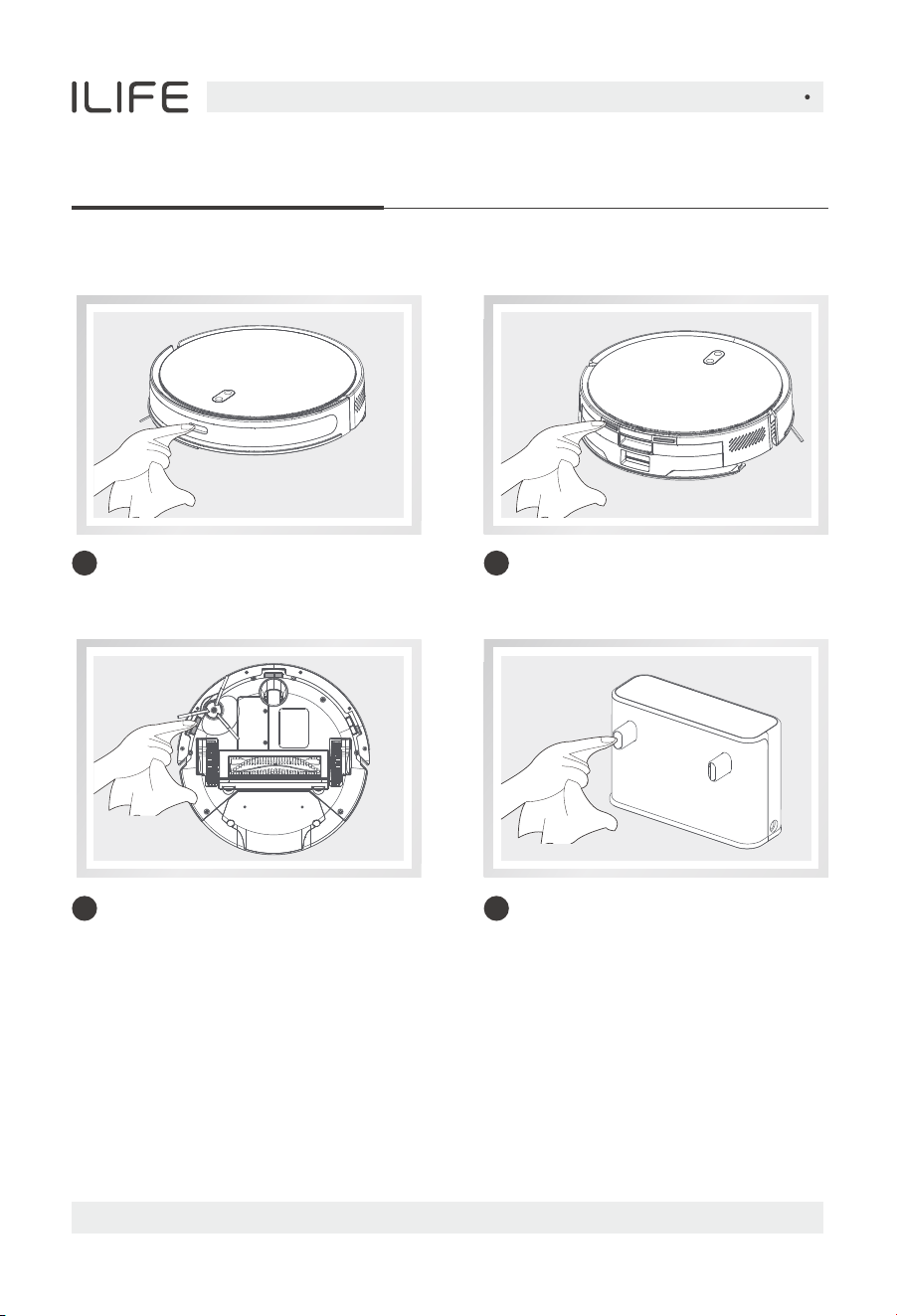
Routine Maintenance
Cleaning spot laser detection sensor
(monthly cleaning recommended)
1
Clean the main unit charging
contacts (it is recommended to
clean them once a month)
2
Cleanup cliff sensor
(monthly cleaning is recommended)
3 Clean the charging contacts of
the charging dock
(it is recommended to clean them
once a month)
4
Other spare parts
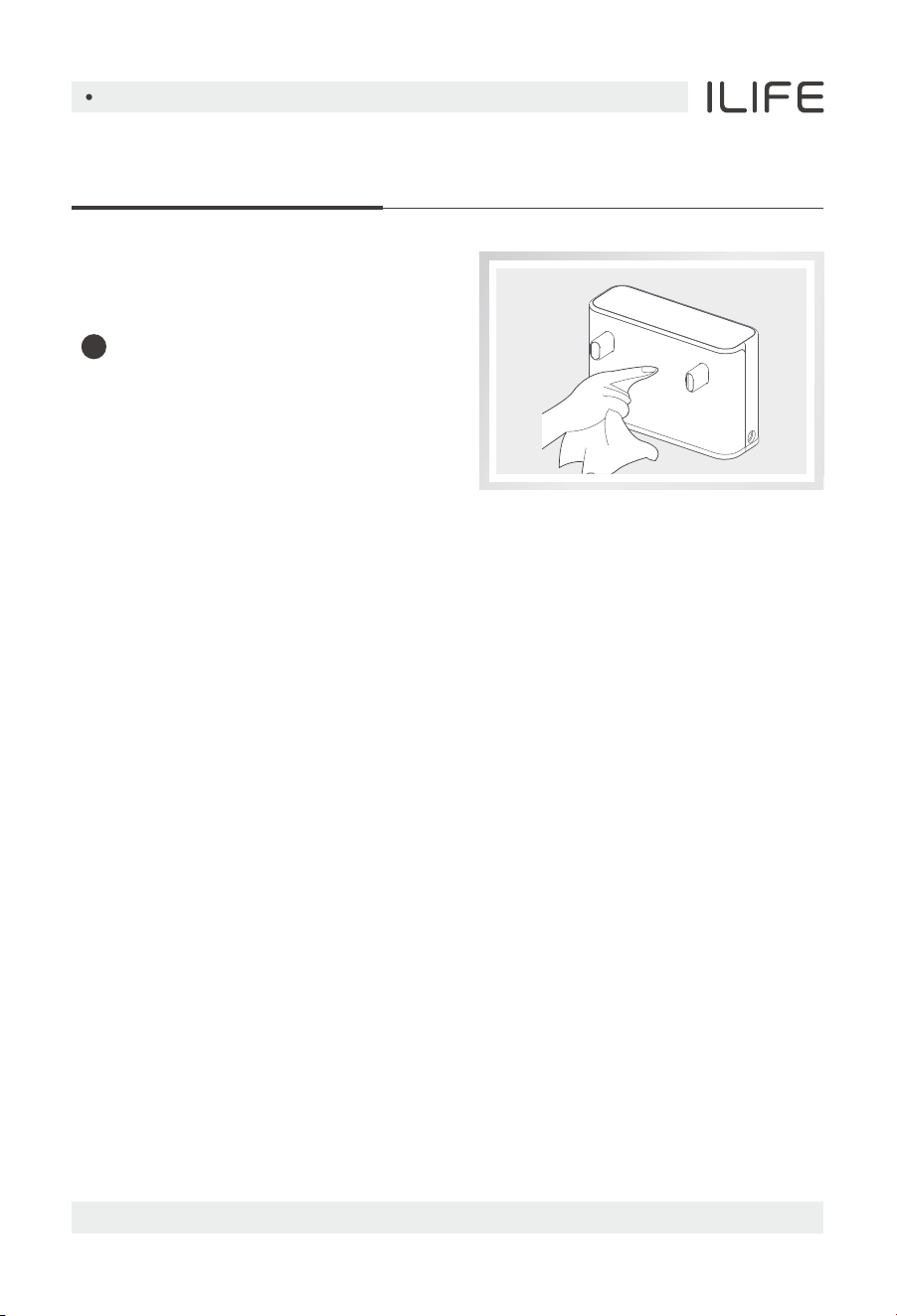
Routine Maintenance
Clean the signal emission area of the
charging dock (it is recommended to
clean it once a month)
5
Maintenance of the battery
1. The device has a built-in rechargeable lithium battery pack, in order to maintain
the battery performance, please keep the host in a charged state for daily use,
which is conducive to the best performance of the battery and does not
consume excessive power.
2. lf you are not in use for a long time, please fully charge: make sure to turn it off
before storing.
English
For more details, please visit www.iliferobot.com 21

Crashed/Won't turn on
If the battery is low, place the device on the
charging dock, align it with the contact point,
and the device will automatically power on.
If the ambient temperature is lower than 0°C,
please use it in an environment of 0~40°C.
Please check whether the power plug of the device
is connected properly and confirm that the power
supply to the socket is normal.
Unable to charge
If the contact is bad, please clean the dirt on the
charging contact point, or unplug the side brush.
Cannot be recharged
If the device is too far away from the charging cradle,
please place the main unit near the charging cradle
and try it.
Abnormal behavior
There may be foreign objects entangled in the
main brush, side brush or wheel, please clean it up
after stopping.
Reduced cleaning
ability or falling ash
The filter is clogged, please clean or replace it.
The main brush is entangled by foreign objects,
please clean the main brush.
Unable to connect to WiFi
The WiFi signal is not good, please make sure the
device is in a good WiFi (2.4G frequency band,
5G does not support) signal coverage area.
Please reset the WiFi and download the latest
mobile App to try to connect again.
Check if your password has been entered incorrectly.
Scheduled cleaning
appointments are not valid
lf the battery is insufficient, the remaining
battery ≥ 15% will start the scheduled cleaning.
The type of question Resolution
Normal questions
English
For more details, please visit www.iliferobot.com22
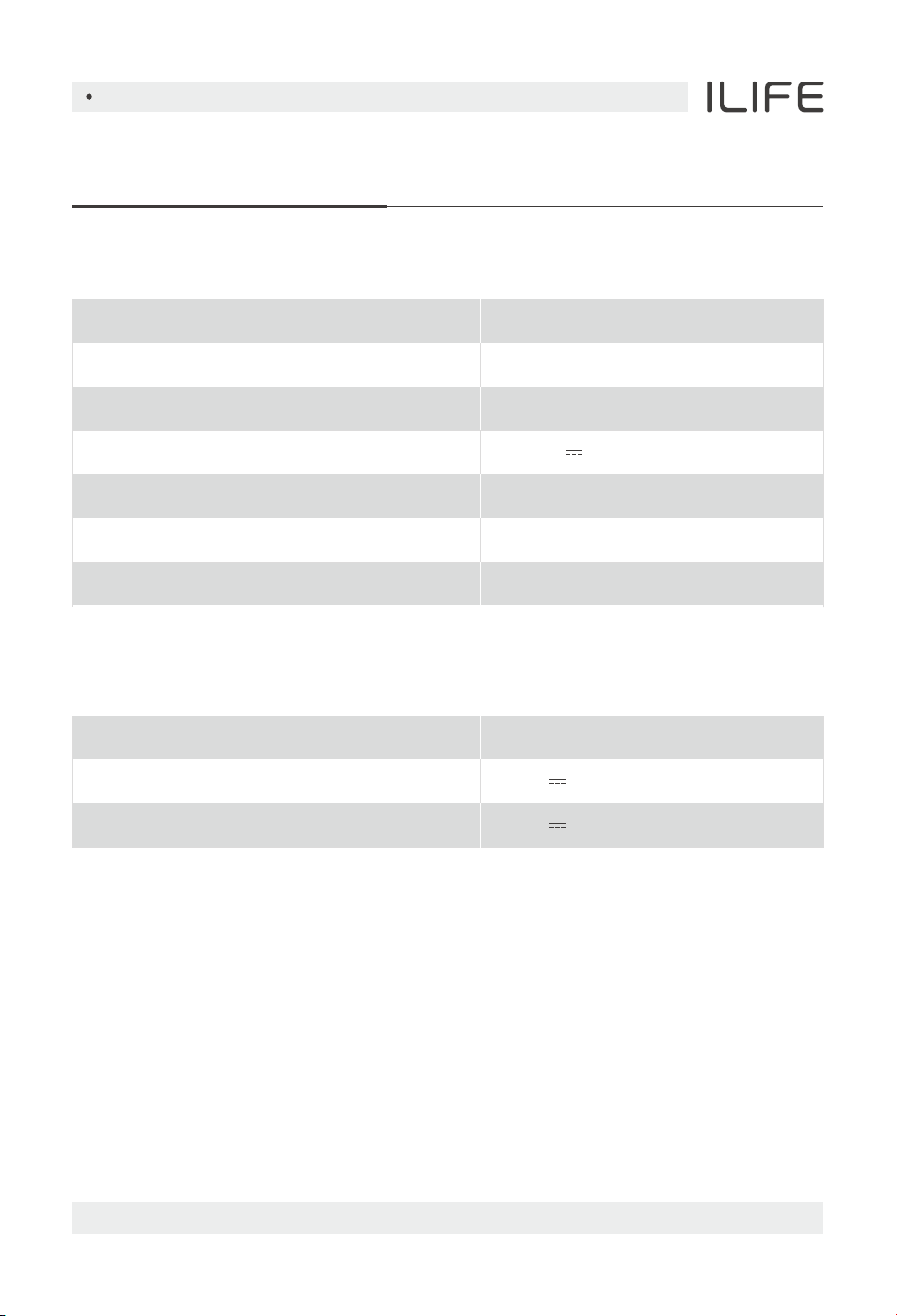
Main unit
Charging dock
Product Specification
Product model
Dimensions
Battery
Rated voltage
Rated power
Charging time
Capacity of 2 in 1 water tank & dustbin
V20
330 x 330 x 83mm
Li-ion
14.4V
45W
5H
300ml + 250ml
Dimensions
Rated inputs
Rated outputs
149.5 x 52 x 100mm
20V 0.6A
20V 0.6A
English
For more details, please visit www.iliferobot.com 23