R
DURASTAR.COM1
OWNER'S MANUAL
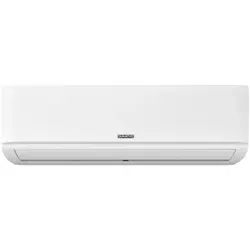
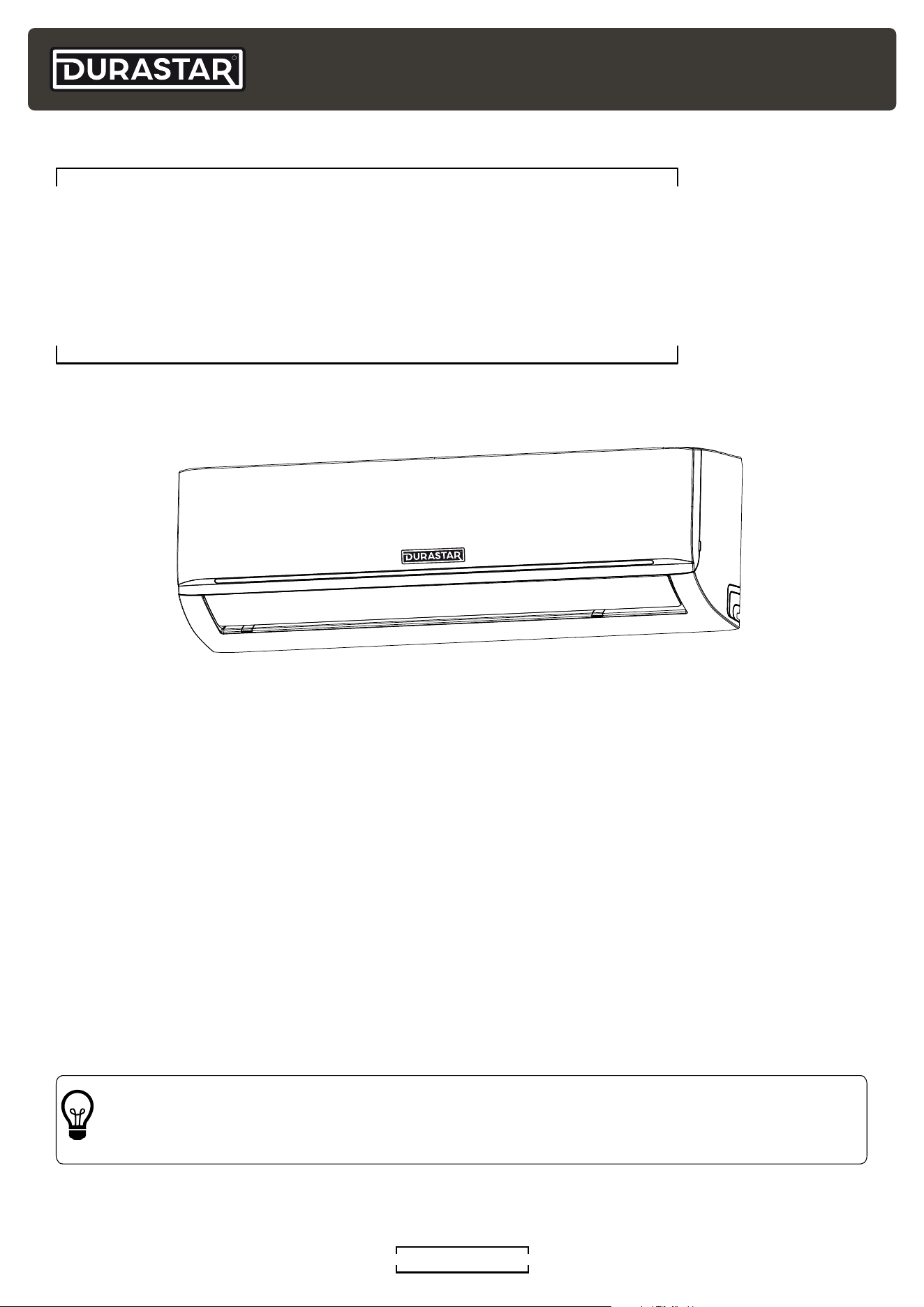
WALL MOUNTED INDOOR UNIT
SPLIT-STYLE AIR CONDITIONER
Model Number:
Serial Number:
Purchase Date:
Installing Contractor Company Name:
TIP
Capture relevant information about your Durastar mini-split equipment before it is
installed and write it above for future reference.
DRAW06F1B, DRAW09F1B, DRAW12F1B,
DRAW18F1B, DRAW24F1B, DRAW33F1B
R
DURASTAR.COM2
TABLE OF CONTENTS
TABLE OF CONTENTS ....................................................................................................................................2
INTRODUCTION ..................................................................................................................................................3
WARNINGS ............................................................................................................................................................3
IMPORTANT SAFETY PRECAUTIONS ....................................................................................................4
PARTS IDENTIFICATION ................................................................................................................................7
ACCESSORIES ......................................................................................................................................................8
OPERATING TEMPERATURES ...................................................................................................................9
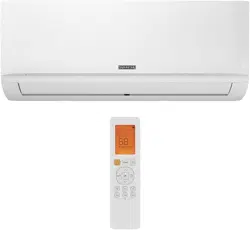
REMOTE CONTROL ......................................................................................................................................... 10
REMOTE CONTROL SCREEN INDICATORS .......................................................................................11
OPERATING MODES .......................................................................................................................................12
ADVANCED BUTTONS AND FEATURES .............................................................................................13
LOUVERED AIR FLOW ...................................................................................................................................17
LED DISPLAY INDICATORS.........................................................................................................................18
MANUAL OPERATION (USE WITHOUT REMOTE) .........................................................................18
CARE AND MAINTENANCE .........................................................................................................................19
TROUBLESHOOTING ......................................................................................................................................21
LIMITED WARRANTY - PARTS.................................................................................................................. 25
R
DURASTAR.COM
3
WARNINGS
The warning symbol indicates cautionary information for the user. Extra care and
precautions should be taken to ensure the user's safety.
The pencil indicates any manufacturer notes relating to surrounding content. These may
include further clarifications or call-outs.
A light bulb symbol indicates suggested manufacturer tips for the user to get the most
out of the Durastar equipment and to accommodate the best user experience.
Symbols Used in This Manual
INTRODUCTION
To better serve you, please do the following before contacting customer service:
• If you received a damaged product, immediately contact the retailer or dealer that sold you the
product.
• Read and follow this owner's manual carefully to help you use and maintain your air conditioner.
• Read the troubleshooting section of this manual as it will help you diagnose and solve common
issues.
• Visit us on the web at www.durastar.com to download product guides and up-to-date
information.
• If you need warranty service, our friendly customer service representatives are available via
email at [email protected] or by telephone at 1-888-320-0706.
R
DURASTAR.COM4
IMPORTANT SAFETY PRECAUTIONS
Improper handling can cause serious damage or injury. Please read the following safety
information in its entirety.
Operation, Cleaning, and Maintenance Safety Precautions
• Children and people with reduced physical, sensory, or mental capabilities, or lack of
experience and knowledge, should only use this air conditioner if they are given supervision or
instructions concerning use of the air conditioner in a safe way and understand the hazards
involved.
• Children should not play with the air conditioner.
• Never stick fingers or any other body parts into the air conditioner openings. The internal fan
may be rotating at high speeds, and may result in injury.
• After removing the filter, do not touch the fins in order to avoid injury.
• Maintenance must be performed by qualified professionals. Otherwise, you may experience
personal injury or damage to the air conditioner and surrounding property.
• Do not repair the air conditioner by yourself. It may cause electric shock or damage. Please
contact a qualified service representative when you need to repair the air conditioner.
• Do not block the air outlet or air inlet. This could cause a malfunction.
• Do not spill water on the remote control as this can permanently damage the remote.
• If the below problems occur, please turn off the air conditioner and disconnect power at the
circuit breaker immediately. Then contact your dealer or a qualified professional for service.
• The power cord is overheating or damaged.
• There is an abnormal sound during operation.
• The circuit breaker trips frequently.
• The air conditioner gives off a burning smell.
• The indoor unit is leaking.
• If the air conditioner operates under abnormal conditions, it may cause malfunctions, electric
shock, or fire hazard.
• When turning the unit on or off via the emergency operation switch, press the switch with an
insulated object other than metal.
• Do not step on the top panel of the unit, or put heavy objects on the top panel. This could
cause damage or personal injury.
• Cleaning and user maintenance should not be performed by children without supervision.
• Do not spray water on the indoor unit. This could cause electric shock or a unit malfunction.
• Do not use flammable materials such as hair spray, lacquer, or paint near the air conditioner as
they may catch fire.
• Do not operate the air conditioner in places near combustible gases. Emitted gases may
collect around the air conditioner and cause an explosion.
• Do not use fire or a hair dryer to dry the filter. This could cause a deformation or fire hazard.
• Do not wash the air conditioner with water as this could cause an electric shock.
• Disconnect the power supply by turning it off at the circuit breaker when cleaning the air
conditioner. Otherwise, you could risk electric shock.
R
DURASTAR.COM
5
Electrical Safety
• Do not modify the length of the power supply cord or use an extension cord to power the unit.
• If the supply cord is damaged, it must be replaced by the manufacturer, a service agent, or a
similarly qualified person in order to avoid a safety hazard.
• Do not share the electrical outlet with other appliances. Improper or insufficient power supply
can cause fire or electrical shock.
• The product must be properly grounded at the time of installation, or electrical shock may
occur.
• For all electrical work, follow all local and national wiring standards and regulations. Connect
cables tightly, and clamp them securely to prevent external forces from damaging the
terminal. Improper electrical connections can overheat and cause fire, and may also cause
shock. All electrical connections must be made according to the Electrical Connection
Diagram located on the panels of the indoor and outdoor units.
• All wiring must be properly arranged to ensure that the control board cover can close
properly. If the control board cover is not closed properly, it can lead to corrosion and cause
the connection points on the terminal to heat up, catch fire, or cause electrical shock.
• The air conditioner’s circuit board (PCB) is designed with a fuse to provide overcurrent
protection. The specifications of the fuse are printed on the circuit board.
R
DURASTAR.COM6
Installation Safety
• Installation must be performed by an authorized dealer or specialist. Improper installation
can cause water leakage, electrical shock, or fire. (In North America, installation must be
performed in accordance with NEC and CEC requirements by authorized personnel only.)
• Installation must be performed according to the installation instructions. Improper installation
can cause water leakage, electrical shock, or fire.
• This air conditioner shall be installed in accordance with national and local wiring regulations.
• Contact an authorized service technician for repair or maintenance of this unit.
• Only use the included accessories, parts, and specified parts for installation. Using non-
standard parts can cause water leakage, electrical shock, fire, and can cause the unit to fail.
• Install the unit in a firm location that can support the unit’s weight. If the chosen location
cannot support the unit’s weight, or the installation is not done properly, the unit may fall and
cause serious injury and damage.
• Install drainage piping according to the instructions in the installation manual. Improper
drainage may cause water damage to your home and property.
• Do not install the unit in a location that may be exposed to combustible gas leaks. If
combustible gas accumulates around the unit, it may cause a fire.
• Do not turn on the power until all work has been completed.
• When moving or relocating the air conditioner, consult experienced service technicians for
disconnection and re-installation of the unit.
Additional Precautions
• Turn off the air conditioner and disconnect the power if you are not going to use it for a long
time.
• Turn off the unit during electrical storms to avoid damaging the unit.
• Make sure that water condensation can drain unhindered from the unit.
• Do not operate the air conditioner with wet hands. This may cause electric shock.
• Do not use this device for any other purpose than its intended use.
• Do not climb onto or place objects on top of the outdoor unit.
• Do not allow the air conditioner to operate for long periods of time with doors or windows
open, or if the humidity is very high.
R
DURASTAR.COM
7
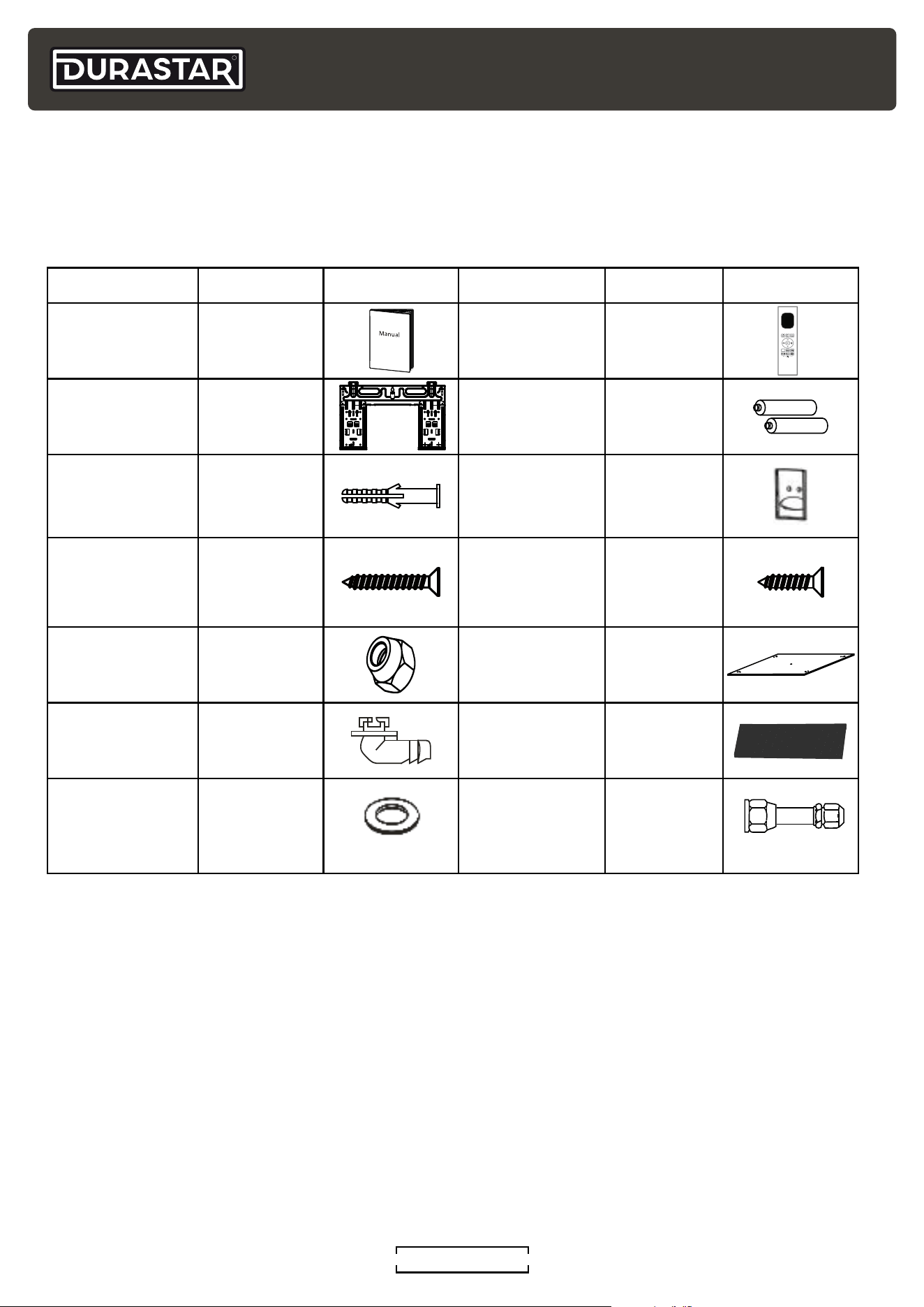
PARTS IDENTIFICATION
INDOOR UNIT
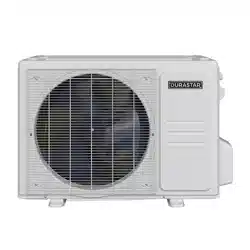
OUTDOOR UNIT
NOTE
Outdoor units will vary in appearance.
Valve Cover
Signal Cable,
Refrigerant Pipes,
and Drain Hose
Wiring Terminal
Air Outlet
Air Inlets
Remote Control
Remote Control
Holder
Air Filter
(Behind Front Panel)
Louver
Front Panel
Display Window
R
DURASTAR.COM8
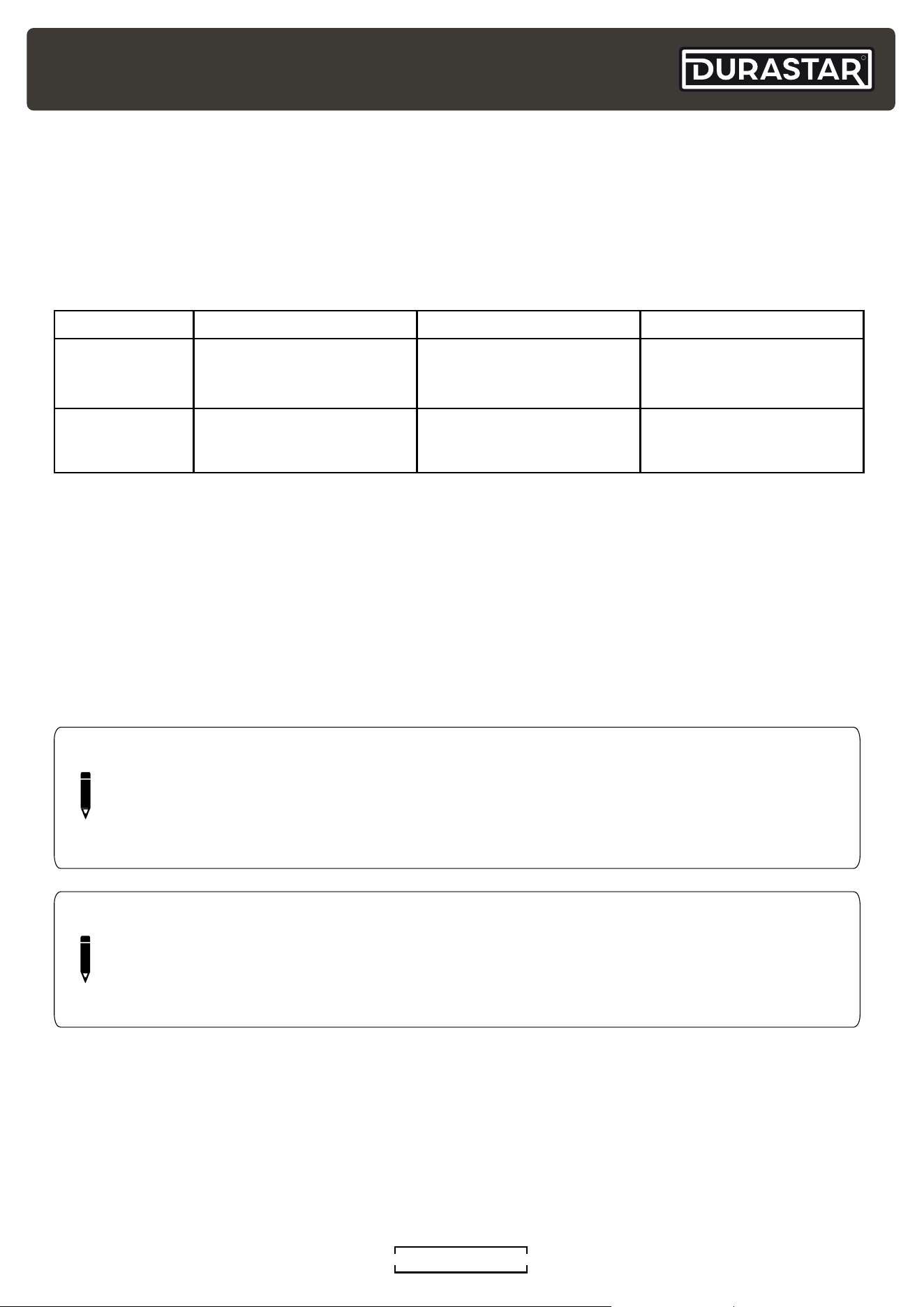
INCLUDED INSTALLATION ACCESSORIES
The air conditioning system comes with the following accessories.
Accessory Quantity Image Accessory Quantity Image
Manual 1-2
Remote Control 1
Mounting Plate 1 Battery 2
Wall Anchor
5-8
(depending
on model)
Remote Control
Holder
1
Mounting Plate
Screw
5-8
(depending
on model)
Remote
Control Holder
Mounting Screw
2
Copper Nut 2
Installation
Template
1
Drain Joint 1 Carbon Filter 2
Drain Joint Seal 1
Refrigerant
Pipe Adapter
(included with
DRAW33F1B)
1
ACCESSORIES
R
DURASTAR.COM
9
OPERATING TEMPERATURES
Your air conditioner is designed to operate in the following indoor and outdoor temperatures.
When your air conditioner is used outside of the following temperature ranges, certain safety
features may activate and turn off the unit to protect it from damage.
TEMPERATURE RANGES
COOL Mode HEAT Mode DRY Mode
Indoor Air
Temperature
60°F - 90°F
(16°C - 32°C)
32°F - 86°F
(0°C - 30°C)
50°F - 90°F
(10°C - 32°C)
Outdoor Air
Temperature
5°F - 122°F
(-15°C - 50°C)
-13°F - 75°F*
(-25°C - 24°C)*
32°F - 122°F
(0°C - 50°C)
* The minimum operating temperature depends on the outdoor unit. Low ambient models have a minimum operating
temperature in heat mode of -22°F (-30°C).
To further optimize the performance of your unit, do the following:
• Keep doors and windows closed.
• Limit energy usage by using TIMER ON and TIMER OFF features.
• Do not block air inlets or outlets.
• Regularly inspect and clean air filters.
NOTE
Keep the room's relative humidity below 80%. If the air conditioner operates in excess
of this, the surface of the air conditioner may attract condensation. To help prevent
condensation from forming and dripping, set the vertical airflow louver to its maximum
angle (vertically to the floor) and set the fan to HIGH.
NOTE
Your Durastar heat pump's outdoor unit is equipped with a base pan heater, allowing it
to continue to operate at freezing temperatures as low as -22°F (-30°C). When outdoor
air temperatures are at or below 32°F (0°C), we strongly recommend keeping the unit
plugged in at all times to ensure smooth, ongoing performance.
R
DURASTAR.COM10
REMOTE CONTROL
1
2
4
3
5
6
8
9
7
10
12
11
13
14
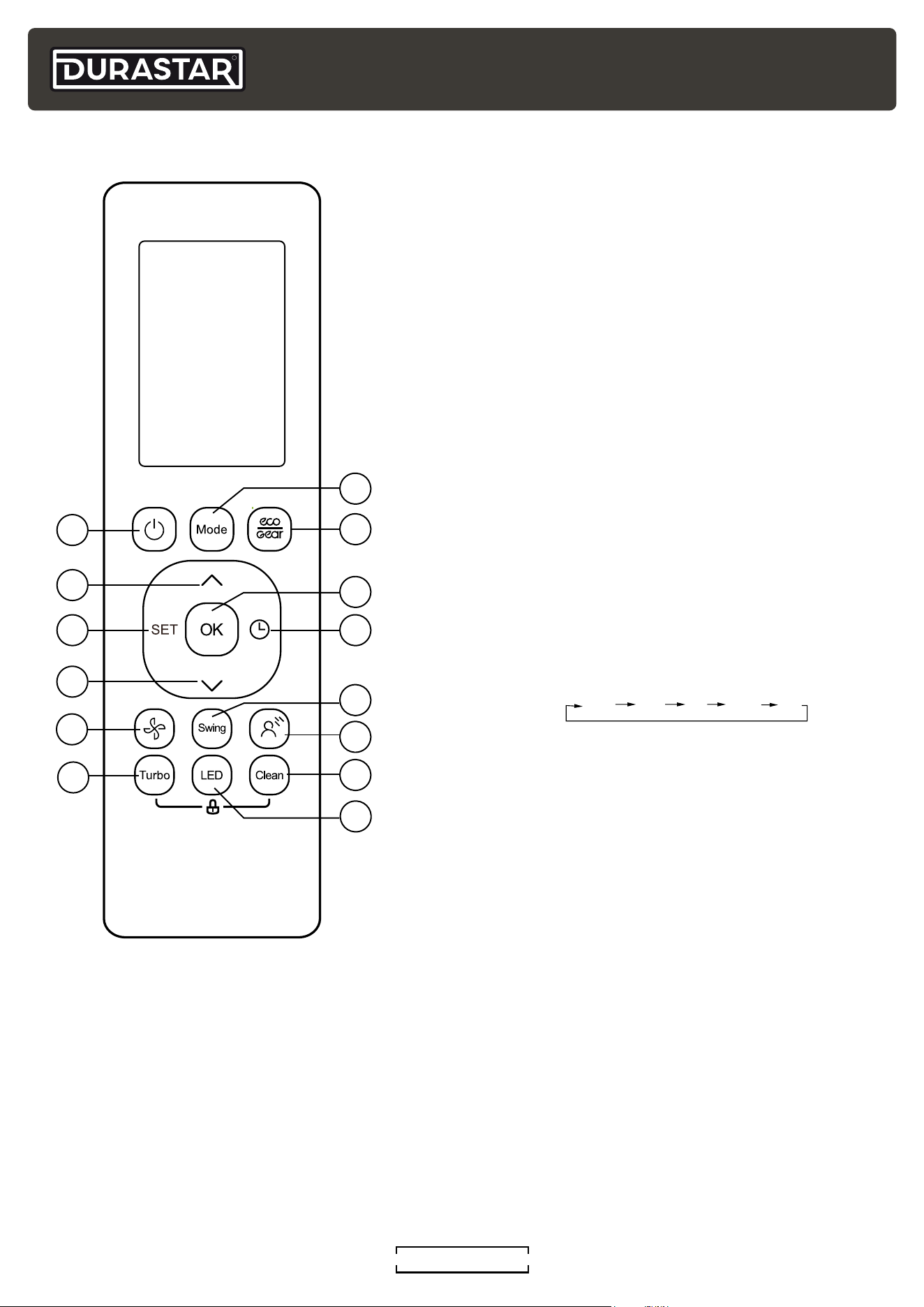
1. ON/OFF Button
Turns the air conditioner ON and OFF.
2. UP Button (
^
)
Press to increase the set temperature in 1°F / 1oC
increments .
3. SET Button
Press to access the SET features menu. See
"Advanced Buttons and Features" section.
4. DOWN Button (
V
)
Press to decrease the set temperature in 1°F / 1oC
increments. Press (
^
) and (
V
) at the same time for 3
seconds to switch between °F and °C.
5. FAN Button
Press to select FAN speed.
6. TURBO Button
Press to turn on and off the TURBO feature. See
"Advanced Buttons and Features" section.
7. MODE Button
Press to adjust the air conditioner MODE in the
following sequence:
AUTO
COOL
DRY
HEAT
FAN
8. ECO/GEAR Button
Press to enter one of three energy efficiency modes.
See "Advanced Buttons and Features" section.
9. OK Button
Press to confirm selected functions.
10. TIMER Button
Press to initiate the TIMER feature. See "Advanced
Buttons and Features" section.
11. SWING Button
Press to start and stop the automatic horizontal louver movement or set a fixed louver angle.
12. GENTLE Button
Press to stop the air flow from blowing directly on you if it becomes uncomfortable. See
"Advanced Buttons and Features" section.
13. CLEAN Button
Turns on and off the CLEAN feature. See "Advanced Buttons and Features" section.
14. LED Button
Press to turn on and off the indoor unit's display screen.
R
DURASTAR.COM
11
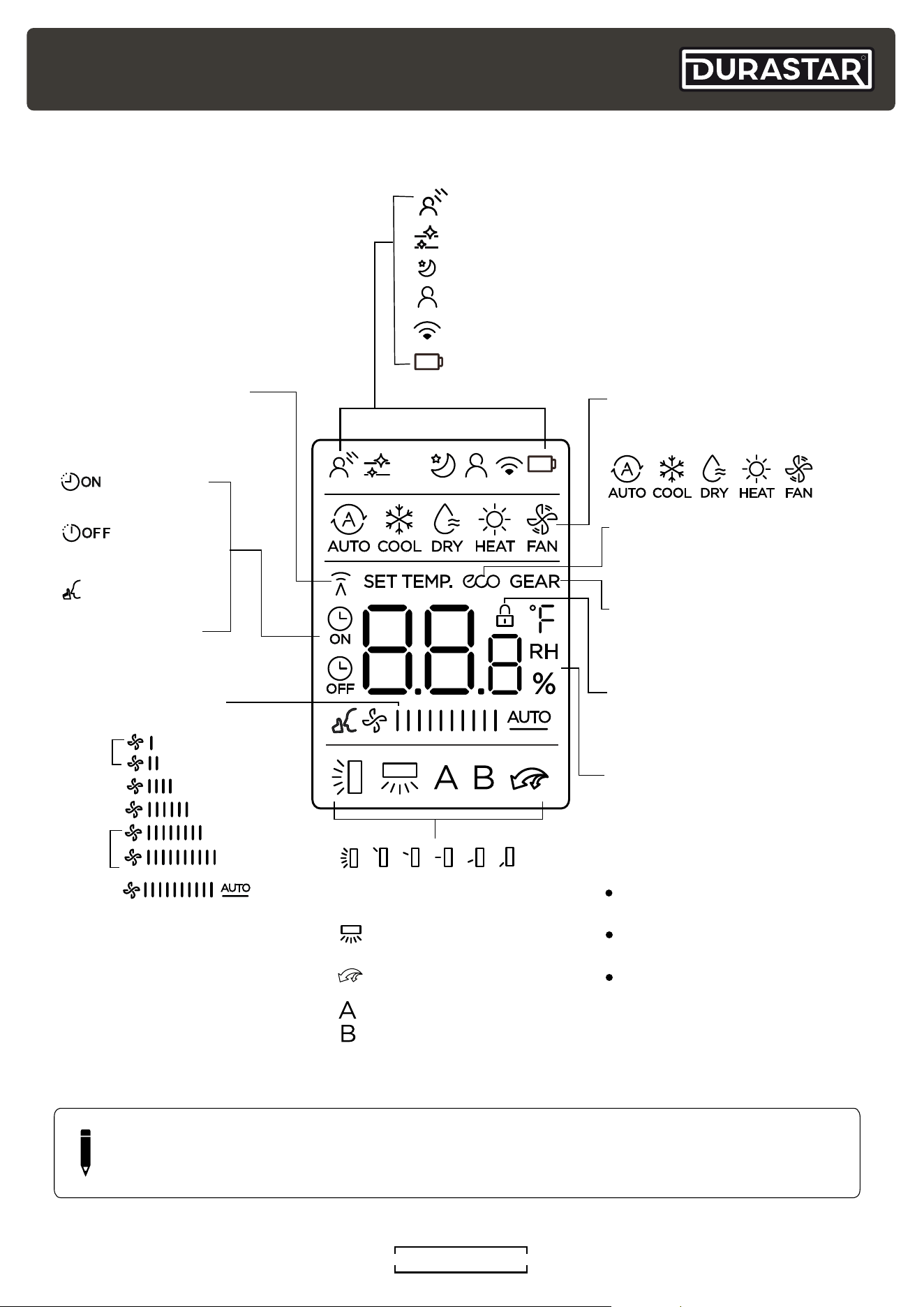
REMOTE CONTROL SCREEN INDICATORS
Note:
Not all the models can display
the fan speed values between
AUTO-100%.
GENTLE feature display
Transmission Indicator
MODE display
TIMER ON display
FAN SPEED display
TIMER OFF display
SILENCE feature
display
ECO display
GEAR display
LOCK display
Horizontal louver
swing display
Vertical louver swing
(not available on unit)
TURBO feature display
Not available for
this unit
Temperature/Timer/
Fan Speed % display
CLEAN feature display
SLEEP feature display
FOLLOW ME feature display
Network display (not available for this unit)
Low battery display (If flashing)
Displays when LOCK feature
is activated.
Silence
LOW
MED
HIGH
AUTO
Lights up when remote
sends signal to indoor
unit.
Displays selected fan speed:
Displays the current
including:
mode,
2%-20%
21%-40%
41%-60%
61%-80%
81%-100%
1%
The fan speed cannot be
adjusted in AUTO or DRY
mode.
Displays when ECO
feature is activated.
Displays when GEAR
feature is activated.
Displays the set temperature
unless the fan speed or timer
setting functions are in use.
TIMER ON/OFF functions.
Temperature range:
o
60-86°F (16-30°C)
Timer setting range:
0-24 hours
Fan speed setting range:
AUTO -100%
This display is blank when
operating in FAN mode.
NOTE
All indicators shown in the above figure are for purposes of clear representation. During
actual operation, only the relative indicators are illuminated in the display window.
R
DURASTAR.COM12
OPERATING MODES
NOTE
The FAN speed cannot be adjusted in AUTO or DRY Mode.
NOTE
Press and hold the UP and DOWN buttons simultaneously for 3 seconds to switch
between °F and °C.
SETTING TEMPERATURE
This unit can be set at any temperature within its operating range in AUTO, COOL, HEAT, and DRY
modes (see "Temperature Ranges" section). You can increase or decrease the set temperature in
1°F (1°C) increments by pressing the UP (
^
) or DOWN (
V
) button.
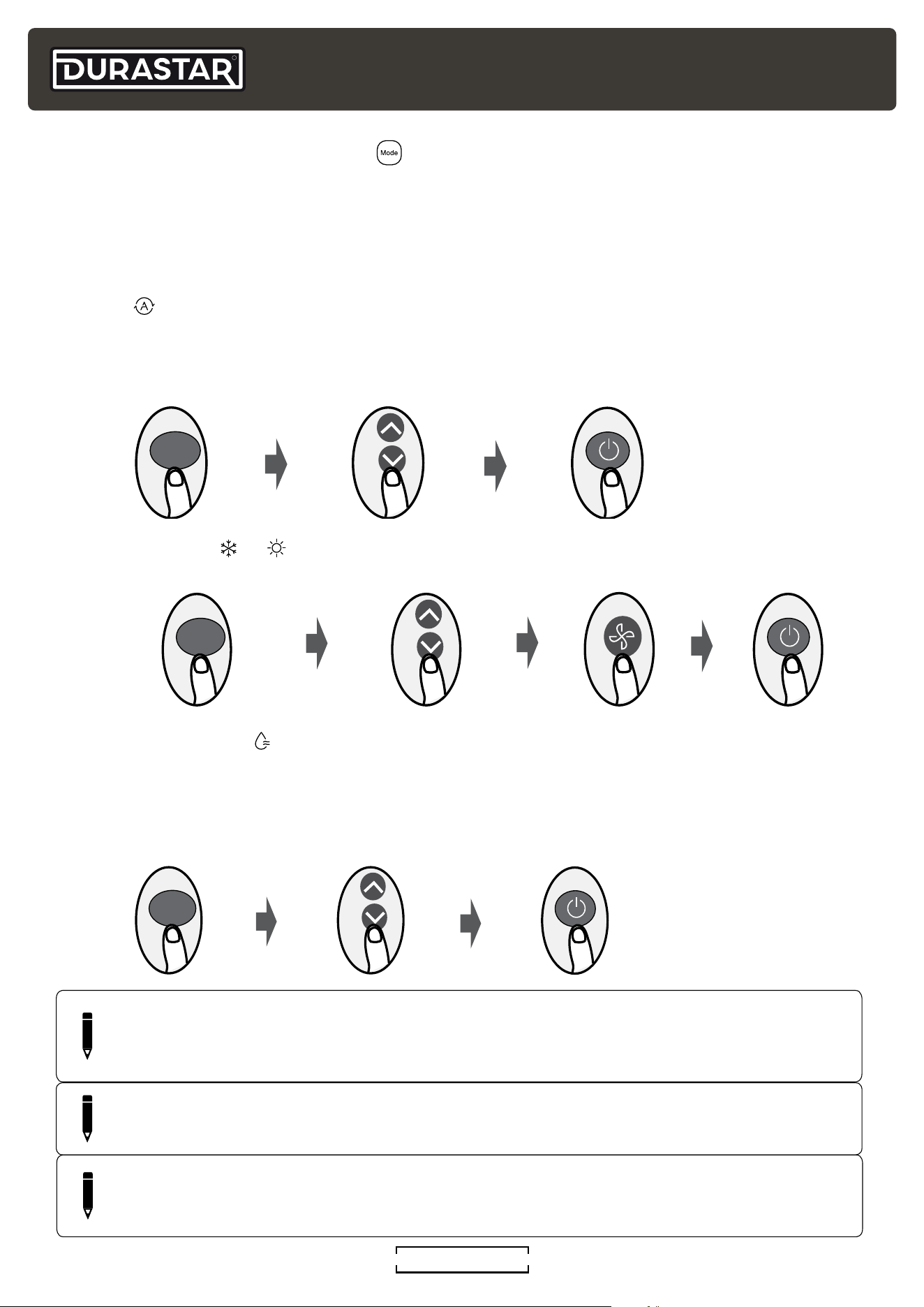
AUTO ( )
In AUTO mode, the unit will automatically select the COOL, FAN, HEAT, or DRY modes to maintain
the set temperature. In AUTO mode, the fan speed cannot be set.
COOL or HEAT ( or )
DRY/DEHUMIDIFY (
)
In DRY mode, the fan runs continuously on low speed. The unit will operate continuously until it
reaches 50°F (10°C), at which time it will turn off. DRY mode operation will then resume once the
room temperature reaches 54°F (12°C).
1. Select AUTO mode 2. Set desired temperature 3. Turn on air conditioner
MODE
1. Select COOL or HEAT mode
2. Set desired temperature 4. Turn on air conditioner3. Set fan speed
MODE
1. Select DRY mode 2. Set any temperature 3. Turn on air conditioner
MODE
( )
NOTE
*For this series of mini-splits, changing the temperature in DRY mode does not deviate
performance from the above mode description.
R
DURASTAR.COM
13
NOTE
You cannot adjust the temperature in FAN mode. As a result, your remote control's LCD
display will not display a temperature.
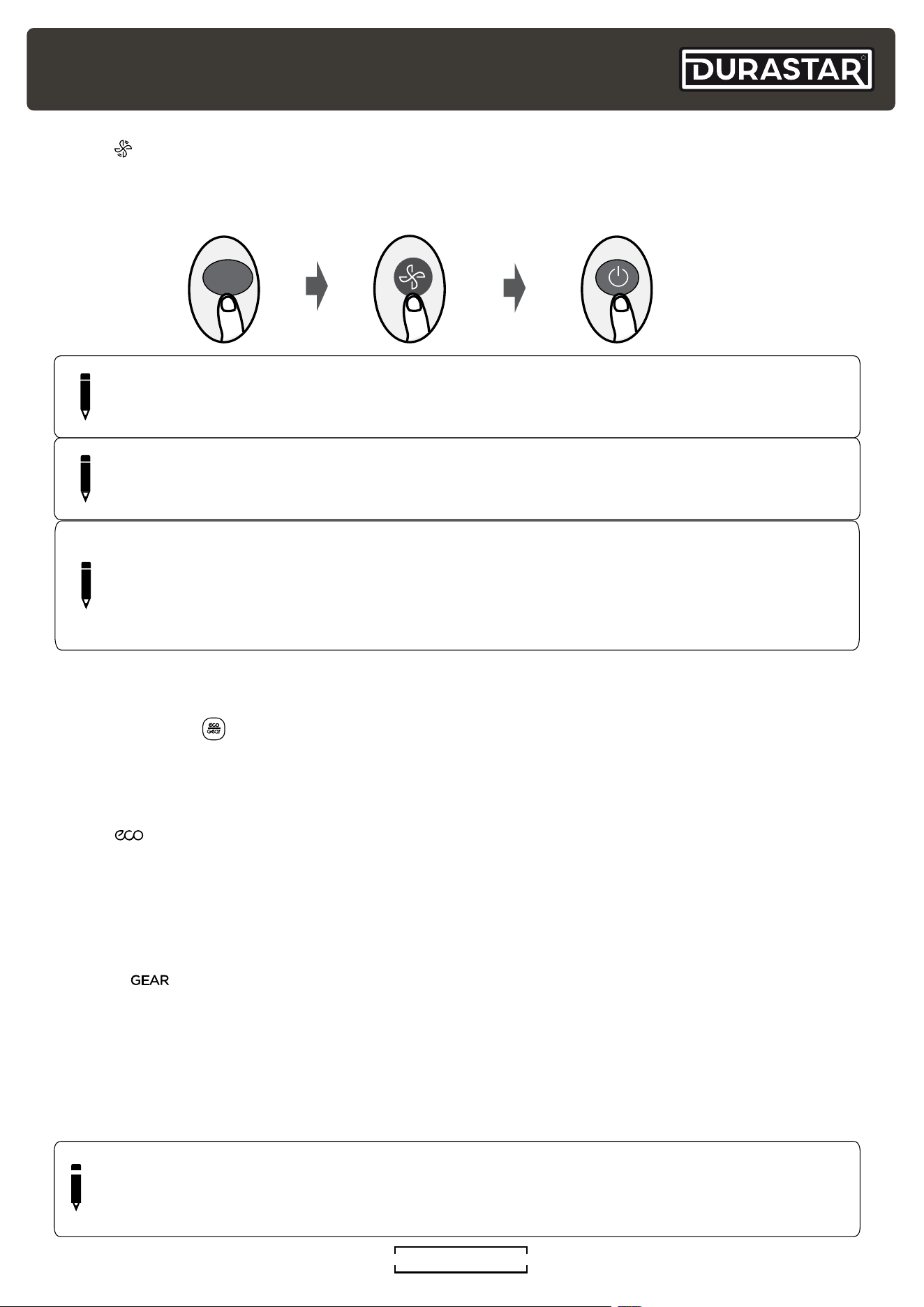
FAN ( )
In FAN mode, the temperature cannot be set and no temperature will be displayed on the remote
screen.
MODE
1. Select FAN mode 3. Turn on air conditioner2. Set fan speed
NOTE
Two or more indoor units can be operated by one outdoor unit. However, two or more
indoor units cannot operate simultaneously when different operating modes have been
selected. If COOL/DRY/FAN is selected with one or more indoor units and HEAT with
another, the unit(s) in HEAT has priority.
NOTE
As outdoor temperature drops, the performance of your unit’s HEAT function may be
affected.
ADVANCED BUTTONS AND FEATURES
ECO/GEAR ( )
The ECO/GEAR feature provides three levels of energy saving options. ECO/GEAR is only
available in COOL mode. Some of these options may result in insufficient cooling in circumstances
of high ambient heat. The ECO/GEAR feature is not available in multiple zone configurations.
ECO ( )
While the unit is in COOL mode, press the ECO/GEAR button once. If the set temperature is
above 75°F (24°C) the FAN speed will be set to AUTO. If the set temperature is below 75°F (24°C)
it will automatically be adjusted to 75°F (24°C) and the FAN speed will be set to AUTO. When
functioning in this mode, the unit can reduce its energy consumption up to 10%. Press the ECO/
GEAR button to turn off this feature.
GEAR ( )
GEAR has two levels - 25% and 50% energy consumption. While the unit is in COOL mode,
press the ECO/GEAR button twice (x2) within two (2) seconds to select 25% or three times (x3)
to select 50%. If the set temperature is above 75°F (24°C) the FAN speed will be set to AUTO. If
the set temperature is below 75°F (24°C) it will automatically be adjusted to 75°F (24°C) and the
FAN speed will be set to AUTO. When functioning in these modes, the unit can reduce its energy
consumption up to 25% or 50%. Press the ECO/GEAR button to turn off this feature.
NOTE
The overall energy consumption of the unit is affected by many factors and this feature's
energy reduction level setting will not result in directly proportional money savings on your
energy bill.
R
DURASTAR.COM14
Set
Temperature
1hr
1hr
Keep
Running
SLEEP Operation
Saves energy during sleep
In HEAT mode, temperature adjusts
(-1°C/2°F) per hour for the first two hours
In COOL mode, temperature adjusts
(+1°C/2°F) per hour for the first two hours
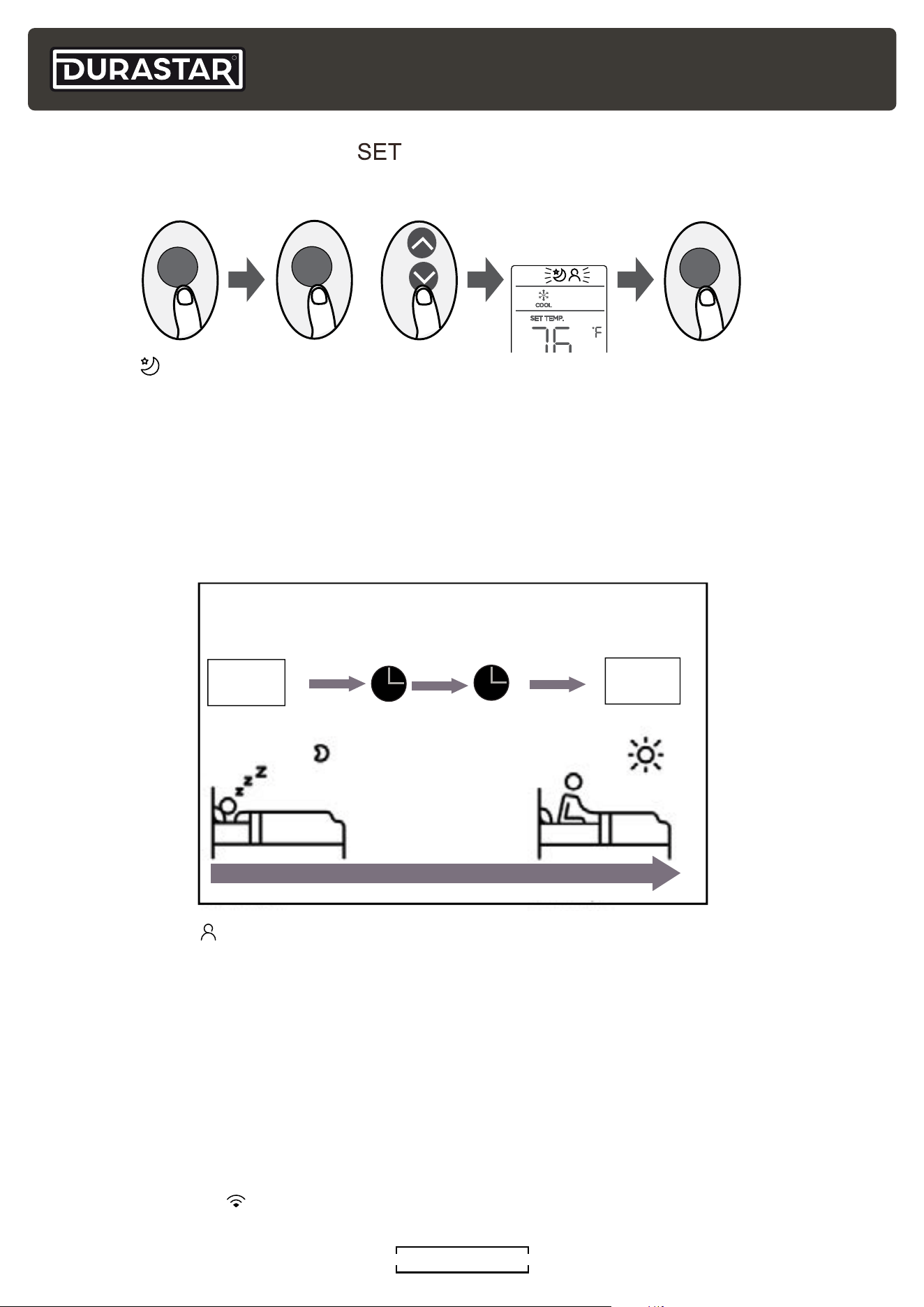
SET BUTTON FEATURES ( )
Press the SET button to open the feature menu at the top of the display. Next, press SET or UP
(
^
) and DOWN (
V
) to highlight the desired feature's icon. Finally, press OK to activate it.
FOLLOW ME ( )
This feature uses the temperature at the remote's location, instead of the indoor unit's location, to
optimize the temperature around you and ensure maximum comfort. To activate the FOLLOW ME
feature, press the SET button, select the FOLLOW ME icon and press OK. To deactivate FOLLOW
ME press ON/OFF or change the MODE.
To lock the FOLLOW ME feature, press and hold the TURBO button for seven (7) seconds. The
remote will display "ON" for three (3) seconds and the temperature at its location. When using
AUTO, COOL, and HEAT modes the air conditioner will continue running until the temperature
at the remote’s location is satisfied. Power failures, pressing ON/OFF or changing MODES will no
longer cancel the feature. Press and hold the TURBO button again for seven (7) seconds to unlock
and turn off this feature. The remote will display "OF" for three (3) seconds.
NETWORK SETUP (
)
This feature is not available on this unit.
SLEEP ( )
The SLEEP feature is designed to decrease energy use while you sleep. The SLEEP feature is not
available in FAN or DRY mode.
When you are ready to go to sleep, press the SET button, select the SLEEP icon and press OK.
When in COOL mode, the unit will increase the temperature by 2°F (1°C) after one hour, and will
increase an additional 2°F (1°C) after another hour. When in HEAT mode, the unit will decrease the
temperature by 2°F (1°C) after one hour, and will decrease an additional 2°F (1°C) after another
hour.
The SLEEP feature will turn off after eight hours and the system will return to normal functioning.
or
SET
SET
OK
R
DURASTAR.COM
15
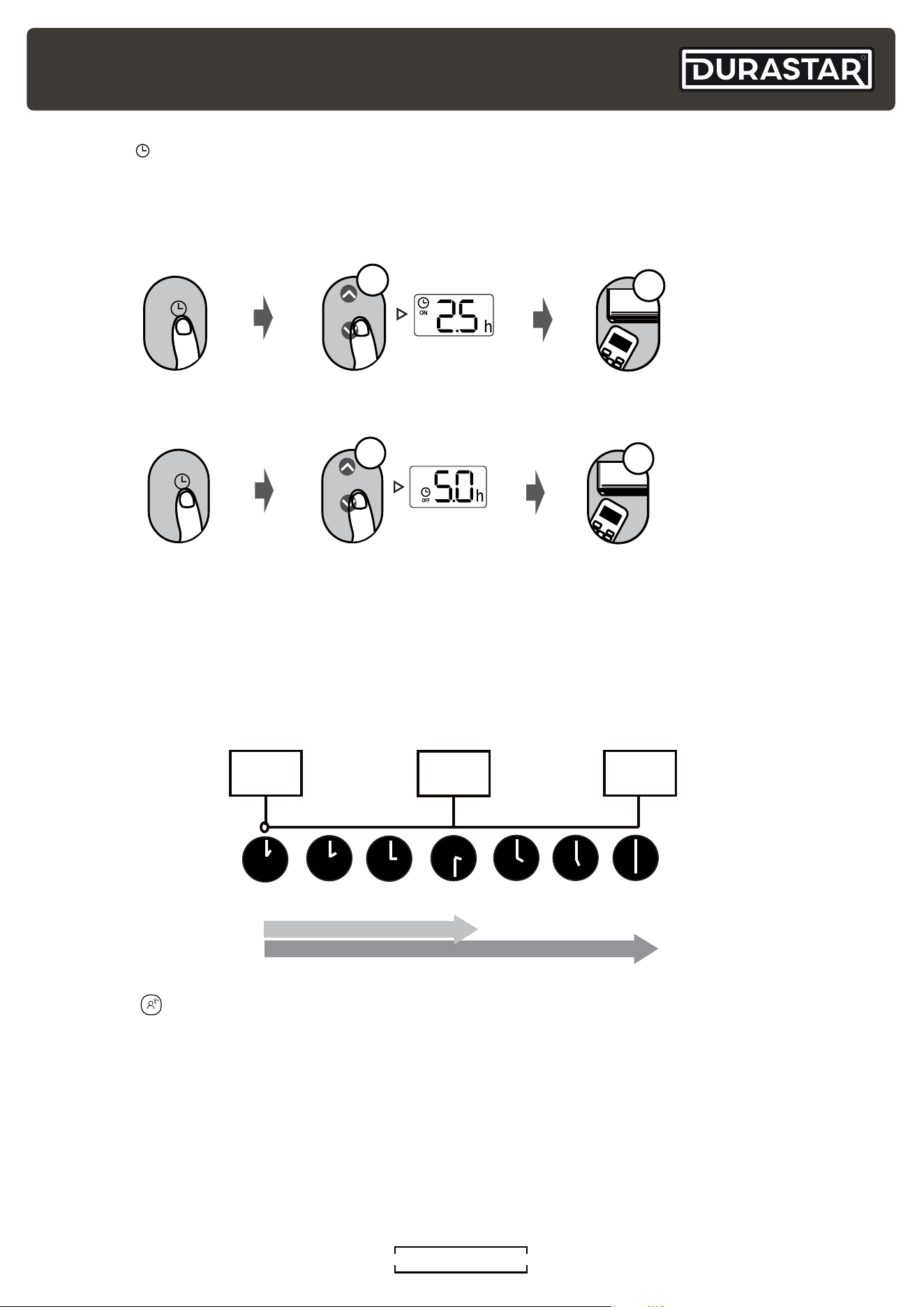
TIMER ON and OFF setting example.
Keep in mind that the time periods you set for both the on and off feature refers to hours after the
current time.
If the current time is 1:00 PM and the TIMER ON setting is adjusted to 2.5 hours, the auto-on time
sequence will turn the air conditioner on 2.5 hours later at 3:30 PM. Setting the TIMER OFF auto-
off sequence to 5.0 hours will turn off the air conditioner 5 hours later at 6:00 PM.
Current Time
1:00PM
2:00PM 3:00PM
4:00PM
5:00PM
6:00PM
Timer starts
Unit turns
ON
Unit turns
OFF
2.5 hours later
5 hours later
3:30PM
TIMER ( )
The TIMER feature establishes the amount of time that will elapse before the unit will
automatically turn on/off.
1. Press TIMER button to initiate
the time ON sequence.
2. Press UP or DOWN button the required
number of times to set the desired
time to turn on the unit.
3. Point remote at unit for 1 second.
The TIMER ON will be activated.
ON/OFF
MOD E
F
AN
SHOR T
CUT
TIMER ON
TIMER OF
F
TEM P
S
L
E
EP
1sec
x5
TIMER
1. Press TIMER button to initiate
the time OFF sequence.
2. Press UP or DOWN button the required
number of times to set the desired
time to turn on the unit.
3. Point remote at unit for 1 second.
The TIMER OFF will be activated.
ON/OFF
MOD E
F
AN
SHOR T
CUT
TIMER ON
TIMER OF
F
TEM P
S
L
E
EP
1
sec
x10
TIMER
GENTLE ( )
If the air flow from the unit becomes uncomfortable because it is too intense or blowing directly on
you, simply press the GENTLE button to slow the unit and divert the air flow away from you. Press
the GENTLE button again to turn this feature off. This feature is only available under COOL, DRY,
and FAN modes. This feature is not available in multiple zone configurations.
R
DURASTAR.COM16
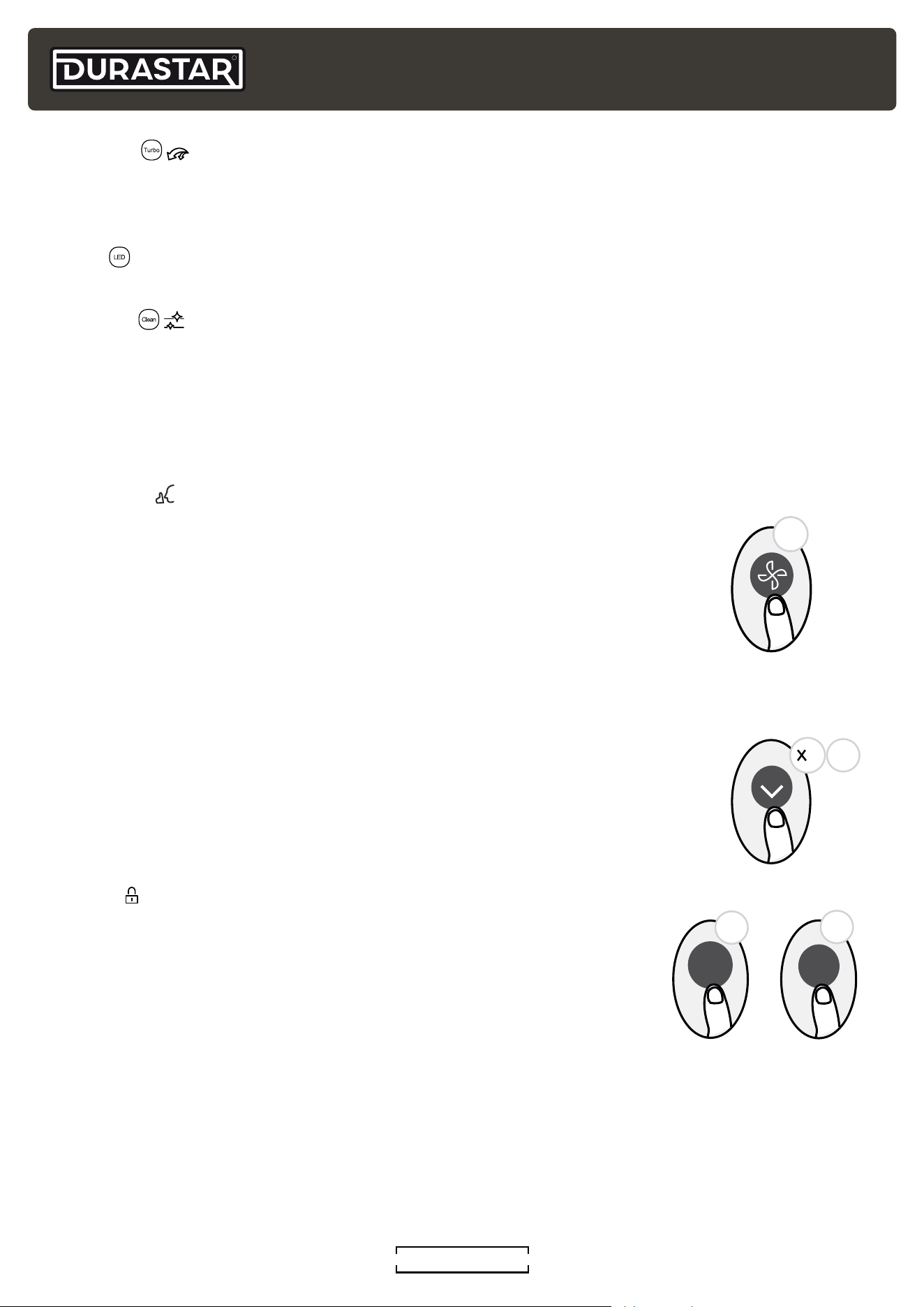
TURBO ( )
Press the TURBO button to turn this feature on and off. The TURBO feature enables the unit to
reach the set temperature in the shortest time by automatically controlling the fan speed. This
feature is only available in COOL and HEAT modes.
LED ( )
Press the LED button to turn on and off the display of the indoor unit.
CLEAN ( )
Airborne bacteria can grow in the moisture that condenses around the heat exchanger in the unit.
With regular use, most of this moisture is evaporated from the unit. By pressing the CLEAN button,
your unit will clean itself automatically. After cleaning, the unit will turn off automatically. Pressing
the CLEAN button mid-cycle will cancel the operation and turn off the unit. You can use CLEAN as
often as you like. You can only activate the CLEAN function in COOL or DRY modes. This feature is
not available in multiple zone configurations.
SILENCE ( )
Press the FAN button for two (2) seconds to turn on and off the SILENCE feature.
When the SILENCE feature is activated, the compressor will slow and the
indoor unit will turn the fan to low. This will reduce the noise of the indoor unit to
the lowest level. Due to the slow operation of the compressor, it may result in
insufficient cooling and heating capacity. This feature is not available in multiple
zone configurations.
FREEZE PROTECTION (FP)
The FREEZE PROTECTION feature sets the indoor temperature to 46°F (8°C). The
unit will maintain this temperature and prevent indoor pipes and household items
from freezing when the house is unoccupied for long periods of time in the winter.
The display will show "FP" when this feature is on.
To activate, first turn the unit to HEAT mode and set the temperature to 60°F
(16°C). Then, press the DOWN (
V
) button twice (x2) in one (1) second to start the
FREEZE PROTECTION feature. Press the ON/OFF button to turn off the feature.
This feature is only available in HEAT mode.
LOCK ( )
The LOCK feature disables the remote's buttons so your settings cannot
be changed. To activate the remote LOCK feature, simultaneously press
the CLEAN and TURBO buttons for five (5) seconds. To turn off the
LOCK feature, simultaneously press CLEAN and TURBO again for five (5)
seconds.
AUTO-RESTART
The AUTO-RESTART feature is enabled when power is interrupted to the unit. After power is
restored, the unit will automatically return to its prior settings before power was lost. No buttons
need to be pressed to set this feature - it is automatic.
REFRIGERANT LEAK DETECTION (EC)
The indoor unit will automatically display “EC” when it detects a refrigerant leak. If a leak is
detected, turn off your unit and contact your dealer or certified technician for service.
This feature is not available in multiple zone configurations
2
1sec
2s
Clean
5s
5s
Turbo
+
R
DURASTAR.COM
17
LOUVERED AIR FLOW
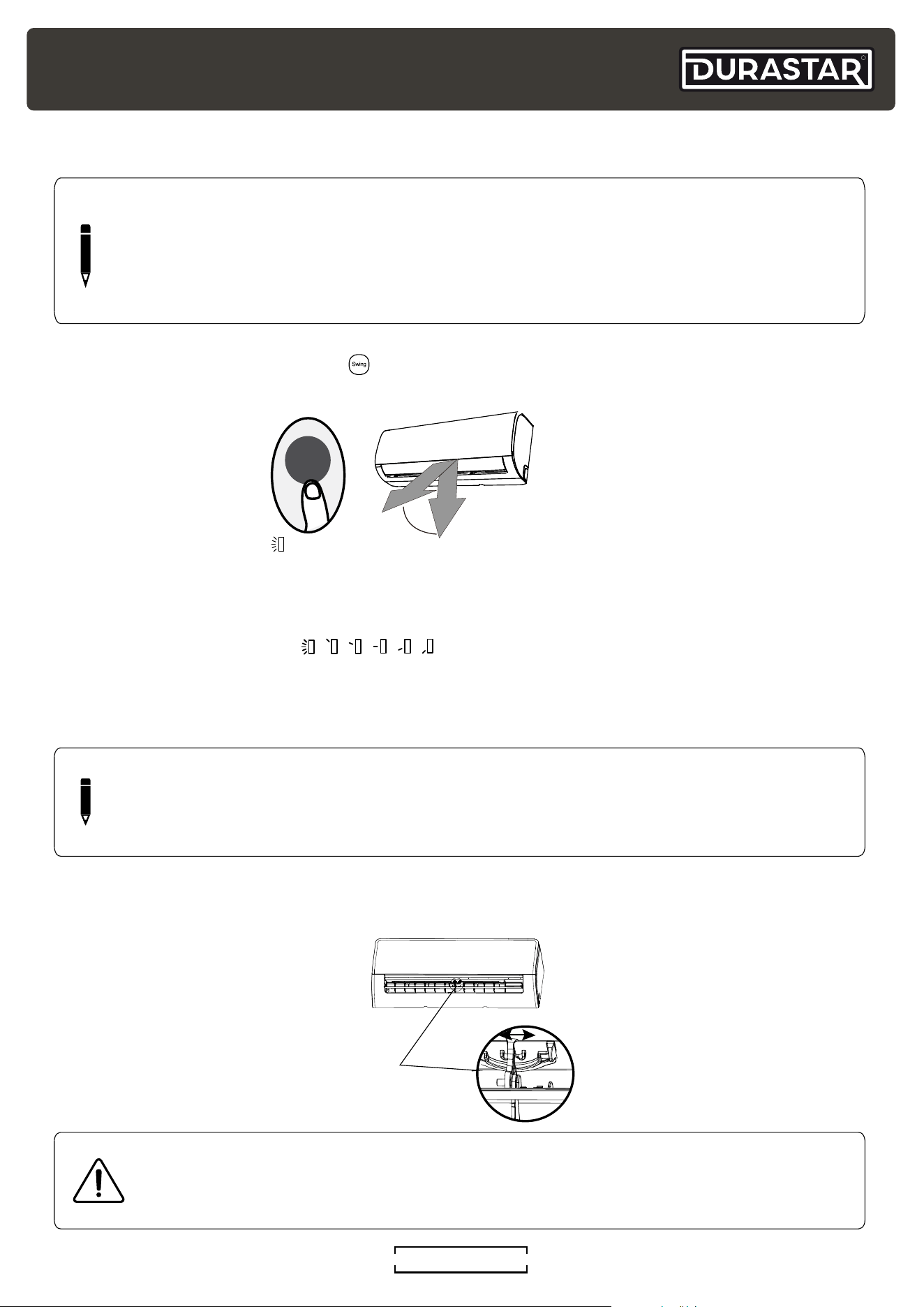
SETTING VERTICAL ANGLE ( )
While the unit is on, press the SWING button on the remote control to set the vertical direction of
airflow.
AUTOMATIC SWING ( )
Press the SWING button once to start the automatic vertical (up and down) movement of the
louver. Press again to make it stop.
FIXED LOUVER ANGLE (
)
Quickly press the SWING button 2-6 times to adjust the fixed angle of the louver. Each press will
adjust the louver by 6°. Press the button until the desired angle is reached. The remote will display
the selected angle.
CAUTION
Do not put your fingers in or near the blower and suction side of the unit. The high-
speed fan inside the unit may cause injury.
NOTE
Do not move louver by hand. This will cause the louver to become out of sync. If this
occurs, turn off the unit and shut off the breaker for 30 seconds, then restart the unit. This
will reset the louver.
SETTING HORIZONTAL ANGLE
The horizontal angle of the airflow must be set manually. Grip the deflector rod and manually
adjust it to your preferred direction.
Deflector
Rod
Range
Swing
NOTE
When using COOL or DRY mode, do not set louver at too vertical an angle for long
periods of time. This can cause water to condense on the louver blade, which will drop on
your floor or furnishings. When using COOL or HEAT mode, setting the louver at too small
an angle can reduce the performance of the unit due to restricted air flow.
R
DURASTAR.COM18
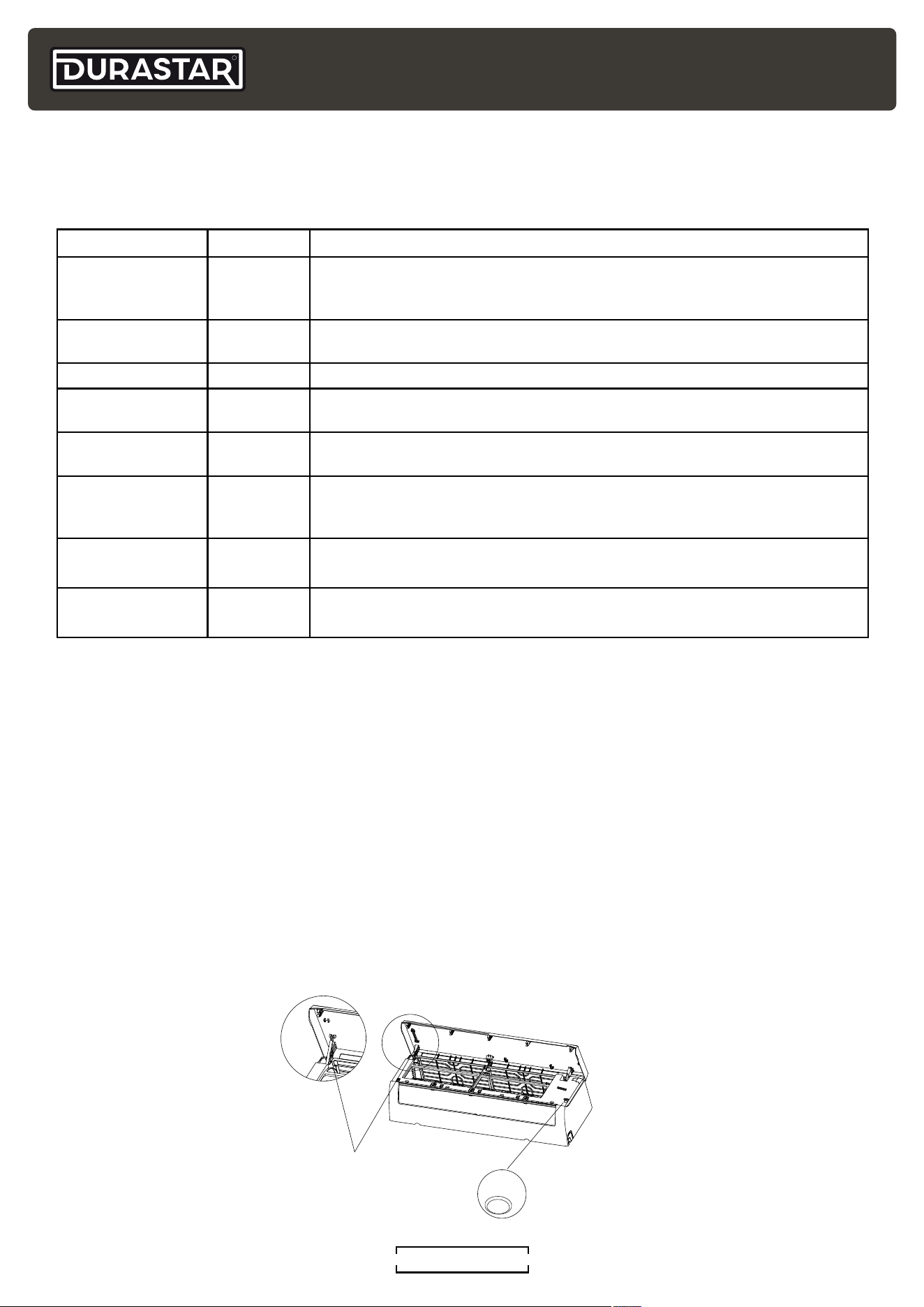
MANUAL OPERATION (USE WITHOUT REMOTE)
The manual override button is intended for testing purposes and emergency operation. Please do
not use this button unless the remote control is lost and it is absolutely necessary. The unit must
be turned off before manual operation.
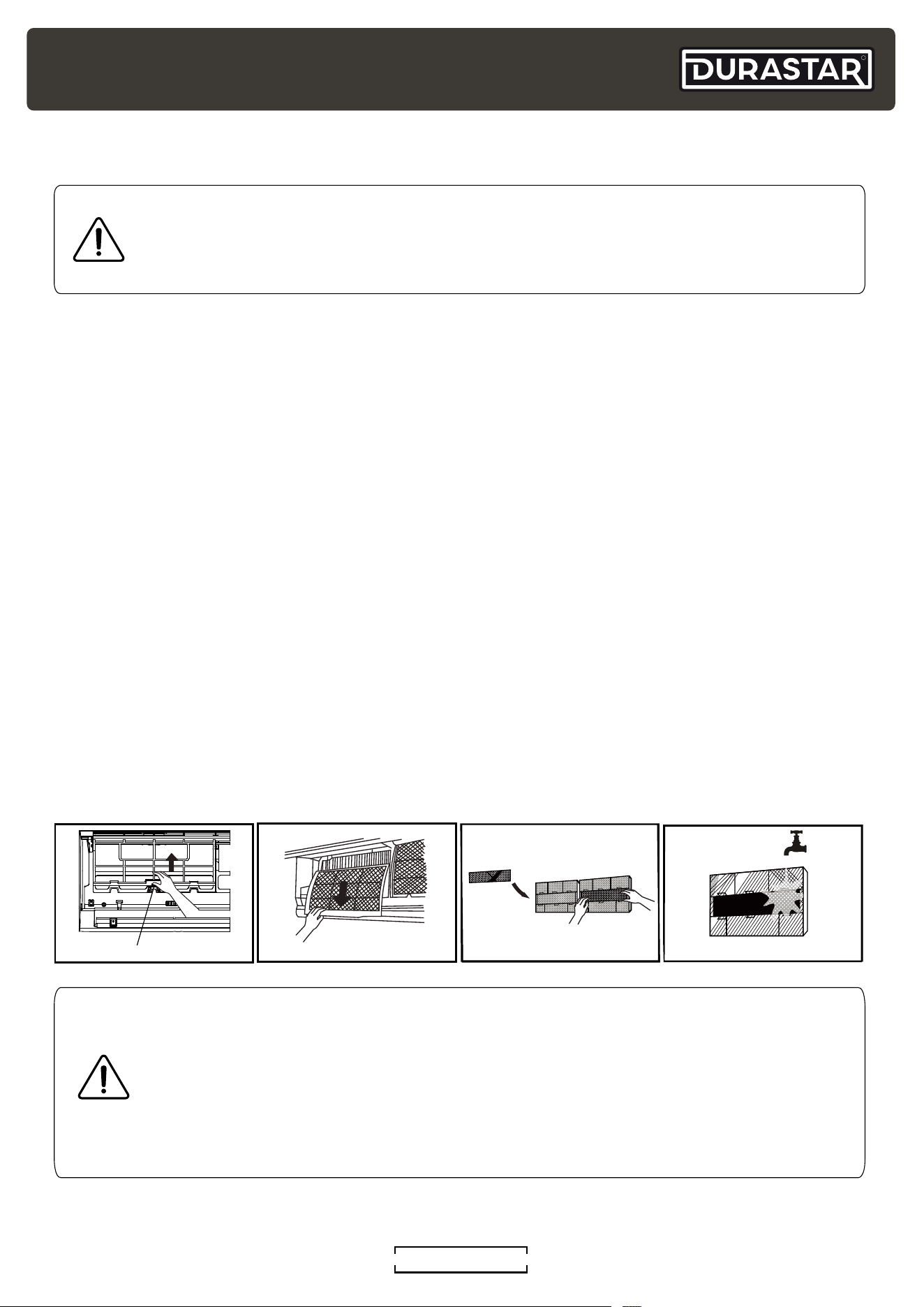
To operate your unit manually:
1. Open the front panel of the indoor unit.
Note: For some units, there is a supporting rod located on the left or right side to prop up the
panel.
2. Locate the MANUAL CONTROL button on the right-hand side of the unit.
3. Press the MANUAL CONTROL button one time to activate FORCED AUTO mode.
4. Press the MANUAL CONTROL button again to activate FORCED COOLING mode.
5. Press the MANUAL CONTROL button a third time to turn the unit off.
6. Release the supporting rod(some units), close the front panel.
LED DISPLAY INDICATORS
The following is a list of possible indicators that may appear on the indoor unit's display. Not all
the display indicators may be available on the unit purchased.
Feature Indicator Notes
TIMER ON, SWING,
TURBO, SILENCE
ON Displays for 3 seconds when the TIMER ON feature is set or the SWING,
TURBO, or SILENCE feature is turned on. If the unit is off, ON will continue to be
shown if the TIMER ON feature is set.
TIMER OFF, SWING,
TURBO, SILENCE
OF Displays for 3 seconds when the TIMER OFF feature is set or the SWING,
TURBO, or SILENCE feature is turned off.
CLEAN CL Displays when the CLEAN feature is on.
FREEZE
PROTECTION
FP Displays when the FREEZE PROTECTION feature is on.
FORCED COOLING FC Displays when the FORCED COOLING mode is selected with the manual
control button. See Manual Operation section.
ANTI-COLD AIR
FLOW
cF The unit is designed not to blow cold air in HEAT mode. When HEAT mode is
selected the unit will display "cF" until the set temperature is reached and the
unit can blow warm air.
DEFROST dF Displays when unit is defrosting. This may last 5-10 minutes depending on the
outdoor temperature and the amount of frost buildup on the outside unit.
REFRIGERANT
LEAK
EC Displays if a refrigerant leak is detected. Turn off your unit and contact your
dealer or certified technician for service.
Manual control
button
Supporting rod
(located on the
left or right,
model dependent )
AUTO/COOL
R
DURASTAR.COM
19
CARE AND MAINTENANCE
CLEANING INDOOR UNIT
• Do not use chemicals or chemically treated cloths to clean the unit.
• Do not use benzene, paint thinner, polishing powder or other solvents to clean the unit. They
can cause the plastic surface to crack or deform.
• Do not use water hotter than 104°F (40°C) to clean the front panel. This can cause the panel to
deform or become discolored.
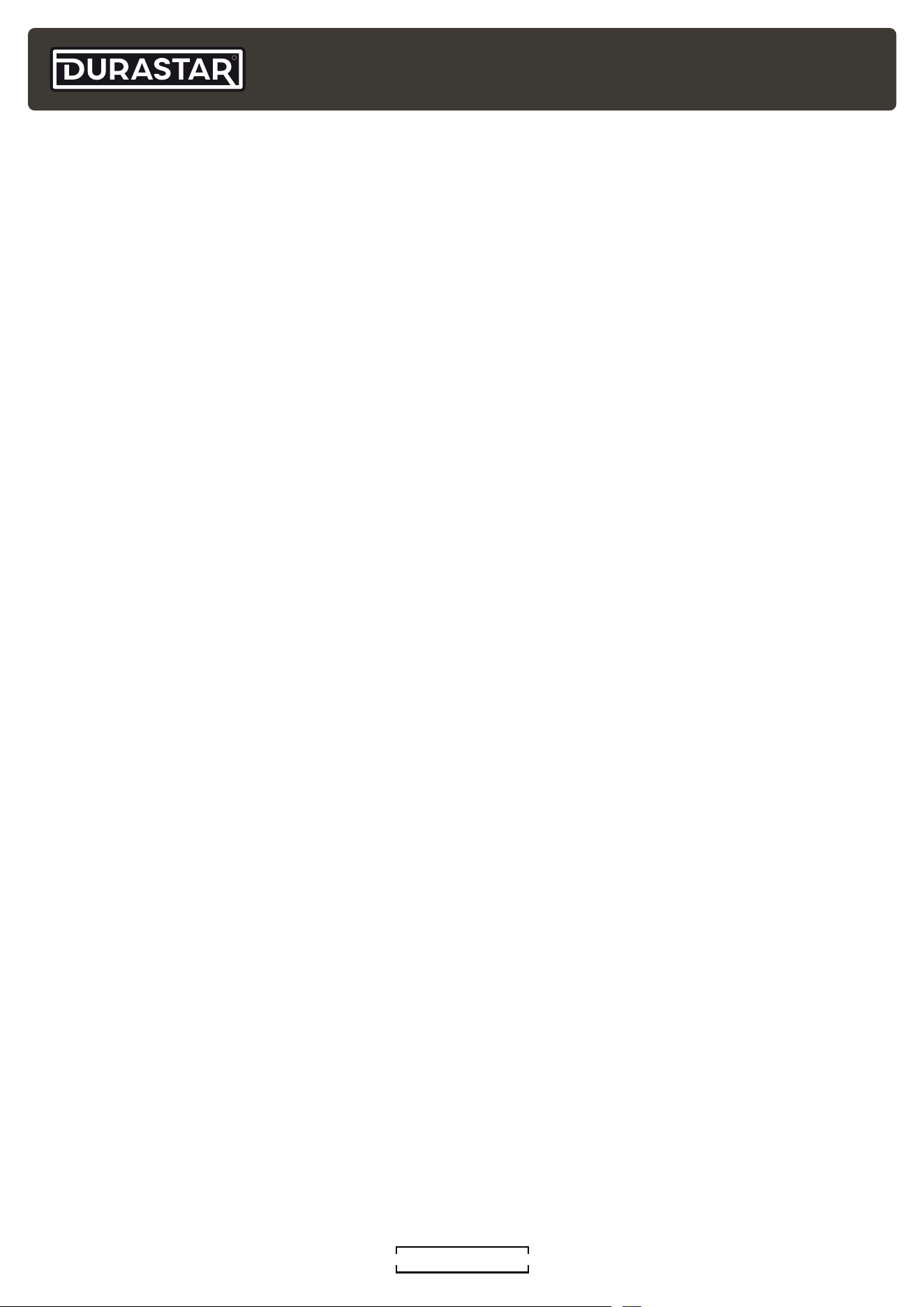
CLEANING THE AIR FILTER
A dirty air filter can reduce the cooling efficiency of your unit, and can also be bad for your health.
Make sure to clean the filter once every two weeks.
1. Lift the front panel of the indoor unit.
2. First press the tab on the end of filter to loosen the buckle, lift it up, then pull it towards yourself
3. Now pull the filter out.
4. If your filter has a small air freshening filter, unclip it from the larger filter. Clean this air
freshening filter with a hand-held vacuum.
5. Clean the large air filter with warm, soapy water. Be sure to use a mild detergent.
6. Rinse the filter with fresh water, then shake off excess water.
7. Dry filter in a cool, dry place, and refrain from exposing it to direct sunlight.
8. When dry, re-clip the air freshening filter to the larger filter, then slide it back into the indoor
unit.
9. Close the front panel of the indoor unit.
Remove accessory filter if
applicable
Filter Tab
CAUTION
• When removing the filter, do not touch the metal parts in the unit. The sharp metal
edges can cut you.
• Do not use water to clean the inside of the indoor unit. This can destroy insulation
and cause electrical shock.
• Do not expose filter to direct sunlight when drying. This can shrink the filter.
CAUTION
• Always turn off the unit and disconnect power before cleaning or maintenance.
• Only use a soft, dry cloth to wipe the unit clean. If the unit is especially dirty, you can
use a cloth soaked in warm water to wipe it clean.
R
DURASTAR.COM20
MAINTENANCE: LONG PERIODS OF NON-USE
If you do not plan to use your air conditioner for an extended period of time, do the following:
• Clean all filters.
• Turn on the FAN until the unit dries out completely.
• Turn off the unit and disconnect the power.
• Remove batteries from remote control.
MAINTENANCE: PRE-SEASON INSPECTION
After long periods of non-use, or before periods of frequent use, do the following:
• Inspect for damaged wires.
• Clean all filters.
• Check for leaks.
• Replace batteries.
• Make sure nothing is blocking any air inlets or outlets.
R
DURASTAR.COM
21
TROUBLESHOOTING
SAFETY PRECAUTIONS
If ANY of the following conditions occur, turn off your unit immediately!
• The power cord is damaged or abnormally warm
• You smell a burning odor
• The unit emits loud or abnormal sounds
• A power fuse blows or the circuit breaker frequently trips
• Water or other objects fall into or out of the unit
DO NOT ATTEMPT TO FIX THESE YOURSELF! CONTACT AN AUTHORIZED SERVICE
PROVIDER IMMEDIATELY!
COMMON ISSUES
The following problems are not malfunctions and in most situations do not require repairs.
ISSUE POSSIBLE CAUSES
Unit does not turn on
when pressing ON/OFF
button
The unit has a 3-minute protection feature that prevents the unit from
overloading. The unit cannot be restarted within three minutes of being
turned off.
The unit changes from
COOL/HEAT mode to
FAN mode
The unit may change its setting to prevent frost from forming on the
unit. Once the temperature increases, the unit will start operating in the
previously selected mode again.
The set temperature has been reached, at which point the unit
turns off the compressor. The unit will continue operating when the
temperature fluctuates again.
The indoor unit emits
white mist
In humid regions, a large temperature difference between the room’s
air and the conditioned air can cause white mist.
Both the indoor and
outdoor units emit
white mist
When the unit restarts in HEAT mode after defrosting, white mist may
be emitted due to moisture generated during the defrosting process.
The indoor unit makes
noises
A rushing air sound may occur when the louver resets its position.
A squeaking sound may occur after running the unit in HEAT mode due
to expansion and contraction of the unit’s plastic parts.
R
DURASTAR.COM22
ISSUE POSSIBLE CAUSES
Both the indoor unit
and outdoor unit make
noises
Low hissing sound during operation: This is normal and is caused by
refrigerant gas flowing through both indoor and outdoor units.
Low hissing sound when the system starts, has just stopped running,
or is defrosting: This noise is normal and is caused by the refrigerant
gas stopping or changing direction.
Squeaking sound: Normal expansion and contraction of plastic and
metal parts caused by temperature changes during operation can
cause squeaking noises.
The outdoor unit
makes noises
The unit will make different sounds based on its current operating
mode.
Dust is emitted from
either the indoor or
outdoor unit
The unit may accumulate dust during extended periods of non-use,
which will be emitted when the unit is turned on. This can be mitigated
by covering the unit during long periods of inactivity.
The unit emits a bad
odor
The unit may absorb odors from the environment (such as furniture,
cooking, cigarettes, etc.) which will be emitted during operations.
The unit’s filters have become moldy and should be cleaned.
The fan of the outdoor
unit does not operate
During operation, the fan speed is controlled to optimize product
operation.
Operation is erratic,
unpredictable, or unit is
unresponsive
Interference from cell phone towers and remote boosters may cause
the unit to malfunction. In this case, try the following:
• Disconnect the power, then reconnect.
• Press ON/OFF button on remote control to restart operation.
NOTE
If problem persists, contact a local dealer or your nearest customer service center.
Provide them with a detailed description of the unit malfunction as well as your model
number.
R
DURASTAR.COM
23
TROUBLESHOOTING
If trouble occurs, please check the following points before contacting a repair company.
PROBLEM POSSIBLE CAUSES SOLUTION
Poor cooling
performance
Temperature setting may be higher
than ambient room temperature.
Lower the temperature setting.
The heat exchanger on the indoor
or outdoor unit is dirty.
Clean the affected heat exchanger.
The air filter is dirty.
Remove the filter and clean it according
to instructions.
The air inlet or outlet of either unit is
blocked.
Turn the unit off, remove the obstruction
and turn it back on.
Doors and windows are open.
Make sure that all doors and windows are
closed while operating the unit.
Excessive heat is generated by
sunlight.
Close windows and curtains during
periods of high heat or bright sunshine.
Low refrigerant due to leak or long-
term use.
Check for leaks, re-seal if necessary and
top off refrigerant.
Too many sources of heat in
the room (people, computers,
electronics, etc.).
Reduce amount of heat sources.
SILENCE function is activated
SILENCE function can lower product
performance by reducing operating
frequency. Turn off SILENCE function.
Poor heating
performance
The outdoor temperature is
extremely low.
Use auxiliary heating device.
Cold air is entering through doors
and windows.
Make sure that all doors and windows are
closed during use.
Low refrigerant due to leak or
long-term use.
Check for leaks, re-seal if necessary
and top off refrigerant.
The unit
starts
and stops
frequently
There’s too much or too little
refrigerant in the system.
Check for leaks and recharge the system
with refrigerant.
Incompressible gas or moisture has
entered the system.
Evacuate and recharge the system with
refrigerant.
The compressor is broken. Replace the compressor.
The voltage is too high or too low. Install a manostat to regulate the voltage.
Indicator
lamps
continue
flashing or
error code
appears
The unit may stop operation or continue to run safely. If the indicator lamps
continue to flash or error codes appear, wait for about 10 minutes. The problem
may resolve itself.
If not, disconnect the power, then connect it again. Turn the unit on.
If the problem persists, disconnect the power and contact your nearest
customer service center.
R
DURASTAR.COM24
PROBLEM POSSIBLE CAUSES SOLUTION
The unit is not
working
Power failure Wait for the power to be restored
The power is turned off Turn on the power
The fuse is burned out Replace the fuse
Remote control batteries are dead Replace the batteries
The unit’s 3-minute protection has
been activated
Wait three minutes after restarting the
unit
Timer is activated Turn timer off
NOTE
If your problem persists after performing the checks and diagnostics above, or an error
code remains, turn off your unit immediately and contact an authorized service center.
R
DURASTAR.COM
25
LIMITED WARRANTY - PARTS
TEN (10) YEARS PARTS
Subject to all of the terms of this Limited Warranty, including, but not limited to, the specific exclusions set
forth below and subject to the Manufacturer’s right to inspect and validate the warranty claim as set forth
below, Manufacturer will repair or replace, at its option, ANY PART of Covered Equipment that is found to
be defective in materials or workmanship. If an exact replacement part is not available, an equivalent part
or credit will be provided.
The parts are warranted for a period of ten (10) years to the original owner of the mini-split equipment
under normal use and service. For a period of ten (10) years from the date of installation, if any parts prove
defective due to improper workmanship and/or material, Durastar with replace any defective part without
charge for the part. Replacement parts carry the balance of the original 10-year parts warranty.
To qualify:
• The mini-split equipment must be installed in a residential single-family home.*
• The original mini-split equipment owner must reside in the single-family home.
• The mini-split equipment must be properly installed. This includes installation by a contractor licensed
for HVAC installation following all local and state laws.
• Any part to be replaced must be made available in exchange for the replacement.
*Single-family home is defined as any single-family dwelling, which includes apartments, condominiums,
duplexes, and homes.
EFFECTIVE DATE OF WARRANTY
The Effective Date of warranty coverage is determined as follows: (a) If the original installation date can
be verified by the installer’s invoice then the Effective Date of warranty coverage is the original installation
date as shown on the installer’s invoice. For residential new construction installations, the final occupancy
permit, or proof of purchase from the builder can be substituted for the installer’s invoice. (b) if the original
installation date cannot be verified by the installer’s invoice, or proof of purchase from the builder in
residential new construction applications, then the Effective Date of warranty coverage is the Covered
Equipment’s manufacture date (as verified by the product’s serial number) plus ninety (90) days.
There is NO LABOR component provided with this warranty. This Limited Warranty does NOT cover any
labor costs or expenses for service, NOR for removing or reinstalling parts. You are responsible for all labor
costs or expenses, unless a labor service agreement exists between you and your contractor.
This Limited Warranty does NOT cover shipping costs. You are responsible for the cost of shipping
warranty replacement parts from our factory to the Manufacturer’s distributor and from the distributor
to the location of your Covered Equipment. You also are responsible for the cost of shipping failed parts
to the distributor and for incidental costs incurred locally, including handling charges. (If in Alaska, Hawaii
or Canada, you also must pay the shipping costs of returning the failed part to the port of entry into the
continental United States.)
EXCLUSIONS
In addition to the other exclusions identified in this Limited Warranty, this Limited Warranty excludes:
• Damages, malfunctions, or failures resulting from failure to properly install, operate, or maintain
Covered Equipment in accordance with the Manufacturer’s instructions.
• Damages, malfunctions, or failures resulting from misuse, accident, contaminated, or corrosive
atmosphere, vandalism, freight damage, fire, flood, freeze, lightning, acts of war, acts of God and the
like.
• Parts installed with Covered Equipment or used in connection with normal maintenance, such as
cleaning or replacing air filters, refrigerant, thermostats, tubing, or concrete pads.
• Covered Equipment that is not installed in the United States.
R
DURASTAR.COM26
• Covered Equipment that is not installed by a qualified, trained HVAC professional in accordance with
applicable codes, ordinances, and good trade practices.
• Damages, malfunctions, or failures resulting from the use of any attachment, accessory, or component
not authorized by the Manufacturer or resulting from alteration or modification of the unit.
• Covered Equipment moved from the original installation location.
• Covered Equipment when operated with system components (indoor unit, outdoor unit, coil,
and refrigerant control devices) or accessories which do not match or meet the specifications
recommended by the Manufacturer.
• Any Covered Equipment manufactured that has been sold to the consumer via the Internet or auction
website, and has not been installed by a trained, qualified HVAC professional.
• Covered Equipment that is not part of a properly matched system as specified by the Air Conditioning,
Heating & Refrigeration Institute (AHRI).
COMMERCIAL WARRANTY
Installations in commercial applications carry a FIVE (5) YEAR PARTS warranty following the other
provisions in this Limited Warranty.
OBTAINING WARRANTY SERVICE
If you believe your product is defective, contact the licensed contractor who installed your mini-split
system. Alternatively, contact a licensed contractor, dealer, or distributor.
Durastar Customer Support is available for troubleshooting assistance. Before contacting Customer
Support, please locate your model number, serial number, and proof of purchase. These items will be
required to complete any warranty service. A Durastar authorized representative will verify warranty
eligibility and determine appropriate service options. Service will be provided during normal business days
and hours.
THIS WARRANTY IS IN LIEU OF ANY OTHER WARRANTY, EXPRESS OR IMPLIED, INCLUDING WITHOUT
LIMITATION, ANY WARRANTY OF MERCHANTABILITY OR FITNESS FOR A PARTICULAR PURPOSE.
TO THE EXTENT ANY IMPLIED WARRANTY IS REQUIRED BY LAW, IT IS LIMITED IN DURATION TO THE
EXPRESS WARRANTY PERIOD ABOVE. NEITHER THE MANUFACTURER NOR ITS DISTRIBUTORS SHALL
BE LIABLE FOR ANY INCIDENTAL, CONSEQUENTIAL, INDIRECT, SPECIAL, OR PUNITIVE DAMAGES
OF ANY NATURE, INCLUDING WITHOUT LIMITATION, LOST REVENUES OR PROFITS, OR ANY OTHER
DAMAGE WHETHER BASED IN CONTRACT, TORT, OR OTHERWISE. IN NO EVENT AND UNDER NO
CIRCUMSTANCE OF ANY TYPE OR KIND SHALL THE SELLER, MANUFACTURER AND/OR DISTRIBUTOR
BE LIABLE FOR ANY REASON, UNDER ANY THEORY, FOR MORE THAN THE BASIC COST OF THE
PRODUCT TO THE PURCHASER OR END USER. SOME STATES DO NOT ALLOW THE EXCLUSION OF
INCIDENTAL OR CONSEQUENTIAL DAMAGES, SO THE ABOVE EXCLUSION MAY NOT
APPLY TO YOU. THIS WARRANTY GIVES YOU SPECIFIC LEGAL RIGHTS. YOU MAY HAVE OTHER RIGHTS
THAT VARY FROM STATE TO STATE.
R
DURASTAR.COM
27
THIS PAGE INTENTIONALLY LEFT BLANK.
R
DURASTAR.COM28
©2023 Durastar
V5.0 09.14.2023
THIS PAGE INTENTIONALLY LEFT BLANK.