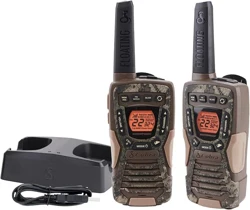
OWNERS MANUAL
TWO-WAY RADIO MODEL
PX280
Staying in touch is convenient and easy when using your radio. Some of
the many uses you will discover include:
Communicating with others while hiking, biking, and working; keeping track of
family and friends at a crowded public event; checking with travel companions;
connecting with neighbors; arranging meeting spots with others while
shopping at the mall; talking with your colleagues in warehouse or jobsite.
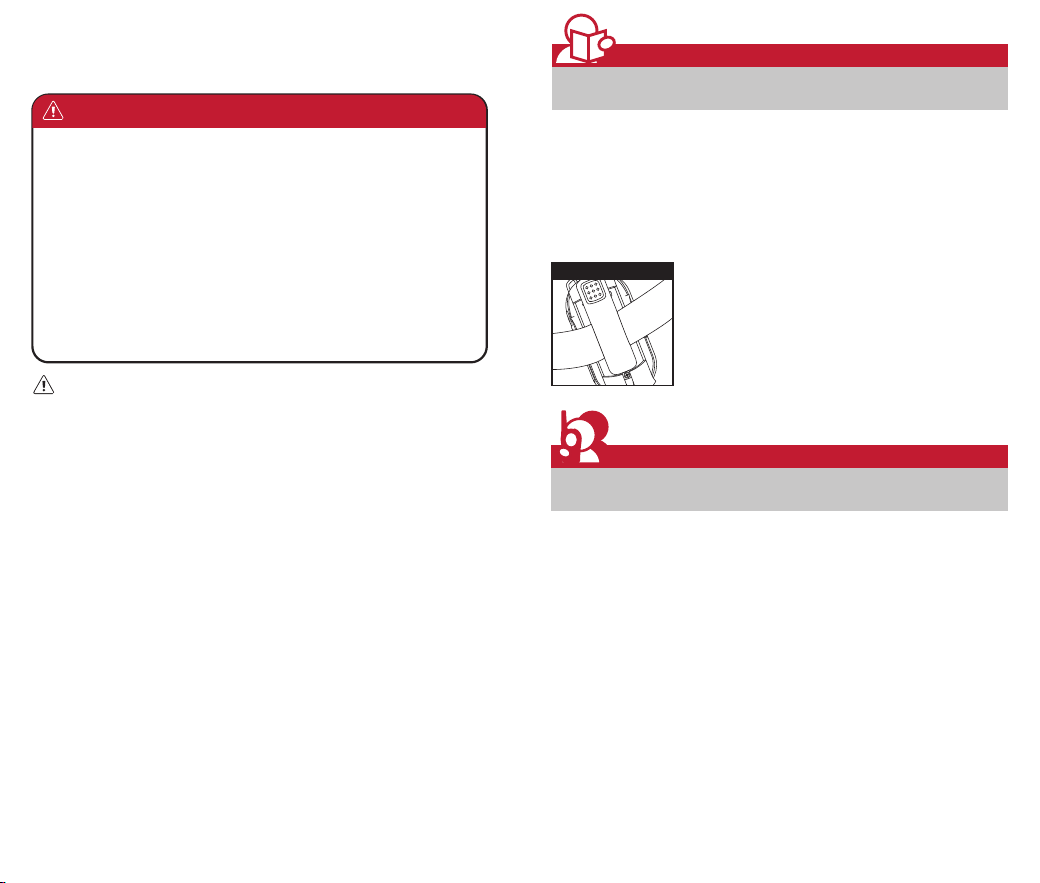
Secure your radio while on the go.
Carrying your radio with you is easy when using the
holster.
The holster easily attaches to your belt, purse, or
backpack.
Introduction
Making Life Easier and Safer
Customer Assistance
Product Service & Support
Holster
1 2
WARNING: Important Safety Instructions for Battery
Read All Instructions
• Do not incinerate the battery even if it is severely damaged or is completely worn
out.
• Do not discard battery in a fire. The battery pack can explode in a fire.
• Do not replace battery in any area labeled “Hazardous Atmosphere”. Any sparks
created in a potentially explosive atmosphere can cause an explosion or fire.
• Do not disassemble, crush, puncture, shred, or otherwise attempt to change the
form of your battery.
• Do not dry a wet or damp battery with an appliance or heat source, such as a hair
dryer or microwave oven.
• A small leakage of liquid from the battery cells may occur under extreme usage or
temperature conditions. This does not indicate a failure. Do not open, deform or
mutilate the battery as there may be corrosive materials which can cause damage
to eyes or skin and may be toxic if swallowed.
However, if the outer seal is broken and this leakage gets on your skin:
a. Wash quickly with soap and water.
b. Neutralize with a mild acid such as lemon juice or vinegar.
c. If battery liquid gets into your eyes, flush them with clean water for a minimum of
10 minutes and seek immediate medical attention.
This product uses Lithium Polymer Battery. Do not transport package if damaged, a
fire hazard could exist.
Recycle Battery
Local, state or federal laws may prohibit disposal of batteries in ordinary trash.
Consult your local waste authority for information regarding available recycling
and/or disposal options.
1. Only accessories included in this package or specified by the manufacturer
should be used with the radio. The 5V micro-USB charging input is compatible
with most high quality micro-USB chargers that fully conform to the USB
standards.
2. Do not use cleaners or solvents to clean the exterior of the radio. Use only a
damp or dry cloth.
3. Do not expose this product to splashing or dripping water.
4. Do not attempt to service the receiver yourself. Removing the cover will void
the warranty. Changes or modifications not expressly approved by Cobra may
void the user’s authority granted by the FCC to operate this device and should
not be made.
5. Do not plug the wall adaptor into the power outlet if the outlet is wet.
6. Do not use any portable radio that has a damaged antenna. If a damaged
antenna comes into contact with your skin, a minor burn can result.
WARNING: Important Safety Instructions
Before operating the radio, please read all safety and
operating instructions. Save all instructions in a safe place
for future reference.
©2025 Cobra Electronics Corporation
www.cobra.com
In this user’s guide, you should find all the information you need to operate
your Cobra radio. If you require further assistance after reading this guide,
Cobra offers the following customer assistance services:
For Assistance In The U.S.A.
For any questions about operating or installing this new Cobra product, PLEASE
CONTACT COBRA FIRST… do not return this product to the retail store. The
contact information for Cobra will vary depending on the country in which you
purchased and uses the product. For the latest contact information, please go
to www.cobra.com/support or call 1-800-543-1608.
If your product should require factory service, please go to
www.cobra.com/support and follow the instructions.
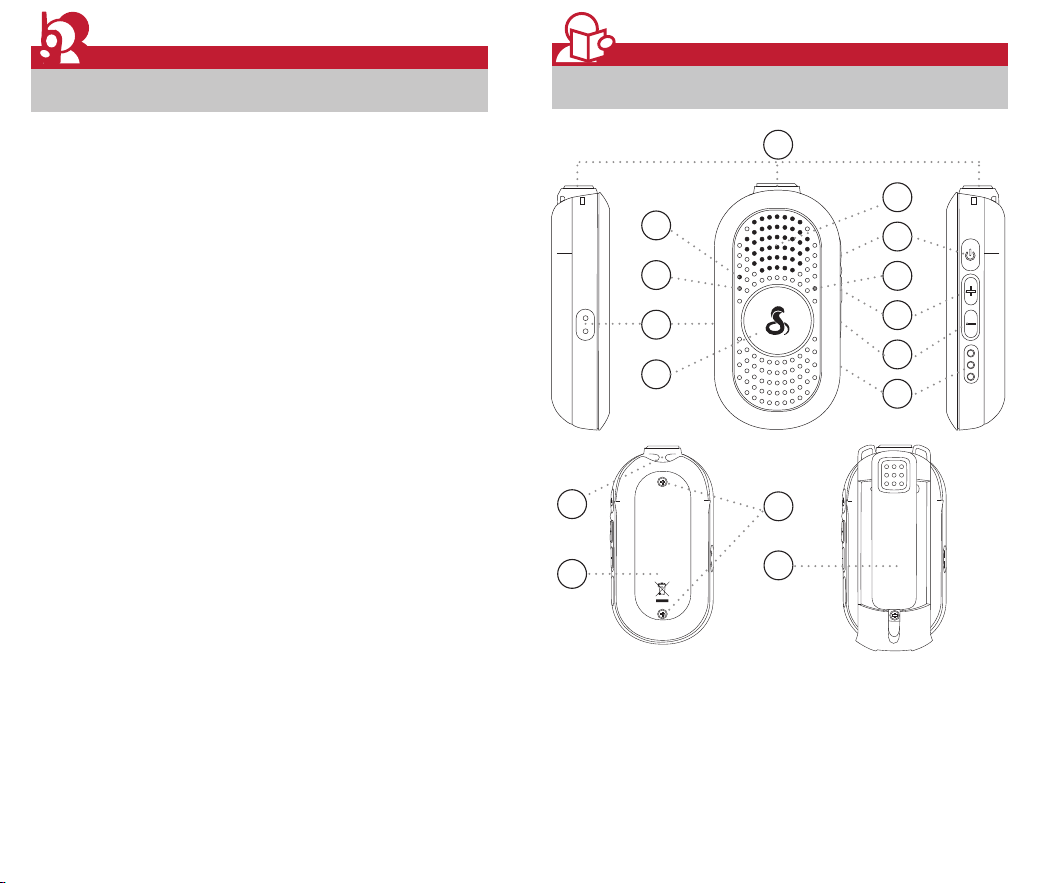
1. External Speaker/
Microphone Jack
2. Microphone
3. LED Indicator
4. Function Button
5. Push-to-Talk Button
6. Speaker
7. Power / Menu Button
8. VOX Indicator (Blue LED)
9. Up / (+) Button
10. Down / (-) Button
11. Charging Contacts
12. Lanyard Connection
13. Battery Compartment Cover
14. Battery Door Screws
15. Holster with Swivel Clip
1
14
15
13
2
6
7
8
9
10
11
3
4
5
12
3 4
Introduction
Product Features
Customer Assistance
Operational Cautions
Exposure to high volume sound levels may cause temporary or permanent
damage to your hearing. Although there is no single volume setting that is
appropriate for everyone, you should always use your radio with the volume set
at low level and avoid prolonged exposure to high volume sound levels.
1. Set the volume control in a low position and use as low a volume as
possible.
2. Avoid turning up the volume to block out noisy surroundings. Whenever
possible, use your radio in a quiet environment with low background noise.
3. Limit the amount of time you use headsets or earpiece at high volume
levels.
4. When using the radio without a headset or earpiece, do not place the radio’s
speaker directly against your ear.
5. Observe all signs and instructions that require an electrical device or RF
radio product to be switched off in designated areas, such as gas/refueling
stations, hospitals, blasting areas, potentially explosive atmospheres, or
aircraft.
6. If you experience a skin irritation after using this product, discontinue use
and seek medical attention.
7. If the product or charger: overheats; has a damaged cord or plug; has been
dropped or damaged; has been dropped into water, disconnect any charger
from its power supply, discontinue use of the product.
Electromagnetic Interference
Nearly every electronic device is susceptible to electromagnetic interference
(EMI) if inadequately shielded, designed, or otherwise configured for
electromagnetic compatibility. Turn off your radio in any facility where posted
notices instruct you to do so. These facilities may include hospitals or health
care facilities that may be using equipment that is sensitive to external RF
energy.
• When instructed to do so, turn off your radios when on board an aircraft. Any
use of a RF device must be in accordance with applicable laws, regulations
and airline crew instructions.
• Some radios may interfere with some hearing aids. In the event of such
interference, you may want to consult your hearing aid manufacturer or
physician to discuss alternatives.
• If you use any other personal medical device, consult the manufacturer of
your device to determine if it is adequately shielded from RF energy. Your
doctor or physician may be able to assist you in obtaining this information.
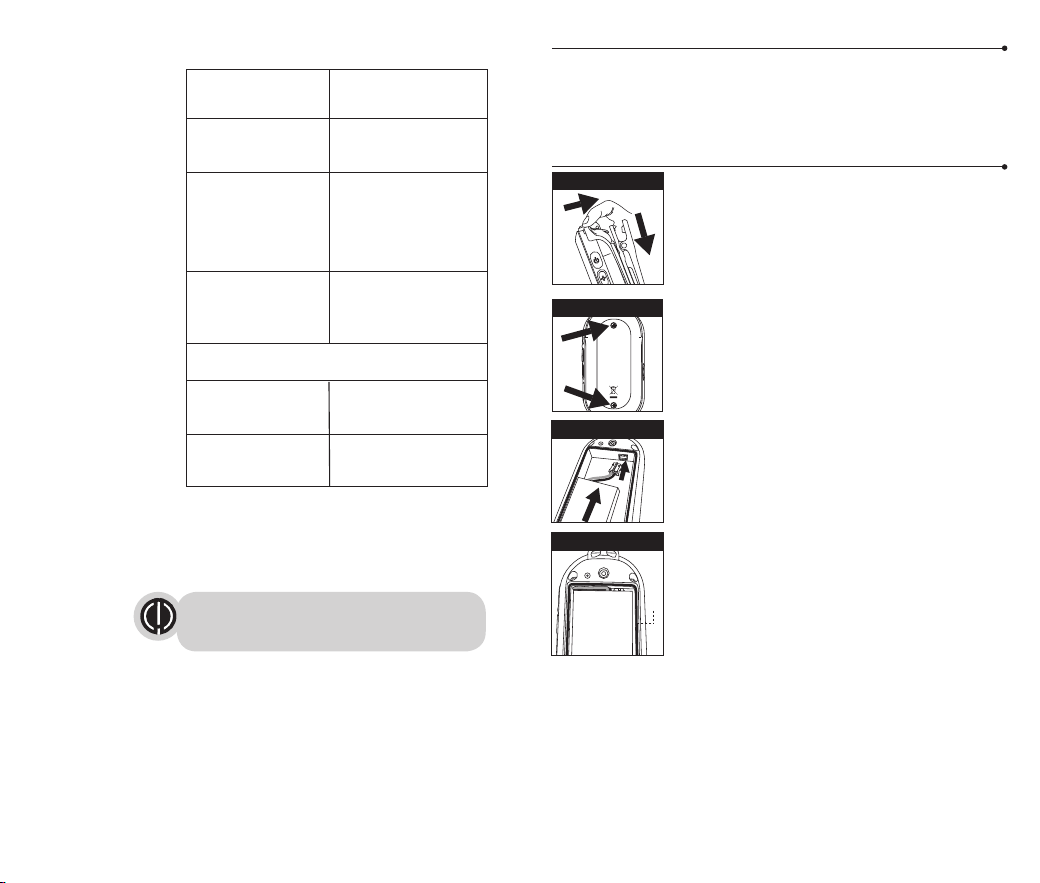
Standby Mode
When Battery low
When you press and
hold Talk button and
the Radio is
transmitting
During VOX feature
enabled
Power Off the Radio during charging
While Charging
Fully Charged
LED indicators
5
Caring for Your Cobra Radio
Your Cobra radio will give you years of trouble-free service if cared for
properly. Handle the radio gently. Keep the radio away from dust. Never put
the radio in water or in a damp place. Avoid exposure to extreme
temperatures.
Installing Batteries (Battery already pre-installed)
To install or replace batteries:
1. Remove Holster by releasing the belt clip latch and
slide the holster downward.
2. Unscrew 2 screws at battery door with a proper
screwdriver, you may use a Philips* Head #1
screwdriver to open it.
3. Open the battery compartment cover, connect the
connector of the battery to the socket of the radio
inside the battery compartment in proper polarity.
4. Place the battery inside battery compartment and
align the wires as shown.
(Note: Carefully tuck the wires into the battery
compartment completely. Anything obstructing the
O-ring seal can damage the radio)
5. Place the battery compartment cover, screw down the
screws mildly.
(Screw nuts may be damaged if overtightened)
6. Re-attach the holster.
6
Maximum range may vary and is based on unobstructed
line-of-sight communication under ideal conditions.
Remove Screws
1
2
Remove Holster
Features
• 22 Channels with
Preset privacy
codes
• User Adjustable
Privacy Codes (38
CTCSS codes)
• Hands-Free
Operation (VOX)
• Speaker/
Microphone Jack
• Roger Beep
Selectable On/Off
• Battery/Power
Saver
• Keystroke Tones
• Low Battery
Audible Alert
• Auto Squelch
• Holster with Swivel
Clip
• IP54 Dust
Protected and
Water Resistant
O-ring
Wires Alignment
1
2
Battery Connector
Green LED flashes
every 5 seconds
Red LED flashes every
5 seconds
Solid Green LED on
Solid Green and Blue
LED
Solid Red (No flash) on
the desktop charger
Solid Green (No flash)
on the desktop charger
Operation
Using Your Radio
7 8
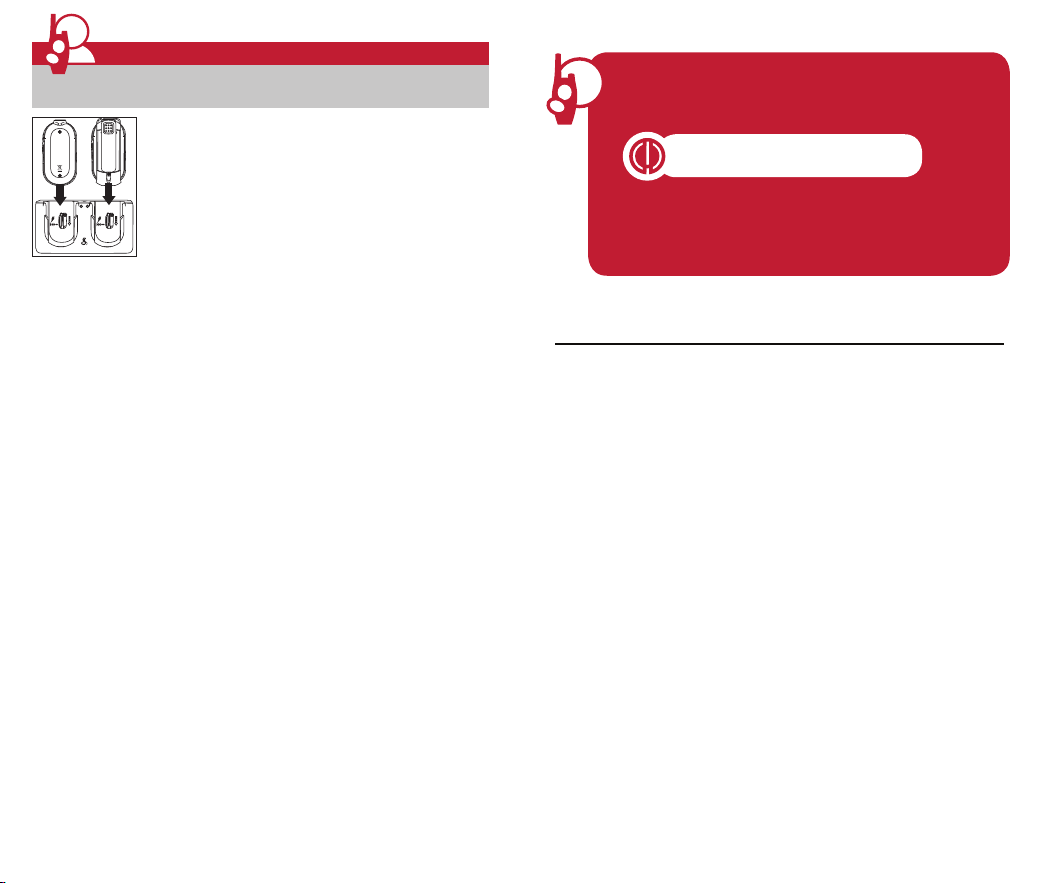
For charging Cobra radio(s) in desktop charger:
1. Check to see that the batteries have been inserted
properly.
2. Insert radio(s) into desktop charger as shown. The
desktop charger can charge the radio(s) with or without
holster attached.
3. Insert the micro-USB cable into jack on bottom of
charger.
4. Plug the cable into USB-compatible power outlet. The
power outlet should be near the equipment and shall be
easily accessible.
If charging light is not on, check position of radio. Radio should be inserted
completely. The charge indicator light on desktop charger will stay on (Red) as
long as the radio is in the charging well, and the light will change to Green
when the charging is complete.
Cobra recommends your radio be turned off while being charged.
Note: If the charging LED still is OFF when the radio inserted completely:
1. Check if there is output from power source first and make sure the radio has
its battery inserted correctly.
2. Check for contact contamination or corrosion:
• Remove the radio from the charger.
• Inspect the charging contacts on radio for contamination or corrosion.
Clean the charging contacts using a dry cloth.
• Inspect the charging contacts in the charger pocket for contamination or
corrosion. If contamination or corrosion are found, remove power from
the charger and clean the charging contacts using a dry cloth.
3. Try replacing the battery. If the fault no longer exists, then take the faulty
battery out of service.
Getting Started
Quick Start
1. Press and hold the Power/Menu button to turn on your radio.
2. Select a desired channel. (Details please refer P.9)
3. Press and hold the Talk button while speaking into the
microphone.
4. When finished talking, release the Talk button and listen for a
response.
Both radios must be tuned to the same
channel/privacy code to communicate.
Water Resistant
This radio is water resistant to IP54 standards. It is dust / splashproof from any
direction. The radio is resistant to water and rain splashes only when the
battery cover and headset accessory ports are sealed. Open the battery
compartment door cover only when the radio is dry. Use of a headset
accessory should be in dry environments only. The micro-USB cable and plug
are not waterproof. Do not expose the charger to rain or snow. Charge the
radios only in a dry location. The battery door must be tightly closed with the
screw to maintain the weatherproof seal of the radio.
Listening for a Response
Release the Talk button to receive incoming
transmissions. Your Cobra radio is always in Standby
mode while the Talk buttons are not pressed.
To Adjust Volume
Press the Up or Down button to increase or decrease the
volume. There are 13 different volume levels.
Do not hold the radio close to your ear. If the volume is
set to a high level, it could hurt your ear.
Auto Squelch/Maximum Range
Your Cobra radio will automatically shut off weak transmissions and unwanted
noise due to terrain and conditions limit.
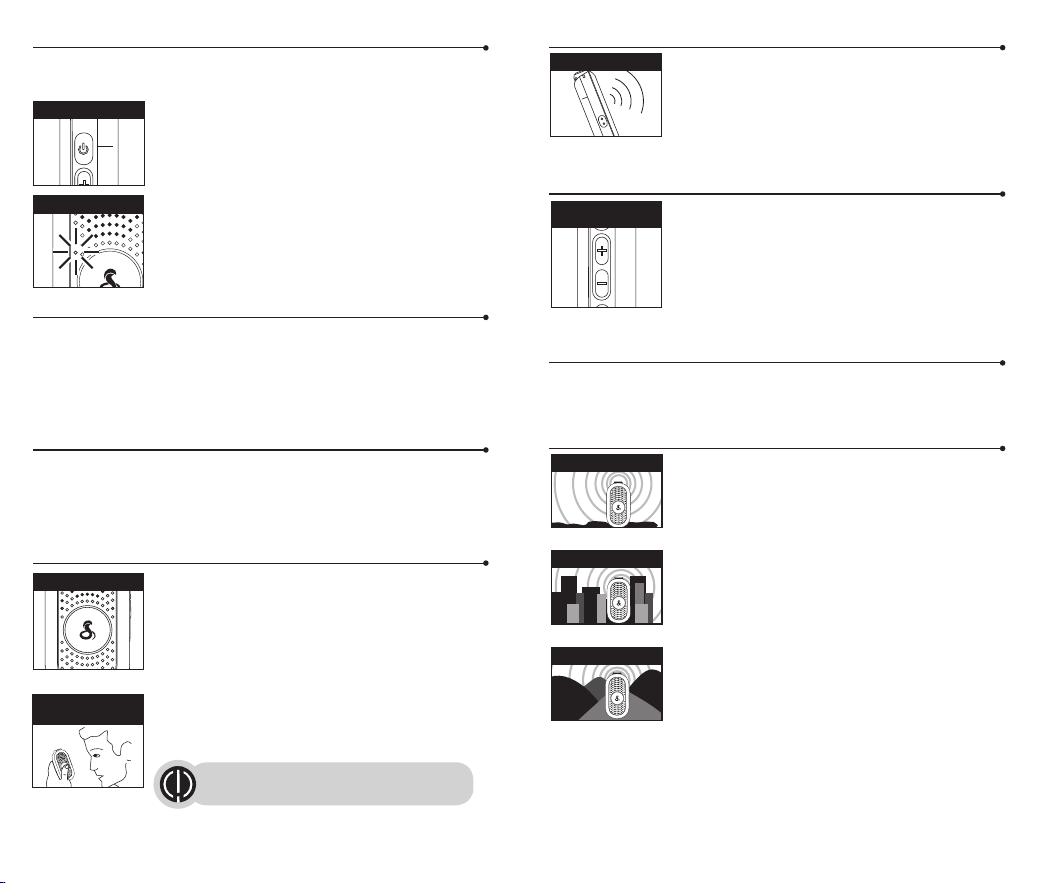
Range Considerations
Your range will vary depending on terrain and conditions.
In flat, open country your radio will operate at maximum
range.
Buildings and foliage in the path of the signal can reduce
the range of the radio.
Dense foliage and hilly terrain will further reduce the
range of the radio.
On Channels 8 through 14, your radio automatically
switches to low power, which will limit its range.
Turning On your Radio
Press and hold the Power/Menu button until you hear a series of audible tones
indicating the radio is on.
1.
After the radio chirps, the current channel number and
user adjusted privacy code setting (if any) is announced.
Your Cobra radio is now in Standby mode, ready to
receive transmissions. The radio is always in Standby
mode except when the Talk or Power/Menu buttons
are pressed.
2. In Standby mode, Green LED flashes every 5 seconds.
Battery Low
When battery power is low, Red LED flashes every 5 seconds. Voice prompt
"Please charge" will be heard approximately 30 minutes before device
automatically powers off. Your batteries should be recharged. It normally takes
about 6 hours to fully charge batteries.
Auto Battery Save
If there are no transmissions within 10 seconds, the radio will automatically
switch to Battery Save mode. This will not affect the radio’s ability to receive
incoming transmissions.
Communicating with Another Person
1. Press and hold the Talk button.
2. With the microphone about two inches (5 cm) from
your mouth, speak in a normal voice.
3. Release the Talk button when you finished talking and
listen for a response.
You cannot receive incoming calls while pressing the
Talk button.
9 10
Power/Menu button
Up(+)/Down(-)
Buttons
Two Inches
from Mouth
Listening
Maximum Range
Reduced Range
Reduced Range
Talk Button
Both radios must be tuned to the same
channel/privacy code to communicate.
Green LED Flashes
To Select a Channel
The radio has 22 Channels that preset with customized privacy codes, see
Channel and Default Privacy Code Table on page 10.
1. During Standby mode, press and release the
Power/Menu button, the current channel number and
user adjusted privacy code setting (if any) is
announced.
2. After the current channel number prompted, press the
Up or Down button to select a channel. Or press and
hold the Up or Down button for fast skipping.
3. When the desired channel selected, choose one of the
following.
a. Press the Up or Down button to change a new
channel number.
b. Press the Talk button to enter the new setting and
return to Standby mode.
c. Do not press any buttons for 6 seconds to enter the
new setting, the current channel number is
announced again, and the radio returns to
Standby mode.
Current Channel Number Checking
1. During Standby mode, press and release the
Power/Menu button, the current channel number and
user adjusted privacy code setting (if any) is
announced.
2. After the current channel number announcement,
choose one of the following.
a. Press the Up or Down button to change channel
number.
b. Press the Talk button to return to Standby mode.
c. Do not press any buttons for 6 seconds, the
current channel number is announced again, and
the radio returns to Standby mode.
11
Power/Menu button
Power/Menu button
Up(+)/Down(-)
Buttons
12
Voice Prompt Messages about Channels and Privacy codes
Voice Prompt Message Meaning
“Channel N*” The current channel is still preset with
default privacy code system and code
number.
See Channel and Default Privacy Code
Table on page 10.
“Channel N*, Code M*” The current channel had been assigned with
an user selected CTCSS code number M*.
“Channel N*, Code Off” No privacy code was set on the current
channel, and allows all signals to be heard
on a channel with any CTCSS or DCS privacy
code.
*Remarks: N is a channel number from 1 to 22; M is a CTCSS code number
from 1 to 38.
Both radios must be tuned to the same channel / privacy code
to communicate.
See Page 12 for resetting all the channels and privacy code
setting to factory default.
See Page 17 for frequency allocation charts.
See Page 12 for resetting all the channels and privacy code
setting to factory default.
Both radios must be tuned to the same channel / privacy code
to communicate.
Set CTCSS Privacy Codes
To select a CTCSS privacy code:
1. During Standby mode, press and release the
Power/Menu button to select a desired channel.
2. Within 5 seconds, press and hold the Function button
until the current code number is announced. The
following messages may be announced:
a. “Channel Code Memory” means the current
channel is still preset with default privacy code
system and code number. See Channel and
Default Privacy Code Table on page 10, or
b. The current CTCSS Code Number, or
c. “Code Off” means no privacy code is set on the
current channel, and allows all signals to be heard
on a channel.
3. After the current code number prompted, press the Up or Down button to
select CTCSS code number; Or press and hold the Up or Down button for
fast skipping.
4. When the desired CTCSS code number selected, choose one of the
following.
a. Press the Up or Down button to change a new CTCSS code number.
b. Press the Talk button to enter the new setting and return to Standby
mode.
c. Press the Menu button to enter the new setting and return to Channel
Selection mode.
d. Do not press any buttons for 6 seconds to enter the new setting, the
current channel number and privacy code setting (if any) is announced
again, and the radio returns to Standby mode.
Power/Menu button
Function Button
Up(+)/Down(-)
Buttons
Privacy Codes
Your radio incorporates two advanced coded squelch systems that can help to
reduce interference from other users on any given channel. CTCSS (Continuous
Tone Coded Squelch System) provides 38 privacy codes and DCS (Digitally
Coded Squelch) provides privacy codes for factory default channel preset. The
CTCSS (Continuous Tone Coded Squelch System) can be used on all channels.
For ease of use and to reduce interference from other users, the 22 channels
of your radio have been customized, see Channel and Default Privacy Code
Table.
13 14
The privacy code OFF is not a privacy code, but allows all signals
to be heard on a channel that is set to 0 on both the CTCSS and
DCS systems.
See Page 12 for resetting all the channels and privacy code
setting to factory default.
You can change your radio Privacy Codes in order to work with
other radios with different privacy codes or radio without
privacy codes. See page 11 and 12 for procedures.
To successfully communicate using a privacy code, both the
sending and receiving radios must be tuned to the same channel
and to the same privacy code number (CTCSS or DCS). Each
channel will remember the last privacy code system and number
you select.
Channel and Default Privacy Code Table
Channel
Privacy Code
Type Number
1 CTCSS 1
2 CTCSS 11
3 CTCSS 22
4 CTCSS 33
5 DCS 1
6 DCS 11
7 DCS 22
8 DCS 33
9 DCS 44
10 DCS 55
11 DCS 66
Channel
Privacy Code
Type Number
12 DCS 77
13 CTCSS 1
14 CTCSS 11
15 CTCSS 22
16 CTCSS 33
17 DCS 1
18 DCS 11
19 DCS 22
20 DCS 33
21 DCS 44
22 DCS 55
The DCS code is available after factory default, but the DCS code cannot be
changed using Privacy Code Setting in the menu.
Reset all channels with factory default privacy codes
1. Press and hold the Function and the Power/Menu
buttons simultaneously to turn ON the radio.
2. 4 consecutive beeps will follow with the message
“Code Memory OFF” signaling, all the channels on the
radio has been reset to factory default privacy codes
successfully. The current channel also resets to
default Channel 1.
See Channel and Default Privacy Code Table on page 10.
Roger Beep Conrmation Tone
Your listener will hear an audible tone when you release the Talk button. This
alerts the other party that you finished talking and it is OK for them to speak.
To turn roger beep on or off:
1. During Standby mode, press and release the
Power/Menu button twice, and the current Roger
Beep status is announced.
2. Press the Up or Down button to select Roger Beep On
or Off.
3. Choose one of the following.
a. Press the Power/Menu button to enter the new
setting and return to Standby mode.
b. Press the Talk button to enter the new setting and
return to Standby mode.
c. Do not press any buttons for 6 seconds to enter the
new setting and return to Standby mode.
Voice Activated Transmit (VOX)
In VOX mode, your radio can be used “hands-free,” automatically transmitting
when you speak. You can set the VOX sensitivity level to fit the volume of your
voice and avoid transmissions triggered by background noise.
To turn VOX mode on:
1. During Standby mode, press and hold the Function
button until the current VOX status and the current VOX
Sensitivity Level are announced.
2. Once the VOX is turned on, Blue LED flashes every 5
seconds.
To turn VOX mode off:
While VOX feature is ON, press and hold the Function
button to turn off the VOX mode.
To set VOX sensitivity:
1. While VOX feature is ON, press and release the
Function button to change the VOX Sensitivity Level,
and the latest VOX Sensitivity Level is announced.
Power/Menu button
Function Button
Function Button
Function Button
Operation
VOX
15 16
The current VOX sensitivity level is announced,
the value will cycle from 1 to 3. VOX 3 is the
most sensitive level and VOX 1 is the least
sensitive level.
Blue VOX Indicator
Flashes
Power/Menu button
Up(+)/Down(-)
Buttons
Up(+)/Down(-)
Buttons
2
2
1
1
1
Mounting Desktop Charger to Wall:
1. Drive the screws (not included) into the wall.
2. Mount the charger ( ), and then slide it down ( ) until it is secure.
17 18
Screws
67.1mm
(2
41
/
64
inch)
To Connect a Cobra Headset
1. Open the Speaker/Microphone Jack cover.
2. Secure the Headset Connector to the
Speaker/Microphone Jack by screwing it down
clockwise mildly.
(Caution: Screw Threads on Headset Connector may
be damaged if overtighten)
Note: See Page 5 regarding water resistance.
Speaker/
Microphone Jack
Secure the
Headset Connector
3. Place headset in ear.
Wearing
Push to Talk Operation (PTT)
4. Place the microphone about two inches (5 cm) from
your mouth.
5. PTT:
Push to Talk (either the button on Headset or Radio).
PTT button (Headset)
Two inches
from mouth
PTT button (Radio)
19 20
• Reorient or relocate the receiving antenna.
• Increase the separation between the equipment and receiver.
• Connect the equipment into an outlet on a circuit different from that to which the receiver
is connected.
• Consult the dealer or an experienced radio/TV technician for help.
Safety Information
Your wireless handheld portable transceiver contains a low power transmitter. When the talk
button is pushed, it sends out radio frequency (RF) signals. The device is authorized to operate
at a duty factor not to exceed 50%. In August 1996, the Federal Communications Commissions
(FCC) adopted RF exposure guidelines with safety levels for handheld wireless devices.
Important
FCC RF Exposure Requirements: For body-worn operation, this radio has been tested and
meets the FCC RF exposure guidelines when used with Cobra accessories supplied or
designated for this product. Use of other accessories may not ensure compliance with FCC
RF exposure guidelines. Use only the supplied antenna. Unauthorized antennas,
modifications or attachments could damage the transmitter and may violate FCC regulations.
Normal Position:
Hold the transmitter approximately two (2) inches from your face and speak in a normal
voice, with the antenna pointed up and away.
FCC Part 15.21 Warning Statement-
NOTE: THE GRANTEE IS NOT RESPONSIBLE FOR ANY CHANGES OR MODIFICATIONS NOT
EXPRESSLY APPROVED BY THE PARTY RESPONSIBLE FOR COMPLIANCE. SUCH
MODIFICATIONS COULD VOID THE USER’S AUTHORITY TO OPERATE THE EQUIPMENT.
IC RSS-GEN
This device complies with Industry Canada license-exempt RSS standard(s). Operation is
subject to the following two conditions:
(1) this device may not cause interference, and
(2) this device must accept any interference, including interference that may
cause undesired operation of the device.
Le présent appareil est conforme aux CNR d’Industrie Canada applicables aux appareils
radio excempts de licence. L;exploitation est autorisée aux deux condtions suivantes:
(1) l’appariel ne doit pas produire de brouillage, et
(2) l’utilisateur de l’appareil doit accepter tout brouillage radioélectrique subi, même si le
brouillage est susceptible d’en compromettre le fonctionnement.
Radiation Exposure Statement:
Under ISEDC regulations, this radio transmitter may only operate using the antenna that is affixed
to the radio transmitter. Use only the supplied antenna. Unauthorized antennas, modifications, or
attachments could damage the transmitter and may void the user’s authority to operate the radio.
Any changes of modifications not expressly approved by the party responsible for compliance
could void the user’s ability to operate the equipment.
SAR tests are conducted using standard operating positions accepted by the FCC/ISEDC
with the device transmitting at its highest certified power level in all tested frequency bands.
Although the SAR is determined at the highest certified power level, the actual SAR level of
the device while operating can be well below the maximum value.
This device has been tested and certified to not exceed the exposure limit established by the
FCC/ISEDC. Tests for each device are performed in positions and locations (e.g. at the ear
and worn on the body) as required by the FCC/ISEDC.
For body worn operation, this device has been tested and meets the FCC/ISEDC RF exposure
guidelines when used with an accessory designated for this product or when used with an
accessory that contains no metal and that positions the handset a minimum of 10mm from
the body. Non-compliance with the above restrictions may result in a violation of RF
exposure guidelines.
Operation
General Specifications
Frequency Allocation and Compatibility
A = Channel No. for 22 Channel Models
B = Frequency in MHz
C = Power Output
A B C
1 462.5625 High
2 462.5875 High
3 462.6125 High
4 462.6375 High
5 462.6625 High
6 462.6875 High
7 462.7125 High
8 467.5625 Low
9 467.5875 Low
10 467.6125 Low
11 467.6375 Low
12 467.6625 Low
13 467.6875 Low
14 467.7125 Low
15 462.5500 High
16 462.5750 High
17 462.6000 High
18 462.6250 High
19 462.6500 High
20 462.6750 High
21 462.7000 High
22 462.7250 High
IMPORTANT NOTICE:
WARNING: Changes or modifications to this unit not expressly approved by the party
responsible for compliance could void the user’s authority to operate the equipment.
This device complies with part 15 of the FCC Rules. Operation is subject to the following two
conditions: 1) This device may not cause harmful interference, and 2) this device must
accept any interference received, including interference that may cause undesired operation.
NOTE: This equipment has been tested and found to comply with the limits for a Class B digital
device, pursuant to Part 15 of the FCC Rules. These limits are designed to provide reasonable
protection against harmful interference in a residential installation. This equipment generates,
uses and can radiate radio frequency energy and, if not installed and used in accordance with
the instructions, may cause harmful interference to radio communications.
However, there is no guarantee that interference will not occur in a particular installation. If
this equipment does cause harmful interference to radio or television reception, which can
be determined by turning the equipment off and on, the user is encouraged to try to correct
the interference by one or more of the following measures:
• Reorient or relocate the receiving antenna.
• Increase the separation between the equipment and receiver.
21 22
• Reorient or relocate the receiving antenna.
• Increase the separation between the equipment and receiver.
• Connect the equipment into an outlet on a circuit different from that to which the receiver
is connected.
• Consult the dealer or an experienced radio/TV technician for help.
Safety Information
Your wireless handheld portable transceiver contains a low power transmitter. When the talk
button is pushed, it sends out radio frequency (RF) signals. The device is authorized to operate
at a duty factor not to exceed 50%. In August 1996, the Federal Communications Commissions
(FCC) adopted RF exposure guidelines with safety levels for handheld wireless devices.
Important
FCC RF Exposure Requirements: For body-worn operation, this radio has been tested and
meets the FCC RF exposure guidelines when used with Cobra accessories supplied or
designated for this product. Use of other accessories may not ensure compliance with FCC
RF exposure guidelines. Use only the supplied antenna. Unauthorized antennas,
modifications or attachments could damage the transmitter and may violate FCC regulations.
Normal Position:
Hold the transmitter approximately two (2) inches from your face and speak in a normal
voice, with the antenna pointed up and away.
FCC Part 15.21 Warning Statement-
NOTE: THE GRANTEE IS NOT RESPONSIBLE FOR ANY CHANGES OR MODIFICATIONS NOT
EXPRESSLY APPROVED BY THE PARTY RESPONSIBLE FOR COMPLIANCE. SUCH
MODIFICATIONS COULD VOID THE USER’S AUTHORITY TO OPERATE THE EQUIPMENT.
IC RSS-GEN
This device complies with Industry Canada license-exempt RSS standard(s). Operation is
subject to the following two conditions:
(1) this device may not cause interference, and
(2) this device must accept any interference, including interference that may
cause undesired operation of the device.
Le présent appareil est conforme aux CNR d’Industrie Canada applicables aux appareils
radio excempts de licence. L;exploitation est autorisée aux deux condtions suivantes:
(1) l’appariel ne doit pas produire de brouillage, et
(2) l’utilisateur de l’appareil doit accepter tout brouillage radioélectrique subi, même si le
brouillage est susceptible d’en compromettre le fonctionnement.
Radiation Exposure Statement:
Under ISEDC regulations, this radio transmitter may only operate using the antenna that is affixed
to the radio transmitter. Use only the supplied antenna. Unauthorized antennas, modifications, or
attachments could damage the transmitter and may void the user’s authority to operate the radio.
Any changes of modifications not expressly approved by the party responsible for compliance
could void the user’s ability to operate the equipment.
SAR tests are conducted using standard operating positions accepted by the FCC/ISEDC
with the device transmitting at its highest certified power level in all tested frequency bands.
Although the SAR is determined at the highest certified power level, the actual SAR level of
the device while operating can be well below the maximum value.
This device has been tested and certified to not exceed the exposure limit established by the
FCC/ISEDC. Tests for each device are performed in positions and locations (e.g. at the ear
and worn on the body) as required by the FCC/ISEDC.
For body worn operation, this device has been tested and meets the FCC/ISEDC RF exposure
guidelines when used with an accessory designated for this product or when used with an
accessory that contains no metal and that positions the handset a minimum of 10mm from
the body. Non-compliance with the above restrictions may result in a violation of RF
exposure guidelines.
Warranty & Trademark Acknowledgment
Limited One-Year Warranty
Cobra warrants your product against all defects in materials and workmanship for a
period of one (1) year from the date of original purchase.
Cobra, at our sole discretion, will repair or replace your product (with the same or
comparable product) free of charge.
Cobra will not pay shipping charges that you incur for sending your product to us.
Products received COD will be refused.
To make a warranty claim, we will require proof or purchase in the form of an invoice or
receipt. No proof of purchase is required for factory direct purchases.
Warranty Exclusions: Warranty does not apply to your product under any of the following
conditions: 1. The serial number has been removed or modified. 2. Your product has
been subjected to misuse or damage (including water damage, physical abuse, and/or
improper installation). 3. Your product has been modified in any way. 4. Your receipt or
proof-of-purchase is from a non-authorized dealer or internet auction site including
E-bay, U-bid, or other non-authorized resellers.
LIMITATION OF WARRANTY: EXCEPT AS EXPRESSLY PROVIDED HEREIN, YOU ARE
ACQUIRING THE PRODUCT “AS IS” AND “WHERE IS”, WITHOUT REPRESENTATION OR
WARRANTY. COBRA SPECIFICALLY DISCLAIMS ANY REPRESENTATION OR WARRANTY
INCLUDING, BUT NOT LIMITED TO THOSE CONCERNING THE MERCHANTABILITY AND
SUITABILITY OF THE PRODUCT FOR A PARTICULAR PURPOSE. COBRA SHALL NOT BE
LIABLE FOR CONSEQUENTIAL, SPECIAL OR INCIDENTAL DAMAGES INCLUDING,
WITHOUT LIMITATION, DAMAGES ARISING OUT OF THE USE, MISUSE OR MOUNTING OF
THE PRODUCT.
The above limitations or exclusions shall be limited to the extent they violate the laws of
any particular state. Cobra is not responsible for products lost in shipment between the
owner and our service center.
General Warranty Information
Each product we manufacture is covered by our factory warranty. While each product
may have unique components and policy, the general guideline below will apply to most
Cobra products.
All Cobra products purchased factory-direct or from our Authorized Resellers will come
with a full one to three (1-3) year warranty from the date of the original retail purchase
(see policy statement above for full warranty details and exclusions).
Standard accessories packaged with each model will have a one-year factory warranty.
Accessory items have a one-year factory warranty.
Shipping to our facility is not covered in our warranty. Return shipping is included within
the US.
This warranty is non-transferrable.
For the sake of clarity, ‘repair or replace the Product or its defective part’ does not
include removal or installation work, costs or expenses which include but are not limited
to labor costs or expenses.
Cobra will not be responsible for lost packages.
For Products Purchased Outside the U.S.A.
Please contact your authorized local reseller or agent for warranty information.
Trademark Acknowledgment
©2024 Cobra Electronics Corporation. Cobra and the snake design are
proprietary trademarks of Cobra Electronics Corporation, USA. Other trademarks
and trade names are those of their respective owners. Cobra Electronics
Corporation™ is a trademark of Cobra Electronics Corporation, USA.
23 24
Notes