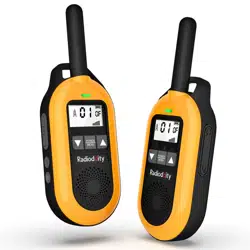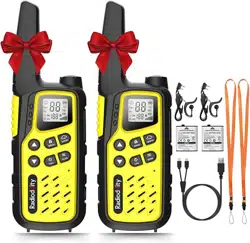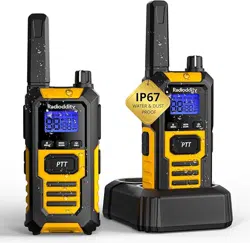
FRS/PMR Radio
FS-T1/PR-T1
www.radioddity.com
Deutsches Handbuch
About Radioddity
“You, our friend and customer, are at the forefront of what we do.”
Nothing is more important than your time, and your money. When buying radios online, you face a dilemma:
Save time and purchase from a reputable website at a high price, or try to save money by purchasing from an
unreputable dealer at the cost of your time spent dealing with quality and service issues. At Radioddity.com,
you don’t have to choose between low prices and a safe shopping experience. Whether you’re a first time buyer
or a seasoned HAM, we hope you’ll find our products, prices, content and resources to be just what you need.
In the past several years, Radioddity has been better serving the needs of two-way radio buyers by creating a
safe shopping experience. We do this by providing the highest quality products, at an affordable price, and
backing that up with superior quality service. It sounds simple to us
That is our promise: to improve your buying experience.
Through strong partnerships which allow us to bring you the latest technology from our own brand Radioddity
and on behalf of our caring and responsive Customer Support team, we strive to fulfill that promise and better
meet your needs every day.
Along with this promise, we hope to give you more value. Be that by offering you the latest and greatest in
DMR and analog radios, accessories and related products, by providing superior technical support, or by
working with thought leaders in the Amateur Radio Industry to develop enriching content to entertain and
assist you in your buying process including our Blog, FAQ, and Newsletter. Your concerns are our concerns.
We do all of this to help you find the highest quality of radios, for low prices, with as little headache to the
consumer as possible. If we are failing you in this promise in any way, let us know via email:
support@radioddity.com
Über uns
“Als Antrieb unseres Handelns stehen Sie, unser Kunde und Freund, an erster Stelle.”
Nichts ist Ihnen wichtiger als Ihre Zeit und Ihr Geld. Beim Onlinekauf steht man oft vor einer schwierigen
Entscheidung: Gute, renommierte Onlineshops mit kurzen Lieferzeiten sind oft teuer, wohingegen man bei
günstigen Onlinehändlern oftmals lange Lieferzeiten und Serviceprobleme in Kauf nehmen muss . Auf
Radioddity.com stellt sich diese Frage dahingegen erst gar nicht. Egal, ob Sie Einsteiger oder schon ein
"alter Hase" sind, wir hoffen, dass Sie unser Angebot mit seinen Produkten, Preisen und Service anspricht
und genau das ist, was Sie suchen.
In den vergangenen Jahren war es uns möglich, unser Angebot weiter zu verbessern und Ihnen ein sicheres
und angenehmes Einkaufserlebnis zu bieten. Dies gelingt, indem wir Ihnen ausschließlich beste Produktqualität
zu günstigen Preisen anbieten und das Ganze mit einem erstklassigen Service abrunden.
Unser Versprechen: Ihnen jederzeit ein angenehmes Einkaufserlebnis zu bieten
Durch enge Zusammenarbeit mit den Anbietern aktuellster Technologie können wir Ihnen diese in Form von
Geräten unserer eigenen Marke Radioddity anbieten. Zusammen mit unserem erstklassigen Kundendienst-
Team streben wir danach, dieses Versprechen stets einzulösen, um Ihren Anforderungen und Wünschen
jederzeit gerecht werden zu können. Doch auch der Nutzen steht bei uns ganz oben. Sei es, indem wir Ihnen
die aktuellsten Geräte des Digital- und Analogfunks, Zubehör, verwandte Produkte und einen erstklassigen
Service anbieten, oder indem wir Ihnen in Zusammenarbeit mit führenden Köpfen der Funkindustrie wertvolle
und gleichsam unterhaltsame Informationen in unseren Blogs, FAQ und Newslettern zur Verfügung stellen. Ihre
Anliegen sind auch unsere Anliegen.
All dies soll Ihnen helfen, jederzeit das Produkt bei uns zu finden, welches Ihren hohen Ansprüchen bezüglich
höchster Qualität und größtmöglichem Nutzen zu günstigen Preisen gerecht wird. Sollten wir Sie dennoch
einmal enttäuschen, zögern Sie nicht, uns zu schreiben. Die Email-Adresse lautet wie folgt:
support@radioddity.com
Chapter 1. Initial setup
Safety Information
Features and functions
What’s in the box
Chapter 2. Getting to know your radio
Radio Overview
[FM] key
[LAMP] key
[MONI] key
[ ] key
Key combination operation
The main display
Chapter 3. Basic operation
RX code
TX code
08
08
09
10
13
14
14
14
15
15
15
16
17
17
18
Table of Contents
SQUELCH LEVEL
LIGHT
BEEP
VOX
POWER
TDR
SAVE
TOT
BCLO
RING
WEATHER FORECAST
VOICE PROMPT
Chapter 4.Computer Programming
Appendix A. Troubleshooting
Appendix B. Technical specifications
Appendix C. PMR/FRS frequency table
----------------------------------------------------------------
-----------------------------------------------------------------
-----------------------------------------------------------
---------------------------------------------
--------------------------------------------------------------------
------------------------------------------------------------------
------------------------------------------------------------------------------
--------------------------------------------------------------------------
---------------------------------------------------------------------------
-----------------------------------------------------------------------------
------------------------------------------------------
-------------------------------------------------------------------
----------------------------------------------------------
18
19
19
20
21
21
22
22
23
24
24
25
26
26
27
29
-----------------------------------------------------------------------------
-----------------------------------------------------------------
-------------------------------------------------------------------------------
--------------------------------------------------------------------------------
---------------------------------------------------------------------------------
-----------------------------------------------------------------------------
---------------------------------------------------------------------------------
--------------------------------------------------------------------------------
--------------------------------------------------------------------------------
-------------------------------------------------------------------------------
--------------------------------------------------------------------------------
----------------------------------------------------------
-------------------------------------------------------------------
-----------------------------------------------
--------------------------------------------------
----------------------------------------
--------------------------------------
------------------------------------------------------------------------------
Kap. 1. Erstinbetriebnahme
Sicherheitshinweise
Gerätebeschreibung
Lieferumfang
Kap. 2. Erste Schritte
Übersicht
[FM] -Taste
[LAMP] -Taste
[MONI] -Taste
[ ] -Taste
Tastenkombinationen
Hauptdisplay
Kap. 3. Bedienung
Selektiver Empfang
Selektives Senden
32
32
33
34
37
38
38
38
39
39
39
40
41
41
42
Inhaltsverzeichnis
Rauschsperre
Beleuchtung
Töne
VOX
Sendeleistung
"Dual Watch"
Energiesparmodus
Sprechzeitbegrenzung
Sendesperre bei belegtem Kanal
Anrufton
Wettervorhersage (nur US-Version)
Sprachansage
Kap. 4.Computerprorammierung
Anhang A. Fehlersuche
Anhang B. Technische Daten
Anhang C. PMR/FRS Frequenztabelle
---------------------------------------------------------
--------------------------------------------------------------
--------------------------------------------------------------
-----------------------------------------------------------------
---------------------------------------------------------------------------
-----------------------------------------------------------------------
--------------------------------------------------------------------------
----------------------------------------------------------------------
----------------------------------------------------------------------
------------------------------------------------------------------------
------------------------------------------------------------
-----------------------------------------------------------------------
--------------------------------------------------------------------
42
43
43
44
45
45
46
46
47
48
48
49
50
50
51
53
----------------------------------------------------------------
----------------------------------------------------------------------
------------------------------------------------------------------------
----------------------------------------------------------------------------------
----------------------------------------------------------------------------------
---------------------------------------------------------------------
-----------------------------------------------------------------------
-----------------------------------------------------------
----------------------------------------------------------------
----------------------------------------------
-----------------------------------------------------------------------------
-------------------------------------------
---------------------------------------------------------------------
--------------------------------------------------
----------------------------------------------------------
---------------------------------------------------
-----------------------------------------
---------------------------------------------------------------
Chapter 1 - Initial Setup
Safety Information
Please read the following brief instructions, non-compliance with these rules may cause danger
or violate the law.
1. Refer to local government regulations before using this radio, improper use may violate the law.
2. Turn off the radio before getting close to flammable or explosive areas.
3. Turn off the radio before you get near explosive or ignition zones.
4. Do not use a radio with a damaged antenna, contact with a damaged antenna will cause burns
5. Do not attempt to open the radio; the maintenance work should be done by technical expert
only.
6. To avoid troubles caused by electromagnetic interference or electromagnetic compatibility,
please turn off the radio in places that advise against wireless transmissions, example
"Do not use wireless equipment", such as hospitals or other healthcare facilities.
7. In vehicles equipped with airbags, do not put the radio within the scope of the airbag
deployment.
8. Do not store the radio in direct sunlight or in hot areas.
9. When transmitting maintain 5cm of distance from the antenna.
10. If the radio has an odor of smoke, please shut off its power immediately, remove the battery
and contact your local dealer.
English
Features and Functions
50 CTCSS tones and 104 DCS codes.
Transmission time-out timer
VOX (voice activated transmit).
Backlight on/off/key
Battery saving function.
Dual channel standby
Keypad tone
Keypad Lock
Broadcast FM radio receiver 87-108MHz
LED flashlight
USB charging function
PC programmable
Weather forecast function
Ten calling tones, selectable
11. Limit transmissions to no longer than necessary to prevent possible heat build up. When
transmitting with a portable radio, hold the radio in a vertical position with the microphone
3 to 4 centimeters away from your mouth; also make sure the antenna stays at least 5
centimeters away from your body when transmitting.
What’s in the box
Thanks for choosing Radioddity two way radio. We recommend you to check the items listed in
the following table before discarding the package box.
2 PCS FS-T1/PR-T1 Radio Body
2 PCS 1500mAh Battery Pack
2 PCS Belt Clip
2 PCS Earpiece
1 PCS USB Charging Cable
1 PCS USB Adaptor
1 PCS English manual
Note: The Radio is compatible with other accessories which are available on:
https://www.radioddity.com/
Belt clip
then push down firmly on the top of the clip.
Battery
Fully charge the battery before initial use. Optimum battery efficiency will be achieved after the
three full battery charge and discharge cycles.
Charging and battery maintenance
- Charging
Battery should be fully charged before initial use. Optimum battery efficiency will be achieved
after three times of battery fully charge and discharge cycles.
How to hook up and use the charger correctly:
1. Plug the USB cable into the power adapter.
2. Plug the AC adapter of the power adapter into the main AC outlet.
3. The other end of the USB is connected to the USB port of the radio.
Note: Radio should be turned OFF during charging.
- Battery Maintenance
The battery for your radio comes uncharged from the factory; please let it charge for at least four
to five hours before using your radio.
• Use only batteries approved by the original manufacturer.
• Never attempt to disassemble your battery pack.
• Do not expose your batteries to fire or intense heat
• Dispose of batteries in accordance with local recycling regulations. Batteries do not belong in
your trashcan!
- Prolonging your battery’s life
• Only charging batteries in normal room temperatures.
• When charging a battery attached to the radio, power off the radio for a faster charge.
• Do not unplug the charger or remote control until charging is complete.
• Never charge or use a wet battery.
• Batteries wear out over time. When the radio is operated in a shorter time, please consider
purchasing a new battery to replace.
• Battery’s performance will be reduced in temperatures below zero. When working in cold
environments, it is suggested to prepare a spare battery. Preferably inside your jacket or in
a similar location in order to keep the battery warm.
• Dust may interfere with the connection between the battery and the radio. Wipe the contacts
with a clean cloth if necessary to ensure proper contact with the radio and charger.
Note: If your battery has become wet, take it down from the radio, wipe it dry with a towel or soft
tissue, and put it in a plastic bag with a handful of dry rice. Tie the bag up and leave there overnight.
The rice will absorb any remaining moisture in the battery.
This method is only effective against minor splashes (light rain for instance). A soaked radio may
possibly be defective to use.
- Storage
In order to prevent damaging from over discharge, the battery must be left with partial power.
This radio uses a lithium-based battery and a 40% charge is recommended. This level minimizes
age-related capacity loss while keeping the battery in operating condition and allowing self-
discharge.
To avoid severe capacity degradation of your battery while in long-term storage, please charge
the battery at least every six(6) months.
Store your batteries in a cool and dry place, never above normal room temperatures.
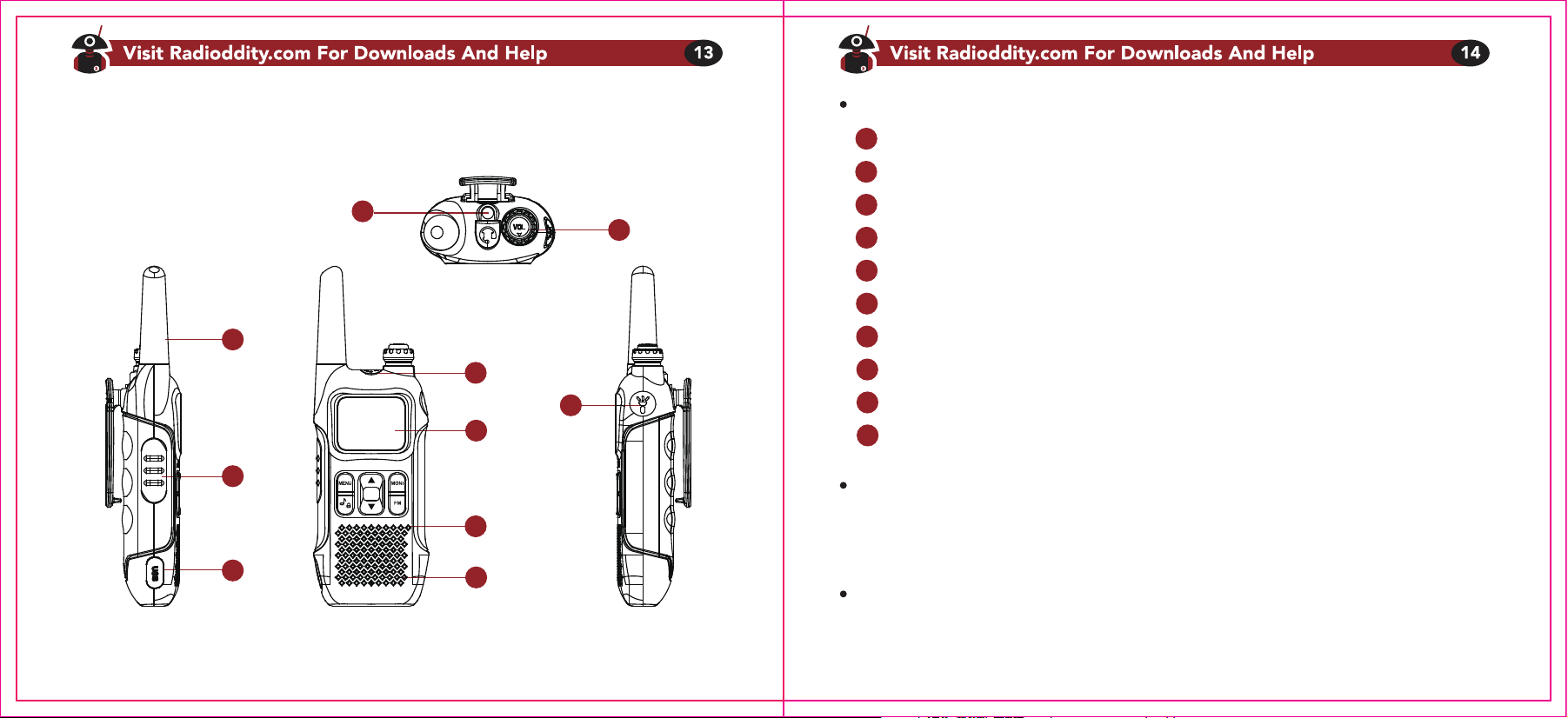
Chapter 2 - Getting to know your radio
1
2
3
6
7
8
9
10
4
5
Figure 2.1 Radioddity FS-T1/PM-T1,overview
LED flashlight
Power/Volume knob
Antenna
PTT Key
USB jack
Headphone jack
LCD
Microphone
Speaker
LED switch
[FM] Key
Short press [FM] to start the broadcast FM receiver. Another short press turns the broadcast FM
receiver off.
[LAMP] Key
Short press [LAMP] to turn on the LED flashlight. Short press again will flash the LED. Another
short press turns the flashlight off.
1
2
3
4
5
6
7
8
9
10
[MONI] Key
Press and hold [M] to monitor the signal. This will open up the squelch so you can listen to the
unfiltered signal. In addition, after entering the operation menu, short press this button to exit
[ ] Key
The Radioddity FS-T1/PR-T1 has ringtone calling function, there are ten kinds of calling sounds
for you to choose; short press this button for ringing call
The Radioddity FS-T1/PR-T1 features a keypad lock that locks out all keys except for the
function key and PTT key.
To enable or disable the keypad lock, press and hold the key for about two seconds.
Key combination operation
Audio call: PTT key and [MONI] key: 1750Hz
PTT key and [FM] key: 1450Hz
PTT key and key: 2100Hz
The main display
Table 2.1. LCD icon summary
Icon IconDescription Description
Battery level indicator
Channel indication (01-99)
CTCSS enabled
DCS enabled
Keypad lock
CT
S
N
L
VOX
DCS
Dual watch enabled
Narrowband enabled
VOX enabled
Transmit power level indicator
Receive: signal strength;
transmit: low power display the
first five grids; high power display
full grid
Chapter 3 - Basic operation
Quick Start Guide
1. Carefully open the box and remove radio body, battery.
2. Install battery in radio body until it clicks (be gentle!)
3. Turn on power knob by twisting gently counter clockwise. The radio will respond with
“Open the radio”.
4. Select your desired channel, Press the PTT and talk!
RX code
CTCSS (Continuous Tone Coded Squelch System)/ (Digital Coded Squelch) you may sometimes
want to hear calls from only specific persons or groups. In this case, use the selective call which
allows you to ignore unwanted calls from other persons who are using the same frequency.
CTCSS or DCS is a sub-audible tone and is selectable from among the 50 or 104 tone frequency
listed.
Procedure 3.1 setting RX code
1. Press the [MENU] key to enter the menu.
2. Use the △ and ▽ keys to enter menu-01:RXCODE
3. Press the [MENU] key to select.
4. Use the △ and ▽ keys to select: OFF/67.0-754N(754I)
5. Press the [MENU] key to confirm and save.
6. Press the [MONI] key to exit.
TX code
Procedure 3.2 setting TX code
1. Press the [MENU] key to enter the menu.
2. Use the △ and ▽ keys to enter menu-02:TXCODE
3. Press the [MENU] key to select.
4. Use the △ and ▽ keys to select: OFF/67.0-754N (754I)
5. Press the [MENU] key to confirm and save.
6. Press the [MONI] key to exit.
Note:
CTCSS and DCS will not cause your conversation to become private and confusing. It only
saves you from listening to unwanted conversations.
SQUELCH LEVEL
The purpose of squelch is to mute the speaker when no signals are present (Squelch OFF).
With the squelch level correctly set, you will hear sound only while actually receiving signals
(Squelch ON).
Procedure 3.3 setting squelch level
1. Press the [MENU] key to enter the menu.
2. Use the △ and ▽ keys to enter menu-03: SQL
3. Press the [MENU] key to select.
4. Use the △ and ▽ keys to select: 0-9
5. Press the [MENU] key to confirm and save.
6. Press the [MONI] key to exit.
LIGHT
Procedure 3.4 setting light
1. Press the [MENU] key to enter the menu.
2. Use the △ and ▽ keys to enter menu-04:LIGHT
3. Press the [MENU] key to select.
4. Use the △ and ▽ keys to select:ON/OFF/KEY
5. Press the [MENU] key to confirm and save.
6. Press the [MONI] key to exit.
Note:
ON: the backlight is long bright;
OFF: the backlight is off.
KEY: the backlight is turned on by the button, and the button will automatically turn off for a while.
BEEP
Allows audible confirmation of a key press, if you want to turn off the beep tone via following the
steps.
Procedure 3.5 setting BEEP
1. Press the [MENU] key to enter the menu.
2. Use the △ and ▽ keys to enter menu-05: BEEP
3. Press the [MENU] key to select.
4. Use the △ and ▽ keys to select: ON/OFF
5. Press the [MENU] key to confirm and save.
6. Press the [MONI] key to exit.
VOX (Voice Operated Transmission)
VOX eliminates the need to manually switch to transmission mode each time you want to
transmit. When the VOX circuit detects that you have started speaking into the microphone,
the transceiver automatically switches to transmission mode.
1. When operating the VOX function, be sure to set the VOX gain level which allows the
transceiver to recognize the sound levels.
2. If the microphone is too sensitive, the transceiver will begin transmitting when there is noise
in the background.
If it is not sensitive enough, it will not pick up your voice when you begin speaking. Be sure to
adjust the VOX gain level to an appropriate sensitivity to allow smooth transmission.
Procedure 3.6 setting VOX
1. Press the [MENU] key to enter the menu.
2. Use the △ and ▽ keys to enter menu-06: VOX
3. Press the [MENU] key to select.
4. Use the △ and ▽ keys to select: 0/1/2/3/4/5
5. Press the [MENU] key to confirm and save.
6. Press the [MONI] key to exit.
HIGH/LOW POWER (This feature is only available in the US version)
Procedure 3.7 setting transmission power
1. Press the [MENU] key to enter the menu.
2. Use the △ and ▽ keys to enter menu-07:PWR
3. Press the [MENU] key to select.
4. Use the △ and ▽ keys to select: HIGH/LOW
5. Press the [MENU] key to confirm and save.
6. Press the [MONI] key to exit.
TDR
Simultaneously monitor A and B. The display with the most recent activity (A or B) becomes the
selected display TDR.
Procedure 3.8 setting TDR
1. Press the [MENU] key to enter the menu.
2. Use the △ and ▽ keys to enter menu-08:TDR
3. Press the [MENU] key to select.
4. Use the △ and ▽ keys to select: OFF/ON.
5. Press the [MENU] key to confirm and save.
6. Press the [MONI] key to exit.
SAVE
In the power saving mode, the communication range will be reduced, but the cruising ability will
be extended by 2-3 times. In the non-power saving mode, the communication range can reach
the maximum, but the cruising ability will be reduced.
Procedure 3.9 setting SAVE
1. Press the [MENU] key to enter the menu.
2. Use the △ and ▽ keys to enter menu-10:SAVE.
3. Press the [MENU] key to select.
4. Use the △ and ▽ keys to select: ON/OFF
5. Press the [MENU] key to confirm and save.
6. Press the [MONI] key to exit.
TOT
This feature provides a safety switch, which limits transmission time to the programmed value.
This will promote battery conservation by not allowing you to make excessively long
transmissions, and in the event of a struck PTT switch, it can prevent interference to other
users as well as battery depletion.
Procedure 3.10 setting TOT
1. Press the [MENU] key to enter the menu.
2. Use the △ and ▽ keys to enter menu-11:TOT.
3. Press the [MENU] key to select.
4. Use the △ and ▽ keys to select: OFF/30S/60S/90S/120S/150S/180S.
5. Press the [MENU] key to confirm and save.
6. Press the [MONI] key to exit.
BCLO
Disable the [PTT] button on the channel you are already using. If you press the [PTT] button
while using the channel, the transceiver will beep and will not be sent.
Procedure 3.11 setting BCLO
1. Press the [MENU] key to enter the menu.
2. Use the △ and ▽ keys to enter menu-12:BCLO.
3. Press the [MENU] key to select.
4. Use the △ and ▽ keys to select: ON/OFF
5. Press the [MENU] key to confirm and save.
6. Press the [MONI] key to exit.
RING (Incoming call tone)
There are ten types of incoming call tones on the radio. You can select the call tone by short
press button.
Procedure 3.12 setting transmission power
1. Press the [MENU] key to enter the menu.
2. Use the △ and ▽ keys to enter menu-13:RING.
3. Press the [MENU] key to select.
4. Use the △ and ▽ keys to select: 1/2/3/4/5/6/7/8/9/10.
5. Press the [MENU] key to confirm and save.
6. Press the [MONI] key to exit.
WEATHER FORECAST
This feature is only available in the US version
1. This feature sets the weather switch selection for you.
Procedure 3.13 setting WEATHER FORECAST
1. Press the [MENU] key to enter the menu.
2. Use the △ and ▽ keys to enter menu-14:WEATHE
3. Press the [MENU] key to select.
4. Use the △ and ▽ keys to select: ON/OFF.
5. Press the [MENU] key to confirm and save.
6. Press the [MONI] key to exit. If the menu option is ON, enter the weather forecast mode,
otherwise return to normal operation mode.
Chapter 4 - Computer Programming
2. Weather forecast channel setting mode
In the weather forecast receiving mode, press the △ and ▽ keys to select weather forecast
channel: CH1-CH10
CH1:162.550MHz CH2:162.400MHz CH2:162.475MHz CH4:162.425MHz CH5:162.450MHz
CH6:162.550MHz CH7:162.525MHz CH8:161.650MHz CH9:161.775MHz CH10:163.275MHz
VOICE PROMPTS
This function sets the voice prompt switch and voice switch for you.
Procedure 3.14 setting VOICE PROMPTS
1. Press the [MENU] key to enter the menu.
2. Use the △ and ▽ keys to enter menu-15:VOICE PROMPTS
3. Press the [MENU] key to select.
4. Use the △ and ▽ keys to select: OFF/CHI/ENG.
5. Press the [MENU] key to confirm and save.
6. Press the [MONI] key to exit.
If you have computer programming needs, download programming software at
https://www.radioddity.com/support/.
Appendix A. Troubleshooting
possiblesymptom
The radio
doesn’t start
The battery
dies quickly
The LED indicates
reception, but the
speaker is silent.
Others can’t hear
my transmission.
The radio transmits
without touching the
PTT.
The battery is too low.
The battery isn't correctly installed.
The battery is dead.
The battery isn't fully charged.
Volume is too low.
CTCSS or DCS enabled
Their CTCSS or DCS settings
don’t match yours.
You're too far apart.
The VOX is enabled.
VOX sensitivity is too high.
Change or recharge the battery.
Remove the battery and reinstall it.
Purchase a new battery.
Recharge the battery.
Turn up the volume.
Change your CTCSS or DCS to
match those you're trying to
communicate with.
Turn CTCSS or DCS off.
Change your CTCSS or DCS
Setting to match your peers.
Move in closer.
Turn VOX off.
Turn down VOX sensitivity.
solution
Appendix B. Technical specifications
General
General specifications
Specification
Model FS-T1/PR-T1
Frequency Range (MHz) US: FRS; EU: PMR
Memory channels 99
Frequency stability 2.5ppm
Antenna impedance 50 Ohm
Operating temperature -10℃ to +50℃
Mode of operation same frequency simplex
Dimensions (mm) 170X50X28
Weight (g) 120g
Transmitter
Transmitter specifications
Specification
RF power (W) US: 0.5/2W ; EU: 0.5W
Type of modulation FM
Maximum deviation(kHz) ≤±5.0
Spurious emissions (dB) <-60dB
Emission current(mA) ≤1000
Receiver
Receiver specifications
Specification
Receiver sensitivity <0.16μV (12dB SINAD)
Intermodulation ≥65dB
Audio Output ≥380mW
Squelch sensitivity <0.2μV
Receiver Current ≤380mA
Appendix C. PMR/FRS frequency table
FRS
Channel No.
1
2
3
4
5
6
7
8
Frequency
462.5625
462.5875
462.6125
462.6375
462.6625
462.6875
462.7125
467.5625
Channel No.
9
10
11
12
13
14
15
16
Frequency
467.5875
467.6125
467.6375
467.6625
467.6875
467.7125
462.5500
462.5750
Channel No.
17
18
19
20
21
22
Frequency
462.6000
462.6250
462.6500
462.6750
462.7000
462.7250
PMR
Channel No.
1
2
3
4
5
6
7
8
Frequency (MHz)
446.00625
446.01875
446.03125
446.04275
446.05625
446.08125
446.08125
446.09375
Channel No.
9
10
11
12
13
14
15
16
Frequency (MHz)
446.10625
446.11875
446.13125
446.14375
446.15625
446.16875
446.18125
446.19375
German
Kapitel 1 - Erstinbetriebnahme
Sicherheitshinweise
Bitte lesen Sie die nachfolgenden Informationen aufmerksam durch, Nichtbeachtung
kann zu Gefahr führen oder gegen Vorschriften verstoßen.
1. Stellen Sie sicher, dass die Nutzung des Gerätes nicht gegen Gesetze in Ihrem Land verstößt.
2. Nutzen Sie das Gerät nicht in explosionsgefährdeten Bereichen.
3. Nutzen Sie das Gerät nicht in der Nähe von Sprengungen oder Sprengstoff.
4. Niemals mit beschädigter Antenne senden, offenliegende Teile können Verbrennungen
verursachen oder das Gerät beschädigen.
5. Öffnen Sie das Gerät nicht, die Wartung und Reparatur sollte ausschließlich autorisiertem
Personal überlassen werden.
6. Zur Vermeidung von elektromagnetischen Unverträglichkeiten benutzen Sie das Gerät nicht
in entsprechend gekennzeichneten Bereichen, wie z.B. in Krankenhäusern oder anderen
medizinischen Einrichtungen.
7. Platzieren Sie das Gerät im Auto nicht im Entfaltungsbereich eines Airbags.
8. Lagern Sie das Gerät nicht in direkter Sonneneinstrahlung oder heissen Bereichen.
9. Immer ca. 5cm Abstand von der Antenne beim Senden halten.
10. Sollte aus dem Gerät während des Betriebes Schmorgeruch nach außen dringen, schalten
Sie es sofort aus, entnehmen den Akku und geben es in umgehend in Reparatur.
Gerätebeschreibung
50 CTCSS und 104 DCS-Codes
einstellbare Sendezeitbeschränkung
VOX
Displaybeleuchtung deaktivierbar
Energiesparfunktion
Dual watch-Funktion
Tastentöne
Tastensperre
UKW-Radiofunktion
LED-Taschenlampe
USB-Ladefunktion
PC-Programmierung möglich
Wettervorhersage (nur US-Version)
Zehn wählbare Anruftöne
11. Begrenzen Sie die Dauer einer Aussendung auf das notwendige Maß, um einer Überhitzung
entgegenzuwirken. Während Sie senden, halten Sie das Gerät aufrecht und das Mikrofon
ca.4cm vom Mund entfernt. Stellen Sie während des Sendens sicher, dass die Antenne
jederzeit ca.5cm vom Körper entfernt gehalten wird.
Lieferumfang
Vielen Dank, dass Sie sich für ein Funkgerät von Radioddity entschieden haben. Bitte prüfen
Sie, ob sich folgende Teile in der Packung befinden:
2 Stk. FS-T1/PR-T1 Funkgerät
2 Stk. 1500mAh Akkupack
2 Stk. Gürtelclip
2 Stk. Sprechgarnitur
1 Stk. USB-Ladekabel
1 Stk. USB-Ladegerät
1 Stk. Bedienungsanleitung
Hinweis: Die Funkgeräte sind kompatibel mit weiterem Zubehör, dies finden Sie unter:
https://www.radioddity.com/
Gürtelclips
Die Gürtelclips werden an der Rückseite der Funkgeräte befestigt, dazu setzen Sie den Clip
in die Führung ein und drücken Sie den Clip sanft nach unten bis er einrastet.
Akkupack
Laden Sie die Akkus vor Benutzung komplett auf. Die optimale Leistung erreichen die Akkus
nach ca.3 vollständigen Lade - und Entladezyklen.
Laden und Akkuwartung
- Aufladen
Die Akkus sollten vor Benutzung voll geladen werden. Die optimale Leistung erreichen die
Akkus nach ca. 3 vollständigen Lade- und Entladezyklen.
Korrekte Nutzung des USB-Laders:
1. Stecken Sie das USB-Kabel in das Netzgerät.
2. Stecken Sie das USB-Ladegerät nun in eine Netz-Steckdose.
3. Das andere Ende des USB-Kabels wird nun mit dem Funkgerät verbunden.
Hinweis: Schalten Sie das Funkgerät während des Aufladens ab.
- Akkuwartung
Der Akku ist im Lieferzustand nur teilweise geladen. Laden Sie ihn daher mindestens vier bis
fünf Stunden vor der ersten Benutzung auf.
• Nur vom Hersteller zugelassene Akkus verwenden.
• Niemals versuchen, das Akkupack zu öffnen!
• Die Akkus niemals großer Hitze aussetzen, Explosionsgefahr!
• Verbrauchte Akkus bitte der Umwelt zuliebe gemäß den geltenden Richtlinien entsorgen.
Akkus gehören NICHT in den Hausmüll!
- Tips für eine lange Akku-Lebensdauer
• Akkus nur bei normalen Raumtemperaturen aufladen.
• Das Gerät während des Ladens abschalten, sodass der Akku schneller geladen wird.
• Ladevorgänge nicht unterbrechen, Ladegeräte erst nach vollständigem Laden entfernen.
• Niemals einen nassen Akku aufladen.
• Akkus verlieren trotz allem beständig an Kapazität. Bei verkürzter Laufzeit der Funkgeräte
schaffen Sie frühzeitig neue Akkus als Ersatz an.
• Die Akkuleistung läßt bei Kälte stark nach. Wenn Sie die Funkgeräte in einer sehr kalten
Umgebung betreiben möchten, halten Sie bitte einen Ersatzakku an einem wärmeren Ort, z.B.
in Ihrer Jackentasche, bereit.
• Staub beeinflusst den Kontakt zwischen Akku und Gerät u.U. negativ. Reinigen Sie daher von
Zeit zu Zeit die Kontakte des Akkus und des Gerätes mit einem trockenen Tuch.
TIPP: Wenn der Akku nass geworden ist, entnehmen Sie diesen vom Gerät, trocknen ihn so gut
wie möglich ab und stecken ihn zusammen mit einer Handvoll trockenen Reis in einen
Plastikbeutel, verschließen diesen und lassen dies über Nacht so liegen. Der Reis nimmt die
Feuchtigkeit auf und hilft so beim Trocknen.Allerdings hilft dieses Vorgehen nur bei leichter
Nässe, wie z.B. nach einem Regenschauer. Ein komplett eingetaucht gewesenes Gerät und
sein Akku ist u.U. defekt und die weitere Nutzung könnte potentiell gefährlich sein. Im Zweifel
kontaktieren Sie bitte ihren Händler!
- Lagerung
Um eine Tiefentladung bei Lagerung zu vermeiden, müssen Akkus geladen gelagert werden.
Diese Akkus nutzen die Lithium-Ionen-Technik und benötigen mind. 40% Ladezustand bei
Lagerung. Dies vermeidet altersbedingten Kapazitätsverlust und Tiefentladung.
Um schwere Schäden durch Tiefentladung zu vermeiden, laden Sie den Akku mindestens alle
sechs (6) Monate einmal komplett wieder auf.
Lagern Sie die Akkus an einem kühlen und dunklen Ort und niemals in großer Hitze.
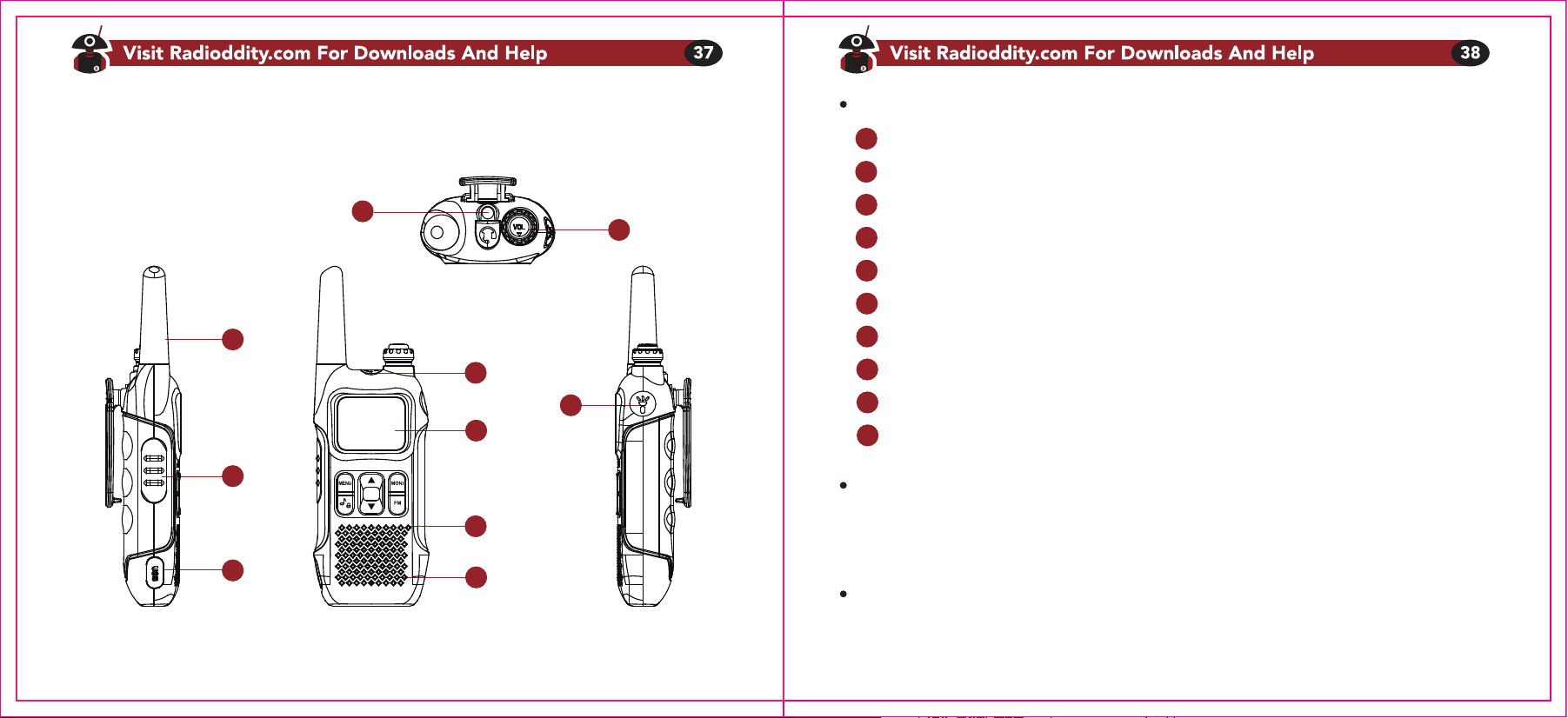
Kap. 2 - Erste Schritte
1
2
3
6
7
8
9
10
4
5
Abb. 2.1 Radioddity FS-T1/PM-T1, Übersicht
LED-Taschenlampe
Ein-Aus/Lautstärkeregler
Antenne
Sendetaste
USB-Buchse
Headset-Anschluss
Display
Mikrofon
Lautsprecher
Taschenlampe an/aus
[FM]-Taste
Kurzer Druck auf [FM] startet das UKW-Radio. Nochmaliger kurzer Druck auf diese Taste schaltet
das UKW-Radio wieder ab.
[LAMP]-Taste
Kurzer Druck auf [LAMP] schaltet die Taschenlampe an, nochmaliger kurzer Druck läßt die LED
blinken und nochmaliger kurzer Druck schaltet die Taschenlampe wieder ab.
1
2
3
4
5
6
7
8
9
10
[MONI]-Taste
Drücken und halten Sie [M] ,um die Rauschsperre zu öffnen, sodass Sie das Rauschen und
andere schwache Signale hören können. Im Menu bewirkt ein kurzer Druck auf diese Taste
den Ausstieg aus dem Menu und die Rückkehr zur Grundanzeige.
[ ]-Taste
Das Radioddity FS-T1/PR-T1 verfügt über bis zu zehn Anruftöne; drücken Sie diese Taste kurz
um einen Anrufton auszuwählen.
Das Radioddity FS-T1/PR-T1 verfügt über eine Tastensperre für alle Tasten mit Ausnahme der
Sendetaste und dieser Funktionstaste.
Um die Tastensperre zu ativieren oder zu deaktivieren, drücken und halten Sie diese Taste für
mindestens 2 Sekunden.
Tastenkombinationen
Rufton : Sendetaste und [MONI]: 1750Hz
Sendetaste und [FM]: 1450Hz
Sendetaste und "Notentaste": 2100Hz
Das Hauptdisplay
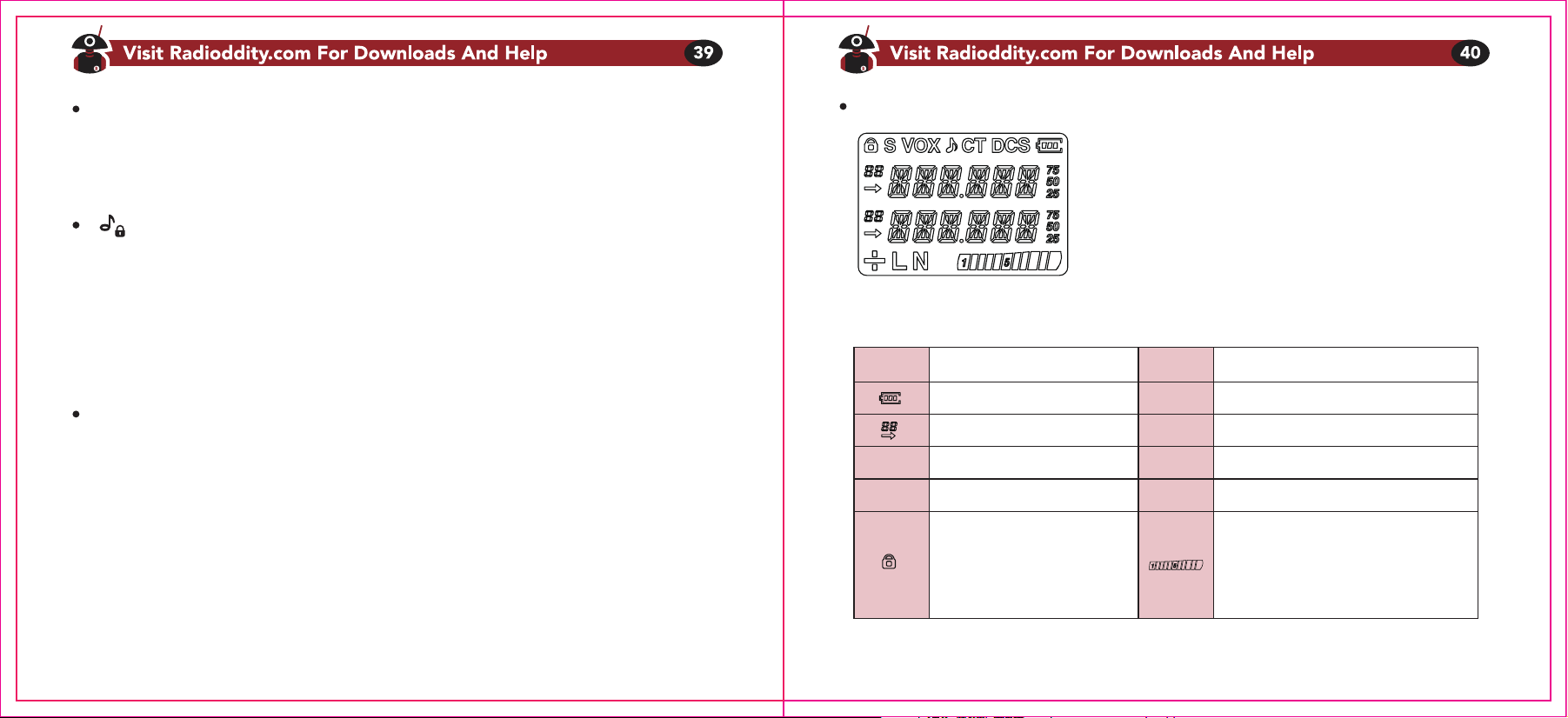
Tabelle 2.1. LCD Symbole
Icon IconDescription Description
Akkuladestand
Kanalanzeige (01-99)
CTCSS aktiv
DCS aktiv
Tastensperre
CT
S
N
L
VOX
DCS
Dual watch aktiv
Schmalband aktiv
VOX aktiv
Sendeleistungsanzeige
Empfang: Signalstärkeanzeige
Senden: Sendeleist. niedrig:
erste 5 Segmente an; hohe
Sendeleist.: Alle Segmente an
TIPP: Beim Senden wird der Empfänger stumm geschaltet. Das bedeutet, Sie können während Sie senden,
den Gesprächspartner nicht hören. Umgekehrt ist es auch so, d.h. Sie können Ihrem Gegenüber nicht "ins
Wort fallen", Sie müssen warten, bis er seine Sendung ("Durchgang") beendet hat. Senden Sie trotzdem, kann
er nicht hören, was Sie sagen, bis er seine Aussendung beendet hat. Dies ist kein Gerätefehler, sondern
technisch bedingt, es nennt sich "Wechselsprechen auf einer Frequenz". Sie müssen sich aber keine Sorgen
machen. Wenn sich Ihre Aussendung aus welchen Gründen auch immer mit einer anderen überschneidet,
geht nichts kaputt dadurch.
Kap. 3 - Bedienung
Schnellstartanweisung
1. Gerät und Akku aus der Packung nehmen.
2. Akku einsetzen und vorsichtig nach oben schieben bis es klickt.
3. Am Lautstärkeregler gegen den Uhrzeigersinn drehend das Gerät einschalten.
Unter Umständen ertönt ein Begrüßungstext oder ein Quittungston.
4. Gewünschten Kanal auswählen, Sendetaste drücken und sprechen
Selektiver Empfang mit CTCSS/DCS
Manchmal ist es von Vorteil, nur Rufe von speziellen Personen oder - gruppen zu empfangen.
In diesem Fall können Sie den selektiven Empfang mit CTCSS/DCS nutzen, um unerwünschte
Rufe von Personen, die die gleiche Frequenz belegen, auszublenden. CTCSS oder DCS ist ein
unhörbarer Subton, der aus 50 oder 104 Tonfrequenzen ausgewählt werden kann (siehe Anhang).
Bei allen Teilnehmern einer Gruppe muss der gleiche Subton ausgewählt sein, sonst kommt keine
Verbindung zustande!
Vorgang 3.1 Selektiven Empfang einstellen.
1. Mit [MENU] das Menu öffnen.
2. Mit den △ und ▽ Tasten zu 01:RXCODE navigieren.
3. Nochmals [MENU] drücken zum Auswählen.
4. Mit den △ und ▽ Tasten: OFF/67.0-754N(754I) wählen.
5. Mit [MENU] bestätigen und speichern.
6. Mit [MONI] das Menu verlassen.
Selektives Senden
Vorgang 3.2 Einstellung selektives Senden
1. Mit [MENU] das Menu öffnen.
2. Mit den △ und ▽ Tasten zu 02: TXCODE navigieren.
3. Nochmals [MENU] drücken zum Auswählen.
4. Mit den △ und ▽ Tasten: OFF/67.0-754N(754I) wählen.
5. Mit [MENU] bestätigen und speichern.
6. Mit [MONI] das Menu verlassen.
Hinweis: CTCSS and DCS will not cause your conversation to become private and confusing.
It only saves you from listening to unwanted conversations.
Rauschsperre (Squelch)
Der Zweck einer Rauschsperre ist, nerviges Rauschen und schwache, verrauschte Signale
auszublenden, indem der Lautsprecher stummgeschaltet wird. Bei korrekter Einstellung der
Rauschsperre ("Squelch ON") schaltet der Lautsprecher nur ein, wenn ausreichend starke
Signale empfangen werden.
Vorgang 3.3 Rauschsperre einstellen
1. Mit [MENU] das Menu öffnen.
2. Mit den △ und ▽ Tasten zu 03: SQL navigieren.
3. Nochmals [MENU] drücken zum Auswählen.
4. Mit den △ und ▽ Tasten: 0-9 auswählen.
5. Mit [MENU] bestätigen und speichern.
6. Mit [MONI] das Menu verlassen.
Displaybeleuchtung
Vorgang 3.4 Beleuchtung einstellen
1. Mit [MENU] das Menu öffnen.
2. Mit den △ und ▽ Tasten zu 04: LIGHT navigieren.
3. Nochmals [MENU] drücken zum Auswählen.
4. Mit den △ und ▽ Tasten: ON/OFF/KEY wählen.
5. Mit [MENU] bestätigen und speichern.
6. Mit [MONI] das Menu verlassen.
Note:
ON: die Displaybeleuchtung ist dauerhaft eingeschaltet.
OFF: die Displaybeleuchtung ist abgeschaltet.
KEY: die Displaybeleuchtung schaltet sich bei einem Tastendruck für kurze Zeit ein.
Tastentöne
Jeder Tastendruck erzeugt einen kurzen Ton. Zum Ein- oder Abschalten der Tastentöne wie
nachfolgend beschrieben vorgehen:
Vorgang 3.5 Tastenton einstellen
1. Mit [MENU] das Menu öffnen.
2. Mit den △ und ▽ Tasten zu 05: BEEP navigieren.
3. Nochmals [MENU] drücken zum Auswählen.
4. Mit den △ und ▽ Tasten: ON/OFF wählen.
5. Mit [MENU] bestätigen und speichern.
6. Mit [MONI] das Menu verlassen.
VOX (stimmaktivierter Sendebetrieb)
Die VOX-Funktion sorgt dafür, dass Sie nicht jedesmal die Sendetaste drücken müssen, um auf
Sendung zu gehen. Sobald die VOX-Schaltung feststellt, dass Sie zu sprechen begonnen haben,
schaltet sie das Gerät auf Sendebetrieb, solange Sie sprechen.
1. Stellen Sie bei VOX-Betrieb sicher, dass die Empfindlichkeit ausreichend hoch ist und das
Gerät sicher auf Sendung schaltet, sobald Sie sprechen.
2. Aber Achtung, bei zu großer Empfindlichkeit spricht die VOX-Schaltung auch schon auf
Hintergrundgeräusche an und schaltet möglicherweise ungewollt auf Sendung.
Hinweis: Bei zu geringer Empfindlichkeit schaltet das Gerät u.U. nicht auf Sendung, sobald Sie zu sprechen
beginnen. Die korrekte Einstellung muss durch Probieren ermittelt werden. Standardwerte gibt es nicht, da
jede Stimme in Ihrer Ausprägung anders und einmalig ist.
Vorgang 3.6 VOX einstellen
1. Mit [MENU] das Menu öffnen.
2. Mit den △ und ▽ Tasten zu 06: VOX navigieren.
3. Nochmals [MENU] drücken zum Auswählen.
4. Mit den △ und ▽ Tasten: 0/1/2/3/4/5 wählen.
5. Mit [MENU] bestätigen und speichern.
6. Mit [MONI] das Menu verlassen.
Sendeleistung (Nur in der US-Version)
Vorgang 3.7 Sendeleistung einstellen
1. Mit [MENU] das Menu öffnen.
2. Mit den △ und ▽ Tasten zu 07: PWR navigieren.
3. Nochmals [MENU] drücken zum Auswählen.
4. Mit den △ und ▽ Tasten: HIGH/LOW wählen.
5. Mit [MENU] bestätigen und speichern.
6. Mit [MONI] das Menu verlassen.
"Dual-Watch"-Funktion (TDR)
Überwacht gleichzeitig die oben und unten im Display eingestellte Frequenz . Die Frequenz, auf
der zuerst Aktivität festgestellt wird, wird als aktiv ausgewählt.
Vorgang 3.8 Dual-Watch einstellen
1. Mit [MENU] das Menu öffnen.
2. Mit den △ und ▽ Tasten zu 08: TDR navigieren.
3. Nochmals [MENU] drücken zum Auswählen.
4. Mit den △ und ▽ Tasten: OFF/ON wählen.
5. Mit [MENU] bestätigen und speichern.
6. Mit [MONI] das Menu verlassen.
Energiesparmodus (SAVE)
Im Energiesparmodus verringert sich die Reichweite des Gerätes spürbar, doch die Akkulaufzeit
verlängert um das 2-3fache. Ohne Energiesparmodus ist die Reichweite des Gerätes zwar
maximal, jedoch verringert sich die Laufzeit um den Faktor 2-3.
Vorgang 3.9 Energiesparmodus einstellen
1. Mit [MENU] das Menu öffnen.
2. Mit den △ und ▽ Tasten zu 10: SAVE navigieren.
3. Nochmals [MENU] drücken zum Auswählen.
4. Mit den △ und ▽ Tasten: ON/OFF wählen.
5. Mit [MENU] bestätigen und speichern.
6. Mit [MONI] das Menu verlassen.
Sendezeitbegrenzer (TOT -> Time Out Timer)
Es handelt sich um eine Sicherheitseinstellung, mit der die Sendezeit auf einen einstellbaren
Wert reduziert wird. Zum einen sorgt diese Einstellung dafür, dass Sie keine unendlich langen
Sendungen tätigen können, was der Akkulaufzeit zuträglich ist. Zum anderen, im Falle einer
klemmenden oder ungewollt gedrückten Sendetaste (z.B. in einer Tasche), sorgt die Einstellung
dafür, dass andere Frequenznutzer nicht unnötig gestört werden und beugt somit auch einer
vorzeitigen Akkuentleerung vor.
Vorgang 3.10 Sendezeitbegrenzer einstellen
1. Mit [MENU] das Menu öffnen.
2. Mit den △ und ▽ Tasten zu 11: TOT navigieren.
3. Nochmals [MENU] drücken zum Auswählen.
4. Mit den △ und ▽ Tasten: OFF/30s/60s/90s/120s/150s/180s wählen.
5. Mit [MENU] bestätigen und speichern.
6. Mit [MONI] das Menu verlassen.
Sendesperre bei belegtem Kanal (BCLO-> Busy Channel Lock Out)
Deaktiviert die Sendetaste, solange jemand anderes auf dem eingestellten Kanal sendet.
Versucht man dennoch zu senden, gibt das Gerät einen Warnton aus und sendet nicht.
Vorgang 3.11 BCLO einstellen
1. Mit [MENU] das Menu öffnen.
2. Mit den △ und ▽ Tasten zu 12: BCLO navigieren.
3. Nochmals [MENU] drücken zum Auswählen.
4. Mit den △ und ▽ Tasten: ON/OFF wählen.
5. Mit [MENU] bestätigen und speichern.
6. Mit [MONI] das Menu verlassen.
Anrufton (für eingehende Rufe)
Es gibt insgesamt zehn verschiendene Töne, die eingehende Anrufe signalisieren. Durch die
Taste lassen sich die verschiedenen Töne auch einstellen.
Vorgang 3.12 Anrufton einstellen
1. Mit [MENU] das Menu öffnen.
2. Mit den △ und ▽ Tasten zu 13: RING navigieren.
3. Nochmals [MENU] drücken zum Auswählen.
4. Mit den △ und ▽ Tasten: 1/2/3/4/5/6/7/8/9/10 wählen.
5. Mit [MENU] bestätigen und speichern.
6. Mit [MONI] das Menu verlassen.
Wettervorhersage
Nur in der US-Version verfügbar!
In diesem Feature können Sie die Wettervorhersage einstellen.
Vorgang 3.13 Wettervorhersage einstellen
1. Mit [MENU] das Menu öffnen.
2. Mit den △ und ▽ Tasten zu 14: WEATHER navigieren.
3. Nochmals [MENU] drücken zum Auswählen.
4. Mit den△ und ▽ Tasten: ON/OFF wählen.
5. Mit [MENU] bestätigen und speichern.
Kap. 4 - Computerprogrammierung
6. Mit [MONI] das Menu verlassen. Wenn Option auf "ON", wird automatisch in den
Wettervorhersage modus geschaltet, ansonsten in den normalen Betriebsmodus zurück.
Kanal für Wettervorhersage einstellen
Im Wettervorhersage modus die △ und ▽ Tasten drücken, um den Vorhersagekanal
auszuwählen: CH1-CH10
CH1:162.550MHz CH2:162.400MHz CH2:162.475MHz CH4:162.425MHz CH5:162.450MHz
CH6:162.550MHz CH7:162.525MHz CH8:161.650MHz CH9:161.775MHz CH10:163.275MHz
Sprachansage
Diese Funktion aktiviert oder deaktiviert die Sprachansage.
Vorgang 3.14 Sprachansage einstellen
1. Mit [MENU] das Menu öffnen.
2. Mit den △ und ▽ Tasten zu 15: VOICE PROMPTS navigieren.
3. Nochmals [MENU] drücken zum Auswählen.
4. Mit den △ und ▽ Tasten: CHI/ENG/OFF wählen.
5. Mit [MENU] bestätigen und speichern.
6. Mit [MONI] das Menu verlassen.
Wenn Sie Ihr Gerät mit dem Computer programmieren wollen, gehen Sie bitte auf:
https://www.radioddity.com/support/.
Anhang A. Fehlersuche
UrsacheSymptom Lösung
Das Gerät schaltet nicht
ein
Der Akku entläd sich
schnell
Die LED zeigt Empfang,
aber der Lautsprecher
bleibt stumm.
Meine Sendung wird
nicht gehört.
Gerät sendet ohne dass
die PTT gedrückt wird.
Akku leer oder nicht richtig
installiert.
Der Akku ist verbraucht.
Der Akku ist nicht geladen.
Lautstärke zu leise.
CTCSS oder DCS aktiv.
Unterschiedliche CTCSS/
DCS-Einstellungen.
Außerhalb der Reichweite.
VOX ist aktiv. VOX
Empfindlichkeit zu hoch.
Akku tauschen oder aufladen.
Akku nochmals installieren.
Neuen Akku erwerben.
Akku laden.
Lautstärke erhöhen.
Korrekte CTCSS/DCS
Einstellungen wählen.
CTCSS/DCS ausschalten.
Korrekte CTCSS/DCSEinstellungen
wählen.
Wieder näher kommen.
VOX abschalten.
Empfindlichkeit anpassen.
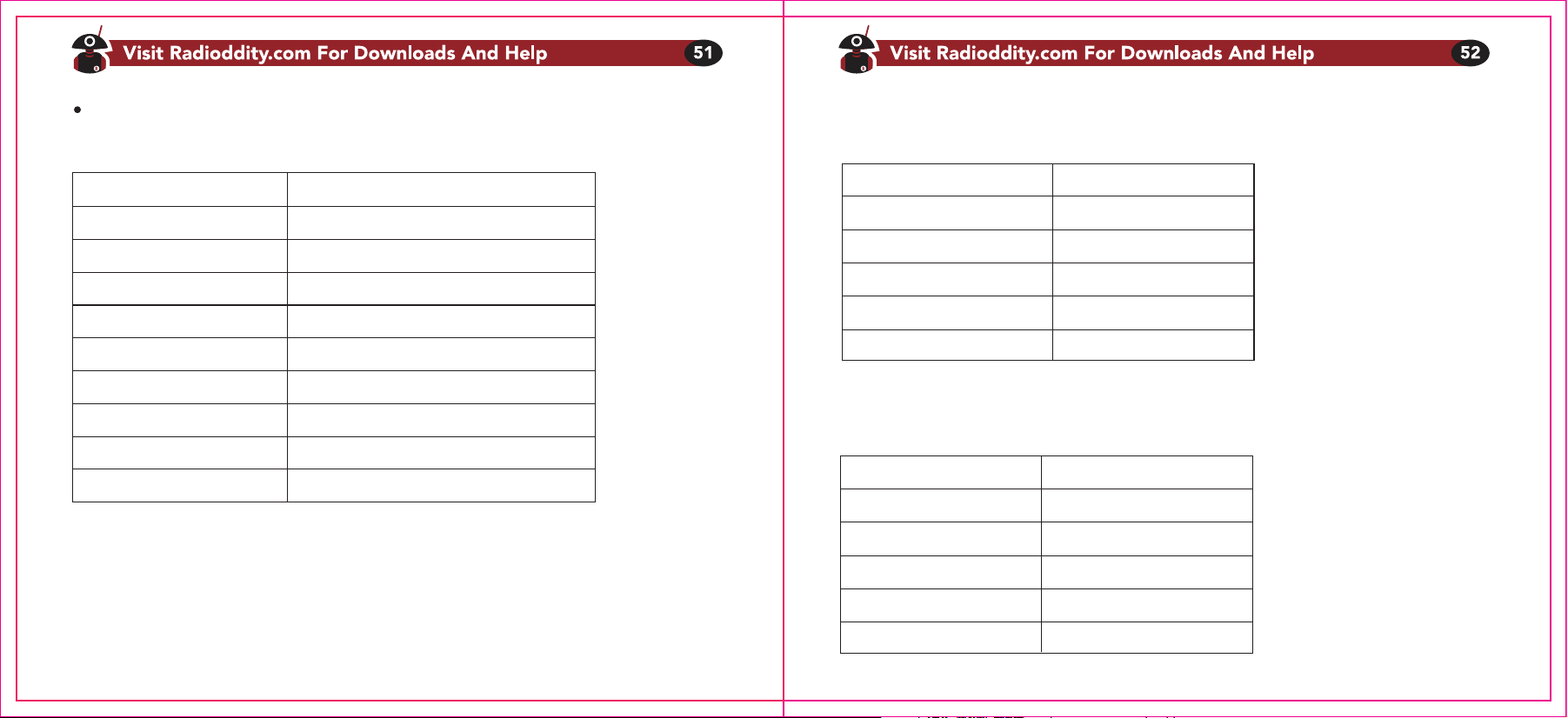
Anhang B. Technische Daten
Allgemeine Spezifikation
Spezifikation
Modell
Frequenzbereich (MHz)
Speicherkanäle
Stabilität
Antennenimpedanz
Temperaturbereich
Betriebsart
Abmessungen (mm)
Gewicht (g)
FS-T1/PR-T1
US: FRS; EU: PMR
99
2.5ppm
50 Ohm
-10℃ to +50℃
Wechselsprechen auf einer Frequenz
170X50X28
120g
Sender
Sender spezifikation
Spezifikation
Sendeleistung (W) US: 0.5/2W; EU: 0.5W
Modulationsart FM
Maximaler Hub (kHz) ≤±5.0
Nebenaussendungen (dB) <-60dB
Strombedarf(mA) ≤1000
Empfänger
Empfänger spezifikation
Spezifikation
Empfindlichkeit <0.16μV (12dB SINAD)
Intermodulation ≥65dB
Audioleistung ≥380mW
Squelchempfindlichkeit <0.2μV
Strombedarf ≤380mA
Anhang C. PMR Frequenztabelle
Wir danken Ingo Bünnemeyer, DB4BIN, recht herzlich für die Mithilfe bei der
Erstellung (Übertragung und Bearbeitung) dieser deutschen Bedienugsanleitung!
PMR
Kanalnummer
1
2
3
4
5
6
7
8
Frequenz (MHz)
446.00625
446.01875
446.03125
446.04275
446.05625
446.08125
446.08125
446.09375
Kanalnummer
9
10
11
12
13
14
15
16
Frequenz (MHz)
446.10625
446.11875
446.13125
446.14375
446.15625
446.16875
446.18125
446.19375