User Manual Benutzhandbuch Manuale Utente
GA-2S
Thank You for Shopping at Radioddity!
FIND TUTORIALS, SUPPORT AND MORE
https://www.radioddity.com/
https://www.facebook.com/radioddity
https://www.youtube.com/c/Radioddityradio
Two Way Radio

About Radioddity
“You, our friend and customer, are at the forefront of what we do.”
Nothing is more important than your time, and your money. When buying radios online, you face a
dilemma: Save time and purchase from a reputable website at a high price, or try to save money by
purchasing from an unreputable dealer at the cost of your time spent dealing with quality and service
issues. At Radioddity.com, you don’t have to choose between low prices and a safe shopping
experience. Whether you’re a first time buyer or a seasoned HAM, we hope you’ll find our products,
prices, content and resources to be just what you need.
In the past several years, Radioddity has been better serving the needs of two-way radio buyers by
creating a safe shopping experience. We do this by providing the highest quality products, at an
affordable price, and backing that up with superior quality service. It sounds simple to us.
That is our promise: to improve your buying experience. Through strong partnerships which allow us to
bring you the latest technology from our own brand Radioddity and on behalf of our caring and
responsive Customer Support team, we strive to fulfill that promise and better meet your needs every
day.
Along with this promise, we hope to give you more value. Be that by offering you the latest and greatest
in DMR and analog radios, accessories and related products, by providing superior technical support, or
by working with thought leaders in the Amateur Radio Industry to develop enriching content to
entertain and assist you in your buying process including our Blog, FAQ, and Newsletter. Your concerns
are our concerns.
We do all of this to help you find the highest quality of radios, for low prices, with as little headache to
the consumer as possible. If we are failing you in this promise in any way, let us know via email,
suppoprt@radioddity.com.
Table of Contents
Chapter 1. Getting started
Safety Information
What’s in the box
Chapter 2. Getting started
Battery Maintenance
Charging
Antenna
Chapter 3. Basic operation
Quick Start Guide
Scan Function
Battery Save Function
Busy Channel Lockout
Wide/Narrow Bandwidth Setting
VOX
01
03
04
05
06
08
09
09
10
12
13
14
14
Voice Prompt
Low Battery Indication
Squelch
Time-Out-Timer (TOT)
CTCSS/DCS
Chapter 4.Computer Programming
Chapter 5.Trouble Shooting Guide
Appendix A.Product Safety Guide
Appendix B.Specifications
16
17
18
19
20
22
25
27
34
Visit Radioddity.com For Downloads And Help
Visit Radioddity.com For Downloads And Help
Please read the following brief instructions, non-compliance with these rules may
cause danger or violate the law.
1. Refer to local government regulations before using this radio, improper use may
violate the law.
2. Turn off the radio before entering flammable or explosive area.
3. Do not charge or change the battery in flammable or explosive areas.
4. Turn off the radio before getting close to the blasting zone or detonator areas.
5. Do not use radio whose antenna is damaged, touching of damaged antenna will
cause heat injury.
6. Do not attempt to open the radio; the maintenance work should be done by
technical expert only.
7. To avoid troubles caused by electromagnetic interference or electromagnetic
compatibility, please turn off the radio in places where have the banner "Do not
use wireless equipment”, such as hospital and other healthcare facilities.
Visit Radioddity.com For Downloads And Help
01
Chapter 1.-Getting Started
Safety Information
8. In the car with an airbag, do not put the radio within the scope of the airbag
deployment.
9. Do not store the radio under the direct sunshine or in hot areas. When you
transmit with the radio, do keep away from its antenna for 5cm at least
10. If the radio appears smelly or smokey, please shut off its power immediately
and contact your local dealer.
11. Do not transmit too long due to possible heat build up.
FIND TUTORIALS, SUPPORT AND MORE
Note:The radio is compatible with other accessories which are available on:
https://www.radioddity.com/
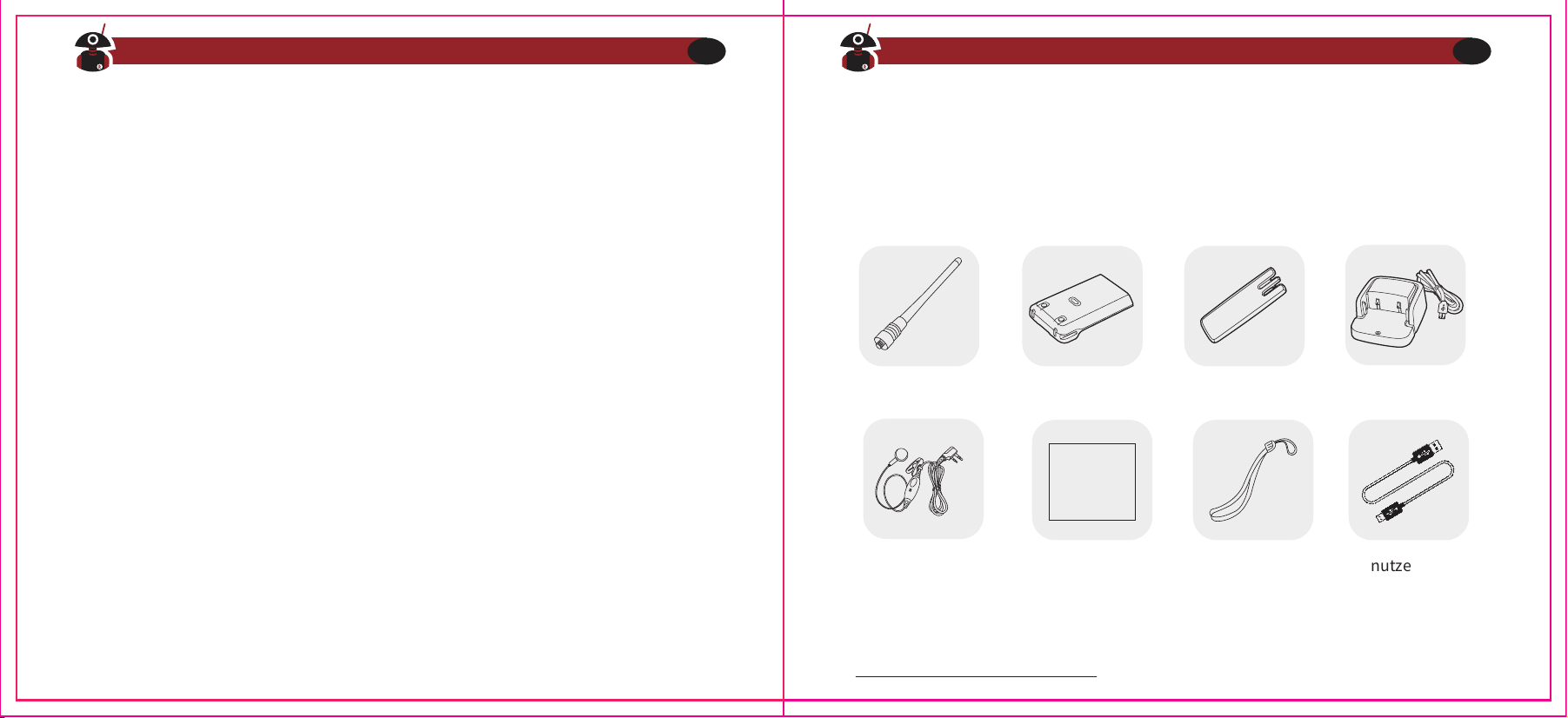
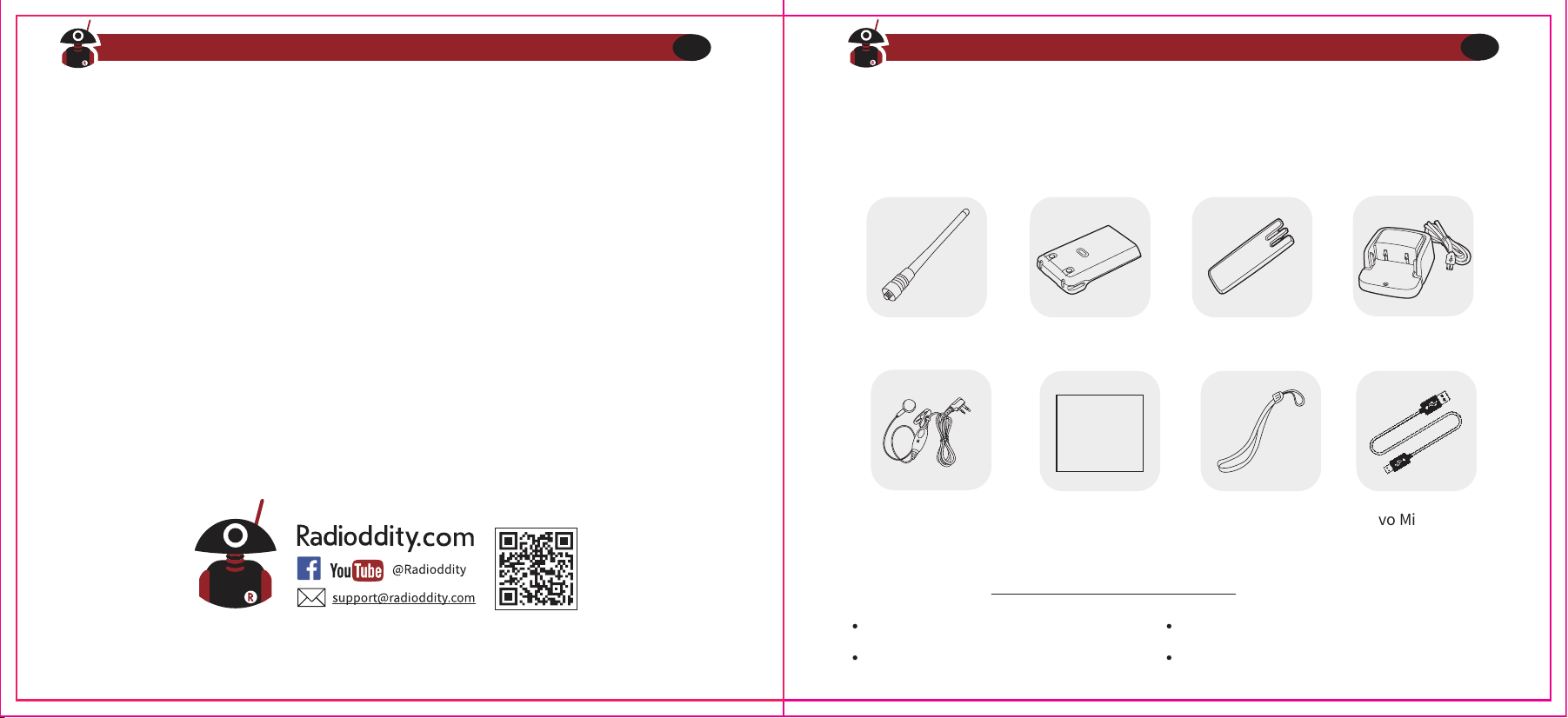
Thanks for choosing Radioddity two way radio. We recommend you to check the
items listed in the following table before discarding the package box.
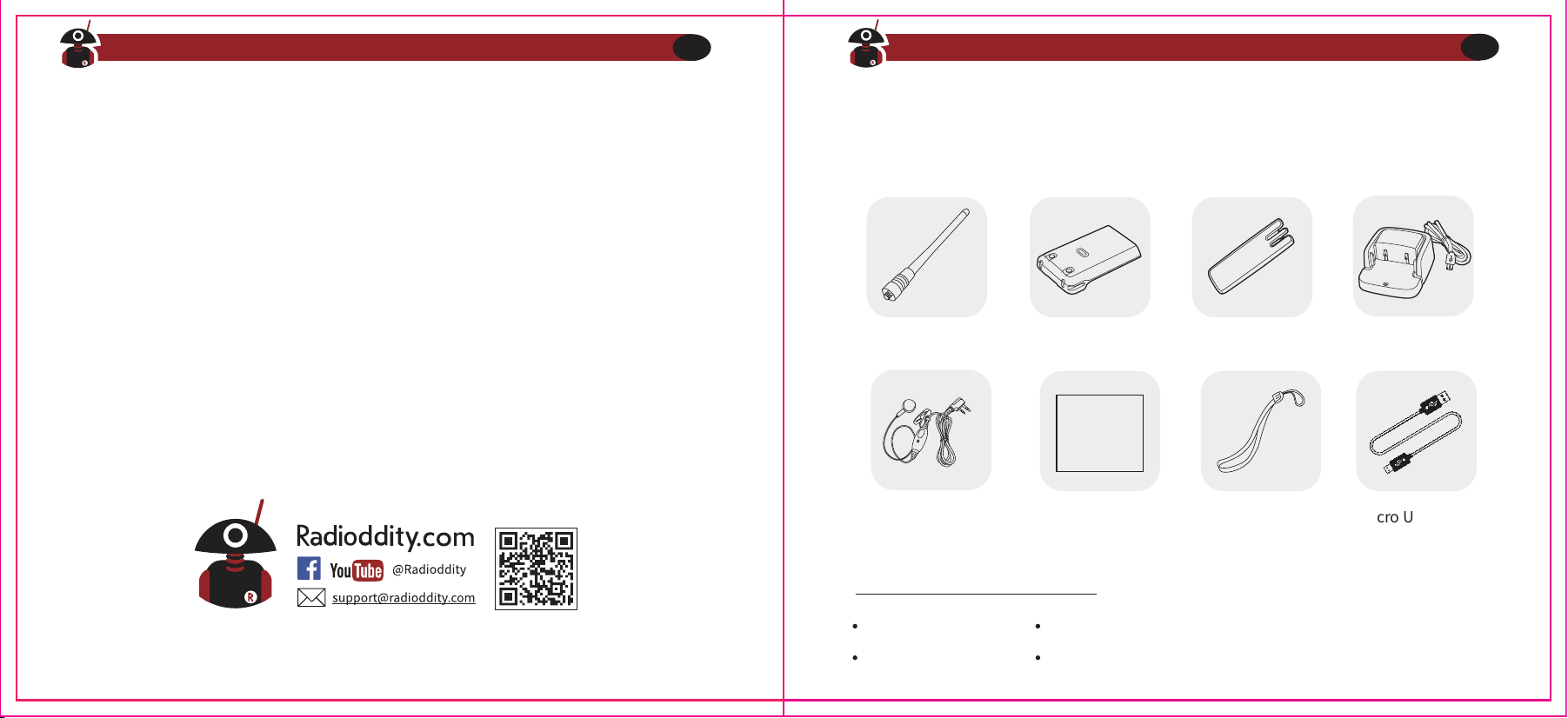
Antenna Li-ion battery Belt Clip
Users Manual Wrist Strap
Micro USB Cable
USB Charger
User Manual
Earpiece
Visit Radioddity.com For Downloads And Help
02
Visit Radioddity.com For Downloads And Help
03
What’s in the box
Speaker microphone
Programming cable
Antenna
Earphone
Chapter 2 -- Getting Familiar
Caution
Please use Radioddity designated battery; other batteries can cause explosion
Note
1. Do not short-circuit the battery terminals or dispose of in fire. Do not disas-
semble the battery by yourself.
2. Charge the battery between temperature 0℃ and 45℃. The battery cannot be
fully charged beyond this temperature range.
3. Turn off the power when you charge the radio.
4. Remove battery from charger when charging has completed.
5. Replace battery when operating time becomes insufficiently low.
6. Do not charge when the battery or the radio is wet. Please dry it with a cloth
before charging to avoid any danger.
Warning
If conductive metals, such as jewelry, keys or chains, contact the external
charging contacts, damage or personal injury may occur.
Battery Maintenance
Visit Radioddity.com For Downloads And Help
04
Visit Radioddity.com For Downloads And Help
05
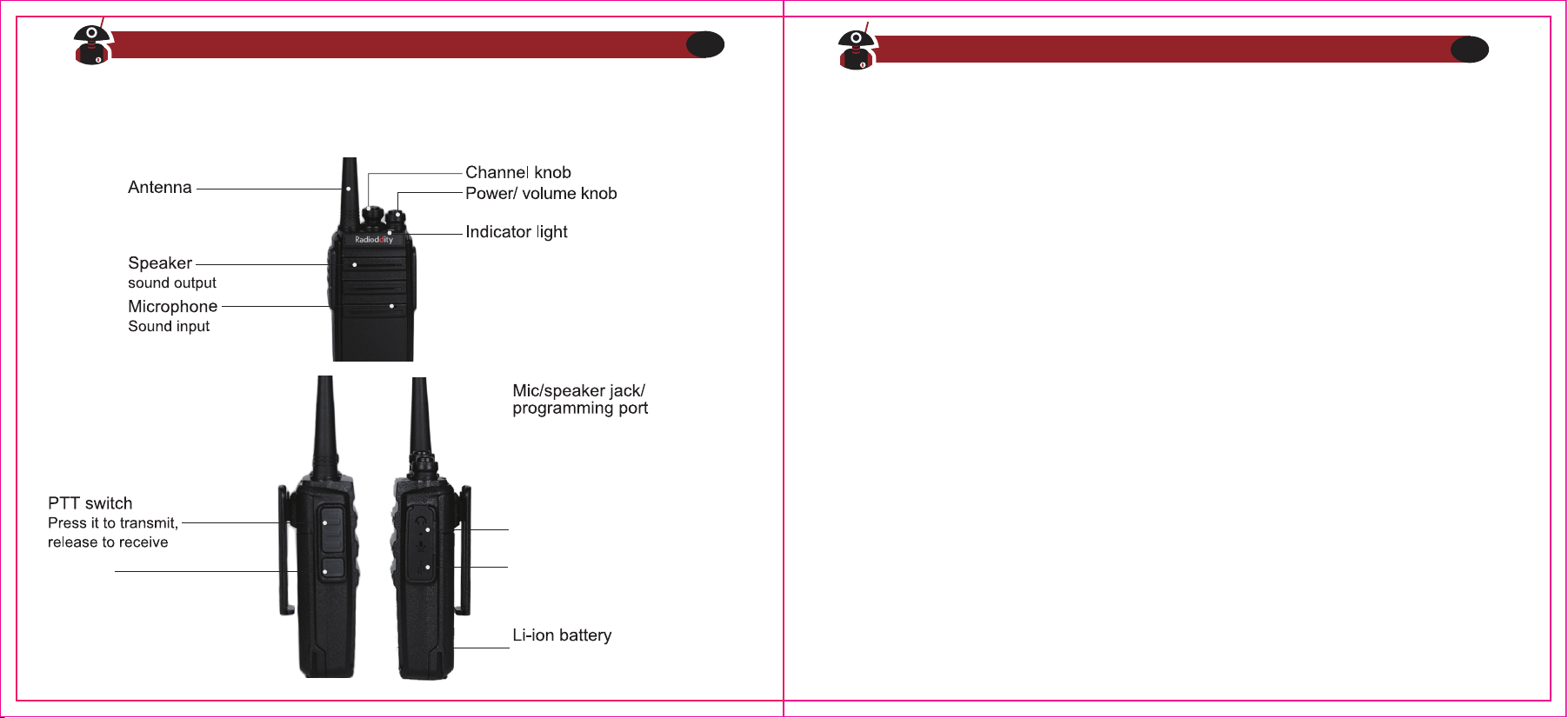
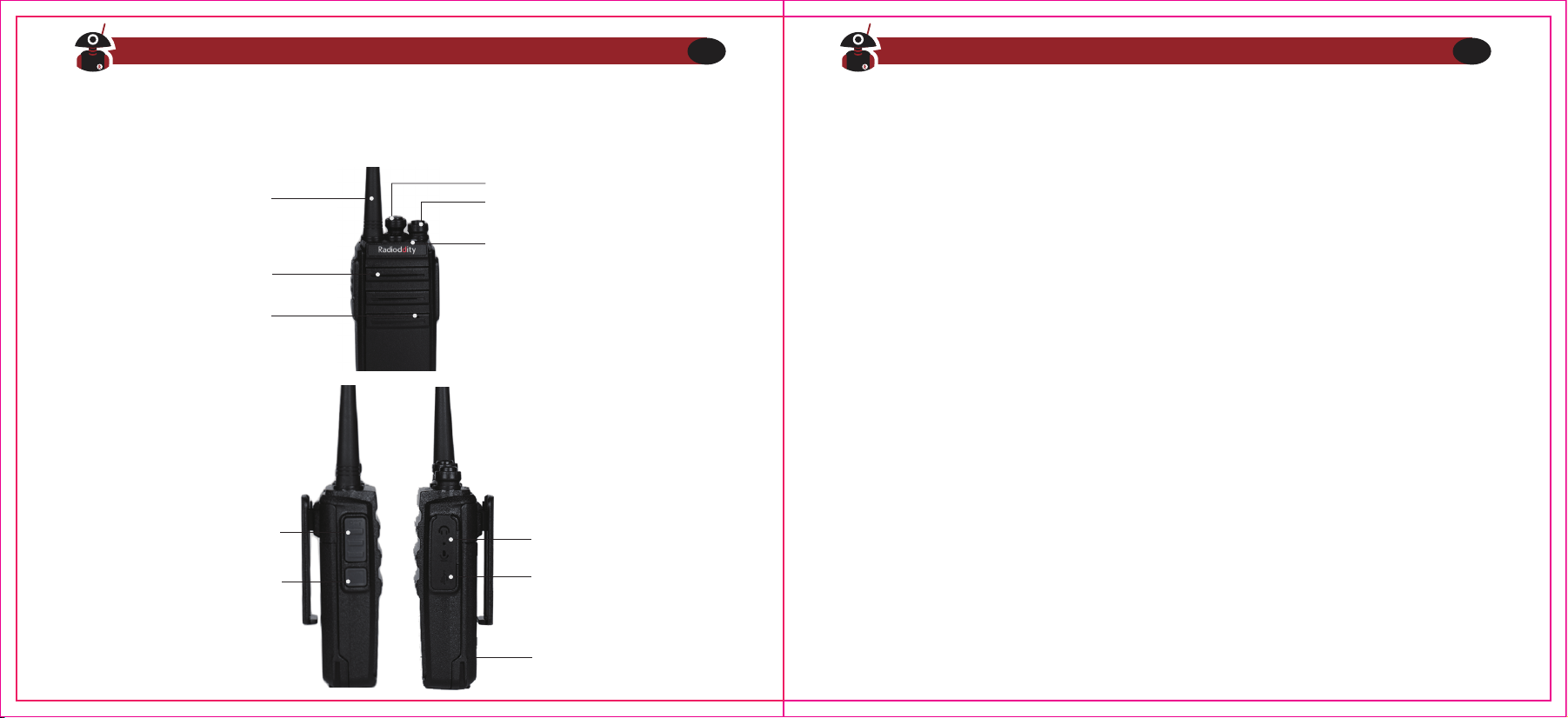
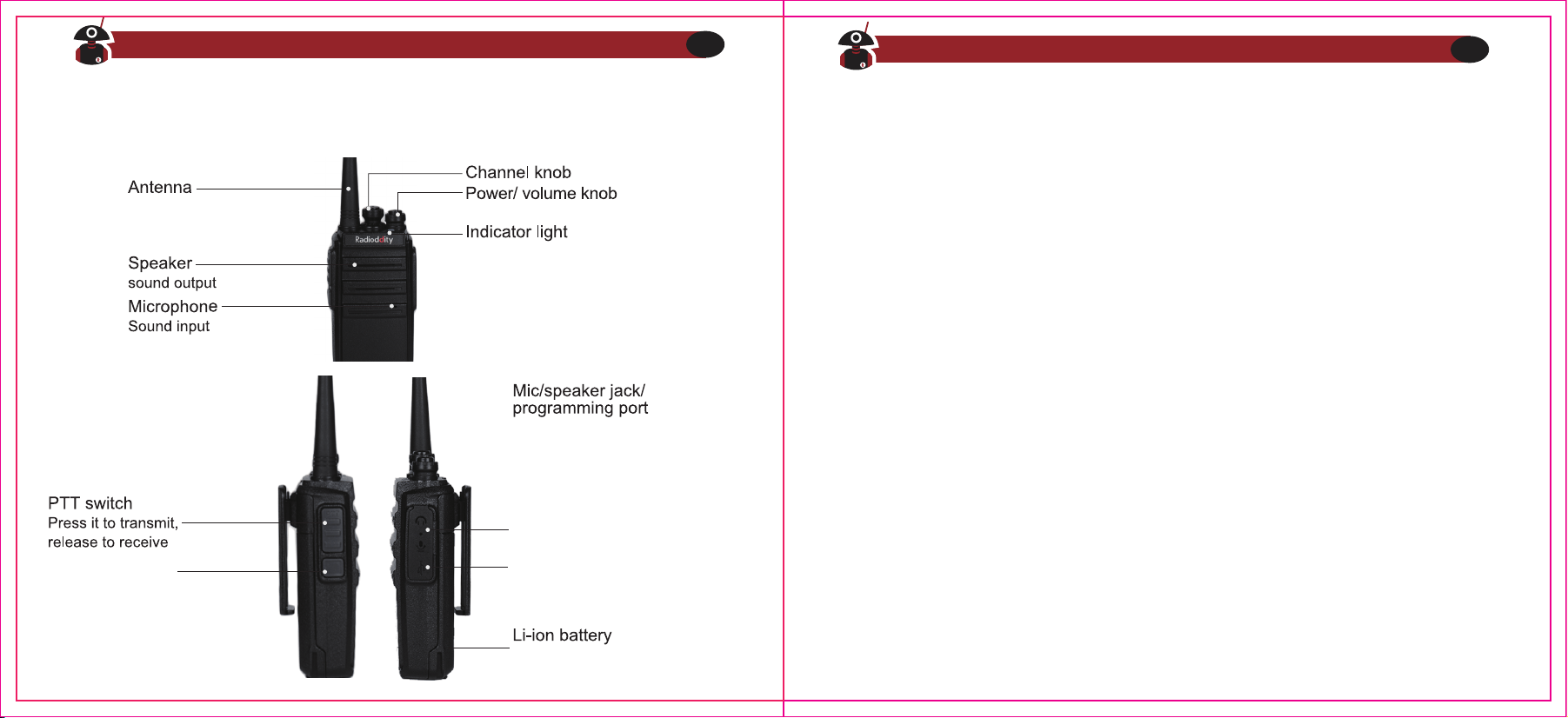
Turns red when transmitting and
green when receiving a signal.
It blinks red when the battery
capacity is low.
MONI key
Micro USB
Permits charging radio with
common cellphone style plug.
Use to connect headset
/microphone or external
programming cable.
Programming is performed
by company software or
CHIRP software.
Supplying power to radio
Installing/Removing the battery
1) Align the two grooves of battery and the guide rail on the back of aluminum
shell ensuring full contact and in parallel, then push the battery up to the
radio base along the rail on the back of aluminum shell, until the battery
latch locks up. (picture 1)
2) To remove battery, please make sure the radio is off, push the battery latch
down, and make sure the radio and battery is on the releasing state, and then
push the battery out from the radio.
Charging
How to use the USB desktop charger:
1. Plug the USB connector into a suitable USB power source. LED will become
GREEN indicating ready to commence the charging cycle.
2. Place either the Radio (OFF) or just the battery into charger. Charger LED will
show RED indicating the charging cycle has commenced.
3. When the LED turns GREEN, charging has completed and the radio or battery
should be removed from the desktop charger.
Note
1. Before inserting the battery, it is abnormal if the charging indicator blinks
2. Wait until the indicator is stable before placing battery in charger.
3. When the battery is properly inserted, the indicator turns red and starts the
charging process. If the indicator blinks, then the battery is damaged or the
temperature is too high or too low
Self-testing
When the charger powers up, the orange indicator lights for one second and then
goes out, entering the standby mode, the charger passes the self-test and can
charge the
battery. If the orange indicator blinks constantly, the charger fails to pass the
self-testing, and cannot charge the battery.
Using the micro USB charger for charging:
1) The yellow indicator lights will illuminate when the USB cable is plugged in to
the radio
2) The orange indicator light will show when the radio is charging via USB charger.
3) The radio is fully charged once the radio’s green status LED goes steady. Please
remove the radio to avoid the overcharging.
Visit Radioddity.com For Downloads And Help
06
Visit Radioddity.com For Downloads And Help
07
3) The radio is fully charged once the radio’s green status LED goes steady. Please
remove the radio to avoid the overcharging.
Caution
Be sure the output DC is 5V/1A, when you choose micro USB for charging. Never
exceed 1.5A. It is also suggested to use the desktop charger while possible.
Antenna
Short thick antenna is suitable for short-distance communication, while long thin
antenna (optional) will offer you longer distances. The communication range will be
decreased in bad weather or among trees or buildings.
Please note that the jack of antenna is FEMALE, while the jack of the radio is MALE
(SMA-F/M connectors).
Installing and removing the antenna
1) Align the threaded end of antenna and the threaded hole at the top of radio,
rotate the antenna clockwise until it is tight
2) To remove the antenna, rotate it counter-clockwise until the antenna spirals out
Installing external headset
Gently displace (do not remove) the mic/speaker jack cover, insert the headset into
the mic/speaker jack
Quick Start Guide
1. Carefully open the box and remove radio body, battery and antenna.
2. Install battery in radio body until it clicks (be gentle!) (See specific directions in
previous section)
3. Install antenna into radio. (The antenna will smoothly screw into radio.) Do not
force or cross threading may occur. Make sure, after about 10 turns, the antenna
is fully seated and tight.
4. Turn on power knob by twisting gently counter clockwise. The radio will respond
with, “Open the radio, 1,”or whatever channel is selected by the taller selector.
5. Select your desired channel, radio will respond with “One, Two, etc.”
6. Press the PTT and talk!
Visit Radioddity.com For Downloads And Help
08
Visit Radioddity.com For Downloads And Help
09
Chapter 3.-Basic operation
The battery included with the radio generally has enough power in it to test your
radio. You should fully charge the battery for optimal performance.
The GA-2S is a cost effective UHF-FM analog radio. It can communicate with any
other brand of radio that is UHF-FM analog, but without spending an exorbitant
amount of cash! You just need to make sure they are in the same channels/frequen-
cies, and this can be simply checked by using the software. If they are not in the
same frequency, just program via computer. (See chapter 4)
1. Scan Function
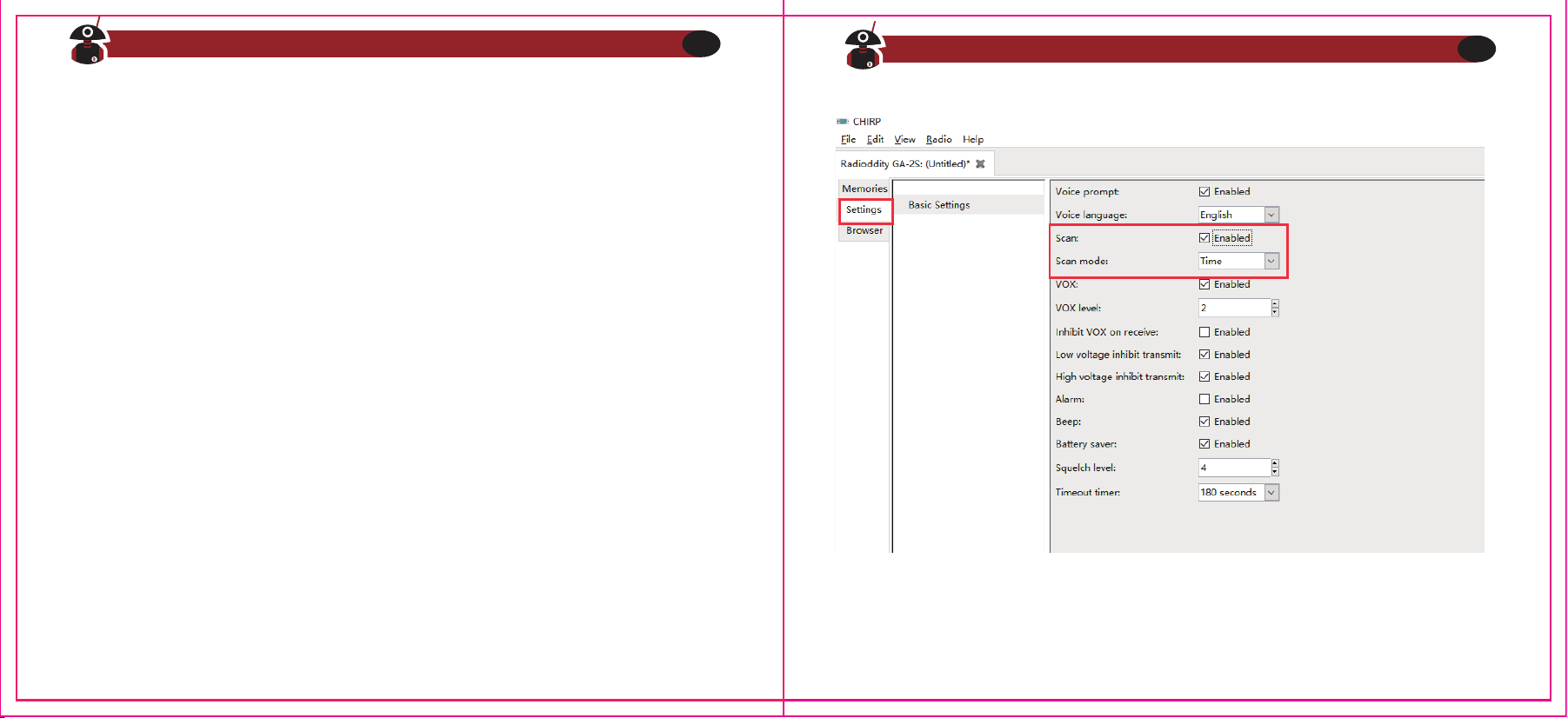
When the radio is allowed to be scanned, which can be set by the software, you can
press the Monitor key to turn on or turn off the scan. When the scan begins the
indicators lights green, the radio will can scan automatically from channel 1 to 16
which is defined as scan added. When there is signal in the scanning channel, it will
stop in that channel.
NOTE
Please note that scan is only available when there are two or more than two
memory channels and two or more scan added channels.
NOTE
Visit Radioddity.com For Downloads And Help
10
Visit Radioddity.com For Downloads And Help
11
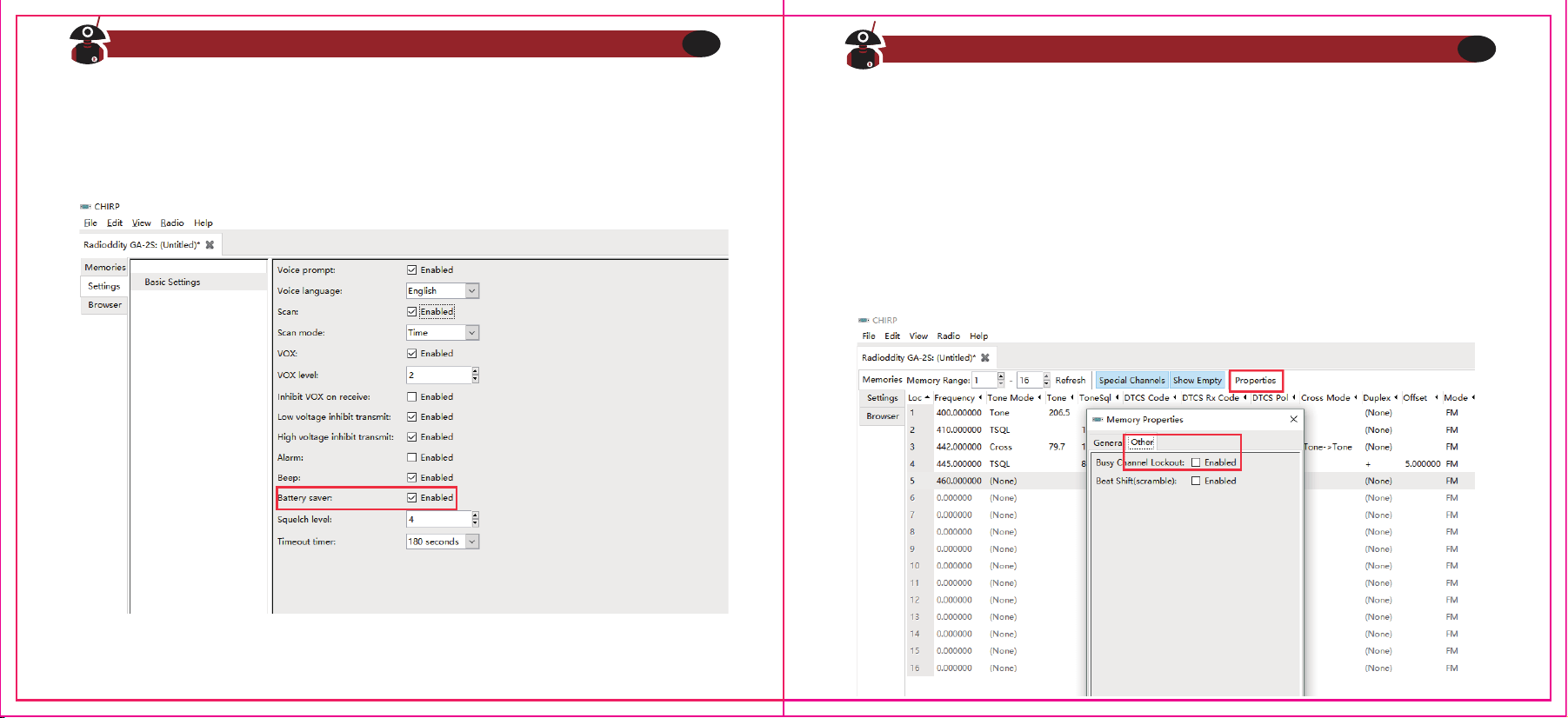
3. Busy Channel Lockout
You can turn on/off this function via software.
A: If the current channel does not have CTCSS/DC, when there is a signal, TX
prohibited when you press PTT.
B: If the current channel does not have CTCSS/DCS, when there is signal which
does not have CTCSS/DCS, TX prohibited when you press PTT.
C: If the current channels does not have CTCSS/DCS, when there is signal which
have CTCSS/DCS, the radio will transmit when you press PTT.
2. Battery Save Function
This function can be set by the software.
By turning on this function the standby time can be much longer.
Visit Radioddity.com For Downloads And Help
12
Visit Radioddity.com For Downloads And Help
13
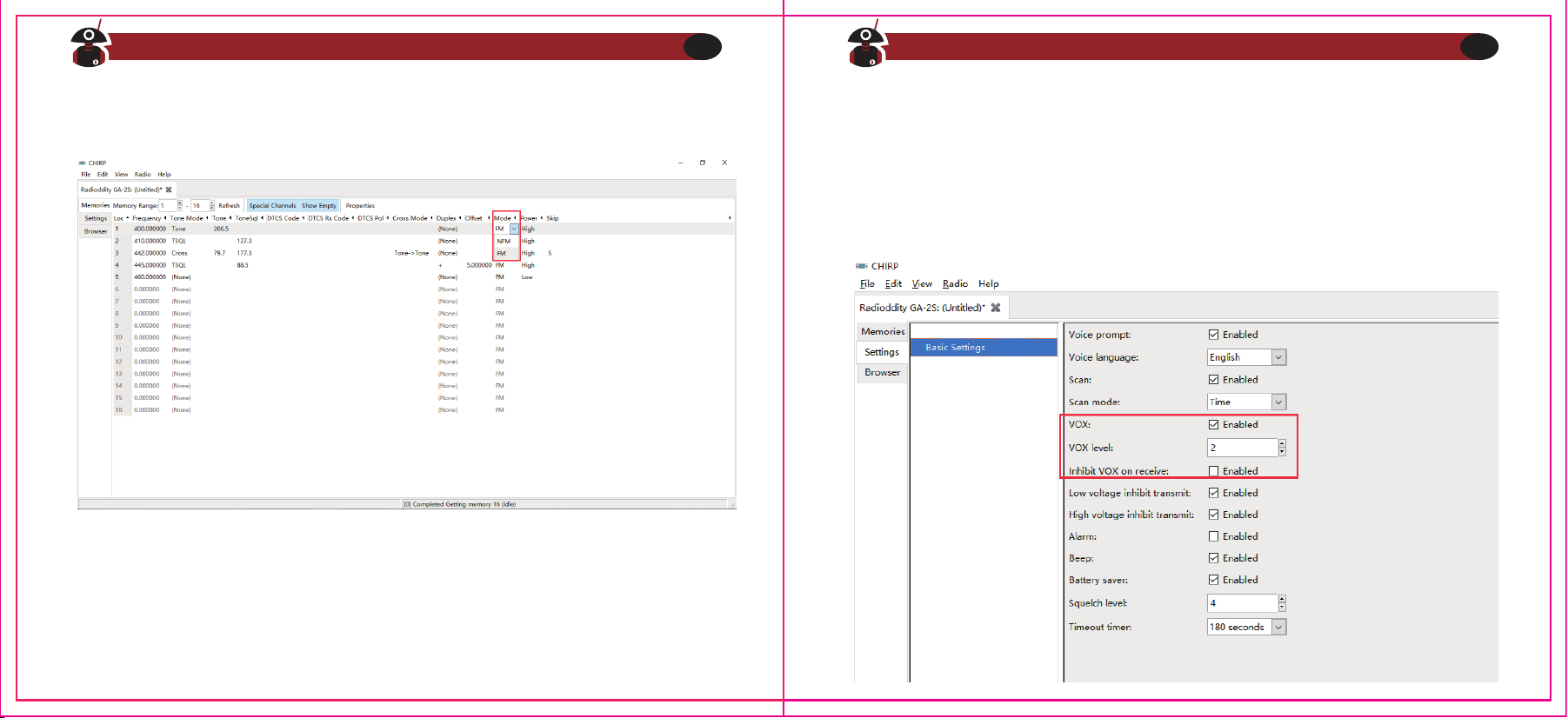
4. Wide/Narrow Bandwidth Setting
The default setting is wide band.
5. VOX
Speak to the microphone in normal voice to transmit, no need to press PTT
switch, turn VOX on/off though the software.
A. When VOX is on in your working channel:
Speak to the microphone directly, it will transmit automatically.
The radio stops transmitting when there is no voice, and waits for receiving.
B. When a headset with a microphone is used:
When VOX is on, you should VOX again for the radio to identify voice volume.
If the microphone is sensitive enough, the radio will start transmit.
If the microphone is not sensitive enough, the radio cannot collect your voice. Please
adjust your voice volume to guarantee smooth communications.
Visit Radioddity.com For Downloads And Help
14
Visit Radioddity.com For Downloads And Help
15
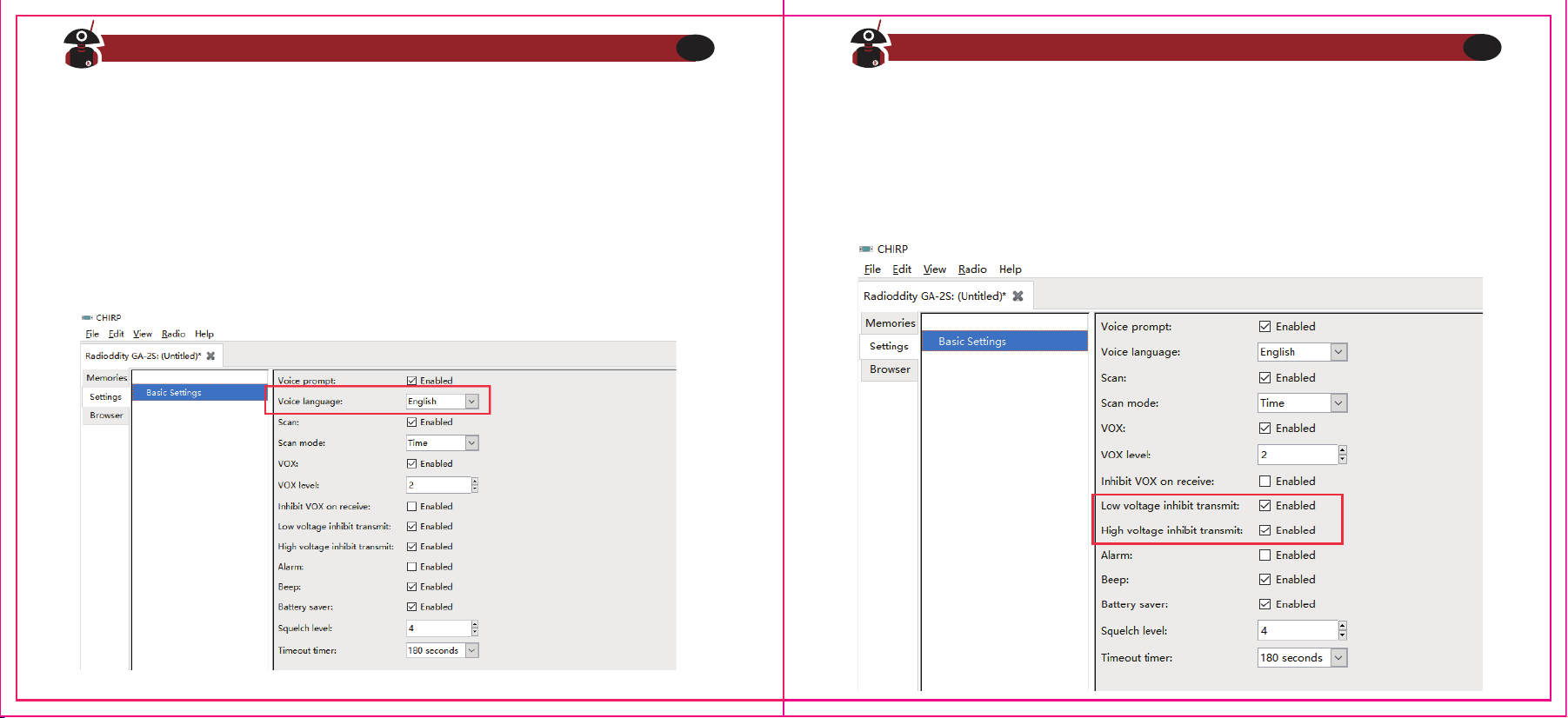
6. Voice Prompt
1) The voice prompt can be selected to "English/OFF “through the menu voice/Beep
Tone of the "Optional Features" in the software. When choosing OFF, voice
prompt turns off.
2) Channel annunciation: You will get to know the working conditions of current
channel which is being operated.
3) Low battery alert: The radio will remind you when the battery capacity reaches
the minimum operating voltage.
7. Low Battery Indication
When the radio is in transmitting or standby, if the battery capacity reaches the
pre-determined low level, the indicator light blinks red, and a low battery alert tone
will be heard. The indicating tone will be "Please change the battery”. When the low
battery alert occurs it cannot transmit, please change or charge the battery.
Visit Radioddity.com For Downloads And Help
16
Visit Radioddity.com For Downloads And Help
17
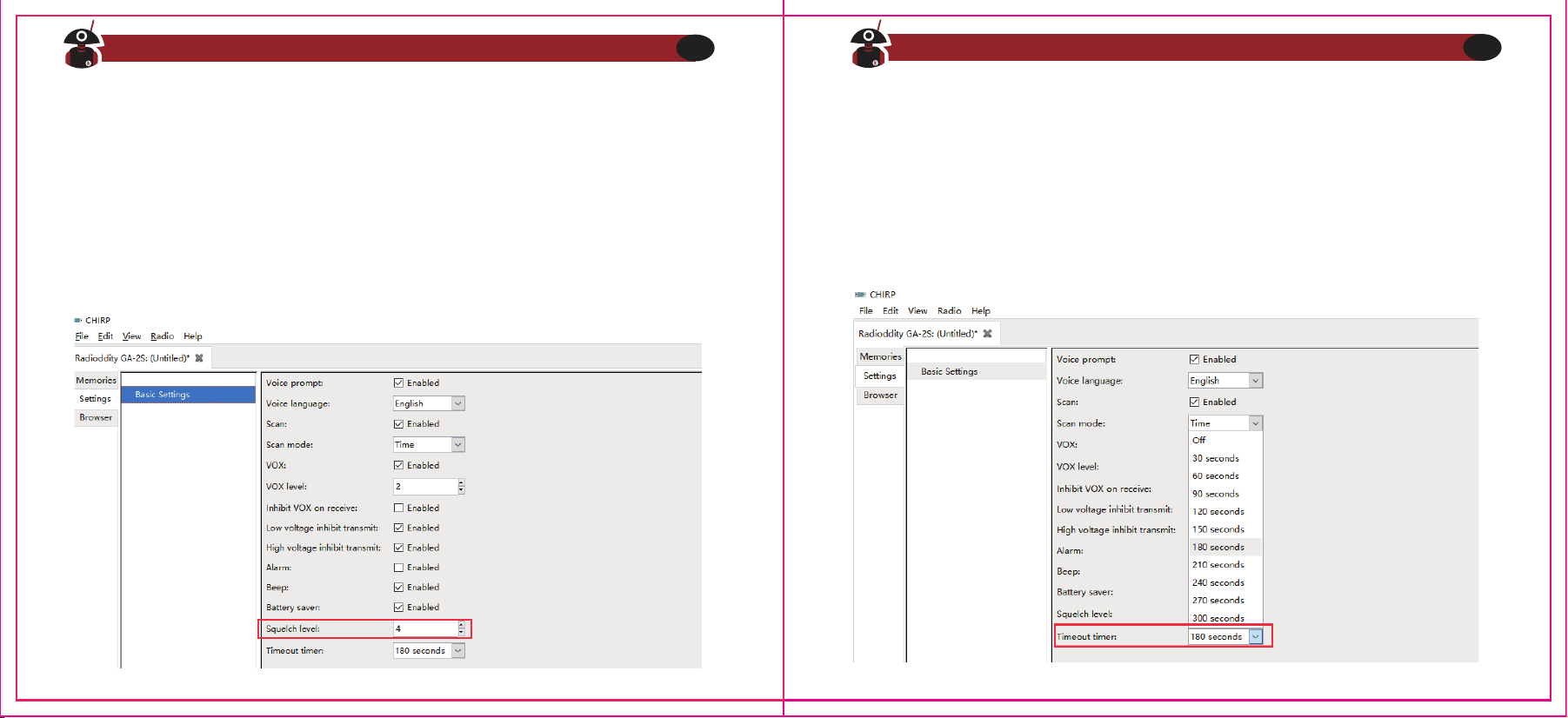
8. Squelch
The squelch level will determine the signal strength at which the radio speaker is
turned on. If the squelch level is low, the background noise of the radio speakers will
be higher, the corresponding communication range will be further, but the anti-in-
terference ability will be weaker.
The default setting of squelch level is 5. You can adjust it through the menu
"Squelch Level” in the software from level 0 to 9, and 0 is the lowest level.
9. Time-Out-Timer (TOT)
This feature provides a safety switch that limits transmission time to a programmed
value. This will promote battery conservation by not allowing you to make exces-
sively long transmissions, and in the event of a stuck PTT switch it can prevent
interference to other users as well as battery depletion. If the transmitting time
exceeds the TOT pre-set time, a beep will be heard and the radio will stop transmit-
ting.
Visit Radioddity.com For Downloads And Help
18
Visit Radioddity.com For Downloads And Help
19
Visit Radioddity.com For Downloads And Help
20
Visit Radioddity.com For Downloads And Help
21
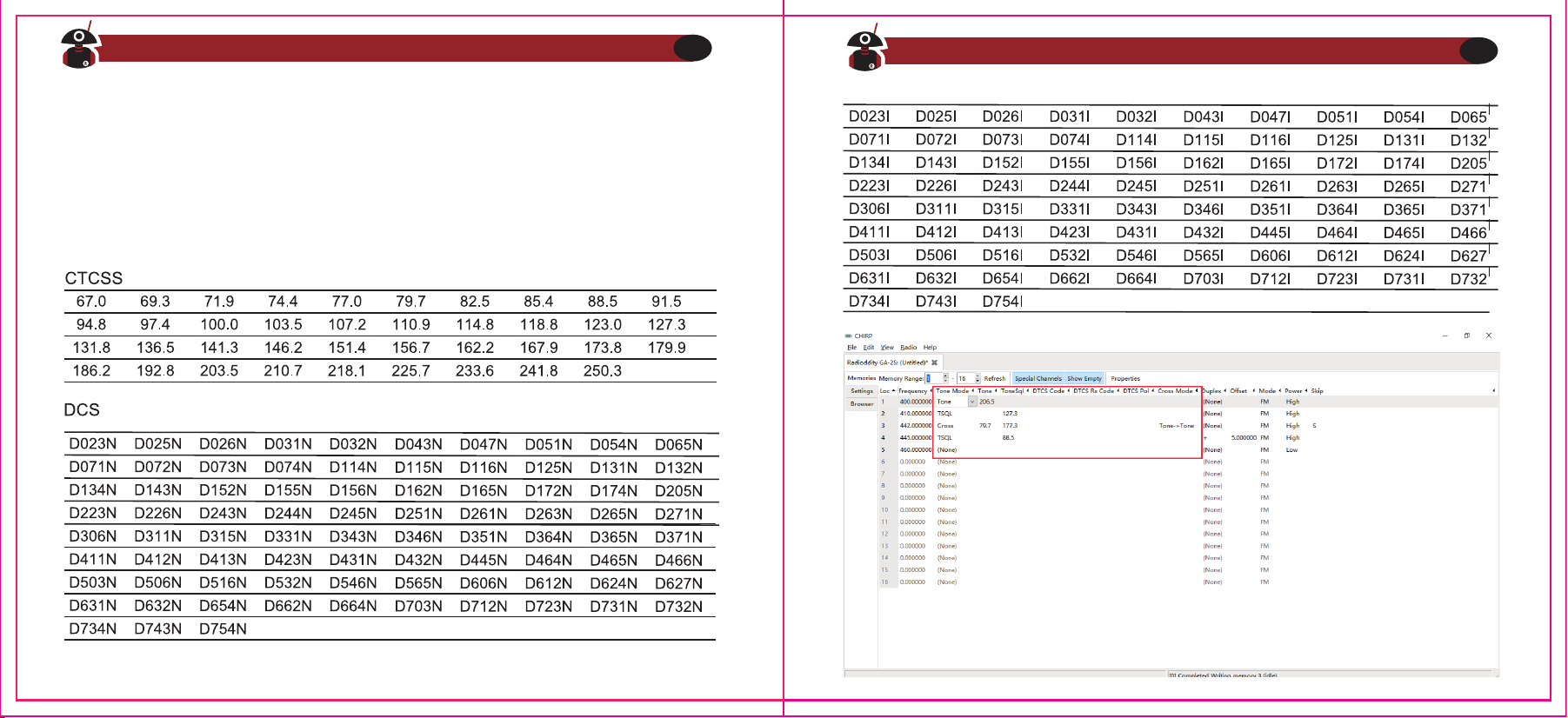
10. QT/DQT (CTCSS/DCS)
QT/DQT (CTCSS/ DCS) is the sub-audible signaling, to prevent the radio from
receiving unwanted signals on the same frequency. When CTCSS/DCS is set, then
within the communication range, you can only receive signals from the same
frequency with the same QT/DQT setting. When the QT/DQT is off, you will get all the
signals from the same frequency within the communication range.
Chapter 4 ‒ Computer Programming
The Radio kit does not include a programming cable. To attain a PC cable please visit
https://www.radioddity.com/
4. Connect your GA-2S with Computer
1) USB (or serial) programming cable connects with the computer end.
2) Connect the other end of the cable with your GA-2S.
3) When the both ends have been connected, turn on your radio. Make sure it has
enough power during the programming procedure.
Note
In some cases, the cable does not fully seat in a new radio. Make sure the cable is
FULLY seated prior to transferring data.
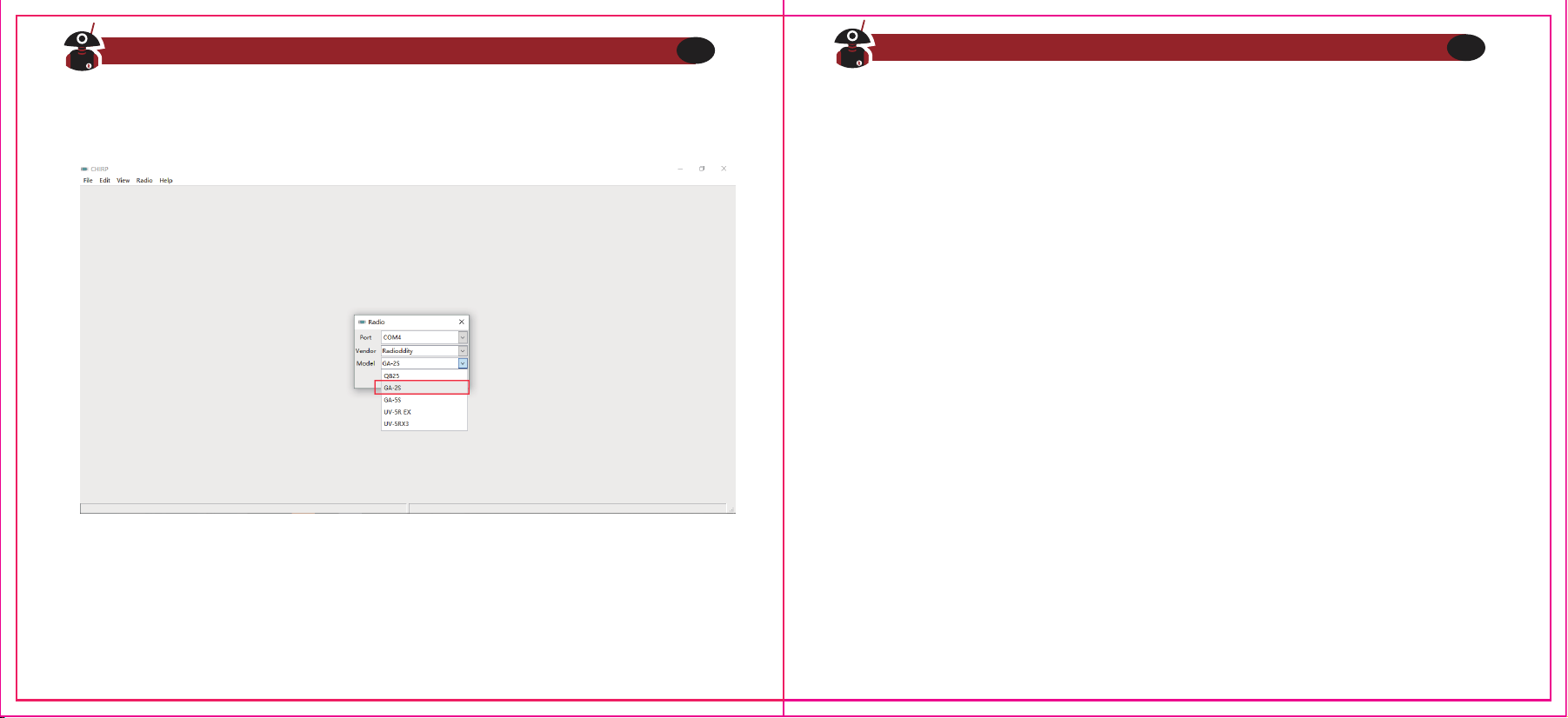
5. Read & Write Data via Software
1) In the software menu, click Setup> Communication Port and select proper COM
port (COM port may be located by using Windows Device Manager).
2) In the menu, Select Program> Read from Radio> OK to read frequencies. This
process takes a few seconds and progress in shown by a green progress bar in
the software.
3) Now you can edit any data and set all the functions that you want.
4) To write you completed data file, select Program> Write to Radio> OK.
5) If you have to program multiple GA-2S's you can repeat the above steps.
1. Computer System Requirements
Operating System: Windows 98, Windows Me. Windows XP, Windows 7, Windows
8 and Windows 10
Hard Disk Space: at least 50MB of available
The minimum memory: 64M
2. Programming Cable
A. USB programming cable - The driver needs to be installed before writing any
frequencies.
1) Find the corresponding driver of the system
2) Click install and wait for the installation succeed.
B. If you are using a serial cable a driver is not required. You can just plug in and use
directly.
3. Software Download & Install
1) Turn on computer, check if your computer system meets the requirements.
2) Download the programming software on radioddity.com
3) Install the programming software
Visit Radioddity.com For Downloads And Help
22
Visit Radioddity.com For Downloads And Help
23
Chapter 5 -- Trouble Shooting Guide
1) When reading or writing frequency, I do not get a response or it reports a
communication error?
a. Check your programming cable to see if it is damaged.
b. Check the connection of the programming cable and computer serial port.
c. Check to find if the GA-2S battery level is low or depleted. If it is replace or
charge the battery.
d. Check the programming software is matched with the current model.
e. Check if you turn ON your radio.
f. Check that the proper software drivers are properly installed.
2) When programming is done, why can't my two radios talk to each other?
a. Make sure the two radios are on the same channel.
b. Check the same channel is set to receive the same QT/DQT (CTCS / DCS).
c. Check if the two radios' volume control level is high enough. Depress the MON
button and adjust volume to comfortable levels.
d. Check for proper installation of the antennas.
e. Check range of the radios (Line of Sight).
6. If you have to program multiple walkie talkies, you can repeat the above steps.
FRS,GMRS,MURS and PMR446
You may be tempted to use FRS,GMRS, MURS (in the USA) or PMR 446 (in Europe)
Frequencies. Do note however there are restrictions on these bands that make this
transceiver illegal for use.
Visit Radioddity.com For Downloads And Help
24
Visit Radioddity.com For Downloads And Help
25
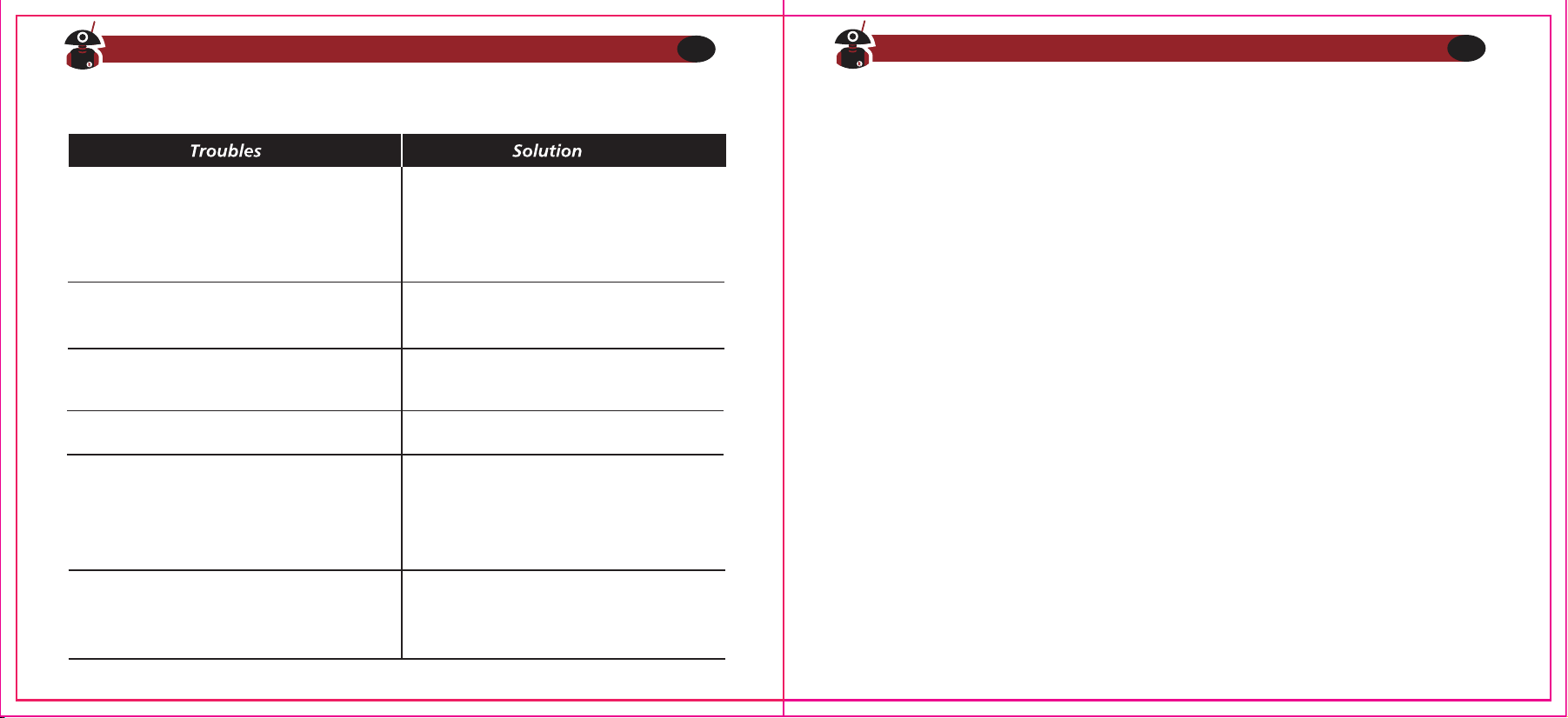
3) Other often seen problems
Radio cannot turn on
Noise is always heard
The voice of another group can be heard
The operating time becomes short,
even the battery is fully charged
Unable to communicate with the
transceivers of the same group
Other radios cannot receive the
TX signals or receive signals in a
low volume
Appendix A -- RF Energy Exposure and Product
Safety Guide for Portable Two- way Radios
ATTENTION!
Before using this radio, read this guide which contains important operating instruc-
tions for safe usage and RF energy awareness and control for compliance with
applicable standards and regulations.
This two-way radio uses electromagnetic energy in the radio frequency (RF)
spectrum to provide communications between two or more users over a distance. It
uses radio frequency (RF) energy or radio waves to send and receive calls. RF energy
is one form of electromagnetic energy. Other forms include, but are not limited to,
sunlight and x-rays. RF energy, however, should not be confused with these other
forms of electromagnetic energy, which when used improperly, can cause biological
damage. Very high levels of x-rays, for example, can damage tissues and genetic
material.
Visit Radioddity.com For Downloads And Help
26
Visit Radioddity.com For Downloads And Help
27
1. The battery is out of power. Replace or
recharge the battery.
2. The battery is installed incorrectly.
Remove it and install again
Replace the battery.
1. Confirm the QT/DOT is the same
2. The distance is out of range
1. Switch the volume knob to the highest
2. The microphone may be damaged, send it
to the local dealer for checking
The distance is out of range
Turn on the radio in shorter distance and
try again
Change all QT/DOT of the group
RF energy exposure standards and guidelines (if appropriate)
Your Radioddity two way radio complies with the following RF energy exposure
standards and guidelines:
1.United States Federal Communications Commission(FCC), Code of Federal Regula-
tions; 47 CFR part 2 sub-part J
2.American National Standards Institute(ANSI)institute of Electrical Electronic
Engineers (IEEE)c95.1-2005
3.IEEE Std. 1528: 2013 and KDB447498, Evaluating Compliance with FCC Guidelines
for Human Exposure to Radio Frequency Electromagnetic Fields
4.Institute of Electrical and Electronic Engineers (IEEE)C953-2002
5.International Commission on Non-lonizing Radiation Protection(ICNIRP)
6.Ministry of Health (Canada) Safety Code 6& Industry Canada RSS-102
7.International Electrotechnical Com-mission IEC62209-2. 2010
Visit Radioddity.com For Downloads And Help
28
Visit Radioddity.com For Downloads And Help
29
Experts in science, engineering, medicine, health, and industry work with organiza-
tions to develop standards for safe exposure to RF energy. These standards provide
recommended levels of exposure for both workers and the general public. These
recommended RF exposure levels include substantial margins of protection.
All Radioddity two-way radios are designed, manufactured, and tested to ensure
they meet government established RF exposure levels. In addition, manufacturers
also recommend specific operating instructions to users of two-way radios. These
instructions are important because they inform users about RF energy exposure and
provide simple procedures on how to control it.
Please refer to the following websites for more information on what RF energy
exposure how to control your exposure to assure compliance with established RF
exposure limits:
http://www.who.int/en/
Radio License
Governments keep the radios in classification, most of the classified walkie-talkie
need to get local government License and operation is allowed. For the following
specified classification: the USA FRS. Australian CB, the individual license is not
required.
Visit Radioddity.com For Downloads And Help
30
Operating Instructions
1.Transmit no more than the rated duty factor of 50% of the time. To Transmit
(Talk), push the Push To Talk (PTT) button to receive calls(listen), release the PTT
button. Transmitting 50% of the time, or less, is important because the radio
generates measurable RF energy exposure only when transmitting in terms of
measuring for standards compliance.
2.Transmit only when people outside the vehicle are at least the recommended
minimum lateral distance away from a properly installed according to installation
instructions, externally mounted antenna.
3.When operating in front of the face, worn on the body, always place the radio in a
Radioddity approved clip, holder, holster, case, or body harness for this product.
Using approved body worn accessories is important because the use of Non-Radi-
oddity approved accessories may result in exposure levels, which exceed the
IEEE/ICNIRP occupational/controlled environment RF exposure limits.
4.If you are not using a body worn accessory and are not using the radio in the
intended use position, in front of the face or at the body in the PTT mode or
alongside of the head in the phone mode, then ensure the antenna and the radio
are kept 2.5 cm (one inch) from the body when transmitting. Keeping the radio at
a proper distance is important because RF exposures decrease with increasing
distance from the antenna.
Protect your hearing
1.Use the lowest volume necessary to do your job.
2.Turn up the volume only if you are in noisy surroundings.
3.Turn down the volume before adding headset or earpiece.
4.Limit the amount of time you use headsets or earpieces at high volume.
5.When using the radio without a headset or earpiece, do not place the radio's
speaker directly against your ear.
Note: Exposure to loud noises from any source for extended periods of time may
temporarily or permanently affect your hearing. The louder the radio's volume, the
less time is required before your hearing could be affected.
Hearing damage from loud noise is sometimes undetectable at first and can have a
cumulative effect.
Safety Operation
Forbidden
1.Do not use charger outdoors or in moist environments, use only in dry
locations/conditions.
2.Do not disassemble the charger, which may result in risk of electrical shock or fire.
3.Do not operate the charger if it has been broken or damaged in any way.
4.Do not place a portable radio in the area over an air bag or in the air bag deploy-
ment area. The radio may be propelled with great force and cause serious injury
to occupants of the vehicle when the air bag inflates.
Visit Radioddity.com For Downloads And Help
31
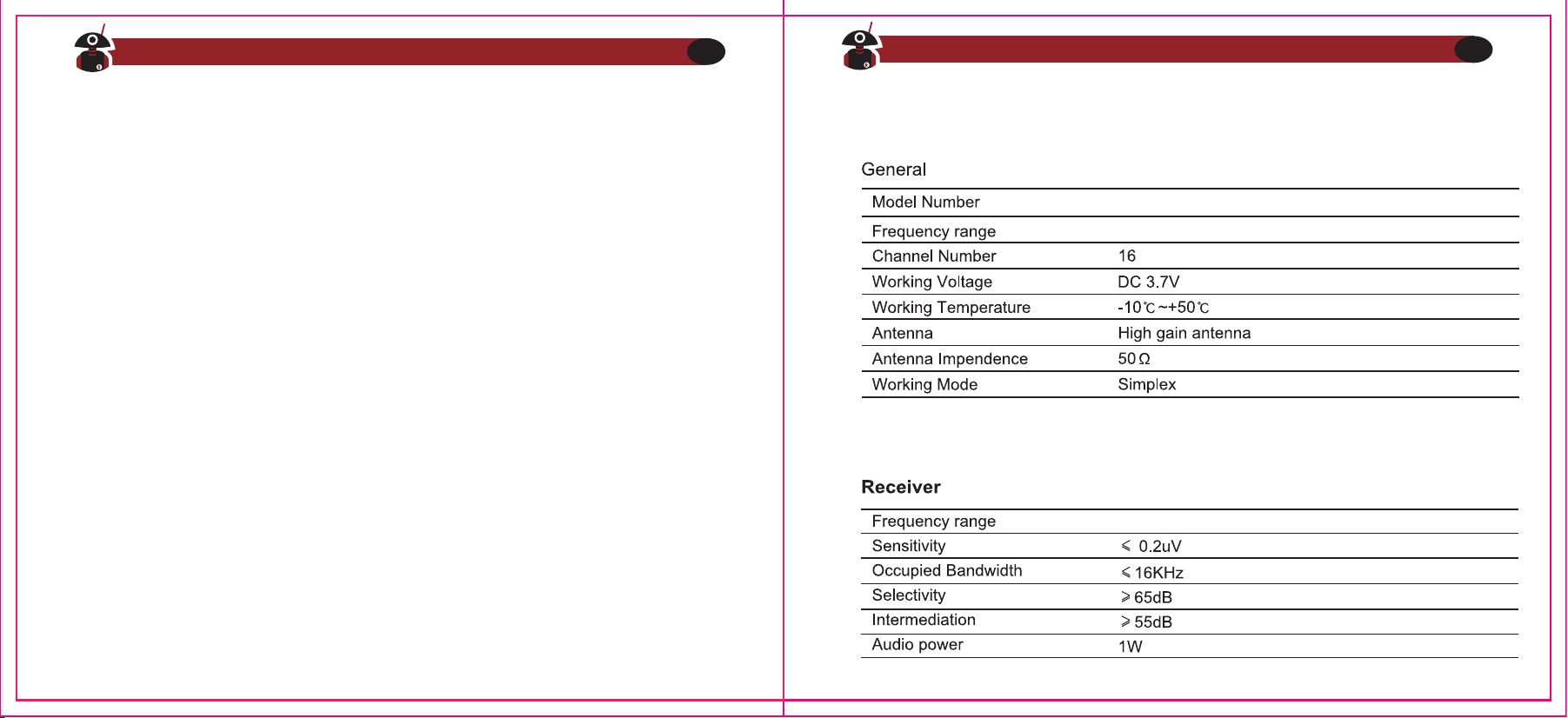
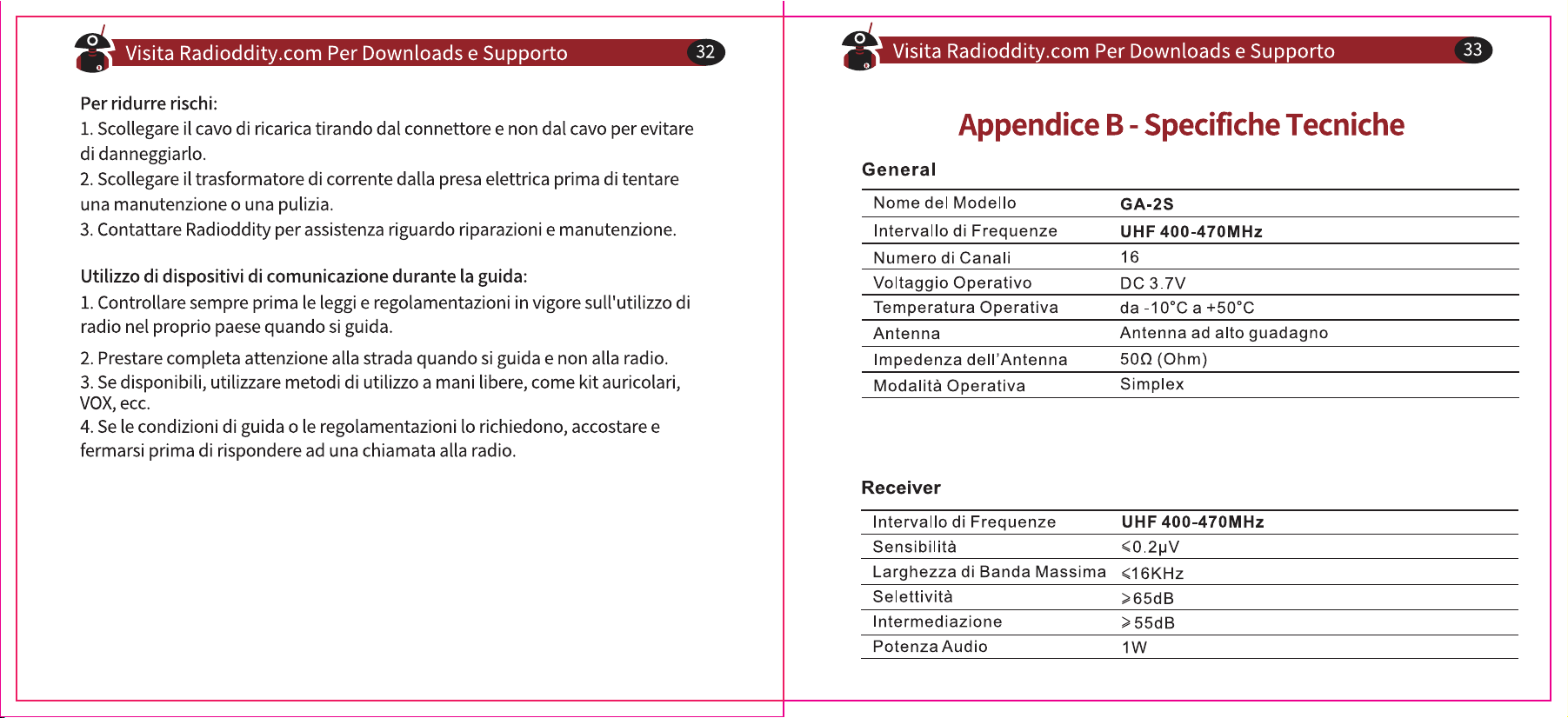
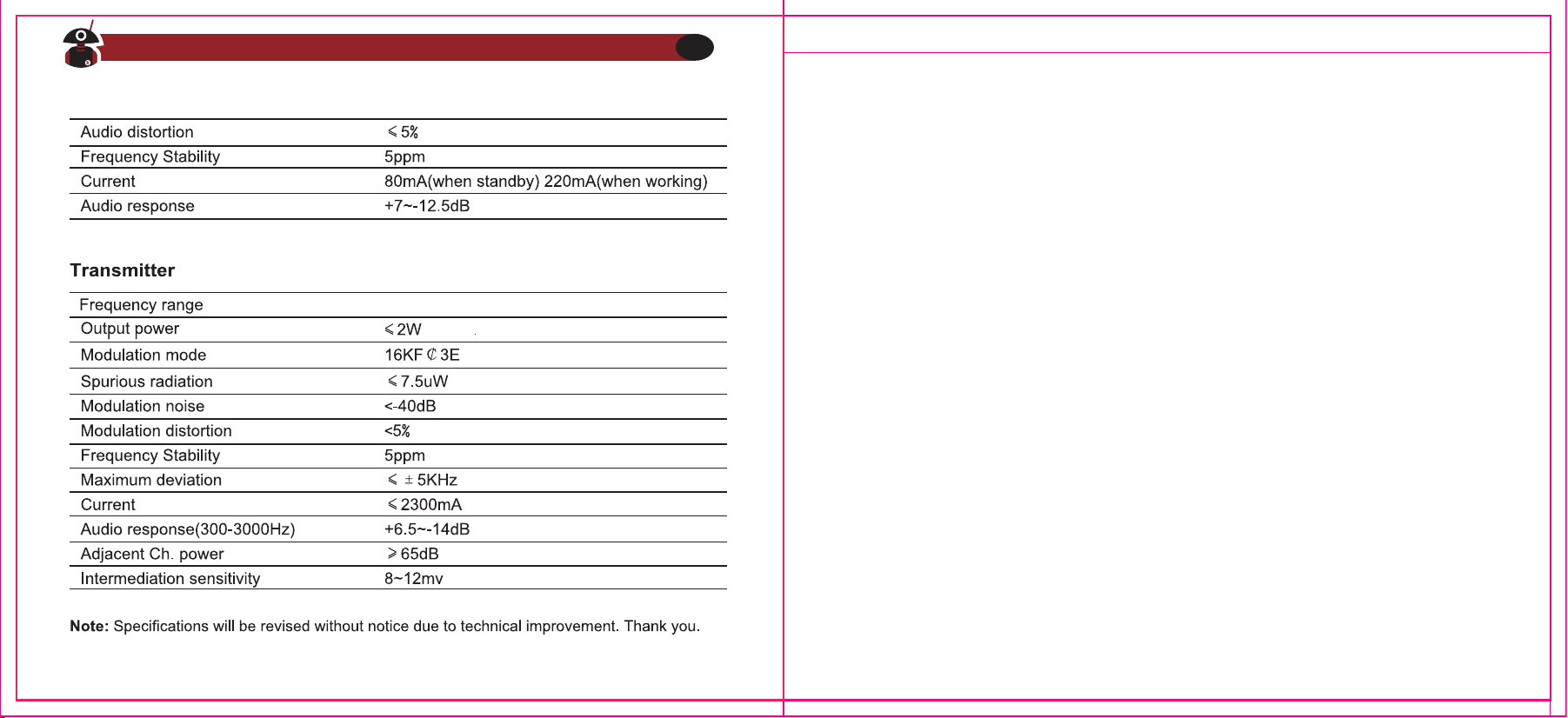
Appendix B -- Specifications
Visit Radioddity.com For Downloads And Help
32
Visit Radioddity.com For Downloads And Help
33
To reduce risk
1.Pull by the plug rather than the cord when disconnecting the charger.
2.Unplug the charger from the AC outlet before attempting any maintenance or
cleaning.
3.Contact Radioddity for assistance regarding repairs and service.
Use of Communication Devices While Driving
1.Always check the laws and regulations on the use of radios in the countries and
areas where you drive.
2.Give your full attention to driving and to the road.
3.If available, use the hands-free facility.
4.If driving conditions or regulations require it, pull off the road and park before
making or answering a call.
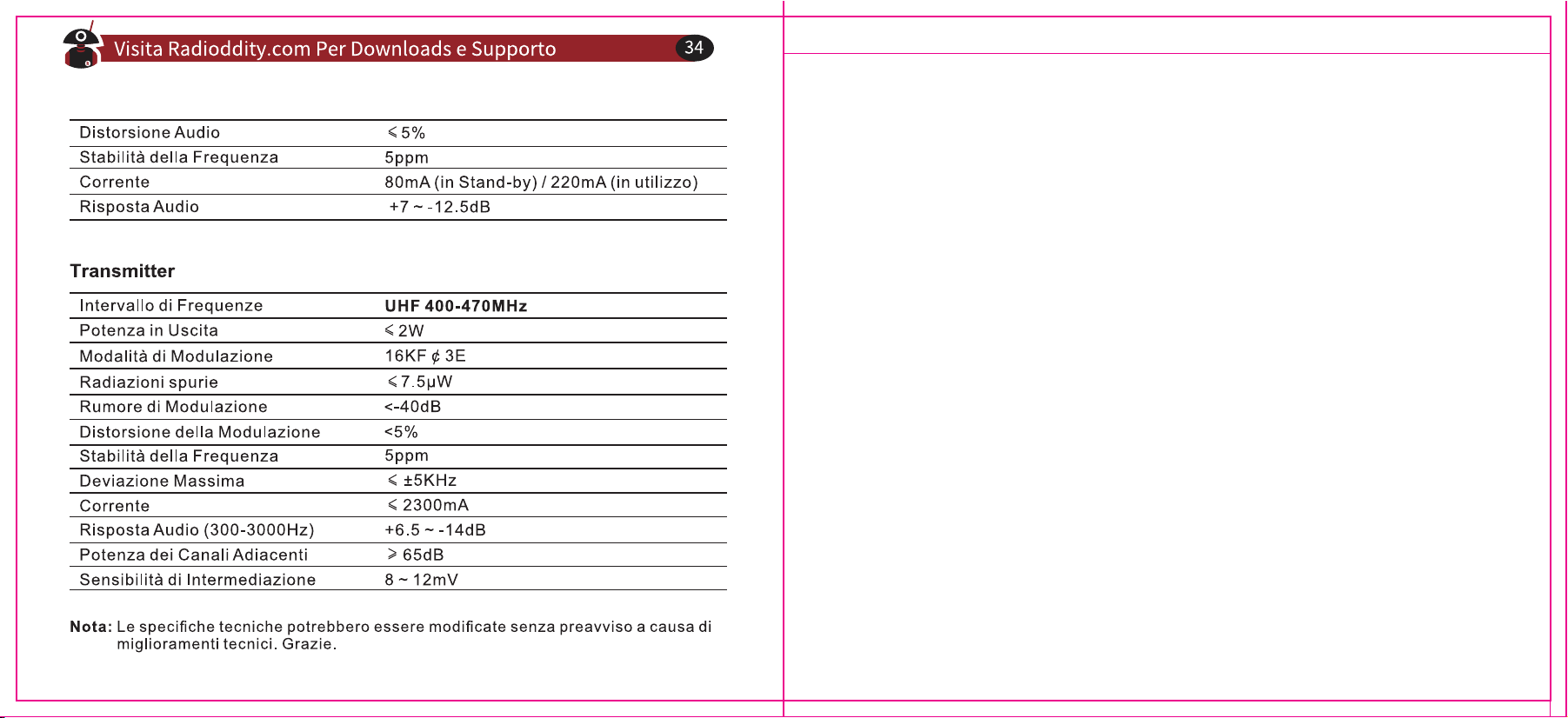
GA-2S
UHF 400-470MHz
UHF 400-470MHz
Visit Radioddity.com For Downloads And Help
34
UHF 400-470MHz

Über Radioddity
“Sie, unser Freund und Kunde, stehen im Mittelpunkt unseres Handelns.”
Nichts ist wichtiger als Ihre Zeit und Ihr Geld. Wenn Sie Funkgeräte online kaufen, stehen Sie vor einem
Dilemma: Sparen Sie Zeit und kaufen Sie von einer seriösen Website zu einem hohen Preis, oder
versuchen Sie, Geld zu sparen, indem Sie von einem unberechenbaren Händler auf Kosten Ihrer Zeit, die
Sie mit Qualitäts- und Servicefragen verbringen, kaufen. Bei Radioddity.com müssen Sie sich nicht
zwischen niedrigen Preisen und einem sicheren Einkaufserlebnis entscheiden. Ob Sie nun das erste Mal
bei uns etwas kaufen oder ein erfahrener Funkamateur sind, wir hoffen stets, dass Sie mit unseren
Produkten, Preisen, Inhalten und Quellen genau das finden, was Sie brauchen.
In den letzten Jahren hat Radioddity die Bedürfnisse der Käufer von Funkgeräten besser erfüllt, indem
es ein sicheres Einkaufserlebnis geschaffen hat. Wir tun dies, indem wir die hochwertigsten Produkte zu
einem erschwinglichen Preis anbieten und diese mit einem erstklassigen Service unterstützen. Das
klingt für uns einfach.
Unser Versprechen: Ihr Einkaufserlebnis zu verbessern.
Durch starke Partnerschaften sind wir in der Lage, Ihnen unter dem Markennamen neueste Technologie
anzubieten. Unsere fürsorglichen und reaktionsschnellen Kundendienstteams unterstützen uns dabei,
dieses Versprechen einzuhalten und Ihre Bedürfnisse jeden Tag noch besser zu erfüllen.
Zusammen mit diesem Versprechen hoffen wir, Ihnen den entsprechenden Mehrwert zu geben. Sei es,
indem wir Ihnen die neuesten und besten DMR- und Analogfunkgeräte, Zubehör und verwandte
Produkte anbieten, indem wir einen hervorragenden technischen Support bieten, oder indem wir mit
führenden Köpfen der Amateurfunkbranche zusammenarbeiten, um hilfreiche Inhalte zu entwickeln,
die Sie in Ihrem Kaufprozess unterstützen, einschließlich unseres Blogs, unserer FAQ und unseres
Newsletters. Ihre Anliegen sind unsere Anliegen.
All dies machen wir um Ihnen zu helfen, qualitativ hochwertige Funkgeräte zu niedrigen Preisen, mit so
wenig Kopfschmerzen für den Verbraucher wie möglich zu erwerben. Wenn wir Ihrer Meinung nach
dieses Versprechen in irgendeiner Weise nicht einhalten, lassen Sie es uns dies bitte per E-Mail wissen:
support@radioddity.com
Inhaltsverzeichnis
Kapitel 1 - Erste Schritte
Sicherheitshinweise
Was ist im Karton?
Kapitel 2 - Mit dem Funkgerät vertraut werden
Akkuwartung
Einlegen/Entfernen des Akkus
Gebrauch des USB-Ladegeräts
Verwendung des Micro-USB-Kabels zum Laden
Antenne
Montage und Demontage der Antenne
Anschluss eines externen Headsets
Kapitel 3 - Grundlegende Funktionsweise
Kurzanleitung
Kanalübergreifende Einstellungen
Rauschsperre
Funktionstaste
TX Time Out
Scanfunktion
01
03
04
05
06
06
07
08
08
09
09
09
11
12
13
13
14
Sprachausgabe
VOX
Temporäres Ein-/Ausschalten der VOX-Funktion
Akkusparfunktion
Low Vol Inhibit TX
Signalisierung eines schwachen Akkus
Kanalbezogene Einstellungen
Empfangs- sowie Sendefrequenz
CTCSS/DCS
TX Power
Bandbreiteneinstellung
Scan Add
Besetztkanalsperre
Kapitel 4 - Programmierung mit dem Computer
Kapitel 5 - Anleitung zur Fehlerbehebung
Anhang A - HF-Energiebelastung und Produktsicherheit
für tragbare Funkgeräte
Anhang B - Technische Daten
Anhang C ‒ CE Certificate of Compliance
16
17
19
19
20
20
21
22
22
26
27
28
28
31
36
38
44
46
Besuchen Sie radioddity.com für Downloads und weitere Informationen Besuchen Sie radioddity.com für Downloads und weitere Informationen
Bitte lesen Sie die folgende Kurzanleitung, da die Nichteinhaltung dieser Regeln eine
Gefahr darstellen oder gegen das Gesetz verstoßen kann.
1.Beachten Sie die Vorschriften der örtlichen Behörden, bevor Sie dieses Funkgerät
verwenden, da ein unsachgemäßer Gebrauch gegen das Gesetz verstoßen kann.
2.Schalten Sie das Funkgerät aus, bevor Sie sich brennbaren oder explosionsgefähr-
deten Bereichen nähern.
3.Laden oder wechseln Sie den Akku nicht in brennbaren oder explosionsgefährde-
ten Bereichen.
4.Schalten Sie das Funkgerät aus, bevor Sie in die Nähe von Spreng- oder Zünd-
zonen kommen.
5.Verwenden Sie kein Funkgerät, dessen Antenne beschädigt ist, da ein Berühren
der beschädigten Antenne zu Hitzeschäden führen kann.
6.Versuchen Sie nicht, das Funkgerät zu öffnen; eventuelle Wartungsarbeiten sollten
nur von einem Fachmann durchgeführt werden.
7.Um Störungen durch elektromagnetische Interferenzen oder elektromagnetische
Strahlungen zu vermeiden, schalten Sie das Funkgerät an Orten aus, an denen
Hinweise wie beispielsweise "Keine drahtlosen Geräte verwenden" angebracht
sind, z. B. in Krankenhäusern und anderen Gesundheitseinrichtungen.
Kapitel 1 - Erste Schritte
Sicherheitshinweise
Besuchen Sie radioddity.com für Downloads und weitere Informationen
01
8.Stellen Sie das Funkgerät in Fahrzeugen die über Airbags verfügen nicht in den
Bereich der Airbagauslösung.
9.Bewahren Sie das Funkgerät nicht unter direkter Sonneneinstrahlung oder in
heißen Bereichen auf. Wenn Sie mit dem Funkgerät senden, halten Sie mit Ihrem
Körper einen Abstand von mindestens 5 cm zur Antenne.
Note:The radio is compatible with other accessories which are available on:
https://www.radioddity.com/
*) Beim GA-2S-PMR ist die Antenne bereits fest mit dem Funkgerät verbunden.
Danke, dass Sie sich für ein Funkgerät von Radioddity entschieden haben. Wir
empfehlen Ihnen, zunächst den in der folgenden Tabelle aufgeführten Lieferum-
fang zu überprüfen, bevor Sie die Verpackung entsorgen. Sollte etwas fehlen,
wenden Sie sich bitte umgehend an Ihren Fachhändler.
Antenne Li-Ion Akku Gürtelclip
Micro USB-Kabel Handschlaufe
Benutzerhandbuch
USB Ladegerät
User Manual
Kopfhörer
Was ist im Karton?
Besuchen Sie radioddity.com für Downloads und weitere Informationen
02
Besuchen Sie radioddity.com für Downloads und weitere Informationen
03
Kapitel 2 - Mit dem Funkgerät vertraut werden
Achtung
Bitte verwenden Sie ausschließlich Akkupacks von Radioddity; andere Akkus
könnten explodieren.
Hinweis
1.Akku nicht kurzschließen oder in offenes Feuer werfen. Nehmen Sie den Akku
nicht selbst auseinander.
2.Laden Sie den Akku bei einer Temperatur zwischen 0℃ und 45℃ auf. Außerh-
alb dieses Temperaturbereichs kann der Akku nicht vollständig geladen
werden.
3.Schalten Sie das Gerät aus, wenn Sie es aufladen.
4.Nehmen Sie den Akku aus dem Ladegerät sobald der Ladevorgang abgeschlos-
sen ist.
5.Ersetzen Sie den Akku, wenn die Betriebszeit nicht mehr ausreicht.
6.Laden Sie nicht, wenn der Akku oder das Funkgerät nass ist. Um jegliche Gefahr
zu vermeiden trocknen Sie es bitte vor dem Aufladen mit einem Tuch.
Warnung
Wenn leitfähige Metalle, wie Schmuck, Schlüssel oder Ketten, die externen
Ladekontakte berühren, können Schäden oder Verletzungen auftreten.
Akkuwartung
Antenne
Lautsprecher
Mikrofon
Über die Antenne warden die
Funksignale empfangen und gesendet
PTT Sendetaste
Moni-Taste
Zum Senden drücken und gedrückt
halten, zum Empfangen loslassen
Kanalwahlschalter
Zum wählen eines Funkkanals 1... ...16
Rot:Funkgerät sendet
Grün:Kanal belegt,Empfang
Rot blinken:Akkukapazität niedrig
Zum Anschluss von Headset/-Mikrofon
oder Programmierkabel. Die
Programmierung erfolgt über
entsprechende Software von Radioddity.
Zum Anschluss von Ladung
Ein-Aus/Lautstärkeregler
LED-Anzeige
Zubehöranschluss
Mikro USB
Stromversorgung des Funkgeräts
Li-ion Akku
Tonausgabe
Tonausgabe
Besuchen Sie radioddity.com für Downloads und weitere Informationen
04
Besuchen Sie radioddity.com für Downloads und weitere Informationen
05
Einlegen/Entfernen des Akkus
1.Richten Sie die beiden Nuten des Akkus und die Stege auf der Rückseite des
Aluminiumgehäuses so aus, dass ein vollständiger Kontakt gewährleistet ist,
und schieben Sie den Akku dann entlang der Stege auf der Rückseite des
Aluminiumgehäuses nach oben, bis der Akkuverschluss einrastet. Dabei
muss der Akku leicht an die Rückseite des Aluminiumgehäuses gedrückt
werden um der Federkraft der Verriegelung entgegen zu wirken.
2.Um den Akku zu entfernen, stellen Sie bitte sicher, dass das Funkgerät
ausgeschaltet ist, drücken Sie die Akkuverriegelung nach unten (in Richtung
der Front des Funkgeräts, (1) ) und halten die Verriegelung in dieser Position.
Dadurch wird der Akku entriegelt und Sie können den Akku nach unten aus
dem Funkgerät wegschieben (2).
Gebrauch des USB-Ladegeräts:
1.Schließen Sie den USB-Stecker an eine geeignete USB-Spannungsquelle an.
Die LED der Ladestation leuchtet GRÜN und zeigt damit an, dass der
Ladevorgang beginnen kann.
2.Legen Sie entweder das Funkgerät (ausgeschaltet) oder nur den Akku in das
Ladegerät ein. Die LED des Ladegeräts zeigt ROT an, dass der Ladezyklus
begonnen hat.
3.Wenn die LED GRÜN leuchtet, ist der Ladevorgang abgeschlossen und das
Funkgerät oder der Akku sollte aus dem Ladegerät entfernt werden.
Hinweis
Wenn der Akku richtig eingesetzt ist, leuchtet die Anzeige ROT und startet den
Ladevorgang. Wenn die Anzeige blinkt, ist der Akku beschädigt oder die Tempera-
tur zu hoch oder zu niedrig.
Verwendung des Micro-USB-Kabels zum Laden:
1.Die orangefarbene Status-LED des Funkgeräts leuchtet auf, wenn das
Micro-USB-Kabel an das Funkgerät angeschlossen ist.
2.Die orangefarbene Status-LED des Funkgeräts leuchtet solange, wie das
Funkgerät über das Micro-USB-Kabel aufgeladen wird.
3.Sobald das Funkgerät vollständig geladen ist, erlischt die orangefarbene
Status-LED des Funkgeräts. Bitte entfernen Sie das Micro-USB-Kabel, um eine
Überladung zu vermeiden.
Besuchen Sie radioddity.com für Downloads und weitere Informationen
06
Besuchen Sie radioddity.com für Downloads und weitere Informationen
07
Vorsicht
Vergewissern Sie sich, dass der USB-Ausgang der Spannungsquelle 5V Gleichspan-
nung (DC), 1A beträgt, wenn Sie den Micro-USB-Anschluss zum Laden verwenden.
1,5A sollten niemals überschritten werden. Es wird empfohlen, möglichst das
Tischladegerät zu verwenden.
Antenne
Eine sogenannte Stummelantenne ist für die Kommunikation über kurze Distanzen
geeignet, während eine lange, dünne Antenne (optional) längere Distanzen
ermöglicht. Bei schlechtem Wetter oder zwischen Bäumen oder Gebäuden wird die
Reichweite der Kommunikation verringert.
Bitte beachten Sie, dass die Buchse der Antenne weiblich ist, während die Buchse
des Radios männlich ist (SMA-F/M-Stecker).
Montage und Demontage der Antenne
1.Richten Sie das Gewindeende der Antenne und das Gewinde an der Oberseite des
Funkgeräts aus. Drehen Sie die Antenne im Uhrzeigersinn, bis sie fest sitzt.
2.Um die Antenne zu entfernen, drehen Sie diese gegen den Uhrzeigersinn, bis sich
die Antenne herausdreht.
Anschluss eines externen Headsets
Die Abdeckung über dem Zubehöranschluss vorsichtig öffnen (nicht entfernen) und
anschließend den Stecker des Headsets bis zum Anschlag in den Zubehöranschluss
einstecken. Das Kabel des abgewinkelten Steckers verläuft dabei nach oben in
Richtung des Ein-/Ausschalters.
Kurzanleitung
1. Öffnen Sie die vorsichtig den Karton und entnehmen Sie das Funkgerät, den Akku
sowie gegebenenfalls auch die Antenne.
2.Legen Sie den Akku in das Funkgerät ein, bis er einrastet (Vorsicht!) (Siehe hierzu die
Hinweise im vorherigen Kapitel).
3.Verbinden Sie die Antenne mit dem Funkgerät. Die Antenne wird leichtgängig in das
Funkgerät eingeschraubt. Es darf kein gewaltsames Eindrehen oder Überdrehen
auftreten. Stellen Sie sicher, dass die Antenne nach einigen Umdrehungen fest sitzt.
Bei PMR-Funkgeräten ist die Antenne hingegen bereits montiert und gegen Demon-
tage gesichert.
4.Drehen Sie den Ein-/Ausschalter im Uhrzeigersinn. Das Funkgerät antwortet mit einer
Sprachausgabe der am Kanalwahlschalter eingestellten Kanalnummer.
5.Wählen Sie mit dem Kanalwahlschalter den gewünschten Kanal, das Funkgerät
antwortet entsprechend mit "one“, „two“, und so weiter.
6.Drücken Sie die Sprechtaste (PTT) und reden Sie Sie!
Kapitel 3 - Grundlegende Funktionsweise
Besuchen Sie radioddity.com für Downloads und weitere Informationen
08
Besuchen Sie radioddity.com für Downloads und weitere Informationen
09
Der im Lieferumfang des Funkgeräts enthaltene Akku hat in der Regel genug
Energie um Ihr Funkgerät zu testen. Für eine optimale Leistung sollten Sie den Akku
dennoch vollständig aufladen.
Das Radioddity GA-2S ist ein kostengünstiges UHF Analogfunkgerät. Es kann mit
jedem anderen UHF Analogfunkgerät kommunizieren, dies jedoch ohne dafür eine
exorbitante Menge an Geld auszugeben! Sie müssen nur sicherstellen, dass Sie sich
auf den gleichen Kanälen mit identischen Einstellungen für CTCSS/DCS befinden.
Dies kann einfach mit der Software überprüft werden. Wenn Sie die Einstellungen
nicht passend sind, programmieren Sie das Funkgerät einfach per Computer. (Siehe
Kapitel 4).
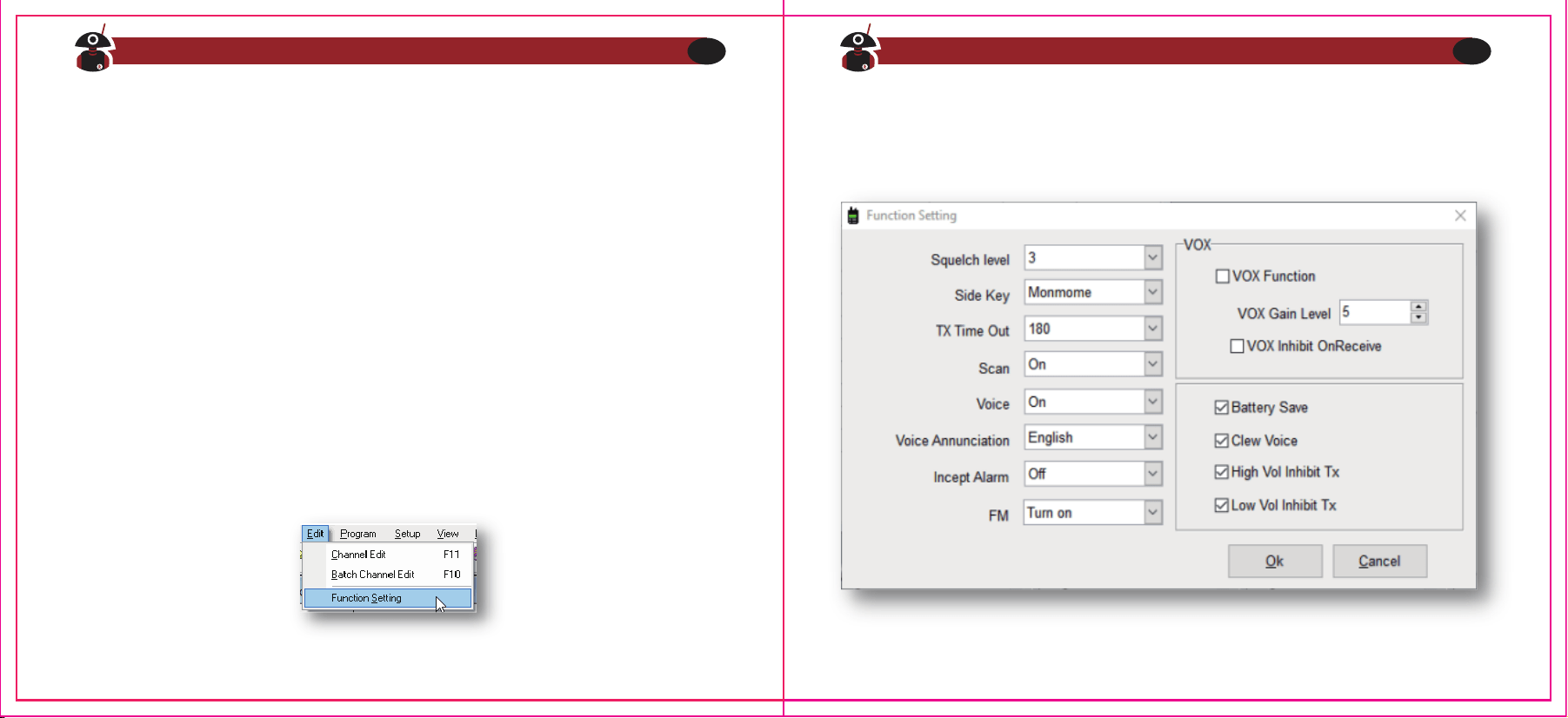
Einige Einstellungen können nur mit der von Radioddity zur Verfügung gestellten
CPS Software vorgenommen werden. In diese Einstellungen gelangen Sie mittels
„Edit -> Function Setting“
Kanalübergreifende Einstellungen
Nun stehen diverse, kanalübergreifende Einstellungen zur Verfügung:
Hinweis
Besuchen Sie radioddity.com für Downloads und weitere Informationen
10
Besuchen Sie radioddity.com für Downloads und weitere Informationen
11
Funktionstaste
Auf der linken Seite des Funkgerätes befindet sich unterhalb der PTT-Sprachtaste
eine Funktionstaste.
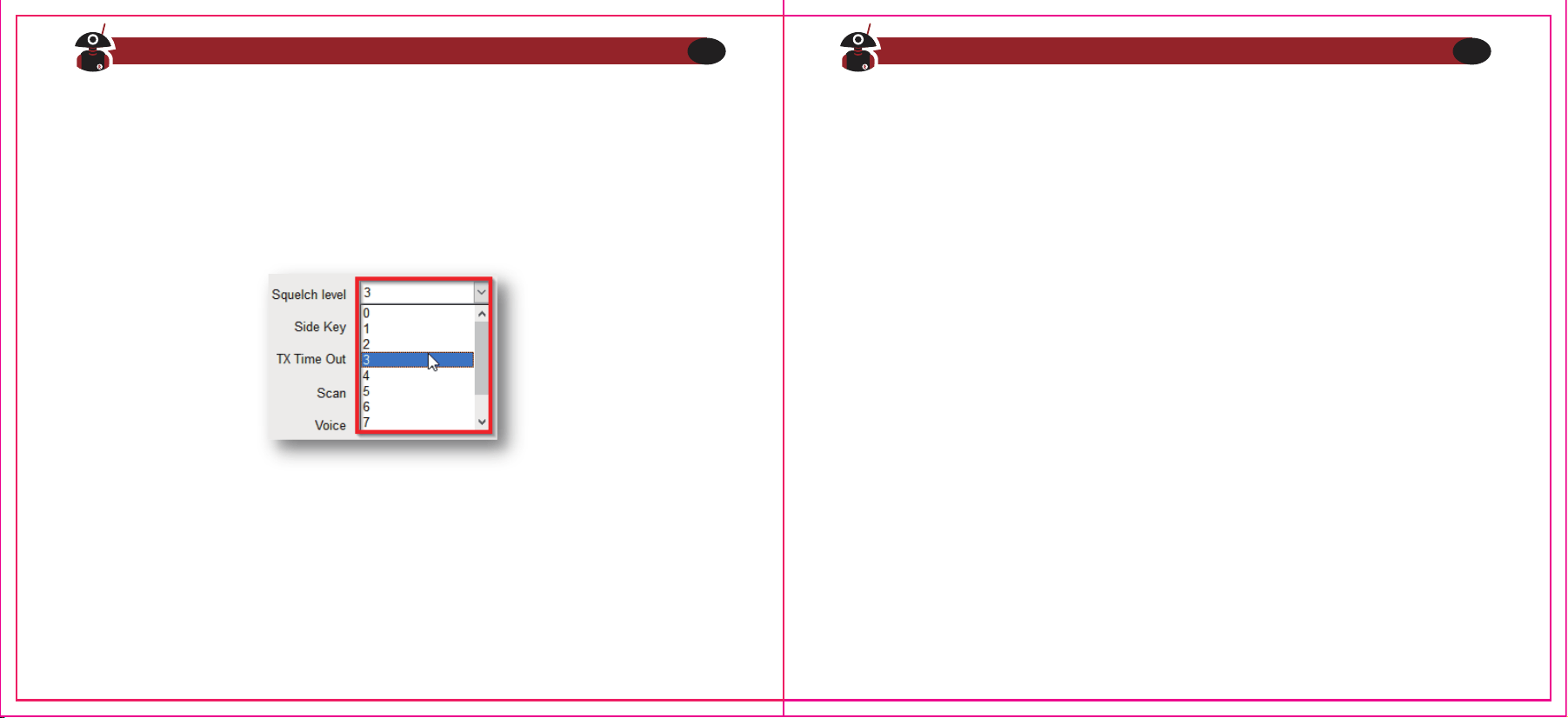
Rauschsperre
Der Rauschpegel (engl. Squelch Level) bestimmt mit Werten von 0 bis 9 die
Signalstärke, bei der das empfangene Signal über den Lautsprecher zu hören
ist. Wenn der Rauschpegel niedrig ist, sind weiter entfernte Sender eher zu
hören, als bei einem höheren Pegelwert. Jedoch ist das empfangene Signal
von weit entfernten Stationen in der Regel nicht so klar und deutlich zu hören.
TX Time Out
Diese Funktion bietet eine Art Sicherheitsschalter, der die Übertragungszeit auf
einen programmierten Wert begrenzt. Dies schont zudem den Akku, da Sie keine
übermäßig langen Übertragungen durchführen können. Im Falle einer verklem-
mten Sprechtaste werden dadurch Störungen anderer Benutzer sowie eine
Entladung des Akkus verhindert. Wenn die Sendezeit die eingestellte Zeit
überschreitet, ertönt ein kurzer Signalton und das Funkgerät hört auf zu senden,
erkennbar am Erlöschen der roten Status-LED.
Die Standardeinstellung des Rauschpegels ist 3. „0“ ist die ansonsten die niedrig-
ste Stufe (Die Rauschsperre ist in diesem Fall deaktiviert). Dies hat zur Folge, dass
Sie unabhängig vom gewählten Kanal immer dann ein Rauschen aus dem
Lautsprecher hören würden, wenn kein anderes Funkgerät sendet. Die Akkulauf-
zeit wird dadurch deutlich reduziert. Im Gegensatz dazu ist „9“ die höchste Stufe.
Diese sollte nur dann verwendet werden, wenn die zu empfangende Station sich
immer in unmittelbarer Nähe befindet und dadurch das empfangene Signal
entsprechend stark ist.
Dieser seitlichen Funktionstaste (engl. Side Key) kann eine der folgenden
Funktionen zugeordnet werden:
1.Off Keine Funktionszuweisung
2.Monmome Monitormodus
3.H/L Power Wahl der Ausgangsleistung (nicht beim GA-2S PMR)
4.Alarm Alarmfunktion
Besuchen Sie radioddity.com für Downloads und weitere Informationen
12
Besuchen Sie radioddity.com für Downloads und weitere Informationen
13
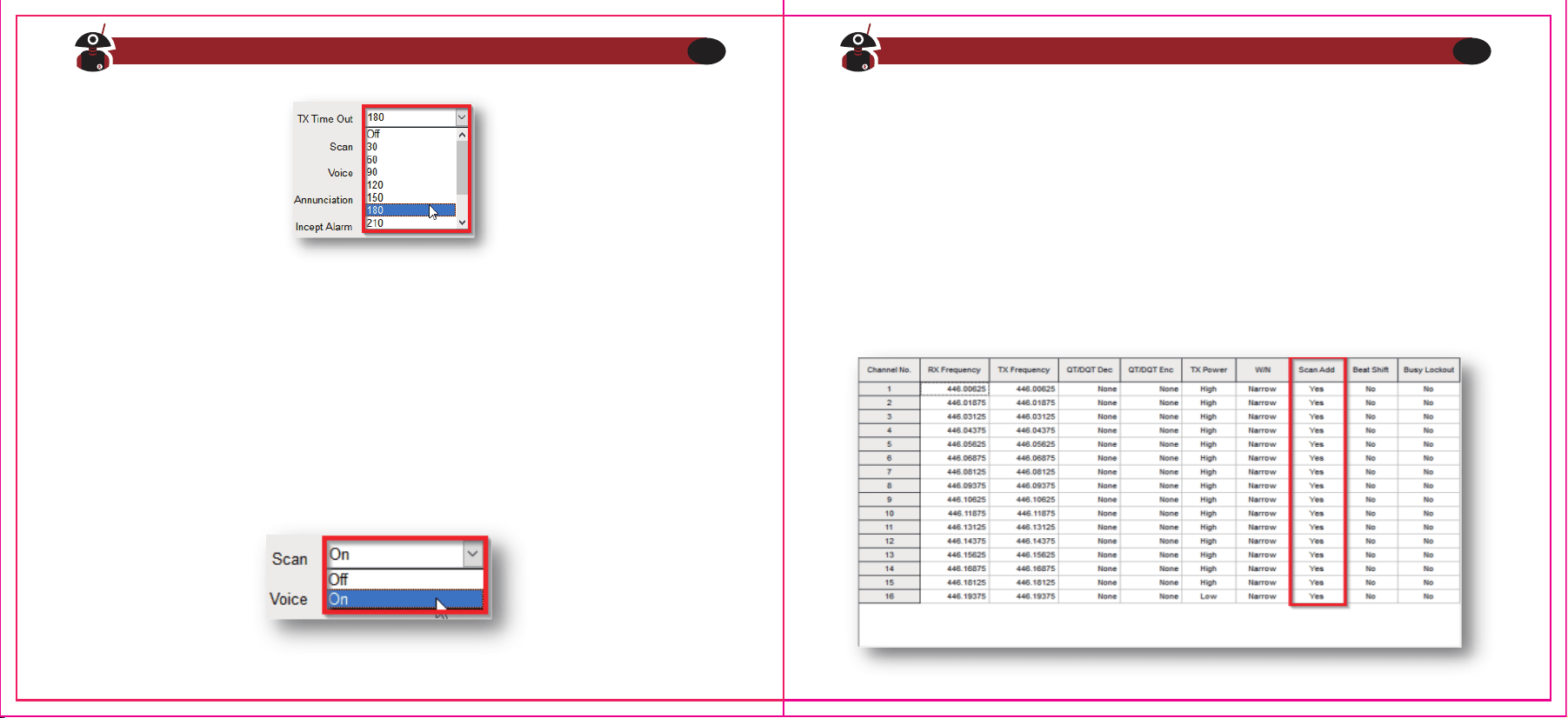
Scanfunktion
Die Scan-Funktion wird mittels der Monitor-Taste ein- oder ausgeschaltet. Wenn
der Scan beginnt, leuchtet die Status-LED grün, das Funkgerät kann automatisch
von Kanal 1 bis 16 scannen.
Der Wert kann in 30s-Schritten zwischen „aus“ (engl off), „30“ und „300“ Sekund-
en eingestellt werden. Die Werkeinstellung sind 180s (3 Minuten). Beim
GA-2S-PMR sind Werte über 180s nicht erlaubt.
Es werden jedoch nur solche Kanäle beim Scan berücksichtigt, die zuvor der
Scanliste hinzugefügt wurden (Feld „Scan Add“ des entsprechenden Kanals. Wenn
ein Signal im aktuellen Abtastkanal festgestellt wird, stoppt die Scanfunktion bei
diesem Kanal. Die Scan-Einstellungen können per Software geändert werden.
Hinweis
Bitte beachten Sie, dass der Scan nur verfügbar ist, wenn es zwei oder mehr als zwei
Speicherkanäle und zwei oder mehr zusätzliche Kanäle gibt.
Besuchen Sie radioddity.com für Downloads und weitere Informationen
14
Besuchen Sie radioddity.com für Downloads und weitere Informationen
15
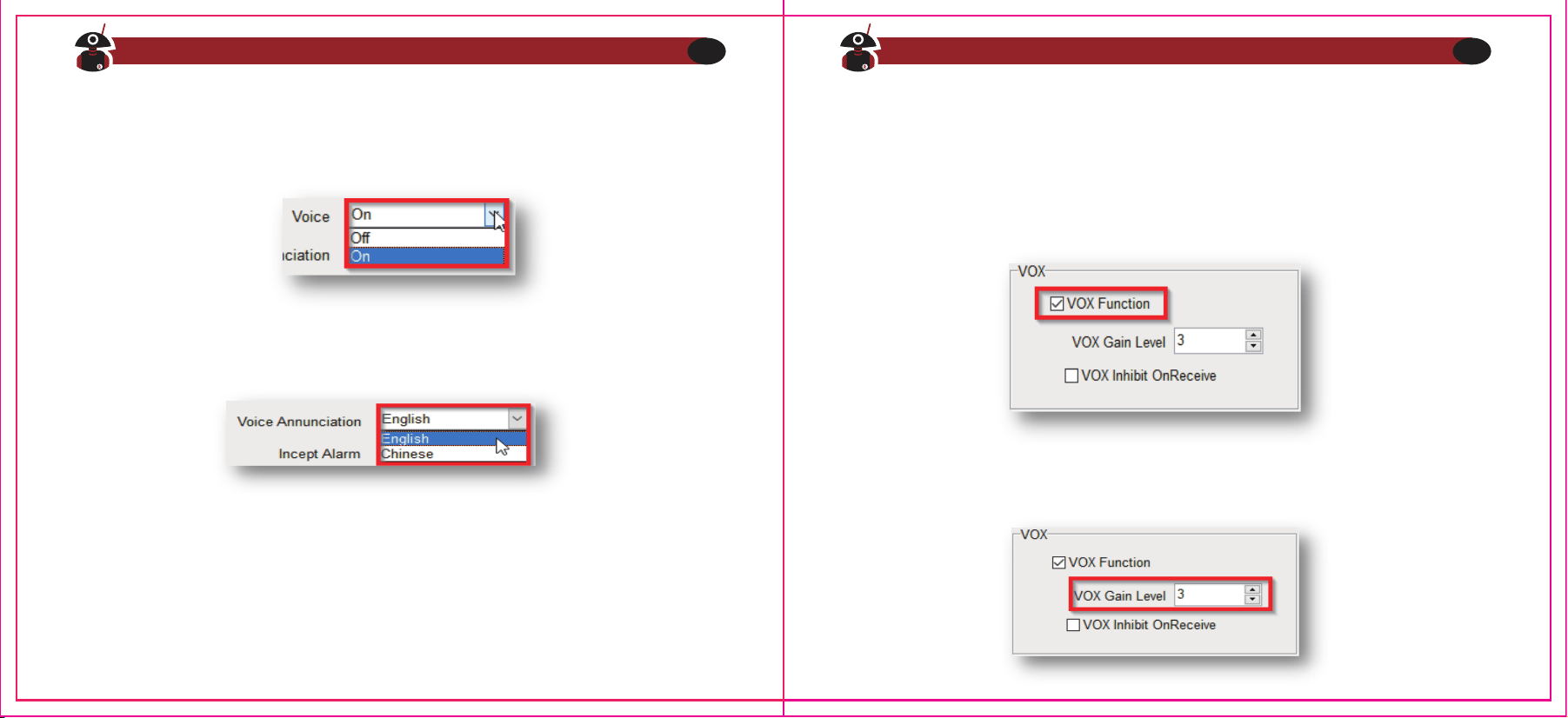
Sprachausgabe
Ihr Funkgerät verfügt über eine optionale Sprachausgabe. Diese kann über die
Software ein und ausgeschaltet werden.
Ebenso kann über die Software unter dem Punkt „Voice Annunciation“ die Sprache
der Ausgabe festgelegt werden.
Sie können zwischen „Englisch“ und „Chinesisch“ wählen.
1.Beim Einschalten des Funkgeräts erfolgt die Sprachausgabe des aktuell eingestell-
ten Kanals.
2.Wenn Sie den mittleren Drehknopf (Kanalwahlschalter) drehen, wird die
Sprachausgabe Ihren Kanal entsprechend ansagen.
Bei niedriger Akkuspannung erfolgt ein entsprechender Warnhinweis.
VOX
VOX (engl. Voice Operated eXchange) bewirkt, dass das Funkgerät automatisch
sendet, wenn Sie mindestens mit einem bestimmten Lautstärkepegel in das
Mikrofon des Funkgeräts sprechen. Da diese "Freisprecheinrichtung" per Software
aktiviert wird, ist es nicht notwendig, die Sprechtaste für die Übertragung zu
verwenden.
Die Software erlaubt die Einstellung des „VOX Gain Levels“ (1�5), um die Empfind-
lichkeit einzustellen, bei der eine Übertragung ausgelöst werden soll.
Besuchen Sie radioddity.com für Downloads und weitere Informationen
16
Besuchen Sie radioddity.com für Downloads und weitere Informationen
17
Dies kann zwischen dem internen Mikrofon und einem externen (Headset)
durchaus variieren. Je höher der Wert eingestellt ist, desto empfindlicher ist diese
automatische Sendefunktion.
Sprechen Sie direkt in das Mikrofon. Es wird automatisch übertragen. Sobald vom
Funkgerät keine Stimme mehr wahrgenommen wird, hört es auf zu senden und
schaltet dann wieder auf Empfang. Wenn ein Headset mit Mikrofon verwendet wird
sollten Sie die Empfindlichkeit gegebenenfalls an dieses anpassen. Wenn das
Mikrofon empfindlich genug ist, beginnt das Funkgerät zu senden. Wenn das
Mikrofon hingegen nicht empfindlich genug ist, kann das Funkgerät Ihre Stimme
nicht aufnehmen. Bitte passen Sie Ihre Sprachlautstärke in Verbindung mit der
gewählten Empfindlichkeit an, um eine reibungslose Kommunikation zu
gewährleisten.
Temporäres Ein-/Ausschalten der VOX-Funktion
Um die VOX-Funktion temporär auszuschalten gehen Sie wie folgt vor:
1.Funkgerät ausschalten
2.Kanalwahlschalter auf Kanal 1 einstellen
3.Sprechtaste sowie seitliche Funktionstaste drücken und gedrückt halten
4.Funkgerät am Lautstärkeknopf durch Rechtsdrehung einschalten
5.Sie hören die Sprachausgabe „VOX OFF“ (engl für „VOX ausgeschaltet“)
Die VOX-Funktion ist nunmehr deaktiviert. Um diese wieder zu aktiviueren gehen Sie
genau so vor. 1. Sie hören dann jedoch die Sprachausgabe „VOX ON“ (engl für „VOX
eingeschaltet“)
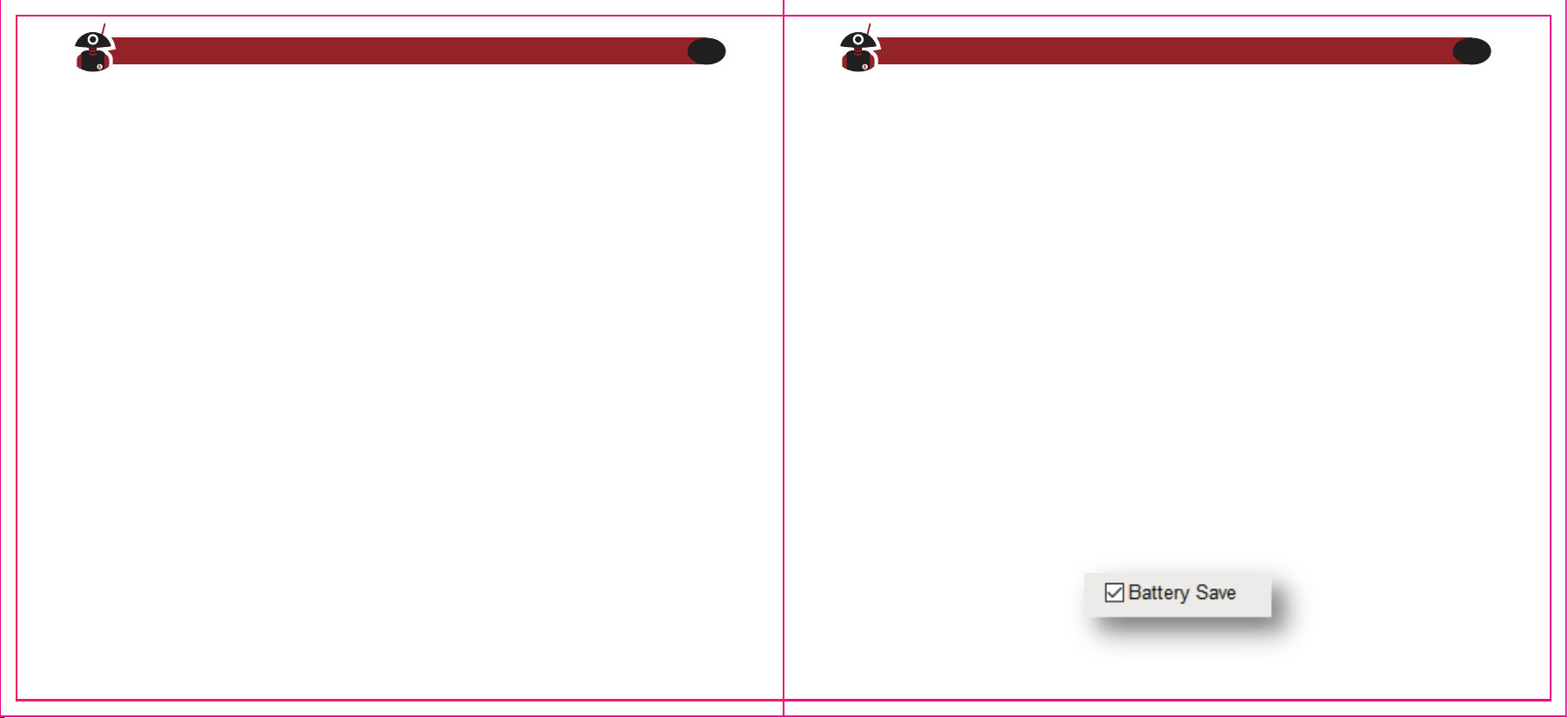
Akkusparfunktion
Diese Funktion kann mittels der Software aktiviert werden. Durch das Einschalten
dieser Funktion kann die Standby-Zeit wesentlich länger sein.
Besuchen Sie radioddity.com für Downloads und weitere Informationen
18
Besuchen Sie radioddity.com für Downloads und weitere Informationen
19
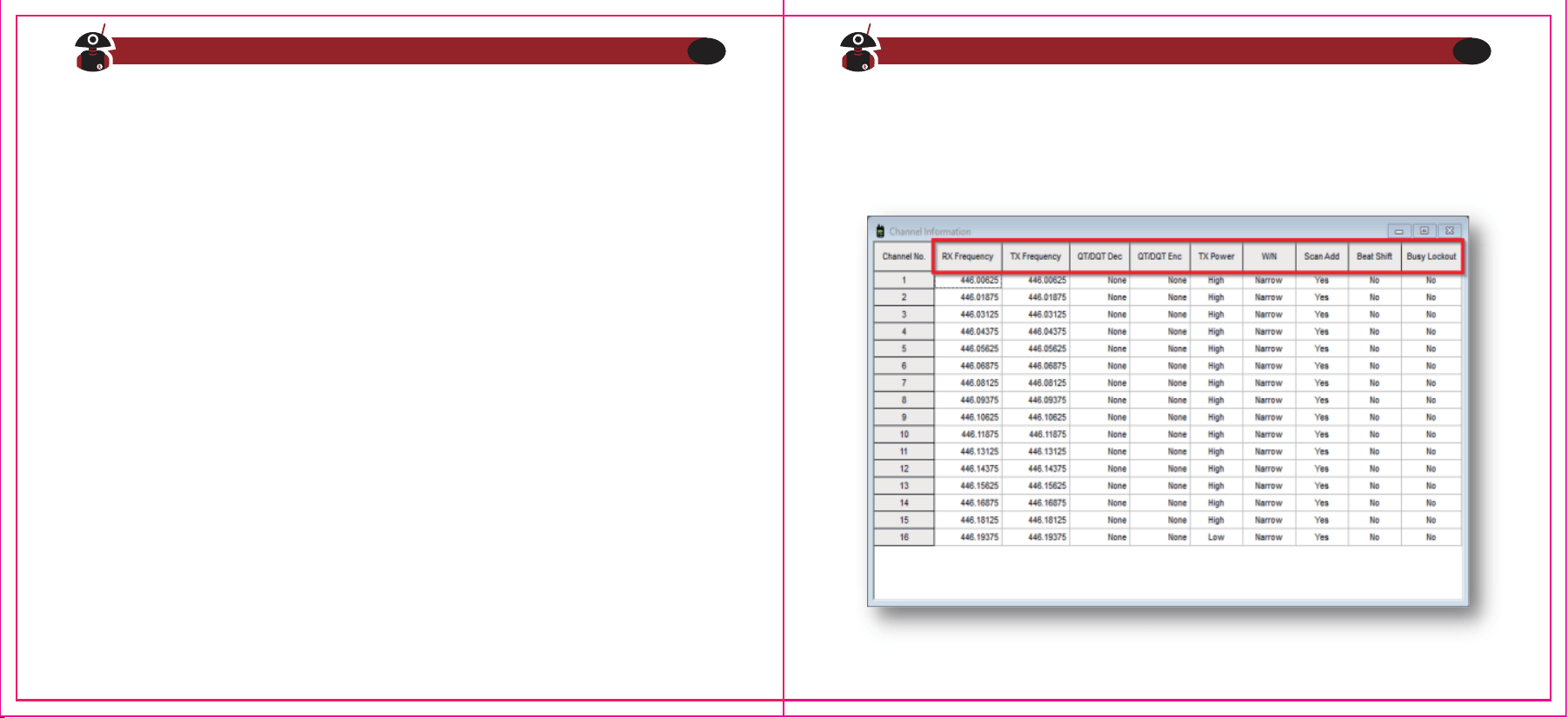
Low Vol Inhibit TX
Wenn sich das Funkgerät im Sende- oder Standby-Modus befindet und die Batter-
iekapazität den vorgegebenen niedrigen Pegel (Engl. Low Voltage) erreicht, blinkt die
Kontrollleuchte rot und es ertönt ein Warnton bei niedrigem Akkustand. Der Signalton
bedeutet "Bitte wechseln Sie die Batterie". Wenn der Alarm bei schwacher Batterie
auftritt, kann er nicht übertragen werden, wechseln oder laden Sie bitte den Akku.
Kanalbezogene Einstellungen
Die weiteren Einstellungen können je Kanal individuell vorgenommen werden.
Signalisierung eines schwachen Akkus
Wenn sich das Funkgerät im Sende- oder Standby-Modus befindet und die
Akkukapazität einen intern vorgegebenen unteren Grenzwert erreicht, blinkt die
Anzeigeleuchte rot und es ertönt ein schwacher Warnton. Dieser Signalton bedeutet
"Bitte wechseln Sie den Akku". Wenn der Alarm bei schwachem Akku auftritt kann nicht
mehr gesendet werden. Bitte wechseln oder laden Sie den Akku.
Besuchen Sie radioddity.com für Downloads und weitere Informationen
20
Besuchen Sie radioddity.com für Downloads und weitere Informationen
21
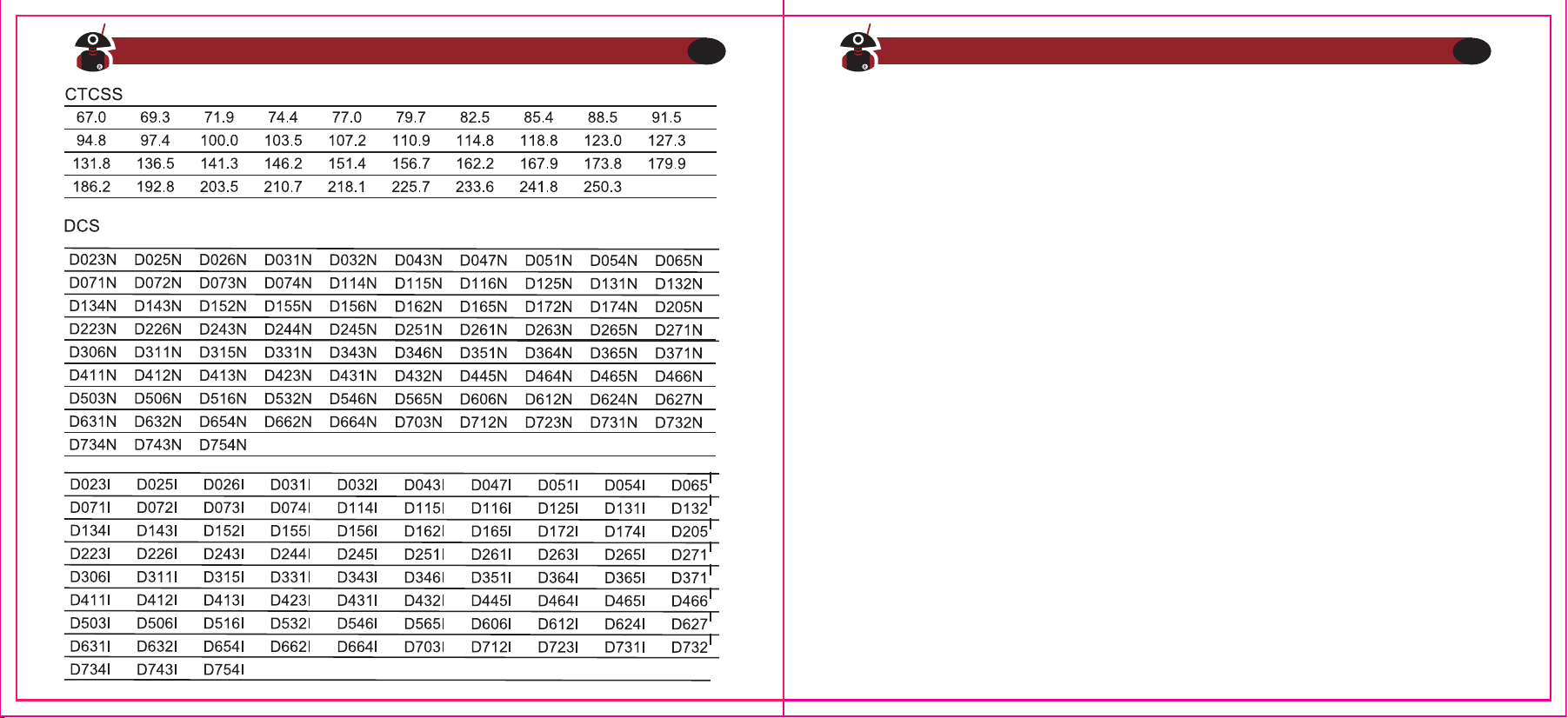
Die folgenden Tabellen geben die möglichen Werte für CTCSS als auch DCS wieder:
Empfangs- sowie Sendefrequenz
Empfangs- sowie Sendefrequenz lassen sich für jeden Kanal getrennt voneinander
einstellen. Somit ist auch ein Betrieb über Relaisfunkstellen möglich. Die Frequenz kann
jedoch nur in dem für das jeweilige Gerät vorgegebenen Bereich sowie Kanalraster
eingestellt werden. Ist die eingegebene Frequenz kleiner oder größer, so wird stattdes-
sen die minimale oder maximale Frequenz des Bereiches gespeichert.
CTCSS/DCS
Bei CTCSS/ DCS handelt es sich um eine Signalisierungsart unter Verwendung von
Tönen im nicht hörbaren Frequenzbereich. Damit wird verhindert, dass das Funkgerät
unerwünschte Signale auf der gleichen Frequenz hörbar macht. Wenn CTCSS/DCS
eingestellt ist, können Sie innerhalb des Empfangsbereichs nur Signale von derselben
Frequenz mit identischen CTCSS/DCS -Einstellung hören. Wenn CTCSS/DCS hingegen
ausgeschaltet ist, empfangen Sie alle Signale der gewählten Empfangsfrequenz
innerhalb des Empfangsbereichs.
CTCSS (Continuous Tone-Coded Squelch System) und DCS (Digital-Coded Squelch)
sind nur verschiedene Namen für die gleiche Funktionsweise. QT (Quiet Talk) bzw. DQT
(Digital Quiet Talk) sind ebenfalls Synonyme dafür.
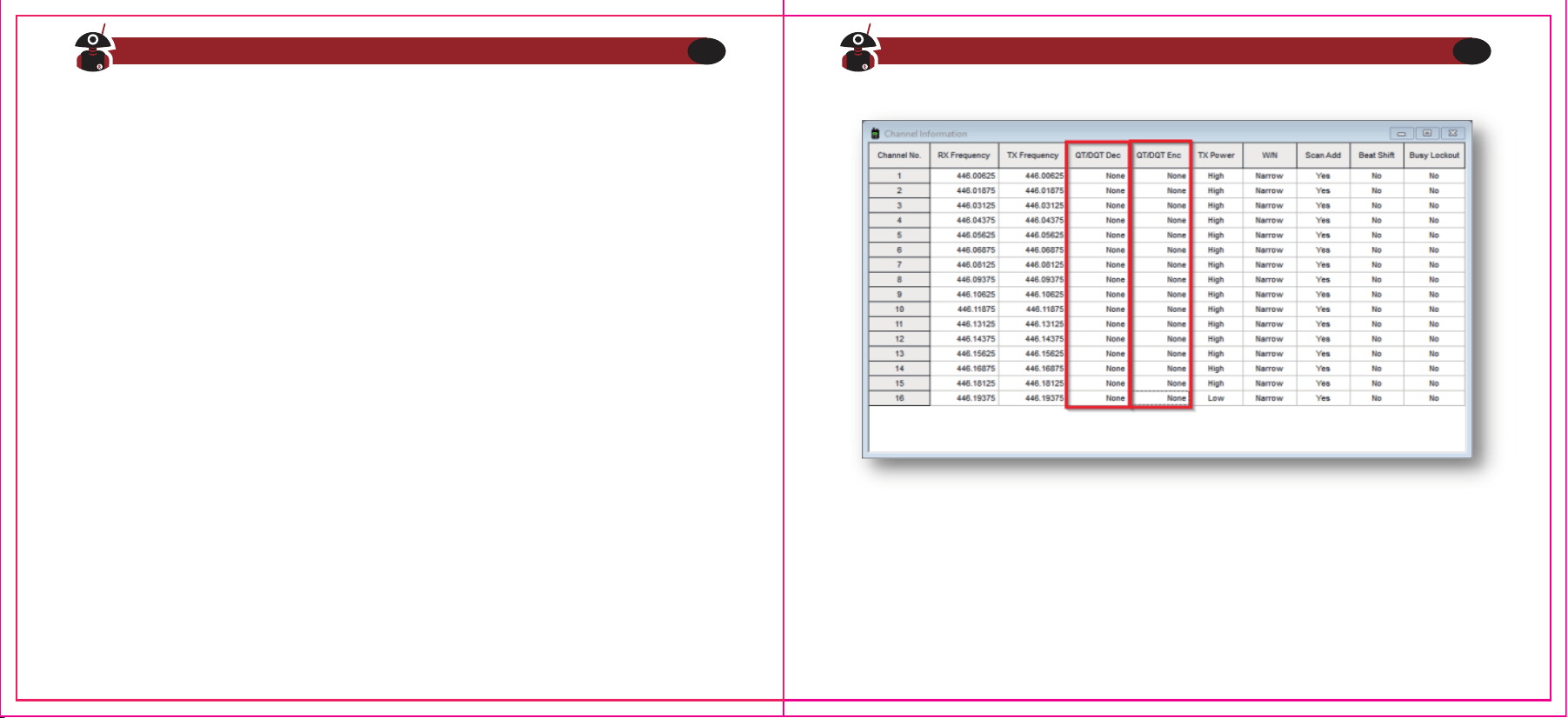
Sie können mit der Software die CTCSS/DCS-Einstellungen für jeden der 16 Kanäle für
Senden und Empfangen getrennt einstellen. In der Software werden diese mit QT/DQT
bezeichnet.
Besuchen Sie radioddity.com für Downloads und weitere Informationen
22
Besuchen Sie radioddity.com für Downloads und weitere Informationen
23
Hinweis
CTCSS und DCS sind Funktionen, die das Öffnen der Rauschsperre verhindern,
wenn die Einstellungen nicht übereinstimmen. Diese müssen in den Funkgeräten,
die Sie für die selektive Kommunikation verwenden möchten, gleich eingestellt
sein. Wenn diese nicht in Ihrem Funkgerät eingestellt sind, hören Sie alle anderen
auf der Frequenz sendenden Funkgeräte, also auch solche, die diese Funktionen
eingestellt haben.
Stellen Sie zum Beispiel eine Frequenz von 446,00625 MHZ in Ihrer Software ein und
fügen Sie 67.0 Hz auf der Empfangsseite als auch auf der Sendeseite beispielsweise
mit einer gewählten Frequenz von 67.0 in den Positionen „CTC/DCS DEC“ (für die
Empfangsseite) als auch CTC/DCS ENC (für die Sendeseite) ein. Das Senden des
einen Funkgeräts öffnet die Rauschsperre des anderen Funkgeräts nur dann, wenn
es den richtigen Ton (in diesem Fall 67,0 Hz) empfängt. Wenn ein anderer Sender
ohne den richtigen Ton sendet, bleibt die Rauschsperre hingegen geschlossen und
ist folglich nicht zu hören. Wenn jedoch in einem Funkgerät mit der gleichen
Frequenz keine CTCSS/DCS-Codes eingestellt sind, empfängt es ALLE Signale.
Viele Repeater verwenden eine derartige CTCSS/DCS-Kodierung, so dass Sie nur die
Signale von korrekt codierten Sendern empfangen und weiterleiten.
Besuchen Sie radioddity.com für Downloads und weitere Informationen
24
Besuchen Sie radioddity.com für Downloads und weitere Informationen
25
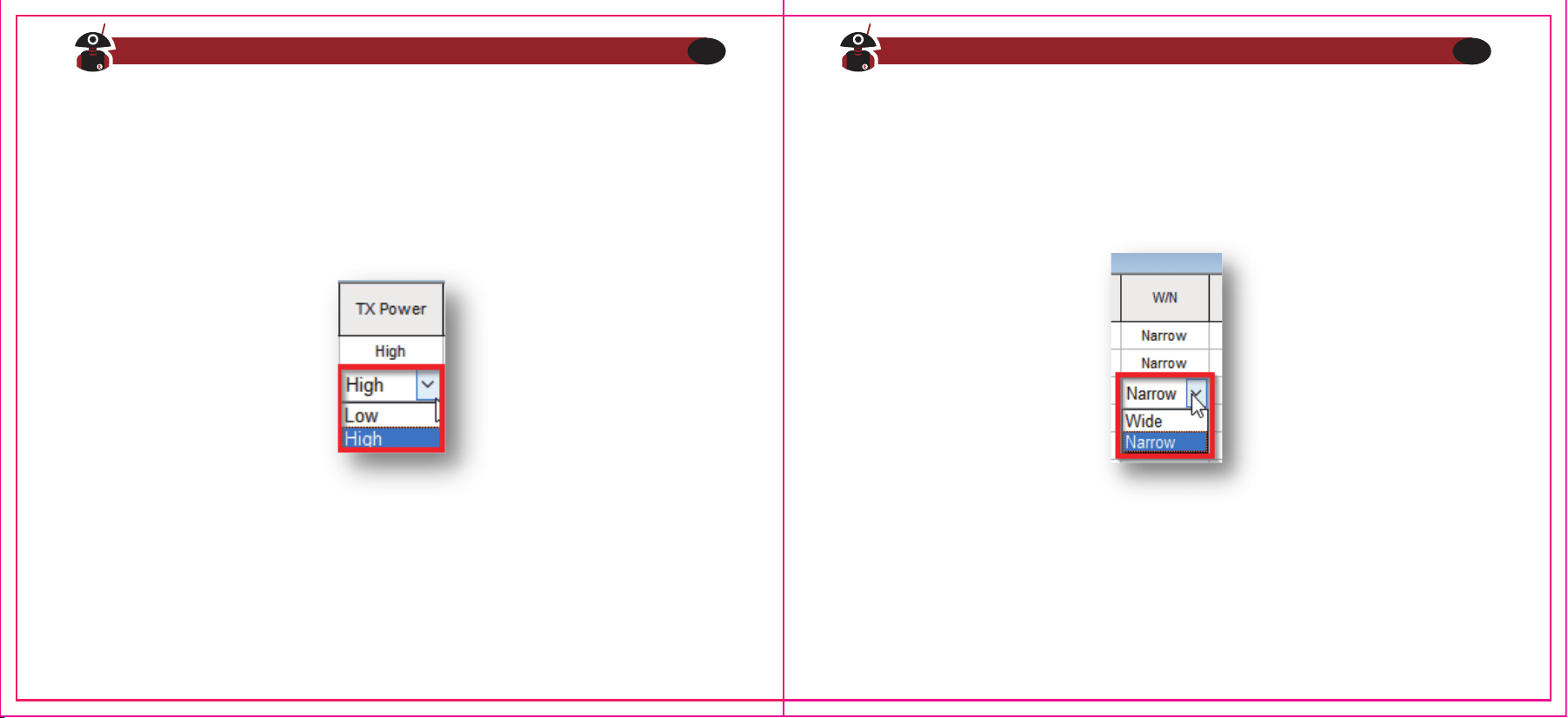
TX Power
Für jeden der 16 Kanäle kann die Ausgangsleistung zwischen Low (500mW) sowie High
(2W) gewählt werden. Um eine Übersteuerung des Eingangs einer nahen Gegenstelle zu
vermeiden, sollte die Ausgangsleistung für die Verbindung zu einer derartigen Station auf
Low (500mW) eingestellt werden.
Bandbreiteneinstellung
Die Standardeinstellung ist Breitband. Sie können Breitband (W, 25KHz) oder Schmal-
band (N, 12,5KHz) über das Menü W/N in der Software für jeden der 16 Kanäle getrennt
auswählen.
Breitband (engl. Wide band) wird immer noch für Amateurfunk verwendet, während die
meisten kommerziellen Stationen eher schmalbandig (engl. Narrow band) sind.
Hinweis
Die Einstellung der Sendeleistung ist beim GA-2-PMR nicht möglich da dieses aus
Genehmigungsgründen nur mit maximal 500mW senden dürfen.
Besuchen Sie radioddity.com für Downloads und weitere Informationen
26
Besuchen Sie radioddity.com für Downloads und weitere Informationen
27
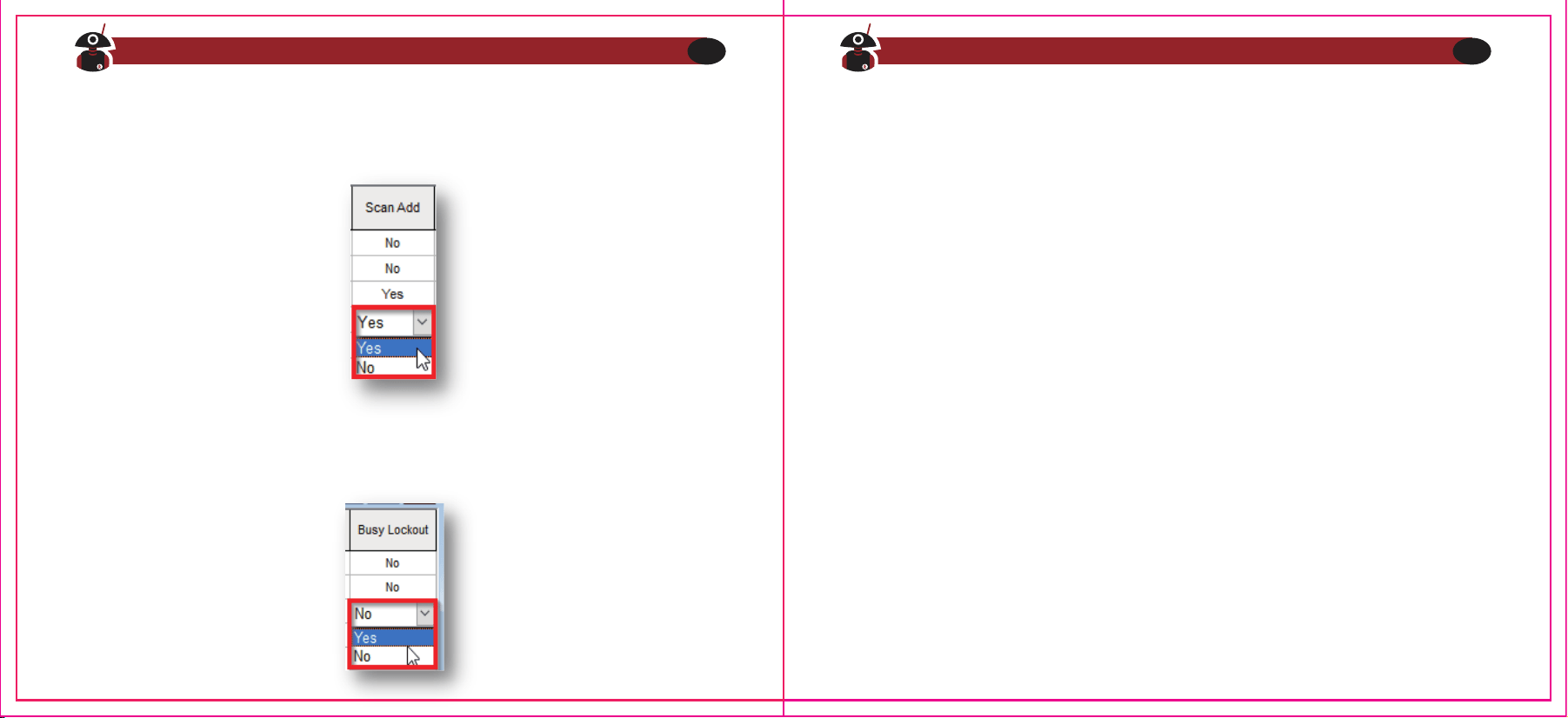
a)Sofern CTCSS/DCS beim aktuellen Kanal nicht programmiert wurde, jedoch ein
Signal (mit oder ohne sendeseitig aktiviertem CTCSS/DCS) empfangen wird (dies
wird am Funkgerät durch die GRÜN leuchtende Status-LED signalisiert), so ist bei für
diesen Kanal aktivierter Besetztkanalsperre kein Senden möglich. Wenn Sie in
einem solchen Fall dennoch die Sendetaste betätigen ertönt für die Dauer der
Betätigung der Sprechtaste nur ein hoher Signalton und die Status-LED erlischt
solange (leuchtet also nicht ROT auf, wie dies beim Senden ansonsten der Fall
wäre).
b)Sofern CTCSS/DCS beim aktuellen Kanal nicht programmiert wurde, jedoch ein
Signal mit CTCSS/DCS empfangen wird (dies wird am Funkgerät durch die GRÜN
leuchtende Status-LED signalisiert), so ist bei für diesen Kanal aktivierter Besetztka-
nalsperre kein Senden möglich. Wenn Sie in einem solchen Fall dennoch die
Sendetaste betätigen ertönt für die Dauer der Betätigung der Sprechtaste nur ein
hoher Signalton und die Status-LED erlischt solange (leuchtet also nicht ROT auf,
wie dies beim Senden ansonsten der Fall wäre).
c)Sofern CTCSS/DCS beim aktuellen Kanal programmiert wurde, jedoch ein Signal
ohne CTCSS/DCS empfangen wird (dies wird am Funkgerät durch die GRÜN
leuchtende Status-LED signalisiert, jedoch kann die Gegenstelle nicht gehört
werden), so ist bei für diesen Kanal trotz aktivierter Besetztkanalsperre ein Senden
dennoch möglich.
Scan Add
Kanäle, die bei Nutzung der Scan-Funktion berücksichtigt werden sollen, müssen in
diesem Feld mit dem Wert “Yes” gekennzeichnet sein
Besetztkanalsperre
Sie können diese Funktion (engl. Busy Lock) getrennt für jeden der 16 Kanäle per
Software ein- und ausschalten.
Besuchen Sie radioddity.com für Downloads und weitere Informationen
28
Besuchen Sie radioddity.com für Downloads und weitere Informationen
29
Kapitel 4 - Programmierung mit dem Computer
Zum Lieferumfang des Funkgeräts gehört kein Programmierkabel.
Um ein derartiges Kabel für Ihr GA-2S zu bestellen, besuchen Sie bitte die Seite
https://www.radioddity.com/
1.Systemvoraussetzungen
Betriebssystem: Windows 98, Windows Me. Windows XP, Windows 7, Windows 8
oder Windows 10
Festplattenspeicher: mindestens 50 MB verfügbar
Arbeitsspeicher: mindestens 64 MB
2.Programmierkabel
Vor Benutzung der Software muss zunächst der erforderliche Gerätetreiber
installiert werden:
a)Finden Sie den entsprechenden Treiber des Systems.
b)Klicken Sie auf Installieren und warten Sie, bis die Installation erfolgreich war.
3.Software Download & Installation
a)Schalten Sie den Computer ein und überprüfen Sie, ob Ihr PC die Anforderun-
gen erfüllt.
b)Download der Programmiersoftware von www.radioddity.com
c)Installation der Programmiersoftware auf dem PC
d)Sofern CTCSS/DCS beim aktuellen Kanal programmiert wurde und ein Signal mit
identischem CTCSS/DCS empfangen wird (dies wird am Funkgerät durch die
GRÜN leuchtende Status-LED signalisiert), so ist bei für diesen Kanal aktivierter
Besetztkanalsperre kein Senden möglich. Wenn Sie in einem solchen Fall
dennoch die Sendetaste betätigen ertönt für die Dauer der Betätigung der
Sprechtaste nur ein hoher Signalton. Die Status-LED leuchtet nachwievor GRÜN.
Besuchen Sie radioddity.com für Downloads und weitere Informationen
30
Besuchen Sie radioddity.com für Downloads und weitere Informationen
31
4.GA-2S mit dem Computer verbinden
a)Verbinden Sie das USB-Programmierkabel mit Ihrem Computer.
b)Verbinden Sie das andere Ende des Kabels mit dem Zubehöranschluss Ihres
Radioddity GA-2S.
c)Wenn beide Enden verbunden sind, schalten Sie Ihr Funkgerät ein. Verge-
wissern Sie sich, dass der Akku des Funkgeräts zuvor vollständig geladen
wurde.
5. Lesen & Schreiben von Daten mittels der Software
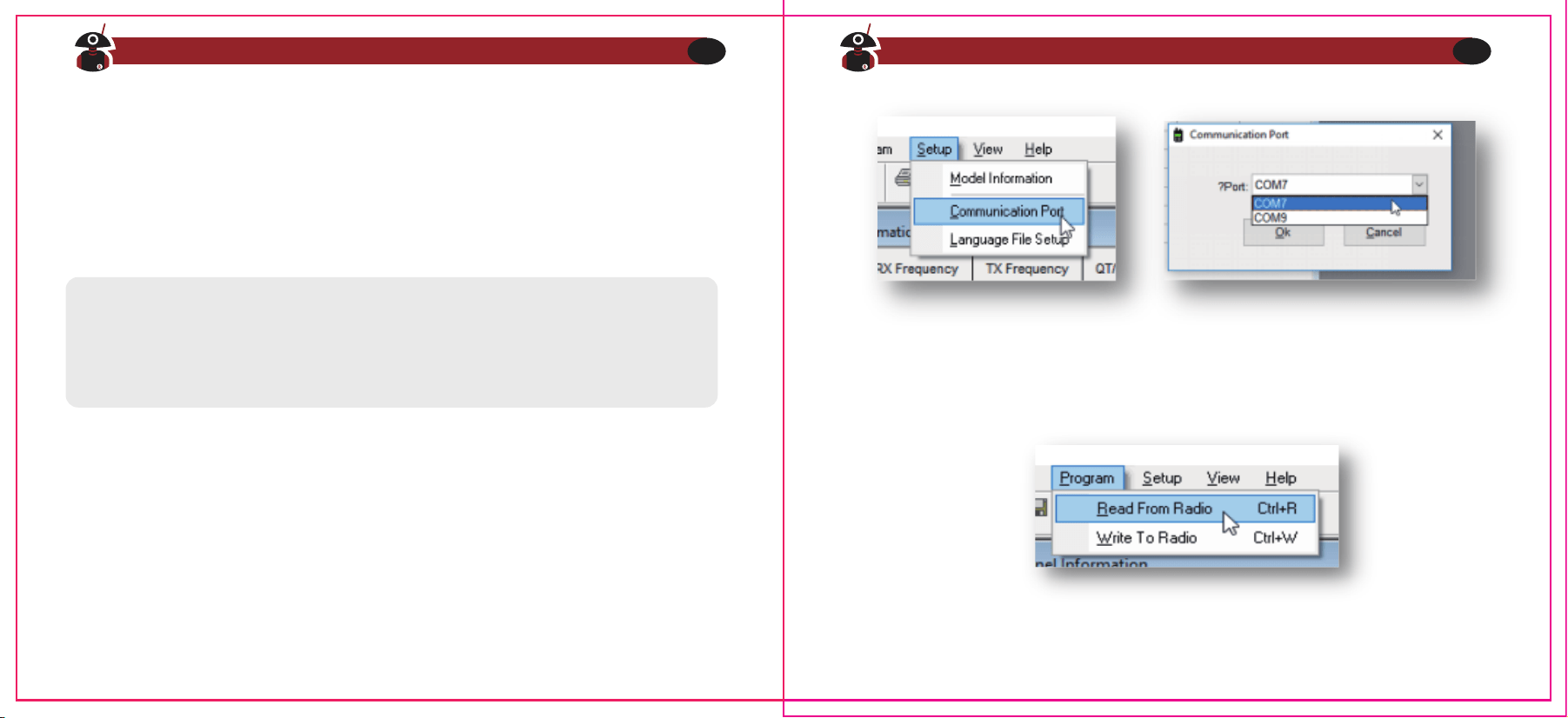
a) Klicken Sie im Software-Menü auf „Setup> Communication Port“ und wählen
Sie den richtigen COM-Port (der zum USB-Programmierkabel gehörende
COM-Port kann über den Windows-Geräte-Manager gefunden werden).
b) Wählen Sie im Menü „Program> Read from Radio> OK” um alle Einstellungen
auszulesen.
Hinweis
Es kann vorkommen, dass das Programmierkabel nicht bündig im neuen Funkgerät
steckt. Vergewissern Sie sich, dass das Kabel VOLLSTÄNDIG eingesteckt ist, bevor
Sie versuchen, Daten zu übertragen.
Besuchen Sie radioddity.com für Downloads und weitere Informationen
32
Besuchen Sie radioddity.com für Downloads und weitere Informationen
33
Einschränkungen bei PMR446
Je nach Gerät kann es sein, dass die Betriebserlaubnis gesetzlichen Beschränkungen
unterliegt. Dies betrifft beispielsweise die PMR Version des GA-2S. Ein Betrieb mit anderer
Antenne, höherer Sendeleistung oder in nicht zugelassenen Frequenzbereichen ist in der
Regel strafbar.
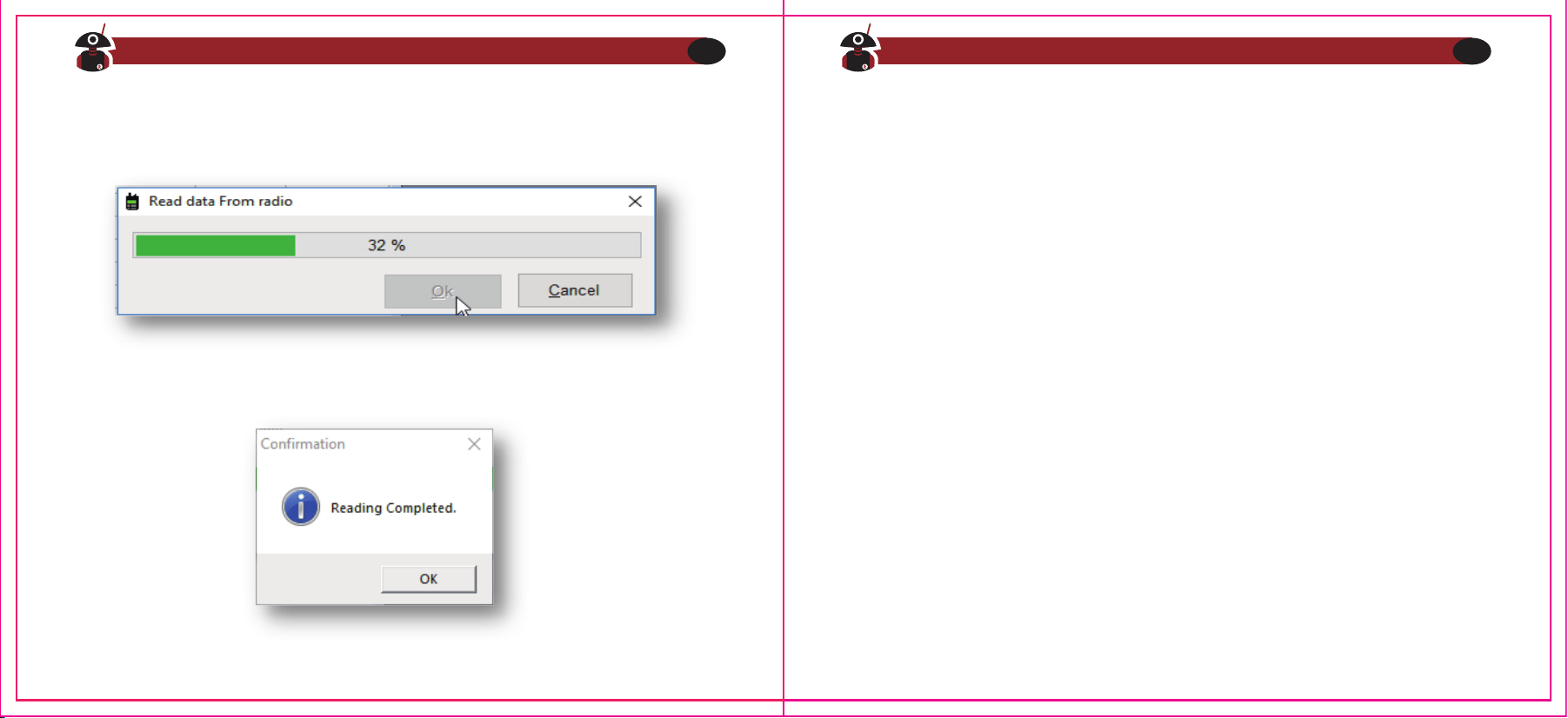
c) Dieser Vorgang dauert einige Sekunden und wird durch einen grünen
Fortschrittsbalken in der Software angezeigt.
d) Nun können Sie beliebige Daten bearbeiten und die von Ihnen gewünschten
Funktionen einstellen.
e) Um die fertige Datei zu schreiben, wählen Sie „Program> Write to Radio> OK“.
f) Wenn Sie mehrere GA-2S programmieren müssen, können Sie die obigen
Schritte entsprechend wiederholen.
bald alle Daten übertragen worden sind, wird dies ebenfalls entsprechend
angezeigt.
Ein Klick auf „OK“ und anschließend auf „Cancel“ schließen den Vorgang ab.
Besuchen Sie radioddity.com für Downloads und weitere Informationen
34
Besuchen Sie radioddity.com für Downloads und weitere Informationen
35
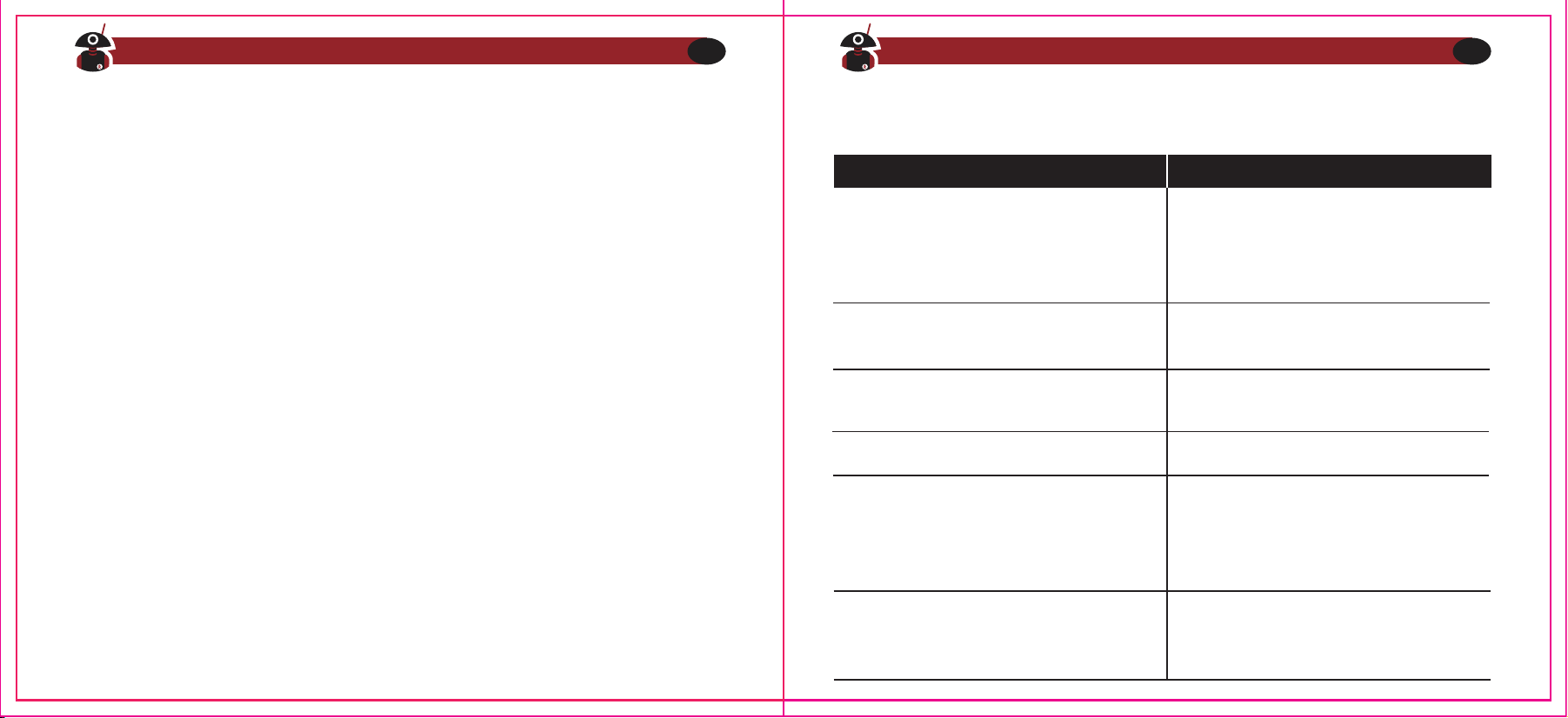
Kapitel 5 - Anleitung zur Fehlerbehebung
1) Beim Lesen oder Schreiben der Frequenz erhalte ich keine Antwort oder es wird
ein Kommunikationsfehler gemeldet?
a) Überprüfen Sie, ob Sie Ihr Funkgerät eingeschaltet ist.
b) Überprüfen Sie, ob der Ladezustand des GA-2S-Akkus niedrig oder gar
erschöpft ist. Gegebenenfalls den Akku austauschen oder aufladen.
c) Überprüfen Sie, ob die Programmiersoftware mit dem aktuellen Modell
übereinstimmt.
d) Überprüfen Sie Ihr Programmierkabel auf Beschädigungen.
e) Überprüfen Sie den Anschluss des Programmierkabels und der USB-Schnitt-
stelle des Computers.
f) Überprüfen Sie, ob die richtigen Gerätetreiber installiert sind.
2) Warum kann ich zwischen meinen beiden Funkgeräten keine Unterhaltung
führen, wenn die Programmierung abgeschlossen ist?
a)Stellen Sie sicher, dass die beiden Funkgeräte auf dem gleichen Kanal sind.
b)Überprüfen Sie, ob der gleiche Kanal für den Empfang des identischen QT/DQT
(CTCS / DCS) eingestellt ist.
c)Überprüfen Sie, ob die Lautstärke der beiden Funkgeräte ausreichend hoch ist
d)Überprüfen Sie die korrekte Installation der Antennen (bei PMR-Geräten ist die
Antenne gegen Demontage gesichert)
e)Überprüfen Sie die Reichweite der Funkgeräte (ggfs in Sichtweite).
3) Andere, häufig auftretende Probleme
Funkgerät kann nicht eingeschaltet
werden
Es sind fortwährend Geräusche zu hören
Die Stimme einer anderen Gruppe ist zu hören
Die Betriebszeit wird immer kürzer,
auch wenn der Akku vollständig
geladen war.
Kann nicht mit den Funkgeräten der gleichen
Gruppe kommunizieren.
Andere Funkgeräte können Sende-Signale
nicht oder nur in geringer Lautstärke
empfangen.
1. Der Akku ist leer. Tauschen Sie den Akku
aus oder laden Sie ihn auf
2. Der Akku ist falsch eingesetzt. Entfernen
Sie ihn und setzen Sie ihn erneut ein
1.Vergewissern Sie sich, dass CTCSS/DCS bei
allen Geräten identisch ist
2.Das Gerät ist außerhalb der Funkreichweite
1.Stellen Sie den Lautstärkeregler auf die
höchste Stufe.
2.Das Mikrofon kann beschädigt sein, senden
Sie es zur Überprüfung an den örtlichen
Händler.
Tauschen Sie den Akku aus.
Das Funkgerät ist außerhalb der Empfangsre-
ichweite
Schalten Sie das Funkgerät in kürzerer
Entfernung ein und versuchen Sie es erneut
Bei allen Funkgeräten der Gruppe die
Einstellungen für CTCSS/DCS ändern
Problem Lösung
Besuchen Sie radioddity.com für Downloads und weitere Informationen
36
Besuchen Sie radioddity.com für Downloads und weitere Informationen
37
Anhang A - HF-Energiebelastung und
Produktsicherheit für tragbare Funkgeräte
ACHTUNG!
Bevor Sie dieses Funkgerät benutzen, lesen Sie diese Anleitung. Sie enthält wichtige
Hinweise zur Bedienung, den sicheren Gebrauch und das Bewusstsein für HF-Ener-
gie sowie zur Kontrolle der Einhaltung der geltenden Normen und Vorschriften.
Dieses Funkgerät nutzt elektromagnetische Energie im Hochfrequenzspektrum (HF),
um die Kommunikation zwischen zwei oder mehr Benutzern über eine Entfernung
zu ermöglichen. Es nutzt Radiofrequenz (RF) Energie oder Funkwellen, um Anrufe zu
senden und zu empfangen. HF-Energie ist eine Form der elektromagnetischen
Energie. Andere Formen sind unter anderem Sonnenlicht und Röntgenstrahlen.
HF-Energie sollte jedoch nicht mit diesen anderen Formen elektromagnetischer
Energie verwechselt werden, die bei unsachgemäßer Verwendung biologische
Schäden verursachen kann. Sehr hohe Röntgenstrahlen können z.B. Gewebe und
Erbgut schädigen.
Experten aus Wissenschaft, Technik, Medizin, Gesundheit und Industrie arbeiten mit
Organisationen zusammen, um Standards für den sicheren Umgang mit HF-Energie
zu entwickeln. Diese Normen bieten sowohl für die Arbeitnehmer als auch für die
breite Öffentlichkeit empfohlene Expositionswerte. Diese empfohlenen HF-Belas-
tungswerte beinhalten zudem erhebliche Sicherheitspuffer.
Alle Radioddity Funkgeräte sind so konzipiert, hergestellt und getestet, dass sie die
von den Regierungen festgelegten Grenzwerte für HF-Belastung erfüllen. Darüber
hinaus empfehlen die Hersteller den Anwendern von Funkgeräten spezielle
Bedienungsanleitungen. Diese Anweisungen sind wichtig, da sie die Benutzer über
die HF-Energiebelastung informieren und einfache Verfahren zu ihrer Kontrolle
bieten.
Auf den folgenden Websites finden Sie weitere Informationen darüber, wie Sie die
Belastung durch HF-Energie kontrollieren können, um die Einhaltung der festge-
legten Grenzwerte zu gewährleisten:
http://www.who.int/en/
http://www.euro.who.int/de/home
Besuchen Sie radioddity.com für Downloads und weitere Informationen
38
Besuchen Sie radioddity.com für Downloads und weitere Informationen
39
Funkzulassung
Regierungen klassifizieren die Funkgeräte. Die meisten dieser klassifizierten
Funkgeräte benötigen von den örtlichen Regierungsstellen eine Betriebserlaubnis.
Für EU PMR 446 ist bei dem Radioddity GA-2S- PMR Funkgerät keine Einzellizenz
erforderlich.
Schützen Sie Ihr Gehör
Bedienungshinweise
Regierungen klassifizieren die Funkgeräte. Die meisten dieser klassifizierten
Funkgeräte benötigen von den örtlichen Regierungsstellen eine Betriebserlaubnis.
Für EU PMR 446 ist bei dem Radioddity GA-2S- PMR Funkgerät keine Einzellizenz
erforderlich.
1.United States Federal Communications Commission(FCC), Code of Federal Regula-
tions; 47 CFR part 2 sub-part J
2.American National Standards Institute(ANSI)institute of Electrical Electronic
Engineers (IEEE)c95.1-2005
3.IEEE Std. 1528: 2013 and KDB447498, Evaluating Compliance with FCC Guidelines
for Human Exposure to Radio Frequency Electromagnetic Fields
4.Institute of Electrical and Electronic Engineers (IEEE)C953-2002
5.International Commission on Non-lonizing Radiation Protection(ICNIRP)
6.Ministry of Health (Canada) Safety Code 6& Industry Canada RSS-102
7.International Electrotechnical Com-mission IEC62209-2. 2010
1.Verwenden Sie die geringste Lautstärke die Sie für Ihre Arbeit benötigen.
2.Erhöhen Sie die Lautstärke nur dann, wenn Sie sich in einer lauten Umgebung
befinden.
3.Drehen Sie die Lautstärke herunter, bevor Sie ein Headset oder einen Ohrhörer
anschließen.
4.Begrenzen Sie die Zeit, in der Sie Headsets oder Ohrhörer bei hoher Lautstärke
verwenden.
5.Wenn Sie das Funkgerät ohne Headset oder Ohrhörer verwenden, halten Sie den
Lautsprecher des Funkgeräts nicht direkt an Ihr Ohr.
Hinweis
Laute Geräusche aus irgendeiner Quelle über einen längeren Zeitraum können Ihr
Gehör vorübergehend oder dauerhaft beeinträchtigen. Je lauter die Lautstärke
des Funkgeräts ist, desto weniger Zeit wird benötigt, bis Ihr Gehör negativ
beeinträchtigt wird.
Besuchen Sie radioddity.com für Downloads und weitere Informationen
40
Besuchen Sie radioddity.com für Downloads und weitere Informationen
41
Sicherer Betrieb
Verboten
1.Verwenden Sie das Ladegerät nicht im Freien oder in feuchter Umgebung,
sondern nur in trockenen Umgebungen.
2.Nehmen Sie das Ladegerät nicht auseinander, da sonst die Gefahr eines
elektrischen Schlages oder eines Brandes besteht.
3.Betreiben Sie das Ladegerät nicht, wenn es gebrochen oder in irgendeiner Weise
beschädigt wurde.
4.Stellen Sie ein tragbares Funkgerät nicht über einem Airbag oder im Bereich der
Airbagauslösung auf. Das Funkgerät kann Ihnen im Falle eines Aufpralls welcher
den Airbag auslöst mit hoher Wucht entgegengeschleudert werden und beim
Aufblasen des Airbags zu schweren Verletzungen der Fahrzeuginsassen führen.
Um das Risiko zu reduzieren
1.Ziehen Sie am Stecker und nicht am Kabel, wenn Sie das Ladegerät abziehen.
2.Trennen Sie das Ladegerät von der USB-Buchse, bevor Sie Wartungs- oder
Reinigungsarbeiten durchführen.
3.Kontaktieren Sie Radioddity für Hilfe zu Reparatur und Service.
Einsatz von Kommunikationsgeräten während der Fahrt
1. Überprüfen Sie immer die Gesetze und Vorschriften für den Gebrauch von
Funkgeräten in den Ländern und Gebieten, in denen Sie fahren.
2. Schenken Sie dem Fahren und der Straße Ihre volle Aufmerksamkeit.
3. Falls vorhanden, benutzen Sie die Freisprecheinrichtung (VOX !).
4. Wenn es die Fahrbedingungen oder Vorschriften erfordern, verlassen Sie die
Straße um zu parken bevor Sie einen Anruf tätigen oder entgegennehmen.
Besuchen Sie radioddity.com für Downloads und weitere Informationen
42
Besuchen Sie radioddity.com für Downloads und weitere Informationen
43
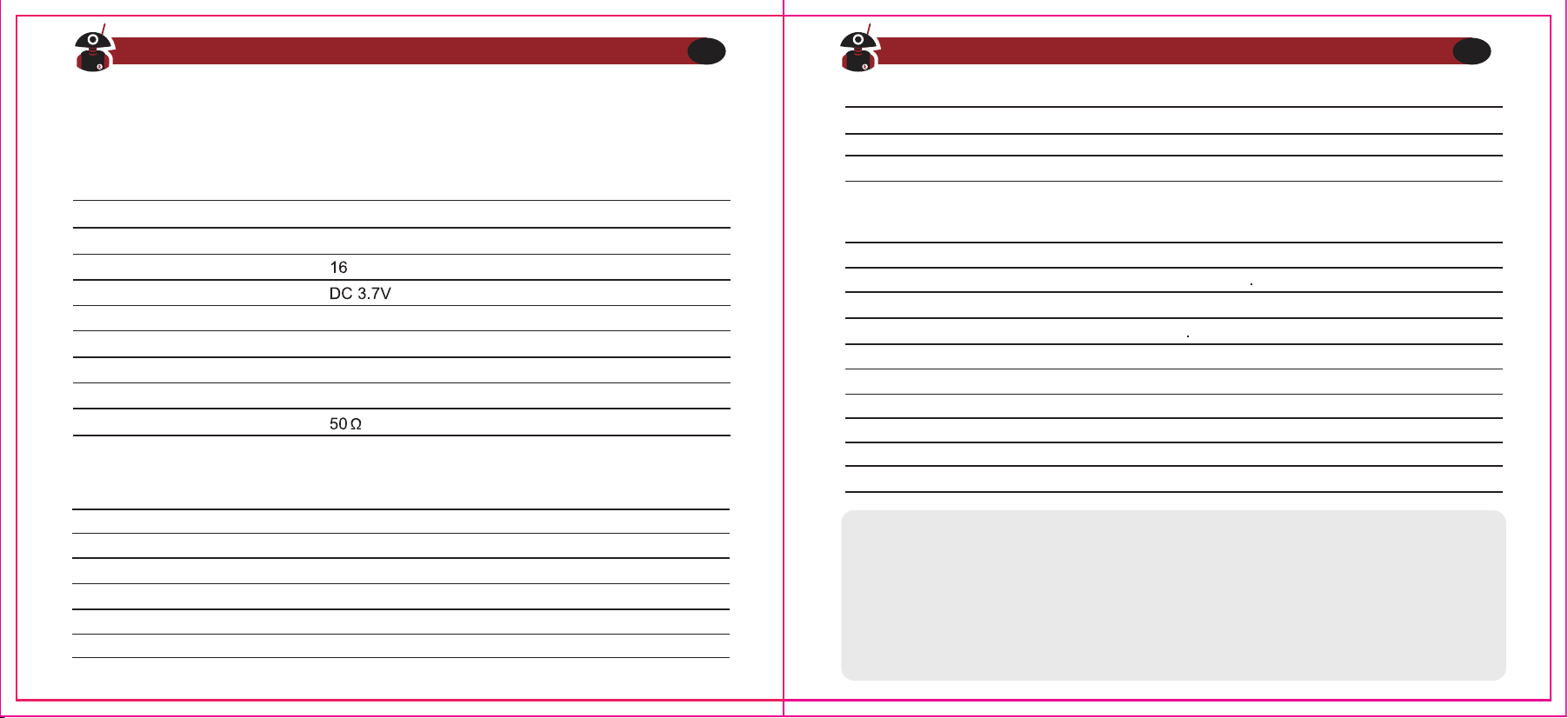
Anhang B - Technische Daten
GA-2SModell-Nummer
Frequenzbereich
Empfindlichkeit
Audio-Verzerrung
Intermediation (W/N)
Nachbarkanalempfindlichkeit (W/N)
Störungsunterdrückung
Stromverbrauch
Audioimpedanz
Audio-Leistung
Frequenzbereich
Ausgangsleistung
Modulationsart
Max. Abweichung (W/N)
Störstrahlung
Nachbarkanalaussendungen
SNR (W/N)
QT/DQT (W/N)
Modulationsempfindlichkeit
Strom
Frequenzbereich
Anzahl Kanäle
Betriebsspannung
Arbeitstemperaturbereich
Frequenzgenauigkeit
Betriebsart
Antenne
Antennen-Impedanz
Europa:PMR USA:FRS UHF:400-470MHz
-20℃~+50℃
±2.5ppm
Simplex
High gain antenna
Europa: ≤500mW USA:≤2W UHF:≤2W
-122dBm (12dB SINAD)
≤10%
≥65dB/≥60dB
≥65dB/≥60dB
≥65dB
≤380mA
8Ω
400mW
Europa: PMR USA:FRS UHF:400-470MHz
Europa: ≤500mW USA: ≤2W UHF:≤2W
16KF¢3E
≤5kHz/≤2,5kHz
≤7.5µW
≤-65dB/≤-60dB
≥-45dB/≥-40dB
0,7±0,1kHz/0,4±0,1kHz
8-12mV
≤1.2A
Hinweis
Die Spezifikationen werden aufgrund technischer Verbesserungen ohne Vorankün-
digung überarbeitet. Herzlichen Dank für Ihr Verständnis.
Hörschäden durch lauten Lärm sind manchmal zunächst nicht erkennbar und
können sich kumulativ auswirken.
Allgemein
Empfänger
Sender
Besuchen Sie radioddity.com für Downloads und weitere Informationen
44
Besuchen Sie radioddity.com für Downloads und weitere Informationen
45
FIND TUTORIALS, SUPPORT AND MORE
Anhang C ‒ CE Certificate of Compliance
Besuchen Sie radioddity.com für Downloads und weitere Informationen
46

Informazioni su Radioddity
“Tu, nostro amico e cliente, sei in prima linea in ciò che facciamo.”
Niente è più importante del tuo tempo e del tuo denaro. Quando si acquistano radio online, ci si trova
spesso di fronte ad un dilemma: risparmiare tempo e acquistare da un sito web affidabile ma ad
un prezzo elevato, oppure provare a risparmiare acquistando da un rivenditore poco affidabile a
spese del proprio tempo trascorso a gestire problemi di qualità e servizio?
Su Radioddity.com non c'è bisogno di scegliere tra prezzi bassi o un'esperienza di acquisto sicura. Che
tu stia acquistando per la prima volta o tu sia un radioamatore esperto, speriamo che i nostri prodotti,
prezzi, contenuti e risorse siano proprio ciò che stavi cercando.
Durante il corso degli anni passati, Radioddity è riuscita a soddisfare le esigenze di innumerevoli
acquirenti di radio ricetrasmittenti, avendo creato un'esperienza di shopping sicura. Lo
facciamo fornendo prodotti di altissima qualità ad un prezzo abbordabile, sostenendo un servizio
di alta qualità. A noi sembra semplice.
Questa è la nostra promessa: migliorare la tua esperienza di acquisto. Grazie a solidi accordi di
partnership che ci consentono di offrirti la migliore e più aggiornata tecnologia dal nostro brand
Radioddity e al nostro team di assistenza clienti sempre attento e reattivo, ci sforziamo di
soddisfare appieno questa promessa e le tue esigenze al meglio, ogni giorno.
Insieme a questa promessa, speriamo di darti un valore aggiunto, che esso sia offrendoti il massimo
dalla nuova tecnologia DMR o dalle radio analogiche, accessori e prodotti correlati, fornendoti un
supporto tecnico superiore e di qualità o collaborando con i più grandi leader dell'industria
radioamatoriale per sviluppare contenuti che arricchiscano, intrattengano e ti assistano nel processo
di acquisto, tra cui il nostro Blog, le domande frequenti (FAQ) e la nostra Newsletter. Le tue
preoccupazioni sono le nostre preoccupazioni.
Facciamo tutto questo per aiutarti a trovare la massima qualità di radio, a prezzi bassi, con il minor
numero possibile di problemi e preoccupazioni per il consumatore. Se questa promessa non dovesse
essere rispettata, ti invitiamo a farcelo sapere tramite e-mail: [email protected]
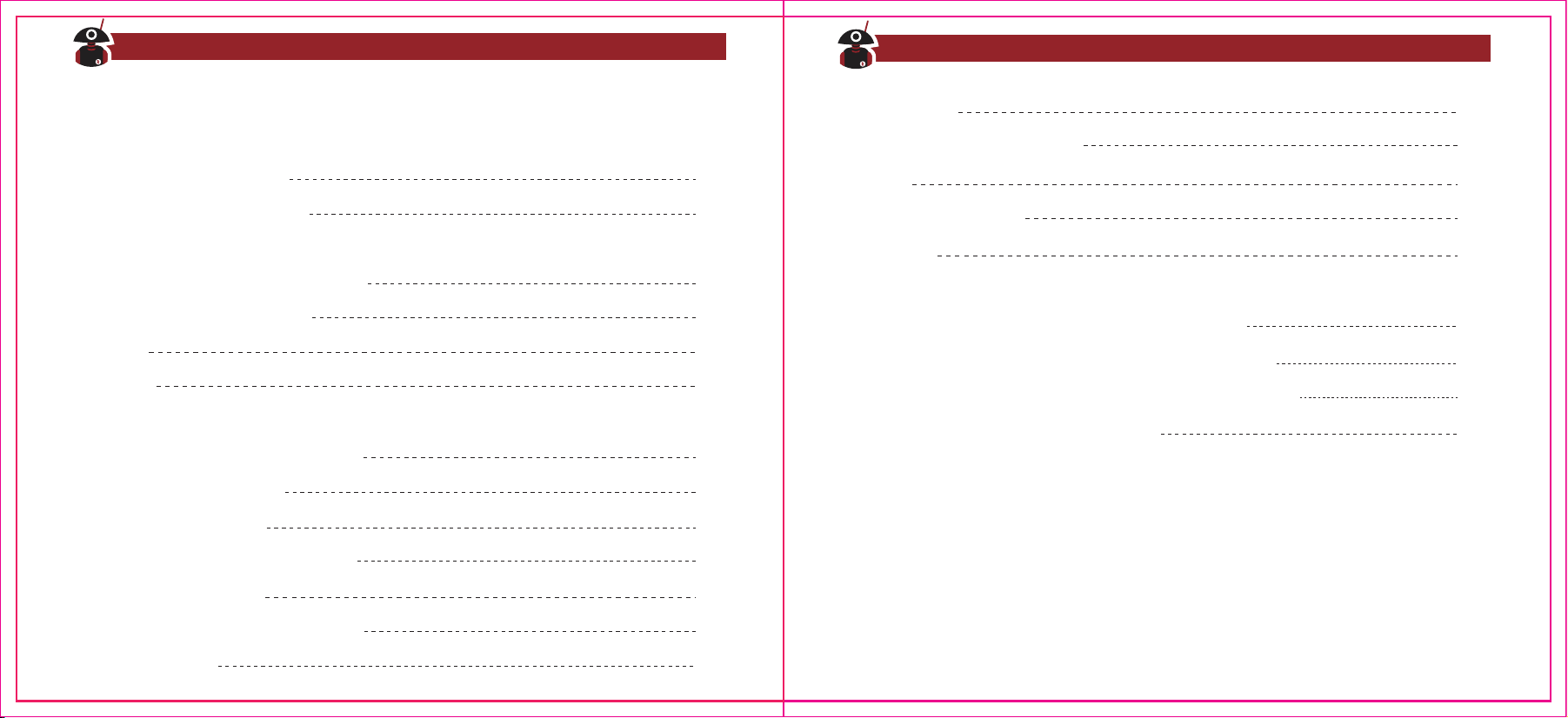
Indice dei Conte
nuti
Capitolo 1. Informazioni Iniziali
Informazioni di Sicurezza
Contenuto della Confezione
Capitolo 2. Iniziare con la radio
Manutenzione della Batteria
Ricarica
Antenna
Capitolo 3. Operazioni di Base
Breve Guida Introduttiva
Funzione di Scansione
Funzione di Risparmio Energetico
Busy Channel Lockout
Impostazione Banda Wide/Narrow
Impostare il VOX
01
03
04
05
06
08
09
09
10
12
13
14
14
Avviso Vocale
Indicatore di Batteria Scarica
Squelch
Time-Out-Timer (TOT)
CTCSS/DCS
Capitolo 4. Programmazione da Computer
Capitolo 5. Guida alla Risoluzione di Problemi
Appendice A. Guida per la Sicurezza del Prodotto
Appendice B. Specifiche Tecniche
16
17
18
19
20
22
25
27
34
Visita Radioddity.com Per Downloads e Supporto
Visita Radioddity.com Per Downloads e Supporto
1. Informarsi sulle regolamentazioni locali vigenti prima di utilizzare questa radio.
L'utilizzo improprio di questo dispositivo potrebbe violare la legge.
2. Spegnere la radio prima di entrare in una zona con materiali infiammabili o
esplosivi.
3. Non ricaricare o sostituire la batteria in zone con materiali infiammabili o
esplosivi.
4. Spegnere la radio prima di avvicinarsi in una zona esplosiva o una zona in cui
sono presenti detonatori.
5. Non utilizzare la radio con una antenna danneggiata. Se si tocca
l'antenna danneggiata, si possono subire lesioni e/o scottature.
6. Non cercare di aprire e smontare la radio. Lavori di manutenzione devono
essere effettuati solamente da tecnici esperti.
7. Per evitare problemi causati da interferenze elettromagnetiche o conflitti di
compatibilità elettromagnetica, si prega di spegnere la radio in luoghi che
espongono un cartello "Vietato l'utilizzo di dispositivi wireless", come ospedali
e altri luoghi di cura e ospedalieri.
Visita Radioddity.com Per Downloads e Supporto
01
Capitolo 1. - Informazioni Generali
Informazioni Generali
Si prega di leggere le seguenti brevi istruzioni. L'inosservanza di queste regole
potrebbe causare pericolo o violare alcune leggi nel proprio paese.
8. In macchina, se è presente un airbag attivo, non poggiare la radio nella zona
di rilascio dell'airbag.
9. Non conservare la radio sotto diretta luce solare o in zone molto calde.
Quando si trasmette con la radio, mantenere la radio ad una distanza di
almeno 5 centimetri dalla sua antenna.
10. Se la radio emette un odore di surriscaldamento o bruciato, spegnere
immediatamente la radio e contattare un rivenditore locale per assistenza.
11. Non trasmettere troppo a lungo per evitare il rischio di surriscaldamento
del circuito interno.
TROVA TUTORIAL, ASSISTENZA E ALTRO
Note: La radio
è compatibile con altri accessori disponibili per l'acquisto a
questo indirizzo: https://www.radioddity.com/
Grazie per aver scelto una radio ricetrasmittente di Radioddity. Ti consigliamo
di controllare gli accessori elencati qui di seguito prima di gettare la confezione .
Antenna
Batteria Li-Ion
Aggancio per la cinta
Manuale Utente
Cinturino da polso
Cavo Micro-USB
Basetta di ricarica USB
Manuale Utente
Kit Auricolare
Visita Radioddity.com Per Downloads e Supporto
02
Visita Radioddity.com Per Downloads e Supporto
03
Contenuto della Confezione
Altoparlante-Microfon
o esterno
Cavo di programmazione
Antenna
Auricolari
Capitolo 2. - Iniziare con la radio
Attenzione
U
tilizzare esclusivamente batterie progettate da Radioddity. Altre batterie
potrebbero causare incompatibilità o esplosioni.
Note
1. Non mandare in corto-circuito i contatti della batteria o incendiare la
batteria. Non smontare o perforare la batteria.
2. Ricarica la batteria ad una temperatura tra 0℃ and 45℃. La batteria non
potrà essere caricata appieno se raggiung
e temperature oltre i limiti citati.
3. Spegnere la radio quando si ricarica la batteria.
4. Rimuovere la batteria dalla basetta di ricarica quando la ricarica è completa.
5. Sostituire la batteria se i tempi di utilizzo risultano notevolmente ridotti.
6. Non ricaricare la batteria della radio se risulta umida o bagnata. Si prega di
asciugarla con un panno pulito prima di ricaricarla per evitare pericoli.
Attenzione
I
n caso di contatto tra metalli conduttivi, come gioielli, chiavi o collane, con i
contatti esterni di ricarica, potrebbero verificarsi danni o lesioni personali.
Manutenzione della Batteria
Visita Radioddity.com Per Downloads e Supporto
04
Visita Radioddity.com Per Downloads e Supporto
05
Diventa Rosso quando si
trasmette e Verde quando si
riceve un segnale. Lampeggia di
Rosso quando la batteria è quasi
scarica.
Pulsante MONITOR
Utilizzato per collegare un kit
auricolare/microfono o un cavo
esterno per la
programmazione dal
computer. La programmazione
avviene tramite il software CHIRP.
Porta Micro USB
Permette di caricare la radio con un
comune cavetto per smartphone
Micro USB
Fornisce alimentazione alla radio
Installare / Rimuovere la batteria
1) Posizionare e spingere la batteria lentamente e parallelamente lungo il retro
del corpo della radio. Una volta allineata la batteria sulle linee guida della
radio, spingere lentamente verso l'alto fino a sentire un click che indica che
la batteria è stata installata correttamente.
2) Per rimuovere la batteria, premere sulla levetta 'PUSH' sulla parte superiore
della batteria e allo stesso tempo sfilare la batteria verso il basso.
Ricarica
Come utilizzare la basetta di ricarica USB da tavolo:
1. Collegare il connettore USB in una porta USB compatibile per la ricarica.
Il
LED di stato diventerà Verde, indicando che sarà possibile iniziare il ciclo
di ricarica.
2. Posiziona la radio spenta oppure solo la batteria nella basetta di ricarica. Il
LED di stato della basetta diventerà Rosso, indicando che il ciclo di ricarica è
iniziato.
3. Non appena il LED di stato diventa Verde, la ricarica si è conclusa e la radio o
la batteria devono essere rimossi dalla basetta di ricarica da tavolo.
Note
1. Prima di inserire una batteria per la ricarica, non è normale che il LED di stato
lampeggi.
2. A
ttendere fino a quando l'indicatore LED si stabilizza mostrando un colore
fisso, prima di inserire una batteria o la radio per la ricarica.
3. Quando la batteria è correttamente posizionata nella basetta, l'indicatore LED
diventa Rosso indicando il processo di ricarica. Se il LED lampeggia, la batteria
è danneggiata o la temperatura è troppo alta o troppo bassa.
Effettuare un test
Quando il caricabatterie si accende, il LED di notifica si attiverà di Arancione per 1
secondo per poi spegnersi, entrando in modalità stand-by. Se ciò succede, la
basetta di ricarica ha passato con successo il test e sarà in grado di ricaricare la
batteria. Se l'indicatore Arancione lampeggia costantemente, la basetta di
ricarica ha fallito il test e non potrà ricaricare la batteria.
Utilizzare il cavo di ricarica Micro USB:
1) L'indicatore Giallo si acce
nde quando viene collegato un cavo Micro USB nella
radio.
2) L'indicatore A
rancione si accende quando la radio è in stato di ricarica.
3) L'indicatore Verde fisso si accende quando la radio ha terminato il ciclo di
ricarica. Si prega di scollegare il cavo di ricarica per evitare di sovraccaricare la
batteria.
Visita Radioddity.com Per Downloads e Supporto
06
Visita Radioddity.com Per Downloads e Supporto
07
Attenzione
Assicurarsi che l'output della porta USB in cui si collega il cavo Micro USB di ricarica
sia DC 5V/1A, quando si decide di ricaricare la radio in questo modo. Mai superare
1.5A di corrente massima. È inoltre consigliato di utilizzare preferibilmente la
basetta di ricarica quando possibile.
Antenna
Un'antenna corta e spessa è di solito utile per comunicazioni a corta distanza,
mentre un'antenna più lunga e sottile (opzionale) offre una distanza di
comunicazione maggiore. La distanza di comunicazione si riduce in condizioni di
brutto tempo, in presenza di grandi alberi o costruzioni ed edifici.
Si presti attenzione che il connettore dell'antenna è Femmina, mentre quello della
radio è Maschio (connettori SMA-F/M).
Installazione e rimozione dell'antenna
1) Allinea il connettore a vite dell'antenna al connettore corrispondente sulla
radio, ruotando l'antenna in senso orario.
2) Per rimuovere l'antenna, ruotarla in senso antiorario fino a che l'antenna non
sarà stata svitata completamente.
1. Aprire con cura la confezione e rimuovere il corpo della radio, la batteria e infine
l'antenna.
2. Installare
la batteria nella radio fino a sentire un click (essere delicati). (Ulteriori
informazioni e istruzioni nella sezione precedente)
3. Installare l'antenna sulla radio. L'antenna si avviterà facilmente nel connettore
SMA della radio. Evitare di forzare altrimenti si danneggerà la filettatura.
Assicurarsi, dopo circa 10 giri, che l'antenna sia ben salda e avvitata
correttamente.
4. Ruotare delicatamente la ghiera di accensione in senso orario. La radio
risponderà con un suono e il nome del canale selezionato, ad esempio '1'
5. Selezionare il canale desiderato tramite la ghiera dei canali. La radio risponderà
con il rispettivo numero del canale (es. '1', '2', '3', ecc.)
6. Premere il tasto PTT per parlare!
Visita Radioddity.com Per Downloads e Supporto
08
Visita Radioddity.com Per Downloads e Supporto
09
Installazione di un auricolare esterno
Sollevare gentilmente (non rimuovere) l'aletta di plastica che copre il connettore
del microfono/
altoparlante e inserire il jack del kit auricolare nella porta del
microfono/altoparlante.
Capitolo 3. - Operazioni di Base
Breve guida introduttiva
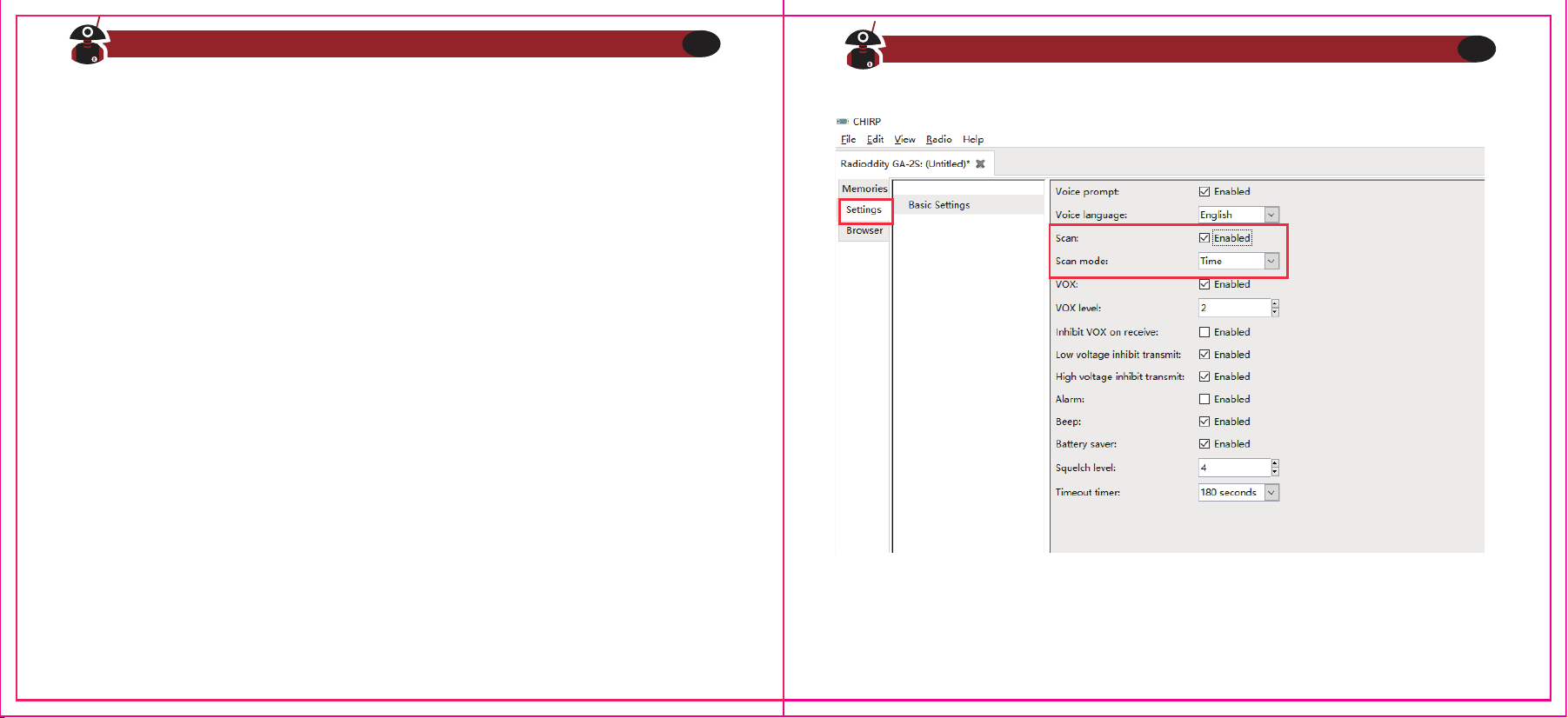
NOTE
La batteria inclusa con la radio generalmente ha abbastanza energia per poter
testare la radio. Si dovrebbe, però, ricaricare completamente la batteria per un
rendimento migliore.
La radio GA-2S è una radio ricetrasmittente analogica UHF-FM economicamente
vantaggiosa. È in grado di comunicare con qualsiasi altra radio analogica di altra
marca che operi nel range UHF-FM, ma senza spendere una eccessiva quantità di
denaro. Sarà necessario solo assicurarsi di aver impostato lo stesso canale o
frequenza, e questo può facilmente essere controllato tramite il software di
programmazione. Se non si è sulla stessa frequenza, è possibile programmare la
radio facilmente tramite computer. (vedi il Capitolo 4)
1. Funzione Scansione
Quando la radio è stata programmata per poter scansionare, il che può essere
facilmente impostato tramite software, premere il tasto Monitor sul lato della
radio per attivare o disattivare la scansione. Quando la scansione comincia, il LED
indicatore si illumina di verde e la radio scansionerà automaticamente i canali
dall'1 al 16, che sono stati scelti nel software di programmazione. Quando viene
rilevato un segnale, la radio interromperà la scansione su quel canale per
permetterne l'ascolto.
NOTE
Si noti che la scansione è disponibile solo quando sono presenti almeno 2 canali
da scansionare in memoria.
Visita Radioddity.com Per Downloads e Supporto
10
Visita Radioddity.com Per Downloads e Supporto
11
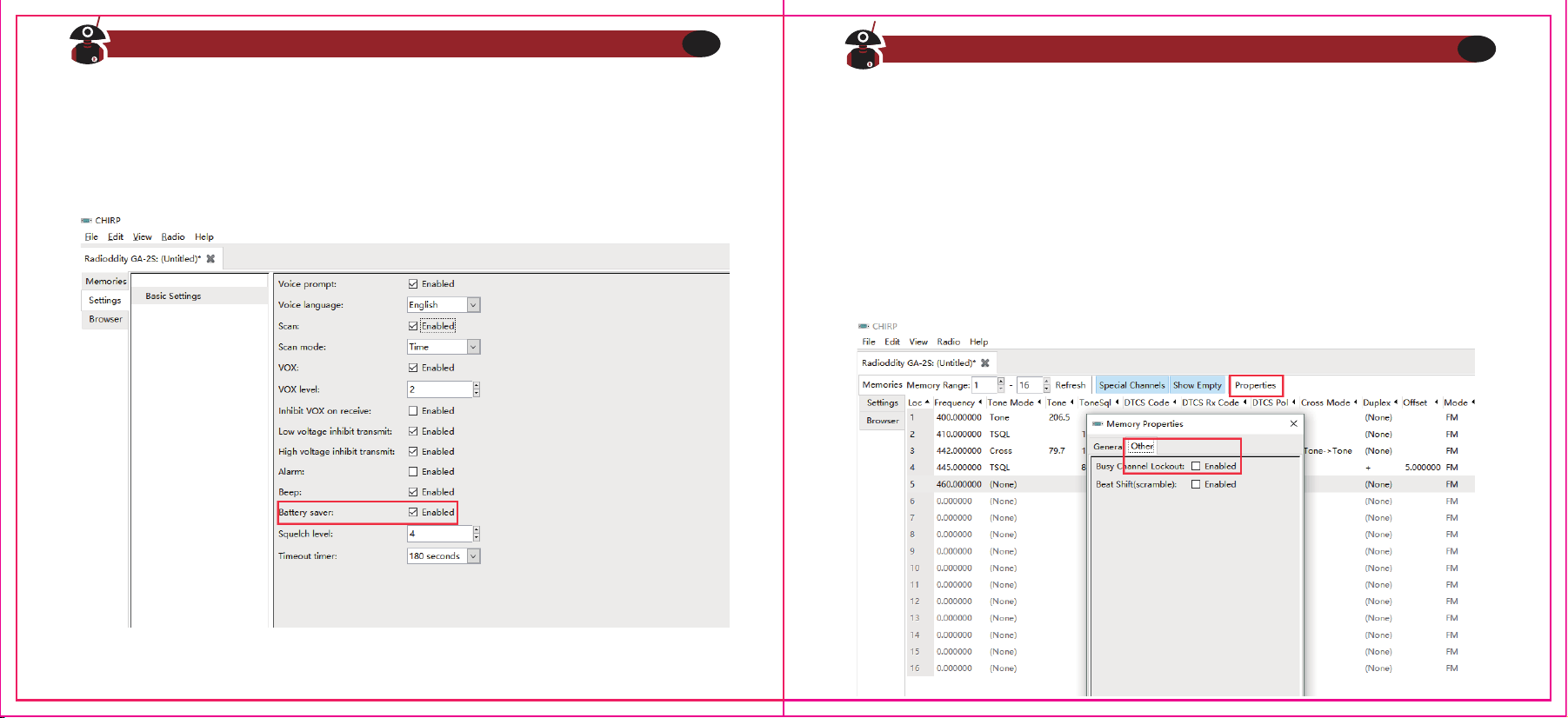
3
. Busy Channel Lockout
È possibile attivare o disattivare questa funzione tramite software.
A: Se il canale corrente non ha un CTCSS/DCS, quando viene ricevuto un
segnale la trasmissione viene disabilitata se si preme il pulsante PTT.
B: Se il canale corrente non ha CTCSS/DCS, quando viene ricevuto un segnale
che non ha CTCSS/DCS la trasmissione viene disabilitata se si preme il pulsante
PTT.
C: Se il canale corrente non ha un CTCSS/DCS, quando viene ricevuto un
segnale che ha un CTCSS/DCS la radio potrà trasmettere se si preme il pulsante
PTT.
2
. Funzione di Risparmio Energetico
Questa funzione può essere impostata tramite software. Attivando questa
funzione, il tempo di utilizzo in stand-by sarà prolungato di molto.
Visita Radioddity.com Per Downloads e Supporto
12
Visita Radioddity.com Per Downloads e Supporto
13
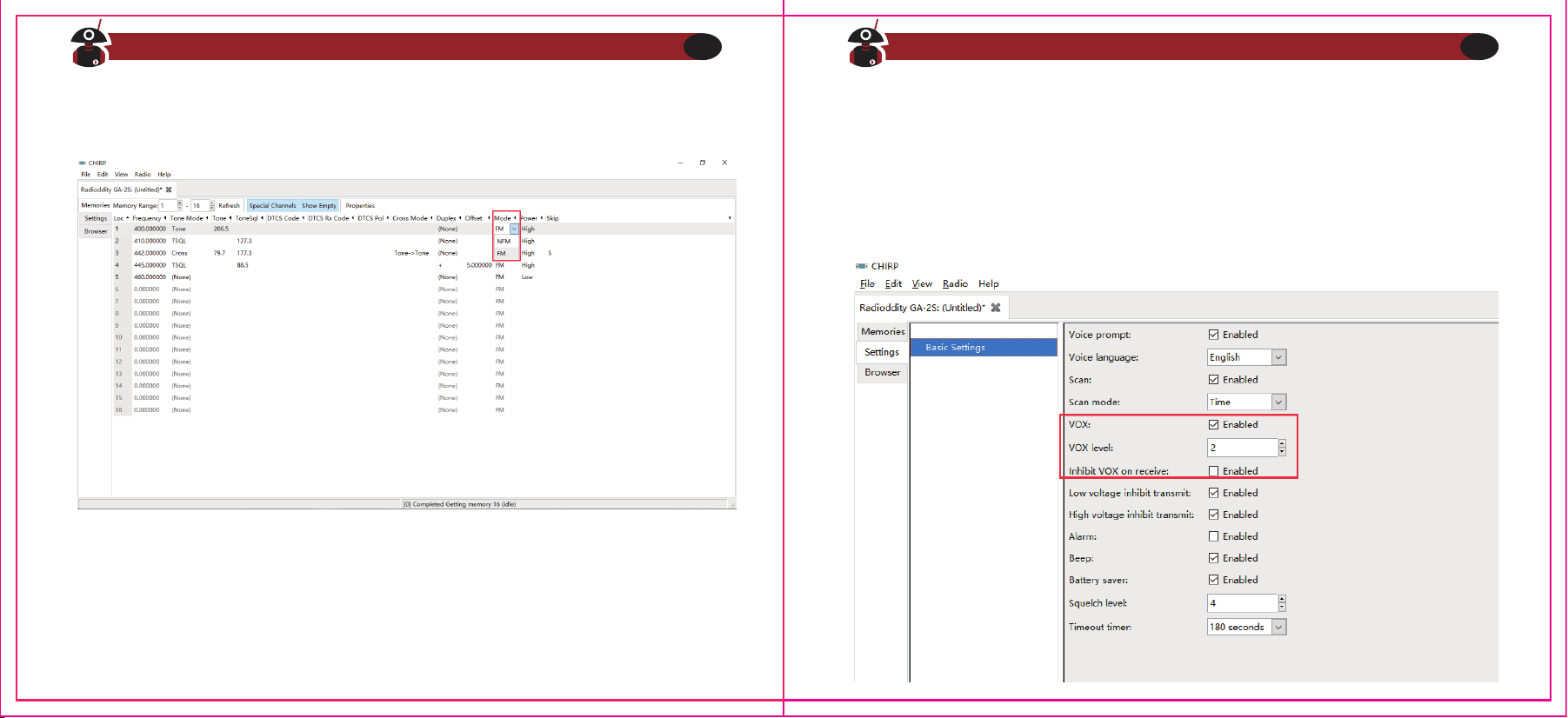
4. Impostazione Banda Wide/Narrow
L'impostazione di default è Wide.
5
.
VOX
È possibile parlare al microfono con un tono di voce normale per attivare la
trasmissione, senza dover premere il tasto PTT. Basterà semplicemente attivare la
funzione VOX tramite software.
A. Quando il VOX è attivo sul canale impostato, basterà parlare direttamente al
microfono e la radio trasmetterà automaticamente. La radio terminerà la
trasmissione quando si smette di parlare, restando in attesa in modalità ricezione.
B. Quando si utilizza il microfono esterno del kit auricolare, si dovrebbe calibrare
nuovamente, tramite software, il livello di attivazione del VOX affinché identifichi
correttamente la voce. Se il microfono è abbastanza sensibile, la radio inizierà a
trasmettere. In caso contrario, se il microfono non è abbastanza sensibile, la radio
non riconoscerà quando si parla. Si prega, quindi, di regolare di conseguenza il
volume della voce per garantire una comunicazione senza problemi.
Visita Radioddity.com Per Downloads e Supporto
14
Visita Radioddity.com Per Downloads e Supporto
15
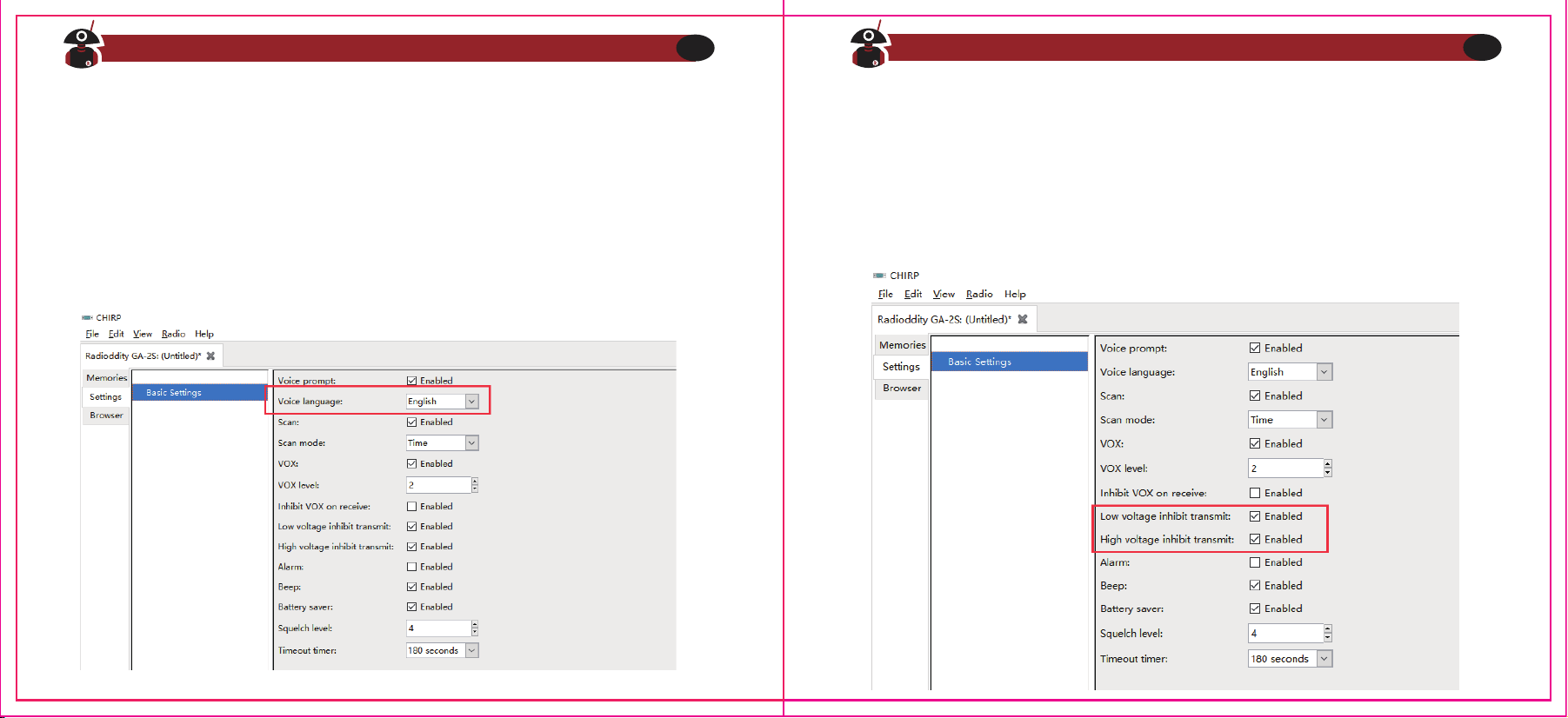
6
. Avviso Vocale
1) L
'Avviso Vocale in Inglese può essere attivato o disattivato tramite software dal
menù 'Voce/Tono Vocale' dalle 'Opzioni Aggiuntive' del programma. Se si
seleziona OFF l'Avviso Vocale verrà disattivato.
2) Annuncio Canale: la radio annuncerà il numero del canale corrente su cui si è
impostata la radio.
3) Avviso di Batteria Scarica: la radio avviserà quando la batteria è scarica,
ricordando di ricaricarla.
7
. Indicatore di Batteria Scarica
Quando la radio sta trasmettendo oppure è in stand-by, se la capacità della
batteria raggiunge un determinato livello basso, l'indicatore LED lampeggerà di
Rosso e verrà udito un tono di avviso. La radio emetterà 'Please change the
battery'. Quando la radio presenterà l'avviso di Batteria Scarica, non sarà possibile
trasmettere, quindi si prega di cambiare o ricaricare la batteria.
Visita Radioddity.com Per Downloads e Supporto
16
Visita Radioddity.com Per Downloads e Supporto
17
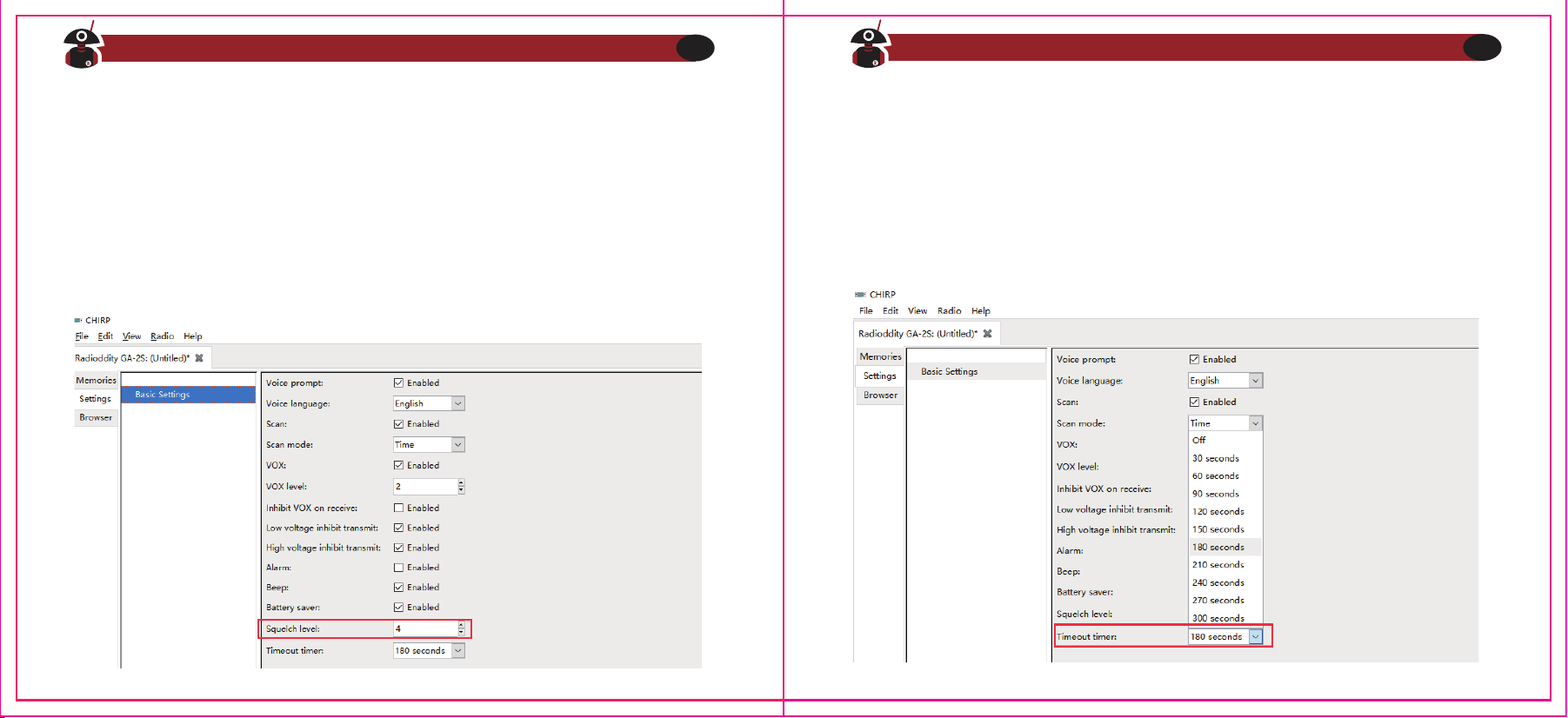
8
. Squelch
Il livello dello Squelch determinerà la potenza del segnale al quale la radio attiverà
l'altoparlante per ascoltare la trasmissione. Se il livello dello Squelch è basso, il
rumore di fondo della radio sarà più alto e di conseguenza il raggio di
comunicazione sarà più ampio, ma l'abilità di evitare le interferenze sarà ridotto.
L'impostazione di fabbrica dello Squelch è 5. Essa può essere aggiustata tramite il
menù 'Squelch Level' nel software di programmazione, ad un livello da 0 a 9.
9
. Time-Out-Timer (TOT)
Questa funzione fornisce una modalità sicura di trasmissione, limitando il tempo di
trasmissione ad un valore programmato. Ciò contribuirà ad una maggiore durata
della batteria evitando che si trasmetta per periodi eccessivamente lunghi, ed in
caso di tasto PTT bloccato o incastrato, può prevenire interferenze ad altri utenti o
danni alla batteria. Una volta scaduto il tempo di trasmissione prestabilito, verrà
udito un
bip
e la radio interromperà la trasmissione.
Visita Radioddity.com Per Downloads e Supporto
18
Visita Radioddity.com Per Downloads e Supporto
19
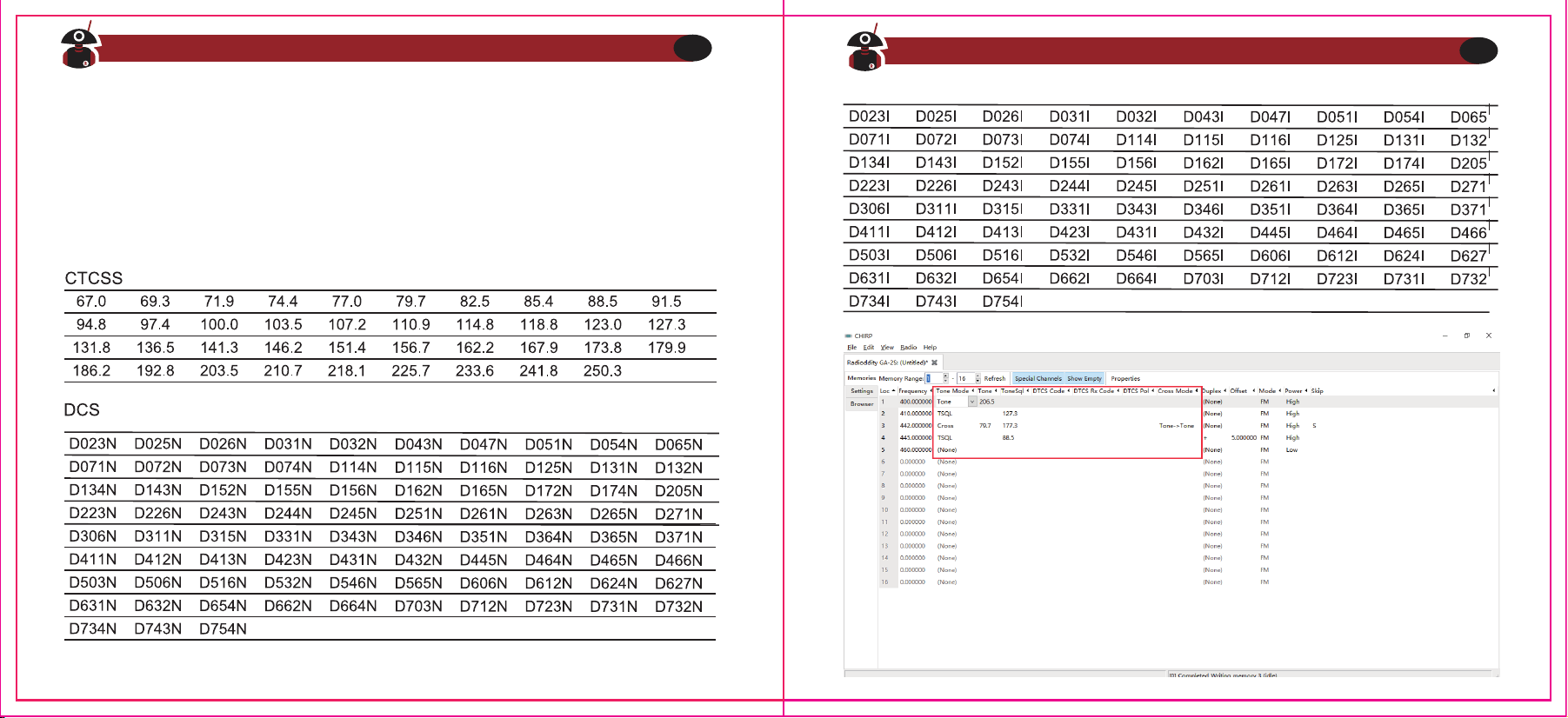
Visita Radioddity.com Per Downloads e Supporto
20
Visita Radioddity.com Per Downloads e Supporto
21
10. QT/DQT (CTCSS/DCS)
QT/DQT (CTCSS/ DCS) è il sistema di segnali subaudio per prevenire che la radio
riceva segnali indesiderati sulla stessa frequenza. Quando un CTCSS/DCS è
configurato, nel raggio di comunicazione radio sarà possibile ricevere solo segnali
dalla stessa frequenza e con la stessa impostazione di QT/DQT. Quando il QT/DQT è
spento, si riceverà qualsiasi segnale radio sulla stessa frequenza all'interno del
raggio di comunicazione.
Capitolo 4. ‒ Programmazione da Computer
Il kit della radio non include un cavo di programmazione. Per acquistare un cavo di
programmazione, visitare: https://www.radioddity.com/
4. Connettere la radio GA-2S al Computer
1) Il connettore USB (o seriale) del cavo di programmazione deve essere
collegato al Computer.
2) Connettere l'altra estremità del cavo alla radio GA-2S nella porta apposita.
3) Quando entrambi i connettori sono stati collegati, accendere la radio.
Assicurarsi di avere abbastanza carica nella batteria della radio.
Note
In alcuni casi, il cavo non sempre si inserisce facilmente in una radio nuova.
Assicurarsi che ci sia una buona connessione tra il connettore del cavo e la porta
della radio prima di iniziare a configurare la radio.
5. Leggere e Scrivere i Dati tramite Software
1) Nel menù del Software, cliccare su Setup> Communication Port e selezionare
la corretta porta COM (la porta COM può essere cercata tramite il
Windows
Device Manager
o
Gestione Periferiche Windows
).
2) Nel menù del Software, cliccare su Select Program> Read from Radio> OK per
leggere le frequenze dalla radio. Il processo dura pochi secondi e il progresso
verrà mostrato nella barra di avanzamento verde del Software.
3) Adesso è possibile modificare qualsiasi dato e impostazione che si desidera.
4) Per caricare i dati appena compilati sulla radio, cliccare su Program> Write to
Radio> OK.
5) Se si deve programmare più di una radio GA-2S, è possibile ripetere i passi
appena illustrati.
1. Requisiti minimi di Sistema del Computer
Sistema Operativo: Windows 98, Windows Me, Windows XP, Windows 7, Windows
8 o Windows 10
Spazio libero sull'HDD: almeno 50MB disponibili
Memoria RAM Minima: 64MB
2. Cavo di Programmazione
A. Cavo di Programmazione USB - È necessario installare i driver prima di poter
impostare le frequenze e i canali.
1) Cercare i driver corrispondenti al sistema operativo del Computer
2) Cliccare su 'Installa' e attendere il processo di installazione.
B.
Se si utilizza un cavo seriale, i driver non sono necessari. È possibile collegare
direttamente il cavo seriale e iniziare a configurare.
3. Scaricare ed Installare il Software
1) Accendere il Computer e controllare che il sistema operativo soddisfi i requisiti
minimi.
2) Scaricare il software di programmazione direttamente da www.radioddity.com
3) Installare il software di programmazione della radio.
Visita Radioddity.com Per Downloads e Supporto
22
Visita Radioddity.com Per Downloads e Supporto
23
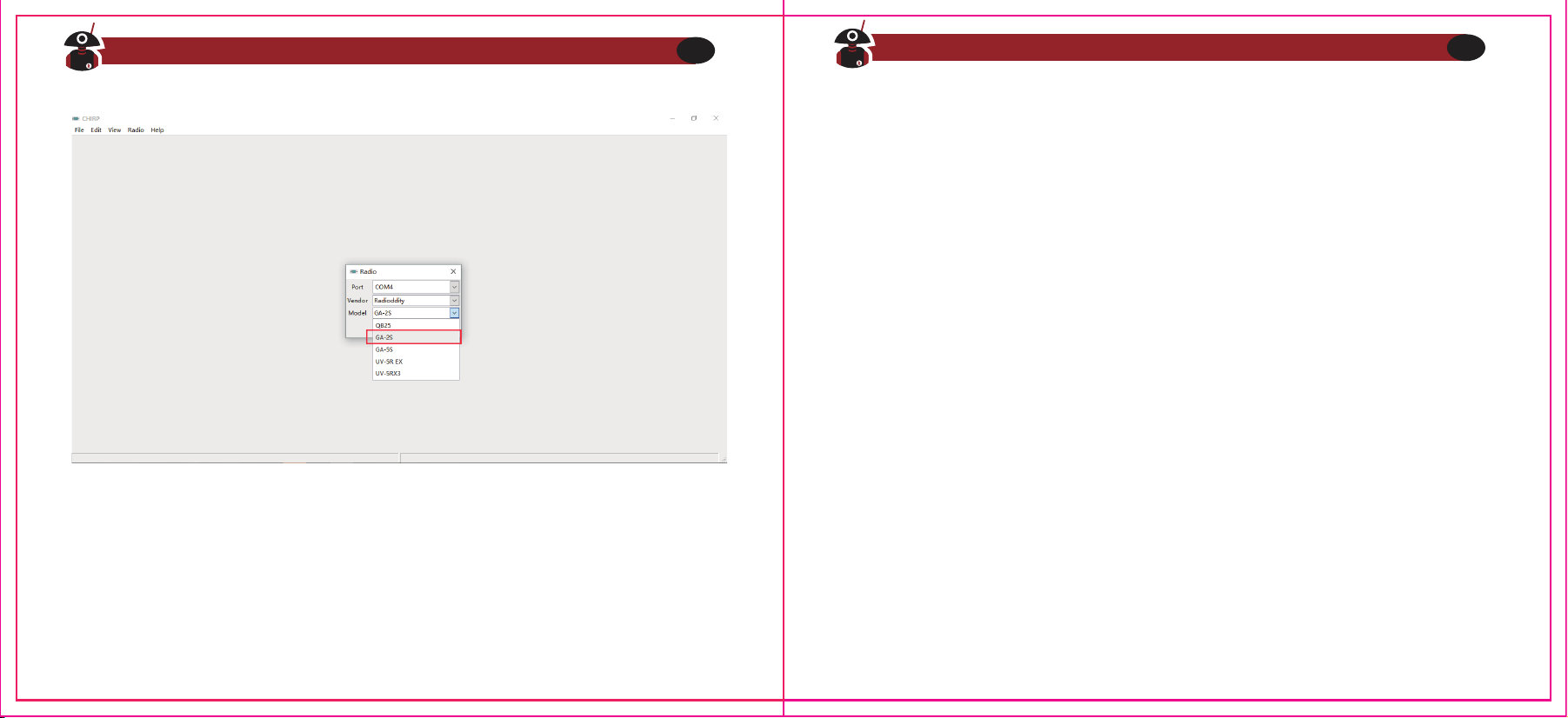
Capitolo 5. - Guida alla Risoluzione di Problemi
1) Quando si importano le frequenze dalla radio, non si riesce ad avere una
risposta dalla radio o viene riportato un errore di comunicazione con la radio?
a. Controllare il cavo di programmazione per vedere se è danneggiato.
b. Controllare la connessione del cavo di programmazione con la porta USB o
seriale del Computer.
c. Controllare se il livello della batteria della radio GA-2S è basso o esausto. Se
così, ricaricare o sostituire la batteria.
d. Controllare che il software di programmazione sia quello corretto per il
modello di Radio.
e. Controllare di aver acceso correttamente la radio.
f. Controllare che siano stati installati i giusti driver per la radio.
2) Una volta completata la programmazione, le due radio non riescono a
comunicare tra loro?
a. Controllare che le due radio siano impostate sullo stesso canale.
b. Controllare che su entrambi i canali sia stato impostato lo stesso QT/
DQT (CTCS/DCS).
c. Controllare che il volume delle due radio sia sufficientemente alto. Si
provi a premere il pulsante Monitor e aggiustare il volume al livello
desiderato.
d. Controllare di aver installato correttamente le antenne.
e. Controllare il raggio di comunicazione delle radio (linea visiva tra le radio)
FRS,GMRS, MURS e PMR446
Si potrebbe essere tentati di utilizzare questa radio su frequenze FRS, GMRS e
MURS
(negli USA) o PMR 446 (in Europa). Si noti, però, che ci sono delle restrizioni
su queste bande che rendono questa radio ricetrasmittente illegale per la
trasmissione su queste frequenze.
Visita Radioddity.com Per Downloads e Supporto
24
Visita Radioddity.com Per Downloads e Supporto
25
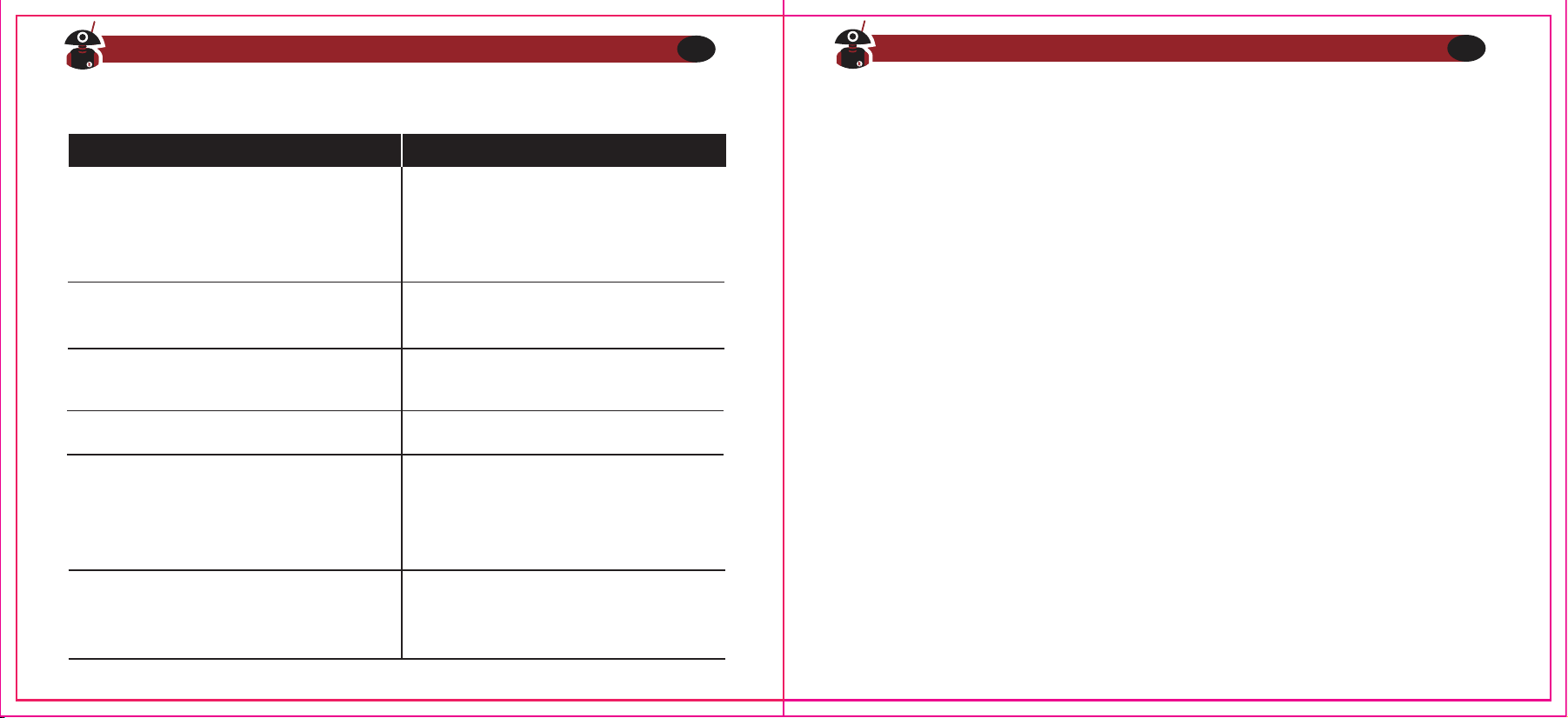
3) Altri problemi che potrebbero verificarsi
La radio non si accende
È sempre udibile rumore di fondo
Il tempo di utilizzo è molto ridotto,
nonostante la batteria sia carica
Impossibile comunicare con la radio
sullo stesso canale/frequenza
Si sente la voce di un altro canale
Le altre radio non ricevono il
segnale trasmesso o il volume è
molto basso.
Appendice A - Esposizione ad Onde
Elettromagnetiche e Guida alla Sicurezza del
Prodotto per Radio Ricetrasmittenti Portatili
ATTENZIONE!
Prima di utilizzare questa radio, leggere questa guida che contiene importanti
istruzioni per un utilizzo sicuro e per essere a conoscenza dell'energia delle onde
elettromagnetiche, per il rispetto delle norme e dei regolamenti locali.
Questa radio ricetrasmittente utilizza energia elettromagnetica nello spettro delle
Radio Frequenze (RF) per fornire comunicazioni tra due o più utenti a distanza.
Essa utilizza radio frequenze o onde radio per trasmettere o ricevere un messaggio
o comunicazione. L'energia RF è una delle forme di energia elettromagnetica. Altre
forme e tipologie di energia elettromagnetica sono, ma non sono limitate a queste,
luce solare e raggi-X. L'energia RF, comunque, non deve essere confusa con queste
altre forme di energia elettromagnetica che, utilizzate in maniera impropria,
possono causare danni biologici. Livelli alti ed esposizione prolungata a raggi-X, ad
esempio, possono danneggiare pelle e materiale genetico.
Visita Radioddity.com Per Downloads e Supporto
26
Visita Radioddity.com Per Downloads e Supporto
27
1. La batteria è scarica. Sostituirla
o ricaricarla.
2. La batteria è installata male.
Rimuoverla e reinserirla nuovamente.
Sostituire la batteria
1. Controllare che il QT/DOT sia lo stesso
2. La radio è fuori dal raggio di operazione
1. Regolare la ghiera del volume al massimo
2. Il microfono potrebbe essere
danneggiato; mandare la radio in assistenza
affinché venga riparata
1. La distanza è fuori raggio
2. Provare ad accendere la radio ad
una distanza inferiore e riprovare
Cambiare tutti i QT/DOT del canale
Soluzione
Problema
Standard e Linee Guida sull'Esposizione a RF (se applicabili)
La tua radio ricetrasmittente Radioddity si attiene ai seguenti standard e linee guida
per l'esposizione a energia RF:
1. United States Federal Communications Commission(FCC), Code of Federal
Regulations; 47 CFR part 2 sub-part J
2. American National Standards Institute (ANSI)
3. Institute of Electrical Electronic Engineers (IEEE) c95.1-2005
4. IEEE Std. 1528: 2013 and KDB447498, Evaluating Compliance with FCC
Guidelines for Human Exposure to Radio Frequency Electromagnetic Fields
5. Institute of Electrical and Electronic Engineers (IEEE) C953-2002
6. International Commission on Non-lonizing Radiation Protection (ICNIRP)
7. Ministry of Health (Canada) Safety Code 6 & Industry Canada RSS-102
8. International Electrotechnical Commission IEC62209-2. 2010
Visita Radioddity.com Per Downloads e Supporto
28
Visita Radioddity.com Per Downloads e Supporto
29
Gli esperti di
scienza, ingegneria, medicina, salute e industria lavorano in
team
per
sviluppare degli standard per una sicura esposizione ad energia RF. Questi standard
forniscono dei livelli consigliati massimi di esposizione sia per i lavoratori che per il
pubblico. Questi livelli massimi di esposizione a RF includono dei sostanziali
margini di protezione.
Tutte le radio ricetrasmittenti di Radioddity sono progettate, prodotte e testate per
garantire che soddisfino i livelli di esposizione RF massimi stabiliti dal governo.
Inoltre, i produttori consigliano anche delle specifiche istruzioni di utilizzo agli
utenti che operano radio ricetrasmittenti. Queste istruzioni sono importanti dal
momento che informano il pubblico sull'esposizione ad energia RF e forniscono
semplici procedure e tecniche per controllarla al meglio.
Si prega di fare riferimento ai seguenti siti web per maggiori informazioni
sull'energia RF e su come controllare e limitare l'esposizione, al fine di garantire la
conformità con i limiti massimi di esposizione alle radio frequenze:
http://www.who.int/en/
Patente da Radioamatore
Il governo regola l'utilizzo delle radio. La maggior parte dei walkie-talkie necessita
di una patente da radioamatore per l'utilizzo. Per le seguenti categorie, ossia
FRS(negli USA) o CB (in Australia), non è richiesta la licenza individuale.
Visita Radioddity.com Per Downloads e Supporto
30
Istruzioni Operative
1.Non trasmettere più del fattore di carico nominale del 50% del tempo.
Per parlare premere il Pulsante PTT, per ricevere, invece, rilasciare il pulsante.
Trasmettere per il 50%, o meno, è importante perché la radio genera
un'esposizione ad energia RF misurabile solo quando si trasmette, in termini di
misurazioni per una conformità allo standard.
2. In caso di utilizzo di una antenna da auto esterna, trasmettere solamente
quando le persone al di fuori del veicolo sono almeno alla distanza minima laterale
consigliata, in base alle istruzioni di installazione.
3. Quando si utilizza questo apparato vicino alla faccia o indossata sul corpo,
piazzare sempre la radio in una custodia, clip, sostegno o imbracatura approvata
da Radioddity
per questo prodotto. L'utilizzo di accessori per indossare e portare
la radio addosso a sé è importante, perché l'utilizzo di prodotti non approvati da
Radioddity potrebbero causare livelli di esposizione eccedenti i limiti di
esposizione controllata di RF, rilevati dagli standard IEEE e ICNIRP.
4.Se non si utilizza un accessorio per indossare la radio e si usa la radio nella
posizione in cui si dovrebbe, ossia davanti alla faccia o vicino al corpo quando si
preme il pulsante PTT per trasmettere, o vicino all'orecchio in modalità
telefono, assicurarsi che l'antenna e la radio siano mantenuti ad una distanza
minima di 2.5 centimetri dal proprio corpo quando si trasmette. Mantenere la
radio ad una corretta distanza è importante perché l'esposizione a RF
diminuisce al diminuire della distanza dall'antenna.
Proteggere l'Udito
1.Usare un volume basso, ma comunque necessario per svolgere correttamente il
proprio lavoro.
2. Alzare il volume solo in ambienti con molto rumore ambientale.
3. Abbassare al minimo il volume prima di indossare il kit auricolare.
4.Limitare al minimo il tempo di utilizzo del kit auricol
are ad un volume alto.
5.Quando si utilizza la radio senza auricolare, non posizionare l'altoparlante della
radio direttamente vicino alle orecchie.
Note: L'esposizione a qualunque fonte di rumore forte per un prolungato periodo
di tempo potrebbe temporaneamente o permanentemente danneggiare il proprio
udito. Più si utilizza un volume alto sulla radio, minore sarà il tempo in cui il proprio
udito potrebbe risentirne. Danni all'udito causati da forti rumori potrebbero essere
inavvertibili all'inizio ed avere effetti cumulativi.
Operazioni di Sicurezza
1. Non utilizzare il caricabatterie all'esterno o in ambienti umidi; utilizzarlo solo in
luoghi e ambienti asciutti.
2. Non smontare l'alimentatore: ciò può comportare il rischio di shock elettrico o
incendi.
3. Non utilizzare il caricabatterie se si è rotto o danneggiato in qualche modo.
4. Non posizionare la radio portatile al di sopra dell'area di rilascio dell'airbag. La
radio potrebbe essere scaraventata con forza causando seri danni ai passeggeri
in caso l'airbag si gonfi.
Visita Radioddity.com Per Downloads e Supporto
31