Tableaux Display
5000 Series
32BDL5150I
User Manual (English)
www.philips.com/ppds
32BDL5150I
ii
Safety Instructions
Warnings and Precautions
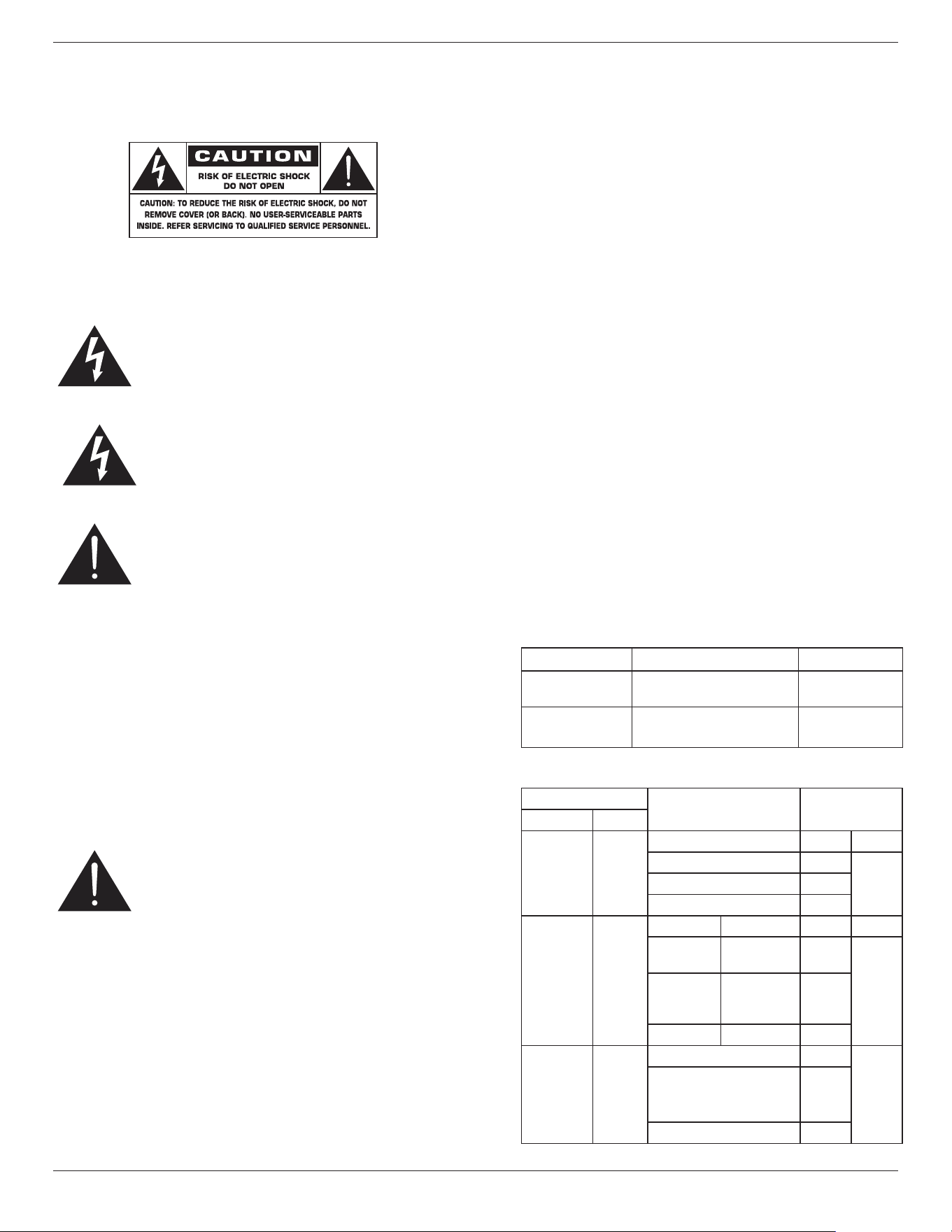
KNOW THESE SAFETY SYMBOLS
CAUTION: TO REDUCE THE RISK OF ELECTRIC SHOCK, DO
NOT REMOVE COVER (OR BACK). NO USER
SERVICEABLE PARTS INSIDE. REFER SERVICING TO
QUALIFIED SERVICE PERSONNEL.
This symbol indicates high voltage is present inside.
It is dangerous to make any kind of contact with any
inside part of this product.
The electronic paper screen is composed of plastic
lm and ultra-thin glass, which is dierent from the
LCD screen normally used. It cannot withstand any
external impact, such as single-point or heavy object
pressure, which may cause damage or breakage of
the screen; please pay special attention to its use.
The warranty does not cover screen breakage.
This symbol alerts you that important literature
concerning operation and maintenance has been
included with this product.
CAUTION: FCC/CSA regulations state that any
unauthorized changes or modications to this
equipment may void the user’s authority to
operate it.
CAUTION: To prevent electric shock, match the wide blade
of plug to the wide slot, and fully insert the
plug.
TO PREVENT DAMAGE WHICH MAY RESULT IN FIRE OR
ELECTRIC SHOCK HAZARD, DO NOT EXPOSE THIS APPLIANCE
TO RAIN OR MOISTURE.
The Socket-outlet should be installed near the apparatus and
be easily accessible.
Read and follow these instructions when
connecting and using your ePaper display:
• Unplug the display if you are not going to use it for an
extensive period of time.
• Unplug the display if you need to clean it with a slightly
damp cloth. The screen many be wiped with a dry cloth
when the power is o. However, never use alcohol,
solvents or ammonia-based liquids.
• Consult a service technician if the display does not operate
normally when you have followed the instructions in this
manual.
• The casing cover should be opened only by qualied
service personnel.
• Keep the display out of direct sunlight and away from
stoves or any other heat sources.
• Keep the display away from oil, otherwise the plastic
cover may be damaged.
• Remove any object that could fall into the vents or
prevent proper cooling of the display’s electronics.
• Keep the display dry. To avoid electric shock, do not
expose it to rain or excessive moisture.
• If turning o the display by detaching the power cable,
wait for 6 seconds before re-attaching the power cable
for normal operation.
• To avoid the risk of shock or permanent damage to
the set do not expose the display to rain or excessive
moisture.
• When positioning the display, make sure the power plug
and outlet are easily accessible.
• Display performance maintain
• IMPORTANT: Always activate a screen saver program
during your application. If a still image in high contrast
remains on the screen for an extended period of time, it
may leave an ‘after-image’ or ‘ghost image’ on the front
of the screen. This is a well-known phenomenon that is
caused by the shortcomings inherent in Microcapsule
technology. In most cases the afterimage will disappear
gradually over a period of time after the power has been
switched o. Be aware that the after-image symptom
cannot be repaired and is not covered under warranty.
Panel Cosmetic Defects and Classication
Unless otherwise agreed by E Ink in writing, the cosmetic
defects solely mean the items listed below.
(
1)Major Defects:
Item Description Classication.
No display No display show on screen
due to malfunction
Major
Abnormal display Unusual pattern or
function displayed
Major
(
2)Minor Defects:
(a) General Minor Defects
Item
Criteria Specic Zone
Name Causes
Spot spot in
module
Spot Size A Zone B Zone
D
≦
0.65 mm Ignore Ignore
0.65 mm< D
≦
1 mm
≦
4
D
>
1.0 mm 0
Scratch or
line defect
Scratch
on
module
Length Width A Zone B Zone
L
≦
2.0
mm
W
≦
0.2
mm
Ignore Ignore
2.0 mm<
L
≦
10 mm
0.2 mm<
W
≦
0.5
mm
≦
8
L
>
10 mm W
>
0.5 mm 0
Air bubble Air
bubble
D1, D2
≦
0.5 mm Ignore Ignore
0.5 mm
≦
D1, D2
≦
1.5
mm
spacing > 40mm
≦
4
D1, D2
>
1.5 mm 0
32BDL5150I
iii
Remarks:
• Back plant cosmetic is neglectable.
• Spot dene: That only can be seen under test
pattern.
• Any defects must be judged by OM.
• Here is denition of the “Spot” and “Scratch or line
defect”.
Spot: W > 1/4L
Scratch or line defect: W
≦
1/4L
• Denition for L/W and D ( major axis)
a
L
D
= ( a + b ) / 2
W
UI design notice
1. Display performance maintain
• The display performance of EPD/ESL is not aected
by the placement angle.
• If the Module is not refreshed every 24 hours a
phenomena known as “Image Sticking/Ghosting”
may occur especially to pattern with clear edge,
and it is IRREVERSIBLE. It is recommended that
the module should be shipped and stored with
a completely white image to avoid this eect. In
application, it is also recommended to refresh
image every 24 hours in use with a number of “clean
image”. In addition, it is suggested to design battery
low power detection and automatically update
image to full white when running out of battery
power.
2. Power Source(battery) Lifetime Extension
• For extending power source(battery) lifetime
without aecting display performance, it is
recommended customers can refresh image every
72 hours longest.
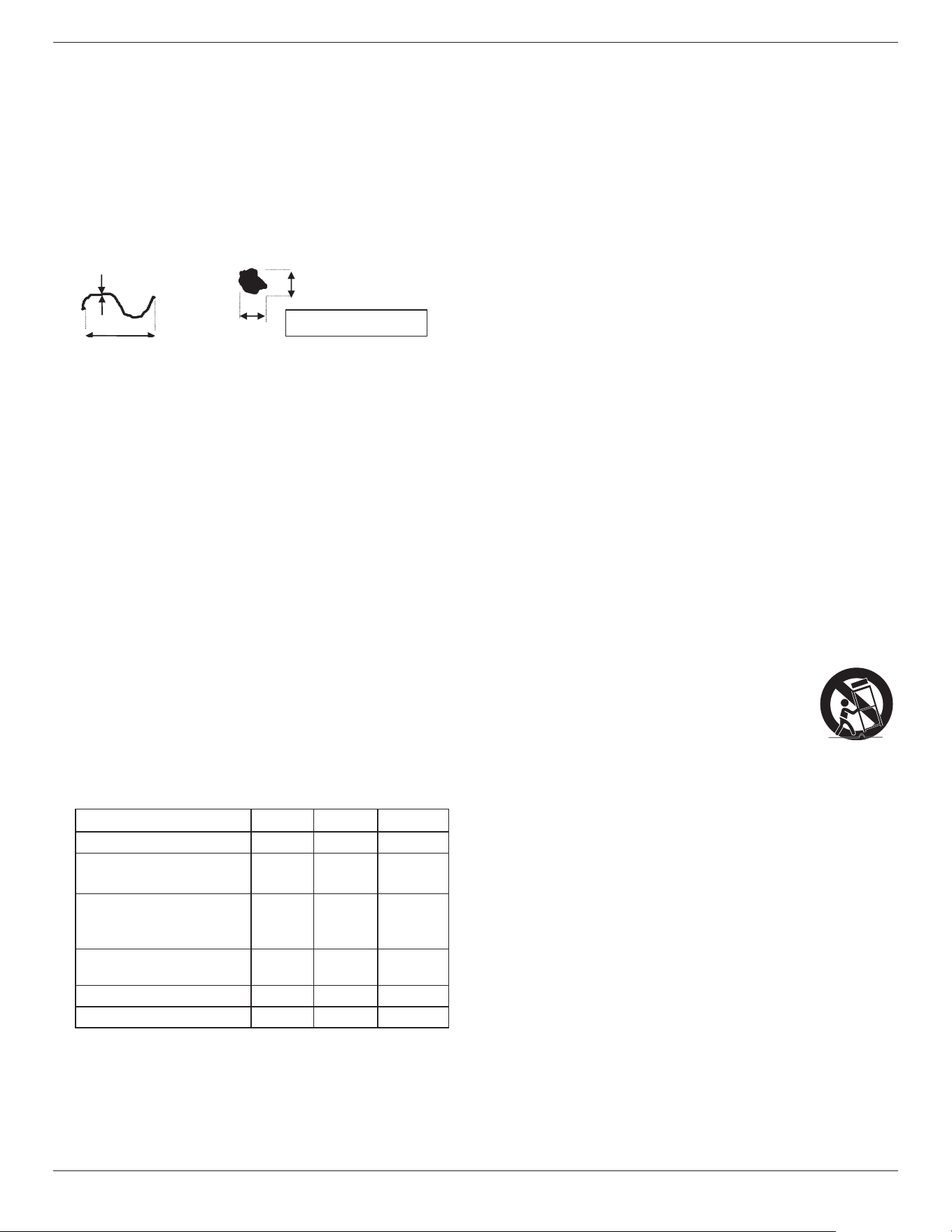
Environmental absolute ratings
Item Min. Max. Unit
Storage temperature -25 60 °C
Operation temperature
(
POE power supply
)
0 50 °C
Operation temperature
(
Battery power supply &
Adapter power supply
)
0 40 °C
Glass Surface temperature
(Operation)
0 65 °C
Storage humidity 5 95 % RH
Operating humidity 20 80 % RH
• Please conrm that the power distribution system
installed in the building provides a circuit breaker for a
rated voltage of 120/240V and a maximum of 20A.
• If provided with a 3-pin attachment plug on the power
cord, plug the cord into a grounded (earthed) 3-pin
outlet. Do not disable the power cord grounding pin, for
example, by attaching a 2-pin adapter. The grounding pin
is an important safety feature.
• Stability Hazard.
The device may fall, causing serious personal injury or
death. To prevent injury, this device must be securely
attached to the oor/wall in accordance with the
installation instructions.
Important Safety Instructions
1. Read these instructions.
2. Keep these instructions.
3. Read all warnings.
4. Follow all instructions.
5. Do not use this apparatus near water.
6. Clean only with dry cloth.
7. Install in accordance with the manufacturer’s instructions.
8. Do not install near any heat sources such as radiators,
heat registers, stoves, or other apparatus (including
ampliers) that produce heat.
9. Do not defeat the safety purpose of the polarized or
grounding-type plug. A polarized plug has two blades
with one wider than the other. A grounding type plug
has two blades and a third grounding prong. The wide
blade or the third prong are provided for your safety. If
the provided plug does not t into your outlet, consult an
electrician for replacement of the obsolete outlet.
10. Protect the power cord from being walked on or pinched
particularly at plugs, convenience receptacles, and the
point where they exit from the apparatus.
11. Only use attachments/accessories specied by the
manufacturer.
12. Use only with the cart, stand, tripod, bracket,
or table specied by the manufacturer, or
sold with the apparatus. When a cart is
used, use caution when moving the cart/
apparatus combination to avoid injury from
tip-over.
13. Unplug this apparatus during lightning storms or when
unused for long periods of time.
14. Refer all servicing to qualied service personnel. Servicing
is required when the apparatus has been damaged in any
way, such as power-supply cord or plug is damaged, liquid
has been spilled or objects have fallen into the apparatus,
the apparatus has been exposed to rain or moisture, does
not operate normally, or has been dropped.
WARNING: TO REDUCE THE RISK OF FIRE OR ELECTRIC
SHOCK, DO NOT EXPOSE THIS APPARATUS TO
RAIN OR MOISTURE.
WARNING: Apparatus shall not be exposed to dripping
or splashing and no objects lled with liquids,
such as vases, shall be placed on the apparatus.
WARNING: The batteries (batteries not included in the
package contents) shall not be exposed to
excessive heat such as sunshine, re or the like.
WARNING: The mains plug or appliance coupler is used as
the disconnect device,the disconnect device
shall remain readily operable.
32BDL5150I
iv
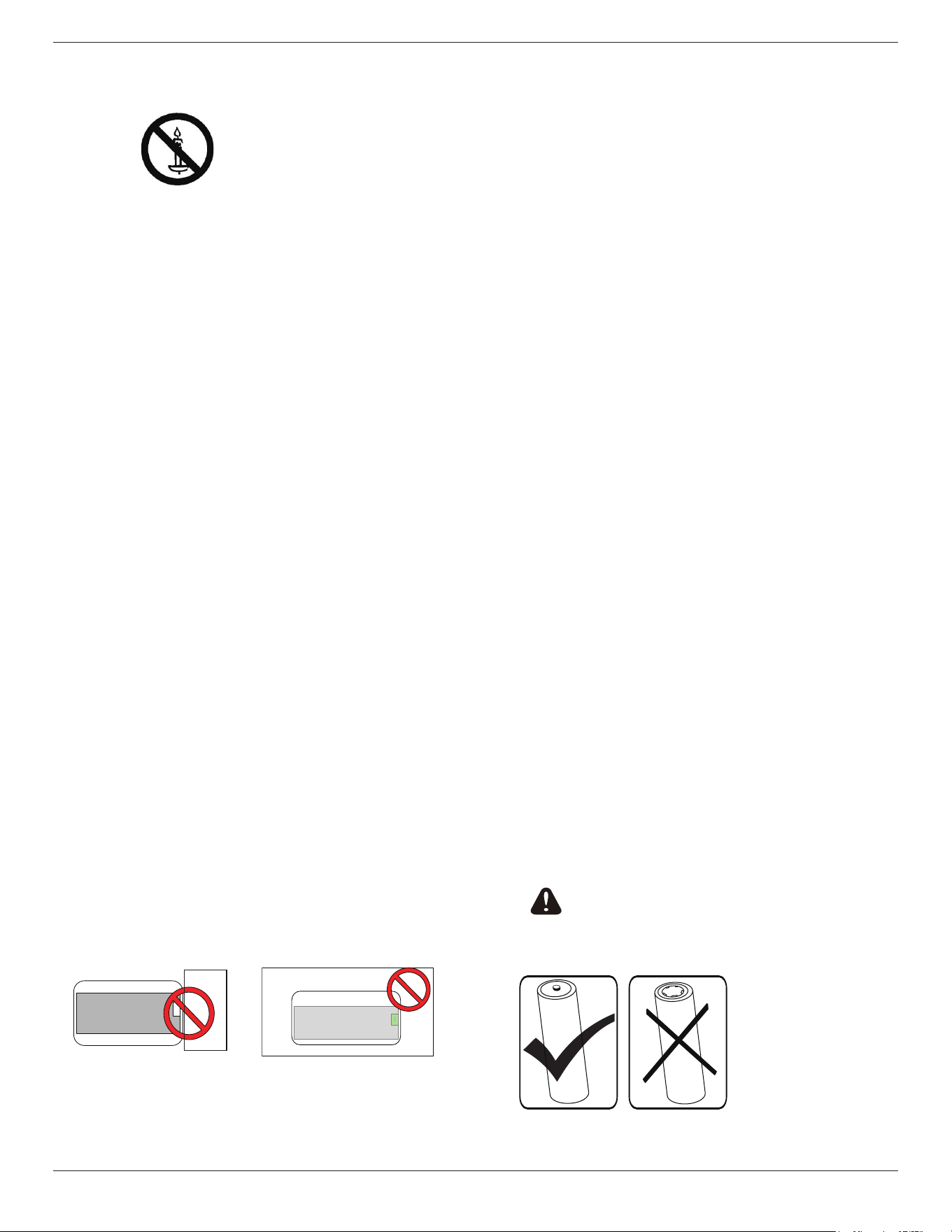
WARNING: To prevent the spread of re, keep candles or
other open ames away from this product at
all times.
WARNING: To prevent injury, this apparatus must
be securely attached to the oor/wall in
accordance with the installation instructions.
CAUTION: These servicing instructions are for use by
qualied service personnel only. To reduce
the risk of electric shock,do not perform any
servicing other than that contained in the
operating instructions unless you are qualied
to do so.
CAUTION: Excessive sound pressure from earphones and
headphones can cause hearing loss. Adjustment
of the equalizer to maximum increases the
earphone and headphone output voltage
and the sound pressure level. Therefore, to
protect your hearing, adjust the equalizer to an
appropriate level.
Important information
Never place a Display in an unstable location. A Display may
fall, causing serious personal injury or death. Many injuries,
particularly to children, can be avoided by taking simple
precautions such as:
• Using cabinets or stands recommended by the
manufacturer of the Display.
• Only using furniture that can safely support the Display.
• Ensuring the Display is not overhanging the edge of the
supporting furniture.
• Not placing the Display on tall furniture (for example,
cupboards or bookcases) without anchoring both the
furniture and the Display to a suitable support.
• Not placing the Display on cloth or other materials that
may be located between the Display and supporting
furniture.
• Educating children about the dangers of climbing on
furniture to reach the Display or its controls.
• Do not place the side Wi-Fi near any metal objects or
metal walls. If the side Wi-Fi needs to be placed beside
a metal object or metal wall, please keep a distance of
at least 1.2 meters. Do not place it in front of any metal
object, metal wall or metal desk. If it is placed directly
in front of a metal object or against a metal wall, please
keep a distance of at least 1.2 meters.
Metal wall
WiFi
Display
Metal wall
WiFi
Display
• It is recommended to place the router behind the
electronic screen without any metal or solid wall in the
middle.
• “Burn-in” may appear if the screen is not refreshed for a
long time, and it is recommended to refresh the screen at
least once every 24 hours.
• The optical values of EPD will be dierent in the
temperature ranges of 0~50°C, resulting in slight
discoloration of the displayed color, which belongs to the
EPD characteristics with high sensitivity to temperature.
It is normal that the temperature change picture will
have color dierences in a short time, and will not have
adverse eects on the functional operation of the whole
machine.
• It is recommended to refresh the screen to a white screen
when not in use or stored for a long time to avoid burn-
in.
Caution: Risk of explosion if battery is replaced by an
incorrect type. Dispose of used batteries according to the
instructions.
Battery abuse or mishandling can cause overheating, liquid
leakage, or an explosion.
To avoid possible injury, follow these instructions:
DO NOT open, disassemble, or service any battery.
DO NOT crush or puncture the battery.
DO NOT short-circuit the battery, or expose it to water or
other liquids.
DO NOT dispose of in re.
Do NOT use another type of battery to replace the batteries.
Do NOT attempt to charge the battery with the device.
Do NOT mix to use the old and new batteries.
Keep away from children.
Batteries are to be inserted with the correct polarity.
Exhausted batteries or not using equipment for a long time,
must be removed the batteries from the product.
After replacing the batteries, ensure that the battery
compartment cover is locked.
Stop using the battery if it is damaged, or if you notice any
discharge or the buildup of foreign materials on the battery
leads.
Do not put the battery in trash that is disposed of in landlls.
When disposing of the battery, comply with local ordinances
or regulations.
Please pay attention to the following
tips when using 18650 batteries
Federal Communications Commission (FCC) Notice (U.S. Only)
32BDL5150I
v
This equipment has been tested and found to comply
with the limits for a Class B digital device, pursuant to Part
15 of the FCC Rules. These limits are designed to provide
reasonable protection against harmful interference in a
residential installation. This equipment generates, uses and
can radiate radio frequency energy and, if not installed and
used in accordance with the instructions, may cause harmful
interference to radio communications.
However, there is no guarantee that interference will not
occur in a particular installation. If this equipment does
cause harmful interference to radio or television reception,
which can be determined by turning the equipment o and
on, the user is encouraged to try to correct the interference
by one or more of the following measures:
• Reorient or relocate the receiving antenna.
• Increase the separation between the equipment and receiver.
• Connect the equipment into an outlet on a circuit dierent from
that to which the receiver is connected.
• Consult the dealer or an experienced radio/TV technician for
help.
This device complies with Part 15 of the FCC / ISED’s licence-
exempt RSSs Rules. Operation is subject to the following
two conditions: (1) This device may not cause harmful
interference, and (2) this device must accept any interference
received, including interference that may cause undesired
operation.
Le présent appareil est conforme aux CNR d’ ISED applicables
aux appareils radio exempts de licence. L’exploitation est
autorisée aux deux conditions suivantes : (1) le dispositif
ne doit pas produire de brouillage préjudiciable, et (2) ce
dispositif doit accepter tout brouillage reçu, y compris un
brouillage susceptible de provoquer un fonctionnement
indésirable.
FCC/ISED/CE-RED Caution:
Any changes or modications not expressly approved by
the party responsible for compliance could void the user’s
authority to operate this equipment.
This transmitter must not be co-located or operating in
conjunction with any other antenna or transmitter.
Operations in the 5GHz products are restricted to indoor
usage only.
Déclaration d’exposition aux radiations:
Cet équipement est conforme aux limites d’exposition
aux rayonnements ISED établies pour un environnement
non contrôlé. Cet équipement doit être installé et utilisé
avec un minimum de 20 cm de distance entre la source de
rayonnement et votre corps.
EU Declaration of Conformity/UK
Declaration of Conformity
This device complies with the requirements set out in the
Council Directive on the Approximation of the Laws of the
Member States relating to Electromagnetic Compatibility
(2014/30/EU), Low-voltage Directive (2014/35/EU), RoHS
directive (2011/65/ EU), ErP directive (2009/125/EC).The
Radio Equipment Directive(2014/53/EU) or Radio Equipment
Regulations 2017(for UK). The following test methods have
been applied in order to prove presumption of conformity
with the essential requirements of the Radio Equipment
Directive.
Radiation Exposure Statement:
This equipment complies with CE radiation exposure limits
set forth for an uncontrolled environment. This equipment
should be installed and operated with minimum distance
20cm between the radiator & body.
The frequency, mode and the maximum transmitted power
are listed below:
2400-2483.5MHz: < 20 dBm (EIRP) ( for 2.4G product only)
5150-5250MHz: < 23 dBm (EIRP)
5250-5350MHz: < 23 dBm (EIRP)
5470-5725MHz: < 30 dBm (EIRP)
5725-5825MHz: < 13.98 dBm (EIRP)
The device is restricted to indoor use only when operating
in the 5150 to 5350MHz frequency range. ( for 5G product
only)
AT BE BG HR CY CZ DK
EE FI FR DE EL HU IE
IT LV LT LU MT NL PL
PT RO SK SI ES SE UK(NI)
UK
中国 RoHS
根据中国大陆《电器电子产品有害物质限制使用管理办法》,以下
部分列出了本产品中可能包含的有害物质的名称和含量。
部件名称
有害物质
铅
(Pb)
汞
(Hg)
镉
(Cd)
六价铬
(Cr (VI))
多溴联
苯
(PBB)
多溴二
苯醚
(PBDE)
外壳 O O O O O O
电子墨水屏 X O O O O O
电路板组件 * X O O O O O
电源适配器 X O O O O O
电源线 / 连接线 X O O O O O
本表格依据SJ/T 11364 的规定编制。
*: 电路板组件包括印刷电路板及其构成的零部件,如电阻、
电容、集成电路、连接器等。
O: 表示该有害物质在该部件所有均质材料中的含量均在
GB/T 26572规定的限量要求以下。
X: 表示该有害物质至少在该部件的某一均质材料中的含量超
出GB/T 26572规定的限量要求。
上表中打“×”的部件,应功能需要,部分有害物质含量超出
GB/T 26572规定的限量要求,但符合欧盟RoHS法规要求(属
于豁免部分)。
32BDL5150I
vi
10
环保使用期限
在产品本体上标示的该标志表示环境保护使用期限为 10 年。
电子信息产品的环境保护使用期限是指电子信息产品中所含的有
害物质不会向外部泄漏或出现突然变异,并且电子信息产品的用
户在使用该电子信息产品时也不会对环境造成严重污染或对人
体、财产带来严重损害的期限。
在环境保护期限中,请按照使用说明书使用本产品。
本环境保护使用不覆盖易损件:电池。
《废弃电子产品回收处理管理条例》提示性说明
为了更好地关爱及保护地球,当用户不再需要此产品或产品寿命
终止时,请遵守国家废弃电器电子产品回收处理相关法律法规,
将其交给当地具有国家认可的回收处理资质的厂商进行回收处
理,不当利用或者处置可能会对环境和人类健康造成影响。
中国
RoHS
合格评定制度标识
为从源头上限制电器电子产品有害物质使用,减少产品废弃后对
环境造成的污染,增加绿色产品供给,促进绿色消费,本产品满
足《电器电子产品有害物质限制使用管理办法》引用的相关标准
要求 ; 根据《电器电子产品有害物质限制使用合格评定制度实施
安排》之规定,采用符合性申明之合格评定方式,按规定要求使
用如下合格评定标识:
SDoC
仅适用于非热带气候条件下安全使用 :
仅适用于非热带气候条件下安全使用。
“注意
如果电池更换不当会有爆炸危险
只能用同样类型或等效类型的电池来更换”
“接入本设备的有线网络天线必须与保护接地隔离 , 不
然可能会引起着火等危险!”
警
語
: 使用
過
度恐
傷
害
視
力。
注意事
項
:
(1) 使用 30 分
鐘請
休息 10 分
鐘
。
(2) 未
滿
2
歲
幼
兒
不看
螢
幕,2
歲
以上每天看
螢
幕不要超
過
1 小
時
。
Waste Electrical and Electronic Equipment-
WEEE
Attention users in European Union private households
This marking on the product or on its
packaging illustrates that, under European
Directive 2012/19/EU governing used
electrical and electronic appliances, this
product may not be disposed of with normal
household waste. You are responsible
for disposal of this equipment through a
designated waste electrical and electronic
equipment collection. To determine the
locations for dropping o such waste
electrical and electronic, contact your local
government oce, the waste disposal
organization that serves your household or
the store at which you purchased the product.
Taiwan:
低功率電波輻射性電機管理辦法低功率電波輻射性電機管理辦法
取得審驗證明之低功率射頻器材,非經核准,公司、商號或使用
者均不得擅自變更頻率、加大功率或變更原設計之特性及功能。
低功率射頻器材之使用不得影響飛航安全及干擾合法通信;經發
現有干擾現象時,應立即停用,並改善至無干擾時方得繼續使用。
前述合法通信,指依電信管理法規定作業之無線電通信。低功率
射頻器材須忍受合法通信或工業、科學及醫療用電波輻射性電機
設備之干擾。
在 5.25-5.35 秭赫頻帶內操作之無線資訊傳輸設備,限於室內使
用。應避免影響附近雷達系統之操作。
高增益指向性天線只得應用於固定式點對點系統。

32BDL5150I
vii
Contents
1. Unpacking and Installation ................................................................1
1.1. Unpacking .................................................................................1
1.2. Package Contents ...................................................................1
1.3. Installation Notes ....................................................................2
1.4. Mounting on a Wall (Optional) ..........................................2
1.4.1. VESA Grid .....................................................................2
1.5. Mounting in Portrait Orientation ......................................2
1.6. Battery installation and removal method (optional)-
For service personnel only ....................................................3
2. Parts and Functions ...............................................................................4
3. Connecting External Equipment .......................................................5
3.1. Connecting audio devices ....................................................5
3.1.1. Using network interface ..........................................5
3.2. Connect USB .............................................................................5
4. Operation Guide for Local Carousel Application .........................6
4.1. Picture requirements .............................................................6
4.2. Copy pictures ............................................................................6
4.3. Start picture carousel .............................................................6
4.4. Carousel function setting .....................................................6
4.5. Indicator ....................................................................................8
5. Cleaning and Troubleshooting ..........................................................9
5.1. Cleaning .....................................................................................9
5.2. Troubleshooting ...................................................................10
6. Technical Specications .................................................................... 12
32BDL5150I
1
1. Unpacking and Installation
1.1. Unpacking
• This product is packed in a carton, together with the standard accessories.
• Any other optional accessories will be packed separately.
• After opening the carton, ensure that the contents are complete and in good condition.
1.2. Package Contents
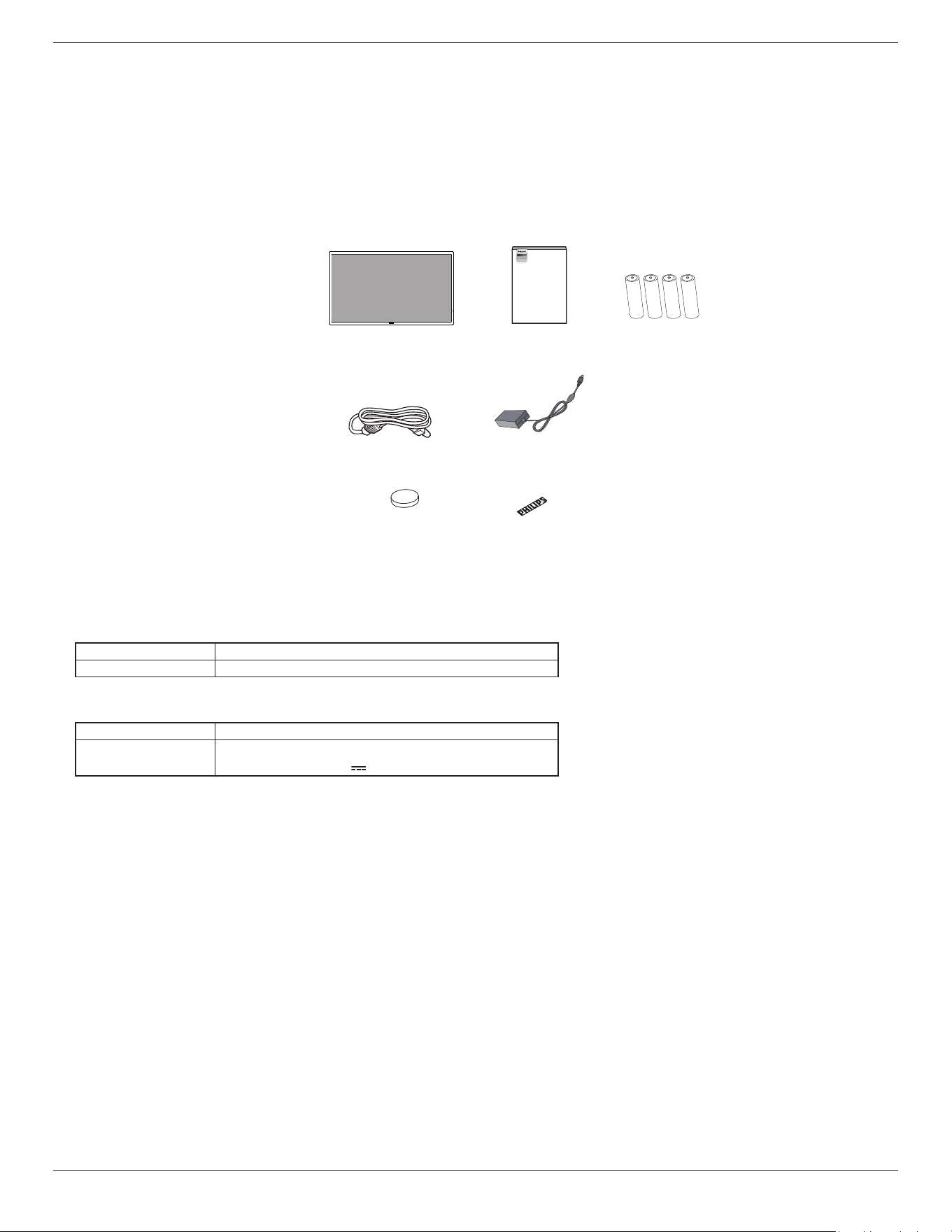
Please verify that you received the following items with your package content:
• ePaper Display
• Quick start guide
• 18650 Battery (optional)
• Power cord
• Adapter
• CR2032 Lithium Battery (optional)
• Philips logo plate
Philips logo plate
ePaper Display Quick start guide
Power Cord Adapter
18650
Battery
(optional)
CR2032 Lithium
Battery (optional)
ePaper Display
5000 Series Tableaux
32BDL5150I
* Items may dier in dierent locations
* Display design and accessories may dier from the images shown.
NOTES:
• The RTC battery (coin/button) are intended to be replaced by user, please ensure use the correct battery:
Type / model Technical data
CR2032 Rated 3 V, Max Abnormal Charging Current 10 mA.
• The adapter is only used for this display, cannot be used for other purposes.
Your device uses one of the following power supplies:
Type / model Technical data
ADPC2045 INPUT: 100-240V~ 1.5A 50-60Hz
OUTPUT:45.0W 20.0V 2.25A
• For all other regions, apply a power cord that conforms to the AC voltage of the power socket and has been approved by and complies with
the safety regulations of the particular country.
• Keep the packaging materials appropriately after unpacking the product.
WARNING
• WARNING: The device contains a coin/button/small-sized cell battery. Do not ingest the battery, as it may result in chemical burns.
• If the coin/button/small-sized cell battery is swallowed, it can cause severe internal burns in just 2 hours and can lead to death.
• Keep new and used batteries away from children. If the battery compartment does not close securely, stop using the product and keep it away
from children. If you think batteries might have been swallowed or placed inside any part of the body, seek immediate medical attention.
• CAUTION: Risk of re or explosion if the battery is replaced with an incorrect type of battery.
• Do not expose batteries to high temperatures or around sources of heat, such as sunlight, heaters, microwave ovens, ovens, or water heaters.
Overheating of the battery may cause an explosion.
• Do not throw the battery into a re. Otherwise, the battery may catch re or explode.
• Do not drop, squeeze, or puncture the battery. Avoid external pressure, which may cause internal short circuits and overheating.
• Do not disassemble or modify the battery, insert foreign objects, or immerse the battery in water or other liquids to avoid battery leakage,
overheating, re, or explosion.
• Dispose of batteries in accordance with local regulations. Do not dispose of batteries as domestic waste. Improper handling of the battery may
cause the battery to explode.
32BDL5150I
2
1.3. Installation Notes
• Only use the power cable and adapter provided with this product. If an extension cord is required, please consult your service agent.
• The product should be installed on a at surface, or the product may tip over. Leave a space between the rear of the product and the wall for
proper ventilation. Do not install the product in a kitchen, bathroom or a place exposed to moisture, failure to do so may shorten the life of the
internal parts.
• Do not install the product where it is 3,000m and higher in altitude. Failure to do so may result in malfunctions.
1.4. Mounting on a Wall (Optional)
To mount this display on a wall, a standard wall-mounting kit (commercially available) is required. It is recommended that you use a mounting
interface that complied with TUV-GS and /or UL1678 standard in North America.
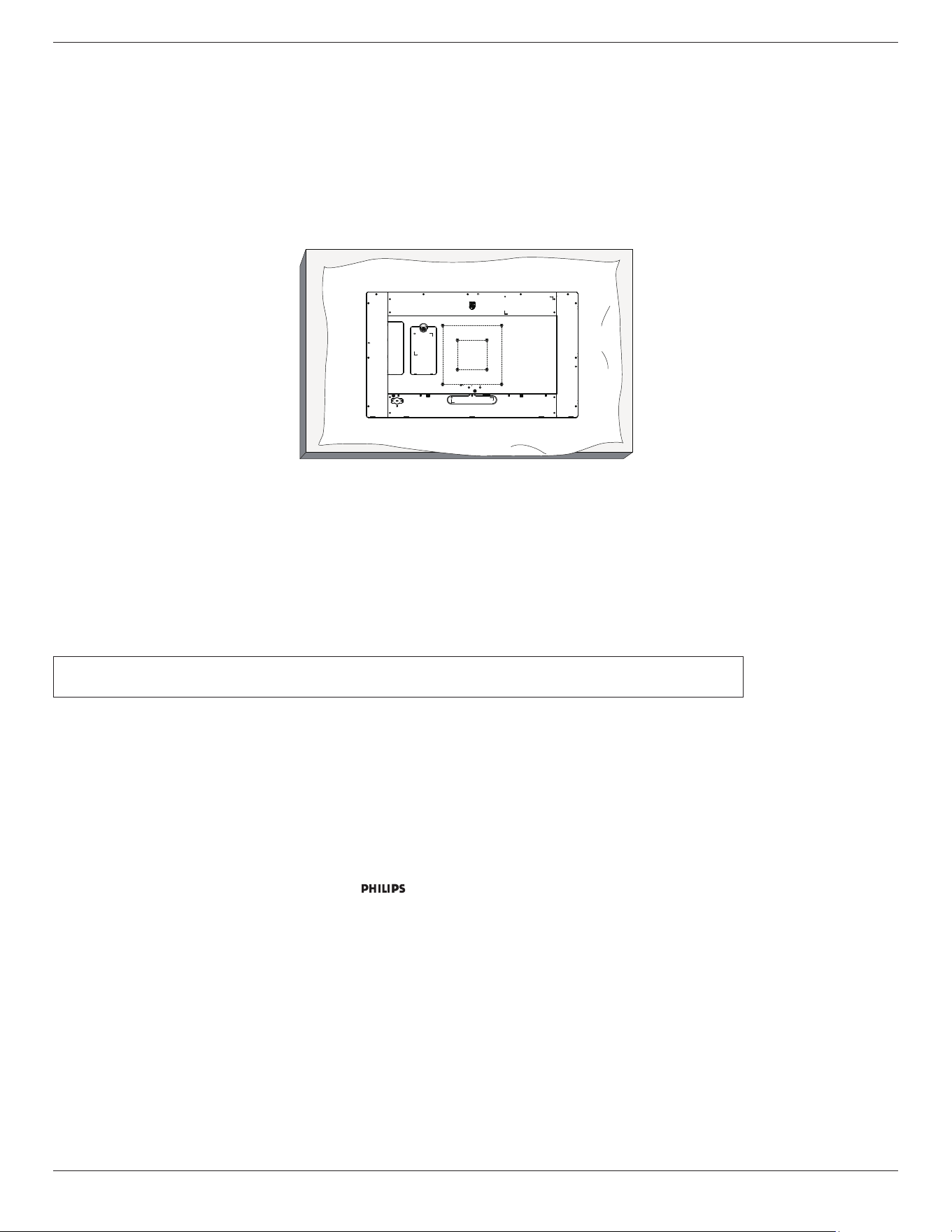
Unboxing
100 mm
200 mm
200 mm
100 mm
1. Prepare a at and horizontal surface that is larger than the display and spread a thick protective sheet on it to facilitate your operation
without scratching the screen.
2. Ensure you have all accessories for all types of mounting (wall mount, ceiling mount, table stand, etc).
3. Follow the instructions that came with the base mounting kit. Failure to follow the correct mounting procedures could result in damage to the
equipment, or injury to the user or installer. The product warranty does not cover the damage caused by improper installation.
4. For the wall-mounting kit, use the M4 mounting screws (with a length 10 mm longer than the thickness of the mounting bracket) and tighten
them securely.
1.4.1. VESA Grid
100(H) x 100(V) mm (M4 mounting screws with a length 10 mm longer than the thickness of the mounting bracket)
200(H) x 200(V) mm (M4 mounting screws with a length 10 mm longer than the thickness of the mounting bracket)
Caution:
To prevent the display from falling:
• For wall or ceiling mounting, we recommend that you install the display with metal brackets which are commercially available. For detailed
instructions about the installation, refer to the guide provided with the bracket.
• To prevent the display from falling in case of earthquake or other natural disaster, please consult the manufacturer of the bracket for the
mounting location.
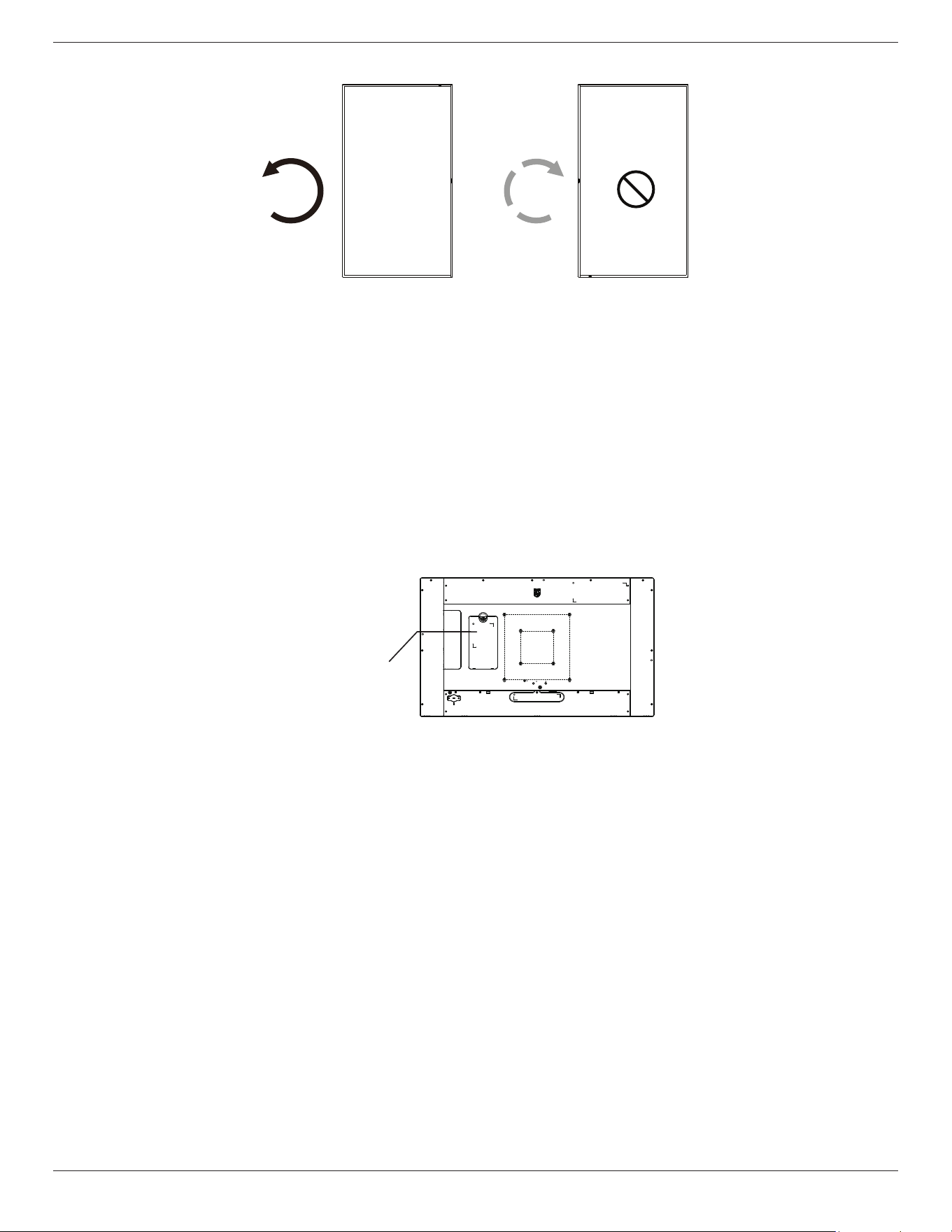
1.5. Mounting in Portrait Orientation
This display can be installed in portrait orientation.
Rotate the display 90 degrees counterclockwise. The “ ” logo should be on the right side when facing the display.
NOTE: The working hour in portrait mode is 24 hours per day.
32BDL5150I
3
90° 90°
1.6. Battery installation and removal method (optional)- For service personnel only
1) Remove the battery cover.
2) Pay attention to the direction of the battery panel, and install or remove the battery.
Warning:
1) The batteries are intended to be replaced or charged only by authorized service personnel (for example, the manufacturer or personnel
authorized by the manufacturer).
2) The battery compartment is not intended to be user accessible.
Battery compartment is only accessible with a tool.
3) Users cannot replace the battery.
4) Disposing of a battery by placing it in re or a hot oven, or mechanically crushing or cutting it, can result in an explosion. Leaving a battery in
an environment with extremely high temperatures can also lead to an explosion or the leakage of ammable liquid or gas. Subjecting a battery
to extremely low air pressure may result in an explosion or the leakage of ammable liquid or gas.
Install or remove the
battery from here.
32BDL5150I
4
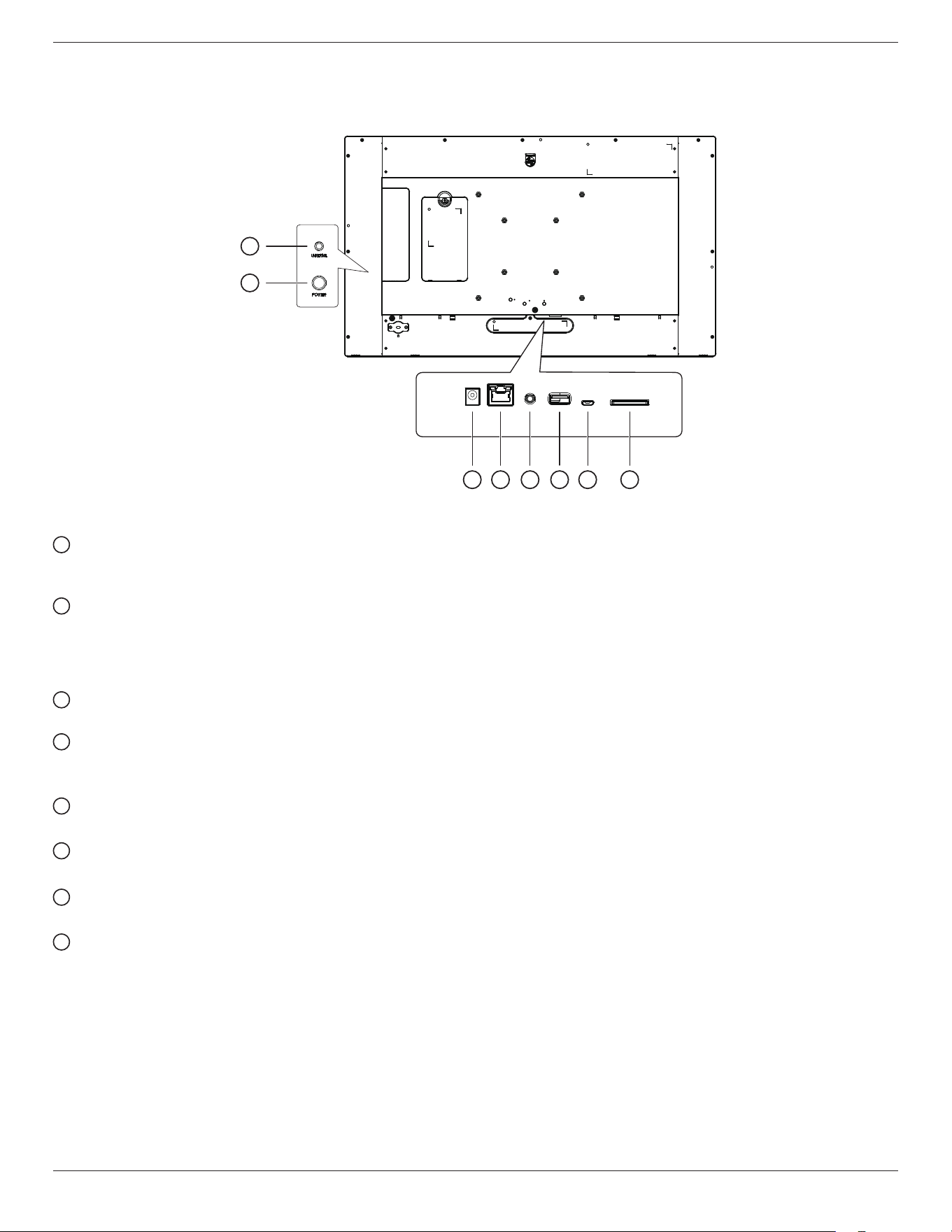
2. Parts and Functions
Introduction to the terminals
1
2
3 4 5 6 7 8
1
Universal key
Press the UNIVERSAL key to pause the picture (that is, stay at the current picture and not show the next one). Press it again to continue
displaying the next pictures.
2
Power key
Turn the main power on or off. Long press the power key for 2 seconds to start the device; long press the power key for about 4 seconds to
shut down the device, and the LED light will be off.
Note: When using the power adapter, power on directly, when using 18650 battery (optional) for power supply, press the power key to start
the machine.
3
DC input
DC power input from the power adapter.
4
LAN
LAN W/POE: Internet and PoE function.
*The protocol version number for POE power supply is IEEE 802.3bt.
5
AUDIO OUT
Audio output for external AV device.
6
USB 2.0 port
Connect to usb storage device and service port
7
MICRO USB port
Insert a Micro USB.
8
SD card
Insert a SD card.
32BDL5150I
5
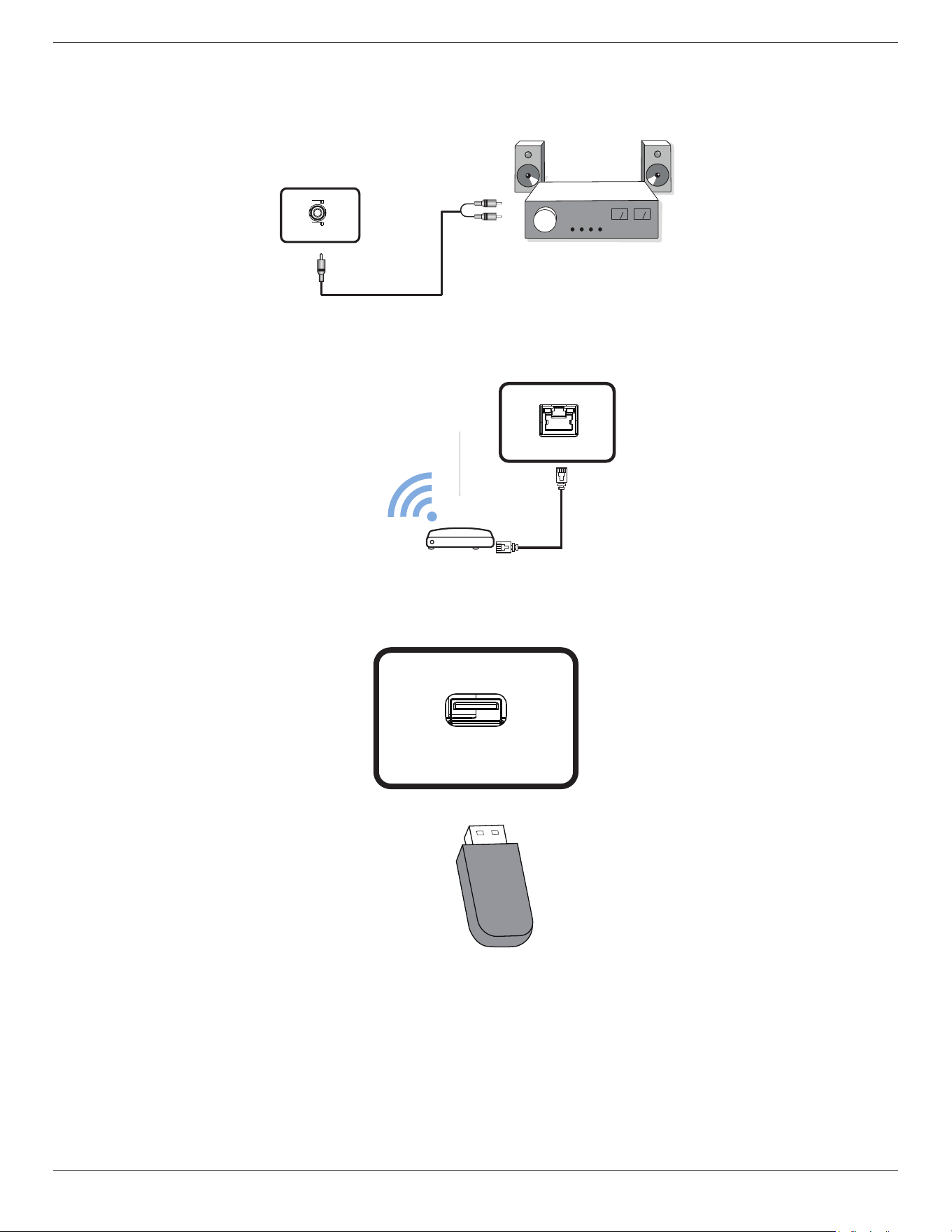
3. Connecting External Equipment
3.1. Connecting audio devices
[Audio out]
3.1.1. Using network interface
INTERNET
or
WiFi
3.2. Connect USB
USB2.0

32BDL5150I
6
4. Operation Guide for Local Carousel Application
4.1. Picture requirements
1. bmp, png, jpg, jpeg, webp formats
2. Resolution: The vertical screen supports a resolution of 2560 * 1440, and the horizontal screen supports a resolution of 1440 * 2560.
3. If the resolution of the picture is dierent from the screen resolution, it can still be displayed. If the picture’s resolution is larger than the
screen resolution, it will automatically shrink to t the screen size.
4.2. Copy pictures
Note: USB ash disk and SD card only support FAT32 format.
Copy pictures from a USB ash disk or SD card:
1. Copy the pictures into the Pictures le directory under the USB disk or SD card root directory. For example {root dir of storage}/Pictures/.
2. Insert the USB disk or SD card with the pictures ready into the EPD platform and power cycle the display .
3. After restarting, the application will delete the original pictures directory rst, and then copy all the les in the pictures directory of the USB
disk or SD card to the EPD.
4. Prompt after copying is competed: Remove USB and restart it.
5. Reboot the device. The local carousel application is started by default after the device is booted. The carousel will start if there are pictures
in the picture directory.
Copy pictures from a PC:
1. Turn on the EPD and connect it to the computer.
2. Operate on the computer; enter the directory: ePaper Signage -> Internal shared storage -> Pictures.
3. Copy the pictures to be carouselled to the picture directory above.
4. Disconnect the cable between the EPD and the computer.
5. Reboot the device. The local carousel application is started by default after the device is booted. The carousel will start if there are pictures
in the picture directory.
4.3. Start picture carousel
1. If a power adapter is used, insert the EPD power cord, and the device will boot automatically. If the battery is used, press and hold the
power key for 2 seconds to start the device after the battery is put in.
2. After starting, the carousel of the pictures in the picture directory will automatically start playing.
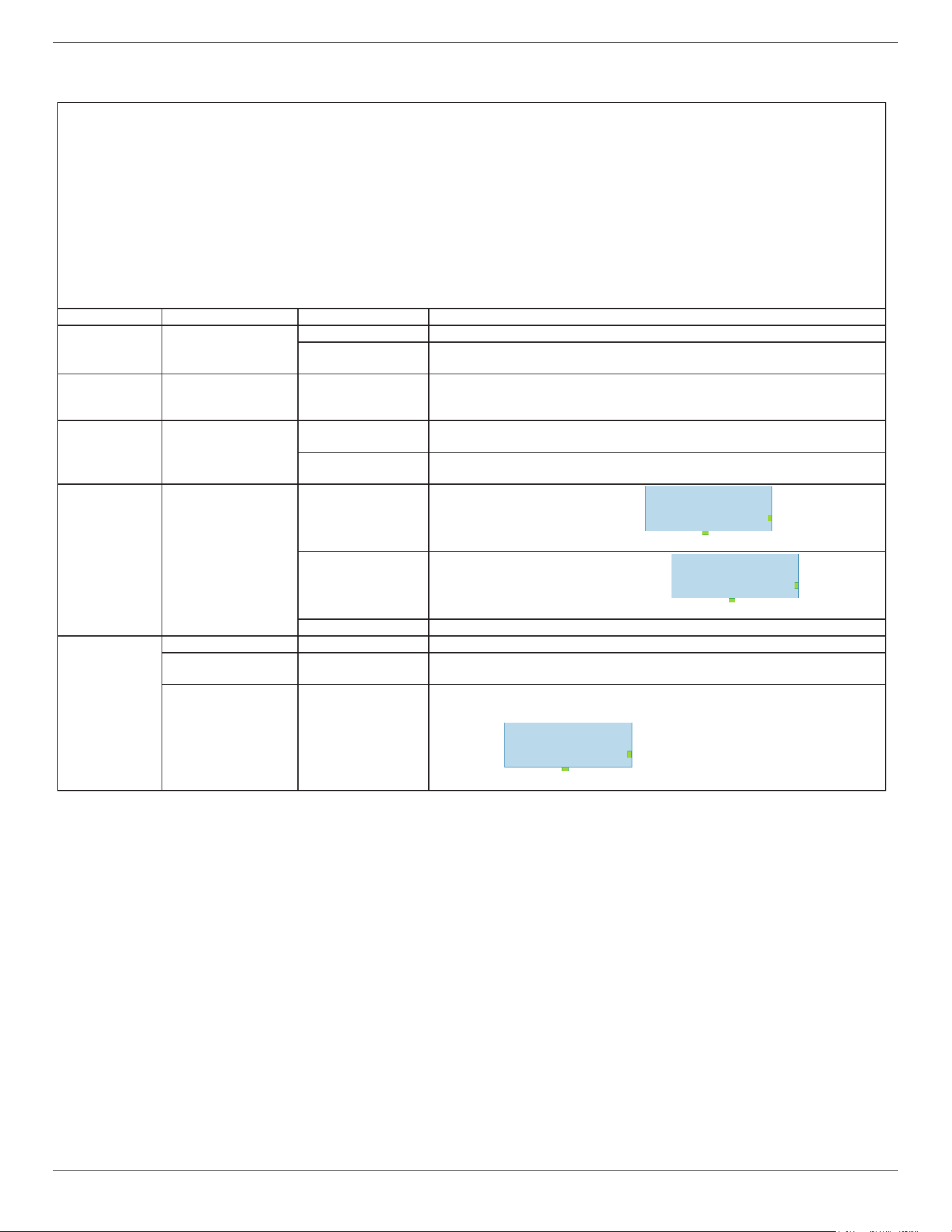
4.4. Carousel function setting
To change the carousel settings, add the cong.xml le (together with pictures) when copying the pictures.
If the cong.xml le is not added, the default settings will be used for the carousel.
Default carousel settings:
• The device will enter sleep mode after displaying the pictures.
• The picture is displayed from the bottom left corner of the screen.
• The picture display interval is 150 seconds.
32BDL5150I
7
Customize the carousel prole:
• Follow this format for the cong.xml content:
<?xml version=
"
1.0
"
?>
<epd_con�g>
<sleep on="1"></sleep>
<interval second="150"></interval>
<remember on="1"></remember>
<rotate degree="0"></rotate>
<image path="img1.bmp" x="0" y="0"></image>
<image path="img2.bmp" x="0" y="0"></image>
<image path="img3.bmp" x="0" y="0"></image>
</epd_con�g>
Tag Properties Value Description
sleep on
"0": The EPD device does not enter sleep mode (higher power consumption)
"1" (Default)
The EPD device will enter sleep mode after displaying the pictures (lower
power consumption)
interval second
(user input)
Default: 150
• The interval between the completion of a picture display and the start of
the next picture display. This value must be at least 150.
• It is recommended that the interval should not exceed 24 hours.
remember on
"0"
Turn off the memory function and reboot the EPD device to display the �rst
picture.
"1" (Default)
Turn on the memory function, and the EPD device will continue to display the
next picture after reboot.
rotate degree
"0" (Default) Display picture rotated by 0 degrees.
ABCDEFG
USB Port
LED light
"180" Display picture rotated by 180 degrees.
ABCDEFG
USB Port
LED light
"auto" Display picture automatically rotated by 0 or 180 degrees.
image
path (user input) Picture name (with extension)
x
(user input)
Default: 0
Abscissa of starting position for picture display.
y
(user input)
Default: 0
Ordinate of starting position for picture display.
EPD Panel
USB Port
LED light
(0,EPD Height)
(EPD Width,EPD Height)
(EPD Width,0)(0,0)

32BDL5150I
8
4.5. Indicator
• Booting: Flashing green
• Booting completed: Solid blue
• After the screen is ready to be refreshed until the refresh is completed: Flashing blue
• Sleep/Shut down: O
• The battery is less than 15%: The red light ashing means the battery needs to be replaced.
• The red light will ash three times and then turn o after the device is booted: The battery is low and needs to be replaced.

32BDL5150I
9
5. Cleaning and Troubleshooting
5.1. Cleaning
Caution When Using the Display
• Be sure to disconnect all cables before moving the monitor. Moving the monitor with its cables attached may damage the cables and thus
cause re or electric shock.
• Disconnect the power plug from the wall outlet as a safety precaution before carrying out any type of cleaning or maintenance procedure.
Front Panel Cleaning Instructions
• The front of the display has been specially treated. Wipe the surface gently using only a cleaning cloth or a soft, lint-free cloth.
• If the surface becomes dirty, soak a soft, lint-free cloth in a mild detergent solution. Wring the cloth to remove excess liquid. Wipe the
surface of the display to remove dirt. Then use a dry cloth of the same type to dry.
• Do not scratch or hit the surface of the panel with ngers or hard objects of any kind.
• Do not use volatile substances such as insert sprays, solvents and thinners.
Cabinet Cleaning Instructions
• If the cabinet becomes dirty, wipe the cabinet with a soft, dry cloth.
• If the cabinet is extremely dirty, soak a lint-free cloth in a mild detergent solution. Wring the cloth to remove as much moisture as possible.
Wipe the cabinet. Use another dry cloth to wipe over until the surface is dry.
• Do not use solution that contains oil to clean the plastic parts. Such product damage the plastic parts and void the warranty.
• Do not allow any water or detergent to come into contact with the surface of the display. If water or moisture gets inside the unit,
operating problems, electrical and shock hazards may result.
• Do not scratch or hit the cabinet with ngers or hard objects of any kind.
• Do not use volatile substances such as insert sprays, solvents and thinners on the cabinet.
• Do not place anything made from rubber or PVC near the cabinet for any extended periods of time.
32BDL5150I
10
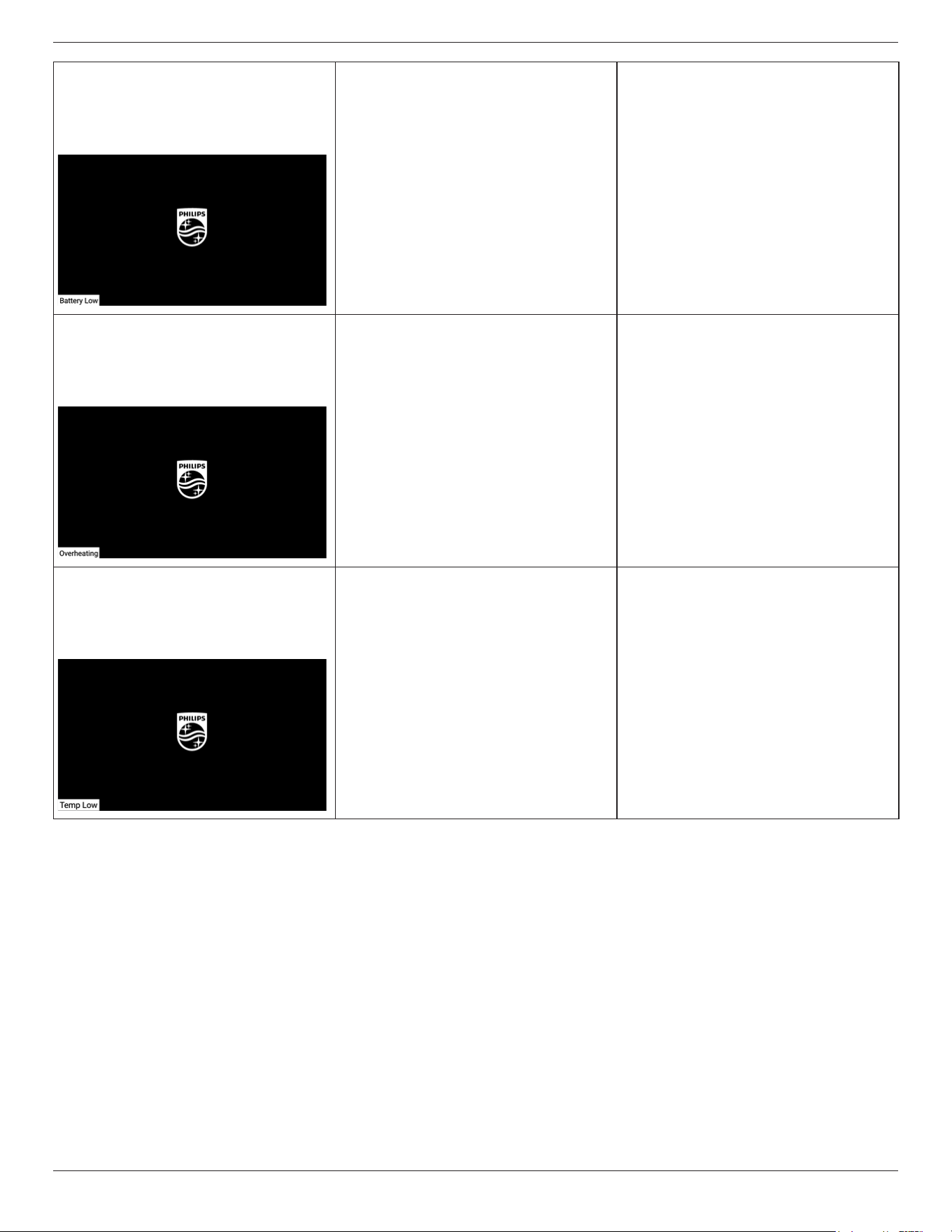
5.2. Troubleshooting
Problem Possible reason Solution
No screen update. 1. The power cord is disconnected or the
battery may be dead.
2. The main power switch is not turned on.
1. Replace four fully charged batteries or plug
in the power cord.
2. Please press the power key.
Unable to boot. 1. The battery may be dead.
2. The power cord may be abnormal.
3. The incorrect booting may be due to the
micro USB being plugged in rst.
1. Replace four fully charged batteries or plug
in the power cord.
2. Conrm the connection between the
power adapter and the wire socket.
3. Please unplug the wire and power supply
(battery and power cord) connected to the
PC rst, wait 40 seconds, and then connect
the power cord (if the battery is inserted,
press the power key again).
Abnormal picture.
Battery drain out
Shutdown
0%
The battery may be dead. Replace four fully charged batteries or plug in
the power cord.
A prompt will display after booting:
Please plug-in flash drive and reboot
Flash drive file path: /Pictures/
There is no picture in the device or the picture
format is not supported.
Recopy pictures.
When copying pictures from a USB ash disk or
SD card, the screen will display the prompt:
Please fix the following errors, reinsert flash drive and reboot:
- "0. jpg" : Image does not exist.
The picture in cong.xml does not exist or the
picture format is not supported.
Conrm that the picture name in cong.xml is
correct (including the le extension), and copy
the picture again.
During the carousel, the screen displays the
prompt:
Pictures/2.jpg
Image file does not exist.
The picture does not exist or the picture format
is not supported.
Conrm that the picture format is correct, and
copy the picture again.
During the carousel, the screen displays the
prompt:
Pictures/2.jpg
Display area is outside of the EPD panel.
The starting x and y positions of the picture
in cong.xml are greater than or equal to the
screen pixel size.
Adjust the x and y positions of the picture in
cong.xml to be smaller than the screen pixel
size.
During the carousel, the screen displays the
prompt:
There are some problems with the images.
Please make sure the images are all correct and copy again.
All pictures in the device are damaged or the
format is not supported.
Recopy pictures.
The displayed picture does not ll the entire
screen.
The picture resolution is dierent from the
screen pixel size.
Adjust the picture resolution to be the same
as the screen pixel size, and copy the picture
again.
32BDL5150I
11
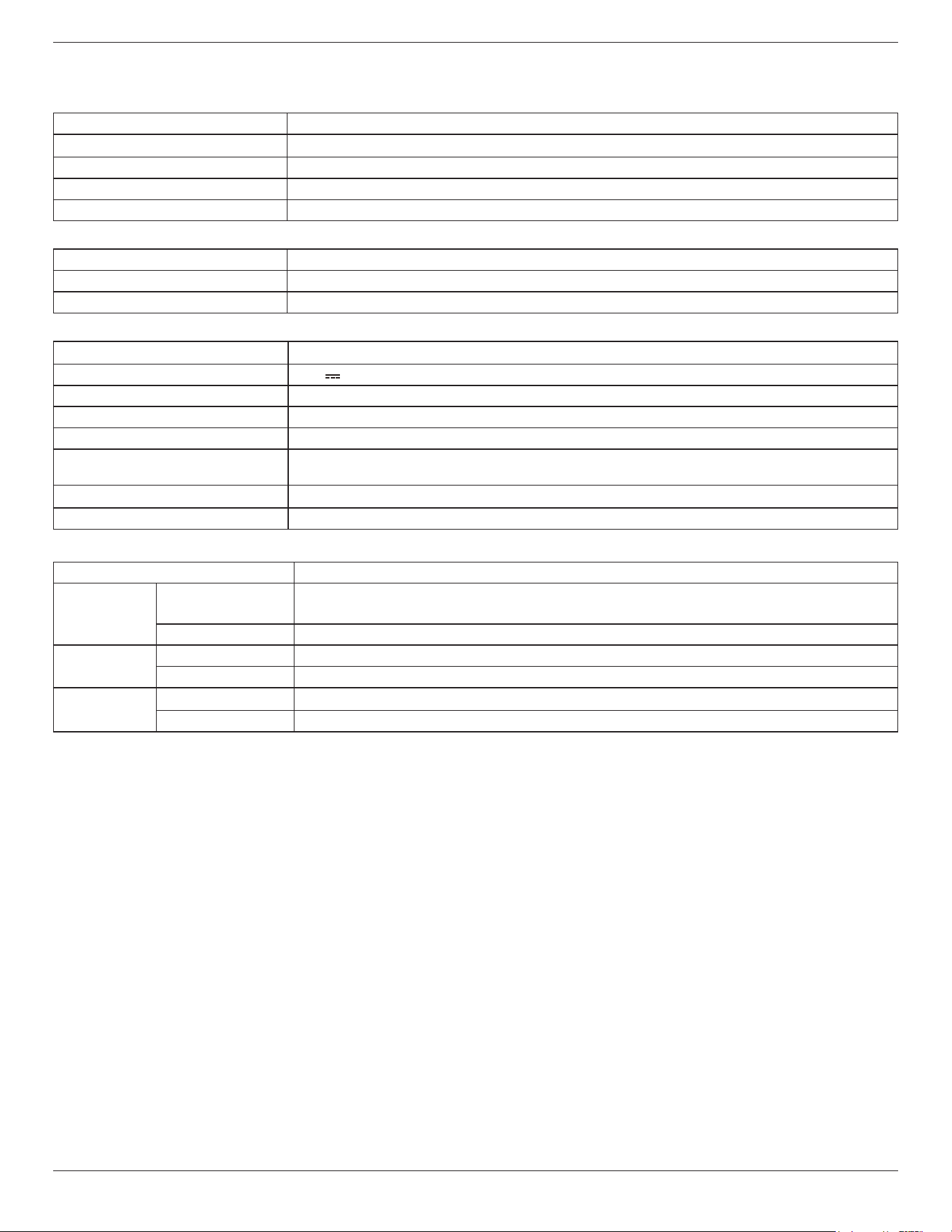
The corner of the screen displays 'Battery Low'.
(The horizontal screen of the machine is
displayed in the bottom left corner, and the
vertical screen is displayed in the top left
corner.)
Battery level below 15%. Replace four fully charged batteries or plug in
the power cord.
The corner of the screen displays 'Overheating'.
(The horizontal screen of the machine is
displayed in the bottom left corner, and the
vertical screen is displayed in the top left
corner.)
The ambient temperature is above 50°C. Place the machine in an environment that
meets the operating temperature range.
The corner of the screen displays 'Temp Low'.
(The horizontal screen of the machine is
displayed in the bottom left corner, and the
vertical screen is displayed in the top left
corner.)
The ambient temperature is below 0°C. Place the machine in an environment that
meets the operating temperature range.
32BDL5150I
12
6. Technical Specifications
Display
Item Specications
Screen Size (Active Area) 696.32 (H) x 391.68 (V)mm
Aspect Ratio 16:9
Number of pixels 2560 (H) x 1440 (V)
Pixel pitch 0.272
(
H
)
x 0.272
(
V
)
[mm]
In/Out Terminals:
Item Specications
Audio Output (3.5mm phone jack x 1) 0.5V [rms] (Normal) / 2 Channel (L+R)
USB USB Type-A 2.0X1,Micro USB 2.0 (non- support OTG)X1
General:
Item Specications
Power Input 20.0V 2.25A
Power Consumption (Typ.) 8.3 W (Average during picture update only)
Power Consumption (Standby & O) <0.5 W
AC Switch O Mode (W) 0
Dimensions (Without Stand) [W x H x
D]
718.7 x 426.9 x 37.5
Weight 3.2kg (Without battery)
Display Resolution (Pixels) 2560 (H) x 1440 (V)
Environmental Condition:
Item Specications
Temperature Operational 0~ 50°C
(
POE power supply
)
0~ 40°C
(
Battery power supply & Adapter power supply
)
Storage -25 ~ 60°C
Humidity Operational 20 ~ 80% RH (No condensation)
Storage 5 ~ 95% RH (No condensation)
Altitude Operational 0 ~ 3,000 m
Storage / Shipment 0 ~ 9,000 m

Warranty policy for Philips Professional Display Solutions
Thank you for purchasing this Philips product. Philips products are designed and manufactured with high standards and deliver high quality
performance, ease of use and ease of installation. If you encounter any diculties while using your product, we recommend that you rst consult
the user manual or the information in the support section of the website, where (depending on the product type) you may nd a downloadable
user manual, frequently asked questions, instruction videos or a support forum.
LIMITED WARRANTY
In the unlikely event the product requires service, we will arrange for your Philips product to be serviced free-of-charge within the warranty period,
provided that the product was used in accordance with the user manual (e.g. in the intended environment).
For these product categories, a partner company of Philips is the warrantor of the product. Please check the documentation supplied with your
product.
WHO IS COVERED?
Your Warranty coverage begins from the rst date of purchase of the product. You need to provide proof of purchase to receive warranty service.
A valid sales receipt or other valid document showing that you purchased the product is considered proof of purchase.
WHAT IS COVERED?
If any defect due to faulty materials and/or workmanship occurs within the warranty period, we will make arrangements for a free of charge
service. Where a repair is not possible or not commercially viable, we may replace the product with a new or equivalent refurbished product with
similar functionality. Replacement will be oered at our discretion and the warranty will continue from the date of original purchase of the rst
date of purchase of the product. Please note that all parts, including repaired and replaced parts, are covered only for the duration of the original
warranty period.
WHAT IS EXCLUDED? Your warranty does not cover:
• Consequential damages (including but not limited to loss of data or loss of income), nor compensation for activities done by yourself, such
as regular maintenance, installing rmware updates or saving or restoring data (Some states do not allow the exclusion of incidental or
consequential damages, so the above exclusion may not apply to you. This includes, but is not limited to, prerecorded material, whether
copyrighted or not copyrighted.)
• Labor charges for installation or setup of the product, adjustment of customer controls on the product, and installation or repair of various
types of external devices (e.g., WiFi, antenna, USB dongles, OPS type devices) and other systems outside of the product.
• Reception problems caused by signal conditions or cable or antenna systems outside the unit.
• A product that requires modication or adaptation to enable it to operate in any country other than the country for which it was designed,
manufactured, approved and/or authorized, or repair of products damaged by these modications.
• If the model or production number on the product has been altered, deleted, removed or made illegible.
Professional
Display Solutions
Warranty
The warranty applies on condition that the product has been handled properly for its intended use and in accordance with the operating
instructions
To Obtain Warranty Service And Information
For detailed warranty coverage information and additional support requirement and help line, please contact the seller and/or system integrator
you purchased the product from. Please note in the USA, this limited warranty is only valid for Products purchased in the Continental United States,
Alaska, and Hawaii.
Before Requesting Service
Please check your user’s manual before requesting service. Adjustments of the controls discussed there may save you a service call.
WARRANTY PERIOD
Warranty period for PHILIPS signage display is listed as below, for areas not covered in this table, please follow their warranty statement.
Standard warranty period for PHILIPS signage display is listed as below, for areas not covered in this table, please follow the local warranty
statement.
Region Standard Warranty Period
USA, Canada 3 years
China 1 year
Japan 3 years
Rest of world 3 years
Mexico 3 years
Brazil 3 years
Chile 3 years
Peru 3 years
Note that for professional products, the specic warranty terms of the sale- or purchase agreement may apply.

2025 © TOP Victory Investments Ltd. All rights reserved.
This product has been manufactured by and is sold under
the responsibility of Top Victory Investments Ltd., and Top
Victory Investments Ltd. is the warrantor in relation to this
product. Philips and the Philips Shield Emblem are registered
trademarks of Koninklijke Philips N.V. and are used under license.
Specications are subject to change without notice.
Version: V1.03 2025-02-27

