•
•
•
I
e
.
_
•
•
•
•
•
•
•
•
•
,
.
.
.
.
�
.
.
�
.
.
.
�
.
.
.
.
.
�
.
.
. -
.
.
.
.
.
-
.
.
-
,
.-
.
.
-
.
.
-
.
.
-
.
.
.
.
.
.
.
.
.
.
.
-
.
.
-
.
.
-
.
.
-
•
•
•
•
•
•
•
•
•
•
•
•
•
•
�
.
.
.
.
.
.
.
·
.
.
.
.
.
.
-
.
.
-
.
-
.
.
.
.
.
.
.
.
.
.
.
.
.
.
.
.
.
.
.
.
.
.
.
.
.
-
�
.
.
.
.
.
.
.
.
.
.
.
.
.
.
.
.
.
.
.
.
.
.
.
.
.
.
.
.
.
.
.
.
.
.
.
.
.
.
.
.
.
.
.
.
-
.
.
.
.
�
.
.
.
.
.
.
.
.
.
.
•
.
.
.
.
.
.
e
.
-
.
e
.
e
.
e
.
e
.
e
.
e
.
-
.
_
.
_
.
�
•
•
_
•
•
•
e
•
•
•
_
•
•
e
.
e
.
-
.
e
.
e
.
e
.
_
.
-
.
_
.
e
.
I
•
•
•
•
•
•
e.
e
•
•
•
•
e
•
•
e
.
e
•
•
_
.
e
.
I
•
•
-•
•
•
e
•
•
•
e
•
•
•
•
•
e
•
•
•
e
•
•
•
e
•
•
•
•
e
.
-
•
•
e.
e
•
•
e
.
e
•
•
•
•
e.
o
•
•
•
•
•
•
•
•
•
•
•
· .
.
.
.
.
.
.
..
.
.
.
.
.
.
.
.
.
.
.
.
.
.
�
•
•
•
•
•
•
•
•
I
.
I
•
•
•
,
.
1
•
I
I
•
•
I
.
I
•
. -
:
. -
:
.
.
:
.-
:
.-
:
.
I
.
·
1
•
I
.
I
•
•
I
.
I
•
•
I
.
I
•
•
I
.
I
.
•
•
.
.
.
.
.
.
.
·
.
.
.
.
.
.
.
.
.
.
.
.
.
.
.
·
.
.
.
.
.
.
.
.
.
.
.
.
.
.
.
.
.
.
.
.
.
.
.
.
.
. ' .
.
.
.
.
.
.
.
•
I •
•
•
I
•
•
•
I
•
•
•
I
•
•
•
I
•
•
•
•
••
·
.
'
.
'
.
'
.' .
. ' .
'
.
'
.
'
.
.
' .
.
'
'
.
.
'
•
•
•
' .' I
.
•
•
.
.
.
.
O/1040U
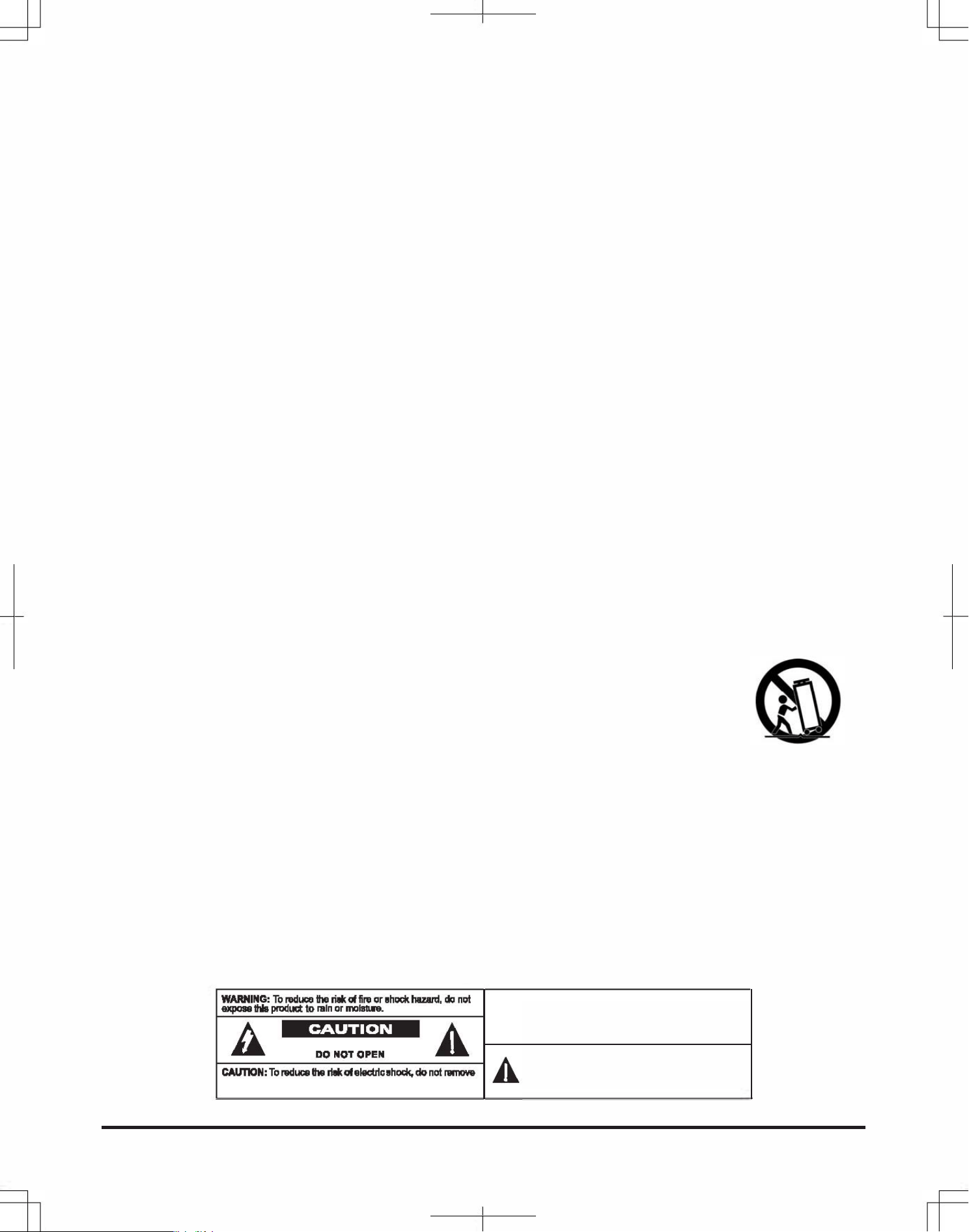
IMPORTANT INSTRUCTIONS
1. Instcons - l the and ng instructions suld be bere the applian o,
2. in Inscons - e and opating inons ould for re n.
3. H ings - l warnings on the apian and in the opating inons ould .
4. Foll Instons - l ong and u Instructio shld be llod.
5. r d Moistu - The api su not be ud wat -for ample. near a bathtub, washl, tcn sink, laundry tub,
swimmi pool, a basement.
6. nUlatlon - The apian su be situat at i loti or ti do t i with its proper ventilation. F m, e
alian ould situa on a , so, rug, or similar su that blo the tion onings: or plad in a built-in
Installa, such as a o or cabinet at m Imde the air through e ntili openings.
7. Ht - The appliae suld be situat away from ht as radiators, at isrs, stov, or other appl
Qnuding ampliers) that pru .
8. Por Soues - plian shld n a supply ly of the ty In orati itns or
as mard on the awlian.
9. Gunding Polaon - ution suld be insure the grounding polion m an alian is not det.
10. Po-Co P - supply rds should rout that ty are lily to be wal on pin by Its pla
un ainst th, ng rtilar atleon rds at pl, nvenn acl, e nt at which they the
alian.
11. Clei - apple shld be cn only as rmmend by t manufactu.
12. Po Un - ide syst should not lot in the vicinity power lines ic light or
power cirits, fl such lin or circuits. When Inslling outside antenna sysm. tre ould
be to ep from touching sh lin or circui as contact with them mht l.
13. N8 Pes - The cord of the applia suld be unplu the et wh e apple is
to be unud r a long iod me.
14. t a Uqu En - Care ou be n that j do not fall liquids not spild in enclore thrh opis.
15. and nds
-
tfe appln is th a cart sta, or snd should be a t rmmen by
t manufactu.
apian and cart mbion shld mov th . Qu stops, s for,
and unn t applian and combination to m.
16. Mnting - e alian ould un on as rmn by e manucrer.
17. m ui Seice - The appli su serv by qui sere rsonnel :
A. The power-su rd or plug has damd.
B. Obj he fallen in, or liquid h ild in the applian enclosure.
C. plian bn to rain.
D. e alian has drp, e encsure dam.
E. applian d appr norl or ibi a mar change in an.
18. i - ur suld not atmpt to serve the applian bd that did in e ur orati instructns. l
rving shld d to quali pn.
19. erloing - Do wall ouets and tsion rds as is can ult in a risk ic sh.
. m - When ment par ui. sure vi hnician h ud replacement ts by the
muctu or the characteristi as the original rt. Unauthori substuons may ult In re, ic or oth .
21. Ch - U n any rvi or irs to th apple, e si thnici rform fety to
determine tt the apian in prop orati coition.
ING: To
n or eh
.
nol
"
.
=
:
�
.
:
=
=.
:
'"='='�=-===--
A
A
RISK OF ELECTRIC SHOCK
A
����D=D�'�07'�D�"�'��-�C--
A
N: To
.
e
G
eh nol
r b b ll1.
ql 1.
1 - M P11
s u
" bb_S_o
_ .n o a_o
n. b _ .. ._0
_ I
l b nO 1I1�
� _ . n . _ h
1_ �ng o
Your PE PRO Series Peormance Mixer
is a sophisticated control center, peect for mixing sound from multiple playback sources such
as microphones tuners, CD players, tumtables or the audio outputs from a VCR. This mixer is
ruggedly constructed for home or professional use. Wide range volume controls, permit you to
adjust sound levels accurately to achieve just the right mix for playing through your speakers
system or for recording.
Please read this manual thoroughly before you attempt to set up and use the mixer. It contains
a range of suggestions and instructions to insure safe usage. Set up and used properly, you
can expect years of trouble-free seice from this product.
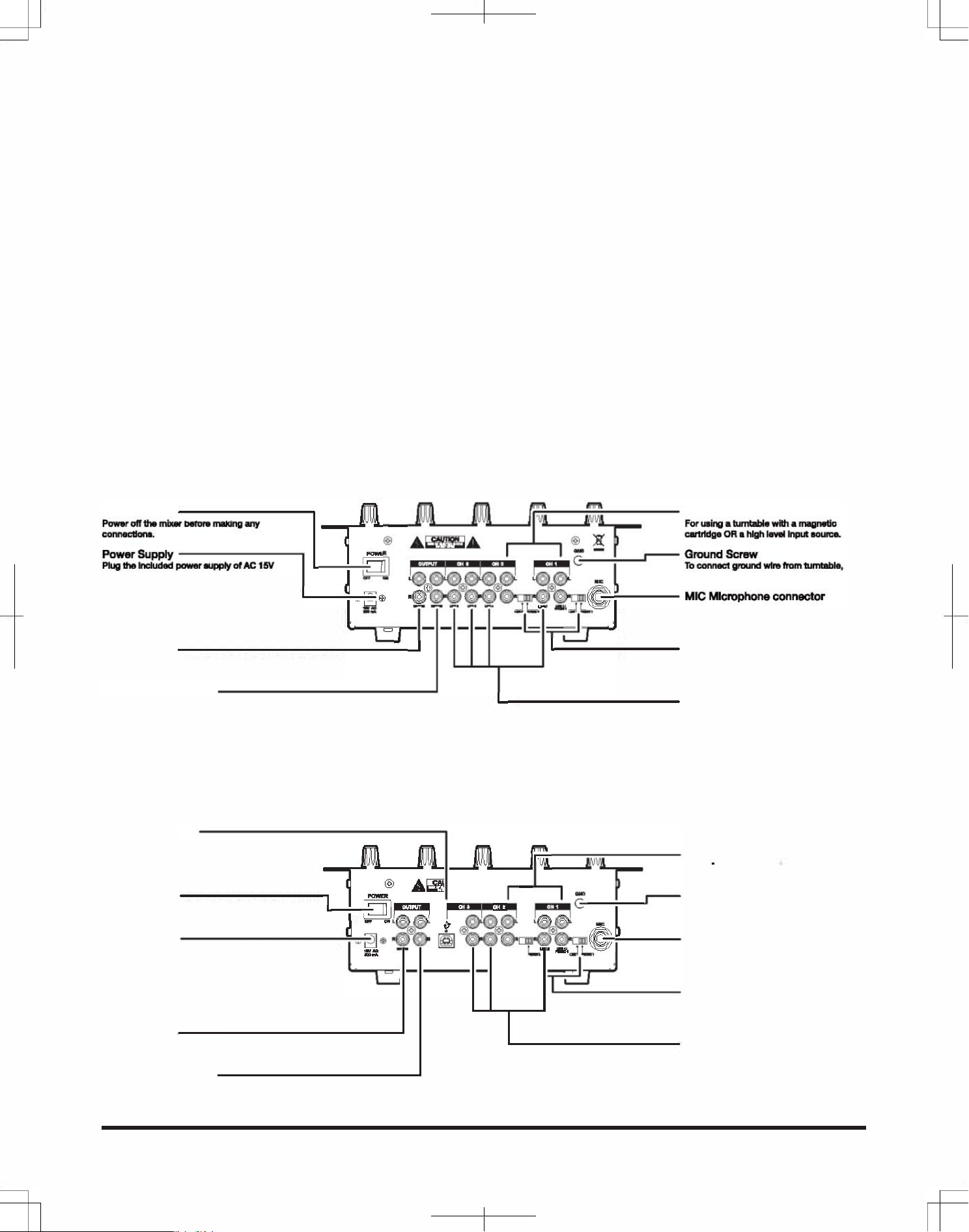
InpuOutput Featus
PYD1030
Power Swh
-
------
�
�
.
Dual Puse o Iputs
���;;_
-
-
r-�-
�
-
�-:-
:
-
,-
-
I
15� ��,� ��w
�
�.
adtor in e mr while the power is
I
�
L@
n
@L L� .
imina t hum.
swh f, en ug supply In a
�
@ @ @
@
G
pp oet. m Is d
-_="
�
.� ODG
.
---
-
MICMlcphoneconnor
rk with the inclu power supply onl
II
�
�U
r
-
I
_-_-·_-·_-_ .. b
·
.
·��
�
J
n u . _ or
using an Inmple power supp uld
_
un Impan micpne w
In dage e m
1/4" pl.
Op J
-
--------------
L
_______
_
Input Select Swhes
To connt mix a
t ba on at is pl
plif - e e with R plugs.
Into PHON011LINE1 d PN0N Inp
Ro Outp J
To conne mixer a ta dk lng
j
_____
______
So
Line Inpu
e m pm.
PYD1040U
u nnt most high-le audio
CD ,pe d,tuner R.
USB IOUT Port
Allows you to nnt e des
P ui high p USB ble
P1U, ck out at
Ume f e se USB e.
�
�
Dual Purpose So Ipu
II·
' �
F using. le Wi a gtic
@
.
�
@
.o OR a hh loveI ln ... ""u ..
Power
Swh
-
---
---
-
1
�
r. ,_
.
.
�
G
-
Gund SC
f t mbcer be ma any
.
�I __ I
�
-
-
1
__ I
�
To nnt grou wlm tuble,
connectio.
I
�
l �l .t. �
�
@l
l
�
imi the hum.
� @ "@ @ @
G
r Supply
-
---------
�
a@'
O
l
O
�---
MIC Micphone conntor
Pl il per of 1
�--
-, _. I
-
.
�
;
n u . or
==
apr Into e m fi wh
unba Im miche w
l the I.
-b
supply in a sh f, ug wer
1/4- plug.
pp ouUeL This m is dgn
.upyon�
wo w e Inclu
ui an inmtie powe
H in dge to m
r aupy ld
or
Output J
nn mir a
amplHler
-
e e w
ugs.
Ro Outp J
To conn mixer a t dk r ing
m p.
I
Input Select Switch
the on at pl
Into PHON01JUNE1 d PHON Input
j .
So Line Inpu
u nnt most high-lev audio sou,
1 CD ple, d,tun or R.
le P Mer PYD1I1U
-
2
ner's Manual
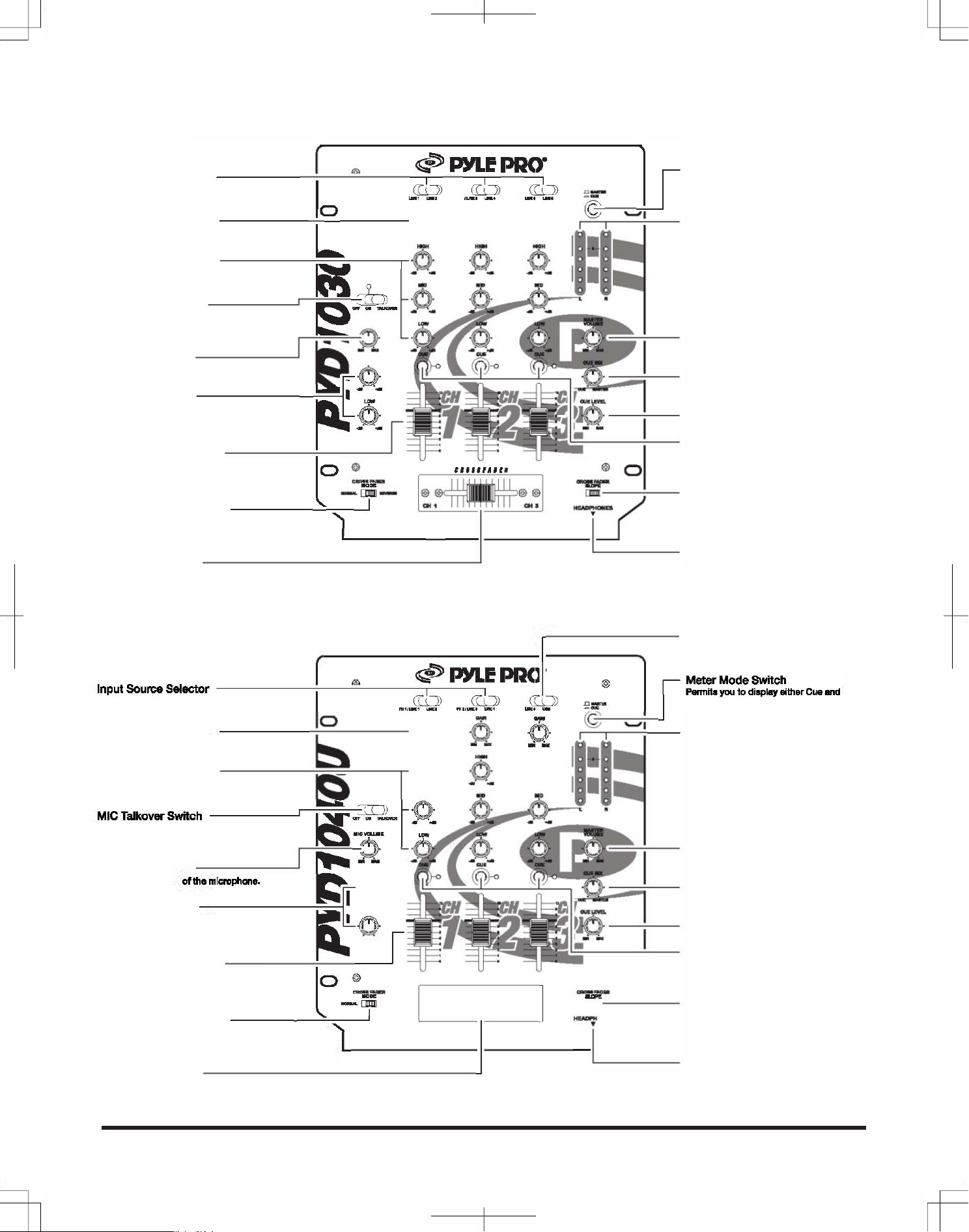
Featus and Contls:
PYD1030
_
_
�r
�
"
�
Input u Selecr
you sily st ur choi
I
;
:�
E
"
.
) . J)
_
b
aud Inp r mixi.
o
Channel Gain Conls
------��---
u just e n ch input
L
ue.
Channel Tone Controls ------��
--
Pe ju e high, mide
�
d low a inpuL
�
l
MIC Tkover Swh
_
le input sou,
�
Pe display Cue d
Sum P levs OR r tt
�
11 Mer Mode Switch
and Right cnn ls.
Dual Display Meter
ur oi M Inp
Right s, or on Output s for
EM.
ng u l i a
�
.i
m_hone.
e
-
.
Ma Level Contl
ju t ms ell tt volume
MIC Level Conl
_
lev.
e ume e mi
e.
�
MIC Tone
Contls
-
-----
--
�
�
��
4
E
,
·.·.o
�
·.·.
�:
.
and ER
Peit just e high low
U
Cue Level Contl
mhone sl.
S the lisi level t phones.
Cue l
Channel Lel Contls
you an int u. ing e
ngertip nl all und mi
r
"
pe, n adju e volume
"
"""
'"
W
d ing.
_
____
__
�
I
-
I
-.
_
-
_
__
I·
_
-
___
I
_
�
_
�
_
�
__
I
-
__
_
_
�
_
�
_
I
__
_
,
_
i
J
-B---
-
;t��
o
1_o,
Cfader Mode Switch
curve ben grual quick
u e aulgn
c
CHl on e le and CH3 on ght
-..
.
Hdphone Jack
Cfader Conl
114- pl.
you quy and smly sh and
m i input r, it is
e.
PD 1 040U
I
CH3 input ltor for LINE SB
u ch the U nn
�
py
Input u
Sr
_
_____ �-
---�
.
�-,
E
_
«
,
l" _'" __
_
@
I
�::�O'C'Od
you ealy selt ur
J
�
I
m Pram les OR Mr
�::�::::i
r
n
m
;OIS ______ ���----'.0_:
0;
r
�
: G_
-
__ ::i:::;;:raL
you just e in ch input
.
Displays ur ch M Input d
soue.
.
mght ls, s tor
Channel Tone Contls
�O�
�_.
CUE M.
Peit ju the hh, midge
_ _ _
and a lt input.
9
-
��
-
�
--
)
��
MICTkovSwh
�
_
Y
_
e le input r,
ng lr usi a
.
;
�
mic.
�
MIC Level Conl
�
"
�
o
,m
o
01
_0
m
_
,
_
_
o
_
.
�f�
4
�11
��.
�
MIC Tone Contls
.
_
Permit just the high l
..
mne snal.
y
. - I
Chn Level Conls
I
nlp nl all und ming
t
o
@
..... .'.
_
_
@O
and fading.
I 1-
__
-
--
l
-
�
�
�
�
C Me Swh
.
I
'1 J
u the assignment
CH1 the and CH3 on
IL _________
_
_______ _
c.
.
C Conl
u quy shly sh
m ing int u it is
lace.
3 -le P Mixer P103011040U
Owner's Manual
Master Level Contl
ju ms ovell volu
le.
Cue Mix Contl
To just e mix E and TER
RR In p.
Cue Level Contl
t liing level t t pnes.
Cue lto
u ·p� an Inp ue, i e
hdp. y adjt the volu
pr mixing It In.
Crsfader Slo Swh
u c t slo c
cue en gual quick
c .
Headphone Jack
114- pl.
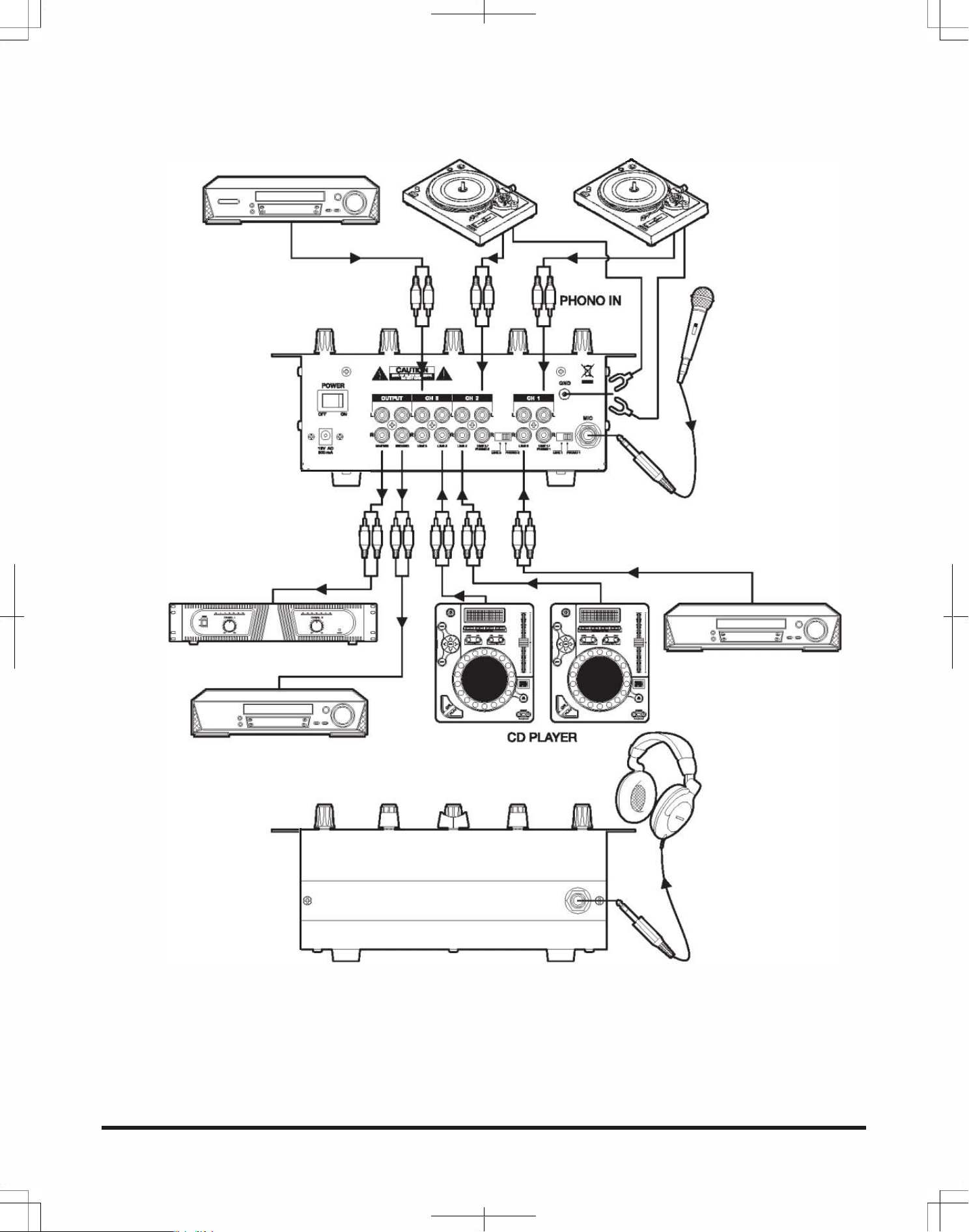
Conneion Diagram:
PYD1030
DVDPYER
TURNTABLE
=
@
MICROPHONE IN
MASTER OUT
LINE IN
=
POWER AMPLIFIER
DVOPYER
=
CD BURNER
HDPHONES OUT
is mixer peits nnection of up to seven (7) audio inp sources,including one microphone. Such a system might include,
for examples:
One Microphone
Two Tumtables
Four CD Players
One Microphone
Six CD Players
One Microphone
Two Turntables
Two CD Players
Two Cassette Decks
le P Mer PYD1I1U -4
ner's Manual
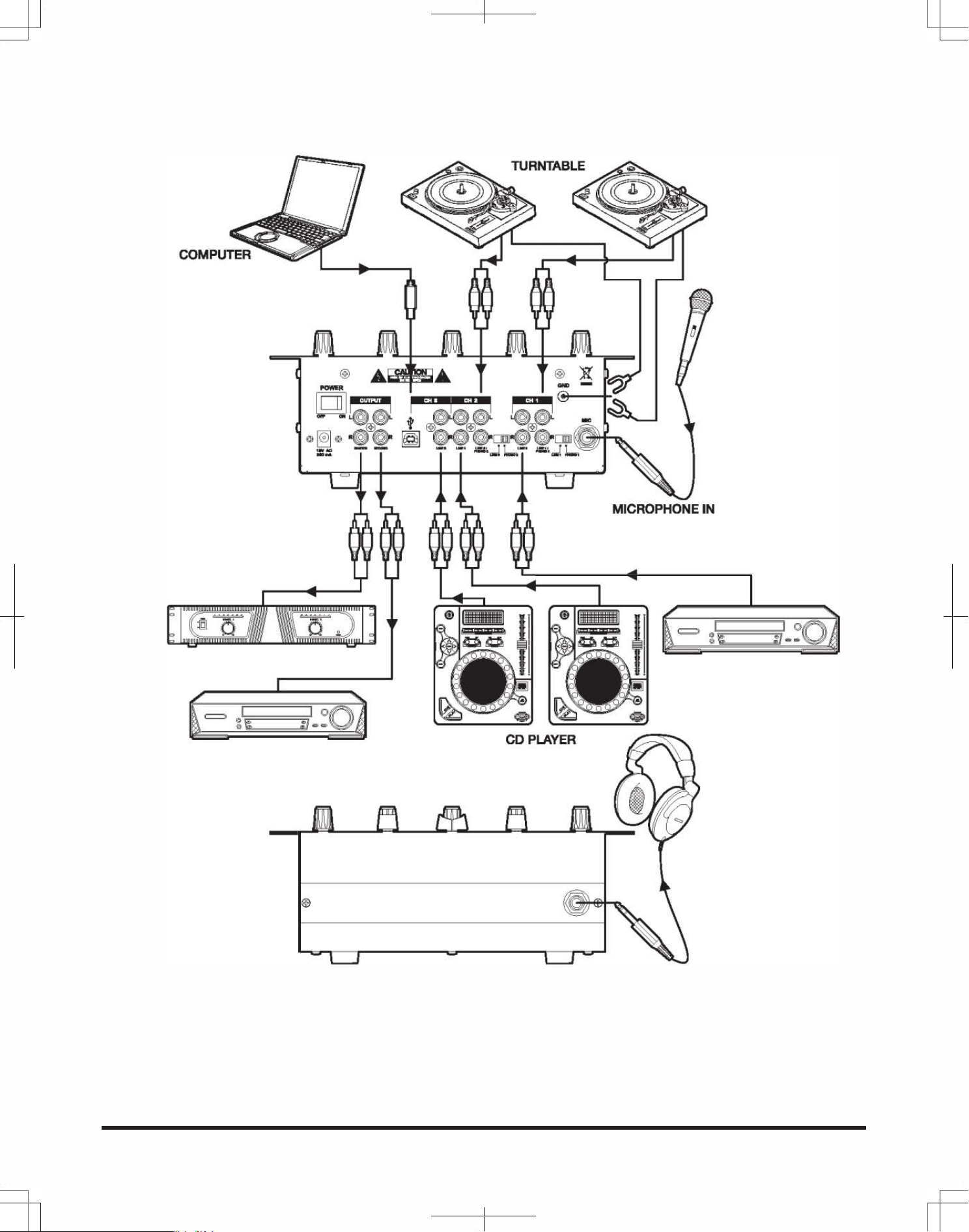
Conneion Diagram:
PYD1040U
PHONOIN
MASTER OUT
LINE IN
=
POWER AMPLIFIER
DVDPYER
=
CD BURNER
HEADPHONES OUT
This mixer peits connection of up to seven (7) audio input sours, including one microphone. Such a system might include,
for examples:
One Microphone
Two Turntables
Three CD Players
One USB Port
One Microphone
Five CD Players
One USB Port
5 -le P Mixer P103011040U
Owner's Manual
One Microphone
Two Turntables
One CD Player
Two Cassette Decks
One USB Po

USB OPETION:
The input selection at CH3 allows you to choose the USB connection to play at CH3.
ON PC
1.Turn on the computer and PYD1040U
2.Connect USB cable from port of mixer to your computer.
3.The window will recognize the mixer a "USB AUDIO DEVICE" or "USB AUDIO CO DEC" , and install any
required system components. automatically.
4.0pen the START menu and go to CONTROL PANEL, click on the SOUND AND AUDIO DEVICES ICON,
to change system audio preferences in Window.
5.Clip on the AUDIO tab, to access audio device settings.
6.Choose the USB AUDIO CODEC a DEFAULT DEVICE.
7.Click on APPLY and you are ready to use the PYD1 040U with your PC.
ON MAC
1.Turn on the computer and PYD1040U
2.Connect USB cable from port of mixer to your computer.
3.0pen SYSTEM PREFERENCES under APPLE menu.
4.Choose the SOUND icon in SYSTEM PREFERENCES.
5.Choose the OUTPUT tab in the SOUND window.
6.Select USB AUDION CODEC under CHOOSE A DEVICE FOR SOUND OUTPUT.
7. Repeat the procedure for the INPUT tab and you are ready to use PYD1040U with your MAC.
. Please complete warranty card, detach and return .
le P M PYD1I1U -6
Own's Manum
Place
Stamp
Here
®
•
PYLE PRO Audio, Inc.
1600 63rd Street
Brooklyn, NY 11204
Specifications
PYD1030/1040U
Input Sensitivillmpedance
MIG ..................................... 1.5 m600 Ohms Balanced
Phono 1-2 ........................... 3.0mV/50K Ohms
Une 1-6 .............................. 150 m27K Ohms
Output Level
Master ................................. 1.5 V/1 OK Ohms
Record ................................ 300 mV/10KOhms
Fquency Response .... 20Hz - 20kHz +1- 3 dB
SIN Ratio (at 1 kHz)
Mic ..................................... 55 dB/1 .5mV input
Phono ................................. 65 dB/3.0mV input
Une ..................................... 70 dB/150.0mV input
Distortion
Mic ................................... 0.50%
Phono .............................. 0.08%
Line .................................. 0.05%
Tone Contl
Treble ............................... 10kHz; +10/-20dB
Mid .................................. 1 KHz; +10/-20dB
Bass ................................. 100Hz; + 1 0/-20dB
Talkover Aenuation.. -16dB
Power Soue .......... .. AG 15V, 500mA
Dimensions, inches (mm)
WxHxD ......................... 10 x 3.29 x 12 (254 x 83.7 x 305)
Weight, Ibs (kg) ....... .. 6.17 ( 2.8 )
Specications a pical; individual units might va.
Specications a subject to change and impvement without notice.
Limited Warranty
All PYLE PRO puc are carefully structed and tested fore shipment.
Uni purchased in the USA are warranted to be free of defts in material
and workmanship for one (
1
) ar from the date purchase. is warranty
is limited to the original retail purchaser of the mixer.
Should the unit fail due facto defects in mateal or workmanship. your
unit will be repair or replaced at the sole discretion of E.
To obtain warran sece. you must ffrst call our Consumer Retu Hotline
at (718) 236-6� to obtain a Return Authorization Numr. This R.A. # must
apar on e tside yr pacge and on all park relating your
return.
When returning the unit to us for warranty service, it must carefully
pacd and shipd, prepaid, :
. Please complete warranty card, detach and retu .
R.A.#: ====
PY PRO Service Center
16 63rd Strt
Brooklyn, 112
Y must a include the following items with ur return:
• A copy your pt or pr pur
• A b letter, indicating the problem y re r1dng with the prt
• IncL in yr Lr ur retu s, dime phe number and R.A. num
• il a chk or m r for $. r retu
shipping, hndng and Insura, or pride your Vi/ numr with piration date.
Our obligation under this warranty is limit the pair or replacent
of the deftive unit when it is returned us ppaid. This warranty will
be nsidered id if the unit was tampered with, improperly serviced or
subject misuse, neglt or accidental damage.
k r puing is
pduct. To activate your
warran, please mail this card
within 10 da.
warranty registration card
Name
Address
City, State ZIP
Model No.
Date of Purchase
Purchased at:
o Music Products Store
o
Catalog Merchandiser
PYLE PRO MIXERS
Serial # (if available)
o Sound Contractor /Installer OMail Order
o Other
_________ _
www.pyleaudio.com
7· le P M PYD1I1U
Owner's Mum