Owner's Manual
T9150 5100500XXXX V01
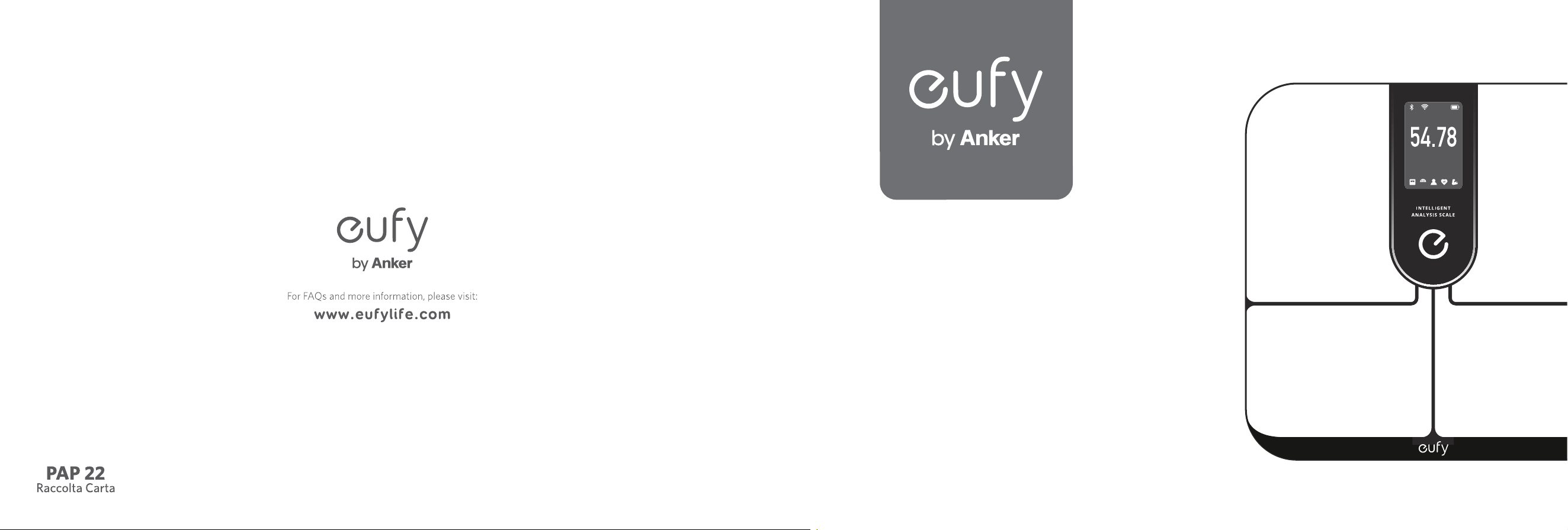
Smart Scale P3
kg
BMI
%

English
01
ةي
ِ
ب
َ
ر
َ
عل
12
Thank you for purchasing Smart Scale P3. Carefully read all the instructions below before using this device, and keep this manual for future reference.
Table of Contents
01 Important Safety Instructions
05 What's in the Box
06 Inserting the Batteries
06 Selecting the Measuring Unit
07 Installing the EufyLife App and Pairing
08 Starting a Measurement
08 Weight-Only Measurement
08 Data Service
Third Party Services
Data Export
09 Maintenance
09 Troubleshooting
When Measuring
10 Specifications
11 Customer Service

01 EN EN 02
Important Safety Instructions
• This device is powered by 4 AAA batteries.
Do not attempt to recharge non-rechargeable
batteries as this can cause the batteries to leak
or explode.
• Do not mix and use different types of batteries
together, e.g. lithium-ion (Li-ion) and nickel-
metal hydride (NiMH) batteries.
• Do not mix new and used batteries.
• If the device is not used for an extended period
of time, remove the batteries before storing the
device in a cool and dry place.
• This device can be used by children aged from
8 years and above, and persons with reduced
physical, sensory or mental capabilities or lack
of experience and knowledge if they have been
given supervision or instruction concerning use
of this appliance in a safe way and understand
the hazards involved. Children should not
play with this appliance. Cleaning and user
maintenance should not be carried out by
children without supervision.
• Used batteries should be placed in a sealed
plastic bag and disposed of safely according to
local environmental regulations.
• Read all instructions before using the device.
Keep the manual for future reference.
• Only use the device as described in this user
manual. Any misuse may result in electric
shocks, burns, fires, or cause other unexpected
hazards.
• Be aware that this device is designed for
individuals to measure their weight and
to monitor their body composition. Any
information provided by this device is in no
way meant to treat, cure, or prevent diseases or
illnesses from happening.
• DO NOT use this device if you are pregnant or
if you suspect you may be pregnant. The effects
of this device on a fetus are unknown and
untested.
• DO NOT use this device if you use a wearable
or implanted electronic device such as a
defibrillator or pacemaker.
• This device should not be used by individuals
who are acutely or chronically ill, suffering from
diseases or taking medications that can affect
water levels. The accuracy of the readings for
these individuals has not been verified. Specific
medical advice should be obtained from a
physician.
• The device is equipped with a data transmission
function that emits electromagnetic energy.
Portable Radio Frequency (RF) communications
equipment (including peripherals such as
antenna cables and external antennas) should
not be used within 30 cm (12 inches) of
the device, otherwise, performance may be
affected.
• Do not modify this device.
• Do not expose this device to extreme
temperatures, direct sunlight, moisture, or
corrosive environments.
• To prevent slipping, do not step on the device
after bathing or showering.
• This device should not be used when it is
adjacent to or stacked on top of another device
because it could cause the device to operate
improperly. If such use is necessary, this device
and the other device should be observed to
verify that they are operating normally.
• If the batteries start to leak, put on your gloves
and remove the leaking batteries from the
battery compartment immediately. Place them
in a clear plastic bag and recycle. If you don't
wear gloves, you should wash your hands
thoroughly with soap afterwards. In case of
accidental contact with eyes, seek medical
attention immediately.
Usage Tips:
• To ensure user profile accuracy, follow
the instructions below when you start
measurements:
• Place the scale on a flat, hard surface. Soft
surfaces such as carpeting will affect the
performance of the scale.
• Step on the platform with bare feet. Stand still
until the measurement is complete.
• For the most consistent measurements, weigh
yourself at the same time of day and location.
• Make sure your user profile (including birth
date, gender, height, etc.) is accurate. Entering
inaccurate information will affect the accuracy
of the scale's measurements.
• Avoid weighing yourself immediately after

03 EN EN 04
strenuous exercise, sitting in the sauna, taking a
bath, or drinking and eating.
• The condition of the skin on the bottom of your
feet can affect the measurement. The natural
effects of aging or activity can harden the skin.
Take your reading with clean, slightly damp feet
for optimal accuracy.
• Body fat percentage estimates will vary with
the amount of water in the body, and can
be affected by dehydration or overhydration
due to factors such as alcohol consumption,
menstruation, illness, intense exercise, etc.
• Considering the vast individual differences
among children under the age of 16, the
measurement of body fat or other body
composition measurements may be less
accurate. Their weight-only measurements will
remain accurate.
• This scale is not intended for use by
professional athletes.
Trademark Notice
• Apple, App Store and the Apple logo are
trademarks of Apple Inc., registered in the U.S.
and other countries.
• Google Play, Google Home, Google Fit and the
Google Play logo are trademarks of Google Inc.
• Fitbit is a registered trademark of Fitbit, Inc. in
the U.S. and other countries.
Notice
This symbol on the device or its packaging indicates:
Do not dispose of electrical appliances as unsorted municipal
waste; use separate collection facilities. Contact your local
authority for information regarding the collection systems
available. If electrical appliances are disposed of in landfills or
dumps, hazardous substances can leak into the groundwater and
get into the food chain, which are damaging to health and well-
being. When replacing old appliances with new ones, the retailer
is legally obliged to take back your old appliance for disposal at
least free of charge.
FCC Statement
This device complies with Part 15 of the FCC Rules. Operation is subject
to the following two conditions: (1) This device may not cause harmful
interference, and (2) this device must accept any interference received,
including interference that may cause undesired operation.
Warning: Changes or modifications not expressly approved by the party
responsible for compliance could void the user's authority to operate the
equipment.
Declaration of Conformity
This product complies with the radio interference requirements of the
European Community. Hereby, Anker Innovations Limited declares that the
radio equipment type T9150 is in compliance with Directive 2014/53/EU.
The full text of the EU declaration of conformity is available at the following
website: https://support.eufy.com/s/articleRecommend?type=DownLoad
GB Declaration of Conformity
Hereby, Anker Innovations Limited declares that the product type T9150 is
in compliance with Radio Equipment Regulations 2017 and The Restriction
of the Use of Certain Hazardous Substances in Electrical and Electronic
Equipment Regulations 2012. The full text of the GB declaration of conformity
is available at the following website:
https://support.eufy.com/s/articleRecommend?type=DownLoad
The following importer is the responsible party (contract for EU and UK
matters)
Anker Technology (UK) Limited, GNR8, 49 Clarendon Road, Watford,
Hertfordshire, WD17 1HP, United Kingdom
Anker Innovations Deutschland GmbH
Georg-Muche-Strasse 3, 80807 Munich, Germany
Anker Innovations Limited
Room 1318-19, Hollywood Plaza, 610 Nathan Road, Mongkok, Kowloon, Hong
Kong
Australia WARRANTY
This document details the terms and conditions of the warranty provided
with this product. Please disregard any other representations contained on
this product’s packaging or provided with this product, which constitute or
appear to constitute a warranty.
Note: This equipment has been tested and found to comply with the limits
for a Class B digital device, pursuant to Part 15 of the FCC Rules. These limits
are designed to provide reasonable protection against harmful interference in
a residential installation.
This equipment generates, uses, and can radiate radio frequency energy
and, if not installed and used in accordance with the instructions, may
cause harmful interference to radio communications. However, there is no
guarantee that interference will not occur in a particular installation. If this
equipment does cause harmful interference to radio or television reception,
which can be determined by turning the equipment off and on, the user is
encouraged to try to correct the interference by one or more of the following
measures: (1) Reorient or relocate the receiving antenna. (2) Increase the
separation between the equipment and receiver. (3) Connect the equipment
into an outlet on a circuit different from that to which the receiver is
connected. (4) Consult the dealer or an experienced radio / TV technician
for help.
The following importer is the responsible party (for FCC matters only).
Company Name: POWER MOBILE LIFE, LLC
Address: 400 108th Ave NE Ste 400, Bellevue, WA 98004-5541
Telephone: +1 (800) 994 3056
ISED Compliance Statement
This device contains licence-exempt transmitter(s)/receiver(s) that comply
with Innovation, Science and Economic Development Canada’s licence-
exempt RSS(s). Operation is subject to the following two conditions:
1. This device may not cause interference.
2. This device must accept any interference, including interference that may
cause undesired operation of the device.
05 EN EN 06
This warranty is offered by Anker Innovations Limited, Room 1318-19,
Hollywood Plaza, 610 Nathan Road, Mongkok, Kowloon, Hong Kong,
customer service support number (US) +1 (800) 988 7973 Mon-Fri
9:00am - 5:00pm (PT), (UK) +44 (0) 1604 936200 Mon-Fri 6:00 -
11:00 (GMT) and customer service email address support@anker.com.
Subject to the exclusions and limitations set out below, we warrant to
you that if you purchase a product directly from us, or, from any of our
authorized resellers, that it will not contain defects which are a result of
faulty manufacturer workmanship or materials. This warranty subsists
for 18 months from the date of purchase.
Subject to any rights you have under the Australian Consumer Law,
we will not be liable for defects which are a result of damage or loss
caused by factors beyond our control, any product which has not been
maintained according to any care or maintenance instructions provided
with the product, any alterations to a product which are not performed
by us, or damage or defects caused to the product due to unusual or
non-recommended use. We will not be liable for any special, indirect,
consequential or economic loss or damage or loss of profits whatsoever
suffered by you or any other person resulting from any act or omission
by us. Our total liability in respect of this Warranty against Defects is
limited to the replacement of the goods.
Any claim made under this warranty must be made by returning the
defective goods to us, at your expense. Please provide details of the
defect and evidence of purchase to support@anker.com and we will
provide instructions on how to obtain a replacement. If you do not have
Internet access please telephone us for further instructions.
This Warranty against Defects is provided in addition to other rights and
remedies that you may have at law. Our goods come with guarantees
that cannot be excluded under the Australian Consumer Law. You
are entitled to a replacement or refund for a major failure and for
compensation for any reasonably foreseeable loss or damage. You are
also entitled to have the goods repaired or replaced if the goods fail to
be of acceptable quality and the failure does not amount to a major
failure.
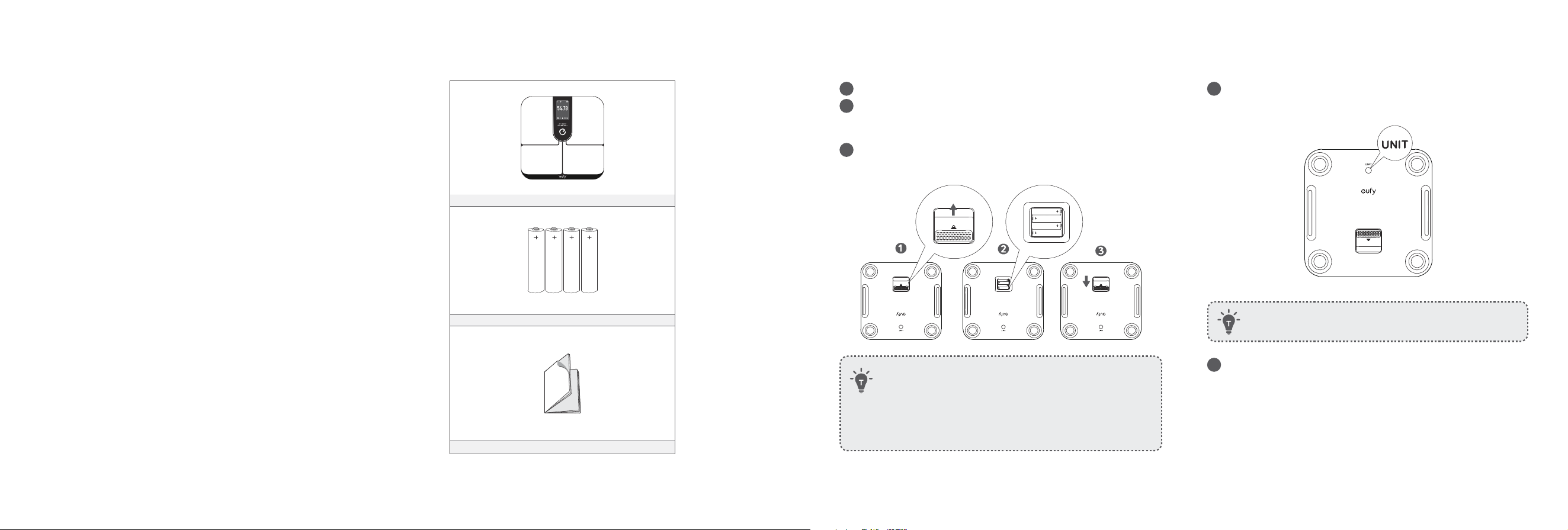
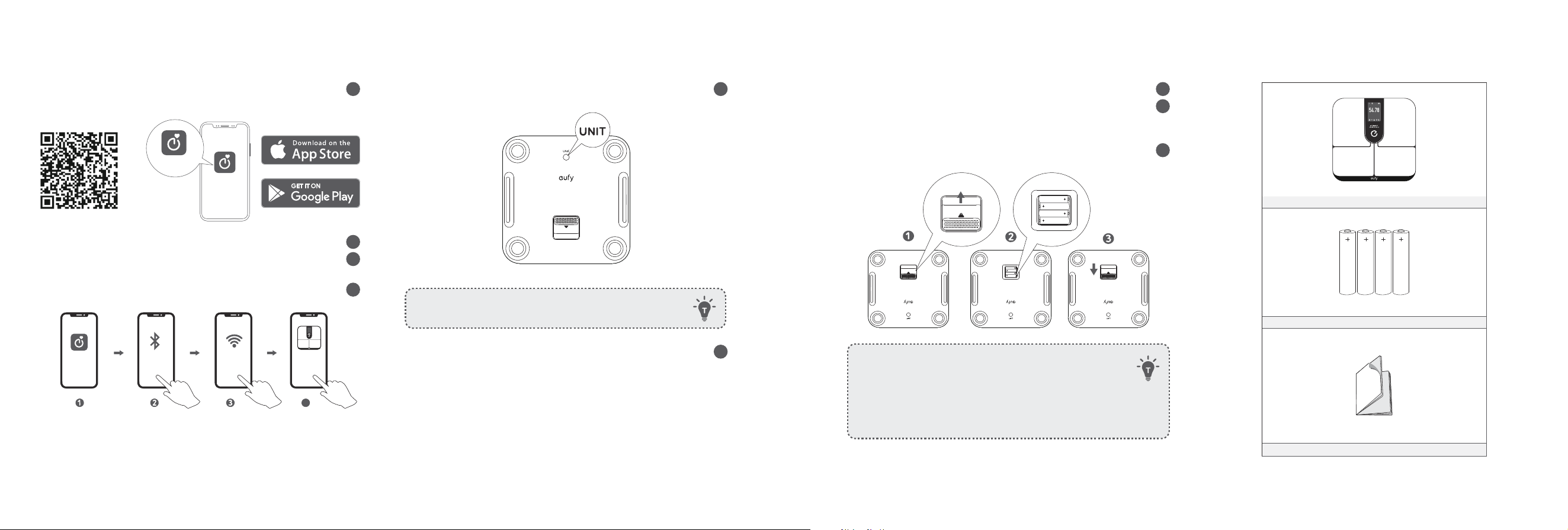
What's in the Box
kg
BMI
%
Smart Scale P3
AAA Battery (×4)
Owner’s Manual & Other Documents
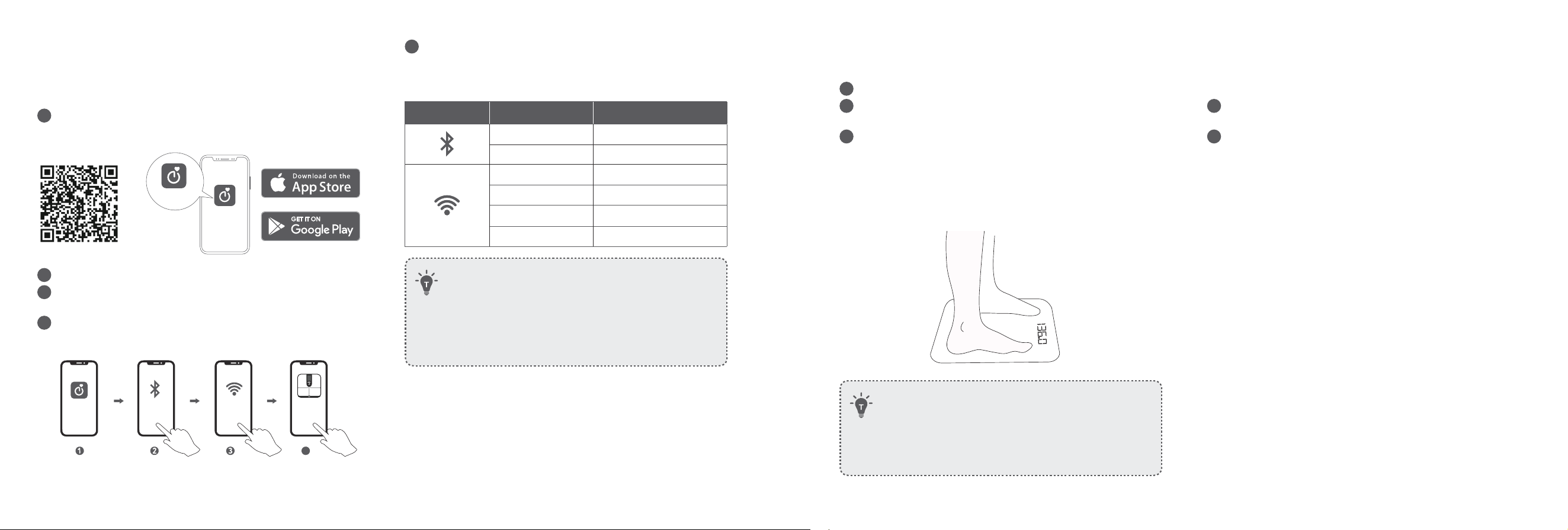
Inserting the Batteries
1
Turn the scale over and place it on a flat surface.
2
Slide up to open the battery compartment door and insert 4 AAA
batteries. Make sure the positive and negative ends are facing the
correct polarity directions marked in the battery compartment.
3
Slide down to close the battery compartment door. Make sure the
battery compartment door is fixed in place.
• Low Battery
- will appear on the TFT display when battery is low. Replace
all batteries at the same time. Do not mix new and used
batteries.
• When not measuring, the TFT display will turn off
automatically after being idle for 10 seconds.
Selecting the Measuring Unit
1
Press the UNIT button at the bottom of the scale to cycle through
and select the measuring unit: lb (pound) / kg (kilogram) / st
(stone).
• To restore factory settings, press and hold the UNIT button
for 10 seconds.
2
The measuring unit can be selected and saved within the EufyLife
app. Open the EufyLife app and select the weight unit in the
Device Settings menu.
07 EN EN 08
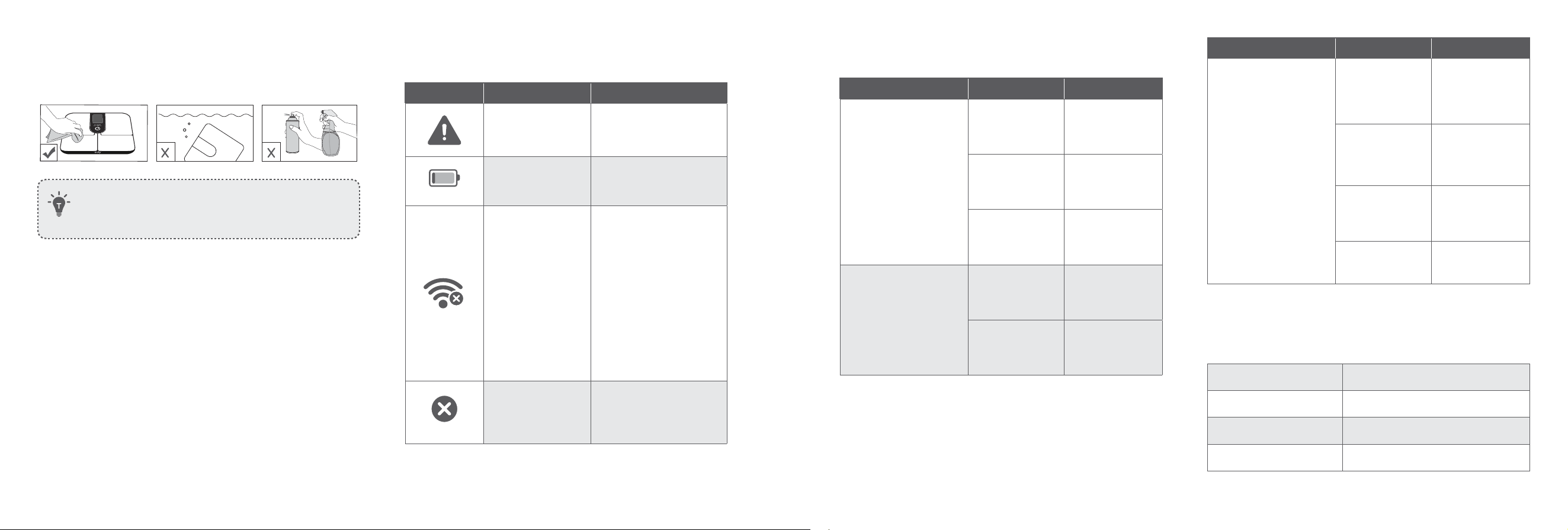
Installing the EufyLife App and
Pairing
1
Download the EufyLife app from the App Store (iOS devices) or
Google Play (Android devices).
eufy Life
eufy Life
2
Enable Bluetooth and Wi-Fi on your smartphone.
3
Open the EufyLife app and create a user account. Please enter
accurate information in your user profile.
4
Select Add Device on the Me page. Follow the in-app instructions
to add the Smart Scale P3.
Bluetooth ON
Wi-Fi
Smart Scale P3
eufy Life
4
*Only with 2.4GHz Wi-Fi connection
5
Open the EufyLife app and follow the on-screen instructions to
pair the scale with your device.
Once paired, the app and scale will automatically connect the
next time the app is opened.
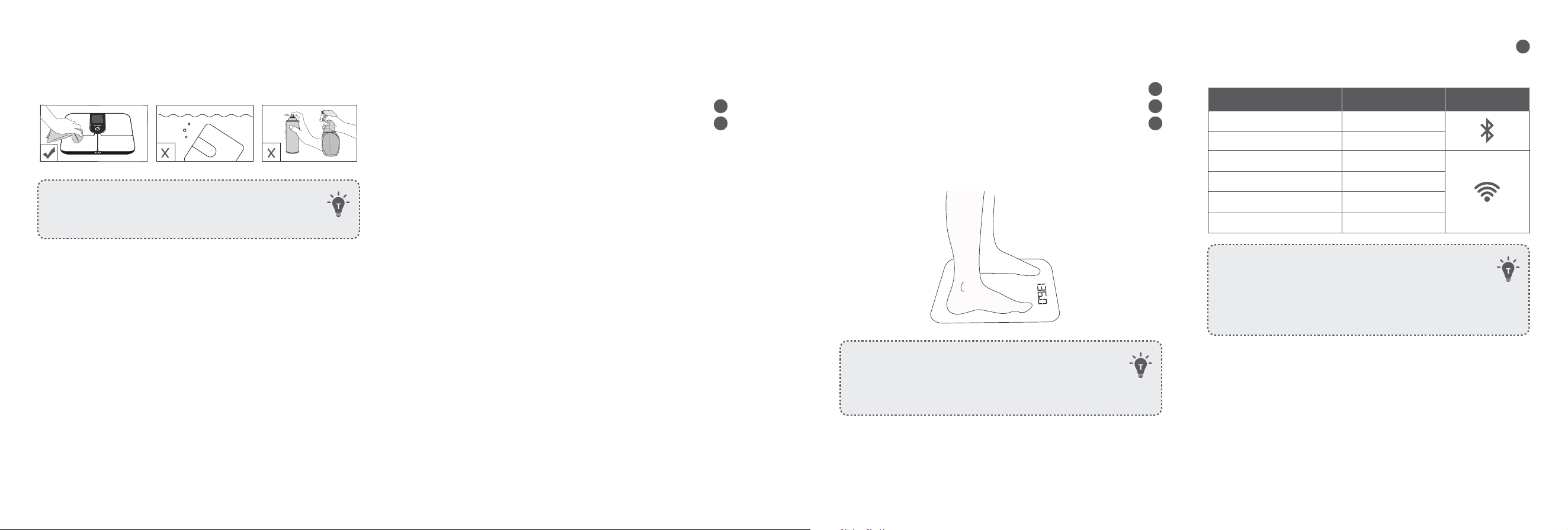
Status Icon Indicates
Flashing Pairing
Solid Connected
O Not connected
Flashing slowly Ready for connecting
Flashing quickly Connecting
Solid Connected
• This scale is compatible with devices running on iOS 11.0
and above versions or Android 6.0 and above versions.
• To complete the setup, you need to allow the EufyLife app to
use your location.
• Do not pair the scale from your smartphone’s Bluetooth
menu. Use the EufyLife app to pair the scale with your
smartphone.
Starting a Measurement
1
Place the scale on a hard and flat surface.
2
When measuring for the first time, please make sure you have
selected your user profile.
3
Step barefoot onto the scale.
• An analysis of your weight and your body’s composition will
begin automatically.
• After measuring, your weight and other available information
will be shown on the scale's screen display. You can find your
detailed body composition analysis within the EufyLife app.
• Step barefoot onto the scale. Stand still until the
measurement is complete.
• The scale can automatically recognize users based on their
previous stats.
• If the current user is not recognized, simply tap your feet to
rotate between users.
Weight-Only Measurement
This scale can also be used as a conventional weight-reading scale.
1
Open the EufyLife app and tap Device Settings, then select
Simple Mode.
2
Step on the scale to measure your current weight.
Data Service
Third Party Services
EufyLife App supports three third-party data service software: Apple
Health, Google Fit, and Fitbit. You can open EufyLife App and find
Third Party Services on your Me page to synchronize data.
Note: Only data of registered accounts can be synchronized. Data of
family members will not be synchronized.
Data Export
EufyLife APP supports exporting of your data. You can open EufyLife
App and find Privacy and Data - Export All Data on your Me page to
export data.
09 EN EN 10
Maintenance
Regularly clean the scale with a dry or slightly dampened soft cloth.
• Never wash the scale with water or immerse it in water.
• Never use detergents to clean the scale as this may cause it
to malfunction or discolor.
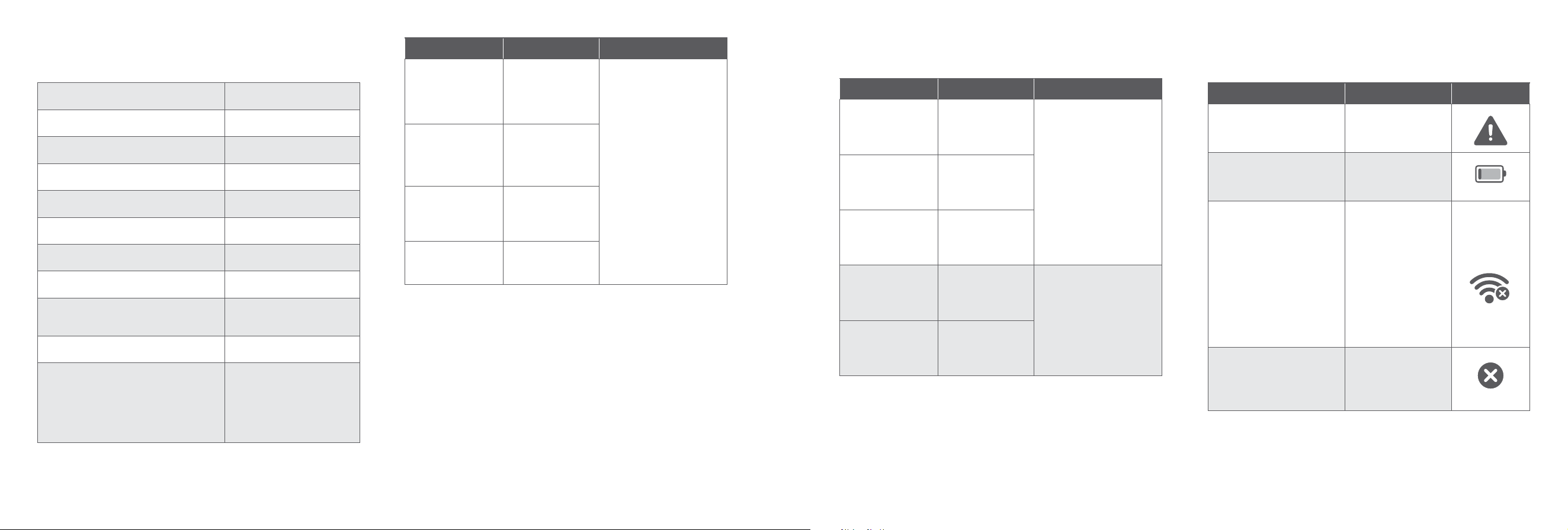
Troubleshooting
Error Display Description Solution
Overload. The device
will turn off.
Stop using the scale for
measurement.
Low battery. The
device will turn off.
Replace all batteries at the
same time.
Wi-Fi setup failure.
• Open the EufyLife app
and follow the on-screen
instructions to reconnect
the scale with your
device.
• Move the scale to a place
near your router before
Wi-Fi setup.
• Press and hold the UNIT
button for 10 seconds to
restore factory settings,
then restart the Wi-Fi
connection.
Upgrade failed.
Open the EufyLife app
and tap Device Settings,
and then select Firmware
Upgrade.
When Measuring
Issue Cause Solution
Abnormal measurement
results:
•Too high
•Too low
•Large dierence
between two consecutive
measurements
Incorrect posture.
Step onto the scale
barefoot and stand
still.
Inaccurate user
profile.
Make sure the user
profile is accurate.
Device is placed
on soft carpeting or
uneven surface.
Place the device
on a hard and flat
surface.
TFT display does not turn
on after stepping onto the
scale.
Batteries not
installed.
Install 4 new AAA
batteries.
Batteries are worn.
Replace all batteries
at the same time.
Issue Cause Solution
Scale does not proceed
to body composition
analysis.
Taking a
measurement while
wearing shoes or
socks.
Stand barefoot on
the scale.
Currently using
the weight-only
measuring mode in
the EufyLife app.
Change the
measuring mode in
the EufyLife app.
Incorrect posture.
Step onto the scale
barefoot and stand
still.
Inaccurate user
profile.
Make sure the user
profile is accurate.
Specifications
Model T9150
Power 6V (4× AAA batteries)
TFT Display 3.5 inch (320x 480pixel)
Measurement Units Pound / Kilogram / Stone
11 EN
Unit Increments 0.1lb / 0.05kg
Body Fat Unit Increments 0.1%
Body Water Unit
Increments
0.1%
Muscle Mass Unit
Increments
0.1kg
Measurement Range
3kg - 200kg / 6.6lb - 440lb /
0st:6.6lb - 31st:7lb
Activation Weight 5kg
Working Environment
Temperature: 10°C - 40°C /
50°F - 104°F
Humidity: 20% - 90% RH
Storage Environment
Temperature: -10°C - 50°C /
14°F - 122°F
Humidity: ≤90% RH
Operating Frequency
Range
2400MHz - 2500MHz
Transmitted Power
Wi-Fi: 18 dBm
Bluetooth: 4 dBm
Bluetooth Version 5.0
Wi-Fi Version 2.4G
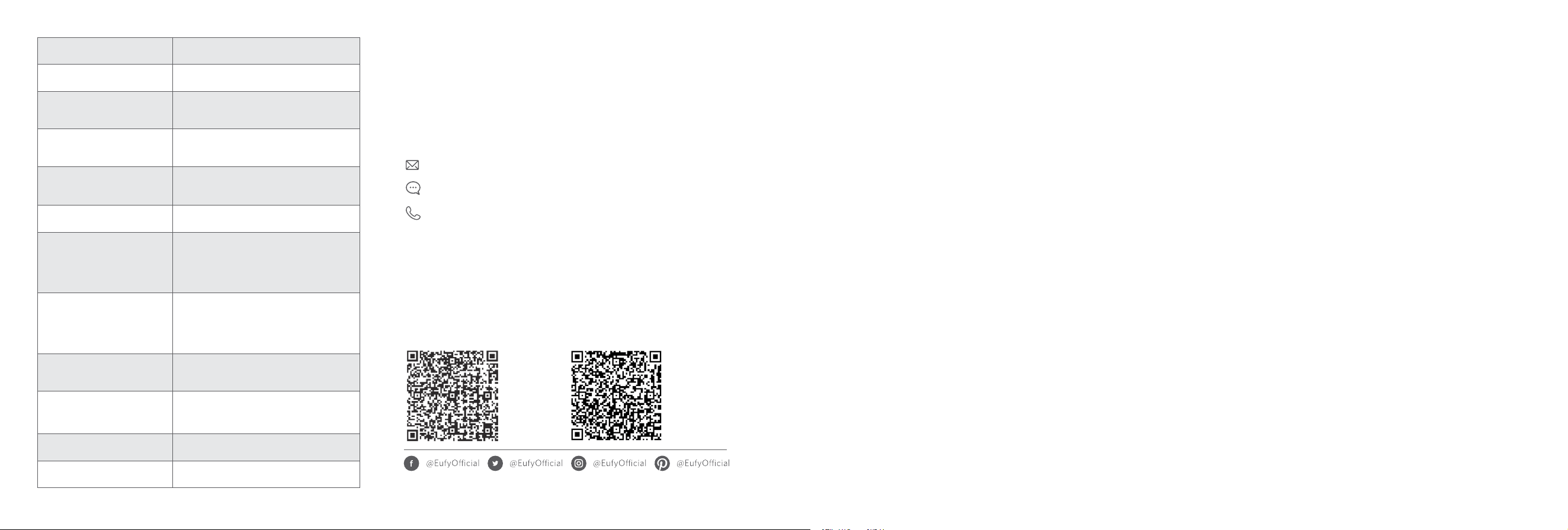
Customer Service
For tutorial videos, FAQs, manuals, and more information, please visit:
support.eufylife.com.
Contact Us
www.eufylife.com
(US/CA) +1 (800) 994 3056
(UK) +44 (0) 1604 936200
(DE) +49 (0) 69 9579 7960
(日本) +81 03 4455 7823
For more support phone numbers,
please visit:
https://support.eufylife.com/s/
phonecontactus
Or scan the QR code below:
For tutorial videos, FAQs, manuals, and
more information, please visit:
https://support.eufylife.com
Or scan the QR code below:
.
ً
بقتسم هيلإ عوجرلل ليلدلا اذهب ظفتحاو ،زاهجلا اذه مادختسا لبق ةيانعب هاندأ تاميلعتلا لك أرقا .Smart Scale P3 كئارشل ا
ً
ركش
تايوتحملا لودج
ةمهملا ةمسلا تاميلعت 13
ةوبعلا تايوتحم 17
تايراطبلا لاخد 17
سايقلا ةدحو رايتخا 18
نارتقاو EufyLife قيبطت ليزنت 18
سايقلا ءدب 19
طقف نزولا سايق 20
تانايبلا ةمدخ 20
ةيجراخلا تاهجلا تامدخ
تانايبلا ريدصت
ةنايصلا
20
اهحصإو ءاطخا فاشكتسا 21
سايقلا دنع
تافصاوملا 22
ءم
ُ
علا ةمد
ِ
خ 23
AR 12

14 AR AR 13
ةماهلا ةمسلا تاميلعت
• .AAA عون نم تايراطب 4 مادختساب زاهجلا اذه لمعي
ثيح نحشلا ةداع ةلباقلا ريغ تايراطبلا نحش ةداعإ لواحت
.اهراجفنا وأ ،تايراطبلا بقث ىلإ كلذ يدؤي دق
• لاثملا ليبس ىلع ،تايراطبلا نم نيفلتخم نيعون نيب عمجت
لكينلا ةيراطب تايراطبو )Li-ion( نويأ مويثيللا تايراطب
.)NiMH( زلف ديرديهو
• .ةلمعتسملاو ةديدجلا تايراطبلا جزم بنجت
• ىصوي ،تقولا نم ةليوط ةرتفل زاهجلا مادختسا مدع ةلاح يف
.فاجو دراب ناكم يف زاهجلا نيزخت لبق تايراطبلا ةلازإب
• حوارتت نيذلا لافطا لب
ِ
ق نم زاهجلا اذه مادختسا بجي
نوناعي نيذلا صاخشا وأ قوف امو تاونس 8 نيب مهرامعأ
صقن وأ ةيلقعلا وأ ةيسحلا وأ ةيدسجلا تاردقلا فعض نم
اميف مههيجوت وأ مهيلع فارشا متي مل ام ةفرعملاو ةربخلا
رطاخملا اومهفي مل امو ةنمآ ةقيرطب زاهجلا مادختساب قلعتي
مدع نامضل لافطا ةبقارم نيعتي .كلذ ىلع يوطنت يتلا
ةنايصو فيظنتب لافطا موقي أ بجي .زاهجلاب مهثبع
.فارشإ نود مدختسملا
• مكح
ُ
م يكيتسب سيك يف ةلمعتسملا تايراطبلا عضو يغبني
.ةيلحملا ةيئيبلا تاميظنتلل ا
ً
قفو نامأب اهنم صلختلاو قلغلا
• عوجرلل ليلدلاب ظفتحا .زاهجلا مادختسا لبق تاميلعتلا لك أرقا
.
ً
بقتس
ُ
م هيلإ
• دق .اذه مدختسملا ليلد يف فوصوم وه امك زاهجلا طقف مدختسا
قورح وأ ةيئابرهك تامدص ثودح ىلإ مادختسا ءوس يأ يدؤي
.ةعقوتم ريغ ىرخأ رطاخم يف ببستلا وأ قيرح وأ
• مهنازوأ سايقل دارفل ممص
ُ
م زاهجلا اذه نأب ةيارد ىلع نك
ةطساوب ةمدق
ُ
ملا تامولعملا فدهت .مهماسجأ نيوكت ةبقارمو
وأ ،ةئبوا جع ىلإ ،لاوحا نم لاح يأب ،زاهجلا اذه
.اهثودح عنم وأ ،اهئافش وأ ،ضارما
• يف كشلا وأ ،لمحلا تاح يف زاهجلا اذه مادختسا بجي
ريغو ةفورعم ريغ نينجلا ىلع زاهجلا اذه راثآ .لمحلا ثودح
.ةربتخ
ُ
م
• ةزهجا عرز وأ ،ءادترا ةلاح يف زاهجلا اذه مادختسا بجي
.بلقلا تابرض ميظنت زاهج وأ ،نافجرلا ليزم لثم ةينورتكلا
• نم نوناعي نيذلا دارفا ةطساوب زاهجلا اذه مادختسا عنم
ُ
ي
ىلع رثؤت دق ةيودأ نولوانتي وأ ،ةنمزم وأ ،ةداح ضارمأ
ءؤهل ةءارقلا ةقد نم ققحتلا متي مل .مسجلاب هايملا تايوتسم
.بيبطلا نم ةددح
ُ
م ةيبط ةحيصن ىلع لوصحلا بجي .دارفا
• قيرط نع اهلاسرإ متي يتلا تانايبلا لقن ةفيظوب دوزم زاهجلا
نع لاصتا زاهج مادختسا بجي .ةيسيطانغمورهكلا ةقاطلا
تباك لثم تاقحلملا
ً
ماش( لومحملا يكلسلا ددرتلا قيرط
نم )ةصوب 12( مس 30 طيحم يف )يجراخلا ءاوهلاو ءاوهلا
.ءادا رثأتي دق ،كلذ ادع ،زاهجلا
• .زاهجلا اذه رييغتب مقت
• سمشلا ةعشأ وأ ،ةيلاعلا ةرارحلا ىلإ زاهجلا اذه ضرع
ُ
ت
.لكآتلل ةببس
ُ
ملا ةئيبلا لماوع وأ ،ةبوطرلا وأ ،ةرشاب
ُ
ملا
• وأ لاستغا دعب زاهجلا ىلع دعصت ،قزنا بنجتل
.مامحتسا
• قوف هسيدكت وأ ،هترواجم دنع زاهجلا اذه مادختسا بجي
.حيحص ريغ لكشب هليغشت يف ببستي دق كلذ ن رخآ زاهج
زاهجلا اذه ةظحم بجيف ؛ا
ً
يرورض مادختسا اذه ناك اذإ
.يعيبط لكشب نولمعي مهنأ نم دكأتلل ىرخا ةزهجاو
• لزأو كتازافق
ِ
دتراف ،تايراطبلا نم بيرست ثودح ةلاح يف
.روفلا ىلع ةيراطبلا ناكم نم بيرستلا تاذ تايراطبلا
نكت مل اذإ .اهريودت ةداع فافش يكيتسب سيك يف اهعضو
يفو .اهدعب نوباصلاب ا
ً
ديج كيدي لسغ بجي ،تازافق يدترت
ىلع ةيبطلا ةيانعلا بلطاف ،دصق نود نم نيعلا ةسمم ةلاح
.روفلا
:مادختسا تاحيملت
• دنع هاندأ تاداشرا عبتا ،مدختسملا فيرعت فلم ةقد نامضل
:سايقلا تايلمع ءدب
• حطسا رثؤت .بلصو
ٍ
وتسم حطس ىلع نازيملا عضوب مق
.نازيملا ءادأ ىلع ،داجسلا لثم ،ةمعانلا
• .سايقلا لامتكا ىتح ا
ً
تباث فق .ةيفاح لجرأب ةدعاقلا قوف دعصا
• ،تقولا سفن يف موي لك كسفن نزوب مق ،ا
ً
قاستا رثكأ سايقل
.عقوملاو
• امب( كب صاخلا مدختسملا فيرعت فلم مستي نأ ىلع صرحا
.ةقدلاب )كلذ ىلإ امو لوطلاو سنجلاو ديملا خيرات كلذ يف
.نازيملا تاسايق ةقد ىلع ةقيقد ريغ تامولعم لاخدإ رثؤيس
• يف سولجلا وأ ،قاشلا نيرمتلا دعب ةرشاب
ُ
م كسفن نزو بنجت
.برشلا وأ ، لكا وأ ،مامحتسا وأ ،راخبلا مامح
• نكمي .سايقلا ىلع كيمدق لفسأ يف دلجلا ةلاح رثؤت دق
.ا
ً
يساق دلجلا لعجت نأ طاشنلا وأ ةخوخيشلل ةيعيبطلا تاريثأتلل
ةقدلا ىلع لوصحلل
ً
يلق ةبطرو ةفيظن مادقأب ةءارقلا ذخ
.ىلثملا
• يف ءاملا ةيمك فتخاب مسجلا يف نوهدلا ةبسن تاريدقت فلتخت
لكشب مسجلا لئاوس نادقف وأ فافجلاب رثأتت نأ نكميو ،مسجلا
ضرملاو ، ضيحلاو ، لوحكلا لوانت لثم لماوع ببسب طرفم
.كلذ ىلإ امو ، ةفثكملا ةيضايرلا نيرامتلا ةسراممو ،
• 16 نس نود لافطا نيب ةعساشلا ةيدرفلا قورفلا ىلإ رظنلاب
مسجلا نيوكت تاسايق وأ مسجلا نوهد سايق نوكي دق ، ا
ً
ماع
.ا
ً
قيقد طقف نزولا سايق لظيس .ةقد لقأ ىرخا

16 AR AR 15
• نييضايرلا لبق نم مادختسل صصخم ريغ نازيملا اذه
.نيفرتحملا
ةيراجتلا ةمعلا راعشإ
• ةيراجت تامع Apple راعشو App Storeو Apple دع
ُ
ت
تايولا يف ةلجسمو ،Apple Inc. ةكرش حلاصل ةكولمم
.ىرخأ نادلبو ةدحتملا
• Google Fitو Google Homeو Google Play دع
ُ
ت
ةكرشل ةكولمم ةيراجت تامع Google Play راعشو
.Google Inc.
• Fitbit، Inc. ةكرش حلاصل ةلجسم ةيراجت ةمع Fitbit دع
ُ
ت
.ىرخأ نادلبو ةدحتملا تايولا يف
راعشإ
:يلي ام ىلإ هفغ وأ زاهجلا ىلع دوجوملا زمرلا اذه ريشي
تايواح يف اهعض لب ،ةزورفم ريغ ةيدلب تايافنك ةيئابرهكلا ةزهجا نم صلختت
عيمجتلا ةمظنأ ةفرعمل كيدل ةيلحملا ةطلسلا عم لصاوتو.ةلصفنم تايافن عيمجت
ىلإ ،تايافنلا نفادم وأ تابكم يف ةيئابرهكلا ةزهجا نم صلختلا يدؤي دق .ةرفوتملا
قحل
ُ
ي يذلا رما ،ةيئاذغلا ةلسلسلاب اهلخادتو ةيفوجلا هايملا ىلإ ةرطخ داوم برست
عئاب نوكي ،ةديدج ةزهجأب ةميدقلا ةزهجا لادبتسا دنعو.كتمسو كتحصب ا
ً
ررض
ىلع هنم صلختلا متيل لقا ىلع ا
ً
ناجم ميدقلا كزاهج دادرتساب ا
ً
ينوناق ا
ً
مزلم ةئزجتلا
.حيحصلا وحنلا
ةيلارديفلا تاصتا ةنجل نايب
ليغشتلا عضخي .)FCC( ةيلارديفلا تاصتا ةنجل دعاوق نم 15 مقر ةرقفلا عم زاهجلا اذه قفاوتي
لبقي نأ بجي )2(و ،راض لخادت ثودح يف زاهجلا اذه ببستي نأ زوجي )1( :نييلاتلا نيطرشلل
.هليغشت يف للخ ثادحإ يف ببستي دق يذلا لخادتلا كلذ يف امب ،هل ضرعتي لخادت يأ زاهجلا اذه
نع لوؤسملا فرطلا لبق نم
ً
ةحارص اهيلع قفاوملا ريغ تيدعتلا وأ تارييغتلا يدؤت دق :ريذحت
.زاهجلا ليغشتل مدختسملا ةيحص لاطبإ ىلإ قفاوتلا
بجومب )ب( ةئفلا نم ةيمقرلا ةزهجا دودح عم قفاوتم هنأ ت
ُ
ب
َ
ثو زاهجلا اذه رابتخا مت :ةظحم
ةيامح ريفوتل دودحلا هذه تعض
ُ
و دقو .)FCC( ةيلارديفلا تاصتا ةنجل دعاوق نم 15 مقر ةرقفلا
.ةينكس تازيهجت يأ يف راضلا لخادتلا نم ةلوقعم
همادختساو هزيهجت متي مل اذإو ،اه
ّ
عشي نأ نكمملا نمو اهمدختسيو يكلس ددرت ةقاط زاهجلا اذه د
ّ
لوي
،كلذ عمو .ةيكلسلا تاصتا يف راض لخادت ثودح يف كلذ ببستي دقف ،تاميلعتلل ا
ً
قفو
عم راض لخادت ثودح يف زاهجلا اذه ببست اذإ .هنيعب زيهجت يف لخادت ثودح مدعب نامض دجوي
زاهجلا ليغشت فاقيإ قيرط نع هتفرعم نكمي ام وهو ،زافلتلا تاجوم وأ ويدارلا تاجوم لابقتسا
نم رثكأ وأ دحاو ءارجإ عابتا لخ نم لخادتلا حيحصت ةلواحمب مدختسملا حصننف ،هليغشت ةدواعمو
نيب ةلصافلا ةفاسملا ةدايز )2( .هناكم رييغت وأ لابقتسا يئاوه هيجوت ةداعإ )1( :ةيلاتلا تاءارجا
لصتي يتلا كلت نع ةفلتخم ةرئاد ىلع يئابرهك ذخأمب زاهجلا ليصوت )3( .لابقتسا زاهجو زاهجلا
ىلع لوصحلل زافلتلا/ويدارلا لاجم يف صصختم ي
ّ
نف وأ رجاتلا ةراشتسا )4( .لابقتسا زاهج اهب
.ةدعاسملا
.)طقف ةيلارديفلا تاصتا ةئيه لئاسمل ةبسنلاب( لوؤسملا فرطلا وه يلاتلا دروتسملا
"يس.لإ.لإ في ليابوم رواب" :ةكرشلا مسا
5541-98004 نطنشاو ،ويفليب ،STE(400( قرش لامش ،108 ةداج 400 :ناونعلا
3056 994 )800( +1 :فتاهلا مقر
ISED ريياعم عم قفاوتلا نايب
عم قفاوتت صيخرتلا نم ةافعم لابقتسا )ةزهجأ( زاهج/لاسرإ )ةزهجأ( زاهج ىلع زاهجلا اذه يوتحي
عضخي .ادنك يف ةيداصتقا ةيمنتلاو ،راكتباو ،مولعلا ةرازو صيخرت نم ةافعملا )ريياعملا(رايعملا
:ني
َ
يلاتلا ني
َ
طرشلل ليغشتلا
.تخادت ثودح يف زاهجلا اذه ببستي نأ زوجي .1
ليغشت ةيلمعب رارضا ىلإ يدؤت دق يتلا كلت ىتح ،تخادت يأ ي
ّ
قلتب زاهجلا اذه لبقي نأ بجي .2
.زاهجلا
ةقباطملا نايب
Anker ةكرش نلعت .يبوروا داحتا يف يكلسلا لخادتلا تابلطتم عم جتنملا اذه قفاوتي
عم قفاوتم T9150 عون نم يكلسلا زاهج نأ دنتسملا اذه بجومب Innovations Limited
ىلع يلاتلا عقوملا ىلع حاتم يبوروا داحتل ةقباطملا نع لماكلا صنلا .EU/2014/53 هيجوتلا
https://support.eufy.com/s/articleRecommend?type=DownLoad :تنرتنا
ىمظعلا ايناطيرب ةقباطم نايب
قفاوتم T9150 جتنملا عون نأ دنتسملا اذه بجومب Anker Innovations Limited ةكرش نلعت
داوملا ضعب مادختسا دييقت حئاول ىلإ ةفاضاب 2017 ماعل ةيكلسلا ةزهجل ةيميظنتلا حئاوللا عم
يف ةقباطملا نع لماكلا صنلا .2012 ماعل ةينورتكلاو ةيئابرهكلا ةزهجا حئاول يف ةرطخلا
:تنرتنا ىلع يلاتلا عقوملا ىلع حاتم ايناطيرب
https://support.eufy.com/s/articleRecommend?type=DownLoad
)ةدحتملا ةكلمملاو يبوروا داحتا نوؤشل لاصتا ةهجو( لوؤسملا فرطلا وه يلاتلا دروتسملا
Anker Technology )UK( Limited, GNR8, 49 Clarendon Road, Watford,
Hertfordshire, WD17 1HP, United Kingdom
Anker Innovations Deutschland GmbH
Georg-Muche-Strasse 3, 80807 Munich, Germany
Anker Innovations Limited
غنوك غنوه ،نولوك ،كوك غنوم ،ناثان قيرط 610 ،ازب دوويلوه ،1318-19 ةفرغ
ايلارتسأ نامض
يأ لهاجت ىجر
ُ
ي .جتنملا اذه عم دراولا نامضلاب ةصاخلا ماكحاو طورشلا ةقيثولا هذه لصفت
.ا
ً
نامض ل
ّ
كشت اهنأ ودبي وأ ل
ّ
كش
ُ
ت يتلاو اهعم ةمدقم وأ جتنملا اذه ةوبع لخاد ىرخأ تيثمت
Room 1318-19, يف Anker Innovations Limited ةكرش لبق نم مدق
ُ
م نامضلا اذه
،Hollywood Plaza, 610 Nathan Road, Mongkok, Kowloon, Hong Kong
ةعمجلا ىلإ نينثا نم +1 )800( 988 7973 وه )ةدحتملا تايولا( ءمعلا ةمدخ معد مقرو
+44 )0( 1604 وه ةدحتملا ةكلمملا يفو ،)ئداهلا طيحملا تيقوتب(
ً
ءاسم 5:00 - ا
ً
حابص 9:00
ينورتكلا ديربلا ناونعو )شتنيرج تيقوتب( 11:00 - 6:00 ةعمجلا ىلإ نينثا نم ،936200
.support@anker.com وه ءمعلا ةمدخل
نم وأ ةرشابم انم جتنملا ءارش ةلاح يف مكل نمضن اننإف ،هاندأ ةنيبملا دويقلاو تاءانثتسا ةاعارم عم
يف بويع وأ ةعانصلا لامعأ يف للخ نع ةمجان بويع ىلع يوتحت نل اهنأ ؛نيدمتعملا انيعزوم يأ
.ءارشلا خيرات نم ا
ً
رهش 18 ةدمل نامضلا اذه يرسي .داوملا
نع ةيلوؤسم يأ لمحتن نل اننإف ،يلارتسا كلهتسملا نوناق كل اهلفكي ىرخأ قوقح يأ ةاعارم عم
ىرج جتنم يأ وأ ،انترطيس نع ةجراخ لماوع نع ةمجانلا دقفلا وأ فلتلا تاح نع ةجتانلا بويعلا
ارطت ليدعت تاح يأ وأ ،جتنملا عم ةمدقم ةنايص وأ ةيانع تاميلعت يأ فلاخي
ٍ
وحن ىلع هتنايص
ريغ مادختسا ببسب جتنملا نع ةجتان بويع وأ فلت وأ ،انتفرعم نود اهذيفنت يرجي جتنم ىلع
وأ ةيعبت وأ ةرشابم ريغ وأ ةصاخ ةراسخ يأ نع نيلوؤسم نوكن نل .هب ىصوملا ريغ وأ داتعملا
وأ لعف يأ نع ةجتان رخآ صخش يأ وأ تنأ اهدبكتت دق حابرا يف رئاسخ وأ رارضأ وأ ةيداصتقا
.عئاضبلا لادبتسا ىلع بويعلا دض نامضلا اذه قفو ةيلكلا انتيلوؤسم رصتقت .انفرط نم ريصقت
كتقفن ىلع ،انيلإ ةبيعملا عئاضبلا ةداعإ قيرط نع نامضلا اذه بجومب ةبلاطم يأ ميدقت بجي
ينورتكلا ديربلا ىلع ءارشلا ليلدب ا
ً
بوحصم بيعلل يليصفتلا فصولا لاسرإ ىجري .ةصاخلا
لاصتا كيدل نكي مل اذإ .ليدب ىلع لوصحلا ةيفيك لوح تاميلعت مدقنسو support@anker.com
.تاداشرا نم ديزم ىلع لوصحلل انب لاصتا ىجريف ،تنرتناب
بجومب كل نوكت دق ىرخأ فاصتنا لبسو قوقح ةيأ ىلإ ةفاضاب كل مدقم بويعلا دض نامضلا اذه
كل قحي .يلارتسا كلهتسملا ةيامح نوناق بجومب اهئانثتسا نكمي تانامضب انعلس رفوتت .نوناقلا
فلت وأ نادقف يأ لباقم ضيوعتلاو ريبك لطع يأ ثودح ةلاح يف لاوما عاجرتسا وأ لادبتسا
تاذ علسلا نكت مل اذإ اهلادبتسا وأ علسلا حصإ ا
ً
ضيأ كل قحي امك .لوقعم وحن ىلع هب ؤبنتلا نكمي
.ريبك لطع دوجو دح ىلإ لشفلا لصي ملو ةلوبقم ةدوج
18 AR AR 17
ةوبعلا تايوتحم
kg
BMI
%
Smart Scale P3
)تايراطب 4 ددع( AAA عون نم تايراطب
ىرخأ قئاثوو مدختسملا ليلد
تايراطبلا لاخد
.وتسم حطس ىلع نازيملا عض
1
نم دكأت .AAA عون نم تايراطب 4 لخدأو ةيراطبلا ةرجح باب حتفل ىلع بحسا
2
ةرجح يف ن
ّ
يبم وه امك حيحصلا ةيبطقلا هاجت ناهجاوم بلاسلاو بجوملا نيفرطلا نأ
.ةيراطبلا
.هناكم يف ةيراطبلا ةفرغ ءاطغ تيبثت نم دكأت .ةيراطبلا ةريج
ُ
ح باب قلغل لفس بحسا
3
ةضفخنم ةيراطب
عيمج لدبتسا .ةضفخنم ةيراطبلا نوكت امدنع TFT ةشاش ىلع رهظيس -
.ةلمعتسملاو ةديدجلا تايراطبلا جزم بنجت .تقولا سفن يف تايراطبلا
• 10 ةدمل لومخلا دعب ا
ً
يئاقلت TFT ةشاش ليغشت فاقيإ متيس ،سايقلا مدع دنع
.
ٍ
ناوث
سايقلا ةدحو رايتخا
سايقلا ةدحو نيب لقنتلل نازيملا نم يلفسلا ءزجلا يف UNIT رز ىلع طغضا
1
.)نوتس( st/ )مارجوليك( kg / )لطر( lb :اهديدحتو
• UNIT رزلا ىلع رارمتسا عم طغضا ،عنصملا طبض تادادعإ ةداعتس
.
ٍ
ناوث 10 ةدمل
EufyLife قيبطت حتفا .EufyLife قيبطت يف اهظفحو سايقلا ةدحو ديدحت نكمي
2
.تادادعا ةمئاق يف نزولا ةدحو ددحو
نارتقاو EufyLife قيبطت ليزنت
وأ )iOS ماظنب لمعت يتلا ةزهجل( App Store نم EufyLife قيبطت ل
ّ
زن
1
.)Android ماظنب لمعت يتلا ةزهجل( Google Play
eufy Life
eufy Life
.يحوللا كزاهج وأ يكذلا كفتاه ىلع Wi-Fi ةينقتو Bluetooth نيكمتب مق
2
فلم يف ةقيقد تامولعم لاخدإ ىجر
ُ
ي .مدختسم باسح ئشنأو EufyLife قيبطت حتفا
3
.كب صاخلا مدختسملا فيرعت
ةفاض قيبطتلا يف ةدوجوملا تاميلعتلا عبتا .ي
ِ
كل
ِ
م ةحفصلا ىلع زاهج ةفاضإ ددح
4
.Smart Scale P3
Bluetooth ON
Wi-Fi
Smart Scale P3
eufy Life
4
زتره اجيج 2.4 ةعرسب Wi-Fi لاصتا عم طقف*
20 AR AR 19
نازيملا نارق ةشاشلا ىلع رهظت يتلا تاميلعتلا عبتاو EufyLife قيبطت حتفا
5
.كزاهجب
.قيبطتلا اهيف حتف
ُ
ي ةرم لك يف ا
ً
يئاقلت نازيملاو قيبطتلا ليصوت متيس ،نارتقا درجمب
حضوت ةلاحلا ةنوقيأ
نارتقا ضيمو
لصتم بلص
لصتم ريغ ئفطنم
لاصتل زهاج ءيطب ضيمو
لاصتا عيرس ضيمو
لصتم بلص
• تارادصاو iOS 11.0 ماظنب لمعت يتلا ةزهجا عم قفاوتم نازيملا اذه
.ثدحا تارادصاو Android 6.0 ماظن وأ ثدحا
• .كعقوم مادختساب EufyLife قيبطتل حامسلا ىلإ جاتحت ،تادادعا لامك
• قيبطت مدختسا .يكذلا كفتاهب Bluetooth ةمئاق نم نازيملا نارقإب مقت
.يكذلا كفتاه عم نازيملا نارق EufyLife
سايقلا ءدب
.بلصو وتسم حطس ىلع نازيملا عض
1
.كب صاخلا مدختسملا فيرعت فلم ديدحت نم دكأتلا ىجري ، ةرم لو سايقلا دنع
2
.نازيملا قوف نيمدقلا يفاح فقت نأ بجي
3
• .هبيكرتو كمسج كنزو ليلحت ا
ً
يئاقلت أدبيس
• كنكمي .نازيملا ةشاش ىلع ةحاتملا ىرخا تامولعملاو كنزو رهظيس ،سايقلا دعب
.EufyLife قيبطت لخاد مسجلا بيكرتل ل
ّ
صفم ليلحت ىلع روثعلا
• .سايقلا لامتكا ىتح ا
ً
تباث فق .نيمدقلا يفاح تنأو نازيملا قوف دعصا
• .ةقباسلا مهتايئاصحإ ىلع
ً
ءانب نيمدختسملا ىلع ا
ً
يئاقلت سايقملا فرعتي نأ نكمي
• كيمدقب طغضلا ىوس كيلع امف ، يلاحلا مدختسملا ىلع فرعتلا متي مل اذإ
.نيمدختسملا نيب ريودتلل
طقف نزولا سايق
.نزولا ةءارقل يديلقت نازيمك نازيملا اذه مدختس
ُ
ي نأ نكم
ُ
ي
.طيسبلا عضولا ددح مث ،تادادعا ىلع طغضاو EufyLife قيبطت حتفا
1
.يلاحلا كنزو سايقل نازيملا ىلع طخا
2
تانايبلا ةمدخ
ةيجراخلا تاهجلا تامدخ
Apple Health :ةيجراخ تاهجل ةعبات تانايب ةمدخ جمارب ةثث EufyLife قيبطت معدي
تاهجلا تامدخ ىلع روثعلاو EufyLife قيبطت حتف كنكمي .Fitbitو Google Fitو
.تانايبلا ةنمازمل ي
ِ
كل
ِ
م ةحفصلا ىلع ةيجراخلا
.ةرسا دارفأ تانايب ةنمازم متت نل .طقف ةلجسملا تاباسحلا تانايب ةنمازم نكمي :ةظحم
تانايبلا ريدصت
ىلع روثعلاو EufyLife قيبطت حتف كنكمي .كتانايب ريدصت EufyLife قيبطت معدي
.تانايبلا ريدصتل ي
ِ
كل
ِ
م ةحفصلا ىلع تانايبلا لك ريدصت - تانايبلاو ةيصوصخلا
ةنايصلا
.
ً
يلق ةبطر
ُ
م وأ ،ةمعانو ،ةففجم شامق ةعطقب نازيملا فيظنتب مق
• .ءاملا يف هرمغت وأ ءاملاب ا
ً
دبأ نازيملا لسغت
• ريغت وأ هلطعت يف ببستي دق كلذ ن نازيملا فيظنتل تافظنملا ا
ً
دبأ مدختست
.هنول
22 AR AR 21
اهحصإو ءاطخا فاشكتسا
لحلا فصولا أطخلا ضرع
نازيملا مادختسا نع فقوت
.سايقلل
فاقيإ متيس.دئاز لمح
.زاهجلا ليغشت
سفن يف تايراطبلا عيمج لدبتسا
.تقولا
متيس.ةضفخنم ةيراطبلا
.زاهجلا ليغشت فاقيإ
• عبتاو EufyLife قيبطت حتفا
ةشاشلا ىلع رهظت يتلا تاميلعتلا
.كزاهجب نازيملا ليصوت ةداع
• نم بيرق ناكم ىلإ نازيملا لقنا
لبق كب صاخلا هيجوتلا زاهج
.Wi-Fi ةكبش دادعإ
• ىلع
ٍ
ناوث 10 ةدمل طغضا
تادادعإ ةداعتس UNIT رز
لاصتا ليغشت دعأ مث ،عنصملا
.Wi-Fi
.Wi-Fi ةكبش دادعإ لشف
طغضاو EufyLife قيبطت حتفا
ثيدحت ددح مث ،تادادعا ىلع
.تباثلا جمانربلا
.ةيقرتلا ءارجإ رذعت
سايقلا دنع
لحلا ببسلا ةلكشملا
نازيملا قوف دعصا
فقو نيمدقلا يفاح
.تابثب
.ةئطاخ ةيعضو
:ةيداع ريغ سايق جئاتن
• ا
ً
دج عفترم
•ا
ً
دج ضفخنم
•نييلاتتم نيسايق نيب ريبك قرف
فلم ةقد نم دكأت
.مدختسملا فيرعت
مدختسملا فيرعت فلم
.قيقد ريغ
ىلع زاهجلا عضوب مق
.
ٍ
وتسمو بلص حطس
ىلع زاهجلا عضو مت
حطس وأ معان داجس
.
ٍ
وتسم ريغ
تايراطب 4 بيكرتب مق
.ةديدج AAA عون نم
بيكرت متي مل
.تايراطبلا
دعب TFT ةشاش ليغشت متي
.نازيملا ىلع دوعصلا
عيمج لدبتسا
سفن يف تايراطبلا
.تقولا
.تايراطبلا تدفن
لحلا ببسلا ةلكشملا
يفاح فقت نأ بجي
.نازيملا ىلع نيمدقلا
ءانثأ سايقلا ذخأ متي
وأ ءاذحلا ءادترا
.بروجلا
نيوكت ليلحت ىلإ لقتني نازيملا
.مسجلا
سايقلا عضو رييغتب مق
.EufyLife قيبطت يف
مادختسا متي ،ا
ً
يلاح
نزولا سايق عضو
قيبطت يف طقف
.EufyLife
نازيملا قوف دعصا
فقو نيمدقلا يفاح
.تابثب
.ةئطاخ ةيعضو
فلم ةقد نم دكأت
.مدختسملا فيرعت
مدختسملا فيرعت فلم
.قيقد ريغ
تافصاوملا
T9150 ليدوملا
)AAA عون نم تايراطب 4( تلوف 6 ةقاطلا
)لسكب 480 × 320( ةصوب 3.5 سايق )TFT( لئاسلا لاتسيركلا ةشاش
نوتس / مارجوليك / لطر سايقلا تادحو
مجك 0.05/لطر 0.1 ةدايزلا ةدحو
0.1%
مسجلا نوهد ةدايز ةدحو
0.1%
مسجلا يف هايملا ةدايز ةدحو
مجك 0.1 ةيلضعلا ةلتكلا ةدايز ةدحو
ً
طر 440 - لاطرأ 6.6 / مجك 200 - مجك 3
لاطرأ 7 : 31 - لاطرأ 6.6 :رفص /
سايقلا لدعم
مجك 5 طيشنتلا نزو
ةجرد 40 ىلإ ةيوئم تاجرد 10 :ةرارحلا ةجرد
/ةيوئم
تياهنرهف ةجرد 104 ىلإ تياهنرهف ةجرد 50
ةيبسن ةبوطر 90% - 20% :ةبوطرلا
لمعلا ةئيب
50 ىلإ ةيوئم تاجرد 10 - :ةرارحلا ةجرد
/ةيوئم ةجرد
تياهنرهف ةجرد 122 ىلإ تياهنرهف ةجرد 14
ةيبسن ةبوطر 90%≥ :ةبوطرلا
نيزختلا ةئيب
زتره اجيم 2500 - زتره اجيم 2400 ليغشتلا ءانثأ ددرتلا قاطن
طاو يللم لبيسيد Wi-Fi: 18
طاو يللم لبيسيد Bluetooth: 4
ةلوقنملا ةقاطلا
5.0
Bluetooth ـلا رادصإ
اجيج 2.4 Wi-Fi رادصإ
ءم
ُ
علا ةمد
ِ
خ
:ةرايزب لضفت ،تامولعملا نم ديزملاو تابيتكلاو ةعئاشلا ةلئساو ةيميلعتلا ويديفلا عطاقمل
.support. eufylife.com
انب لصتا
suppor[email protected]
www.eufylife.com
(US/CA) +1 (800) 994 3056
(UK) +44 (0) 1604 936200
(DE) +49 (0) 69 9579 7960
(日本) +81 03 4455 7823
تابيتكلاو ةعئاشلا ةلئساو ةيميلعتلا ويديفلا عطاقمل
:ةرايزب ل
ّ
ضفت ،تامولعملا ن
ِ
م ديزملاو
https://support.eufylife.com
:هاندأ ا
ً
يئوض ةعيرسلا ةباجتسا زمر حسما وأ
:ةرايزب لضفت ،معدلا فتاوه ماقرأ نم ديزمل
https://support.eufylife.com/s/
phonecontactus
:هاندأ ا
ً
يئوض ةعيرسلا ةباجتسا زمر حسما وأ
AR 23