zūmo 665 Installation Instructions
WarnIng
Incorrectly wiring the power cable with bare wire leads can result in damage to the vehicle or
the battery and can cause bodily injury. Garmin strongly recommends having an experienced
installer with the proper knowledge of electrical systems install the unit.
See the Important Safety and Product Information guide in the product box for product
warnings and other important information.
Do not use the suction cup mount on a motorcycle.
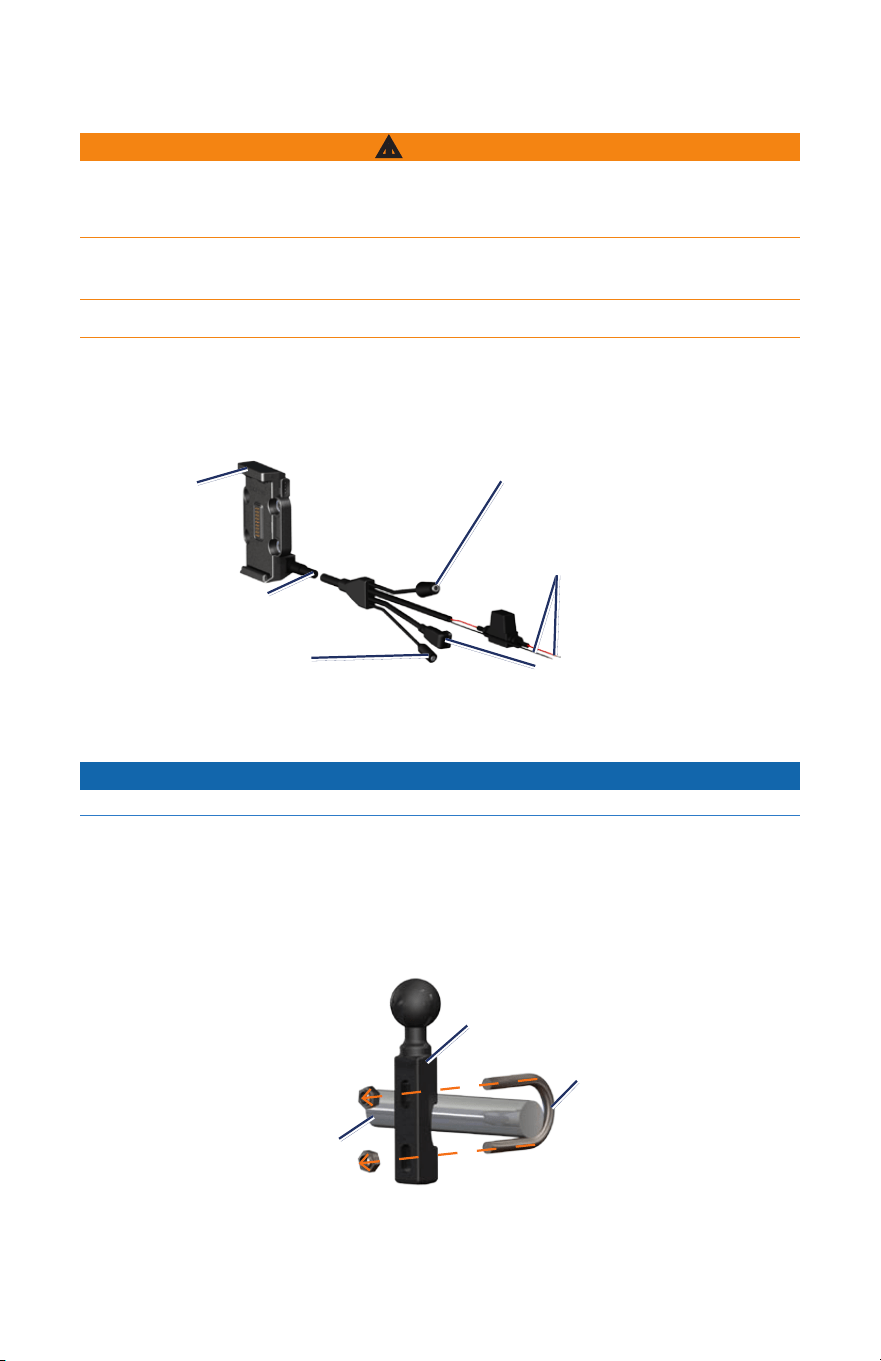
Step 1: Connecting Power to the Mount
Select a suitable and secure location to mount the zūmo on your motorcycle, based on
available power sources and safe cable routing.
Cradle
Headphone/audio out jack (3.5 mm)
Microphone jack (2.5 mm)
Mini-USB connector
(for GXM 40 Antenna)
Bare wires with
inline fuse for
power connection
Power cable
Step 2: Installing the Handlebar Base
notice
The recommended torque is 50 lbf-in. Do not exceed torque of 80 lbf-in.
The zūmo includes parts for two handlebar installation solutions. Custom mounts can require
additional hardware (www.ram-mount.com).
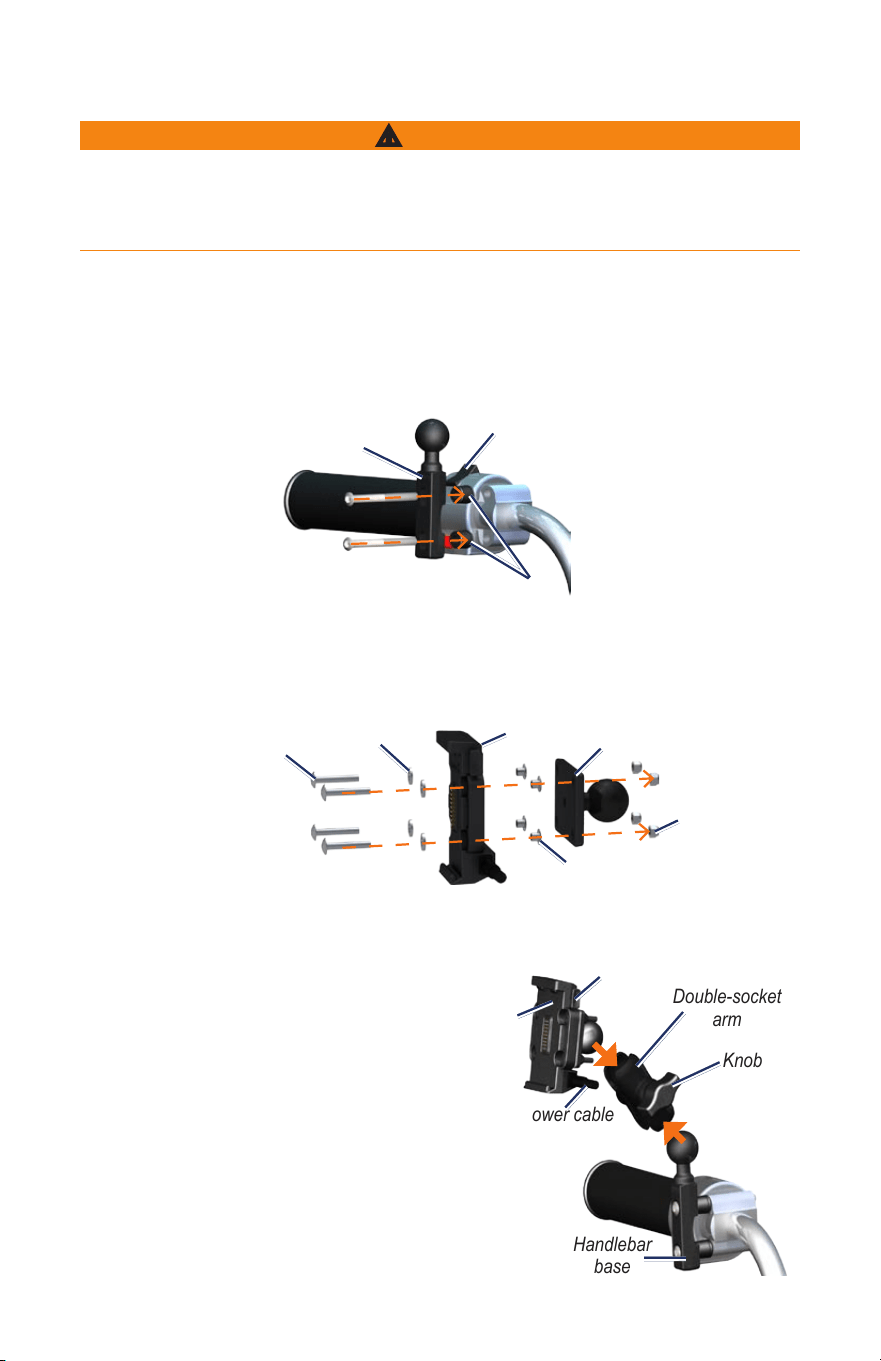
Option a: Installing the U-bolt and Handlebar Base:
1. Place the U-bolt around the handlebar, and thread the ends through the handlebar base.
2. Tighten the nuts to secure the base. Do not overtighten.
Handlebar
base
Handlebar
U-bolt
Option B: Installing the Handlebar Base to the Clutch/Brake Clamp Bracket:
WarnIng
Incorrectly installing the handlebar base to the clutch/brake bracket can cause brake or clutch
malfunction, which can result in damage to the vehicle and the risk of personal injury or death.
Garmin strongly recommends having an experienced installer with the proper knowledge of
clutch/brake systems install the unit.
Note: Both 1/4 in. standard and M6 bolts are included. Match the size of the factory bolts on
your clutch/brake clamp bracket.
1. Remove the two factory bolts on your clutch/brake clamp bracket.
2. Thread the new bolts through the handlebar base, spacers, and clamp bracket.
3. Tighten the bolts to secure the base.
Clutch/brake
clamp bracket
Handlebar
base
Spacers
Step 3: attaching the Base Plate to the zūmo Mount
1. Thread the M4 × 40 mm panhead screws through the washers, cradle, spacers, and base
plate.
2. Tighten the nuts to secure the base plate.
Base plate
Cradle
Panhead screws
Washers
Spacers
Nuts
Step 4: attaching the Base Plate to the Handlebar Base
1. Align the ball of the handlebar base and the ball of the base plate with the double-socket
arm.
2. Tighten the knob slightly.
3. Adjust for better viewing and operation.
4. Tighten the knob to secure the mount.
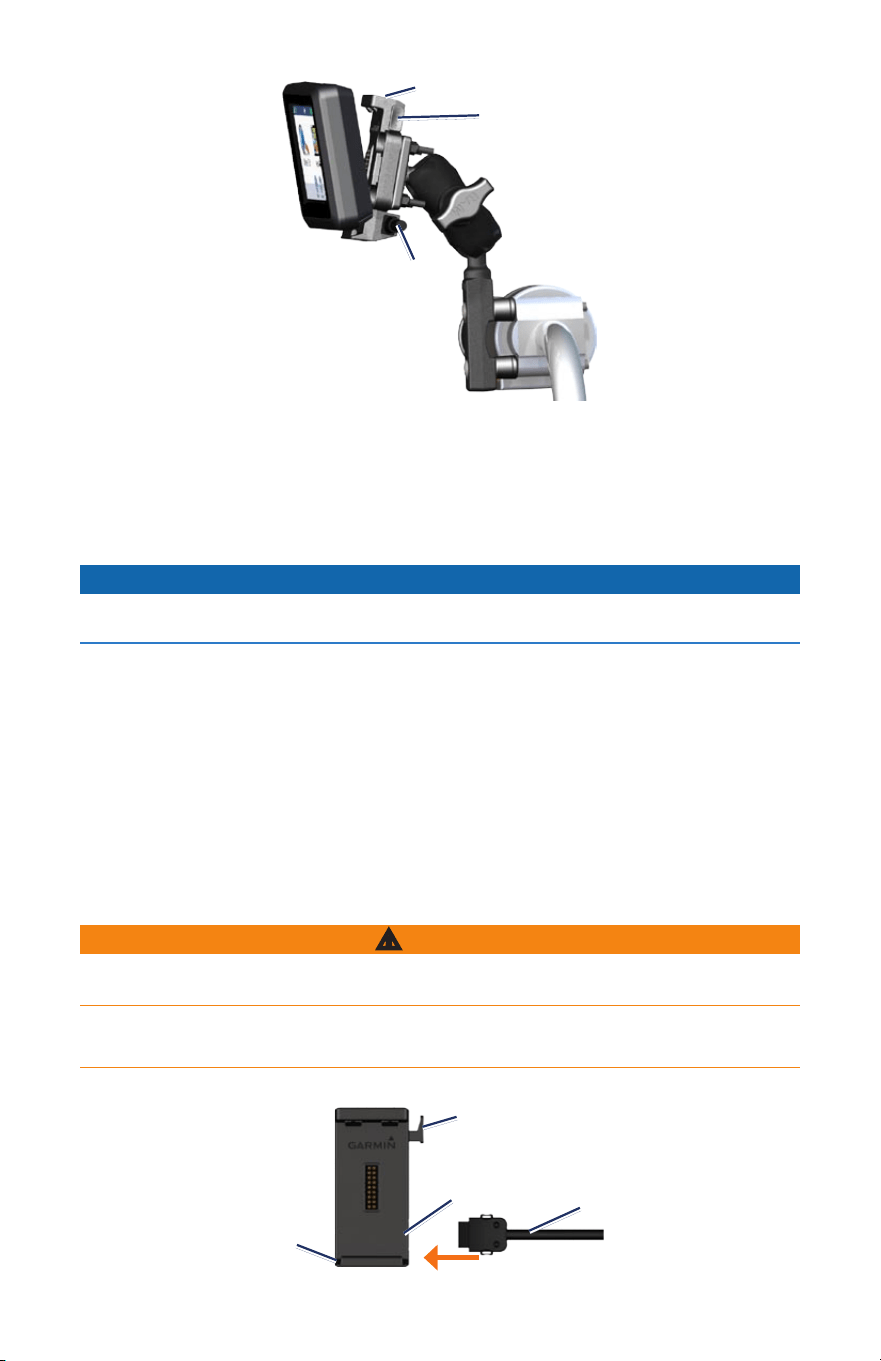
Step 5: Installing Your zūmo in
the Mount
1. Fitthebottomofyourzūmointothecradle.
2. Tiltthezūmobackuntilitsnapsintoplace.
Cradle
Knob
Handlebar
base
Power cable
Base plate
Double-socket
arm
Cradle
Knob
Handlebar
base
Power cable
Base plate
Double-socket
arm
Cradle
Power
cable
Release button
removing Your zūmo from Either Mount
1. Pressthebuttononthesideofthemounttoreleasethezūmo.
2. Liftoutthezūmo.
3. Place the weather cap on the cradle (motorcycle mount only).
Connecting the gXM 40 antenna
notice
Do not place the GXM 40 antenna on the fuel tank or in any location where it may come into
contact with fuel or excessive heat.
1. Withthezūmoplacedinthemotorcyclemount,removetheweathercapfromthemini-USB
connector on the Power cable.
2. PlugtheGXM40antennaintothemini-USBconnector.
3. Place the GXM 40 antenna within clear view of the sky in an area where there is at least 10
cmbetweentheantennaandyourzūmo.Forbestperformance,placetheGXM40antenna
atleast30cmawayfromthezūmo.
Note: The GXM 40 antenna can also be placed in an area covered by a non-conductive
material; such as a berglass top-case, tank bag, or leather saddlebag.
Mounting Your zūmo in an automobile
WarnIng
See the Important Safety and Product Information guide in the product box for product
warnings and other important information.
This product contains a lithium-ion battery. To prevent damage, remove the unit from the
vehicle when exiting or store it out of direct sunlight.
1. Plug the automotive power cable into the connector on the right side of the cradle.
Cradle
Automotive
power cable
Microphone
jack (2.5 mm)
Release button
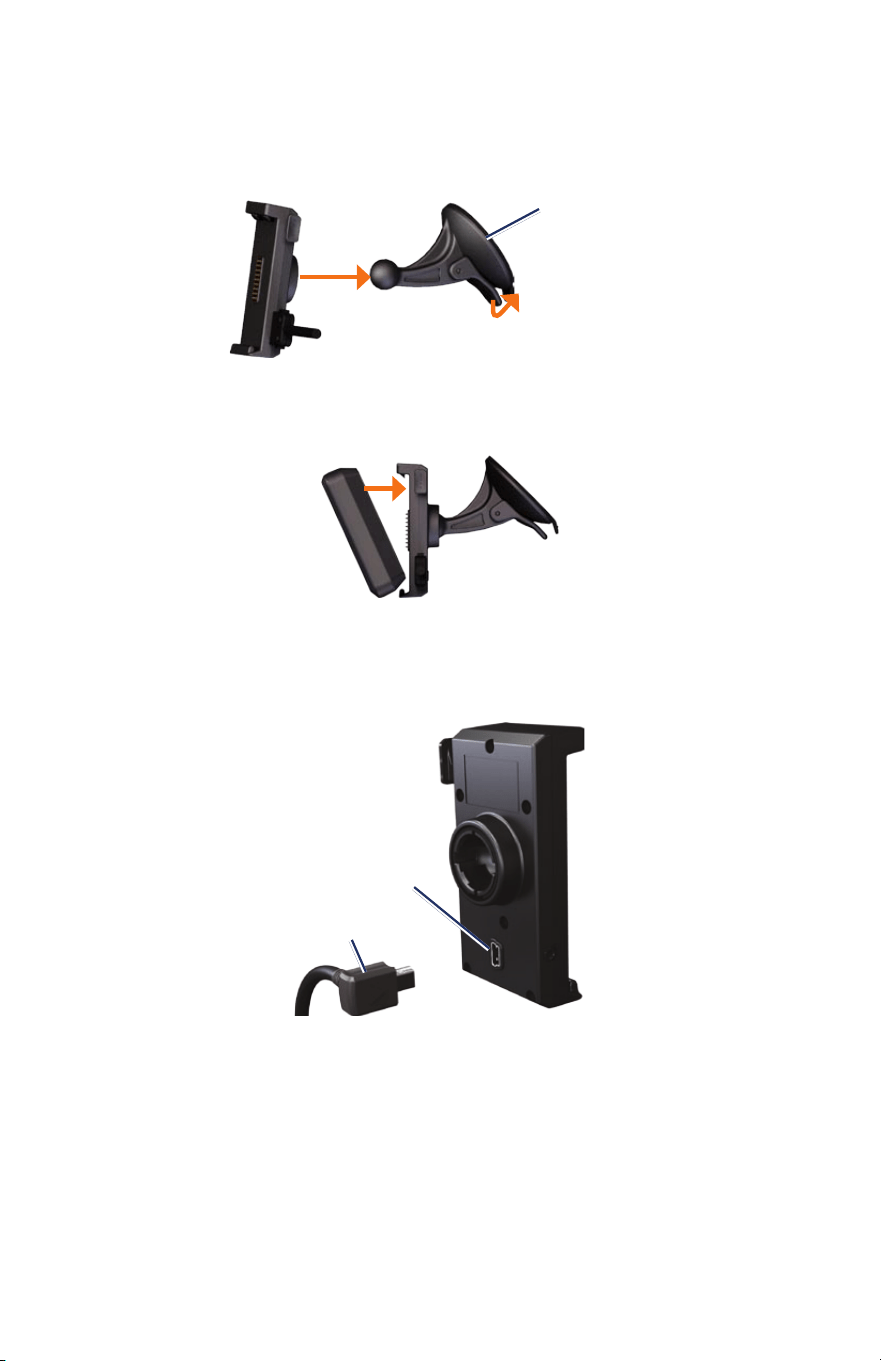
2. Remove the clear plastic from the suction cup. Clean and dry your windshield and the
suction cup with a lint-free cloth.
3. Place the suction cup on the windshield.
4. Flip the lever back, toward the windshield.
Suction cup
mount
5. Snapthecradleontothesuctioncuparm.
6. Fitthebottomofyourzūmointothecradle.
7. Tiltthezūmobackuntilitsnapsintoplace.
8. Plug the other end of the automotive power cable into a power outlet.
Connecting the gXM 40 antenna to the automotive Mount
1. Withthezūmoplacedinthecradle,plugtheGXM40antennaintothemini-USBportonthe
back of the automotive mount.
GXM 40
antenna
Mini-USB port
2. Place the GXM 40 antenna within clear view of the sky.
© 2010 Garmin Ltd. or its subsidiaries www.garmin.com
Garmin
®
and zūmo
®
are trademarks of Garmin Ltd. or its subsidiaries, registered in the USA and
other countries. These trademarks may not be used without the express permission of Garmin. Other
trademarks and trade names are those of their respective owners.
January 2010 Part Number 190-01145-02 Rev. A Printed in Taiwan