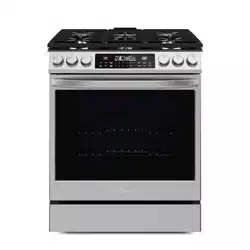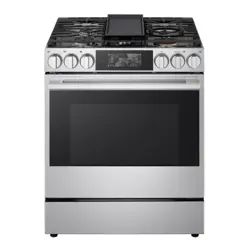
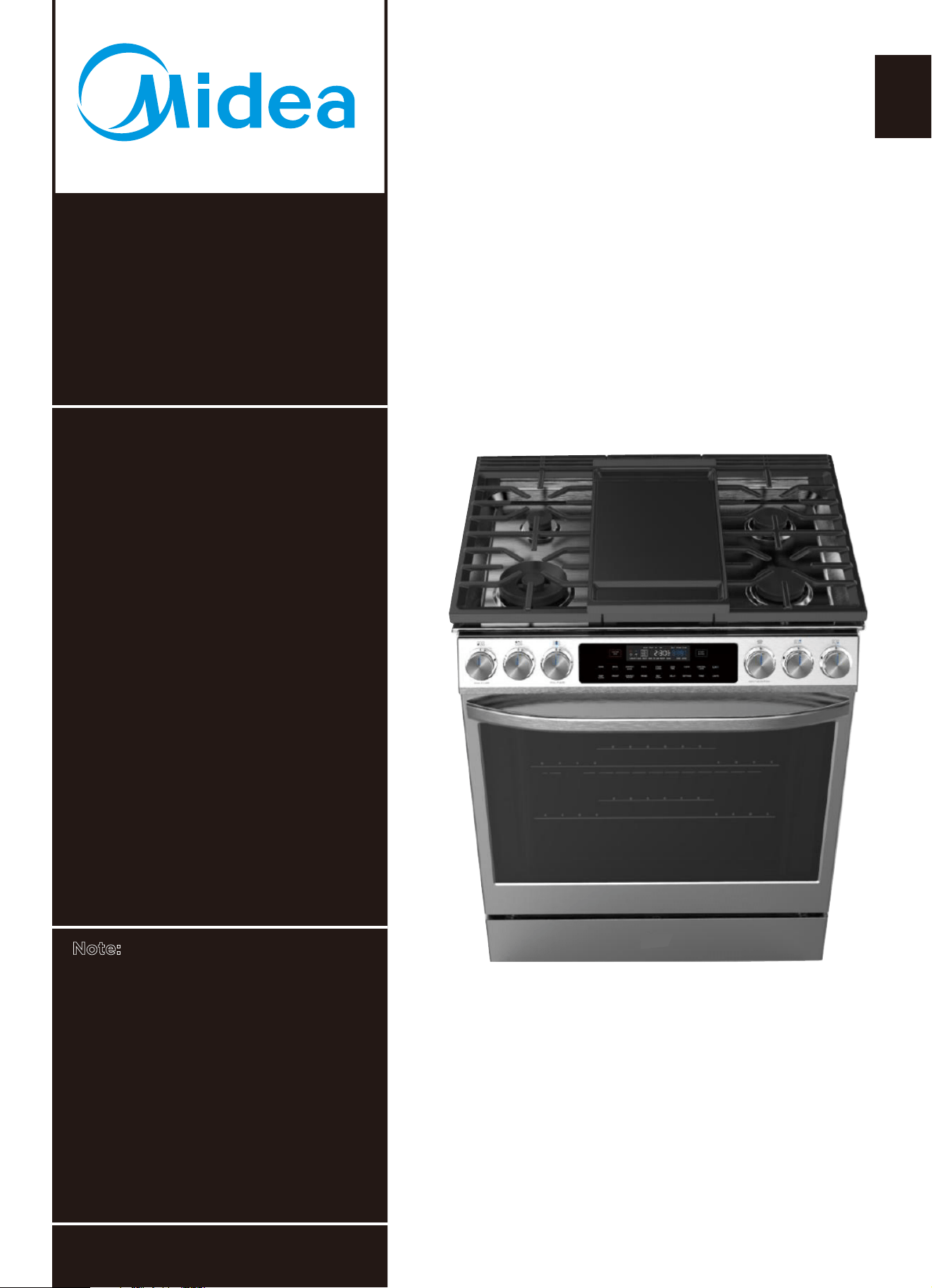
MGS30S2AST
MGS30S4AST
www.midea.com
en
MODEL NUMBERS
(Pictures are for reference only and may not
accurately represent all models covered by this manual.)
USER’S MANUAL
version A - 3 - 2020
30" Slide-In Gas Range
WiFi Connectivity with Smart
Device App
6.1 Cubic Feet Total Oven
Capacity
Glass Touch Controls
"Built In" Appearance
5 Burner Cooktop with
Edge-to-Edge Grates
Note:
Before using this product, please
read this manual carefully and
keep it for future reference.
Contact Midea Customer Service
at 1-866-646-4332 or visit
assistance.
midea.com/us/support for


MGS30S2AST
MGS30S4AST
www.midea.com
USER’S
en
MODEL NUMBERS
MANUAL
30"Slide-InGasRange
Range Overview
Review of Controls
WiFi Connection
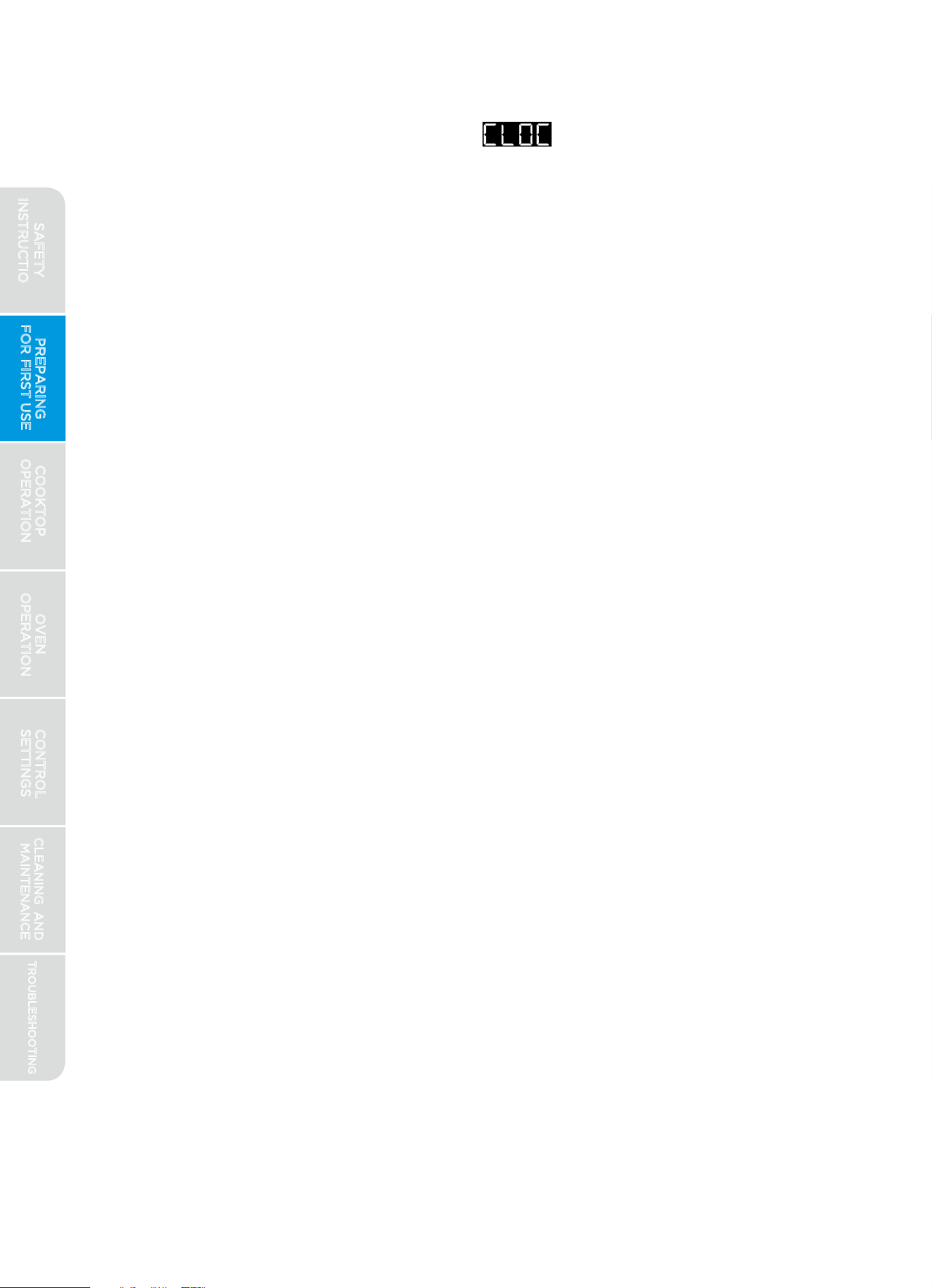
Setting the Clock
Before First Use
Warnings
Types of Cooktop Burners
Pan Size/Burner Size Selection
Cooktop Indicators
Controlling the Cooktop Burners
Flame Characteristics
Griddle
In Case of Power Failure
Warnings
Oven Racks
Removing/Inserting Racks
Rack Positions
Preheating
Bake
..........................................6
.......................................................................25
IMPORTANT SAFETY INSTRUCTIONS
PREPARING FOR FIRST USE
COOKTOP OPERATION
OVEN OPERATION
......................................................................................15
.................................................................................16
.....................................................................................17
....................................................................................17
......................................................................................18
.....................................................................................................19
.................................................................20
.........................................................21
.................................................................................21
.....................................................22
...........................................................................22
........................................................................................................23
......................................................................24
...................................................................................................25
...............................................................................................26
.................................................................27
.........................................................................................28
.................................................................................................28
.............................................................................................................29
................................................................19
.........................................................15
Dear user
for letting Midea help you "make yourself at home. "
your total satisfaction.
Please
read this manual carefully before use and keep it in a
convenient place for future reference.
To help us serve you better, please consider registering your
product using our convenient Midea app MSmartlife, by visiting
http://www.midea.com, or by texting a picture of your proof of
purchase to 1-844-224-1614.
By using the text option you will earn an additional 3 month
warranty extension immediately following the completion of the
product’s original warranty.
Thankyou
This manual is part of our commitment to
.....................................................................5
SAFETY DEFINITIONS

Dear user
.....................................................................5
..........................................6
.........................................................13
................................................................17
.......................................................................23
INSTRUCTIONS
USE
Keep Warm
Broil
Proof
Convection Bake
Convection Roast
Pizza Mode
Delay
Cook Time
Probe
Sabbath Mode
Steam Clean
Self Clean
Control Lock
WiFi (Remote Operation)
Timer
Oven Lights
In Case of Power Failure
..............................................................................................29
.............................................................................................................30
..........................................................................................................31
.................................................................................
32
................................................................................33
..............................................................................................34
................................................................................................35
.........................................................................................................36
.........................................................................................38
.............................................................................................40
...................................................................................................41
............................................................................................42
..................................................................42
..........................................................................................................43
.............................................................................................43
....................................................................43
...........................................................................................46
....................................................................................................46
...................................................................................47
..........................................................................................48
CLEANING AND MAINTENANCE
Cont
rol Lock
Cooktop
Cooktop Burners
Control Panel
Oven Interior
Oven Lights
CONTROL SETTINGS
.....................................................................44
.................................................46
...........................................................................................49
.............................................................................................50
Drawer
..................................................................................................... 50
............................................................................................................51
.....................................................................53
...................................................................................................53
..........................................................................................................54
...................................................................................57
Door
WARRANTY
TROUBLESHOOTING
Cooktop
Oven
.........................................................................................................34
.....................................................................32
..................................................34
.....................................................................40
MAINTENANCE
WARNING
CAUTION
NOTICE
NOTE
This symbol indicates the presence of a
hazard which may result in death or serious
injury if not avoided.
This symbol indicates the presence of a
hazard which may result in minor or
moderate personal injury if not avoided.
This symbol indicates the presence of a
hazard which may result in minor property
damage if not avoided.
This alerts the user to information that will
help avoid confusion or common cooking
mistakes and obtain the best possible user
experience.
PREPARING
FOR FIRST USE
COOKTOP
OPERATION
OVEN
OPERATION
CONTROL
SETTINGS
TROUBLESHOOTING
CLEANING AND
MAINTENANCE
5
Warnings and safety instructions in this manual do not cover all possible
conditions and situations that may occur. It is your responsibility to use
common sense, caution, and care when installing, maintaining, and
operating your oven. Known hazards and their severity are identified in
this manual with the following symbols:
IMPORTANT SAFETY INSTRUCTIONS
READ ALL INSTRUCTIONS BEFORE USING THE APPLIANCE
SAFET Y DEFINITIONS
READ AND SAVE THESE INSTRUCTIONS FOR FUTURE REFERENCE
SAFETY
INSTRUCTIONS
SAFETY DEFINITIONS
IMPORTANT SAFETY INSTRUCTIONS
Read all safety instructions before using this product. Failure to follow
these instructions may result in fire, electrical shock, serious injury, or
death. It is the owner's responsibility to ensure that anyone using the
appliance knows how to operate it safely.
PREPARING
FOR FIRST USE
COOKTOP
OPERATION
OVEN
OPERATION
CONTROL
SETTINGS
TROUBLESHOOTING
CLEANING AND
MAINTENANCE
6
IMPORTANT SAFETY INSTRUCTIONS
READ ALL INSTRUCTIONS BEFORE USING THE APPLIANCE
WARNING
READ AND SAVE THESE INSTRUCTIONS FOR FUTURE REFERENCE
- Do not store or use gasoline or other flammable
-
Installation and service must be performed by
WARNING: If the information in these
instructions is not followed exactly, a fire
or explosion may result causing property
damage, personal injury or death.
SAFETY
INSTRUCTIONS
- WHAT TO DO IF YOU SMELL GAS
Do not try to light any appliance.
Do not touch any electrical switch.
Do not use any phone in your building.
Immediately call your gas supplier from a
neighbor’s phone. Follow the gas supplier’s
instructions.
the fire department.
If you cannot reach your gas supplier, call
vapors and liquids in the vicinity of this or
any other appliance.
a qualified installer, service agency or the
gas supplier.
.....................................................................32
..................................................34
.....................................................................40
MAINTENANCE
PREPARING
FOR FIRST USE
COOKTOP
OPERATION
OVEN
OPERATION
CONTROL
SETTINGS
TROUBLESHOOTING
CLEANING AND
MAINTENANCE
7
IMPORTANT SAFETY INSTRUCTIONS
READ ALL INSTRUCTIONS BEFORE USING THE APPLIANCE
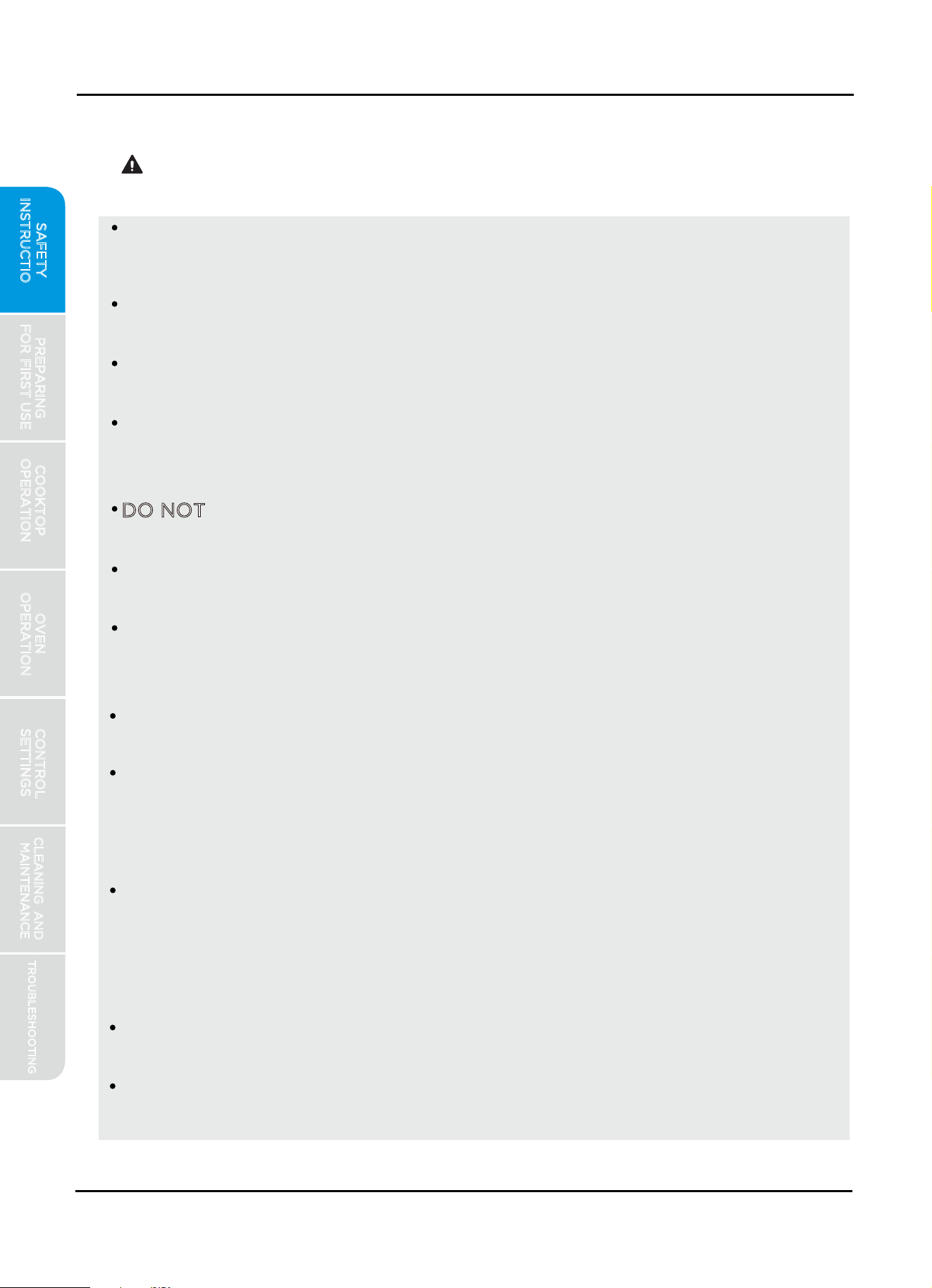
Anti-Tip Bracket
Do not operate the range without the anti-tip device in
place and engaged. Failure to do so can result in death
or serious burns to children or adults. Do not remove
the leveling legs. Doing so will prevent the range from
being secured by the anti-tip device.
Leveling Leg
TIP OVER HAZARD
A child or adult can tip the range and be killed. Verify
the anti-tip device has been properly installed and
engaged per installation instructions. Ensure the anti-
tip device is re-engaged when the range is moved.
READ AND SAVE THESE INSTRUCTIONS FOR FUTURE REFERENCE
WARNING
If range is removed from service, secure door closed or remove door to
minimize tip over risk. (See "Door" section under "Cleaning and
Maintenance" in this manual
for instructions on how to remove door.)
To confirm the anti-tip bracket is properly installed, look underneath the
range to
confirm rear leveling leg is engaged in bracket. If visual
inspection is not possible:
Slide range forward
Confirm anti-tip bracket is securely attached to floor or wall in correct
position according to installation instructions.
Fully slide the range back against the wall so that leveling leg engages
with anti-tip bracket.
WARNING
SAFETY
INSTRUCTIONS
Never Operate the Top Surface Cooking Section of
this Appliance
Unattended
in fire, explosion,
or burn hazard that could cause
property damage, personal injury, or
death.
If a fire should occur, keep away from the appliance
and immediately call your fire department.
DO NOT ATTEMPT TO EXTINGUISH AN OIL/GREASE
FIRE WITH WATER.
Failure to follow this warning statement could result
SAFETY DEFINITIONS
PREPARING
FOR FIRST USE
COOKTOP
OPERATION
OVEN
OPERATION
CONTROL
SETTINGS
TROUBLESHOOTING
CLEANING AND
MAINTENANCE
8
IMPORTANT SAFETY INSTRUCTIONS
READ ALL INSTRUCTIONS BEFORE USING THE APPLIANCE
READ AND SAVE THESE INSTRUCTIONS FOR FUTURE REFERENCE
WARNING
This appliance is intended for normal residential use. It is not approved
for commercial use, outdoor installation, or any other application not
specifically allowed by this manual.
Be sure your appliance is properly installed and grounded by a qualified
service provider.
DO NOT allow cooking grease or other flammable materials accumulate
in or on the range. Grease in the oven or on the cooktop may ignite.
Clean kitchen ventilating hoods frequently. Grease should not be allowed
to accumulate on hood or filter.
Clean cooktop with caution – To avoid steam burns, do not use wet
sponge or cloth while cooking area is hot. Some cleaners can produce
noxious fumes if applied to a hot surface.
DO NOT use oven cleaners. No commercial oven cleaner or oven liner
protective coating of any kind should be used with any part of this appliance.
This appliance should not be installed with a ventilation system that
blows air downward toward the appliance. This type of ventilation
system may cause ignition and combustion problems with the gas cooking
appliance resulting in personal injury
or unintended operation.
This appliance requires connection to a 3-prong, 120VAC, 60Hz grounded
electrical
source. When installed, appliance must be electrically grounded
in accordance with
local codes or, in the absence of local codes, with the
National Electrical Code, NFPA 70 or the Canadian Electric Code,
CSA C22.1-02.
DO NOT clean door gasket – The door gasket is essential for a good seal.
Care should be taken not to rub, damage, or move the gasket.
Clean only parts and areas listed in the "Cleaning and Maintenance"
section of this manual.
DO NOT operate this appliance if it has been damaged or is not working
properly. Contact a qualified service provider for repairs.
DO NOT
repair or replace any part of the appliance unless specifically
recommended in the manual. All other servicing should be referred to a
qualified service provider.
INSTALLATION AND MAINTENANCE
SAFETY
INSTRUCTIONS
PREPARING
FOR FIRST USE
COOKTOP
OPERATION
OVEN
OPERATION
CONTROL
SETTINGS
TROUBLESHOOTING
CLEANING AND
MAINTENANCE
9
IMPORTANT SAFETY INSTRUCTIONS
READ ALL INSTRUCTIONS BEFORE USING THE APPLIANCE
READ AND SAVE THESE INSTRUCTIONS FOR FUTURE REFERENCE
Have the installer show you where the gas shut-off valve is located.
NEVER cover any slots, holes or passages in the oven bottom or cover
an entire rack with materials such as aluminum foil. Doing so blocks
airflow through the oven and may cause carbon monoxide poisoning.
This appliance is shipped from the factory set for use with Natural Gas.
It can be converted for use with LP (propane). The conversion must be
performed by a qualified technician in accordance with the installation
instructions and local codes. The agency performing this work assumes
responsibility for the conversion.
GENERAL USAGE
This appliance is configurable to allow remote operation at any time. Do
not store any flammable materials or temperature sensitive items inside
oven, in storage drawer, or on top or near cooktop of the appliance,
including paper, plastic, pot holders, linens, wall coverings, curtains,
drapes, or cleaning chemicals.
NEVER use this appliance as a space heater to heat or warm the room.
Doing so may result in carbon monoxide poisoning and overheating of
the oven.
Children should not be left alone or unattended in the area
where appliance is in use.
Children should not be allowed to play in or on,
or otherwise interact with the range.
Do not allow anyone to climb, stand, lean, sit, or hang on any part of an
appliance,especially a door, drawer, or operation panel.
WARNING
GAS SAFETY
CAUTION - Do not store items of interest to children in cabinets above
a range or on the backguard of a range – children climbing on the range
to reach items could be seriously injured.
Loose-fitting or hanging garments should never be worn while using the
appliance.
This appliance has not been evaluated for use with any 3rd party after-
market systems. Do not attempt to use this appliance with a wok ring or
any other after-market device that may block air to the burner or
otherwise cause a fire or carbon monoxide hazard.
SAFETY
INSTRUCTIONS
IMPORTANT SAFETY INSTRUCTIONS
READ ALL INSTRUCTIONS BEFORE USING THE APPLIANCE
READ AND SAVE THESE INSTRUCTIONS FOR FUTURE REFERENCE
PREPARING
FOR FIRST USE
COOKTOP
OPERATION
OVEN
OPERATION
CONTROL
SETTINGS
TROUBLESHOOTING
CLEANING AND
MAINTENANCE
COOKTOP HAZARDS
DO NOT USE WATER ON GREASE FIRES. Smother fire or flame with a
close-fitting lid or metal tray. Never pick up a flaming pan. Dry chemical
or foam-type extinguisher may be used if it is CLASS ABC or CLASS K
and you already know how to use it.
It is strongly recommended that a CLASS ABC or CLASS K fire
extinguisher be kept near the range in an easily accessible location, and
that household members are familiarized in advance with its operating
instructions.
Do not use aluminum foil to line or cover the grates or any other part of
the cooktop. Doing so may result in carbon monoxide poisoning,
overheating of the cooktop surfaces, or fire.
Only certain types of glass, glass/ceramic, ceramic, earthenware, or other
glazed
utensils are suitable for range-top service without breaking due to
the sudden change in temperature.
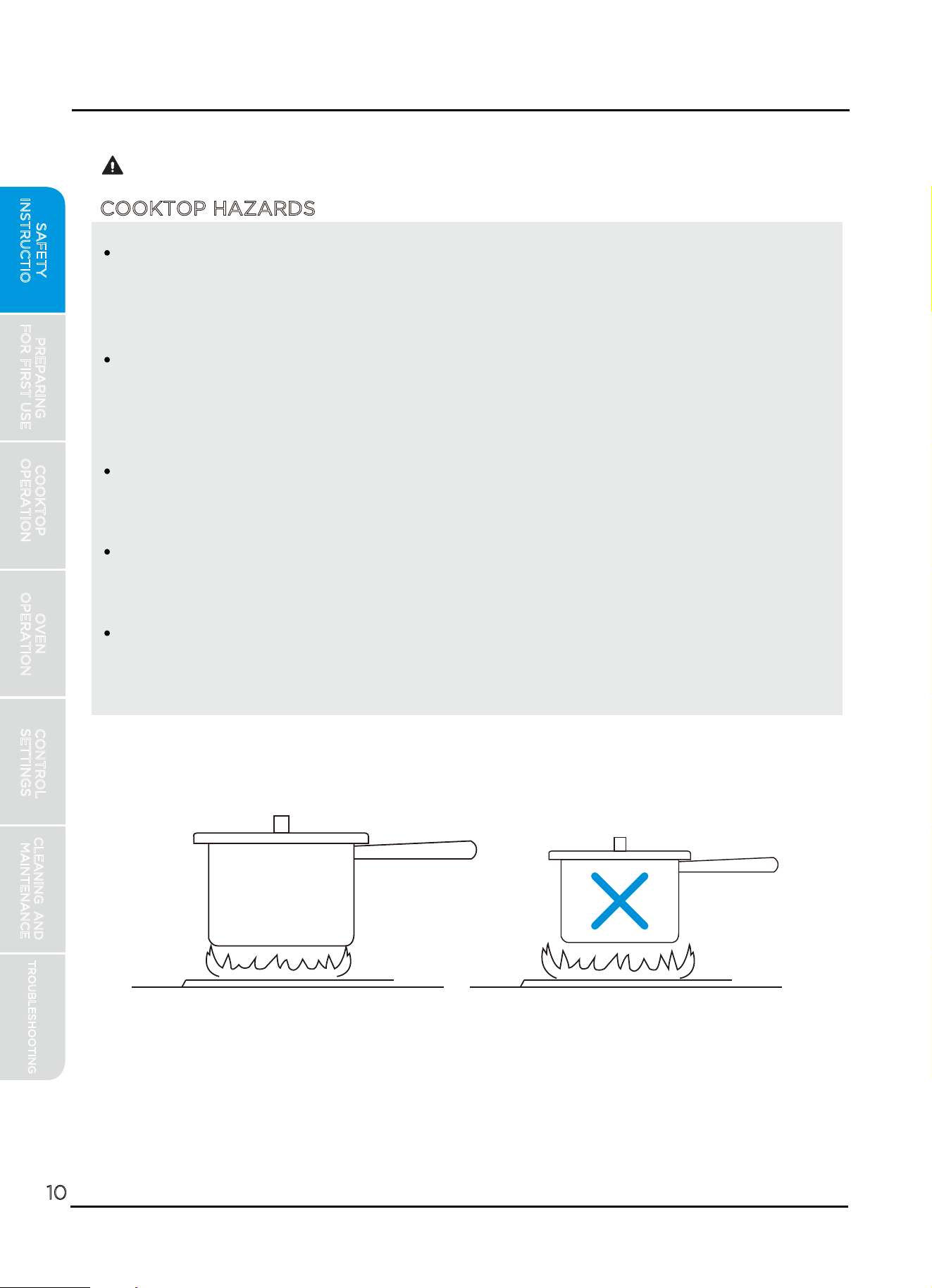
Flames extending beyond the edge of the cookware are a burn hazard.
Set the burner controls so that flames do not extend beyond the edge
of the pot.
WARNING
CORRECT INCORRECT
10
SAFETY
INSTRUCTIONS
IMPORTANT SAFETY INSTRUCTIONS
READ ALL INSTRUCTIONS BEFORE USING THE APPLIANCE
READ AND SAVE THESE INSTRUCTIONS FOR FUTURE REFERENCE
PREPARING
FOR FIRST USE
COOKTOP
OPERATION
OVEN
OPERATION
CONTROL
SETTINGS
TROUBLESHOOTING
CLEANING AND
MAINTENANCE
11
To reduce the risk of burns, ignition of flammable materials, and spillage
due to unintentional contact with the utensil, the handle of a utensil
should be positioned so that it is turned inward, and does not extend
over the front of the counter top or over adjacent cooktop burners.
DO NOT TOUCH COOKTOP BURNERS, GRATES, OR AREAS NEAR
BURNERS – Cooktop area may be hot even though no flames are present.
Areas near cooktop
burners may become hot enough to cause burns.
During and after use, do not touch, or let clothing or other flammable
materials contact cooktop area until they have had sufficient time to cool.
Among these areas are the cooktop, grates, and
surfaces facing the
cooktop.
Use proper pan size. This appliance is equipped with cooktop burners of
different size. Select utensils having flat bottoms large enough to cover
the entire burner and flame. The use of undersized utensils will expose a
portion of the flame to direct contact and may result in ignition of
clothing. Proper relationship of utensil to burner will also improve
efficiency.
In the event that personal clothing or hair catches fire, drop and roll
immediately to extinguish flames.
Always turn hood ON when cooking at high heat or when flambéing
food (i.e. Crepes Suzette, Cherries Jubilee, Peppercorn Beef Flambé).
Hot oil is capable of causing severe burns. Never move cooking utensils
containinghot grease. Wait until it has cooled before disposing of grease.
Use high heat settings only when necessary. To avoid splattering, heat
oil slowly on medium-low settings.
Do not attempt to lift the cooktop. Doing so may damage the gas tubing
to the surface burners resulting in a gas leak and risk of fire.
SAFETY
INSTRUCTIONS
IMPORTANT SAFETY INSTRUCTIONS
READ ALL INSTRUCTIONS BEFORE USING THE APPLIANCE
READ AND SAVE THESE INSTRUCTIONS FOR FUTURE REFERENCE
OVEN HAZARDS
Never place anything (aluminum foil, spill mat, baking stone, cookware,
etc.) on the bottom of the oven cavity. These items can trap heat or
melt, resulting in damage to the appliance and risk of electric shock,
smoke, or fire.
Use care when opening the door. Let hot air or steam escape before
removing or replacing food.
Use only dry pot holders. Moist or damp pot holders on hot surfaces
may result in burns from steam. Do not let pot holder touch hot grates
or flames. Do not use a towel or other bulky cloth.
Do not heat unopened food containers – Build-up of pressure may cause
container to burst and result in injury.
PREPARING
FOR FIRST USE
COOKTOP
OPERATION
OVEN
OPERATION
CONTROL
SETTINGS
TROUBLESHOOTING
CLEANING AND
MAINTENANCE
12
WARNING
Always place oven racks in the desired location while oven is cool. If
rack must be moved while oven is hot, do not let pot holder contact hot
oven surfaces.
Do not use a broiler pan without its insert. Do not cover the broiler
insert with aluminum foil, as exposed fat and grease could ignite.
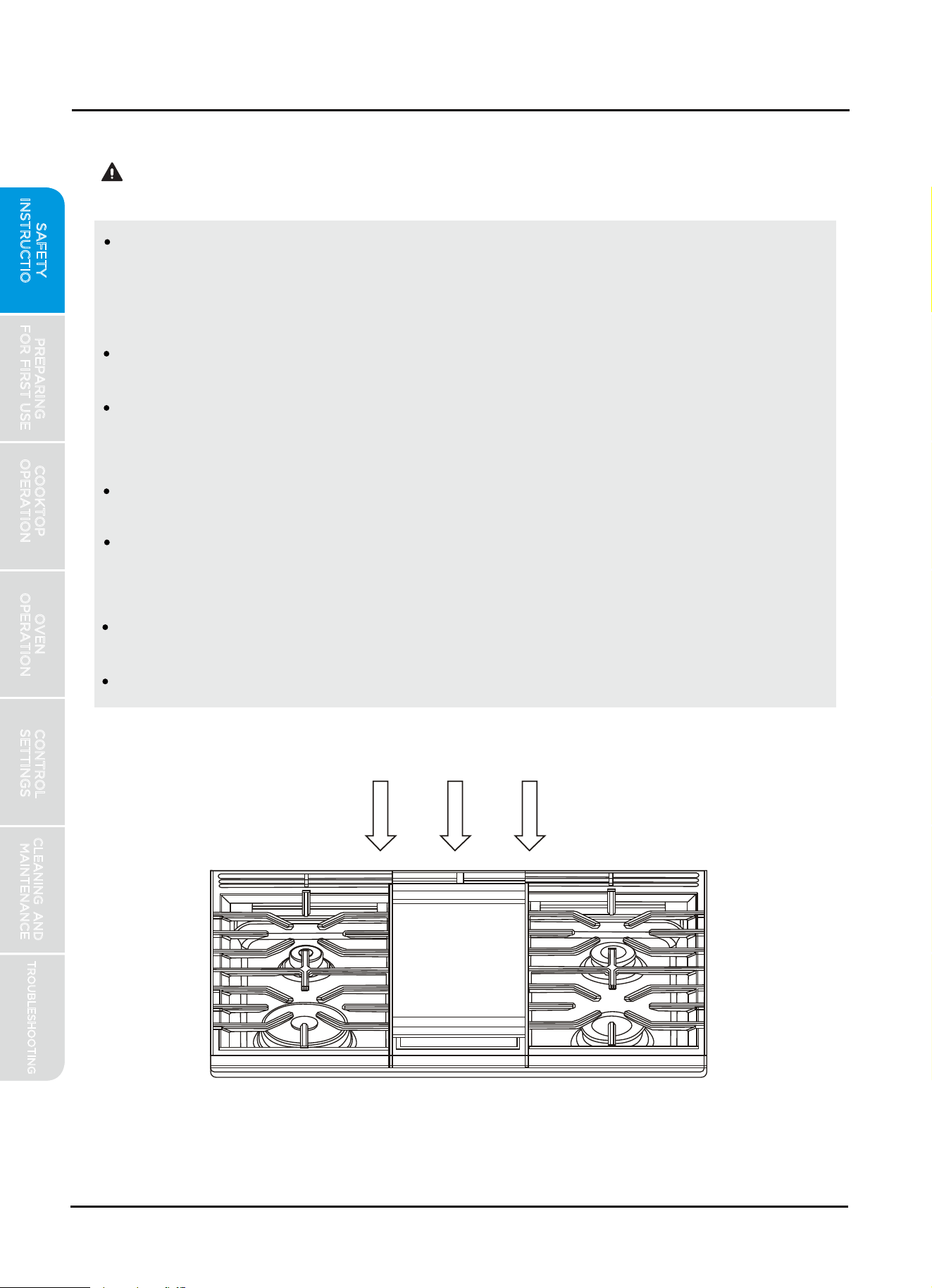
Do not obstruct oven vents or any other slots or openings on the unit.
Oven and cooling Vents
Do not obstruct oven vents
SAFETY
INSTRUCTIONS
IMPORTANT SAFETY INSTRUCTIONS
READ ALL INSTRUCTIONS BEFORE USING THE APPLIANCE
READ AND SAVE THESE INSTRUCTIONS FOR FUTURE REFERENCE
Before self-cleaning the oven, ensure oven is empty. Remove broiler pan,
racks, cookware, and anything else.
To avoid ignition inside the oven, clean excess grease or food out of the
oven before starting self-clean.
The door will lock several minutes after the start of a self-clean function.
If the door is opened prior to being locked, the self-clean function will be
automatically cancelled. If door does not lock within 15 minutes, cancel
self-clean and contact a qualified service provider for repairs.
In the event of ignition inside the oven during self-clean, turn off the oven
and wait for the fire to extinguish. DO NOT FORCE THE DOOR OPEN.
Wait for the oven to cool before removing contents and cleaning the
oven.
If the self-cleaning mode malfunctions, keep door closed, turn off the
appliance, disconnect the circuit at the circuit breaker box, and contact a
qualified service provider for repairs.
Some birds are extremely sensitive to the fumes produced during a
self-clean cycle. Move birds to another well-ventilated room.
SELF-CLEAN HAZARDS
PREPARING
FOR FIRST USE
COOKTOP
OPERATION
OVEN
OPERATION
CONTROL
SETTINGS
TROUBLESHOOTING
CLEANING AND
MAINTENANCE
13
DO NOT TOUCH OVEN BURNERS OR INTERIOR SURFACES OF OVEN
– Oven burners and surfaces may be hot even though no flames are
present. Interior surfaces of an oven become hot enough to cause burns.
During and after use, do not touch, or let clothing or other flammable
materials contact oven burners or interior surfaces of oven until they
have had sufficient time to cool. Other surfaces of the appliance may
become hot enough to cause burns – among these surfaces are oven
vent openings and surfaces near these openings, oven doors, and
windows of oven doors.
I f materials inside the oven should ignite, keep door closed and turn off
power at he fuse or breaker box. Wait for the oven to cool before
removing contents, cleaning the oven, and restoring power.
WARNING
SAFETY
INSTRUCTIONS
IMPORTANT SAFETY INSTRUCTIONS
READ ALL INSTRUCTIONS BEFORE USING THE APPLIANCE
READ AND SAVE THESE INSTRUCTIONS FOR FUTURE REFERENCE
FCC NOTICE
PREPARING
FOR FIRST USE
COOKTOP
OPERATION
OVEN
OPERATION
CONTROL
SETTINGS
TROUBLESHOOTING
CLEANING AND
MAINTENANCE
14
According to Federal Communication Commission requirements, this
equipment has been tested and found to comply with the limits for a
Class B digital device, pursuant to part 15 of the FCC Rules. These limits
are designed to provide reasonable protection against harmful interference
in a residential installation.
This equipment generates, uses and can radiate
radio frequency energy and, if
not installed and used in accordance with
the instructions, may cause harmful interference to radio communications.
However, there is no guarantee that
interference will not occur in a
particular installation. If this equipment does cause harmful interference
to radio or television reception, which can be determined by turning the
equipment off and on, the user is encouraged to try to correct the
interference by one or more of the following measures:
Reorient or relocate the receiving antenna.
Increase the separation between the equipment and receiver.
Connect the equipment into an outlet on a circuit different from that
to which the receiver is connected.
Consult the dealer or an experienced radio/TV technician for help.
This device complies with part 15 of the FCC Rules. Operation is subject
to the following two conditions: (1) This device may not cause harmful
interference, and (2) this device must accept any interference received,
including interference that may cause undesired operation.
WARNING
SAFETY
INSTRUCTIONS
PREPARING FOR FIRST USE
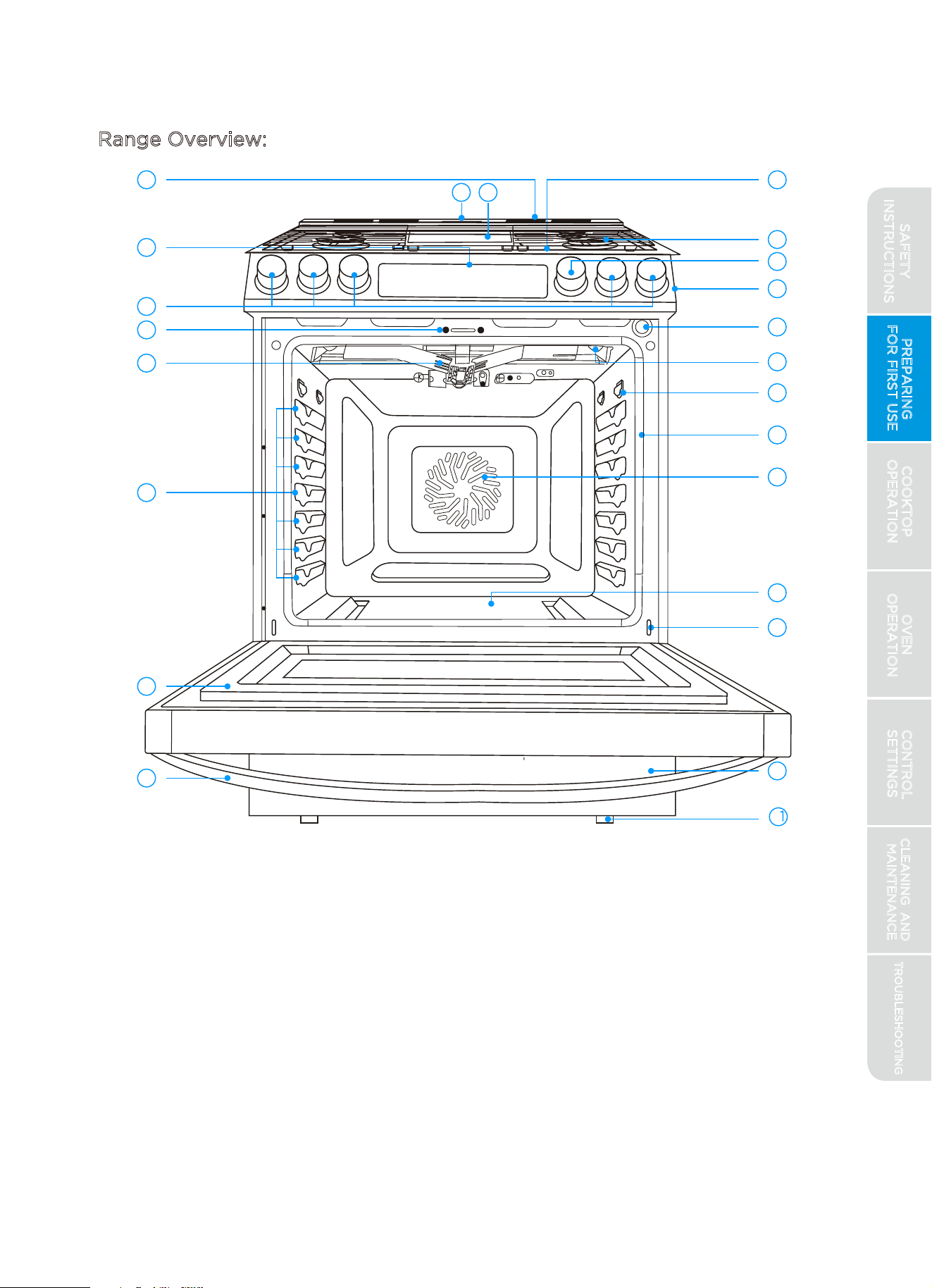
Range Overview:
PREPARING
FOR FIRST USE
COOKTOP
OPERATION
OVEN
OPERATION
CONTROL
SETTINGS
TROUBLESHOOTING
CLEANING AND
MAINTENANCE
15
1
23
9
22
10
2
11
12
3
4
13
5
15
14
16
17
6
18
19
7
8
20
21
1 Cooling Vents
2 Oven Control
3 Cooktop Control Knobs
4 Door Lock
5 Broil Burner
6 Rack Positions
7 Door
8 Door Handle
9 Oven Vent
10 Cooktop
11 Control input knob or
20
16 Door Gasket
17 Convection Fan
18 Oven Bottom
19 Door Hinge (each side)
Storage Drawer
2 1 Leveling Legs (front and back)
2 2 Griddle
2 3 Grate
oven light switch
12 Control Panel
13 Door Switch
14 Meat Probe Jack
15 Oven Lights
SAFETY
INSTRUCTIONS
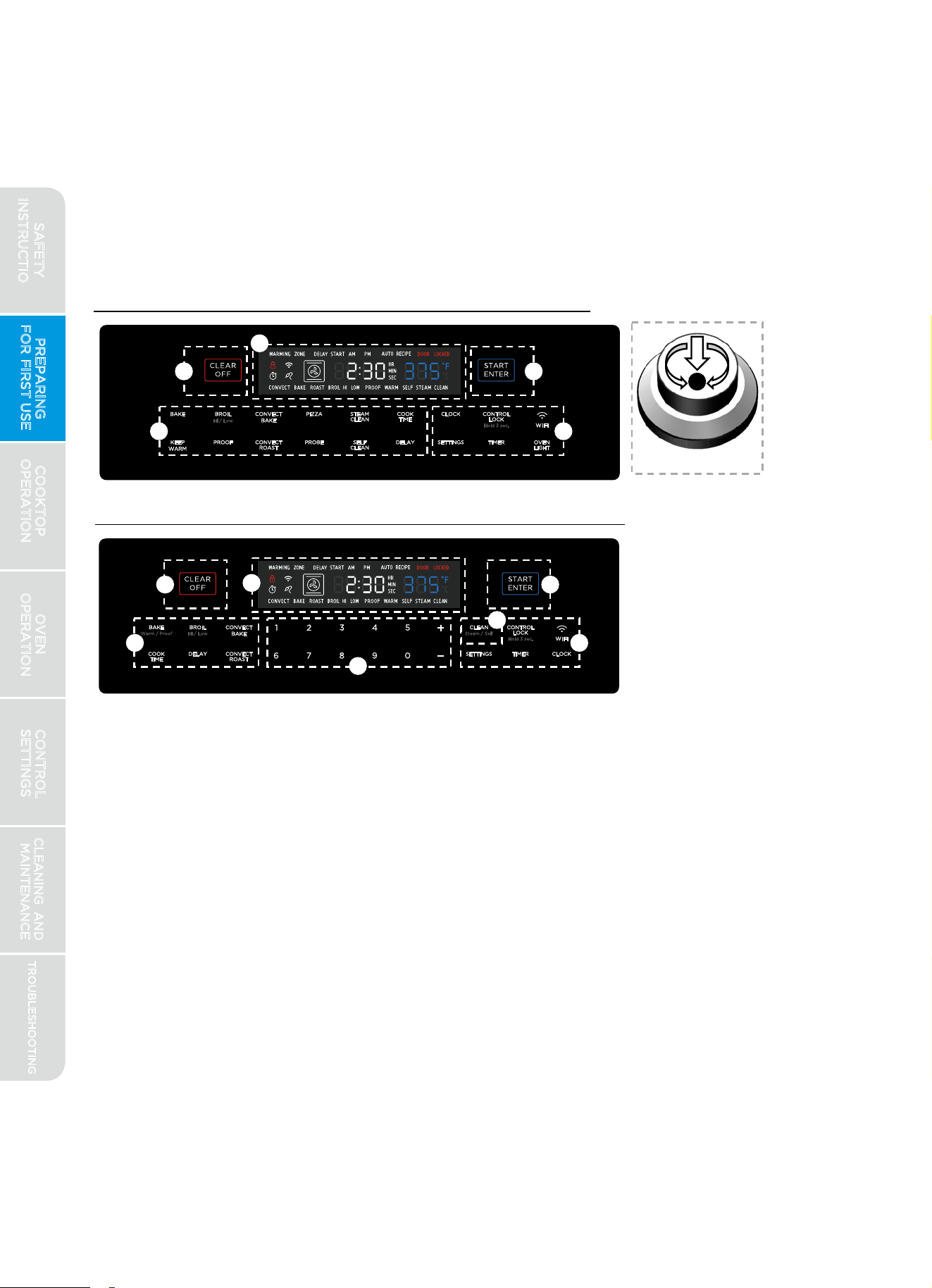
Review of Controls:
All Midea ranges are provided with intuitive touch controls to help you easily
take advantage of the features available in your oven. Depending on the
model and configuration, your oven may be controlled in one of two ways.
Control Input Knob models will have a dedicated knob used to set
temperatures and select options. Numeric Keypad Input models have a
numeric keypad for entering times and temperatures.
Control User Interface (Control Input Knob Models)
5
Control Input Knob
1.
2.
3.
4.
5.
PREPARING
FOR FIRST USE
COOKTOP
OPERATION
OVEN
OPERATION
CONTROL
SETTINGS
TROUBLESHOOTING
CLEANING AND
MAINTENANCE
16
CLEAR/OFF Key - Immediately halts any oven operation. If the door is
locked for self-clean, pressing this key will stop the function, but the
door will not unlock until the oven temperature has dropped to a safe
level.
Display
- Communicates information to the user, such as time-of-day,
oven temperature, and cooking mode.
START/ENTER Key - Initiates the selected oven operation or selects an
available option. NOTE: On Control Input Knob models, pressing in on
the knob performs the same function as pressing the START/ENTER key.
Numeric Input - Used to enter desired oven temperature, set the clock,
change settings, or input other information into the appliance.
Control User Interface (Numeric Keypad Input Models)
:
(use keypad for
numeric input)
Oven Operations - Select from the available operating modes to
perform the desired task. Some modes, such as PROBE, COOK TIME,
and DELAY, can only be used in conjunction with other modes. See
mode-specific instructions in this manual for details.
6.
Auxiliary Features - Useful features that are not specifically associated
with oven operation, such as TIMER, CONTROL LOCK, and SETTINGS.
SAFETY
INSTRUCTIONS
1
2
3
4
5
4
6
2
31
4 6
Setting the Clock:
PREPARING
FOR FIRST USE
COOKTOP
OPERATION
OVEN
OPERATION
CONTROL
SETTINGS
TROUBLESHOOTING
CLEANING AND
MAINTENANCE
17
If you have successfully connected the oven to the Midea App, the clock
will automatically be set based on your location. If the app has incorrectly
identified your location or you otherwise want to set a different time, the
automatic setting can be disabled through the app. To set the clock
manually at the appliance:
*
Compatible Apple or Android device(s) and home WiFi network required.
1
2
3
4
5
6
icon located
7
WiFi Connection:
Your oven is equipped to communicate with the Midea "MSmartLife" App,
providing you with access to certain features and controls from your
smartphone or tablet.* To take advantage of these features, you must first
connect your
oven to your WiFi network and the Midea "MSmartLife" App.
Have the smart devices nearby with internet access for
downloading the app.
Have the home WiFi "Network Name" and password ready.
Download and install the "MSmartLife" app from Google Play
or the App Store.
Open the app. If you have an existing account, login. Otherwise,
create a new account and login.
Press the "Add Device" button and follow the app instructions
onscreen to complete the connection.
Once the connection is complete, the connected
on your range display will be illuminated and the app will also
confirm you are
connected.
If the connection icon does not turn on, repeat the connection
instructions on the app to reconnect. If issues continue, please
contact Midea customer service at 1-866-646-4332 or by
To connect additional devices, repeat step 2 above for each device.
SAFETY
INSTRUCTIONS
visiting midea.com/us/support for assistance.
BEFORE USING YOUR NEW RANGE FOR THE FIRST TIME:
PREPARING
FOR FIRST USE
COOKTOP
OPERATION
OVEN
OPERATION
CONTROL
SETTINGS
TROUBLESHOOTING
CLEANING AND
MAINTENANCE
18
1.
option under the SETTINGS
Press the "CLOCK" button - the time display will begin to flash. NOTE:
Some models do not have a dedicated "CLOCK" button on the control
display. For these models, select the
menu. See "Control Settings" section later in this manual.
3. Press the "START/ENTER" button or click the Control Input Knob
(if present) to accept the currently displayed time, or press "CLOCK" or
"CLEAR/OFF" to exit to the previous time setting.
1.
2.
3.
4.
5.
Ensure all packaging, literature, removable labels, and protective plastic
film are removed. Check inside oven, inside drawer, and around door and
trim edges carefully.
While cool, wipe down all surfaces, including inside oven and drawer, with
a damp, non-abrasive cloth to remove dust that may have settled during
shipping and storage.
Familiarize yourself with the controls and features described in this manual.
Start the oven in BAKE mode at the highest available temperature setting.
Allow oven to run for 1 hour to remove any dust or impurities. There will be
a distinctive odor - this is normal. Ensure your kitchen is well ventilated
during this conditioning period.
Confirm that cooktop burners and oven operate as intended. Contact
Midea customer service at 1-866-646-4332 or by visiting
expected.
SAFETY
INSTRUCTIONS
midea.com/us/support immediately if appliance is not working as
2.
Enter the time using the Control Input knob or for key pad models use
the numeric pad and "+" / "-" buttons to change between AM / PM.
CAUTION
BURN, CUT, ELECTRIC SHOCK HAZARDS
To minimize burn risk and maximize cooking efficiency, select cookware
and adjust burners so that flames do not extend beyond the edge of the
pan.
Until the cooktop and grates have completely cooled after use, the
surface may still be hot and burns may occur after the burner has been
turned off.
To avoid steam burns, do not use wet sponge or cloth while cooking
area is hot.
COOKTOP OPERATION
WARNING
FIRE, CARBON MONOXIDE HAZARD
DO NOT USE WATER ON GREASE FIRES. Smother fire or flame with a
close-fitting lid or metal tray. Never pick up a flaming pan.
Never operate the top surface cooking section of this appliance
unattended. Boil-over causes smoking and greasy spillovers that may
ignite. Turn off all controls when done cooking.
Burners and burner caps must be positioned and aligned correctly on
cooktop for proper combustion. See "Burner Assembly" section under
"Cooktop Operation" for details on position and assembly.
Do not use aluminum foil to line or cover the grates or any other part of
the cooktop. Doing so may result in carbon monoxide poisoning,
overheating of the cooktop surfaces, or fire.
Do not operate cooktop while wearing loose-fitting or hanging garments.
Do not place items that can melt or burn on the cooktop, even when it is
not being used.
PREPARING
FOR FIRST USE
COOKTOP
OPERATION
OVEN
OPERATION
CONTROL
SETTINGS
TROUBLESHOOTING
CLEANING AND
MAINTENANCE
19
NOTICE
PREVENTING DAMAGE
SAFETY
INSTRUCTIONS
Do not allow cookware to boil dry or otherwise overheat.
Do not cook foods packaged in aluminum foil directly on the cooktop.
Do not otherwise use aluminum foil, or any material that could melt,
directly on the cooktop.
Never cook directly on the grates. Always use appropriate cookware.
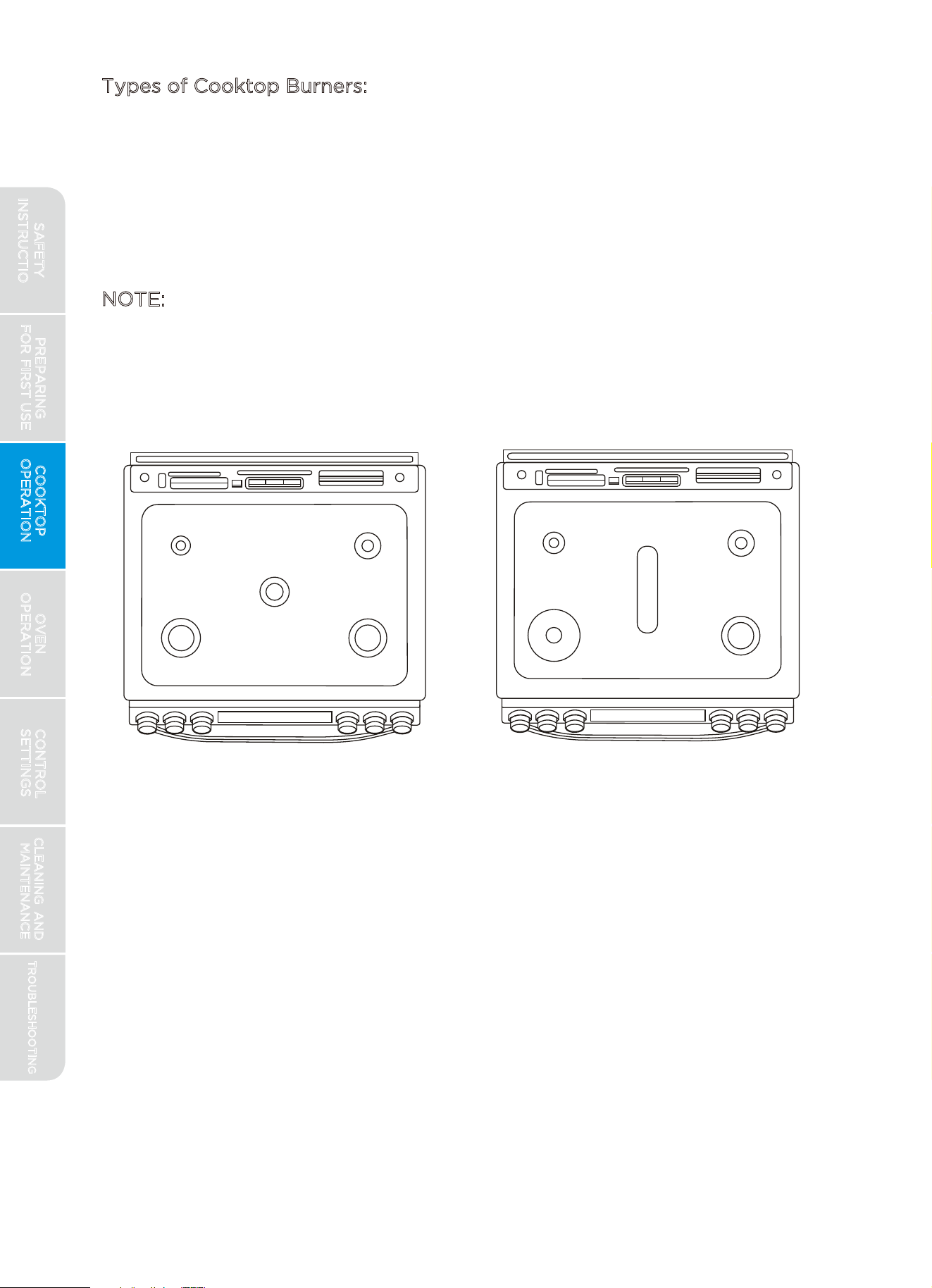
Types of Cooktop Burners:
All Midea ranges are provided with 5 cooktop burners. Some models may
include burners with multiple rings for greater cooking flexibility. See
diagrams below. (Images do not represent all possible configurations.)
See "Cooktop Burners" section under "Cleaning and Maintenance" for
proper burner position and alignment.
NOTE:
Higher powered burners are placed towards the front for higher
temperature or shorter duration cooking, such as boiling, searing, and pan
frying. Lower powered burners are placed towards the rear for lower
temperature or longer duration cooking, such as simmer or melting
chocolate.
Numeric Keypad
Input models
Control Input Knob
models
PREPARING
FOR FIRST USE
COOKTOP
OPERATION
OVEN
OPERATION
CONTROL
SETTINGS
TROUBLESHOOTING
CLEANING AND
MAINTENANCE
20
SAFETY
INSTRUCTIONS
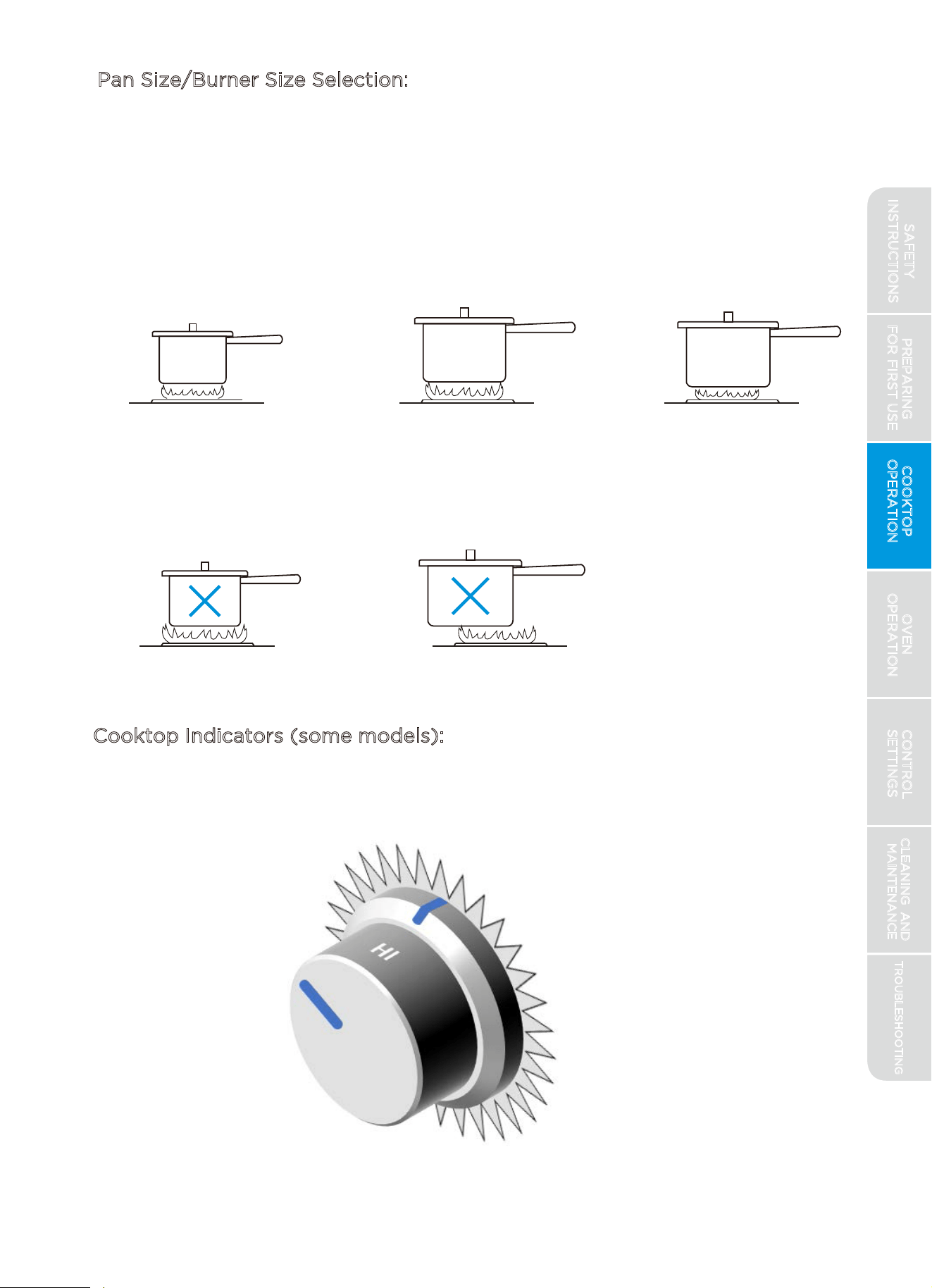
Pan Size/Burner Size Selection:
To minimize burn risk and maximize cooking efficiency, select cookware
and adjust burners so that flames do not extend beyond the edge of the
pan as indicated below:
Correct Selection:
Small Pan on Small Burner Large Pan on Large Burner
Large Pan on Small Burner
Pan Off-Center on Burner
Incorrect Selection:
Small Pan on Large Burner
Cooktop Indicators (some models):
Control Input Knob models include the additional feature of additional
illumination around the knob to indicate that the cooktop is in use. Only
the knobs that are currently in use will be illuminated.
Surface-On Indication by
Knob Backlighting
PREPARING
FOR FIRST USE
COOKTOP
OPERATION
OVEN
OPERATION
CONTROL
SETTINGS
TROUBLESHOOTING
CLEANING AND
MAINTENANCE
21
SAFETY
INSTRUCTIONS
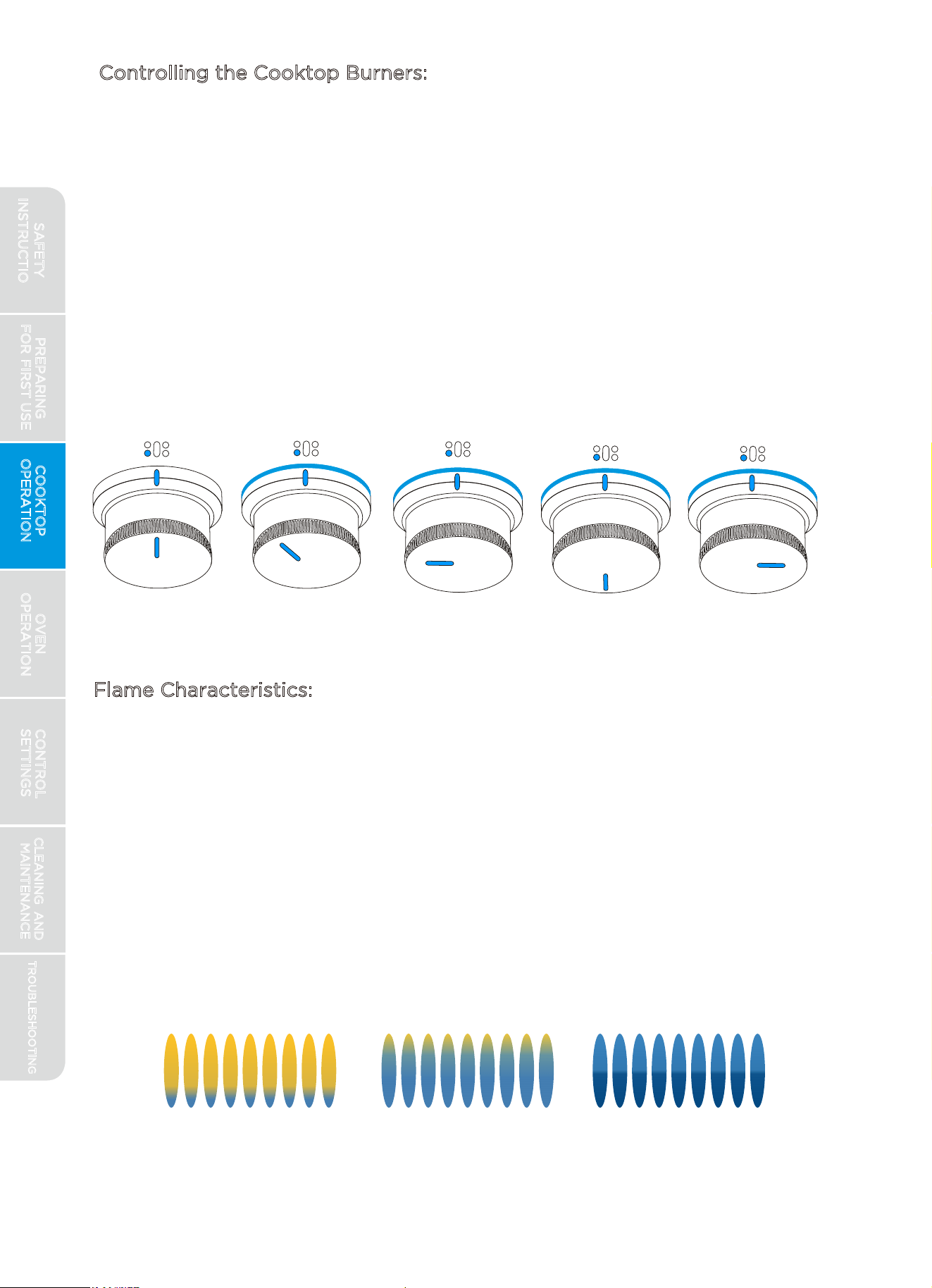
Controlling the Cooktop Burners:
To turn a cooktop burner on, push in on the control knob and turn left
(counter-clockwise) to the "LIGHT" position. Gas will flow and the igniters
on all burners will begin to spark. The small icon above the control knob
indicates the location of the burner being controlled. The various settings
(from OFF to HI) are located on the knob itself. After the burner ignites,
adjust to the desired heat setting by aligning the power level on the knob
to the indicator mark on the control panel. Most chefs will advise to
observe the flame, not the knob, while adjusting the burner setting. To turn
a burner off, simply rotate the control knob right (clockwise) to the OFF
position.
Flame Characteristics:
Natural Gas: Burner flames should be soft blue in color and stable with no
yellow tips, excessive noise, or fluttering. (Occasional yellow flicker is
acceptable.)
LP Gas (i.e. Propane): Burner flames should be blue in color, with some
yellow at outer edge.
If flames are completely or mostly yellow, don't light evenly around burner,
or are accompanied by excessive noise or fluttering, contact a qualified
service provider for repairs. Some yellow streaking is normal during the
initial startup. Allow unit to operate 4-5 minutes and re-evaluate before
calling for service.
OFF
LIGHT
HI
MED LO
Burner Control is
"LIGHT"
Burner Control is
"HI"
Burner Control is
"OFF"
Icon on Control Panel
indicating which Burner
the knob controls
Burner Control is
"MED"
Burner Control is
"LO"
Yellow Tips on
Outer Cones
Soft Blue Flames
Normal For Natural Gas
Yellow Flames
Call For Service
PREPARING
FOR FIRST USE
COOKTOP
OPERATION
OVEN
OPERATION
CONTROL
SETTINGS
TROUBLESHOOTING
CLEANING AND
MAINTENANCE
22
SAFETY
INSTRUCTIONS
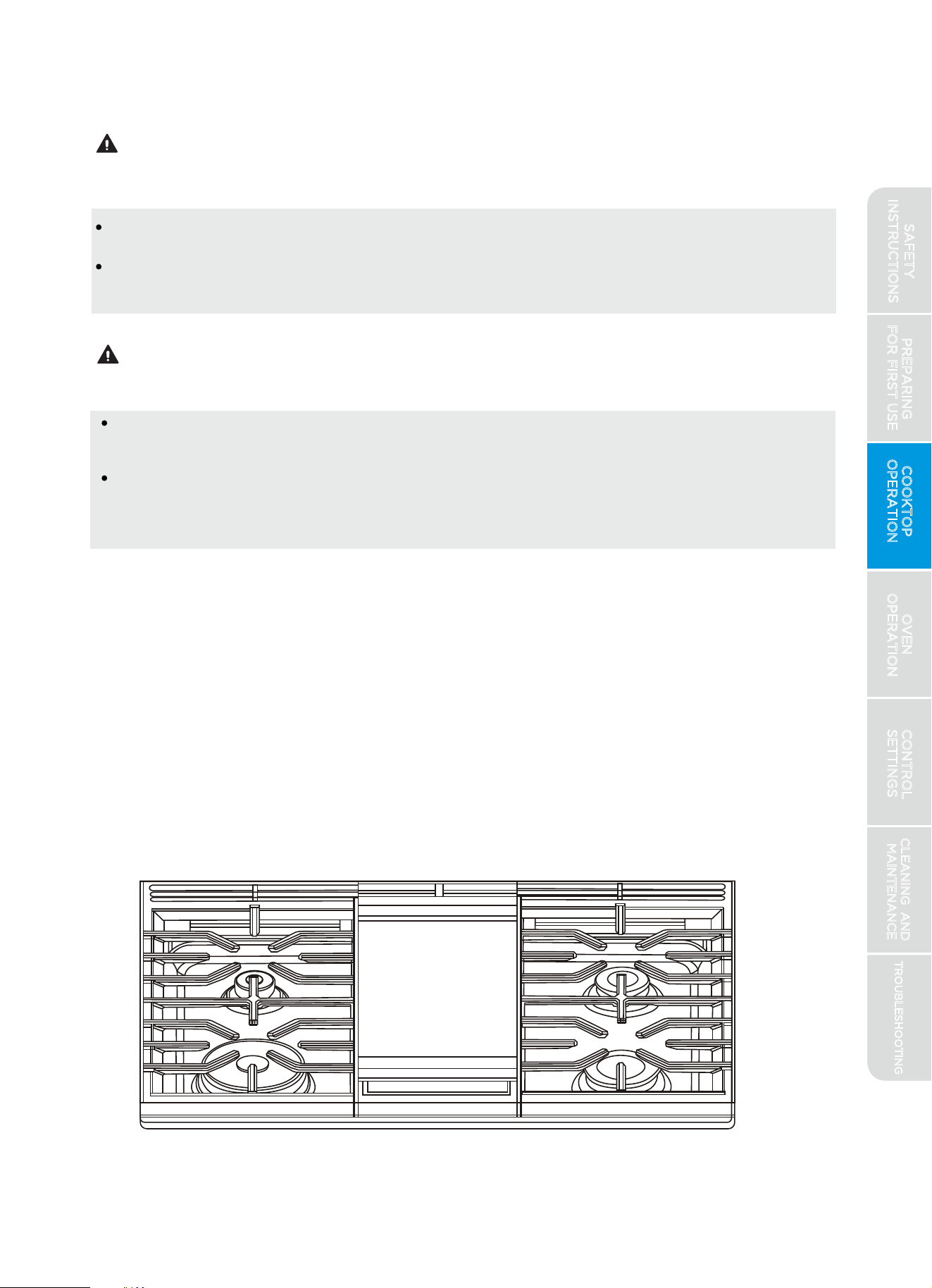
Griddle (some models):
Use care when cooking greasy foods. Spilled grease may result in fire.
Never place any items on the griddle when it is not in use. Heat from
surrounding burners can heat the griddle and may result in fire.
BURN HAZARD
Place and remove the griddle only when griddle is cool and all surface
burners are off.
Back of griddle may be hot due to oven vent location, even if cooktop has
not been in use. Always place and remove griddle using pot holders or
oven mitts.
The cast iron griddle provides an extra-large cooking surface for meats,
pancakes, and other foods usually prepared in a skillet. Before first use,
rinse with hot water and dry thoroughly. Prepare the surface with cooking
spray or other preferred cooking oil. The griddle can only be used over the
center oval burner of the cooktop. The griddle sits directly on top of the
center grate - there is no need to remove the center grate.
To use the griddle, operate the control knob the same as for any other
burner. Allow griddle to preheat approximately 10 minutes at medium
power setting before use. Adjust knob setting as necessary to obtain
desired results.
PREPARING
FOR FIRST USE
COOKTOP
OPERATION
OVEN
OPERATION
CONTROL
SETTINGS
TROUBLESHOOTING
CLEANING AND
MAINTENANCE
23
FIRE HAZARD
WARNING
CAUTION
SAFETY
INSTRUCTIONS
oonn--rreevveessiibbllee ccaasstt iirroonn ggrriiddddllee
In Case of Power Failure:
BURN HAZARD
Use extreme caution if lighting cooktop burners during power outage.
Keep hands away from flames by using fireplace matchsticks or grill
lighter with extended wand.
During a power failure, electronic ignition will not function. However,
cooktop burners may be operated if lit manually.
PREPARING
FOR FIRST USE
COOKTOP
OPERATION
OVEN
OPERATION
CONTROL
SETTINGS
TROUBLESHOOTING
CLEANING AND
MAINTENANCE
24
1.
2.
3.
Once lit, remove match/lighter and adjust knob to desired position.
Burner will continue to work as normal until turned off.
Directions:
With the knob in the "OFF" position, light a match or lighter and hold
flame near ports (openings around perimeter of burner top) beneath
burner cap. Keep hand away from path of flames.
Turn knob to the "LIGHT" position.
CAUTION
SAFETY
INSTRUCTIONS
OVEN OPERATION
FIRE, CARBON MONOXIDE HAZARD
Never place anything (aluminum foil, spill mat, baking stone, cookware,
etc.) on the bottom of the oven cavity. These items can trap heat or melt,
resulting in damage to the appliance and risk of electric shock, smoke, or
fire.
Never cover any slots, holes or passages in the oven bottom or cover an
entire rack with materials such as aluminum foil. Doing so blocks airflow
through the oven and may cause carbon monoxide poisoning.
If materials inside the oven should ignite, keep door closed, turn off the
appliance, and disconnect the circuit at the circuit breaker box. Wait for
the oven to cool before removing contents, cleaning oven, and restoring
power.
Cooktop grates direct vented air away from walls and cabinets. Do not
operate oven without cooktop grates in place.
BURN HAZARD
Always use pot holders or oven mitts when using the oven. Use only dry
pot holders. Moist or damp pot holders on hot surfaces may result in burns
from steam. Do not let pot holder touch oven burners. Do not use a towel
or other bulky cloth.
The oven is vented along the rear of the cooktop. When the oven is in use,
this area may get very hot. Do not block or cover the oven vent.
NOTE: FOR BEST EXPERIENCE
1.When the oven is used for the first time, the presence of a distinctive odor is
normal. Ensure your kitchen is well ventilated during this conditioning period.
2.Proper preheating is important for good results. Unless the recipe specifically
instructs differently, place food in the oven only after preheating is complete.
For best results, place food in immediately after preheat beep is sounded.
3.It is normal for certain amount of moisture to evaporate from the food
during any cooking process. The amount depends on the moisture content
of the food. The moisture may condense on any surface cooler than the
PREPARING
FOR FIRST USE
COOKTOP
OPERATION
OVEN
OPERATION
CONTROL
SETTINGS
TROUBLESHOOTING
CLEANING AND
MAINTENANCE
25
CAUTION
WARNING
SAFETY
INSTRUCTIONS
PREPARING
FOR FIRST USE
COOKTOP
OPERATION
OVEN
OPERATION
CONTROL
SETTINGS
TROUBLESHOOTING
CLEANING AND
MAINTENANCE
26
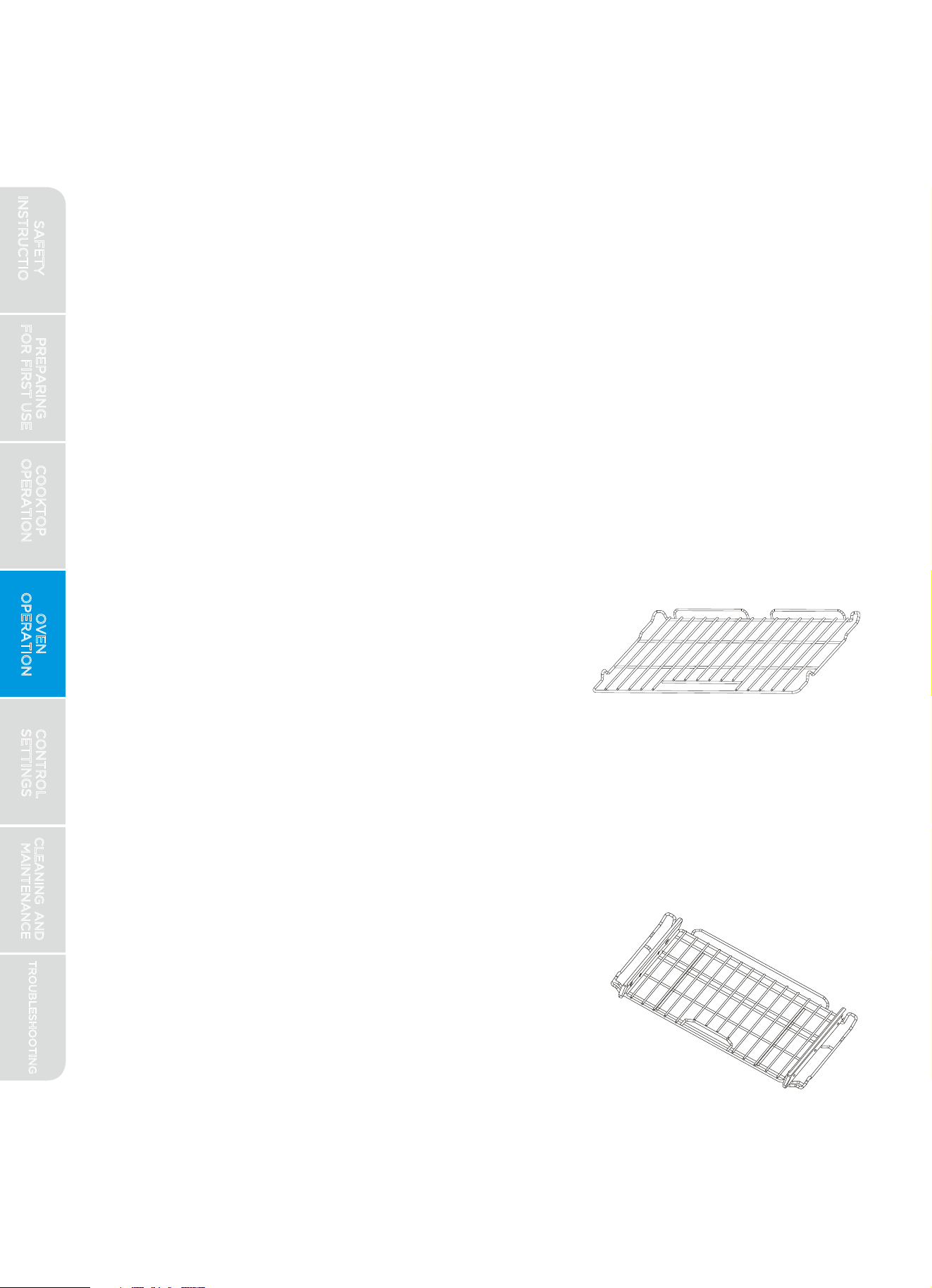
Extension Rack: Slides in and out of oven on ball
bearing slides, allowing heavier dishes to be
moved smoothly and easily. REMOVE DURING
SELF-CLEAN TO PREVENT DISCOLORATION
AND DAMAGE TO BALL BEARING SLIDES. If ball
bearing slides do not move smoothly, they can be
lubricated with graphite powder lubricant. Do
not lubricate with grease or oil.
Oven Racks:
Flat Rack: Versatile and low profile, each range is
supplied with one or more flat oven racks. Flat
racks slide in and out of oven on rack guides
formed into side of oven wall. Multiple racks can
be used simultaneously, if desired. REMOVE
DURING SELF-CLEAN TO PREVENT
DISCOLORATION. If racks do not move smoothly,
a thin application of vegetable oil can be applied
to edges of rack using the corner of a paper
towel to reduce friction. Apply vegetable oil then
wipe off any excess before use.
inside of the oven, such as the door trim or control panel. Steam or
moisture may appear at the oven vent - this is normal.
4.
5.
6.The various baking modes have a 12-hour time limit, after which the
control will automatically end the baking mode. Broil mode has a 1-hour
time limit. If desired, these modes can be restarted after the time limit
expires.
7.To catch drips/spill, place a cookie sheet on a separate rack below the food.
8.At altitudes greater than 3,000 feet, recipes may need to be adjusted to
achieve optimal results. Consult USDA or other trusted source for
recommended recipe alterations for high altitude baking.
Do not leave the door open any longer than necessary. If the door is left
open too long, the baking mode will be automatically cancelled.
If in operation, the convection fan will automatically shut off any time door
is opened.
SAFETY
INSTRUCTIONS
BURN HAZARD
Removing/Inserting Racks:
Always place oven racks in the desired location while oven is cool. If rack
must be moved while oven is hot, do not let pot holder contact hot oven
surfaces.
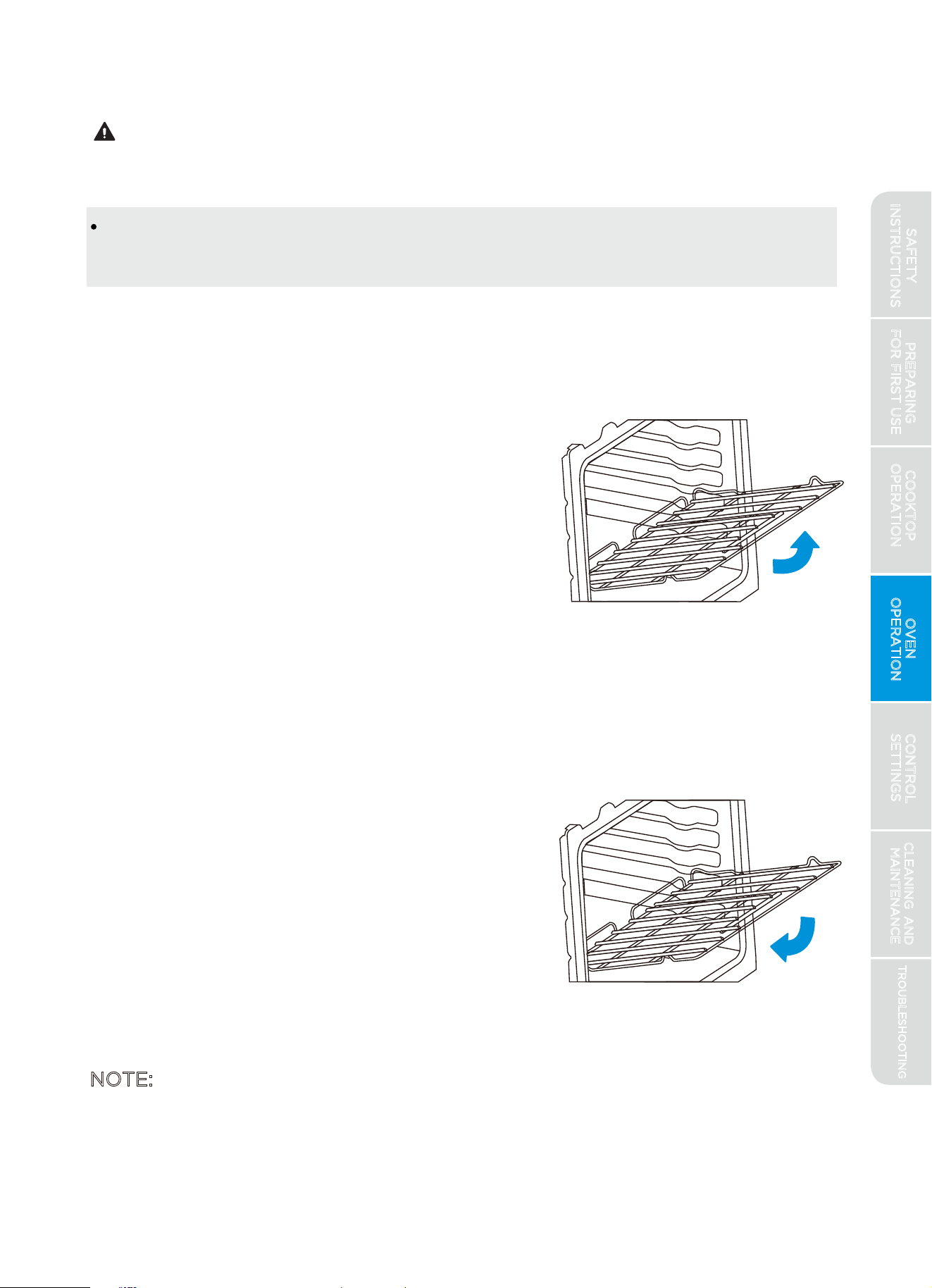
Removing Rack: Racks are designed to stop
before coming completely out of the oven
to reduce the risk of dropped or spilled foods.
To remove the rack:
1.
Remove all food and utensils from rack
2.
Grasp firmly from both sides
3.
Pull rack out until it contacts the stop
position
4.
Lift up on the front of the rack and continue
pulling outward
Inserting Rack: The rack can be installed in only
one direction. To insert the rack:
1.
Orient the rack so that the handle is towards
the front and the interlock features are on
the top side.
2.
Tip rack so that the front is several inches
higher than the back.
3.
Slip the interlock features under the stop
position on the rack guides formed in the
oven walls.
4.
Rotate rack down while pushing back to
NOTE: The extension rack frame inserts into the rack guides formed into the
oven wall in the same manner as the flat rack. Be careful to hold the
extension rack firmly so that the ball bearings do not slide during the
removal/insertion process.
PREPARING
FOR FIRST USE
COOKTOP
OPERATION
OVEN
OPERATION
CONTROL
SETTINGS
TROUBLESHOOTING
CLEANING AND
MAINTENANCE
27
complete the insertion process.
CAUTION
SAFETY
INSTRUCTIONS
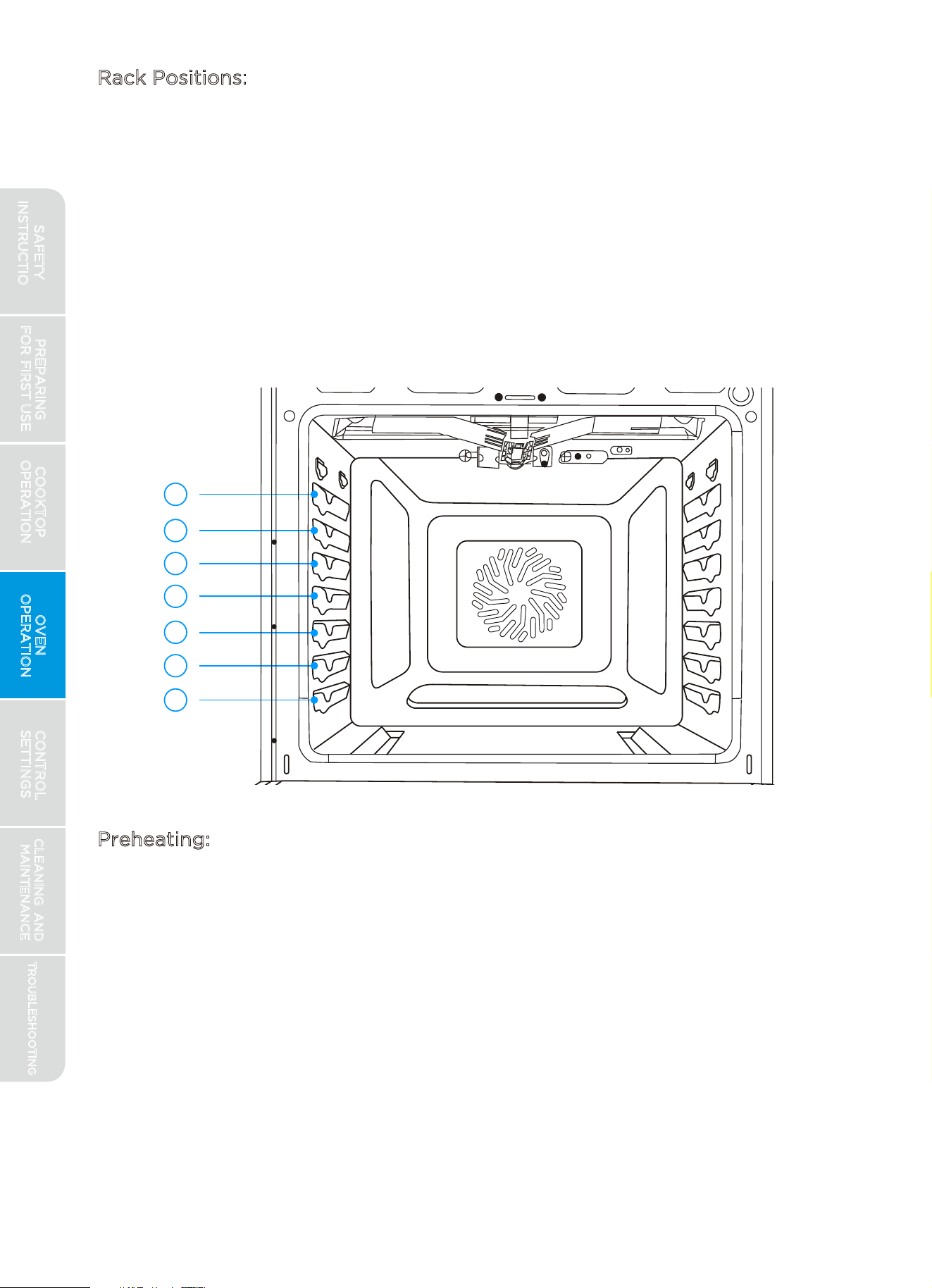
Rack Positions:
7
6
5
4
3
2
1
Preheating:
For oven modes that require preheating, the control will automatically enter
preheat mode after "START/ENTER" is pressed. Preheating is generally
desirable, although not absolutely necessary in all circumstances. Some
foods are more robust and may have acceptable results without preheating.
These foods include large pieces of meat (whole roasts, hams, or poultry)
where the total cooking time is much longer than the time required to
preheat. These foods also include frozen potato products and frozen
processed dinners that, by their nature and design, are more robust to
baking variations. More delicate foods, such breads (including cakes,
cookies, pastries, and pizzas), desserts, soufflés, etc. will likely not have
acceptable results without proper preheating.
PREPARING
FOR FIRST USE
COOKTOP
OPERATION
OVEN
OPERATION
CONTROL
SETTINGS
TROUBLESHOOTING
CLEANING AND
MAINTENANCE
28
For best performance, adjust rack so food is placed at the center of the
oven. For most foods this will be rack position #4. For larger foods like
roasts and turkey, move the rack position down to #3 or #2 to keep the
food centered in the oven. When using multiple racks simultaneously,
try to space the food out around the oven center (rack position #3 and
#5 for two racks). Broiling performs best with the food close to the broil
burner - typically rack position #6 or #7.
SAFETY
INSTRUCTIONS
If a baking mode (Bake, Convection Bake, Convection Roast, Pizza, etc.)
utilizes preheat, after "START/ENTER" is pressed, the temperature display
will show the current oven temperature. The display will continue to show
the oven temperature increasing until the set temperature is reached. Once
the set temperature is reached, the control will beep to alert the user that
preheat is complete.
Bake:
Designed for general baking recipes, "BAKE" applies heat from both above
and below to achieve exceptional baking performance. Works best for
small- and medium-sized foods that require only one rack position at the
center of the oven, such as casseroles, frozen dinners, single-layer cakes,
and individual racks of cookies.
Directions:
Press the "BAKE" button.
The control will default to 350°F (175°C). If desired, and depending on
your model, use either the numeric keypad or the available knob to
adjust the desired oven temperature.
Press the "START/ENTER" button or click the Control Input Knob
(if present).
Allow oven to preheat before placing food in oven. Higher
temperatures will take longer to preheat. Oven display will show oven
temperature as it increases. Control will beep when preheat is
complete.
Press "CLEAR/OFF" to exit.
Keep Warm (some models):
FOODBORNE ILLNESS HAZARD
PREPARING
FOR FIRST USE
COOKTOP
OPERATION
OVEN
OPERATION
CONTROL
SETTINGS
TROUBLESHOOTING
CLEANING AND
MAINTENANCE
29
5.
1.
2.
3.
4.
Bacteria may grow in food at temperatures below 140°F. Do not attempt
to cook food using the "KEEP WARM" mode. This mode is designed to
keep cooked foods warm, not to heat cold foods.
Designed for keeping hot foods hot. Cover dishes to prevent food from
drying out. For best results, do not use "KEEP WARM" for more than 2
hours.
WARNING
SAFETY
INSTRUCTIONS
Broil:
NOTE: FOR BEST EXPERIENCE
1.The broil burner is very powerful. Follow recipe directions and monitor food
closely
to reduce risk of burning food.
2.For broiling meat, it is recommended to use a broiling pan to allow grease
and juices to drain away from the meat. Do not line broiling pan with
aluminum foil, as this will prevent greases from draining properly.
3.This is a "closed-door broil" system. Broil will not operate with the door
open. If the door is left open, an alert will sound to close the door. If the
door is not closed, the broil mode will ultimately cancel itself.
Designed to provide similar results to grilling, "BROIL" is a method of cooking
that exposes food to direct radiant heat only from the broil burner at the top
of the oven. "BROIL" can be used to cook steaks or other foods where a
seared exterior is preferred. It can also be used in short durations to brown
tops of casseroles or melt cheese. "BROIL" performs best with food placed
closest to burner, typically at rack position #6 or #7, depending on the size
of the dish.
PREPARING
FOR FIRST USE
COOKTOP
OPERATION
OVEN
OPERATION
CONTROL
SETTINGS
TROUBLESHOOTING
CLEANING AND
MAINTENANCE
30
Directions (Control Input Knob models):
1. Press the "KEEP WARM" button.
2.
Press the "START/ENTER" button or click the Control Input Knob
(if present).
3.
Press "CLEAR/OFF" to exit.
Directions (Numeric Keypad Input models):
1. Press the "BAKE" button twice.
3.
Press "CLEAR/OFF" to exit.
2.Press the "START/ENTER" button or click the Control Input Knob
(if present).
SAFETY
INSTRUCTIONS
Directions:
Press the "BROIL" button.
The control will default to "high broil." To select "low broil," press the
"BROIL" button again or turn the Control Input Knob (if present).
Press the "START/ENTER" button or click the Control Input Knob
(if present).
Allow broil to operate for 5-10 minutes before placing food in the oven.
No preheat beep will sound.
Press "CLEAR/OFF" to exit.
Proof (some models):
Designed to use the oven lights to provide a gently warm environment for
the rising of bread or roll dough. In order to not kill the yeast in the dough,
this mode will not start if the oven temperature is too warm. If the mode will
not start, allow dough to rise on the kitchen counter. Generally, PROOF
performs best with food at rack position #4. After dough has risen as
desired, bake according to recipe directions.
Directions (Control Input Knob models):
Press the "PROOF" button.
Press the "START/ENTER" button or click the Control Input Knob (if
present).
Preheat is not required - place food in oven immediately.
Press "CLEAR/OFF" to exit.
Directions (Numeric Keypad Input models):
Press the "BAKE" button three times.
Press the "START/ENTER" button or click the Control Input Knob (if
present).
Preheat is not required - place food in oven immediately.
Press "CLEAR/OFF" to exit.
The word "PROOF" will be shown below the clock in the control display
when this mode is active.
PREPARING
FOR FIRST USE
COOKTOP
OPERATION
OVEN
OPERATION
CONTROL
SETTINGS
TROUBLESHOOTING
CLEANING AND
MAINTENANCE
31
5.
4.
1.
2.
3.
4.
1.
2.
3.
4.
1.
2.
3.
SAFETY
INSTRUCTIONS
Convection Bake:
4
2
Rack
Position
PREPARING
FOR FIRST USE
COOKTOP
OPERATION
OVEN
OPERATION
CONTROL
SETTINGS
TROUBLESHOOTING
CLEANING AND
MAINTENANCE
32
Directions:
1.
2.
3.
4.
5.
Press "CLEAR/OFF" to exit.
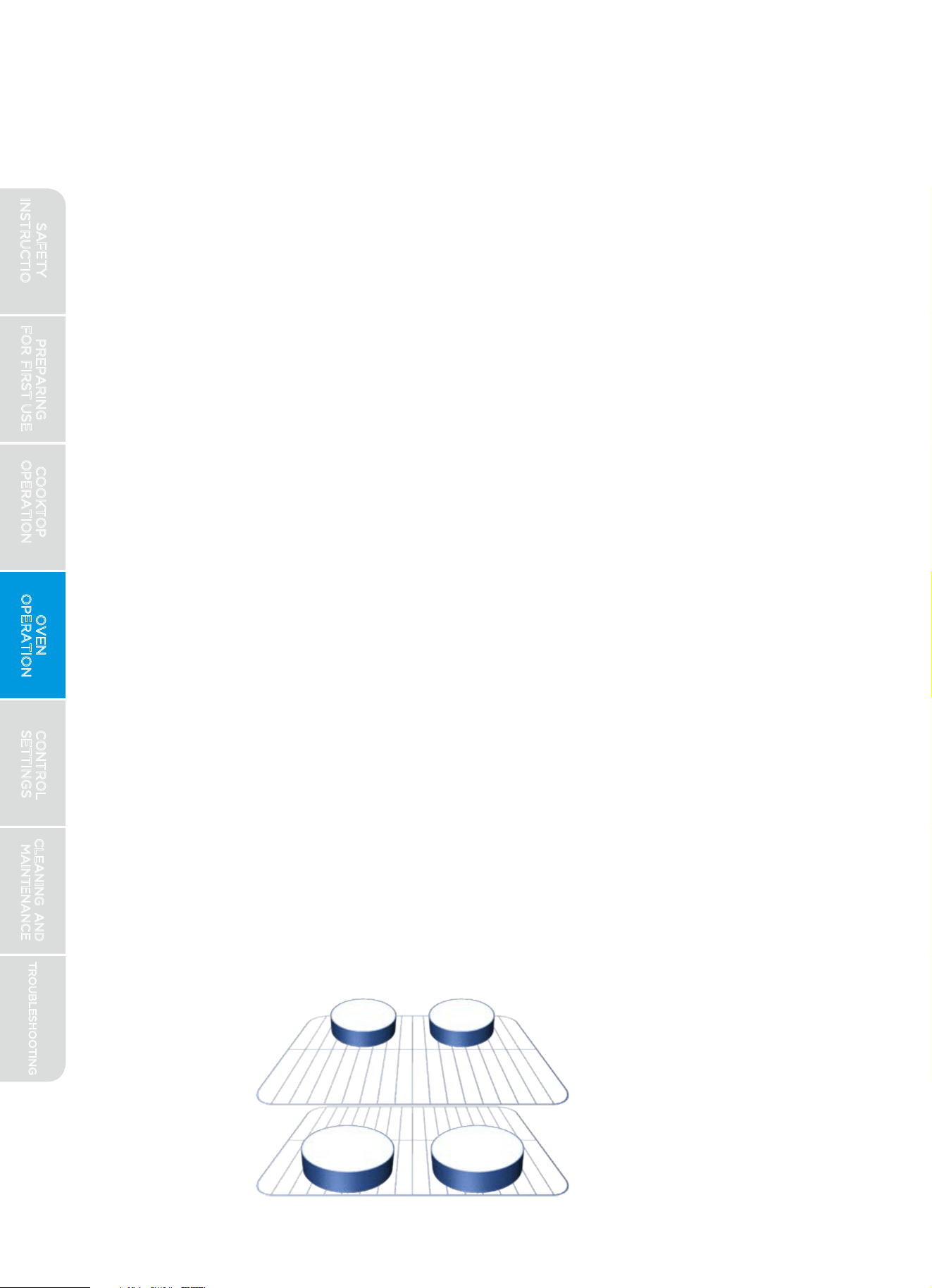
Special instructions for baking four cake layers simultaneously:
1.
Use convection bake mode
2.
Place racks at positions 2 and 4
3.
Allow oven to preheat before placing food in oven. Higher temperatures
will take longer to preheat. Oven display will show oven temperature as
it increases. Control will beep when preheat is complete.
Place layers on rack 4 towards the back of the oven, and layers on rack
2 towards the front of the oven so that one pan is not directly above
another.
4.
Press the "CONVECT BAKE" button.
The control will default to 350°F (175°C). If desired, and depending on
your model, use either the numeric keypad or the available knob to
adjust the desired oven temperature.
Press the "START/ENTER" button or click the Control Input Knob (if present).
Allow oven to preheat before placing food in oven. Higher temperatures
will take longer to preheat. Oven display will show oven temperature as
it increases. Control will beep when preheat is complete.
Convection baking uses a fan inside the oven to circulate the air. This provides
a better distribution of the oven heat and a more efficient baking process.
Heat is applied to the oven from above, below, and (on some models) behind.
CONVECT BAKE is designed for baking recipes that require the use of multiple
racks, such as 4-layer white cakes, multiple racks of cookies, or baking multiple
recipes simultaneously. CONVECT BAKE performs best with racks spaced
evenly out from center of oven (see section on rack positions).
SAFETY
INSTRUCTIONS
SAFETY DEFINITIONS
5.
8.
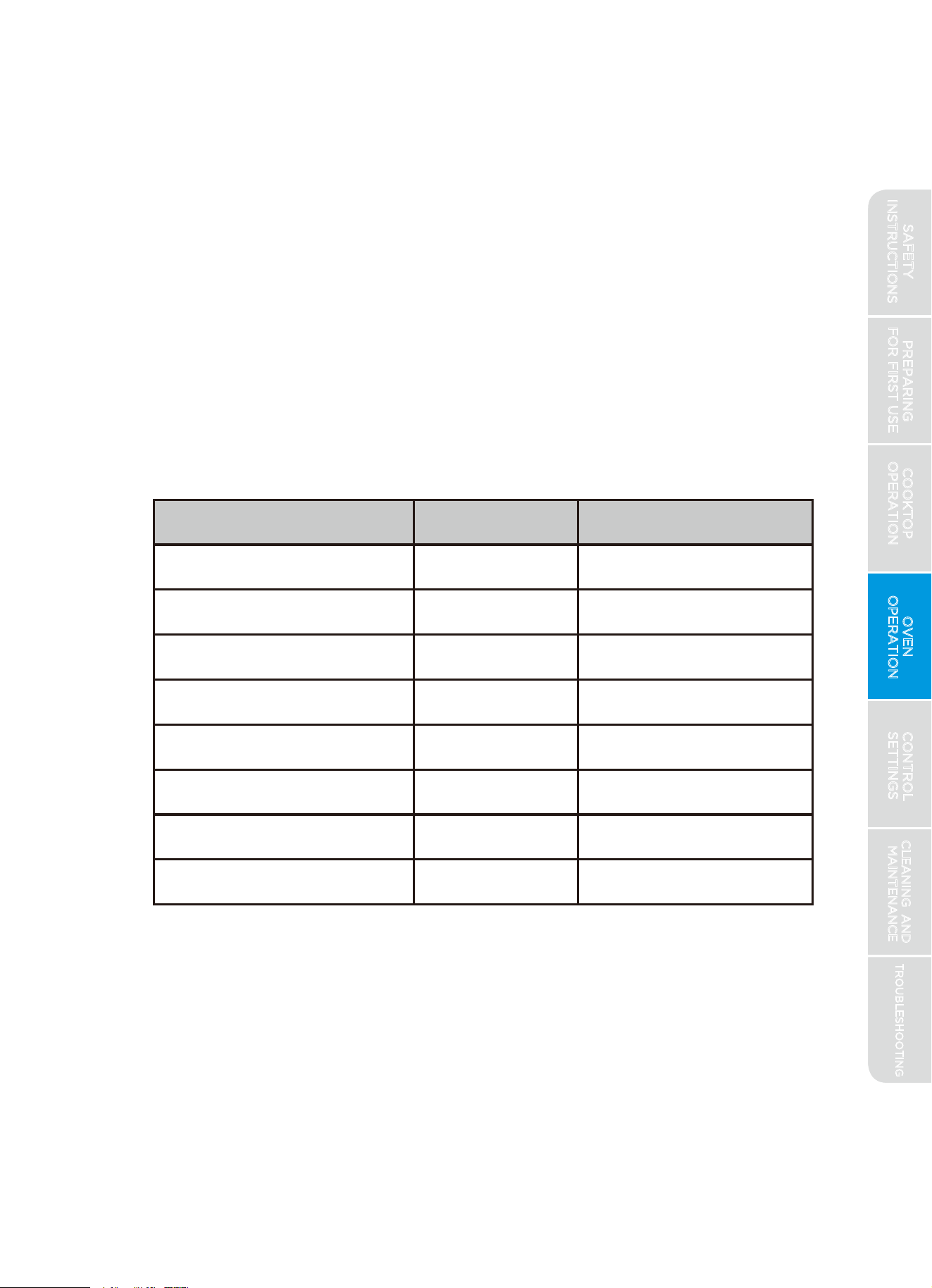
Special instructions for Air-Frying and getting crispy foods from your oven:
4.
6.
7.
1.
2.
3.
Place oven rack at position 5 (closer to broiler)
Press “CONVECT BAKE” button.
The control will default to 350 F(175℃). Adjust temperature based on
the food to cook (see attached chart).
Press the "START/ENTER" button or click the Control Input Knob (if
present).
Allow oven to preheat before placing food in oven. Highe
r temperatures
will take longer to preheat. Oven display will show oven temperature as
it increases. Control will beep when preheat is complete.
Use any flat, non-stick cookie sheet.
Adjust time, temperature or rack position based on your preferences.
Place food inside the oven and cook per recommended time. (see
chart below).
Foods recommended Temp[℉] Cook time[min]
Frozen Fries 475 18
Fresh Fries* 475 22
Frozen Wings 450 40
Fresh Wings 450 30
Frozen Mozarella Sticks 475 6
Frozen Chicken Nuggets 440 13
Brussel Sprouts 440 15
Breaded Chicken Breasts 400 30
**NOTE
For more even and crispy results, flip foods half way through the
cooking time.
PREPARING
FOR FIRST USE
COOKTOP
OPERATION
OVEN
OPERATION
CONTROL
SETTINGS
TROUBLESHOOTING
CLEANING AND
MAINTENANCE
33
Convection Roast (some models):
Convection roasting uses a fan inside the oven to circulate the air. This
provides a better distribution of the oven heat and a more efficient
baking process. Heat is applied to the oven from above, below, and (on
some models) behind. CONVECT ROAST is designed for cooking large
pieces of meat, such as roast, ham, turkey, or chicken, providing crisp skin
on poultry and better browning on roasts.
SAFETY
INSTRUCTIONS
TROUBLESHOOTING
PREPARING
FOR FIRST USE
COOKTOP
OPERATION
OVEN
OPERATION
CONTROL
SETTINGS
CLEANING AND
MAINTENANCE
3
4
Directions:
1.
2.
5.
Press "CLEAR/OFF" to exit.
Directions:
1.
2.
3.
4.
5.
Press the "CONVECT ROAST" button.
The control will default to 350°F (175°C). If desired, and depending on
your model, use either the numeric keypad or the available knob to
adjust the desired oven temperature.
Allow oven to preheat before placing food in oven. Higher temperatures
will take longer to preheat. Oven display will show oven temperature as
it increases. Control will beep when preheat is complete.
3.
4.
Pizza (some models):
Press the "PIZZA" button.
The control will default to 350°F (175°C). If desired, and depending on
your model, use ei ther the numeric key pad or the available knob to
adjust the desired oven temperature.
Press "CLEAR/OFF" to exit.
This mode uses customized heating algorithm to optimize baking
performance for fresh pizza. Fresh pizza can be homemade or from
purchased many grocery stores or specialty shops.
Press the "START/ENTER" button or click the Control Input Knob (if present).
Press the "START/ENTER" button or click the Control Input Knob (if present).
Allow oven to preheat before placing food in oven. Higher temperatures
will take longer to preheat. Oven display will show oven temperature as it
increases. Control will beep when preheat is complete.
Delay (some models):
FOODBORNE ILLNESS HAZARD
WARNING
Designed to allow user to delay the start of a baking operation until a specified
time of day. Works only with "BAKE," "KEEP WARM," "CONV BAKE," "CONV
ROAST," "PROOF," "SELF-CLEAN," and "STEAM-CLEAN." (Does NOT work
with "PIZZA" or "BROIL.") Once "DELAY" has been set, it cannot be modified
Foods that spoil easily, such as milk, eggs, fish, stuffing, poultry, and pork,
should not be allowed to sit for more than 1 hour before cooking. Spoilage
may occur sooner if oven is warm.
SAFETY
INSTRUCTIONS
Directions:
35
- oven operation must be cancelled and restarted from the beginning to set
a different "DELAY" value. "DELAY" cannot be set for more than 12 hours in
advance.
Select oven baking mode by pressing the appropriate button (i.e. "BAKE,"
"CONV BAKE," etc.)
Press the "DELAY" button.
Clock will begin to flash, indicating that a time of day to start the oven must
be entered. Enter the time of day when the oven is to begin operation and
press the"START/ENTER" button or click the Control Input Knob (if present).
Place food in the oven.
Display will alternate between the current time of day and the time when the
oven will turn on. Also, the words "DELAY START" will be shown above the
clock in the control display when this mode is active.
1.
4.
5.
2.
3.
Designed to allow user to end oven operation after a specified time. Works
only with "BAKE," "KEEP WARM," "CONV BAKE," or "CONV ROAST." Once a
"COOK TIME" has
been set, it cannot be modified - baking mode must be
cancelled and restarted from the beginning to set a different "COOK TIME."
Duration cannot be set for longer than 12 hours. Can be used in conjunction
with "DELAY" feature - set "DELAY" feature first (see above), and then set
"COOK TIME."
Cook Time (some models):
TROUBLESHOOTING
PREPARING
FOR FIRST USE
COOKTOP
OPERATION
OVEN
OPERATION
CONTROL
SETTINGS
CLEANING AND
MAINTENANCE
Directions:
6.
When the start time is reached, a signal will alert user that oven is starting.
Upon starting, the display will convert to show the normal information for
the bake mode selected.
1.
Start oven operation normally as described above.
2.
Press the "COOK TIME" button.
3.
4.
5.
Clock will display "00:00" indicating that a time duration must be entered.
Enter time in hours and minutes (hh:mm) and press the "START/ENTER"
button or click the Control Input Knob (if present).
Clock will begin to count down. When "00:00" is reached, the display will
flash and sound an alert to indicate the bake mode has ended. Oven will
either turn off or revert to "KEEP WARM" mode, depending on the settings.
(See Control Settings section of this manual for instructions on changing
settings.)
Press "CLEAR/OFF" to clear the signal or to exit the timed bake early.
SAFETY
INSTRUCTIONS
Probe (some models):
FOODBORNE ILLNESS & BURN HAZARDS
Consuming undercooked food can result in foodborne illness. Use probe
feature only according to the following instructions to ensure all portions
of the food reach minimum safe cooking temperatures. Consult reputable
government sources, such as USDA, FDA, or CDC, for recommended safe
minimum cooking temperatures.
Check the internal temperature at multiple locations with a food
thermometer after cooking to ensure that all portions of the food have
reached the minimum safe internal temperature for that food.
If oven has been preheated, use oven mitts to open the receptacle and
insert probe to avoid burn injury.
Use only the probe supplied with your oven - do not use any accessories
not specifically designed to work with your appliance.
Designed to work in conjunction with "BAKE," "CONVECT BAKE," or
"CONVECT ROAST," the oven probe supplied with your oven can monitor
the internal food temperature and turn off the oven when the food reaches
the desired temperature. Some foods, particularly small or thin items, are
not suited for cooking with the probe due to their size or shape. Position
rack at optimal position prior to preheating or initiating the "PROBE" function.
PREPARING
FOR FIRST USE
COOKTOP
OPERATION
OVEN
OPERATION
CONTROL
SETTINGS
TROUBLESHOOTING
CLEANING AND
MAINTENANCE
36
Directions:
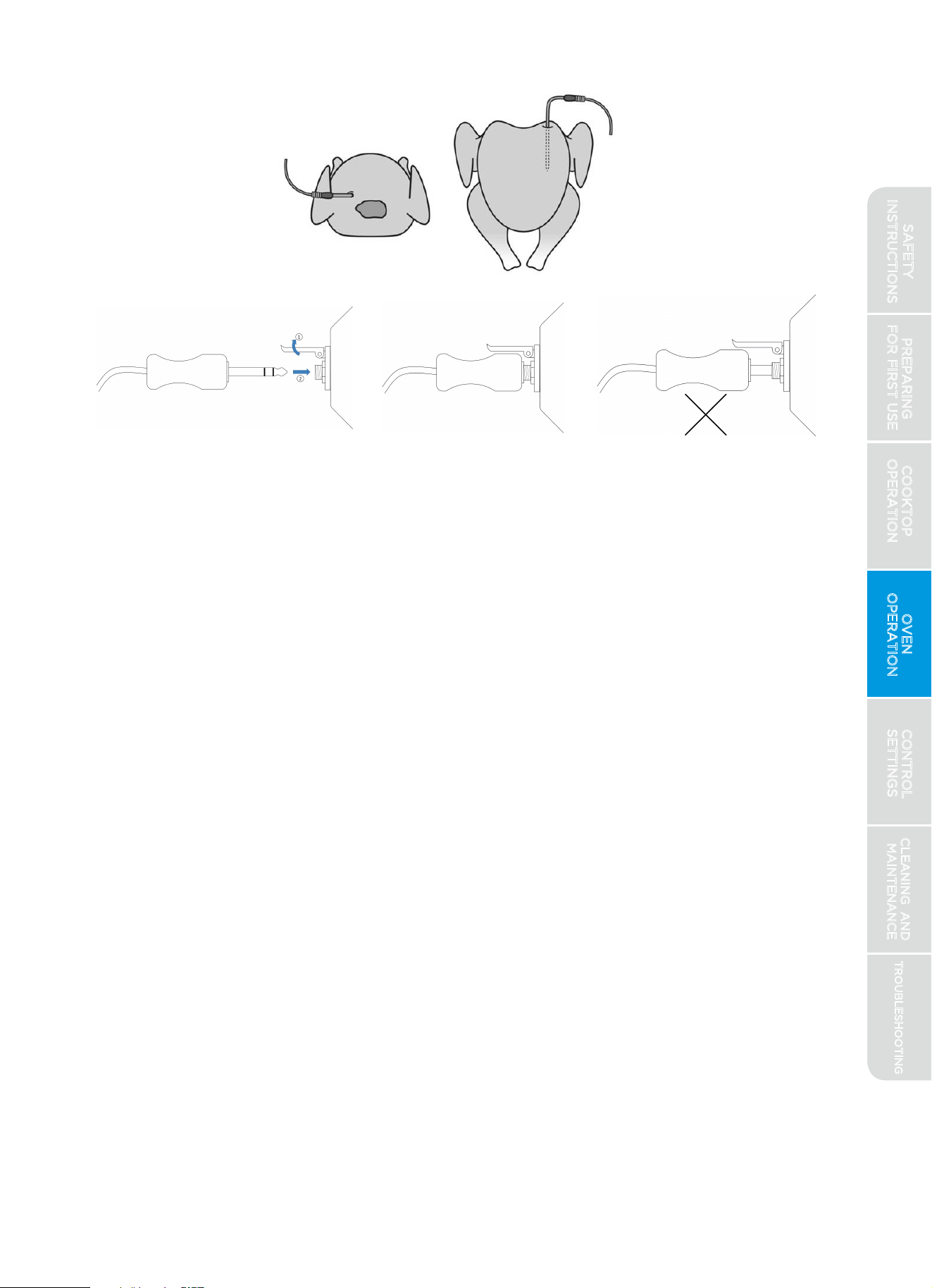
1.Place meat in an appropriate baking dish or pan. Insert meat probe into
meat. Use only the probe provided with your appliance. To avoid damage
to the probe, meat should be completely defrosted prior to inserting probe.
2)For best results, insert at a point that allows as much of the probe to
be inserted into the food as possible.
3)The probe should not touch bone, fat, or gristle.
2.Place baking dish into oven, plug probe into receptacle, and close the door.
Preheating is not required.
1)
Position probe so that the tip is in the approximate center of the
thickest part of the food. For whole poultry, insert the probe into the
thickest part of the breast.
WARNING
SAFETY
INSTRUCTIONS
5.While the probe mode is in operation, the display will alternate between
the oven set temperature and the probe temperature reading.
6.
7.
Modifying the probe temperature:
1.
2.On Numeric Keypad Input models, the desired food temperature cannot
be modified. The bake mode must be ended by pressing the "CLEAR/OFF"
key and re-entering the bake mode and desired food temperature as
described above.
Press "CLEAR/OFF" to clear the signal or to exit the probe bake mode early.
On Control Input Knob models with a separate "PROBE" key on the oven
control, pressing this key allows user to change the desired food
temperature at which the bake cycle will end.
3.Select the baking mode ("BAKE," "CONV BAKE," or "CONV ROAST"),
select oven temperature, and press the "START/ENTER" button or click
the Control Input Knob (if present).
Once the oven probe reaches the desired temperature, the display will
flash and sound an alert to indicate the bake mode has ended. Oven will
either turn off or revert to "KEEP WARM" mode, depending on the settings.
(See Control Settings section of this manual for instructions on changing
settings.)
flash, indicating that the desired food temperature is to be set next. Adjust
food temperature to the desired value and press the "START/ENTER"
button or click the Control Input Knob (if present).
PREPARING
FOR FIRST USE
COOKTOP
OPERATION
OVEN
OPERATION
CONTROL
SETTINGS
TROUBLESHOOTING
CLEANING AND
MAINTENANCE
37
4.Once oven temperature has been set, the blue text and probe icon will
SAFETY
INSTRUCTIONS
Sabbath Mode:
Designed for use on Jewish Sabbath and holidays, this mode
has been certified to comply with the standards set forth by
Star-K. For further assistance, guidelines for proper usage,
and a complete list of models with the Sabbath feature,
please visit http://www.star-k.org.
When in Sabbath Mode, the oven operation may be controlled as described
below, however audible signals will not sound, the clock is disabled, oven
lights are disabled, and changes to the display may be delayed from 30 to
60 seconds. (There is no need to remove oven lightbulbs during Sabbath
Mode.) The oven will be allowed to operate indefinitely until Sabbath Mode
is exited, overriding the factory 12-hour default maximum continuous oven
operation. Baking during Sabbath Mode is a two-step process; first the
Sabbath mode must be selected and then the bake mode must be set.
Entering Sabbath Mode:
1.Select the "SETTINGS" button, select the option, and turn this
2.A single bracket "]" will appear in the display, indicating that Sabbath
Mode is active.
Controlling the Oven:
1.During Sabbath Mode, the function of the buttons on the control are
modified to perform the functions described in the diagrams below.
2.For continuous baking operation, select the button corresponding to the
PREPARING
FOR FIRST USE
COOKTOP
OPERATION
OVEN
OPERATION
CONTROL
SETTINGS
TROUBLESHOOTING
CLEANING AND
MAINTENANCE
38
setting to "ON." See Control Settings section of this manual for
instructions on changing settings.
3.
After having pressed the "START/ENTER" button, a random delay
For a timed baking operation, select the button corresponding to the
desired oven temperature, then select the button corresponding with the
operating time, then press the "START/ENTER" button.
4.
between 30 and 60 seconds will
pass, and a second bracket "] [" will
appear in the display, indicating that the oven has started baking.
SAFETY
INSTRUCTIONS
desired oven temperature, then press the "START/ENTER" button.
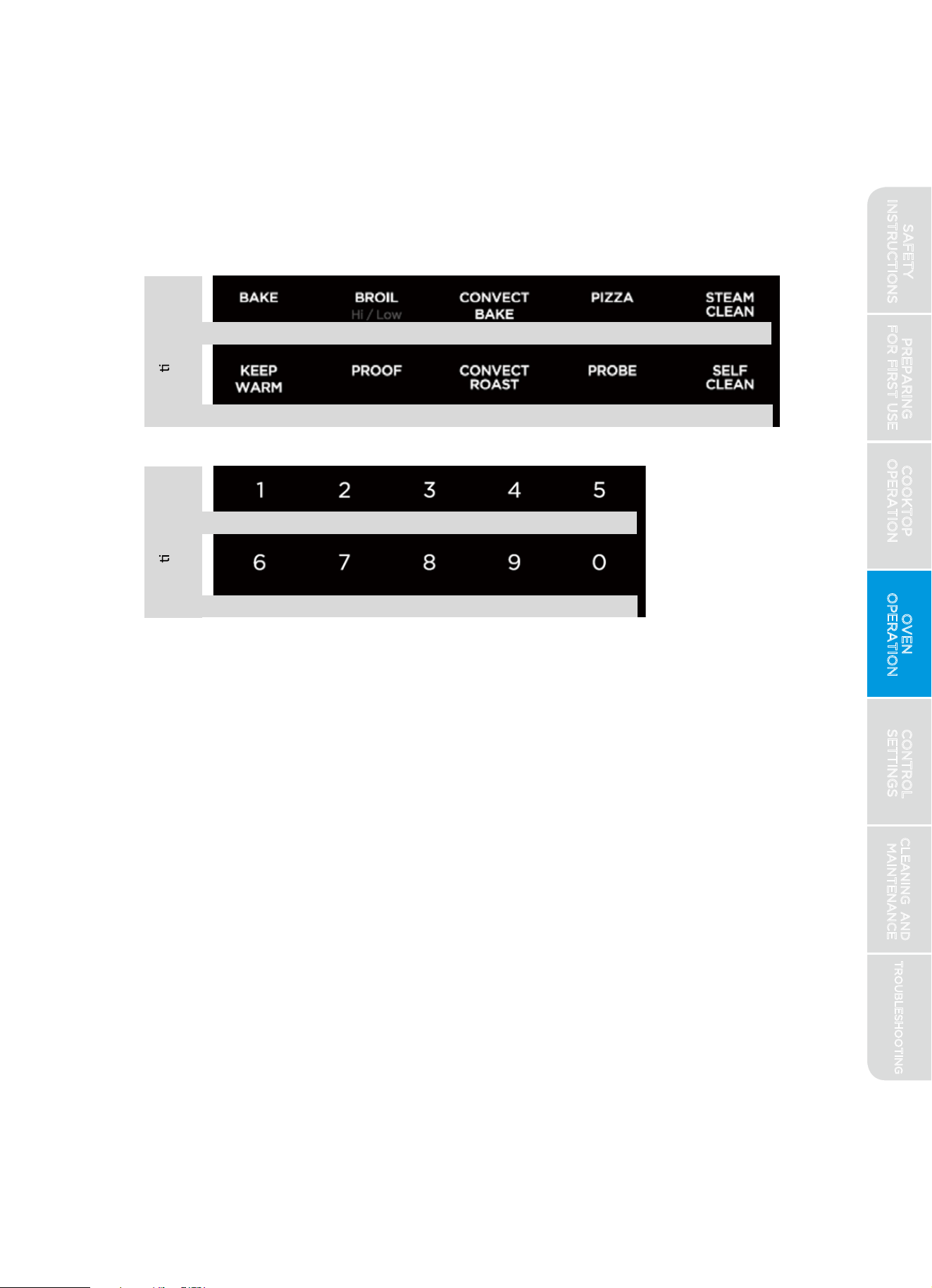
5.Temperature can be adjusted at any time by pressing the button
corresponding to the desired oven temperature, then pressing the
"START /ENTER" button.
6.Press the "CLEAR/OFF" button to cancel any baking operation in progress.
After a random delay between 30 and 60 seconds, the display will return
to a single bracket "]".
30 minutes 60 minutes 90 minutes 3 hours
Exiting Sabbath Mode:
1.Quickly press the "SETTINGS" button three times to reopen the settings menu.
2.Locate the Sabbath Mode setting, and change this setting to "OFF."
NOTE: If a power outage occurs while in Sabbath Mode, when power is
restored the appliance will return to Sabbath Mode, but it will not resume
any baking operations that may have been in progress.
PREPARING
FOR FIRST USE
COOKTOP
OPERATION
OVEN
OPERATION
CONTROL
SETTINGS
TROUBLESHOOTING
CLEANING AND
MAINTENANCE
39
Func on During
Sabbath Mode:
Func on During
Sabbath Mode:
Control Input Knob Models
Bak
e 200F Bake 250F Bake 300F Bake 350F Bake 400F
2 hours 3 hours 4 hours 5 hours
Bake 200F Bake 250F Bake 300F Bake 350F Bake 400F
90 minutes 2 hours 3 hours 4 hours 5 hours
90 minutes
Numeric Keypad Input Models
SAFETY
INSTRUCTIONS
Steam-Clean (some models):
BURN HAZARD
Oven surfaces - especially oven bottom - may be hot. Use caution to avoid
contact with hot surfaces.
Hot surfaces may create hot steam in wet sponge or cloth while cleaning.
If steam is evident when wiping out oven, wait until oven has cooled slightly.
Designed to generate steam and gently warm the oven surfaces to loosen
grease and light soils.
PREPARING
FOR FIRST USE
COOKTOP
OPERATION
OVEN
OPERATION
CONTROL
SETTINGS
TROUBLESHOOTING
CLEANING AND
MAINTENANCE
40
Directions:
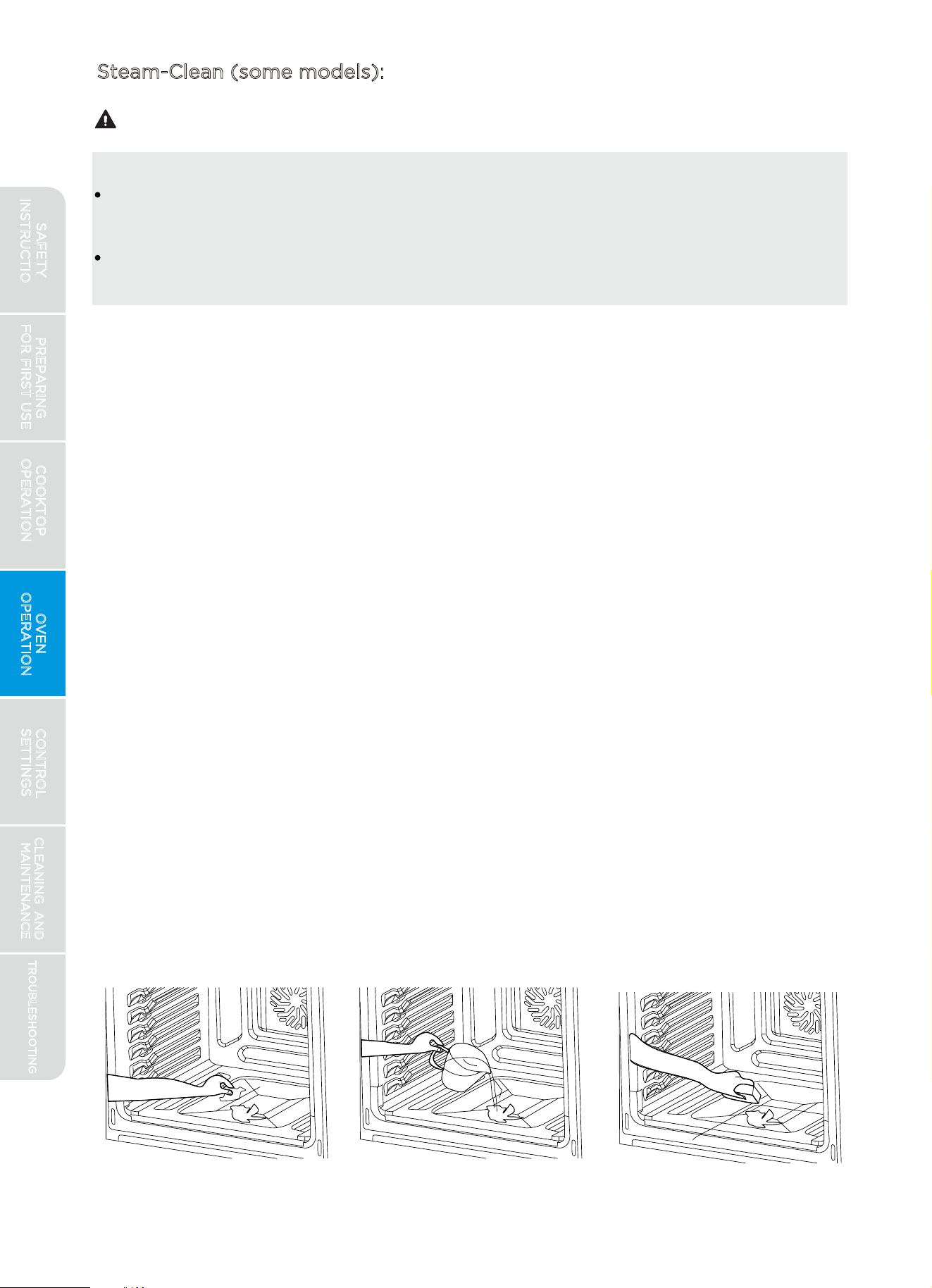
1.
Start with oven at room temperature.
2.
Remove all items from oven, including oven racks.
3.
4.
5.
6.
For Control Input Knob models, press "STEAM-CLEAN" button. For Numeric
Keypad Input models, press "CLEAN" button once.
7.
Press the "START/ENTER" button or click the Control Input Knob (if present).
8.
9.
10.
For improved softening of tough stains, spray inside surfaces with water
spray bottle or wipe surfaces with a wet sponge before starting.
Pour 1 cup (8 oz.) of water in the center bottom of the oven and close
the door.
After steam-clean cycle is complete, soak up any remaining water from
oven bottom and wipe down surfaces within oven with soft, damp,
non-abrasive sponge or cloth.
Press "CLEAR/OFF" to exit at any time.
Wipe out any large spills or excess debris prior to starting steam-clean.
Scrape off and remove any burnt-on debris with a stiff plastic utensil
(hard plastic spatula, plastic paint scraper, old credit card, etc.)
Door does not lock during steam clean – do not open door until
steam clean cycle has fully completed.
CAUTION
SAFETY
INSTRUCTIONS
FIRE & BURN HAZARDS
Read and follow instructions in the "Self-Clean Hazards" section at the
beginning of this manual before using self-clean.
NOTE: FOR BEST EXPERIENCE
1.
Due to the high temperatures generated, it may be preferable to delay
using the self-clean feature until the weather is colder to avoid
unnecessarily burdening the home air conditioning system.
2.
Your oven can be set to operate self-clean for 3, 4, or 5 hours. This time
does not include the time required for the oven to cool down and unlock.
(Allow an addition 60 to 90 minutes for door to unlock.)
3.
Shorter times use less energy, but longer times generally provide more
thorough cleaning. To conserve energy, use shorter times for light to
moderate soiling, and use longer times only for heavy soiling.
Designed to generate very high oven temperatures that are capable of
reducing stubborn oven soils to ash that can be easily wiped out after
the oven has cooled.
PREPARING
FOR FIRST USE
COOKTOP
OPERATION
OVEN
OPERATION
CONTROL
SETTINGS
TROUBLESHOOTING
CLEANING AND
MAINTENANCE
41
Self-Clean:
Directions:
1.
Remove all items from oven, including oven racks.
2.
Wipe out any large spills or excess debris prior to starting self-clean.
3.
For Control Input Knob models, press "SELF-CLEAN" button. For Numeric
Keypad Input models, press "CLEAN" button TWICE.
4.
Select the number of hours you wish self-clean to operate and press the
"START/ENTER" button or click the Control Input Knob (if present).
5.
Oven door will lock while self-clean is performed.
6.
After oven has unlocked and cooled completely, wipe out any ashy residue
with a damp, non-abrasive sponge or cloth.
7.
Press "CLEAR/OFF" to exit at any time. If self-clean is cancelled early, the
oven will remain locked until it has cooled sufficiently.
WARNING
SAFETY
INSTRUCTIONS
Control Lock:
Allows user to disable the buttons on the control to prevent accidental
operation of the oven from pets or children, or while cleaning controls.
For safety reasons, the "CLEAR/OFF" button is never disabled. CONTROL
LOCK can be enabled after a baking mode has been started.
Directions: Hold "CONTROL LOCK" button for 3 seconds to activate or
deactivate this feature.
PREPARING
FOR FIRST USE
COOKTOP
OPERATION
OVEN
OPERATION
CONTROL
SETTINGS
TROUBLESHOOTING
CLEANING AND
MAINTENANCE
42
Icon to turn on WiFi
2.
3. Icon is flashing quickly: WiFi is in the process of connecting to your home
network. Follow app instructions.
4. Icon is solid: WiFi has successfully connected to your home network, and
the range can now be controlled via the MSmartLife app.
(Remote Operation):
Allows use of most oven functions using a connected smart device, such as
smart phone or tablet. Remote operation has two modes: Manual and Auto
Recipe. Manual mode allows you to turn on/off selected oven operations
manually using a smart device. Auto Recipe mode allows you to program a
series of oven operations that will sequence and end automatically
according to the settings selected.
Provides the ability to monitor oven and cooktop operation, and control
selected oven functions. Follow the instructions in the app for more details.
must be enabled
at the range control before remote operation can be used.
See app connection
instructions in the "Preparing for First Use" section in this
manual. The connected icon in the display section (located left of the
clock) will indicate your connection status and whether remote operation is
enabled:
1. Icon is off: WiFi has not been turned on. Press the
capability
Icon is flashing slowly: WiFi has been turned on, but it is not connected.
Follow the instructions under “Preparing for First Use” in this manual.
Directions: Simply press the button to activate or deactivate the WiFi
functionality. To disable remote operation from smart devices, deactivate the
WiFi feature.
SAFETY
INSTRUCTIONS
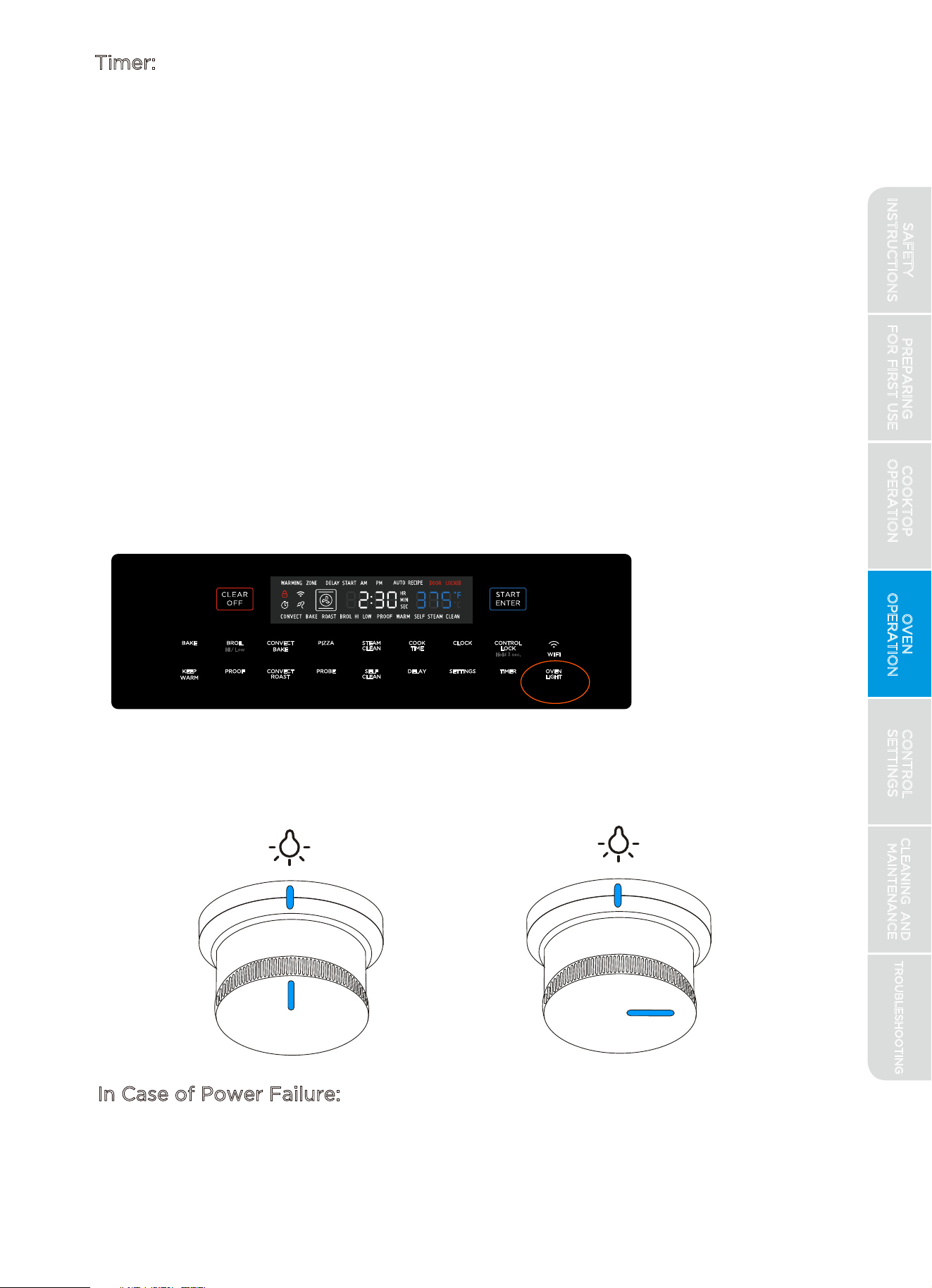
Timer:
Midea ovens come equipped with a built-in kitchen timer function for your
convenience.
Oven Light:
Controls the oven lights.
Directions (Control Input Knob models):
Press the "OVEN LIGHT" button to cycle oven light on/off
Directions (Numeric Keypad Input models):
Use the "OVEN LIGHT" knob to the right of the control to turn oven
light on/off
OFF
ON
In Case of Power Failure:
During a power failure, the oven is inoperable and no attempt should be
made to operate it.
PREPARING
FOR FIRST USE
COOKTOP
OPERATION
OVEN
OPERATION
CONTROL
SETTINGS
TROUBLESHOOTING
CLEANING AND
MAINTENANCE
43
Directions:
1.
Press "TIMER" button.
2.
Clock will display "00:00". Enter time in hours and minutes (hh:mm) and
press the "START/ENTER" button or click the Control Input Knob (if present).
3.
Clock will begin to count down. When "00:00" is reached, timer will signal.
4.
Cancel or clear the timer function by pressing the "TIMER" button.
("CLEAR/OFF" is reserved for canceling baking modes only.)
1.
1.
SAFETY
INSTRUCTIONS
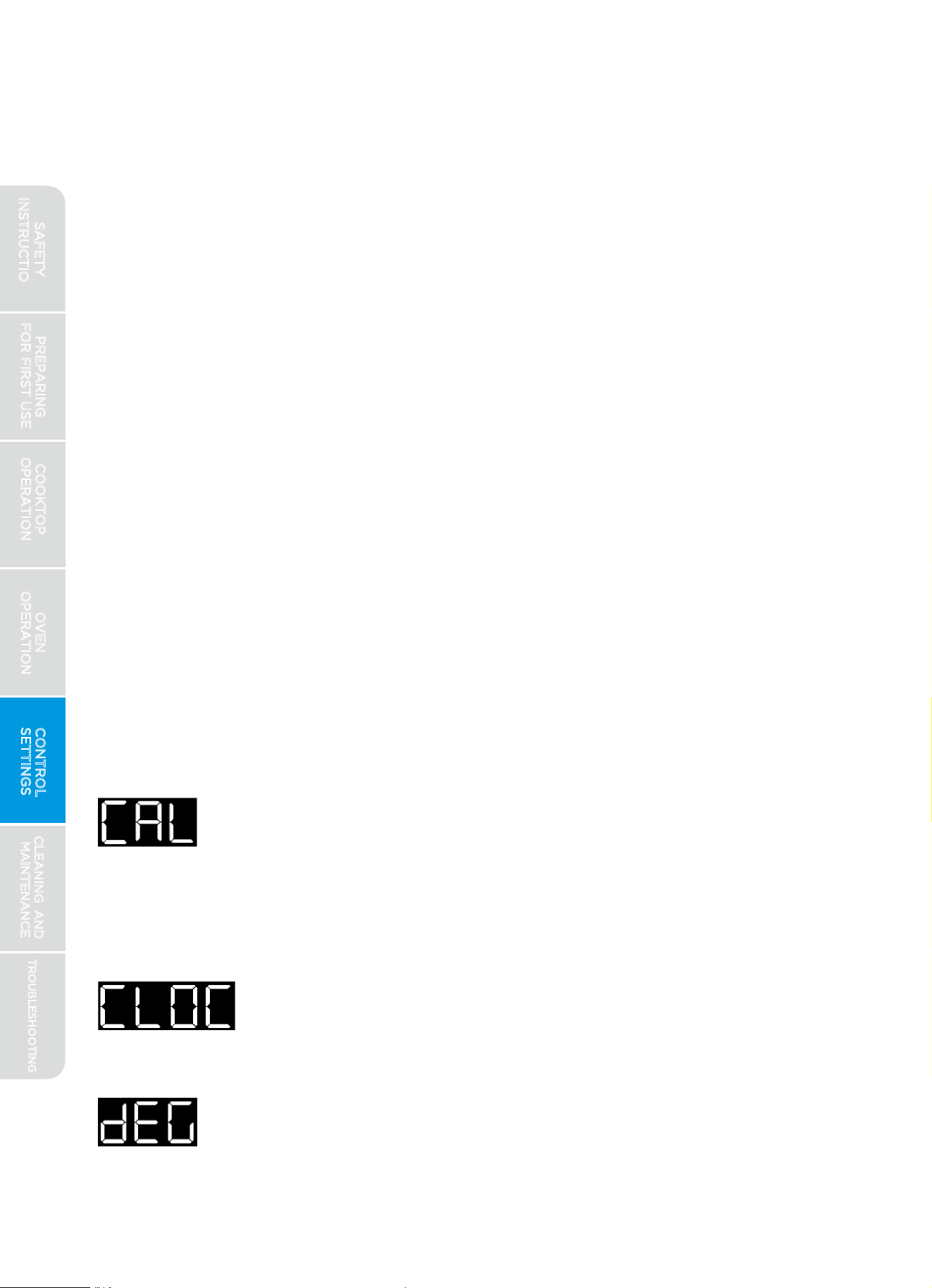
CONTROL SETTINGS
Settings:
Midea ovens are provided with a variety of settings available to help you
customize the appliance to your personal preferences. The ability to adjust
settings is only available when no other oven operation is in progress.
Oven Calibration - If you find your oven is running hotter or
colder than expected, based on the outcome of recipes with
which you are very familiar, the oven calibration setting allows
you to offset oven's target temperature in order to achieve the
results you desire. Calibration can be offset between -25 and
+25 degrees Fahrenheit. Default offset is zero.
Clock - Only present on models where no dedicated
"CLOCK" button is available on the control. Used to set
the time of day on the display clock.
Degree Units - Your oven is programmed by default to use
degrees Fahrenheit, but it can be set to operate in degrees
Celsius using this setting.
PREPARING
FOR FIRST USE
COOKTOP
OPERATION
OVEN
OPERATION
CONTROL
SETTINGS
TROUBLESHOOTING
CLEANING AND
MAINTENANCE
44
2.
3.
Press the "START/ENTER" button or click the Control Input Knob
(if present) to select a menu option to be adjusted. The menu option
selected will turn solid, and the blue setting will begin to flash, indicating
the setting can now be adjusted.
4.
5.
6.
Depending on the model, use the Control Input Knob or "+" and "-"
buttons to navigate menu options.
Depending on your model, use the selector knob or "+" and "-" buttons
to adjust the setting value.
Press the "START/ENTER" button or click the Control Input Knob to
confirm modification to setting value, or use "SETTINGS" or "CLEAR/OFF"
buttons to reject modifications and return to the menu options level.
Press "SETTINGS" or "CLEAR/OFF" again to exit the settings menu entirely.
Enter the settings menu by pressing the " SETTINGS" button on the
control panel. The first menu option will be displayed in white (flashing)
with the current setting displayed in blue (solid).
Navigation of the settings menu:
1.
SAFETY
INSTRUCTIONS
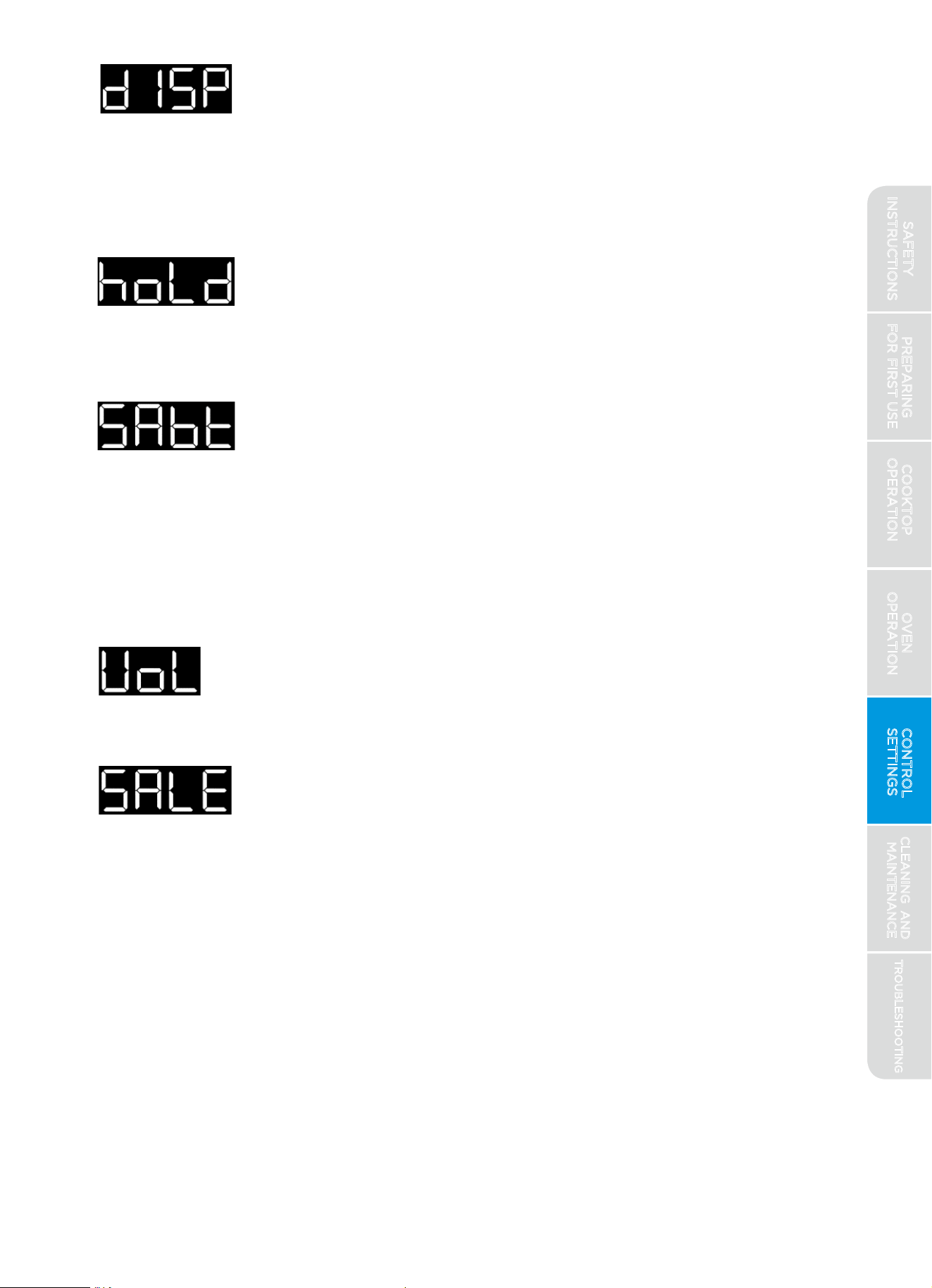
Display Brightness - The user interface is programmed by
default to operate at maximum brightness. If desired, you
can reduce the brightness of the display using this setting.
Reducing the brightness will reduce the standby energy
usage of the oven control and could extend the life of the
display.
Hold After Cook - When using the timed bake function, by
default the oven will turn off when the time expires. You
have the option to have the oven switch to "Warm Mode"
at the end of a timed bake function by altering this setting.
Sabbath Mode - For customers who observe the Jewish
Sabbath, selecting this mode will place the range into an
operating mode compliant with the standards set forth by
Star K. Complete details on the operation of Sabbath Mode
are found in a dedicated section within this manual. For
further assistance, guidelines for proper usage and a
complete list of models with the Sabbath feature, please
visit the web at http://www.star-k.org.
Volume - The audible feedback of the control is
programmed by default to operate at the maximum level.
If desired, you can reduce the volume using this setting.
Demo (Sales) Mode - This sets the appliance for "demo
mode." In this mode, the controls will function as normal
but will not allow any cooking mode to be initiated. This
is intended to be used only by retailers on showroom
floors, and is not intended to be used once the appliance
has been purchased. By default, demo mode is off.
PREPARING
FOR FIRST USE
COOKTOP
OPERATION
OVEN
OPERATION
CONTROL
SETTINGS
TROUBLESHOOTING
CLEANING AND
MAINTENANCE
45
SAFETY
INSTRUCTIONS
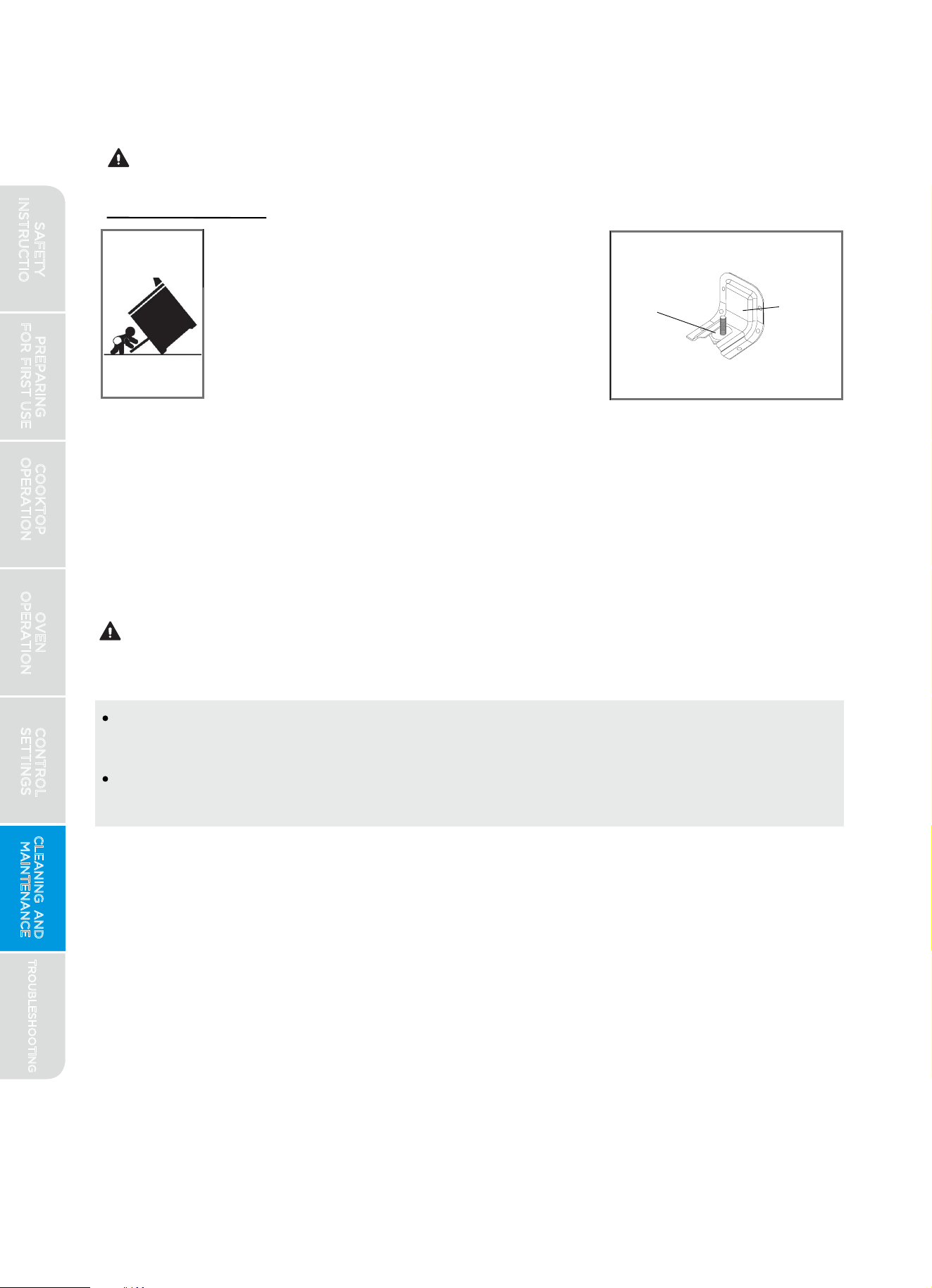
CLEANING AND MAINTENANCE
engaged with anti-tip bracket
Confirm leveling leg is
Anti-Tip
Bracket
Leveling
Leg
See installation instructions
for details
PREPARING
FOR FIRST USE
COOKTOP
OPERATION
OVEN
OPERATION
CONTROL
SETTINGS
TROUBLESHOOTING
CLEANING AND
MAINTENANCE
46
Directions:
1.
Make sure the cooktop, including grates and burners, are completely cool.
2.
Remove burner grates and set aside.
3.
Clean burners one at a time to avoid mixing up burner locations and/or
burner caps. See detailed instructions for cleaning of cooktop burners
below. With burners removed, avoid having debris wiped inside burner
openings in cooktop. Carefully wipe out any debris from inside burner
openings in cooktop with a dry paper towel, making sure to not push
any debris, water, or cleaning material into hole in brass orifice.
Tip-Over Hazard
1.
2.
3. Failure to follow these instructions can result in
death or serious burns to children and adults.
If range is moved for cleaning, servicing, or any
other reason, confirm the anti-tip device is
engaged per the installation instructions.
A child or adult can tip the range and be killed.
Control Lock:
If desired, the oven control can be disabled during cleaning by pressing and
holding the "CONTROL LOCK" button for 3 seconds. Re-enable the controls
by again holding the "CONTROL LOCK" button for 3 seconds.
Cooktop:
BURN, INHALATION HAZARDS
For best results and prolonged cooktop life, it is recommended to clean the
cooktop after each use. Follow these instructions for best results:
Clean cooktop with caution - To avoid steam burns, do not use wet sponge
or cloth while cooking area is hot.
Some cleaners can produce noxious fumes if applied to a hot surface.
Allow cooktop to cool completely before applying any cleaning chemicals.
WARNING
CAUTION
SAFETY
INSTRUCTIONS
Cooktop Burners:
PREPARING
FOR FIRST USE
COOKTOP
OPERATION
OVEN
OPERATION
CONTROL
SETTINGS
TROUBLESHOOTING
CLEANING AND
MAINTENANCE
47
2.
3.
Replace burner and burner caps onto cooktop at correct locations and in
correct orientation. See images below for proper assembly and alignment.
Directions:
1.
Remove cap from burner and wash with warm soapy water. Do not wash
in dishwasher. For stubborn soils, a plastic scouring pad or stiff nylon
brush may be used. Dry thoroughly.
Remove burner from cooktop. Dump out any debris found inside burner.
Wash with warm soapy water. Do not wash in dishwasher. For stubborn
soils, a plastic scouring pad or stiff nylon brush may be used. Check that
no debris remains inside burner ports (openings around perimeter of
burner top). Dry thoroughly.
4.
Clean stainless steel surfaces with general purpose stainless steel
cleaner. Follow instructions provided with cleaning compound. Rub in
direction of brushed finish. Repeat as necessary to remove all soils. Dry
thoroughly to prevent corrosion and water marks.
5.
Clean enameled surfaces and around burner bases with general purpose
kitchen cleaner. Follow instructions provided with cleaner. Repeat as
necessary to remove all soils. Dry thoroughly to prevent corrosion and
water marks.
Wash griddle and grates by hand with warm soapy water. To prevent
corrosion, do not soak in water. Do not wash in dishwasher. For stubborn
soils, a plastic scouring pad or stiff nylon brush may be used.
6.
Clean burners one at a time to avoid mixing up burner locations and/or
burner caps.
BURN, INHALATION HAZARDS
Follow instructions carefully to ensure burners are located and assembled
correctly for proper combustion.
CAUTION
SAFETY
INSTRUCTIONS
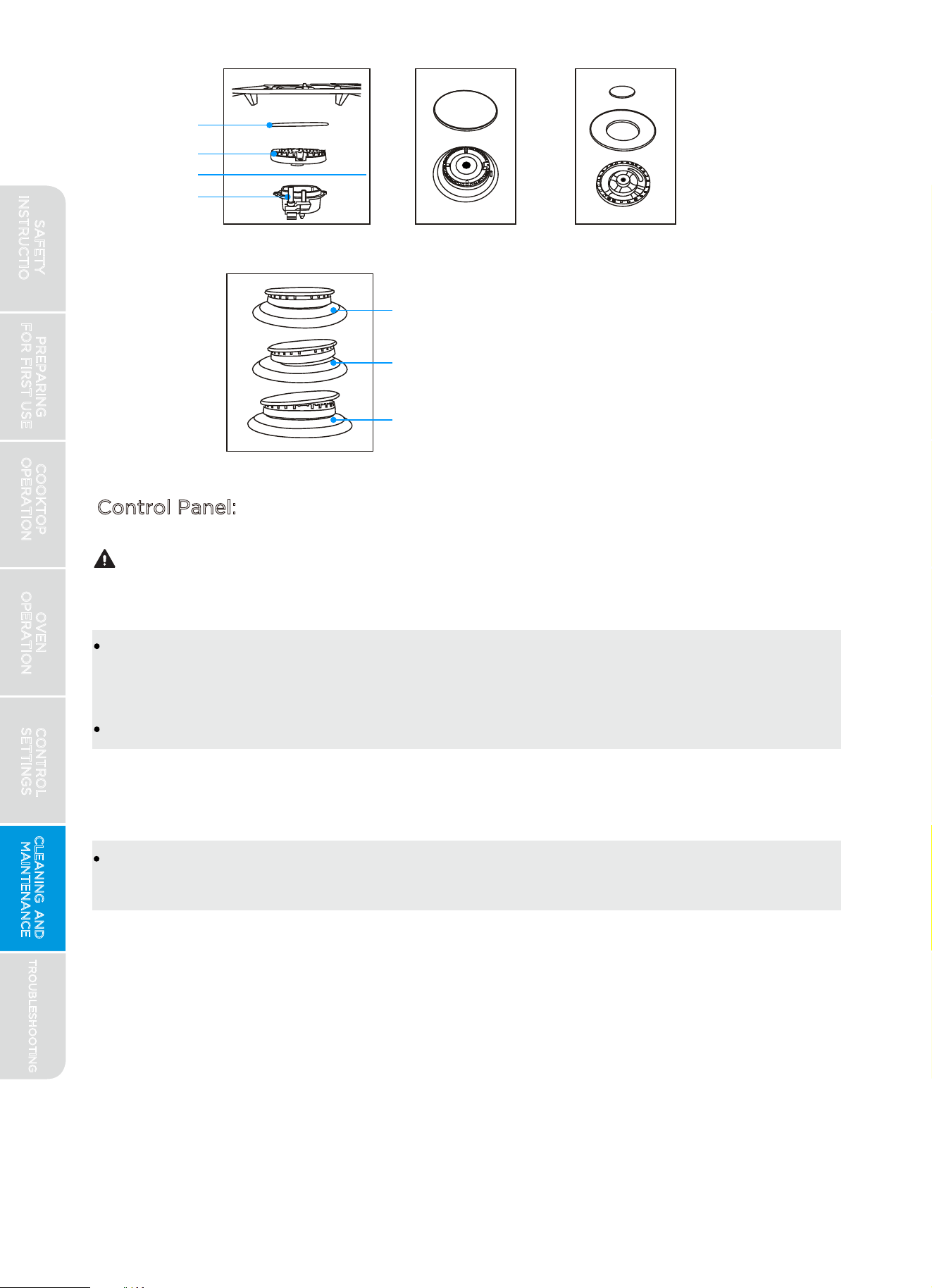
Burner Grate
Correct
Incorrect
Incorrect
Burner Cap
Burner
Cooktop
Ignitor
Control Panel:
ELECTRIC SHOCK HAZARD
Do not use excessive amounts of water or cleaners to clean knob areas.
If moisture is forced into openings behind knobs, there is a potential for
electric shocks.
Avoid spraying kitchen cleaners directly into the openings behind knobs.
NOTICE
TO PREVENT COSMETIC DAMAGE
Do not use scouring pads, abrasive cleaners, strong liquid chemicals, steel
wool, or oven cleaners, as these may damage the control panel finish.
PREPARING
FOR FIRST USE
COOKTOP
OPERATION
OVEN
OPERATION
CONTROL
SETTINGS
TROUBLESHOOTING
CLEANING AND
MAINTENANCE
48
CAUTION
SAFETY
INSTRUCTIONS
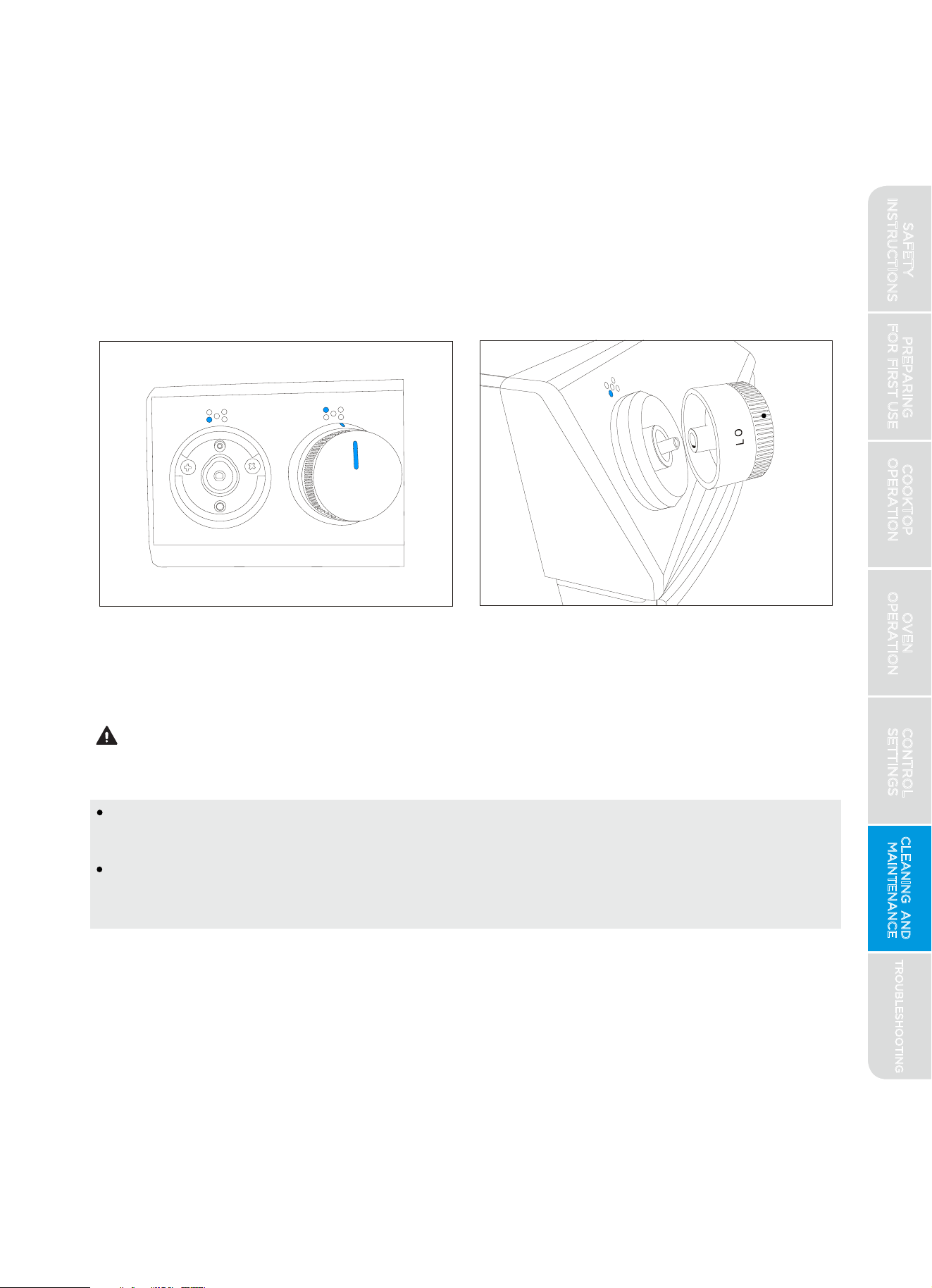
Oven Interior:
PREPARING
FOR FIRST USE
COOKTOP
OPERATION
OVEN
OPERATION
CONTROL
SETTINGS
TROUBLESHOOTING
CLEANING AND
MAINTENANCE
49
For best results, it is recommended to clean the user interface and control
panel after each use. Control knobs can be removed for easier cleaning.
Ensure knobs are in the "OFF" position before removing. Pull straight back
with a firm pressure to remove knob from stem. Clean entire panel with a
lightly damp, non-abrasive cloth using mild soap and water. Glass cleaner
can be used on oven control to remove streaks. Stainless steel cleaner can
be used on the exposed metal to remove streaks. Knobs should be washed
by hand in warm soapy water - do not wash in dishwasher. Be sure to align
profile in knob to stem shape to ensure smooth fit and avoid damage to
knob or control.
BURN HAZARD
Check oven after each use to determine if any spills or splattering occurred
that require cleaning. Wipe out oven interior with a lightly damp, non-abrasive
cloth using mild soap and water to remove light spills. Follow the
STEAM-CLEAN instructions under "Oven Operation" to remove moderate
soiling. For stubborn or heavy soiling, follow the SELF-CLEAN instructions
under "Oven Operation."
Oven surfaces - especially oven bottom - may be hot. Use caution to avoid
contact with hot surfaces.
Hot surfaces may create hot steam in wet sponge or cloth while cleaning.
If steam is evident when wiping out oven, wait until oven has cooled slightly.
CAUTION
SAFETY
INSTRUCTIONS
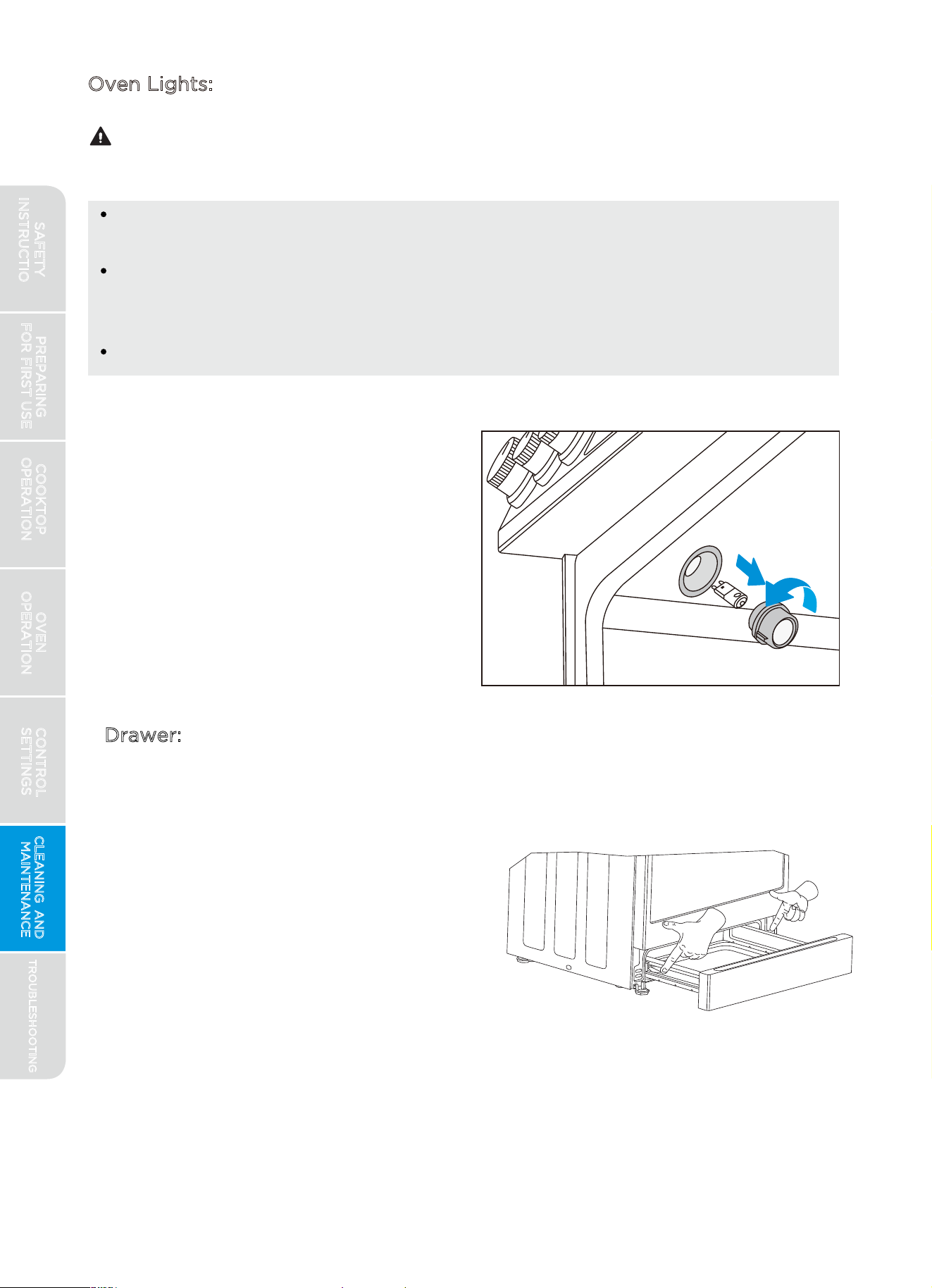
Oven lamps are located in the top of
the oven, close to the oven door. To
replace the light bulb, first twist glass
cover to unscrew it from base. Light
bulb can be removed by pulling firmly
straight out from the light socket.
Replace bulb only with G8 style 120V
halogen bulb rated 25W or less. Twist
glass cover back onto lamp socket
before using oven.
50
Oven Lights:
CAUTION
Drawer:
Clean drawer by wiping down interior
surfaces with soft, damp, non-abrasive
sponge or cloth. Removal of drawer is
not required for cleaning, but can be
done if desired. To remove drawer,
fully extend drawer and operate the
release levers on each side while
pulling lightly on drawer.
To reinstall the drawer, align the rails
on the drawer with the slides on the
range and push drawer in until fully
closed. Open and close drawer to
ensure slide rails are operating
properly.
SHOCK, BURN, AND LACERATION HAZARDS
Disconnect power to oven and wait until oven is cool before attempting
to service light bulbs.
Handle glass cover carefully to reduce risk of breakage. If lamp cover is
difficult to remove, do not force. Contact a qualified service provider for
repairs.
Do not operate oven without glass cover in place.
TROUBLESHOOTING
PREPARING
FOR FIRST USE
COOKTOP
OPERATION
OVEN
OPERATION
CONTROL
SETTINGS
CLEANING AND
MAINTENANCE
SAFETY
INSTRUCTIONS
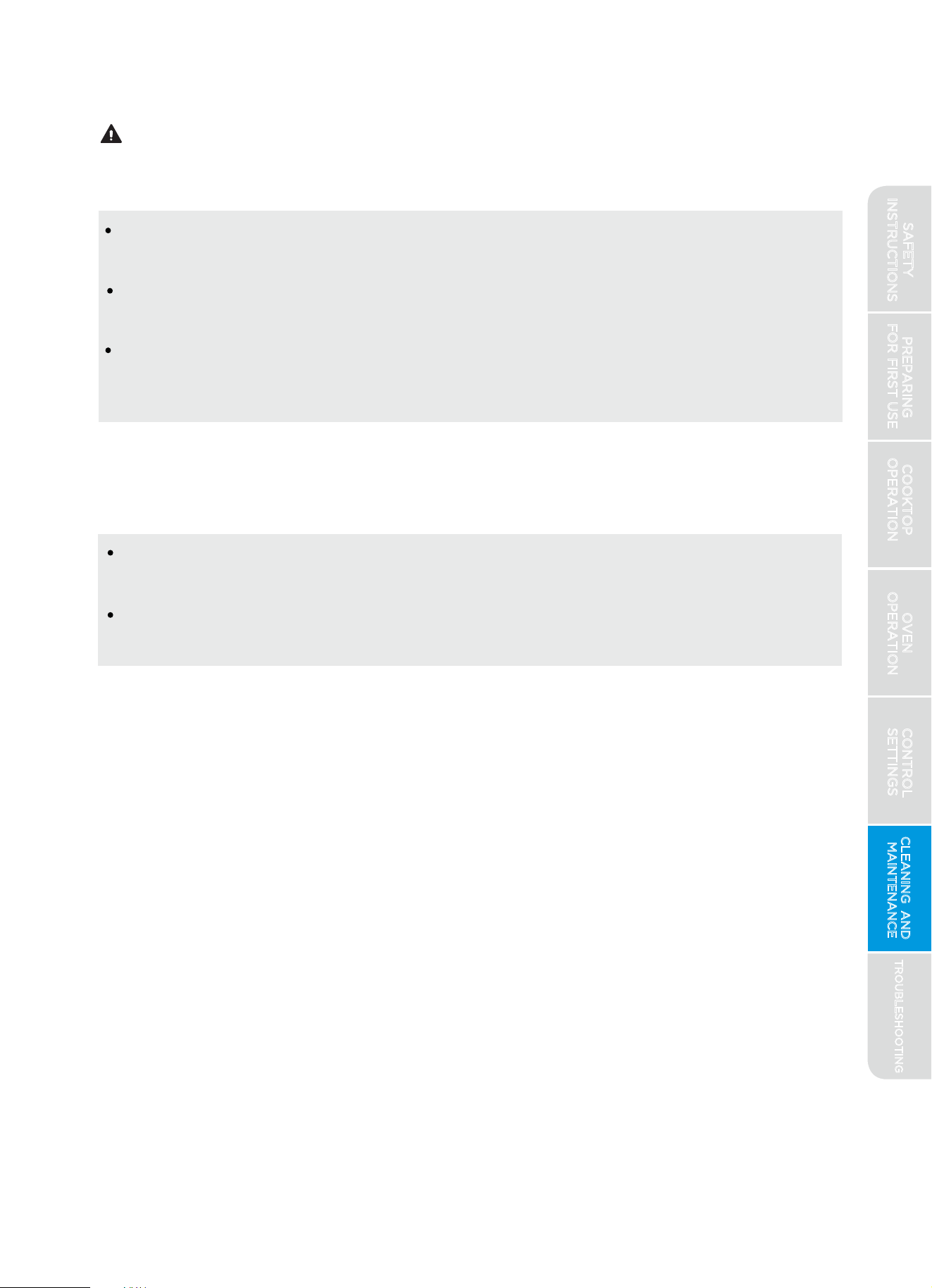
FIRE HAZARD
To maintain proper door seal during baking operations and self-clean, do
not rub or clean the door gasket. It has a very low resistance to abrasion.
If the gasket becomes worn, frayed, or damaged in any way, contact a
qualified service provider for repair.
If door is removed, confirm that door operates correctly and seals
properly when reinstalled. If door gasket does not seal completely,
heat escaping from around doors could ignite cabinetry
Clean door as frequently as desired to remove dust, splatter, and fingerprints.
Wipe door surfaces with a lightly damp, non-abrasive cloth using mild soap
and water. Burned-on residue on interior door glass can be cleaned with
glass cleaning compound and/or razor scraper . Enameled portions of the door
interior can be cleaned
using soapy water and a non-abrasive sponge. Glass
cleaner can be used on door glass to remove streaks. Stainless steel cleaner
can be used on the exposed metal to remove streaks.
Door can be removed for easier cleaning, servicing, or installation:
1.
Open door fully.
2.
On each door hinge, flip down the lock mechanism so that it engages
with the door when the door is rotated towards being closed.
3.
4.
TO PRESERVE APPEARANCE
To prevent streaking of internal door glass, do not allow excess water or
spray cleaner to enter any holes or slots in the door.
Do not use scouring pads, abrasive cleaners, strong liquid chemicals, steel
wool, or oven cleaners, as these may damage the door finish.
Once both lock mechanisms are engaged, continue to rotate door until
2-3 inches from being fully closed.
Grasp door firmly from the sides and lift door up and out from oven face.
Do not lift door by door handle to reduce risk of broken door glass.
NOTICE
Door:
PREPARING
FOR FIRST USE
COOKTOP
OPERATION
OVEN
OPERATION
CONTROL
SETTINGS
TROUBLESHOOTING
CLEANING AND
MAINTENANCE
51
WARNING
SAFETY
INSTRUCTIONS
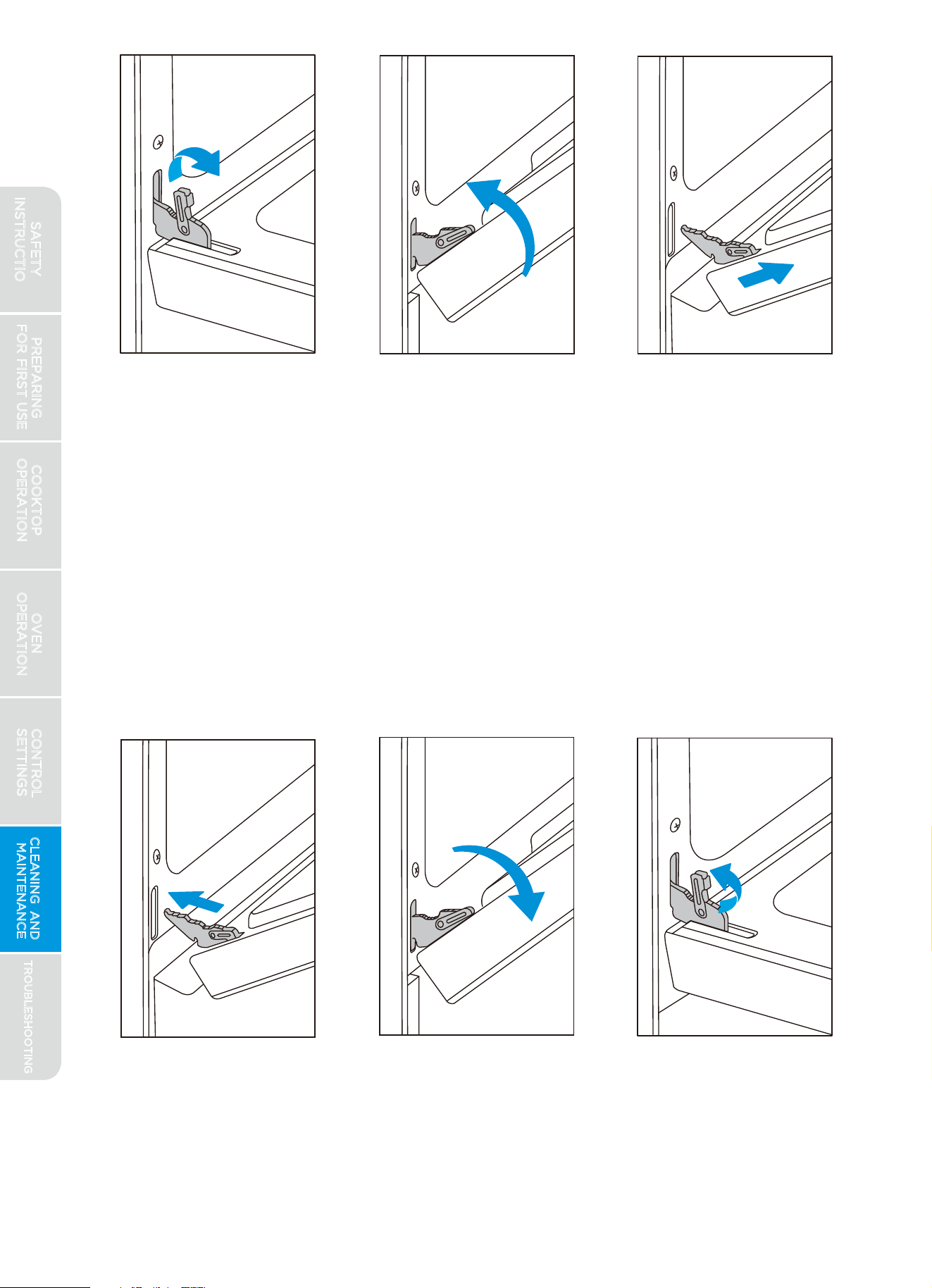
Reinstalling door:
PREPARING
FOR FIRST USE
COOKTOP
OPERATION
OVEN
OPERATION
CONTROL
SETTINGS
TROUBLESHOOTING
CLEANING AND
MAINTENANCE
52
1.
Holding door from the sides, align door so that hinges slip back into
openings.
2.
Rotate door until 2-3 inches from being fully closed, allow door to drop
into notches on hinges.
3.
Rotate door out until fully open.
4.
Flip the hinge locking mechanism back up and away from the door.
5.
Check that door opens and closes correctly.
6.
If door does not operate correctly, re-engage locking mechanisms,
remove door, and reattempt installation.
SAFETY
INSTRUCTIONS
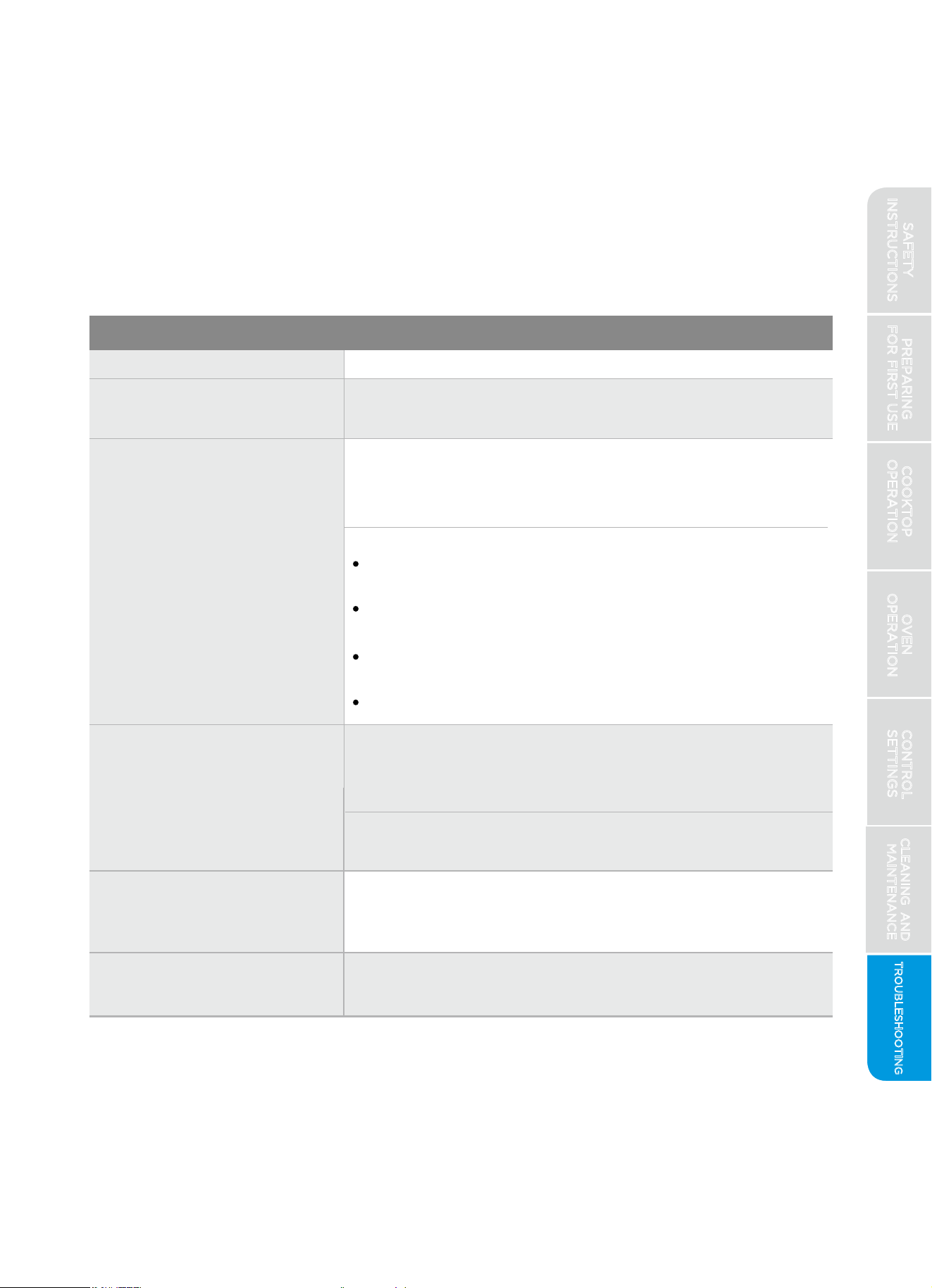
TROUBLESHOOTING(read before calling for service)
Midea is committed to providing you with a quality appliance that works as
expected. If you find something that is not working as anticipated, check
the table below for helpful hints and advice that might save you the time
and expense of calling for repair.
Cooktop:
Problem: Possible Reason:
MSmartLife app will
not control cooktop
Cooktop cannot be controlled through MSmartLife app.
Burners do not light
Flames around
burners are not even
Cooktop is discolored.
If control panel display is not lit, appliance may not be
receiving power - check circuit breaker or fuse has not
tripped and that cord is properly plugged in.
If control panel display is operating, check the following:
Gas shut off valve is in the ON position and the gas
supply to the house is not shut off
Burners and burner caps are properly positioned on
cooktop
Burner ports (openings around perimeter of burner
top) are not clogged
The igniters are clean, dry, and sparking to the burners
Unable to maintain a
rolling boil or will not
cook fast enough.
Improper cookware - Only use pans with flat bottoms
and that match the diameter of the cooktop burner
selected. Adjust flame so that flame does not extend
beyond edge of pot.
Large pots and pans can lose a lot of heat from the top -
cover pan with a lid to retain heat better.
Ensure burner cap is seated properly on burner and
ports (openings around perimeter of burner top) are not
clogged
Cooktop is not cleaned thoroughly - see section in this
manual on care and cleaning of cooktop.
PREPARING
FOR FIRST USE
COOKTOP
OPERATION
OVEN
OPERATION
CONTROL
SETTINGS
TROUBLESHOOTING
CLEANING AND
MAINTENANCE
53
SAFETY
INSTRUCTIONS
Problem:
Possible Reason:
Oven:
Unable to use
MSmartLife app to
control oven
Strong "burning" or
"oily" odor when
using new oven.
Clicking noise can
be heard when oven
is operating
Control is dark and
will not respond
If WiFi signal icon is flashing slowly, WiFi has not been
connected. See instructions in "Preparing For First Use."
If WiFi signal icon is flashing quickly, WiFi signal has
been lost. Check that router is on and no obstructions
are hindering signal. Can try to reset router and wait 15
minutes to reconnect. Otherwise repeat connection
instructions in "Preparing For First Use."
If WiFi signal icon is off, has not been
enabled. Press the button to enable. WiFi signal
icon will turn on.
This is normal with a new range and will disappear after
a few uses. Still, to be careful, you should double-check
that all packaging has been removed from the appliance
- check around door sides and inside drawer.
If control panel display shows only "]" or "] [", the control
is in Sabbath Mode. Refer to that section for how to
operate control and how to exit Sabbath Mode.
Control is on but
will not respond
Check that "CONTROL LOCK" has not been activated.
Oven door is
locked and will not
open.
Turning power off and back on at the breaker box can
usually reset the oven control and clear response issues.
If self-clean recently finished, this is normal. Wait for the
oven to cool fully and it will unlock. Otherwise, try
resetting the appliance by cycling the circuit breaker off
and on.
Door will not close
properly
Door is not installed properly. See instructions on
removing and re-installing door in "Cleaning and
Maintenance" section.
PREPARING
FOR FIRST USE
COOKTOP
OPERATION
OVEN
OPERATION
CONTROL
SETTINGS
TROUBLESHOOTING
CLEANING AND
MAINTENANCE
54
The oven burner cycles on and off to maintain the oven
temperature selected. When burner turns on, the electric
spark ignition may be heard periodically. It is normal to
spark for only a few seconds, followed by the sound of
the burner igniting.
SAFETY
INSTRUCTIONS
Problem:
Possible Reason:
Oven is taking
too long to cook.
Food is overcooked.
Oven light is not
working
Oven light may be burned out. Follow instructions in
"Cleaning and Maintenance"
If oven was in use recently, this is normal. Self-clean can
only be initiated when the oven has cooled sufficiently.
Metal "popping" sounds
during self-clean.
If cooktop is in use, self-clean cannot be started. This is
normal.
This is normal as the extreme temperatures cause the
metal frame to expand.
Drawer will not
close properly
Drawer has come off of slide rails. See instructions on
removing and re-installing drawer in "Cleaning and
Maintenance" section.
All ovens operate slightly differently from each other.
Adjust oven calibration upwards to make oven cook
faster. See "Control Settings" section of this manual
All ovens operate slightly differently from each
other. Adjust oven calibration downwards to reduce
overcooking. See "Control Settings" section of this
manual
Food is not baking
evenly - top gets
done faster/slower
than bottom.
Make sure you are using the recommended rack
settings. See "Rack Positions" at the start of the "Oven
Operation" section.
Recipe may perform better at a different rack position.
Try moving the food down a rack position to make the
bottom darker. Try moving food up a rack position to
make the top darker.
If display also shows "]" or "] [" then Sabbath Mode
setting must be turned off.
The oven will not
start self-clean
Oven not clean after a
self-clean cycle.
After self-clean, the remaining white/grey ash must
still be wiped out by hand.
If black soiling still remains, oven may have been too
heavily soiled to clean with the settings selected. Rerun
self-clean using the longest possible setting.
Some areas, such as bottom door corners, may be too
cool to turn soils into ash. These areas may need to be
cleaned by hand.
Convection fan runs in
modes other than
convection
This may be normal-convection fan typically runs during
preheat to ensure oven is evenly preheated.
Convection fan also runs in Convection Bake, Convection
Roast, Pizza, and Steam Clean.
Hot air is coming from
the openings at the back
of the cooktop
This is normal - the oven vents out and a cooling fan also
discharges hot air from the openings at the back of the
cooktop.
PREPARING
FOR FIRST USE
COOKTOP
OPERATION
OVEN
OPERATION
CONTROL
SETTINGS
TROUBLESHOOTING
CLEANING AND
MAINTENANCE
55
SAFETY
INSTRUCTIONS

Problem:
Possible Reason:
Cooling fan continues
to run after oven has
been turned off
This is normal to prevent the remaining oven heat from
damaging controls. Fan will turn off when oven is
sufficiently cool.
If the exhaust smells like burning food, check that the
food is not burning and that there is no spillage or
splattering in the oven that may be producing the smoke.
If the oven is in self-clean, this may be normal. Monitor
progress of self-clean to ensure smell is only the result of
soiling in the oven cavity being converted to ash.
If the exhaust smells like anything else is burning (plastic,
wood, etc.), turn oven off and make sure smoking stops.
Contact a qualified service provider for repairs.
Condensation on
door glass
This is normal. Condensation will evaporate as oven
heats up.
"E" and a number
appears in display
Smoke or steam is
coming from the
openings at the back
of the cooktop.
It is normal for steam to be released from the oven vent
at the back of the cooktop. If the exhaust has no smell
(or smells like normal baking food), do not be alarmed.
This is an error code. Press "CLEAR/OFF" to clear the
display and stop beeping. If necessary, reset power to
the oven by cycling circuit breaker off and on. If error
code remains or repeats, write down error code and
contact a qualified service provider for repairs.
PREPARING
FOR FIRST USE
COOKTOP
OPERATION
OVEN
OPERATION
CONTROL
SETTINGS
TROUBLESHOOTING
CLEANING AND
MAINTENANCE
56
SAFETY
INSTRUCTIONS
Name, address and telephone number
Model number and serial number
A clear, detailed description of the problem
Proof of purchase including dealer or retailer name
and address
WARRANTY
MIDEA
RANGE
LIMITED
WARRANTY
ATTACH YOUR RECEIPT HERE. PROOF OF PURCHASE
IS REQUIRED TO OBTAIN WARRANTY SERVICE.
Please have the following information available when
you call the Customer Service Center:
IF YOU NEED SERVICE:
1. Before contacting us to arrange service, please determine whether your product requires repair.
Some questions can be addressed without service. Please take a few minutes to review the
2.
All warranty service is provided exclusively by our authorized Midea Service Providers, in the U.S.
and Canada.
Midea Customer Service
In the U.S.A. or Canada, call 1-866-646-4332.
If outside the 50 States of the United States or Canada, contact your authorized Midea dealer to
determine whether another warranty applies.
LIMITED WARRANTY
WHAT IS COVERED
For one year from the date of purchase, if this major appliance is installed, operated and
maintained according to instructions attached to or furnished with the product, Midea
America Corporation (hereafter “Midea”) will pay for factory specified replacement parts
and repair labor to correct defects in materials or workmanship that existed when this
major appliance was purchased, or at its sole discretion replace the product. In the event
of product replacement, your appliance will be warranted for the remaining term of the
original unit’s warranty period.
YOUR SOLE AND EXCLUSIVE REMEDY UNDER THIS LIMITED WARRANTY SHALL BE
PRODUCT REPAIR OR REPLACEMENT AS PROVIDED HEREIN. Service must be provided
by a Midea designated service company. This limited warranty is valid only in the 50
States of the United States or Canada and applies only when the major appliance is used
in the country in which it was purchased. This limited warranty is effective from the date
of original consumer purchase. Proof of original purchase date is required to obtain
service under this limited warranty.
FIRST YEAR LIMITED WARRANTY
(PARTS
AND LABOR)
57
Troubleshooting section of the User Manual, or visit http://Midea.com/us/support

MIDEA
RANGE
LIMITED
WARRANTY
LIMITED WARRANTY
IS COVERED
(PARTS AND LABOR)
LIMITED WARRANTY
WHAT IS NOT COVERED
1. Commercial, non-residential or multiple-family use, or use inconsistent with published
user, operator or installation instructions.
2. In-home Instruction on how to use your product.
3. Service to correct improper product maintenance or installation, installation not in
accordance with electrical codes or correction of household electrical system (i.e.
house wiring, fuses, etc.).
4. Consumable parts (i.e. light bulbs, batteries, air or water filters, etc.).
5. Defects or damage caused by the use of non-genuine Midea parts or accessories.
6. Damage from accident, misuse, abuse, fire, floods, electrical issues, acts of God or use
with products not approved by Midea.
7. Repairs to parts or systems to correct product damage or defects caused by
unauthorized service, alteration or modification of the appliance.
8. Cosmetic damage including scratches, dents, chips, and other damage to appliance
finishes unless such damage results from defects in materials and workmanship and is
reported to Midea within 30 days.
9. Routine maintenance of the product.
10. Products that were purchased as is or as refurbished products.
11. Products that have been transferred from its original owner.
12. Discoloration, rust or oxidation of surfaces resulting from caustic or corrosive
environments including but not limited to high salt concentrations, high moisture or
humidity or exposure to chemicals.
13. Pick-up or delivery. This product is intended for in-home repair.
14. Travel or transportation expenses for service in remote locations where an authorized
Midea servicer is not available.
15. Removal or reinstallation of inaccessible appliances or built-in fixtures (i.e. trim,
decorative panels, flooring, cabinetry, islands, countertops, drywall, etc.) that interfere
with servicing, removal or replacement of the product.
16. Service or parts for appliances with original model/serial numbers removed, altered or
not easily identified.
The cost of repair or replacement under these excluded circumstances shall be
borne by the customer
IMPLIED WARRANTIES, INCLUDING ANY IMPLIED WARRANTY OF
MERCHANTABILITY OR IMPLIED WARRANTY OF FITNESS FOR A PARTICULAR
PURPOSE, ARE LIMITED TO ONE YEAR OR THE SHORTEST PERIOD ALLOWED BY
LAW. Some states and provinces do not allow limitations on the duration of implied
warranties of merchantability or fitness, so this limitation may not apply to you. This
warranty gives you specific legal rights, and you also may have other rights that vary
from state to state or province to province.
DISCLAIMER OF IMPLIED WARRANTIES
58
LIFETIME LIMITED WARRANTY
NOT COVERED
Midea makes no representations about the quality, durability, or need for service or
repair of this major appliance other than the representations contained in this warranty.
If you want a longer or more comprehensive warranty than the limited warranty that
comes with this major appliance, you should ask Midea or your retailer about buying an
extended warranty.
DISCLAIMER
OF REPRESENTATIONS OUTSIDE WARRANTYOF
YOUR SOLE AND EXCLUSIVE REMEDY UNDER THIS LIMITED WARRANTY SHALL BE
PRODUCT REPAIR AS PROVIDED HEREIN. MIDEA SHALL NOT BE LIABLE FOR
INCIDENTAL OR CONSEQUENTIAL DAMAGES. Some states and provinces do not allow
the exclusion or limitation of incidental or consequential damages, so these limitations
and exclusions may not apply to you. This warranty gives you specific legal rights, and
you also may have other rights that vary from state to state or province to province.
AND
CONSEQUENTIAL DAMAGES
LIMITATION OF REMEDIES;EXCLUSION INCIDENTALOF
59

Parsippany, NJ, 07054
Rev. 1.0 - 04/20
© Midea Group, 2020
If appliance is not working as expected, please contact Midea customer service at:
1-866-646-4332
or
Free 3 months
extension* of the
original limited warranty
period! simply text a
picture of your proof of
purchase to:
*The warranty extension is for the
three months immediately following
the completion of the product’s
original warranty period.
1-844-224-1614
http://midea.com/us/support
PN:16171100A33922