Connect the USB
charging cable to
a USB port.
Charging
1
Position the magnetic
charging cable to the
charging points at the
back of your smart watch.
2
When charging begins,
you will see a battery icon
on the display screen.
The display will
automatically switch off
after a few seconds.
3
To check the charging
progress, press the
button on the side.
A solid battery icon
indicates a full charge.
4
08:32
08:32
08:32
08:32
2 Pin magnetic
USB charger cable
Running
Indoor
walking
Yoga
Climb
stairs
Baseball
Handball
Treadmill
Free
time
Spinning
bike
Ski
Dance
Hip-hop Volleyball Tennis Darts Gymnastics
Outdoor
running
Physical
training
Basketball
Skate
Pingpong
Ride
Weightlifting
Football
roller
skating
Hockey
Badminton
Hula
hoop
Pilates
Marathon
Golf
Taekwondo
Walking
Boxing
Mountaineering
Tump
rope
Change watch face
:
Long press the screen, swipe to choose, click to confi rm.
Download more from APP, Open APP---Device---Watch Face,
you can choose Online Dial or Custom Dial with your phone
picture.
Functions
Sports
The AT4 Activity Tracker supports up to 36 sports modes
including:
Outdoor Run, Indoor Run, Climb, Walk, Cycle, Spinning,
Yog
a, Basketball, Football, Badminto, Free Training
,
etc.
Stopwatch
Electronic timer can record
one time or record multiple
times.
Settings
Adjust brightness, language settings, system menus (shutdown,
factory reset, restart), about the watch.
Shortcut menu
1. Do not disturb 2. Vibration mode
3. Flashligh
t 4. B
rightness
5. Settings
Timer
The same way to
calculate the
remaining time.
Weather
Weather forecast.
Health care
(Female Physiological
Function)
Zewa AT4
Zewa AT4
Zewa AT4
Zewa AT4
Pair
Pair
Wristband length
Wristband width
Weight
Battery
Waterproof
9.7” (245mm)
0.6” (16mm)
1oz (28g)
160 mAh Poly-Li
IP68
Find phone
Normal
Pace
Step count
Maximum ...
Average ...
Taekwondo
Breathing training
Breathing training
Taekwondo
Heart rate
Wearing AT4 correctly, not too tight or loose, make sure
no green light leak, open the "Heart Rate" application in
the watch application, automatically measure the heart rate
after entering the application.
Breathing training
After wearing the watch correctly, open the menu - breathing
training, and follow the prompts to perform breathing training.
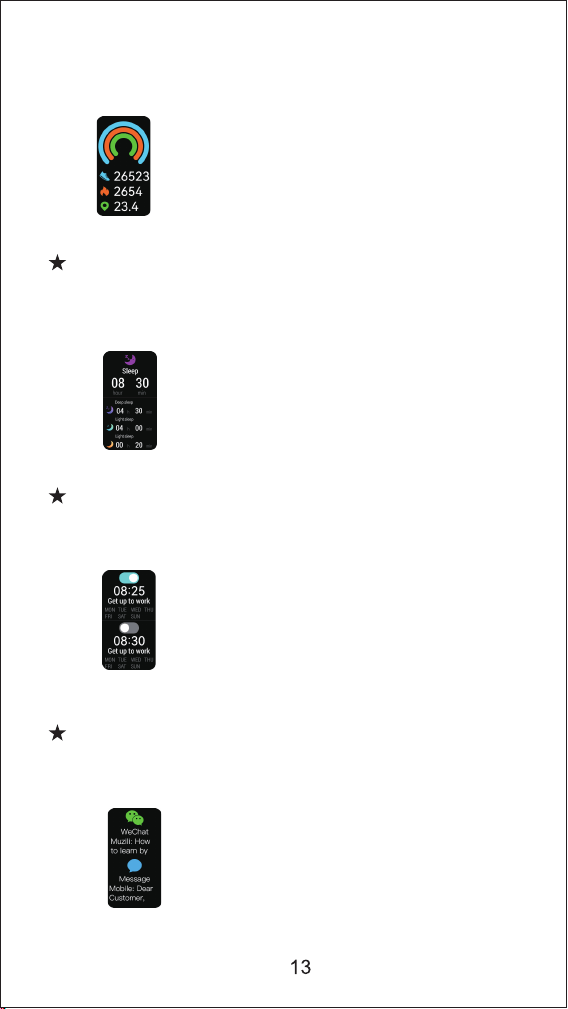
Step counting
After wearing the watch correctly, open the "step counting"
in the watch; display the number of steps, calories, distance
and other parameters of the day's exercise.
SpO2
After wearing the watch correctly, open the "SpO2" in the watch;
manual blood oxygen measurement is required.
Sleep
After wearing the watch correctly, open the "Sleep" in the
watch; record the sleep status throughout the night.
Alarm clock
Set the alarms in APP and sync to watch, maximum 5 alarms.
Message notification
You can view the text messages in the mobile phone and the
real-time information pushed to the watch.
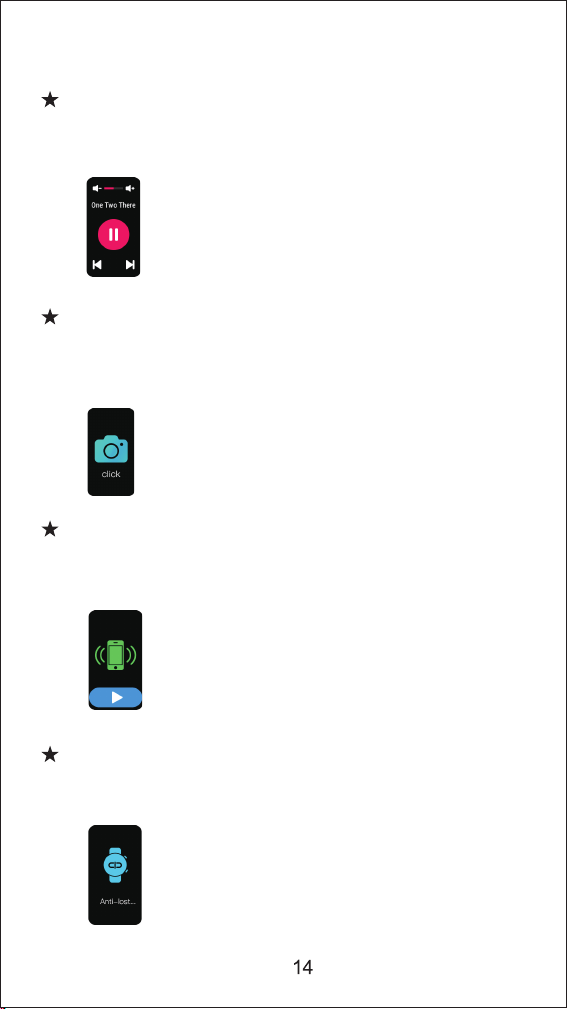
Music control
Control the music player of mobile phone to play the music,as
well as song switching and volume adjustment.
Remote capture
Control the camera on the mobile phone to take pictures remotely.
When using it, please click "Device-Take Picture" on the APP to
turn on the camera.
Find phone
When the watch is connected to the APP, the phone will make a
sound after tapping it.
Anti-lost reminder
When the watch is disconnected from the Bluetooth of the mobile phone, the
watch will make a sound and vibrate to prevent loss.
Functions
Sports
Heart rate
Breathing training
SpO2
Step counting
Sleep
Alarm clock
Message notifi cation
Music control
Remote capture
Find phone
Anti-lost reminder
Stopwatch
Timer
Weather
Health care
Settings
Shortcut menu
3
11
12
12
12
12
13
13
13
14
14
14
14
15
15
15
15
15
15
4
AT4
K
D
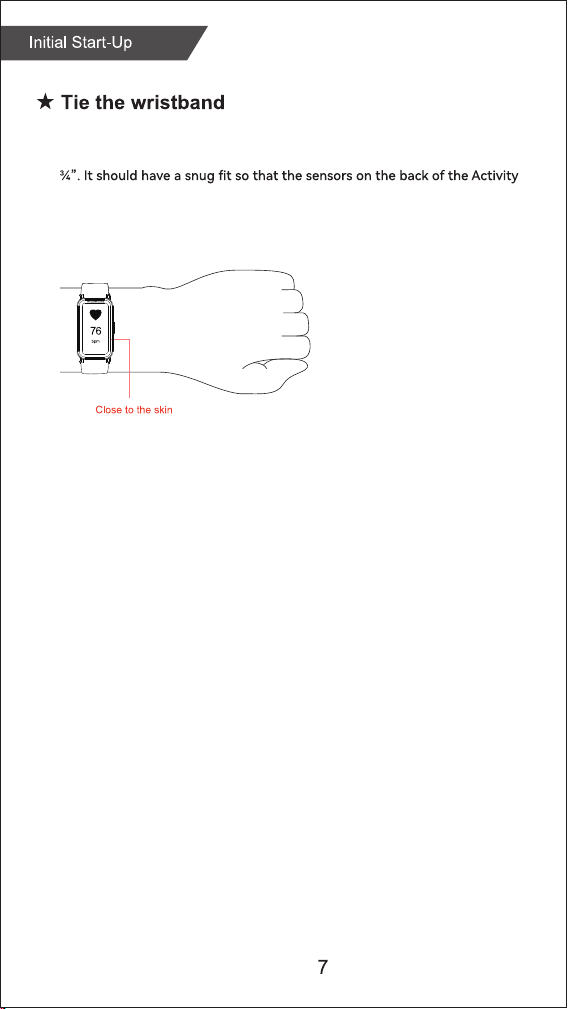
Put Activity Tracker on your left or right wrist with the display facing you.
T
he distance between the Activity Tracker and wrist should be approximately
Tracker touch your skin.
If the device is worn
i
ncorrectly it provides
wrong results.
Wear the device according
to these instructions.
To access all Sports Modes select the “Sports” icon and
scroll down to “Personalization”.
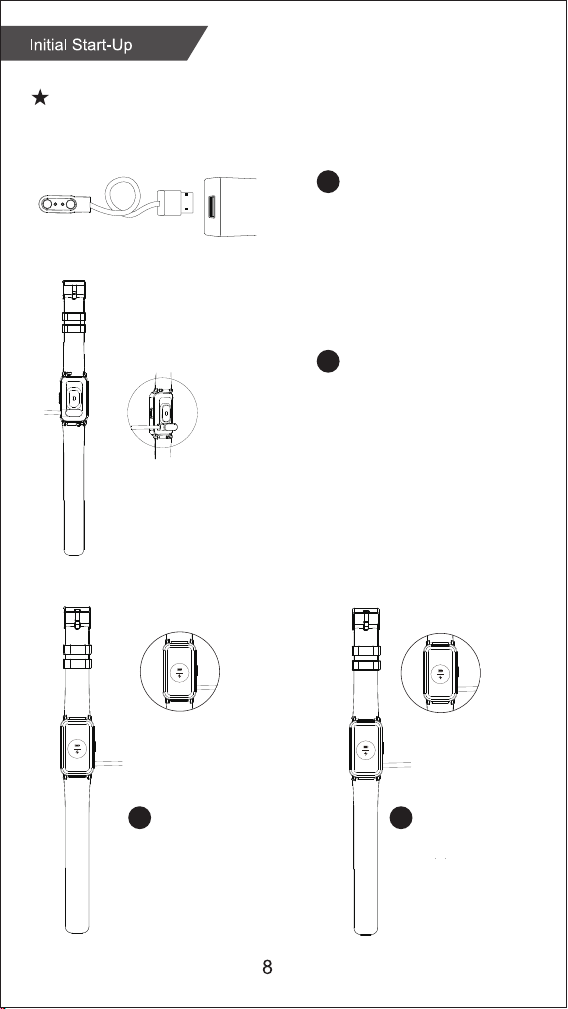
Connect the USB
charging cable to
a USB port.
Charging
1
Position the magnetic
charging cable to the
charging points at the
back of your smart watch.
2
When charging begins,
you will see a battery icon
on the display screen.
The display will
automatically switch off
after a few seconds.
3
To check the charging
progress, press the
button on the side.
A solid battery icon
indicates a full charge.
4
08:32
08:32
08:32
08:32
2 Pin magnetic
USB charger cable
Running
Indoor
walking
Yoga
Climb
stairs
Baseball
Handball
Treadmill
Free
time
Spinning
bike
Ski
Dance
Hip-hop Volleyball Tennis Darts Gymnastics
Outdoor
running
Physical
training
Basketball
Skate
Pingpong
Ride
Weightlifting
Football
roller
skating
Hockey
Badminton
Hula
hoop
Pilates
Marathon
Golf
Taekwondo
Walking
Boxing
Mountaineering
Tump
rope
Change watch face
:
Long press the screen, swipe to choose, click to confi rm.
Download more from APP, Open APP---Device---Watch Face,
you can choose Online Dial or Custom Dial with your phone
picture.
Functions
Sports
The AT4 Activity Tracker supports up to 36 sports modes
including:
Outdoor Run, Indoor Run, Climb, Walk, Cycle, Spinning,
Yog
a, Basketball, Football, Badminto, Free Training
,
etc.
Stopwatch
Electronic timer can record
one time or record multiple
times.
Settings
Adjust brightness, language settings, system menus (shutdown,
factory reset, restart), about the watch.
Shortcut menu
1. Do not disturb 2. Vibration mode
3. Flashligh
t 4. B
rightness
5. Settings
Timer
The same way to
calculate the
remaining time.
Weather
Weather forecast.
Health care
(Female Physiological
Function)
Zewa AT4
Zewa AT4
Zewa AT4
Zewa AT4
Pair
Pair
Wristband length
Wristband width
Weight
Battery
Waterproof
9.7” (245mm)
0.6” (16mm)
1oz (28g)
160 mAh Poly-Li
IP68
Find phone
Normal
Pace
Step count
Maximum ...
Average ...
Taekwondo
Breathing training
Breathing training
Taekwondo
Heart rate
Wearing AT4 correctly, not too tight or loose, make sure
no green light leak, open the "Heart Rate" application in
the watch application, automatically measure the heart rate
after entering the application.
Breathing training
After wearing the watch correctly, open the menu - breathing
training, and follow the prompts to perform breathing training.
Step counting
After wearing the watch correctly, open the "step counting"
in the watch; display the number of steps, calories, distance
and other parameters of the day's exercise.
SpO2
After wearing the watch correctly, open the "SpO2" in the watch;
manual blood oxygen measurement is required.
Sleep
After wearing the watch correctly, open the "Sleep" in the
watch; record the sleep status throughout the night.
Alarm clock
Set the alarms in APP and sync to watch, maximum 5 alarms.
Message notification
You can view the text messages in the mobile phone and the
real-time information pushed to the watch.
Music control
Control the music player of mobile phone to play the music,as
well as song switching and volume adjustment.
Remote capture
Control the camera on the mobile phone to take pictures remotely.
When using it, please click "Device-Take Picture" on the APP to
turn on the camera.
Find phone
When the watch is connected to the APP, the phone will make a
sound after tapping it.
Anti-lost reminder
When the watch is disconnected from the Bluetooth of the mobile phone, the
watch will make a sound and vibrate to prevent loss.
Functions
Sports
Heart rate
Breathing training
SpO2
Step counting
Sleep
Alarm clock
Message notifi cation
Music control
Remote capture
Find phone
Anti-lost reminder
Stopwatch
Timer
Weather
Health care
Settings
Shortcut menu
3
11
12
12
12
12
13
13
13
14
14
14
14
15
15
15
15
15
15
4
AT4
K
D
Put Activity Tracker on your left or right wrist with the display facing you.
T
he distance between the Activity Tracker and wrist should be approximately
Tracker touch your skin.
If the device is worn
i
ncorrectly it provides
wrong results.
Wear the device according
to these instructions.
To access all Sports Modes select the “Sports” icon and
scroll down to “Personalization”.
Connect the USB
charging cable to
a USB port.
Charging
1
Position the magnetic
charging cable to the
charging points at the
back of your smart watch.
2
When charging begins,
you will see a battery icon
on the display screen.
The display will
automatically switch off
after a few seconds.
3
To check the charging
progress, press the
button on the side.
A solid battery icon
indicates a full charge.
4
08:32
08:32
08:32
08:32
2 Pin magnetic
USB charger cable
Running
Indoor
walking
Yoga
Climb
stairs
Baseball
Handball
Treadmill
Free
time
Spinning
bike
Ski
Dance
Hip-hop Volleyball Tennis Darts Gymnastics
Outdoor
running
Physical
training
Basketball
Skate
Pingpong
Ride
Weightlifting
Football
roller
skating
Hockey
Badminton
Hula
hoop
Pilates
Marathon
Golf
Taekwondo
Walking
Boxing
Mountaineering
Tump
rope
Change watch face
:
Long press the screen, swipe to choose, click to confi rm.
Download more from APP, Open APP---Device---Watch Face,
you can choose Online Dial or Custom Dial with your phone
picture.
Functions
Sports
The AT4 Activity Tracker supports up to 36 sports modes
including:
Outdoor Run, Indoor Run, Climb, Walk, Cycle, Spinning,
Yog
a, Basketball, Football, Badminto, Free Training
,
etc.
Stopwatch
Electronic timer can record
one time or record multiple
times.
Settings
Adjust brightness, language settings, system menus (shutdown,
factory reset, restart), about the watch.
Shortcut menu
1. Do not disturb 2. Vibration mode
3. Flashligh
t 4. B
rightness
5. Settings
Timer
The same way to
calculate the
remaining time.
Weather
Weather forecast.
Health care
(Female Physiological
Function)
Zewa AT4
Zewa AT4
Zewa AT4
Zewa AT4
Pair
Pair
Wristband length
Wristband width
Weight
Battery
Waterproof
9.7” (245mm)
0.6” (16mm)
1oz (28g)
160 mAh Poly-Li
IP68
Find phone
Normal
Pace
Step count
Maximum ...
Average ...
Taekwondo
Breathing training
Breathing training
Taekwondo
Heart rate
Wearing AT4 correctly, not too tight or loose, make sure
no green light leak, open the "Heart Rate" application in
the watch application, automatically measure the heart rate
after entering the application.
Breathing training
After wearing the watch correctly, open the menu - breathing
training, and follow the prompts to perform breathing training.
Step counting
After wearing the watch correctly, open the "step counting"
in the watch; display the number of steps, calories, distance
and other parameters of the day's exercise.
SpO2
After wearing the watch correctly, open the "SpO2" in the watch;
manual blood oxygen measurement is required.
Sleep
After wearing the watch correctly, open the "Sleep" in the
watch; record the sleep status throughout the night.
Alarm clock
Set the alarms in APP and sync to watch, maximum 5 alarms.
Message notification
You can view the text messages in the mobile phone and the
real-time information pushed to the watch.
Music control
Control the music player of mobile phone to play the music,as
well as song switching and volume adjustment.
Remote capture
Control the camera on the mobile phone to take pictures remotely.
When using it, please click "Device-Take Picture" on the APP to
turn on the camera.
Find phone
When the watch is connected to the APP, the phone will make a
sound after tapping it.
Anti-lost reminder
When the watch is disconnected from the Bluetooth of the mobile phone, the
watch will make a sound and vibrate to prevent loss.
Functions
Sports
Heart rate
Breathing training
SpO2
Step counting
Sleep
Alarm clock
Message notifi cation
Music control
Remote capture
Find phone
Anti-lost reminder
Stopwatch
Timer
Weather
Health care
Settings
Shortcut menu
3
11
12
12
12
12
13
13
13
14
14
14
14
15
15
15
15
15
15
4
AT4
K
D
Put Activity Tracker on your left or right wrist with the display facing you.
T
he distance between the Activity Tracker and wrist should be approximately
Tracker touch your skin.
If the device is worn
i
ncorrectly it provides
wrong results.
Wear the device according
to these instructions.
To access all Sports Modes select the “Sports” icon and
scroll down to “Personalization”.
Connect the USB
charging cable to
a USB port.
Charging
1
Position the magnetic
charging cable to the
charging points at the
back of your smart watch.
2
When charging begins,
you will see a battery icon
on the display screen.
The display will
automatically switch off
after a few seconds.
3
To check the charging
progress, press the
button on the side.
A solid battery icon
indicates a full charge.
4
08:32
08:32
08:32
08:32
2 Pin magnetic
USB charger cable
Running
Indoor
walking
Yoga
Climb
stairs
Baseball
Handball
Treadmill
Free
time
Spinning
bike
Ski
Dance
Hip-hop Volleyball Tennis Darts Gymnastics
Outdoor
running
Physical
training
Basketball
Skate
Pingpong
Ride
Weightlifting
Football
roller
skating
Hockey
Badminton
Hula
hoop
Pilates
Marathon
Golf
Taekwondo
Walking
Boxing
Mountaineering
Tump
rope
Change watch face
:
Long press the screen, swipe to choose, click to confi rm.
Download more from APP, Open APP---Device---Watch Face,
you can choose Online Dial or Custom Dial with your phone
picture.
Functions
Sports
The AT4 Activity Tracker supports up to 36 sports modes
including:
Outdoor Run, Indoor Run, Climb, Walk, Cycle, Spinning,
Yog
a, Basketball, Football, Badminto, Free Training
,
etc.
Stopwatch
Electronic timer can record
one time or record multiple
times.
Settings
Adjust brightness, language settings, system menus (shutdown,
factory reset, restart), about the watch.
Shortcut menu
1. Do not disturb 2. Vibration mode
3. Flashligh
t 4. B
rightness
5. Settings
Timer
The same way to
calculate the
remaining time.
Weather
Weather forecast.
Health care
(Female Physiological
Function)
Zewa AT4
Zewa AT4
Zewa AT4
Zewa AT4
Pair
Pair
Wristband length
Wristband width
Weight
Battery
Waterproof
9.7” (245mm)
0.6” (16mm)
1oz (28g)
160 mAh Poly-Li
IP68
Find phone
Normal
Pace
Step count
Maximum ...
Average ...
Taekwondo
Breathing training
Breathing training
Taekwondo
Heart rate
Wearing AT4 correctly, not too tight or loose, make sure
no green light leak, open the "Heart Rate" application in
the watch application, automatically measure the heart rate
after entering the application.
Breathing training
After wearing the watch correctly, open the menu - breathing
training, and follow the prompts to perform breathing training.
Step counting
After wearing the watch correctly, open the "step counting"
in the watch; display the number of steps, calories, distance
and other parameters of the day's exercise.
SpO2
After wearing the watch correctly, open the "SpO2" in the watch;
manual blood oxygen measurement is required.
Sleep
After wearing the watch correctly, open the "Sleep" in the
watch; record the sleep status throughout the night.
Alarm clock
Set the alarms in APP and sync to watch, maximum 5 alarms.
Message notification
You can view the text messages in the mobile phone and the
real-time information pushed to the watch.
Music control
Control the music player of mobile phone to play the music,as
well as song switching and volume adjustment.
Remote capture
Control the camera on the mobile phone to take pictures remotely.
When using it, please click "Device-Take Picture" on the APP to
turn on the camera.
Find phone
When the watch is connected to the APP, the phone will make a
sound after tapping it.
Anti-lost reminder
When the watch is disconnected from the Bluetooth of the mobile phone, the
watch will make a sound and vibrate to prevent loss.
Functions
Sports
Heart rate
Breathing training
SpO2
Step counting
Sleep
Alarm clock
Message notifi cation
Music control
Remote capture
Find phone
Anti-lost reminder
Stopwatch
Timer
Weather
Health care
Settings
Shortcut menu
3
11
12
12
12
12
13
13
13
14
14
14
14
15
15
15
15
15
15
4
AT4
K
D
Put Activity Tracker on your left or right wrist with the display facing you.
T
he distance between the Activity Tracker and wrist should be approximately
Tracker touch your skin.
If the device is worn
i
ncorrectly it provides
wrong results.
Wear the device according
to these instructions.
To access all Sports Modes select the “Sports” icon and
scroll down to “Personalization”.
Connect the USB
charging cable to
a USB port.
Charging
1
Position the magnetic
charging cable to the
charging points at the
back of your smart watch.
2
When charging begins,
you will see a battery icon
on the display screen.
The display will
automatically switch off
after a few seconds.
3
To check the charging
progress, press the
button on the side.
A solid battery icon
indicates a full charge.
4
08:32
08:32
08:32
08:32
2 Pin magnetic
USB charger cable
Running
Indoor
walking
Yoga
Climb
stairs
Baseball
Handball
Treadmill
Free
time
Spinning
bike
Ski
Dance
Hip-hop Volleyball Tennis Darts Gymnastics
Outdoor
running
Physical
training
Basketball
Skate
Pingpong
Ride
Weightlifting
Football
roller
skating
Hockey
Badminton
Hula
hoop
Pilates
Marathon
Golf
Taekwondo
Walking
Boxing
Mountaineering
Tump
rope
Change watch face
:
Long press the screen, swipe to choose, click to confi rm.
Download more from APP, Open APP---Device---Watch Face,
you can choose Online Dial or Custom Dial with your phone
picture.
Functions
Sports
The AT4 Activity Tracker supports up to 36 sports modes
including:
Outdoor Run, Indoor Run, Climb, Walk, Cycle, Spinning,
Yog
a, Basketball, Football, Badminto, Free Training
,
etc.
Stopwatch
Electronic timer can record
one time or record multiple
times.
Settings
Adjust brightness, language settings, system menus (shutdown,
factory reset, restart), about the watch.
Shortcut menu
1. Do not disturb 2. Vibration mode
3. Flashligh
t 4. B
rightness
5. Settings
Timer
The same way to
calculate the
remaining time.
Weather
Weather forecast.
Health care
(Female Physiological
Function)
Zewa AT4
Zewa AT4
Zewa AT4
Zewa AT4
Pair
Pair
Wristband length
Wristband width
Weight
Battery
Waterproof
9.7” (245mm)
0.6” (16mm)
1oz (28g)
160 mAh Poly-Li
IP68
Find phone
Normal
Pace
Step count
Maximum ...
Average ...
Taekwondo
Breathing training
Breathing training
Taekwondo
Heart rate
Wearing AT4 correctly, not too tight or loose, make sure
no green light leak, open the "Heart Rate" application in
the watch application, automatically measure the heart rate
after entering the application.
Breathing training
After wearing the watch correctly, open the menu - breathing
training, and follow the prompts to perform breathing training.
Step counting
After wearing the watch correctly, open the "step counting"
in the watch; display the number of steps, calories, distance
and other parameters of the day's exercise.
SpO2
After wearing the watch correctly, open the "SpO2" in the watch;
manual blood oxygen measurement is required.
Sleep
After wearing the watch correctly, open the "Sleep" in the
watch; record the sleep status throughout the night.
Alarm clock
Set the alarms in APP and sync to watch, maximum 5 alarms.
Message notification
You can view the text messages in the mobile phone and the
real-time information pushed to the watch.
Music control
Control the music player of mobile phone to play the music,as
well as song switching and volume adjustment.
Remote capture
Control the camera on the mobile phone to take pictures remotely.
When using it, please click "Device-Take Picture" on the APP to
turn on the camera.
Find phone
When the watch is connected to the APP, the phone will make a
sound after tapping it.
Anti-lost reminder
When the watch is disconnected from the Bluetooth of the mobile phone, the
watch will make a sound and vibrate to prevent loss.
Functions
Sports
Heart rate
Breathing training
SpO2
Step counting
Sleep
Alarm clock
Message notifi cation
Music control
Remote capture
Find phone
Anti-lost reminder
Stopwatch
Timer
Weather
Health care
Settings
Shortcut menu
3
11
12
12
12
12
13
13
13
14
14
14
14
15
15
15
15
15
15
4
AT4
K
D
Put Activity Tracker on your left or right wrist with the display facing you.
T
he distance between the Activity Tracker and wrist should be approximately
Tracker touch your skin.
If the device is worn
i
ncorrectly it provides
wrong results.
Wear the device according
to these instructions.
To access all Sports Modes select the “Sports” icon and
scroll down to “Personalization”.
Connect the USB
charging cable to
a USB port.
Charging
1
Position the magnetic
charging cable to the
charging points at the
back of your smart watch.
2
When charging begins,
you will see a battery icon
on the display screen.
The display will
automatically switch off
after a few seconds.
3
To check the charging
progress, press the
button on the side.
A solid battery icon
indicates a full charge.
4
08:32
08:32
08:32
08:32
2 Pin magnetic
USB charger cable
Running
Indoor
walking
Yoga
Climb
stairs
Baseball
Handball
Treadmill
Free
time
Spinning
bike
Ski
Dance
Hip-hop Volleyball Tennis Darts Gymnastics
Outdoor
running
Physical
training
Basketball
Skate
Pingpong
Ride
Weightlifting
Football
roller
skating
Hockey
Badminton
Hula
hoop
Pilates
Marathon
Golf
Taekwondo
Walking
Boxing
Mountaineering
Tump
rope
Change watch face
:
Long press the screen, swipe to choose, click to confi rm.
Download more from APP, Open APP---Device---Watch Face,
you can choose Online Dial or Custom Dial with your phone
picture.
Functions
Sports
The AT4 Activity Tracker supports up to 36 sports modes
including:
Outdoor Run, Indoor Run, Climb, Walk, Cycle, Spinning,
Yog
a, Basketball, Football, Badminto, Free Training
,
etc.
Stopwatch
Electronic timer can record
one time or record multiple
times.
Settings
Adjust brightness, language settings, system menus (shutdown,
factory reset, restart), about the watch.
Shortcut menu
1. Do not disturb 2. Vibration mode
3. Flashligh
t 4. B
rightness
5. Settings
Timer
The same way to
calculate the
remaining time.
Weather
Weather forecast.
Health care
(Female Physiological
Function)
Zewa AT4
Zewa AT4
Zewa AT4
Zewa AT4
Pair
Pair
Wristband length
Wristband width
Weight
Battery
Waterproof
9.7” (245mm)
0.6” (16mm)
1oz (28g)
160 mAh Poly-Li
IP68
Find phone
Normal
Pace
Step count
Maximum ...
Average ...
Taekwondo
Breathing training
Breathing training
Taekwondo
Heart rate
Wearing AT4 correctly, not too tight or loose, make sure
no green light leak, open the "Heart Rate" application in
the watch application, automatically measure the heart rate
after entering the application.
Breathing training
After wearing the watch correctly, open the menu - breathing
training, and follow the prompts to perform breathing training.
Step counting
After wearing the watch correctly, open the "step counting"
in the watch; display the number of steps, calories, distance
and other parameters of the day's exercise.
SpO2
After wearing the watch correctly, open the "SpO2" in the watch;
manual blood oxygen measurement is required.
Sleep
After wearing the watch correctly, open the "Sleep" in the
watch; record the sleep status throughout the night.
Alarm clock
Set the alarms in APP and sync to watch, maximum 5 alarms.
Message notification
You can view the text messages in the mobile phone and the
real-time information pushed to the watch.
Music control
Control the music player of mobile phone to play the music,as
well as song switching and volume adjustment.
Remote capture
Control the camera on the mobile phone to take pictures remotely.
When using it, please click "Device-Take Picture" on the APP to
turn on the camera.
Find phone
When the watch is connected to the APP, the phone will make a
sound after tapping it.
Anti-lost reminder
When the watch is disconnected from the Bluetooth of the mobile phone, the
watch will make a sound and vibrate to prevent loss.
Functions
Sports
Heart rate
Breathing training
SpO2
Step counting
Sleep
Alarm clock
Message notifi cation
Music control
Remote capture
Find phone
Anti-lost reminder
Stopwatch
Timer
Weather
Health care
Settings
Shortcut menu
3
11
12
12
12
12
13
13
13
14
14
14
14
15
15
15
15
15
15
4
AT4
K
D
Put Activity Tracker on your left or right wrist with the display facing you.
T
he distance between the Activity Tracker and wrist should be approximately
Tracker touch your skin.
If the device is worn
i
ncorrectly it provides
wrong results.
Wear the device according
to these instructions.
To access all Sports Modes select the “Sports” icon and
scroll down to “Personalization”.
Connect the USB
charging cable to
a USB port.
Charging
1
Position the magnetic
charging cable to the
charging points at the
back of your smart watch.
2
When charging begins,
you will see a battery icon
on the display screen.
The display will
automatically switch off
after a few seconds.
3
To check the charging
progress, press the
button on the side.
A solid battery icon
indicates a full charge.
4
08:32
08:32
08:32
08:32
2 Pin magnetic
USB charger cable
Running
Indoor
walking
Yoga
Climb
stairs
Baseball
Handball
Treadmill
Free
time
Spinning
bike
Ski
Dance
Hip-hop Volleyball Tennis Darts Gymnastics
Outdoor
running
Physical
training
Basketball
Skate
Pingpong
Ride
Weightlifting
Football
roller
skating
Hockey
Badminton
Hula
hoop
Pilates
Marathon
Golf
Taekwondo
Walking
Boxing
Mountaineering
Tump
rope
Change watch face
:
Long press the screen, swipe to choose, click to confi rm.
Download more from APP, Open APP---Device---Watch Face,
you can choose Online Dial or Custom Dial with your phone
picture.
Functions
Sports
The AT4 Activity Tracker supports up to 36 sports modes
including:
Outdoor Run, Indoor Run, Climb, Walk, Cycle, Spinning,
Yog
a, Basketball, Football, Badminto, Free Training
,
etc.
Stopwatch
Electronic timer can record
one time or record multiple
times.
Settings
Adjust brightness, language settings, system menus (shutdown,
factory reset, restart), about the watch.
Shortcut menu
1. Do not disturb 2. Vibration mode
3. Flashligh
t 4. B
rightness
5. Settings
Timer
The same way to
calculate the
remaining time.
Weather
Weather forecast.
Health care
(Female Physiological
Function)
Zewa AT4
Zewa AT4
Zewa AT4
Zewa AT4
Pair
Pair
Wristband length
Wristband width
Weight
Battery
Waterproof
9.7” (245mm)
0.6” (16mm)
1oz (28g)
160 mAh Poly-Li
IP68
Find phone
Normal
Pace
Step count
Maximum ...
Average ...
Taekwondo
Breathing training
Breathing training
Taekwondo
Heart rate
Wearing AT4 correctly, not too tight or loose, make sure
no green light leak, open the "Heart Rate" application in
the watch application, automatically measure the heart rate
after entering the application.
Breathing training
After wearing the watch correctly, open the menu - breathing
training, and follow the prompts to perform breathing training.
Step counting
After wearing the watch correctly, open the "step counting"
in the watch; display the number of steps, calories, distance
and other parameters of the day's exercise.
SpO2
After wearing the watch correctly, open the "SpO2" in the watch;
manual blood oxygen measurement is required.
Sleep
After wearing the watch correctly, open the "Sleep" in the
watch; record the sleep status throughout the night.
Alarm clock
Set the alarms in APP and sync to watch, maximum 5 alarms.
Message notification
You can view the text messages in the mobile phone and the
real-time information pushed to the watch.
Music control
Control the music player of mobile phone to play the music,as
well as song switching and volume adjustment.
Remote capture
Control the camera on the mobile phone to take pictures remotely.
When using it, please click "Device-Take Picture" on the APP to
turn on the camera.
Find phone
When the watch is connected to the APP, the phone will make a
sound after tapping it.
Anti-lost reminder
When the watch is disconnected from the Bluetooth of the mobile phone, the
watch will make a sound and vibrate to prevent loss.
Functions
Sports
Heart rate
Breathing training
SpO2
Step counting
Sleep
Alarm clock
Message notifi cation
Music control
Remote capture
Find phone
Anti-lost reminder
Stopwatch
Timer
Weather
Health care
Settings
Shortcut menu
3
11
12
12
12
12
13
13
13
14
14
14
14
15
15
15
15
15
15
4
AT4
K
D
Put Activity Tracker on your left or right wrist with the display facing you.
T
he distance between the Activity Tracker and wrist should be approximately
Tracker touch your skin.
If the device is worn
i
ncorrectly it provides
wrong results.
Wear the device according
to these instructions.
To access all Sports Modes select the “Sports” icon and
scroll down to “Personalization”.
Connect the USB
charging cable to
a USB port.
Charging
1
Position the magnetic
charging cable to the
charging points at the
back of your smart watch.
2
When charging begins,
you will see a battery icon
on the display screen.
The display will
automatically switch off
after a few seconds.
3
To check the charging
progress, press the
button on the side.
A solid battery icon
indicates a full charge.
4
08:32
08:32
08:32
08:32
2 Pin magnetic
USB charger cable
Running
Indoor
walking
Yoga
Climb
stairs
Baseball
Handball
Treadmill
Free
time
Spinning
bike
Ski
Dance
Hip-hop Volleyball Tennis Darts Gymnastics
Outdoor
running
Physical
training
Basketball
Skate
Pingpong
Ride
Weightlifting
Football
roller
skating
Hockey
Badminton
Hula
hoop
Pilates
Marathon
Golf
Taekwondo
Walking
Boxing
Mountaineering
Tump
rope
Change watch face
:
Long press the screen, swipe to choose, click to confi rm.
Download more from APP, Open APP---Device---Watch Face,
you can choose Online Dial or Custom Dial with your phone
picture.
Functions
Sports
The AT4 Activity Tracker supports up to 36 sports modes
including:
Outdoor Run, Indoor Run, Climb, Walk, Cycle, Spinning,
Yog
a, Basketball, Football, Badminto, Free Training
,
etc.
Stopwatch
Electronic timer can record
one time or record multiple
times.
Settings
Adjust brightness, language settings, system menus (shutdown,
factory reset, restart), about the watch.
Shortcut menu
1. Do not disturb 2. Vibration mode
3. Flashligh
t 4. B
rightness
5. Settings
Timer
The same way to
calculate the
remaining time.
Weather
Weather forecast.
Health care
(Female Physiological
Function)
Zewa AT4
Zewa AT4
Zewa AT4
Zewa AT4
Pair
Pair
Wristband length
Wristband width
Weight
Battery
Waterproof
9.7” (245mm)
0.6” (16mm)
1oz (28g)
160 mAh Poly-Li
IP68
Find phone
Normal
Pace
Step count
Maximum ...
Average ...
Taekwondo
Breathing training
Breathing training
Taekwondo
Heart rate
Wearing AT4 correctly, not too tight or loose, make sure
no green light leak, open the "Heart Rate" application in
the watch application, automatically measure the heart rate
after entering the application.
Breathing training
After wearing the watch correctly, open the menu - breathing
training, and follow the prompts to perform breathing training.
Step counting
After wearing the watch correctly, open the "step counting"
in the watch; display the number of steps, calories, distance
and other parameters of the day's exercise.
SpO2
After wearing the watch correctly, open the "SpO2" in the watch;
manual blood oxygen measurement is required.
Sleep
After wearing the watch correctly, open the "Sleep" in the
watch; record the sleep status throughout the night.
Alarm clock
Set the alarms in APP and sync to watch, maximum 5 alarms.
Message notification
You can view the text messages in the mobile phone and the
real-time information pushed to the watch.
Music control
Control the music player of mobile phone to play the music,as
well as song switching and volume adjustment.
Remote capture
Control the camera on the mobile phone to take pictures remotely.
When using it, please click "Device-Take Picture" on the APP to
turn on the camera.
Find phone
When the watch is connected to the APP, the phone will make a
sound after tapping it.
Anti-lost reminder
When the watch is disconnected from the Bluetooth of the mobile phone, the
watch will make a sound and vibrate to prevent loss.
Functions
Sports
Heart rate
Breathing training
SpO2
Step counting
Sleep
Alarm clock
Message notifi cation
Music control
Remote capture
Find phone
Anti-lost reminder
Stopwatch
Timer
Weather
Health care
Settings
Shortcut menu
3
11
12
12
12
12
13
13
13
14
14
14
14
15
15
15
15
15
15
4
AT4
K
D
Put Activity Tracker on your left or right wrist with the display facing you.
T
he distance between the Activity Tracker and wrist should be approximately
Tracker touch your skin.
If the device is worn
i
ncorrectly it provides
wrong results.
Wear the device according
to these instructions.
To access all Sports Modes select the “Sports” icon and
scroll down to “Personalization”.
Connect the USB
charging cable to
a USB port.
Charging
1
Position the magnetic
charging cable to the
charging points at the
back of your smart watch.
2
When charging begins,
you will see a battery icon
on the display screen.
The display will
automatically switch off
after a few seconds.
3
To check the charging
progress, press the
button on the side.
A solid battery icon
indicates a full charge.
4
08:32
08:32
08:32
08:32
2 Pin magnetic
USB charger cable
Running
Indoor
walking
Yoga
Climb
stairs
Baseball
Handball
Treadmill
Free
time
Spinning
bike
Ski
Dance
Hip-hop Volleyball Tennis Darts Gymnastics
Outdoor
running
Physical
training
Basketball
Skate
Pingpong
Ride
Weightlifting
Football
roller
skating
Hockey
Badminton
Hula
hoop
Pilates
Marathon
Golf
Taekwondo
Walking
Boxing
Mountaineering
Tump
rope
Change watch face
:
Long press the screen, swipe to choose, click to confi rm.
Download more from APP, Open APP---Device---Watch Face,
you can choose Online Dial or Custom Dial with your phone
picture.
Functions
Sports
The AT4 Activity Tracker supports up to 36 sports modes
including:
Outdoor Run, Indoor Run, Climb, Walk, Cycle, Spinning,
Yog
a, Basketball, Football, Badminto, Free Training
,
etc.
Stopwatch
Electronic timer can record
one time or record multiple
times.
Settings
Adjust brightness, language settings, system menus (shutdown,
factory reset, restart), about the watch.
Shortcut menu
1. Do not disturb 2. Vibration mode
3. Flashligh
t 4. B
rightness
5. Settings
Timer
The same way to
calculate the
remaining time.
Weather
Weather forecast.
Health care
(Female Physiological
Function)
Zewa AT4
Zewa AT4
Zewa AT4
Zewa AT4
Pair
Pair
Wristband length
Wristband width
Weight
Battery
Waterproof
9.7” (245mm)
0.6” (16mm)
1oz (28g)
160 mAh Poly-Li
IP68
Find phone
Normal
Pace
Step count
Maximum ...
Average ...
Taekwondo
Breathing training
Breathing training
Taekwondo
Heart rate
Wearing AT4 correctly, not too tight or loose, make sure
no green light leak, open the "Heart Rate" application in
the watch application, automatically measure the heart rate
after entering the application.
Breathing training
After wearing the watch correctly, open the menu - breathing
training, and follow the prompts to perform breathing training.
Step counting
After wearing the watch correctly, open the "step counting"
in the watch; display the number of steps, calories, distance
and other parameters of the day's exercise.
SpO2
After wearing the watch correctly, open the "SpO2" in the watch;
manual blood oxygen measurement is required.
Sleep
After wearing the watch correctly, open the "Sleep" in the
watch; record the sleep status throughout the night.
Alarm clock
Set the alarms in APP and sync to watch, maximum 5 alarms.
Message notification
You can view the text messages in the mobile phone and the
real-time information pushed to the watch.
Music control
Control the music player of mobile phone to play the music,as
well as song switching and volume adjustment.
Remote capture
Control the camera on the mobile phone to take pictures remotely.
When using it, please click "Device-Take Picture" on the APP to
turn on the camera.
Find phone
When the watch is connected to the APP, the phone will make a
sound after tapping it.
Anti-lost reminder
When the watch is disconnected from the Bluetooth of the mobile phone, the
watch will make a sound and vibrate to prevent loss.
Functions
Sports
Heart rate
Breathing training
SpO2
Step counting
Sleep
Alarm clock
Message notifi cation
Music control
Remote capture
Find phone
Anti-lost reminder
Stopwatch
Timer
Weather
Health care
Settings
Shortcut menu
3
11
12
12
12
12
13
13
13
14
14
14
14
15
15
15
15
15
15
4
AT4
K
D
Put Activity Tracker on your left or right wrist with the display facing you.
T
he distance between the Activity Tracker and wrist should be approximately
Tracker touch your skin.
If the device is worn
i
ncorrectly it provides
wrong results.
Wear the device according
to these instructions.
To access all Sports Modes select the “Sports” icon and
scroll down to “Personalization”.
Connect the USB
charging cable to
a USB port.
Charging
1
Position the magnetic
charging cable to the
charging points at the
back of your smart watch.
2
When charging begins,
you will see a battery icon
on the display screen.
The display will
automatically switch off
after a few seconds.
3
To check the charging
progress, press the
button on the side.
A solid battery icon
indicates a full charge.
4
08:32
08:32
08:32
08:32
2 Pin magnetic
USB charger cable
Running
Indoor
walking
Yoga
Climb
stairs
Baseball
Handball
Treadmill
Free
time
Spinning
bike
Ski
Dance
Hip-hop Volleyball Tennis Darts Gymnastics
Outdoor
running
Physical
training
Basketball
Skate
Pingpong
Ride
Weightlifting
Football
roller
skating
Hockey
Badminton
Hula
hoop
Pilates
Marathon
Golf
Taekwondo
Walking
Boxing
Mountaineering
Tump
rope
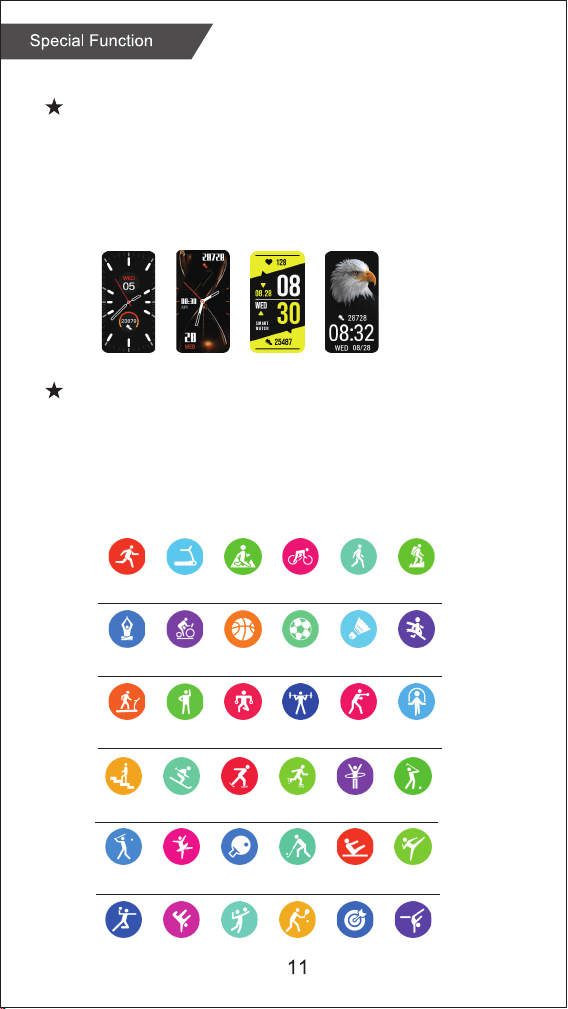
Change watch face
:
Long press the screen, swipe to choose, click to confi rm.
Download more from APP, Open APP---Device---Watch Face,
you can choose Online Dial or Custom Dial with your phone
picture.
Functions
Sports
The AT4 Activity Tracker supports up to 36 sports modes
including:
Outdoor Run, Indoor Run, Climb, Walk, Cycle, Spinning,
Yog
a, Basketball, Football, Badminto, Free Training
,
etc.
Stopwatch
Electronic timer can record
one time or record multiple
times.
Settings
Adjust brightness, language settings, system menus (shutdown,
factory reset, restart), about the watch.
Shortcut menu
1. Do not disturb 2. Vibration mode
3. Flashligh
t 4. B
rightness
5. Settings
Timer
The same way to
calculate the
remaining time.
Weather
Weather forecast.
Health care
(Female Physiological
Function)
Zewa AT4
Zewa AT4
Zewa AT4
Zewa AT4
Pair
Pair
Wristband length
Wristband width
Weight
Battery
Waterproof
9.7” (245mm)
0.6” (16mm)
1oz (28g)
160 mAh Poly-Li
IP68
Find phone
Normal
Pace
Step count
Maximum ...
Average ...
Taekwondo
Breathing training
Breathing training
Taekwondo
Heart rate
Wearing AT4 correctly, not too tight or loose, make sure
no green light leak, open the "Heart Rate" application in
the watch application, automatically measure the heart rate
after entering the application.
Breathing training
After wearing the watch correctly, open the menu - breathing
training, and follow the prompts to perform breathing training.
Step counting
After wearing the watch correctly, open the "step counting"
in the watch; display the number of steps, calories, distance
and other parameters of the day's exercise.
SpO2
After wearing the watch correctly, open the "SpO2" in the watch;
manual blood oxygen measurement is required.
Sleep
After wearing the watch correctly, open the "Sleep" in the
watch; record the sleep status throughout the night.
Alarm clock
Set the alarms in APP and sync to watch, maximum 5 alarms.
Message notification
You can view the text messages in the mobile phone and the
real-time information pushed to the watch.
Music control
Control the music player of mobile phone to play the music,as
well as song switching and volume adjustment.
Remote capture
Control the camera on the mobile phone to take pictures remotely.
When using it, please click "Device-Take Picture" on the APP to
turn on the camera.
Find phone
When the watch is connected to the APP, the phone will make a
sound after tapping it.
Anti-lost reminder
When the watch is disconnected from the Bluetooth of the mobile phone, the
watch will make a sound and vibrate to prevent loss.
Functions
Sports
Heart rate
Breathing training
SpO2
Step counting
Sleep
Alarm clock
Message notifi cation
Music control
Remote capture
Find phone
Anti-lost reminder
Stopwatch
Timer
Weather
Health care
Settings
Shortcut menu
3
11
12
12
12
12
13
13
13
14
14
14
14
15
15
15
15
15
15
4
AT4
K
D
Put Activity Tracker on your left or right wrist with the display facing you.
T
he distance between the Activity Tracker and wrist should be approximately
Tracker touch your skin.
If the device is worn
i
ncorrectly it provides
wrong results.
Wear the device according
to these instructions.
To access all Sports Modes select the “Sports” icon and
scroll down to “Personalization”.
Connect the USB
charging cable to
a USB port.
Charging
1
Position the magnetic
charging cable to the
charging points at the
back of your smart watch.
2
When charging begins,
you will see a battery icon
on the display screen.
The display will
automatically switch off
after a few seconds.
3
To check the charging
progress, press the
button on the side.
A solid battery icon
indicates a full charge.
4
08:32
08:32
08:32
08:32
2 Pin magnetic
USB charger cable
Running
Indoor
walking
Yoga
Climb
stairs
Baseball
Handball
Treadmill
Free
time
Spinning
bike
Ski
Dance
Hip-hop Volleyball Tennis Darts Gymnastics
Outdoor
running
Physical
training
Basketball
Skate
Pingpong
Ride
Weightlifting
Football
roller
skating
Hockey
Badminton
Hula
hoop
Pilates
Marathon
Golf
Taekwondo
Walking
Boxing
Mountaineering
Tump
rope
Change watch face
:
Long press the screen, swipe to choose, click to confi rm.
Download more from APP, Open APP---Device---Watch Face,
you can choose Online Dial or Custom Dial with your phone
picture.
Functions
Sports
The AT4 Activity Tracker supports up to 36 sports modes
including:
Outdoor Run, Indoor Run, Climb, Walk, Cycle, Spinning,
Yog
a, Basketball, Football, Badminto, Free Training
,
etc.
Stopwatch
Electronic timer can record
one time or record multiple
times.
Settings
Adjust brightness, language settings, system menus (shutdown,
factory reset, restart), about the watch.
Shortcut menu
1. Do not disturb 2. Vibration mode
3. Flashligh
t 4. B
rightness
5. Settings
Timer
The same way to
calculate the
remaining time.
Weather
Weather forecast.
Health care
(Female Physiological
Function)
Zewa AT4
Zewa AT4
Zewa AT4
Zewa AT4
Pair
Pair
Wristband length
Wristband width
Weight
Battery
Waterproof
9.7” (245mm)
0.6” (16mm)
1oz (28g)
160 mAh Poly-Li
IP68
Find phone
Normal
Pace
Step count
Maximum ...
Average ...
Taekwondo
Breathing training
Breathing training
Taekwondo
Heart rate
Wearing AT4 correctly, not too tight or loose, make sure
no green light leak, open the "Heart Rate" application in
the watch application, automatically measure the heart rate
after entering the application.
Breathing training
After wearing the watch correctly, open the menu - breathing
training, and follow the prompts to perform breathing training.
Step counting
After wearing the watch correctly, open the "step counting"
in the watch; display the number of steps, calories, distance
and other parameters of the day's exercise.
SpO2
After wearing the watch correctly, open the "SpO2" in the watch;
manual blood oxygen measurement is required.
Sleep
After wearing the watch correctly, open the "Sleep" in the
watch; record the sleep status throughout the night.
Alarm clock
Set the alarms in APP and sync to watch, maximum 5 alarms.
Message notification
You can view the text messages in the mobile phone and the
real-time information pushed to the watch.
Music control
Control the music player of mobile phone to play the music,as
well as song switching and volume adjustment.
Remote capture
Control the camera on the mobile phone to take pictures remotely.
When using it, please click "Device-Take Picture" on the APP to
turn on the camera.
Find phone
When the watch is connected to the APP, the phone will make a
sound after tapping it.
Anti-lost reminder
When the watch is disconnected from the Bluetooth of the mobile phone, the
watch will make a sound and vibrate to prevent loss.
Functions
Sports
Heart rate
Breathing training
SpO2
Step counting
Sleep
Alarm clock
Message notifi cation
Music control
Remote capture
Find phone
Anti-lost reminder
Stopwatch
Timer
Weather
Health care
Settings
Shortcut menu
3
11
12
12
12
12
13
13
13
14
14
14
14
15
15
15
15
15
15
4
AT4
K
D
Put Activity Tracker on your left or right wrist with the display facing you.
T
he distance between the Activity Tracker and wrist should be approximately
Tracker touch your skin.
If the device is worn
i
ncorrectly it provides
wrong results.
Wear the device according
to these instructions.
To access all Sports Modes select the “Sports” icon and
scroll down to “Personalization”.
Connect the USB
charging cable to
a USB port.
Charging
1
Position the magnetic
charging cable to the
charging points at the
back of your smart watch.
2
When charging begins,
you will see a battery icon
on the display screen.
The display will
automatically switch off
after a few seconds.
3
To check the charging
progress, press the
button on the side.
A solid battery icon
indicates a full charge.
4
08:32
08:32
08:32
08:32
2 Pin magnetic
USB charger cable
Running
Indoor
walking
Yoga
Climb
stairs
Baseball
Handball
Treadmill
Free
time
Spinning
bike
Ski
Dance
Hip-hop Volleyball Tennis Darts Gymnastics
Outdoor
running
Physical
training
Basketball
Skate
Pingpong
Ride
Weightlifting
Football
roller
skating
Hockey
Badminton
Hula
hoop
Pilates
Marathon
Golf
Taekwondo
Walking
Boxing
Mountaineering
Tump
rope
Change watch face
:
Long press the screen, swipe to choose, click to confi rm.
Download more from APP, Open APP---Device---Watch Face,
you can choose Online Dial or Custom Dial with your phone
picture.
Functions
Sports
The AT4 Activity Tracker supports up to 36 sports modes
including:
Outdoor Run, Indoor Run, Climb, Walk, Cycle, Spinning,
Yog
a, Basketball, Football, Badminto, Free Training
,
etc.
Stopwatch
Electronic timer can record
one time or record multiple
times.
Settings
Adjust brightness, language settings, system menus (shutdown,
factory reset, restart), about the watch.
Shortcut menu
1. Do not disturb 2. Vibration mode
3. Flashligh
t 4. B
rightness
5. Settings
Timer
The same way to
calculate the
remaining time.
Weather
Weather forecast.
Health care
(Female Physiological
Function)
Zewa AT4
Zewa AT4
Zewa AT4
Zewa AT4
Pair
Pair
Wristband length
Wristband width
Weight
Battery
Waterproof
9.7” (245mm)
0.6” (16mm)
1oz (28g)
160 mAh Poly-Li
IP68
Find phone
Normal
Pace
Step count
Maximum ...
Average ...
Taekwondo
Breathing training
Breathing training
Taekwondo
Heart rate
Wearing AT4 correctly, not too tight or loose, make sure
no green light leak, open the "Heart Rate" application in
the watch application, automatically measure the heart rate
after entering the application.
Breathing training
After wearing the watch correctly, open the menu - breathing
training, and follow the prompts to perform breathing training.
Step counting
After wearing the watch correctly, open the "step counting"
in the watch; display the number of steps, calories, distance
and other parameters of the day's exercise.
SpO2
After wearing the watch correctly, open the "SpO2" in the watch;
manual blood oxygen measurement is required.
Sleep
After wearing the watch correctly, open the "Sleep" in the
watch; record the sleep status throughout the night.
Alarm clock
Set the alarms in APP and sync to watch, maximum 5 alarms.
Message notification
You can view the text messages in the mobile phone and the
real-time information pushed to the watch.
Music control
Control the music player of mobile phone to play the music,as
well as song switching and volume adjustment.
Remote capture
Control the camera on the mobile phone to take pictures remotely.
When using it, please click "Device-Take Picture" on the APP to
turn on the camera.
Find phone
When the watch is connected to the APP, the phone will make a
sound after tapping it.
Anti-lost reminder
When the watch is disconnected from the Bluetooth of the mobile phone, the
watch will make a sound and vibrate to prevent loss.
Functions
Sports
Heart rate
Breathing training
SpO2
Step counting
Sleep
Alarm clock
Message notifi cation
Music control
Remote capture
Find phone
Anti-lost reminder
Stopwatch
Timer
Weather
Health care
Settings
Shortcut menu
3
11
12
12
12
12
13
13
13
14
14
14
14
15
15
15
15
15
15
4
AT4
K
D
Put Activity Tracker on your left or right wrist with the display facing you.
T
he distance between the Activity Tracker and wrist should be approximately
Tracker touch your skin.
If the device is worn
i
ncorrectly it provides
wrong results.
Wear the device according
to these instructions.
To access all Sports Modes select the “Sports” icon and
scroll down to “Personalization”.
Connect the USB
charging cable to
a USB port.
Charging
1
Position the magnetic
charging cable to the
charging points at the
back of your smart watch.
2
When charging begins,
you will see a battery icon
on the display screen.
The display will
automatically switch off
after a few seconds.
3
To check the charging
progress, press the
button on the side.
A solid battery icon
indicates a full charge.
4
08:32
08:32
08:32
08:32
2 Pin magnetic
USB charger cable
Running
Indoor
walking
Yoga
Climb
stairs
Baseball
Handball
Treadmill
Free
time
Spinning
bike
Ski
Dance
Hip-hop Volleyball Tennis Darts Gymnastics
Outdoor
running
Physical
training
Basketball
Skate
Pingpong
Ride
Weightlifting
Football
roller
skating
Hockey
Badminton
Hula
hoop
Pilates
Marathon
Golf
Taekwondo
Walking
Boxing
Mountaineering
Tump
rope
Change watch face
:
Long press the screen, swipe to choose, click to confi rm.
Download more from APP, Open APP---Device---Watch Face,
you can choose Online Dial or Custom Dial with your phone
picture.
Functions
Sports
The AT4 Activity Tracker supports up to 36 sports modes
including:
Outdoor Run, Indoor Run, Climb, Walk, Cycle, Spinning,
Yog
a, Basketball, Football, Badminto, Free Training
,
etc.
Stopwatch
Electronic timer can record
one time or record multiple
times.
Settings
Adjust brightness, language settings, system menus (shutdown,
factory reset, restart), about the watch.
Shortcut menu
1. Do not disturb 2. Vibration mode
3. Flashligh
t 4. B
rightness
5. Settings
Timer
The same way to
calculate the
remaining time.
Weather
Weather forecast.
Health care
(Female Physiological
Function)
Zewa AT4
Zewa AT4
Zewa AT4
Zewa AT4
Pair
Pair
Wristband length
Wristband width
Weight
Battery
Waterproof
9.7” (245mm)
0.6” (16mm)
1oz (28g)
160 mAh Poly-Li
IP68
Find phone
Normal
Pace
Step count
Maximum ...
Average ...
Taekwondo
Breathing training
Breathing training
Taekwondo
Heart rate
Wearing AT4 correctly, not too tight or loose, make sure
no green light leak, open the "Heart Rate" application in
the watch application, automatically measure the heart rate
after entering the application.
Breathing training
After wearing the watch correctly, open the menu - breathing
training, and follow the prompts to perform breathing training.
Step counting
After wearing the watch correctly, open the "step counting"
in the watch; display the number of steps, calories, distance
and other parameters of the day's exercise.
SpO2
After wearing the watch correctly, open the "SpO2" in the watch;
manual blood oxygen measurement is required.
Sleep
After wearing the watch correctly, open the "Sleep" in the
watch; record the sleep status throughout the night.
Alarm clock
Set the alarms in APP and sync to watch, maximum 5 alarms.
Message notification
You can view the text messages in the mobile phone and the
real-time information pushed to the watch.
Music control
Control the music player of mobile phone to play the music,as
well as song switching and volume adjustment.
Remote capture
Control the camera on the mobile phone to take pictures remotely.
When using it, please click "Device-Take Picture" on the APP to
turn on the camera.
Find phone
When the watch is connected to the APP, the phone will make a
sound after tapping it.
Anti-lost reminder
When the watch is disconnected from the Bluetooth of the mobile phone, the
watch will make a sound and vibrate to prevent loss.
Functions
Sports
Heart rate
Breathing training
SpO2
Step counting
Sleep
Alarm clock
Message notifi cation
Music control
Remote capture
Find phone
Anti-lost reminder
Stopwatch
Timer
Weather
Health care
Settings
Shortcut menu
3
11
12
12
12
12
13
13
13
14
14
14
14
15
15
15
15
15
15
4
AT4
K
D
Put Activity Tracker on your left or right wrist with the display facing you.
T
he distance between the Activity Tracker and wrist should be approximately
Tracker touch your skin.
If the device is worn
i
ncorrectly it provides
wrong results.
Wear the device according
to these instructions.
To access all Sports Modes select the “Sports” icon and
scroll down to “Personalization”.
Connect the USB
charging cable to
a USB port.
Charging
1
Position the magnetic
charging cable to the
charging points at the
back of your smart watch.
2
When charging begins,
you will see a battery icon
on the display screen.
The display will
automatically switch off
after a few seconds.
3
To check the charging
progress, press the
button on the side.
A solid battery icon
indicates a full charge.
4
08:32
08:32
08:32
08:32
2 Pin magnetic
USB charger cable
Running
Indoor
walking
Yoga
Climb
stairs
Baseball
Handball
Treadmill
Free
time
Spinning
bike
Ski
Dance
Hip-hop Volleyball Tennis Darts Gymnastics
Outdoor
running
Physical
training
Basketball
Skate
Pingpong
Ride
Weightlifting
Football
roller
skating
Hockey
Badminton
Hula
hoop
Pilates
Marathon
Golf
Taekwondo
Walking
Boxing
Mountaineering
Tump
rope
Change watch face
:
Long press the screen, swipe to choose, click to confi rm.
Download more from APP, Open APP---Device---Watch Face,
you can choose Online Dial or Custom Dial with your phone
picture.
Functions
Sports
The AT4 Activity Tracker supports up to 36 sports modes
including:
Outdoor Run, Indoor Run, Climb, Walk, Cycle, Spinning,
Yog
a, Basketball, Football, Badminto, Free Training
,
etc.
Stopwatch
Electronic timer can record
one time or record multiple
times.
Settings
Adjust brightness, language settings, system menus (shutdown,
factory reset, restart), about the watch.
Shortcut menu
1. Do not disturb 2. Vibration mode
3. Flashligh
t 4. B
rightness
5. Settings
Timer
The same way to
calculate the
remaining time.
Weather
Weather forecast.
Health care
(Female Physiological
Function)
Zewa AT4
Zewa AT4
Zewa AT4
Zewa AT4
Pair
Pair
Wristband length
Wristband width
Weight
Battery
Waterproof
9.7” (245mm)
0.6” (16mm)
1oz (28g)
160 mAh Poly-Li
IP68
Find phone
Normal
Pace
Step count
Maximum ...
Average ...
Taekwondo
Breathing training
Breathing training
Taekwondo
Heart rate
Wearing AT4 correctly, not too tight or loose, make sure
no green light leak, open the "Heart Rate" application in
the watch application, automatically measure the heart rate
after entering the application.
Breathing training
After wearing the watch correctly, open the menu - breathing
training, and follow the prompts to perform breathing training.
Step counting
After wearing the watch correctly, open the "step counting"
in the watch; display the number of steps, calories, distance
and other parameters of the day's exercise.
SpO2
After wearing the watch correctly, open the "SpO2" in the watch;
manual blood oxygen measurement is required.
Sleep
After wearing the watch correctly, open the "Sleep" in the
watch; record the sleep status throughout the night.
Alarm clock
Set the alarms in APP and sync to watch, maximum 5 alarms.
Message notification
You can view the text messages in the mobile phone and the
real-time information pushed to the watch.
Music control
Control the music player of mobile phone to play the music,as
well as song switching and volume adjustment.
Remote capture
Control the camera on the mobile phone to take pictures remotely.
When using it, please click "Device-Take Picture" on the APP to
turn on the camera.
Find phone
When the watch is connected to the APP, the phone will make a
sound after tapping it.
Anti-lost reminder
When the watch is disconnected from the Bluetooth of the mobile phone, the
watch will make a sound and vibrate to prevent loss.
Functions
Sports
Heart rate
Breathing training
SpO2
Step counting
Sleep
Alarm clock
Message notifi cation
Music control
Remote capture
Find phone
Anti-lost reminder
Stopwatch
Timer
Weather
Health care
Settings
Shortcut menu
3
11
12
12
12
12
13
13
13
14
14
14
14
15
15
15
15
15
15
4
AT4
K
D
Put Activity Tracker on your left or right wrist with the display facing you.
T
he distance between the Activity Tracker and wrist should be approximately
Tracker touch your skin.
If the device is worn
i
ncorrectly it provides
wrong results.
Wear the device according
to these instructions.
To access all Sports Modes select the “Sports” icon and
scroll down to “Personalization”.
Connect the USB
charging cable to
a USB port.
Charging
1
Position the magnetic
charging cable to the
charging points at the
back of your smart watch.
2
When charging begins,
you will see a battery icon
on the display screen.
The display will
automatically switch off
after a few seconds.
3
To check the charging
progress, press the
button on the side.
A solid battery icon
indicates a full charge.
4
08:32
08:32
08:32
08:32
2 Pin magnetic
USB charger cable
Running
Indoor
walking
Yoga
Climb
stairs
Baseball
Handball
Treadmill
Free
time
Spinning
bike
Ski
Dance
Hip-hop Volleyball Tennis Darts Gymnastics
Outdoor
running
Physical
training
Basketball
Skate
Pingpong
Ride
Weightlifting
Football
roller
skating
Hockey
Badminton
Hula
hoop
Pilates
Marathon
Golf
Taekwondo
Walking
Boxing
Mountaineering
Tump
rope
Change watch face
:
Long press the screen, swipe to choose, click to confi rm.
Download more from APP, Open APP---Device---Watch Face,
you can choose Online Dial or Custom Dial with your phone
picture.
Functions
Sports
The AT4 Activity Tracker supports up to 36 sports modes
including:
Outdoor Run, Indoor Run, Climb, Walk, Cycle, Spinning,
Yog
a, Basketball, Football, Badminto, Free Training
,
etc.
Stopwatch
Electronic timer can record
one time or record multiple
times.
Settings
Adjust brightness, language settings, system menus (shutdown,
factory reset, restart), about the watch.
Shortcut menu
1. Do not disturb 2. Vibration mode
3. Flashligh
t 4. B
rightness
5. Settings
Timer
The same way to
calculate the
remaining time.
Weather
Weather forecast.
Health care
(Female Physiological
Function)
Zewa AT4
Zewa AT4
Zewa AT4
Zewa AT4
Pair
Pair
Wristband length
Wristband width
Weight
Battery
Waterproof
9.7” (245mm)
0.6” (16mm)
1oz (28g)
160 mAh Poly-Li
IP68
Find phone
Normal
Pace
Step count
Maximum ...
Average ...
Taekwondo
Breathing training
Breathing training
Taekwondo
Heart rate
Wearing AT4 correctly, not too tight or loose, make sure
no green light leak, open the "Heart Rate" application in
the watch application, automatically measure the heart rate
after entering the application.
Breathing training
After wearing the watch correctly, open the menu - breathing
training, and follow the prompts to perform breathing training.
Step counting
After wearing the watch correctly, open the "step counting"
in the watch; display the number of steps, calories, distance
and other parameters of the day's exercise.
SpO2
After wearing the watch correctly, open the "SpO2" in the watch;
manual blood oxygen measurement is required.
Sleep
After wearing the watch correctly, open the "Sleep" in the
watch; record the sleep status throughout the night.
Alarm clock
Set the alarms in APP and sync to watch, maximum 5 alarms.
Message notification
You can view the text messages in the mobile phone and the
real-time information pushed to the watch.
Music control
Control the music player of mobile phone to play the music,as
well as song switching and volume adjustment.
Remote capture
Control the camera on the mobile phone to take pictures remotely.
When using it, please click "Device-Take Picture" on the APP to
turn on the camera.
Find phone
When the watch is connected to the APP, the phone will make a
sound after tapping it.
Anti-lost reminder
When the watch is disconnected from the Bluetooth of the mobile phone, the
watch will make a sound and vibrate to prevent loss.
Functions
Sports
Heart rate
Breathing training
SpO2
Step counting
Sleep
Alarm clock
Message notifi cation
Music control
Remote capture
Find phone
Anti-lost reminder
Stopwatch
Timer
Weather
Health care
Settings
Shortcut menu
3
11
12
12
12
12
13
13
13
14
14
14
14
15
15
15
15
15
15
4
AT4
K
D
Put Activity Tracker on your left or right wrist with the display facing you.
T
he distance between the Activity Tracker and wrist should be approximately
Tracker touch your skin.
If the device is worn
i
ncorrectly it provides
wrong results.
Wear the device according
to these instructions.
To access all Sports Modes select the “Sports” icon and
scroll down to “Personalization”.
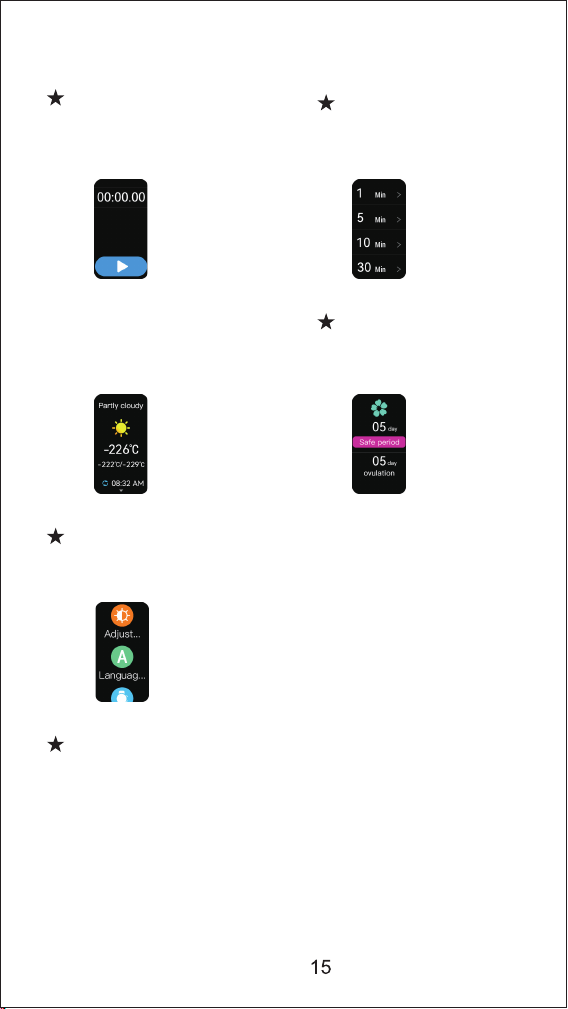
Connect the USB
charging cable to
a USB port.
Charging
1
Position the magnetic
charging cable to the
charging points at the
back of your smart watch.
2
When charging begins,
you will see a battery icon
on the display screen.
The display will
automatically switch off
after a few seconds.
3
To check the charging
progress, press the
button on the side.
A solid battery icon
indicates a full charge.
4
08:32
08:32
08:32
08:32
2 Pin magnetic
USB charger cable
Running
Indoor
walking
Yoga
Climb
stairs
Baseball
Handball
Treadmill
Free
time
Spinning
bike
Ski
Dance
Hip-hop Volleyball Tennis Darts Gymnastics
Outdoor
running
Physical
training
Basketball
Skate
Pingpong
Ride
Weightlifting
Football
roller
skating
Hockey
Badminton
Hula
hoop
Pilates
Marathon
Golf
Taekwondo
Walking
Boxing
Mountaineering
Tump
rope
Change watch face
:
Long press the screen, swipe to choose, click to confi rm.
Download more from APP, Open APP---Device---Watch Face,
you can choose Online Dial or Custom Dial with your phone
picture.
Functions
Sports
The AT4 Activity Tracker supports up to 36 sports modes
including:
Outdoor Run, Indoor Run, Climb, Walk, Cycle, Spinning,
Yog
a, Basketball, Football, Badminto, Free Training
,
etc.
Stopwatch
Electronic timer can record
one time or record multiple
times.
Settings
Adjust brightness, language settings, system menus (shutdown,
factory reset, restart), about the watch.
Shortcut menu
1. Do not disturb 2. Vibration mode
3. Flashligh
t 4. B
rightness
5. Settings
Timer
The same way to
calculate the
remaining time.
Weather
Weather forecast.
Health care
(Female Physiological
Function)
Zewa AT4
Zewa AT4
Zewa AT4
Zewa AT4
Pair
Pair
Wristband length
Wristband width
Weight
Battery
Waterproof
9.7” (245mm)
0.6” (16mm)
1oz (28g)
160 mAh Poly-Li
IP68
Find phone
Normal
Pace
Step count
Maximum ...
Average ...
Taekwondo
Breathing training
Breathing training
Taekwondo
Heart rate
Wearing AT4 correctly, not too tight or loose, make sure
no green light leak, open the "Heart Rate" application in
the watch application, automatically measure the heart rate
after entering the application.
Breathing training
After wearing the watch correctly, open the menu - breathing
training, and follow the prompts to perform breathing training.
Step counting
After wearing the watch correctly, open the "step counting"
in the watch; display the number of steps, calories, distance
and other parameters of the day's exercise.
SpO2
After wearing the watch correctly, open the "SpO2" in the watch;
manual blood oxygen measurement is required.
Sleep
After wearing the watch correctly, open the "Sleep" in the
watch; record the sleep status throughout the night.
Alarm clock
Set the alarms in APP and sync to watch, maximum 5 alarms.
Message notification
You can view the text messages in the mobile phone and the
real-time information pushed to the watch.
Music control
Control the music player of mobile phone to play the music,as
well as song switching and volume adjustment.
Remote capture
Control the camera on the mobile phone to take pictures remotely.
When using it, please click "Device-Take Picture" on the APP to
turn on the camera.
Find phone
When the watch is connected to the APP, the phone will make a
sound after tapping it.
Anti-lost reminder
When the watch is disconnected from the Bluetooth of the mobile phone, the
watch will make a sound and vibrate to prevent loss.
Functions
Sports
Heart rate
Breathing training
SpO2
Step counting
Sleep
Alarm clock
Message notifi cation
Music control
Remote capture
Find phone
Anti-lost reminder
Stopwatch
Timer
Weather
Health care
Settings
Shortcut menu
3
11
12
12
12
12
13
13
13
14
14
14
14
15
15
15
15
15
15
4
AT4
K
D
Put Activity Tracker on your left or right wrist with the display facing you.
T
he distance between the Activity Tracker and wrist should be approximately
Tracker touch your skin.
If the device is worn
i
ncorrectly it provides
wrong results.
Wear the device according
to these instructions.
To access all Sports Modes select the “Sports” icon and
scroll down to “Personalization”.
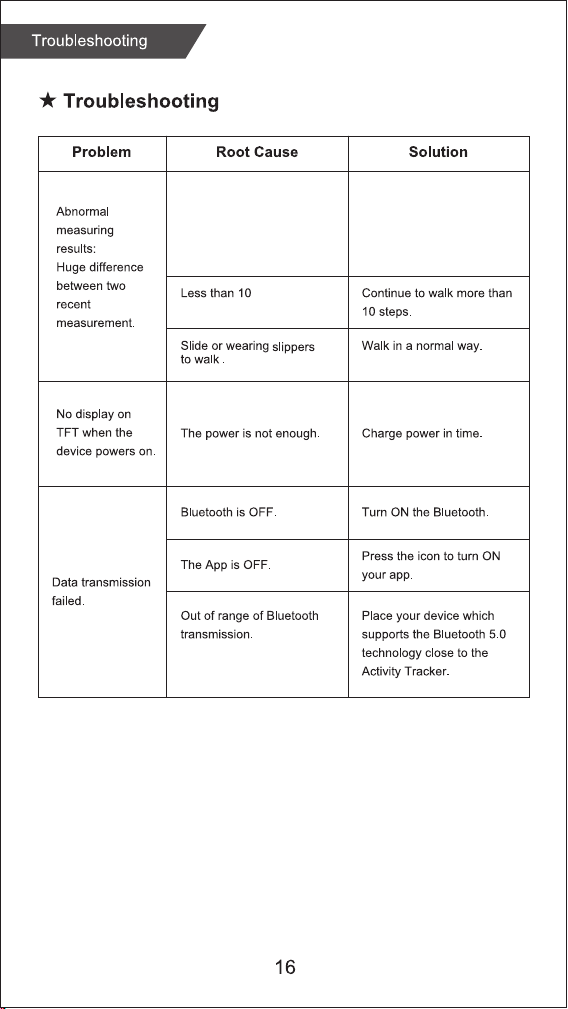
Connect the USB
charging cable to
a USB port.
Charging
1
Position the magnetic
charging cable to the
charging points at the
back of your smart watch.
2
When charging begins,
you will see a battery icon
on the display screen.
The display will
automatically switch off
after a few seconds.
3
To check the charging
progress, press the
button on the side.
A solid battery icon
indicates a full charge.
4
08:32
08:32
08:32
08:32
2 Pin magnetic
USB charger cable
Running
Indoor
walking
Yoga
Climb
stairs
Baseball
Handball
Treadmill
Free
time
Spinning
bike
Ski
Dance
Hip-hop Volleyball Tennis Darts Gymnastics
Outdoor
running
Physical
training
Basketball
Skate
Pingpong
Ride
Weightlifting
Football
roller
skating
Hockey
Badminton
Hula
hoop
Pilates
Marathon
Golf
Taekwondo
Walking
Boxing
Mountaineering
Tump
rope
Change watch face
:
Long press the screen, swipe to choose, click to confi rm.
Download more from APP, Open APP---Device---Watch Face,
you can choose Online Dial or Custom Dial with your phone
picture.
Functions
Sports
The AT4 Activity Tracker supports up to 36 sports modes
including:
Outdoor Run, Indoor Run, Climb, Walk, Cycle, Spinning,
Yog
a, Basketball, Football, Badminto, Free Training
,
etc.
Stopwatch
Electronic timer can record
one time or record multiple
times.
Settings
Adjust brightness, language settings, system menus (shutdown,
factory reset, restart), about the watch.
Shortcut menu
1. Do not disturb 2. Vibration mode
3. Flashligh
t 4. B
rightness
5. Settings
Timer
The same way to
calculate the
remaining time.
Weather
Weather forecast.
Health care
(Female Physiological
Function)
Zewa AT4
Zewa AT4
Zewa AT4
Zewa AT4
Pair
Pair
Wristband length
Wristband width
Weight
Battery
Waterproof
9.7” (245mm)
0.6” (16mm)
1oz (28g)
160 mAh Poly-Li
IP68
Find phone
Normal
Pace
Step count
Maximum ...
Average ...
Taekwondo
Breathing training
Breathing training
Taekwondo
Heart rate
Wearing AT4 correctly, not too tight or loose, make sure
no green light leak, open the "Heart Rate" application in
the watch application, automatically measure the heart rate
after entering the application.
Breathing training
After wearing the watch correctly, open the menu - breathing
training, and follow the prompts to perform breathing training.
Step counting
After wearing the watch correctly, open the "step counting"
in the watch; display the number of steps, calories, distance
and other parameters of the day's exercise.
SpO2
After wearing the watch correctly, open the "SpO2" in the watch;
manual blood oxygen measurement is required.
Sleep
After wearing the watch correctly, open the "Sleep" in the
watch; record the sleep status throughout the night.
Alarm clock
Set the alarms in APP and sync to watch, maximum 5 alarms.
Message notification
You can view the text messages in the mobile phone and the
real-time information pushed to the watch.
Music control
Control the music player of mobile phone to play the music,as
well as song switching and volume adjustment.
Remote capture
Control the camera on the mobile phone to take pictures remotely.
When using it, please click "Device-Take Picture" on the APP to
turn on the camera.
Find phone
When the watch is connected to the APP, the phone will make a
sound after tapping it.
Anti-lost reminder
When the watch is disconnected from the Bluetooth of the mobile phone, the
watch will make a sound and vibrate to prevent loss.
Functions
Sports
Heart rate
Breathing training
SpO2
Step counting
Sleep
Alarm clock
Message notifi cation
Music control
Remote capture
Find phone
Anti-lost reminder
Stopwatch
Timer
Weather
Health care
Settings
Shortcut menu
3
11
12
12
12
12
13
13
13
14
14
14
14
15
15
15
15
15
15
4
AT4
K
D
Put Activity Tracker on your left or right wrist with the display facing you.
T
he distance between the Activity Tracker and wrist should be approximately
Tracker touch your skin.
If the device is worn
i
ncorrectly it provides
wrong results.
Wear the device according
to these instructions.
To access all Sports Modes select the “Sports” icon and
scroll down to “Personalization”.
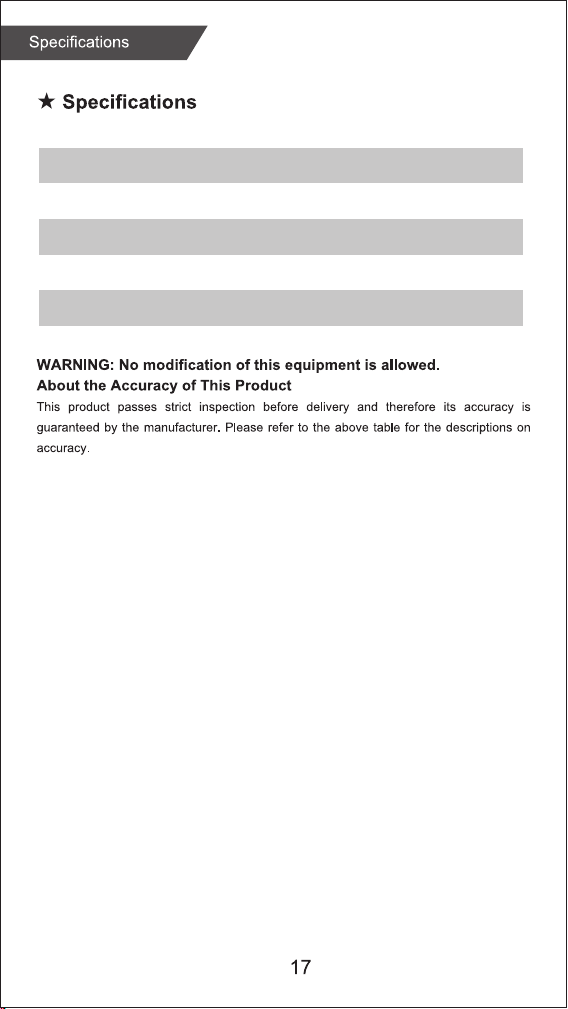
Connect the USB
charging cable to
a USB port.
Charging
1
Position the magnetic
charging cable to the
charging points at the
back of your smart watch.
2
When charging begins,
you will see a battery icon
on the display screen.
The display will
automatically switch off
after a few seconds.
3
To check the charging
progress, press the
button on the side.
A solid battery icon
indicates a full charge.
4
08:32
08:32
08:32
08:32
2 Pin magnetic
USB charger cable
Running
Indoor
walking
Yoga
Climb
stairs
Baseball
Handball
Treadmill
Free
time
Spinning
bike
Ski
Dance
Hip-hop Volleyball Tennis Darts Gymnastics
Outdoor
running
Physical
training
Basketball
Skate
Pingpong
Ride
Weightlifting
Football
roller
skating
Hockey
Badminton
Hula
hoop
Pilates
Marathon
Golf
Taekwondo
Walking
Boxing
Mountaineering
Tump
rope
Change watch face
:
Long press the screen, swipe to choose, click to confi rm.
Download more from APP, Open APP---Device---Watch Face,
you can choose Online Dial or Custom Dial with your phone
picture.
Functions
Sports
The AT4 Activity Tracker supports up to 36 sports modes
including:
Outdoor Run, Indoor Run, Climb, Walk, Cycle, Spinning,
Yog
a, Basketball, Football, Badminto, Free Training
,
etc.
Stopwatch
Electronic timer can record
one time or record multiple
times.
Settings
Adjust brightness, language settings, system menus (shutdown,
factory reset, restart), about the watch.
Shortcut menu
1. Do not disturb 2. Vibration mode
3. Flashligh
t 4. B
rightness
5. Settings
Timer
The same way to
calculate the
remaining time.
Weather
Weather forecast.
Health care
(Female Physiological
Function)
Zewa AT4
Zewa AT4
Zewa AT4
Zewa AT4
Pair
Pair
Wristband length
Wristband width
Weight
Battery
Waterproof
9.7” (245mm)
0.6” (16mm)
1oz (28g)
160 mAh Poly-Li
IP68
Find phone
Normal
Pace
Step count
Maximum ...
Average ...
Taekwondo
Breathing training
Breathing training
Taekwondo
Heart rate
Wearing AT4 correctly, not too tight or loose, make sure
no green light leak, open the "Heart Rate" application in
the watch application, automatically measure the heart rate
after entering the application.
Breathing training
After wearing the watch correctly, open the menu - breathing
training, and follow the prompts to perform breathing training.
Step counting
After wearing the watch correctly, open the "step counting"
in the watch; display the number of steps, calories, distance
and other parameters of the day's exercise.
SpO2
After wearing the watch correctly, open the "SpO2" in the watch;
manual blood oxygen measurement is required.
Sleep
After wearing the watch correctly, open the "Sleep" in the
watch; record the sleep status throughout the night.
Alarm clock
Set the alarms in APP and sync to watch, maximum 5 alarms.
Message notification
You can view the text messages in the mobile phone and the
real-time information pushed to the watch.
Music control
Control the music player of mobile phone to play the music,as
well as song switching and volume adjustment.
Remote capture
Control the camera on the mobile phone to take pictures remotely.
When using it, please click "Device-Take Picture" on the APP to
turn on the camera.
Find phone
When the watch is connected to the APP, the phone will make a
sound after tapping it.
Anti-lost reminder
When the watch is disconnected from the Bluetooth of the mobile phone, the
watch will make a sound and vibrate to prevent loss.
Functions
Sports
Heart rate
Breathing training
SpO2
Step counting
Sleep
Alarm clock
Message notifi cation
Music control
Remote capture
Find phone
Anti-lost reminder
Stopwatch
Timer
Weather
Health care
Settings
Shortcut menu
3
11
12
12
12
12
13
13
13
14
14
14
14
15
15
15
15
15
15
4
AT4
K
D
Put Activity Tracker on your left or right wrist with the display facing you.
T
he distance between the Activity Tracker and wrist should be approximately
Tracker touch your skin.
If the device is worn
i
ncorrectly it provides
wrong results.
Wear the device according
to these instructions.
To access all Sports Modes select the “Sports” icon and
scroll down to “Personalization”.
Connect the USB
charging cable to
a USB port.
Charging
1
Position the magnetic
charging cable to the
charging points at the
back of your smart watch.
2
When charging begins,
you will see a battery icon
on the display screen.
The display will
automatically switch off
after a few seconds.
3
To check the charging
progress, press the
button on the side.
A solid battery icon
indicates a full charge.
4
08:32
08:32
08:32
08:32
2 Pin magnetic
USB charger cable
Running
Indoor
walking
Yoga
Climb
stairs
Baseball
Handball
Treadmill
Free
time
Spinning
bike
Ski
Dance
Hip-hop Volleyball Tennis Darts Gymnastics
Outdoor
running
Physical
training
Basketball
Skate
Pingpong
Ride
Weightlifting
Football
roller
skating
Hockey
Badminton
Hula
hoop
Pilates
Marathon
Golf
Taekwondo
Walking
Boxing
Mountaineering
Tump
rope
Change watch face
:
Long press the screen, swipe to choose, click to confi rm.
Download more from APP, Open APP---Device---Watch Face,
you can choose Online Dial or Custom Dial with your phone
picture.
Functions
Sports
The AT4 Activity Tracker supports up to 36 sports modes
including:
Outdoor Run, Indoor Run, Climb, Walk, Cycle, Spinning,
Yog
a, Basketball, Football, Badminto, Free Training
,
etc.
Stopwatch
Electronic timer can record
one time or record multiple
times.
Settings
Adjust brightness, language settings, system menus (shutdown,
factory reset, restart), about the watch.
Shortcut menu
1. Do not disturb 2. Vibration mode
3. Flashligh
t 4. B
rightness
5. Settings
Timer
The same way to
calculate the
remaining time.
Weather
Weather forecast.
Health care
(Female Physiological
Function)
Zewa AT4
Zewa AT4
Zewa AT4
Zewa AT4
Pair
Pair
Wristband length
Wristband width
Weight
Battery
Waterproof
9.7” (245mm)
0.6” (16mm)
1oz (28g)
160 mAh Poly-Li
IP68
Find phone
Normal
Pace
Step count
Maximum ...
Average ...
Taekwondo
Breathing training
Breathing training
Taekwondo
Heart rate
Wearing AT4 correctly, not too tight or loose, make sure
no green light leak, open the "Heart Rate" application in
the watch application, automatically measure the heart rate
after entering the application.
Breathing training
After wearing the watch correctly, open the menu - breathing
training, and follow the prompts to perform breathing training.
Step counting
After wearing the watch correctly, open the "step counting"
in the watch; display the number of steps, calories, distance
and other parameters of the day's exercise.
SpO2
After wearing the watch correctly, open the "SpO2" in the watch;
manual blood oxygen measurement is required.
Sleep
After wearing the watch correctly, open the "Sleep" in the
watch; record the sleep status throughout the night.
Alarm clock
Set the alarms in APP and sync to watch, maximum 5 alarms.
Message notification
You can view the text messages in the mobile phone and the
real-time information pushed to the watch.
Music control
Control the music player of mobile phone to play the music,as
well as song switching and volume adjustment.
Remote capture
Control the camera on the mobile phone to take pictures remotely.
When using it, please click "Device-Take Picture" on the APP to
turn on the camera.
Find phone
When the watch is connected to the APP, the phone will make a
sound after tapping it.
Anti-lost reminder
When the watch is disconnected from the Bluetooth of the mobile phone, the
watch will make a sound and vibrate to prevent loss.
Functions
Sports
Heart rate
Breathing training
SpO2
Step counting
Sleep
Alarm clock
Message notifi cation
Music control
Remote capture
Find phone
Anti-lost reminder
Stopwatch
Timer
Weather
Health care
Settings
Shortcut menu
3
11
12
12
12
12
13
13
13
14
14
14
14
15
15
15
15
15
15
4
AT4
K
D
Put Activity Tracker on your left or right wrist with the display facing you.
T
he distance between the Activity Tracker and wrist should be approximately
Tracker touch your skin.
If the device is worn
i
ncorrectly it provides
wrong results.
Wear the device according
to these instructions.
To access all Sports Modes select the “Sports” icon and
scroll down to “Personalization”.
Connect the USB
charging cable to
a USB port.
Charging
1
Position the magnetic
charging cable to the
charging points at the
back of your smart watch.
2
When charging begins,
you will see a battery icon
on the display screen.
The display will
automatically switch off
after a few seconds.
3
To check the charging
progress, press the
button on the side.
A solid battery icon
indicates a full charge.
4
08:32
08:32
08:32
08:32
2 Pin magnetic
USB charger cable
Running
Indoor
walking
Yoga
Climb
stairs
Baseball
Handball
Treadmill
Free
time
Spinning
bike
Ski
Dance
Hip-hop Volleyball Tennis Darts Gymnastics
Outdoor
running
Physical
training
Basketball
Skate
Pingpong
Ride
Weightlifting
Football
roller
skating
Hockey
Badminton
Hula
hoop
Pilates
Marathon
Golf
Taekwondo
Walking
Boxing
Mountaineering
Tump
rope
Change watch face
:
Long press the screen, swipe to choose, click to confi rm.
Download more from APP, Open APP---Device---Watch Face,
you can choose Online Dial or Custom Dial with your phone
picture.
Functions
Sports
The AT4 Activity Tracker supports up to 36 sports modes
including:
Outdoor Run, Indoor Run, Climb, Walk, Cycle, Spinning,
Yog
a, Basketball, Football, Badminto, Free Training
,
etc.
Stopwatch
Electronic timer can record
one time or record multiple
times.
Settings
Adjust brightness, language settings, system menus (shutdown,
factory reset, restart), about the watch.
Shortcut menu
1. Do not disturb 2. Vibration mode
3. Flashligh
t 4. B
rightness
5. Settings
Timer
The same way to
calculate the
remaining time.
Weather
Weather forecast.
Health care
(Female Physiological
Function)
Zewa AT4
Zewa AT4
Zewa AT4
Zewa AT4
Pair
Pair
Wristband length
Wristband width
Weight
Battery
Waterproof
9.7” (245mm)
0.6” (16mm)
1oz (28g)
160 mAh Poly-Li
IP68
Find phone
Normal
Pace
Step count
Maximum ...
Average ...
Taekwondo
Breathing training
Breathing training
Taekwondo
Heart rate
Wearing AT4 correctly, not too tight or loose, make sure
no green light leak, open the "Heart Rate" application in
the watch application, automatically measure the heart rate
after entering the application.
Breathing training
After wearing the watch correctly, open the menu - breathing
training, and follow the prompts to perform breathing training.
Step counting
After wearing the watch correctly, open the "step counting"
in the watch; display the number of steps, calories, distance
and other parameters of the day's exercise.
SpO2
After wearing the watch correctly, open the "SpO2" in the watch;
manual blood oxygen measurement is required.
Sleep
After wearing the watch correctly, open the "Sleep" in the
watch; record the sleep status throughout the night.
Alarm clock
Set the alarms in APP and sync to watch, maximum 5 alarms.
Message notification
You can view the text messages in the mobile phone and the
real-time information pushed to the watch.
Music control
Control the music player of mobile phone to play the music,as
well as song switching and volume adjustment.
Remote capture
Control the camera on the mobile phone to take pictures remotely.
When using it, please click "Device-Take Picture" on the APP to
turn on the camera.
Find phone
When the watch is connected to the APP, the phone will make a
sound after tapping it.
Anti-lost reminder
When the watch is disconnected from the Bluetooth of the mobile phone, the
watch will make a sound and vibrate to prevent loss.
Functions
Sports
Heart rate
Breathing training
SpO2
Step counting
Sleep
Alarm clock
Message notifi cation
Music control
Remote capture
Find phone
Anti-lost reminder
Stopwatch
Timer
Weather
Health care
Settings
Shortcut menu
3
11
12
12
12
12
13
13
13
14
14
14
14
15
15
15
15
15
15
4
AT4
K
D
Put Activity Tracker on your left or right wrist with the display facing you.
T
he distance between the Activity Tracker and wrist should be approximately
Tracker touch your skin.
If the device is worn
i
ncorrectly it provides
wrong results.
Wear the device according
to these instructions.
To access all Sports Modes select the “Sports” icon and
scroll down to “Personalization”.
Connect the USB
charging cable to
a USB port.
Charging
1
Position the magnetic
charging cable to the
charging points at the
back of your smart watch.
2
When charging begins,
you will see a battery icon
on the display screen.
The display will
automatically switch off
after a few seconds.
3
To check the charging
progress, press the
button on the side.
A solid battery icon
indicates a full charge.
4
08:32
08:32
08:32
08:32
2 Pin magnetic
USB charger cable
Running
Indoor
walking
Yoga
Climb
stairs
Baseball
Handball
Treadmill
Free
time
Spinning
bike
Ski
Dance
Hip-hop Volleyball Tennis Darts Gymnastics
Outdoor
running
Physical
training
Basketball
Skate
Pingpong
Ride
Weightlifting
Football
roller
skating
Hockey
Badminton
Hula
hoop
Pilates
Marathon
Golf
Taekwondo
Walking
Boxing
Mountaineering
Tump
rope
Change watch face
:
Long press the screen, swipe to choose, click to confi rm.
Download more from APP, Open APP---Device---Watch Face,
you can choose Online Dial or Custom Dial with your phone
picture.
Functions
Sports
The AT4 Activity Tracker supports up to 36 sports modes
including:
Outdoor Run, Indoor Run, Climb, Walk, Cycle, Spinning,
Yog
a, Basketball, Football, Badminto, Free Training
,
etc.
Stopwatch
Electronic timer can record
one time or record multiple
times.
Settings
Adjust brightness, language settings, system menus (shutdown,
factory reset, restart), about the watch.
Shortcut menu
1. Do not disturb 2. Vibration mode
3. Flashligh
t 4. B
rightness
5. Settings
Timer
The same way to
calculate the
remaining time.
Weather
Weather forecast.
Health care
(Female Physiological
Function)
Zewa AT4
Zewa AT4
Zewa AT4
Zewa AT4
Pair
Pair
Wristband length
Wristband width
Weight
Battery
Waterproof
9.7” (245mm)
0.6” (16mm)
1oz (28g)
160 mAh Poly-Li
IP68
Find phone
Normal
Pace
Step count
Maximum ...
Average ...
Taekwondo
Breathing training
Breathing training
Taekwondo
Heart rate
Wearing AT4 correctly, not too tight or loose, make sure
no green light leak, open the "Heart Rate" application in
the watch application, automatically measure the heart rate
after entering the application.
Breathing training
After wearing the watch correctly, open the menu - breathing
training, and follow the prompts to perform breathing training.
Step counting
After wearing the watch correctly, open the "step counting"
in the watch; display the number of steps, calories, distance
and other parameters of the day's exercise.
SpO2
After wearing the watch correctly, open the "SpO2" in the watch;
manual blood oxygen measurement is required.
Sleep
After wearing the watch correctly, open the "Sleep" in the
watch; record the sleep status throughout the night.
Alarm clock
Set the alarms in APP and sync to watch, maximum 5 alarms.
Message notification
You can view the text messages in the mobile phone and the
real-time information pushed to the watch.
Music control
Control the music player of mobile phone to play the music,as
well as song switching and volume adjustment.
Remote capture
Control the camera on the mobile phone to take pictures remotely.
When using it, please click "Device-Take Picture" on the APP to
turn on the camera.
Find phone
When the watch is connected to the APP, the phone will make a
sound after tapping it.
Anti-lost reminder
When the watch is disconnected from the Bluetooth of the mobile phone, the
watch will make a sound and vibrate to prevent loss.
Functions
Sports
Heart rate
Breathing training
SpO2
Step counting
Sleep
Alarm clock
Message notifi cation
Music control
Remote capture
Find phone
Anti-lost reminder
Stopwatch
Timer
Weather
Health care
Settings
Shortcut menu
3
11
12
12
12
12
13
13
13
14
14
14
14
15
15
15
15
15
15
4
AT4
K
D
Put Activity Tracker on your left or right wrist with the display facing you.
T
he distance between the Activity Tracker and wrist should be approximately
Tracker touch your skin.
If the device is worn
i
ncorrectly it provides
wrong results.
Wear the device according
to these instructions.
To access all Sports Modes select the “Sports” icon and
scroll down to “Personalization”.

Connect the USB
charging cable to
a USB port.
Charging
1
Position the magnetic
charging cable to the
charging points at the
back of your smart watch.
2
When charging begins,
you will see a battery icon
on the display screen.
The display will
automatically switch off
after a few seconds.
3
To check the charging
progress, press the
button on the side.
A solid battery icon
indicates a full charge.
4
08:32
08:32
08:32
08:32
2 Pin magnetic
USB charger cable
Running
Indoor
walking
Yoga
Climb
stairs
Baseball
Handball
Treadmill
Free
time
Spinning
bike
Ski
Dance
Hip-hop Volleyball Tennis Darts Gymnastics
Outdoor
running
Physical
training
Basketball
Skate
Pingpong
Ride
Weightlifting
Football
roller
skating
Hockey
Badminton
Hula
hoop
Pilates
Marathon
Golf
Taekwondo
Walking
Boxing
Mountaineering
Tump
rope
Change watch face
:
Long press the screen, swipe to choose, click to confi rm.
Download more from APP, Open APP---Device---Watch Face,
you can choose Online Dial or Custom Dial with your phone
picture.
Functions
Sports
The AT4 Activity Tracker supports up to 36 sports modes
including:
Outdoor Run, Indoor Run, Climb, Walk, Cycle, Spinning,
Yog
a, Basketball, Football, Badminto, Free Training
,
etc.
Stopwatch
Electronic timer can record
one time or record multiple
times.
Settings
Adjust brightness, language settings, system menus (shutdown,
factory reset, restart), about the watch.
Shortcut menu
1. Do not disturb 2. Vibration mode
3. Flashligh
t 4. B
rightness
5. Settings
Timer
The same way to
calculate the
remaining time.
Weather
Weather forecast.
Health care
(Female Physiological
Function)
Zewa AT4
Zewa AT4
Zewa AT4
Zewa AT4
Pair
Pair
Wristband length
Wristband width
Weight
Battery
Waterproof
9.7” (245mm)
0.6” (16mm)
1oz (28g)
160 mAh Poly-Li
IP68
Find phone
Normal
Pace
Step count
Maximum ...
Average ...
Taekwondo
Breathing training
Breathing training
Taekwondo
Heart rate
Wearing AT4 correctly, not too tight or loose, make sure
no green light leak, open the "Heart Rate" application in
the watch application, automatically measure the heart rate
after entering the application.
Breathing training
After wearing the watch correctly, open the menu - breathing
training, and follow the prompts to perform breathing training.
Step counting
After wearing the watch correctly, open the "step counting"
in the watch; display the number of steps, calories, distance
and other parameters of the day's exercise.
SpO2
After wearing the watch correctly, open the "SpO2" in the watch;
manual blood oxygen measurement is required.
Sleep
After wearing the watch correctly, open the "Sleep" in the
watch; record the sleep status throughout the night.
Alarm clock
Set the alarms in APP and sync to watch, maximum 5 alarms.
Message notification
You can view the text messages in the mobile phone and the
real-time information pushed to the watch.
Music control
Control the music player of mobile phone to play the music,as
well as song switching and volume adjustment.
Remote capture
Control the camera on the mobile phone to take pictures remotely.
When using it, please click "Device-Take Picture" on the APP to
turn on the camera.
Find phone
When the watch is connected to the APP, the phone will make a
sound after tapping it.
Anti-lost reminder
When the watch is disconnected from the Bluetooth of the mobile phone, the
watch will make a sound and vibrate to prevent loss.
Functions
Sports
Heart rate
Breathing training
SpO2
Step counting
Sleep
Alarm clock
Message notifi cation
Music control
Remote capture
Find phone
Anti-lost reminder
Stopwatch
Timer
Weather
Health care
Settings
Shortcut menu
3
11
12
12
12
12
13
13
13
14
14
14
14
15
15
15
15
15
15
4
AT4
K
D
Put Activity Tracker on your left or right wrist with the display facing you.
T
he distance between the Activity Tracker and wrist should be approximately
Tracker touch your skin.
If the device is worn
i
ncorrectly it provides
wrong results.
Wear the device according
to these instructions.
To access all Sports Modes select the “Sports” icon and
scroll down to “Personalization”.