Use & Care Guide
Get the Most From Your
New Keurig® Brewer
Click Anywhere to Begin
K-2550
®
Brewer
2
1.
2. Do not touch hot surfaces. Use
handles or knobs.
3. Scalding may occur if the handle
is open during the brewing
process.
4. To protect against fire, electric
shock, and injury to persons, do
not immerse appliance, cord, or
plugs in water or other liquid.
5. Close supervision is necessary
when any appliance is used by or
near children.
6. Unplug from outlet when not in
use and before cleaning. Allow to
cool (90 minutes) before putting
on or taking off parts and before
cleaning the appliance.
7. Do not operate any appliance
with a damaged cord or plug or
after the appliance malfunctions
or has been damaged in any
manner. Contact a Keurig
Authorized Distributor to report
any malfunction of or damage to
the brewer.
8. The use of accessory
attachments not
authorized by the appliance
manufacturer may result in
fire, electric shock, or injury
to persons.
9. Do not use outdoors.
10. Do not let cord hang over
edge of table or counter or
touch hot surfaces.
11. Do not place on or near a hot
gas or electric burner or in a
heated oven.
12. Always attach plug to appliance
first (if not permanently
attached), then plug cord into
the wall outlet. To disconnect,
turn any control to ″off″ (if
applicable), then remove plug
from wall outlet.
13. Do not use appliance for other
than intended use.
14. Use brewer in upright position
only.
15. The appliance must be grounded
using a properly grounded 3-hole
outlet.
16. Only use pods intended for this
appliance. If the pod does not
fit, do not force the pod into the
appliance.
17. WARNING: To avoid the risk
of injury, do not open the brew
chamber during the brew
process.
18.
IMPORTANT SAFEGUARDS
When using electrical appliances, basic safety precautions should be followed,
including the following:
At least one copy of this manual should be always kept in a location available
to maintenance and management staff.
ADDITIONAL SAFEGUARDSADDITIONAL SAFEGUARDS
1. WARNING: Keep all plastic bags
away from children.
2. WARNING: There is extremely
hot water under pressure in
the K-Cup® pod holder during
the brew process. To avoid risk
of injury, do not lift the handle
or otherwise open the handle
during the brew process.
3. WARNING: Used K-Cup® pods
should be removed from the pod
holder, and the drip tray and
water reservoir (if applicable)
should be rinsed clean regularly
or as part of the daily cleaning
routine.
4. CAUTION: Keurig recommends
using only Keurig® K-Cup® pods
in this appliance. Non-Keurig®
brand pods may cause brewer
malfunction or injury.
5. CAUTION: There are two sharp
needles that puncture the pod,
one above the K-Cup® pod holder
and the other in the bottom of
the K-Cup® pod holder. To avoid
risk of injury, be aware of the
needle locations.
6. POWER CORD INSTRUCTIONS:
a. A short power-supply cord
is provided to reduce risks
resulting from becoming
entangled in or tripping over a
longer cord.
b. Longer detachable power-
supply cords or extension
cords are available and may
be used if care is exercised in
their use.
c. If a long detachable power-
supply cord or extension cord
is used:
i. The marked electrical
rating of the detachable
power-supply cord or
extension cord should be
at least as great as the
electrical rating of the
appliance.
ii. If the appliance is of
the grounded type, the
extension cord should be a
grounding type 3-wire cord.
iii. The longer cord should be
arranged so that it will not
drape over the countertop
or tabletop, where it can
be pulled on by children or
tripped over.
7. CAUTION: HOT COCOA/OTHER
NON-COFFEE PODS:
Immediately after using a hot
cocoa/other pod, run a hot water
brew cycle without a pod to
avoid the possibility of clogging
the exit needle.
DO NOT assume the next user
will do this.
WARNING, TO REDUCE THE RISK OF
FIRE OR ELECTRIC SHOCK,
DO NOT REMOVE COVER (OR BACK)
NO USER SERVICEABLE PARTS INSIDE
!
WARNING
RISK OF FIRE OR ELECTRIC
SHOCK DO NOT OPEN
3
K-2500® BREWER
®
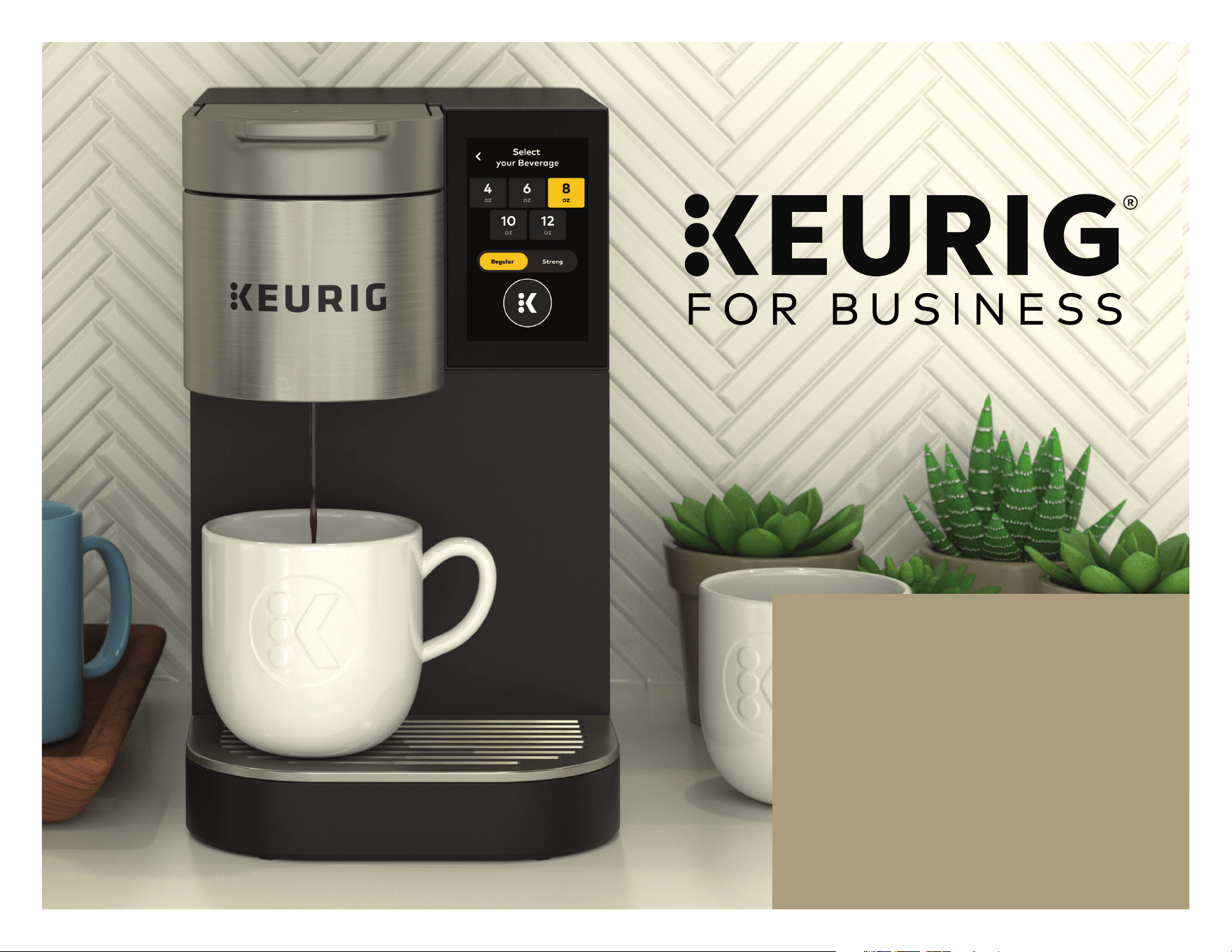
Congratulations on
purchasing the Keurig®
K-2550® Commercial Brewer!
With a few simple steps, you
should be brewing delicious
single serve coffee in no time
at all.
The instructions provided in
this Use & Care Guide will help
you connect your brewer to an
existing water supply or install
the K-2550® Water Reservoir
Kit (sold separately).
We recommend that you read through all instructions before
setting up or operating your K-2550® brewer.
GETTING TO KNOW YOUR BREWER
Brewer Parts..................................................................................... 4
K-2550® Water Reservoir Kit Parts ......................................5
WATER HOOKUP
Plumbing Instructions .................................................................6
Installing the Reservoir ...............................................................8
BEFORE YOU BREW ...............................................................9
BREW YOUR FIRST CUP .................................................... 11
BREWER FEATURES & CONTROLS .................... 12
Brewer Features ........................................................................... 12
Menu Controls ............................................................................... 12
Adding Screensaver Images ................................................... 13
BREWER CARE ........................................................................... 15
DESCALING ................................................................................... 18
TROUBLESHOOTING .......................................................... 20
WARRANTY .................................................................................... 21
For easy navigation through this Guide:
Look for this icon at the top right of each
page to return to this page in a “click.”
Need additional help with brewer use,
care, or troubleshooting? Look for this
icon to go online for instructional videos
at https://vimeo.com keurigafhfoodservice
For in office technical support: 1-888-287-2739 Option #5
K-2550® BREWER INTRODUCTION & TABLE OF CONTENTS
4
K-2500® BREWER
®
K-2550® BREWER
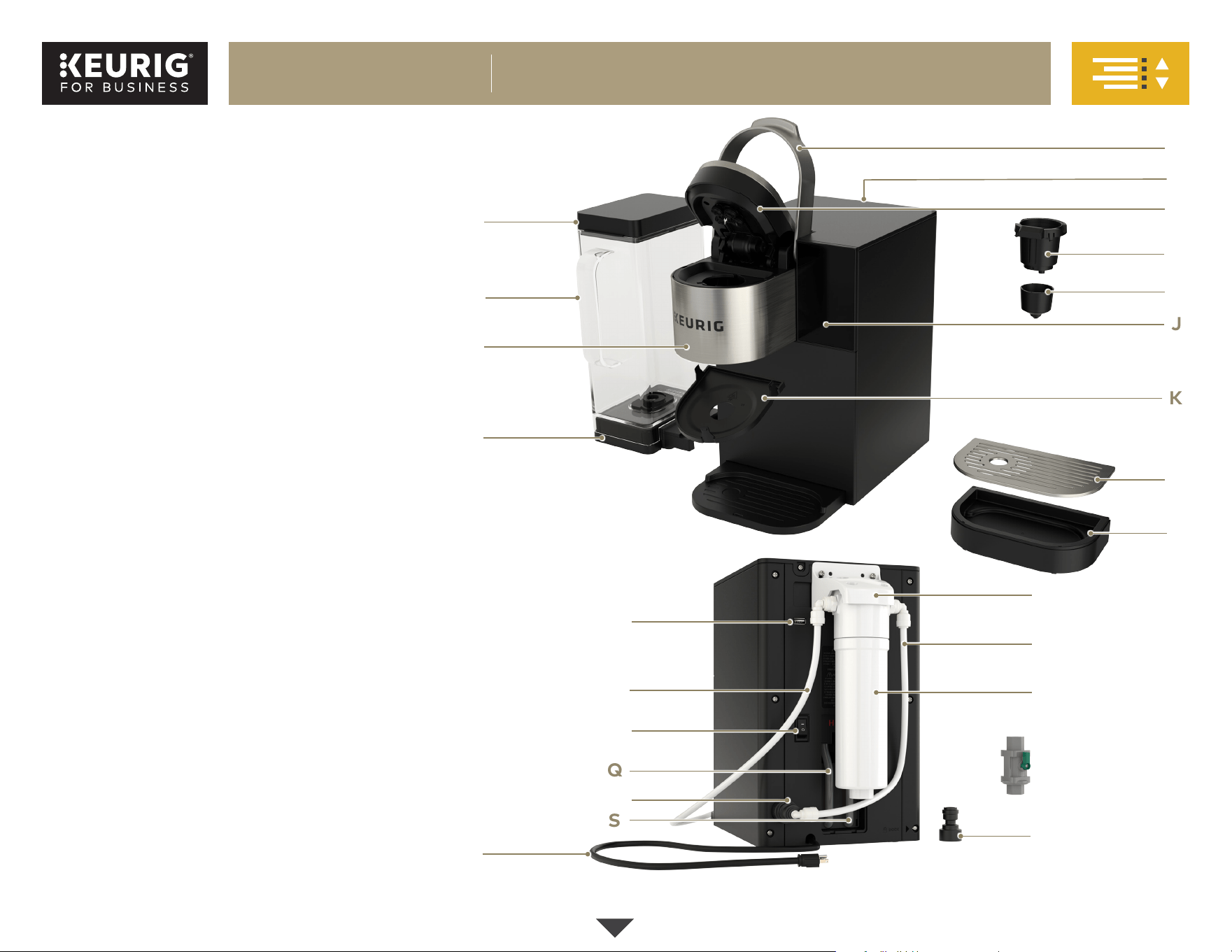
GETTING TO KNOW YOUR BREWER
A. Water Reservoir Lid
B. Water Reservoir
C. Puncture Mechanism
D. Water Reservoir Dock
E. Handle
F. Descale Solution Door (on back)
G. Puncture Mechanism Lid
H. K-Cup® Pod Holder
I. K-Cup® Pod Holder Funnel
J. Touch Screen
K. Puncture Mechanism Base Plate
L. Drip Tray Plate
M. Drip Tray
N. USB Port
O. Water Filter Inlet Tube
P. Power Switch
Q. Hot Water Drain Tube
R. Water Inlet Port
S. Cold Water Drain Tube
T. Power Cord
U. Filter Mounting Bracket
V. Water Filter Outlet Tube
W. Omnipure KQ8A Water Filter*
X. 3/4” Garden Hose Connector
Brewer Parts
J
B
E
G
I
D
Q
N
P
L
H
M
T
S
U
W
V
*Sold separately. Contact your Keurig Authorized Distributor for more information.
X
O
R
C
A
K
F
Continued
5
K-2500® BREWER
®
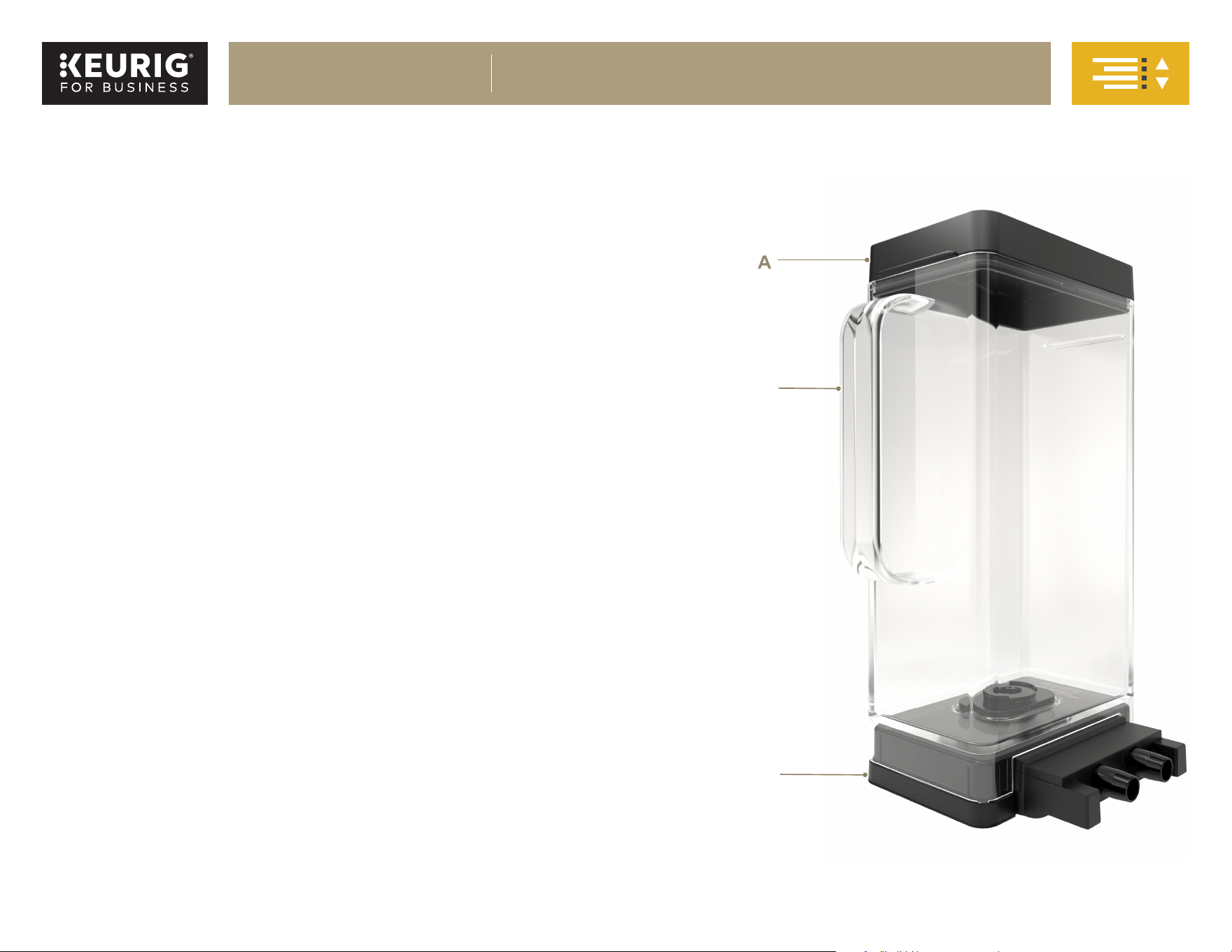
A. Lid
B. Reservoir
C. Dock
The K-2550® Water Reservoir Kit is a convenient alternative to
plumbing your K-2550® brewer.*
The K-2550® brewer has the capability to have a plumbed or refillable
water source. This Use & Care Guide provides installation instructions
for both.
• If plumbing your brewer, refer to the “Plumbing Instructions” section on
page 6 for water hookup.
• If you have purchased the K-2550® Reservoir Kit, refer to the “Installing
the Reservoir” section on page 8.
K-2550® Water Reservoir Kit Parts
*Sold separately. Contact your Keurig Authorized Distributor for more information.
A
B
C
K-2550® BREWER
GETTING TO KNOW YOUR BREWER, CONT.
6
K-2500® BREWER
®
Plumbing Instructions
CAUTION: This brewer is designed to handle local water pressures from 40 psig
up to 125 psig. Consult a licensed plumber for water pressures in your area. Use
plumbing fittings and tubing specified to withstand 125 psig.
WARNING: Keurig requires the use of an external water filter such as the
Omnipure KQ8A Water Filter, available from Keurig. Failure to use a filter
invalidates the brewer warranty.
NOTE: The equipment shall be installed with adequate backflow protection
to comply with applicable federal, state, and local codes.
1. Remove all pieces of packing tape from the brewer and drip tray.
Remove the clear plastic film from the touch screen.
NOTE: An external filter (UPC ordering ID# 099555055726) can be
mounted on the rear surface of the brewer using the mounting
screws provided.
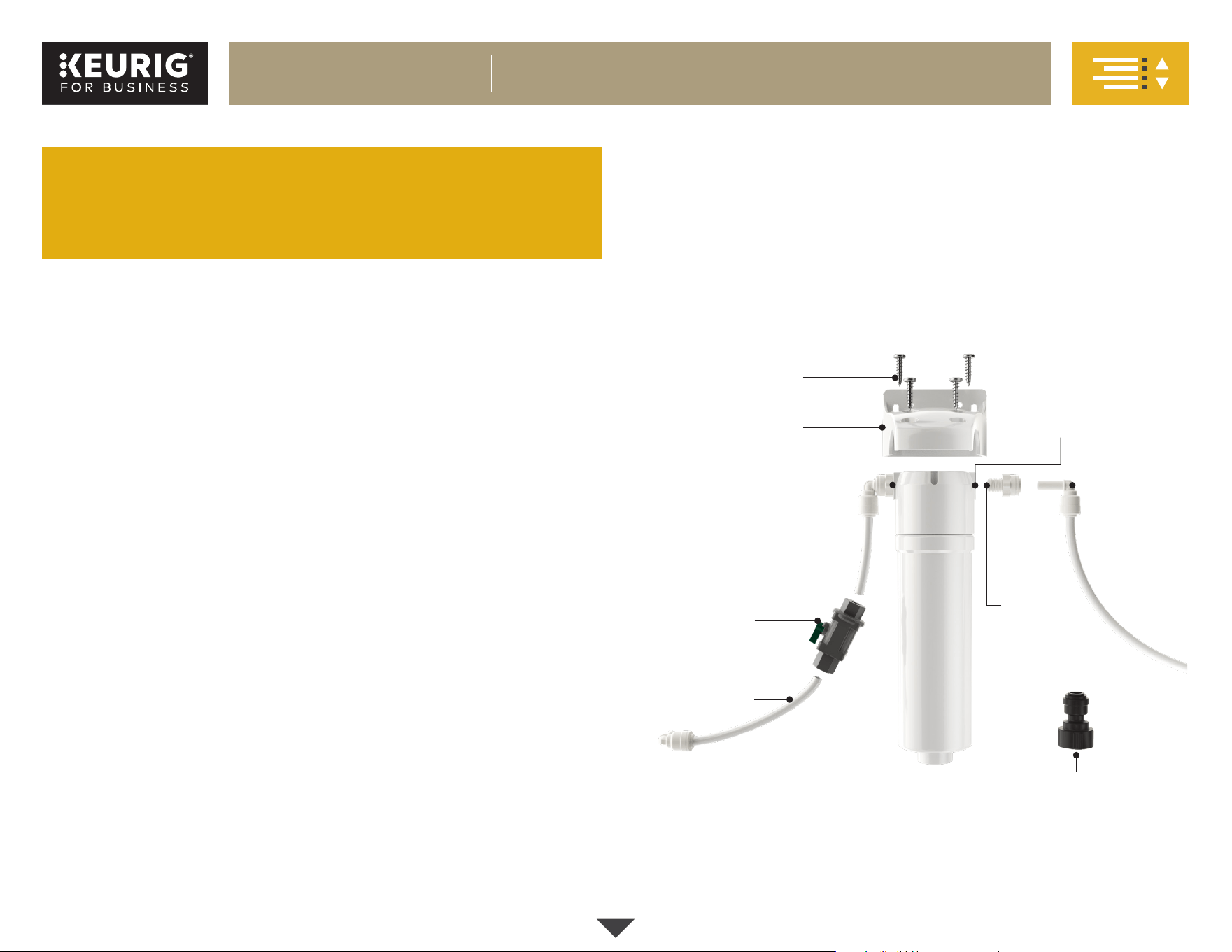
2. Attach a threaded straight adapter to both the IN and OUT ports on
the Omnipure KQ8A Water Filter and tighten using an 11/16" (18 mm)
wrench. Make sure the connections are secure, but do not overtighten.
3. Attach the filter mounting bracket to the Omnipure KQ8A Water Filter
using the four screws provided.
NOTE: The top of the Omnipure KQ8A
Water Filter has two ports labeled
IN port
and OUT port. Make sure these ports are aligned with the filter
mounting bracket.
Threaded
Straight
Adapter (2x)
Filter Mounting
Bracket
Screws (4x)
IN Port
3/4" Female Garden
Hose Connector
Shut-Off Valve
LLDPE Tubing
Stem
Elbow
Fitting
(3x)
OUT Port
If you have purchased the K-2550
®
Water
Reservoir Kit, skip to “Installing the Reservoir”
on page 8.
4. Loosen the two mounting screws located on the upper rear of the
brewer and hang the filter kit assembly. Tighten the screws, being
careful not to overtighten.
NOTE: The filter kit assembly comes with ¼" FPT ports for both inlet and outlet,
and the plumbed water inlet to the brewer is ¾" female garden hose thread
(Invensys solenoid valve). ¼" OD LLDPE (linear low-density polyethylene) tubing
is recommended (NSF® compliant) between the filter kit assembly and the
brewer. NSF® compliant fittings such as high-density polypropylene type
are recommended.
Continued
K-2550® BREWER
WATER HOOKUP
7
K-2500® BREWER
®
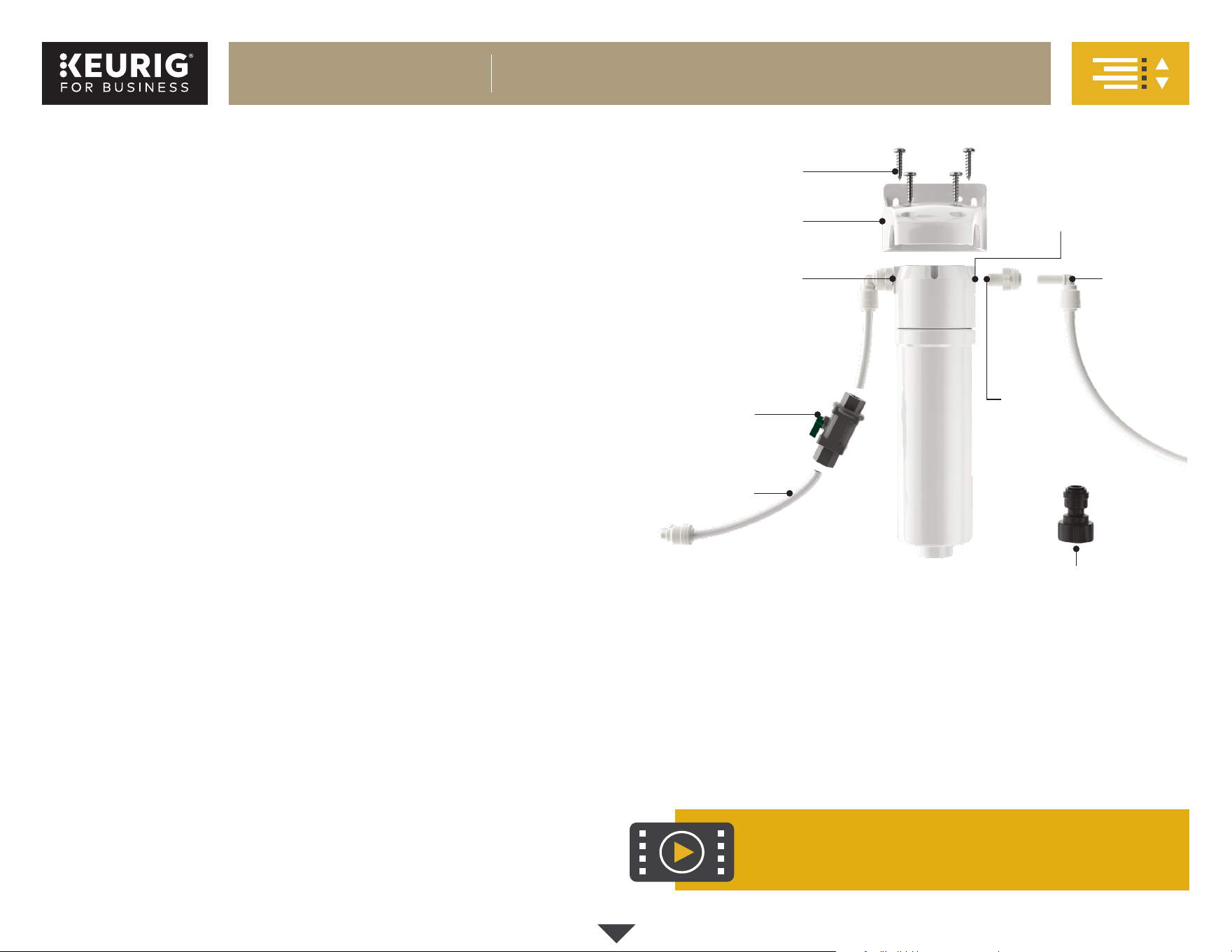
5. Connect a stem elbow fitting to the IN port of the filter kit assembly by
pushing the stem elbow fitting into the previously attached adapter. Push
firmly until the connection is secure. Secure LLDPE tubing to the stem
elbow fitting in the same fashion and connect it to the
local water supply.
6. You may wish to install a shut-off valve between the water source and
the Omnipure KQ8A Water Filter. To do this, cut some LLDPE tubing to
the needed size and connect it by pushing the tubing into the shut-off
valve until secure.
7. Connect a long length of tubing to the OUT port of the filter kit
assembly. Do not connect the brewer yet.
NOTE: The Omnipure KQ8A Water Filter needs an initial flush to clear any
carbon deposit.
8. Place the open end of the long length of tubing in a container or sink.
9. Turn on water supply and allow at least 4 gallons of water to flush
through the filter. Turn off water supply.
10. Cut the tubing to the length needed and connect a stem elbow fitting
to the cut end of tubing. Thread the ¾" female garden hose connector
onto the brewer inlet valve located at the lower rear of the brewer.
Push the stem elbow fitting into the connector until secured firmly.
Then turn on the water supply.
NOTE: Water and waste piping and connections must comply with the
latest code from the International Code Council (ICC) or International
Association of Plumbing and Mechanical Officials (IAPMO).
Threaded
Straight
Adapter (2x)
Filter Mounting
Bracket
Screws (4x)
IN Port
3/4" Female Garden
Hose Connector
Shut-Off Valve
LLDPE Tubing
Stem
Elbow
Fitting
(3x)
OUT Port
For plumbing instruction video:
https://vimeo.com/430389234
For in office technical support: 1-888 287-2739 Option #5
K-2550® BREWER
WATER HOOKUP, CONT.
Continued
8
K-2500® BREWER
®
WATER HOOKUP, CONT.
Installing the Reservoir
If you have purchased the K-2550® Water Reservoir Kit, follow the simple instructions below to get it installed.
NOTE: Rinse the reservoir with clean water prior to use.
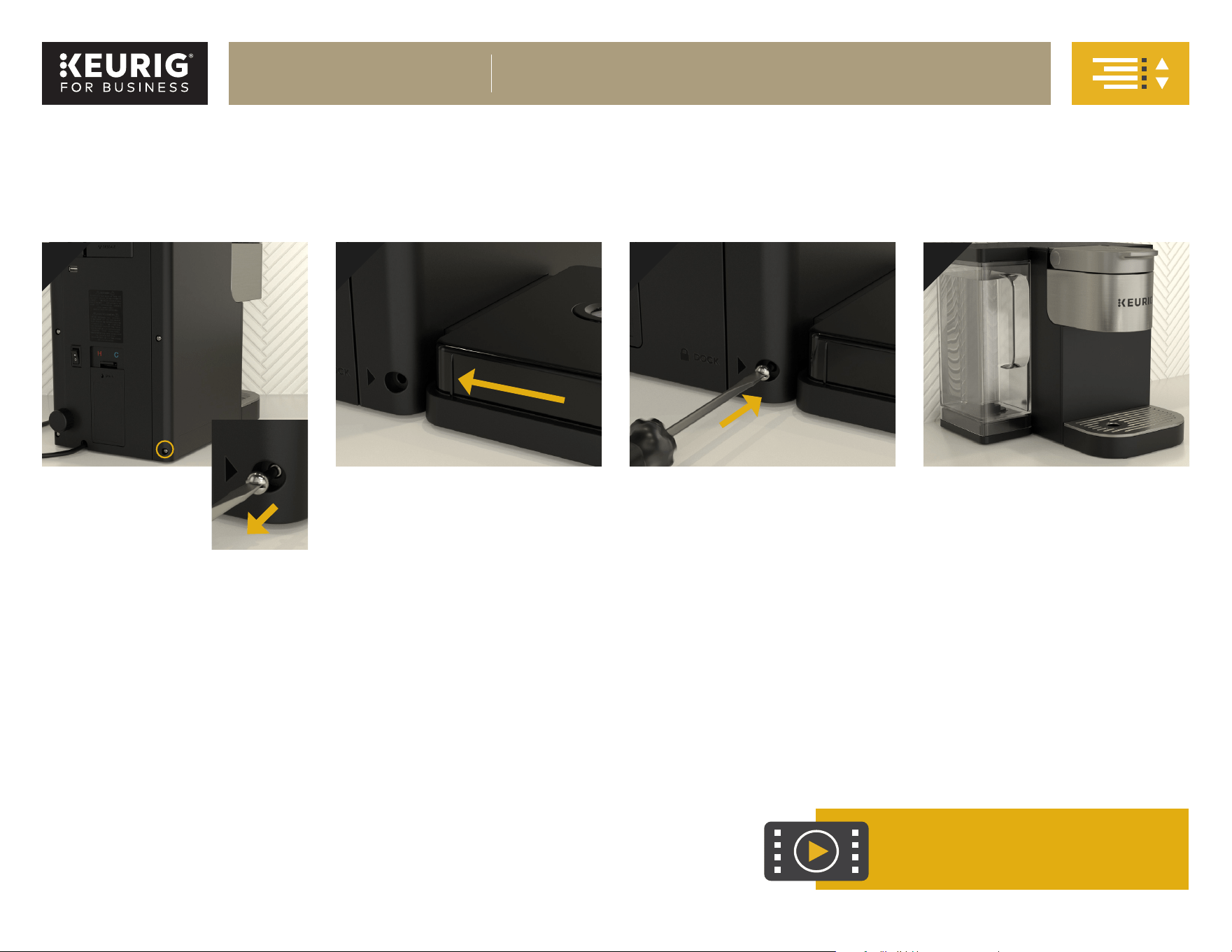
Remove
Locking
Screw
To install the Water Reservoir Kit,
first remove the locking screw.
When facing the rear of the
brewer, the screw is located on
the bottom right corner. Save the
screw and set it aside; you will
need it in Step 3.
1
Insert Dock
Slide the dock into the left-hand
side of the brewer until it clicks into
place; the “click” indicates that it is
properly connected.
Place Reservoir
Fill the reservoir with water up to the
MAX fill line, then place the reservoir
on the dock.
Secure Dock
Secure the dock to the brewer by
replacing the locking screw from
Step 1.
NOTE: If it is difficult to reinsert
the screw, gently nudge the
dock closer to the brewer while
tightening the screw. This should
assist the screw to catch so the
dock can be fully attached.
Please DO NOT skip this step.
Failure to secure the dock with the
screw can cause leakage issues.
42 3
For reservoir installation video:
commercial.keurig.com/training.
K-2550® BREWER
WATER HOOKUP, CONT.
9
K-2500® BREWER
®
BEFORE YOU BREW
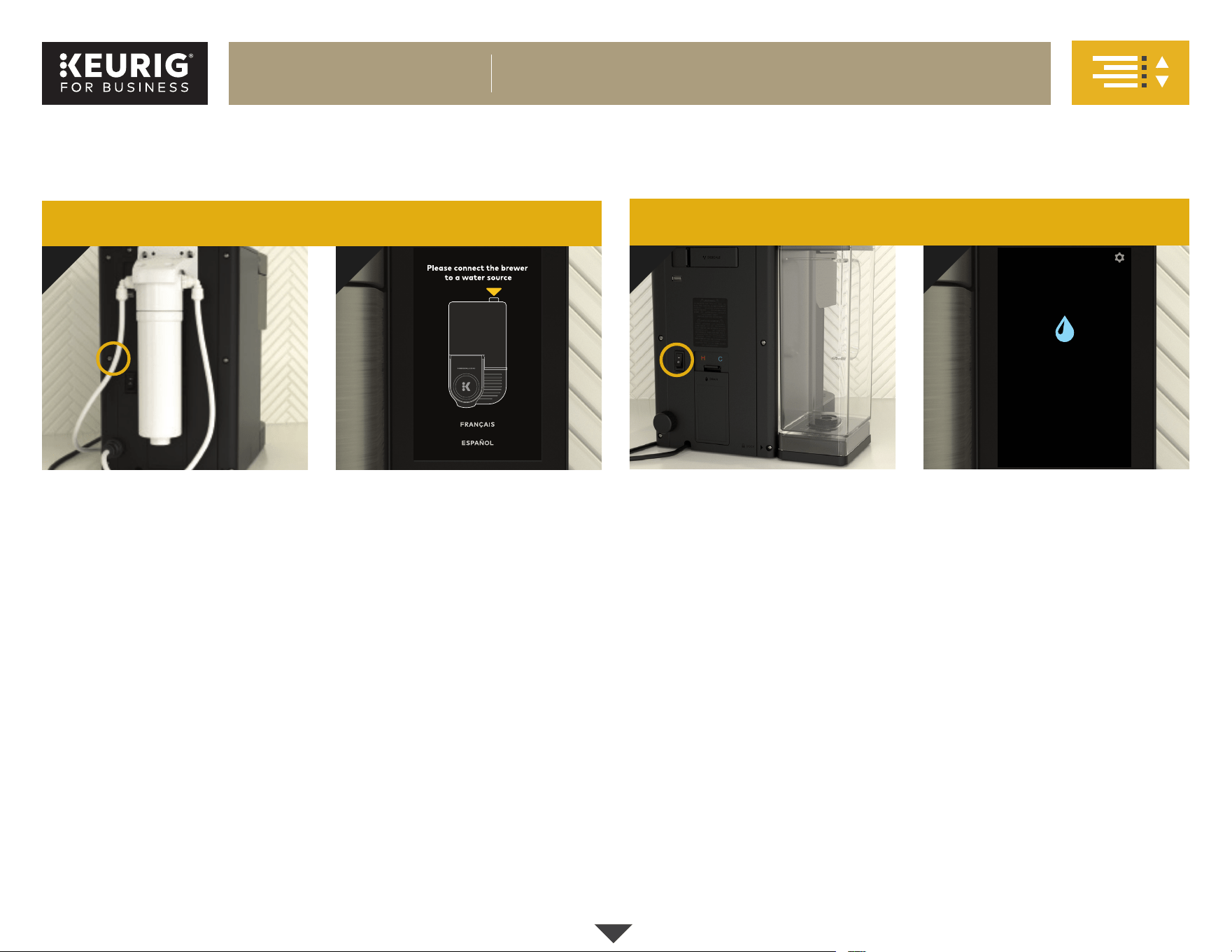
Power On
Locate the power switch on the
back of the brewer and turn the
brewer ON.
Power On
Locate the power switch on the
back of the brewer and turn the
brewer ON.
Confirm Water Supply
If the water supply is already hooked
up and water is turned on, the
brewer’s touch screen will display
“Filling hot water tank ...” and will
automatically begin to fill the internal
hot water tank.
If the water is not hooked up or
turned on, the brewer’s touch screen
will display “Please connect the
brewer to a water source” as shown
above. Make sure the brewer is
plumbed and the water supply is on
in order to proceed.
Confirm Water Supply
If the water reservoir has a sufficient
amount of water, the brewer’s touch
screen will display “Filling hot water
tank ...” and will automatically begin
to fill the internal hot water tank.
If there is not enough water, the
message displayed will be “Add
water” as shown above. Make sure
the reservoir is filled to the MAX line
in order to proceed.
1
1
2
2
Whether your brewer is plumbed or has the optional K-2550® Water Reservoir Kit installed, you will follow the same steps to get brewing. However, you
may see different messages displayed on the touch screen, depending on which water source is installed.
Plumbed brewer:
Brewer with reservoir:
Add water
FRANÇAIS
ESPAÑOL
Continued
K-2550® BREWER
BEFORE YOU BREW
10
K-2500® BREWER
®
BEFORE YOU BREW, CONT.
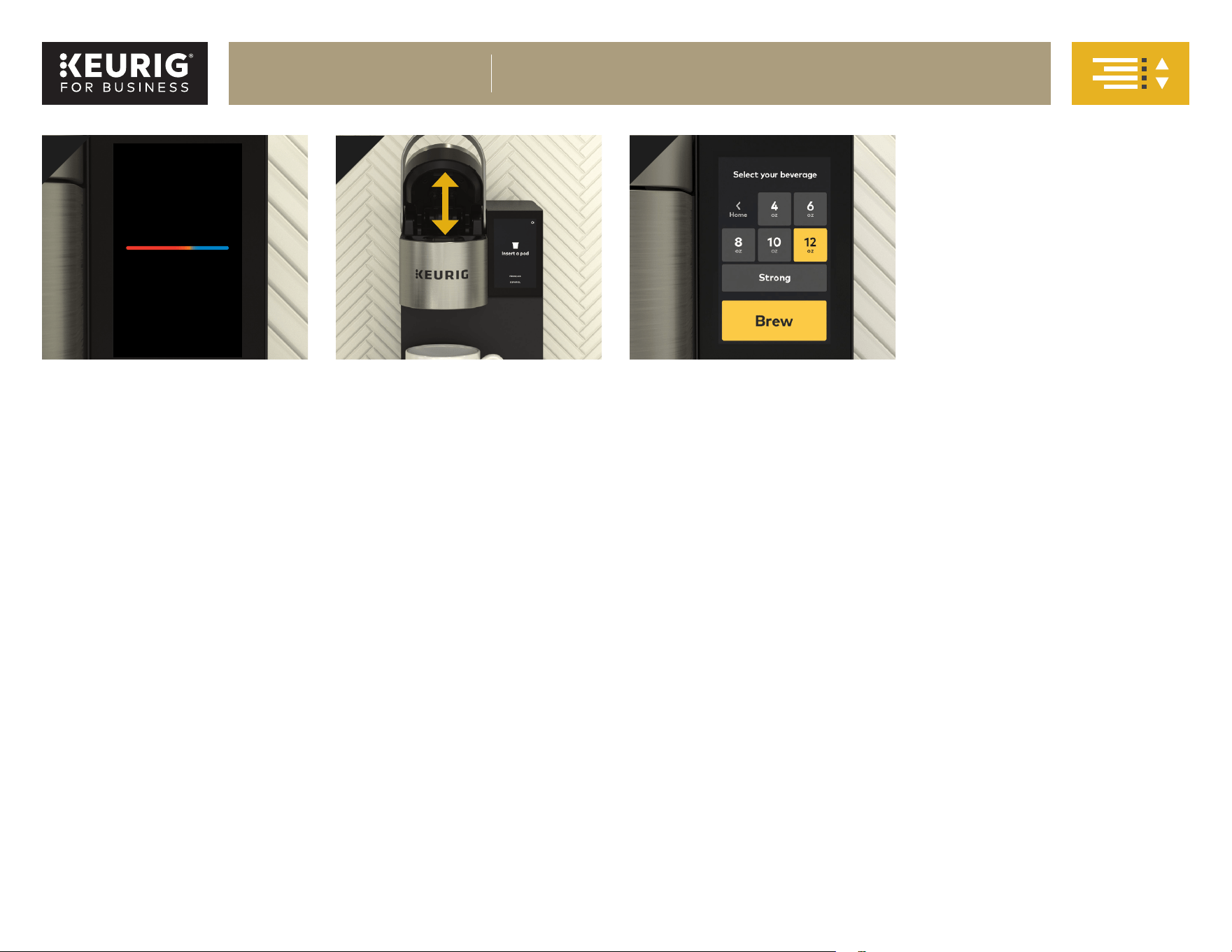
Heat Up
Once the brewer fills the internal hot
water tank, it will begin heating the
water. The heating process will take
about three minutes. During this
time, the brewer’s touch screen will
display “Heating ....”
Cleansing Brew
When prompted to select your
beverage, press 12oz and then Brew
t
o start the cleansing brew. When
the cleansing brew is complete,
discard the hot water from the mug.
The brewer will enter its idle state
and will be ready to brew your first
K-Cup® pod.
Lift & Lower
Place a mug on the drip tray plate
and then fully raise the handle.
Lower the handle to close the lid
over the K-Cup® pod holder.
NOTE: A K-Cup® pod should not be
used for this step.
53 4
Plumbed brewer shown
CAUTION:
During the brewing process, there
is extremely hot water passing
through the K-Cup® pod holder. To
avoid injury, do not lift the handle
during the brewing process.
Heating...
K-2550® BREWER
BEFORE YOU BREW, CONT.
11
K-2500® BREWER
®
BREW YOUR FIRST CUP
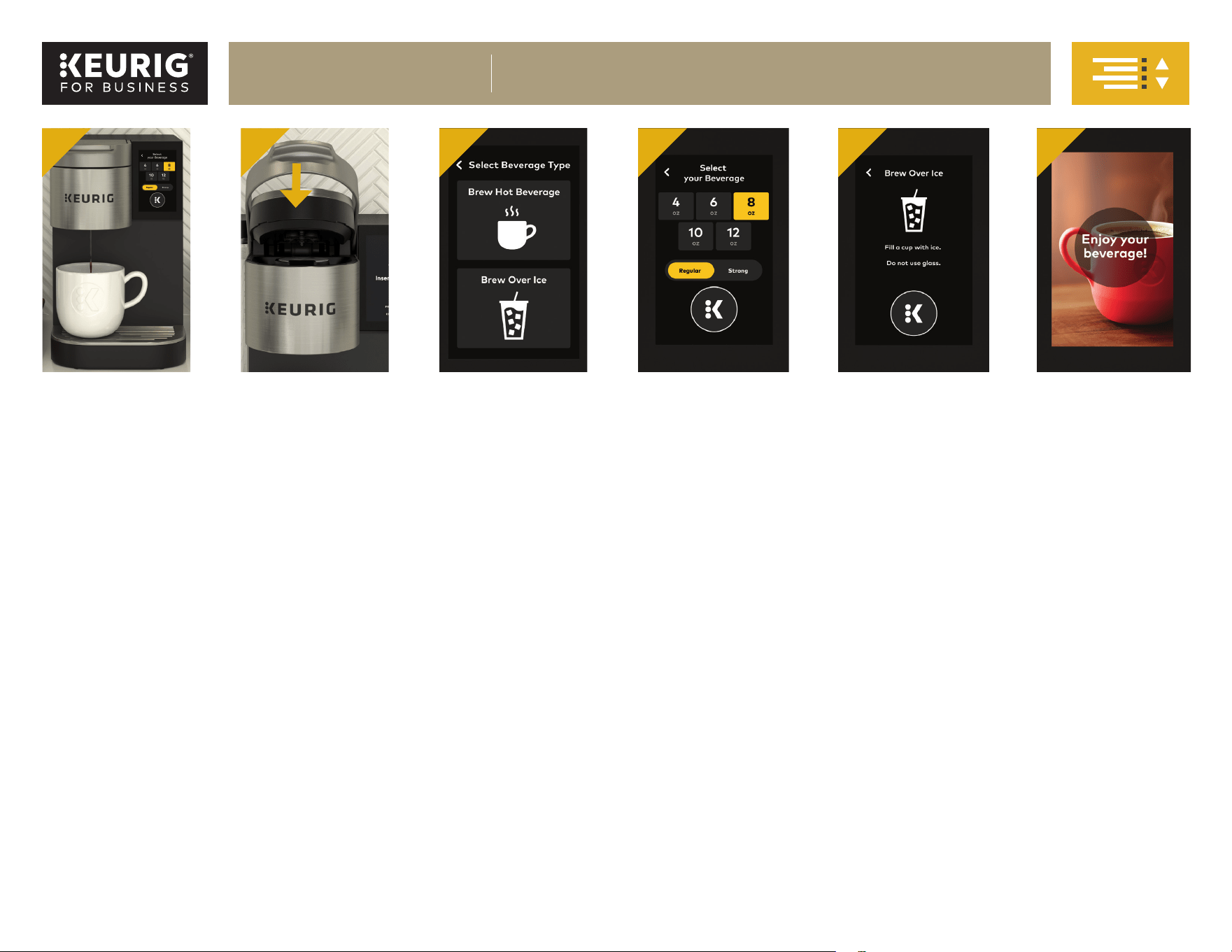
1. Place Mug & Pod
Place a mug for hot or tumbler for iced on the drip tray plate.
NOTE: Do not remove the foil lid on the K-Cup® pod.
2. Close Lid
Lower the handle completely to close the lid.
NOTE: Closing the lid is a signal to the brewer that you are ready to begin a brew cycle. Your brew options will not display unless the lid is fully closed.
3. Select
Make a selection on the Select Beverage Type screen.
4. Brew Hot
Select Brew Hot Beverage. The display will show a choice of 4, 6, 8, 10, and 12oz brew sizes, as well as an option to brew on strong. Select your brew size by
pressing the corresponding button on the touch screen. You may choose to press the Strong button either before or after selecting your brew size. When the
desired selections are highlighted in yellow, press the flashing K icon. Brewing is complete when you see the display “Enjoy your beverage!”
5. Brew Iced
Do not brew hot over ice into a glass cup. Select Brew Over Ice. Press the flashing K icon to begin brewing. Brewing is complete when you see the display
“Enjoy your beverage!”
6. Enjoy your beverage!
Brewer with reservoir shown
K-2550® BREWER
BREW YOUR FIRST CUP
1 2 3 4 5 6
12
K-2500® BREWER
®
Brewer Features
Brewing Iced Beverages: Make sure you do not use a glass cup. Fill large
cup with ice and place a K-Cup® pod in the K-Cup® pod holder. Follow Brew
Iced instructions under the Brew Your First Cup section and enjoy!
Water Source Options: The K-2550® brewer has the capability to have
a plumbed or refillable water source. For more information on how to
purchase or install the K-2550® Water Reservoir Kit, please contact your
Keurig Authorized Distributor.
Strong Brew: Increases the strength and bold taste of your coffee’s flavor.
For bolder coffee, press the Strong button so it is highlighted in yellow and
select your brew size.
Commercial Rating: Ensures that the K-2550® brewer will stand up to the
demands of your coffee station. Enjoy the convenience of a touch screen,
an industrial easy-grip handle, and a plumbed water tank for
back-to-back brewing.
Intelligent Auto-On: With this feature enabled, the brewer will identify
brew patterns from the previous four days. It will then automatically turn
on the brewer 15 minutes before the anticipated brew time each morning.
High Altitude Brewing: When brewing in higher altitudes (over 5,000 feet),
please enable the High Altitude Brewing mode on your brewer. To enable
this mode, you will need to access the Technician Menu. See your Use &
Care Guide for more details.
Travel Mug Friendly: Remove the drip tray to accommodate most
travel mugs
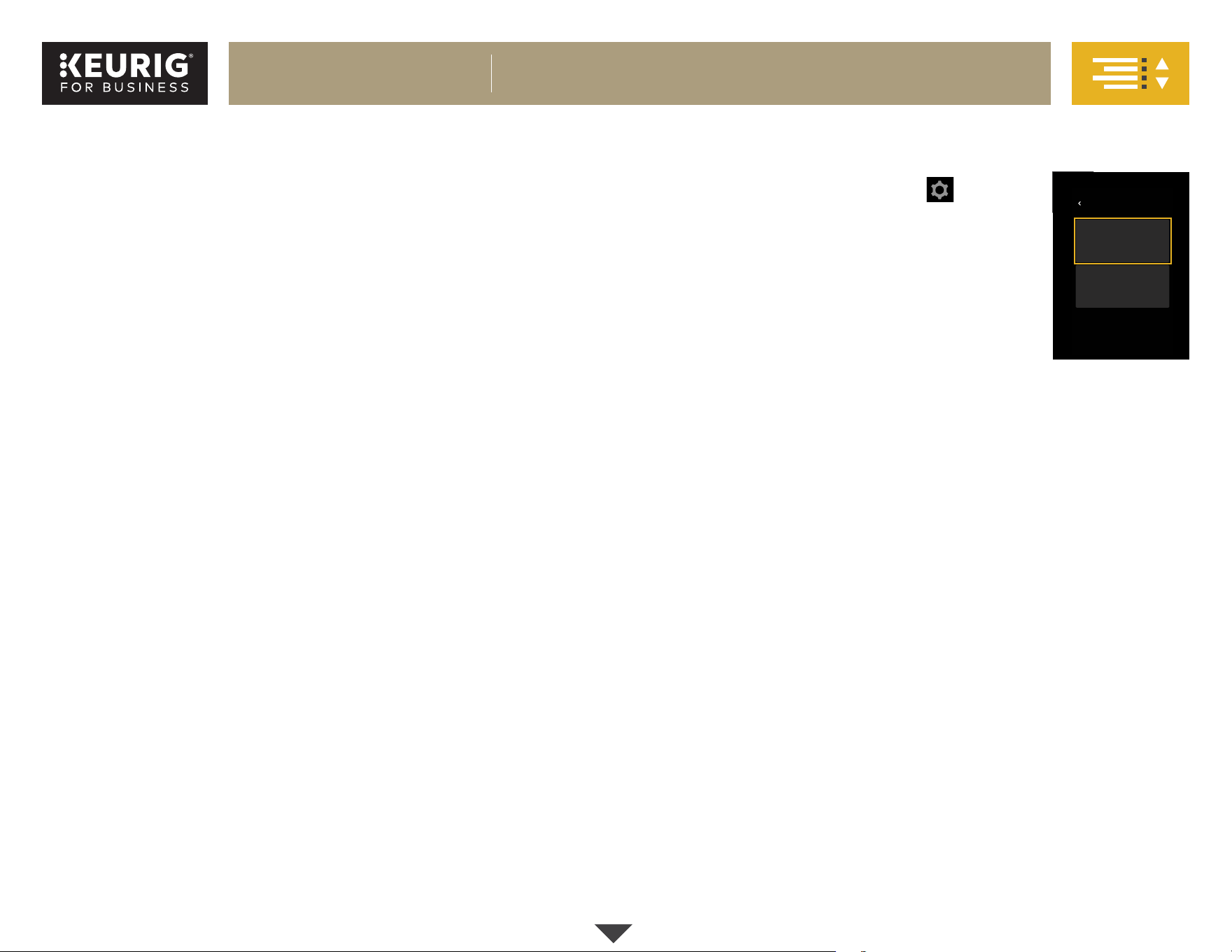
Menu Controls
To enter the Menu Mode, press the icon in the
upper right-hand corner. The menu will display two
admin roles: “Manager” and “Technician.”
To enter the Manager Mode, touch the button and
enter the passcode (23456). For more information on
the Technician Mode, please contact your Keurig
Authorized Distributor.
Once the manager menu is accessed, you will see the
display screens in the following order:
Language
You can change the default language to either Spanish or French if English
is not your primary language. To temporarily change the language for a
single brew, simply press the button for your language of choice on the
touch screen while it’s in its idle state.
Units
Change between ml (mililiters) and oz (ounces) for volume measurement.
Brew Settings
Select which cup sizes you want the brewer to dispense. Five brew sizes
are available: 4, 6, 8, 10, and 12oz. You may disable up to four cup sizes, as
well as select your default cup size and brew strength.
Sleep Settings
Change the number of minutes the screensaver runs before the screen
goes to sleep.
Brew History
Displays the number of brews the brewer has performed, both as a total
and by brew size. This cannot be reset.
Password
Choose to enable or disable password protection.
Select Admin Role
Manager
Technician
ABOU T
Continued
K-2550® BREWER
BREWER FEATURES & CONTROLS
13
K-2500® BREWER
®
Regular cleaning keeps your brewer running smoothly. Always be sure to
turn off and unplug your brewer before cleaning.
CAUTION: Parts are not dishwasher safe.
Brewer Exterior
Keep your Keurig® brewer looking its best by cleaning the exterior from time
to time. Just clean with a paper towel and a nonvinegar glass cleaner.
Never immerse the brewer in water or other liquids.
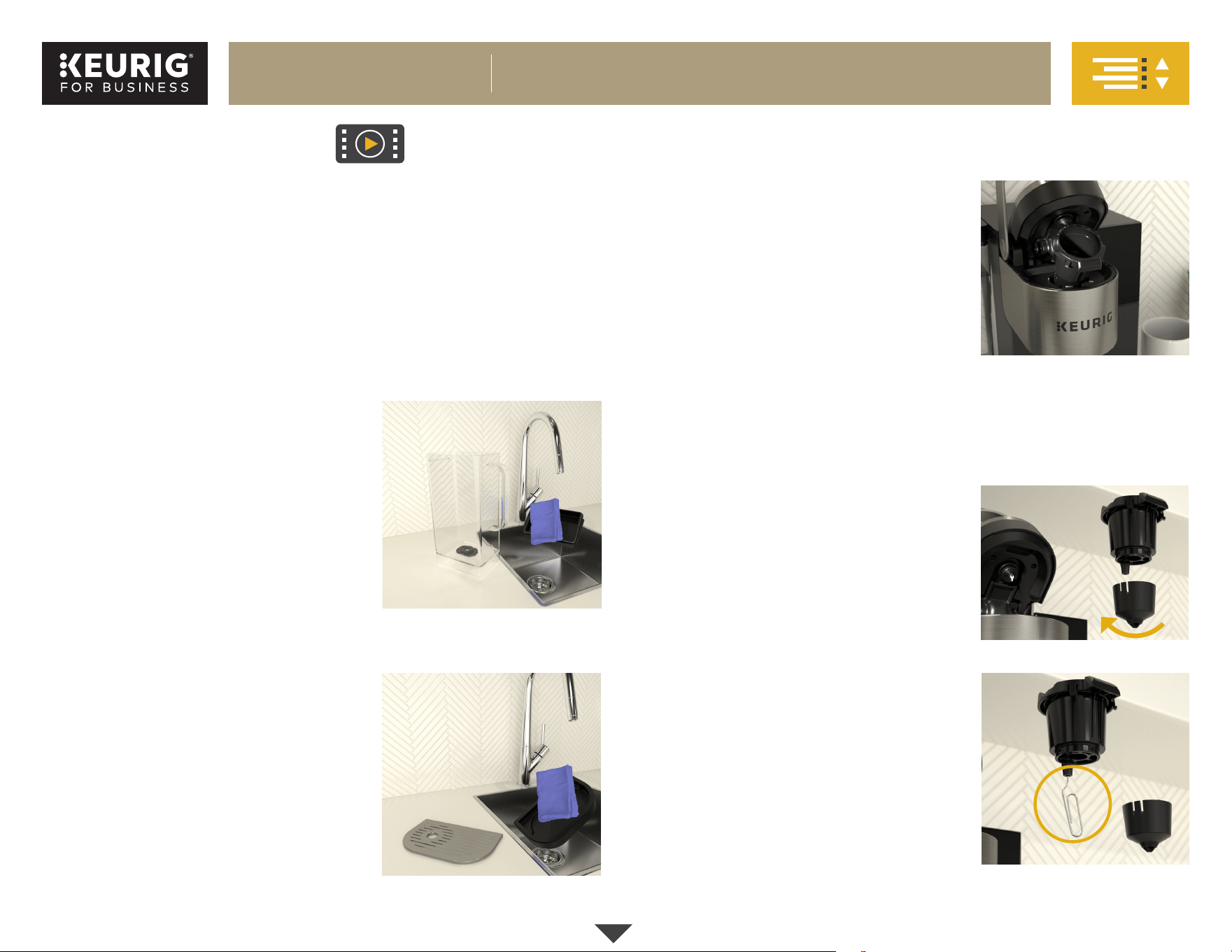
Water Reservoir & Reservoir Lid
The water reservoir lid and water reservoir
should be cleaned periodically with a damp,
soapy, nonabrasive cloth. Rinse the reservoir
thoroughly after cleaning. This will ensure
that no cleaning solution remains in the area,
as it may contaminate the water supply.
After rinsing, fill the reservoir with clean
water and return it to the brewer.
Do not dry the inside of the water reservoir
with a cloth, as lint may remain. The water
reservoir lid and water reservoir should not
be put into the dishwasher.
Drip Tray
The drip tray can hold up to 10 ounces of
overflow and should be emptied and
cleaned occasionally.
NOTE: The drip tray and plate are not
dishwasher safe.
To remove, slide it toward you, keeping it level
to avoid spilling. Clean with a damp, soapy,
lint-free, nonabrasive cloth.
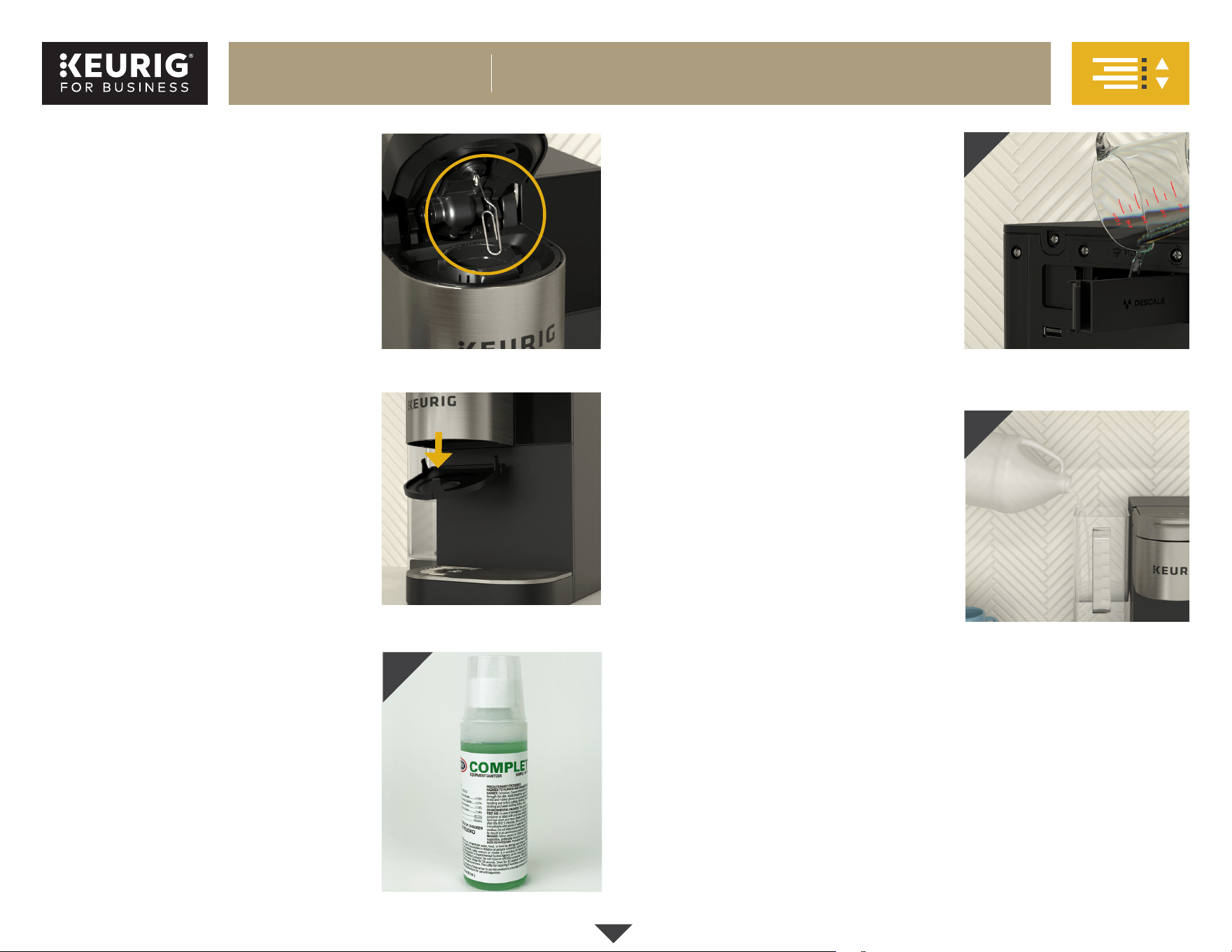
K-Cup® Pod Holder
Lift the lid handle to access the K-Cup® pod
holder. To remove the K-Cup® pod holder from
the brewer, pull forward on the back of the
K-Cup® pod holder to release. Then lift it up to
remove. After cleaning, align the K-Cup® pod
holder with the opening, using the two front
ribs as a guide, and press it down to snap it
into place.
CAUTION: There are sharp needles that puncture the K-Cup® pod above the
K-Cup® pod holder and in the bottom of the K-Cup® pod holder. To avoid risk
of injury, do not put your fingers in the K-Cup® pod holder.
NOTE: Used K-Cup® pod should be removed from the K-Cup® pod holder after
brewing or as part of the daily cleaning routine.
Funnel
The funnel can be removed from the K-Cup®
pod holder for cleaning by twisting it until it
pops off. To replace it, orient the snaps to the
indents and just snap it back onto the K-Cup®
pod holder.
Exit Needle
The exit needle is
located on the inside bottom of the
K-Cup® pod holder.
To clean the needle: Remove the pod holder
assembly and detach the funnel. Then locate
the exit needle and insert a straightened paper
clip into the needle hole to loosen any coffee
grounds.
Continued
General Cleaning & Care
K-2550® BREWER
BREWER CARE
14
K-2500® BREWER
®
Entrance Needle
The entrance needle is
located on the underside of the lid.
Link on how to clean entrance needle:
https://vimeo.com/430384922
To clean the needle: With one hand, lift
and hold the brewer handle in the raised
position; with your other hand, carefully
insert a straightened paper clip into the hole
and gently move the paper clip around to
loosen any coffee grounds. Lower the handle
completely and run two cleansing brews.
Do not insert a K-Cup® pod during the
cleansing process.
Puncture Mechanism (PM) Base
Remove the K-Cup® pod holder (see K-Cup®
pod holder cleaning instructions). Place
your finger in the hole in the center of the
puncture mechanism base plate and gently
pull down until it releases from the PM.
Wash the PM base plate with soap and
water and wipe the inside of the PM with a
damp cloth. Replace the PM base by gently
placing it into the bottom of the PM and
snapping it back into place. Reinstall the
K-Cup® pod holder.
Sanitizing
Keurig recommends weekly sanitizing
of the brewer using URNEX®† Complete
Café™ Equipment Sanitizer. Follow the
instructions for cleaning and descaling
before sanitizing.
Measure 1/2 ounce of Complete Café™
solution into the provided measuring
cup/lid and add to 1 gallon of water
(IMAGE A).
For Plumbed Brewers:
Disconnect the water line.
Open the descale solution door and fill
the internal tank with approximately
16 ounces of the solution
(IMAGE B)
.
Close the descale solution door and
place a ceramic mug on the drip tray.
Do not use a paper or plastic cup.
Power the brewer on. When the
“filling hot water tank” progress bar
is complete, power the brewer off.
Add another 16 ounces of solution
and reconnect the water line.
For Water Reservoirs:
Add the full gallon of sanitizer
solution to the reservoir
(IMAGE C)
.
Place a ceramic mug on the drip tray.
Do not use a paper or plastic cup.
Run a 12oz brew cycle (do not add
a K-Cup® pod). Discard the hot contents
into a sink. Repeat this sanitizing process
three more times.
For Water Reservoirs only:
Discard remaining sanitizing solution in
the reservoir tank, rinse, and refill tank
with clean water.
Next, run four rinsing brews to remove any
additional sanitizer that may remain in the
brew path.
Allow the brewer to air-dry before use.
†URNEX® is a registered trademark of Urnex Brands, LLC.
Continued
A
B
C
K-2550® BREWER
BREWER CARE, CONT.
15
K-2500® BREWER
®
A
B
Storage
Empty the internal water tank before storing or transporting and take
care to store your brewer in a safe and frost-free environment. Please be
sure to store your brewer in its upright position to avoid water leakage
from the internal water tank. If you store the brewer in a cold environment,
you run the risk of water freezing inside the brewer and causing damage.
When you prepare to use the brewer after storage, we recommend rinsing
the internal water tank with fresh water and running three cleansing
brews without a K-Cup® pod. Also available for purchase is the Keurig
K-Cup® Pod Deep Cleaning Kit. Please contact your Keurig Authorized
Distributor (KAD) for more information.
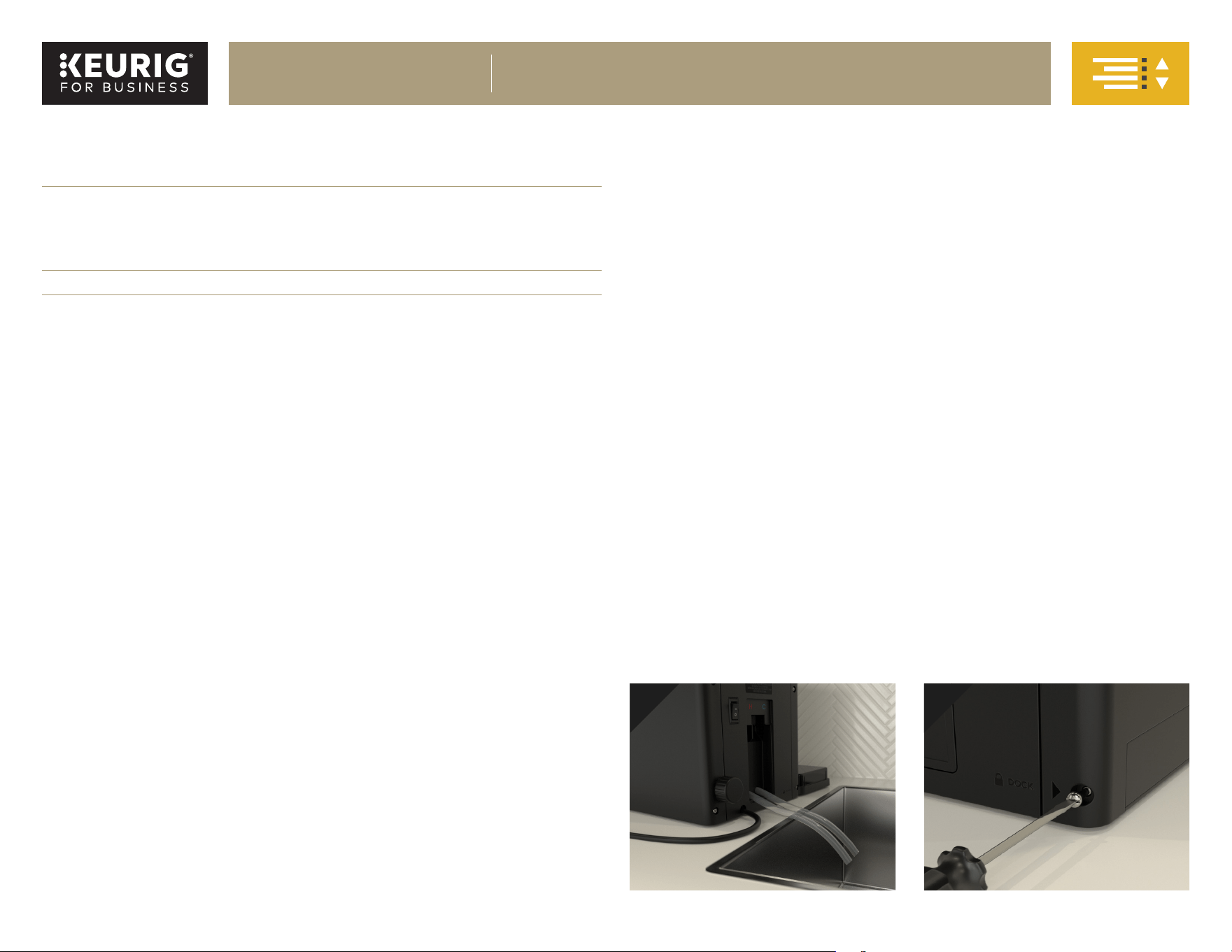
If you plan to move your brewer to a different location, turn the brewer off,
unplug it, and empty the internal water tank (IMAGE A).
CAUTION: Water may be hot. Allow brewer to cool down for one hour before
draining.
If your brewer has been in an environment below freezing, please be sure
to let it warm to room temperature for at least two hours before using.
Changing the Water Source
If you or a service technician are transitioning the brewer from a plumbed
water source to a reservoir, the internal water tanks will need to be fully
drained (IMAGE A) before connecting the reservoir dock.
IMPORTANT: If transitioning from a reservoir to a plumbed water source,
the flathead screw must be replaced after the dock is removed. Do not
overtighten the screw (IMAGE B).
Regular Maintenance Schedule
CLEANING AREAS CLEANING METHOD
DAILY
Exterior components
(e.g., drip tray, water
reservoir)
Brew path
• Rinse reservoir and drip tray clean
• Remove and dispose of used pods
• Run a cleansing brew*
WEEKLY
Pod holder assembly Detach and rinse clean
QUARTERLY
Brew path and tank
Descaling**
* A cleansing brew refers to running a hot water cycle with no K-Cup® pod. Run a cleansing
brew immediately after using a pod with hot cocoa or milk ingredients. If the brewer is not
used daily, run a cleansing brew before brewing with a K-Cup® pod.
** Descaling can be conducted before and after an extended time of storage to maximize the
cleaning effectiveness.
Helpful Hints
Water quality varies greatly. If you notice an undesirable taste in your
beverage (such as chlorine or mineral tastes), we recommend using bottled
or filtered water. Do not use distilled water. You can also install a Keurig®
Water Filter to help remove water impurities and improve beverage taste.
K-2550® BREWER
BREWER CARE, CONT.
16
K-2500® BREWER
®
Depending on the mineral content of your water, calcium deposits or scale
may build up in your brewer. Scale is nontoxic, but if left to accumulate it can
hinder brewer performance. Calcium deposits may build up faster depending
on geographical location and water type used, making it necessary to descale
more often.
Regularly descaling your brewer helps maintain the heating element and other
internal parts that encounter water. As part of your preventative maintenance
routine, you should descale your brewer every three months, or every two
months if you are experiencing low coffee volume or slower performance.
Before you begin, you will need:
• A large ceramic mug or appropriate container for holding up to
12oz of solution
• Fresh water
• Keurig® Descaling Solution
• Access to a sink
ADDITIONAL NOTES:
• Before beginning process, ensure that there is no K-Cup® pod in the
K-Cup® pod holder.
• You should allow approximately 75 minutes to complete the descaling
procedure.
CAUTION: Water may be hot. Allow brewer to cool down for one hour
before draining.
• If an external water filter is mounted to the back of the brewer, this will
need to be removed before beginning the descaling procedure.
The descaling procedure differs slightly between plumbed brewers and
brewers installed with the optional K-2550® Water Reservoir Kit. Please make
sure you are following the proper steps based on which water source your
brewer uses. Watch for paragraphs beginning with the phrases For Plumbed
Brewers, For Water Reservoirs, or NOTE for ... for specific instructions
pertaining to that water source.
IMPORTANT: Please read these instructions thoroughly before starting the
descaling process.
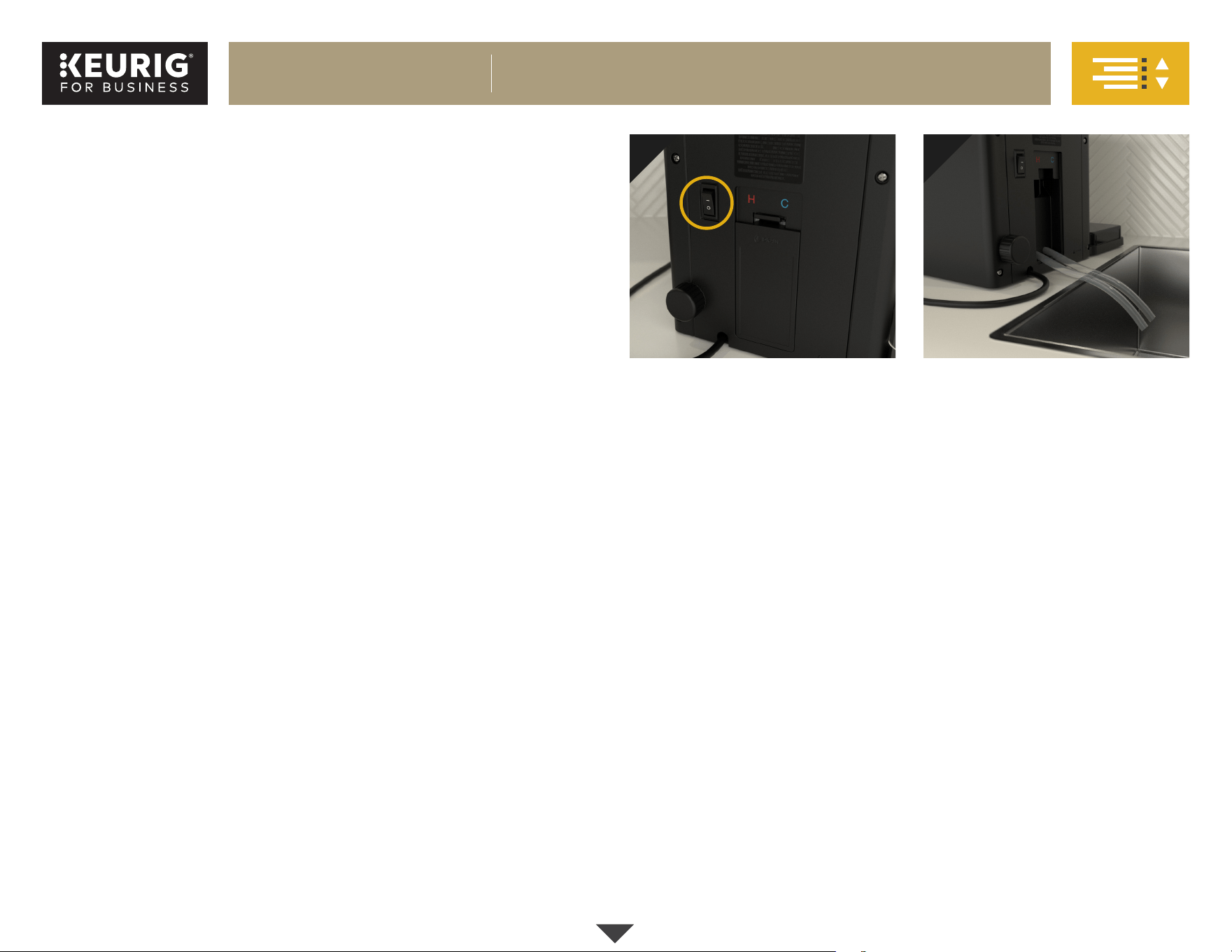
Power Off
Flip the power switch on the back
of the brewer to OFF.
For Plumbed Brewers: Keep the
main water line connected.
For Water Reservoirs: Remove the
reservoir from the brewer.
1
Draining the Brewer
Remove the access door on the
back of the brewer, then pull both
tubes down and remove plugs,
allowing water to drain into sink
or container.
NOTE for Water Reservoirs: If the
brewer has never been plumbed,
you may only see water draining
from one of the tubes.
After water is drained, replace
both plugs and place tubes back
into the brewer. Attach and close
the access door. This step may take
up to five minutes.
2
Continued
K-2550® BREWER DESCALING
17
K-2500® BREWER
®
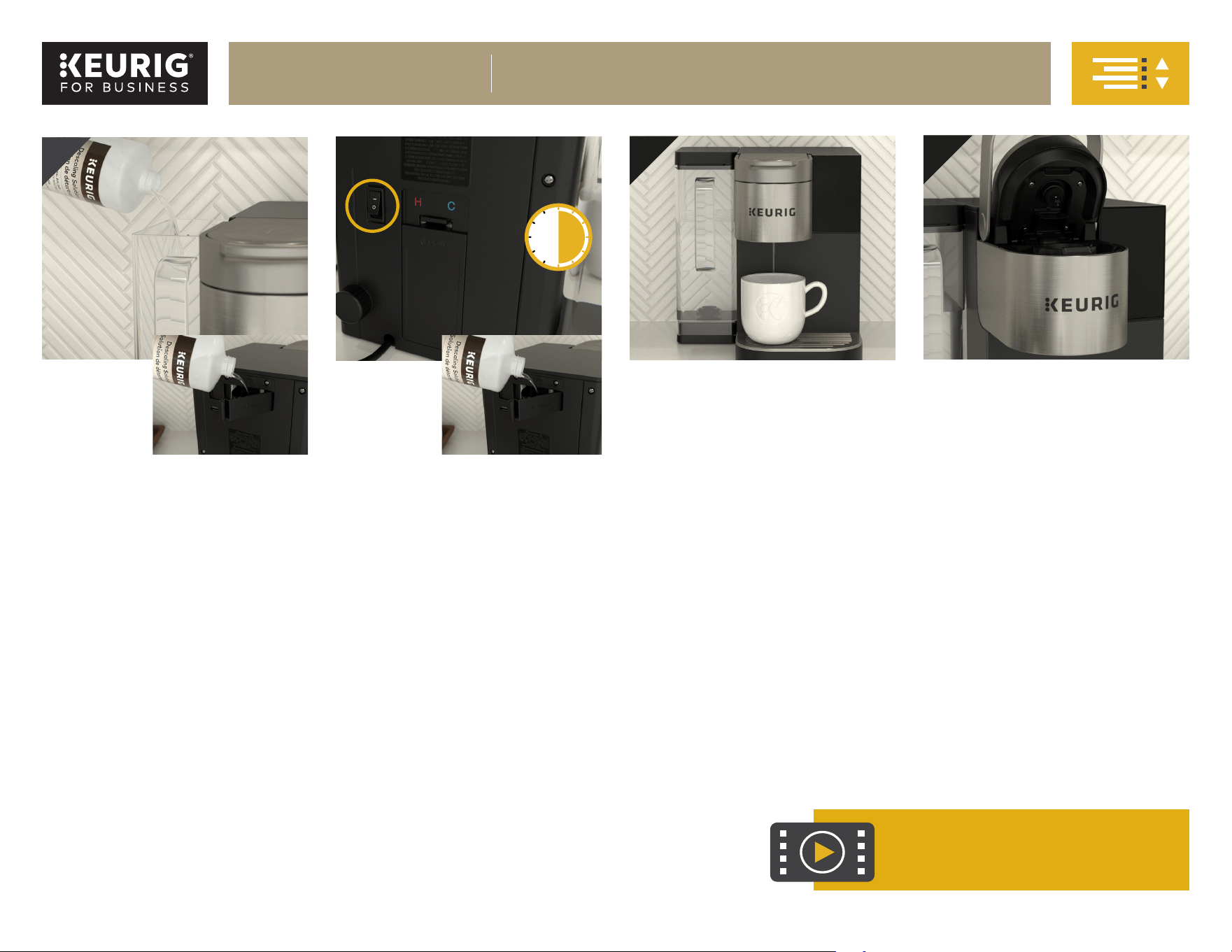
Adding
Descaling
Solution
For Plumbed Brewers:
Open descale solution door and fill
internal tank with approximately half
of the Keurig® Descaling Solution
(approximately 7oz).
NOTE: The internal tank cannot hold
more than 7oz.
Close the descale solution door.
For Water Reservoirs:
Replace the reservoir onto the
dock. Next, pour the entire bottle
of Keurig® Descaling Solution
into the empty reservoir. Fill the
empty descaling bottle with
water and add to the reservoir.
Running
Descale
Flip the power switch to ON and
place a container under the exit
spout. The brewer will begin filling the
hot water tank. Raise the lid handle
to initiate a 12oz cleansing brew.
Once the brew starts and a full
stream is visible exiting the brewer
(approximately 2oz), flip the power
switch to OFF to prevent the first
cleansing brew from finishing.
This allows the solution to soak the
entire brew path. Let the brew path
soak for 30 minutes.
NOTE for Plumbed Brewers: While
the brew path is soaking, open the
descale solution door and add the
remaining descaling solution.
After soaking, flip the power switch
back to ON. Raise the lid handle
and complete two additional 12oz
descaling brews.
Drying the Puncture
Mechanism (PM)
The PM consists of the entrance
needle (located underneath the lid)
and the exit needle (located inside
of the pod holder assembly). Allow
the PM to dry after completing all
cleansing brews. This can be done
by leaving the lid open for the PM
to air-dry.
4
6
Rinsing the Brew Path
Perform at least 12 cleansing brews
to completely clear the descale
solution and residual from the brew
path. The first four will contain the
majority of the descaling solution.
The last eight should clear any
remaining solution from the walls of
the brew path.
5
For descaling steps video:
Descaling video:
https://vimeo.com/436080825
x 12
30
min
3
K-2550® BREWER
DESCALING, CONT.

18
K-2500® BREWER
®
Brewer does not have power
• Plug brewer into its own grounded outlet
• Make sure that the brewer has been turned on and the touch screen
is illuminated
• Reset circuit breaker if necessary
• Plug into a different outlet
Brewer will not brew when used for the first time
• The brewer must be primed for use by filling the internal hot water
tank before the first brew
• Make sure the water supply is connected and turned on
• If your brewer has been in an environment below freezing, please
be sure to let it warm to room temperature for at least two hours
before using
Brewer will not brew
• After placing the K-Cup® pod in the K-Cup® pod holder, make sure the
handle is lowered completely
• The exit or entrance needle may be clogged
Brewer produces only a partial cup
• The exit or entrance needle may be clogged
• Clean K-Cup® pod holder if necessary and rinse under faucet
• If the brewer is alerting you to perform a “Descale,” have your Keurig
Authorized Distributor descale the brewer
Grounds in your coffee cup
Grounds may have gathered in the exit or entrance needles and can be
cleaned using a straightened paper clip or similar tool. Refer to the exit
and entrance needle care instructions.
For any further assistance with troubleshooting, please contact your
Keurig Authorized Distributor.
Have Questions?
We’re here to help. Visit commercial.keurig.com for step-by-step videos on
cleaning, descaling, and more.
Still Need Help?
Give us a call at 1-888-287-BREW (2739) ext. 5.
Service
Beyond these recommended cleaning, maintenance, and troubleshooting
procedures, this brewer is not user serviceable. For service, please contact
your Keurig Authorized Distributor.
K-2550® BREWER
TROUBLESHOOTING

19
K-2500® BREWER
®
Keurig Green Mountain, Inc. warrants to the original purchaser that its brewer will
be free of defects in materials or workmanship under normal use for one year from
the date of purchase. Keurig, a Keurig Authorized Distributor, or Service Provider
will, at their option, repair or replace a defective brewer under this warranty
without charge upon its receipt of proof of the date of purchase. If a replacement
brewer is necessary to service this warranty, the replacement brewer may be new or
reconditioned. If a replacement brewer is sent, a new limited one-year warranty
will be applied to the replacement brewer. This warranty only applies to brewers
operated in the United States and Canada. This warranty gives the original
purchaser specific legal rights, and you may also have other rights that vary
from state to state and, in the case of Canada, from province to province. If you
obtained this brewer through sale or rental from a Keurig Authorized Distributor,
you may also want to refer to your distributor’s warranty policies. Only the use of
Keurig® K-Cup® brand pods and accessories will guarantee the proper functioning
and lifetime of your Keurig® K-Cup® brewer. Any damage to or malfunction of your
brewer resulting from the use of non-Keurig® K-Cup® brand pods and accessories
may not be covered by this warranty or may result in a service fee if the damage or
malfunction is determined to be caused by such use.
What is not covered by the Limited Warranty?
THIS WARRANTY DOES NOT COVER CONSEQUENTIAL OR INCIDENTAL
DAMAGES SUCH AS PROPERTY DAMAGE AND DOES NOT COVER INCIDENTAL
COSTS AND EXPENSES RESULTING FROM ANY BREACH OF THIS WARRANTY,
EVEN IF FORESEEABLE. Some states or provinces do not allow the exclusion or
limitation of incidental or consequential damages, so the above limitation or
exclusion may not apply to you depending on the state or province of purchase.
Nor does this warranty cover damages caused by use of non-Keurig® K-Cup®
brand pods or accessories, services performed by anyone other than Keurig or
its authorized service providers, use of parts other than genuine Keurig® parts,
or external causes such as abuse, misuse, inappropriate power supply, or acts
of God.
Other Limitations
THIS WARRANTY IS EXCLUSIVE AND IS IN LIEU OF ANY OTHER EXPRESS
WARRANTY, WHETHER WRITTEN OR ORAL. IN ADDITION, KEURIG HEREBY
SPECIFICALLY DISCLAIMS ALL OTHER WARRANTIES WITH RESPECT TO YOUR
K-2550® BREWER, INCLUDING ANY IMPLIED WARRANTY OF MERCHANTABILITY
OR FITNESS FOR ANY PARTICULAR PURPOSE. Some states or provinces do not
allow disclaimers of such implied warranties or limitations on how long an implied
warranty lasts, so the above limitation may not apply to you depending on the
state or the province of purchase.
How do you obtain warranty service?
Keurig® brewers are high-quality appliances and, with proper care, are intended
to provide years of satisfying performance. However, should the need arise for
warranty servicing. simply call your Keurig Authorized Distributor (KAD) who
originally sold you the brewer or your Keurig Authorized Service Provider (KASP)
for full support. To be reconnected with your KAD or KASP, please call Keurig
at 1-888-287-2739 ext. 5.
Keurig Dr Pepper
53 South Avenue
Burlington, MA 01803
Open Source Compliance
For information on the open source compliance for this brewer, please visit
https://commercial.keurig.com/compliance.
AW0000000028 REV C
K-2550® BREWER WARRANTY