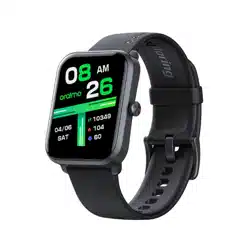

Full Touchscreen
Home Button
Charge Cable Welcome Guide
Please read this Guide carefully before
using the product
Product Overview
WELCOME GUIDE
* For safety issue, the product remains low capacity during
shipping. Please fully charge the product before initial use!
Wrist Strap
Charging Port
Heart Rate Sensor
Setting Up Your Smart Watch
Pair With Your Phone
For the best experience we recommend using the
updated oraimo Health App for iOS and Android.
1. Get ready with the oraimot Health App, scan the QR code on your
watch or nd the oraimo Health App in one of these locations,
depending on your device:
2. When the App is installed, open it and follow the instructions that
help you create your account, or login to your existing account.
3. Your account asks for information such as height, weight, and gender
to make various calculations and tailor your experience using the app.
You can modify your information in oraimo Health – Account - User
4. Long press the side button of the watch to turn it on, follow the
onscreen instructions to setup the language, and get ready pairing with
the phone.
iOS 11.0 or above
Android 6.0 or above
The Apple App Store
for iPhone.
The Google Play Store
for Android phone.
Scan the QR code to pair:
Use oraimo Health APP to scan QR code
Binding successfully
done
Binding…
Bluetooth Call
Before pairing your phone and the watch for the Bluetooth Call
function, make sure the Bluetooth for call on the watch is switched on:
Method 1:
Press the side button in the main dial, tap the Phone menu item to
switch on the Bluetooth for call on the watch.
Device QR code
If you can't pair successfully, try the following methods:
1. Make sure the BT permission is allowed for the app;
2. Make sure the watch is not connected with another phone;
3. Try turning off and on again the BT switch on your phone;
4. If none of these work, try rebooting your phone and the watch,
and repeat the above steps again.
Method 2:
Swipe down from the main dial to enter the below interface, follow the
picture to turn on the Bluetooth for call.
And then nd the "oraimo Watch 2 Pro_XXXX" device in your phone's
Bluetooth - Avialable Devices list. Tap on the name and tap "Yes" in the
pop-up window.
In Android
In iOS
1. After you are connected, choose Dialpad to start calling.
2. In the Contact menu, up to 10 contacts can be displayed. You can sync
the contact information from the App by selecting Devices - oraimo
Watch 2 Pro – Bluetooth Call – Sync contacts.
3. Choose Recent Call to see your recent contacts since the the Bluetooth
Call function is enabled.
Up to 20 recent calls can be displayed.
Getting To Know Your Smart Watch
Wrist Placement
For all-day wear, your watch should usually rest a
nger’s width below your wrist bone and lay at,
as you would normally wear a watch.
Charge Your Watch
Connect the metal contacts on the charging dock to those on the back of
the device, then put them on a at surface.
Connect the charging cradle to a power supply, the device's screen will
light up and display the battery level.
Wipe the port, metal contacts, and the device dry before charging
Using The Clock And Menus
The home screen is a clock. From here you can swipe to see data about
your steps, activity time, calories, heart rate, and functions like training
modes, weather, message, music, etc.
Power On/Off
• When the watch is powered off, charge the watch or long press the
home button for 3 seconds to power it on.
• When the watch is turned on, press and hold the side button for 3
seconds. Choose Power Off and tap again to conrm. The watch vibrates
and turns off. You can also power off from the “Settings” menu. (Settings
– System Settings – Power Off)
Wake Up the Watch
When you’re not using this product, the display is off. To wake it up:
• Press the side button.
• Turn your wrist towards you. This function, known as “Raise to Wake”,
can be turned off in Settings – Raise to wake – Raise to wake. You can also
schedule when it’s activated during the day.
Can’t connect with BT.
1. Make sure your device supports BT 5.1. Make sure your device’s
software is or above iOS 11.0 or Android 6.0.
2. Restart BT and reconnect after 20 seconds.
3. Restart your phone.
4. Make sure your phone is not connected with other devices.
5. Make sure oraimo Health App is running in your phone’s system.
Can’t find the watch through Bluetooth.
Make sure your location services are enabled (GPS is working), the
product has enough power, it’s not connected with another phone and
is powered on, then keep it close to your phone.
If you still can not nd it, please turn off your phone’s BT function and
reconnect after 20 seconds.
Can’t monitor heart rate.
Make sure you wear the watch tightly enough and it’s positioned
properly to monitor heart rate.
Troubleshooting
Can’t receive notifications after enabling it.
Android phone: Make sure the product is connected with your phone.
Allow oraimo Health App to access notications. If any security App
installed, add oraimo Health to trust list.
iPhone: Make sure the product is connected with your phone. Reboot
your phone and try to reconnect with the product.
Is the product waterproof?
This product supports IP68 waterproof which allows the product to be
held in water for a maximum of 30 minutes at a depth of 1 metre. You
can wear it while washing your hands, having a cold shower or washing
your car. Please do not wear it while diving or scuba diving.
Do I need to connect BT all the time? Will my health and
sleep data stored if not connected to the phone?
Data will be kept in the watch for seven days. When it is reconnected to
the phone, your health and sleep data will be synced automatically.
Please remember to synchronize data with the phone in time to get
maximized utility.
Note: Call and message notications only work when BT is connected.
User Manual
Smart Watch
Model: OSW-41
Hereby, ORAIMO TECHNOLOGY LIMITED.
Declares that this Smart Watch is in compliance with the essential
requirements and other relevant provisions of directive 2014/53/EU.
CAUTION:
1.Risk of explosion if battery is replaced by an incorrect type, dispose of
used batteries according to the instructions.
– disposal of a battery into re or a hot oven, or mechanically crushing
or cutting of a battery, that can result in an explosion;
– leaving a battery in an extremely high temperature surrounding
environment that can result in an explosion or the leakage of ammable
liquid or gas;
– a battery subjected to extremely low air pressure that may result in an
explosion or the leakage of ammable liquid or gas.
2.EUT Temperature: 0℃~+45℃(Standalone).
Frequency Range(RF):
BT/BLE: 2402-2480MHz (TX/RX);
RF output power (only for CE):
BT:-0.45 dBm
BLE : -0.48 dBm
FCC Caution:
Any Changes or modications not expressly approved by the party
responsible for compliance could void the user's authority to operate
the equipment.
This device complies with part 15 of the FCC Rules. Operation is subject
to the following two conditions: (1) This device may not cause harmful
interference, and (2) this device must accept any interference received,
including interference that may cause undesired operation.
IMPORTANT NOTE:
Note: This equipment has been tested and found to comply with the
limits for a Class B digital device, pursuant to part 15 of the FCC Rules.
These limits are designed to provide reasonable protection against
harmful interference in a residential installation. This equipment
generates, uses and can radiate radio frequency energy and, if not
installed and used in accordance with the instructions, may cause
harmful interference to radio communications. However, there is no
guarantee that interference will not occur in a particular installation. If
this equipment does cause harmful interference to radio or television
reception, which can be determined by turning the equipment off and
on, the user is encouraged to try to correct the interference by one or
more of the following measures:
—Reorient or relocate the receiving antenna.
—Increase the separation between the equipment and receiver.
—Connect the equipment into an outlet on a circuit different from that
to which the receiver is connected.
—Consult the dealer or an experienced radio/TV technician for help.
FCC Radiation Exposure Statement:
This equipment complies with FCC radiation exposure limits set forth
for an uncontrolled environment.
EU Declaration of Conformity
In accordance with EU Directives and Regulations
Company name: ORAIMO TECHNOLOGY LIMITED
Address: FLAT N 16/F BLOCK B UNIVERSAL INDUSTRIAL CENTRE
19-25 SHAN MEI STREET FOTAN NT
HONGKONG
as the manufacturer hereby declares under our sole responsibility that
the,
Product(s): Smart Watch
Model name: OSW-41
is in conformity with the essential requirements of the RE Directive
2014/53/EU:
Radio ETSI EN 300 328 V2.2.2 (2019-07)
Article 3.2
EMC ETSI EN 301 489-1 V2.2.3 (2019-11)
Article 3.1(b) DRAFT ETSI EN 301 489-17 V3.2.5 (2022-08);
Safety EN IEC 62368-1:2020+A11:2020
Article 3.1(a)
Health EN 50663:2017, EN 62479:2010
Article 3.1(a)
An EU Type Examination Certicate for this Product was issued in
accordance with Annex III (Module B) of the 2014/53/EU Radio
Equipment Directive by Bay Area Compliance Laboratories Corp.
(2014/53/EU Radio Equipment Directive Notied Body Identication
Number 1313)
Signed on behalf of ORAIMO TECHNOLOGY LIMITED
(Signature of authorized person)
Nengyong.Wu
Signature:
Manager
Date: 2022-1-20
Troubleshooting
Basic Product Specifications
Display Screen: 1.78''AMOLED,368*448
BT Version: V5.3
Battery Capacity: 240mAh
Battery Type: Lithium polymer battery
Standby Time: Up to 7 days * Lab test result
Watch Size: 37.5*45.7*11mm(without strap)
Weight: 52.4g (with strap)
Material: ABS/PC/Silica Gel
Waterproof: IP68
* Lab test result
Warranty Terms & Conditions
(dd/mm/yy)
Address :
Tel. No. :
Date of purchase :
Store name :
Warranty period :
Name :
Warranty Certificate
All quality-related defects on items sold directly by oraimo or
oraimo’s authorized resellers are covered by an extensive warranty,
starting from the date of purchase.
oraimo’s limited warranty is restricted to the country of purchase. The
limited warranty is void on items taken outside the country they were
originally bought in or shipped to directly from an authorized online
purchase.
This warranty covers only original oraimo products. It is not applicable
to normal wear and tear, or any defects arising from damage caused
by misuse of this product.
Warranty is for the primary product only nor transferable. Any free
additional product(s) are not covered in this warranty.
If the product fails regardless of usage in compliance with the
instruction manual and other written precaution, replacement will be
provided free of charge.
To receive replacement, bring the warranty certicate and the
product itself to the store from where you have purchased the
product.
Customer Service
365 DAYS WARRANTY
Email: [email protected]
OSW-41
oraimo Watch ES
ETSI EN 303 413 V1.2.1 (2021-04)
ETSI EN 301 489-19 V2.2.1 (2022-09)
GPS L1 C/A, GLONASS G1, Galileo E1: 1559-1610MHz(RX)
