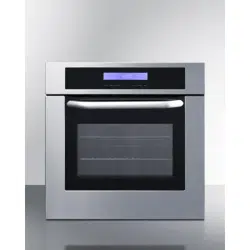

BUILT-IN ELECTRIC WALL OVEN
SEW24SSX
IMPORTANT SAFETY INSTRUCTIONS
Read these instructions completely and carefully. Save these
instructions for the local inspector’s use. Observe all governing codes
and ordinances.
NOTE TO INSTALLER: Be sure to leave these instructions with the
customer. Keep these instructions for future reference. Product failure
due to improper installation is not covered under the warranty
agreement.
INSTALLATION
&
USER
MANUAL
Write Serial Number here:
____________________________
Felix Storch, Inc.
ISO 9001:2015 registered company
770 Garrison Avenue
Bronx, NY 10474
www.summitappliance.com

Table of Contents
3
SAFETY AND WARNINGS ........................................................... 4-7
INSTALLING OVEN INTO KITCHEN ................................................ 8
CONTROL PANEL DESCRIPTION ................................................... 9
OPERATION INSTRUCTIONS ........................................................ 10
CLOCK SETTINGS .................................................................................................. 10
FUNCTION SETTINGS ....................................................................................... 10-11
LIGHTBULB SETTING ............................................................................................. 12
INQUIRY FUNCTION ............................................................................................... 12
CHILD LOCK FUNCTION ........................................................................................ 13
TIMER FUNCTION ................................................................................................... 13
TIMED COOKING FUNCTION ................................................................................. 14
STARTING/PAUSING/CANCELING FUNCTIONS .................................................. 14
ENERGY-SAVING FUNCTION ................................................................................ 15
OPERATION NOTES ............................................................................................... 15
ACCESSORIES ................................................................................ 16
SHELF PLACEMENT WARNING .................................................... 17
LIGHTBULB REPLACEMENT ......................................................... 18
SECURING THE OVEN TO THE CABINET .................................... 19
VENTILATION OPENINGS .............................................................. 20
ELECTRICAL CONNECTION ..................................................... 21-23
OVEN INSTALLATION .................................................................... 24
REMOVING THE OVEN DOOR ............................................................................... 25
CLEANING AND MAINTENANCE ................................................... 26
WARRANTY & SERVICE ........................................................... 28-29

Safety & Warnings
4
WARNING
WARNINGS
These are the most critical warnings summarized below.
•
Make sure the appliance is properly installed and grounded
by a qualified technician.
•
When the oven is first switched on, it may give off an
unpleasant smell. This is due to the bonding agent used for the
insulating panels within the oven. Please operate the
appliance, completely empty, with the conventional cooking
function at 500 degrees Fahrenheit for 90 minutes to burn
away any residue inside the cavity.
•
During the first use, there might be some smoke and a slight
odor. If this occurs, wait for the smell to clear before using the
oven.
•
Please use the product in an open environment.
•
Do not leave children unattended in area when the appliance
is in use. Do not allow children to sit or stand on the appliance.
•
If there is damage to or cracks in the glass of the oven door,
switch off the appliance and do not operate until repairs have
been completed.
•
DO NOT attempt to repair or replace any part of the
appliance, unless specifically recommended in the
manual. All other servicing should be done by a qualified
technician.
•
During use, the appliance becomes very hot. Use caution
and avoid touching heating elements inside the oven.

Safety & Warnings
5
•
Do not allow children to go near the oven when it is
operating.
•
Children should be supervised to ensure that they do not use
or play with the appliance.
•
All wiring and electrical connections should be installed
to local code. Some districts may require a licensed
electrician to perform the installation of this appliance.
•
Ensure that the appliance is off before replacing the oven
lamp to avoid electric shock.
•
Keep oven vent ducts unobstructed.
•
Never use your appliance for warming or heating a room.
•
Wear proper apparel while operating the appliance; loose-
fitting or hanging garments should never be worn while using
the appliance.
•
Accessible parts may become hot during use.
•
Use only dry potholders; moist or damp potholders on hot
surfaces may result in burns from steam. DO NOT let the
potholder touch hot heating elements. DO NOT use a towel or
other bulky cloth.
•
If the supply cord is damaged, the manufacturer, service
agent, or similarly qualified technician must replace it to avoid
a hazard.

Safety & Warnings
6
•
DO NOT use harsh abrasive cleaners or sharp metal scrapers
to clean the oven door glass; such cleaners and tools can
scratch the surface, which may result in shattering of the glass.
•
DO NOT use a steam cleaner to clean the appliance.
•
The appliance is not designed to be operated by an external
timer or separate remote-control system.
•
The instructions for ovens that have shelves include details of
the correct installations of the shelves.
•
Use caution when opening oven door; let hot air or steam
escape before removing or replacing food.
•
Always place oven racks in desired location while oven is
cool. If rack must be moved while oven is hot, do not let the
potholder make contact with the hot heating element in
oven.
•
DO NOT heat unopened food containers, as the buildup of
pressure may cause the container to burst and result in injury.
•
DO NOT TOUCH HEATING ELEMENTS OR INTERIOR
SURFACES OF OVEN. Heating elements may be hot even
though they are dark in color. Interior surfaces of an oven can
become hot enough to cause burns.
•
During and after use, DO NOT touch, or let clothing or
other flammable materials contact heating elements or
interior surfaces of oven, until they have had sufficient time
to cool. Other surfaces of the appliance may become hot
enough to cause burns, among these surfaces are oven
vent openings and surfaces near these openings, oven
doors, and over door windows.

Safety & Warnings
7
•
Flammable materials should NOT be stored in an oven or
near surface units.
•
DO NOT USE WATER ON GREASE FIRES. Smother fire
or flame or use dry chemical or foam-type fire
extinguisher.
•
Kitchens are an active work environment, and as such, we
recommend wearing appropriate attire, including
closed-toe shoes, when operating this appliance.
•
DO NOT touch the oven with wet or damp hands or feet.
•
Do not open the oven door often while the unit is in use.
•
An authorized technician MUST install the appliance.
The manufacturer is NOT responsible for any damage
that might be caused by defective placement or
installation by unauthorized personnel.
•
When the oven door or oven drawer is open, DO NOT leave
any item on it; the appliance may become imbalanced, or the
weight of the item will break the door.
•
Some parts of the appliance may stay hot for a long time;
allow the appliance to cool down completely and use extreme
caution before touching any part of the appliance that is
exposed to direct heat.
•
If you will not use the appliance for a long time, it is advised
to unplug the appliance.

Installing Oven into Kitchen
8
The oven can be installed underneath a work top or into an
upright cupboard. Affix the oven into position by screwing it into
place, using the two screw holes in the frame. To locate the
screw holes, open the oven door and look inside. To allow
adequate ventilation, the measurements and distances must be
adhered to when fixing the oven.
To ensure the oven will function properly, the kitchen
housing / panels of the kitchen cabinet next to the oven
must be made of a heat-resistant material.
Ensure that the glue of cabinets made of veneered wood can
withstand temperatures of at least 250 ºF. Plastics or glues
that cannot withstand such temperatures will melt and
deform the cabinet, once the oven has been lodged inside the
cabinets, electrical parts must be completely insulated. This
is a legal safety requirement. All guards must be firmly fixed
into place so that it is impossible to remove them without using
special tools.
Remove the back of the kitchen cabinet to ensure an adequate
current of air circulates the oven. The hob must have a rear gap
of at least 45 mm.
When the oven is unpacked, check if the cabinet is dam-
aged in any way. If you have any doubts at all, DO NOT
use it: contact a qualified professional. Keep packing
materials such as plastic bags, polystyrene, or nails out of
the reach of children.
Control Panel Description
9
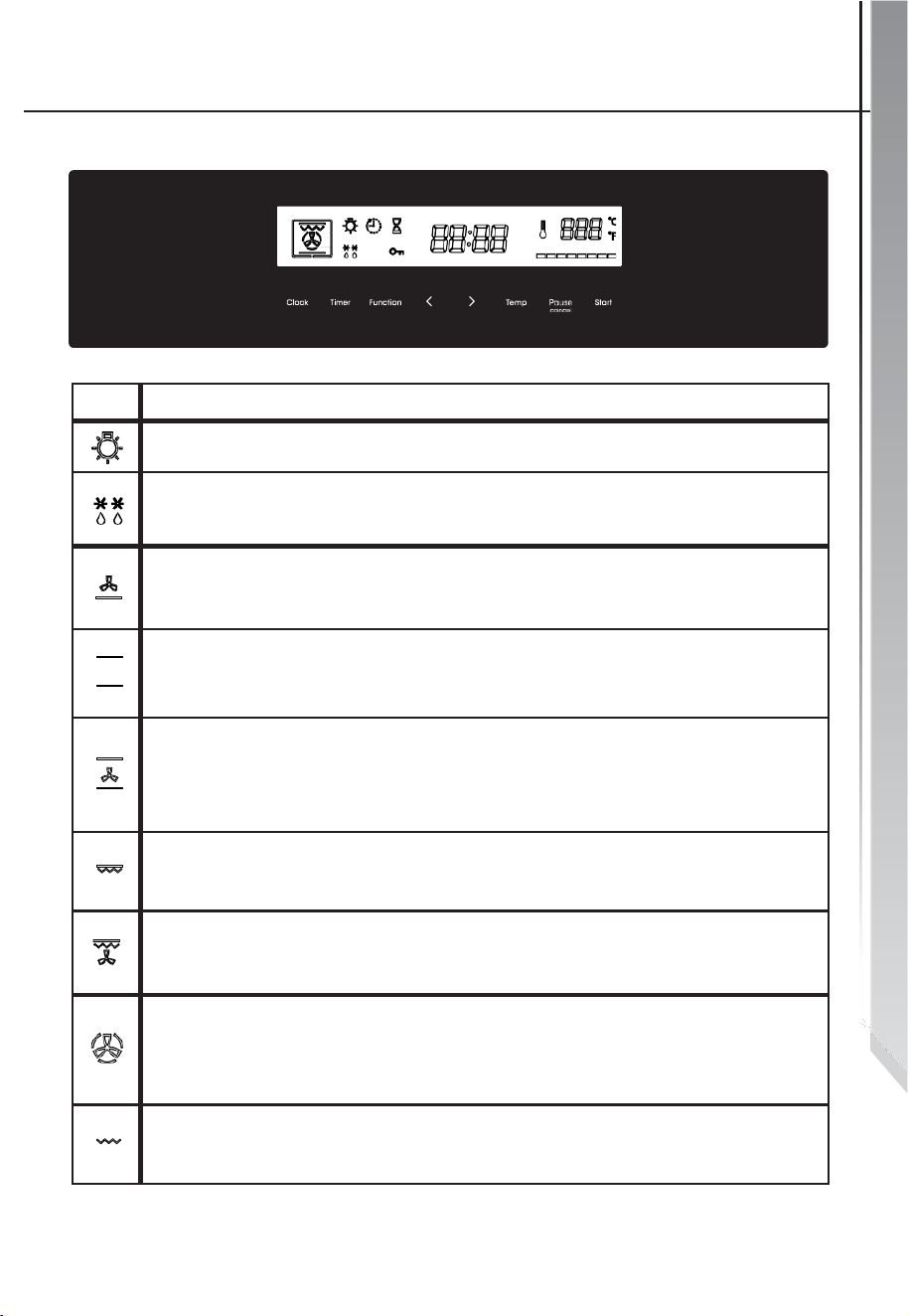
Symbol
Function Description
Oven Lamp: Allows the user to observe the food inside of the oven, through the window.
Oven lamp will light for all cooking functions.
Defrost: The circulation of air at room temperature allows for quicker thawing of
frozen food, without the use of any heat. A gentle but quick way to speed up the defrosting
and thawing times of frozen foods, ready-made dishes, etc.
Bottom Heater: A concealed element located on the bottom of the oven that provides
heat. It is used for keeping food warm. The temperature can be set within the range of
150-500
O
F. The default temperature is 350
O
F.
Conventional Cooking: Uses the top and bottom heating elements to provide
convectional cooking. The temperature can be set within the range of 150-500°F. The
default temperature is 350° F.
Convention with Fan: Combination of the fan and each heating element provides more
even heat distribution, saving up to 30-40% of energy. Dishes are lightly browned on the
outside and still moist on the inside. NOTE: This function is suitable for grilling or roasting big
pieces of meat at a higher temperature. The temperature can be set within the range of
150-500°F. The default temperature is 350° F.
Double Grilling: For use with inner radiant grill element and top element. The temperature
can be set within the range of 350-500°F. The default temperature is 350° F.
Double Grilling with Fan: For use of the inner radiant grill element, top heating element
and fan. The temperature can be set within the range of 350-500°F. The default
temperature is 350°F.
True Convection: An element around the fan provides an additional source of heat for
convection-style cooking. In convection mode, the fan automatically comes on to
improve air circulation within the oven and creates an even heat for cooking. The
temperature can be set within the range of 150-500°F. The default temperature is 350° F.
Radiant Grilling: The inner grill element switches on and off to maintain temperature. The
temperature can be set within the range of 350-500°F. The default temperature is 350° F.
Operation Instructions
10
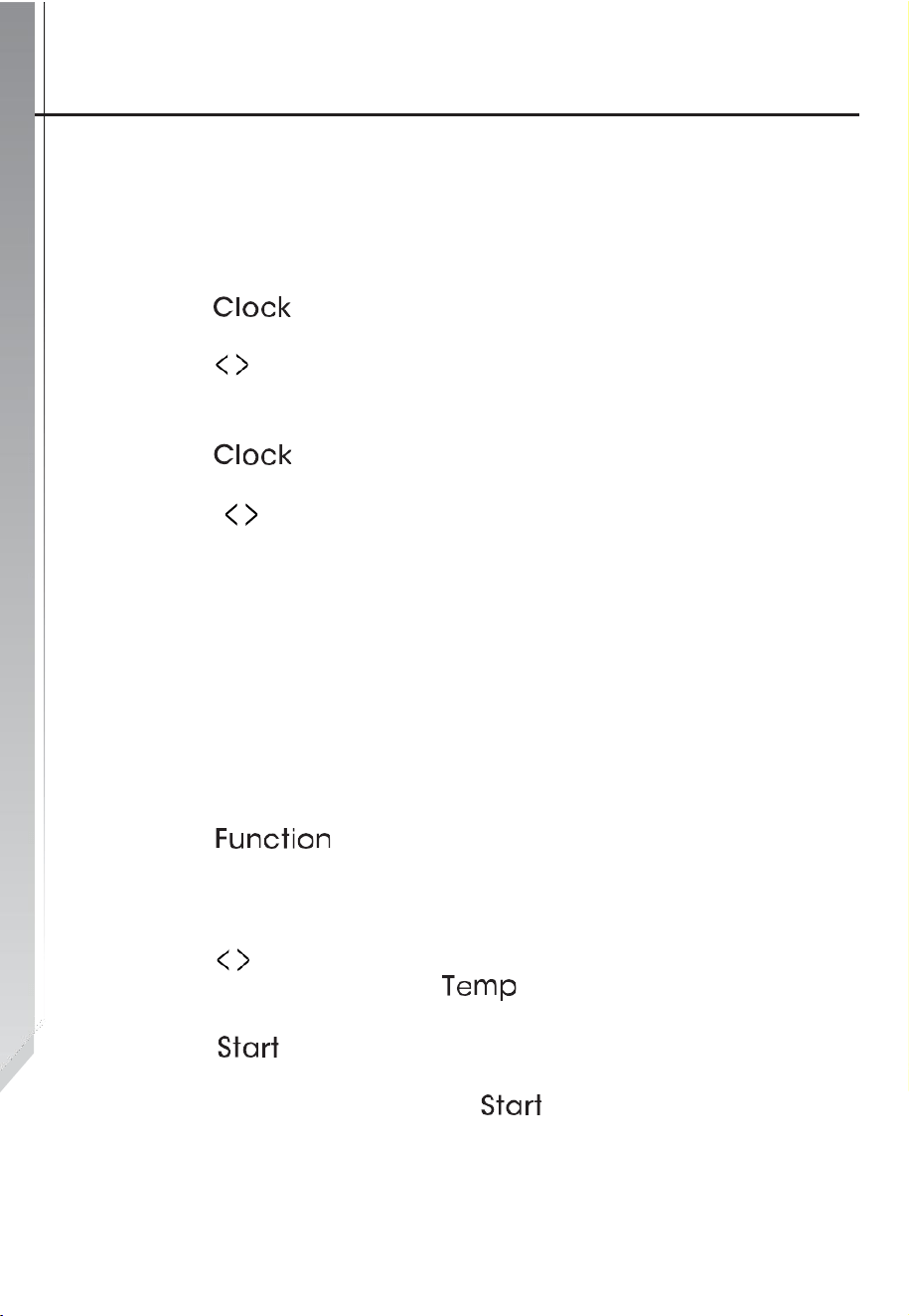
Clock Settings
After connecting the unit to the power, the numbers "12:00" will
show on the display.
1.) Press " ", the hour number will flash.
2.) Press " " to adjust the hour number; time should be within
numbers 0 through 12.
3.) Press " ", the minute number will flash.
4.) Press " " to adjust the minute number; time should be
within numbers 0 through 59.
5.) Press "Clock" to finish the clock settings; symbol ":" flashes,
and the time will be illuminated.
NOTE: This is a 12-hour clock. After oven is powered on, if the
clock is not set, it will show "12:00" on display.
Function Settings
1.) Press " " to choose a cooking function. The related
function indicator will light up. Continue pressing until desired
function is selected.
2.) Press " " to adjust the cooking time and adjust the
temperature before pressing " " to switch.
3.) Press " " to begin cooking.
NOTE: If you skip Step 2, press " " to confirm the start of
cooking; the default time is 9 hours, default temperature will be
displayed on the LCD.
Operation Instructions
11
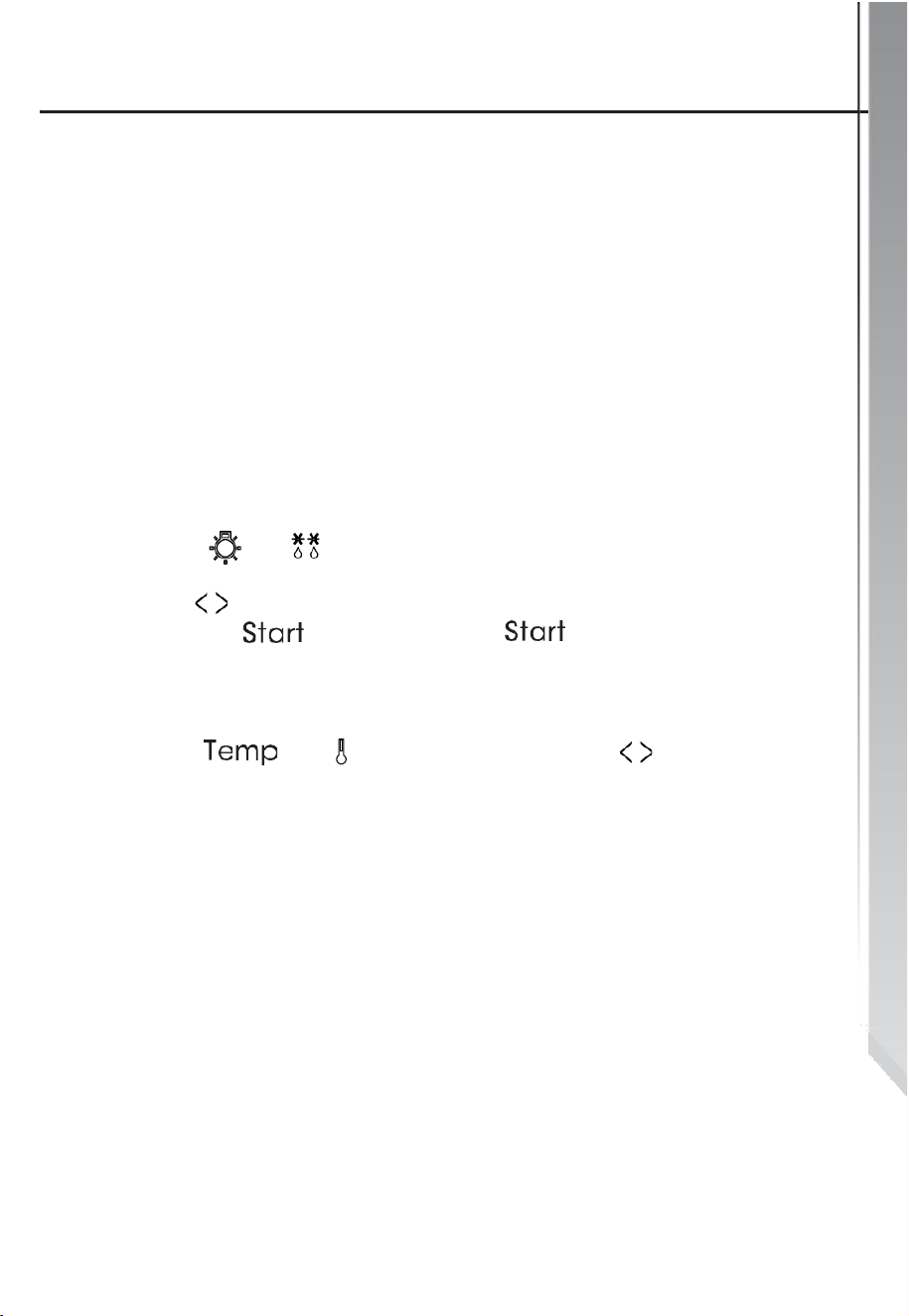
Function Settings
•
After connecting the unit to the power, the numbers "12:00"
will flash on the display.
•
When adjusting the clock time or the timer, the increments
will change after 30 minutes:
0--0:30 min: increases by 1 minute
0:30--9:00 hours: increases by 5 minutes
•
The increments when adjusting the unit’s temperature is 5
degrees. " ". " " cannot adjust the temperature.
•
Press " " to adjust the cooking time when starting to cook.
Then press " " to confirm. If " " not pressed within 6
seconds, the oven will revert to the previously selected time to
continue cooking.
Press " ", " " shows, then press "
" to adjust the
temperature when starting to cook. Press "Start" to start
cooking. If "Start" not pressed within 6 seconds, the oven will
revert to the previously selected time to continue cooking.
Operation Instructions
12
Lightbulb Setting
1.) Press " " to select a function, and the
corresponding icon will light up.
2.) Press " " button to start, " 0:00 " and icon " " will
light up, " : " will start blinking.
Inquiry Function
During the following functions, you can use the inquiry function;
after 3 seconds, the inquiring function will turn off.
1.) While cooking, if the time clock was set, press " "
button to see the current time; if the timer function was set,
press " " button to see the remaining time.
2.) If a timer is set, if the clock was set, press " "
button to see the current time.
3.) If the time clock is showing but a timer has been set,
press " " to see the time remaining on the timer.
Operation Instructions
13
Child Lock Function
To Lock: Press " " and " " simultaneously for 3
seconds, there will be a long beeping sound and the “ “
symbol will light up.
To Unlock: Press " " and " " simultaneously for 3
seconds, there will be a long beeping sound indicating the Child
Lock has been unlocked.
NOTE: If you want to stop cooking, press the Stop button once
(Do not hold the button down).
Timer Function
The oven comes with a timer function that can be set up to
run up to 9 hours The timer can only be set when the oven is
in Standby Mode. To set the timer:
1.) Press the "Timer " button and the display will show “ “
and “AL”.
2.) Press " " to set the timer.
3.) Press "Start" to confirm settings. ": " will flash and the " "
icon will light up. The time will begin to count down.
NOTE: The oven buzzer will ring 10 times after the timer
hits zero. Then the " " symbol will disappear from the
screen to alert you the timer has elapsed. You can cancel
the timer while setting it up by pressing the stop button;
After the timer has been set, you can cancel it by pressing
the stop button twice.
Operation Instructions
14
Timed Cooking Function
This function can only be used once the Clock has been set up
on the appliance and the unit is in standby mode:
1.) Press " " twice. The display will show “ " and "End".
2.) Press " " to set how many hours (if any) the oven will
be cooking for.
3.) Press the "Timer" button again.
4.) Press " " to set how many minutes the unit will be
cooking for.
5.) Press " " to choose the cooking function you wish
to use.
6.) After choosing how long the unit will cook for and the
temperature, press "Start".
Starting/Pausing/Canceling a Function
1.) If the cooking time has been set, press "Start" to start
cooking. Press "Start" to resume cooking if it has been
paused.
2.) In the cooking process, press "Pause” once to pause the
cooking.
Press " " twice to cancel the cooking function altogether.

Operation Instructions
15
Energy-Saving Function
This oven has an energy-saving function. This function can
only be set when the oven is in Standby Mode. To start
energy-saving mode:
1.) In standby mode, press "Start" for three seconds, the
LCD display will turn off and the unit will enter energy-saving
mode.
2.) If there is no oven operation within 10 minutes while the
unit is in Standby Mode, the LCD display will turn off and the
unit will enter Energy-Saving Mode.
3.) While in Energy-Saving Mode, pressing any key on the
oven's control panel will cancel Energy-Saving Mode.
NOTES:
•
The oven lamp will be ON for all functions.
•
If the cooking program/setting has been set and the "Start"
button is not pressed within 5 minutes, the clock will be
displayed or the display will return to its default state, and the
cooking program/setting will need to be set again. The unit will
make a sound once the button is pressed, if not pressed there
will be no response.
•
The unit will ring 5 times to alert you when cooking has
finished.
Accessories
16
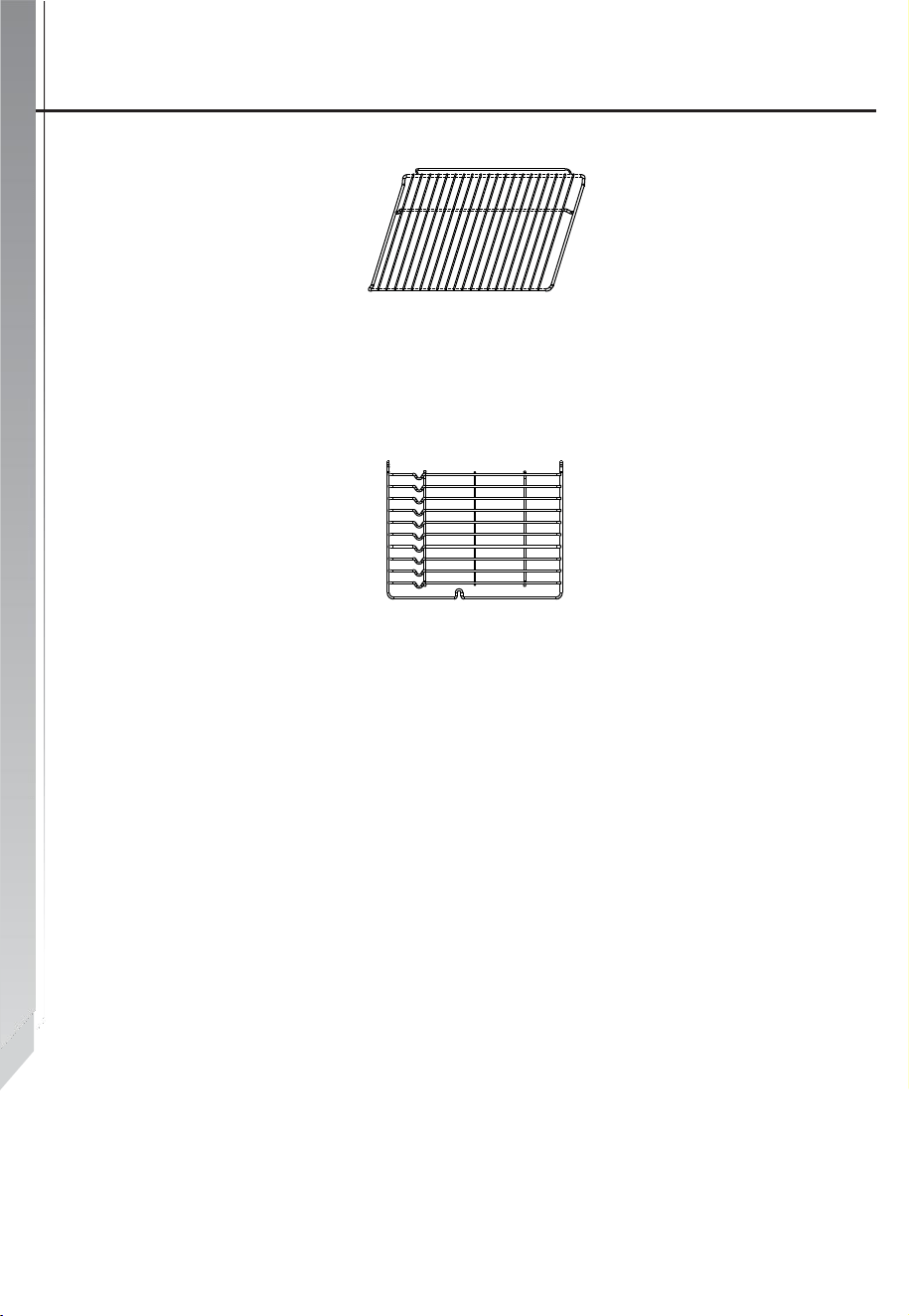
Wire Shelf
For grilling, dishes, or cake pans with items that will be grilled
and/or roasted.
Slider Shelf
For cooking larger-sized food, these shelf support rails on the
right and left sides of the oven can be removed, so dishes and
trays can be placed on the oven floor to use functions such as
Radiant Grilling, Double Grilling, and Double Grill with Fan.
NOTE: When placing cookware on the oven floor, please
DO NOT use any functions with the Bottom Heater, in order
to prevent heat gathering at the bottom.
Shelf Placement Warning
17
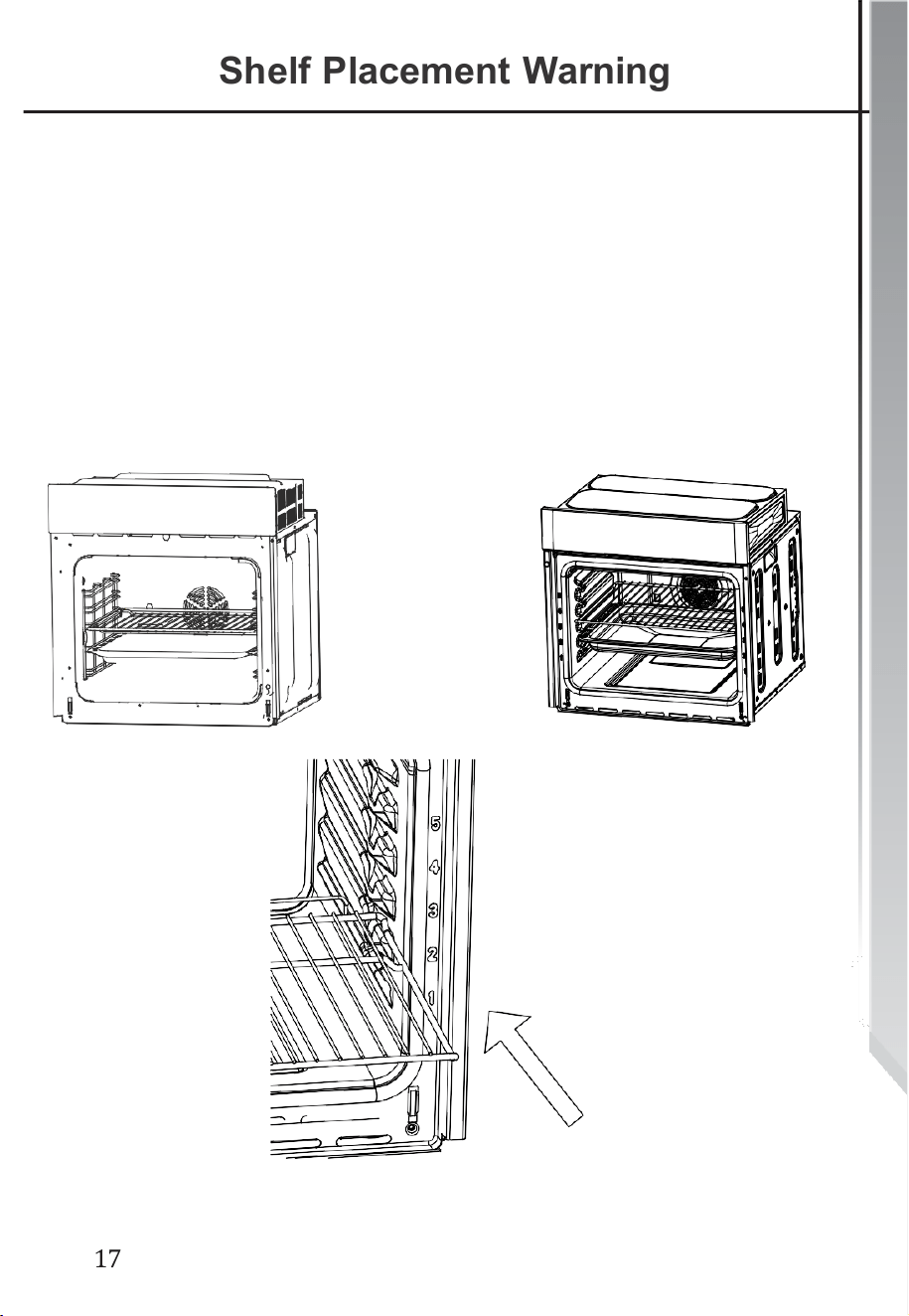
Shelf Placement Warning
To ensure the oven shelves are used safely, correct shelf
placement between the side rails is important. Shelves and
pans only can be used between the first and fifth layers.
The shelves should be used correctly with the side rails, as it
will ensure that during careful removal of the shelf or tray and
so any hot food will not slide out and cause injuries.
OR
Lightbulb Replacement
18
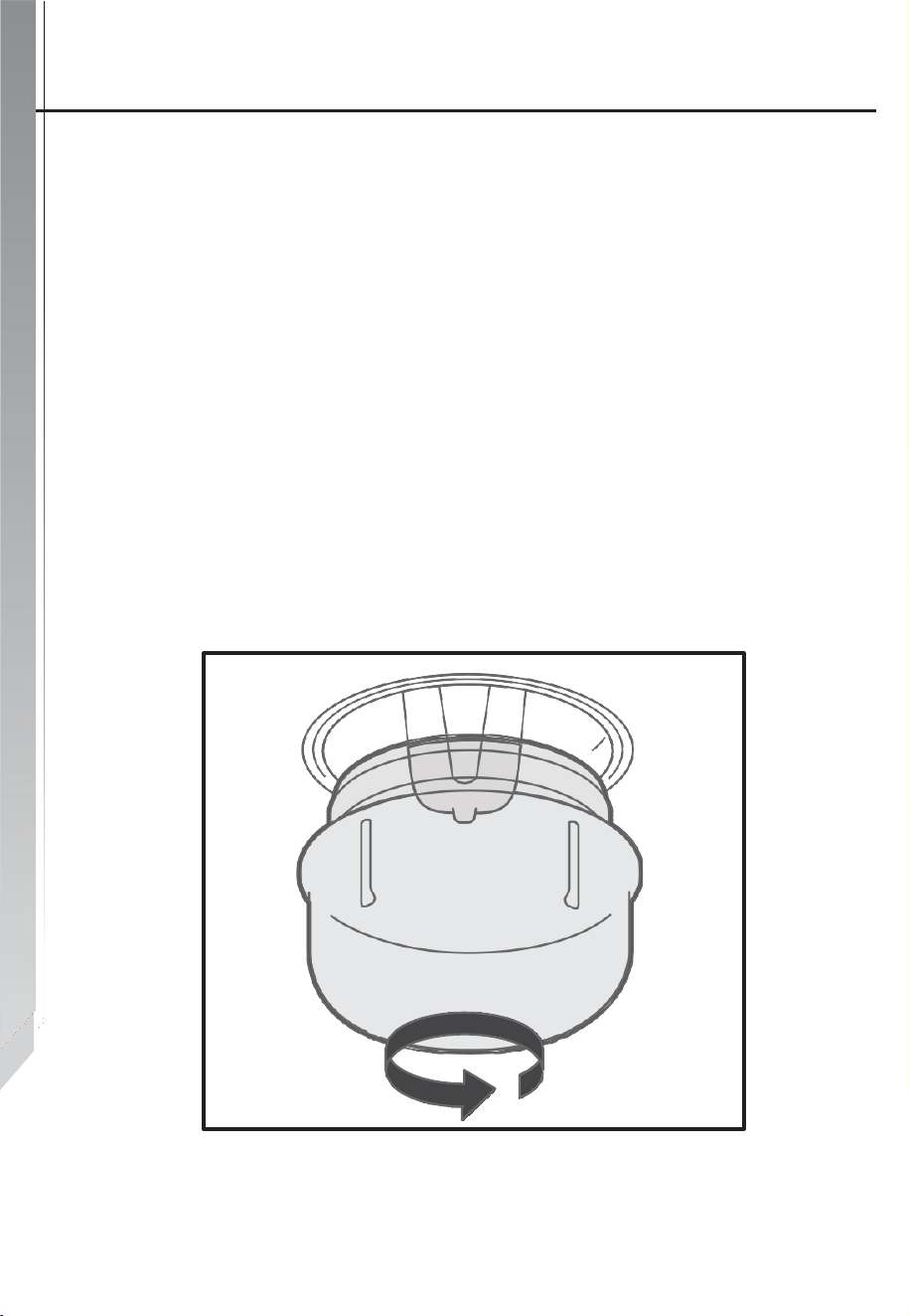
Lightbulb Replacement
1.) Disconnect the power to the main outlet or shut off the
circuit breaker to the unit’s power supply.
2.) Unscrew the glass lamp cover by turning it counter-clockwise
(NOTE: It may be stiff) and replace the lightbulb with a new one
of the same type.
3.) Screw the glass lamp cover back in place.
4.) Reconnect the unit to its power supply.
NOTE: Only use 130V/25W halogen lamps.
Securing the Oven to the Cabinet
19
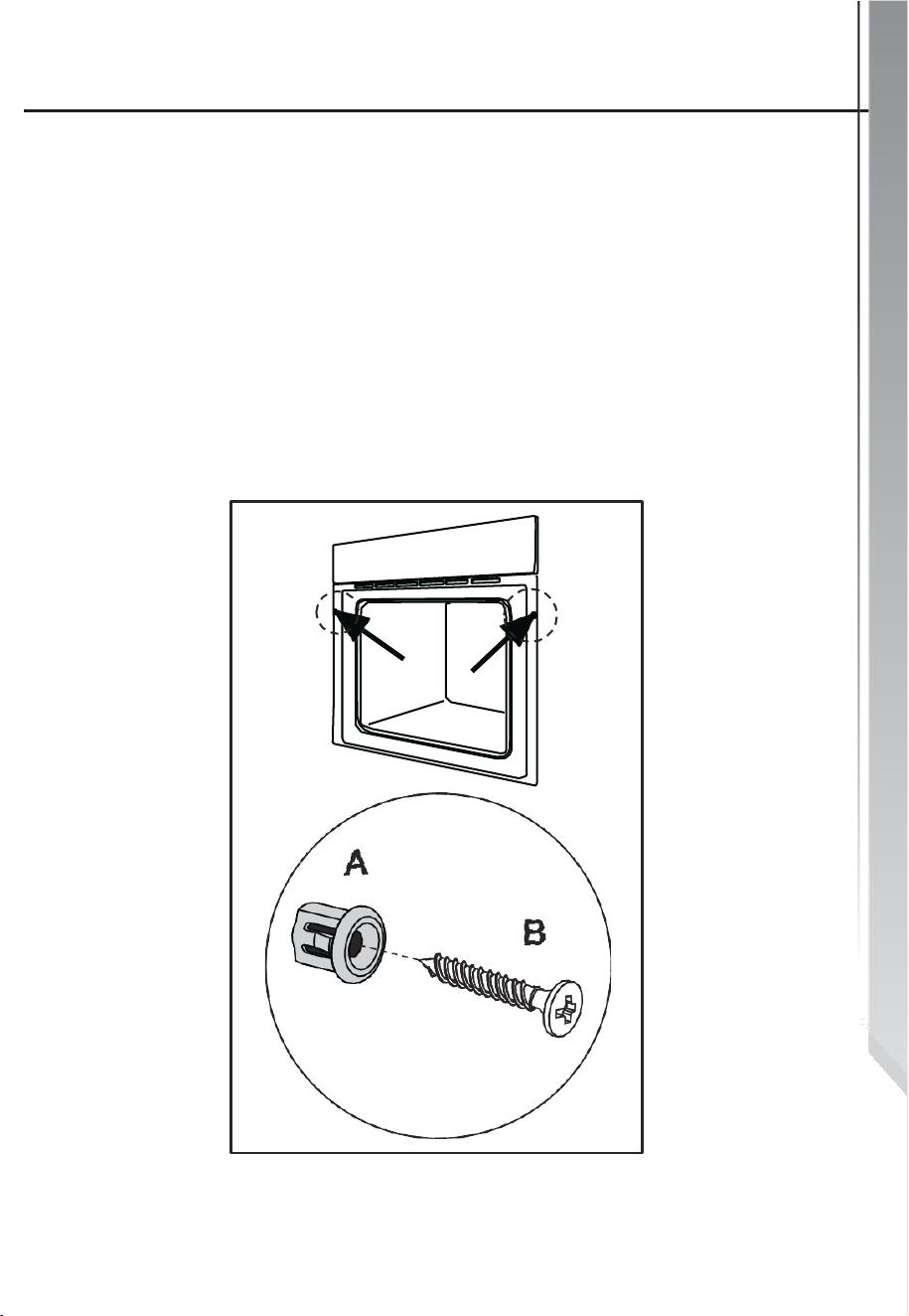
Securing the Oven to the Cabinet
1.) Place the oven in the cabinet recess.
2.) Open the oven door.
3.) Secure the oven to the kitchen cabinet using the two
spacers " A " which fit inside the holes in the oven frame.
Then insert the two screws " B " into the spacers.
Ventilating Openings
20
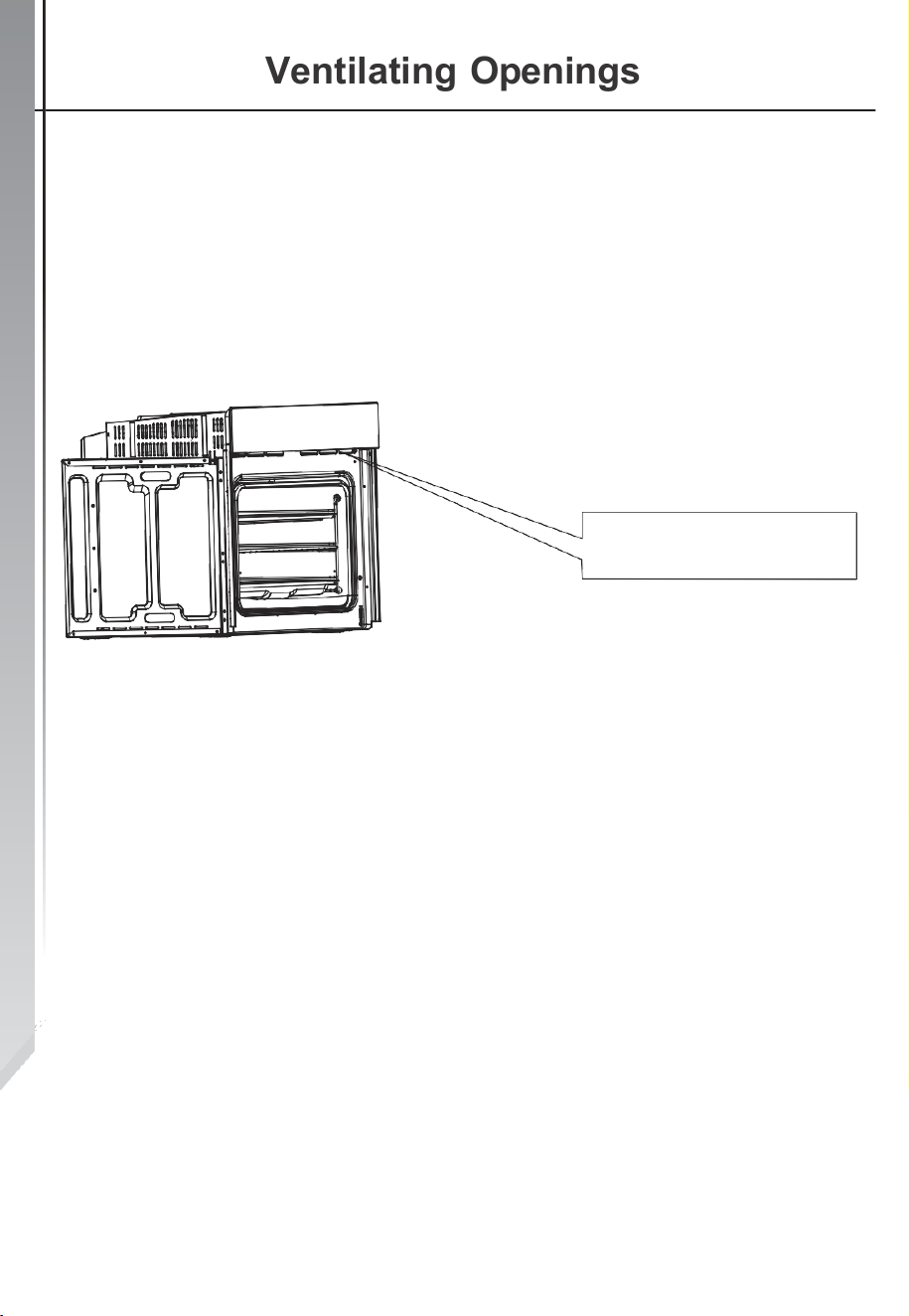
When cooking is finished, paused, or the unit is in Standby
Mode -AND- if the oven's center temperature is over 160
degrees, the cooling fan will continue working for 15 minutes, -
OR- when the oven's center temperature becomes lower than
160 degrees, the cooling fan will stop working.
Ventilating openings

Electrical Connection
21
This appliance must be properly installed and grounded
by a qualified technician. Ask your dealer to recommend
a qualified technician or an authorized repair service.
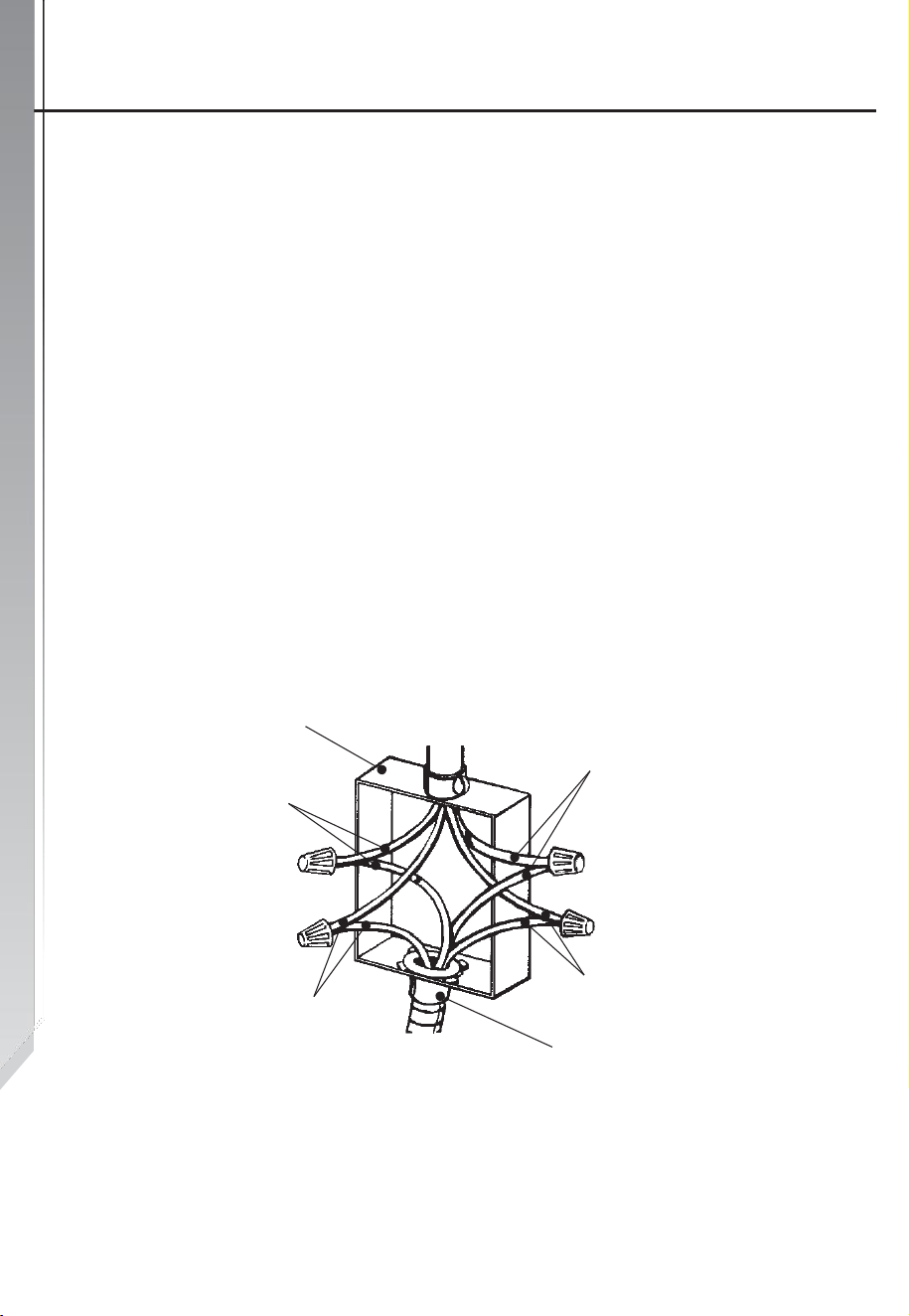
This appliance is manufactured with a green GROUND wire
connected to the oven chassis. After making sure that the
power has been turned off, connect the flexible conduit from
the oven to the junction box using a U.L. listed conduit
connector. Figures 1 and 2 and the instructions provided
below show the most common way of connecting the oven.
Your local codes and ordinances take precedence over
these instructions.
Complete electrical connections according to local codes and
ordinances. “WARNING” Risk of Electric Shock, frame
grounded to neutral of the appliance through a link.
Grounding through the neutral conductor is prohibited for
new branch-circuit installations (1996 NEC); mobile homes;
and recreational vehicles, or in an area where local codes
prohibit grounding through the neutral conductor.
For installations where grounding through the neutral
conductor is prohibited:
•
Disconnect the ground from the neutral at free end of
the conduit
•
Use grounding terminal or lead to ground unit
•
Connect neutral terminal or lead to branch circuit neutral in
usual manner
Electrical Connection
22
Wire Branch Circuit
Refer to Figure:
•
Disconnect ground from neutral at free end of the conduit.
•
Connect the green GROUND wire from the oven to the
GROUND wire in the junction box (bare or green-colored
wire).
•
Connect the red and black leads from the oven to the
corresponding HOT Wires in the junction box.
•
Connect the white wire from the oven to the NEUTRAL
(gray or white) wire in the junction box.
•
Connect the local codes and power supply codes using a
terminal.
•
The terminal uses a thing adapting to the wire of the cord.
Ungrounded Neutral
Cable from
Junction box
Red wires
Bare or
green wire
power supply
Cable
from oven
Figure
White wires
Black wires
U.L.-listed conduit
connector
Electrical Connection
23
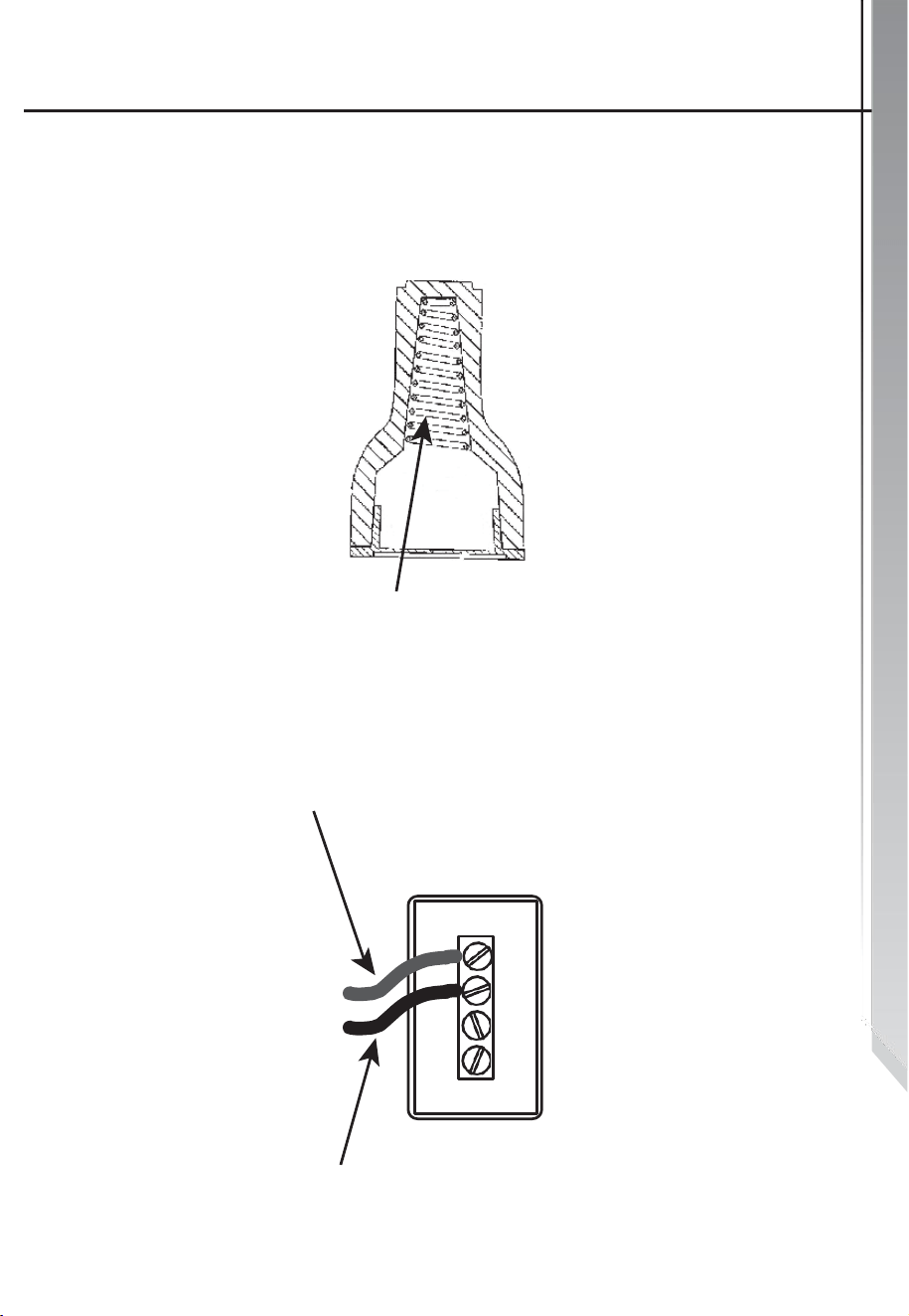
IMPORTANT: Use twist-on
connector with square-wire spring
Square-wire spring
OR
From power supply
Terminal Block
From the oven
Oven Installation
24
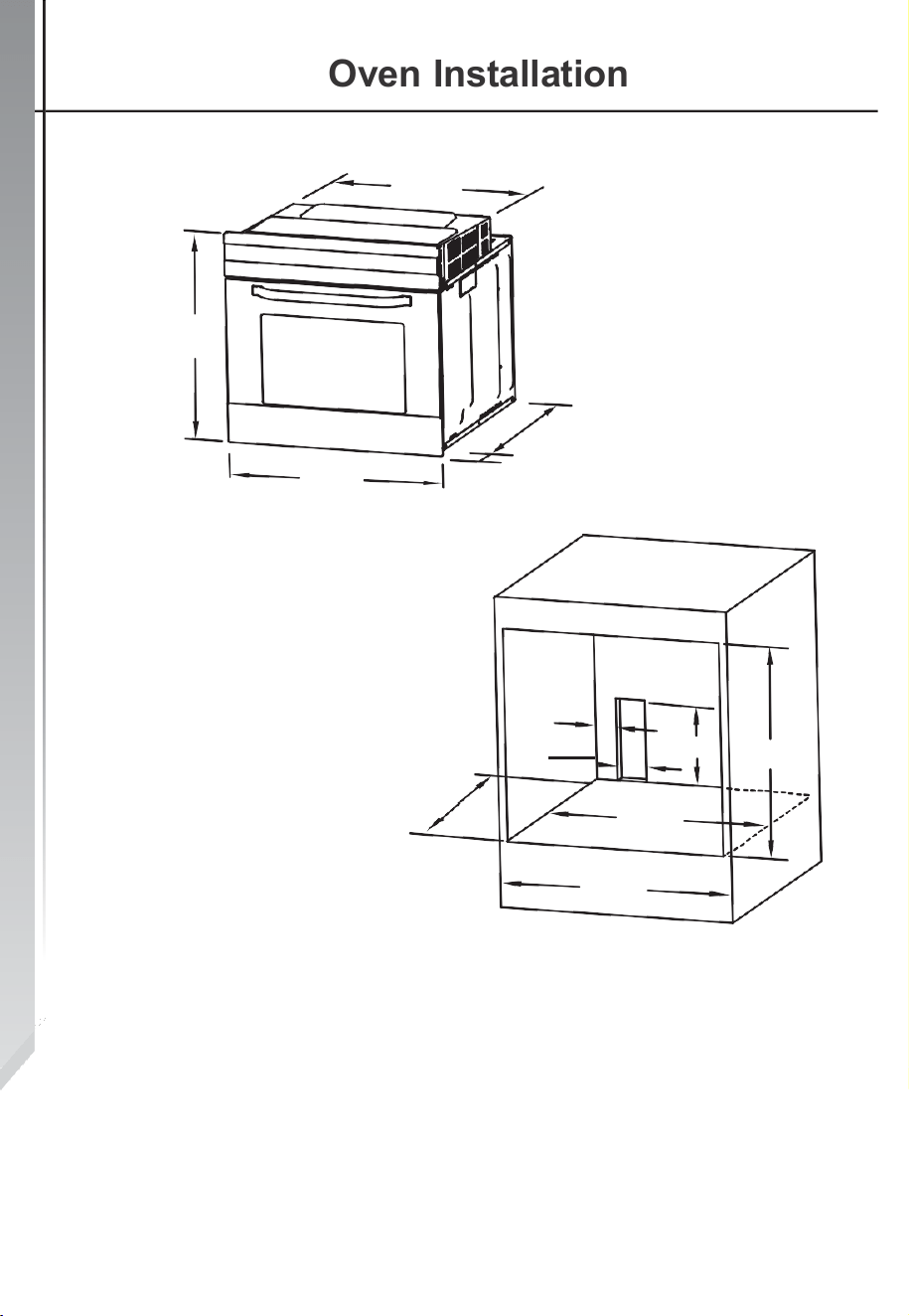
22"
23.4"
23.4"
21.8"
0.78"
24.7"
min.
3.1"
3.93"
9.84"
22"
23.8"
23.6"
NOTES:
•
Only deviations that add clearance space are allowed for
all dimensions.
•
The cabinet does not include the power switch or socket.
•
The number of accessories included depends on the
appliance purchased.
Removing the Oven Door
25
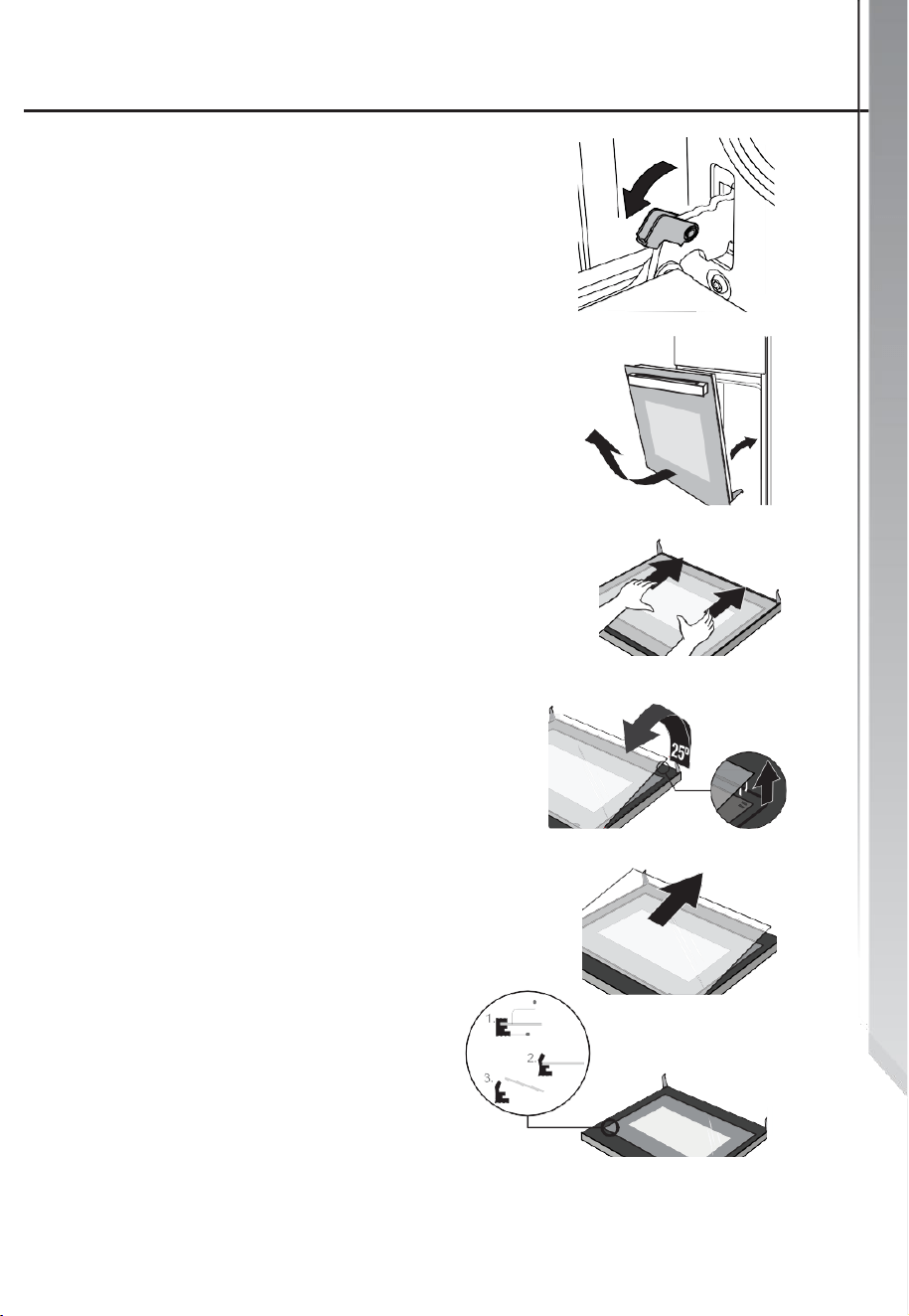
The removable oven door allows
full access to entire interior of
the oven for easier and quicker
maintenance.
1.) To remove the door, open the
door to the maximum angle. Then
pull the buckle at the door hinge
backward.
(Figure 1)
Figure 1
2.) Close the door to an angle of
approximately 15°. Lift up and
slowly pull the door out from the
oven. (Figure 2)
3.) Place the door flat with the door
top cover towards yourself, put your
hands on the glass, and pull it
toward the oven.
(Figure 3)
4.) Separate the glass carefully by
lifting it at approximately 25°.
(Figure 4)
5.) Push the glass into the position
indicated by the arrow in Figure 5.
Gently pull the glass out of the
socket.
6.) After pulling out the inner glass,
please take out the middle layer of
glass as shown in Figure 6.
7.) When cleaning is completed,
follow steps 1-6 to reinstall the oven
door in its original position.
Glass
Rubber
Figure 2
Figure
3
Figure
4
Figure
5
Figure
6
1
5
˚

Cleaning & Maintenance
26
To keep the appliance looking good and performing well, we
strongly recommend keeping the unit clean. While the
modern design of the appliance keeps maintenance to a
minimum, the parts of the unit that come into contact with
food must be cleaned regularly.
•
Before any maintenance and cleaning is done,
disconnect the power.
•
Set all appliance controls to the OFF position.
•
Wait until the inside of the unit has cooled completely
before cleaning; use caution and ensure the oven is
NOT hot or warm.
•
Clean the surface of the unit with a damp cloth, soft brush,
or fine sponge, and then wipe dry. In case of heavy soiling,
use hot water with a non-abrasive cleaning product.
•
When cleaning the glass oven door, do NOT use
abrasive cleaners or sharp metal scrapers, these can scratch
the surface or lead to the glass being damaged.
•
Never leave acidic substances (Such as lemon juice or
vinegar) on stainless steel parts.
•
Do NOT use a high-pressure cleaner for cleaning the unit.
•
The baking pans may be washed in mild detergent.
NOTE: If you encounter any issues that cannot be resolved
by the information in this user manual, call our Customer
Service facility at 800-932-4267 between 9:00 AM and 5:00
PM ET or visit our website summitappliance.com/support at
any time. We will do our best to answer your questions

27
NOTES

28
WARRANTY
AND
SERVICE

For parts and accessory ordering,
troubleshooting, and helpful hints, visit:
www.summitappliance.com/support
ONE-YEAR LIMITED WARRANTY
Within the 48 contiguous United States, for one year from the date of purchase, when
this appliance is operated and maintained according to instructions attached to or
furnished with the product, warrantor will pay for factory-specified parts and repair
labor to correct defects in materials or workmanship. Service must be provided by a
designated service company. Outside the 48 states, all parts are warranted for one
year from manufacturing defects. Plastic parts, shelves, and cabinets are warranted
to be manufactured to commercially acceptable standards and are not covered from
damage during handling or breakage.
ITEMS WARRANTOR WILL NOT PAY FOR:
1. Service calls to correct the installation of your appliance, to instruct you how
to use your appliance, to replace or repair fuses or to correct wiring or
plumbing.
2. Service calls to repair or replace appliance light bulbs or broken shelves.
Consumable parts (such as filters) are excluded from warranty coverage.
3. Damage resulting from accident, alteration, misuse, abuse, fire, flood, acts
of God, improper installation, installation not in accordance with electrical
or plumbing codes, or use of products not approved by warrantor.
4. Replacement parts or repair labor costs for units operated outside the United States.
5. Repairs to parts or systems resulting from unauthorized modifications made to the
appliance.
6. Expenses for travel and transportation for product service in remote locations.
7. The removal and reinstallation of your appliance if it is installed in an
inaccessible location or is not installed in accordance with published
installation instructions.
DISCLAIMER OF IMPLIED WARRANTIES; LIMITATION OF REMEDIES
CUSTOMER'S SOLE AND EXCLUSIVE REMEDY UNDER THIS LIMITED
WARRANTY SHALL BE PRODUCT REPAIR AS PROVIDED HEREIN. IMPLIED
WARRANTIES, INCLUDING WARRANTIES OF MERCHANTABILITY OR FITNESS
FOR A PARTICULAR PURPOSE, ARE LIMITED TO ONE YEAR. WARRANTOR
SHALL NOT BE LIABLE FOR INCIDENTAL OR CONSEQUENTIAL DAMAGES.
SOME STATES DO NOT ALLOW THE EXCLUSION OR LIMITATION OF
INCIDENTAL OR CONSEQUENTIAL DAMAGES, OR LIMITATIONS ON THE
DURATION OF IMPLIED WARRANTIES OF MERCHANTABILITY OR FITNESS, SO
THESE EXCLUSIONS OR LIMITATIONS MAY NOT APPLY TO YOU. THIS
WARRANTY GIVES YOU SPECIFIC LEGAL RIGHTS AND YOU MAY ALSO HAVE
OTHER RIGHTS, WHICH VARY FROM STATE TO STATE.
FELIX STORCH, INC.
770 Garrison Avenue
Bronx, NY 10474
Phone: (718) 893-3900
Fax: (844) 478-8799
www.summitappliance.com
