Visit our website at: http://www.harborfreight.com
email our technical support at: [email protected]
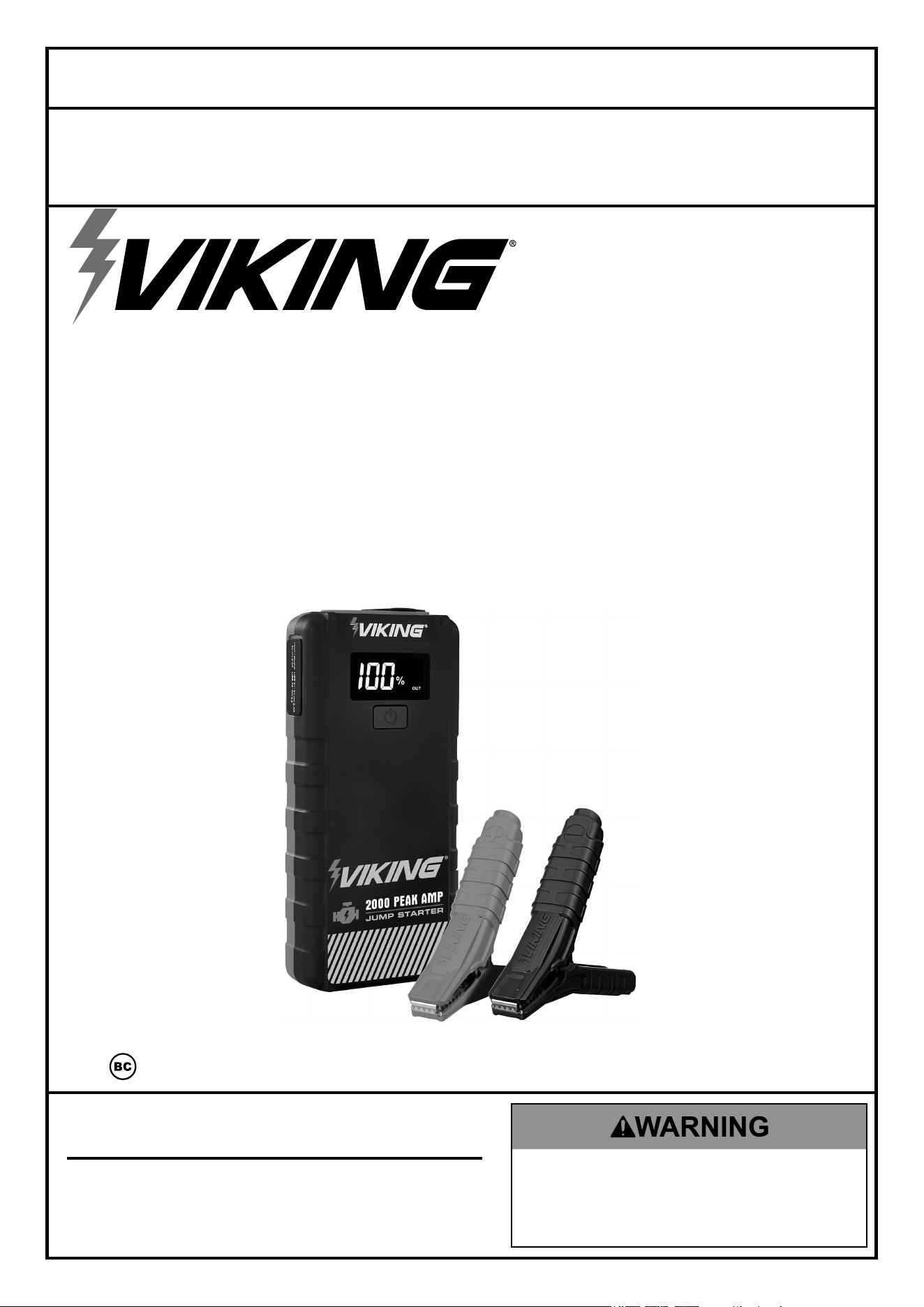
LITHIUM-ION JUMP
STARTER AND
POWER BANK
59491
cHarGe
cOMpLeteLy
iMMeDiateLy
aFter
pUrcHaSe.
Fully recharge
after each use.
Fully recharge every
3 months to ensure
long battery life.
Owner’s Manual & Safety Instructions
Save This Manual Keep this manual for the safety warnings and precautions, assembly,
operating, inspection, maintenance and cleaning procedures. Write the product’s serial number in the
back of the manual (or month and year of purchase if product has no number). Keep this manual and the
receipt in a safe and dry place for future reference. 23j
When unpacking, make sure that the product is intact
and undamaged. If any parts are missing or broken,
please call 1-888-866-5797 as soon as possible.
Copyright
©
2023 by Harbor Freight Tools
®
. All rights reserved.
No portion of this manual or any artwork contained herein may be reproduced in
any shape or form without the express written consent of Harbor Freight Tools.
Diagrams within this manual may not be drawn proportionally. Due to continuing
improvements, actual product may differ slightly from the product described herein.
Tools required for assembly and service may not be included.
Read this material before using this product.
Failure to do so can result in serious injury.
SAVE THIS MANUAL.
Page 2 For technical questions, please call 1-888-866-5797. 59491
SaFety OperatiOn MaintenanceSetUp
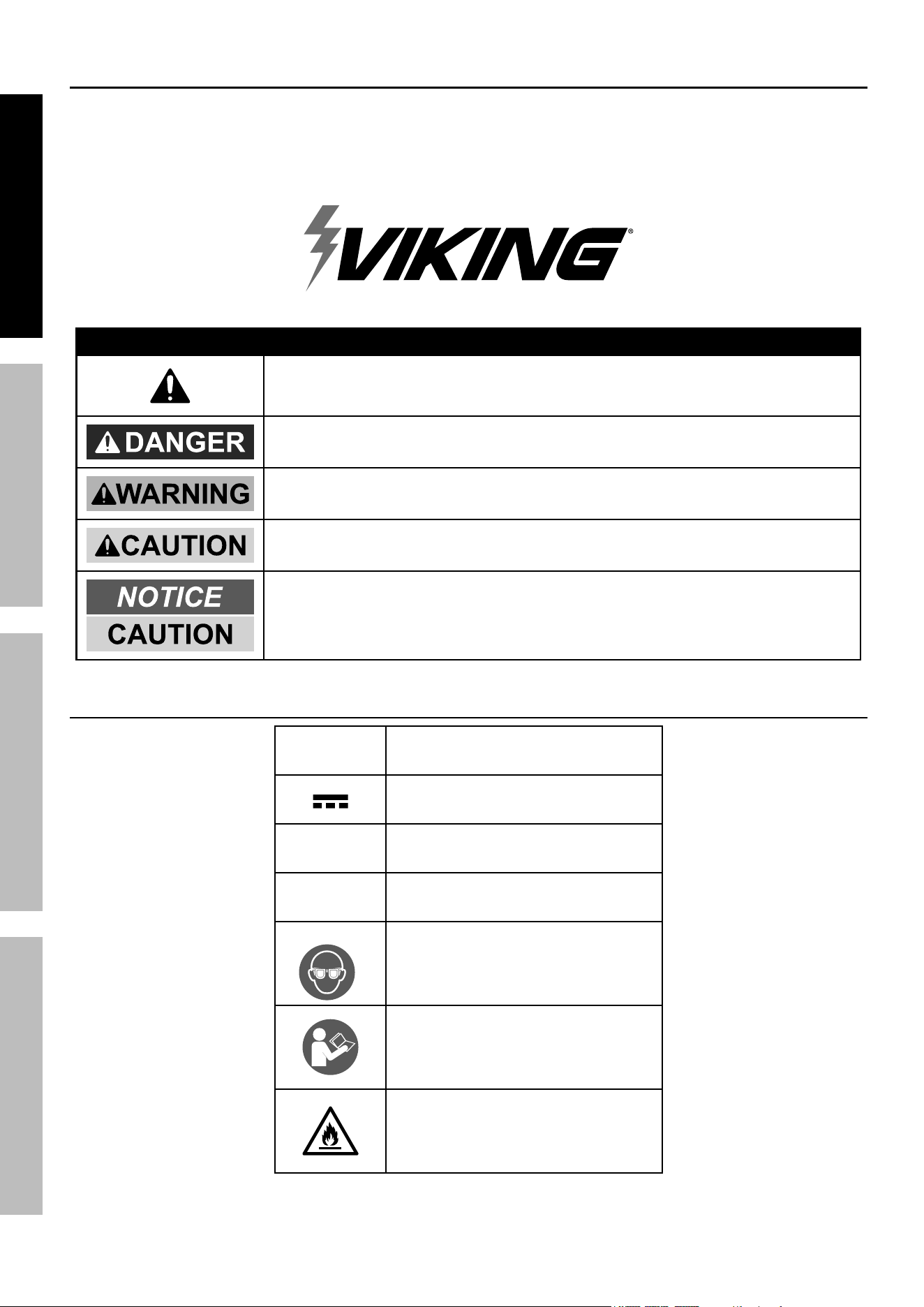
WarninG SyMBOLS anD DeFinitiOnS
This is the safety alert symbol. It is used to alert you to potential
personal injury hazards. Obey all safety messages that
follow this symbol to avoid possible injury or death.
Indicates a hazardous situation which, if not avoided,
will result in death or serious injury.
Indicates a hazardous situation which, if not avoided,
could result in death or serious injury.
Indicates a hazardous situation which, if not avoided,
could result in minor or moderate injury.
Addresses practices not related to personal injury.
Symbology
V
Volts
Direct Current
a
Amperes
Wh
Watt-hours
WARNING marking
concerning Risk of Eye Injury.
Wear ANSI-approved
splash-resistant safety goggles.
Read the manual before
setup and/or use.
WARNING marking
concerning Risk of Fire.
Follow connection procedure.
table of contents
Safety ......................................................... 3
Specifications ............................................. 5
Setup .......................................................... 6
Operation .................................................... 8
Maintenance ............................................... 9
Warranty .................................................... 11

Page 3For technical questions, please call 1-888-866-5797.59491
SaFetyOperatiOnMaintenance SetUp
iMpOrtant SaFety inStrUctiOnS
WARNING - When using this product, basic precautions should always be followed, including the following:
1. Read all the instructions before using the product.
2. To reduce the risk of injury, close supervision is
necessary when the product is used near children.
3. Do not put fingers or hands into the product.
4. Use of an attachment not recommended or sold
by power pack manufacturer may result in a risk
of fire, electric shock, or injury to persons.
5. To reduce risk of damage to the electric plug
and cord, pull the plug rather than the cord
when disconnecting the power pack.
6. Do not use a battery pack or appliance that is
damaged or modified. Damage or modified
batteries may exhibit unpredictable behavior
resulting in fire, explosion or risk of injury.
7. Do not operate the power pack with a damaged
cord or plug, or a damaged output cable.
8. Do not disassemble the power pack, take it
to a qualified service person when service or
repair is required. Incorrect reassembly may
result in a risk of fire or electrical shock.
9. To reduce the risk of electric shock, unplug
the power pack from the outlet before
attempting any instructed servicing.
10. WARNING - RISK OF EXPLOSIVE GASES.
a. WORKING IN VICINITY OF A LEAD-ACID
BATTERY IS DANGEROUS. BATTERIES
GENERATE EXPLOSIVE GASES DURING
NORMAL BATTERY OPERATION. FOR THIS
REASON, IT IS OF UTMOST IMPORTANCE
THAT YOU FOLLOW THE INSTRUCTIONS
EACH TIME YOU USE THE POWER PACK.
b. To reduce risk of battery explosion, follow
these instructions and those published by
battery manufacturer and manufacturer of
any equipment you intend to use in vicinity
of battery. Review cautionary marking
on these products and on engine.
11. PERSONAL PRECAUTIONS
a. Consider having someone close
enough by to come to your aid when
you work near a lead-acid battery.
b. Have plenty of fresh water and soap nearby in
case battery acid contacts skin, clothing, or eyes.
c. Wear complete eye protection and clothing.
Avoid touching eyes while working near battery.
d. If battery acid contacts skin or clothing,
wash immediately with soap and water. If
acid enters eye, immediately flood eye with
running cold water for at least 10 minutes
and get medical attention immediately.
e. NEVER smoke or allow a spark or flame
in vicinity of battery or engine.
f. Be extra cautious to reduce risk of dropping
a metal tool onto battery. It might spark
or short-circuit battery or other electrical
part that may cause explosion.
g. Remove personal metal items such as rings,
bracelets, necklaces, and watches when
working with a lead-acid battery. A lead-
acid battery can produce a short-circuit
current high enough to weld a ring or the
like to metal, causing a severe burn.
12. When charging the internal battery,
work in a well ventilated area and do
not restrict ventilation in any way.
13. Under abusive conditions, liquid may be
ejected from the battery; avoid contact.
If contact accidentally occurs, flush with
water. If liquid contacts eyes, additionally
seek medical help. Liquid ejected from the
battery may cause irritation or burns.
14. Do not expose a power pack to fire or excessive
temperature. Exposure to fire or temperature
above 104° F may cause explosion.
15. Have servicing performed by a qualified
repair person using only identical
replacement parts. This will ensure that
the safety of the product is maintained.

Page 4 For technical questions, please call 1-888-866-5797. 59491
SaFety OperatiOn MaintenanceSetUp
16. Attach output cables to a battery and
chassis as indicated below. Never allow
the output clamps to touch one another.
a. The Jump Starter must be fully charged.
Recharge as needed, according to Charging
the Jump Starter section on page 7.
b. Turn off the vehicle ignition switch and all
accessories (lights, radio, climate control, etc.).
c. Insert Jumper Cable into ‘Engine Start’ port
on Jump Starter. If properly connected to the
Jump Starter, the Clamp’s LED light will start
flashing green, indicating ‘Standby’ mode.
d. Connect the red Positive Battery Cable to
vehicle’s positive battery terminal. Connect the
black Negative Battery Cable to the vehicle
chassis. The Clamp’s green LED light will turn
to solid green, indicating ‘Ready’ mode.
e. Attempt to start vehicle. If Vehicle does not
start right away, wait 20-30 seconds while
the clamps are connected to the battery
and the Jump Starter is on to allow boosting
the discharged battery, and try again.
f. After the vehicle is started, first remove
Cable from the Jump Starter, then remove
the black Negative Battery Cable, and
lastly the red Positive Battery Cable.
g. Recharge the Jump Starter if battery level
is below 50%, or every 3-6 months.
17. Keep work area clean and well lit. Cluttered
or dark areas invite accidents.
18. Keep children and bystanders away
while operating the Jump Starter.
Distractions can cause you to lose control.
19. Store idle equipment. Always lock up tools
and keep out of reach of children.
20. Do not leave Jump Starter unattended
while switched on. It could result
in fire and property damage.
21. Do not expose to rain or wet conditions.
Water entering the Jump Starter
will increase the risk of fire.
22. Wear ANSI-approved splash-
resistant safety goggles and heavy-
duty rubber work gloves
whenever connecting,
disconnecting, or working near battery.
Battery acid can cause permanent blindness.
Avoid touching eyes while working near battery.
23. Do not use Jump Starter while you are tired or
under the influence of drugs, alcohol or medication.
A moment of inattention while operating Jump
Starter may result in serious personal injury.
24. People with pacemakers should consult their
physician(s) before use. Electromagnetic fields in
close proximity to heart pacemaker could cause
pacemaker interference or pacemaker failure.
25. Maintain labels and nameplates on the Jump Starter.
These carry important safety information.
If unreadable or missing, contact
Harbor Freight Tools for a replacement.
26. The warnings, precautions, and instructions
discussed in this instruction manual cannot
cover all possible conditions and situations
that may occur. It must be understood by the
operator that common sense and caution are
factors which cannot be built into this product,
but must be supplied by the operator.
Page 5For technical questions, please call 1-888-866-5797.59491
SaFetyOperatiOnMaintenance SetUp
Lithium Battery Safety Warnings
1. Do not drop, disassemble, open, crush,
bend, deform, puncture, shred, microwave,
incinerate, paint, submerge in a liquid, or
insert foreign objects into the power bank.
2. Keep power banks out of the reach of
children. Children should be supervised
when a power bank is in use.
3. Do not expose power banks to heat or fire. Do
not store in direct sunlight or in a vehicle.
4. Do not use or charge a damaged power bank. In
the event of a power bank leaking, keep away from
skin and eyes. Wash any affected area with large
amounts of water and seek medical attention.
5. Power banks need to be charged before
use. Always use the correct cable and refer
to the power bank manufacturer’s instructions
for proper charging instructions.
6. Do not use any cable other than that
specifically provided or recommended
by the power bank manufacturer.
7. Do not use a damaged cable to charge
or discharge a power bank.
8. Do not leave a power bank on prolonged
charge when not in use. Disconnect the power
bank from the charging source once full.
9. Observe the dedicated input and output ports for
receiving and providing power on the power bank
and the device to be charged to ensure correct use.
10. Do not use any power bank which is not designed
for use with the device you wish to charge. Refer to
the device’s manual for proper charging instructions.
11. When possible, detach cable(s) from
power bank when not in use.
12. Only use the power bank in the application
for which it was intended.
13. Store the power bank in a cool, dry place
when not in use. When a power bank is
not used for prolonged periods, the power
bank should be charged periodically in
order to maintain power bank life.
14. Dispose of power bank properly.
15. Keep all instructions provided with the
power bank for future reference.
16. This product contains a Lithium-Ion battery. In case
of fire, you may use water, a foam extinguisher,
Halon, CO2, ABC dry chemical, powdered graphite,
copper powder or soda (sodium carbonate) to
extinguish fire. Once the fire is extinguished,
douse the product with water, an aqueous-based
extinguishing agent, or other nonalcoholic liquids
to cool the product and prevent the battery from
re-igniting. NEVER attempt to pick up or move a hot,
smoking, or burning product, as you may be injured.
SaVe tHeSe inStrUctiOnS.
Specifications
Peak Amps (Battery) 2000A
Cranking Amps 1000A Max
Battery Type Li-Ion
Operating Temperature 14ºF - 104ºF
Storage Temperature 14ºF - 104ºF
Charging Temperature 32° F - 104° F
Battery Capacity 59.2 Wh
USB Port Output
USB-A1: 5V/2.4A
USB-A2: 5V/3A, 9V/2A, 12V/1.5A
USB-C: (Input/Output) 5V/3A
Input USB-C: 5V/3A Max
Water/Dust Resistance IPX3
Page 6 For technical questions, please call 1-888-866-5797. 59491
SaFety OperatiOn MaintenanceSetUp
Setup - Before Use:
read the entire iMpOrtant SaFety inStrUctiOnS section at the beginning of this
manual including all text under subheadings therein before setup or use of this product.
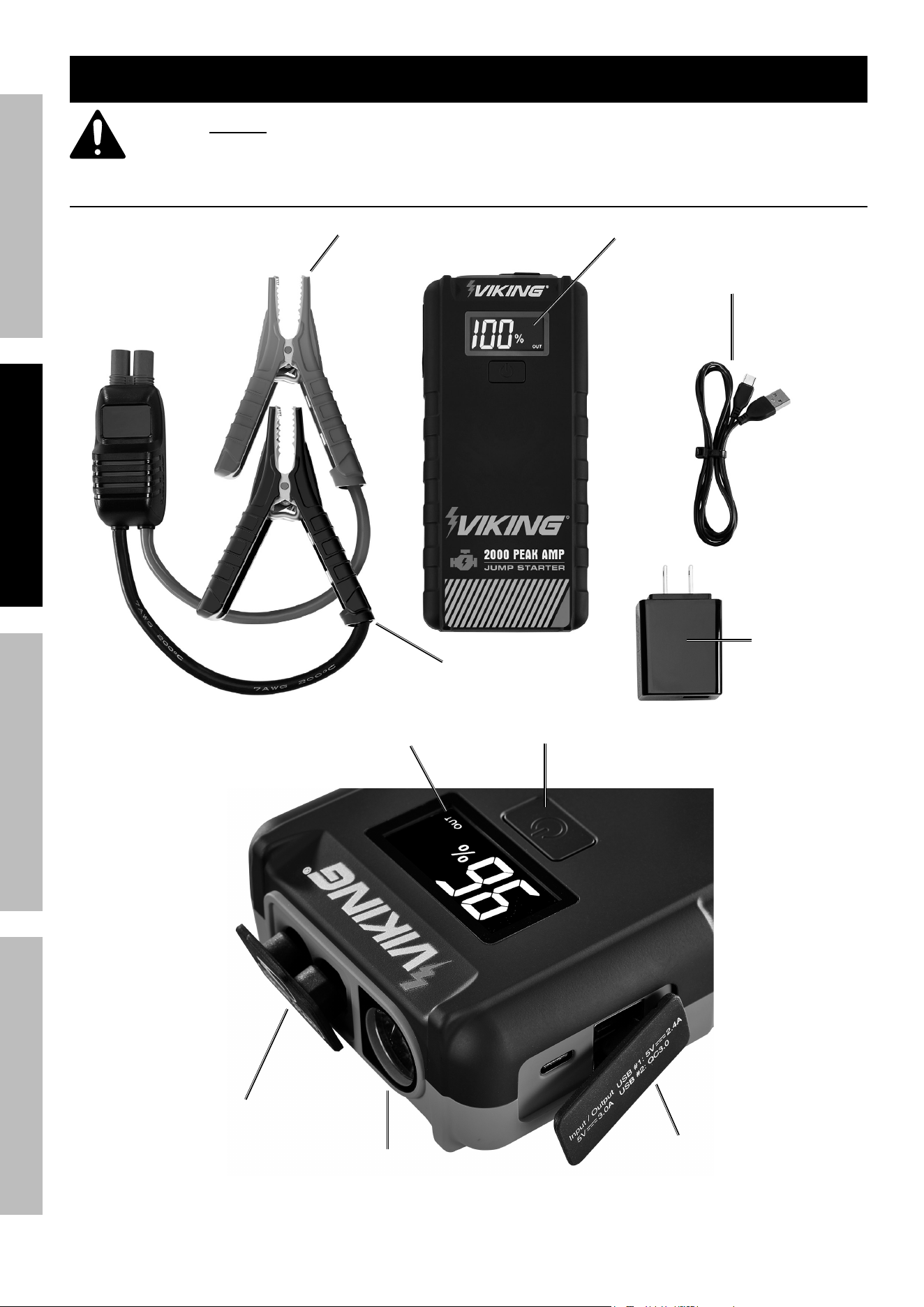
Functions
charging
cable
positive Battery clamp
negative Battery clamp
LcD Display
Wall charger
USB ports
Work Light
Jumpstart
port
LcD Display
Battery Status/Work Light Button
Page 7For technical questions, please call 1-888-866-5797.59491
SaFetyOperatiOnMaintenance SetUp
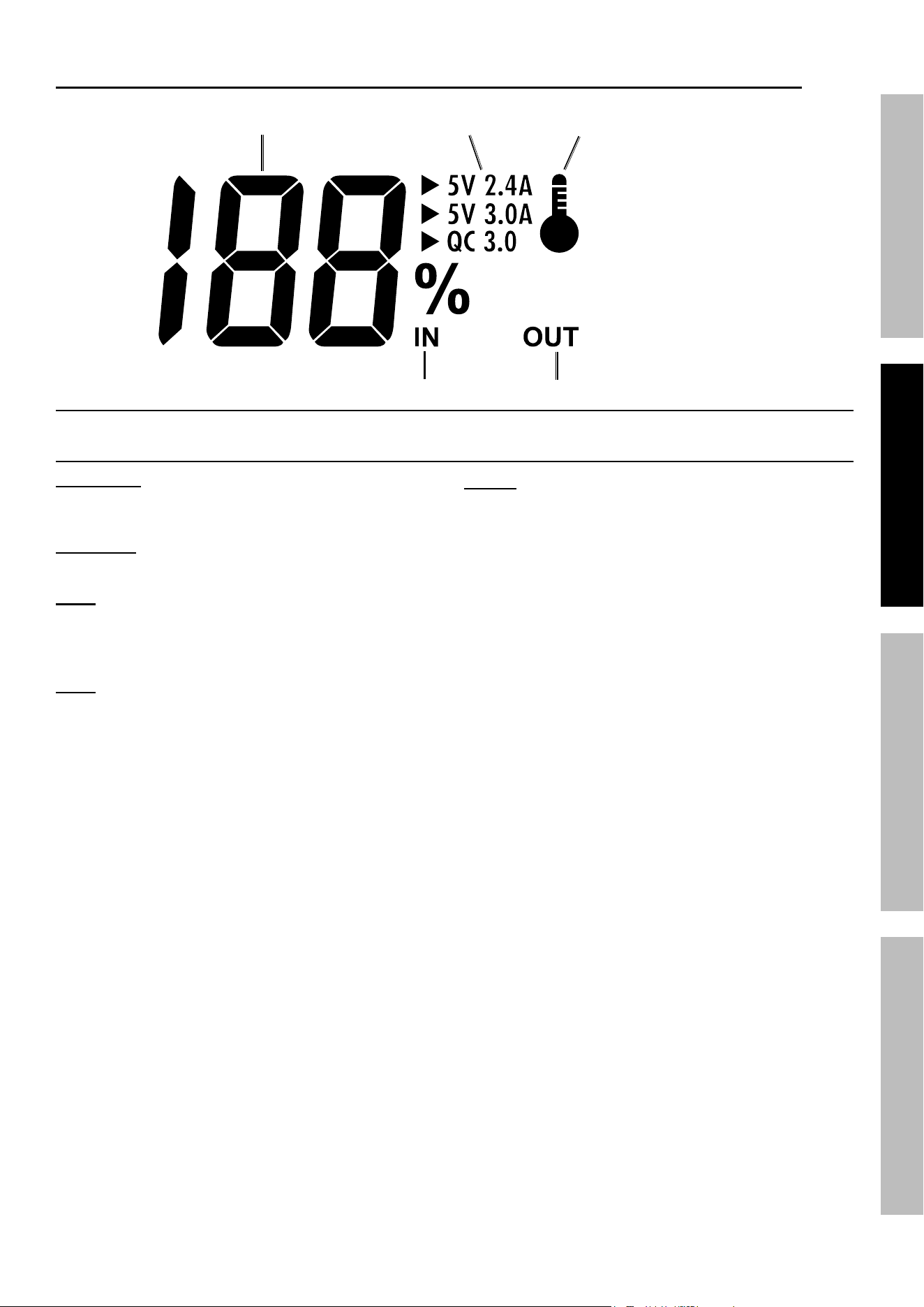
LcD Display
Battery
Level
charging Status
Battery temperature
alert indicator
Discharge Status
input/Output
ports indicators
charging the Jump Starter
iMpOrtant: yOU MUSt cHarGe
cOMpLeteLy BeFOre FirSt USe anD eVery
3-6 MOntHS Or VOiDS Warranty.
WarninG! tO preVent SeriOUS inJUry:
charge on a non-flammable surface.
note: Do not attempt to charge the Jump
Starter when it is below 32° F. Only use the
chargers and charging cable included with
this Jump Starter to charge Jump Starter.
note: For best results, only use the Wall
charger included with the Jump Starter.
notice: For manual reset resuming the charging
process, unplug and replug the charging cable.
1. Plug Charging Cable into the Jump Starter
input port, and then plug USB end of
Charging Cable into the Wall Charger.
Charge time is approximately 4-5 hours.
2. When the Jump Starter is fully charged, unplug
Charging Cord from the outlet and the unit.

Page 8 For technical questions, please call 1-888-866-5797. 59491
SaFety OperatiOn MaintenanceSetUp
Operating instructions
Using the Work Light
1. Press and hold the Power Button for 3
seconds to illuminate Work Light.
2. Press (short press) the Button repeatedly
to cycle through the light modes:
Work Light, SOS, and Strobe.
3. Pressing and holding down the Power
Button again will turn the Work Light off.
Jump-Starting a Vehicle
note: Read the vehicle owner’s manual pertaining
to jump-starting prior to using the Jump Starter.
note: Use ONLY the clamp set
included with this Jump Starter.
1. The Jump Starter must be fully charged.
Recharge as needed, according to Charging
the Jump Starter section on page 7.
2. Turn off the vehicle ignition switch and all
accessories (lights, radio, climate control, etc.).
WarninG! tO preVent SeriOUS inJUry:
DO nOt tOUcH pOSitiVe anD neGatiVe
Battery cLaMpS tOGetHer.
3. Insert Jumper Cable into ‘Jump Start’ port
on Jump Starter. If properly connected to the
Jump Starter, the Clamp’s LED light will start
flashing green, indicating ‘Standby’ mode.
4. Connect the red Positive Battery Cable to
vehicle’s positive battery terminal. Connect the
black Negative Battery Cable to the vehicle
chassis. The Clamp’s green LED light will turn
to solid green, indicating ‘Ready’ mode.
WarninG! tO preVent SeriOUS inJUry:
DO nOt cOnnect tO tHe neGatiVe
terMinaL OF tHe Battery.
note: If improperly connected, the Red Error
LED on the Clamp will illuminate and alarm will
sound. Adjust connections to clear error. When
error is cleared, the LED will illuminate green.
5. Start the vehicle.
note: Cold weather may affect performance of the Jump
Starter’s Lithium Battery. If you hear only a click and the
engine does not turn over, try the following:
With the Jump Starter connected to the car battery,
turn on all vehicle lights and electrical accessories
for one minute. This draws current from the jump
starter and warms the battery. Now try to crank the
engine. If it does not turn over, repeat the procedure.
Extremely cold weather may require the battery to
be warmed repeatedly before the engine will start.
note: Some vehicles may need to be connected to the
Jump Starter for at least 30 seconds before starting.
6. After the vehicle is started, first remove
Cable from the Jump Starter, then remove
the black Negative Battery Cable, and
lastly the red Positive Battery Cable.
7. Recharge the Jump Starter if battery level
is below 50%, or every 3-6 months.
charging/powering USB Devices
1. Plug USB Cable into Jump Starter’s USB Port.
Attach other end of USB Cable to device.
2. Press ‘Battery Status / Work Light’ Button.
3. When finished, remove device from the USB Port.
note: The USB-C port is input and output, and
can also be used to charge the device with a
C-to-C Cable by first plugging in the cable and then
pressing the Battery Status / Work Light Button.
Page 9For technical questions, please call 1-888-866-5797.59491
SaFetyOperatiOnMaintenance SetUp
User Maintenance and Servicing
procedures not specifically explained in this manual must
be performed only by a qualified technician.
tO preVent SeriOUS inJUry: Unplug the Jump Starter, turn the power Switch off and allow
Jump Starter to cool completely before performing any inspection, maintenance, or cleaning procedures.
1. BeFOre eacH USe, inspect the general condition of the Jump Starter. Check for:
• loose hardware
• cracked or broken parts
• damaged electrical wiring or cable insulation
• any other condition that may affect its safe operation.
2. Keep unit clean and clamps free of dirt, debris, or grease.
3. For longer working life, protect unit from sunlight and moisture. Do not
store in any environment with extreme hot or cold.
4. Li-Ion BATTERY MUST BE RECYCLED OR DISPOSED OF PROPERLY.
Do not short, incinerate or open battery.
5. aFter USe, wipe external surfaces of the Jump Starter with clean cloth.
Battery Disposal
WarninG! tO preVent SeriOUS inJUry: cOntainS LitHiUM Battery.
Battery MUSt Be recycLeD Or DiSpOSeD OF prOperLy.
1. Open housing and cut wires from Battery with insulated wire clippers and remove.
2. Disposing of the Jump Starter must comply with standards for hazardous waste disposal in your area. Contact
your local city government office for the nearest hazardous waste disposal area in your community.
Page 10 For technical questions, please call 1-888-866-5797. 59491
SaFety OperatiOn MaintenanceSetUp
record product’s Serial number Here:
note: If product has no serial number, record month and year of purchase instead.
note: Internal parts are not user-serviceable and are not available. Refer to UPC 193175472724.
parts List
part Description Qty
1 Jumper Cable 1
2 USB Cable 1
3 Wall Charger 1
4 Case 1
Page 11For technical questions, please call 1-888-866-5797.59491
SaFetyOperatiOnMaintenance SetUp
Limited 90 Day Warranty
Harbor Freight Tools Co. makes every effort to assure that its products meet high quality and durability standards,
and warrants to the original purchaser that this product is free from defects in materials and workmanship for the
period of 90 days from the date of purchase. This warranty does not apply to damage due directly or indirectly,
to misuse, abuse, negligence or accidents, repairs or alterations outside our facilities, criminal activity, improper
installation, normal wear and tear, or to lack of maintenance. We shall in no event be liable for death, injuries
to persons or property, or for incidental, contingent, special or consequential damages arising from the use of
our product. Some states do not allow the exclusion or limitation of incidental or consequential damages, so the
above limitation of exclusion may not apply to you. THIS WARRANTY IS EXPRESSLY IN LIEU OF ALL OTHER
WARRANTIES, EXPRESS OR IMPLIED, INCLUDING THE WARRANTIES OF MERCHANTABILITY AND FITNESS.
To take advantage of this warranty, the product or part must be returned to us with transportation charges
prepaid. Proof of purchase date and an explanation of the complaint must accompany the merchandise.
If our inspection verifies the defect, we will either repair or replace the product at our election or we may
elect to refund the purchase price if we cannot readily and quickly provide you with a replacement. We will
return repaired products at our expense, but if we determine there is no defect, or that the defect resulted
from causes not within the scope of our warranty, then you must bear the cost of returning the product.
This warranty gives you specific legal rights and you may also have other rights which vary from state to state.
Fcc nOtice:
caution: Changes or modifications not expressly approved by Harbor Freight Tools could void the user’s authority
to operate the equipment.
This device complies with part 15 of the FCC Rules. Operation is subject to the following two
conditions: (1) This device may not cause harmful interference, and (2) this device must accept
any interference received, including interference that may cause undesired operation.

26677 agoura road • calabasas, ca 91302 • 1-888-866-5797