Visit our website at: http://www.harborfreight.com
email our technical support at: [email protected]
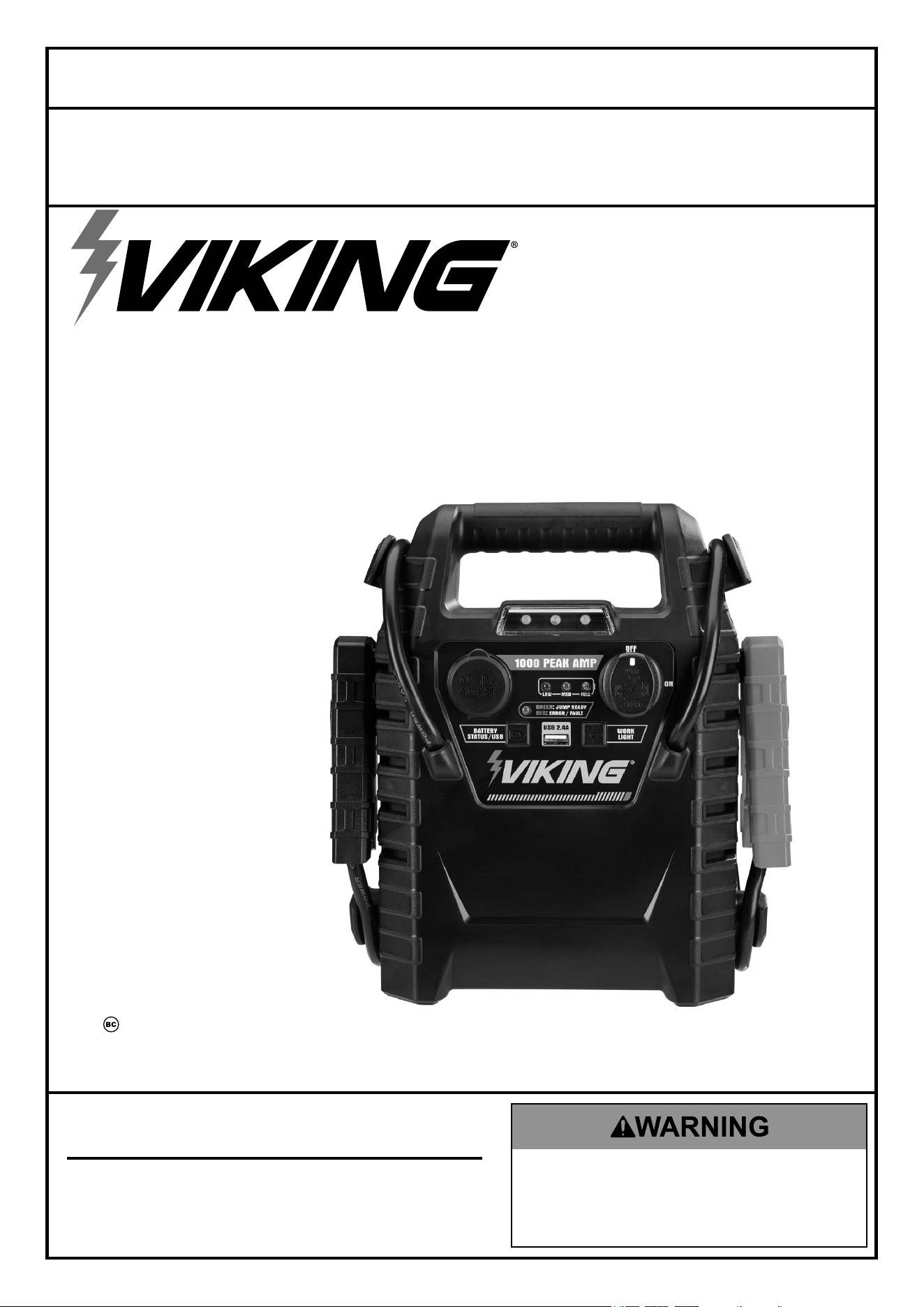
LEAD-ACID MULTI-FUNCTION
JUMP STARTER
59531
cHarGe
cOMpLeteLy
iMMeDiateLy
aFter
pUrcHaSe.
Fully recharge
after each use.
Fully recharge every
30 days to ensure
long battery life.
Owner’s Manual & Safety Instructions
Save This Manual Keep this manual for the safety warnings and precautions, assembly,
operating, inspection, maintenance and cleaning procedures. Write the product’s serial number in the
back of the manual near the assembly diagram (or month and year of purchase if product has no number).
Keep this manual and the receipt in a safe and dry place for future reference. 23k
When unpacking, make sure that the product is intact
and undamaged. If any parts are missing or broken,
please call 1-888-866-5797 as soon as possible.
Copyright
©
2023 by Harbor Freight Tools
®
. All rights reserved.
No portion of this manual or any artwork contained herein may be reproduced in
any shape or form without the express written consent of Harbor Freight Tools.
Diagrams within this manual may not be drawn proportionally. Due to continuing
improvements, actual product may differ slightly from the product described herein.
Tools required for assembly and service may not be included.
Read this material before using this product.
Failure to do so can result in serious injury.
SAVE THIS MANUAL.
Page 2 For technical questions, please call 1-888-866-5797. 59531
SaFety OperatiOn MaintenanceSetUp
table of contents
Safety ......................................................... 2
Specifications ............................................. 4
Setup .......................................................... 5
Operation .................................................... 8
Maintenance .............................................. 10
Parts List and Diagram .............................. 11
Warranty .................................................... 12
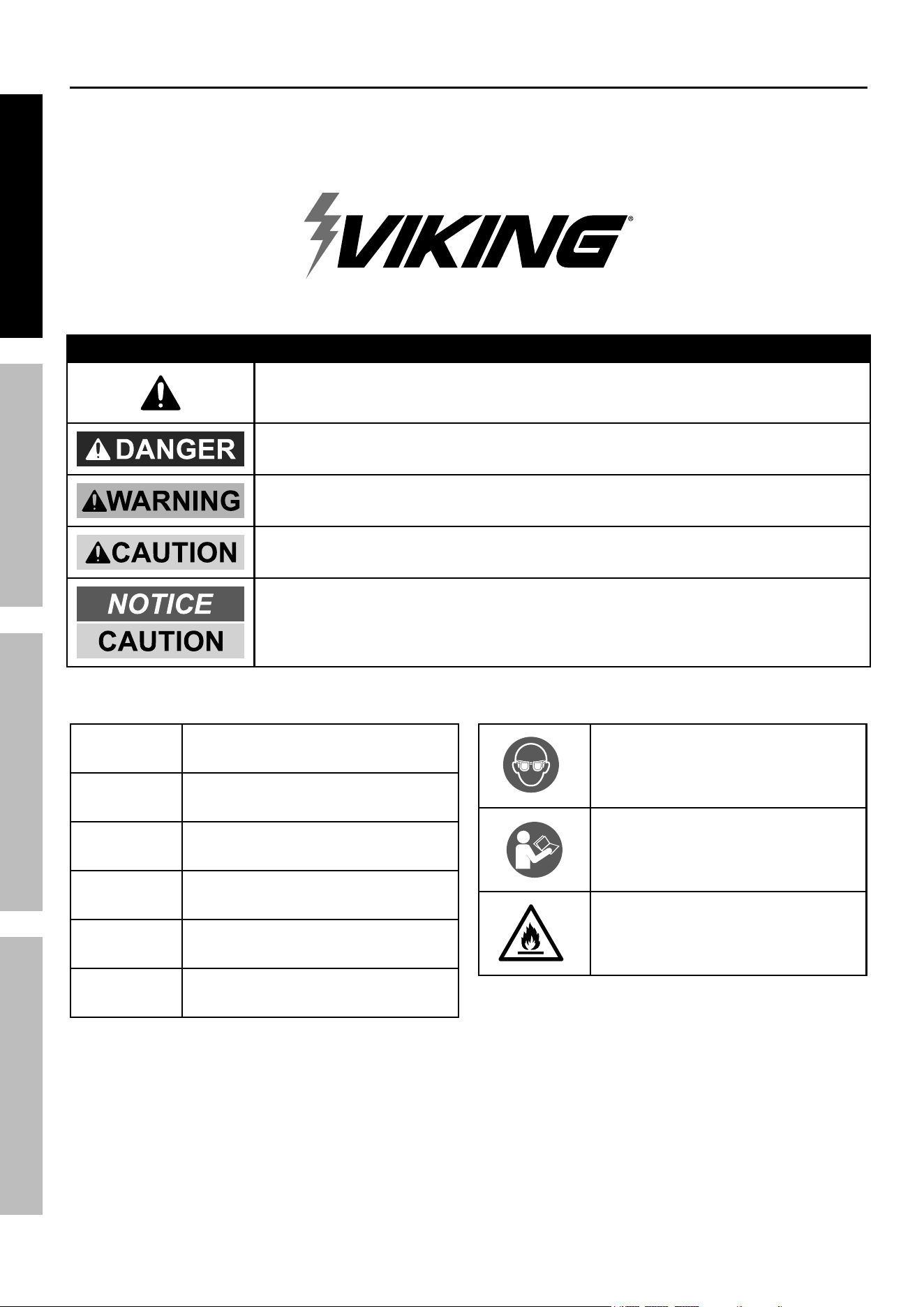
WarninG SyMBOLS anD DeFinitiOnS
This is the safety alert symbol. It is used to alert you to potential
personal injury hazards. Obey all safety messages that follow
this symbol to avoid possible injury or death.
Indicates a hazardous situation which, if not avoided,
will result in death or serious injury.
Indicates a hazardous situation which, if not avoided,
could result in death or serious injury.
Indicates a hazardous situation which, if not avoided,
could result in minor or moderate injury.
Addresses practices not related to personal injury.
V
Volts
~
Alternating Current
a
Amperes
cca
Cold Cranking Amps
rc
Reserve Capacity
ah
Ampere-hours
WARNING marking
concerning Risk of Eye Injury.
Wear ANSI-approved
splash-resistant safety goggles.
Read the manual before
set-up and/or use.
WARNING marking
concerning Risk of Fire.
Follow connection procedure.
Page 3For technical questions, please call 1-888-866-5797.59531
SaFetyOperatiOnMaintenance SetUp
Safety Warnings and precautions
General Safety Warnings
read all safety warnings and instructions.
Failure to follow the warnings and instructions may result in electric shock, fire and/or serious injury.
Save all warnings and instructions for future reference.
WarninG – riSK OF eXpLOSiVe GaSeS.
Working in vicinity of a lead-acid battery is
dangerous. Batteries generate explosive gases
during normal battery operation. For this reason,
it is of utmost importance that you follow the
instructions each time you use the Jump Starter.
To reduce risk of battery explosion, follow these
instructions and those published by battery
manufacturer and manufacturer of any equipment you
intend to use in vicinity of battery. Review cautionary
marking on these products and on engine.
Work area Safety
1. Keep work area clean and well lit.
Cluttered or dark areas invite accidents.
2. Do not operate Jump Starter in explosive
atmospheres, such as in the presence
of flammable liquids, gases or dust.
The Jump Starter can create sparks
which may ignite the dust or fumes.
3. Keep children and bystanders away
while operating the Jump Starter.
Distractions can cause you to lose control.
4. Store idle equipment. Always lock up
tools and keep out of reach of children.
electrical Safety
1. Do not drop a metal tool onto battery. It
might spark or short-circuit battery or other
electrical part that may cause explosion.
2. Do not operate if Jump Starter has
received a sharp blow, been dropped,
or otherwise damaged in any way;
take it to a qualified technician.
3. Do not leave Jump Starter unattended
while switched on. It could result
in fire and property damage.
4. Do not expose to rain or wet conditions.
Water entering the Jump Starter will
increase the risk of electric shock.
5. Do not use an extension cord with this item.
6. Use of an attachment not recommended or
sold by the manufacturer may result in a risk
of fire, electric shock, or injury to persons.
7. to reduce risk of damage to electric plug
and cord, pull by plug rather than cord
when disconnecting the adapter.
8. Do not operate with damaged cord or plug.
replace the cord or plug immediately.
personal Safety
1. Wear anSi-approved splash-
resistant safety goggles and heavy-
duty rubber work gloves
whenever connecting,
disconnecting, or working
near battery. Battery acid can cause
permanent blindness. avoid touching
eyes while working near battery.
2. Do not use Jump Starter while you are tired
or under the influence of drugs, alcohol
or medication. A moment of inattention
while operating Jump Starter may
result in serious personal injury.
3. neVer smoke or allow a spark or flame
in vicinity of battery or engine.
4. if battery acid contacts skin or clothing,
wash immediately with soap and water.
if acid enters eye, immediately flood eye with
running cold water for at least 10 minutes
and get medical attention immediately.
5. remove personal metal items such as rings,
bracelets, necklaces, and watches when working
with a lead-acid battery. A lead-acid battery can
produce a short-circuit current high enough to weld
a ring or the like to metal, causing a severe burn.
Page 4 For technical questions, please call 1-888-866-5797. 59531
SaFety OperatiOn MaintenanceSetUp
6. People with pacemakers should consult their
physician(s) before use. Electromagnetic fields in
close proximity to heart pacemaker could cause
pacemaker interference or pacemaker failure.
Service
Have your Jump Starter serviced by a qualified repair person using only identical replacement parts.
This will ensure that the safety of the Jump Starter is maintained.
Jump Starter Safety Warnings
1. Lead-acid batteries generate hydrogen gas when
charging. Hydrogen gas is explosive. Only use
the Jump-Start system in a well-ventilated area.
2. Jump Starting a Vehicle
a. Use the Jump Starter for jump starting
a LEAD-ACID battery only.
b. For emergency use only. Do not use the Jump
Starter as a replacement for a vehicle battery.
c. Be sure area around battery is well ventilated
while battery is being jump started.
d. NEVER jump start a frozen battery.
e. Do not attempt to jump start a vehicle with
a non-rechargeable or defective battery.
f. Study all battery manufacturer’s specific
precautions for jump starting.
g. DO nOt tOUcH pOSitiVe anD neGatiVe
Battery cLaMpS tOGetHer.
h. Unplug the Jump Starter from its Adapter
before connecting its cables to a battery.
i. Connect and disconnect battery cable
clamps only after setting any Jump Starter
switches to OFF position.
j. Connect cables to proper polarities. Connect
black cable to negative body ground and
red cable to positive battery terminal.
k. Locate Jump Starter as far away from
battery as battery cables permit.
3. Maintain labels and nameplates on the Jump Starter.
These carry important safety information.
If unreadable or missing, contact
Harbor Freight Tools for a replacement.
4. The warnings, precautions, and instructions
discussed in this instruction manual cannot
cover all possible conditions and situations
that may occur. It must be understood by the
operator that common sense and caution are
factors which cannot be built into this product,
but must be supplied by the operator.
SaVe tHeSe inStrUctiOnS.
Specifications
Input 120 VAC, 60Hz, 0.3A
Cranking Amps 350A
Battery 12 VDC, 9Ah
Battery Cables 24″ L 6AWG
Maximum Air Pressure 150 PSI
Outlets
USB: 1x5V, 2.4A
12V Auxiliary: 1x10A
Functions: 12 Volt Jump-Starter, Air Compressor,
12 VDC Power Supply, and 3 LED Work Light, USB Power
Page 5For technical questions, please call 1-888-866-5797.59531
SaFetyOperatiOnMaintenance SetUp
Setup - Before Use:
read the entire iMpOrtant SaFety inStrUctiOnS section at the beginning of this
manual including all text under subheadings therein before setup or use of this product.
note: For additional information regarding the parts listed in the
following pages, refer to Parts List and Diagram on page 11.
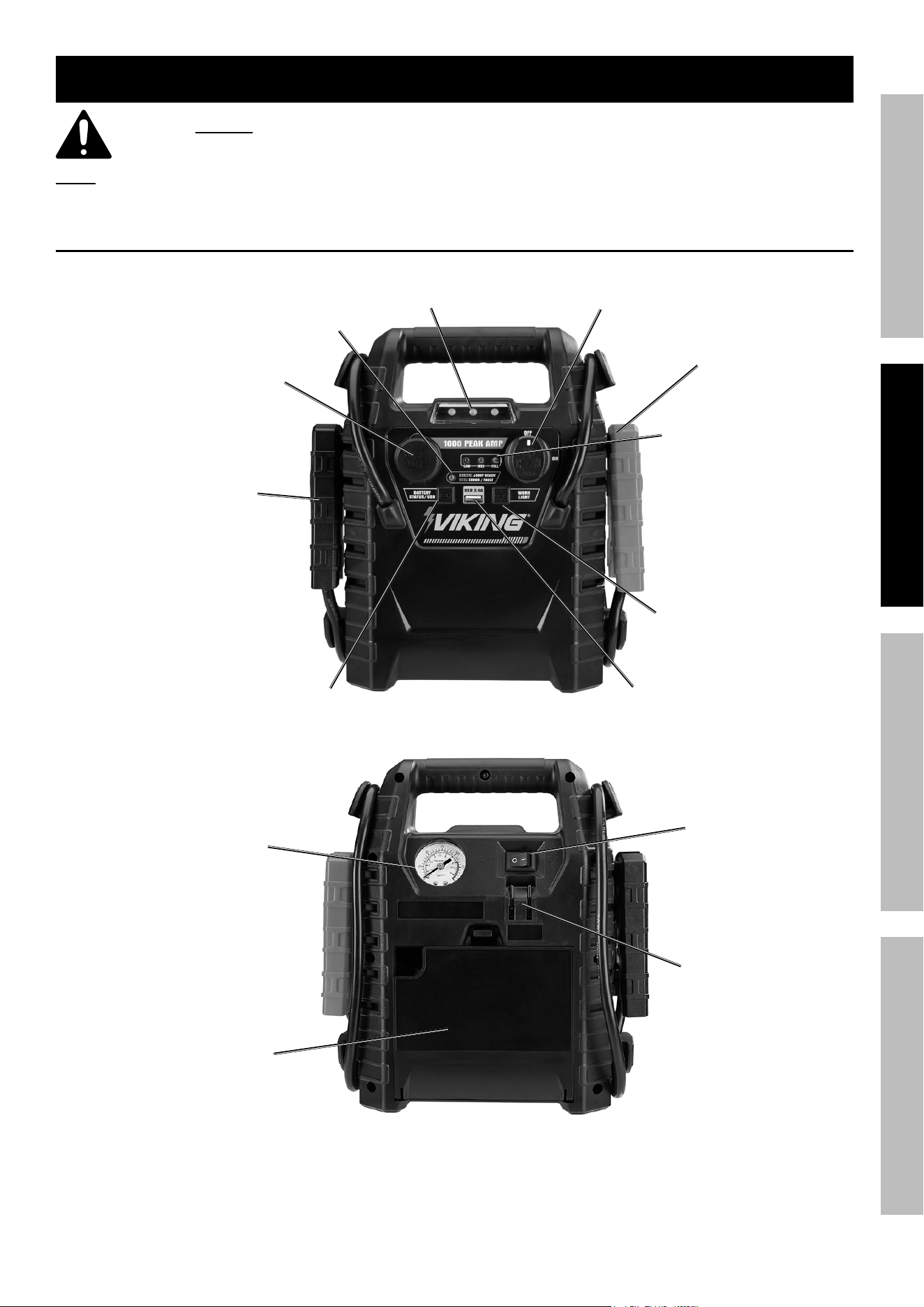
Functions
positive Battery
cable
Work
Light
clamp power
Switch
charge indicator
Lights
negative Battery
cable
Battery test Button /
USB power Button
Work Light
Button
12VDc
Outlet
USB port
connection
indicator Light
air compressor
Switch
air
pressure
Gauge
air Hose
compartment
120Vac
charging
input plug
Page 6 For technical questions, please call 1-888-866-5797. 59531
SaFety OperatiOn MaintenanceSetUp
charging the Jump Starter
WarninG! tO preVent SeriOUS inJUry: Always charge on a non-flammable surface.
Press and hold the Battery Test Button on the front
of the unit to check the battery power level.
a. Green light is ready for use.
b. Yellow light needs to be charged.
c. Red light should be charged immediately.
Turn the Clamp Power Switch on front
of unit to the OFF position.
note: Before initial use, completely
charge the Jump Starter.
1. Plug the 120VAC Adapter into a 2 or 3-prong outlet.
2. Slide the Adapter socket onto the 120VAC
Charging Input on the back of the Jump Starter.
approximate
ac charge time
Initial Charge:
15 hours
Recharge:
12 hours
3. The Charging Indicator lights will illuminate in a
cycle from red, to yellow, to green while the unit
is charging. the green charging indicator light
will remain on after charging is complete.
The battery power level must be checked
periodically when charging, and the Jump Starter
must be unplugged when it is fully charged.
nOte: FaiLUre tO recHarGe Jump
Starter WiLL VOiD Warranty.
nOte: When Jump Starter voltage drops
below 11V, alarm will sound indicating
Jump Starter battery needs charged.
4. Recharge:
a. When yellow light comes on while
pressing the Battery Test Button.
b. After each Jump-Start.
c. Once a month.
Page 7For technical questions, please call 1-888-866-5797.59531
SaFetyOperatiOnMaintenance SetUp
Dc appliance compatibility
The Jump Starter can run/charge 12VDC
auto, RV, marine, or other portable
appliances that draw 10 amps or less.
The lower the amount of watts the appliance
draws, the longer the Jump Starter can power
it before needing to be recharged.
Calculate the total wattage needed to run the
appliance before operation. You do not need
to calculate startup or surge wattages.
To calculate the size of the load you plan to use
with the Jump Starter, use the following formula:
amps x Volts = Watts
For example, if you use an appliance whose
running amps total 7 amps, you will need 84
watts of power (7 amps x 12V = 84 Watts) to
run the item. This figure is within the capacity
of the unit (10 amps x 12V = 120 Watts).
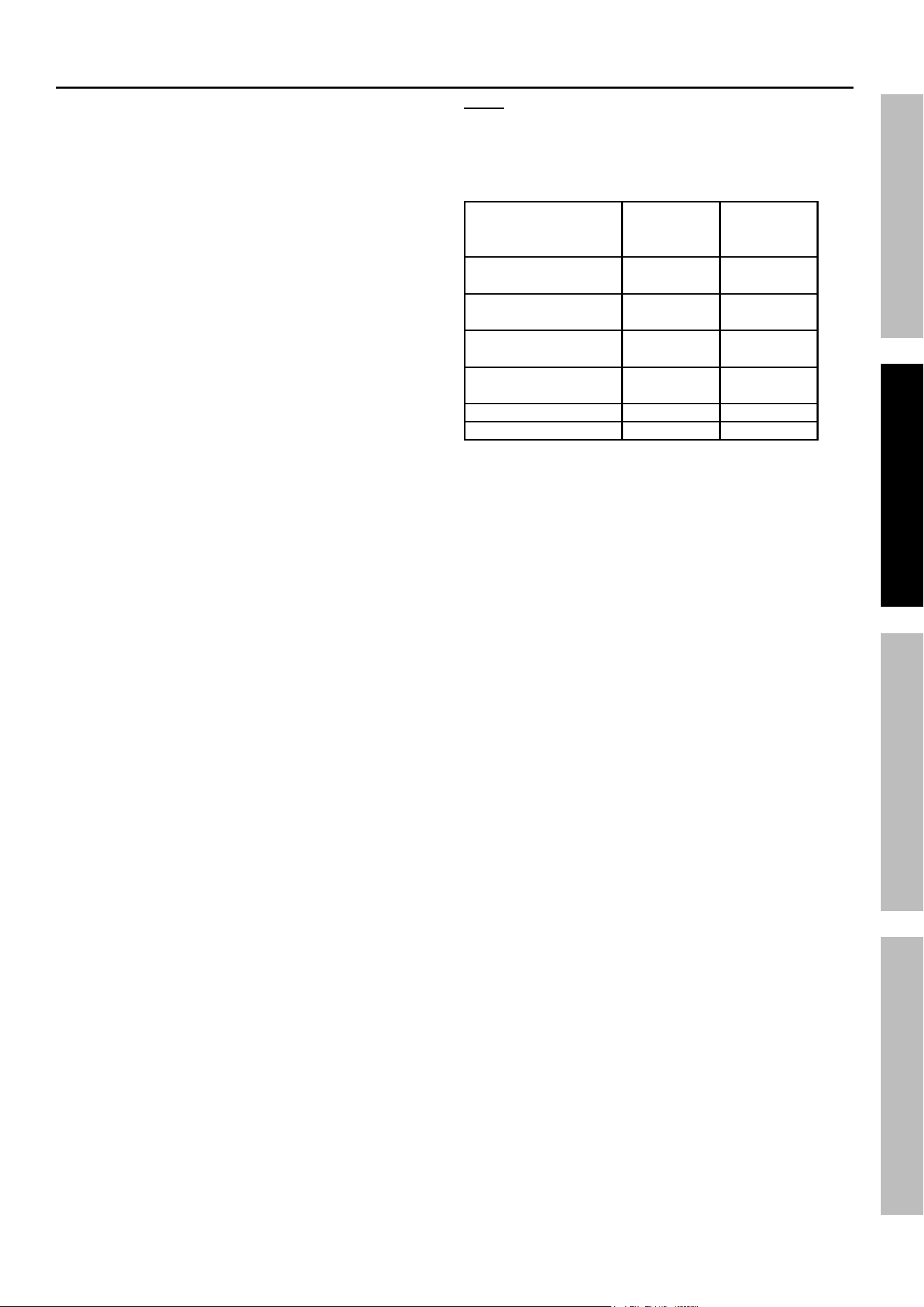
note: Use this chart as a guideline only.
The actual power usage may vary based on the
model or brand of the appliance. Check the actual
wattage of your appliances and calculate the
amount of power needed to run/charge them.
appliance
estimated
power
(watts)
estimated
Use (hours)
Fluorescent Light,
Cell Phone Charger
4 50
Radio, Fan,
Depth Finder
9 26
Video Recorder/
Player, Spotlight
15 14
Small Power Tool,
Bilge Pump
24 8
Electric Cooler 48 3
Air Compressor 80 2
Page 8 For technical questions, please call 1-888-866-5797. 59531
SaFety OperatiOn MaintenanceSetUp
Operating instructions
Using the Work Light
1. To turn the Work Light on, press
the Work Light button.
2. To turn flashing lights on, press the
Work Light button again.
3. To turn the Work Light off, press
the Work Light button again.
Jump Starting a Vehicle
note: Read the vehicle owner’s manual pertaining
to jump starting prior to using the Jump Starter.
1. Press the Battery Test button to verify that the
Jump Starter is fully charged. Recharge as
needed, following the instructions in the “charging
the Jump Starter” section on page 6.
2. Turn off the vehicle ignition switch and all
accessories (lights, radio, climate control, etc.).
3. Turn Clamp Power Switch on the Jump
Starter to their OFF position. You may
leave the Work Light on if needed.
WarninG! tO preVent SeriOUS inJUry:
DO nOt tOUcH pOSitiVe anD neGatiVe
Battery cLaMpS tOGetHer.
3. Connect the red Positive Battery Cable to
vehicle’s positive battery terminal. Connect
the black Negative Battery Cable to a non-
moving metal part of the vehicle.
WarninG! tO preVent SeriOUS inJUry:
DO nOt cOnnect tO tHe neGatiVe
terMinaL OF tHe Battery.
4. When the correct connection has been made, turn
the Clamp Power Switch to the ON position.
5. Start the vehicle. If the vehicle does not start,
wait an additional 3 minutes before trying again.
note: For a successful engine start, allow Jump Starter
to charge vehicle battery up to 5 minutes before starting.
6. After the vehicle is started, turn the Clamp
Power Switch to the OFF position. Remove
the black Negative Battery Cable first, and
then the red Positive Battery Cable.
Using the air compressor
note: Compressor will automatically shut down
when over heated. Compressors duty cycle is 15
minutes with Max on and 30 minutes with Max off.
1. Press the Battery Test button to verify that the
Jump Starter is fully charged. Recharge as
needed, following the instructions in the “charging
the Jump Starter” section on page 6.
2. Open the Air Hose Compartment on the
back of the unit and pull out the air hose.
3. Check the proper inflation level for the object that is
being inflated.
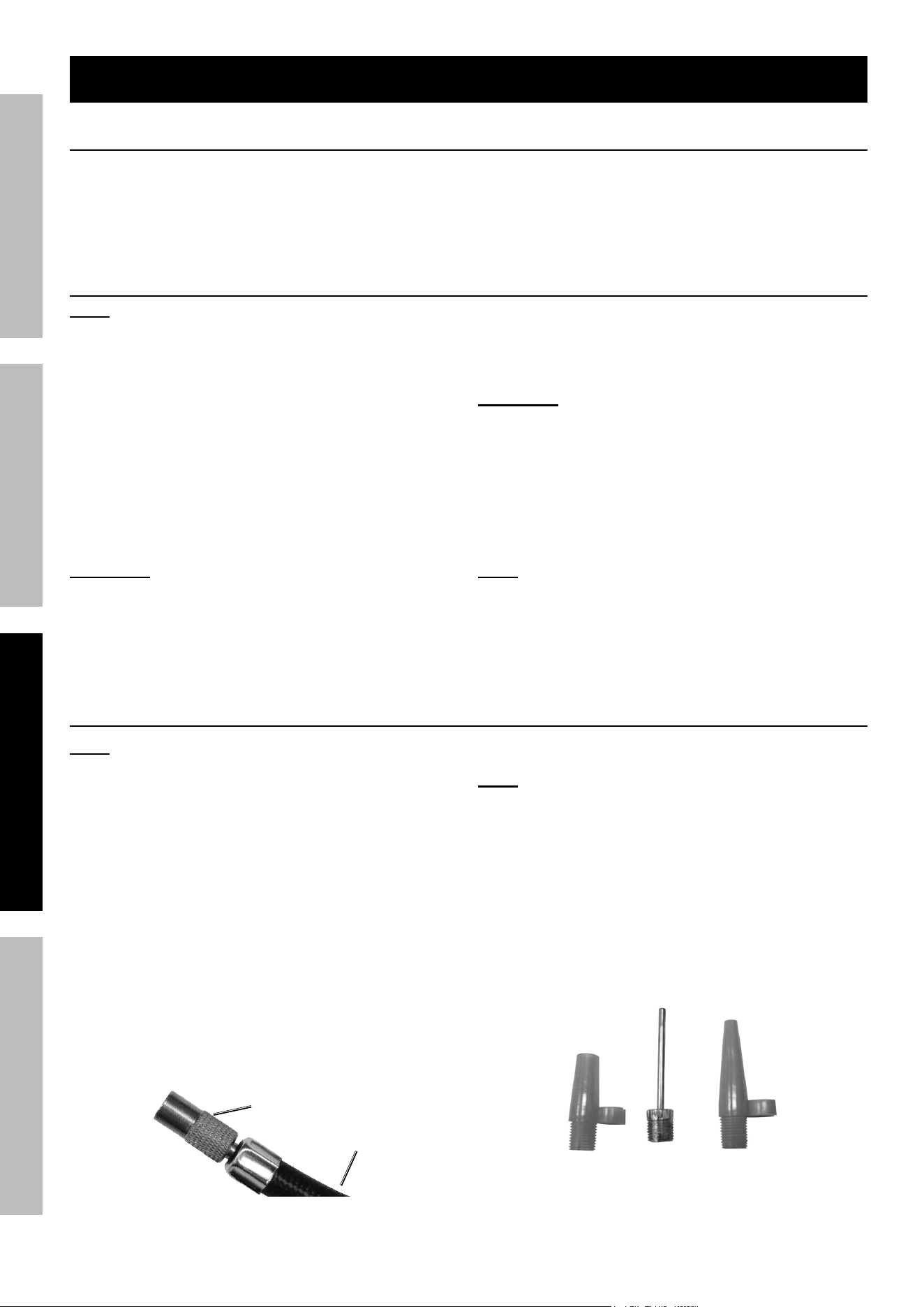
tire inflation
1. Thread the Tire Inflator over the valve stem
firmly, making sure it is fully seated.
air
Hose
tire
inflator
Figure a:
2. Press the Air Compressor Switch on.
note: Monitor the Air Pressure Gauge on the
front of the unit to avoid over-inflation.
3. When the proper inflation level has been
reached, press the Air Compressor Switch off.
4. Unscrew the Tire Inflator from the valve stem.
5. Store the Air Hose in the storage compartment.
Using Hose adapters
1. Three adapters are included with the Jump
Starter that can be attached to the Tire Inflator.
Figure B:
2. Attach the proper adapter to the Tire
Inflator for the object to be inflated.

Page 9For technical questions, please call 1-888-866-5797.59531
SaFetyOperatiOnMaintenance SetUp
3. Insert the adapter into the object’s receptacle.
4. Press the Air Compressor Switch on.
note: Monitor the Air Pressure Gauge on the
front of the unit to avoid over-inflation.
5. When the proper inflation level has been
reached, press the Air Compressor Switch off.
6. Remove the Air Hose.
WarninG! tO preVent SeriOUS
inJUry: Do not overinflate any object.
Using Dc appliances
1. Press the Battery Test Button to verify that the
Jump Starter is fully charged. Recharge as
needed, following the instructions in the “charging
the Jump Starter” section on page 6.
2. Make sure the total wattage of the appliance is
within the range of the Jump Starter. See “Dc
appliance compatibility” on page 7.
3. Make sure that the Clamp Power
Switch and appliance are off.
4. Plug the appliance into the 12VDC Outlet.
5. Turn on the appliance.
6. When finished using, turn off and
unplug the appliance.
Using/charging USB Devices
1. Press the Battery Test button to verify that the
Jump Starter is fully charged. Recharge as
needed, following the instructions in the “charging
the Jump Starter” section on page 6.
2. Plug the device into the USB Port.
3. When finished, unplug the device from the USB Port.
note: To prolong Jump Starter battery life,
keep Jump Starter battery fully charged.
Page 10 For technical questions, please call 1-888-866-5797. 59531
SaFety OperatiOn MaintenanceSetUp
Maintenance and Servicing
procedures not specifically explained in this manual must
be performed only by a qualified technician.
tO preVent SeriOUS inJUry: Unplug the Jump Starter, turn the clamp power Switch off and allow
Jump Starter to cool completely before performing any inspection, maintenance, or cleaning procedures.
1. BeFOre eacH USe, inspect the general
condition of the Jump Starter. Check for:
• loose hardware,
• cracked or broken parts,
• damaged electrical wiring or cable insulation, and
• any other condition that may
affect its safe operation.
2. Keep unit clean and clamps free
of dirt, debris, or grease.
3. For longer working life, protect Jump
Starter from sunlight and moisture.
4. aFter USe, wipe external surfaces of
the Jump Starter with clean cloth.
5. cOntainS nOn-SpiLLaBLe, SeaLeD
LeaD-aciD Battery. Battery
MUSt Be recycLeD.
Battery replacement and Disposal
LeaD Battery MUSt Be recycLeD.
WarninG! to prevent damage or serious injury, replacement battery must be identical to original.
Replace the Battery when the red light comes on while
pressing the Battery Test button after recharging.
1. Remove all screws from the back of
the case and lift off the panel.
2. Lift out the Battery without
damaging the circuit board.
note: Notice how the red and black cables connect
to the old battery and make sure to keep them
in place, connecting them to the new battery.
3. Detach the recharging wires and Battery
Cables from the battery terminals.
4. Position the replacement battery with the label
facing out, and make sure the red (+) recharging
wire and Battery Cable is attached to the
positive (+) battery terminal. Connect both of
the recharging wires and Battery Cables.
5. Carefully slide the Battery into the compartment
without damaging the circuit board.
6. Replace the back panel and the screws.
Page 11For technical questions, please call 1-888-866-5797.59531
SaFetyOperatiOnMaintenance SetUp
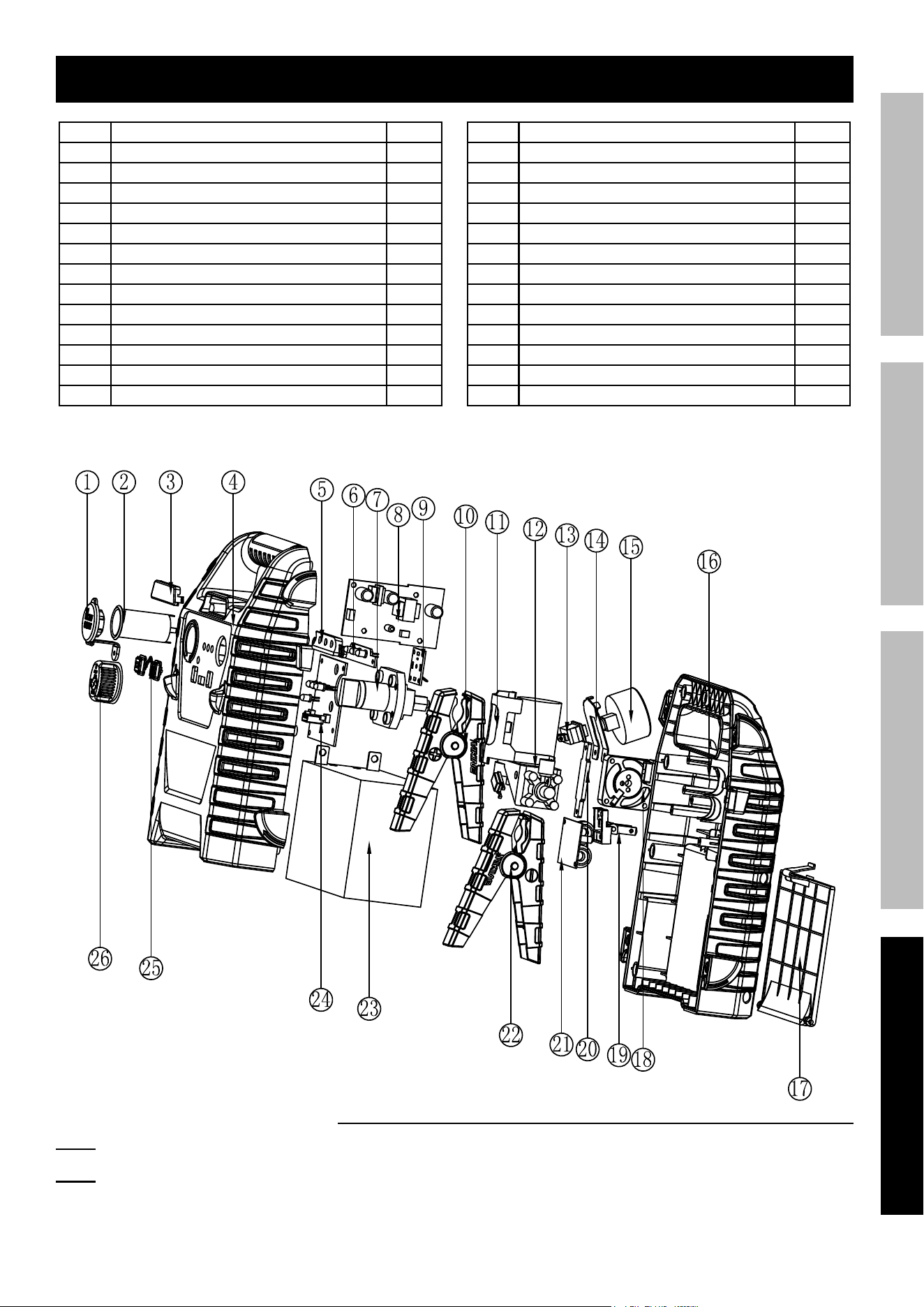
parts List and Diagram
part Description Qty
1 12V Auxiliary Socket Cover 1
2
12V Auxiliary Socket 1
3
Lighting Cover 1
4
Front Housing 1
5
Snoot 1
6
LED Light Plate 1
7
Knob Switch Set 1
8
Charger PCB 1
9
Auxiliary Socket PCB 1
10
Positive Clamp 1
11
Motor Fastener 1
12
Air Compressor 1
13
Switch 1
part Description Qty
14 Pressure Gauge Fastener 1
15
Pressure Gauge 1
16 Back Housing 1
17 Back Cover 1
18 Fan 1
19 Plug 1
20 Fan Fastener 1
21 Air Compressor PCB 1
22 Negative Clamp 1
23 Battery 1
24 Main Control PCB 1
25 Button 1
26 Knob Switch Cover 1
record product’s Serial number Here:
note: If product has no serial number, record month and year of purchase instead.
note: Some parts are listed and shown for illustration purposes only, and are not
available individually as replacement parts. Internal parts are not user-serviceable
and are not available. Specify UPC 193175473479 when ordering parts.

26677 agoura road • calabasas, ca 91302 • 1-888-866-5797
Limited 90 Day Warranty
Harbor Freight Tools Co. makes every effort to assure that its products meet high quality and durability standards,
and warrants to the original purchaser that this product is free from defects in materials and workmanship for the
period of 90 days from the date of purchase. This warranty does not apply to damage due directly or indirectly,
to misuse, abuse, negligence or accidents, repairs or alterations outside our facilities, criminal activity, improper
installation, normal wear and tear, or to lack of maintenance. We shall in no event be liable for death, injuries
to persons or property, or for incidental, contingent, special or consequential damages arising from the use of
our product. Some states do not allow the exclusion or limitation of incidental or consequential damages, so the
above limitation of exclusion may not apply to you. THIS WARRANTY IS EXPRESSLY IN LIEU OF ALL OTHER
WARRANTIES, EXPRESS OR IMPLIED, INCLUDING THE WARRANTIES OF MERCHANTABILITY AND FITNESS.
To take advantage of this warranty, the product or part must be returned to us with transportation charges
prepaid. Proof of purchase date and an explanation of the complaint must accompany the merchandise.
If our inspection verifies the defect, we will either repair or replace the product at our election or we may
elect to refund the purchase price if we cannot readily and quickly provide you with a replacement. We will
return repaired products at our expense, but if we determine there is no defect, or that the defect resulted
from causes not within the scope of our warranty, then you must bear the cost of returning the product.
This warranty gives you specific legal rights and you may also have other rights which vary from state to state.
pLeaSe reaD tHe FOLLOWinG careFULLy
THE MANUFACTURER AND/OR DISTRIBUTOR HAS PROVIDED THE PARTS LIST AND ASSEMBLY DIAGRAM
IN THIS MANUAL AS A REFERENCE TOOL ONLY. NEITHER THE MANUFACTURER OR DISTRIBUTOR
MAKES ANY REPRESENTATION OR WARRANTY OF ANY KIND TO THE BUYER THAT HE OR SHE IS
QUALIFIED TO MAKE ANY REPAIRS TO THE PRODUCT, OR THAT HE OR SHE IS QUALIFIED TO REPLACE
ANY PARTS OF THE PRODUCT. IN FACT, THE MANUFACTURER AND/OR DISTRIBUTOR EXPRESSLY
STATES THAT ALL REPAIRS AND PARTS REPLACEMENTS SHOULD BE UNDERTAKEN BY CERTIFIED AND
LICENSED TECHNICIANS, AND NOT BY THE BUYER. THE BUYER ASSUMES ALL RISK AND LIABILITY
ARISING OUT OF HIS OR HER REPAIRS TO THE ORIGINAL PRODUCT OR REPLACEMENT PARTS
THERETO, OR ARISING OUT OF HIS OR HER INSTALLATION OF REPLACEMENT PARTS THERETO.