1. What
’
s in the Box
2. Inserting the Batteries
3. Installing the EufyLife App and Pairing
4. Starting a Measurement
4.1 For body weight measurement:
4.2 For body composition analysis:
5. Weight-Only Measurement
6. Maintenance
7. Troubleshooting
7.1 Error Messag
:
8. When Measuring
9. Speci
fi
cations
10. Customer Service
1. What
’
s in the Box
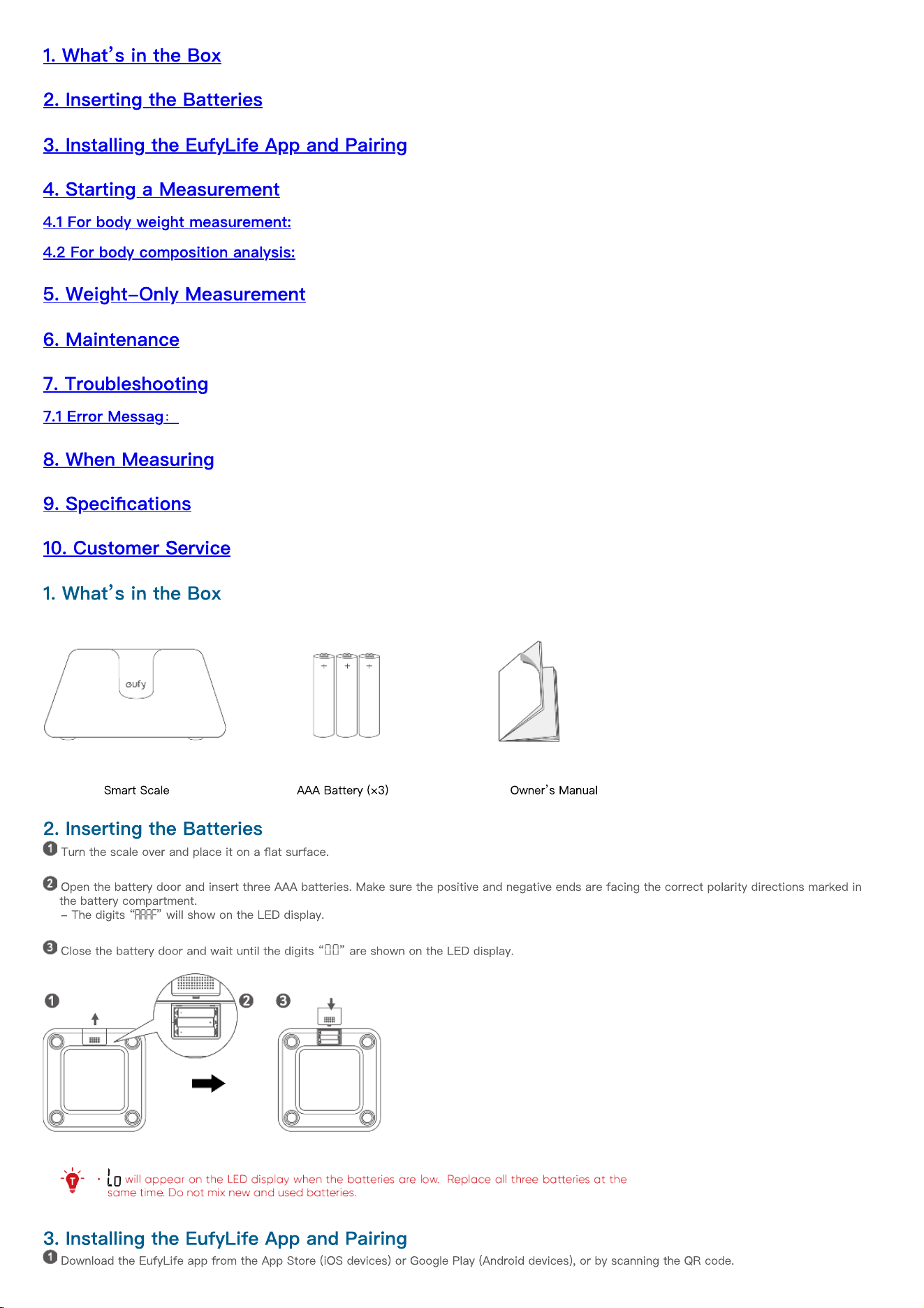
Smart Scale AAA Battery (×3) Owner
’
s Manual
2. Inserting the Batteries
Turn the scale over and place it on a
fl
at surface.
Open the battery door and insert three AAA batteries. Make sure the positive and negative ends are facing the correct polarity directions marked in
the battery compartment.
- The digits
“ ”
will show on the LED display.
Close the battery door and wait until the digits
“ ”
are shown on the LED display.
3. Installing the EufyLife App and Pairing
Download the EufyLife app from the App Store (iOS devices) or Google Play (Android devices), or by scanning the QR code.
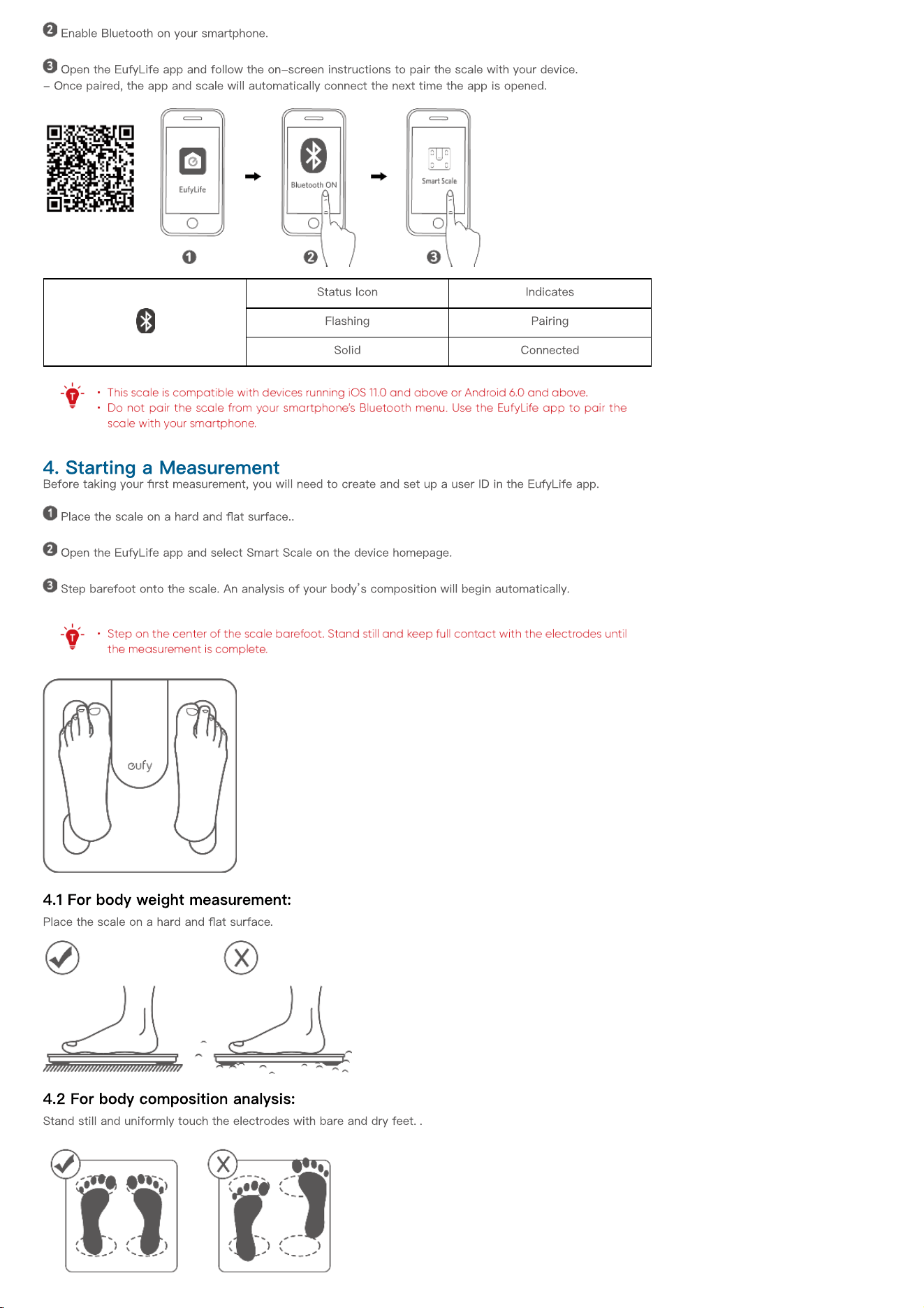
Enable Bluetooth on your smartphone.
Open the EufyLife app and follow the on-screen instructions to pair the scale with your device.
- Once paired, the app and scale will automatically connect the next time the app is opened.
Status Icon Indicates
Flashing Pairing
Solid Connected
4. Starting a Measurement
Before taking your
fi
rst measurement, you will need to create and set up a user ID in the EufyLife app.
Place the scale on a hard and
fl
at surface..
Open the EufyLife app and select Smart Scale on the device homepage.
Step barefoot onto the scale. An analysis of your body
’
s composition will begin automatically.
4.1 For body weight measurement:
Place the scale on a hard and
fl
at surface
.
4.2 For body composition analysis:
Stand still and uniformly touch the electrodes with bare and dry feet.
.
5. Weight-Only Measurement
This scale can also be used as a conventional weight-reading scale. You can simply step on the scale to measure your current weight without opening
the EufyLife app.
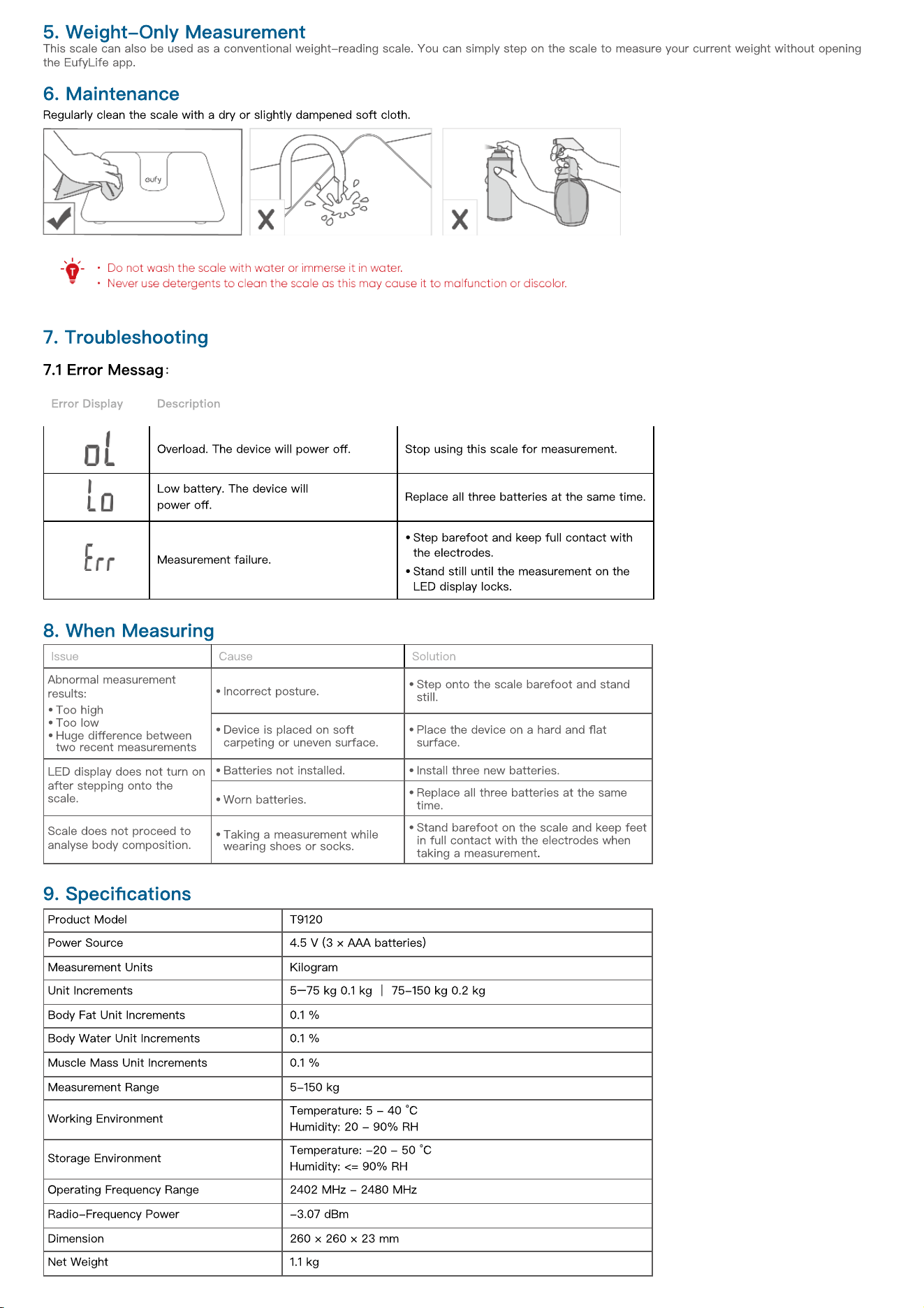
6. Maintenance
Regularly clean the scale with a dry or slightly dampened soft cloth.
7. Troubleshooting
7.1 Error Messag
:
Error Display Description
Overload. The device will power o
ff
. Stop using this scale for measurement.
Low battery. The device will
power o
ff
.
Replace all three batteries at the same time.
Measurement failure.
•
Step barefoot and keep full contact with
the electrodes.
•
Stand still until the measurement on the
LED display locks.
8. When Measuring
Issue Cause Solution
Abnormal measurement
results:
•
Too high
•
Too low
•
Huge di
ff
erence between
two recent measurements
•
Incorrect posture.
•
Step onto the scale barefoot and stand
still.
•
Device is placed on soft
carpeting or uneven surface.
•
Place the device on a hard and
fl
at
surface.
LED display does not turn on
after stepping onto the
scale.
•
Batteries not installed.
•
Install three new batteries.
•
Worn batteries.
•
Replace all three batteries at the same
time.
Scale does not proceed to
analyse body composition.
•
Taking ameasurement while
wearing shoes or socks.
•
Stand barefoot on the scale and keep feet
in full contact with the electrodes when
taking a measurement.
9. Speci
fi
cations
Product Model T9120
Power Source 4.5 V (3 × AAA batteries)
Measurement Units Kilogram
Unit Increments 5
–
75 kg 0.1 kg
|
75-150 kg 0.2 kg
Body Fat Unit Increments 0.1 %
Body Water Unit Increments 0.1 %
Muscle Mass Unit Increments 0.1 %
Measurement Range 5-150 kg
Working Environment
Temperature: 5 - 40 °C
Humidity: 20 - 90% RH
Storage Environment
Temperature: -20 - 50 °C
Humidity: <= 90% RH
Operating Frequency Range 2402 MHz - 2480 MHz
Radio-Frequency Power -3.07 dBm
Dimension 260 × 260 × 23 mm
Net Weight 1.1 kg

10. Customer Service
Contact Us
Lifetime technical support
[email protected] (Global)
www.eufy.com
WhatsApp Chat: +971 529750842
(UAE) +971 8000320817
(KSA) +966 8008500030
(Kuwait) +965 22069086
(Egypt) +20 8000000826
(MENA) +971 529750842
For more support phone numbers, please visit: https://support.eufy.com/s/phonecontactus
Hereby, Anker Innovations Limited declares that this device is in compliance with The Product Security and Telecommunications Infrastructure (Security
Requirements for Relevant Connectable Products) Regulations 2023. For the Statement of Compliance, visit the website: https://www.eufy.com/uk/psti-
related.