23630
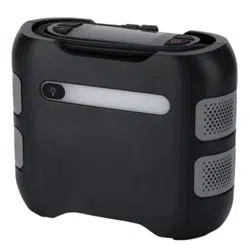
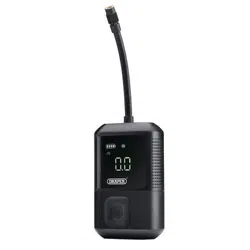
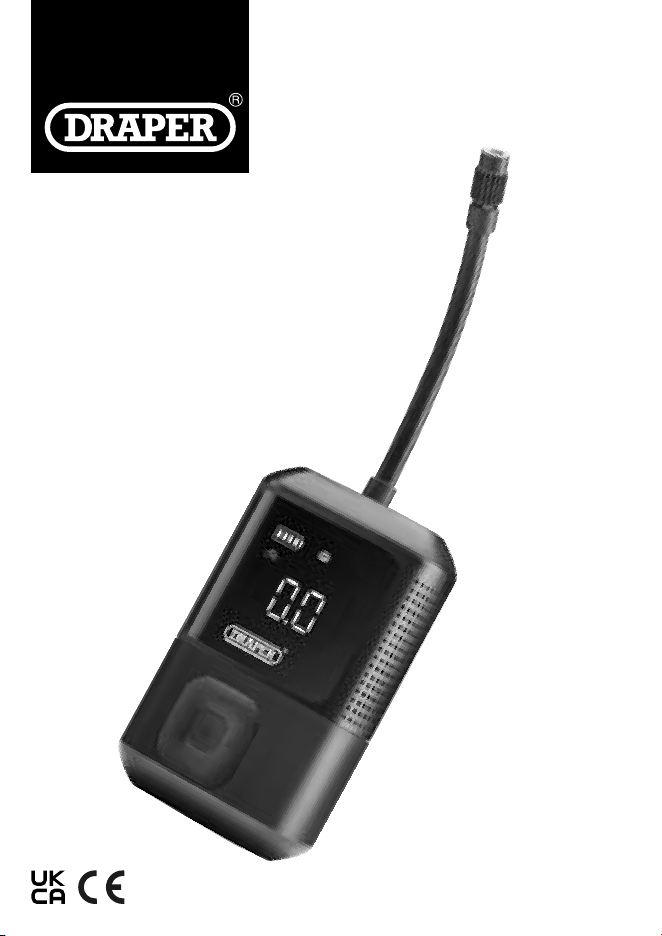
7.4V COMPACT
DIGITAL
AIR COMPRESSOR
EN
Original Instructions
Version 1
1. Preface
These are the original product instructions. This
document is part of the product; retain it for the life of
the product, passing it on to subsequent holders.
Read this manual in full before attempting to
assemble, operate or maintain this product.
This Draper Tools manual describes the purpose
of the product and contains all the necessary
information to ensure its correct and safe use.
Following all the instructions and guidance in
this manual will ensure the safety of both the product
and the operator and increase the
lifespan of the product.
All photographs and drawings within this manual are
supplied by Draper Tools to help illustrate correct
operation of the product.
Every eort has been made to ensure the information
contained in this manual is accurate. However, Draper
Tools reserves the right to amend this document
without prior warning. Always use the latest version of
the product manual.
1.1 Product Reference
User Manual for: Compact Digital Air Compressor
Stock No.: 23630
Part No.: AC7.4VC
1.2 Revisions
Version 1: March 2024
First release
Please visit drapertools.com/manuals for the latest version
of this manual and the associated parts list, if applicable.
1.3 Understanding the Safety Content
of This Manual
WARNING! – Situations or actions that may result in
personal injury or death.
CAUTION! – Situations or actions that may result in
damage to the product or surroundings.
Important: – Information or instructions of particular
importance.
1.4 Copyright © Notice
Copyright © Draper Tools Limited.
Permission is granted to reproduce this manual for
personal and educational use ONLY. Commercial copying,
redistribution, hiring or lending is strictly prohibited.
No part of this manual may be stored in a retrieval system
or transmitted in any other form or means without written
permission from Draper Tools Limited.
In all cases, this copyright notice must remain intact.
2. Contents
1. Preface 2
1.1 Product Reference 2
1.2 Revisions 2
1.3 Understanding the Safety Content
of This Manual 2
1.4 Copyright © Notice 2
2. Contents 2
3. Product Introduction 3
3.1 Intended Use 3
3.2 Specication 3
4. Health and Safety Information 3
4.1 General Health and Safety Precautions 3
4.2 Residual Risk 4
5. Explanation of Symbols 4
6. Identication and Unpacking 5
6.1 Product Overview 5
6.2 What’s in the Box? 5
6.3 Packaging 5
7. Preparation 6
7.1 Charging the Air Compressor 6
8. Operating Instructions 6
8.1 Turning on the Compressor 6
8.2 Display Screen Explained 6
8.3 Using the Compressor 7
8.4 Using the Ination Adaptors 8
8.5 Using the Torch 8
8.6 Memory Function 8
9. Maintenance and Troubleshooting 8
9.1 General Maintenance 8
9.2 Troubleshooting 9
10. Spares, Returns and Disposal 10
11. Warranty 10
Notes 11
– 2 –
3. Product Introduction
3.1 Intended Use
This compact air compressor is designed to inate tyres on
cars, motorbikes, bicycles, light commercial vehicles. It
includes an accessory kit for inating air beds, inatable
toys, paddling pools, footballs and beach balls. There is
also an integrated LED torch and supplied with a USB-C
cable for charging.
This product is intended for domestic and infrequent light
use. Any other application beyond the conditions
established for use will be considered misuse. Draper Tools
accepts no responsibility for improper use of this product.
Read this manual in full before operating or maintaining
the product and retain it for later use.
3.2 Specication
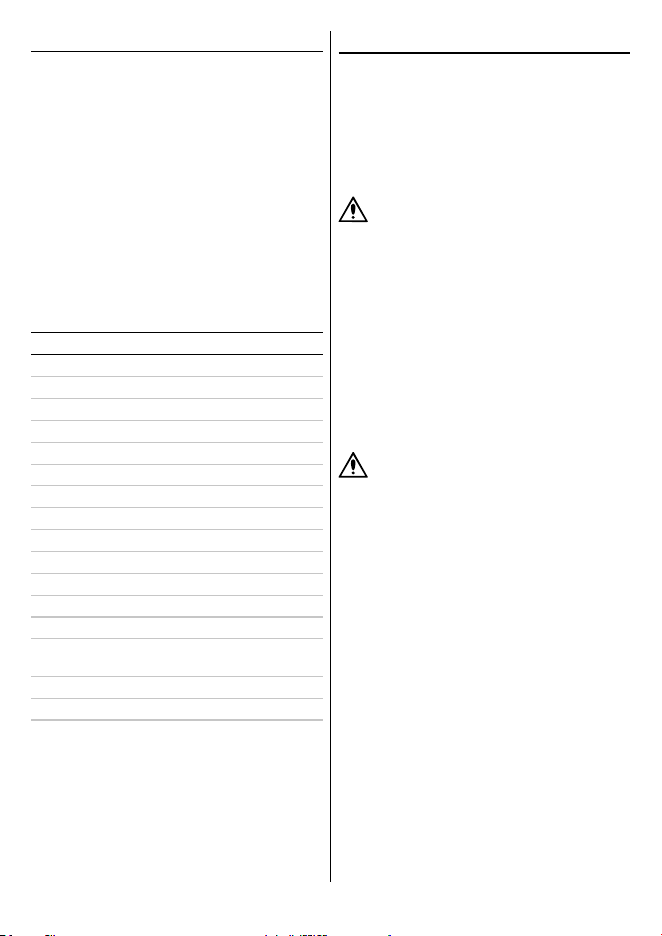
Stock No.: 23630
Part No.: AC7.4VC
Dimensions: 140 × 86 × 52mm
Rated Voltage: 7.4V DC
Maximum Current: 9A
Maximum Pressure: 150psi (10 Bars/1035kPa)
Pressure Range: 3 – 150psi (2 – 10Bars/20 – 1035kPa)
Pressure Accuracy: +/- 1.5psi
Recommended Cycle Time: 10mins on/15mins o
Flow Rate: 13 L/pm
Air Hose length: 180mm
Noise Level: 82db
LED Torch Power: 5W
Charging Cable: USB- C
Power Cable Length: 1.2m
Built in Battery: Rechargeable Li-ion 18650 × 2
(2,600mAh)
Charging time: 2hours
Storage Temperature: -10°C to 50°C
4. Health and Safety Information
Important: Read all the Health and Safety instructions
before attempting to operate, maintain or repair this
product. Failure to follow these instructions may result in
injury or damage to the user, the product or the item being
inated.
4.1 General Health and Safety Precautions
General Safety Instructions for Compressors
WARNING! This compressor is capable of
supplying air at high pressure.
• NEVER point this product at any person or any object
for which its use is not intended.
• Observe and adhere to all standard safety precautions
and good practices when working in a workshop
environment.
• Keep the work environment clear and well-lit, with
bystanders at a safe distance.
• The product is not a toy and should not be used by
children. Keep children and non-essential persons away
from the ination area.
• Before use, inspect the product carefully for signs of
damage or battery leakage.
WARNING! DO NOT use this product if any damage
or defects are present; take it out of service until it
has been repaired or replaced. Contact Draper
Tools for repair and replacement options.
• ALWAYS ensure that the air hose and valve connections
are tight and secure, and rmly hold the item to be
inated during operation.
• DO NOT use this product in wet conditions or expose it
to rain.
• DO NOT use this product near ammable or
combustible materials or in dangerous or explosive
environments.
• Keep away from heat sources and do not leave for long
periods of time in a hot car.
• DO NOT attempt to open or modify this product in any
way
• DO NOT use the product if the casing is open or
damaged in any way.
• DO NOT leave the battery in a discharge state, recharge
when the low battery is showing on the display.
• NEVER leave the compressor running unattended and
switch it o before moving away.
• Use this product ONLY for the recommended cycle time
and allow approx. 30 minutes for it to cool before the
next use.
– 3 –
5. Explanation of Symbols
WARNING! Extended continual use of the product
may cause it to overheat and harm both the
product and the operator.
• After use, ALWAYS check the tyre pressure using a tyre
pressure gauge that complies with BS EN 12645:2014.
CAUTION! NEVER exceed the maximum pressure
recommended by the manufacturer of the item to
be inated. Check the manufacturer information
before every use and continually monitor the item
during ination. Over ination could result in
explosion or personal injury.
• NEVER carry the compressor by the hose.
• ONLY use accessories supplied by Draper Tools.
– 4 –
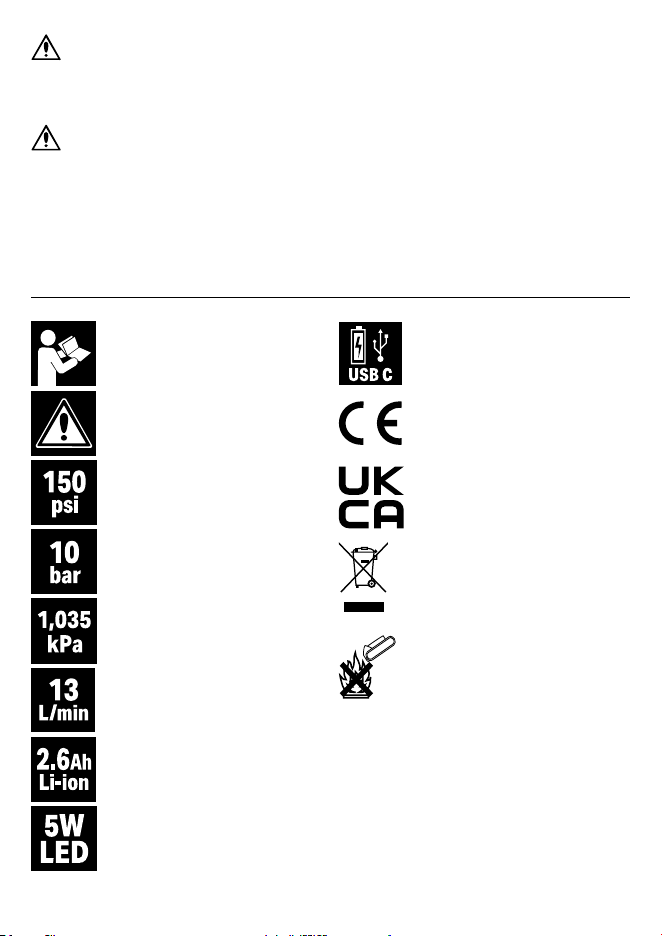
Read the instruction manual
Warning!
Maximum pressure:
(pounds per square inch)
Maximum pressure:
(Bar)
Maximum pressure:
(Kilopascal)
Flow rate:
(Litres per minute)
Battery specication
Torch power/lightsource
USB C rechargeable battery
European conformity
UK Conformity Assessed
WEEE – Waste Electrical & Electronic
Equipment
DO NOT dispose of Waste Electrical &
Electronic Equipment in with domestic
rubbish
DO NOT incinerate or throw onto re
• DO NOT attempt to remove or replace the built in
battery as it is not replaceable.
• The compressor is tted with a short circuit protection.
DO NOT connect the wrong type of cable to the USB-C
port.
4.2 Residual Risk
The safety instructions in this manual cannot account for
all possible conditions and situations that may occur.
Exercise common sense and caution when using this
product and protect against any additional conceivable
risks.
– 5 –
6.IdenticationandUnpacking
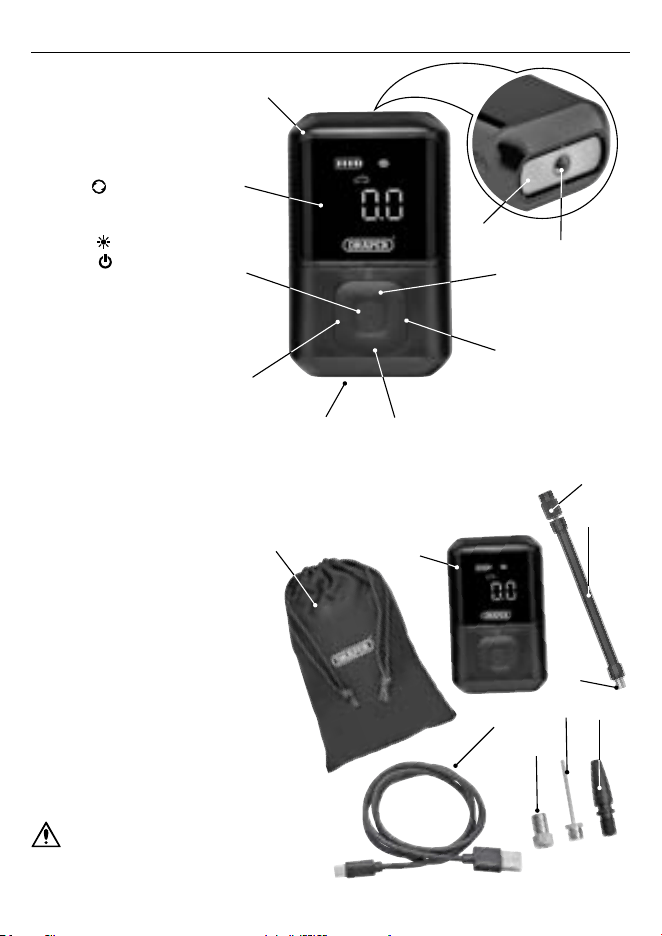
6.1 Product Overview
(1) LED display
(2) Air compressor
(3) LED torch
(4) Air outlet
(5) INCREASE
(
+
)
pressure button
(6) MODE Button
(7) DECREASE
(
–
)
pressure button
(8) USB port
(9) TORCH button
(10) POWER button
6.2 What’s in the Box?
Carefully remove the product from the packaging and examine it for any signs of damage that
may have occurred during shipment.
Before assembling the product, lay the contents out and check them against the parts shown
below. If any part is damaged or missing, DO NOT attempt to use the product. Please contact
the Draper Helpline; contact details can be found at the back of this manual.
(2)
(1)
(10)
(A)
(B)
(D)
(G)
(E)
(C)
(C2)
(C1)
(9)
(8) (7)
(6)
(5)
(3)
(4)
(A) 1 × Storage bag
(B) 1 × Air compressor
(C) 1 × Air hose
(C1) 1 × Air hose attachment
(C2) 1 × Threaded hose connector
(D) 1 × USB-C cable
(E) 1 × Plastic ination adaptor
(F) 1 × Metal needle adaptor
(G) 1 × Brass ination adaptor
Please visit drapertools.com for our full range of
accessories and consumables.
6.3 Packaging
Keep the product packaging for the duration of the
warranty period in case the product needs to be returned
for repair.
WARNING! Keep packaging materials out of reach
of children. Dispose of packaging correctly and
responsibly and in accordance with local
regulations.
(F)
– 6 –
7. Preparation
Important: Before preparing or adjusting this product, read
and understand all the safety instructions listed in this
manual.
7.1 Charging the Air Compressor
Important: Fully Charge the compressor before rst use.
1. To charge t the USB cable (D) to the USB-C port (8) and
the other end to a suitable 5V/2A USB power adaptor.
2. When charging the battery level (11) bars on the display
will ash and turn solid when fully charged.
Bar Power Level
1 Under 25%
2 25 – 50%
3 50 – 75%
4 75 – 100%
3. Charging will take approximately 2 hours.
Note: Fully charged the battery life will be approximately
30minutes (unloaded).
4. Unplug the cable when fully charged.
8. Operating Instructions
Important: Before operating this product, read and
understand all the safety instructions listed in this manual.
8.1 Turning on the Compressor
Check that the air compressor is charged before using.
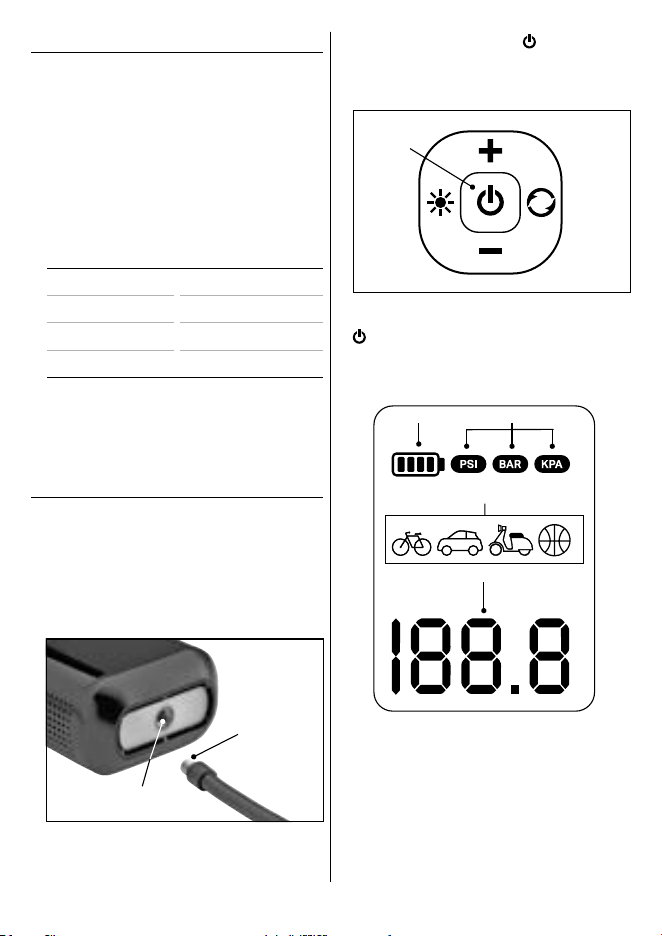
1. Attach the air hose connector (C1) to the air outlet (4) by
turning clockwise until securely attached.
1 Fig.
(4)
(C1)
2. Press and hold the POWER button (10) until the LED
screen comes on.
Note: the screen will turn o automatically if no activity
after 3 minutes.
2 Fig.
(10)
3. To stop the operation press and hold the POWER button
until the screen turn o.
8.2 Display Screen Explained
Display Screen
12
13
11
14
11 Battery level indicator
12 Selected pressure measurement
13 Programmable mode selected
14 Pressure value reading
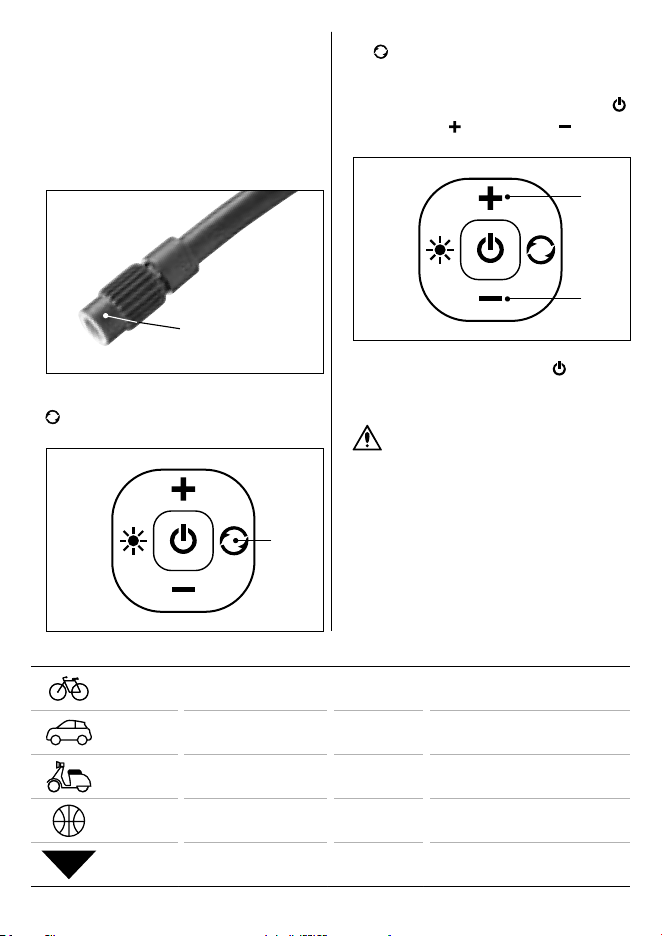
– 7 –
Mode Press Default Setting Adjustable Range
Bike × 1 45 PSI 30 – 150 PSI
Car × 2 36 PSI 26 – 50 PSI
Motorbike/
Scooter
× 3 35 PSI 26 – 43 PSI
Ball × 4 8 PSI 4 – 16 PSI
5
FREE
Free / PSI × 5 35 PSI
3 – 150 PSI 20 – 990 KPA
0.2 – 10.3 Bar
8.3 Using the Compressor
Important: Always follow the manufacturer’s
recommendations for the pressure levels. For vehicles this
is often located on the inside of the door. For bikes check
the marking on the tyres. After ination, vehicle tyres
should be double-checked using a purpose-built tyre
pressure gauge complying with BSEN 12645:2014.
1. Screw the threaded hose connector (C2) onto the tyre
valve to be inated.
3 Fig.
(C2)
2. Turn the air compressor on and press the MODE button
(6) and selected the required pressure level required
from the 5 programmable modes available.
4 Fig.
(6)
Note: To switch between Bar, PSI and KPA hold the MODE
button for 3 seconds.
2. When the air pressure reaches the preset value the
compressor will automatically stop. To stop inating
before the preset is reached press the POWER button
.
3. Use the INCREASE (5) and DECREASE (7) pressure
buttons to select the required pressure level.
5 Fig.
(7)
(5)
4.
Once complete, press the POWER button
to switch o.
5. Disconnect the air hose from the tyre valve and replace
the valve seal or cap, if required.
WARNING! The hose connector may be hot
after use, take care when detaching it from the
valve.
– 8 –
8.4 UsingtheInationAdaptors
Use the adaptors for inating footballs, beach balls, air
beds and inatable toys.
Important: Always follow the manufacturer’s
recommendations for the pressure levels for inating the
item.
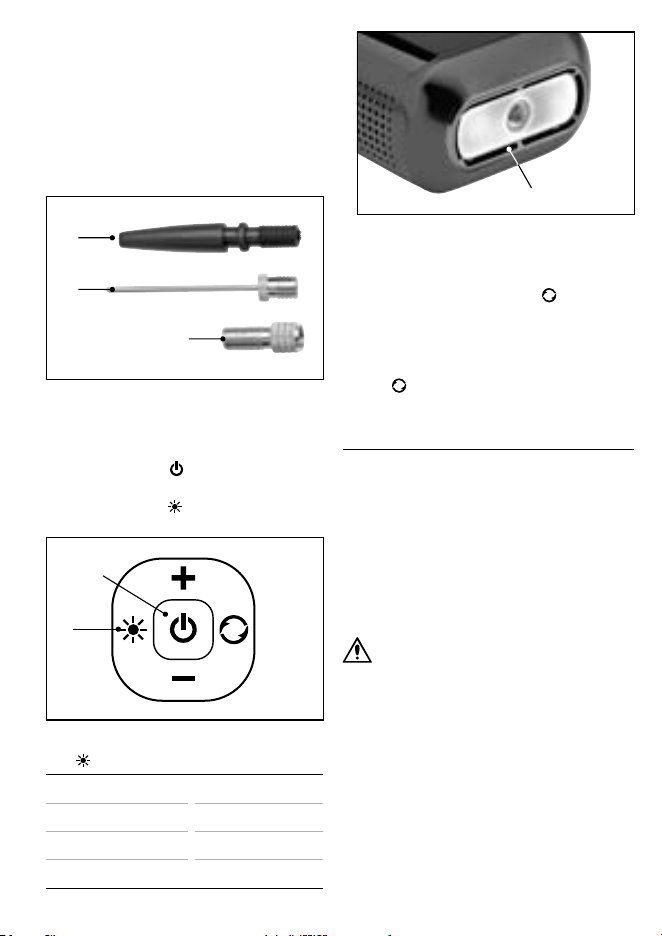
1. Attach the plastic adaptor (E), metal needle (F) or brass
(G) ination adaptor to the threaded hose connector
(C2), turn until secure.
(E)
(F)
(G)
6 Fig.
2. Operate the compressor as described in 8.3 Using the
Compressor.
8.5 Using the Torch
1. Press the POWER button
(10) and the LED screen will
come on.
2. Press the TORCH button (9) and the torch light (3)
will come on, then press to cycle through the options.
7 Fig.
(10)
(9)
Press
Function
Once On/Constant Beam
× 2 Slow Flashing /S.O.S
× 3 Fast Flashing/Strobe
× 4 OFF
8 Fig.
(3)
8.6 Memory Function
• The pressure units displayed can switch between Bar, PSI
and KPA by holding the MODE button for 3 seconds
.
• The Memory function will enable any changes to be
saved and automatically retrieved when the compressor
is switched back on.
• To reset to the default settings press and hold the MODE
button and the (
+
) button at the same time for 3
seconds.
9. Maintenance and Troubleshooting
Important: Any maintenance and repairs should be carried
out only by authorised and suitably qualied personnel.
9.1 General Maintenance
• DO NOT allow the compressor to be completely
discharged before charging. Recharge when the battery
level (11) displayed is on 1 bar/low.
• Keep the air hose and adaptors clean and free from any
obstructions.
• Clean the product regularly using a damp cloth.
CAUTION! DO NOT use aggressive chemicals
to clean the product as they may damage
the product housing.
• Store the product in the bag (A) supplied in a clean and
dry location, out of the reach of children.
• When stored for extended periods, charge the
compressor every 3 months to maintain the internal
battery health.

– 9 –
9.2 Troubleshooting
Problem Possible cause Remedy
Compressor will not switch on or
operate
Battery low or exhausted Charge compressor for 2 hours or
until fully charged.
Compressor is overheating or
cycle time exceeding 10minutes.
Recommended cycle time is 10mins
on and 15minutes o.
Follow recommendation.
Switch o and allow to cool for
approximately 30 minutes before
reusing.
Compressor does not inate item. Low Battery Fully charge compressor – refer to
section 7.1.
Connection to the item’s valve is not
airtight.
Reattach the threaded hose
connector (C2) and ensure it is
tted securely.
Air is escaping from the inated
item.
Check that the item does not have
leaks or punctures.
Check all connections are airtight
and not leaking.
Pressure Value reads ‘O’ Pressure value of item to be too low. Not suitable for use with the air
compressor.
– 10 –
10. Spares, Returns and Disposal
For spare parts, servicing, and repair and replacement
options, please contact the Draper Tools Product Helpline
for details of your nearest authorised agent.
Draper Tools will endeavour to hold any spare parts, if
applicable, for seven years from the date that it sells the
nal matching stock item.
Any servicing or repairs carried out by unauthorised
personnel or installation of spare parts not supplied by
Draper Tools will invalidate your warranty.
At the end of its working life, dispose of the product
responsibly and in line with local regulations. Recycle
where possible.
• DO NOT dispose of this product with domestic waste;
most local authorities provide appropriate recycling
facilities.
• DO NOT burn or mutilate batteries; this may release
toxic or corrosive substances.
• Dispose of batteries separately and in accordance with
local regulations.
11. Warranty
Draper Tools products are carefully tested and inspected
before shipment and are guaranteed to be free from
defective materials and workmanship.
Should the tool develop a fault, return the complete tool to
your nearest distributor or contact Draper Tools directly.
Contact information can be found at the back of this
manual.
Proof of purchase must be provided.
If, upon inspection, it is found that the fault occurring is
due to defective materials or workmanship, repairs will be
carried out free of charge. This warranty period covers
parts and labour for 12 months from the date of purchase.
This warranty does not apply to any consumable parts,
batteries or normal wear and tear, nor does it cover any
damage caused by misuse, careless or unsafe handling,
alterations, accidents, or repairs attempted or made by any
personnel other than the authorised Draper Tools repair
agent.
In all cases, to make a claim for faulty workmanship or
materials within the standard warranty period, please
contact or return the product to the place of purchase.
Proof of purchase may be required.
If the place of purchase is no longer trading or if you
experience any diculties with your warranty, please
contact Customer Services with the product details and
your proof of purchase. Contact details can be found at the
back of this manual.
If the tool is not covered by the terms of this warranty,
repairs and carriage charges will be quoted and charged
accordingly.
This warranty supersedes any other guarantees expressed
or implied and variations of its terms are not authorised.
Your Draper Tools guarantee is not eective until you can
produce, upon request, a dated receipt or invoice to verify
your purchase within the guarantee period.
Please note that this warranty is an additional benet and
does not aect your statutory rights.
Draper Tools Limited .

Notes
– 11 –

Contact Details
Draper Tools
Draper Tools Limited
Hursley Road
Chandler’s Ford
Eastleigh
Hampshire
SO53 1YF
UK
Website: drapertools.com
Email: [email protected]
Product Helpline: +44 (0) 23 8049 4344
Telephone Sales Desk: +44 (0) 23 8049 4333
General Enquiries: +44 (0) 23 8026 6355
General Fax: +44 (0) 23 8026 0784
Please contact the Draper Tools Product Helpline for repair and servicing enquiries.
© Published by Draper Tools Limited
Delta International
Delta International BV
Oude Graaf 8
6002 NL
Weert
Netherlands