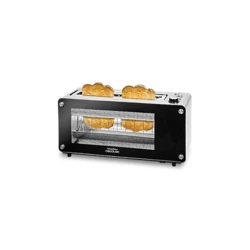
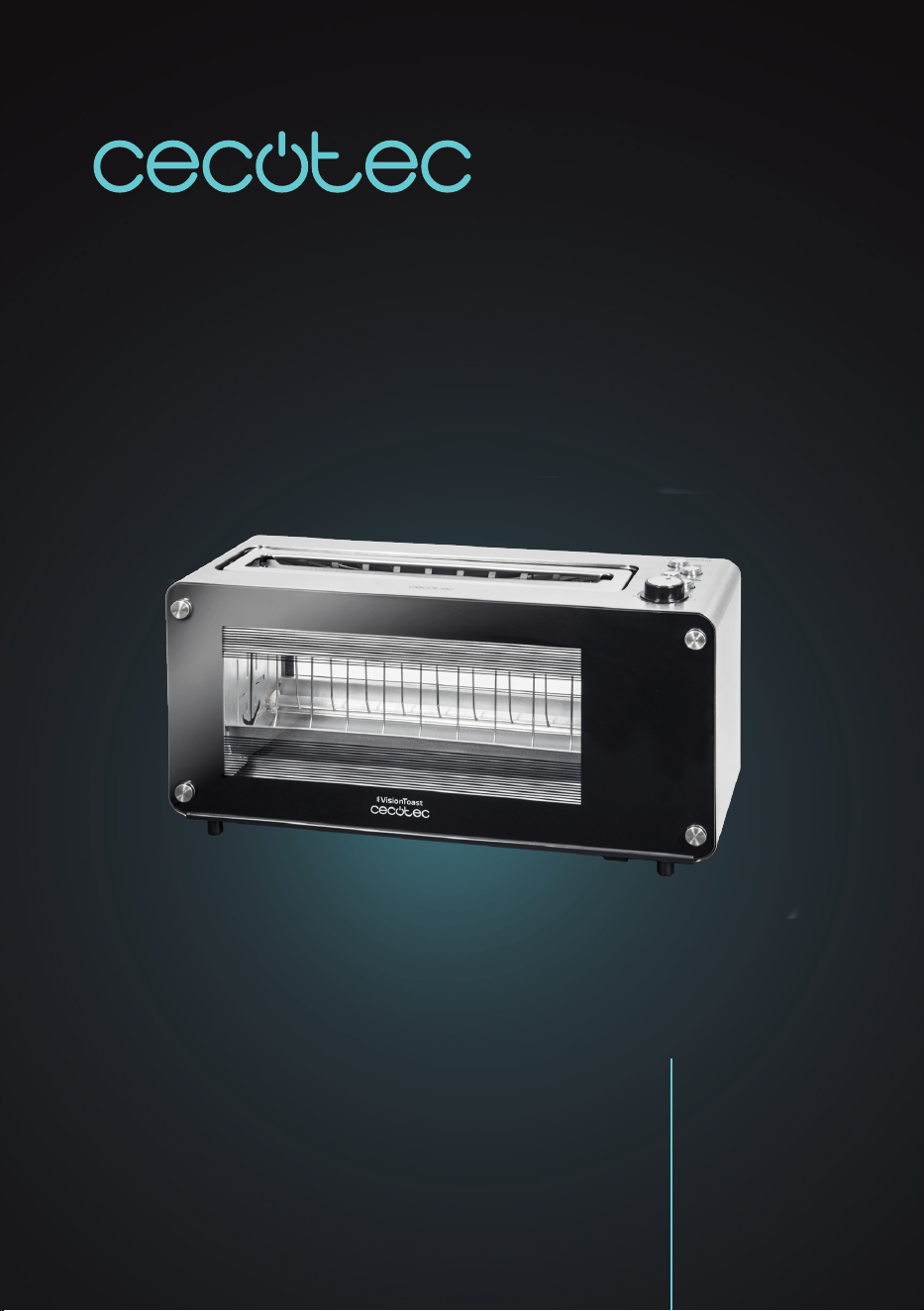
VISIONTOAST
Tostador/Toaster.
Manual de instrucciones
Instruction manual
Manuel d’instructions
Bedienungsanleitung
Manuale di istruzioni
Manual de instruções
Handleiding
Instrukcja obsługi
Návod k použití

- Si la ranura de tostado se bloquea con la tostadora encendida,
desconéctela inmediatamente y permita que se enfríe antes
de vaciarla y limpiarla. Si el problema persiste, pare de
usar el producto y póngase en contacto con el Servicio de
Asistencia Técnica de Cecotec.
- No intente retirar comida del interior de la tostadora mientras
se encuentre enchufada a la red eléctrica. Desconéctela y
deje que se enfríe antes de retirar alimentos de su interior.
- No use un cuchillo o cualquier otro utensilio metálico alado
para retirar las rebanadas de pan del interior de la tostadora.
No introduzca la mano en la ranura de tostado. No toque las
partes metálicas del interior de la tostadora.
- El aparato no debe ser usado por niños desde 0 hasta 8
años. Este aparato puede ser usado por niños de 8 años y
mayores de 8 años si están continuamente supervisados.
- Este aparato puede ser usado por personas con capacidades
físicas, sensoriales o mentales reducidas, o con falta de
experiencia y conocimiento si están supervisados o han
recibido instrucción concerniente al uso del aparato de una
forma segura y entienden los riesgos que este implica.
- Supervise los niños para asegurarse de que no jueguen con
el producto. Es necesario dar una supervisión estricta si la
tostadora está siendo usada por o cerca de niños.
SAFETY INSTRUCTIONS
Read this instruction manual carefully before use, even if you
are familiar with the operation of this type of product.
- The safety instructions contained herein reduce the risk of
re, electric shock, and injury, as long as they are properly
followed.
- Keep the manual in good condition for future reference, along

with the proof of purchase, and original package. If possible,
give these instructions to new users of the appliance.
- All safety instructions should be closely followed when
using the appliance.
- Make sure that the mains voltage matches the voltage
stated on the rating label of the appliance and that the wall
outlet is grounded.
- Do not immerse the cord, plug, or any non-removable part of
the appliance in water or any other liquid. Do not expose the
electrical connections to water. Make sure your hands are
dry before handling the plug or switching on the appliance.
- If the appliance falls accidentally in water, unplug it
immediately. Do not reach into the water!
- Check the power cord regularly for visible damage. If the
cord is damaged, it must be replaced by the ofcial Technical
Support Service of Cecotec in order to avoid any type of
danger.
- Do not use the appliance if its cord, plug, or housing is
damaged, nor after it malfunctions or has been dropped or
damaged in any way.
- Do not twist, bend, strain, or damage the power cord in any
way. Protect it from sharp edges and heat sources. Do not
let it touch hot surfaces. Do not let the cord hang over the
edge of the working surface or countertop.
- A short power cord is provided to reduce the risk of tripping
and entanglement. If you must use an extension cord, be
careful and aware of the risks involved. The extension cord
should be arranged to prevent it from hanging over the edge
of the countertop, otherwise, it could be pulled from by
children or cause someone to trip over unintentionally.
- The appliance is not intended to be operated by means of an
external timer or separate remote-control system.

- Turn off and unplug the appliance from the mains supply
when not in use and before cleaning it. Pull from the plug,
not the cord, to disconnect it from the outlet.
- Unless your home is already tted with a residual current
device, it is advisable to install an RCD with a rated residual
operating current not exceeding 30 mAh, in order to
provide additional safety protection when using electrical
appliances. Contact an electrician for professional advice.
- This product is designed only for household use. It is
not suitable for commercial or industrial use. Do not use
outdoors.
- The appliance is only suitable for toasting bread without
topping. Do not use it for any other purpose, and follow
the instructions described in this manual. Do not place wet
foodstuffs inside the toaster, nor bread covered with butter,
jelly, frosting, or any other condiment, as it may result in re,
smoke, or jamming of the appliance. Do not use the appliance
to defrost foodstuffs, other than bread or wafes.
- Do not insert over-sized foodstuffs or inappropriate
materials (aluminium foil, packages, or kitchen utensils) into
the toasting slot. It could result in re or electric shock.
- Do not use any accessory that has not been recommended
by Cecotec, as they might cause injuries or damage.
- Keep this appliance and its power cord out of reach of
children under the age of 8.
- No liability is accepted for any eventual damage or personal
injuries derived from misuse or non-compliance with this
instruction manual.
- Make sure you know how to use the toaster before use.
- Make sure there is adequate air space above and on all sides
of the appliance for air circulation.
- Place the appliance on a dry, stable, at, heat-resistant

surface.
- Do not use the appliance under the following circumstances:
- On or near a gas or electric hob, in heated ovens, or near
open ames.
- On soft surfaces (such as carpets) or where it may tip over
during use.
- Outdoors or in areas with high humidity levels.
- Near or below ammable materials (such as curtains, cloths,
wall hangings, towels, etc.) or under wall cabinets.
- Do not cover the toaster while in use.
- Do not insert any object (utensils, ngers, or any other foreign
object) inside the toaster while in use, as it may result in re,
electric shock, or injury.
- Unplug the appliance immediately if re or smoke is
observed.
- Do not leave the appliance unattended while in use. Unplug
it from the power supply when you nish using it and before
leaving the room.
- If the appliance malfunctions, or if re or smoke is observed,
press STOP/START immediately and unplug it from the mains
supply. Do not try to repair the product by yourself. Contact
the ofcial Technical Support Service of Cecotec.
- To ensure the correct operating of the device, cleaning
and maintenance tasks must be carried out according to
this instruction manual. Turn off and unplug the appliance
before moving and cleaning it. Allow it to completely cool
down before cleaning or storing it.
- Remove the crumbs from the crumb tray regularly, in order to
avoid the risk of re. Make sure the crumb tray is completely
dry and in place before use.
- Cleaning and maintenance tasks must not be carried out by
children.
- Store the appliance and its instruction manual in a safe and
dry place when not in use.
- The temperature of accessible surfaces may be high while
in use and could cause burns. The metal panel on top of
the toaster can become very hot. Do not touch hot surfaces
while in use or immediately after. Use oven mitts when
handling the toaster and allow its metal parts to cool down
before cleaning.
- Be careful when taking out hot bread slices to avoid injuries.
- If the toasting slot gets stuck while the toaster is on, unplug
the appliance immediately and let it cool down before
emptying and cleaning it. If the problem remains, stop using
the appliance and contact the Technical Support Service of
Cecotec.
- Do not attempt to remove food from the inside of the toaster
while it is plugged to the mains supply. Unplug it and let it
cool down before removing foodstuffs from its interior.
- Do not use a knife or any other sharp metal tool to remove the
bread slices from its interior. Never insert your hand inside
the slot. Do not touch the metal parts inside the toaster.
- The appliance is not intended to be used by children
under the age of 8. It can be used by children over the
age of 8, as long as they are given continuous supervision.
- This appliance can be used by children aged 8 and above,
and persons with reduced physical, sensory or mental
capabilities or lack of experience and knowledge, as long as
they have been given supervision or instruction concerning
the use of the appliance in a safe way and understand the
hazards involved.
- Supervise young children to make sure that they do not play
with the appliance. Close supervision is necessary when the
appliance is being used by or near children.

VISIONTOAST
54
ENGLISH
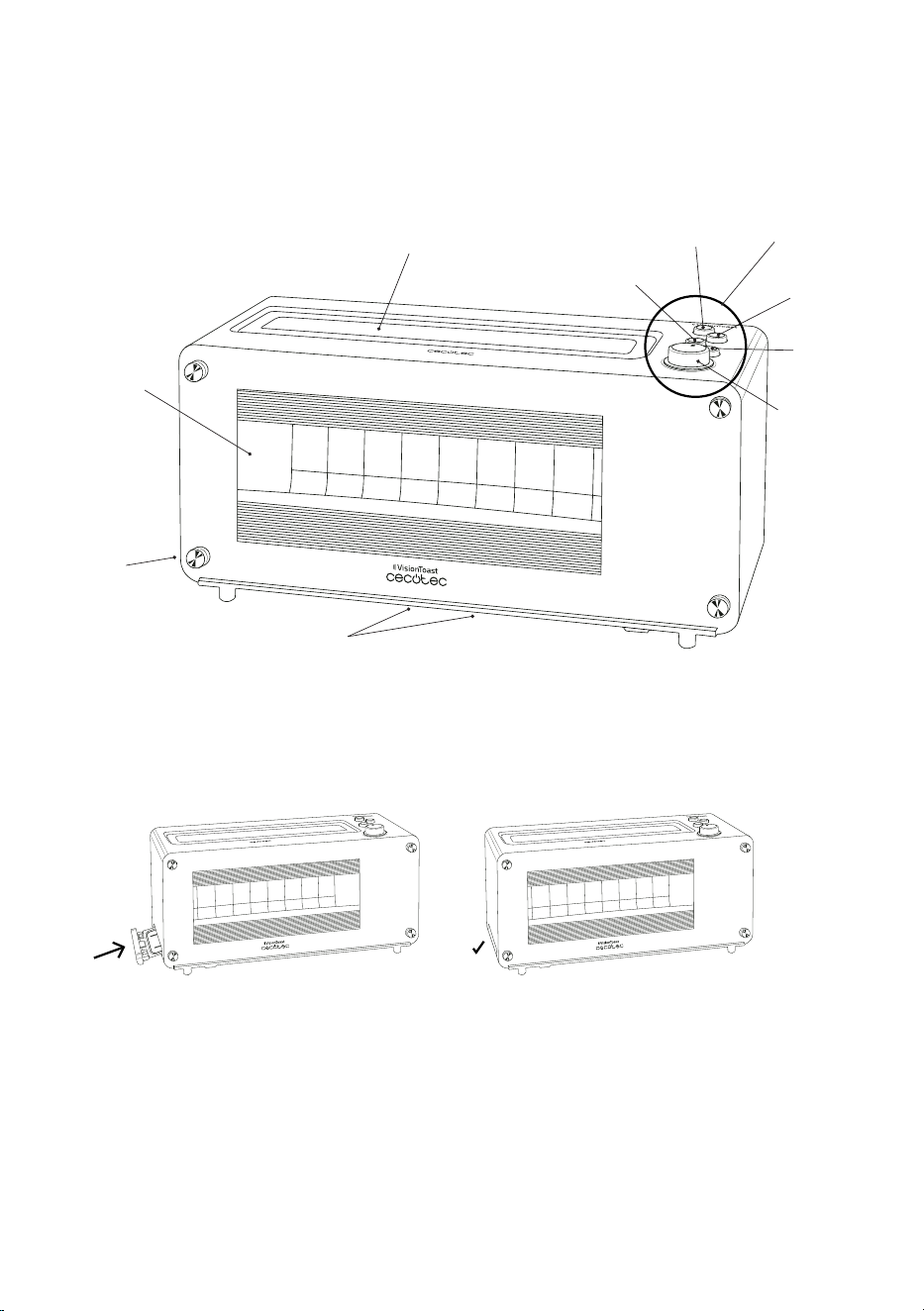
1. PARTS AND COMPONENTS
Fig. 1
1. Glass window
2. Toasting slot
3. Control panel
4. Intensity dial
5. Locking clamps of the glass panels
6. Crumb-collecting tray
7. ON/OFF button
8. Defrost button
9. Bagel button
10. STOP/START button
2. BEFORE USE
- This product includes a safety package to protect it during transport. Unpack the appliance
and keep the original packaging carton and materials in a safe place.
- It will help prevent any damage if the product needs to be transported in the future. In
case the original packaging is disposed of, make sure all packaging materials are recycled
accordingly.
- Plastic wrapping can cause suffocation hazards for babies and young children. Make sure
all packaging materials are out of reach of children.
- Inspect all parts of the appliance for visual damage. Unwind the power cord completely
and inspect it for damage. Do not use the product if it or its cord have been damaged or are
not working properly. In case of damage, contact the ofcial Technical Support Service of
Cecotec for advice, repairs or returns.
- Make sure you have read and understood all instructions and warnings in this instruction
manual. Pay particular attention to the safety instructions on previous pages.
- Remove any adhesive labels and wipe the outside of the toaster with a damp cloth. Make
sure no packaging materials remain in the toasting slot and no object has fallen inside the
toaster.
- Place the toaster on an even, heat-resistant surface. Do not place the toaster near heat
sources, places with high humidity levels, or combustible materials.
- Plug the toaster into an appropriate wall outlet. The plug must have easy access, so that in
case of an emergency, it can be easily unplugged.
- Press the button ON/OFF.
- Set the toasting intensity dial to level 4, press STOP/START, and let your toaster heat up
without any bread.

VISIONTOAST
55
ENGLISH
Note
You may notice a slight burning smell or smoke when using the toaster for the rst time,
caused by the excess of lubricants from the manufacturing process. Ensure good ventilation
and let the toaster complete a few cycles until no odour or smoke can be noticed.
- After a short cooling down period, your toaster will be ready for use. The operation
instructions are detailed below.
3. OPERATION
1. Make sure the crumb-collecting tray is completely is properly placed before use. It is
located underneath the heating elements and can be pulled out from the side of the
toaster opposite to the control panel. Fig. 2
2. Place the toaster on a clean, stable, heat-resistant surface. Make sure that no liquid
or ammable object is placed near the appliance.
3. Plug the toaster into an appropriate wall outlet.
4. Press the button ON/OFF.
5. Select the intensity with the intensity dial (Fig. 3). The intensity may be adjusted
before or right after pressing STOP/START. There are 7 intensity levels available for
precise results. Simply select the desired level according to your needs.
Note
Select intensity 3 when using the toaster for the rst time, then, adjust the intensity to your
liking for following uses (use a lower intensity for thinner slices).
1. Place two bread slices side by side in the toasting slot and press STOP/START to
start toasting. The bread guides will automatically adjust to hold the bread in place
and will automatically lower down to toasting position.
2. To stop the toasting process at any time, press STOP/START.
3. While the bread is being toasted, you can watch the process through the glass panel.
4. The toast will automatically rise at the end of the programme.
Warning
Do not touch the metal parts of the toaster, as they will be hot after use.
1. If you want to toast more bread, allow the toaster to cool down for 15-20 seconds
between toasting cycles.
2. Press the ON/OFF button to turn off the toaster when it is completely nished.
3. Unplug the appliance after use and let it cool down before cleaning or storing it.

VISIONTOAST
56
ENGLISH
Defrost button
Toasts frozen bread with an extended toasting cycle (can be combined with the bagel
programme).
Bagel button
Toasts bagels using only one side of the heating element.
STOP/START button
Press at any time to stop toasting.
- The toaster has three buttons to defrost frozen bread, reheat toasted bread, and toast
bagels on one side. In order to use these preset programmes, insert the bread into the
slot of the toaster and press STOP/START. Then, press the appropriate button. When the
defrost or bagel buttons are pressed, their indicator lights will turn on until the toasting
process is complete, or until STOP/START is pressed.
Warning
If bread gets stuck inside the toaster, unplug it and let it cool down before trying to remove the
bread. Do not use a knife or any other sharp metal tool to do so, and do not touch the metal
parts inside the toaster. Make sure the bread slice is not too thick.
Tips
- Toasting is a combination of toasting and drying. Moisture levels differ in different bread
types, so toasting times may vary.
- For slightly dry bread, use a lower intensity.
- For fresh bread or wholemeal bread, use a higher intensity.
- Bread products with a very uneven surface will require a higher intensity. You can also
press the bagel button for perfect results.
- Thick bread pieces will take longer to toast, since more moisture must be evaporated from
the bread before toasting.
- When toasting raisin or fruit bread, remove any loose raisins from the surface of the bread
before placing the slices into the toaster. This will prevent pieces from falling into the
toaster or sticking on the wire in the slot.
VISIONTOAST
57
ENGLISH
4. TROUBLESHOOTING
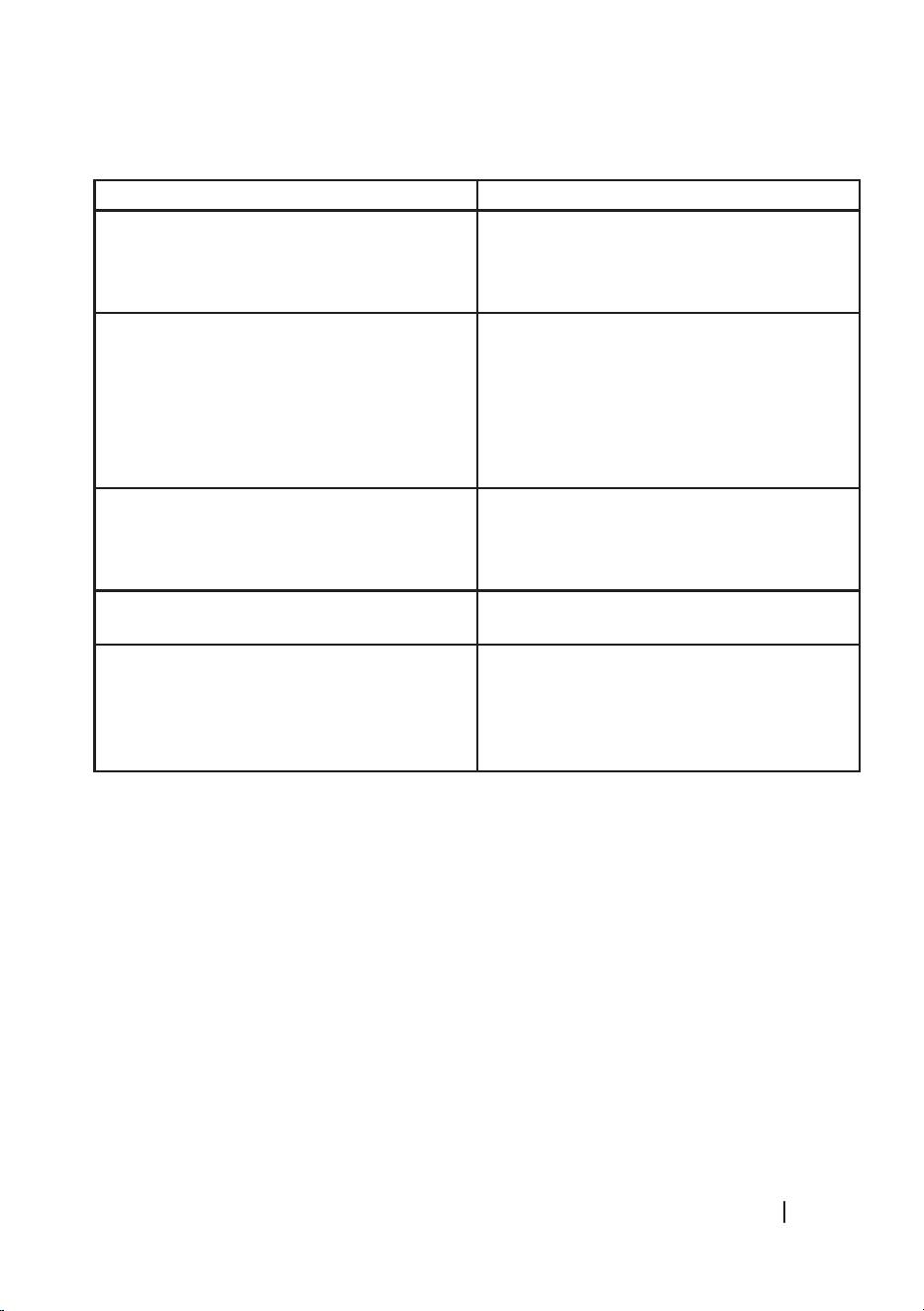
Problem Solution
The toaster does not work. Check the power connection and make sure the
plug it properly connected to the wall outlet. If
it does not work, contact the ofcial Technical
Support Service of Cecotec.
Bread stuck in the slot. Unplug the toaster and let it cool down. Then,
carefully remove the slice or slices from the
toaster. You may need to hold the toaster over
a sink and shake it gently to help loosen the
bread. Do not use metal objects to remove the
bread. Do not touch the metal parts inside the
toaster.
Bread slices cannot be seen over the slot after
toasting.
If the bread slices are too small to be removed
from the toaster, unplug the toaster and use
thin, heat-resistant tongs to remove the bread
from the toasting slot.
The toast is too dark or too light. The selected intensity level is too high or too
low. Adjust it.
The toaster emits smoke. The selected intensity level is too high for that
type of bread. Press STOP/START to stop the
toasting process. Make sure the crumb tray
is empty and clean. Turn the unplugged unit
upside down over the sink and shake it gently.
- If you experience problems with your toaster, check the issues below to make sure it
has been properly assembled before returning the appliance to your dealer or getting in
contact with the ofcial Technical Support Service of Cecotec.
- Make sure the toaster is safely plugged in.
- If you have recently cleaned the glass panel, make sure the panel is properly installed.
- To remove the glass panel, hold the toaster with one hand and lightly tilt it backwards.
Press the latch at the bottom, pull out the glass gently and clean it (Fig. 4).
- To reinsert the glass panel, lay the toaster on one side, hold the panel by the latch and
carefully slide it back in place until it clicks into place.

VISIONTOAST
58
ENGLISH
Important
When reinserting the glass panel, make sure that it clicks into place. Otherwise, the toaster will
not work. When the panel clicks into place, a safety switch is activated.
Fig. 5
5. CLEANING AND MAINTENANCE
- Unplug the toaster from the mains supply and allow it to cool down completely before
disassembling, cleaning, or storing it.
- Do not immerse the toaster, cord, or plug in water or any other liquid.
- Do not clean the inside of the toaster, as it may damage the heating elements.
- Do not use a metal scouring pad, abrasive materials, metal polish, harsh chemical cleaner,
or hard objects to clean any surface of the toaster.
- Wipe the outside surfaces of the toaster with a soft cloth or sponge and mild detergent.
- Remove the remaining crumbs after each use.
- Store the toaster in a clean, dry place when not in use. Make sure the appliance is clean and
dry, and unplugged from the power supply.
- It is recommended to store the appliance in its original box, which will protect it from dust.
- When storing the toaster, the power cord must be stored in the space to that purpose on
the bottom of the appliance. Simply wind the power cord around the hooks.
Crumb-collecting tray
- It is important to remove and clean the crumb tray frequently to avoid risk of re. The
crumb tray is located under the heating elements and can be pulled out from the opposite
side to the control panel.
- Pull out the crumb tray completely, throw away the crumbs and wipe the tray clean with
a cloth.
- To remove stubborn spots, use a nylon or plastic scouring pad with soapy water.
- Make sure the tray is completely dry before inserting it back into the toaster.
- Do not clean the crumb tray in dishwashers.
Glass panels
- The sides of the toaster have been tted with a full view glass window, which lets you
control the toasting process. The inner panel of this window can be removed (refer to the
“Troubleshooting” section).
- Wipe the panel clean, or wash it with warm, soapy water. Then, rinse and dry thoroughly.
VISIONTOAST
59
ENGLISH
6. TECHNICAL SPECIFICATIONS
Product: VisionToast
Product reference: 03042
Power: 1260 W
Voltage and frequency: 220-240 V, 50/60 Hz
Intensity levels: 7
Made in China | Designed in Spain
7. DISPOSAL OF OLD ELECTRICAL APPLIANCES
The European directive 2012/19/EU on Waste Electrical and Electronic
Equipment (WEEE), species that old household electrical appliances
must not be disposed of with the normal unsorted municipal waste. Old
appliances must be collected separately, in order to optimise the recovery
and recycling of the materials they contain and reduce the impact on
human health and the environment.
The crossed out “wheeled bin” symbol on the product reminds you of your
obligation to dispose of the appliance correctly.
Consumers must contact their local authorities or retailer for information concerning the
correct disposal of old appliances and/or their batteries.
8. TECHNICAL SUPPORT AND WARRANTY
This product is under warranty for 2 years from the date of purchase, as long as the proof
of purchase is submitted, the product is in perfect physical condition, and it has been given
proper use, as explained in this instruction manual.
The warranty will not cover the following situations:
- The product has been used for purposes other than those intended for it, misused, beaten,
exposed to moisture, immersed in liquid or corrosive substances, as well as any other fault
attributable to the customer.
- The product has been disassembled, modied, or repaired by persons, not authorised by
the ofcial Technical Support Service of Cecotec.
- Faults deriving from the normal wear and tear of its parts, due to use.
The warranty service covers every manufacturing defects of your appliance for 2 years, based
on current legislation, except consumable parts. In the event of misuse, the warranty will not
apply.
If at any moment you detect any problem with your product or have any doubt, do not hesitate
to contact Cecotec Technical Support Service at +34 963 210 728.
8
10
4
7
9
6
1
2
3
5
Fig./Img./Abb./Rys./Obr. 1
Fig./Img./Abb./Rys./Obr. 1
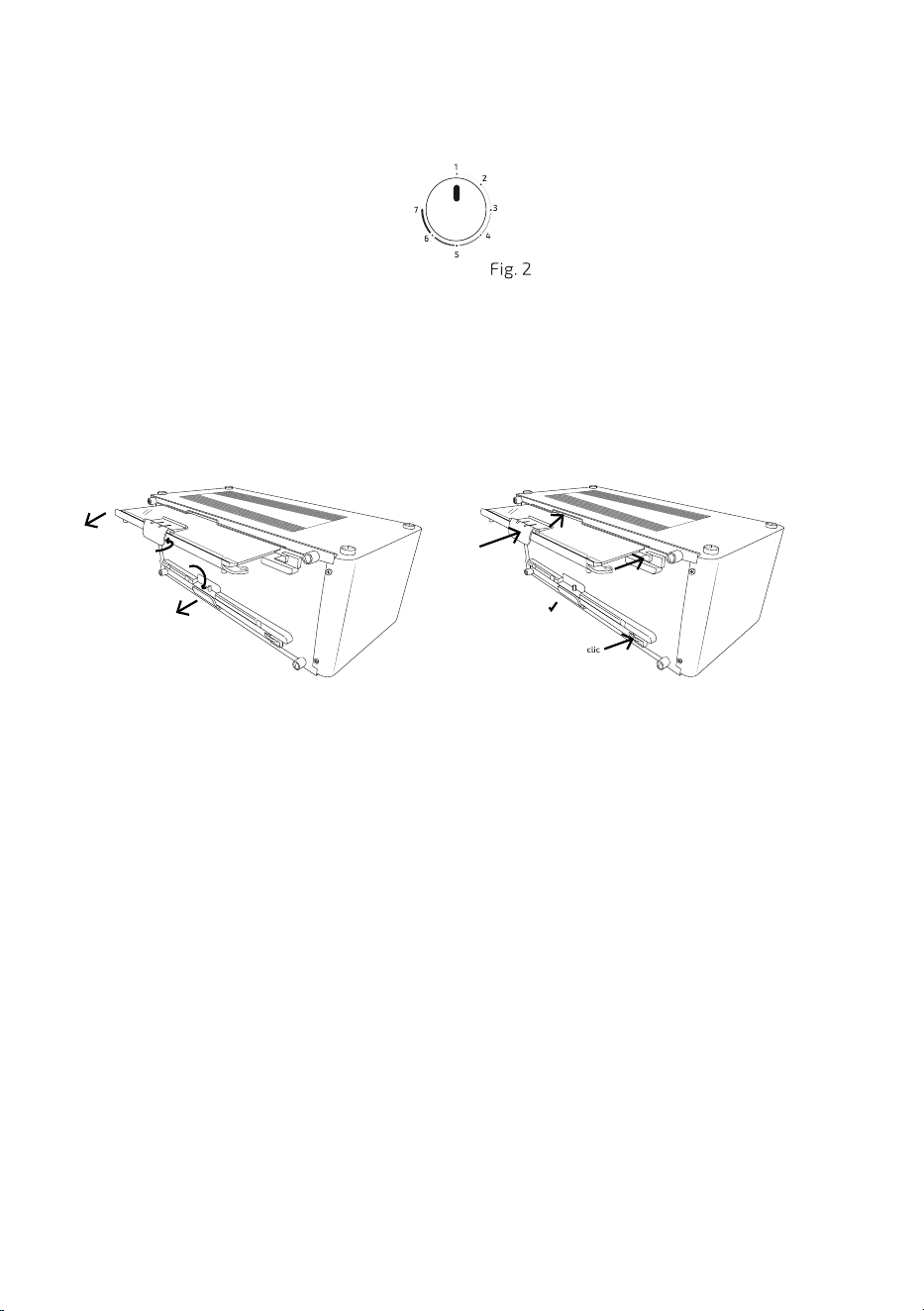
Fig./Img./Abb./Rys./Obr. 3
Fig./Img./Abb./Rys./Obr. 4 Fig./Img./Abb./Rys./Obr. 5

Cecotec Innovaciones S. L.
C/de la Pinadeta s/n, 46930
Quart de Poblet, Valencia, Spain
www.cecotec.es
EA02210419