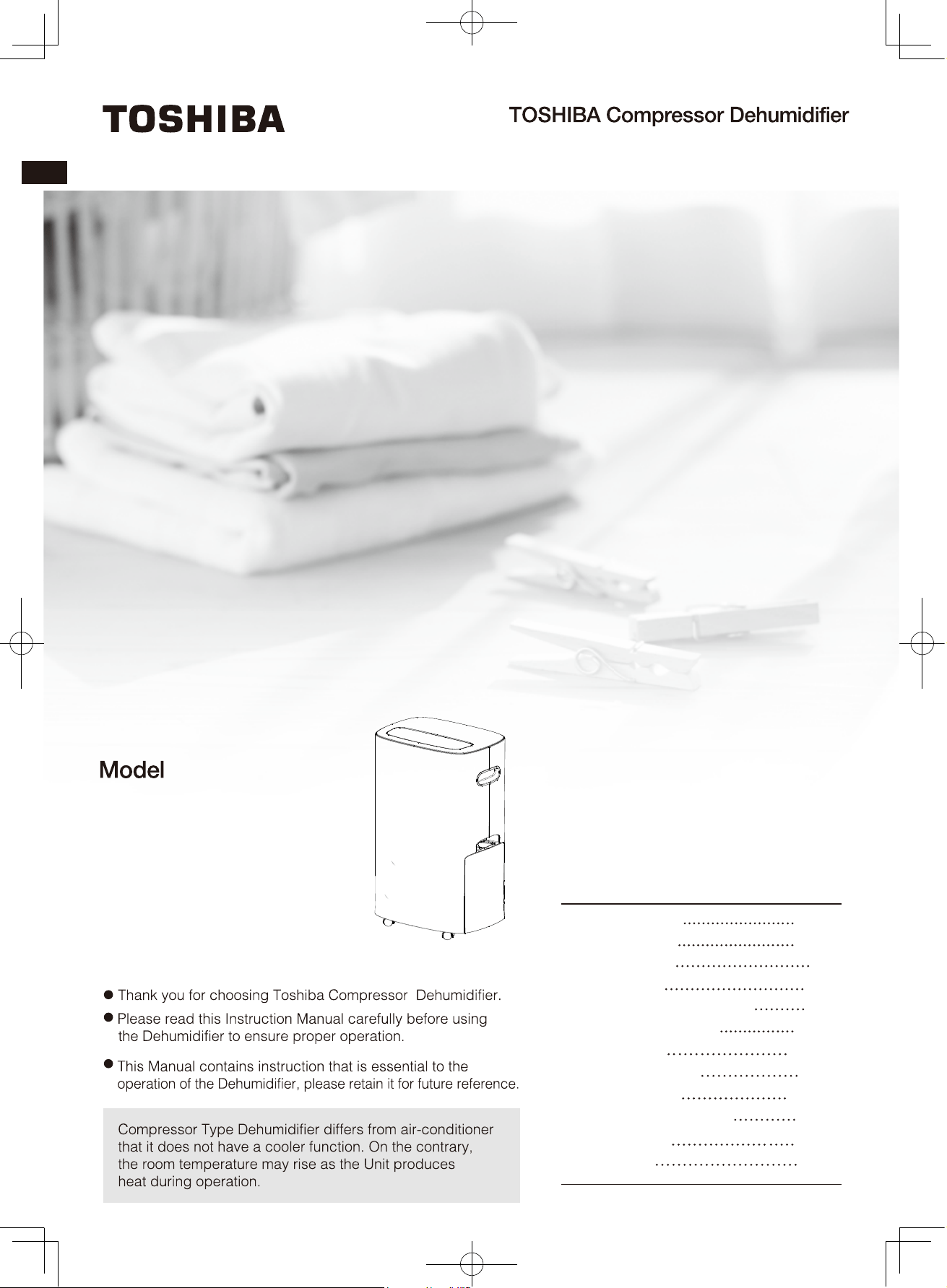
RAD-Y200H
RAD-Y250H
RAD-Y300H
濾網安裝方法
0
<家庭用>
如需維修請聯絡東芝服務中心
這様可能會造成短路或損壞電源線內部
會洩漏可燃性氣體,油的場所。抽
濕機附近有易燃氣體,可能
會導致火災和爆炸。
桌上等高處,機體掉落時可能會損
壞。
抽濕機及排水管周圍的溫度不可低
於冰點,排水管內的水可能會結冰
並在融化時弄濕傢俬,導致觸電。
漏電或火災。水箱同時會破裂及漏
水。
使用於藥物及化學品的場所,如翳院
抽濕機吹出的風不可直接對著燃燒
器具,可能會導致不完全燃燒。
使用220V的交流電插座
擺放於平穩的地方或傾斜度2°
以下的地方使用
拔插頭時,不可拉扯電源線,要
爪握插頭拔出。處理不當可能會
導致觸電,短路而引起火災。
否則可能會導致機體發生過熱,漏
水現象。長時間在同一場所使用
時,請檢查機體底部有沒有漏水。
漏水會弄濕地板及造成附近物品損
毀。
使用連續排水時應檢查排水管道,
檢查排水管是否灣曲或接妥到機體
上。
注水的容器例如花瓶,不可放置在
產品的上方。可能會導致觸電,漏
電,火災。
請不要使用噴霧式殺蟲劑或揮發
性稀釋劑擦拭機體
可能因為破損導致傷害及漏水弄
濕屋內財物,或由於短路導致火
災或觸電。
請不要坐或爬到機器上面,有可能
由於滑落、跌倒導致傷害。
移動機器時,應先停止運轉,倒掉
水箱中的水,再握緊把手移動。
待運轉停止後才拔出插頭,否則插
頭可能會受損,導致觸電。
不可堵塞或放置濕衣服到進風口或
出風口。
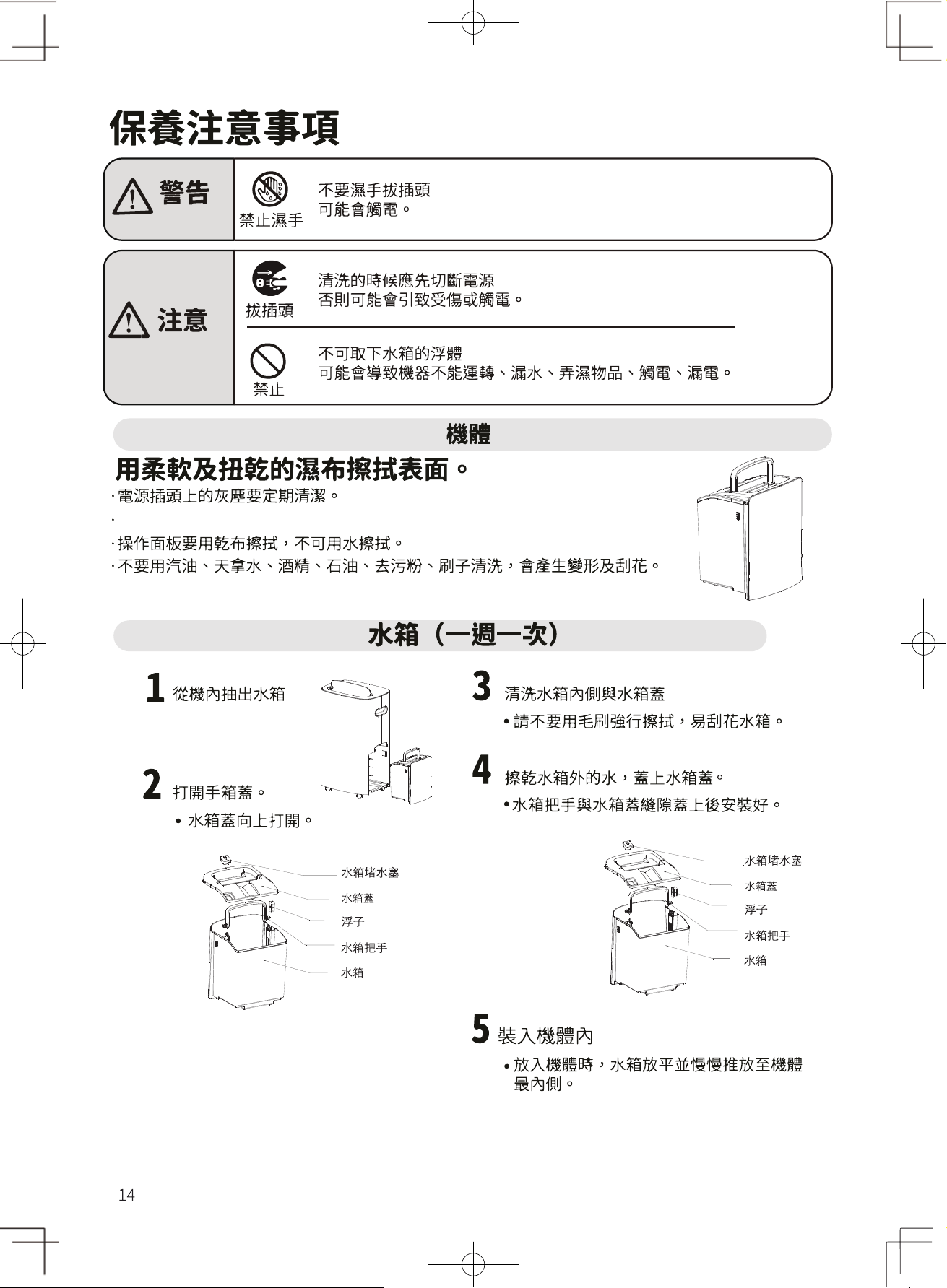
不可取下水箱的浮子
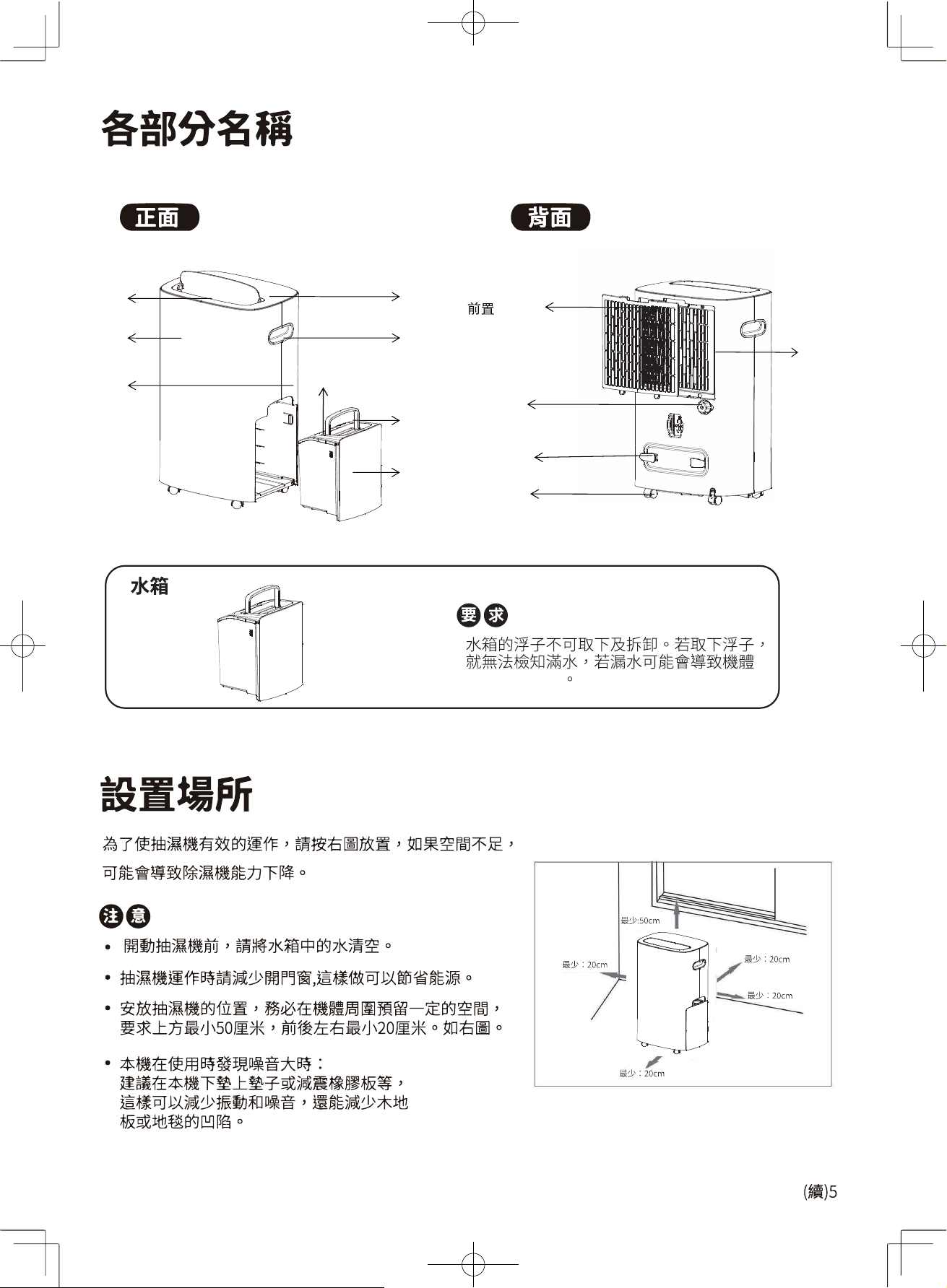
水箱
水箱把手
前面板
後面板
頂蓋
導風葉
水箱蓋
把手
繞線柱
排水口
過濾網
腳輪
三合一
多功能
過濾網
不能正常運作
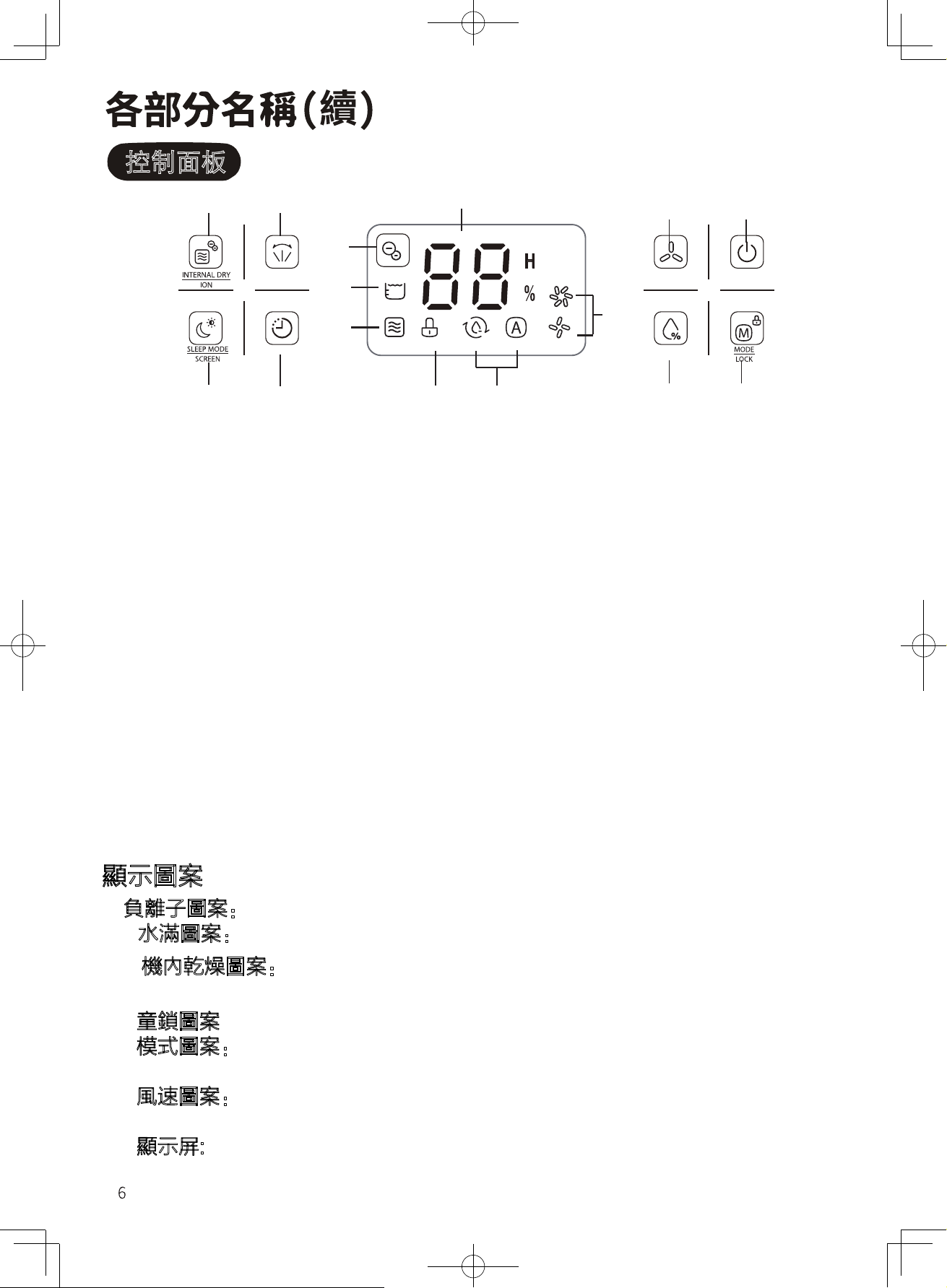
控制面板
1 2
15
5
6
9
SWING
FAN SPEED
POWER
10
14
11
TIMER
HUMIDITY
3 4
12 13
7 8
顯示圖案
9.負離子圖案:負離子功能運作指示圖案,長按負離子鍵3秒此圖案顯示;
10. 水滿圖案:水箱滿水時,顯示此圖案;
11. 機內乾燥圖案:機內乾燥功能運作指示圖案,按下正負離子鍵顯示此圖
案;
12. 童鎖圖案:童鎖功能運作指示圖案,長按模式鍵3秒顯示此圖案;
13. 模式圖案:左邊為乾衣模式圖案,選擇乾衣模式時顯示此圖案;右邊為自
動除濕模式圖案,選擇自動除濕模式時顯示此圖案;
14. 風速圖案:上方為高風速圖案,選擇高風速時顯示此圖案;下方為低風速
圖案,選擇低風速時顯示此圖案;
15. 顯示屏: 環境濕度顯示,濕度設置,以及定時狀態顯示定時時間。
按鍵功能
1.功能鍵:機體內部乾燥功能,負離子功能;
2.擺風鍵:擺風功能;
3.睡眠鍵:睡眠模式;
4.時間掣:定時設置;
5.風速鍵:調整送風速度;
6.電源鍵:開啟/關閉機器;
7.濕度調節鍵:設定濕度,30%-80%循環;
8.模式鍵:自動抽濕模式,乾衣模式;
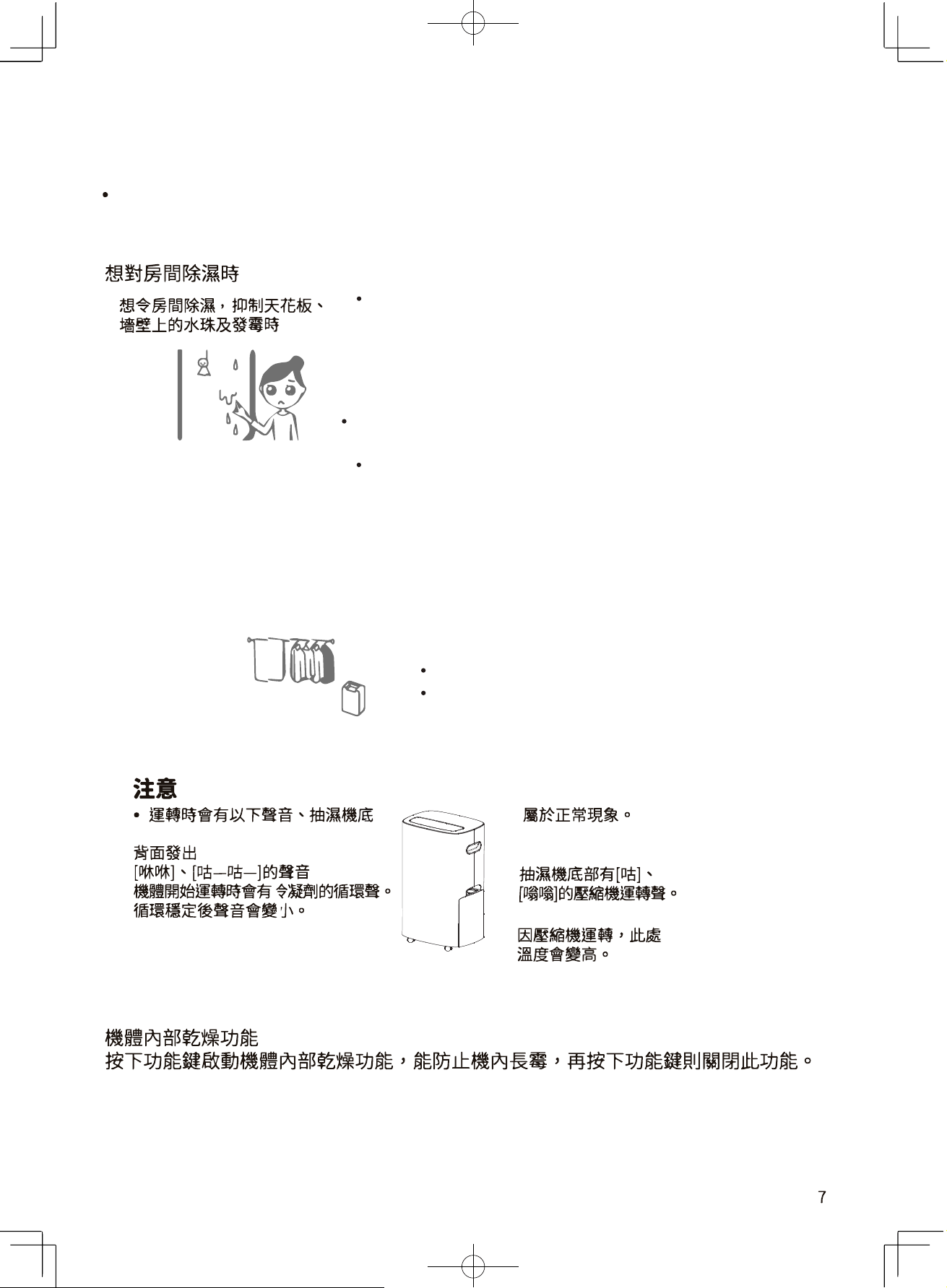
自動抽濕模式
自動抽濕,選中此頁,如果房間濕度>設定濕度+5%,則壓縮機啟動,
風機設定風速運行,如果房間濕度<設定濕度-5%,
則壓縮機停止,風扇停止運轉,如果房間濕度在設定濕度+5%到設定濕
度-5%之間,整機按原運行狀態運行,設定濕度的初始值為50%
乾衣模式
開啟乾衣模式下,不論房間裡的相對濕度如何,
壓縮機都會啟動,配合高風速運行,風速亦可調節。
功能選擇
詳細操作方式請參照11~13頁
以下情況時
連轉種類
想保持合適的濕度時
想乾燥衣物時
以暖
風進行乾燥
調教風速鍵[強]或風速鍵[弱]
請放在抽濕機的風容易吹乾衣物的地方。(9頁)
三 二
衣颗乾燥
1 正唯使用乾衣模式
·淉衣物需要等距誰握放
出厘口嗯正面封著衣服追行乾燥,才能乾得更快,衣服
之間
等距
離擺
放才
會
乾得更快。
·抽淉榄的撰放位置
定晇燮更抽潠榄及衣服位置,衣服曾乾得更快。
·根
據
不同衣服
種類變換擺
放位置
·
厚衣
服
—
雅乾,正
面
迎
厘
吹
。
·
牛仔
褲
或裙
-
易乾,
離機體較
遠吹乾。
·
薄衣服
-
易乾,遠
離機體
的地方吹。
·衣服乾燥俊要蛊快收起
潮渭季箭或下雨天氯,已乾燥的衣服需盄早收起,否削曾再次受潮。
提示
·以下情况峙,衣服比较雅乾。
·
衣服多
·
衣服
厚
·
嗯衣服的房陨大
·
衣服排放阁距小
· 房闹的溫度低
準借及榷韶
1 水箱的安装
I
水箱没有装好或满水峙,榄醴将不能湮韓。
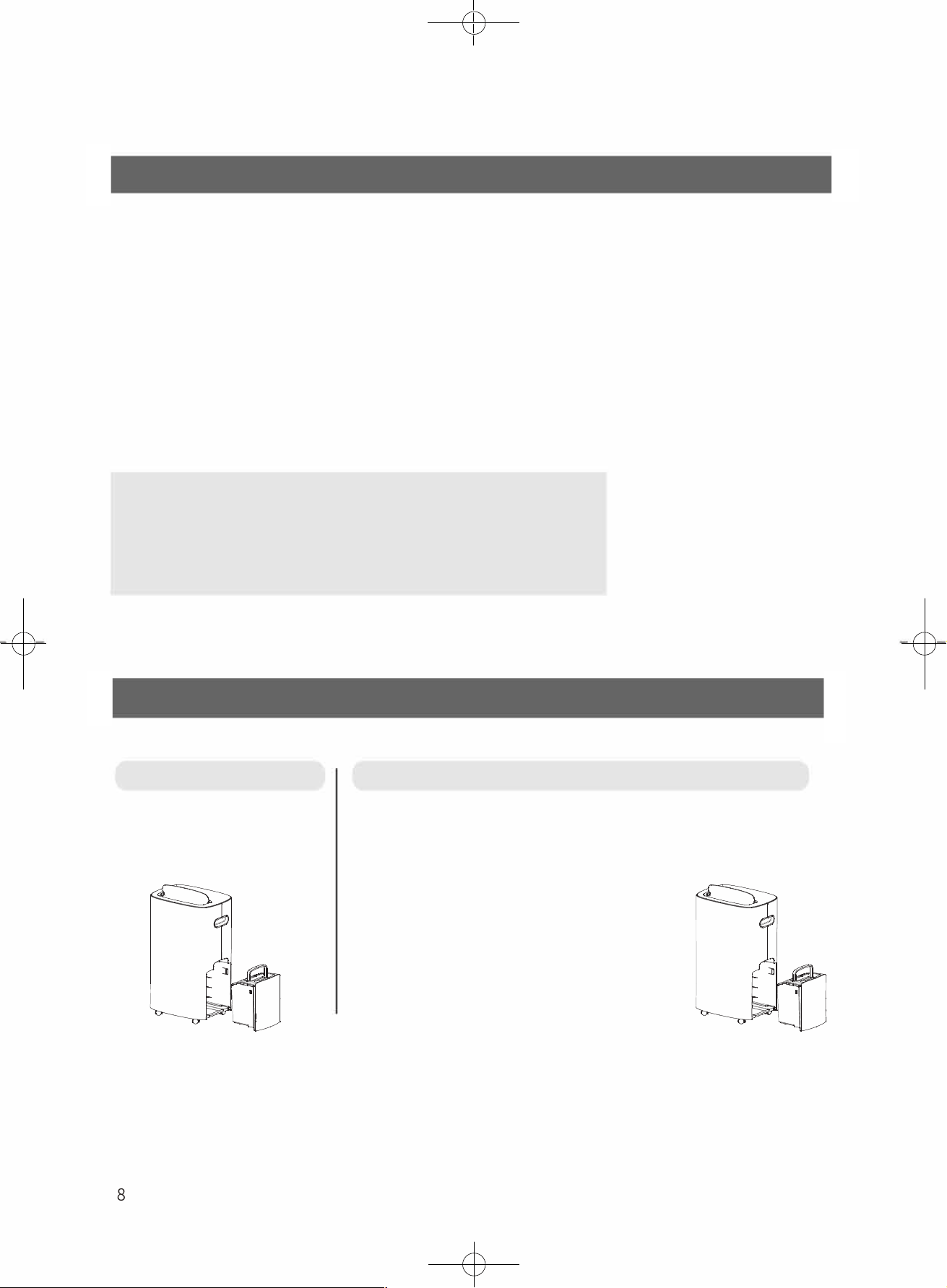
取出方法
將
手
伸進側
面水箱
上
方的
把手,
輕輕取
出水箱。
安装方法
@
將
水箱
蓋裝上
,水箱把手
旋轉
放下
@把水箱
輕輕
地放回正
確
位
置,再
重新開啟
抽
濕機
· 講把水箱把手整理好, 把
水箱轻轻地装回原位
oo
·水箱盔、水箱排水口唯蛁已装
好。否剧可能曾漏水。
·
水滿時請把水箱中的水清空。
勹 厂
8
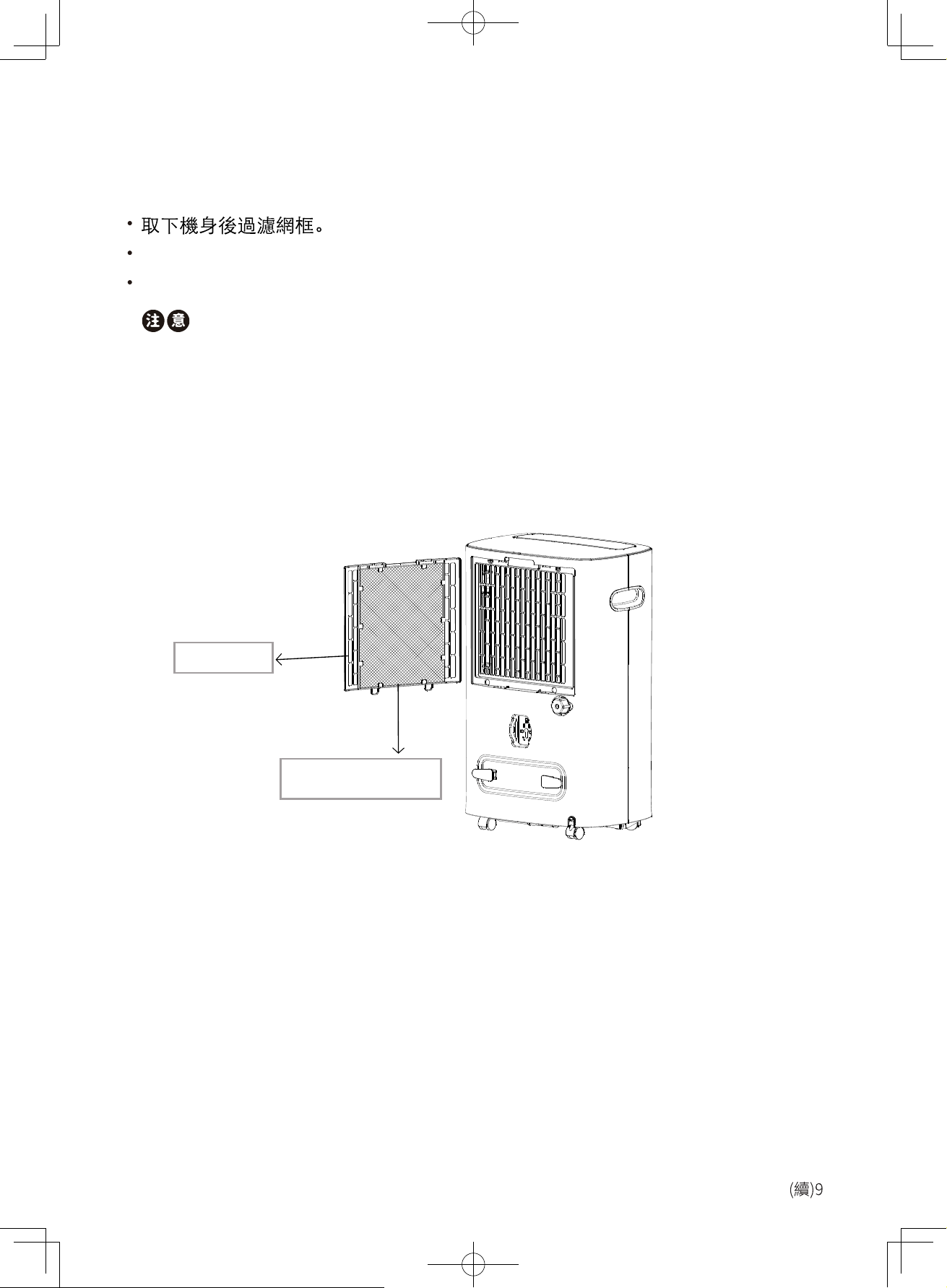
濾網安裝方法
將三合一多功能過濾網安裝於過濾網框,這樣可以淨化空氣。
將配備的三合一多功能過濾網裝入過濾網框。
將過濾網框裝回機體上。
加上濾網後抽濕性能會下降,您可在抽濕時除下三合一多功能濾網,以達致最佳
抽濕效果。
前置過濾網
三合一多功能過濾網
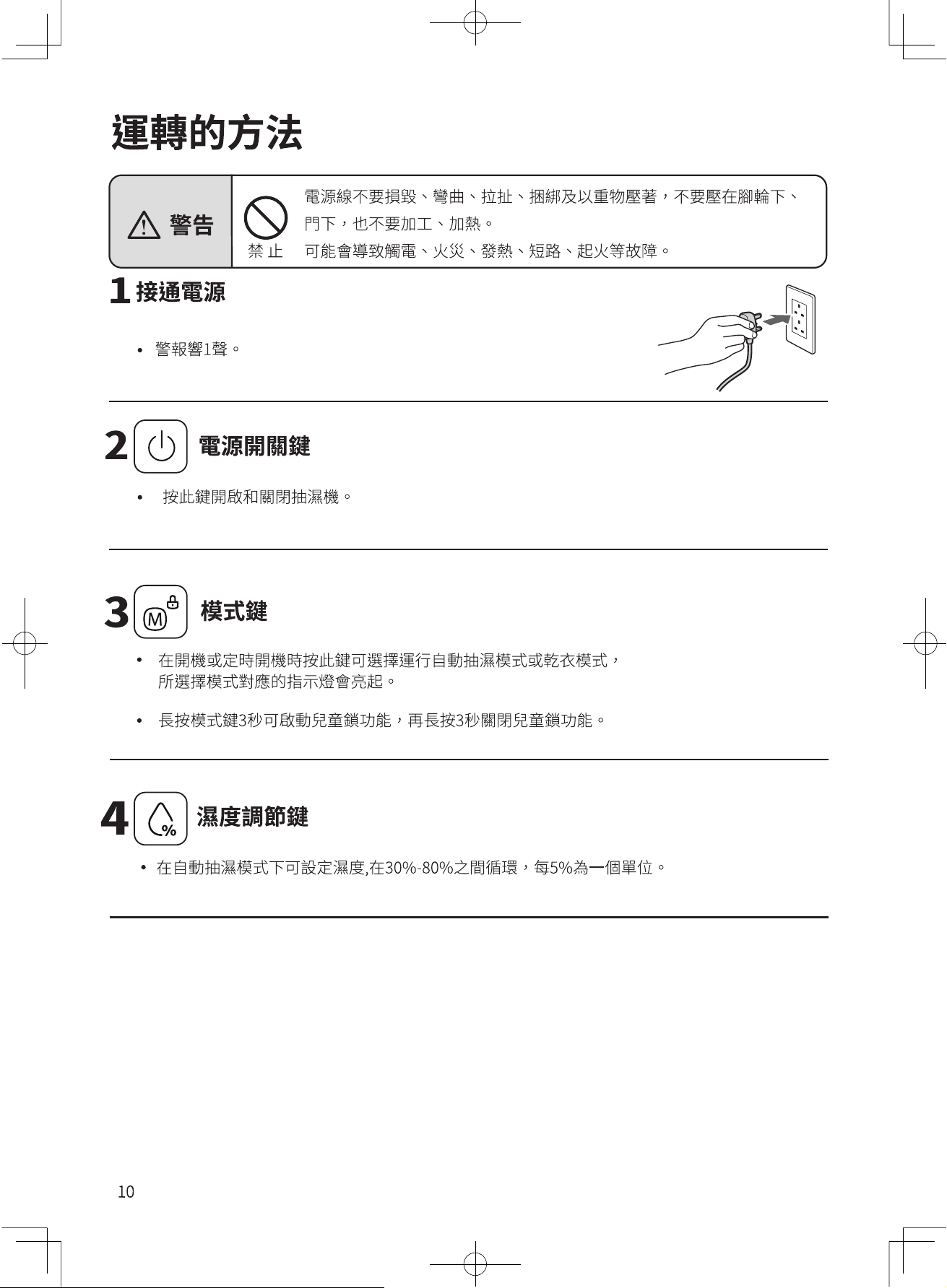
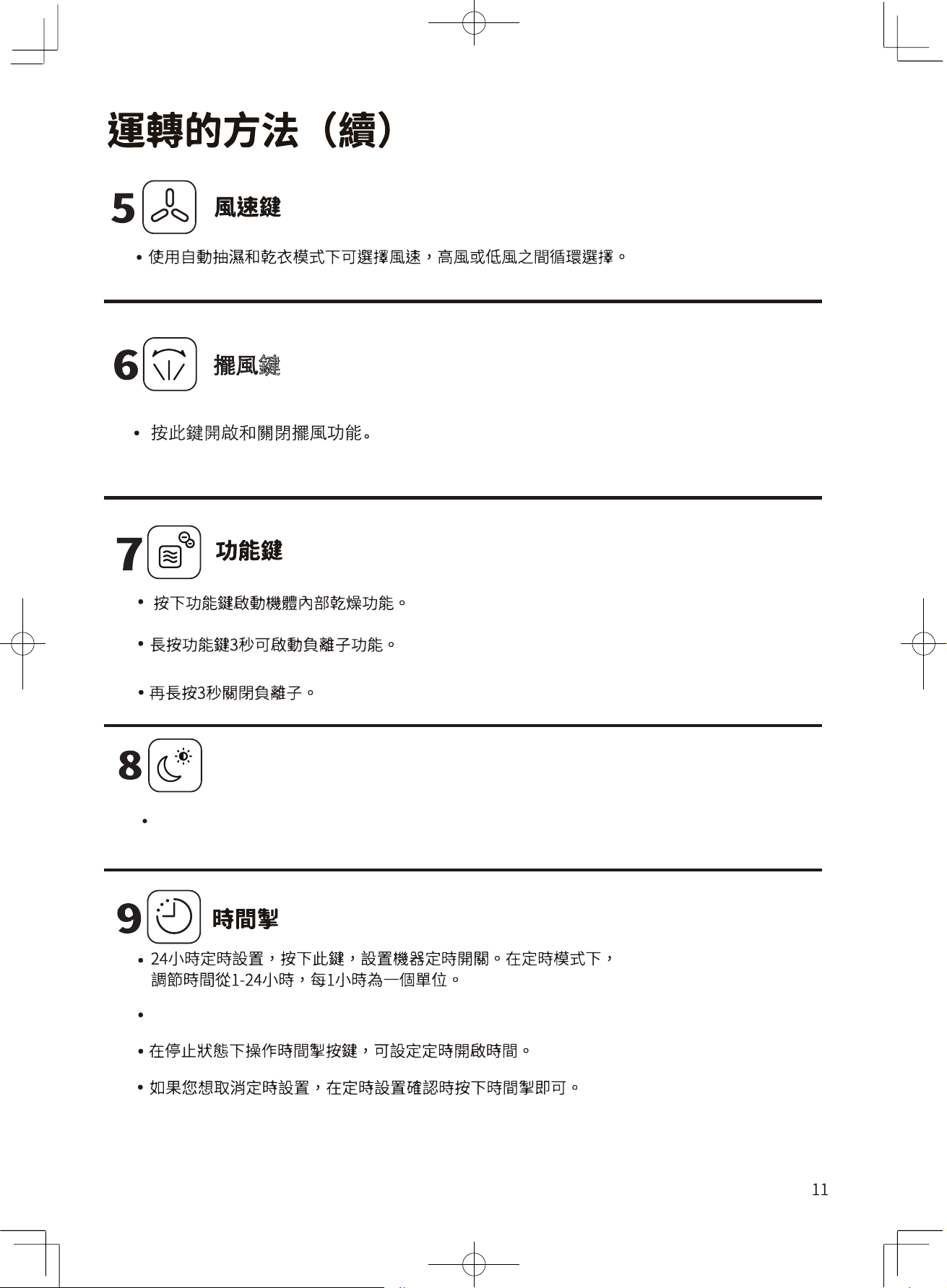
鍵
睡眠鍵
按下此鍵可開啟/關閉睡眠模式,按住為按鍵3秒可關/開啟屏顯功能。
在運轉過程操作時間掣按鍵,可設定定時關機時間。
沾在排水口周圍水可能
會滴下,請擦掉。
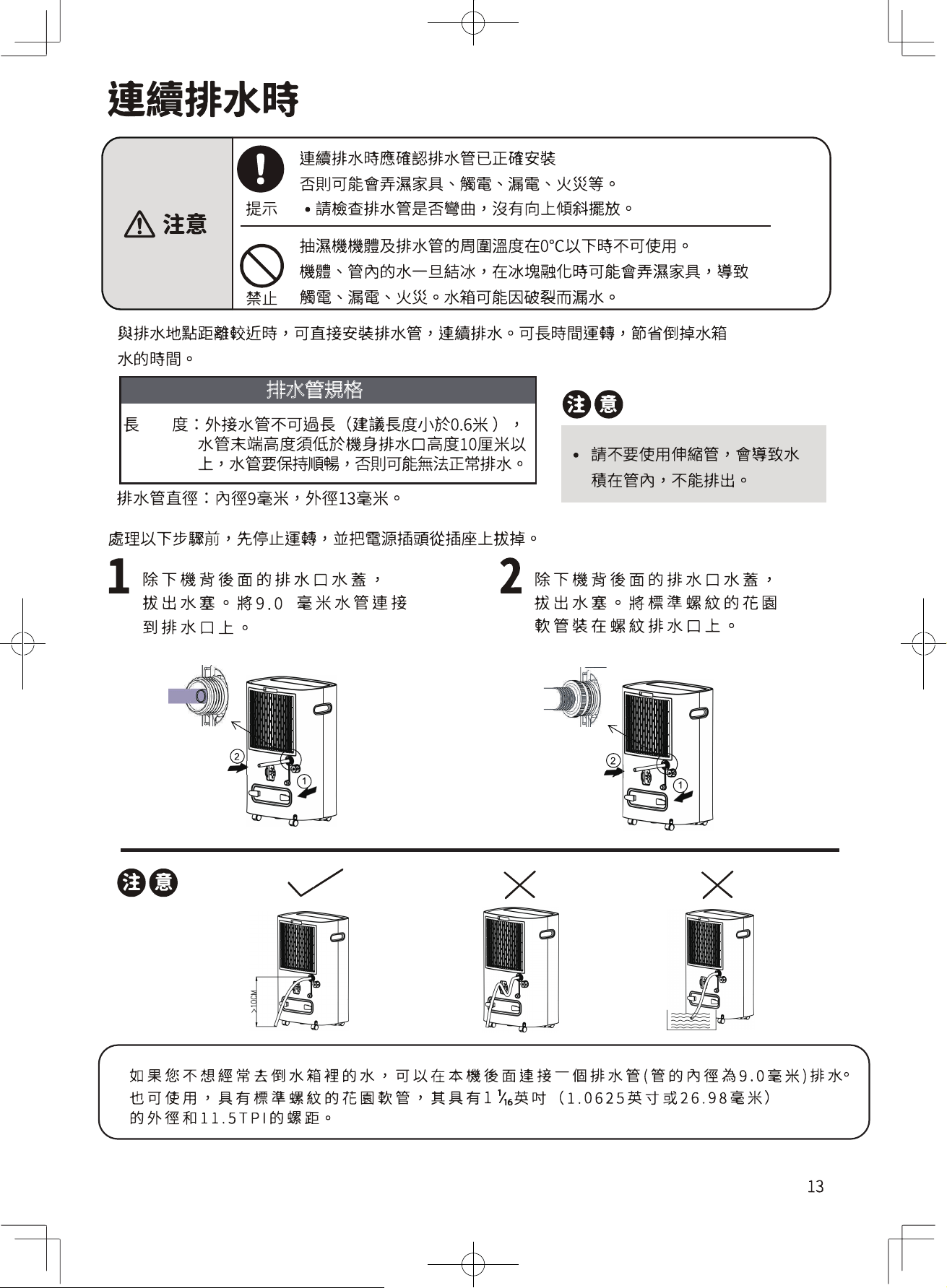
排水管規格
頑固的污垢要用中性清潔劑沾濕軟布,扭乾後擦拭。
產品型號
RAD-Y200H、RAD-
Y250H、 RAD-Y300H
過濾網
零件編號
41226233
三合一多功能過濾網(2周1次)
過濾網的髒物可用吸塵機吸乾淨
把吸塵機的吸力調低。
取下過濾網框,取出三合一多功能過濾網
三合一多功能過濾網的灰塵,用吸塵機吸乾淨,然後水
洗。
用毛巾擦乾後,放在通風的地方吹乾。
充分吹乾後在安裝。
三合一多功能過濾網禁止事項:
a、不可以用自來水以外的水清洗
b、不可揉搓濾網
c、不可以加熱乾燥
d、不要直接陽光照射乾燥
e、乾燥時候不能施加物理壓力
三合一多功能
過濾網
過濾網
室內溫度約在16℃以下時,機器內部會結霜,為了確保機器正常運行,在除濕過程中通常會
每約38分鐘進行一次除霜(每次約8分鐘),此時機器的運轉模式轉為送風運轉。
除霜過程中,數碼管會顯示“P1”。
除霜過程中,請不要拔掉插頭,及強行停止運轉。
運轉聲音
運轉及性能
除濕能力
除濕能力(除濕風量[強]運轉)
用以下方法運轉時相當於1日(24小時)的除濕量。
(室溫26.7℃、室內濕度60%、不設定濕度、擺葉全開下進行除濕風量[強]運轉)
用其他使用方法運轉和不同的擺葉閉合程度,會使除濕量變小。
室內溫度、濕度和除濕量間的關係
室內溫度不變時的除濕量
... ...濕度越高除濕量越高,濕度越低除濕量越低。
室內溫度不變時的除濕量
... ...溫度越高除濕量越高,溫度越低除濕量越低。
濕度為60%時的例子
機器在設定濕度以下,運轉模式為[設定濕度]時,
會自動停止除濕運轉,風扇停止運轉
。
此時除濕量雖會變少,但並非異常。
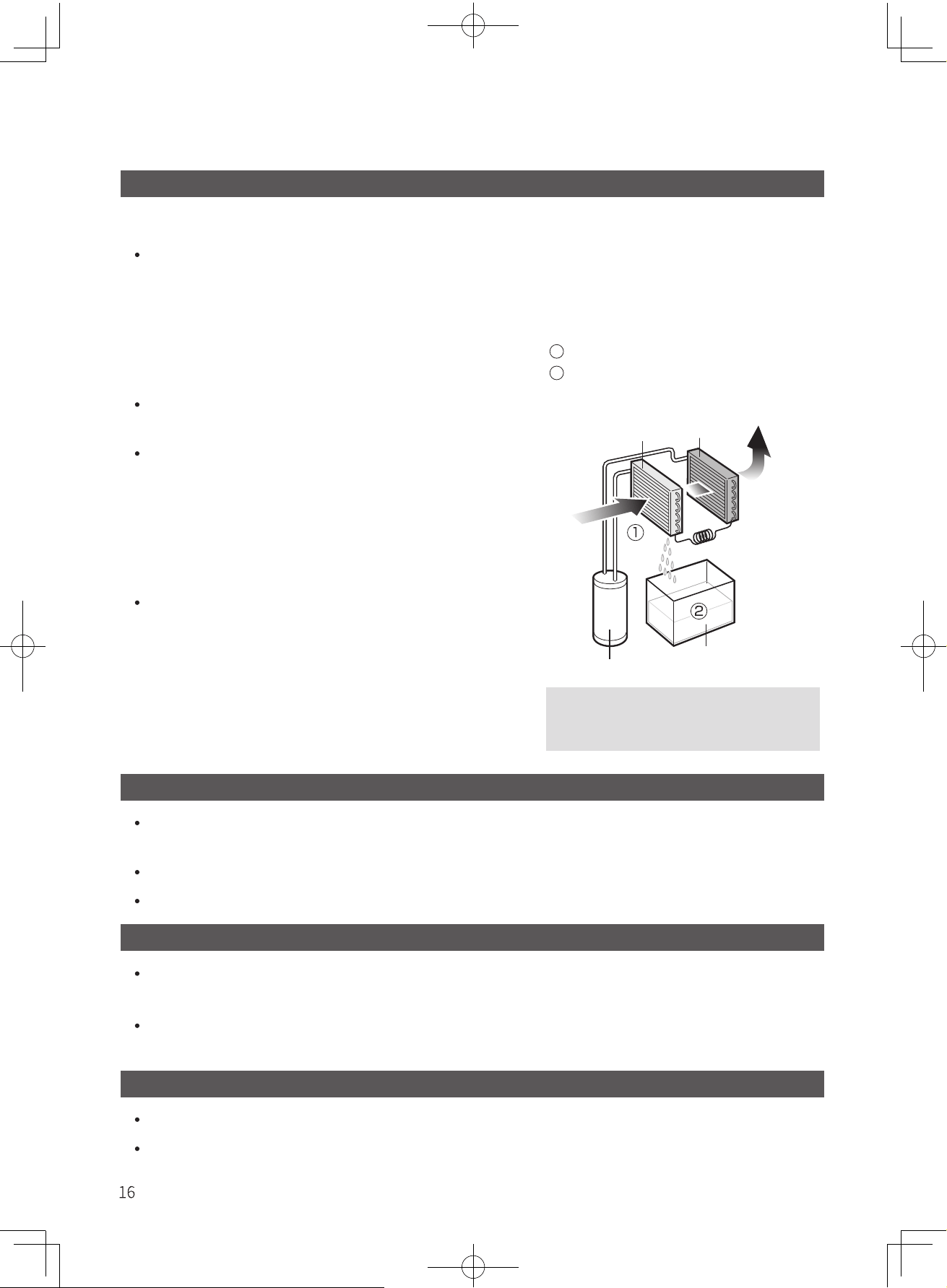
除濕原理
1
吸入空氣經過蒸發器會變冷。
2
濕空氣經過蒸發器時表面結霜,
繼而變成水滴會流到水箱衷。
乾燥的冷風
蒸發器
冷疑器
濕空氣
壓縮機
水箱
常溫空氣經過蒸發器後,水蒸氣遇
冷液化,在蒸發器表面形成水滴。
機器運行中的除霜過程
運轉中的室溫上升
抽濕機沒有製冷功能
相反會在運轉過程中產生熱能,室溫會上升約1℃~4℃。
因須關閉門窗運轉抽濕機,所以會因室內其他使用中的電器產品發熱及陽光照射等令
室內溫度上升約1℃~4℃。
除霜過程中,請不要拔掉插頭,及強行停止運轉。
運轉開始時,由於冷媒流動聲音會較大,但安定運轉時聲音會變小,這不是異常聲音。
17
18
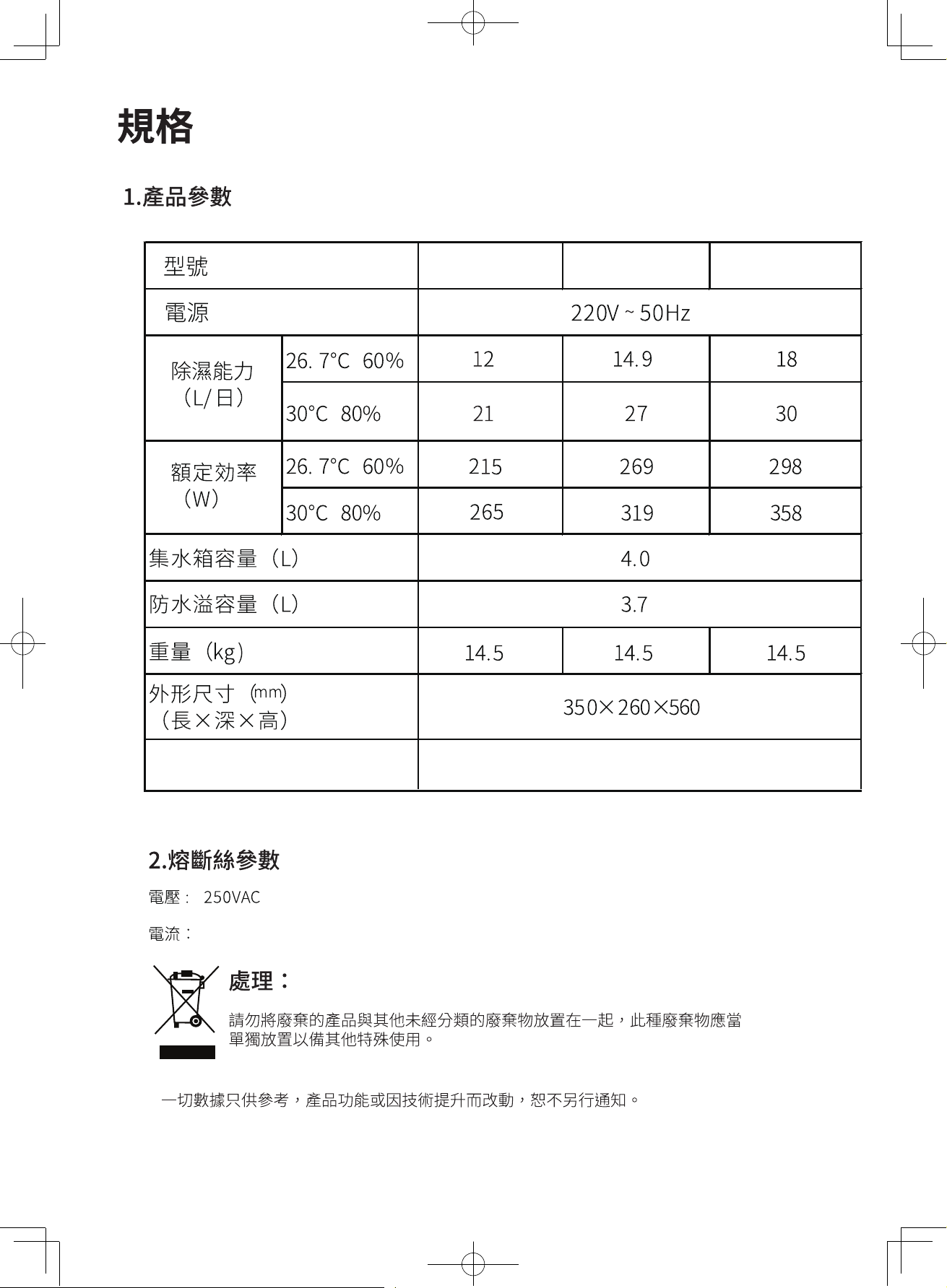
RAD-Y200H RAD-Y250H RAD-Y300H
使用溫度範圍
5℃~32℃
3.15A
*安裝三合一多功能過濾網後除濕性能會下降。
Safety Precautions
Component Parts
Function Options
Laundry Drying
Preparation and Confirmation
Filter installation method
How to Operate
Continuous Drainage
Maintenance Tips
Operation & Performance
Troubleshooting
Specifications
5~6
7
8
8
9
10~12
13
14
~15
16
17
18
Table of Contents
RAD-Y200H
RAD-Y250H
RAD-Y300H
2~4
<Family use>
Instruction Manual
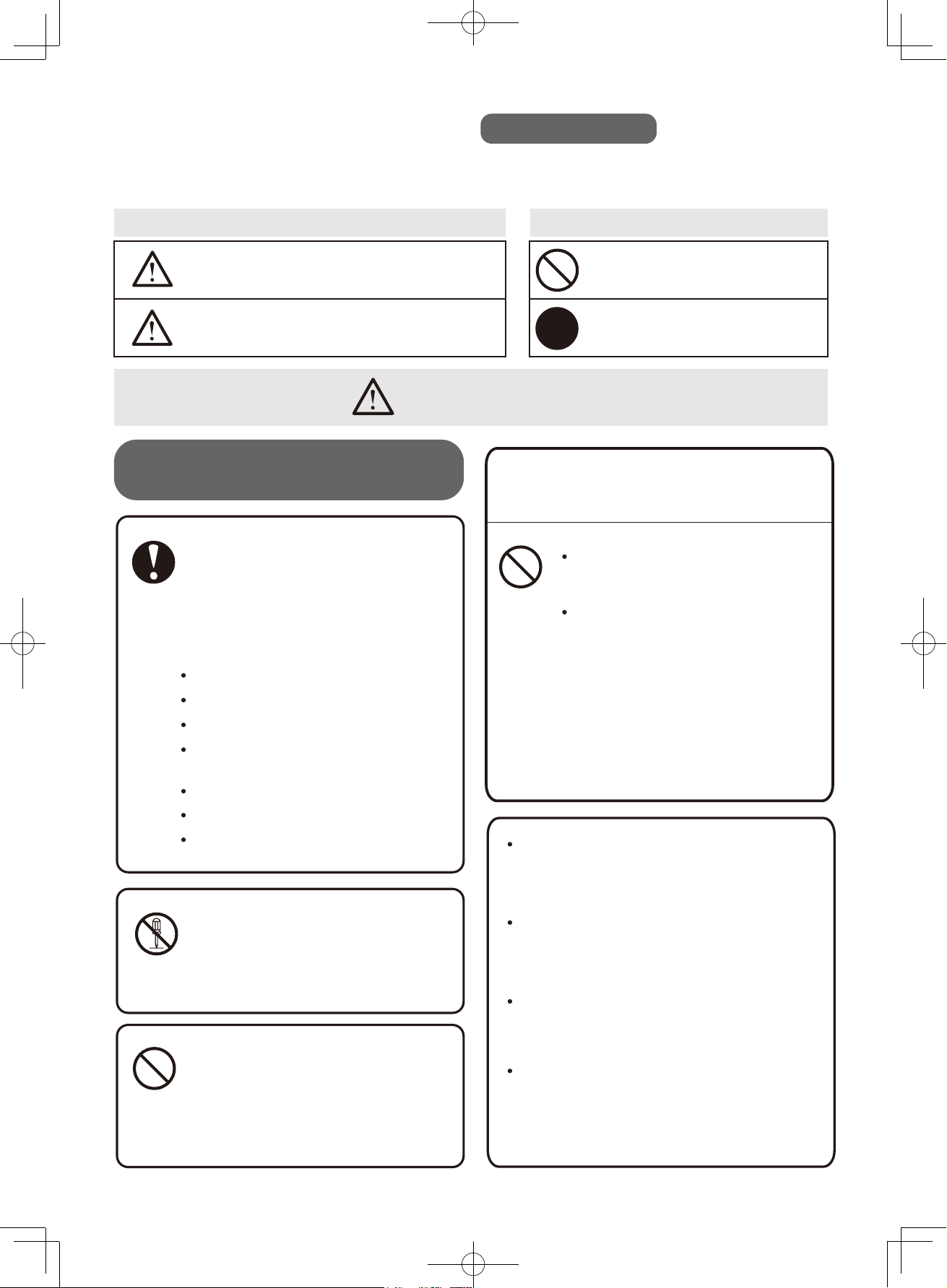
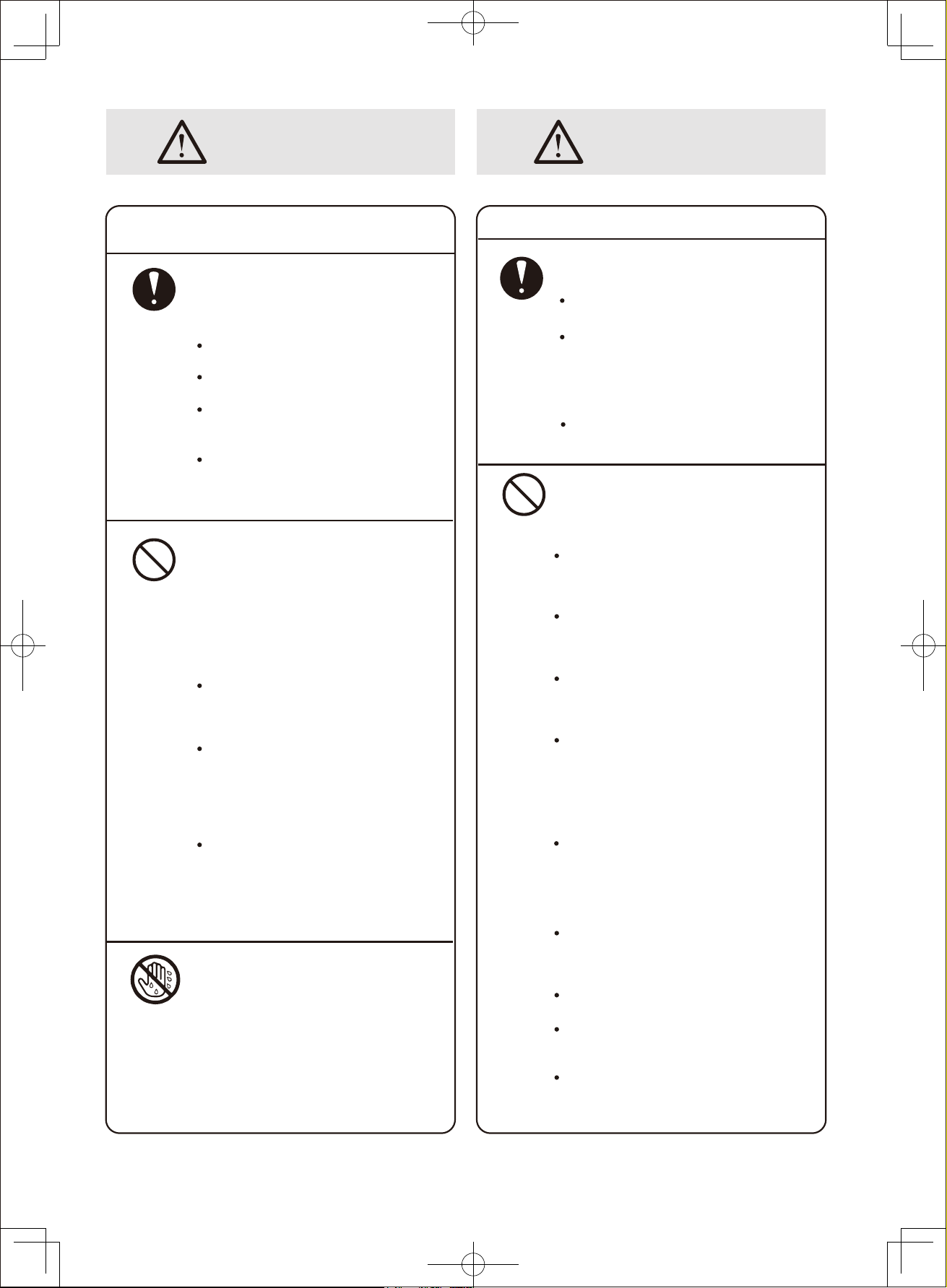
Do not damage or modify the power cord.
Power cords that are damaged, modified,
trapped under heavy objects, heated up
or stretched may cause fire or electric shock.
Do not use damaged power cord, which
may result in short circuit, fire or electric
shock. Please consult your dealer or
Toshiba Repairing Service & Parts Centre.
Do not remove the power plug by pulling
the power cord as this may damage the
power cord and cause short circuit, fire
or electric shock.
Do not move and store the Dehumidifier
by pulling the power cord as this may
cause short circuit or damage the wiring
of the power cord, and result in fire or
electric shock.
Safety Precautions
Strict observation
To prevent injury to user or others and damage to property, please carefully read and observe
the following precautions presented in signs and symbols.
Sign Symbol
WARNING
CAUTION
May result in fatal
or severe injury.
May result in minor
injuries or property damage.
Prohibited
Strict Observation
To prevent fire,
electric shock or injury
Stop using the Dehumidifier immediately if
abnormality or malfunction takes place.
Abnormal operation of the Dehumidifier
may result in fire, electric shock or injury that
the Unit should be switched off and unplugged
immediately, then contact Toshiba Repairing
Service & Parts Centre for check up and
repair. Examples of abnormality
Short circuit
Foreign objects or liquid inserted
Water leaks from the Unit
Power cord and plug overheated
or power cord damaged
Unusual loud operating noise
Function keys not working
Burning smells from normal operation
Operating Instruction
Do not place or apply spray near the
Dehumidifier, which may cause fire
or explosion.
Do not insert any foreign objects into
the swing Louver, Air Intake or Air
Outlet, which may result in injury
when the internal fan is running at
high speed.
Do not disassemble, repair or modify
the Dehumidifier as this may cause
fire, electric shock or injury.
Please contact Toshiba Repairing
Service & Parts Centre for repair.
Do not put the Dehumidifier near
heat-generating devices, such as
heater, as they may melt the plastic
parts of the Unit that causes fire.
Strict
Observation
Prohibited
Prohibited
Prohibited
2
WARNING
Power supply, power plug,
and power cord
Set up environment
Strict
Observation
Strict
Observation
The following rules must be
strictly observed, or it may
cause electric shock and fire.
Exclusively use 220V AC power sockets
Do not use an extension cord
Ensure that the plug is fully
inserted into the socket
Dust off and clean the power
plug regularly
Do not operate the Dehumidifier
in the following abnormal situations
It may result in electric shock, fire,
heat generation, short circuit,ignition,
and malfunction etc.
Do
not operate the Unit with damaged
power plug or power cord and loose
power socket.
Do not damage, bend, stretch, twist,
press, modify, and heat up the power
cord, or get it caught under the
Casters or doors.
Do not disconnect the power supply
until the unit comes to a complete
stop. Do not drag the power cord
when the unit is operating.
Place and use the Dehumidifier on a stable
and leveled surface with a slope less than 2°.
An unleveled surface will cause excess operating
noise or vibration, or leave the Unit in a tilted
position that the water in the tank may overflow
and wet the floor and surrounding objects, which
in turn result in electric shock, electric leakage
and fire.
Do not place any objects on or close to the
Dehumidifier, it may result in heat generation,fire
and malfunction.
Do not operate the Dehumidifier
in the following abnormal
situations
Prohibited
Do not plug in or unplug the
Dehumidifier with wet hand.
Doing so could result in electric
shock.
No Wet Hand
A place where it is likely to come into contact with
water such as bathroom. This could cause electric
shock, electric leakage and fire.
Where the unit may be subject to oil or flammable
gas leakage. The flammable gas around the
Dehumidifier could cause fire or explosion.
Elevated position such as on a table, as the
Dehumidifier may drop and cause damage
to the Unit.
Where the ambient temperature of the Dehumidifier
and drain hose is below freezing point. Water
inside the drain hose may freeze, that maywet the
surrounding objects when it thaws, and result in
electric shock, electric leakage or fire.
The Water Tank may consequently break and leak.
Where drugs and chemicals are used, such as
hospital, factory, laboratory and beauty salon.
Chemicals in the air may affect the performance
of the Unit, cause leakage, heat generation,
ignition and fire.
Outdoor location where the Dehumidifier is
exposed to direct sunlight or rain that may result
in leakage, heat generation, ignition and fire.
This Dehumidifier is for indoor use only.
Where space is narrow and enclosed that may
cause heat generation or fire.
Do not use combustion appliances
in the path of the airflow of the Dehumidifier,
as this may cause incomplete combustion.
Prohibited
Do not install the Dehumidifier
in the following setting
(Cont.)3
WARNING CAUTION
Safety Precautions (Cont.)
Unplugging
Unplugging
Maintenance
Power plug and power cord Operating the Dehumidifier
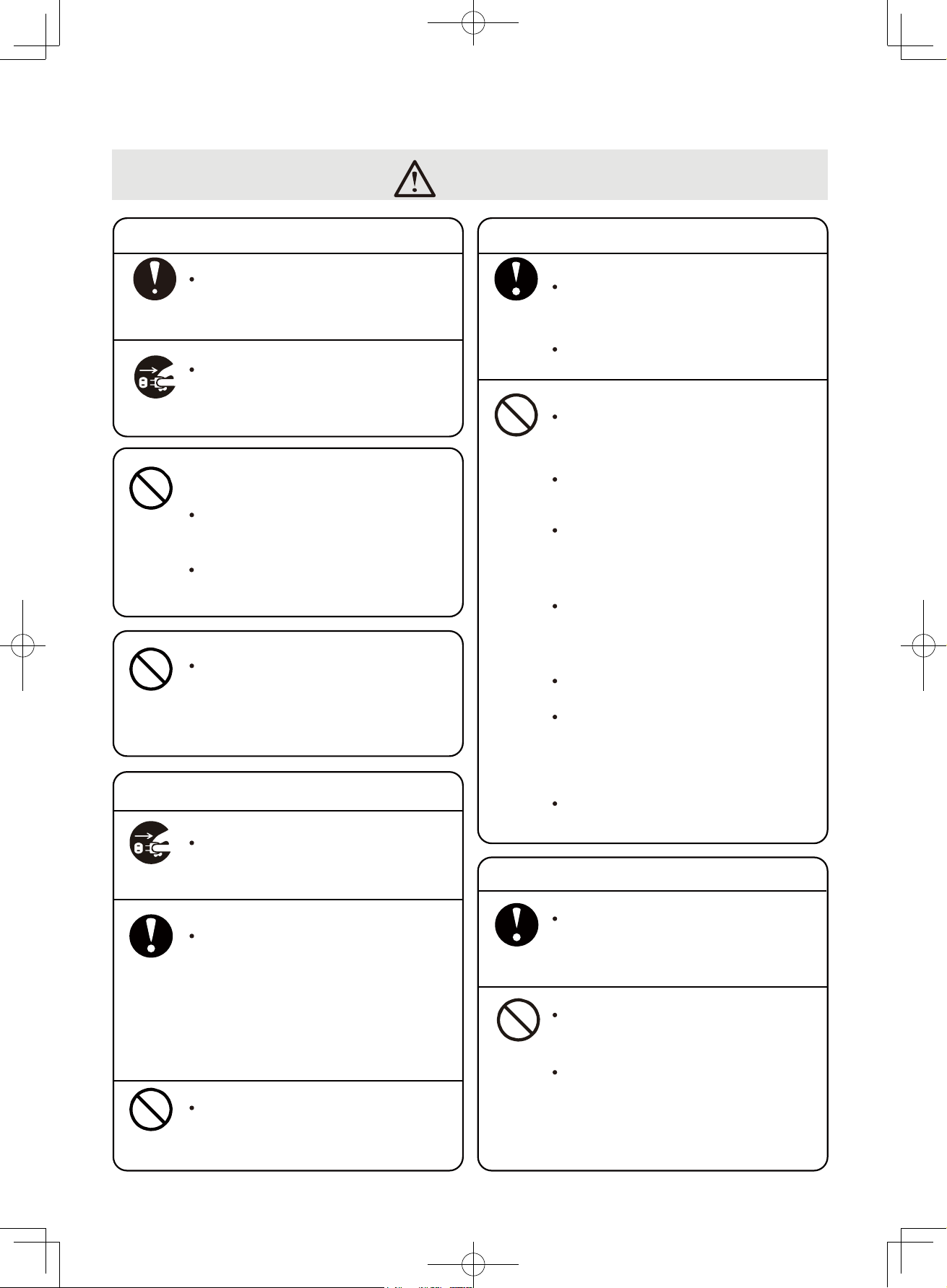
Do not remove the power plug by pulling the
power cord, but by grabbing hold of the plug,
as mishandling may cause result in fire caused
by electric shock and short circuit.
Strict
Observation
Strict
Observation
Strict
Observation
Strict
Observation
Food, pharmaceuticals, artworks, data storage,
and special purpose. Doing so may deteriorate
the quality of the items stored.
Water from the Dehumidifier is not
suitable for human or animal
consumption as it is hazardous to health.
Do not use the Unit for
the following purposes
This Dehumidifier should be kept away from infant,
children, elderly person or anyone who cannot
operate the Unit independently.
Pointing airflow from the Unit directly at a body for
a prolonged period of time may be harmful to
health and cause dehydration.
Unplug only after the unit comes to a complete stop.
Otherwise, the plug may be damaged and
cause electric shock.
After running the Dehumidifier for a long period
of time, Air Intake and Drainage Hose should be
taken down to clean regularly.
Otherwise, overheating or leakage may occur.
Please check for leakage underneath the Unit after
using the Unit in the same spot for a long period
of time.
Leakage will wet the floor and ruin
surrounding items.
Do not wash the Dehumidifier with water
This may cause electric leakage and electric shock.
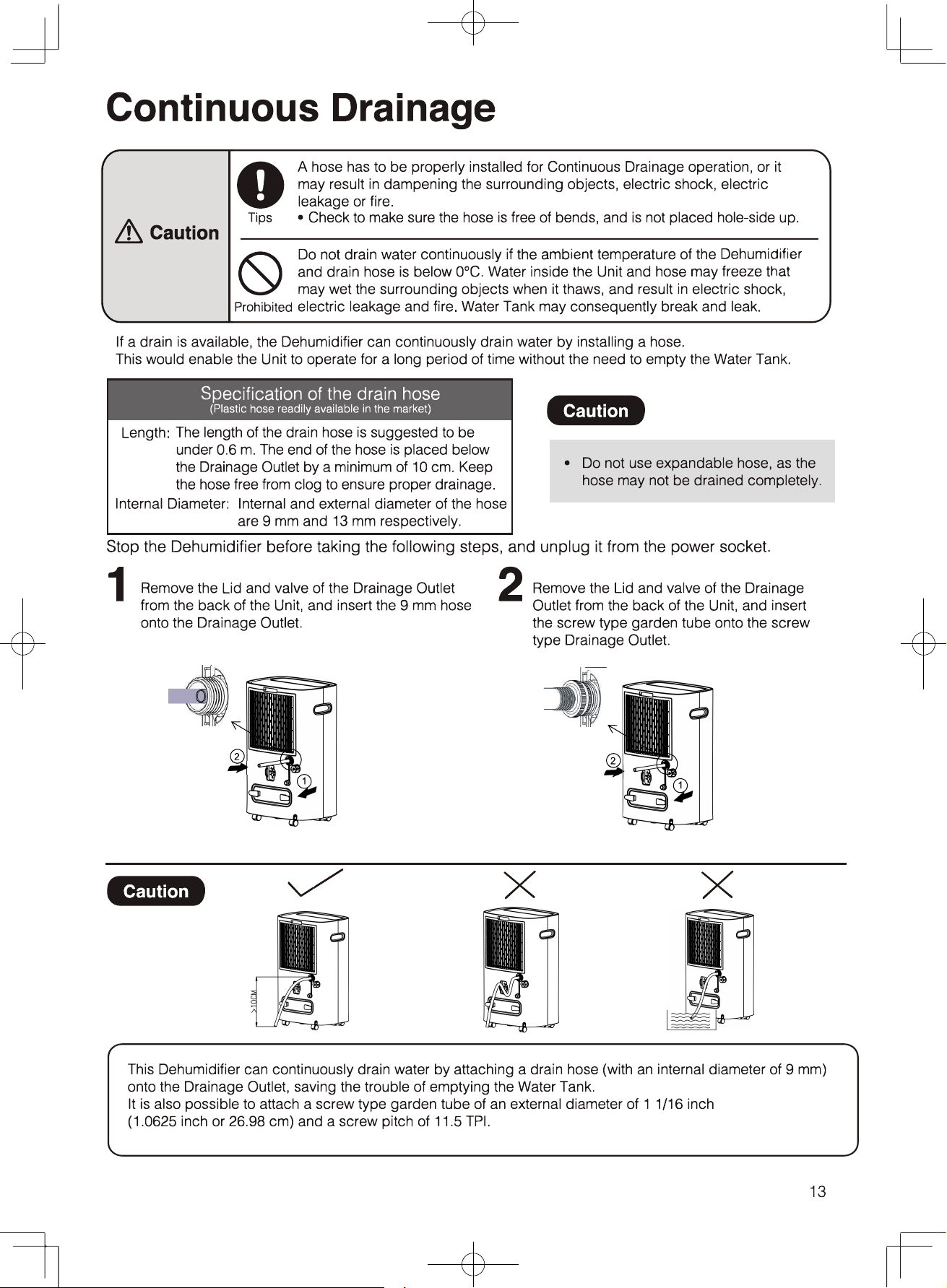
Check the Drainage Hose during the Continuous
Drainage Operation. Wetting furniture may result in
electric shock, electric leakage, and fire.
Check to ensure the drain hose is free of bent and
properly inserted.
Do not put objects filled with water, such as vase,
on the Unit.This may cause electric shock,
electric leakage and fire.
Do not tilt or drop the Dehumidifier or it may result
in damage, leakage, electric shock and malfunction.
Do not remove the Float from the Water Tank.
This may cause intermittent operation of the Unit,
leakage that wet the surrounding items,
electric shock and electric leakage.
Do not block the Air Intake and Air Outlet.
Do not cover the Air Intake and Outlet with laundry.
This may cause heat generation, fire, and damage
to the clothing.
Do not point the airflow directly at plants.
Do not use pesticide spray or volatile thinner
to wipe the body of the Unit.
This may cause damage to the Unit
and leakage that wet the property,
or short circuit that result in fire or electric shock.
Before moving the unit, always switch it off,
unplug and remove water from the Water Tank,
and firmly hold the Handle to lift it.
Mishandling may wet the surroundingitems,
electric shock, electric leakage and fire.
Moving the Unit and Storage
Stop pushing forward if the Casters are unable
to roll smoothly.This may cause damage to the
flooring or carpet.
Do not move or store the unit in horizontal position
This may cause damage, electric leakage,
electric shock, malfunction and abnormal noises.
4
Prohibited
Prohibited
Prohibited
Prohibited
Prohibited
Please do not sit or climb on top of the machine,
it may Injury caused by slipping or falling.
CAUTION
Unplug the Unit from the power source when not
using it for an extended period of time. Insufficient
insulation may cause electric shock, electric
leakage and fire.
二
二
Component Parts
G 匠
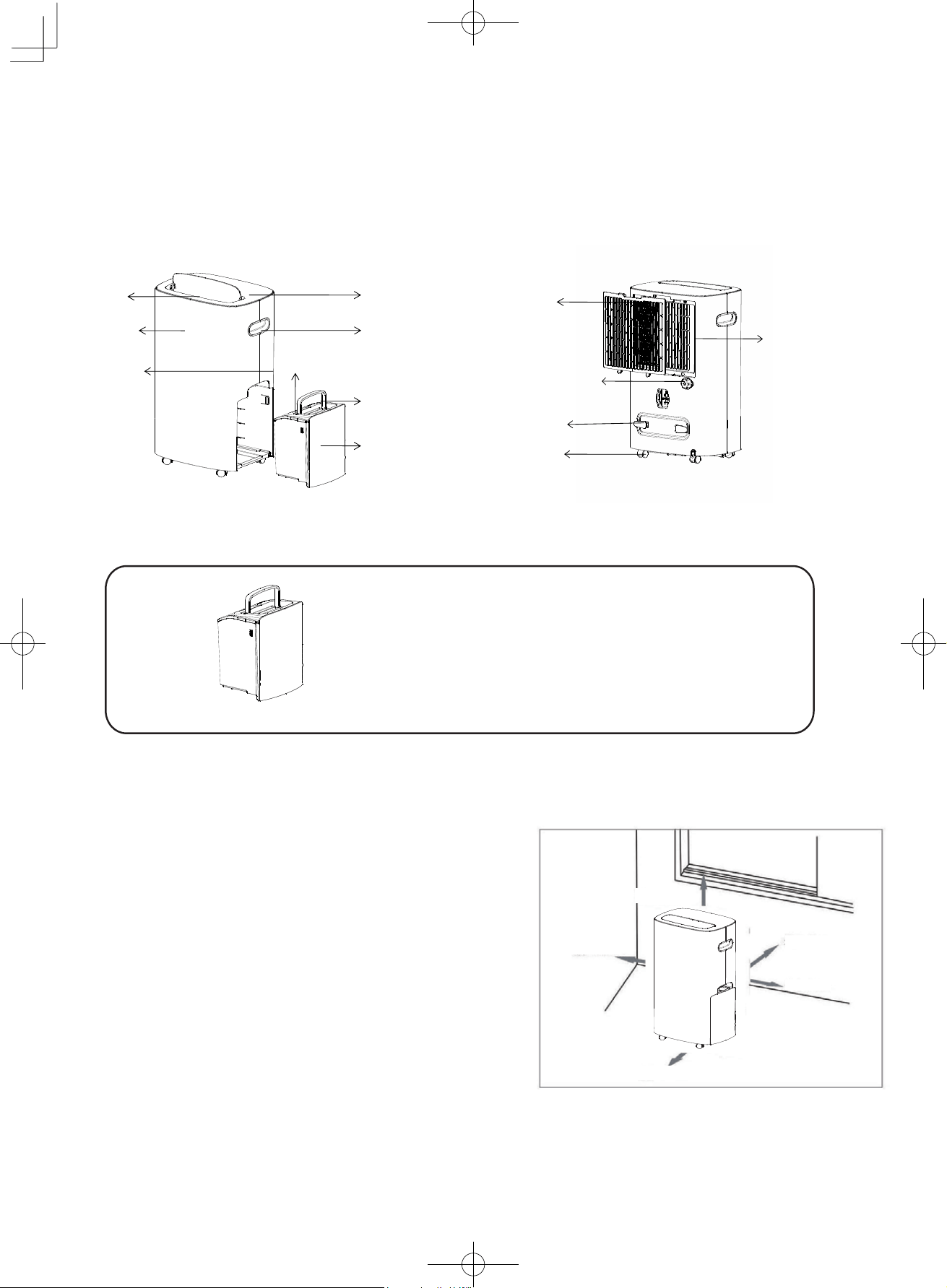
Water
Tank
Do not remove the Float from the Water Tank, or
otherwise the Dehumidifier cannot detect the
water level that may cause leakage and
malfunction.
Installation setting
Keep enough space around the Dehumidifier to ensure effective
operation. Please place the Unit according to the specifications
shown in the diagram to the right. Insufficient space may
impact on the performance of the Dehumidifier
_
•
Drain the Water Tank before use
•
Minimise the frequency of opening and closing doors
and windows to save energy.
•
Keep enough space around the Dehumidifier.
Allow at least 50cm of air space above the Unit and
at least 20 cm on four sides, as shown in the diagram.
•
Operating noise: It is recommended to place the
Dehumidifier on top of a mat or rubber slab to reduce
vibration and noise, which may also prevent creating
carpet depression or dents on wood flooring
(Cont.)5
勹 厂
Water Tank
Water Tank
Handle
Front Panel
Back Panel
Top Cover
Louver
Handle
Cord Tie
Drainage Outlet
Pre-filter
Caster
3-in-1 Multi
function filter
At least:20cm
A
t
least:20cm
At least:20cm
At least:20cm
A
t
least:50cm
Water Tank Cover
Component Parts (Cont.)
Control panel
6
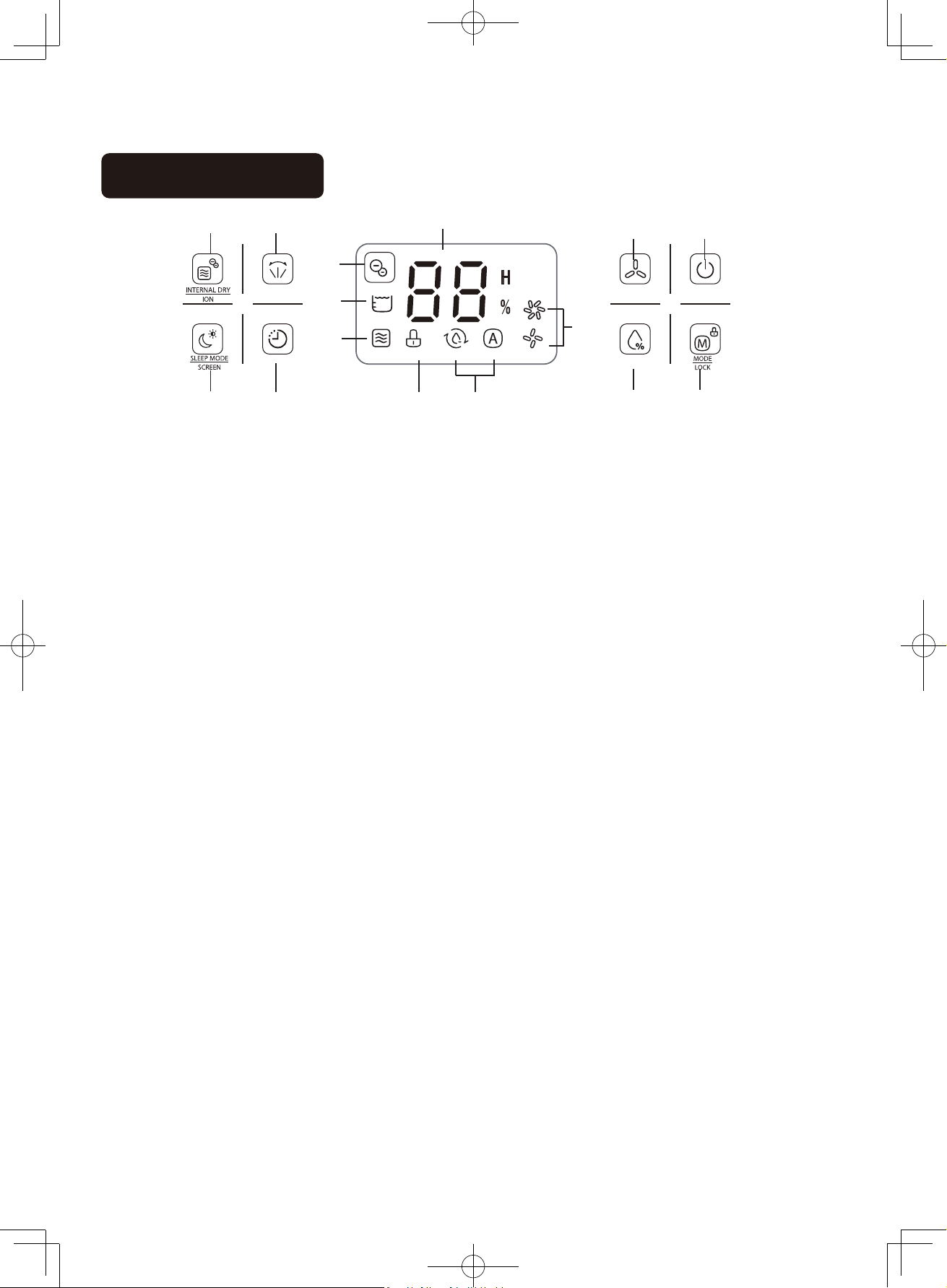
1 2
Key Function
1. Functional Key: Internal drying function of the body;Negative ion function;
2. Swing key: Swing function of louver;
3. Sleep key: Sleep key: Sleep mode;
4. Timer key: Timing setup;
5. Fan speed key: Fan speed adjustment;
6. Power key: Turn on/off the machine;
7. Humidity adjustment key: Humidity set between 30% and 80% in circle;
8. Mode key: Dehumidifying and dry cloth function.
Display icon
9. Negative ion icon: the icon indicate for the operation of anion function, long press the negative ion button
for 3 seconds, the icon will display.
10. Full water tank icon: this icon will be displayed when the water tank is full.
11. Drying icon inside the machine: this icon indicating the operation of drying function inside the machine,
press the negative ion key to activate the function.
12. Child lock icon: this icon indicating the on/off of child lock function, long press the mode button for 3
seconds to display the icon;
13. Mode icon: these icons are indicate the operating mode correspondingly, the left icon is the laundry
mode icon; the right icon is the auto mode icon
14. Fan speed icon: these icons indicate the operating fan speed; the upper icon is the high fan speed
option; the lower icon is the low fan speed option;
15. Digital display: indicating the ambient humidity of standby and operating status respectively; setting the
humidity level in auto mode; timer setting in timing mode.
15
5
6
9
SWING
FAN SPEED
POWER
10
14
11
TIMER
HUMIDITY
3 4
12 13
7 8
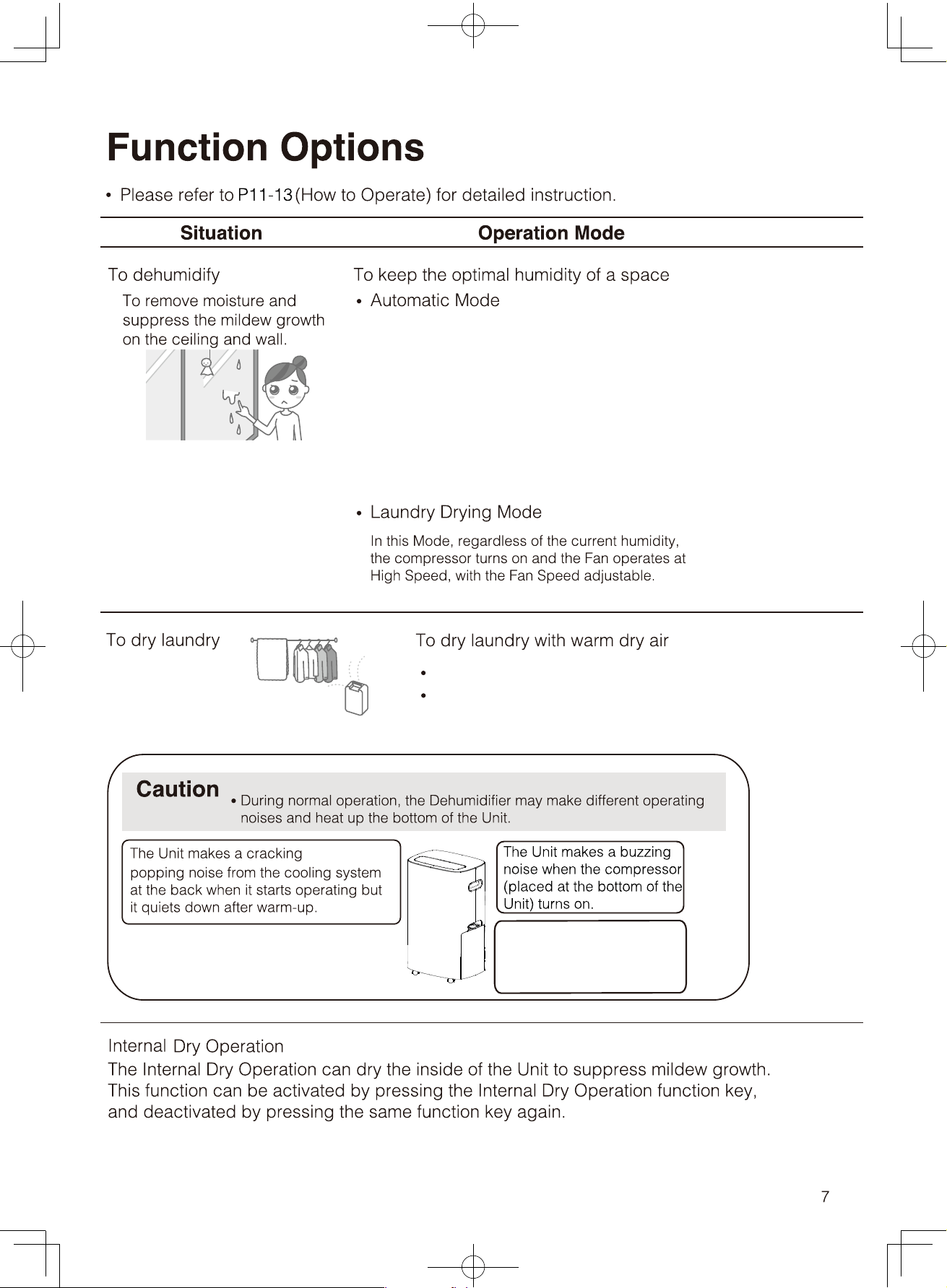
The bottom part of the
Unit heats up as a result
of the operation of the
compressor.
In this Mode, the Unit operates intermittently. When
the current humidity is higher than the preset humidity
level by 5%, the compressor turns on and the Fan starts
operating with the preset Fan Speed. When the current
humidity is lower than the preset humidity level by 5%, the
compressor stops operating, the fan stops running. When
the current humidity is within the +-5% range of the preset
humidity level, the Unit operates at the default operation
mode with the humidity level preset at 50%.
Select high or low fan speed.
Place the laundry at the spot where the warm dry air can
reach to.
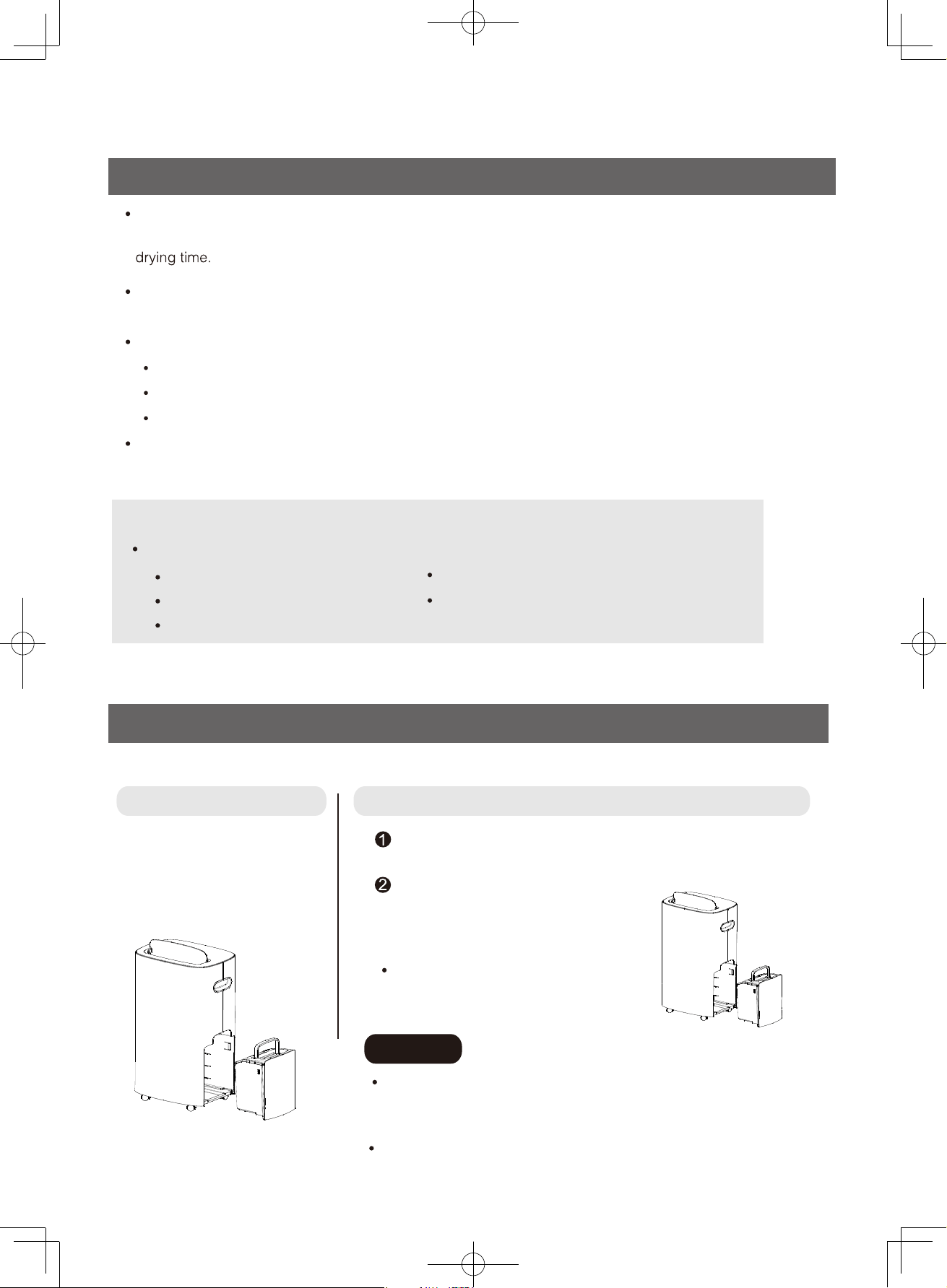
Drying Laundry
Proper use of the Laundry Drying Mode
Hang and space the laundry evenly
Pointing airflow from the Unit directly at the laundry and spacing the laundry evenly could shorten the laundry
Position of the Dehumidifier
Shifting the position of the Dehumidifier and the laundry to shorten the drying time.
Sort the laundry according to fabric type and thickness and position the laundry accordingly.
Heavyweight clothing takes a long time to dry so it should face the Air Outlet directly.
Denim jeans and dress takes a short time to dry that it could be placed further away from the Unit.
Lightweight clothing takes a short time to dry that it could be placed further away from the Unit.
Take down the laundry as soon as it is dry
On humid or rainy days, laundry should be taken down as soon as it is dry, or otherwise it will absorb
moisture from the air.
Tips
The drying time will be longer in the following situations:
Insufficient space between the laundry
Preparation and Confirmation
Water Tank Insertion
The Unit cannot operate if the Water Tank is not properly inserted or when it is full of water.
Taking out the Tank
Put your hand into the clasp
above the side tank, and
gently remove the tank.
Inserting the Tank
Put the water tank cover on,and rotate the water tank handle down.
Gently put the water tank
back to the correct position,
and then restart the
dehumidifier
Caution
Confirm that the water tank cover and water tank drain are
installed, otherwise water may leak.
8
The laundry is in high volume
The laundry is heavy weight cloth
The room for drying laundry is big
The room temperature is low
Please tidy the handle of the water tank
and gently put the water tank back in
place.
When the water tank is full, please empty the water in the tank.
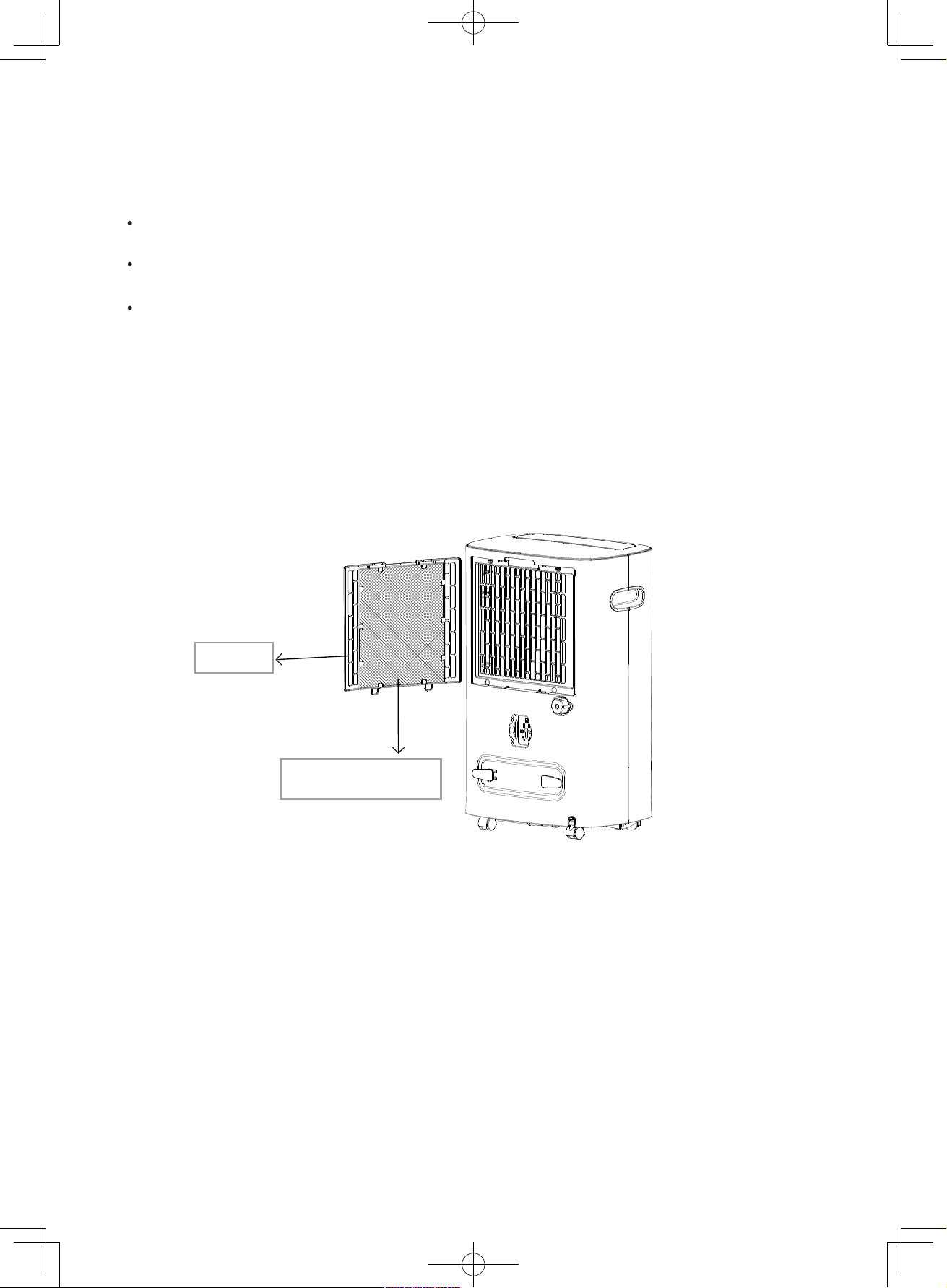
Pre-filter
3-in-1 Multi function
filter
Filter installation method
Install the 3-in-1 Multi function filter onto the filter frame, so that the intake air can be
purified.
(Cont.)9
Remove the filter frame behind the fuselage.
Install the 3-in-1 Multi function filter into the filter frame.
Put the filter frame back into the machine.
Note: The dehumidification performance will be decreased after adding the filter. You can remove
the 3-in-1 Multi function filter during dehumidification to achieve the best dehumidification result.
J
丿
How to Operate (Dehumidification and Internal Dry Operation)
h
p
e
o
a
w
$fs
an
g
n
0
亿\言昙?
r
t
[
e
en
;as
s
骂;c震。言骂霄a\言u
p
It may result in electric shock, fire, heat generation, short circuit and ig nition
Proh心ted
Pl
u
g In
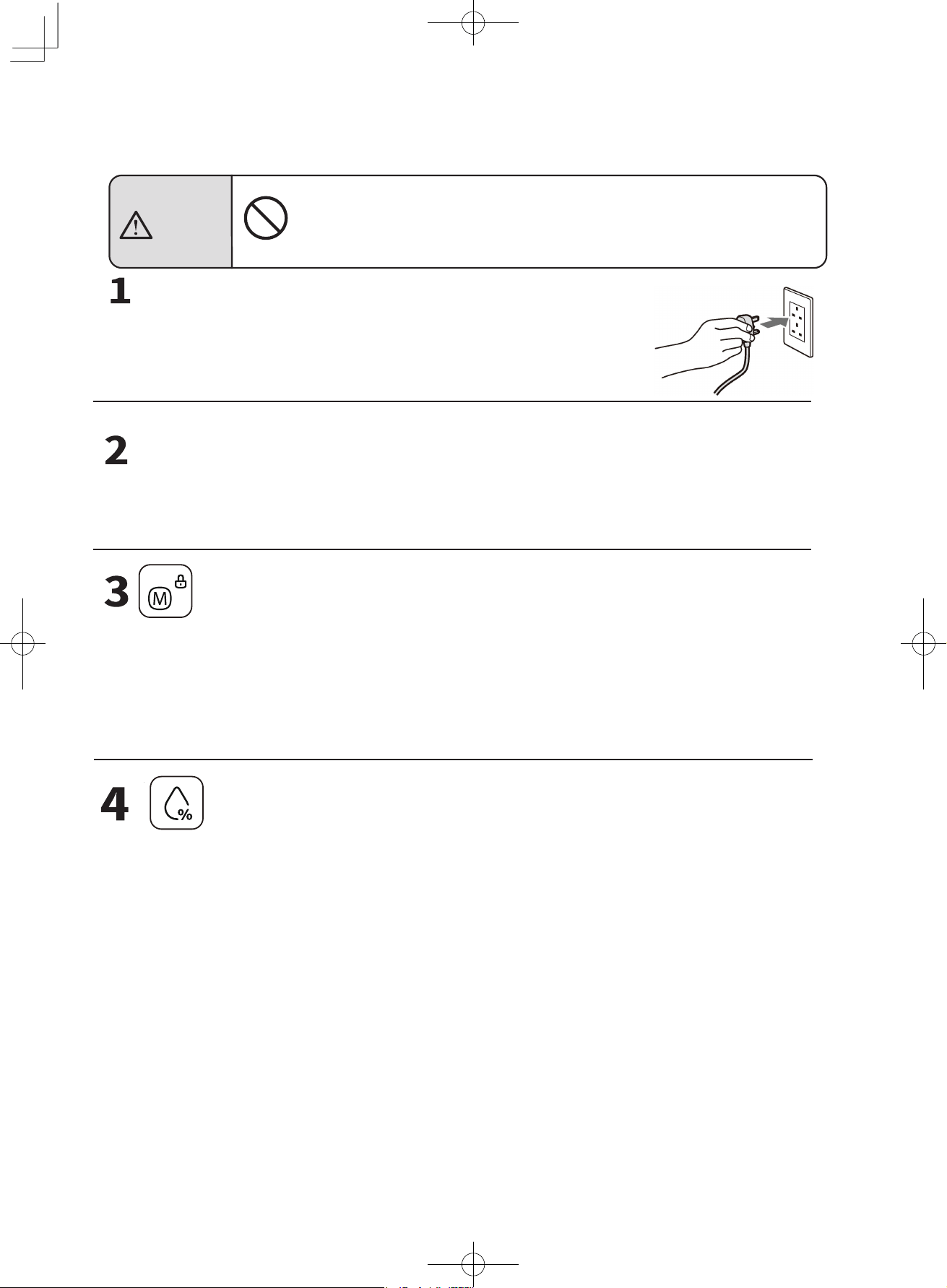
• Alarm beeps once.
四 Power Switch
•
Press the switch to turn on or off the Dehumidifier.
•
Choose between Automatic Mode and Laundry Drying Mode when turning on the Dehumidifier
The corresponding indicator of the Mode chosen will illuminate.
•
The Child Lock function can be activated and deactivated by pressing and holding the switch
for 3 seconds.
H
u
midit
y
Selecto
r
•
The hum心tylevel can be set in Automatic Mode, with increment or decrement by 5%
between 30-80%
勹
]
厂
10
Modes of Operation
Warning
Fan Speed
Fan Speed can be adjusted in both Automatic Mode and Laundry Drying Mode between
High airflow mode and Low airflow mode.
Function
Press Function button to activate the internal dry function.
Press Function button and hold for 3 seconds to activate Negative Ions Operation.
Press Function button and hold for 3 seconds to deactivate Negative Ions Operation.
Timer
Press Timer button to set up Timer for switching the Unit on and off at specific times, within
a 24 hour period.
The Unit can be set to turn on and off at specific times during the operation of the unit.
The Unit can be set to turn on at specific time when it is not operating.
Timer setting can be cancelled by pressing the Timer button when asked to confirm the
Timer setting. The On and Off Timer can be set within a 24 hour period, with 1 hour as the unit of time.
How to Operate (Cont.)
Swing
Press this button to turn on/off the swing function.
Press and hold this button for 3 seconds to turn on/off the display.
Sleep
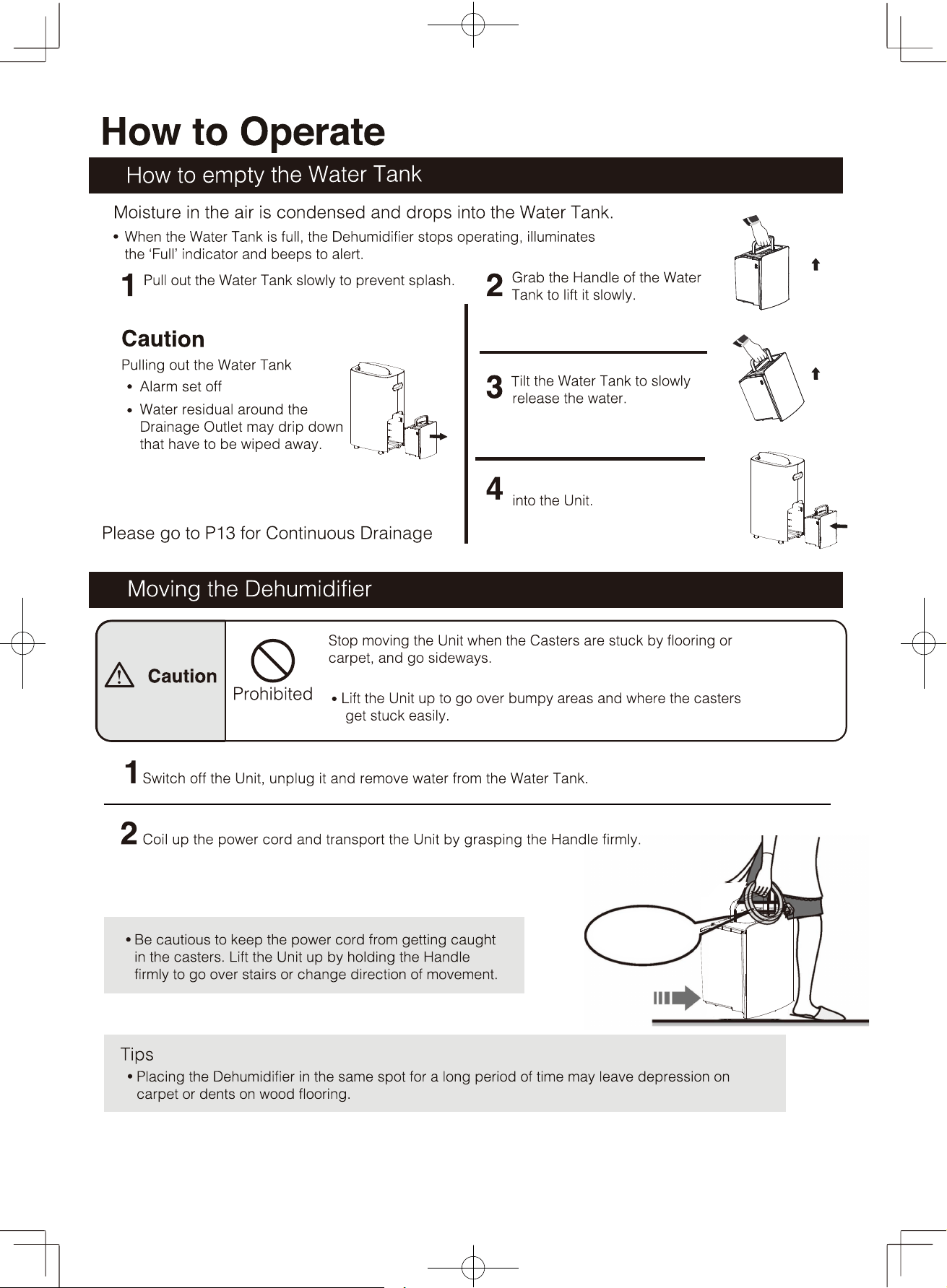
Coil up the power
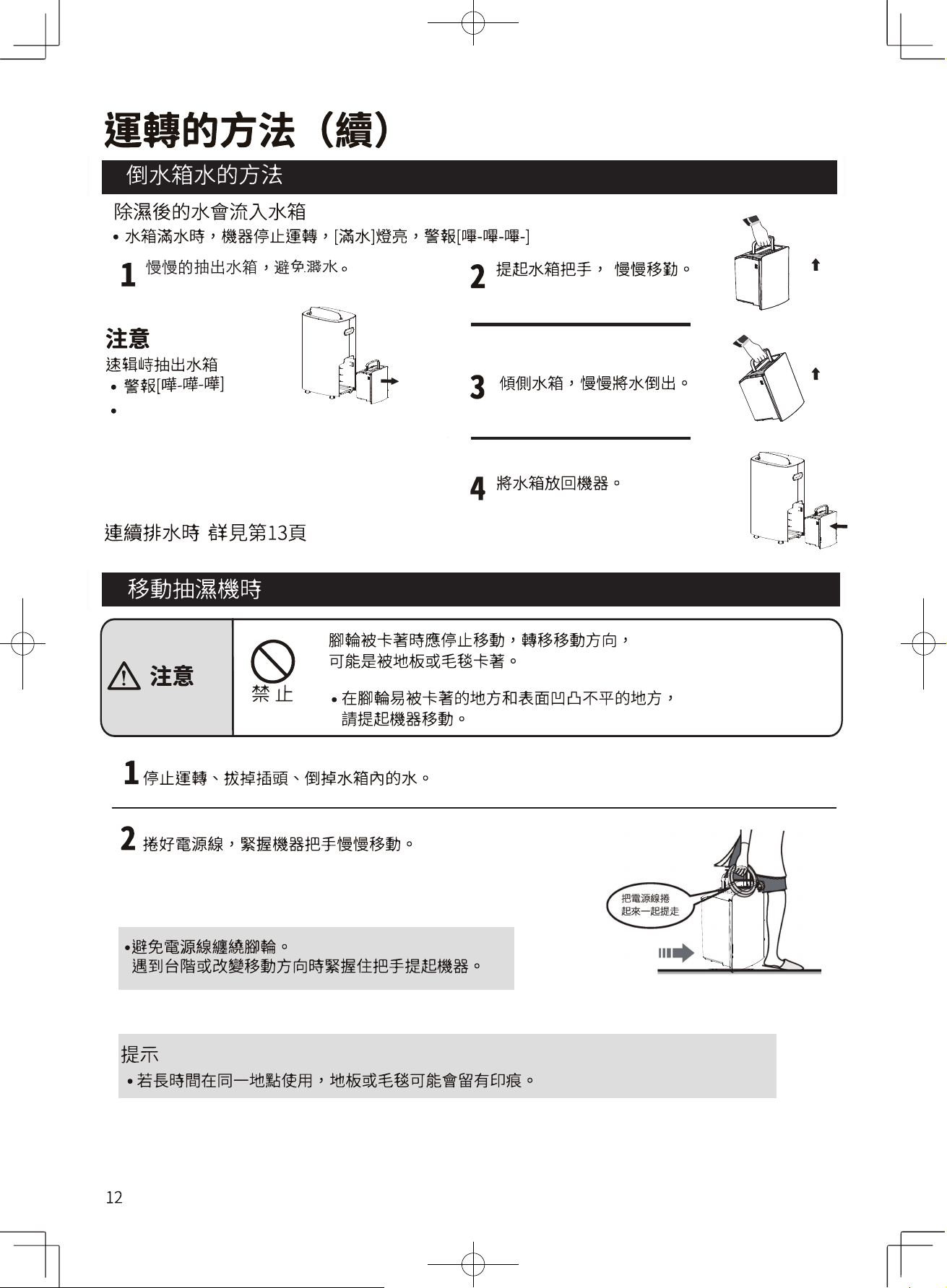
cord when moving
the Dehumidifier
12
Insert the Water Tank back
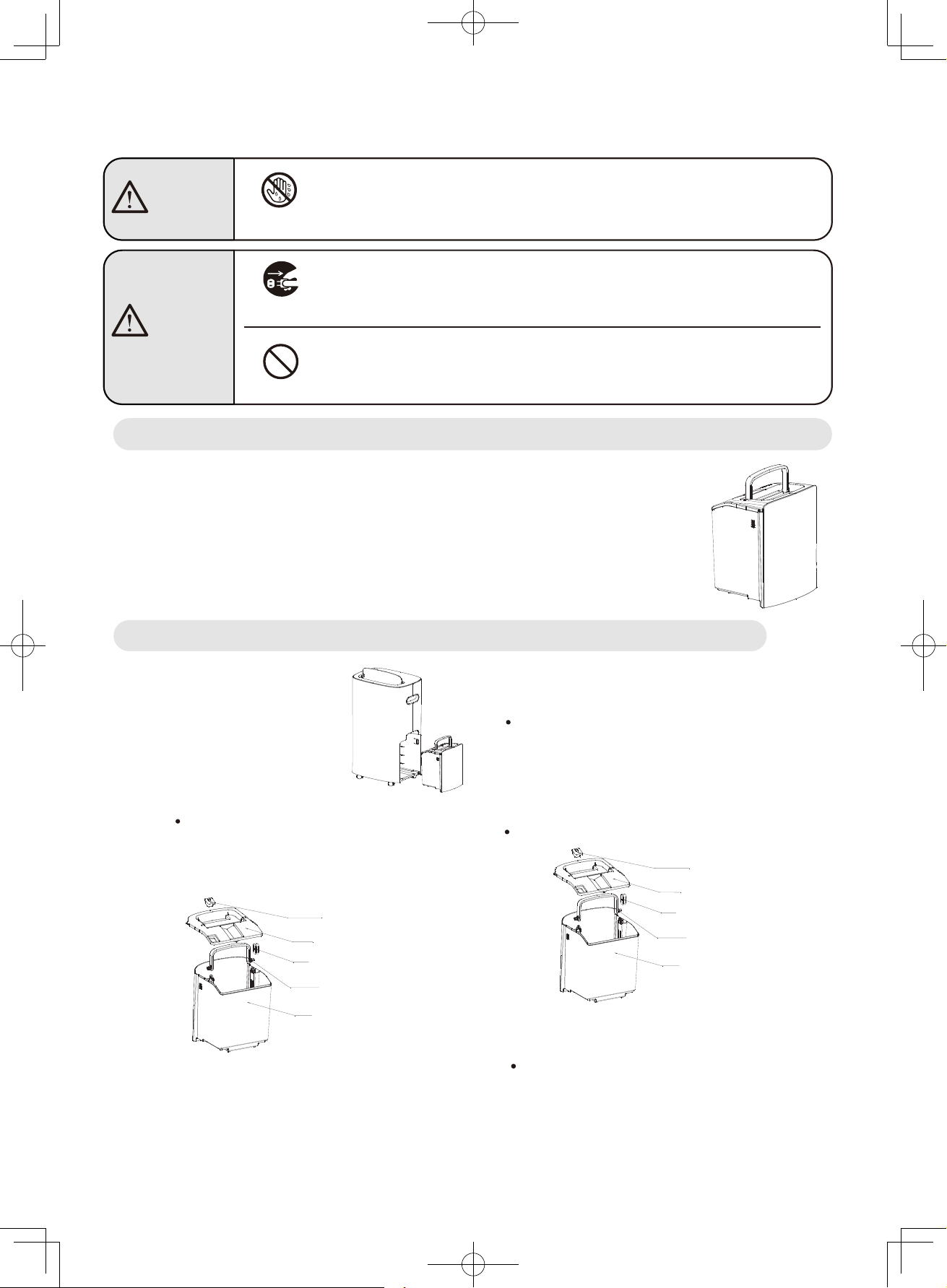
Maintenance Tips
Main Body
·Wipe dust off the Power Plug regularly.
·Remove stubborn dirt with soft cloth and neutral kitchen detergent.
·Clean Control Panel only with a dry cloth, and use no water.
·Do not use gasoline, thinners, alcohol, cleansing powder, or brush to
prevent deforming or scratching the Unit.
1
Remove the Water Tank Lid.
Clean the interior and the Lid of the Tank.Pull out the Water Tank
from the Unit.
3
Do not brush the Tank to prevent scratches.
4 Wipe dry the exterior of the Water Tank, put
the Lid back on and insert the Water Tank into
the Unit.Press down the Water Tank Handle and
Lid to ensure proper installation.
5 Insert the Water Tank back into the Unit.
No Wet Hand
Unplugging
Do not plug in or unplug the Dehumidifier with wet hand.
Doing so could result in electric shock.
Turn off the Unit and unplug the power cord
before cleaning it to prevent electric shock.
Prohibited
Do not remove the Float from the Water Tank.
Doing so could result in inoperability, leakage,
dampening surrounding objects, electric shock, and electric leakage.
Use soft and slightly damp cloth to wipe the Unit.
2
Lift the Lid to open.
Water Tank
Warning
Caution
Hold the Water Tank horizontally and push it
inside gently to install the Tank.
14
Water Tank Lid
Float
Water Tank Handle
Water Tank
Water Plug
Water Tank Lid
Float
Water Tank Handle
Water Tank
Water Plug
15
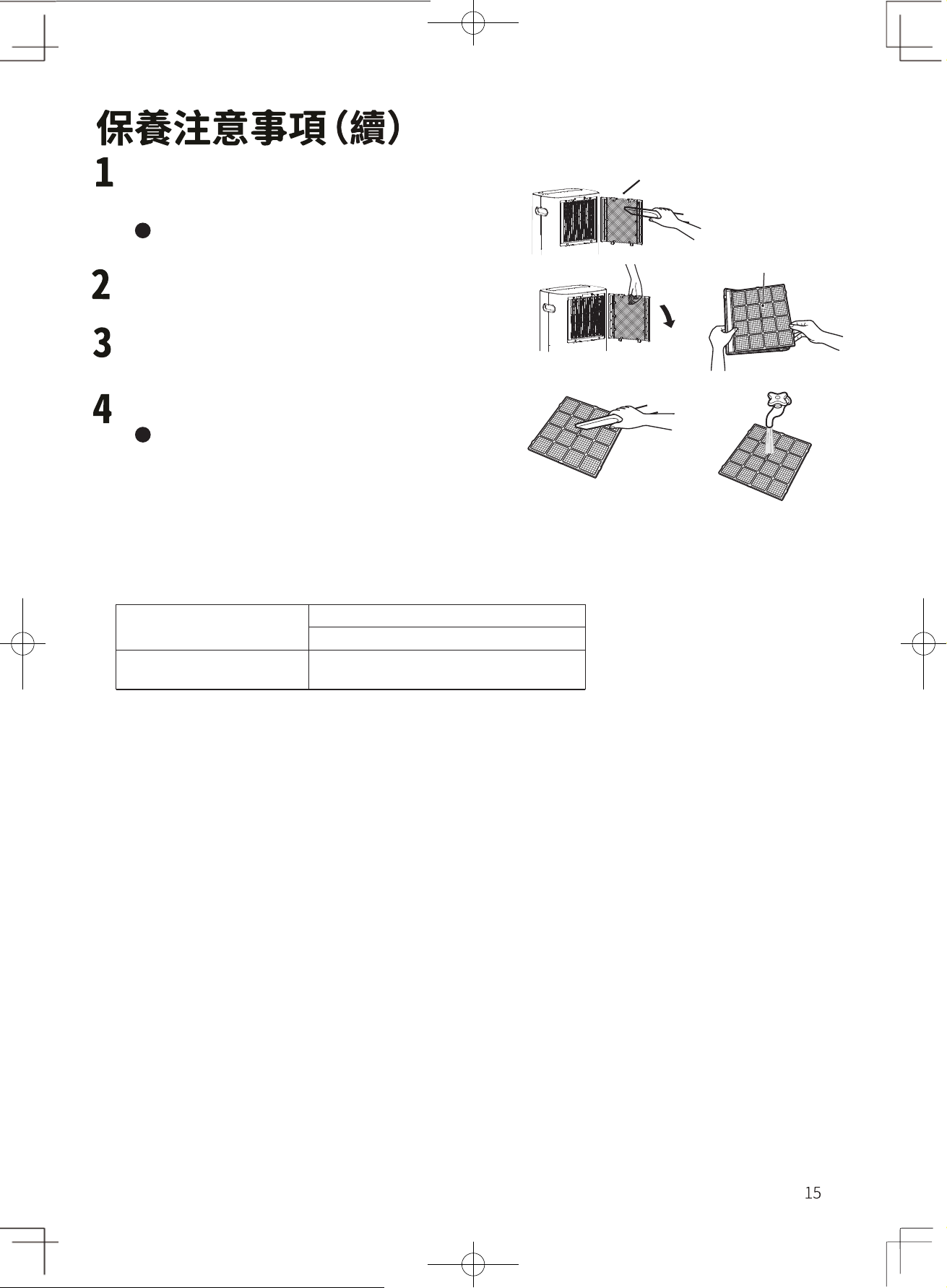
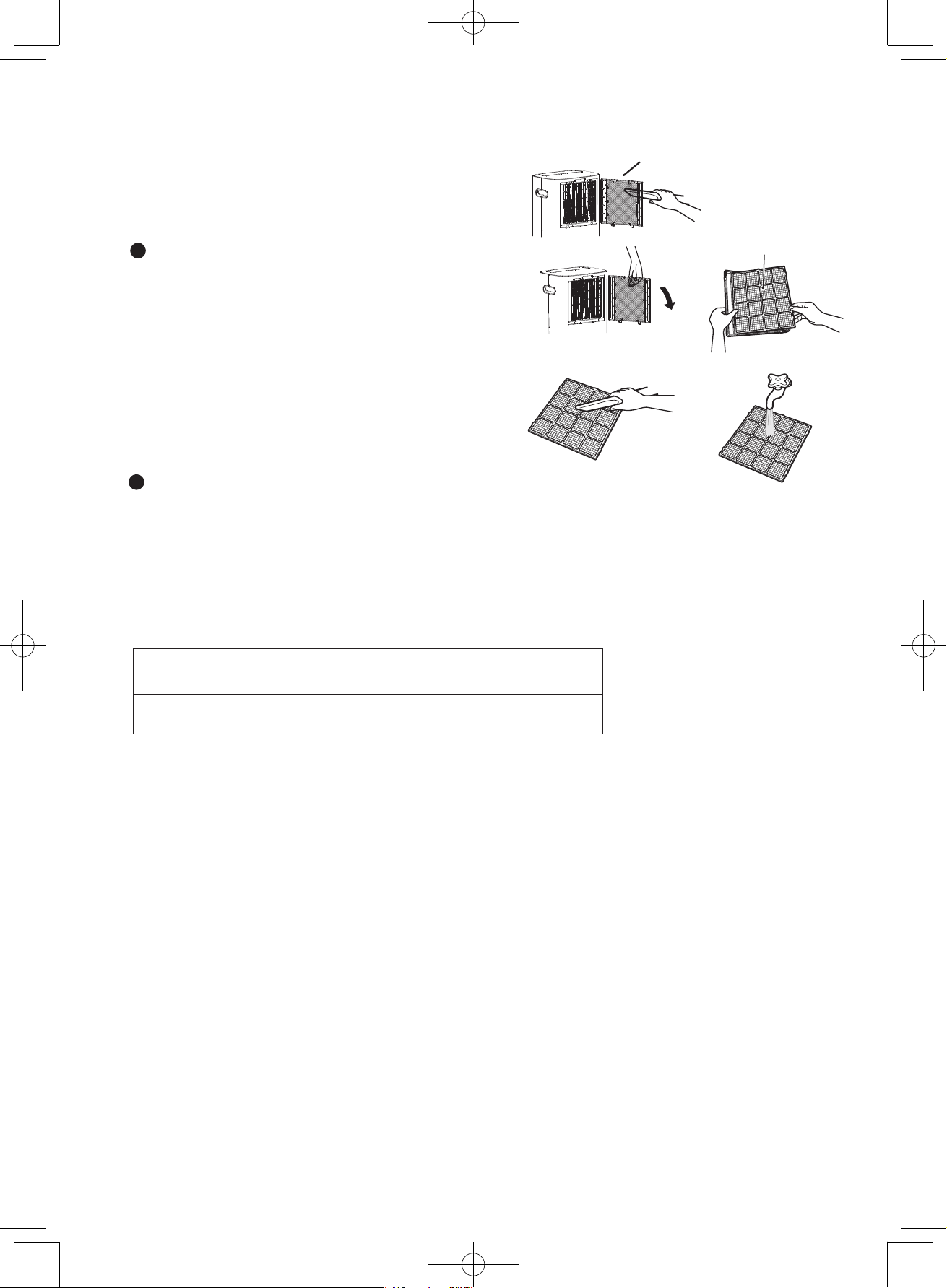
The dirt of the filter can be cleaned by a vacuum
cleaner
Slow down the suction power of the
vacuum cleaner.
Remove the filter frame and take out the 3-in-1 Multi
function filter
Use a vacuum cleaner to clean up the dust on the 3-
in-1 Multi function filter and then wash it with water.
Wipe dry water with a towel and dry it in a well-
ventilated place.
Install after fully drying.
Prohibited items for 3-in-1 Multi function filter:
a. Do not use water other than tap water for dry cleaning
b. Do not rub the filter
c. Can not be heated and dried
d. Don't dry it under direct sunlight
e. Do not apply physical pressure when dry
Product Model
RAD-Y200H、
RAD-
Y250H
、
RAD-Y300H
Filter
Item No
41226233
3-in-1 Multi
function filter
Filter
Maintenance notes (continued)
3-in-1 Multi function filter (once every 2 weeks)
1
2
3
4
When the room temperature drops below 16°C, the Dehumidifier may frost. The Defrosting cycle will
be activated during Dehumidifying Operation every 38 minutes (takes about 8 minutes) by switching
to Fan Operation, to ensure proper operation of the Unit.
Display indicates “P1” during Defrosting Operation.
Do not unplug the power cord to force abort the Defrosting Operation.
Do not unplug the power cord to force abort the Defrosting Operation.
Operating noise
Operation and Performance
Dehumidifying capacity
Dehumidifying capacity
(
Operation at High Fan Speed
)
Operating the Dehumidifier under the conditions set out below, the dehumidifying capacity is the amount
of moisture removed per day (24 hours): High Fan Speed Operation at a room temperature of 26.7°C,
indoor humidity of 60%, with no preset humidity level, and the Louver
fully open. Operating with other
settings and different Louv
er
swing angle would diminish the dehumidifying capacity.
The correlation among room temperature,
humidity and dehumidifying capacity
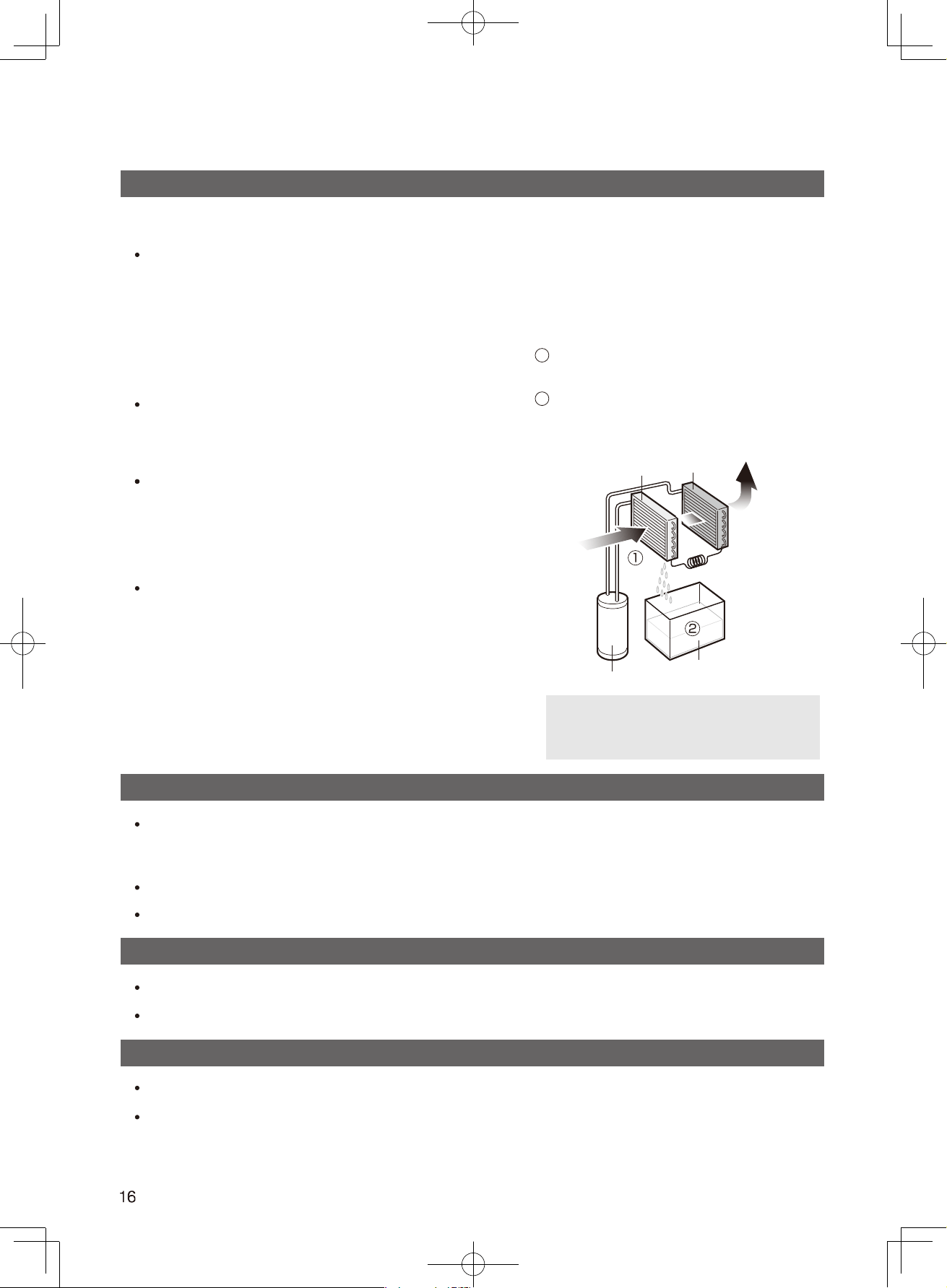
How does a dehumidifier work?
The Unit draws moist air from the
environment and cools it with evaporator.
1
2
As moist air passes through the evaporator coils,
moisture freezes and transforms into water
droplet that drips down into the Water Tank.
Warm dry Air
Evaporator Condenser
Moist Air
Compressor
Water Tank
Indoor air passes through the
evaporator coils and condenses on
the cold coil into water droplets.
Defrost cycle during operation
Rise of room temperature during operation
The Dehumidifier does not have a cooler function.
The Unit generates heat during operation that the room temperature may rise by 1°C -4°C.
The noise of the movement of the refrigerant is rather loud at start-up but it quiets down after warm-up.
Dehumidifying capacity at constant room temperature
The amount of dehumidifying increases with increasing
humidity level and vice versa. Eg. Humidity level at 60%.
When the Unit operates at the preset Humidity Level,
it stops Dehumidifying The fan stops running.
The
amount of moisture removed may be small in such a
situation but this is not a malfunction.
When the machine is below the set humidity and the
operation mode is [Set Humidity], it will automatically
stop the dehumidification operation and the fan will stop
running. Although the dehumidification volume will
decrease at this time, it is not abnormal.
Symptoms and remedies
Is the power cord properly inserted?
Plug the power cord fully into
the power socket.
Is the Water Tank full?
(
Water Tank is full of water or it is not properly inserted
)
Empty the Water Tank and insert it
back into the Unit.
Is the ambient temperature
too low or too high?
It is recommended to operate the Dehumidifier
between an ambient temperature range of 5-32°C.
Is the temperature or humidity of the
room too low?
Low humidity reduces dehumidifying
effectiveness.
Is the Air Outlet or Air Intake clogged?
Remove the items blocking the Air Outlet
and Air Intake.
No air comes out
Is the Air Intake blocked? Clear the items blocking the Air Intake.
Is the Unit placed on a slope or uneven
surface that causes it to tilt or wobble?
Place the Unit on a stable and
leveled surface.
Is the Air Intake blocked? Clear the items blocking the Air Intake.
The sound of flowing water
This is caused by the flow of refrigerant
inside the Unit.
The drain hose is loosely attached Securely insert the drain hose.
The Drainage system is blocked Unclog the hose.
Frosted up
This is not a malfunction that defrosting operation
could be activated by the Drying Inside Operation.
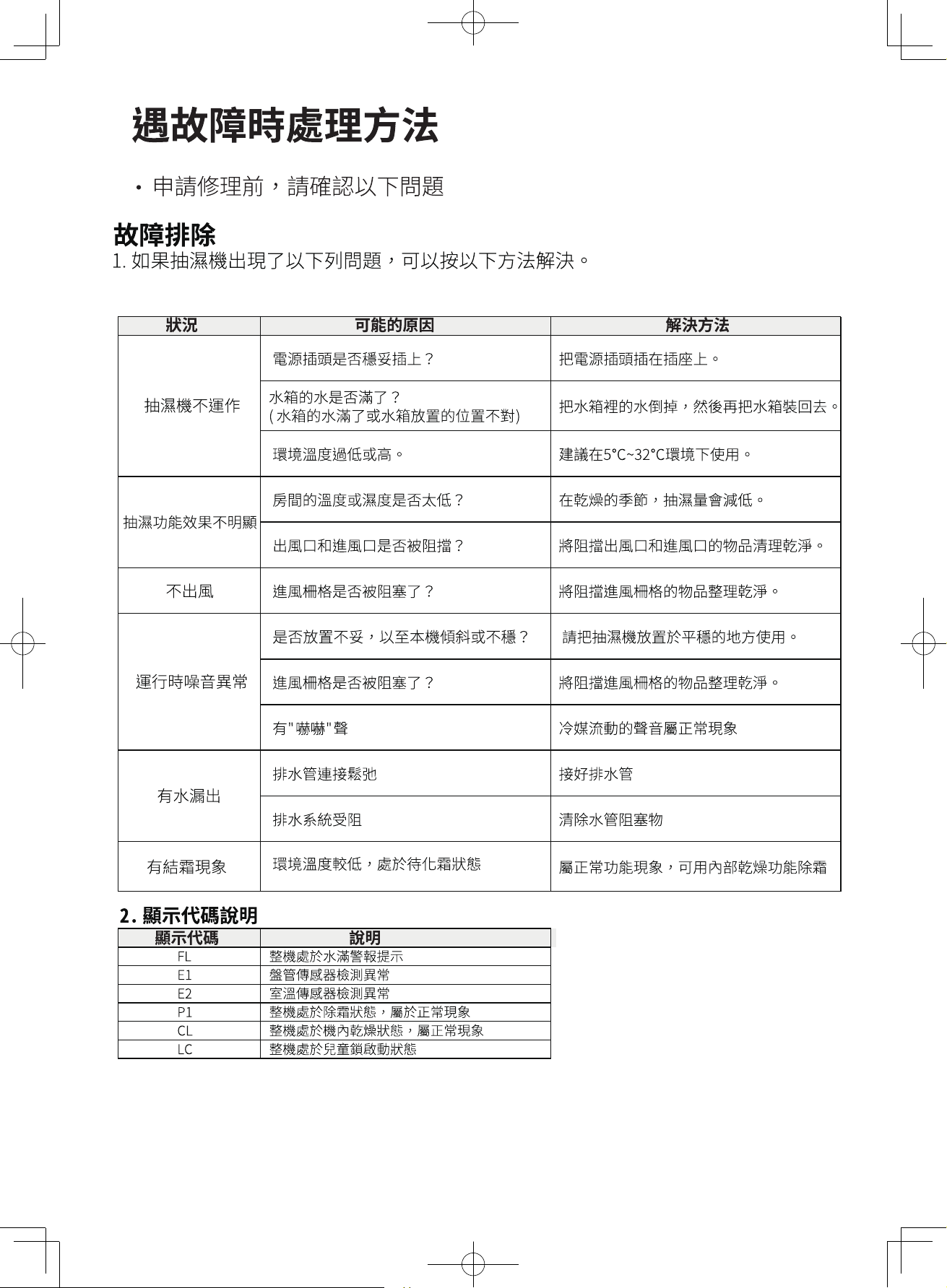
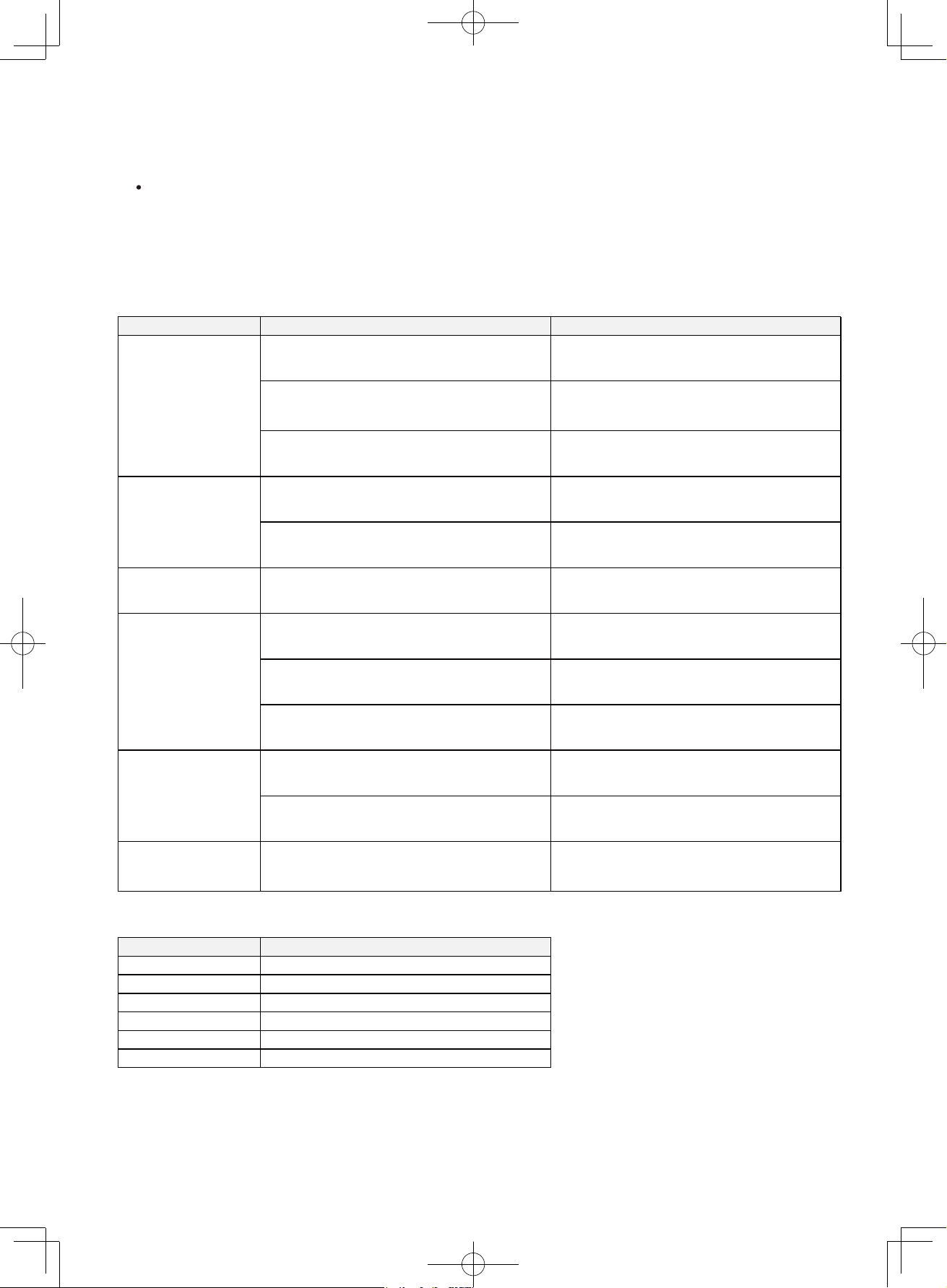
2. Error message code description
1. The remedies that could resolve the symptoms listed below.
FL Water Tank Full alarm
E1 Coil Sensor failure
E2 Ambient Temperature Sensor failure
P1 Defrosting Operation activated
CL Drying Inside Operation activated
LC Child Lock Mode activated
The Unit does not
operate
Poor
dehumidification
results
The Unit makes
abnormaloperating
noises
Water leakage
Troubleshooting
Please check the following items of the Dehumidifier before calling for service.
Symptom RemedyPossible Cause
Low ambient temperature causing the
Unit to activate the defrost operation.
Code Description
17
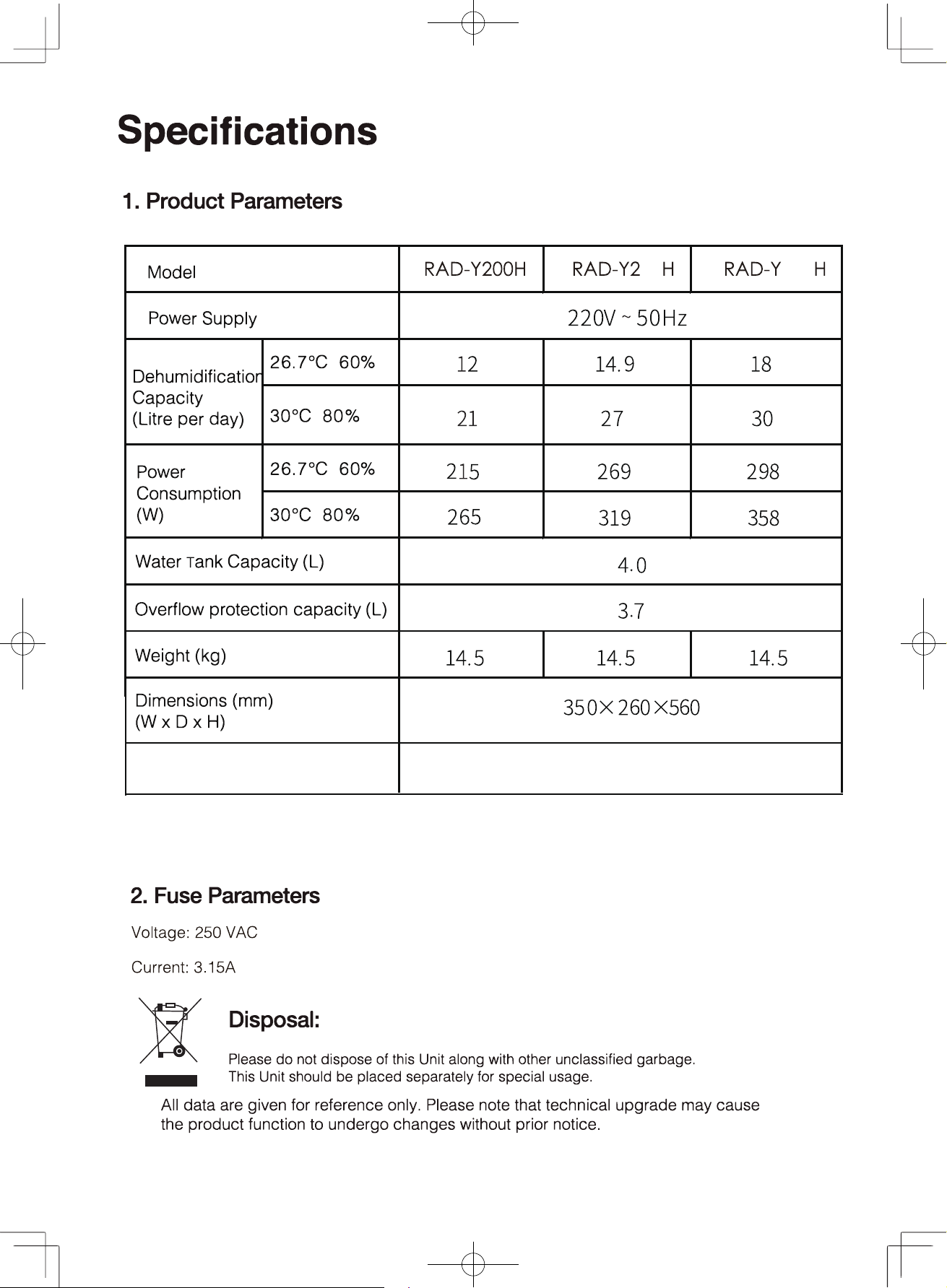
Operating temperature
range
5℃~32℃
50 300
The dehumidification performance will be decreased after adding the 3-in-1
Multi function filter.
18

