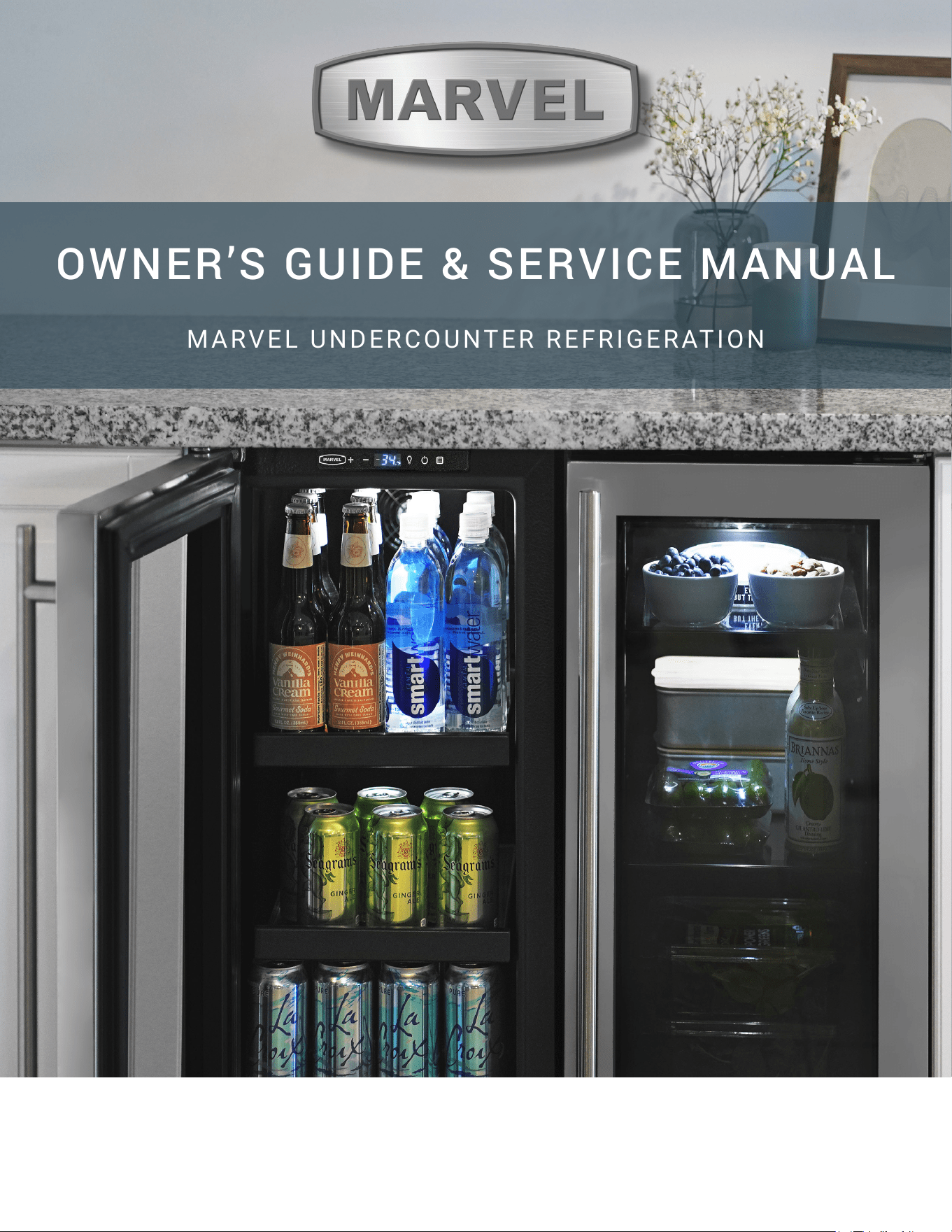
OWNER’S GUIDE & SERVICE MANUAL
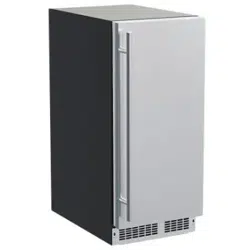
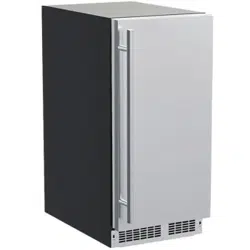
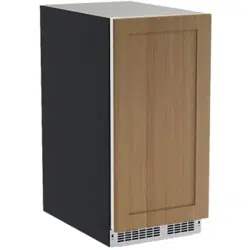
MARVEL UNDERCOUNTER REFRIGERATION
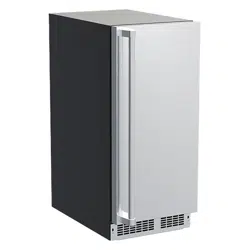
Model: MRNP215-SS01A
WELCOME
Welcome to the Marvel Experience!
Thank you for choosing our quality product to add to your
home. We are thrilled to welcome you to our growing
community of Marvel owners, who trust in our products
and our support.
The information in this guide is intended to help you install
and maintain your new Marvel undercounter model to
protect and prolong its lifetime. We encourage you to
contact our Technical Support team at (616) 754-5601 with
any questions.
Got a Marvelous Design?
We would love to see how your Marvel product looks in its
new home. You can send us photos of your installed
product at [email protected], and we
might feature your Marvel home design on our website and
social media!
Online registration
available at
marvelrefrigeration.com
Warranty Registration
It is important you register your product warranty after
taking delivery of your appliance. You can register online at
www.marvelrefrigeration.com.
The following information will be
required when registering your
appliance:
Serial Number
Date of Purchase
Dealer’s name and address
The serial number is located on the back of the cabinet
near the top.
IMPORTANT SAFETY INSTRUCTIONS
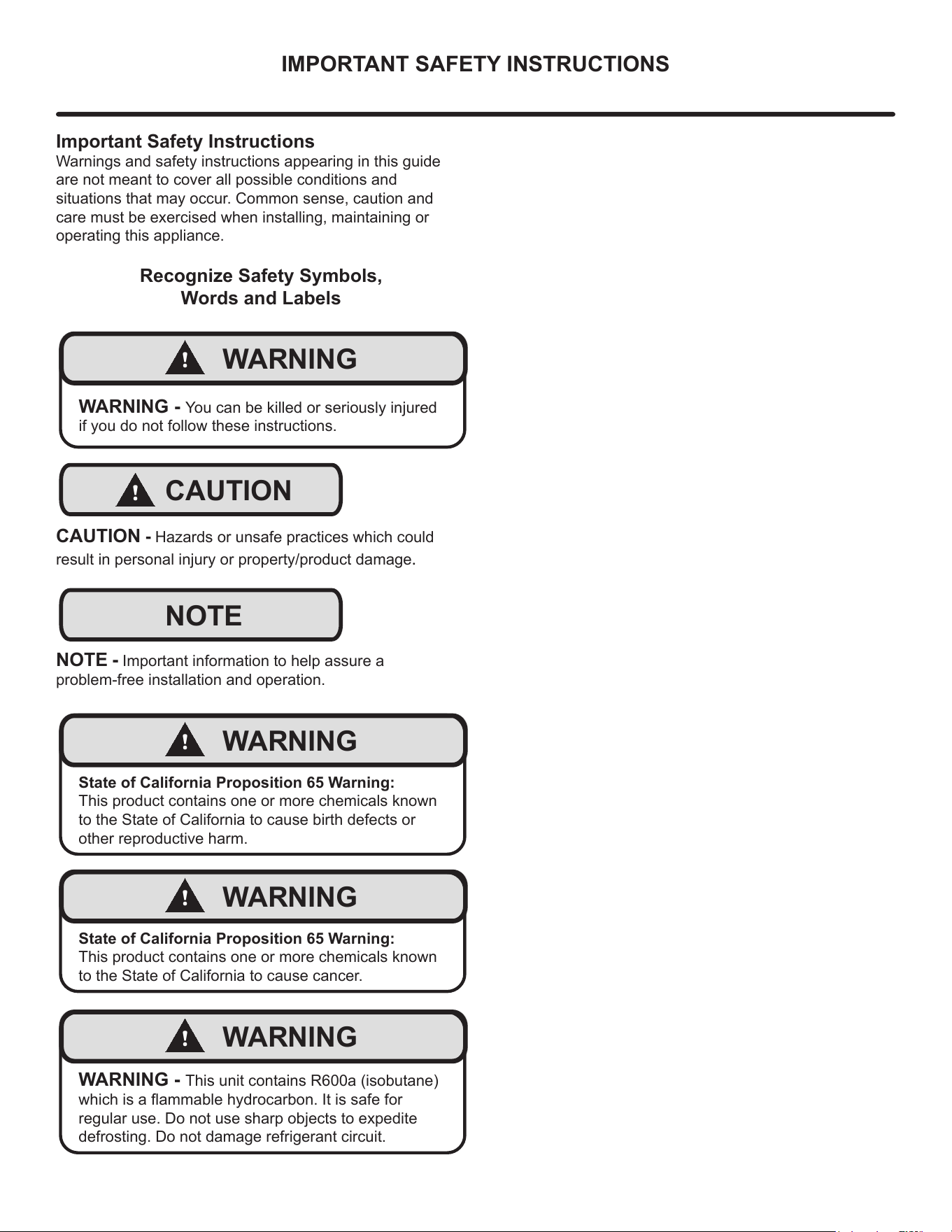
Important Safety Instructions
Warnings and safety instructions appearing in this guide
are not meant to cover all possible conditions and
situations that may occur. Common sense, caution and
care must be exercised when installing, maintaining or
operating this appliance.
Recognize Safety Symbols,
Words and Labels
!
WARNING
WARNING - You can be killed or seriously injured
if you do not follow these instructions.
!
CAUTION
CAUTION - Hazards or unsafe practices which could
result in personal injury or property/product damage.
NOTE
NOTE - Important information to help assure a
problem-free installation and operation.
!
WARNING
State of California Proposition 65 Warning:
This product contains one or more chemicals known
to the State of California to cause birth defects or
other reproductive harm.
!
WARNING
State of California Proposition 65 Warning:
This product contains one or more chemicals known
to the State of California to cause cancer.
!
WARNING
WARNING - This unit contains R600a (isobutane)
which is a ammable hydrocarbon. It is safe for
regular use. Do not use sharp objects to expedite
defrosting. Do not damage refrigerant circuit.
3
UNPACKING YOUR APPLIANCE
!
WARNING
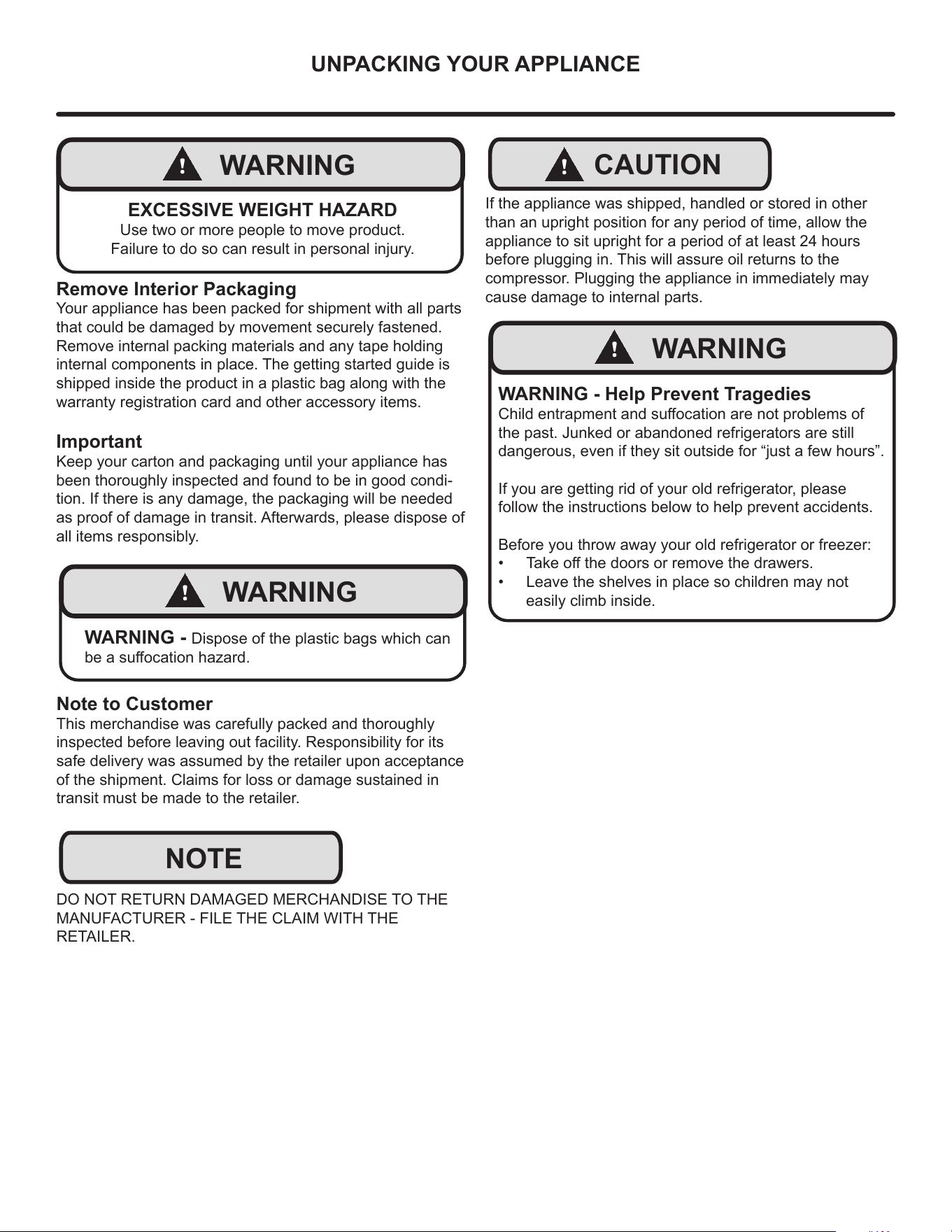
EXCESSIVE WEIGHT HAZARD
Use two or more people to move product.
Failure to do so can result in personal injury.
Remove Interior Packaging
Your appliance has been packed for shipment with all parts
that could be damaged by movement securely fastened.
Remove internal packing materials and any tape holding
internal components in place. The getting started guide is
shipped inside the product in a plastic bag along with the
warranty registration card and other accessory items.
Important
Keep your carton and packaging until your appliance has
been thoroughly inspected and found to be in good condi-
tion. If there is any damage, the packaging will be needed
as proof of damage in transit. Afterwards, please dispose of
all items responsibly.
!
WARNING
WARNING - Dispose of the plastic bags which can
be a suocation hazard.
Note to Customer
This merchandise was carefully packed and thoroughly
inspected before leaving out facility. Responsibility for its
safe delivery was assumed by the retailer upon acceptance
of the shipment. Claims for loss or damage sustained in
transit must be made to the retailer.
DO NOT RETURN DAMAGED MERCHANDISE TO THE
MANUFACTURER - FILE THE CLAIM WITH THE
RETAILER.
NOTE
!
CAUTION
If the appliance was shipped, handled or stored in other
than an upright position for any period of time, allow the
appliance to sit upright for a period of at least 24 hours
before plugging in. This will assure oil returns to the
compressor. Plugging the appliance in immediately may
cause damage to internal parts.
!
WARNING
WARNING - Help Prevent Tragedies
Child entrapment and suocation are not problems of
the past. Junked or abandoned refrigerators are still
dangerous, even if they sit outside for “just a few hours”.
If you are getting rid of your old refrigerator, please
follow the instructions below to help prevent accidents.
Before you throw away your old refrigerator or freezer:
• Take o the doors or remove the drawers.
• Leave the shelves in place so children may not
easily climb inside.
4
NOTE
ELECTRICAL
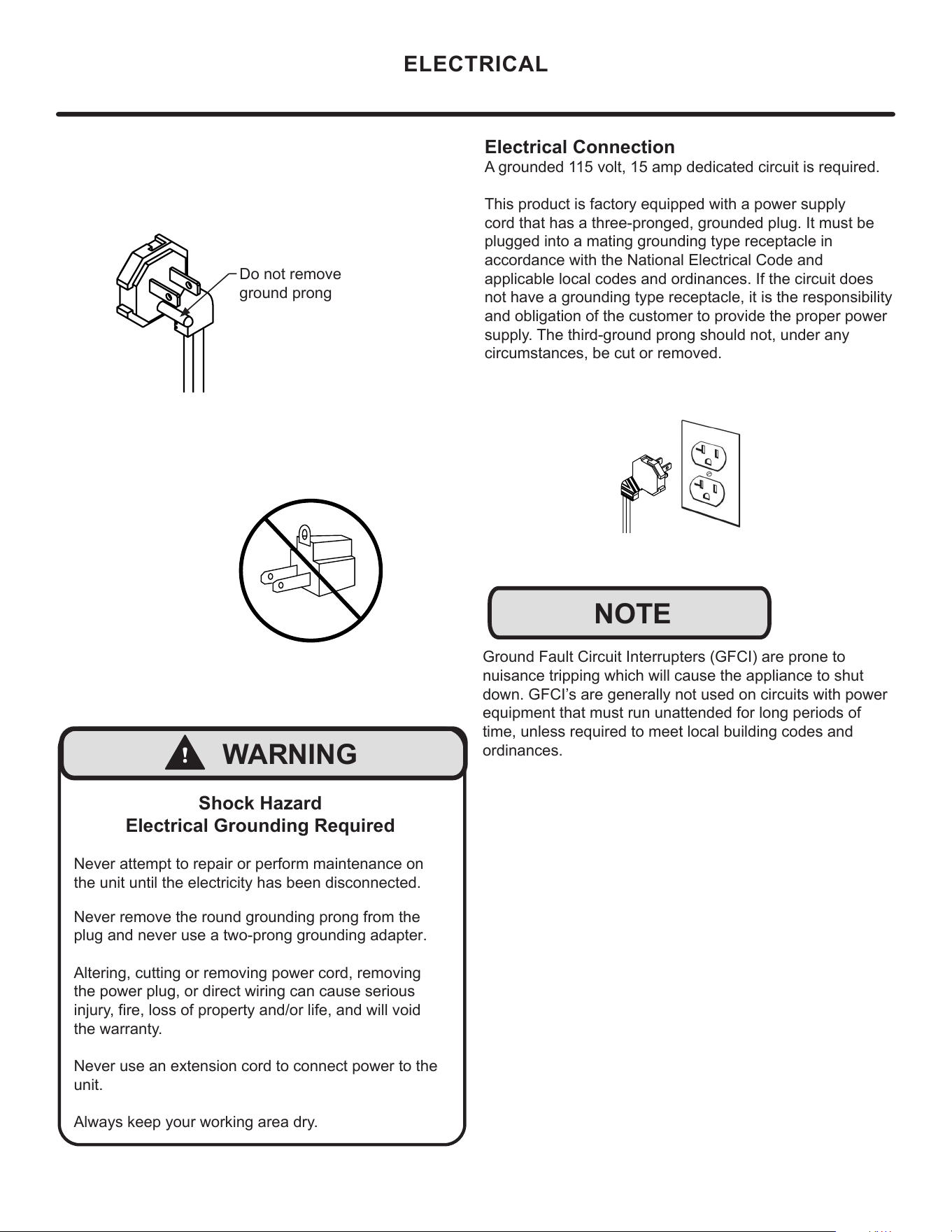
Shock Hazard
Electrical Grounding Required
Never attempt to repair or perform maintenance on
the unit until the electricity has been disconnected.
Never remove the round grounding prong from the
plug and never use a two-prong grounding adapter.
Altering, cutting or removing power cord, removing
the power plug, or direct wiring can cause serious
injury, fire, loss of property and/or life, and will void
the warranty.
Never use an extension cord to connect power to the
unit.
Always keep your working area dry.
!
WARNING
Ground Fault Circuit Interrupters (GFCI) are prone to
nuisance tripping which will cause the appliance to shut
down. GFCI’s are generally not used on circuits with power
equipment that must run unattended for long periods of
time, unless required to meet local building codes and
ordinances.
Electrical Connection
A grounded 115 volt, 15 amp dedicated circuit is required.
This product is factory equipped with a power supply
cord that has a three-pronged, grounded plug. It must be
plugged into a mating grounding type receptacle in
accordance with the National Electrical Code and
applicable local codes and ordinances. If the circuit does
not have a grounding type receptacle, it is the responsibility
and obligation of the customer to provide the proper power
supply. The third-ground prong should not, under any
circumstances, be cut or removed.
Do not remove
ground prong
5
CUTOUT AND PRODUCT DIMENSIONS
Prepare Site
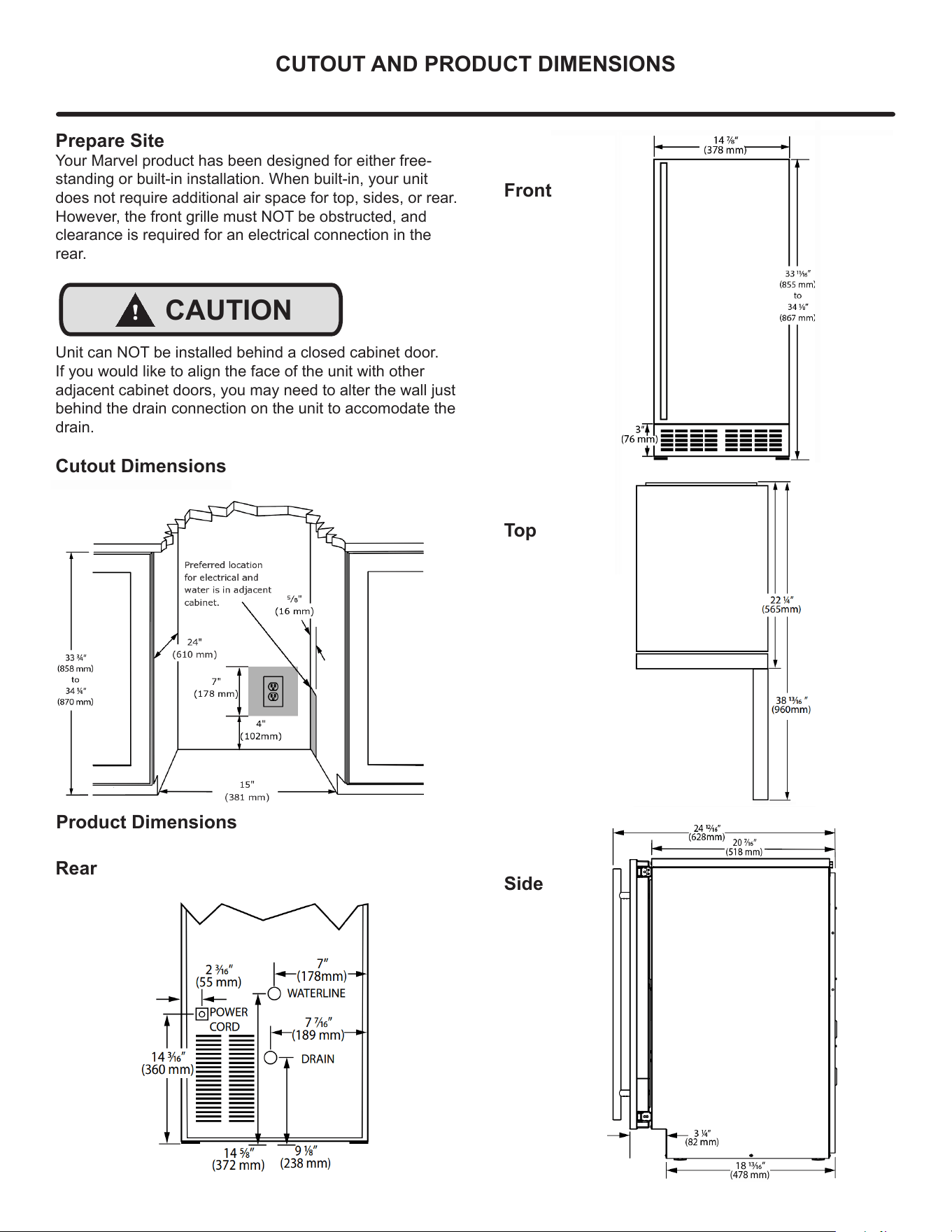
Your Marvel product has been designed for either free-
standing or built-in installation. When built-in, your unit
does not require additional air space for top, sides, or rear.
However, the front grille must NOT be obstructed, and
clearance is required for an electrical connection in the
rear.
!
CAUTION
Unit can NOT be installed behind a closed cabinet door.
If you would like to align the face of the unit with other
adjacent cabinet doors, you may need to alter the wall just
behind the drain connection on the unit to accomodate the
drain.
Cutout Dimensions
4"
(102 mm)
7"
(178 mm)
15"
(381 mm)
Preferred location
for electrical and
water is in adjacent
cabinet.
24"
(610 mm)
5⁄8"
(16 mm)
33 7⁄8”
(860 mm)
Product Dimensions
Rear
Front
Top
105
0
Side
6
INSTALLING YOUR APPLIANCE
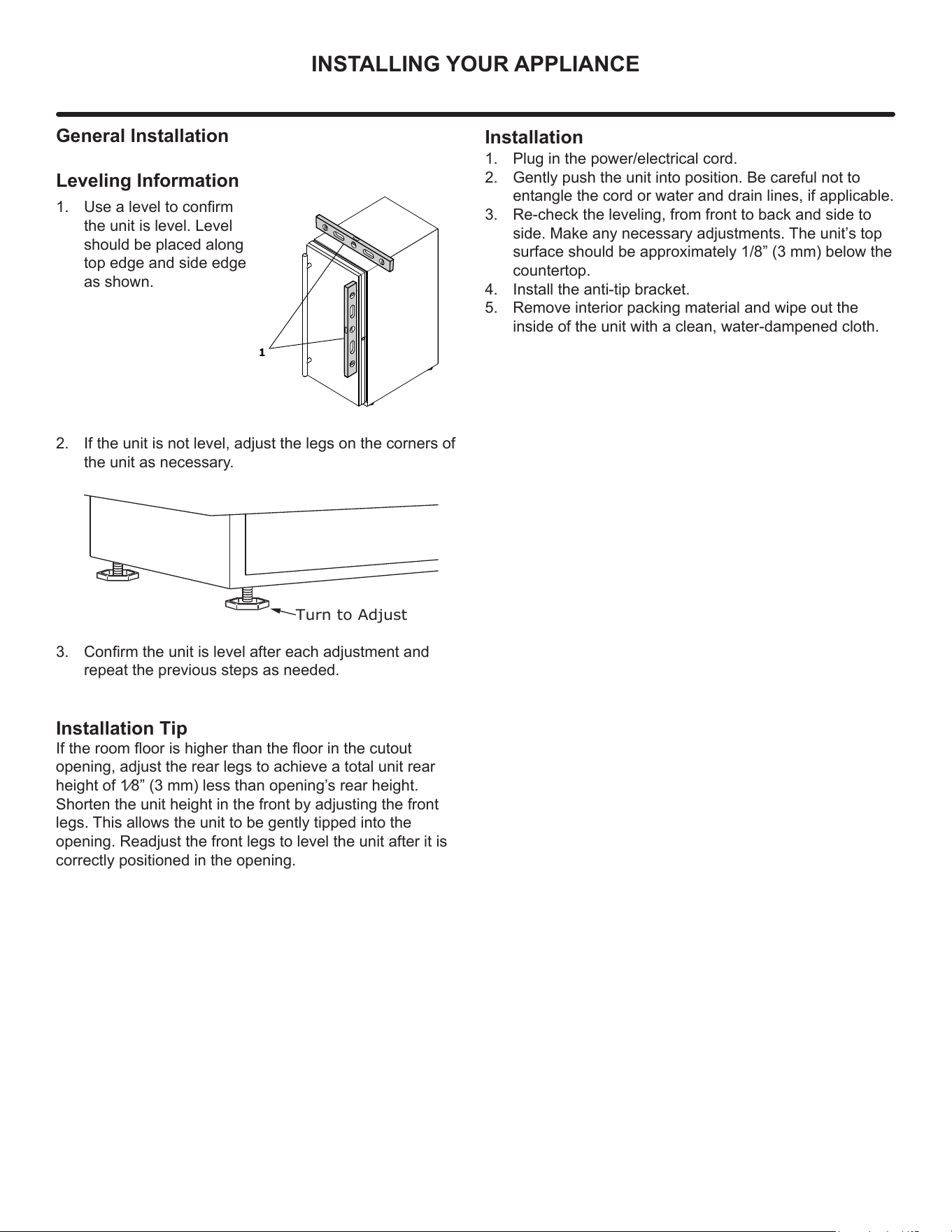
General Installation
Leveling Information
1. Use a level to conrm
the unit is level. Level
should be placed along
top edge and side edge
as shown.
2. If the unit is not level, adjust the legs on the corners of
the unit as necessary.
3. Conrm the unit is level after each adjustment and
repeat the previous steps as needed.
1
Turn to Adjust
Installation Tip
If the room oor is higher than the oor in the cutout
opening, adjust the rear legs to achieve a total unit rear
height of 1⁄8” (3 mm) less than opening’
s rear height.
Shorten the unit height in the front by adjusting the front
legs. This allows the unit to be gently tipped into the
opening. Readjust the front legs to level the unit after it is
correctly positioned in the opening.
Installation
1. Plug in the power/electrical cord.
2. Gently push the unit into position. Be careful not to
entangle the cord or water and drain lines, if applicable.
3. Re-check the leveling, from front to back and side to
side. Make any necessary adjustments. The unit’s top
surface should be approximately 1/8” (3 mm) below the
countertop.
4. Install the anti-tip bracket.
5. Remove interior packing material and wipe out the
inside of the unit with a clean, water-dampened cloth.
7
DOOR REVERSAL
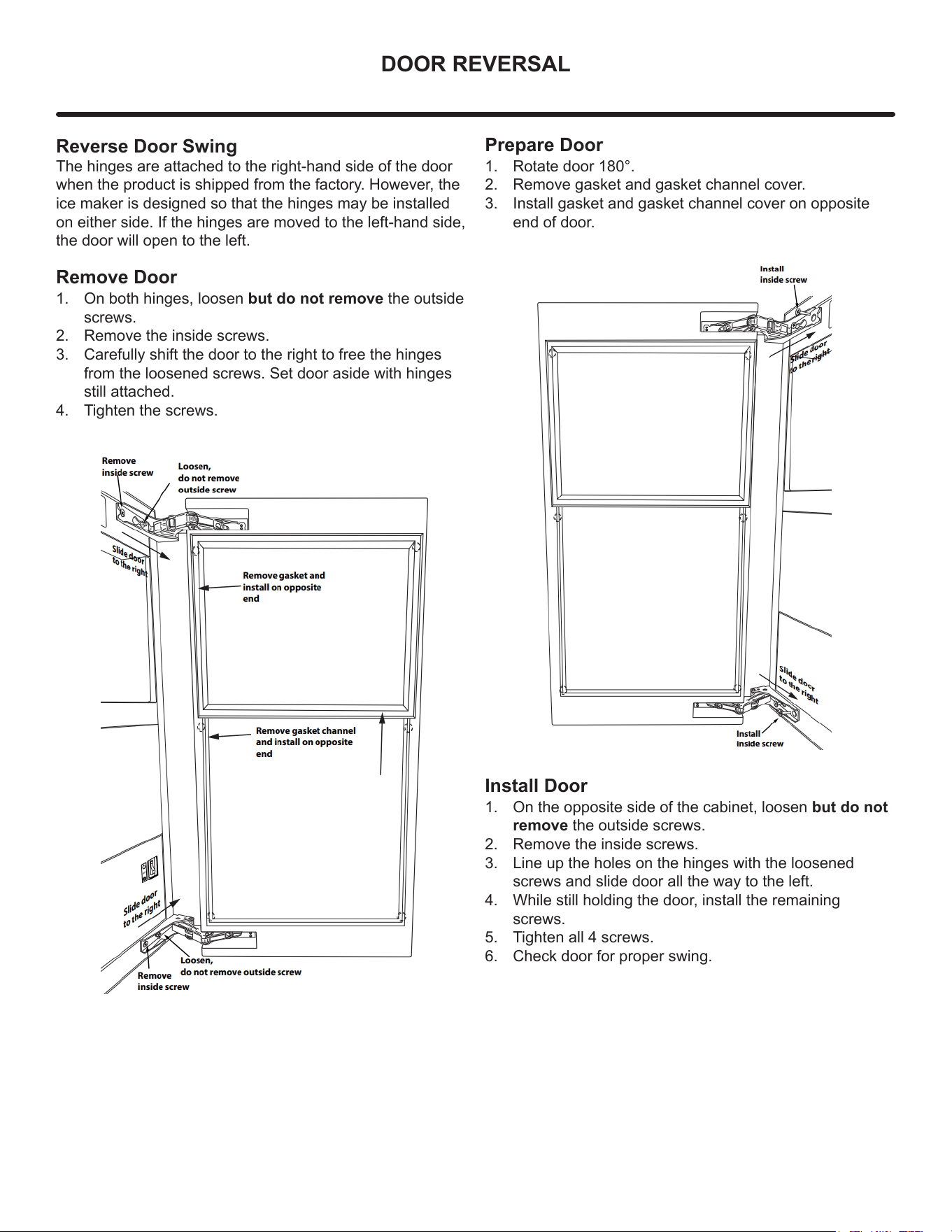
Reverse Door Swing
The hinges are attached to the right-hand side of the door
when the product is shipped from the factory. However, the
ice maker is designed so that the hinges may be installed
on either side. If the hinges are moved to the left-hand side,
the door will open to the left.
Remove Door
1. On both hinges, loosen but do not remove the outside
screws.
2. Remove the inside screws.
3. Carefully shift the door to the right to free the hinges
from the loosened screws. Set door aside with hinges
still attached.
4. Tighten the screws.
Prepare Door
1. Rotate door 180°.
2. Remove gasket and gasket channel cover.
3. Install gasket and gasket channel cover on opposite
end of door.
Install Door
1. On the opposite side of the cabinet, loosen but do not
remove the outside screws.
2. Remove the inside screws.
3. Line up the holes on the hinges with the loosened
screws and slide door all the way to the left.
4. While still holding the door, install the remaining
screws.
5. Tighten all 4 screws.
6. Check door for proper swing.
8
USING YOUR ELECTRONIC CONTROLS
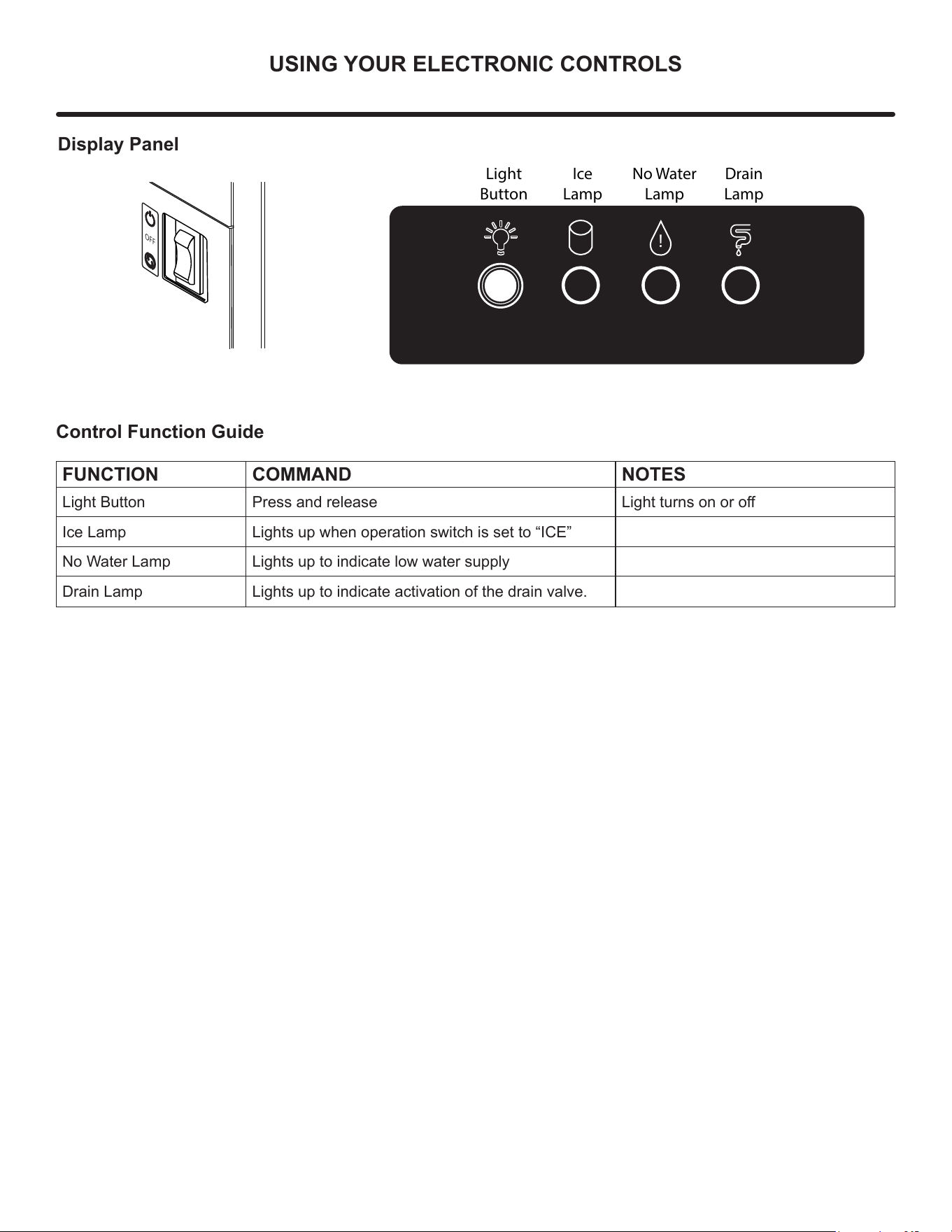
Display Panel
OFF
!
Light
Button
Ice
Lamp
No Water
Lamp
Drain
Lamp
Control Function Guide
FUNCTION COMMAND NOTES
Light Button Press and release Light turns on or o
Ice Lamp Lights up when operation switch is set to “ICE”
No Water Lamp Lights up to indicate low water supply
Drain Lamp Lights up to indicate activation of the drain valve.
9
INSTALLING THE WATER SUPPLY
Water Hookup
Prepare Plumbing
Plan the arrangement of the water supply pipes.
Connect a 1/4” diameter copper waterline to the tap water
supply line. Install a shuto valve between the tap water
pipe and the product so that the user can operate the valve.
Do not install the shuto valve at the back of the product.
Do not use a self-piercing valve. Water quality directly
aects performance and product life – use of an inline
water lter is strongly recommended & do not use
softened water.The pressure of the tap water should be
maintained at a level between 20psi (1.4bar) and 80psi
(5.5bar).
!
CAUTION
Plumbing installation must observe all state and local
codes. All water and drain connections MUST BE made
by a licensed/qualified plumbing contractor. Failure to
follow recommendations and instructions may result in
damage and/or harm.
Water Supply Connection
When connecting the water supply, please note the
following:
Do not use tape or joint compound when attaching a
braided exible water supply line that includes a rubber
gasket. The gasket provides an adequate seal – other ma-
terials could cause blockage of the valve.
Failure to follow recommendations and instructions may
result in damage and/or harm, ooding or void the product
warranty.
Use new hose set. Do not reuse old hose set.
!
CAUTION
Turn o water supply and disconnect electrical supply to
unit prior to installation.
Use caution when handling back panel. The edges could
be sharp.
Install Water Supply
1. Install the inlet pipe (1/4” diameter copper pipe) on the
wall and connect the water supply valve.
2. Use the inlet pipe after cutting it to the required length.
3. Wash the inlet pipe.
4. Connect the inlet pipe with the copper pipe using the
are nut.
5. Connect the inlet pipe with the water supply valve of
the product using the are out.
6. Turn on the tap and check for any leakage.
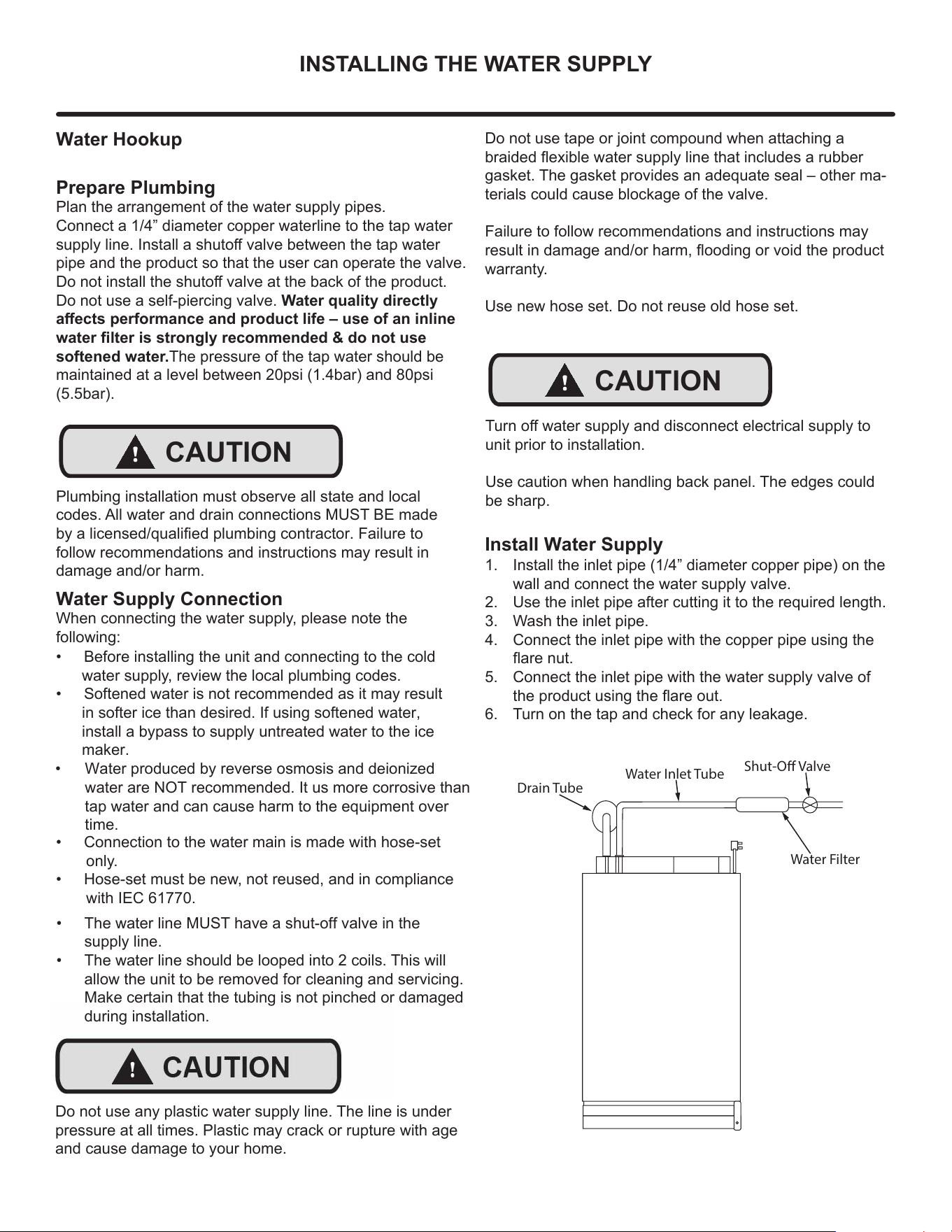
Shut-O Valve
Water Filter
Drain Tube
Water Inlet Tube
• Before installing the unit and connecting to the cold
water supply, review the local plumbing codes.
• Softened water is not recommended as it may result
in softer ice than desired. If using softened water,
install a bypass to supply untreated water to the ice
maker.
•
Water produced by reverse osmosis and deionized
water are NOT recommended. It us more corrosive than
tap water and can cause harm to the equipment over
time.
• Connection to the water main is made with hose-set
only.
• Hose-set must be new, not reused, and in compliance
with IEC 61770.
Do not use any plastic water supply line. The line is under
pressure at all times. Plastic may crack or rupture with age
and cause damage to your home.
• The water line MUST have a shut-off valve in the
supply line.
• The water line should be looped into 2 coils. This will
allow the unit to be removed for cleaning and servicing.
Make certain that the tubing is not pinched or damaged
during installation.
!
10
Drain
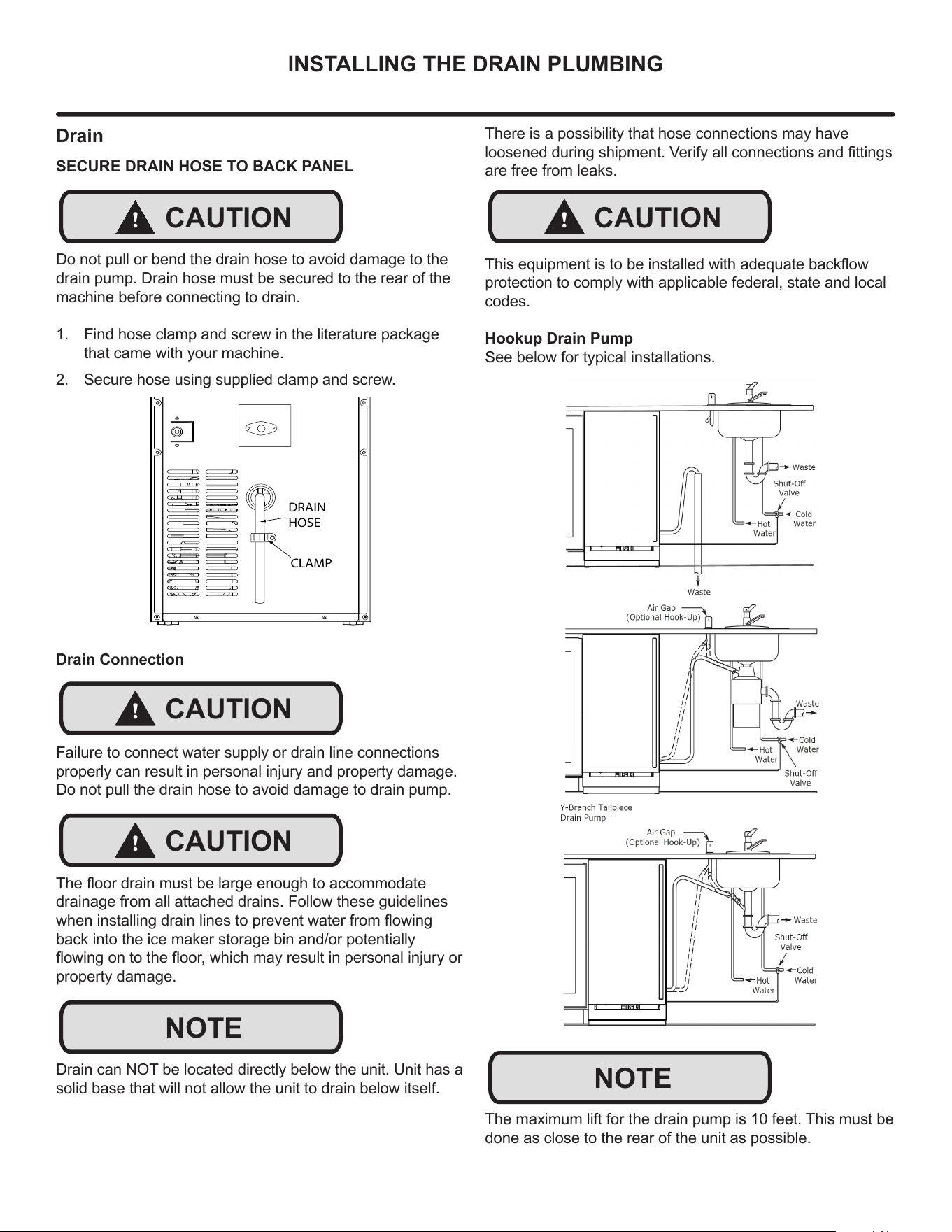
SECURE DRAIN HOSE TO BACK PANEL
Do not pull or bend the drain hose to avoid damage to the
drain pump. Drain hose must be secured to the rear of the
machine before connecting to drain.
1. Find hose clamp and screw in the literature package
that came with your machine.
2. Secure hose using supplied clamp and screw.
Drain Connection
Failure to connect water supply or drain line connections
properly can result in personal injury and property damage.
Do not pull the drain hose to avoid damage to drain pump.
The oor drain must be large enough to accommodate
drainage from all attached drains. Follow these guidelines
when installing drain lines to prevent water from owing
back into the ice maker storage bin and/or potentially
owing on to the oor, which may result in personal injury or
property damage.
Drain can NOT be located directly below the unit. Unit has a
solid base that will not allow the unit to drain below itself.
INSTALLING THE DRAIN PLUMBING
!
CAUTION
DRAIN
HOSE
CLAMP
!
CAUTION
!
CAUTION
NOTE
There is a possibility that hose connections may have
loosened during shipment. Verify all connections and ttings
are free from leaks.
This equipment is to be installed with adequate backow
protection to comply with applicable federal, state and local
codes.
Hookup Drain Pump
See below for typical installations.
The maximum lift for the drain pump is 10 feet. This must be
done as close to the rear of the unit as possible.
!
CAUTION
NOTE
11
ICE MAKER OPERATION
Ice
!
CAUTION
Do not put anything other than ice in the ice bin. Wine or
beer bottles are unsanitary and a detached label may block
the drain.
!
CAUTION
If the ice storage bin is full of water, turn o the ice maker
and clean the mesh on the bottom of the ice bin.
Ice-Making Process
Water ows into the drum, and as the auger rotates, the
water freezes and is ejected upward. Impurities in the
water are periodically discharged by the drain valve to
create clean ice
Operation Time
The machine continues to operate until the ice bin is full,
which takes about 10 hours (this time will vary slightly
based upon ambient and water temperatures).
The machine ceases ice production when the ice level
reaches the temperature sensing tube located on the right
side.
!
CAUTION
When the door is open, the ice maker cannot
detect if the bin is full. Be sure to keep door closed during
ice production.
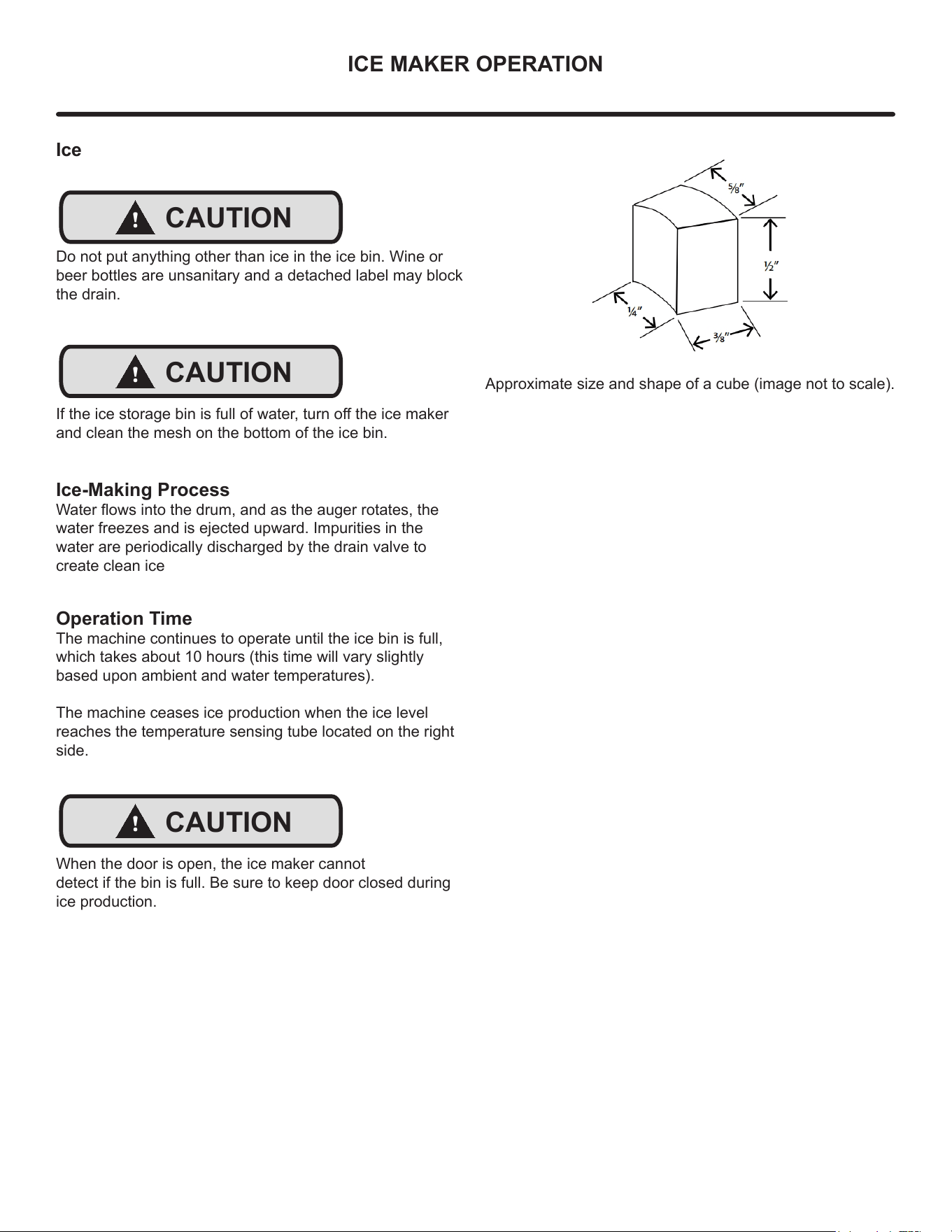
Approximate size and shape of a cube (image not to scale).
12
CARE AND CLEANING
Cleaning
NOTE
Use only Marvel Ice Machine Cleaner (S41013789),
available for purchase from marvelrefrigeration.com or your
dealer. It is a violation of federal law to use this solution in a
manner inconsistent with its labeling. Use of any other
cleaner can cause damage to the ice machine and will void
the warranty. Read and understand all labels printed on the
package before use.
Marvel Ice Machine Cleaner is used to remove lime scale
and other mineral deposits. Refer to the following steps to
initiate the self-cleaning cycle.
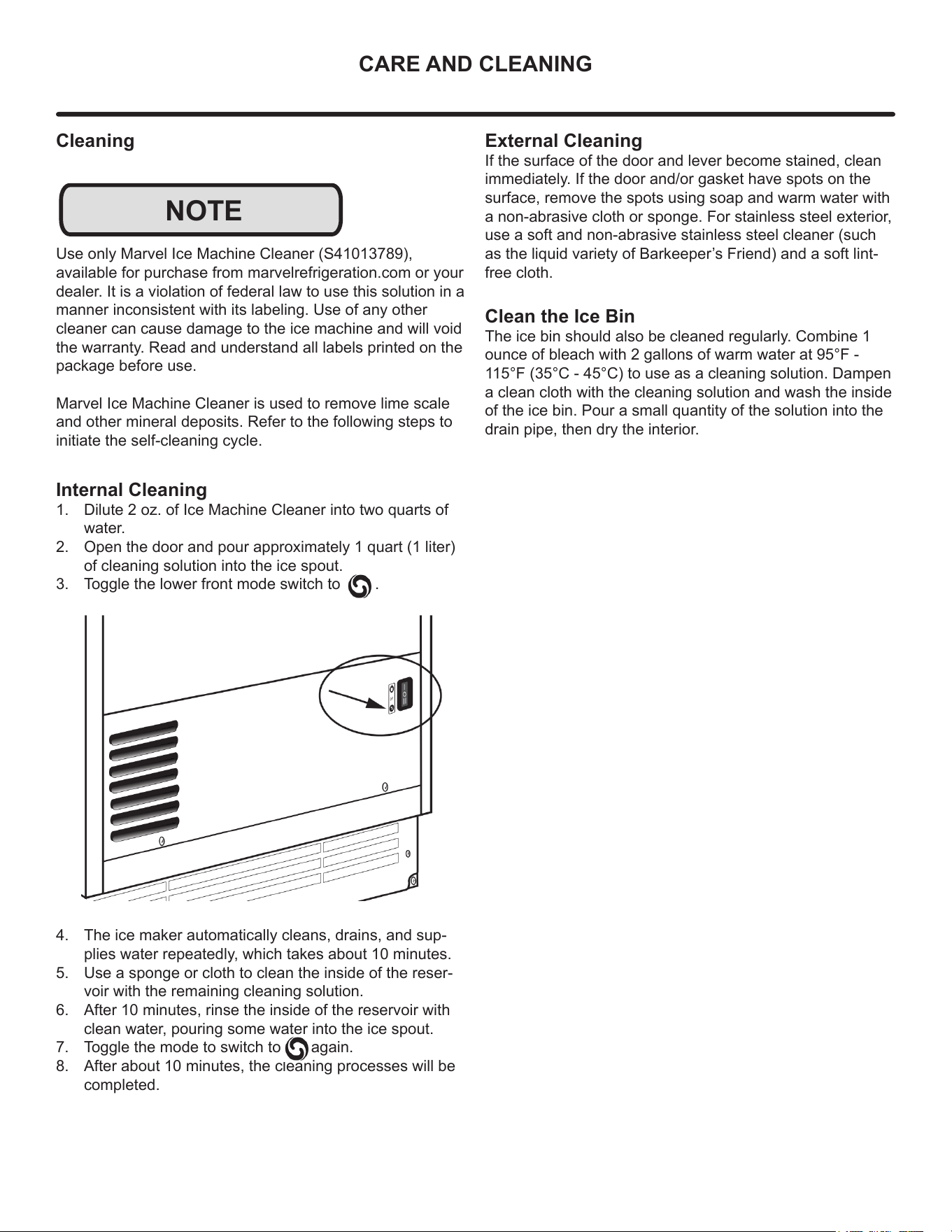
Internal Cleaning
1. Dilute 2 oz. of Ice Machine Cleaner into two quarts of
water.
2. Open the door and pour approximately 1 quart (1 liter)
of cleaning solution into the ice spout.
3. Toggle the lower front mode switch to .
4. The ice maker automatically cleans, drains, and sup-
plies water repeatedly, which takes about 10 minutes.
5. Use a sponge or cloth to clean the inside of the reser-
voir with the remaining cleaning solution.
6. After 10 minutes, rinse the inside of the reservoir with
clean water, pouring some water into the ice spout.
7. Toggle the mode to switch to again.
8. After about 10 minutes, the cleaning processes will be
completed.
External Cleaning
If the surface of the door and lever become stained, clean
immediately. If the door and/or gasket have spots on the
surface, remove the spots using soap and warm water with
a non-abrasive cloth or sponge. For stainless steel exterior,
use a soft and non-abrasive stainless steel cleaner (such
as the liquid variety of Barkeeper’s Friend) and a soft lint-
free cloth.
Clean the Ice Bin
The ice bin should also be cleaned regularly. Combine 1
ounce of bleach with 2 gallons of warm water at 95°F -
115°F (35°C - 45°C) to use as a cleaning solution. Dampen
a clean cloth with the cleaning solution and wash the inside
of the ice bin. Pour a small quantity of the solution into the
drain pipe, then dry the interior.
13
CARE AND CLEANING
Cleaning the Condenser
Disconnect electric power to the unit before cleaning
the condenser. DO NOT use any type of cleaner on
the condenser unit. Condenser may be cleaned using
a vacuum, soft brush, or compressed air.
!
WARNING
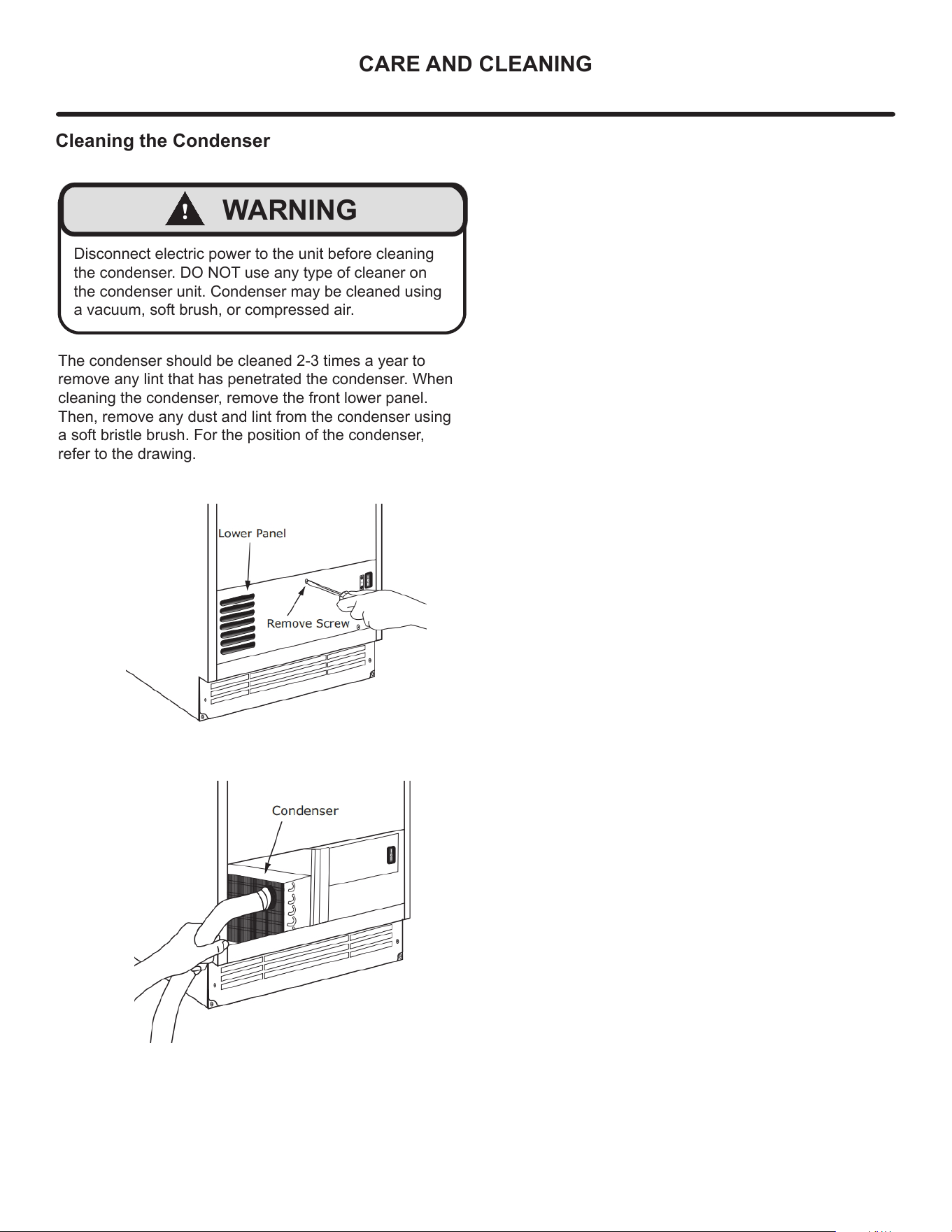
The condenser should be cleaned 2-3 times a year to
remove any lint that has penetrated the condenser. When
cleaning the condenser, remove the front lower panel.
Then, remove any dust and lint from the condenser using
a soft bristle brush. For the position of the condenser,
refer to the drawing.
14
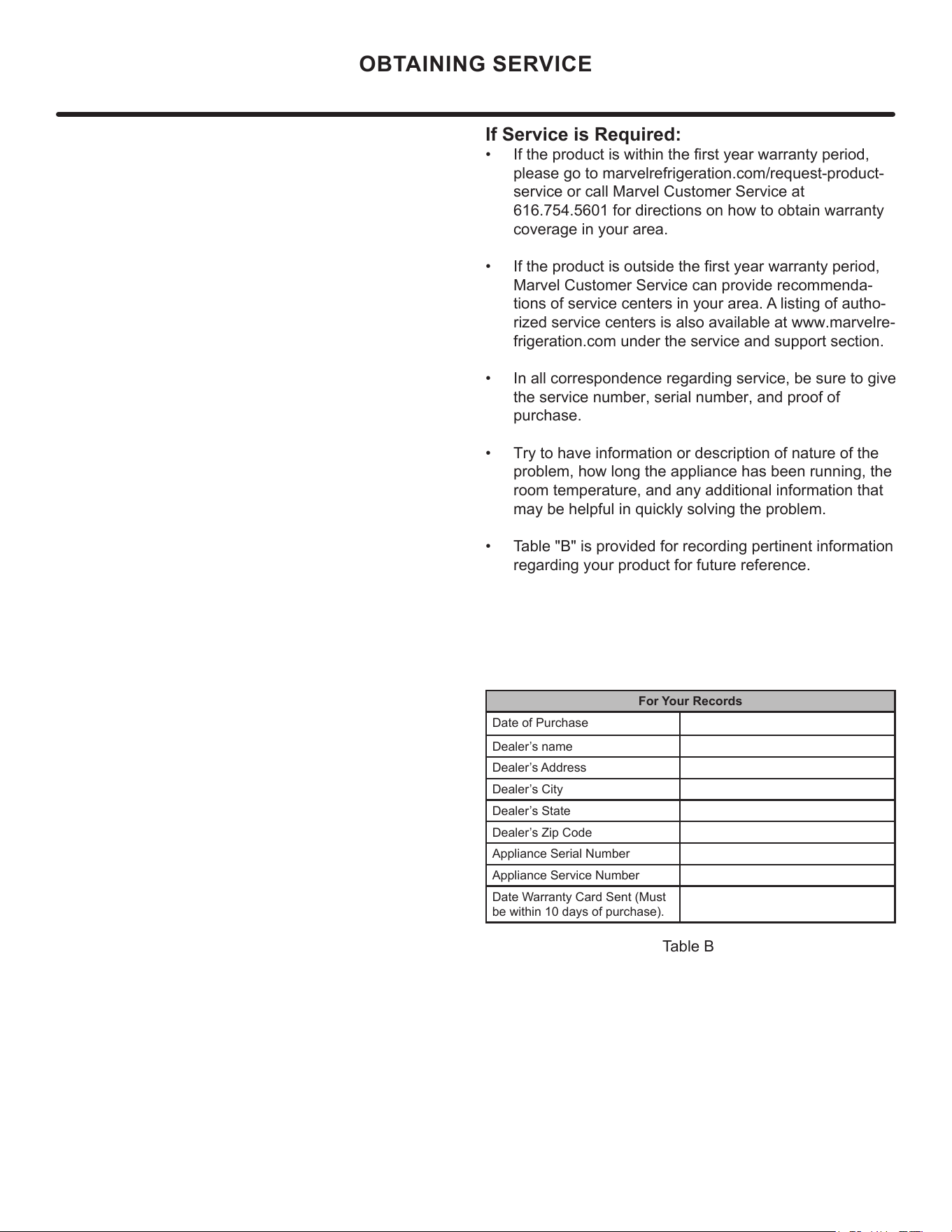
If Service is Required:
• If the product is within the first year warranty period,
please go to marvelrefrigeration.com/request-product-
service or call Marvel Customer Service at
616.754.5601 for directions on how to obtain warranty
coverage in your area.
• If the product is outside the first year warranty period,
Marvel Customer Service can provide recommenda-
tions of service centers in your area. A listing of autho-
rized service centers is also available at www.marvelre-
frigeration.com under the service and support section.
• In all correspondence regarding service, be sure to give
the service number, serial number, and proof of
purchase.
• Try to have information or description of nature of the
problem, how long the appliance has been running, the
room temperature, and any additional information that
may be helpful in quickly solving the problem.
• Table "B" is provided for recording pertinent information
regarding your product for future reference.
For Your Records
Date of Purchase
Dealer’s name
Dealer’s Address
Dealer’s City
Dealer’s State
Dealer’s Zip Code
Appliance Serial Number
Appliance Service Number
Date Warranty Card Sent (Must
be within 10 days of purchase).
Table B
OBTAINING SERVICE
15
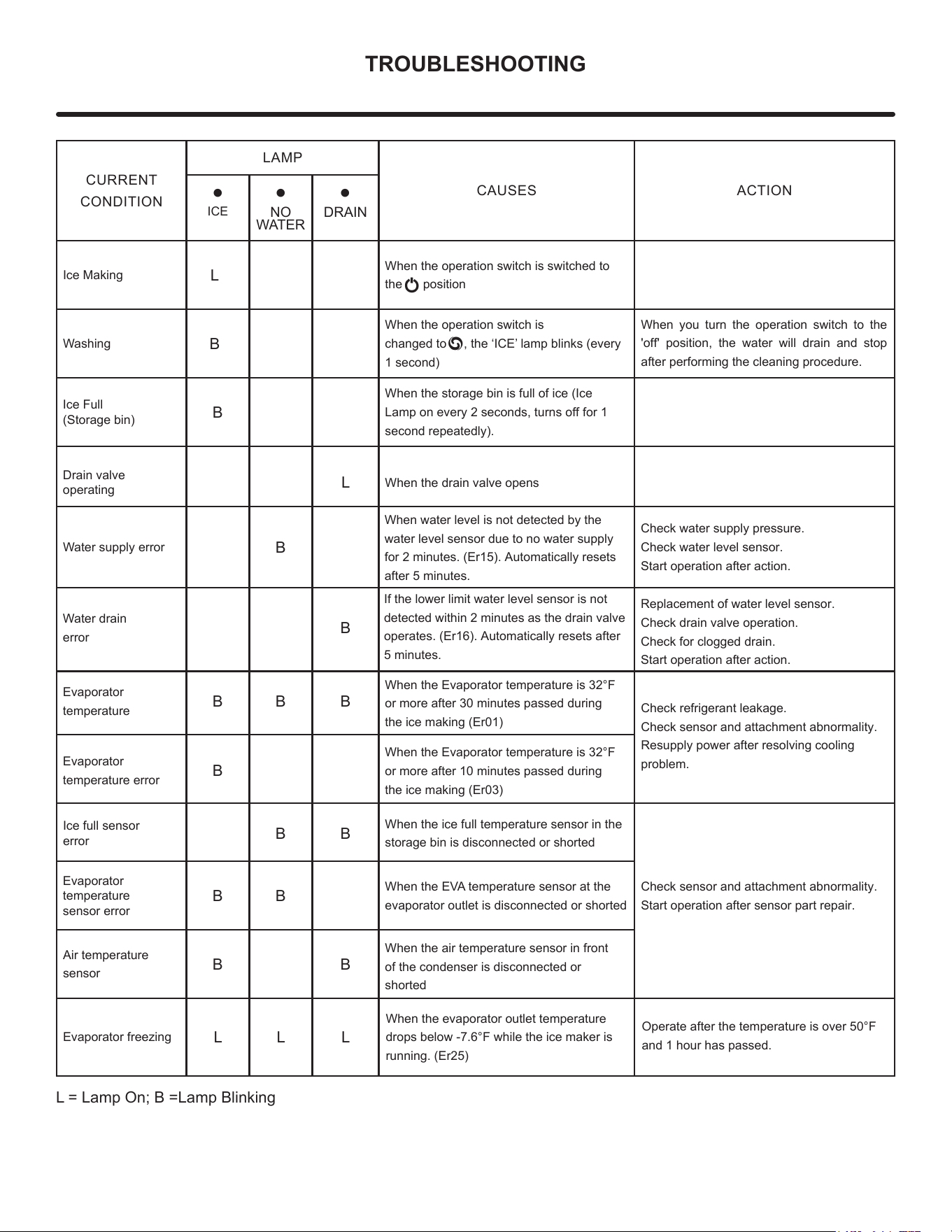
TROUBLESHOOTING
CURRENT
CONDITION
LAMP
CAUSES ACTION
•
ICE
•
NO
WATER
•
DRAIN
Ice Making
L
When the operation switch is switched to
the position
Washing
B
When the operation switch is
changed to , the ‘ICE’ lamp blinks (every
1 second)
When you turn the operation switch to the
'off' position, the water will drain and stop
after performing the cleaning procedure.
Ice Full
(Storage bin)
B
When the storage bin is full of ice (Ice
Lamp on every 2 seconds, turns off for 1
second repeatedly).
Drain valve
operating
L
When the drain valve opens
Water supply error
B
When water level is not detected by the
water level sensor due to no water supply
for 2 minutes. (Er15). Automatically resets
after 5 minutes.
Check water supply pressure.
Check water level sensor.
Start operation after action.
Water drain
error
B
If the lower limit water level sensor is not
detected within 2 minutes as the drain valve
operates. (Er16). Automatically resets after
5 minutes.
Replacement of water level sensor.
Check drain valve operation.
Check for clogged drain.
Start operation after action.
Evaporator
temperature
B B B
When the Evaporator temperature is 32°F
or more after 30 minutes passed during
the ice making (Er01)
Check refrigerant leakage.
Check sensor and attachment abnormality.
Resupply power after resolving cooling
problem.
Evaporator
temperature error
B
When the Evaporator temperature is 32°F
or more after 10 minutes passed during
the ice making (Er03)
Ice full sensor
error
B B
When the ice full temperature sensor in the
storage bin is disconnected or shorted
Check sensor and attachment abnormality.
Start operation after sensor part repair.
Evaporator
temperature
sensor error
B B
When the EVA temperature sensor at the
evaporator outlet is disconnected or shorted
Air temperature
sensor
B B
When the air temperature sensor in front
of the condenser is d
isconnected or
shorted
Evaporator freezing
L L L
When the evaporator outlet temperature
drops below -7.6°F while the ice maker is
running. (Er25)
Operate after the temperature is over 50°F
and 1 hour has passed.
L = Lamp On; B =Lamp Blinking
16
1188
8. Maintenance Schedule
-The following maintenance schedule is guideline
-Maint
enance and repair should be done more frequently according to water quality,
equipment usage environment and local hy
giene regulations.
Maintena
nce Schedule
Frequency Area Task
Daily Scoop Clean the scoop using a neutral cleaner.
Rinse thoroughly after cleaning.
Monthly External water filter Make sure that the pressure is adequate and make changes if needed.
Outside of the ice maker
Wipe down with clean, soft cloth. Use a damp cloth containing a neutral
cleaner to wipe off oil or dirt build up.
Clean any chlorine staining (rust colored spots) using a non-abrasive cleanser.
Storage Bin, Inner door, Wipe clean with clean cloth and warm water.
Ice outlet(Spout)
Icemaker and Storage Bin Clean and disinfect according to the disinfection instructions
given in the instruction manual.
Wipe down with clean cloth and warm water.
Ice maker and reservoir Always check that it is kept clean.
Check for leaks around the seal bolt. Tighten if necessary and replace O-rings.
Always replace the O-ring when loosening the seal bolt and tighten it again.
If there is no O-ring, apply Loctite 243 or equivalent fixing agent so that it does not leak.
Yearly
Close the shutoff valve to shut off the water supply line and drain the water.
Water hose Check the water hose and clean it if necessary.
Condenser (air-cooled)
Inspect for cleaning. If necessary, clean with a brush or vacuum cleaner
If the dust adhesion is severe, spray the pin cleaning agent, clean the dust, spray it with
clean water, rinse and dry with air gun. Clean condenser every 6 months.
Ice maker Inspect for oil marks, loose components, tightening parts and wires.
Upper bearing Check that 0.02" round bar or pin gauge (or clearance gauge) is inserted into auger
(Ice exit head) and bearing clearance, and replace all upper and lower bearings (ice exit head
and lower housing)
Mechanical seal Check for leaks in the bottom housing, and if there is a leak, disassemble the auger
to replace the mechanical seal. (Water with a lot of calcium will shorten
the life of replacement parts.)
Please chek. If the auger and bearing clearance exceeds the factory recommended
value (0.02" or less), replace both the upper and lower bearings.
If the contact surface of the mechanical seal is worn, cracked, or scratched, replace it.
Every 6
Months
After
3 Years,
then
Yearly
Evaporator
Condensate Drain
Pan and Gear
Motor Drain Pan
Ice exit fixing
seal bolt
Water supply valve and
Drain valve
Upper and lower bearings,
Housing O-ring,
Mechanical seals,
Evaporator cylinder, Auger
1188
8. Maintenance Schedule
-The following maintenance schedule is guideline
-Maintenance and repair should be done more frequently according to water quality,
equipment usage environment and local hygiene regulations.
Maintenance Schedule
Frequency Area Task
Daily Scoop Clean the scoop using a neutral cleaner.
Rinse thoroughly after cleaning.
Monthly External water filter Make sure that the pressure is adequate and make changes if needed.
Outside of the ice maker
Wipe down with clean, soft cloth. Use a damp cloth containing a neutral
cleaner to wipe off oil or dirt build up.
Clean any chlorine staining (rustcolored spots) using a non-abrasive cleanser.
Storage Bin, Inner door, Wipe clean with clean cloth and warm water.
Ice outlet(Spout)
Icemaker and Storage Bin Clean and disinfect according to the disinfection instructions
given in the instruction manual.
Wipe down with clean cloth and warm water.
Ice maker and reservoir Always check that it is kept clean.
Check for leaks around the seal bolt. Tighten if necessary and replace O-rings.
Always replace the O-ring when loosening the seal bolt and tighten it again.
If there isno O-ring, apply Loctite 243 or equivalent fixing agent so that it does not leak.
Yearly
Close the shutoff valve to shut off the water supply line and drain the water.
Water hose Check the water hose and clean it if necessary.
Condenser (air-cooled)
Inspect for cleaning. If necessary, clean with a brush or vacuum cleaner
If the dust adhesion is severe, spray the pin cleaning agent, clean the dust, spray it with
clean water, rinse and dry with air gun. Clean condenser every 6 months.
Ice maker Inspect for oil marks, loose components, tightening parts and wires.
Upper bearing Check that 0.02" round bar or pin gauge (or clearance gauge) is inserted into auger
(Ice exit head) and bearing clearance, and replace all upper and lower bearings (ice exit head
and lower housing)
Mechanical seal Check for leaks in the bottom housing, and if there is a leak, disassemble the auger
to replace the mechanical seal. (Water with a lot of calcium will shorten
the life of replacement parts.)
Please chek. If the auger and bearing clearance exceeds the factory recommended
value (0.02" or less), replace both the upper and lower bearings.
If the contact surface of the mechanical seal is worn, cracked, or scratched, replace it.
Every 6
Months
After
3 Years,
then
Yearly
Evaporator
Condensate Drain
Pan and Gear
Motor Drain Pan
Ice exit fixing
seal bolt
Water supply valve and
Drain valve
Upper and lower bearings,
Housing O-ring,
Mechanical seals,
Evaporator cylinder, Auger
1188
8. Maintenance Schedule
-The following maintenance schedule is guideline
-Maintenance and repair should be done more frequently according to water quality,
equipment usage environment and local hygiene regulations.
Maintenance Schedule
Frequency Area Task
Daily Scoop Clean the scoop using a neutral cleaner.
Rinse thoroughly after cleaning.
Monthly External water filter Make sure that the pressure is adequate and make changes if needed.
Outside of the ice maker
Wipe down with clean, soft cloth. Use a damp cloth containing a neutral
cleaner to wipe off oil or dirt build up.
Clean any chlorine staining (rustcolored spots) using a non-abrasive cleanser.
Storage Bin, Inner door, Wipe clean with clean cloth and warm water.
Ice outlet(Spout)
Icemaker and Storage Bin Clean and disinfect according to the disinfection instructions
given in the instruction manual.
Wipe down with clean cloth and warm water.
Ice maker and reservoir Always check that it is kept clean.
Check for leaks around the seal bolt. Tighten if necessary and replace O-rings.
Always replace the O-ring when loosening the seal bolt and tighten it again.
If there isno O-ring, apply Loctite 243 or equivalent fixing agent so that it does not leak.
Yearly
Close the shutoff valve to shut off the water supply line and drain the water.
Water hose Check the water hose and clean it if necessary.
Condenser (air-cooled)
Inspect for cleaning. If necessary, clean with a brush or vacuum cleaner
If the dust adhesion is severe, spray the pin cleaning agent, clean the dust, spray it with
clean water, rinse and dry with air gun. Clean condenser every 6 months.
Ice maker Inspect for oil marks, loose components, tightening parts and wires.
Upper bearing Check that 0.02" round bar or pin gauge (or clearance gauge) is inserted into auger
(Ice exit head) and bearing clearance, and replace all upper and lower bearings (ice exit head
and lower housing)
Mechanical seal Check for leaks in the bottom housing, and if there is a leak, disassemble the auger
to replace the mechanical seal. (Water with a lot of calcium will shorten
the life of replacement parts.)
Please chek. If the auger and bearing clearance exceeds the factory recommended
value (0.02" or less), replace both the upper and lower bearings.
If the contact surface of the mechanical seal is worn, cracked, or scratched, replace it.
Every 6
Months
After
3 Years,
then
Yearly
Evaporator
Condensate Drain
Pan and Gear
Motor Drain Pan
Ice exit fixing
seal bolt
Water supply valve and
Drain valve
Upper and lower bearings,
Housing O-ring,
Mechanical seals,
Evaporator cylinder, Auger
1188
8. Maintenance Schedule
-The following maintenance schedule is guideline
-Maintenance and repair should be done more frequently according to water quality,
equipment usage environment and local hygiene regulations.
Maintenance Schedule
Frequency Area Task
Daily Scoop Clean the scoop using a neutral cleaner.
Rinse thoroughly after cleaning.
Monthly External water filter Make sure that the pressure is adequate and make changes if needed.
Outside of the ice maker
Wipe down with clean, soft cloth. Use a damp cloth containing a neutral
cleaner to wipe off oil or dirt build up.
Clean any chlorine staining (rustcolored spots) using a non-abrasive cleanser.
Storage Bin, Inner door, Wipe clean with clean cloth and warm water.
Ice outlet(Spout)
Icemaker and Storage Bin Clean and disinfect according to the disinfection instructions
given in the instruction manual.
Wipe down with clean cloth and warm water.
Ice maker and reservoir Always check that it is kept clean.
Check for leaks around the seal bolt. Tighten if necessary and replace O-rings.
Always replace the O-ring when loosening the seal bolt and tighten it again.
If there is no O-ring, apply Loctite 243 or equivalent fixing agent so that it does not leak.
Yearly
Close the shutoff valve to shut off the water supply line and drain the water.
Water hose Check the water hose and clean it if necessary.
Condenser (air-cooled)
Inspect for cleaning. If necessary, clean with a brush or vacuum cleaner
If the dust adhesion is severe, spray the pin cleaning agent, clean the dust, spray it with
clean water, rinse and dry with air gun. Clean condenser every 6 months.
Ice maker Inspect for oil marks, loose components, tightening parts and wires.
Upper bearing Check that 0.02" round bar or pin gauge (or clearance gauge) is inserted into auger
(Ice exit head) and bearing clearance, and replace all upper and lower bearings (ice exit head
and lower housing)
Mechanical seal Check for leaks in the bottom housing, and if there is a leak, disassemble the auger
to replace the mechanical seal. (Water with a lot of calcium will shorten
the life of replacement parts.)
Please chek. If the auger and bearing clearance exceeds the factory recommended
value (0.02" or less), replace both the upper and lower bearings.
If the contact surface of the mechanical seal is worn, cracked, or scratched, replace it.
Every 6
Months
After
3 Years,
then
Yearly
Evaporator
Condensate Drain
Pan and Gear
Motor Drain Pan
Ice exit fixing
seal bolt
Water supply valve and
Drain valve
Upper and lower bearings,
Housing O-ring,
Mechanical seals,
Evaporator cylinder, Auger
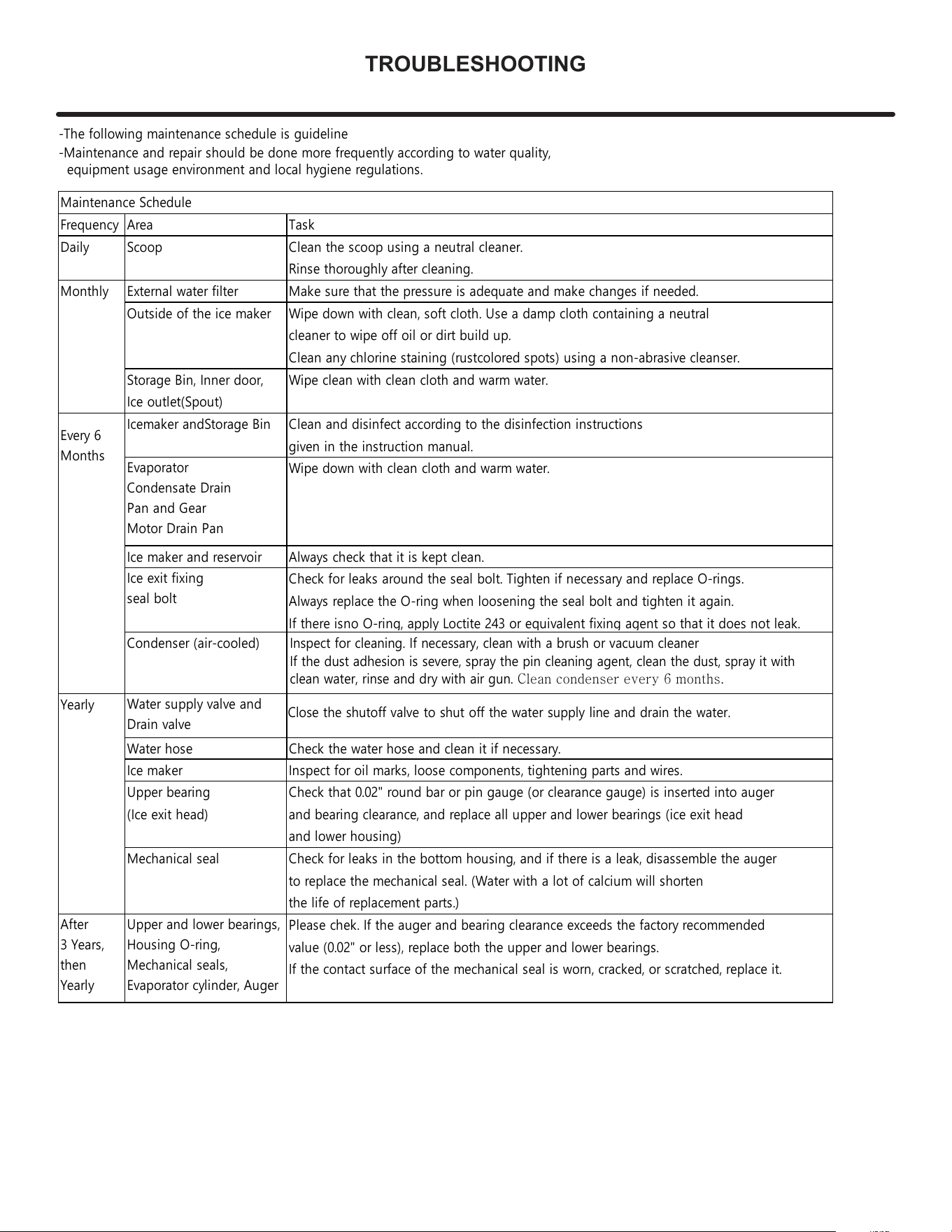
TROUBLESHOOTING
17
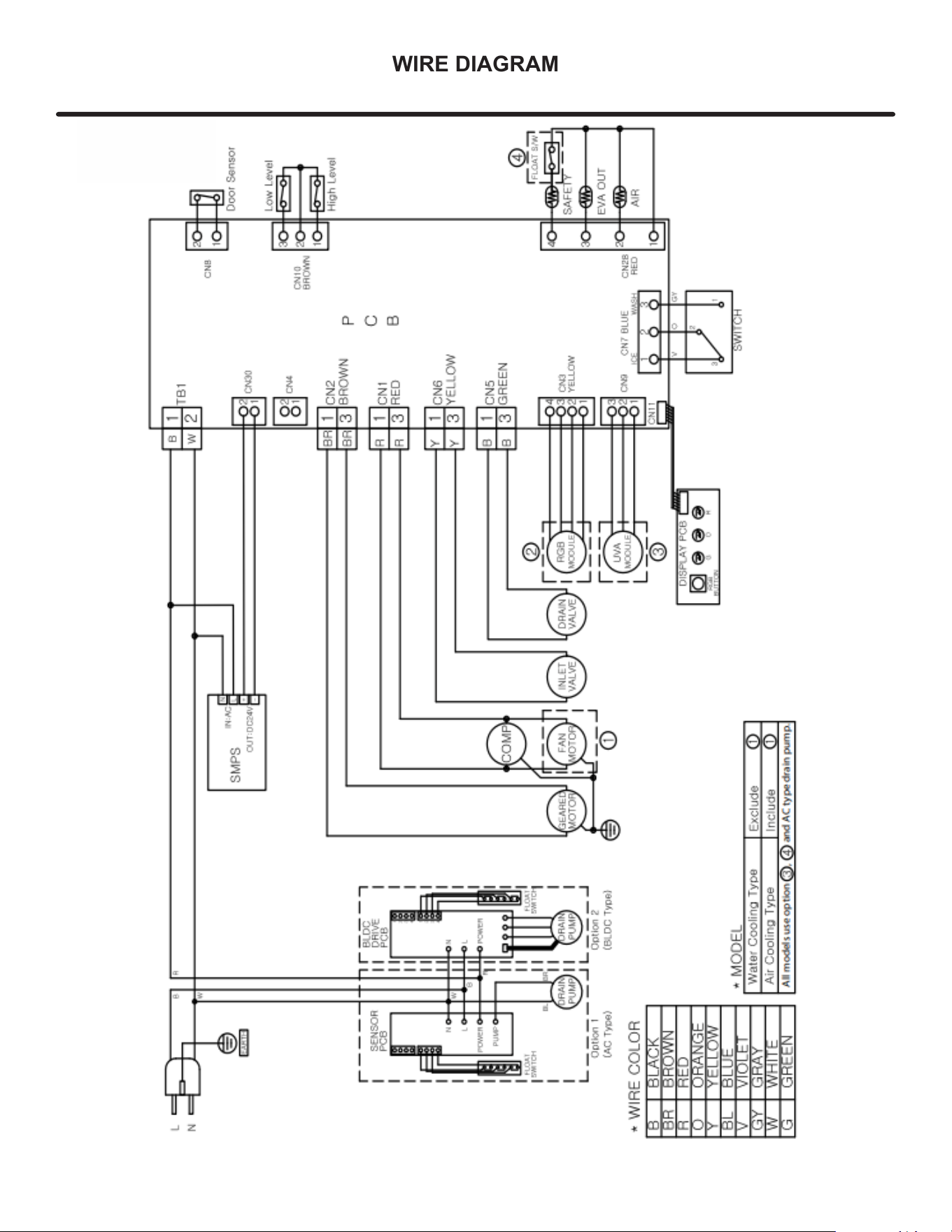
WIRE DIAGRAM
LED
UV
18
Product Liability
Field se
rvice technicians are authorized to make an initial
assessment in the event of reported damages. If there are
any questions about the process involved, the technician
should call Marvel for further explanation.
While inspecting for defects or installation issues, photos
should be taken to document any damages or issues und.
During the assessment, if the service technician is able to
find the source of the damage and it can be resolved by
replacement of a part, the servicer is authorized to replace
the part in question. The part that caused the damage
must be returned to Marvel in its entirety. The part must
be clearly labeled with the serial number of the unit it was
removed from, the date, and the servicer who removed the
part.
If the service technician determines the damage is the
result of installation issues (water connection/drain, etc.),
the consumer would be notified and the issues shall be
resolved at the direction of the consumer.
If damage is evident and the service technician is
unable to nd the source, Marvel must be contacted at
616.754.5601 for further direction.
1260
E
.
V
an Deinse St•
G
reenville, MI 48838
T: +1.616.754.5601
Website: www.marvelrefrigeration.com
The original refrigeration experts since 1892.
Product Liability
19
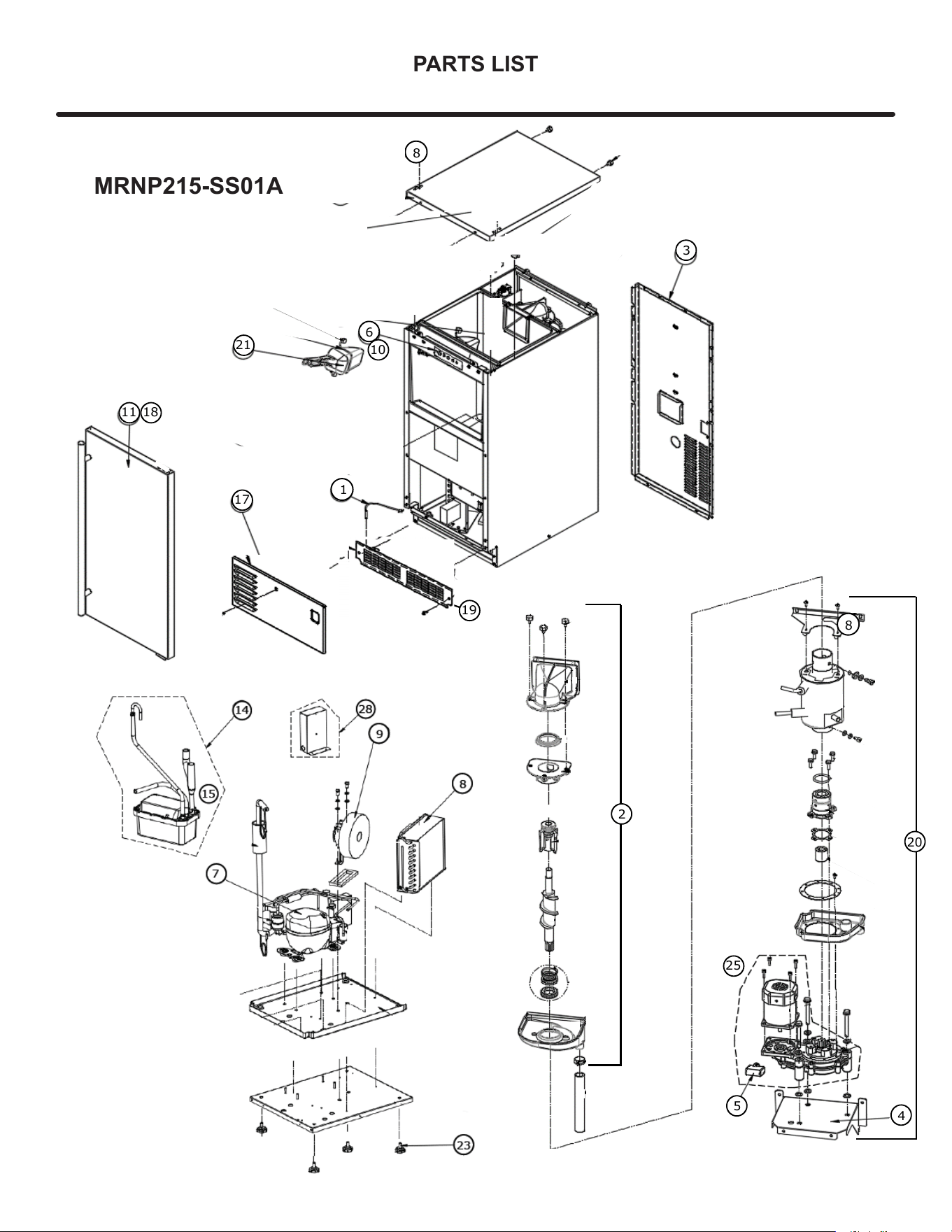
PARTS LIST
7
8
28
14
15
9
1
3
6
10
11 18
17
21
8
19
2
4
5
25
8
20
MRNP215-SS01A
20
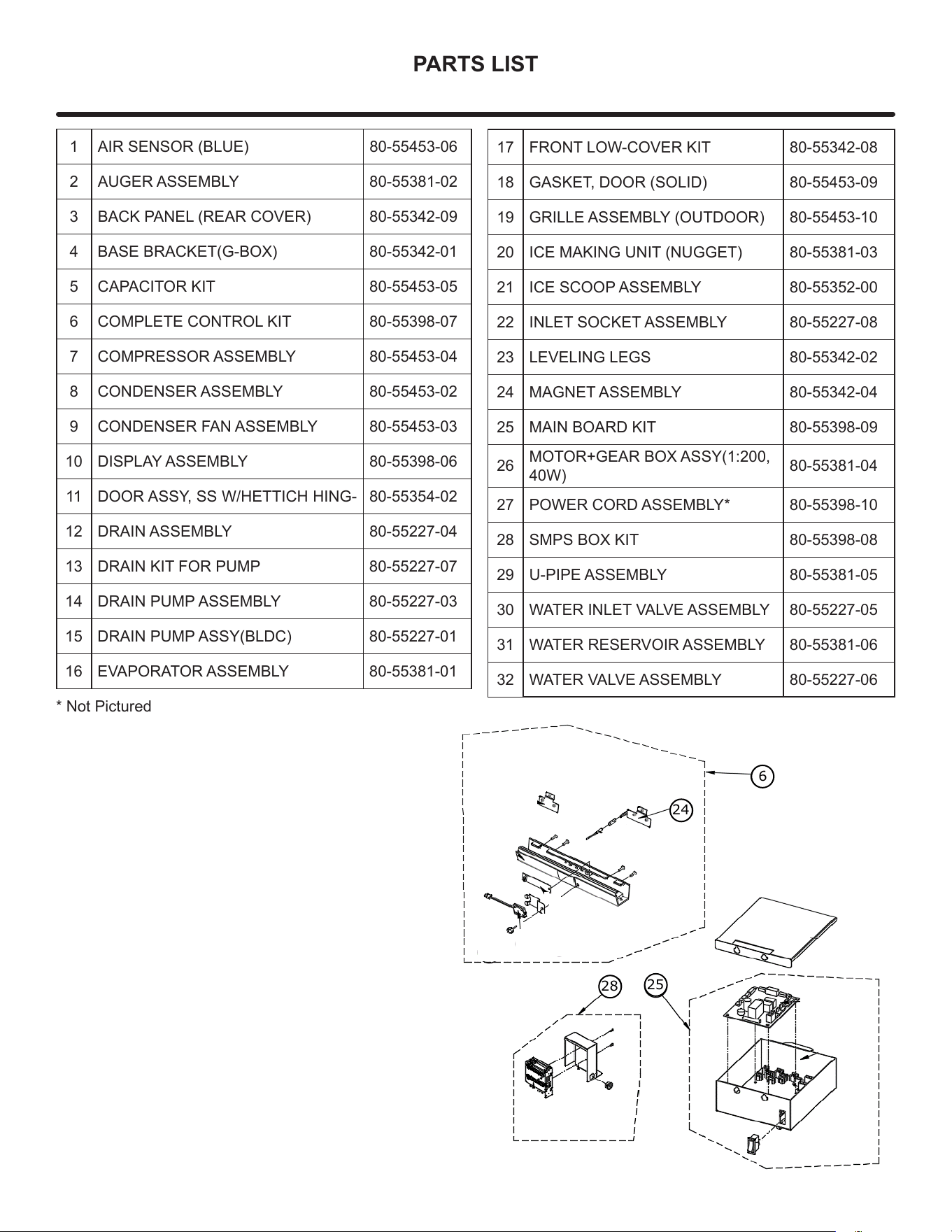
PARTS LIST
1 AIR SENSOR (BLUE) 80-55453-06
2 AUGER ASSEMBLY 80-55381-02
3 BACK PANEL (REAR COVER) 80-55342-09
4 BASE BRACKET(G-BOX) 80-55342-01
5 CAPACITOR KIT 80-55453-05
6 COMPLETE CONTROL KIT 80-55398-07
7 COMPRESSOR ASSEMBLY 80-55453-04
8 CONDENSER ASSEMBLY 80-55453-02
9 CONDENSER FAN ASSEMBLY 80-55453-03
10 DISPLAY ASSEMBLY 80-55398-06
11 DOOR ASSY, SS W/HETTICH HING- 80-55354-02
12 DRAIN ASSEMBLY 80-55227-04
13 DRAIN KIT FOR PUMP 80-55227-07
14 DRAIN PUMP ASSEMBLY 80-55227-03
15 DRAIN PUMP ASSY(BLDC) 80-55227-01
16 EVAPORATOR ASSEMBLY 80-55381-01
17 FRONT LOW-COVER KIT 80-55342-08
18 GASKET, DOOR (SOLID) 80-55453-09
19 GRILLE ASSEMBLY (OUTDOOR) 80-55453-10
20 ICE MAKING UNIT (NUGGET) 80-55381-03
21 ICE SCOOP ASSEMBLY 80-55352-00
22 INLET SOCKET ASSEMBLY 80-55227-08
23 LEVELING LEGS 80-55342-02
24 MAGNET ASSEMBLY 80-55342-04
25 MAIN BOARD KIT 80-55398-09
26
MOTOR+GEAR BOX ASSY(1:200,
40W)
80-55381-04
27 POWER CORD ASSEMBLY* 80-55398-10
28 SMPS BOX KIT 80-55398-08
29 U-PIPE ASSEMBLY 80-55381-05
30 WATER INLET VALVE ASSEMBLY 80-55227-05
31 WATER RESERVOIR ASSEMBLY 80-55381-06
32 WATER VALVE ASSEMBLY 80-55227-06
* Not Pictured
28
24
25
6
21
Ordering Replacement Parts
Parts may be ordered online at
partsformarvel.com
O
r contact:
www.marvelrefrigeration.com
(Servicers choose
"
Login
"
for
service account).
Phone Number: (
6
1
6
) 754-5
6
01
NOTICE
Use only genuine
M
arvel replacement parts. The
use of non-
M
arvel parts can reduce performance,
damage the unit, and void the warranty.
Warranty parts will be shipped at no charge after
M
arvel
confirms warranty status. Please provide the model, serial
number, part number and part description. Some parts will
require color or voltage information.
M
arvel requires the return of original parts, we will inform
you when the parts order is taken. This requirement will
be noted on your packing list. A prepaid shipping label will
be emailed to you. Please enclose a copy of the parts
packing list and be sure the model and serial numbers are
legible on the paperwork. Tag the part with the reported
defect.
Customers and non-authorized servicers may order non
warranty parts at www.partsformarvel.com. Authorized
servicers with a servicer login may order non-warranty
parts at www.marvelrefrigeration.m.
Ordering Replacement Parts
22
R-600A Specifications
&
H
an
dl
in
g
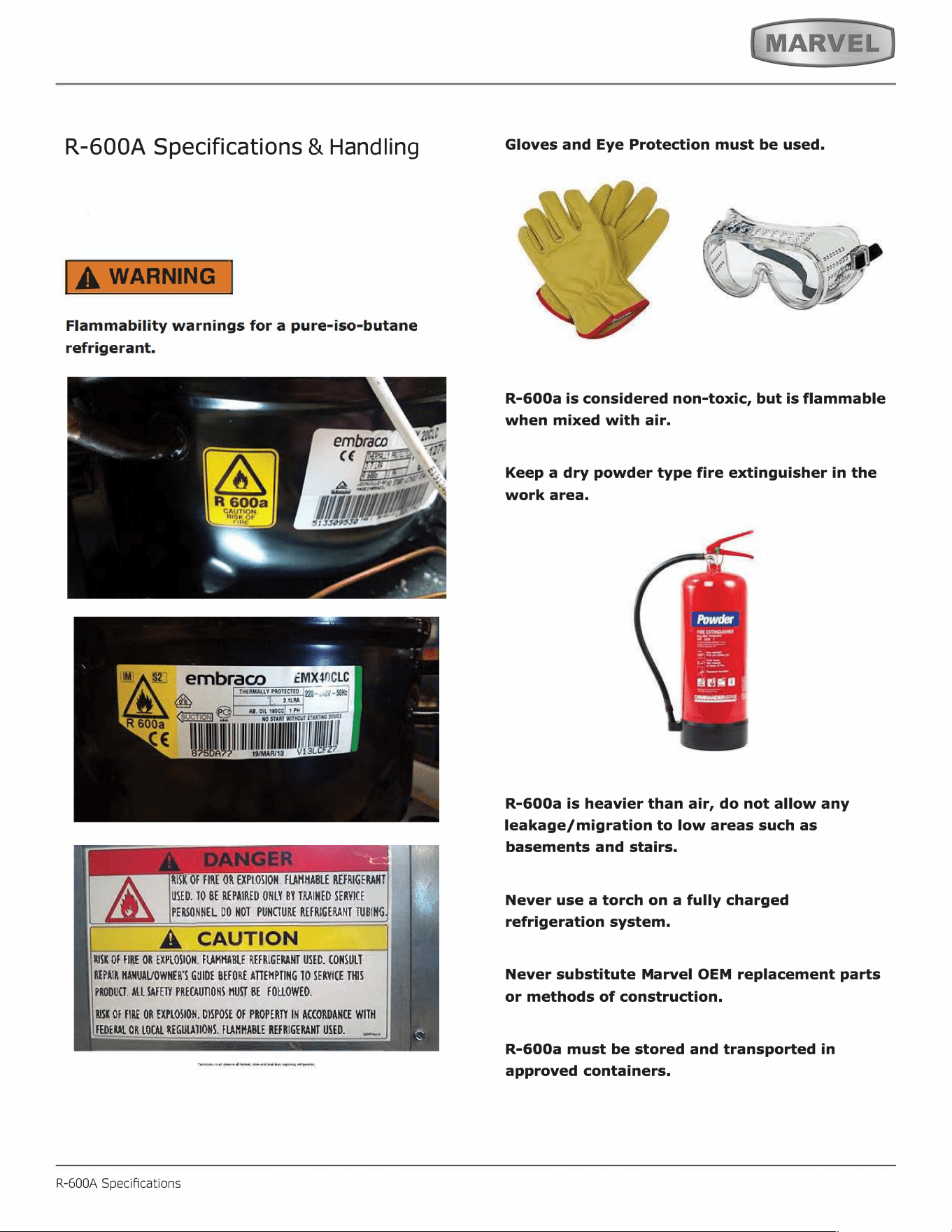
RISK Of FIRE OR EXPLOSION. FMMABLE REFRIGENT
USED. TO BE REPAIRED ONLY BY TINED SERVICE
PEONNEL DO HOT PUNURE REFRIGENT TUBING
SK Of FIRE OR EXPLOSION. FMHA_BLE REFRIGENT USED. CONSULT
REPAIR ANUAVOWHER'S GUIDE BEFORE AEMPTING TO SERVICE THIS
PRODU. ALL FE PREUONS HU BE FOUOWEO.
SK Of FIRE OR EXPLOSION. DISPOSE Of PROPER IN ACCORDANCE WITH
FEDE OR LOL REGUTIONS. FHHABLE REFRIGENT USED.
R-600A Specications
Gloves and Eye Protection must be used.
,
. ���·
'
R-600a is considered non-toxic, but is flammable
when mixed with air.
Keep a dry powder type fire extinguisher in the
work area.
R-600a is heavier than air, do not allow any
leakage/migration to low areas such as
basements and stairs.
Never use a torch on a fully charged
refrigeration system.
Never substitute Marvel OEM replacement parts
or methods of construction.
R-600a must be stored and transported in
approved containers.
23
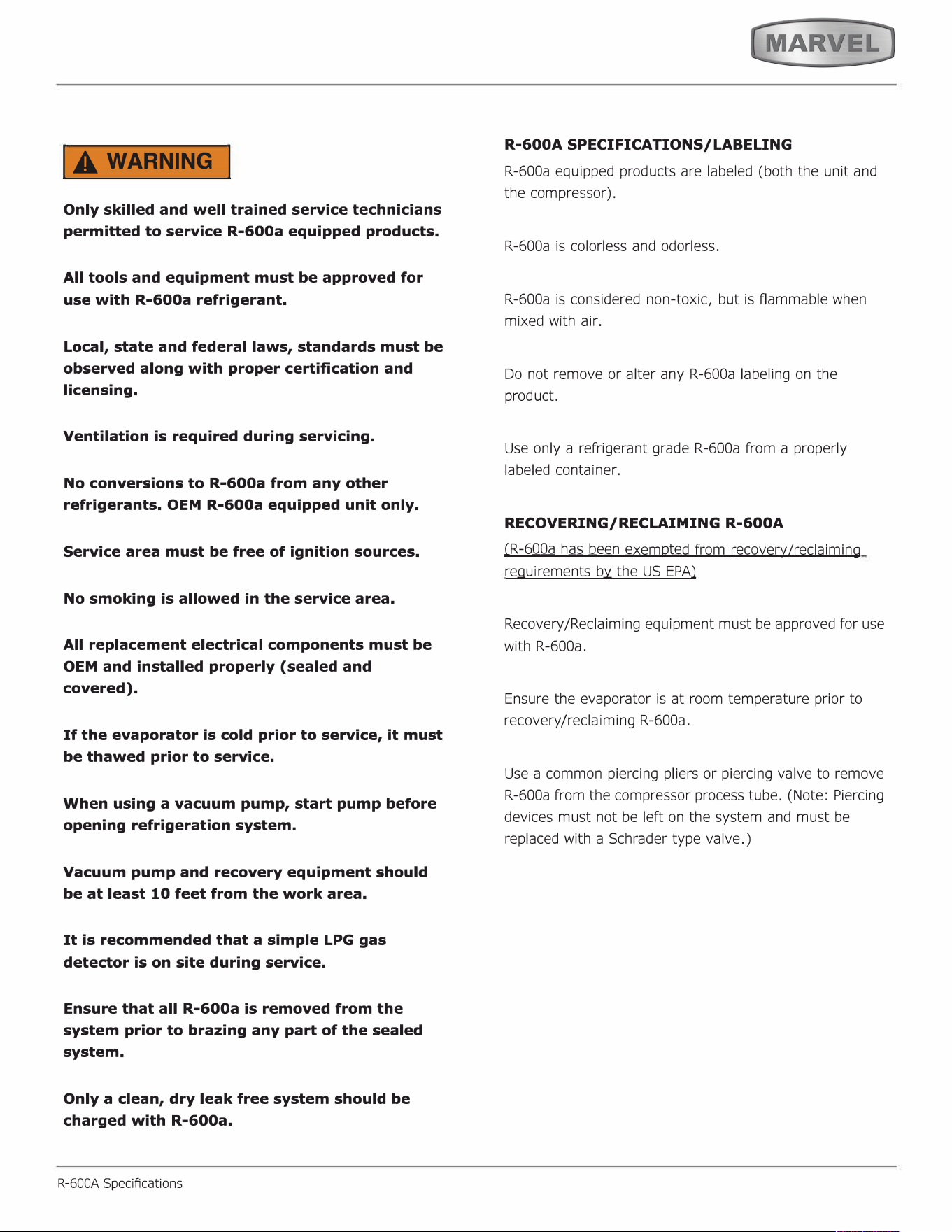
IA WARNING I
Only skilled and well trained service technicians
permitted to service R-600a equipped products.
All tools and equipment must be approved for
use with R-600a refrigerant.
Local, state and federal laws, standards must be
observed along with proper certification and
licensing.
Ventilation is required during servicing.
No conversions to R-600a from any other
refrigerants. OEM R-600a equipped unit only.
Service area must be free of ignition sources.
No smoking is allowed in the service area.
All replacement electrical components must be
OEM and installed properly (sealed and
covered).
If the evaporator is cold prior to service, it must
be thawed prior to service.
When using a vacuum pump, start pump before
opening refrigeration system.
Vacuum pump and recovery equipment should
be at least 10 feet from the work area.
It is recommended that a simple LPG gas
detector is on site during service.
Ensure that all R-600a is removed from the
system prior to brazing any part of the sealed
system.
Only a clean, dry leak free system should be
charged with R-600a.
R-600A Specications
R-600A SPECIFICATIONS/LABELING
R-600a equipped products are labeled (both the unit and
the compressor).
R-600a is colorless and odorless.
R-600a is considered non-toxic, but is flammable when
mixed with air.
Do not remove or alter any R-600a labeling on the
product.
Use only a refrigerant grade R-600a from a properly
labeled container.
RECOVERING/RECLAIMING R-600A
(
R-6
00a
h
as b
e
e
n
exempted from revery/reaiming
requirements by the US EPA)
Recovery/Reclaiming equipment must be approved for use
with R-600a.
Ensure the evaporator is at room temperature prior to
recovery /reclaiming R-600a.
Use a common piercing pliers or piercing valve to remove
R-600a from the compressor process tube. (Note: Piercing
devices must not be le on the system and must be
replaced with a Schrader type valve.)
24
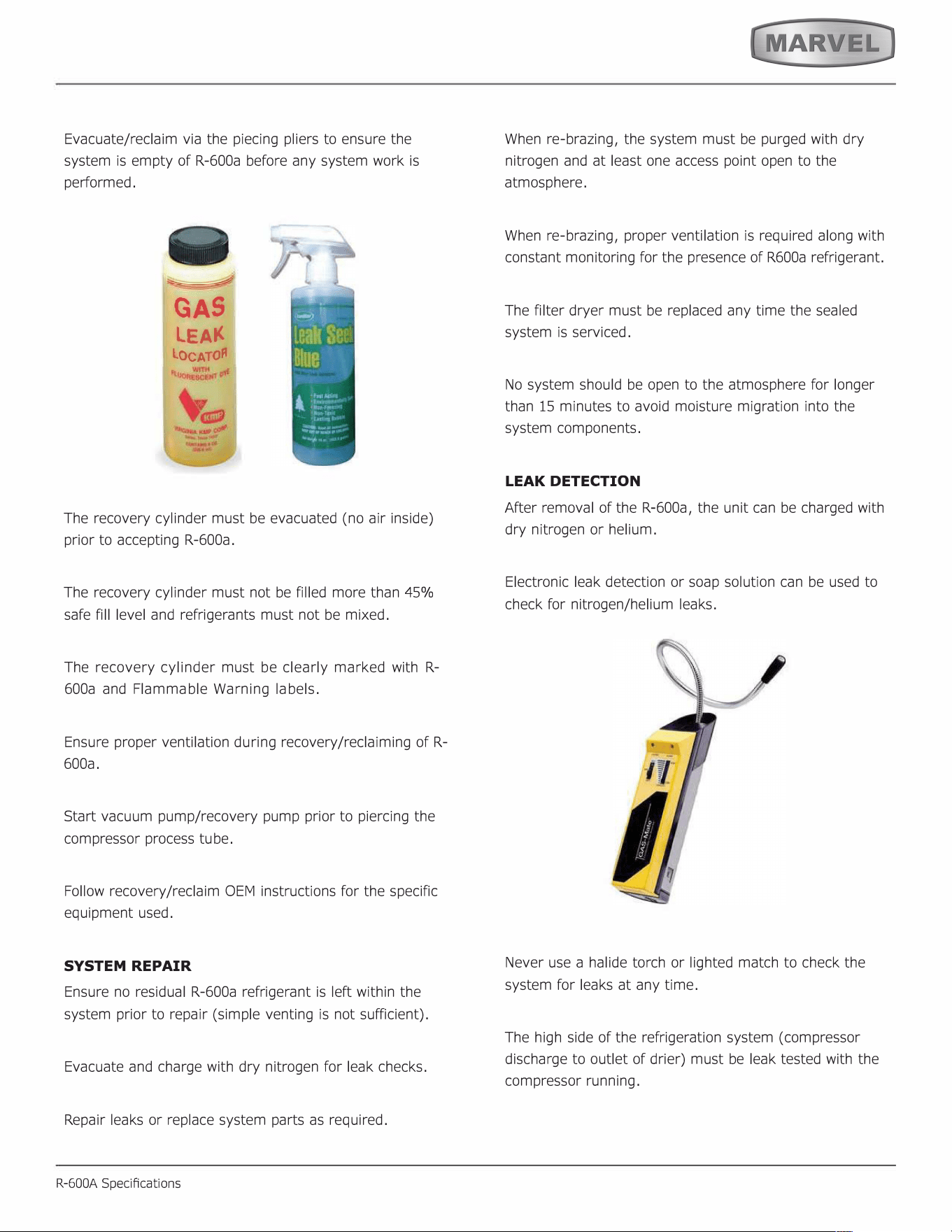
Evacuate/reclaim via the piecing pliers to ensure the
system is empty of R-600a before any system work is
performed.
GAS
LEA
LOCATO
The recovery cylinder must be evacuated (no air inside)
prior to accepting R-600a.
The recovery cylinder must not be filled more than 45%
safe fill level and refrigerants must not be mixed.
The recovery cylinder must be clearly marked with R-
600a and Flammable Warning labels.
Ensure proper ventilation during recovery/reclaiming of R-
600a.
Start vacuum pump/recovery pump prior to piercing the
compressor process tube.
Follow recovery/reclaim OEM instructions for the specific
equipment used.
SYSTEM REPAIR
Ensure no residual R-600a refrigerant is left within the
system prior to repair (simple venting is not sufficient).
Evacuate and charge with dry nitrogen for leak checks.
Repair leaks or replace system parts as required.
R-600A Specications
When re-brazing, the system must be purged with dry
nitrogen and at least one access point open to the
atmosphere.
When re-brazing, proper ventilation is required along with
constant monitoring for the presence of R600a refrigerant.
The filter dryer must be replaced any time the sealed
system is serviced.
No system should be open to the atmosphere for longer
than 15 minutes to avoid moisture migration into the
system components.
LEAK DETECTION
After removal of the R-600a, the unit can be charged with
dry nitrogen or helium.
Electronic leak detection or soap solution can be used to
check for nitrogen/helium leaks.
Never use a halide torch or lighted match to check the
system for leaks at any time.
The high side of the refrigeration system (compressor
discharge to outlet of drier) must be leak tested with the
compressor running.
25
The low side of the refrigeration system (evaporator,
compressor and suction line) must be leak tested with the
compressor off (equalized pressure).
RECHARGING
No air is ever to be allowed inside the refrigeration system
(R-600a refrigerant or dry nitrogen only).
Never use a torch on a fully charged refrigeration system.
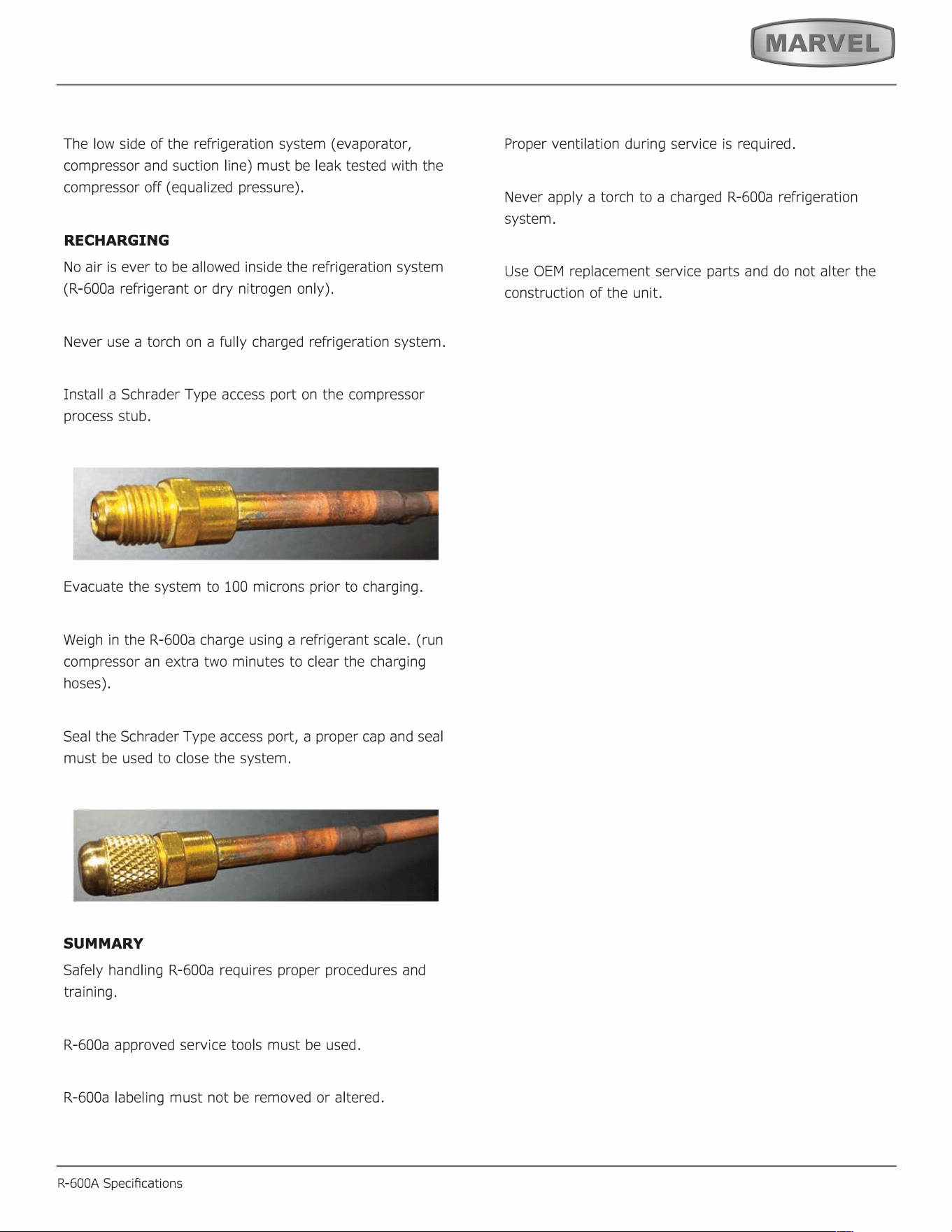
Install a Schrader Type access port on the compressor
process stub.
Evacuate the system to 100 microns prior to charging.
Weigh in the R-600a charge using a refrigerant scale. (run
compressor an extra two minutes to clear the charging
hoses).
Seal the Schrader Type access port, a proper cap and seal
must be used to close the system.
SUMMARY
Safely handling R-600a requires proper procedures and
training.
R-600a approved service tools must be used.
R-600a labeling must not be removed or altered.
R-600A Specications
Proper ventilation during service is required.
Never apply a torch to a charged R-600a refrigeration
system.
Use OEM replacement service parts and do not alter the
construction of the unit.
26
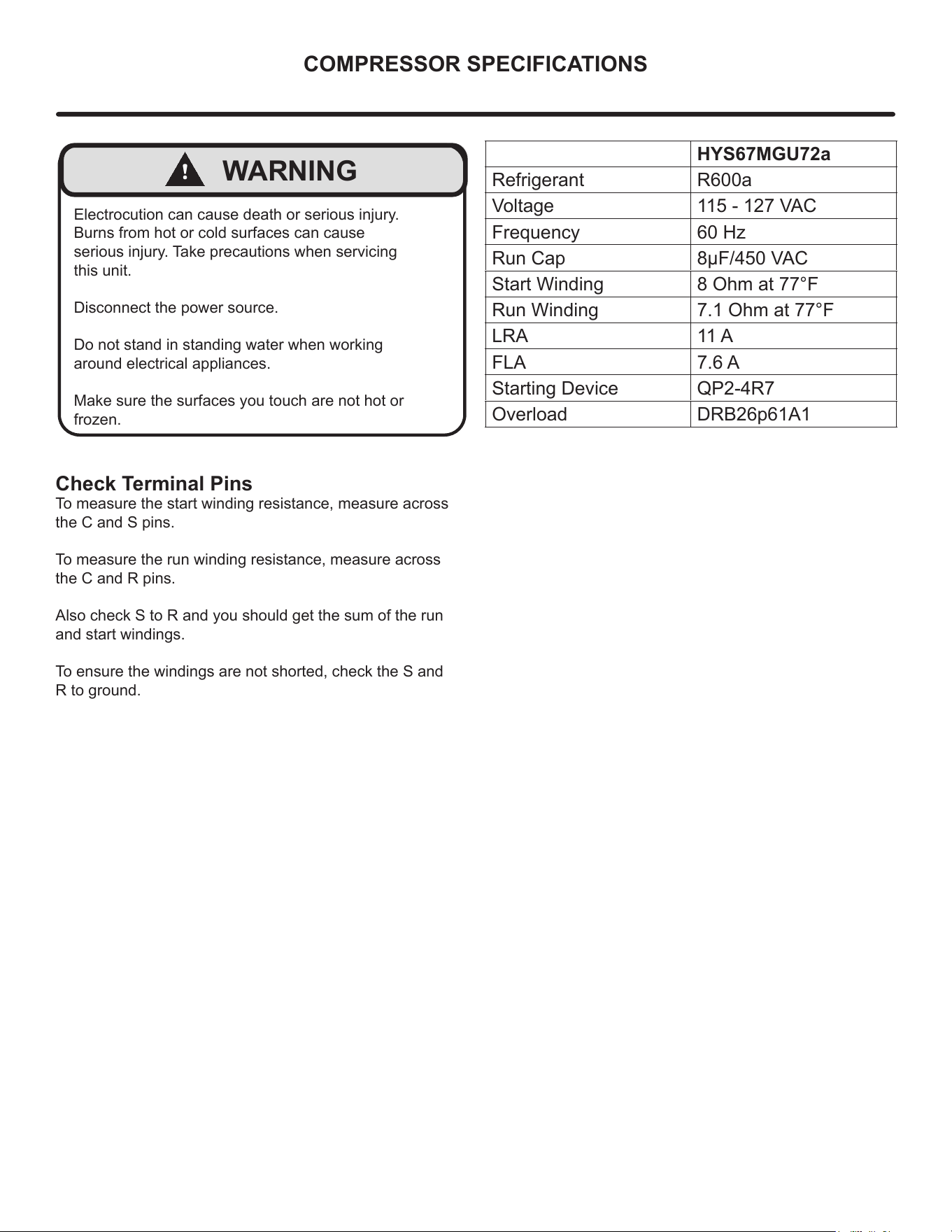
COMPRESSOR SPECIFICATIONS
Electrocution can cause death or serious injury.
Burns from hot or cold surfaces can cause
serious injury. Take precautions when servicing
this unit.
Disconnect the power source.
Do not stand in standing water when working
around electrical appliances.
Make sure the surfaces you touch are not hot or
frozen.
!
WARNING
Check Terminal Pins
To measure the start winding resistance, measure across
the C and S pins.
To measure the run winding resistance, measure across
the C and R pins.
Also check S to R and you should get the sum of the run
and start windings.
To ensure the windings are not shorted, check the S and
R to ground.
HYS67MGU72a
Refrigerant R600a
Voltage 115 - 127 VAC
Frequency 60 Hz
Run Cap 8μF/450 VAC
Start Winding 8 Ohm at 77°F
Run Winding 7.1 Ohm at 77°F
LRA 11 A
FLA 7.6 A
Starting Device QP2-4R7
Overload DRB26p61A1
27
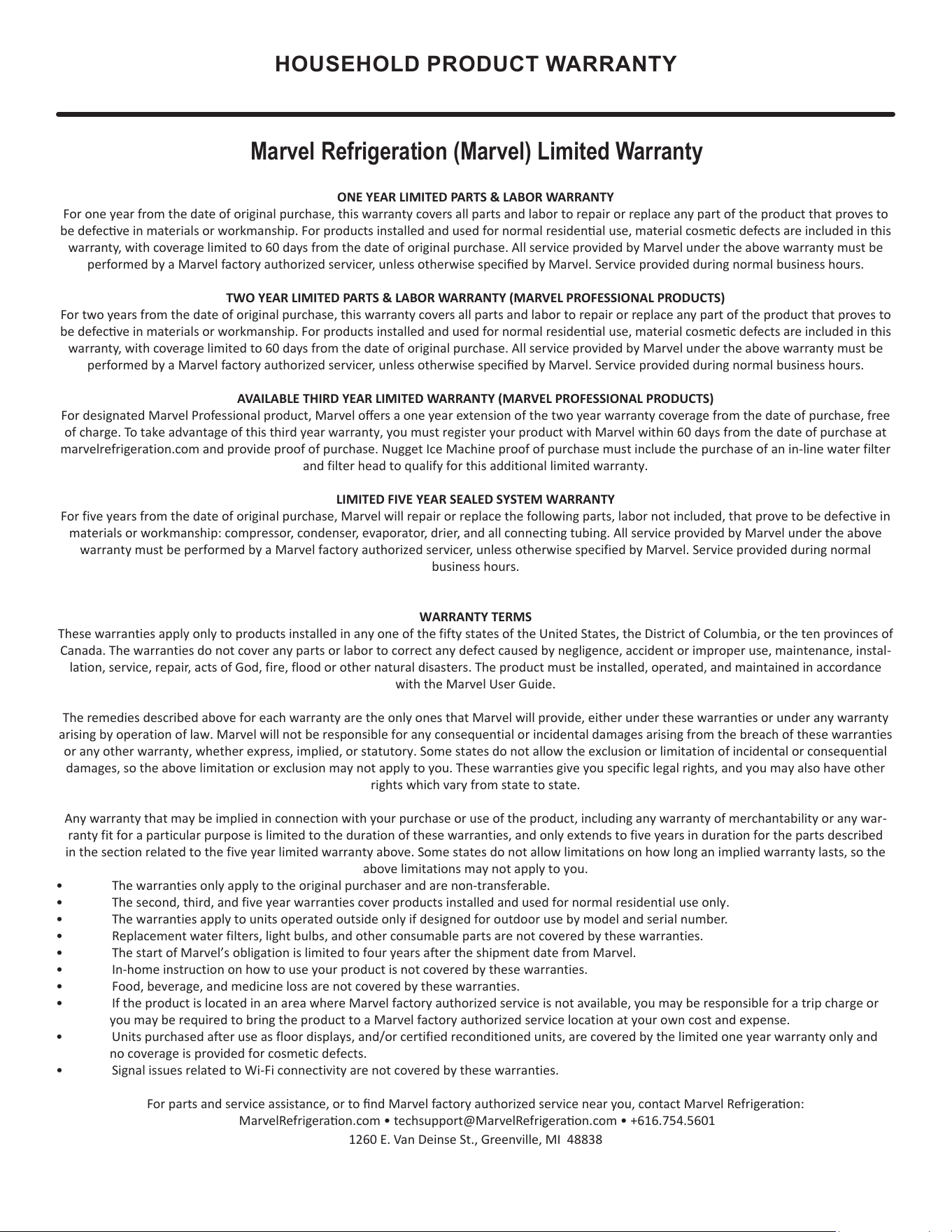
HOUSEHOLD PRODUCT WARRANTY
Marvel Refrigeration (Marvel) Limited Warranty
ONE YEAR LIMITED PARTS & LABOR WARRANTY
For one year from the date of original purchase, this warranty covers all parts and labor to repair or replace any part of the product that proves to
be defecve in materials or workmanship. For products installed and used for normal residenal use, material cosmec defects are included in this
warranty, with coverage limited to 60 days from the date of original purchase. All service provided by Marvel under the above warranty must be
performed by a Marvel factory authorized servicer, unless otherwise specied by Marvel. Service provided during normal business hours.
TWO YEAR LIMITED PARTS & LABOR WARRANTY (MARVEL PROFESSIONAL PRODUCTS)
For two years from the date of original purchase, this warranty covers all parts and labor to repair or replace any part of the product that proves to
be defecve in materials or workmanship. For products installed and used for normal residenal use, material cosmec defects are included in this
warranty, with coverage limited to 60 days from the date of original purchase. All service provided by Marvel under the above warranty must be
performed by a Marvel factory authorized servicer, unless otherwise specied by Marvel. Service provided during normal business hours.
AVAILABLE THIRD YEAR LIMITED WARRANTY (MARVEL PROFESSIONAL PRODUCTS)
For designated Marvel Professional product, Marvel oers a one year extension of the two year warranty coverage from the date of purchase, free
of charge. To take advantage of this third year warranty, you must register your product with Marvel within 60 days from the date of purchase at
marvelrefrigeration.com and provide proof of purchase. Nugget Ice Machine proof of purchase must include the purchase of an in-line water filter
and filter head to qualify for this additional limited warranty.
LIMITED FIVE YEAR SEALED SYSTEM WARRANTY
For five years from the date of original purchase, Marvel will repair or replace the following parts, labor not included, that prove to be defective in
materials or workmanship: compressor, condenser, evaporator, drier, and all connecting tubing. All service provided by Marvel under the above
warranty must be performed by a Marvel factory authorized servicer, unless otherwise specified by Marvel. Service provided during normal
business hours.
WARRANTY TERMS
These warranties apply only to products installed in any one of the fifty states of the United States, the District of Columbia, or the ten provinces of
Canada. The warranties do not cover any parts or labor to correct any defect caused by negligence, accident or improper use, maintenance, instal-
lation, service, repair, acts of God, fire, flood or other natural disasters. The product must be installed, operated, and maintained in accordance
with the Marvel User Guide.
The remedies described above for each warranty are the only ones that Marvel will provide, either under these warranties or under any warranty
arising by operation of law. Marvel will not be responsible for any consequential or incidental damages arising from the breach of these warranties
or any other warranty, whether express, implied, or statutory. Some states do not allow the exclusion or limitation of incidental or consequential
damages, so the above limitation or exclusion may not apply to you. These warranties give you specific legal rights, and you may also have other
rights which vary from state to state.
Any warranty that may be implied in connection with your purchase or use of the product, including any warranty of merchantability or any war-
ranty fit for a particular purpose is limited to the duration of these warranties, and only extends to five years in duration for the parts described
in the section related to the five year limited warranty above. Some states do not allow limitations on how long an implied warranty lasts, so the
above limitations may not apply to you.
• The warranties only apply to the original purchaser and are non-transferable.
• The second, third, and five year warranties cover products installed and used for normal residential use only.
• The warranties apply to units operated outside only if designed for outdoor use by model and serial number.
• Replacement water filters, light bulbs, and other consumable parts are not covered by these warranties.
• The start of Marvel’s obligation is limited to four years after the shipment date from Marvel.
• In-home instruction on how to use your product is not covered by these warranties.
• Food, beverage, and medicine loss are not covered by these warranties.
• If the product is located in an area where Marvel factory authorized service is not available, you may be responsible for a trip charge or
you may be required to bring the product to a Marvel factory authorized service location at your own cost and expense.
• Units purchased after use as floor displays, and/or certified reconditioned units, are covered by the limited one year warranty only and
no
coverage is provided for cosmetic defects.
• Signal issues related to Wi-Fi connectivity are not covered by these warranties.
For parts and service assistance, or to nd Marvel factory authorized service near you, contact Marvel Refrigeraon:
MarvelRefrigeraon.com • techsupport@MarvelRefrigeraon.com • +616.754.5601
1260 E. Van Deinse St., Greenville, MI 48838
28
All specications and product designs subject to change without notice. Such revisions do not entitle
the buyer to corresponding changes, improvements, additions, replacements or compensation for
previously purchased products.
www.marvelrefrigeration.com
Marvel Refrigeration
1260 E. Van Deinse St.
Greenville MI 48838
616.754.5601
29