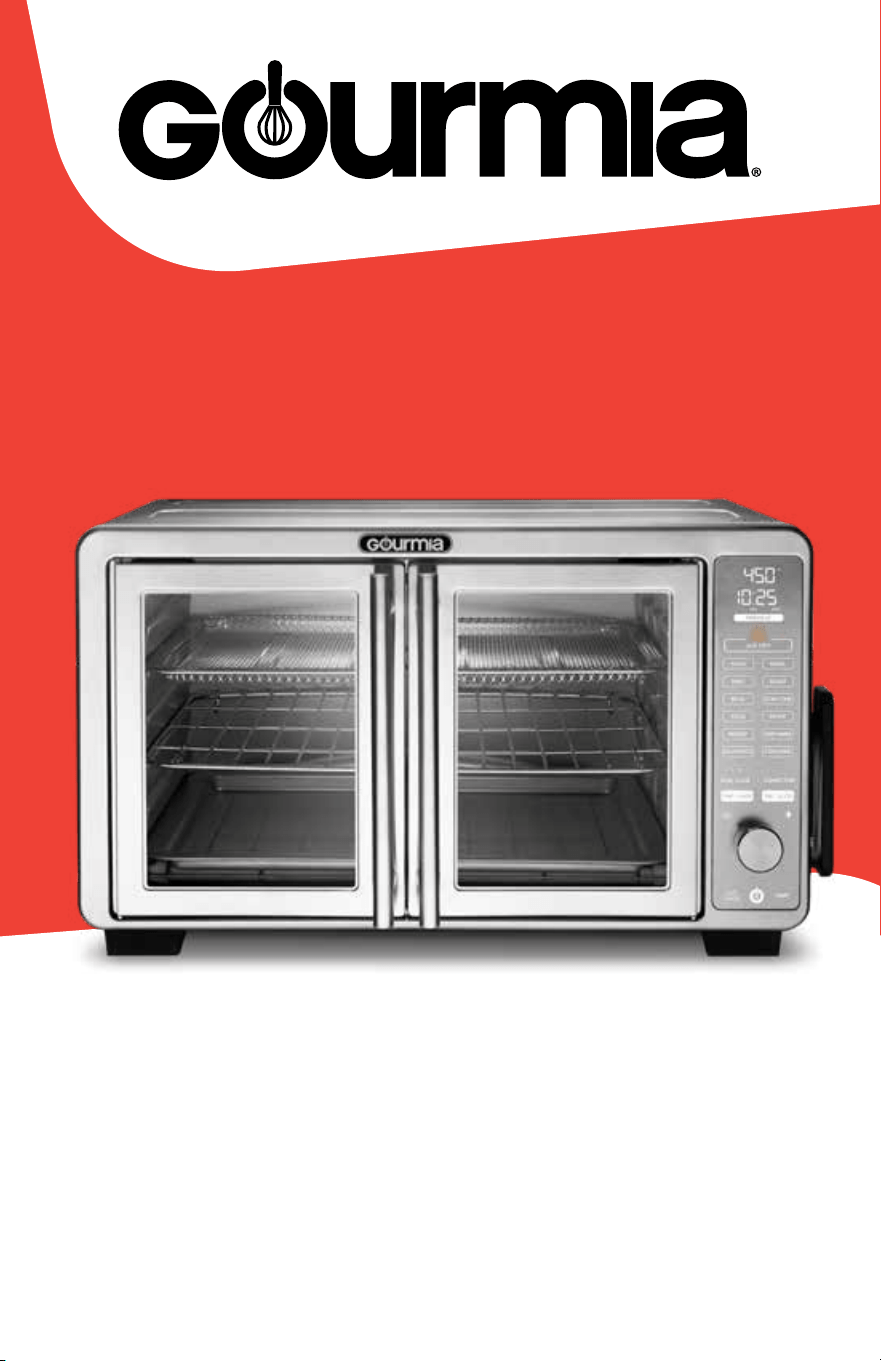
User Manual | GTF7860
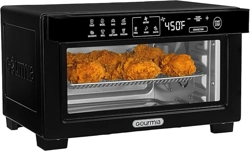
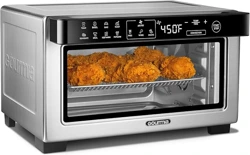
XL Digital Countertop Oven with Air Fry
ITM. / ART. 5234400

For customer service visit www.gourmia.com or call 888.552.00332
Congratulations . . . . . . . . . . . . . . . . . . . . . . . . . . . . . . . . . . . . . . .3
Important Safeguards . . . . . . . . . . . . . . . . . . . . . . . . . . . . . . . . . . .4
Before First Use . . . . . . . . . . . . . . . . . . . . . . . . . . . . . . . . . . . . . . .6
Know Your Oven . . . . . . . . . . . . . . . . . . . . . . . . . . . . . . . . . . . . . . .8
Accessories . . . . . . . . . . . . . . . . . . . . . . . . . . . . . . . . . . . . . . .8
Control Panel, Display & Sounds . . . . . . . . . . . . . . . . . . . . . . . . . .9
Set Up Your Oven . . . . . . . . . . . . . . . . . . . . . . . . . . . . . . . . . . . . . 10
How to Cook with Temp & Time . . . . . . . . . . . . . . . . . . . . . . . . . . . . 10
Stop / Cancel Cooking . . . . . . . . . . . . . . . . . . . . . . . . . . . . . . . . . .10
Function Chart . . . . . . . . . . . . . . . . . . . . . . . . . . . . . . . . . . . . . . . 11
How to Cook with the Probe . . . . . . . . . . . . . . . . . . . . . . . . . . . . . . 14
How to Place the Probe . . . . . . . . . . . . . . . . . . . . . . . . . . . . . . 15
Doneness Chart. . . . . . . . . . . . . . . . . . . . . . . . . . . . . . . . . . . . 15
How to Use Dual Cook . . . . . . . . . . . . . . . . . . . . . . . . . . . . . . . . . .16
How to Use Popcorn Function . . . . . . . . . . . . . . . . . . . . . . . . . . . . . 17
Troubleshooting . . . . . . . . . . . . . . . . . . . . . . . . . . . . . . . . . . . . . . 17
Cooking Tips . . . . . . . . . . . . . . . . . . . . . . . . . . . . . . . . . . . . . . . .18
Convection Tips . . . . . . . . . . . . . . . . . . . . . . . . . . . . . . . . . . . . . .18
Cleaning & Maintenance . . . . . . . . . . . . . . . . . . . . . . . . . . . . . . . . 19
Warranty & Service . . . . . . . . . . . . . . . . . . . . . . . . . . . . . . . . . . . .20
All rights reserved. No portion of this manual may be reproduced by any means whatsoever without written permission
from The Steelstone Group, except for the inclusion of quotations in a media review. Although every precaution has been
taken in the preparation of this manual, The Steelstone Group assumes no responsibility for errors or omissions. Nor is
any liability assumed for damages resulting from the use of the information contained herein. Although every effort has
been made to ensure that the information contained in this manual is complete and accurate, The Steelstone Group
is not engaged in rendering professional advice or services to the individual consumer; further, The Steelstone Group
shall not be held responsible for any loss or damage allegedly arising from any information or suggestions in this manual.
Model: GTF7860 | © 2025 Gourmia | 1.0
The Steelstone Group Brooklyn, NY | Gourmia.com
Contents

3User Manual | XL Digital Countertop Oven with Air Fry | GTF7860
Here at Gourmia, our one and only goal is to make sure nutritious and delicious
meals are always a practical possibility no matter how fast-paced your life is.
Whether you’re in need of a hearty breakfast, a mid-day snack, or a satisfying
supper, our dependable, easy-to-use appliances are designed to work for you
while you work your way through your busy day.
This manual provides an overview and instructions on all the oven’s functions
and features, along with directions for assembling, operating, cleaning, and
maintaining your appliance. Please read all safety instructions before getting
started. Keep this manual handy for future use and review.
Our team is available to help with any and every question you might have about
your new oven. We’re excited for you and want you to get the most out of your
purchase—so whether you need assistance with setup or guidance on which
features to enable for which foods, we’re happy to walk you through it, step by
step.
Happy and easy cooking!
Congratulations on the purchase of your
Digital Air Fryer Oven from Gourmia!
@gourmia
We’d love to hear about the delicious dishes you’re creating! Share your
thoughts, recipes, and photos with us.

Important Safeguards
For customer service visit www.gourmia.com or call 888.552.00334
IMPORTANT SAFEGUARDS
Read all instructions before using the electric appliance.
For household use only.
The following basic precautions should always be followed:
1. This appliance is not intended
for use by children or persons
with reduced physical, sensory,
or mental capabilities, or lack of
experience and knowledge, unless
they have supervision.
2. Close supervision is necessary
when any appliance is used by or
near children. Children should be
supervised to ensure that they
do not play with the appliance.
Cleaning and user maintenance
should not be done by children
unless they are older than 8 and
supervised.
3. Check if the voltage indicated
on the appliance corresponds to
the local main voltage before you
connect the appliance.
4. Always ensure the appliance is
fully assembled before plugging it
into a wall outlet and turning it on.
5. Do not use the appliance if the
plug, main cord, or appliance itself
is damaged or has malfunctioned.
Return the appliance to the
nearest authorized service
facility for examination, repair, or
adjustment.
6. Never connect this appliance
to an external remote-control
system or timer to avoid a
hazardous situation.
7. Do not use an outlet below the
countertop’s surface. The cord
should always be behind and away
from the appliance.
8. Do not let the cord hang over the
edge of the counter or table, nor
let it touch hot surfaces.
9. Do not plug in the appliance or
operate the controls with wet
hands.
10. Always ensure the plug is inserted
into the outlet properly.
11. Do not leave the appliance
unattended when plugged in.
12. Place the appliance on a stable,
level, and heat-resistant surface.
Ensure that the area is clean and
dry. NEVER place the appliance
on or near gas or electric burners
and ovens even if the burner or
oven is turned off.
13. Do not place the appliance
against a wall or against other
appliances. Leave at least 4
inches of free space on the back
and sides, and 4 inches of free
space above the appliance.
14. Do not place anything on top of
the appliance when in use.
15. A fire may occur if the oven is
covered or touching flammable
material, including curtains,
draperies, tablecloths, walls, and
the like, when in operation. Do
not place the oven on or near
combustible materials.
16. To avoid overheating and the
risk of fire: NEVER cover the
crumb tray or the oven walls with
aluminum foil or parchment paper.

Save These Instructions
5User Manual | XL Digital Countertop Oven with Air Fry | GTF7860
SAVE THESE INSTRUCTIONS
17. You may use foil or parchment
paper as a liner on the baking
pan. However, cut the liner so it
is fitted to the exact size of the
baking pan and is not raised above
or hanging below the pan, to
ensure the liner is not close to the
heating elements.
18. To avoid the risk of fire: NEVER
leave the liner on the baking pan
during preheating and cooking,
unless there is food on the liner to
weigh it down and keep it safely
secured in place.
19. Do not use the appliance for any
other purpose than described in
this manual. The use of accessory
attachments not recommended
by the appliance manufacturer
may cause injuries.
20. Do not place any of the following
materials in the oven: paper (other
than parchment paper), cardboard,
plastic, and the like. Extreme
caution should be exercised when
using containers constructed of
anything other than metal or glass.
21. Metal utensils or oversized foods
or must not be inserted into the
toaster oven, as they may create a
fire or risk of electric shock.
22. During cooking, hot steam is
released through the air vents.
Keep your hands and face at a
safe distance from the steam and
from the air vents. Be careful of
hot steam when you open the
doors of the appliance.
23. Do not touch hot surfaces.
Use handles and protective
equipment to avoid burns. Use
extreme caution when removing
accessories or disposing of hot
grease.
24. Extreme caution must be used
when moving an appliance
containing hot oil or other hot
liquids.
25. Immediately unplug the appliance
if you see dark smoke coming
from the appliance.
26. After using the appliance, avoid
contact with the hot metal inside.
27. Before unpluging from outlet, turn
the oven off, then remove plug
from wall outlet.
28. Unplug from outlet when not in
use and before cleaning. Allow the
appliance to cool before cleaning.
29. To protect against electric shock,
do not immerse the cord, plug, or
appliance in water or other liquid.
30. Do not clean with metal scouring
pads. Pieces can break off the pad
and touch electrical parts, creating
a risk of electric shock.
31. Do not store any materials
other than manufacturer’s
recommended accessories in this
oven when not in use.
32. Do not use outdoors.
33. Do not use in moving vehicles or
boats.
34. For household use only.
Before First Use
For customer service visit www.gourmia.com or call 888.552.00336
Before First Use
1. Remove and discard all packaging material, labels, and tape from the oven.
2. Thoroughly clean air fry basket, oven rack, baking pan, and crumb tray
with hot water, dishwashing liquid, and a non-abrasive sponge. Dry all
parts before use.
3. Wipe the inside and outside of the oven with a moist cloth. Allow to dry
before use.
Cord and Plug Safety
1. A short power-supply cord is provided to reduce risk of becoming
entangled in or tripping over a longer cord.
2. Extension cords may be used if care is exercised in their use.
3. If an extension cord is used:
• The marked electrical rating of the extension cord should be at
least equal to the electrical rating of the appliance.
• The longer cord should be arranged so that it will not drape over
the countertop or tabletop where it can be snagged or tripped
over and pull the appliance off the surface.
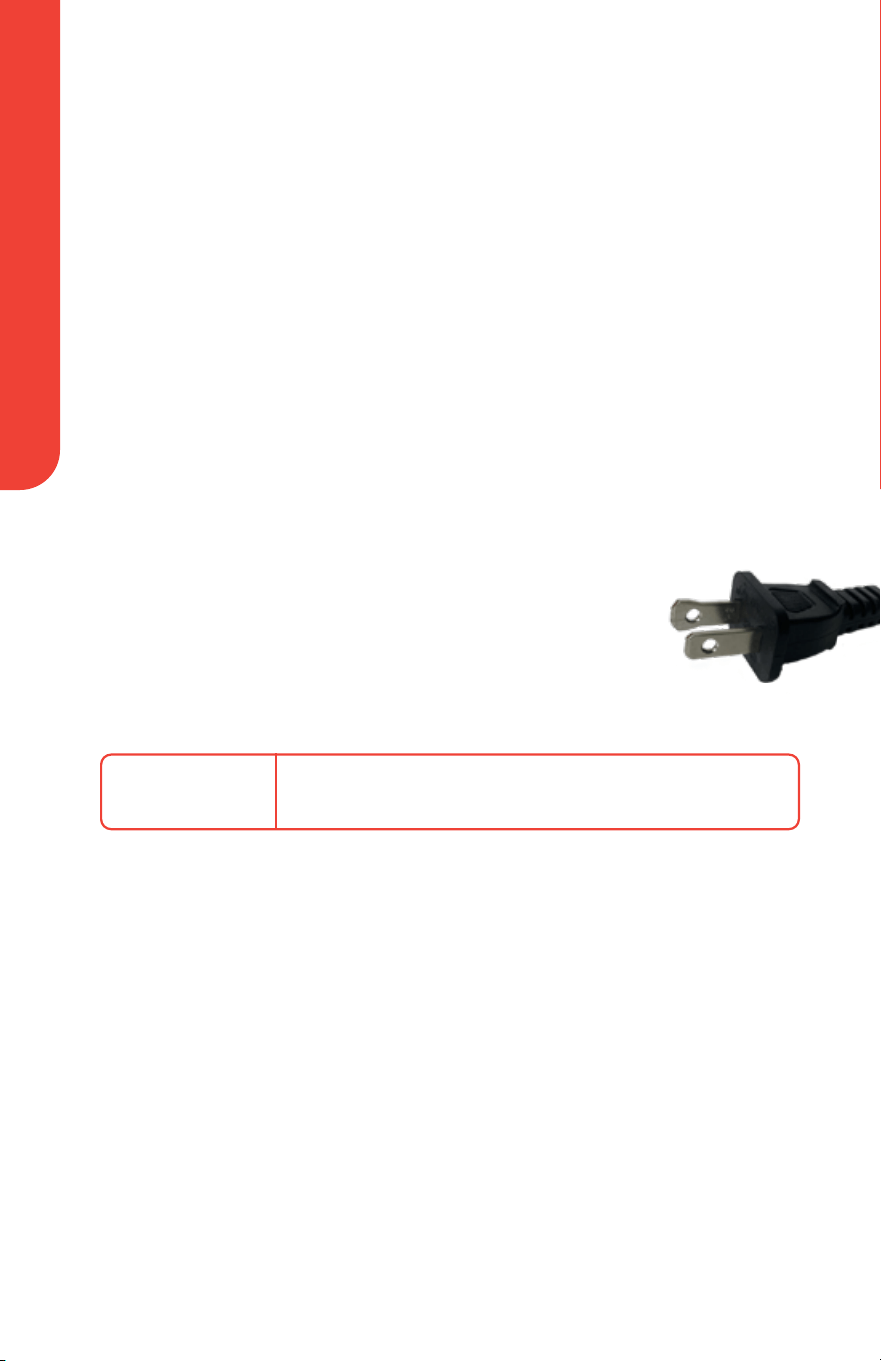
Electrical Polarized Plug
This appliance has a polarized plug (one blade is wider than
the other). To reduce the risk of electric shock, the plug is
intended to be used by inserting it into the electrical outlet
only one way. If the plug does not fit securely into the
outlet, reverse the plug and re-insert. If it still does not fit,
contact a qualified electrician for assistance. Do not modify
the plug in any way.
POWER
AC120V~ 60Hz 1700W
Before First Use
7User Manual | XL Digital Countertop Oven with Air Fry | GTF7860
WARNING:
DO NOT place the oven against a wall or against other appliances. Leave
at least 4 inches of free space on the back and sides, and 4 inches of
free space above the oven.
To avoid the risk of fire:
DO NOT place anything on top of the oven.
NEVER cover the crumb tray or the oven walls with aluminum foil or
parchment paper.
You may use foil or parchment paper as a liner on the baking pan,
however:
• Cut the liner so it is fitted to the exact size of the baking pan and is
not raised above or hanging below the pan, to ensure the liner is not
close to the heating elements.
• NEVER leave the liner on the baking pan during preheating and
cooking, unless there is food on the liner to weigh it down and keep
it safely secured in place.
When cooking greasy or drippy foods, use the baking pan instead of the
air fry basket.
ALWAYS use CAUTION when opening the doors; hot steam may
escape!
The oven, accessories and food will be hot! DO NOT touch hot
surfaces. Use oven mitts when inserting or removing food from the oven.
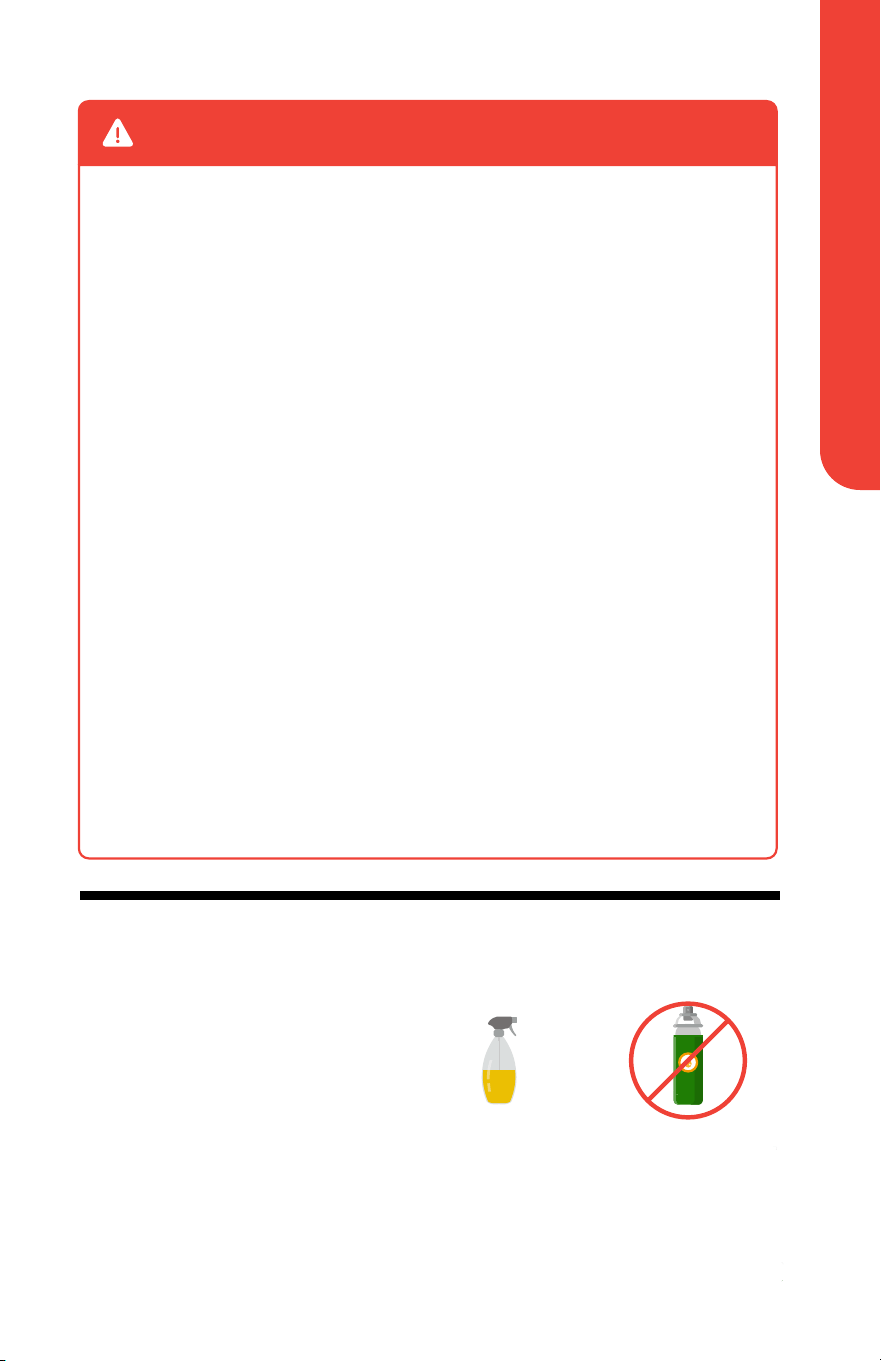
Using Oil
When spraying food for a crispier
finish, we recommend using cooking
oil instead of cooking spray, as the
latter may damage the accessories
and reduce the life of the appliance.
The oven may produce smoke if you
use oil and cook foods at higher
than recommended temperatures.
See Cooking Charts in the Gourmia
Recipe Book.
NEVER spray the heating elements or oven walls with oil.
Not RecommendedRecommended
Cooking SprayOil Mister / Spray Bottle
Know Your Oven
For customer service visit www.gourmia.com or call 888.552.00338
Know Your Oven
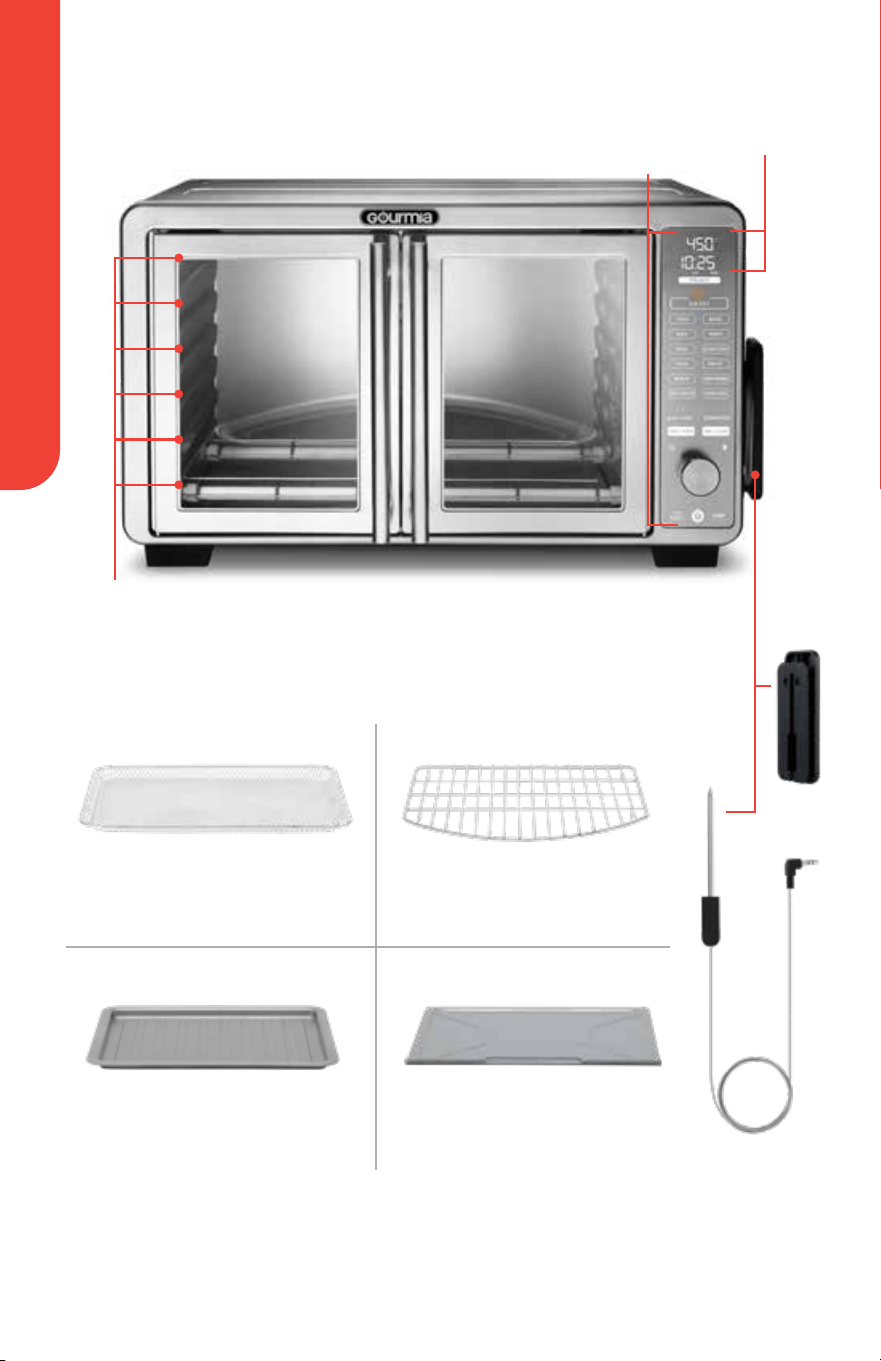
Accessories
Air Fry Basket Oven Rack
Baking Pan Crumb Tray
NOTE: Always ensure the crumb tray is inside the bottom of the oven during cooking.
Display
Probe
Magnetic
Probe
Storage
5
4
3
2
1
6
Rack
Positions
Control
Panel
Know Your Oven
9User Manual | XL Digital Countertop Oven with Air Fry | GTF7860
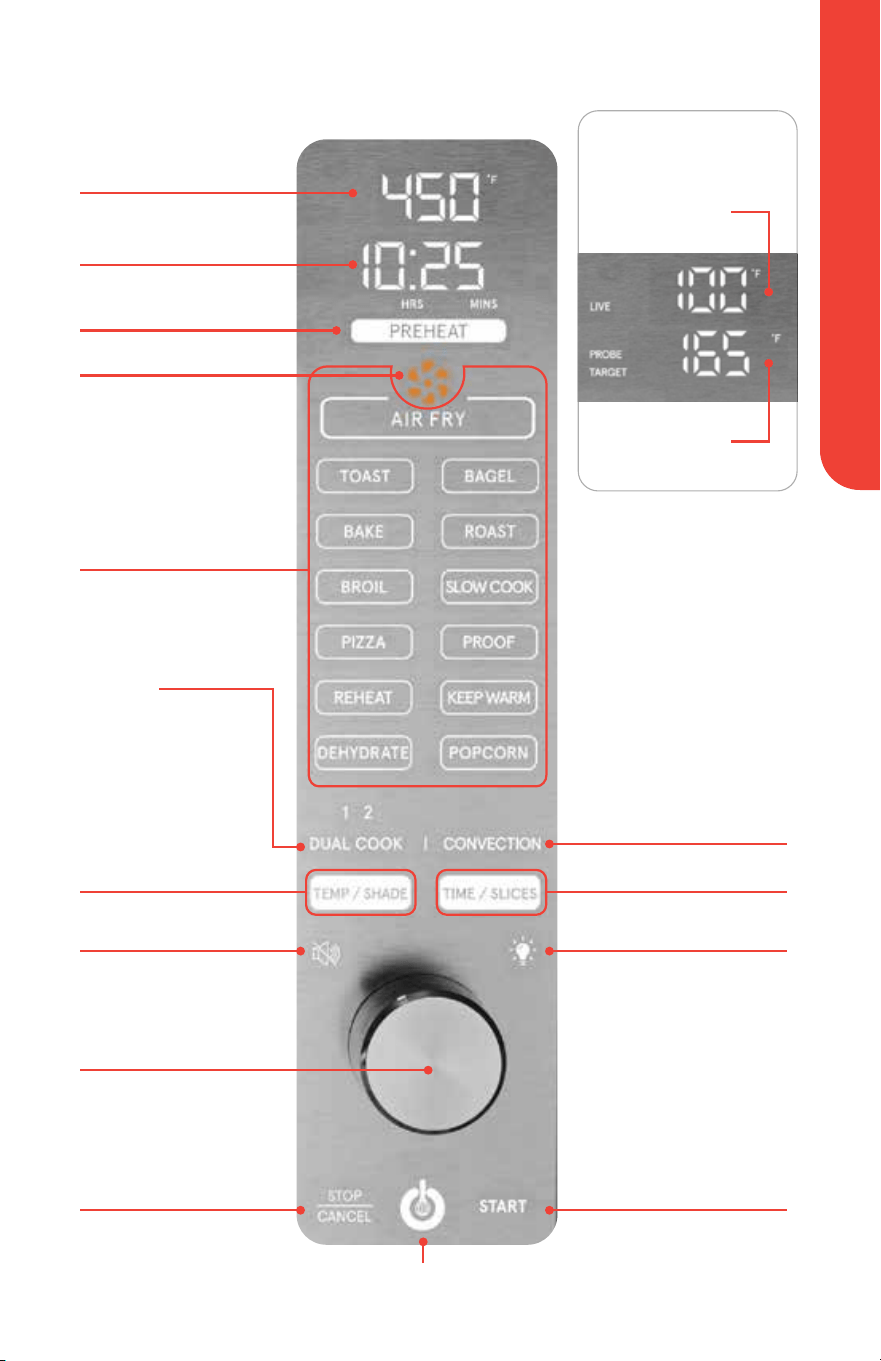
Control Panel, Display & Sounds
Air Fry Fan Icon
Cook Time / Slices
Temperature / Shade
Display when Cooking
with Temp & Time:
Rotate to adjust
temp, time,
shade, and slices
Adjust Time / Slices
Cooking Functions
START
Control Knob
Adjust Temp
/ Shade
Dual Cook
Live Internal
Temperature
Target
Temperature
Display when Cooking
with the Probe:
To toggle between
displaying temperature
in Fahrenheit and
Celsius, press and hold
TEMP / SHADE
Power Icon
STOP / CANCEL
Light Icon
Preheat
Convection
Mute Icon
Tap to turn off oven's
beeping sound

Set Up Your Oven
For customer service visit www.gourmia.com or call 888.552.003310
Set Up Your Oven
1. Place the oven on a stable, level, and heat-resistant surface.
2. Place the crumb tray in the bottom of the oven.
3. Plug the oven into an outlet. Tap the power icon. The display will show On
(On).
How To Cook With Temp & Time
1. Tap the desired function.
2. Tap PREHEAT to turn preheat on or off. PREHEAT will be lit in blue when
enabled.
See the FUNCTION CHART on pages 11-13 to see preheat default for each
function, and to see each functions’ settings, convection options, and which
accessory and position to use.
3. Tap TEMP / SHADE.
4. Use the control knob to adjust the temperature or to adjust shade for the
TOAST and BAGEL functions.
5. Tap TIME / SLICES.
6. Use the control knob to adjust the cook time or to adjust number of slices
for the
TOAST and BAGEL functions.
If not preheating: Place food into the oven and tap START to begin. Skip steps 7-8.
7. Tap START to begin preheating the oven. Once preheated, the oven will
beep, and the display will show Add Food (Add Food).
NOTE: The air fry fan icon animates when using air fry functions.
8. Open the doors, carefully place food into the oven, and close the doors.
The cook time will begin automatically. When the cook time has elapsed, the oven
will beep, and the display will show End (end).
9. Open the doors. Carefully remove the food and place it on a heat-resistant
surface.
Stop / Cancel Cooking
Tap STOP / CANCEL to stop cooking. Tap START within three seconds to
resume cooking.
Tap
STOP / CANCEL a second time to cancel cooking.
Function Chart
11User Manual | XL Digital Countertop Oven with Air Fry | GTF7860
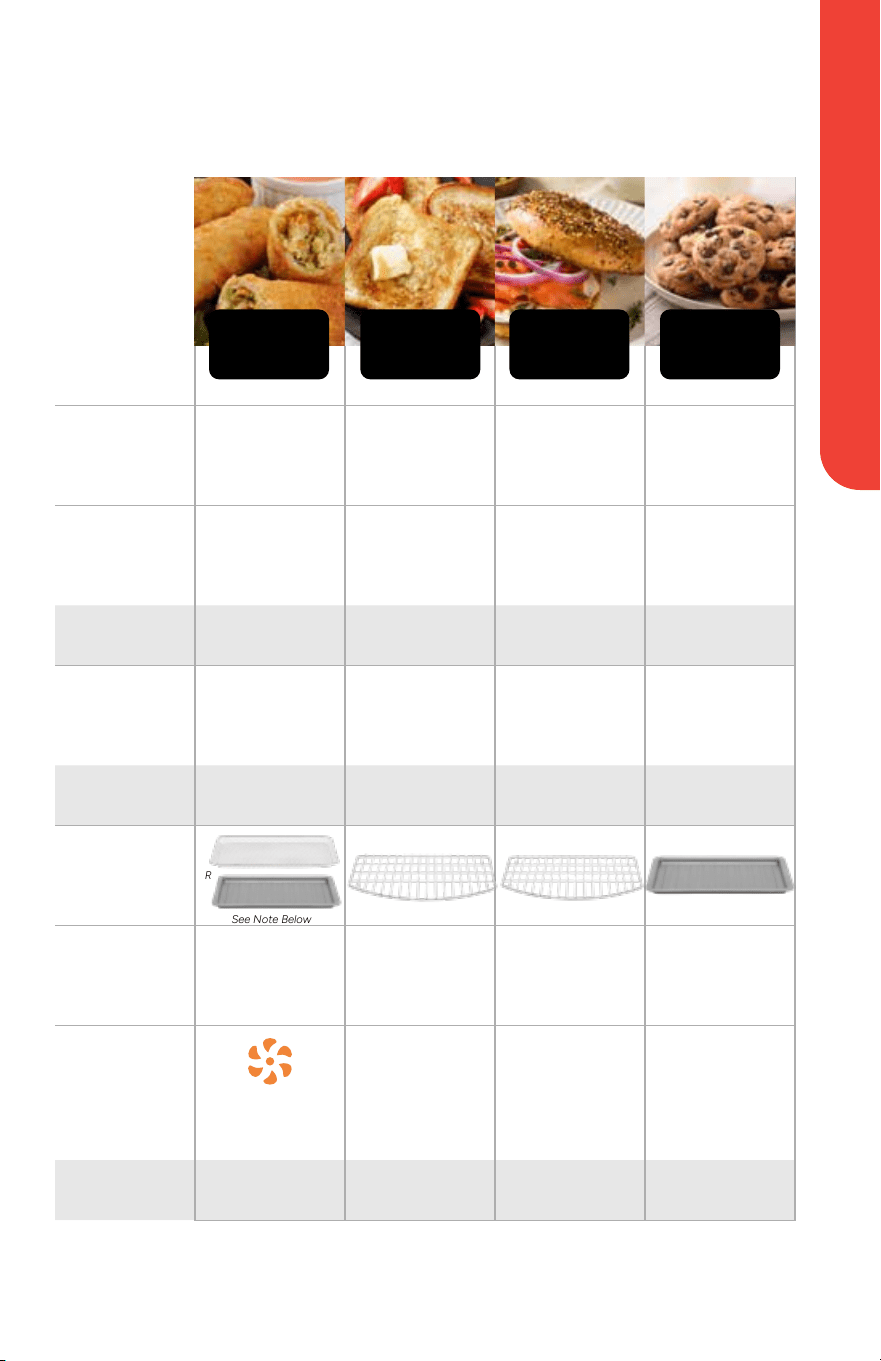
Function Chart
FUNCTION
PREHEAT
Yes No Yes Yes
TEMP
DEFAULT
425°F SHADE 3 SHADE 3 325°F
RANGE 170°F - 450°F 1 - 6 Shades 1 - 6 Shades 170°F - 450°F
TIME
DEFAULT
20 MIN 4 SLICES 4 SLICES 30 MIN
RANGE 1 min - 2 hrs 1 - 12 Slices 1 - 12 Slices 1 min - 2 hrs
ACCESSORY
RACK
POSITION
Position
3 OR 4
Position
3 OR 4
Position
1 OR 2
Position
3 OR 4
AIR FRY /
CONVECTION
DEFAULT
Default
ON
N/A N/A
Default
OFF
TOGGLE
N/A N/A N/A Yes
AIR FRY TOAST BAGEL
* Note: When cooking greasy or drippy foods, use the baking pan instead of the air fry basket.
See Note Below
OR
BAKE
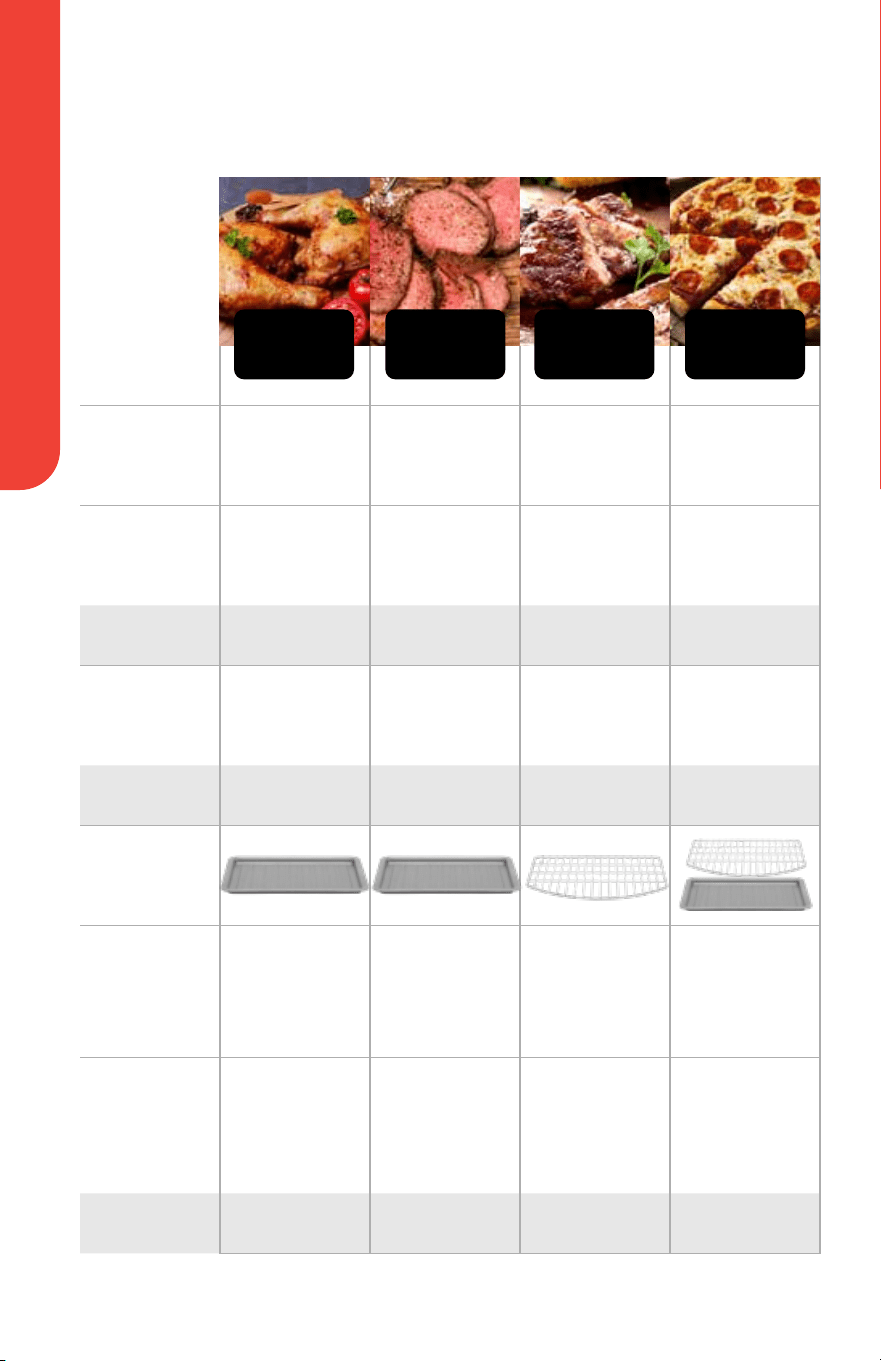
Function Chart
For customer service visit www.gourmia.com or call 888.552.003312
Function Chart
FUNCTION
PREHEAT
Yes Yes No Yes
TEMP
DEFAULT
400°F 450°F Low 190°F 400°F
RANGE 170°F - 450°F
N/A
Low 190°F
High 250°F
170°F - 450°F
TIME
DEFAULT
25 MIN 10 MIN 4 HRS 12 MIN
RANGE 1 min - 2 hrs 1 - 60 min 15 min - 12 hrs 1 - 60 min
ACCESSORY
RACK
POSITION
Position
3 OR 4
Position
1 OR 2
Position
6
Oven Rack
4 or 5
Baking Pan
Below Oven
Rack
AIR FRY /
CONVECTION
DEFAULT
Default
ON
Default
OFF
Default
ON
Default
OFF
TOGGLE Yes Yes Yes Yes
ROAST BROIL SLOW COOK PIZZA
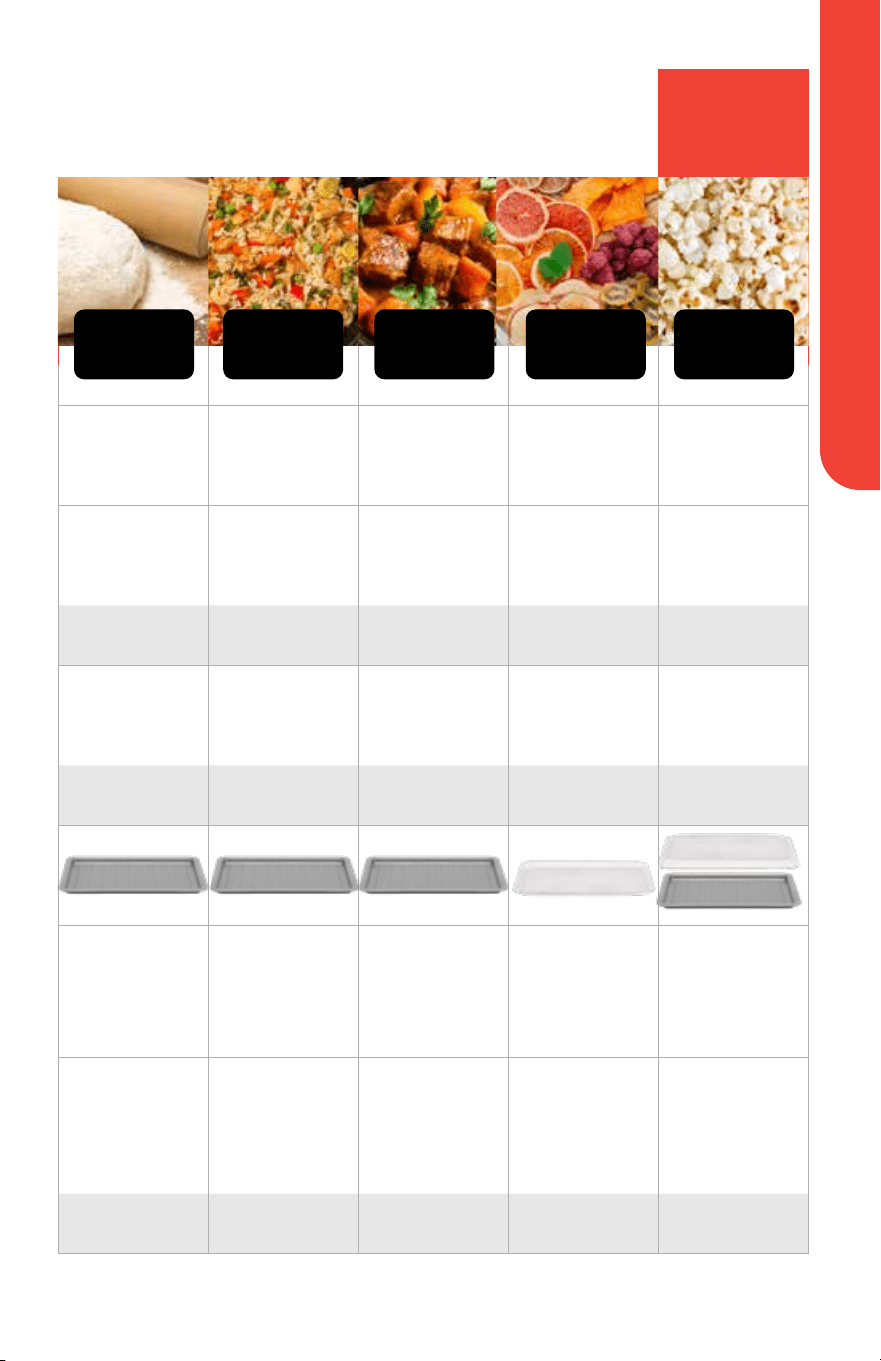
Function Chart
13User Manual | XL Digital Countertop Oven with Air Fry | GTF7860
Yes No No No Yes
90°F 325°F 200°F 135°F 400°F
90°F-100°F 170°F-450°F 90°F - 300°F 90°F - 170°F 300°F - 450°F
60 MIN 15 MIN 30 MIN 8 HRS 5 MIN
1 min - 4 hrs 1 - 60 min Up to 4 Hrs 30 min - 72 hrs 1 - 15 min
Position
6
Position
3 OR 4
Position
3 OR 4
Position
3 OR 4
Upside Down Air
Fry Basket
Position 6
Baking Pan
Position 6
Default
OFF
Default
ON
Default
OFF
Default
ON
Default
ON
Yes Yes Yes N/A Yes
REHEAT KEEP WARM DEHYDRATE POPCORNPROOF
See How to
Use Popcorn
Function
on page 17

How To Cook With The Probe
For customer service visit www.gourmia.com or call 888.552.003314
How To Cook With The Probe
1. Insert the probe into the jack on the right side of the oven. PROBE will
appear on the left side of target temperature.
NOTE: The, TOAST, BAGEL, PROOF, REHEAT, DEHYDRATE, and POPCORN
functions, along with the Dual Cook function, are disabled when cooking with the
probe.
2. Tap the desired function.
3. Tap TEMP / SHADE then rotate the control knob to set the oven
temperature.
4. Tap TIME / SLICES. The display will show TARGET and the target
temperature. Set desired doneness by rotating the control knob.
See DONENESS CHART on page 15 for a guide to setting desired doneness.
If not preheating: Insert the probe into the food and place food into the oven. Close
the doors and tap START to begin. Skip steps 5-7.
See HOW TO PLACE THE PROBE on page 15 for instructions and tips.
5. Tap START to begin preheating the oven.
6. Insert the probe into the food.
7. When preheating is finished, the oven will beep, and the display will show
Add Food (Add Food). Place food inside the oven and close the doors.
The cook time will begin automatically.
NOTE: To change the cooking temperature mid-cooking, tap TEMP / SHADE, the
display will show the cooking temperature, then rotate the control knob.
To change the target temperature mid-cooking, tap TIME / SLICES and rotate the
control knob.
The display will show the live internal temperature of your food.
When desired internal temperature is reached, the oven will beep, and the display
will show End (End).
8. Open the doors, carefully remove the food, and place it on a heat resistant
surface. Let the food rest for at least five minutes.
NOTE: For food to reach desired doneness, it must rest away from a heat source
for at least five minutes. This is known as “carry-over” cooking.
9. Remove the probe after food reaches desired internal temperature.
NOTE: After cleaning the probe, wrap the cord around the magnetic probe storage
and stick the magnetic probe storage to either side of the oven.
How To Cook With The Probe
15User Manual | XL Digital Countertop Oven with Air Fry | GTF7860
Food:
Set target
temp to:
Allow food to
carry-over* cook to:
Fish 140˚F 145˚F
Poultry 165˚F 165˚F
Pork 140˚F 145˚F
Beef
Rare 120˚F 125˚F
Medium Rare 130˚F 135˚F
Medium 140˚F 145˚F
Medium Well 145˚F 150˚F
Well Done 155˚F 160˚F
Ground Pork / Turkey 155˚F 165˚F
Doneness Chart
Below are the target temperatures settings to reach desired doneness.
* Internal food temperature continues to rise as food rests. This is known as “carry-over cooking,”
which occurs when food rests for at least five minutes after being removed from the heat.
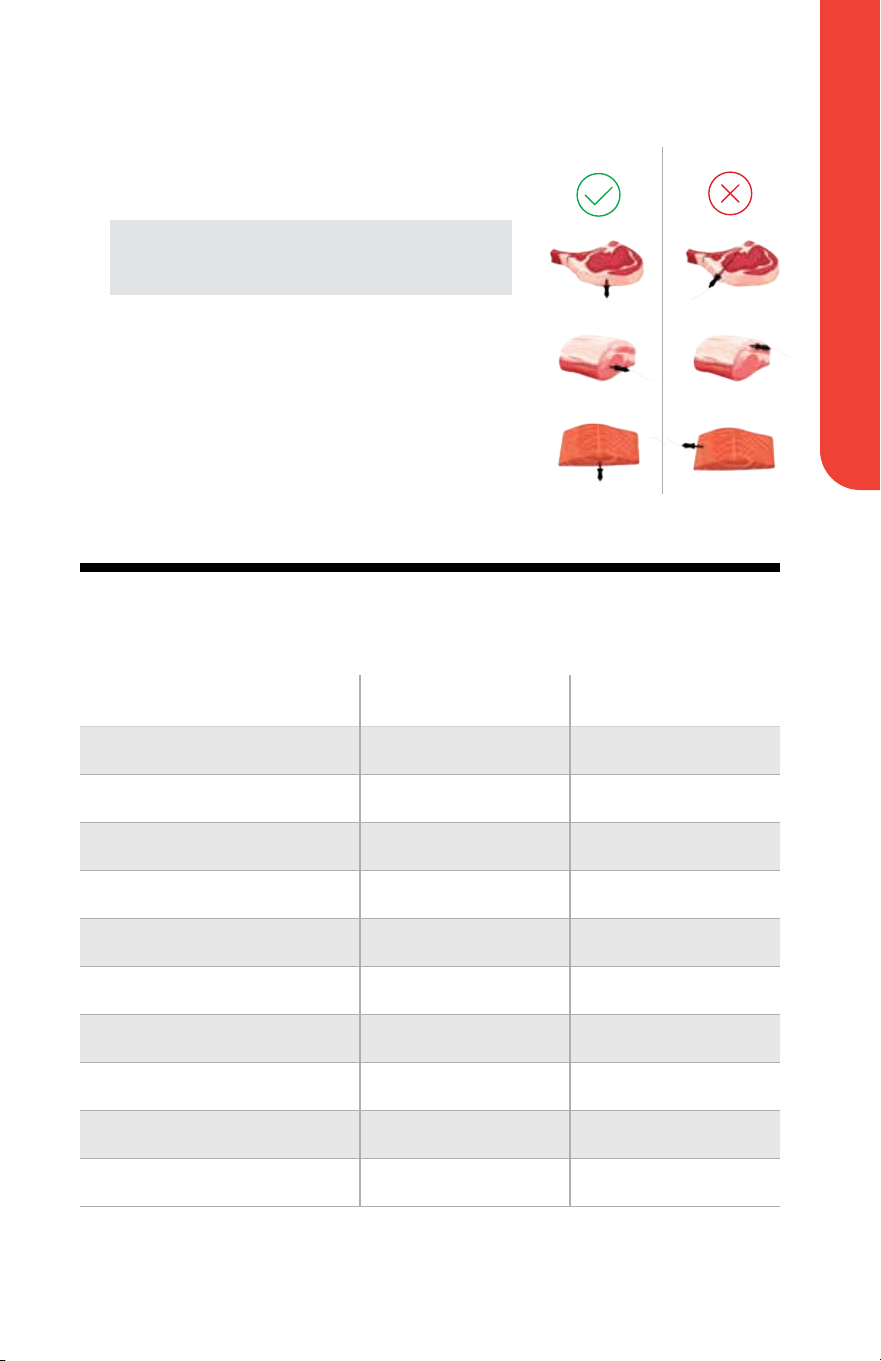
How To Place The Probe
• Insert the probe horizontally into the
thickest part of the food.
NOTE: The thickest part of the food may not be
the center. It is important that the probe’s end be
positioned properly for the desired result.
• Ensure the top of the probe is inserted
straight into the center of the food, not
angled toward the bottom or top of it.
• The probe should be close to (but not
touching) the bone and should be away
from any fat or gristle.
• DO NOT use the probe for frozen proteins
or for cuts of meat 1 inch thick or thinner.

How To Use Dual Cook
For customer service visit www.gourmia.com or call 888.552.003316
How To Use Dual Cook
For recipes that require two cooking modes, Dual Cook will switch from one
function and temperature to another function and temperature automatically.
Follow the steps below to use Dual Cook.
1. Tap DUAL COOK to select the first function. DUAL COOK and 1,
indicating the first function, will turn blue.
NOTE: The TOAST, BAGEL, PROOF, REHEAT and POPCORN functions will be
disabled when using Dual Cook.
2. Tap the desired function.
3. Adjust TEMP and TIME to your preference.
4. Tap DUAL COOK to select your second function. 2, indicating the second
function, will turn blue.
5. Adjust TEMP and TIME to your preference.
6. When settings are final, press START to begin preheating the oven.
If not preheating: Place food into the oven and press START to begin cooking. Skip
steps 7-8.
7. Once preheating is finished, the oven will beep, and the display will show
Add Food (Add Food).
8. Open the door, carefully place food into the oven, and close the door. The
cook time will automatically begin and the first function will turn blue.
When cook time for the first function has elapsed, the oven will automatically
switch functions and temperatures. The second function will turn blue. When the
cook time has elapsed, the oven will beep, and the display will show End (End).
9. Open the door. Carefully remove the food and place it on a heat-resistant
surface.
How to Use Popcorn Function
17User Manual | XL Digital Countertop Oven with Air Fry | GTF7860
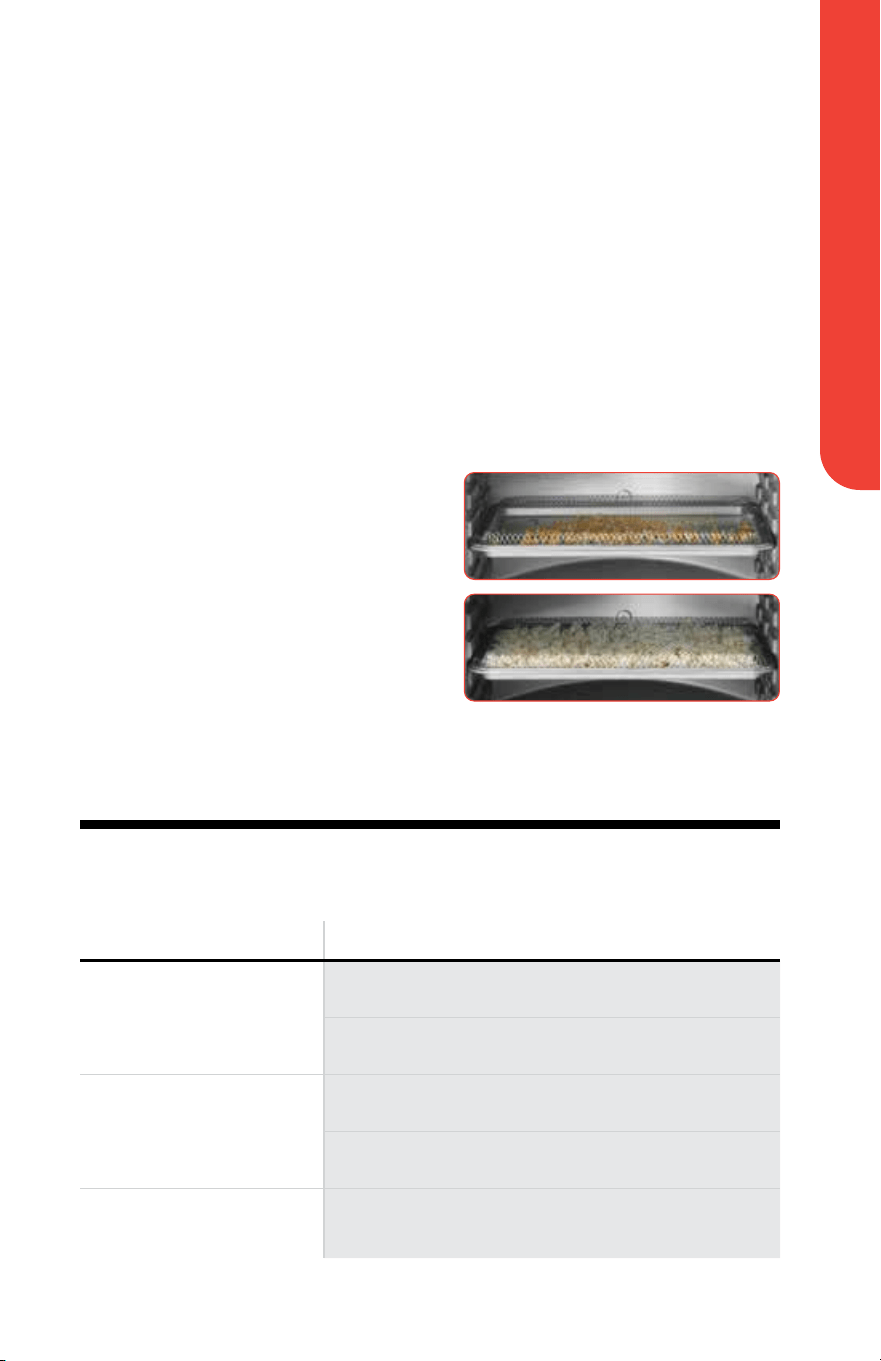
How to Use Popcorn Function
1. Tap POPCORN.
2. Tap START to begin preheating the oven.
3. Pour 1/2 a cup of popcorn kernels into the baking pan.
4. Turn the air fry basket upside down and place it on top of the baking pan.
Once preheated, the oven will beep and the display will show Add Food
(Add Food).
5. Open the doors, carefully insert the baking pan along with the upside down
air fry basket into the bottom rack position, and close the doors.
The cook time will begin automatically. When the cook time has elapsed,
the oven will beep and the display
will show End (End).
6. Before opening the doors, let sit
one to two minutes until popping
has stopped. Carefully remove the
popcorn and place it on a heat-
resistant surface.
Troubleshooting
Problem Solution
Food is not cooked Use smaller batches for more even cooking
Raise temperature and continue cooking.
Food is not browned evenly Turn over food halfway through cooking process
Cook similar sized foods together
White smoke is coming out
of the oven
Clean the oven and accessories after each use to
remove greasy residue

Cooking Tips
For customer service visit www.gourmia.com or call 888.552.003318
Convection Tips
See the FUNCTION CHART on pages 11-13 for each functions’ convection options.
• Foods that are covered in foil benefit from the convection’s even heat and
will cook faster without any moisture loss.
• The high temperature air circulation produces roasted foods that are
golden brown on the outside and juicy and tender on the inside.
• Even cooking means that you can use more than one rack and you do not
have to turn foods or rotate baking trays.
Below are foods that benefit from the convection setting and when to use it:
Convection Bake: Convection Roast: Convection Broil:
Pies
Pastries
Cookies
Biscuits
Meat
Vegetables
Whole Fish
Meat, fish,
for melting cheese,
for browning the top
of casseroles
Pizza:
• Use the lower rack positions and check often so the cheese does not
burn.
• Start with without convection then turn on convection for the last few
minutes to brown cheese.
Not recommended for:
• Custards and flans, souffles, cakes, quickbreads, and breads.
Additional tips:
• Make sure air can circulate around food and pans. Use trays, roasting pans,
and baking pans with lower sides.
Cooking Tips
For an extensive list of foods and their ideal amounts, settings, and preparation
notes, see the Air Fry Cooking Chart and Dehydrate Chart on pages 64
through 67 of the Gourmia Recipe Book.
• Spread food out in single layer; do not overcrowd.
• When following instructions on item packaging or a standard recipe,
reduce the cooking temperature by 25°F, check food for desired doneness
a few minutes before cook time elapses, and cook a little longer if
necessary.
• Always ensure raw proteins reach food-safe temperature.
Cleaning and Maintenance
19User Manual | XL Digital Countertop Oven with Air Fry | GTF7860
WARNING:
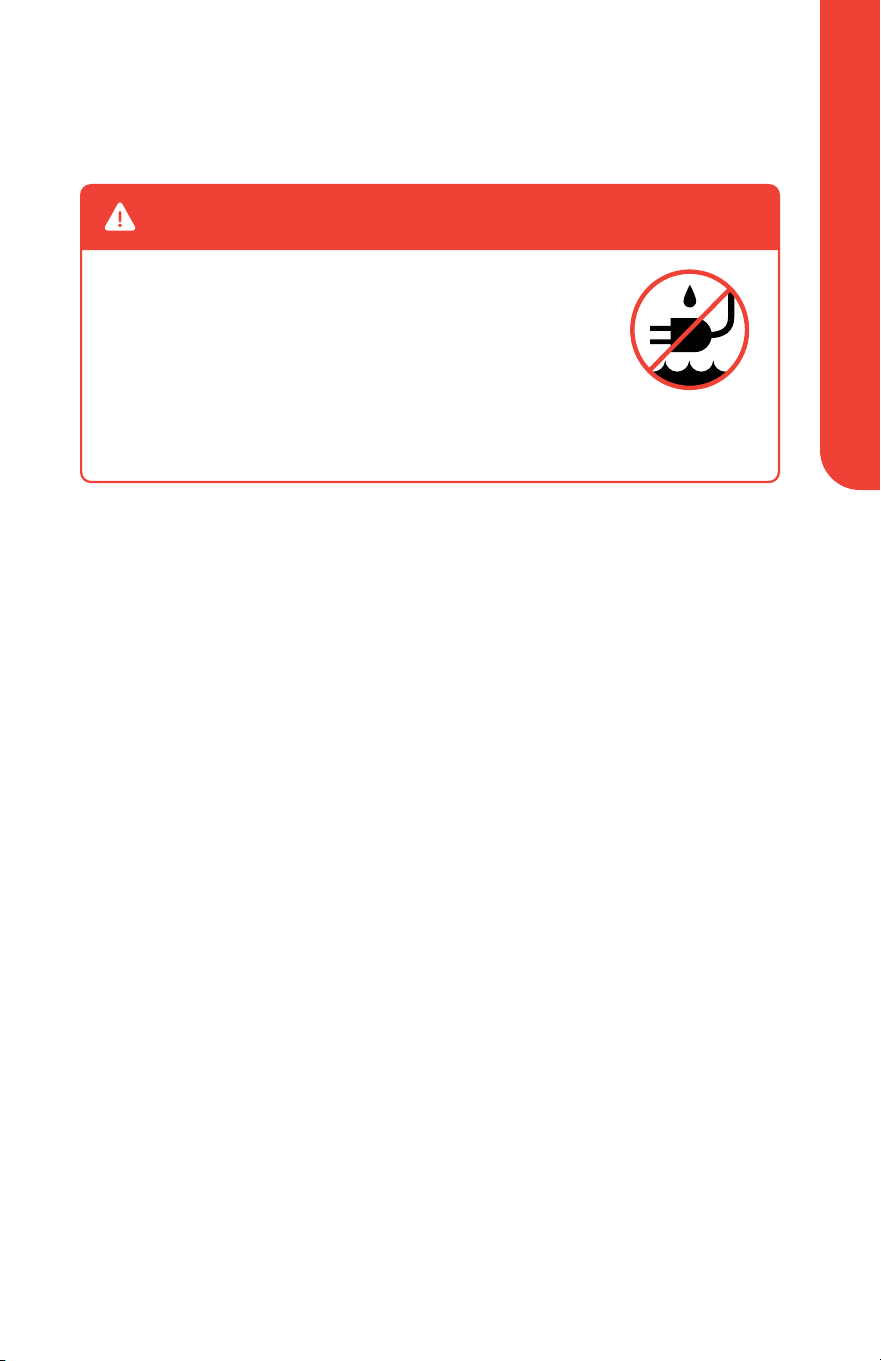
NEVER immerse cord, plug, or oven in water or any
other liquid.
Unplug the appliance and allow it to cool completely
before cleaning.
Do not use metal kitchen utensils or abrasive cleaning
material to clean the unit or the accessories.
Cleaning and Maintenance
Cleaning
• Clean and dry the appliance and accessories after each use.
• Clean the accessories with hot water, mild liquid soap, and a non-abrasive
sponge.
• Clean the probe with a damp cloth or non-abrasive sponge.
• Wipe the inside and outside of the oven with a damp cloth or non-abrasive
sponge.
• The air fry basket, oven rack, and baking pan are top rack dishwasher safe.
Storage
• Unplug the appliance and let it cool down.
• Make sure all parts are clean and dry.
• Store the appliance in a clean and dry place.
Environment
Do not discard the appliance with normal household waste at the end of its life;
instead, hand it in at an official collection point for recycling. Doing so will help
to preserve the environment.
Guarantee and Service
If you need service or information or if you have a problem, please visit
www.gourmia.com or email [email protected].

Register your product at
www.gourmia.com/warranty
We’d love to hear from you!
[email protected] | 888.552.0033
Mon-Thu 9:00 a.m. to 6:00 p.m. ET
Fri 9:00 a.m. to 3:00 p.m. ET
Languages: English, Spanish, French
Warranty and Service
This is a one year Limited Warranty and requires proof of purchase from
an authorized seller. It is applicable to the original purchaser only and is
not transferable to a third party user. Repair or replacement of defective
parts is solely at Gourmia’s discretion. In the event that repair isn’t possible,
Gourmia will replace the product/part. If product repair/replacement won’t
suffice, Gourmia has the option of refunding the cash value of the product or
component returned.
Product defects not covered under the Warranty provisions include normal
wear and damage incurred from use or accidental negligence, misuse of
instruction specifications or repair by unauthorized parties. Gourmia is
not liable for any incidental or consequential damages incurred by such
circumstances.
Only valid within the United States.