1. What's in the Box
2. Inserting the Batteries
3. Selecting the Measuring Unit
4. Installing the EufyLife App and Pairing
5. Starting a Measurement
6. Supported Biometric Measurements
7. Multi-User Measurement
8. Selecting Di
ff
erent Measurement Modes
9. Data Service
10. Maintenance
11. Troubleshooting
12. Speci
fi
cations
13. Customer Service
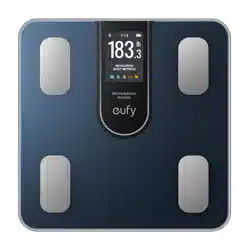
1. What's in the Box
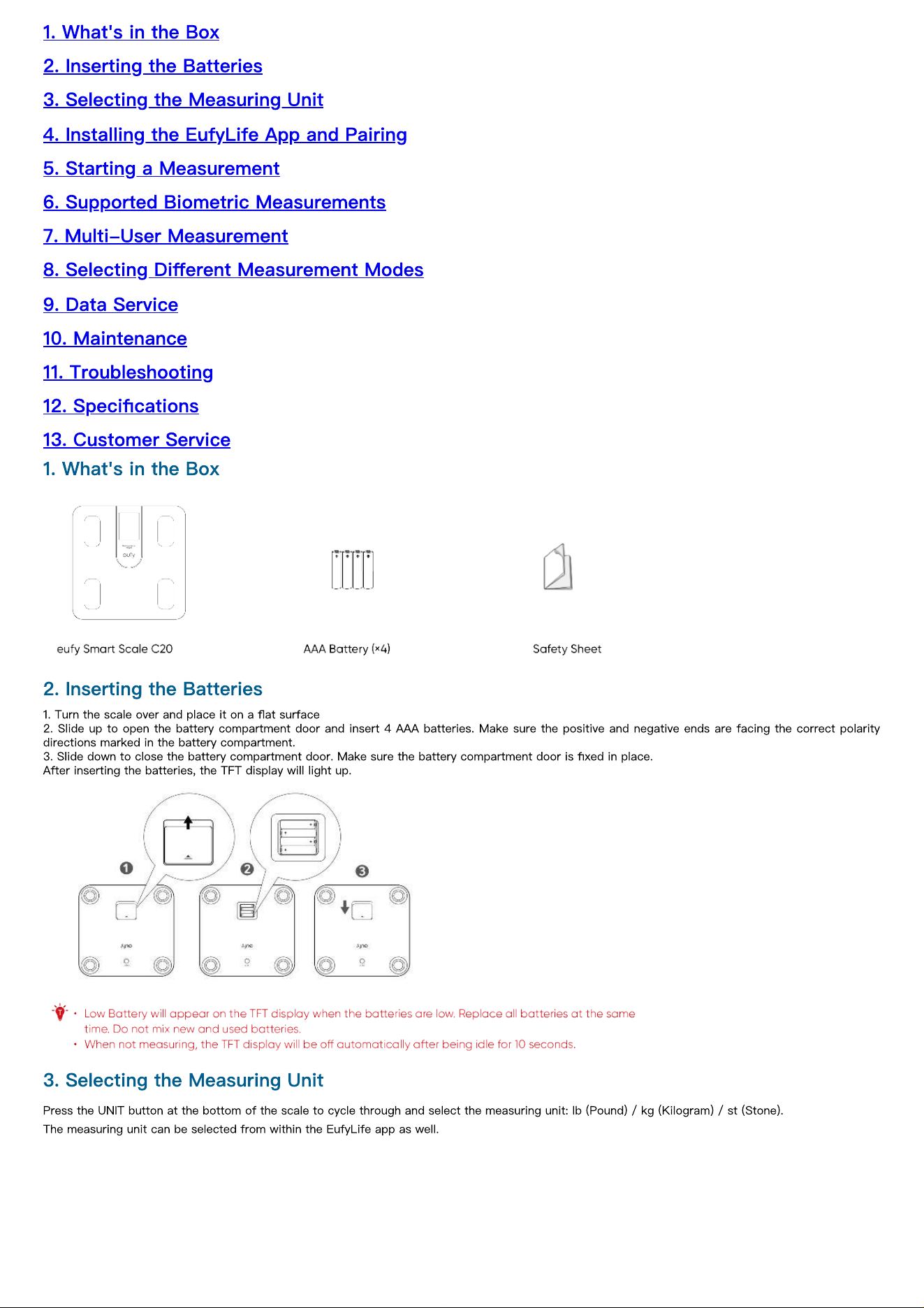
2. Inserting the Batteries
1. Turn the scale over and place it on a
fl
at surface
2. Slide up to open the battery compartment door and insert 4 AAA batteries. Make sure the positive and negative ends are facing the correct polarity
directions marked in the battery compartment.
3. Slide down to close the battery compartment door. Make sure the battery compartment door is
fi
xed in place.
After inserting the batteries, the TFT display will light up.
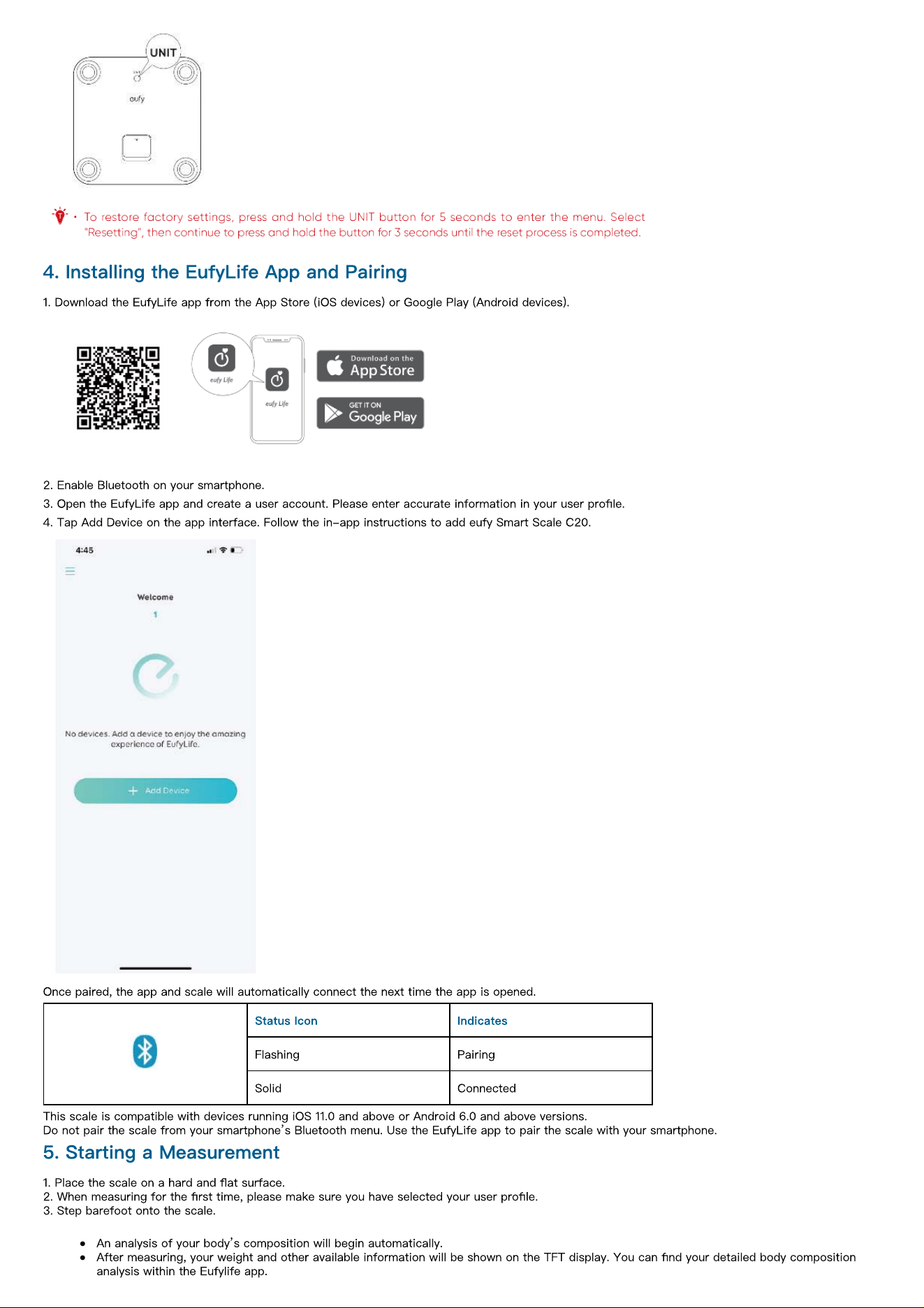
3. Selecting the Measuring Unit
Press the UNIT button at the bottom of the scale to cycle through and select the measuring unit: lb (Pound) / kg (Kilogram) / st (Stone).
The measuring unit can be selected from within the EufyLife app as well.
4. Installing the EufyLife App and Pairing
1. Download the EufyLife app from the App Store (iOS devices) or Google Play (Android devices).
2. Enable Bluetooth on your smartphone.
3. Open the EufyLife app and create a user account. Please enter accurate information in your user pro
fi
le.
4. Tap Add Device on the app interface. Follow the in-app instructions to add eufy Smart Scale C20.
Once paired, the app and scale will automatically connect the next time the app is opened.
Status Icon Indicates
Flashing Pairing
Solid Connected
This scale is compatible with devices running iOS 11.0 and above or Android 6.0 and above versions.
Do not pair the scale from your smartphone
’
s Bluetooth menu. Use the EufyLife app to pair the scale with your smartphone.
5. Starting a Measurement
1. Place the scale on a hard and
fl
at surface.
2. When measuring for the
fi
rst time, please make sure you have selected your user pro
fi
le.
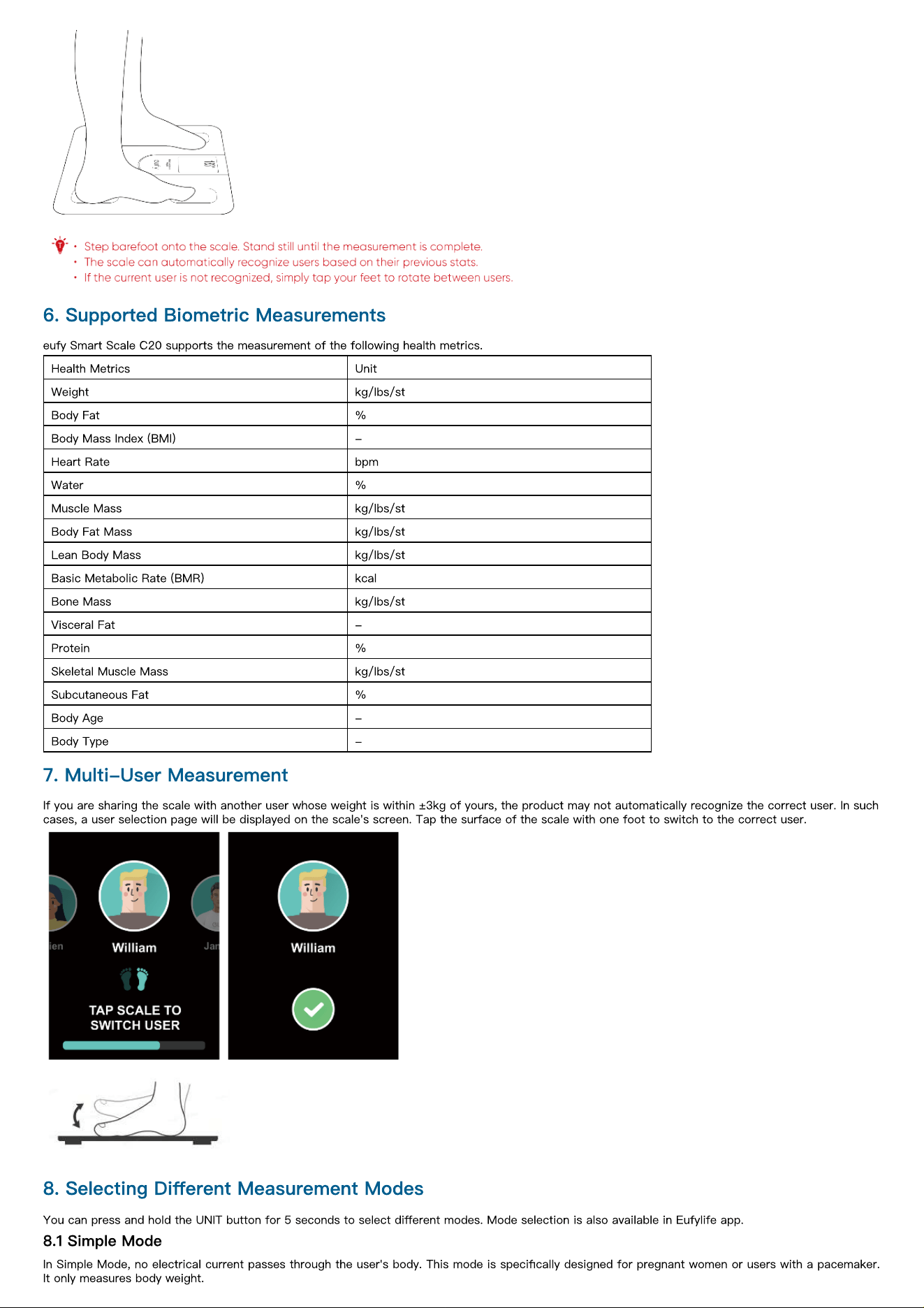
3. Step barefoot onto the scale.
An analysis of your body
’
s composition will begin automatically.
After measuring, your weight and other available information will be shown on the TFT display. You can
fi
nd your detailed body composition
analysis within the Eufylife app.
6. Supported Biometric Measurements
eufy Smart Scale C20 supports the measurement of the following health metrics.
Health Metrics Unit
Weight kg/lbs/st
Body Fat %
Body Mass Index (BMI) -
Heart Rate bpm
Water %
Muscle Mass kg/lbs/st
Body Fat Mass kg/lbs/st
Lean Body Mass kg/lbs/st
Basic Metabolic Rate (BMR) kcal
Bone Mass kg/lbs/st
Visceral Fat -
Protein %
Skeletal Muscle Mass kg/lbs/st
Subcutaneous Fat %
Body Age -
Body Type -
7. Multi-User Measurement
If you are sharing the scale with another user whose weight is within ±3kg of yours, the product may not automatically recognize the correct user. In such
cases, a user selection page will be displayed on the scale's screen. Tap the surface of the scale with one foot to switch to the correct user.
8. Selecting Di
ff
erent Measurement Modes
You can press and hold the UNIT button for 5 seconds to select di
ff
erent modes. Mode selection is also available in Eufylife app.
8.1 Simple Mode
In Simple Mode, no electrical current passes through the user's body. This mode is speci
fi
cally designed for pregnant women or users with a pacemaker.
It only measures body weight.
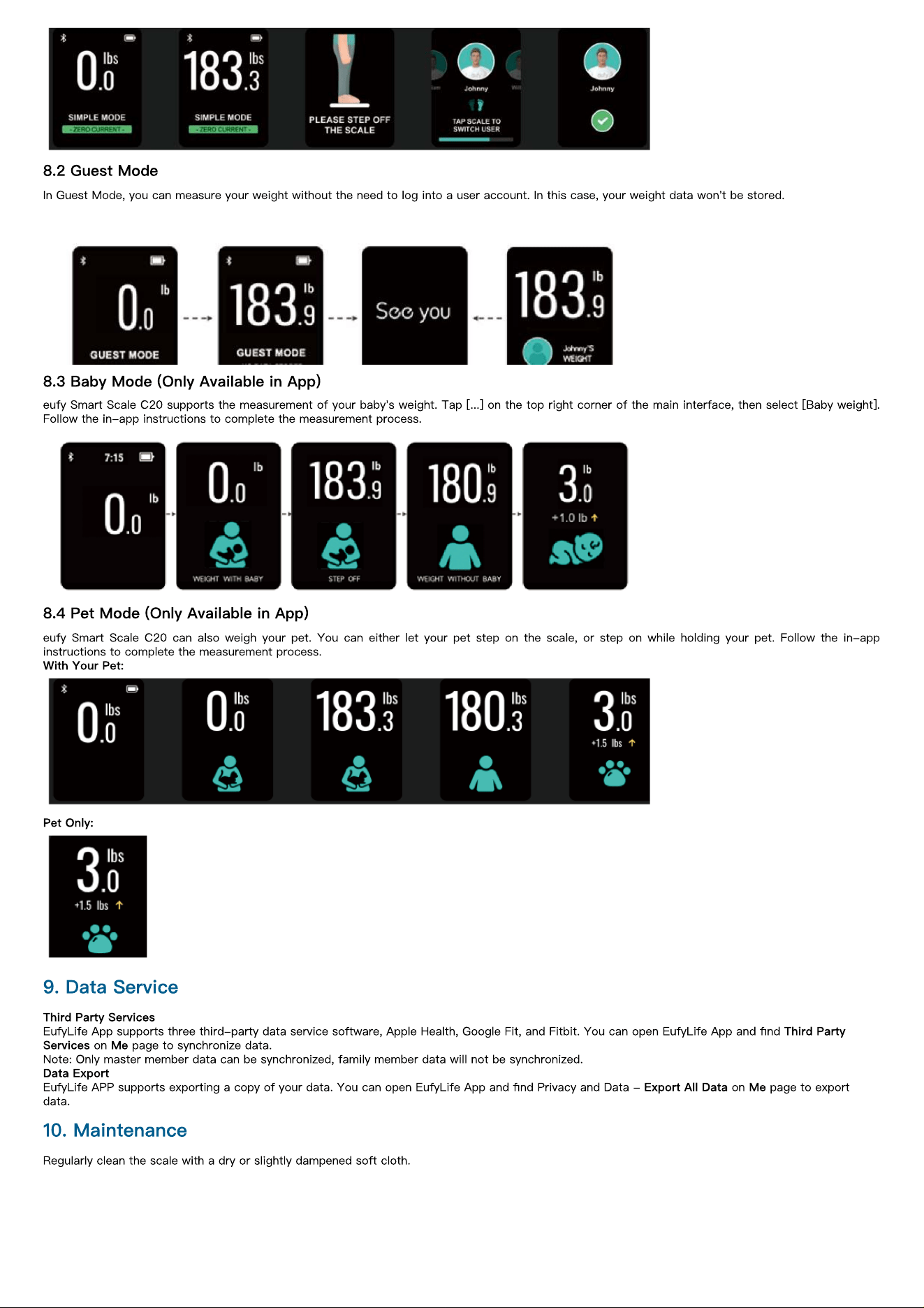
8.2 Guest Mode
In Guest Mode, you can measure your weight without the need to log into a user account. In this case, your weight data won't be stored.
8.3 Baby Mode (Only Available in App)
eufy Smart Scale C20 supports the measurement of your baby's weight. Tap [...] on the top right corner of the main interface, then select [Baby weight].
Follow the in-app instructions to complete the measurement process.
8.4 Pet Mode (Only Available in App)
eufy Smart Scale C20 can also weigh your pet. You can either let your pet step on the scale, or step on while holding your pet. Follow the in-app
instructions to complete the measurement process.
With Your Pet:
Pet Only:
9. Data Service
Third Party Services
EufyLife App supports three third-party data service software, Apple Health, Google Fit, and Fitbit. You can open EufyLife App and
fi
nd
Third Party
Services
on
Me
page to synchronize data.
Note: Only master member data can be synchronized, family member data will not be synchronized.
Data Export
EufyLife APP supports exporting a copy of your data. You can open EufyLife App and
fi
nd Privacy and Data -
Export All Data
on
Me
page to export
data.
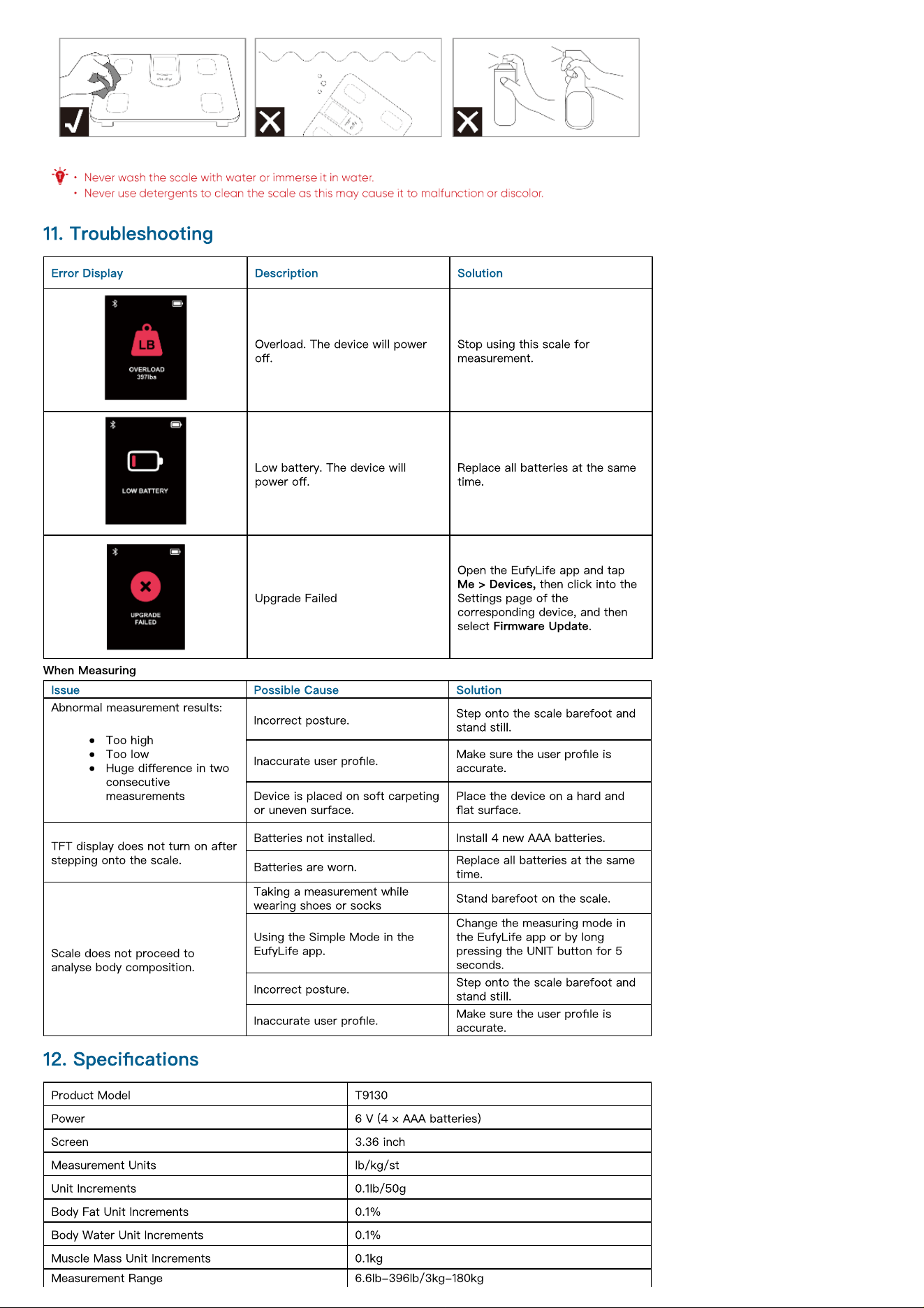
10. Maintenance
Regularly clean the scale with a dry or slightly dampened soft cloth.
11. Troubleshooting
Error Display Description Solution
Overload. The device will power
o
ff
.
Stop using this scale for
measurement.
Low battery. The device will
power o
ff
.
Replace all batteries at the same
time.
Upgrade Failed
Open the EufyLife app and tap
Me > Devices,
then click into the
Settings page of the
corresponding device, and then
select
Firmware Update
.
When Measuring
Issue Possible Cause Solution
Abnormal measurement results:
Too high
Too low
Huge di
ff
erence in two
consecutive
measurements
Incorrect posture.
Step onto the scale barefoot and
stand still.
Inaccurate user pro
fi
le.
Make sure the user pro
fi
le is
accurate.
Device is placed on soft carpeting
or uneven surface.
Place the device on a hard and
fl
at surface.
TFT display does not turn on after
stepping onto the scale.
Batteries not installed. Install 4 new AAA batteries.
Batteries are worn.
Replace all batteries at the same
time.
Scale does not proceed to
analyse body composition.
Taking a measurement while
wearing shoes or socks
Stand barefoot on the scale.
Using the Simple Mode in the
EufyLife app.
Change the measuring mode in
the EufyLife app or by long
pressing the UNIT button for 5
seconds.
Incorrect posture.
Step onto the scale barefoot and
stand still.
Inaccurate user pro
fi
le.
Make sure the user pro
fi
le is
accurate.
12. Speci
fi
cations
Product Model T9130
Power 6 V (4 × AAA batteries)
Screen 3.36 inch
Measurement Units lb/kg/st
Unit Increments 0.1lb/50g
Body Fat Unit Increments 0.1%
Body Water Unit Increments 0.1%
Muscle Mass Unit Increments 0.1kg
Measurement Range 6.6lb-396lb/3kg-180kg
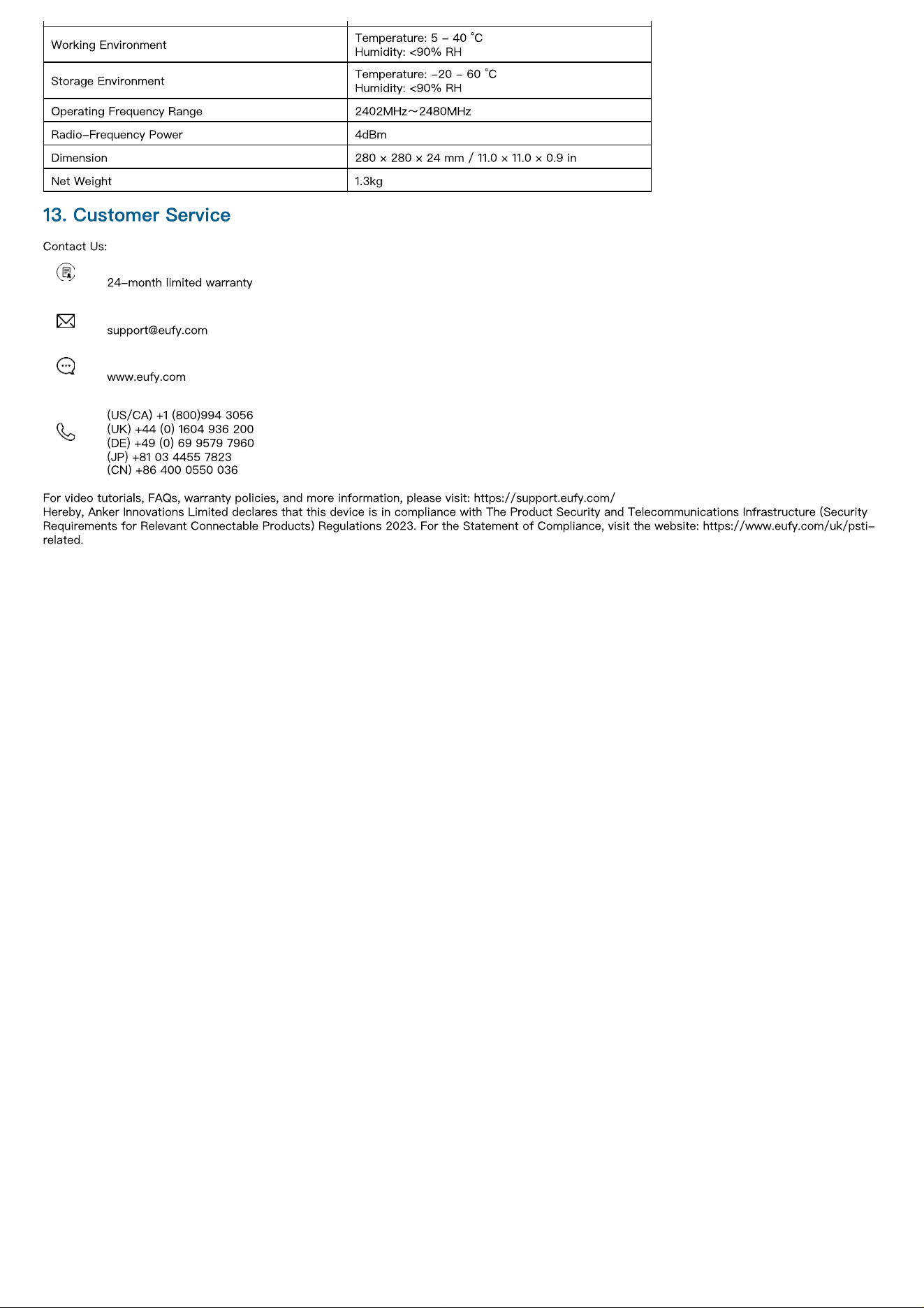
Working Environment
Temperature: 5 - 40 °C
Humidity: <90% RH
Storage Environment
Temperature: -20 - 60 °C
Humidity: <90% RH
Operating Frequency Range 2402MHz
~
2480MHz
Radio-Frequency Power 4dBm
Dimension 280 × 280 × 24 mm / 11.0 × 11.0 × 0.9 in
Net Weight 1.3kg
13. Customer Service
Contact Us:
24-month limited warranty
www.eufy.com
(US/CA) +1 (800)994 3056
(UK) +44 (0) 1604 936 200
(DE) +49 (0) 69 9579 7960
(JP) +81 03 4455 7823
(CN) +86 400 0550 036
For video tutorials, FAQs, warranty policies, and more information, please visit: https://support.eufy.com/
Hereby, Anker Innovations Limited declares that this device is in compliance with The Product Security and Telecommunications Infrastructure (Security
Requirements for Relevant Connectable Products) Regulations 2023. For the Statement of Compliance, visit the website: https://www.eufy.com/uk/psti-
related.