
E S S E N T I A L S FOR LIFE
User
Manual
MODEL
GGSUC908S
V 1.3 | 0722
90cm Dual Fuel
Freestanding Cooker

Welcome Congratulations on purchasing
your new Freestanding Cooker!
The Sôlt brand is proudly
distributed within Australia by
Residentia Group Pty Ltd.
Please refer to the warranty card at the rear of this manual
for information regarding your product’s parts and labour
warranty, or visit us online at www.residentia.group
At Residentia Group, we are customer obsessed and our
Support Team are there to ensure you get the most out of
your appliance. Should you want to learn more about your
freestanding cooker features, and importantly taking care
of your appliance when cleaning, our Support Team are
here to help.
You can use our online Support Centre at anytime by
visiting http://support.residentiagroup.com.au, or you can
contact us via calling us on 1300 11 HELP (4357).
It is important that you read through the following use and
care manual thoroughly to familiarise yourself with the
installation and operation requirements of your appliance
to ensure optimum performance.
Again, thank you for choosing an Sôlt appliance and we
look forward to being of service to you.
Kind Regards,
The Residentia Team
Residentia Group
—
Head Office.
165 Barkly Ave
Burnley
Victoria 3121
Australia
—
ACN.
600 546 656
—
Online.
residentia.group
Sôlt
—
Online.
www.solt.house
—
Instagram.
/solt.house
—
Facebook.
/solt.appliances

Contents 2 Welcome
4 General Safety Instructions
7 Your Freestanding Cooker
10 Operating Instructions
14 Cooking Guidelines
16 Cleaning & Maintenance
23 Installation Instructions
32 Electrical Connection
34 Gas Connection
39 Technical Specifications
40 Attach Your Receipt
41 Purchase Details
42 Warranty Information
Sôlt recommends the use of original spare parts. When contacting our customer service team, please ensure
that you have the following information at hand (which can be found on your appliances’ rating plate).
— Model Number
— Serial Number
T . 1300 11 4357 | E. support@residentiagroup.com.au
Customer Care

4
IMPORTANT SAFETY INSTRUCTIONS
Read carefully and keep for future reference
Read this manual thoroughly before first use, even if
you are familiar with this type of product. The safety
precautions enclosed herein reduce the risk of fire, electric
shock and injury when correctly adhered to. Make sure
you understand all instructions and warnings.
Read the instructions in full before installing or using this
appliance.
Keep the manual in a safe place for future reference,
along with the completed warranty card and purchase
receipt. If you sell or transfer ownership of this product,
pass on these instructions to the new owner. Always
follow basic safety precautions and accident prevention
measures when using an electrical appliance, including
the following:
WARNING! Installation Electrical Shock Hazard
WARNING: All electrical work associated with the
installation of this appliance must be carried out by a
licensed electrician.
WARNING: This appliance must be installed by a suitably
qualified person in strict accordance with all instructions
in this manual.
Disconnect the appliance from the mains electricity
supply before carrying out any work or maintenance on it.
Failure to follow this advice may result in electrical shock
or death.
IMPORTANT INSTALLATION ADVICE
• Adjacent furniture: When having the appliance
installed, make sure that the adjacent furniture or
housing, and all installation materials, are able to
withstand a minimum temperature of 85ºC above the
ambient room temperature while the oven is in use.
• Certain types of vinyl or laminate kitchen furniture are
particularly prone to heat damage or discolouration
at temperatures below the guidelines given above.
We assume no liability for any damage caused by
the appliance being installed in contravention of this
temperature limit, or by placing adjacent cabinet
materials closer than 4mm near the appliance.
• Ventilation: Heat, steam and moisture will be
created during use of the appliance. Take care to
avoid injury and ensure that the room is adequately
ventilated. If the appliance is going to be used for
prolonged periods of time, additional ventilation
may be required. If in doubt about your ventilation
requirements, consult your qualified installer.
• Cables: Do not allow electrical fittings or cables to
come into contact with areas on the appliance that
gets hot.
• Curtains: Do not install the oven next to curtains or
soft furnishings.
• Damaged cord: If the power cord is damaged, it
must be replaced by the manufacturer or a qualified
service engineer in order to avoid a hazard
• Packaging: Ensure that all packaging elements are
kept away from children and disposed of correctly.
Most packaging elements can be recycled.
GENERAL USAGE CONDITIONS AND RESTRICTIONS
• Domestic use only: This appliance is designed
for indoor domestic use only, it is not intended for
commercial use and this will void the warranty.
• Intended purpose: Only use this appliance for its
intended purpose, in its intended environment and
as described in this manual. Any other use may cause
fire, electric shock or injury. It is not intended for
commercial, trade or industrial use.
• Before first use: Remove all packaging and protective
films. With the oven completely empty, heat the oven
for 45 minutes at the maximum temperature; this
will burn off any residual manufacturing residues,
removing any smoke and smells.
• Follow instructions: Make sure to observe all rules
and provisions in this instruction manual. Do not allow
anybody who is not familiar with the contents of this
manual to operate the appliance.
• Use common sense: These instructions are not
intended to cover every possible condition and
situation. As with any electrical household appliance,
common sense and caution are therefore always
recommended when installing, operating and
maintaining the oven. Be careful not to come in
contact with the internal heating elements.
• Usage restriction: This appliance is not intended
for use by persons (including children) with reduced
physical, sensory or mental capabilities, or lack of
experience and knowledge, unless they have been
given supervision or instruction concerning use of the
appliance by a person responsible for their safety.
• Supervise children: Young children do not recognise
the risks involved when using electrical appliances.
Make sure children younger than 8 years of age are
kept away from the appliance during use and after
use. If it is necessary for younger family members to
be in the kitchen, ensure that they are kept under
close supervision at all times. Never allow children to
play with or climb on the oven or oven door.
• Unattended: Never leave the appliance unattended
during use, as this is a fire risk. Oils and fats in
roasting dishes may catch fire due to overheating.
• No heater: Do not use the appliance for heating a
General Safety Instructions

5
room or drying clothes. This appliance must not be
used as a space heater.
• No external timer: The appliance is not intended
to be operated by means of an external timer or
separate remote control system.
• After use: Make sure to switch off the oven after use
and before cleaning.
• Damage: Do not use the appliance if any part has
been damaged or does not work properly. Only
have it repaired by an authorised service centre.
Incorrect repair could expose you to the risk of electric
shock, fire or injury. Prolonged use of the unit in such
conditions could cause fire or electrocution. In case of
damage, contact our after sales support centre using
the details at the bottom of this page.
• Liability: We assume no liability for any eventual
damages caused by misuse of the product or
noncompliance with these instructions.
• Do not use when faulty: Do not use the appliance in
the event of a technical fault. Any faults must be fixed
by an appropriately qualified and authorised person.
Contact our after sales support line for advice.
• No storage: Do not store flammable materials in the
appliance or near this appliance.
• No Aerosols: Do not spray aerosols in the vicinity of
this appliance while it is in operation.
• Cleaning: Clean the oven and cooktop on a regular
basis so oils and fats do not accumulate and cause
a fire risk. Make sure the appliance is switched off
before cleaning. Do not use harsh abrasive cleaners
or metal scrapers to clean the oven door glass as
this can scratch the surface, which may result in the
oven glass shattering. Do not use steam cleaning
equipment for cleaning any part of the appliance.
When cleaning the appliance, ensure that no part is
immersed in water or other liquid.
• Do not remove the plug by pulling on the cable.
OVEN-SPECIFIC SAFETY ADVICE
• Oven door: Do not place heavy objects on the oven
door. Do not lean on the oven door when it is open, as
this can damage the door hinges.
• Grill: Keep the oven door closed when using the grill
function.
• Oven cavity: During cooking, never place pans, trays
or other cookware directly onto the bottom of your
oven, including any dishes with water or ice. Always
place them on the shelves provided.
• Oven accessories: When removing the baking/drip
tray or oven rack from the hot oven, always use an
oven mitt.
• Aluminium foil: Do not use aluminium foil to cover
the grill pan or heat items wrapped in aluminium foil
under the grill. The high reflectivity of the foil could
potentially damage the grill element. You should also
never line the base of your oven with aluminium foil-
the trapped heat can irreversibly damage the enamel
and may even cause a fire.
• Do not line the oven with foil or place anything on the
bottom of the oven while baking to avoid permanent
damage, as trapped heat will crack or damage the
enamel floor of the oven cavity.
• Use all of the oven functions with the oven door
closed.
• Do not use plastic wrap or wax paper in the oven.
• For food safety reasons, do not leave food in the
oven for longer than two hours before and after
cooking or defrosting. This is to avoid contamination
by organisms which may cause food poisoning. Take
particular care during warmer weather. In the event
of power failure while cooking, return the oven dials in
off position to prevent overheating of the appliance.
• Lifting/moving: Do not attempt to lift or move the
oven by using the oven door or handle, as this may
cause damage to the appliance or result in injury to
the person lifting the appliance.
COOKTOP-SPECIFIC SAFETY ADVICE
• Do not allow pots to boil dry, as damage to heating
elements or the hob itself may result.
• Do not operate cooktop heating elements without a
pot, fry pan, etc.
• Do not use pots or pans with unstable or deformed
bases to avoid an accident.
• Do not allow cookware to overhang the hob onto
adjacent bench tops as this may cause scorching to
the bench top surface.
• After a burner is extinguished, turn the control knob
to the off position and wait at least one minute
before relighting the burner.
42
WARRANTY TERMS & CONDITIONS
OVENS (FREESTANDING COOKERS)
This document sets out the terms and conditions of the
product warranties for Residentia Group Appliances. It is
an important document. Please keep it with your proof of
purchase documents in a safe place for future reference
should you require service for your Appliance.
1. IN THIS WARRANTY
(a) ‘acceptable quality’ as referred to in clause 10 of this
warranty has the same meaning referred to in the
ACL;
(b) ‘ACL’ means Trade Practices Amendment (Australian
Consumer Law) Act (No.2) 2010;
(c) ‘Appliance’ means any Residentia Group product
purchased by you accompanied by this document;
(d) ‘ASR’ means Residentia Group authorised service
representative;
(e) ‘Residentia Group’ means Residentia Group Pty Ltd
of 165 Barkly Ave, Burnley VIC 3121, ACN 600 546 656
in respect of Appliances purchased in Australia;
(f ) ‘major failure’ as referred to in clause 10 of this
warranty has the same meaning referred to in the ACL
and includes a situation when an Appliance cannot
be repaired or it is uneconomic for Residentia Group,
at its discretion, to repair an Appliance during the
Warranty Period;
(g) ‘Warranty Period’ means:
(i) where the Appliance is used for personal,
domestic or household use (i.e. normal
single family use) as set out in the instruction
manual, the Appliance is warranted against
manufacturing defects for 24 months, following
the date of original purchase of the Appliance;
(h) ‘you’ means the purchaser of the Appliance not
having purchased the Appliance for re-sale, and
‘your’ has a corresponding meaning.
2. This warranty only applies to Appliances purchased
and used in Australia and is in addition to (and does
not exclude, restrict, or modify in any way) any
non-excludable statutory warranties in Australia.
3. During the Warranty Period Residentia Group or its
ASR will, at no extra charge if your Appliance is readily
accessible for service, without special equipment
and subject to these terms and conditions, repair or
replace any parts which it considers to be defective.
Residentia Group or its ASR may use remanufactured
parts to repair your Appliance. You agree that any
replaced Appliances or parts become the property
of Residentia Group. This warranty does not apply
to light globes, batteries, filters or similar perishable
parts.
4. Parts and Appliances not supplied by Residentia
Group are not covered by this warranty.
Warranty Information
Possibility of tilting
Anti-tip restraint

6
CAUTION: Hot!
• Do not touch hot surfaces:
The heating elements and other
accessible parts including inside
the oven cavity and on the cooktop
become extremely hot during
operation and can cause burns on
contact. Take care when handling
the food you are cooking to avoid
touching hot parts inadvertently.
Keep young children well away when
using the appliance.
• Opening the door: Be careful
when opening the oven door to avoid
contact with hot parts of
the oven and steam.
WARNING: Do not spray aerosols in
the vicinity of this appliance while it is in operation. Do
not store or use flammable liquids or items in the vicinity
of this appliance.
WARNING: Where this appliance is installed in Marine
Craft or in Caravans, it shall not be used as a space
heater.
WARNING: Please ensure the appliance is secured
using the safety stabilising chain, as per the installation
instructions.
WARNING: Do not use harsh abrasive cleaners or sharp
metal scrapers to clean the oven door glass as they can
easily scratch and damage the surface, which can also
result in shattering the glass.
WARNING: Never use the storage compartment at the
base of the Cooker for storing any flammable items or
objects that cannot withstand heat (including but not
limited to timber, paper, spray cans, rags, etc).
DECLARATION OF CONFORMITY
This appliance complies with the following Australian/
European Directives:
• 2006/95/CE General regulations / Low tension
• 1935/2004/CE 90/128/EEC This appliance is suitable
to come in contact with food
• 2004/108/CE Electromagnetic compatibility
• Low voltage – 73/23
• Safety standards AS/NZS 60335.2.6:2014+A1 with AS/
NZS 60335.1:2011+A1+A2+A3+A4
• 2009/142/EC Gas Appliance Directive
The manufacturer declares that the oven is built using
certified materials and requires the appliance to be
installed in accordance with the standards currently in
force. This oven should only be used by a trained person
and for domestic purposes only.
OTHER REPAIRS OR SERVICE INSPECTIONS
Besides keeping the appliance clean, regularly inspect
the control dials and heating elements. In case of
damage, or if you experience any problems with the
appliance, contact our after sales support line to
arrange a technical inspection of the oven and fix any
operational faults.
WARNING:
Do not attempt to carry out any repairs yourself!
RESPONSIBLE DISPOSAL
At the end of their working life, do not throw the
appliance out with your household rubbish. Electrical
and electronic products contain substances that can
have a detrimental effect on the environment and
human health if disposed of inappropriately. Observe
any local regulations regarding the disposal of electrical
consumer goods and dispose of it appropriately for
recycling. Contact your local authorities for advice on
recycling facilities in your area.
According to Waste of Electrical and Electronic Equipment
(WEEE) directive, WEEE should be separately collected and
treated. If at any time in future you need to dispose of this
product please do NOT dispose of this product with household
waste. Please send this product to WEEE collecting points
where available.
It is forbidden to run the unit without any food inside.
It is very dangerous.
Trouble shooting
PN:P000 0024274040
General Safety Instructions (Continued)
7
GGSUC908S
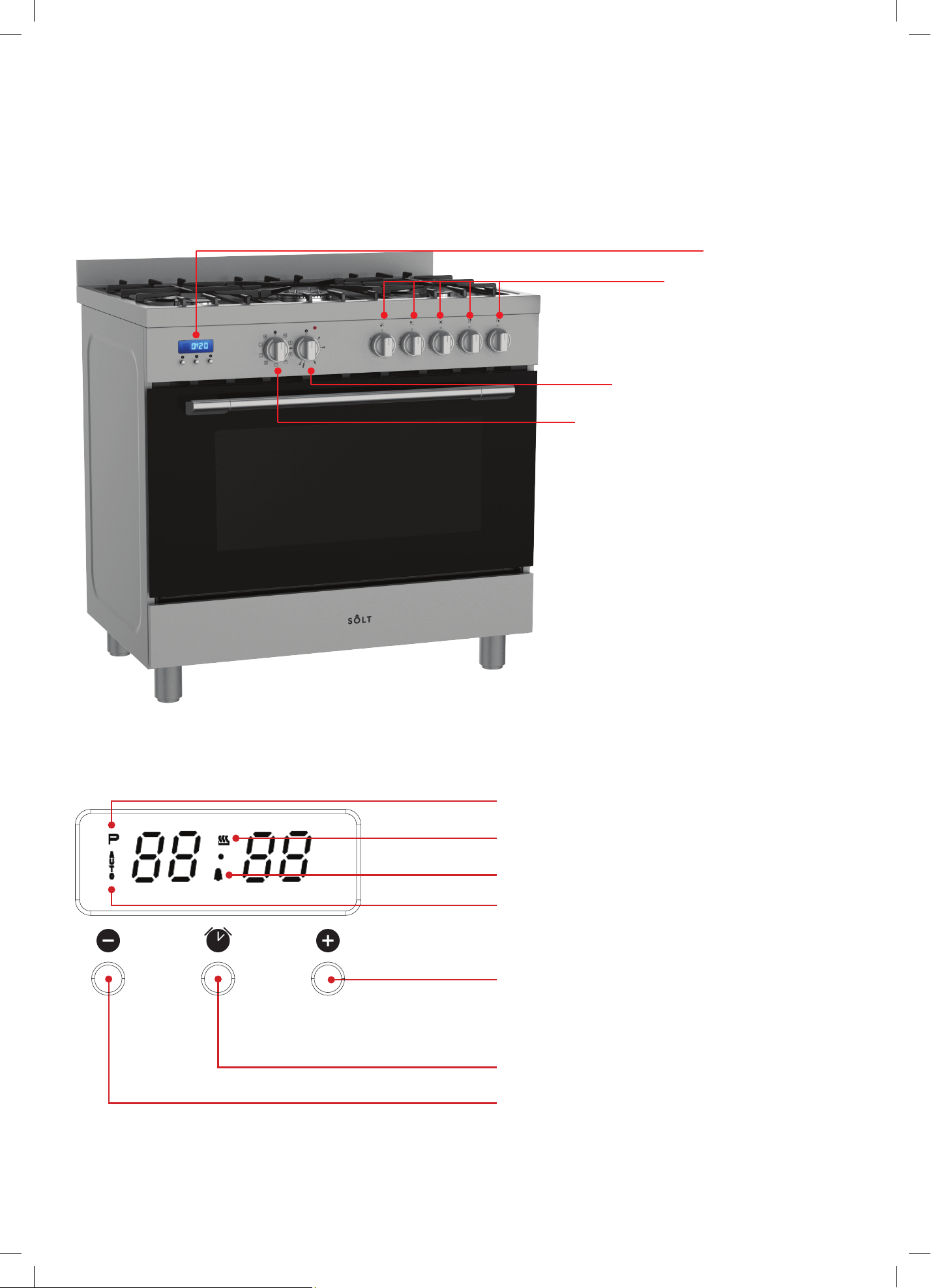
The images and diagrams in this user manual is for reference only. Your Freestanding Cooker may appear differently.
Oven Temperature Knob
Oven Function Selector Knob
Gas Burner Knobs
Digital Timer
Minus Button ( – )
DIGITAL TIMER PANEL
Alarm Icon
Plus Button ( + )
Timer Button
Your Freestanding Cooker
9
INSTRUCTIONS
FOR
USE
OF
CONTROL
DEVICES
(Depending on model)
USlNG THE GRILL
The grill is situated in the top of the oven compartment.
The grill pan should be located on the top oven shelf position.
Always grill with the door closed.
Warning:
Do not place fatty foods too close to the grill and never leave the
grill unattended. If fatty foods are grilled, or roasting has been
cooked in the oven at a high temperature the grill element may
smoke. This is not dangerous and the smoke is caused by the fat
burning off when the grill element is hot. Leave the grill element
on until the smoking has stopped t-hen use as normal. If a grease
fire should occur in a pan put out the flame by placing a lid on the
pan. Do not throw water on a grease fire.
Using the prograa mmer of cc ooking
Main functions (for some models)
1,Time function, keep the time in 24 hours.
2,Make an reservation for the oven work
time, and can set anytime in 24 hours.
3,Set the oven work time, the longest maybe 10 hours.
Operation Panel and Instructions (for some models)
1 List of functions
Instructions from left to right: Key1, Key2, Key3.
Key1 Decrease Key
Key2 Mode Key
Key3 Increase Key
Note: Press Key 1 and Key 3 under the setting mode, which
changes the time by one minute either up or down. If keep
pressing them, the number will be up or down quickly.
2 Icon Instructions
“ "Auto-programming icon" : it will flash when
setting automatic
program a nd th e e nd o f automatic program. If automatic program
has been set, after 5s, it will k eep lighting up. At the end of
automatic program, the flash will be off when resetting the clock
or it will keep lighting up when resetting automatic program after 5s.
“"Time-setting Icon" will flash when setting Beijing time.
“ "Sec Icon" and "Alarm Icon"” are flashing under the mode of time
setting and alarm setting, after 5s of setting, it will turn to lighting up.
Alarm Icon
Rela
y
O
p
eration Icon
Auto-programming
icon
Time-setting
Icon
Sec Icon
Number Display
Fig.
3
“"Relay Operation Icon"”shows the working state
of relays. The
if contacts are disconnected. "Number Display"”is LED Nixie Tube.
As shown in the picture, on-off control is used to control heating
components of oven, the left is power source which can be
connected under the 220V.
1、、Time Adjustment after Starting up
When the power is on, it shows 12:00 and flashes. The relay
contact is disconnected, auto-programming icon keeps lighting
up, time setting icon flashes.
Press K1 or K3 to the time or press K2 to get into the present
working mode. The relay contact is connected.
Press K2 by 4 times to get into the present time-setting mode
under the common mode.
2、、Alarm and Buzz Function
Press K2 once under the common mode: "Alarm Icon" flashes.”
Press K1 or K3 to adjust the present alarm clock.
5s after adjusting to the time you need, "Alarm Icon" keeps
flashing, and will work after setting up. In this case, pressing
K1 can know the alarming time( it will show seconds at one
last minute).
When alarm counts down to zero, alarming program ends,
alarm icon flashes, and the buzzer os buzzing. Press any
key to stop the buzzing or it will turn off automatically after 2
minutes.
3、、Auto-programming Setting and Instructions
① Semiautomatic program mode
Use this setting for oven working time, automatic heating
switch-off at the end of setting time, buzzer will inform the user.
on-off control
Power source
icon will keep lighting up if contact are connected, and will be off
Control Function and Intructions
Press K2 twice or three times to get into the auto-programming
time setting, "Auto-programming Icon"” flashes. Press K1 and
K3 to aujust continuous time and end time.
5s after setting, it will work automatically, "Auto-programming
Icon" keeps lighting up. If continuous time is 0, turn off the
relay contact, and "Relay Operation Icon" is dark, "Auto-
programming Icon" flashes, the buzzer is buzzing.
This mode’s range of continuous time and end time:
Adjustment range for continuous time: >> 0 but ≤≤ 10 hours
Adjustment range for end time: present time<< end time
== present time + 10 hours
If meet this standard: end time = present time + continuous time
<<
==
Cooking Icon
AUTO Programming Icon
Time setting Icon

8
COOKING FUNCTIONS
Light
This will activate the two internal lights.
No heating elements will be activated.
Defrost
The fan distributes air at ambient temperatures
inside the oven for defrosting food evenly and
efficiently.
Bake (also known as Conventional)
Heat will come from both the upper and lower
elements. The fan is not used in this function. Ideal
for cakes and foods that require baking for a long
time or at low temperatures. This function is not
ideal for multiple shelf cooking.
Fan Assisted Multi-level Oven
Prepare a range of similar or different foods at once
using this function.
Fan Forced
By using the central rear heating element and
fan, hot air is blown into the cavity and circulated
providing a consistent temperature at all levels.
Ideal for multiple shelf cooking.
Note: If converting a recipe from Bake to Fan
Forced, we recommend that you decrease the bake
time or temperature by approximately 20ºC.
Lower Element
Cooking using the lower element. Ideal for cooking
pastry based dishes by cooking the lower section
of your food quicker than the top. Use this for flans,
quiches, tarts and any cooking that requires greater
heat radiation from below.
Grill
This function uses intense heat from the upper Grill
element. This is the most ideal function for finishing
off many meals (i.e. browning the top of a roast,
frittata or potato gratin).
Note: For best results allow 5 minutes of
pre-heating before placing any food into the oven.
Ensure your dish is centered under the grill element.
Also ensure the temperature is between 50 and
grill.
Full Grill
Powerful grilling using both upper grill elements.
This is the most ideal function for finishing off many
meals (i.e. browning the top of a roast, frittata or
potato gratin).
Note: For best results allow 5 minutes of
pre-heating before placing any food into the oven.
Ensure your dish is centered under the grill element.
Also ensure the temperature is between 50 and
grill.
Fan Assisted Grill
Fan combined with the upper element and grill
element. This function uses the intense heat from
the two upper elements for top browning and the
fan to ensure even cooking of the food. Ideal for
meat, poultry and vegetables, leaving the food
crisp and brown on the outside whilst the inside
remains moist and tender (i.e. Whole chicken, beef
fish or even steak).
USING THE GRILL
The grill is situated in the top of the oven compartment.
The grill pan should be located on the top oven shelf
position. Always grill with the door closed.
Warning: Do not place fatty foods too close to the grill
and never leave the grill unattended. If fatty foods are
grilled, or roasting has been cooked in the oven at a high
temperature the grill element may smoke. This is not
dangerous and the smoke is caused by the fat burning
off when the grill element is hot. Leave the grill element
on until the smoking has stopped then use as normal.
If a grease fire should occur in a pan put out the flame
by placing a lid on the pan. Do not throw water on
a grease fire.
Your Freestanding Cooker (Continued)

9
CLOCK/TIMER DISPLAY AND CONTROLS
Your freestanding oven features a digital display, 24 hour
clock/timer, with 3 buttons. The time will be displayed in
24 hours. When power is first connected the screen will
display “AUTO”.
Setting the digital clock
You need to set the clock in order to use the oven.
For first time use and for each time the cooker is reset by
the mains, press the function button ‘ ’ to remove the
Time Setting Icon. Then set the correct time by pressing
the ‘+’ or ‘–’ buttons, advancing forward or backward until
the correct time is displayed.
Semi Automatic operation setting
You can use the timer function to set an automatic
cooking duration. The oven will switch itself off after the
automatic cooking time period ends.
1. Press the ‘ ’ button twice and the AUTO icon will
flash, then enter the desired cooking duration using
the '+' and '–' buttons to set the cooking duration ie. if
you want to cook for 1.5 hours, set the display to 1:30.
2. After 5 seconds the timer will be set and the AUTO
icon will display and the timer will start counting
down.
3. Once the automatic cooking time is over the oven
will switch off, the cooking icon will switch off and the
AUTO icon will flash and the buzzer will sound.
Automatic operation setting
You can use the timer function to set an automatic end
time for your oven and a cooking duration. The oven will
then switch on and cook according to the timer and then
once finished, switch off automatically.
1. Press the ‘ ’ button twice and the AUTO icon will
flash, then enter the desired cooking duration using
the '+' and '–' buttons to set the cooking duration ie. 3
hours, set the display to 3:00.
2. Then press ‘ ’ button again to enter the desired
end time for your cooking. ie. if you want your
cooking to end at 10:00 set the time to 10:00.
3. After 5 seconds the timer will be set and the AUTO
icon will display until it is time to start cooking. When
it is time to start cooking the oven will automtically
switch on and start heating up. The cooking icon will
display on the screen for the duration of the cooking
program.
4. Once the automatic cooking time is over the oven
will switch off, the cooking icon will switch off and the
AUTO icon will flash and the buzzer will sound.
Cancel Functions
When in semiautomatic or automatic functions press the
'+' and '–' buttons at the same time which can cancel the
timer modes.
Timer (Alarm/ Buzzer mode)
The digital countdown timer can be set up to 23 hours
and 59 minutes.
To set the timer, press the ‘ ’ button and the alarm
icon will flash on the display screen. Press the ‘+’ or ‘–’
buttons to set your desired time within 5 seconds.
The alarm icon will display on the screen to show the
timer is set.
Press the ‘–’ button at any time to show the time
remaining on the display screen.
When your set timer reaches 0, the alarm will ring.
To stop the alarm, simply press any of the two buttons.

10
FIRST USE
IMPORTANT! Before first use:
• Remove all packaging and protective films
• Please ensure you have read all instructions in this
manual taking note of the safety instructions.
• Ensure the gas supply is turned on and that the
appliance is plugged in and switched on. .
Position your shelves
After removing any packaging or protective wraps,
re-install the shelves in your desired positions
Your Oven
The oven is fitted with:
• a lower heating element;
• an upper heating element;
• two circular heating element surrounding the fan.
N.B.: Always set the temperature on the thermostat knob
before selecting any of the functions.
Conditioning the oven
It is important to condition your oven before using it
for cooking and baking. Conditioning will burn off any
manufacturing residues and ensure that you get the best
results right from the start.
1. Ensure you have removed all packaging, cable ties
and protective wraps/inserts from the oven.
2. Ensure that all shelves and baking trays have been
re-installed into the oven.
3. Make sure that all oven control dials are switched
the Off position.
4. Use the Function selector knob to select the Bake
function. Then use the Oven Temperature knob
and set it to 200ºC.
5. After 30 minutes, use the Function selector knob to
select the Fan Grill function. Leave the temperature
set to 200ºC.
6. After a further 10 minutes, use the Function selector
knob to select the Fan Forced function and heat for
20 minutes at 200ºC.
7. After the final 20 minutes is up, turn both the
Function and Temperature knobs to the Off positions.
Note:
There will be a distinctive smell and a small amount of
smoke present during this conditioning process, as the
manufacturing residues are burnt off. This is normal, but
please make sure that the kitchen is well ventilated during
this process.
Important!
Once the oven has completely cooled, wipe out the
oven and warming drawer with a damp cloth and mild
detergent, followed by thoroughly drying.
Operating Instructions
11
GAS COOKTOP – INSTRUCTIONS FOR USE
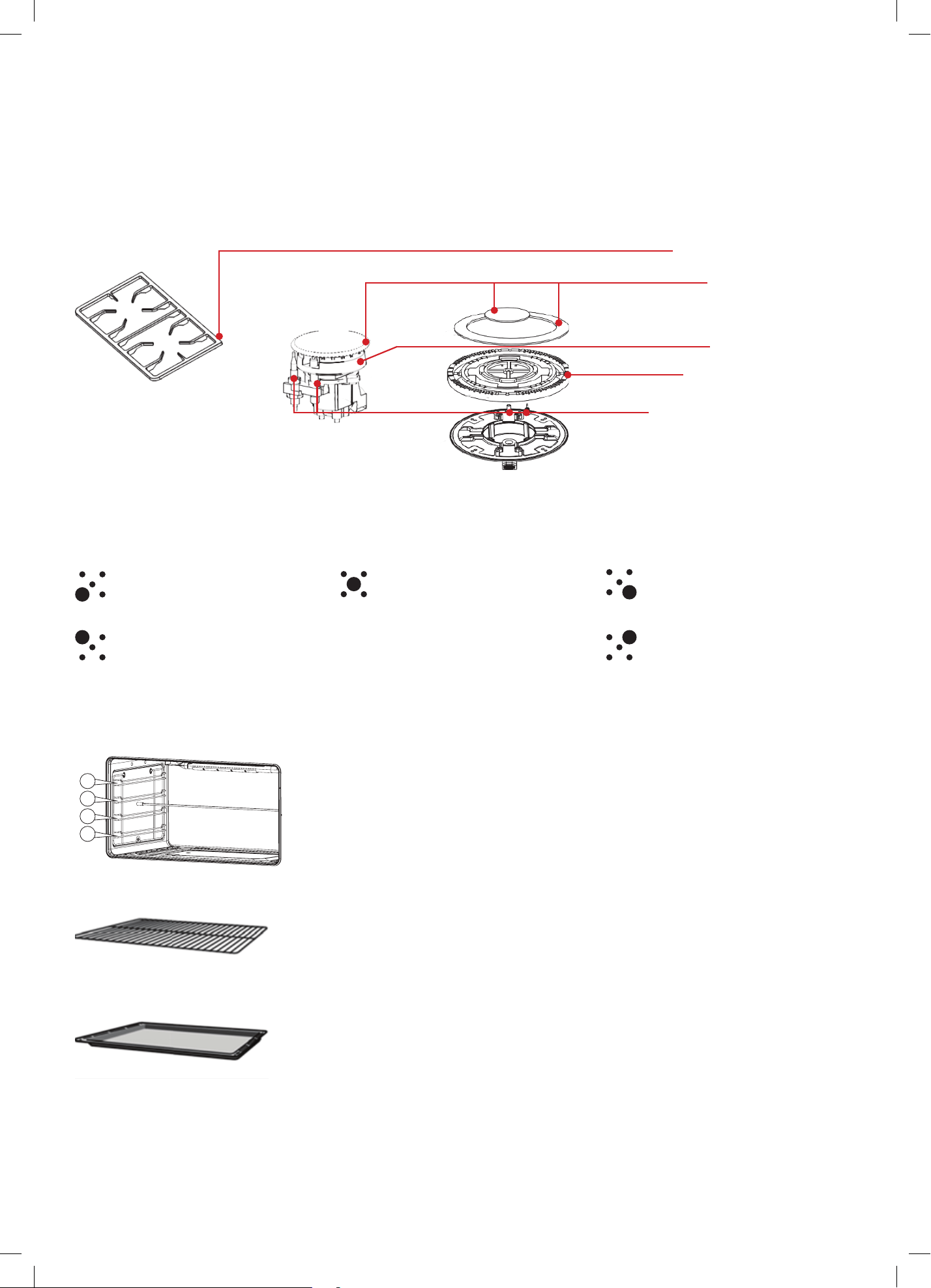
Description of the main parts of the gas cooktop
DESCRIPTION OF SYMBOLS
Description of the burner areas of the gas cooktop
ACCESSORIES
The accessories can be inserted into the oven in 4
different shelf positions, see below.
Enamel Baking Tray
Deep Baking Dish
Flame Spreader
Flame Safety Device
Burner Head
Burner Caps
Cast Iron Trivets
Front Left Burner
Front Right Burner
Middle Wok Burner
Rear Left Burner
Rear Right Burner
USE OF THE ELECTRIC GRILL
USlNG THE GRILL
Turn the oven knob to the right and place it on the grill position .
The grill pan should be located on the top oven shelf position.
Always preheat the grill on full for 3-5 minutes before inserting
the food.
The user can change the shelves, depending on his personal
whishes and on the different food.
To remove the shelves from the oven, pull them forward you,
tilt front end upward and pull them out.
To replace it in the opposite manner as before.
Install shelves by locating them in the horizontal guide rails on
the oven walls. The raised portion of the shelf is to be facing the
rear wall of the oven.
Bump
For example: the present time is 2: 00, then the max. end time
is adjusted to 12:00 (2: 00+10:00=12:00). When the end time
is adjusted to 12:00, then the continuous time is 10:00.
5s after adjusted, automatic program is working. After 10 hours,
if continuous time is counting down to 0, turn off the relay
contact, and "Rel ay Operation Icon" is dark, "Auto-programming
Icon"”flashes, the buzzer is buzzing.
Note:
1. only use this setting for either continuous time or end time.
For example: the present time is 2:00, and if let the oven
work for 3 hours, set the continuous time to 3:00, and the
end time will automatically change to 5:00 and vice versa.
2. If the continuous time is equal to 0 or the end time is equal to
the present time, it means that the automatic program is over.
3. When the automatic program is over, the continuous time
is 0 and the end time is equal to the present time.
② Automatic Mode
Use this mode for setting oven’s starting time and end time,
which means make an appointment to boot. When the time is
over, it will automatically turn off the heating and the buzzer is
buzzing to inform the user.
Press twice to get into the continuous time setting mode under
the common mode, press three times to get into the end time
When the continuous time setting is ok or the end time setting
is ok, then press K2 to get into the other kind of automatic
program time setting, "Auto-programming Icon" flashes, ”
press K1 and K3 to ad just continuous time and end time.
setting mode.
5s after automatic program setting, it will automatically work,
and "Auto-programming Icon" keeps lighting up. Turn off the
relay conntact, and the icon i s dark. When work until the
starting time, the relay contact is connected, the icon is light.
When the continuous time is counting down, if the continuous
time is 0,turn off the relay contact, "Relay Operation Icon" is dark,
"Auto-programming Icon" flashes, and the buzzer is buzzing.
The continuous time and the end time under this mode will be
set as follow:
Starting time = end time
- continuous
time
For example, the present time is 2:00, set the continuous time to
3:00, and the end time to 10:00, then the starting time is 7:00
(7:00=10:00-3:00). The relay contact is connected and its icon
is light. After working for continuous 3 hours, the continuous
time is 0, turn off the relay contact,
"Relay Operation Icon" is dark,
“ "Auto-programming Icon"” flashes, the buzzer is buzzing.
Note:
1 End time >present time+ continuous time,
but 23 hours and 59 minutes
For example: the present time is 2:
00
, continuous time is 0:01,
then the range for end time is 2:02 (2:02
2:00+1).
2 Continuous time ≥ 1 minute, continuous time and end time both
will be set.
3 If the continuous time is equal to 0 or the end time is equal to
the present time it meas the automatic program is over.
4 When the automatic program is over, the continuous time is 0,
and the end time is the same with the present time.
4、、Cancel Function
When semiautomatic or automatic function is starting, press K1
and K3 at the same time which can cancel the automatic mode.
( to cancel continuous time and end time).
>
≤
≥
1
2
3
4
T
d
Y
w
r
Y
o
T
he access
o
d
ifferent she
Y
ou can pull
t
w
ithout the
m
r
emoved ea
s
Y
ou can buy
o
r from spec
Accessory
o
ries can be i
l
f positions.
t
he accesso
r
m
tipping. Thi
s
s
ily.
accessories
ialist retailer
s
i
nserted in t
h
r
ies two-thir
d
s
allows me
a
from the aft
e
s
.
Description
Baking an
d
For ovenwa
roasts, grilli
n
meals.
Enamelled
For moist c
a
frozen meal
s
roasts. Can
inserted un
d
wire rack or
used as a d
r
collect fat.
Rotary spi
t
For roasts a
of poultry. U
combinatio
n
enamelled
b
h
e oven in 4
s of the way
o
a
ls to be
e
r-sales serv
d
roasting s
h
re, cake tins,
n
g and froze
n
baking tray
a
kes, pastrie
s
s
and large
also be
d
erneath the
rotary spit a
n
r
ip tray to
nd large piec
se only in
n
with the
b
aking tray.
o
u
t
i
ce
elf
n
s
,
n
d
e
s
Accessories
T
d
Y
w
r
Y
o
T
he access
o
d
ifferent she
Y
ou can pull
t
w
ithout the
m
r
emoved ea
s
Y
ou can buy
o
r from spec
Accessory
o
ries can be i
l
f positions.
t
he accesso
r
m
tipping. Thi
s
s
ily.
accessories
ialist retailer
s
i
nserted in t
h
r
ies two-thir
d
s
allows me
a
from the aft
e
s
.
Description
Baking and roasting shelf
For ovenwa
roasts, grilli
n
meals.
Enamelled
For moist c
a
frozen meal
s
roasts. Can
inserted un
d
wire rack or
used as a d
r
collect fat.
Rotary spit
For roasts a
of poultry. U
combinatio
n
enamelled
b
h
e oven in 4
s of the way
o
a
ls to be
e
r-sales serv
re, cake tins,
n
g and froze
n
baking tray
a
kes, pastrie
s
s
and large
also be
d
erneath the
rotary spit a
n
r
ip tray to
nd large piec
se only in
n
with the
b
aking tray.
o
u
t
i
ce
n
s
,
n
d
e
s
10
1
2
3
4
USE OF THE ELECTRIC GRILL
USlNG THE GRILL
Turn the oven knob to the right and place it on the grill position .
The grill pan should be located on the top oven shelf position.
Always preheat the grill on full for 3-5 minutes before inserting
the food.
The user can change the shelves, depending on his personal
whishes and on the different food.
To remove the shelves from the oven, pull them forward you,
tilt front end upward and pull them out.
To replace it in the opposite manner as before.
Install shelves by locating them in the horizontal guide rails on
the oven walls. The raised portion of the shelf is to be facing the
rear wall of the oven.
Bump
For example: the present time is 2: 00, then the max. end time
is adjusted to 12:00 (2: 00+10:00=12:00). When the end time
is adjusted to 12:00, then the continuous time is 10:00.
5s after adjusted, automatic program is working. After 10 hours,
if continuous time is counting down to 0, turn off the relay
contact, and "Rel ay Operation Icon" is dark, "Auto-programming
Icon"”flashes, the buzzer is buzzing.
Note:
1. only use this setting for either continuous time or end time.
For example: the present time is 2:00, and if let the oven
work for 3 hours, set the continuous time to 3:00, and the
end time will automatically change to 5:00 and vice versa.
2. If the continuous time is equal to 0 or the end time is equal to
the present time, it means that the automatic program is over.
3. When the automatic program is over, the continuous time
is 0 and the end time is equal to the present time.
② Automatic Mode
Use this mode for setting oven’s starting time and end time,
which means make an appointment to boot. When the time is
over, it will automatically turn off the heating and the buzzer is
buzzing to inform the user.
Press twice to get into the continuous time setting mode under
the common mode, press three times to get into the end time
When the continuous time setting is ok or the end time setting
is ok, then press K2 to get into the other kind of automatic
program time setting, "Auto-programming Icon" flashes, ”
press K1 and K3 to ad just continuous time and end time.
setting mode.
5s after automatic program setting, it will automatically work,
and "Auto-programming Icon" keeps lighting up. Turn off the
relay conntact, and the icon i s dark. When work until the
starting time, the relay contact is connected, the icon is light.
When the continuous time is counting down, if the continuous
time is 0,turn off the relay contact, "Relay Operation Icon" is dark,
"Auto-programming Icon" flashes, and the buzzer is buzzing.
The continuous time and the end time under this mode will be
set as follow:
Starting time = end time
- continuous
time
For example, the present time is 2:00, set the continuous time to
3:00, and the end time to 10:00, then the starting time is 7:00
(7:00=10:00-3:00). The relay contact is connected and its icon
is light. After working for continuous 3 hours, the continuous
time is 0, turn off the relay contact,
"Relay Operation Icon" is dark,
“ "Auto-programming Icon"” flashes, the buzzer is buzzing.
Note:
1 End time >present time+ continuous time,
but 23 hours and 59 minutes
For example: the present time is 2:
00
, continuous time is 0:01,
then the range for end time is 2:02 (2:02
2:00+1).
2 Continuous time ≥ 1 minute, continuous time and end time both
will be set.
3 If the continuous time is equal to 0 or the end time is equal to
the present time it meas the automatic program is over.
4 When the automatic program is over, the continuous time is 0,
and the end time is the same with the present time.
4、、Cancel Function
When semiautomatic or automatic function is starting, press K1
and K3 at the same time which can cancel the automatic mode.
( to cancel continuous time and end time).
>
≤
≥
1
2
3
4
T
d
Y
w
r
Y
o
T
he access
o
d
ifferent she
Y
ou can pull
t
w
ithout the
m
r
emoved ea
s
Y
ou can buy
o
r from spec
Accessory
o
ries can be i
l
f positions.
t
he accesso
r
m
tipping. Thi
s
s
ily.
accessories
ialist retailer
s
i
nserted in t
h
r
ies two-thir
d
s
allows me
a
from the aft
e
s
.
Description
Baking an
d
For ovenwa
roasts, grilli
n
meals.
Enamelled
For moist c
a
frozen meal
s
roasts. Can
inserted un
d
wire rack or
used as a d
r
collect fat.
Rotary spi
t
For roasts a
of poultry. U
combinatio
n
enamelled
b
h
e oven in 4
s of the way
o
a
ls to be
e
r-sales serv
d
roasting s
h
re, cake tins,
n
g and froze
n
baking tray
a
kes, pastrie
s
s
and large
also be
d
erneath the
rotary spit a
n
r
ip tray to
nd large piec
se only in
n
with the
b
aking tray.
o
u
t
i
ce
elf
n
s
,
n
d
e
s
Accessories
T
d
Y
w
r
Y
o
T
he access
o
d
ifferent she
Y
ou can pull
t
w
ithout the
m
r
emoved ea
s
Y
ou can buy
o
r from spec
Accessory
o
ries can be i
l
f positions.
t
he accesso
r
m
tipping. Thi
s
s
ily.
accessories
ialist retailer
s
i
nserted in t
h
r
ies two-thir
d
s
allows me
a
from the aft
e
s
.
Description
Baking and roasting shelf
For ovenwa
roasts, grilli
n
meals.
Enamelled
For moist c
a
frozen meal
s
roasts. Can
inserted un
d
wire rack or
used as a d
r
collect fat.
Rotary spit
For roasts a
of poultry. U
combinatio
n
enamelled
b
h
e oven in 4
s of the way
o
a
ls to be
e
r-sales serv
re, cake tins,
n
g and froze
n
baking tray
a
kes, pastrie
s
s
and large
also be
d
erneath the
rotary spit a
n
r
ip tray to
nd large piec
se only in
n
with the
b
aking tray.
o
u
t
i
ce
n
s
,
n
d
e
s
10
1
2
3
4
USE OF THE ELECTRIC GRILL
USlNG THE GRILL
Turn the oven knob to the right and place it on the grill position .
The grill pan should be located on the top oven shelf position.
Always preheat the grill on full for 3-5 minutes before inserting
the food.
The user can change the shelves, depending on his personal
whishes and on the different food.
To remove the shelves from the oven, pull them forward you,
tilt front end upward and pull them out.
To replace it in the opposite manner as before.
Install shelves by locating them in the horizontal guide rails on
the oven walls. The raised portion of the shelf is to be facing the
rear wall of the oven.
Bump
For example: the present time is 2: 00, then the max. end time
is adjusted to 12:00 (2: 00+10:00=12:00). When the end time
is adjusted to 12:00, then the continuous time is 10:00.
5s after adjusted, automatic program is working. After 10 hours,
if continuous time is counting down to 0, turn off the relay
contact, and "Rel ay Operation Icon" is dark, "Auto-programming
Icon"”flashes, the buzzer is buzzing.
Note:
1. only use this setting for either continuous time or end time.
For example: the present time is 2:00, and if let the oven
work for 3 hours, set the continuous time to 3:00, and the
end time will automatically change to 5:00 and vice versa.
2. If the continuous time is equal to 0 or the end time is equal to
the present time, it means that the automatic program is over.
3. When the automatic program is over, the continuous time
is 0 and the end time is equal to the present time.
② Automatic Mode
Use this mode for setting oven’s starting time and end time,
which means make an appointment to boot. When the time is
over, it will automatically turn off the heating and the buzzer is
buzzing to inform the user.
Press twice to get into the continuous time setting mode under
the common mode, press three times to get into the end time
When the continuous time setting is ok or the end time setting
is ok, then press K2 to get into the other kind of automatic
program time setting, "Auto-programming Icon" flashes, ”
press K1 and K3 to ad just continuous time and end time.
setting mode.
5s after automatic program setting, it will automatically work,
and "Auto-programming Icon" keeps lighting up. Turn off the
relay conntact, and the icon i s dark. When work until the
starting time, the relay contact is connected, the icon is light.
When the continuous time is counting down, if the continuous
time is 0,turn off the relay contact, "Relay Operation Icon" is dark,
"Auto-programming Icon" flashes, and the buzzer is buzzing.
The continuous time and the end time under this mode will be
set as follow:
Starting time = end time
- continuous
time
For example, the present time is 2:00, set the continuous time to
3:00, and the end time to 10:00, then the starting time is 7:00
(7:00=10:00-3:00). The relay contact is connected and its icon
is light. After working for continuous 3 hours, the continuous
time is 0, turn off the relay contact,
"Relay Operation Icon" is dark,
“ "Auto-programming Icon"” flashes, the buzzer is buzzing.
Note:
1 End time >present time+ continuous time,
but 23 hours and 59 minutes
For example: the present time is 2:
00
, continuous time is 0:01,
then the range for end time is 2:02 (2:02
2:00+1).
2 Continuous time ≥ 1 minute, continuous time and end time both
will be set.
3 If the continuous time is equal to 0 or the end time is equal to
the present time it meas the automatic program is over.
4 When the automatic program is over, the continuous time is 0,
and the end time is the same with the present time.
4、、Cancel Function
When semiautomatic or automatic function is starting, press K1
and K3 at the same time which can cancel the automatic mode.
( to cancel continuous time and end time).
>
≤
≥
1
2
3
4
T
d
Y
w
r
Y
o
T
he access
o
d
ifferent she
Y
ou can pull
t
w
ithout the
m
r
emoved ea
s
Y
ou can buy
o
r from spec
Accessory
o
ries can be i
l
f positions.
t
he accesso
r
m
tipping. Thi
s
s
ily.
accessories
ialist retailer
s
i
nserted in t
h
r
ies two-thir
d
s
allows me
a
from the aft
e
s
.
Description
Baking an
d
For ovenwa
roasts, grilli
n
meals.
Enamelled
For moist c
a
frozen meal
s
roasts. Can
inserted un
d
wire rack or
used as a d
r
collect fat.
Rotary spi
t
For roasts a
of poultry. U
combinatio
n
enamelled
b
h
e oven in 4
s of the way
o
a
ls to be
e
r-sales serv
d
roasting s
h
re, cake tins,
n
g and froze
n
baking tray
a
kes, pastrie
s
s
and large
also be
d
erneath the
rotary spit a
n
r
ip tray to
nd large piec
se only in
n
with the
b
aking tray.
o
u
t
i
ce
elf
n
s
,
n
d
e
s
Accessories
T
d
Y
w
r
Y
o
T
he access
o
d
ifferent she
Y
ou can pull
t
w
ithout the
m
r
emoved ea
s
Y
ou can buy
o
r from spec
Accessory
o
ries can be i
l
f positions.
t
he accesso
r
m
tipping. Thi
s
s
ily.
accessories
ialist retailer
s
i
nserted in t
h
r
ies two-thir
d
s
allows me
a
from the aft
e
s
.
Description
Baking and roasting shelf
For ovenwa
roasts, grilli
n
meals.
Enamelled
For moist c
a
frozen meal
s
roasts. Can
inserted un
d
wire rack or
used as a d
r
collect fat.
Rotary spit
For roasts a
of poultry. U
combinatio
n
enamelled
b
h
e oven in 4
s of the way
o
a
ls to be
e
r-sales serv
re, cake tins,
n
g and froze
n
baking tray
a
kes, pastrie
s
s
and large
also be
d
erneath the
rotary spit a
n
r
ip tray to
nd large piec
se only in
n
with the
b
aking tray.
o
u
t
i
ce
n
s
,
n
d
e
s
10
1
2
3
4
12
IGNITION AND OPERATION OF THE BURNERS
To light the burner, press the control knob fully down and
hold the knob down before rotating anti-clockwise to
the High Flame position. The ignition device is integrated
into the control knob and is automatically activated by
pushing down on the control knob.
After lighting the flame, keep the knob pressed for
about 10 seconds: this time is necessary to heat up the
thermocouple and activate the safety valve, which would
otherwise cut off the gas flow. This step only applies
where flame failure device is fitted.
In the instance of a power failure, place a lit match near
the burner and proceed as described above. If the flame
does not light after the first attempt, wait 5 minutes for
the gas to dissipate before attempting to re-light the
burner.
Once lit, check that the flame is even and turn the control
knob to adjust the flame as required. If the flame is
uneven, check that the 'burner head/skirt' and 'burner
cap' are correctly positioned. To turn off the flame, turn
the control knob clockwise to the off position. Before
removing pots or pans from the burners, always turn off
the flame.
For correct use of the cooktop
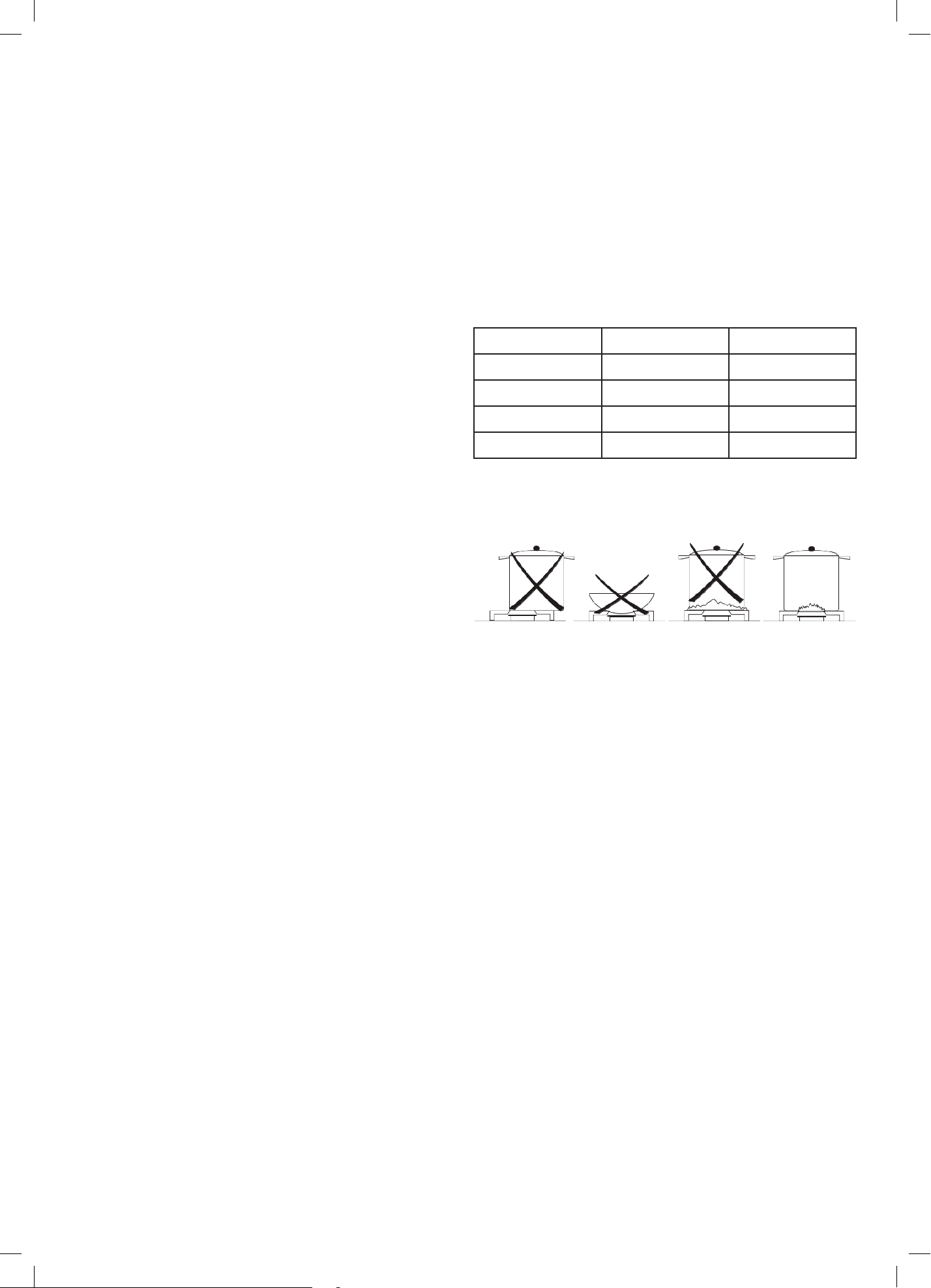
For lower gas consumption and better efficiency, use
only flat bottomed pans of dimensions suitable for the
burners, as shown in the table below. Also, as soon as a
liquid comes to the boil take care to turn the flame down
to a level that will just keep it boiling.
Burner min Saucepan max Saucepan
Auxilliary 80mm 160mm
Semi-rapid 120mm 200mm
Rapid 200mm 230mm
Triple crown 230mm 260mm
Operating Instructions (Continued)

13
This page
is intentionally
left blank

14
Baking
• For best results when baking, always preheat your
oven to the desired temperature. The temperature
indicator light will switch off to indicate that the set
temperature has been reached.
• We advise you do not open the door until at least ¾
of the way through cooking.
• Make sure cake pans do not touch each other or the
sides of the oven.
• If you are doubling the baking recipe (especially
cookies), the cooking duration may need to increase.
• Your cookware will significantly influence baking
times. Dark pans absorb the heat more quickly than
reflective pans; glass cookware may require a lower
temperature.
• Where you are baking using multiple shelves, you
may require a slight increase in cooking time.
Shelf Position Guide
• Single shelf: place your baking on a wire rack that will
have the top of your pan near the center of the oven
cavity, for optimum results.
• Multiple shelves: always leave a space between
shelves to allow the air to circulate.
Roasting
• The Roast (or Fan + Grill) function is designed to
brown the outside of the meat but still keep the inside
moist and juicy.
• Boneless, rolled or stuffed roasts take longer than
roasts containing bones.
• Poultry should be well cooked with the juices running
clear and an internal temperature of 74°C.
• If using a roasting bag, do not use the Roast function.
The initial searing stage is too hot for roasting
bags. Use Fan Bake or Fan Forced and follow the
manufacturer’s instructions.
• When using the Roast function, do not cover your
roast, as this will stop the searing process browning
the outside of the meat. If you prefer to roast in a
covered pan, use the Fan Bake function instead and
increase the temperature by 20°C.
• Cook larger cuts of meat at a lower temperature for a
longer time. The meat will cook more evenly.
• Always roast meat fat side up. That way, basting may
not be required.
• Always rest the meat for at least 10 minutes after
roasting to allow the juices to settle.
• Remember the meat will continue to cook for a few
minutes after removing it from the oven.
Shelf Position Guide
• Place the meat on a shelf so that it is in the center
of the oven or lower.
Grilling
• This is a healthier alternative to frying.
• Always grill with the oven door completely shut.
• For best results allow 5 minutes of preheat before
placing food in the oven.
• If you use glass or ceramic pans, be sure they can
withstand the high temperatures of the grill.
• To avoid piercing the meat and letting juices escape,
use tongs or a spatula to turn the meat halfway
through cooking.
• Brush meat with a little oil to help keep the meat
moist during cooking. Alternatively marinade
the meat before grilling (but be aware that some
marinades may burn easily).
• Where possible grill cuts of meat of a similar thickness
at the same time. This will ensure even cooking.
• Always keep a close watch on your food while grilling
to avoid charring or burning.
Shelf Position Guide
• For thinner cuts of meat, toasting or browning foods,
use a higher shelf position.
• Thicker cuts of meats should be grilled on lower
shelves or at a lower grill setting to ensure even
cooking.
Reheating food
• Use Bake or Fan Bake to reheat food.
• Bake and Fan Bake are particularly good for
reheating pastry based items, as the base heat will
help re-crisp the pastry case.
• Always reheat food to piping hot. This reduces the risk
of contamination by harmful bacteria.
• Once hot, set the oven temperature to WARM or use
the warming drawer to keep food hot.
• Never reheat food more than once.
Cooking Guidelines

15
This page
is intentionally
left blank

16
Important!
Do not use steam cleaners on your appliance.
Important!
Before any cleaning or maintenance operation, use the
isolation switch to disconnect the appliance from its
power source.
Cleaning Do's
• Read these cleaning instructions and the ‘General
Safety Instructions’ section before you start cleaning
your cooker.
• Before cleaning or removing any part, make sure that
everything on the cooker has been turned off.
• Unless suggested otherwise in the chart following,
allow any part to cool to a safe temperature before
cleaning. If you do need to handle a warm or hot
part, take extreme care. Wear long protective mitts to
avoid burns from steam or hot surfaces.
• Try using any cleaner on a small area first, to ensure it
doesn’t stain.
• See the pages following this chart for instructions on
removing and replacing different parts of the cooker
for cleaning or maintenance.
• To help you identify any parts, see illustrations in
section ‘Your Freestanding Cooker’ and the Cleaning
Chart on page 17 –19.
• Ensure the anti-tip device is re-engaged if you move
the cooker for cleaning. Failure to do this may result
in the oven tipping, and adults and children may
be killed.
• To prevent soiling from becoming ‘baked on’ and
stubborn, we recommend removing any easy-to
reach spills, food or grease stains from the oven cavity
enamel after each use.
Cleaning Don'ts
• Do not use aerosol cleaners until the cooker has
completely cooled. The propellant substance in these
cleaners could catch fire in the presence of heat.
• Do not let soiling or grease accumulate anywhere in
or on the cooker. This will make future cleaning more
difficult and may present a fire hazard.
• Do not use any abrasive or harsh cleaners, cloths,
scouring pads or steel wool. These will scratch your
cooker and damage its appearance.
• Do not use a steam cleaner to clean any part
of the cooker.
• Do not perform any cleaning or maintenance on
parts not specifically named in the chart below. If in
doubt, contact Customer Care on 1300 11 HELP (4357).
• Only an authorised service technician can take apart
the door- after training.
• Do not attempt to take the door apart for cleaning.
If the inner panes of glass in the door become dirty,
please contact your InAlto trained and supported
service technician or our After Sales Service team on
1300 11 HELP (4357).
Cleaning & Maintenance
17
Cleaning Chart
Component / Part Cleaning Method Important Notes
Freestanding
Oven Exterior
Door frame exterior,
Control panel,
Cooktop base,
Back trim,
Warming drawer
exterior,
After every use
1. Soften any stubborn stains under
a hot soapy cloth.
2. Clean with a solution of mild
detergent and hot water, then
wipe dry with a microfibre cloth.
Stainless steel models:
For extra shine, use a suitable
stainless steel cleaner and polish,
following manufacturer’s instructions.
Always rub the stainless steel in the
direction of the polish lines.
• Always read the label to make
sure your stainless steel cleaner
does not contain chlorine
compounds as these are corrosive
and may damage the appearance
of your cooktop.
• Do not use and take care not to
spill any stainless steel cleaner
on the dials, oven handles, or
the kickstrip grate. These are not
stainless steel parts and their
surface may be damaged by
stainless steel cleaner.
Dials & Oven
handles
1. Wipe with a damp cloth using
a solution of mild detergent and
hot water.
2. Dry thoroughly with microfiber
cloth.
Do not use stainless steel cleaner
on these parts, as doing so may
damage their coating.
Clock / Timer
Take particular care when cleaning
the clock and surrounding area.
Only use a damp cloth with
detergent.
Do not use any oven cleaners, harsh
or abrasive cleaners, scouring pads,
steel wool or sharp metal scrapers
on the glass.
These may scratch and damage
the surface.
Oven door glass
(exterior)
Clean using a soft cloth and
a mixture of warm water and
dishwashing liquid or glass cleaner.
—
Oven Interior
& Parts
Enamel oven interior
– light soiling
1. Wipe with a damp cloth using
a solution of mild detergent and
hot water.
2. Wipe dry with a soft cloth.
Note: The oven door may be
removed to make reaching into the
oven easier.
To prevent soiling from becoming
‘baked on’ and stubborn, we
recommend removing any easy to
reach spills, food or greasy stains
from the enamel after each use.
Enamel oven interior
– stubborn,
‘baked-on’ soiling
You may need to use an oven
cleaner.
Oven cleaners are caustic and
may permanently stain or damage
some surfaces.
When using, take care not to let it
come in contact with any surface
other than the oven interior.
If it accidentally does, remove
immediately.
Chrome Side Racks
Clean with a solution of mild
detergent and hot water.
—
Oven Shelves /
Wire Racks
Wipe with a damp cloth and
mild detergent.
Be careful cleaning any telescopic
rails/guides- Do not wipe off or wash
away the white lubricating grease
(visible when the shelf is extended)
Roasting dish and
grill rack
1. Pre-soak any stubborn soiling in
a solution of mild detergent and
hot water.
2. Wash by hand or in a dishwasher.
—
18
Cleaning Chart (Continued)
Component / Part Cleaning Method Important Notes
Oven Interior
& Parts
(Continued)
Grill elements
Do not clean these parts.
They self-clean during normal use.
—
Oven door glass
(interior)
• Use a soft cloth and a mixture
of warm water and dishwashing
liquid to remove light soiling after
every use.
• For stubborn stains, try using
a mixture of baking soda and
warm water with a non-abrasive
scrubbing pad, then wipe dry with
a soft, lint-free cloth.
• Do not use oven cleaners or any
other harsh/abrasive cleaners,
cloths, scouring pads, steel wool or
sharp metal scrapers to clean the
oven door glass. These scratch the
glass, which in turn could result in
the glass cracking and shattering.
• Do not allow grease to build up on
the glass or become baked on as
this reduces visibility into the oven.
• Only a trained and supported
service technician can take apart
the door.
• Do not attempt to take the door
apart for cleaning. If the inner
panes of glass in the door become
dirty, please contact our After Sales
Service team on 1300 11 HELP
(4357).
Oven door gasket
Avoid cleaning this part.
If you need to remove large food
particles off it, proceed as follows:
1. Dampen a sponge with clean
hot water.
2. Gently wipe off the soiling, but do
not rub.
3. Press a dry towel gently on the
gasket to dry.
• Do not use any cleaning agent
on the gasket.
• The gasket is essential for a good
seal. Take care not to rub, displace,
or damage it.
Warming drawer
(interior)
1. Wipe with a damp cloth and
a solution of hot water and
mild detergent.
2. Wipe dry with a soft cloth.
Note: The drawer may be removed
to make cleaning easier.
To prevent soiling from becoming
‘baked on’ and stubborn, we
recommend removing any easy to
reach spills, food or greasy stains
from the enamel after each use.
Cleaning & Maintenance (Continued)
19
Cleaning Chart (Continued)
Component / Part Cleaning Method Important Notes
Cooktop
Burner caps and
flame spreaders
1. Check that the burner is turned
OFF and allow it to cool.
2. Lift off the burner cap and brass
flame spreader.
3. Wash them in hot soapy water,
rinse, and dry.
4. Use a stiff nylon brush or straight-
ended paper clip to clear the
notches of the flame spreader.
5. Replace the flame spreader and
burner cap correctly.
Brass burner parts only:
For extra shine and to remove tarnish
use a suitable brass cleaner and
polish, following manufacturer’s
instructions.
• Keep the notches of the flame
spreaders clear. Soiling may clog
these and cause ignition problems.
• Before replacing the burner parts,
check that they are dry.
Wet burner parts may result in
an irregular flame.
• Before lighting a burner you have
reassembled, check that all of
its parts are positioned correctly.
Incorrect assembly can cause
dangerous irregular flames and
ignition problems.
• Do not put any burner parts in
the dishwasher as they will
become discoloured.
Ignitors
1. Check that the burner is turned
OFF.
2. Clean the ignitor with a small
brush (e.g. old toothbrush) or
cotton
swab that has been dipped into
rubbing alcohol.
The ignitors must be kept clean
and dry to work correctly. Dirty or
wet ignitors could cause constant
clicking and sparking, even if a flame
is present.
Trivets
1. Wait until the trivets have
cooled completely.
2. Carefully lift the trivets off the
cooktop and place them on a
protected surface.
3. To remove stubborn stains, soak
the trivets in a mixture of clothes
washing detergent and water.
4. Wash in a mixture of hot water
and dishwashing liquid, then rinse
and allow to dry.
Note: The trivets are dishwasher-
safe.
• Take care, the trivets are heavy
and can damage your cooktop
surface or benchtop if dropped or
dragged.
• Make sure you place a dishcloth
or other soft cover on the surface
before putting a trivet on it.
20
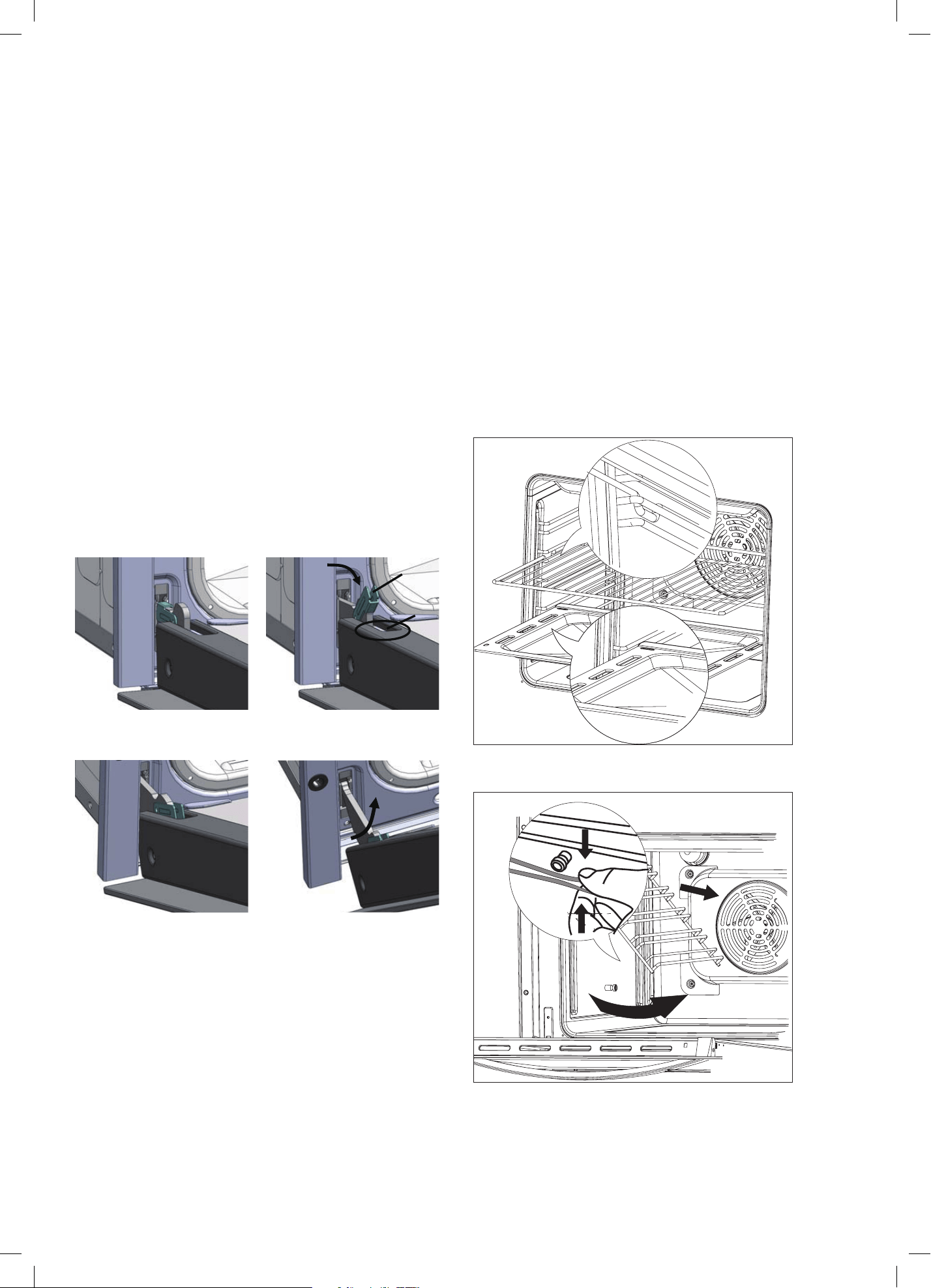
Removing the oven door
Important! Switch the oven off at the isolating switch
before removing the door.
• Do not lift the oven door by its handle. Doing so may
damage the door.
• Make sure the oven and the door are cool before you
begin to remove the door.
• Before removing the door, make sure there is a large
enough clear, protected surface in the kitchen to rest
the door on.
• Take care, the oven door is heavy!
Proceed as follows:
• Open the door to the full extent (Fig. 1);
• Open the lever A completely on the left and right side
hinges (Fig. 2);
• Hold the door in position as shown (Fig. 3);
• Gently close the door until left and right hinge levers
A are hooked to part B of the door (Fig. 4);
Fig. 1 Fig. 2
Fig. 3 Fig. 4
Removing the chrome side racks
Important! Switch the oven off at the isolating switch
before removing the side racks.
• Ensure that the oven has completely cooled down
before starting.
• Open the oven door.
• Remove all shelves for either the oven (Fig. 5)
• Slightly squeeze the bottom two row of the runner
under the screw (Fig. 6).
• Whilst squeezing the bottom two rows, pull the runner
away from the side of the oven chamber (Fig. 6).
• To refit the runners follow these steps in reverse order.
Fig. 5
Fig. 6
18 page
•
•
•
•
how to remove the door
Unhooking the doors.
For a more thorough clean,you have to remove the oven door.Choose the removal and assemble
method according to different structure of oven door purchased.
Proceed as follows:
Open the door to the full extent (Fig.1);
Open the lever A completely on the left and right hinge (Fig.2);
Hold the door as shown (Fig.3);
Gently close the door until left and right hinge levers A are hooked to part B of the door (Dig.4);
Fig.1
Fig.2
Fig.3
Fig.4
A
B
Reassemble the door by following the above procedures backwards.
18 page
•
•
•
•
how to remove the door
Unhooking the doors.
For a more thorough clean,you have to remove the oven door.Choose the removal and assemble
method according to different structure of oven door purchased.
Proceed as follows:
Open the door to the full extent (Fig.1);
Open the lever A completely on the left and right hinge (Fig.2);
Hold the door as shown (Fig.3);
Gently close the door until left and right hinge levers A are hooked to part B of the door (Dig.4);
Fig.1
Fig.2
Fig.3
Fig.4
A
B
Reassemble the door by following the above procedures backwards.
18 page
•
•
•
•
how to remove the door
Unhooking the doors.
For a more thorough clean,you have to remove the oven door.Choose the removal and assemble
method according to different structure of oven door purchased.
Proceed as follows:
Open the door to the full extent (Fig.1);
Open the lever A completely on the left and right hinge (Fig.2);
Hold the door as shown (Fig.3);
Gently close the door until left and right hinge levers A are hooked to part B of the door (Dig.4);
Fig.1
Fig.2
Fig.3
Fig.4
A
B
Reassemble the door by following the above procedures backwards.
18 page
•
•
•
•
how to remove the door
Unhooking the doors.
For a more thorough clean,you have to remove the oven door.Choose the removal and assemble
method according to different structure of oven door purchased.
Proceed as follows:
Open the door to the full extent (Fig.1);
Open the lever A completely on the left and right hinge (Fig.2);
Hold the door as shown (Fig.3);
Gently close the door until left and right hinge levers A are hooked to part B of the door (Dig.4);
Fig.1
Fig.2
Fig.3
Fig.4
A
B
Reassemble the door by following the above procedures backwards.
How to remove the side racks
18 page
1.
2. Open the oven door.
To fit the runners follow the steps in reverse order.
Check the oven is cool and switched off.
3. Remove all shelves for either the oven (Fig. 8.3)
4. Slightly squeeze the bottom two row of the runner
under the screw. The oven (Fig. 8.4)
5. Whilst squeezing the bottom two row, pull the runner
away from the side of the oven chamber (Fig. 8.4).
6.
Fig. 8.3
Fig. 8.4
How to remove the side racks
18 page
1.
2. Open the oven door.
To fit the runners follow the steps in reverse order.
Check the oven is cool and switched off.
3. Remove all shelves for either the oven (Fig. 8.3)
4. Slightly squeeze the bottom two row of the runner
under the screw. The oven (Fig. 8.4)
5. Whilst squeezing the bottom two row, pull the runner
away from the side of the oven chamber (Fig. 8.4).
6.
Fig. 8.3
Fig. 8.4
Cleaning & Maintenance (Continued)
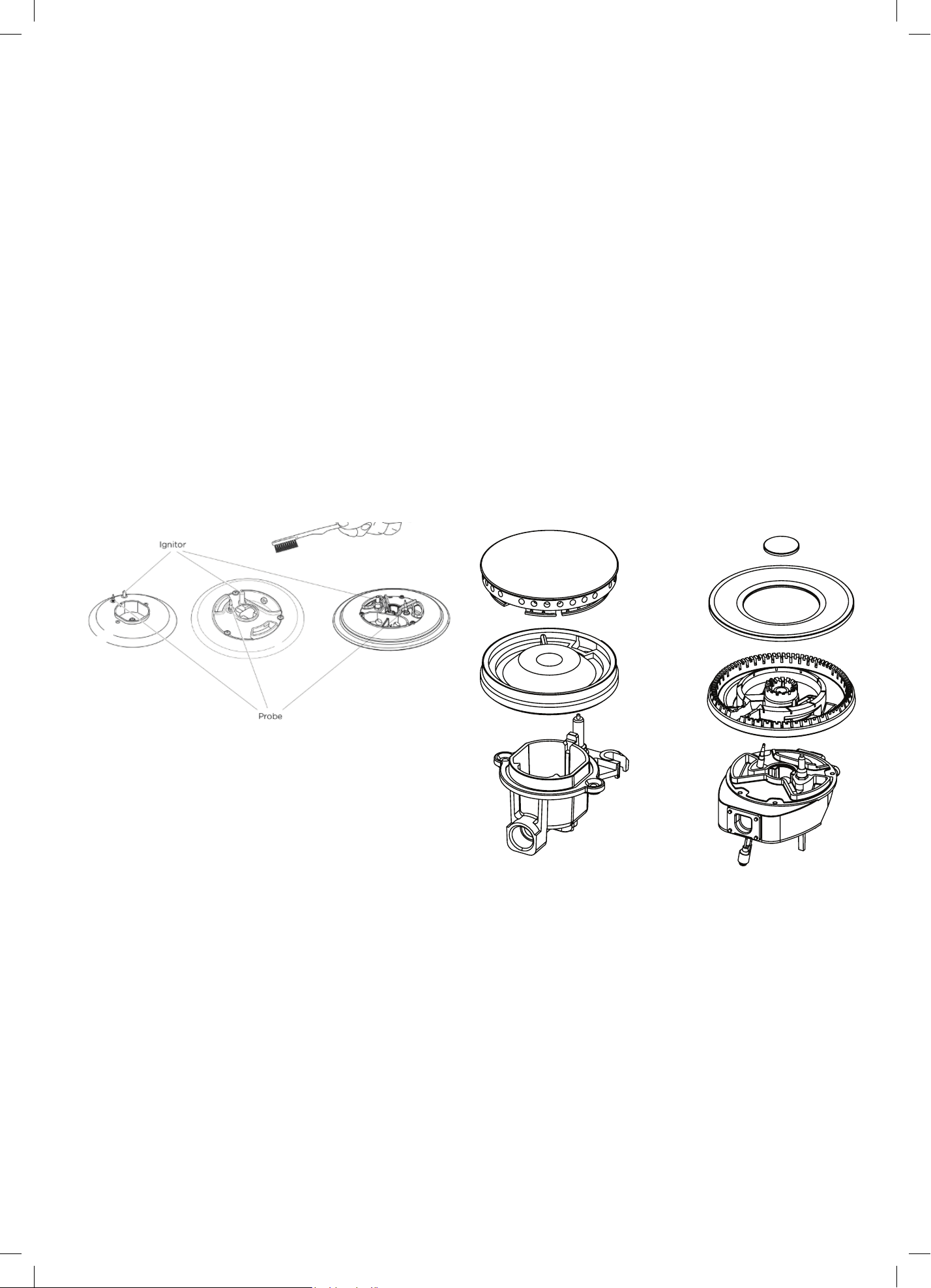
21
Cleaning the burner parts
• You can remove and clean these parts with hot
soapy water or non-abrasive detergents. Clean spills
regularly before they become burnt on. Do not wash
these parts in a dishwasher.
• After cleaning, check that the burners and their flame
spreaders are dry before replacing correctly.
• It is very important to check that the burner flame
spreader and the cap have been correctly positioned.
Failure to do so can cause serious problems.
• Check that the ignitor is always clean to ensure
trouble free sparking. It must be cleaned very
carefully using a toothbrush and methylated spirits.
Note:
To avoid damage to the electronic ignition, do not try to
light a burner without all burner parts in place.
Replacing the burner parts
• Carefully replace the burner parts as per the
following illustrations.
• Fit the flame spreader to the housing as shown below.
Make sure the burner is not able to rotate.
Check that:
• The ignitor is always clean to ensure trouble-free
sparking.
• The probe is always clean to ensure correct operation
of the safety valves.
• The flame spreaders are clean and the holes are not
clogged.
Note:
Both the ignitor and probe must be very carefully cleaned
using a toothbrush and methylated spirits.
Page 18
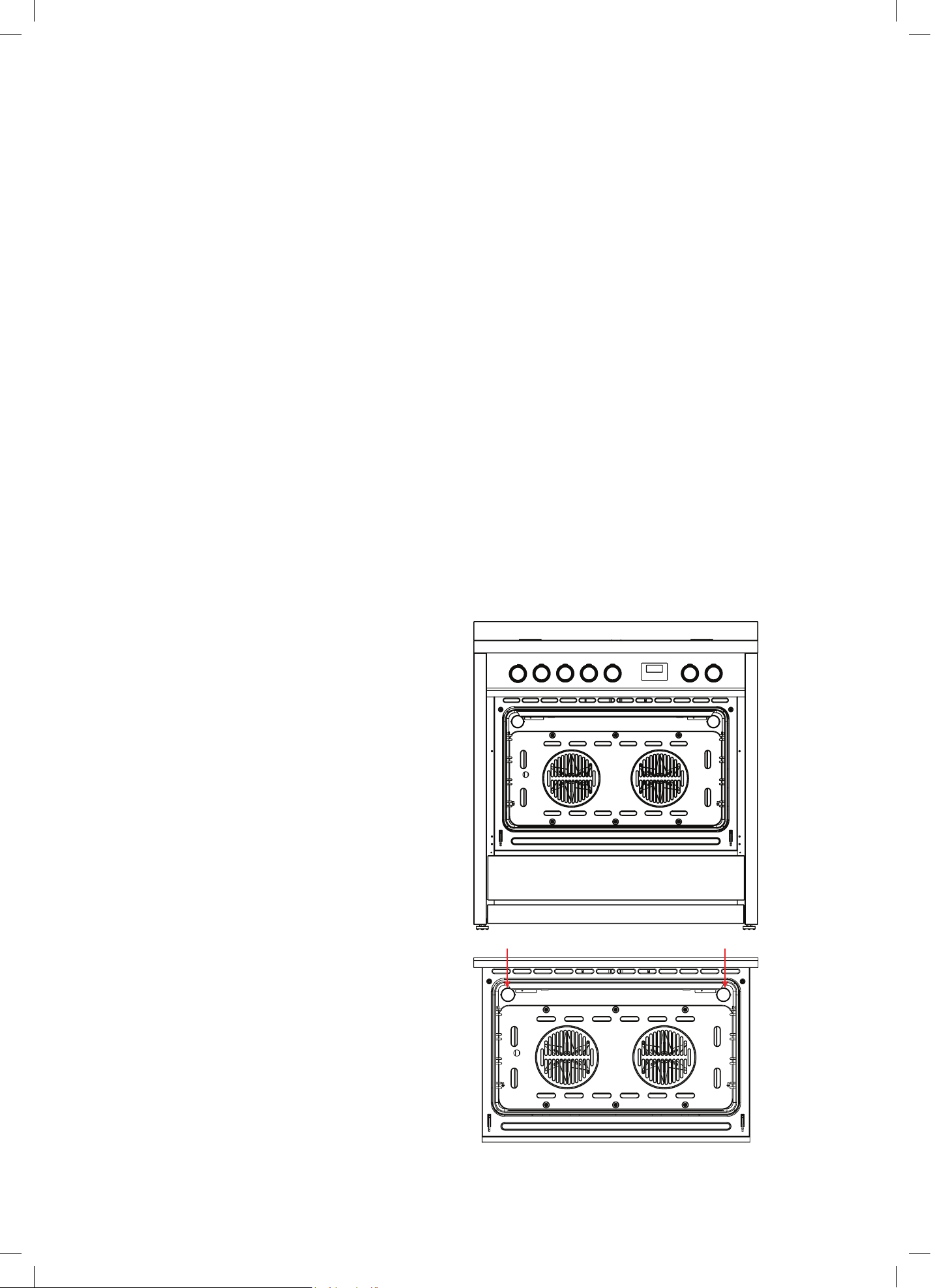
22
If a burner does not light
Turn the control dial to O (OFF) and wait at least one
minute before trying again, to all the gas to disperse.
If the burner still does not light, check that:
• The cooker is plugged in and the power supply is
switched on
• There is no power failure in your home or
neighbourhood
• The gas is turned on
• The gas bottle is not empty (if you use bottled gas)
• The flame spreaders are clean and the holes are not
clogged
• The ignitors are sparking. If they are not sparking,
they may be dirty or wet. Clean them with a
toothbrush and methylated spirits, as shown below.
Cleaning the ignitor & probe
If the flame is irregular, check that the burner parts
(flame spreader and burner cap) are:
• Clean and dry
• Positioned correctly, as shown below.
Replacing an oven bulb
Important! Use a 25W, 220-240V 50Hz
E14 halogen bulb for replacement. Do not use a standard
light bulb in any oven, the heat will break it.
1. Allow the oven (including the lamp cover
and the bulb) to cool completely.
2. Remove any shelves that may get in the way.
3. Remove the door if the lamp will be hard
to reach.
4. Turn the power supply to the cooker off at the main
fuse or circuit breaker panel.
If you don’t know how to do this, contact
an electrician.
Important! Failure to disconnect the cooker from the
power supply may result in death or electrical shock.
5. Remove the lamp cover by screwing the glass cover
anti-clockwise.
6. Replace the faulty bulb.
7. Replace the lamp cover by screwing the glass cover
back into place clockwise.
Cleaning & Maintenance (Continued)
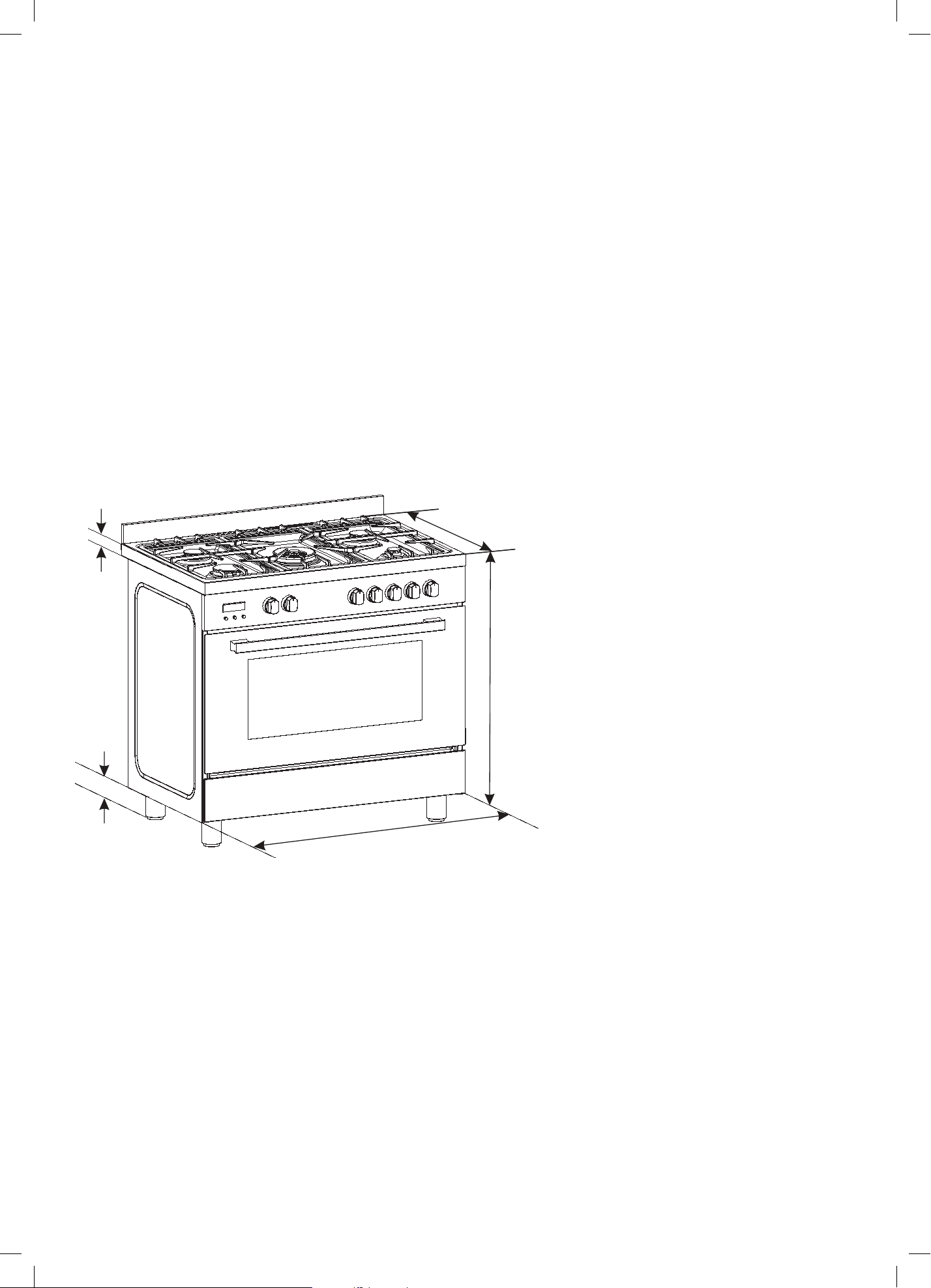
23
PRIOR TO INSTALLATION
Unpacking and product handling
• Thoroughly inspect the freestanding oven to ensure there is no damage from shipping or
moving. If any damage is detected, please call the shipper and initiate a damage claim.
The distributor of InAlto is not responsible for any shipping damage.
• Do not discard any packaging materials until the freestanding oven has been inspected
and found to be free of damage.
• Remove the outer cardboard box and any packing materials from the freestanding oven.
Note: Some models are supplied with a protective film on the stainless steel parts which must
be removed before installing and using the appliance.
Product Dimensions
Installation Instructions
2
ENVIRONMENTAL WARNING
Waste packaging
Do not throw the packaging of your appliance into the dustbin,
but pick out the different materials (for instance foil, paperboard,
polystyrene) according to the local rules for rubbish elimination.
This appliance must only be used for the purpose of domestic
cooking.
GENERAL INFORMATION
WHEN YOU CALL FOR SERVICE
When you call for service or order parts for your unit, be
sure to give:
1.
MODEL
2.
SERIAL NUMBER
3.
COLOUR
4.
PART NAME and/or description of problem
5.
YOUR FULL NAME, ADDRESS, and HOME TELEPHONE
NUMBER and BUSINESS TELEPHONE NUMBER IF
APPROPRIATE.
Servicing shall be carried out only by authorised personnel.
SECTION FOR THE QUALIFIED TECHNICIAN
OVERALL DIMENSIONS
Getting to know your new cooker
Thank you for choosing one of our products.
Our cookers are of simple, rational design. They are
constructed to the best standards to ensure good
service and outstanding safety.
Please read this manual carefully; it will provide all the
advice needed to allow you to obtain the best results
from the very first day.
ATTENTION:
- Before using the appliance, do not forget to remove the
plastic protective film from
parts of the appliance.
•
WARNING -Accessible parts will become hot when in use.
To avoid burns and scalds children should be kept away.
-
WARNING -
In order to prevent accidental tipping of the appliance, for
example
by a child climbing onto the open oven door, the
stabilizing chain
must be installed.
-
WARNING
This appliance is not intended for use by persons (including
children) with reduced physical, sensory or mental capabilities,
or lack of experience and knowledge, unless they have been
given supervision or instruction concerning use of the appliance
by a person responsible for their safety.
Children should be supervised to ensure that they do not play
with the appliance.
Young children and infirm persons should not be left
unsupervised in the vicinity.
-
WARNING
Before you use the appliance for the first time, check that
the plastic films protecting some parts (fascia panel, parts in
stainless
steel, etc.) have been removed.
-
WARNING:
A steam cleaner is not to be used to clean this appliance.
-
WARNING
DO NOT USE OR STORE FLAMMABLE MATERIALS IN
THE APPLIANCE STORAGE DRAWER OR NEAR THIS
APPLIANCE.
DO NOT SPRAY AEROSOLS IN THE VICINITY OF
THIS APPLIANCE WHILE IT IS IN OPERATION.
DO NOT USE THIS APPLIANCE AS A SPACE HEATER.
DO NOT MODIFY THIS APPLIANCE.
I N S TA LL ATI O N
PROVISION FOR VENTILATION
The room where the Cooker is installed should have permanent
ventilation as follows:
"Ventilation must be in accordance with AS5601/AG 601 - Gas
Installations. In general, the appliance should have adequate
ventilation for complete combustion of gas, proper flueing and to
maintain temperature of immediate surroundings within safe limits."
Do not install in a bed-sitting room, a bathroom or shower room.
If there is another fuel burning appliance in the same room, a
higher level of ventilation will be required, you should consult
-
" the safety requirements".
In addition to the above, during prolonged use, opening a window
in the same room is recommended. This will avoid the build up
of excessive moisture and condensation.
POSITIONING
Important: Fix the chain located next to the gas connection on
both sides of the cooker to the wall to prevent the cooker from
tilting. Both chains must be securely fixed.
Make sure that the wall surface behind the Cooker is non-
combustable (will not catch fire).
Where a painted surface is adjacent, a fire retardent paint surface
is recommended. Wallpaper, wood, or fabric should not be used
behind or next to the cooker.
RECORD HERE FOR EASY REFERENCE
Model Colour
Serial
Number Installation Date
Dealer's Name and Address
22mm
750mm
595mm
A
570mm
mm895
A = 95-160 mm
40mm
A
597mm
769
mm
mm895
The images and diagrams in this user manual is for reference only. Your Freestanding Cooker may appear differently.
40mm
A
895mm
770mm
595mm
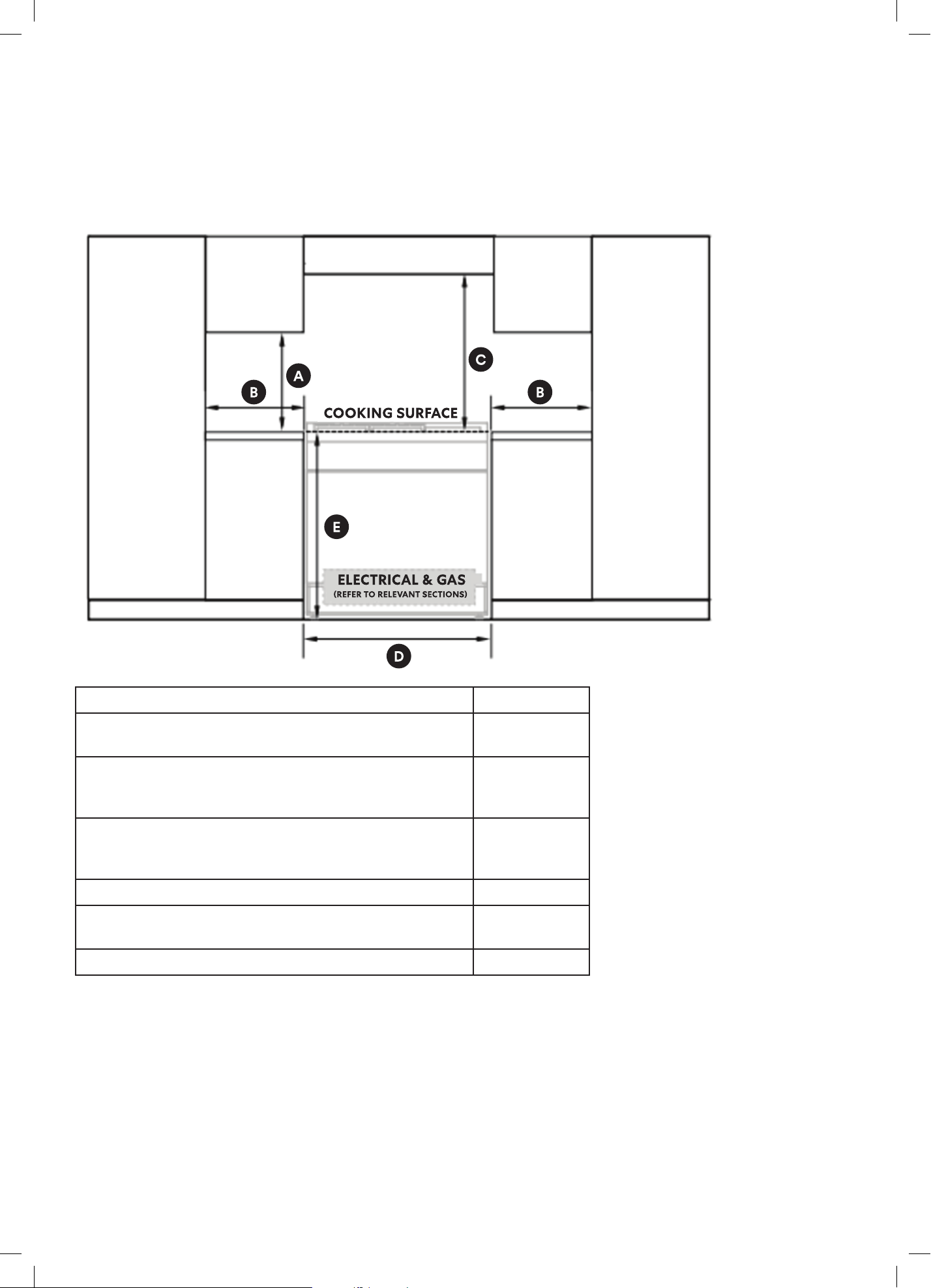
24
FREESTANDING OVEN CLEARANCES
Product Dimensions MM
A) Minimum vertical distance between benchtop and
cabinet extending above the counter
400
B)
Minimum clearance from left and right hand edge
of the freestanding oven to the nearest combustible
surface*
100
C) Please refer to your rangehood's user manual for
minimum clearances for the top of the burner cap
(cooking surface) to your rangehood.
—
D)
Width of cabinetry opening 900
E) Maximum height of cabinetry immediately adjacent to
the freestanding oven (from floor to countertop)**
946
F)
Maximum depth from wall to cabinetry face 600
* Installation clearances and protection of combustible surfaces shall comply with the current
local regulations e.g. AS/NZS5601.1 (latest edition) Gas Installations code. The standards
above specify that where required protection shall ensure that the surface temperature
of the combustible surface does not exceed 65°C above room temperature.
** Depending on the height of the feet adjustment. The cooking surface must sit flush
or above countertop level.
Installation Instructions (Continued)

25
Important Notes:
Compliance
This appliance must be installed by an authorised person and in compliance with:
• AS/NZS 5601.1 Gas Installations Part 1: General Installations, and AS/NZS 5601.2 Gas
Installations Part 2: LP Gas installations in caravans and boats for non-propulsive purposes, or
the relevant installation code for gas appliances in your country.
• The local gas fitting regulations, municipal building codes, electrical wiring regulations and any
other relevant statutory regulations.
• The particular instructions as given below.
• A certificate of compliance MUST be given to the customer after the application is successfully
installed.
CAUTION: This appliances is suitable for us with Natural Gas or ULPG. The cooktop is shipped from
the factory set and adjusted for Natural Gas. It can be converted for use with ULPG following the
instructions within this manual.
The connection must be made at the rear of the appliances. Ensure that the pipe does not cross
the cooker. Refer Gas Connection on page 34.
Adjacent walls, cupboards and protection for combustible materials: Ensure that the appliance
is installed in accordance with AS/NZS 5601.1, or AS/NZS 5601.2 with regard to clearances to
combustible surfaces and materials, and clearances to rangehoods and exhaust fans.
To ensure clearances of 200mm from burners to vertical combustible surfaces observe the
minimum distance requirements shown in the table below.
Clearances to combustible surfaces may be reduced if combustible surfaces are protected in
accordance with AS/NZS 5601.1, or AS/NZS 5601.2.
Rear and Side Clearances
• Where the dimensions from the periphery of the nearest burner to any vertical combustible
surface is less than 200 mm the surface shall be protected in accordance with the standards
to a height of not less than 150 mm above the cooking surface for the full width or depth of the
cooking surface.
• Where the dimensions from the periphery of the nearest burner to any horizontal combustible
surface is less than 200 mm, the horizontal surface shall be greater than 10 mm below the
surface of the hob, or the horizontal surface requirement above.
• Do not install the appliance near flammable materials such as curtains.
Installing the cooker on a plinth
• The freestanding oven can be installed on a plinth without the adjustable feet fitted.
• Ensure the freestanding oven is secure and provide safety measures to keep it in place.
• Cabinetry dimensions can be adjusted to suit the plinth height, see product dimensions for
chassis height.
• See Page 31 for more information.
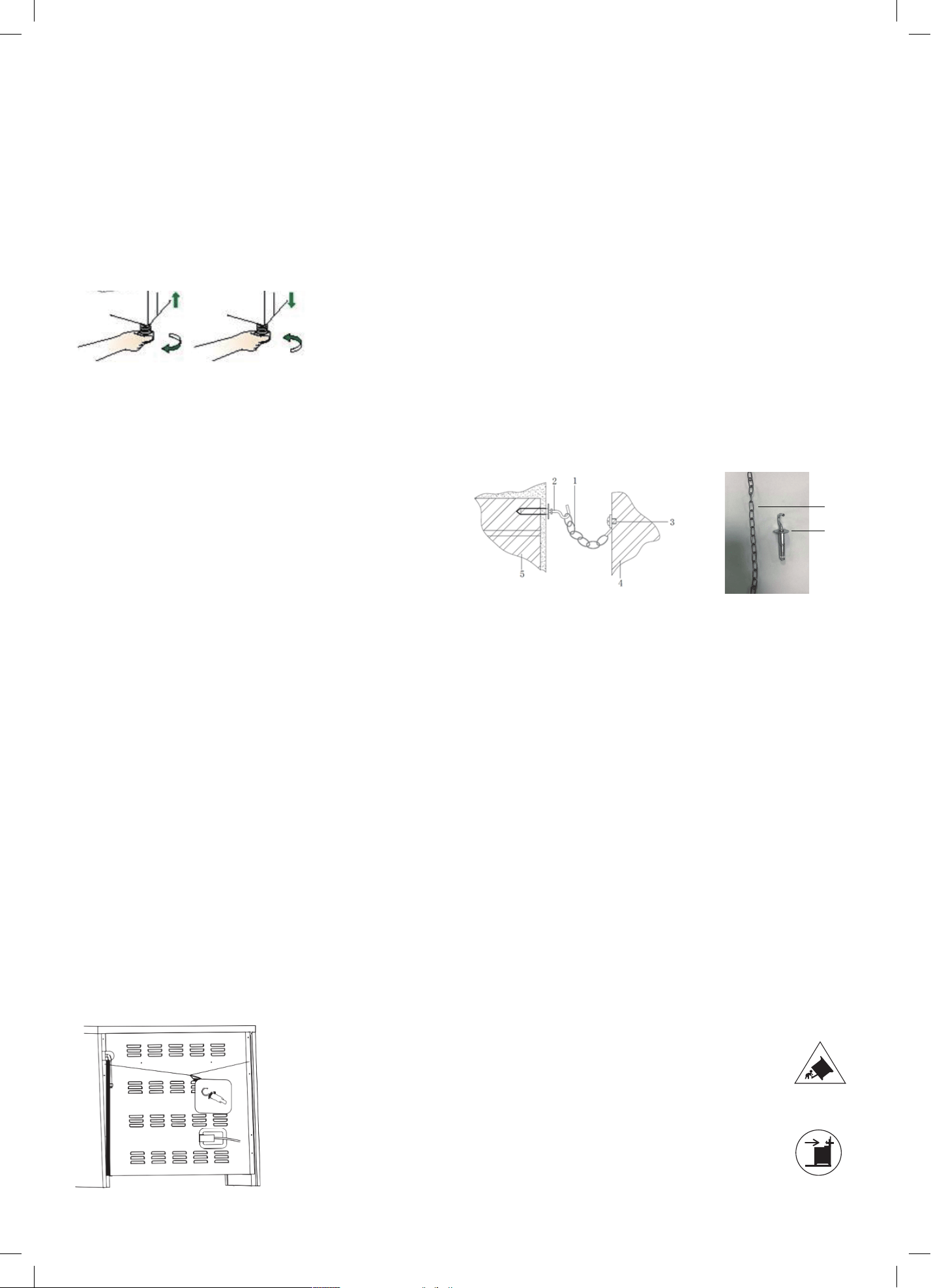
26
LEVELLING THE FEET
The height and level of the appliance can be adjusted by
rotating the feet located underneath the appliance at
each corner. Rotate the feet to decrease or increase the
height
FITTING THE SAFETY STABILISER CHAIN
WARNING! In order to prevent accidental tipping of
the appliance, for example a child climbing onto the
open oven door, the stabilising means must be installed.
Ensure the chains are correctly anchored to prevent the
appliance from tilting forward and to prevent strain on
the hose when the cooker is pulled forward .
MAKE SURE THAT THE ANTI-TILTING CHAINS ARE
TIGHT WHEN ANCHORED TO PREVENT THE APPLIANCE
TILTING./Your freestanding oven is supplied with a safety
stabiliser chain attached to the rear of your oven to
prevent the appliance from tilting forward and accidental
damage to the gas connection.
Fasten the stability hook provided by inserting a wall plug
into the kitchen wall and then connect the safety chain to
the hook via the locking mechanism.
Determine the suitable location in your wall for the
location of the anchor hook. Drill a hole and firmly insert
the wall plug/anchor into your wall, followed by screwing
the hook into the wall plug/anchor. Fix the chain to the
hook and adjust the level of your freestanding oven
using the feet provided. The chain and hook should be
positioned to prevent the appliances from moving no
more than 80% of the gas hose length (i.e. allowing for no
strain to be put on to the gas connection).
For a built-in installation, where your oven is installed
between cabinets on a plinth, we suggest securing your
oven through both sides of the cupboards into the sides
of the freestanding oven. The screws should be fitted
as follows.
Refer to the diagram below for the location of the pilot
hole. Use 3.5mm diameter drill bit to drill the pilot hole
through the cupboard and both sides of the cooker.
Before drilling, check your measurements to ensure the
pilot holes are located within the range specified in the
diagram.
A drilled hole in the side of the cooker which is outside
the range specified may void the warranty. Inspect
cupboards thoroughly before drilling to avoid damage to
electrical wires or gas lines. Fix two 12 gauge x 40mm long
self tapping screws through the pilot holes inside both
cupboards and into the side of the cooker.
1. Safety chain (supplied and mounted to oven)
2. Stability hook
3. Chain attachment for the rear of the cooker
4. Rear of the cooker
5. Kitchen wall
Note:
The screw length suggested above is based on a
cabinetry thickness of 20mm and a gap between the
cabinetry and the freestanding oven of 10mm. Adjust the
screw length accordingly to suit your cabinetry thickness
and any gap between the cabinet and the oven.
Note:
The screws must be accessible for removal if the cooker
requires service. Cabinetry must not be installed
preventing access to these screws.
Page 22
Levelling feet
Safety chain
2
1
The height and level of the appliance can be adjusted by rotating the feet located
underneath the appliance at each corner. Rotate the feet to decrease or increase
the height.
The appliance must be secured against the possibility of tipping forward by using
the supplied safety chains attached to the rear of your oven. Fasten the stability
hook provided by inserting a wall plug into the kitchen wall and then connect the
safety chain to the hook via the locking mechanism.
1. Safety chain (supplied and mounted to oven)
Stability hook
Chain attachment for the rear of the cooker
Rear of the cooker
Kitchen wall
2.
3.
4.
5.
Page 22
Levelling feet
Safety chain
2
1
The height and level of the appliance can be adjusted by rotating the feet located
underneath the appliance at each corner. Rotate the feet to decrease or increase
the height.
The appliance must be secured against the possibility of tipping forward by using
the supplied safety chains attached to the rear of your oven. Fasten the stability
hook provided by inserting a wall plug into the kitchen wall and then connect the
safety chain to the hook via the locking mechanism.
1. Safety chain (supplied and mounted to oven)
Stability hook
Chain attachment for the rear of the cooker
Rear of the cooker
Kitchen wall
2.
3.
4.
5.
Installation Instructions (Continued)
42
WARRANTY TERMS & CONDITIONS
OVENS (FREESTANDING COOKERS)
This document sets out the terms and conditions of the
product warranties for Residentia Group Appliances. It is
an important document. Please keep it with your proof of
purchase documents in a safe place for future reference
should you require service for your Appliance.
1. IN THIS WARRANTY
(a) ‘acceptable quality’ as referred to in clause 10 of this
warranty has the same meaning referred to in the
ACL;
(b) ‘ACL’ means Trade Practices Amendment (Australian
Consumer Law) Act (No.2) 2010;
(c) ‘Appliance’ means any Residentia Group product
purchased by you accompanied by this document;
(d) ‘ASR’ means Residentia Group authorised service
representative;
(e) ‘Residentia Group’ means Residentia Group Pty Ltd
of 165 Barkly Ave, Burnley VIC 3121, ACN 600 546 656
in respect of Appliances purchased in Australia;
(f ) ‘major failure’ as referred to in clause 10 of this
warranty has the same meaning referred to in the ACL
and includes a situation when an Appliance cannot
be repaired or it is uneconomic for Residentia Group,
at its discretion, to repair an Appliance during the
Warranty Period;
(g) ‘Warranty Period’ means:
(i) where the Appliance is used for personal,
domestic or household use (i.e. normal
single family use) as set out in the instruction
manual, the Appliance is warranted against
manufacturing defects for 24 months, following
the date of original purchase of the Appliance;
(h) ‘you’ means the purchaser of the Appliance not
having purchased the Appliance for re-sale, and
‘your’ has a corresponding meaning.
2. This warranty only applies to Appliances purchased
and used in Australia and is in addition to (and does
not exclude, restrict, or modify in any way) any
non-excludable statutory warranties in Australia.
3. During the Warranty Period Residentia Group or its
ASR will, at no extra charge if your Appliance is readily
accessible for service, without special equipment
and subject to these terms and conditions, repair or
replace any parts which it considers to be defective.
Residentia Group or its ASR may use remanufactured
parts to repair your Appliance. You agree that any
replaced Appliances or parts become the property
of Residentia Group. This warranty does not apply
to light globes, batteries, filters or similar perishable
parts.
4. Parts and Appliances not supplied by Residentia
Group are not covered by this warranty.
Warranty Information
Possibility of tilting
Anti-tip restraint
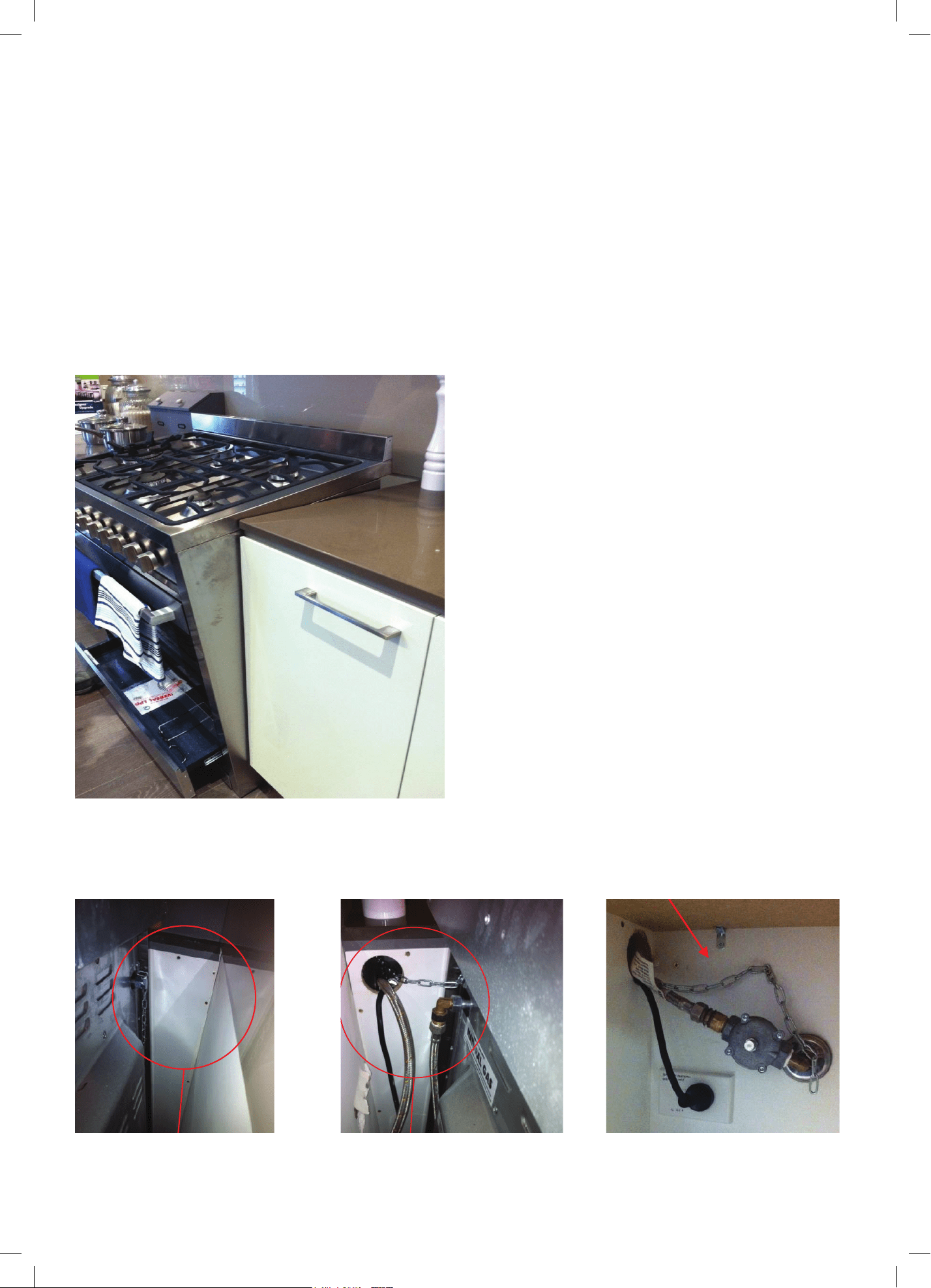
27
Left side of the oven:
Chain not attached. Loose chain
Hole in cabinet is too large, allowing
the upright cooker to tilt forward
INCORRECT CHAIN INSTALLATION
WARNING: Accidental Tipping
Chains are provided as a preventative measure against accidental tipping. These chains must be fitted as part
of the installers compliance. Failure for your installer to fit chains in accordance with the relevant installation
code will make the installation of your freestanding cooker non compliant and classed as an illegal installation.
The photographs on this page are just some examples of incorrect installation (not exhaustive) which do not
have the chains sufficiently secured.
This photograph shows how far forward a
freestanding cooker can tip when it not secured
properly.
Note: Correct installation is part of the installers
compliance.
Putting the chain into the adjacent cabinet is the
preferred method providing there is no slackness
in the chain.
If the installation only has one chain fixed,
the installation is non-compliant. Both chains
must be fixed in the installation as part of the
installers compliance.
Accidental Tipping
Chains are provided as a preventative
measure against accidental tipping.
These chains must be fitted as part of
the installers compliance. Failure for
your installer to fit chains in accordance
with the relevant installation code will
make the installation of your upright
cooker non compliant and classed as an
illegal installation.
Incorrect Installation
The photographs on this page are of one
single kind of incorrect installation
(although there are many) which does not
have the chains sufficiently secured, figure
1. shows an example of how far forward an
oven can tip when not secured properly.
Note: Correct installation is part of the
installers compliance.
Left Side of oven, chain
not attached
Putting the chain into the adjacent cabinet is the preferred method provided
there is no slackness in the chain..
Some installations only have a single chain affixed. Both Chains must be fixed
as part of the installers compliance. Failure to fix both chains will make the
installation non compliant.
Loose Chain
Hole in cabinet too large,
Allowing the upright oven to tilt
forward
Figure 1.
X
X
X
Incorrect Installation
Accidental Tipping
Chains are provided as a preventative
measure against accidental tipping.
These chains must be fitted as part of
the installers compliance. Failure for
your installer to fit chains in accordance
with the relevant installation code will
make the installation of your upright
cooker non compliant and classed as an
illegal installation.
Incorrect Installation
The photographs on this page are of one
single kind of incorrect installation
(although there are many) which does not
have the chains sufficiently secured, figure
1. shows an example of how far forward an
oven can tip when not secured properly.
Note: Correct installation is part of the
installers compliance.
Left Side of oven, chain
not attached
Putting the chain into the adjacent cabinet is the preferred method provided
there is no slackness in the chain..
Some installations only have a single chain affixed. Both Chains must be fixed
as part of the installers compliance. Failure to fix both chains will make the
installation non compliant.
Loose Chain
Hole in cabinet too large,
Allowing the upright oven to tilt
forward
Figure 1.
X
X
X
Incorrect Installation
Accidental Tipping
Chains are provided as a preventative
measure against accidental tipping.
These chains must be fitted as part of
the installers compliance. Failure for
your installer to fit chains in accordance
with the relevant installation code will
make the installation of your upright
cooker non compliant and classed as an
illegal installation.
Incorrect Installation
The photographs on this page are of one
single kind of incorrect installation
(although there are many) which does not
have the chains sufficiently secured, figure
1. shows an example of how far forward an
oven can tip when not secured properly.
Note: Correct installation is part of the
installers compliance.
Left Side of oven, chain
not attached
Putting the chain into the adjacent cabinet is the preferred method provided
there is no slackness in the chain..
Some installations only have a single chain affixed. Both Chains must be fixed
as part of the installers compliance. Failure to fix both chains will make the
installation non compliant.
Loose Chain
Hole in cabinet too large,
Allowing the upright oven to tilt
forward
Figure 1.
X
X
X
Incorrect Installation
Accidental Tipping
Chains are provided as a preventative
measure against accidental tipping.
These chains must be fitted as part of
the installers compliance. Failure for
your installer to fit chains in accordance
with the relevant installation code will
make the installation of your upright
cooker non compliant and classed as an
illegal installation.
Incorrect Installation
The photographs on this page are of one
single kind of incorrect installation
(although there are many) which does not
have the chains sufficiently secured, figure
1. shows an example of how far forward an
oven can tip when not secured properly.
Note: Correct installation is part of the
installers compliance.
Left Side of oven, chain
not attached
Putting the chain into the adjacent cabinet is the preferred method provided
there is no slackness in the chain..
Some installations only have a single chain affixed. Both Chains must be fixed
as part of the installers compliance. Failure to fix both chains will make the
installation non compliant.
Loose Chain
Hole in cabinet too large,
Allowing the upright oven to tilt
forward
Figure 1.
X
X
X
Incorrect Installation
The images and diagrams in this user manual is for reference only. Your Freestanding Cooker may appear differently.
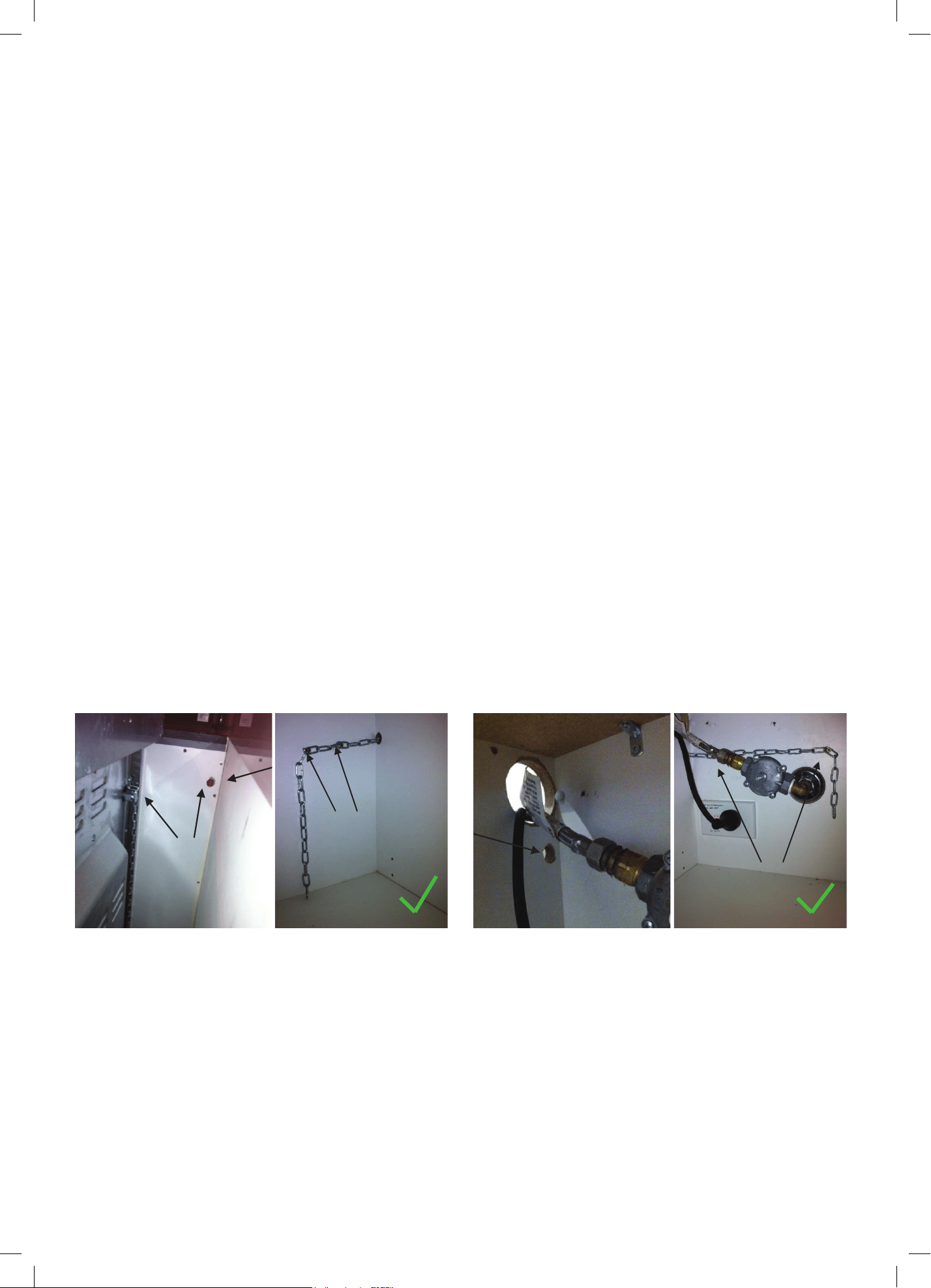
28
CORRECT CHAIN INSTALLATION
In order to prevent the oven from tipping forward as shown on the previous page, ensure that both chains
provided with the oven are used. View the example below:
On the left side of the oven, a 16mm drill bit was drilled through the cabinetry into the adjacent cabinet.
Because of the 16mm board at the rear of the cabinet, the hole has not been drilled hard up against the wall.
The height of the hole from the floor is level with where the chain attaches to the oven.
The right side of the oven is drilled much the same, and an additional hole is drilled below the gas and
power supply hole.
Once the holes have been drilled, the chains can then be fed through. Your freestanding cooker could then be
fitted into position.
The chains then need to be pulled as tight as possible from inside the cabinet while at the same time being
fixed to the rear of the cabinet using a self-drilling wood screw. It is
better to have the screw fixed closer to the hole for better support. In the left and right side examples, two
extra screws are attached to the chain which makes the installation neater by keeping the chain off the shelf
away from the gas and electricity supply, and it will also provide added support.
At this point, the oven will be secured in location and will not move forward at all. It is recommended that all
upright cooker chains be fitted in this way.
WARNING: The installation forms part of the installers compliance and that are in line with regulations.
The chains are to be installed to prevent cooker from tilting.
They do not replace parental supervision when the freestanding cooker is in use.
Correct Chain Installation
In order to prevent the oven from tipping forward as shown on the previous page, we need
to make sure both chains provided with the oven are used.
On the left side of the oven a 16mm drill bit was used to drill through the cabinetry into the
adjacent cabinet, as you can see the hole has not been drilled hard up against the wall
because there is a 16mm board at the rear of the cabinet. The height of the hole from the
floor is level with where the chain attaches to the oven.
The right side has been drilled much the same,, a new hole has been drilled below
the gas and power supply hole.
Hole and
Chain Level.
Once the holes have been drilled the chains can be fed through and the upright can be
fitted into position.
The chains then need to be pulled as tight as possible from inside the cabinet while at
the same time being fixed to the rear of the cabinet using a self drilling wood screw. It is
better to have the screw fixed closer to the hole for better support. The left and right
side examples shown have two extra screws attached to the chain which makes the
installation neater by keeping the chain off the shelf away from the gas and electricity
supply, they will also provide added support.
At this point the oven will be secured in location and will not move forward at all, It is
recommended that all upright oven chains be fitted in this way.
Installation forms part of the installers compliance and that are in line with
regulations. Chains are designed to be installed to prevent cooker from tilting.
They are not designed to replace parental supervision when the cooker is in use.
Chain fixed in two
locations.
Chain fixed in
two locations
Left Side
Right Side
Correct Chain Installation
In order to prevent the oven from tipping forward as shown on the previous page, we need
to make sure both chains provided with the oven are used.
On the left side of the oven a 16mm drill bit was used to drill through the cabinetry into the
adjacent cabinet, as you can see the hole has not been drilled hard up against the wall
because there is a 16mm board at the rear of the cabinet. The height of the hole from the
floor is level with where the chain attaches to the oven.
The right side has been drilled much the same,, a new hole has been drilled below
the gas and power supply hole.
Hole and
Chain Level.
Once the holes have been drilled the chains can be fed through and the upright can be
fitted into position.
The chains then need to be pulled as tight as possible from inside the cabinet while at
the same time being fixed to the rear of the cabinet using a self drilling wood screw. It is
better to have the screw fixed closer to the hole for better support. The left and right
side examples shown have two extra screws attached to the chain which makes the
installation neater by keeping the chain off the shelf away from the gas and electricity
supply, they will also provide added support.
At this point the oven will be secured in location and will not move forward at all, It is
recommended that all upright oven chains be fitted in this way.
Installation forms part of the installers compliance and that are in line with
regulations. Chains are designed to be installed to prevent cooker from tilting.
They are not designed to replace parental supervision when the cooker is in use.
Chain fixed in two
locations.
Chain fixed in
two locations
Left Side
Right Side
Correct Chain Installation
In order to prevent the oven from tipping forward as shown on the previous page, we need
to make sure both chains provided with the oven are used.
On the left side of the oven a 16mm drill bit was used to drill through the cabinetry into the
adjacent cabinet, as you can see the hole has not been drilled hard up against the wall
because there is a 16mm board at the rear of the cabinet. The height of the hole from the
floor is level with where the chain attaches to the oven.
The right side has been drilled much the same,, a new hole has been drilled below
the gas and power supply hole.
Hole and
Chain Level.
Once the holes have been drilled the chains can be fed through and the upright can be
fitted into position.
The chains then need to be pulled as tight as possible from inside the cabinet while at
the same time being fixed to the rear of the cabinet using a self drilling wood screw. It is
better to have the screw fixed closer to the hole for better support. The left and right
side examples shown have two extra screws attached to the chain which makes the
installation neater by keeping the chain off the shelf away from the gas and electricity
supply, they will also provide added support.
At this point the oven will be secured in location and will not move forward at all, It is
recommended that all upright oven chains be fitted in this way.
Installation forms part of the installers compliance and that are in line with
regulations. Chains are designed to be installed to prevent cooker from tilting.
They are not designed to replace parental supervision when the cooker is in use.
Chain fixed in two
locations.
Chain fixed in
two locations
Left Side
Right Side
Correct Chain Installation
In order to prevent the oven from tipping forward as shown on the previous page, we need
to make sure both chains provided with the oven are used.
On the left side of the oven a 16mm drill bit was used to drill through the cabinetry into the
adjacent cabinet, as you can see the hole has not been drilled hard up against the wall
because there is a 16mm board at the rear of the cabinet. The height of the hole from the
floor is level with where the chain attaches to the oven.
The right side has been drilled much the same,, a new hole has been drilled below
the gas and power supply hole.
Hole and
Chain Level.
Once the holes have been drilled the chains can be fed through and the upright can be
fitted into position.
The chains then need to be pulled as tight as possible from inside the cabinet while at
the same time being fixed to the rear of the cabinet using a self drilling wood screw. It is
better to have the screw fixed closer to the hole for better support. The left and right
side examples shown have two extra screws attached to the chain which makes the
installation neater by keeping the chain off the shelf away from the gas and electricity
supply, they will also provide added support.
At this point the oven will be secured in location and will not move forward at all, It is
recommended that all upright oven chains be fitted in this way.
Installation forms part of the installers compliance and that are in line with
regulations. Chains are designed to be installed to prevent cooker from tilting.
They are not designed to replace parental supervision when the cooker is in use.
Chain fixed in two
locations.
Chain fixed in
two locations
Left Side
Right Side
Left Side Right Side
The images and diagrams in this user manual is for reference only. Your Freestanding Cooker may appear differently.
Installation Instructions (Continued)
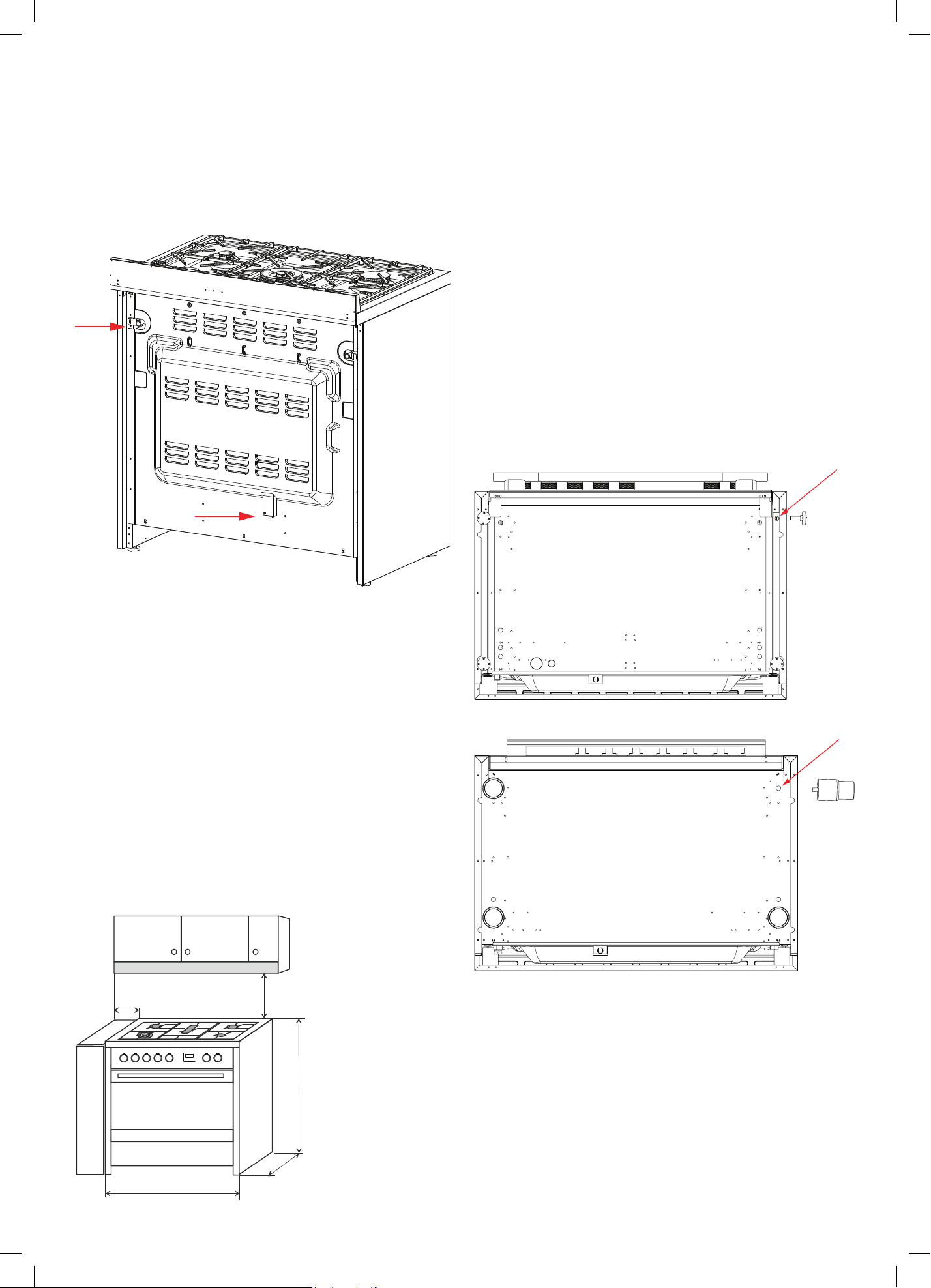
29
LOCATION OF GAS POINT AND ELECTRICAL SUPPLY
VENTILATION REQUIREMENTS
A suitable ventilation hood may be installed above your
freestanding oven. InAlto has a wide range of ventilation
hoods designed to match the rest of our kitchen
appliance family. See www.inalto.house or your local
retailer for
more details.
IMPORTANT! Consult local building codes and/or local
agencies, before starting, to ensure that your hood and
duct installation will meet local requirements.
Hood blower speeds should be variable to reduce noise
and loss of heated or air-conditioned household air
when maximum ventilation is not required. Normally, the
maximum blower speed is only required when using the
grill or frying at a high temperature on your gas cooktop.
FITTING THE ADJUSTABLE FEET
The adjustable feet must be fitted to the base of the
freestanding oven before use. Rest the rear of the
freestanding oven on a piece of the packaging (i.e. the
polystyrene) exposing the base for the fitting of the feet.
IMPORTANT! Be very careful not to damage the
freestanding oven during this process. Do not have any of
the burners or trivets fitted in place when lying the cooker
backwards. The freestanding oven is heavy- ensure that
you have adequate help.
Fit the four legs by screwing them tight into the support
base as shown below.
Page 23
750
150
900
900
600
Page 23
750
150
900
900
600
Page 24
Page 24
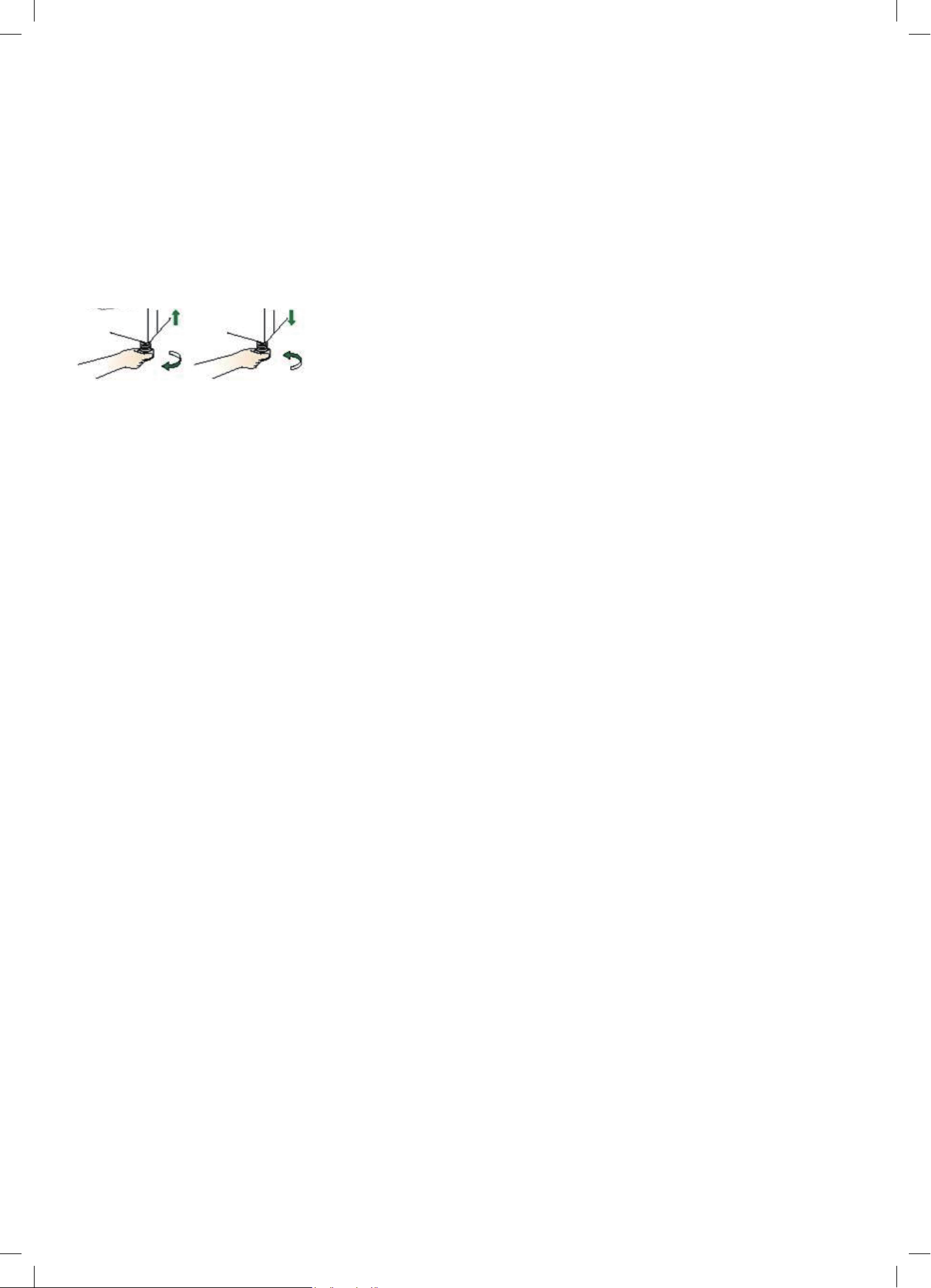
30
LEVELLING THE FREESTANDING OVEN
• The feet have built in adjustment and the lower section can be twisted clockwise or anti-
clockwise to raise or lower the freestanding oven.
• Small adjustments can be made with the freestanding oven standing up on its feet, however
you may need to lie the freestanding down to make larger adjustments.
MOVING YOUR FREESTANDING OVEN
IMPORTANT! When lifting the freestanding oven to the upright position, always ensure that you
have a minimum of two people to carry out this maneuverer to prevent damage to the adjustable
feet. Be careful to avoid too much pressure on any two feet during this process.
• Never lift the freestanding oven by using the oven door handle, the cooktop rail or by lifting
the cooktop trim as this may damage the appliances.
• Lift the feet clear of the floor.
Page 22
Levelling feet
Safety chain
2
1
The height and level of the appliance can be adjusted by rotating the feet located
underneath the appliance at each corner. Rotate the feet to decrease or increase
the height.
The appliance must be secured against the possibility of tipping forward by using
the supplied safety chains attached to the rear of your oven. Fasten the stability
hook provided by inserting a wall plug into the kitchen wall and then connect the
safety chain to the hook via the locking mechanism.
1. Safety chain (supplied and mounted to oven)
Stability hook
Chain attachment for the rear of the cooker
Rear of the cooker
Kitchen wall
2.
3.
4.
5.
Installation Instructions (Continued)
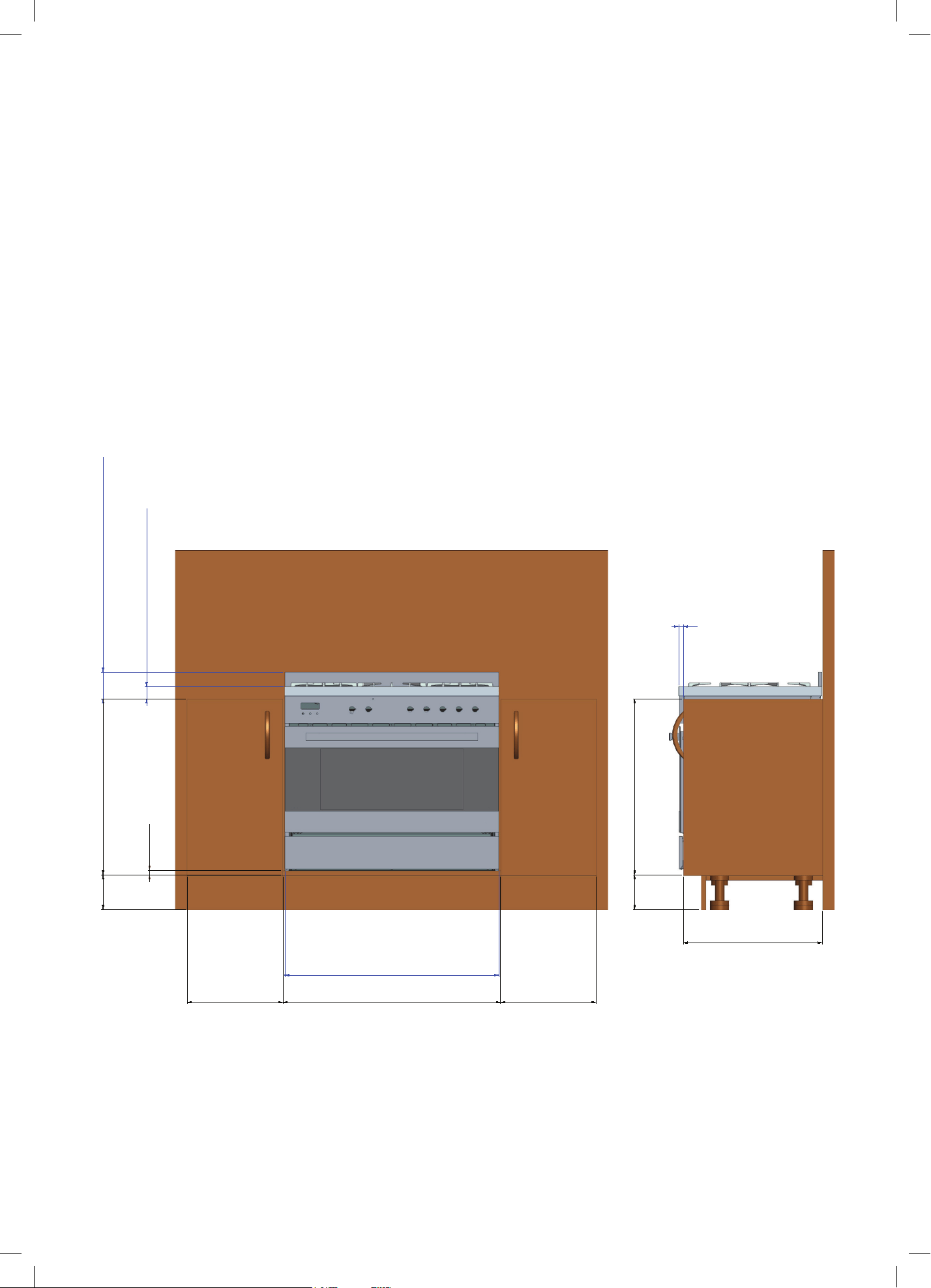
31
INSTALLING THE COOKER ON A PLINTH
IMPORTANT!
Kitchen cabinets must be made of materials capable of withstanding temperatures at least
65° C (117° F) above room temperature. This is necessary to avoid possible damage to the
cabinets during oven usage.
Note:
• When installing as a built-in appliance, secure it on a raised platform
using suitable fastening systems.
• DO NOT install the adjustable feet that come with the appliance.
• DO NOT modify this appliance in any way
400 910 400
144
736
20
895 (cooker)
53 (distance between furniture
and cooker's cooktop)
113 distance between furniture and
cookers splash-back
580
144
736
20 distance between
furniture and cooker's
cooktop
The images and diagrams in this user manual is for reference only. Your Freestanding Cooker may appear differently.

32
IMPORTANT! This freestanding oven must be connected
to the mains power supply only by a suitably qualified
person. This freestanding oven must be earthed.
The appliance must be installed by a suitably qualified
person in accordance with these instructions and with
the requirements of the Australian Wiring Rules AS/
NZS 3000. Fixed wired installations are to be provided
with suitable isolation means in accordance with the
said rules. Any plug socket installed for the purpose of
connecting the appliance to supply must be readily
accessible when the appliance is installed.
Before making the connection, make sure that:
1) The safety circuit-breaker and the electrical system
are able to withstand the load of the appliance
(see nameplate).
2) The power supply system has an earth connection
in good working order in accordance with the
regulations in force
The appliance is fitted with an approved 15 Amp flexible
cord and plug which must be connected to a correctly
earthed socket outlet. The manufacturer is not liable
for any direct or indirect damage caused by faulty
installation or connection. It is therefore necessary that all
installation and connection operations are carried out by
qualified personnel complying with the local and general
regulations in force. If the supply cord is damaged, it must
be replaced by an autherised service agent.
IMPORTANT
The wires in the mains lead are coloured in accordance
with the following code:
GREEN & YELLOW......................................................... EARTH
BLUE ........................................................................... NEUTRAL
BROWN .............................................................................. LIVE
Electric power 1.5 mm
2
3 core cable
(15 amp. Fuse required).
Should conform to local authority requirements.
WARNING: THIS APPLIANCE MUST BE EARTHED.
REPLACING THE POWER CORD
• Replacements should only be made by a qualified
electrician.
• Use a cable according to the applicable local
regulations.
• The wire section on the cable must not be less than
1.5mm
2
(3 × 1.5mm cable).
Only use the cables available from our After Sales
Service team on 1300 11 HELP (4357).
• If the installation requires alterations to the domestic
electrical system, call a qualified electrician. The
electrician should also check that the electrical system
is suitable for the electricity drawn by the cooker.
• The appliance must be connected to the mains
electricity supply, checking that the voltage
corresponds to the value given in the rating plate and
that the electrical cable sections can withstand the
load specified on the plate.
• A suitable disconnection switch must be incorporated
in the permanent wiring, mounted and positioned to
comply with the local wiring rules and regulations.
The switch must be of an approved type installed in
the fixed wiring and provide a 3mm air gap contact
separation in all poles in accordance with the local
wiring rules.
• A switch of the approved type with a 3mm air gap
must be installed in the active (phase) conductor of
the fixed wiring.
• The switch must always be accessible.
• The power supply cable must not touch any hot parts
and must be positioned so that it does not exceed
75°C at any point. This cooker must be connected to
a suitable double pole control unit adjacent to the
cooker. No diversity can be applied to this control
unit.
• This appliance must be connected to the electrical
supply using a cable fitted with an appropriately
rated plug. The plug must be compatible with the
socket-outlet fitted to the final sub-circuit in the fixed
wiring that is intended to supply the appliance.
CONNECTION OF THE POWER SUPPLY CABLE
IMPORTANT! The power supply cable must be connected
by an authorized service person. DO NOT unscrew the
screws fixing the cover plate behind the terminal block.
Connect the feeding cable to a plug suitable for the load
indicated on the rating plate of the product. In case of a
direct connection to the mains (cable without plug), it is
necessary to insert a suitable omnipolar switch before the
appliance, with minimum opening between contacts of
3 mm (the grounding wire should not be interrupted by
the switch).
Before connecting to the mains, make sure that:
• The electrical counter, the safety valve, the feeding
line and the socket are adequate to withstand the
maximum load required(see rating plate).
• The supply system is regularly grounded, according
to the regulations in force. The socket or the
omnipolar switch can easily be reached after the
installation of the oven.
• After carrying out the connection to the mains, check
that the supplying cable does not come into contact
with parts subject to heating.
• Never use reductions, shunts, adaptors which can
cause overheating or burning.
Electrical Connection

33
This page
is intentionally
left blank
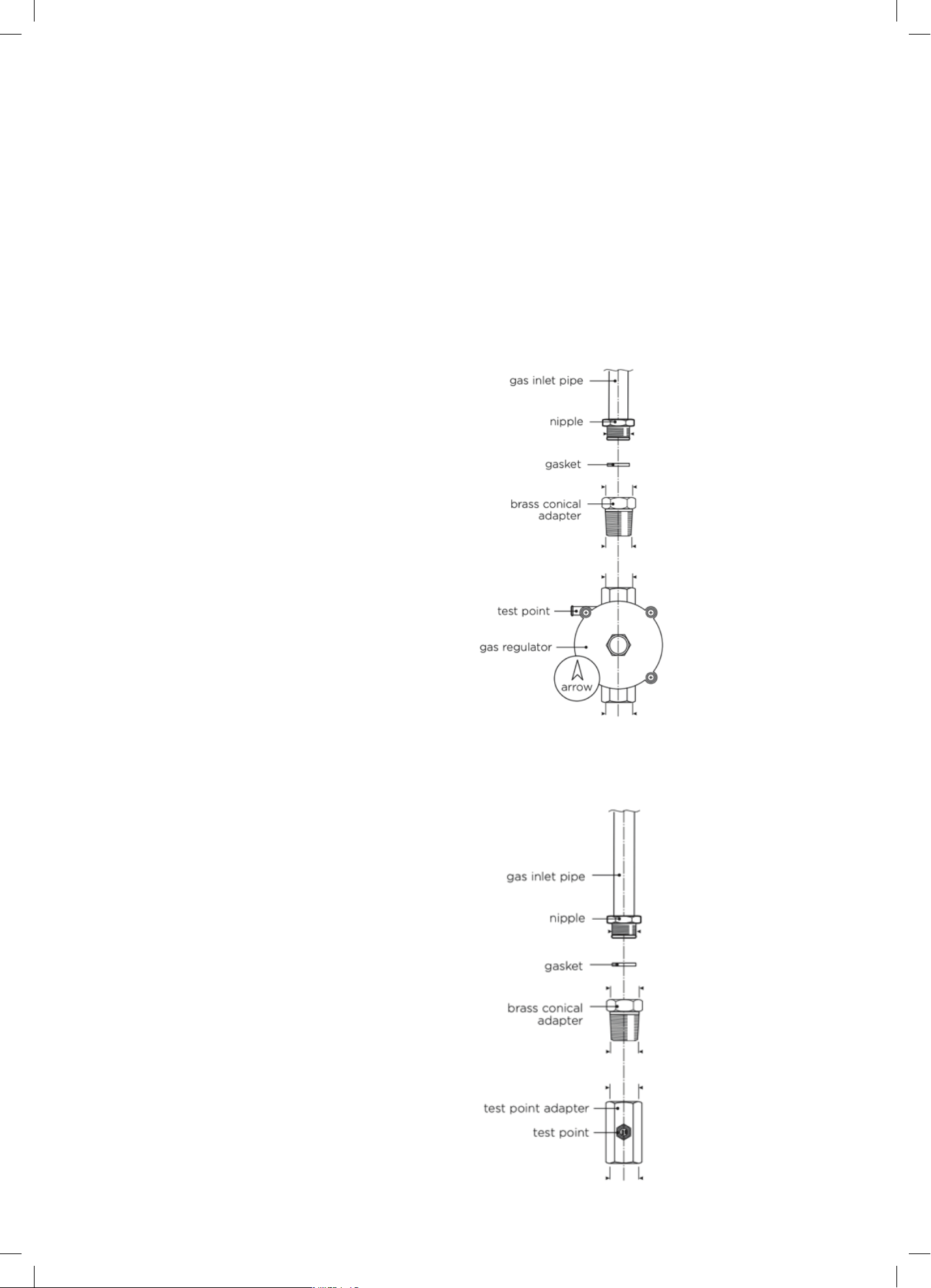
34
IMPORTANT! The connection must be performed by an
authorised person according to the relevant standards.
• This appliances is suitable for us with Natural Gas
or ULPG. The cooktop is shipped from the factory set
and adjusted for Natural Gas. It can be converted for
use with ULPG following the instructions within
this manual.
• The connection must be made at the rear of the
appliances. Ensure that the pipe does not cross
the cooker.
INSTALLATION WITH A FLEXIBLE HOSE ASSEMBLY
• If this appliance has to be installed with a hose
assembly, the installer shall refer to the network
operator or gas supplier for confirmation of the gas
type, if in doubt.
• When used with a flexible hose, the connector on the
wall should be between 450mm to 500mm from the
floor and 200 mm to 300 mm from the left-hand side
of the appliance as viewed from the front. The hose
connection on the appliance shall face downwards.
• It is important that the hose does not come in contact
with the metal of the appliance and is secured as per
appropriate gas installation codes. The stabilising
chain (installation of the chain referred to within this
manual) should be installed to restrict movement of
the appliance to no more than 80% of the length of
the flexible gas hose. The chain should be attached
securely to the product where shown, and on the wall.
• Flexible hose assemblies should be AS/NZS 1869
Class B or Class D certified. The thread connection
shall be Rp ½” (ISO 7-1) male.
• The hose assembly shall be as short as practicable
and comply with relevant AS5601 / NZS5261
requirements.
IMPORTANT! After connection the installer must check
that the hose is not kinked, subjected to abrasion or
permanently deformed. The installer must check also that
the hose is not near (or in contact) with any hot surfaces.
GAS CONNECTION SPECIFICATION
IMPORTANT! Check the correct positioning of the gas
regulator. The arrow on the back of the gas regulator
must be oriented toward the connector.
Natural Gas
Adjust to obtain a test point pressure of 1 kPa
with all the burners operating at highest setting.
ULPG
Ensure the supply pressure is regulated to 2.75 kPa,
with all the burners operating at highest setting.
IMPORTANT! Check the correct positioning of the gas regulator. The arrow on the back of the
gas regulator must be oriented toward the connector.
NG
Adjust to obtain a test point pressure of 1 kPa with all the burners operating at highest setting.
ULPG
Ensure the supply pressure is regulated to 2.75 kPa, with all the burners operating at highest
setting.
GAS CONNECTION
IMPORTANT! The connection must be performed by an authorised person according to the
relevant standards.
Natural Gas
IMPORTANT! Check the correct positioning of the gas regulator. The arrow on the back of the
gas regulator must be oriented toward the connector.
NG
Adjust to obtain a test point pressure of 1 kPa with all the burners operating at highest setting.
ULPG
Ensure the supply pressure is regulated to 2.75 kPa, with all the burners operating at highest
setting.
GAS CONNECTION
IMPORTANT! The connection must be performed by an authorised person according to the
relevant standards.
Natural Gas
Gas Connection
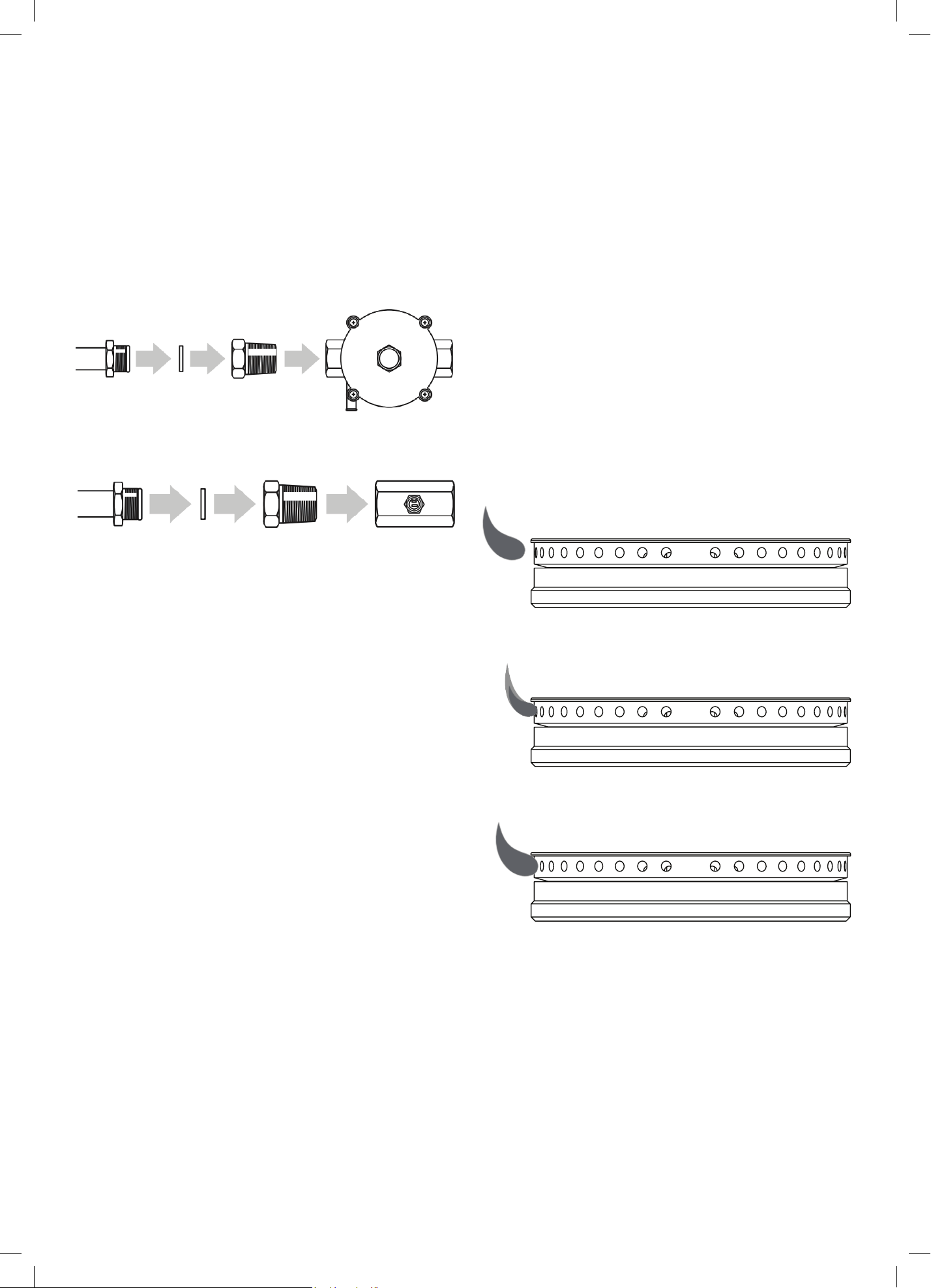
35
GAS CONNECTION
IMPORTANT! The connection must be performed by an
authorised person according to the relevant standards.
Natural Gas
ULPG
Note:
Before connecting the appliance to the gas main,
mount the brass conical adaptor onto the gas inlet pipe,
ensuring the supplied gasket is positioned between.
Natural Gas
Connect gas supply to the pressure regulator and adjust
the regulator to obtain a test point pressure of 1 kPa with
the two semi-rapid (SR) burners operating at maximum.
LP/Propane
Connect gas supply to the test point adaptor and ensure
that the supply pressure is regulated to 2.75 kPa
IMPORTANT! Use two wrenches to tighten the
connection. Do not over tighten the connector.
Over tightening may crack regulator.
IMPORTANT! If your model features two inlets allowing
for flexibility of installation, you must close off the inlet
not being used with the cap and sealing gasket supplied.
LEAK TESTING
When the installation is complete, always check for gas
leaks using a soapy solution.
• Ensure all oven and burner knobs are set to OFF before
connecting range to gas supply.
• After final gas connection is made, turn gas supply on
and test all connections in gas supply piping for gas
leaks with a soapy water solution.
• In order to avoid property damage or serious personal
injury, never use a lit match or open flame. If a leak
is present, tighten joint or unscrew, apply more joint
compound, tighten again and retest connection for leak.
FLAME TESTING
The operation of the appliance must be tested when
installation is completed, including ensuring the burners
are operating correctly.
• Turn on the appliance gas controls and light each
burner individually and in combination. Check for a
well defined blue flame without any yellow tipping.
If any abnormality is evident then check that the
burner cap is located properly and the injector nipple
is aligned correctly.
• Check the minimum burner setting by quickly
rotating the gas control knob from the maximum to
the minimum position. The flame must not go out.
If adjustment is required see section “Adjusting the
minimum burner setting”.
✕ No Flame Lifting Off
✕ No Yellow Tip Flame
✓ Good Flame
In case the appliance fails to operate correctly after all
checks have been carried out, please call our After Sales
Service team on 1300 11 HELP (4357).
ULPG
Note: Before connecting the appliance to the gas main, mount the brass conical adaptor onto
the gas inlet pipe, ensuring the supplied gasket is positioned between.
Natural Gas
- Connect gas supply to the pressure regulator and adjust the regulator to obtain a test
point pressure of 1 kPa with the two semi-rapid (SR) burners operating at maximum.
LP/Propane
- Connect gas supply to the test point adaptor and ensure that the supply pressure is
regulated to 2.75 kPa
IMPORTANT! Use two wrenches to tighten the connection. Do not over tighten the connector.
Over tightening may crack regulator.
IMPORTANT! If your model features two inlets allowing for flexibility of installation, you must
close off the inlet not being used with the cap and sealing gasket supplied.
LEAK TESTING
When the installation is complete, always check for gas leaks using a soapy solution.
- Ensure all oven and burner knobs are set to OFF before connecting range to gas supply.
- After final gas connection is made, turn gas supply on and test all connections in gas
supply piping for gas leaks with a soapy water solution.
- In order to avoid property damage or serious personal injury, never use a lit match or
open flame. If a leak is present, tighten joint or unscrew, apply more joint compound,
tighten again and retest connection for leak.
FLAME TESTING
The operation of the appliance must be tested when installation is completed, including ensuring
the burners are operating correctly.
- Turn on the appliance gas controls and light each burner individually and in combination.
Check for a well defined blue flame without any yellow tipping. If any abnormality is
evident then check that the burner cap is located properly and the injector nipple is
aligned correctly.
- Check the minimum burner setting by quickly rotating the gas control knob from the
maximum to the minimum position. The flame must not go out. If adjustment is required
see section “Adjusting the minimum burner setting”.
IMPORTANT! Check the correct positioning of the gas regulator. The arrow on the back of the
gas regulator must be oriented toward the connector.
NG
Adjust to obtain a test point pressure of 1 kPa with all the burners operating at highest setting.
ULPG
Ensure the supply pressure is regulated to 2.75 kPa, with all the burners operating at highest
setting.
GAS CONNECTION
IMPORTANT! The connection must be performed by an authorised person according to the
relevant standards.
Natural Gas
Page 27
Page 27
Page 27
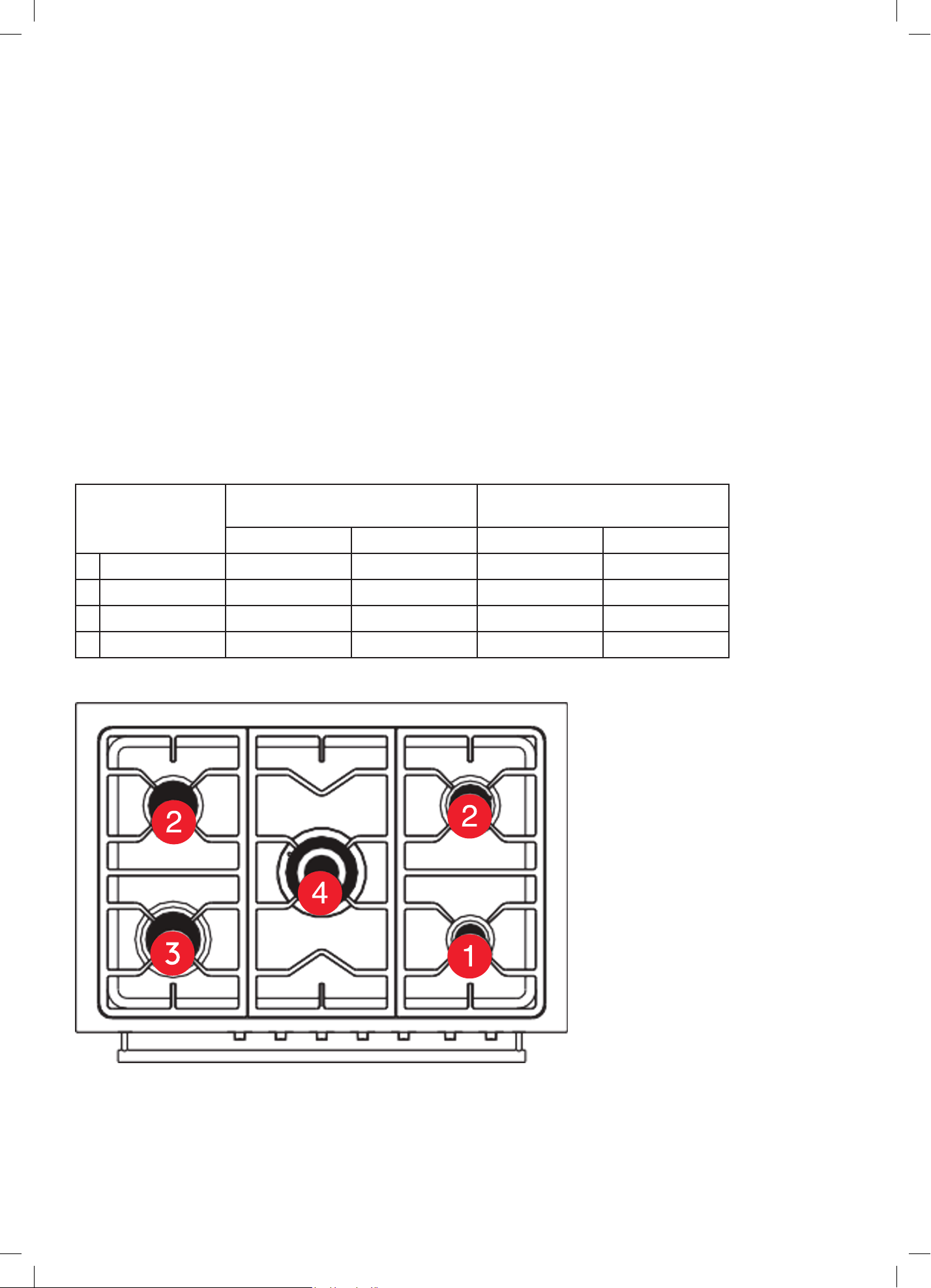
36
CONVERSION TO ULPG
• This freestanding oven can be used with Natural Gas or ULPG. It is shipped from the factory adjusted for
use with Natural gas.
• Any conversion required must be performed by an authorised person or service agent.
• The range is supplied with a set of injectors required for converting the range burners.
• Refer to the following table to select the appropriate size injector. The nozzle diameters (hundredths of a
millimetre) are marked on the body of each injector.
IMPORTANT! After converting the burners repeat the flame testing process outlined within this manual.
• If the range has been disconnected and re-connected to the gas supply line repeat leak testing.
• After conversion to ULPG gas affix the supplied conversion label near the data plate on the product, as
well as at the beginning of this manual.
• If the range is being converted for use ULPG, before connecting to the gas
Burner
Natural gas
1.0 kPa
Universal LPG
2.75 kPa
Injector (mm) Power MJ/h Injector (mm) Power MJ/h
1 Auxiliary 0.90 4.0 MJ/h 0.53 3.7 MJ/h
2 Semi-rapid 1.20 7.1 MJ/h 0.78 7.1 MJ/h
3 Rapid 1.50 11.0 MJ/h 0.95 11.7 MJ/h
4 Triple Crown 1.63 12.7 MJ/h 1.00 13.0 MJ/h
Gas Connection (Continued)
The images and diagrams in this user manual is for reference only.
Your Freestanding Cooker may appear differently.
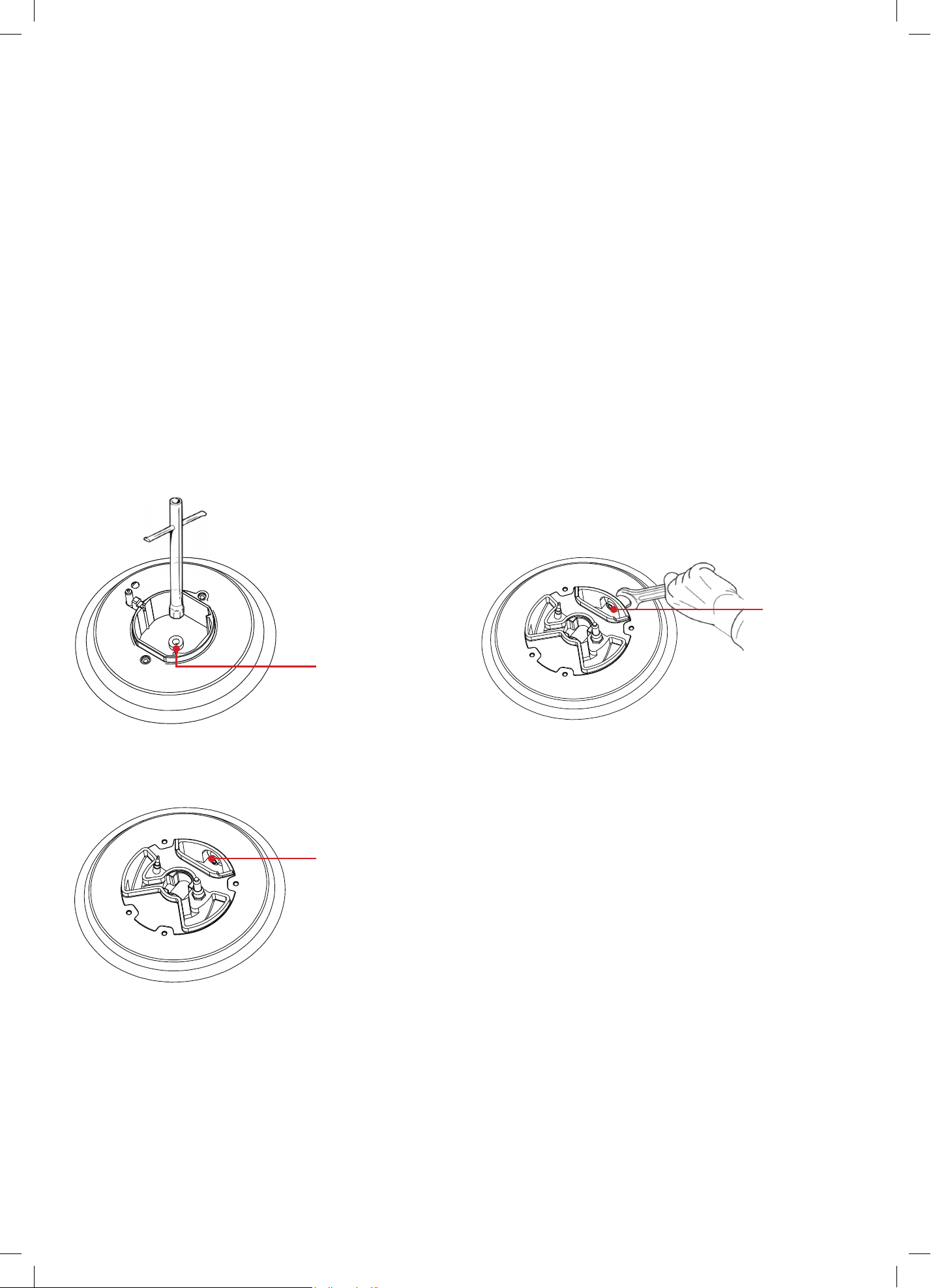
37
Page 30
REPLACING THE COOKTOP BURNER INJECTORS
To convert the burners to suit a different gas type from that which it was set
(refer to the gas type label inside the warming compartment door), follow these steps:
1. Remove the pan supports (or trivets), remove the burner caps and the flame spreaders.
2. Using a wrench substitute the nozzle injectors with those most suitable for the type of gas
for which the appliance is to use.
3. Adjust the minimum burner setting (refer to “Adjusting the minimum burner setting”)
4. Refit the flame spreaders, the burner caps and the pan supports (trivets).
5. Fix the warning label (supplied with the conversion kit) stating that the freestanding oven has
been converted for use with ULPG to the rear of the freestanding oven. Ensure that it is located
in close proximity to the gas inlet connection.
The burners are designed so that no regulation of the primary air is required.
Auxiliary, Semi-rapid and Rapid Burners Wok Burners
Dual Burners
Injector
Injector
Injector
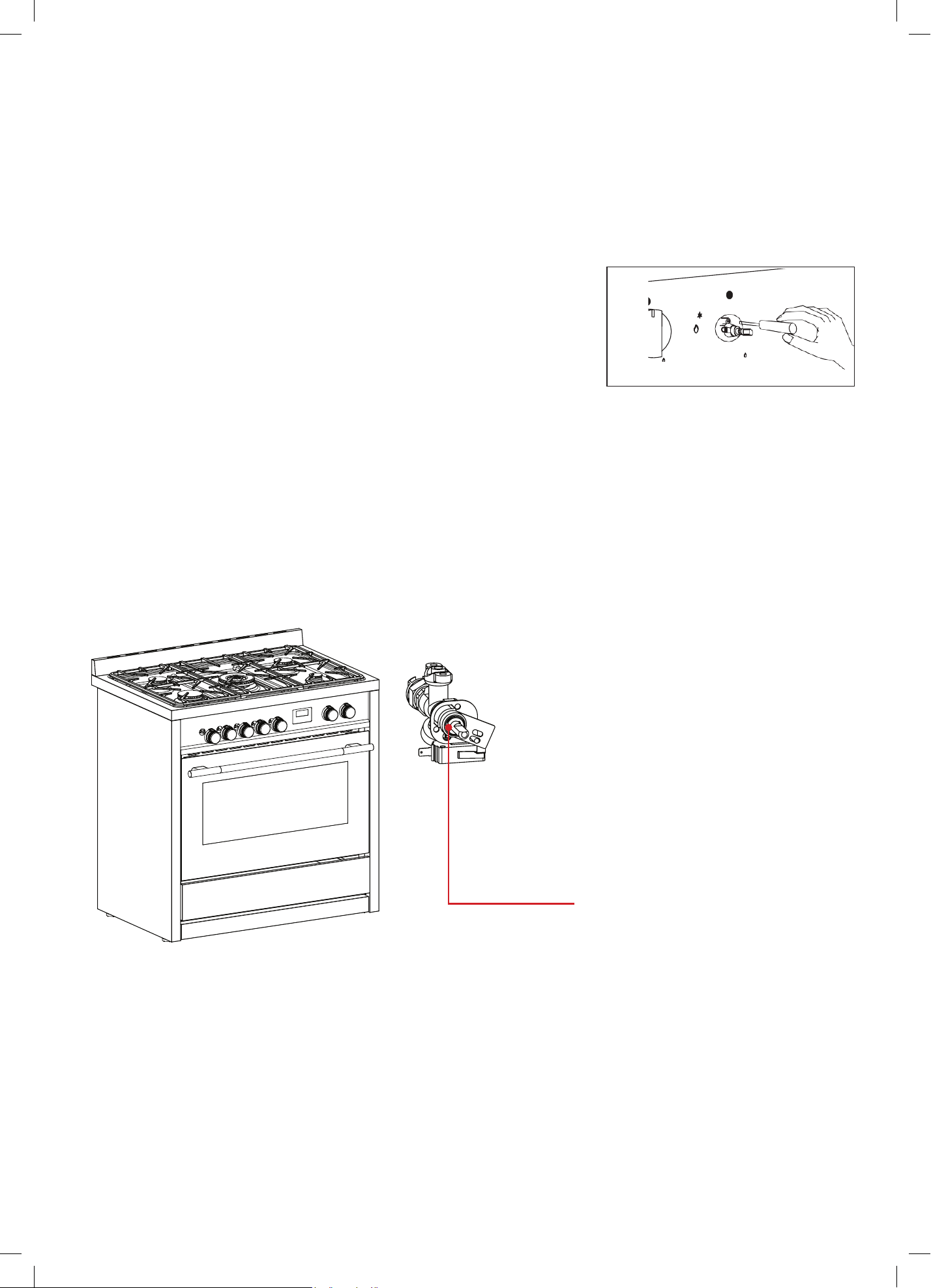
38
ADJUSTING THE MINIMUM BURNER SETTINGS
Adjusting the cooktop burner minimums
The flame has been regulated by the factory. When the injectors have been
replaced or there are special mains pressure conditions, it may be necessary
to regulate the minimum flame again. Check whether the flame spreads to
all burner ports when the burner is lit with the gas tap set to the minimum
position.
• If some ports do not light, increase the minimum gas rate setting.
• Check whether the burner remains lit even when the gas tap is turned
quickly from the maximum to the minimum position.
• If the burner does not remain lit, increase the minimum gas rate setting.
To regulate the flame follow these instructions:
Auxiliary, Rapid, Semi-Rapid, Triple-ring Wok Burners
• Light the burner.
• Set the gas valve to L0 (minimum rate).
• Remove the knob.
• With a thin screwdriver, turn the regulation screw inside the tap rod until
adjustment is correct.
Regulation screw (Auxiliary, Rapid, Semi-Rapid, Triple-ring and Single Wok burners)
Lubrication of the gas valves
• If a gas valve becomes stiff, it is necessary to dismantle it carefully and clean it with
petroleum spirit.
• Specialist high temperature resistant grease should be used to lubricate the valve
before replacing.
• This must be carried out by an authorised person or service agent. Please call our After Sales
Service team on 1300 11 HELP (4357) to arrange one.
[Need updated drawing from Arda that is relevant to the Arda burners]
ADJUSTING THE MINIMUM BURNER SETTINGS
Adjusting the cooktop burner minimums
The flame has been regulated by the factory. When the injectors have been replaced or there
are special mains pressure conditions, it may be necessary to regulate the minimum flame
again. Check whether the flame spreads to all burner ports when the burner is lit with the gas tap
set to the minimum position.
- If some ports do not light, increase the minimum gas rate setting.
- Check whether the burner remains lit even when the
gas tap is turned quickly from the maximum to the
minimum position.
- If the burner does not remain lit, increase the minimum
gas rate setting.
To regulate the flame follow these instructions:
Page 31
Regulation Screw
Gas Connection (Continued)

39
Technical Specifications
Below outlines the technical specifications for your Sôlt Freestanding Cooker.
GGSUC908S
Size 895 × 595 × 858 —918 (W × D × H mm)
Weight (Gross/Net)
76.2kg / 98.4kg
Maximum Power
2940W
Gross Capacity
121L (112L usable)

40
Attach your receipt
to this page

41
For future reference, please record the following information which can be found on the rating plate and the date of
purchase which can be found on your sales invoice.
STORE DETAILS
STORE NAME
|
ADDRESS
|
TELEPHONE
|
PURCHASE DATE
|
PRODUCT DETAILS
MODEL NO.
|
SERIAL NO.
|
Purchase Details

42
WARRANTY TERMS & CONDITIONS
OVENS (FREESTANDING COOKERS)
This document sets out the terms and conditions of the
product warranties for Residentia Group Appliances. It is
an important document. Please keep it with your proof of
purchase documents in a safe place for future reference
should you require service for your Appliance.
1. IN THIS WARRANTY
(a) ‘acceptable quality’ as referred to in clause 10 of this
warranty has the same meaning referred to in the
ACL;
(b) ‘ACL’ means Trade Practices Amendment (Australian
Consumer Law) Act (No.2) 2010;
(c) ‘Appliance’ means any Residentia Group product
purchased by you accompanied by this document;
(d) ‘ASR’ means Residentia Group authorised service
representative;
(e) ‘Residentia Group’ means Residentia Group Pty Ltd
of 165 Barkly Ave, Burnley VIC 3121, ACN 600 546 656
in respect of Appliances purchased in Australia;
(f ) ‘major failure’ as referred to in clause 10 of this
warranty has the same meaning referred to in the ACL
and includes a situation when an Appliance cannot
be repaired or it is uneconomic for Residentia Group,
at its discretion, to repair an Appliance during the
Warranty Period;
(g) ‘Warranty Period’ means:
(i) where the Appliance is used for personal,
domestic or household use (i.e. normal
single family use) as set out in the instruction
manual, the Appliance is warranted against
manufacturing defects for 24 months, following
the date of original purchase of the Appliance;
(h) ‘you’ means the purchaser of the Appliance not
having purchased the Appliance for re-sale, and
‘your’ has a corresponding meaning.
2. This warranty only applies to Appliances purchased
and used in Australia and is in addition to (and does
not exclude, restrict, or modify in any way) any
non-excludable statutory warranties in Australia.
3. During the Warranty Period Residentia Group or its
ASR will, at no extra charge if your Appliance is readily
accessible for service, without special equipment
and subject to these terms and conditions, repair or
replace any parts which it considers to be defective.
Residentia Group or its ASR may use remanufactured
parts to repair your Appliance. You agree that any
replaced Appliances or parts become the property
of Residentia Group. This warranty does not apply
to light globes, batteries, filters or similar perishable
parts.
4. Parts and Appliances not supplied by Residentia
Group are not covered by this warranty.
Warranty Information

43
Our goods come with guarantees that cannot be excluded under the Australian Consumer Law. You are
entitled to a replacement or refund for a major failure and for compensation for any other reasonably
foreseeable loss or damage. You are also entitled to have the goods repaired or replaced if the goods
fail to be of acceptable quality and the failure does not amount to a major failure.
The Australian Consumer Law requires
the inclusion of the following statement
with this warranty:
5. You will bear the cost of transportation, travel and
delivery of the Appliance to and from Residentia
Group or its ASR. If you reside outside of the service
area, you will bear the cost of:
(a) travel of an authorised representative;
(b) transportation and delivery of the Appliance to and
from Residentia Group or its ASR, in all instances,
unless the Appliance is transported by Residentia
Group or its ASR, the Appliance is transported at
the owner’s cost and risk while in transit to and from
Residentia Group or its ASR.
6. Proof of purchase is required before you can make a
claim under this warranty.
7. You may not make a claim under this warranty unless
the defect claimed is due to faulty or defective parts
or workmanship. Residentia Group is not liable in the
following situations (which are not exhaustive):
(a) the Appliance is damaged by:
(i) accident
(ii) misuse or abuse, including failure to properly
maintain or service
(iii) normal wear and tear
(iv) power surges, electrical storm damage or
incorrect power supply
(v) incomplete or improper installation
(vi) incorrect, improper or inappropriate operation
(vii) insect or vermin infestation
(viii) failure to comply with any additional
instructions supplied with the Appliance;
(b) the Appliance is modified without authority from
Residentia Group in writing;
(c) the Appliance’s serial number or warranty seal has
been removed or defaced;
(d) the Appliance was serviced or repaired by anyone
other than Residentia Group, an authorised repairer
or ASR.
8. This warranty, the contract to which it relates and the
relationship between you and Residentia Group are
governed by the law applicable where the Appliance
was purchased.
9. To the extent permitted by law, Residentia Group
excludes all warranties and liabilities (other than as
contained in this document) including liability for
any loss or damage whether direct or indirect arising
from your purchase, use or non use of the Appliance.
10. For Appliances and services provided by Residentia
Group in Australia, the Appliances come with a
guarantee by Residentia Group that cannot be
excluded under the Australian Consumer Law.
You are entitled to a replacement or refund for a
major failure and for compensation for any other
reasonably foreseeable loss or damage. You are also
entitled to have the Appliance repaired or replaced
if the Appliance fails to be of acceptable quality and
the failure does not amount to a major failure. The
benefits to you given by this warranty are in addition
to your other rights and remedies under a law in
relation to the Appliances or services to which the
warranty relates.
11. At all times during the Warranty Period, Residentia
Group shall, at its discretion, determine whether
repair, replacement or refund will apply if an
Appliance has a valid warranty claim applicable to it.
12. Missing parts are not covered by warranty. Residentia
Group reserves the right to assess each request
for missing parts in a case by case basis. Any parts
that are not reported missing in the first week after
purchase will not provide free of charge.
13. To enquire about claiming under this warranty,
please follow these steps:
(a) carefully check the operating instructions, user
manual and the terms of this warranty;
(b) have the model and serial number of the Appliance
available;
(c) have the proof of purchase (e.g. an invoice)
available;
(d) telephone the numbers shown below.
14. You accept that if you make a warranty claim,
Residentia Group and its ASR may exchange
information in relation to you to enable Residentia
Group to meet its obligations under this warranty.
IMPORTANT
Before calling for service, please ensure that the steps in
point 13 have been followed.
Telephone contacts
► Service: Please call 1300 11 HELP (4357)

T. 1300 11 4357
E. support@residentiagroup.com.au
E S S E N T I A L S FOR LIFE
An initiative by
Residentia Group
www.solt.house