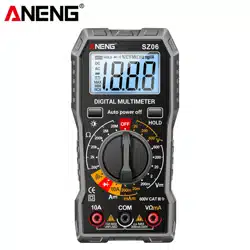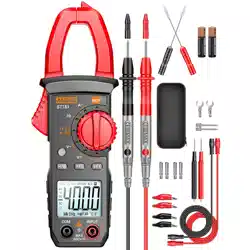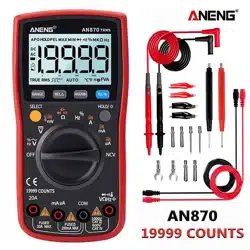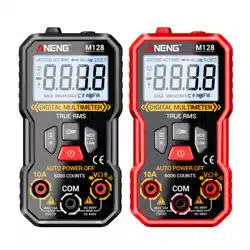
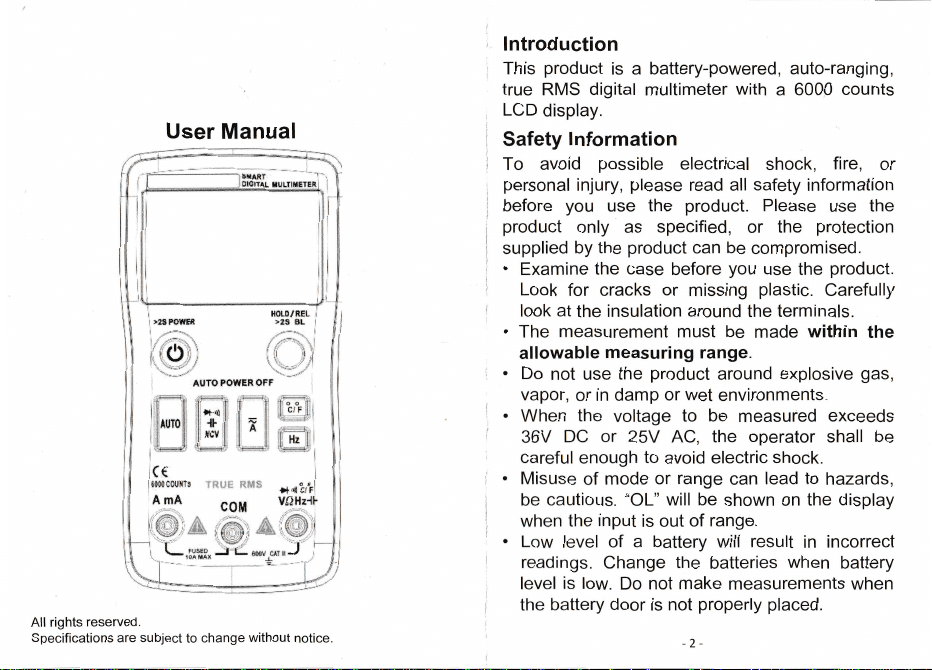
lntroduction
This
product
is a
battery-powered,
auto-ranging,
true
RIVS digital
multimeter
with
a 600P
counts
LCD display.
Safety
lnformation
To
avoid
possible
electrical
shock,
fire,
or
personal
injury,
please
read all
safety
information
before
you
use
the
product.
Please
use
the
product
only
as
specified,
or
the
protection
supplied
by
the
product
can be
compromised.
.
Examine
the
case
before
you
use
the
product.
Look
for
cracks
or
missing
plastic.
Carefully
look
at the
insulation
around
the
terminals.
.
The
measurement
must
be
made
within
the
allowable
measuring
range.
.
Do
not use
the
product
around
explosive
gas,
vapor,
or
in damp
or
wet environments.
.
When
the
voltage
to
be
measured
exceeds
36V
DC or
25V
AC,
the
operator
shall
be
careful
enough
to
avoid
electric
shock.
.
[Visuse
of
mode
or
range
can
lead to
hazards,
be
cautious.
o'OL"
will be
shown
on
the
display
when
the
input
is out
of
range.
.
Low
level
of a
battery
will result
in
incorrect
readings.
Change
the
batteries
when
battery
level
is
low.
Do
not
make
measurements
when
the
battery
door
is
not
properly
placed,
lnstruction
Buttons
Measurements
Only
when,the
voltage
is higher
than
0.8V,
this
product
will
show
the
display;
The
DC
or AC
voltage
will be
auto
matched;
Touch
the
probes
to
the correct
test
points
of the
circuit
to
measure
the
voltage;
R.ead
the
measured
voltage
on
the
display.
1. Press
the
current
button
to enter
current
test
mode;
Touch
the
probes
to
the
correct
test
points
of
the circuit
to
measure
the
current;
3.
Read
the
measured
current
on
the display.
1.
The
resistance
measure
will be
auto
matched;
Touch
the
probes
to
the
desired
test
points
of
the circuit
to
measure
the
resistance;
Read
the
measured
resistance
on
the display.
1.
ln
AC
mode,
press
Hz button
to enter
frequency
test
mode.
,Touch
the
probes
to
the desired
test
points
of the
circuit
measure
the
frequency.
Reacj
the
measured
frequency
value
on
the display.
User
Manual
,{
i*
t
lji
]i;
l
i
}
t
!ii
\í
f
li
;x
l{řt9/fi
l"
}r8
.fi|.
*ilT#pů.,lt$
BFF
.iN*
.iil*,i,
ili*.ň
i{r
l: [:
i;|1i,tixl
,i+,.,*i.
;l****j,
{{
{
s *l}t*]I
TF{{"i
s}Ws
!
'4.
'1
,
Press
2"
Touch
to enter
in temperature
test
mode;
probes
to the
desired
test
points,
All
rights
reserved,
Specifications
are
subject
to change
without
notice.
Read
the
measured
temperature
on
the display.
-4-
rls Fo|ťER
ili,ďl
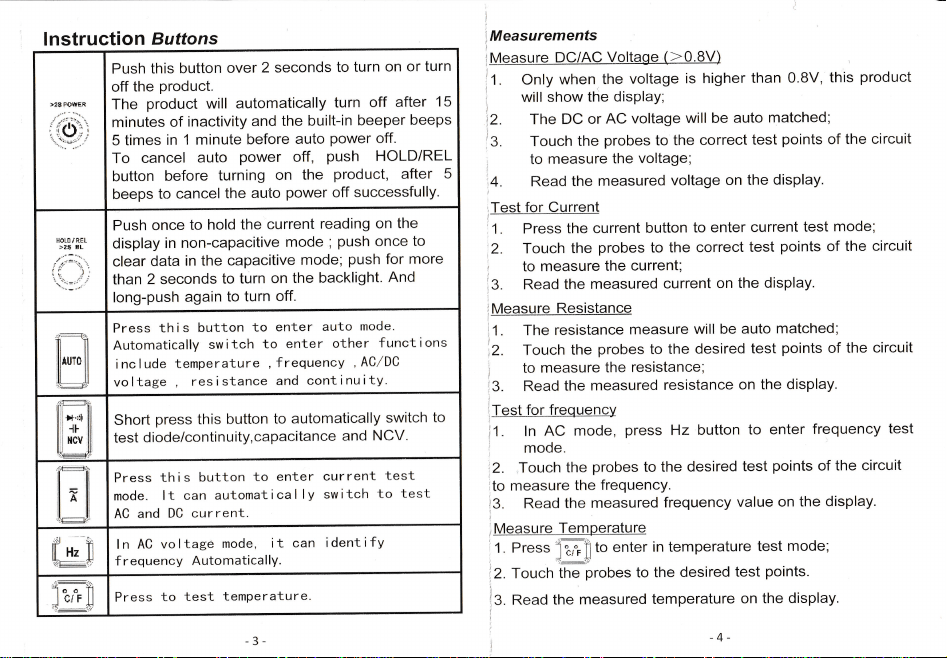
push
this button
over
2 seconds
to
turn
on or
turn
off
the
product.
The
product
will
automatically
turn
off
after
15
minutes
of
inactivity
and
the built-in
beeper
beeps
5 times
in
1 minute
before
auto
power
off.
To
cancel
auto
power
off,
push
HOLD/REL
button
before
turning
on
the
product,
after
5
beeps
to cancel
the auto
power
off
successfully.
t{
LDínEL
ět*
EL
Push
once
to
hold
the current
reading
on the
display
in
non-capacitive
mode
;
push
once
to
clear
data
in the
capacitive
mode;
push
for more
than
2 seconds
to
turn
on the
backlight.
And
long-push
again
to turn
off.
ilTi
press
this
button
to
enter
auto
mode.
Automatically
sw
itch
to
enter
other
f unct
ions
i nc
l ude
temperature
,
frequency ,
AClDC
vo
l tage
,
res
i stance
and
cont
i
nu i ty.
Short
press
this
button
to automatically
switch
to
test
diode/continuity,capacitance
and
NCV"
press
th
i s button
to
enter
cur
rent
t_est
mode.
lt can
automatically
switch
to
test-
AC
and
DC current.
M
l n
AC
vo l
tage mode,
i t
can
i dent
i fy
f requency
Automatically.
Press
to test
temperature.
2.
2.
to
HT
A
l
o0
ťíF
iB
Fstl *
*
lntroduction
This
product
is a
battery-powered,
auto-ranging,
true
RIVS digital
multimeter
with
a 600P
counts
LCD display.
Safety
lnformation
To
avoid
possible
electrical
shock,
fire,
or
personal
injury,
please
read all
safety
information
before
you
use
the
product.
Please
use
the
product
only
as
specified,
or
the
protection
supplied
by
the
product
can be
compromised.
.
Examine
the
case
before
you
use
the
product.
Look
for
cracks
or
missing
plastic.
Carefully
look
at the
insulation
around
the
terminals.
.
The
measurement
must
be
made
within
the
allowable
measuring
range.
.
Do
not use
the
product
around
explosive
gas,
vapor,
or
in damp
or
wet environments.
.
When
the
voltage
to
be
measured
exceeds
36V
DC or
25V
AC,
the
operator
shall
be
careful
enough
to
avoid
electric
shock.
.
[Visuse
of
mode
or
range
can
lead to
hazards,
be
cautious.
o'OL"
will be
shown
on
the
display
when
the
input
is out
of
range.
.
Low
level
of a
battery
will result
in
incorrect
readings.
Change
the
batteries
when
battery
level
is
low.
Do
not
make
measurements
when
the
battery
door
is
not
properly
placed,
lnstruction
Buttons
Measurements
Only
when,the
voltage
is higher
than
0.8V,
this
product
will
show
the
display;
The
DC
or AC
voltage
will be
auto
matched;
Touch
the
probes
to
the correct
test
points
of the
circuit
to
measure
the
voltage;
R.ead
the
measured
voltage
on
the
display.
1. Press
the
current
button
to enter
current
test
mode;
Touch
the
probes
to
the
correct
test
points
of
the circuit
to
measure
the
current;
3.
Read
the
measured
current
on
the display.
1.
The
resistance
measure
will be
auto
matched;
Touch
the
probes
to
the
desired
test
points
of
the circuit
to
measure
the
resistance;
Read
the
measured
resistance
on
the display.
1.
ln
AC
mode,
press
Hz button
to enter
frequency
test
mode.
,Touch
the
probes
to
the desired
test
points
of the
circuit
measure
the
frequency.
Reacj
the
measured
frequency
value
on
the display.
User
Manual
,{
i*
t
lji
]i;
l
i
}
t
!ii
\í
f
li
;x
l{řt9/fi
l"
}r8
.fi|.
*ilT#pů.,lt$
BFF
.iN*
.iil*,i,
ili*.ň
i{r
l: [:
i;|1i,tixl
,i+,.,*i.
;l****j,
{{
{
s *l}t*]I
TF{{"i
s}Ws
!
'4.
'1
,
Press
2"
Touch
to enter
in temperature
test
mode;
probes
to the
desired
test
points,
All
rights
reserved,
Specifications
are
subject
to change
without
notice.
Read
the
measured
temperature
on
the display.
-4-
rls Fo|ťER
ili,ďl
push
this button
over
2 seconds
to
turn
on or
turn
off
the
product.
The
product
will
automatically
turn
off
after
15
minutes
of
inactivity
and
the built-in
beeper
beeps
5 times
in
1 minute
before
auto
power
off.
To
cancel
auto
power
off,
push
HOLD/REL
button
before
turning
on
the
product,
after
5
beeps
to cancel
the auto
power
off
successfully.
t{
LDínEL
ět*
EL
Push
once
to
hold
the current
reading
on the
display
in
non-capacitive
mode
;
push
once
to
clear
data
in the
capacitive
mode;
push
for more
than
2 seconds
to
turn
on the
backlight.
And
long-push
again
to turn
off.
ilTi
press
this
button
to
enter
auto
mode.
Automatically
sw
itch
to
enter
other
f unct
ions
i nc
l ude
temperature
,
frequency ,
AClDC
vo
l tage
,
res
i stance
and
cont
i
nu i ty.
Short
press
this
button
to automatically
switch
to
test
diode/continuity,capacitance
and
NCV"
press
th
i s button
to
enter
cur
rent
t_est
mode.
lt can
automatically
switch
to
test-
AC
and
DC current.
M
l n
AC
vo l
tage mode,
i t
can
i dent
i fy
f requency
Automatically.
Press
to test
temperature.
2.
2.
to
HT
A
l
o0
ťíF
iB
Fstl *
*
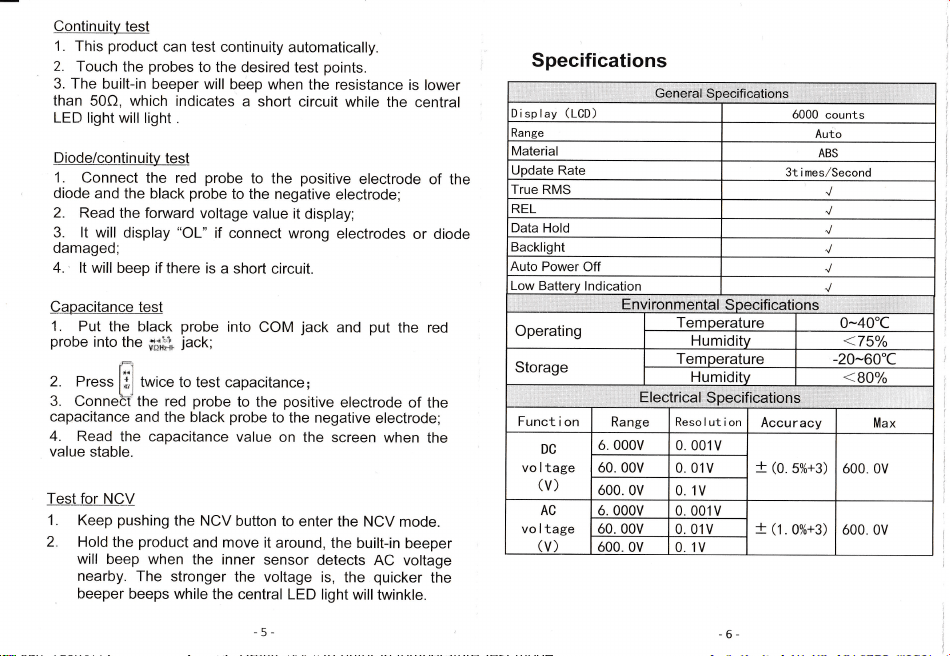
Continuity
test
1.
This
product
can
test continuity
automatically.
2,
Touch
the
probes
to the desired
test
points.
3. The built-in
beeper
will
beep when
the resistance
is
lower
than
50Q, which indicates
a short
circuit while
the central
LED light
will light
.
Diode/coltinuity
test
1,
Connect
the red
probe
to
the
positive
electrode
of the
diode
and the
black
probe
to the negative
electrode;
2.
Read the fonruard
voltage
value
it disp|ay;
3. lt
will
display
"OL"
if
connect wrong
electrodes
or diode
damaged;
4.,
lt will
beep if there is
a short
circuit.
Specifications
Capacitance
test
1.
Put
the black
probe
into the
ffi;i
probe
into
COM
jack
and
put
the red
jack;
2. Press
ffi
'*'""
to
test capacitance;
3.
ConneH the red
probe
to the
positive
electrode
of the
capacitance
and the
black
probe
to the negative
electrode;
4.
Read
the capacitance
value
on
the screen
when
the
va]ue
stable.
Test for
NCV
1. Keep
pushing
the NCV
button
to enter
the NCV
mode.
2.
Hold
the
product
and move
it around,
the
built-in
beeper
will
beep when
the inner
sensor
detects
AC voltage
nearby.
The
stronger
the voltage
is,
the
quicker
the
beeper
beeps while
the central
LED |ight
will
twinkIe.
6_
Displav
(tC0)
ó000
counts
Range
Auto
Material
ABs
Update Rate
3t i mes/Second
True RMS
REL
Data
Hold
Backlight
Auto
power
off
Low
Operating
Funct
i on
Resolution
Storage
Range
Accur
Max
ó.
000V
0,001V
ó0. 00V
0.01V
Dc
vo l tage
(V)
ó00. 0V
0. 1V
t
(o
5%+3) ó00. 0V
ó 000V 0 001V
ó0. 00V
0,01V
Ac
vo l tage
(V)
ó00 0V 01V
t
(t.
0%+3)
ó00. 0V
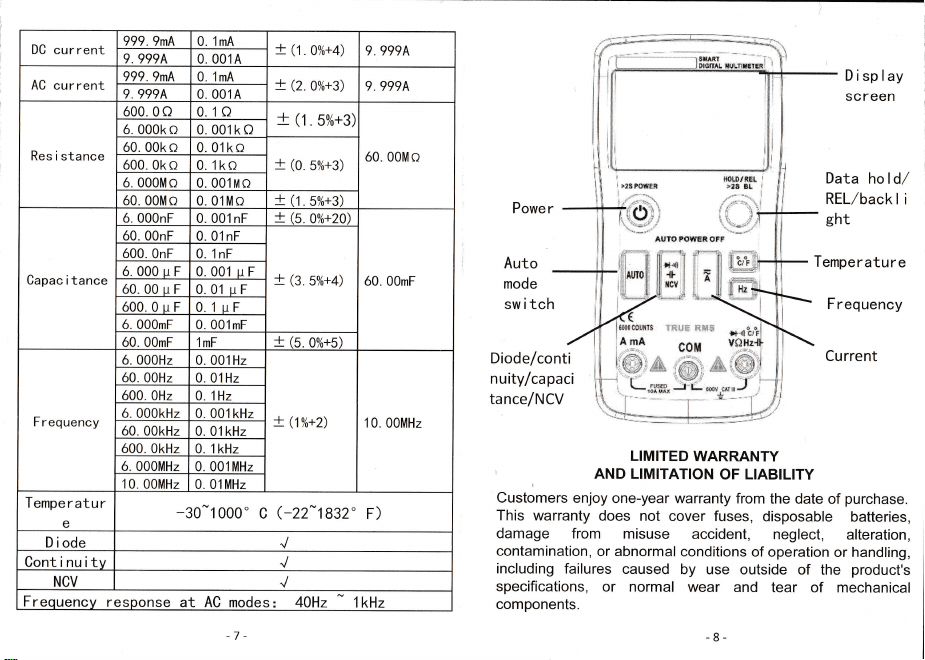
DC
current
999.9mA 0 1mA
t
(t.
0oÁ+4) 9.999A
9 999^ 0 001A
AC current
999,9mA
0.1mA
!
(Z.0%+3)
9.999A
9. 999
A
0.001A
Res i
stance
ó00 0o 01()
t
(t.
5%+3)
ó0,00Mo
ó 000ko
0.001ko
ó0,00ko
0.01ko
t
(O
5%+3)
ó00 0k o 0 1ko
ó 000Mo
0.001No
ó0.00MO 0,01Mo
+
U,5%+3)
Capac i
tance
ó. 000nF 0 001 nF
+
(s
oou.+zo)
ó0. 00mF
ó0 00nF 0 01nF
t
(s.
50Á+4)
ó00,
OnF
0.1nF
ó,000uF 0.001 u F
ó0 00rr F 0 01 rr F
ó00.0uF 0 1uF
ó
0O0mF 0.001mF
ó0 00mF 1mF
+
(s
ox+s)
F r equency
Á 0O0Hz
0.
00'1Hz
t
(1%+2)
10.00MHz
ó0. 00Hz 0.01Hz
ó00 OHz 0 1Hz
ó 000kHz
0. 001
kHz
ó0. OOkHz
0, 01 kHz
ó00. 0kHz O 1kHz
ó 000MHz 0 001MHz
1
0 00MHz
0.01MHz
Tempe
r
atur
e
-30-1
000, c
G22*
1832"
F)
Diode
Oont i nrr itv
NcV
Freouencv resDonse at AC modes= AOHz 1kHz
A
t*s §s
Powe r
Auto
mode
sw i
tch
Diode/conti
nuity/capaci
tance/NCV
Display
Screen
Data hold/
REL/backl
i
ght
Temperature
Frequency
Current
LIM|TED
WARRANTY
,
AND
LlMlTATloN
oF LIABILITY
Customers
enjoy one-year
warranty
from
the date
of
purchase.
This
warranty
does not
cover fuses,
disposable
batteries,
damage from
misuse
accident,
neglect,
alteration,
contamination,
or abnormal
conditions
of operation
or handling,
including
failures
caused
by use
outside
of the
product's
specifications,
or normal wear
and
tear
of mechanical
components.
,
.,,
]Gehé.r-*ii
i$ peditl
oáti
ons
i,,'
r,;ii
i
i
1.
1;
1
;
;
t..
)ns
Temneratttre
-4o"(
V
Temneratttre
-60"C
E l ectr,i
ca.l
.
S
peif,i
eátíonš'
7-
Continuity
test
1.
This
product
can
test continuity
automatically.
2,
Touch
the
probes
to the desired
test
points.
3. The built-in
beeper
will
beep when
the resistance
is
lower
than
50Q, which indicates
a short
circuit while
the central
LED light
will light
.
Diode/coltinuity
test
1,
Connect
the red
probe
to
the
positive
electrode
of the
diode
and the
black
probe
to the negative
electrode;
2.
Read the fonruard
voltage
value
it disp|ay;
3. lt
will
display
"OL"
if
connect wrong
electrodes
or diode
damaged;
4.,
lt will
beep if there is
a short
circuit.
Specifications
Capacitance
test
1.
Put
the black
probe
into the
ffi;i
probe
into
COM
jack
and
put
the red
jack;
2. Press
ffi
'*'""
to
test capacitance;
3.
ConneH the red
probe
to the
positive
electrode
of the
capacitance
and the
black
probe
to the negative
electrode;
4.
Read
the capacitance
value
on
the screen
when
the
va]ue
stable.
Test for
NCV
1. Keep
pushing
the NCV
button
to enter
the NCV
mode.
2.
Hold
the
product
and move
it around,
the
built-in
beeper
will
beep when
the inner
sensor
detects
AC voltage
nearby.
The
stronger
the voltage
is,
the
quicker
the
beeper
beeps while
the central
LED |ight
will
twinkIe.
6_
Displav
(tC0)
ó000
counts
Range
Auto
Material
ABs
Update Rate
3t i mes/Second
True RMS
REL
Data
Hold
Backlight
Auto
power
off
Low
Operating
Funct
i on
Resolution
Storage
Range
Accur
Max
ó.
000V
0,001V
ó0. 00V
0.01V
Dc
vo l tage
(V)
ó00. 0V
0. 1V
t
(o
5%+3) ó00. 0V
ó 000V 0 001V
ó0. 00V
0,01V
Ac
vo l tage
(V)
ó00 0V 01V
t
(t.
0%+3)
ó00. 0V
DC
current
999.9mA 0 1mA
t
(t.
0oÁ+4) 9.999A
9 999^ 0 001A
AC current
999,9mA
0.1mA
!
(Z.0%+3)
9.999A
9. 999
A
0.001A
Res i
stance
ó00 0o 01()
t
(t.
5%+3)
ó0,00Mo
ó 000ko
0.001ko
ó0,00ko
0.01ko
t
(O
5%+3)
ó00 0k o 0 1ko
ó 000Mo
0.001No
ó0.00MO 0,01Mo
+
U,5%+3)
Capac i
tance
ó. 000nF 0 001 nF
+
(s
oou.+zo)
ó0. 00mF
ó0 00nF 0 01nF
t
(s.
50Á+4)
ó00,
OnF
0.1nF
ó,000uF 0.001 u F
ó0 00rr F 0 01 rr F
ó00.0uF 0 1uF
ó
0O0mF 0.001mF
ó0 00mF 1mF
+
(s
ox+s)
F r equency
Á 0O0Hz
0.
00'1Hz
t
(1%+2)
10.00MHz
ó0. 00Hz 0.01Hz
ó00 OHz 0 1Hz
ó 000kHz
0. 001
kHz
ó0. OOkHz
0, 01 kHz
ó00. 0kHz O 1kHz
ó 000MHz 0 001MHz
1
0 00MHz
0.01MHz
Tempe
r
atur
e
-30-1
000, c
G22*
1832"
F)
Diode
Oont i nrr itv
NcV
Freouencv resDonse at AC modes= AOHz 1kHz
A
t*s §s
Powe r
Auto
mode
sw i
tch
Diode/conti
nuity/capaci
tance/NCV
Display
Screen
Data hold/
REL/backl
i
ght
Temperature
Frequency
Current
LIM|TED
WARRANTY
,
AND
LlMlTATloN
oF LIABILITY
Customers
enjoy one-year
warranty
from
the date
of
purchase.
This
warranty
does not
cover fuses,
disposable
batteries,
damage from
misuse
accident,
neglect,
alteration,
contamination,
or abnormal
conditions
of operation
or handling,
including
failures
caused
by use
outside
of the
product's
specifications,
or normal wear
and
tear
of mechanical
components.
,
.,,
]Gehé.r-*ii
i$ peditl
oáti
ons
i,,'
r,;ii
i
i
1.
1;
1
;
;
t..
)ns
Temneratttre
-4o"(
V
Temneratttre
-60"C
E l ectr,i
ca.l
.
S
peif,i
eátíonš'
7-