
A. Introduction
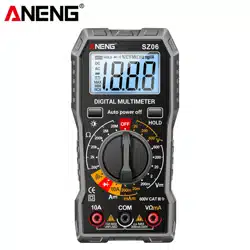
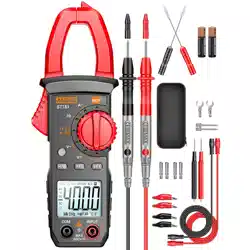
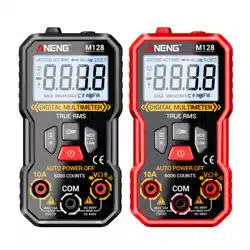
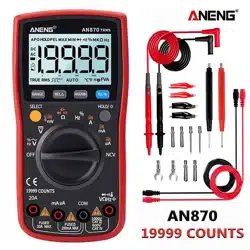
This product is a battery-powered, true-rms, auto-ranging digital multimeter
with a 19999 LCD display and a backlight.
B. Safety Information
To avoid possible electrical shock, fire, or personal injury, please read all safety
information before you use the product.
(1) Do NOT exceed the “maximum value” indicated in the Specification.
(2) Examine the connection of the test leads and the insulation of the product
before measuring voltage higher than 36V DC or 25V AC.
(3) Disconnect the test leads from the circuit before changing the mode。
(4) Misuse of mode or range can lead to hazards, be cautious. “OL” will be shown
on the display when the input is out of range.
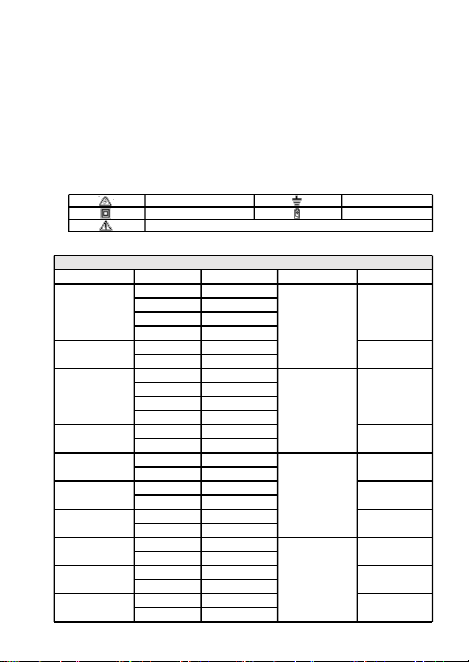
(5) Safety symbols:
C. Specifications
Hazardous Voltage
Earth
Double Insulated
Low Battery
Risk of Danger. Check the User Manual.
User Manual
- 1 - - 3 -
- 4 -
- 2 -
Electrical Specifications
Function
Range
Resolution
Accuracy
MAX. Value
DC Voltage
(V)
1.9999V
0.0001V
±(0.05%+3)
1000V
19.999V
0.001V
199.99V
0.01V
1000.0V
0.1V
DC Voltage
(mV)
19.999mV
0.001mV
199.99mV
199.99mV
0.01mV
AC Voltage
(V)
1.9999V
0.0001V
±(0.3%+3)
750V
19.999V
0.001V
199.99V
0.01V
750.0V
0.1V
AC Voltage
(mV)
19.999mV
0.001mV
199.99mV
199.99mV
0.01mV
DC Current
(A)
1.9999A
0.0001A
±(0.5%+3)
19.999A
19.999A
0.001A
DC Current
(mA)
19.999mA
0.001mA
199.99mA
199.99mA
0.01mA
DC Current
(μA)
99.99μA
0.01μA
1999.9μA
1999.9μA
0.1μA
AC Current
(A)
1.9999A
0.0001A
±(0.8%+3)
19.999A
19.999A
0.001A
AC Current
(mA)
19.999mA
0.001mA
199.99mA
199.99mA
0.01mA
AC Current
(μA)
99.99μA
0.01μA
1999.9μA
1999.9μA
0.1μA
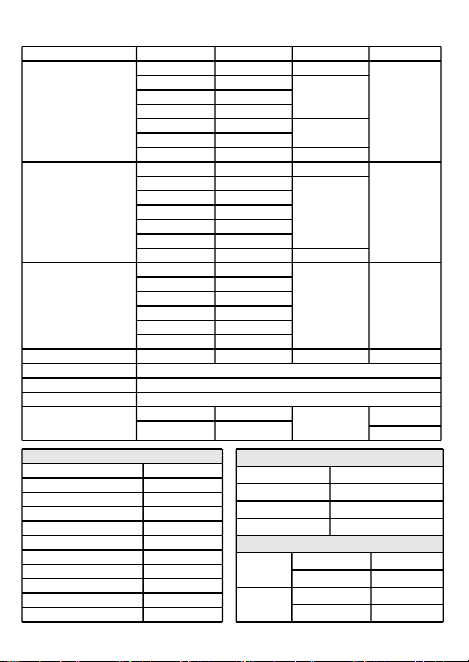
Function
Range
Resolution
Accuracy
MAX. Value
Resistance
199.99Ω
0.01Ω
±(0.5%+3)
199.99MΩ
1.9999kΩ
0.0001kΩ
±(0.2%+3)
19.999kΩ
0.001kΩ
199.99kΩ
0.01kΩ
1.9999MΩ
0.0001MΩ
±(1.0%+3)
19.999MΩ
0.001MΩ
199.99MΩ
0.01MΩ
±(5.0%+5)
Capacitance
9.999nF
0.001nF
±(5.0%+20)
9.999mF
99.99nF
0.01nF
±(2.0%+5)
999.9nF
0.1nF
9.999μF
0.001μF
99.99μF
0.01μF
999.9μF
0.1μF
9.999mF
0.001mF
±(5.0%+5)
Frequency
99.99Hz
0.01Hz
±(0.1%+2)
9.999MHz
999.9Hz
0.1Hz
9.999kHz
0.001kHz
99.99kHz
0.01kHz
999.9kHz
0.1kHz
9.999MHz
0.001MHz
Duty Cycle
1%~99%
0.1%
±(0.1%+2)
Diode
√
Continuity
√
NCV
√
Temperature
(-20~1000)℃
1℃
±(2.5%+5)
1000℃
(-4~1832)℉
1℉
1832℉
General Specifications
Display(LCD)
19999 Counts
Ranging
Auto/Manual
Material
ABS
Update Rate
3 Times/Second
Ture RMS
√
Back Light
√
Data Hold
√
Relative Measurement
√
MAX/MIN
√
Low Battery Alert
√
Auto Power Off
√
Mechanical Specifications
Dimension
180*90*45mm
Weight
320g
Battery Type
1.5V AA Batteries * 2
Warranty
One year
Environmental Specifications
Operating
Temperature
0~40℃
Humidity
<75%
Storage
Temperature
-20~60℃
Humidity
<80%
1
2a
2b
3
4
5
6
7
8
9
10
11
D. Instruction
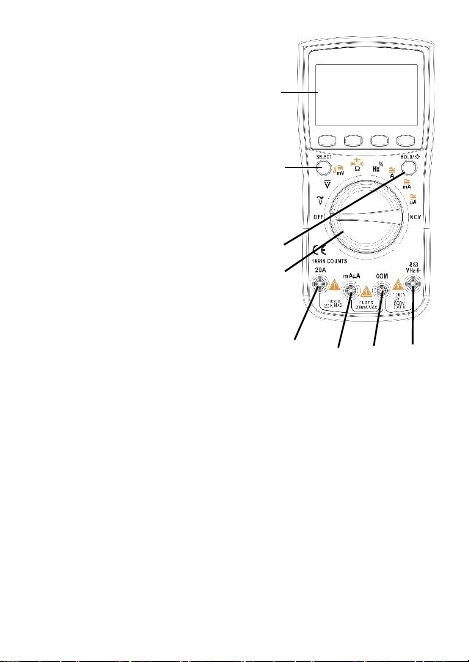
(1) Front Panel(see the picture on the right)
1. LCD display
2. buttons
2a.SELECT: To toggle between different testing
modes (functions), press this button.
2b.HO LD / Ba ckl igh t: T o h old th e cu rre n t
reading, press this button and you will see
“HOLD” on the display; press a gain to
cancel. To turn on the backlight, press this
button for more than 2 seconds; long-press
again to turn off.
3. Rotary Switch: To change mode or range。
(from OFF, clockwise)
3a. OFF
3b. AC Voltage (V)
3c. DC Voltage (V)
3d. AC Voltage(mV)/ DC Voltage(mV)/
Temperature
3e. Resistance/Continuity/Diode/Capacitance
3f. Frequency/Duty Cycle
3g. AC/DC Current (A)
3h. AC/DC Current (mA)
3i. AC/DC Current (μA)
3j. NCV
4. 20A: Input terminal for current (V) measurements.
5. mA/μA: Input terminal for current (mA and μA) measurements.
6. COM: Common terminal for all measurements.
7. VHz: Input terminal for voltage, frequency, duty cycle, resistance, continuity,
diode, capacitance, and temperature measurements.
8. RANGE: press this button to enter the manual range; each push increases the
range; when the highest range is reached, next push will go back to the lowest
range; to exit the manual range mode, press the button for 2 seconds.
9. REL: the product allows relative measurements for the Modes of Voltage, Current,
and Capacitance; press this button to enter the relative measurements mode;
press again to exit.
10. MAX/MIN: press the button once to measure the MAX Value; press twice to
measure the MIN Value; to exit the mode, press the button for 2 seconds.
11. Hz%: press this button when you measure AC Voltage or AC Current to measure
their frequency/duty cycle.
A. Introduction
This product is a battery-powered, true-rms, auto-ranging digital multimeter
with a 19999 LCD display and a backlight.
B. Safety Information
To avoid possible electrical shock, fire, or personal injury, please read all safety
information before you use the product.
(1) Do NOT exceed the “maximum value” indicated in the Specification.
(2) Examine the connection of the test leads and the insulation of the product
before measuring voltage higher than 36V DC or 25V AC.
(3) Disconnect the test leads from the circuit before changing the mode。
(4) Misuse of mode or range can lead to hazards, be cautious. “OL” will be shown
on the display when the input is out of range.
(5) Safety symbols:
C. Specifications
Hazardous Voltage
Earth
Double Insulated
Low Battery
Risk of Danger. Check the User Manual.
User Manual
- 1 - - 3 -
- 4 -
- 2 -
Electrical Specifications
Function
Range
Resolution
Accuracy
MAX. Value
DC Voltage
(V)
1.9999V
0.0001V
±(0.05%+3)
1000V
19.999V
0.001V
199.99V
0.01V
1000.0V
0.1V
DC Voltage
(mV)
19.999mV
0.001mV
199.99mV
199.99mV
0.01mV
AC Voltage
(V)
1.9999V
0.0001V
±(0.3%+3)
750V
19.999V
0.001V
199.99V
0.01V
750.0V
0.1V
AC Voltage
(mV)
19.999mV
0.001mV
199.99mV
199.99mV
0.01mV
DC Current
(A)
1.9999A
0.0001A
±(0.5%+3)
19.999A
19.999A
0.001A
DC Current
(mA)
19.999mA
0.001mA
199.99mA
199.99mA
0.01mA
DC Current
(μA)
99.99μA
0.01μA
1999.9μA
1999.9μA
0.1μA
AC Current
(A)
1.9999A
0.0001A
±(0.8%+3)
19.999A
19.999A
0.001A
AC Current
(mA)
19.999mA
0.001mA
199.99mA
199.99mA
0.01mA
AC Current
(μA)
99.99μA
0.01μA
1999.9μA
1999.9μA
0.1μA
Function
Range
Resolution
Accuracy
MAX. Value
Resistance
199.99Ω
0.01Ω
±(0.5%+3)
199.99MΩ
1.9999kΩ
0.0001kΩ
±(0.2%+3)
19.999kΩ
0.001kΩ
199.99kΩ
0.01kΩ
1.9999MΩ
0.0001MΩ
±(1.0%+3)
19.999MΩ
0.001MΩ
199.99MΩ
0.01MΩ
±(5.0%+5)
Capacitance
9.999nF
0.001nF
±(5.0%+20)
9.999mF
99.99nF
0.01nF
±(2.0%+5)
999.9nF
0.1nF
9.999μF
0.001μF
99.99μF
0.01μF
999.9μF
0.1μF
9.999mF
0.001mF
±(5.0%+5)
Frequency
99.99Hz
0.01Hz
±(0.1%+2)
9.999MHz
999.9Hz
0.1Hz
9.999kHz
0.001kHz
99.99kHz
0.01kHz
999.9kHz
0.1kHz
9.999MHz
0.001MHz
Duty Cycle
1%~99%
0.1%
±(0.1%+2)
Diode
√
Continuity
√
NCV
√
Temperature
(-20~1000)℃
1℃
±(2.5%+5)
1000℃
(-4~1832)℉
1℉
1832℉
General Specifications
Display(LCD)
19999 Counts
Ranging
Auto/Manual
Material
ABS
Update Rate
3 Times/Second
Ture RMS
√
Back Light
√
Data Hold
√
Relative Measurement
√
MAX/MIN
√
Low Battery Alert
√
Auto Power Off
√
Mechanical Specifications
Dimension
180*90*45mm
Weight
320g
Battery Type
1.5V AA Batteries * 2
Warranty
One year
Environmental Specifications
Operating
Temperature
0~40℃
Humidity
<75%
Storage
Temperature
-20~60℃
Humidity
<80%
1
2a
2b
3
4
5
6
7
8
9
10
11
D. Instruction
(1) Front Panel(see the picture on the right)
1. LCD display
2. buttons
2a.SELECT: To toggle between different testing
modes (functions), press this button.
2b.HO LD / Ba ckl igh t: T o h old th e cu rre n t
reading, press this button and you will see
“HOLD” on the display; press a gain to
cancel. To turn on the backlight, press this
button for more than 2 seconds; long-press
again to turn off.
3. Rotary Switch: To change mode or range。
(from OFF, clockwise)
3a. OFF
3b. AC Voltage (V)
3c. DC Voltage (V)
3d. AC Voltage(mV)/ DC Voltage(mV)/
Temperature
3e. Resistance/Continuity/Diode/Capacitance
3f. Frequency/Duty Cycle
3g. AC/DC Current (A)
3h. AC/DC Current (mA)
3i. AC/DC Current (μA)
3j. NCV
4. 20A: Input terminal for current (V) measurements.
5. mA/μA: Input terminal for current (mA and μA) measurements.
6. COM: Common terminal for all measurements.
7. VHz: Input terminal for voltage, frequency, duty cycle, resistance, continuity,
diode, capacitance, and temperature measurements.
8. RANGE: press this button to enter the manual range; each push increases the
range; when the highest range is reached, next push will go back to the lowest
range; to exit the manual range mode, press the button for 2 seconds.
9. REL: the product allows relative measurements for the Modes of Voltage, Current,
and Capacitance; press this button to enter the relative measurements mode;
press again to exit.
10. MAX/MIN: press the button once to measure the MAX Value; press twice to
measure the MIN Value; to exit the mode, press the button for 2 seconds.
11. Hz%: press this button when you measure AC Voltage or AC Current to measure
their frequency/duty cycle.
A. Introduction
This product is a battery-powered, true-rms, auto-ranging digital multimeter
with a 19999 LCD display and a backlight.
B. Safety Information
To avoid possible electrical shock, fire, or personal injury, please read all safety
information before you use the product.
(1) Do NOT exceed the “maximum value” indicated in the Specification.
(2) Examine the connection of the test leads and the insulation of the product
before measuring voltage higher than 36V DC or 25V AC.
(3) Disconnect the test leads from the circuit before changing the mode。
(4) Misuse of mode or range can lead to hazards, be cautious. “OL” will be shown
on the display when the input is out of range.
(5) Safety symbols:
C. Specifications
Hazardous Voltage
Earth
Double Insulated
Low Battery
Risk of Danger. Check the User Manual.
User Manual
- 1 - - 3 -
- 4 -
- 2 -
Electrical Specifications
Function
Range
Resolution
Accuracy
MAX. Value
DC Voltage
(V)
1.9999V
0.0001V
±(0.05%+3)
1000V
19.999V
0.001V
199.99V
0.01V
1000.0V
0.1V
DC Voltage
(mV)
19.999mV
0.001mV
199.99mV
199.99mV
0.01mV
AC Voltage
(V)
1.9999V
0.0001V
±(0.3%+3)
750V
19.999V
0.001V
199.99V
0.01V
750.0V
0.1V
AC Voltage
(mV)
19.999mV
0.001mV
199.99mV
199.99mV
0.01mV
DC Current
(A)
1.9999A
0.0001A
±(0.5%+3)
19.999A
19.999A
0.001A
DC Current
(mA)
19.999mA
0.001mA
199.99mA
199.99mA
0.01mA
DC Current
(μA)
99.99μA
0.01μA
1999.9μA
1999.9μA
0.1μA
AC Current
(A)
1.9999A
0.0001A
±(0.8%+3)
19.999A
19.999A
0.001A
AC Current
(mA)
19.999mA
0.001mA
199.99mA
199.99mA
0.01mA
AC Current
(μA)
99.99μA
0.01μA
1999.9μA
1999.9μA
0.1μA
Function
Range
Resolution
Accuracy
MAX. Value
Resistance
199.99Ω
0.01Ω
±(0.5%+3)
199.99MΩ
1.9999kΩ
0.0001kΩ
±(0.2%+3)
19.999kΩ
0.001kΩ
199.99kΩ
0.01kΩ
1.9999MΩ
0.0001MΩ
±(1.0%+3)
19.999MΩ
0.001MΩ
199.99MΩ
0.01MΩ
±(5.0%+5)
Capacitance
9.999nF
0.001nF
±(5.0%+20)
9.999mF
99.99nF
0.01nF
±(2.0%+5)
999.9nF
0.1nF
9.999μF
0.001μF
99.99μF
0.01μF
999.9μF
0.1μF
9.999mF
0.001mF
±(5.0%+5)
Frequency
99.99Hz
0.01Hz
±(0.1%+2)
9.999MHz
999.9Hz
0.1Hz
9.999kHz
0.001kHz
99.99kHz
0.01kHz
999.9kHz
0.1kHz
9.999MHz
0.001MHz
Duty Cycle
1%~99%
0.1%
±(0.1%+2)
Diode
√
Continuity
√
NCV
√
Temperature
(-20~1000)℃
1℃
±(2.5%+5)
1000℃
(-4~1832)℉
1℉
1832℉
General Specifications
Display(LCD)
19999 Counts
Ranging
Auto/Manual
Material
ABS
Update Rate
3 Times/Second
Ture RMS
√
Back Light
√
Data Hold
√
Relative Measurement
√
MAX/MIN
√
Low Battery Alert
√
Auto Power Off
√
Mechanical Specifications
Dimension
180*90*45mm
Weight
320g
Battery Type
1.5V AA Batteries * 2
Warranty
One year
Environmental Specifications
Operating
Temperature
0~40℃
Humidity
<75%
Storage
Temperature
-20~60℃
Humidity
<80%
1
2a
2b
3
4
5
6
7
8
9
10
11
D. Instruction
(1) Front Panel(see the picture on the right)
1. LCD display
2. buttons
2a.SELECT: To toggle between different testing
modes (functions), press this button.
2b.HO LD / Ba ckl igh t: T o h old th e cu rre n t
reading, press this button and you will see
“HOLD” on the display; press a gain to
cancel. To turn on the backlight, press this
button for more than 2 seconds; long-press
again to turn off.
3. Rotary Switch: To change mode or range。
(from OFF, clockwise)
3a. OFF
3b. AC Voltage (V)
3c. DC Voltage (V)
3d. AC Voltage(mV)/ DC Voltage(mV)/
Temperature
3e. Resistance/Continuity/Diode/Capacitance
3f. Frequency/Duty Cycle
3g. AC/DC Current (A)
3h. AC/DC Current (mA)
3i. AC/DC Current (μA)
3j. NCV
4. 20A: Input terminal for current (V) measurements.
5. mA/μA: Input terminal for current (mA and μA) measurements.
6. COM: Common terminal for all measurements.
7. VHz: Input terminal for voltage, frequency, duty cycle, resistance, continuity,
diode, capacitance, and temperature measurements.
8. RANGE: press this button to enter the manual range; each push increases the
range; when the highest range is reached, next push will go back to the lowest
range; to exit the manual range mode, press the button for 2 seconds.
9. REL: the product allows relative measurements for the Modes of Voltage, Current,
and Capacitance; press this button to enter the relative measurements mode;
press again to exit.
10. MAX/MIN: press the button once to measure the MAX Value; press twice to
measure the MIN Value; to exit the mode, press the button for 2 seconds.
11. Hz%: press this button when you measure AC Voltage or AC Current to measure
their frequency/duty cycle.
A. Introduction
This product is a battery-powered, true-rms, auto-ranging digital multimeter
with a 19999 LCD display and a backlight.
B. Safety Information
To avoid possible electrical shock, fire, or personal injury, please read all safety
information before you use the product.
(1) Do NOT exceed the “maximum value” indicated in the Specification.
(2) Examine the connection of the test leads and the insulation of the product
before measuring voltage higher than 36V DC or 25V AC.
(3) Disconnect the test leads from the circuit before changing the mode。
(4) Misuse of mode or range can lead to hazards, be cautious. “OL” will be shown
on the display when the input is out of range.
(5) Safety symbols:
C. Specifications
Hazardous Voltage
Earth
Double Insulated
Low Battery
Risk of Danger. Check the User Manual.
User Manual
- 1 - - 3 -
- 4 -
- 2 -
Electrical Specifications
Function
Range
Resolution
Accuracy
MAX. Value
DC Voltage
(V)
1.9999V
0.0001V
±(0.05%+3)
1000V
19.999V
0.001V
199.99V
0.01V
1000.0V
0.1V
DC Voltage
(mV)
19.999mV
0.001mV
199.99mV
199.99mV
0.01mV
AC Voltage
(V)
1.9999V
0.0001V
±(0.3%+3)
750V
19.999V
0.001V
199.99V
0.01V
750.0V
0.1V
AC Voltage
(mV)
19.999mV
0.001mV
199.99mV
199.99mV
0.01mV
DC Current
(A)
1.9999A
0.0001A
±(0.5%+3)
19.999A
19.999A
0.001A
DC Current
(mA)
19.999mA
0.001mA
199.99mA
199.99mA
0.01mA
DC Current
(μA)
99.99μA
0.01μA
1999.9μA
1999.9μA
0.1μA
AC Current
(A)
1.9999A
0.0001A
±(0.8%+3)
19.999A
19.999A
0.001A
AC Current
(mA)
19.999mA
0.001mA
199.99mA
199.99mA
0.01mA
AC Current
(μA)
99.99μA
0.01μA
1999.9μA
1999.9μA
0.1μA
Function
Range
Resolution
Accuracy
MAX. Value
Resistance
199.99Ω
0.01Ω
±(0.5%+3)
199.99MΩ
1.9999kΩ
0.0001kΩ
±(0.2%+3)
19.999kΩ
0.001kΩ
199.99kΩ
0.01kΩ
1.9999MΩ
0.0001MΩ
±(1.0%+3)
19.999MΩ
0.001MΩ
199.99MΩ
0.01MΩ
±(5.0%+5)
Capacitance
9.999nF
0.001nF
±(5.0%+20)
9.999mF
99.99nF
0.01nF
±(2.0%+5)
999.9nF
0.1nF
9.999μF
0.001μF
99.99μF
0.01μF
999.9μF
0.1μF
9.999mF
0.001mF
±(5.0%+5)
Frequency
99.99Hz
0.01Hz
±(0.1%+2)
9.999MHz
999.9Hz
0.1Hz
9.999kHz
0.001kHz
99.99kHz
0.01kHz
999.9kHz
0.1kHz
9.999MHz
0.001MHz
Duty Cycle
1%~99%
0.1%
±(0.1%+2)
Diode
√
Continuity
√
NCV
√
Temperature
(-20~1000)℃
1℃
±(2.5%+5)
1000℃
(-4~1832)℉
1℉
1832℉
General Specifications
Display(LCD)
19999 Counts
Ranging
Auto/Manual
Material
ABS
Update Rate
3 Times/Second
Ture RMS
√
Back Light
√
Data Hold
√
Relative Measurement
√
MAX/MIN
√
Low Battery Alert
√
Auto Power Off
√
Mechanical Specifications
Dimension
180*90*45mm
Weight
320g
Battery Type
1.5V AA Batteries * 2
Warranty
One year
Environmental Specifications
Operating
Temperature
0~40℃
Humidity
<75%
Storage
Temperature
-20~60℃
Humidity
<80%
1
2a
2b
3
4
5
6
7
8
9
10
11
D. Instruction
(1) Front Panel(see the picture on the right)
1. LCD display
2. buttons
2a.SELECT: To toggle between different testing
modes (functions), press this button.
2b.HO LD / Ba ckl igh t: T o h old th e cu rre n t
reading, press this button and you will see
“HOLD” on the display; press a gain to
cancel. To turn on the backlight, press this
button for more than 2 seconds; long-press
again to turn off.
3. Rotary Switch: To change mode or range。
(from OFF, clockwise)
3a. OFF
3b. AC Voltage (V)
3c. DC Voltage (V)
3d. AC Voltage(mV)/ DC Voltage(mV)/
Temperature
3e. Resistance/Continuity/Diode/Capacitance
3f. Frequency/Duty Cycle
3g. AC/DC Current (A)
3h. AC/DC Current (mA)
3i. AC/DC Current (μA)
3j. NCV
4. 20A: Input terminal for current (V) measurements.
5. mA/μA: Input terminal for current (mA and μA) measurements.
6. COM: Common terminal for all measurements.
7. VHz: Input terminal for voltage, frequency, duty cycle, resistance, continuity,
diode, capacitance, and temperature measurements.
8. RANGE: press this button to enter the manual range; each push increases the
range; when the highest range is reached, next push will go back to the lowest
range; to exit the manual range mode, press the button for 2 seconds.
9. REL: the product allows relative measurements for the Modes of Voltage, Current,
and Capacitance; press this button to enter the relative measurements mode;
press again to exit.
10. MAX/MIN: press the button once to measure the MAX Value; press twice to
measure the MIN Value; to exit the mode, press the button for 2 seconds.
11. Hz%: press this button when you measure AC Voltage or AC Current to measure
their frequency/duty cycle.
- 5 - - 7 -
- 8 -
- 6 -
(9) Measure Temperature
1. Connect the black thermocouple probe to the COM Terminal and connect the
red thermocouple probe to the VHz Terminal;
2. Turn the rotary switch to the Temperature Mode, and the display will show the
room temperature, to toggle between ℃/℉ , press SELECT button;
3. Touch the probes to the desired test points;
4. Read the measured temperature on the display.
*Caution:
a. Do not input voltage at the Temperature Mode.
(10) Test NCV
1. Turn the rotary switch to the NCV Mode;
2. Hold the product and move it around, the built-in beeper will beep when the
inner
sensor detects AC voltage nearby. The stronger the voltage is, the quicker the
beeper beeps.
(11) Auto Power Off
1. The product automatically powers off after 15 minutes of inactivity;
2. The built-in beeper beeps 5 times 1 minute before power off;
3. To restart the product, press SELECT button;
4. To disable the Auto Power Off function, hold down the SELECT button when
turning on the product, you will hear five beeps if you have successfully
disabled the function.
E. Genearl Maintenance
Beyond replacing batteries and fuses, do not attempt to repair or service the product
unless you are qualified to do so and have the relevant calibration, performance test,
and service instructions.
(1) Do not operate the product around hot, wet, flammable, explosive or magnetic
environments.
(2) Clean the product with damp cloth and mild detergent; do not use abrasives or
solvents.
(3) Remove the input signals before you clean the product.
(4) Remove the batteries if you will not use the product for a long time to prevent
possible battery leak.
(5) When “ ” is shown on the display, batteries shall be replaced as below:
1. Loosen the screw and remove the battery cover;
2. Replace the used batteries with new batteries of the same type;
3. Place the battery cover back and fasten the screw.
(6) Replace fuses as above steps. Use only fuses of the same type as the original
ones.
Warning:
1. Do NOT exceed the “maximum value” indicated in the Specification;
2. Do NOT input voltage at the Current Mode, the Resistance Mode, the Diode
Mode, the Continuity Mode, or the Temperature Mode;
3. Do NOT use the product when the batteries or the battery cover is not placed
properly;
4. Turn off the product and remove the test leads from the test points before
changing batteries or fuses.
F. Troubleshooting
If your product do not function as normal, the following steps may help you. If the
problem still cannot be solved, please contact your dealer.
Problem
Possible Reason
Display Malfunction
Low battery; replace batteries
Symbol
Replace batteries
No current input
Replace fuse
LIMITED WARRANTY
AND LIMITATION OF LIABILITY
Customers enjoy one-year warranty from the date of purchase. This warranty
does not cover fuses, disposable batteries, or damage from accident, neglect,
misuse, alternation, contamination, or abnormal conditions of operation or
handling.
All rights reserved. Specifications are subject to change without notice.
Do not input voltage exceeds 36V DC or 25V AC when you are at
the setting of measuring current.
(2) Measure AC/DC Voltage
1. Connect the black test lead to the COM Terminal and connect the red test lead to
the VHz Terminal;
2. Turn the rotary switch to the AC Voltage (V) Mode, the DC Voltage (V) Mode, or
the Voltage (mV) Mode;
3. Press SELECT to toggle between AC/DC;
4. Touch the probes to the correct test points of the circuit to measure the voltage;
5. Read the measured voltage on the display.
*Caution:
a. Do not measure voltage that exceeds the MAX Value as indicated in the
Specifications;
b. Do not touch high voltage circuit during measurements.
(3) Measure AC/DC Current
1. Connect the black test lead to the COM Terminal and connect the red test lead
to the 20A Terminal or the mA/μA Terminal (choose based on the value of
current) ;
2. Turn the rotary switch to the AC/DC Current (A) Mode, the AC/DC Current (mA)
Mode, or the AC/DC Current (μA) Mode;
3. Press SELECT to toggle between AC/DC;
4. Break the circuit path to be measured. Then connect the test leads across the
break and apply power;
5. Read the measured current on the display.
*Caution:
a. Do not measure current that exceeds the MAX Value as indicated in the
Specifications;
b. Use the 20A Terminal and the Current-A Mode when you are measuring an
unknown current. Then switch to the mA/μA Terminal and the smaller Current
Mode if necessary.
(4) Measure Resistance
1. Connect the black test lead to the COM Terminal and connect the red test lead to
the VHz Terminal;
2. Turn the rotary switch to the Resistance Mode, and the display will show “OL”;
3. Touch the probes to the desired test points of the circuit to measure the resistance;
4. Read the measured resistance on the display.
*Caution:
a. Disconnect circuit power and discharge all capacitors before you test resistance.
b. Do not input voltage at the Resistance Mode.
(5) Measure Continuity
1. Connect the black test lead to the COM Terminal and connect the red test lead to
the VHz Terminal;
2. Turn the rotary switch to the Resistance Mode, press SELECT once to toggle to the
Continuity Mode;
3. Touch the probes to the desired test points of the circuit;
4. The built-in beeper will beep when the resistance is lower than 50Ω, which
indicates a short circuit.
*Caution:
a. Do not input voltage at the Continuity Mode.
(6) Measure Diode
1. Connect the black test lead to the COM Terminal and connect the red test lead to
the VHz Terminal;
2. Turn the rotary switch to the Resistance Mode, press SELECT twice to toggle to the
Diode Mode;
3. Connect the red probe to the anode side and the black probe to the cathode side
of the diode being tested;
4. Read the forward bias voltage value on the display;
5. If the polarity of the test leads is reversed with diode polarity or the diode is
broken, the display reading shows “OL”.
*Caution:
a. Do not input voltage at the Diode Mode.
b. Disconnect circuit power and discharge all capacitors before you test diode.
(7) Measure Capacitance
1. Connect the black test lead to the COM Terminal and connect the red test lead to
the VHz Terminal;
2. Turn the rotary switch to the Resistance Mode, press SELECT three times to toggle
to the Capacitance Mode;
3. Connect the red probe to the anode side and the black probe to the cathode
side of the capacitor being tested;
4. Read the measured capacitance value on the display once the reading is stablized.
*Caution:
a. Disconnect circuit power and discharge all capacitors before you test capacitance.
(8) Measure Frequency and Duty Cycle
1. Connect the black test lead to the COM Terminal and connect the red test lead to
the VHz Terminal;
2. Turn the rotary switch to the AC Voltage(V) Mode; press RANGE to toggle to the
Frequency Mode (with high voltage), press RANGE again to measure duty cycle; or
turn the rotary switch to the Frequency Mode (with low voltage), press to toggle to
the Duty Cycle Mode;
3. Touch the probes to the desired test points of the circuit;
4. Read the measured frequency/duty cycle value on the display.
*Caution:
a. The Frequency Mode only applies to measure high frequency with low voltage.

- 5 - - 7 -
- 8 -
- 6 -
(9) Measure Temperature
1. Connect the black thermocouple probe to the COM Terminal and connect the
red thermocouple probe to the VHz Terminal;
2. Turn the rotary switch to the Temperature Mode, and the display will show the
room temperature, to toggle between ℃/℉ , press SELECT button;
3. Touch the probes to the desired test points;
4. Read the measured temperature on the display.
*Caution:
a. Do not input voltage at the Temperature Mode.
(10) Test NCV
1. Turn the rotary switch to the NCV Mode;
2. Hold the product and move it around, the built-in beeper will beep when the
inner
sensor detects AC voltage nearby. The stronger the voltage is, the quicker the
beeper beeps.
(11) Auto Power Off
1. The product automatically powers off after 15 minutes of inactivity;
2. The built-in beeper beeps 5 times 1 minute before power off;
3. To restart the product, press SELECT button;
4. To disable the Auto Power Off function, hold down the SELECT button when
turning on the product, you will hear five beeps if you have successfully
disabled the function.
E. Genearl Maintenance
Beyond replacing batteries and fuses, do not attempt to repair or service the product
unless you are qualified to do so and have the relevant calibration, performance test,
and service instructions.
(1) Do not operate the product around hot, wet, flammable, explosive or magnetic
environments.
(2) Clean the product with damp cloth and mild detergent; do not use abrasives or
solvents.
(3) Remove the input signals before you clean the product.
(4) Remove the batteries if you will not use the product for a long time to prevent
possible battery leak.
(5) When “ ” is shown on the display, batteries shall be replaced as below:
1. Loosen the screw and remove the battery cover;
2. Replace the used batteries with new batteries of the same type;
3. Place the battery cover back and fasten the screw.
(6) Replace fuses as above steps. Use only fuses of the same type as the original
ones.
Warning:
1. Do NOT exceed the “maximum value” indicated in the Specification;
2. Do NOT input voltage at the Current Mode, the Resistance Mode, the Diode
Mode, the Continuity Mode, or the Temperature Mode;
3. Do NOT use the product when the batteries or the battery cover is not placed
properly;
4. Turn off the product and remove the test leads from the test points before
changing batteries or fuses.
F. Troubleshooting
If your product do not function as normal, the following steps may help you. If the
problem still cannot be solved, please contact your dealer.
Problem
Possible Reason
Display Malfunction
Low battery; replace batteries
Symbol
Replace batteries
No current input
Replace fuse
LIMITED WARRANTY
AND LIMITATION OF LIABILITY
Customers enjoy one-year warranty from the date of purchase. This warranty
does not cover fuses, disposable batteries, or damage from accident, neglect,
misuse, alternation, contamination, or abnormal conditions of operation or
handling.
All rights reserved. Specifications are subject to change without notice.
Do not input voltage exceeds 36V DC or 25V AC when you are at
the setting of measuring current.
(2) Measure AC/DC Voltage
1. Connect the black test lead to the COM Terminal and connect the red test lead to
the VHz Terminal;
2. Turn the rotary switch to the AC Voltage (V) Mode, the DC Voltage (V) Mode, or
the Voltage (mV) Mode;
3. Press SELECT to toggle between AC/DC;
4. Touch the probes to the correct test points of the circuit to measure the voltage;
5. Read the measured voltage on the display.
*Caution:
a. Do not measure voltage that exceeds the MAX Value as indicated in the
Specifications;
b. Do not touch high voltage circuit during measurements.
(3) Measure AC/DC Current
1. Connect the black test lead to the COM Terminal and connect the red test lead
to the 20A Terminal or the mA/μA Terminal (choose based on the value of
current) ;
2. Turn the rotary switch to the AC/DC Current (A) Mode, the AC/DC Current (mA)
Mode, or the AC/DC Current (μA) Mode;
3. Press SELECT to toggle between AC/DC;
4. Break the circuit path to be measured. Then connect the test leads across the
break and apply power;
5. Read the measured current on the display.
*Caution:
a. Do not measure current that exceeds the MAX Value as indicated in the
Specifications;
b. Use the 20A Terminal and the Current-A Mode when you are measuring an
unknown current. Then switch to the mA/μA Terminal and the smaller Current
Mode if necessary.
(4) Measure Resistance
1. Connect the black test lead to the COM Terminal and connect the red test lead to
the VHz Terminal;
2. Turn the rotary switch to the Resistance Mode, and the display will show “OL”;
3. Touch the probes to the desired test points of the circuit to measure the resistance;
4. Read the measured resistance on the display.
*Caution:
a. Disconnect circuit power and discharge all capacitors before you test resistance.
b. Do not input voltage at the Resistance Mode.
(5) Measure Continuity
1. Connect the black test lead to the COM Terminal and connect the red test lead to
the VHz Terminal;
2. Turn the rotary switch to the Resistance Mode, press SELECT once to toggle to the
Continuity Mode;
3. Touch the probes to the desired test points of the circuit;
4. The built-in beeper will beep when the resistance is lower than 50Ω, which
indicates a short circuit.
*Caution:
a. Do not input voltage at the Continuity Mode.
(6) Measure Diode
1. Connect the black test lead to the COM Terminal and connect the red test lead to
the VHz Terminal;
2. Turn the rotary switch to the Resistance Mode, press SELECT twice to toggle to the
Diode Mode;
3. Connect the red probe to the anode side and the black probe to the cathode side
of the diode being tested;
4. Read the forward bias voltage value on the display;
5. If the polarity of the test leads is reversed with diode polarity or the diode is
broken, the display reading shows “OL”.
*Caution:
a. Do not input voltage at the Diode Mode.
b. Disconnect circuit power and discharge all capacitors before you test diode.
(7) Measure Capacitance
1. Connect the black test lead to the COM Terminal and connect the red test lead to
the VHz Terminal;
2. Turn the rotary switch to the Resistance Mode, press SELECT three times to toggle
to the Capacitance Mode;
3. Connect the red probe to the anode side and the black probe to the cathode
side of the capacitor being tested;
4. Read the measured capacitance value on the display once the reading is stablized.
*Caution:
a. Disconnect circuit power and discharge all capacitors before you test capacitance.
(8) Measure Frequency and Duty Cycle
1. Connect the black test lead to the COM Terminal and connect the red test lead to
the VHz Terminal;
2. Turn the rotary switch to the AC Voltage(V) Mode; press RANGE to toggle to the
Frequency Mode (with high voltage), press RANGE again to measure duty cycle; or
turn the rotary switch to the Frequency Mode (with low voltage), press to toggle to
the Duty Cycle Mode;
3. Touch the probes to the desired test points of the circuit;
4. Read the measured frequency/duty cycle value on the display.
*Caution:
a. The Frequency Mode only applies to measure high frequency with low voltage.

- 5 - - 7 -
- 8 -
- 6 -
(9) Measure Temperature
1. Connect the black thermocouple probe to the COM Terminal and connect the
red thermocouple probe to the VHz Terminal;
2. Turn the rotary switch to the Temperature Mode, and the display will show the
room temperature, to toggle between ℃/℉ , press SELECT button;
3. Touch the probes to the desired test points;
4. Read the measured temperature on the display.
*Caution:
a. Do not input voltage at the Temperature Mode.
(10) Test NCV
1. Turn the rotary switch to the NCV Mode;
2. Hold the product and move it around, the built-in beeper will beep when the
inner
sensor detects AC voltage nearby. The stronger the voltage is, the quicker the
beeper beeps.
(11) Auto Power Off
1. The product automatically powers off after 15 minutes of inactivity;
2. The built-in beeper beeps 5 times 1 minute before power off;
3. To restart the product, press SELECT button;
4. To disable the Auto Power Off function, hold down the SELECT button when
turning on the product, you will hear five beeps if you have successfully
disabled the function.
E. Genearl Maintenance
Beyond replacing batteries and fuses, do not attempt to repair or service the product
unless you are qualified to do so and have the relevant calibration, performance test,
and service instructions.
(1) Do not operate the product around hot, wet, flammable, explosive or magnetic
environments.
(2) Clean the product with damp cloth and mild detergent; do not use abrasives or
solvents.
(3) Remove the input signals before you clean the product.
(4) Remove the batteries if you will not use the product for a long time to prevent
possible battery leak.
(5) When “ ” is shown on the display, batteries shall be replaced as below:
1. Loosen the screw and remove the battery cover;
2. Replace the used batteries with new batteries of the same type;
3. Place the battery cover back and fasten the screw.
(6) Replace fuses as above steps. Use only fuses of the same type as the original
ones.
Warning:
1. Do NOT exceed the “maximum value” indicated in the Specification;
2. Do NOT input voltage at the Current Mode, the Resistance Mode, the Diode
Mode, the Continuity Mode, or the Temperature Mode;
3. Do NOT use the product when the batteries or the battery cover is not placed
properly;
4. Turn off the product and remove the test leads from the test points before
changing batteries or fuses.
F. Troubleshooting
If your product do not function as normal, the following steps may help you. If the
problem still cannot be solved, please contact your dealer.
Problem
Possible Reason
Display Malfunction
Low battery; replace batteries
Symbol
Replace batteries
No current input
Replace fuse
LIMITED WARRANTY
AND LIMITATION OF LIABILITY
Customers enjoy one-year warranty from the date of purchase. This warranty
does not cover fuses, disposable batteries, or damage from accident, neglect,
misuse, alternation, contamination, or abnormal conditions of operation or
handling.
All rights reserved. Specifications are subject to change without notice.
Do not input voltage exceeds 36V DC or 25V AC when you are at
the setting of measuring current.
(2) Measure AC/DC Voltage
1. Connect the black test lead to the COM Terminal and connect the red test lead to
the VHz Terminal;
2. Turn the rotary switch to the AC Voltage (V) Mode, the DC Voltage (V) Mode, or
the Voltage (mV) Mode;
3. Press SELECT to toggle between AC/DC;
4. Touch the probes to the correct test points of the circuit to measure the voltage;
5. Read the measured voltage on the display.
*Caution:
a. Do not measure voltage that exceeds the MAX Value as indicated in the
Specifications;
b. Do not touch high voltage circuit during measurements.
(3) Measure AC/DC Current
1. Connect the black test lead to the COM Terminal and connect the red test lead
to the 20A Terminal or the mA/μA Terminal (choose based on the value of
current) ;
2. Turn the rotary switch to the AC/DC Current (A) Mode, the AC/DC Current (mA)
Mode, or the AC/DC Current (μA) Mode;
3. Press SELECT to toggle between AC/DC;
4. Break the circuit path to be measured. Then connect the test leads across the
break and apply power;
5. Read the measured current on the display.
*Caution:
a. Do not measure current that exceeds the MAX Value as indicated in the
Specifications;
b. Use the 20A Terminal and the Current-A Mode when you are measuring an
unknown current. Then switch to the mA/μA Terminal and the smaller Current
Mode if necessary.
(4) Measure Resistance
1. Connect the black test lead to the COM Terminal and connect the red test lead to
the VHz Terminal;
2. Turn the rotary switch to the Resistance Mode, and the display will show “OL”;
3. Touch the probes to the desired test points of the circuit to measure the resistance;
4. Read the measured resistance on the display.
*Caution:
a. Disconnect circuit power and discharge all capacitors before you test resistance.
b. Do not input voltage at the Resistance Mode.
(5) Measure Continuity
1. Connect the black test lead to the COM Terminal and connect the red test lead to
the VHz Terminal;
2. Turn the rotary switch to the Resistance Mode, press SELECT once to toggle to the
Continuity Mode;
3. Touch the probes to the desired test points of the circuit;
4. The built-in beeper will beep when the resistance is lower than 50Ω, which
indicates a short circuit.
*Caution:
a. Do not input voltage at the Continuity Mode.
(6) Measure Diode
1. Connect the black test lead to the COM Terminal and connect the red test lead to
the VHz Terminal;
2. Turn the rotary switch to the Resistance Mode, press SELECT twice to toggle to the
Diode Mode;
3. Connect the red probe to the anode side and the black probe to the cathode side
of the diode being tested;
4. Read the forward bias voltage value on the display;
5. If the polarity of the test leads is reversed with diode polarity or the diode is
broken, the display reading shows “OL”.
*Caution:
a. Do not input voltage at the Diode Mode.
b. Disconnect circuit power and discharge all capacitors before you test diode.
(7) Measure Capacitance
1. Connect the black test lead to the COM Terminal and connect the red test lead to
the VHz Terminal;
2. Turn the rotary switch to the Resistance Mode, press SELECT three times to toggle
to the Capacitance Mode;
3. Connect the red probe to the anode side and the black probe to the cathode
side of the capacitor being tested;
4. Read the measured capacitance value on the display once the reading is stablized.
*Caution:
a. Disconnect circuit power and discharge all capacitors before you test capacitance.
(8) Measure Frequency and Duty Cycle
1. Connect the black test lead to the COM Terminal and connect the red test lead to
the VHz Terminal;
2. Turn the rotary switch to the AC Voltage(V) Mode; press RANGE to toggle to the
Frequency Mode (with high voltage), press RANGE again to measure duty cycle; or
turn the rotary switch to the Frequency Mode (with low voltage), press to toggle to
the Duty Cycle Mode;
3. Touch the probes to the desired test points of the circuit;
4. Read the measured frequency/duty cycle value on the display.
*Caution:
a. The Frequency Mode only applies to measure high frequency with low voltage.

- 5 - - 7 -
- 8 -
- 6 -
(9) Measure Temperature
1. Connect the black thermocouple probe to the COM Terminal and connect the
red thermocouple probe to the VHz Terminal;
2. Turn the rotary switch to the Temperature Mode, and the display will show the
room temperature, to toggle between ℃/℉ , press SELECT button;
3. Touch the probes to the desired test points;
4. Read the measured temperature on the display.
*Caution:
a. Do not input voltage at the Temperature Mode.
(10) Test NCV
1. Turn the rotary switch to the NCV Mode;
2. Hold the product and move it around, the built-in beeper will beep when the
inner
sensor detects AC voltage nearby. The stronger the voltage is, the quicker the
beeper beeps.
(11) Auto Power Off
1. The product automatically powers off after 15 minutes of inactivity;
2. The built-in beeper beeps 5 times 1 minute before power off;
3. To restart the product, press SELECT button;
4. To disable the Auto Power Off function, hold down the SELECT button when
turning on the product, you will hear five beeps if you have successfully
disabled the function.
E. Genearl Maintenance
Beyond replacing batteries and fuses, do not attempt to repair or service the product
unless you are qualified to do so and have the relevant calibration, performance test,
and service instructions.
(1) Do not operate the product around hot, wet, flammable, explosive or magnetic
environments.
(2) Clean the product with damp cloth and mild detergent; do not use abrasives or
solvents.
(3) Remove the input signals before you clean the product.
(4) Remove the batteries if you will not use the product for a long time to prevent
possible battery leak.
(5) When “ ” is shown on the display, batteries shall be replaced as below:
1. Loosen the screw and remove the battery cover;
2. Replace the used batteries with new batteries of the same type;
3. Place the battery cover back and fasten the screw.
(6) Replace fuses as above steps. Use only fuses of the same type as the original
ones.
Warning:
1. Do NOT exceed the “maximum value” indicated in the Specification;
2. Do NOT input voltage at the Current Mode, the Resistance Mode, the Diode
Mode, the Continuity Mode, or the Temperature Mode;
3. Do NOT use the product when the batteries or the battery cover is not placed
properly;
4. Turn off the product and remove the test leads from the test points before
changing batteries or fuses.
F. Troubleshooting
If your product do not function as normal, the following steps may help you. If the
problem still cannot be solved, please contact your dealer.
Problem
Possible Reason
Display Malfunction
Low battery; replace batteries
Symbol
Replace batteries
No current input
Replace fuse
LIMITED WARRANTY
AND LIMITATION OF LIABILITY
Customers enjoy one-year warranty from the date of purchase. This warranty
does not cover fuses, disposable batteries, or damage from accident, neglect,
misuse, alternation, contamination, or abnormal conditions of operation or
handling.
All rights reserved. Specifications are subject to change without notice.
Do not input voltage exceeds 36V DC or 25V AC when you are at
the setting of measuring current.
(2) Measure AC/DC Voltage
1. Connect the black test lead to the COM Terminal and connect the red test lead to
the VHz Terminal;
2. Turn the rotary switch to the AC Voltage (V) Mode, the DC Voltage (V) Mode, or
the Voltage (mV) Mode;
3. Press SELECT to toggle between AC/DC;
4. Touch the probes to the correct test points of the circuit to measure the voltage;
5. Read the measured voltage on the display.
*Caution:
a. Do not measure voltage that exceeds the MAX Value as indicated in the
Specifications;
b. Do not touch high voltage circuit during measurements.
(3) Measure AC/DC Current
1. Connect the black test lead to the COM Terminal and connect the red test lead
to the 20A Terminal or the mA/μA Terminal (choose based on the value of
current) ;
2. Turn the rotary switch to the AC/DC Current (A) Mode, the AC/DC Current (mA)
Mode, or the AC/DC Current (μA) Mode;
3. Press SELECT to toggle between AC/DC;
4. Break the circuit path to be measured. Then connect the test leads across the
break and apply power;
5. Read the measured current on the display.
*Caution:
a. Do not measure current that exceeds the MAX Value as indicated in the
Specifications;
b. Use the 20A Terminal and the Current-A Mode when you are measuring an
unknown current. Then switch to the mA/μA Terminal and the smaller Current
Mode if necessary.
(4) Measure Resistance
1. Connect the black test lead to the COM Terminal and connect the red test lead to
the VHz Terminal;
2. Turn the rotary switch to the Resistance Mode, and the display will show “OL”;
3. Touch the probes to the desired test points of the circuit to measure the resistance;
4. Read the measured resistance on the display.
*Caution:
a. Disconnect circuit power and discharge all capacitors before you test resistance.
b. Do not input voltage at the Resistance Mode.
(5) Measure Continuity
1. Connect the black test lead to the COM Terminal and connect the red test lead to
the VHz Terminal;
2. Turn the rotary switch to the Resistance Mode, press SELECT once to toggle to the
Continuity Mode;
3. Touch the probes to the desired test points of the circuit;
4. The built-in beeper will beep when the resistance is lower than 50Ω, which
indicates a short circuit.
*Caution:
a. Do not input voltage at the Continuity Mode.
(6) Measure Diode
1. Connect the black test lead to the COM Terminal and connect the red test lead to
the VHz Terminal;
2. Turn the rotary switch to the Resistance Mode, press SELECT twice to toggle to the
Diode Mode;
3. Connect the red probe to the anode side and the black probe to the cathode side
of the diode being tested;
4. Read the forward bias voltage value on the display;
5. If the polarity of the test leads is reversed with diode polarity or the diode is
broken, the display reading shows “OL”.
*Caution:
a. Do not input voltage at the Diode Mode.
b. Disconnect circuit power and discharge all capacitors before you test diode.
(7) Measure Capacitance
1. Connect the black test lead to the COM Terminal and connect the red test lead to
the VHz Terminal;
2. Turn the rotary switch to the Resistance Mode, press SELECT three times to toggle
to the Capacitance Mode;
3. Connect the red probe to the anode side and the black probe to the cathode
side of the capacitor being tested;
4. Read the measured capacitance value on the display once the reading is stablized.
*Caution:
a. Disconnect circuit power and discharge all capacitors before you test capacitance.
(8) Measure Frequency and Duty Cycle
1. Connect the black test lead to the COM Terminal and connect the red test lead to
the VHz Terminal;
2. Turn the rotary switch to the AC Voltage(V) Mode; press RANGE to toggle to the
Frequency Mode (with high voltage), press RANGE again to measure duty cycle; or
turn the rotary switch to the Frequency Mode (with low voltage), press to toggle to
the Duty Cycle Mode;
3. Touch the probes to the desired test points of the circuit;
4. Read the measured frequency/duty cycle value on the display.
*Caution:
a. The Frequency Mode only applies to measure high frequency with low voltage.