Safety Information
Before operating the radio, please read all safety and operating instructions. Save all instructions in a
safe place for future reference.
Warning: Important Safety Information
1. Onlyaccessoriesincludedinthispackageorspeciedbythemanufacturershouldbeusedwiththe
radio.TheUSB-CcharginginputiscompatiblewithmosthighqualityUSBTypeCchargersthatfully
conformtotheUSBstandards.
2. Donotusecleanersorsolventstocleantheexterioroftheradio.Useonlyadampordrycloth.
3. Donotattempttoservicethereceiveryourself.Removingthecoverwillvoidthewarranty.Changes
ormodicationsnotexpresslyapprovedbyCobramayvoidtheuser’sauthoritygrantedbytheFCC
tooperatethisdeviceandshouldnotbemade.
4. Donotplugthewalladaptorintothepoweroutletiftheoutletiswet.
5. Donotuseanyportableradiothathasadamagedantenna.Ifadamagedantennacomesinto
contactwithyourskin,aminorburncanresult.
WARNING: Important Safety Instructions for Battery and Chargers
ReadAllInstructions:
• Donotincineratethebatteryevenifitisseverelydamagedoriscompletelywornout.
• Donotdiscardthebatteryinare.Thebatterypackcanexplodeinare.
• Donotreplacethebatteryinanyarealabeled“HazardousAtmosphere”.Anysparkscreatedina
potentiallyexplosiveatmospherecancauseanexplosionorre.
• Donotdisassemble,crush,puncture,shred,orotherwiseattempttochangetheformofthebattery.
• Donotdryawetordampbatterywithanapplianceorheatsource,suchasahairdryeror
microwaveoven.
• Asmallleakageofliquidfromthebatterycellsmayoccurunderextremeusageortemperature
conditions.Donotopen,deformormutilatethebatteryastheremaybecorrosivematerialswhich
cancausedamagetoeyesorskinandmaybetoxicifswallowed.
•
NeveraltertheACcordorplugprovidedwiththeunit.Iftheplugwillnottintheoutlet,havetheproper
outletinstalledbyaqualiedelectrician.Animproperinstallationcanresultinariskofelectricshock.
However,iftheoutersealisbrokenandthisleakagegetsonyourskin:
a. Washquicklywithsoapandwater.
b. Neutralizewithamildacidsuchaslemonjuiceorvinegar.
c. Ifbatteryliquidgetsintoyoureyes,ushthemwithcleanwaterforaminimumof10minutesand
seekimmediatemedicalattention.
Recycle Battery
Local,stateorfederallawsmayprohibitdisposalofbatteriesinordinarytrash.Consultyourlocalwaste
authorityforinformationregardingavailablerecyclingand/ordisposaloptions.
A1

SAFETY INFORMATION .......................................................................................................A1
INTRODUCTION ..................................................................................................................... 3
PRODUCT FEATURES ........................................................................................................... 4
INSTALLATION ....................................................................................................................... 6
-Installing and Charging Batteries .......................................................................................... 6
-Quick Start ............................................................................................................................ 6
OPERATION ........................................................................................................................... 7
-Turning the Radio On and O ............................................................................................... 7
-Battery Low ........................................................................................................................... 7
-Communicating with Another Radio ..................................................................................... 7
-Changing Channels ............................................................................................................... 7
-Monitor .................................................................................................................................. 7
-Call Button ............................................................................................................................ 8
-Lock Function ....................................................................................................................... 8
-Channel Banks ...................................................................................................................... 8
-Find Function ........................................................................................................................ 8
-Weather (WX) ........................................................................................................................ 9
-NOAA Emergency Weather Alert .......................................................................................... 9
-Emergency Alert .................................................................................................................... 9
-Flashlight & Flashlight S.O.S. .............................................................................................. 10
-Menu ................................................................................................................................... 10
-Menu/Power Button ............................................................................................................ 11
-Privacy Codes (CTCSS & DCS) .......................................................................................... 12
-CTCSS Privacy Code & Set DCS Privacy Code ................................................................. 12
-Voice Activated Transmit (VOX) On/O & VOX Sensitivity .................................................. 12
-Repeaters On/O ................................................................................................................ 12
-Call Tones 1-10 ................................................................................................................... 12
-Roger Beep On/O ............................................................................................................. 12
-Key Tones On/O ................................................................................................................ 12
CHANNEL FREQUENCIES ................................................................................................... 13
-Bank 1 ................................................................................................................................. 13
-Bank 2 ................................................................................................................................. 14
-Bank 3 ................................................................................................................................. 15
-Bank 4 ................................................................................................................................. 16
-Weather Channels ............................................................................................................... 16
-CTCSS Codes ..................................................................................................................... 16
-DCS Codes ......................................................................................................................... 17
FREQUENTLY ASKED QUESTIONS .................................................................................... 18
SOFTWARE, FCC AND SAFETY STATEMENT ..................................................................... 19
LIMITED 1-YEAR WARRANTY AND TRADEMARK INFORMATION ..................................... 21
Contents
A2

Introduction
PrepareforyournextadventureintothewildunknownwithTrailBlazerradios—perfectfor
communicationduringadayonthedunes,anafternoonrock-crawling,oraweekoverlanding.With
higherpowerandsuperiorrange,GMRStechnologyempowersthosewhoenjoytheoutdoors.
Inthisuser’sguide,youshouldndalltheinformationyouneedtooperateyourTrailBlazer250radio.Ifyou
requirefurtherassistanceafterreadingthisguide,Cobraoersthefollowingcustomerassistanceservices:
For Assistance In The U.S.A.
ForanyquestionsaboutoperatingthisnewCobraproduct,PLEASECONTACTCOBRAFIRST.The
contactinformationforCobrawillvarydependingonthecountryinwhichyoupurchasedandusesthe
product.Forthelatestcontactinformation,pleasegotowww.cobra.com/supportorcall1-800-543-1608.
Ifyourproductshouldrequirefactoryservice,pleasegotowww.cobra.com/supportandfollowthe
instructions.
Operational Cautions
Exposuretohighvolumesoundlevelsmaycausetemporaryorpermanentdamagetoyourhearing.
Althoughthereisnosinglevolumesettingthatisappropriateforeveryone,youshouldalwaysuseyour
radiowiththevolumesetatlowlevelandavoidprolongedexposuretohighvolumesoundlevels.
1. Setthevolumecontrolinalowpositionanduseaslowavolumeaspossible.
2. Avoidturningupthevolumetoblockoutnoisysurroundings.Wheneverpossible,useyourradioina
quietenvironmentwithlowbackgroundnoise.
3. Limittheamountoftimeyouuseheadsetsorearpiecesathighvolumelevels.
4. Whenusingtheradiowithoutaheadsetorearpiece,donotplacetheradio’sspeakerdirectly
against your ear.
5. ObserveallsignsandinstructionsthatrequireanelectricaldeviceorRFradioproducttobe
switchedoindesignatedareas,suchasgas/refuelingstations,hospitals,blastingareas,potentially
explosiveatmospheres,oraircraft.
6.
Ifyouexperienceaskinirritationafterusingthisproduct,discontinueuseandseekmedicalattention.
7. Iftheproductorcharger:overheats;hasadamagedcordorplug;hasbeendroppedordamaged;
hasbeendroppedintowater,disconnectanychargerfromitspowersupply,discontinueuseofthe
product.
Electromagnetic Interference
Nearlyeveryelectronicdeviceissusceptibletoelectromagneticinterference(EMI).
• Wheninstructedtodoso,turnoyourradioswhenonboardanaircraft.AnyuseofaRFdevice
mustbeinaccordancewithapplicablelaws,regulations,andairlinecrewinstructions.
• Someradiosmayinterferewithsomehearingaids.Intheeventofsuchinterference,youmaywant
toconsultyourhearingaidmanufacturerorphysiciantodiscussalternatives.
3
Introduction
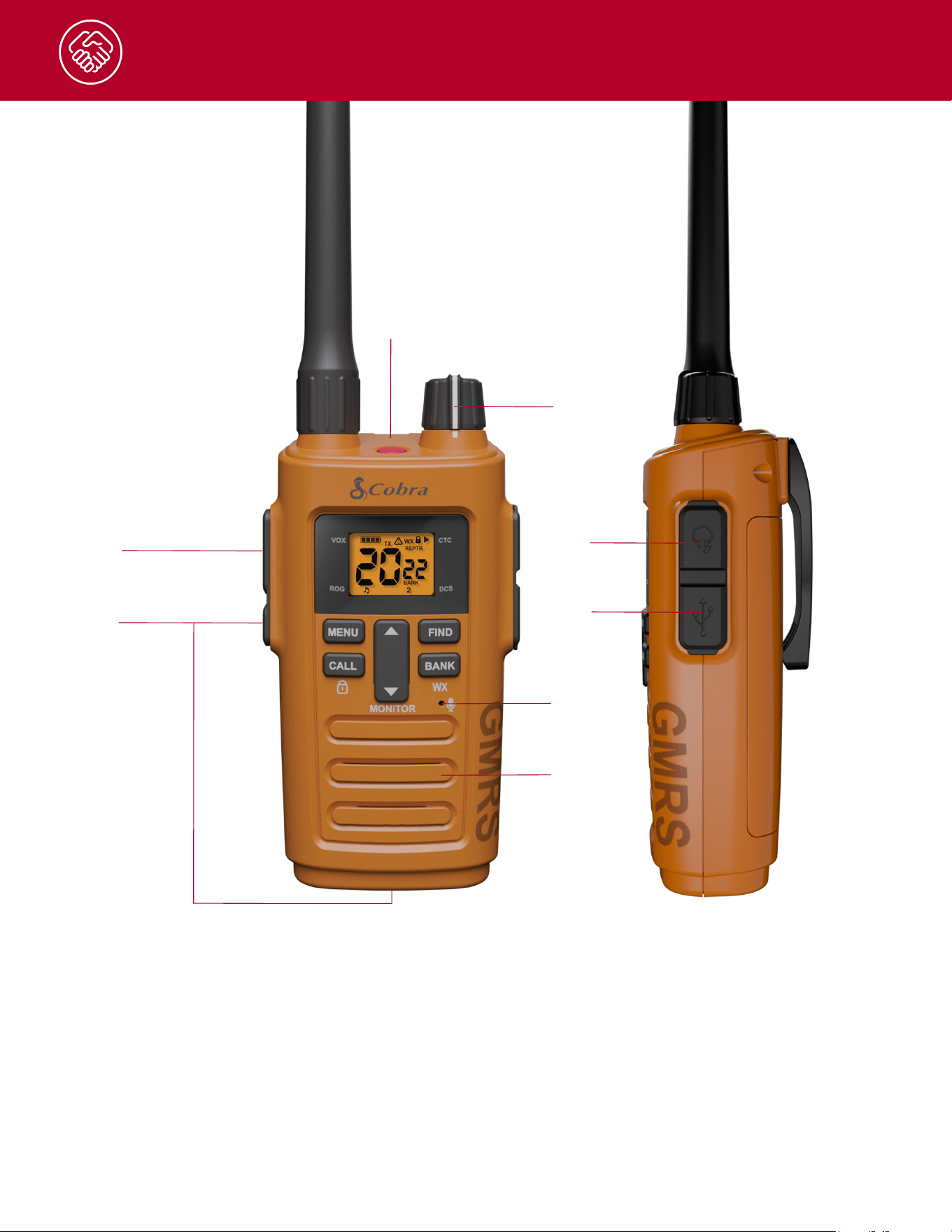
PRODUCT FEATURES
4
3.
2.
4.
5.
6.
1.
1.
PTT Button
2.
EmergencyButton
3.
Power&VolumeKnob
4.
HeadsetJack
5.
USB-C Port
6.
Microphone
7.
Speaker
8.
Flashlight
7.
8.
Introduction
5
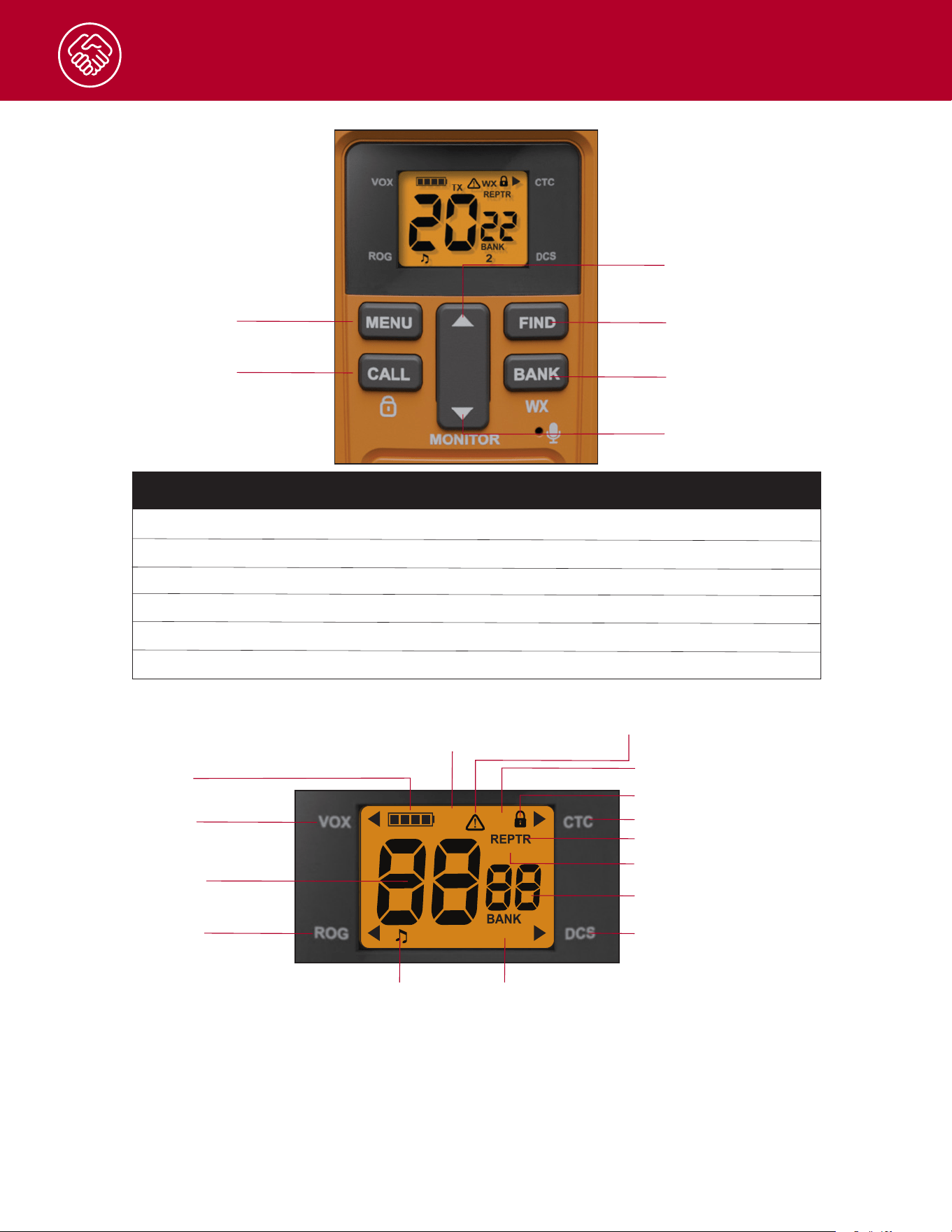
TrailBlazer 250 Keypad
TrailBlazer 250 Backlit LCD Display
A. MenuButton C. FindButton
D. Bank Button
B. Up Button
E. DownButton
F. Call Button
Letter Label Button Press Press and Hold
A. MENU Menu N/A
B. UP ChannelUp FastChannelUp
C. FIND FIND Scan
D. BANK Bank Weather
E. DOWN ChannelDown Monitor
F. CALL Call KeyLock
RX
TX
WX
SCAN
1234
1.
2.
3.
4.
5.
6.
7.
8.
9.
10.
11.
12. 13.
14.
15.
1. VOX
2. 4-SegmentBatteryLevel
3. Receive/Transmit
4. WeatherAlert
5. Weather
6. KeypadLock
7. CTCSS Privacy Code
8. Repeater
9. Scan
10. Privacy Code
11. DCS Privacy Code
12.Bank1-4
13.KeyTones
14.RogerBeep
15. Channel

Installation
Installing and Charging Batteries
1. InserttheincludedrechargableNickleMetalHydride(NiMH)batteriesintotheradio.Checktosee
thatthebatterieshavebeeninsertedproperly.
2. TochargethebatteriesintheradioinserttheUSBcableintothechargejacklocatedattherightside
of the radio.
3. PlugthecableintoaUSB-compatiblepowerport.
4. Theradiowilldisplayaashingbatteryiconwhilecharging.
NOTES:
• Cobrarecommendsyourradioisturnedowhilebeingcharged.
• Pleasechargenewbatteriesfor14hoursforrsttimeofuse.
• OnlychargeNiMHbatteriesintheradio.Ifhighercapacitybatteriesareuseditwilltakelongerto
charge.
• ForbestperformanceuseadedicatedbatterychargertochargeyourAArechargablebatteries.
• Non-Rechargeablealkaline,non-rechargeableLithiumprimary,andrechargeableLithiumIon
batteriescanalsobeused,butcannotbechargedinsidetheradio.
WARNING: DonotattempttochargealkalinebatteriesorLithiumprimarybatteries.Donotmixoldand
newbatteriesorbatterytypesintheradio(alkaline,rechargeable(NiCD,NiMH,Li-Ion,etc.)
Quick Start
1. TurnON/OFF/VolumeKnobclockwisetoturntheradioonandcounterclockwisetoturn
theradioo.
2. Select a desired channel.
NOTE: Bothradiosmustbetunedtothesamechannel/privacycodetocommunicate.
3. PushandholdthePush-To-Talk(PTT)buttonwhilespeakingintothemicrophone.
4.Whennishedtalking,releasethePTTandlistenforaresponse.
To restore the radio to default settings:
1. Powerotheradio
2. SimultaneouslyholdtheMENUandDOWNbuttonsandpowerontheradio
Thiswillresetallradiosettingsandchannelbankstotheirfactorydefaults.
6
7
Operation
Turning the Radio On and O
- TopowerONturnPowerKnobclockwise
- TopowerOFFturnPowerKnobcounter-clockwise
Battery Low
Whenbatterypowerislow,thenalbarintheBatteryiconwillblinkandanaudibletonewillsoundtwice
indicatingthatthebatteriesarelow.Insertnewbatteriesintotheradioorrechargethebatteriesinthe
radioifrechargeablebatteriesarebeingused.
Communicating with Another Radio
1. PressandholdthePush-To-Talk(PTT)buttononthesideoftheradio
2. Withthemicrophoneabouttwoinches(5cm)fromyourmouth,speakinanormalvoice.
3. ReleasethePTTbuttonwhenyouarenishedtalkingandlistenforaresponse.
YoucannotreceiveincomingcallswhilepressingthePTTbutton.
Bothradiosneedtobeonthesamefrequencyandprivacycodetocommunicate.
- Turnthepower/volumeknobclockwisetoincreasethevolume.
- Turnthepower/volumeknobcounterclockwisetodecreasethevolume.
Tip:ItisrecommendedtowaitashorttimeafterpressingthePTTbeforespeakingtoavoidcuttingo
thebeginningofthemessage.
Changing Channels
Tochangethechannel,presstheupordownbuttonuntilyoureachyourdesiredchannel.
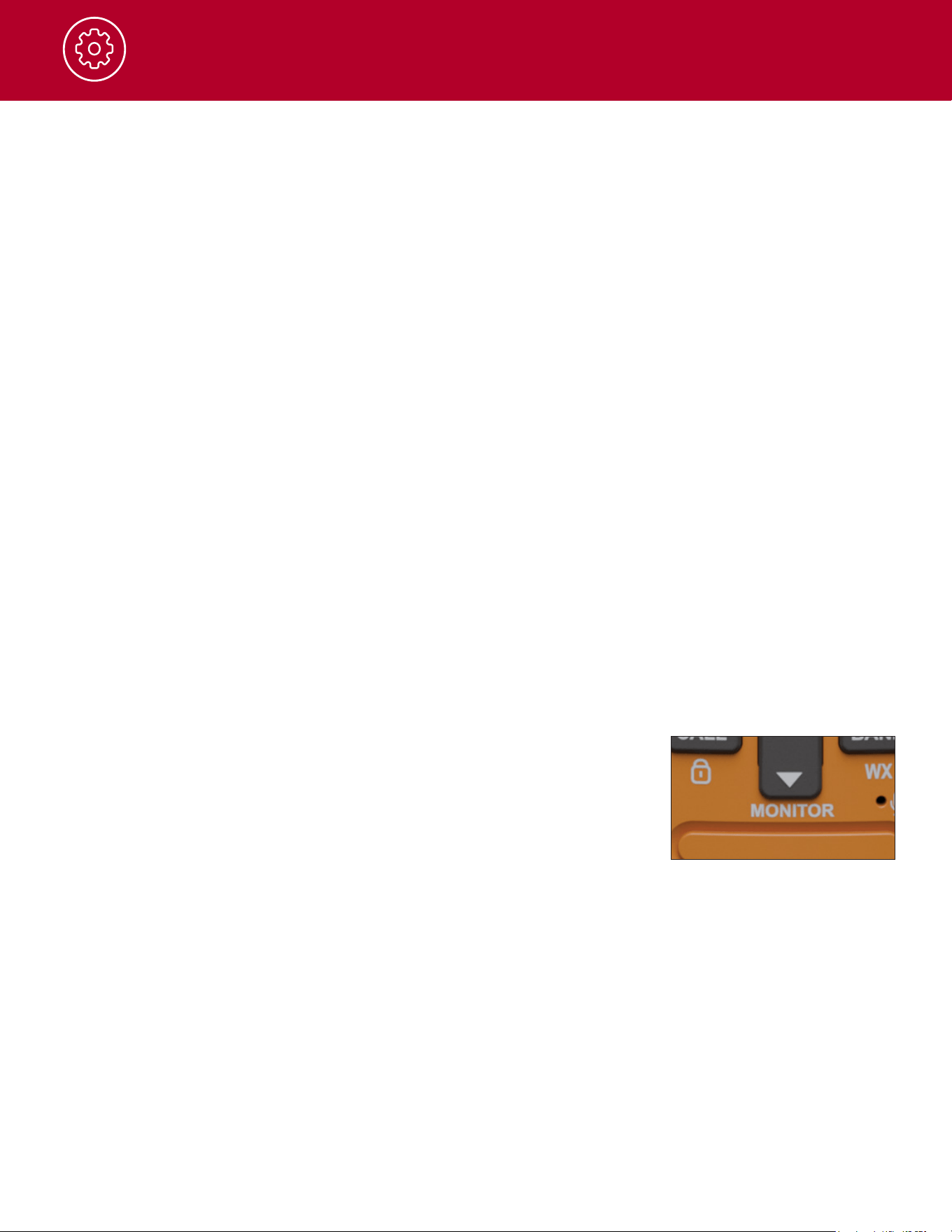
Monitor
YourTrailBlazer250hasanautomaticsquelchfunctiontoautomatically
blockweaktransmissionsandstatic,interference,orotherunwantednoise.
YoucanturnontheMonitorfunctiontoturnotheautomaticsquelch,
allowingallsignalstobereceived.Thisisalsoaneectivewaytohear
audiofromtheradiospeakerinordertoadjustthevolume.
- PressandholdtheMonitorbuttonfor2secondstoturnthemonitoron
toopenthesquelchandallowallsignalsandnoisetobereceived.Adjustthevolumeandlistenfor
anyweaksignals.Themonitorwillturnowhenthebuttonisreleased.
- PressandholdtheMonitorbuttonfor5secondstocontinuouslymonitoraselectedchannel.The
squelchwillopenallowingallsignalsandnoisetobereceived.Toturnomonitorandreturnto
automaticsquelchpressandholdthemonitorbutton.
Setthevolumecontrolinalowpositionanduseaslowavolumeaspossible.Donotholdtheradio
speakerclosetoyourear.Ifthevolumeissettoahighlevel,itcoulddamageyourhearing.

Operation
8
Call button
PressandreleasetheCallbuttontoalertothersthatyouarecalling.
Theotherpersonwillhearatwosecondcalltone.Thistoneisonlyusedto
alertothersofincomingvoicecommunications.
Lock Function
The lock function locks the radio controls to prevent accidental operation.
Channel Banks
TheTrailBlazer250comesequippedwithmultiplechannelbankstoprovidecompatibilitywithCobra
FamilyRadioService(FRS)radios.Ifrepeatersareturnedonanadditional8repeaterchannels15RP-
22RPareavailable.Bydefaultthechannelbanksare:
1. Bank 1:22GMRS/FRSchannels+8GMRSrepeaterchannels.
2. Bank 2:60GMRS/FRSchannelscompatiblewithCobraRXseriesFRSradiosandMidland50
channelFRSandGMRSradios.
a. Channels1-22(and+8repeaterchannelsifturnedon)arethestandardGMRS/FRSchannels
b. Channels23-60havepresetprivacycodes
3. Bank 3:22GMRS/FRSchannelswithpresetprivacycodes.CompatiblewithCobraPXseries
FRSradios.
4. Bank 4:Blankbydefault.Bank4isusedfortheFrequencyFindfunction.Whenchannelsarefound
withthendfunctiontheywillbestoredinbank4.
Inadditiontosettingprivacycodes,channelbankscanbefurthercustomizedwiththeCobra
ProgrammingSoftware(CPS).TheCobraProgrammingSoftwareallowsyoutoenableordisable
channelstocustomizethechannelbanks.Insteadofa22orlargerchannelbankaradiocanbe
programmedononlyhave1or2channels.TheCPSalsoallowsforchangingtheradiosettingsand
adjustingallofthechannelsinaeasyandconvenientuserinterface.
Find Function
TheFindfunctionallowsyourTrailBlazer250toscantheentirefrequencybandandlockontothe
strongestnearbysignal.Thisisaconvenientwayto:
- LocatethetransmissionsfromanynearbyGMRSorFRSradios
- Identifywhatchannelaradioistransmittingonifitdoesnothaveadisplay
- Connectmultipleradiostothesamechannelandprivacycode
PresstheFindbuttontoinitiateasignalnd.Theradiowillashthechannelindicator.Ifastrongsignal
isfoundtheradiowilllockontothesignalandshowthechannelandprivacycode.TheTrailBlazerradio
willbeonBank4withthischannelinformationandyoucannowreceiveandtransmittootherradioson
that channel.
TheTrailBlazer250canalsoperformastandardchannelscanofallofthechannelsintheselected
channelbank.PressandholdtheFindbuttontoinitiateachannelscan.Theradiowilladvancethrough
eachofthechannelsintheselectedchannelbankandstopifastrongsignalisfound.Tocontinuethe
scanpresstheupordownbuttons.Tostopthescanandcommunicateontheselectedchannelpress
thePTTbutton.

Operation
9
Weather (WX)
TheTrailBlazer250has10NOAAweatherchannelsandaweatheralertfeature.TheNationalOceanic
andAtmosphericAdministration(NOAA)providescontinuousaround-the-clockbroadcastsofthelatest
weatherconditions.Recordedweathermessagesrunevery4-6minutesandarerevisedevery2-3hours
as needed.
NOAA Emergency Weather Alert
Intheeventofamajorstormorotherweathercondition,NOAAbroadcastsa1050Hztonethatyour
radiocandetectandwarnyouofaweatheralertcondition.WhentheWeatherAlertmodeonyourradio
issettoOn,thissignalwillproducealoudtonefromtheradiospeakerandwillautomaticallyswitchto
thealertingweatherchannelsothealertbroadcastcanbeheard.
NOTE:Typicallyonlyoneortwoweatherchannelswillbeoperatinginagivenlocation.Selectthe
channelwiththestrongestsignalforyourlocation.Thisweatherchannelwillalsobeusedtofor
detectingaemergencyweatheralert.
Totestthissystem,NOAAbroadcaststhe1050HzsignaleveryWednesdaysometimebetween10am
andnoonineachlocaltimezone.Anyreceiverthatcandetecttheweatheralerttonemayusethis
servicetoverifythatthissystemisfunctioningproperly.
ToentertheWXmodepressandholdtheWXkey.Theweatherchannelwillbeshownonthedisplay.
TosetWXAlerttoOnorOpressandreleasetheMenukeywhileinWXmode.Usetheupanddown
keystoselectWXAlertOnorO.PressPTTorwait6secondstoconrmandexitthemenu
Emergency Alert
TheEmergencyAlertfeaturecanbeusedtosignalmembersinyourgroupofyourneedforurgenthelp.
TheTrailBlazerseriesradioswilloperateinanautomatichands-freeemergencymode.
AllCobraRX380,RX680,PX650,&CXY900seriesFRSradiosandTrailBlazer250,450,&500series
GMRSradiosarecompatiblewiththeEmergencyAlertFeature.
RadiosotherthantheseCobraseriesradioscanreceivetheemergencyalertsignal,butmaynot
respondtotheemergencyalertinthesamewayasacompatibleCobraseriesradio.
TosignalanEmergencyAlertpressandholdtheEmergencyAlertbuttonfor3seconds
- Thebacklightwillashandanalerttonewillsound.
- Afterthealerttoneendsyoumayspeakintothemicrophonetomakeatransmission.
• Youdonotneedtocontinuetoholdtheemergencyalertbuttonanddonotneedtopressand
holdthePTTbuttonforyourmessagetobetransmitted.
• Thishands-freeemergencyalerttransmissionmodewilllastfor22seconds.
- Afteratotalof30secondsyourradiowillsoundabeeptoneandthebacklightwillstopashing.
Yourradiowillreturntoitsnormaltwo-wayradiofunction.
- TurningotheradiowillcanceltheEmergencyAlert.
NOTE:Inordertoreceiveanemergencyalertareceivingradio(s)mustbesettothesamechanneland
privacy code.
Emergency Alert continued
Operation
10
AcompatibleCobraradioreceivinganemergencyalertwillrespondby:
- Soundingan8secondalerttoneatmaximumvolume.
- After8secondstheradiobuttonsandcontrolswillbelockedsotheincomingemergencymessage
canbereceived
- Afteratotalof30secondsyourradiowillsoundabeeptoneandyourradiowillreturntoitsnormal
two-wayradiofunction.
WARNING:TheEmergencyAlertfeatureshouldonlybeusedintheeventofanactualemergency.
Cobraisnotresponsibleifthereisnoresponsetotheemergencyalertfromthereceivinggroup.
Flashlight & Flashlight SOS
PressandreleasetheFlashlightbuttontousetheLEDashlightlocatedatthebottomoftheradio.
ToactivatetheS.O.S.function,pressandholdtheFlashlightbutton.Pressandreleasetoturnothe
ashlightorS.O.S.function.
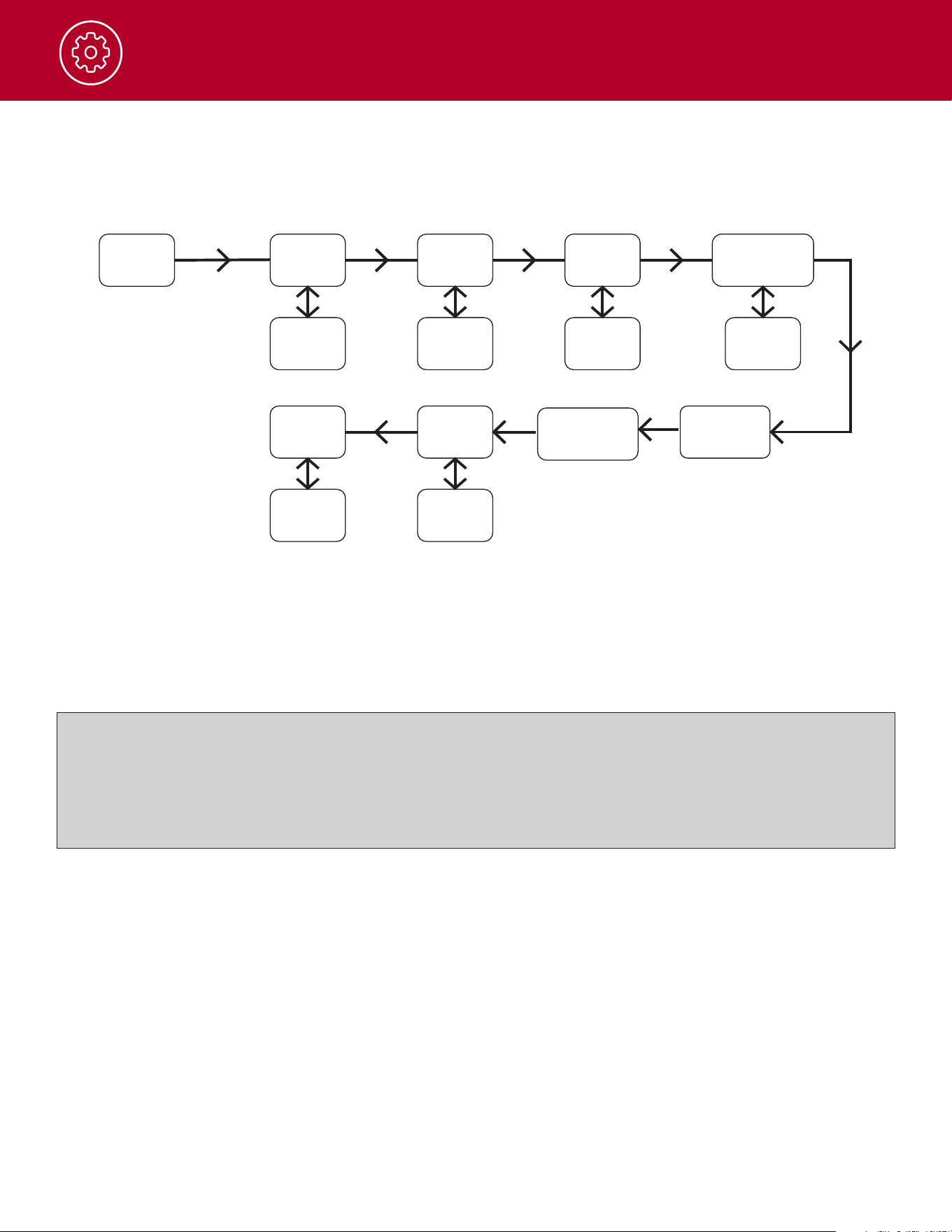
Menu
ByscrollingthroughtheMenu,youwillbeabletoselectorturnonpreferredfeaturesofyourTrailBlazer
250.WhenscrollingthroughtheMenu,theradiofeatureswillbedisplayedinthesamepredetermined
order:
Set CTCSS Privacy Code
Set DCS Privacy Code
Set Vox On/O
Set Vox Sensitivity
Set Repeaters On/O
Set Call Tones 1-10
Set Roger Beep On/O
Set Key Tones On/O
NOTE:Splittonescanbesetfortherepeater
channelswhereadierentprivacycodeisused
forTransmitandReceive.Thesecanevenbe
set to use CTCSS for one code and DCS for the
other.
Operation
11
Menu/Power Button
Whenchangingasettinginthemenu,selectthedesiredsettingandchooseoneofthefollowing:
a. PresstheMenubuttontosavethenewsettingandproceedtoothermenusettings.
b. PressthePush-to-TalkbuttontosavethenewsettingandreturntoStandbymode.
c. Donotpressanybuttonsfor6secondstosavethenewsettingandreturntoStandbymode.
To restore the radio to default settings:
• Powerotheradio
• SimultaneouslyholdtheMENUandDOWNbuttonsandpowerontheradio
Thiswillresetallradiosettingsandchannelbankstotheirfactorydefaults.
EachpressoftheMenubuttonadvancesyoutothenextoptionsetting.PresstheUPorDOWN
buttonstochangethesetting,youmayalsopressthePTTbuttontosavethenewsettingandreturnto
standbymode.
Menu
CTCSS DCS
Repeater
On/Off
On/Off
1-83
VOX
1-51-38
On/Off
On/Off
VOX
Sensitivity
Roger
Beep
Key
Tone
Call Tones
1-10

Operation
12
Privacy Codes (CTCSS & DCS)
YourTrailBlazer250radioincorporatestwoadvancedcodedsquelchsystemsthatcanhelptoreduce
interferencefromotherusersonanygivenchannel.
CTCSS(ContinuousToneCodedSquelchSystem)provides38privacycodesandDCS(DigitallyCoded
Squelch)provides83privacycodes.Eithersystemcanbeusedonchannels1-22,butonlyonesystem
canbeusedonachannelatagiventime.
NOTE: Tosuccessfullycommunicateusingaprivacycode,boththesendingandreceivingradiosmust
betunedtothesamechannelandtothesameprivacycodesystem(CTCSSorDCS)andprivacycode
number.Eachchannelwillrememberthelastprivacycodesystemandnumberyouselect.
NOTE: Theprivacycode00isnotaprivacycode,butallowsallsignalstobeheardonachannelthatis
setto00onboththeCTCSSandDCSsystems.
CTCSS Privacy Code & Set DCS Privacy Code
PresstheUporDownbuttontoselectaprivacycode.YoucanholdtheUporDownbuttonforfast
advance.Theprivacycode0turnstheprivacycodeoandallowsallsignalstobeheardonachannel.
WhensettingtheprivacycodesforarepeaterchannelseparateselectionscanbemadefortheTransmit
PrivacyCodeandtheReceivePrivacyCode.ThesecanevenhaveoneprivacycodeusingCTCSSand
the other using DSC.
Voice Activated Transmit (VOX)
VOXenableshands-freeoperationofyourradiobyautomaticallytransmittingwhenyouspeak.This
featureisparticularlyeectivewhenusedwithaheadsetorlapelspeaker/microphone.
VOX Sensitivity Settings
AdjustVOXsensitivity(levels1-5)tomatchyourvoicevolumeandminimizeunwantedtransmissions
frombackgroundnoise.Level1requirestheloudestvoiceinputandisthemostresistanttobackground
noise.Level5isthehighestsensitivityandactivateswithminimalvoiceinput.Foroptimalperformance,it
isrecommendedtouseacompatiblespeaker/microphoneaccessorywiththeVOXfeature.
Repeaters On/O
TurningrepeatersOnwilladdthe8repeaterchannels15RP-22RPtothechannellistonBanks1,2,&3.
Call Tones 1-10
ThecurrentCallToneissoundedfromtheradio.Presstheupanddownbuttonstoscrollthroughthe
tenavailablecalltones(1-10)
Roger Beep On/O
AreceivingradiowillhearanaudibletonewhenyoureleasetheTalkbutton.Thisalertstheotherparty
thatyouarenishedtalkinganditisOKforthemtospeak.
Therogerbeepwillalsosoundfromyourradioasanindicationthatrogerbeepison.
Key Tones On/O
WhenKeyTonesareOntheradiowillgiveaconrmationbeepwhenbuttonsarepressed.
13
Operation
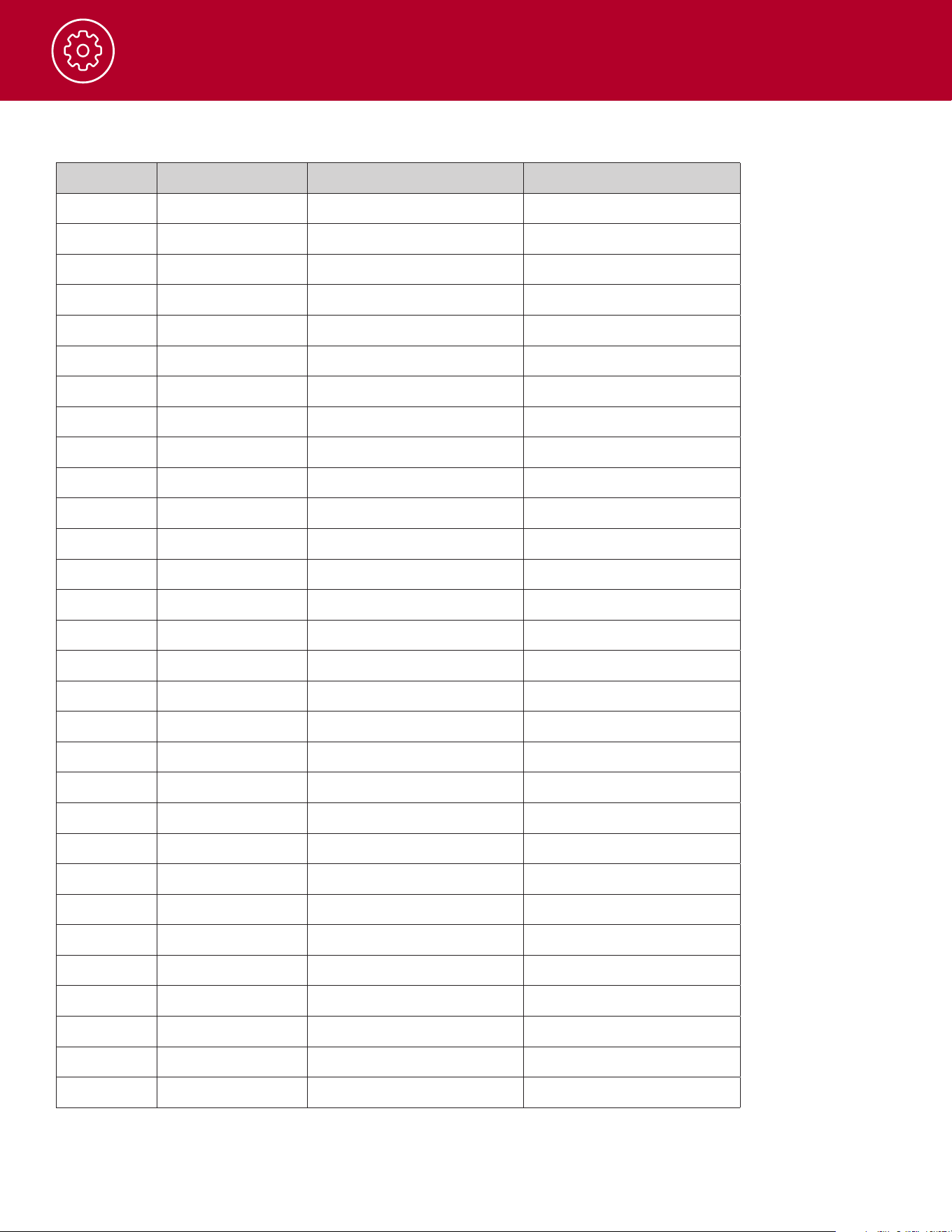
Channel Frequencies - Bank 1*
Index Radio Channel Frequency Bandwidth
1 1 1-462.5625 Wideband/Narrowband
2 2 2-462.5875 Wideband/Narrowband
3 3 3-462.6125 Wideband/Narrowband
4 4 4-462.6375 Wideband/Narrowband
5 5 5-462.6625 Wideband/Narrowband
6 6 6-462.6875 Wideband/Narrowband
7 7 7-462.7125 Wideband/Narrowband
8 8 8-467.5625 Narrowband
9 9 9-467.5875 Narrowband
10 10 10-467.6125 Narrowband
11 11 11-467.6375 Narrowband
12 12 12-467.6625 Narrowband
13 13 13-467.6875 Narrowband
14 14 14-467.7125 Narrowband
15 15 15-462.55 Wideband/Narrowband
16 16 16-462.575 Wideband/Narrowband
17 17 17-462.6 Wideband/Narrowband
18 18 18-462.625 Wideband/Narrowband
19 19 19-462.65 Wideband/Narrowband
20 20 20-462.675 Wideband/Narrowband
21 21 21-462.7 Wideband/Narrowband
22 22 22-462.725 Wideband/Narrowband
23 15RP 15RP-467.55 Wideband/Narrowband
24 16RP 16RP-467.575 Wideband/Narrowband
25 17RP 17RP-467.6 Wideband/Narrowband
26 18RP 18RP-467.625 Wideband/Narrowband
27 19RP 19RP-467.65 Wideband/Narrowband
28 20RP 20RP-467.675 Wideband/Narrowband
29 21RP 21RP-467.7 Wideband/Narrowband
30 22RP 22RP-467.725 Wideband/Narrowband
* Wideband is the default
14
Operation
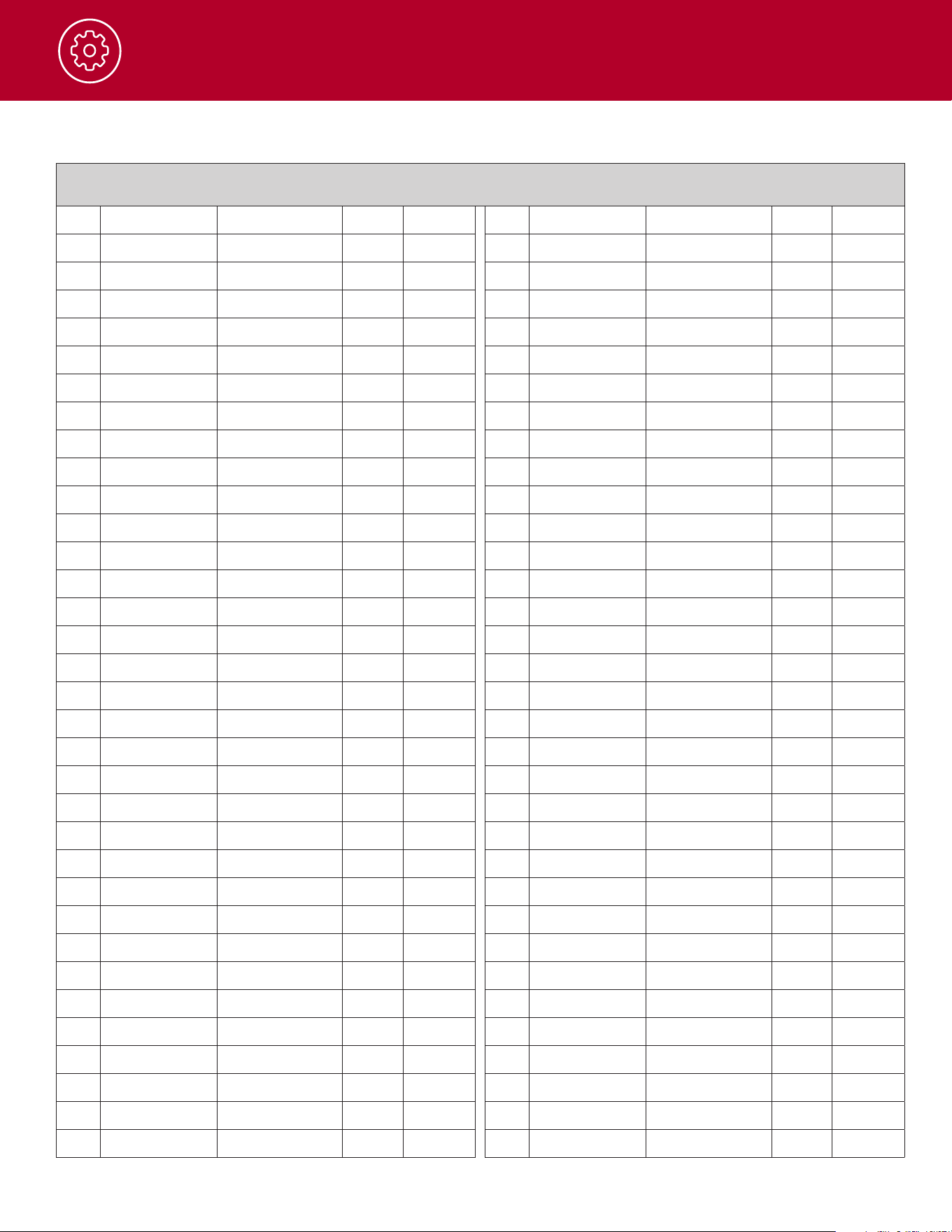
Channel Frequencies - Bank 2
1 1 1-462.5625
2 2 2-462.5875
3 3 3-462.6125
4 4 4-462.6375
5 5 5-462.6625
6 6 6-462.6875
7 7 7-462.7125
8 8 8-467.5625
9 9 9-467.5875
10 10 10-467.6125
11 11 11-467.6375
12 12 12-467.6625
13 13 13-467.6875
14 14 14-467.7125
15 15 15-462.55
16 16 16-462.575
17 17 17-462.6
18 18 18-462.625
19 19 19-462.65
20 20 20-462.675
21 21 21-462.7
22 22 22-462.725
23 15RP 15RP-467.55
24 16RP 16RP-467.575
25 17RP 17RP-467.6
26 18RP 18RP-467.625
27 19RP 19RP-467.65
28 20RP 20RP-467.675
29 21RP 21RP-467.7
30 22RP 22RP-467.725
31 23(Channel-1) 1-462.5625 CTCSS
38-250.3
32 24(Channel-3) 3-462.6125 CTCSS
35-225.7
33 25(Channel-5) 5-462.6625 CTCSS
32-203.5
34 26(Channel-7) 7-462.7125 CTCSS
29-179.9
35 27(Channel-15) 15-462.55 CTCSS
26-162.2
36 28(Channel-17) 17-462.6 CTCSS
23-146.2
37 29(Channel-19) 19-462.65 CTCSS
20-131.8
38 30(Channel-21) 21-462.7 CTCSS
17-118.8
39 31(Channel-2) 2-462.5875 DCS 1-23
40 32(Channel-4) 4-462.6375 DCS 4-31
41 33(Channel-6) 6-462.6875 DCS 7-47
42 34(Channel-8) 8-467.5625 DCS 10-65
43 35(Channel-10) 10-467.6125 DCS 13-73
44 36(Channel-12) 12-467.6625 DCS 16-115
45 37(Channel-14) 14-467.7125 DCS 19-131
46 38(Channel-16) 16-462.575 DCS 22-143
47 39(Channel-18) 18-462.625 DCS 25-156
48 40(Channel-20) 20-462.675 DCS 28-172
49 41(Channel-22) 22-462.725 DCS 31-223
50 42(Channel-1) 1-462.5625 CTCSS
14-107.2
51 43(Channel-3) 3-462.6125 CTCSS 11-97.4
52 44(Channel-5) 5-462.6625 CTCSS 8-88.5
53 45(Channel-7) 7-462.7125 CTCSS 5-79.7
54 46(Channel-15) 15-462.55 CTCSS 2-71.9
55 47(Channel-17) 17-462.6 CTCSS
37-241.8
56 48(Channel-19) 19-462.65 CTCSS
34-218.1
57 49(Channel-21) 21-462.7 CTCSS
31-192.8
58 50(Channel-2) 2-462.5875 DCS 2-25
59 51(Channel-4) 4-462.6375 DCS 5-32
60 52(Channel-6) 6-462.6875 DCS 8-51
61 53(Channel-8) 8-467.5625 DCS 11-71
62 54(Channel-10) 10-467.6125 DCS 14-74
63 55(Channel-12) 12-467.6625 DCS 17-116
64 56(Channel-14) 14-467.7125 DCS 20-132
65 57(Channel-16) 16-462.575 DCS 23-152
66 58(Channel-18) 18-462.625 DCS 26-162
67 59(Channel-20) 20-462.675 DCS 29-174
68 60(Channel-22) 22-462.725 DCS 32-226
Index
Radio
Frequency
Code Code
Channel Type Value
Index
Radio
Frequency
Code Code
Channel Type Value
15
Operation
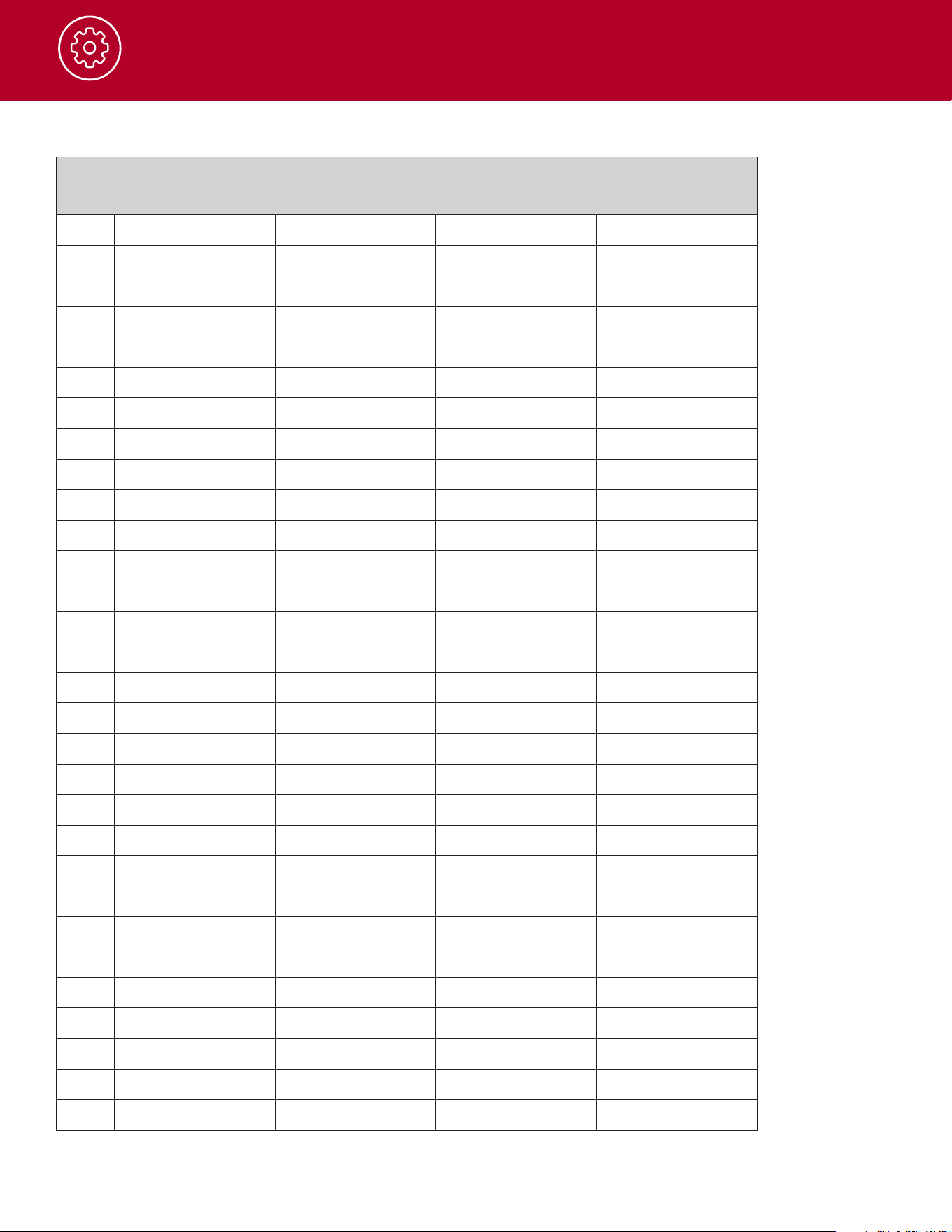
Channel Frequencies - Bank 3
1 1 1-462.5625 CTCSS 1-67
2 2 2-462.5875 CTCSS 11-97.4
3 3 3-462.6125 CTCSS 22-141.3
4 4 4-462.6375 CTCSS 33-210.7
5 5 5-462.6625 DCS 1-23
6 6 6-462.6875 DCS 11-71
7 7 7-462.7125 DCS 22-143
8 8 8-467.5625 DCS 33-243
9 9 9-467.5875 DCS 44-331
10 10 10-467.6125 DCS 55-431
11 11 11-467.6375 DCS 66-565
12 12 12-467.6625 DCS 77-712
13 13 13-467.6875 CTCSS 1-67
14 14 14-467.7125 CTCSS 11-97.4
15 15 15-462.55 CTCSS 22-141.3
16 16 16-462.575 CTCSS 33-210.7
17 17 17-462.6 DCS 1-23
18 18 18-462.625 DCS 11-71
19 19 19-462.65 DCS 22-143
20 20 20-462.675 DCS 33-243
21 21 21-462.7 DCS 44-331
22 22 22-462.725 DCS 55-431
23 15RP 15RP-467.55
24 16RP 16RP-467.575
25 17RP 17RP-467.6
26 18RP 18RP-467.625
27 19RP 19RP-467.65
28 20RP 20RP-467.675
29 21RP 21RP-467.7
30 22RP 22RP-467.725
Index
Radio
Frequency
Code Code
Channel Type Value
16
Operation
Weather Channels
WX Channel Frequency
Channel1 162.550MHz
Channel2 162.400MHz
Channel3 162.475MHz
Channel4 162.425MHz
Channel5 162.450MHz
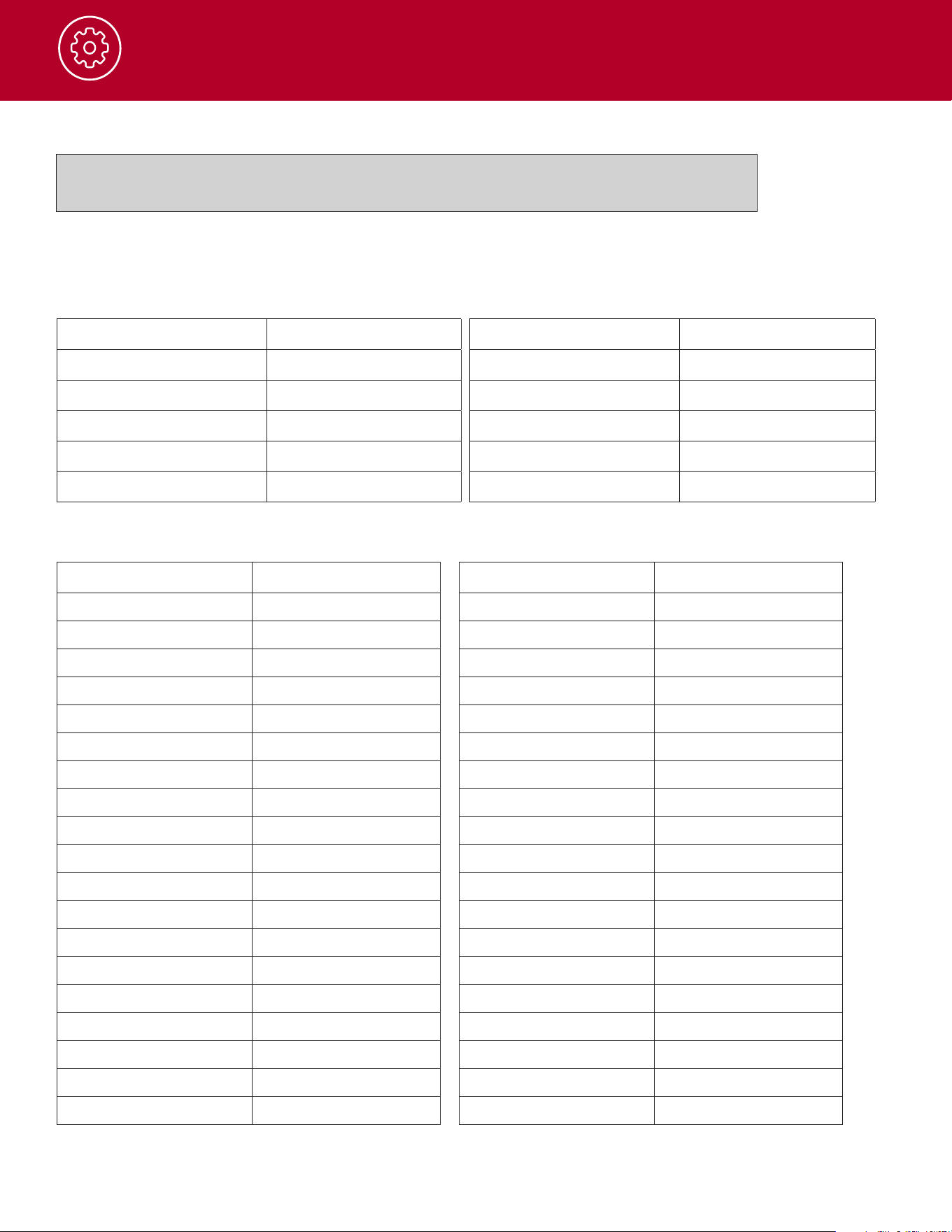
Channel Frequencies - Bank 4
Index
Radio
Frequency
Code Code
Channel Type Value
Bank4isblankbydefault.Bank4isusedfortheFindfunction.AstheFindfunctionis
usedBank4willpopulatewithchannels.
WX Channel Frequency
Channel6 162.500MHz
Channel7 162.525MHz
Channel8 161.650MHz
Channel9 161.775MHz
Channel10 163.275MHz
Code Tone Code
1 67
2 71.9
3 74.4
4 77
5 79.7
6 82.5
7 85.4
8 88.5
9 91.5
10 94.8
11 97.4
12 100
13 103.5
14 107.2
15 110.9
16 114.8
17 118.8
18 123
19 127.3
Code Tone Code
20 131.8
21 136.5
22 141.3
23 146.2
24 151.4
25 156.7
26 162.2
27 167.9
28 173.8
29 179.9
30 186.2
31 192.8
32 203.5
33 210.7
34 218.1
35 225.7
36 233.6
37 241.8
38 250.3
CTCSS Codes

17
Operation
DCS Codes
Code Octal Code Octal Code Octal Code Octal Code Octal
1 023 21 134 41 306 61 503 81 734
2 025 22 143 42 311 62 506 82 743
3 026 23 152 43 315 63 516 83 754
4 031 24 155 44 331 64 532
5 032 25 56 45 343 65 546
6 043 26 162 46 346 66 565
7 047 27 165 47 351 67 606
8 051 28 172 48 364 68 612
9 054 29 174 49 365 69 624
10 065 30 205 50 371 70 627
11 071 31 223 51 411 71 631
12 072 32 226 52 412 72 632
13 073 33 243 53 413 73 654
14 074 34 244 54 423 74 662
15 114 35 245 55 431 75 664
16 115 36 251 56 432 76 703
17 116 37 261 57 445 77 712
18 125 38 263 58 464 78 723
19 131 39 265 59 465 79 731
20 132 40 271 60 466 80 732
NOTE:CTCSS&DCScodenumbersmayvaryacrossradiobrands.These38CobraCTCSScodes
and83DCScodesaresharedacrossallCobraFRSandGRMSradiosandalsousedbymostradios
fromMidland,Motorola,Uniden,BackcountryAccess,andRockyTalkie.

18
Frequently Asked Questions
Power Cycling
Asageneraltroubleshootingsteppowercycletheradio(turnradiooandbackon)toseeiftheissue
persists.
Radio does not turn on
Makesurethatthebattery(ies)is(are)correctlyinstalledintheradio
Isthebatterycharged?Replacethebatterywithafullychargedbatteryorchargethebattery
Radiodoesnotcharge
For radios with a desktop charger ensure that the radio is fully seated in the charger
Checkthechargerandcabletoensurethattheyarefullyconnected.Ifpossibletrycharginganother
devicewiththesamechargerandcable.
No Audio
Checktomakesureboththechannelandtheprivacycodematchonthetransmittingradioand
receivingradio(s).Ifoneradiocanreceiveatransmissionbuttheothercannotthemostlikelycauseisa
mismatchofaprivacycode.
Checkthevolumelevelofthereceivingradio(s).
Ifanaccessoryheadsetorspeaker/micisusedensurethatitisfullyconnectedintotheradiojack.
Checktoensurethattheantennaisproperlyinstalledonradio.Inspecttheantennaforanysignsof
damage.Ifanydamageisfoundtheantennawillneedtobereplaced

19
Software, FCC and Safety Statement
Cobra Radio Programming Software
PleasevisitCobra.comtodownloadthesoftwareallowingtheabilitytofullycustomizeyourradioand
saveProlestobeusedonyourradios.
Aradioprogrammingcableisrequired(soldseparately).
Transmit and Receive Procedure
Yourtwo-wayradiocontainsalowpowertransmitter.Whenthetalkbuttonispusheditsendsoutradio
frequencysignals(RF).In1996theFederalCommunicationsCommission(FCC)adoptedRFexposure
guidelineswithsafetylevelsforhandheldwirelessdevices.Tocontrolyourexposureandensurecompliance
withtheoccupational/controlledenvironmentexposurelimits,alwaysadheretothefollowingprocedures:
•Transmitnomorethan50%ofthetime.
•Totransmit(talk),pressthePushtoTalk(PTT)button.
•Toreceivecalls,releasethePTTbutton.
Transmitting50%ofthetime,orless,isimportantbecausetheradiogeneratesmeasurableRFenergy
exposureonlywhentransmitting(intermsofmeasuringstandardscompliance).
FCC Statement
IMPORTANT NOTICE: WARNING:
Changesormodicationstothisunitnotexpresslyapprovedbythe
partyresponsibleforcompliancecouldvoidtheuser’sauthoritytooperatetheequipment.Thisdevice
complieswithparts15and90oftheFCCRules.Operationissubjecttothefollowingtwoconditions:1)
Thisdevicemaynotcauseharmfulinterference,and2)thisdevicemustacceptanyinterferencereceived,
includinginterferencethatmaycauseundesiredoperation.NOTE:Thisequipmenthasbeentestedand
foundtocomplywiththelimitsforaClassBdigitaldevice,pursuanttoPart15oftheFCCRules.
Theselimitsaredesignedtoprovidereasonableprotectionagainstharmfulinterferenceinaresidential
installation.Thisequipmentgenerates,usesandcanradiateradiofrequencyenergyand,ifnotinstalled
andusedinaccordancewiththeinstructions,maycauseharmfulinterferencetoradiocommunications.
However,thereisnoguaranteethatinterferencewillnotoccurinaparticularinstallation.Ifthisequipment
doescauseharmfulinterferencetoradioortelevisionreception,whichcanbedeterminedbyturningthe
equipmentoandon,theuserisencouragedtotrytocorrecttheinterferencebyoneormoreofthe
followingmeasures:
•Reorientorrelocatethereceivingantenna.
•Increasetheseparationbetweentheequipmentandreceiver.
•Connecttheequipmentintoanoutletonacircuitdierentfromthattowhichthereceiverisconnected.
•Consultthedealeroranexperiencedradio/TVtechnicianforhelp.
Disposal of Electroic Equipment
Thisproductmaycontainhazardoussubstancesthatcouldimpact
healthandtheenvironmentifnotdisposedofproperly.
Theproductshouldnotbedisposedofalongwithhouseholdwaste.Itshouldbehandedovertoan
applicablecollectionpointfortherecyclingofelectricalequipment.Byensuringthatthisproductis
disposedofcorrectlyyouwillhelp/preventpotentialnegativeimpactontheenvironment.
Ifyouneedmoreinformationonthecollection,reuseandrecyclingsystems,pleasecontactyourlocalcivic
oceortheshopwhereitwasoriginallypurchased.

20
Software, FCC and Safety Statement
Important FCC RF Exposure Requirements:
Forbody-wornoperation,thisradiohasbeentestedandmeetstheFCCRFexposureguidelineswhen
usedwithCobraaccessoriessuppliedordesignatedforthisproduct.Useofotheraccessoriesmay
notensurecompliancewithFCCRFexposureguidelines.Useonlythesuppliedantenna.Unauthorized
antennas,modicationsorattachmentscoulddamagethetransmitterandmayviolateFCCregulations.
NormalPosition:Holdthetransmitterapproximatelytwo(2)inchesfromyourfaceandspeakina
normalvoice,withtheantennapointedupandaway.DONOTholdtheantennawhentheradiois“in
use”.Holdingtheantennaaectstheeectiverange.Donotholdtheantennawhentheradioisinuse.
Holdingtheantennaaectstheeectiverange.
FCC Part 15.21 Warning Statement
NOTE:THEGRANTEEISNOTRESPONSIBLEFORANYCHANGESORMODIFICATIONSNOT
EXPRESSLYAPPROVEDBYTHEPARTYRESPONSIBLEFORCOMPLIANCE.SUCHMODIFICATIONS
COULDVOIDTHEUSER’SAUTHORITYTOOPERATETHEEQUIPMENT.
Radiation Exposure Statement:
UnderISEDregulations,thisradiotransmittermayonlyoperateusingtheantennathatisaxedtothe
radiotransmitter.Useonlythesuppliedantenna.Unauthorizedantennas,modications,orattachments
coulddamagethetransmitterandmayvoidtheuser’sauthoritytooperatetheradio.Anychangesof
modicationsnotexpresslyapprovedbythepartyresponsibleforcompliancecouldvoidtheuser’sability
tooperatetheequipment.SARtestsareconductedusingstandardoperatingpositionsacceptedbythe
FCC/ISEDwiththedevicetransmittingatitshighestcertiedpowerlevelinalltestedfrequencybands.
AlthoughtheSARisdeterminedatthehighestcertiedpowerlevel,theactualSARlevelofthedevice
whileoperatingcanbewellbelowthemaximumvalue.Thisdevicehasbeentestedandcertiedtonot
exceedtheexposurelimitestablishedbytheFCC/ISED.Testsforeachdeviceareperformedinpositions
andlocations(e.g.attheearandwornonthebody)asrequiredbytheFCC/ISED.Forbodyworn
operation,thisdevicehasbeentestedandmeetstheFCC/ISEDRFexposureguidelineswhenused
withanaccessorydesignatedforthisproductorwhenusedwithanaccessorythatcontainsnometal
andthatpositionsthehandsetaminimumof10mmfromthebody.Non-compliancewiththeabove
restrictionsmayresultinaviolationofRFexposureguidelines.
Licensing
TheradiosoperateonGMRS(GeneralMobileRadioService)frequencieswhichrequireanFCC(Federal
CommunicationsCommission)license.Youmustbelicensedpriortooperatingtheradio.Serious
penaltiescouldresultfromunlicenseduseofGMRSchannelsinviolationofFCCrules,asstipulatedin
theCommunicationsActSections501and502(amended).
YouwillbeissuedacallsignbytheFCCwhichshouldbeusedforstationidenticationwhenoperating
theradioonGMRSchannels.Youmustalsocooperatebyengaginginpermissibletransmissions
only,avoidingchannelinterferencewithotherGMRSusers,andbeingprudentwiththelengthofyour
transmissiontime.
ApplyforalicenseattheFCC’swebsite:
http:www.fcc.gov/universal-license-system
ContacttheFCCat1-888-CALL-FCC(1-888-225-5322)ifyouhaveanyquestions.
NOTE:Useofthisradiooutsidethecountrywhereitwasintendedtobedistributedissubjectto
governmentregulationsandmaybeprohibited.

21
Warranty Terms:
Cobrawarrantsyourproductagainstalldefectsinmaterialsandworkmanshipforaperiodofone(1)
yearfromthedateoforiginalpurchase.
Cobra,atoursolediscretion,willrepairorreplaceyourproduct(withthesameorcomparableproduct)
free of charge.
Cobrawillnotpayshippingchargesthatyouincurforsendingyourproducttous.Productsreceived
CODwillberefused.
Tomakeawarrantyclaim,wewillrequireprooforpurchaseintheformofaninvoiceorreceipt.
Noproofofpurchaseisrequiredforfactorydirectpurchases.
Warranty Exclusions: Warrantydoesnotapplytoyourproductunderanyofthefollowingconditions:
1.Theserialnumberhasbeenremovedormodied.2.Yourproducthasbeensubjectedtomisuse
ordamage(includingwaterdamage,physicalabuse,and/orimproperinstallation).3.Yourproduct
hasbeenmodiedinanyway.4.Yourreceiptorproof-of-purchaseisfromanon-authorizeddealeror
internetauctionsiteincludingE-bay,U-bid,orothernon-authorizedresellers.
LIMITATION OF WARRANTY: EXCEPT AS EXPRESSLY PROVIDED HEREIN, YOU ARE
ACQUIRING THE PRODUCT “AS IS” AND “WHERE IS”, WITHOUT REPRESENTATION OR
WARRANTY. COBRA SPECIFICALLY DISCLAIMS ANY REPRESENTATION OR WARRANTY
INCLUDING, BUT NOT LIMITED TO THOSE CONCERNING THE MERCHANTABILITY AND
SUITABILITY OF THE PRODUCT FOR A PARTICULAR PURPOSE. COBRA SHALL NOT BE
LIABLE FOR CONSEQUENTIAL, SPECIAL OR INCIDENTAL DAMAGES INCLUDING, WITHOUT
LIMITATION, DAMAGES ARISING OUT OF THE USE, MISUSE OR MOUNTING OF THE PRODUCT.
Theabovelimitationsorexclusionsshallbelimitedtotheextenttheyviolatethelawsofanyparticularstate.
Cobraisnotresponsibleforproductslostinshipmentbetweentheownerandourservicecenter.
General Warranty Information
Eachproductwemanufactureiscoveredbyourfactorywarranty.Whileeachproductmayhaveunique
componentsandpolicy,thegeneralguidelinebelowwillapplytomostCobraproducts.
AllCobraproductspurchasedfactory-directorfromourAuthorizedResellerswillcomewithatwo(2)
yearwarrantyfromthedateoftheoriginalretailpurchase(seepolicystatementaboveforfullwarranty
detailsandexclusions).
Standardaccessoriespackagedwitheachmodelwillhaveaone-yearfactorywarranty.
Accessoryitemshaveaone-yearfactorywarranty.
Shippingtoourfacilityisnotcoveredinourwarranty.ReturnshippingisincludedwithintheUS.
Thiswarrantyisnon-transferrable.
Forthesakeofclarity,‘repairorreplacetheProductoritsdefectivepart’doesnotincluderemovalor
installationwork,costsorexpenseswhichincludebutarenotlimitedtolaborcostsorexpenses.
Cobrawillnotberesponsibleforlostpackages.
©2024CobraElectronicsCorporation.CobraandthesnakedesignareproprietarytrademarksofCobraElectronics
Corporation,USA.Othertrademarksandtradenamesarethoseoftheirrespectiveowners.
CobraElectronicsCorporation™isatrademarkofCobraElectronicsCorporation,USA.
Limited 1-Year Warranty and Trademark Information

20