
This product is compliant with the
applicable CE requirements.
ASSEMBLY MANUAL / OWNER’S MANUAL
470i
2
Important Safety Instructions - Assembly 3
Safety Warning Labels / Serial Number 4
Specications 5
BeforeAssembly 5
Parts 6
Hardware 7
Tools 7
Assembly 8
Moving the Machine 20
Leveling the Machine 21
Important Safety Instructions 22
Features 23
Console Features 24
Operations 29
Mounting and Dismounting 29
Power Up / Idle Mode 29
Quick Start Program 30
UserProles 30
Pausing or Stopping 36
Results / Cool Down Mode 36
GOAL TRACK Statistics 37
Console Service Mode 39
Maintenance 41
Maintenance Parts 42
Troubleshooting 44
Table of ConTenTs
Nautilus,Inc.,www.NautilusInc.com,18225NERiversideParkway,Portland,OR97230,U.S.A.-CustomerService:
[email protected] | Printed in China | © 2013 Nautilus, Inc.
Tovalidatewarrantysupport,keeptheoriginalproofofpurchaseandrecordthefollowinginformation:
Serial Number __________________________
Date of Purchase ____________________
To register your product warranty, contact your local distributor.
If you have questions or problems with your product, please contact your local Schwinn
®
distributor.
To find your local distributor, go to: www.nautilusinternational.com
3
Important Safety InStructIonS
-aSSembly
This icon means a potentially hazardous situation which, if not avoided, could result in death or serious injury.
Obey the following warnings:
Read and understand all warnings on this machine.
Carefully read and understand the Assembly instructions.
• Keepbystandersandchildrenawayfromtheproductyouareassemblingatalltimes.
• Donotconnectpowersupplytothemachineuntilinstructedtodoso.
• Donotassemblethismachineoutdoorsorinawetormoistlocation.
• Makesureassemblyisdoneinanappropriateworkspaceawayfromfoottrafficandexposuretobystanders.
• Somecomponentsofthemachinecanbeheavyorawkward.Useasecondpersonwhendoingtheassemblysteps
involvingtheseparts.Donotdostepsthatinvolveheavyliftingorawkwardmovementsonyourown.
• Setupthismachineonasolid,level,horizontalsurface.
• Donottrytochangethedesignorfunctionalityofthismachine.Thiscouldcompromisethesafetyofthismachineandwill
void the warranty.
• Ifreplacementpartsarenecessary,useonlygenuineNautilus®replacementpartsandhardware.Failuretousegenuine
replacementpartscancausearisktousers,keepthemachinefromoperatingcorrectlyandvoidthewarranty.
• Donotuseuntilthemachinehasbeenfullyassembledandinspectedforcorrectperformanceinaccordancewiththe
Manual.
• ReadandunderstandthecompleteManualsuppliedwiththismachinebeforefirstuse.KeeptheManualforfuture
reference.
• Doallassemblystepsinthesequencegiven.Incorrectassemblycanleadtoinjuryorincorrectfunction.
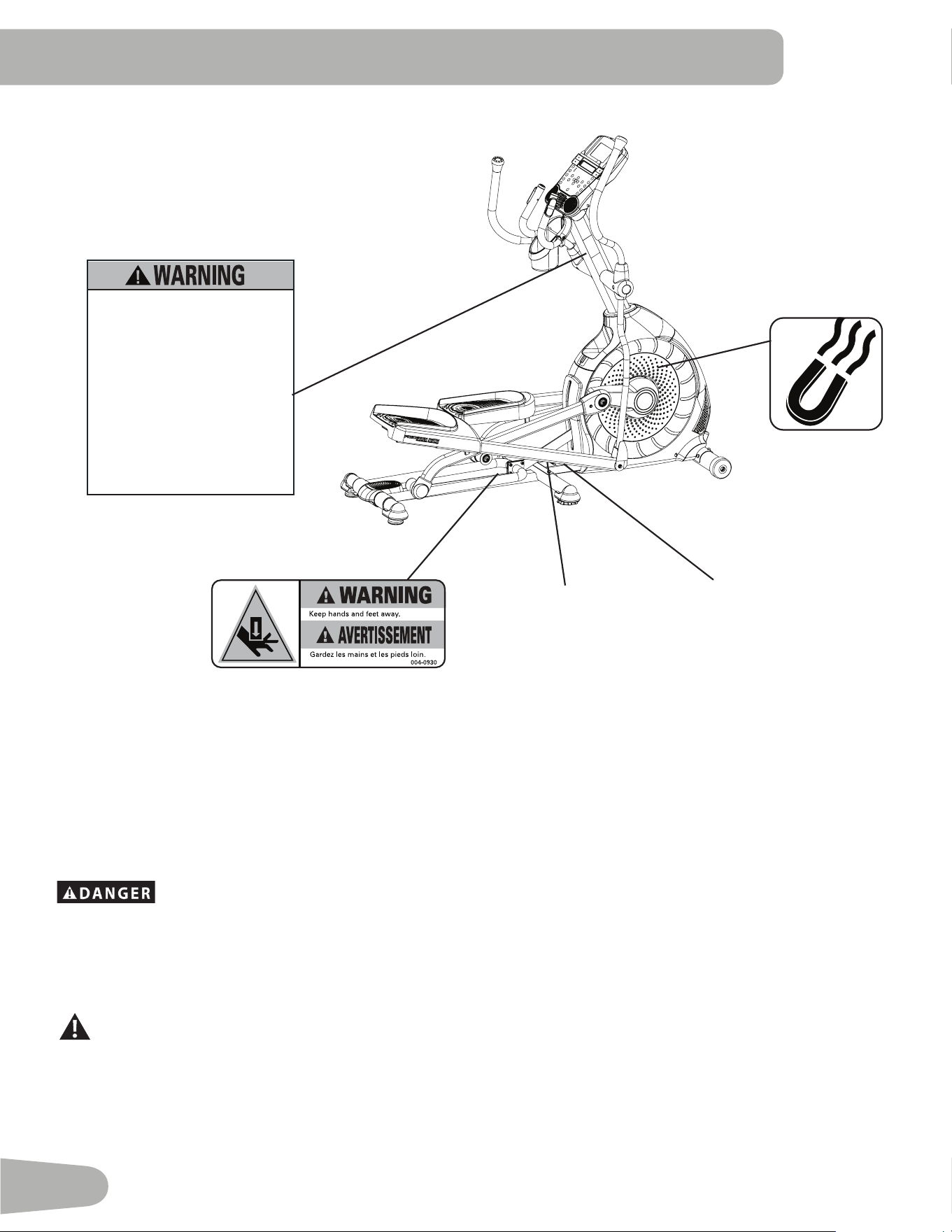
• Thisproductcontainsmagnets.Magneticfieldscaninterferewiththenormaluseofcertainmedicaldevicesataclose
range.Usersmaycomeintoproximityofthemagnetsintheassembly,maintenance,and/oruseoftheproduct.Giventhe
obviousimportanceofthesedevices,suchasapacemaker,itisimportantthatyouconsultwithyourmedicalprovider
inconnectionwiththeuseofthisequipment.Pleaseconsultthe“SafetyWarningLabelsandSerialNumber”sectionto
determine the location of the magnets on this product.
4
Safety WarnIng labelS and SerIal
number
SerialNumber
REVISIONS
ECO
REVISION
REV DESCRIPTION
APPROVED
DATE
TITLE.
PART NO.
REV.
SHEET 1 OF 1
SCALE: 1:1
DO NOT SCALE DRAWING
1. ALL ITEMS MUST BE RoHS COMPLIANT
2. ALL DIMENSIONS APPLY BEFORE PLATING OR COATING.
3. REMOVE ALL BURRS, BREAK SHARP EDGES 0.5 MM MAX.
4. ALL MACHINES SURFACES Ra 3.2 uM.
5. ALL APPLICABLE NAUTILUS STANDARDS AND
SPECIFICATIONS APPLY.
6. ALL DIMENSIONS ARE IN MILLIMETERS
7. ALL DUAL DIMENSIONS ARE IN INCH
UNLESS OTHERWISE SPECIFIED:
METRIC
THIRD ANGLE
PROJECTION
INTERPRET DIMENSIONS AND TOLERANCES
PER ASME Y14.5M - 1994
2.5
1.5
0.75
0.25
1°
X.
X.X
X.XX
X.XXX
ANGULAR
C
SIZE
This document is the property of Nautilus, Inc. It may not be reproduced in whole or part, provided to third parties, or used for any purposes other than the performance of work for Nautilus, Inc. without written authorization. All rights are reserved, including copyrights.
TOLERANCES.
DRAWN
DESIGNED
DATE
METRIC_C_REV G
NAUTILUS, INC.
16400 SE NAUTILUS DRIVE, VANCOUVER, WA 98683
LIFECYCLE
- -
APPROVALS
- -
- - - -
WARRANTY ITEM:
L.SEVIER
3/29/2013
L.SEVIER
A
8002739
GWl BIKE AND ELLIPTICAL 300lb 2013
MATERIAL.
COLOR.
DIE LINE
PMS 152
PMS 109
BLACK
WHITE
Labels must be created from an agency approved tamper proof labeling system
such as "UL Recognized component marking and labeling system (example: UL PGGU2) or equivalent.
Label and adhesive must be rated for surface it is applied to (painted metal or ABS plastic),
Label and adhesive must be rated for 60 degrees C minimum. Labels must meet UL 1647 Permanence of Marking Test.
50mm
117.7mm
A RELEASE 3/29/2013
LSEVIER
xxxxxxx
• Lisez et assimilez tous les avertissements
apposés sur cet appareil.
• Gardez les enfants et les animaux de
compagnie éloignés de cette machine en
tout temps
• Déconseillé aux enfants âgés de
moins de 14 ans.
• Lisez et familiarisez-vous avec le Manuel
du propriétaire et avec tous les
avertissements avant d’utiliser cette
machine.
• Soyez prudent lorsque vous utilisez cet
équipement pour ne pas vous infliger de
graves blessures.
• Cette machine supporte un poids
maximal de 300lbs. (136kg).
• Remplacez toute étiquette
d’avertissement endommagée, illisible
ou manquante.
• La fréquence cardiaque qui s’affiche
sur la console peut être inexact et
doit être utilisée seulement à titre
indicatif.
• Read, understand and obey all
warnings on this machine.
• Keep children away.
• Not intended for use by anyone
under 14 years of age.
• Prior to use, read and understand
the Owner’s Manual.
• Injury or death is possible if
Caution is not used while using this
machine.
• The maximum user weight for this
machine is 300 lbs (136 kg).
• Replace any “Caution”, “Warning”
or “Danger” label that is illegible,
damaged, or removed.
• The heart rate displayed may be
inaccurate and should be used for
reference only.
8002739_A
ProductSpecifications
REVISIONS
ECO
REVISION
REV DESCRIPTION
APPROVED
DATE
TITLE.
PART NO.
REV.
SHEET 1 OF 1
SCALE: 1:1
DO NOT SCALE DRAWING
1. ALL ITEMS MUST BE RoHS COMPLIANT
2. ALL DIMENSIONS APPLY BEFORE PLATING OR COATING.
3. REMOVE ALL BURRS, BREAK SHARP EDGES 0.5 MM MAX.
4. ALL MACHINES SURFACES Ra 3.2 uM.
5. ALL APPLICABLE NAUTILUS STANDARDS AND
SPECIFICATIONS APPLY.
6. ALL DIMENSIONS ARE IN MILLIMETERS
7. ALL DUAL DIMENSIONS ARE IN INCH
UNLESS OTHERWISE SPECIFIED:
METRIC
THIRD ANGLE
PROJECTION
INTERPRET DIMENSIONS AND TOLERANCES
PER ASME Y14.5M - 1994
2.5
1.5
0.75
0.25
1°
X.
X.X
X.XX
X.XXX
ANGULAR
C
SIZE
This document is the property of Nautilus, Inc. It may not be reproduced in whole or part, provided to third parties, or used for any purposes other than the performance of work for Nautilus, Inc. without written authorization. All rights are reserved, including copyrights.
TOLERANCES.
DRAWN
DESIGNED
DATE
METRIC_C_REV G
NAUTILUS, INC.
16400 SE NAUTILUS DRIVE, VANCOUVER, WA 98683
LIFECYCLE
7-22-10
APPROVALS
- -
- - - -
WARRANTY ITEM:
A RELEASED
NPI 13149 DLOVELY
7-22-10
D.LOVELY
D.LOVELY
07 /22 / 2010
D.LOVELY
A
004-0930
CRUSH WARNING
21.78mm
54.8mm
MATERIAL.
COLOR.
DIE LINE
PMS 152
PMS 109
BLACK
WHITE
Labels must be created from an agency approved tamper proof labeling system
such as "UL Recognized component marking and labeling system (example: UL PGGU2) or equivalent.
Label and adhesive must be rated for surface it is applied to (painted metal or ABS plastic),
Label and adhesive must be rated for 60 degrees C minimum. Labels must meet UL 1647 Permanence of Marking Test.
•
•
Grounding Instructions
Thisproductmustbeelectricallygrounded.Ifamalfunctionoccurs,correctgroundingdecreasestheriskofelectricshock.
Thepowercordisequippedwithanequipment-groundingconductor,andmustbeconnectedtoanoutletthatisproperly
installed and grounded.
Theelectricalwiringmustcomplywithallapplicablelocalandprovincialstandardsandrequirements.Incorrect
connectionoftheequipment-groundingconductorcanresultinariskofelectricshock.Consultalicensed
electricianifyouarenotsurethatthemachineiscorrectlygrounded.Donotchangetheplugonthemachine
– if it does not fit the outlet, have a correct outlet installed by a licensed electrician.
ASurgeProtectorDeviceisrecommendedtoprotectthemachine.
IfaSurgeProtectorDevice(SPD)isusedwiththismachine,besurethatitisUL1449ratedorequivalent,andmatches
thepowerratingofthisequipment(220-240VAC).Donotconnectotherappliancesordevicestothesurgeprotector
in combination with this machine.
Makesurethattheproductisconnectedtoanoutlethavingthesameconfigurationastheplug.Noadaptershouldbeused
with this product.
5
SpecIfIcatIonS
Before Assembly
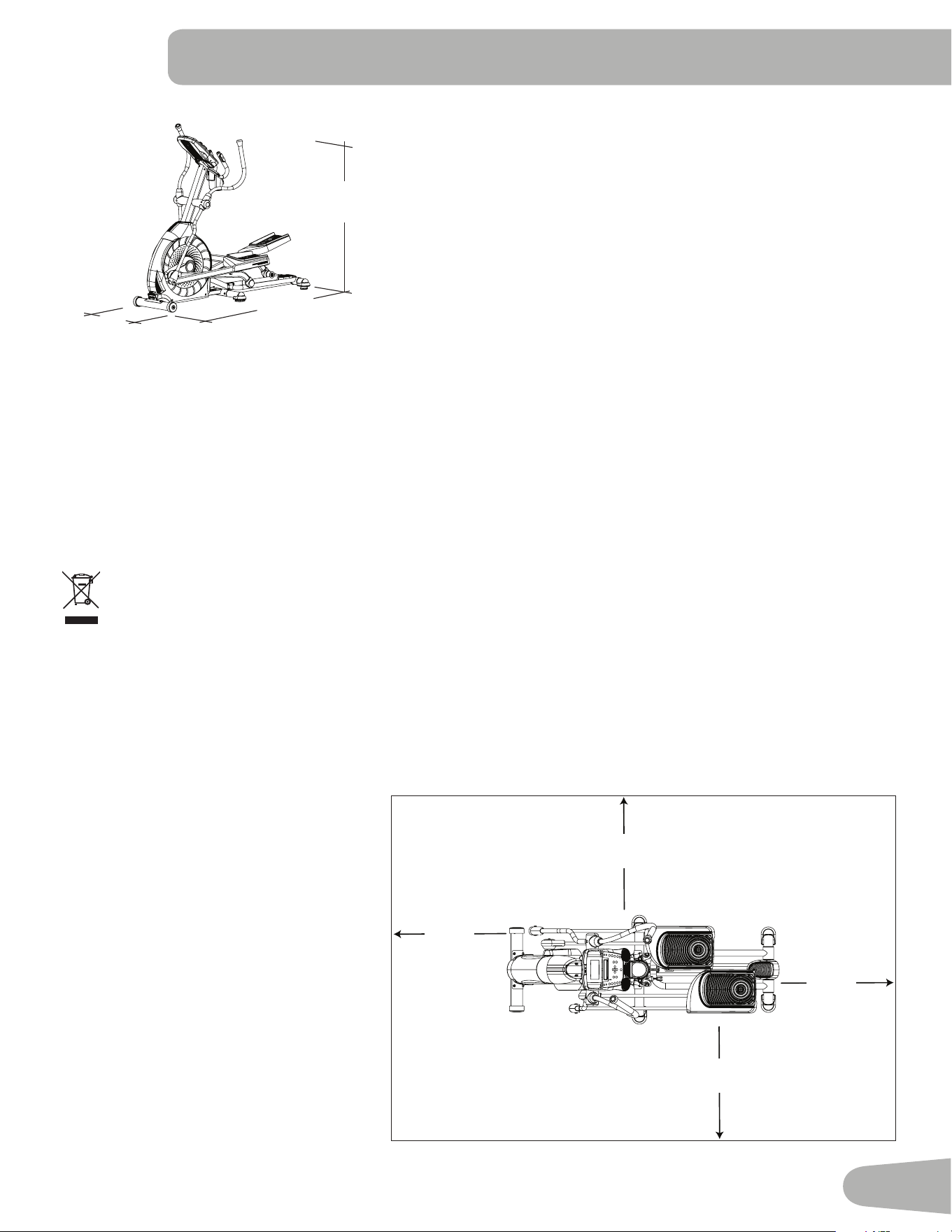
Selecttheareawhereyouaregoingtosetupandoperateyourmachine.Forsafeoperation,thelocationmustbeona
hard,levelsurface.Allowaworkoutareaofaminimum193.4cmx300cm(76.2”x118.1”).Besurethattheworkout
spaceyouareutilizinghasadequateheightclearance,takingintoconsiderationtheheightoftheuserandthemaximum
incline of the elliptical machine.
Basic Assembly Tips
Followthesebasicpointswhenyouas-
semble your machine:
• Readandunderstandthe“Important
SafetyInstructions”beforeassembly.
• Collect all the pieces necessary for
each assembly step.
• Usingtherecommendedwrenches,
turn the bolts and nuts to the right
(clockwise)totighten,andtheleft
(counterclockwise)toloosen,unless
instructed otherwise.
• Whenattaching2pieces,lightlylift
andlookthroughtheboltholesto
help insert the bolt through the holes.
• Theassemblycanrequire2people.
Maximum User Weight: 136kg(300lbs.)
Machine Weight: 76.5kg(168.7lbs.)
Total Surface Area (foot print) of equipment:
12734.2cm
2
(1976.8inches
2
)
Power Requirements:
OperationalVoltage: 220V-240VAC,50Hz
OperatingCurrent: 1A
Complies with the following directives: 2004/108/EC-Electromagnetic
Compatibility,2006/95/EC–LowVoltageDirective
This product has been tested to the following standards:
EMC:
EN55014-1:2006+A2:2011
EN55014-2:1997+A2:2008
Safety:
IEC60335-1:2010Safetyofhouseholdandsimilarelectricalappliances
NationalDifferences:
Australian/NewzealandAS/NZS60335.1:2011
EuropeanGroupDifferences:EN60335-1:2012
160.5 cm
( 63.2” )
178.1 cm
( 70.1” )
71.5 cm
( 28.2” )
ThisproductconformstotheapplicableENISO20957InternationalStandardsforStationaryTrainingEquipment,ClassH.
DONOTdisposeofthisproductasrefuse.Thisproductistoberecycled.Forproperdisposalofthisproduct,please
follow the prescribed methods at an approved waste center.
3.0m ( 118.1” )
1.93m
( 76.2” )
0.6m
( 24” )
0.6m
( 24” )
0.6m
( 24” )
0.6m
( 24” )
6
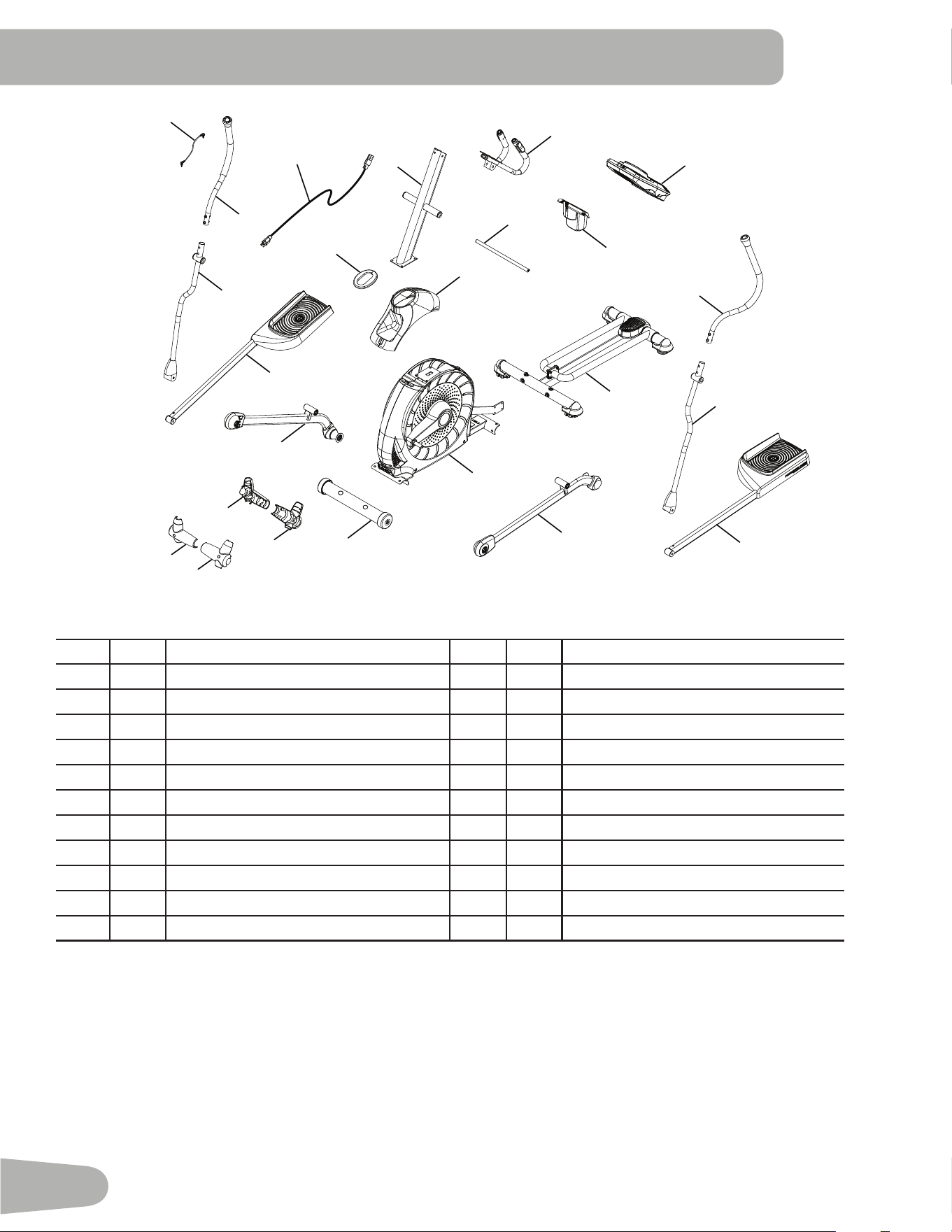
Adecalhasbeenappliedtoallright(“R ”)andleft(“L ”)partstoassistwithassembly.
Item Qty Description Item Qty Description
1 1 ConsoleMast 12 1 UpperShroud
2 1 StaticHandlebar 13 1 FrontStabilizer
3 1 ArmPivotRod 14 2 HandlebarShroud,Inner
4 1 WaterBottleHolder 15 2 HandlebarShroud,Outer
5 1 Console 16 1 RightLeg
6 1 UpperLeftHandlebarArm 17 1 RightPedal
7 1 LowerLeftHandlebarArm 18 1 ShroudCap
8 1 LeftPedal 19 1 LowerRightHandlebarArm
9 1 Rail Assembly 20 1 UpperRightHandlebarArm
10 1 LeftLeg 21 1 PowerCord
11 1 Frame 22 1 MP3Cord
partS
1
4
6
5
2
3
12
7
8
10
11
9
18
16
13
20
19
17
15
14
15
14
21
22
7
HardWare / toolS
Tools
Included
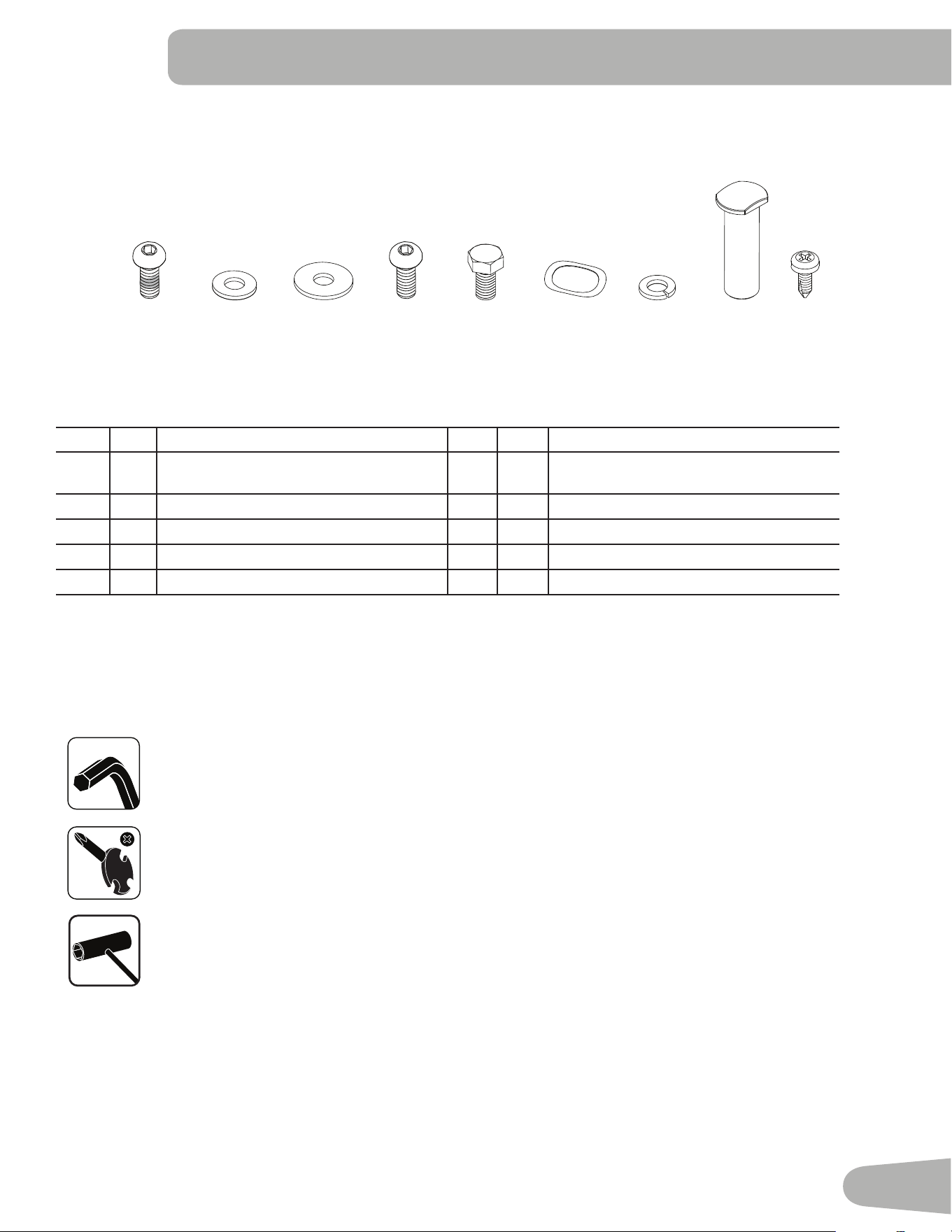
Item Qty Description Item Qty Description
A 6 ButtonHeadHexScrew,M8x16(with
Loctite
®
adhesive)
F 6 WaveWasher
B 4 FlatWasher,M8 G 12 LockWasher,M8
C 8 WideWasher,M8 H 2 PivotSleeve
D 4 ButtonHeadHexScrew,M8x16 I 4 PhillipsHeadScrew,M5x12
E 2 HexHeadScrew,M8x20
6mm
A B C D E F
G H
I
#2
13mm
15mm
19mm
8
aSSembly
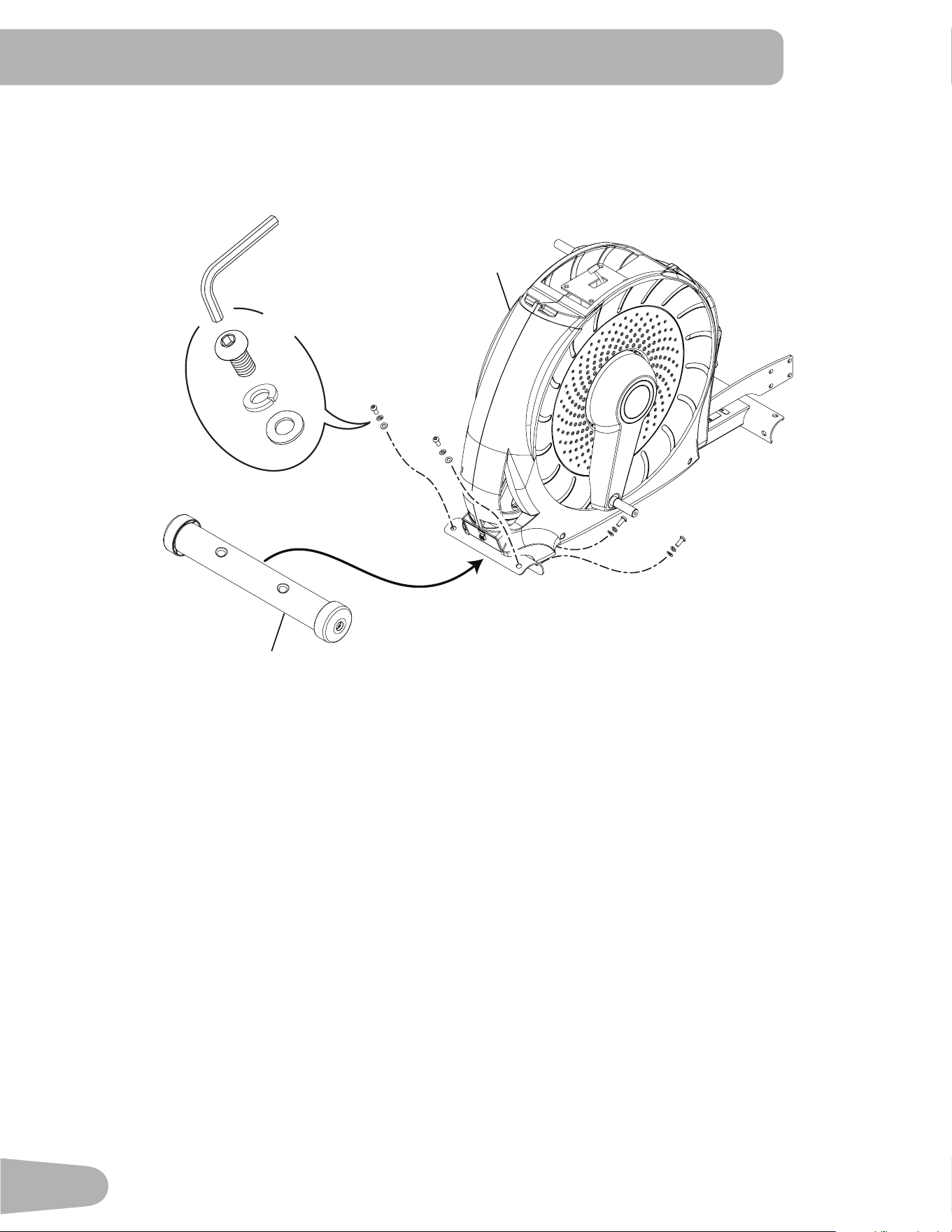
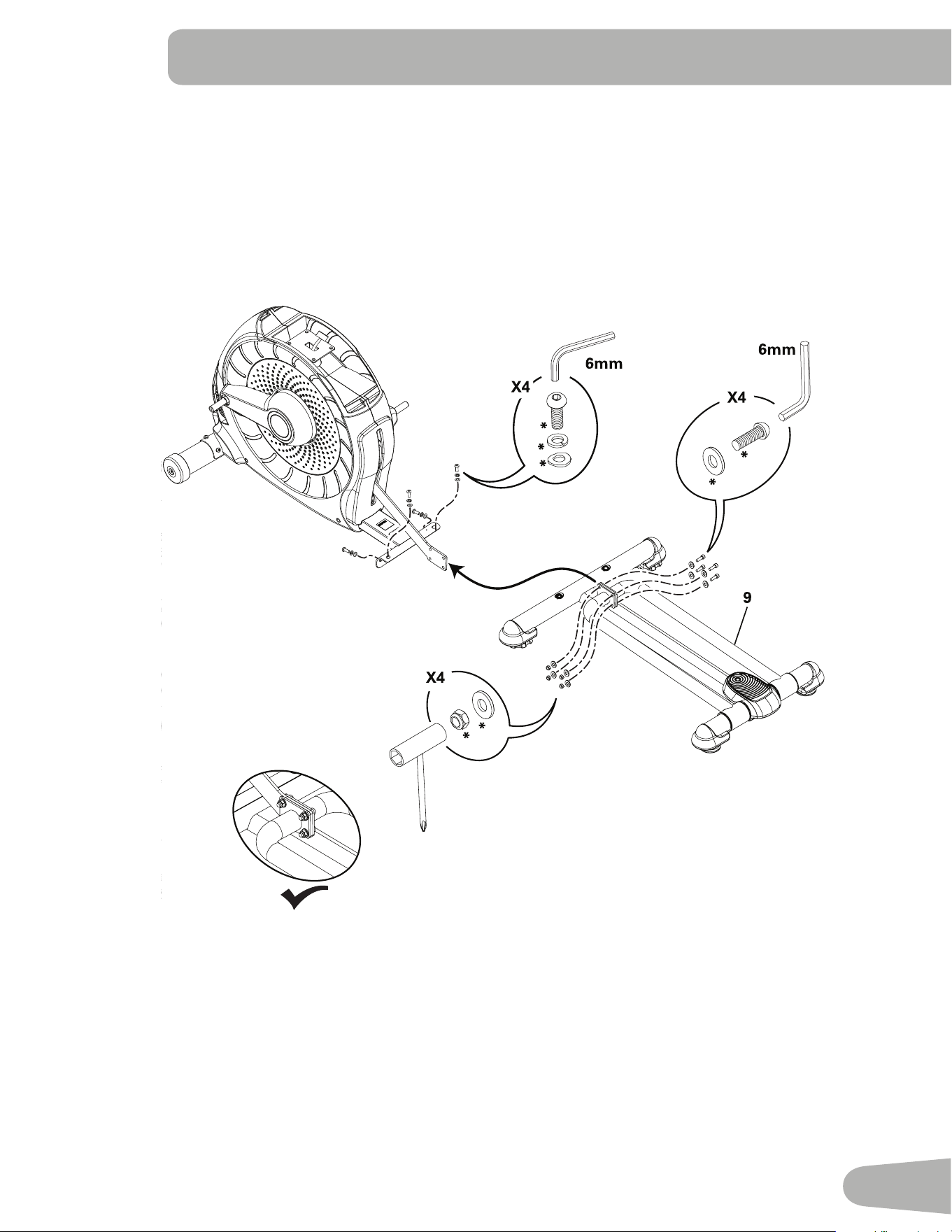
1. Attach Front Stabilizer to Frame
Note:Hardwareispre-installedandnotontheHardwareCard.*
13
11
6mm
*
*
X4
*
9
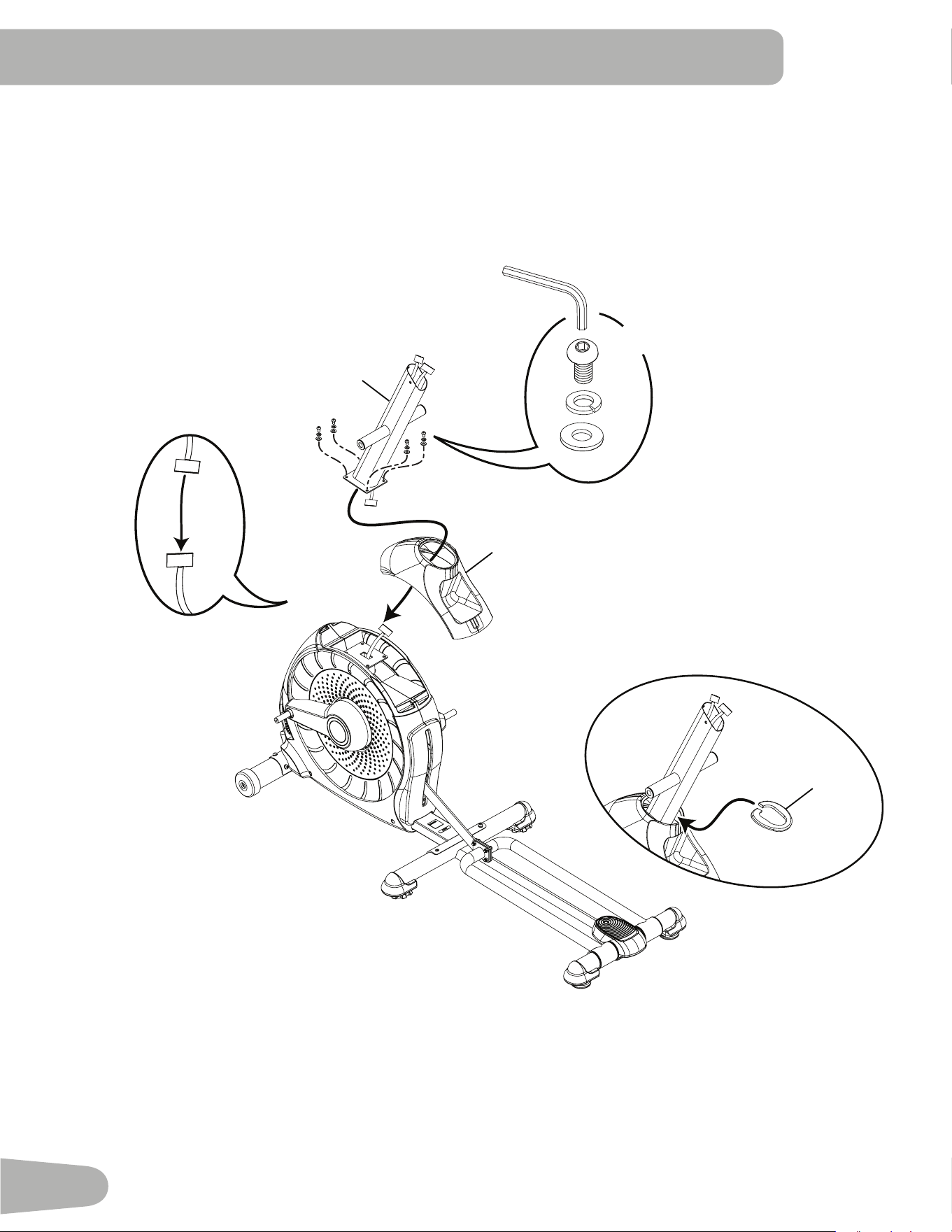
2. Attach Rail Assembly to Frame Assembly
Note:Hardwareispre-installedandnotontheHardwareCard.*
10
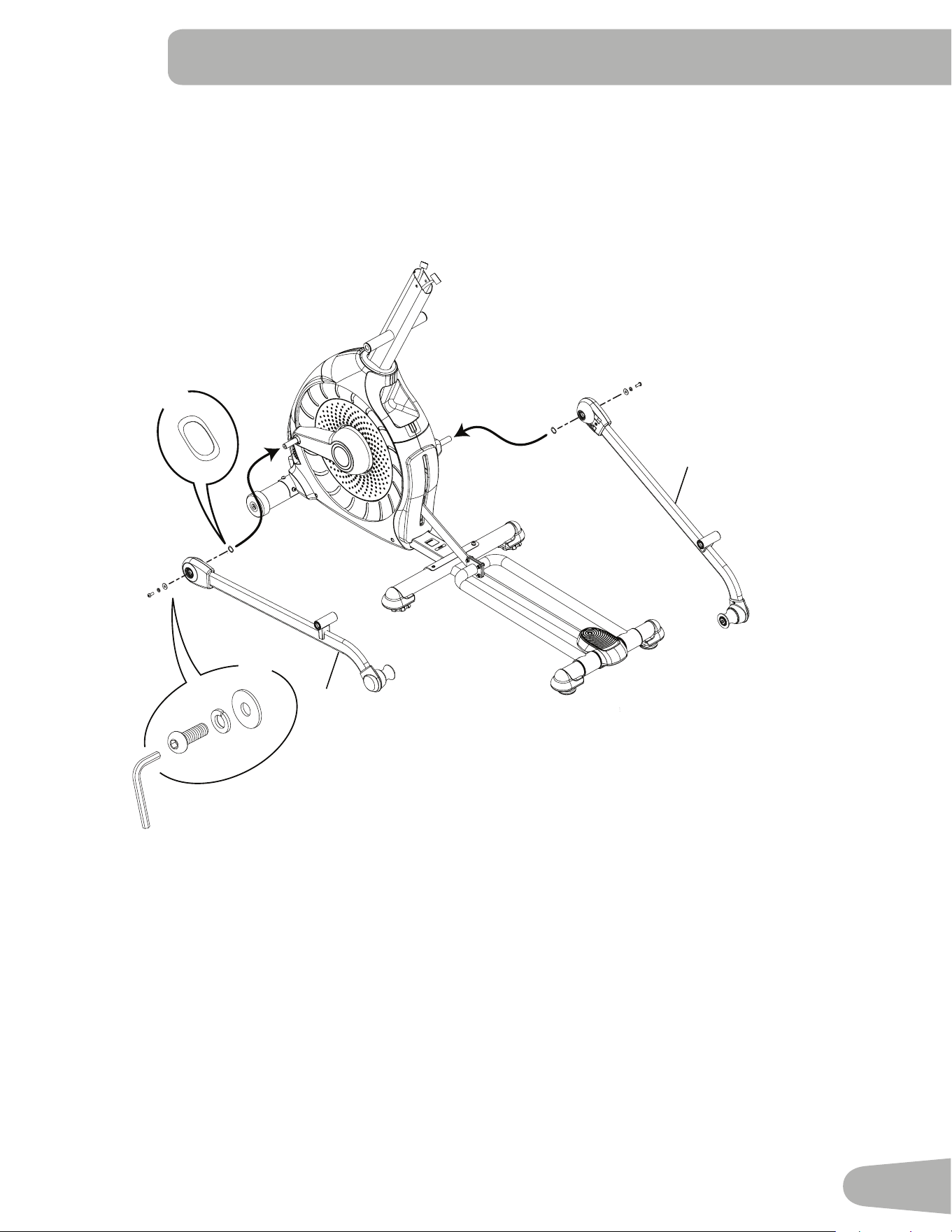
3. Connect the Cable and Attach the Console Mast to Frame Assembly
NOTICE:Donot crimp Console Cable.
18
1
12
B
D
G
6mm
X4
11
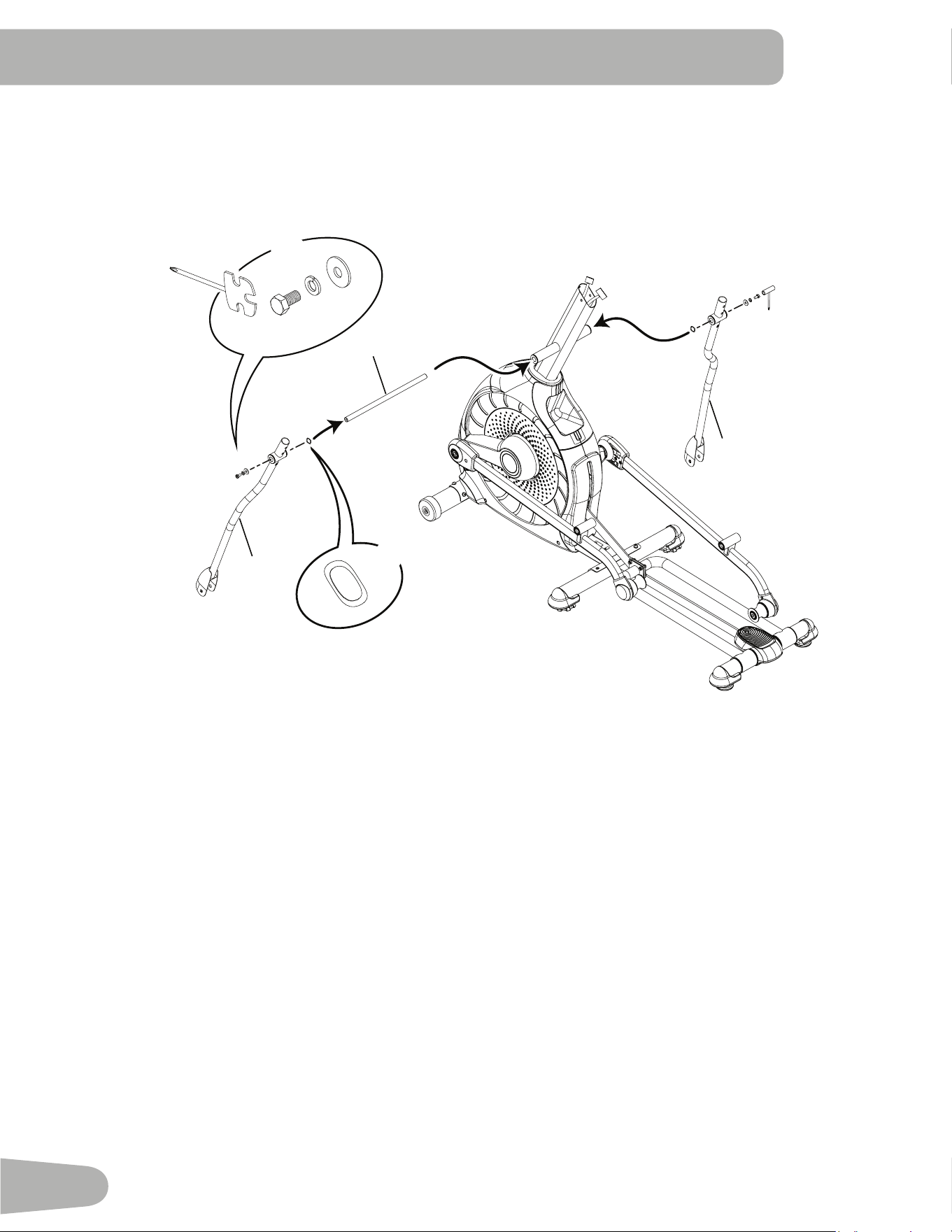
4. Attach Legs to Frame Assembly
10
16
A
C
G
F
X2
X2
6mm
12
5. Attach Arm Pivot Rod and Lower Handlebar Arms to Frame Assembly
19
3
7
C
G
E
F
X2
X2
13 mm
13
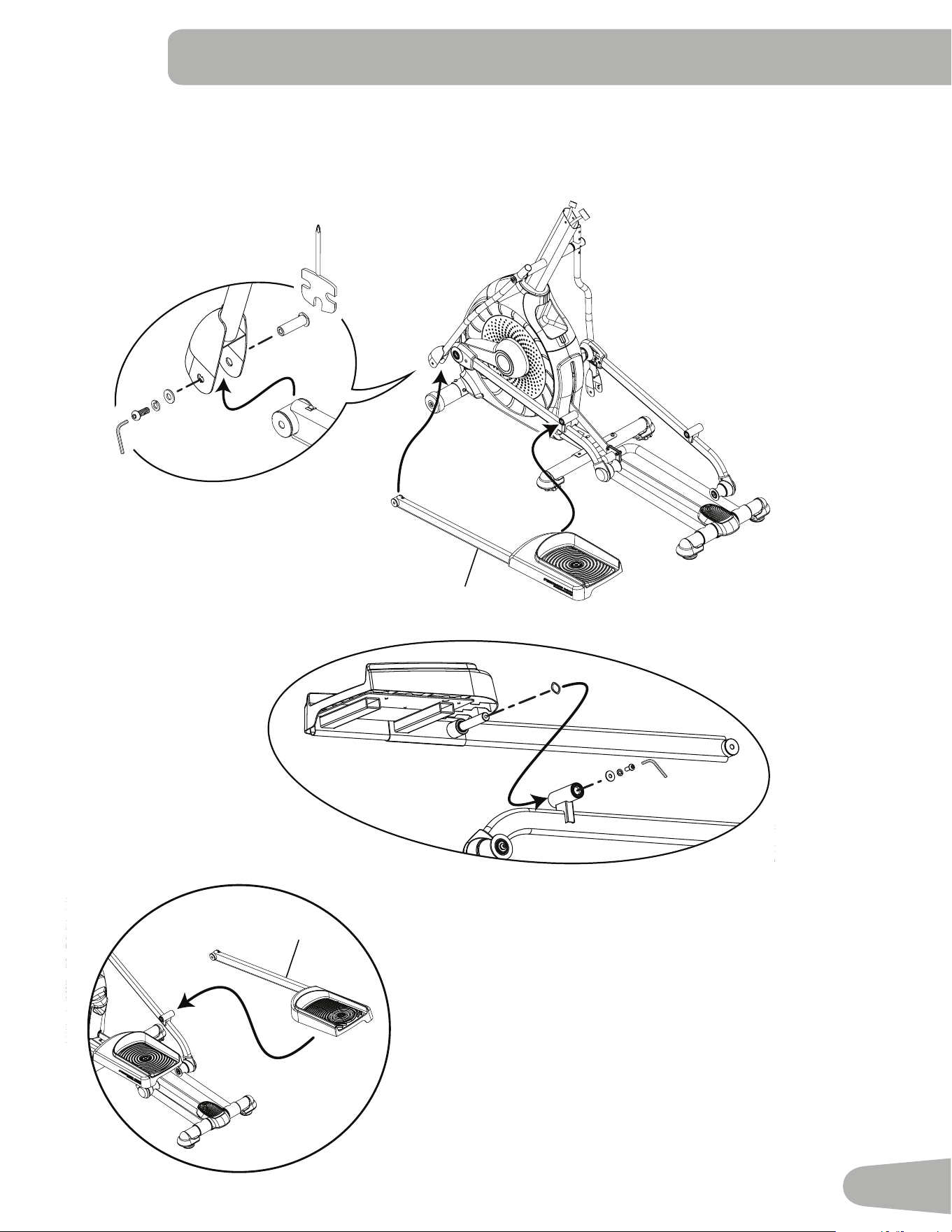
6. Attach Left Pedal to Frame Assembly
NOTICE:RepeatsteponoppositesidewiththeRightPedal(Item17).
F
A
C
G
8
17
C
H
G
A
6mm
14
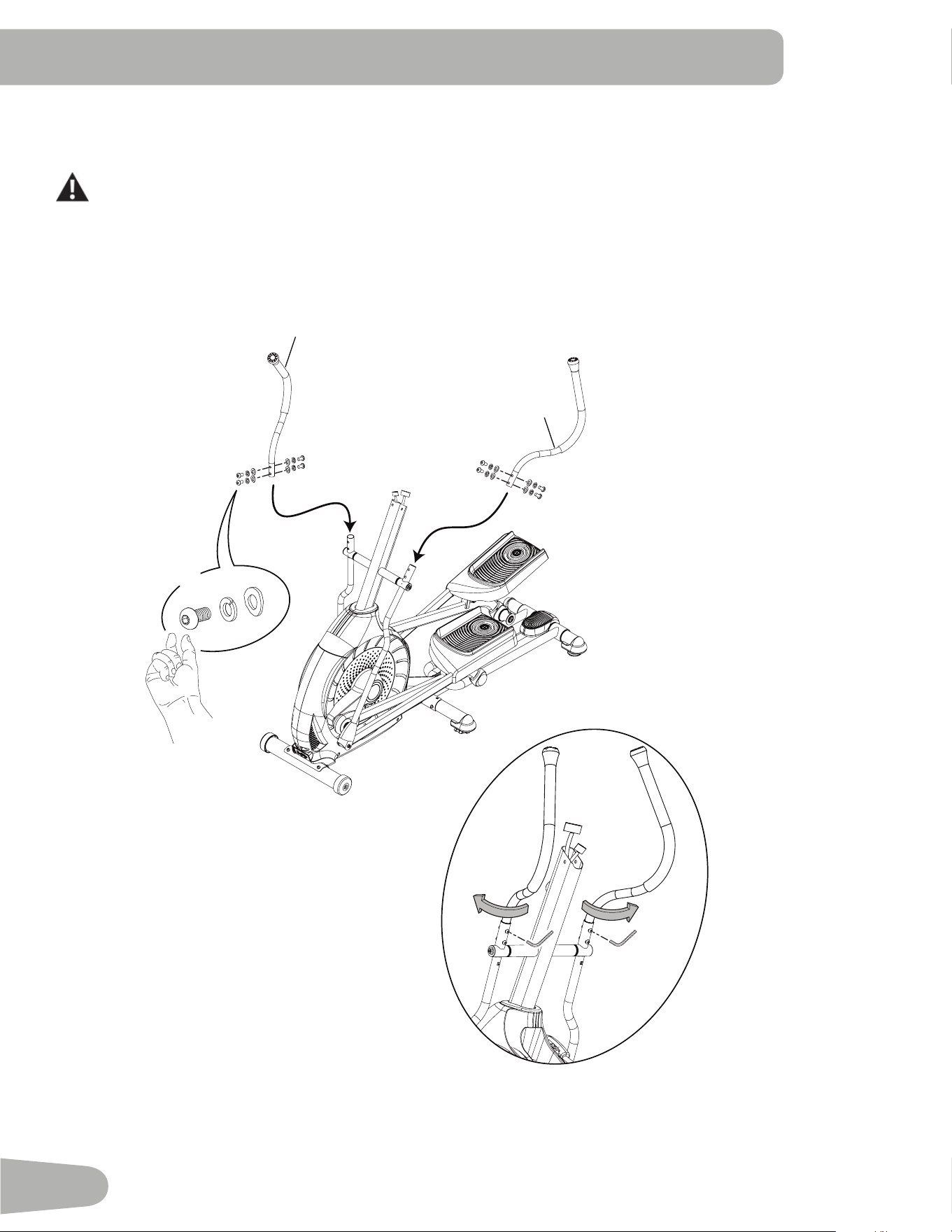
7. Attach and Adjust the Upper Handlebar Arms to Frame Assembly
Note:Hardwareispre-installedandnotontheHardwareCard.*
MakesuretheUpperHandlebarArmsaresecurebeforeyouexercise.
6mm
20
6
*
*
*
X8
15
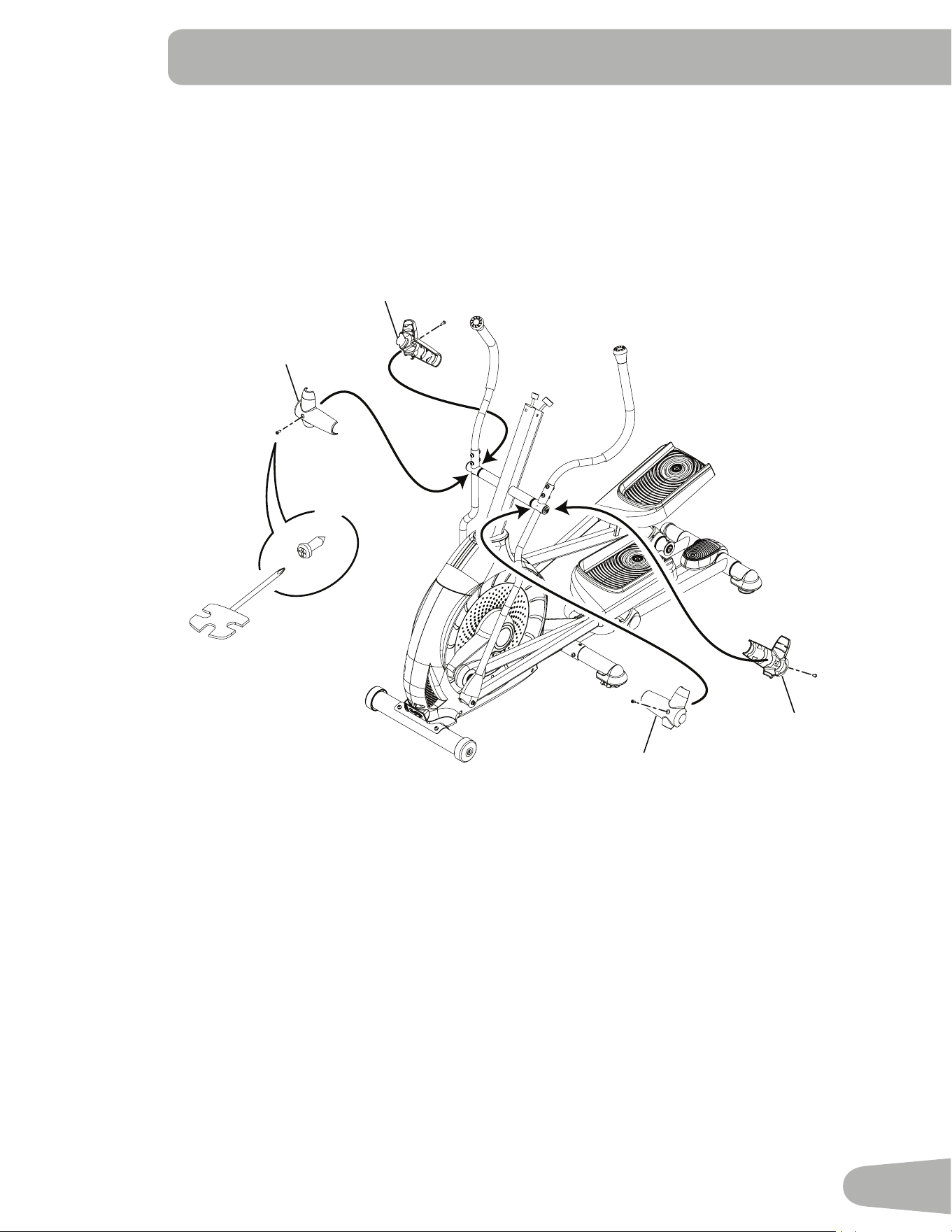
8. Attach Handlebar Shrouds to Frame Assembly
Note:Hardwareispre-installedandnotontheHardwareCard.*
15
14
15
14
I
#2
X4
16
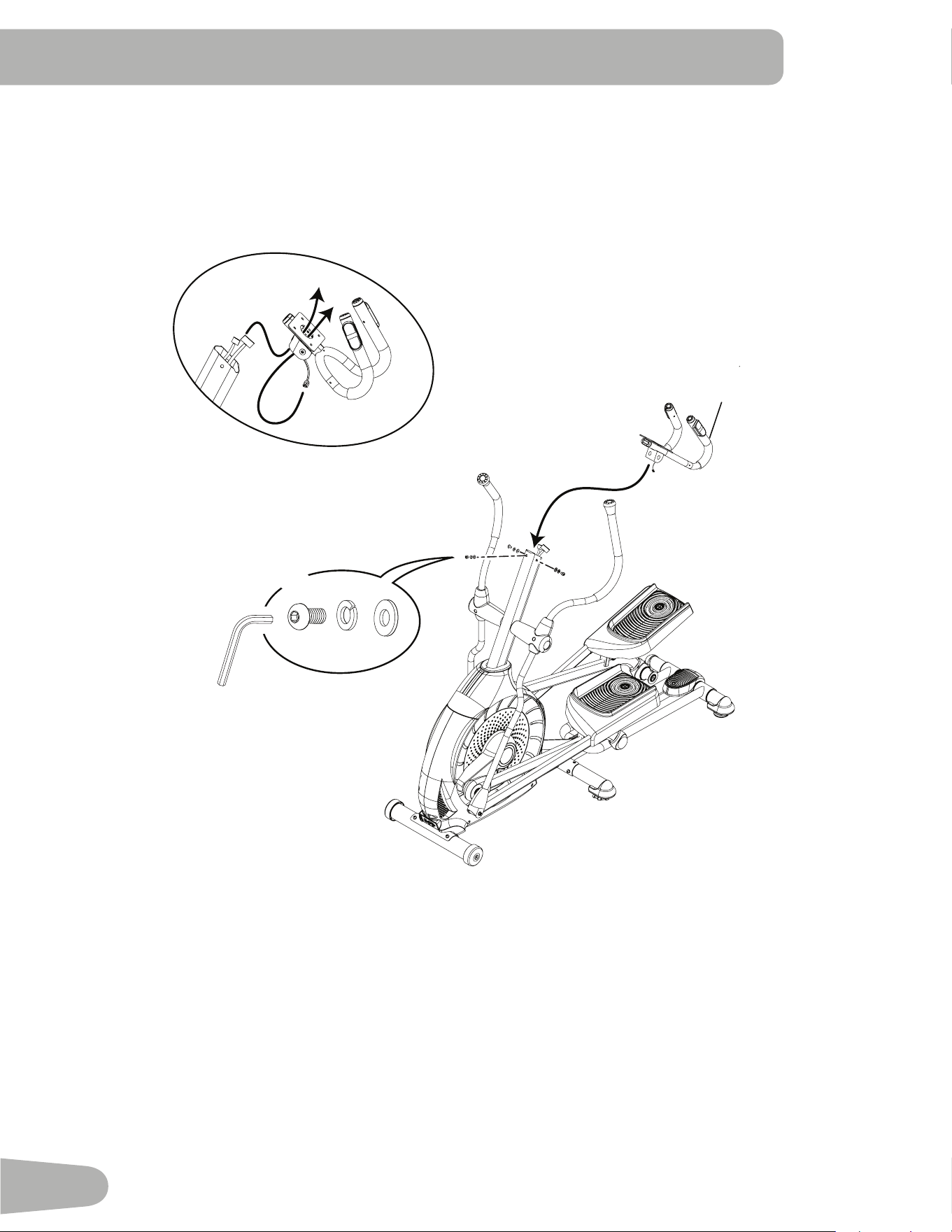
9. Route Cables and Attach the Static Handlebar to Frame Assembly
NOTICE:DonotcrimptheConsoleCables.
2
*
X3
6mm
*
*
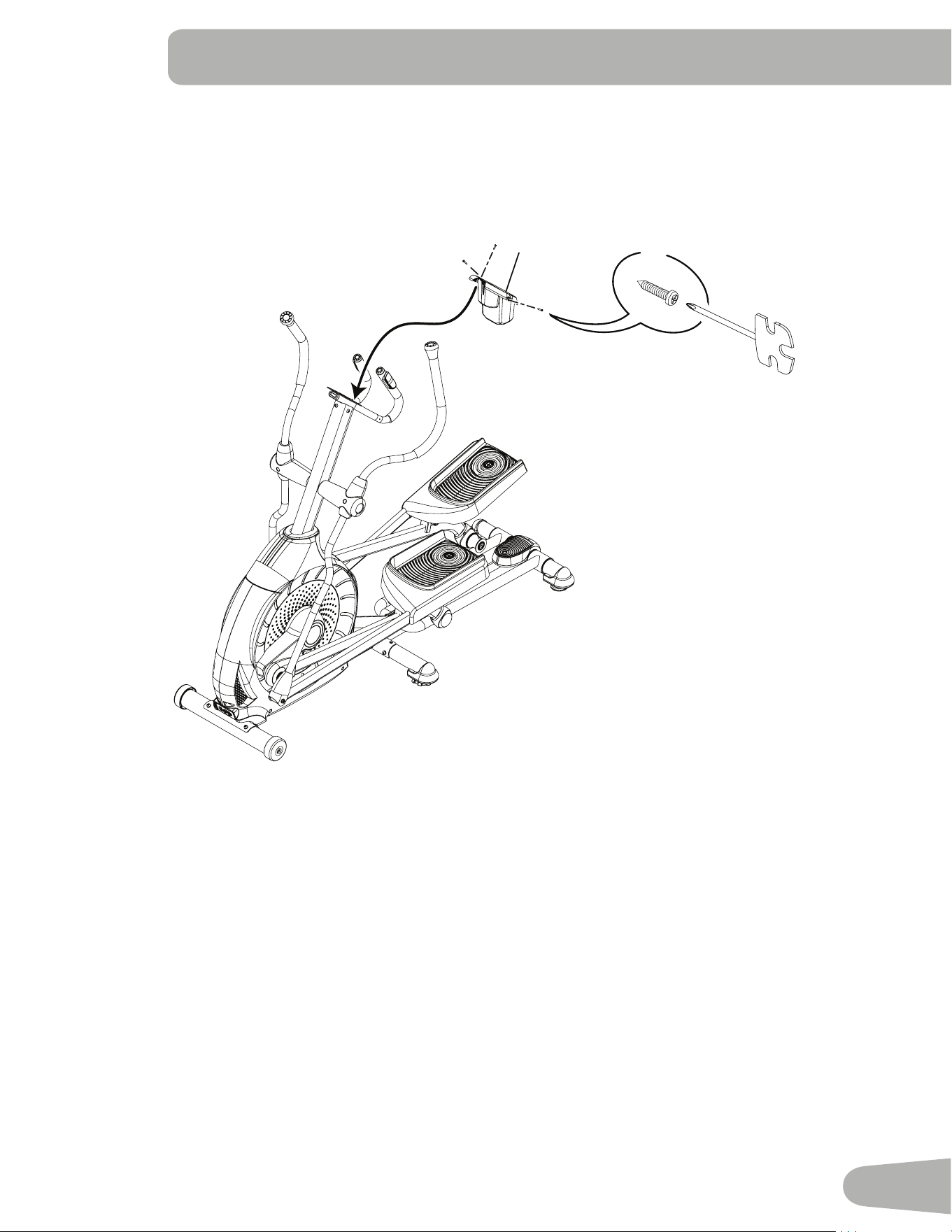
17
10. Attach Water Bottle Holder to Frame Assembly
Note:Hardwareispre-installedandnotontheHardwareCard.*
4
#2
*
X3
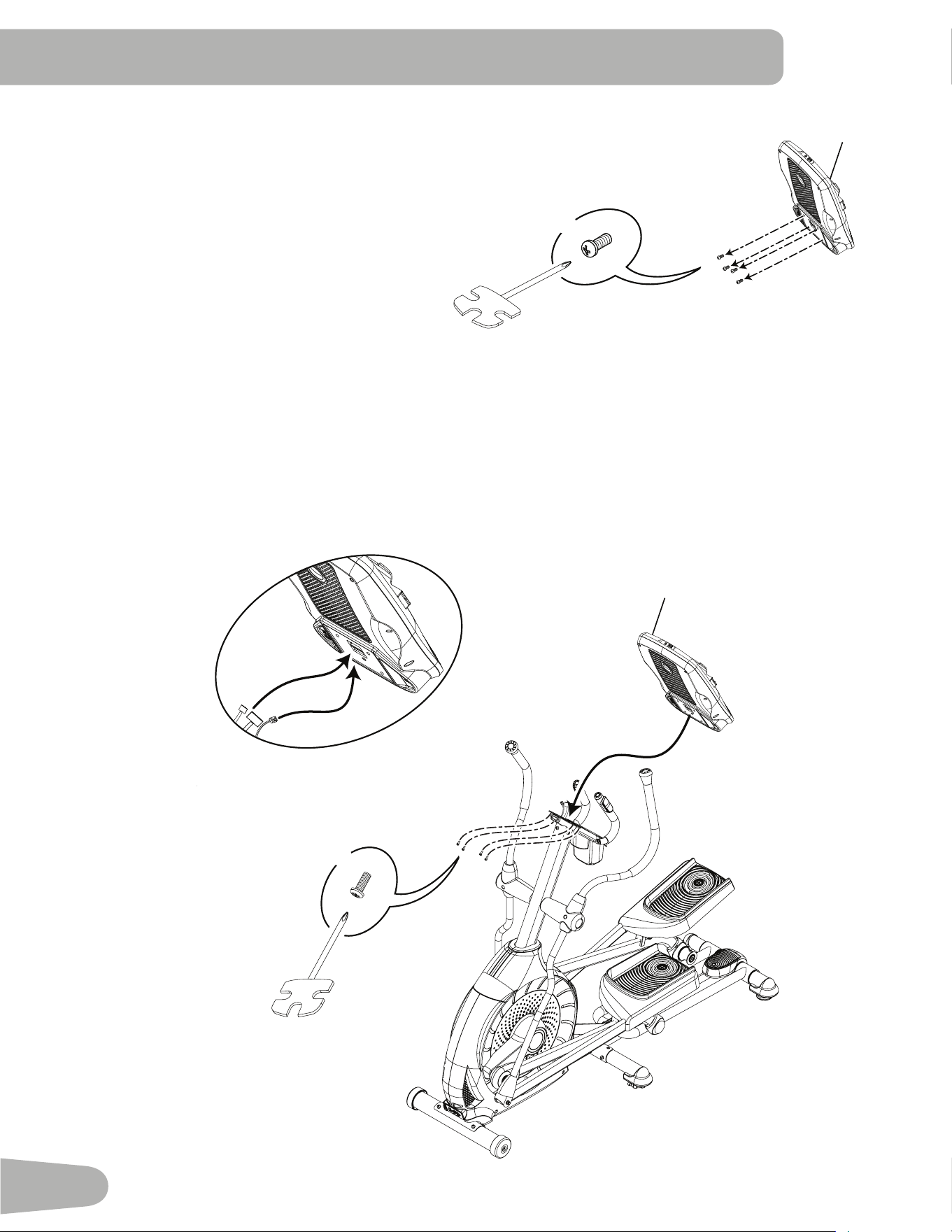
18
12. Connect Cables and Attach Console to Frame Assembly
NOTICE:Aligntheclipsonthecableconnectorsandmakesuretheconnectorslock.Donotcrimp cables.
11. Remove Hardware from Console
NOTICE:Donotcrimpthecable.
Note:Hardwareispre-installedandnotontheHardwareCard.*
5
*
X4
#2
5
*
X4
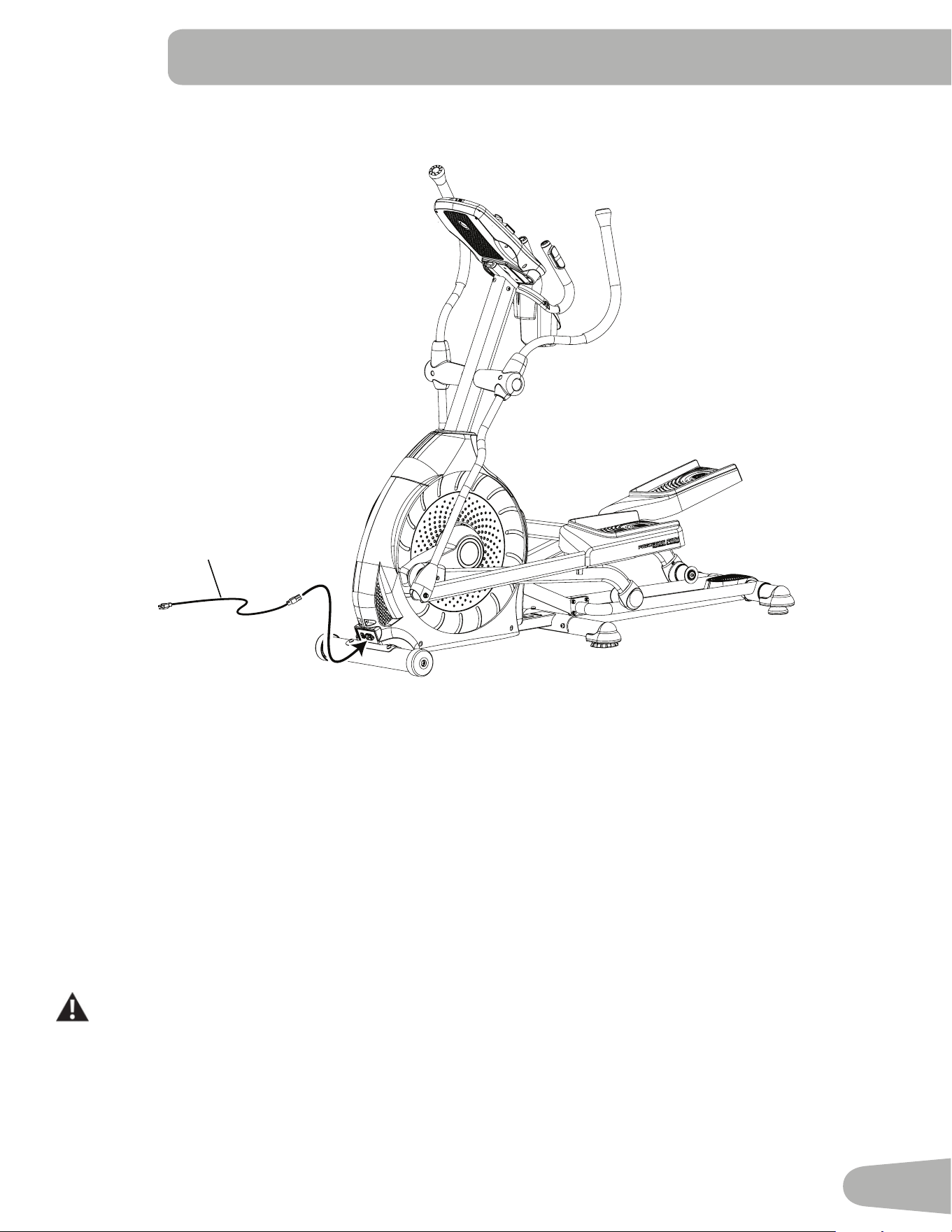
19
13. Connect the Power Cord to Frame Assembly
21
14. Final Inspection
Inspect your machine to ensure that all hardware is tight and components are properly assembled.
Be sure to record the serial number in the field provided at the front of this manual.
Do not use until the machine has been fully assembled and inspected for correct performance in accordance with the Owner’s
Manual.
20
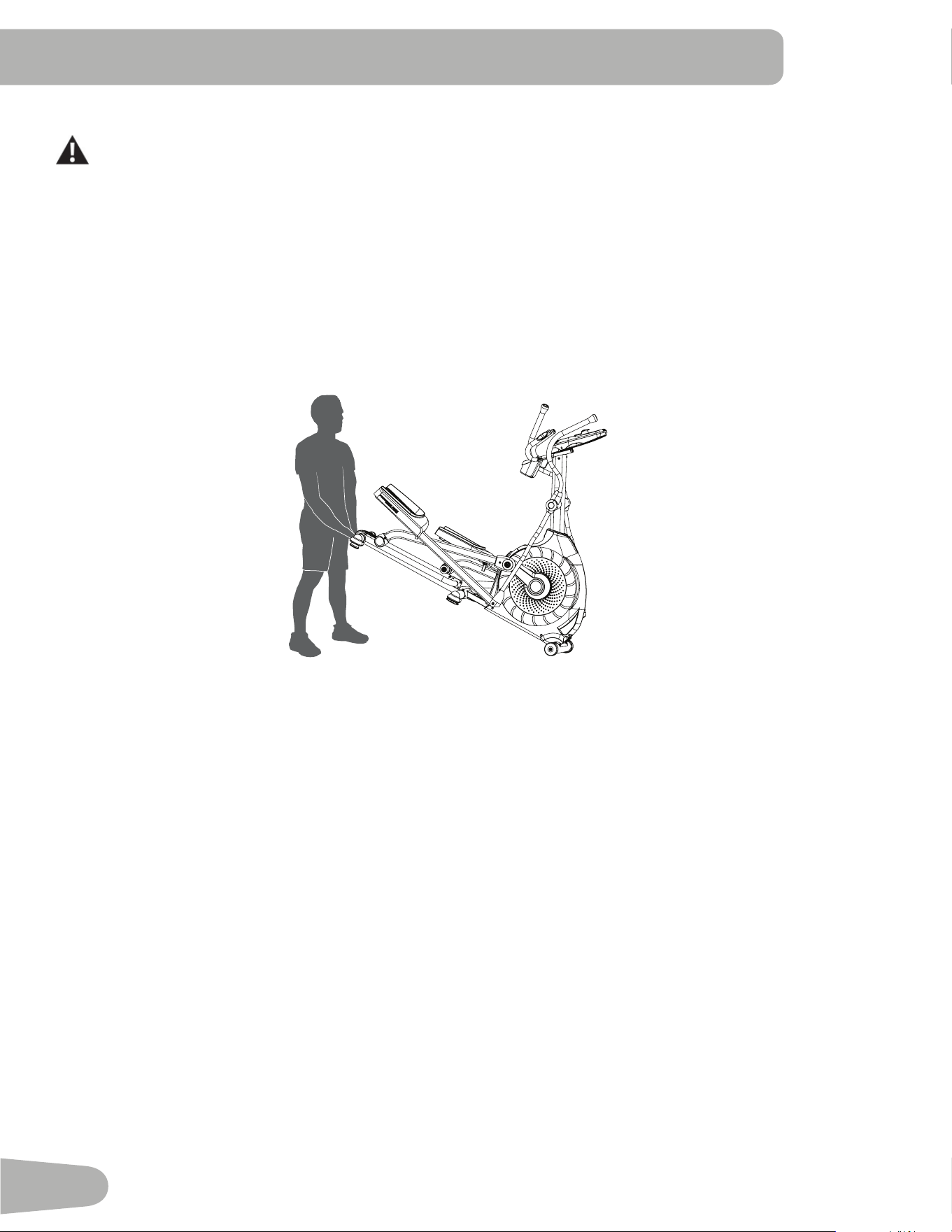
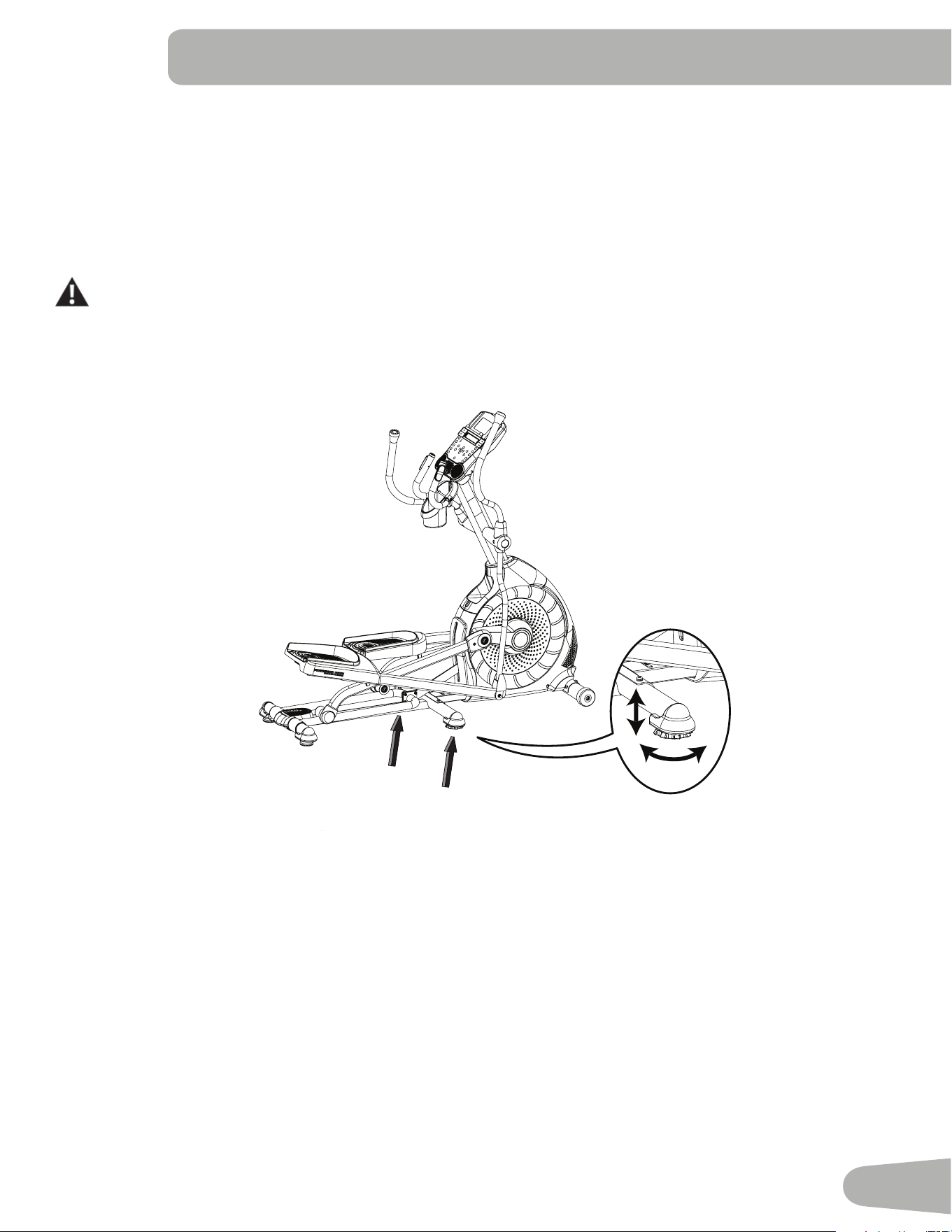
Moving the Machine
The machine may be moved by one or more persons depending on their physical abilities and capacities. Make sure that you
and others are all physically fit and able to move the machine safely.
1. Removethepowercord.
2. UsetheTransportHandletocarefullyliftthemachineontothetransportrollers.
3. Pushthemachineintoposition.
4. Carefullylowerthemachineintoposition.
NOTICE:Becarefulwhenyoumovetheelliptical.Allabruptmotionscanaffectthecomputeroperation.
before you Start
21
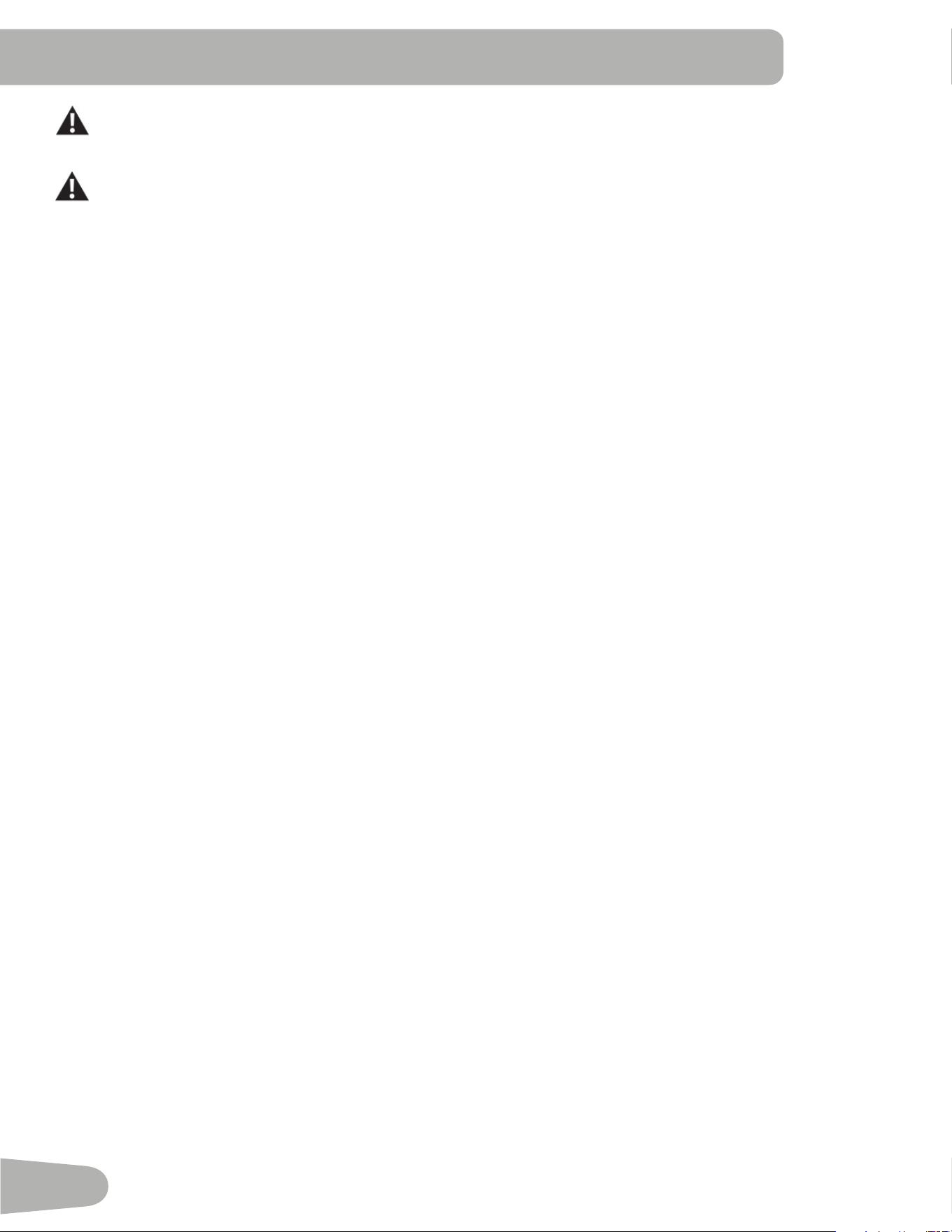
Leveling the Machine
ThemachineneedstobeleveledifyourworkoutareaisunevenoriftheRailAssemblyisslightlyoffthefloor.Toadjust:
1. Placethemachineinyourworkoutarea.
2. SafelystandonthebackoftheRailAssemblyforapproximately20seconds.
3. Stepoffthemachine.
4. Loosenthelockingwingnutsandadjustthelevelersuntiltheyallcontactthefloor.
Do not adjust the levelers to such a height that they detach or unscrew from the machine. Injury to you or
damage to the machine can occur.
5. Adjustuntilthemachineislevel.Tightenthelockingwingnuts.
Makesurethemachineislevelandstablebeforeyouexercise.
22
Important Safety InStructIonS
This icon means a potentially hazardous situation which, if not avoided, could result in death or serious injury.
Before using this equipment, obey the following warnings:
ReadandunderstandthecompleteManual.KeeptheManualforfuturereference.
Readandunderstandallwarningsonthismachine.IfatanytimetheWarningstickersbecomeloose,unreadable
or dislodged, contactyourlocalSchwinn
®
distributorforreplacementstickers.
• Childrenmustnotbeletonorneartothismachine.Movingpartsandotherfeaturesofthemachinecanbe
dangerous to children.
• Notintendedforusebyanyoneunder14yearsofage.
• Consultaphysicianbeforeyoustartanexerciseprogram.Stopexercisingifyoufeelpainortightnessinyour
chest,becomeshortofbreath,orfeelfaint.Contactyourdoctorbeforeyouusethemachineagain.Usethevalues
calculated or measured by the machine’s computer for reference purposes only.
• Beforeeachuse,examinethismachineforloosepartsorsignsofwear.Donotuseiffoundinthiscondition.Monitor
thePedalsandCrankArmsclosely.ContactyourlocalSchwinn
®
distributor for repair information.
• Maximumuserweightlimit:136kg(300lbs.).Donotuseifyouareoverthisweight.
• Thismachineisforhomeuseonly.
• Donotwearlooseclothingorjewelry.Thismachinecontainsmovingparts.Donotputfingersorotherobjectsinto
movingpartsoftheexerciseequipment.
• Setupandoperatethismachineonasolid,level,horizontalsurface.
• MaketheFootPedalsstablebeforeyousteponthem.Usecautionwhenyousteponandoffthemachine.
• Disconnectallpowerbeforeservicingthismachine.
• Donotoperatethismachineoutdoorsorinmoistorwetlocations.
• Keepatleast0.6m(24”)oneachsideofthemachineclear.Thisistherecommendedsafedistanceforaccessand
passagearoundandemergencydismountsfromthemachine.Keepthirdpartiesoutofthisspacewhenmachineis
in use.
• Donotoverexertyourselfduringexercise.Operatethemachineinthemannerdescribedinthismanual.
• CorrectlyadjustandsafelyengageallPositionalAdjustmentDevices.MakesurethattheAdjustmentDevicesdonot
hit the user.
• KeeptheFootPedalscleananddry.
• Exerciseonthismachinerequirescoordinationandbalance.Besuretoanticipatethatchangesinspeedand
resistancelevelcanoccurduringworkouts,andbeattentiveinordertoavoidlossofbalanceandpossibleinjury.
• Priortousereadandunderstandtheowner’smanual.Theapplianceisnottobeusedbypersonswithfunctional
limitationsandimpairments,reducedphysical,sensoryormentalcapabilities,orlackofexperienceandknowledge.
23
featureS
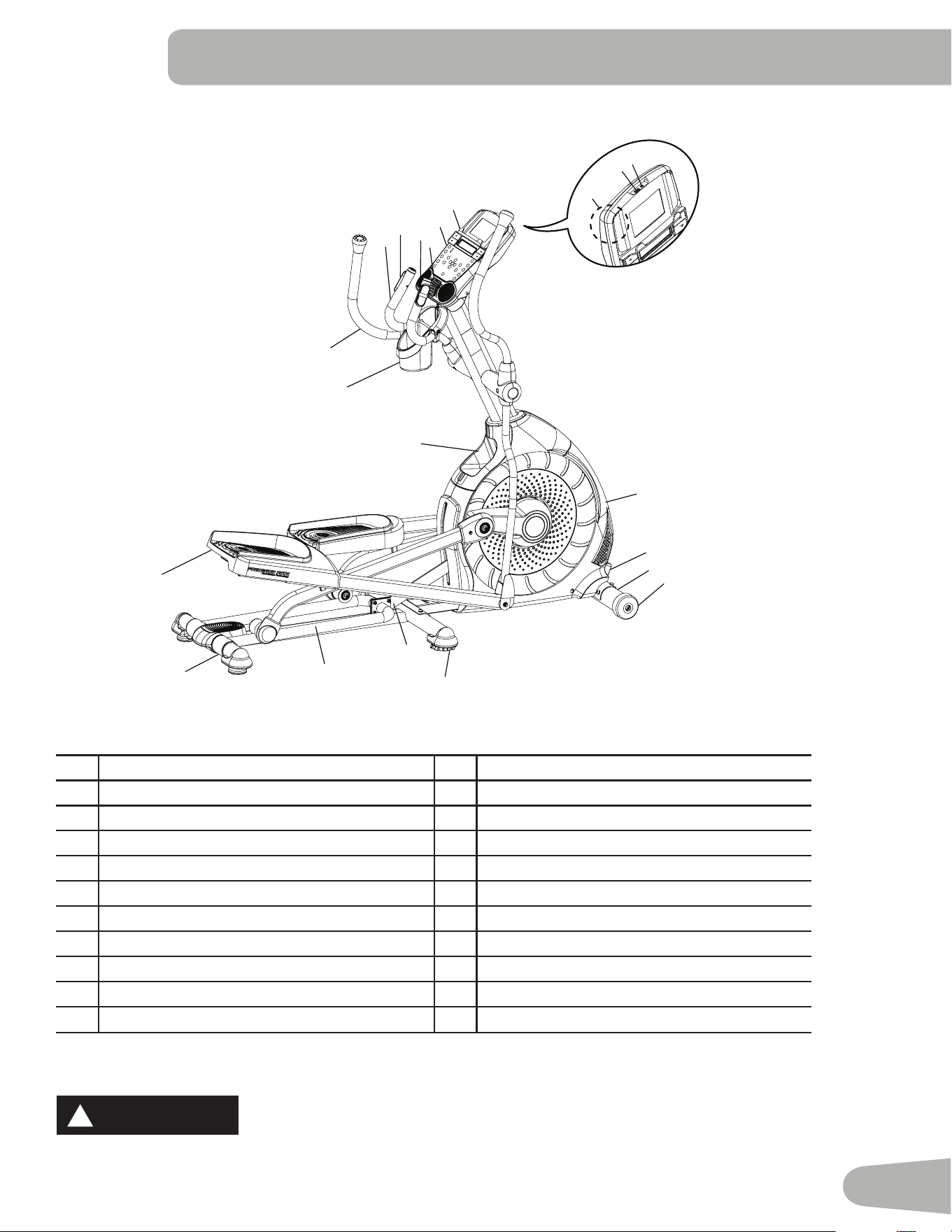
A StaticHandlebar L Transport Roller
B ContactHeartRate(CHR)Sensors M Leveler
C Speakers N InclineArm
D Fan O Rail
E MediaTray P TransportHandle
F Console Q FootPedal
G USBPort R StorageBin
H MP3Input S WaterBottleHolder
I FullyShroudedFlywheel T UpperHandlebar
J ACAdapterInlet/PowerSwitch U TelemetryHeartRate(HR)Receiver
K Stabilizer
WARNING
!
WARNING indicates a hazardous
situation which, if not avoided, could
result in death or serious injury.
DANGER
!
DANGER indicates a hazardous
situation which, if not avoided, will
result in death or serious injury.
CAUTION
!
CAUTION indicates a hazardous
situation which, if not avoided, could
result in minor or moderate injury.
NOTICE
NOTICE is used to address practices
not related to personal injury.
!
Heartratemonitoringsystemsmaybeinaccurate.Overexercisingmayresultinseriousinjuryor
death.Ifyoufeelfaintstopexercisingimmediately.
G
H
R
S
A
B
Q
P
O
M
N
I
J
K
L
C
F
E
D
T
U
24
Console Features
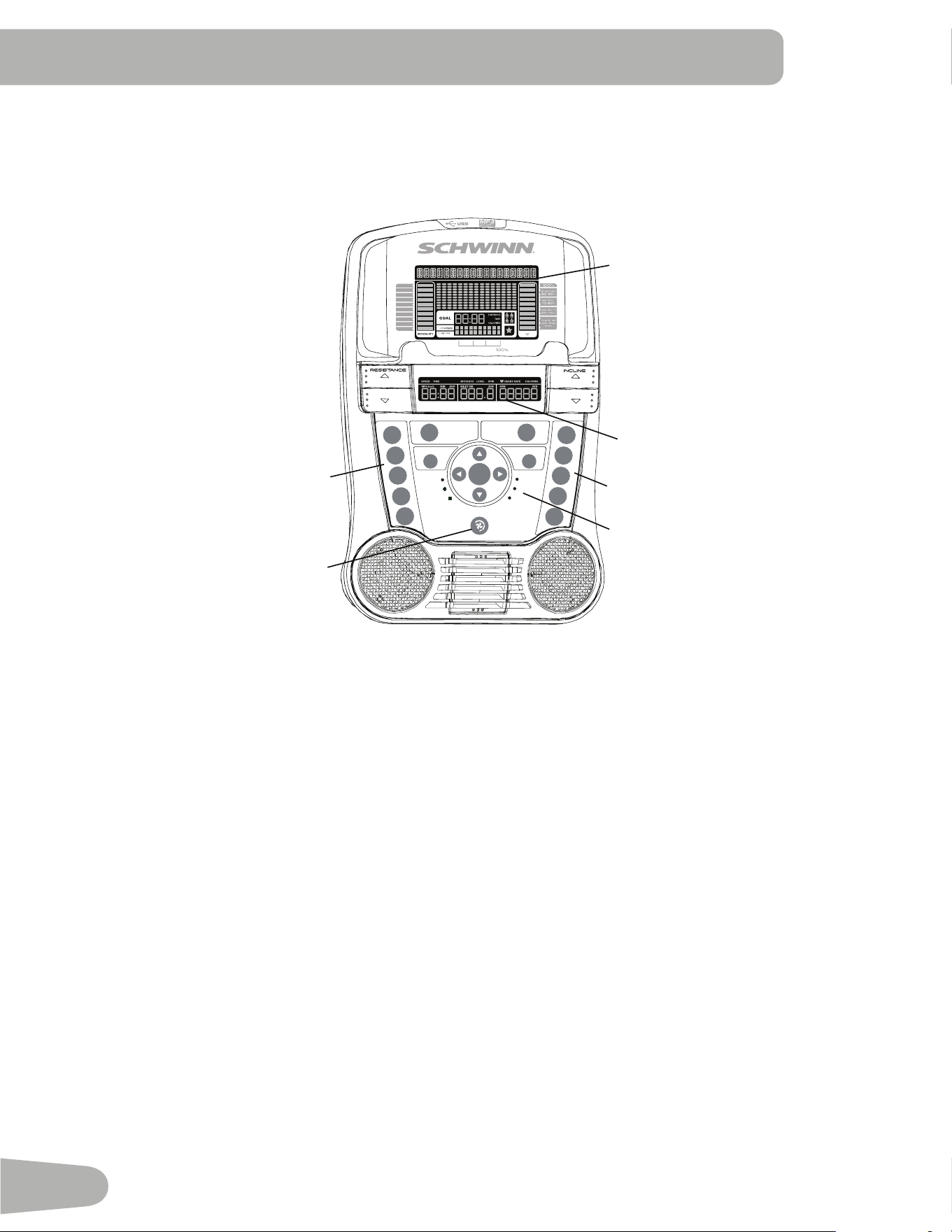
TheConsoleprovidesimportantinformationaboutyourworkoutandletsyoucontroltheresistancelevelswhileyouexercise.
TheConsolefeaturestheSchwinnDualTrack
™
displaywithtouchcontrolbuttonstonavigateyouthroughtheexercise
programs.
1
5
9
15
21
OK
PAUSE/
END
QUICK
START
PROGRAMS
GOAL TRACK
LONGEST WORKOUT
CALORIE RECORD
LAST 30 DAYS
CURRENT WORKOUT
LAST WORKOUT
LAST 7 DAYS
10%
40%
70%
1
2
3
4
5
6
7
8
9
10
Hr
0%
20%
40%
70%
100%
10%
40%
70%
1
2
3
4
5
6
7
8
9
10
Hr
Keypad Functions
ResistanceIncrease()button- Increasestheworkoutresistancelevel
ResistanceDecrease()button-Decreasestheworkoutresistancelevel
InclineIncrease()button-IncreasestheInclineangleoftheRailAssembly
InclineDecrease()button-DecreasestheInclineangleoftheRailAssembly
QUICKSTARTbutton-BeginsaQuickStartworkout
PROGRAMSbutton-Selectsacategoryandworkoutprogram
PAUSE/ENDbutton-Pausesanactiveworkout,endsapausedworkout,orgoesbacktothepreviousscreen
GOALTRACKbutton-DisplaystheWorkoutTotalsandAchievementsfortheselectedUserProfile
Increase()button-Increasesavalue(age,time,distance,orcalories)ormovesthroughoptions
Left()button-Displaysdifferentworkoutvaluesduringaworkout,andmovesthroughoptions
OKbutton-StartsaProgramworkout,confirmsinformation,orresumesapausedworkout.
Right()button-Displaysdifferentworkoutvaluesduringaworkout,andmovesthroughoptions
UpperDisplay
LowerDisplay
InclineLevelQuickButtons
ResistanceLevelQuickButtons
AchievementIndicatorLights
Fan
25
Decrease()button-Decreasesavalue(age,time,distance,orcalories)ormovesthroughoptions
FANbutton-Controls3-speedfan
ResistanceLevelQuickButtons-Shiftstheresistancelevelstothesettingquicklyduringaworkout
InclineLevelQuickButtons-Shiftstheinclinelevelstothesettingquicklyduringaworkout
AchievementIndicatorLights-whenanachievementlevelisreachedoraresultisreviewed,theachievementindicatorlight
will activate.
Schwinn Dual Track
™
Display
Upper Display Data
1
5
9
15
21
OK
PAUSE/
END
QUICK
START
PROGRAMS
GOAL TRACK
LONGEST WORKOUT
CALORIE RECORD
LAST 30 DAYS
CURRENT WORKOUT
LAST WORKOUT
LAST 7 DAYS
10%
40%
70%
1
2
3
4
5
6
7
8
9
10
Hr
0%
20%
40%
70%
100%
10%
40%
70%
1
2
3
4
5
6
7
8
9
10
Hr
UserDisplay
AchievementDisplay
Program Display
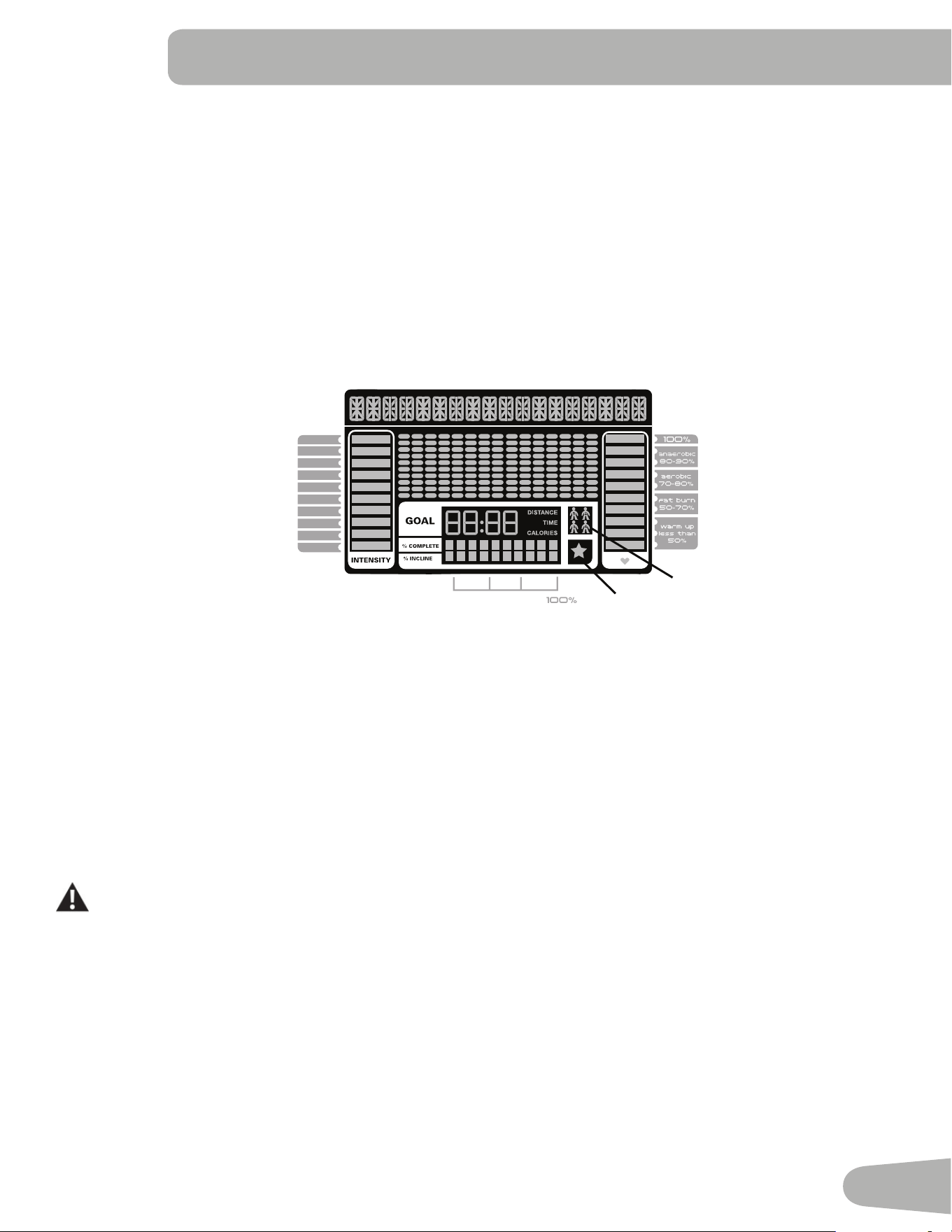
TheProgramDisplayshowsinformationtotheUserandthegriddisplayareashowsthecourseprofilefortheprogram.
Eachcolumnintheprofileshowsoneinterval(workoutsegment).Thehigherthecolumn,thehighertheresistancelevel.The
flashing column shows your current interval.
Intensity Display
TheIntensityDisplayshowsthelevelofworkatthatmomentbasedonthecurrentresistancelevel.
Heart Rate Zone Display
TheHeartRateZoneshowswhichzonethecurrentheartratevaluefallsintoforthecurrentUser.TheseHeartRateZones
canbeusedasaworkoutguideforacertaintargetzone(anaerobic,aerobic,orfatburn).
Consultaphysicianbeforeyoustartanexerciseprogram.Stopexercisingifyoufeelpainortightnessinyourchest,
becomeshortofbreath,orfeelfaint.Contactyourdoctorbeforeyouusethemachineagain.Usethevaluescalculated
or measured by the machine’s computer for reference purposes only.
Note:Ifnoheartrateisdetected,thedisplaywillbeblank.
Goal Display
TheGoalDisplayshowsthecurrentlyselectedtypeofgoal(Distance,TimeorCalories),thecurrentvaluetoachievethegoal,
and the percent completed toward the goal.
User Display
TheUserDisplayshowswhichUserProfileiscurrentlyselected.
26
Achievement Display
TheAchievementDisplayactivateswhenaworkoutgoalisreachedoraworkoutmilestoneissurpassedfrompastworkouts.
TheConsoledisplaywillcongratulateandinformtheUseroftheirachievement,alongwithacelebratorysound.
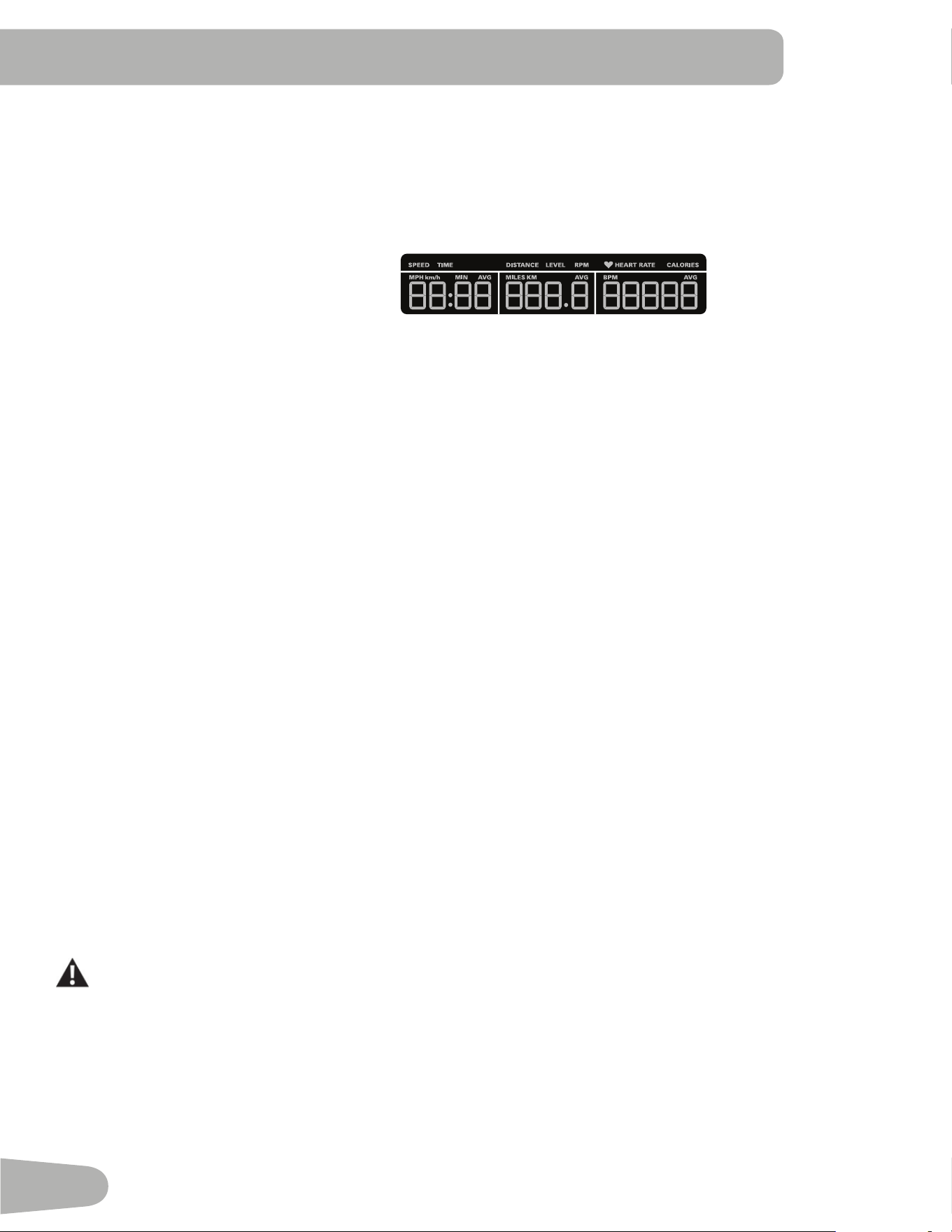
Lower Display Data
TheLowerDisplayshowstheWorkoutValues.andcanbecustomizedforeachUser(Consultthe“EditUserProfile”section
ofthismanual).
Speed
TheSpeeddisplayfieldshowsthemachinespeedinmilesperhour(mph)orkilometersperhour(km/h).
Time
TheTIMEdisplayfieldshowsthetotaltimecountoftheworkout,theaverageTimefortheUserProfile,orthetotaloperational
time of the machine.
Note: IfaQuickStartworkoutisperformedformorethan99minutesand59seconds(99:59),theunitsforTimewillshiftto
hoursandminutes(1hour,40minutes).
Distance
TheDistancedisplayshowsthedistancecount(milesorkm)intheworkout.
Note:TochangethemeasurementunitstoEnglishImperialormetric,refertothe“ConsoleSetupMode”sectioninthis
manual.
Level
TheLEVELdisplayshowsthecurrentresistancelevelintheworkout.
RPM
TheRPMdisplayfieldshowsthepedalrevolutionsperminute(RPM).
Heart Rate (Pulse)
TheHeartRatedisplayshowsthebeatsperminute(BPM)fromtheheartratemonitor.Whenaheartratesignalisreceivedby
the Console, the icon will flash.
Consultaphysicianbeforeyoustartanexerciseprogram.Stopexercisingifyoufeelpainortightnessinyourchest,
become short of breath, or feel faint. Contact your doctor before you use the machine again. The heart rate displayed is
anapproximationandshouldbeusedforreferenceonly
Calories
TheCaloriesdisplayfieldshowstheestimatedcaloriesthatyouhaveburnedduringtheexercise.
1
5
9
15
21
OK
PAUSE/
END
QUICK
START
PROGRAMS
GOAL TRACK
LONGEST WORKOUT
CALORIE RECORD
LAST 30 DAYS
CURRENT WORKOUT
LAST WORKOUT
LAST 7 DAYS
10%
40%
70%
1
2
3
4
5
6
7
8
9
10
Hr
0%
20%
40%
70%
100%
10%
40%
70%
1
2
3
4
5
6
7
8
9
10
Hr
27
Remote Heart Rate Monitor
MonitoringyourHeartRateisoneofthebestprocedurestocontroltheintensityofyourexercise.ContactHeartRate(CHR)
sensorsareinstalledtosendyourheartratesignalstotheConsole.TheConsolecanalsoreadtelemetryHRsignalsfrom
aHeartRateChestStrapTransmitterthatoperatesinthe4.5kHz-5.5kHz
range.
Note: The heart rate chest strap must be an uncoded heart rate strap from
PolarElectrooranuncodedPOLAR
®
compatiblemodel.(CodedPO-
LAR
®
heartratestrapssuchasPOLAR
®
OwnCode
®
chest straps will
notworkwiththisequipment.)
Ifyouhaveapacemakerorotherimplantedelectronicdevice,consult
your doctor before using a wireless chest strap or other telemetric heart
rate monitor.
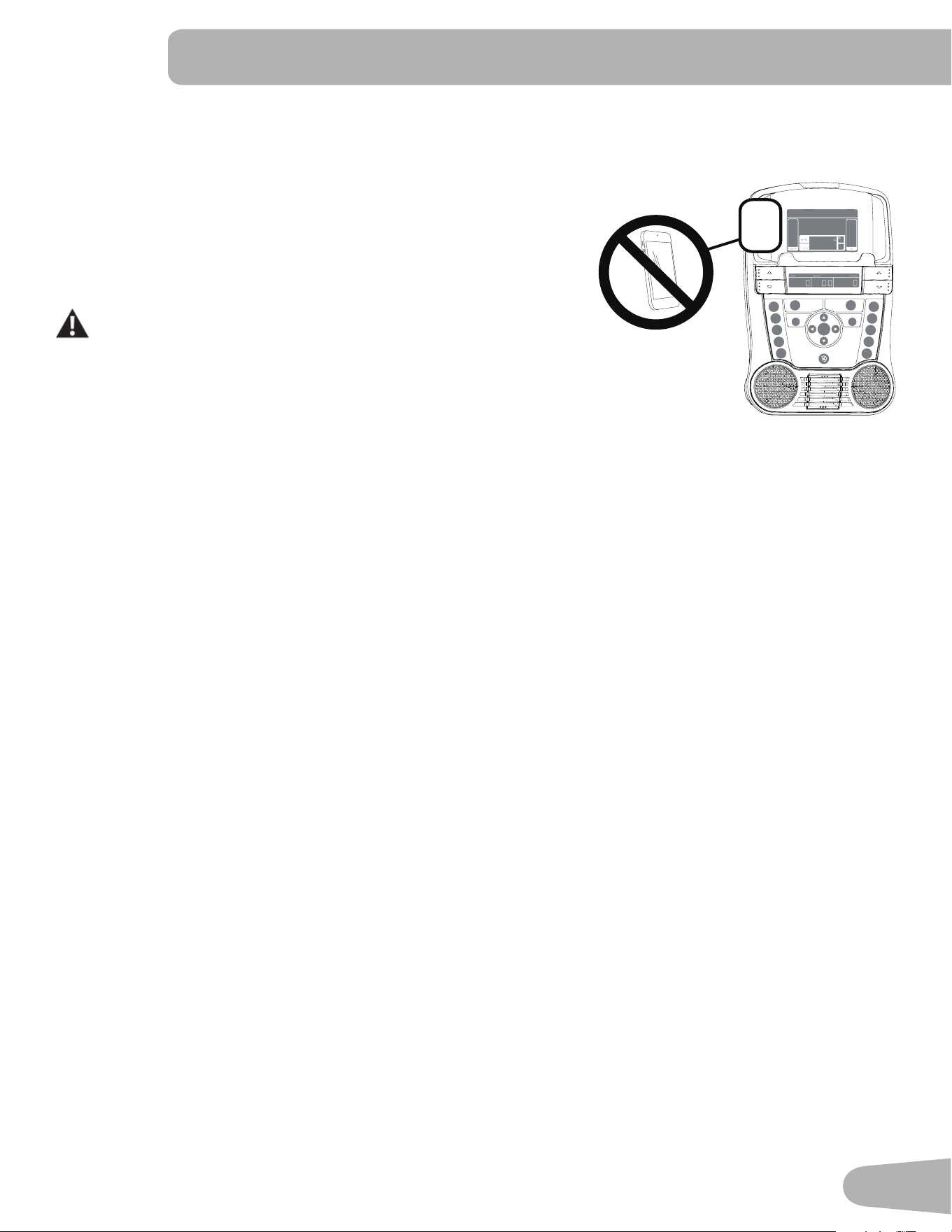
NOTICE:TopreventinterferencewiththetelemetryHRreceiver,donotplace
any personal electronic devices in the left side of the media tray.
Contact Heart Rate Sensors
ContactHeartRate(CHR)sensorssendyourheartratesignalstotheConsole.TheCHRsensorsarethestainlesssteelparts
oftheHandlebars.Touse,putyourhandscomfortablyaroundthesensors.Besurethatyourhandstouchboththetopand
thebottomofthesensors.Holdfirm,butnottootightorloose.BothhandsmustmakecontactwiththesensorsfortheCon-
sole to detect a pulse. After the Console detects four stable pulse signals, your initial pulse rate will be shown.
OncetheConsolehasyourinitialheartrate,donotmoveorshiftyourhandsfor10to15seconds.TheConsolewillnow
validatetheheartrate.Manyfactorsinfluencetheabilityofthesensorstodetectyourheartratesignal:
• Movementoftheupperbodymuscles(includingarms)producesanelectricalsignal(muscleartifact)thatcaninterferewith
pulsedetection.Slighthandmovementwhileincontactwiththesensorscanalsoproduceinterference.
• Calluses and hand lotion may act as an insulating layer to reduce the signal strength.
• SomeElectrocardiogram(EKG)signalsgeneratedbyindividualsarenotstrongenoughtobedetectedbythesensors.
• Theproximityofotherelectronicmachinescangenerateinterference.
Ifyourheartratesignaleverseemserraticaftervalidation,wipeoffyourhandsandthesensorsandtryagain.
OK
PAUSE/
END
QUICK
START
PROGRAMS
GOAL TRACK
28
Heart Rate Calculations
Yourmaximumheartrateusuallydecreasesfrom220BeatsPerMinute(BPM)inchildhoodtoapproximately160BPMby
age60.Thisfallinheartrateisusuallylinear,decreasingbyapproximatelyoneBPMforeachyear.Thereisnoindicationthat
traininginfluencesthedecreaseinmaximumheartrate.Individualsofthesameagecouldhavedifferentmaximumheartrates.
Itismoreaccuratetofindthisvaluebycompletingastresstestthanbyusinganagerelatedformula.
Yourat-restheartrateisinfluencedbyendurancetraining.Thetypicaladulthasanatrestheartrateofapproximately72
BPM,whereashighlytrainedrunnersmayhavereadingsof40BPMorlower.
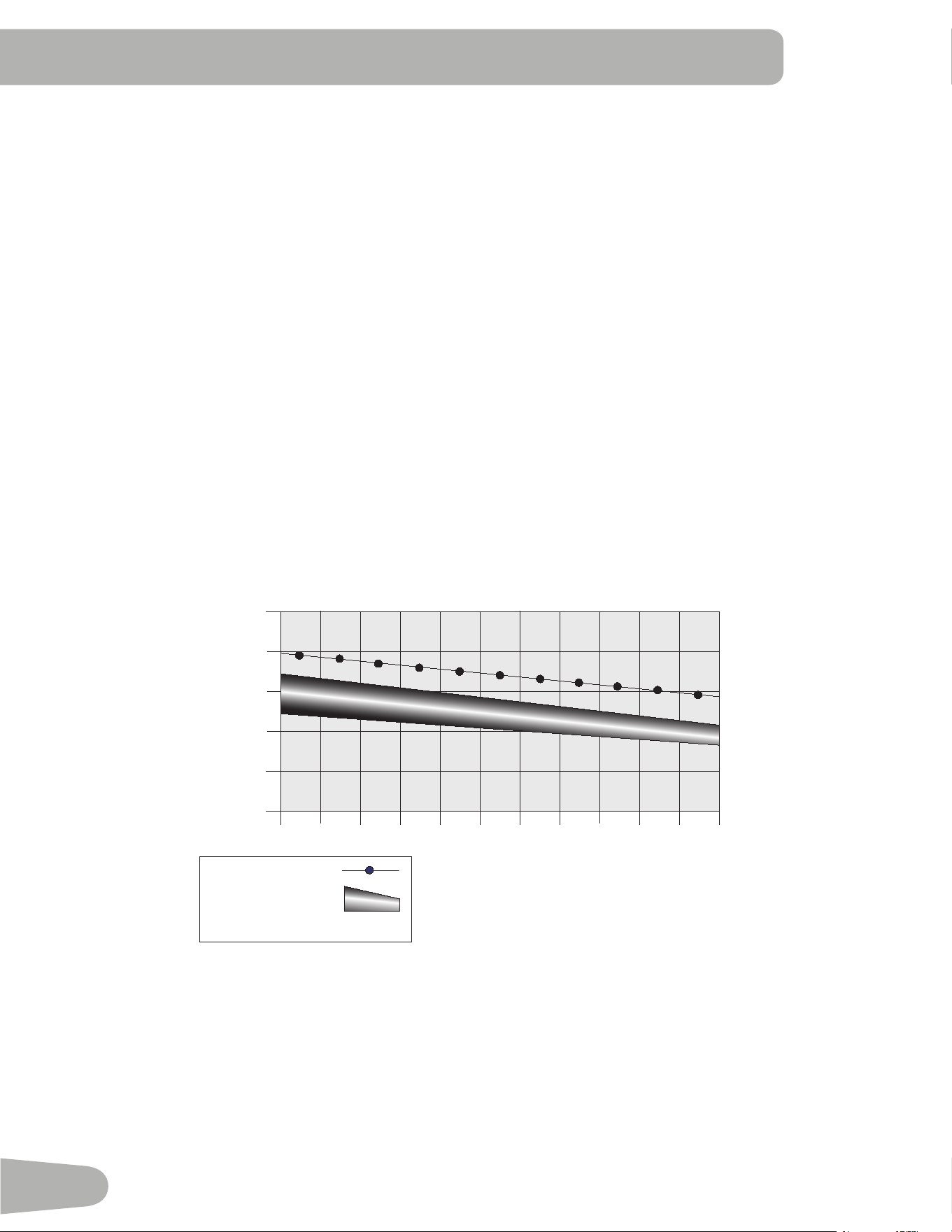
TheHeartRatetableisanestimateofwhatHeartRateZone(HRZ)iseffectivetoburnfatandimproveyourcardiovascular
system.Physicalconditionsvary,thereforeyourindividualHRZcouldbeseveralbeatshigherorlowerthanwhatisshown.
Themostefficientproceduretoburnfatduringexerciseistostartataslowpaceandgraduallyincreaseyourintensityuntil
yourheartratereachesbetween60–85%ofyourmaximumheartrate.Continueatthatpace,keepingyourheartrateinthat
targetzoneforover20minutes.Thelongeryoumaintainyourtargetheartrate,themorefatyourbodywillburn.
The graph is a brief guideline, describing the generally suggested target heart rates based on age. As noted above, your opti-
mal target rate may be higher or lower. Consult your physician for your individual target heart rate zone.
Note:Aswithallexercisesandfitnessregimens,alwaysuseyourbestjudgmentwhenyouincreaseyourexercisetimeor
intensity.
20-24
FAT-BURNING TARGET HEART RATE
Heart Rate BPM
(beats per minute)
Age
25-29
0
50
100
150
200
250
30-34 35-39 40-44 45-49 50-54 55-59 60-64 65-69 70+
196
191
186
181
176
171
166
161
156
151
146
167
162
158
154
150
145
141
137
133
128
126
Maximum Heart Rate
Target Heart Rate Zone
(keep within this range
for optimum fat-burning)
118
115
112
109
106
103
100
97
94
91
88
29
operatIonS
What to Wear
Wearrubber-soledathleticshoes.Youwillneedtheappropriateclothesforexercisethatallowyoutomovefreely.
How Often Should You Exercise
Consultaphysicianbeforeyoustartanexerciseprogram.Stopexercisingifyoufeelpainortightnessinyourchest,
becomeshortofbreath,orfeelfaint.Contactyourdoctorbeforeyouusethemachineagain.Usethevaluescalculated
or measured by the machine’s computer for reference purposes only. The heart rate displayed on the console may be
inaccurate and should be used for reference only.
• 3timesaweekfor30minuteseachday.
• Scheduleworkoutsinadvanceandtrytofollowtheschedule.
Mounting and Dismounting Your Machine
Care should be used when mounting or dismounting the machine.
BeawarethatthePedalsandtheHandlebarsareconnectedandwheneitherofthesepartsmovetheotherdoesas
well.Inordertoavoidpossibleseriousinjury,onlygrasptheStaticHandlebarstosteadyyourself.
To mount your fitness machine:
1. MovethePedalsuntiltheonenearestyouisinthelowestposition.
2. GrasptheStaticHandlebarsundertheConsole.
3. SteadyingyourselfwiththeStaticHandlebars,stepupontothelowestPedalandplaceyourotherfootontotheopposite
Pedal.
To dismount your fitness machine:
1. MovethePedalyouwanttodismountfromtothehighestposition,andbringthemachinetoacompletestop.
Thismachineisnotequippedwithafree-wheel.Pedalspeedshouldbereducedinacontrolledmanner.
2. GrasptheStaticHandlebarsundertheConsoletosteadyyourself.
3. Withyourweightonthelowestfoot,swingtheupperfootoffthemachineanddownontothefloor.
4. StepoffofthemachineandreleaseyourgripfromtheStaticHandlebars.
Power-Up / Idle Mode
The Console will enter Power-Up/IdleModeifitispluggedintoapowersource,anybuttonispushed,orifitreceivesasignal
fromtheRPMsensorasaresultofpedalingthemachine.
Auto Shut-Off (Sleep Mode)
IftheConsoledoesnotreceiveanyinputinapproximately5minutes,itwillautomaticallyshutoff.TheLCDdisplayisoffwhile
inSleepMode.
Note: TheConsoledoesnothaveanOn/Offswitch.
30
Initial Setup
Duringthefirstpower-up,theConsoleshouldbesetupwiththedate,timeandyourpreferredmeasurementunits.
1. Date:PushtheIncrease/Decreasebuttonstoadjustthecurrentlyactivevalue(flashing).PushtheLeft/Rightbuttonsto
changewhichsegmentisthecurrentlyactivevalue(month/day/year).
2. PushOKtoset.
3. Time:PushtheIncrease/Decreasebuttonstoadjustthecurrentlyactivevalue(flashing).PushtheLeft/Rightbuttonsto
changewhichsegmentisthecurrentlyactivevalue(hour/minute/AMorPM).
4. PushOKtoset.
5. UnitsofMeasurement:PushtheIncrease/Decreasebuttonstoadjustbetween“MILES”(ImperialEnglish)or“KM”
(metric).
6. PushOKtoset.TheConsolegoesbacktothePower-Up/IdleModescreen.
Note: Toadjusttheseselections,consultthe“ConsoleSet-UpMode”section.
Quick Start ( Manual ) Program
TheQuickStart(Manual)programletsyoustartaworkoutwithoutenteringanyinformation.
DuringaManualWorkout,eachcolumnrepresentsa2minutetimeperiod.Theactivecolumnwilladvanceacrossthescreen
every2minutes.Iftheworkoutlastsformorethan30minutes,theactivecolumnisfixedonthefarthestcolumnontheright
and pushes the previous columns off the display.
1. Standonthemachine.
2. PushtheIncrease/DecreasebuttontoselectthecorrectUserprofile.IfyoudonothaveaUserprofilesetup,youcan
selectaUserprofilethathasnocustomizeddata(defaultvaluesonly).
3. PushtheQUICKSTARTbuttontostarttheManual program.
4. Tochangetheresistancelevel,pushtheResistanceIncrease/Decreasebuttons.Thecurrentintervalandfutureintervals
aresettothenewlevel.ThedefaultManualresistancelevelis4.Thetimewillcountupfrom00:00.
Note: IfaManualworkoutisperformedformorethan99minutesand59seconds(99:59),theunitsforTimewillshiftto
hoursandminutes(1hour,40minutes).
5. Whendonewithyourworkout,stoppedalingandpushPAUSE/ENDtopausetheworkout.PushPAUSE/ENDagainto
endtheworkout.
Note: TheworkoutresultsarerecordedtothecurrentUserProfile.
User Profiles
TheConsoleletsyoustoreanduse4Userprofiles.TheUserprofilesautomaticallyrecordtheworkoutresultsforeachworkout,
andallowtheworkoutdatatobereviewed.
TheUserprofilestoresthefollowingdata:
• Name—upto10characters
• Age
• W e i g h t
• Height
• Gender
• PreferredWorkoutValues

31
Select a User Profile
EveryworkoutissavedtoaUserProfile.BesuretoselecttheproperUserProfilebeforestartingaworkout.ThelastUserthat
completedaworkoutwillbethedefaultuser.
UserProfilesareassignedthedefaultvaluesuntiltheyarecustomizedbyediting.BesuretoedittheUserProfileformore
accurate calorie and heart rate information.
FromthePower-UpModescreen,pushtheIncrease()orDecrease()buttonstoselectoneoftheUserProfiles.The
ConsolewilldisplaythenameoftheUserProfileandtheUserProfileIcon.
Edit User Profile
1. FromthePower-UpModescreen,pushtheIncrease()orDecrease()buttonstoselectoneoftheUserProfiles.
2. PushtheOKbuttontoselecttheUserProfile.
3. TheConsoledisplayshowstheEDITpromptandthecurrentUserProfilename.PushOKtostarttheEditUserProfile
option.
ToexittheEditUserProfileoption,pushthePAUSE/ENDbuttonandtheconsolewillgobacktothePower-UpMode
screen.
4. TheConsoledisplayshowstheNAMEpromptandthecurrentUserProfilename.
Note:TheUsernamewillbeblankifthisisthefirstedit.ThenameofaUserProfileislimitedto10characters.
Thecurrentlyactivesegmentwillflash.UsetheIncrease/Decreasebuttonstomovethroughthealphabetandblankspace
(foundbetweenAandZ).Toseteachsegment,usetheLeft()orRight()buttonstoshiftbetweensegments.
PushtheOKbuttontoacceptthedisplayedUsername.
5. ToedittheotherUserdata(EDITAGE,EDITWEIGHT,EDITHEIGHT,EDITGENDER),usetheIncrease/Decreasebuttonsto
adjust,andpushOKtoseteachentry.
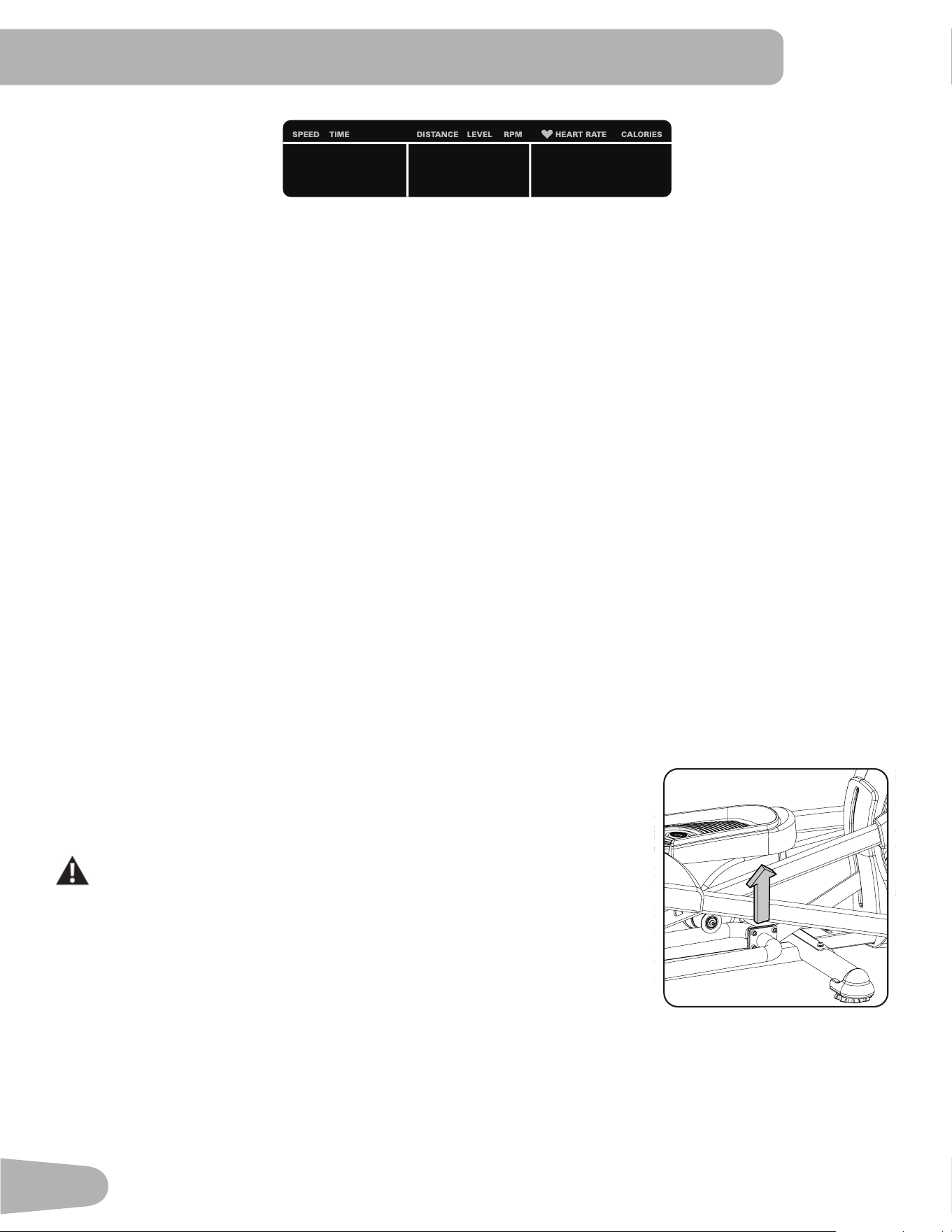
6. TheConsoledisplayshowstheSCANprompt.ThisoptioncontrolshowtheworkoutvaluesaredisplayedintheLower
Displayduringaworkout.The“OFF”settingallowstheusertopushtheRIGHTorLEFTbuttonstoviewtheotherworkout
valuechannelswhendesired.The“ON”settingallowstheConsoletoautomaticallydisplaytheworkoutvaluechannels
every6seconds.
Thedefaultis“OFF”.
PushtheOKbuttontosethowtheworkoutvaluesaredisplayed.
7. TheConsoledisplayshowstheWIRELESSHRprompt.IfyouareusingtheConsolespeakersattheirhighersettingsand
/orusingalargersizedpersonalelectronicdevice,theConsolemayshowHeartRateinterference.Thisoptionallowsthe
TelemetryHeartRateReceivertobedeactivatedblockingtheinterference.
TheUpperDisplayshowsthecurrentvaluesetting:“ON”or“OFF”.PushtheIncrease()orDecrease()buttonsto
change the value.
Thedefaultis“ON”.
PushtheOKbuttontosettheTelemetryHeartRateReceivertoactive.
8. TheConsoledisplayshowstheEDITLOWERDISPLAYprompt.ThisoptionallowsyoutocustomizewhichWorkoutValues
aredisplayedduringaworkout.
TheLowerDisplaywillshowalloftheworkoutvalues,withtheactiveWorkoutValueflashing.TheUpperDisplayshows
theactivevaluesetting:“ON”or“OFF”.PushtheIncrease()orDecrease()buttonstohidetheactiveworkoutvalue,
andpushtheLeft()orRight()buttonstoshifttheactiveworkoutvalue.
NOTE:toshowahiddenworkoutvalue,repeatprocedureandchangeUpperDisplayvalueto“ON”forthatvalue.
WhendonewithcustomizingtheLowerDisplay,pushtheOKbuttontosetit.
32
Hr
9. TheConsolewillgotothePower-UpModescreenwiththeuserselected.
Reset a User Profile
1. FromthePower-UpModescreen,pushtheIncrease()orDecrease()buttonstoselectoneoftheUserProfiles.
2. PushtheOKbuttontoselecttheUserProfile.
3. TheConsoledisplayshowsthecurrentUserProfilenameandtheEDITprompt.PushtheIncrease()orDecrease()
buttons to change the prompt.
Note: ToexittheEditUserProfileoption,pushthePAUSE/ENDbuttonandtheconsolewillgobacktothePower-Up
Modescreen.
4. TheConsoledisplayshowstheRESETpromptandthecurrentUserProfilename.PushOKtostarttheResetUserProfile
option.
5. TheConsolewillnowconfirmtherequesttoresettheUserprofile(thedefaultselectionis‘NO’).PushtheIncrease()or
Decrease()buttonstoadjusttheselection.
6. PushOKtomakeyourselection.
7. TheConsolewillgotothePower-UpModescreen.
Changing Resistance Levels
PushtheResistanceLevelIncrease()orDecrease()buttonstochangetheresistancelevelatanytimeinaworkout
program.Torapidlychangetheresistancelevel,pushthedesiredResistanceLevelQuickButton.TheConsolewilladjustto
theselectedresistancelevelofthequickbutton.
Changing Incline Levels
PushtheInclineLevelIncrease()orDecrease()buttonstochangetheinclineangleof
therailassemblyatanytimeinaworkoutprogram.Torapidlychangetheinclinelevel,
pushthedesiredInclineLevelQuickButton.TheConsolewilladjusttotheselected
inclinelevelofthequickbutton.
Besuretheareabelowthemachineisclearbeforelowering.FullylowertheIncline
Assemblyaftereachworkout.
Exerciseonthismachinerequirescoordinationandbalance.Besuretoanticipate
that changes in speed, incline angle and resistance level can occur during
workouts,andbeattentiveinordertoavoidlossofbalanceandpossibleinjury.
Note:Besurethattheworkoutspaceyouareutilizinghasadequateheight
clearance,takingintoconsiderationtheheightoftheuserandthemaximumincline
oftheellipticalmachine.Thoughtheinclineanglechangestheexercisemotion,itdoesnotaffectthecalorievalues.
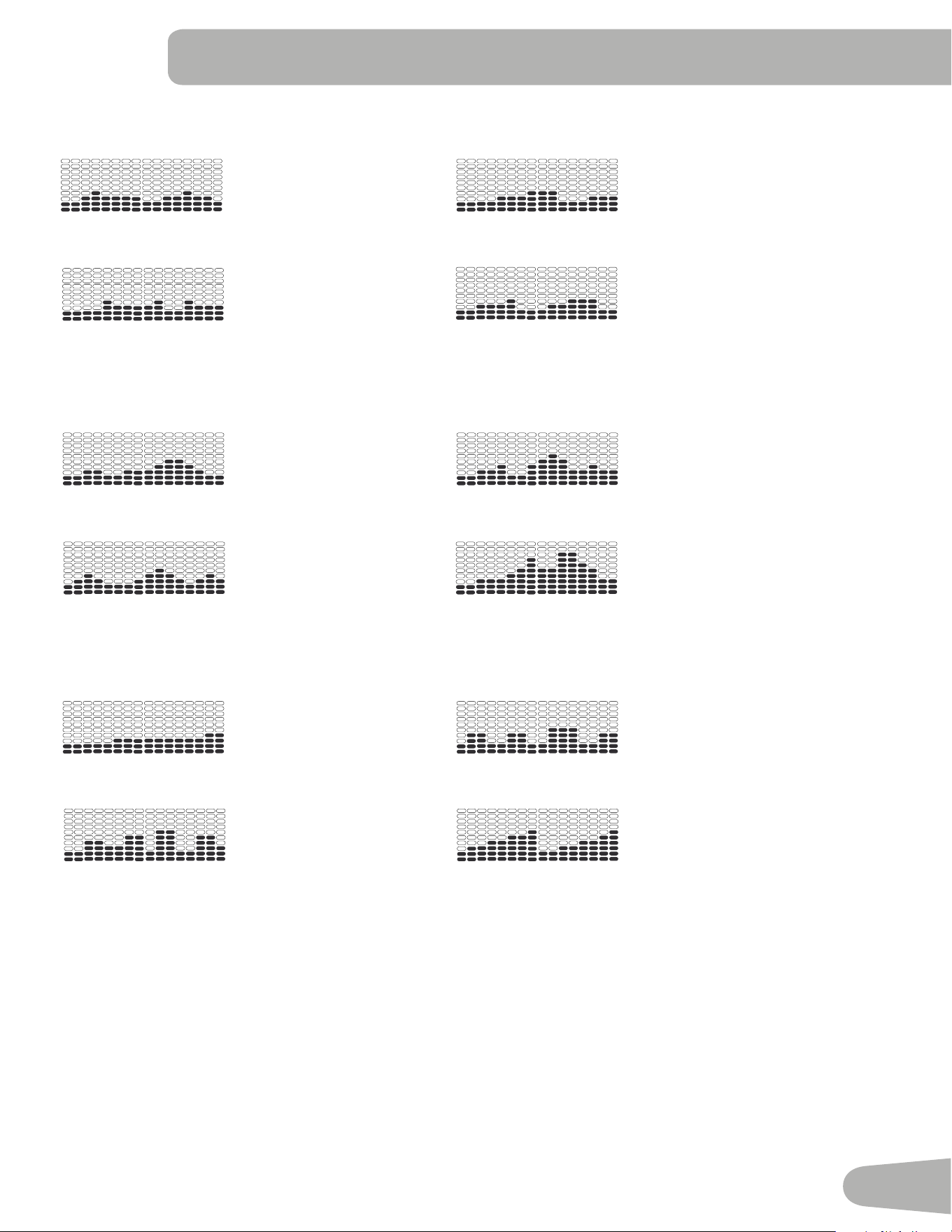
Profile Programs
Theseprogramsautomatedifferentresistanceandworkoutlevels.TheProfileProgramsareorganizedintoCategories(Fun
Rides,Mountains,andChallenges).
Note:OnceaUserviewsalltheCategories,theywillbeexpandedtodisplaytheProgramswithineachoftheCategories.
33
FUN RIDES
RollingHills RideinthePark
Secondary Case 6: Profile Programs
Rolling Hills
FUN RIDES
Ride in the Park Easy Tour
Pike’s Peak
MOUNTAINS
Mount Hood Pyramids
Uphill Finish
CHALLENGES
Cross-Training Interval
Stream Crossing
Summit Pass
Stairs
REVED : 122612
Secondary Case 6: Profile Programs
Rolling Hills
FUN RIDES
Ride in the Park Easy Tour
Pike’s Peak
MOUNTAINS
Mount Hood Pyramids
Uphill Finish
CHALLENGES
Cross-Training Interval
Stream Crossing
Summit Pass
Stairs
REVED : 122612
EasyTour StreamCrossing
Secondary Case 6: Profile Programs
Rolling Hills
FUN RIDES
Ride in the Park Easy Tour
Pike’s Peak
MOUNTAINS
Mount Hood Pyramids
Uphill Finish
CHALLENGES
Cross-Training Interval
Stream Crossing
Summit Pass
Stairs
REVED : 122612
Secondary Case 6: Profile Programs
Rolling Hills
FUN RIDES
Ride in the Park Easy Tour
Pike’s Peak
MOUNTAINS
Mount Hood Pyramids
Uphill Finish
CHALLENGES
Cross-Training Interval
Stream Crossing
Summit Pass
Stairs
REVED : 122612
MOUNTAINS
Pike’sPeak MountHood
Secondary Case 6: Profile Programs
Rolling Hills
FUN RIDES
Ride in the Park Easy Tour
Pike’s Peak
MOUNTAINS
Mount Hood Pyramids
Uphill Finish
CHALLENGES
Cross-Training Interval
Stream Crossing
Summit Pass
Stairs
REVED : 122612
Secondary Case 6: Profile Programs
Rolling Hills
FUN RIDES
Ride in the Park Easy Tour
Pike’s Peak
MOUNTAINS
Mount Hood Pyramids
Uphill Finish
CHALLENGES
Cross-Training Interval
Stream Crossing
Summit Pass
Stairs
REVED : 122612
Pyramids SummitPass
Secondary Case 6: Profile Programs
Rolling Hills
FUN RIDES
Ride in the Park Easy Tour
Pike’s Peak
MOUNTAINS
Mount Hood Pyramids
Uphill Finish
CHALLENGES
Cross-Training Interval
Stream Crossing
Summit Pass
Stairs
REVED : 122612
Secondary Case 6: Profile Programs
Rolling Hills
FUN RIDES
Ride in the Park Easy Tour
Pike’s Peak
MOUNTAINS
Mount Hood Pyramids
Uphill Finish
CHALLENGES
Cross-Training Interval
Stream Crossing
Summit Pass
Stairs
REVED : 122612
CHALLENGES
UphillFinish Cross-Training
Secondary Case 6: Profile Programs
Rolling Hills
FUN RIDES
Ride in the Park Easy Tour
Pike’s Peak
MOUNTAINS
Mount Hood Pyramids
Uphill Finish
CHALLENGES
Cross-Training Interval
Stream Crossing
Summit Pass
Stairs
REVED : 122612
Secondary Case 6: Profile Programs
Rolling Hills
FUN RIDES
Ride in the Park Easy Tour
Pike’s Peak
MOUNTAINS
Mount Hood Pyramids
Uphill Finish
CHALLENGES
Cross-Training Interval
Stream Crossing
Summit Pass
Stairs
REVED : 122612
Interval Stairs
Secondary Case 6: Profile Programs
Rolling Hills
FUN RIDES
Ride in the Park Easy Tour
Pike’s Peak
MOUNTAINS
Mount Hood Pyramids
Uphill Finish
CHALLENGES
Cross-Training Interval
Stream Crossing
Summit Pass
Stairs
REVED : 122612
Secondary Case 6: Profile Programs
Rolling Hills
FUN RIDES
Ride in the Park Easy Tour
Pike’s Peak
MOUNTAINS
Mount Hood Pyramids
Uphill Finish
CHALLENGES
Cross-Training Interval
Stream Crossing
Summit Pass
Stairs
REVED : 122612
Workout Profile and Goal Program
TheConsoleletsyouselecttheProfileProgramandtypeofGoalforyourworkout(Distance,TimeorCalories),andsetthe
Goalvalue.
1. Standonthemachine.
2. PushtheIncrease()orDecrease()buttonstoselectthecorrectUserprofile.
3. PushtheProgramsbutton.
4. PushtheLeft()orRight()buttonstoselectaCategoryofWorkout.
5. PushtheIncrease()orDecrease()buttonstoselectaProfileWorkout,andpushOK.
34
6. UsetheIncrease()orDecrease()buttons to select a typeofGoal(Distance,TimeorCalories),andpushOK.
7. UsetheIncrease()orDecrease()buttonstoadjusttheworkoutvalue.
8. PushOKtobeginthegoal-orientedworkout.TheGOALvaluewillcountdownasthevalueforpercentcompleted
increases.
Note:DuringaCaloriesGoal,eachcolumnisfora2minutetimeperiod.Theactivecolumnwilladvanceacrossthescreen
every2minutes.Iftheworkoutlastsformorethan30minutes,theactivecolumnwillfixtothelastrightcolumnandpush
the previous columns off the display.
Fitness Test Program
TheFitnessTestmeasurestheimprovementsofyourphysicalfitnesslevel.Thetestcomparesyourpoweroutput(inWatts)to
your heart rate. As your fitness level improves, your power output will increase at a given heart rate.
Note:TheConsolemustbeabletoreadtheheartrateinformationfromtheContactHeartRate(CHR)sensorsorHeart
RateMonitor(HRM)toworkcorrectly.
YoucanstarttheFitnessTestfromtheFEEDBACKcategory.TheFitnessTestprogramfirstpromptsyoutoselectyourfitness
level—Beginner(“BEG”)orAdvanced(“ADV”).TheConsolewillusetheAgeandWeightvaluesfortheselectedUserProfile
tocalculatetheFitnessScore.
StarttoworkoutandholdtheHeartRateSensors.Whentheteststarts,theintensityoftheworkoutslowlyincreases.This
meansyouwillworkharder,andasaresult,yourheartrateincreases.Theintensitycontinuestoincreaseautomaticallyuntil
yourheartratereachesthe“TestZone”.Thiszoneisindividuallycomputedtobenear75percentofthemaximumheartrate
ofyourUserProfile.WhenyoureachtheTestZone,themachineholdstheintensitysteadyfor3minutes.Thisletsyoureach
astablecondition(whereyourheartratebecomessteady).Attheendofthe3minutes,theConsolemeasuresyourheart
rate and the power output. These numbers, along with information about your age and weight, are computed to produce a
“FitnessScore”.
Note:FitnessTestscoresshouldonlybecomparedtoyourpreviousscoresandnottootherUserProfiles.
CompareyourFitnessScorestoseeyourimprovement.
Recovery Test Program
RecoveryTestshowshowquicklyyourheartrecoversfromanexercisestatetoamorerestfulstate.Improvedrecoveryisan
indicator of increasing fitness.
Note:TheConsolemustbeabletoreadtheheartrateinformationfromtheContactHeartRate(CHR)sensorsorHeart
RateMonitor(HRM)toworkcorrectly.
Fromanelevatedheartrate,selecttheRecoveryTestProgram.TheConsolewillshow“STOPEXERCISING”andthegoal
willbegintocountdown.Stopexercisingbutcontinuetogripthecontactheartratesensors.After5seconds,thedisplaywill
show“RELAX”andwillcontinuetocountdownto00:00.Fortheentireminutetheconsolewillalsoshowyourheartrate.You
mustgriptheheartratesensorsforthedurationofthetestifnotusingaRemoteHeartRateMonitor.
Thedisplaywillcontinuetoshow“RELAX”andyourheartrateuntilthegoalreaches00:00.Theconsolewillthencalculate
your recovery score.
RecoveryScore=Yourheartrateat1:00(thebeginningofthetest)minusyourheartrateat00:00(theendofthetest).
ThehighertheRecoveryTestscorevalue,thequickeryourheartrateisreturningtoamorerestfulstateandisanindicationof
improvingfitness.Byrecordingthesevaluesovertimeyoucanseethetrendtowardbetterhealth.
WhenyouselecttheRecoveryTestProgramandthereisnoheartratesignalordisplay,theConsolewillshow“NEEDHEART
RATE”.Thismessagewillshowfor5seconds.Ifnosignalisdetected,theprogramwillend.
35
HelpfulTip:Foramorerelevantscore,trytoobtainasteadyheartratefor3minutesbeforestartingtheRecoveryProgram.
Thiswillbeeasiertoachieve,andobtainthebestresult,intheManualprogramsoyoucancontrolthelevelsofresistance.
Heart Rate Control (HRC) Workout Programs
TheHeartRateControl(HRC)programsletyousetaheartrategoalforyourworkout.Theprogrammonitorsyourheartrate
inbeatsperminute(BPM)fromtheContactHeartRate(CHR)sensorsonthemachineorfromaHeartRateMonitor(HRM)
cheststrap,andadjuststheworkouttokeepyourheartrateintheselectedzone.
Note:TheconsolemustbeabletoreadtheheartrateinformationfromtheCHRsensorsorHRMfortheHRCprogramto
workcorrectly.
TheTargetHeartRateprogramsuseyourageandotherUserinformationtosettheHeartRateZonevaluesforyourworkout.
Theconsoledisplaythengivespromptsforyoutosetupyourworkout:
1. SelecttheHeartRateControlworkoutlevel:BEGINNER(“BEG”)orADVANCED(“ADV”)andpushOK.
2. PushtheIncrease()orDecrease()buttonstoselectthepercentageofmaximumheartrate:50–60%,60–70%,70–
80%,80–90%.
Consultaphysicianbeforeyoustartanexerciseprogram.Stopexercisingifyoufeelpainortightnessinyourchest,
becomeshortofbreath,orfeelfaint.Contactyourdoctorbeforeyouusethemachineagain.Usethevaluescalculated
or measured by the machine’s computer for reference purposes only. The heart rate displayed on the console is an
approximationandshouldbeusedforreferenceonly.
3. PushtheIncrease()orDecrease()buttonstoselecttheGoaltype,andpushOK.
4. PushtheIncrease()orDecrease()buttonstosetthegoalvaluefortheworkout.
Note:Besuretoallowtimeforyourheartratetoreachthedesiredheartratezonewhensettingthegoal.
5. PushOKtostarttheworkout.
AUsercansetaHeartRatezoneinsteadofavaluebyselectingtheHeartRateControl-Userprogram.TheConsolewilladjust
theworkouttokeeptheUserinthedesiredHeartRatezone.
1. SelectHEARTRATECONTROL-USER,andpushOK.
2. PushtheIncrease()orDecrease()buttonstosettheHeartRatezonefortheworkout,andpushOK.TheConsole
showstheHeartRatezone(percent)ontheleft,andtheHeartRaterangefortheUserontherightsideofthedisplay.
Consultaphysicianbeforeyoustartanexerciseprogram.Stopexercisingifyoufeelpainortightnessinyourchest,
becomeshortofbreath,orfeelfaint.Contactyourdoctorbeforeyouusethemachineagain.Usethevaluescalculated
or measured by the machine’s computer for reference purposes only. The heart rate displayed on the console is an
approximationandshouldbeusedforreferenceonly.
3. PushtheIncrease()orDecrease()buttonstoselecttheGoaltype,andpushOK.
4. PushtheIncrease()orDecrease()buttonstosetthevaluefortheworkout.
5. PushOKtostarttheworkout.
36
Changing a Workout Program During a Workout
TheConsoleallowsadifferentWorkoutProgramtobestartedfromanactiveworkout.
1. Fromanactiveworkout,pushPROGRAMS.
2. PushtheIncrease()orDecrease()buttonstoselectthedesiredworkoutprogram,andpushOK.
3. PushtheIncrease()orDecrease()buttonstoselecttheGoaltype,andpushOK.
4. PushtheIncrease()orDecrease()buttonstosetthevaluefortheworkout.
5. PushOKtostoptheactiveworkoutandstartthenewworkout.
ThepreviousworkoutvaluesaresavedtotheUserProfile.
Pausing or Stopping
TheConsolewillgointoPauseModeiftheuserstopspedalingandpushesPAUSE/ENDduringaworkout,orthereisno
RPMsignalfor5seconds(usernotpedaling).TheConsolewillcyclethroughaseriesofmessagesthatchangeevery4
seconds:
-WORKOUTPAUSED
-PEDALTOCONTINUE(ifabike)/STRIDETOCONTINUE(ifanelliptical)
-PUSHENDTOSTOP
Duringapausedworkout,youcanusetheIncrease/Decreasebuttonstomovethroughtheresultchannelsmanually.
1. StoppedalingandpushthePAUSE/ENDbuttontopauseyourworkout.
2. Tocontinueyourworkout,pushOKorstartpedaling.
Tostoptheworkout,pushthePAUSE/ENDbutton.TheConsolewillgointoResults/CoolDownmode.
Results / Cool Down Mode
AfteraworkouttheGOALdisplayshows03:00andthenstartstocountdown.DuringthisCoolDownperiod,theConsole
showstheWorkoutResults.AllworkoutsexceptQuickStarthavea3-minuteCoolDownperiod.
TheLCDdisplayshowstheCurrentWorkoutvaluesinthreechannels:
a.) TIME(total),DISTANCE(total),andCALORIES(total)
b.) SPEED(average),RPM(average),andHEARTRATE(average)
c.) TIME(average),LEVEL(average),andCALORIES(average).
PushtheLeft()orRight()buttonstomovethroughtheresultchannelsmanually.
DuringtheCoolDownperiod,theResistanceLevelwilladjusttoathirdoftheaverageLeveloftheworkout.TheCoolDown
resistancelevelcanbeadjustedwiththeResistanceIncreaseandDecreasebuttons,buttheConsolewillnotdisplaythe
value.
YoucanpushPAUSE/ENDtostoptheResults/CoolDownperiodandgobacktoPower-UpMode.IfthereisnoRPMorHR
signal,theConsoleautomaticallygoesintoSleepMode.
37
GOAL TRACK Statistics (and Achievements)
ThestatisticsfromeveryworkoutarerecordedtoaUserProfile.
TheSchwinnDualTrack
™
ConsoleshowstheGoalTrackworkoutStatisticsontheLowerDisplayinthreechannels:
a.) TIME(total),DISTANCE(total),andCALORIES(total)
b.) SPEED(average),RPM(average),andHEARTRATE(average)
c.) TIME(average),DISTANCE(average)/orLEVEL(average)*,andCALORIES(average)
*IftheGoalTrackStatisticisasingleworkout,LEVEL(average)isdisplayed.IftheGoalTrackStatisticisa
combinationofmultipleworkouts,DISTANCE(average)isdisplayedinsteadofLEVEL(average).
ToviewtheGOALTRACKstatisticsofaUserProfile:
1. FromthePower-Upscreen,pushtheIncrease()orDecrease()buttonstoselectaUserProfile.
2. PushtheGOALTRACKbutton.TheConsolewilldisplaytheLASTWORKOUTvaluesandactivatethecorresponding
Achievement light.
Note:GoalTrackstatisticscanbeviewedevenduringaworkout.PushGOALTRACKandtheLASTWORKOUTvalueswill
bedisplayed.TheworkoutvaluesforthecurrentworkoutwillbehiddenexceptfortheGOALdisplay.PushGOAL
TRACKagaintoreturntothePower-Upscreen.
3. PushtheIncrease()buttontomovetothenextGOALTRACKstatistic,“LAST7DAYS”.TheConsolewilldisplaythecalo-
riesburntonthedisplay(50caloriespersegment)fortheprevioussevendays,alongwiththeworkoutvaluetotals.Usethe
Left()orRight()buttonstomovethroughalltheworkoutstatisticchannels.
4. PushtheIncrease()buttontomoveto“LAST30DAYS”.TheConsolewilldisplaythetotalvaluesforthepreviousthirty
days.UsetheLeft()orRight()buttonstomovethroughalltheworkoutstatisticchannels.
5. PushtheIncrease()buttontomovetothe“LONGESTWORKOUT”.TheConsolewilldisplaytheworkoutvalueswiththe
mostTimevalue.UsetheLeft()orRight()buttonstomovethroughalltheworkoutstatisticchannels.
6. PushtheIncrease()buttontomovetothe“CALORIERECORD”.TheConsolewilldisplaytheworkoutvalueswiththe
mostCaloriesvalue.UsetheLeft()orRight()buttonstomovethroughalltheworkoutstatisticchannels.
7. PushtheIncrease()buttontomoveto“BMI”,orBodyMassIndex.TheConsolewilldisplaytheBMIvaluebasedonthe
Usersettings.BesuretheheightvalueiscorrectforyourUserProfile,andtheweightvalueiscurrent.
TheBMIMeasurementisausefultoolthatshowstherelationshipbetweenweightandheightthatisassociatedwithbodyfat
andhealthrisk.ThetablebelowgivesageneralratingfortheBMIscore:
Underweight Below18.5
Normal 18.5–24.9
Overweight 25.0–29.9
Obesity 30.0andabove
Note: Theratingmayoverestimatebodyfatinathletesandotherswhohaveamuscularbuild.Itmayalsounderestimate
body fat in older persons and others who have lost muscle mass.
ContactyourdoctorformoreinformationaboutBodyMassIndex(BMI)andtheweightthatisappropriateforyou.Use
the values calculated or measured by the machine’s computer for reference purposes only.
8. PushtheIncrease()buttontomovetothe“SAVETOUSB-OK?”prompt.PushOK,andthe“AREYOUSURE?-NO”
promptwilldisplay.Pushthe Increase()buttontochangeittoyesandpushOK.TheConsolewilldisplaythe“INSERT
USB”prompt.InsertaUSBFlashDriveintotheUSBPort.TheConsolewillrecordtheStatisticstotheUSBFlashDrive.
TheConsolewilldisplay“SAVING”,andthen“REMOVEUSB”whenitissafetoremovetheUSBFlashDrive.
Note:PushthePAUSE/ENDbuttontoforceanexitfromthe“SAVING”prompt.
38
9. PushtheIncrease()buttontomovetothe“CLEARWORKOUTDATA-OK?”.PushOK,andthe“AREYOUSURE?-NO”
promptwilldisplay.PushtheIncrease()buttontochangetothe“AREYOUSURE?-YES”display,andpushOK. The
userworkoutshavebeenreset.
10. PushGOALTRACKtoreturntothePower-Upscreen.
WhenaUserperformsaworkoutthatsurpassesthe“LONGESTWORKOUT” or “CALORIERECORD” of the previous
workouts,theConsolewillcongratulatewithanaudiblesoundandtelltheUserthenewachievement.Thecorresponding
AchievementIndicatorLightwillalsobeactive.
www.SchwinnConnect.com
Gotothewww.SchwinnConnect.comwebsitetocreateanonlineprofile,uploadyourworkoutresultsusingaUSBFlash
Drive,andthenviewandtrackyourachievementsovertime.
www.SchwinnConnect.comalsoworkswithMyFitnessPal.Simplyfollowthepromptsfromthe“LinktoMyFitnessPal”button,
andyourworkoutresultswillbeavailablewithyourexistingMyFitnessPalprofile.

39
conSole Setup mode
TheConsoleSetupModeletsyouinputthedateandtime,settheunitsofmeasurementtoeitherEnglishorMetric,change
themachinetype,controlthesoundsettings(on/off),orseemaintenancestatistics(ErrorLogandRunHours–forservice
technicianuseonly).
1. HolddownthePAUSE/ENDbuttonandRightbuttontogetherfor3secondswhileinthePower-UpModetogointothe
ConsoleSetupMode.
Note:PushPAUSE/ENDtoexittheConsoleSetupModeandreturntothePower-UpModescreen.
2. TheConsoledisplayshowstheDatepromptwiththecurrentsetting.Tochange,theIncrease/Decreasebuttonstoadjust
thecurrentlyactivevalue(flashing).PushtheLeft/Rightbuttonstochangewhichsegmentisthecurrentlyactivevalue
(month/day/year).
3. PushOKtoset.
4. TheConsoledisplayshowstheTimepromptwiththecurrentsetting.PushtheIncrease/Decreasebuttonstoadjustthe
currentlyactivevalue(flashing).PushtheLeft/Rightbuttonstochangewhichsegmentisthecurrentlyactivevalue(hour/
minute/AMorPM).
5. PushOKtoset.
6. TheConsoledisplayshowstheUnitspromptwiththecurrentsetting.Tochange,pushOKtostarttheUnitsoption.Push
theIncrease/Decreasebuttonstochangebetween“MILES”(ImperialEnglishunits)and“KM”(metricunits).
Note:IftheunitschangewhenthereisdatainUserStatistics,thestatisticsconverttothenewunits.
7. PushOKtoset.
8. TheConsoledisplayshowstheSoundSettingspromptwiththecurrentsetting.PushtheIncrease/Decreasebuttonsto
changebetween“ON”and“OFF”.
9. PushOKtoset.
10. TheConsoledisplayshowstheTOTALRUNHOURSforthemachine.
11. Forthenextprompt,pushtheOKbutton.
12. TheConsoledisplayshowstheSoftwareVersionprompt.
13. Forthenextprompt,pushtheOKbutton.
14.TheConsolewilldisplaythePower-UpModescreen.
40
41
maIntenance
Readallmaintenanceinstructionsfullybeforeyoustartanyrepairwork.Insomeconditions,anassistantisrequiredtodothe
necessarytasks.
Equipmentmustberegularlyexaminedfordamageandrepairs.Theownerisresponsibletomakesurethatregular
maintenanceisdone.Wornordamagedcomponentsmustberepairedorreplacedimmediately.Onlymanufacturer
suppliedcomponentscanbeusedtomaintainandrepairtheequipment.
Toreducetheriskofelectricalshockorunsupervisedusageoftheequipment,alwaysunplugthepowercord
fromthewalloutletandthemachineandwait5minutesbeforecleaning,maintainingorrepairingthemachine.Placethe
power cord in a secure location.
Daily: Beforeeachuse,examinetheexercisemachineforloose,broken,damaged,or
wornparts.Donotuseiffoundinthiscondition.Repairorreplaceallpartsatthe
firstsignofwearordamage.Aftereachworkout,useadampclothtowipeyour
machine and Console free of sweat.
Note:AvoidexcessivemoistureontheConsole.
Weekly: Checkforsmoothrolleroperation.Wipethemachinetoremovedust,dirt,or
grime. Clean the rails and surface of the rollers with a damp cloth.
Note:Donotusepetroleumbasedproducts.
Monthly
or after 20 hours:
Makesureallboltsandscrewsaretight.Tightenasnecessary.
NOTICE:Donotcleanwithapetroleumbasedsolventoranautomotivecleaner.BesuretokeeptheConsolefreeof
moisture.
42
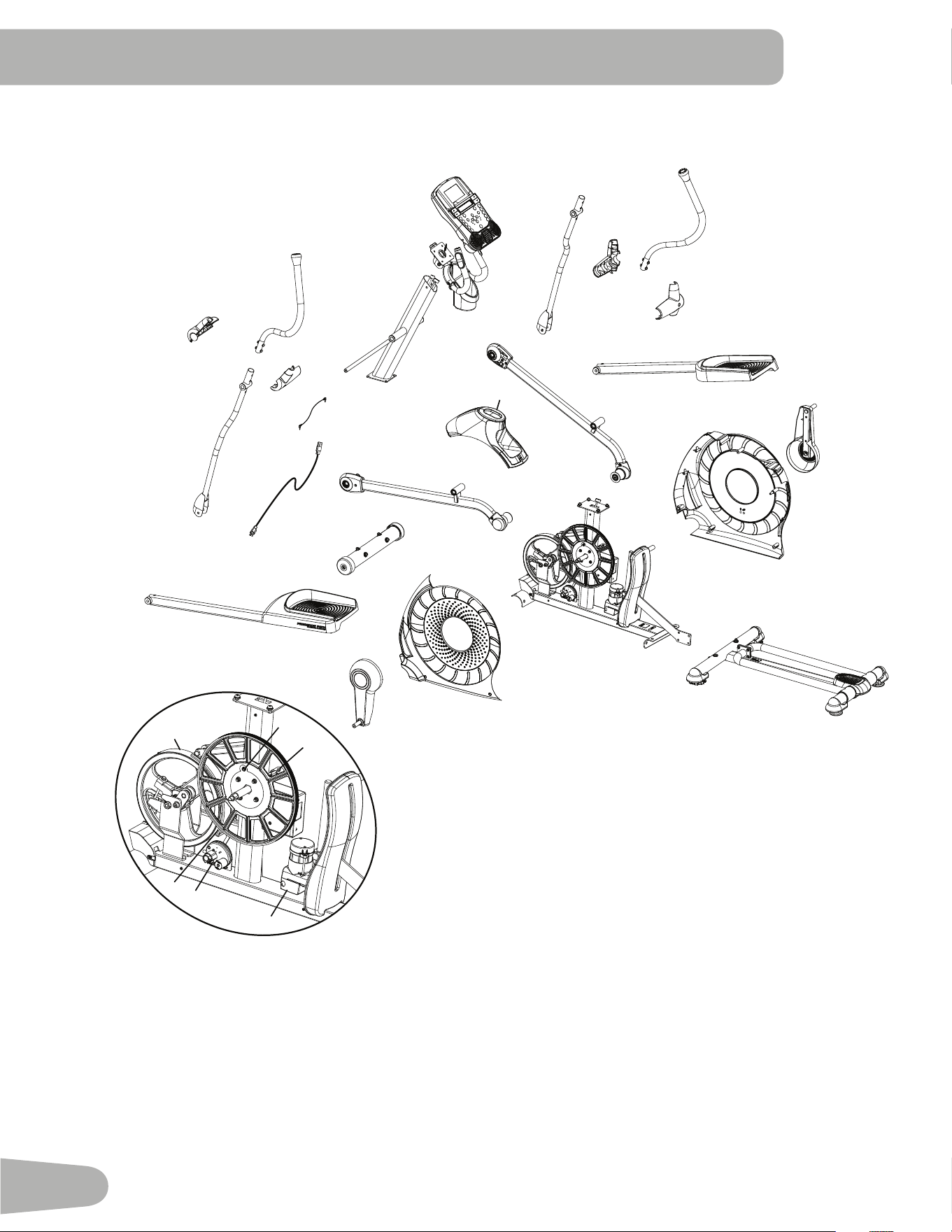
Maintenance Parts
BB
CC
Z
DD
AA
Y
A
G
C
B
D
E
F
H
J
O
P
Q
R
M
N
V
W
X
U
EE
HH
L
GG
JJ
II
KK
LL
T
S
O
FF
FF
I
K
K
I
43
A Console N Shroud,Right AA InclineMotorAssembly
B HeartRateCable,Upper O Roller BB ServoMotor
C Handlebar,Static P Leg,Right CC BrakeAssembly
D ConsoleCable,Upper Q ShroudCap DD FlyWheel
E ArmPivotRod R Shroud,Upper EE PedalArm,Left
F ConsoleMast S ConsoleCable,Lower FF TransportWheel
G WaterBottleHolder T InclineAssembly GG FrontStabilizer
H HandlebarArm,LowerRight U Rail Assembly HH Leg,Left
I HandlebarShroud,Outer V FrameAssembly II PowerCord
J HandlebarArm,UpperRight W Shroud,Left JJ MP3Cable
K HandlebarShroud,Inner X CrankAssembly,Left KK HandlebarArm,LowerLeft
L PedalArm,Right Y SpeedSensorMagnet LL HandlebarArm,UpperLeft
M CrankAssembly,Right Z SpeedSensor
44
Condition/Problem Things to Check Solution
Nodisplay/partialdisplay/
unit will not turn on
Checkelectrical(wall)
outlet
Makesureunitispluggedintoafunctioningwalloutlet.
Checkconnectionatfront
of unit
Connection should be secure and undamaged. Replace adapter
or connection at unit if either are damaged.
Checkdatacableintegrity Allwiresincableshouldbeintact.Ifanyarevisiblycrimpedor
cut, replace cable.
Checkdatacable
connections/orientation
Besurecableisconnectedsecurelyandorientedproperly.Small
latch on connector should line up and snap into place.
Checkconsoledisplayfor
damage
Checkforvisualsignthatconsoledisplayiscrackedorotherwise
damaged. Replace Console if damaged.
ConsoleDisplay IfConsoleonlyhaspartialdisplayandallconnectionsarefine,
replace the Console.
Iftheabovestepsdonotresolvetheproblem,contactyourlocal
distributor for further assistance.
UnitoperatesbutContact
HRnotdisplayed
HRcableconnectionat
Console
BesurecableisconnectedsecurelytoConsole.
HRcableboxconnection BesurecablesfromhandlebarsandcabletoConsolearesecure
and undamaged.
Sensorgrip BesurehandsarecenteredonHRsensors.Handsmustbekept
stillwithrelativelyequalpressureappliedtoeachside.
Dryorcallousedhands Sensorsmayhavedifficultywithdriedoutorcallousedhands.
Aconductiveelectrodecream(heartratecream)canhelpmake
better conduct. These are available on the web or at medical or
some larger fitness stores.
StaticHandlebar Iftestsrevealnootherissues,StaticHandlebarshouldbere-
placed.
UnitoperatesbutTelemet-
ricHRnotdisplayed
ChestStrap(optional) Strapshouldbe“POLAR
®
”compatibleanduncoded.Makesure
strapisdirectlyagainstskinandcontactareaiswet.
Interference Trymovingunitawayfromsourcesofinterference(TV,Micro-
wave,etc).
ReplaceChestStrap IfinterferenceiseliminatedandHRdoesnotfunction,replace
strap.
Replace Console IfHRstilldoesnotfunction,contactyourlocaldistributorfor
further assistance.
UnitoperatesbutTelemet-
ricHRdisplayedincorrectly
Interference MakesurethattheHRreceiverisnotblockedbyapersonal
electronic device in the left side of the media tray.
Consoledisplays“E2”error
code
Checkdatacableintegrity Allwiresincableshouldbeintact.Ifanyarecutorcrimped,
replace cable.
Checkdatacable
connections/orientation
Besurecableisconnectedsecurelyandorientedproperly.Small
latch on connector should line up and snap into place.
ConsoleElectronics Iftestsrevealnootherissues,contactyourlocaldistributorfor
further assistance..
troubleSHootIng
45
Condition/Problem Things to Check Solution
Nospeed/RPMreading,
Consoledisplays“Please
Stride”errorcode
Checkdatacableintegrity Allwiresincableshouldbeintact.Ifanyarecutorcrimped,
replace cable.
Checkdatacable
connections/orientation
Besurecableisconnectedsecurelyandorientedproperly.Small
latch on connector should line up and snap into place.
Checkmagnetposition
(requiresshroudremoval)
Magnetshouldbeinplaceonpulley.
CheckSpeedSensor(re-
quiresshroudremoval)
Speedsensorshouldbealignedwithmagnetandconnectedto
data cable. Realign sensor if necessary. Replace if there is any
damage to the sensor or the connecting wire.
Consoleshutsoff(enters
sleepmode)whileinuse
Checkelectrical(wall)
outlet
Makesureunitispluggedintoafunctioningwalloutlet.
Checkconnectionatfront
of unit
Connection should be secure and undamaged. Replace adapter
or connection at unit if either are damaged.
Checkdatacableintegrity Allwiresinthecableshouldbeintact.Ifanyarecutorcrimped,
replace cable.
Checkdatacable
connections/orientation
Besurecableisconnectedsecurelyandorientedproperly.Small
latch on connector should line up and snap into place.
Reset machine Unplugunitfromelectricaloutletfor3minutes.Reconnectto
outlet.
Checkmagnetposition
(requiresshroudremoval)
Magnetshouldbeinplaceonpulley.
CheckSpeedSensor(re-
quiresshroudremoval)
Speedsensorshouldbealignedwithmagnetandconnectedto
data cable. Realign sensor if necessary. Replace if there is any
damage to the sensor or the connecting wire.
Fanwillnotturnonorwill
not turn off
Checkdatacableintegrity Allwiresincableshouldbeintact.Ifanyarecutorcrimped,
replace cable.
Checkdatacable
connections/orientation
Besurecableisconnectedsecurelyandorientedproperly.Small
latch on connector should line up and snap into place.
Reset machine Unplugunitfromelectricaloutletfor3minutes.Reconnectto
outlet.
Fanwillnotturnon,but
Console operates
Checkforblockageoffan Unplugunitfromelectricaloutletfor5minutes.Removematerial
fromfan.Ifnecessary,detachtheConsoletohelpwithremoval.
ReplacetheConsoleifunabletoremoveblockage.
Unitrocks/doesnotsit
level
Checkleveleradjustment Adjust levelers until machine is level.
Checksurfaceunderunit Adjustmentmaynotbeabletocompensateforextremelyuneven
surfaces.Movemachinetolevelarea.
Footpedalsloose/unitdif-
ficult to operate
Hardware TightlysecureallhardwareonthePedalArmsandHandlebar
Arms.
46
Condition/Problem Things to Check Solution
Drivetrainclick/ticknoise
onceperfullcrankrevolu-
tion
Checkcrank/pulleyas-
sembly
Disconnectleftandrightfootassembliesandrotatecrank.If
soundpersists,replacecrank/pulleyassembly.Ifsounddoes
notcomefromrotatingcrank,checkfootassembliesandupper/
lower handlebars.
Checkfootassemblies,leg
assemblies, handlebar
assemblies
Manuallymovefoot,leg,andhandlebarassembliestoisolate
sound.Replacepartmakingsound.
Squeakingnoisethatap-
pears a few minutes into a
workoutandnormallywill
get progressively worse as
workoutcontinues
Boltthatconnectsthe
swingarmstotheaxlerun-
ning through the console
mast
Loosenpivotrodboltslightlyuntilnoisegoesaway.Whitelithium
greasecanalsobeappliedforatemporaryfix.Contactyourlocal
distributor for further assistance..

47

Nautilus® Bowex® Schwinn® Fitness Universal®
8003289.040114.B
EN