8OWUD4XLHW$LU3XULƬHU
Hello!
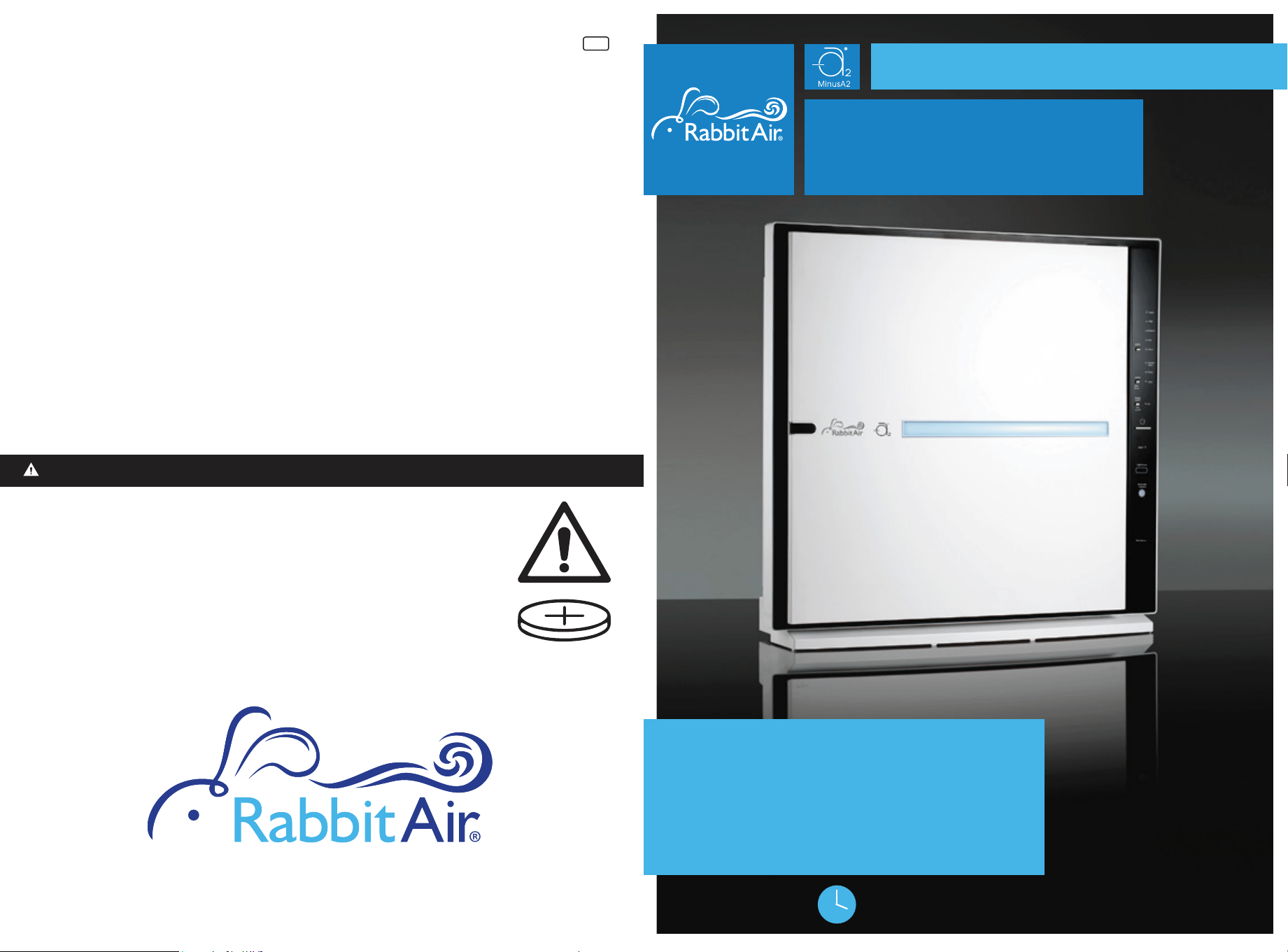
SPA-780A
Models:
Owner’s
manual
Visit us at www.rabbitair.com
For Questions: Call 888.866.8862
24/7 customer care
MINUSA2780AUM2406
www.rabbitair.com
Copyright © Rabbit Air 2024. All rights reserved
1206081
007
WARNING
• INGESTION HAZARD: This product contains a button cell or coin
battery
• DEATH or serious injury can occur if ingested
• A swallowed button cell or coin battery can cause Internal
Chemical Burns in as little as 2 hours.
• KEEP new and used batteries OUT OF REACH OF CHILDREN.
• Seek immediate medical attention if a battery is suspected to
be swallowed or inserted inside any part of the body.
• Remove and immediately recycle or dispose of used batteries according to local
regulations and keep away from children. Do NOT dispose of batteries in household
trash or incinerate
• Even used batteries may cause severe injury or death.
• Call a local poison control center for treatment information.
• Used Battery CR2025, DC3V
• Non-rechargeable batteries are not to be recharged.
• Do not force discharge, recharge, disassemble, heat above 60͵or incinerate.
Doing so may result in injury due to venting, leakage or explosion resulting in
chemical burns.
• Ensure the batteries are installed correctly according to polarity (+ and -).
• 'RQRWPL[ROGDQGQHZEDWWHULHVGLƪHUHQWEUDQGVRUW\SHVRIEDWWHULHVVXFKDV
alkaline, carbon-zinc, or rechargeable batteries.
• Remove and immediately recycle or dispose of batteries from equipment not used
for an extended period of time according to local regulations
• Always completely secure the battery compartment. If the battery compartment
does not close securely, stop using the product, remove the batteries, and keep
them away from children.
Remote Coin Battery Warning
$FKLOGSURRIIHDWXUHSDXVHVDLUSXULƬHURSHUDWLRQZKHQ
the front panel is removed.
“
”
General Safety Information
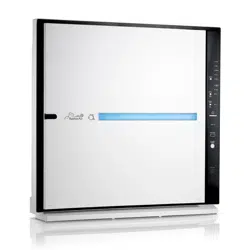
$ERXW<RXU0LQXV$$LU3XULƬHU
• Please read all tips and warnings before using your Rabbit Air®SXULƬHU
• Use only as directed by the Owner’s Manual.
r3OHDVHREVHUYHH[WUHPHFDXWLRQZKHQXVLQJWKHDLUSXULƬHULQFORVHSUR[LPLW\
to children.
r5DEELW$LUSXULƬHUVDUHIRULQGRRUXVHRQO\
r7KH5DEELW$LUSXULƬHULVQRWLQWHQGHGIRUXVHLQEDWKURRPVODXQGU\DUHDVRU
RWKHUGDPSLQGRRUHQYLURQPHQWV.HHSWKH5DEELW$LUSXULƬHUDZD\IURPZDWHU
at all times.
r'RQRWXVHWKH5DEELW$LUSXULƬHUQHDUƬUHSODFHVRULQDUHDVZKHUHƮDPPDEOHRU
combustible products or vapors may be present.
• This appliance has a polarized plug (one blade is wider than the other). To
UHGXFHWKHULVNRIHOHFWULFVKRFNWKLVSOXJLVLQWHQGHGWRƬWLQDSRODUL]HGRXWOHW
RQO\RQHZD\,IWKHSOXJGRHVQRWƬWIXOO\LQWKHRXWOHWUHYHUVHWKHSOXJ,ILW
VWLOOGRHVQRWƬWFRQWDFWDTXDOLƬHGHOHFWULFLDQ'RQRWDWWHPSWWRGHIHDWWKLV
safety feature.
• This appliance is not intended for use by persons (including children) with
reduced physical, sensory or mental capabilities, or lack of experience and
knowledge, unless they have been given supervision or instruction concerning
use of the appliance by a person responsible for their safety.
• Children should be supervised to ensure they do not play with the appliance.
• This product complies with the maximum allowable concentration of ozone of
0.050 parts per million by volume (ppmv) in a 24-hour period. The Health
Canada Guideline 2010 recommends that the Maximum exposure limit, based
on an averaging time of 8 hours, is 0.020 ppmv or less when tested in a Sealed,
controlled room approximately 30 m³.
Caution: When using electrical appliances, observe the following basic
SUHFDXWLRQVWRUHGXFHWKHULVNRIƬUHHOHFWULFVKRFNDQGLQMXU\
Meet your brand new MinusA2®!
We hope that this stylish bundle of cleanliness is just what
you've been looking for. Be sure to get familiar with this
newest addition to your home, by exploring all of its fea-
tures in the enclosed booklet and on our website.
If you have any questions just give us a call, anytime.
We love to hear from you!
1 2
7KHHQHUJ\HƯFLHQF\RIWKLV(1(5*<67$5FHUWLƬHGPRGHOLVPHDVXUHG
based on a ratio between the model’s CADR for Smoke and the electrical
energy it consumes, or CADR/Watt.
Warranty
Register online at www.rabbitair.com/warranty
• Product Protection
%\UHJLVWHULQJ\RXUSURGXFWDQGSXUFKDVHLQIRUPDWLRQZHFDQFRQƬUPWKHGDWHRI
SXUFKDVHWRVHFXUH\RXUZDUUDQW\7KLVFRQƬUPDWLRQVHUYHVDVVHFXULW\LQWKHHYHQW
that your original proof of purchase is lost, or in case your unit needs any servicing
in the future.
• Proof of Ownership
<RXUPRGHOQXPEHUVHULDOQXPEHUDQGRWKHULQIRUPDWLRQZLOOEHNHSWLQRXUƬOHV
Please complete and return this registration within 90 days from purchase in order
to receive our 5-year limited warranty.
5HJLVWHU\RXUDLUSXULƬHURQOLQHQRZIRU
Operation Guidelines
Remote Control Tips
Installation Guidelines
• Do not block the air intake or air outlet.
r'RQRWXVHWKH5DEELW$LUSXULƬHURQRUDURXQGKRWVXUIDFHV
r'RQRWXVHWKH5DEELW$LUSXULƬHULQDURRPZKHUHLWPD\FRPHLQWRFRQWDFWZLWK
steam.
r'RQRWRSHUDWHWKH5DEELW$LUSXULƬHURQLWVVLGH
r'RQRWLQVWDOOWKH5DEELW$LUSXULƬHULQJUHDV\RUGDPSHQYLURQPHQWV
r'RQRWXVHGHWHUJHQWRUVRDSWRFOHDQWKH5DEELW$LUSXULƬHU
r'RQRWRSHUDWHWKH5DEELW$LUSXULƬHUZLWKRXWƬOWHUV
r'RQRWZDVKDQGUHXVHWKHƬOWHUVH[FHSWIRUWKHZDVKDEOH3UH)LOWHU
r:KHQWUDQVSRUWLQJWKH5DEELW$LUSXULƬHUDOZD\VKROGWKHKDQGOHRQ
the back of the unit.
r$YRLGSXWWLQJWKH5DEELW$LUSXULƬHULQDSODFHZKHUHWKHDLULQWDNHRUDLU
outlet could become clogged with dirt.
r0DNHVXUHWKH$LU3XULƬHUKDVDWOHDVWWZRIHHWRIFOHDUDQFHIURPWKH
air outlet and eight inches of clearance from the air intake on either side.
Electrical Safety Instructions
r7KH5DEELW$LUSXULƬHULVGHVLJQHGIRUXVHLQD9RXWOHWRQO\
r7XUQRƪ\RXU5DEELW$LUSXULƬHUEHIRUHXQSOXJJLQJLWIURPWKHSRZHURXWOHW
r8QSOXJWKH5DEELW$LUSXULƬHUIURPWKHSRZHURXWOHWZKHQQRWLQXVHDQGEHIRUH
servicing or cleaning the unit.
r7RUHGXFHWKHULVNRIHOHFWULFVKRFNWKH5DEELW$LUSXULƬHUKDVDSRODUL]HGSOXJ
ZKLFKPHDQVLWZLOOƬWLQWRDSRODUL]HGRXWOHWRQO\RQHZD\,IWKHSOXJGRHVQRWƬW
LQWRWKHRXWOHWUHYHUVHWKHSOXJ,ILWVWLOOGRHVQRWƬWFRQWDFWTXDOLƬHGSHUVRQQHO
to install the proper outlet. Do not alter the plug in any way.
r7RDYRLGHOHFWULFVKRFNGRQRWWRXFKWKHDLUSXULƬHURULWVSRZHUSOXJ
with wet hands.
• Keep the electrical cord away from heated surfaces at all times.
• If the cord or plug appears damaged, return the unit immediately to an autho-
rized service facility for examination and repair.
r$Q\DWWHPSWVWRUHSDLUWKH5DEELW$LUSXULƬHUZLWKRXWZULWWHQSHUPLVVLRQIURP
Rabbit Air will void the warranty and could cause serious personal injury to the
user and/or result in severe damage to the unit.
r'RQRWSXOOFDUU\OLIWRUGUDJWKH5DEELW$LUSXULƬHUE\SXOOLQJLWVSRZHUFRUG
Remove the power plug from its outlet by grasping the plug and pulling gently.
r:KHQWKH5DEELW$LUSXULƬHULVSOXJJHGLQWRDSRZHURXWOHWNHHSDOOƬQJHUV
body parts, hair, jewelry, and loose clothing away from the openings.
3 4
WARNING: Chemical Burn Hazard. Keep batteries away from children.
• This product contains a lithium button/coin cell battery. If a new or used lithium button/coin cell
battery is swallowed or enters the body, it can cause severe internal burns and can lead to death
in as little as 2 hours.
• Always completely secure the battery compartment. If the battery compartment does
not close securely, stop using the product, remove the batteries, and keep it away from children.
• If you think batteries might have been swallowed or placed inside any part of the body, seek
immediate medical attention.
• The cells shall be disposed of properly, including keeping them away from children.
• Even used cells may cause injury.
r,QYHUWHUOLJKWLQJHTXLSPHQWRUHOHFWURQLFOLJKWƬ[WXUHVPD\LQWHUIHUHZLWKUHPRWHFRQWURO
signals.
• Avoid storing the remote control in direct sunlight. Heat may interfere with remote control
signals.
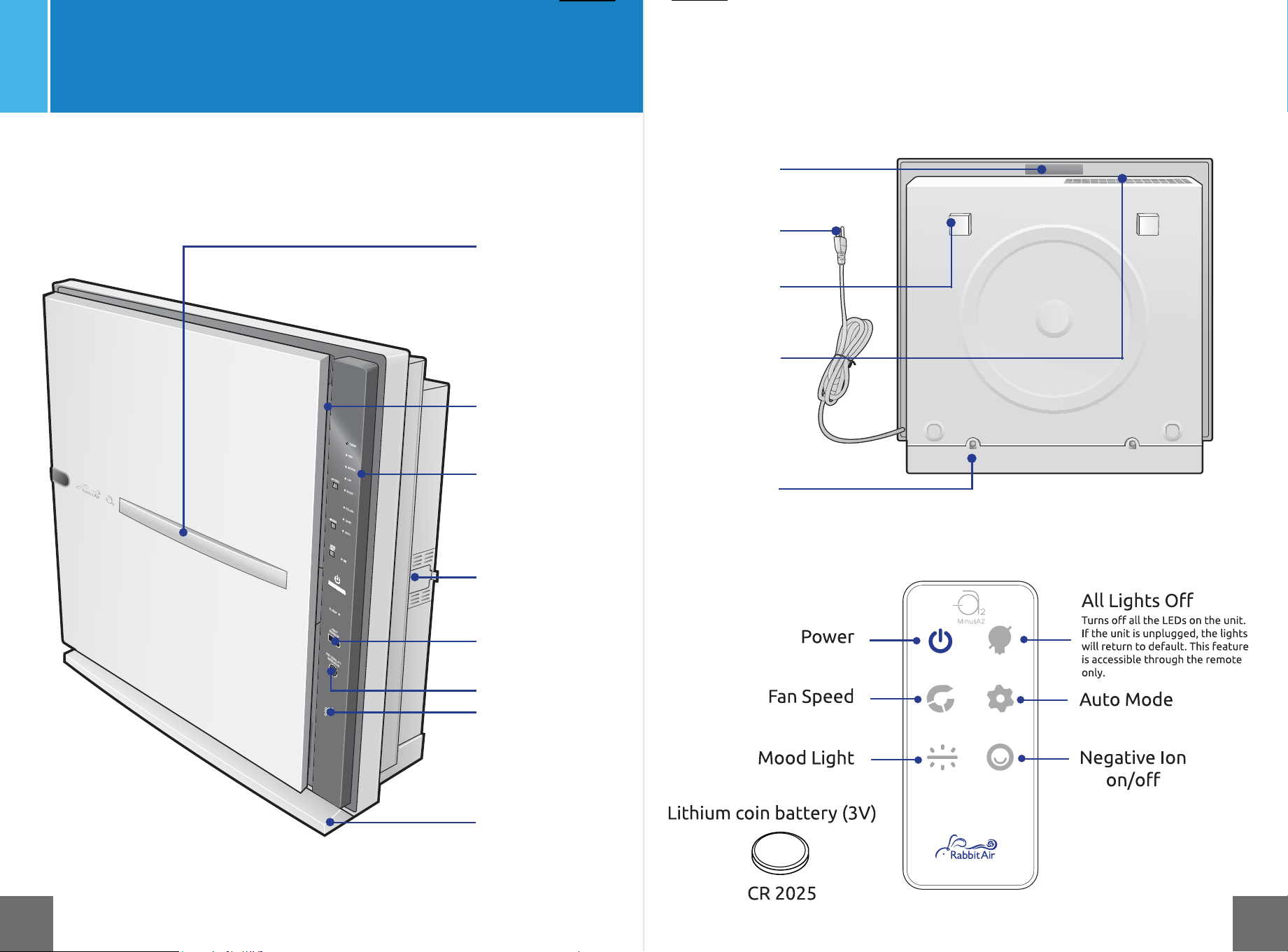
Control Panel/
Display Panel
Mood Light
Light Sensor
Particle Sensor
Air Quality Indicator
Power Cord
Bracket Holder
Air Outlet
Handle
Meet your MinusA2
Front view
Back view
Remote control
Odor Sensor
5 6
Air Intake
(Around all sides
of front panel)
Removable base
for wall-mounting
Removable Base
Screws
Power
Timer
Fan Speed
Auto Mode
Negative Ion
RQRƪ
Lithium coin battery (3V)
CR 2025
$OO/LJKWV2ƪ
7XUQVRƪDOOWKH/('VRQWKHXQLW
If the unit is unplugged, the lights
will return to default. This feature
is accessible through the remote
only.
*Compatible only with SPA-780A
produced after 10/25/21
*
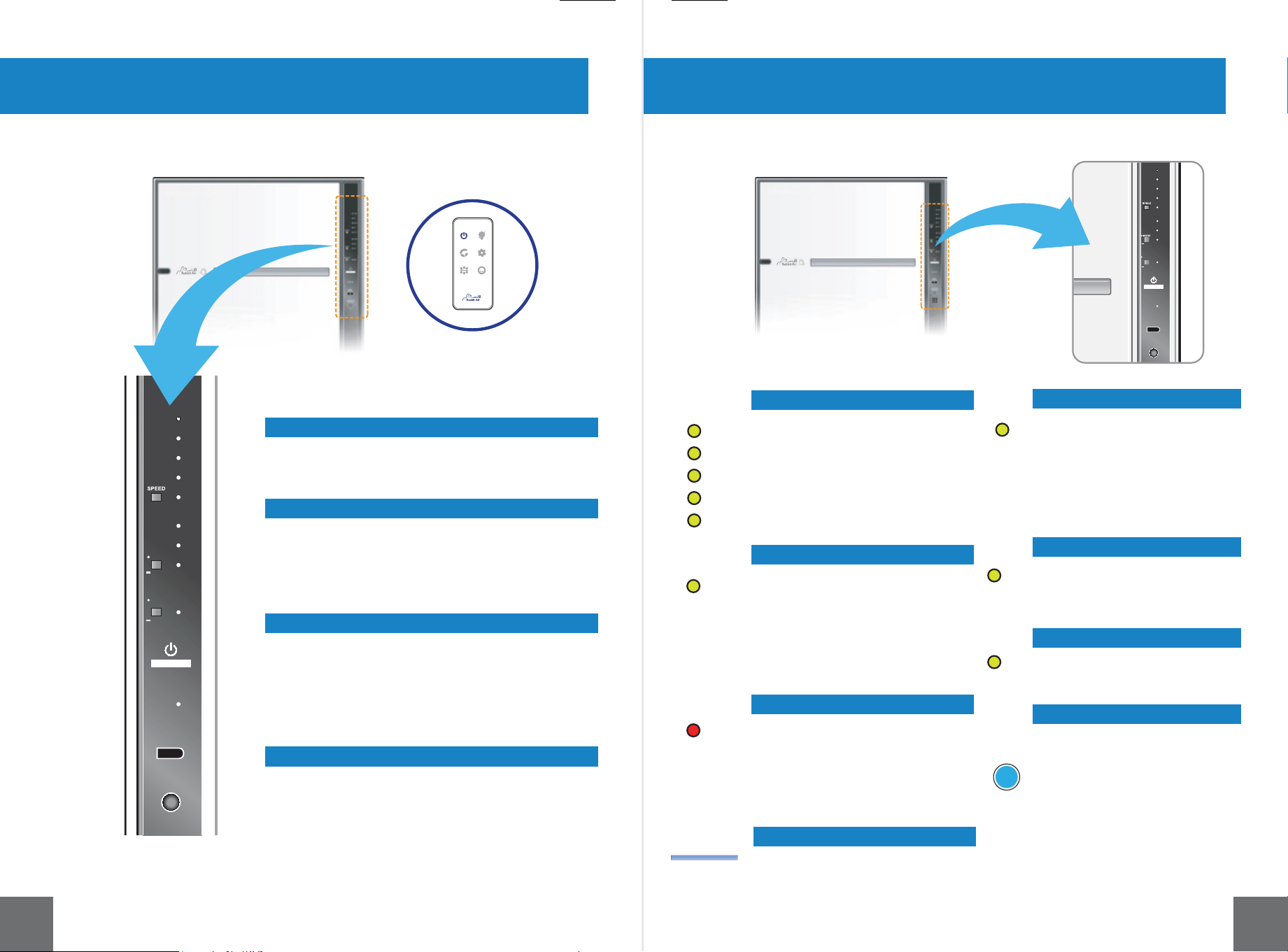
MODE
Filter
Reset
MOOD
LIGHT
Turbo
High
Medium
Low
Silent
Replace
Filters
Pollen
Auto
Ion
Ion
on/off
Sleep
Light Sensor
Air Quality
Indicator
Odor Sensor
High
Medium
Low
Silent
Replace
Filters
Pollen
Auto
Ion
Ion
on/off
Sleep
Light Sensor
Air Quality
Indicator
MOOD
LIGHT
Filter
Reset
Turbo
Mode and Filter Reset
Mood Light and Negative Ion Generator
Speed
Power
Filter Replacement Indicator
Pollen Mode Indicator
Fan Speed Indicator
Mood Light
Auto Mode Indicator
Sleep Lighting Indicator
Ion Indicator
Air Quality Indicator
Control Panel Indicator Lights
This is a dual control button. When
SUHVVHGEULHƮ\\RXFDQFKDQJHWKH
mode of operation between Auto
Mode and Pollen Mode. When
pressed and held, the Replace Filters
Indicator will be reset.
This dual control button, when pressed
EULHƮ\ZLOOWXUQWKH0RRG/LJKWRQRURƪ
When pressed and held, the Negative Ion
*HQHUDWRUZLOOWXUQRQRURƪ
7KHUHDUHƬYHVSHHGV2SHUDWLRQVSHHG
changes in the following order as you press
the speed button.
Silent > Low > Medium > High > Turbo
Press and hold the power button for two
VHFRQGVWRWXUQWKHXQLWRQRURƪ
The Mood Light has four colors: blue,
purple, light purple and pink.
Turbo
High
Medium
Low
Silent
Pollen
Replace
Filters
Auto
Ion
Sleep
Air Quality
Indicator
When Pollen Mode is selected, the
IDQVSHHGRIWKHDLUSXULƬHU
changes automatically depending
on the readings of the air quality
sensors. The Mood Light shifts
color in the following pattern:
blue > purple > light purple > pink .
When this indicator lights up, it
LVWLPHWRUHSODFH\RXUƬOWHUV
2QFHWKHƬOWHUVDUHUHSODFHG
press and hold the Mode/Filter
Reset button to reset the
Replace Filters Indicator.
When Auto Mode is selected, the
IDQVSHHGRIWKHDLUSXULƬHU
changes automatically depending
on the readings of the air quality
sensors and light sensor. The
Mood Light is solid blue when the
unit is in Auto Mode.
This indicates that the
Negative Ion Generator is
operating.
This indicates that the unit is
operating in Sleep Lighting.
This light indicates the current air
quality in the room. The color will
shift from blue > purple > light
purple > red, depending on the
amount of contaminants. Blue
represents good air quality, while
red represents poor air quality.
7 8
Indicates the fan speed of
WKHDLUSXULƬHU7KHORZHVW
speed is Silent. The highest
speed is Turbo.
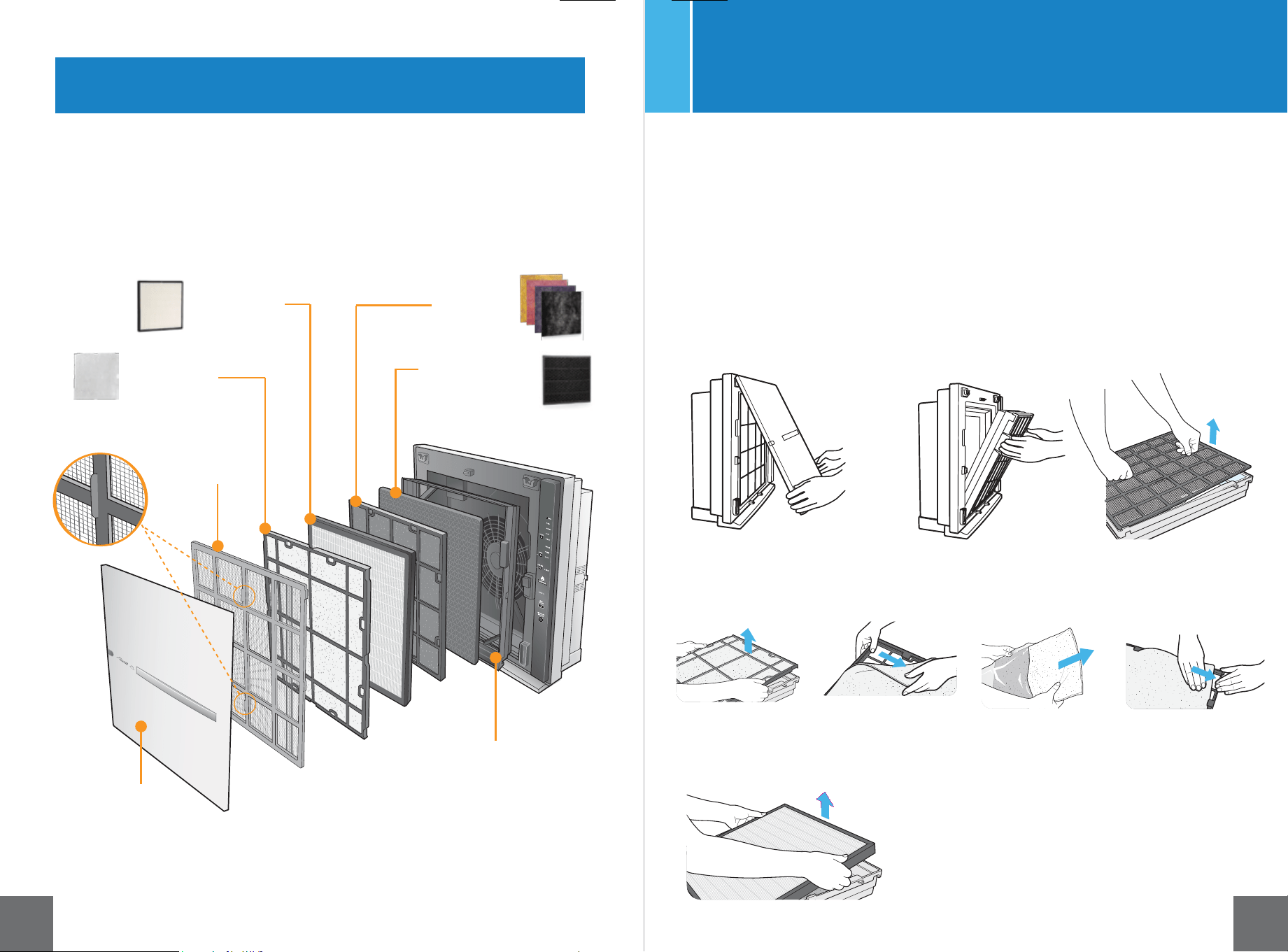
Meet the Filters
Let’s Begin - Initial Set Up
7KH0LQXV$$LU3XULƬHULVGHVLJQHGIRUUHVLGHQWLDOXVHRQO\
7RPDLQWDLQWKHTXDOLW\RIWKHƬOWHUVWKH\DUHSDFNDJHGLQSODVWLF3OHDVH
UHPRYHWKHƬOWHUVIURPWKHSODVWLFZUDSSLQJEHIRUHXVLQJWKHXQLW
1. Remove the front panel by
lifting from the bottom
and pulling up.
5HPRYHWKHƬOWHUFDVHE\
grasping the handles on
both sides and pulling
IRUZDUG/D\WKHƬOWHUFDVH
RQDƮDWVXUIDFH
3. Pull the tabs on the
front of the Pre-Filter
to remove it.
4. Remove the white Medium Filter from the black frame to discard the plastic wrapping.
5HWXUQWKHƬOWHUWRLWVIUDPH
5. Remove HEPA Filter and discard plastic wrapping.
Filter case
Pre-Filter
Medium Filter
BioGS™ HEPA
Filter
Customized
Filter
Charcoal Based
Activated Carbon
Filter
Front panel
Pre-Filter tabs
9 10
<RXUFXVWRPL]HGƬOWHUZLOOEHSDFNDJHGLQSODVWLFRXWVLGHRIWKHXQLW6HWWKH
ƬOWHUDVLGHIRUODWHULQVWDOODWLRQVWHS
REPLACE
FILTERS
ION
Ion
on/off
Filter
Reset
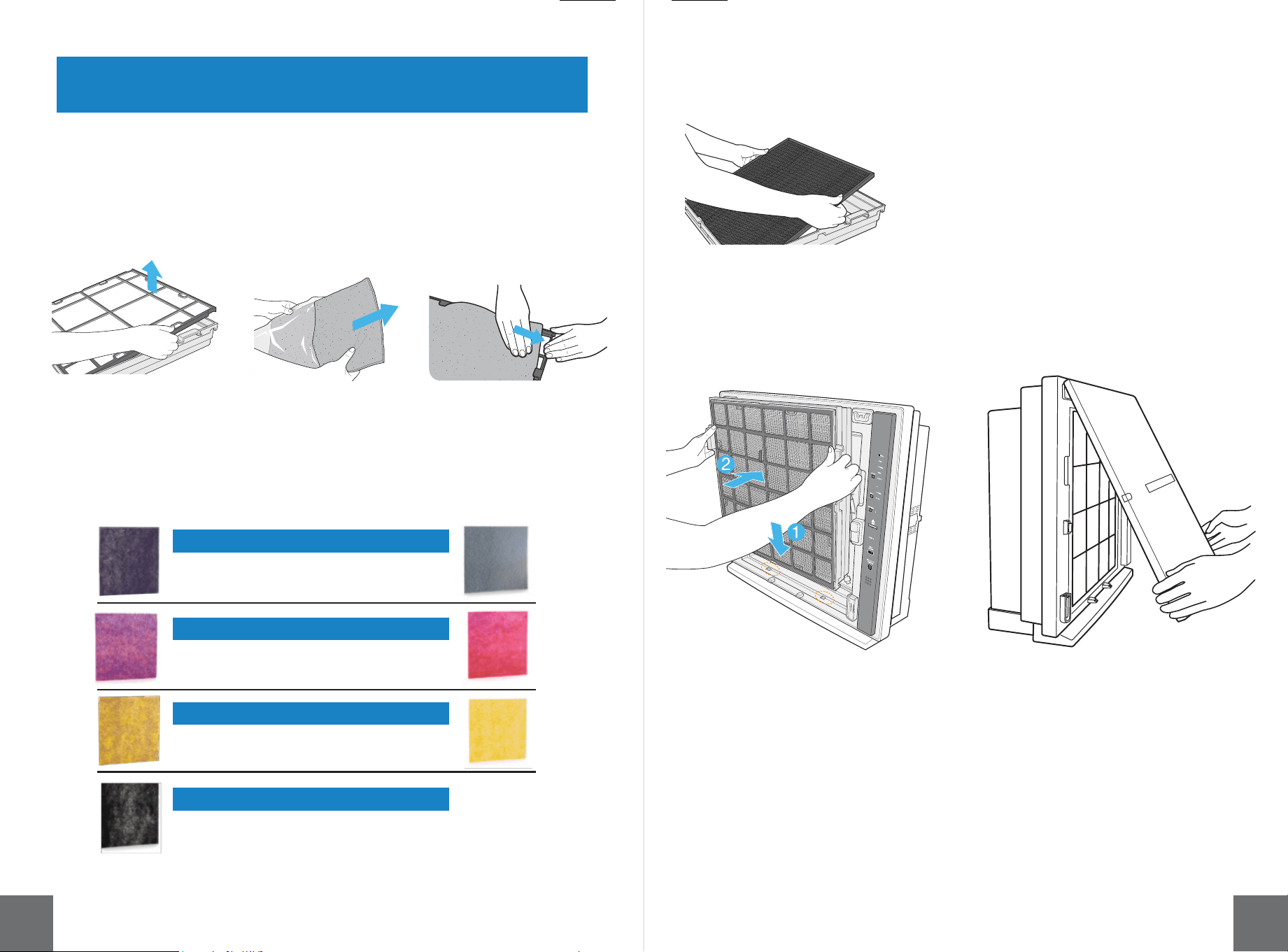
7. Pull out the Activated
Carbon Filter and discard
plastic wrapping.
6. Remove the empty Customized Filter frame from the case. Locate the
Customized Filter set aside from earlier and remove it from its plastic wrapping.
,QVHUWWKHƬOWHULQWRLWVIUDPH0DNHVXUHWKHIURQWRIWKHƬOWHULVIDFLQJXS6HH
&XVWRPL]HG)LOWHUFKDUWEHORZWRLGHQWLI\WKHIURQWRI\RXUƬOWHU
Know your Customized Filter!
Toxin Absorber Customized Filter:
Pet Allergy Customized Filter:
Germ Defense Customized Filter:
Odor Remover Customized Filter:
Front color: Purple
Back color: Gray
Front color: Purple & Rose
Back color: Rose
Front color: Purple & Yellow
Back color: Yellow
Front color: Black (coated material)
Back color: Black
BackFront
10. Reattach the front panel by
latching the top hooks, then
securing the bottom of the panel.
5HWXUQWKHƬOWHUVWRWKHƬOWHUFDVHLQWKH
following order from back to front:
Activated Carbon Filter,
Customized Filter,
BioGS HEPA Filter,
Medium Filter,
Pre-Filter.
(See diagram on page 9).
5HWXUQƬOWHUFDVHWRWKHXQLW6OLGHWKH
bottom of the case back into the unit (1),
then press the top in (2).
Finishing up!
11 12
ODOR SENSOR
REPLACE
FILTERS
ION
Ion
on/off
Filter
Reset
Replace
Filters
Silent
Low
MODE
Pollen
Pollen
Auto
Ion
Pollen
Auto
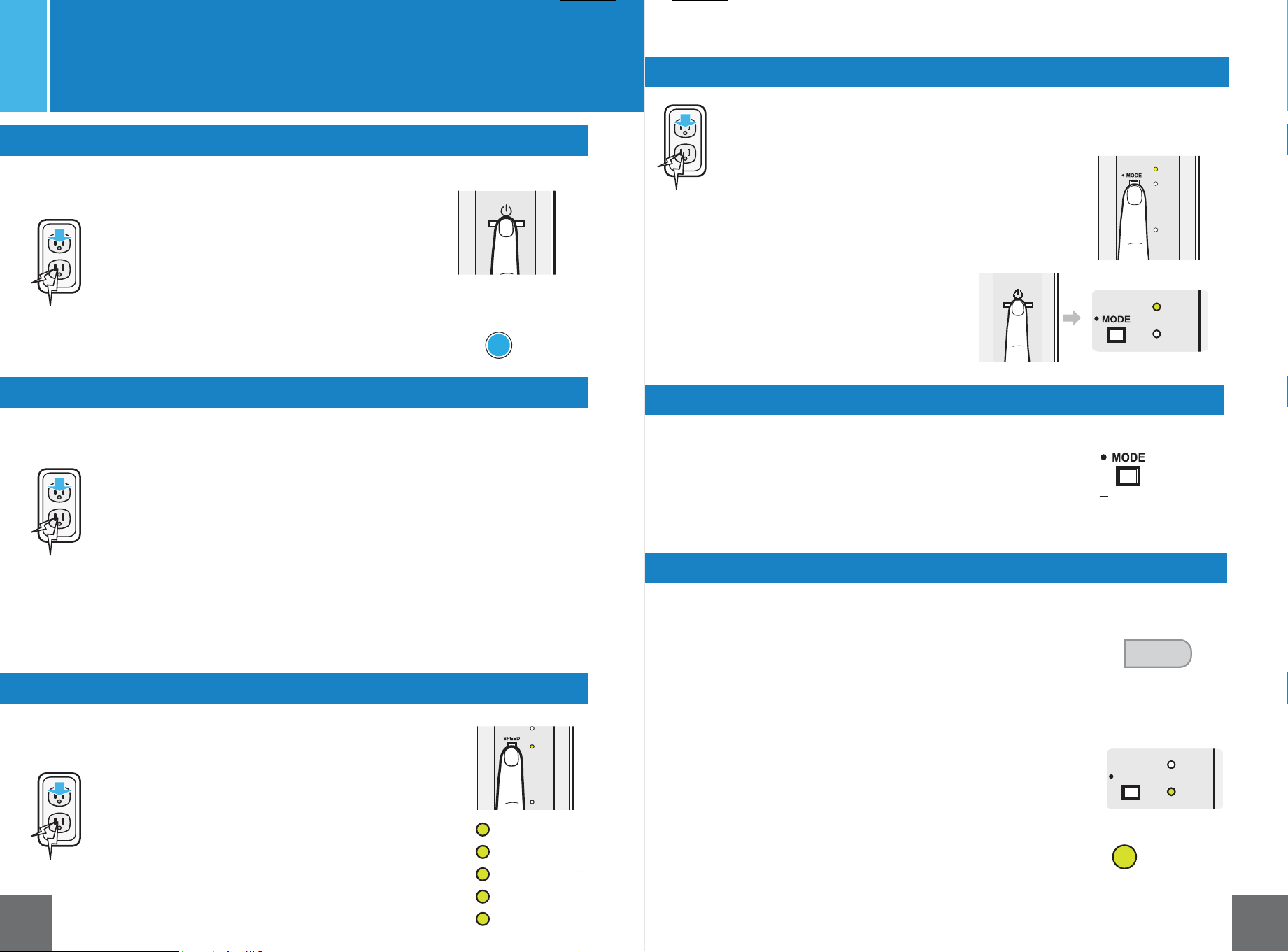
Plug the unit into a 120V outlet.
3UHVVWKHSRZHUEXWWRQ7KHDLUSXULƬHUZLOOVWDUWXS
automatically in Auto Mode.
The Mood Light will be a solid blue.
The color of the Air Quality Indicator changes based on
the amount of impurities in the air, and the fan speed
adjusts accordingly.
Sleep Lighting will activate if the room is dark for 3
minutes.
Auto Mode
Plug the unit into a 120V outlet.
3UHVVWKHSRZHUEXWWRQWKHDLUSXULƬHUZLOOVWDUWXS
automatically in Auto Mode.
Press the Speed button to change the speed manually.
&KRRVHDPRQJƬYHVSHHGV6LOHQW/RZ0HGLXP+LJK
and Turbo.
The Mood Light will be a solid blue.
Sleep Lighting will activate if the room is dark for 3
minutes.
Manual Speed Selection
Mode Selection
$IWHUWXUQLQJRQWKHXQLWEULHƮ\SUHVV
the Mode/Filter Reset button to select
your desired mode of operation, Pollen
or Auto.
Plug the unit into a 120V outlet.
:KHQWXUQHGRƪDQGUHDFWLYDWHG
the unit will start up in the same
mode of operation it was last in.
While the MinusA2 is operating, the Light Sensor will detect the
brightness of the room. If the room is dark, the MinusA2 will
automatically switch to Sleep Lighting after three minutes and the
Sleep Lighting indicator will become illuminated.
When the unit is in Sleep Lighting, the Mood Light and Air Quality
,QGLFDWRUZLOODXWRPDWLFDOO\WXUQRƪ
If the unit is operating in Auto Mode, the fan speed of the air
SXULƬHUZLOODXWRPDWLFDOO\FKDQJHWRVLOHQWPLQLPL]LQJHQHUJ\
consumption and noise. Sleep Lighting will not override the fan
speed if the MinusA2 is operating in one of its manual speeds or
Pollen Mode.
Sleep Lighting
Filter Reset
The Replace Filters Indicator will become illuminated when
LWLVWLPHWRFKDQJH\RXUƬOWHUV2QFH\RXKDYHUHSODFHG
WKHƬOWHUVSUHVVDQGKROGWKH0RGH)LOWHU5HVHWEXWWRQIRU
three seconds, or until the Replace Filters Indicator clears
itself.
Operation Modes
13 14
(Pollen Mode or Auto Mode)
Plug the unit into a 120V outlet.
Press the power button to activate the unit.
%ULHƮ\SUHVVWKH0RGH)LOWHU5HVHWEXWWRQWRVHOHFW3ROOHQ0RGH
In Pollen Mode, the color of the Mood Light will shift: blue > purple > light
purple > pink.
The color of the Air Quality Indicator changes based on the amount of impuri-
ties in the air, and the fan speed adjusts accordingly.
Pollen Mode
Filter
Reset
Auto
Air Quality
Indicator
with Light Sensor
Sleep Lighting will activate if the room is dark for 3 minutes. While the Mood
/LJKWDQG$LU4XDOLW\,QGLFDWRUZLOOVZLWFKRƪWKHIDQVSHHGRIWKHDLUSXULƬHU
will continue to change based on the amount of impurities in the air.
Turbo
High
Medium
Low
Silent
Sleep
Light Sensor
Pollen
Ion
Auto
Filter
MOOD
LIGHT
Air Quality
Indicator
Replace
Filters
High
Medium
Low
Pollen
Auto
Pollen
Ion
Auto
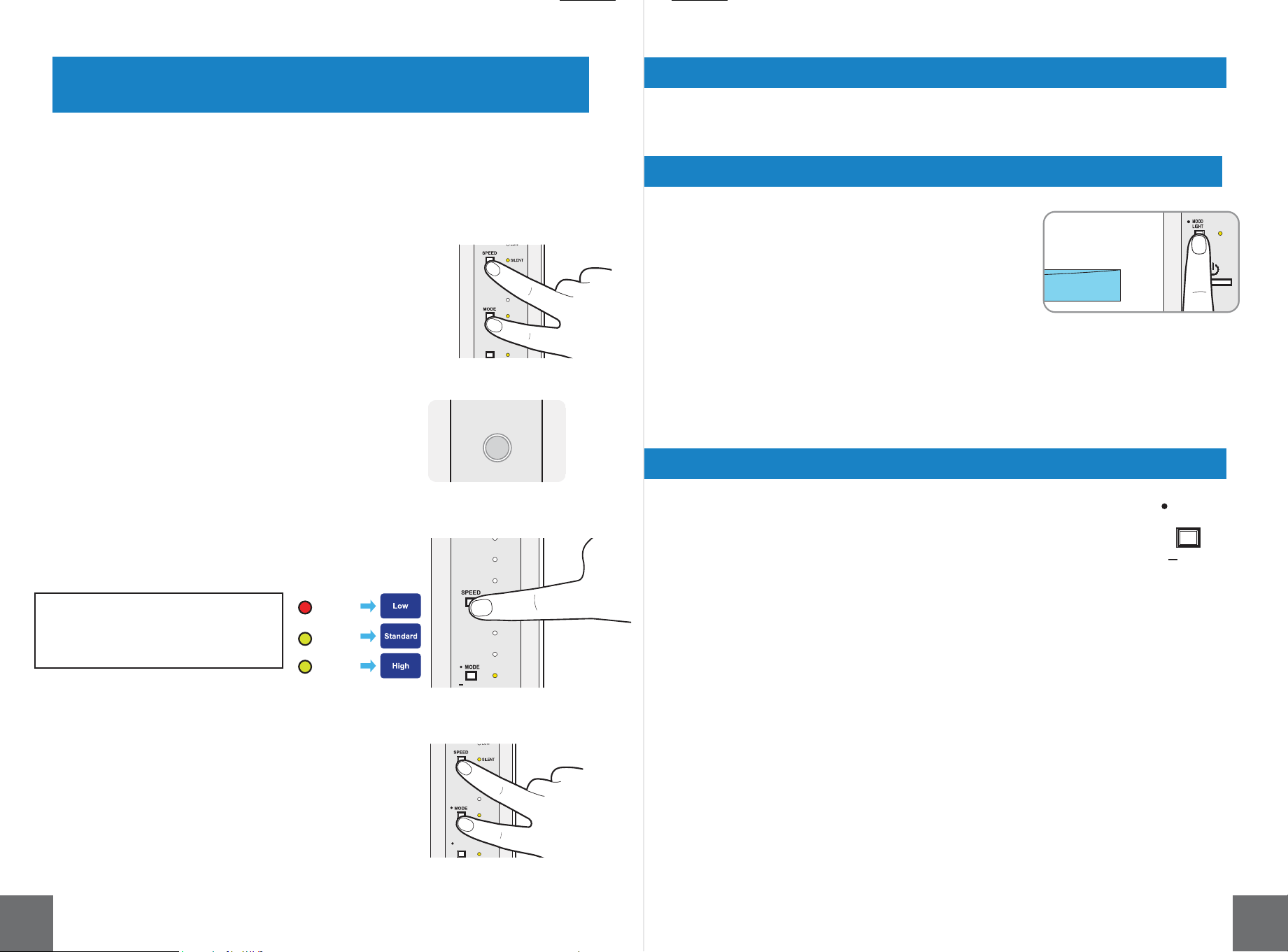
Press and hold the Speed and Mode
buttons for three seconds to save the
sensitivity level. If no action is taken for
ten seconds, the sensitivity level you last
selected is saved automatically.
The color of the Mood Light corresponds to the current mode of operation.
Auto Mode: Blue
Pollen Mode: The color of the Mood Light will shift: blue > purple > light purple > pink.
Changing the Sensitivity Level of the Sensors
Mood Light Operation
You can adjust the sensitivity level of the air quality sensors. The sensors come
preset at a standard sensitivity level as a default.
Press and hold both the Speed and
Mode button for three seconds.
The Air Quality Indicator and Auto Mode
Indicator will blink.
Press the Speed button to
choose the sensitivity level.
Replace Filters : Low sensitivity
Pollen Mode : Standard sensitivity
Auto Mode : High sensitivity
Mood Light not only changes colors, but it also indicates the current operation mode.
The Mood Light turns on automatically when the air
SXULƬHULVWXUQHGRQ%ULHƮ\SUHVVWKH0RRG/LJKW
EXWWRQWRWXUQWKH0RRG/LJKWRQDQGRƪRUXVHWKH
remote.
Mood Light Button
Replace
Filters
Pollen
Auto
Negative Ion Generator
3UHVVDQGKROGWKH0RRG/LJKW,RQRQRƪEXWWRQIRUWKUHHVHFRQGV
7KH1HJDWLYH,RQ*HQHUDWRUZLOOVZLWFKRQRURƪ7KH,RQ,QGLFDWRU/LJKW
will become illuminated when the generator is on.
15 16
MOOD
LIGHT
Ion
on/off
Ion
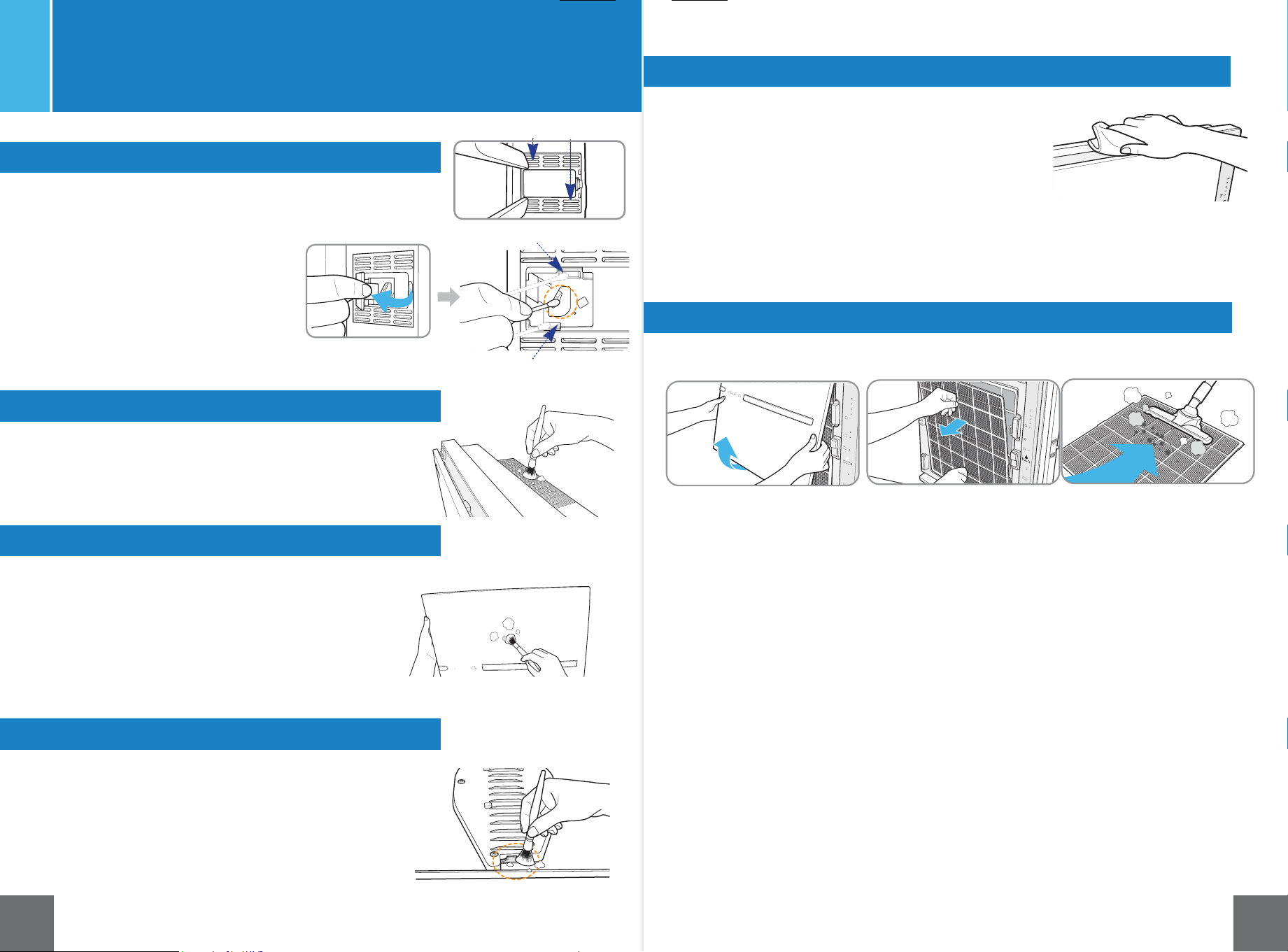
1. Open the particle sensor cover on
the right side of the unit (when
facing the unit).
2. Use a damp cotton swab to clean
and dry the lens, dust inlet and dust
outlet.
1. Remove the front panel from the unit and use
a dry cloth, soft brush, or cotton swab to dust
RƪWKH0RRG/LJKWOHQVRQWKHEDFNRIWKHSDQHO
Cleaning and Maintenance
$OZD\VXQSOXJWKHXQLWEHIRUHFOHDQLQJ
Cleaning the Particle Sensor
outlet
Cleaning the Air Intake and Outlet
Cleaning the Front Panel
Cleaning the Mood Light Lens
Cleaning the Unit Surface
&OHDQLQJWKH3UHƬOWHU
1. Remove the front panel from the unit and use a dry
FORWKRUVRIWEUXVKWRGXVWLWRƪ
1. Clean the air intake and outlet with a soft brush.
• To clean the Pre-Filter - vacuum method:
5HPRYHIURQWSDQHOIURPWKHDLUSXULƬHU
2. Run a vacuum cleaner with a nozzle or brush attachment on low
power setting along the Pre-Filter to remove visible particles.
,IYDFXXPLQJGRHVQRWVHHPWRVXƯFLHQWO\FOHDQ\RXU3UH)LOWHU
please follow the steps below to wash it.
r7RFOHDQWKH3UH)LOWHUZDVKLQJPHWKRG
1. Remove the Pre-Filter from the unit.
2. Fill the sink with lukewarm water and gently wash the Pre-Filter
under the water for 2-3 minutes or until it is completely clean.
3. Rinse the Pre-Filter with clean tap water.
4. Use a towel to remove any excess water from the Pre-Filter.
5. Allow the Pre-Filter to dry for 12-24 hours.
:KHQWKH3UH)LOWHULVFRPSOHWHO\GU\SODFHEDFNLQWRWKHDLUSXULƬHU
8VHDFOHDQGU\FORWKWRZLSHWKHH[WHUQDOVXUIDFHVRIWKHDLUSXULƬHU
Clean particle sensor every three to six months.
&OHDQWKHDLULQOHWDQGRXWOHWXVLQJDYDFXXP
cleaner or soft brush.
Caution: Be careful not to drop
the brush into the unit.
Use a damp cloth to remove stubborn
stains and dirty buildup if necessary.
$YRLGFRPPHUFLDOFOHDQLQJSURGXFWV
Use a damp cloth to remove stubborn
stains and dirty buildup if necessary.
$YRLGFRPPHUFLDOFOHDQLQJSURGXFWV
7KHXQLWVXUIDFHVKRXOGEHFOHDQHGGHSHQGLQJ
on the air quality of the room.
Use a damp cloth to remove stubborn stains and dirty buildup if
QHFHVVDU\$YRLGFRPPHUFLDOFOHDQLQJSURGXFWVZKLFKPD\GDPDJH
the unit's surface.
7KH3UH)LOWHUVKRXOGEHFOHDQHGGHSHQGLQJRQWKHDLU
quality of the room.
dust outlet
dust inlet
17 18
air inlet
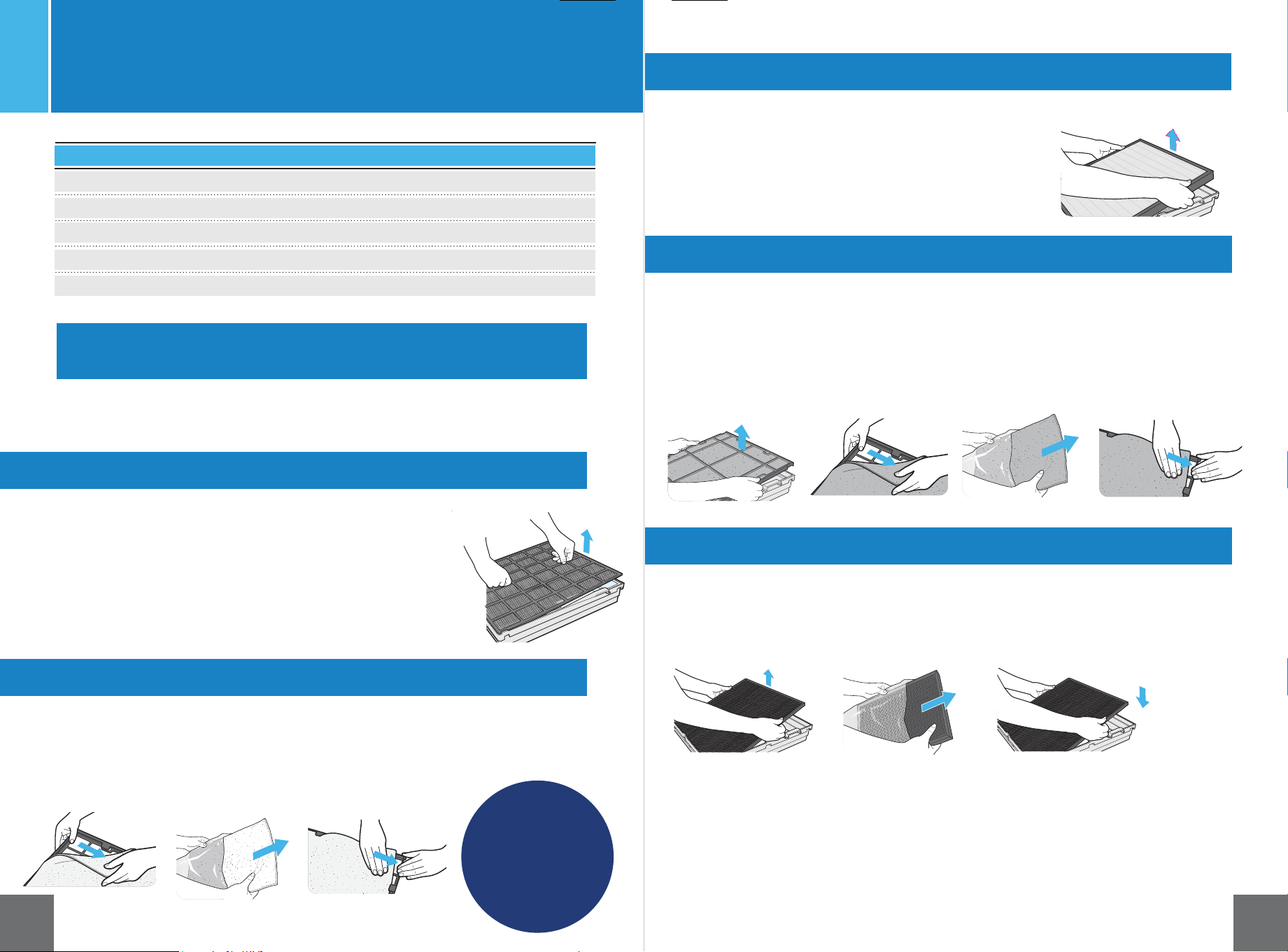
Note:
The Medium Filter
frame and the Custom-
ized Filter frame look
similar, but the Medium
Filter frame is slightly
larger
'R127GLVFDUGWKHƬOWHUIUDPH'LVFDUGWKHROG0HGLXP
)LOWHUGRQRWUHXVH
every 12 months
Replacing the BioGS HEPA Filter
'LVFDUGWKHROG$FWLYDWHG&DUERQ)LOWHUGRQRWUHXVH
$OZD\VXQSOXJWKHXQLWEHIRUHFOHDQLQJUHSODFLQJWKHƬOWHUV
'HSHQGLQJRQWKHDPRXQWRISROOXWDQWVLQ\RXULQGRRUHQYLURQPHQW
WKHOLIHVSDQRIWKHƬOWHUVZLOOYDU\
3UHƬOWHU
Replacing your Filters
The Pre-Filter does not need to be replaced.
1. Pull the tabs on the front of the Pre-Filter to remove it.
3XWWKH3UH)LOWHUWRRQHVLGHZKLOHUHSODFLQJWKHRWKHUƬOWHUV
5HPRYHWKHROG0HGLXP)LOWHUIURPWKHEODFNIUDPHDQGGLVFDUGWKHH[SLUHGƬOWHU
2. Open new Medium Filter and discard the plastic wrapping.
6HFXUHWKHQHZƬOWHULQWKHEODFNIUDPH
1. Remove old HEPA Filter and discard.
5HPRYHQHZƬOWHUIURPSODVWLFZUDSSLQJ
3ODFHQHZ+(3$)LOWHULQƬOWHUFDVH
5HPRYHWKHROG&XVWRPL]HG)LOWHUIURPWKHEODFNIUDPHDQGGLVFDUGH[SLUHGƬOWHU
2. Take the new Customized Filter out of the plastic wrapping and place in the black frame.
3. Make sure the front of the Customized Filter is facing up. See Customized Filter
FKDUWSDJHWRLGHQWLI\WKHIURQWRI\RXUVSHFLƬFƬOWHU
'R127GLVFDUGWKHƬOWHUKROGHU'LVFDUGWKHROG&XVWRPL]HG
)LOWHUGRQRWUHXVH
every 12 months
1. Pull out the old Activated Carbon Filter and discard.
2. Remove the new Activated Carbon Filter from its
SODVWLFZUDSSLQJDQGSODFHLQWKHƬOWHUFDVH
5HWXUQWKHƬOWHUVWRWKHƬOWHUFDVHLQWKHIROORZLQJRUGHUIURPEDFNWRIURQW
-Activated Carbon Filter,
-Customized Filter,
-BioGS HEPA Filter,
-Medium Filter,
-Pre-Filter.
(See diagram on page 9).
Filter Cleaning and
Replacement Schedule*
Filters
Filter Life
Pre-Filter
Customized
Medium
BioGS HEPA
Charcoal-based Activated Carbon
Washable
Every 12 Months
Every 12 Months
Every 12 Months
Every 12 Months
*Based on 24/7 operation
Replacing the Medium Filter
every 12 months
every 12 months
Replacing the Customized Filter
Replacing the Activated Carbon Filter
'R127GLVFDUGWKH3UH)LOWHU,WLVGHVLJQHGWREHFOHDQHGDQGUHXVHG
'LVFDUGWKHROG+(3$)LOWHUGRQRWUHXVH
Every 3 Months
Not Required
Not Required
Not Required
Not Required
19 20
CleaninJ
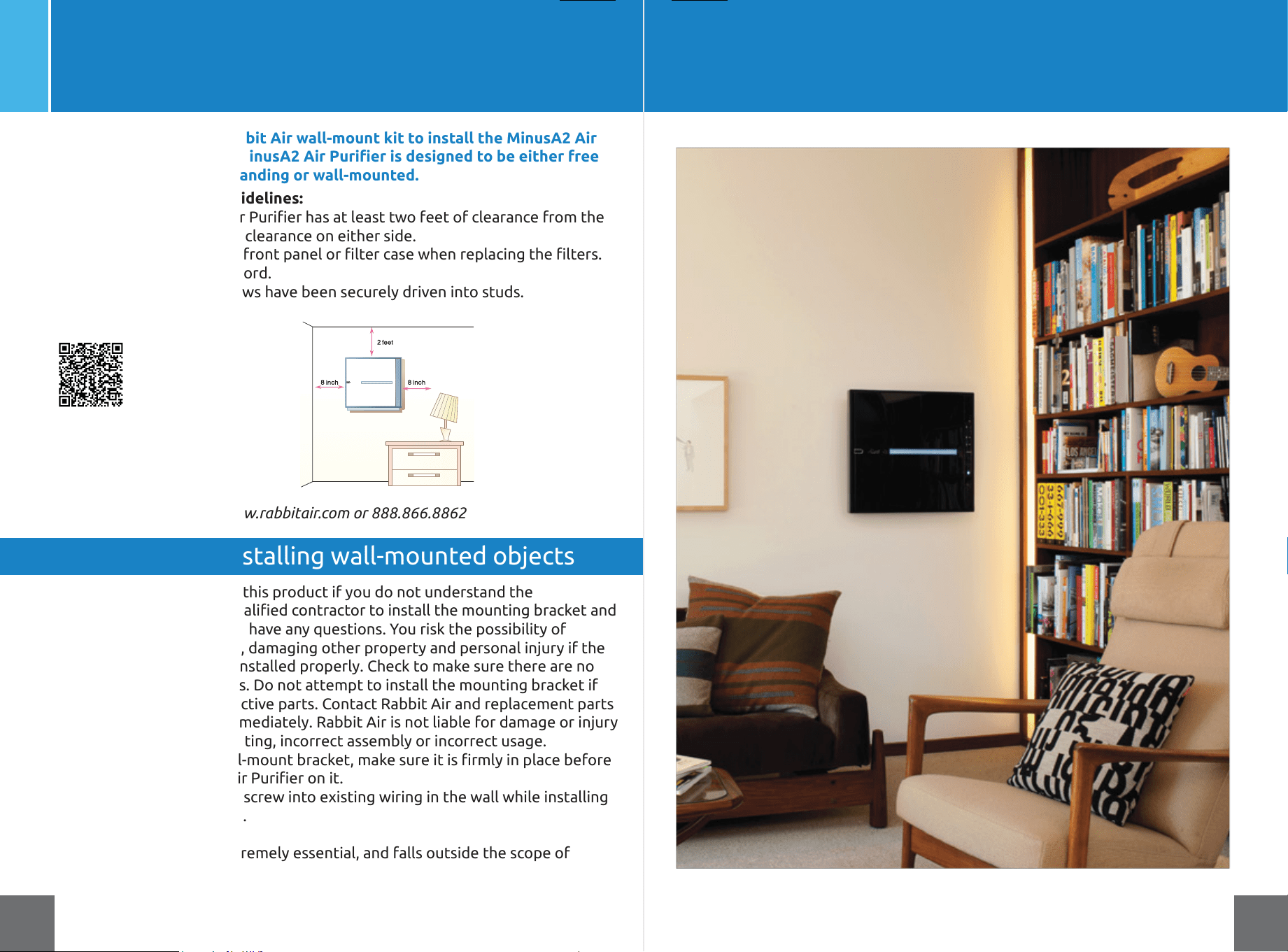
Do not attempt to install this product if you do not understand the
LQVWUXFWLRQV&RQWDFWDTXDOLƬHGFRQWUDFWRUWRLQVWDOOWKHPRXQWLQJEUDFNHWDQG
call 1-888-866-8862 if you have any questions. You risk the possibility of
GDPDJLQJWKH$LU3XULƬHUGDPDJLQJRWKHUSURSHUW\DQGSHUVRQDOLQMXU\LIWKH
mounting bracket is not installed properly. Check to make sure there are no
missing or defective parts. Do not attempt to install the mounting bracket if
there are missing or defective parts. Contact Rabbit Air and replacement parts
will be shipped to you immediately. Rabbit Air is not liable for damage or injury
caused by incorrect mounting, incorrect assembly or incorrect usage.
r$IWHULQVWDOOLQJWKHZDOOPRXQWEUDFNHWPDNHVXUHLWLVƬUPO\LQSODFHEHIRUH
SXWWLQJWKH0LQXV$$LU3XULƬHURQLW
• Take care not to drill or screw into existing wiring in the wall while installing
the wall-mount bracket.
Correct installation is extremely essential, and falls outside the scope of
UHVSRQVLELOLW\RI5DEELW$LU3OHDVHFRQVXOWDTXDOLƬHGFRQWUDFWRUDQGRU
specialist supplier to install the mounting bracket. Maximum weight of air
SXULƬHU63$$NJOEV
Wall-Mounting your MinusA2
Disclaimer for installing wall-mounted objects
Only use the approved Rabbit Air wall-mount kit to install the MinusA2 Air
3XULƬHURQ\RXUZDOO7KH0LQXV$$LU3XULƬHULVGHVLJQHGWREHHLWKHUIUHH
VWDQGLQJRUZDOOPRXQWHG
Questions? Reach us at www.rabbitair.com or 888.866.8862
21 22
(Optional)
:DOOPRXQWLQVWDOODWLRQJXLGHOLQHV
r0DNHVXUHWKH0LQXV$$LU3XULƬHUKDVDWOHDVWWZRIHHWRIFOHDUDQFHIURPWKH
ceiling and eight inches of clearance on either side.
r%HFDUHIXOQRWWRGURSWKHIURQWSDQHORUƬOWHUFDVHZKHQUHSODFLQJWKHƬOWHUV
• Do not pull on the power cord.
• Make sure the hanger screws have been securely driven into studs.
Scan code to watch an
Instructional video

23 24
Limited Warranty
Rabbit Air
Five (5) Year Limited Warranty
(For Rabbit Air Branded Products Only)
,03257$17%<86,1*WKH%LR*6250LQXV$DLUSXULƬHUVHDFKDp5DEELW$LU3URGXFWq<28
ARE AGREEING TO BE BOUND BY THE TERMS OF THE RABBIT AIR FIVE (5) YEAR LIMITED
WARRANTY (“WARRANTY”) AS SET OUT BELOW. AS NOTED IN THE “YOUR RESPONSIBILITIES”
SECTION BELOW, RABBIT AIR RESERVES THE RIGHT NOT TO HONOR THIS WARRANTY IF IT HAS
NOT BEEN REGISTERED WITHIN NINETY (90) DAYS OF YOUR PURCHASE OF THE RABBIT AIR
PRODUCT. THIS WARRANTY APPLIES REGARDLESS OF WHETHER YOU PURCHASE A RABBIT AIR
PRODUCT FROM A RABBIT AIR AUTHORIZED RESELLER OR DIRECTLY FROM RABBIT AIR.
DO NOT USE YOUR RABBIT AIR PRODUCT UNTIL YOU HAVE READ THE TERMS OF THE WARRAN-
TY. IF YOU DO NOT AGREE TO THE TERMS OF THE WARRANTY, DO NOT USE THE RABBIT AIR
PRODUCT AND RETURN IT WITHIN THE RETURN PERIOD STATED IN RABBIT AIR’S RETURN
POLICY (FOUND AT https://www.rabbitair.com/pages/why-rabbit-air#money-back) TO RABBIT
AIR OR TO THE AUTHORIZED RESELLER WHERE YOU PURCHASED IT FOR A REFUND. ThIS limited
ZDUUDQW\GRHVQRWFRYHUUHSODFHPHQWƬOWHUV),/7(5)5$0(6),/7(5&$6(625:$//02817
BRACKETS.
HOW CONSUMER LAW RELATES TO THIS WARRANTY
THIS WARRANTY GIVES YOU SPECIFIC LEGAL RIGHTS, AND YOU MAY HAVE OTHER RIGHTS THAT
VARY FROM STATE TO STATE (OR BY COUNTRY OR PROVINCE). OTHER THAN AS PERMITTED BY
LAW, RABBIT AIR DOES NOT EXCLUDE, LIMIT, OR SUSPEND OTHER RIGHTS YOU MAY HAVE,
INCLUDING THOSE THAT MAY ARISE FROM THE NONCONFORMITY OF A SALES CONTRACT. FOR
A FULL UNDERSTANDING OF YOUR RIGHTS YOU SHOULD CONSULT THE LAWS OF YOUR
COUNTRY, PROVINCE, OR STATE.
WARRANTY LIMITATIONS SUBJECT TO CONSUMER LAW
TO THE EXTENT PERMITTED BY LAW, THIS WARRANTY AND THE REMEDIES SET FORTH ARE
EXCLUSIVE AND IN LIEU OF ALL OTHER WARRANTIES, REMEDIES, AND CONDITIONS, WHETHER
ORAL, WRITTEN, STATUTORY, EXPRESS, OR IMPLIED. LIKEWISE, TO THE EXTENT PERMITTED BY
LAW, RABBIT AIR DISCLAIMS ALL STATUTORY AND IMPLIED WARRANTIES, INCLUDING WITHOUT
LIMITATION WARRANTIES OF MERCHANTABILITY AND FITNESS FOR A PARTICULAR PURPOSE
AND WARRANTIES AGAINST HIDDEN OR LATENT DEFECTS. INSOFAR AS SUCH WARRANTIES
CANNOT BE DISCLAIMED, RABBIT AIR LIMITS THE DURATION AND REMEDIES OF SUCH
WARRANTIES TO THE DURATION OF THIS EXPRESS WARRANTY AND, AT RABBIT AIR’S OPTION,
THE REPAIR OR REPLACEMENT SERVICES DESCRIBED BELOW. SOME STATES (OR COUNTRIES
AND PROVINCES) DO NOT ALLOW LIMITATIONS ON HOW LONG AN IMPLIED WARRANTY (OR
CONDITION) MAY LAST, SO THE LIMITATION DESCRIBED ABOVE MAY NOT APPLY TO YOU.
WHAT IS COVERED BY THIS WARRANTY?
Kinetic Solutions, Inc., d/b/a “Rabbit Air”, located at 125 N Raymond Ave, Suite 308, Pasadena, CA
91103 (“Rabbit Air”), warrants Rabbit Air Products contained in the original packaging against
defects in materials and workmanship when used normally in accordance with Rabbit Air’s
published guidelines for a period of FIVE (5) YEARS from the date of original retail purchase by
the end-user purchaser (“Warranty Period”). Rabbit Air’s published guidelines include, but are
QRWOLPLWHGWRLQIRUPDWLRQFRQWDLQHGLQWHFKQLFDOVSHFLƬFDWLRQVXVHUPDQXDOVDQGVHUYLFH
communications.
WHAT IS NOT COVERED BY THIS WARRANTY?
This Warranty does not apply to any non-Rabbit Air branded hardware products, even if
packaged or sold with Rabbit Air hardware. Manufacturers, suppliers, or publishers, other than
Rabbit Air, may provide their own warranties to you. Please contact them for further informa-
tion. Rabbit Air does not warrant that the operation of the Rabbit Air Product will be uninter-
rupted or error-free. Rabbit Air is not responsible for damage arising from failure to follow
instructions relating to the Rabbit Air Product’s use.
$GGLWLRQDOO\WKLV:DUUDQW\GRHVQRWDSSO\DWRUHSODFHPHQWƬOWHUVƬOWHUIUDPHVƬOWHUFDVHV
or wall mount brackets; (b) to consumable parts, such as batteries or protective coatings, that
are designed to diminish over time, unless failure has occurred due to a defect in materials or
workmanship; (c) to cosmetic damage, including, but not limited to, scratches, dents, and
broken plastic, unless such damage has occurred due to a defect in materials or workmanship;
(d) to damage caused by use with a third party component or product, including without
OLPLWDWLRQDQ\UHSODFHPHQWDLUƬOWHUVQRWPDQXIDFWXUHGE\5DEELW$LUHWRGDPDJHFDXVHGE\
EUHDNGRZQVƮXFWXDWLRQVRULQWHUUXSWLRQVLQHOHFWULFSRZHURUE\FRQQHFWLRQWRLPSURSHU
SRZHUVXSSO\IWRGDPDJHFDXVHGE\DFFLGHQWDEXVHPLVXVHƬUHOLTXLGFRQWDFW
earthquake, or other external force; (g) to damage caused by operating the Rabbit Air Product
outside Rabbit Air’s published guidelines; (h) to damage caused by service performed by
anyone who is not a representative of Rabbit Air; (i) to a Rabbit Air Product that has been
PRGLƬHGWRDOWHUIXQFWLRQDOLW\RUFDSDELOLW\ZLWKRXWWKHZULWWHQSHUPLVVLRQRI5DEELW$LUMWR
defects caused by normal wear and tear or otherwise due to the normal aging of the Rabbit
Air Product; (k) to Rabbit Air Products marked as “sample” or sold “as is”; (l) if any serial
number has been removed or defaced from the Rabbit Air Product; or (m) if Rabbit Air receives
information from relevant public authorities that a Rabbit Air Product has been stolen.
YOUR RESPONSIBILITIES
Rabbit Air tries to honor this warranty in all cases where it has information regarding your
purchase; however, Rabbit Air reserves the right not to honor this warranty if it has not been
registered within ninety (90) days of your purchase of the Rabbit Air Product. Accordingly, we
encourage you to complete the warranty registration form online at www.rabbitair.com/war-
ranty. This warranty extends only to the original purchasers who acquire new products from
Rabbit Air or its authorized resellers, or to anyone who receives a Rabbit Air Product as a gift,
provided we are able to verify who made the purchase. Before receiving warranty service,
Rabbit Air or its agents may require that you furnish proof of purchase details, respond to
questions designed to assist with diagnosing potential issues, and follow Rabbit Air’s
procedures for obtaining warranty service.
WARRANTY SERVICE DURING THE FIRST 90 DAYS
To submit a claim under this warranty, please contact Rabbit Air at 1-888-866-8862 or by e-mail
at CustomerService@rabbitair.com. When contacting Rabbit Air via telephone, other charges
may apply depending on your location.
If you submit a valid claim to Rabbit Air in accordance with this warranty within ninety (90)
days of your purchase of a Rabbit Air Product, Rabbit Air will replace the Rabbit Air Product
with the same model (or with your consent a Rabbit Air Product that has similar functionality).
)RUZDUUDQW\FODLPVZLWKLQWKHƬUVWQLQHW\GD\V5DEELW$LURƪHUVIUHHVKLSSLQJERWKZD\V
within the forty-eight (48) contiguous United States, and free shipping one way to Canada,
Hawaii, Alaska, Puerto Rico, Guam, the Virgin Islands, and APO, FPO or DPO addresses (you pay
for shipping to Rabbit Air, and we pay for shipping the replacement back to you).
25 26
Visit us at www.rabbitair.com
For Questions: Call 888.866.8862
24/7 customer care
WARRANTY SERVICE AFTER THE FIRST 90 DAYS
If you submit a valid claim to Rabbit Air in accordance with this warranty after ninety (90) days,
but during the Warranty Period, Rabbit Air’s obligation and liability under this limited warranty is
limited to repairing (or, at the sole discretion of Rabbit Air, replacing) the Rabbit Air Product, if in
need of repair or deemed defective. When a Rabbit Air Product or part is replaced, any replace-
ment item becomes your property and the replaced or refunded item becomes Rabbit Air’s
property.
To obtain service under this warranty, please contact Rabbit Air at the phone number or e-mail
listed above. A Rabbit Air representative will help determine whether your Rabbit Air Product
requires service or needs replacing and, if it does, will inform you how Rabbit Air will provide
VXFKVHUYLFHRUUHSODFHPHQW,QVXFKFDVHV5DEELW$LUPD\DWLWVVROHGLVFUHWLRQRƪHUIUHH
shipping both ways within the forty-eight (48) contiguous United States, or free shipping one
way to Canada, Hawaii, and Alaska (you pay for shipping to Rabbit Air, and we pay for shipping
the repaired or replaced product back to you).
Please note that any repairs attempted or completed without Rabbit Air authorization will void
this warranty.
Rabbit Air reserves the right to change the method by which Rabbit Air may provide warranty
service to you, and your Rabbit Air Product’s eligibility to receive a particular method of service.
Service will be limited to the options available in the country where service is requested. Service
options, parts availability, and response times may vary according to country. If you seek service
in a country that is not the original country of purchase, you will comply with all applicable
import and export laws and regulations and be responsible for all custom duties, V.A.T. and other
associated taxes and charges.
LIMITATION OF LIABILITY
EXCEPT AS PROVIDED IN THIS WARRANTY AND TO THE MAXIMUM EXTENT PERMITTED BY
LAW, RABBIT AIR IS NOT RESPONSIBLE FOR INDIRECT, SPECIAL, INCIDENTAL, OR CONSEQUEN-
TIAL DAMAGES RESULTING FROM THE USE OF ANY RABBIT AIR PRODUCT OR ANY BREACH OF
WARRANTY OR CONDITION, UNDER ANY LEGAL THEORY, INCLUDING BUT NOT LIMITED TO
LOSS OF USE; LOSS OF REVENUE; LOSS OF ACTUAL OR ANTICIPATED PROFITS (INCLUDING LOSS
OF PROFITS ON CONTRACTS); LOSS OF THE USE OF MONEY; LOSS OF ANTICIPATED SAVINGS;
LOSS OF BUSINESS; LOSS OF OPPORTUNITY; LOSS OF GOODWILL; OR LOSS OF REPUTATION.
THE FOREGOING LIMITATION SHALL NOT APPLY TO DEATH OR PERSONAL INJURY CLAIMS, OR
ANY STATUTORY LIABILITY FOR INTENTIONAL AND GROSS NEGLIGENT ACTS AND/OR
OMISSIONS.
SOME STATES (COUNTRIES AND PROVINCES) DO NOT ALLOW THE EXCLUSION OR LIMITATION
OF INCIDENTAL OR CONSEQUENTIAL DAMAGES, SO THE ABOVE LIMITATION OR EXCLUSION
MAY NOT APPLY TO YOU.
GENERAL
1R5DEELW$LUUHVHOOHUDJHQWRUHPSOR\HHLVDXWKRUL]HGWRPDNHDQ\PRGLƬFDWLRQH[WHQVLRQRU
addition to this Warranty. If any term is held to be illegal or unenforceable, the legality or
HQIRUFHDELOLW\RIWKHUHPDLQLQJWHUPVVKDOOQRWEHDƪHFWHGRULPSDLUHG7KLV:DUUDQW\LV
governed by and construed under the laws of the State of California, and you hereby consent to
the exclusive jurisdiction of the state courts in Los Angeles County, California. Rabbit Air or its
successor in title is the warrantor under this Warranty. Any future claims regarding your Rabbit
Air Product are governed by this Warranty. However, Rabbit Air reserves the right, as a general
matter, to change its warranty policies. If you make any future purchases of Rabbit Air Products,
WKRVHSURGXFWVPD\EHJRYHUQHGE\GLƪHUHQWZDUUDQW\SROLFLHV
ADDITIONAL INFORMATION
Visit www.rabbitair.com to learn more, or speak with a Rabbit Air Consultant at 1-888-866-8862,
24 hours a day.
AVERTISSEMENT
• DANGER D'INGESTION: Ce produit contient une pile bouton ou une pile bouton.
• La MORT ou des blessures graves peuvent survenir en cas d'ingestion
• Une pile bouton ou une pile bouton avalée peut provoquer des brûlures chimiques
internes en seulement 2 heures.
• GARDER les piles neuves et usagées HORS DE LA PORTÉE DES ENFANTS.
• Consultez immédiatement un médecin si vous soupçonnez qu'une pile a été
avalée ou insérée dans une partie du corps.
• Retirez et recyclez ou jetez immédiatement les piles usagées conformément aux réglementations
locales et gardez-les hors de portée des enfants.
• Ne jetez PAS les piles avec les ordures ménagères et ni les incinérez.
• Même les piles usagées peuvent provoquer des blessures graves or la mort.
• Appelez un centre antipoison local pour obtenir des informations sur le traitement.
• Pile usagée CR2025, DC3V
• Les piles non rechargeables ne doivent pas être rechargées.
• Ne forcez pas la décharge, la recharge, le démontage, la chaleur au-dessus de 60 ˚C ou l’incinération.
Cela pourrait entraîner des blessures dues à une ventilation, une fuite ou une explosion entraînant
des brûlures chimiques.
• Assurez-vous que les piles sont installées correctement selon leur polarité (+ et -).
• 1HPÄODQJH]SDVGHVSLOHVDQFLHQQHVHWQHXYHVGHVPDUTXHVRXGHVW\SHVGHSLOHVGLƪÄUHQWVWHOV
que des piles alcalines, carbone-zinc ou rechargeables.
• Retirez et recyclez ou jetez immédiatement les batteries des équipements non utilisés pendant une
période prolongée, conformément aux réglementations locales.
• Sécurisez toujours complètement le compartiment à piles. Si le compartiment à piles ne ferme pas
correctement, cessez d’utiliser le produit, retirez les piles et gardez-les hors de portée des enfants.
AVERTISSEMENT une pile bouton