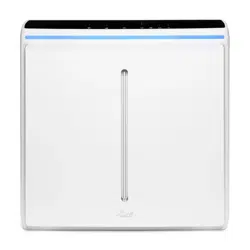

Rabbit Air 1
User
Manual
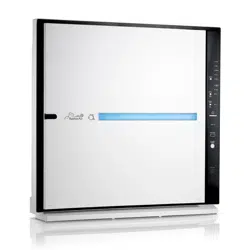
MinusA3
Ultra Quiet
Air Purier
-

ENERGY
STAR
Hello There!
Meet your brand new MinusA3!
We hope that this stylish beacon of clean air is just what
you’ve been looking for. Get familiar with this newest
addition to your home by exploring all of its features in
the enclosed booklet and on our website. If you have any
questions, give us a call anytime.
We’d love to hear from you!
Visit us at www.rabbitair.com or call us at 888.866.8862
The energy eciency of this ENERGY STAR
certied model is measured based on a ratio
between the model’s CADR for Smoke and the
electrical energy it consumes, or CADR/Watt.
Legal and Safety Instructions 4
Meet Your MinusA3 6
Meet the Filters 9
User Interface 10
User Interface / Operation Modes 12
Other Modes and Operations 16
Connecting with a Smartphone or Tablet 17
Wall-Mounting Your MinusA3 18
Cleaning MinusA3 and Pre-Filter 20
Replacing the Filters 22
Product Warranty 26
Rabbit Air - 3 2

Legal and Safety
Instructions
FCC Statements
FCC Part 15C 15.247, 15E 15.407 is applied to the modular
transmitter.
Federal Communication Commission Interference
Statement
This equipment has been tested and found to comply with
the limits for a Class B digital device, pursuant to Part 15
of the FCC Rules. These limits are designed to provide
reasonable protection against harmful interference in a
residential installation. This equipment generates, uses
and can radiate radio frequency energy and, if not installed
and used in accordance with the instructions, may cause
harmful interference to radio communications. However,
there is no guarantee that interference will not occur in a
particular installation. If this equipment does cause harm-
ful interference to radio or television reception, which can
be determined by turning the equipment o and on, the
user is encouraged to try to correct the interference by one
of the following measures:
• Reorient or relocate the receiving antenna.
• Increase the separation between the equipment and
receiver.
• Connect the equipment into an outlet on a circuit dier-
ent from that to which the receiver is connected.
• Consult the dealer or an experienced radio/TV techni-
cian for help.
This device complies with Part 15 of the FCC Rules. Opera-
tion is subject to the following two conditions: (1) This
device may not cause harmful interference, and (2) this
device must accept any interference received, including
interference that may cause undesired operation.
FCC Caution: Any changes or modications not expressly
approved by the party responsible for compliance could
void the user’s authority to operate this equipment.
This device and its antenna(s) must not be co-located
or operation in conjunction with any other antenna or
transmitter.
For product available in the USA/Canada market, only
channel 1~11 can be operated. Selection of other channels
is not possible. -
This device is going to be operated in 5.15~5.25GHz fre-
quency range, it is restricted in indoor environment only.
IMPORTANT NOTE:
FCC Radiation Exposure Statement
This equipment complies with FCC radiation exposure
limits set forth for an uncontrolled environment.
This equipment should be installed and operated with mini-
mum distance 20cm between the radiator & your body.
IC Statement
This Class B digital apparatus complies with Canadian
ICES-003.
This device complies with Industry Canada license-exempt
RSS standard(s).
Operation is subject to the following two conditions: (1)
this device may not cause interference, and (2) this device
must accept any interference, including interference that
may cause undesired operation of the device.
Cet appareil numérique de la classe B est conforme á la
norme NMB-003 du Canada.
Le présent appareil est conforme aux CNR d’Industrie
Canada applicables aux appareils radio exempts de licence.
L’exploitation est autorisée aux deux conditions suivantes:
(1) l’appareil ne doit pas produire de brouillage, et (2)
l’utilisateur de l’appareil doit accepter tout brouillage
radioélectrique subi, même si le brouillage est susceptible
d’en compromettre le fonctionnement.
Any changes or modications not expressly approved by
the manufacturer could void the user’s authority to operate
this equipment.
This device and its antenna(s) must not be co-located
or operation in conjunction with any other antenna or
transmitter.
For product available in the USA/Canada market, only
channel 1~11 can be operated. Selection of other channels
is not possible. -
Pour les produits disponibles aux États-Unis / Canada du
marché, seul le canal 1 ~ 11 peuvent être exploités. Sélec-
tion d’autres canaux n’est pas possible.
This radio transmitter (identify the device by certication
number or model number if Category II) has been approved
by Industry Canada to operate with the antenna types
listed below with the maximum permissible gain indicated.
Antenna types not included in this list, having a gain
greater than the maximum gain indicated for that type, are
strictly prohibited for use with this device.
The device could automatically discontinue transmission in
case of absence of information to transmit, or operational
failure. Note that this is not intended to prohibit transmis-
sion of control or signaling information or the use of repeti-
tive codes where required by the technology.
The device for the band 5150-5250 MHz is only for indoor
usage to reduce potential for harmful interference to co-
channel mobile satellite systems.
les dispositifs fonctionnant dans la bande 5150-5250 MHz
sont réservés uniquement pour une utilisation à l’intérieur
an de réduire les risques de brouillage préjudiciable aux
systèmes de satellites mobiles utilisant les mêmes canaux.
The maximum antenna gain permitted (for devices in the
bands 5250-5350 MHz and 5470-5725 MHz) to comply with
the e.i.r.p. limit. The maximum antenna gain permitted (for
devices in the band 5725-5825 MHz) to comply with the
e.i.r.p. limits specied for point-to-point and non point-to-
point operation as appropriate. High-power radars are al-
located as primary users (meaning they have priority) of the
bands 5250-5350 MHz and 5650-5850 MHz and these radars
could cause interference and/or damage to LE-LAN devices.
Devices is not capable of transmitting in the band 5600-
5650 MHz. This restriction is for the protection of Environ-
ment Canada’s weather radars operating in this band.
IMPORTANT NOTE:
IC Radiation Exposure Statement
This equipment complies with IC RSS-102 radiation expo-
sure limits set forth for an uncontrolled environment. This
equipment should be installed and operated with minimum
distance 20cm between the radiator & your body.
Cet équipement est conforme aux limites d’exposition
aux rayonnements IC établies pour unenvironnement
non contrôlé. Cet équipement doit être installé et utilisé
avec un minimum de 20cm de distance entre la source de
rayonnement et votre corps.
Transmit Antenna Notice
This radio transmitter [IC: 21098-ESPWROOM32D] has
been approved by Innovation, Science and Economic Devel-
opment Canada to operate with the antenna types listed
below, with the maximum permissible gain indicated. An-
tenna types not included in this list that have a gain greater
than the maximum gain indicated for any type listed are
strictly prohibited for use with this device.
Antenna list ( type, maximum gain(dBi) )
Model Type Maximum Gain (dBi)
General Safety Information
Caution: When using electrical appliances, observe the
following basic precautions to reduce the risk of re,
electric shock, and injury. Please read all tips and warn-
ings before using your Rabbit Air® purier.
• Use only as directed by the Owner’s Manual.
• Please observe extreme caution when using the air puri-
er in close proximity to children.
• Rabbit Air puriers are for indoor use only.
• Rabbit Air puriers are not intended for use in bath-
rooms, laundry areas, or other damp indoor environ-
ments. Keep Rabbit Air puriers away from water at all
times.
• Do not use Rabbit Air puriers near replaces or in areas
where ammable or combustible products or vapors
may be present.
• This appliance is not intended for use by persons (includ-
ing children) with reduced physical, sensory, or mental
capabilities, or lack of experience and knowledge
unless they have been given supervision or instruction
concerning use of the appliance by a person responsible
for their safety.
• Children should be supervised to ensure they do not
play with the appliance.
• This product complies with the maximum allowable con-
centration of ozone of 0.050 parts per million by volume
(ppmv) in a 24-hour period. The Health Canada Guideline
2010 recommends that the maximum exposure limit,
based on an averaging time of 8 hours, is 0.020 ppmv or
less when tested in a sealed, controlled room aproxi-
mately 30 m³.
Electrical Safety Instructions
• Rabbit Air puriers are designed for use in a 120 V outlet
only.
• Turn o your Rabbit Air purier before unplugging it
from the power outlet.
• Unplug the Rabbit Air purier from the power outlet
when not in use and before servicing or cleaning the
unit.
• To reduce the risk of electric shock, the purier has a
polarized plug, which means it will t into a polarized
outlet only one way. If the plug does not t into the
outlet, reverse the plug. If it still does not t, contact
qualied personnel to install the proper outlet. Do not
alter the plug in any way.
• To avoid electric shock, do not touch the air purier or
its power plug with wet hands.
• Keep the electrical cord away from heated surfaces at
all times.
• If the cord or plug appears damaged, return the unit
immediately to an authorized service facility for exami-
nation and repair.
• Only use Rabbit Air’s dedicated power cord that came
with your air purier.
• Always connect power cord to air purier rst and en-
sure it is fully inserted before connecting to your outlet.
• Any attempts to repair a Rabbit Air purier without writ-
ten permission from Rabbit Air will void the warranty
and could cause serious personal injury to the user and/
or result in severe damage to the unit.
• Do not pull, carry, lift, or drag the Rabbit Air purier by
pulling its power cord. Remove the power plug from its
outlet by grasping the plug and pulling gently.
• When the Rabbit Air purier is plugged into a power
outlet, keep all ngers, body parts, hair, jewelry, and
loose clothing away from the openings.
Installation Guidelines
• Avoid putting the Rabbit Air purier in a place where the
air intake or air outlet could become clogged with dirt.
• Leave at least two feet of clearance around the air puri-
er’s intake and outlet.
Operations Guidelines
• Do not block the air intake or air outlet.
• Do not use air purier on or around hot surfaces.
• Do not use the air purier in a room where it may come
into contact with steam.
• Do not operate air purier on its side.
• Do not operate air purier in greasy or damp environ-
ments.
• Do not use detergent or soap to clean air purier.
• Do not operate the Rabbit Air purier without lters.
• Do not wash and reuse the lters except for the wash-
able Pre-Filter.
• Childproof feature pauses air purier operation when
the Front Panel is removed.
Rabbit Air - 5 4
11
--
+-
-
.V
-----~--/
'
----
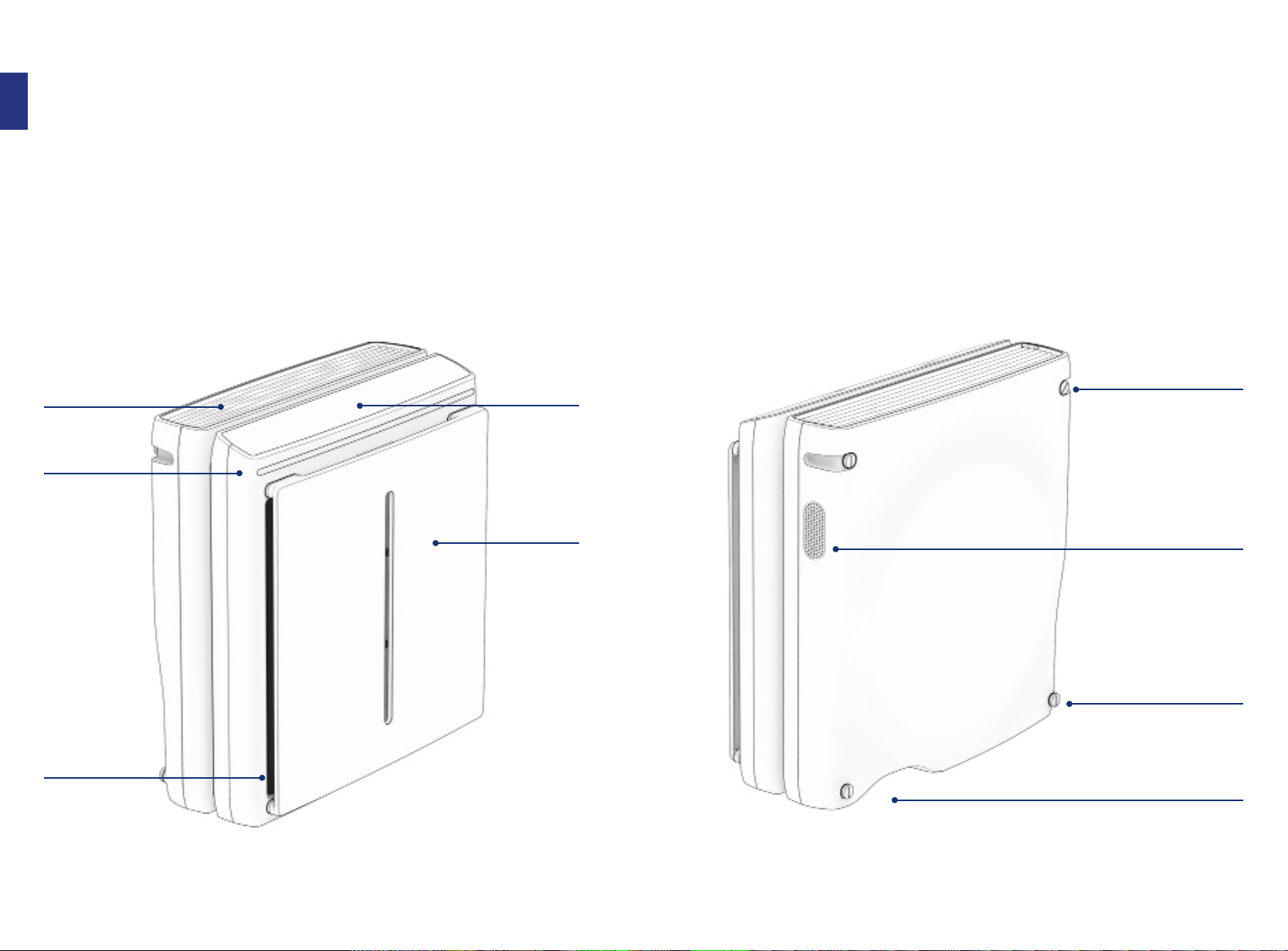
Air Outlet
Mood Light
Filter Case
User Interface
Touch sensitive
Front Panel
Removeable
with magnetic
xture
6
Upper
Wall-Mount Fixtures
To mount your unit right
side up
Air Quality Sensor
Lower
Wall-Mount Fixtures
To mount your unit up-
side down
A/C Power Cable Port
Always attach power
cord to air purier before
connecting to an outlet
I
Meet Your MinusA3
*Air Purier does not include remote
Rab
bit Air - 7
I
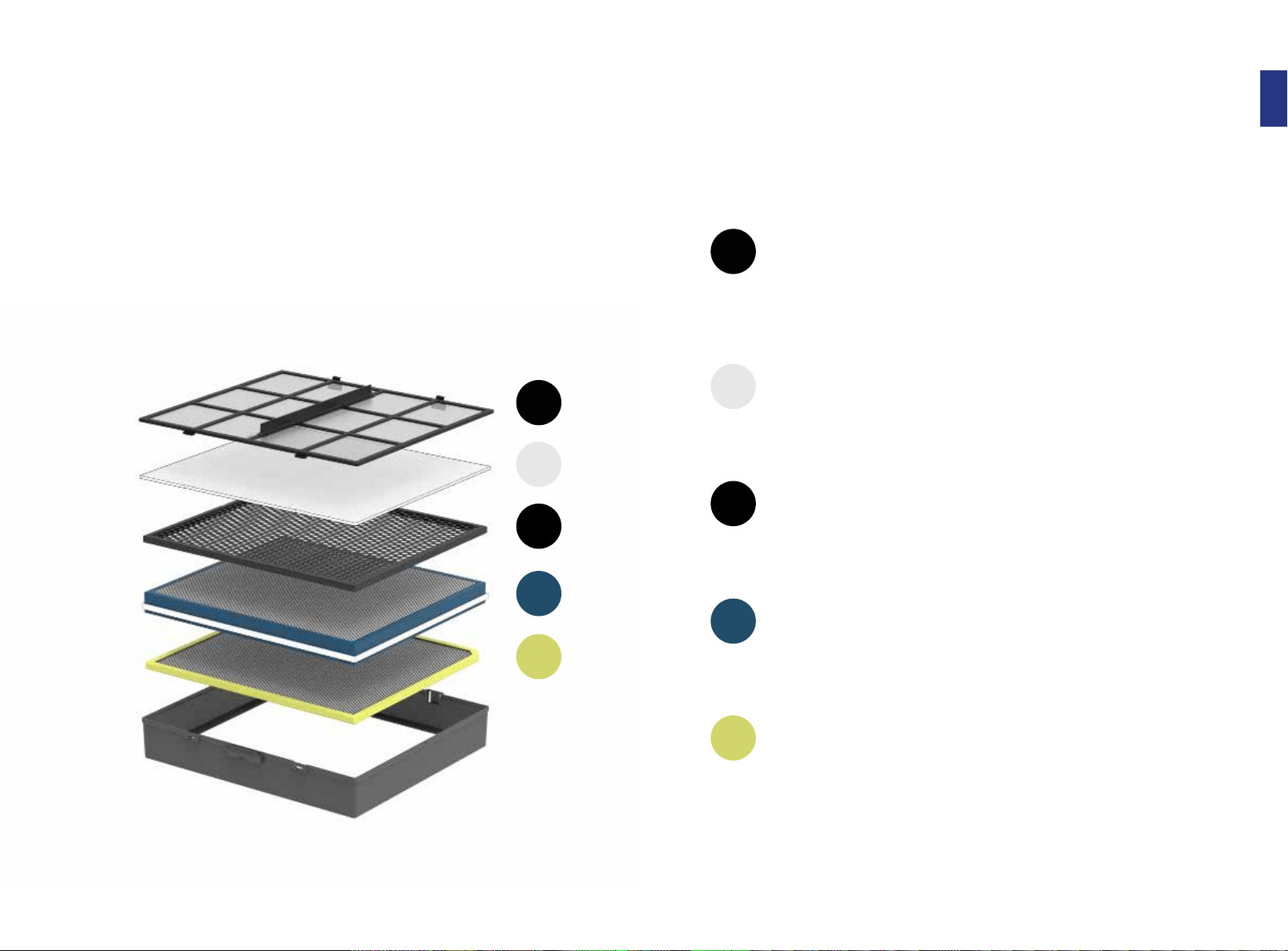
Meet The Filters
1 Customized Filter
2 BioGS HEPA Filter
3 Activated Carbon Filter
4 Medium Filter
5 Pre-Filter
1
2
3
4
5
The Pre-Filter eectively traps and reduces large-sized allergens, dust, and
particles. This is a washable lter that does not need to be replaced. Clean
this lter every 3 months.
The Medium Filter traps and reduces airborne particles larger than 1 micron
in si
ze, such as pollen, mold, and pet dander. Replace this lter once a year.
High-grade granular activated carbon traps and reduces chemicals and
com
mon household odors in the air. Replace this lter once a year.
This precise lter traps particles 0.3 microns in size at 99.97% eciency and
red
uces common allergens and bacteria trapped on the lter to support
optimum eciency and prolong lter life. Replace this lter once a year.
Specialized lters trap and reduce dierent types of germs, chemicals,
odo
rs, and allergens based on your household needs. Choose between Toxin
Absorber, Germ Defense, Odor Remover, and Pet Allergy. Replace this lter
once a year.
8 Rabbit Air - 9
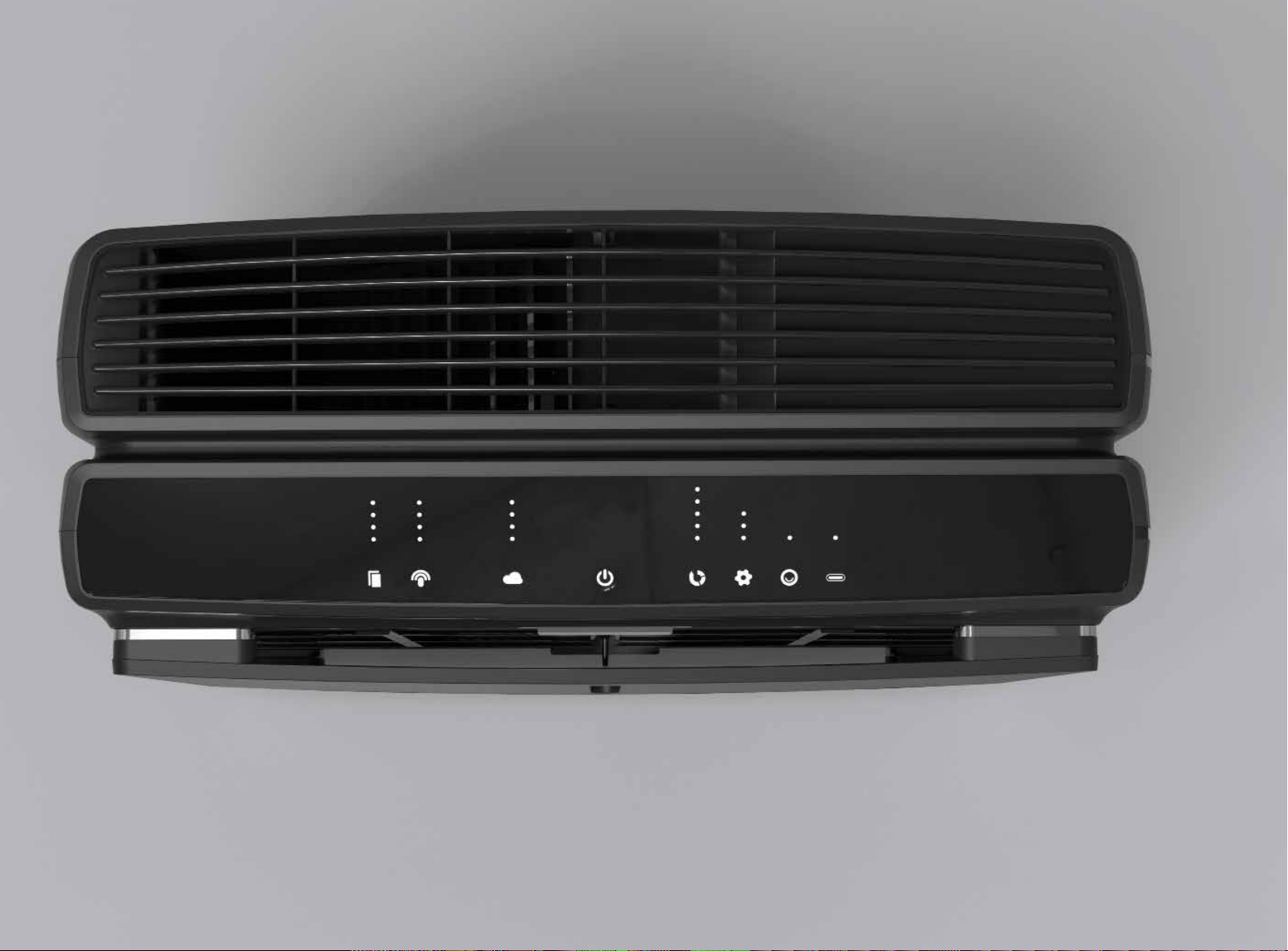
User Interface
10 Rabbit Air - 11
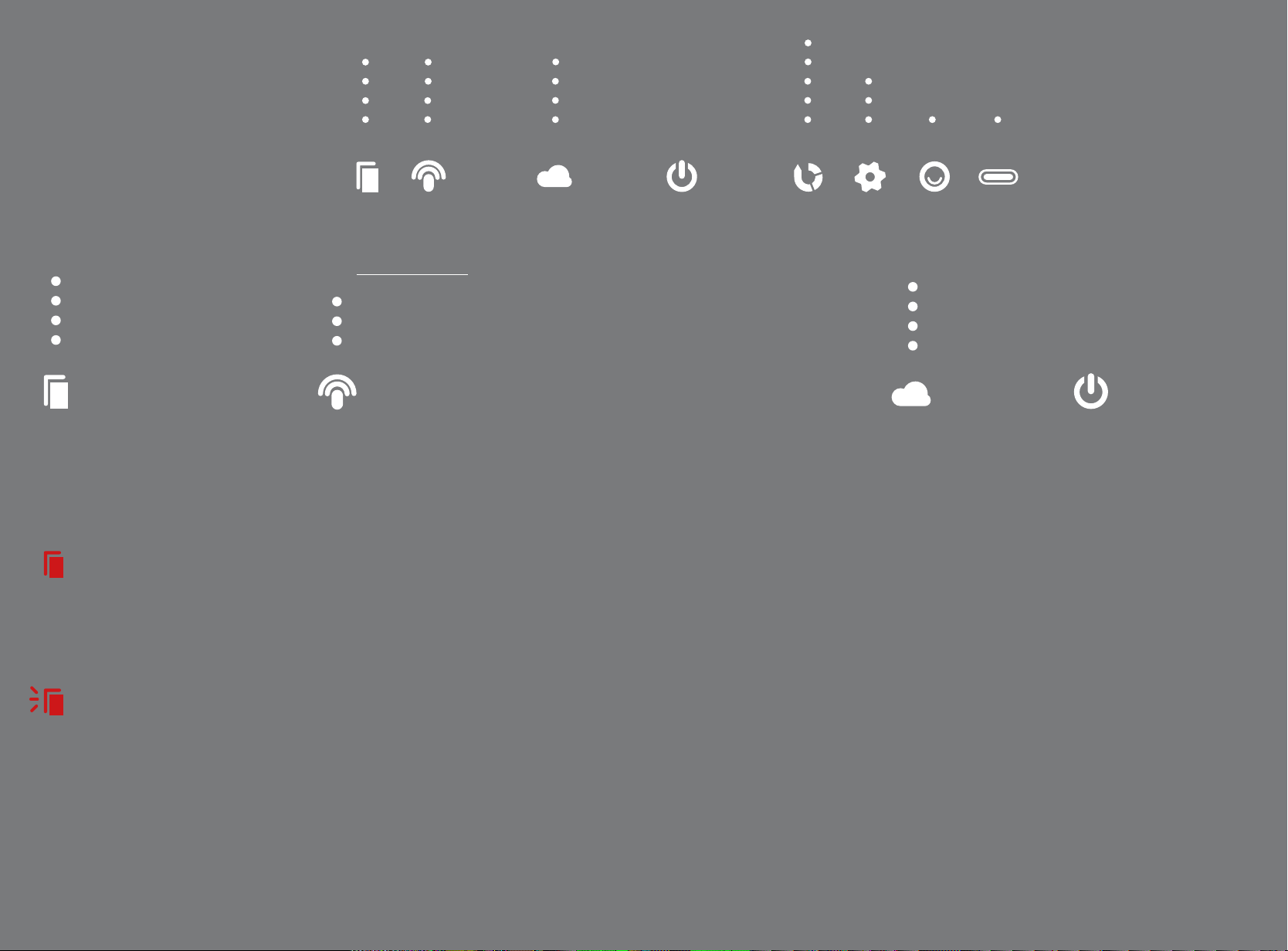
User Interface /
Operation Modes
New to 10 months
9 to 7 months
6 to 4 months
Replace within 3 months
Filter
Indicator
Filter icon and indicators will provide lter
status.
Solid Red Light
Indicates when you should clean
your Pre Filter. Tap the lter icon
while the Front Panel is removed to
reset the reminder
(for another 3 months).
Flashing Red Light
Indicates when you should replace
your lters or if lter is not recog
nized. See p. 22 to learn more about
lter replacement.
Filter Life
Shows you the remaining life of
your Filter Kit. Each dot represents
approximately 3 months.
Connection Status
Connected to WiFi and Bluetooth
Connected to WiFi
Connected to Bluetooth
Wireless
Connection
Tap and Hold:
Initiates wireless pairing to connect air
purier to a 2.4 GHz wireless network or
Bluetooth using a mobile device.
Download Rabbit Air App from the App Store
(iOS) or Google Play Store (Android) on your
mobile device and follow instructions for
setup.
Wireless Indicators
3 LED = Connected to a 2.4 Ghz WiFi network
and a bluetooth device
2 LED = Connected to a 2.4 GHz WiFi network
1 LED = Connected to a device by Bluetooth
For questions regarding wireless setup,
please visit our website www.rabbitair.com/
wireless.
High level of air pollution
Low level of air pollution
Air Quality
Indicator
Monitor the air quality levels
using particle and odor
sensors. These lights indi
cate the level of air pollution
detected
Power
Status
Tap on the power icon to turn
on the MinusA3.
Tap and hold to power o
the unit.
4 LED = High level of air pollution
3 LED
2 LED
1 LED Low level of air pollution
Rabbit Air - 13 12
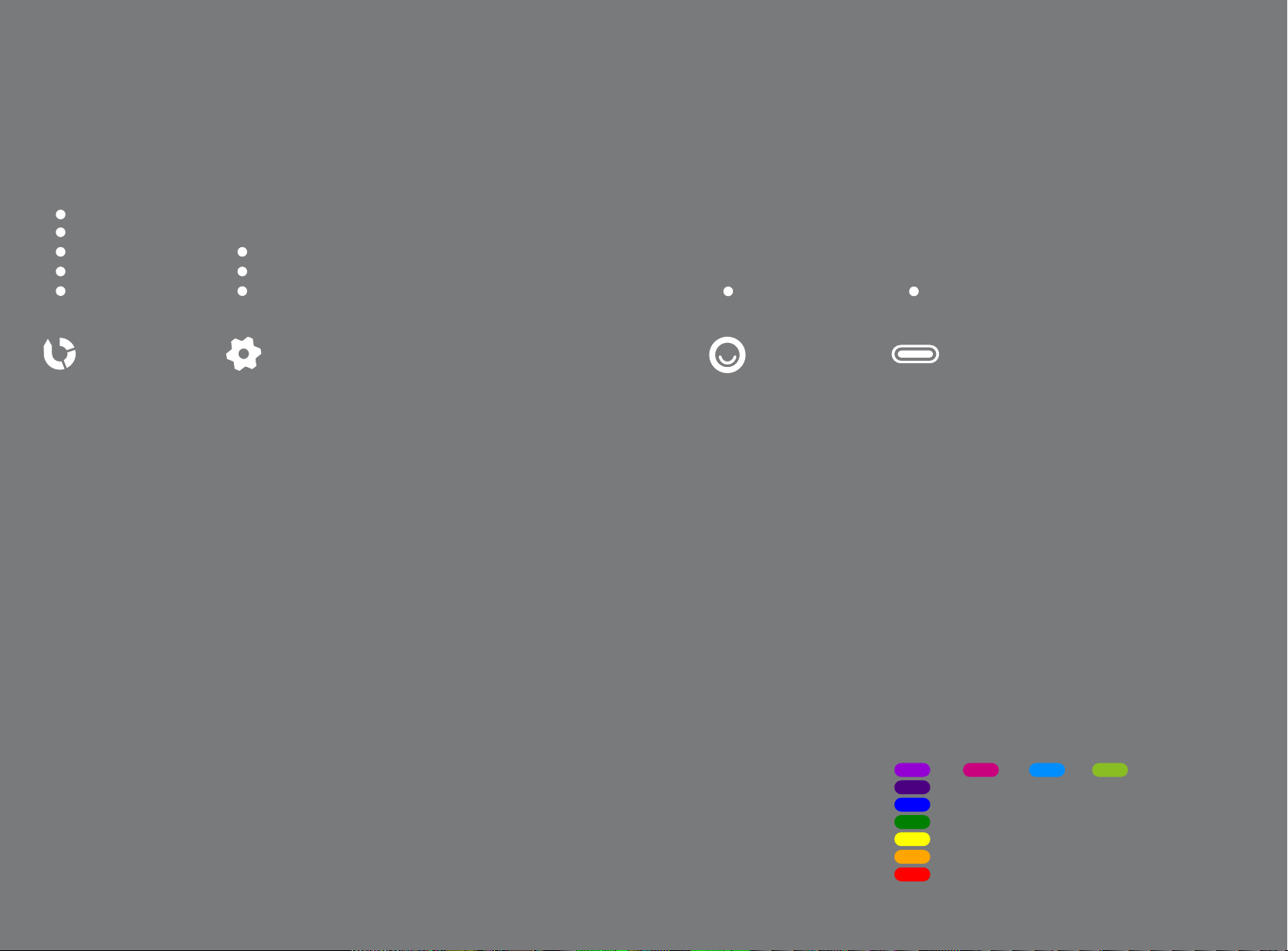
High
Medium
Silent
Fan
Speed
Controls and displays the
current fan speed of the unit.
Tap:
Turns on manual fan speed
and cycles manual speed
from level 1 to 5
(deactivates Auto Mode)
5 LED = High
4 LED
3 LED Medium
2 LED
1 LED Silent
High Sensitivity
Medium
Low Sensitivity
(No LED = Auto Mode O)
Auto Mode/
Sensitivity
Auto Mode controls the MinusA3 fan speed using particle
and odor sensors. It adjusts the fan speed based on the
amount of pollutants detected in the room.
Tap:
Operates MinusA3 in Auto Mode and cycles through the sen
sitivity level for the sensors (deactivates Manual Fan Speed)
Auto Mode Indicators
3 LED = High Sensitivity
2 LED Medium
1 LED = Low Sensitivity
No LED = Auto Mode O (unit operating on Manual Speed)
On
(No LED = O)
Negative
Ions
Operates the Negative Ion
Generator.
Operates and controls Mood Light
and ac
tivates All Lights O function.
Tap:
T
urns negative ion generator
on or o
1 LED = On
No LED = O
Indicates Light Sensor Control
is OFF
Light
Control
Tap:
Cycles Mood Light settings
Tap and hold:
Manually activates All Lights
O (turns o all LEDs includ
ing Mood Light)
Tap any button to exit.
1. Rainbow
2. Red (preset 1)
3. Blue (preset 2)
4. Green (preset 3)
5. O
1 2 3 4
5
O
Rabbit Air - 15 14

G
Fan Speed
--@
0
Auto Mode
C)
Sensitivity
Mood Light
C)
Bedroom 2
MinusA2
- 0
Edit
0
<!>
Unit ON
Edit
C)
0
•
Edit
Air Quality
~
All Light On/Off
C)
Gas / Odor
Light Sensor On/Of
Negative Ions
•
f
PM ug/m3
1.0
21
2.5 31
10.0 32
•
•
I ;
C
Fan Speed
----0------==
0
Auto Mode
C)
Sensitivity
I I
1111111...
GHITON
,.
.....
Google
Play
,
Down
l
o<1d
on
lhe
• AppStore
c >
Other Modes
and Operations
Idle
LEDs on the User Interface will turn o after 5 minutes of
inactivity. As soon as the speed is changed or any button is
pushed, the unit will resume an active mode.
Activate Light Sensor
Light Sensor will automatically put unit into All Lights O (all
LEDs on the User Interface and Mood Light turn o) if envi-
ronment is dark for 3 minutes. All Lights O will be disabled
automatically when light is detected in the room again.
To activate Light Sensor, tap and hold the Auto Mode button
and Mood Light button for 2 seconds. LED above Mood Light
will turn o when Light Sensor is active.
Operation Tips
The MinusA3 can be used for various air quality improve-
ment reasons. For recommendations on the right speed and
mode for you, please contact our Customer Care Team at
888.866.8862.
Connecting with
a Smartphone or
Tablet
Requires iOS or Android device with
Bluetooth or a 2.4Ghz WiFi network
1. Download the Rabbit Air app to your
smartphone or tablet.
2. Use your existing customer login or
create a new account.
3. Select “Setup new purier” or “Find
existing purier” and follow the steps
on the screen.
4. Now you can monitor your air quality
and control your air purier.
For more information, visit us at
www.rabbitair.com/wireless-faq
Rabbit Air - 17 16
I
Wall-Mounting
Your MinusA3
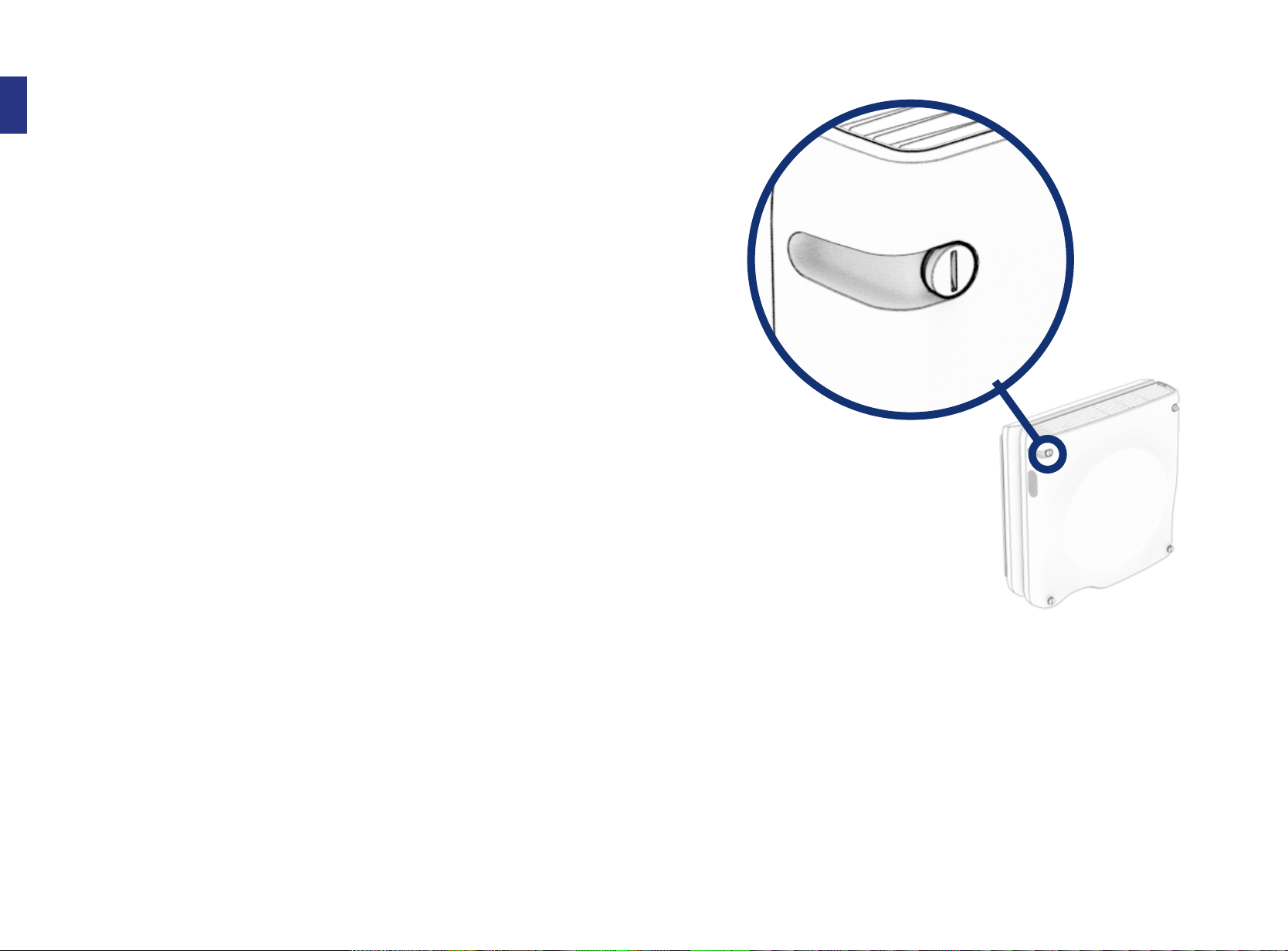
The MinusA3 Air Purier is designed to be
either freestanding or wall-mounted. Only
use the approved Rabbit Air wall-mount kit
to install the MinusA3 Air Purier on your
wall.
Refer to the wall-mounting guide sheet for
step-by-step instructions.
General Guidelines:
• The MinusA3 Air Purier can be mounted
right side up or upside down. We
recommend mounting it upside down if
mounting higher than 6 ft. to ensure you
can access the Control Panel easily.
• We recommend leaving at least two feet of
clearance from air outlet and eight inches
of clearance on either side to ensure
optimal performance.
• Be careful not to drop the Front Panel or
Filter Case when replacing the lters.
• Do not pull on the power cord.
• Make sure the hanger screws have been
securely driven into studs.
Questions? Reach us at www.rabbitair.com or
888.866.8862.
Disclaimer for Installing
Wall-Mounted Objects
Do not attempt to install this product if you do not understand the instructions. Contact a qualied contractor to install
the mounting bracket and call 1.888.866.8862 if you have any questions. You risk the possibility of damaging the air
purier, damaging other property, and personal injury if the mounting bracket is not installed properly. Check to make
sure there are no missing or defective parts. Do not attempt to install the mounting bracket if there are missing or
defective parts. Contact Rabbit Air and replacement parts will be shipped to you immediately. Rabbit Air is not liable for
damage or injury caused by incorrect mounting, incorrect assembly or incorrect usage.
• After installing the wall-mount bracket, make sure it is rmly in place before putting the MinusA3 Air Purier on it.
• Take care not to drill or screw into existing wiring in the wall while installing the wall-mount bracket.
Correct installation is extremely essential and falls outside the scope of responsibility of Rabbit Air. Please consult a
qualied contractor and/or specialist supplier to install the mounting bracket. Maximum weight of air purier SPA-1000N:
11.5 kg/ 25.4 lbs.
Rabbit Air - 19 18
I
11(
Ii
Cleaning MinusA3
and Pre-Filter
Always power o your air purier before
cleaning.
Cleaning the MinusA3
Use a damp cloth to remove stubborn stains
and dirt buildup if necessary. Avoid commer-
cial cleaning products.
1. Use a clean, dry cloth to wipe the exter-
nal surfaces of the air purier. The air
quality of a room will dictate how often
you should clean the unit surface.
2. Clean the air intake and outlet with a
soft brush.
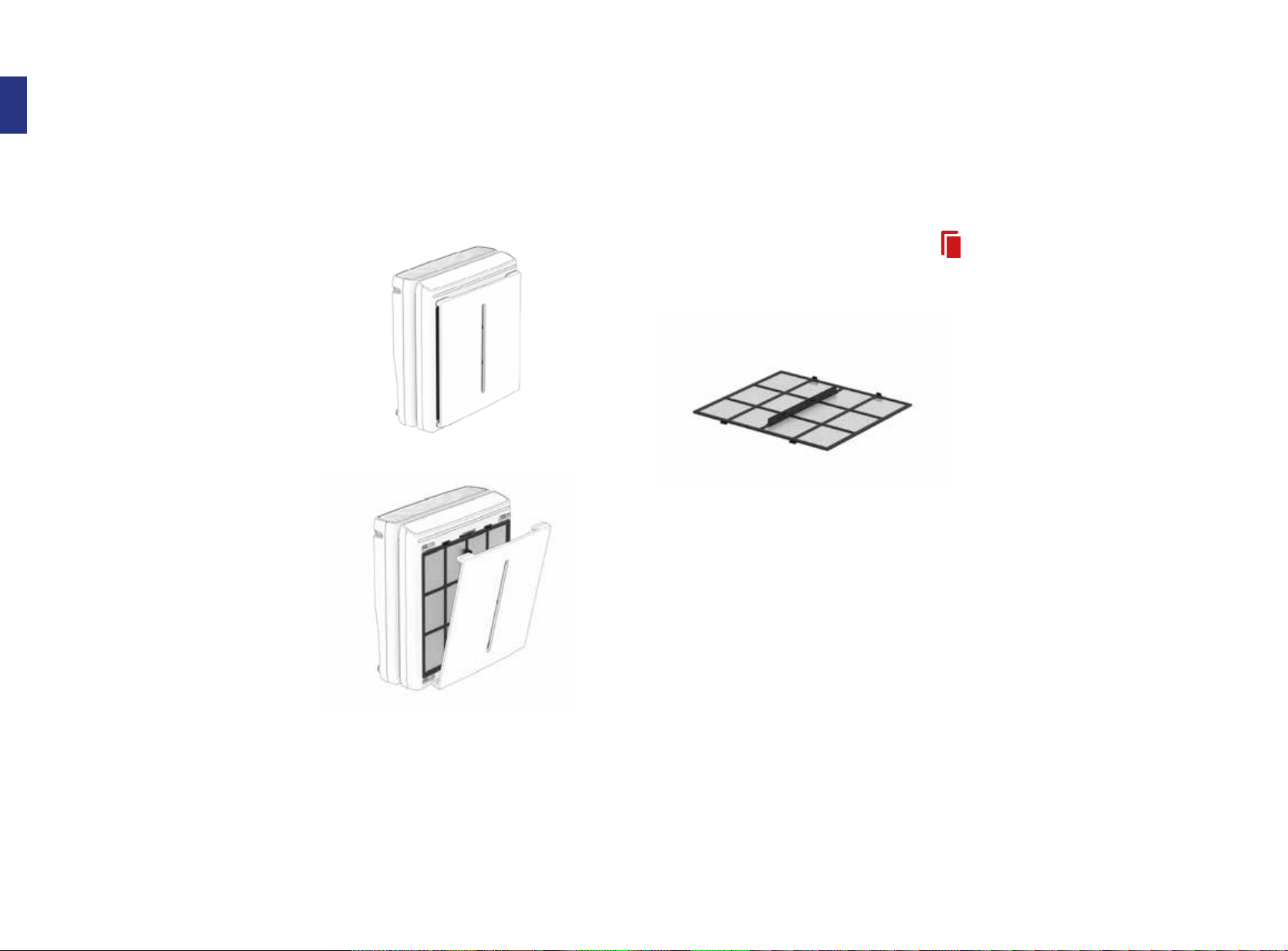
3. Remove the Front Panel from the unit
and use a dry cloth or soft brush to dust
it o.
4. Use a dry cloth or soft brush to wipe o
the Particle Sensor located on the right
side of the unit.
Cleaning the Pre-Filter
The Pre-Filter should be cleaned every 3
months. A solid red Filter Indicator light
means it’s time to clean!
Vacuuming method:
1. Remove the Front Panel from the air
purier.
2. Run a vacuum cleaner with a nozzle
or brush attachment on a low power
setting along the Pre-Filter to remove
visible particles.
If vacuuming does not seem to suciently
clean your Pre-Filter, please follow the steps
below to wash it.
Washing method:
1. Remove the Pre-Filter from the Filter
Case.
2. Fill the sink with lukewarm water and
gently wash the Pre-Filter under the
water for 2–3 minutes or until it is com-
pletely clean.
3. Rinse the Pre-Filter with clean tap
water.
4. Use a towel to remove any excess water
from the Pre-Filter.
5. Allow the Pre-Filter to dry for 12–24
hours.
6. When the Pre-Filter is completely dry,
place it back into the Filter Case. After
cleaning, tap the Filter Icon while the
Front Panel is removed to reset the
reminder.
Rabbit Air - 21 20
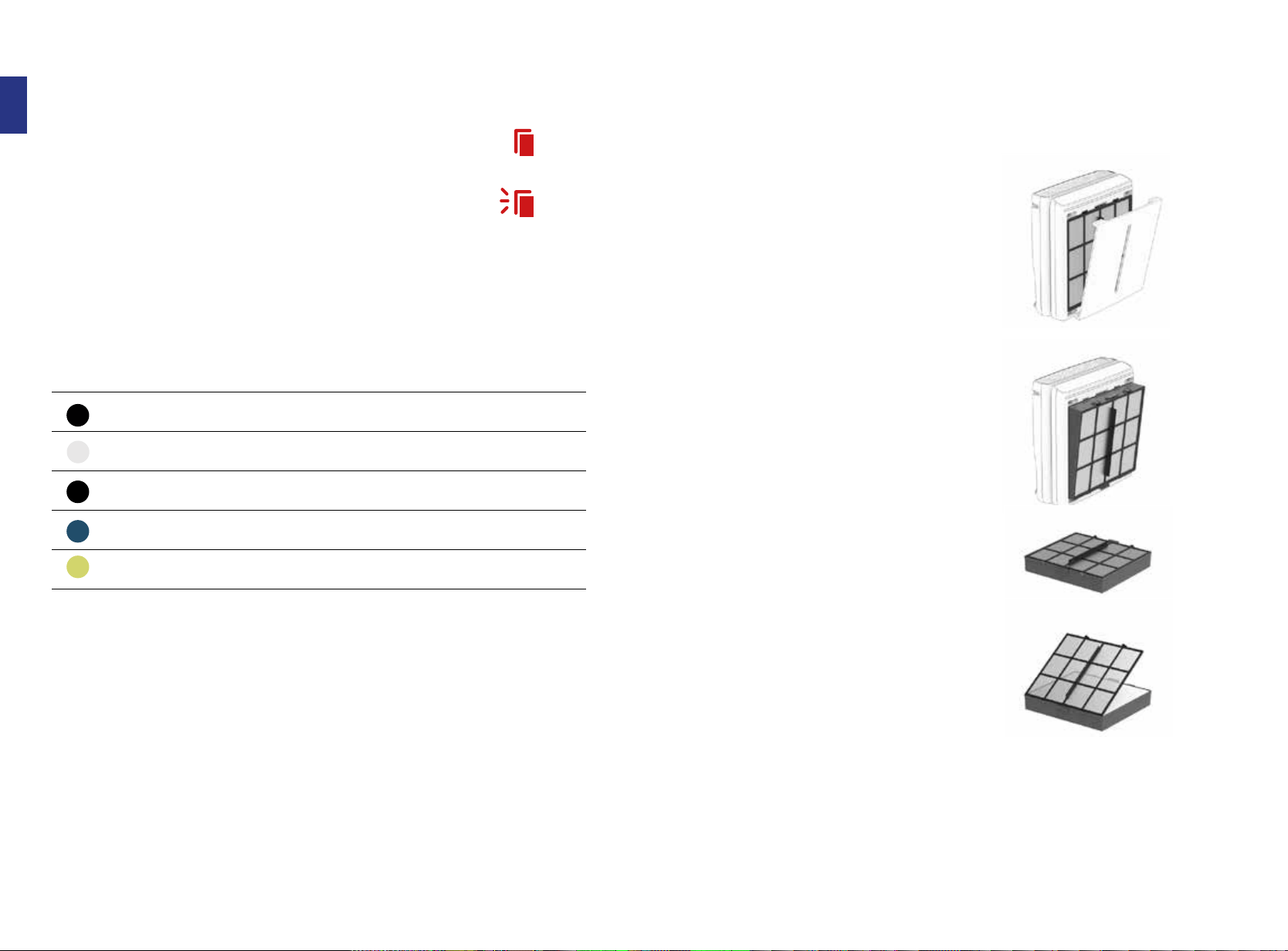
Filters Filter Life* Cleaning
Pre-Filter Washable Every 3 months
Medium Every 12 months Not Required
Charcoal-Based Activated Carbon Every 12 Months Not Required
BioGS HEPA Every 12 Months Not Required
Customized Every 12 Months Not Required
I
•
•
•
•
Ii
Replacing the Filters
Always power o the unit before cleaning/replacing the lters.
Depending on your indoor environment, the lifespan of the lters may
vary. The lter light will illuminate red for cleaning/maintenance while
a blinking red light means that it is time to change lters. Plug the unit
back in to reset the lter indicator.
Discarding
Used Filters
Filter Maintenance Schedule
1. Grab the handles at the center of the
top and bottom of the Filter Case.
2. Push together and pull the entire case
out of the air purier.
3. Once you have removed the Filter Case,
lay it on a at surface.
4. Remove the Pre-Filter by pinching the
two tabs on the top left and right side
of the frame.
Do NOT discard the Pre-Filter. It is
designed to be cleaned and reused.
5. Discard the remaining lters inside.
Filters should fall out easily by ipping
over the Filter Case.
6. Set aside your Filter Case and Pre-Filter.
*based on 24/7 operation
22 Rabbit Air - 23
•
•
•
•
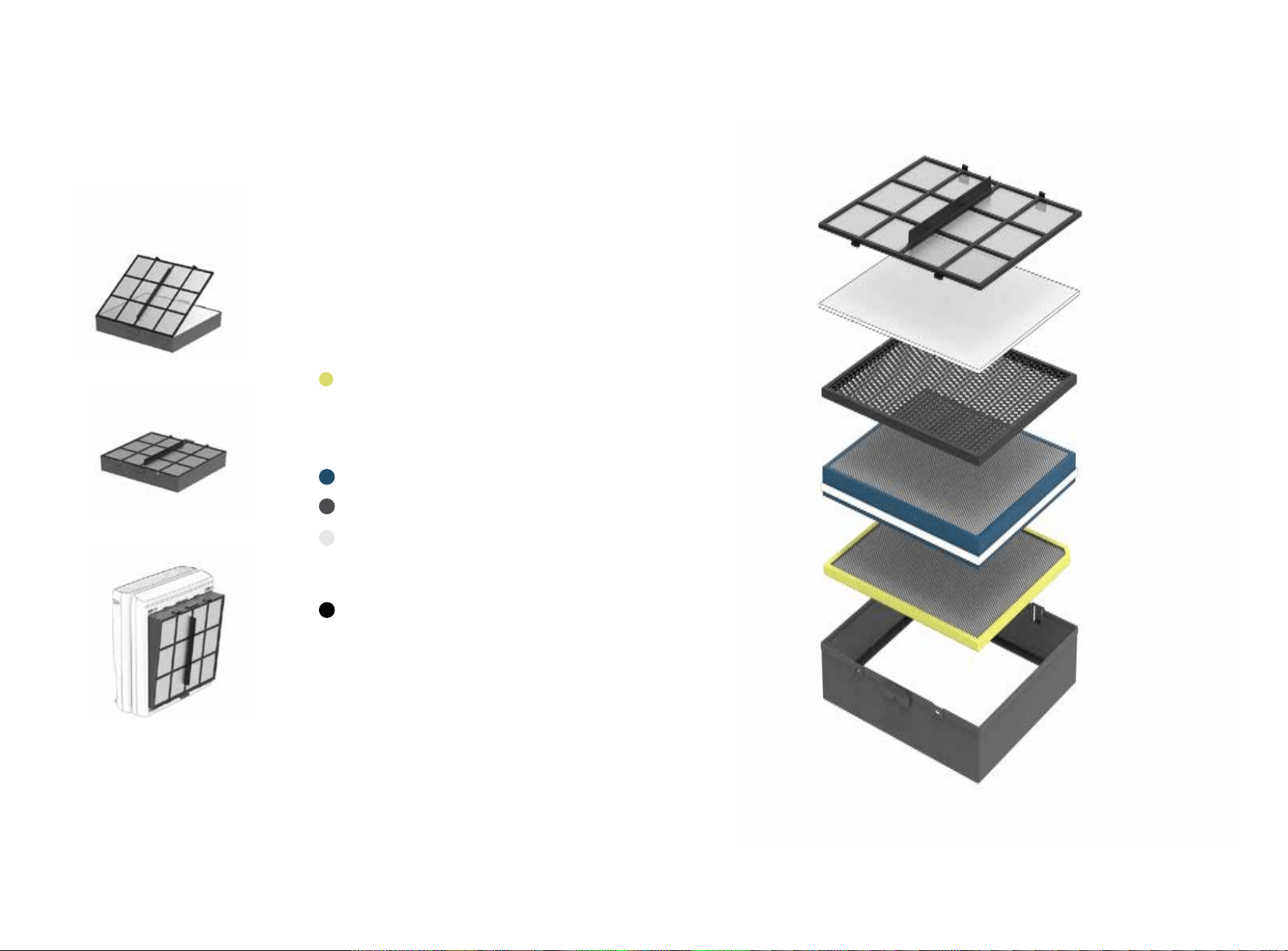
Installing
New lters
1. Unwrap all of your new replacement
lters.
2. Insert the new lters into the Filter
Case in the order below. Make sure to
identify the orientation and direction
for each lter by the label. Insert lters
in the order below.
1. Customized Filter
(please ensure lter label faces out-
ward and aligns with the top of the
Filter Case when inserting your Custom-
ized Filter)
2. BioGS HEPA Filter
3. Activated Carbon Filter
4. Medium Filter
(make sure the edge of the Medium
Filter lines up and sticks to the velcro
on the Activated Carbon Filter)
5. Pre-Filter
3. With the new lters inside the Filter
Case, place the Pre-Filter in last, making
sure all the lters are packed in place
snugly.
4. Insert the Filter Case with all the new
lters back into the MinusA3.
5. Once new lters are placed inside, the
lter replacement indicator will reset
for 12 months.
24 Rabbit Air - 25

I
Limited Warranty
Rabbit Air Five (5) Year Limited Warranty
(For Rabbit Air Branded Products Only)
IMPORTANT: BY USING the BioGS 2.0, MinusA2 or MinusA3
air puriers (each, a “Rabbit Air Product”) YOU ARE
AGREEING TO BE BOUND BY THE TERMS OF THE RABBIT
AIR FIVE (5) YEAR LIMITED WARRANTY (“WARRANTY”) AS
SET OUT BELOW. AS NOTED IN THE “YOUR RESPONSIBILI-
TIES” SECTION BELOW, RABBIT AIR RESERVES THE RIGHT
NOT TO HONOR THIS WARRANTY IF IT HAS NOT BEEN REG-
ISTERED WITHIN NINETY (90) DAYS OF YOUR PURCHASE
OF THE RABBIT AIR PRODUCT. THIS WARRANTY APPLIES
REGARDLESS OF WHETHER YOU PURCHASE A RABBIT AIR
PRODUCT FROM A RABBIT AIR AUTHORIZED RESELLER OR
DIRECTLY FROM RABBIT AIR. DO NOT USE YOUR RABBIT
AIR PRODUCT UNTIL YOU HAVE READ THE TERMS OF THE
WARRANTY.
IF YOU DO NOT AGREE TO THE TERMS OF THE WARRANTY,
DO NOT USE THE RABBIT AIR PRODUCT AND RETURN IT
WITHIN THE RETURN PERIOD STATED IN RABBIT AIR’S
RETURN POLICY (FOUND AT https://www.rabbitair.com/
pages/why-rabbit-air#money-back) TO RABBIT AIR OR TO
THE AUTHORIZED RESELLER WHERE YOU PURCHASED
IT FOR A REFUND. This limited warranty does not cover
replacement lters, FILTER FRAMES, FILTER CASES, OR
WALL MOUNT BRACKETS.
HOW CONSUMER LAW RE-
LATES TO THIS WARRANTY
THIS WARRANTY GIVES YOU SPECIFIC LEGAL RIGHTS, AND
YOU MAY HAVE OTHER RIGHTS THAT VARY FROM STATE
TO STATE (OR BY COUNTRY OR PROVINCE). OTHER THAN
AS PERMITTED BY LAW, RABBIT AIR DOES NOT EXCLUDE,
LIMIT, OR SUSPEND OTHER RIGHTS YOU MAY HAVE,
INCLUDING THOSE THAT MAY ARISE FROM THE NONCON-
FORMITY OF A SALES CONTRACT. FOR A FULL UNDER-
STANDING OF YOUR RIGHTS YOU SHOULD CONSULT THE
LAWS OF YOUR COUNTRY, PROVINCE, OR STATE.
WARRANTY LIMITATIONS SUBJECT TO CONSUMER LAW
TO THE EXTENT PERMITTED BY LAW, THIS WARRANTY
AND THE REMEDIES SET FORTH ARE EXCLUSIVE AND
IN LIEU OF ALL OTHER WARRANTIES, REMEDIES, AND
CONDITIONS, WHETHER ORAL, WRITTEN, STATUTORY,
EXPRESS, OR IMPLIED. LIKEWISE, TO THE EXTENT PERMIT-
TED BY LAW, RABBIT AIR DISCLAIMS ALL STATUTORY AND
IMPLIED WARRANTIES, INCLUDING WITHOUT LIMITATION
WARRANTIES OF MERCHANTABILITY AND FITNESS FOR
A PARTICULAR PURPOSE AND WARRANTIES AGAINST
HIDDEN OR LATENT DEFECTS. INSOFAR AS SUCH WAR-
RANTIES CANNOT BE DISCLAIMED, RABBIT AIR LIMITS THE
DURATION AND REMEDIES OF SUCH WARRANTIES TO THE
DURATION OF THIS EXPRESS WARRANTY AND, AT RABBIT
AIR’S OPTION, THE REPAIR OR REPLACEMENT SERVICES
DESCRIBED BELOW. SOME STATES (OR COUNTRIES AND
PROVINCES) DO NOT ALLOW LIMITATIONS ON HOW LONG
YOUR RESPONSIBILITIES
AN IMPLIED WARRANTY (OR CONDITION) MAY LAST, SO
THE LIMITATION DESCRIBED ABOVE MAY NOT APPLY TO
YOU.
WHAT IS COVERED BY THIS
WARRANTY?
Kinetic Solutions, Inc., d/b/a “Rabbit Air”, located at 125
N Raymond Ave, Suite 308, Pasadena, CA 91103 (“Rabbit
Air”), warrants Rabbit Air Products contained in the original
packaging against defects in materials and workmanship
when used normally in accordance with Rabbit Air’s pub-
lished guidelines for a period of FIVE (5) YEARS from the
date of original retail purchase by the end-user purchaser
(“Warranty Period”). Rabbit Air’s published guidelines
include, but are not limited to, the information contained in
technical specications, user manuals, and service.
WHAT IS NOT COVERED BY
THIS WARRANTY?
This Warranty does not apply to any non-Rabbit Air brand-
ed hardware products, even if packaged or sold with Rabbit
Air hardware. Manufacturers, suppliers, or publishers,
other than Rabbit Air, may provide their own warranties to
you. Please contact them for further information. Rabbit
Air does not warrant that the operation of the Rabbit Air
Product will be uninterrupted or error-free. Rabbit Air is
not responsible for damage arising from failure to follow
instructions relating to the Rabbit Air Product’s use.
Additionally, this Warranty does not apply: (a) to replace-
ment lters, lter frames, lter cases, or wall mount
brackets; (b) to consumable parts, such as batteries or
protective coatings, that are designed to diminish over
time, unless failure has occurred due to a defect in materi-
als or workmanship; (c) to cosmetic damage, including, but
not limited to, scratches, dents, and broken plastic, unless
such damage has occurred due to a defect in materials or
workmanship; (d) to damage caused by use with a third par-
ty component or product, including without limitation any
replacement air lters not manufactured by Rabbit Air; (e)
to damage caused by breakdowns, uctuations, or interrup-
tions in electric power or by connection to improper power
supply; (f) to damage caused by accident, abuse, misuse,
re, liquid contact, earthquake, or other external force; (g)
to damage caused by operating the Rabbit Air Product
outside Rabbit Air’s published guidelines; (h) to damage
caused by service performed by anyone who is not a repre-
sentative of Rabbit Air; (i) to a Rabbit Air Product that has
been modied to alter functionality or capability without
the written permission of Rabbit Air; ( j) to defects caused
by normal wear and tear or otherwise due to the normal
aging of the Rabbit Air Product; (k) to Rabbit Air Products
marked as “sample” or sold “as is”; (l) if any serial number
has been removed or defaced from the Rabbit Air Product,
or (m) if Rabbit Air receives information from relevant pub-
lic authorities that a Rabbit Air Product has been stolen.
Rabbit Air tries to honor this warranty in all cases where it
has
information regarding your purchase; however, Rabbit
Air reserves the right not to honor this warranty if it has not
been registered within ninety (90) days of your purchase of
the Rabbit Air Product. Accordingly, we encourage you to
complete the warranty registration form online at www.
rabbitair.com/warranty. This warranty extends only to the
original purchasers who acquire new products from Rabbit
Air or its authorized resellers, or to anyone who receives a
Rabbit Air Product as a gift, provided we are able to verify
who made the purchase. Before receiving warranty service,
Rabbit Air or its agents may require that you furnish proof
of purchase details, respond to questions designed to
assist with diagnosing potential issues, and follow Rabbit
Air’s procedures for obtaining warranty service.
.
WARRANTY SERVICE
DURING THE FIRST 90 DAYS
To submit a claim under this warranty, please contact Rab-
bit Air at 1-888-866-8862 or by email at CustomerService@
rabbitair.com. When contacting Rabbit Air via telephone,
other charges may apply depending on your location. If you
submit a valid claim to Rabbit Air in accordance with this
warranty within ninety (90) days of your purchase of a Rab-
bit Air Product, Rabbit Air will replace the Rabbit Air Prod-
uct with the same model (or with your consent a Rabbit Air
Product that has similar functionality). For warranty claims
within the rst ninety (90) days, Rabbit Air oers free
shipping both ways within the forty-eight (48) contiguous
the United States, and free shipping one way to Canada,
Hawaii, Alaska, Puerto Rico, Guam, the Virgin Islands, and
APO, FPO or DPO addresses (you pay for shipping to Rabbit
Air, and we pay for shipping the replacement back to you).
WARRANTY SERVICE
AFTER THE FIRST 90 DAYS
If you submit a valid claim to Rabbit Air in accordance
with this warranty after ninety (90) days, but during the
Warranty Period, Rabbit Air’s obligation and liability under
this limited warranty is limited to repairing (or, at the sole
discretion of Rabbit Air, replacing) the Rabbit Air Product,
if in need of repair or deemed defective. When a Rabbit
Air Product or part is replaced, any replacement item
becomes your property and the replaced or refunded item
becomes Rabbit Air’s property. To obtain service under this
warranty, please contact Rabbit Air at the phone number
or e-mail listed above. A Rabbit Air representative will
help determine whether your Rabbit Air Product requires
service or needs replacing and, if it does, will inform you
how Rabbit Air will provide such service or replacement. In
such cases, Rabbit Air may, at its sole discretion, oer free
shipping both ways within the forty-eight (48) contiguous
the United States, or free shipping one way to Canada, Ha-
waii, and Alaska (you pay for shipping to Rabbit Air, and we
pay for shipping the repaired or replaced product back to
you). Please note that any repairs attempted or completed
without Rabbit Air authorization will void this warranty.
Rabbit Air reserves the right to change the method by
which Rabbit Air may provide warranty service to you, and
your Rabbit Air Product’s eligibility to receive a particular
method of service. Service will be limited to the options
available in the country where service is requested. Service
options, parts availability, and response times may vary
according to country. If you seek service in a country that
is not the original country of purchase, you will comply
with all applicable import and export laws and regulations
and be responsible for all customs duties, V.A.T. and other
associated taxes and charges.
LIMITATION OF LIABILITY
EXCEPT AS PROVIDED IN THIS WARRANTY AND TO THE
MAXIMUM EXTENT PERMITTED BY LAW, RABBIT AIR IS
NOT RESPONSIBLE FOR INDIRECT, SPECIAL, INCIDENTAL,
OR CONSEQUENTIAL DAMAGES RESULTING FROM THE
USE OF ANY RABBIT AIR PRODUCT OR ANY BREACH OF
WARRANTY OR CONDITION, UNDER ANY LEGAL THEORY,
INCLUDING BUT NOT LIMITED TO LOSS OF USE; LOSS OF
REVENUE; LOSS OF ACTUAL OR ANTICIPATED PROFITS (IN-
CLUDING LOSS OF PROFITS ON CONTRACTS); LOSS OF THE
USE OF MONEY; LOSS OF ANTICIPATED SAVINGS; LOSS OF
BUSINESS; LOSS OF OPPORTUNITY; LOSS OF GOODWILL;
OR LOSS OF REPUTATION.
THE FOREGOING LIMITATION SHALL NOT APPLY TO DEATH
OR PERSONAL INJURY CLAIMS, OR ANY STATUTORY LIA-
BILITY FOR INTENTIONAL AND GROSS NEGLIGENT ACTS
AND/OR OMISSIONS.
SOME STATES (COUNTRIES AND PROVINCES) DO NOT AL-
LOW THE EXCLUSION OR LIMITATION OF INCIDENTAL OR
CONSEQUENTIAL DAMAGES, SO THE ABOVE LIMITATION
OR EXCLUSION MAY NOT APPLY TO YOU.
GENERAL
No Rabbit Air reseller, agent, or employee is authorized to
make any modication, extension, or addition to this War-
ranty. If any term is held to be illegal or unenforceable, the
legality or enforceability of the remaining terms shall not
be aected or impaired. This warranty is governed by and
construed under the laws of the State of California, and you
hereby consent to the exclusive jurisdiction of the state
courts in Los Angeles County, California. Rabbit Air or its
successor in title is the warrantor under this Warranty. Any
future claims regarding your Rabbit Air Product is governed
by this Warranty. However, Rabbit Air reserves the right,
as a general matter, to change its warranty policies. If you
make any future purchases of Rabbit Air Products,
those products may be governed by dierent warranty
policies.
ADDITIONAL INFORMATION
Visit www.rabbitair.com to learn more, or speak with a
Rabbit Air Consultant at 1.888.866.8862, 24 hours a day.
Rabbit Air - 27 26

28
Y
5
EAR
warranty
proof of purchase is lost, or in case your unit needs any servicing in the future.
By registering your product and purchase information, we can conrm the date of purchase
to secure your warranty. This conrmation serves as security in the event that your original
Scan with your
phone camera or QR reader
to activate your warranty!
Register your warranty today and keep your
air purier protected with our industry lead
ing 5 year warranty, free shipping within the
contiguous US, and lifetime 24/7 technical
support.
www.rabbitair.com/warranty
Warranty
Register online at www.rabbitair.com/warranty
Register your air purier online now for:
Product Protection
Proof of Ownership
Your model number, serial number, and other information will be kept in our les. Please
complete registration within 90 days from purchase in order to receive our 5-year limited
warranty.
Where you can nd us
USA Pasadena - Oce
125 N. Raymond Ave.
Suite 308
Pasadena, CA 91103
USA Downey - Oce & Service Center
9242 1/2 Hall Rd.
Downey, CA 90241
Japan - Oce
East Court 2, 1-14-202,
Koyochonaka, Higashina-
da-Ku,
Kobe, 658-0032 Japan
24/7 customer care
For questions, call 888.866.8862
Visit us at www.rabbitair.com
Rabbit Air - 29

30
Tell us
about your
experience!
Please let us know what you think of your
new MinusA3 by leaving us a review at
www.rabbitair.com
or www.amazon.com.
Warranty Registration
Activate your
5-year warranty!
Register your warranty today and keep your
air purier protected with our industry lead
ing 5 year warranty, free shipping within the
contiguous US, and lifetime 24/7 technical
support.
www.rabbitair.com/warranty