263.1460#
#

USA - CAN - 1
CONTENTS
WARRANTY ..................................................................3
1 IMPORTANT SAFETY INSTRUCTIONS ..........................6
2 INSTALLATION ...........................................................11
3 TECHNICAL SPECIFICATIONS ....................................13
4 BEFORE USING THE APPLIANCE ...............................14
5 LOADING YOUR DISHWASHER ..................................16
6 CYCLES AND OPTIONS TABLE ...................................22
7 THE CONTROL PANEL................................................24
8 MAINTENANCE AND CLEANING ..............................27
9 TROUBLESHOOTING .................................................30
10 PRACTICAL INFORMATION .......................................33

USA - CAN - 2
Kenmore Limited Warranty - Dishwashers
WITH PROOF OF SALE the following warranty coverage applies when this appliance is correctly
installed, operated and maintained according to all supplied instructions.
ONE YEAR ON APPLIANCE
FOR ONE YEAR from the date of original sale (or, for deliveries in the State of California, one year
from the date of original delivery) this appliance is warranted against defects in material or work-
manship. A defective appliance will receive free repair. If the appliance cannot be repaired it will
be replaced free of charge.
LIFETIME ON STAINLESS STEEL TUB AND INNER DOOR PANEL
FOR AS LONG AS IT IS USED from the date of sale, a free replacement will be supplied for a stain-
less steel tub or inner door panel that leaks due to rust-through.* If the tub or panel rusts through
within the rst year, a new part will be supplied and installed at no charge. If a tub or panel rusts
through after the rst year, a new part will be supplied but not installed at no charge. You are re-
sponsible for the labor cost of part installation after the rst year from the date of sale.
*Rust-through must be veried by a Kenmore authorized service representative.
For warranty coverage details to obtain free repair or replacement, visit the web page:
www.kenmore.com/warranty.
All warranty coverage applies for only 90 DAYS from the sale date if this appliance is ever used for
other than private household purposes.
THIS WARRANTY COVERS ONLY DEFECTS IN MATERIAL AND WORKMANSHIP,
AND WILL NOT PAY FOR:
1. Expendable items that can wear out from nor-
mal use, including but not limited to lters, belts,
bags or screw-in base light bulbs.
2. Service technician to clean or maintain this
appliance, or to instruct the user in correct appli-
ance installation, operation and maintenance.
3. Service calls to correct appliance installa-tion
not performed by Kenmore authorized service
agents, or to repair problems with house fuses,
circuit breakers, house wiring, and plumbing or
gas supply systems resulting from such installa-
tion.
4. Damage to or failure of this appliance result-
ing from installation not performed by Kenmore
authorized service agents, including installation
that was not in accord with electrical, gas or
plumbing codes.
5. Damage to or failure of this appliance,
including discoloration or surface rust, if it is not
correctly operated and maintained according to
all supplied instructions.
6. Damage to or failure of this appliance,
including discoloration or surface rust, resulting
from accident, alteration, abuse, misuse or use
for other than its intended purpose.
7. Damage to or failure of this appliance,
including discoloration or surface rust, caused
by the use of detergents, cleaners, chemicals
or utensils other than those recommended in all
instructions supplied with the product.
8. Damage to or failure of parts or systems
resulting from unauthorized modications made
to this appliance.
9. Service to an appliance if the model and se-
rial plate is missing, altered, or cannot easily be
determined to have the appropriate certication
logo.

USA - CAN - 3
DISCLAIMER OF IMPLIED WARRANTIES; LIMITATION OF REMEDIES
Customer’s sole and exclusive remedy under this limited warranty shall be product repair or replace-
ment as provided herein. Implied warranties, including warranties of merchantability or tness for a
particular purpose, are limited to one year on the appliance and for as long as used on the stainless
steel tub and inner door panel, or the shortest period allowed by law. Seller shall not be liable for
incidental or consequential damages. Some states and provinces do not allow the exclusion or limita-
tion of incidental or consequential damages, or limitation on the duration of implied warranties of
merchantability or tness, so these exclusions or limitations may not apply to you.
This warranty applies only while this appliance is used in the United States.
This warranty gives you specic legal rights, and you may also have other rights which vary from
state to state.
Transform SR Brands Management LLC,
Hoffman Estates, IL 60179
USA - CAN - 4
Thank you for choosing this product.
This user manual contains important information on safety and instructions intended
to assist you in the operation and maintenance of your appliance.
Please take the time to read this user manual before using your appliance and
keep this book for future reference.
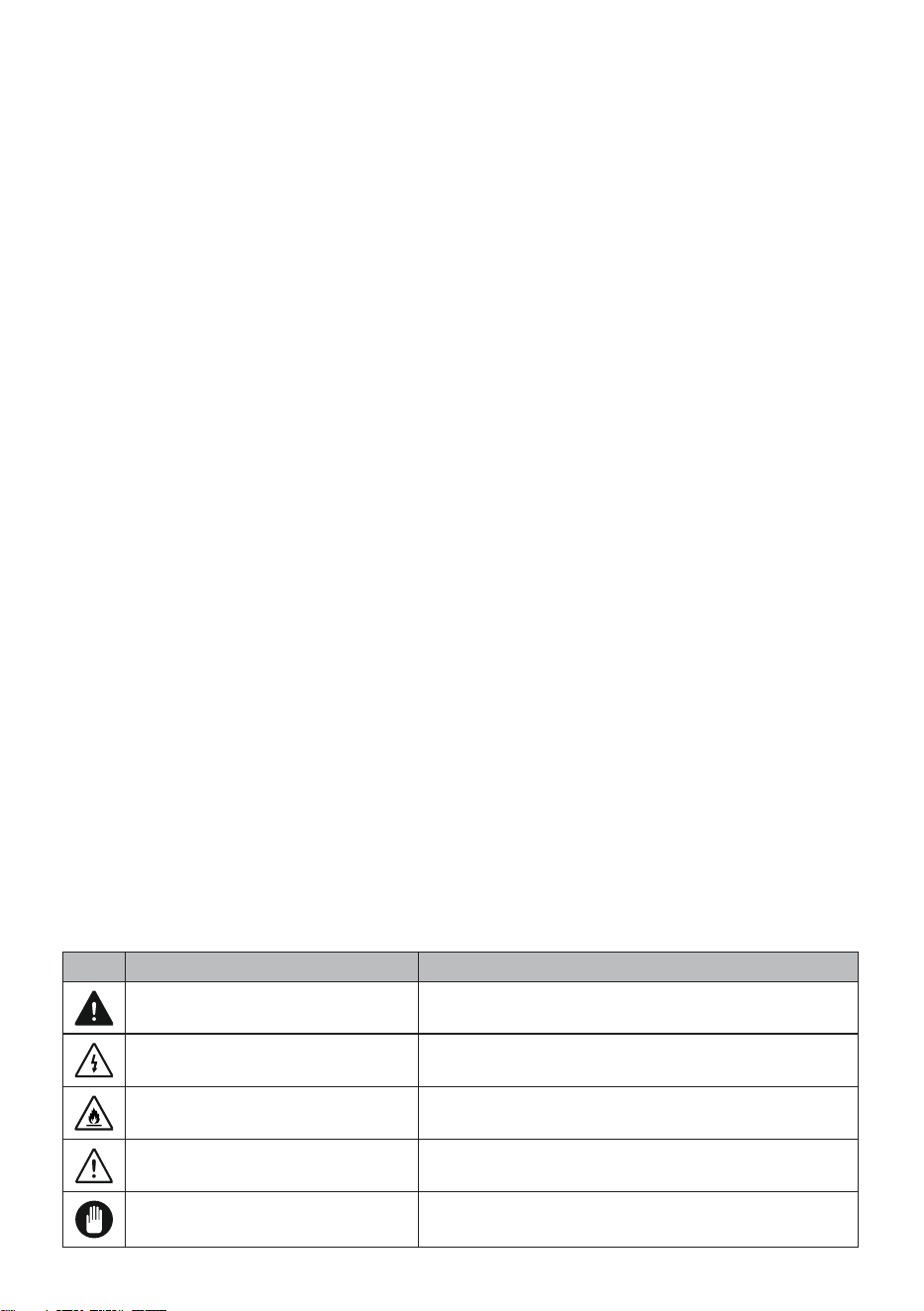
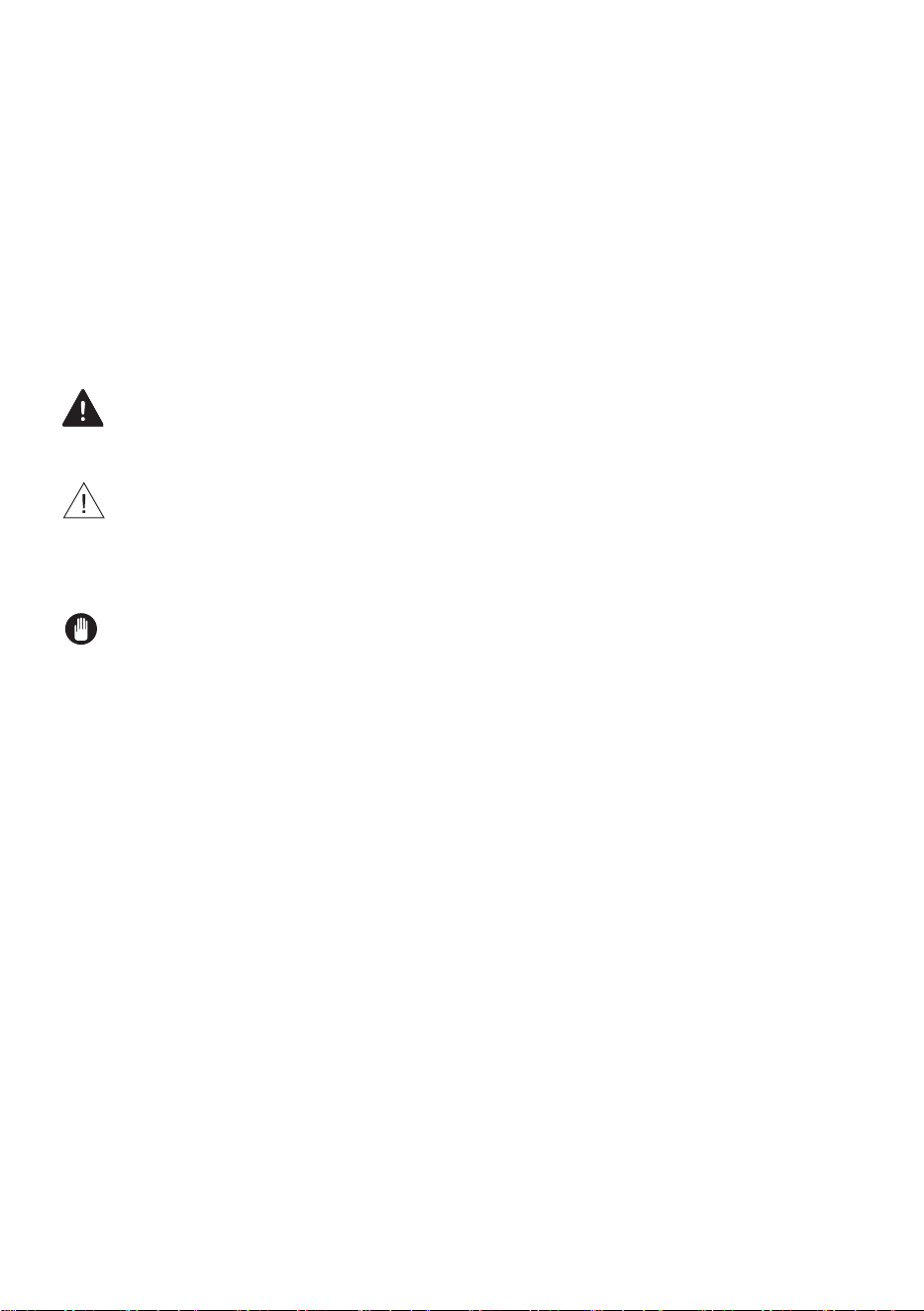
Icon Type
Meaning
WARNING Serious injury or death risk
RISK OF ELECTRIC SHOCK Dangerous voltage risk
FIRE Warning; Risk of re / ammable materials
CAUTION Injury or property damage risk
IMPORTANT / NOTE Operating the system correctly
USA - CAN - 5
INTRODUCTION
Please read this user manual and particularly the safety
instructions completely and carefully. They will save you
time and effort and help to ensure optimum dishwasher
performance.
Be sure to observe all listed warnings and cautions. Look
particularly for the icons with exclamation marks inside. The
information icon will also provide important references.
WARNING: Indicates a potentially hazardous situation
which, if not avoided, could result in death or serious injury.
CAUTION: Indicates a potentially hazardous situation
which, if not avoided, may result in injury. It may also be
used to alert against unsafe practices.
NOTICE: Indicates a potentially hazardous situation
which, if not avoided, may result in damage to the
dishwasher, the tableware, the equipment or the environment.

USA - CAN - 6
1 IMPORTANT SAFETY INSTRUCTIONS
WARNING: When using the dishwasher, follow basic
precautions. Read all instructions before using the
dishwasher! Save these operating instructions and pass them
on to any future user.
• Use the dishwasher only for its intended purpose as
described in this user manual. This appliance is intended
for normal household use only. Do not change the
specication of the appliance. The manufacturer
disclaims responsibility for damage or injury caused by
improper use of this appliance.
• The information in this user manual must be followed
to minimize the risk of re or explosion and to prevent
property damage, personal injury or loss of life.
• Use only detergents or rinse aids recommended for use in
a dishwasher and keep them out of the reach of children.
• When loading items to be washed:
1) Locate sharp items so that they are not likely to
damage the door seal.
2) Load sharp knives with the handles up to reduce the risk
of type injuries.
• Do not wash plastic items unless they are marked
“dishwasher safe” or the equivalent. For plastic items not
so marked, check the manufacturer’s recommendations.
• Do not operate your dishwasher unless all ENCLOSURE
panels are properly in place.
• Do not tamper with controls.
USA - CAN - 7
• Do not abuse, sit on, or stand on the door or dish rack of
the dishwasher.
• The cup shelves are designed to support cups, glasses and
kitchen utensils. When the cup shelves are in the
dishwasher
do not lean on or use the cup shelves to support your body
weight.
• This appliance must be grounded. In the event of a
malfunction or breakdown, grounding will reduce the risk
of electric shock by providing a path of least resistance
for electric current.
WARNING:
• Improper connection of the equipment grounding
conductor can result in a risk of electric shock. Check with
a qualied electrician or service representative if you are
in doubt whether the appliance is properly grounded.
• Some dishwasher detergents are strongly alkaline. They
can be extremely dangerous if swallowed. Avoid contact
with the skin and eyes and keep children and persons unt
to operate the dishwasher away when the door is open.
• Consult a doctor immediately if detergent has been
swallowed or inhaled.
• Do not remove the dishes from the appliance until the
cycle is complete. Some detergent may remain on the
dishes.
• Check that the detergent dispenser is empty after the
completion of each wash cycle.

USA - CAN - 8
• Do not drink and play with the water in the appliance as
harmful residues could be present.
• To reduce the risk of injury, do not allow children to play in
or on a dishwasher.
• When children become old enough to operate the
appliance, it is the responsibility of the parents/legal
guardians to ensure the children are instructed in safe
practices by qualied persons.
• Do not leave the appliance with the open door unattended
to avoid stepping accidentally onto it.
WARNING: Before any maintenance operation,
deactivate the appliance and disconnect the machine from
the electrical supply
• Do not use high pressure water sprays and/or steam to
clean the appliance.
• Ensure that there are no visible water leaks during and
after the rst use of the appliance.
• To avoid oor damage and possible mold growth, do
not allow wet areas to remain around or under the
dishwasher.
• To avoid dishwasher damage, do not allow water to
remain in your dishwasher systems through extended
periods of freezing.
RISK OF INJURY: To avoid risk of injury, always use caution
when opening the door during or following a wash cycle as
hot water or steam may escape.
• Do not store or use ammable liquids or vapors in the area
of the dishwasher, near or on the appliance.

USA - CAN - 9
• Under certain conditions, hydrogen gas may be produced
in a hot water system that has not been used for two
weeks or more. HYDROGEN GAS IS EXPLOSIVE. If the
hot water system has not been used for such a period,
before using the dishwasher turn on all hot water faucets
and let the water ow from each for several minutes. This
will release any accumulated hydrogen gas. As the gas is
ammable, do not smoke or use an open ame during this
time.
• Please check the water supply line periodically. It is
susceptible to breakage. It becomes less exible as
time goes by. Replace it immediately when it is torn, cut,
swollen or there is water leakage.
• Please keep the dishwasher packaging out of the reach of
children after unpacking it.
WARNING!:
Risk of injury or suffocation! Ensure that any plastic
wrappings, bags, small pieces etc. are disposed of safely
and kept out of the reach of children.

USA - CAN - 10
RECYCLING
Remove the door to the washing compartment when
removing an old dishwasher from service or discarding it.
Ensure that the appliance presents no danger to children
while being stored for disposal. Before disposing the
dishwasher:
• Disconnect the appliance from the electrical supply.
• Cut off the connections between electrical supply and
junction box of dishwasher.
• Remove the door catch to prevent children and pets from
getting closed in the appliance.
• Old appliances may contain materials that can be
recycled. Please contact your local recycling authority
about the possibility of recycling these materials.
SAVE THESE INSTRUCTIONS

USA - CAN - 11
2 INSTALLATION
WARNING: When installing the dishwasher, follow the
Installation Instructions provided with the product.
• Installation, maintenance and repair should be performed
by a qualied installer. Work by unqualied persons could
be dangerous and may void the warranty.
• Do not operate the appliance if damaged, malfunctioning,
partially disassembled or if it has missing or broken parts.
• Before installation or service, disconnect the power supply
to the work area by unplugging the unit, “tripping” the
circuit breaker or removing the fuse.
• Only connect the dishwasher to the power supply when all
installation and plumbing work is complete.
• Never connect the ground wire to gas lines, hot water
pipes or plumbing lines.
• Do not install or store the dishwasher where it can be
exposed to below freezing temperatures or exposed to
weather.
• Dishwasher must be secured to adjacent cabinetry using
the brackets provided. Failure to do this may cause
damage to property or bodily injury.
• Connect to a properly rated, protected and sized power
supply circuit to avoid electrical overload. The dishwasher
is designed for an electrical supply of 120 V (volts), 60
Hz (hertz), AC, connected to a dishwasher-dedicated,
properly grounded electrical circuit with a fuse or
breakers rated for 15 amperes.

USA - CAN - 12
• Electrical supply conductors shall be a minimum of # 16
AWG copper wire rated at 90 °C (194 °F) or higher.
These requirements must be met to prevent injury and
machine damage. Consult a qualied electrician if in
doubt.
• Do not use any extension cord or portable outlet device to
connect the dishwasher to a power supply.
USA - CAN - 13
3 TECHNICAL SPECIFICATIONS
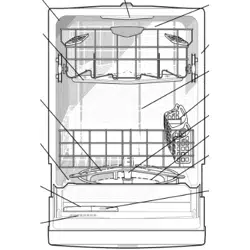
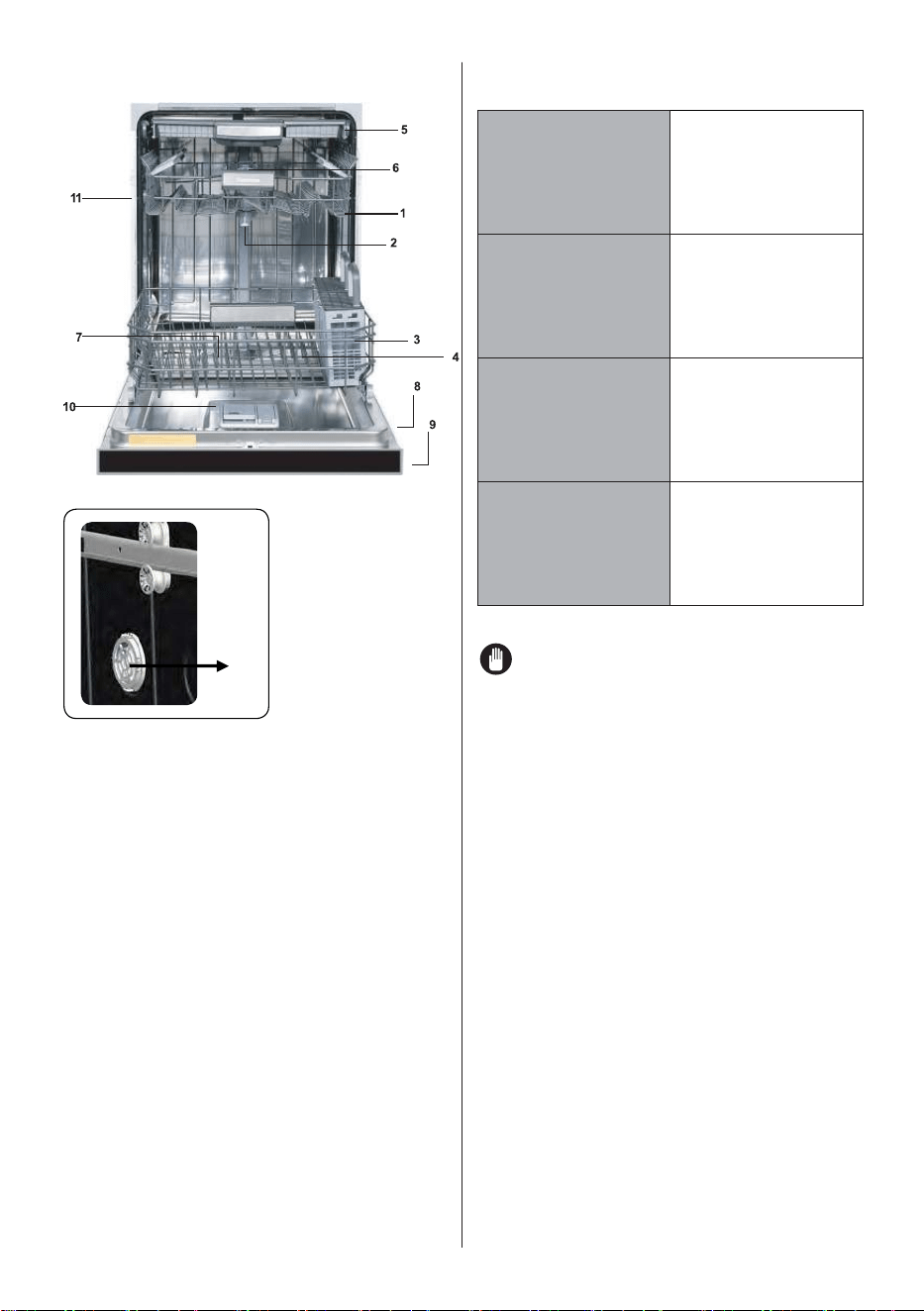
General Appearance
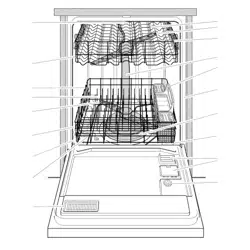
1. Upper rack with shelves
2. Upper spray arm
3. Lower rack
4. Lower spray arm
5. Third Rack
6. Top nozzle
7. Filters
8. Rating plate
9. Control panel
10. Detergent and rinse-aid dispenser
11. Upper rack track latch
12. Drying Unit: This system provides
better drying performance for your
dishes.
Technical Specications
Permissible
water pressure
4.35 - 145 psi
(0.3 - 10 bars)
Electrical
connection
120 V (volts), 12
A (amps), 60Hz
(hertz)
Total power 1400 (W)
Heater power 1100 (W)
NOTICE: Because we continually strive
to improve our products, we may change
our specications and design without prior
notice. This device corresponds to the
following directives: UL 749 Household
Dishwasher directive.
12
USA - CAN - 14
4 BEFORE USING THE APPLIANCE
Preparing your dishwasher for first use
• Make sure the electricity and supply water
specications match the values indicated in
the installation instructions for the machine.
• Remove all packaging material inside the
machine.
• Fill the rinse aid compartment.
Detergent usage
Only use detergents specifically designed for
domestic dishwashers. Store detergents in cool,
dry places out of reach of children.
Add the proper detergent for the selected cycle
to ensure the best performance. The amount of
detergent needed depends on the cycle, load
size, and soil level of dishes.
Do not overfill the detergent compartment.
Using too much detergent can cause
discoloration on glasses and dishes and glass
corrosion. Continued use of too much detergent
may cause machine damage.
Using too little detergent can result in poor
cleaning and whitish streaks, especially in hard
water.
See the detergent manufacturer’s instructions for
a further information.
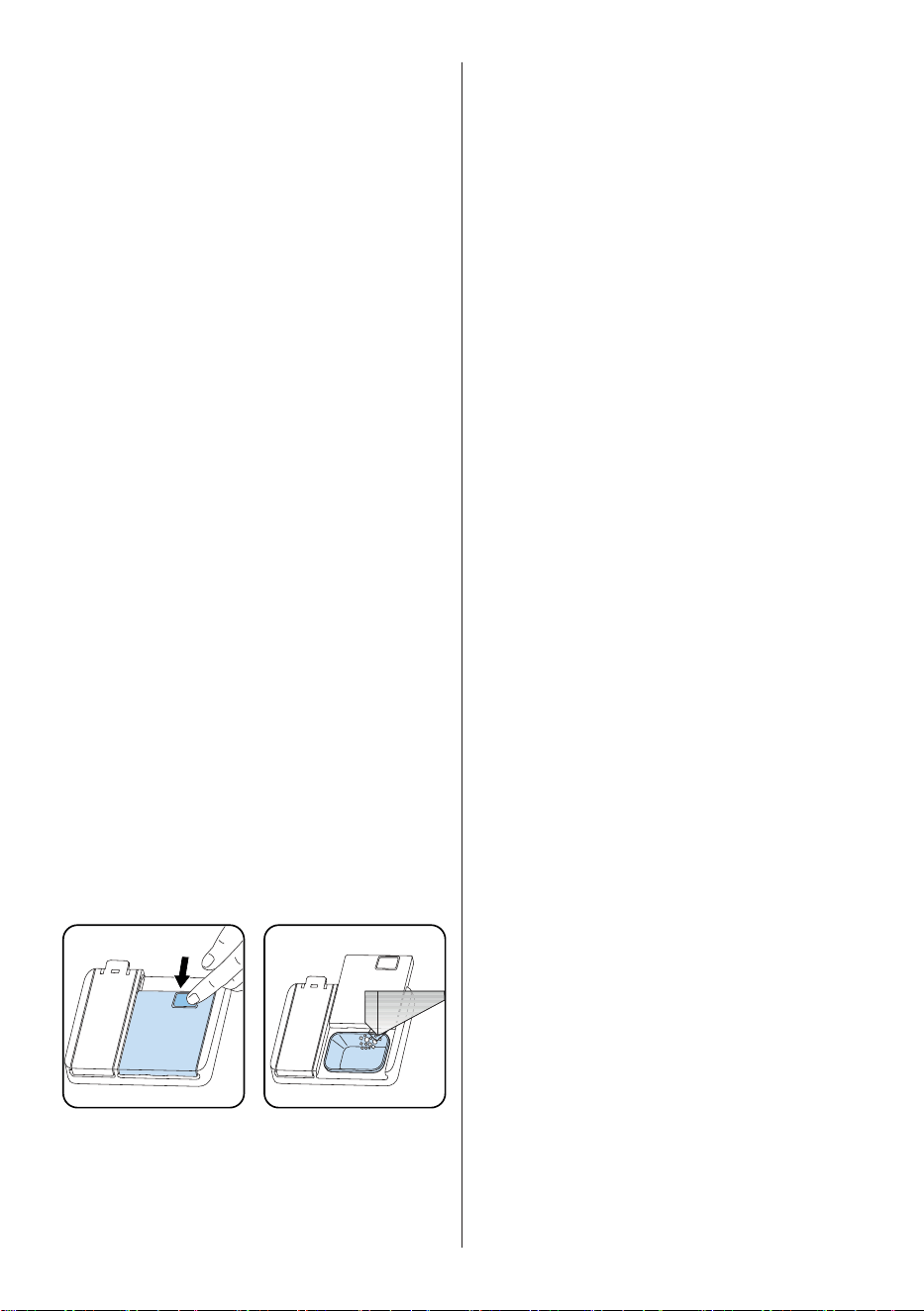
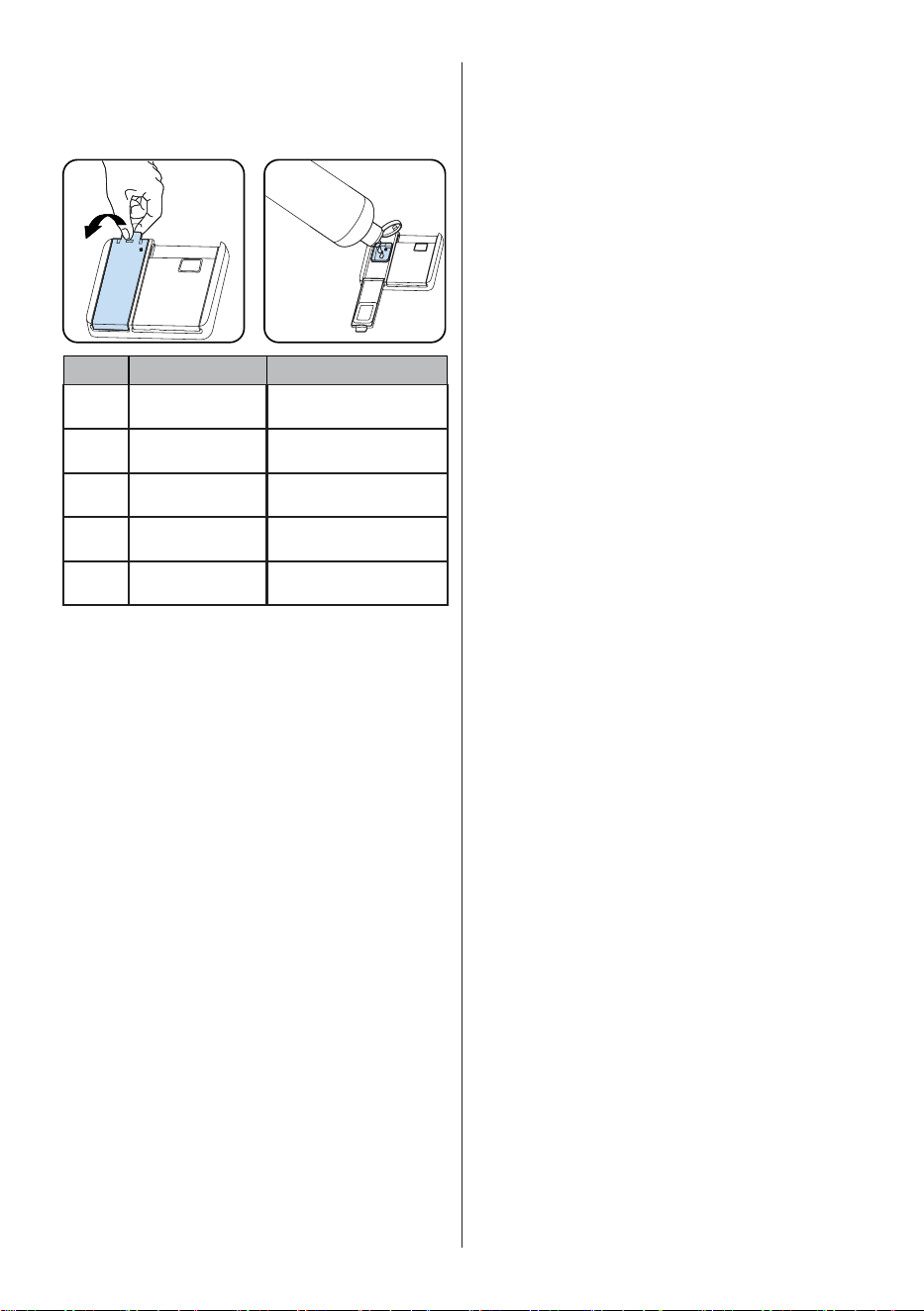
Filling the detergent
Push the latch to open the dispenser and pour in
the detergent.
Close the lid and press it until it locks in place.
The dispenser should be refilled just before the
start of each cycle. If the dishes are heavily
soiled, place additional detergent in the pre-
wash detergent chamber.
DETERGENT
Using detergent pacs
These products should be used according to the
manufacturer’s instructions.
Never put detergent pacs into the interior
section or the cutlery basket.
Detergent pacs contain not only the detergent
but also rinse aid, salt replacement substances
and additional components depending on the
combination.
We recommend you do not use detergent pacs
in short cycles. Please use powder or liquid
detergents instead of detergent pacs in short
cycles.
If you encounter problems when using detergent
pacs, please contact the detergent manufacturer.
When you stop using detergent pacs, make sure
that rinse aid setting is set to the correct level.
Rinse-aid usage
The rinse aid helps to dry the dishes without
streaks and stains. Rinse aid is required for
stain-free utensils and clear glasses. The rinse
aid is automatically released during the hot
rinse phase. If rinse aid setting is too low, whitish
stains remain on dishes and dishes do not dry or
wash clean.
If rinse aid setting is too high, bluish layers on
glasses and dishes may be seen.
Filling the rinse-aid and setting
To fill the rinse aid compartment, open the rinse
aid compartment cap. Fill the compartment
with rinse aid to the MAX level and then close
the cap. Be careful not to overfill the rinse aid
compartment and wipe up any spills.
In order to change the rinse aid level, follow
the below steps
• Turn on the machine by pressing the Power
button.
• Press the Cycles button for at least 5
seconds immediately after the machine is
turned on.
• Release the Cycles button when “rA”
is shown. Next, the last setting level is
displayed.
• Set the level by pushing the Cycles button.
• Switch off the machine to save the setting.
USA - CAN - 15
The factory setting is “4”.
If the dishes are not drying properly or are
spotted, increase the level. If blue stains form on
your dishes, decrease the level.
Level Rinse Aid Dose Indicator
1 Rinse-aid not
dispensed
r:1 is shown on the display.
2 1 dose is dispensed r:2 is shown on the display.
3 2 doses are
dispensed
r:3 is shown on the display.
4 3 doses are
dispensed
r:4 is shown on the display.
5 4 doses are
dispensed
r:5 is shown on the display.
USA - CAN - 16
5 LOADING YOUR DISHWASHER
Proper loading of the dishwasher will help it run
efciently with the best possible washing and
drying performance.
The lower rack can accommodate large and
deep items such as pots with long handles,
pot lids, plates, salad plates and cutlery sets.
The upper rack has been designed for dessert
plates, salad bowls, cups and glasses. When
placing long stem glasses and goblets, lean them
against the basket edge, rack or glass supporter
wire and not against other items. Do not lean
long glasses against one another or they
cannot remain steady and may be damaged.
It is more appropriate to locate the thin and
narrow shaped items into the middle sections of
racks. Place spoons in separate openings of the
silverware basket and do not allow them to nest.
Use the silverware basket to obtain the best
cleaning result for spoons, forks, and knives. To
avoid any possible injuries, always place such
long-handle and sharp-pointed items as serving
fork, bread knife etc. with their sharp points
facing down or horizontally on the baskets.
WARNING: Place your dishes into your
machine in a way that they will not prevent the
upper and lower spray arms from spinning.
NOTE: Place all large and very dirty items
in the lower rack.
WARNING: Do not put in the appliance
items that can absorb water (sponges, household
cloths).
NOTE: Place all containers such as cups,
glasses and pots into the dishwasher with the
opening facing downwards (so that no water can
collect).
NOTE: Dishes and cutlery should not be
placed above each other.
NOTE: Do not overload your dishwasher
and pay attention to manufacturer instructions
regarding dishes which are appropriate for
use in a dishwasher. Only with suitable dishes
(mentioned in section 5) will you obtain optimal
washing results with a sensible use of energy.
High temperature water and dishwasher
detergent may form a chemical synthesis that
can damage certain items.
WARNING: Be careful when loading and
unloading sharp items. Load sharp knives with
the handles up to reduce the risk of personal
injury.
Follow the below steps before loading
dishwasher.
1. Open the door.
2. Remove coarse food leftovers from
tableware.
3. Load the dishwasher.
NOTE: While the appliance is running
if you open the door all functions are
automatically interrupted. Once the door is
closed functions will continue to work.
USA - CAN - 17
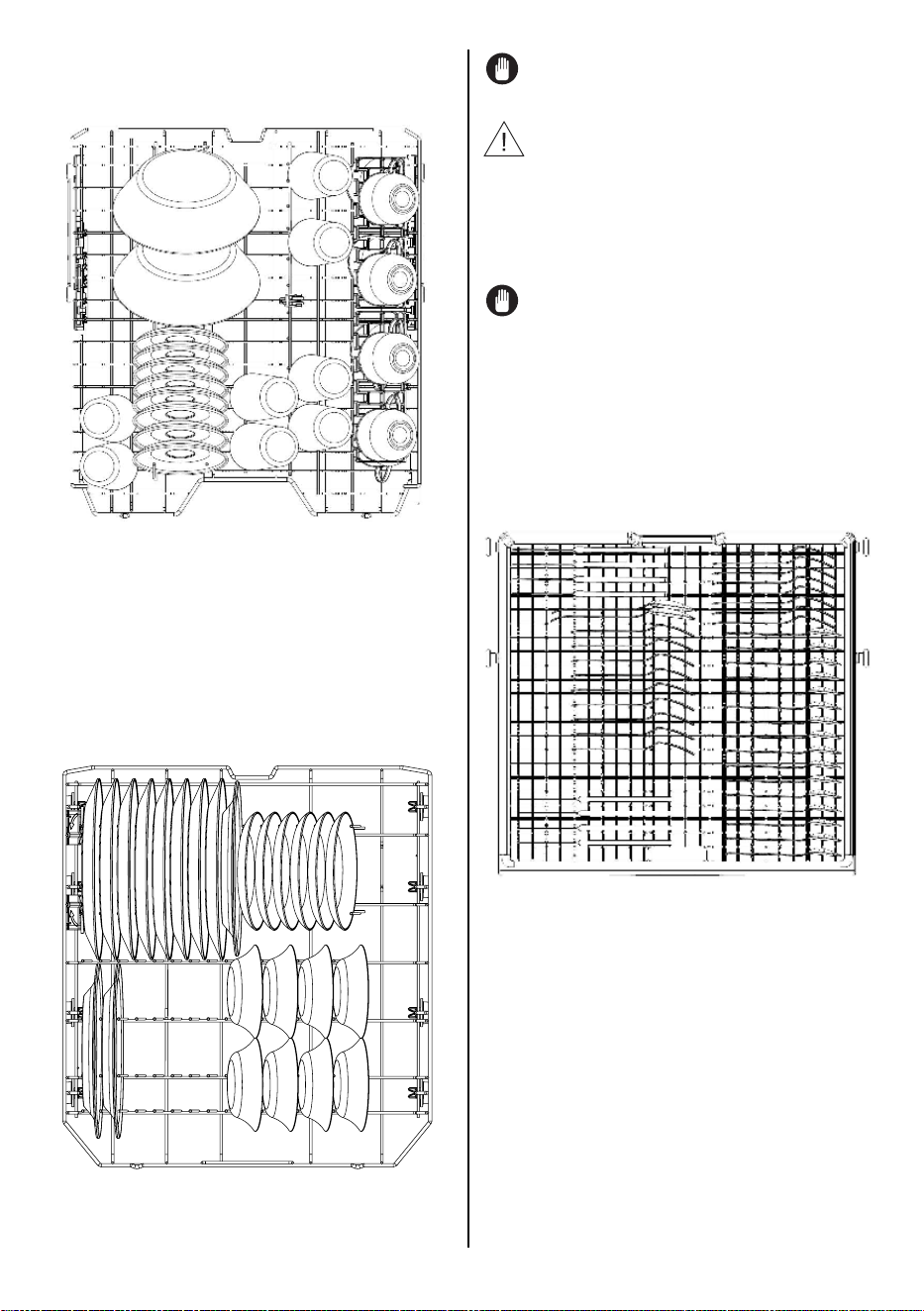
Upper Rack
Load the upper rack with dessert plates, cups,
glasses etc.
Top rack load pattern for 8 place settings.
Lower Rack
You can load into the lower rack such round and
deep items as pots with long handles, pot lids,
plates, salad plates, cutlery sets. The lower rack
should not be used for small items such as cups or
wine glasses.
NOTE: Place all large and very dirty items
in the lower rack.
WARNING: Large knives and other utensils
with sharp tips and edges must be placed
horizontally into the upper rack due to risk of
injury. Other smaller knives and sharp utensils
should be placed with sharp side down in the
silverware basket.
NOTE: Make sure that large items do not
interfere with the rotation of the spray arms,
and do not prevent the detergent dispenser from
opening.
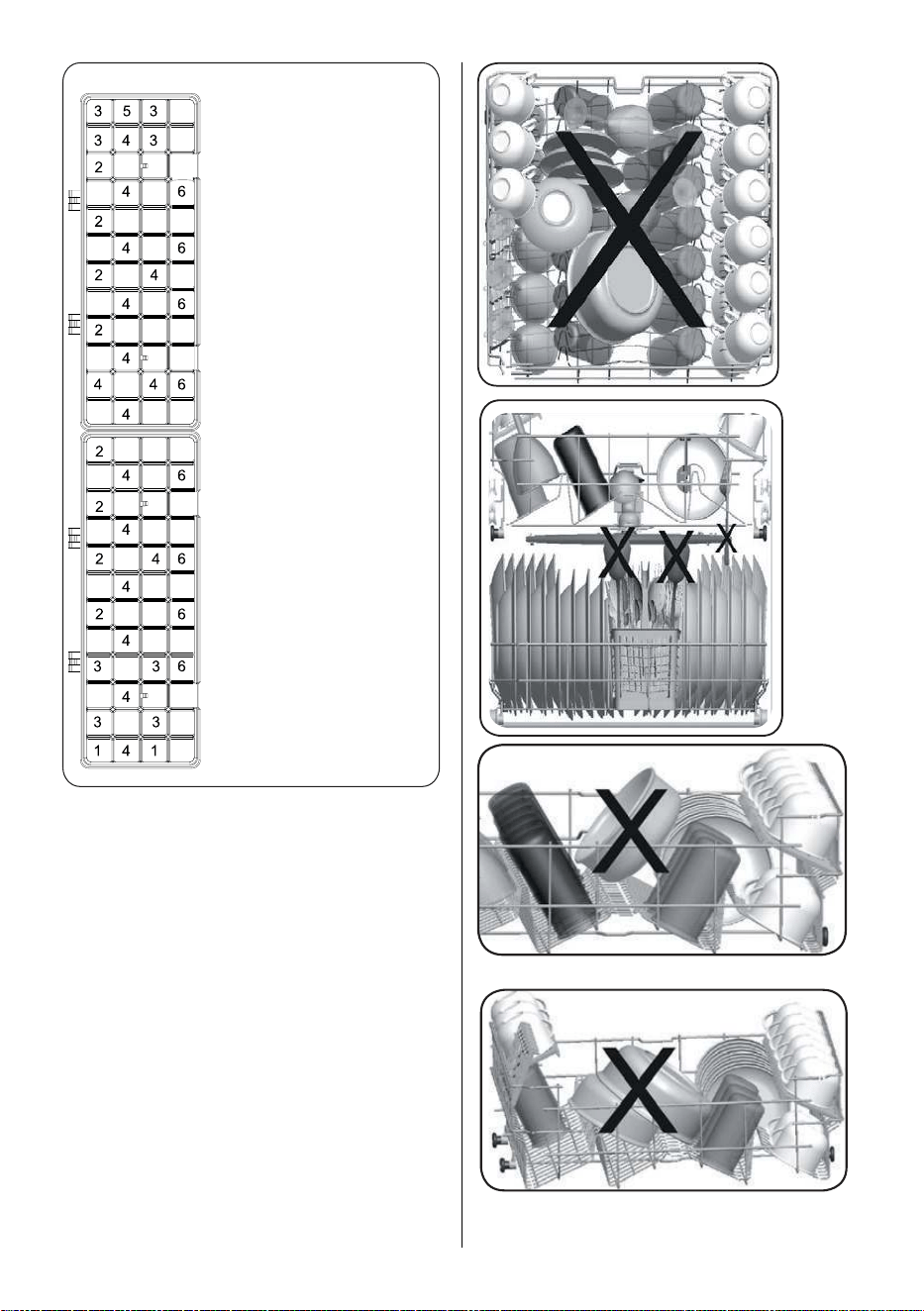
Third Rack (Some Models)
The third rack can be loaded with items such as
knives, spoons, forks, serving spoons, etc.
Third rack load pattern for 8 place settings.
USA - CAN - 18
1- Serving spoons
2- Dinner forks
3- Knives
4- Tea spoons
5- Serving forks
6- Salad forks
Incorrect Loads
Incorrect loading can cause poor washing
and drying performance. Please follow the
manufacturer’s recommendations for a good
result.
Silverware Basket loading
pattern for 8 place settings.
USA - CAN - 19
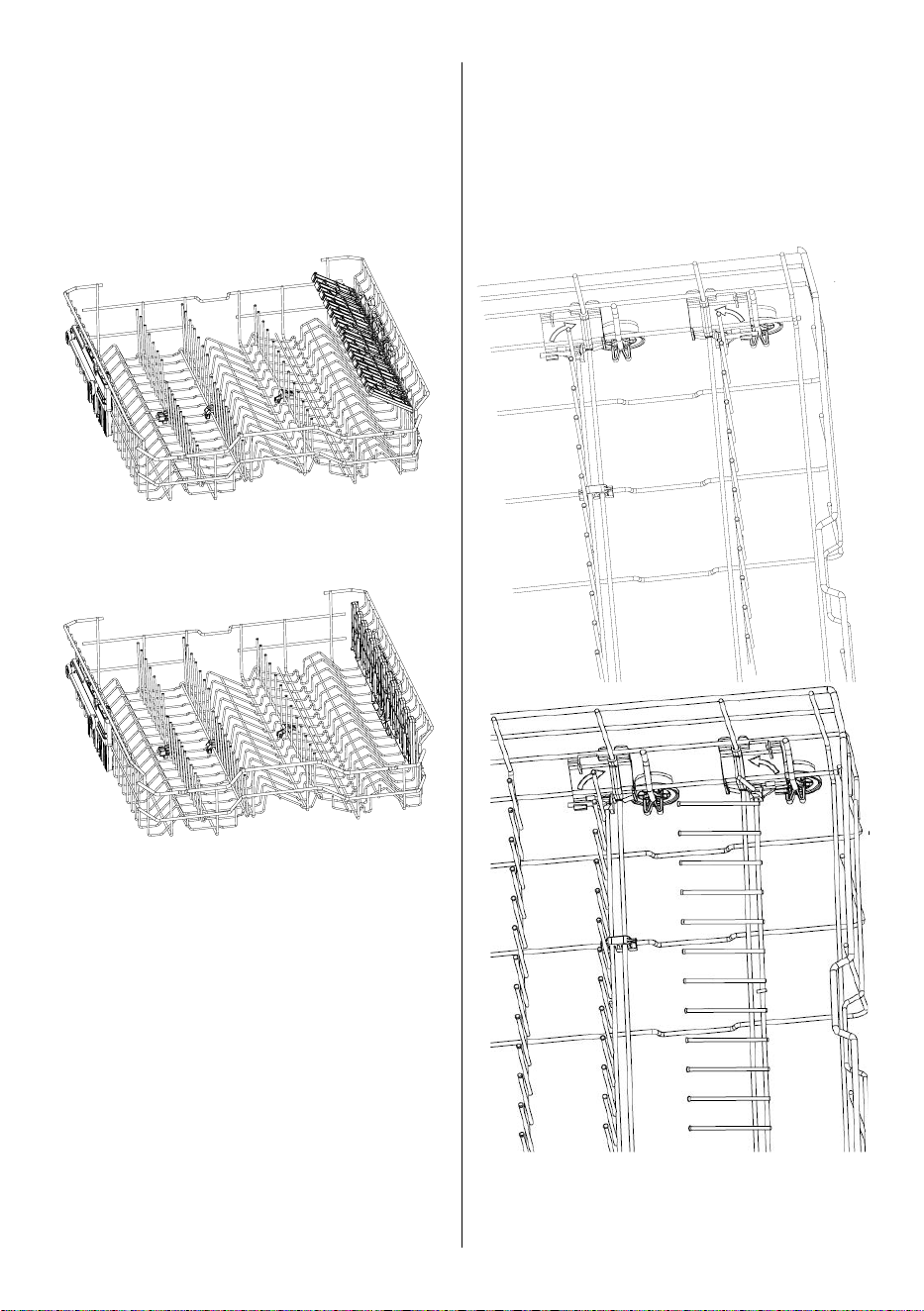
Upper Rack with Cup Shelf
These shelves are designed to increase the
capacity of upper rack. Place cups and glasses
on this rack. Use the adjustment feature to
accommodate different size items.
Place long knives, forks and spoons on these
shelves horizontally for them not to block the
movement of spray arms.
CUP SHELF OPEN POSITION
CUP SHELF CLOSED POSITION
Lower Rack Folding Tines
There are two folding tine sections in the lower
rack. The tines can be folded down to allow for
easier loading of large items such as pots and
pans. Each of the two tine sections can be folded
down seperately or all of them can be folded
together to create a larger loading area.
USA - CAN - 20
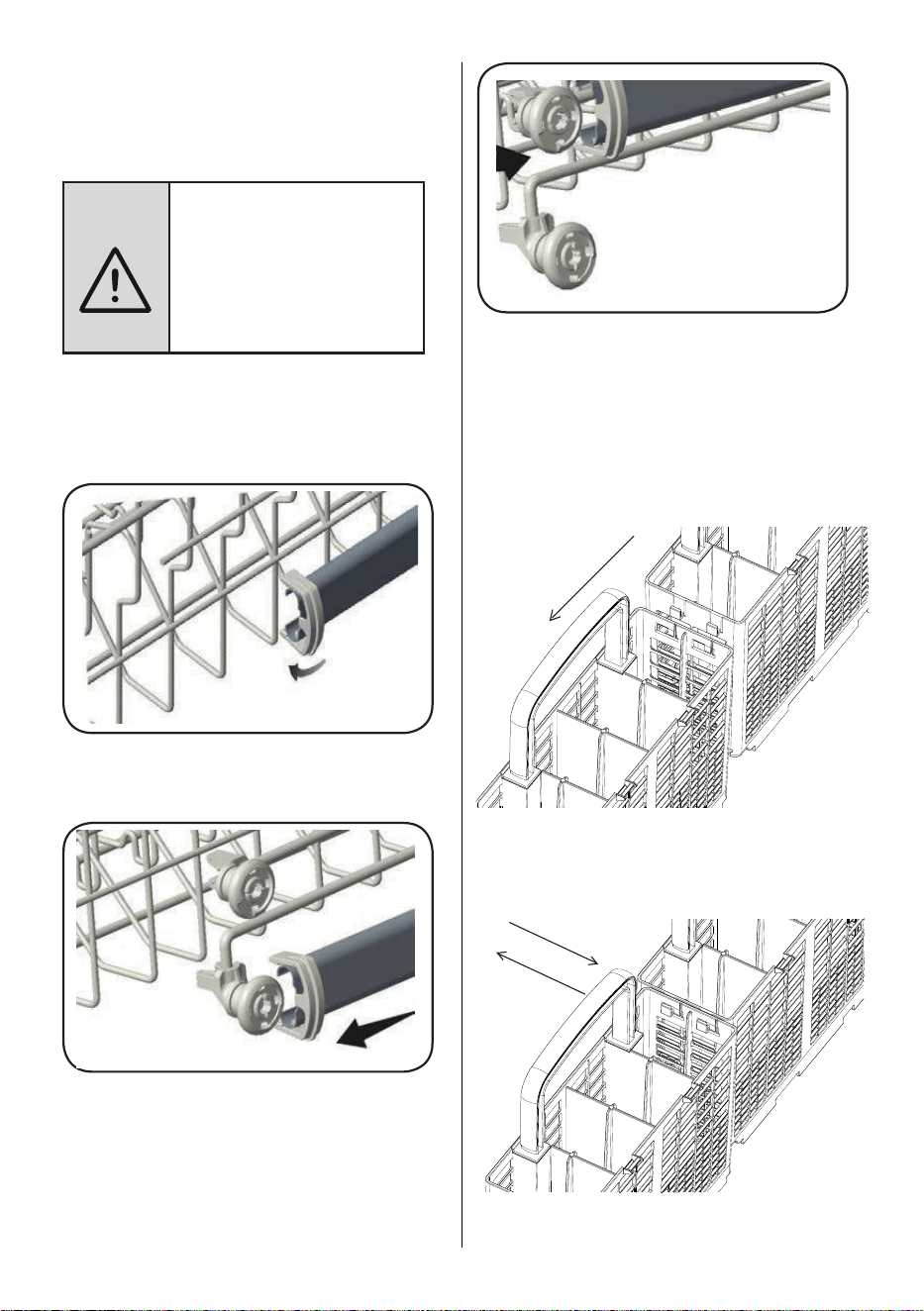
Upper Rack Height Setting - When Rack is
Empty
In certain models, the height setting of the
upper rack may be changed using the wheels
which are present at two height levels.
NOTICE: Bringing the wires to
the horizontal position by holding
them from the tips may cause
them to bend. Therefore, it will
be appropriate to bring the wires
in the middle to horizontal or
vertical position by holding them
from their stems and pushing.
1. Release the latches on both the right and left
tracks of the upper rack by turning them to the
outside A.
2. Pull out the rack completely B.
3. Place the rack into the tracks again at the
desired height C.
4. Push the latches back into the correct position.
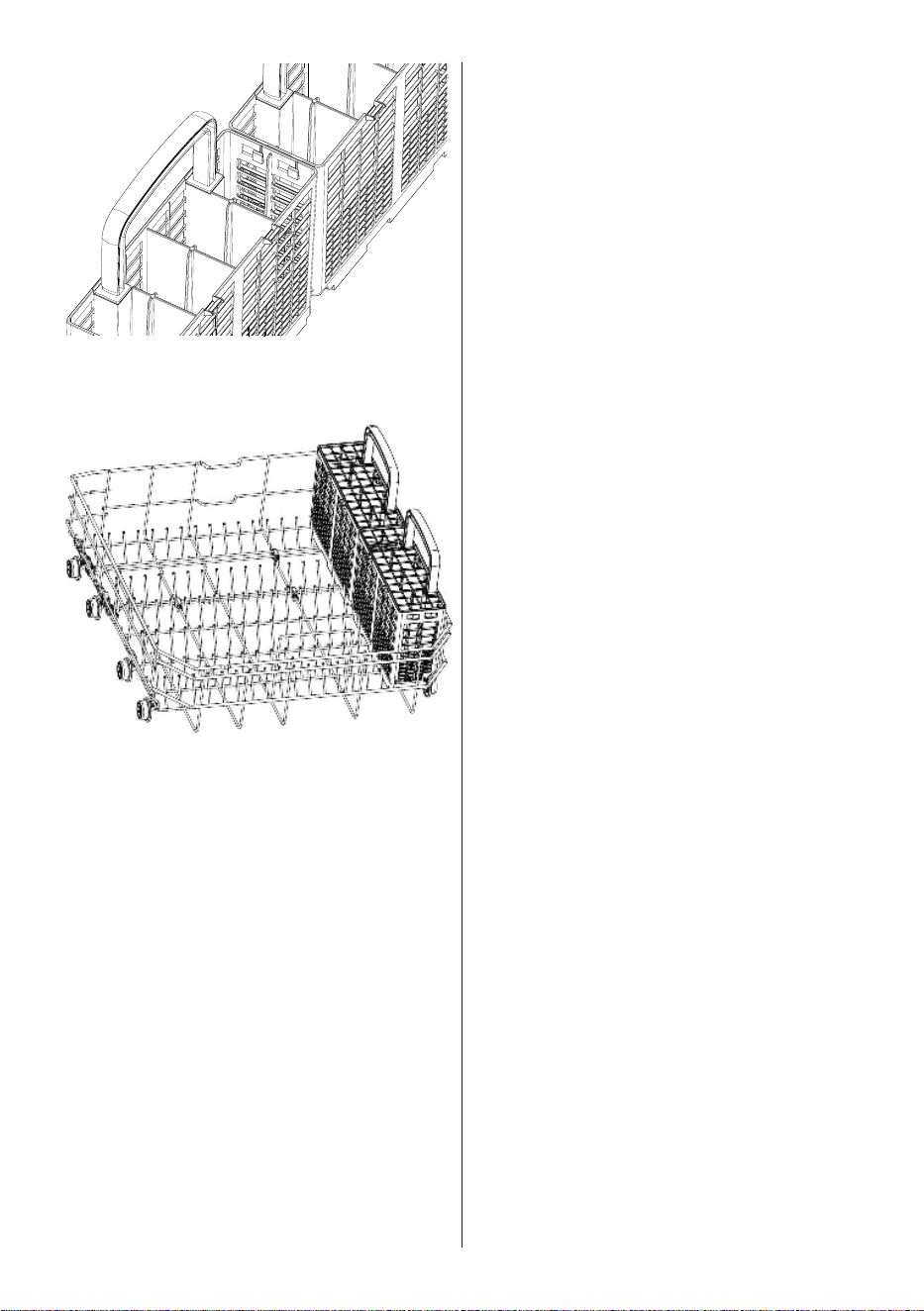
There are two silverware baskets in the
dishwasher. The two baskets can be assembled
together or used separately. Follow the steps
below to assemble.
The tabs on the basket are aligned with the
opening on the other basket.
Push the baskets together with the tab on one
basket aligning with the slot on the other basket.
USA - CAN - 21
The tab is slid into place to join the baskets
together.
The silverware baskets are placed in the lower
rack.
USA - CAN - 22
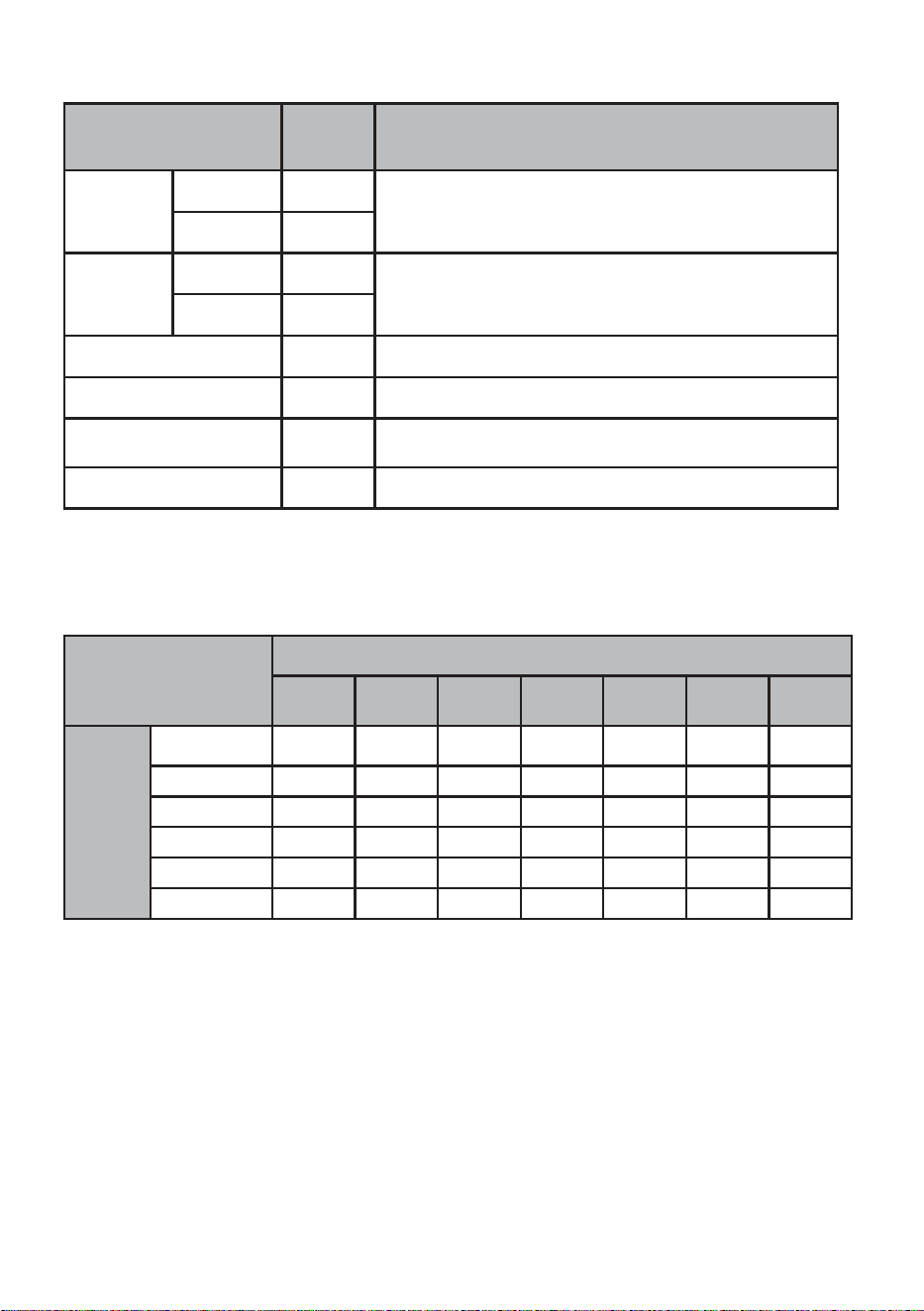
6 CYCLES AND OPTIONS TABLE
Cycles
Duration
(min)
Descriptions
Normal
Dirty 145
Standard cycle for daily, regular or typical use to
completely wash a load of normally soiled dishes.
Clean 122
Smart Wash
Dirty 155
This cycle automatically adjusts the temperature and the
quantity of water, the energy consumption and the cycle
duration.
Clean 110
Pots&Pans 130 Suitable for heavily soiled dishes.
Delicate 90 Suitable for lightly soiled delicate dishes.
Express 50
Suitable for normally soiled daily dishes when fast
results are needed.
Quick Rinse 15 For rinsing dishes that will be washed later.
Compatibility of
Cycles and Options
Options
Delay
Start
Accela
Wash
Quiet
Wash
Half
Load
Extra
Dry
Sani
Rinse
High
Temp
Normal √ √ √ √ √ √ √
Smart Wash √ √ √ √ √ √ √
Pots&Pans √ √ √ √ √ √ √
Delicate √ √ √ √ √ X X
Express √ X X √ √ √ √
Quick Rinse √ X X √ X X X
Cycles

USA - CAN - 23
NOTE: The cycle duration may change according to the amount of dishes, the water temperature,
the ambient temperature and selected additional functions.
NOTE: The energy-usage label is based on the “Normal” cycle. This cycle is the most efcient in
terms of its combined energy and water consumption at cleaning normally soiled dishes. The Energy
Guide Label is based on the normal soil detection cycle. In this cycle, the dishwasher was tested without
any rinse aid in the rinse aid dispenser, with a single dose of detergent in the detergent dispenser and
detergent used for the prewash step. For cycles with prewash, a dose of detergent can be added on
the inside of the cabinet door. We recommend that the rack position for crockery loads be set to the
highest position as in the energy certicate test.
• Only use powder or liquid detergent for short cycles.
• Short cycles do not include drying.
• To assist drying, we recommend slightly opening the door after a cycle is complete.
USA - CAN - 24
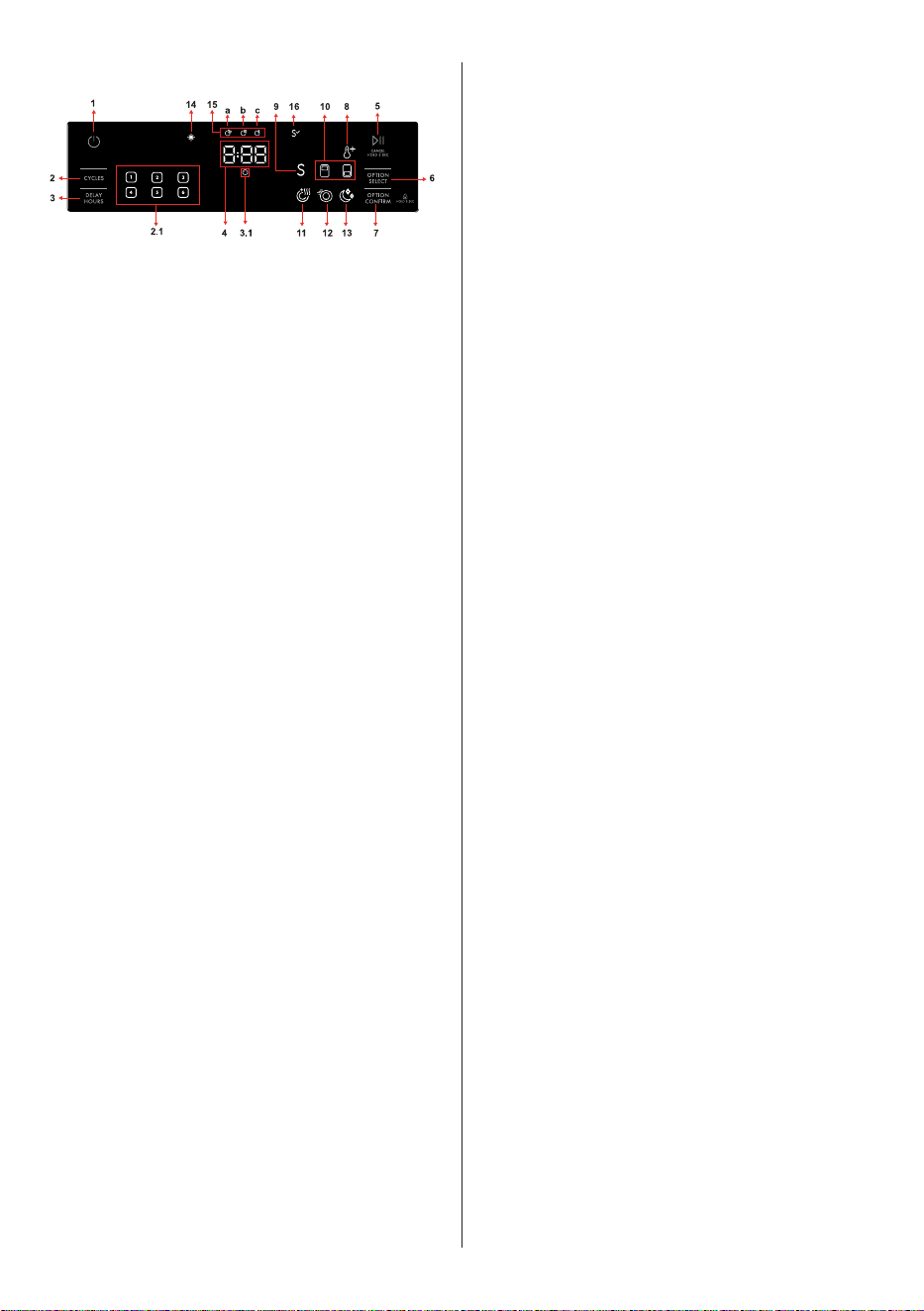
7 THE CONTROL PANEL
1. Power Button
2. Cycles Button
2.1 Cycle Indicators
3. Delay Hours Button
3.1 Delay Indicator
4. Remaining Time Indicator
5. Start/Pause Button
6. Options Select Button
7. Options Confirm Button
8. High Temp Option Indicator
9. Sani Rinse Option Indicator
10. Half Load Option Indicators
11. Extra Dry Option Indicator
12. Accela Wash Option Indicator
13. Quiet Wash Option Indicator
14. Rinse Aid Indicator
15. Washing Cycle Progress Indicators
a- Washing Cycle Symbol
b- Drying Cycle Symbol
c- End Cycle Symbol
16. Sanitized Indicator
1. Power Button
Turn the machine on by pressing the Power
button.
2. Cycles Button
Select a suitable cycle by pressing the Cycles
button. The selected cycle indicator (2.1) will be
on. For the details of the cycles refer to section
Cycle Table.
3. Delay Hours Button
The start time of the cycle can be delayed for
1-24 hours by pressing Delay Hours. When the
Delay Hours button is pressed, the display will
show “1h.” The display will alternate between
the delay time and the cycle duration every two
seconds. The delay time will increase in one hour
increments with every push of thd Delay Hours
button. When the desired delay hours has been
set, press the Start/Pause button. The Delay
Indicator (3.1) will turn on. If the dishwasher
is turned off after activating the delay start
feature, the delay will be canceled.
NOTE: If the dishwasher door is opened during
the delay period and closed within four seconds,
the dishwasher will resume counting down the
delay period. If the door is opened for more
than four seconds, the delay timer is paused. To
resume the delay timer, press the Start/Pause
button and close the door.
4. Remaining Time Indicator
Cycle duration can be monitored via Cycle Time
Indicator.
5. Start/Pause Button
After choosing the cycle and options, press the
Start/Pause button to begin the cycle. The time
remaining will be shown in the Time Remaining
Indicator. The total time may change due to the
ambient temperature, water temperature, and
soil on the dishes. While the cycle is running,
pressing the Start/Pause button will pause the
cycle. It is best to avoid opening the door while
the dishwasher is running, but if it is necessary
to open the door, the cycle will pause when the
door is opened. If the door is closed within four
seconds after opening, the cycle will continue
automatically. If the door is opened for longer
than four seconds, the door must be closed
and the Start/Pause button must be pressed to
resume the cycle.
6. Option Select Button
Options can be selected by pressing the Option
Select button repeatedly. The chosen option will
be indicated by a blinking LED.
7. Option Confirm Button
Add the option to the cycle by pressing the
Option Confirm button. The LED for the chosen
option will then remain lit.
8. High Temp Option Indicator
When this option is selected, both the water
temperature and the washing time are increased.
9. Sani Rinse Option Indicator
Sani Rinse option raises the water temperature in
the final rinse.

USA - CAN - 25
10. Half Load Option Indicators
There is a half load option with three modes.
Use the half load feature to direct cleaning to
the desired rack when the dishwasher is not fully
loaded. When the half load option is selected
by pressing option select button, the indicator(s)
on the control panel will illuminate according to
the selections. Press option confirm button after
each half load mode selection. If the upper half
load and lower half load indicators are selected
together, this will shorten the length of cycle and
reduce energy and water consumption.
11. Extra Dry Option Indicator
Select the Extra Drying function to add extra
drying steps to a cycle in order to obtain drier
dishes. This option increases water temperature
of the final rinse step and drying step duration.
12. Accela Wash Option Indicator
Select the Accela Wash option to help decrease
the duration of a cycle by raising water
temperature and pressure.
13. Quiet Wash Option Indicator
Select the Quiet Wash option to help reduce
the sound level of the washing operation by
lowering the pressure level of the water.
14. Rinse Aid Indicator
When the rinse aid level is low, the rinse aid
indicator turns on, advising that the rinse aid
compartment needs to be filled.
15. Washing Cycle Progress Indicators
The display will show the symbols for washing,
drying, and end of cycle corresponding to the
current cycle status.
16. Sanitized Indicator
If the cycle selected with the Sani Rinse option
(except Express cycle) is successfully sanitized,
sanitized indicator lights up at the end of the
cycle.
NOTE: Control lock is activated/deactivated
by pressing the Option Confirm Button (7) for
about 3 seconds. When it is activated, all leds
blink and “CL” is shown on the Remaining Time
Indicator (4).
NOTE: To save any cycle as the favorite, press
the Cycles (2) and Delay Hours (3) buttons
simultaneously. To select the favorite cycle, press
the Cycles (2) button for 3 seconds.
Cancelling a Cycle
If you would like to cancel a cycle when it is
running. Press the Start/Pause button for 3
seconds. During cancellation, the End indicator
blinks. The machine discharges the water inside
it in about 30 seconds. When the End indicator
turns on, switch your machine off by pressing the
Power button.
Switching the Machine Off
Switch your machine off with the Power button
after the cycle has ended and the End indicator
turns on.
NOTE: At the end of a cycle, the door can be
left open to aid the drying process.
NOTE: If the door of machine is opened or
power is cut off during washing, the cycle will
continue when the door is closed or the power is
restored.
Chime Level Control
To change the chime level, follow the below
steps:
1. Press Option Select (6) and Option Confirm
(7) buttons simultaneously for 3 seconds.
2. When sound setting is recognized, the chime
gives a long sound and the machine will
display the last set level, from “S0” to “S3”.
3. To decrease chime level, press Option
Confirm button (7). To increase chime level,
press Option Select button (6).
4. To save the selected chime level, turn off the
machine.
“S0” level means the chime is turned off.
Factory setting is “S3”.

USA - CAN - 26
Save Power Mode
To activate or deactivate save power mode,
follow the below steps:
1. Press Cycles (2) and Option Select (6) buttons
simultaneously for 3 seconds.
2. After 3 seconds, the machine will display last
setting, “IL1” or “IL0”.
3. When Save Power Mode is activated,
“IL1” will be displayed. In this mode, the
machine will turn off after 15 minutes of no
activity in order to save energy.
4. When Save Power Mode is deactivated
“IL0” will be displayed. If Save Power Mode
is deactive, the machine will always be on
unless it is turned off by the user.
5. To save the selected setting, turn off the
machine. In factory setting, Save Power Mode
is active.
USA - CAN - 27
8 MAINTENANCE AND CLEANING
WARNING : Before cleaning or carrying
out maintenance, switch off the appliance,
disconnect the power supply and turn off the
water tap.
Do not try to repair or perform any maintenance
on your machine beyond what is described in
this manual.
WARNING : All surfaces are susceptible
to scratching. Contact with unsuitable cleaning
agents can alter or discolor all surfaces.
WARNING : Keep the oor around your
dishwasher clean and dry to prevent any
possible injury. It is recommended to keep your
dishwasher clean and empty with the door
cracked open to allow air to circulate when it
will not be used for an extended time.
Dishwasher door can be damaged by abrasive
cleaners, scouring pads, abrasive cloths.
Cleaning the machine in regular intervals
prolongs the machine’s service life.
Oil and lime may accumulate in the machine’s
washing section. To remove such accumulation,
ll the detergent compartment, do not load any
dishes into the dishwasher, select the Pots & Pans
cycle with the High Temp option, and start the
machine.
If the accumulation is not removed, use
cleaning agents recommended for dishwashers.
Follow the instructions of the cleaning agent
manufacturer.
To clean any residue in the door seals, wipe the
seals regularly with a dampened cloth.
Clean the lters and spray arms at least once a
month.
Turn off the power of machine and turn off its
tap before starting the cleaning.
Do not use abrasive materials when cleaning the
dishwasher. Wipe with a cleaner recommended
for dishwashers and a dampened cloth.
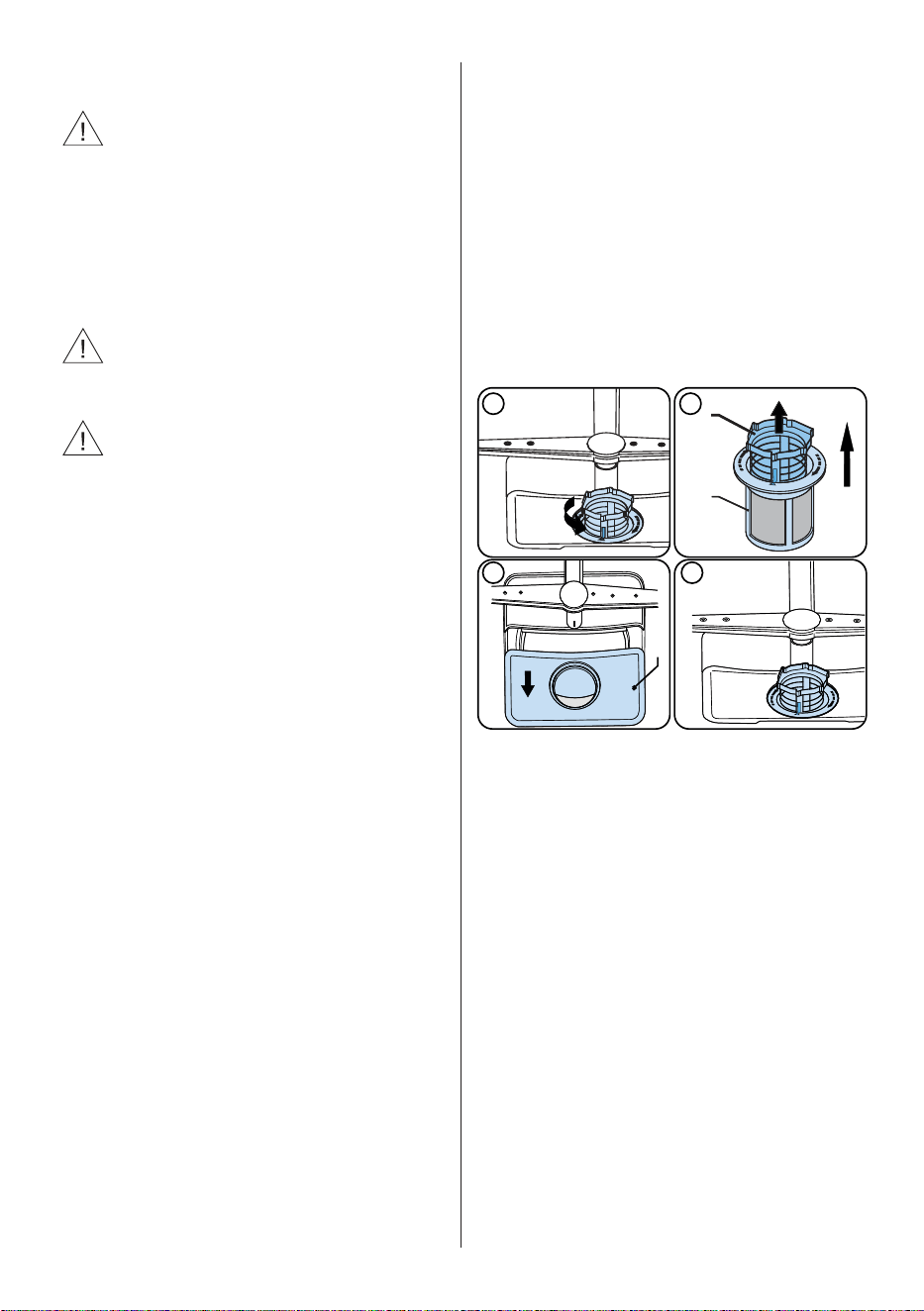
To clean the lters, turn the Coarse Filter (b)
counter clockwise and then pull up to remove
the Coarse Filter and Micro Filter (a). With the
Coarse Filter and Micro Filter removed, the Mesh
Filter (c) can be lifted out. Remove any debris
from the lters and clean them thoroughly under
running tap water.
Filter
a. Micro Filter
b. Coarse Filter
c. Mesh Filter
3 4
1
2
a
c
b
USA - CAN - 28
Spray Arms
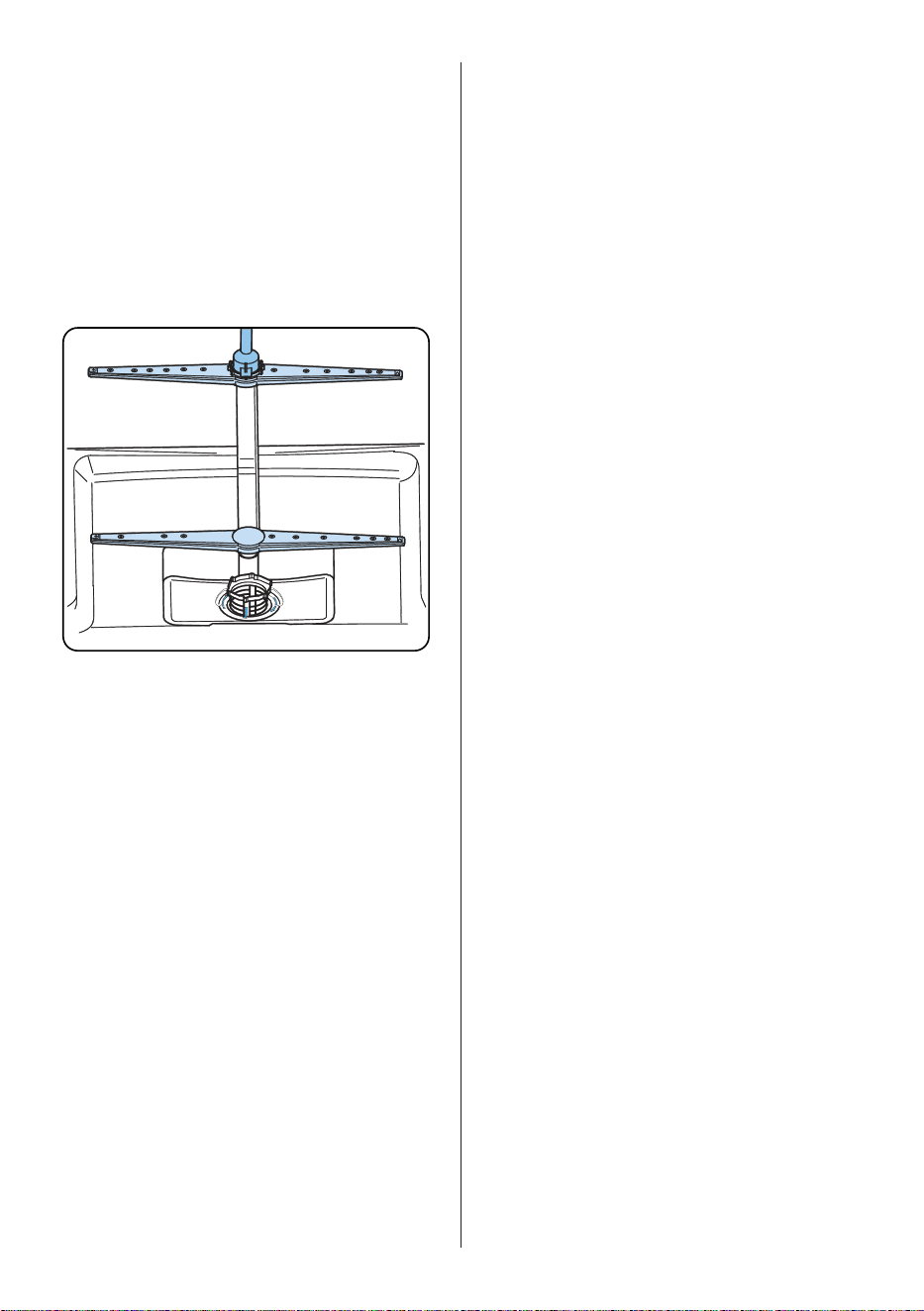
Check clogging situations on all holes on lower
and upper spray arms.
If there is any clogging, remove the spray arms
and clean them under running tap water.
The lower spray arm can be removed by pulling
it upwards. To remove the upper spray arm,
rotate the retaining nut counter-clockwise.
Properly tighten the nut when re-installing the
upper spray arm.
USA - CAN - 29
WHAT SHOULD NOT BE WASHED IN YOUR DISHWASHER?
• All items to be placed in the dishwasher should be dishwasher safe.
• Only Plastics with “dishwasher safe” or equivalent label can only be used in dishwashers.
Plastics may lose their shape or color. Check with manufacturer for recommendations.
• Any dishes made out of wood or made with wooden parts are not suitable for washing in
dishwashers. High temperatures can cause the wood to swell or crack.
• Silver items without dishwasher safe label should not be washed in the dishwasher because high
temperatures and detergent can damage your silver. Check with manufacturer for recommendations.
• Dishwasher safe silver items and stainless steel items should not come into contact, as the silver can
become discolored.
• Porcelains and glassware with decorations and hand-painted utensils may lose their color and
patterns due to the high temperatures. Non-decorated items are dishwasher-proof. Check with
manufacturer for recommendations.
• Aluminum can turn dark in the dishwasher due to the heat, the detergent used or even just certain
minerals in your water.
• Do not wash sponges or dish cloths in dishwasher.
• Do not wash any material like acrylic, copper, brass, pewter, iron, bronze or tin.
• Pots without a non-stick coating are safe to be cleaned in the dishasher, but some non-stick pots and
pans can lose their coating and non-stick ability.
• Glued dishes or cutlery are not suitable for machine washing since adhesives that join materials such
as plastic, wood, bone, steel, copper, tin, etc. may loosen.
Remember, if there is any doubt about any aspect concerning items to be washed in the dishwasher,
follow the instructions from the manufacturer of the items, or wash the items by hand.
WARNING: If in doubt, wash by hand or follow the instructions from the manufacturer of
utensils, dishes, glasses or pots and pans. Do not wash items soiled with cigarette ash, candle wax,
varnish, paints or chemicals since they can damage your dishwasher.
WARNING: In general, it is not advisable to open the door while the dishwasher is in operation.
If the door is opened, a safety device stops the dishwasher. Care should be taken when opening the
door immediately following the cycle, as steam may escape.
NOTE: Empty the lower rack rst and then the upper rack. This will avoid water dripping from
the upper rack onto dishes in the lower rack.
USA - CAN - 30
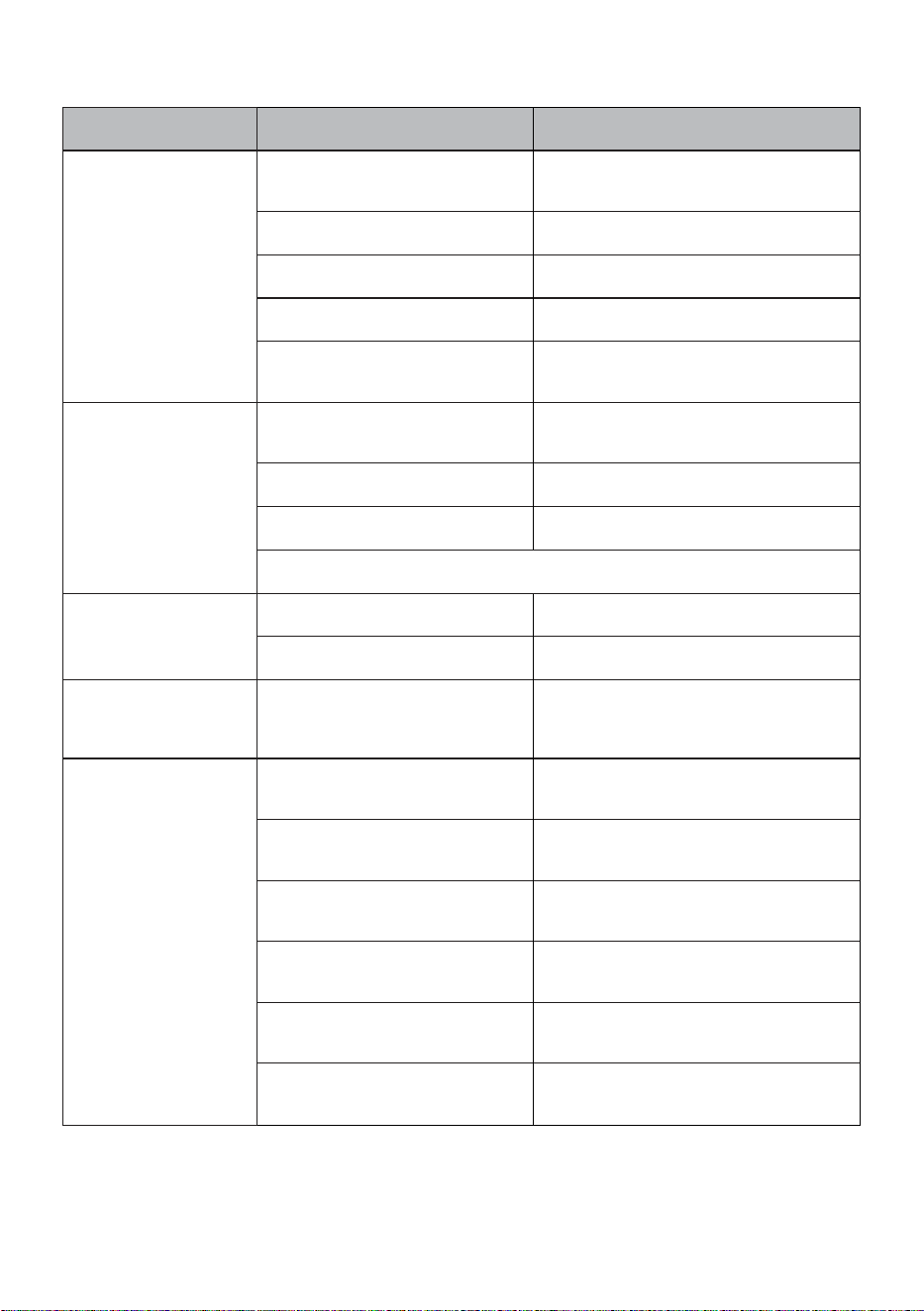
9 TROUBLESHOOTING
FAULT POSSIBLE CAUSE TROUBLESHOOTING
The cycle does not start.
Dishwasher is not switched on.
Switch on dishwasher by pressing power
button.
Fuse blown. Check indoor fuses.
Water inlet tap is closed. Turn on the water inlet tap.
Dishwasher door is open Close the Dishwasher door.
Water inlet hose and machine
lters are clogged.
Check the water inlet hose and machine
lters and make sure they are not clogged.
Water remains inside
the machine.
Water drain hose is clogged or
twisted.
Check the drain hose, then either clean or
untwist it.
The lters are clogged. Clean the lters.
The cycle is not nished yet. Wait until the cycle is nished.
Note: It is normal to have some water remain in the machine below the lters.
Machine stops during
washing.
Power failure. Check electrical supply.
Water inlet failure. Check water tap.
Shaking and hitting
noises are heard during
a wash operation.
The spray arm is hitting the dishes
in the lower basket.
Move or remove items blocking the spray
arm.
Partial food wastes
remain on the dishes.
Dishes placed incorrectly, sprayed
water not reaching affected dishes.
Do not overload dishwasher.
Dishes leaning each another.
Place dishes as instructed in the section on
loading your dishwasher.
Not enough detergent used.
Use the correct amount of detergent, as
instructed in the cycle table.
Wrong wash cycle selected.
Use the information in the cycle table to
select the most appropriate cycle.
Spray arms clogged with food
waste.
Clean the holes in the spray arms with thin
objects.
Filters or water drain pump
clogged or lter misplaced.
Check the drain hose and lters are
correctly tted.
USA - CAN - 31
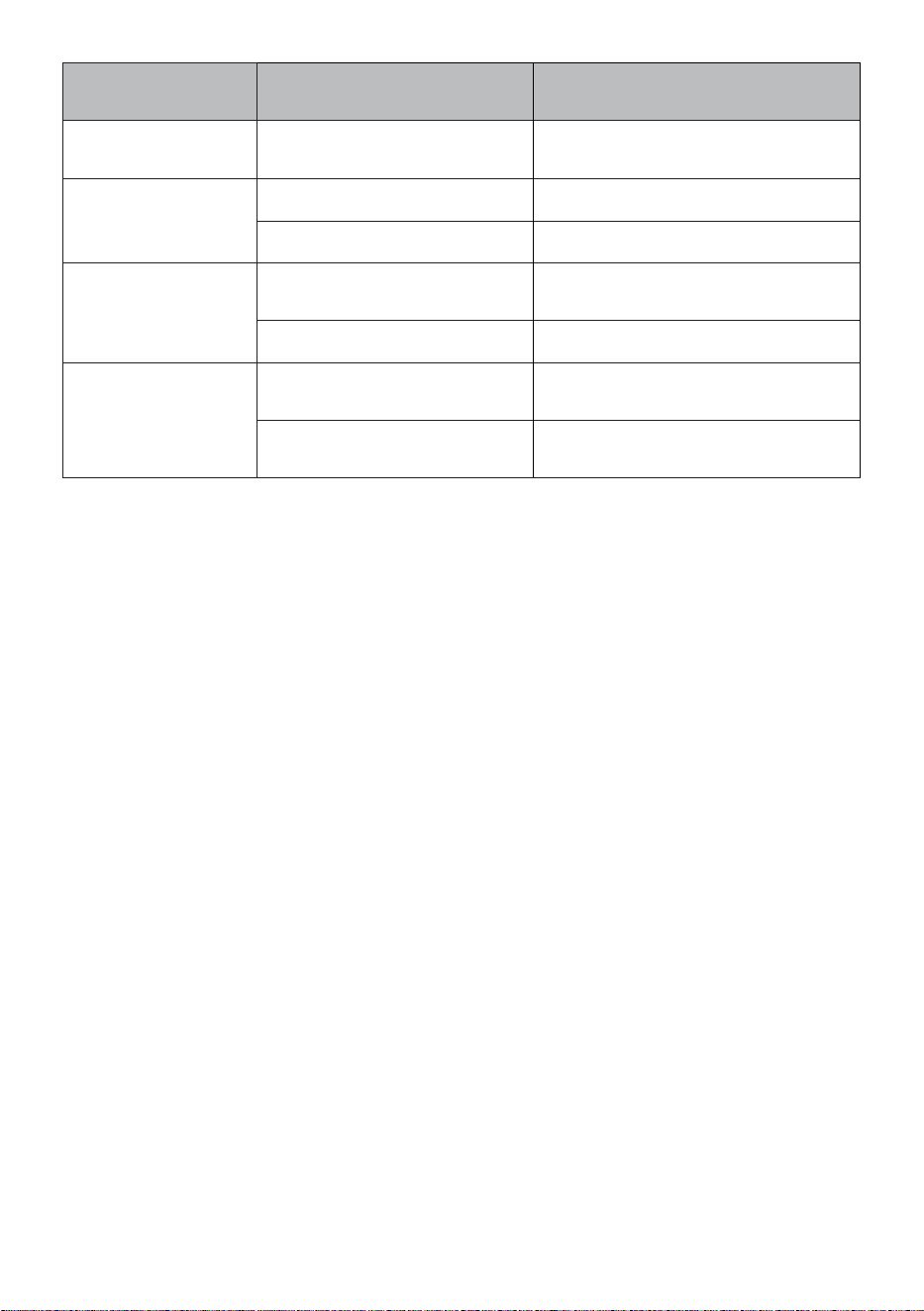
FAULT POSSIBLE CAUSE TROUBLESHOOTING
Whitish stains remains on
dishes.
Not enough detergent used.
Use the correct amount of detergent, as
instructed in the cycle table.
Dishes do not dry.
Drying option is not selected. Select a cycle with a drying option.
Rinse aid dosage set too low. Increase rinse aid dosage setting.
Rust stains form on the
dishes.
Stainless-steel quality of the dishes is
insufcient.
Use only dishwasher-proof sets.
Improper grounding of electrical supply. Consult a qualied electrician immediately.
Detergent remains in the
detergent compartment.
Detergent was added when the
detergent compartment was wet.
Make sure detergent compartment is dry before
use.
Items in the dishwasher may prevent the
detergent compartment from opening.
Make sure the items in the dishwasher do not
block the detergent compartment.
USA - CAN - 32
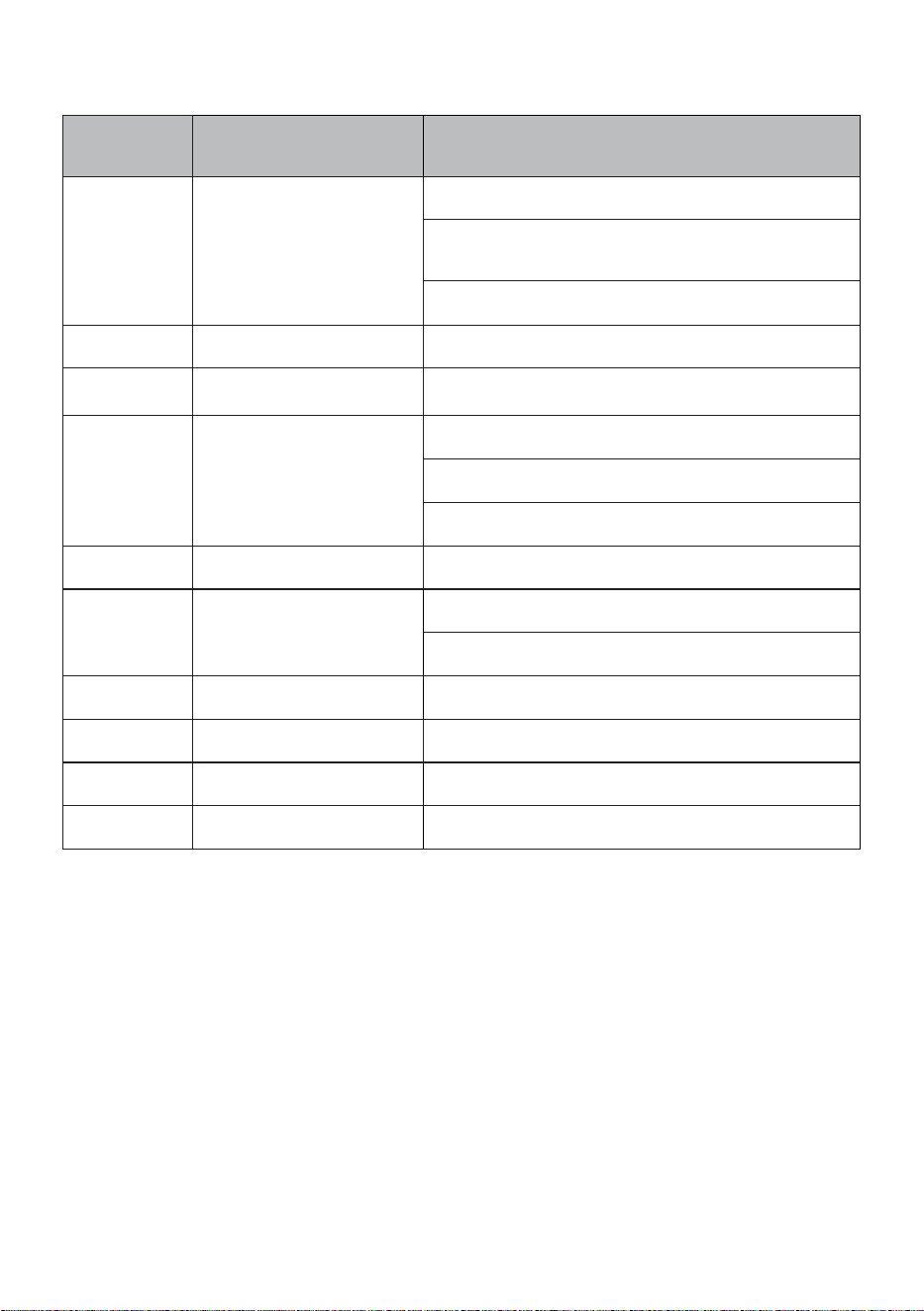
AUTOMATIC FAULT WARNINGS AND WHAT TO DO
TROUBLE
CODE
POSSIBLE FAULT WHAT TO DO
FF
Water inlet system failure
Make sure the water inlet tap is open and water is owing.
Separate the inlet hose from the tap and clean the lter
of the hose.
Contact for service if the error continues.
F5
Pressure system failure
Contact for service.
F3
Continuous water input
Close the tap and contact for service.
F2
Inability to discharge water
Water discharge hose and lters may be clogged.
Cancel the cycle.
If the error continues, contact for service.
F8
Heater error
Contact for service.
F1 Overow
Unplug the machine and close the tap.
Contact for service.
F7 Overheating Contact for service.
F9 Divisor position error Contact for service.
F6 Faulty heater sensor Contact for service.
HI High voltage failure Contact for service.

USA - CAN - 33
10 PRACTICAL INFORMATION
1. When the machine isn’t in operation:
• Disconnect the electrical supply and close the tap.
• Leave the door slightly open to prevent odor formation.
2. Select the dry option to remove water droplets.
3. Place dishes in the machine properly to achieve the best energy consumption, washing and drying
performance. Please see the cycle and consumption table for more information.
4. Rinse dirty dishes before placing them in the dishwasher.
5. Only use the Rinse cycle when necessary.
6. Do not place the machine near a refrigerator because it will reach high temperatures.
7. If the machine is located in an area that is at risk of freezing, close the tap, disconnect the inlet
hose from the tap and drain the water inside the hose and the machine completely.
Kenmore ®
Customer Care Hotline
Service à la clientèle
Línea directa de atención al cliente
To schedule in-home repair service
or order replacement parts
Para pedir servicio de reparación
a domicilio, y ordenar piezas
Pour planifer un service de réparation à domicile
ou commandez des pièces de rechange
1-844-553-6667
www. kenmore. com
®