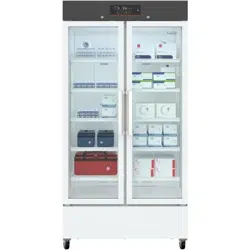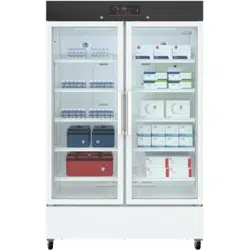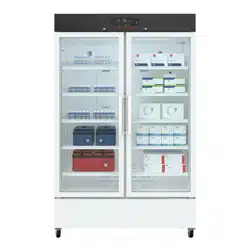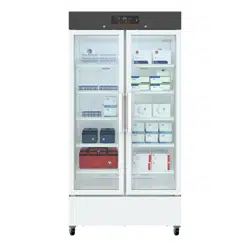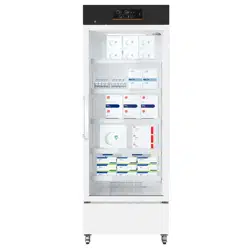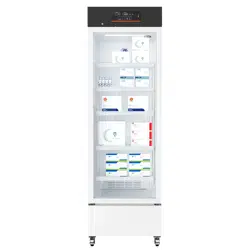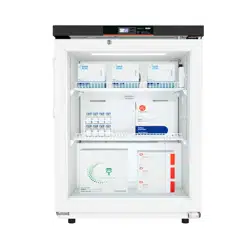
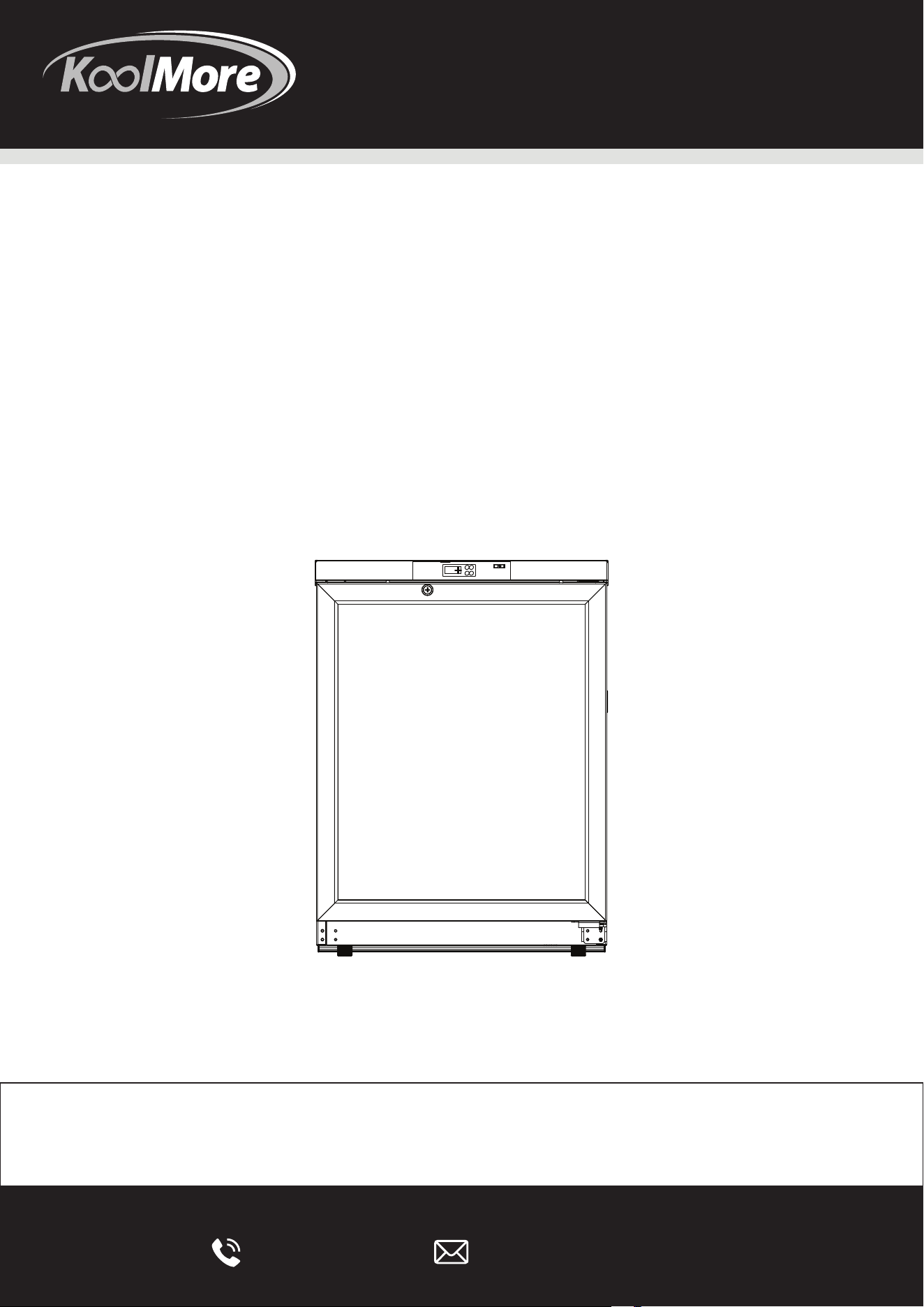
PHARMACY REFRIGERATOR

Stay informed with the latest information
for your KoolMore KeepWarm Appliance.
If you need any assistance or have questions, our customer
support team is here to help.
4
6
7
10
12
15
16
Dear KoolMore users:
We appreciate your choice of the KoolMore medical cooler. We urge you to go through the
subsequent details for a comprehensive grasp of the User Manual, which will aid in safe
utilization of this device and minimize risks to both individuals and objects.
This equipment is intended for use in commercial, industrial, or institutional occupancies as
defined in the Safety Standard for Refrigeration Systems, ANSI/ASHRAE 15`.
Warningrisk of fire/flammable materials
WARNING: Ensure all ventilation openings are not obstructed.
WARNING: Do not use mechanical devices or other means to accelerate the defrosting pro-
cess, other than those recommended by the manufacturer.
WARNING: Do not damage the refrigerant circuit
WARNING: In order to reduce flammability HAZARDS the installation of this equipment shall
only be carried out by a suitably qualified person.
DANGER – Risk Of Fire Or Explosion. Flammable Refrigerant Used. To Be Repaired Only By
Trained Service Personnel. Do Not Puncture Refrigerant Tubing.
CAUTION – Risk Of Fire Or Explosion. Flammable Refrigerant Used. Consult Repair Manual /
Owner's Guide Before Attempting To Install Or Service This Equipment. All Safety Precautions
Must Be Followed.
CAUTION – Risk Of Fire Or Explosion. Dispose Of Properly In Accordance With Federal Or
Local Regulations. Flammable Refrigerant Used.
CAUTION – Risk Of Fire Or Explosion Due To Puncture Of REFRIGERANT Tubing. Follow
Handling Instructions Carefully. FLAMMABLE REFRIGERANT Used
The installation and operating instructions shall indicate that component parts shall be
replaced with like components and that servicing shall be done by the manufacturer's autho-
rised personnel, so as to minimize the risk of possible ignition due to incorrect parts or
improper service.
REFRIGERANT and BLOW gas used for the appliance are flammable. Therefore, when the
appliance is scrapped, it shall be kept away from any fire source and be recovered by a special
recovering company without corroding qualification other than be disposed by combustion, so
as to prevent damage to the environment or any other harm.
Warning
1. Use a grounded outlet to prevent shocks. If not grounded, get technicians to set up a
grounding wire.
2. Position the cooler on a stable, level surface to avoid toppling or injuries.
3. When extending the power cord, maintain a thickness >2 mm² and a length ≤3 m (9.8 feet).
4. Only qualified technicians should dismantle or reassemble the cooler.
5. Use the power source specified on the cooler's label.
6. For operation below 126.5V, use a stabilizer >1,000 W suited for the motor. Seek profes-
sional advice if unsure.
7. The cooler should have a three-pronged plug for standard US outlets.
8. Always keep the grounding pin intact and ensure secure plug connections.
9. When unplugging, grip the plug, not the cord.
10.Disconnect malfunctioning refrigerators to avoid electrical hazards.
11.Before servicing, disconnect the refrigerator from power.
12.Ensure no inhalable substances are present during maintenance.
13.Store hazardous materials in the refrigerator in secure locations only.
14.Unplug the refrigerator during extended non-use periods.
15.If leaving the refrigerator unattended, ensure proper removal by professionals.
16.Avoid storing or using volatile items or sprays near the refrigerator.
17.Don't store aggressive chemicals like acids or bases inside.
18.Keep plastic packaging away from children.
19.Keep the refrigerator's vicinity clear to prevent tipping.
20.The refrigerator shouldn't be placed outdoors.
21.Avoid placing the refrigerator in damp or humid areas.
22.Don't self-repair the refrigerator to prevent hazards.
23.Don't connect the refrigerator to inappropriate grounding.
24.Avoid operating switches with wet hands.
25.Keep heavy objects and water containers off the refrigerator.
26.Prevent metal objects from entering the refrigerator.
CAUTION
• Keep the refrigerator free from obstructions.
• Check settings after power interruptions.
• Avoid changing settings frequently.
• Restart the refrigerator after a 5-minute power cut-off.
• Wear gloves during maintenance tasks.
• Use proper technique when closing the door.
• Handle refrigerator at angles less than 45°.
• Ensure clear ventilation openings.
• Defrost only as recommended.
• Handle the refrigerator gently to avoid injuries.
• Use door handles appropriately.
• Protect the refrigerator's circuitry.
• Use only approved appliances inside the refrigerator.
Precautions for use:
• Confirm cabinet temperature before adding items; don't exceed 1/3 volume.
• Displayed temperature varies from actual; it stabilizes over time.
• Use the testing hole correctly; ensure thermal insulation when plugging back.
• Clean with neutral cleaner; avoid harsh chemicals.
• Turn off power during extended non-use.
• Minimize door opening times for stable conditions.
• Temperature rise post-door opening is normal; stabilizes in an hour.
• High humidity may cause condensation on glass door; improve ventilation if it happens.
This symbol on the product means "For safety, keep away from ames or sources of re.
Dear KoolMore users:
We appreciate your choice of the KoolMore medical cooler. We urge you to go through the
subsequent details for a comprehensive grasp of the User Manual, which will aid in safe
utilization of this device and minimize risks to both individuals and objects.
This equipment is intended for use in commercial, industrial, or institutional occupancies as
defined in the Safety Standard for Refrigeration Systems, ANSI/ASHRAE 15`.
Warningrisk of fire/flammable materials
WARNING: Ensure all ventilation openings are not obstructed.
WARNING: Do not use mechanical devices or other means to accelerate the defrosting pro-
cess, other than those recommended by the manufacturer.
WARNING: Do not damage the refrigerant circuit
WARNING: In order to reduce flammability HAZARDS the installation of this equipment shall
only be carried out by a suitably qualified person.
DANGER – Risk Of Fire Or Explosion. Flammable Refrigerant Used. To Be Repaired Only By
Trained Service Personnel. Do Not Puncture Refrigerant Tubing.
CAUTION – Risk Of Fire Or Explosion. Flammable Refrigerant Used. Consult Repair Manual /
Owner's Guide Before Attempting To Install Or Service This Equipment. All Safety Precautions
Must Be Followed.
CAUTION – Risk Of Fire Or Explosion. Dispose Of Properly In Accordance With Federal Or
Local Regulations. Flammable Refrigerant Used.
CAUTION – Risk Of Fire Or Explosion Due To Puncture Of REFRIGERANT Tubing. Follow
Handling Instructions Carefully. FLAMMABLE REFRIGERANT Used
The installation and operating instructions shall indicate that component parts shall be
replaced with like components and that servicing shall be done by the manufacturer's autho-
rised personnel, so as to minimize the risk of possible ignition due to incorrect parts or
improper service.
REFRIGERANT and BLOW gas used for the appliance are flammable. Therefore, when the
appliance is scrapped, it shall be kept away from any fire source and be recovered by a special
recovering company without corroding qualification other than be disposed by combustion, so
as to prevent damage to the environment or any other harm.
Warning
1. Use a grounded outlet to prevent shocks. If not grounded, get technicians to set up a
grounding wire.
2. Position the cooler on a stable, level surface to avoid toppling or injuries.
3. When extending the power cord, maintain a thickness >2 mm² and a length ≤3 m (9.8 feet).
4. Only qualified technicians should dismantle or reassemble the cooler.
5. Use the power source specified on the cooler's label.
6. For operation below 126.5V, use a stabilizer >1,000 W suited for the motor. Seek profes-
sional advice if unsure.
7. The cooler should have a three-pronged plug for standard US outlets.
8. Always keep the grounding pin intact and ensure secure plug connections.
9. When unplugging, grip the plug, not the cord.
10.Disconnect malfunctioning refrigerators to avoid electrical hazards.
11.Before servicing, disconnect the refrigerator from power.
12.Ensure no inhalable substances are present during maintenance.
13.Store hazardous materials in the refrigerator in secure locations only.
14.Unplug the refrigerator during extended non-use periods.
15.If leaving the refrigerator unattended, ensure proper removal by professionals.
16.Avoid storing or using volatile items or sprays near the refrigerator.
17.Don't store aggressive chemicals like acids or bases inside.
18.Keep plastic packaging away from children.
19.Keep the refrigerator's vicinity clear to prevent tipping.
20.The refrigerator shouldn't be placed outdoors.
21.Avoid placing the refrigerator in damp or humid areas.
22.Don't self-repair the refrigerator to prevent hazards.
23.Don't connect the refrigerator to inappropriate grounding.
24.Avoid operating switches with wet hands.
25.Keep heavy objects and water containers off the refrigerator.
26.Prevent metal objects from entering the refrigerator.
CAUTION
• Keep the refrigerator free from obstructions.
• Check settings after power interruptions.
• Avoid changing settings frequently.
• Restart the refrigerator after a 5-minute power cut-off.
• Wear gloves during maintenance tasks.
• Use proper technique when closing the door.
• Handle refrigerator at angles less than 45°.
• Ensure clear ventilation openings.
• Defrost only as recommended.
• Handle the refrigerator gently to avoid injuries.
• Use door handles appropriately.
• Protect the refrigerator's circuitry.
• Use only approved appliances inside the refrigerator.
Precautions for use:
• Confirm cabinet temperature before adding items; don't exceed 1/3 volume.
• Displayed temperature varies from actual; it stabilizes over time.
• Use the testing hole correctly; ensure thermal insulation when plugging back.
• Clean with neutral cleaner; avoid harsh chemicals.
• Turn off power during extended non-use.
• Minimize door opening times for stable conditions.
• Temperature rise post-door opening is normal; stabilizes in an hour.
• High humidity may cause condensation on glass door; improve ventilation if it happens.
Category Description
Product Features
Can store medicines, vaccines, reagents, and
materials between 2°-8°C.
Accurate Temperature Control - Displays an accuracy of 0.1°C.
- Ranges from 2°C to 8°C with in-box fluctuations of
±2°C.
- USB interface allows temperature data storage at
any time.
Efficient Refrigeration
- Maintains a uniform temperature and efficient
cooling.
- Uses embedded air duct and air curtain
technologies.
Safety Features
- Alarms for high and low temperature, power failure,
and sensor issues.
- Customizable alarm temperatures.
- Safety door lock for sample protection.
User-Friendly Design
- Multi-layer encryption shelves and adjustable
heights.
- Energy-saving inner LED lights.
- Operates within a 115V±10% voltage range.
Dear KoolMore users:
We appreciate your choice of the KoolMore medical cooler. We urge you to go through the
subsequent details for a comprehensive grasp of the User Manual, which will aid in safe
utilization of this device and minimize risks to both individuals and objects.
This equipment is intended for use in commercial, industrial, or institutional occupancies as
defined in the Safety Standard for Refrigeration Systems, ANSI/ASHRAE 15`.
Warningrisk of fire/flammable materials
WARNING: Ensure all ventilation openings are not obstructed.
WARNING: Do not use mechanical devices or other means to accelerate the defrosting pro-
cess, other than those recommended by the manufacturer.
WARNING: Do not damage the refrigerant circuit
WARNING: In order to reduce flammability HAZARDS the installation of this equipment shall
only be carried out by a suitably qualified person.
DANGER – Risk Of Fire Or Explosion. Flammable Refrigerant Used. To Be Repaired Only By
Trained Service Personnel. Do Not Puncture Refrigerant Tubing.
CAUTION – Risk Of Fire Or Explosion. Flammable Refrigerant Used. Consult Repair Manual /
Owner's Guide Before Attempting To Install Or Service This Equipment. All Safety Precautions
Must Be Followed.
CAUTION – Risk Of Fire Or Explosion. Dispose Of Properly In Accordance With Federal Or
Local Regulations. Flammable Refrigerant Used.
CAUTION – Risk Of Fire Or Explosion Due To Puncture Of REFRIGERANT Tubing. Follow
Handling Instructions Carefully. FLAMMABLE REFRIGERANT Used
The installation and operating instructions shall indicate that component parts shall be
replaced with like components and that servicing shall be done by the manufacturer's autho-
rised personnel, so as to minimize the risk of possible ignition due to incorrect parts or
improper service.
REFRIGERANT and BLOW gas used for the appliance are flammable. Therefore, when the
appliance is scrapped, it shall be kept away from any fire source and be recovered by a special
recovering company without corroding qualification other than be disposed by combustion, so
as to prevent damage to the environment or any other harm.
Warning
1. Use a grounded outlet to prevent shocks. If not grounded, get technicians to set up a
grounding wire.
2. Position the cooler on a stable, level surface to avoid toppling or injuries.
3. When extending the power cord, maintain a thickness >2 mm² and a length ≤3 m (9.8 feet).
4. Only qualified technicians should dismantle or reassemble the cooler.
5. Use the power source specified on the cooler's label.
6. For operation below 126.5V, use a stabilizer >1,000 W suited for the motor. Seek profes-
sional advice if unsure.
7. The cooler should have a three-pronged plug for standard US outlets.
8. Always keep the grounding pin intact and ensure secure plug connections.
9. When unplugging, grip the plug, not the cord.
10.Disconnect malfunctioning refrigerators to avoid electrical hazards.
11.Before servicing, disconnect the refrigerator from power.
12.Ensure no inhalable substances are present during maintenance.
13.Store hazardous materials in the refrigerator in secure locations only.
14.Unplug the refrigerator during extended non-use periods.
15.If leaving the refrigerator unattended, ensure proper removal by professionals.
16.Avoid storing or using volatile items or sprays near the refrigerator.
17.Don't store aggressive chemicals like acids or bases inside.
18.Keep plastic packaging away from children.
19.Keep the refrigerator's vicinity clear to prevent tipping.
20.The refrigerator shouldn't be placed outdoors.
21.Avoid placing the refrigerator in damp or humid areas.
22.Don't self-repair the refrigerator to prevent hazards.
23.Don't connect the refrigerator to inappropriate grounding.
24.Avoid operating switches with wet hands.
25.Keep heavy objects and water containers off the refrigerator.
26.Prevent metal objects from entering the refrigerator.
CAUTION
• Keep the refrigerator free from obstructions.
• Check settings after power interruptions.
• Avoid changing settings frequently.
• Restart the refrigerator after a 5-minute power cut-off.
• Wear gloves during maintenance tasks.
• Use proper technique when closing the door.
• Handle refrigerator at angles less than 45°.
• Ensure clear ventilation openings.
• Defrost only as recommended.
• Handle the refrigerator gently to avoid injuries.
• Use door handles appropriately.
• Protect the refrigerator's circuitry.
• Use only approved appliances inside the refrigerator.
Precautions for use:
• Confirm cabinet temperature before adding items; don't exceed 1/3 volume.
• Displayed temperature varies from actual; it stabilizes over time.
• Use the testing hole correctly; ensure thermal insulation when plugging back.
• Clean with neutral cleaner; avoid harsh chemicals.
• Turn off power during extended non-use.
• Minimize door opening times for stable conditions.
• Temperature rise post-door opening is normal; stabilizes in an hour.
• High humidity may cause condensation on glass door; improve ventilation if it happens.
-High quality compressor and optimized refrigeration
system provide strong refrigeration capacity, safety,
and reliability

Product Handling:
• When transporting the pharmacy refrigerator, ensure it is moved with care, using the handcart
method shown in the accompanying image, cushioning the unit appropriately.
• Upon arrival at the desired location, remove all packing materials and the bottom cushion.
Relocate the refrigerator to its final placement within the house or facility.
• Once positioned, allow the unit to sit undisturbed for about 2 hours before turning the power on.
This allows it to acclimate to its new environment.
Installation Environment
The refrigerator is designed for indoor use and should be placed in an environment with a pollution level
of Class 2. It also requires protection from overvoltage, specically up to Class II.
The ideal ambient temperature for the refrigerator ranges between 16°C and 32°C. However, for best
performance, it's recommended to maintain a temperature of 18°C to 25°C. If this range isn't achieved
naturally, using air conditioning is advised.
The environmental humidity should be kept below 80% RH (Relative Humidity) for optimal operation.
The refrigerator's location should be free from signicant dust exposure, specically up to a pollution
degree of 2. Additionally, avoid places with excessive mechanical movement or vibration.
When determining the placement, consider the altitude. The refrigerator should be positioned at altitudes
below 2,000 meters.
Ensure the power source provides a voltage within 115V±10% to keep the refrigerator operating ecient-
ly.
The refrigerator's functionality is aected by ambient temperature. If placed in an environment that
doesn't meet the above criteria, it might not operate correctly. In such cases, make necessary environmen-
tal adjustments before using.
Avoid installing the refrigerator outdoors. Exposure to rain can lead to electric leakage or even electric
shock, posing potential hazards.
For protection against external elements, the refrigerator has an ingress protection rating of IPX0. This
means it doesn't oer protection against water or dust ingress.
Installation Site
• It's crucial not to place the device in cramped or confined spaces. Choose a location that
ensures easy access and minimizes the chance of goods blocking airflow or causing storage
issues.
• The installation location should be stable and free from flammable materials, ensuring the
appliance remains upright during operation and minimizing hazards.
• It's important to shield the device from direct sunlight as this could impact its performance.
• Ensure that each refrigerator has its own dedicated power outlet. Verify that the power connec-
tion uses a standard 110V outlet and that both the plug and socket are securely connected.
• Before operating the device, check the provided working voltage. In areas where voltage might
fluctuate, consider investing in a voltage stabilizer. If you decide to use one, its power capacity
should be greater than 400W, ensuring that the device's voltage needs are adequately met.
• Grounding the device is crucial for safety. If your power outlet isn't equipped with a ground, or if
you're unsure about its effectiveness, enlist the services of professional engineers or techni-
cians to ensure proper grounding.
Warnings:
For safety reasons, never attempt to ground the refrigerator using unconventional methods like gas
pipes, water pipes, telephone lines, or lightning rods. These methods could introduce the risk of
electrical shock.
Once installed, ensure the power plug remains easily accessible. This design allows for quick
disconnection in emergencies. Additionally, avoid placing objects near the refrigerator's vent to
ensure unobstructed airflow.
Notes:
Ambient temperature plays a significant role in the performance of the device. If the surrounding
temperature is outside the range of 104°F-140°F, the refrigerator may not function as expected. It's
important to note that the device uses an intermittent operating mechanism. Before use, adjust the
environment accordingly.
For storage and transportation purposes, it's advisable to maintain temperatures within the
104°F-140°F range and a relative humidity of 10%-90%.
Alarm port: 30Vdc, 2A Max, to be connected to SELV circuit
USB port: 5Vdc, 1A Max, to be connected to SELV circuit.
Preparation Before Use
1. Start by removing all the exterior packaging from the product. This includes the protective foam
that is within the packing box.

2. Verify the contents by counting the included accessories. Compare the items you have to the
contents listed in the packing list. Should you find any discrepancies or missing items, make sure
to contact the after-sales service as soon as possible.
3. When setting up the refrigerator, ensure there's a space of at least 10 cm surrounding it. This
gap promotes adequate ventilation and aids in dissipating heat, ensuring efficient performance.
4. Check and adjust the refrigerator's feet. Proper adjustment ensures that the appliance remains
stable and doesn't move or wobble during its operation.
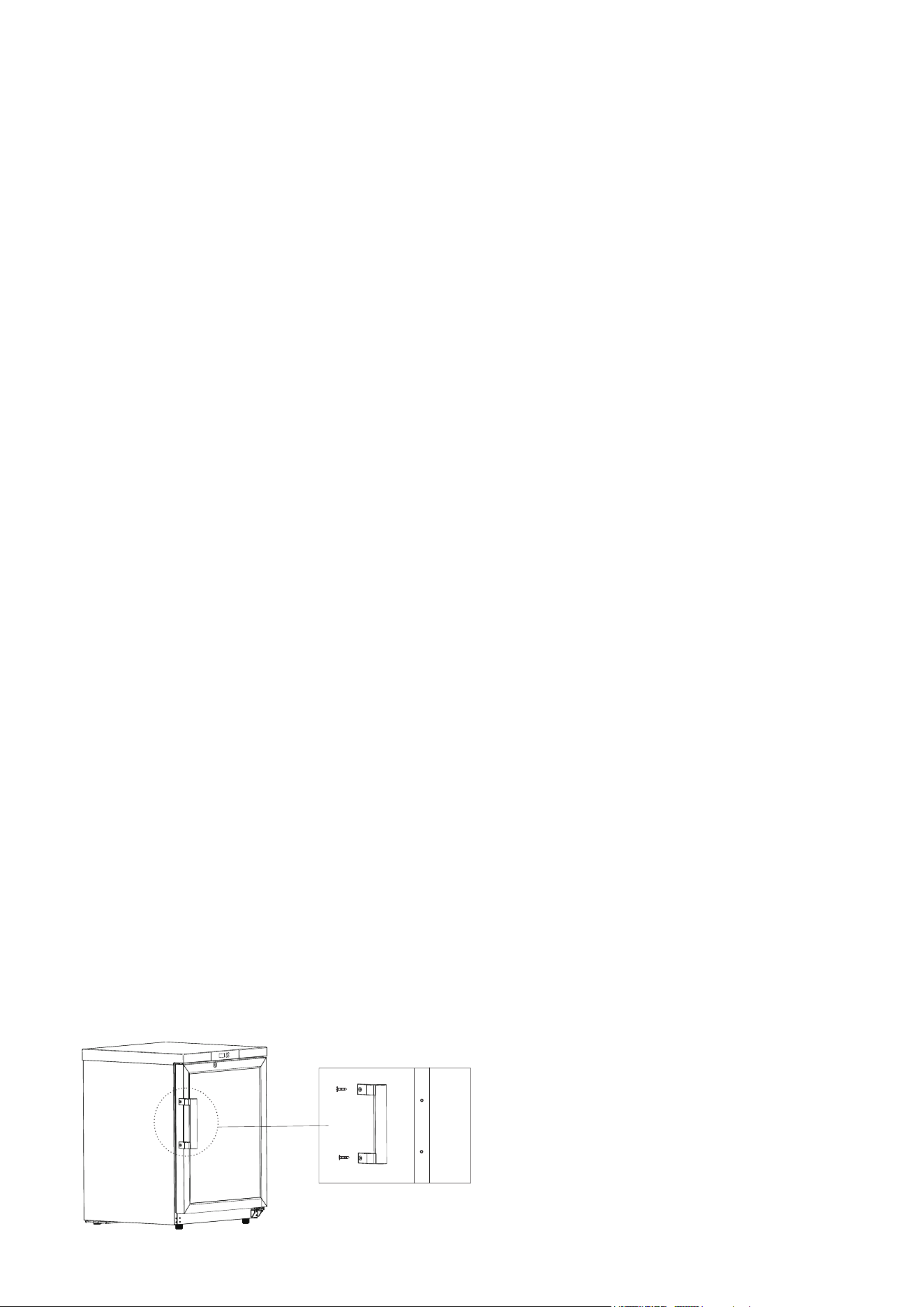
5. Next, focus on the door handle. Retrieve the accessory bag, which contains the handle and
screws. Attach the handle to the door using either a standard or electric screwdriver, aligning it with
the pre-drilled mounting hole on the door's side. Once attached, place the screw cover in position to
conceal the screws.
6. Additionally, locate the back bracket inside the pharmacy refrigerator. Securely fix this bracket
to the appliance's back plate using the provided screws.
Warning:
Safety first: Be cautious with the appliance's plastic bags. Always place them out of children's
reach to prevent the risk of suffocation accidents.

Initial Setup:
Once the equipment has been positioned, leveled, and cleaned, ensure it remains untouched for at
least 24 hours before you turn it on. This step ensures optimal functioning.
Power Connection: Connect the power cord to a socket that matches the required specifications
and can handle the device's load.
Switch Activation: After ensuring proper power connection, turn on both the power switch and the
lamp switch. This action verifies the operational status of the refrigerator's lamp.
Temperature Check: Before filling the refrigerator, confirm that it reaches and maintains the
desired temperature. If everything seems fine after a 24-hour cycle, you can start placing a small
quantity of items inside.
Batch Filling: When adding items to the refrigerator, do it in batches. Each batch shouldn't exceed
one-third of the appliance's total capacity. Ensure the equipment has been off and remains off for
at least 12 hours before introducing another batch.
Operational Caution: Avoid constantly opening the door, especially during the cooling cycle.
Excessive interruptions can cause a rise in internal temperature.
Operation after Powering-Off
Memory Feature: The equipment is designed to remember set values. In case of power outages, it
will resume from where it stopped once power is restored.
Warning & Precautions:
If you switch the power off, remember that you cannot re-energize the refrigerator immediately.
Wait for at least five minutes to prevent potential harm to the compressor or the system.
If you anticipate not using the refrigerator for an extended period, unplug the power cord. For
models with batteries, ensure you turn off the battery switch. This step prevents unforeseen
electrical issues.
If you are leaving the refrigerator in a location where no one will monitor it for an extended period,
ensure children cannot access it. Additionally, make sure its door remains securely closed.
Inspections:
Assign a dedicated person to regularly inspect the refrigerator. They should check its current
condition, note down any abnormalities, and record its operational status. If any anomalies are
detected, especially ones that could compromise the items stored inside, immediately transfer
those items to another functional refrigerator. After rectifying the identified issue, you can then
replace the items in their original position.
Temperature Range:
This product is specifically designed as a medical refrigerator, operating within a temperature
range of 35.6°F-46.4°F.
It is essential to verify that the environment within the refrigerator aligns with the storage needs
of the items. This precaution ensures the safety and integrity of the stored items and prevents
potential financial setbacks due to damages.
Temperature and Humidity:
The inertia of the refrigeration process may lead to disparities between the displayed and the
actual internal temperature and humidity. Such variances are expected and do not indicate a
malfunction.
Storage Precautions:
Avoid placing items directly between the base of the interior lining and the bottom shelf. This
arrangement ensures optimal airflow and prevents obstruction of air ducts.
Usage Warnings:
Refrigerators primarily serve as storage equipment. Overloading the refrigerator, especially with
many warm items at once, can strain the compressor. This strain may lead to extended
operation times, causing the internal temperature to drop gradually and potentially impacting
the device's lifespan. Always add items in batches, allowing the temperature to stabilize
incrementally.
Be cautious not to inflict any damage on the refrigeration circuit.
Refrain from using electrical appliances within the refrigerator unless they possess the
necessary production permits.
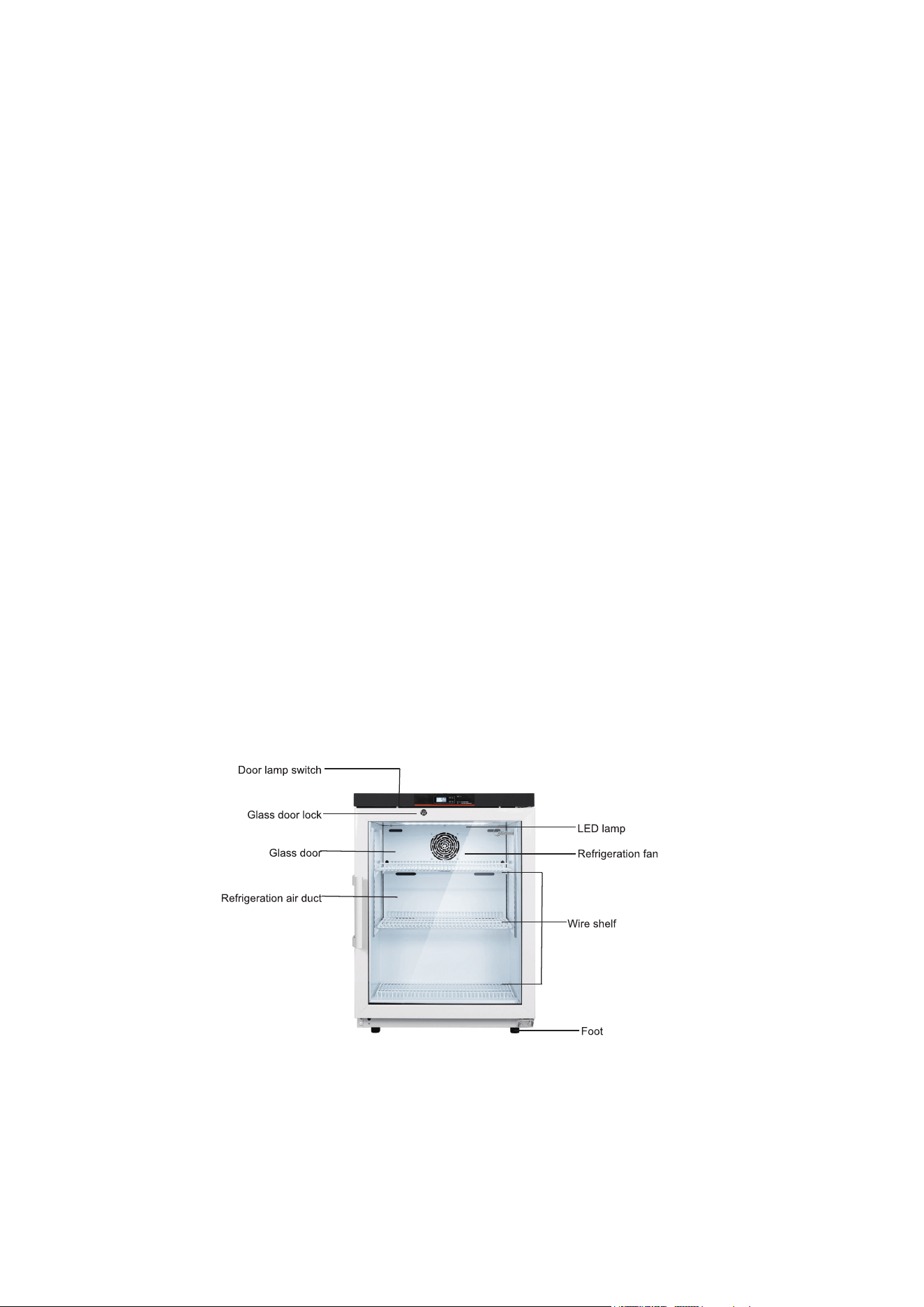
Note: Due to potential modifications and variances between models, the product you receive
may slightly differ from the depicted diagram. Always refer to the actual product for the most
accurate representation. The provided diagram is meant to highlight the functionality of the
components.
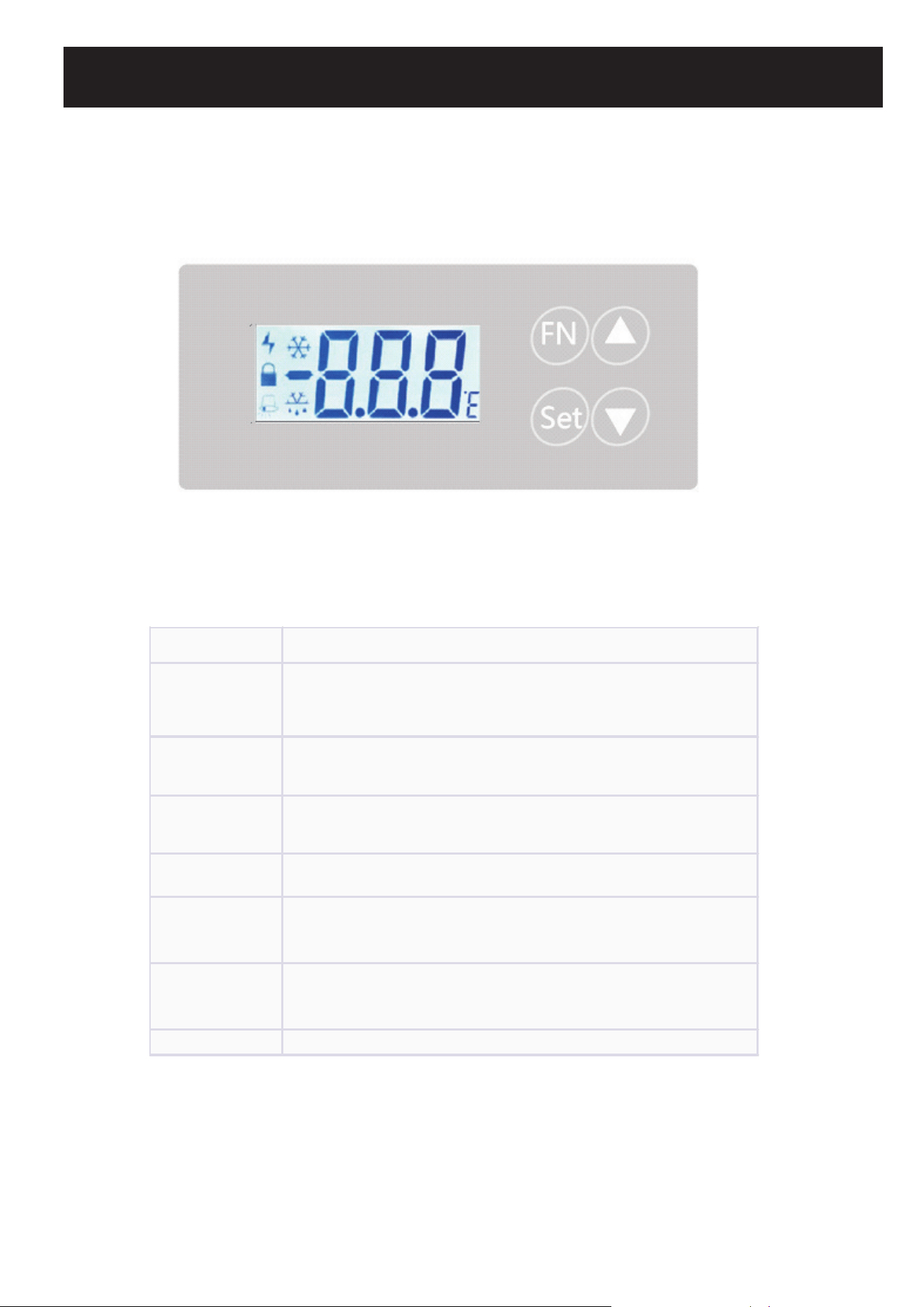
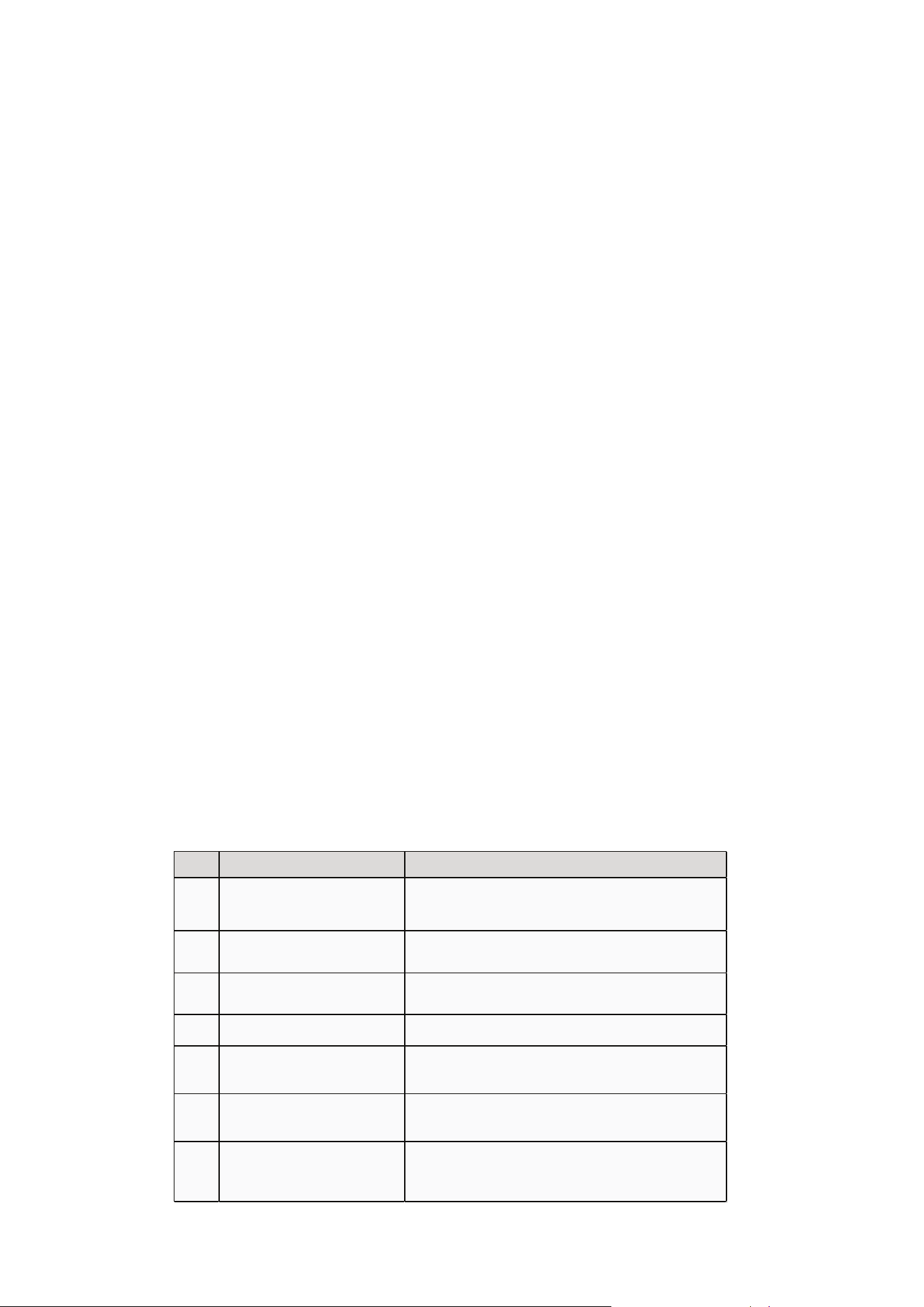
Button(s) Function
SET
- Display current temperature set point (St) when held for 3s (if
unlocked).<br>- Save and exit settings when held for 3s (in setting
status).
▲ (UP)
- Toggle between parameters.<br>- Increase selected parameter
value.
▼ (DOWN)
- Toggle between parameters.<br>- Decrease selected parameter
value.
SET + FN - Unlock or lock the controller when held together for 3s.
SET + ▲ - Access the general menu settings when held together for 3s.
▲ + ▼ (for 3s) - Enter the time-setting interface of the recorder.
▲ (for 3s) - Export data to a USB flash drive (if supported).
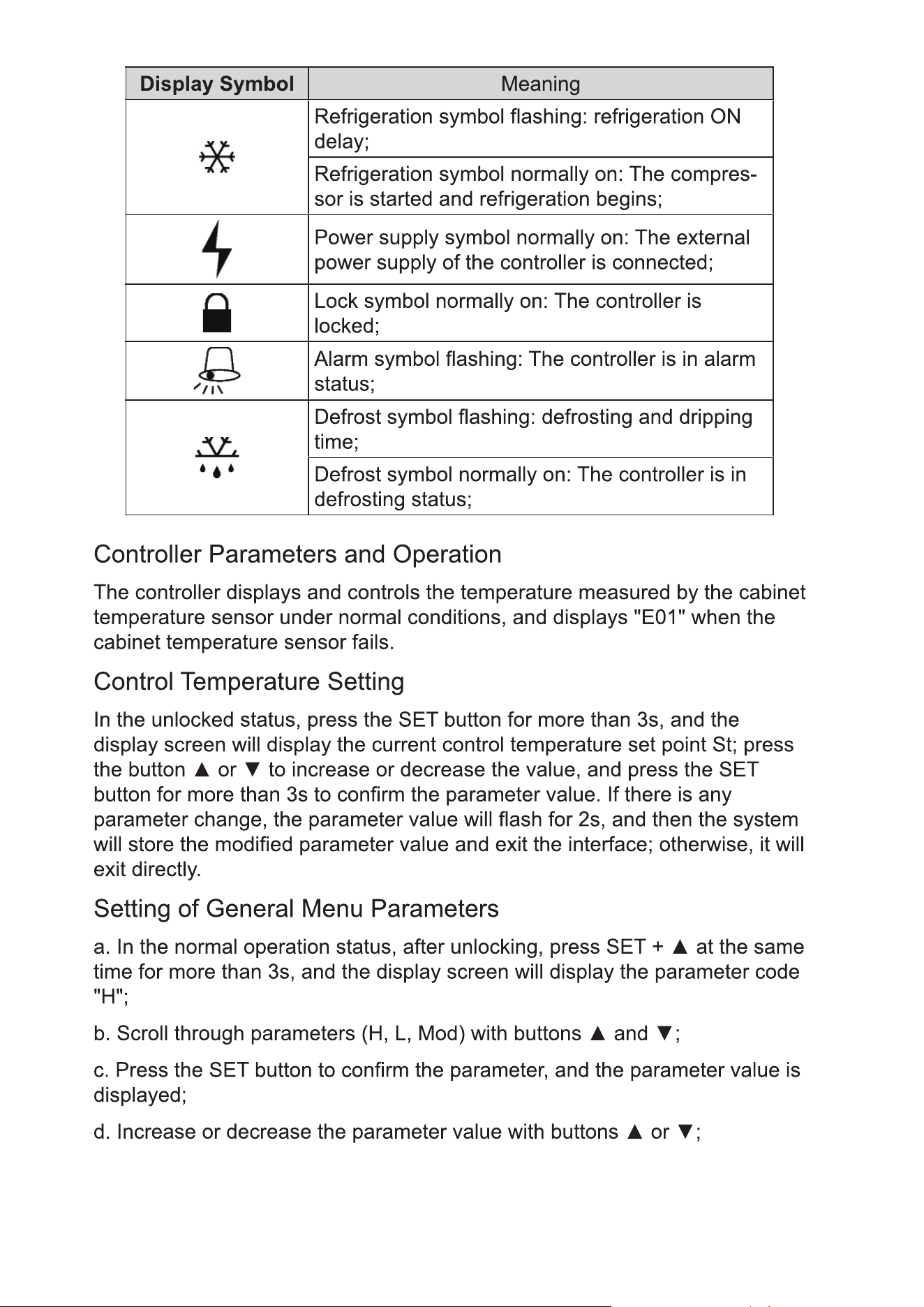
General Menu Parameters:
• Briey press the "SET" button to conrm any changes made.
• Continue adjusting other parameters as needed.
• To save and nalize settings, hold the "SET" button for three seconds.
Time Setting (Optional USB):
• After unlocking the device, simultaneously press and hold both the UP and DOWN
buttons for 3 seconds to access the time settings interface.
• If there's a malfunction with the USB data recorder, a "nDR" message will appear on the
display.
• In the absence of USB issues, you can adjust the time values. Use the UP and DOWN
buttons to toggle between year ("yer"), month ("mtH"), day, hour ("HH"), and minute
("MM"). Conrm your time setting by pressing the "SET" button. Remember to press and
hold the "SET" button for 3 seconds to save and exit. If no buttons are pressed for 10
seconds, the interface will exit without saving. Note: When a USB ash drive is inserted or
removed, the controller will emit a short buzz for half a second.
Data Export (optional USB):
• In standard operation mode and after unlocking, hold the "UP" button for 3 seconds to
access the data export interface.
• If the USB data recorder isn't functioning correctly, "nDR" will appear on the screen. If no
USB ash drive is detected, "nUS" will be shown.
• To select the data range for export, use the UP or DOWN button. Choices range from M1 to
M12. Each represents a month from the current time. Conrm your selection by pressing
and holding the "SET" button for 3 seconds. Note: if the exported data is substantial, the
system might continue exporting after exiting the interface. "ULD" will be displayed
during this process, and the system will automatically exit once the export is complete.
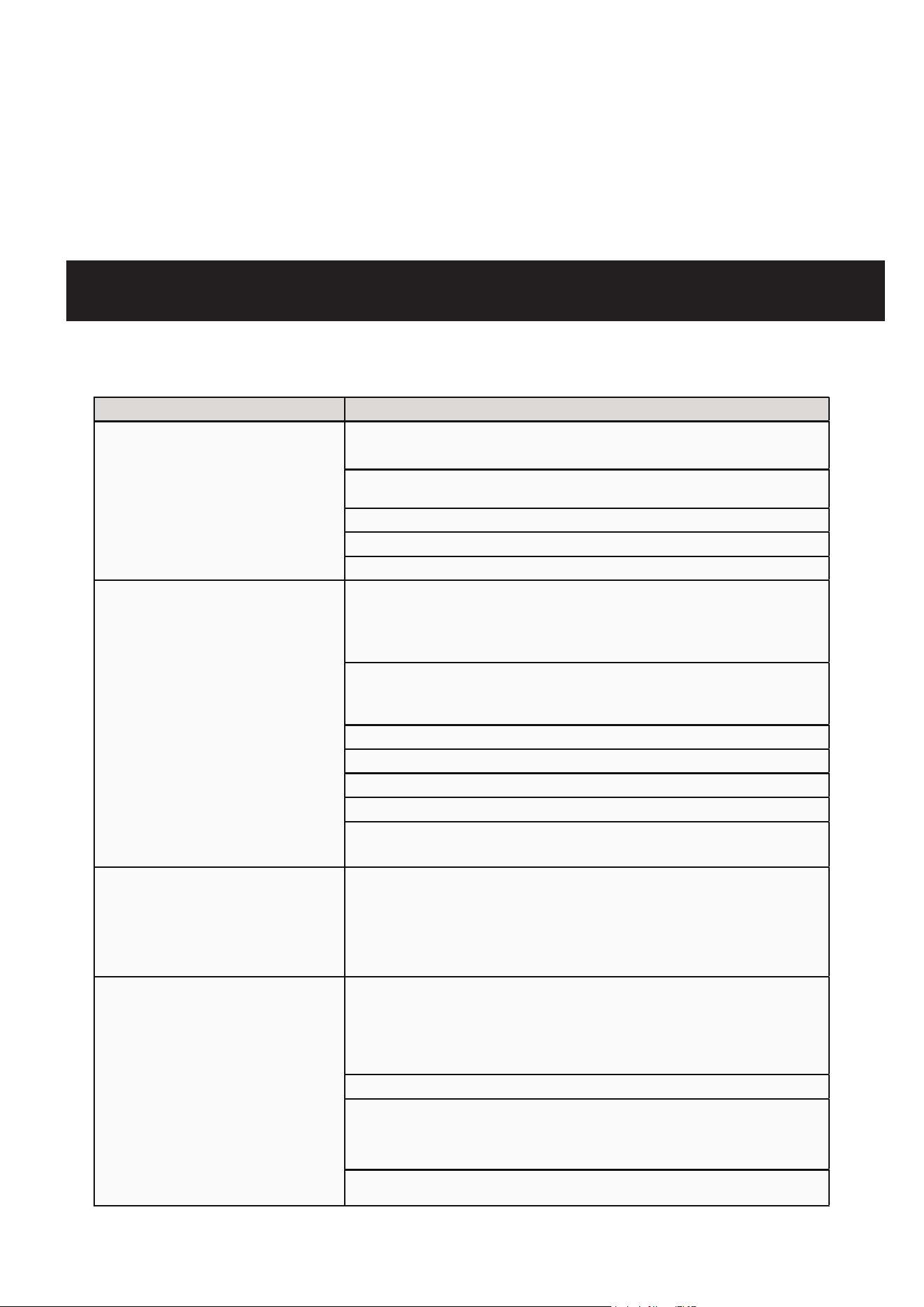
Code Cause Action
E01 Cabinet temperature sensor fault
The alarm sign flashes, E01 is displayed, the buzzer sounds
immediately, and the compressor is in proportional operation
status.
E02 Display sensor fault
The alarm sign flashes, E02 is displayed, and the buzzer
sounds immediately.
AH High (H) temperature alarm
AH and temperature are alternately displayed, the alarm sign
flashes, and the buzzer starts to sound after Δt2 time passes.
AL Low (L) temperature alarm
AL and temperature are alternately displayed, the alarm sign
flashes, and the buzzer starts to sound after Δt2 time passes.
dor Door open or not closed tightly
The alarm sign flashes. After Δt3 time passes, door and
temperature are alternately displayed and buzzing starts.
None Ambient temperature > 95°F
The alarm symbol flashes; the cabinet temperature and the
ambient temperature are displayed alternately.
None Power outage
The alarm symbol is displayed; the buzzer sounds
intermittently for 2 min; the temperature is displayed
intermittently for 20h.
Alarm Description

Warning
• Always disconnect the power before conducting any repairs or maintenance to ensure
safety against electrical shock or potential injuries.
• Be cautious about inhaling any medications or suspended particles nearby to avoid health
risks.
Note
• Avoid sprinkling water directly on the unit, as this could affect the electrical components
and induce rust.
• Abstain from using hot water, harsh detergents, or organic solvents when cleaning the
cabinet.
• Do not place heavy items atop the device, which may cause it to deform or undergo undue
pressure.
Device Maintenance
Defrosting: The device features automatic defrosting for user convenience.
Cleaning:
• For optimal performance, cleanse the pharmacy refrigerator monthly.
• A damp cloth can be used to wipe minor external and internal dirt. If the refrigerator has
significant dirt, use a cloth soaked in a neutral detergent. Always ensure to rinse and then
dry with a clean cloth.
• Avoid storing items on or inside the refrigerator that could potentially harm the device or
disrupt its electrical insulation.
• The compressor and related mechanical components are sealed, eliminating the need for
lubrication.
Device Deactivation
• When storing the device in an unsupervised area for extended periods:
• Ensure it's off and unplugged.
• Clean both the interior and exterior using a warm, damp cloth followed by drying.
• Always lock the device to ensure child safety and prevent any unintentional access, reducing
risks like suocation.
End-of-Life Instructions
Once the device approaches its lifespan's conclusion:
• It should be decommissioned and entrusted to certied recycling entities for appropriate scrap-
ping and disposal, in line with local guidelines and regulations.
• It's crucial that individuals without proper credentials refrain from taking apart or tampering
with the device unauthorizedly.
• Any discarded device should be allocated to specied zones, ensuring they remain out of
children's reach to prevent potential hazards.
Warning
• Always disconnect the power before conducting any repairs or maintenance to ensure
safety against electrical shock or potential injuries.
• Be cautious about inhaling any medications or suspended particles nearby to avoid health
risks.
Note
• Avoid sprinkling water directly on the unit, as this could affect the electrical components
and induce rust.
• Abstain from using hot water, harsh detergents, or organic solvents when cleaning the
cabinet.
• Do not place heavy items atop the device, which may cause it to deform or undergo undue
pressure.
Device Maintenance
Defrosting: The device features automatic defrosting for user convenience.
Cleaning:
• For optimal performance, cleanse the pharmacy refrigerator monthly.
• A damp cloth can be used to wipe minor external and internal dirt. If the refrigerator has
significant dirt, use a cloth soaked in a neutral detergent. Always ensure to rinse and then
dry with a clean cloth.
• Avoid storing items on or inside the refrigerator that could potentially harm the device or
disrupt its electrical insulation.
• The compressor and related mechanical components are sealed, eliminating the need for
lubrication.
Device Deactivation
• When storing the device in an unsupervised area for extended periods:
• Ensure it's off and unplugged.
• Clean both the interior and exterior using a warm, damp cloth followed by drying.
• Always lock the device to ensure child safety and prevent any unintentional access, reducing
risks like suocation.
End-of-Life Instructions
Once the device approaches its lifespan's conclusion:
• It should be decommissioned and entrusted to certied recycling entities for appropriate scrap-
ping and disposal, in line with local guidelines and regulations.
• It's crucial that individuals without proper credentials refrain from taking apart or tampering
with the device unauthorizedly.
• Any discarded device should be allocated to specied zones, ensuring they remain out of
children's reach to prevent potential hazards.
Fault Troubleshooting Method
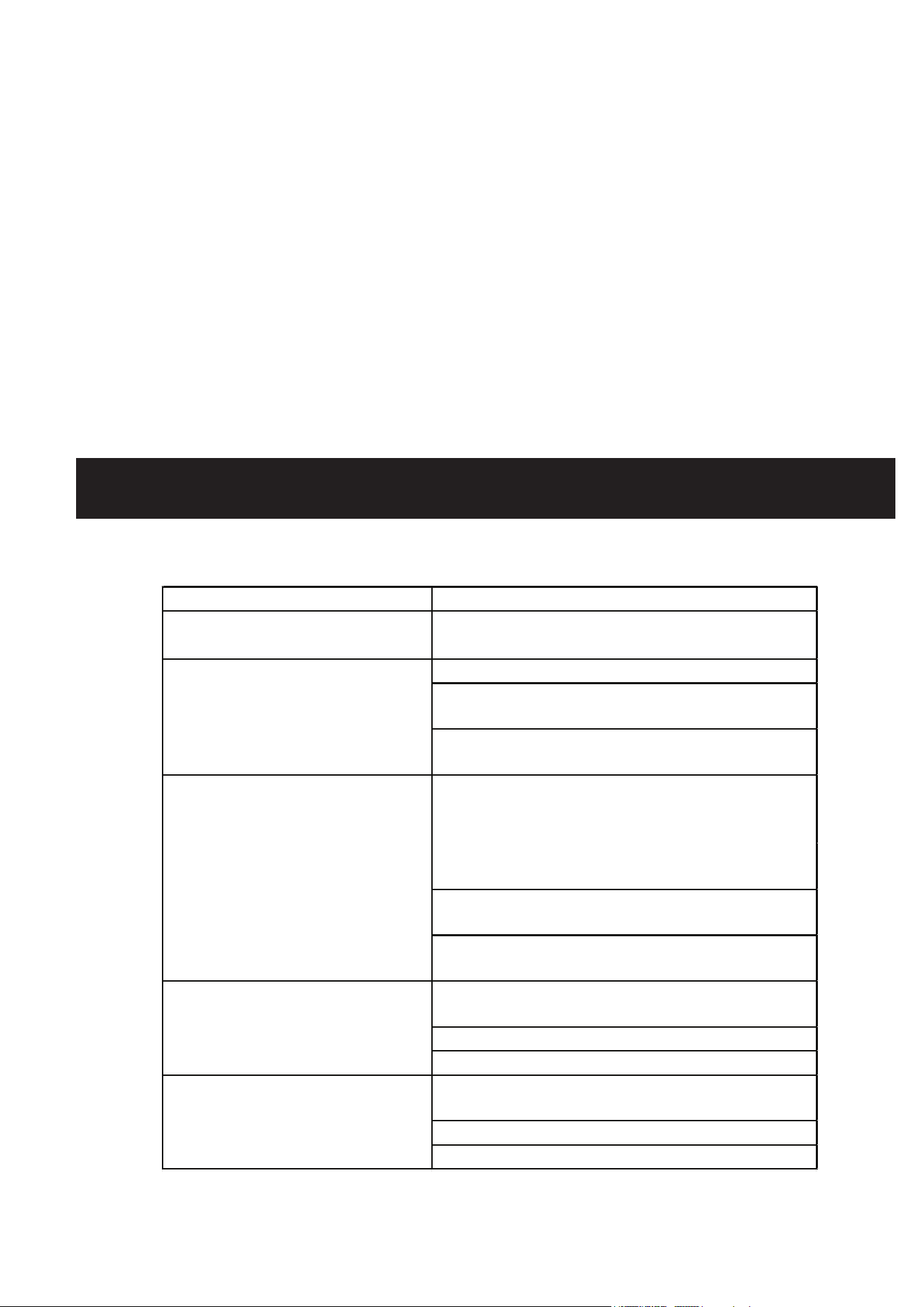
Refrigerator not working - Verify the input power supply meets the requirements.
- Check if the plug and socket are in good contact.
- Inspect if the input and control lines are faulty.
- Determine if the voltage is too low.
- Ensure not too many items are inside or if they're too large.
Refrigeration efficiency is
reduced or the temperature
is higher than expected
- Ensure adequate spacing between stored items.
- Avoid placing the refrigerator in direct sunlight or near other heat
sources.
- Check if the door is being opened too frequently.
- Ascertain if the surrounding temperature is too high.
- See if the air duct is blocked.
- Make sure the refrigerator is level.
- Check if any part of the refrigerator is touching external objects or
walls.
Excessive noise
- Understand that slight differences between actual noise and the
indicated value can occur due to factors like stored items, ambient
sounds, door not being shut properly, and the compressor's
ON/OFF cycle.
Alarm indicator is active and
there's an audible alert
- Confirm if the temperature of a newly added item is outside the
37.4-44.6°F range. The alarm will deactivate after some tim
e.
- Ensure the door is sealed properly. If not, close it securely.
- Check if the battery level is low. The refrigerator will function
normally after being on for a while.
- Determine if the inside temperature exceeds the preset limit.
Specification Details
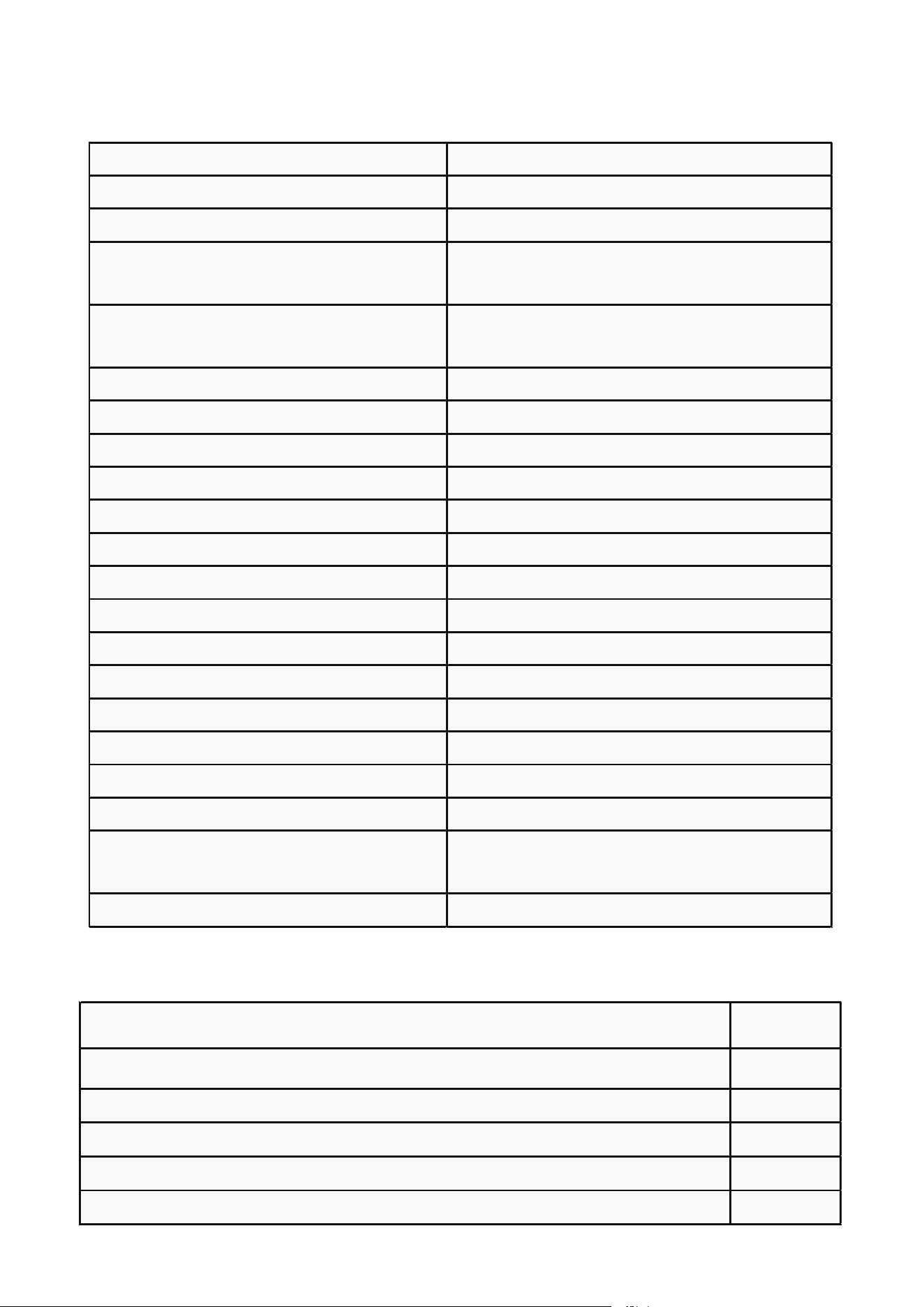
Name Medical Refrigerator
Model KM-PHR-45C
External dimensions (WD H) (inches) 24.2-23.4-31.9
Internal dimensions (WD H) (inches) 19.9-18.4-24.4
Effective volume 4.45 cu.ft. (approx.)
Door Transparent glass door
Foaming agent Cyclopentane
Shelf Plastic-dipped steel wire shelf (3 pcs.)
Load-bearing capacity per shelf 52.9 lbs. (approx.)
Cooling mode Air cooling cycle
Outer/inner plate Painted steel plate/painted steel plate
Condenser/evaporator Built-in/built-in
Temperature controller Computer control system
Refrigerant R600a
Lighting LED lamp
Net weight 94.8 lbs. (approx.)
Rated power supply 115V~/60Hz
Current 2.0A
Type of protection against electric
shock
I
Sound Level (dB) ≤45dB
Packing List Quantity
Instructions 1
Key 2
Accessory Bag 1
Steel Wire Shelf, including Mounting 3
Handle and Accessory Bag 1
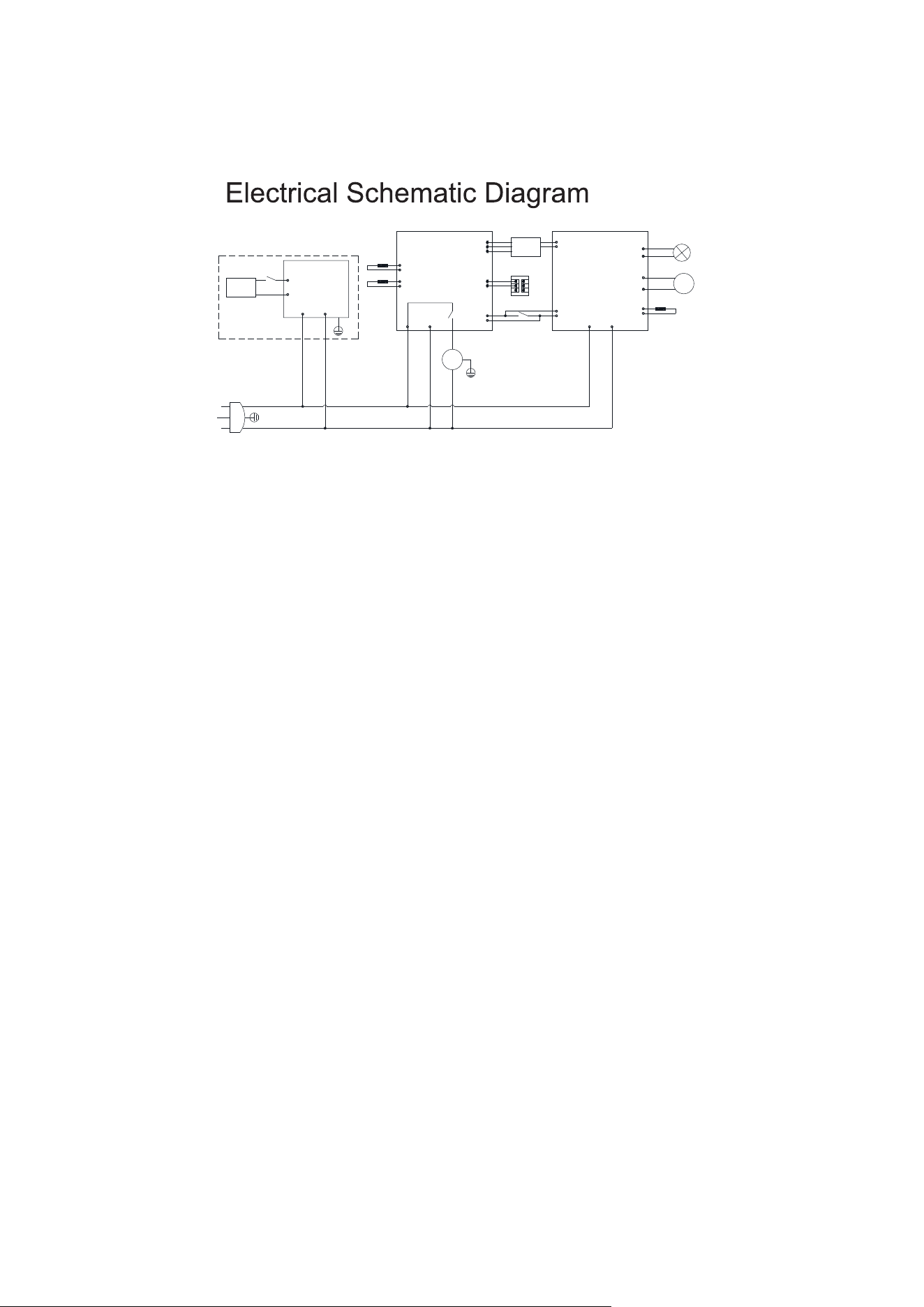
AC 115V
wire
Supply
Controller
board
Temperature
M
~
Compressor
LED lamp
Refrigeration fan
Master control
Control sensor
Temperature sensor
Defrost sensor
M
-
Switching Power
Door heating
Switch
Door heating
(optional)
Alarm Terminal block
USB Panel
Door Switch
Normally open
Common
( Optional)

LIMITED WARRANTY
Koolmore Supply, Inc. extends a limited warranty to the original purchaser, guaranteeing that this Koolmore
product is free from manufacturing defects in material or workmanship for one year from the date of
purchase.
Should you discover any such defect within the warranty period, Koolmore Supply, Inc., reserves the right to
repair or replace the product without charge, or to cover the cost of replacement parts and repair labor needed
to correct defects present at the time of purchase or resulting from regular usage, when the appliance has been
installed, operated, and maintained as per the instructions provided.
At its sole discretion, Koolmore Supply Inc. may decide to replace the product. In such an event, your replace-
ment appliance will carry the warranty for the remaining term of the original unit's warranty period.
This warranty is valid exclusively to the original purchaser of the product and only applicable within the United
States. The warranty commences from the date of original consumer purchase. Proof of the original purchase
date will be required to obtain service under this warranty.
Under this limited warranty, your sole and exclusive remedy will be product repair, as outlined above. All
services must be provided by a Koolmore-designated service company.
To claim warranty or request repair service:
Email suppor[email protected]. Please include your name, address, phone number, warranty repair request,
and a copy of your proof of purchase receipt. Alternatively, visit koolmore.com and use the contact us page. A
Koolmore customer service representative will promptly arrange service for your appliance.
We thank you for choosing Koolmore.
WARRANTY EXCLUSIONS
This limited warranty will not cover:
1. Failure of the product to perform during power failures or interruptions,
or due to inadequate electrical service.
2. Damage incurred during transportation or handling.
3. Damage caused by accidents, vermin, lightning, winds, fire, floods, or acts of God.
4. Damage resulting from accidents, alterations, misuse, abuse, improper installation, repair, or mainte-
nance. This includes using any external device that alters or converts the voltage or frequency of
electricity.
5. Unauthorized product modifications, repairs by unauthorized centers, or use of non-approved
replacement parts.
6. Abnormal cleaning and maintenance not aligned with the user's manual.
7. Use of incompatible accessories or components.
8. Any costs associated with repairs or replacements under these excluded circumstances shall be the
responsibility of the consumer.
WARRANTY