Dual 150 Ultrasonic Cool Mist Humidier
Product Series: Dual 150
Model: LUH-D302-WUS, LUH-D302-BUS
Questions or Concerns?
Please contact us Mon–Fri, 9:00 am–5:00 pm PST/PDT
at [email protected] or at 1-888-726-8520.
USER MANUAL
SAFETY INFORMATION
• Only use the humidier as
described in this manual.
• Place the humidier and cord so
that it will not be knocked over.
Do not place near large pieces of
furniture or in high-trac areas.
• When not in use, turn the humidier
o and disconnect from power by
removing the plug from the outlet.
• Do not use the humidier in wet
environments.
• Keep the humidier out of reach
from children.
• Do not open the base or remove
the water level sensor for self-
servicing.
• Always unplug your humidier from
the power outlet before cleaning
your humidier or detaching the
water tank from the humidier base.
• Always make sure to place the
humidier on a at, level surface
before operation.
• Only ll the water tank with clean
water. Never ll the water tank with
any other liquids.
• Do not place the humidier near
sources of heat, such as stovetops,
ovens, or radiators.
• Do not place the humidier directly
on oors, carpets, or rugs.
To reduce the risk of re, electric shock, or other injury, follow all instructions
and safety guidelines.
General Safety
• Do not use other items as
replacement parts for this product.
• Do not cover the nozzle while
the humidier is on. Doing so may
damage the humidier.
• Remove the water tank from the
base before moving the humidier.
• Do not immerse the humidier
base, power cord, or plug in water.
If the humidier is damaged or is
not functioning properly, stop using
it and contact Customer Support
immediately (see page 10).
• This humidier is not to be used
by persons (including children)
with reduced physical, sensory
or mental capabilities, or lack of
experience and knowledge, unless
they have been given supervision
or instruction concerning use of the
appliance by a person responsible
for their safety.
• Supervise children when they are
near the humidier.
• Children should not clean or
perform maintenance on the
humidier without supervision.
• Children should be supervised to
ensure that they do not play with
the humidier.
• Household use only. Not for
commercial use.
READ AND SAVE THESE
INSTRUCTIONS
Power & Cord
• Ensure that the plug ts properly into
a polarized socket.
• Do not handle the power cord or
plug with wet hands. Keep the plug
and power cord away from liquids.
• Your humidier has a polarized plug
(one prong is wider than the other),
which ts into a polarized outlet only
one way. This is a safety feature to
reduce the risk of electric shock. If
the plug does not t, reverse the
plug. If it still does not t, do not
use the plug in that outlet. Do not
bypass this safety feature.
• If the power supply cord is damaged,
it must be replaced by Arovast
Corporation or similarly qualied
persons in order to avoid an electric
or re hazard. Please contact
Customer Support (page 10).
SAFETY INFORMATION (CONT.)
Do not add supplemental
water treatment liquids into the
water tank or base chamber.
This will damage the humidier
and cause leaks.
Caution: Risk of Leaks
and Electric Shock
1 × Ultrasonic Cool Mist Humidier
1 × Water Filter Sponge (1 Pre-Installed)
1 × Cleaning Brush
1 × User Manual
Specifications
Package Contents
Power Supply AC 120V, 60Hz
Rated Power 25W
Water Tank
Capacity
0.79 gal / 3 L
Max Run Time
Up to 25 hours on
minimum mist setting
Note: The humidier may
run for a longer or shorter
time depending on the
environmental temperature
and humidity.
Noise Level < 28dB
Eective
Range
107–290 ft² / 10–27 m²
Dimensions
7.2 × 8.1 × 11.6 in /
18.3 × 20.6 × 29.4 cm
Weight 3 lb / 1.38 kg
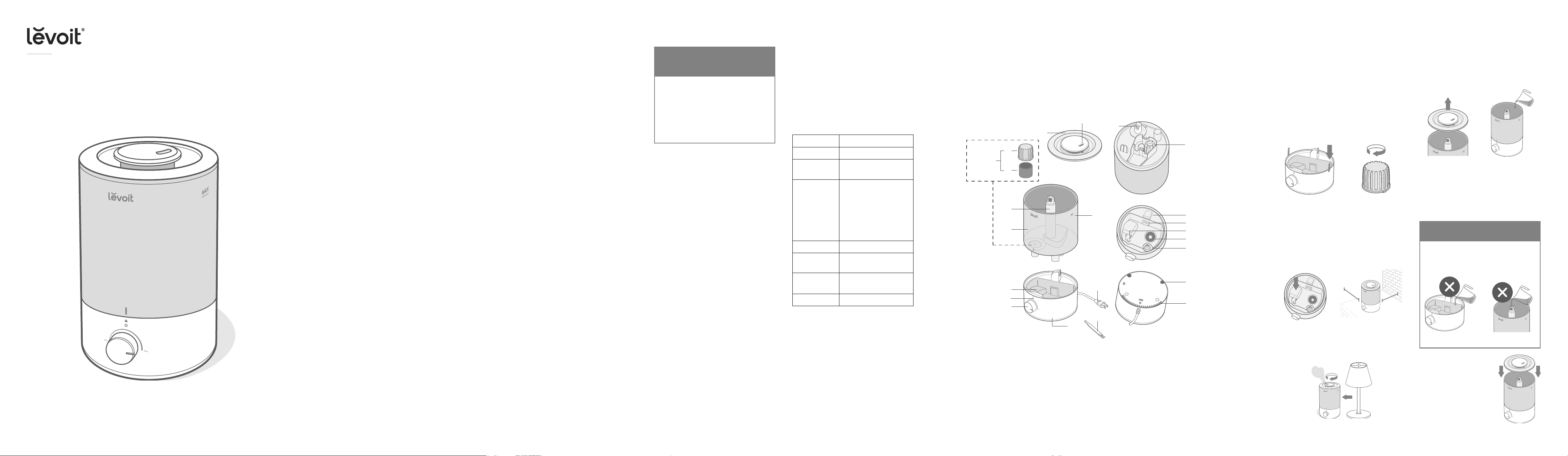
GETTING TO KNOW YOUR HUMIDIFIER
A. Nozzle
B. Water Tank Cover
C. Water Filter Housing
D. Water Filter
E. Mist Tube
F. Water Tank
G. Float
H. Rell Indicator Light
I. Control Knob
J. Base
K. Cleaning Brush
L. Power Cord
M. Max Water Line (Tank)
N. Water Outlet Valve
O. Noise Silencer
P. Air Outlet
Q. Max Water Line (Base)
R. Float Brackets
S. Transducer
T. Secondary Float
U. Feet
V. Air Inlet
CONTROLS
Control Knob
• Rotate clockwise to turn on the
humidier and to adjust the mist level.
• Rotate counterclockwise to turn o
the humidier.
Rell Indicator Light
• The red light turns on when the water
tank is empty. Rell the water tank (see
page 5).
• The red light turns o when the water
tank is lled.
Note:
There is a clicking sound when
the humidier turns on/o.
2 3 4 5
A
B
N
G
H
L
K
U
T
S
D
O
M
F
E
C
J
I
P
Q
R
V
Water tank, upside down
The water
tler
assembly
GETTING STARTED
1. Remove all packaging.
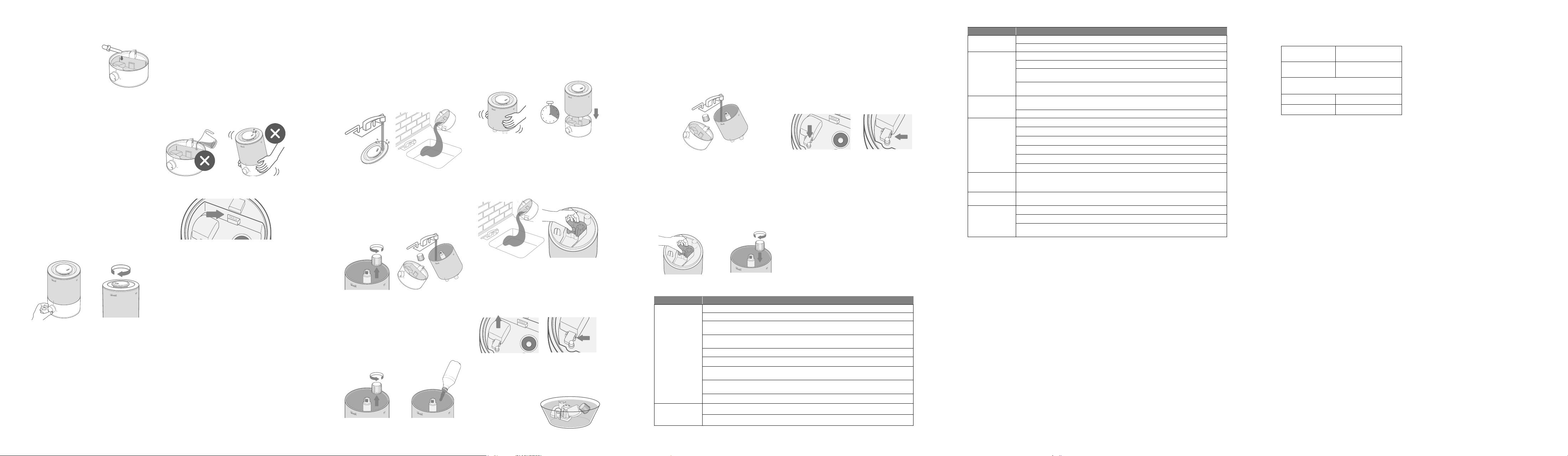
2. Take the water tank o of the base and
remove all tape. [Figure 1.1]
3. Rinse and reassemble all parts before rst use
(see Cleaning, page 6).
Figure 1.3
Figure 1.1
Figure 1.4
Figure 1.5
Figure 1.2
Note:
• Check to make sure that the water lter
is correctly in place. If not, then rotate
the lter clockwise to secure it in place.
[Figure 1.2]
4. Choose a hard, at location for the humidier
at least 12 inches / 30 cm away from any
walls. The surface must be water-resistant.
[Figure 1.4]
5. Mist should be directed away from walls,
furniture, bedding, and appliances. [Figure 1.5]
• Check to make sure that the oat is
securely in place. [Figure 1.3]
12 in /
30 cm
12 in /
30 cm
Filling & Refilling
1. Turn the humidier o.
2. Remove the water tank cover by holding the
nozzle and pulling upward. [Figure 1.6]
3. Fill the tank with room-temperature water.
[Figure 1.7]
Figure 1.6 Figure 1.7
4. Replace the water
tank cover.
Note:
• We recommend using puried or distilled water
to ll the tank.
• Do not ll past the tank’s max water line.
• Do not ll with hot water.
Figure 1.8 Figure 1.9
• Do not add water directly into the base
chamber. [Figure 1.8]
• Do not add water through the mist tube.
[Figure 1.9]
CAUTION
Note:
Make sure the water tank is clean before lling.
Figure 1.10
Note:
Make sure the
nozzle on the water tank
cover is placed over
the mist tube, or the
humidier may not work
correctly. [Figure 1.10]
Terms & Policy
Arovast Corporation (“Arovast”) warrants this
product to the original purchaser to be free from
defects in material and workmanship, under
normal use and conditions, for a period of 2 years
from the date of original purchase.
Arovast agrees, at our option during the
warranty period, to repair any defect in material
or workmanship or furnish an equal product in
exchange without charge, subject to verication
of the defect or malfunction and proof of the date
of purchase.
There is no other express warranty. This warranty
does not apply:
• If the product has been modied from its
original condition;
• If the product has not been used in
accordance with directions and instructions
in the user manual;
• To damages or defects caused by accident,
abuse, misuse or improper or inadequate
maintenance;
• To damages or defects caused by service
or repair of the product performed by an
unauthorized service provider or by anyone
other than Arovast;
• To damages or defects occurring during
commercial use, rental use, or any use for
which the product is not intended;
• To damages or defects exceeding the cost
of the product.
Arovast will not be liable for indirect, incidental, or
consequential damages in connection with the use
of the product covered by this warranty.
This warranty extends only to the original consumer
purchaser of the product and is not transferable to
any subsequent owner of the product regardless
of whether the product is transferred during the
specied term of the warranty.
This warranty does not extend to products
purchased from unauthorized sellers. Arovast’s
warranty extends only to products purchased from
authorized sellers that are subject to Arovast’s
quality controls and have agreed to follow its
quality controls.
All implied warranties are limited to the period of
this limited warranty.
This warranty gives you specic legal rights
and you may also have other rights which
vary from state to state. Some states do not
allow the exclusion or limitation of incidental or
consequential damages, so the above limitation or
exclusion may not apply to you.
If you discover that your product is defective within
the specied warranty period, please contact
Customer Support via [email protected].
DO NOT dispose of your product before
contacting us. Once our Customer Support Team
has approved your request, please return the
product with a copy of the invoice and order ID.
Every Levoit product automatically includes a
2-year limited warranty. To make the customer
support process quick and easy, register your
product online at www.levoit.com/warranty.
This warranty is made by:
Arovast Corporation
1202 N. Miller St., Suite A
Anaheim, CA 92806, USA
Product
Dual 150 Ultrasonic
Cool Mist Humidier
Model
LUH-D302-WUS,
LUH-D302-BUS
For your own reference, we strongly recommend that
you record your order ID and date of purchase.
Date of Purchase
Order ID
WARRANTY INFORMATION
CUSTOMER SUPPORT
If you have any questions or concerns about
your new product, please contact our helpful
Customer Support Team.
Arovast Corporation
1202 N. Miller St., Suite A
Anaheim, CA 92806, USA
Email: [email protected]
Toll-Free: 1-888-726-8520
Mon–Fri, 9:00 am–5:00 pm PST/PDT
Support Hours
*Please have your order invoice and order ID
ready before contacting Customer Support.
A4_23G11 US
76 8 9 10
Figure 1.11
Note:
For best results, we
recommend using Water-
soluble essential oil.
5. Optionally, add 10–15
drops of essential oil into
the base chamber for
aromatherapy. [Figure 1.11]
Filling & Refilling (cont.)
USING YOUR HUMIDIFIER
1. Plug in the humidier. Rotate the Control Knob
clockwise to turn the humidier on. Adjust the
knob to your desired mist level. [Figure 2.1]
2. Rotate the nozzle to adjust the direction of the
mist. [Figure 2.2]
3. When your room has reached your preferred
humidity level, turn the humidier to a lower
setting, or turn it o.
4. Rotate the Control Knob counterclockwise to
turn the humidier o.
1. Remove the water lter from the tank by
rotating it counterclockwise and lifting it out.
[Figure 3.5]
2. Fill the tank with 3 US cups / 710 mL of
distilled white vinegar. [Figure 3.6]
Figure 2.1 Figure 2.2
Note: If there is no water in the tank or the
tank is removed, the humidier will stop
misting and the Rell Indicator light will turn
on. Rell the tank and properly place it on the
base to use your humidier.
Figure 2.3
Figure 2.4
Figure 2.5
Important Tips
Your humidier must have the correct level of
water in the base chamber to work properly. If
there is too much water in the base chamber,
the humidier cannot create mist.
• Never pour water directly into the base
chamber. [Figure 2.3]
• Only add water to the water tank. The
humidier will automatically release the correct
amount of water into the base chamber.
Note: The max water line is only for this purpose.
Do not pour water into the base chamber.
• Avoid moving or shaking the humidier.
[Figure 2.4] This may cause the water tank to
release too much water into the base chamber.
• Before moving the humidier, turn it o,
unplug it, and remove the water tank.
• If your humidier doesn’t produce mist
correctly, check the max water line to see if
there is too much water in the base chamber.
Pour out extra water if water is over the max
line. [Figure 2.5]
Figure 3.2
Figure 3.9 Figure 3.10
Figure 3.1
Figure 3.7 Figure 3.8
Figure 3.3
Figure 3.5 Figure 3.6
Figure 3.4
Figure 3.14
Figure 3.15
CARE & MAINTENANCE
Note:
• All maintenance should be done on a water-
resistant surface, such as a kitchen counter.
• Change the water daily to avoid bacteria growth.
• Use a tissue or cloth to clean the nozzle regularly.
• If not using the humidier for 3 days or longer,
do not leave water inside. Clean and dry the
humidier instead.
Note: When pouring out water, hold
down the oat to ensure that it does
not fall out of the base chamber.
Note:
• Never immerse the base in water or liquid.
• Do not use detergents to clean the humidier.
• Avoiding water or liquid going into the air
outlet when cleaning the base chamber.
Cleaning
Descaling Your Humidifier
You should clean your humidier every 3 days,
and when you’re ready to store it.
4. Remove the water lter assembly from the
tank by rotating it counterclockwise and lifting
it out. [Figure 3.3]
5. Rinse the tank, water lter assembly, and
base chamber with room temperature water.
[Figure 3.4]
1. Unplug the humidier.
2. Remove and rinse the water tank cover. [Figure 3.1]
3. Remove the water tank from the base and pour
out any water from the tank and base chamber.
[Figure 3.2]
Cleaning (cont.) Descaling Your Humidier (cont.)
3. Replace the tank cover and swish the vinegar
around the tank. [Figure 3.7]
4. Place the tank on the base and soak for
15–20 minutes. Vinegar will drain into the base
chamber and loosen scale (mineral buildup) in
the tank and in the base chamber (including the
transducer and oat). [Figure 3.8]
5. Remove the tank, remove the tank cover, and
pour out any vinegar. [Figure 3.9]
6. Flip the tank over and remove the noise
silencer. To remove the noise silencer, press
the release tabs and gently pull away from the
humidier. [Figure 3.10]
7. Remove the oat from the base chamber by
pulling up one end of the oat [Figure 3.11] and
pulling the shaft out from the oat brackets. One
side of the oat brackets is open (U-shaped) to
allow the shaft to be removed. [Figure 3.12]
8. Place the oat, water lter assembly, and noise
silencer in a small container. Fill with enough
vinegar to cover them. Soak for 15–20 minutes.
[Figure 3.13]
Figure 3.11
Figure 3.17
Figure 3.12
Figure 3.18
Figure 3.13
9. Use the cleaning brush and a soft cloth to
remove scale from all parts.
10. Rinse all parts until any vinegar smell is
completely gone. [Figure 3.14]
11. Dry all parts with a cloth. Make sure all parts are
completely dry before reassembling or storing.
Reassembling
1. Flip the water tank over and place the noise
silencer back into the tank. [Figure 3.15]
2. Place the water lter assembly back into the
tank and rotate it clockwise to secure it in
place. [Figure 3.16]
3. Place the oat back into the base chamber:
a. Make sure the correct side of the oat is
facing up. [Figure 3.17]
b. Insert the smaller prong into the closed
side of the oat brackets. [Figure 3.18]
c. Place the larger prong into the open
(U-shaped) side of the oat brackets.
4. Place the tank back on the base. Rell the
tank, if necessary.
5. Place the tank properly on the base and place
the tank cover on the water tank.
Storing
The Filter Assembly
Follow the cleaning instructions (see page 6) and
allow all parts to dry completely before storing.
Store in a cool, dry location.
If the lter assembly is damaged or water cannot ow
into the base chamber, for further assistance, contact
Customer Support (see page 10).
The water lter can prevent the big particles in
water from entering the base and polluting the mist.
Meanwhile, it can lter out the big particles so they
won’t get stuck in the valve causing leakage. We
suggest you change the lter regularly.
Figure 3.16
Problem Possible Solution
Little or no mist
comes out.
Turn the mist level to a higher setting.
Fill the water tank.
There may be too much water in the base chamber. Empty the base chamber. Rell the water tank
(not the base chamber) and place the water tank properly onto the base.
Make sure the air inlet on the bottom of the base is not blocked. The humidier should not be set on
carpet or other surfaces that may block the air inlet.
Make sure the nozzle is not blocked or clogged.
Make sure the humidier is on a level surface.
The water temperature may be too low. Turn the mist level to the highest setting and let the
humidier run for a while, then adjust to the desired setting.
If the water tank or base was washed with detergent, rinse thoroughly with clean water to remove
any detergent.
Clean the water lter assembly (see page 7) or replace the lter with a new one (see page 10).
Humidier doesn’t
turn on, or turns o
unexpectedly.
Plug in the humidier and turn it on.
Add puried or distilled water to the water tank.
Problem Possible Solution
Humidier produces
an unusual smell.
If the humidier is new, unplug and rinse all parts, then place in a cool, dry place for 12 hours.
Clean the water tank and base chamber (see Care & Maintenance, page 6).
Humidier makes
a loud or unusual
noise.
Make sure the water tank is properly in place (see Getting Started, page 5).
Set mist level to a lower setting.
Empty the base chamber. Rell the water tank (not the base chamber) and place the water tank
properly onto the base.
The humidier may be malfunctioning. Stop using the humidier and contact Customer Support (see
page 10).
White scale (mineral
buildup) appears
around the humidier.
We recommend using puried or distilled water to ll the humidier. Avoid using water with high
mineral content.
Clean the humidier (see Care & Maintenance, page 6).
Water leaks from the
humidier.
Make sure the silicone sealing ring around the water outlet valve is secure.
Avoid running the humidier in a room with high relative humidity.
Wipe any excess water o the top and bottom of the base.
Do not shake the humidier.
Make sure to place the humidier on a at, level surface.
Check the water tank for leaks. If there are leaks, contact Customer Support (see page 10).
Condensation forms
around humidier or
windows.
Humidity may be too high. Turn down the mist level, turn o the humidier, or open a door or window
in the room.
Mold grows inside
the humidier.
Clean the water tank and base chamber regularly (see Care & Maintenance, page 6).
Rell Indicator Light
turns on.
Fill the water tank.
Place the water tank properly on the base.
Clean the water lter (see page 6) or replace it with a new one. To request a new water lter, contact
Customer Support (see page 10).
FEDERAL COMMUNICATION COMMISSION INTERFERENCE STATEMENT – PART 18
FCC SDOC SUPPLIER’S DECLARATION OF CONFORMITY
This device complies with part 18 of the FCC Rules.
This equipment generates and uses ISM frequency energy and if not installed and used properly, that is in strict accordance with
the manufacturer’s instructions, may cause interference to radio and television reception. It has been type tested and found to
comply with limits for an ISM Equipment pursuant to part 18 of FCC Rules, which are designed to provide reasonable protection
against such interference in a residential installation. However, there is no guarantee that interference will not occur in a particular
installation. If this equipment does cause interference to radio or television reception, which can be determined by tuning the
equipment o and on, the user is encouraged to try to correct the interference by one or more of the following:
• Reorient the receiving antenna of radio or television.
• Relocate the equipment with respect to the receiver.
• Move the equipment away from the receiver.
• Plug the equipment into a dierent outlet so that the equipment and receiver are on dierent branch circuits.
Conduct only the user maintenance found in this manual. Other maintenance and servicing can cause harmful interference
and can void the required FCC compliance. The manufacturer is not responsible for any radio or TV interference cause by
unauthorized modication to the equipment. It is the responsibility of the user to correct such interference.
Arovast Corporation hereby declares that this equipment is in compliance with the FCC Part 18 Subpart B. The declaration of
conformity may be consulted in the support section of our Web site, accessible from www.levoit.com