USER GUIDE
Visit Our Website
SCAN ME
PyleUSA.com
Digital Musical Karaoke Keyboard

www.PyleUSA.com
2
READ ALL INSTRUCTIONS CAREFULLY BEFORE USING THIS PRODUCT.
RETAIN THIS OWNER’S MANUAL FOR FUTURE REFERENCE.
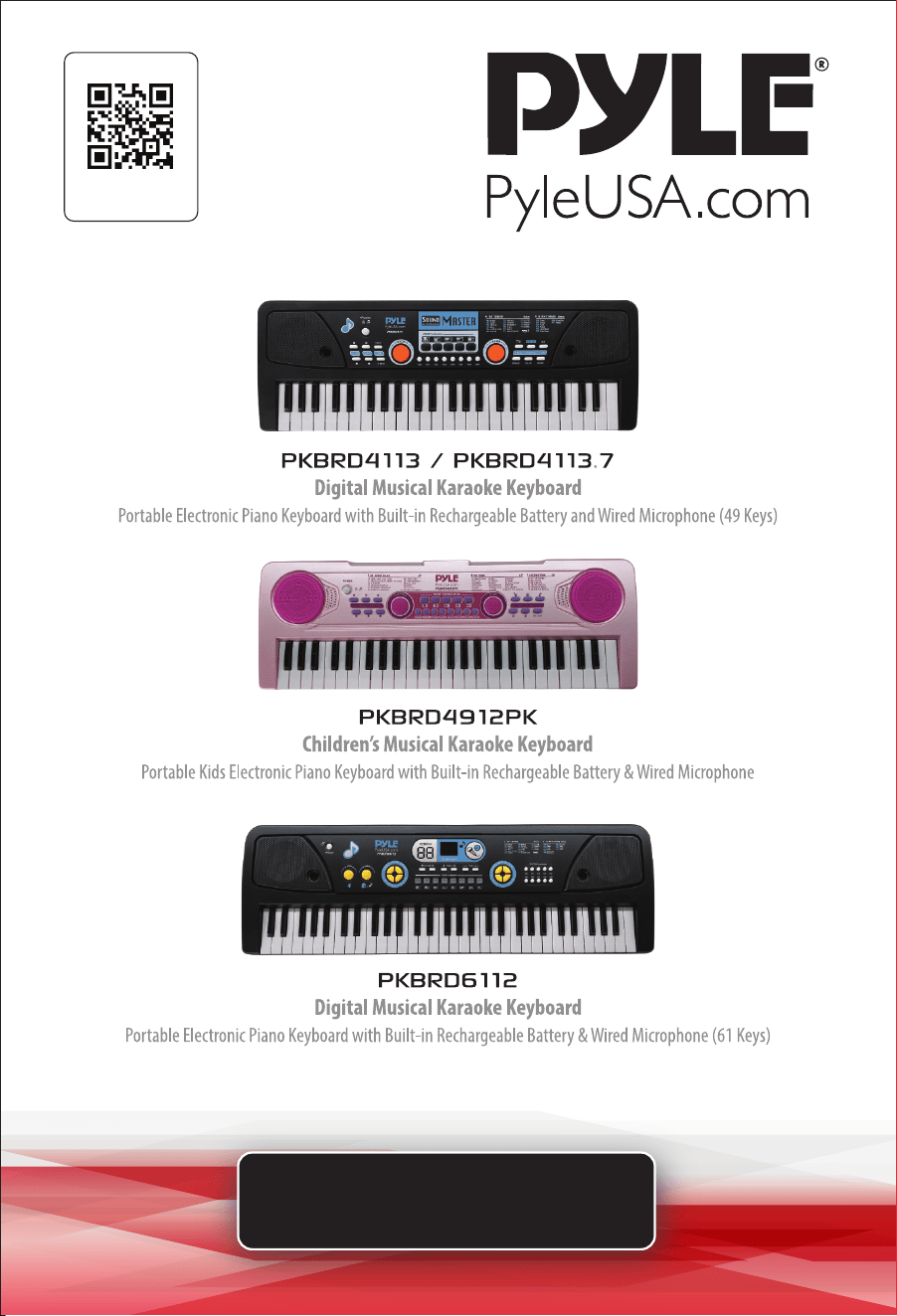
PKBRD4113 / PKBRD4113.7
Portable Electronic Piano Keyboard with Built-in Rechargeable Battery
and Wired Microphone (49 Keys)
Features:
• 2-in-1 Karaoke Keyboard: Play & Sing-Along!
• Includes Wired Handheld Microphone
• Compact & Portable Musical Piano
• Simple Electronic Plug-in Operation
• Portable Piano, Built-in Rechargeable Battery
• Integrated Button Drum Pad
• Built-in Full Range Stereo Speakers
• Connect & Stream Audio from External Devices
• Can Play Sound on Smartphones, Tablets, Laptops, Computers via Audio Cable
• Multiple Preset Selectable Keyboard Sound, Tone & Rhythm Styles
• Record & Playback Mode
• Adjustable Volume Control
• Auto Power O, Power Saving Function
• Perfect for Home Theater Living Room Performances
• Fun for Kids of All Ages: Children & Adults
Technical Specs:
• (49) Keyboard Keys
• (16) Preset Selectable Tones
• (8) Preset Selectable Audio Rhythms
• Audio Interface: Aux (3.5mm) Input Jack / Mic Input
• Max Sound Level: Up to 98 dB
• USB/Power Cable Length: 3.9’ ft.
• Construction Material: Engineered ABS
• Built-in Rechargeable Battery: 3.7V Li-ion
• Battery Type: Li-ion Battery
• Battery Life: 300times= about 2400hours
• Battery Weight: 36.5g
• Charging Time: 4 hours
• Power Supply: 110/240V (DC 5V)
• Power Adapter: DC-5V/1000mA
• Piano Dimensions (L x W x H): 20.8’’ x 7.1’’ x 2.1’’ -inches

www.PyleUSA.com
3
PKBRD4912PK
Portable Kids Electronic Piano Keyboard with Built-in Rechargeable Battery
and Wired Microphone
Features:
• 2-in-1 Karaoke Keyboard: Play & Sing-Along!
• Includes Wired Handheld Microphone
• Smart Piano Teaching Function with Piano Key Lighting
• Compact & Portable Musical Piano
• Simple Electronic Plug-in Operation
• Portable Piano, Built-in Rechargeable Battery
• Integrated Button Drum Pad
• Built-in Full Range Stereo Speakers
• Connect & Stream Audio from External Devices
• Works with Smartphones, Tablets, Laptops, Computers
• Multiple Preset Selectable Keyboard Sound, Tone & Rhythm Styles
• Adjustable Volume Control
• Record & Playback Mode
• Auto Power O, Power Saving Function
• Perfect for Home Theater Living Room Performances
• Fun for Kids of All Ages: Children & Adults
• Cute Pink Color with Fun Animal Sounds
Technical Specs:
• (49) Keyboard Keys
• (100) Preset Selectable Tunes
• (100) Preset Selectable Audio Rhythms
• (50) Preset Selectable Demos
• Audio Interface: Aux (3.5mm) Input Jack / Mic Input
• Max Sound Level: Up to 98 dB
• USB/Power Cable Length: 3.9’ ft.
• Construction Material: Engineered ABS
• Built-in Rechargeable Battery: 3.7V Li-iOn
• Battery Type: Li-ion Battery
• Battery Life: 300times= about 2400hours
• Battery Weight: 36.5g
• Charging Time: 4 hours
• Power Supply: 110/240V (DC 5V)
• Piano Dimensions (L x W x H): 20.8’’ x 7.0’’x 2.1’’ -inches

www.PyleUSA.com
4
PKBRD6112
Portable Electronic Piano Keyboard with Built-in Rechargeable Battery
and Wired Microphone (61 Keys)
Features:
• 2-in-1 Karaoke Keyboard: Play & Sing-Along!
• Includes Wired Handheld Microphone
• Compact & Portable Musical Piano
• Simple Electronic Plug-in Operation
• Portable Piano, Built-in Rechargeable Battery
• Integrated Button Drum Pad
• Built-in Full Range Stereo Speakers
• Connect & Stream Audio from External Devices
• Can Play Sound on Smartphones, Tablets, Laptops, Computers via Audio Cable
• Multiple Preset Selectable Keyboard Sound, Tone & Rhythm Styles
• Digital LCD Display
• Adjustable Volume Control
• Record & Playback Mode
• Music Sheet Stand Holder
• Auto Power O, Power Saving Function
• Perfect for Home Theater Living Room Performances
• Fun for Kids of All Ages: Children & Adults
Technical Specs:
• (61) Keyboard Keys
• (16) Preset Selectable Tones
• (10) Preset Selectable Audio Rhythms
• Audio Interface: Aux (3.5mm) Input Jack / Mic Input
• Max Sound Level: Up to 110 dB
• USB/Power Cable Length: 3.9’ ft.
• Construction Material: Engineered ABS
• Built-in Rechargeable Battery: 3.7V Li-ion
• Battery Type: Li-ion Battery
• Battery Life: 300times= about 2400hours
• Battery Weight: 36.5g
• Charging Time: 4 hours
• Power Supply: 110/240V
• Power Adapter: DC-5V/1000mA
• Piano Dimensions (L x W x H): 28.7’’ x 9.0’’ x 2.6’’ -inches

www.PyleUSA.com
5
WHAT'S IN THE BOX:
• Portable Piano Keyboard
• Wired Microphone
• USB Charging Power Cable
• UL Adapter
• Audio Cable
IMPORTANT NOTICE FOR SAFE USE
Please read the information below before use:
1. This product does not include a power adapter. A mobile phone adapter
with the following specications may be used:
• INPUT: 100-240V, 50/60Hz
• OUTPUT: DC 5V
• The adapter should supply 1000mA or above and have CE or UL approval.
The adapter used with this product should be regularly checked for potential
hazards, such as damage to the cable, plug, or casing.
Do not use a damaged adapter to avoid accidents.
2. The WHITE power ON/OFF button also serves as the charging indicator.
It will light up red when the keyboard is charging and turn o once the
built-in lithium-ion battery is fully charged. The battery will fully charge
after approximately 4 hours.
3. Charge the keyboard every two months when it is not in use to maintain
battery performance and prolong its service life.
4. This product must be charged by an adult.

www.PyleUSA.com
6
California Prop 65 Warning
WARNING:
This product contains Butyl benzyl phthalate (BBP) which is
known to the state of California to cause cancer birth defects
and other reproductive harm. Do not ingest.
For more info go to: www.P65warnings.ca.gov
5. The lithium-ion battery is permanently xed inside the keyboard and must
not be removed or exposed to re or high-temperature environments, as
this could lead to explosion hazards.
6. A USB cable is included with this product. If using a dierent USB cable,
ensure it is free from damage. Using the original adapter from a mobile
phone is recommended for this product. Low-quality USB cables or adapters
can cause noise and other hazards when using the keyboard.
7. This product is not suitable for children under 3 years of age.
8. Avoid playing loud music for extended periods, as it may cause hearing
damage.
9. Do not place this product in the following environments:
• Excessively humid or dusty areas
• High-temperature locations (near heat sources or enclosed heated areas)
• Near air conditioners, electric blankets, or exposed to direct sunlight
10. Avoid placing this product near televisions, radios, or other electronic
devices that may cause audio or video interference.
11. Unplug the adapter before cleaning this product or when it will not be
used for an extended period.
www.PyleUSA.com
7
ILLUSTRATION
POWER SUPPLY
DC Adapter: Use a DC adapter with a USB connector and voltage output of
DC 5V, with a minimum current of 1000mA. Using an adapter with a dierent
voltage may cause malfunctions.
ATTENTION:
Please charge the keyboard for 3-4 hours before rst use.
The power ON/OFF button will light up in red during charging and turn o
when the keyboard is fully charged. For safety, DO NOT use the keyboard
while charging.

www.PyleUSA.com
8
TURN ON FOR PLAYING
Press the power ON/OFF button and press any white or black key. If the
keyboard produces sound, it is functioning properly.
SLEEP FUNCTION
1. The keyboard will automatically enter sleep mode after 3 minutes of
inactivity.
2. To wake it, press any white or black key.
HOW TO PLAY
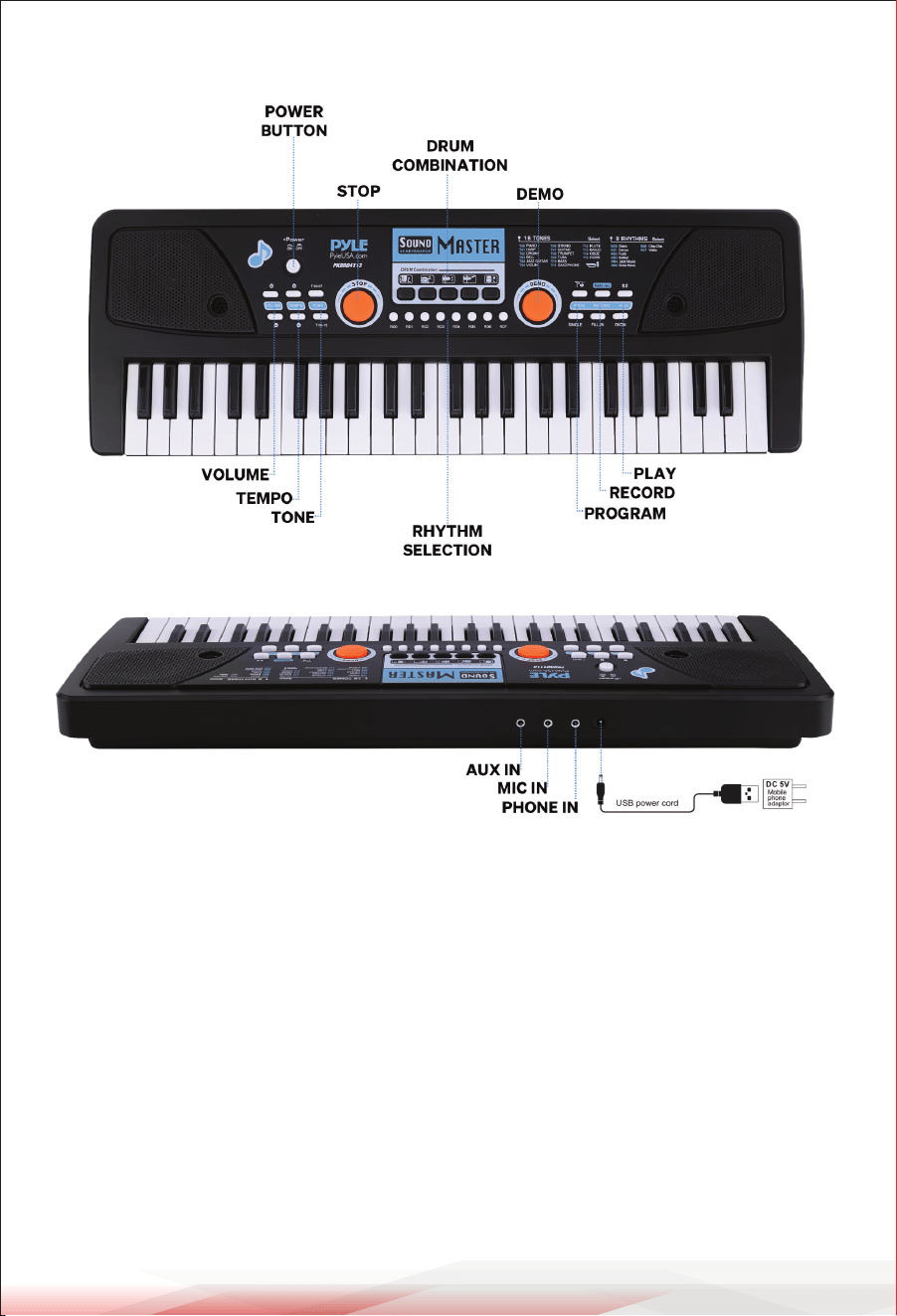
1. Power ON/OFF/Charging Indicator: The WHITE power ON/OFF button
also serves as the charging indicator. It will light up red during charging
and turn o when the lithium-ion battery is fully charged.
2. Volume Control: Press the + or - button to adjust the volume.
3. Tempo Control: Press the + or - button to adjust the tempo.
4. Demo: Press DEMO to play the rst song in a continuous cycle.
Press the STOP button to end playback. There are 6 demo songs included
for listening or fun.
5. Tone: The default tone setting is "piano."
• PKBRD4113/PKBRD4113.7/PKBRD6112: 16 tones are available, accessed
by pressing T00 to T15.
• PKBRD4912PK: 100 tones are available.
Press TONE and then use the + or - button to select.
6. Rhythm:
• PKBRD4113/PKBRD4113.7: 8 rhythms are available, accessed by pressing
R00 to R07.
• PKBRD6112: 10 rhythms are available, accessed by pressing R00 to R09.
• PKBRD4912PK: 100 rhythms are available.
Press RHYTHM and use the + or - button to select.
7. Drum Combination:
• PKBRD4113/PKBRD4912PK: Includes 5 percussion sounds, each assigned
to a dierent button.
• PKBRD6112: Includes 8 percussion sounds, each assigned to a dierent
button.

www.PyleUSA.com
9
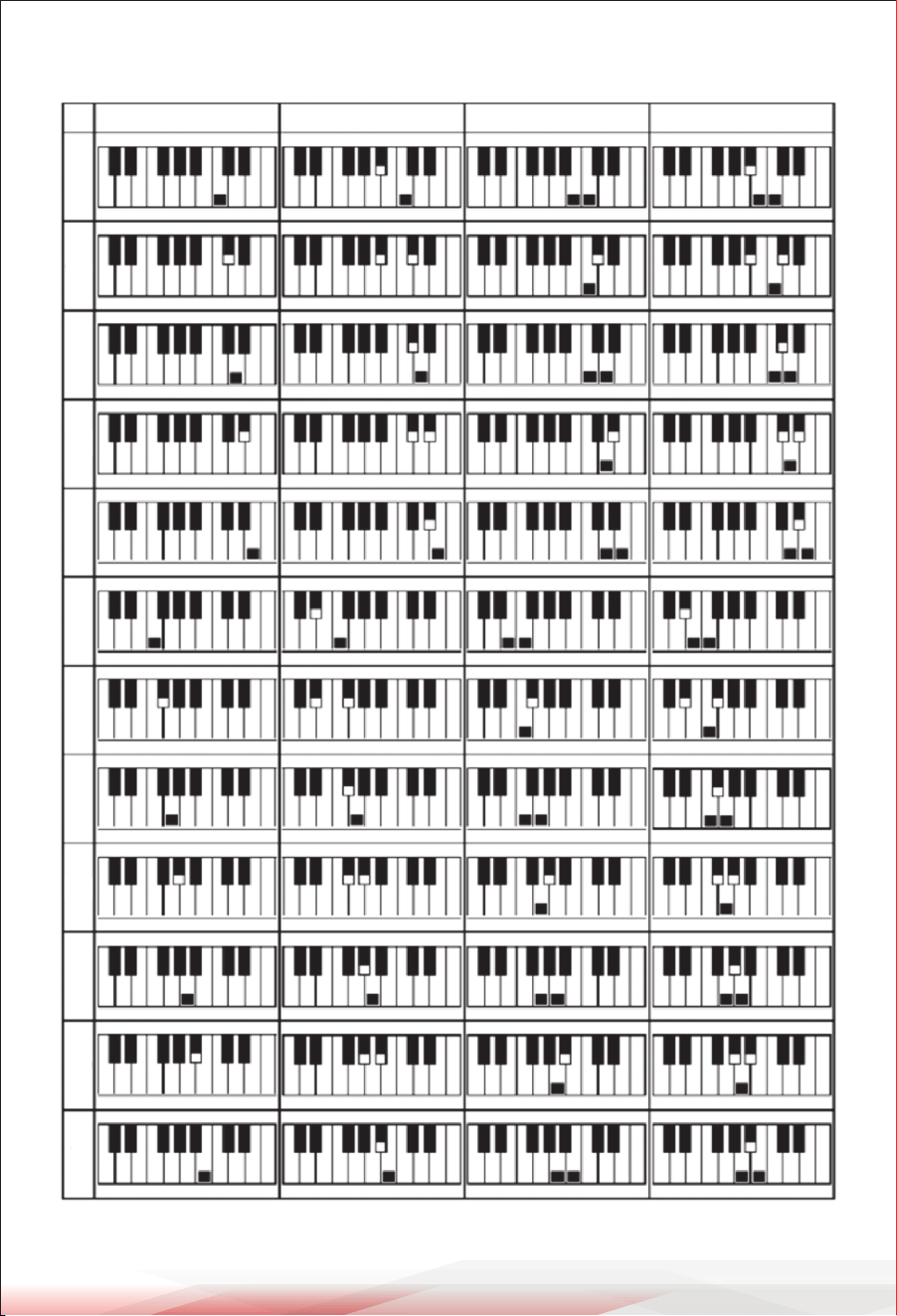
8. Single-Finger Chord: Select a rhythm by pressing R01-R10, then press
SINGLE to enter this mode. Play any of the 1-14 left-side keys to start the
chord.
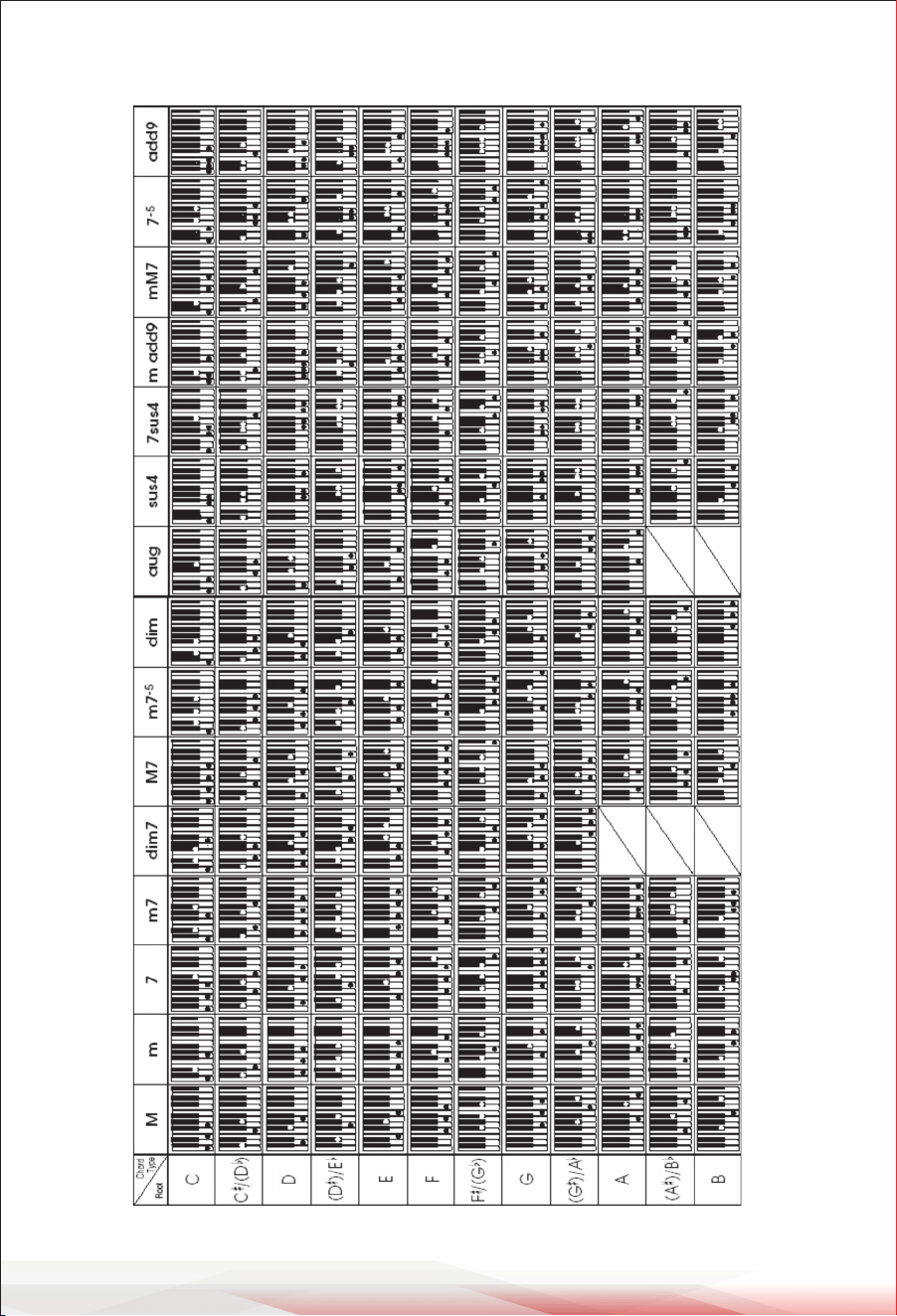
9. Fingered Chord: Select a rhythm by pressing R01-R10, then press FINGER
to enter this mode. Use any of the 1-20 left-side keys to play the chord.
10. Fill-In: Select a rhythm by pressing R01-R10, then press FILL-IN to add
percussion sounds to the rhythm.
11. OKON (One Key for One Note): Press OKON to play a demo background
music, allowing you to press any key & have it align with the demo music.
12. Follow: Press FOLLOW to play background music from the demo songs
and follow along by pressing keys in rhythm.
13. Program: Press PROG to enter programming mode. Press percussion
buttons to record up to 16 percussion beats in a sequence.
Note: Recording will not work if you enter fewer or more than 16 beats.
14. Record: Press REC to record your music.
15. Play: Press PLAY to play back the music you recorded.
16. Stop: To exit RHYTHM, PLAY, DEMO, SINGLE, FINGER, FOLLOW, or OKON
mode, press the STOP button.
17. Audio Input: The AUX-IN jack allows you to connect a mobile phone,
iPad, or MP3 player via an audio cable to play additional songs.
Adjust the volume on the connected device.
18. Microphone: Plug the microphone into the MIC jack located at the back
of the keyboard before use.
19. DC Jack: Connect the round pin of the USB power cord to the DC jack to
charge the keyboard.
COMMON PROBLEMS AND SOLUTIONS
PROBLEM SOLUTION
No sound after pressing
the power ON/OFF
Check if the DC adapter is correctly plugged in.
Ensure the keyboard is fully charged.
The keyboard stops
while playing.
Verify if the power supply is connected properly.
Check if the battery has sucient charge.

www.PyleUSA.com
10
OPERATION NOTICE
1. Avoid placing this product near other electronic appliances, such as radios,
televisions, or tuners, to prevent interference with audio or video signals.
2. Use the closest power socket to enable quick unplugging of the adapter in
case of malfunction or other emergencies.
3. Do not open or disassemble this product. There are no user-serviceable
parts inside. Refer all servicing to qualied service personnel. If an abnormal
situation arises, such as a burning smell, stop using the unit immediately.
CLEANING AND STORAGE
Cleaning
• Ensure the keyboard is powered o and unplugged before cleaning.
• Use a soft, dry cloth to gently wipe the keyboard’s surface.
Avoid using abrasive cleaners, as they may damage the nish.
• For stubborn dirt or smudges, lightly dampen the cloth with water or a mild
detergent solution. Do not allow moisture to enter any openings.
• Avoid using alcohol, solvents, or harsh chemicals, as they can damage the
keyboard.
Storage
• Store the keyboard in a cool, dry place, away from direct sunlight and heat
sources.
• Avoid storing it in areas with high humidity, as this can damage internal
components.
• If the keyboard will not be used for an extended period, fully charge the
battery before storing it. Recharge it every two months to maintain battery
health.
• Cover the keyboard to protect it from dust when not in use.
www.PyleUSA.com
11
SINGLE FINGER CHORD
CC#DD#EFF#GG#AA#B
M m 7 m7
www.PyleUSA.com
12
FINGERED CHORD

www.PyleUSA.com
13
FCC INFORMATION
WARNING:
Changes or modications not expressly approved by the party responsible for
compliance could void the user’s authority to operate the equipment.
NOTE: This equipment has been tested and found to comply with the limits
for a Class B digital device, pursuant to Part 15 of the FCC Rules. These limits
are designed to provide reasonable protection against harmful interference in
a residential installation. This unit generates, uses, and can radiate radio
frequency energy, and if not installed and used in accordance with the
instructions, may cause harmful interference to radio communications.
However, there is no guarantee that interference will not occur in a particular
installation. If this equipment does cause harmful interference to radio or
television reception, which can be determined by turning the equipment o
and on, the user is encouraged to try and correct the interference by one or
more of the following measures:
• Reorient or relocate the receiving antenna.
• Increase the separation between the equipment and receiver.
• Connect the equipment to an outlet on a circuit dierent from that to which
the receiver is connected.
• Consult the dealer or an experienced radio/TV technician for help.
This device complies with Part 15 of the FCC Rules. Operation is subject to
the following two conditions:
1. This device may not cause harmful interference.
2. This device must accept any interference received, including interference
that may cause undesired operation.
Register Product
Thank you for choosing PyleUSA. By registering your product,
you ensure that you receive the full benets of our exclusive
warranty and personalized customer support.
Complete the form to access expert support and to keep your
PyleUSA purchase in perfect condition.
Start Here
Model Number:
PKBRD4113
PyleUSA.com/pages/register

Questions or Comments?
We are here to help!
Phone: 1.718.535.1800
PyleUSA.com/ContactUs