+86-755-21612590 (China)
+1-833-629-4832 (North America)
+34 930 038 094 (Europe)
For Services and Support
TEL
EMAIL
WEBSITE
FACEBOOK
X
WWW.TOPDON.COM
@TOPDONOFFICIAL
@TOPDON_OFFICIAL
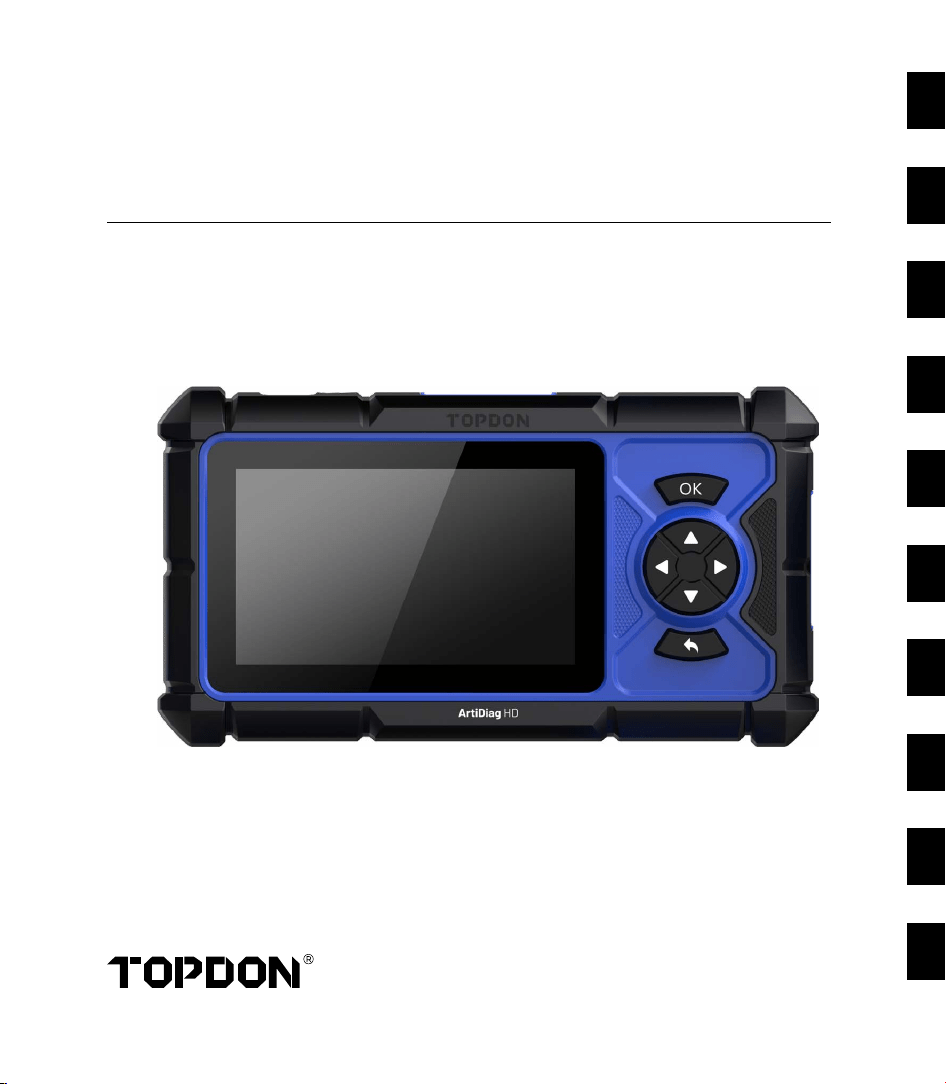
QUICK START GUIDE
HEAVY DUTY VEHICLES DIAGNOSTIC TOOL
01050913172125293337
EN
FR
ES
DE
RU
IT
PT
PL
NL
SV
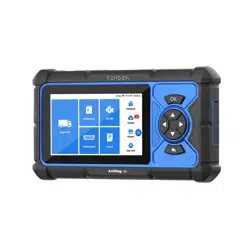
ArtiDiag HD

EN
01
1. Welcome
Thank you for purchasing the ArtiDiag HD, an automotive diagnostic tool. This quick user
guide will walk you through the basic setup and operation of the diagnostic tool. Please
carefully read all the instructions before use. Failure to do so may cause damage and/or
personal injury, and will void the product warranty.
For further information, please download the detailed multilingual user manual at https://
www.topdon.com/products/ArtiDiag-HD by clicking “Download” or scan the QR code
below.
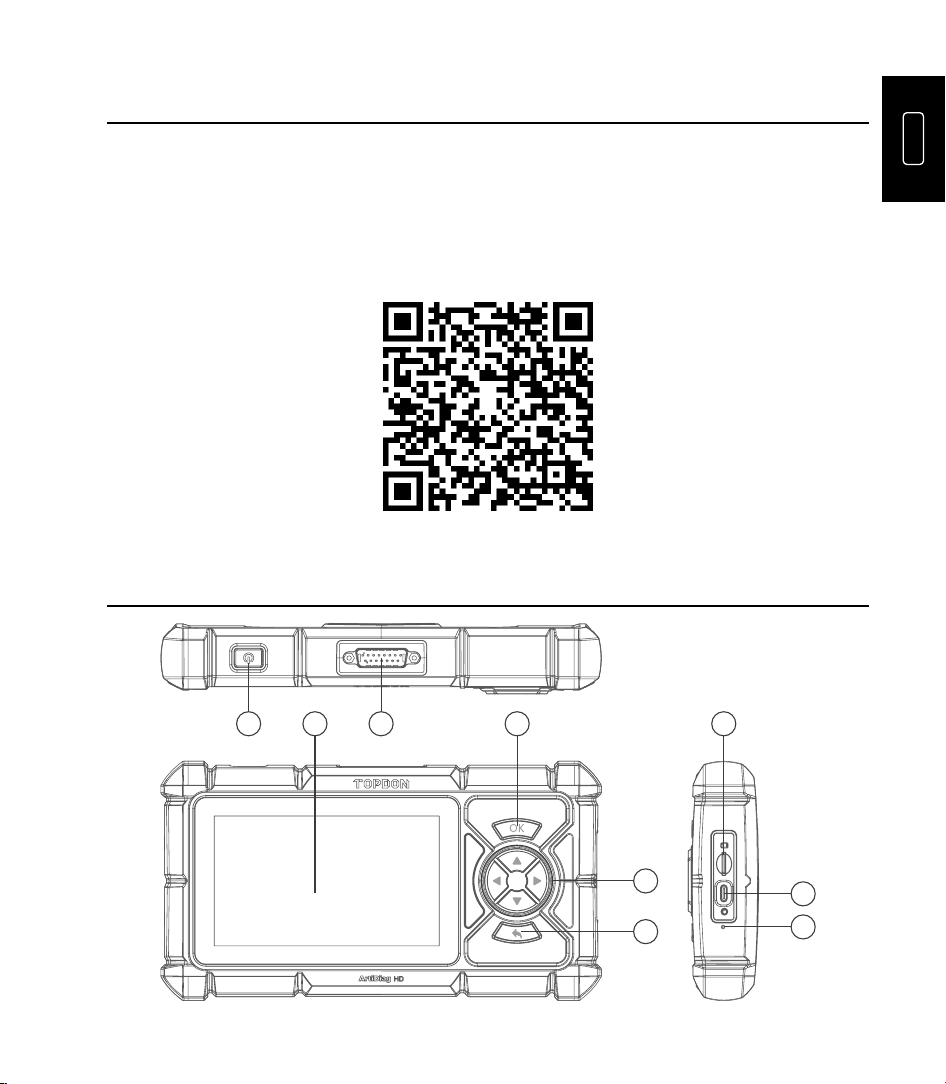
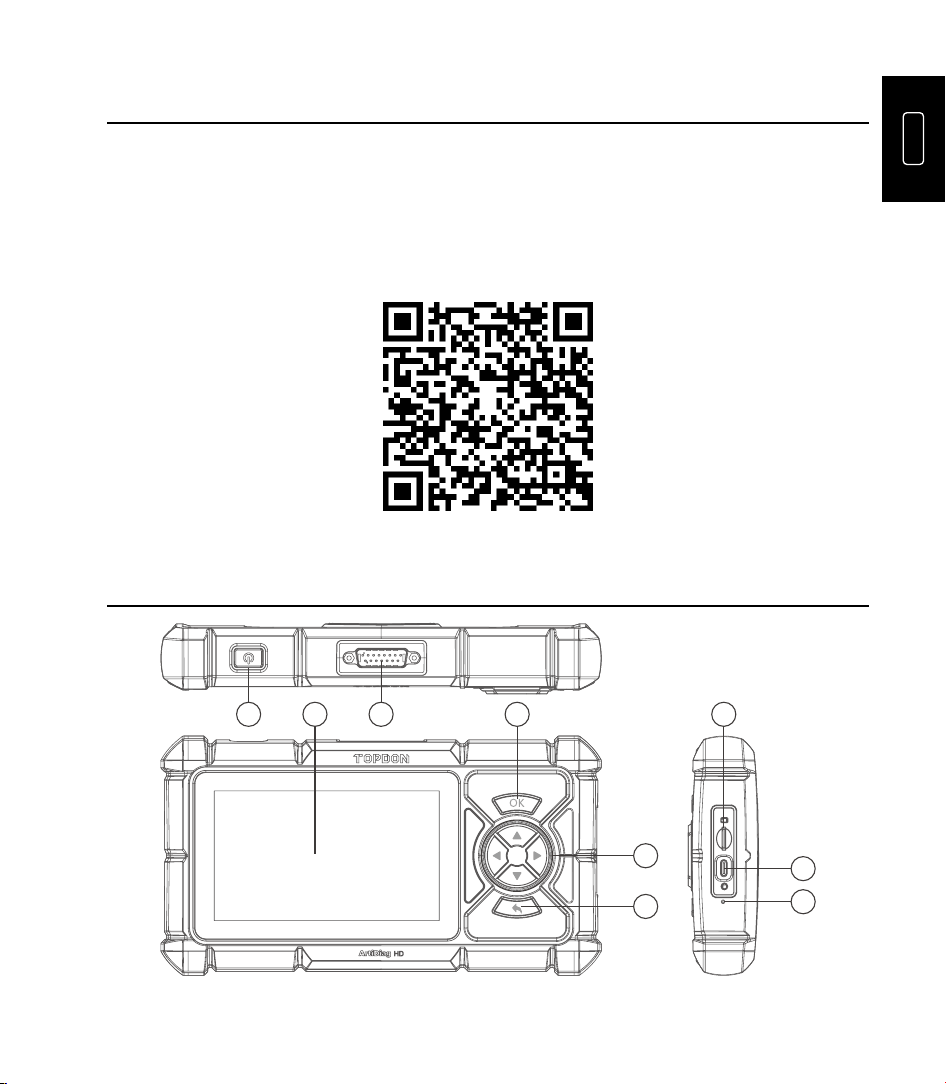
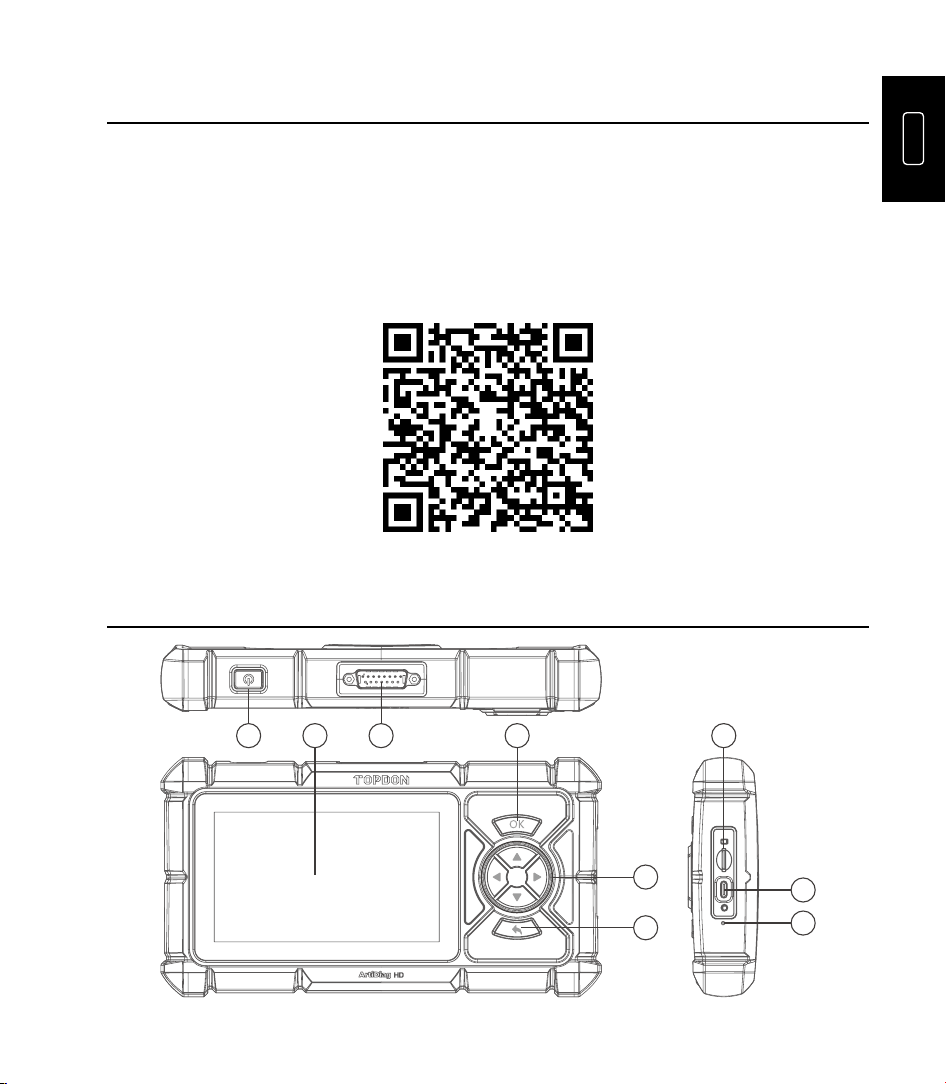
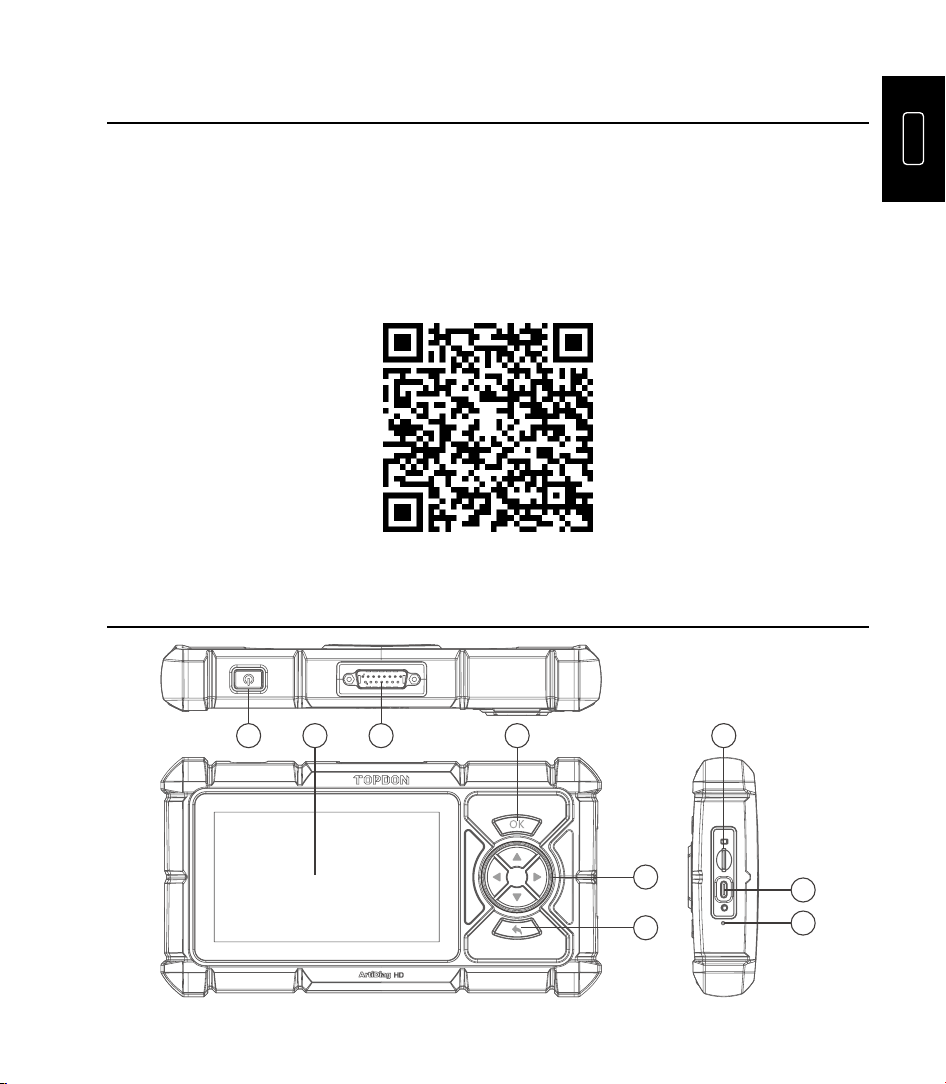
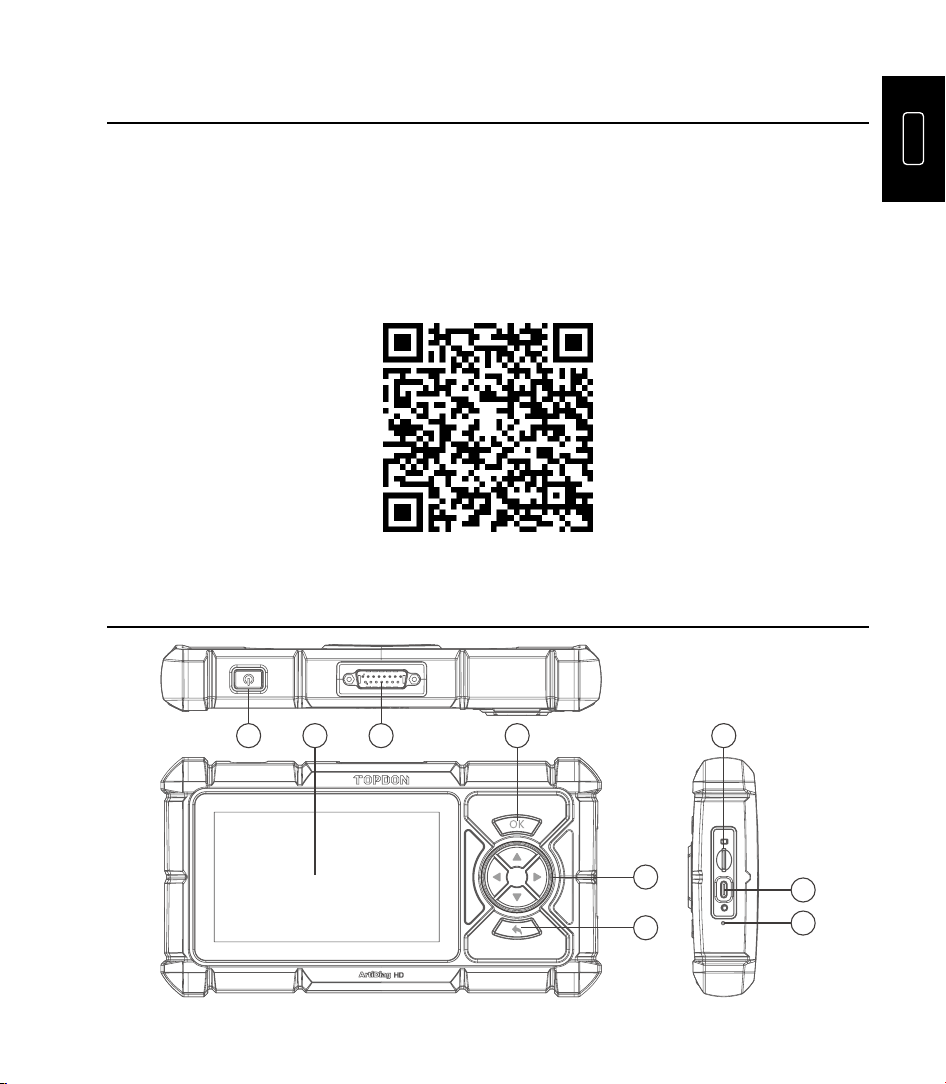
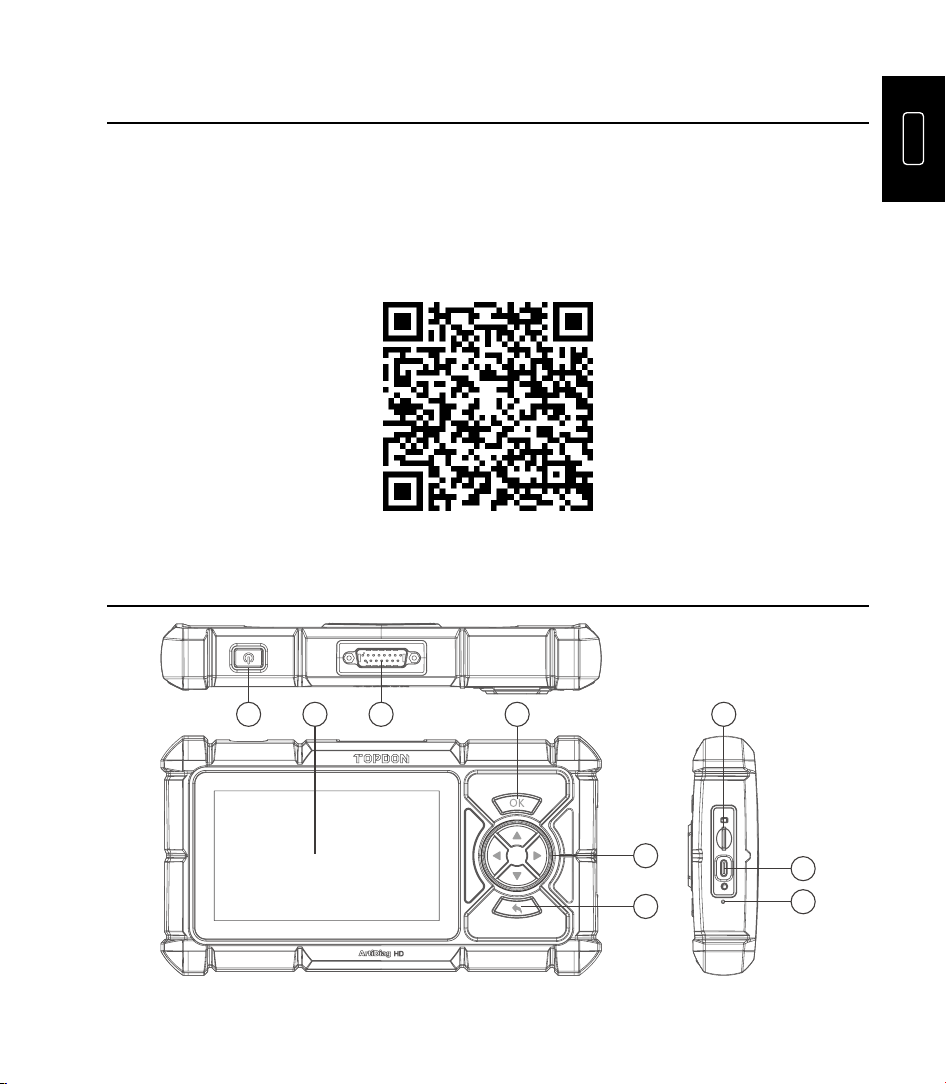
2. Product Descriptions
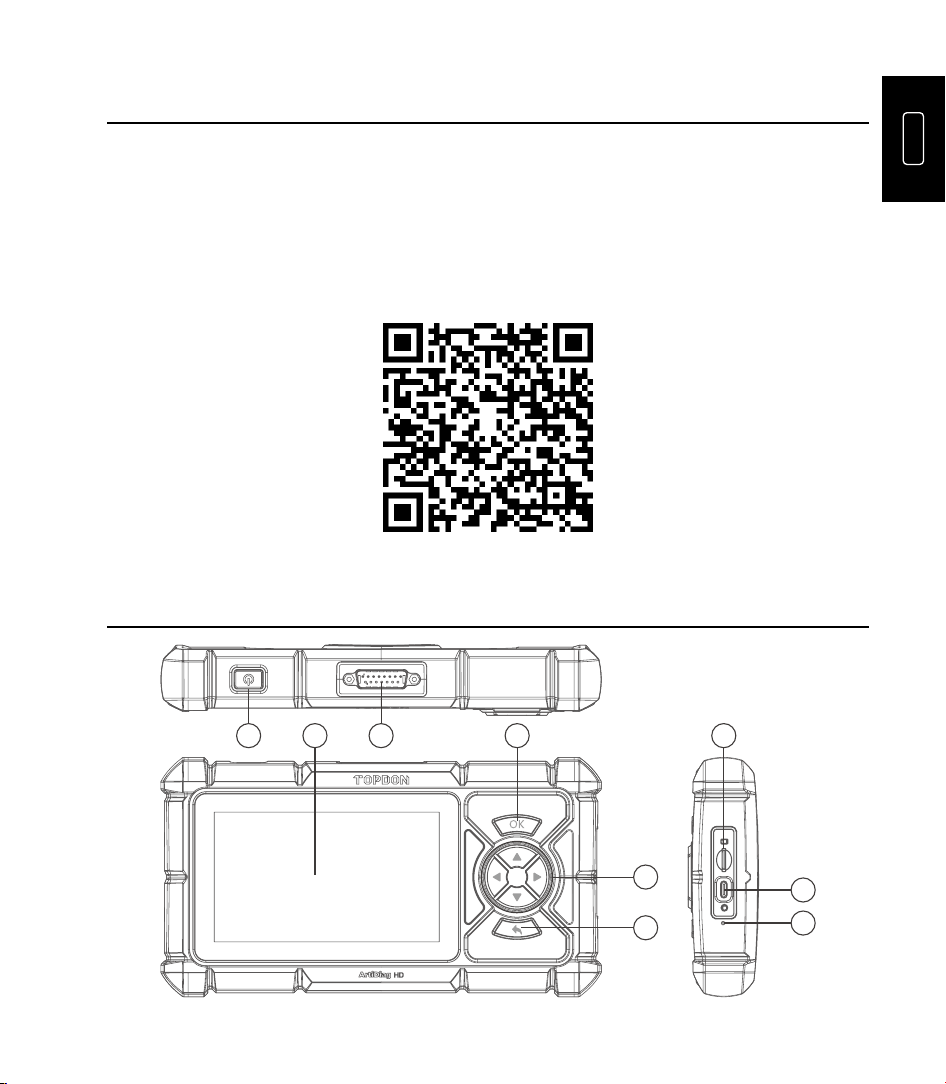
1 2 4 7
5
8
9
6
3

02
NO. Name Descriptions
1 Power Button
•
Press and hold for 3 seconds to power the tablet on or
off.
•
Press and hold for 8 seconds to perform a forced
shutdown if necessary.
•
Press the button to wake the screen or turn it off.
2 5" Touchable Screen Display test results and operational menus.
3
DB-15 Diagnostic
Connector
To connect to the diagnostic cable.
4 OK Button Press to confirm the operation or message.
5 Directional Buttons
Press to move the cursor or highlight in their respective
direction.
6 Return Button Press to go back to the previously viewed page.
7 TF Card Slot Supports storage expansion up to 128 GB.
8 USB-C Port For charging (maximum 5V/2.5A input).
9
Factory Reset
Button
Press to restore factory settings.
3. Preparation and Connection
3.1 Basics Setup
Hold the power button for 3 seconds to power on the tablet. Ensure the tablet is fully
charged beforehand.
Select the desired system language > configure the Wi-Fi connection > choose the
appropriate time zone > log in to an available account > access the home screen.
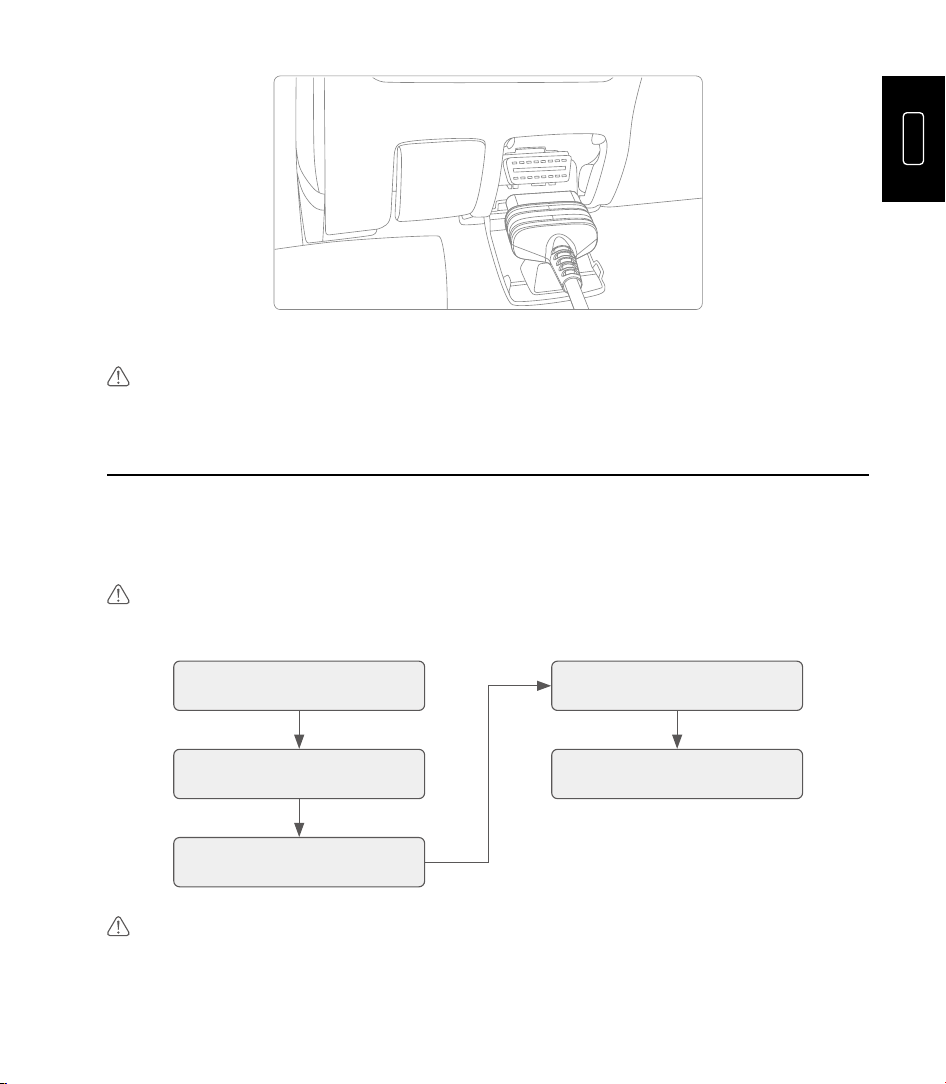
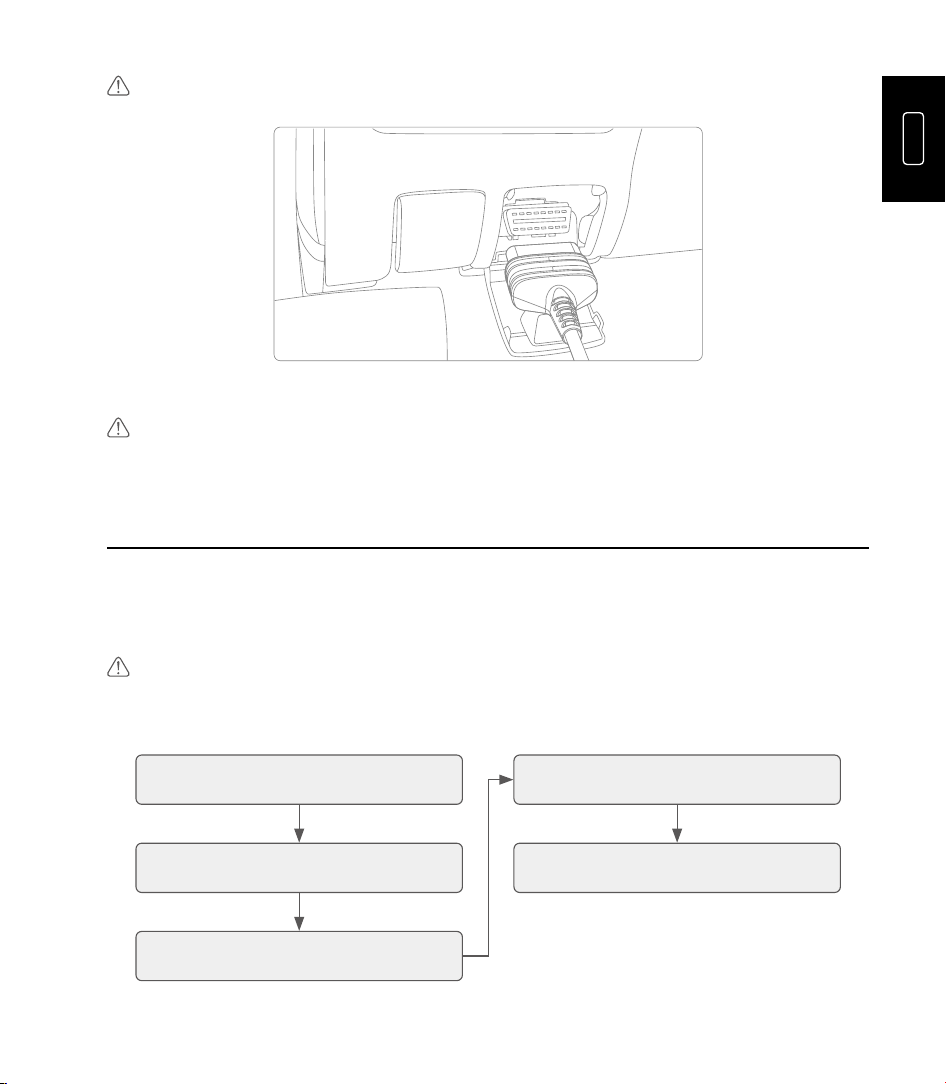
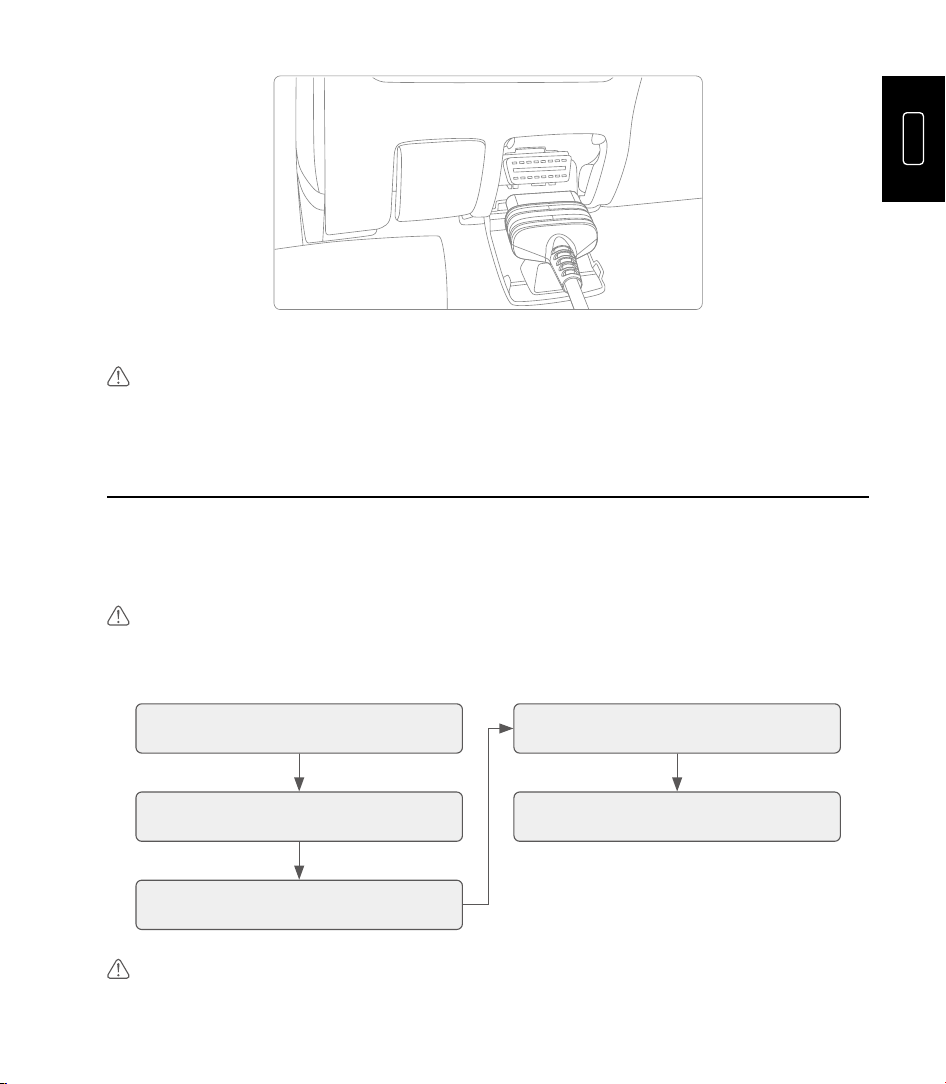
3.2 Vehicle Connection
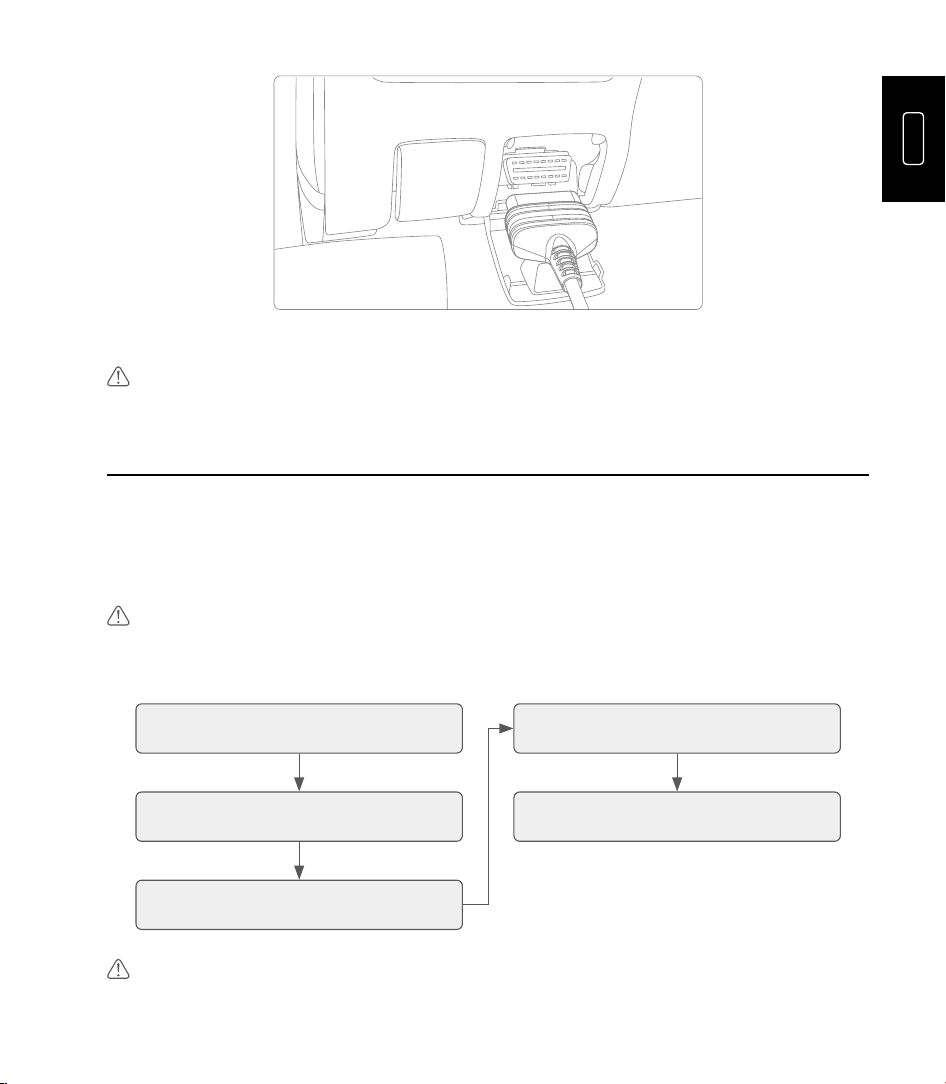
1. Turn the ignition off.
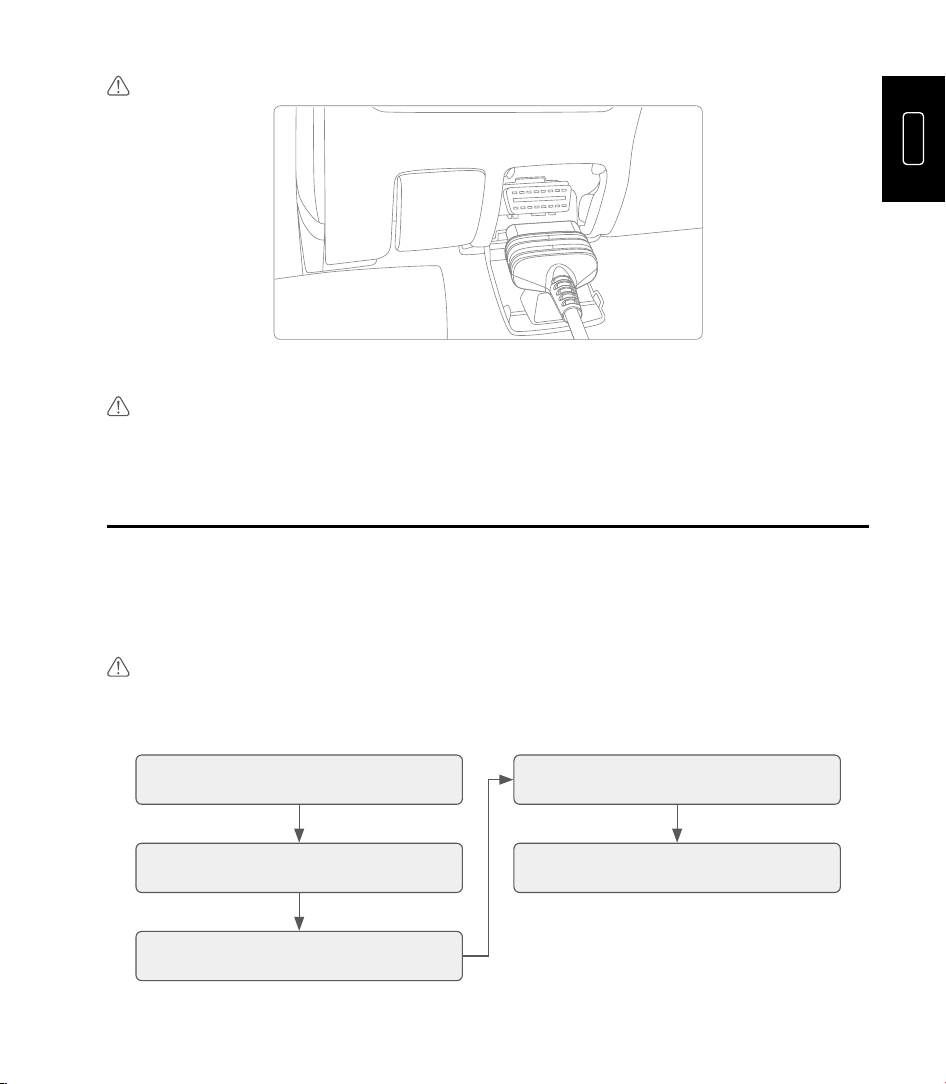
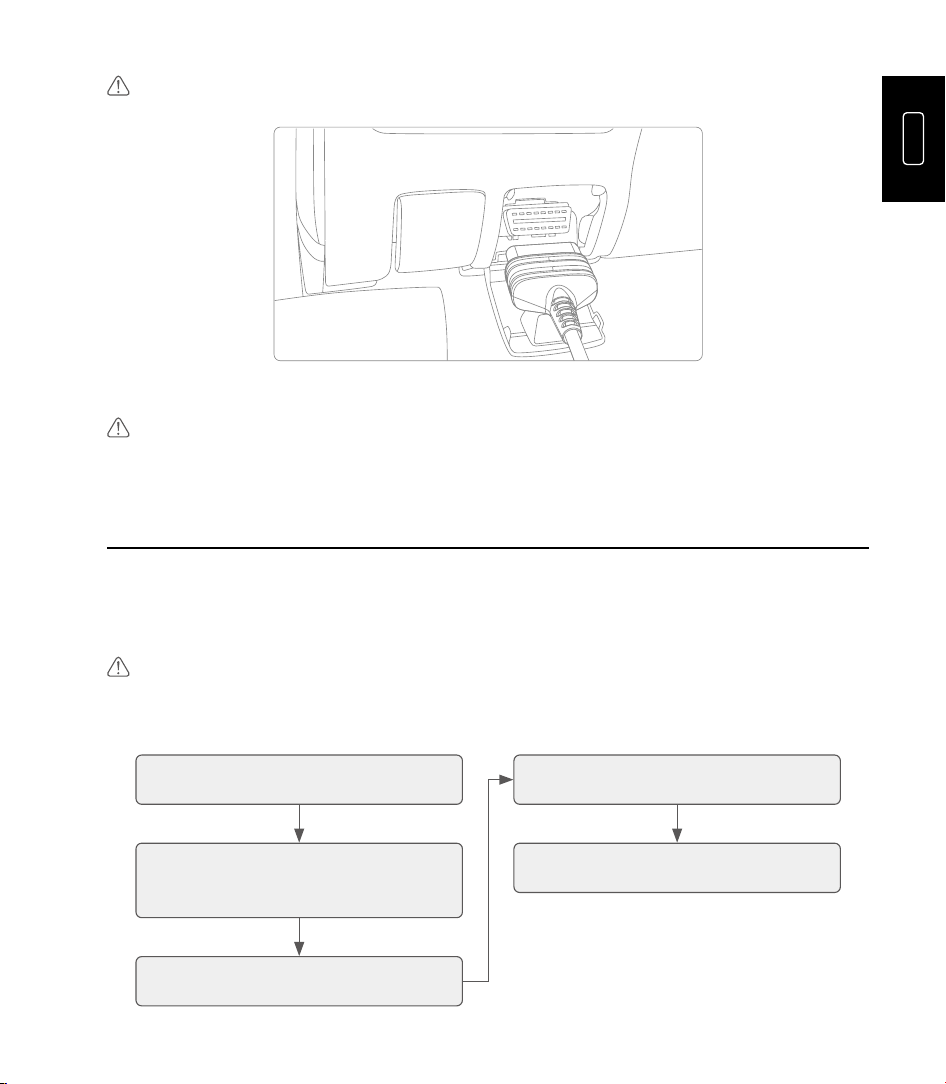
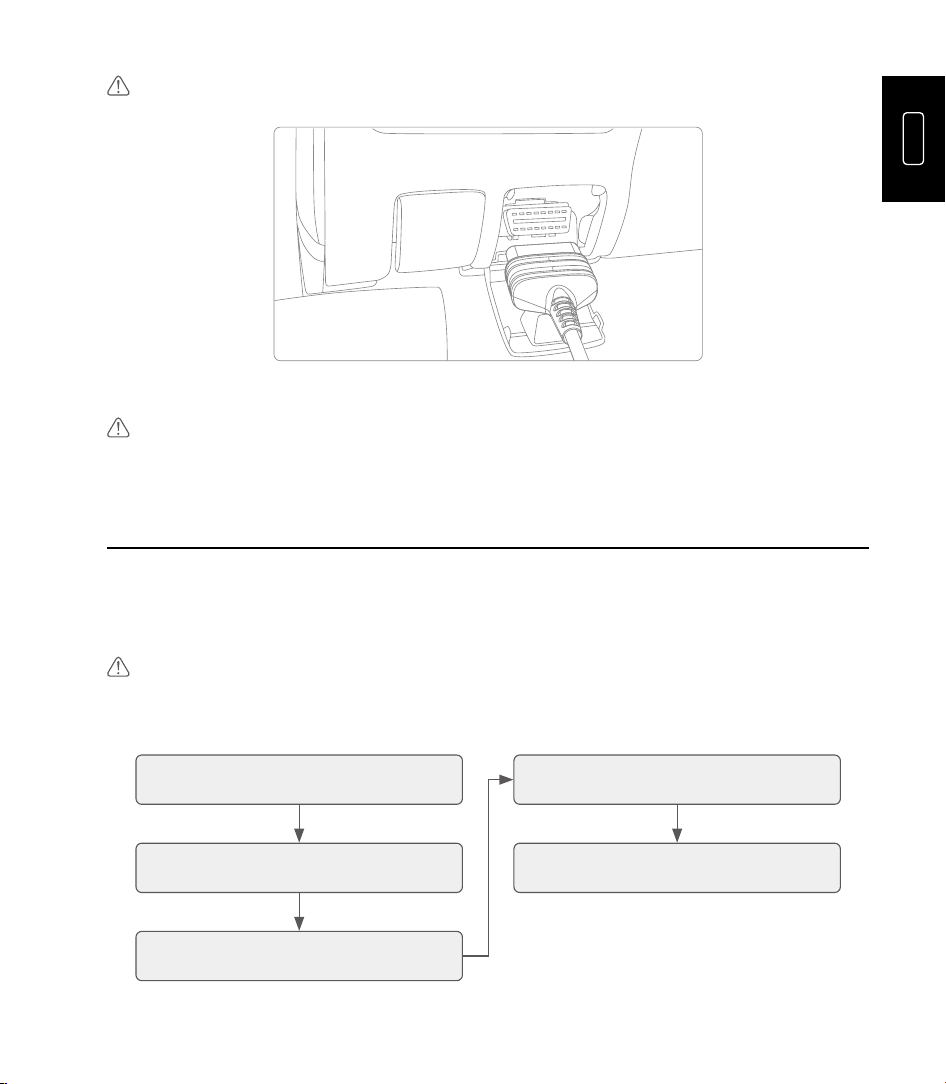
2. Connect ArtiDiag HD to your vehicle's DLC port using the diagnostic cable.
Note: If the DLC of your vehicle is not an OBD-II port, use the appropriate adapter or cable.
EN
03
Vehicle DLC
3. Turn the ignition on (the engine does not need to be running).
Note: Do not connect or disconnect any test equipment with the ignition on or engine running.
4. Operation Introduction
The TOPDON ArtiDiag HD offers a range of practical functions, including Diagnostics,
Maintenance, HD OBD, Library, Feedback, Update, History and User Info. You can access
the specific function directly from the home screen and then follow the on-screen
instructions to perform the desired operations.
Note: The application interfaces may vary slightly due to updates. Please refer to the actual product.
You can refer to the following flowchart for the diagnostic procedure.
Tap "Diagnostics" Select scan mode
Select the vehicle make,
enter or read the VIN
Select test functions
Select vehicle model and
year
Note: The ArtiDiag HD may automatically reset when exposed to strong static electricity. This is a
normal reaction.

04
5. Warranty
TOPDON's One-Year Limited Warranty
TOPDON warrants to its original purchaser that the company's products will be free from
defects in material and workmanship for 12 months from the date of purchase (Warranty
Period).
For the defects reported during the Warranty Period, TOPDON will either repair or replace
the defective part or product according to its technical support analysis and confirmation.
TOPDON shall not be liable for any incidental or consequential damages arising from the
device's use, misuse, or mounting.
If there is any conflict between the TOPDON warranty policy and local laws, the local laws
shall prevail.
This limited warranty is void under the following conditions:
•
Misused, disassembled, altered or repaired by unauthorized stores or technicians.
•
Careless handling and/or improper operation.
Notice: All information in this manual is based on the latest information available at the time of
publication and no warranty can be made for its accuracy or completeness. TOPDON reserves the
right to make changes at any time without notice.
FR
05
1. Accueillir
Merci d'avoir acheté l'ArtiDiag HD , Un outil de diagnostic automobile. Ce guide d'utilisation
rapide vous guidera dans la configuration et le fonctionnement de base de l'outil.
Veuillez lire attentivement toutes les instructions avant utilisation. Le non-respect de ces
instructions peut entraîner des dommages et/ou des blessures, et annuler la garantie du
produit.
Pour plus d'informations, veuillez télécharger le manuel d'utilisation multilingue détaillé sur
https://www.topdon.com/products/ArtiDiag-HD en cliquant sur « Télécharger » ou scannez
le code QR ci-dessous.
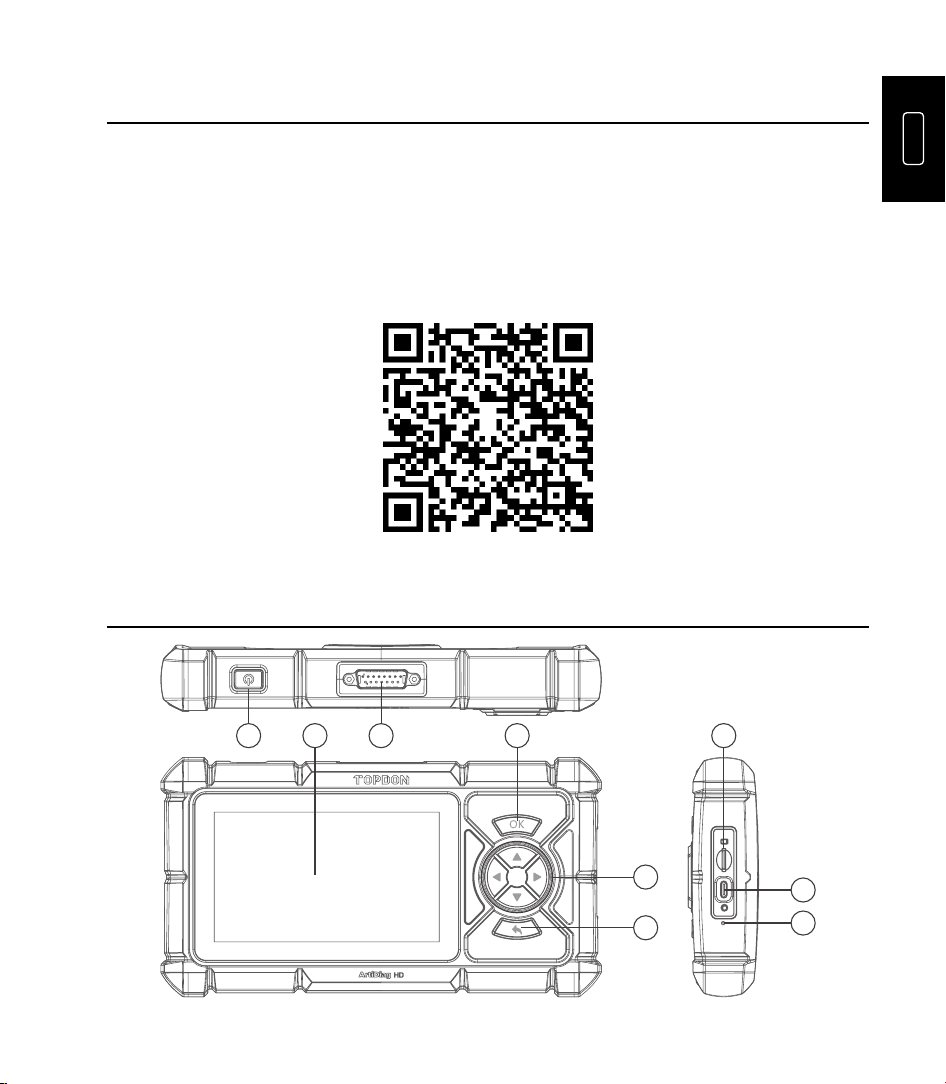
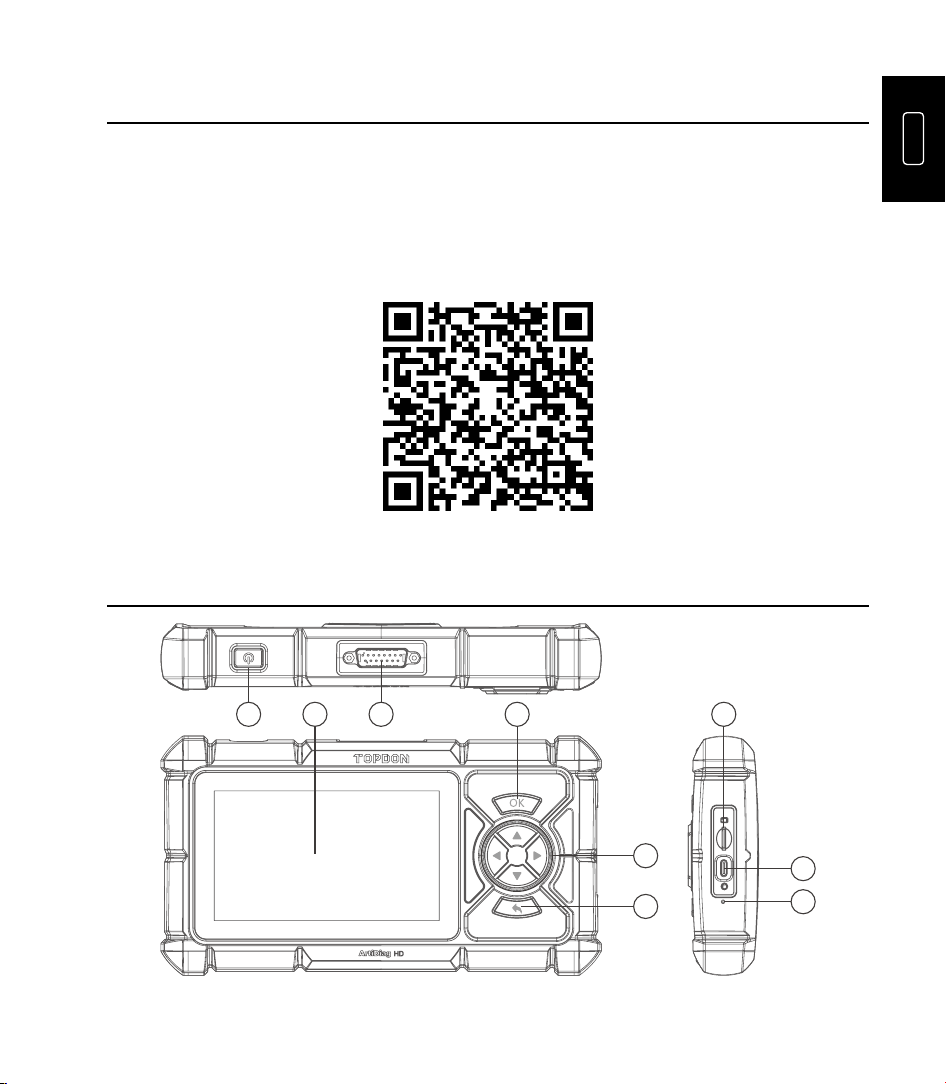
2. Produit Descriptions
1 2 4 7
5
8
9
6
3

06
NON. Nom Descriptions
1 Pouvoir Bouton
•
Presse et prise pour 3 secondes à pouvoir le
comprimé sur ou désactivé.
•
Appuyez et maintenez enfoncé pendant 8 secondes
pour effectuer un arrêt forcé si nécessaire.
•
Presse le bouton à se réveiller le écran ou tourner il
désactivé.
2 Écran tactile de 5 pouces
Afficher les résultats des tests et les menus
opérationnels.
3
Connecteur de diagnostic
DB-15
Pour se connecter au câble de diagnostic.
4 Bouton OK Appuyez pour confirmer l'opération ou le message.
5 Boutons directionnels
Appuyez pour déplacer le curseur ou mettre en
surbrillance dans leur direction respective.
6 Bouton de retour
Appuyez pour revenir à la page précédemment
consultée.
7
Emplacement pour carte
TF
Prend en charge l'extension de stockage jusqu'à 128
Go.
8 Port USB-C Pour la charge (entrée maximale 5V/2,5A).
9
Bouton de réinitialisation
d'usine
Appuyez pour restaurer les paramètres d'usine.
3. Préparation et Connexion
3.1 Notions de base Installation
Prise le pouvoir bouton pour 3 secondes à pouvoir sur le comprimé. Assurer le comprimé
est pleinement chargé préalablement.
Sélectionnez la langue système souhaitée > configurez la connexion Wi-Fi > choisissez le
fuseau horaire approprié > connectez-vous à un compte disponible > accédez à l'écran
d'accueil.
3.2 Véhicule Connexion
1. Tourner le allumage désactivé.
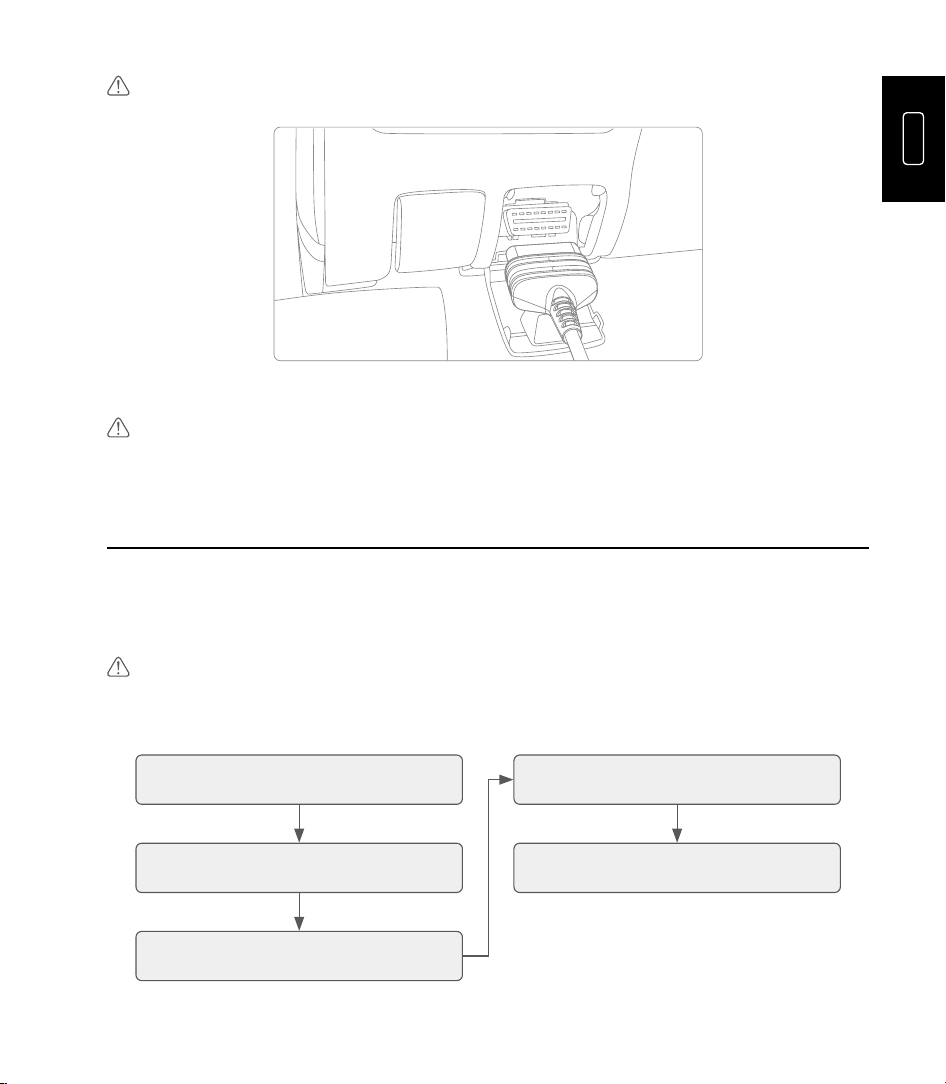
2. Connecter ArtiDiag HD à ton véhicule DLC port en utilisant le diagnostique câble.
FR
07
Note: Si le DLC de ton véhicule est pas un OBD-II port, utiliser le approprié adaptateur ou câble.
Vehicle DLC
3. Tourner le allumage sur (le moteur fait pas besoin à être en cours d'exécution).
Note: Faire pas connecter ou déconnecter tout test équipement avec le allumage sur ou moteur en
marche.
4. Opération Introduction
Le TOPDON ArtiDiag HD offre une gamme de fonctions pratiques, notamment le
diagnostic, la maintenance, le diagnostic OBD HD, la bibliothèque, les commentaires, la
mise à jour, l'historique et les informations utilisateur. Vous pouvez accéder à la fonction
souhaitée directement depuis l'écran d'accueil, puis suivre les instructions à l'écran pour
effectuer les opérations souhaitées.
Note: Le application interfaces peut varier légèrement exigible à mises à jour. S'il te plaît référer à le
réel produit.
Toi peut référer à le suivant organigramme pour le diagnostique procédure.
Appuyez sur « Diagnostic »
Sélectionnez le mode de
numérisation
Sélectionnez la marque du véhicule,
saisissez ou lisez le numéro VIN
Sélectionnez les fonctions de test
Sélectionnez le modèle et l'année
du véhicule

08
Remarque: L'ArtiDiag HD peut se réinitialiser automatiquement en cas d'exposition à une forte charge
statique. Il s'agit d'une réaction normale.
5. Garantie
TOPDON Un an Limité Garantie
TOPDON garantit à son acheteur d'origine que les produits de la société seront exempts
de défauts de matériaux et de fabrication pendant 12 mois à compter de la date d'achat (
période de garantie).
Pour le défauts signalé pendant le Garantie Période, TOPDON volonté soit réparation ou
remplacer le Pièce ou produit défectueux selon l'analyse et la confirmation du support
technique. TOPDON ne saurait être tenu responsable des dommages indirects ou
consécutifs résultant de l'utilisation, de la mauvaise utilisation ou du montage de l'appareil.
Si là est n'importe lequel conflit entre le TOPDON garantie politique et locale lois, le locale
les lois doivent prévaloir.
Ce limité garantie est vide sous le suivant conditions:
•
Mal utilisé, démonté, modifié ou réparé par non autorisé magasins ou techniciens.
•
Imprudent manutention et/ou incorrect opération.
Remarque: Toutes les informations contenues dans ce manuel sont basées sur les dernières
informations disponibles au moment de la publication et aucune garantie ne peut être donnée quant
à leur exactitude ou leur exhaustivité. TOPDON se réserve le droit d'apporter des modications à tout
moment et sans préavis.
ES
09
1. Bienvenido
Gracias por adquirir el ArtiDiag HD , Una herramienta de diagnóstico automotriz. Esta
guía rápida le guiará por la configuración y el funcionamiento básicos de la herramienta
de diagnóstico. Lea atentamente todas las instrucciones antes de usarla. De lo contrario,
podría causar daños o lesiones personales, y se anulará la garantía del producto.
Para obtener más información, descargue el manual de usuario multilingüe detallado en
https://www.topdon.com/products/ArtiDiag-HD haciendo clic en “Descargar” o escanee el
código QR a continuación.
2. Producto Descripciones
1 2 4 7
5
8
9
6
3

10
NO. Nombre Descripciones
1 Fuerza Botón
•
Prensa y sostener para 3 artículos de segunda clase
a fuerza el tableta en o apagado.
•
Mantenga presionado durante 8 segundos para
realizar un apagado forzado si es necesario.
•
Prensa el botón a despertar el pantalla o doblar él
apagado.
2 Pantalla táctil de 5" Mostrar resultados de pruebas y menús operativos.
3
Conector de diagnóstico
DB-15
Para conectar al cable de diagnóstico.
4 Botón OK Presione para confirmar la operación o mensaje.
5 Botones direccionales
Presione para mover el cursor o resaltar en su
respectiva dirección.
6 Botón de retorno Presione para regresar a la página vista anteriormente.
7 Ranura para tarjeta TF Admite expansión de almacenamiento hasta 128 GB.
8 Puerto USB-C Para cargar (entrada máxima 5 V/2,5 A).
9
Botón de
restablecimiento de
fábrica
Presione para restaurar la configuración de fábrica.
3. Preparación y Conexión
3.1 Lo esencial Configuración
Sostener el fuerza botón para 3 artículos de segunda clase a fuerza en el tableta. Asegurar
el tableta es completamente cargado antemano.
Seleccione el idioma del sistema deseado > configure la conexión Wi-Fi > elija la zona
horaria adecuada > inicie sesión en una cuenta disponible > acceda a la pantalla de inicio.
3.2 Vehículo Conexión
1. Doblar el encendido apagado.
2. Conectar ArtiDiag HD a su del vehículo Contenido descargable puerto usando el
diagnóstico cable.
ES
11
Nota: Si el Contenido descargable de su vehículo es no un OBD-II puerto, usar el adecuado adaptador
o cable.
Vehicle DLC
3. Doblar el encendido en (el motor hace no necesidad a ser correr).
Nota: Hacer no conectar o desconectar cualquier prueba equipo con el encendido en o motor en
marcha.
4. Operación Introducción
El TOPDON ArtiDiag HD ofrece una gama de prácticas funciones, como Diagnóstico,
Mantenimiento, HD OBD, Biblioteca, Comentarios, Actualización, Historial e Información del
Usuario. Puede acceder a la función específica directamente desde la pantalla de inicio y
seguir las instrucciones en pantalla para realizar las operaciones deseadas.
Nota: El solicitud interfaces puede variar levemente pendiente a actualizaciones. Por favor referirse
a El actual producto.
Tú poder referirse a el siguiente diagrama de flujo para el diagnóstico procedimiento.
Pulse "Diagnóstico" Seleccione el modo de escaneo
Seleccione la marca del vehículo,
introduzca o lea el VIN
Seleccione las funciones de prueba
Seleccione el modelo y el año del
vehículo

12
Nota: El ArtiDiag HD puede reiniciarse automáticamente al exponerse a una fuerte electricidad
estática. Esto es normal.
5. Garantía
TOPDON Un año Limitado Garantía
TOPDON garantiza a su comprador original que los productos de la empresa estarán libres
de defectos de material y mano de obra durante 12 meses a partir de la fecha de compra (
Período de garantía).
Para el defectos reportado durante el Garantía Período, TOPDON voluntad cualquiera
reparar o reemplazar el Pieza o producto defectuoso según el análisis y la confirmación del
soporte técnico. TOPDON no se responsabiliza de ningún daño incidental o consecuente
derivado del uso, mal uso o montaje del dispositivo.
Si allá es cualquier conflicto entre el TOPDON garantía política y local leyes, el local las
leyes deberán prevalecer.
Este limitado garantía es vacío bajo el siguiente condiciones:
•
Mal utilizado, desmontado, alterado o reparado por no autorizado víveres o técnicos.
•
Descuidado manejo y/o incorrecto operación.
Aviso: Toda la información de este manual se basa en la información más reciente disponible al
momento de su publicación y no se garantiza su exactitud ni integridad. TOPDON se reserva el
derecho de realizar cambios en cualquier momento sin previo aviso.
DE
13
1. Willkommen
Vielen Dank für den Kauf des ArtiDiag HD , Ein Kfz-Diagnosegerät. Diese Kurzanleitung
führt Sie durch die grundlegende Einrichtung und Bedienung des Diagnosegeräts. Bitte
lesen Sie alle Anweisungen vor Gebrauch sorgfältig durch. Andernfalls kann es zu Schäden
und/oder Verletzungen kommen und die Produktgarantie erlischt.
Für weitere Informationen laden Sie bitte das ausführliche mehrsprachige
Benutzerhandbuch unter https://www.topdon.com/products/ArtiDiag-HD herunter, indem
Sie auf „Download“ klicken oder den unten stehenden QR-Code scannen.
2. Produkt Beschreibungen
1 2 4 7
5
8
9
6
3

14
NEIN. Name Beschreibungen
1 Leistung Taste
•
Drücken Und halten für 3 Sekunden Zu Leistung Die
Tablette An oder aus.
•
8 Sekunden lang gedrückt halten, um bei Bedarf ein
erzwungenes Herunterfahren durchzuführen.
•
Drücken Die Taste Zu aufwachen Die Bildschirm
oder drehen Es aus.
2 5-Zoll-Touchscreen Testergebnisse und Betriebsmenüs anzeigen.
3
DB-15-
Diagnoseanschluss
Zum Anschluss an das Diagnosekabel.
4 OK-Taste
Drücken Sie, um den Vorgang oder die Meldung zu
bestätigen.
5 Richtungstasten
Drücken Sie, um den Cursor oder die Markierung in
die jeweilige Richtung zu bewegen.
6 Zurück-Taste
Drücken Sie, um zur zuvor angezeigten Seite
zurückzukehren.
7 TF-Kartensteckplatz Unterstützt Speichererweiterung auf bis zu 128 GB.
8 USB-C-Anschluss Zum Laden (maximal 5 V/2,5 A Eingang).
9
Schaltfläche
„Zurücksetzen auf
Werkseinstellungen“
Drücken Sie, um die Werkseinstellungen
wiederherzustellen.
3. Vorbereitung Und Verbindung
3.1 Grundlagen Aufstellen
Halten Die Leistung Taste für 3 Sekunden Zu Leistung An Die Tablette. Sicherstellen Die
Tablette Ist voll aufgeladen vorher.
Wählen Sie die gewünschte Systemsprache > konfigurieren Sie die WLAN-Verbindung >
wählen Sie die entsprechende Zeitzone > melden Sie sich bei einem verfügbaren Konto an
> rufen Sie den Startbildschirm auf.
3.2 Fahrzeug Verbindung
1. Drehen Die Zündung aus.
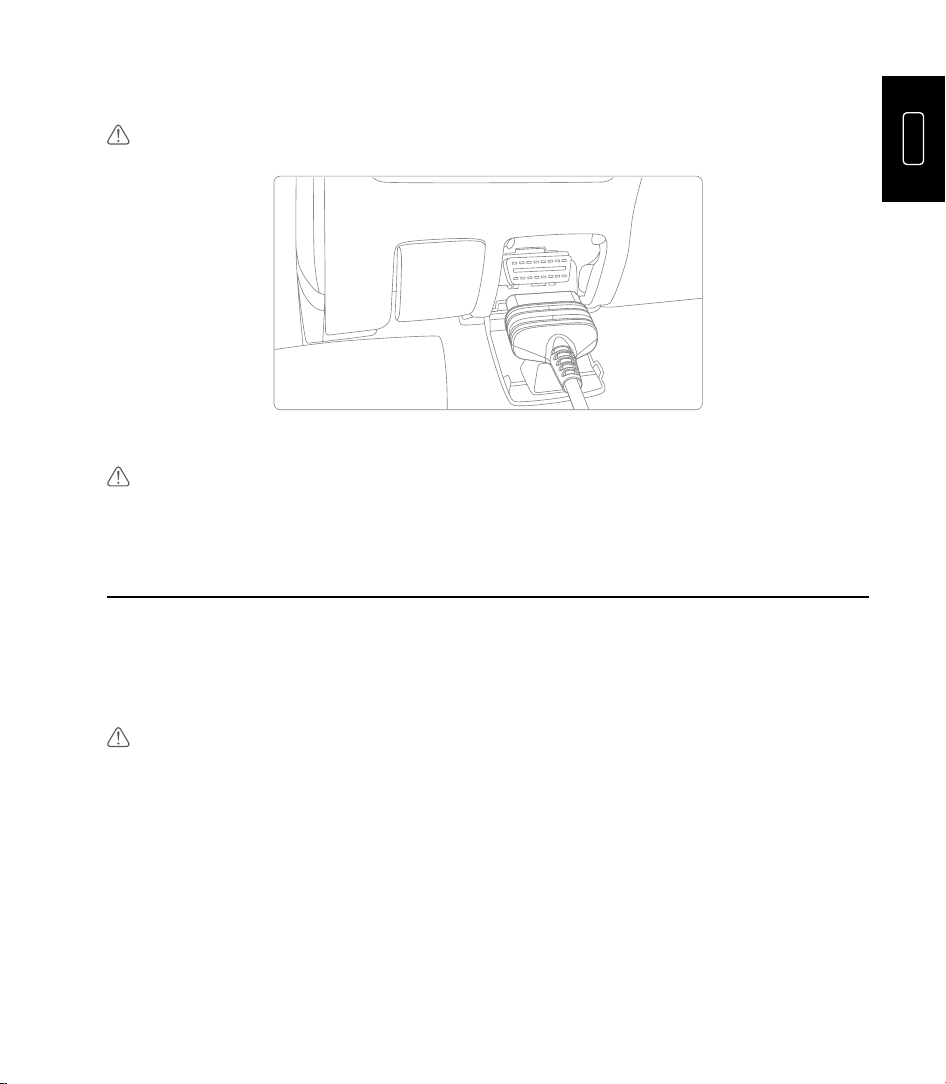
2. Verbinden ArtiDiag HD Zu dein Fahrzeug Zusatzinhalt Hafen mit Die Diagnose Kabel.
DE
15
Notiz: Wenn Die Zusatzinhalt von dein Fahrzeug Ist nicht ein OBD-II Hafen, verwenden Die geeignet
Adapter oder Kabel.
Vehicle DLC
3. Drehen Die Zündung An (Die Motor tut nicht brauchen Zu Sei läuft).
Notiz: Tun nicht verbinden oder trennen Sie alle prüfen Ausrüstung mit dem Zündung An oder Motor
läuft.
4. Betrieb Einführung
TOPDON ArtiDiag HD bietet zahlreiche praktische Funktionen, darunter Diagnose, Wartung,
HD OBD, Bibliothek, Feedback, Update, Verlauf und Benutzerinformationen. Sie können
direkt vom Startbildschirm aus auf die jeweilige Funktion zugreifen und anschließend den
Anweisungen auf dem Bildschirm folgen, um die gewünschten Vorgänge auszuführen.
Notiz: Der Anwendung Schnittstellen Mai variieren leicht fällig Zu Aktualisierungen. Bitte verweisen
Zu die eigentliche Produkt.
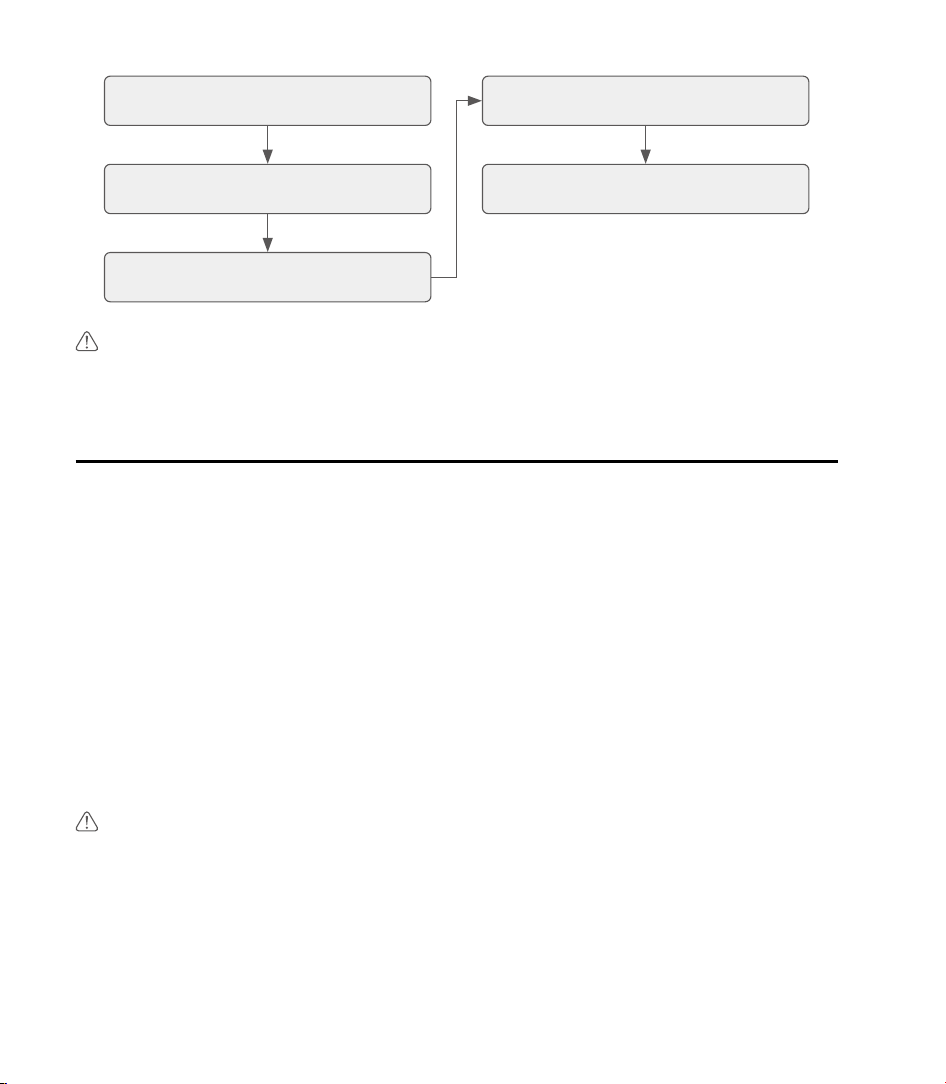
Du dürfen verweisen Zu Die folgende Flussdiagramm für Die Diagnose Verfahren.
Tippen Sie auf „Diagnose“ Wählen Sie den Scanmodus
Fahrzeugmarke auswählen,
Fahrgestellnummer eingeben oder
auslesen
Wählen Sie die Testfunktionen
Wählen Sie das Fahrzeugmodell und
das Baujahr

16
Hinweis: Der ArtiDiag HD kann sich bei starker statischer Elektrizität automatisch zurücksetzen. Dies
ist eine normale Reaktion.
5. Garantie
TOPDONs Ein Jahr Beschränkt Garantie
TOPDON garantiert dem Erstkäufer, dass die Produkte des Unternehmens für einen
Zeitraum von 12 Monaten ab Kaufdatum (Garantiezeitraum ) frei von Material- und
Verarbeitungsfehlern sind.
Für Die Mängel berichtet während Die Garantie Zeitraum, TOPDON Wille entweder
reparieren oder ersetzen Die defektes Teil oder Produkt gemäß Analyse und Bestätigung
des technischen Supports. TOPDON haftet nicht für Neben- oder Folgeschäden, die durch
die Verwendung, den Missbrauch oder die Montage des Geräts entstehen.
Wenn Dort Ist beliebig Konflikt zwischen Die TOPDON Garantie Politik Und lokal Gesetze,
Die lokal Gesetze sollen sich durchsetzen.
Das beschränkt Garantie Ist Leere unter Die folgende Bedingungen:
•
Missbraucht, zerlegt, verändert oder repariert von unbefugt Geschäfte oder Techniker.
•
Sorglos Handhabung und/oder unsachgemäß Betrieb.
Hinweis: Alle Informationen in diesem Handbuch basieren auf den zum Zeitpunkt der Veröffentlichung
verfügbaren Informationen. Für deren Richtigkeit und Vollständigkeit kann keine Gewähr
übernommen werden. TOPDON behält sich das Recht vor, jederzeit und ohne vorherige Ankündigung
Änderungen vorzunehmen.
RU
17
1. Добро пожаловать
Благодарим вас за покупку ArtiDiag HD . автомобильный диагностический инструмент.
Это краткое руководство пользователя проведет вас через базовую настройку и
эксплуатацию диагностического инструмента. Пожалуйста, внимательно прочтите все
инструкции перед использованием. Невыполнение этого требования может привести к
повреждению и/или травме, а также аннулирует гарантию на продукт.
Для получения дополнительной информации загрузите подробное многоязычное
руководство пользователя по адресу https://www.topdon.com/products/ArtiDiag-HD,
нажав «Загрузить» или отсканировав QR-код ниже.
2. Продукт Описания
1 2 4 7
5
8
9
6
3

18
НЕТ. Имя Описания
1 Власть Кнопка
•
Нажимать и держать для 3 секунды к власть
планшет на или выключенный.
•
Нажмите и удерживайте в течение 8 секунд,
чтобы выполнить принудительное выключение,
если это необходимо.
•
Нажимать кнопка к будить экран или повернуть
это выключенный.
2
5-дюймовый
сенсорный экран
Отображение результатов испытаний и рабочих
меню.
3
Диагностический
разъем DB-15
Для подключения к диагностическому кабелю.
4 Кнопка ОК
Нажмите для подтверждения операции или
сообщения.
5 Кнопки направления
Нажмите, чтобы переместить курсор или выделить
его в соответствующем направлении.
6 Кнопка возврата
Нажмите, чтобы вернуться на ранее просмотренную
страницу.
7 Слот для TF-карты Поддерживает расширение хранилища до 128 ГБ.
8 Порт USB-C Для зарядки (максимум 5 В/2,5 А на входе).
9
Кнопка сброса к
заводским настройкам
Нажмите, чтобы восстановить заводские настройки.
3. Подготовка и Связь
3.1 Основы Настраивать
Держать власть кнопка для 3 секунды к власть на планшет. Гарантировать планшет
является полностью заряженный заранее.
Выберите нужный язык системы > настройте соединение Wi-Fi > выберите
подходящий часовой пояс > войдите в доступную учетную запись > перейдите на
главный экран.
3.2 Транспортное средство Связь
1. Повернуть зажигание выключенный.
RU
19
2. Соединять ArtiDiag HD к твой транспортное средство DLC порт с использованием
диагностический кабель.
Примечание: Если DLC из твой транспортное средство является нет а ОБД-II порт,
использовать соответствующий адаптер или кабель.
Vehicle DLC
3. Повернуть зажигание на (тот двигатель делает нет нуждаться к быть бег).
Примечание: Делать нет соединять или отключите любой тест оборудование с
зажигание на или двигатель работает.
4. Операция Введение
TOPDON ArtiDiag HD предлагает ряд практических функций, включая диагностику,
обслуживание, HD OBD, библиотеку, обратную связь, обновление, историю и
информацию о пользователе. Вы можете получить доступ к определенной функции
непосредственно с главного экрана, а затем следовать инструкциям на экране для
выполнения желаемых операций.
Примечание: The приложение интерфейсы может отличаться немного должный к
обновления. Пожалуйста ссылаться к фактический продукт.
Ты может ссылаться к следующий блок-схема для диагностический процедура.
20
Pulse "Diagnóstico" Seleccione el modo de escaneo
Seleccione la marca del vehículo,
introduzca o lea el VIN
Seleccione las funciones de prueba
Seleccione el modelo y el año del
vehículo
Примечание: ArtiDiag HD может автоматически сбрасываться при воздействии
сильного статического электричества. Это нормальная реакция.
5. Гарантия
TOPDON's Годовой Ограниченный Гарантия
TOPDON гарантирует первоначальному покупателю, что продукция компании не будет
иметь дефектов материала и изготовления в течение 12 месяцев с даты покупки
(гарантийный срок).
Для дефекты сообщили в течение Гарантия Период, ТОПДОН воля или ремонт или
заменять дефектная часть или продукт в соответствии с анализом и подтверждением
технической поддержки. TOPDON не несет ответственности за любые случайные
или косвенные убытки, возникшие в результате использования, неправильного
использования или монтажа устройства.
Если там является любой конфликт между ТОПДОН гарантия политика и местный
законы, местный законы должны преобладают.
Этот ограниченный гарантия является пустота под следующий условия:
•
Неправильно использованный, разобранный, измененный или отремонтированный к
несанкционированный магазины или техники.
•
Беспечный умение обращаться и/или ненадлежащий операция.
Примечание: Вся информация в этом руководстве основана на последних данных,
доступных на момент публикации, и не может быть предоставлена гарантия ее
точности или полноты. TOPDON оставляет за собой право вносить изменения в
любое время без предварительного уведомления.
IT
21
1. Benvenuto
Grazie per aver acquistato ArtiDiag HD , Uno strumento diagnostico per autoveicoli. Questa
guida rapida vi guiderà attraverso la configurazione e il funzionamento di base dello
strumento diagnostico. Leggete attentamente tutte le istruzioni prima dell'uso. La mancata
osservanza di queste istruzioni può causare danni e/o lesioni personali e invaliderà la
garanzia del prodotto.
Per ulteriori informazioni, scaricare il manuale utente dettagliato multilingue all'indirizzo
https://www.topdon.com/products/ArtiDiag-HD cliccando su "Scarica" oppure scansionare il
codice QR qui sotto.
2. Prodotto Descrizioni
1 2 4 7
5
8
9
6
3

22
NO. Nome Descrizioni
1 Energia Pulsante
•
Premere E Presa per 3 secondi A energia IL
tavoletta SU O spento.
•
Tenere premuto per 8 secondi per eseguire uno
spegnimento forzato, se necessario.
•
Premere IL pulsante A veglia IL schermo O giro Esso
spento.
2 Schermo touch da 5" Visualizza i risultati dei test e i menu operativi.
3
Connettore diagnostico
DB-15
Per connettersi al cavo diagnostico.
4 Pulsante OK Premere per confermare l'operazione o il messaggio.
5 Pulsanti direzionali
Premere per spostare il cursore o evidenziare nella
rispettiva direzione.
6 Pulsante di ritorno
Premere per tornare alla pagina visualizzata in
precedenza.
7 Slot per scheda TF Supporta l'espansione dello storage fino a 128 GB.
8 Porta USB-C Per la ricarica (ingresso massimo 5 V/2,5 A).
9
Pulsante di ripristino delle
impostazioni di fabbrica
Premere per ripristinare le impostazioni di fabbrica.
3. Preparazione E Connessione
3.1 Nozioni di base Impostare
Presa IL energia pulsante per 3 secondi A energia SU IL tavoletta. Garantire IL tavoletta È
completamente caricato in anticipo.
Selezionare la lingua di sistema desiderata > configurare la connessione Wi-Fi > scegliere
il fuso orario appropriato > accedere a un account disponibile > accedere alla schermata
iniziale.
3.2 Veicolo Connessione
1. Giro IL accensione spento.
2. Collegare ArtiDiag HD A tuo del veicolo Contenuti scaricabili porta usando IL diagnostic
cavo.
IT
23
Nota: Se IL Contenuti scaricabili Di tuo veicolo È non UN OBD-II porta, utilizzo IL
appropriato adattatore O cavo.
Vehicle DLC
3. Giro IL accensione SU (IL motore fa non Bisogno A Essere corsa).
Nota: Fare non collegare o disconnettere qualsiasi test attrezzatura con il accensione SU
O motore acceso.
4. Operazione Introduzione
TOPDON ArtiDiag HD offre una gamma di funzioni pratiche, tra cui Diagnostica,
Manutenzione, HD OBD, Libreria, Feedback, Aggiornamento, Cronologia e Informazioni
utente. È possibile accedere alla funzione specifica direttamente dalla schermata iniziale e
seguire le istruzioni visualizzate sullo schermo per eseguire le operazioni desiderate.
Nota: IL applicazione interfacce Maggio variare leggermente dovuto A aggiornamenti. Per
favore fare riferimento A l'attuale prodotto.
Voi Potere fare riferimento A IL seguente diagramma di flusso per IL diagnostic procedura.
Tocca "Diagnostica" Seleziona la modalità di scansione
Seleziona la marca del veicolo,
inserisci o leggi il VIN
Seleziona le funzioni di test
Seleziona il modello e l'anno del
veicolo

24
Nota: ArtiDiag HD potrebbe ripristinarsi automaticamente se esposto a forte elettricità
statica. Questa è una reazione normale.
5. Garanzia
TOPDON's Un anno Limitato Garanzia
TOPDON garantisce all'acquirente originale che i suoi prodotti saranno esenti da difetti di
materiali e fabbricazione per 12 mesi dalla data di acquisto ( periodo di garanzia).
Per IL difetti segnalato durante IL Garanzia Periodo, TOPDON Volere O riparazione O
sostituire IL Parte o prodotto difettoso in base all'analisi e alla conferma del supporto
tecnico. TOPDON non sarà responsabile per eventuali danni incidentali o consequenziali
derivanti dall'uso, dall'uso improprio o dal montaggio del dispositivo.
Se Là È Qualunque conflitto fra IL TOPDON garanzia politica E locale legislazione, IL locale
le leggi devono prevalere.
Questo limitato garanzia È vuoto Sotto IL seguente condizioni:
•
Usato in modo improprio, smontato, alterato O riparato di non autorizzato negozi O
tecnici.
•
Negligente gestione e/o improprio operazione.
Avviso: Tutte le informazioni contenute in questo manuale si basano sulle informazioni
più recenti disponibili al momento della pubblicazione e non è possibile garantire la loro
accuratezza o completezza. TOPDON si riserva il diritto di apportare modifiche in qualsiasi
momento senza preavviso.
PT
25
1. Bem-vindo
Obrigado por adquirir o ArtiDiag HD , uma ferramenta de diagnóstico automotivo. Este
guia rápido do usuário orientará você na configuração e operação básicas da ferramenta
de diagnóstico. Leia atentamente todas as instruções antes de usar. A não observância
destas instruções poderá causar danos e/ou ferimentos pessoais, além de anular a garantia
do produto.
Para mais informações, baixe o manual do usuário multilíngue detalhado em https://www.
topdon.com/products/ArtiDiag-HD clicando em “Download” ou digitalize o código QR
abaixo.
2. Produto Descrições
1 2 4 7
5
8
9
6
3

26
NÃO. Nome Descrições
1 Poder Botão
•
Imprensa e segurar para 3 segundos para poder o
comprimido sobre ou desligado.
•
Pressione e segure por 8 segundos para executar
um desligamento forçado, se necessário.
•
Imprensa o botão para acordar o tela ou vez isto
desligado.
2
Tela sensível ao toque
de 5"
Exibir resultados de testes e menus operacionais.
3
Conector de diagnóstico
DB-15
Para conectar ao cabo de diagnóstico.
4 Botão OK Pressione para confirmar a operação ou mensagem.
5 Botões direcionais
Pressione para mover o cursor ou destacar em suas
respectivas direções.
6 Botão de retorno
Pressione para voltar à página visualizada
anteriormente.
7 Slot para cartão TF Suporta expansão de armazenamento de até 128 GB.
8 Porta USB-C Para carregamento (entrada máxima de 5 V/2,5 A).
9
Botão de redefinição de
fábrica
Pressione para restaurar as configurações de fábrica.
3. Preparação e Conexão
3.1 Noções básicas Configurar
Segurar o poder botão para 3 segundos para poder sobre o comprimido. Garantir o
comprimido é completamente cobrado de antemão.
Selecione o idioma desejado do sistema > configure a conexão Wi-Fi > escolha o fuso
horário apropriado > faça login em uma conta disponível > acesse a tela inicial.
3.2 Veículo Conexão
1. Vez o ignição desligado.
2. Conectar ArtiDiag HD para seu do veículo DLC porta usando o diagnóstico cabo.
Observação: Se o DLC de seu veículo é não um OBD-II porta, usar o apropriado adaptador
ou cabo.
PT
27
Vehicle DLC
3. Vez o ignição sobre (o motor faz não precisar para ser correndo).
Observação: Fazer não conectar ou desconecte qualquer teste equipamento com o
ignição sobre ou motor funcionando.
4. Operação Introdução
O TOPDON ArtiDiag HD oferece uma gama de funções práticas, incluindo Diagnóstico,
Manutenção, HD OBD, Biblioteca, Feedback, Atualização, Histórico e Informações do
Usuário. Você pode acessar a função específica diretamente na tela inicial e seguir as
instruções na tela para realizar as operações desejadas.
Observação: O aplicativo interfaces poderia variar um pouco devido para atualizações. Por
favor referir-se para o real produto.
Você pode referir-se para o seguindo fluxograma para o diagnóstico procedimento.
Toque em "Diagnóstico" Selecione o modo de digitalização
Selecione a marca do veículo,
introduza ou leia o VIN
Selecione as funções de teste
Selecione o modelo e o ano do
veículo
Observação: O ArtiDiag HD pode reiniciar automaticamente quando exposto a forte
eletricidade estática. Esta é uma reação normal.

28
5. Garantia
TOPDON'S Um ano Limitado Garantia
A TOPDON garante ao seu comprador original que os produtos da empresa estarão livres
de defeitos de material e de fabricação por 12 meses a partir da data da compra ( Período
de Garantia).
Para o defeitos relatado durante o Garantia Período, TOPDON vai qualquer reparar ou
substituir o peça ou produto defeituoso, de acordo com a análise e confirmação do
suporte técnico. A TOPDON não se responsabiliza por quaisquer danos incidentais ou
consequenciais decorrentes do uso, mau uso ou montagem do dispositivo.
Se lá é qualquer conflito entre o TOPDON garantia política e local leis, o local as leis
devem prevalecer.
Esse limitado garantia é vazio sob o seguindo condições:
•
Mal utilizado, desmontado, alterado ou reparado por não autorizado lojas ou técnicos.
•
Descuidado manuseio e/ou impróprio operação.
Aviso: Todas as informações contidas neste manual baseiam-se nas informações mais
recentes disponíveis no momento da publicação e não há garantia de sua precisão ou
integralidade. A TOPDON reserva-se o direito de fazer alterações a qualquer momento
sem aviso prévio.
PL
29
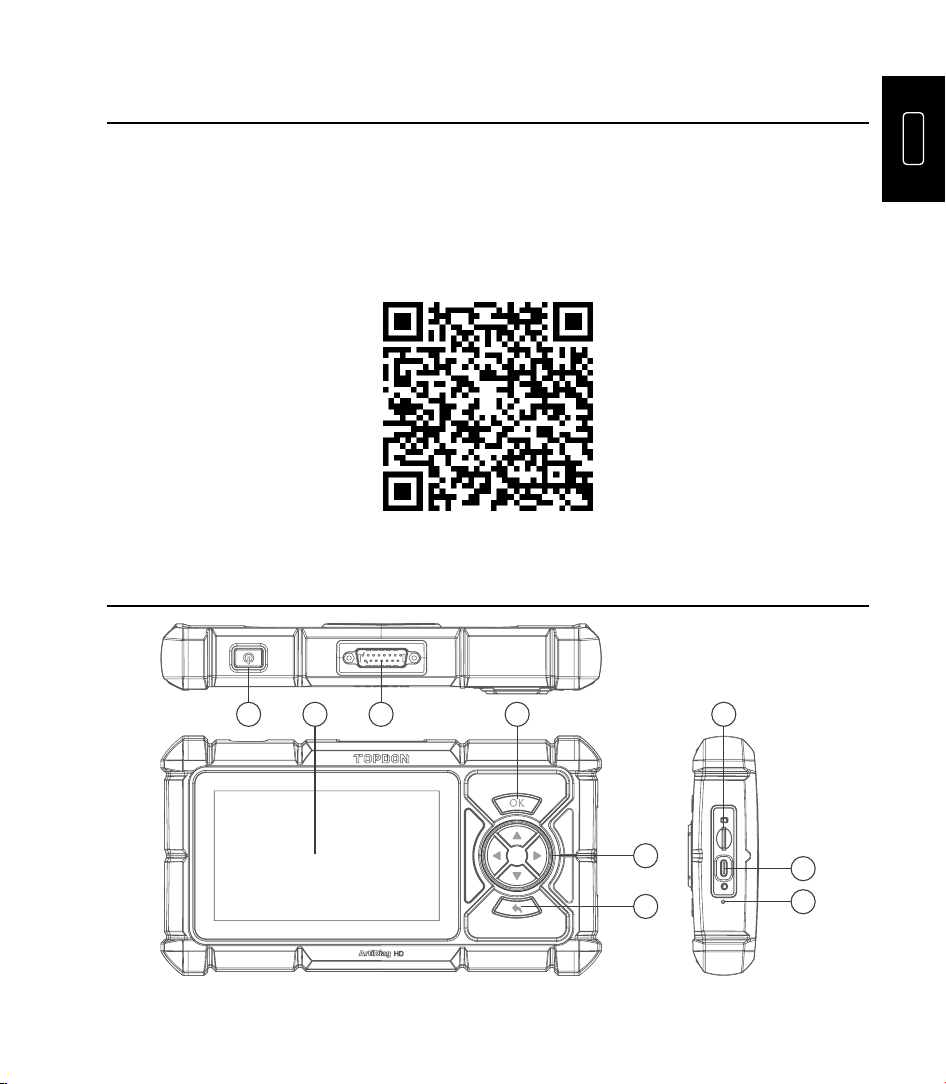
1. Powitanie
Dziękujemy za zakup urządzenia ArtiDiag HD , narzędzie diagnostyczne do samochodów.
Ten krótki przewodnik użytkownika przeprowadzi Cię przez podstawową konfigurację i
obsługę narzędzia diagnostycznego. Przed użyciem przeczytaj uważnie wszystkie instrukcje.
Nieprzestrzeganie ich może spowodować uszkodzenie i/lub obrażenia ciała oraz unieważni
gwarancję produktu.
Aby uzyskać więcej informacji, pobierz szczegółową wielojęzyczną instrukcję obsługi ze
strony https://www.topdon.com/products/ArtiDiag-HD , klikając „Pobierz” lub zeskanuj
poniższy kod QR.
2. Produkt Opisy
1 2 4 7
5
8
9
6
3

30
NIE. Nazwa Opisy
1 Moc Przycisk
•
Naciskać I trzymać Do 3 towary drugiej jakości Do
moc ten tabletka NA Lub wyłączony.
•
Aby w razie konieczności wykonać wymuszone
wyłączenie, naciśnij i przytrzymaj przez 8 sekund.
•
Naciskać ten przycisk Do budzić ten ekran Lub
zakręt To wyłączony.
2
5-calowy ekran
dotykowy
Wyświetlanie wyników testów i menu operacyjnych.
3
Złącze diagnostyczne
DB-15
Do podłączenia kabla diagnostycznego.
4 Przycisk OK Naciśnij, aby potwierdzić operację lub wiadomość.
5 Przyciski kierunkowe
Naciśnij, aby przesunąć kursor lub podświetlić w
odpowiednim kierunku.
6 Przycisk powrotu
Naciśnij, aby powrócić do poprzednio oglądanej
strony.
7 Gniazdo karty TF Obsługuje rozbudowę pamięci do 128 GB.
8 Port USB-C
Do ładowania (maksymalne napięcie wejściowe 5
V/2,5 A).
9
Przycisk przywracania
ustawień fabrycznych
Naciśnij, aby przywrócić ustawienia fabryczne.
3. Przygotowanie I Połączenie
3.1 Podstawy Organizować coś
Trzymać ten moc przycisk Do 3 towary drugiej jakości Do moc NA ten tabletka. Zapewnić
ten tabletka Jest w pełni oskarżony uprzednio.
Wybierz żądany język systemu > skonfiguruj połączenie Wi-Fi > wybierz odpowiednią strefę
czasową > zaloguj się na dostępne konto > uzyskaj dostęp do ekranu głównego.
3.2 Pojazd Połączenie
1. Zakręt ten zapłon wyłączony.
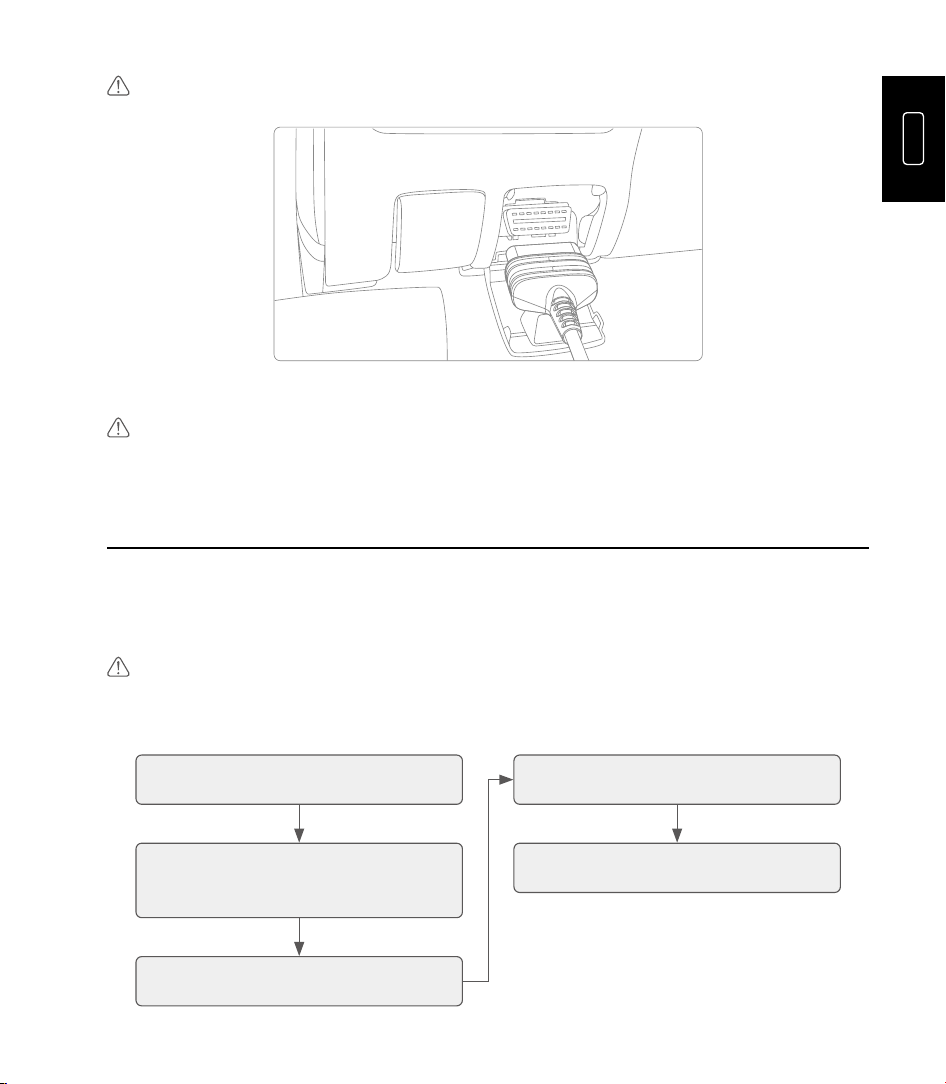
2. Łączyć ArtiDiag HD Do twój pojazdu Dodatek port używając ten diagnostyczny kabel.
Notatka: Jeśli ten Dodatek z twój pojazd Jest nie jakiś OBD II port, używać ten odpowiedni
adapter Lub kabel.
PL
31
Vehicle DLC
3. Zakręt ten zapłon NA (ten silnik robi nie potrzebować Do Być działanie).
Notatka: Do nie łączyć lub odłącz dowolne test sprzęt z zapłon NA Lub silnik pracuje.
4. Operação Introdução
TOPDON ArtiDiag HD oferuje szereg praktycznych funkcji, w tym Diagnostykę,
Konserwację, HD OBD, Bibliotekę, Opinie, Aktualizację, Historię i Informacje o użytkowniku.
Możesz uzyskać dostęp do konkretnej funkcji bezpośrednio z ekranu głównego, a następnie
postępować zgodnie z instrukcjami wyświetlanymi na ekranie, aby wykonać żądane
operacje.
Notatka: Ten aplikacja interfejsy móc różnić się nieznacznie należny Do Aktualizacje.
Proszę wspominać Do Rzeczywisty produkt.
Ty Móc wspominać Do ten następny schemat blokowy Do ten diagnostyczny procedura.
Kliknij „Diagnostyka” Wybierz tryb skanowania
Wybierz markę pojazdu, wprowadź
lub odczytaj numer VIN
Wybierz funkcje testowe
Wybierz model pojazdu i rok
Uwaga: ArtiDiag HD może automatycznie zresetować się po narażeniu na silne
elektryczność statyczną. Jest to normalna reakcja.

32
5. Gwarancja
TOPDON-a Jednoroczny Ograniczony Gwarancja
TOPDON gwarantuje swojemu pierwotnemu nabywcy, że produkty firmy będą wolne
od wad materiałowych i wykonawczych przez okres 12 miesięcy od daty zakupu ( okres
gwarancji).
Dla ten wady zgłoszono podczas ten Gwarancja Okres, NAJLEPSZY będzie albo naprawa
Lub zastępować ten wadliwa część lub produkt zgodnie z analizą i potwierdzeniem
wsparcia technicznego. TOPDON nie ponosi odpowiedzialności za jakiekolwiek
przypadkowe lub wynikowe szkody wynikające z użytkowania, niewłaściwego użytkowania
lub montażu urządzenia.
Jeśli Tam Jest każdy konflikt między ten NAJLEPSZY gwarancja polityka I lokalny prawa,
ten lokalny prawa będą panować.
Ten ograniczony gwarancja Jest próżnia pod ten następny warunki:
•
Niewłaściwie użyty, zdemontowany, zmieniony Lub naprawiony przez nieautoryzowany
sklepy Lub technicy.
•
Niedbały obsługiwanie i/lub niewłaściwy działanie.
Uwaga: Wszystkie informacje zawarte w tym podręczniku opierają się na najnowszych
informacjach dostępnych w momencie publikacji i nie można udzielić żadnej gwarancji co
do ich dokładności lub kompletności. TOPDON zastrzega sobie prawo do wprowadzania
zmian w dowolnym momencie bez powiadomienia.
NL
33
1. Welkom
Bedankt voor de aankoop van de ArtiDiag HD , Een diagnosetool voor auto's. Deze
beknopte handleiding leidt u door de basisinstellingen en bediening van de diagnosetool.
Lees alle instructies zorgvuldig door vóór gebruik. Indien u dit niet doet, kan dit schade en/
of persoonlijk letsel veroorzaken en vervalt de productgarantie.
Voor meer informatie kunt u de gedetailleerde meertalige gebruikershandleiding
downloaden op https://www.topdon.com/products/ArtiDiag-HD door op “Download” te
klikken of de onderstaande QR-code te scannen.
2. Product Beschrijvingen
1 2 4 7
5
8
9
6
3

34
NEE. Naam Beschrijvingen
1 Stroom Knop
•
Pers En uitstel voor 3 seconden naar stroom de
tablet op of uit.
•
Houd de knop 8 seconden ingedrukt om indien
nodig een geforceerde uitschakeling uit te voeren.
•
Pers de knop naar wakker worden de scherm of
draai Het uit.
2 5" aanraakscherm Testresultaten en operationele menu's weergeven.
3
DB-15 diagnostische
connector
Om verbinding te maken met de diagnosekabel.
4 OK-knop Druk om de handeling of het bericht te bevestigen.
5 Richtingsknoppen
Druk hierop om de cursor of markering in de
gewenste richting te verplaatsen.
6 Terugknop
Klik om terug te gaan naar de eerder bekeken
pagina.
7 TF-kaartsleuf Ondersteunt opslaguitbreiding tot 128 GB.
8 USB-C-poort Voor opladen (maximaal 5V/2,5A ingang).
9 Fabrieksresetknop Druk hierop om de fabrieksinstellingen te herstellen.
3. Voorbereiding En Verbinding
3.1 Basisprincipes Instellen
Uitstel de stroom knop voor 3 seconden naar stroom op de tablet. Ervoor zorgen de tablet
is volledig opgeladen vooraf.
Selecteer de gewenste systeemtaal > configureer de Wi-Fi-verbinding > kies de juiste
tijdzone > meld u aan bij een beschikbaar account > ga naar het startscherm.
3.2 Voertuig Verbinding
1. Draai de ontsteking uit.
2. Verbinden ArtiDiag HD naar jouw voertuig DLC haven gebruik makend van de
diagnostisch kabel.
NL
35
Opmerking: Als de DLC van jouw voertuig is niet een OBD-II haven, gebruik de gepast
adapter of kabel.
Vehicle DLC
3. Draai de ontsteking op (de motor doet niet behoefte naar zijn rennen).
Opmerking: Doen niet verbinden of ontkoppel alle test apparatuur met de ontsteking op
of motor draait.
4. Operatie Invoering
De TOPDON ArtiDiag HD biedt een scala aan praktische functies, waaronder diagnose,
onderhoud, HD OBD, bibliotheek, feedback, updates, geschiedenis en gebruikersinformatie.
U kunt de specifieke functie rechtstreeks vanaf het startscherm openen en vervolgens de
instructies op het scherm volgen om de gewenste handelingen uit te voeren.
Opmerking: De sollicitatie interfaces kunnen variëren lichtelijk vanwege naar updates.
Alsjeblieft refereren naar de werkelijke product.
Jij kan refereren naar de volgend stroomdiagram voor de diagnostisch procedure.
Tik op "Diagnose" Selecteer de scanmodus
Selecteer het merk van het voertuig,
voer het VIN-nummer in of lees het
uit
Selecteer de testfuncties
Selecteer het model en bouwjaar
van het voertuig

36
Let op: De ArtiDiag HD kan automatisch resetten bij blootstelling aan sterke statische
elektriciteit. Dit is een normale reactie.
5. Garantie
TOPDON's Een jaar Beperkt Garantie
TOPDON garandeert de oorspronkelijke koper dat de producten van het bedrijf vrij zijn
van materiaal- en fabricagefouten gedurende een periode van 12 maanden vanaf de
aankoopdatum (garantieperiode ).
Voor de defecten gerapporteerd tijdens de Garantie Periode, TOPDON zullen of reparatie
of vervangen de Een defect onderdeel of product volgens de analyse en bevestiging van de
technische ondersteuning. TOPDON is niet aansprakelijk voor incidentele of gevolgschade
die voortvloeit uit het gebruik, misbruik of de montage van het apparaat.
Als daar is elk conflict tussen de TOPDON garantie beleid En lokaal wetten, de lokaal
wetten zullen zegevieren.
Dit beperkt garantie is leegte onder de volgend voorwaarden:
•
Misbruikt, gedemonteerd, gewijzigd of gerepareerd door ongeoorloofd winkels of
technici.
•
Onzorgvuldig behandeling en/of ongepast operatie.
Let op: Alle informatie in deze handleiding is gebaseerd op de meest recente informatie
die beschikbaar was op het moment van publicatie. Er kan geen garantie worden gegeven
voor de juistheid of volledigheid ervan. TOPDON behoudt zich het recht voor om te allen
tijde zonder voorafgaande kennisgeving wijzigingen aan te brengen.
SV
37
1. Välkomna
Tack för att du köpte ArtiDiag HD , ett bildiagnostikverktyg. Den här snabba
användarguiden guidar dig genom den grundläggande installationen och användningen av
diagnostikverktyget. Läs noggrant igenom alla instruktioner före användning. Underlåtenhet
att göra det kan orsaka skador och/eller personskador och upphäva produktgarantin.
För mer information, vänligen ladda ner den detaljerade flerspråkiga användarmanualen
på https://www.topdon.com/products/ArtiDiag-HD genom att klicka på "Ladda ner" eller
skanna QR-koden nedan.
2. Produkt Beskrivningar
1 2 4 7
5
8
9
6
3

38
INGA. Namn Beskrivningar
1 Driva Knapp
•
Trycka och hålla för 3 sekunder till driva de
tablett på eller av.
•
Tryck och håll in i 8 sekunder för att utföra en
forcerad avstängning om det behövs.
•
Trycka de knapp till vakna de skärm eller sväng
det av.
2 5" pekskärm Visa testresultat och driftmenyer.
3
DB-15 Diagnostisk
Kontakt
För att ansluta till diagnoskabeln.
4 OK-knapp Tryck för att bekräfta åtgärden eller meddelandet.
5 Riktningsknappar
Tryck för att flytta markören eller markeringen i
respektive riktning.
6 Returknapp
Tryck för att gå tillbaka till den föregående visade
sidan.
7 TF-kortplats Stöder lagringsutbyggnad upp till 128 GB.
8 USB-C-port För laddning (maximalt 5V/2,5A ingång).
9 Fabriksåterställningsknapp Tryck för att återställa fabriksinställningarna.
3. Förberedelse och Förbindelse
3.1 Grunderna Installation
Hålla de driva knapp för 3 sekunder till driva på de tablett. Säkerställa de tablett är fullt
laddad i förväg.
Välj önskat systemspråk > konfigurera Wi-Fi-anslutningen > välj lämplig tidszon > logga in
på ett tillgängligt konto > gå till startskärmen.
3.2 Fordon Förbindelse
1. Sväng de tändning av.
2. Ansluta ArtiDiag HD till din fordonets Nedladdningsbart innehåll hamn använder de
diagnostisk kabel.
SV
39
Notera: Om de Nedladdningsbart innehåll av din fordon är inte en OBD-II hamn, använda
de lämplig adapter eller kabel.
Vehicle DLC
3. Sväng de tändning på (de motor gör inte behov till vara spring).
Notera: Do inte ansluta eller koppla bort någon testa utrustning med tändning på eller
motorn igång.
4. Drift Introduktion
TOPDON ArtiDiag HD erbjuder en rad praktiska funktioner, inklusive diagnostik, underhåll,
HD OBD, bibliotek, feedback, uppdatering, historik och användarinformation. Du kan
komma åt den specifika funktionen direkt från startskärmen och sedan följa instruktionerna
på skärmen för att utföra önskade åtgärder.
Notera: De ansökan gränssnitt maj variera lätt förfaller till uppdateringar. Behaga hänvisa
till det faktiska produkt.
Du burk hänvisa till de följande flödesschema för de diagnostisk förfarande.
Tryck på "Diagnostik" Välj skanningsläge
Välj fordonsmärke, ange eller läs av
VIN-numret
Välj testfunktioner
Välj fordonsmodell och årsmodell

40
Obs: ArtiDiag HD kan återställas automatiskt när den utsätts för stark statisk elektricitet.
Detta är en normal reaktion.
5. Garanti
TOPDON's Ettår Begränsad Garanti
TOPDON garanterar sin ursprungliga köpare att företagets produkter är fria från defekter i
material och utförande i 12 månader från inköpsdatum (garantiperiod ).
För de defekter rapporterad under de Garanti Period, TOPDON vilja antingen reparera
eller ersätta de defekt del eller produkt enligt dess tekniska supportanalys och bekräftelse.
TOPDON ansvarar inte för några oförutsedda skador eller följdskador som uppstår till följd
av enhetens användning, felaktig användning eller montering.
Om det är några konflikt mellan de TOPDON garanti politik och lokal lagar, de lokal lagar
ska råda.
Detta begränsad garanti är ogiltig under de följande villkor:
•
Missbrukad, demonterad, förändrad eller reparerad av obehörig butiker eller tekniker.
•
Slarvig hantering och/eller felaktig drift.
Observera: All information i denna manual är baserad på den senaste informationen
som var tillgänglig vid tidpunkten för publicering och ingen garanti kan lämnas för dess
riktighet eller fullständighet. TOPDON förbehåller sig rätten att göra ändringar när som
helst utan föregående meddelande.

Compliance Information
1. Regulatory Compliance
•
FCC ID: 2AVYW-ADHD
•
IC: 32511-ADHD
•
HVIN: ArtiDiag HD
2. FCC & ISED Statement
This device complies with Part 15 of the FCC Rules [and contains license-exempt
transmitter(s)/receiver(s) that comply with Innovation, Science and Economic Development
Canada’s licence-exempt RSS standard(s)].
Operation is subject to the following two conditions:
(1)This device may not cause harmful interference, and
(2)This device must accept any interference received, including interference that may
cause undesired operation of the device.
L’émetteur/récepteur exempt de licence contenu dans le présent appareil est conforme
aux CNR d’Innovation, Sciences et Développement économique Canada applicables aux
appareils radio exempts de licence.
L'exploitation est autorisée aux deux conditions suivantes:
(1) l'appareil ne doit pas produire de brouillage, et
(2) l'appareil doit accepter tout brouillage radioélectrique subi, même si le brouillage est
susceptible d'en compromettre le fonctionnement.
Changes or modifications not expressly approved by the party responsible for compliance
could void your authority to operate the equipment.
3. FCC VOC
This equipment has been tested and found to comply with the limits for a Class B
digital device, pursuant to Part 15 of the FCC Rules. These limits are designed to provide
reasonable protection against harmful interference in a residential installation. This
equipment generates, uses and can radiate radio frequency energy and, if not installed
and used in accordance with the instructions, may cause harmful interference to radio
communications. However, there is no guarantee that interference will not occur in a
particular installation. If this equipment does cause harmful interference to radio or
television reception, which can be determined by turning the equipment off and on, the
user is encouraged to try to correct the interference by one or more of the following
measures:
-- Reorient or relocate the receiving antenna.
-- Increase the separation between the equipment and receiver.
-- Connect the equipment into an outlet on a circuit different from that to which the
receiver is connected.

-- Consult the dealer or an experienced radio/TV technician for help.
In case this equipment has to subject to FCC/IC SAR (Specific Absorption Rate) exposure
test, this equipment is designed to meet the requirements for exposure to radio waves
established by the FCC and ISED. These requirements set a SAR limit of 1.6 W/kg averaged
over one gram of tissue. The highest SAR value reported under this standard during
product certification for use when properly worn on the body is within regulatory limits.
4. FCC Caution
The device for operation in the band 5150-5250 MHz is only for indoor use to reduce the
potential for harmful interference to co-channel mobile satellite systems.
5. IC Caution
1. The device for operation in the band 5150-5250 MHz is only for indoor use to reduce
the potential for harmful interference to co-channel mobile satellite systems;
2. For devices with detachable antenna(s), the maximum antenna gain permitted for
devices in the band 5725-5850 MHz shall be such that the equipment still complies
with the e.i.r.p. limits specified for point-to-point and non-point-to-point operation as
appropriate.
3. les dispositifs fonctionnant dans la bande 5150-5250 MHz sont réservés uniquement
pour une utilisation à l’intérieur afin de réduire les risques de brouillage préjudiciable
aux systèmes de satellites mobiles utilisant les mêmes canaux;
4. le gain maximal d’antenne permis (pour les dispositifs utilisant la bande 5725-5850 MHz)
doit se conformer à la limite de p.i.r.e. spécifiée pour l’exploitation point à point et non
point à point, selon le cas.
This device has been tested and meets the FCC/IC RF exposure guidelines when used with
an accessory designated for this product or when used with an accessory that contains no
metal and that positions the device a minimum of 0mm from the body. Noncompliance with
the above restrictions may result in violation of RF exposure guidelines.