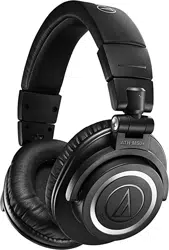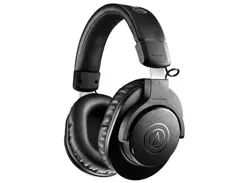

ATH-M20xBT
WirelessHeadphones
UserManual
English

1
Safetyprecautions
Althoughthisproductwasdesignedtobeusedsafely,failingtouseitcorrectlymayresultinanaccident.Toensure
safety,observeallwarningsandcautionswhileusingtheproduct.
Cautionsfortheproduct
Donotusetheproductnearmedicalequipment.Radiowavesmayaffectcardiacpacemakersandmedicalelectronic
equipment.Donotusetheproductinsidemedicalfacilities.
Whenusingtheproductinaircraft,followairlineinstructions.
Donotusetheproductnearautomaticcontroldevicessuchasautomaticdoorsandfirealarms.Radiowavesmay
affectelectronicequipmentandcauseaccidentsduetomalfunction.
Donotdisassemble,modifyorattempttorepairtheproducttoavoidelectricshock,malfunctionorfire.
Donotsubjecttheproducttostrongimpacttoavoidelectricshock,malfunctionorfire.
Donothandletheproductwithwethandstoavoidelectricshockorinjury.
Disconnecttheproductfromadeviceiftheproductbeginstomalfunction,producingsmoke,odor,heat,unwanted
noiseorshowingothersignsofdamage.Insuchacase,contactyourlocalAudio-Technicadealer.
Donotallowtheproducttogetwettoavoidelectricshockormalfunction.
Donotputforeignmattersuchascombustiblematerials,metal,orliquidintheproduct.
Donotcovertheproductwithaclothtoavoidfireorinjurybyoverheating.
Followapplicablelawsregardingmobilephoneandheadphoneuseifusingheadphoneswhiledriving.
Donotusetheproductinplaceswheretheinabilitytohearambientsoundpresentsaseriousrisk(suchasatrailroad
crossings,trainstations,andconstructionsites).
Whencharging,makesuretousetheincludedUSBchargingcable.
Donotchargewithdevicesthathavequick-chargefunctionality(withavoltageof5Vormore).Doingsomaycause
theproducttomalfunction.
Topreventdamagetoyourhearing,donotraisethevolumetoohigh.Listeningtoloudsoundforanextendedperiod
maycausetemporaryorpermanenthearingloss.
Discontinueuseifskinirritationresultsfromdirectcontactwiththeproduct.
Donotcatchyourfingersorotherbodypartsbetweenthehousingandthearmorinsidethejoints.
Cautionsforrechargeablebattery
Theproductisequippedwitharechargeablebattery(lithiumpolymerbattery).
Ifbatteryfluidgetsintoeyes,donotrubthem.Rinsethoroughlywithcleanwatersuchastapwaterandconsulta
doctorimmediately.
Ifbatteryfluidleaks,donottouchfluidwithbarehands.Iffluidremainsinsidetheproduct,itmaycausemalfunction.
Ifbatteryfluidleaks,contactyourlocalAudio-Technicadealer.
Iffluidgetsinyourmouth,garglethoroughlywithcleanwatersuchastapwaterandconsultadoctor
immediately.
Ifyourskinorclothingcomesincontactwithfluid,immediatelywashtheaffectedskinorclothingwithwater.If
youexperienceskinirritation,consultadoctor.

Safetyprecautions
2
Toavoidleakage,generationofheatorexplosion:
Neverheat,disassembleormodifythebattery,nordisposeofitinafire.
Donotattempttopiercewithanail,hitwithahammerorsteponthebattery.
Donotdroptheproductorsubjectittostrongimpact.
Donotgetthebatterywet.
Donotuse,leaveorstorethebatteryinthefollowingplaces:
Areaexposedtodirectsunlightorhightemperaturesandhumidity
Insideofacarundertheblazingsun
Nearheatsourcessuchasheatregisters
ChargeonlywiththeincludedUSBcabletoavoidmalfunctionorfire.
Theinternalrechargeablebatteryofthisproductcannotbereplacedbytheuser.Thebatterymayhavereachedthe
endofitsservicelifeiftheusagetimebecomessignificantlyshorterevenafterthebatteryhasbeenfullycharged.If
thisisthecase,thebatteryneedstoberepaired.ContactyourlocalAudio-Technicadealerforrepairdetails.
Whentheproductisdisposedof,thebuilt-inrechargeablebatteryneedstobediscardedproperly.Contactyourlocal
Audio-Technicadealertolearnhowtoproperlydisposeofthebattery.
ForcustomersintheUSA
FCCNotice
Warning
ThisdevicecomplieswithPart15oftheFCCRules.Operationissubjecttothefollowingtwoconditions:(1)Thisdevice
maynotcauseharmfulinterference,and(2)thisdevicemustacceptanyinterferencereceived,includinginterference
thatmaycauseundesiredoperation.
Caution
Youarecautionedthatanychangesormodificationsnotexpresslyapprovedinthismanualcouldvoidyourauthorityto
operatethisequipment.Thistransmittermustnotbeco-locatedoroperatedinconjunctionwithanyotherantennaor
transmitterusedinothersystems.
RFExposureStatement
ThisdevicecomplieswithFCCradiationexposurelimitssetforthforanuncontrolledenvironmentandmeetstheFCC
radiofrequency(RF)ExposureGuidelines.ThisequipmenthasverylowlevelsofRFenergythatisdeemedtocomply
withouttestingofspecificabsorptionrate(SAR).
Contact
ResponsibleCompany:Audio-TechnicaU.S.,Inc.
Address:1221CommerceDrive,Stow,Ohio44224,USA
Tel:330-686-2600

Safetyprecautions
3
ForcustomersinCanada
ISEDstatement
Thisdevicecontainslicence-exempttransmitter(s)/receiver(s)thatcomplywithInnovation,ScienceandEconomic
DevelopmentCanada’slicence-exemptRSS(s).Operationissubjecttothefollowingtwoconditions:
(1)Thisdevicemaynotcauseinterference.
(2)Thisdevicemustacceptanyinterference,includinginterferencethatmaycauseundesiredoperationofthedevice.
ThisdevicecomplieswithRSS-102radiationexposurelimitssetforthforanuncontrolledenvironment.

4
Notesonuse
Besuretoreadtheconnecteddevice’susermanualbeforeuse.
Audio-Technicawillnotbeliableinanywayforanylossofdataintheunlikelyeventthatsuchlossesshouldoccur
whileusingtheproduct.
Onpublictransportationorinotherpublicplaces,keepthevolumelowsoasnottodisturbotherpeople.
Minimizethevolumeonyourdevicebeforeconnectingtheproduct.
Whenusingtheproductinadryenvironment,youmayfeelatinglingsensationinyourears.Thisiscausedbystatic
electricityaccumulatedonyourbody,notbyproductmalfunction.
Donotsubjecttheproducttostrongimpact.
Donotstoretheproductindirectsunlight,nearheatingdevices,orinhot,humid,ordustyplaces.Additionally,do
notallowtheproducttogetwet.
Whentheproductisusedforalongtime,theproductmaybecomediscoloredduetoultravioletlight(especially
directsunlight)andwear.
IftheproductisplacedinabagwhiletheUSBchargingcableisstillconnected,theUSBchargingcablemay
becomecaught,severed,orbroken.
MakesuretoholdtheplugwhenconnectinganddisconnectingtheUSBchargingcable.TheUSBchargingcable
maybecomeseveredoranaccidentmayoccurifyoupullonthecableitself.
WhenyouarenotusingtheUSBchargingcable,disconnectitfromtheproduct.
DonotchargethebatteryiftheterminaloftheUSBchargingcableisbent,loose,ordamaged.Doingsomaycause
heatgeneration,smokeemission,fireorelectricshock.
Thisproductcanbeusedtotalkonthephoneonlywhenusingamobiletelephonenetwork.Supportfortelephony
appsthatuseamobiledatanetworkisnotguaranteed.
Ifyouusetheproductnearanelectronicdeviceortransmitter(suchasamobilephone),unwantednoisemaybe
heard.Inthiscase,movetheproductawayfromtheelectronicdeviceortransmitter.
IfyouusetheproductnearaTVorradioantenna,noisemaybeseenorheardinthetelevisionorradiosignal.Inthis
case,movetheproductawayfromtheTVorradioantenna.
Toprotectthebuilt-inrechargeablebattery,chargeitatleastonceevery6months.Iftoomuchtimepassesbetween
charges,thelifeoftherechargeablebatterymaybereduced,ortherechargeablebatterymaynolongerbeabletobe
charged.
DonotchargetheproductifwaterorforeignmatterisinsidethebatteryjackorUSBchargingcable.Doingsomay
causecorrosion,heatgeneration,smoke,fire,orothermalfunctionorelectricshockinthebatteryjackorUSB
chargingcable.
Chargetheproductinawell-ventilatedplace(10to35°C(50to95°F))awayfromdirectsunlight.Otherwise,the
batterymaydeteriorate,possiblyresultinginshorterperiodsofcontinuoususeormayfailtocharge.
Iftheproductiswetwithsweat,wipeoffanymoisturewithadryclothbeforecharging.
5
ForamorecomfortableBluetoothcommunication
experience
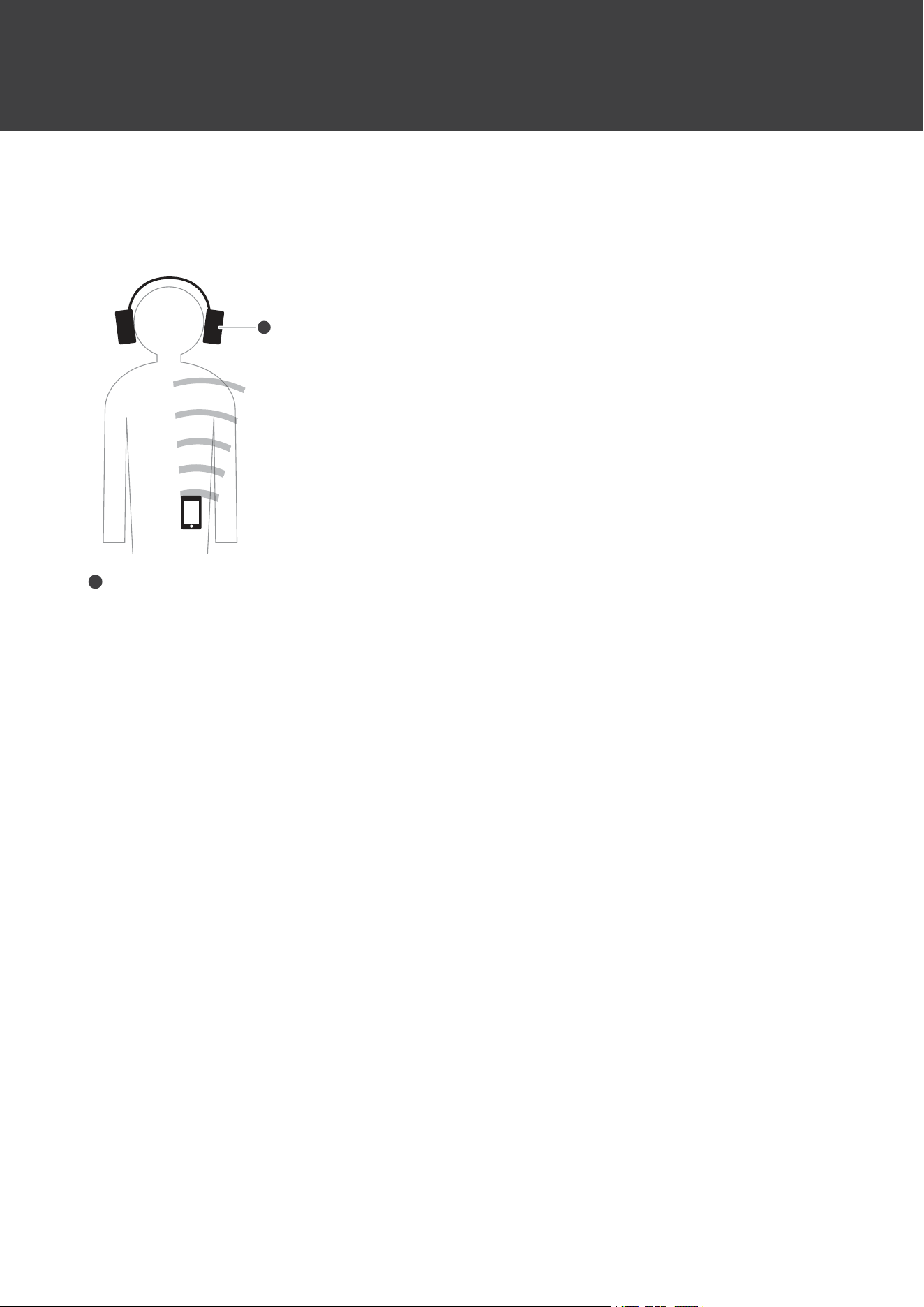
Theeffectivecommunicationrangeofthisproductvariesdependingonobstructionsandradiowaveconditions.Fora
moreenjoyableexperience,pleaseusetheproductascloseaspossibletotheBluetoothdevice.Tominimizenoiseand
sounddisruptions,avoidplacingyourbodyorotherobstaclesbetweentheproduct’santenna(Lside)andtheBluetooth
device.
R L
1
1
Antenna
6
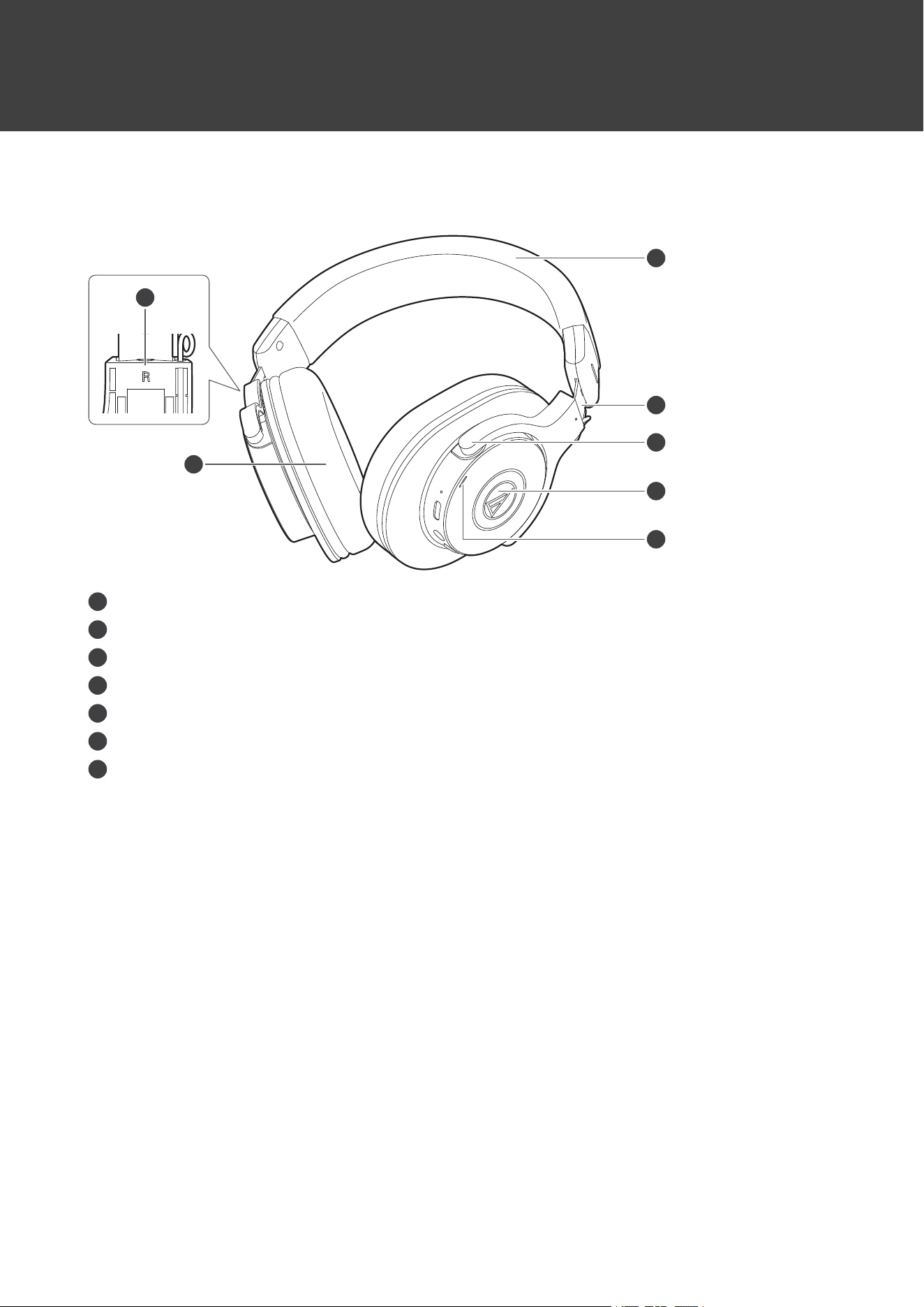
Partnamesandfunctions
Headphones
4
6
5
2
1
3
7
1
L/R(left/right)indicator
2
Earpad
3
Headband
4
Slider
5
Arm
6
Housing
7
Indicatorlamp
Displaystheoperatingstatusandbatteryleveloftheproduct.
Partnamesandfunctions
7
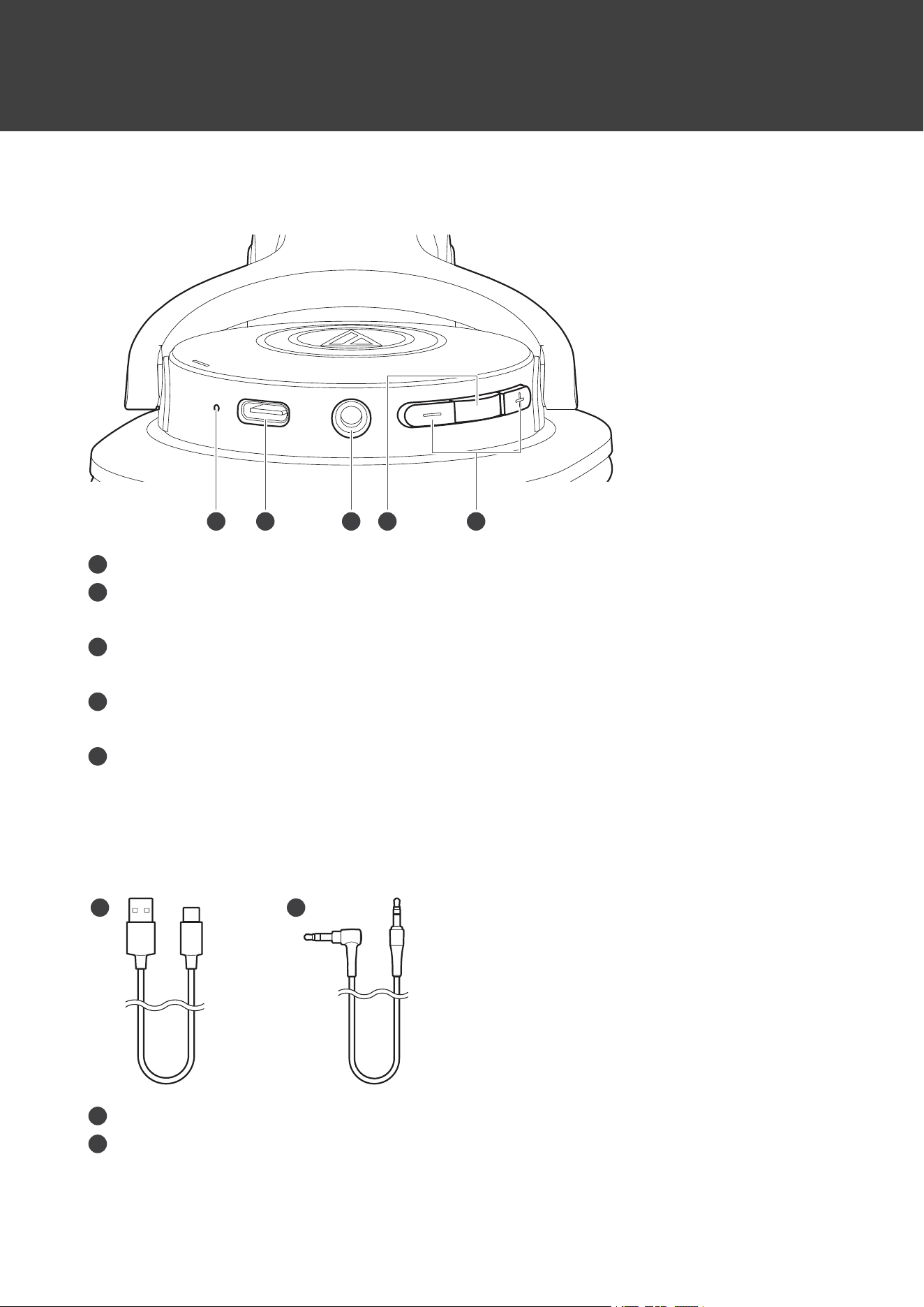
Operationarea
2 3 4
1
5
1
Microphone
2
Batteryjack
UsetoconnecttheincludedUSBchargingcableandchargetheproduct.
3
Connectorjack
Usetoconnecttheincludedcableforwiredconnections.
4
Powersupply/controlbutton
UsetoturnthepowersupplyON/OFF,play/pausemusic,andanswerphonecalls.
5
Volumebuttons
Usetoadjustthevolumeupordown(+/–).
Accessories
2
1
1
USBchargingcable(30cm(12"),USBType-A/USBType-C
™
)
2
Cable(1.2m(3.9’)/3.5mm(1/8”)gold-platedstereomini-plug(3pole/Lshaped))
8
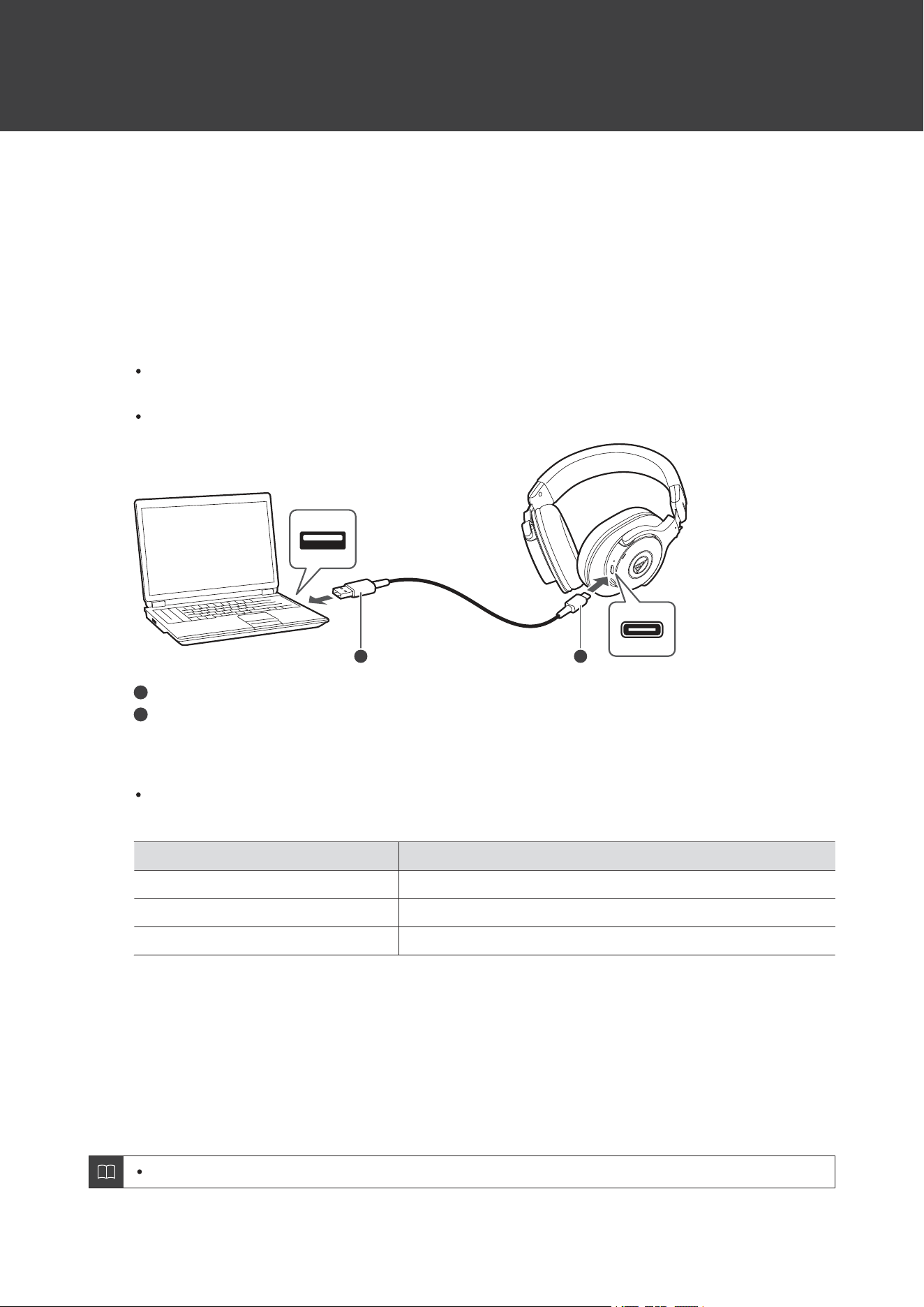
Chargingthebattery
Fullychargethebatterywhenusingforthefirsttime.
Whentherechargeablebatteryisrunninglow,thevoiceguidancewillplaythemessage“Lowbattery”,andthe
indicatorlampwillflashinred.Chargethebatteryassoonaspossible.
Ittakesabout4hoursmaximumtochargethebatteryfully.(Thistimemayvarydependingonusageconditions.)
Chargetheproductinawell-ventilatedplace(10to35°C(50to95°F))awayfromdirectsunlight.Otherwise,thebattery
maydeteriorate,possiblyresultinginshorterperiodsofcontinuoususeormayfailtocharge.
1
ConnecttheincludedUSBchargingcable(USBType-Cside)tothebatteryjack.
TheincludedUSBchargingcableisdesignedforexclusiveusewiththeproduct.DonotuseanyotherUSB
chargingcable.
WheninsertingtheUSBchargingcableintotheUSBportorbatteryjack,insertitdirectly(horizontally).
1 2
1
USBType-A
2
USBType-C
2
ConnecttheincludedUSBchargingcable(USBType-Aside)tothecomputertostartcharging.
Whilecharging,theindicatorlamplightsasfollows.(Itmaytakeseveralsecondsfortheindicatorlampto
light.)
IndicatorlampStatus
LitredCharging
OffChargingcomplete
FlashingredChargingerror
[1]
[1]Theheadphonesmaybehot.Allowthetemperatureoftheproducttocoolsufficientlybeforecharginginawell-ventilatedplace(10to35°C
(50to95°F))awayfromdirectsunlight.
3
Whenchargingiscomplete,disconnecttheUSBchargingcable(USBType-Aside)fromthe
computer.
4
DisconnecttheUSBchargingcable(USBType-Cside)fromtheproduct’sbatteryjack.
Ifyoustarttochargewhiletheproductison,itwillautomaticallyturnoff.

Chargingthebattery
9
Whencharging,makesuretousetheincludedUSBchargingcable.Theproductmaynotchargewith
cablesotherthantheincludedUSBchargingcable.
10
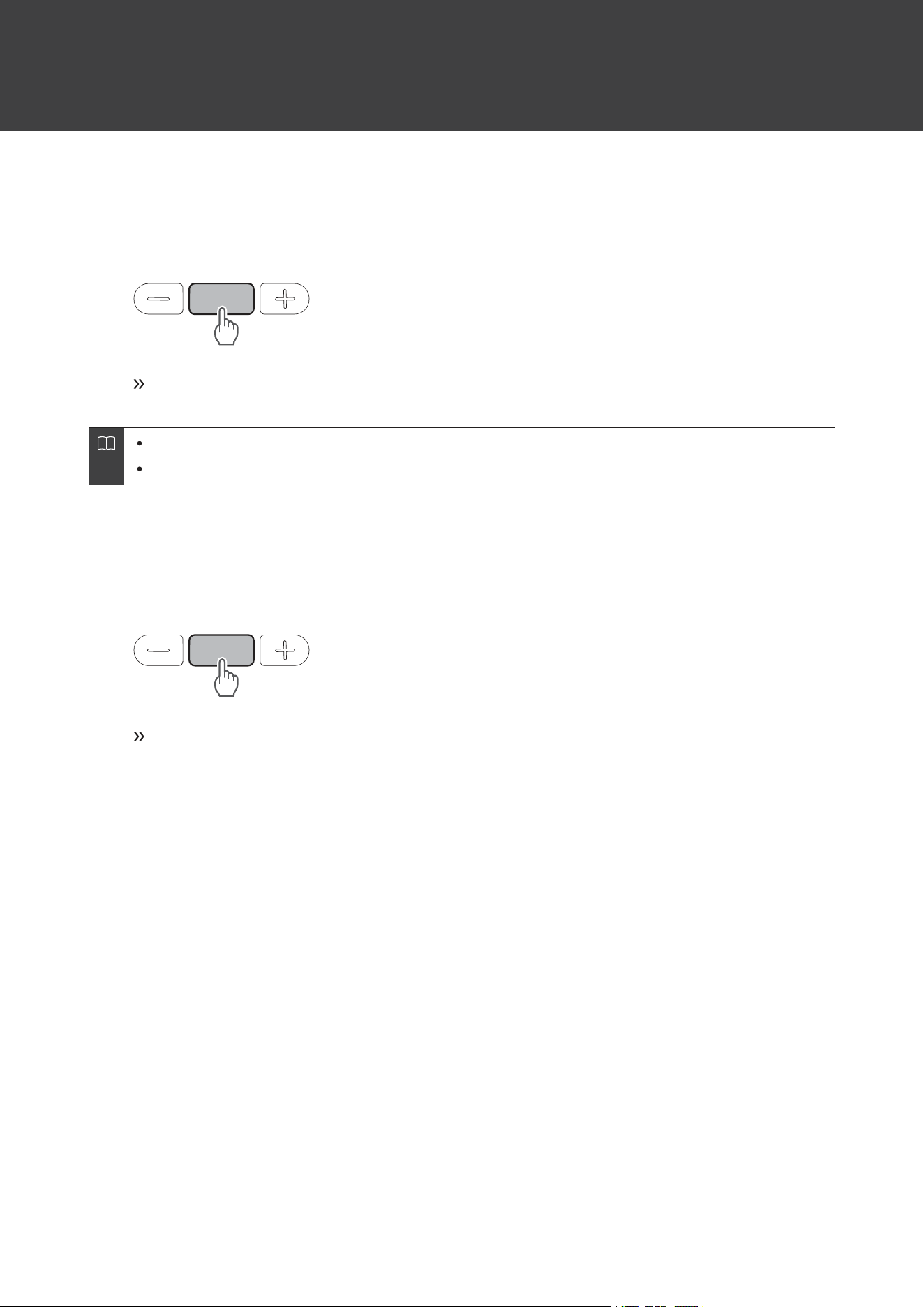
PowersupplyON/OFF
Turningontheproduct
1
Pressandholdthepowersupply/controlbutton(about2seconds).
Theindicatorlamplightsinwhite,andthenflashes.Voiceguidanceisplayed.
Itmaytakeseveralsecondsfortheindicatorlamptolight.
See"Voiceguidance"(p.19)formoreinformationonvoiceguidance.
Turningofftheproduct
1
Pressandholdthepowersupply/controlbutton(about2seconds).
Theindicatorlamplightsinwhite,andthenturnsoff.
11
ConnectingviaBluetooth
ToconnecttheproducttoaBluetoothdevice,theproductneedstopair(register)withthedevice.
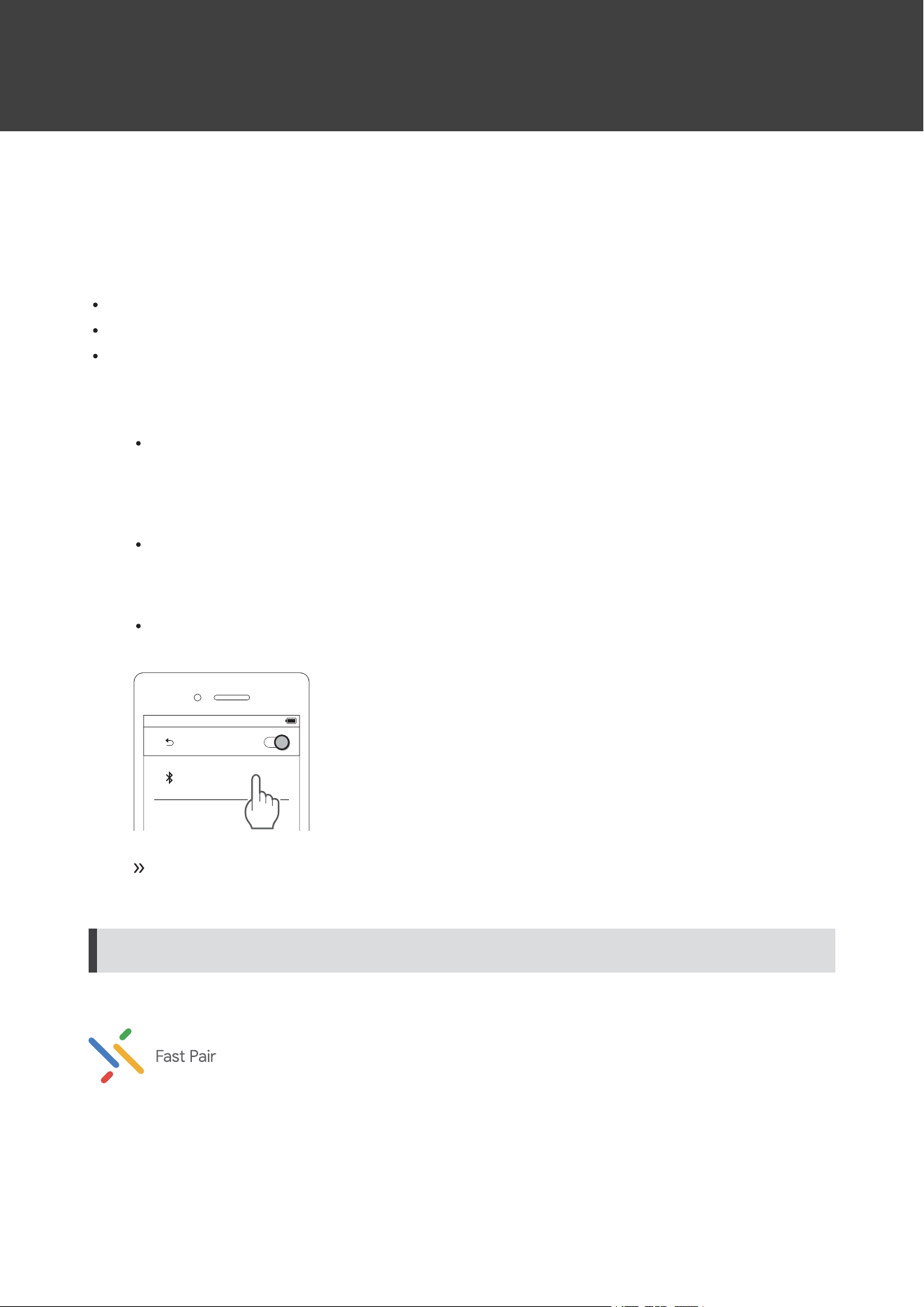
PairingaBluetoothdevice
ReadtheusermanualfortheBluetoothdevice.
PlacetheBluetoothdevicewithin1m(3.3')oftheproducttoperformpairingcorrectly.
Weartheproducttohearvoiceguidanceduringpairing.
1
Startingwiththeproductturnedoff,turniton.
Theindicatorlampwilllightinwhite,andthenflashinwhite.
2
UseyourBluetoothdevicetobeginthepairingprocessandsearchfortheproduct.Whenyour
Bluetoothdevicefindstheproduct,“ATH-M20xBT”willbedisplayedonthedevice.
ForinformationaboutusingyourBluetoothdevice,refertothedevice’susermanual.
3
Select“ATH-M20xBT”topairtheproductandyourBluetoothdevice.
Somedevicesmayaskforapasskey.Inthiscase,enter“0000”.Thepasskeymayalsobecalledapasscode,
PINcode,PINnumber,orpassword.
Bluetooth
ON
ATH-M20xBT
Thevoiceguidancewillplaythemessage“Bluetoothconnected”,andtheindicatorlampwillflash
slowlyinwhite.Thisindicatespairingwassuccessfullycompleted.
PairingwithFastPair
Inonetouch,theproductenablesquick,effortlessBluetoothpairingwithyourAndroiddevices.Youcanevencheckto
seewhereyoulastplacedit.

ConnectingviaBluetooth
12
1
TurnontheBluetoothfunctiononanAndroiddeviceconfiguredwithaGoogleaccount.
2
TurnontheproductandbringtheproductclosetotheAndroiddevice.
ForinformationaboutusingyourBluetoothdevice,refertothedevice’susermanual.
3
TouchthepairingnotificationthatappearsonyourAndroiddevice.
Thevoiceguidancewillplaythemessage“Bluetoothconnected”whenpairingiscomplete.The
indicatorlampwillbeginflashingslowlyinwhite.
Aboutpairing
WhenconnectinganewBluetoothdevice,youneedtopairitwiththeproduct.OncetheBluetoothdeviceandthe
productarepaired,youdonotneedtopairthemagain.Theproductsupportsmultipairing,inwhichaconnectionhistory
issaved.However,inthefollowingcasesyouwillneedtopairagaineveniftheBluetoothdevicewaspairedonce:
IftheproductisdeletedfromtheBluetoothdevice’sconnectionhistory.
Iftheproductissentoutforrepair.
Iftheproductisreset.
Multipointfunction
Theproductsupportsmultipoint,whichallowstwoBluetoothdevicestobeconnectedatthesametime.Whileyouare
listeningtomusicwithonedevice,youcanansweracallthatcomesinfromtheotherdevice.Itisconvenientifyouhave
twosmartphones,forexample.
Audio-TechnicadoesnotguaranteetheoperationofallcombinationsofBluetoothdevices.
Connectingusingmultipoint
1
PairwiththefirstBluetoothdevice.
2
Afterpairingwiththefirstdevice,turnoffitsBluetoothfeature.
3
PairwiththesecondBluetoothdevice.
4
TurnontheBluetoothfeatureofthefirstBluetoothdevice.
Iftheproductdoesnotconnect,restartitspower.
UptotwoBluetoothdevicescanbeconnectedatthesametimewithmultipoint.Toconnectathird
Bluetoothdevice,disconnectoneoftheconnecteddevices.
13
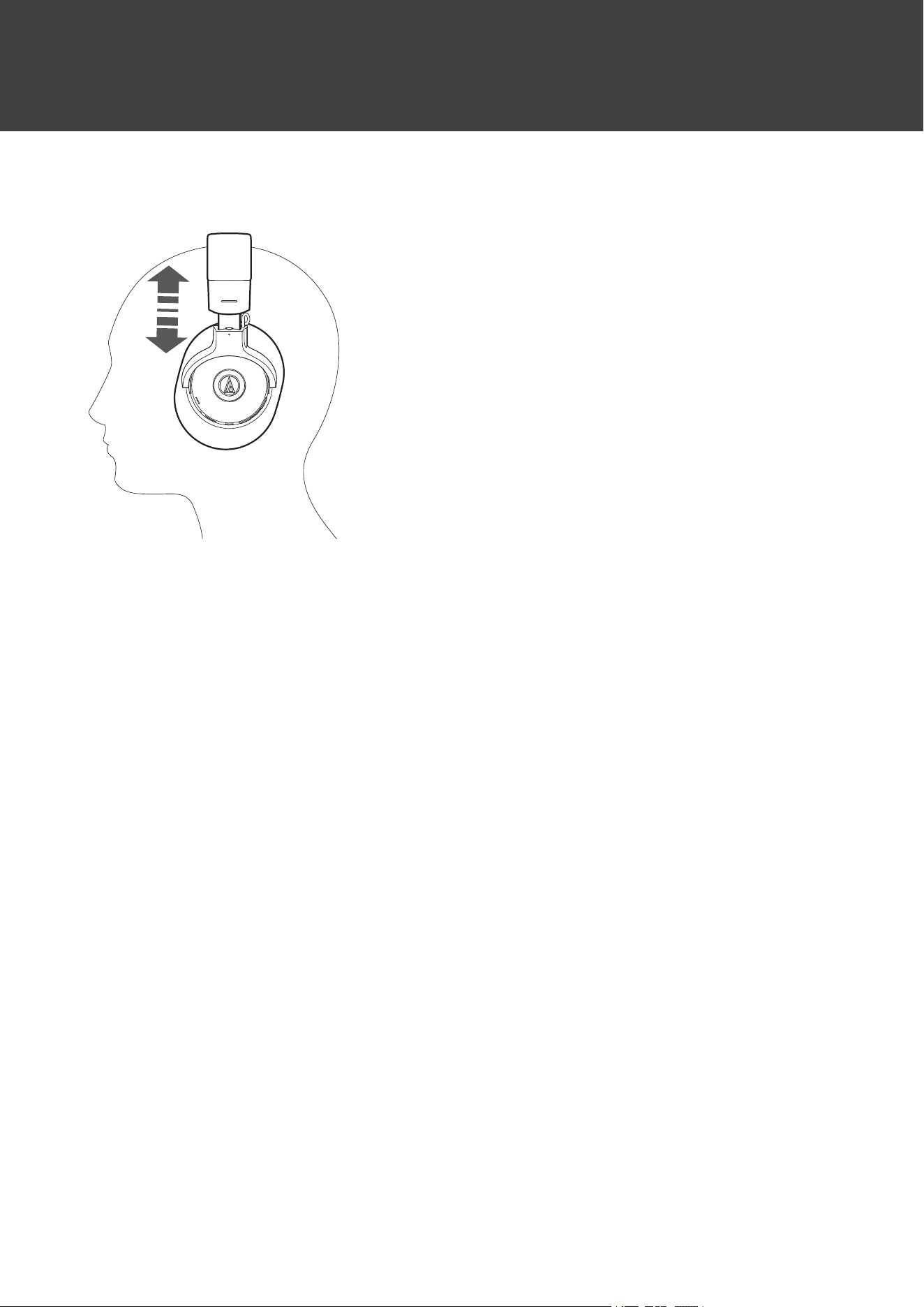
Wearingtheproduct
Putthesideoftheproductmarked“L”(LEFT)ontotheleftearandthesidemarked“R”(RIGHT)ontotherightear,slide
thesliderupanddownsothattheearpadscovertheears,andthenadjusttheheadband.
14
Usingtheproduct
TheproductcanuseBluetoothwirelesstechnologytoconnecttoyourdeviceandplaymusic,receivephonecalls,etc.
Usetheproductforwhicheverofthesepurposessuitsyourneeds.NotethatAudio-Technicacannotguaranteethe
operationofdisplays,suchasthebatteryleveldisplay,orapplicationsviaBluetoothdevices.
Listeningtomusic
Toconnectforthefirsttime,pairtheproductandyourdeviceviaBluetoothwirelesstechnology.Ifyouhavealready
pairedtheproductandyourBluetoothdevice,turnontheBluetoothdevice’sBluetoothconnectionbeforeturningonthe
product.
UseyourBluetoothdevicetostartplayback,referringtothedevice’susermanualasnecessary.
1
Turnontheproductandplacetheproductonyourears.
2
StartmusicplaybackonyourBluetoothdevice.
3
Adjustthevolumebypressingthevolumebuttons(+/–).
4
Pressthepowersupply/controlbuttontostopplayback.
Playbackwillbestartedorstoppedwitheverypress.
Powersupply/controlbuttonoperation
1
1
Powersupply/controlbutton
OperationFunction
PressStartsorpausesplayback.
Press(twice)
Dependingontheconnecteddevice,activatesthedevice’sspeech
recognitionfunction(suchasSiriforcompatibleiOSdevices).
Usingtheproduct
15
Thecontrolsexplainedabovemaynotbeavailableonsomesmartphones.
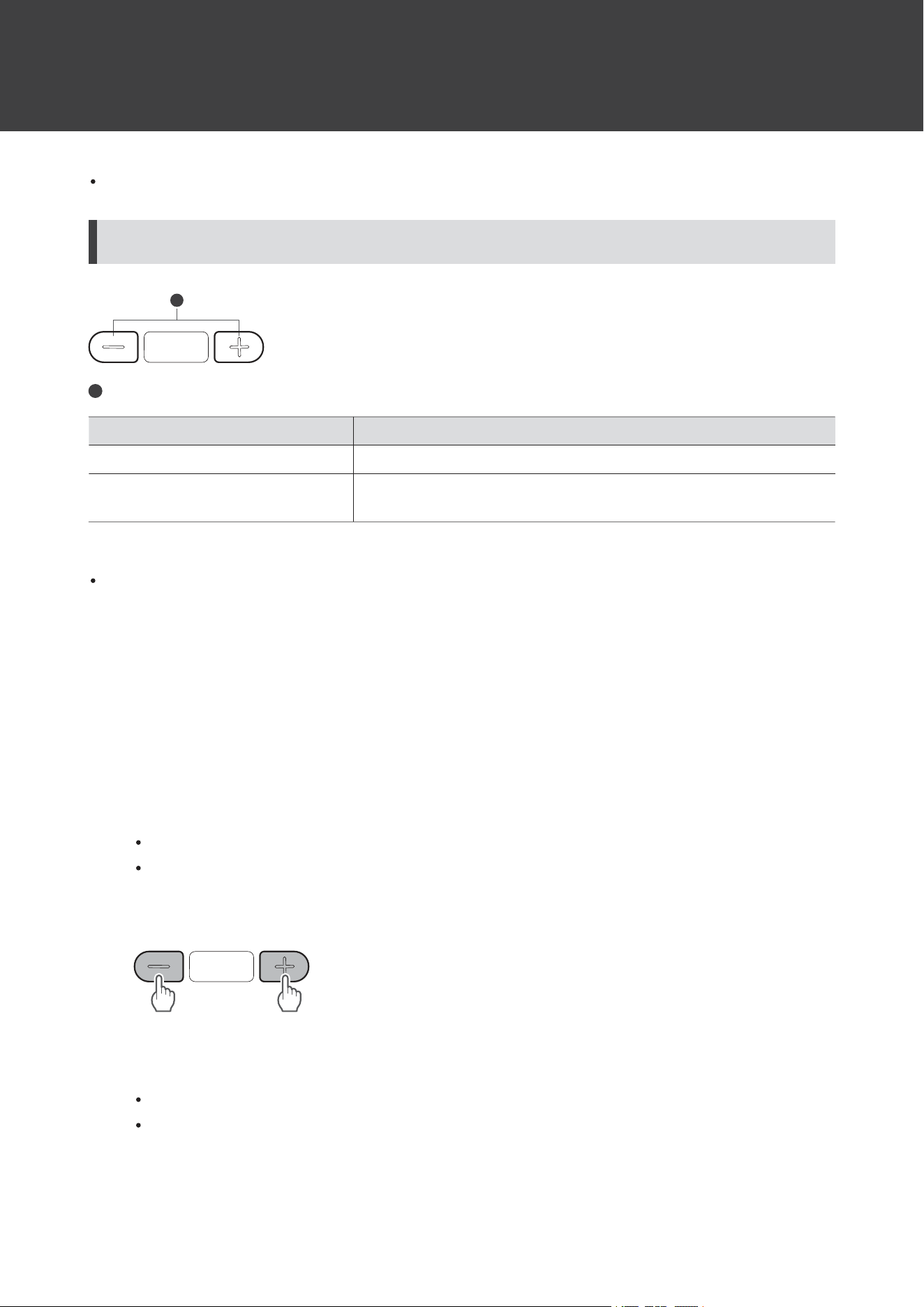
Volumebuttonoperation
1
1
Volumebuttons
OperationFunction
PressIncreases/decreasesthevolumeby1level.
[1][2]
Pressandhold(about2seconds)
Playsthenexttrack.
Playstheprevioustrack/returnstothestartofthetrack.
[1]Abeepisheardwhenthevolumeisatthemaximumorminimumlevel.
[2]ThevolumecontrolofsomeBluetoothdevicesmaynotworkwellwiththeproduct.
Thecontrolsexplainedabovemaynotbeavailableonsomesmartphones.
Talkingonthephone
IfyourBluetoothdevicesupportstelephonefeatures,youcanusetheproducttotalkonthephone.
1
Turnontheproductandplacetheproductonyourears.
2
Make/receivecallswithyourBluetoothdevice.
WhenyourBluetoothdevicereceivesaphonecall,theproductsoundsaringtone.
Ifacallisreceivedwhileyouarelisteningtomusic,musicplaybackispaused.
3
Adjustthevolumebypressingthevolumebuttons(+/–).
4
Pressthepowersupply/controlbuttontoendthecall.
Ifthecallwasreceivedwhilelisteningtomusic,playbackisresumed.
MusicplaybackmaynotberesumedonsomeBluetoothdevices.Inthiscase,musicplaybackmustbestarted
manually.
Usingtheproduct
16
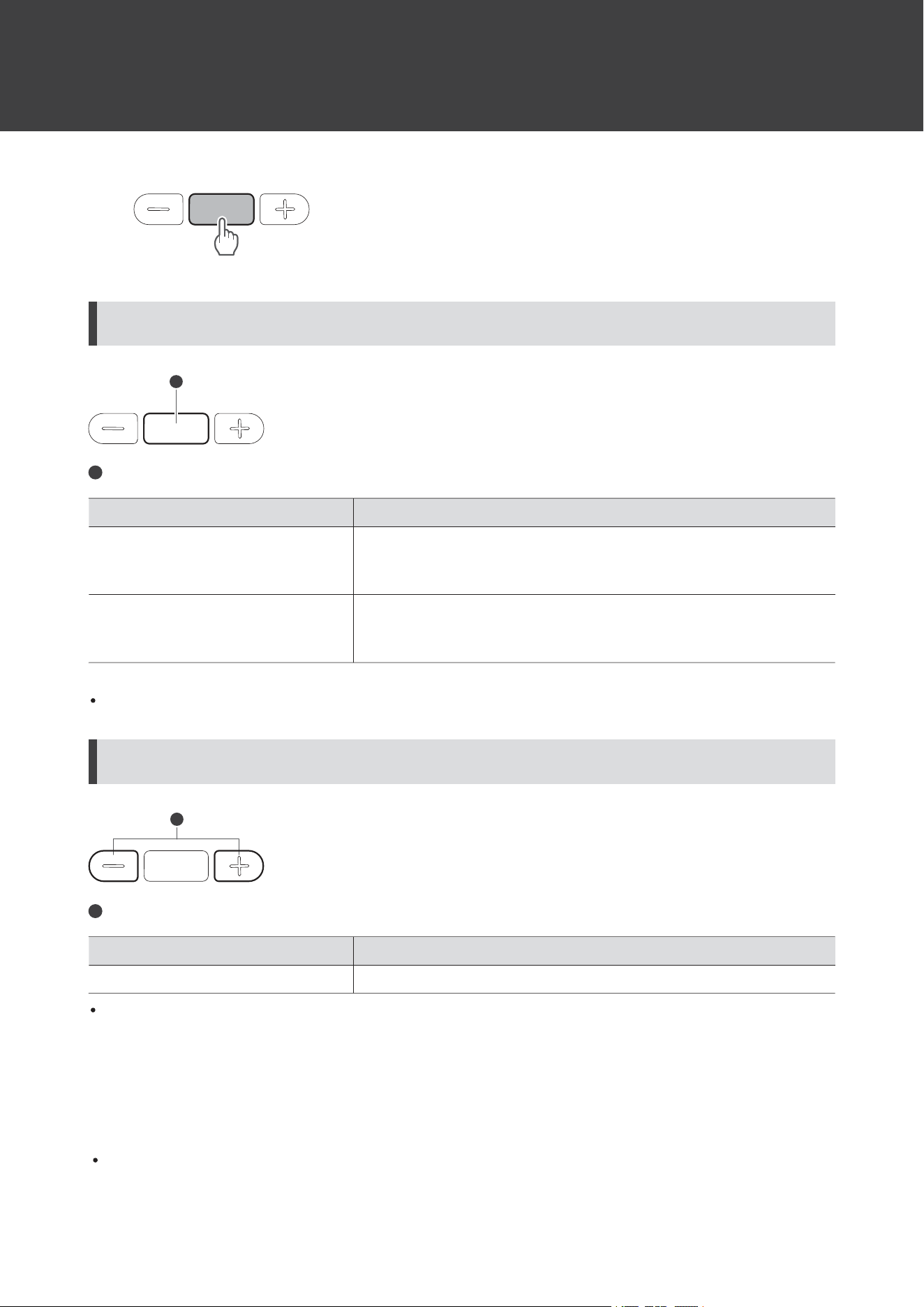
Powersupply/controlbuttonoperation
1
1
Powersupply/controlbutton
OperationFunction
Press
Receivingacall:Answersthecall.
Makingacall:Cancelsthecall.
Duringacall:Endsthecall.
Pressandhold(about2seconds)
Receivingacall:Rejectsthecall.
Makingorduringacall:Whenpressedandheld,thecallswitches
betweentheproductandyourBluetoothdevice.
[1]
[1]Whenyouhearaconfirmationtone,releasethepowersupply/controlbutton.
Thecontrolsexplainedabovemaynotbeavailableonsomesmartphones.
Volumebuttonoperation
1
1
Volumebuttons
OperationFunction
PressIncreases/decreasesthecallvolumeby1level.
Thecontrolsexplainedabovemaynotbeavailableonsomesmartphones.
Lowlatencymode
Lowlatencymodereducessounddelaywhenplayinggamesorwatchingvideos.
Bluetoothcommunicationcanbeeasilyaffectedbyobstaclesandradiowaveconditions.
Usingtheproduct
17
1
Pressthepowersupply/controlbuttonthreetimesinarow.
Witheverythreepresses,thevoiceguidancewillplaythemessage“Lowlatencymode”or“Low
latencymodeoff”,andlowlatencymodewillbeswitchedON/OFF.
LowlatencymodecannotbeswitchedON/OFFduringacallorduringvoiceinputusingthespeech
recognitionfeature.
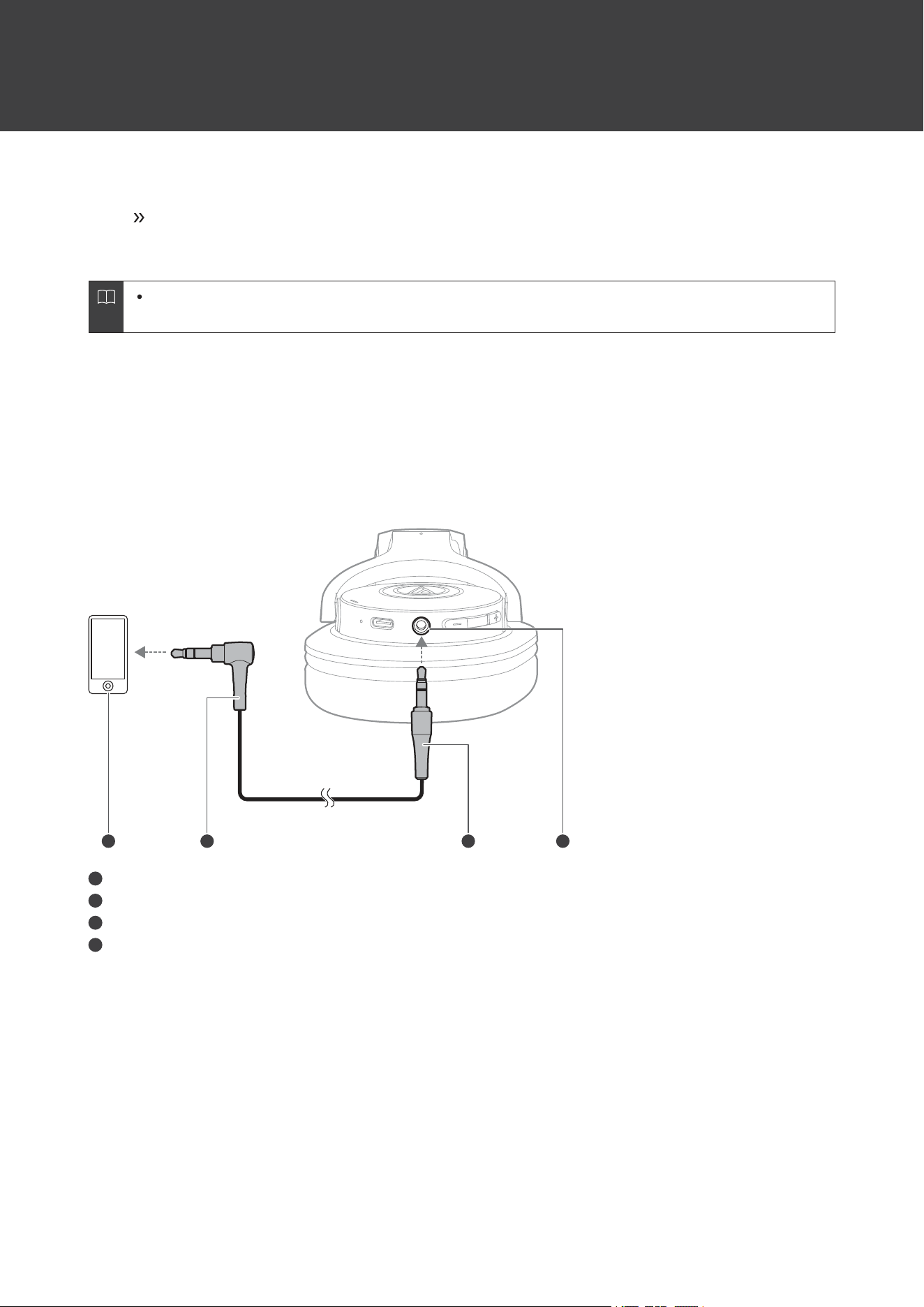
Wiredconnection(playthroughfunction)
Theproducthasaplaythroughthatallowsyoutouseitasportableheadphonesandplaybackmusicevenwhenthereis
nobatterypower.Youcanconnecttheconnectorplugoftheincludedcabletotheproduct’sconnectorjack,andthen
connecttheinputplugintoaportableaudioplayer.Thebuttonsontheheadphonecannotbeusedforoperationwhen
usingawiredconnection.
2 3 41
1
Smartphone,portableaudioplayer,etc.
2
Inputplug
3
Connectorplug
4
Connectorjack
Autopowerofffunction
Theproductautomaticallyturnsoffafter5minutesofnotbeingconnectedtoadevice.Theproductalsoautomatically
turnsoffafter5minutesinthe“Waitingtobeconnected”status.

18
Indicatorlampdisplay
Theindicatorlampoftheproductindicatestheproduct’sstatus.
Pairing
StatusIndicatorlampdisplaypattern
Searchingfordevices
○-○-○・・・
Flashingwhite(graduallylightingup)
Connecting
StatusIndicatorlampdisplaypattern
Waitingtobeconnected
○--------○--------○・・・
Flashingwhitein8-secondintervals(graduallylightingup)
Connecting
○----○----○・・・
Flashingwhitein4-secondintervals
Musicisplaying
○----○----○・・・
Flashingwhitein4-secondintervals(graduallylightingup)
Batterylevel
StatusIndicatorlampdisplaypattern
Batterylevelislow
●●●----●●●・・・
Flashingred3timesin4-minuteintervals
Charging
StatusIndicatorlampdisplaypattern
Charging
●
Litred
Fullycharged
●
Off
Chargingerror
●-●-●・・・
Flashingred

19
Voiceguidance
TheproductplaysEnglishvoiceguidanceinthefollowingsituations.
SituationVoiceguidance
Poweristurnedon
Voiceguidancevariesdependingonthebatterylevel:
Batterylevelhigh
Batterylevelmedium
Batterylevellow
BluetoothisconnectedBluetoothconnected
BluetoothisdisconnectedBluetoothdisconnected
LowlatencymodeONLowlatencymode
LowlatencymodeOFFLowlatencymodeoff
MusicisplayedPlay
MusicispausedPause
BatterylevelislowLowbattery
20
Cleaning
Getintothehabitofregularlycleaningtheproducttoensurethatitwilllastforalongtime.Donotusealcohol,paint
thinners,orothersolventsforcleaningpurposes.
Useadryclothtocleantheheadphones.
Tocleantheearpadsandheadband,wipewithadrycloth.Earpadsandheadbandmayfadeifsweatorwaterdries
onthem.Iftheearpadsandheadbandgetwet,werecommendwipingthemwithadryclothandallowingthemto
dryintheshade.
Immediatelywipeoffanymoisturesuchassweatfromoperatingareassuchasthebuttons.Failuretodosomay
resultinamalfunctionduetocorrosion.
Wipeawayanyperspirationordirtfromthecablewithadryclothimmediatelyafteruse.Failuretocleanthecable
maycauseittodeteriorateandhardenovertime,resultinginmalfunction.
Wipethecable’sUSBplugwithadryclothifdirty.
Wipethecable’splugwithadryclothifdirty.Failuretocleantheplugmaycausesoundskippingornoise.
Iftheproductwillnotbeusedforanextendedperiodoftime,storeitinawell-ventilatedplacefreefrom
hightemperaturesandhumidity.
Earpadsareconsumableparts.Theearpadsdeteriorateovertimeduetouseorstorage.Contactyourlocal
Audio-Technicadealerforearpadsreplacementorotherrepairs.
21
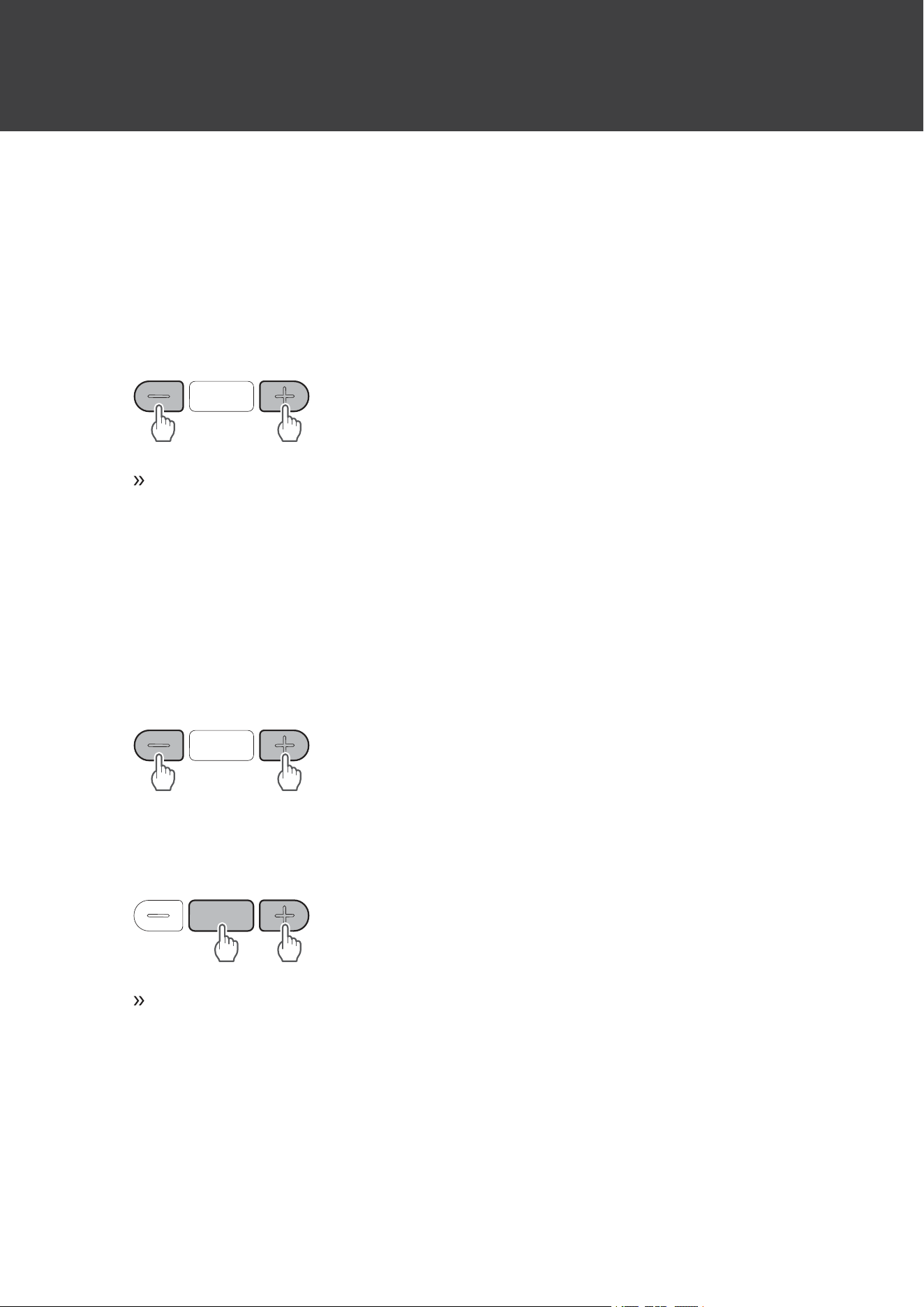
Forcedpairingmode/reset
Iftheproductdoesnotconnecttoadevice(forcedpairing
mode)
Ifpairingcannotbecancelledorisnotsuccessful,youcanuseforcedpairingmodetoperformpairingagain.
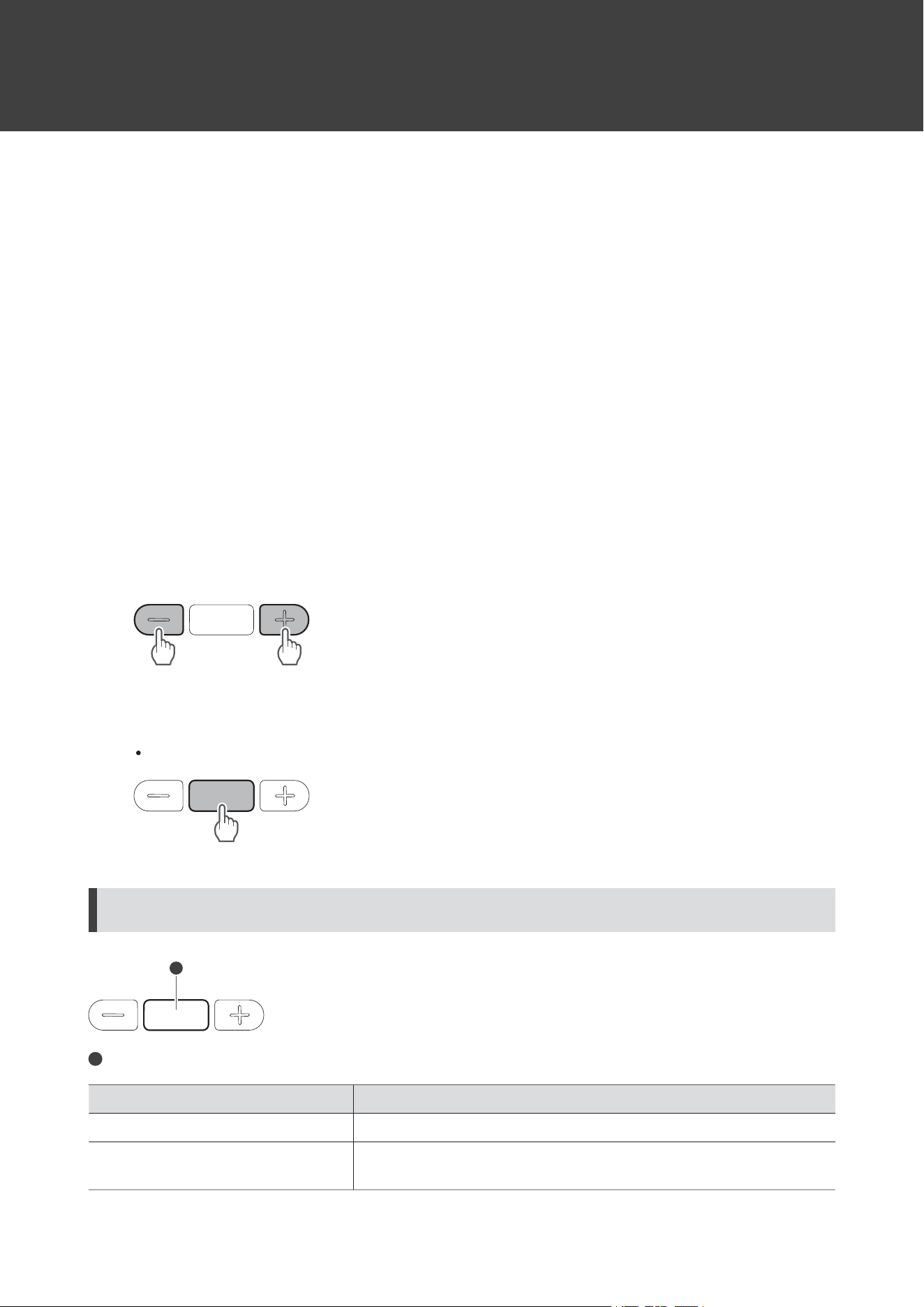
1
Withtheproductturnedon,pressandhold(about6seconds)thevolumebuttons(+/–)atthesame
time.
Theproductwillswitchtothe“searchingfordevices”(pairingmode)stateandyouwillbeableto
pairwithyourdesiredBluetoothdevice.
Iftheproductoperatesabnormally(reset)
Resettheproduct.
1
Withtheproductturnedon,pressandhold(about6seconds)thevolumebuttons(+/–)atthesame
time.
2
Makesuretheindicatorlampisflashingrapidlyinwhite,andpressandholdthepowersupply/
controlbuttonandthevolumeupbutton(+)atthesametime(forabout6seconds).
Theindicatorlampwilllightinpink,andaftertheproductrestarts,resetiscomplete.
3
RemovetheproductfromthelistofregistereddevicesonyourBluetoothdevice.
4
Pairtheproductagain.

22
Troubleshooting
Powerisnotsupplied
Chargetheproduct.
Unabletopair
ConfirmthattheBluetoothdevicecommunicatesusingVer.2.1+EDRorhigher.
PlacetheproductandtheBluetoothdevicewithin1m(3.3')ofeachother.
SettheprofilesfortheBluetoothdevice.Forproceduresonhowtosetprofiles,refertotheBluetooth
device’susermanual.
RemovethepairinginformationfortheBluetoothdevicethenpairtheproductwiththisdeviceagain.
MakesureyouarenotconnectedtoanyotherpreviouslyconnectedBluetoothdevice.Ifso,disconnectthe
productusingthepreviouslyconnectedBluetoothdevice,andthenselecttheproductontheBluetooth
devicebeingconnectedto.Useforcedpairingmodeifyouareunabletodisconnectfromapreviously
connectedBluetoothdevice.Fordetails,referto"Iftheproductdoesnotconnecttoadevice(forcedpairing
mode)"(p.21).
Resettheproductifitcannotbeunpaired,connected,ordoesnotoperateasexpectedevenaftertryingall
othersolutions.Fordetails,referto"Iftheproductoperatesabnormally(reset)"(p.21).
Nosoundisheard/Soundisfaint
TurnonthepoweroftheproductandtheBluetoothdevice.
TurnupthevolumeontheproductandtheBluetoothdevice.
MakesurethattheproductandBluetoothdeviceareconnectedbytheA2DP(oraudioconnection).
DisablepairingfortheproductandtheBluetoothdevice,thenpairtheproductwiththisdeviceagain.
MoveawayfromobstaclesbetweentheproductandtheBluetoothdevice,suchaspeople,metal,orwalls,
andplacetheproductanddeviceclosertogether.
SwitchthesoundoutputoftheBluetoothdevicetotheproduct.
Soundisdistorted/Noiseisheard/Soundcutsout
TurndownthevolumeontheproductandtheBluetoothdevice.
Keeptheproductawayfromdevicesthatemitradiowavessuchasmicrowavesandwirelessrouters.
KeeptheproductawayfromTVs,radios,anddeviceswithbuilt-intuners.Thesedevicescanalsobeaffected
bytheproduct.
TurnofftheequalizersettingsoftheBluetoothdevice.
RemoveobstaclesbetweentheproductandtheBluetoothdeviceandplacethemclosertogether.For
details,referto"ForamorecomfortableBluetoothcommunicationexperience"(p.5).
Troubleshooting
23
Cannothearthevoiceofthecaller/Voiceofthecalleristooquiet
TurnonthepoweroftheproductandtheBluetoothdevice.
TurnupthevolumeontheproductandtheBluetoothdevice.
ConfirmthattheproductandBluetoothdeviceareconnectedviaHFP/HSP(orphoneconnection).
DisablepairingfortheproductandtheBluetoothdevice,thenpairtheproductwiththisdeviceagain.
SwitchthesoundoutputoftheBluetoothdevicetotheproduct.
Theproductcannotbecharged
SecurelyconnecttheincludedUSBchargingcableandchargetheproduct.
Chargetheproductinawell-ventilatedplace(10to35°C(50to95°F))awayfromdirectsunlight.
FordetailsabouthowtooperateyourBluetoothdevice,refertothedevice’susermanual.

24
Specifications
Headphones
Type
Closed-backdynamic
Driver
40mm
Sensitivity
100dB/mW
Frequencyresponse
5to32,000Hz
Impedance
36ohms
Microphone
Type
Electretcondenser
Polarpattern
Omnidirectional
Sensitivity
-42dB(1V/Pa,at1kHz)
Frequencyresponse
50to20,000Hz
Communicationspecifications
Communicationsystem
Bluetoothversion5.0
MaximumRFoutput
10mWEIRP
Maximumcommunication
range
Lineofsight-approx.10m(33')
Frequencyband
2.402GHzto2.480GHz
Modulationmethod
GFSK,Pi/4DQPSK,8DPSK
Spreadspectrummethod
FHSS
CompatibleBluetoothprofiles
A2DP,AVRCP,HFP,HSP
Supportedcodec
AAC,SBC
Supportedcontentprotection
method
SCMS-T
Transmissionband
20to20,000Hz

Specifications
25
Other
Powersupply
DC3.7Vlithiumpolymerbattery
Chargingtime
Approx.4hours
[1]
Operatingtime
Continuoustransmissiontime(musicplayback):Max.approx.60hours
[1]
Weight
216g(7.6oz)
Operatingtemperature
5°Cto40°C(41°Fto104°F)
Accessories
USBchargingcable(30cm(12”),USBType-A/USBType-C),Cable(1.2m
(3.9’)/3.5mm(1/8”)gold-platedstereomini-plug(3pole/L-shaped))
Soldseparately
Earpad,Cable
[1]Thefiguresabovedependonoperatingconditions.
Forproductimprovement,theproductissubjecttomodificationwithoutnotice.

26
Trademarks
TheBluetooth
®
wordmarkandlogosareregisteredtrademarksownedbyBluetoothSIG,Inc.,andanyuseofsuch
marksbyAudio-TechnicaCorporationisunderlicense.Othertrademarksandtradenamesarethoseoftheir
respectiveowners.
USBType-C
™
isatrademarkofUSBImplementersForum.
SiriisatrademarkofAppleInc.registeredintheUnitedStatesandothercountries.
GoogleandAndroidaretrademarksofGoogleLLC.

株式会社オーディオテクニカ
〒194-8666東京都町田市西成瀬2-46-1
www.audio-technica.co.jp
Audio-TechnicaCorporation
2-46-1Nishi-naruse,Machida,Tokyo194-8666,Japan
www.audio-technica.com
©2022Audio-TechnicaCorporation
GlobalSupportContact:www.at-globalsupport.com
132417590-02-01ver.12022.02.01