LOST OR FORGOTTEN USER CODES
LOSS OF PRIMARY USER CODE
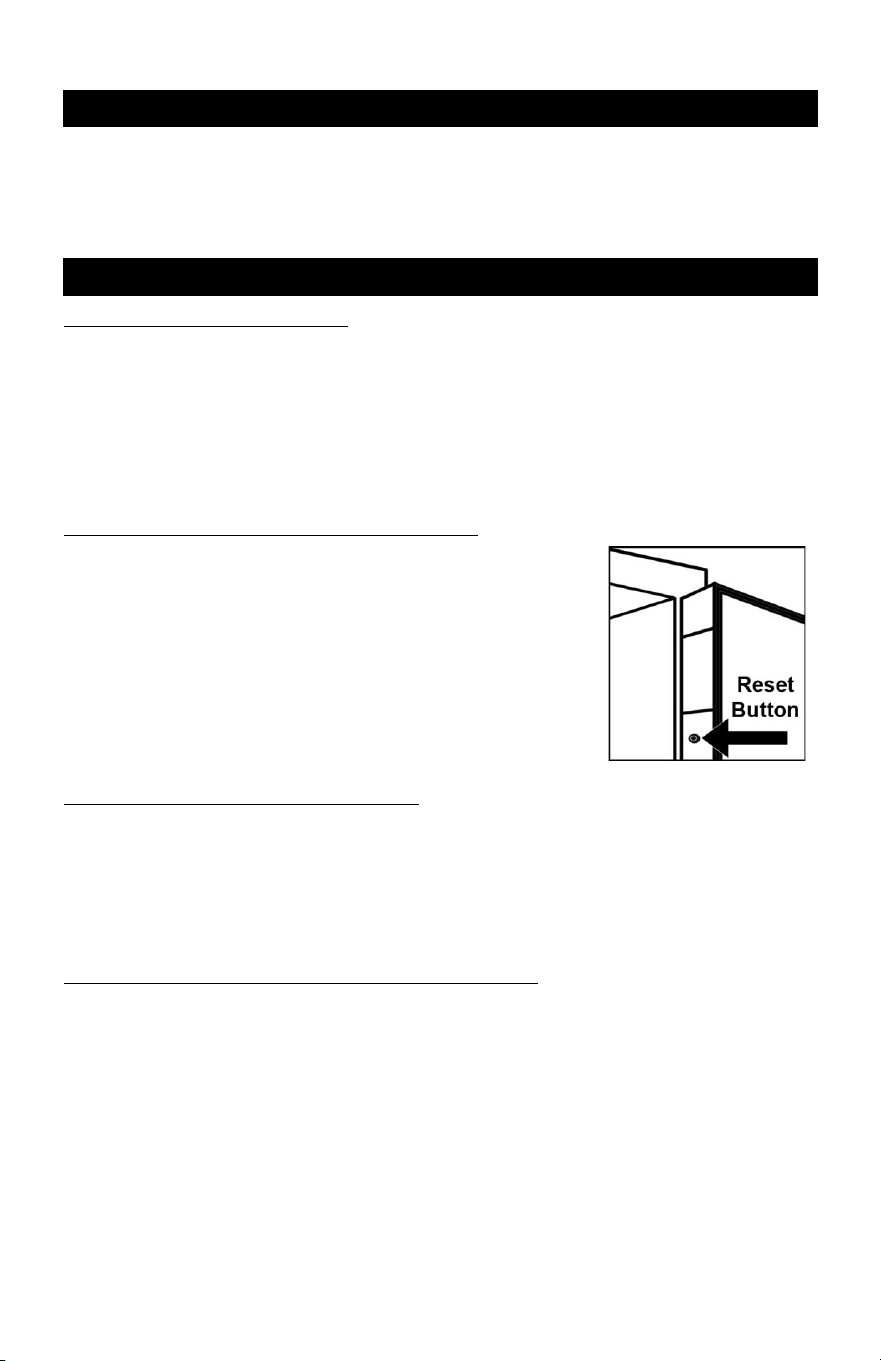
If the 3-8 digit Primary user code is lost or forgotten you can enter a new 3-8 digit Primary
user code by opening the safe with the 3-8 digit secondary user code and using red reset
button located on the inside edge of the door.
Once the safe is open follow the instruction on how to “REPROGRAM A NEW PRIMARY
USER CODE” located at the bottom of page 1
LOSS OF SECONDARY USER CODE
If the 3-8 digit Secondary user code is lost or forgotten you will not be able to reprogram a
new Secondary user code.
You will be able to continue using the safe with the 3-8 digit Primary user code but will lose
the ability to have a Secondary user code.
IMPORTANT: To avoid losing the ability to continue using a Secondary user code it is very
important that the 3-8 digit Secondary user code is recorded when it is programmed and
kept in a secure location away from the safe.
LOSS OF BOTH PRIMARY AND SECONDARY USER CODES
If both the Primary user code and Secondary user codes are lost, you may open the safe
using the Emergency Override Access key and use the red user code reset button to
reprogram the 3-8 digit Primary user code.
The instructions for opening the safe with the Emergency Override Access key are below.
OVERRIDE ACCESS KEY
Your safe is equipped with an emergency override access key lock which allows immediate
access in case you forget your User codes or the batteries need replacing.
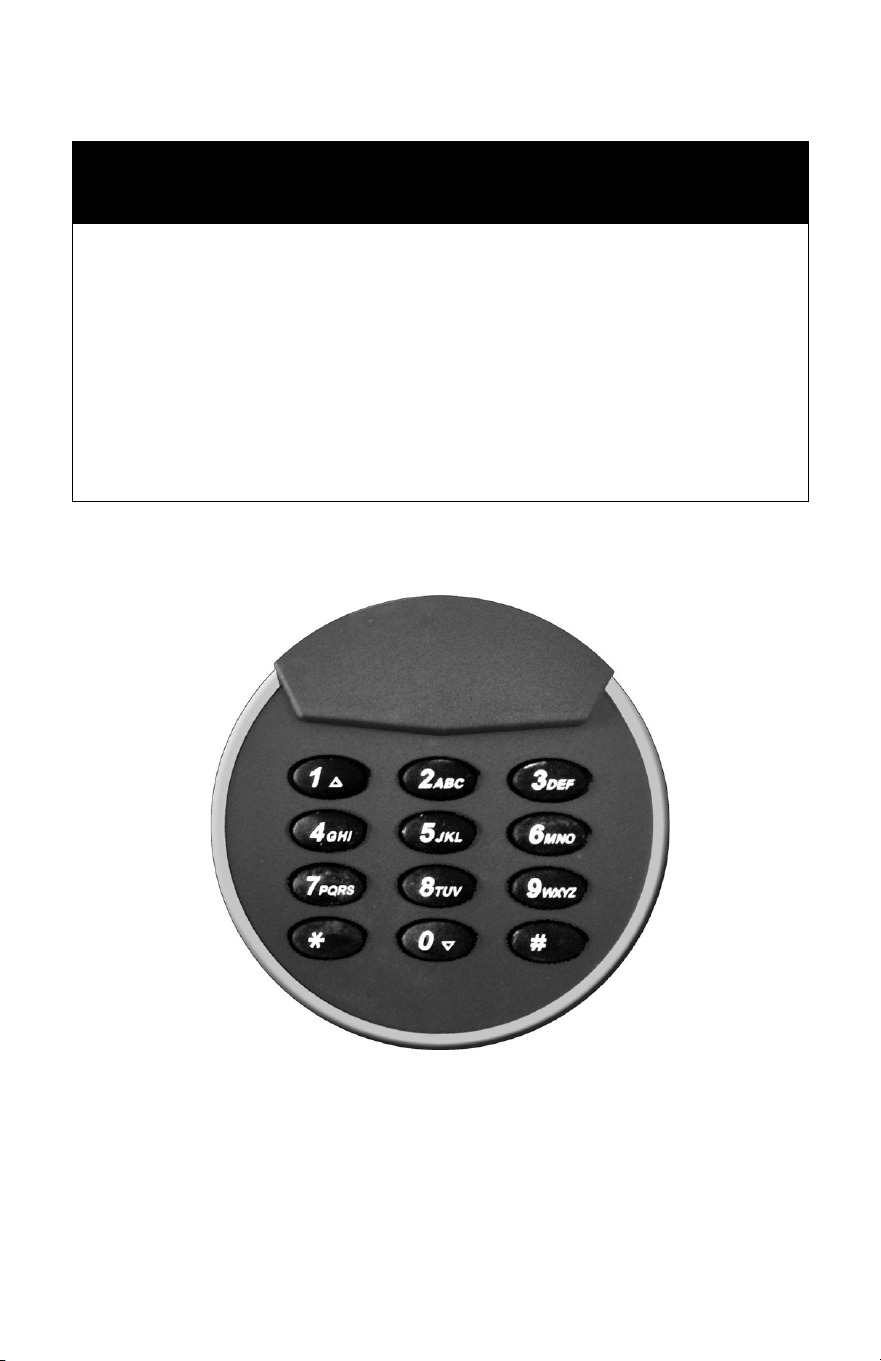
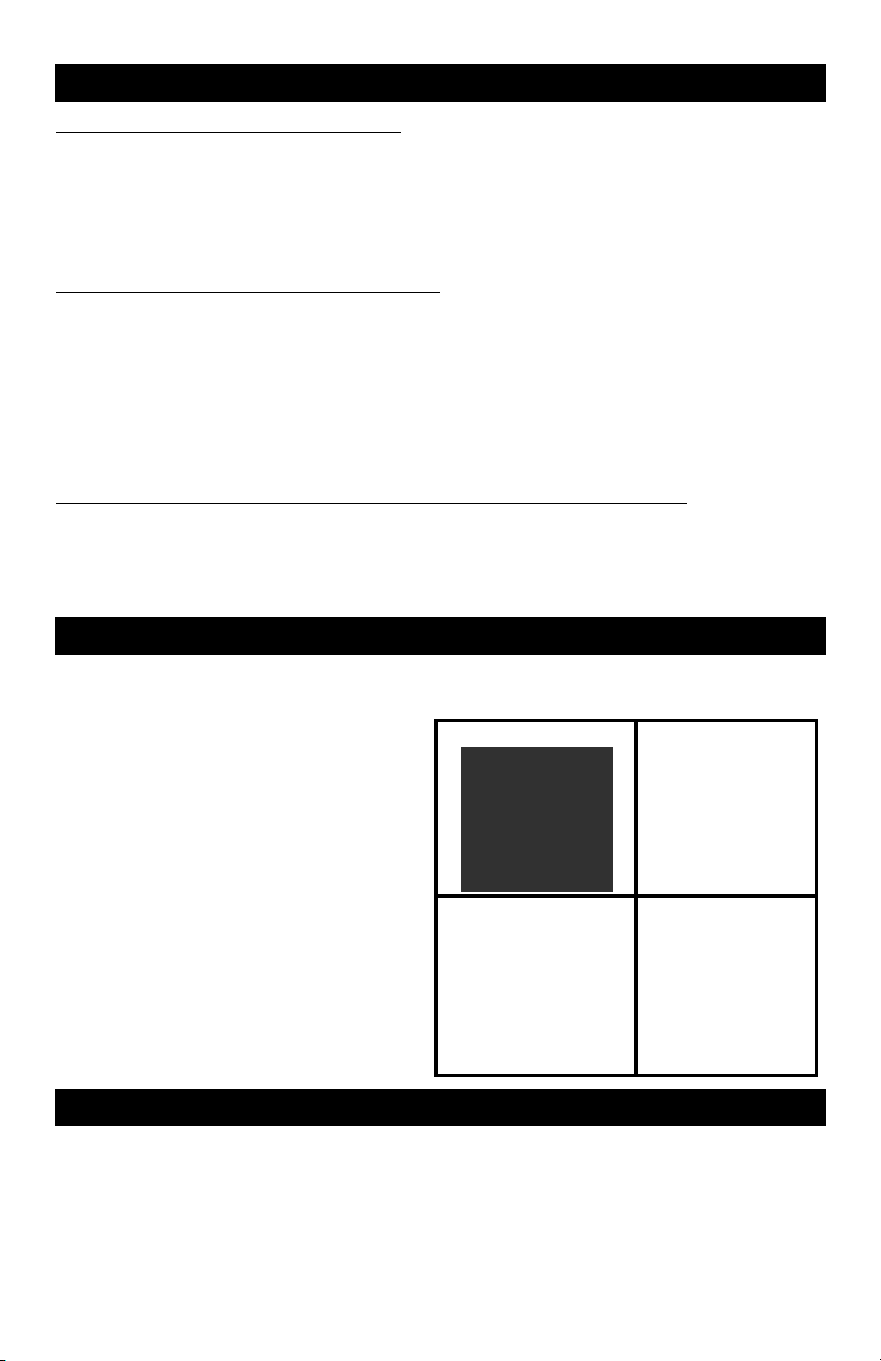
1. To access the compartment, locate the
tab at the top of the keypad.
2. Place your hand on the keypad tab and
pull forward.
3. With the tab pulled forward, rotate the
keypad counterclockwise to the left and
pull keypad out.
4. Insert the override key into the keyhole
on the inside of the lock and turn the key
to the right to unlock the safe.
5. Once the safe is opened, position the
keypad back onto the mounted bracket
and rotate clockwise to the right to lock
in place.
1.
2.
3.
4.
SECURE LOCKOUT PERIOD
If the wrong user code is entered into the keypad 4 consecutive times in a row, the keypad
will automatically revert to the lockout mode and you will not be able to open the safe using
the digital keypad for 3 minutes. During the lockout period entry can be made using the
emergency override key. Continued entry of the wrong user code will cause additional 3
minute lockouts until the proper user code is entered.
3
ATTENTION!
This Honeywell Executive Safe includes a new
Dual User Code Digital Lock. This update replaces
the User Code Programming Instructions located
on Page 3 of the Owner’s Manual for Executive
Safe Models 3014D, 3018D, 3024D, 3032D,
3114D, 3118D, 3124D, 3132D, 3310D, 3330D,
3350D, 3410D, 3430D, & 3450D
DUAL USER CODE DIGITAL LOCK
PRIMARY & SECONDARY USER CODE
PROGRAMMING INSTRUCTIONS
IMPORTANT UPDATE!
PRIMARY & SECONDARY USER CODES
Your new safe is equipped with a digital lock that can be operated with two separate user
codes. You will need to program these user codes with your own 3-8 digit user codes. It is
recommended that you record your new user codes and keep in a secure location away
from the safe. You must program the Primary user code first. After the Primary user code
is programmed and tested you can then proceed to program the Secondary user code.
PRIMARY USER CODE
UNLOCK AND OPEN SAFE
IMPORTANT: Always make sure that the spindle handle is turned counterclockwise to the
left before entering user code.
1. Open your new safe by entering 1-2-3-4-5-6 followed by the # key on the keypad.
2. After user code is entered, the keypad will beep once and the green LED will light up.
!
3. Turn the spindle handle to the right (clockwise) to open. !
NOTE: You must open the safe within 5 seconds or the safe will relock.!
PROGRAM THE PRIMARY USER CODE
1. With door open, locate and press the red reset button
located on the inside edge of the door (see illustration), the
keypad will beep twice and the green LED will light up.
2. Enter a new 3-8 digit Primary user code followed by the #
key. The green LED will light up and the keypad will beep.
3. Immediately re-enter the new 3-8 digit user code a second
time followed by the # key and the green LED will flash
twice and the keypad will beep twice.
4. This new Primary user code is now active.
TEST THE PRIMARY USER CODE
1. With door open, rotate handle counterclockwise to put door bolts in lock position.
2. Enter the new 3-8 digit Primary user code followed by the # key. The green LED will
light up and the keypad will beep.
3. Rotate the spindle handle clockwise within 5 seconds.
4. The lock bolts should recede into the unlocked position when the handle is turned.
REPROGRAM A NEW PRIMARY USER CODE
In the future, this user code can always be changed by opening the safe and using the
reset button.
1. Once the safe door is open, locate and press the small reset button located on the
inside edge of the door, the keypad will beep twice and the green LED will light up.
2. Enter a new 3-8 digit Primary user code followed by the # key, the green LED will
again light up and the keypad will beep.
3. Immediately re-enter the new 3-8 digit user code a second time followed by the # key
and the green LED with flash twice and the keypad will beep twice.
4. This new Primary user code is now active and the old Primary user code is deleted.
1
SECONDARY USER CODE
PROGRAM THE SECONDARY USER CODE
Once you have successfully programmed the Primary user code, you can proceed to
programming the Secondary user code. The Secondary user code is programmed using
the Digital Keypad and it is not necessary to open the safe to proceed.
1. Using the keypad, press the
! button twice (!-!)
2. Enter the factory default user code 1-2-3-4-5-6 followed by the # key into the keypad.
3. The green LED with light up once and the keypad will beep twice.
4. Enter a new 3-8 digit Secondary user code followed by the # key and the green LED
will again light up and the keypad will beep.
5. Immediately re-enter the new 3-8 digit Secondary user code a second time followed
by the # key and the green LED will flash twice and the keypad will beep twice.
6. After the new secondary user code is programmed, the factory preset user code will be
erased and the safe can only be unlocked using your new Primary or Secondary user
codes.
IMPORTANT: To change the secondary user code, the current user code will be
required. For this reason, it is very important that it is recorded and kept in a
secure location away from the safe.
TEST THE SECONDARY USER CODE
1. With door open, rotate handle counterclockwise to put door bolts in lock position.
2. Enter the new 3-8 digit Secondary user code followed by the # key. The green LED
will light up and the keypad will beep.
3. Rotate handle clockwise within 5 seconds.
4. The lock bolts should recede into the unlocked position when the handle is turned.
REPROGRAM A NEW SECONDARY USER CODE
1. Using the keypad, press the ! button twice (!-!)
2. Enter the current 3-8 digit Secondary user code followed by the # key into the keypad.
3. The green LED with light up once and the keypad will beep twice.
4. Enter a new 3-8 digit secondary user code followed by the # key and the green LED
will again light up and the keypad will beep.
5. Immediately re-enter the new 3-8 digit secondary user code a second time followed by
the # key and the green LED will flash twice and the keypad will beep twice.
OPENING/CLOSING SAFE WITH USER CODES
1. Make sure the spindle handle is positioned to the left and enter your new user code
into the keypad followed by the # key.
2. The keypad will beep once, green LED will light up and the lock will click. Turn the
handle clockwise to the right to open the safe.
3. To lock, close the door and turn the spindle handle counterclockwise to the left.
2

PRIMARY & SECONDARY USER CODES
Your new safe is equipped with a digital lock that can be operated with two separate user
codes. You will need to program these user codes with your own 3-8 digit user codes. It is
recommended that you record your new user codes and keep in a secure location away
from the safe. You must program the Primary user code first. After the Primary user code
is programmed and tested you can then proceed to program the Secondary user code.
PRIMARY USER CODE
UNLOCK AND OPEN SAFE
IMPORTANT: Always make sure that the spindle handle is turned counterclockwise to the
left before entering user code.
1. Open your new safe by entering 1-2-3-4-5-6 followed by the # key on the keypad.
2. After user code is entered, the keypad will beep once and the green LED will light up.
!
3. Turn the spindle handle to the right (clockwise) to open. !
NOTE: You must open the safe within 5 seconds or the safe will relock.!
PROGRAM THE PRIMARY USER CODE
1. With door open, locate and press the red reset button
located on the inside edge of the door (see illustration), the
keypad will beep twice and the green LED will light up.
2. Enter a new 3-8 digit Primary user code followed by the #
key. The green LED will light up and the keypad will beep.
3. Immediately re-enter the new 3-8 digit user code a second
time followed by the # key and the green LED will flash
twice and the keypad will beep twice.
4. This new Primary user code is now active.
TEST THE PRIMARY USER CODE
1. With door open, rotate handle counterclockwise to put door bolts in lock position.
2. Enter the new 3-8 digit Primary user code followed by the # key. The green LED will
light up and the keypad will beep.
3. Rotate the spindle handle clockwise within 5 seconds.
4. The lock bolts should recede into the unlocked position when the handle is turned.
REPROGRAM A NEW PRIMARY USER CODE
In the future, this user code can always be changed by opening the safe and using the
reset button.
1. Once the safe door is open, locate and press the small reset button located on the
inside edge of the door, the keypad will beep twice and the green LED will light up.
2. Enter a new 3-8 digit Primary user code followed by the # key, the green LED will
again light up and the keypad will beep.
3. Immediately re-enter the new 3-8 digit user code a second time followed by the # key
and the green LED with flash twice and the keypad will beep twice.
4. This new Primary user code is now active and the old Primary user code is deleted.
1
SECONDARY USER CODE
PROGRAM THE SECONDARY USER CODE
Once you have successfully programmed the Primary user code, you can proceed to
programming the Secondary user code. The Secondary user code is programmed using
the Digital Keypad and it is not necessary to open the safe to proceed.
1. Using the keypad, press the
! button twice (!-!)
2. Enter the factory default user code 1-2-3-4-5-6 followed by the # key into the keypad.
3. The green LED with light up once and the keypad will beep twice.
4. Enter a new 3-8 digit Secondary user code followed by the # key and the green LED
will again light up and the keypad will beep.
5. Immediately re-enter the new 3-8 digit Secondary user code a second time followed
by the # key and the green LED will flash twice and the keypad will beep twice.
6. After the new secondary user code is programmed, the factory preset user code will be
erased and the safe can only be unlocked using your new Primary or Secondary user
codes.
IMPORTANT: To change the secondary user code, the current user code will be
required. For this reason, it is very important that it is recorded and kept in a
secure location away from the safe.
TEST THE SECONDARY USER CODE
1. With door open, rotate handle counterclockwise to put door bolts in lock position.
2. Enter the new 3-8 digit Secondary user code followed by the # key. The green LED
will light up and the keypad will beep.
3. Rotate handle clockwise within 5 seconds.
4. The lock bolts should recede into the unlocked position when the handle is turned.
REPROGRAM A NEW SECONDARY USER CODE
1. Using the keypad, press the ! button twice (!-!)
2. Enter the current 3-8 digit Secondary user code followed by the # key into the keypad.
3. The green LED with light up once and the keypad will beep twice.
4. Enter a new 3-8 digit secondary user code followed by the # key and the green LED
will again light up and the keypad will beep.
5. Immediately re-enter the new 3-8 digit secondary user code a second time followed by
the # key and the green LED will flash twice and the keypad will beep twice.
OPENING/CLOSING SAFE WITH USER CODES
1. Make sure the spindle handle is positioned to the left and enter your new user code
into the keypad followed by the # key.
2. The keypad will beep once, green LED will light up and the lock will click. Turn the
handle clockwise to the right to open the safe.
3. To lock, close the door and turn the spindle handle counterclockwise to the left.
2
LOST OR FORGOTTEN USER CODES
LOSS OF PRIMARY USER CODE
If the 3-8 digit Primary user code is lost or forgotten you can enter a new 3-8 digit Primary
user code by opening the safe with the 3-8 digit secondary user code and using red reset
button located on the inside edge of the door.
Once the safe is open follow the instruction on how to “REPROGRAM A NEW PRIMARY
USER CODE” located at the bottom of page 1
LOSS OF SECONDARY USER CODE
If the 3-8 digit Secondary user code is lost or forgotten you will not be able to reprogram a
new Secondary user code.
You will be able to continue using the safe with the 3-8 digit Primary user code but will lose
the ability to have a Secondary user code.
IMPORTANT: To avoid losing the ability to continue using a Secondary user code it is very
important that the 3-8 digit Secondary user code is recorded when it is programmed and
kept in a secure location away from the safe.
LOSS OF BOTH PRIMARY AND SECONDARY USER CODES
If both the Primary user code and Secondary user codes are lost, you may open the safe
using the Emergency Override Access key and use the red user code reset button to
reprogram the 3-8 digit Primary user code.
The instructions for opening the safe with the Emergency Override Access key are below.
OVERRIDE ACCESS KEY
Your safe is equipped with an emergency override access key lock which allows immediate
access in case you forget your User codes or the batteries need replacing.
1. To access the compartment, locate the
tab at the top of the keypad.
2. Place your hand on the keypad tab and
pull forward.
3. With the tab pulled forward, rotate the
keypad counterclockwise to the left and
pull keypad out.
4. Insert the override key into the keyhole
on the inside of the lock and turn the key
to the right to unlock the safe.
5. Once the safe is opened, position the
keypad back onto the mounted bracket
and rotate clockwise to the right to lock
in place.
1.
2.
3.
4.
SECURE LOCKOUT PERIOD
If the wrong user code is entered into the keypad 4 consecutive times in a row, the keypad
will automatically revert to the lockout mode and you will not be able to open the safe using
the digital keypad for 3 minutes. During the lockout period entry can be made using the
emergency override key. Continued entry of the wrong user code will cause additional 3
minute lockouts until the proper user code is entered.
3
ATTENTION!
This Honeywell Executive Safe includes a new
Dual User Code Digital Lock. This update replaces
the User Code Programming Instructions located
on Page 3 of the Owner’s Manual for Executive
Safe Models 3014D, 3018D, 3024D, 3032D,
3114D, 3118D, 3124D, 3132D, 3310D, 3330D,
3350D, 3410D, 3430D, & 3450D
DUAL USER CODE DIGITAL LOCK
PRIMARY & SECONDARY USER CODE
PROGRAMMING INSTRUCTIONS
IMPORTANT UPDATE!

Models 3014D, 3018D, 3024D, 3032D, 3114D, 3118D, 3124D & 3132D
EXECUTIVE / LONG GUN SAFE
WITH PROGRAMMABLE DIGITAL LOCK
Read this manual carefully and never store it inside the safe!
1
Models 3014D, 3018D, 3024D, 3032D, 3114D, 3118D, 3124D & 3132D
EXECUTIVE / LONG GUN SAFE
PACKAGE CONTENTS
1 – Executive / Long Gun Safe
1 – Operation Manual
2 – Override Access Keys
1 – Removable Gun Rack (3014D, 3018D, 3024D, 3114D, 3118D, 3124D) /
(2) 3032D, 3132D
1 – Removable Storage Shelf (3014D, 3114D, 3018D, 3118D) /
(3) 3024D, 3124D / (4) 3032D, 3132D
8 – Shelf Support Clips (3014D, 3114D, 3018D, 3118D) /
(16) 3024D, 3124D / (20) 3032D, 3132D
1 – Interior Storage Box
2 – Storage-Box Keys
4 – “AA” Batteries
1 – Mounting Kit w/ Bolts
ATTENTION
DO NOT RETURN SAFE TO STORE!
For missing parts or difficulty operating your safe, please contact our Consumer Assistance
Department by telephone.
Store will not accept returned products without prior authorization. You must first contact our
consumer assistance department.
US/Canada 1-877-354-5457 (Toll Free)
Mexico 01-800-288-2872 After English voice recording stops you must then enter 800-860-1677
to complete your call. (Toll Free)
Australia 0011-800-5325-7000 (Toll Free)
Germany/New Zealand 00-800-5325-7000 (Toll Free)
Other Countries XX*-310-323-5722
XX*- Dial U.S. Country Code first (Toll Charges Apply)
LOCK OVERVIEW
Keypad Keypad removal tab Battery compartment Override key hole
2
SAFE SERIAL NUMBER
Whenever contacting our Consumer Assistance Department, you will need to
provide them with the serial number of your safe.
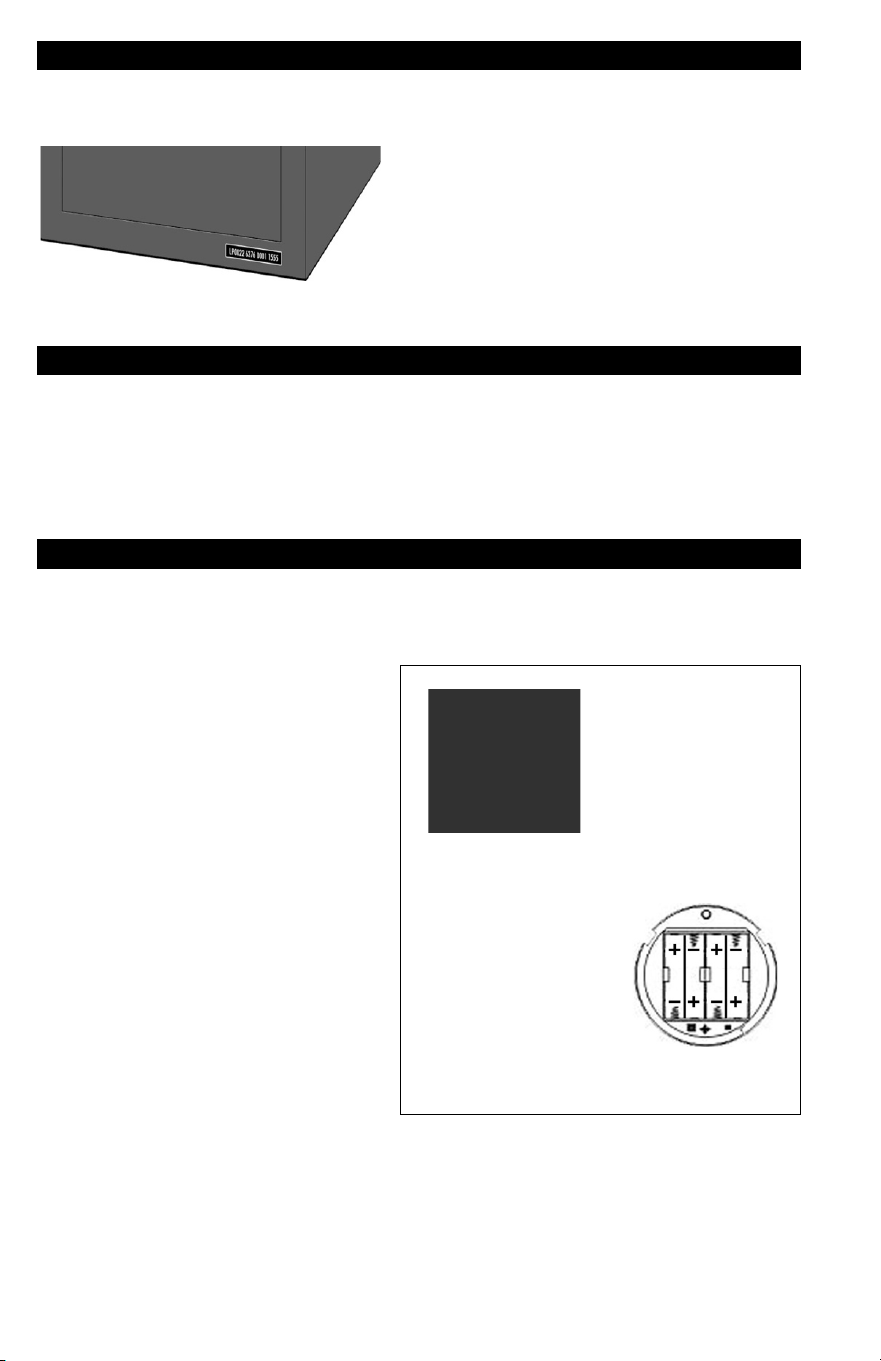
Your safe’s serial number is on a tag that is
located on the front of the safe in the lower
right corner.
IMPORTANT:
Do Not Remove Safe I.D. Tags!
NOTE: Record your safe’s serial number and combination and store in a secure
location OTHER THAN YOUR SAFE.
SAFETY PRECAUTIONS
The safe door is heavy. Do not open the door with the safe on an uneven or
unstable floor. Hanging on an open door may cause the safe to tip forward when
not secured to a wall or the floor, resulting in serious injury or death to yourself or
others. If you have small children in your home, please make sure you never leave
your safe unsecured. It is possible for small children to climb inside your safe and
become locked in. This could result in serious injury or death’
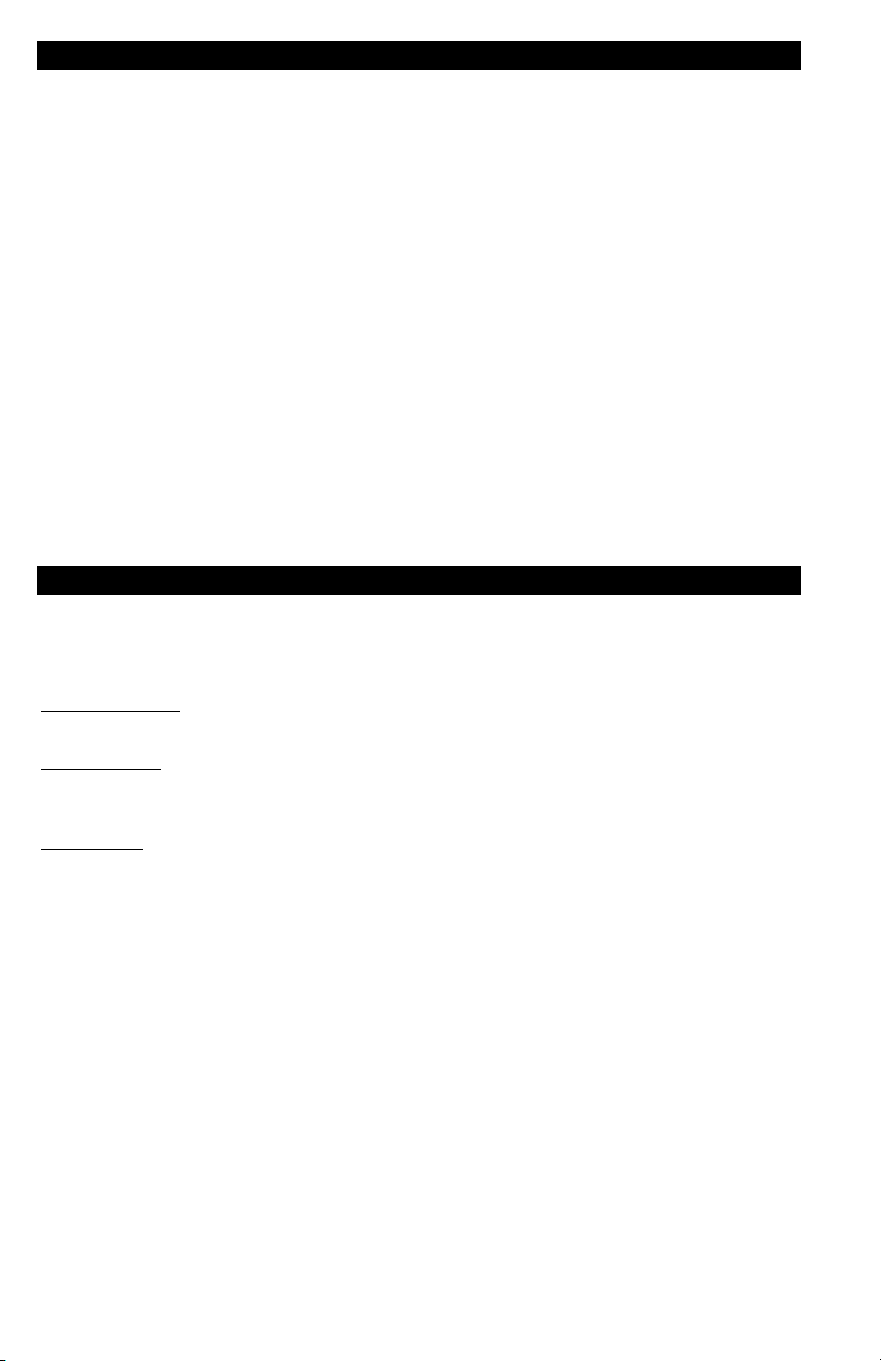
INSTALL BATTERIES
For your convenience, we have included 4 “AA” Alkaline Batteries that provide the
power for the electronic locking system. These batteries must be installed before
using your safe. The battery compartment is located behind the digital keypad
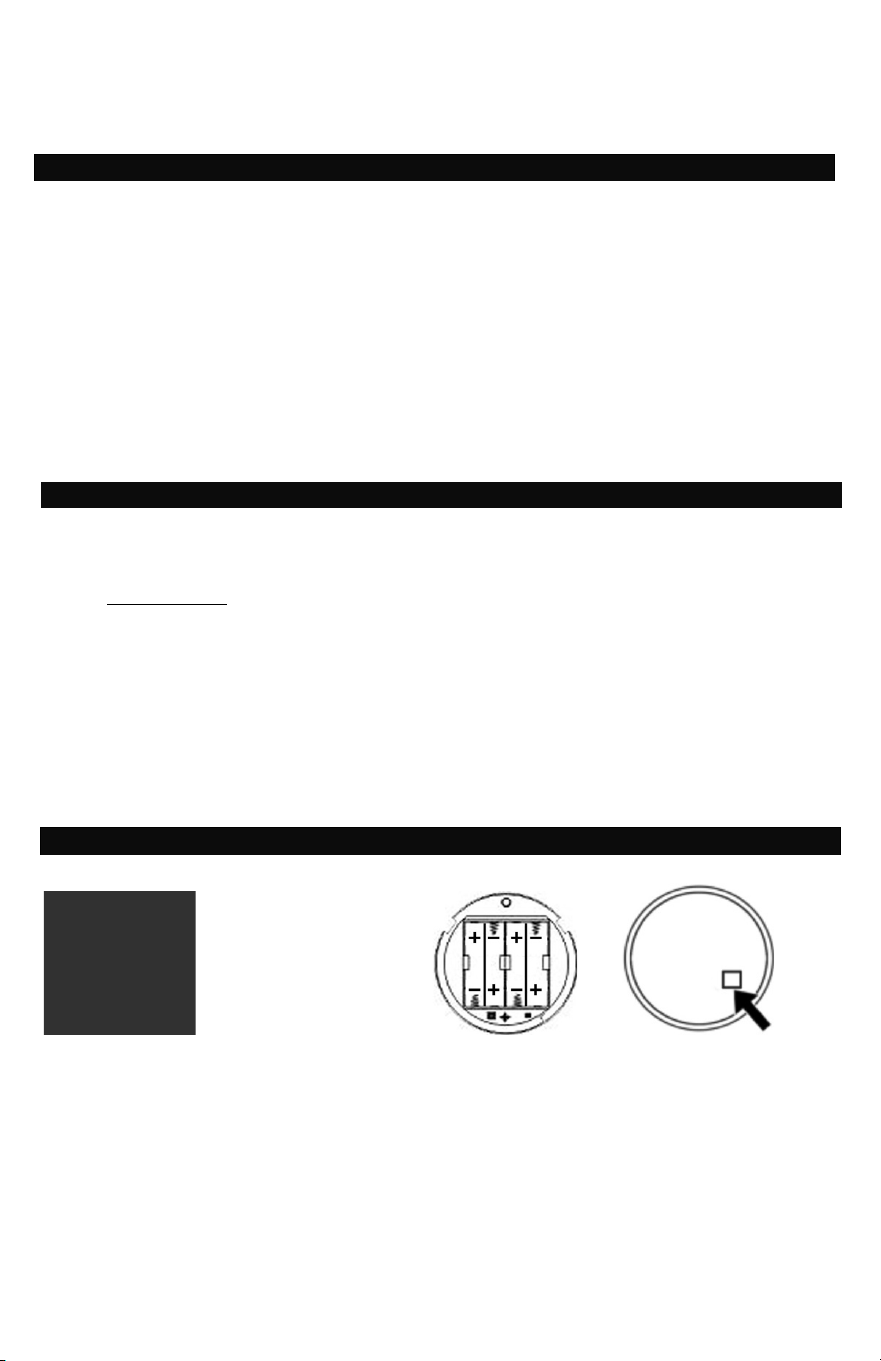
1. To access the compartment, locate
the tab at the top of the keypad.
2. Place your hand on the keypad tab
and pull forward.
3. With the tab pulled forward, rotate
the keypad counterclockwise to the
left and pull keypad out.
4. Install the 4 “AA” batteries on the
inside of the battery compartment.
Proper installation of the batteries
will cause the keypad to beep twice
and the green LED to light up.
5. Once the batteries are installed,
position the keypad back onto the
mounted bracket and rotate
clockwise to the right to lock in
place.
1.
2.
3.
4.

3
UNLOCK & OPEN YOUR NEW SAFE
DOOR HANDLE
The handle spindles have been shipped inside the Styrofoam cover on the outside
of the safe door and should be installed before opening safe the first time.
UNLOCK AND OPEN THE SAFE
1. Always make sure that the spindle handle is turned counterclockwise to the left
before entering code.
2. Enter the preset factory code “1 2 3 4 5 6” followed by # key into the keypad.
3. If the correct code is entered, the keypad will beep once, the green LED will light
up and you will hear a click indicating the spindle handle can be turned to the
right (clockwise) to open. NOTE: You have approximately 5 seconds to open the
safe. If you wait any longer, the safe will relock and you will have to reenter the
code to open.
SECURE LOCKOUT PERIOD
If the wrong code is entered into the keypad 4 consecutive times in a row, the
keypad will automatically revert to the lockout mode and you will not be able to
open the safe using the digital keypad for 3 minutes. During the lockout period entry
can be made using the emergency override key. Continued entry of the wrong code
will cause additional 3 minute lockouts until the proper code is entered.
PROGRAMMING NEW USER CODE
CHANGING THE USER CODE
1. Using the factory preset code, “1 2 3 4 5 6” followed
by # key, unlock the safe and open the door.
2. Locate and press the small red reset button (see
illustration) on the back of the door and the keypad
will beep twice and the green LED will light up.
3. Input a new 3-8 digit passcode followed by the # key
and the green LED will light up once.
4. Reenter the same code a second time followed by
the # key. If the new code has been properly entered
and accepted the green LED will flash twice and the
keypad will beep twice.
5. This new personal passcode replaces the preset
code and the preset code will no longer open the
safe.
TEST NEW PASS CODE
1. With door open, rotate handle counterclockwise to put door bolts in lock position.
2. Enter new code (3 to 8 digits) followed by “ # ”.
3. Green light is on; rotate handle clockwise within 5 seconds.
4. Lock bolts should recede into the unlocked position.
OPENING/CLOSING THE SAFE WITH NEW PASSCODE
1. Make sure the spindle handle is positioned to the left and enter your new code
into the keypad followed by the # key.
2. The keypad will beep once, green LED will light up and the lock will click. Turn the
handle clockwise to the right to open the safe.
3. To lock, close the door and turn the spindle handle counterclockwise to the left.
4
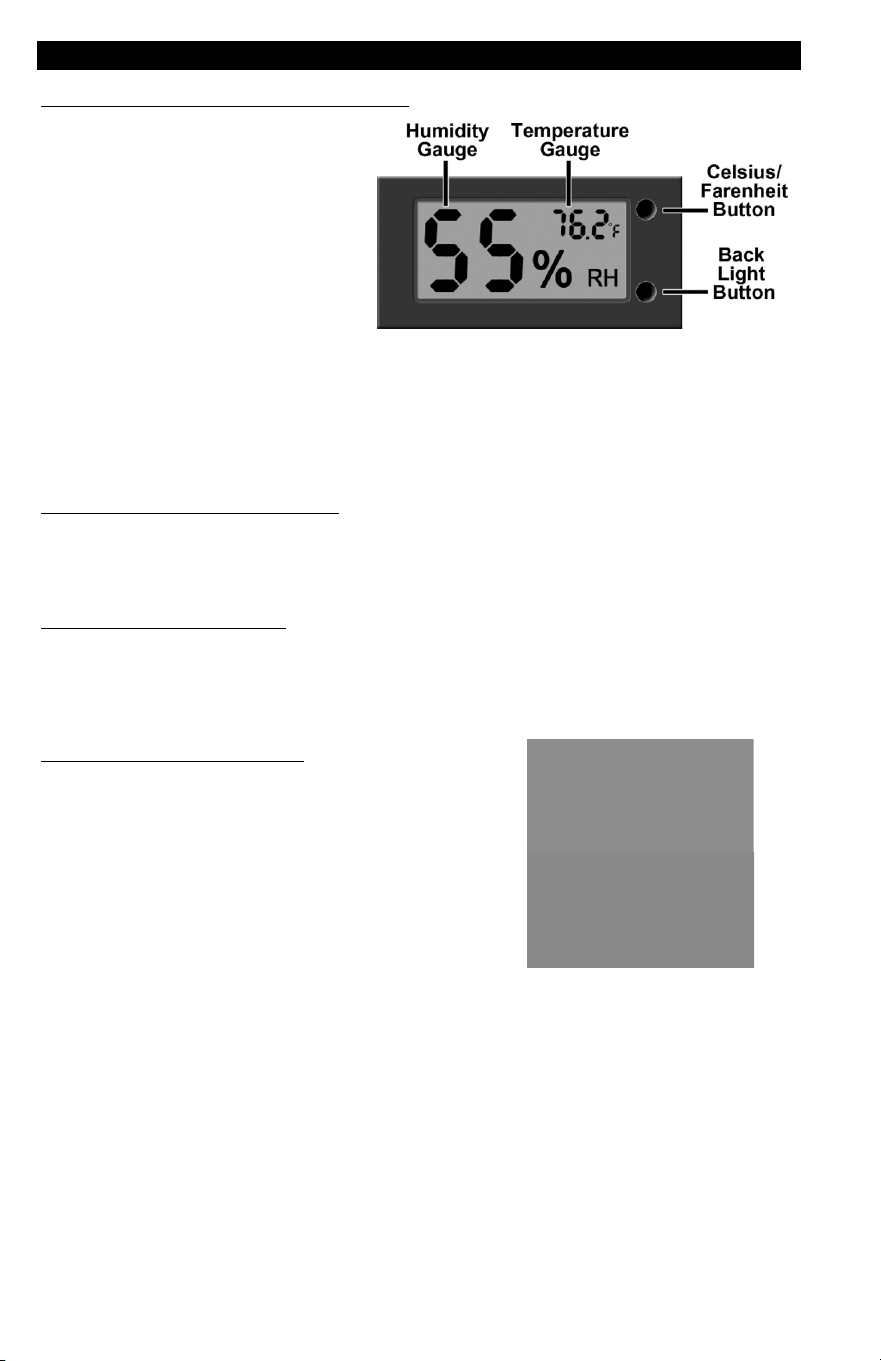
CLIMATE MONITORING
TEMPERATURE AND HUMIDITY GAUGE
For your convenience and added
protection of your safe’s contents,
this safe is equipped with a
hygrometer that continually
monitors and displays the interior
temperature and humidity on an
LED Display panel located above
the left side of the door.
Depending on the geographic location of your safe, excess humidity may be a
problem that can cause damage to the contents. For this reason, it is recommended
that you open your safe on a regular basis, especially if you live in an area of high
humidity. Additionally, it is recommended that you keep important paperwork in
airtight zip lock type bags. This will prevent damage should moisture accumulate,
especially in air tight fire and waterproof safes.
HOW TO TURN ON BACK LIGHT
The back light makes it easier to read the gauge in low light environments. You can
activate the back light by pressing the button located on the bottom at right side of
the LED display.
CELSIUS OR FAHRENHEIT
You can change the temperature display to show the temperature in either Celsius
or Fahrenheit by pressing the button located on the top at right side of the LED
display.
HOW TO CHANGE BATTERY
The LED Humidity / Temperature gauge operates on
a single AAA battery. You must replace the battery if
it becomes low or dead.
1. Remove the LED Display from the safe by lifting
the edges and pulling out.
2. Remove the Battery Cover by pressing on the left
side and sliding the cover to the right until it can
be lifted off.
3. Replace the “AAA” battery and place cover back
over the battery compartment.
4. Replace the LED Display Panel in the safe.
5
REPLACING BATTERIES IN LOCK
NOTE: The pass code will not be erased if the batteries become weak or are
removed. Dead or weak batteries should always be removed promptly.
If your batteries are dead and you cannot open the safe by using the digital keypad,
you must use the override access key (see below) to open safe and access the
battery compartment.
1. To access the compartment, locate
the tab at the top of the keypad.
2. Place your hand on the keypad tab
and pull forward.
3. With the tab pulled forward, rotate
the keypad counterclockwise to the
left and pull keypad out.
4. Install the 4 “AA” batteries on the
inside of the battery compartment.
Proper installation of the batteries
will cause the keypad to beep twice
and the green LED to light up.
5. Once the batteries are installed,
position the keypad back onto the
mounted bracket and rotate
clockwise to the right to lock in
place.
1.
2.
3.
4.
OVERRIDE ACCESS KEY
Your safe if equipped with an emergency key lock, which allows immediate access
in case you forget your Pass code, or the batteries need replacing.
1. To access the compartment, locate
the tab at the top of the keypad.
2. Place your hand on the keypad tab
and pull forward.
3. With the tab pulled forward, rotate
the keypad counterclockwise to the
left and pull keypad out.
4. Insert the override key into the
keyhole on the inside of the lock and
turn key to the right to unlock the
safe.
5. Once the safe is opened, position
the keypad back onto the mounted
bracket and rotate clockwise to the
right to lock in place.
1.
2.
3.
4.

6
LOCKING STORAGE BOX
The safe storage of ammunition is now mandated by many states nationally and many
countries internationally. This safe includes a steel storage/ammunition box, which can
be placed in the safe or elsewhere as required by law. It includes a convenient carry
handle and is equipped with a built in lock for additional safety.
The lock includes two keys that should be stored away from the box and both the lock
and keys have matching identification numbers that should be recorded for future
reference. A durable powder coat finish assures long life and easy cleaning with a soft
cloth.
To open:
Insert supplied key and turn fully to the left and pull door open.
To close:
Push door to closed position, turn key fully to the right until it stops. The door is
now in the locked position. Remove key and store in a safe place.
APPROPRIATE USE
This Executive Safe protects records and many other valuables. Testing shows that
the interior temperature of the safe remains below 350°F (177°C) for 30 minutes
during a fire up to 1400°F (760°C) when used properly. Your safe must be closed
and latched in order to properly protect the contents from fire.
PLACEMENT OF SAFE
Proper installation and anchoring are critical to the security of your safe.
Install near a load-bearing wall to support the weight of the safe.
To help protect the exterior finish of your safe, install inside in a dry location where
there is climate control (heat in the winter and cooling in the summer).
This safe has been designed to withstand a certain amount of heat during a fire.
Generally speaking, fire safes perform better in lower levels of a home (like the
basement) where fire temperatures are lower. Additionally, placement of your safe
away from potential hot spots (areas where flammable materials are stored) will
improve your chances that your safe and its contents will perform better in a home
fire. No safe is completely fireproof. If the fire reaches a high enough temperature
for long periods, fire damage will occur.
MOVING YOUR SAFE
Before moving your safe, verify the load bearing weight of the floors and stairs, and
types of flooring the safe will be moved over (tile, wood, and other flooring can be
damaged by the weight of the safe). To determine whether or not your safe will
make it through doorways, stairs or corners take the empty safe box and see if it will
fit all the way through to its final location.
7
ANCHORING YOUR SAFE
You may bolt the safe to the floor for added theft protection and to avoid tipping.
This safe was manufactured with bolt down holes
pre-drilled in the floor panel.
To secure your safe to the floor:
1. Locate the pre-drilled holes on the floor panel.
2. Anchor the safe using the mounting hardware kit
which includes lag screws and anchors.
NOTE: Bolting/unbolting of the unit is at the
consumer’s expense and discretion. LH Licensed
Products is not responsible for any costs incurred.
If you have any questions about mounting the safe,
please check with your local home center/hardware
retailer or independent contractor.
CARE AND MAINTENANCE
When properly maintained, your safe will continue to operate for many years. In
order to ensure optimum performance of your safe, please follow these simple
precautions:
CLEAN HANDS - Never attempt to operate the digital keypad if your hands have
excessive dirt, debris or liquids on them.
CLEAN SAFE – To clean the surface of your safe, it is recommended that you use a
mild cleaner (e.g., window cleaner) to avoid scratching or discoloring the surface.
Always wipe dry and NEVER use abrasive cleansers on the safe or digital keypad.
MOISTURE – We recommend that you place delicate items such as pictures or
intricate jewelry into an air-tight container before storing them in your safe. Avoid
placing your safe in areas of high humidity. For optimum performance, the safe
should be opened and aired out for at least 20 minutes every two weeks.
For future reference, store this Operation and Installation Guide in a secure area
away from the safe. DO NOT DISCARD!
8
INSTALLING SHELVES
Note: Quantity of included shelves and gun racks will vary depending on the model
If this safe includes an adjustable / removable shelf and / or gun rack. To install:
1. Remove shelf, gun rack and shelf support clips from protective wrapping.
2. Determine the desired location of your shelf and/or gun rack and note the
corresponding support guide slots on the vertical standards that are best suited
to support the shelf in that location.
3. Insert (1) support clip into each of the vertical standards. The top of the support
clip should be placed into the selected slot first and then the bottom of clip will
lock in place when pushed back.
4. IMPORTANT: Make sure all clips (4) are installed at the same height on the
vertical standards so that the shelf is level.
5. Install the shelf into position by placing inside the safe (tilting if necessary) and
lowering into position on the support clips.
HINT: If shelf is not being used, it can be stored in the bottom of the safe.
ORDERING ADDITIONAL SAFE / STORAGE BOX KEYS
The following information is required to order keys for either the safe or the
locking storage box:
1. PROOF OF OWNERSHIP (1 of 2 Options Below)
SALES RECEIPT & IDENTIFICATION – INTERNATIONAL ORDERS ONLY!
• Copy of sales receipt showing Store, Date & Product Description.
• Copy of your picture I.D. (Drivers license, passport, regular I.D.).
PRODUCT OWNERSHIP VERIFICATION FORM
If sales receipt is not available, contact us by email or telephone to request a
“Product Ownership Verification Form”.
2. ORDER INFORMATION
CONTACT INFORMATION
• Name & Shipping Address
• E-mail address (If Available)
• Telephone Number
• Best Time to Contact You
PRODUCT INFORMATION
• Safe Model #
• Safe Serial #
• Lock Key #
• Quantity of Keys Ordered
3. METHOD OF PAYMENT
• Telephone:
Visa or MasterCard
• Mail:
Check or Money Order
NOTE: For pricing please contact Consumer Assistance.
Contact information is located on the back cover of this manual
Terms subject to change without prior notification.

9
LIMITED WARRANTY
LH Licensed Products, Inc., (“LHLP, Inc.”) warrants that for a period of seven (7) years
from the date of purchase, this product will be free from structural or mechanical
defects resulting from materials or workmanship. LHLP, Inc., at its sole option and as
the purchaser’s sole remedy under this warranty, will repair or replace this product or
any component of the product found to be defective during the warranty period.
Replacement or repair will be made with a new or remanufactured product or
component. If the product is no longer available, replacement may be made with a
similar product of equal or greater value.
THIS IS YOUR EXCLUSIVE WARRANTY.
Our goods come with guarantees that cannot be excluded under the Australian
Consumer Law. You are entitled to a replacement or refund for a major failure and for
compensation for any other reasonably foreseeable loss or damage. You are also
entitled to have the goods repaired or replaced if the goods fail to be of acceptable
quality and the failure does not amount to a major failure.
This warranty is only valid for the original retail purchaser from the date of initial retail
purchase and is not transferable. You must keep the original sales receipt. Proof of
purchase is required to obtain warranty service.
LHLP, Inc. dealers, service centers, or retail stores selling this product do not have the
right to alter, modify or in any way change the terms and conditions of this warranty.
This warranty does not apply to the finish on the product. This warranty does not cover
normal wear and tear of parts or damage resulting from any of the following: negligent
use or misuse of the product, use contrary to the operating instructions, disassembly,
repair or alteration by anyone other than LHLP, Inc. or an authorized service center,
improper installation, or exposure to extremes of heat or humidity. Further, the
warranty does not cover Acts of God, such as fire, flood, earthquakes, hurricanes and
tornadoes.
LHLP, Inc. shall not be liable for any incidental or consequential damages caused by
the breach of any express or implied warranty or otherwise relating to the sale of this
product. LHLP, Inc. is also not responsible for: costs associated with removing or
installing the product; damage or loss of the contents of the product; nor for the
unauthorized removal of the contents; or damages incurred during shipment.
THE ABOVE WARRANTY IS IN LIEU OF ALL OTHER WARRANTIES, EXPRESS OR
IMPLIED, INCLUDING ANY WARRANTIES OF MERCHANTABILITY OR FITNESS FOR
A PARTICULAR PURPOSE, AND LHLP, INC. DISCLAIMS ANY AND ALL OTHER
COVENANTS AND WARRANTIES.
Except to the extent prohibited by applicable law, any implied warranty of
merchantability or fitness for a particular purpose is limited in duration to the duration
of the above warranty period. Some states, provinces or jurisdictions do not allow the
exclusion or limitation of incidental or consequential damages or limitations on how
long an implied warranty lasts, so the above limitations or exclusion may not apply to
you. This warranty gives you specific legal rights, and you may also have other rights
that vary from state to state, or province to province, or jurisdiction to jurisdiction.
10
CONSUMER ASSISTANCE
EMAIL (Best Contact
Method):
WEBSITE:
www.Honeywellsafes.com
ADDRESS:
Consumer Assistance Dept.
LH Licensed Products, Inc.
860 East Sandhill Avenue
Carson, CA 90746 USA
TELEPHONE:
US/Canada 1-877-354-5457 (Toll Free)
Mexico 01-800-288-2872 After English voice recording stops you
must then enter 800-860-1677 to complete your call. (Toll Free)
Australia 0011-800-5325-7000 (Toll Free)
Germany/New Zealand 00-800-5325-7000 (Toll Free)
Other Countries XX*-310-323-5722 (Toll Charges Apply)
XX*- Dial U.S. Country Code first
CALL CENTER HOURS:
US/Canada 7am – 5pm (PST**) Mon – Fri
CALL BACK HOURS:
Other Countries 7am – 8pm (PST**) Mon – Fri
PST**- Local time in Los Angeles, CA, USA
INTERNATIONAL CALL BACK HOURS:
If you need to speak with a consumer assistant and cannot contact us during the Call
Center hours above, please send an email or leave a telephone message, including your
Name, Telephone Number and the best time for us to contact you during the Call Back hours
above and we will make our best effort to contact you and help to answer any of your
questions or concerns.
Manufactured by
LH Licensed Products, Inc.
860 East Sandhill Avenue
Carson, CA 90746
The Honeywell Trademark is used under license from
Honeywell International Inc. Honeywell International Inc.
makes no representations or warranties with respect to
this product.
M3014DE20150730