1122350229
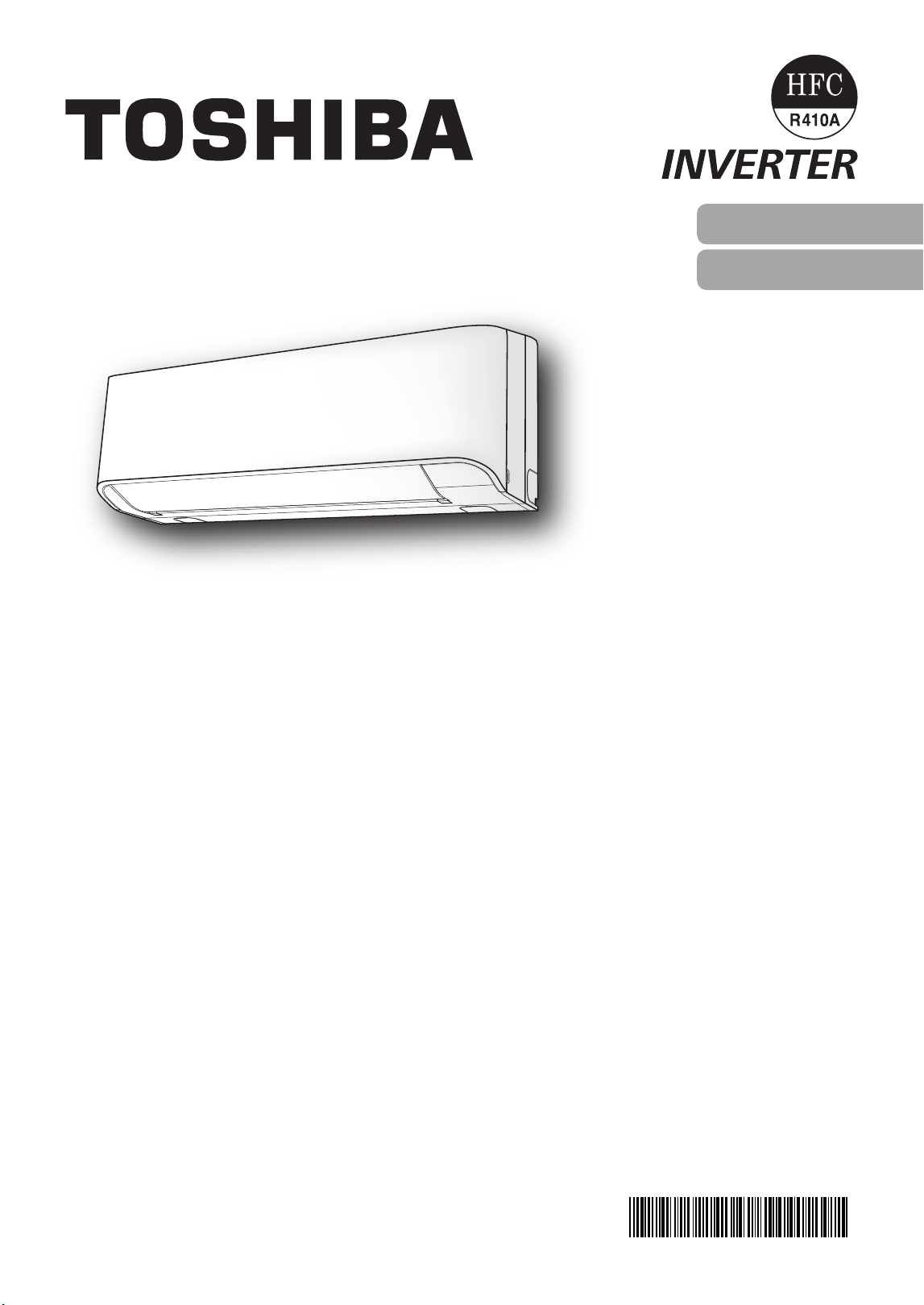
AIR CONDITIONER (SPLIT TYPE)
For general public use
Indoor unit
RAS-10, 13, 18J2KCV(HK)
Outdoor unit
RAS-10, 13, 18J2ACV(HK)
OWNER’S MANUAL
ENGLISH
繁體中文
1122350229_S01_182x257_12p_S_p70_210716_EN+CT.indd 1 12/9/2021 4:36:50 PM
DANGER
• Do not install, repair, open or remove the cover. It may expose you to dangerous
voltages. Ask the dealer or the specialist to do this.
• Turning o the power supply will not prevent potential electric shock.
• The appliance shall be installed in accordance with national wiring regulation.
• Means for disconnection from the supply having a contact separation of at least
3 mm in all poles must be incorporated in the xed wiring.
• The appliance must be stored in a room without continuously operating ignition
sources (for example, open ames an operating gas appliance or an operating
electric heater).
• In order to avoid re explosion or injury, do not operate the unit when harmful
gases (e.g. ammabl or corrosive) are detected near the unit.
WARNING
• Do not expose your body directly to cool air for a long time.
• Do not insert your nger or any article into the air inlet/outlet.
• When an abnormality (burning smell, etc.) occurs, stop the air conditioner and
disconnect the power supply or turn o the breaker.
• This appliance can be used by children aged from 8 years and above and persons
with reduced physical, sensory or mental capabilities or lack of experience and
knowledge if they have been given supervision or instruction concerning use of the
appliance in a safe way and understand the hazards involved. Children shall not
play with the appliance. Cleaning and user maintenance shall not be made by
children without supervision.
PRECAUTIONS FOR SAFETY
• Keep this manual where the operator can easily nd it.
• Read the precautions in this manual carefully before operating the unit.
• This appliance is intended to be used by expert or trained users in shops, in light
industry and on farms, or for commercial use by lay persons.
• The precautions described herein are classied as DANGER, WARNING and
CAUTION. They both contain important information regarding safety. Be sure to
observe all precautions without fail.
■ Warning indications on the air conditioner unit
Warning indication Description
BURST HAZARD
Open the service valves
before the operation,
otherwise there might be
the burst.
CAUTION
CAUTION
BURST HAZARD
Open the service valves before the operation,
otherwise there might be the burst.
1122350229_S01_182x257_12p_S_p70_210716_EN+CT.indd 2 12/9/2021 4:36:50 PM
EN
PRECAUTIONS FOR SAFETY
CAUTION
• Do not wash the unit with water. It may cause an electric shock.
• Do not use this air conditioner for other purposes such as preserving food,
breeding animal, etc.
• Do not step or put anything on the indoor/outdoor unit. It may cause an injury or
damage the unit.
• Do not touch aluminium n because it may cause an injury.
• Before cleaning the unit, turn o the main switch or the circuit breaker.
• When the unit won’t be used for a long time, turn o the main switch or the circuit
breaker.
• It is recommended that maintenance be performed by a specialist when the unit
has been operated for a long time.
• The manufacturer shall not assume any liability for the damage caused by not
observing the description of this manual.
WARNING
• This appliance is not intended for use by persons (including children) with reduced
physical, sensory or mental capabilities, or lack of experience and knowledge,
unless they have been given supervision or instruction concerning use of the
appliance by a person responsible for their safety.
• The air conditioner must be installed, maintained, repaired and removed by a
qualied installer or qualied service person. When any of these jobs is to be
done, ask a qualied installer or qualied service person to do them for you.
• Children should be supervised to ensure that they do not play with the appliance.
• Do not use any refrigerant dierent from the one specied (R410A) for
complement or replacement. Otherwise, abnormally high pressure may be
generated in the refrigeration cycle, which may result in a failure or explosion of
the product or an injury to your body.
• Do not use means to accelerate the defrosting process or to clean, other than
those recommended by the manufacturer.
• The appliance shall be stored in a room without continuously operating ignition
sources (for example: open ames, an operating gas appliance or an operating
electric heater).
• Be aware that refrigerants may not contain an odour.
• Do not pierce or burn as the appliance is pressurized. Do not expose the appliance
to heat, ames sparks, or other sources or ignition. Else, it may explode and cause
injury or death.
1122350229_S01_182x257_12p_S_p70_210716_EN+CT.indd 3 12/9/2021 4:36:50 PM
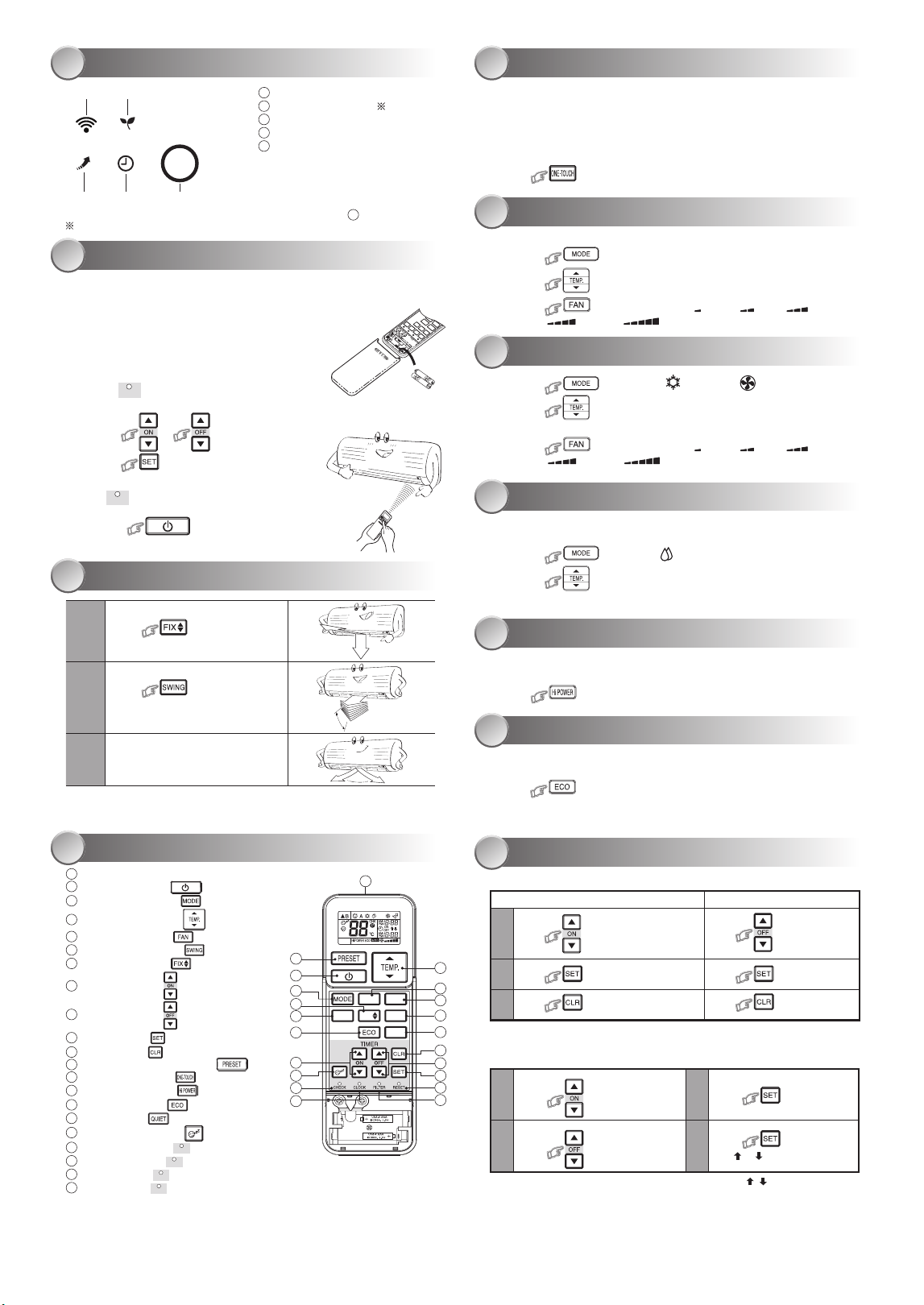
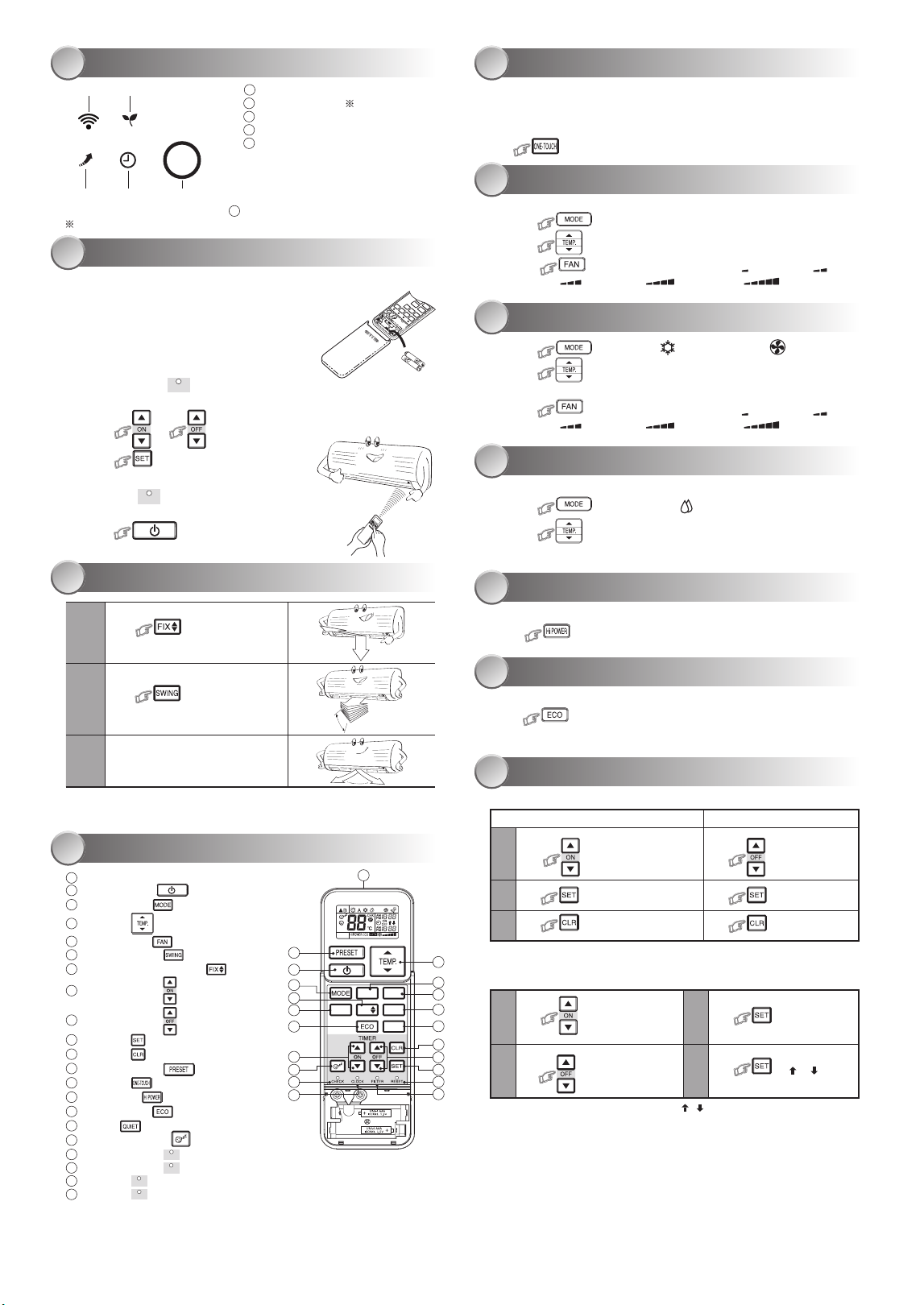
INDOOR UNIT DISPLAY
1
1
ECO (White)
2
Wi-Fi access (White)
3
Hi POWER (White)
4
Timer (White)
5
Operation (White)
● Display brightness can be adjusted, follow procedure on
12
.
Require Wireless LAN connecting adapter which available as accessory.
PREPARATION BEFORE USE
2
Preparing Filters
1. Open the air inlet grille and remove the air lters.
2. Attach the lters. (see detail in the Installation Manual).
Loading Batteries (when use wireless operation.)
1. Remove the slide cover.
2. Insert 2 new batteries (AAA type) following the (+)
and (–) positions.
Clock Setep
1. Push
CLOCK
by tip of the pencil.
If timer indication is ashing, go to the next step 2.
2. Press or : adjust the time.
3. Press : Set the time.
Remote Control Reset
Push
RESET
by tip of the pencil or
1. Remove the batteries.
2. Press .
3. Insert the batteries.
AIRFLOW DIRECTION
3
1
Press
: Move the louver in
the desired vertical direction.
2
Press : Swing the air
automatically and press again to
stop.
3
For horizontal direction, adjust
manually.
Note:
● Do not move the louver manually by others.
● The louver may automation positioning by some operation mode.
REMOTE CONTROL
4
1
Infrared signal emitter
2
Start/Stop button ( )
3
Mode select button ( )
4
Temperature button ( )
5
Fan speed button ( )
6
Swing louver button ( )
7
Set louver button ( )
8
On timer button ( )
9
O timer button ( )
10
Setup button ( )
11
Clear button ( )
12
Memory and Preset button ( )
13
One-Touch button ( )
14
High power button ( )
15
Economy button ( )
16
Quiet button ( )
17
Comfort sleep button ( )
18
Filter reset button (
FILTER
)
19
Set clock button (
CLOCK
)
20
Check button (
CHECK
)
21
Reset button (
RESET
)
Note:
● The provided Remote Controller is a wireless type, which also can be used as
a wire. Please see “How to Connect The Remote Controller for Wired Operation”,
located in installation instruction, in case of wired control is required.
● In wire operation, remote controller will return to initial condition (PRESET,
TIMER and CLOCK will return to initial condition) when user shutdown power
supply of Air conditioner.
ONE-TOUCH
5
Press the “ONE-TOUCH” button for fully automated operation that is customized
to the typical consumer preferences in your region of the world. The customized
settings control temperature air ow strength, air ow direction and other settings
to provide you alternate contact with
“ONE-TOUCH” of the button. If you prefer other settings you can select from the
many other operating functions of your Toshiba unit.
Press : Start the operation.
AUTOMATIC OPERATION
6
To automatically select cooling or fan only operation
1. Press : Select Auto A.
2. Press
: Set the desired temperature, Min. 17°C, Max. 30°C.
3. Press : Select AUTO, LOW , LOW+ , MED ,
MED+ , or HIGH .
COOLING / FAN ONLY OPERATION
7
1. Press : Select Cool or Fan only .
2. Press
: Set the desired temperature.
Min. 17°C, Max. 30°C, Fan Only: No temperature indication.
3. Press : Select AUTO, LOW , LOW+ , MED ,
MED+ , or HIGH .
DRY OPERATION
8
For dehumidication, a moderate cooling performance is controlled
automatically.
1. Press : Select Dry .
2. Press : Set the desired temperature, Min. 17°C, Max. 30°C.
Note: Dry mode fan speed is set to Auto only.
Hi POWER OPERATION
9
To automatically control room temperature and airow for faster cooling
operation (except in DRY and FAN ONLY mode)
Press
: Start and stop the operation.
ECO OPERATION
10
To automatically control room temperature to save energy (except in DRY and
FAN ONLY mode)
Press : Start and stop the operation.
Note: Cooling operation; the set temperature will increase automatically
1 degree/hour for 2 hours (maximum 2 degrees increase).
TIMER OPERATION
11
Set the timer when the air conditioner is operating.
Setting the ON Timer Setting the OFF Timer
1
Press : Set the desired ON timer.
Press : Set the desired
OFF timer.
2
Press : Set the timer. Press : Set the timer.
3
Press : Cancel the timer.
Press : Cancel the timer.
Daily timer allows the user to set both the ON & OFF timers and will be
activated on a daily basis.
Setting Daily Timer
1
Press : Set the ON timer.
3
Press .
2
Press : Set the OFF timer.
4
Press button during
the ( or ) mark ashing.
● During the daily timer is activating, both arrows ( , ) are indicated.
Note:
● Keep the remote control in accessible transmission to the indoor unit;
otherwise, the time lag of up to 15 minutes will occur.
● The setting will be saved for the next same operation.
1
3 4
5
2
2
3
7
13
15
8
17
20
19
18
21
10
11
9
14
16
5
6
4
SWING
FAN
FIX
QUIET
Hi POWER
ONE-TOUCH
COMFORT
SLEEP
1
12
1122350229_S01_182x257_12p_S_p70_210716_EN+CT.indd 4 12/9/2021 4:36:51 PM
EN
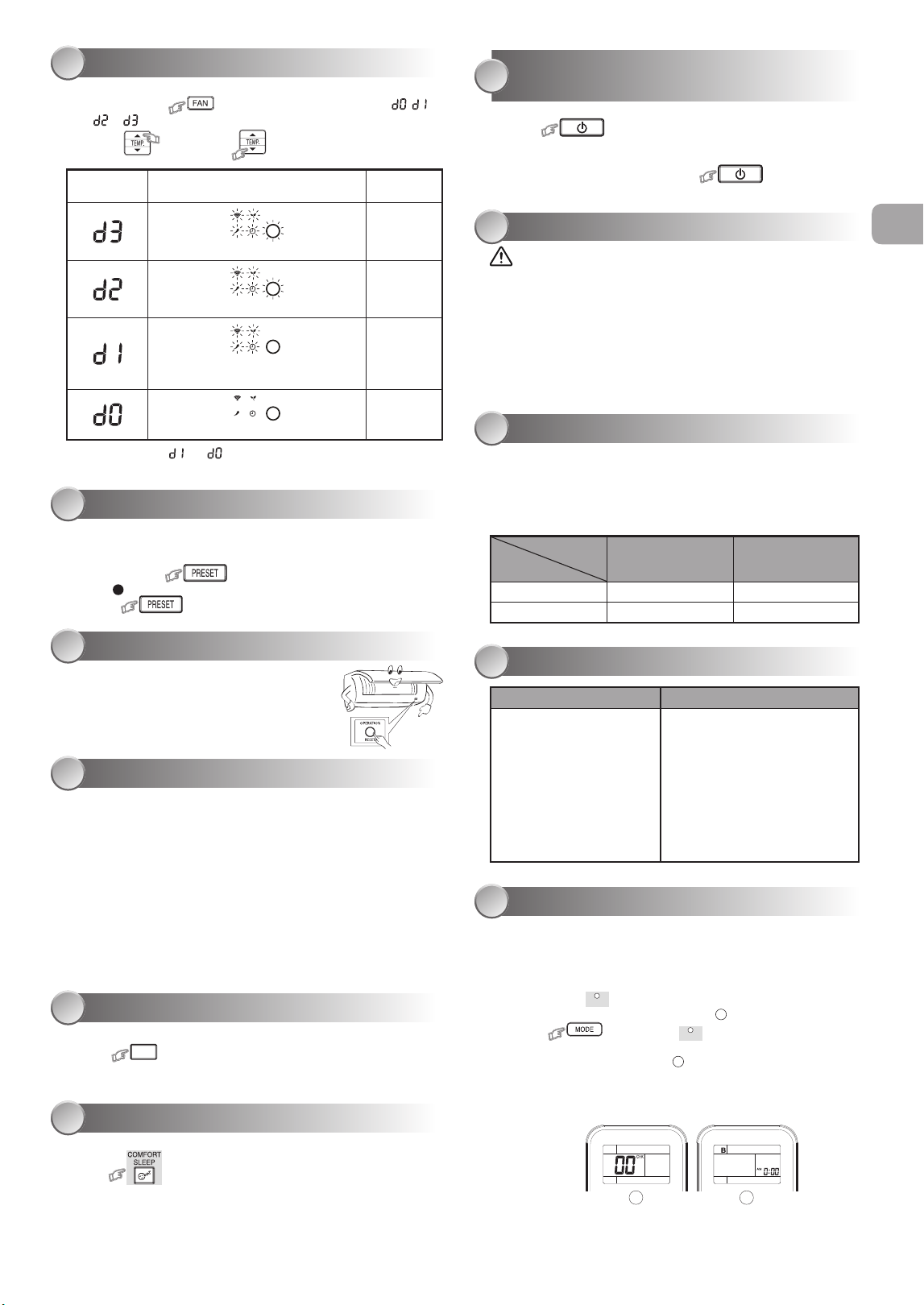
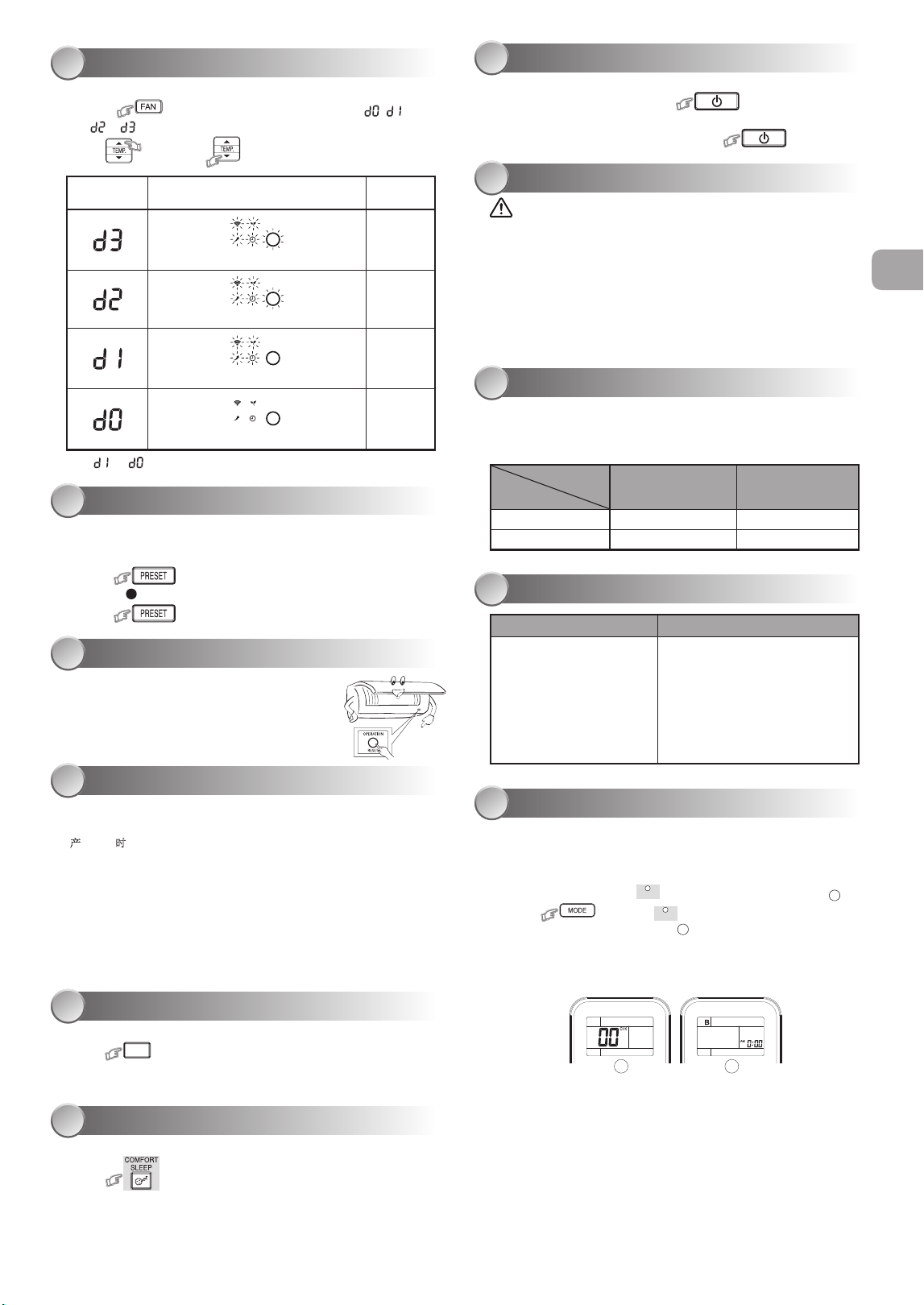
DISPLAY LAMP BRIGHTNESS ADJUSTMENT
12
To decrease the display lamp brightness or turn it o.
1. Press and hold for 3 seconds until brightness level ( , ,
or ) is shown on remote control LCD then release the button.
2. Press
Rise
or
Decrease
to adjust brightness in 4 levels.
Remote control
LCD
Operation display Brightness
Lamp illuminates full brightness.
100%
Lamp illuminates 50% brightness.
50%
Lamp illuminates 50% brightness and the
operation lamp is turned o.
50%
All lamps are turned o.
All turned o
● In the examples of and , the lamp illuminates for 5 seconds before
going o.
PRESET OPERATION
13
Set your preferred operation for future use. The setting will be memorized by
the unit for future operation (except airow direction).
1. Select your preferred operation.
2. Press and hold for 3 seconds to memorize the setting.
The
P
mark displays.
3. Press : Operate the preset operation.
TEMPORARY OPERATION
14
In case of the misplaced or discharged remote control
● Pressing the RESET button, the unit can start or
stop without using the remote control.
● Operation mode is set on AUTOMATIC operation,
preset temperature is 24°C and fan operation is
automatic speed.
AUTO RESTART FUNCTION SETTING
15
This product is designed so that, after a power failure, it can restart
automatically in the same operating mode as before the power failure.
Information
The product is shipped with Auto Restart function in the OFF position.
Turn it ON as required.
How to turn ON the Auto Restart Function
● Press and hold the [OPERATION] button on the indoor unit for 3 seconds
(3 beep sounds and OPERATION lamp blink 5 time/sec for 5 seconds).
How to turn OFF the Auto Restart Function
● Press and hold the [OPERATION] button on the indoor unit for 3 seconds
(3 beep sounds but OPERATION lamp does not blink).
Note:
●
In case of ON timer or OFF timer are set, AUTO RESTART OPERATION
does not activate.
QUIET OPERATION
16
To operate at super low fan speed for quiet operation (except in DRY mode)
Press
QUIET
: Start and stop the operation.
Note: Under certain conditions, QUIET operation may not provide adequate
cooling due to low sound features.
COMFORT SLEEP OPERATION
17
For comfortable sleep, automatically control air ow and automatically turn OFF.
Press : Select 1, 3, 5 or 9 hrs for OFF timer operation.
Note: The cooling operation, the set temperature will increase automatically
1 degree/hour for 2 hours (maximum 2 degrees increase).
SELF CLEANING OPERATION
(COOL AND DRY OPERATION ONLY)
18
To protect bad smell caused by the humidity in the indoor unit.
1. If the button is pressed once during “Cool” or “Dry” mode,
the fan will continue to run for other 30 minutes, then it will turn o
automatically. This will reduce the moisture in the indoor unit.
2. To stop the unit immediately, press the more 2 times
within 30 seconds.
MAINTENANCE
19
Firstly, turn o the circuit breaker.
Indoor Unit and Remote Control
●
Clean the indoor unit and the remote control with a wet cloth when needed.
●
No benzine, thinner, polishing powder or chemically-treated duster.
Air lters
Clean every 2 weeks.
1. Open the air inlet grille.
2. Remove the air lters.
3. Vacuum or wash and then dry them.
4. Reinstall the air lters and close the air inlet grille.
OPERATION AND PERFORMANCE
20
1. Three-minute protection feature: To prevent the unit from being activated
for 3 minutes when suddenly restarted or switched to ON.
2. Some minor cracking sound may occur when unit operating. This is normal
because the cracking sound may be caused by expansion/ contraction of
plastic.
Air conditioner operating conditions
Temp.
Operation
Outdoor Temperature Room Temperature
Cooling -10°C ~ 46°C 21°C ~ 32°C
Dry -10°C ~ 46°C 17°C ~ 32°C
TROUBLESHOOTING (CHECK POINT)
21
The unit does not operate. Cooling or Heating is abnormally low.
● The power main switch is
turned o.
●
The circuit breaker is activated
to cut o the power supply.
● Stoppage of electric current.
● ON timer is set.
● The lters are blocked with dust.
● The temperature has been set
improperly.
● The windows or doors are opened.
● The air inlet or outlet of the outdoor
unit is blocked.
● The fan speed is too low.
● The operation mode is FAN or DRY.
● POWER SELECTION function is
set 75% or 50% (This function is
depend on remote controller).
REMOTE CONTROL A-B SELECTION
22
To separate using of remote control for each indoor unit in case of 2 air
conditioners are installed nearly.
Remote Control B Setup.
1. Press RESET button on the indoor unit to turn the air conditioner ON.
2. Point the remote control at the indoor unit.
3. Push and hold
CHECK
button on the Remote Control by the tip of the pencil.
“00” will be shown on the display. (Picture
1
)
4. Press
during pushing
CHECK
. “B” will show on the display and
“00” will disappear and the air conditioner will turn OFF. The Remote
Control B is memorized. (Picture
2
)
Note: 1. Repeat above step to reset Remote Control to be A.
2. Remote Control A has not “A” display.
3. Default setting of Remote Control from factory is A.
1 2
1122350229_S01_182x257_12p_S_p70_210716_EN+CT.indd 5 12/9/2021 4:36:51 PM
危險
• 不要安裝、修理、打開或拆下蓋子。 這樣做可能會讓你暴露在危險的電壓下。
請經銷商或專業人士來執行此操作 。
• 關閉電源並不能防止潛在的觸電危險。
• 電器安裝應按照國家布線規範的規定執行。
• 固定布線中必須包含與電源斷開的裝置, 所有電極的接觸間隔至少為 3 mm。
• 該設備必須存放於無持續操作火源(例如明火、操作中的燃氣設備或操作中的電加
熱器)的房間中。
• 為了避免火災、爆炸或傷亡, 如在設備附近檢測到有害氣體(如易燃或腐蝕性氣體)
時, 請勿操作啟用該設備。
警告
• 不要讓你的身體直接長時間暴露在冷氣中。
• 不要將手指或任何物品插入進風口/出風口。
• 當出現異常(焦味等)時, 關閉空調並斷開電源或關閉斷路器。
• 如果年齡 8 歲及以上的兒童, 身體、感官或精神能力下降或缺乏經驗和知識的人使
用該設備時, 其應獲得使用本設備的安全監督或指導, 並瞭解所涉及的危險後,方
可使用本設備。 兒童不能觸碰本設備。 未經監督的情況下, 兒童不得從事清潔和用
戶維護的作業。
• 本設備不適用於體體能、感官或精神能力下降或缺乏經驗和知識的人(包括兒童)
使用, 除非有一個負責其安全的人對設備的使用進行監督或指導。
• 空調必須由合格的安裝人員或合格的維修人員進行安裝、維護、修理和拆卸。 當需要
執行上述工作時, 請有資質的安裝人員或有資質的服務人員來執行進行 以上工作。
• 應監督兒童, 確保他們能不觸碰該設備。
安全注意事項
• 將本手冊放置在操作人員容易找到的地方。
• 在操作本設備之前,請仔細閱讀本手冊中的注意事項。
• 本設備供專業或經過培訓的用戶在商店、輕工業和農場作業內使用,
或供非專業人士的商業使用。
• 本文所述的預防措施分為危險、警告和小心。它們均包含有關安全的重要信息。
務必遵守所有注意事項的要求。
■
示指告警
明
BURST HAZARD
Open the service valves
before the operation,
otherwise there might be
the burst.
CAUTION
注意
爆炸危險
操作前請打開檢修閥,否則可能會發生爆炸。
1122350229_S01_182x257_12p_S_p70_210716_EN+CT.indd 6 12/9/2021 4:36:52 PM
CT
注意
• 請勿用水清洗設備。 可能會導致觸電。
• 請勿將本空調用於其他用途, 如保存食物、飼養動物等。
• 請勿在室內/室外機上踩踏或放置任何物品。 它可能會導致人身傷害或設備損壞。
• 請勿觸摸鋁散熱片因其可能會造成傷害。
• 清潔設備前, 關閉主開關或斷路器。
• 當長時間未使用設備時, 關閉總開關或斷路器。
• 當長時間運行設備後應由專業人員對其進行維護。
• 對於因不遵守本手冊的說明而造成的損壞製造商不承擔任何責任。
安全注意事項
警告
• 不要使用與所規定的 (R410A) 補充或替換制冷劑不同類型的制冷劑。 否則, 制冷循環
中可能會產生異常高壓, 這可能導致產品出現故障或發生爆炸, 或對身體造成傷害。
• 不要使用手段加速除霜程或清洁, 除了那些由制造商推荐的其他。
• 該設備必須存放於無持續操作火源(例如明火、操作中的燃氣設備或操作中的電加
熱器)的房間中。
• 註意制冷劑可能無氣味。
• 當設備被施壓時, 不要刺穿或燃燒。 不要將設備暴露在高溫、火焰、火花或其他火源
或點燃的環境中。 否則可能發生爆炸並導致傷亡。
1122350229_S01_182x257_12p_S_p70_210716_EN+CT.indd 7 12/9/2021 4:36:52 PM
室內機顯示器
1
1
ECO 節能 (白色)
2
Wi-Fi 連接 (白色)
3
高功率 (白色)
4
定時器 (白色)
5
操作 (白色)
● 顯示器亮度可以調整, 請按照第
12
的步 操作。
需要隨配件而提供的無線局域網連接適配器。
使用前的準備
2
準備過濾器
1. 打開進氣格柵並拆下空氣濾清器。
2. 安裝過濾器 (参 安装手 中的 信息 )。
裝入電池 (當使用無線操作時)
1. 拆下滑動蓋 。
2. 插入 2 新電池 (AAA 型) 按照 (+) 和 (–)
的位置裝入。
時鐘設置
1. 用鉛筆尖壓一下
CLOCK
鍵。
如果計時器指示燈閃爍, 即轉到下一步第 2 步。
2. 按下 或 鍵: 調整時間。
3. 按下 鍵: 設定時間。
遙控器設置
用鉛筆 一下
RESET
鍵, 或
1. 取出電池。
2. 按下 鍵。
3. 插入電池。
氣流方向
3
1
按下
鍵: 沿所需的垂直方
向移動百葉窗。
2
按下 自動搖擺氣流, 再
按一 次以停止。
3
至於水平方向, 則請手動調整。
注:
● 請勿用手或其他方式手動移動百葉窗。
●
百葉窗可以通過某種操作方式自動定位。
遙控器
4
1
紅外信號發射器
2
啓動/停止按鈕 ( )
3
模式選擇按鈕 ( )
4
溫度按鈕 ( )
5
風扇轉速按鈕 ( )
6
百葉窗擺動按鈕 ( )
7
設置百葉窗上下擺動按鈕 ( )
8
開啓定時器按鈕 ( )
9
關閉定時器按鈕 ( )
10
設置按鈕 ( )
11
清除按鈕 ( )
12
內存和預設按鈕 ( )
13
單觸按鈕 ( )
14
大功率按鈕 ( )
15
節能模式按鈕 ( )
16
靜音鍵 ( )
17
舒適睡眠模式按鈕
( )
18
過濾器重置按鈕 (
FILTER
)
19
設置定時鐘按鈕 (
CLOCK
)
20
檢查按鈕 (
CHECK
)
21
重置按鈕 (
RESET
)
注:
● 所提供的遙控器為無線型, 也可用作有線遙控器。 如需有線控制, 請參閱安
裝說明中的 “如何連接遙控器進行有線操作”。
● 在有線操作中, 當用戶關閉空調電源時, 遙控器將會回到初始狀態 (預設、定
時器和時鐘將回到初始狀態)。
單觸
5
按下 ONE-TOUCH (單觸) 按鈕進行完全自動化的操作, 它是根據所在地區 用戶的
典型參數選擇定制的。 定制設置控制溫度氣流強度、 氣流方向和其他設 置以便使您
可以選擇使用 ONE-TOUCH 按鈕。 如果您更喜歡其他設置, 可以從東芝設備 的許
多其他操作功能中進行選擇。
按 : 啟動操作。
自動操作
6
自動選擇制冷、加熱或僅開啟風扇操作
1. 按下 鍵:選擇自動 A。
2. 按下
鍵:設置所需溫度, 最低 : 17°C, 最高 : 30°C。
3. 按下 鍵:選擇 (自動)A U T O, (低 ) LOW , (低+) LOW+ ,
(中) MED , (中+) MED+ , 或 (高) HIGH .
制冷/僅風扇操作
7
1. 按下 鍵 : 選擇制冷 或僅風扇 Fan only 功 能。
2. 按下
鍵 : 設置所需溫度。
最低 : 17°C, 最高 : 30°C, 僅風扇操作: 無溫度指示。
3. 按下 鍵:選擇 (自動)A U T O, (低 ) LOW , (低+) LOW+ ,
(中) MED , (中+) MED+ , 或 (高) HIGH .
乾式操作
8
對於除濕, 自動控制適度的制冷性能。
1. 按下 鍵: 選擇乾燥 Dry 。
2. 按下 鍵: 設置所需溫度, 最低 : 17°C, 最高 : 30°C。
注: 乾燥模式風扇轉速僅設置為自動。
高功率運行
9
自動控制室溫和氣流, 以加快制冷加熱操作 (乾燥和僅開啟風扇模式除外)
按下
鍵: 開啓或停止操作。
ECO 節能操作
10
室內自動控制以節能 (除乾燥和僅風扇模式)
按下
鍵: 開啓或停止操作。
注: 制冷操作; 設定溫度將自動增加 1 度/小時, 持續 2 小時(最多增加 2 度)。
定時器操作
11
空調運行時設置定時器 。
ON (開啓) 定時器設置 OFF (關閉) 定時器設置
1
按下 鍵: 設置所需的開啓
計時器。
按下 鍵: 設置所需的關閉
計時器。
2
按下 鍵: 設置定時器。 按下 鍵: 設置定時器。
3
按下
鍵: 取消定時器。
按下 鍵: 取消定時器。
Daily Timer (每日計時器) 允許用戶設置開啓/關閉計時器, 並將每日被激活。
設置每日計時器
1
按下 鍵: 設置 ON (開啓)
計時器。
3
按下 .
2
按下 鍵: 設置 OFF (關閉)
計時器。
4
按下
在 ( 或 ) 標記
閃爍時鍵。
● 在激活每日計時器期間, 兩個箭頭 ( , ) 都會顯示。
注:
● 將遙控器保持在可向室內機無障礙傳輸信號的狀態, 否則將會出現長達 15 分
鐘的延時現象。
●
設置將被保存以用於下一次相同操作。
1
3 4
5
2
2
3
7
13
15
8
17
20
19
18
21
10
11
9
14
16
5
6
4
SWING
FAN
FIX
QUIET
Hi POWER
ONE-TOUCH
COMFORT
SLEEP
1
12
1122350229_S01_182x257_12p_S_p70_210716_EN+CT.indd 8 12/9/2021 4:37:01 PM
CT
顯示燈的亮度調節
12
降低或關閉顯示燈亮度.
1. 按住 鍵 3 秒鐘, 直到遙控 LCD 上顯示亮度水平 ( , ,
或 ), 然後松開按鈕。
2. 按
升高
鍵或
降低
鍵, 在 4 個級別中調整亮度。
遙控器 LCD 操作顯示 亮度
指示燈將完全亮起。
100%
指示燈亮度為 50%。
50%
指示燈亮度為 50%, 操作燈熄滅。
50%
關閉所有燈。
全部關閉
● 在 和 示例中,燈亮5秒鐘後熄滅。
預設操作
13
設置您的首選操作以備將來使用。 設備將記住該設置以便將來操作的運行
(氣流方向除外)。
1. 設置您的首選操作。
2. 按住 鍵 3 秒鐘來進行記憶設置。
顯示出
P
標記。
3. 按下 : 進行預設操作。
臨時操作
14
如果遙控器放錯位置或被卸下
● 按下 RESET(復位)按鈕, 在無需使用遙控器的情 況下
可啓動或停止設備。
● 運行模式設置為 AUTOMATIC(自動)運行, 預設溫度
為 24°C, 風扇運行為自動轉速。
自動重啓功能設置
15
本產品的設計使其在斷電後能以斷電前相同的工作模式自動重啓。
須知信息
产品出 时在 OFF 位置具有自动重启功能。如果不需要此功能, 请将其
置于 ON。
如何開啓自動重啓功能
●
按住裝置上的 [OPERATION] 按鈕 3 秒鐘
(發出 3 聲蜂鳴聲, 操作燈閃爍 5 次/秒, 持續 5 秒鐘)。
如何關閉自動重啓功能
●
按住室內機上的 [OPERATION] 按鈕 3 秒鐘
(發出 3 聲蜂鳴音, 但操作燈不閃爍)。
注:
● 如果設置了開啓定時器或關閉定時器, 則不會激活自動重啓操作。
靜音模式
16
在超低風扇速度下進行靜音運行 (除濕 (DRY) 模式中除外)
按下
QUIET
: 啟動和停止操作。
注: 在某些條件下, 由於低聲響特性, QUIET (靜音) 操作可能無法提供足夠的製
冷效果。
舒適睡眠操作
17
為了舒適的睡眠, 將自動控制氣流並自動將其關閉。
按下 鍵 : 選擇1, 3, 5 或 9 小時以關閉計時器。
注: 制冷操作時, 設定的溫度將自動增加 1 度/小時, 持續 2 小時(最多增加 2 度)。
對於加熱操作, 設定的溫度將降低。
自清潔操作(僅用於制冷和乾燥操作)
18
防止室內機內濕度引起的異味。
1. 如果在 “冷卻” 或 “乾燥” 模式下按 按鈕一次, 風扇將繼續運行
30 分鐘, 然後自動關閉。 這樣可以降低室內機的濕度。
2. 要立即停止設備, 請在 30 秒內按 2 次以上的 按鈕。
維修
19
首先, 關閉斷路器。
室內機和遙控器
● 必要時用濕布清潔室內機和遙控器。
●
不可使用汽油、 稀釋劑、 拋光粉或化學處理的噴粉機。
空氣過濾器
每兩周清洗一次
1. 打開進氣格柵。
2. 拆下空氣過濾器。
3. 用真空吸塵器或水清洗, 然後擦乾。
4. 重新安裝空氣過濾器並關閉進氣格柵。
操作和性能
20
1. 三分鐘保護功能 防止設備突然重啓或打開時啓動 3 分鐘。
2. 設備運行時可能會發出輕微的開裂聲。 這屬於正常現象, 該破裂聲可能是由
塑料膨脹/收縮引起的。
空調運行條件
溫度
操作
室外溫度 室內溫度
制冷 -10°C ~ 46°C 21°C ~ 32°C
乾燥 -10°C ~ 46°C 17°C ~ 32°C
故障排除(檢查點)
21
設備不工作 制冷或加熱異常低
● 電源總開關關閉。
● 激活斷路器切斷電源。
● 電流中斷。
● 計時器打開設置。
● 過濾器被灰塵堵塞。
● 溫度設置不當。
● 車窗或車門打開。
● 室外機進、 出風口被堵塞。
● 風扇轉速過低。
● 運行方式為 FAN 或 DRY。
● POWER SLECTION(功率選擇)功能
設定為75% 或 50% (此功能取決於
遙控器)。
遙控 A-B 選擇
22
在安裝兩台空調的情況下, 每台室內機分別使用各自的遙控器。
遙控器 B 設置
1. 按下室內機上的 RESET (重設) 按鈕來 ON (打開) 空調器。
2. 將遙控器指向室內機。
3. 用鉛筆尖壓住遙控器上的
CHECK
按鈕。 顯示屏上將顯示 “00”。 (圖片
1
)
4. 按下
按鈕時按下
CHECK
鍵。 顯示屏上將顯示 “B”, “00” 消失,空
調被關閉。 遙控器 B 被記憶。 (圖片
2
)
注: 1. 重復上述步, 將遙控器重置為 A。
2. 遙控器 A 沒有 “A” 顯示。
3. 出廠遙控默認設置為 A。
1 2
1122350229_S01_182x257_12p_S_p70_210716_EN+CT.indd 9 12/9/2021 4:37:03 PM

MEMO
. . . . . . . . . . . . . . . . . . . . . . . . . . . . . . . . . . . . . . . . . . . . . . . . . . . . . . . . . . . . . . . . . . . . . . . . . . . . . . . . . . . . . . . . . . . . . . . . . . . . . . . . . . . . . . . . . . . . . . . . . . . . . . . . . . . . . . . . . . . . . . . . . . . . . . . . . . . . . . . . . . . . . . . . . . . . . . . . . . . . . . . . . . . . . . . . . . . . . . . . . . . . . . . . . . . .
. . . . . . . . . . . . . . . . . . . . . . . . . . . . . . . . . . . . . . . . . . . . . . . . . . . . . . . . . . . . . . . . . . . . . . . . . . . . . . . . . . . . . . . . . . . . . . . . . . . . . . . . . . . . . . . . . . . . . . . . . . . . . . . . . . . . . . . . . . . . . . . . . . . . . . . . . . . . . . . . . . . . . . . . . . . . . . . . . . . . . . . . . . . . . . . . . . . . . . . . . . . . . . . . . . . .
. . . . . . . . . . . . . . . . . . . . . . . . . . . . . . . . . . . . . . . . . . . . . . . . . . . . . . . . . . . . . . . . . . . . . . . . . . . . . . . . . . . . . . . . . . . . . . . . . . . . . . . . . . . . . . . . . . . . . . . . . . . . . . . . . . . . . . . . . . . . . . . . . . . . . . . . . . . . . . . . . . . . . . . . . . . . . . . . . . . . . . . . . . . . . . . . . . . . . . . . . . . . . . . . . . . .
. . . . . . . . . . . . . . . . . . . . . . . . . . . . . . . . . . . . . . . . . . . . . . . . . . . . . . . . . . . . . . . . . . . . . . . . . . . . . . . . . . . . . . . . . . . . . . . . . . . . . . . . . . . . . . . . . . . . . . . . . . . . . . . . . . . . . . . . . . . . . . . . . . . . . . . . . . . . . . . . . . . . . . . . . . . . . . . . . . . . . . . . . . . . . . . . . . . . . . . . . . . . . . . . . . . .
. . . . . . . . . . . . . . . . . . . . . . . . . . . . . . . . . . . . . . . . . . . . . . . . . . . . . . . . . . . . . . . . . . . . . . . . . . . . . . . . . . . . . . . . . . . . . . . . . . . . . . . . . . . . . . . . . . . . . . . . . . . . . . . . . . . . . . . . . . . . . . . . . . . . . . . . . . . . . . . . . . . . . . . . . . . . . . . . . . . . . . . . . . . . . . . . . . . . . . . . . . . . . . . . . . . .
. . . . . . . . . . . . . . . . . . . . . . . . . . . . . . . . . . . . . . . . . . . . . . . . . . . . . . . . . . . . . . . . . . . . . . . . . . . . . . . . . . . . . . . . . . . . . . . . . . . . . . . . . . . . . . . . . . . . . . . . . . . . . . . . . . . . . . . . . . . . . . . . . . . . . . . . . . . . . . . . . . . . . . . . . . . . . . . . . . . . . . . . . . . . . . . . . . . . . . . . . . . . . . . . . . . .
. . . . . . . . . . . . . . . . . . . . . . . . . . . . . . . . . . . . . . . . . . . . . . . . . . . . . . . . . . . . . . . . . . . . . . . . . . . . . . . . . . . . . . . . . . . . . . . . . . . . . . . . . . . . . . . . . . . . . . . . . . . . . . . . . . . . . . . . . . . . . . . . . . . . . . . . . . . . . . . . . . . . . . . . . . . . . . . . . . . . . . . . . . . . . . . . . . . . . . . . . . . . . . . . . . . .
. . . . . . . . . . . . . . . . . . . . . . . . . . . . . . . . . . . . . . . . . . . . . . . . . . . . . . . . . . . . . . . . . . . . . . . . . . . . . . . . . . . . . . . . . . . . . . . . . . . . . . . . . . . . . . . . . . . . . . . . . . . . . . . . . . . . . . . . . . . . . . . . . . . . . . . . . . . . . . . . . . . . . . . . . . . . . . . . . . . . . . . . . . . . . . . . . . . . . . . . . . . . . . . . . . . .
. . . . . . . . . . . . . . . . . . . . . . . . . . . . . . . . . . . . . . . . . . . . . . . . . . . . . . . . . . . . . . . . . . . . . . . . . . . . . . . . . . . . . . . . . . . . . . . . . . . . . . . . . . . . . . . . . . . . . . . . . . . . . . . . . . . . . . . . . . . . . . . . . . . . . . . . . . . . . . . . . . . . . . . . . . . . . . . . . . . . . . . . . . . . . . . . . . . . . . . . . . . . . . . . . . . .
. . . . . . . . . . . . . . . . . . . . . . . . . . . . . . . . . . . . . . . . . . . . . . . . . . . . . . . . . . . . . . . . . . . . . . . . . . . . . . . . . . . . . . . . . . . . . . . . . . . . . . . . . . . . . . . . . . . . . . . . . . . . . . . . . . . . . . . . . . . . . . . . . . . . . . . . . . . . . . . . . . . . . . . . . . . . . . . . . . . . . . . . . . . . . . . . . . . . . . . . . . . . . . . . . . . .
. . . . . . . . . . . . . . . . . . . . . . . . . . . . . . . . . . . . . . . . . . . . . . . . . . . . . . . . . . . . . . . . . . . . . . . . . . . . . . . . . . . . . . . . . . . . . . . . . . . . . . . . . . . . . . . . . . . . . . . . . . . . . . . . . . . . . . . . . . . . . . . . . . . . . . . . . . . . . . . . . . . . . . . . . . . . . . . . . . . . . . . . . . . . . . . . . . . . . . . . . . . . . . . . . . . .
. . . . . . . . . . . . . . . . . . . . . . . . . . . . . . . . . . . . . . . . . . . . . . . . . . . . . . . . . . . . . . . . . . . . . . . . . . . . . . . . . . . . . . . . . . . . . . . . . . . . . . . . . . . . . . . . . . . . . . . . . . . . . . . . . . . . . . . . . . . . . . . . . . . . . . . . . . . . . . . . . . . . . . . . . . . . . . . . . . . . . . . . . . . . . . . . . . . . . . . . . . . . . . . . . . . .
. . . . . . . . . . . . . . . . . . . . . . . . . . . . . . . . . . . . . . . . . . . . . . . . . . . . . . . . . . . . . . . . . . . . . . . . . . . . . . . . . . . . . . . . . . . . . . . . . . . . . . . . . . . . . . . . . . . . . . . . . . . . . . . . . . . . . . . . . . . . . . . . . . . . . . . . . . . . . . . . . . . . . . . . . . . . . . . . . . . . . . . . . . . . . . . . . . . . . . . . . . . . . . . . . . . .
. . . . . . . . . . . . . . . . . . . . . . . . . . . . . . . . . . . . . . . . . . . . . . . . . . . . . . . . . . . . . . . . . . . . . . . . . . . . . . . . . . . . . . . . . . . . . . . . . . . . . . . . . . . . . . . . . . . . . . . . . . . . . . . . . . . . . . . . . . . . . . . . . . . . . . . . . . . . . . . . . . . . . . . . . . . . . . . . . . . . . . . . . . . . . . . . . . . . . . . . . . . . . . . . . . . .
. . . . . . . . . . . . . . . . . . . . . . . . . . . . . . . . . . . . . . . . . . . . . . . . . . . . . . . . . . . . . . . . . . . . . . . . . . . . . . . . . . . . . . . . . . . . . . . . . . . . . . . . . . . . . . . . . . . . . . . . . . . . . . . . . . . . . . . . . . . . . . . . . . . . . . . . . . . . . . . . . . . . . . . . . . . . . . . . . . . . . . . . . . . . . . . . . . . . . . . . . . . . . . . . . . . .
. . . . . . . . . . . . . . . . . . . . . . . . . . . . . . . . . . . . . . . . . . . . . . . . . . . . . . . . . . . . . . . . . . . . . . . . . . . . . . . . . . . . . . . . . . . . . . . . . . . . . . . . . . . . . . . . . . . . . . . . . . . . . . . . . . . . . . . . . . . . . . . . . . . . . . . . . . . . . . . . . . . . . . . . . . . . . . . . . . . . . . . . . . . . . . . . . . . . . . . . . . . . . . . . . . . .
. . . . . . . . . . . . . . . . . . . . . . . . . . . . . . . . . . . . . . . . . . . . . . . . . . . . . . . . . . . . . . . . . . . . . . . . . . . . . . . . . . . . . . . . . . . . . . . . . . . . . . . . . . . . . . . . . . . . . . . . . . . . . . . . . . . . . . . . . . . . . . . . . . . . . . . . . . . . . . . . . . . . . . . . . . . . . . . . . . . . . . . . . . . . . . . . . . . . . . . . . . . . . . . . . . . .
. . . . . . . . . . . . . . . . . . . . . . . . . . . . . . . . . . . . . . . . . . . . . . . . . . . . . . . . . . . . . . . . . . . . . . . . . . . . . . . . . . . . . . . . . . . . . . . . . . . . . . . . . . . . . . . . . . . . . . . . . . . . . . . . . . . . . . . . . . . . . . . . . . . . . . . . . . . . . . . . . . . . . . . . . . . . . . . . . . . . . . . . . . . . . . . . . . . . . . . . . . . . . . . . . . . .
. . . . . . . . . . . . . . . . . . . . . . . . . . . . . . . . . . . . . . . . . . . . . . . . . . . . . . . . . . . . . . . . . . . . . . . . . . . . . . . . . . . . . . . . . . . . . . . . . . . . . . . . . . . . . . . . . . . . . . . . . . . . . . . . . . . . . . . . . . . . . . . . . . . . . . . . . . . . . . . . . . . . . . . . . . . . . . . . . . . . . . . . . . . . . . . . . . . . . . . . . . . . . . . . . . . .
. . . . . . . . . . . . . . . . . . . . . . . . . . . . . . . . . . . . . . . . . . . . . . . . . . . . . . . . . . . . . . . . . . . . . . . . . . . . . . . . . . . . . . . . . . . . . . . . . . . . . . . . . . . . . . . . . . . . . . . . . . . . . . . . . . . . . . . . . . . . . . . . . . . . . . . . . . . . . . . . . . . . . . . . . . . . . . . . . . . . . . . . . . . . . . . . . . . . . . . . . . . . . . . . . . . .
. . . . . . . . . . . . . . . . . . . . . . . . . . . . . . . . . . . . . . . . . . . . . . . . . . . . . . . . . . . . . . . . . . . . . . . . . . . . . . . . . . . . . . . . . . . . . . . . . . . . . . . . . . . . . . . . . . . . . . . . . . . . . . . . . . . . . . . . . . . . . . . . . . . . . . . . . . . . . . . . . . . . . . . . . . . . . . . . . . . . . . . . . . . . . . . . . . . . . . . . . . . . . . . . . . . .
. . . . . . . . . . . . . . . . . . . . . . . . . . . . . . . . . . . . . . . . . . . . . . . . . . . . . . . . . . . . . . . . . . . . . . . . . . . . . . . . . . . . . . . . . . . . . . . . . . . . . . . . . . . . . . . . . . . . . . . . . . . . . . . . . . . . . . . . . . . . . . . . . . . . . . . . . . . . . . . . . . . . . . . . . . . . . . . . . . . . . . . . . . . . . . . . . . . . . . . . . . . . . . . . . . . .
. . . . . . . . . . . . . . . . . . . . . . . . . . . . . . . . . . . . . . . . . . . . . . . . . . . . . . . . . . . . . . . . . . . . . . . . . . . . . . . . . . . . . . . . . . . . . . . . . . . . . . . . . . . . . . . . . . . . . . . . . . . . . . . . . . . . . . . . . . . . . . . . . . . . . . . . . . . . . . . . . . . . . . . . . . . . . . . . . . . . . . . . . . . . . . . . . . . . . . . . . . . . . . . . . . . .
. . . . . . . . . . . . . . . . . . . . . . . . . . . . . . . . . . . . . . . . . . . . . . . . . . . . . . . . . . . . . . . . . . . . . . . . . . . . . . . . . . . . . . . . . . . . . . . . . . . . . . . . . . . . . . . . . . . . . . . . . . . . . . . . . . . . . . . . . . . . . . . . . . . . . . . . . . . . . . . . . . . . . . . . . . . . . . . . . . . . . . . . . . . . . . . . . . . . . . . . . . . . . . . . . . . .
. . . . . . . . . . . . . . . . . . . . . . . . . . . . . . . . . . . . . . . . . . . . . . . . . . . . . . . . . . . . . . . . . . . . . . . . . . . . . . . . . . . . . . . . . . . . . . . . . . . . . . . . . . . . . . . . . . . . . . . . . . . . . . . . . . . . . . . . . . . . . . . . . . . . . . . . . . . . . . . . . . . . . . . . . . . . . . . . . . . . . . . . . . . . . . . . . . . . . . . . . . . . . . . . . . . .
. . . . . . . . . . . . . . . . . . . . . . . . . . . . . . . . . . . . . . . . . . . . . . . . . . . . . . . . . . . . . . . . . . . . . . . . . . . . . . . . . . . . . . . . . . . . . . . . . . . . . . . . . . . . . . . . . . . . . . . . . . . . . . . . . . . . . . . . . . . . . . . . . . . . . . . . . . . . . . . . . . . . . . . . . . . . . . . . . . . . . . . . . . . . . . . . . . . . . . . . . . . . . . . . . . . .
. . . . . . . . . . . . . . . . . . . . . . . . . . . . . . . . . . . . . . . . . . . . . . . . . . . . . . . . . . . . . . . . . . . . . . . . . . . . . . . . . . . . . . . . . . . . . . . . . . . . . . . . . . . . . . . . . . . . . . . . . . . . . . . . . . . . . . . . . . . . . . . . . . . . . . . . . . . . . . . . . . . . . . . . . . . . . . . . . . . . . . . . . . . . . . . . . . . . . . . . . . . . . . . . . . . .
. . . . . . . . . . . . . . . . . . . . . . . . . . . . . . . . . . . . . . . . . . . . . . . . . . . . . . . . . . . . . . . . . . . . . . . . . . . . . . . . . . . . . . . . . . . . . . . . . . . . . . . . . . . . . . . . . . . . . . . . . . . . . . . . . . . . . . . . . . . . . . . . . . . . . . . . . . . . . . . . . . . . . . . . . . . . . . . . . . . . . . . . . . . . . . . . . . . . . . . . . . . . . . . . . . . .
. . . . . . . . . . . . . . . . . . . . . . . . . . . . . . . . . . . . . . . . . . . . . . . . . . . . . . . . . . . . . . . . . . . . . . . . . . . . . . . . . . . . . . . . . . . . . . . . . . . . . . . . . . . . . . . . . . . . . . . . . . . . . . . . . . . . . . . . . . . . . . . . . . . . . . . . . . . . . . . . . . . . . . . . . . . . . . . . . . . . . . . . . . . . . . . . . . . . . . . . . . . . . . . . . . . .
. . . . . . . . . . . . . . . . . . . . . . . . . . . . . . . . . . . . . . . . . . . . . . . . . . . . . . . . . . . . . . . . . . . . . . . . . . . . . . . . . . . . . . . . . . . . . . . . . . . . . . . . . . . . . . . . . . . . . . . . . . . . . . . . . . . . . . . . . . . . . . . . . . . . . . . . . . . . . . . . . . . . . . . . . . . . . . . . . . . . . . . . . . . . . . . . . . . . . . . . . . . . . . . . . . . .
. . . . . . . . . . . . . . . . . . . . . . . . . . . . . . . . . . . . . . . . . . . . . . . . . . . . . . . . . . . . . . . . . . . . . . . . . . . . . . . . . . . . . . . . . . . . . . . . . . . . . . . . . . . . . . . . . . . . . . . . . . . . . . . . . . . . . . . . . . . . . . . . . . . . . . . . . . . . . . . . . . . . . . . . . . . . . . . . . . . . . . . . . . . . . . . . . . . . . . . . . . . . . . . . . . . .
. . . . . . . . . . . . . . . . . . . . . . . . . . . . . . . . . . . . . . . . . . . . . . . . . . . . . . . . . . . . . . . . . . . . . . . . . . . . . . . . . . . . . . . . . . . . . . . . . . . . . . . . . . . . . . . . . . . . . . . . . . . . . . . . . . . . . . . . . . . . . . . . . . . . . . . . . . . . . . . . . . . . . . . . . . . . . . . . . . . . . . . . . . . . . . . . . . . . . . . . . . . . . . . . . . . .
. . . . . . . . . . . . . . . . . . . . . . . . . . . . . . . . . . . . . . . . . . . . . . . . . . . . . . . . . . . . . . . . . . . . . . . . . . . . . . . . . . . . . . . . . . . . . . . . . . . . . . . . . . . . . . . . . . . . . . . . . . . . . . . . . . . . . . . . . . . . . . . . . . . . . . . . . . . . . . . . . . . . . . . . . . . . . . . . . . . . . . . . . . . . . . . . . . . . . . . . . . . . . . . . . . . .
. . . . . . . . . . . . . . . . . . . . . . . . . . . . . . . . . . . . . . . . . . . . . . . . . . . . . . . . . . . . . . . . . . . . . . . . . . . . . . . . . . . . . . . . . . . . . . . . . . . . . . . . . . . . . . . . . . . . . . . . . . . . . . . . . . . . . . . . . . . . . . . . . . . . . . . . . . . . . . . . . . . . . . . . . . . . . . . . . . . . . . . . . . . . . . . . . . . . . . . . . . . . . . . . . . . .
. . . . . . . . . . . . . . . . . . . . . . . . . . . . . . . . . . . . . . . . . . . . . . . . . . . . . . . . . . . . . . . . . . . . . . . . . . . . . . . . . . . . . . . . . . . . . . . . . . . . . . . . . . . . . . . . . . . . . . . . . . . . . . . . . . . . . . . . . . . . . . . . . . . . . . . . . . . . . . . . . . . . . . . . . . . . . . . . . . . . . . . . . . . . . . . . . . . . . . . . . . . . . . . . . . . .
. . . . . . . . . . . . . . . . . . . . . . . . . . . . . . . . . . . . . . . . . . . . . . . . . . . . . . . . . . . . . . . . . . . . . . . . . . . . . . . . . . . . . . . . . . . . . . . . . . . . . . . . . . . . . . . . . . . . . . . . . . . . . . . . . . . . . . . . . . . . . . . . . . . . . . . . . . . . . . . . . . . . . . . . . . . . . . . . . . . . . . . . . . . . . . . . . . . . . . . . . . . . . . . . . . . .
. . . . . . . . . . . . . . . . . . . . . . . . . . . . . . . . . . . . . . . . . . . . . . . . . . . . . . . . . . . . . . . . . . . . . . . . . . . . . . . . . . . . . . . . . . . . . . . . . . . . . . . . . . . . . . . . . . . . . . . . . . . . . . . . . . . . . . . . . . . . . . . . . . . . . . . . . . . . . . . . . . . . . . . . . . . . . . . . . . . . . . . . . . . . . . . . . . . . . . . . . . . . . . . . . . . .
. . . . . . . . . . . . . . . . . . . . . . . . . . . . . . . . . . . . . . . . . . . . . . . . . . . . . . . . . . . . . . . . . . . . . . . . . . . . . . . . . . . . . . . . . . . . . . . . . . . . . . . . . . . . . . . . . . . . . . . . . . . . . . . . . . . . . . . . . . . . . . . . . . . . . . . . . . . . . . . . . . . . . . . . . . . . . . . . . . . . . . . . . . . . . . . . . . . . . . . . . . . . . . . . . . . .
. . . . . . . . . . . . . . . . . . . . . . . . . . . . . . . . . . . . . . . . . . . . . . . . . . . . . . . . . . . . . . . . . . . . . . . . . . . . . . . . . . . . . . . . . . . . . . . . . . . . . . . . . . . . . . . . . . . . . . . . . . . . . . . . . . . . . . . . . . . . . . . . . . . . . . . . . . . . . . . . . . . . . . . . . . . . . . . . . . . . . . . . . . . . . . . . . . . . . . . . . . . . . . . . . . . .
. . . . . . . . . . . . . . . . . . . . . . . . . . . . . . . . . . . . . . . . . . . . . . . . . . . . . . . . . . . . . . . . . . . . . . . . . . . . . . . . . . . . . . . . . . . . . . . . . . . . . . . . . . . . . . . . . . . . . . . . . . . . . . . . . . . . . . . . . . . . . . . . . . . . . . . . . . . . . . . . . . . . . . . . . . . . . . . . . . . . . . . . . . . . . . . . . . . . . . . . . . . . . . . . . . . .
. . . . . . . . . . . . . . . . . . . . . . . . . . . . . . . . . . . . . . . . . . . . . . . . . . . . . . . . . . . . . . . . . . . . . . . . . . . . . . . . . . . . . . . . . . . . . . . . . . . . . . . . . . . . . . . . . . . . . . . . . . . . . . . . . . . . . . . . . . . . . . . . . . . . . . . . . . . . . . . . . . . . . . . . . . . . . . . . . . . . . . . . . . . . . . . . . . . . . . . . . . . . . . . . . . . .
. . . . . . . . . . . . . . . . . . . . . . . . . . . . . . . . . . . . . . . . . . . . . . . . . . . . . . . . . . . . . . . . . . . . . . . . . . . . . . . . . . . . . . . . . . . . . . . . . . . . . . . . . . . . . . . . . . . . . . . . . . . . . . . . . . . . . . . . . . . . . . . . . . . . . . . . . . . . . . . . . . . . . . . . . . . . . . . . . . . . . . . . . . . . . . . . . . . . . . . . . . . . . . . . . . . .
1122350229_S01_182x257_12p_S_p70_210716_EN+CT.indd 10 12/9/2021 4:37:03 PM

1122350229_S01_182x257_12p_S_p70_210716_EN+CT.indd 11 12/9/2021 4:37:03 PM
1122350229
1122350229_S01_182x257_12p_S_p70_210716_EN+CT.indd 12 12/9/2021 4:37:03 PM

