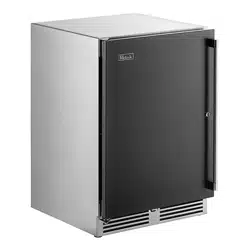
ADA Refrigerator
HB24RS4
*SS Door Option Shown
INSTALLATION AND OPERATION INSTRUCTIONS
24” HC SERIES, HB SERIES, & HD SERIES UNDERCOUNTER REFRIGERATION
Form No. Z2363
Rev. 01.29.24
PERLICK CORPORATION 8300 W. Good Hope Road, Milwaukee, WI 53223 • 800.558.5592 • perlick.com
Warranty
To register your product, visit our web site at perlick.com.
Click on “Commercial”, then “Service”. Click on the link
“Warranty Registration Form”. You must complete and
submit this form or the installation date will revert back
to the ship date.
Please record the purchase date and the dealer’s name,
address and telephone number below.
Model Number: ________________________________
Serial Number: _________________________________
Purchase Date: _________________________________
Dealer Name & Address __________________________
______________________________________________
______________________________________________
______________________________________________
Phone Number _________________________________
Introduction
Congratulations on your purchase of a Perlick commercial
underbar product. This manual has been prepared to assist
you in the installation of your cabinet and to acquaint you
with its operation and maintenance.
This manual has been prepared to assist you in the
installation of your under counter refrigerator and to
acquaint you with its operation and maintenance.
We dedicate considerable time to ensure that our products
provide the highest level of customer satisfaction.
If service is required, your dealer can provide you with a
list of qualied service agents. For your own protection,
never return merchandise for credit without our approval.
We thank you for selecting a Perlick product and assure
you of our continuing interest in your satisfaction.
GENERAL INFORMATION
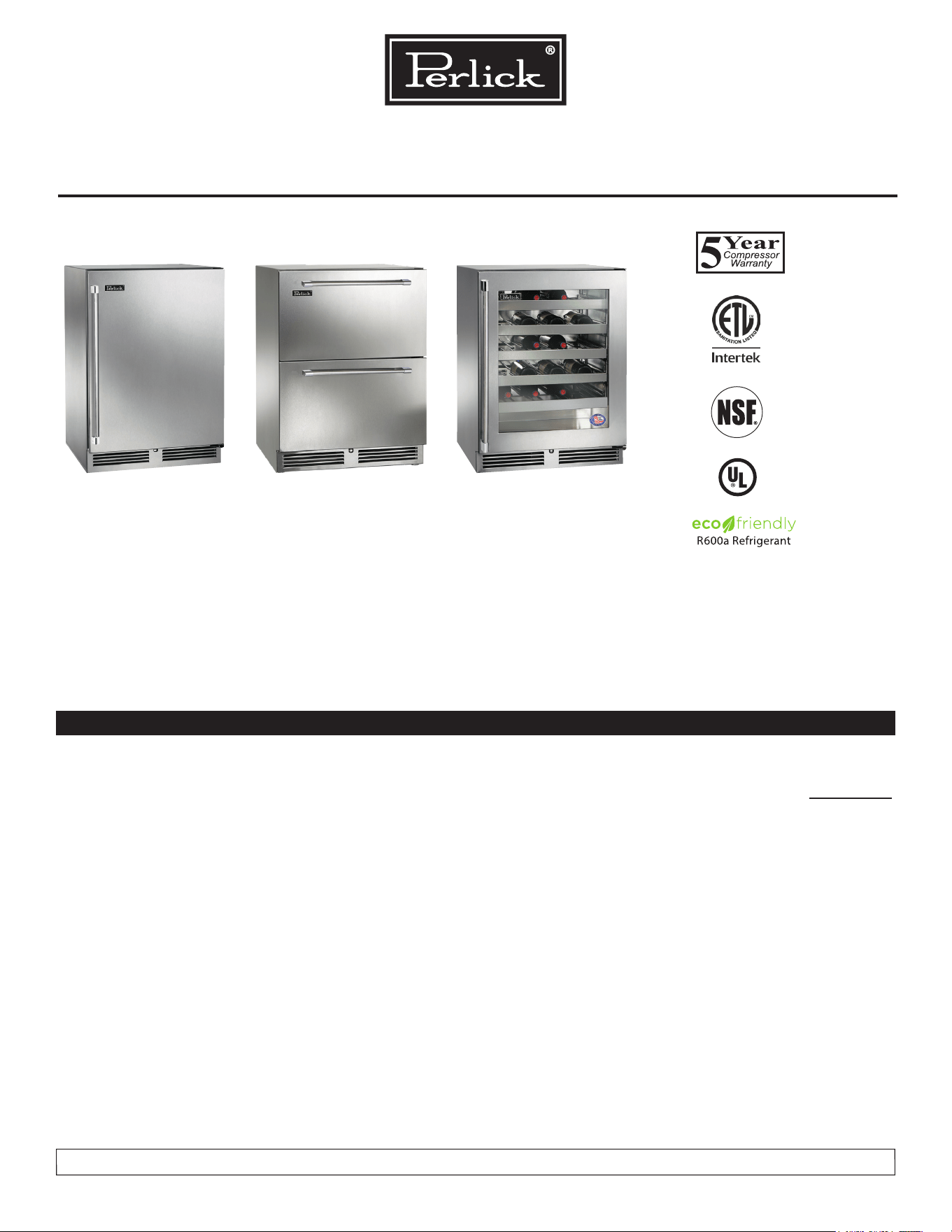
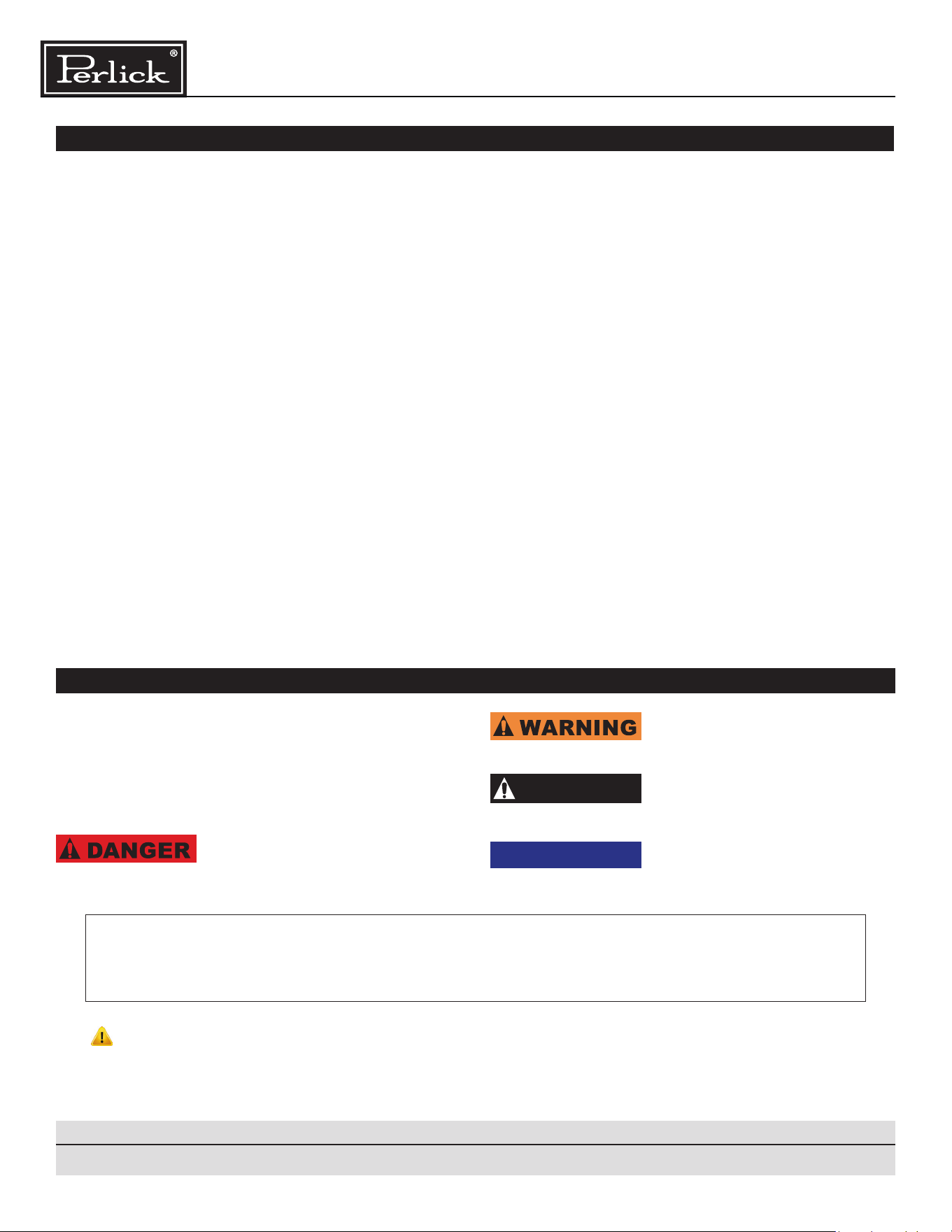
Refrigerator
HB24RS4
*SS Drawers Door Option Shown
Wine Reserve
HB24WS4
*SS Glass Door Option Shown
C
US
For HB24 and
HC24 series only
For HD24RS4 and
HD24WS4 only
The Perlick Corporation veries this product does not contain a prohibited refrigerant as dened by the California Air Resource Board (CARB), the state of
New York, and any other state with HFC prohibition laws. This product does not contain HFC’s. The following disclosure statement is provided to comply with the
CARB regulation:
This equipment is prohibited from use in California with any refrigerants on the “List Of Prohibited Substances” for that specic end use, in accordance with the
California Code of Regulations, title 17, section 95374. This disclosure statement has been reviewed and approved by the Perlick Corporation and the Perlick
Corporation attests under penalty of perjury, that these statements are true and accurate.
Perlick is committed to continuous improvement. Therefore, we reserve the right to change specications without prior notice
2
24” HC SERIES, HB SERIES, & HD SERIES UNDERCOUNTER REFRIGERATION
Operation/Installation Manual
TABLE OF CONTENTS
IMPORTANT!
Read and understand all information in this manual before attempting the installation.
All plumbing and electrical work must be performed by a qualied technician and
conform to all applicable state and local codes.
General Information ......................................................................................................................................................................................................1
Safety ..................................................................................................................................................................................................................................2
Cabinet Specications ..................................................................................................................................................................................................3
Preparing the Cabinet for Use
Refrigerant ................................................................................................................................................................................................................6
Uncrating and Inspection ...................................................................................................................................................................................6
Installation ................................................................................................................................................................................................................6
Electrical ....................................................................................................................................................................................................................6
Use and Operation .........................................................................................................................................................................................................7
Repair & Maintenance ..................................................................................................................................................................................................7
Installing Casters or Legs .............................................................................................................................................................................................7
Placing the Cabinet .......................................................................................................................................................................................................7
Sealing the Cabinet .......................................................................................................................................................................................................8
Preparing the Cabinet ..................................................................................................................................................................................................9
Adjusting Full Extension Shelving ............................................................................................................................................................................ 9
Operation ....................................................................................................................................................................................................................... 10
Checking Product Temperature ............................................................................................................................................................................. 10
Digital Temperature Control ....................................................................................................................................................................................10
Programming Button Denitions ..........................................................................................................................................................................11
LED Functions ............................................................................................................................................................................................................... 11
Maintenance .................................................................................................................................................................................................................12
Troubleshooting .......................................................................................................................................................................................................... 15
Wiring Diagrams .......................................................................................................................................................................................................... 16
Product/Service/Warranty Information ...............................................................................................................................................................16
SAFETY
PLEASE READ all instructions completely before attempt-
ing to install or operate the unit. Take particular note of
the DANGER, WARNING and CAUTION information in the
manual. The information is important for the safe and
ecient installation, operation and care of your Perlick
unit.
Indicates a hazard that WILL result
in serious injury or death if pre-
cautions are not followed.
Indicates a hazard MAY cause
serious injury or death if precau-
tions are not followed.
CAUTION
Indicates a hazard where minor
or moderate injury may occur if
precautions are not followed.
NOTICE
Indicates that property damage
may occur if warnings or instruc-
tions are not followed.
WARNING: California Prop 65 Noce
These products may expose you to chemicals including Chromium, which are known to the state of California to cause cancer and birth
defects or other reproducve harm. For more informaon on whether a product in this list contains these chemicals, please refer to the
specic product page at perlick.com. Or to nd out more about Prop 65, go to P65Warnings.ca.gov.
Perlick is committed to continuous improvement. Therefore, we reserve the right to change specications without prior notice
3
Form No. Z2363
Rev. 01.29.24
24” HC SERIES, HB SERIES, & HD SERIES UNDERCOUNTER REFRIGERATION
Operation/Installation Manual
MODEL NO. HC24RS4 HC24FS4 HC24WS4
CABINET
DIMENSIONS
Length Ins. (mm) 23-7/8” (606) 23-7/8” (606) 23-7/8” (606)
Depth Ins. (mm) 24” (610) 24” (610) 24” (610)
Height Ins. (mm) 34” (864) 34” (864) 34” (864)
SHIP WEIGHT LBS. (KG) 185 (83) 195 (88) 205 (92)
CAPACITY CU. FT. (L.) [PRODUCT*] 5.3 (150) [5 cases] 5.3 (150) [86 glasses] 5.3 (150) [40 wine bottles]
SHELVING 2 black vinyl-coated full-extension shelf
(adjustable)
2 black vinyl-coated full-extension shelf
(adjustable)
5 black vinyl-coated full-extension wine
shelves that hold 8 wine bottles each (750
ml.) (adjustable)
Refrigerator & beverage shelving available
TEMPERATURE SETTINGS F°(C) 34° (1.1) - 42° (5.6)
Factory Set Point 36° (2.2°)
-10°(-23.3) - 10°(-12.2)
Factory Set Point 0° (-17.8°)
40°(4.4°) - 68°(20)
Factory Set Point 55° (12.8)
TAPPING Centered over door only.
Tapping option removes shelving.
Not available Not available
CABINET CONSTRUCTION (INT.) Interior Stainless Steel
CABINET CONSTRUCTION (EXT.) Exterior Sides, Exterior Top and Grill Stainless Steel Exterior Back and Exterior Bottom Galvanized
Door Exterior Customer Choice (see below under ‘Customer Options’)
CABINET INSULATION Polyurethane-Ecomate. Wall Thickness-2” Door, Drawer Thickness-2” (solid stainless steel only)
DOORS, HINGING & HARDWARE
Number of Doors 1 Opening Style Hinged (Left or Right) Door Style Solid or Glass
Door Swing Clearance 25” (635) Locks Available (factory installed)
CONDENSING UNIT Condenser Access Front
REFRIGERATION Refrigerant R600a Expansion Device Capillary Tube Type w/Hermetic Compressor
Defrost Chiller equipped w/automatic 4-hour hot gas
defrost cycle and manual 6-hour defrost with auto restart (HC24FS model only)
HEAT REJECTION (at 75°F ambient)
450 btu/hr 700 btu/hr 450 btu/hr
PLUMBING None required. Moisture drains to self evaporating condensate pan
ELECTRICAL Electrical Supply 115V/60 Hz/1 Phase Running Load Amps HC24FS4: 2.7A/HC24RS4 & HC24WS4: 1.9 Cord Connection Cord Connected
(3-prong 6’ NEMA 5-15P) Thermostat Digital Lighting Type LED
VENTILATION
Front-vented
CUSTOMER OPTIONS
Door Finishes
Black Vinyl/Field Laminate (B), Stainless Steel (S), Glass w/ Black Vinyl/Field Laminate (G), Glass w/ Stainless Steel Frame (T),
Stainless Steel Drawers (E), Black Vinyl/Field Laminate Drawers (D) Door Handle Options 24” full length stainless steel, Classic 6” chrome w/black
vinyl grip, tab handle (top mount, stainless steel)
NOTE: Glass option not available for freezer or beer dispenser
ADDITIONAL ACCESSORIES
Casters 3.75” (Part No. 66736) Legs 4”-5” (Part No. 66734), 6”-7.25” (Part. No 66735)
NOTE: This equipment is intended for the storage and display of
non-potentially hazardous bottled or canned products only!
*Product capacity based on 12 oz. long neck bottles (Refrigerator), 3”
diameter glass size (Freezer) and 750 ml. wine bottles (Wine Reserve)
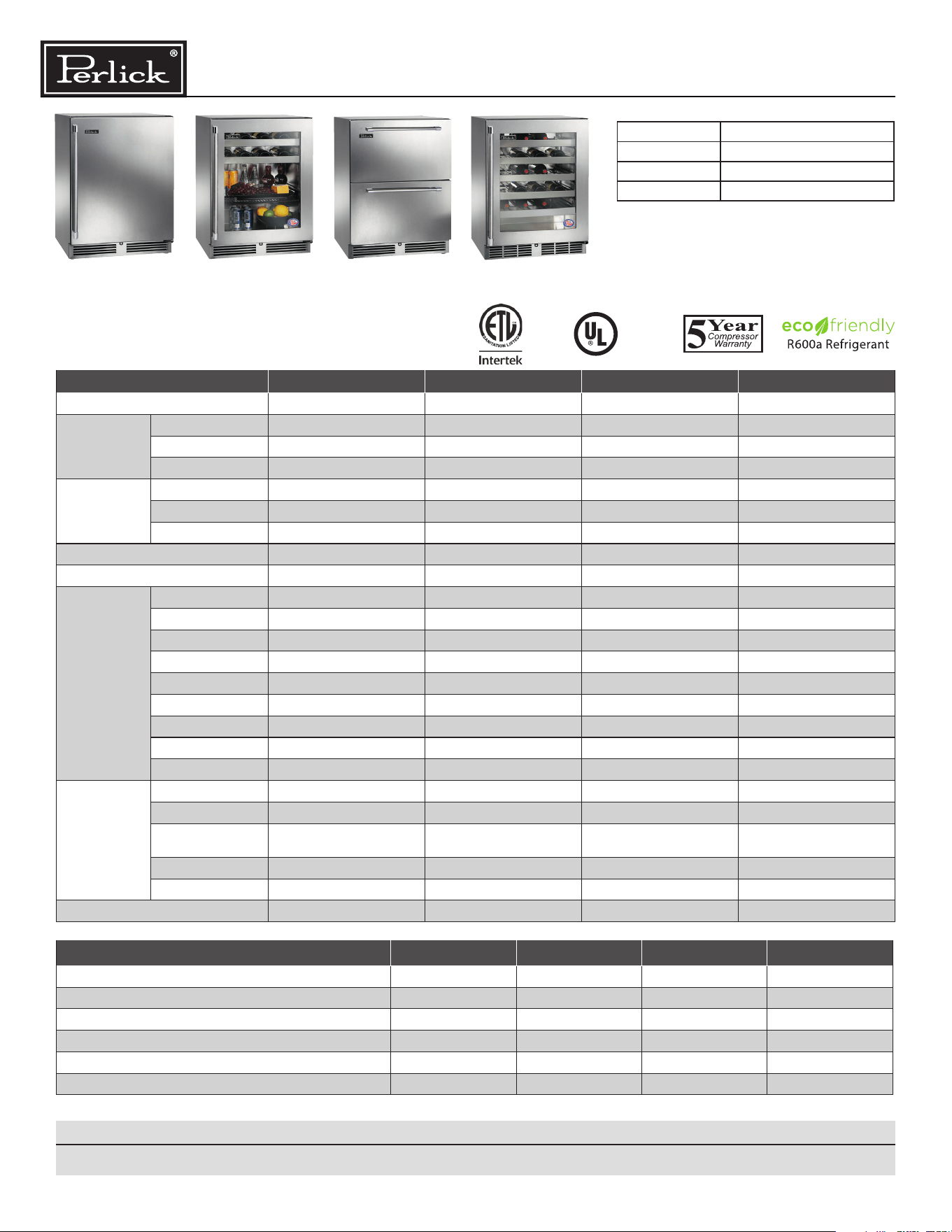
HC Series Size and Specications
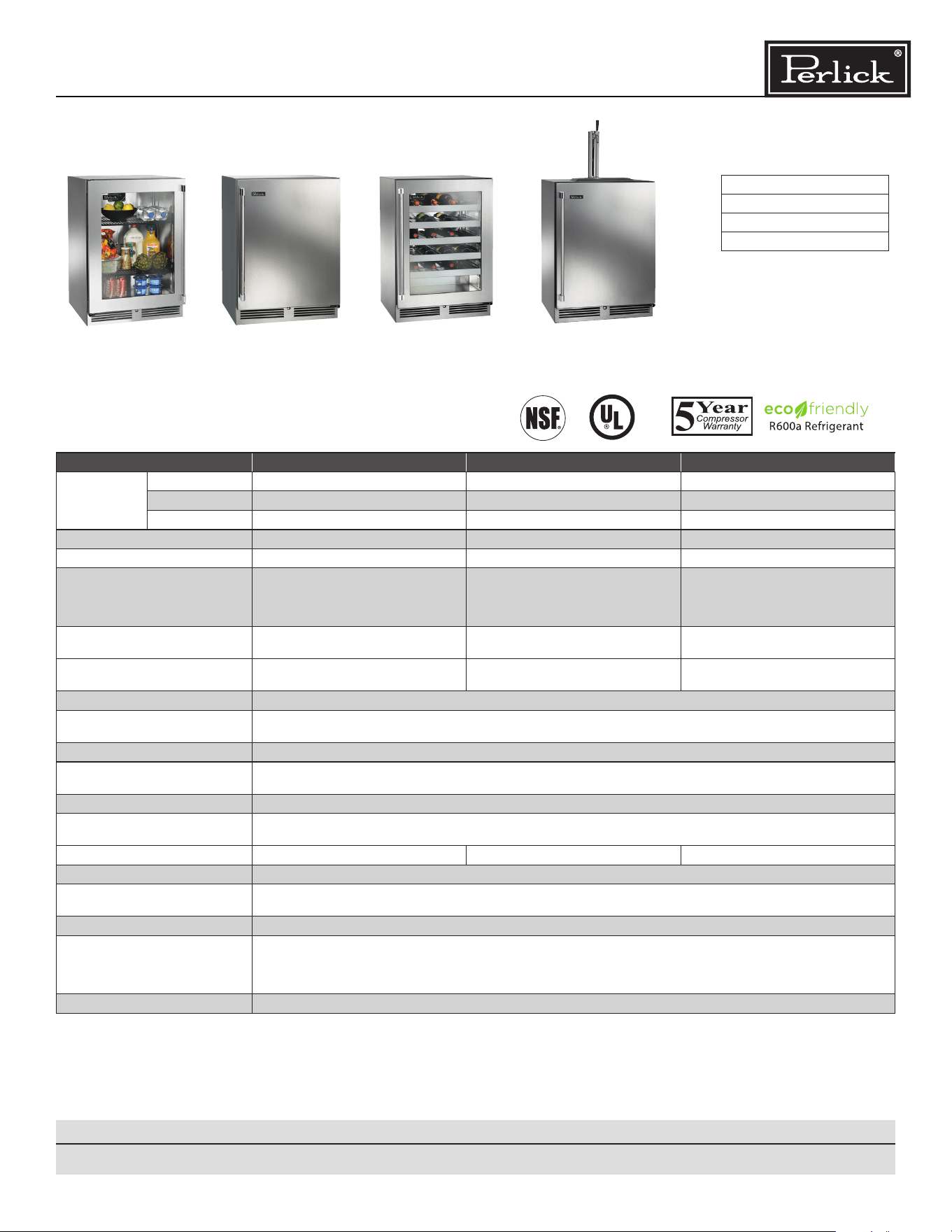
C
US
MODEL NO.
HC24FS4
HC24RS4
HC24WS4
*Shown with 1 faucet
draft arm tapping option
HC24FS4
Chiller
HC24RS4
Refrigerator
HC24WS4
Wine Reserve
HC24RS4-T1
Beverage Dispenser
Perlick is committed to continuous improvement. Therefore, we reserve the right to change specications without prior notice
4
24” HC SERIES, HB SERIES, & HD SERIES UNDERCOUNTER REFRIGERATION
Operation/Installation Manual
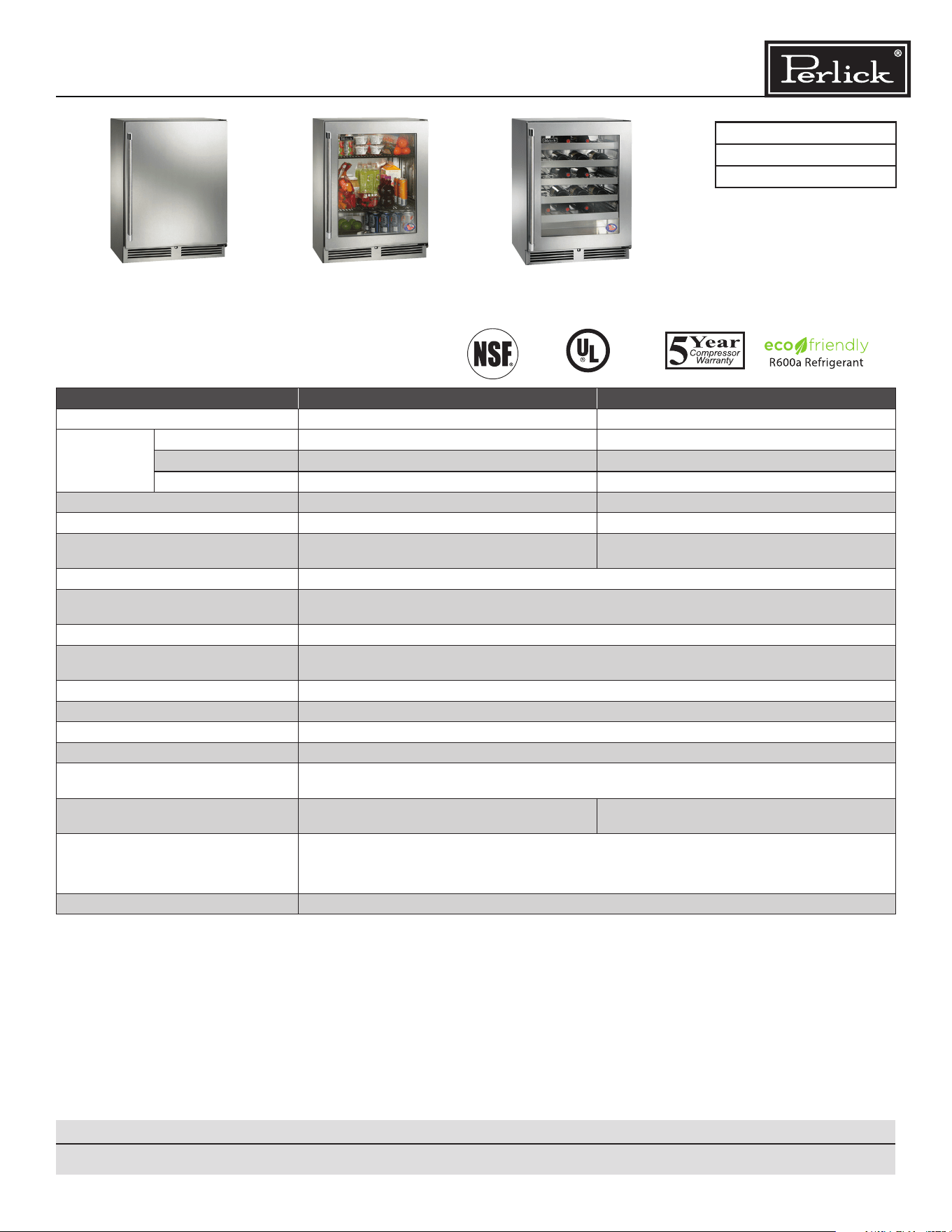
HB24FS4
Freezer Drawers
HB24WS4
Wine Reserve
HB24BS4
Beverage Center
HB24RS4
Refrigerator
HB24RS4 Refrigerator
HB24FS4 Freezer
HB24BS4 Beverage Center
HB24WS4 Wine Reserve
Note: NSF/ANSI Standard 7 Listed for the storage and
display of bottled or canned products only.
C
US
MODEL NUMBERS HB24RS4 HB24FS4 HB24BS4 HB24WS4
MODEL DESCRIPTION Refrigerator Freezer Beverage Center Wine Reserve
OVERALL
DIMENSIONS
Width - in. (mm) 23-7/8 (606) 23-7/8 (606) 23-7/8 (606) 23-7/8 (606)
Depth - in. (mm) 24 (610) 24 (610) 24 (610) 24 (610)
Height - in. (mm) 32 (813)
32 (813)
32 (813) 32 (813)
OPENING
DIMENSIONS
Width - in. (mm) 24 (610) 24 (610) 24 (610) 24 (610)
Depth - in. (mm)
24 (610) 24 (610) 24 (610) 24 (610)
Height - in. (mm) 32-1/8 (816) 32-1/8 (816) 32-1/8 (816) 32-1/8 (816)
INTERNAL VOLUME Net. Cu. Ft. (L) 4.8 (136) 4.8 (136) 4.8 (136) 4.8 (136)
SHIPPING WEIGHT Lbs. (kg.) 195 (88) 195 (88) 195 (88) 195 (88)
ELECTRICAL
SPECIFICATIONS
Electrical Supply 115 VAC/60 Hz/1 Ph 115 VAC/60 Hz/1 Ph 115 VAC/60 Hz/1 Ph 115 VAC/60 Hz/1 Ph
Running Load Amps 1.9 2.7A 1.9 1.9
Electrical Connection Cord connected Cord connected Cord connected Cord connected
Cord Plug Type NEMA 5-15P NEMA 5-15P NEMA 5-15P NEMA 5-15P
Cord Length 6’ 6' 6' 6'
Defrost Initiation Automatic Automatic Automatic Automatic
Defrost Type O cycle Hot Gas O cycle O cycle
Thermostat Digital Digital Digital Digital
Lighting Type LED LED LED LED
REFRIGERATION
SPECIFICATIONS
Refrigerant R600a (62g) R600a (59g) R600a (62g) R600a (62g)
Expansion Device Capillary Tube Capillary Tube Capillary Tube Capillary Tube
Temperature Settings
F (C)
34° (1.1) - 42° (5.6)
Factory Set Point 36°(2.2°)
-10° (-23.3) - 10°(-12.2)
Factory Set Point 0° (-17.8)
34° (1.1) - 48° (8.9)
Factory Set Point 42°(5.6°)
40° (4.4) - 68° (20)
Factory Set Point 55°(12.8°)
Heat Rejection 450BTU/hr 700BTU/hr 450BTU/hr 450BTU/hr
Front Vented Yes Yes Yes Yes
PLUMBING None Required None Required None Required None Required
AVAILABLE DOOR/DRAWER STYLES HB24RS4 HB24FS4 HB24BS4 HB24WS4
Solid Black Vinyl/Field Laminate (Lock Optional) X X X X
Solid Stainless Steel (Lock Optional) X X X X
Glass w/Black Vinyl/Field Laminate (Lock Optional) X X X
Glass w/Stainless Steel (Lock Optional) X X X
Drawers Solid Black Vinyl/Field Laminate (Lock INCLUDED) X X
Drawers Stainless Steel (Lock INCLUDED) X X
*Doors/Drawers can be nished with wood overlay panels (by others). Contact Perlick for drawing templates.
HB Series Size and Specications
Perlick is committed to continuous improvement. Therefore, we reserve the right to change specications without prior notice
5
Form No. Z2363
Rev. 01.29.24
24” HC SERIES, HB SERIES, & HD SERIES UNDERCOUNTER REFRIGERATION
Operation/Installation Manual
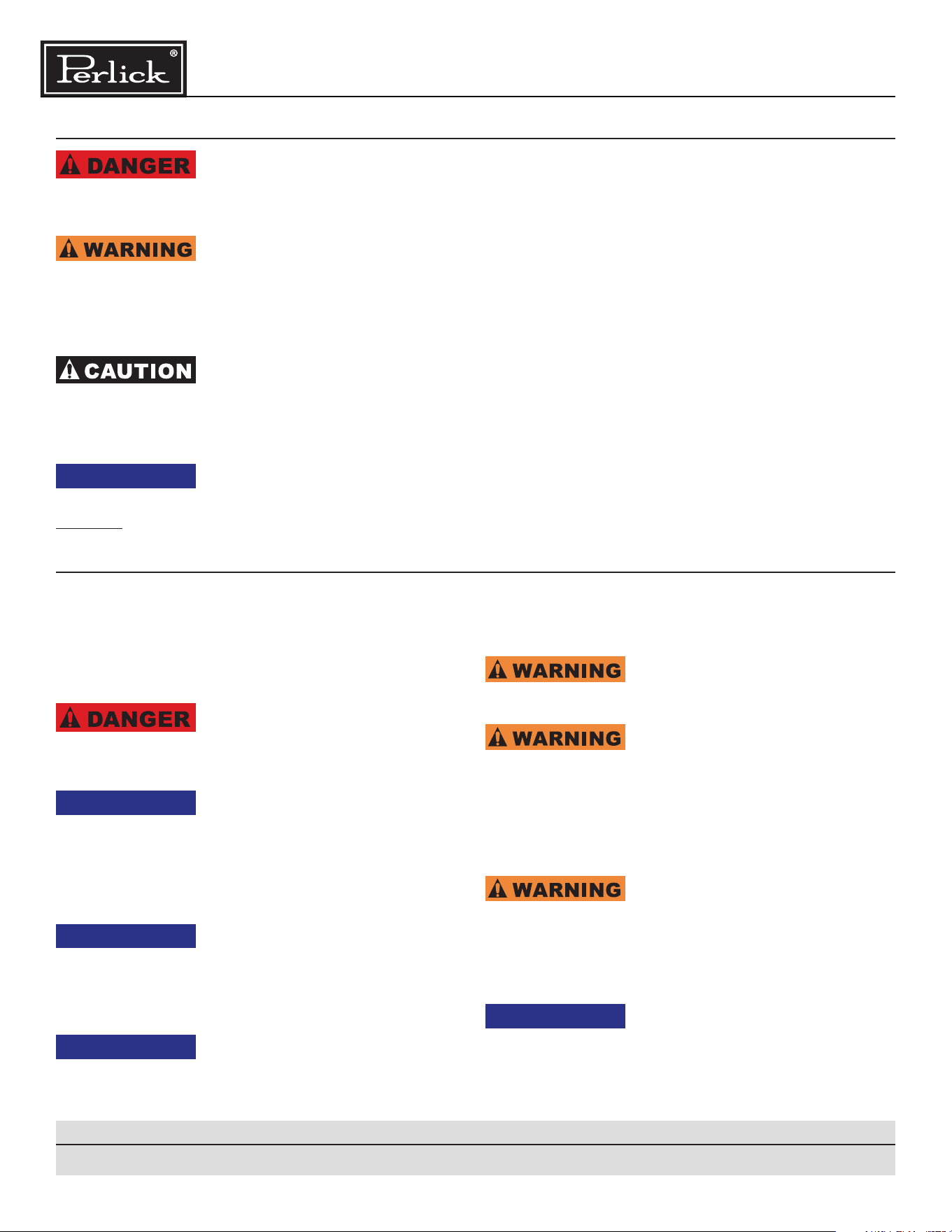
MODELS
HD24RS4
HD24WS4
HD24RS4
Shown with Solid
Stainless Steel Door (S)
HD24RS4
Shown with Glass with
Stainless Steel Frame Door (S)
HD24WS4
Shown with Glass with
Stainless Steel Frame Door (S)
C
US
HD Series Size and Specications
MODEL NO. HD24RS4 HD24WS4
MODEL DESCRIPTION Refrigerator Wine Reserve
CABINET
DIMENSIONS
Length Ins. (mm) 23-7/8” (606) 23-7/8” (606)
Depth Ins. (mm) 18” (457) 18” (457)
Height Ins. (mm) 32” (813) 32” (813)
SHIP WEIGHT LBS. (KG) 185 (83) 185 (83)
CAPACITY CU. FT. (L.) 3.1 (88) 3.1 (88)
SHELVING 2 black vinyl-coated full-extension shelves (adjustable) 4 black vinyl-coated full-extension wine shelves (adjustable).
Each wine shelf holds 5 (750 ml) wine bottles.
CABINET CONSTRUCTION (INT.) Interior Stainless Steel
CABINET CONSTRUCTION (EXT.) Exterior Sides, Exterior Top Stainless Steel Exterior Back Galvanized
Door Exterior Customer Choice (see below under ‘Customer Options’)
CABINET INSULATION Polyurethane-Ecomate. Wall Thickness-2” Door, Drawer Thickness-2” (solid stainless steel only)
DOORS, HINGING & HARDWARE
Number of Doors 1 Opening Style Hinged (Left or Right) Door Style Solid or Glass
Door Swing Clearance 25” (635) Locks Available (factory installed)
CONDENSING UNIT Condenser Access Front
REFRIGERATION Refrigerant R600a (62g) Expansion Device Capillary Tube Type w/ Hermetic Compressor
HEAT REJECTION AT 75°F AMBIENT 350 BTU/hr
PLUMBING None required. Moisture drains to self evaporating condensate pan
ELECTRICAL Electrical Supply 115V/60 Hz/1 Phase Running Load Amps 1.9 Cord Connection Cord Connected (3-prong 6’ NEMA 5-15P)
Thermostat Electro-Mechanical Lighting Type Incandescent
TEMPERATURE SETTINGS F°(C°)
Temp. Range 34° (1.1°) - 42° (5.6°)
Factory Temp. Setting 36°(2.2°)
Temp. Range 40° (4.4°) - 68° (20°)
Factory Temp. Setting 55° (12.8°)
CUSTOMER OPTIONS
Door Finishes
Black Vinyl/Field Laminate (B), Stainless Steel (S), Glass w/ Black Vinyl/Field Laminate (G), Glass w/ Stainless Steel Frame
(T), Black Vinyl/Field Laminate Drawers (D) Door Handle Options 24” full length stainless steel, Classic 6” chrome w/black vinyl grip, tab
handle (top mount, stainless steel)
NOTE: Glass option not available for freezer
ADDITIONAL ACCESSORIES
Door Locks (Castors and Legs: Not Applicable)
NOTE: This equipment is intended for the storage and display of non-potentially hazardous bottled or canned products only!
*Product capacity based on 12 oz. long neck bottles (Refrigerator), 3” diameter glass size (Freezer) and 750 ml. wine bottles (Wine Reserve)
Perlick is committed to continuous improvement. Therefore, we reserve the right to change specications without prior notice
6
24” HC SERIES, HB SERIES, & HD SERIES UNDERCOUNTER REFRIGERATION
Operation/Installation Manual
Refrigerant
Take caution when handling,
moving and using the product to
avoid damaging the refrigerant tubing or increasing
the risk of a leak
All service work shall be
performed by factory authorized
service personnel and all component parts shall be
replaced with like components to minimize the risk of
possible ignition due to incorrect parts or improper
service.
If service is necessary, repair work
must be performed by a Perlick
authorized servicer. Work done by unqualied
individuals could potentially be dangerous and will
void the warranty.
NOTICE
This product contains blown foam
insulation using blowing agent
R-611 (Methyl Formate). The foam in this product
does not contain HFC’s, CFC’s, or HCFC’s.
All models covered in this user manual are manufactured
using refrigerant R600a (Isobutane). R600a is a
hydrocarbon. This refrigerant is ammable and is only
allowed for use in appliances with fulll the requirements
of UL471, or UL/IEC 60335-1 and UL/IEC 60335-2-89. (To
cover potential risk originated from the use of ammable
refrigerants). Consequently, R600a is only allowed to be
used in refrigerating appliances with are designed for this
refrigerant and fulll the above-mentioned standard.
• R600a is heavier than air. The concentration will always
be highest at the oor level.
• The explosion limits are as follows:
o Lower Limit: 1.8% by volume
o Upper Limit: 8.4% by volume
o Ignition Temperature: 460°C
UNCRATING AND INSPECTION
Remove all crating material before operating. Carefully
inspect cabinet for hidden damage. If damage is
discovered, file your claim immediately with the transport
company. Perlick is not responsible for damage in transit.
Do not use or store ammable
liquids (ie; gasoline) or vapors
near the appliance to avoid re.
INSTALLATION
NOTICE
The unit must NOT be totally
enclosed or damage may occur.
Air circulation must not be restricted. The condenser at
cabinet front must be provided with a minimum of two
inches air space. Be sure to provide access so front cover
can be removed to clean the condenser.
NOTICE
If unit has been laid on its back or
sides, place unit upright and allow
a minimum of 24 hours before connecting power.
Failure to follow this procedure may damage the
compressor and void the warranty.
NOTICE
Use care when handling, moving
and using the product to avoid
damaging the refrigerant tubing or increasing the risk
of a leak.
ELECTRICAL
For specifications, see data plate located on the cabinet.
Also, see wiring diagram located in this publication.
Inspect the electrical cord and
plug for damage prior to
energizing the unit to avoid potential electric shock.
Use electrical grounding to avoid
electrocution or electric shock.
This appliance is equipped with a 3-prong
(grounding) polarized plug for your protection
against possible shock hazards. Failure to use
grounding may result in death, serious injury, or
property damage.
Never use an extension cord to
connect the unit to the electrical
source. Do not use a two-prong adapter or remove the
power cord ground prong. Failure to use grounding
may result in death, serious injury, or property
damage.
NOTICE
Using any voltage other than
specied will result in serious
damage to the unit.
Preparing the Cabinet for Use
Perlick is committed to continuous improvement. Therefore, we reserve the right to change specications without prior notice
7
Form No. Z2363
Rev. 01.29.24
24” HC SERIES, HB SERIES, & HD SERIES UNDERCOUNTER REFRIGERATION
Operation/Installation Manual
USE & OPERATION
Do not use or store ammable
liquids (ie; gasoline) or vapors
near the appliance to avoid re.
To avoid contamination, use food
safe containers (not included) for
the storage of craft ice in the cabinet’s freezer
compartment. This equipment does not include a
drain and is intended for use with craft ice and other
non-hazardous food stored in food safe containers.
Perlick recommends the use of NSF food certified
containers.
CAUTION
If service is necessary, repair work
should be performed by a Perlick-
authorized service personnel. Work done by
unqualied individuals could create dangerous
conditions in unit that may result in serious injury or
death.
NOTICE
The unit must NOT be totally
enclosed or damage may occur.
REPAIR & MAINTENANCE
All service work shall be
performed by Perlick-authorized
service personnel. All component parts shall be
replaced with like components. Incorrect parts or
improper service may result in re.
INSTALLING CASTERS OR LEGS (OPTIONAL)
Attach bracket assembly to the bottom of the cabinet
base using the ¼”-20 Philips head machine screws
provided. Attach casters or legs to the mounting bracket
with ¼” – 20 Philips head screws provided
NOTICE
To comply with NSF requirements,
cabinet must be sealed to oor or
on legs, casters, or rollers.
PLACING THE CABINET
To assure maximum performance, fresh air must
be allowed to circulate through the machinery
compartment. Do not place anything in front of the
cabinet that would obstruct air ow at these grilles. Do
not place the unit in an unventilated small room.
NOTICE
Cabinet should be leveled front to
back then side to side.
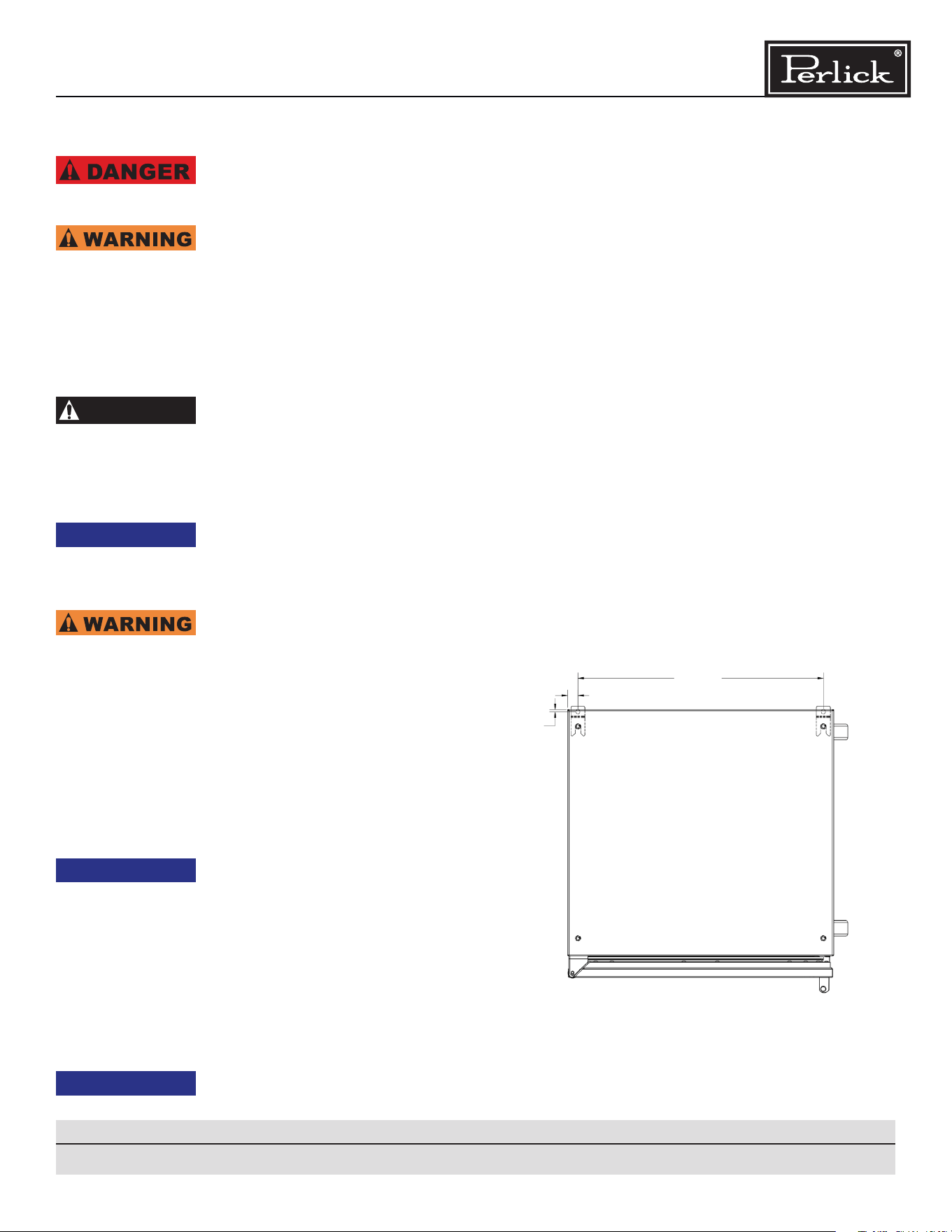
INSTALLING ANTI-TIP BRACKETS
Unit may tip forward if loaded racks/shelves are all pulled
out at the same time. To prevent tipping, and to provide
stable installation, the unit must be secured in place with
the anti-tip brackets supplied with the unit. The anti-tip
brackets, when properly installed, should secure the rear
legs/glides to the mounting surface and prevent the unit
from tipping forward.
Please note:
• Anti-tip brackets are only used for stationary cabinets
and should not be installed on cabinets with accessory
casters. Caster kits are available for HC and HB model
cabinets. Refer to the instructions supplied with the
caster kit for proper installation.
• If installing on a concrete oor, concrete fasteners are
required and not included with the anti-tip kit.
• Some installation sites may require modications to
provide a secure surface for attaching the brackets.
A set of anti-tip brackets is supplied with the unit. These
brackets should be attached to the oor at the rear of the
unit. Each bracket must be located to engage the rear
glides when the cabinet is pushed back into position.
Refer to Figure 1 (shown below) for anti-tip bracket
mounting locations.
22-1/32”
15/16”
3/16”
Figure 1. 24” Anti-Tip Bracket
Perlick is committed to continuous improvement. Therefore, we reserve the right to change specications without prior notice
8
24” HC SERIES, HB SERIES, & HD SERIES UNDERCOUNTER REFRIGERATION
Operation/Installation Manual
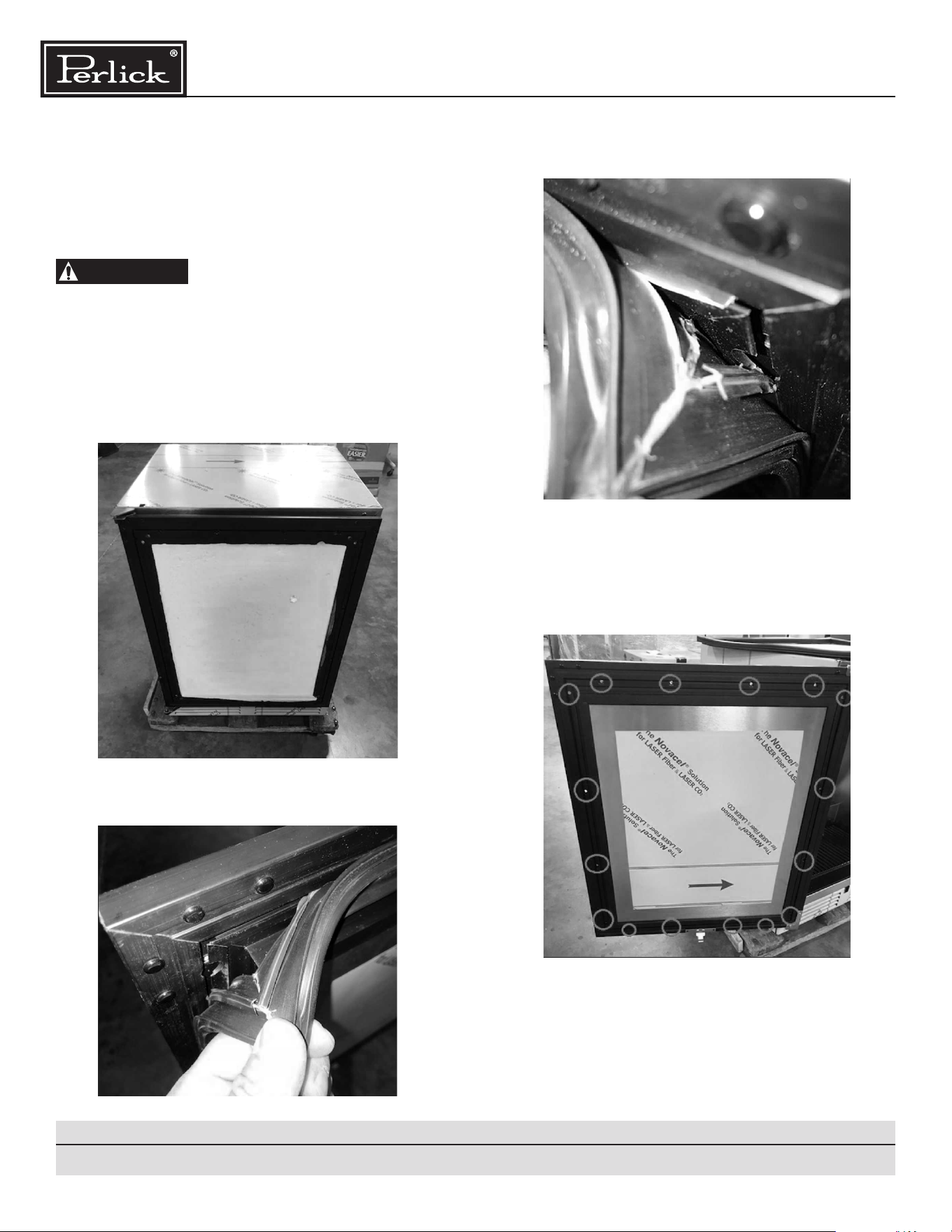
WOOD OVERLAY INSTALLATION
Before beginning installation, check all components
for proper t and nish. Handle should be installed
to the overlay prior to installing overlay to door (use
countersunk athead fasteners for handle installation.)
CAUTION
For best performance and
functionality, the overlay panels
should be 3/4” thick. The weight of the overlays
should not exceed 20 lbs for solid (-2) doors, 10 lbs
for glass (-4) doors, or 10 lbs for drawer (-6) models.
1. -2, -4 and -6 models come ready to accept wood
overlay as shown below.
2. Remove the gasket carefully starting at the corners
and avoid ripping the dart.
3. In some cases, the dart on the gasket may rip.
If this happens, replace with a new gasket.
4. With the gasket removed, the screw holes needed
to hold the overlay panel will be reveal as shown
below.
Perlick is committed to continuous improvement. Therefore, we reserve the right to change specications without prior notice
9
Form No. Z2363
Rev. 01.29.24
24” HC SERIES, HB SERIES, & HD SERIES UNDERCOUNTER REFRIGERATION
Operation/Installation Manual
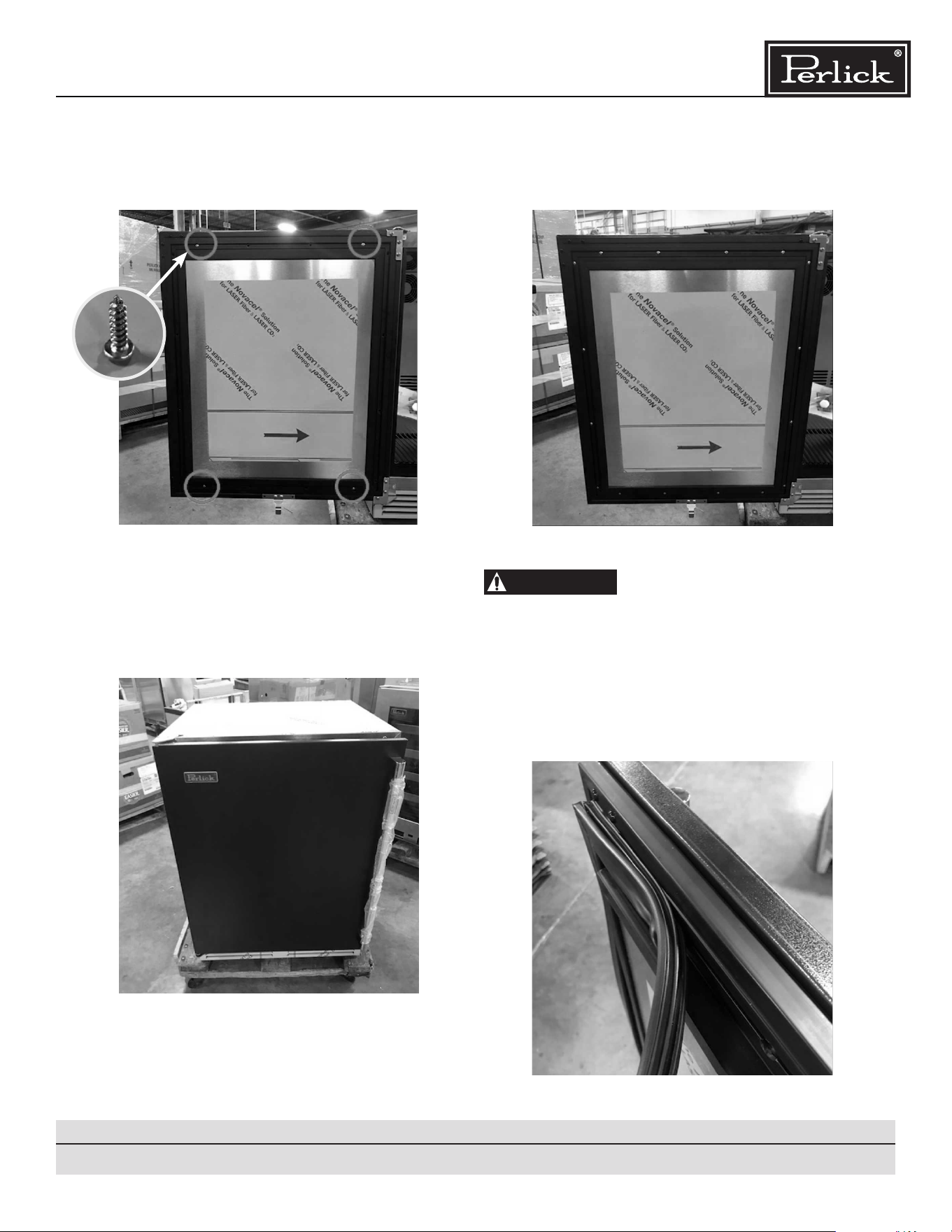
5. Loosely attached the four corners of the overlay
panel with the door frame with #10 x 3/4” wood
screws.
6. Make sure the overlay panel is aligned properly
with the door.
7. After alignment is satised, fasten down all screws
through the screw holes.
8. When re-installing the gasket, make sure the dart is
pressed inside the slot on the door frame. Start at
the four corners and rmly press your way inwards
CAUTION
Do not overtighten wood overlay
attachment screws, as this may
damage the factory supplied door frame.
Perlick is committed to continuous improvement. Therefore, we reserve the right to change specications without prior notice
10
24” HC SERIES, HB SERIES, & HD SERIES UNDERCOUNTER REFRIGERATION
Operation/Installation Manual
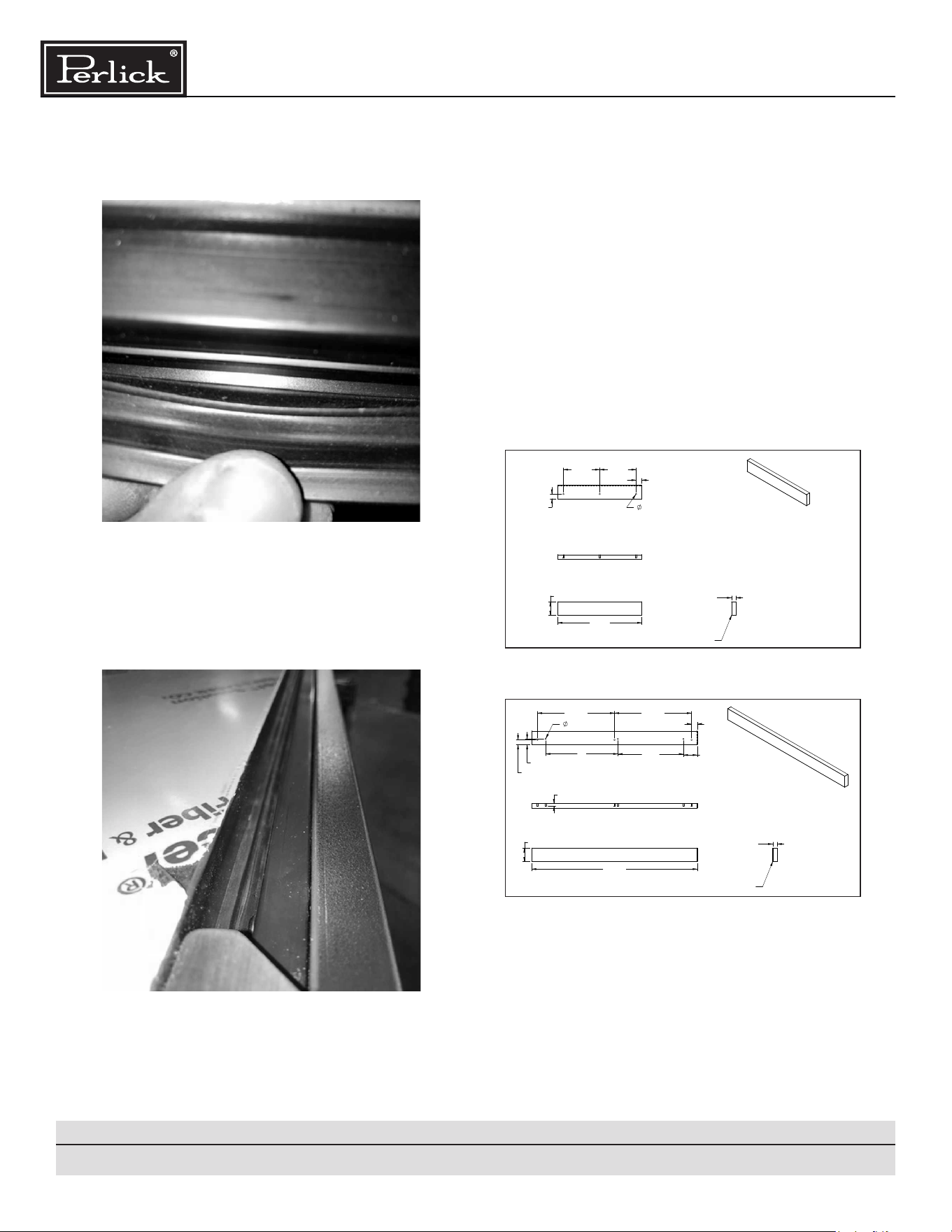
9. Verify that the gasket is fully seated onto the door
frame when completed.
WINE RACK TRIM (OPTIONAL)
All wine reserve racks come with sleek stainless steel fronts.
Unnished solid hardwood fronts are optional and can
be removed and replaced with other wood to match your
cabinetry. See diagrams below for wine rack face details.
NOTE: The unnished faces should be nished and sealed. In many
cases, stains and/or nishes have odors that may be objectionable
in an enclosed area. Do not stain or nish wood faces while
installed on unit. To remove the front wood face from the wine
shelf, simply pull out the wine shelf and remove the fasteners,
nish as desired, and when completely dry, reinstall with fasteners.
Wine Rack Trim, 24” models
Wine Rack Trim, 15” models
10. After installation of the overlay panel is completed,
verify that the gasket is completely sealing around
the cabinet frame. If installing panels onto drawer
models (-6), repeat installation process for second
drawer face. Installation is now complete.
Perlick is committed to continuous improvement. Therefore, we reserve the right to change specications without prior notice
11
Form No. Z2363
Rev. 01.29.24
24” HC SERIES, HB SERIES, & HD SERIES UNDERCOUNTER REFRIGERATION
Operation/Installation Manual
SEALING THE CABINET
NOTICE
Finished ooring should be
protected with appropriate
material to avoid damage from moving the unit.
NOTICE
If unit has laid on its back or sides,
place unit upright and allow
minimum of 24 hours before connecting power.
NOTICE
To prevent damage to the counter
top and unit underneath, do not
place heavy objects on the counter top directly above
the unit.
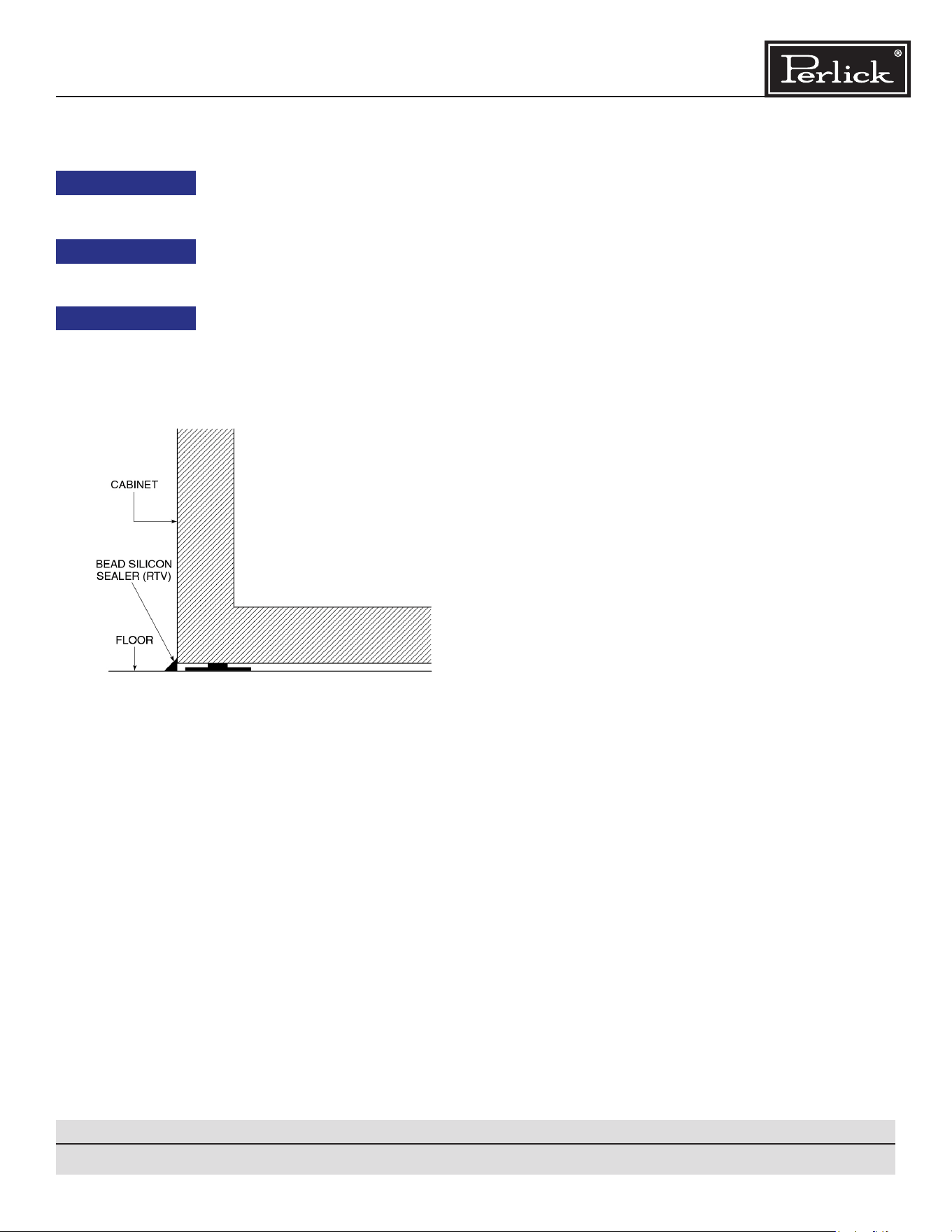
For installation of a cabinet directly to the oor, (without
legs or casters), the cabinet must be sealed to the oor to
prevent liquid spillage passing under inaccessible portions
of the equipment and to maintain the equipment’s NSF
sanitation certication. The oor surface shall be level and
smooth. It is recommended to be sealed to the oor using
an NSF certied silicone sealer. (Figure 1).
When sealing the cabinet to the oor, make sure that
the louvered front grille plate can still be removed for
condenser maintenance and cleaning
Plug the unit into the 15amp grounded outlet located
in the installation opening. With power applied to the
unit, check that lighting and cooling function operate
properly, then turn o power to wall outlet at the circuit
breaker.
Check interior door openings inside the unit to ensure
the unit is level
Perlick is committed to continuous improvement. Therefore, we reserve the right to change specications without prior notice
12
24” HC SERIES, HB SERIES, & HD SERIES UNDERCOUNTER REFRIGERATION
Operation/Installation Manual
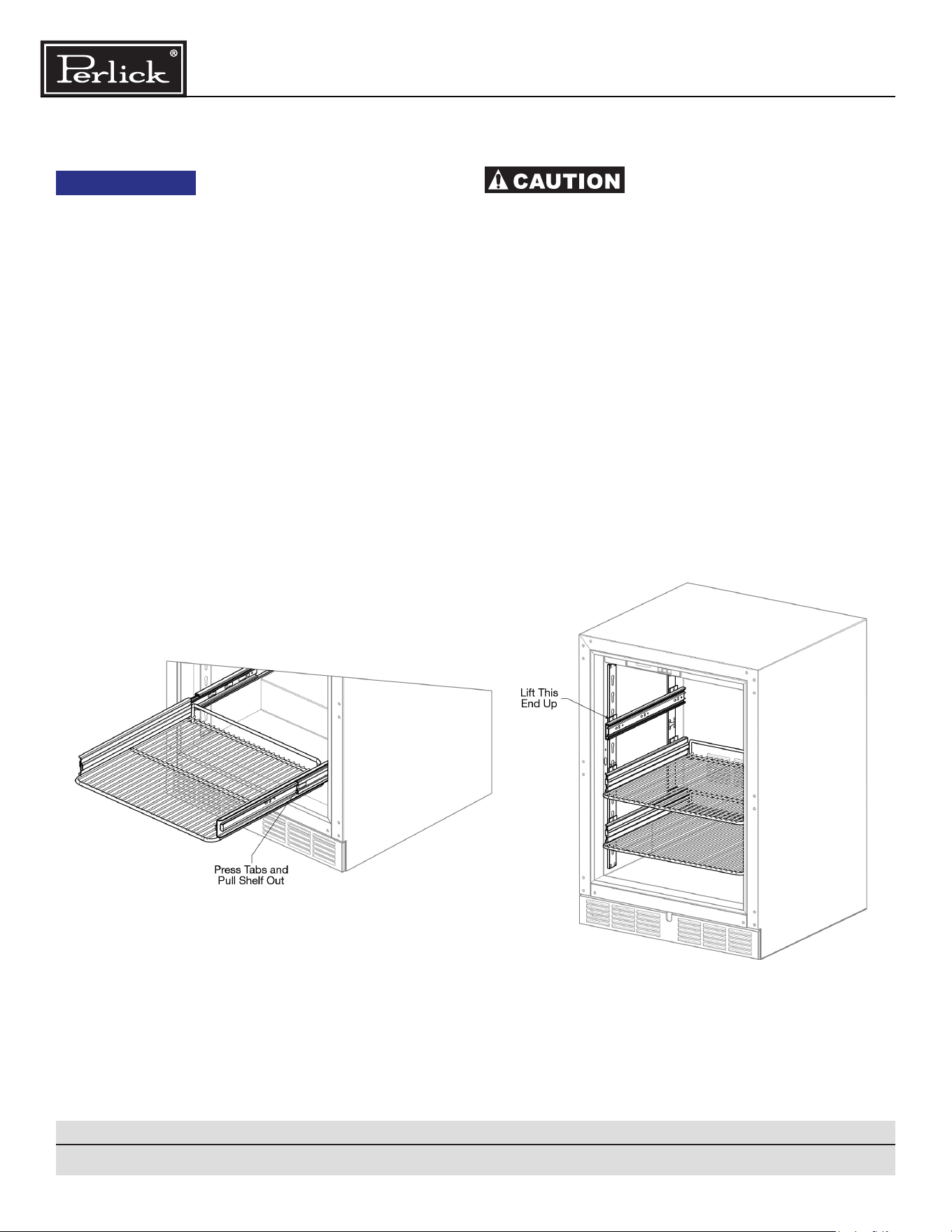
Sliding Shelf Mounting Brackets
Sliding Shelf Extender Tabs
PREPARING THE CABINET
NOTICE
TO achieve maximum
performance, interior louver
openings and fan guard openings should never be
obstructed.
Refrigerator:
The refrigerator compartments come standard with black
vinyl coated adjustable full extension shelves.
Wine Reserve:
The two-door unit comes standard with 4 full extension
wine shelves and six full extension black vinyl coated
wine shelves. The shelves are removable and adjustable
to accommodate oversized (magnum) bottles.
ADJUSTING FULL EXTENSION SHELVING
Shelves should be emptied and
free of any product prior to
moving or adjusting.
Pull the shelf out to its furthest position Locate the tabs in
the middle of both extenders (see extender tabs below).
Press tabs and pull out.
• Reposition each bracket separately. Grasp the middle
of the bracket, pull the front end up and out, then
forward to remove (See mounting brackets below).
• Place bracket at desired position. Push the rear hook
into the rear key slot. Set front of bracket on the wall
hook.
• Repeat for other bracket(s).
• Push extenders completely into the unit. Align the
shelf grooves with the extenders and slide completely
into the unit.
Perlick is committed to continuous improvement. Therefore, we reserve the right to change specications without prior notice
13
Form No. Z2363
Rev. 01.29.24
24” HC SERIES, HB SERIES, & HD SERIES UNDERCOUNTER REFRIGERATION
Operation/Installation Manual
OPERATION
Before storing perishables, turn
unit on and allow it to operate
for a minimum of 24 hours to allow temperatures to
stabilize.
NOTICE
When loading items into the unit,
do not block internal louvers and
fan guard openings or performance will be decreased.
For optimal performance, leave a minimum clearance
of 1 inch between the loaded product and any
internal air openings.
NOTICE
Always ensure that the manual
light switch is in the OFF position
before closing a solid wood or stainless steel door.
If manual light switch is left on for an extended period
of time, it may increase the cabinet temperature,
and cause the refrigeration system to run harder.
Master Switch
These products come equipped with a master power
switch located behind the louvered toe kick. Remove
the toe kick to turn power on or o to the unit.
Interior Light
Units are equipped with an interior light that illuminate
when the door is opened. All HC48 models come
standard with adjustable blue and white LED lighting
(except for HC24FS & HB24FS models, which have
default white LED light). The cabinet also comes
equipped with a manual light switch for displaying
the products through a glass door.
Loading Product
Before storing perishables, turn unit on and allow
it to operate for a minimum of 24 hours to allow
temperatures to stabilize. When loading items into the
unit, leave a minimum of 1 inch clearance in front of
internal louvers and fan guard openings, blocking
airow will result in decreased performance.
CHECKING PRODUCT TEMPERATURE
1. To accurately check the temperature of product
stored in the refrigerated compartment, insert an
accurate thermometer into a plastic unbreakable
bottle, partially lled with water. Tighten bottle
cap securely.
2. Place the bottle in the desired area for 24 hours.
Refrain from opening the unit during the testing
period. After 24 hours, check the temperature of
the water. Adjust the temperature accordingly
using the following procedures:
DIGITAL TEMPERATURE CONTROL - REFRIGERATORS,
BEVERAGE CENTERS, AND WINE RESERVES
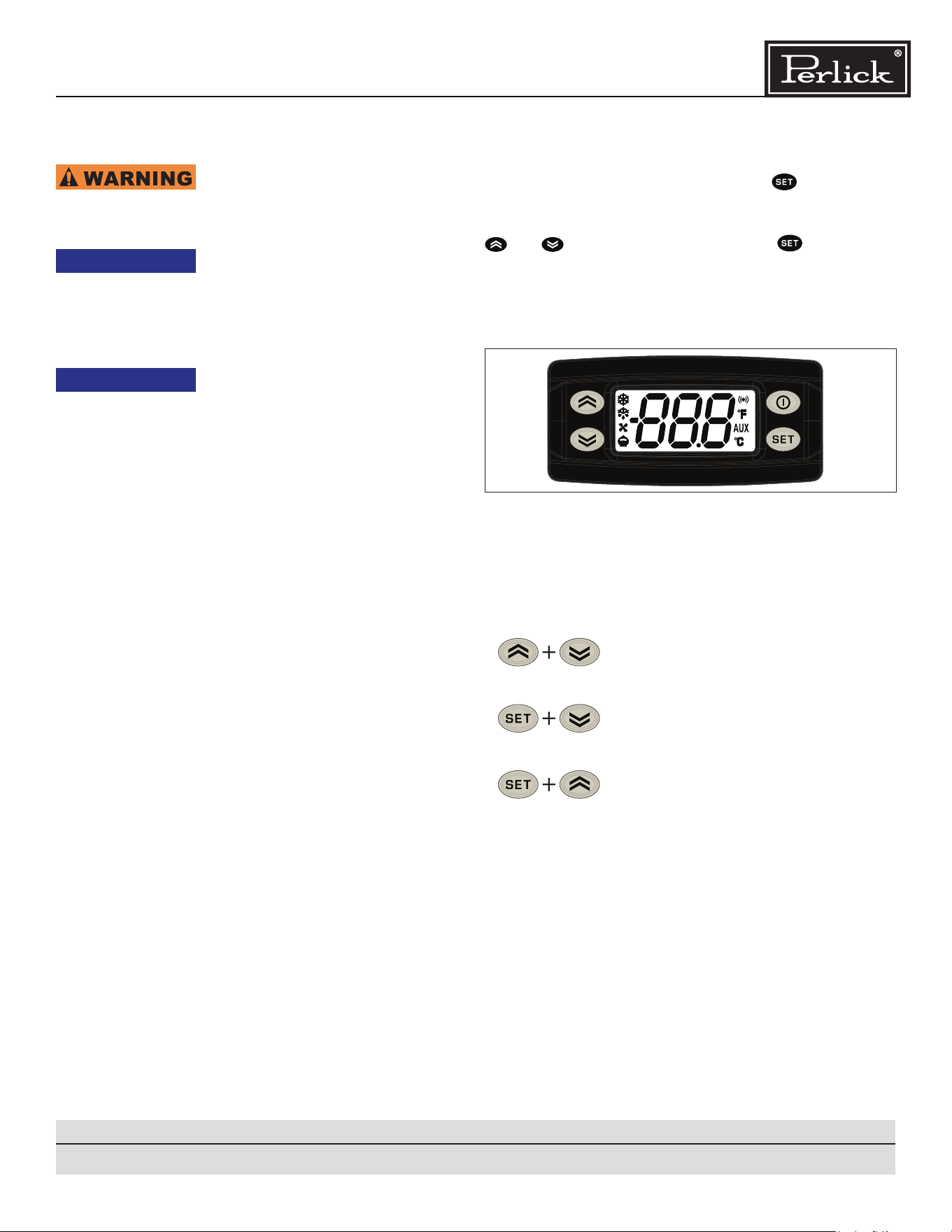
To display the Set point values press the key when
the ‘SET’ label is displayed. The Set point value appears
on the display. To change the Set point value, press the
and keys within 15 seconds. Press to conrm
the modication.
The condenser fan motor turns o and on with
compressor. The evaporator fan motor runs continuously.
Digital Temperature Controller
On/O
Press the ON/OFF button to turn the unit on or o.
Key Combinations:
Press the UP and DOWN arrow
buttons to lock and unlock the
keyboard
Press the SET and DOWN arrow
buttons simultaneously to enter
programming mode.
Press the SET and UP arrow but-
tons simultaneously to return to
room temperature display.
NOTE: Dependent on the model and conguration, the controllers
have been programmed to only allow a temperature adjustment
within a specied range. See the chart top right for the specied
range allowed for your unit.
Perlick is committed to continuous improvement. Therefore, we reserve the right to change specications without prior notice
14
24” HC SERIES, HB SERIES, & HD SERIES UNDERCOUNTER REFRIGERATION
Operation/Installation Manual
HC24 24” C-Series
Model Factory Temp Setpoint
HC24FS4 0° F
HC24RS4 36° F
HC24WS4 55° F
HB24 24” ADA Compliant Series
Model Factory Temp Setpoint
HB24FS4 0° F
HB24RS4 36° F
HB24BS4 42° F
HB24WS4 55° F
HD24 18” Shallow-Depth Series
Model Factory Temp Setpoint
HD24RS4 36° F
HD24WS4 55° F
LED Functions
The following table describes LED functions
LED Mode Function
ON Compressor is on
Flashing
Delay, protection or
Blocked start-up
ON Defrost is on
Flashing Manual or D.I. activation
ON Alarm is on
Flashing Alarm acknowledged
ON Evaporator is on
NOTE: An audible alarm will sound on any alarm condition.
To silence the active alarm press and release any key on the
controller. See the troubleshooting section for description of
alarm codes and resolutions.
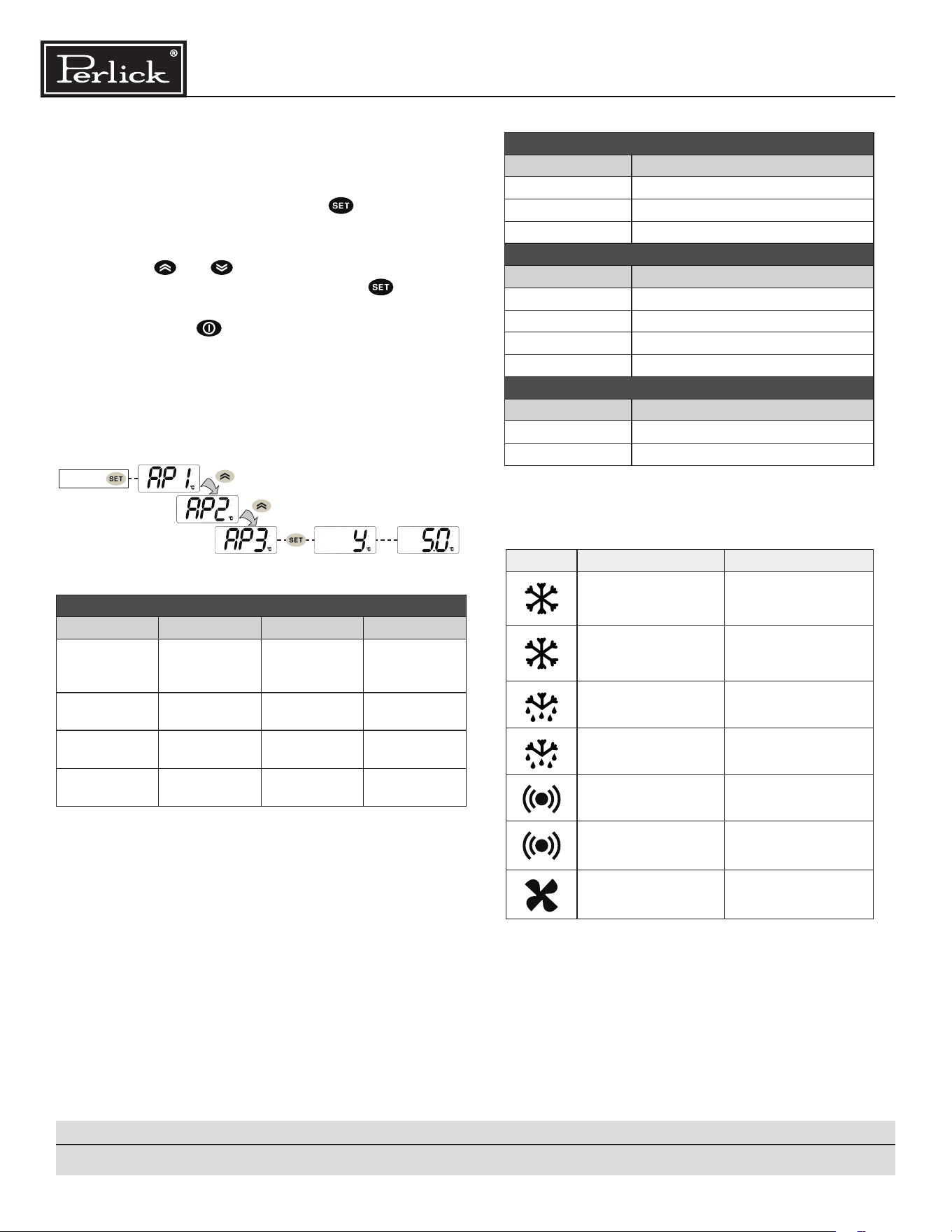
SELECTING APPLICATIONS
The procedure for loading one of the default
applications is:
1. At start-up of the device, keep the key pressed:
the label “AP1” will appear;
2. Browse the various applications (AP1-AP2-AP3-AP4)
using the and keys;
3. Select the desired application using the key
(“AP3” in the example) or cancel the procedure
by pressing the key; alternatively wait for the
timeout;
4. If the operation is successful, the display will show “y”,
if not it will show “n”;
5. After a few seconds the instrument will return to the
main display.
Power-on +
Selecting Applications
HC/HB/HD 24” Application Temperatures
Model AP1 AP2 AP3
HB24BS
HB24RS
HB24WS
Refrigerator
(36°F)
Beverage Center
(42°F)
Wine Reserve
(55°F)
HC24RS
HC24WS
Refrigerator
(36°F)
N/A
Wine Reserve
(55°F)
HD24RS
HD24WS
Refrigerator
(36°F)
N/A
Wine Reserve
(55°F)
HC48RS
HC48WS
Refrigerator
(36°F)
N/A
Wine Reserve
(55°F)
Perlick is committed to continuous improvement. Therefore, we reserve the right to change specications without prior notice
15
Form No. Z2363
Rev. 01.29.24
24” HC SERIES, HB SERIES, & HD SERIES UNDERCOUNTER REFRIGERATION
Operation/Installation Manual
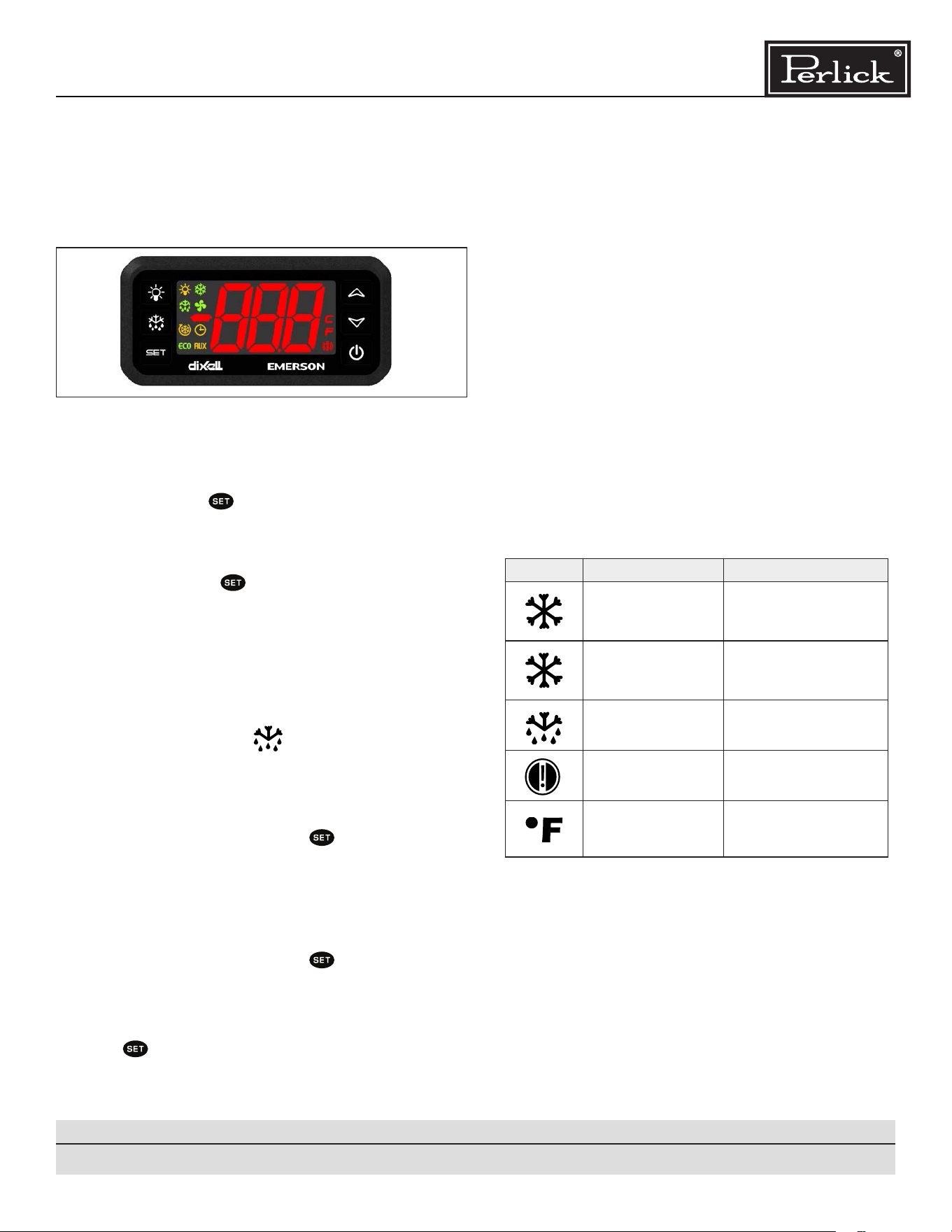
Fig. 2. HC24FS4 & HB24FS4 Controller
Models Built after January 29, 2024
Defrosting The Unit
All chiller and freezer models models are equipped
with an automatic evaporator, automatic hot gas
defrost system to allow maintenance free operation of
the cooling system.
HC24FS models are also equipped with a six (6) hour
manually initated defrost that users can activate by
holding the DEF button for at least three (3) seconds,
defrost has initated when the controller display reads
“DEF”. After the six (6) hour defrost is complete, the
unit will resume to normal operation. All other models
employ o cycle defrost systems.
NOTE: Dependent on the model and conguration, the
controllers have been programmed to only allow a temperature
adjustment within a specied range. See the chart top right for
the specied range allowed for your unit.
DIGITAL TEMPERATURE CONTROL -
FREEZERS & CHILLERS
On/O
Press the ON/OFF button to turn the unit on or o.
To Set Target Temperature
Press and release the button. Display will show
the current temperature setpoint.
To Change Setpoint Temperature
1. Press and hold the button until the display
shows the current setpoint temperature with the
“F” ashing.
2. Use the UP and DOWN arrow button to scroll to
the desired temperature.
To Start A Manual Defrost (Freezer Models Only)
Press the DEFROST button.
To See Maximum Stored Temperature
Press the UP arrow button to see the maximum stored
temperature. To reset the maximum stored temperature,
while displayed, press and hold the button until ‘rst’
ashes in the display.
To See Minimum Stored Temperature
Press the DOWN arrow button to see the minimum stored
temperature. To reset the minimum stored temperature,
while displayed, press and hold the button until ‘rst’
ashes in the display.
Making Selections
Press the button to make a selection while in
programming mode. When not in programming mode,
button will display refrigerator set point.
LED Mode Function
ON Compressor is on
Flashing
Anti-short cycle
delay is on
ON Defrost is on
ON Alarm is on
Flashing
You are in the process of
programming the unit
LED Functions
The following table describes LED functions.
Perlick is committed to continuous improvement. Therefore, we reserve the right to change specications without prior notice
16
24” HC SERIES, HB SERIES, & HD SERIES UNDERCOUNTER REFRIGERATION
Operation/Installation Manual
Maintenance
Shut o the electricity to the unit
before cleaning the condenser and
other routine maintenance.
NEVER use hydrochloric acid (muriatic
acid) on stainless steel. Do not use
abrasive cleansers or cloths on any interior or exterior
surfaces or removable parts.
Avoid damaging or crushing the con
denser ns or tubing.
STAINLESS STEEL CARE & CLEANING
General
Stainless steel is a “passive” metal because it contains
other metals like chromium, nickel and manganese that
stabilize the atoms. Chromium provides an invisible
passive lm that covers the steel surface, acting as a
shield against corrosion. As long as the lm is intact and
not contaminated, the metal is passive and stainless.
If the passive lm of stainless steel has been broken,
equipment can start to corrode and rust.
Three materials or processes can break down stainless
steel’s passive layer and allow corrosion to occur:
• Mechanical abrasion
• Deposits and water
• Chlorides
Mechanical abrasion refers to items that will scratch a
steel surface. Steel pads, wire brushes and scrapers are
prime examples.
Water comes out of the faucet in varying degrees of
hardness. Hard water may leave spots. When allowed to
sit, these deposits will break down the passive chromium
layer and rust stainless steel. Other deposits from
food preparation must be promptly removed with an
appropriate cleaning agent.
Chlorides are found nearly everywhere. They are in
water, food and table salt. Household and industrial
cleaners are the worst oenders.
Preventing Stainless Steel Rust
Use non-abrasive tools to clean stainless steel products.
Soft cloths and plastic scouring pads will not harm the
steel’s passive layer.
Clean with polish lines. Some stainless steels have visible
polishing lines or “grain”. When visible lines are present,
always scrub in a motion parallel to the lines. When the
grain cannot be seen, polish in a consistent straight
pattern and not in a circular motion.
Use alkaline, alkaline chlorinated or non-chloride
containing cleaners. While many traditional cleaners
are loaded with chlorides, the industry is providing an
ever-increasing choice of non-chloride cleaners. If you are
not sure of chloride content in the cleaner being used,
contact your cleaner supplier. If your present cleaner
contains chlorides, ask your supplier for an alternative.
Avoid cleaners containing quaternary salt; it also can
attack stainless steel and cause pitting and rusting.
Keep food equipment clean. Use alkaline, alkaline
chlorinated or non-chloride cleaners at recommended
strength. Clean frequently to avoid build-up of hard,
stubborn stains. The single most likely cause of damage
is chlorides in the water. Remember, adding heat to
cleaners that contain chlorides dramatically increases
their eect on stainless steel.
If chlorinated cleaners are used, immediately rinse and
wipe equipment and supplies dry. The sooner you wipe
standing water, especially when it contains cleaning
agents, the better. After wiping equipment down, allow
it to air dry. Oxygen helps maintain the stainless steel
passive lm.
Glass panels may be cleaned using any standard glass
cleaner available on the market.
To clean interior and exterior non-metallic surfaces and
removable parts, wash with mild solution of soap and
lukewarm water with a little baking soda. Rinse and dry
thoroughly. Avoid getting water on the lights, controllers,
fan motors and unnished wood wine rack faces.
Audible alarm will sound if the door is left ajar for longer than one
minute. Fully closing the door will clear the alarm condition, prolonged
time spent with the door open can damage the equipment.
Perlick is committed to continuous improvement. Therefore, we reserve the right to change specications without prior notice
17
Form No. Z2363
Rev. 01.29.24
24” HC SERIES, HB SERIES, & HD SERIES UNDERCOUNTER REFRIGERATION
Operation/Installation Manual
Recommended Cleaners for Specic Situations
JOB CLEANING AGENT COMMENTS
Routine cleaning Soap, ammonia, detergent Apply with sponge or soft cloth
Fingerprints and smears Areal 20, Lac-O-Nu, Lumin Wash, O-Cedar
Cream Polish
Provides barrier lm to minimize
ngerprints. Can be used on all nishes.
Rub the surface with a cloth as directed on
the package.
Stubborn stains and
discolorations
AllChem Concentrated Cleaner, Samae,
Twinkle, Cameo Copper Cleaners, Grade FFF
Italian Pumice Whiting, Steel Bright, Lumin
Cleaner, Zud Restoro, Sta-Clean, Highlite
Cooper’s Stainless Steel Cleaner or Revere
Stainless Steel Cleaner
Apply with a damp sponge or cloth, then
rinse with clear water and wipe dry.
Old Dutch, Lighthouse Sunbrite, Wyandotte
Bab-O, Gold Dust, Sapollo, Bon Ami or
Comet
For these household cleaners, rub with a
damp cloth. They may contain chlorine
bleaches so rinse thoroughly after use
and wipe dry.
Liquid NuSteel or Dubois Temp For these products, rub the surface with
a dry cloth using only a small amount of
cleanser. Rinse with water and dry.
Heat tint or heavy discoloration Penny-Brite, Copper Brite, Paste Nu-Steel,
Dubois Temp or Tarnite
Rub onto surface with a dry cloth
Bar Keepers Friend, Revere Stainless
Steel Cleaner, Allen Polish, Steel Bright
Wyandotte Bab-O or Zud
When using these cleaners, apply with a
damp sponge or cloth, rinse thoroughly
and wipe dry.
Tenacious deposits, rust,
discoloration, industrial
atmospheric stains
Oakite No. 33 Dilac, Texo NY, Flash-Klenz
Caddy Cleaner, Turco Scale 4368 or
Permag 57
Swab and soak with a clean cloth. Let
stand for 15 minutes or more according
to directions on package, then rinse and
wipe dry.
Rust discoloration or corrosion
caused by cleaning agents
containing hydrochloric
(muriatic) acid or chlorine bleach
3M Scotch Pad, type A, grade “ne” Clean o the surface soil using cleaning
methods above. Then rub discolored or
corroded areas lightly with a dry pad.
Use of property names is intended only to indicate a type of cleaner and does not constitute an endorsement. Omission of any proprietary
cleaner does not imply its inadequacy. All products should be used in strict accordance with instructions on the package.
NOTE: Do NOT use steel wool or scouring pads to clean stainless steel.
Cleaning the Condenser
Flammable Refrigerant. Risk of re
or explosion. Do not damage
refrigeration tubes.
The condenser (located behind the front grille cover)
should be cleaned every three (3) months. Use a soft
bristle brush and vacuum to remove dust and lint.
Perlick is committed to continuous improvement. Therefore, we reserve the right to change specications without prior notice
18
24” HC SERIES, HB SERIES, & HD SERIES UNDERCOUNTER REFRIGERATION
Operation/Installation Manual
Troubleshooting
If the unit appears to be malfunctioning, read through
the OPERATION section rst, then check the guide
below to identify and resolve the problem.
PROBLEM RESOLUTION
Light stays on when the door is closed Manual ON/OFF light switch is turned on.
Is the door switch making contact with the plunger?
Noisy during operation Certain sounds are normal. Soft sounds from the compressor, fan motor and valves will be heard.
The refrigerated cabinet isn’t running Is there electrical power to the unit?
Is the building circuit breaker or fuse on?
Is the control set properly?
Is the condenser area clean?
The refrigeration compartment is warmer
than usual
Is the control set properly?
Is the light staying on?
Is the condenser area clean and free of obstruction?
Has the door been open for a long time or more frequently door opening occurred?
Are internal louvers and fan guard openings obstructed?
The refrigerated compartment is cooler
than usual
Is the control set properly?
Is the door closing and sealing properly?
The refrigerations runs for long periods
of time
Is the condenser area clean and free of obstruction?
Has the door been open for a long time or more frequently door opening occurred?
Has warm product just been placed in the unit?
On hot days and in warm room temperatures, the system will
run longer.
Condensation forms inside the
refrigerated compartments
This is normal during high humidity and frequent door openings.
Are the doors closing and sealing properly?
Condensation forms on the outside
of the unit
During periods of high humidity, some condensation might appear on the outside surface. The condensation
will disappear when the humidity drops. Meanwhile, be sure doors are closing and sealing properly. If
condensation persists, contact your Perlick Factory Authorized service center.
LED Controller display is ashing "E1" -
Compartment temperature probe error
Is the main compartment temperature probe rmly plugged into the digital controller?
Contact Perlick Factory Authorized service center for replacement probe.
LED Controller display is ashing "E2" -
Evaporator temperature probe error
Is the main compartment temperature probe rmly plugged into the digital controller?
Contact Perlick Factory Authorized service center for replacement probe.
LED Controller display is ashing "AH1" -
High compartment temperature alarm
Refer to problem "The refrigeration compartment is warmer than usual"
LED Controller display is ashing "AL1" -
Low compartment temperature alarm
Refer to problem "The refrigeration compartment is cooler than usual"
LED Controller display is ashing "OPd" -
Open door alarm
Has the door been open for longer than 1 minute?
Is the door fully closed?
Is the door plunger fully depressing the door switch (right side)?
Is the door switch harness rmly plugged into the digital controller?
Is there continuity across the ends of the door switch harness when the switch is depressed?
Contact Perlick Factory Authorized service center for replacement switch.
Electrocution hazard! Never
attempt to repair or perform
maintenance on the unit until the main electrical
power has been disconnected.
Perlick is committed to continuous improvement. Therefore, we reserve the right to change specications without prior notice
19
Form No. Z2363
Rev. 01.29.24
24” HC SERIES, HB SERIES, & HD SERIES UNDERCOUNTER REFRIGERATION
Operation/Installation Manual
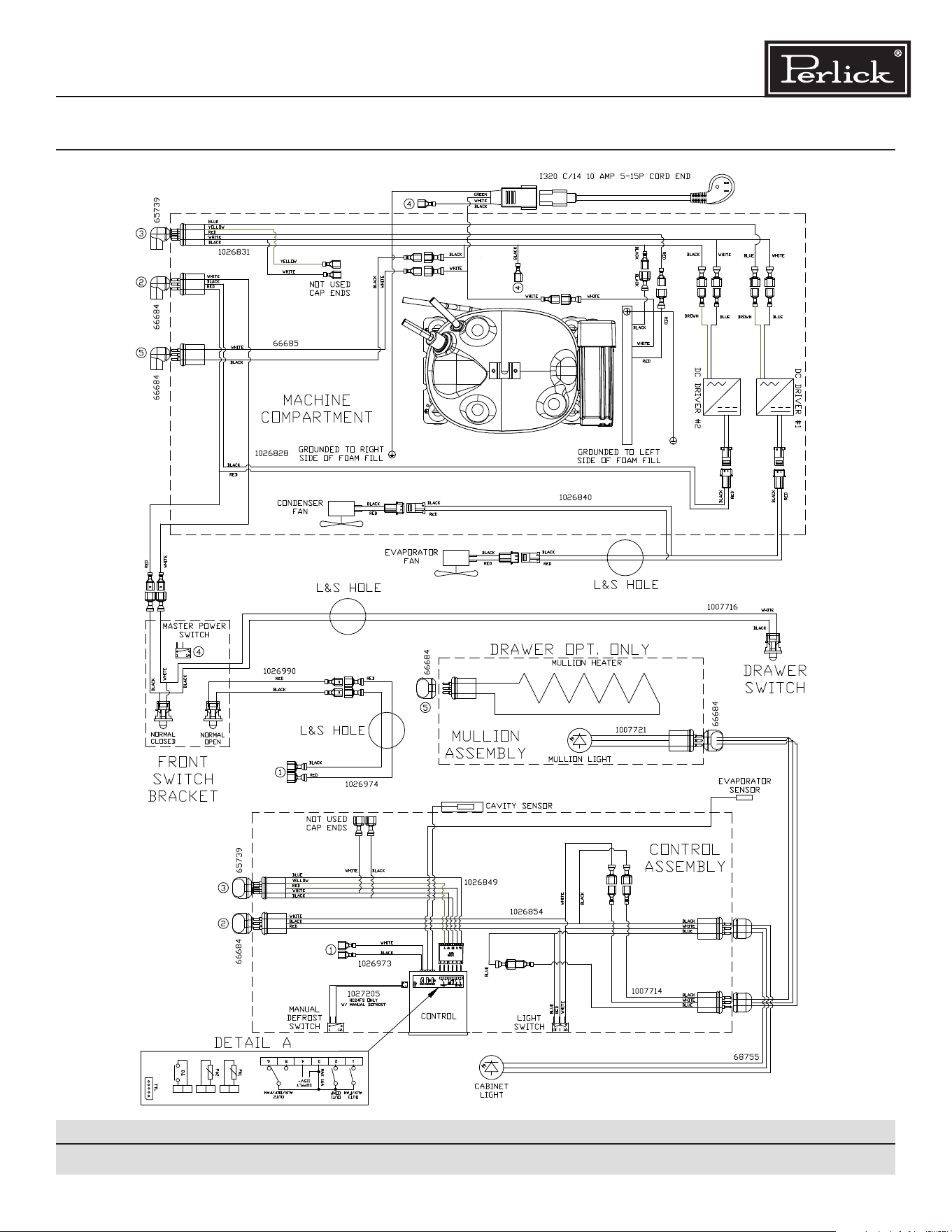
Wiring Diagram for Models HB24RS4, HB24WS4, HC24RS4, HC24WS4, HD24RS4, HD24WS4
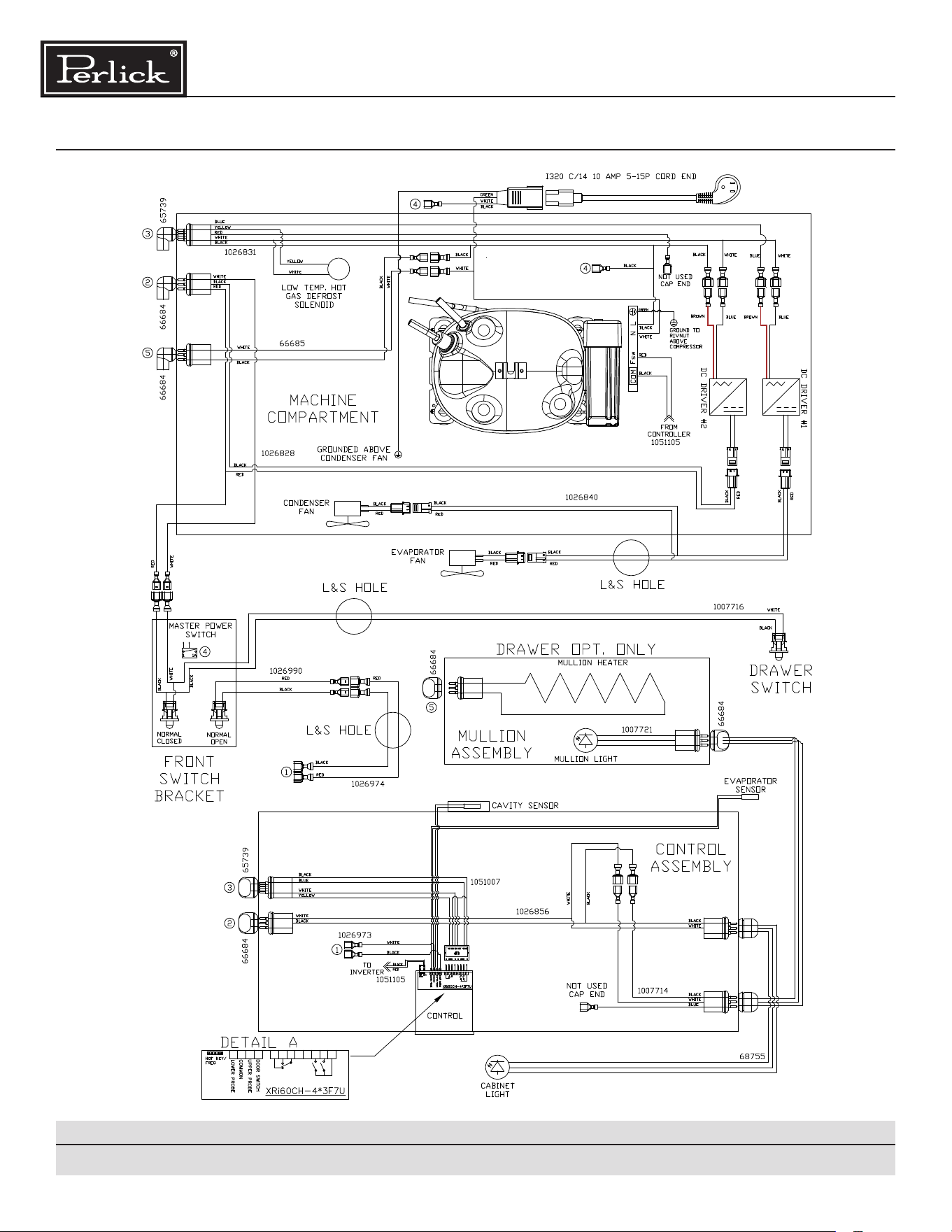
Perlick is committed to continuous improvement. Therefore, we reserve the right to change specications without prior notice
20
24” HC SERIES, HB SERIES, & HD SERIES UNDERCOUNTER REFRIGERATION
Operation/Installation Manual
Wiring Diagram for Models HB24FS4, HC24FS4
61012 11 78 4 35 129

Perlick is committed to continuous improvement. Therefore, we reserve the right to change specications without prior notice
21
Form No. Z2363
Rev. 01.29.24
24” HC SERIES, HB SERIES, & HD SERIES UNDERCOUNTER REFRIGERATION
Operation/Installation Manual
To Obtain Product Information
• Contact your selling dealer.
• Inquire on the web at www.perlick.com.
• Call 800-558-5592 for factory assistance for information,
planning, installation or product information.
• Write Perlick Corporation, Customer Service Department,
8300 W. Good Hope Road, Milwaukee, Wisconsin 53223.
• E-mail us at warr[email protected].
To Obtain Product Service, Replacement Parts
or Accessories:
Use only genuine Perlick replacement parts and accessories.
Genuine Perlick parts and accessories are designed to work
correctly with Perlick products and oer superior service life.
The use of non-Perlick parts can damage the unit and may void
the warranty.
Check the model and serial number of the unit located on the
label attached to the inside top of the cabinet.
Call a Perlick Factory Authorized service center. For the location
of the nearest Service Center, contact your dealer, or inquire via
the web at www.perlick.com, or write to:
Perlick Corporation, Customer Service Department,
8300 W. Good Hope Road, Milwaukee, Wisconsin 53223,
call 800-558-5592, or e-mail us at:
Product/Service/Warranty Information

Perlick is committed to continuous improvement. Therefore, we reserve the right to change specications without prior notice
22
24” HC SERIES, HB SERIES, & HD SERIES UNDERCOUNTER REFRIGERATION
Operation/Installation Manual
NOTES

Perlick is committed to continuous improvement. Therefore, we reserve the right to change specications without prior notice
23
Form No. Z2363
Rev. 01.29.24
24” HC SERIES, HB SERIES, & HD SERIES UNDERCOUNTER REFRIGERATION
Operation/Installation Manual
NOTES

PERLICK CORPORATION 8300 W. Good Hope Road, Milwaukee, WI 53223 • 800.558.5592 • perlick.com
Form No. Z2363
Rev. 01.29.24
