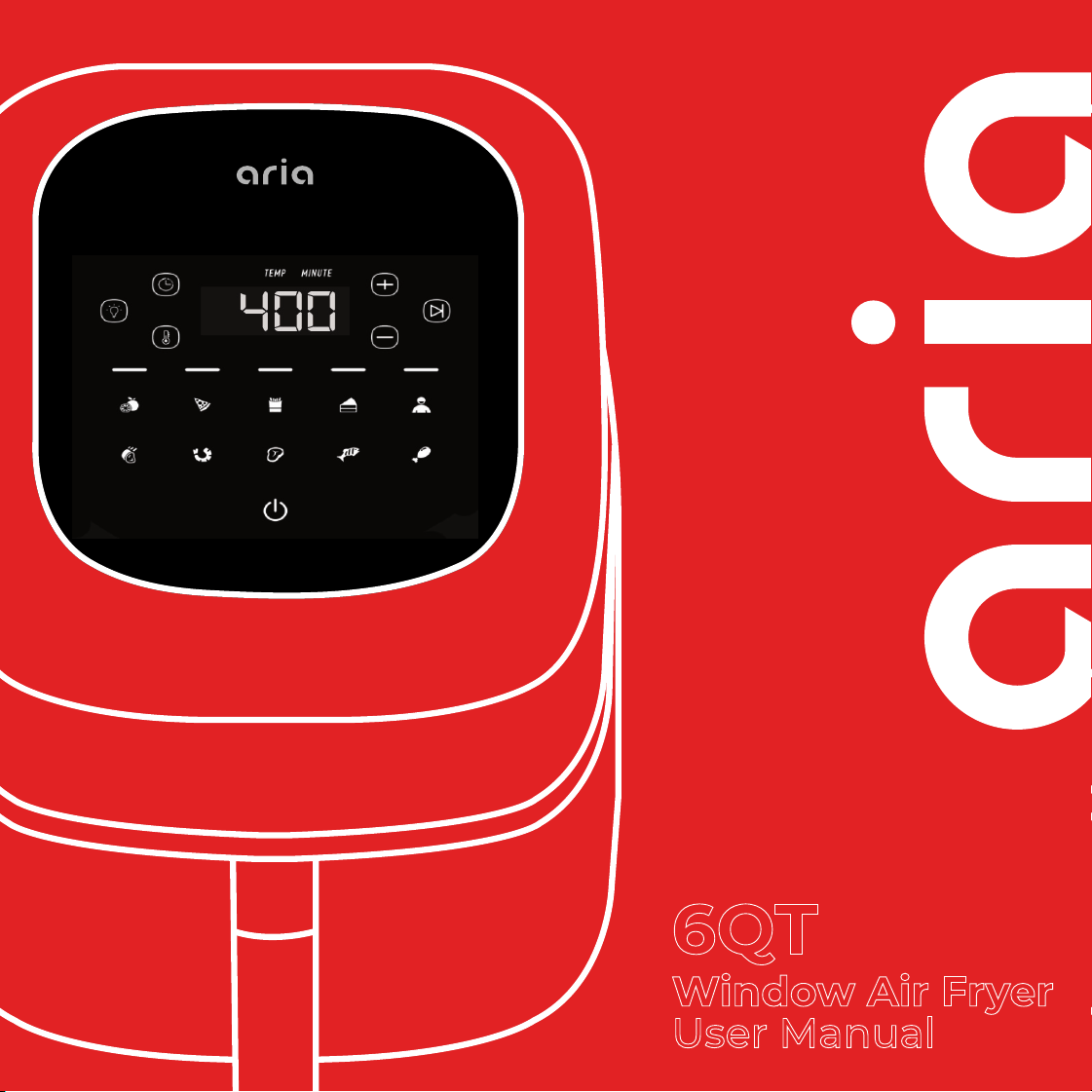
6QT
Window Air Fryer
User Manual


• Important Safeguards
• What’s in the Box
• Control Panel
• Preset Temps
• Setting Up Your Air Fryer
• Cleaning, Care & Storage
• Troubleshooting
• Warranty/Support Info
Table of Contents
9.
11.
12.
14.
16.
19.
4.
8.

healthy
starts
here
ARIAAIRFRYERSARIAAIRFRYERS
For video tutorials, recipes, and more!
Follow us on Socials

4
• WARNING! Always follow the Safety Instructions below before, during,
and after using your Aria Air Fryer. As your Air Fryer is a powerful elec-
trical appliance with heating elements and fans, be sure to follow all
safety precautions and read all instructions fully and carefully before
using. Failure to do so could result in serious electrical shock, burns
from heat, other injury, or physical damage.
Read All Instructions Before Use And Save
• Some parts of the Air Fryer are extremely hot during and after oper-
ation such as the exterior, interior, trays, and all accessories. Do not
touch hot surfaces, parts, accessories, interior or exterior while cooking
or before it’s cooled down. Use a heat-resistant oven glove instead of
touching the Air Fryer or its accessories directly to avoid bodily injury.
• The Air Fryer contains both electronic and heating elements. To avoid
electrical shock, do not immerse the power cord, plug, or housing in
water or put them under the tap during cleaning.
• Make sure that your outlet’s voltage corresponds to the voltage stated
on the label of the appliance, and only use with a properly grounded
outlet.
• Unplug from outlet when not in use and before cleaning. Allow to cool
before cleaning, handling, or moving accessories.
• This appliance Should not be used by or near children.
Important Safeguards

5
• As the plug is polarized (one prong is larger than the other), be sure to
insert into a polarized outlet the correct way. If the plug does not t,
reverse the plug and try again, or contact a certied electrician.
• Do Not let the cord hang over the edge of the table or countertop,
where it could be pulled on by children or pets, or touch hot surfaces,
which could damage the cord.
• Do not place on or near a hot gas or electric burner.
• Do not use this appliance for other than intended or modify in any
way.
• Extreme caution should be exercised when using containers construct-
ed of materials other than metal or glass in the Air Fryer Toaster Oven.
• Do not cover any part of the Air Fryer with metal foil. This will cause
overheating of the Air Fryer.
• Oversized foods, metal foil packages, or utensils must not be inserted
in the Aria Oven as they may involve a risk of re or electric shock.
• A re may occur if the appliance is covered or touching ammable
materials such as curtains, draperies or walls. Do not store any items
on top of the appliance when in operation. Do not operate under wall
cabinets.
• Do not clean with metal scouring pads. Pieces can break o the pad
and touch electrical parts, involving a risk of electric shock.

6
• Warning: To avoid possibility of re, Never leave the appliance
unattended during use.
• Do not operate your appliance in an appliance garage or under a wall
cabinet. When storing in an appliance garage, always unplug the unit
from the electrical outlet. Not doing so could create a risk of re.
• Prevent any water or other liquids from entering the Air Fryer.
• Before using, check the power cord of appliance and the accessories.
Do not use if any part shows any damage. Contact Customer Care if
this is the case for warranty assistance.
• Before each use, ensure the heating element on top of the Air Fryer
and the fan are both clean and clear from any ingredients or food from
the previous cooking cycle.
• Immediately unplug the Air Fryer if you see dark smoke coming out
of it. Wait for the smoke to stop being released before pulling out the
Racks, Trays, or other accessories.
• Children over 10 years, anyone with a physical or mental disability, and
anyone with a lack of experience and knowledge on how to use the Air
Fryer should read the User Guide completely and be guided by some-
one who has prior experience with using the appliance.
• As the Air Fryer gets extremely hot during use, prevent re hazards
and Do not put plastic protective lm, or non-oven-safe dishes, bowls,
or tools into the Air Fryer.

7
Short Cord Instructions:
Do not use with an extension cord. A short power supply cord is provided
to reduce the risks resulting from being entangled in or tripping over a
long cord.
Overheat Protection:
Should the inner temperature control system fail, the overheating protec-
tion system will be activated, and the appliance will not function. Should
this happen, unplug the power cord. Allow time for the appliance to cool
completely before restarting or storing.
Electric Power:
If the electrical circuit is overloaded with other appliances, your unit may
not operate properly. It should be operated on a dedicated electrical cir-
cuit (power point).
Automatic Shut-O:
This appliance has a built-in shut-o device that will automatically shut
down the unit. When the timer reaches zero. You can manually switch o
the appliance by selecting the power button. The fan will continue run-
ning for about 3 minutes to cool down the appliance.
8
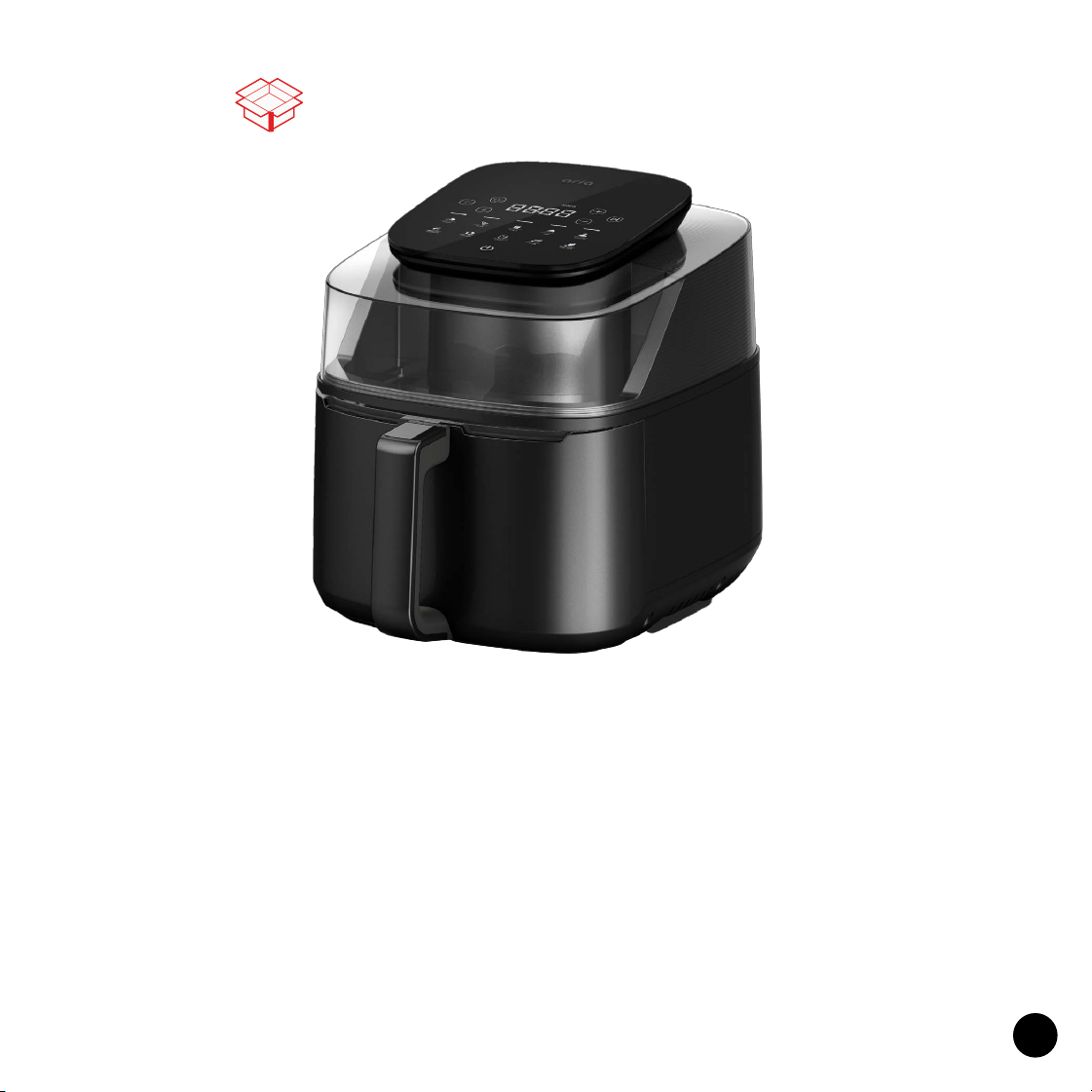
What’s In The Box
Crisping Plate
Keeping your food o the basket
bottom for optimal air circulation
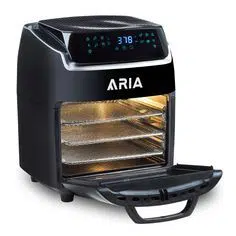
6QT Panoramic Air Fryer
See Cooking in a New Light: Our 6Qt Air Fryer Features a
Panoramic 180-Degree Window, Redening Your
Culinary Experience.
9
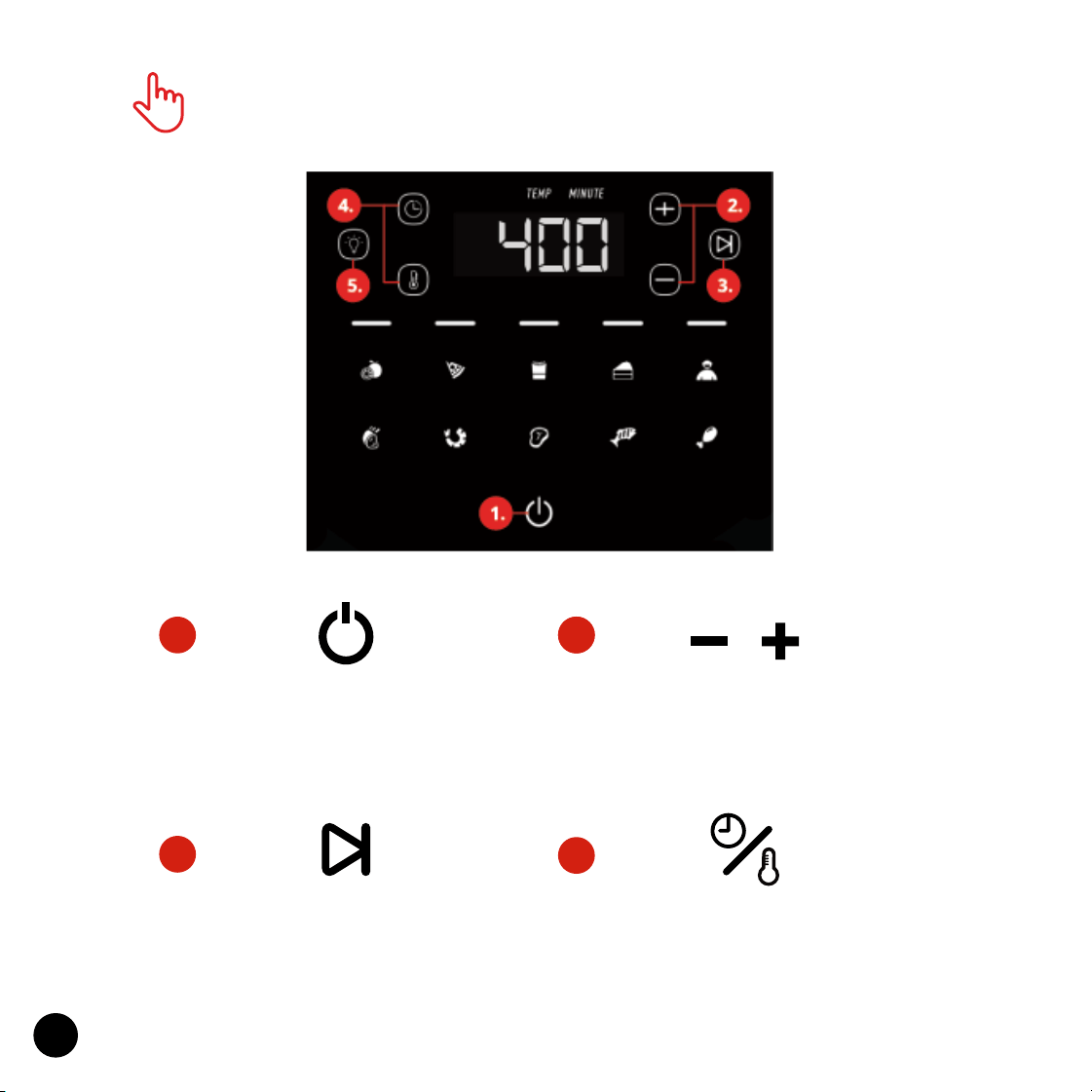
Touchscreen Control Panel
1.
4.
3.
3.
2.
Power Button
Tap the Power Button to Turn
On or O the Air Fryer.
Play/Pause Button
Tap the Play/Pause Button to
Start or Stop Cooking.
Time/Temp Contol
Tap the - or + to increase Time
and Temperature
Time/Temp Button
Press Time or Temp button when
you want to manually adjust.
10
5.
5.
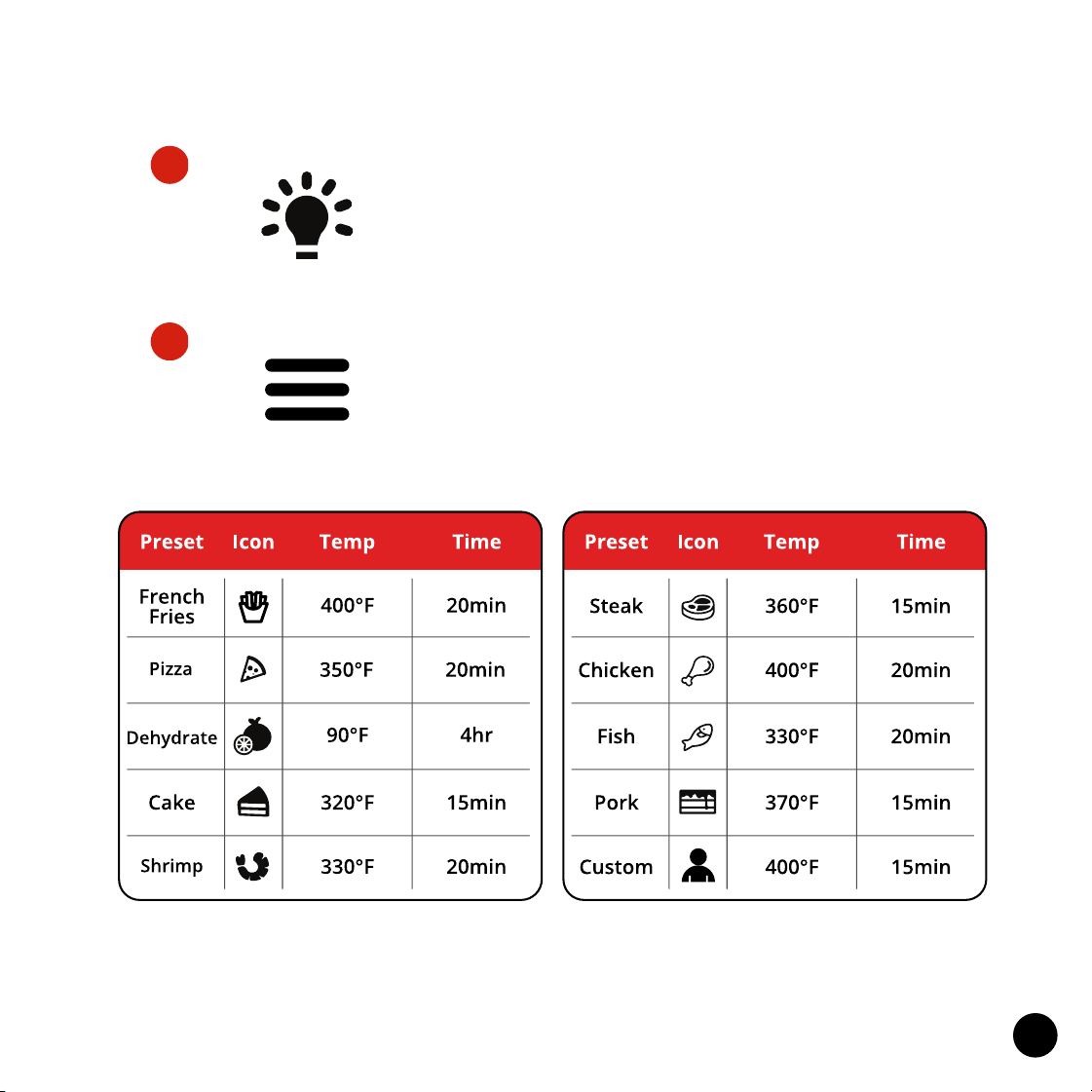
Light Button
Press the Light Button, to turn On/O
the internal lamp to keep an eye on
your meal.
Menu Button
Press the Menu Button, to cycle to select the desired
cooking preset. The corresponding cooking preset
will ash in the LED screen.
Note: The times and temperatures above are suggestions - they may vary on the amount of your food,
the source, thawness, and other factors. You can also ne-tune time andtemperature after selecting
Preset. Always keep an eye on your food as it cooks so it turns out exactly how you prefer.
11
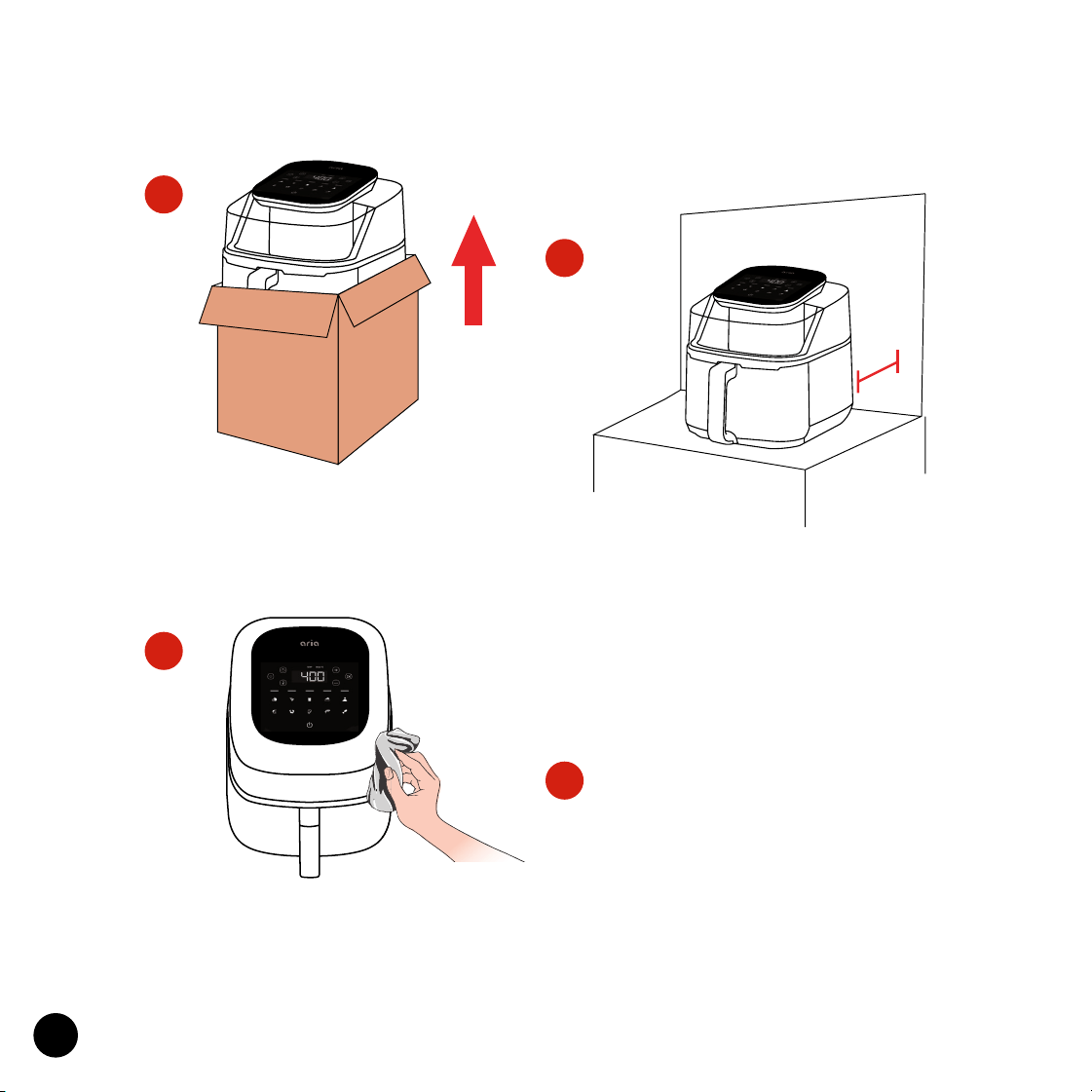
6 in
6 in
Remove and discard all packaging
around and inside the oven. Be sure
to peel o all protective lms.
Setting Up Your Aria Air Fryer
1.
During rst use, the Fryer may
emit odor or smoke, which is
caused by the protective lm. This
is normal. Simply run the Oven
empty for 15 minutes at the
highest temperature to sterilize
and remove odor.
Place on a stable, level, heat-resistant
surface, away from anything that can
be damaged by heat. Keep at least
6in distance between the Air Fryer
and walls, furniture, etc.
2.
3.
4.
Wash all accessories and wipe clean
the interior of the Air Fryer. Dry and
place accessories back in Air Fryer.

12
WARNING! When the Air Fryer is cooking, the inside and outside of the
Oven will get extremely hot and steam may be released from the air vent
openings. Be sure to keep your hands, face, and all other body parts away
to avoid injury. Also be careful of hot steam and air as you open the Door,
adjust food, and move any accessories. Use heat-resistant oven gloves
while handling parts and tongs to ip food when applicable.

13
Before cleaning, unplug the Aria Air Fryer from the power outlet. Allow
the oven and all accessories to cool completely before disassembling and
cleaning.
Cleaning the Outer Oven and Door
• Wipe the outer body with a soft, damp sponge. A non-abrasive liq-
uid cleanser or mild spray solution may be used to avoid build-up of
stains. Apply the cleanser to the sponge, not the oven surface, before
wiping.
• To clean the glass, use a mild detergent and a soft, damp sponge or
soft plastic scouring pad. Do not use an abrasive cleanser or metal
scouring pad as these can scratch the glass surface.
• Wipe the LED screen with a soft damp cloth. Apply cleanser to the
cloth not the LED surface. Cleaning with dry cloth or abrasive cleaners
may scratch the touchscreen.
• Let all surfaces dry thoroughly prior to inserting the power plug into a
power outlet and turning the oven on.
• WARNING: Do not immerse the Oven, power cord or power plug in
water or any other liquid as this may cause electrocution.
Cleaning the Air Fryer
Wipe the walls with a soft, damp sponge. A non-abrasive liquid cleanser
Care, Cleaning, & Storage

14
or mild spray solution may be used to avoid build-up of stains. Apply the
cleanser to the sponge, not the oven surface, before cleaning.
• Let all surfaces dry thoroughly prior to inserting the power plug into a
power outlet and turning the Oven on.
• WARNING: Use EXTREME caution when cleaning the heating elements
as they can get very hot and are fragile. Allow the oven to cool com-
pletely, and then gently wipe a soft, damp sponge or cloth along the
length of the heating element. Do not use any type of cleanser or
cleaning agent. Let all surfaces dry thoroughly prior to inserting the
power plug into a power outlet and turning the oven on.
Cleaning the Accessories
• Wash accessories in warm soapy water with a soft sponge or soft
plastic scouring pad. Rinse and dry thoroughly. Do not use abrasive
cleansers, metal scouring pads or metal utensils to clean any of the
accessories as they may damage the surfaces.
Storage
• Always allow Air Fryer and all accessories to cool completely before
disassembling and cleaning.
• Ensure the Air Fryer and all accessories are clean and dry
• Store the appliance in an upright position standing level on its support
legs. Do not store in a wet or hot condition.
15
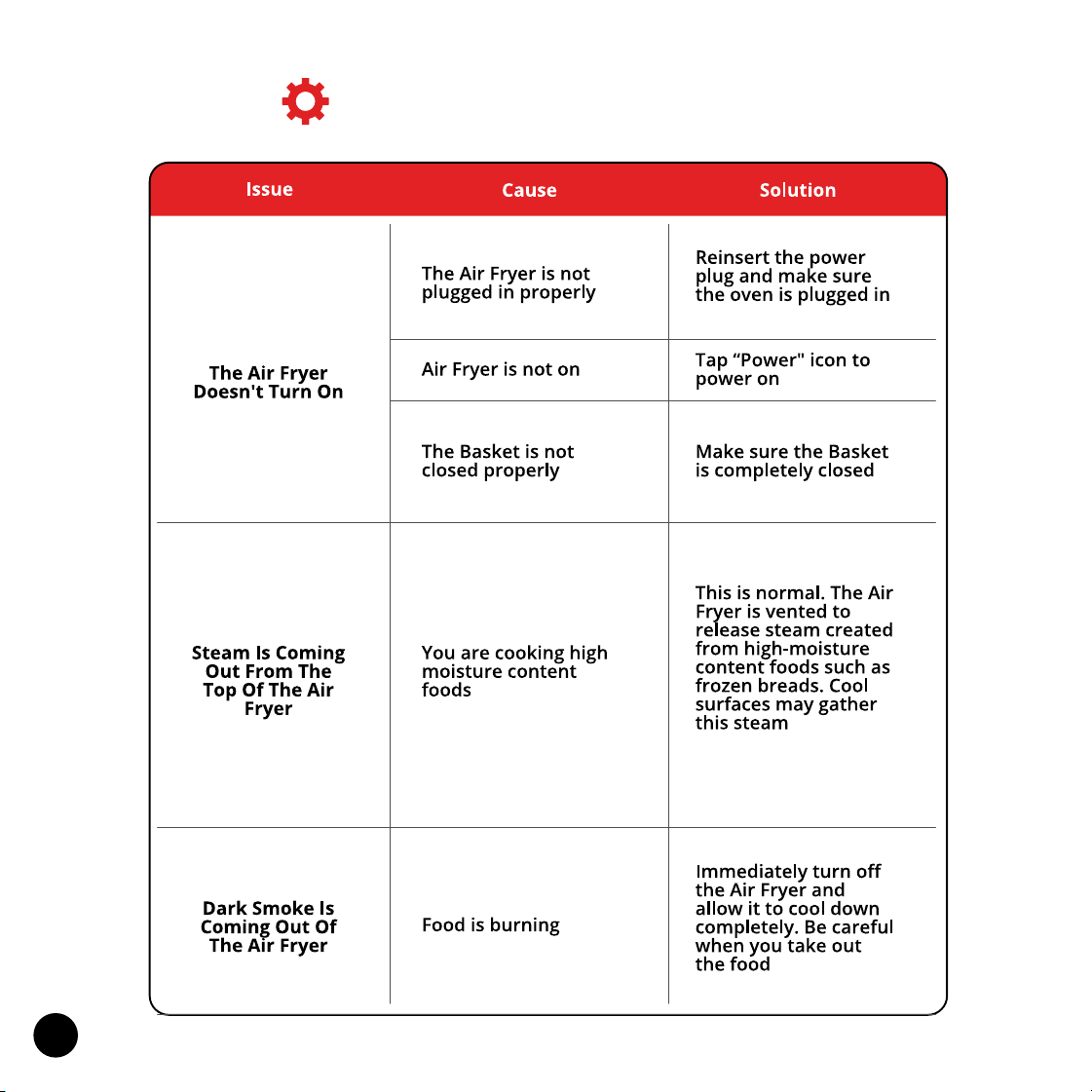
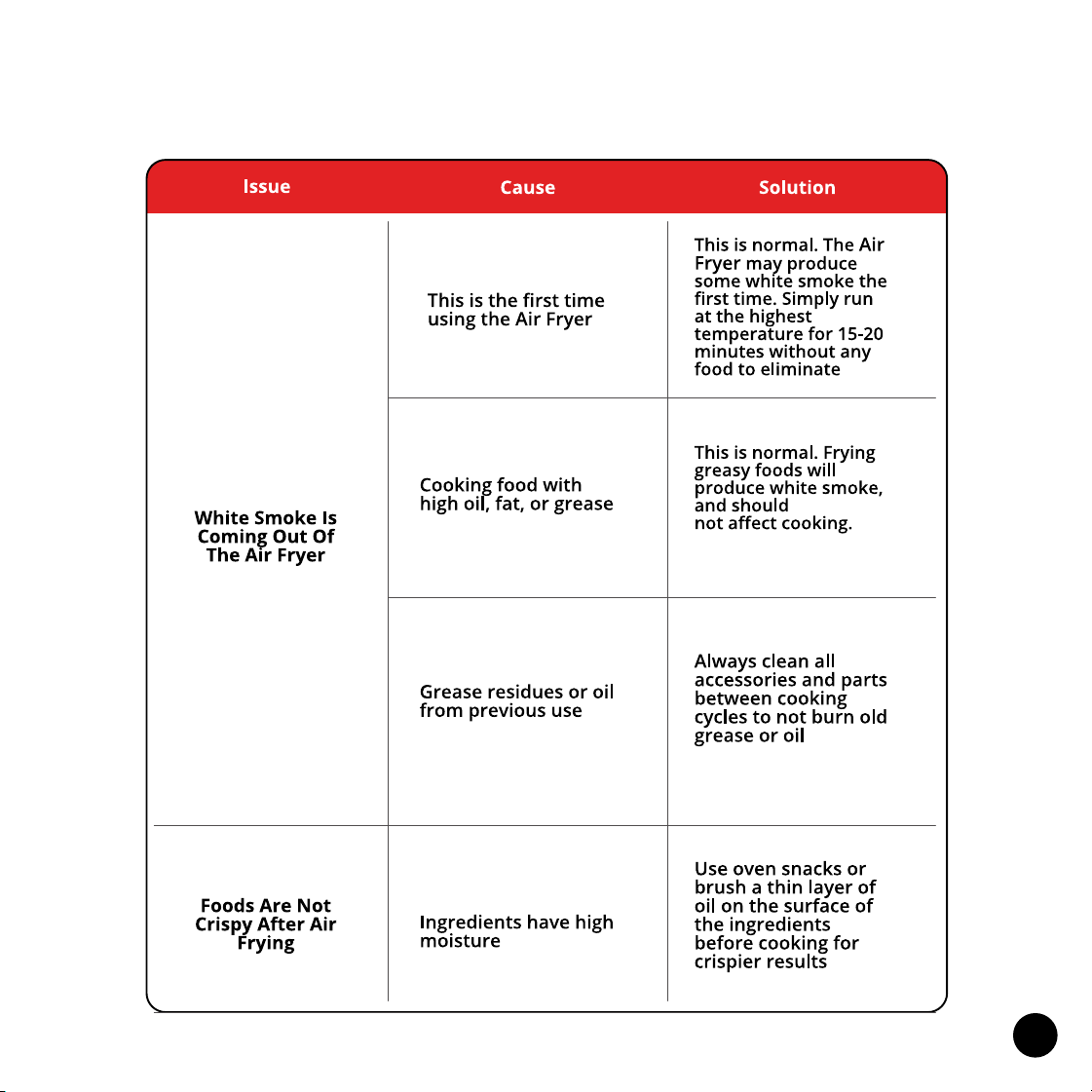
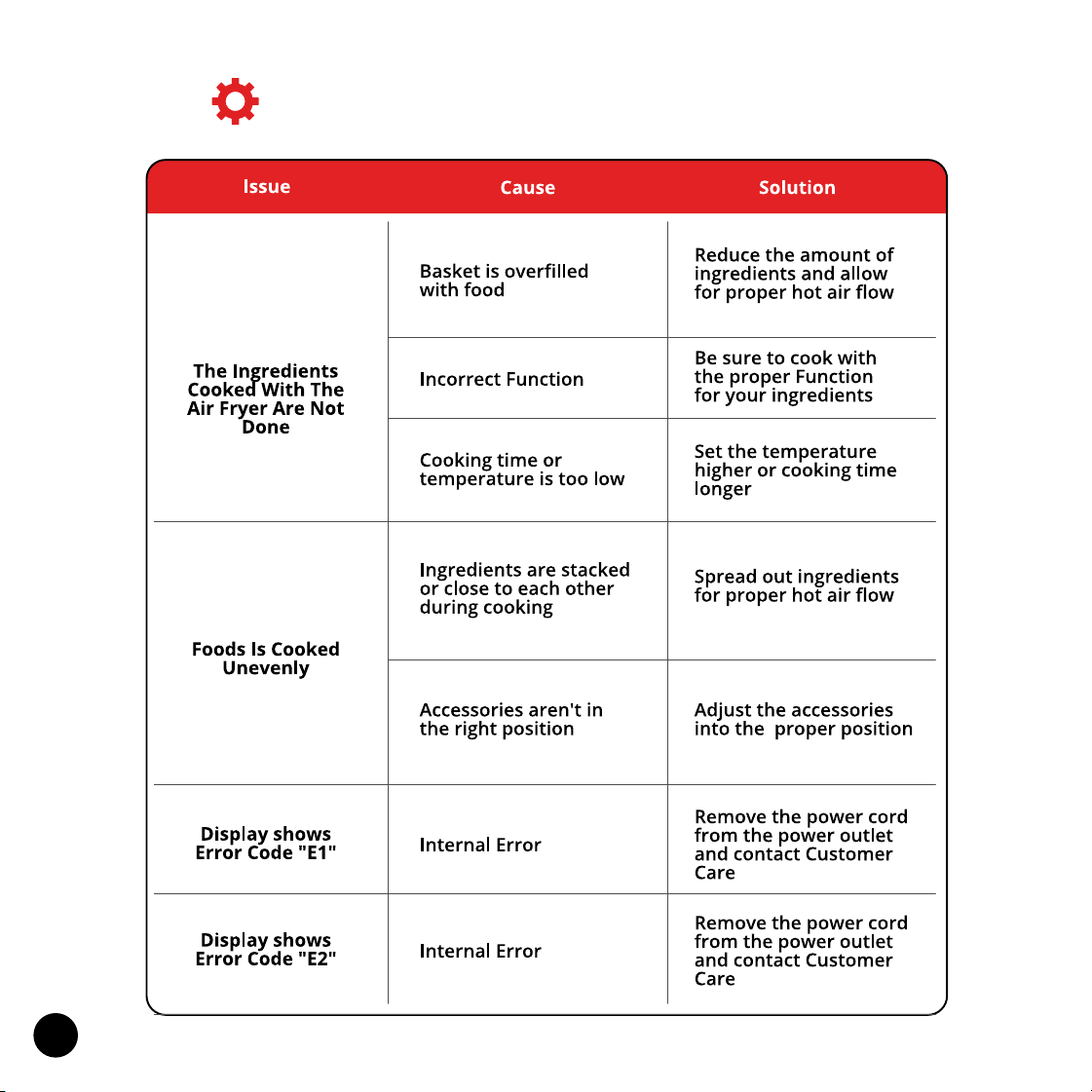
Troubleshooting
16
17
Troubleshooting (continued)

To make a warranty claim, do not return this
appliance to the store.
Please call 1.312.498.9334
Between 10:00am - 5:00pm (CST) Monday through Friday
or email help@ariaairfryer.com