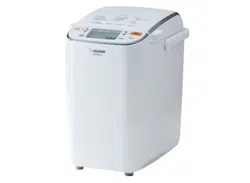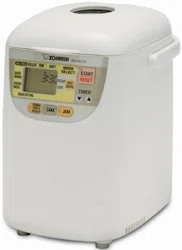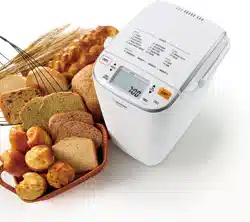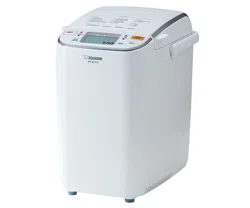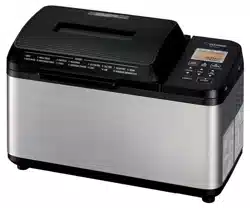
Home Bakery Virtuoso
®
Plus Breadmaker
OPERATING INSTRUCTIONS
INDEX
BEFORE USE
IMPORTANT
SAFEGUARDS
2
SPECIFICATIONS 5
PARTS
NAMES
AND
FUNCTIONS
6
HOW
TO
SET
THE
CLOCK
9
ALERT
TONES
AND
HOW
TO
CHANGE
THEM
9
TIPS
ON
MAKING
BREAD
10
INGREDIENTS
TO
USE
11
COURSE
LIST
12
................................
......................
................................................
......................................
............
...
....
...
.................................
..
.. .. ..
..
........
.. ..
..
..
...
..
.. ..
.
....
..
..
...
.
..
.. ..
.
..
.. .. ..
..
........
..
.
..
.. .. ..
..
........
.. ..
..
..
...
..
..
.
........
..
............
..
......
...
.....
....................................................
HOW TO USE
MAKING VARIOUS TYPES
OF
BREAD
HOW
TO
MAKE
BASIC
BREAD
14
SETTING
THE
TIMER
17
OTHER
FUNCTIONS
18
MAKING DOUGH
HOW
TO
MAKE
DOUGH
20
MAKING SOURDOUGH STARTER
HOW
TO
MAKE
SOURDOUGH
STARTER
21
HOW
TO
MAKE
SOURDOUGH
BREAD
22
MAKING
OTHER
FOODS
HOW
TO
MAKE
CAKES
23
HOW
TO
MAKE
JAM
.
26
MAKING
BREAD
WITH
YOUR
OWN
RECIPES
OVERVIEW
OF
THE
HOMEMADE
COURSE
.
28
BASICS
OF
USING
THE
HOMEMADE
COURSE
29
...........................
.. ..
..
....
....
.. ..
..
..
..........
..
..
.
..
.. .. ..
..
....
....
.. ..
..
.. ..
........
..
..
.
..
..
.. .. ..
..
........
.. ..
..
..
...
..
..
.
.....
...............
.. .. ..
..
....
....
.. ..
..
.. ..
........
..
..
.
.
..
.. .. ..
..
....
....
.. ..
..
.. ..
........
..
..
.
..
...
..
..
.
......
TIPS ON USING THE PRODUCT
CLEANING
AND
MAINTENANCE
34
REPLACEMENT
PARTS
35
Q&A
FOR
BAKING
BREAD
36
WHEN
THE
RESULTS
ARE
NOT
SATISFACTORY
37
TROUBLESHOOTING
GUIDE
39
ZOJIRUSHI CORPORATION
2
IMPORTANT
SAFEGUARDS
Be
sure to follow the instructions.
WHEN USING ELECTRICAL APPLIANCES, BASIC SAFETY PRECAUTIONS SHOULD
ALWAYS
BE
FOLLOWED, INCLUDING THE FOLLOWING:
1
SAVE THESE INSTRUCTIONS
THIS APPLIANCE IS FOR HOUSEHOLD USE ONLY.
NOTE:
A.
A short power cord is provided
to
reduce the risk
of
becoming entangled in or tripping over it.
B.
Extension cords may be used if care is exercised
in
their use.
C.
When
an
extension cord is used:
(1)
the marked electrical rating
of
the extension cord should be at least as great as the electrical
rating
of
the appliance, and
(2)
the longer cord should be arranged so that it will not drape over the countertop or tabletop
where it can be pulled on by children or tripped over unintentionally.
This appliance has a polarized plug (one blade is wider than the other). As a safety feature, this plug
will fit in a polarized outlet only one way. If the plug does not fit fully in the outlet, reverse the plug.
If it still does not fit, contact a qualified electrician.
Do
not attempt
to
defeat this safety feature.
Read all instructions thoroughly.
2 Avoid touching hot surfaces and
do
not close or clog the steam vent opening under any circumstance.
The handles and knobs are provided for your safety and protection.
3 To prevent hazardous operation or electrical shock,
do
not immerse power cord, power plug, or baking
machine
in
water or other liquids.
4 Close supervision is recommended when the appliance is used by or near children.
5 Unplug from outlet when the appliance is not
in
use and before cleaning. Allow the appliance
to
cool
before adding or removing parts, and before cleaning the appliance.
6
Do
not use or operate the appliance with a damaged cord or plug. If the appliance malfunctions or has
been damaged
in
any manner, unplug the appliance and return it
to
the nearest authorized service
facility or dealer for examination, repair or adjustment.
7 The use
of
accessories or attachments not recommended by the appliance manufacturer may be
hazardous or may cause malfunction.
8
Do
not use outdoors.
9 Keep the power cord away from hot surfaces and do not let the cord hang over the edge of tables or
counters.
10
Do
not place the appliance on or near a heated surface such as a gas or electric stove, or
in
a heated
oven.
11
Always use extreme caution when moving appliances containing hot contents or liquids.
12 To disconnect, press and hold CANCEL and remove plug from wall outlet. Never pull on the cord.
13
Do
not use the appliance for other than intended or specified purposes.
IMPORTANT
SAFEGUARDS
Be
sure
to
follow
the
instructions.
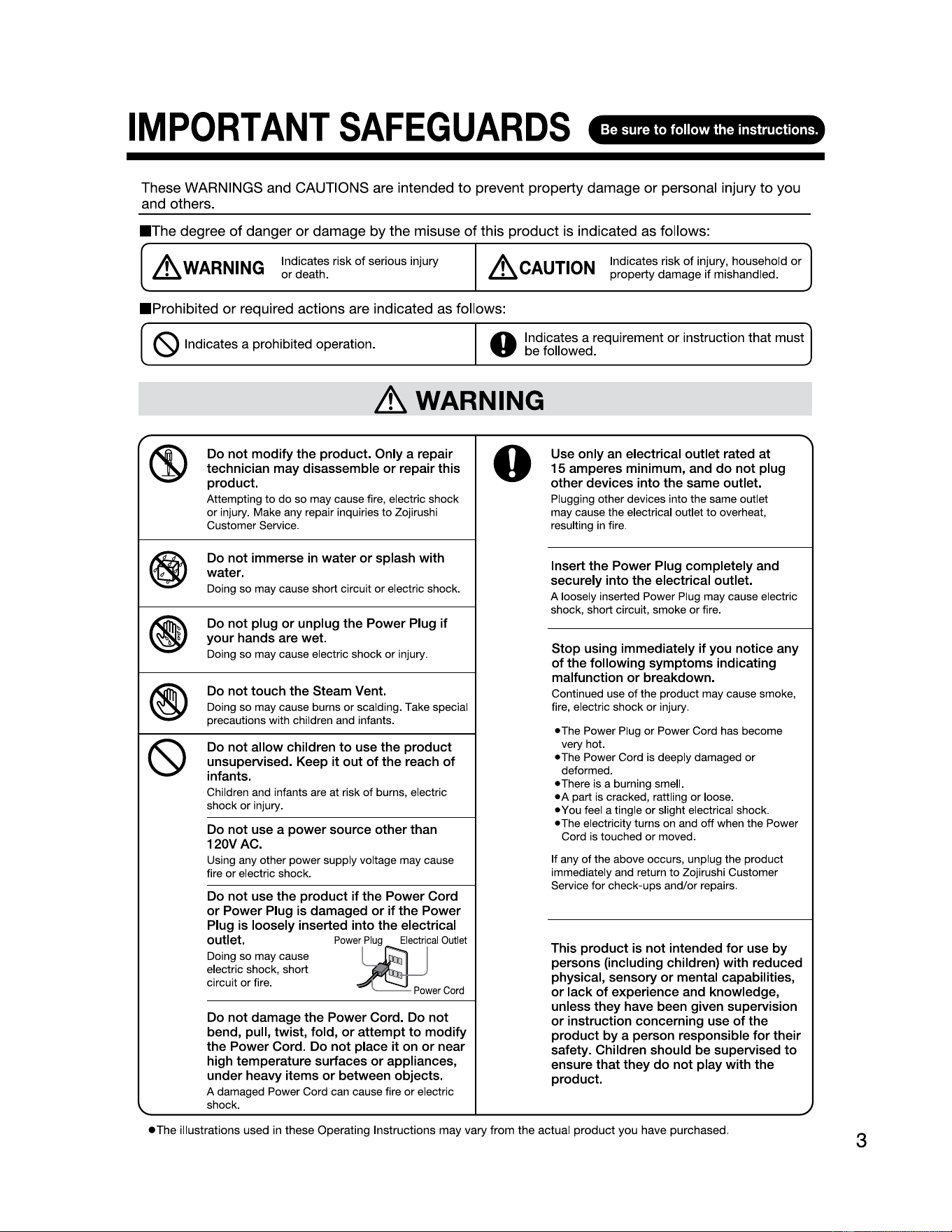
These WARNINGS and CAUTIONS are intended
to
prevent property damage
or
personal injury
to
you
and others.
■
The
degree
of
danger
or
damage by the misuse
of
this product is indicated as follows:
~WARNING
Indicates risk
of
serious injury
or
death.
~CAUTION
Indicates risk
of
injury, household
or
property
damage
if mishandled.
■
Prohibited
or
required actions are indicated as follows:
(S)
Indicates
a
prohibited
operation
.
0
Indicates
a
requirement
or
instruction
that
must
be
followed.
~
WARNING
------------------
®
Do
not
modify
the
product.
Only
a
repair
technician may disassemble or repair this
product.
Attempting to
do
so may cause fire, electric shock
or injury. Make any repair inquiries to Zojirushi
Customer Service.
@)
Do not immerse
in
water
or
splash with
water.
Doing so may cause short circuit
or
electric shock.
(I)
Do not plug or unplug the Power Plug if
your hands are wet.
Doing so may cause electric shock or injury.
®
Do not touch the Steam Vent.
Doing so may cause burns or scalding. Take special
precautions with children and infants.
~
Do not allow children to use the product
unsupervised. Keep it out
of
the reach
of
infants.
Children and infants are at risk
of
burns, electric
shock or injury.
Do not use a power source other than
120VAC
.
Using any other power supply voltage may cause
fire or electric shock.
Do not use the product if the Power Cord
or
Power Plug is damaged or if the Power
Plug is loosely inserted into the electrical
outlet.
Power
Plug
Electrical
Outlet
Doing so may cause
electric shock, short
circuit or fire.
Do not damage the Power Cord. Do not
bend, pull, twist, fold, or attempt to modify
the Power Cord. Do not place it on
or
near
high temperature surfaces or appliances,
under heavy items or between objects.
A damaged Power Cord can cause fire or electric
shock.
0
Use only an electrical outlet rated at
15
amperes minimum, and
do
not plug
other devices into the same outlet.
Plugging other devices into the same outlet
may cause the electrical outlet to overheat,
resulting
in
fire.
Insert the Power Plug completely and
securely into the electrical outlet.
A loosely inserted Power Plug may cause electric
shock, short circuit, smoke or fire.
Stop using immediately if you notice any
of
the following symptoms indicating
malfunction
or
breakdown.
Continued use
of
the product may cause smoke,
fire, electric shock or injury.
•The
Power Plug or Power Cord has become
very hot.
•The
Power Cord
is
deeply damaged or
deformed.
•There
is
a burning smell.
• A part
is
cracked, rattling
or
loose.
•You
feel a tingle or slight electrical shock.
• The electricity turns on and off when the Power
Cord is touched or moved.
If any of the above occurs, unplug the product
immediately and return to Zojirushi Customer
Service for check-ups and/or repairs.
This product
is
not intended for use by
persons (including children) with reduced
physical, sensory or mental capabilities,
or
lack
of
experience and knowledge,
unless they have been given supervision
or
instruction concerning use
of
the
product by a person responsible for their
safety. Children should
be
supervised to
ensure that they
do
not play with the
product.
~
,ea,
•The
illustrations used in these Operating Instructions may vary from
the
actual
product
you have purchased.
"
.)
3
IMPORTANT
SAFEGUARDS
(cont.)
Lt
CAUTION
®
Do
not
touch hot surfaces such as the Main
Body, Baking Pan, Kneading Blades, inside
of
the Main Body,
or
the inside
of
the Lid
during
or
for
a while after use.
Touching hot surfaces may cause burns.
0
Do not use the product near walls
or
furniture. Place the product
at
least 2''
(5cm)
away from walls
or
furniture.
Steam or heat may damage, discolor
or
deform walls
or
furniture.
Do
not
place
or
use the product on unstable
surfaces
or
on surfaces that are vulnerable
to
heat.
Doing so may cause injury
or
fire.
C
Unplug the Power Plug from the electrical
outlet when the product is not in use.
"I
Leaving the Power Plug
in
an electrical outlet may
cause the insulation
to
become damaged, resulting
in electric shock, short circuit
or
fire.
0
Always unplug the product
by
holding the
Power Plug, not by pulling the Power Cord.
Pulling the Power Cord
to
unplug
the
product may
cause electric shock, short circuit
or
fire.
Allow the product to cool
down
before
cleaning.
Touching hot surfaces may cause burns.
If
the Power Cord is damaged, it must be
replaced
by
the manufacturer, its service
agent
or
similarly qualified persons
to
avoid
hazards.
)
IMPORTANT
r
"I
■
If
the blades
or
surface
of
the Power Plug become
soiled, wipe them clean.
A dirty Power Plug may cause fire.
■
As the Main Body, Baking Pan, inside
of
the Main
Body, Kneading Blades and inside
of
the Lid
become hot after baking completes, be sure
to
use oven mitts when removing the Baking Pan.
Not
doing so may cause burns or scalding.
■
When removing the bread from the Baking Pan,
fim,ly hold the Baking Pan with both hands.
Not holding the Baking Pan securely may cause it
to
slip and
may cause burns.
■
Do
not
use the product in the following locations:
• Where fire is being used or in
damp
locations.
(Doing
so
may cause product deformation.)
•
In
direct sunlight.
(Doing
so
may cause malfunction.)
•Where
steam or heat builds
up
inside, such as kitchen
storage cabinets.
(Doing
so
may cause product deformation and discoloration.)
■
Do not move the product while
it
is in use.
Doing
so
may cause burns
or
injury.
■
Do not
put
your fingers into the Baking Pan
Receptacle.
Doing
so
may cause injury.
■
Do not cover the Lid
or
the Steam Vent.
Doing
so
may cause the Lid
to
deform or cause malfunction.
■
Be sure
to
remove foreign matter adhering
to
the
inside
of
the Baking Pan and on the surface
of
the
Kneading Blades.
Not
doing so may cause malfunction.
■
This product is not intended
to
be operated
by
means
of
an external timer
or
separate
remote-control system.
■
Do not use the product
for
any purpose other than
to
make bread, dough, sourdough starter, cake,
jam, and the recipes listed
in
the Recipe Book and
at
zojirushi.com.
Doing
so
may cause malfunction.
■
Do not
put
more ingredients in the product than the
set capacity.
Doing
so
may cause malfunction.
■
Do not submerge the bottom
of
the Baking
Pan
where the Coupling Wing Nut is located under water.
Doing
so
may cause corrosion
or
the Rotating Shaft may fail
to
tum
properly.
■
Make sure
that
all detachable parts, such as the
Baking Pan, etc., are securely attached before
use.
■
Be sure
to
keep the inside
of
the Main Body clean.
Leaving food scraps and crumbs inside
of
the Main
Body
may
cause scorching.
■
Do not defom, the Baking Pan.
Doing
so
may cause malfunction.
■
Do not place the product over direct flame (such as
a gas stove top),
or
on
top
of
electric
or
induction
heating
(IH)
cookers.
Doing
so
may cause fire, breakdown or damage
to
the product.
■ Do not hit the Viewing Window with anything
or
scratch the glass.
Doing
so
may cause injury or damage.
■
This product is intended
for
household use and
similar applications listed below:
• Staff (employee) kitchen areas in shops, offices and other
working environments.
* This product is not intended for use
by
many unspecified
people for a long period
of
time.
This
product must not
be
used
in
the following
areas:
·
4
Farm houses.
• By clients in hotels, motels and other residential type
env
ironments.
'-.
• Bed and breakfast type environments.
.)
SPECIFICATIONS
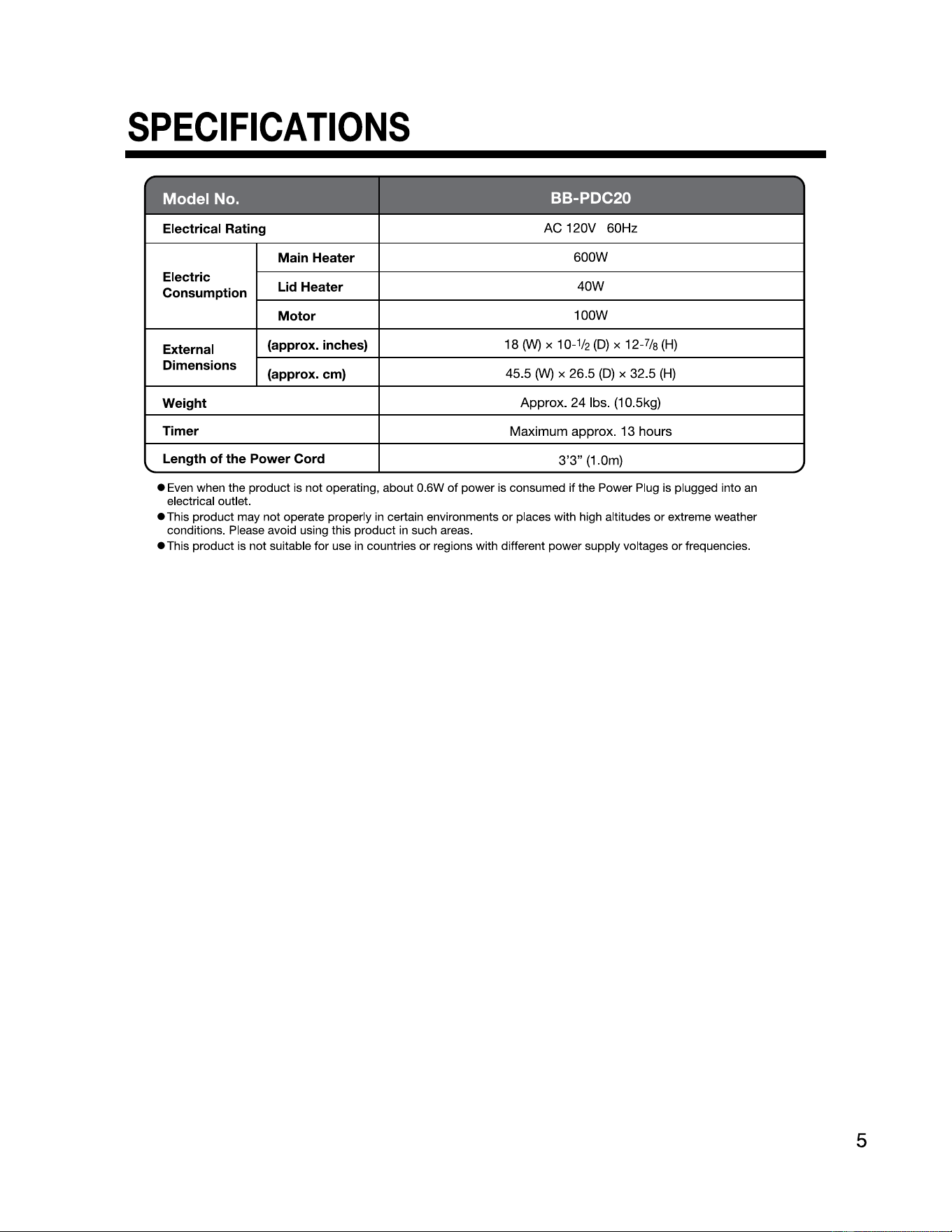
Model No.
BB-PDC20
Electrical Rating
AC 120V 60Hz
Electric
Consumption
Main Heater
600W
Lid Heater
40W
Motor
100W
External
Dimensions
5
(approx. inches)
18(W) x
10-½(D)
x 12-7/s(H)
(approx. cm)
45.5
(W)
x 26.5
(D)
x 32.5
(H)
Weight
Approx. 24 lbs. (10.5kg)
Timer
Maximum approx. 13 hours
Length of the Power Cord
3'3"
(1
.0m)
• Even when the product is not operating, about 0.6W
of
power is consumed if the Power Plug is plugged into an
electrical outlet.
•This
product may not operate properly in certain environments or places with high altitudes
or
extreme weather
conditions. Please avoid using this product in such areas.
• This product is not suitable for use in countries or regions with different power supply voltages
or
frequencies.
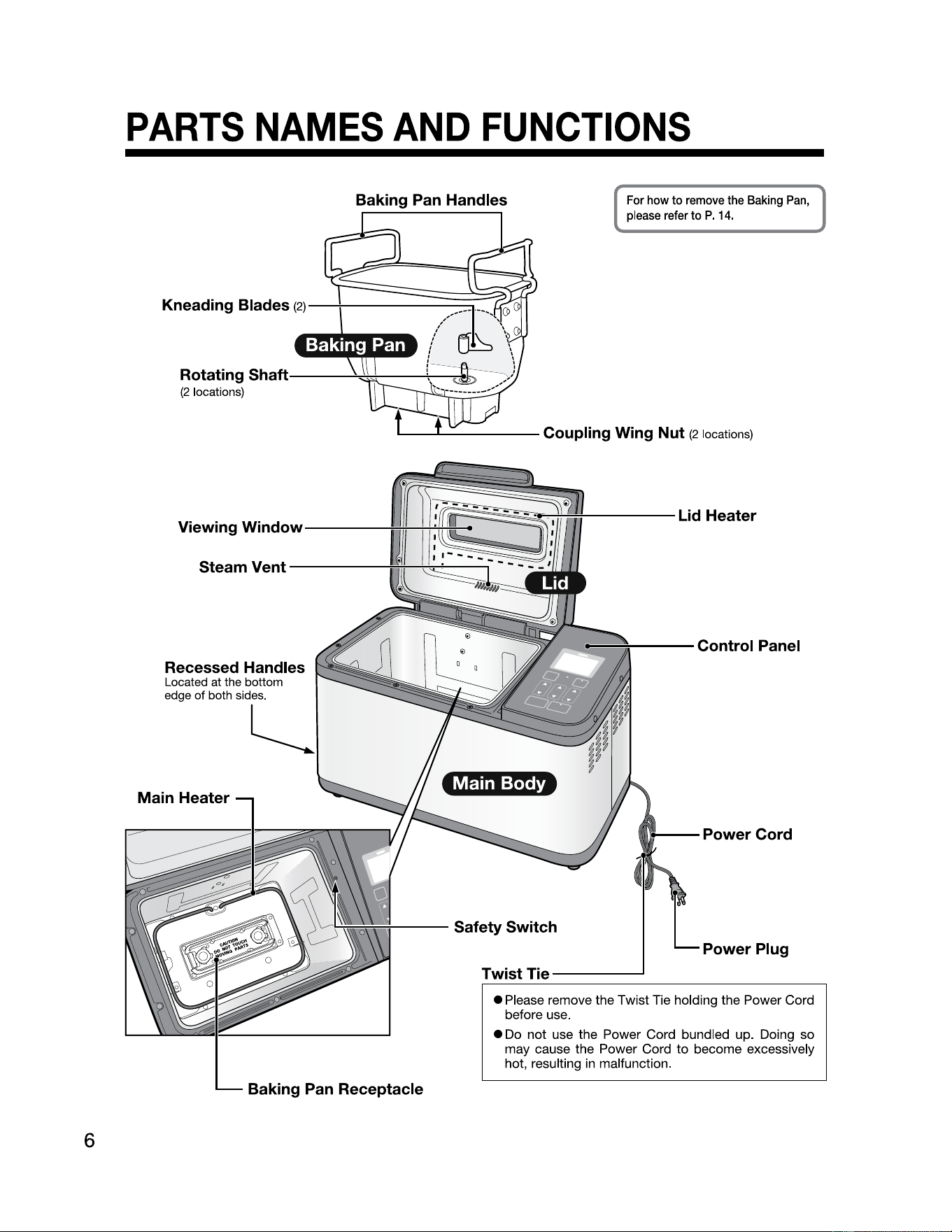
PARTS
NAMES
AND
FUNCTIONS
6
Baking
Pan
Handles
Kneading Blades
Rotating Shaft
(2
locations)
(2)-_[=========~~~;ff
,,,,,
: . • • . i '
' .
.
.
' .
---..a.,,,;;,,,;-------\,----,
For how
to
remove the Baking
Pan,
please refer
to
P.
14.
Steam Vent
Recessed Handles
Located at the bottom
edge
of
both sides.
l___
Main Heater
Baking
Pan
Receptacle
Power
Plug
Twist
Tie-----
• Please remove the Twist Tie holding the Power Cord
before use.
•
Do
not use the Power Cord bundled up. Doing so
may cause the Power Cord to become excessively
hot, resulting
in
malfunction.
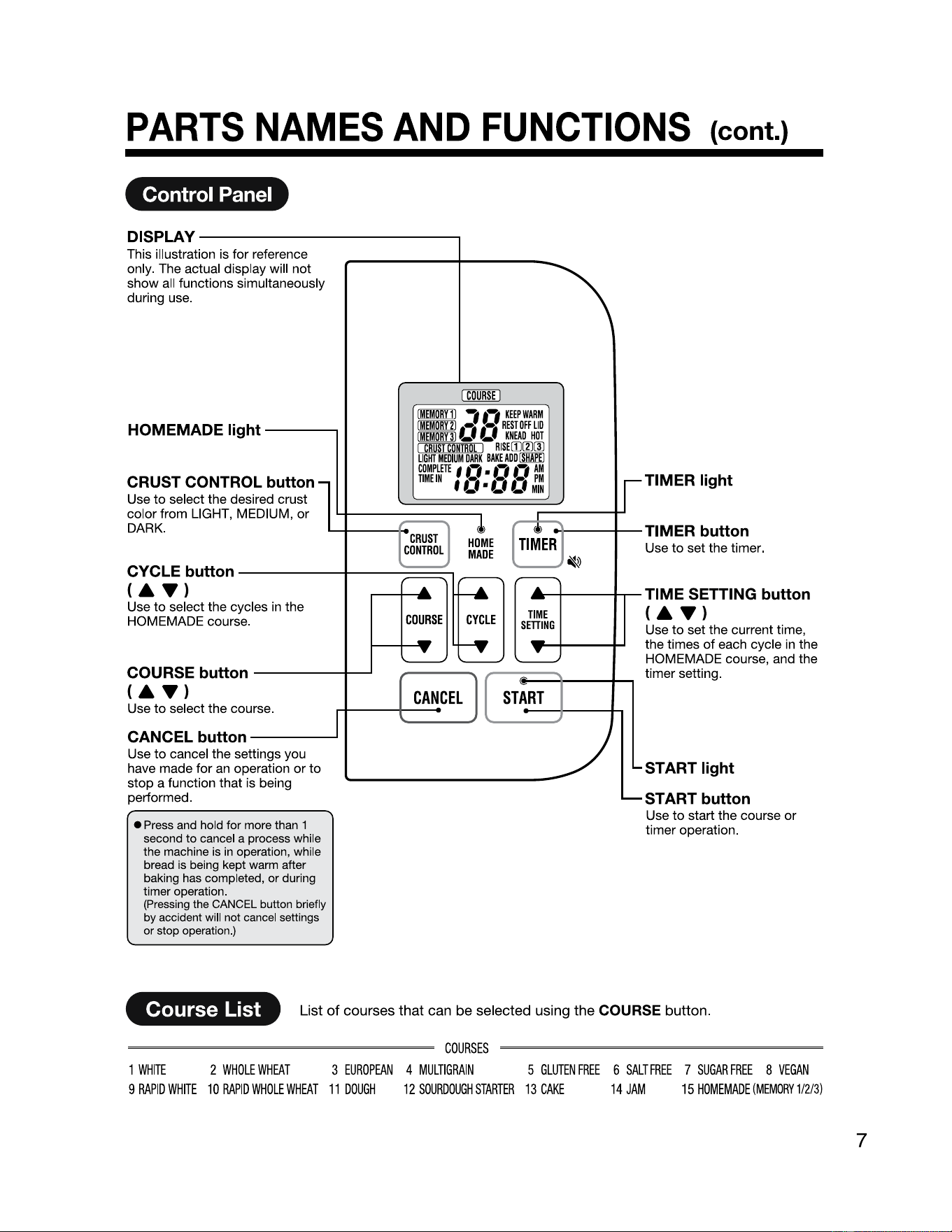
PARTS
NAMES
AND
FUNCTIONS
{cont.)
Control Panel
DISP
This illustration is
for
reference
only. The actual display will
not
show all functions simultaneously
during use.
LAY---------------.
HOMEMADE light
---
,
,.,
KEEPWARM
••, ••,
REST
OFF
LID
~
,r.
KNEAD
HOT
RISE
(IJ[l)(I)
BAKE
ADD
I
SHAPE
I
COMPLITT
f
.,
•
.,
.,
AM
CRUST CONTROL button
lb
TIMEIN
f
O.
0 0 ;
1
: ,
TIMER light
Use
to
select the desired crust
color from LIGHT, MEDIUM,
or
DARK. I
CRUST
!
I l,------;I,...
HO<t>ME
8
----TIMER
button
CONTROL
MADE
Use
to
set the timer.
~
r;:~L~:·cycles
;n the
EJ
~
HOMEMADE courae. g
~
T
(AT)
D
TIME SETTING button
sm Use
to
set the current time,
the times
of
each cycle
in
the
HOMEMADE course, and the
timer setting.
I
f
~u;sf
button
----
~
....
1
==-
[
CANCEL
l (
sr:Rr
1
,
--.;...,
-
Use
to
select the course.
~
CANCELbutton--____.11
~
Use
to
cancel the settings you
have made
for
an operation
or
to
stop a function that is being
performed.
..__
• Press and hold
for
more than 1
second
to
cancel a process while
the machine is in operation, while
bread is being kept warm after
baking has completed,
or
during
timer operation.
(Pressing the CANCEL button briefly
by
accident will not cancel settings
or stop operation.)
7
START light
START button
Use
to
start the course
or
timer operation.
Course List
List of courses that can be selected using the COURSE button.
COURSES
1
WHITE
2
WHOLE
WHEAT
3
EUROPEAN
4
MULTIGRAIN
5
GLUTEN
FREE
6
SALT
FREE
7
SUGAR
FREE
8
VEGAN
9
RAPID
WHITE
10
RAPID
WHOLE
WHEAT
11
DOUGH
12
SOURDOUGH
STARTER
13
CAKE
14
JAM
15
HOMEMADE
(MEMORY1/2/3)
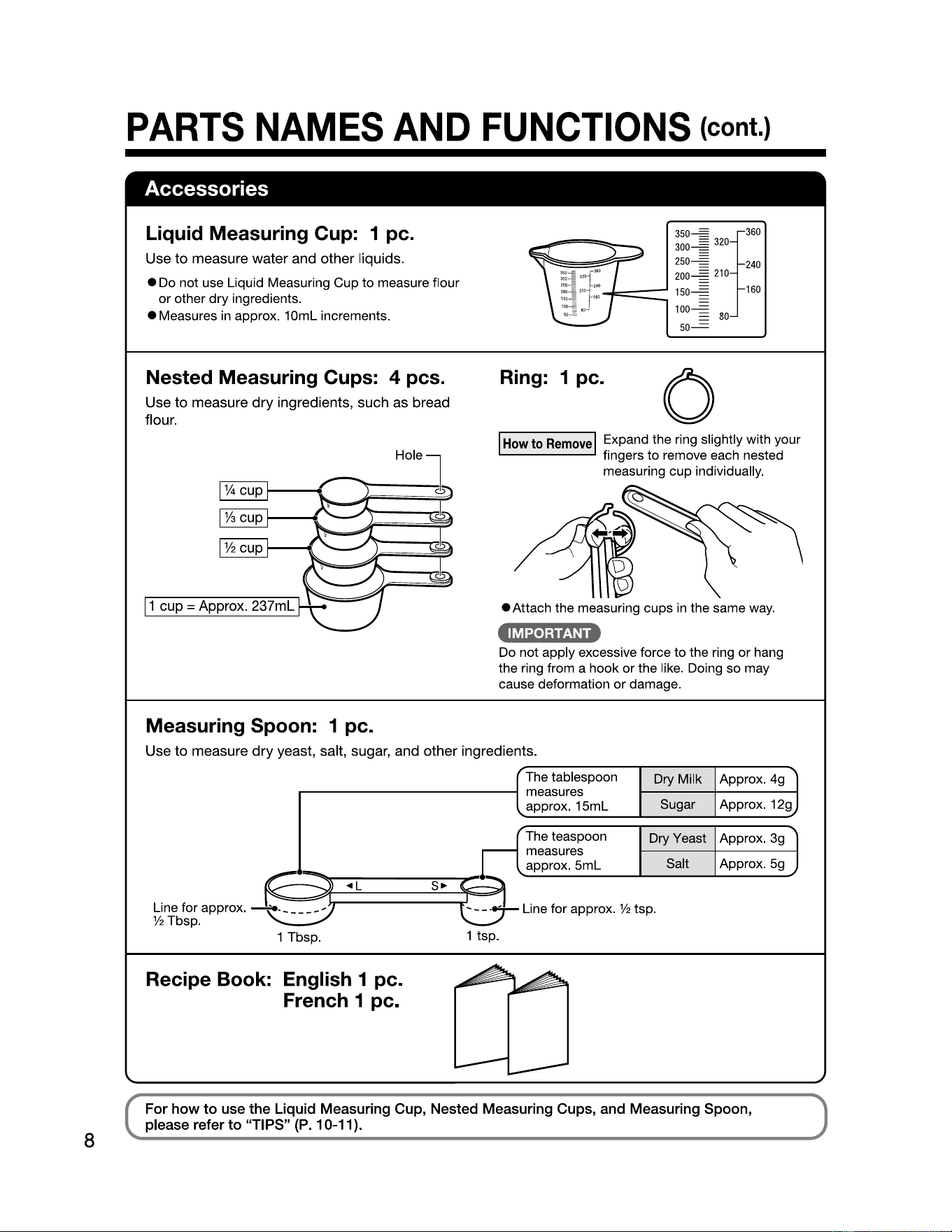
PARTS
NAMES
AND
FUNCTIONS
(cont.)
Accessories
8
Liquid Measuring Cup: 1 pc.
Use to measure water and other liquids.
• Do not use Liquid Measuring Cup to measure flour
or other dry ingredients.
• Measures
in
approx.
10ml
increments.
Nested Measuring Cups: 4 pcs.
Use to measure dry ingredients, such as bread
flour.
Ring: 1 pc.
0
I I
...._
How
to
Remove
Expand the ring slightly with your
fingers to remove each nested
measuring cup individually.
____
...,
¼ cup
---t,,,.._,,1t---------=r;;;1
1/a
__
..
""_....,,,..--------,'!i!J
cup
• Attach the measuring cups
in
the same way.
•IM4•hiiNi•
Do not apply excessive force to the ring or hang
the ring from a hook
or
the like. Doing so may
cause deformation or damage.
Measuring Spoon: 1 pc.
Use to measure dry yeast, salt, sugar, and other ingredients.
The tablespoon
Dry Milk Approx. 4g
measures
approx.
15ml
Sugar Approx. 12g
r1
The teaspoon
Dry Yeast Approx. 3g
measures
approx.
5ml
Salt Approx.
5g
Line for approx.
@-
◄
-L
_____
s_
►
__,§
Line for approx. ½ tsp.
½Tbsp
.
C}
Lj
1 Tbsp. 1 tsp.
Recipe Book: English 1 pc.
French 1 pc.
For
how
to
use the Liquid Measuring Cup, Nested Measuring Cups, and Measuring Spoon,
please refer
to
"TIPS" (P.10-11).
l
J
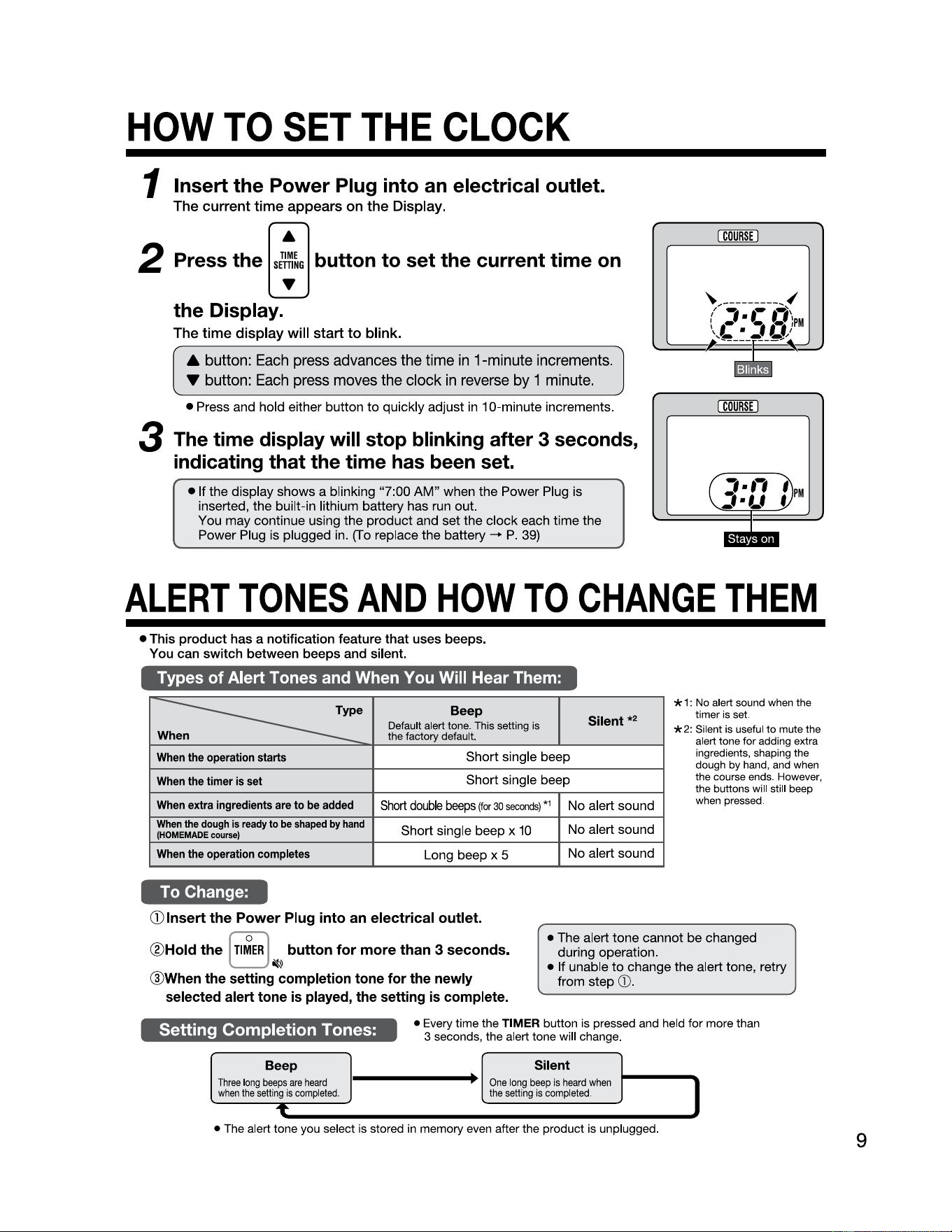
HOW
TO
SET
THE
CLOCK
1 Insert the Power Plug into an electrical outlet.
The current time appears on the Display.
•
2 Press the
sl~~G
button
to
set the current time on
the Display.
...
The time display will start to blink.
A button:
Each
press
advances
the
time
in
1-minute
increments.
• button:
Each
press
moves
the
clock
in
reverse
by
1
minute.
• Press and hold either button to quickly adjust
in
10-minute increments.
3 The time display will stop blinking after 3 seconds,
indicating that the time has been set.
• If the display shows a blinking "7:00
AM"
when the Power Plug is
inserted, the built-in lithium battery has
run
out.
You may continue using the product and set the clock each time the
Power Plug is plugged
in
.
(f
o replace the battery - P. 39)
I
COURSE
I
I
COURSE
I
,
..
,
f
PM
:,
■
Lf
'
I
.
•
ALERT
TONES
AND
HOW
TO
CHANGE
THEM
• This
product
has a notification feature
that
uses beeps.
You can
switch
between beeps and silent.
Types of Alert Tones and When You Will Hear Them:
w
=--------:
e
Beep
Default alert tone. This setting is
the factory default.
Silent
*
When
the
operation
starts
Short single beep
When
the
timer
is
set
Short single beep
When
extra
ingredients
are
to
be
added
Short
double
beeps
(for
30
seconds)
*
1
No alert sound
When
the
dough
is
ready
to
be
shaped
by
hand
(HOMEMADE
course)
Short single beep x
10
No alert sound
When
the
operation
completes
Long beep x 5
No alert sound
* 1: No alert sound when the
timer is set.
* 2: Silent is useful
to
mute the
alert tone for adding extra
ingredients, shaping the
dough by hand, and when
the course ends. However,
the buttons will still beep
when pressed.
To Change:
G) Insert
the
Power
Plug into an electrical outlet.
®Hold
the
[
Tl~ER
] button
for
more
than 3 seconds.
~
@When the setting completion tone for the newly
selected alert tone
is
played, the setting
is
complete.
• The alert tone cannot be changed
during operation.
• If unable
to
change the alert tone, retry
from step
G).
Setting Completion Tones:
• Every time the TIMER button is pressed and held for more than
3 seconds, the alert tone will change.
Beep
Three
long
beeps
are
heard
when
the
setting
is
completed
.
T
Silent
.
.
One
long
beep
is
heard
when
the
setting
is
completed
.
I
• The alert tone you select is stored
in
memory even after the product is unplugged.
9
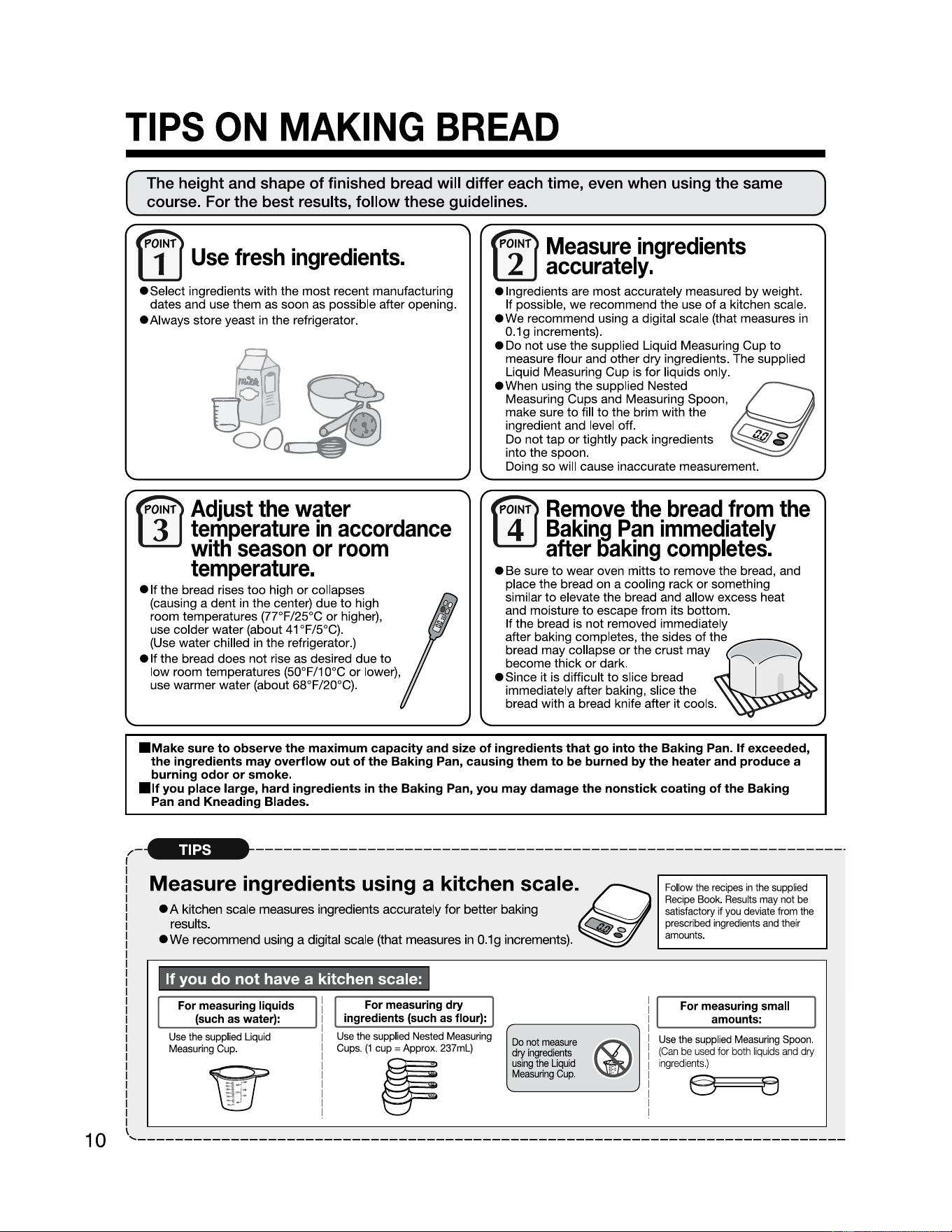
TIPS
ON
MAKING
BREAD
The height and shape
of
finished bread will differ each time, even when using the same
course. For the best results, follow these guidelines.
F~
W
Use
fresh
ingredients.
•Select
ingredients with the most recent manufacturing
dates and use them as soon as possible after opening.
• Always store yeast in the refrigerator.
, r,
2
Measure
ingredients
accurately.
e Ingredients are most accurately measured
by
weight.
If possible, we recommend the use
of
a kitchen scale.
ewe
recommend using a digital scale (that measures in
0.1
g increments).
• Do not use the supplied Liquid Measuring Cup
to
measure flour and other dry ingredients. The supplied
Liquid Measuring
Cup
is for liquids only.
eWhen using the supplied Nested
Measuring Cups and Measuring Spoon,
make sure
to
fill
to
the brim with the
ingredient and level off.
Do not tap
or
tightly pack ingredients
into the spoon.
Doing so will cause inaccurate measurement.
iii
~
~
W
~
Adjust
the
water
te_mperature
in
accordance
w1tli
season
or
room
temperature.
• If the bread rises
too
high
or
collapses
(causing a dent in the center) due
to
high
room temperatures (77°F/25°C
or
higher),
use colder water (about
41
°F/5°C).
(Use water chilled
in
the refrigerator.)
elf
the bread does not rise as desired due
to
low room temperatures (50°F/10°C
or
lower),
use warmer water (about 68°F/20°C).
~
Remove
the
bread
from
the
Bakin_g
Pan
immediately
after
llaking
completes.
W
• Be sure
to
wear oven mitts
to
remove the bread, and
place the bread on a cooling rack
or
something
similar
to
elevate the bread and allow excess heat
and moisture
to
escape from its bottom.
If the bread is not removed immediately
after baking completes, the sides
of
t~he
bread may collapse
or
the crust may
become thick
or
dark.
,.......____
,,,,,--
• Since it is difficult
to
slice bread
immediately after baking, slice the
bread with a bread knife after it cools.
I
■
Make
sure
to
observe
the
maximum capacity and size of ingredients that go into
the
Baking Pan. If exceeded,
the
ingredients may overflow out
of
the
Baking Pan, causing them
to
be burned by
the
heater and produce a
burning odor or smoke.
■
If
you place large,
hard
ingredients
in
the
Baking Pan, you
may
damage
the
nonstick
coating
of
the
Baking
Pan and Kneading Blades.
/-------------------------------------------------------------------
·
Measure ingredients using a kitchen
scale.~
. . . .
• A kitchen scale measures IngredIents accurately
for
better baking
results.
~
0
ewe
recommend using a digital scale (that measures
in
0.1g increments).
Followtherecipesinthesupplied
Recipe
Book
.
Results
may
not
be
satisfactory
if
you
deviate
from
the
prescribed
ingredients
and
their
amounts
. •
----------
If you
do
not have a kitchen scale:
For
measuring
liquids
(such
as
water):
Use
the
supplied
Liquid
Measuring
Cup
.
For
measuring
dry
ingredients
(such
as
flour):
Use
the
supplied
Nested
Measuring
Cups
.
(1
cup
=
Approx
. 237ml)
p
Do
not
measure
dry
ingredients
using
the
Liquid
Measuring
Cup.
@
~
. •
For
measuring
small
amounts:
Use
the
supplied
Measuring
Spoon
.
(Can
be
used
for
both
liquids
and
dry
ingredients.)
10
'----------------------------------------------------------------------------
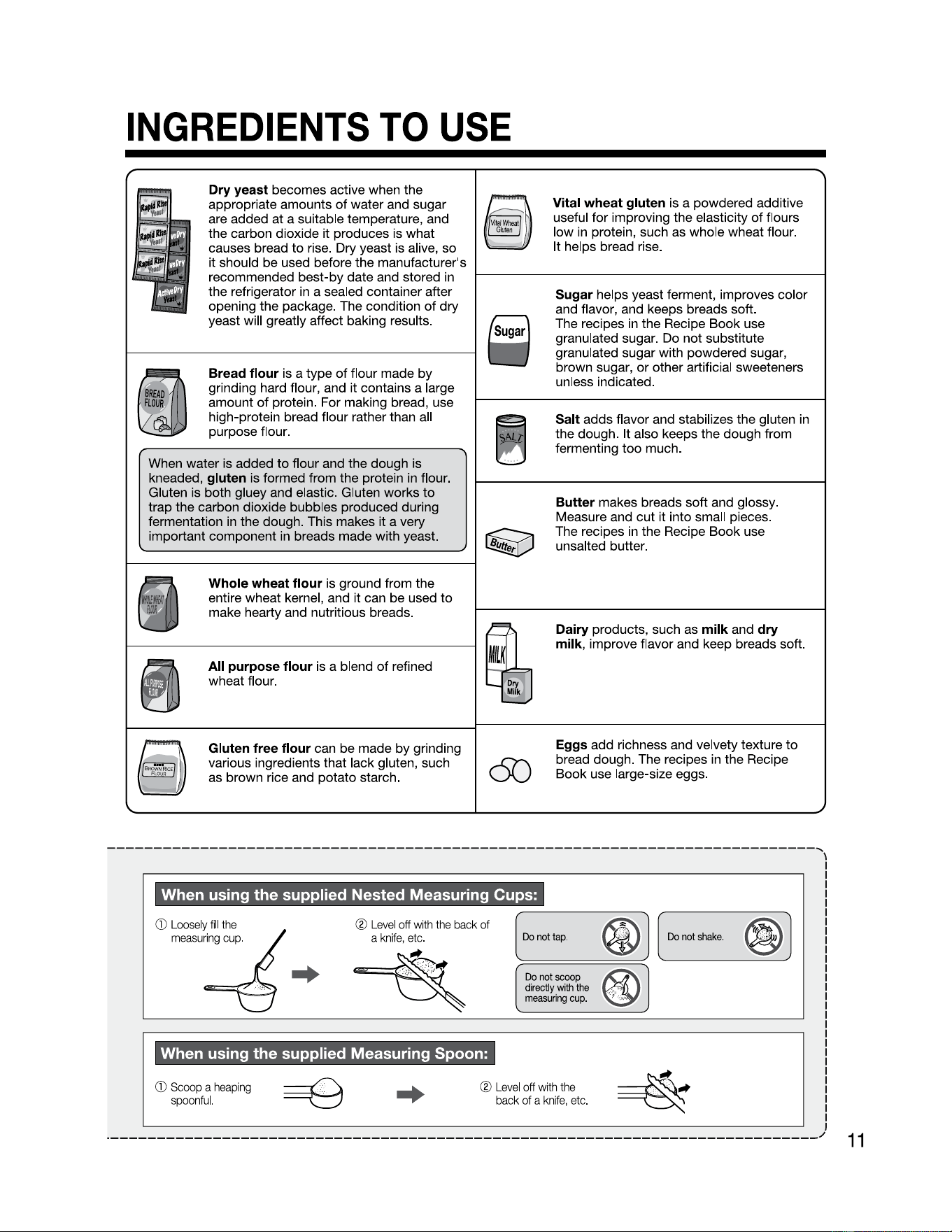
INGREDIENTS
TO
USE
Dry yeast becomes active when the
appropriate amounts
of
water and sugar
are added at a suitable temperature, and
the carbon dioxide it produces is what
causes bread
to
rise. Dry yeast is alive, so
it should be used before the manufacturer's
recommended best-by date and stored
in
the refrigerator
in
a sealed container after
opening the package. The condition
of
dry
yeast will greatly affect baking results.
Bread flour is a type
of
flour made by
grinding hard flour, and it contains a large
amount
of
protein. For making bread, use
high-protein bread flour rather than all
purpose flour.
When water is added
to
flour and the dough is
kneaded,
gluten is formed from the protein
in
flour.
Gluten is both gluey and elastic. Gluten works
to
trap the carbon dioxide bubbles produced during
fermentation
in
the dough. This makes it a very
important component
in
breads made with yeast.
Whole wheat flour is ground from the
entire wheat kernel, and it can be used
to
make hearty and nutritious breads.
All
purpose flour is a blend
of
refined
wheat flour.
Gluten free flour can be made by grinding
various ingredients that lack gluten, such
as brown rice and potato starch.
Vital wheat gluten is a powdered additive
useful for improving the elasticity
of
flours
low
in
protein, such as whole wheat flour.
It helps bread rise.
1-------------------------1
Sugar helps yeast ferment, improves color
and flavor, and keeps breads soft.
The recipes
in
the Recipe Book use
granulated sugar. Do not substitute
granulated sugar with powdered sugar,
brown sugar,
or
other artificial sweeteners
unless indicated.
Salt adds flavor and stabilizes the gluten
in
the dough. It also keeps the dough from
fermenting too much.
Butter makes breads soft and glossy.
Measure and cut it into small pieces.
The recipes
in
the Recipe Book use
unsalted butter.
Dairy products, such as milk and dry
milk,
improve flavor and keep breads soft.
c50
Eggs add richness and velvety texture
to
bread dough. The recipes
in
the Recipe
Book use large-size eggs.
----------------------------------------------------------------------------,
When using the supplied Nested Measuring Cups:
G)
Loosely
fill
the
measu=i·ng
cup.
®
Level
off
with
the
back
of
a
knife,
etc.
@
,
@
//ii;\
'e5I
°'~"'
°'"'-
Do
not
scoop
directly
with
the
measuring
cup
.
.
.
..
.-·:
Ch
[ l
When using the supplied Measuring Spoon:
G)
Scoop
a
heaping
spoonful.
®
Level
off
with
the
back
of a
knife
,
etc
.
..
\
I
·----------------------------------------------------------------------------/
11
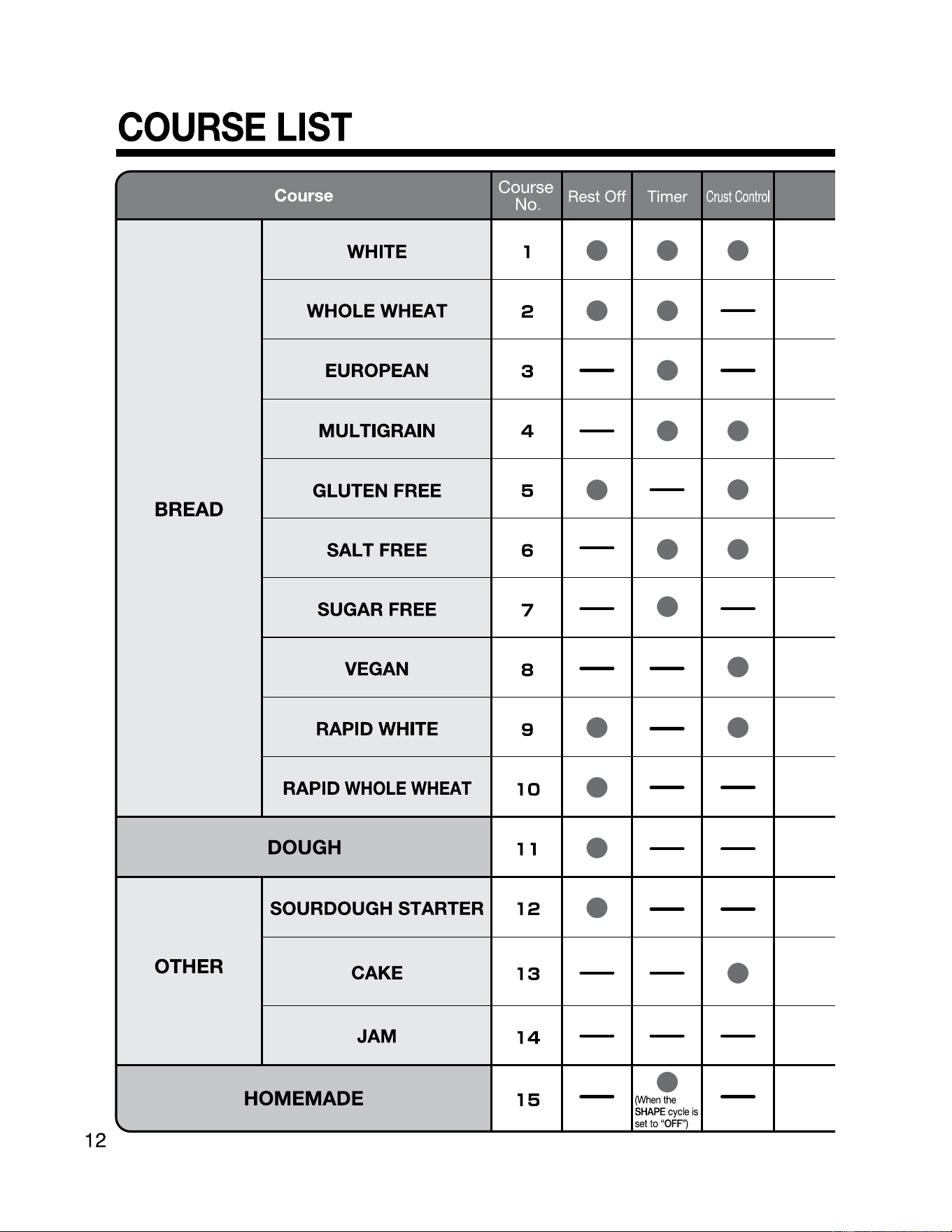
COURSE
LIST
r
-
IW"ltJll"'-"f::.l
·-•··•-~"-'
~
b]C!lij
- ·-
.
,_
..
~,--,
.....
,1
BREAD
WHITE 1
• • •
WHOLEWHEAT
2
• •
-
EUROPEAN
3
-
•
-
MULTIGRAIN 4
-
•
•
GLUTEN FREE
5
•
-
•
SALT FREE 6
-
•
•
SUGAR FREE
7
-
•
-
VEGAN
8
- -
•
RAPID WHITE
9
•
-
•
RAPID
WHOLE
WHEAT
10
•
- -
DOUGH
1 1
•
- -
OTHER
SOURDOUGH STARTER
12
•
- -
CAKE
13
- -
•
JAM
14
- - -
HOMEMADE
15
-
(When
the
•
SHAPE
cycle
is
-
'lo..
setto "
OFP1
12
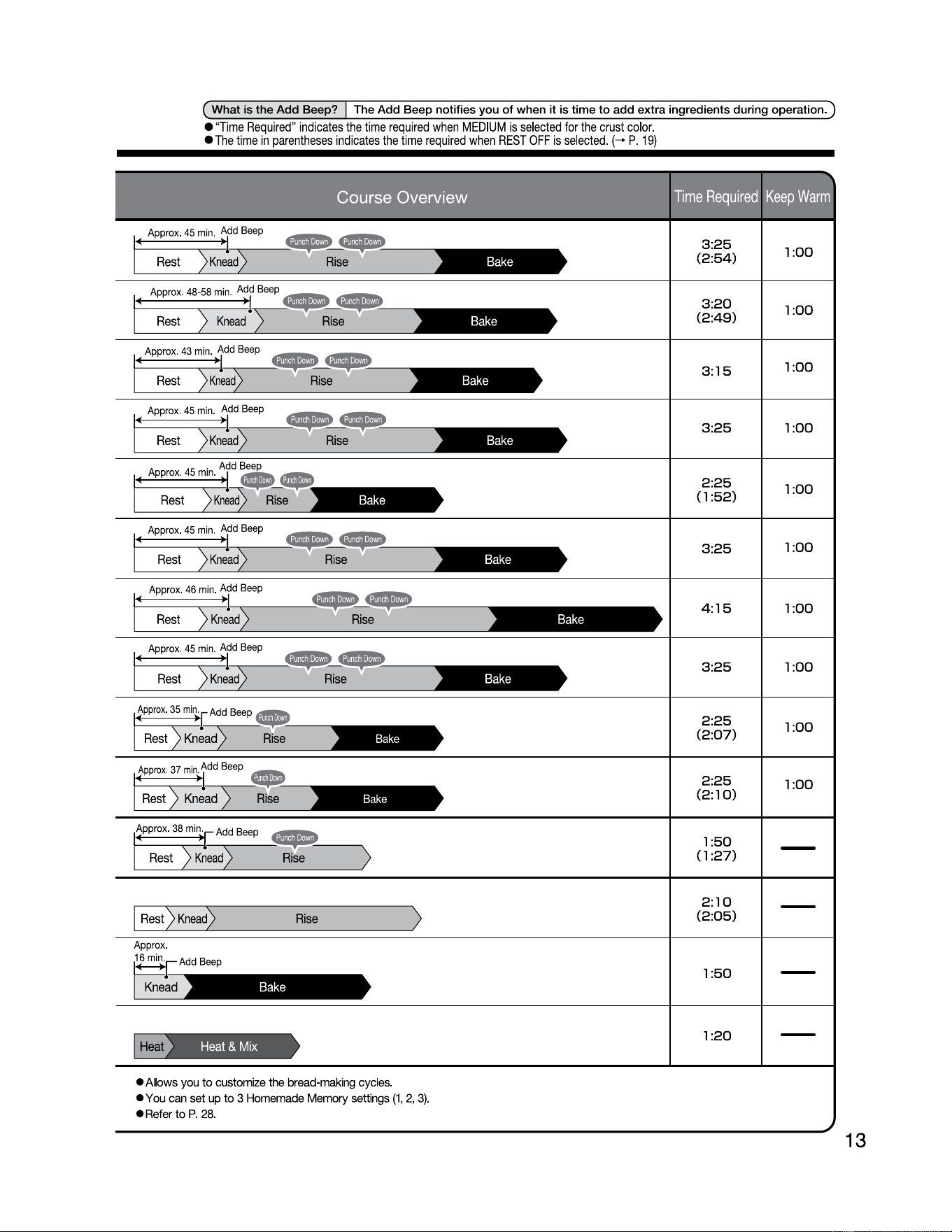
( What is the Add Beep? The Add Beep notifies you
of
when
it
is time to
add
extra ingredients during operation. I )
• "
Time
Required
"
indicates
the
time
required
when
MEDIUM
is
selected
for
the
crust
color
.
•
The
time
in
parentheses
indicates
the
ti
me
required
when
REST
OFF
is
selected
.
(-+
P.
19)
Approx
.
45
min
.
Add
Beep
Rest
Knead
Bake
3:
25
(2
:
54)
1:
00
Bake
3:
20
(2
:
49)
1:
00
3:
15
1:
00
Bake
3:
25
1:
00
Bake
2:
25
(1
:
52)
1:
00
Approx
.
45
min.
Add
Beep
Rest
Rise
Bake
I-------.•----
~~
---
3:
25
1:
00
Approx
.
46
min
.
Add
Be
ep
t----....----1-....------
~ ~
----,
Rest
Knead
Rise
Bake
4:
15
1:
00
Appro
x.
45
min
.
Add
Beep
Rest
Rise
Bake
3:
25
1:
00
Bake
2:
25
(2
:
07)
1:
00
t-----r--1-...----
-
Rise
Bake
2:
25
(2
:
10)
1:
00
1:
50
(1
:
27)
~I
R_es~t)_K_nea_d~~----R_ise
___
~ )
2:
10
(2
:
05)
1:
50
~
1:
20
•
Allows
you
to
customize
the
bread-making
cycles
.
•
You
can
set
up
to 3
Homemade
Memory
settings
(1
,
2,
3)
.
•
Refer
to P.
28
.
13
1NCORRECT
I
~~~~ding
Rotating---
Shaft
HOW
TO
MAKE
BASIC
BREAD
14
Learn
how
to
bake
a
Basic
White
Bread
using
the
WHITE
course
as
an
example.
Basic White Bread
Ingredients
320g (Approx._320ml)
_____________
_
"!_8:_t~!
_____________
_
_553g
__________________
4-1/4
cups_
-~~~~9-~~~~~--------
489
___________________
4
Tbsp.____
Sugar
____________
_
_
Bg
____________________
2 Tbsp.
____
Dry Milk
__________
_
1
Og
2 tsp. Salt
----------------------- ------------ --------------------
359
2-1/2
Tbsp. Unsalted Butter
----------------------- ------------ --------------------
69
2 tsp. Rapid
Rise
Yeast
For how to measure the ingredients, please refer to P.
10-11
.
• For other types
of
breads and
for
breads that use extra
ingredients, please refer
to
the Recipe Book.
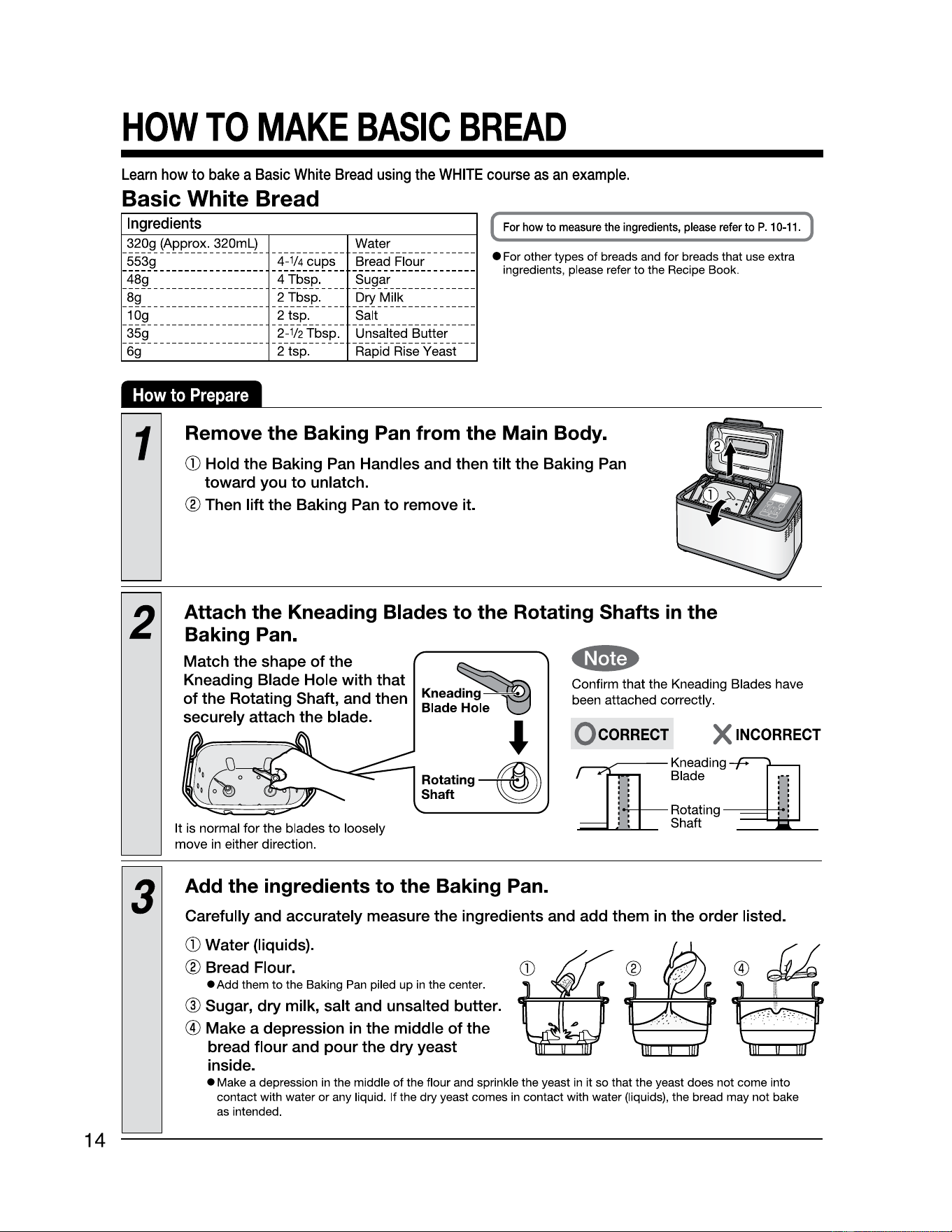
1
Remove the Baking Pan from the Main Body.
G)
Hold the Baking Pan Handles and then tilt the Baking Pan
toward you
to
unlatch.
® Then lift the Baking Pan to remove it.
2
Attach the Kneading Blades to the Rotating Shafts
in
the
Baking Pan.
Match the shape
of
the
Kneading Blade Hole with that
of
the Rotating Shaft, and then
securely attach the blade.
It
is
normal for the blades to loosely
move
in
either direction.
Knea~
Blade:t~;I~
.J
Rotating
~
Shaft
~
Confirm that the Kneading Blades have
been attached correctly.
Q coRRECT X
3
Add the ingredients to the Baking Pan.
Carefully and accurately measure the ingredients and add them
in
the order listed.
G)
Water {liquids).
® Bread Flour.
• Add them
to
the Baking Pan piled up in the center.
@ Sugar, dry milk, salt and unsalted butter.
@
Make
a depression
in
the middle of the
bread flour and pour the dry yeast
inside.
• Make a depression
in
the middle
of
the flour and sprinkle the yeast
in
it so that the yeast does not
come
into
contact with water
or
any liquid. If the
dry
yeast comes in contact with water (liquids), the bread may not bake
as intended.
HOW
TO
MAKE
BASIC
BREAD
(cont.)
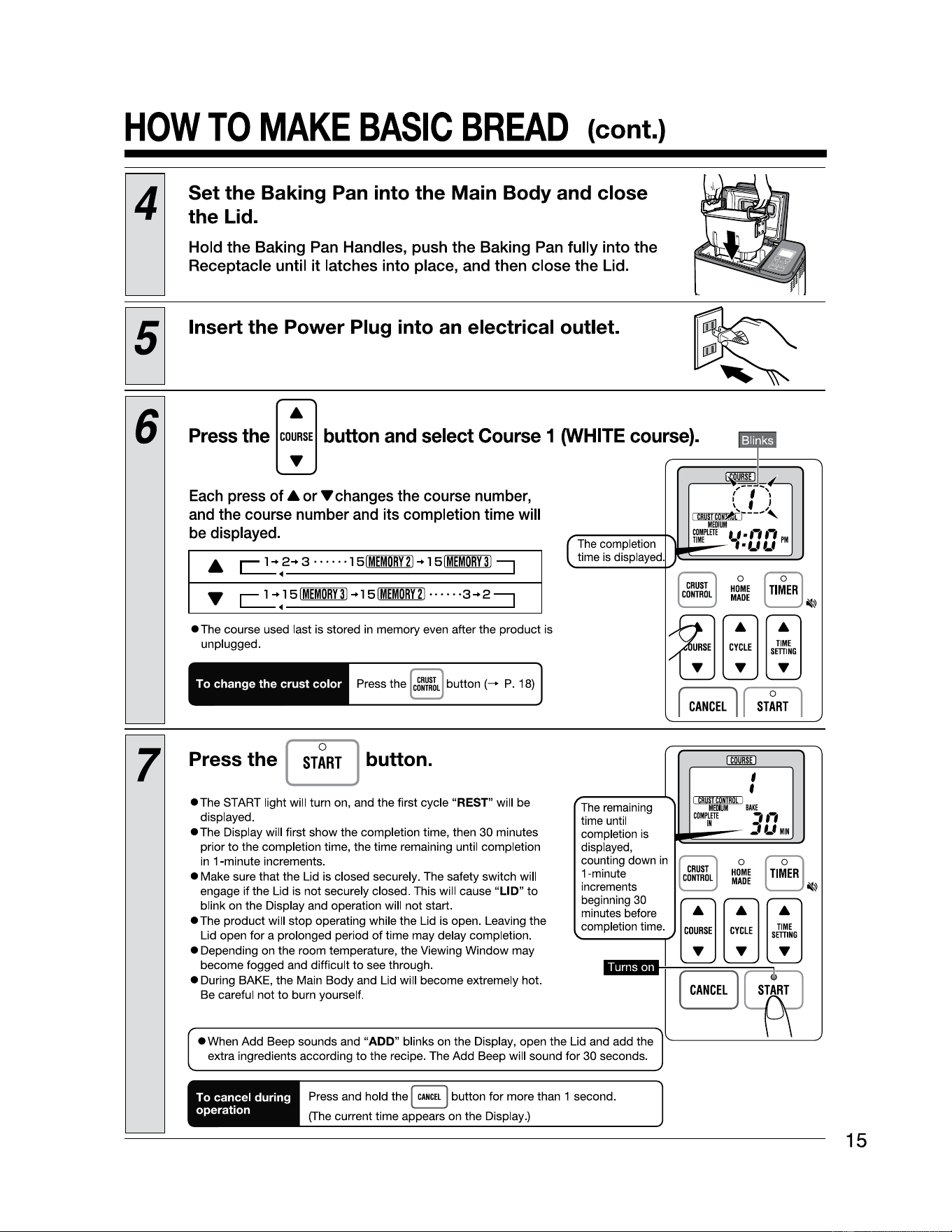
4
Set the Baking Pan into the Main Body and close
the Lid.
Hold
the
Baking Pan Handles, push
the
Baking Pan fully into
the
Receptacle until
it
latches into place, and then close
the
Lid.
Insert the Power Plug into an electrical outlet.
6
Press
the
[~]
button
and
select
Course
1
(WHITE
cours,...
__
e_)_.
===-=-~-=---=---=...--------
The completion
time is displayed.
~~
~✓-
Each
press
of
• or 'Y changes the course number,
and the course number and its completion time will
be displayed.
c.2.:"}
5IMEMORY3l
.. l
51MEMDRY21--
• • •
•3-+2
:::J
• The course used last is stored in memory even after the product is
unplugged.
To change the crust color
Press the ~
button(-+
P. 18)
7
Press the [
ST~RT
j button.
•The
START light will turn on, and the first cycle
"REST"
will be
displayed.
•The
Display will first show the completion time, then 30 minutes
prior
to
the completion time, the time remaining until completion
in
1-minute increments.
• Make sure that the Lid is closed securely. The safety switch will
engage if the Lid is not securely closed. This will cause
"LID"
to
blink on the Display and operation will not start.
•The
product will stop operating while the Lid is open. Leaving the
Lid open for a prolonged period
of
time may delay completion.
• Depending on the room temperature, the Viewing Window may
become fogged and difficult
to
see through.
• During BAKE, the Main Body and Lid will become extremely hot.
Be careful not
to
burn yourself.
The remaining
time until
completion
is
displayed,
counting down
in
beginning
30
minutes before
,c_o_m_p_le_ti_on_tim_e_
.,.,
increments
1-minute
,,
I \
t '
,,
~~---,,
MEIIIIM
COMPlflE
LI.,-,,-,
TIME
, •
f.f f.f
PM
IDBill
'
'
BAKE
,,,
-'
f.f
MIN
§J o
L
HOME
MADE
~ ~
A A
c;E
s;~G
[
CANCEL
]
• When Add Beep sounds and
"ADD"
blinks on the Display, open the Lid and add the
extra ingredients according
to
the recipe. The Add Beep will sound for 30 seconds.
I'-------'---'--'
To cancel during
operation
Press and hold the
I
CANCEL
j button for more than 1 second.
(The current time appears on the Display.)
15
16
HOW
TO
MAKE
BASIC
BREAD
(cont.)
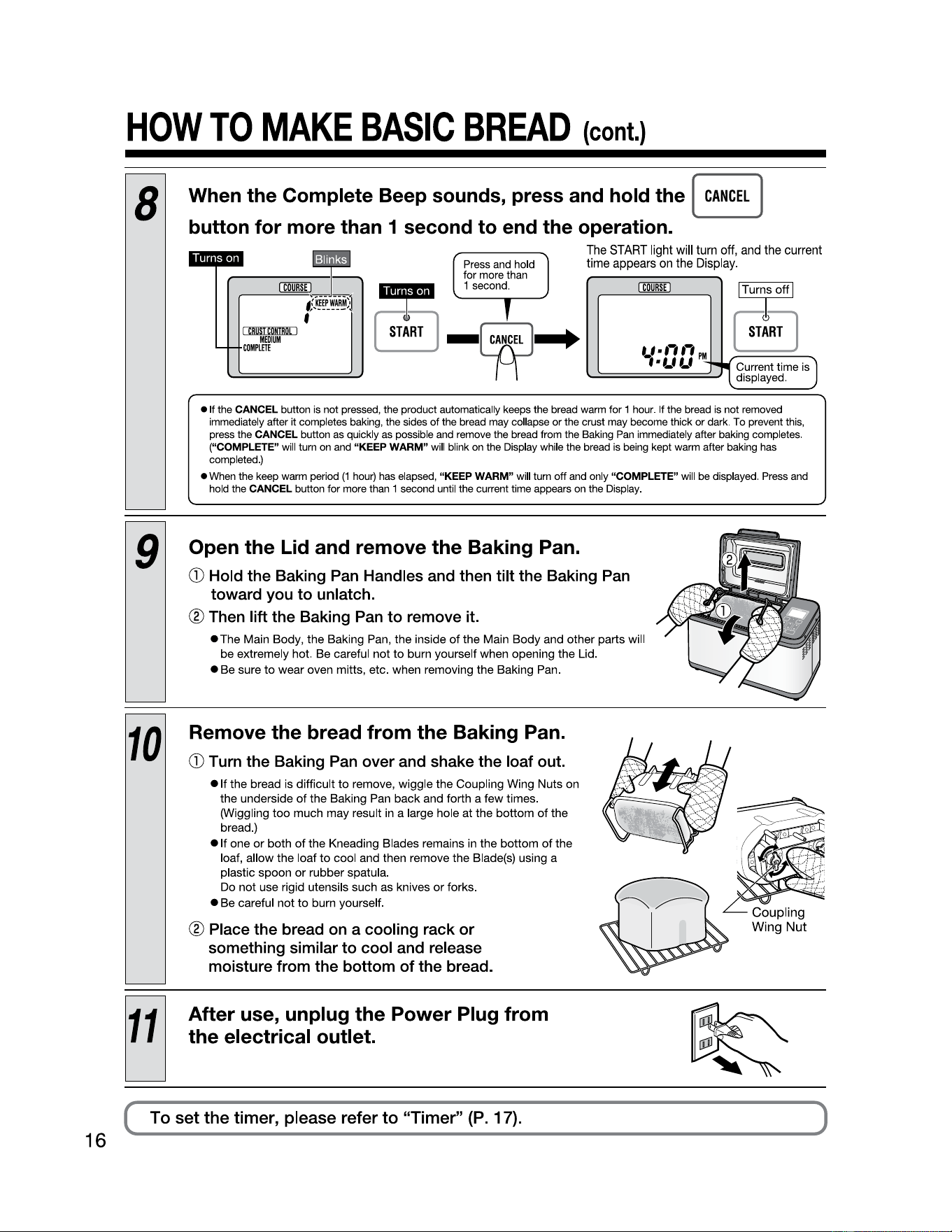
8
When the Complete Beep sounds, press and hold the [
CANCEL
]
button for more than 1 second to end the operation.
Press and hold
for more than
The
START
light
will
turn
off,
and
the
current
time
appears
on
the
Display.
rn&J
~
1second
. J
rn&J
ITurroffl
,S:~li~~1
f
8
I
CBOSI
COHIBO[
I
fllDIUM
--
COMPlflE
8
-~-+
t_f•t-,,-,
PM
t
•LILI
~i,,,
1 Current time
is)
displayed.
• It the
CANCEL button
is
not pressed, the product automatically keeps the bread
warm
for 1
hour.
If the bread
is
not removed
immediately after it completes baking, the sides
of
the bread
may
collapse or the crust
may
become thick or dark. To prevent this,
press the
CANCEL button
as
quickly
as
possible
and
remove the bread from the Baking
Pan
immediately after baking completes.
("COMPLETE"
will
turn
on
and
"KEEP WARM"
will
blink
on
the Display while the bread
is
being
kept
warm
after baking
has
completed.)
•
When
the keep
warm
period
(1
hour)
has
elapsed, "KEEP WARM"
will
turn off
and
only
"COMPLETE" will
be
displayed.
Press
and
hold the CANCEL button for more than 1 second until the current time appears
on
the Display.
9
Open the Lid and remove the Baking Pan.
G)
Hold the Baking Pan Handles and then tilt the Baking Pan
toward you to unlatch.
® Then lift the Baking Pan
to
remove it.
•
The
Main
Body,
the
Baking
Pan,
the
inside
of
the
Main
Body
and
other
parts
will
be
extremely
hot.
Be
careful
not
to
burn
yourself
when
opening
the
Lid.
•
Be
sure
to
wear
oven
mitts,
etc
.
when
removing
the
Baking
Pan.
10
Remove the bread from the Baking Pan.
G)
Turn the Baking Pan over and shake the loaf out.
•
If
the
bread
is
difficult
to
remove,
wiggle
the
Coupling
Wing
Nuts
on
the
underside
of
the
Baking
Pan
back
and
forth
a
few
times
.
(Wiggling
too
much
may
result in a large
hole
at
the
bottom
of
the
bread
.)
•
If
one
or
both
of
the
Kneading
Blades
remains
in
the
bottom
of
the
loaf,
allow
the
loaf
to
cool
and
then
remove
the
Blade(s)
using
a
plastic
spoon
or
rubber
spatula
.
Do
not
use
rigid
utensils
such
as
knives
or
forks
.
•
Be
careful
not
to
burn
yourself
.
® Place the bread on a cooling rack or
something similar to cool and release
moisture from the bottom of the bread.
After use, unplug the Power Plug from
the electrical outlet.
To
set the timer, please refer to "Timer" (P. 17).
SETTING
THE
TIMER
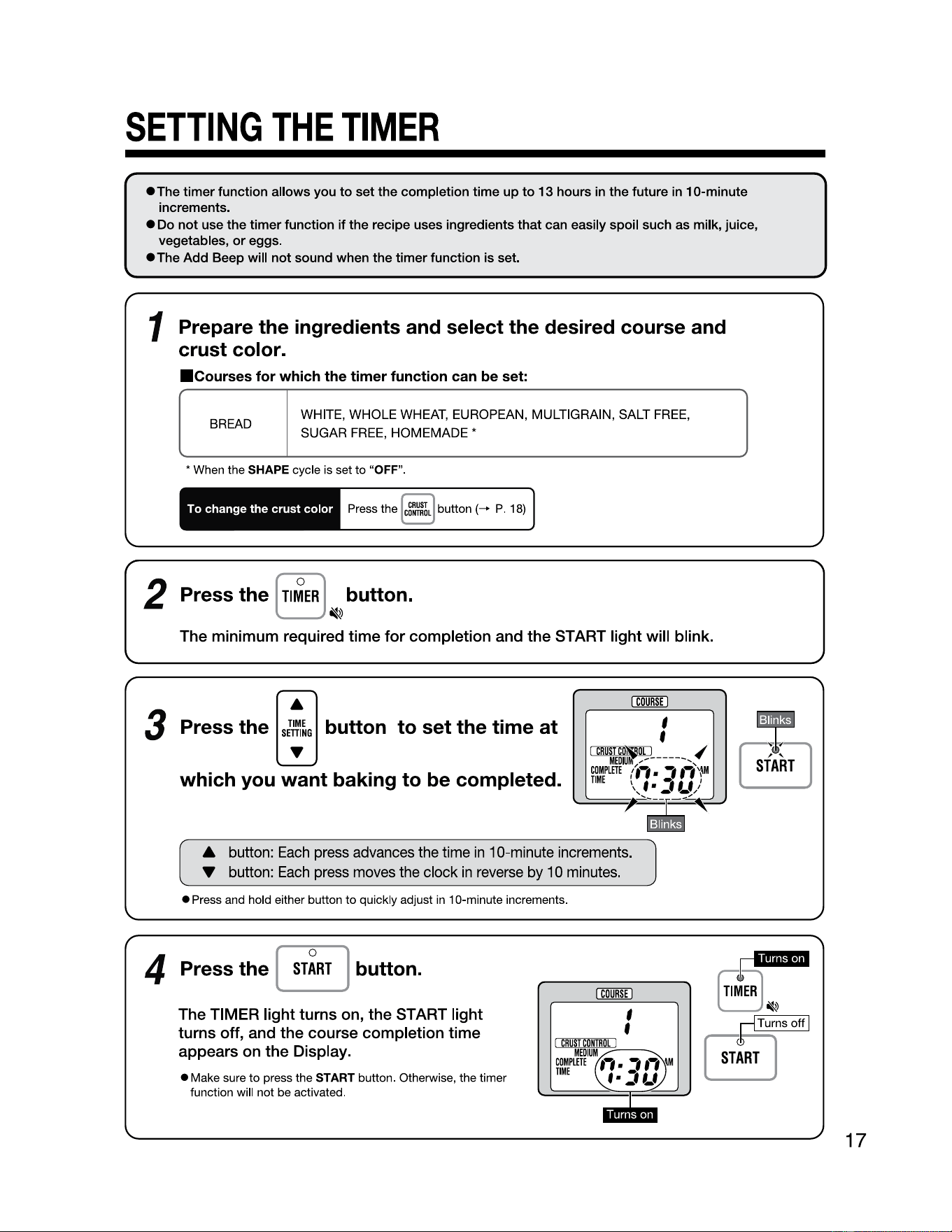
• The timer function allows you
to
set the completion time up
to
13 hours in the future in 10-minute
increments.
• Do not use the timer function
if
the recipe uses ingredients that can easily spoil such as milk, juice,
vegetables,
or
eggs.
•The
Add Beep will not sound when the timer function is set.
1 Prepare the ingredients and select the desired course and
crust color.
■
Courses
for which the timer function can be set:
BREAD
WHITE,
WHOLE
WHEAT,
EUROPEAN,
MULTIGRAIN,
SALT
FREE
,
SUGAR
FREE
, HOMEMADE *
* When the SHAPE cycle is set
to
"OFF".
To
change
the
crust
color
Press the [
~:mL
J button (-+ P. 18)
2 Press the [
Tl~ER
] button.
~
The minimum required time
for
completion and
the
START light will blink.
3
Pressthe
TIME
SffilNG
•
I
COURSE
I
button to set the time
at
which you want baking to be completed.
A button:
Each
press
advances
the
time
in
10-minute
increments
.
• button:
Each
press
moves
the
clock
in
reverse
by
10
minutes
.
• Press and hold either button
to
quickly adjust
in
10-minute increments.
4 Press the
ST~RT
[ ] button.
The TIMER light turns on,
the
START light
turns off, and the course completion time
appears on the Display.
~
,
p
••iieH-iei
• Make sure
to
press the START button. Otherwise, the timer
function
will not be activated.
8 ~
'
I CR
UST
C
DN
m
DC
I
COMPLETE
,-,
•
-,
,-,
!M
MWIU~ V
TIME
f •
=-
l_f
I
···-
p
~T-ur_n_s
-off~I
[
ST:RT
l
17
OTHER
FUNCTIONS
18
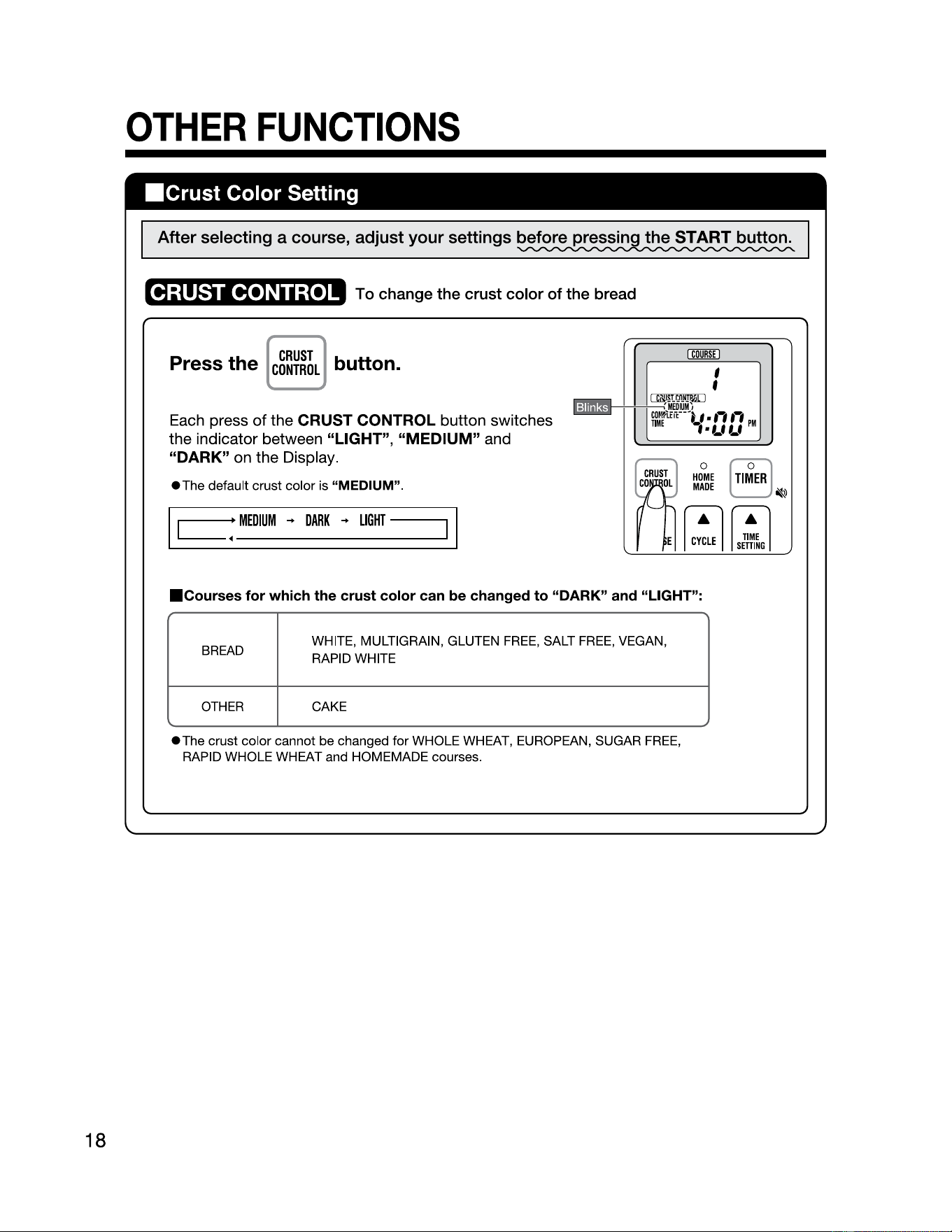
■
Crust
Color Setting
After selecting a course, adjust your settings before pressin the START button.
CRUST CONTROL
To change the crust
color
of
the bread
CRUST
Press the
CONTROL
button.
Each press
of
the CRUST CONTROL button switches
the indicator between
"LIGHT",
"MEDIUM"
and
"DARK"
on the Display.
•The
default crust color is "MEDIUM".
I
=i
~~--•-ME_o1_uM_
..
_o_AR_K
_ ..
_uG_HT_-_-_
-
_____
-
1
I
I
COURSE
I
■
Courses
for which the crust color can be changed
to
"DARK" and "LIGHT":
BREAD
WHITE, MULTIGRAIN, GLUTEN
FREE
, SALT
FREE
, VEGAN,
RAPID WHITE
OTHER
CAKE
•The
crust color cannot be changed
for
WHOLE WHEAT, EUROPEAN, SUGAR
FREE
,
RAPID WHOLE WHEAT and HOMEMADE courses.
OTHER
FUNCTIONS
(cont.}
■
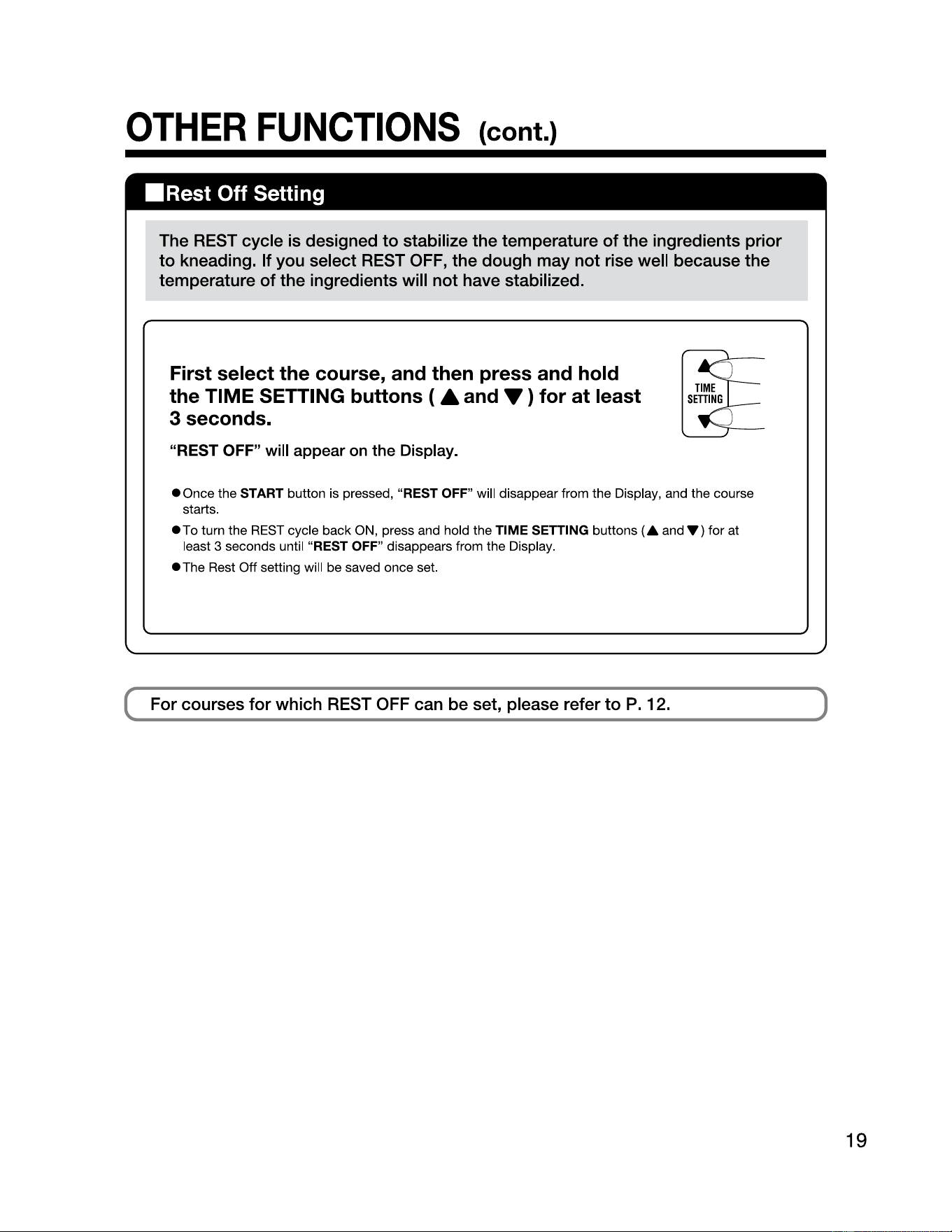
Rest
Off Setting
The REST cycle is designed
to
stabilize the temperature
of
the ingredients prior
to
kneading. If you select REST
OFF,
the dough may
not
rise well because the
temperature
of
the ingredients will
not
have stabilized.
First select the course, and then press and hold
the TIME SETTING buttons ( A and
T)
for
at
least
3 seconds.
"REST OFF"
will
appear on the Display.
• Once the START button is pressed, "REST OFF" will disappear from the Display, and the course
starts.
•To
turn the REST cycle back
ON
, press and hold the
TIME
SETTING buttons
(A
and'Y)
for at
least 3 seconds until "REST OFF" disappears from the Display.
• The Rest Off setting will be saved once set.
For courses
for
which REST OFF can be set, please refer
to
P.
12.
19
HOW
TO
MAKE
DOUGH
20
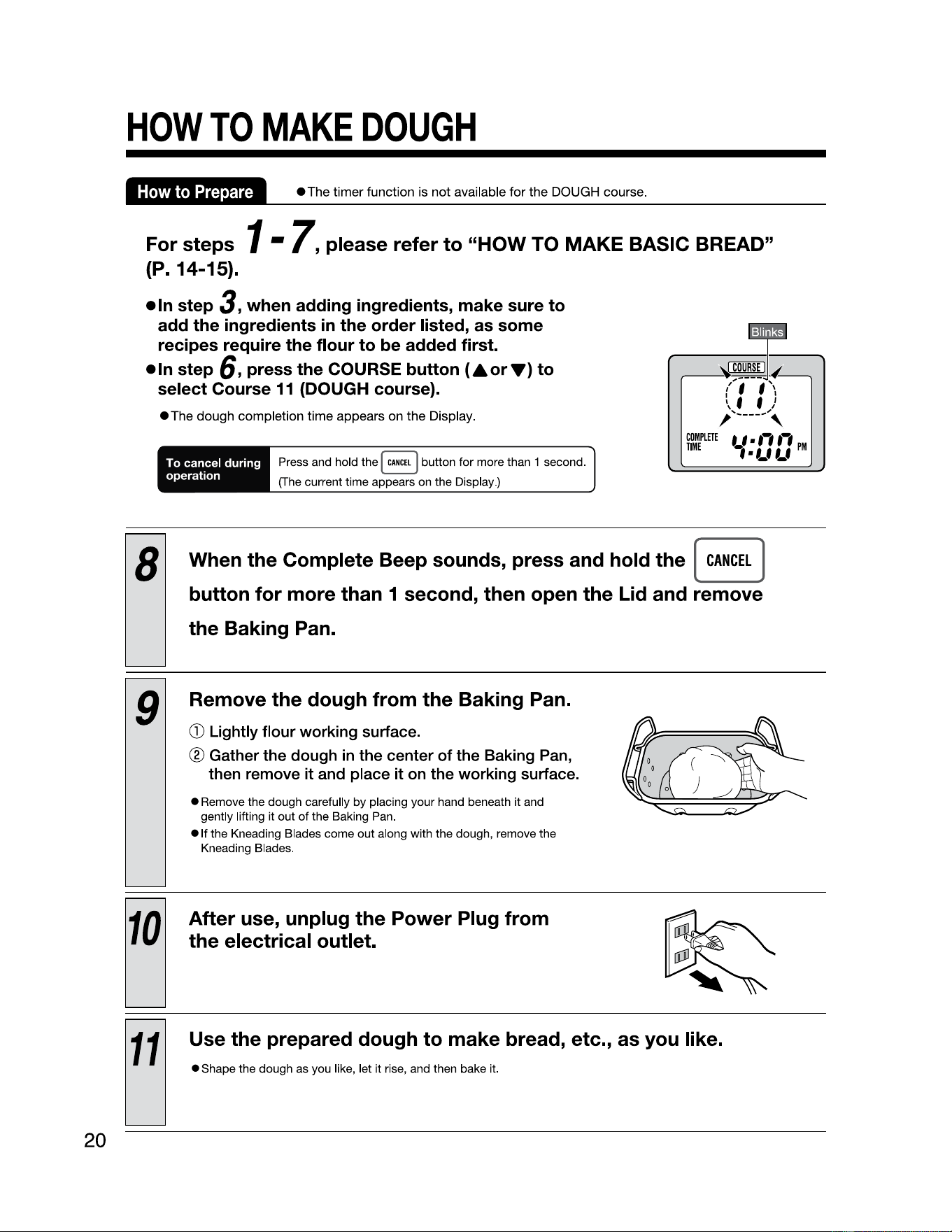
How
to
Prepare
•The
timer function is not available for the DOUGH course.
For
steps
1 •
7,
please refer
to
"HOW TO MAKE BASIC BREAD"
(P. 14-15).
• In step
3,
when adding ingredients, make sure
to
add
the
ingredients in
the
order
listed, as some
recipes require
the
flour
to
be added first.
•In
step
6,
press
the
COURSE
button
(AorT)
to
select Course
11
(DOUGH course).
•The
dough completion time appears on the Display.
To cancel
during
operation
Press and hold the I
CANCEL
] button for more than 1 second.
(The current time appears on the Display.)
COMPLETE
TIME
8
When
the
Complete Beep sounds, press and hold
the
[
button for more than 1 second, then open the
Lid
and remove
the Baking Pan.
9
Remove the dough from the Baking Pan.
CD
Lightly flour working surface.
® Gather the dough
in
the center of the Baking Pan,
then remove it and place it on the working surface.
• Remove the dough carefully by placing your hand beneath it and
gently lifting it out
of
the Baking Pan.
• If the Kneading Blades come out along with the dough, remove the
Kneading Blades.
10
After use, unplug the Power Plug from
the electrical outlet.
11
Use the prepared dough to make bread, etc., as you like.
• Shape the dough as you like, let it rise, and then bake it.
CANCEL
]
HOW
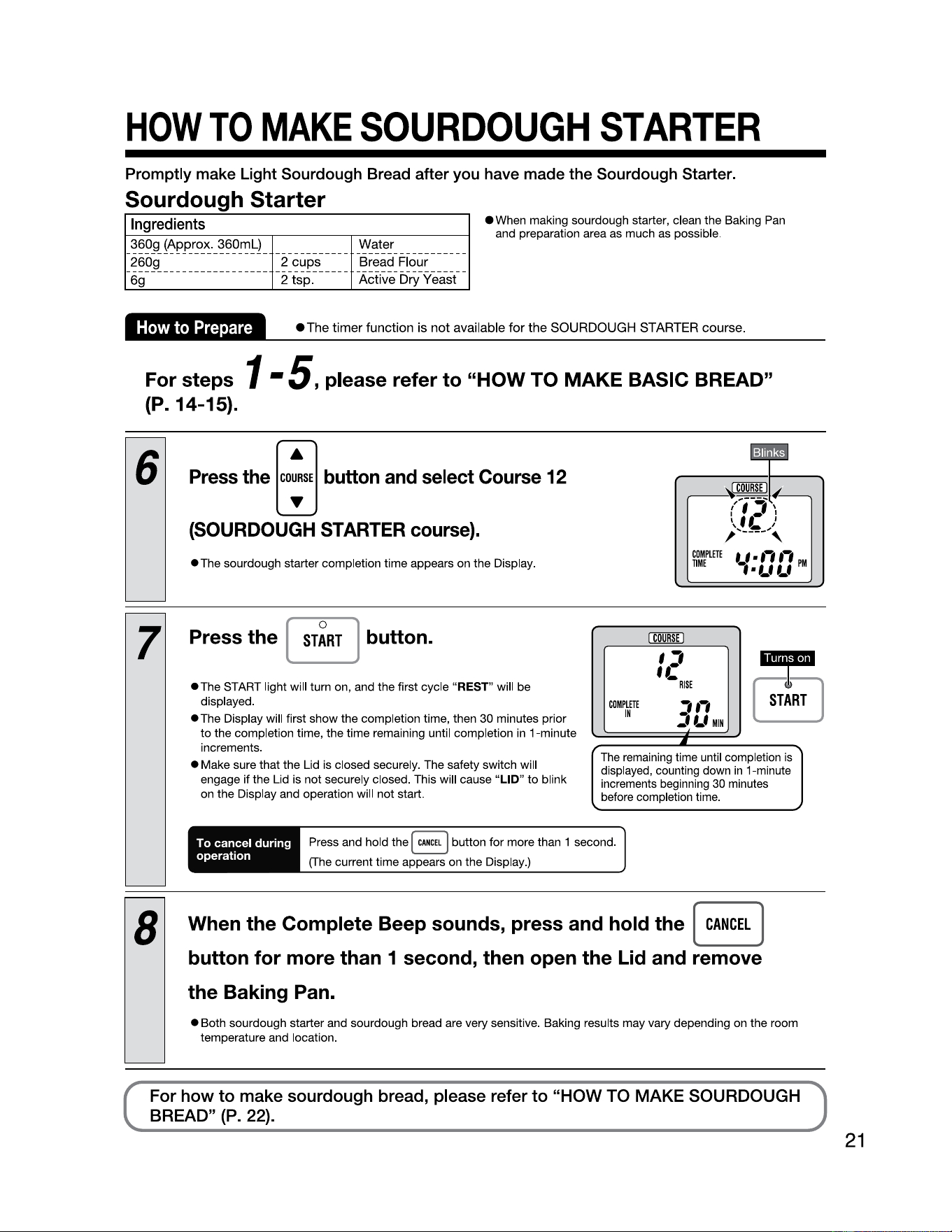
TO
MAKE
SOURDOUGH
STARTER
Promptly make Light Sourdough Bread after you have
made
the Sourdough Starter.
Sourdough Starter
Ingredients
360g (Approx._360ml) _ _
__
_
__
_
__
_
__
_
"!_8:_t~!
__
_
__
_
__
_
__
_
260g _
__
_
__
_
__
_
__
_
__
__ _2 cups __
__
-~~~~9-~~~~~
69
2 tsp. Active Dry Yeast
ewhen
making sourdough starter, clean the Baking Pan
and preparation area as much as possible.
How
to
Prepare
•The
timer function is not available for the SOURDOUGH
STARTER
course.
For steps 1 -
5,
please refer
to
"HOW
TO
MAKE
BASIC BREAD"
(P. 14-15).
6
Press the
[co;',]
button
and
select
Course
12
(SOURDOUGH STARTER course).
•The
sourdough starter completion time appears on the Display.
7
Press
the
[
ST~RT
j button.
I
COURSE
I
,,
u·
-RISE
•
•The
START light will turn on, and the first cycle "REST" will be
displayed.
COMPLITT
,,,
START
•The
Display will first show the completion time, then 30 minutes prior
to
the completion time, the time remaining until completion in 1-minute
increments.
• Make sure that the Lid is closed securely. The safety switch will
engage if the Lid is not securely closed. This will cause
"LID"
to
blink
on the Display and operation will not start.
EJ
IN
j
Lf
MIN
•
The remaining time until completion is
displayed, counting down
in
1-minute
increments beginning
30
minutes
before completion time.
To cancel during
operation
Press and hold the
I
CANCEL
I button for more than 1 second.
(The current time appears on the Display.)
8
When
the
Complete Beep sounds, press and hold
the
[
CANCEL
]
button for
more
than 1 second, then open
the
Lid and remove
the
Baking Pan.
• Both sourdough starter and sourdough bread are very sensitive. Baking results may vary depending on the room
temperature and location.
For how to make sourdough bread, please refer to "HOW TO MAKE SOURDOUGH
BREAD" (P. 22).
21
HOW
TO
MAKE
SOURDOUGH
BREAD
22
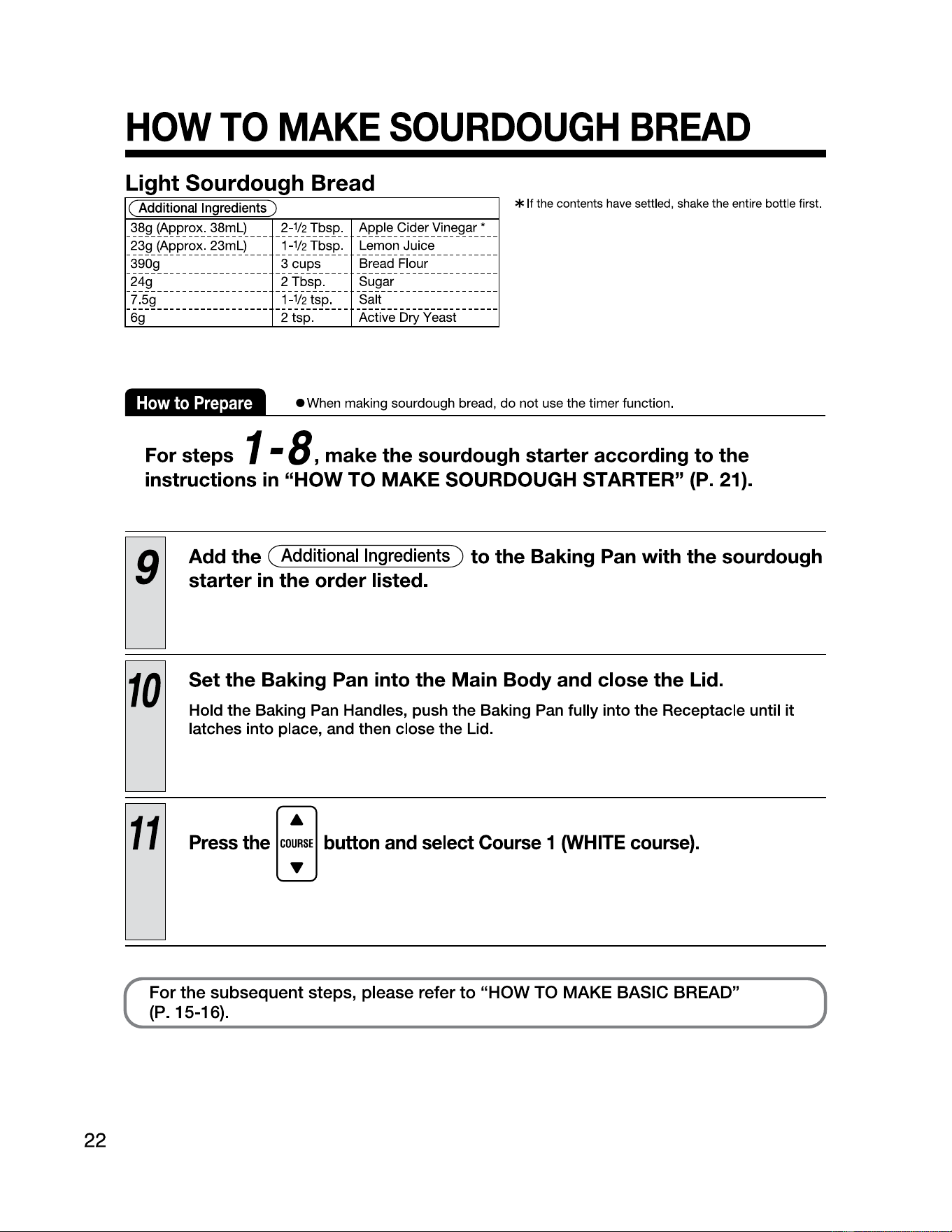
Light Sourdough Bread
(
Additional
Ingredients
)
38g (Approx.
38ml)
____
2-112
Tbsp._ Apple Cider Vinegar*
__
23g (Approx.
23ml)
__
__
1-112
Tbsp._ Lemon Juice __
_____
__ _
_ 390g
__________________
3 cups
____
-~~~~9-~~~~~-----------
249 2 Tbsp. Sugar
----------------------- ------------
--
-------------------
--
7.
59
1-½tsp
. Salt
----------------------- ------------
--
-------------------
--
69
2 tsp. Active Dry Yeast
* If the contents have settled, shake the entire bottle first.
How
to
Prepare
•
When
making sourdough bread, do not use the timer function.
For steps 1 •
8,
make the sourdough starter according to the
instructions
in
"HOW
TO
MAKE SOURDOUGH STARTER"
(P.
21).
9
Add the ( Additional Ingredients) to the Baking Pan with the sourdough
starter
in
the order listed.
10
Set the Baking Pan into the Main Body and close the Lid.
Hold the Baking
Pan
Handles, push the Baking
Pan
fully into the Receptacle until
it
latches into place, and then close the Lid.
11
Press the
[co;',]
button
and
select
Course
1
l)NHITE
course).
For the subsequent steps, please refer
to
"HOW TO MAKE BASIC BREAD"
(P. 15-16).
HOW
TO
MAKE
CAKES
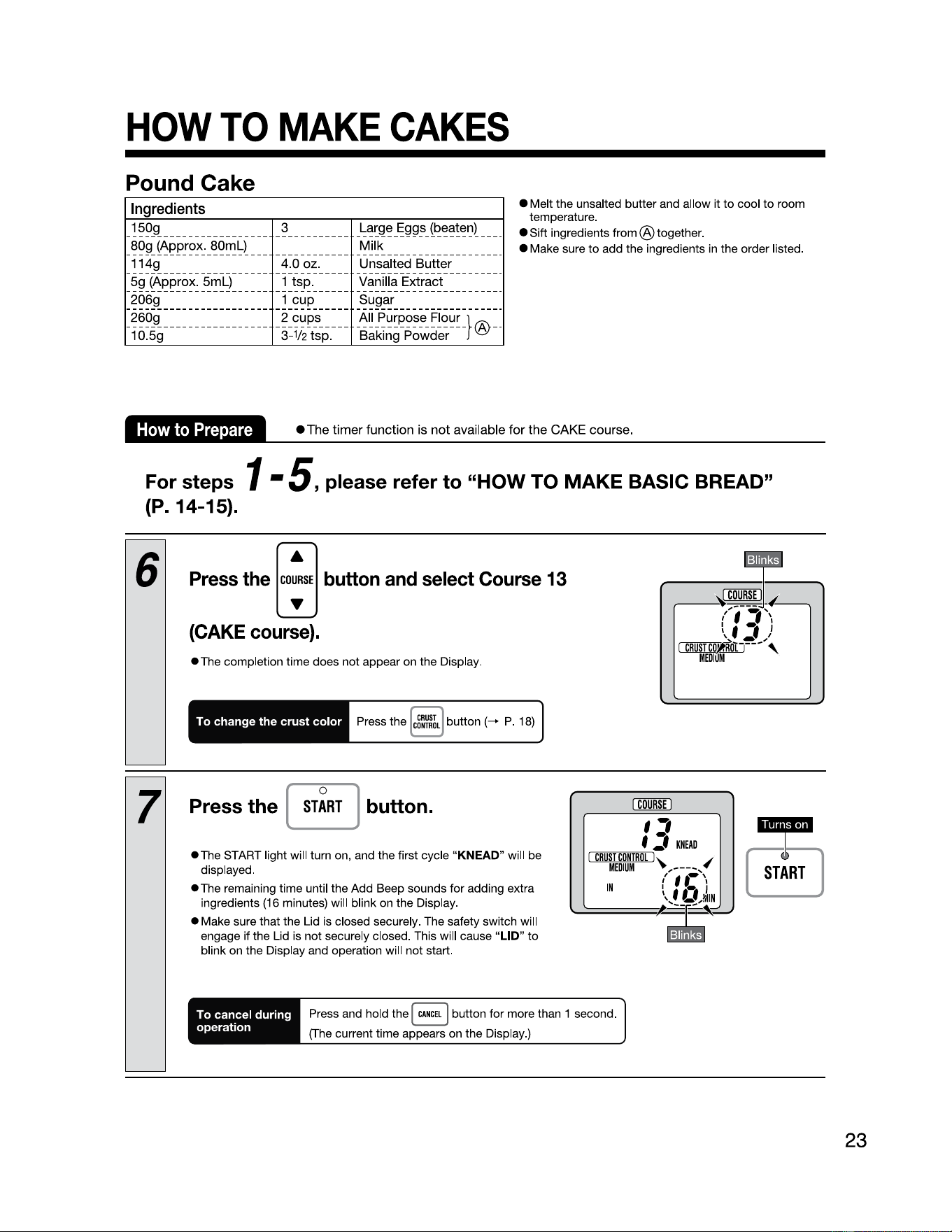
Pound Cake
Ingredients
_150g
_________________
-~----------
Large Eggs (beaten)
___
_
_80g
(Approx.
80ml)
_______________
-~j~~-------------------
_ 114g
-----------------
-~~~-~~
:.
_____
l:!~.:>31~!~~-~~.!!.~~--------
5g
(Approx.
5ml)
1 tsp. Vanilla Extract
----------------------- ------------ ------------------------
2069 1 cup Sugar
----------------------- ------------ ------------------------
-~~~ig
_________________
-!-~/~~:p.
--
:::~:~~:::ur
-}®--
• Melt the unsalted butter and allow it
to
cool
to
room
temperature.
• Sift ingredients
from®
together.
• Make sure
to
add the ingredients in the order listed.
How
to
Prepare
• The timer function
is
not available for the
CAKE
course.
For steps 1 •
5,
please refer
to
"HOW
TO
MAKE BASIC BREAD"
(P.
14-15).
6
Press the
[~"]
button
and
select
Course
13
(CAKE
course).
•The
completion time does not appear on the Display.
To change
the
crust
color
7
Press the [
ST~RT
j button.
•The
START light will turn on, and the first cycle "
KNEAD
" will be
displayed.
•The
remaining time until the Add Beep sounds for adding extra
ingredients
(16
minutes) will blink on the Display.
• Make sure that the Lid is closed securely. The safety switch will
engage if the Lid is not securely closed. This will cause
"LID"
to
blink on the Display and operation will not start.
I
COURSE
I
,,
f
:,
~1
c-eo-sr~cu-RTR-o....;L
1,.
~
~
,---~,
~
'.-,
r
••
j
\f
U,!111N
\....:::===~
.~.~
~~
KNEAD
MEDIUM
,
IN
To cancel during
operation
Press and hold the I
CANCEL
j button for more than 1 second.
(The
current time appears on the Display.)
23
HOW
TO
MAKE
CAKES
(cont.)
8
24
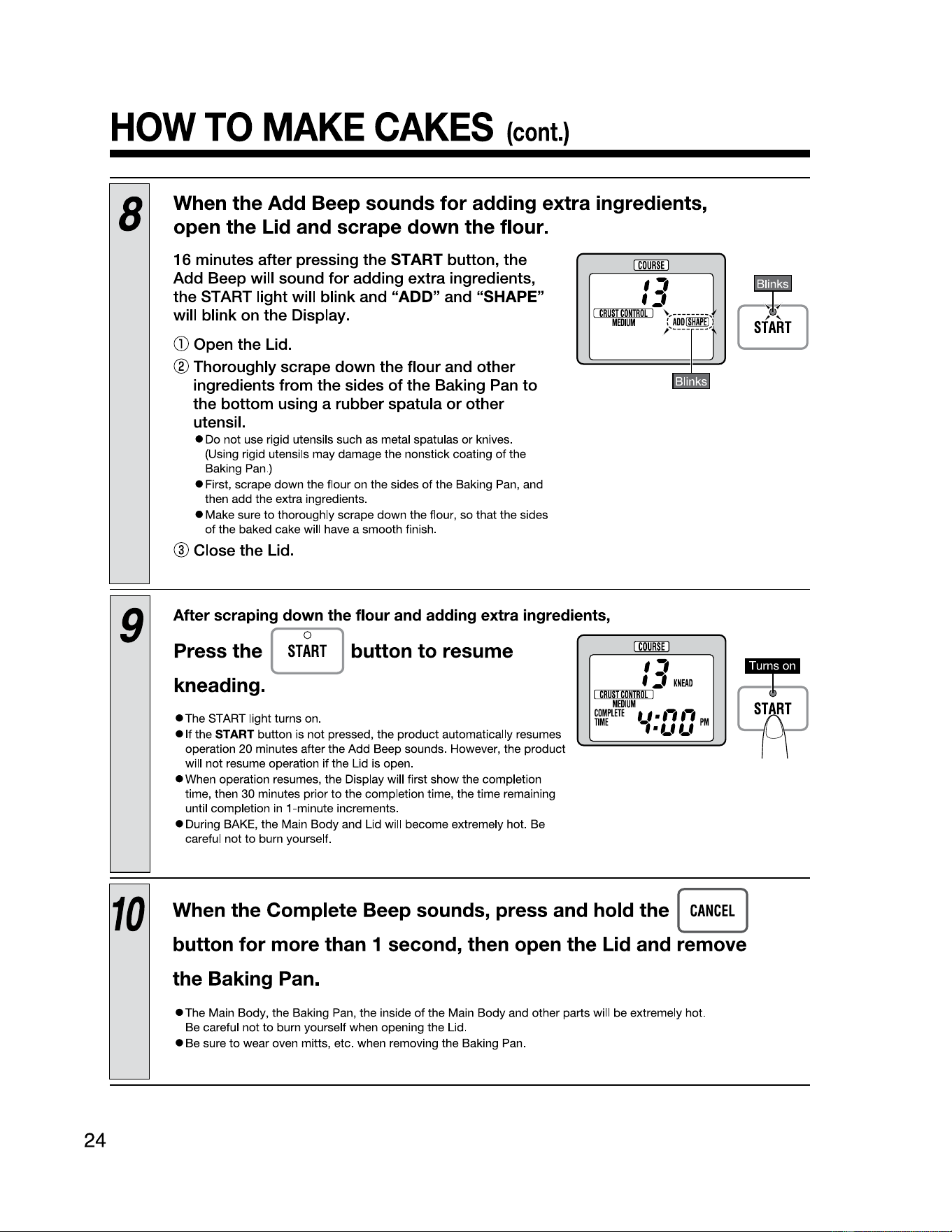
When the Add Beep sounds for adding extra ingredients,
open the Lid and scrape down the flour.
16
minutes after pressing the
START
button, the
Add Beep will sound for adding extra ingredients,
the START light will blink and "ADD" and "SHAPE"
will blink
on
the Display.
CD
Open the Lid.
® Thoroughly scrape down the flour and other
ingredients from the sides of the Baking Pan
to
the bottom using a rubber spatula or other
utensil.
• Do not use rigid utensils such as metal spatulas
or
knives.
(Using rigid utensils may damage the nonstick coating
of
the
Baking Pan.)
• First, scrape down the flour on the sides
of
the Baking Pan, and
then add the extra ingredients.
• Make sure
to
thoroughly scrape down the flour, so that the sides
of
the baked cake will have a smooth finish.
® Close the Lid.
I
COURSE
I
,,
f:,
~1
c=
eos
~
Tc
-
0ND1
- o
.----;
L 1 ,
___
_
MEDIUM
:
,--
9
After scraping down the flour and adding extra ingredients,
Press the [
ST~RT
j button to resume
kneading.
•The
START light turns on.
• It the
START button is not pressed, the product automatically resumes
operation 20 minutes after the Add Beep sounds. However, the product
will
not
resume operation if the Lid is open.
• When operation resumes, the Display will first show the completion
time
, then 30 minutes prior
to
the completion time, the time remaining
until completion
in
1-minute increments.
• During BAKE, the Main Body and Lid will become extremely hot. Be
careful
not
to
burn yourself.
~
,,
f:,
KNEAD
I
CRUSTCDNTIIDL
I
MEDIUM
COMPLETE
f.l
■
f,
,,
PM
TIME
••LfLf
10
When the Complete Beep sounds, press and hold the [
CANCEL
]
button for more than 1 second, then open the Lid and remove
the Baking Pan.
• The Main Body, the Baking Pan, the inside
of
the Main Body and other parts will be extremely hot.
Be careful not
to
burn yourself when opening the Lid.
• Be sure
to
wear oven mitts, etc. when removing the Baking Pan.
~
START
HOW
TO
MAKE
CAKES
(cont.)
11
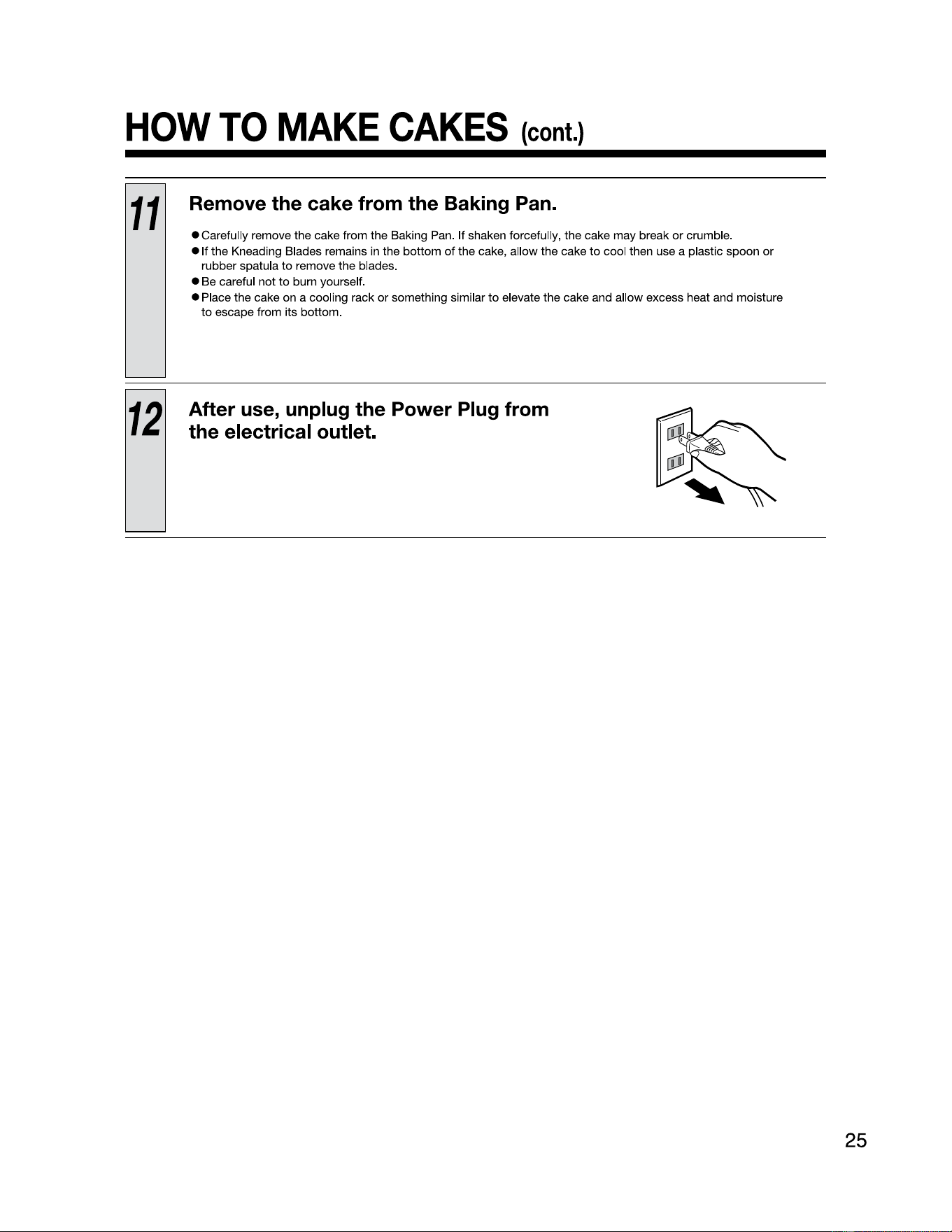
Remove the cake from the Baking Pan.
• Carefully remove the cake from the Baking Pan. If shaken forcefully, the cake may break or crumble.
• If the Kneading Blades remains in the bottom
of
the cake, allow the cake
to
cool then use a plastic spoon
or
rubber spatula
to
remove the blades.
25
• Be careful not
to
burn yourself.
• Place the cake on a cooling rack
or
something similar
to
elevate the cake and allow excess heat and moisture
to
escape from its bottom.
12
After use, unplug the Power Plug from
the electrical outlet.
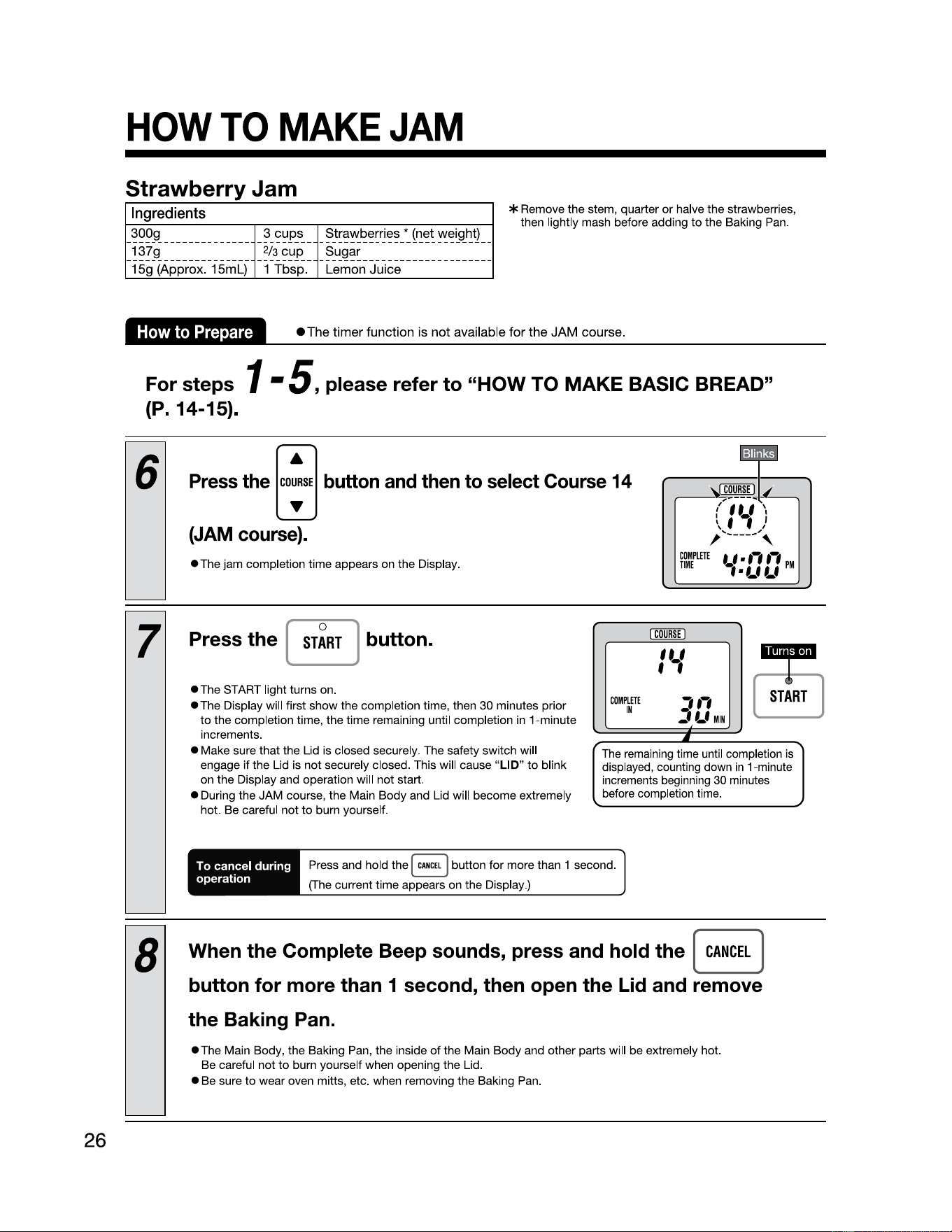
HOW
TO
MAKE
JAM
26
Strawberry Jam
Ingredients
_300g
__
__
_
__
_
__
_
__
_ _ 3 cups _ _ Strawberries* (net weight)
__
_ 137g
____
_
_____
_____ 2/3 cup
__
Sugar
__
_
_____
_
_____
_
_____
_
1
Sg
(Approx.
15ml)
1 Tbsp. Lemon Juice
* Remove the stem, quarter
or
halve the strawberries,
then lightly mash before adding
to
the Baking Pan.
How
to
Prepare
• The timer function is not available for the JAM course.
For steps 1 -
5,
please refer
to
"HOW
TO
MAKE BASIC BREAD"
(P. 14-15).
6
Press
the
[co;"]
button
and
then
to
select
Course
14
(JAM
course).
•The
jam completion time appears on the Display.
7
Press the [
ST~RT
j button.
I
COURSE
I
,,_,
f '
I
(!)
•
•The
START light turns on.
•The
Display will first show the completion time, then 30 minutes prior
to
the completion time, the time remaining until completion in 1-minute
increments.
COMPLETE
,.,
[
START
• Make sure that the Lid is closed securely. The safety switch will
engage if the Lid is not securely closed. This will cause
"LID
"
to
blink
on the Display and operation will not start.
• During the JAM course, the Main Body and Lid will become extremely
hot. Be careful not
to
burn yourself.
IN
:tLf
MIN
•
The
remaining time until completion is
displayed, counting down
in
1-minute
increments beginning
30
minutes
before completion time.
To cancel during
operation
Press and hold the
I
CANCEL
j button for more than 1 second.
(The current time appears on the Display.)
8
When the Complete Beep sounds, press and hold the [
CANCEL
]
button for more than 1 second, then open the Lid and remove
the Baking Pan.
• The Main Body, the Baking Pan, the insi
de
of
the Main Body and other parts will be extremely hot.
Be careful not
to
burn yourself when opening the Lid.
• Be sure
to
wear oven mitts, etc. when removing the Baking Pan.
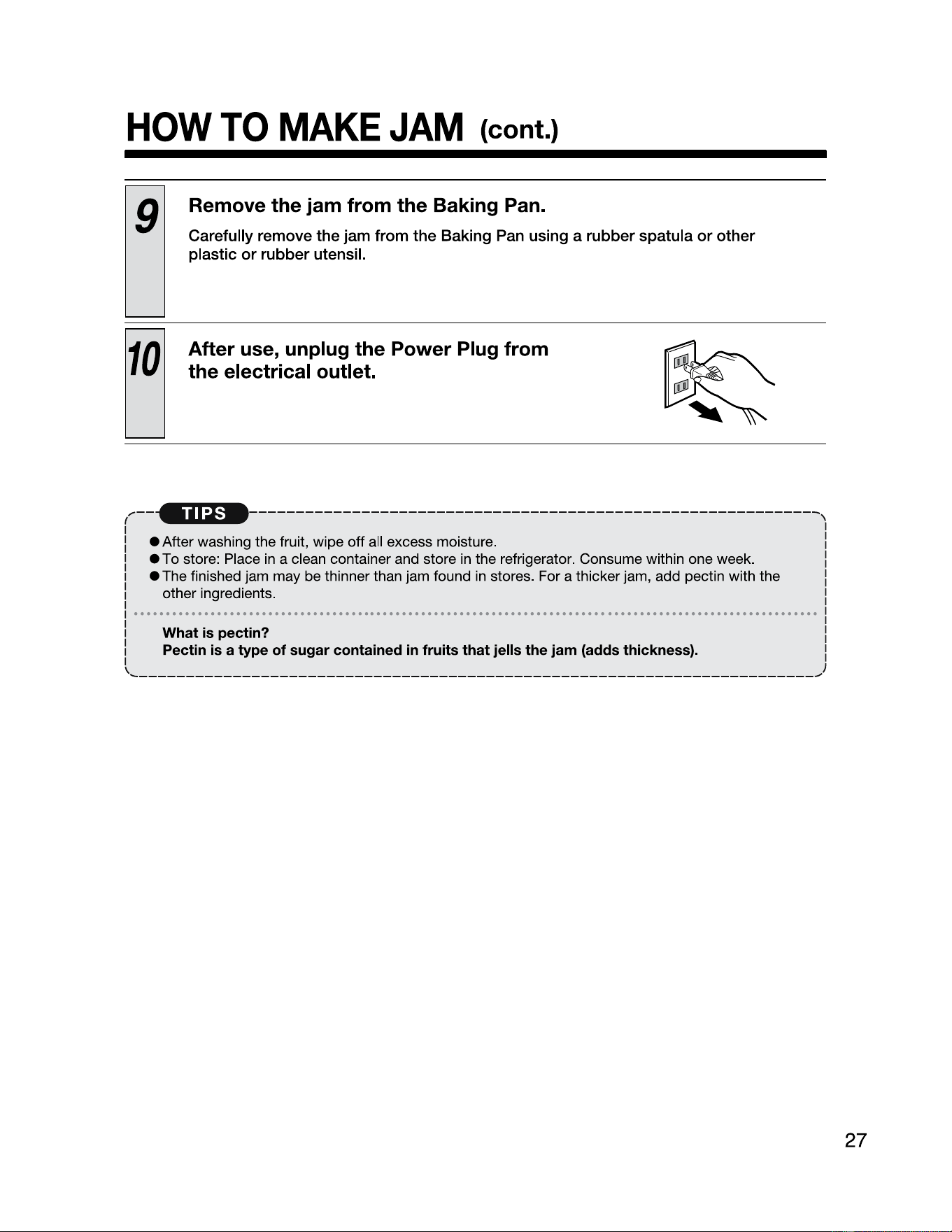
HOW
TO
MAKE
JAM
(cont.)
,--
(
9
Remove the jam from the Baking Pan.
27
Carefully remove the jam from the Baking Pan using a rubber spatula
or
other
plastic
or
rubber utensil.
10
After use, unplug the Power Plug from
the electrical outlet.
-------------------------------------------------------------,
• After washing the fruit, wipe off all excess moisture.
• To store: Place in a clean container and store
in
the refrigerator. Consume within one week.
• The finished jam may be thinner than jam found
in
stores. For a thicker jam, add pectin with the
other ingredients.
What is pectin?
Pectin
is
a type of sugar contained
in
fruits that jells the jam (adds thickness).
-------------------------------------------------------------------------~
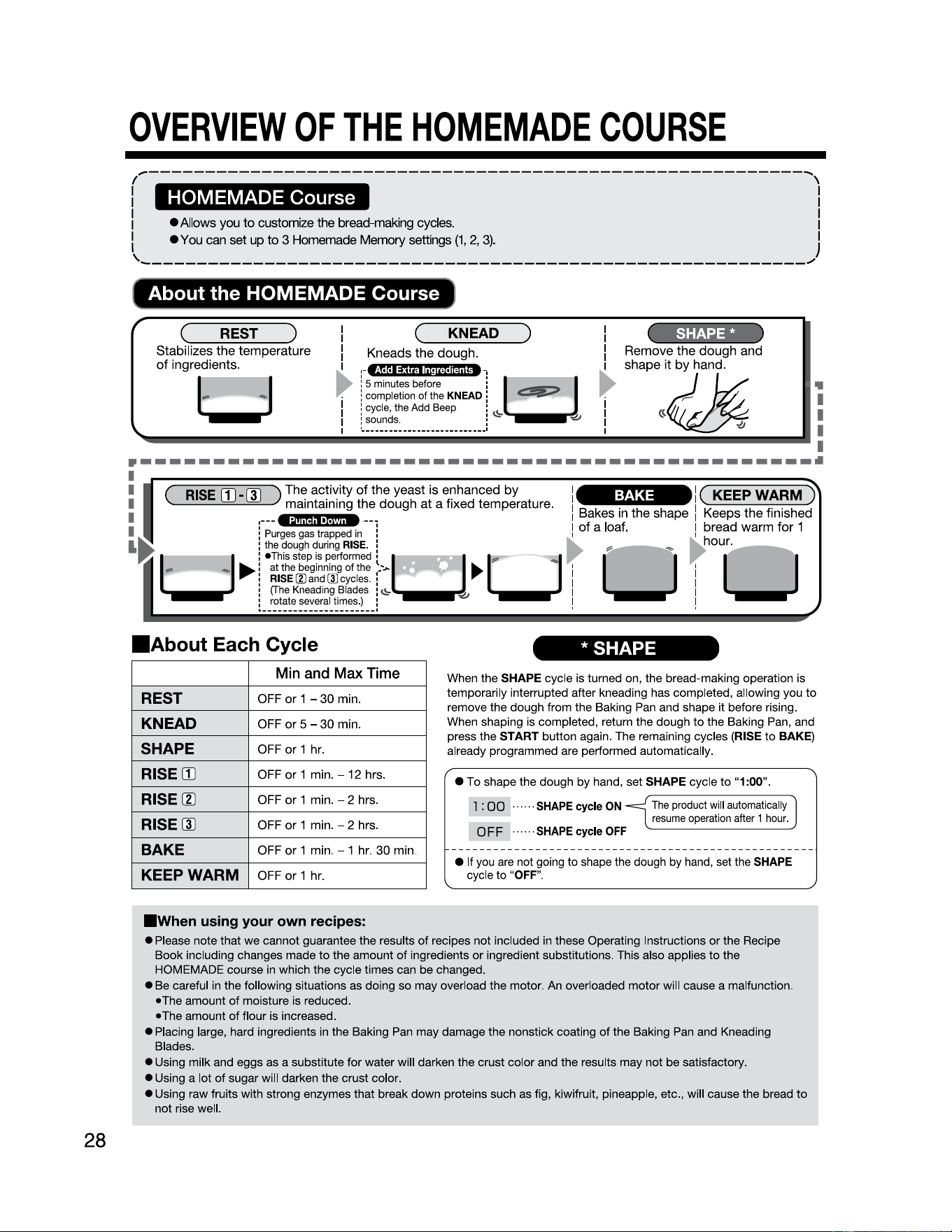
OVERVIEW
OF
THE
HOMEMADE
COURSE
28
,----------------------------------------------------------~
I \
I I
I I
I • Allows you
to
customize the bread-making cycles. I
I
•You
can
set
up
to
3 Homemade
Memory
settings
(1,
2,
3)
. }
'-----------------------------------------------------------✓
l~
About the HOMEMADE Course J
(~
__
RE_S_T_~)
Stabilizes
the
temperature
of
ingredients
.
I (
KNEAD
) I
SHAPE*
I I
:-
-:
El
►
'
~
•
i i
111
.
,,
,--
olJ
I
I :
Kneads
the
dough
.
Remove
the
dough
and
►
1
shape
it
by
hand
.
: 5
minutes
before
:
.
completion
of
the
KNEAD
c::::!IIE:::>
cycle,
the
Add
Beep
:
~
,,
I
I : sounds. :
~
----------•
1 _. -.
--
.
--
.
--
.
--
.
--
.
--
.
--
.
--
.
--
.
--
.
--
.
--
.
-·
------------------
I
EJ
I
·----------------------------------------------·
I
I (
RISE
II]-[]] )
The
activity
of
the
yeast
is
enhanced
by
1 ( KEEP WARM )
:
maintaining
the
dough
at
a
fixed
temperature
. I
Bakes
in
the
shape
I
Keeps
the
finished
I
:-p--
t ed .
--1
I
of
a
loaf
. I
bread
warm
for
1
,
urges
gas
rapp
in , , , h
I~
:
the
dough
during
RISE
. :
►
.,
,_..--_
,,._
~
our
.
►
i•!h)~:~~:~~~:~~~~~>
EJ
►
U
I u I u
,
RISE
(I)
and
(I)
cycles
. • I I
:
(The
Kneading
Blades
i
~
1 I
i
rotate
several
times
.) :
'21
I I
1.----------------------I
I I
■
About
Each Cycle
* SHAPE
Min
and
Max
Time
REST
OFF
or
1 -
30
min.
KNEAD
OFF
or
5 -
30
min.
SHAPE
OFF
or
1 hr.
RISE II)
OFF
or
1 min. -
12
hrs.
RISE~
OFF
or
1 min. - 2 hrs.
RISE [I) OFF
or
1 min. - 2 hrs.
BAKE
OFF
or
1 min. - 1 hr.
30
min.
KEEP WARM
OFF
or
1 hr.
When the
SHAPE cycle is turned on, the bread-making operation is
temporarily interrupted after kneading has completed, allowing you
to
remove the dough from the Baking
Pan
and shape it before rising.
When shaping is completed, return the dough to the Baking Pan, and
press the
START button again. The remaining cycles (RISE
to
BAKE)
already programmed are performed automatically.
• To shape the dough by hand, set
SHAPE cycle
to
"1:00".
l :
00
......
SHAPE
cycle
ON
0
FF
......
SHAPE
cycle
OFF
The
product
will
automatically
resume
operation
after
1
hour
.
]
• If you
are
not going to shape the dough by hand, set the
SHAPE
cycle to
"OFF"
.
■
When
using your own recipes:
• Please note that we cannot guarantee the results
of
recipes not included
in
these Operating Instructions or the Recipe
Book including changes made
to
the amount
of
ingredients
or
ingredient substitutions. This also applies
to
the
HOMEMADE course
in
which the cycle times can be changed.
• Be careful in the following situations as doing so may overload the motor. An overloaded motor will cause a malfunction.
•The
amount
of
moisture is reduced.
•The
amount
of
flour is increased.
• Placing large, hard ingredients in the Baking
Pan
may damage the nonstick coating
of
the Baking
Pan
and Kneading
Blades.
• Using milk and eggs as a substitute for water will darken the crust color and the results may not be satisfactory.
• Using a lot
of
sugar will darken the crust color.
• Using raw fruits with strong enzymes that break down proteins such
as
fig, kiwifruit, pineapple, etc., will cause the bread
to
not rise well.
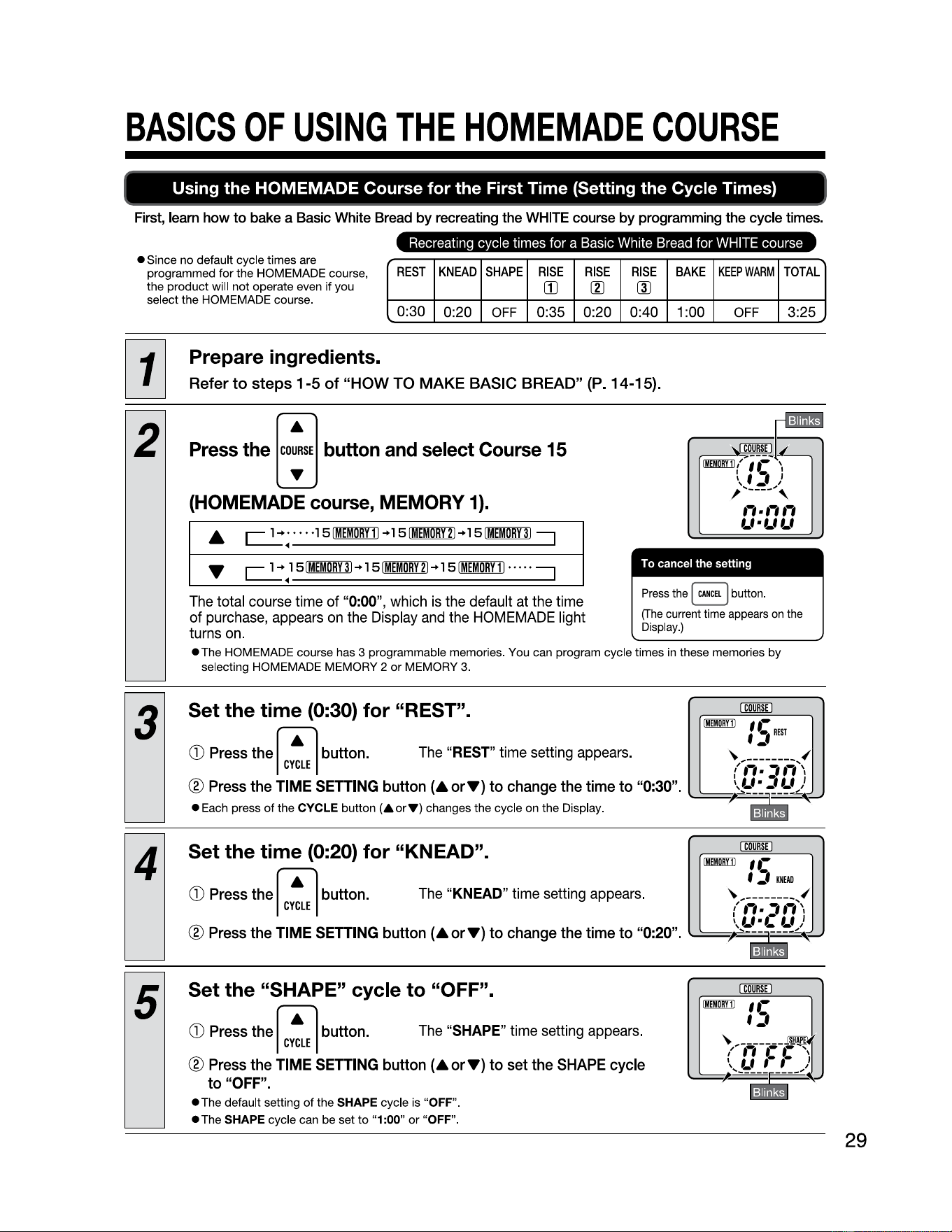
BASICS
OF
USING
THE
HOMEMADE
COURSE
Using
the
HOMEMADE Course
for
the
First Time (Setting
the
Cycle Times)
First, learn how
to
bake a Basic White Bread by recreating the
WHITE
course by programming the cycle times.
• Since no default cycle times are
programmed for the HOMEMADE course,
the product will not operate even if you
select the HOMEMADE course.
Recreating cycle times for a Basic White Bread for WHITE course
REST
KNEAD
SHAPE
RISE
(Il
RISE
(Zl
RISE
(1)
BAKE
KEEP
WARM
TOTAL
0:30
0:20
OFF
0:35 0:20 0:40 1:00
OFF
3:25
Prepare ingredients.
Refer to steps
1-5
of
"HOW
TO
MAKE BASIC BREAD" (P. 14-15).
2
Press the
[~"]
button
and
select
Course
15
(HOMEMADE course, MEMORY
1).
The total course time of
"0:00
", which
is
the default at the time
of purchase, appears
on
the Display and the HOMEMADE light
turns on.
•The
HOMEMADE course has 3 programmable memories. You can program cycle times in these memories by
selecting HOMEMADE MEMORY 2
or
MEMORY 3.
To cancel the setting
Press
the I
CANCEL
j button.
(The
current time appears
on
the
Display.)
3
Set
the
time
(0:30)
for
"REST".
G)
Press
the
r.-1
button. The
"REST"
time setting appears.
I
CYCLE
I
® Press the TIME SETTING button
(&orT)
to
change
the
time
to
"0:30".
• Each press
of
the CYCLE button
(•orT)
changes the cycle on the Display.
4
Set
the
time
(0:20)
for
"KNEAD".
G)
Press
the
r.-1
button. The "
KNEAD"
time setting appears.
I
CYCLE
I
® Press the TIME SETTING button
(&orT)
to
change
the
time
to
"0:20".
5
Set
the
"SHAPE" cycle
to
"OFF".
G)
Press
the
r.-1
button. The
"SHAPE"
time setting appears.
I
CYCLE
I
® Press the TIME SETTING button
(&orT)
to
set
the
SHAPE cycle
to
"OFF".
• The default setting
of
the SHAPE cycle is "OFF".
• The SHAPE cycle can be set
to
"1
:00" or "OFF".
(Wfil)
29
30
BASICS
OF
USING
THE
HOMEMADE
COURSE
(cont.)
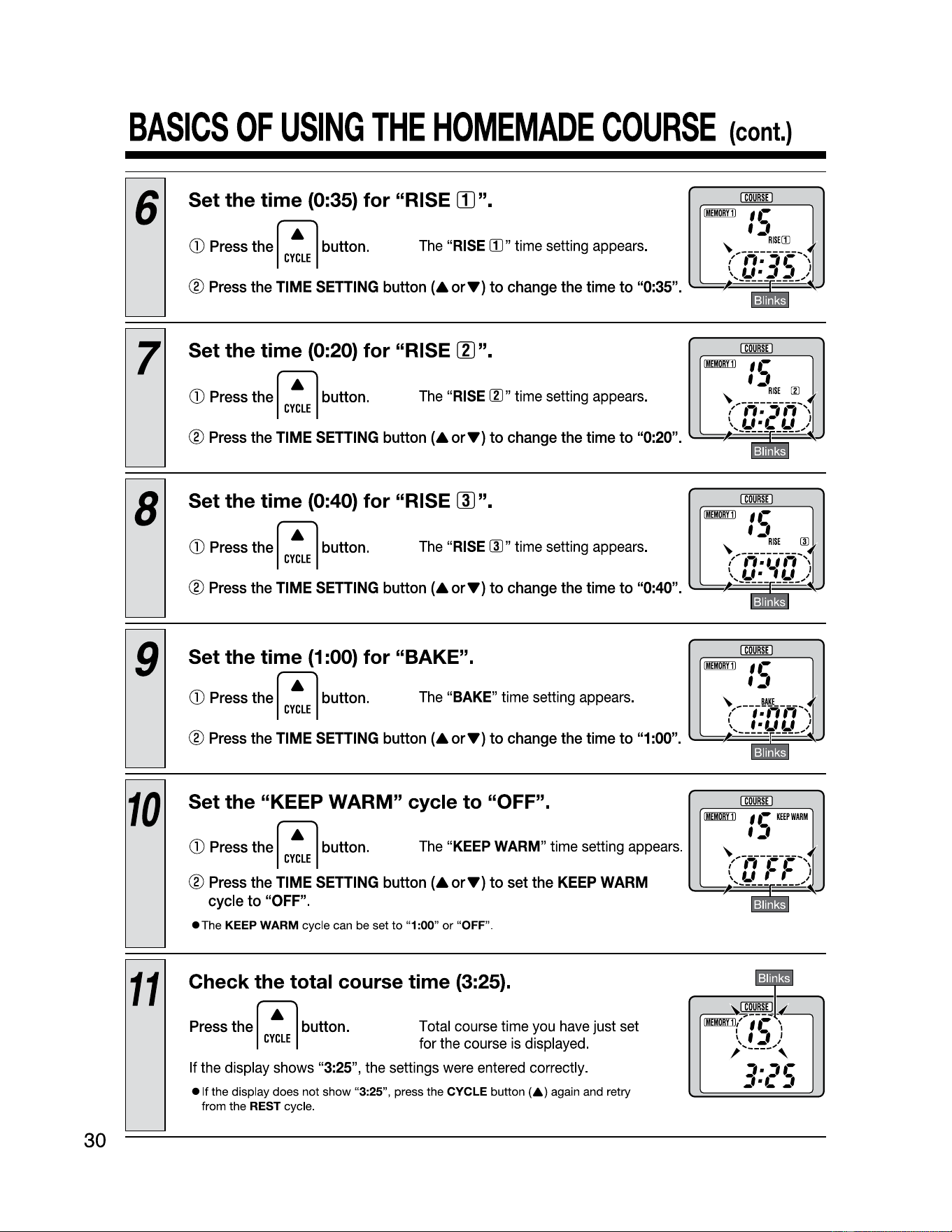
6
Set
the
time
(0:35)
for
"RISE
[I]".
CD
Press the
ri7
button.
The
"RISE
IIl"
time setting
appears.
I
CYCLE
I
® Press the TIME SETTING button
(A
orT)
to
change the time
to
"0:35".
7
Set
the
time
(0:20)
for
"RISE
[I]".
CD
Press the
ri7
button.
The
"
RISE
IIl
" time setting
appears.
I
CYCLE
I
® Press the TIME SETTING button
(A
orT)
to
change the time
to
"0:20".
8
Set
the
time
(0:40)
for
"RISE
[ID".
CD
Press the
ri7
button.
The
"RISE [J)" time setting
appears.
I
CYCLE
I
® Press the TIME SETTING button
(AorT)
to
change the time
to
"0:40".
9
Set
the
time
(1
:00)
for
"BAKE".
CD
Press the
ri7
button.
The
"BAKE" time setting appears.
I
CYCLE
I
® Press the TIME SETTING button
(AorT)
to
change the time
to
"1:00".
10
Set the "KEEP WARM" cycle to "OFF".
CD
Press the
ri7
button.
The
"
KEEP
WARM
" time setting
appears.
I
CYCLE
I
@ Press the
TIME
SETTING
button
(A
orT)
to
set the
KEEP
WARM
cycle to
"OFF".
• The KEEP WARM cycle can be set
to
"1 :00" or "OFF".
11
Check the total course time (3:25).
Press
the
ri7
button.
I
CYCLE
I
Total course time
you
have
just
set
for the course
is
displayed.
If the display shows
"3:25"
, the settings
were
entered
correctly.
• If the display does not show "3:25", press the CYCLE
button(&)
again and retry
from the
REST cycle.
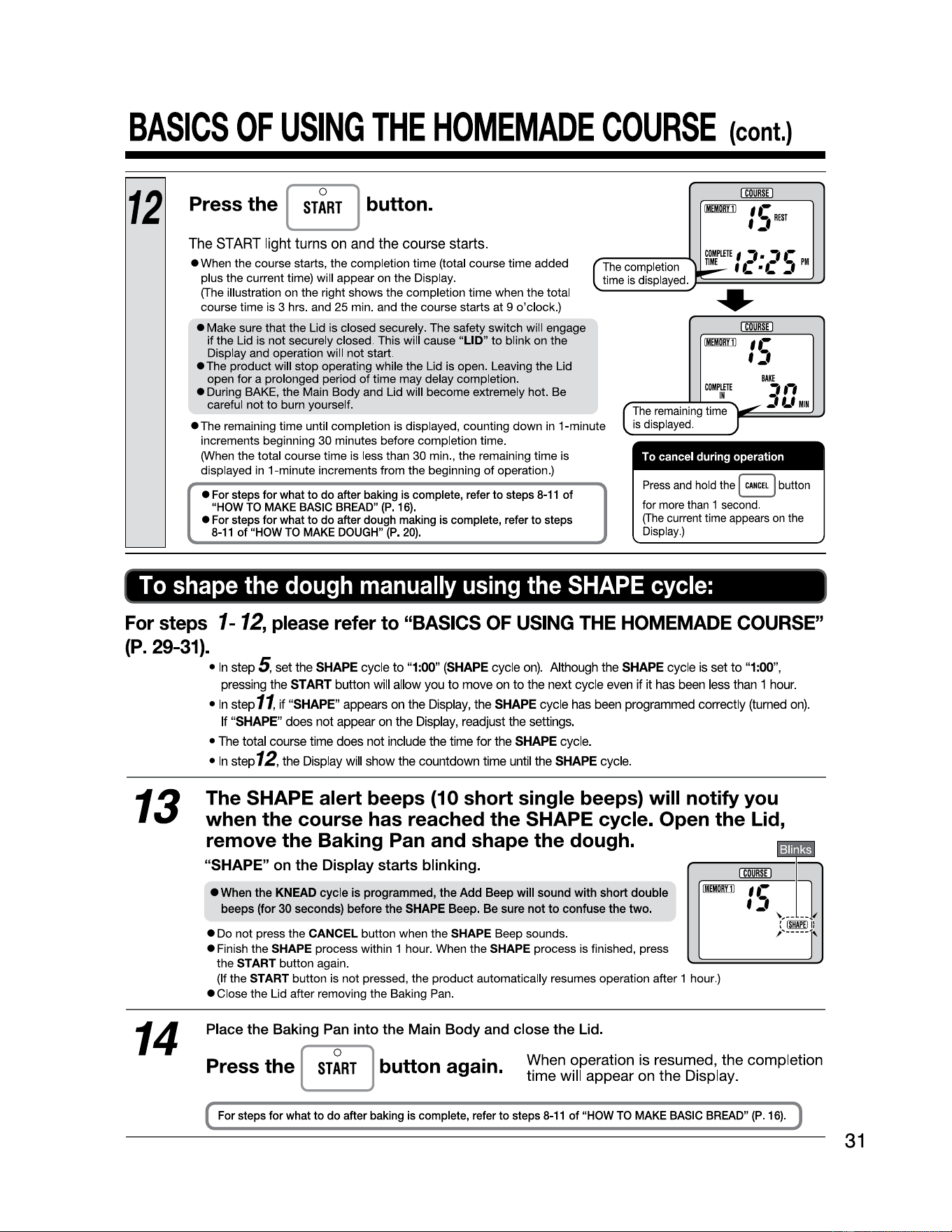
BASICS
OF
USING
THE
HOMEMADE
COURSE
(cont.)
12
Press the [
ST~RT
j button.
The
START
light turns
on
and
the course starts.
i:mru
llmBYI)
IC
REST
'-'
• When the course starts, the completion time (total course time added
plus the current time) will appear on the Display.
The completion
time
is
displayed.
COMPLEll:
I
,
■,
•-
TIME
f(•C)
PM
(The illustration on the right shows the completion
time
when the total
course time is 3 hrs. and 25 min. and the course starts at 9
o'clock
.)
• Make sure that the Lid is closed securely. The safety switch will engage
if
the Lid is not securely closed. This will cause "LID"
to
blink on the
Display and operation will not start.
•The
product
will
stop
operating while the Lid is open. Leaving the Lid
open
for
a prolonged period
of
time may delay completion.
• During BAKE, the Main Body and Lid will become extremely hot. Be
careful not
to
burn yourself.
•The
remaining time until completion is displayed, counting down in 1-minute
increments beginning 30 minutes before completion
time
.
(When the total course time is less than 30 min., the remaining time is
displayed
in
1-minute increments from the beginning
of
operation.)
• For steps
for
what
to
do after baking is complete, refer
to
steps
8-11
of
"HOW
TO
MAKE BASIC BREAD"
(P
.
16)
.
• For steps
for
what
to
do after dough making is complete, refer
to
steps
8-11
of
"HOW
TO
MAKE DOUGH"
(P.
20).
llmBYil
'.-
':,
COMPLEll:
,,,
:,f..f
IN
The
remaining time
is
displayed.
BAKE
MIN
To
cancel during operation
Press
and hold the !
CANCEL
I button
for more than 1 second.
(The
current time appears
on
the
Display.)
To
shape
the
dough
manually
using
the
SHAPE
cycle:
For steps
1-
12,
please refer to "BASICS OF USING THE HOMEMADE COURSE"
(P. 29-31).
•Instep
5,
set
the
SHAPE
cycle
to
"1:00"
(SHAPE
cycle
on).
Although
the
SHAPE
cycle
is
set
to
"1:00",
pressing
the
START
button
will
allow
you
to
move
on
to
the
next
cycle
even
if it
has
been
less
than
1
hour
.
•Instep
11,
if
"SHAPE
"
appears
on
the
Display,
the
SHAPE
cycle
has
been
programmed
correctly
(turned
on)
.
If
"SHAPE"
does
not
appear
on
the
Display,
readjust
the
settings.
13
14
•
The
total
course
time
does
not
include
the
time
for
the
SHAPE
cycle
.
•
In
step
12,
the
Display
will
show
the
countdown
time
until
the
SHAPE
cycle
.
The SHAPE alert beeps (10 short single beeps) will notify you
when
the
course has reached
the
SHAPE cycle. Open
the
Lid,
remove
the
Baking Pan and shape
the
dough.
"SHAPE"
on
the
Display starts blinking.
• When
the
KNEAD
cycle
is programmed,
the
Add
Beep will sound
with
short
double
beeps
(for 30 seconds) before
the
SHAPE Beep. Be sure
not
to
confuse the
two.
• Do not press the CANCEL button when the SHAPE Beep sounds.
• Finish the SHAPE process within 1 hour. When the SHAPE process is finished, press
the START button again.
(If the START button is not pressed, the
product
automatically resumes operation after 1 hour.)
• Close the Lid after removing the Baking Pan.
Place the Baking Pan into the Main Body and close the Lid.
I
COURSE
I
Press
the
[
ST~RT
] button again. When operation is resumed, the completion
time will appear on the Display.
For steps for what
to
do
after baking is complete, refer
to
steps
8-11
of
"HOW
TO
MAKE BASIC BREAD"
(P
.
16)
.
31
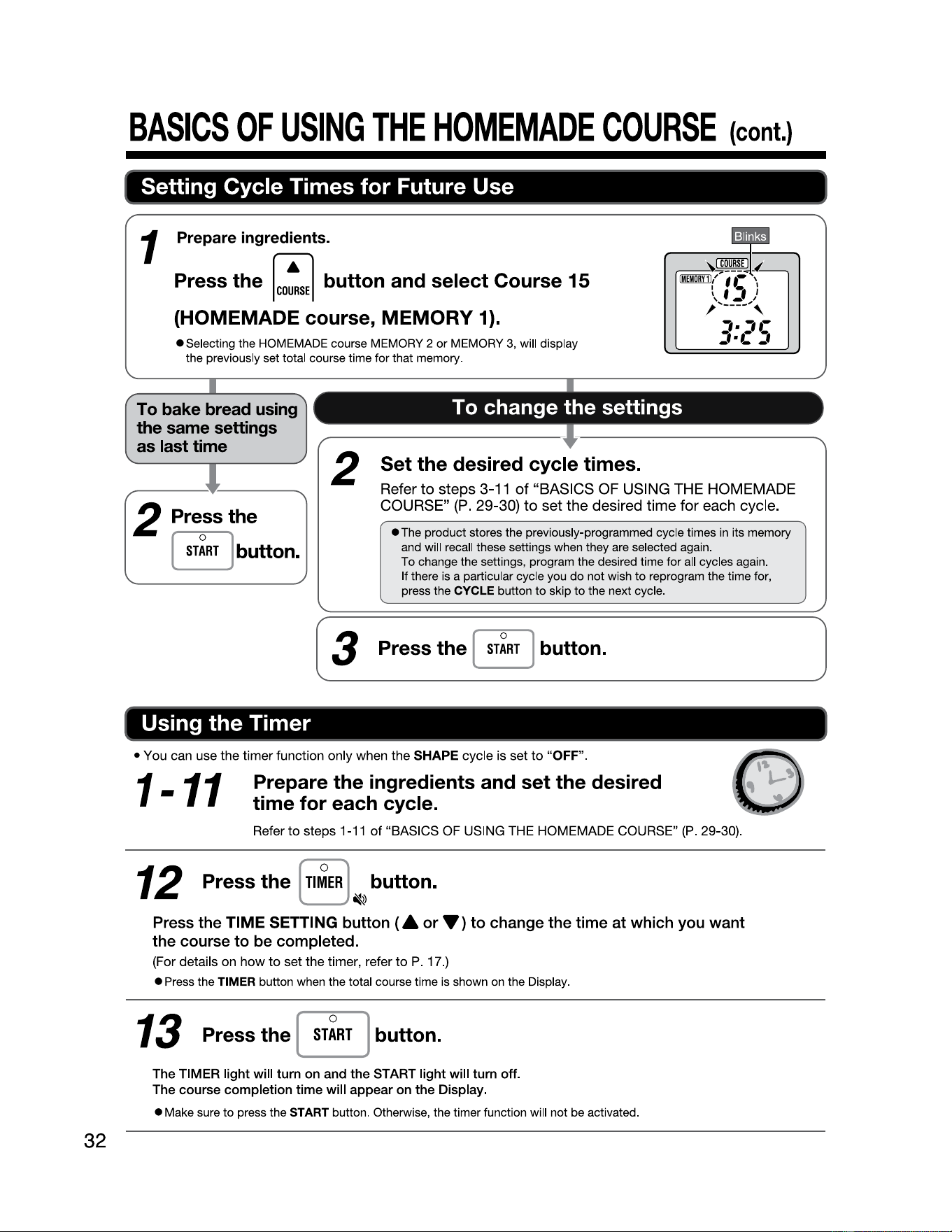
BASICS
OF
USING
THE
HOMEMADE
COURSE
(cont.)
Setting Cycle Times for Future Use
32
1 Prepare ingredients.
Press the
[co!se]
button and select Course 15
(HOMEMADE course, MEMORY
1).
•Selecting
the HOMEMADE course MEMORY 2
or
MEMORY 3, will display
the previously set total course time for that memory.
To bake bread using
the same settings
as last time
2 Pressthe
[
sr~RT
} button.
To change the settings
2
Set the desired cycle times.
Refer
to
steps 3-11
of
"BASICS OF USING THE HOMEMADE
COURSE"
(P.
29-30)
to
set the desired time for each cycle.
• The product stores the previously-programmed cycle times in its memory
and will recall these settings when they are selected again.
To change the settings, program the desired time for all cycles again.
If there is a particular cycle you
do
not wish
to
reprogram the time for,
press the CYCLE button
to
skip
to
the next cycle.
(
___
3 __ P_r_es_s_th_e_(_s_
r~
_R_r _} _b_u_tt_o_n_.
______________
]
Using the Timer
• You can use the timer function only when the SHAPE cycle is set
to
"OFF".
1-11
Prepare the ingredients and set the desired
time for each cycle.
Refer
to
steps
1-11
of "BASICS
OF
USING
THE
HOMEMADE COURSE"
(P
. 29-30).
12
Press the [
Tl~ER
] button.
~
Press the
TIME
SETTING button
(A
or•>
to
change
the
time
at
which you want
the course
to
be completed.
(For details on how
to
set the timer, refer
to
P. 17 .)
• Press the TIMER button when the total course time is shown on the Display.
13
Press
the
[
ST~RT
]
button.
The TIMER light will
tum
on and the START light will turn
off
.
The course completion time will appear on
the
Display.
• Make sure
to
press the START button. Otherwise, the timer function will not be activated.
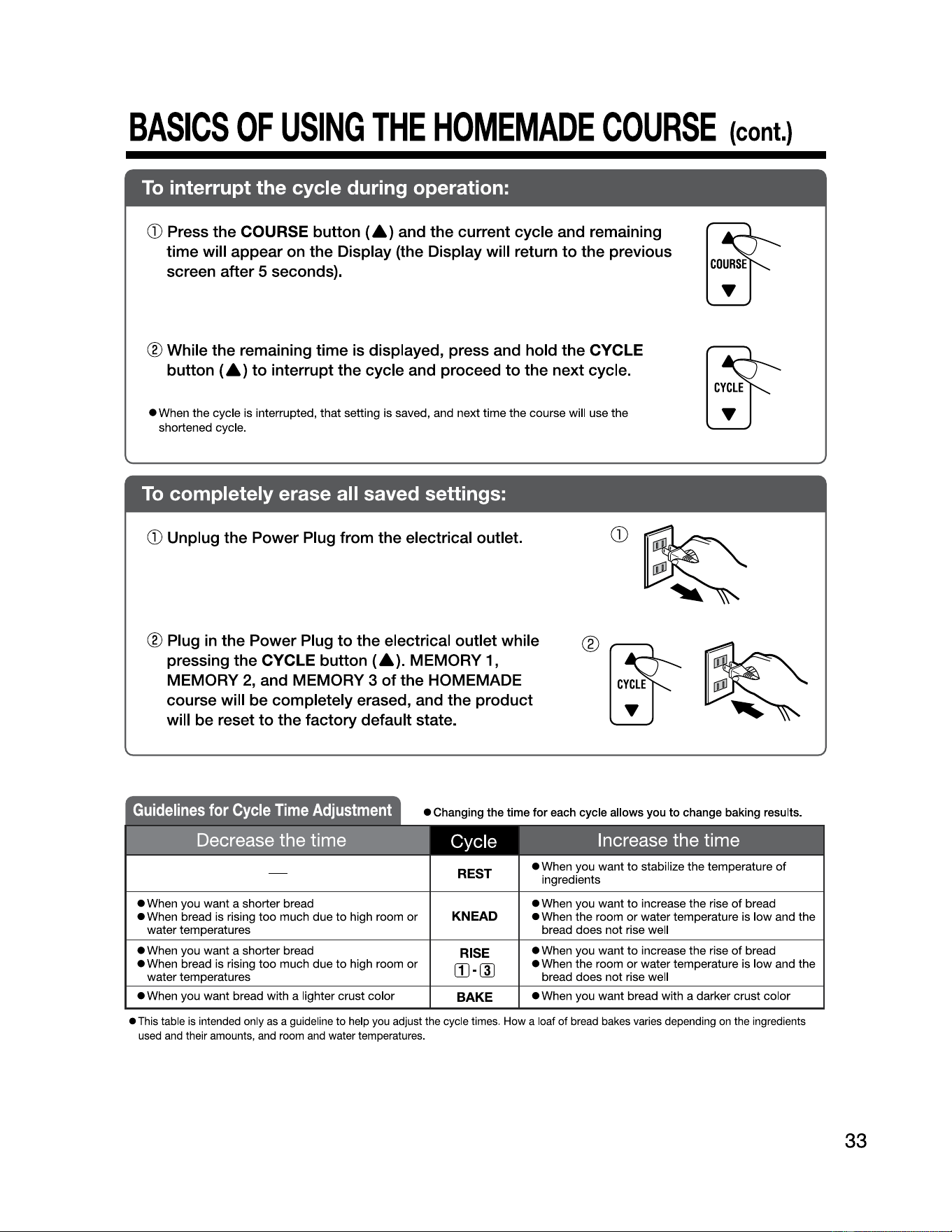
BASICS
OF
USING
THE
HOMEMADE
COURSE
(cont.)
To
interrupt the cycle during operation:
CD
Press the
COURSE
button
(A)
and the current cycle and remaining
time will appear
on
the Display (the Display will return
to
the previous
screen after 5 seconds).
® While the remaining time
is
displayed, press and hold the
CYCLE
button
(A)
to interrupt the cycle and proceed
to
the next cycle.
• When the cycle is interrupted, that setting is saved, and next time the course will use the
shortened cycle.
To
completely erase all saved settings:
CD
Unplug the Power Plug from the electrical outlet.
® Plug
in
the Power Plug
to
the electrical outlet while
pressing the
CYCLE
button
(A).
MEMORY
1,
MEMORY
2, and
MEMORY
3 of the
HOMEMADE
course will
be
completely erased, and the product
will be reset to the factory default state.
REST
• When you want
to
stabilize the temperature
of
ingredients
• When you want a shorter bread
• When bread is rising
too
much
due
to
high room
or
water temperatures
KNEAD
• When you want
to
increase the rise
of
bread
• When the room
or
water temperature is low and the
bread does not rise well
• When you want a shorter bread
• When bread is rising
too
much due
to
high room
or
water temperatures
RISE
(IHID
• When you want
to
increase the rise
of
bread
• When the room
or
water temperature is low and the
bread does not rise well
• When you want bread with a lighter crust color
BAKE
• When you want bread with a darker crust color
• This table
is
intended only
as
a guideline to
help
you
adjust the cycle times.
How
a loaf of
bread
bakes varies depending
on
the ingredients
used
and
their amounts,
and
room
and
water temperatures.
33
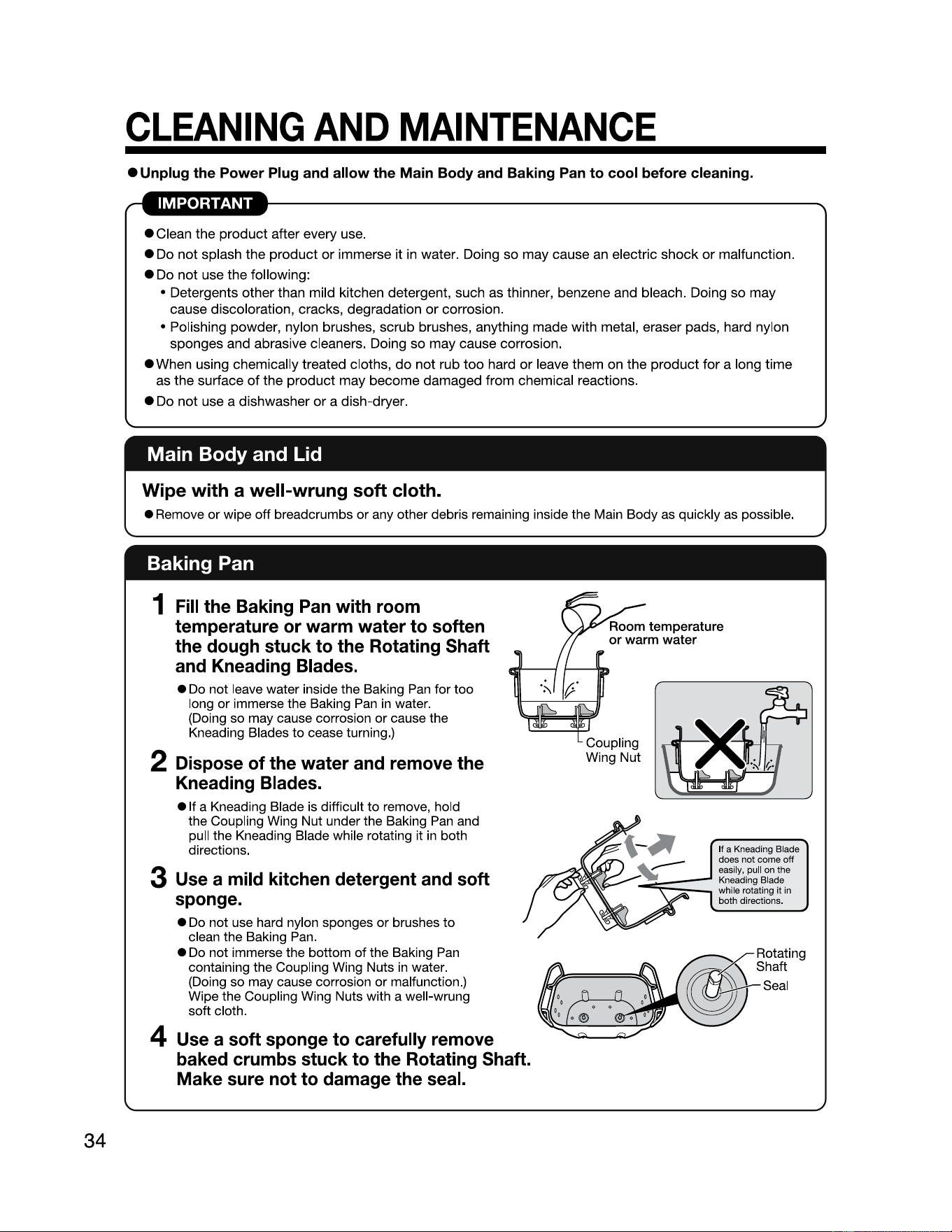
34
CLEANING
AND
MAINTENANCE
• Unplug the Power Plug and allow the Main Body and Baking Pan
to
cool before cleaning.
• Clean the
product
after every use.
• Do
not
splash the product
or
immerse it in water. Doing so may cause an electric
shock
or
malfunction.
• Do
not
use the following:
• Detergents other than mild kitchen detergent, such as thinner, benzene and bleach. Doing so may
cause discoloration, cracks, degradation
or
corrosion.
• Polishing powder, nylon brushes, scrub brushes, anything made with metal, eraser pads, hard nylon
sponges and abrasive cleaners. Doing
so
may cause corrosion.
• When using chemically treated cloths,
do
not
rub
too
hard
or
leave them on the product
for
a long time
as the surface
of
the
product
may become damaged from chemical reactions.
• Do
not
use a dishwasher
or
a dish-dryer.
Main Body and Lid
Wipe
with a
well-wrung
soft cloth.
• Remove or wipe off breadcrumbs or any other debris remaining inside the Main Body as quickly as possible.
Baking Pan
1
Fill
the Baking Pan with room
temperature or warm water to soften
the dough stuck to the Rotating Shaft
and Kneading Blades.
•
Do
not leave water inside the Baking
Pan
for too
long or immerse the Baking
Pan
in
water.
(Doing so may cause corrosion or cause the
Kneading Blades to cease turning.)
If a Kneading Blade
does not come off
easily, pull on the
Kneading Blade
while rotating it in
both directions.
2 Dispose of the water and remove the
Kneading Blades.
e
1t
a Kneading Blade is difficult to remove, hold
the Coupling Wing Nut under the Baking
Pan
and
pull the Kneading Blade while rotating it
in
both
directions.
3 Use a mild kitchen detergent and soft
sponge.
•
Do
not use hard nylon sponges or brushes to
clean the Baking
Pan
.
•
Do
not immerse the bottom of the Baking
Pan
containing the Coupling Wing Nuts
in
water.
(Doing so may cause corrosion or malfunction.)
Wipe the Coupling Wing Nuts with a well-wrung
soft cloth.
4 Use a soft sponge to carefully remove
baked crumbs stuck to the Rotating Shaft.
Make
sure not to damage the seal.
-
~==;;:::
Rotating
Shaft
Seal
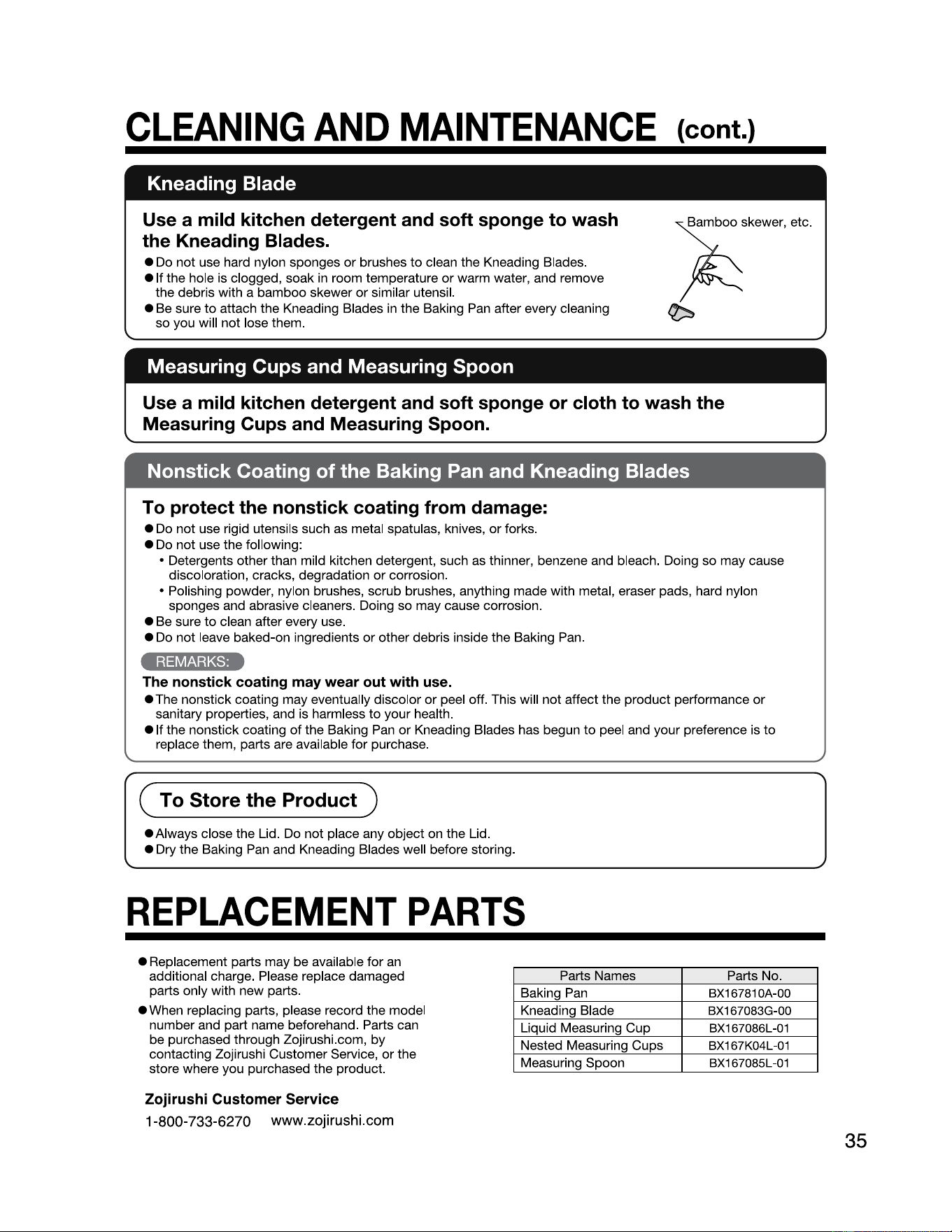
CLEANING
AND
MAINTENANCE
Kneading Blade
Use a mild kitchen detergent and soft sponge to wash
the Kneading Blades.
• Do not use hard nylon sponges or brushes
to
clean the Kneading Blades.
• It the hole is clogged, soak
in
room temperature
or
warm water, and remove
the debris with a bamboo skewer or similar utensil.
• Be sure
to
attach the Kneading Blades
in
the Baking Pan after every cleaning
so you will not lose them.
(cont.)
;i;skewe,,
etc
.
~
Measuring Cups and Measuring Spoon
Use a mild kitchen detergent and soft sponge or cloth to wash the
Measuring Cups and Measuring Spoon.
Nonstick Coating of the Baking Pan and Kneading Blades
To protect the nonstick coating from damage:
• Do not use rigid utensils such as metal spatulas, knives,
or
forks.
• Do not use the following:
• Detergents other than mild kitchen detergent, such as thinner, benzene and bleach. Doing so may cause
discoloration, cracks, degradation
or
corrosion.
• Polishing powder, nylon brushes, scrub brushes, anything made with metal, eraser pads, hard nylon
sponges and abrasive cleaners. Doing so may cause corrosion.
• Be sure
to
clean after every use.
• Do not leave baked-on ingredients
or
other debris inside the Baking Pan.
4;1=iM4il3-..,_
The nonstick coating may wear out with use.
•The
nonstick coating may eventually discolor
or
peel off. This will not affect the product performance
or
sanitary properties, and is harmless
to
your health.
• It the nonstick coating
of
the Baking Pan
or
Kneading Blades has begun
to
peel and your preference is
to
replace them, parts are available for purchase.
( To Store the
Product)
•Always
close the Lid. Do not place any object on the Lid.
• Dry the Baking Pan and Kneading Blades well before storing.
REPLACEMENT
PARTS
• Replacement parts may be available for
an
additional charge. Please replace damaged
parts only with new parts.
• When replacing parts, please record the model
number and part name beforehand. Parts can
be purchased through Zojirushi.com, by
contacting Zojirushi Customer Service, or the
store where you purchased the product.
Zojirushi Customer Service
1-800-733-6270 www.zojirushi.com
Parts Names
Parts No.
Baking Pan
BX16781 0A-00
Kneading Blade
BX167083G-00
Liquid Measuring Cup
BX167086L-01
Nested Measuring Cups
BX167K04L-01
Measuring Spoon
BX167085L-01
35
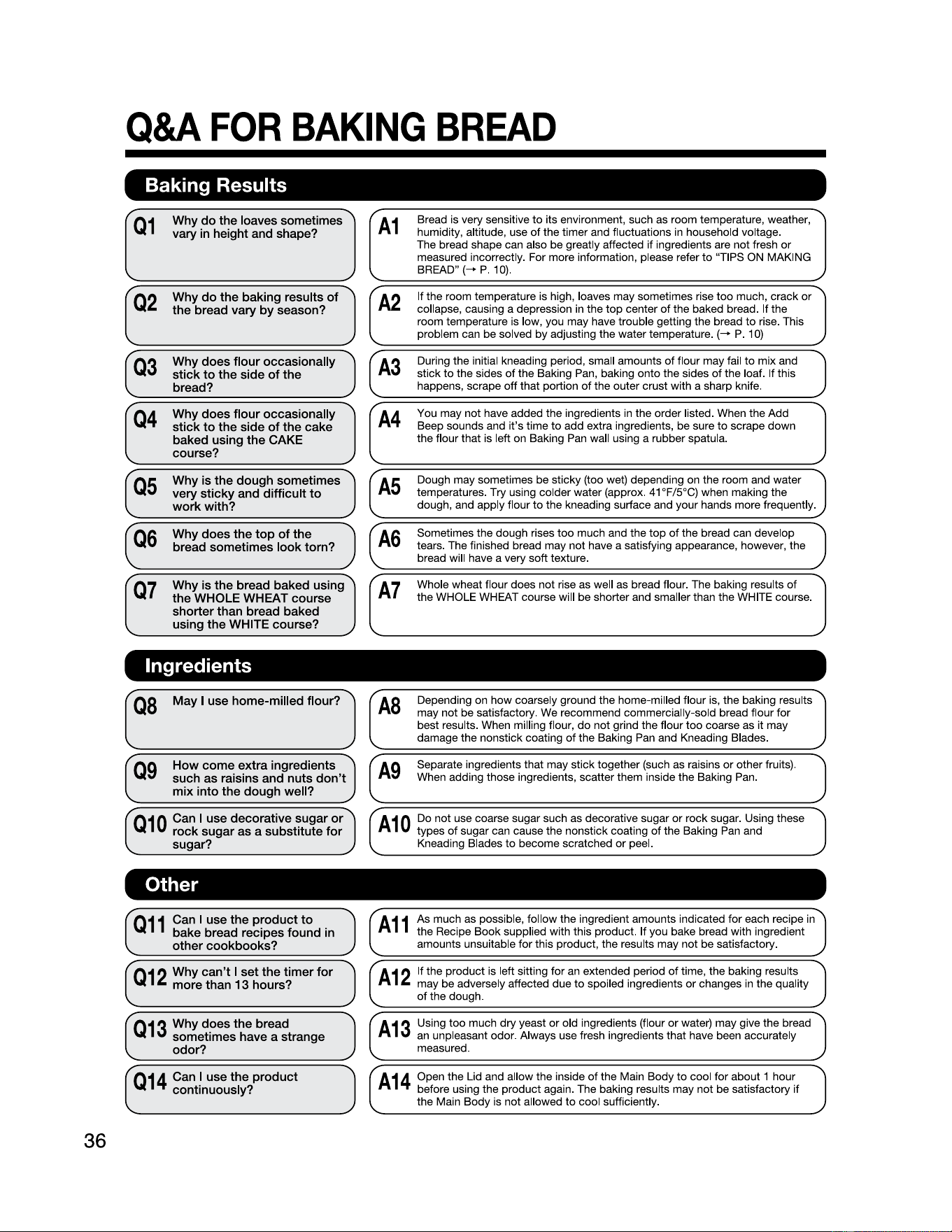
Q&A
FOR
BAKING
BREAD
36
Baking Results
Q1
Why do the loaves sometimes
vary
in
height and shape?
Q2
Why
do
the baking results
of
the bread vary
by
season?
Q3
Why does flour occasionally
stick
to
the side
of
the
bread?
Q4
Why does flour occasionally
stick
to
the side
of
the cake
baked using the
CAKE
course?
Q5
Why
is
the
dough
sometimes
very
sticky
and
difficult to
work
with?
Q6
Why
does the top
of
the
bread
sometimes
look
torn?
Q7
Why
is
the
bread
baked
using
the
WHOLE
WHEAT
course
shorter
than
bread
baked
using
the WHITE
course?
rA1
Bread is very sensitive
to
its environment, such as room temperature, weather,
humidity, altitude, use of the timer and fluctuations
in
household voltage.
The bread shape can also be greatly affected if ingredients are not fresh
or
measured incorrectly. For more information, please refer
to
"TIPS ON MAKING
BREAD" (-+ P. 10).
"
r
A2
'-
If the room temperature is high, loaves may sometimes rise
too
much, crack
or
collapse, causing a depression in the
top
center
of
the baked bread. If the
room temperature is low, you may have trouble getting the bread
to
rise. This
problem can be solved by adjusting the water temperature. (-+ P. 1
O)
(A3
"
~
During the initial kneading period, small amounts
of
flour may fail
to
mix and
stick
to
the sides
of
the Baking Pan, baking onto the sides
of
the loaf. If this
happens, scrape
off
that portion
of
the outer crust with a sharp knife.
J
A4
You may not have added the ingredients in the order listed. When the Add
Beep sounds and
it's
time
to
add extra ingredients, be sure
to
scrape down
the flour that is left on Baking Pan wall using a rubber spatula.
A5
Dough may sometimes be sticky (too wet) depending on the room and water
temperatures. Try using colder water (approx.
41
°F/5°C) when making the
dough, and apply flour
to
the kneading surface and your hands more frequently.
(A6
Sometimes the dough rises
too
much and the
top
of
the bread can develop
tears. The finished bread may not have a satisfying appearance, however, the
bread will have a very soft texture.
A7
Whole wheat flour does not rise as well as bread flour. The baking results
of
the WHOLE WHEAT course will be shorter and smaller than the WHITE course.
Ingredients
QB
May I
use
home-milled
flour?
Q9
How
come extra ingredients
such
as
raisins
and
nuts
don't
mix
into
the
dough
well?
Q10
Can I
use
decorative
sugar
or
rock
sugar
as
a substitute for
sugar?
Depending on how coarsely ground the home-milled flour is, the baking results
may not be satisfactory. We recommend commercially-sold bread flour for
best results. When milling flour,
do
not grind the flour
too
coarse as it may
damage the nonstick coating
of
the Baking Pan and Kneading Blades.
"
Separate ingredients that may stick together (such as raisins
or
other fruits).
When adding those ingredients, scatter them inside the Baking Pan.
A10
Do not use coarse sugar such as decorative sugar
or
rock sugar. Using these
types of sugar can cause the nonstick coating
of
the Baking Pan and
Kneading Blades
to
become scratched
or
peel.
Other
Q11
Can I use the product
to
bake bread recipes found in
other cookbooks?
Q
12
Why can't I set the timer
for
more than 13 hours?
Q
13
Why does the bread
sometimes have a strange
odor?
Q
14
Can I use the product
continuously?
A11
As much as possible, follow the ingredient amounts indicated for each recipe in
the Recipe Book supplied with this product. If you bake bread with ingredient
amounts unsuitable for this product, the results may not be satisfactory.
A12
If the product is left sitting for an extended period
of
time, the baking results
may be adversely affected due
to
spoiled ingredients
or
changes
in
the quality
of
the dough.
A13
Using too much dry yeast
or
old ingredients (flour
or
water) may give the bread
an unpleasant odor. Always use fresh ingredients that have been accurately
measured.
A14
Open the Lid and allow the inside of the Main Body
to
cool for about 1 hour
before using the product again. The baking results may not be satisfactory if
the Main Body is not allowed
to
cool sufficiently.
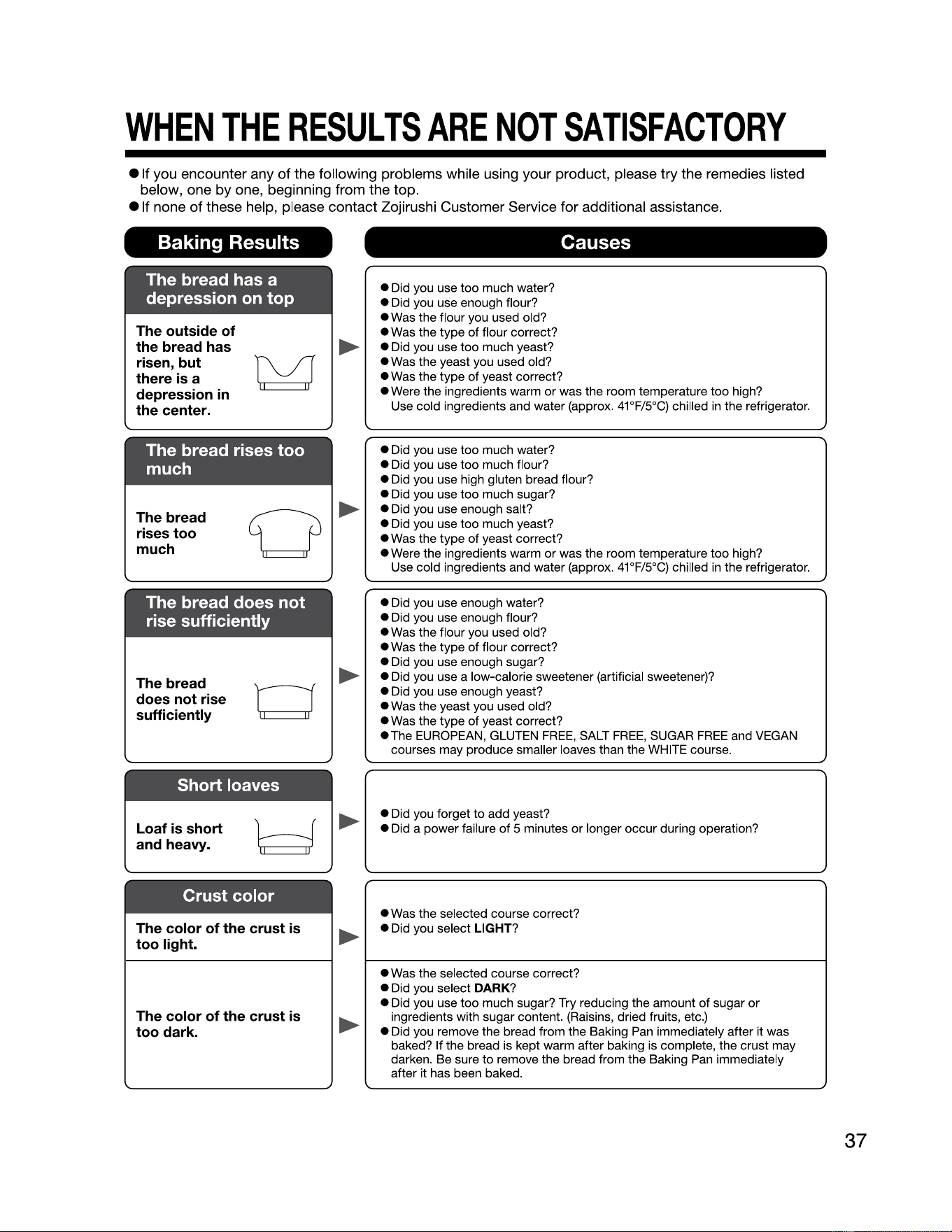
WHEN
THE
RESULTS
ARE
NOT
SATISFACTORY
e
1t
you encounter any
of
the following problems while using your product, please try the remedies listed
below, one
by
one, beginning from the
top
.
e
1t
none
of
these help, please contact Zojirushi Customer Service for additional assistance.
Baking Results
Causes
The bread has a
depression on top
The outside of
the bread has
risen, but
there is a
depression
in
the center.
M
• Did you use too much water?
• Did you use enough flour?
• Was the flour you used old?
• Was the type
of
flour correct?
• Did you use too much yeast?
• Was the yeast you used old?
• Was the type
of
yeast correct?
• Were the ingredients warm
or
was the room temperature too high?
Use cold ingredients and water (approx. 41°F/5°C) chilled in the refrigerator.
The bread rises too
much
The bread
rises too
much
0
• Did you use too much water?
• Did you use too much flour?
• Did you use high gluten bread flour?
• Did you use too much sugar?
• Did you use enough salt?
• Did you use too much yeast?
• Was the type
of
yeast correct?
• Were the ingredients warm
or
was the room temperature too high?
Use cold ingredients and water (approx. 41°F/5°C) chilled in the refrigerator.
The bread does not
rise sufficiently
The bread
does not rise
sufficiently
• Did you use enough water?
• Did you use enough flour?
• Was the flour you used old?
• Was the type
of
flour correct?
• Did you use enough sugar?
• Did you use a low-calorie sweetener (artificial sweetener)?
• Did you use enough yeast?
• Was the yeast you used old?
• Was the type
of
yeast correct?
•The
EUROPEAN, GLUTEN
FREE,
SALT
FREE,
SUGAR
FREE
and VEGAN
courses may produce smaller loaves than the WHITE course.
Short loaves
Loaf
is
short
and heavy.
• Did you forget to add yeast?
• Did a power failure
of
5 minutes
or
longer occur during operation?
Crust color
The color of the crust
is
too light.
• Was the selected course correct?
• Did you select
LIGHT?
The color of the crust
is
too dark.
►
►
►
►
►
►
• Was the selected course correct?
• Did you select
DARK?
• Did you use too much sugar? Try reducing the amount
of
sugar
or
ingredients with sugar content. (Raisins, dried fruits, etc.)
• Did you remove the bread from the Baking Pan immediately after it was
baked? If the bread is kept warm after baking is complete, the crust may
darken. Be sure
to
remove the bread from the Baking Pan immediately
after it has been baked.
37
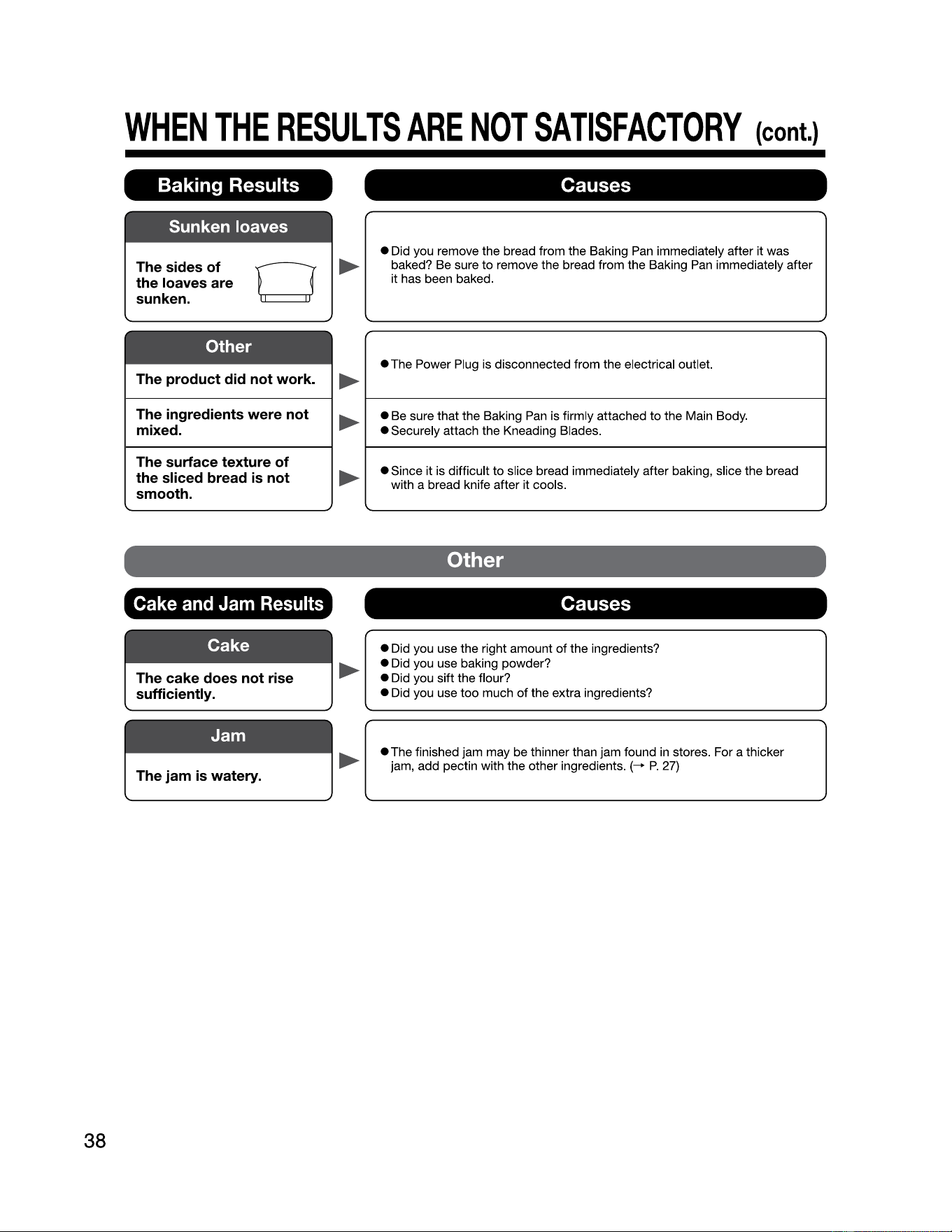
WHEN
THE
RESULTS
ARE
NOT
SATISFACTORY
{cont.)
Baking Results
Causes
Sunken loaves
38
The sides of
the loaves are
sunken.
0
►
• Did you remove the bread from the Baking Pan immediately after it was
baked? Be sure
to
remove the bread from the Baking
Pan
immediately after
it has been baked.
Other
The product did not work.
►
• The Power Plug
is
disconnected from the electrical outlet.
The ingredients were not
mixed.
• Be sure that the Baking
Pan
is firmly attached
to
the Main Body.
• Securely attach the Kneading Blades.
The surface texture
of
the sliced bread is not
smooth.
►
►
►
►
• Since it is difficult
to
slice bread immediately after baking, slice the bread
with a bread knife after it cools.
Other
Cake
and
Jam
Results
Causes
• Did you use the right amount
of
the ingredients?
• Did you use baking powder?
• Did you sift the flour?
• Did you use too much
of
the extra ingredients?
The jam is watery.
• The finished jam may be thinner than jam found in stores. For a thicker
jam, add pectin with the other ingredients.
(-+ P. 27)
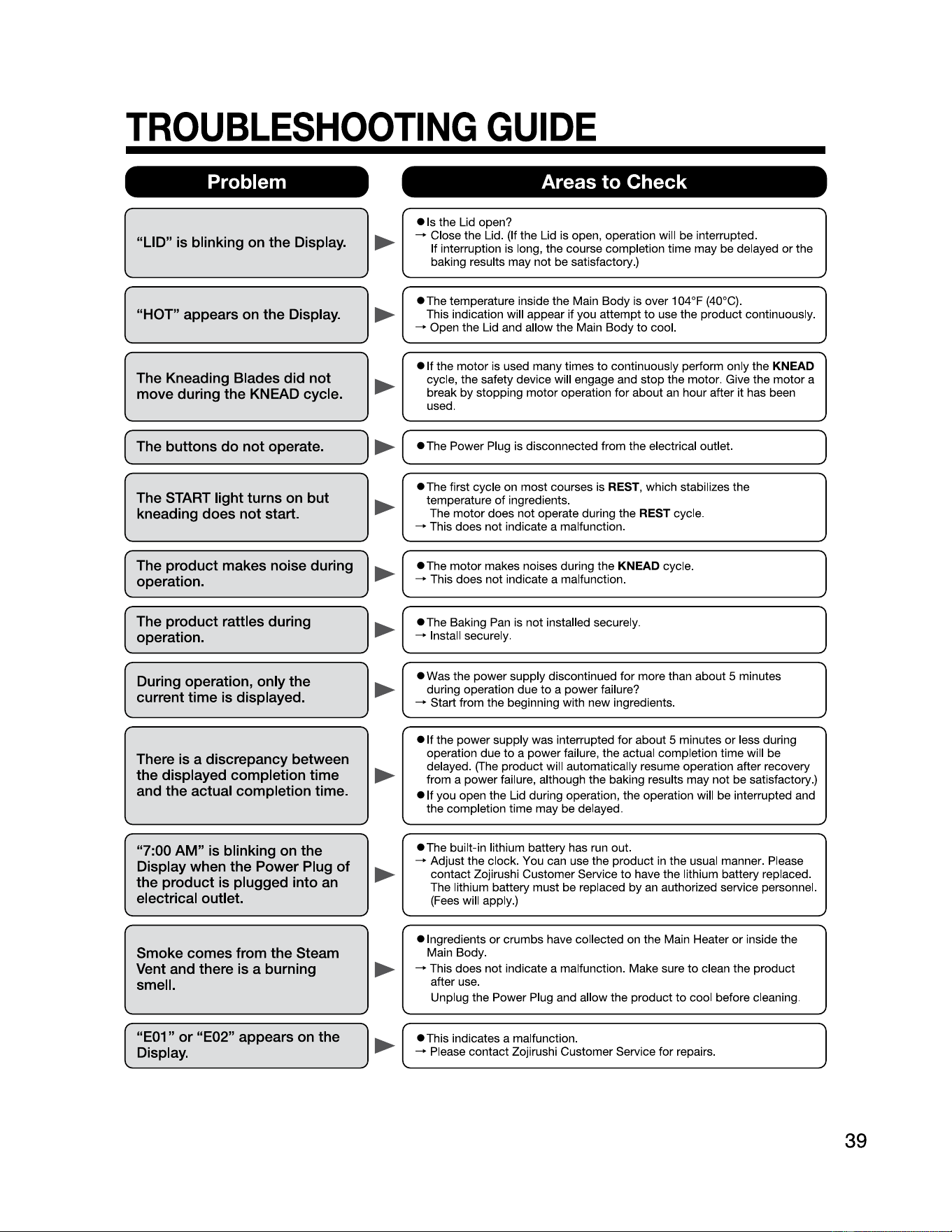
TROUBLESHOOTING
GUIDE
Problem Areas to Check
"LID"
is
blinking
on
the Display.
• Is the Lid open?
--+
Close the Lid. (If the Lid is open, operation will be interrupted.
If interruption is long, the course completion time may be delayed
or
the
baking results may not be satisfactory.)
"HOT" appears
on
the Display.
•The
temperature inside the Main
Body
is over 104°F (40°C).
This indication will appear
if
you
attempt
to
use the
product
continuously.
--+
Open the Lid and allow the Main
Body
to
cool.
The Kneading Blades did not
move during the KNEAD cycle.
►
►
►
• If the
motor
is used many times
to
continuously perform only the
KNEAD
cycle, the safety device will engage and
stop
the motor. Give the
motor
a
break
by
stopping
motor
operation for about
an
hour after it has been
used.
( The buttons
do
not operate.
•The
Power Plug is disconnected from the electrical outlet.
)
►
..._
_____________
___,
'---------------------------
The START light turns
on
but
kneading does not start.
►
•The
first cycle on
most
courses is REST, which stabilizes the
temperature
of
ingredients.
The
motor
does not operate during the REST cycle.
--+
This does not indicate a malfunction.
The product makes noise during
operation.
•The
motor
makes noises during the
KNEAD
cycle.
--+
This does not indicate a malfunction.
►
I
_________________
..,
,
__________________________
..,
The product rattles during
operation.
►
I
•The
Baking Pan is not installed securely.
--+
Install securely.
During operation, only the
current time
is
displayed.
• Was the power supply discontinued for more than about 5 minutes
during operation due
to
a
power
failure?
--+
Start from the beginning with new ingredients.
There
is
a discrepancy between
the displayed completion time
and the actual completion time.
• If the
power
supply was interrupted
for
about 5 minutes
or
less during
operation
due
to
a
power
failure, the actual completion time will be
delayed. (The product will automatically resume operation after recovery
from a power failure, although the baking results may not be satisfactory.)
• If you open the Lid during operation, the operation will be interrupted and
the completion time may be delayed.
"7:00 AM"
is
blinking
on
the
Display when the Power Plug of
the product
is
plugged into an
electrical outlet.
•The
built-in lithium battery has run out.
--+
Adjust the
clock
. You can use the product in the usual manner. Please
contact Zojirushi Customer Service
to
have the lithium battery replaced.
The lithium battery must be replaced
by
an
authorized service personnel.
(Fees will apply.)
Smoke comes from the Steam
Vent and there
is
a burning
smell.
• Ingredients
or
crumbs have collected on the Main Heater
or
inside the
Main
Body
.
--+
This does not indicate a malfunction. Make sure
to
clean the
product
after use.
Unplug the Power Plug and allow the product
to
cool before cleaning.
►
"E01" or "E02" appears
on
the
Display.
►
---------------✓
'--------------------------✓
►
►
►
•This
indicates a malfunction.
--+
Please
contact
Zojirushi Customer Service
for
repairs.
39