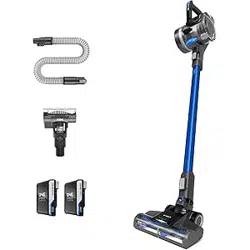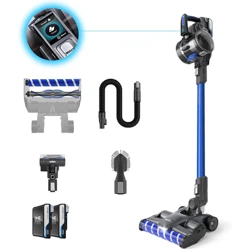
CLSV-B5KP CLSV-B5DC
CLSV-B5DP CLSV-B5DC
User Guide
VAX Blade 5
Cordless Vacuum

Don’ts
• Don’t leave the charger plugged in when unattended.
• Don’t use the machine if it is faulty or has been dropped, damaged or left
outdoors.
• Don’t use the machine to pick up any flammable or combustible materials (lighter
fluid, petrol, kerosene etc.) or use the machine in an area with explosive vapours
or liquid.
• Don’t use the machine to pick up hot coals, cigarette butts, matches or smoking
hot burning items or use in an area where there may be harmful fluids (chlorine,
bleach and ammonia drain cleaner).
• Don’t handle the charger, battery or use the machine with wet hands.
• Don’t unplug the charger by pulling on the power cord. The power cord cannot
be replaced. If the cord is damaged the charger should be scrapped.
• Don’t attempt to remove blockages with sharp objects as this may cause damage
to the machine.
• Don’t use the machine with the incorrect battery or charger as this may result in
damage or injury to the user. The correct battery charger information is listed on
the battery pack ratings label.
• Don’t charge the battery outdoors, or leave the charger connected to the mains
when not in use.
• Don’t use the machine with a damaged battery. If the battery is damaged contact
us on: 08000 927737
• Don’t use on a surface that is damaged, uneven or incorrectly fitted.
• Don’t over fill the dirt container to avoid blocking the air flow through the machine.
• The brushbar in the floorhead and mini motorised pet tool constantly rotates
when activated. Never use them on one spot for a prolonged period of time as
the brushbar may damage the floor surface.
Do’s
• Only VAX ONEPWR batteries (BVXXXXX) and chargers (BV05XXX) should be used
with this machine.
• Always stand the charger on a stable, level surface, uncovered and away from any
heat source.
• Always protect the charger power cord from heated surfaces or near open flames.
• Always check suitability with the manufacturer of your flooring prior to using the
machine.
This machine is intended for household use only, not for commercial or industrial use.
Please keep instructions for further use and only as instructed in this guide.
The full user guide can be found at: support.vax.co.uk
CLSV-B5KP
CLSV-B5DC
Safety Guide
VAX Ltd, Artillery House, Heritage Way, Droitwich, WR9 8YB, UK
VAX Blade 5

• Always remove the battery from the machine before carrying out any maintenance
or if storing unused for a long period of time.
• Only VAX ONEPWR recommended tools and accessories should be used with this
machine.
• Keep all openings clear, free from debris and don’t overfill the dirt container as this
may affect the airflow/suction.
• Turn off all controls on the machine before disconnecting or connecting the battery.
This machine is not intended to be used or cleaned by persons with reduced
physical, sensory or mental capabilities, or lack of experience or knowledge, unless
they have been given instructions concerning the safe use of the machine by a
person legally responsible for their safety. They should be supervised whilst using
the machine. Children shall not use, clean or play with this machine, which when
not in use should be secured out of their reach.
• Only use the machine indoors on dry surfaces and keep the area you’re cleaning
well lit.
• Keep fingers, hair and loose clothing away from moving parts and openings whilst
using the machine.
• Store the machine in a cool, dry area. Keep the machine away from rain and
moisture.
• Use only CE/UKCA approved 13amp extension cords, non-approved extension
cords may overheat. Care should be taken to arrange the extension cord as it can
be a trip hazard.
• Take extra care when using the machine on the stairs.
• Always turn the brushbar off when cleaning hard floors and surfaces.
To prevent any damage being sustained, test on an inconspicuous area of the
flooring/surface first.
• Always make sure the separator and filter are fitted correctly before using your
machine and only use the machine with the filter and separator in place.
• Always check the powered floorhead, mini motorised pet tool and accessories are
free from damage, dirt and debris before using.
• This machine does not stay upright without constant support. Between uses, lie flat
on the floor in a suitable location so that it does not become a trip hazard or can be
stepped on.
Battery Safety Precautions
• Replace the battery with a VAX ONEPWR battery only. Use of another battery
may present a risk of fire or explosion.
• Don’t attempt to disassemble the battery, remove any component projecting from
the battery terminals and do not dispose of in a fire. The battery and charger
have no user serviceable parts. Fire or injury may result.
• Prior to disposal, protect exposed terminals with heavy insulating tape to prevent
shorting. The battery is to be disposed of safely at your local battery recycling
centre.
• When the battery pack is not in use, keep it away from other metal objects
that can make a connection from one terminal to another. Shorting the battery
terminals together may cause burns or a fire.
• In case of battery leakages, avoid any contact with skin and contact us on:
08000 927737
2
22
Welcome to the Vax family!
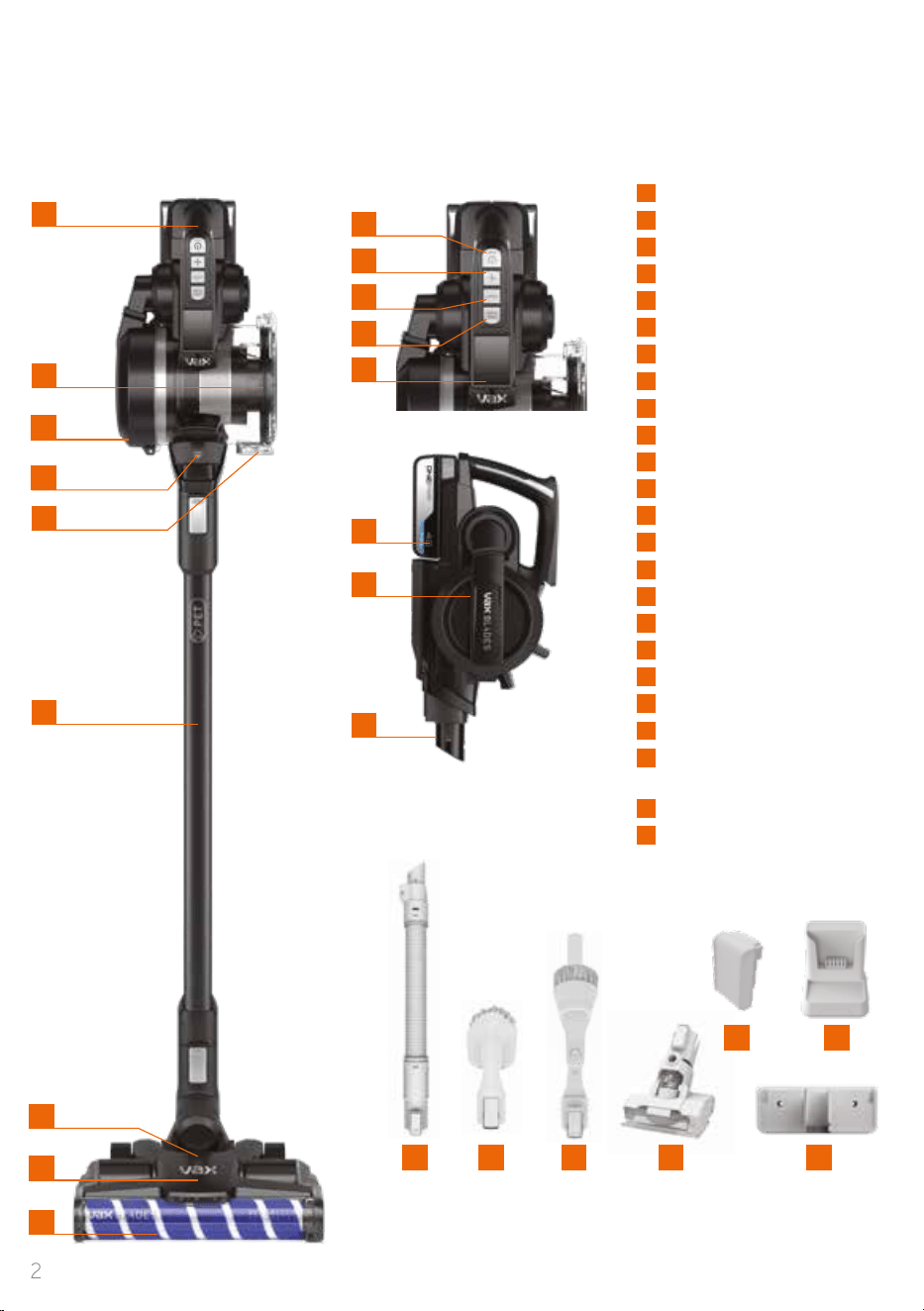
You are now the proud owner of a VAX Blade 5.
Here, you’ll find everything you need to know about your machine and, most importantly, instructions on
how to get started so that you can get cleaning!
2
6
7
8
9
10
1
Carry handle
2
Dirt container
3
Filter cover and filter
4
Dirt container release latch
5
Dirt release button
6
Power ON/OFF
7
Boost ON/OFF
8
Carpet mode button
9
Hard Floor mode button
10
Digital display
11
Reach wand
12
Powered floorhead
13
Brushbar (hidden)
14
Brushroll
15
Battery dock
16
Filter cover release (hidden)
17
Inbuilt crevice tool
18
ONEPWR battery
19
ONEPWR charger
20
Powered hose*
21
Tech tool*
22
2-in-1 crevice tool and
dusting brush
23
Mini motorised pet tool
24
Wall mount
screws and wall plugs
15
16
17
Weight 3.3kg (without battery pack). Dirt bin capacity 0.6L.
Runtime and charge time dependent on battery pack and mode used.
*Powered hose and Tech tool included with model CLSV-B5DC only.
Subject to technical change without notice. Images are illustrative only.
20
1
2
5
3
4
11
13
12
14
23
18
21
HARD
FLOOR
CARPET
* *
19
24
3
Registration and Support
All ONEPWR products come with
a standard one year warranty
Register your product to receive
2 YEARS FREE additional
warranty
†
For details visit: vax.co.uk/registration
Scan here
For help and support with
your new product
or visit us online: support.vax.co.uk
Still need to get in touch?
Our UK based Customer Care Team are here to
support you. For help with assembly, operational or
performance problems, or buying and fitting new
accessories, you can find all our contact details at
vax.co.uk/contact
This user guide can be found online at:
support.vax.co.uk
† Registration required. Terms and conditions apply,
see vax.co.uk for details.
2
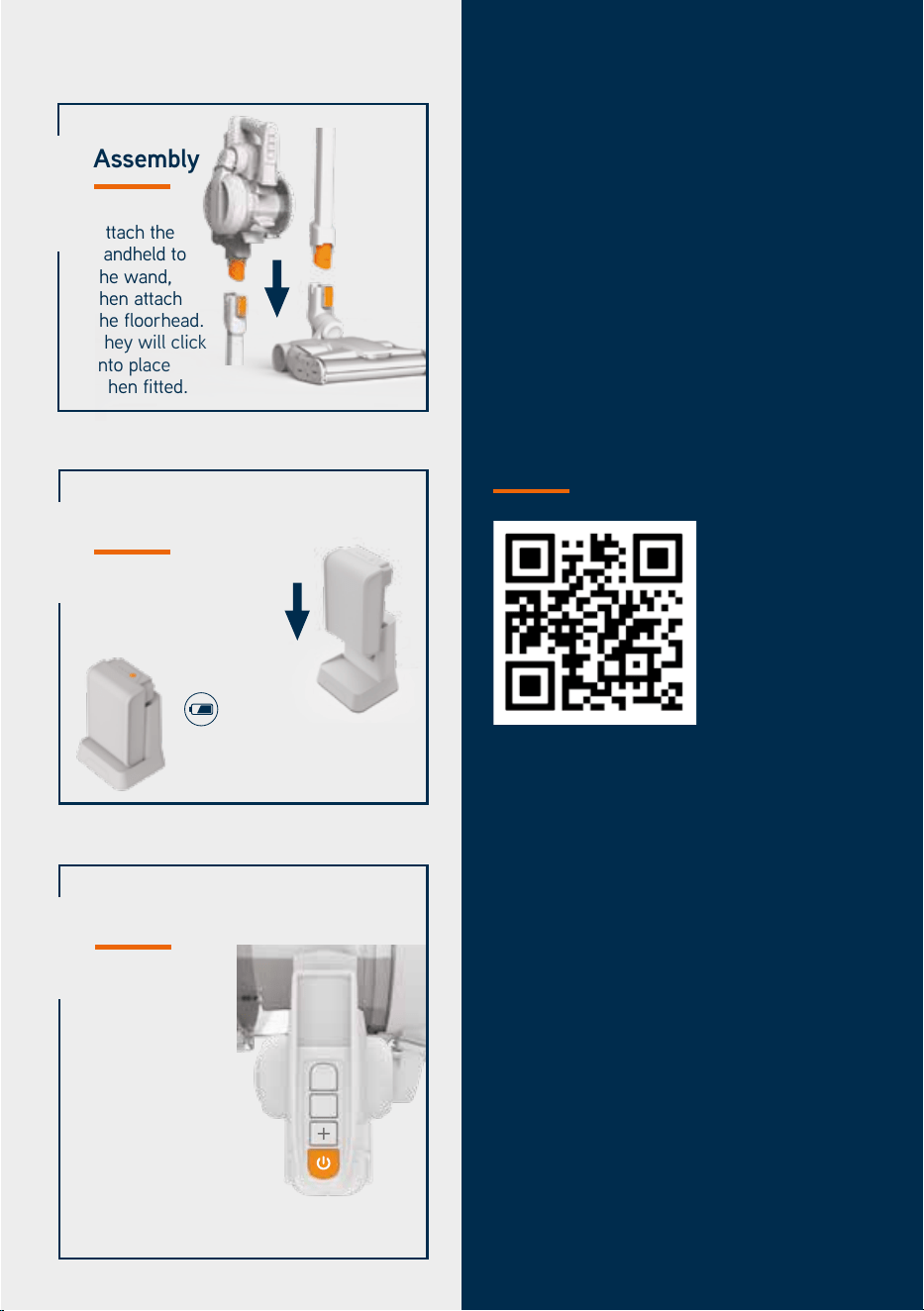
Press the battery symbol
to check the battery status.
Charging the battery
Fully charge the battery
before first use.
1
Assembly
Attach the
handheld to
the wand,
then attach
the floorhead.
They will click
into place
when fitted.
3
Operation
Switch on the
machine and
select a mode:
HARD FLOOR
CARPET
BOOST
Increases suction
3
Quick Start
HARD
FLOOR
CARPET

4
If a Vax machine is used in the way it is intended and it breaks down within the
guarantee period, it’s our responsibility to repair or replace it.
Here’s what isn’t covered:
• Normal wear and tear of consumable items, for example: belts, filters, brushbars,
fuses etc.
• Batteries which have become faulty as a result of improper handling.
• Batteries which have a reduced service life as a result of normal wear.
• Accidental damage
- Damage as a result of use not in accordance with the product user guide.
- Damage caused by not carrying out regular maintenance.
- Damage to the charger cable.
- Blockages caused by misuse.
• Faults caused by:
- Negligent use, misuse, neglect or careless operation of the machine.
- Use of the machine cleaner which is not in accordance with the user guide.
- Use of a Vax machine for anything other than normal domestic household
purposes in the country in which it was purchased.
- Use of parts, accessories and consumables, which are not genuine Vax
components.
- Faulty installation or repairs – unless carried out by a qualified electrician or
engineer.
Technical
Statement of Compliance: Manufacturer/EU importer: Vax Limited, hereby on
our own responsibility, declare that the VAX Blade 5 series is manufactured in
compliance with the following Legislation:
Safety: 2014/35/EU Low Voltage Directive/Electrical Equipment (Safety)
Regulations 2016. EMC: 2014/30/EU Electromagnetic Compatibility Directive/
Electromagnetic Compatibility Regulations 2016.
Waste electrical products should not be disposed of with household
waste. Please recycle where facilities exist. Check with your Local
Authority or retailer for recycling advice.
VAX is a trade mark of Techtronic Cordless GP.
© 2021 Techtronic Cordless GP. All rights reserved.
Vax Ltd, Artillery House, Heritage Way, Droitwich, WR9 8YB, UK.
Warranty
Warranty and technical
5
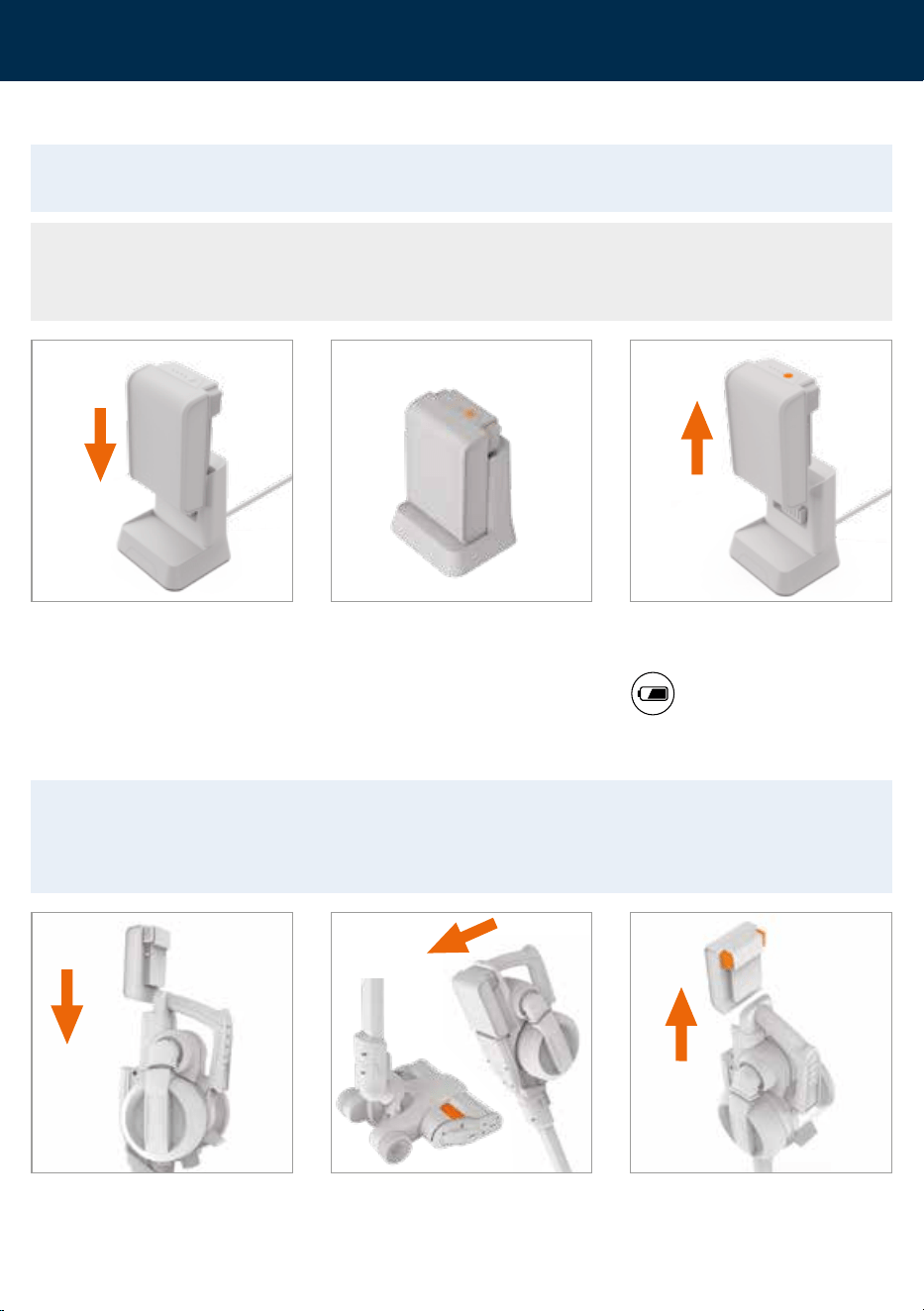
Without the handheld attached to the
reach wand and powered floorhead,
push the wall mount onto the top and
back of the reach wand.
Choose a location for the machine to be
stored. Stand the powered floorhead
and wand against the wall, ensuring the
powered floorhead is flat on the floor.
Holding the wall mount securely against
the wall, make a small mark for each
screw. Secure the wall mount to the
wall using the wall plugs and screws.
The tools can be fitted in to the wall
mount for storage.
Fully assemble the machine and firmly
press the machine into the wall mount
to secure. Always ensure the machine is
securely locked into place.
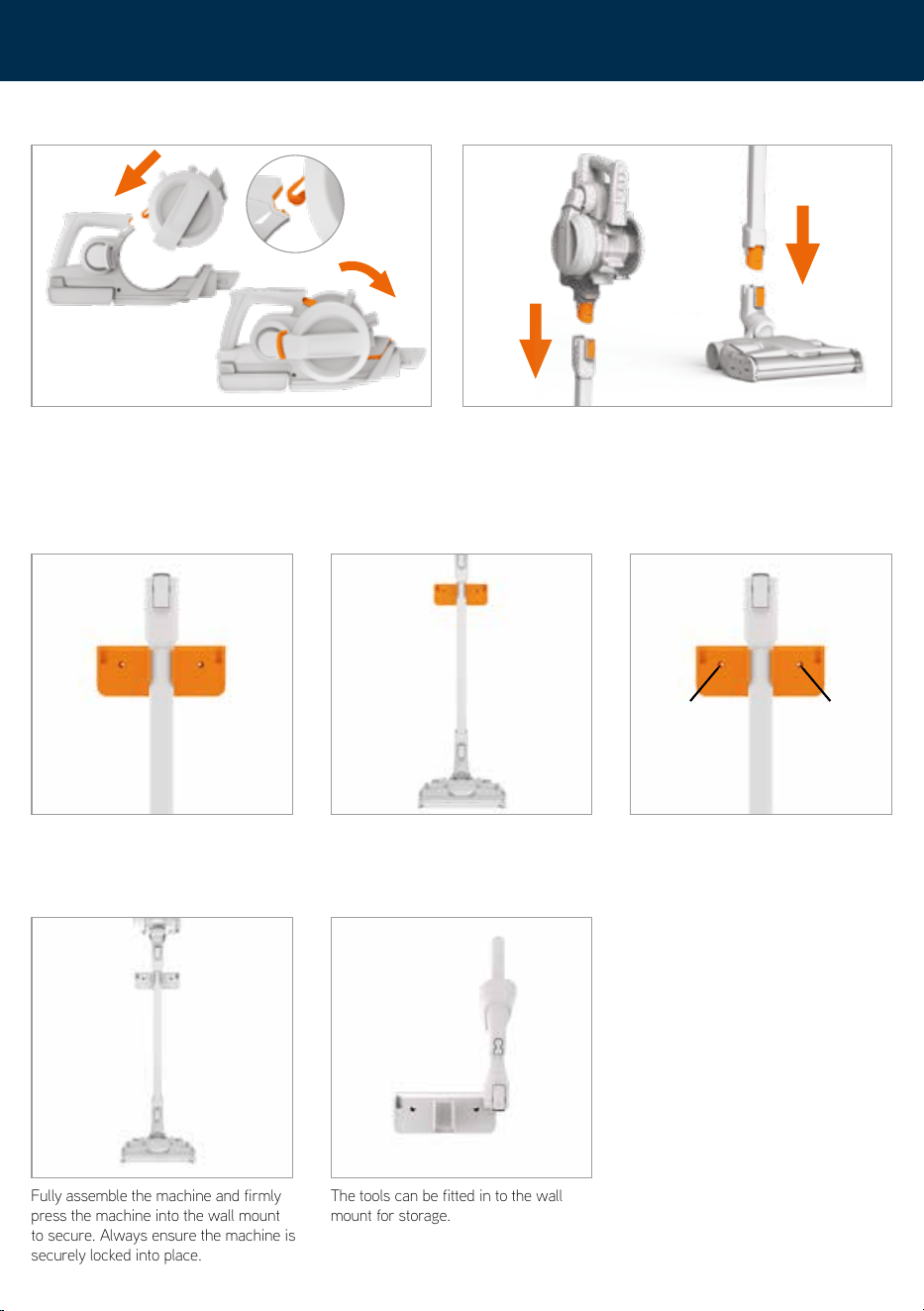
To assemble align the white arrows. Rotate the dirt container
onto the handheld. Push until it clicks into place.
Attach the handheld to the reach wand until it clicks into place.
Attach the reach wand to the powered floorhead until it clicks
into place.
Assembly
Attaching the wall mount
Getting started
6
Getting started
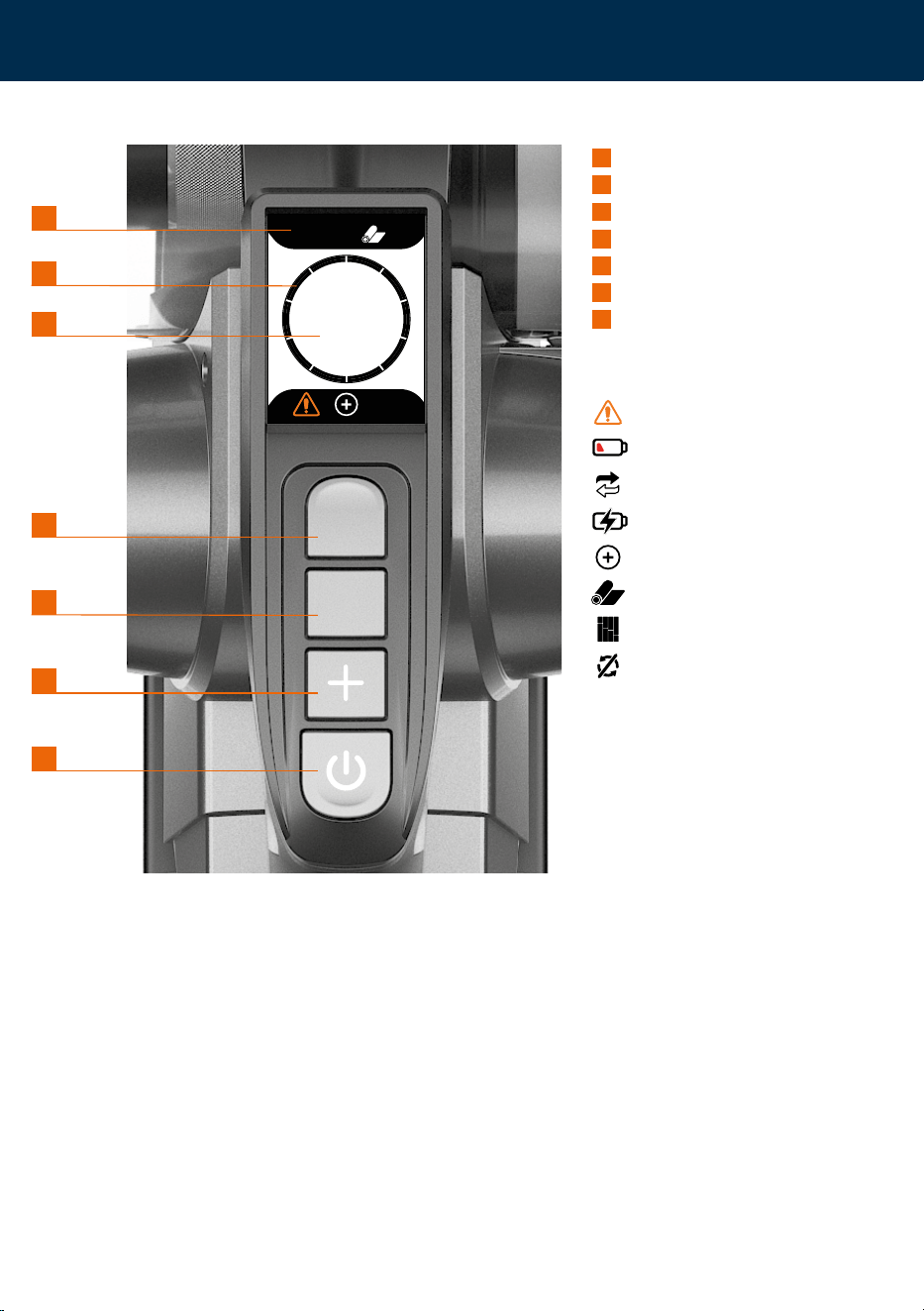
Charging the battery
Place your foot on the powered
floorhead. Pull the handle backwards
to recline.
To remove the battery press both the
buttons to release.
Slide the battery into the handheld until
it clicks into place.
WARNING: The brushbar in the powered floorhead and mini motorised pet tool constantly rotates
when activated. Never use the powered floorhead or tool on one spot for a prolonged period of
time as the brushbar may damage the surface. To prevent any damage being sustained, test on an
inconspicuous area of the flooring/surface first.
Operation
Slide the battery down on to the charger. The charger light will flash white to
show when the battery is charging.
The light on the charger will stop
flashing and go off when the battery is
fully charged.
Once fully charged, slide the battery off
the charger to remove.
To check the battery charge
level press the battery symbol.
THIS MACHINE IS ONLY TO BE USED WITH VAX ONEPWR BATTERIES AND CHARGER.
PLEASE READ THE SAFETY GUIDE BEFORE USE.
NOTE: Before first use, ensure the battery is fully charged. Failure to fully charge the battery
before first use may result in poor battery performance. The life expectancy of the battery will vary
depending on the usage of the machine.
7
Getting started
45
Minutes
Carpet
Boost
1
Floor mode indicator
2
Battery life
3
Remaining runtime
4
Hard Floor mode button
5
Carpet mode button
6
Boost ON/OFF
7
Power ON/OFF
Display Symbols
Clean/Change Filter
Low Battery
Change Battery
Recharge Battery
Boost mode
Carpet mode
Hard Floor mode
Brush Bar Off
HARD
FLOOR
CARP ET
1
4
2
5
3
6
7
Digital display
8
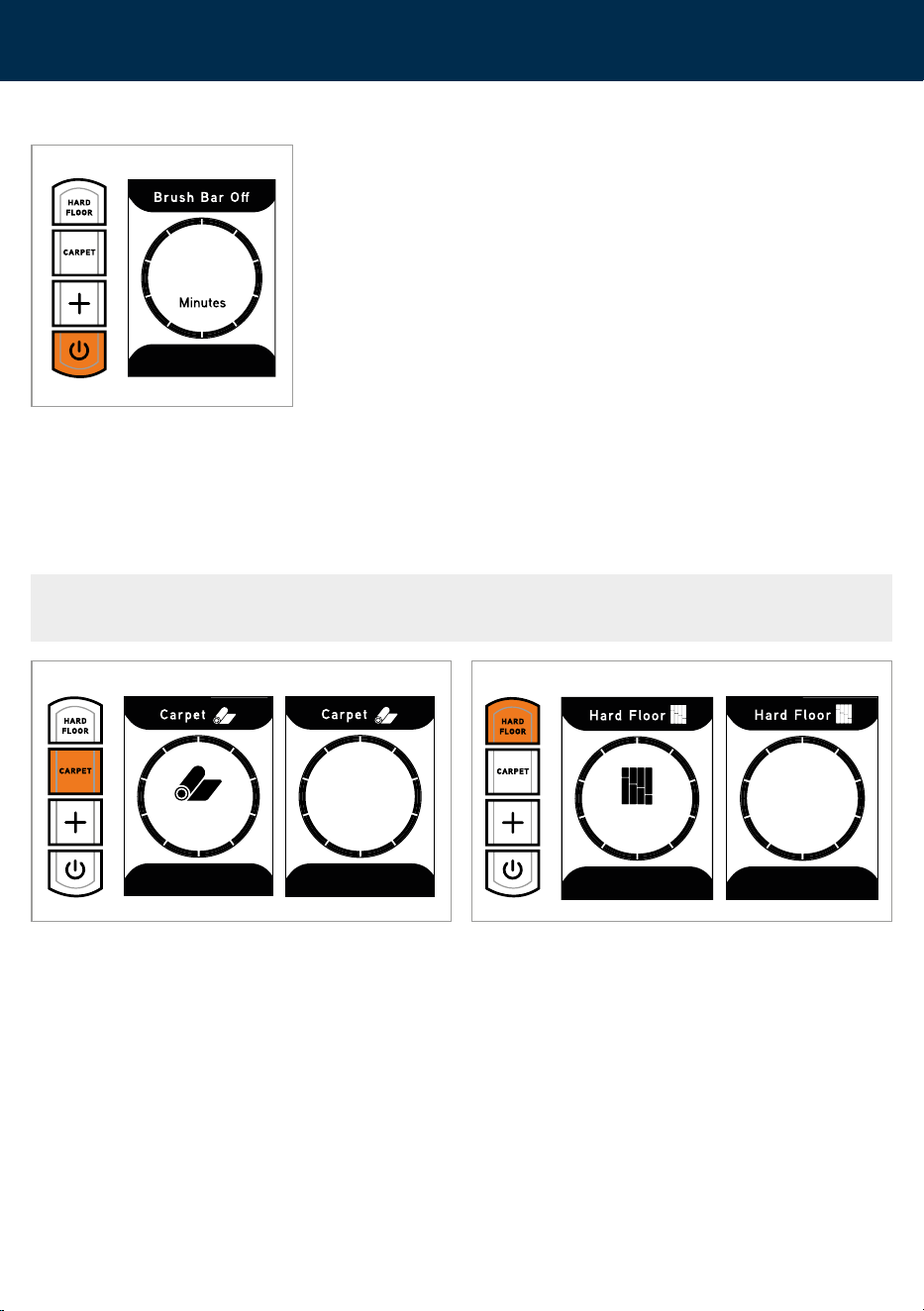
NOTE: For best performance the brushbars should be set to the correct mode for carpets and hard
floors. Use of the boost mode and brushbars will reduce the battery runtime.
Press the power button to switch the
machine on. The machine will start with
the brushbar off. The digital display
will illuminate and show the remaining
runtime.
Press the CARPET or HARD FLOOR button to select floor mode. When a mode button is activated the selected mode will illuminate
and the remaining runtime will display.
Hard Floor
Carpet
Getting started
Operation
Carpet and hard floor modes
45
27
Minutes
39
Minutes
9
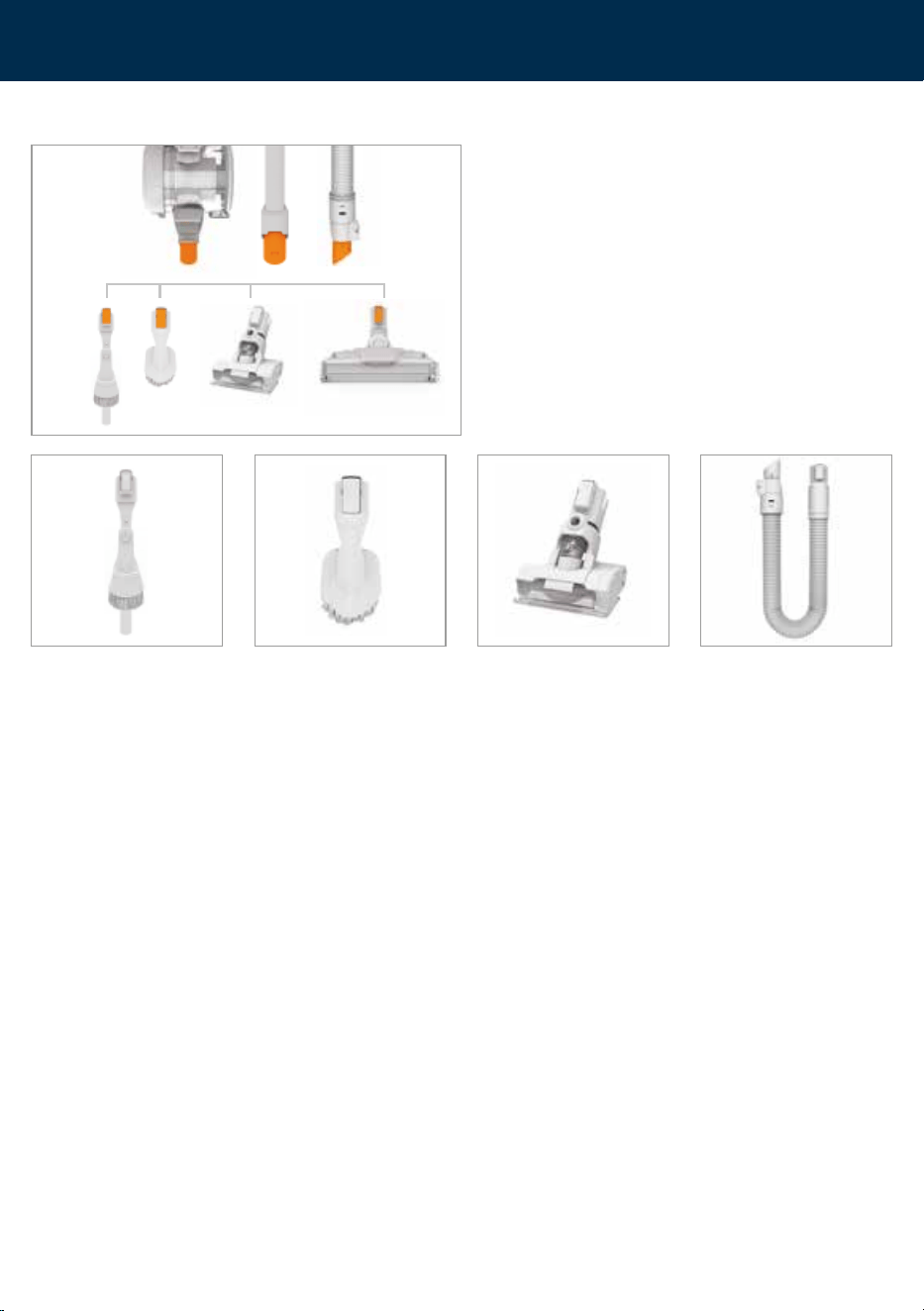
Press the Boost button to increase the suction for particularly dirty
areas. The digital display will turn green and the + Boost icon will
illuminate to show Boost mode is activated.
When the machine is in use the digital display will indicate how much charge is remaining. When the battery is low, additional icons
will show on screen. At this stage, it is advisable to change the battery.
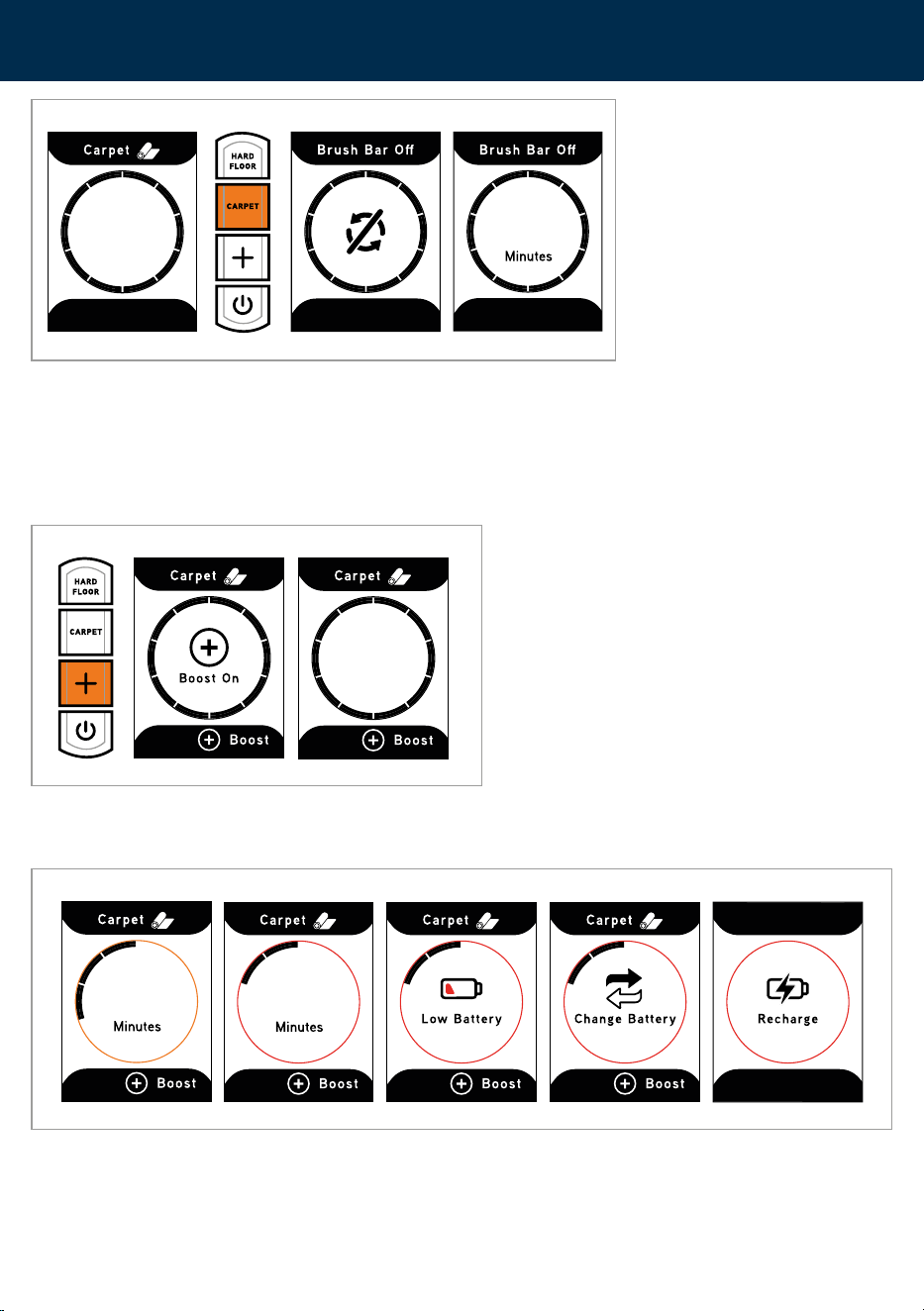
Brushes can be switched OFF for delicate floors and flooring not suitable for use with a
rotating brushbar.
Press the activated floor mode button to switch the brushbar off. The digital display will
change to ‘Brush Bar Off’ and the runtime will alter.
Getting started
Boost mode and low battery
45
27
Minutes
Minutes
12
04
03
10
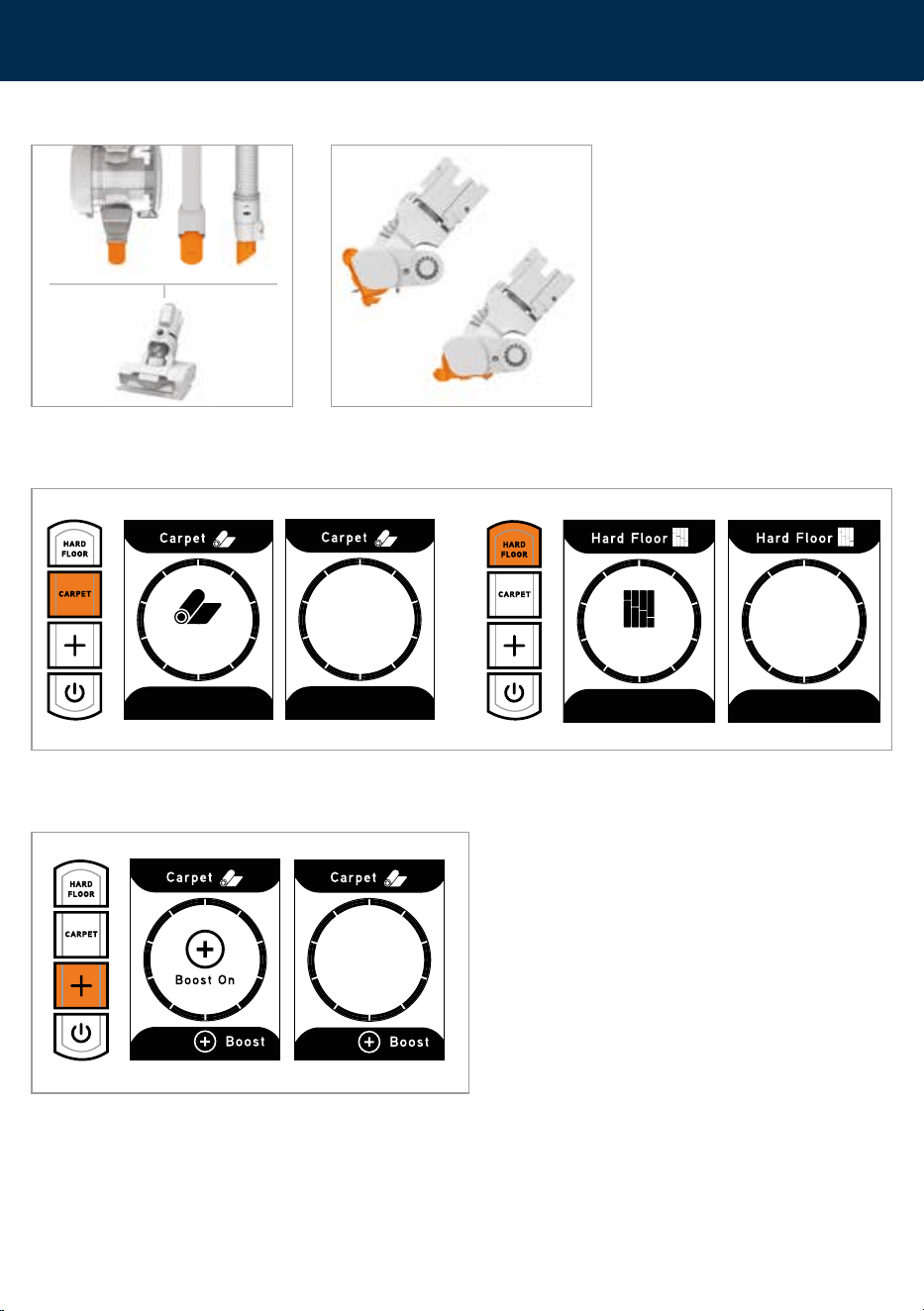
All of the accessories, including the 2-in-1 tool, tech tool, mini
motorised pet tool and powered floorhead, can be attached
directly onto the handheld, reach wand or powered hose.
The powered hose, crevice tool and dusting brush can be
used for hard to reach places and at different heights for
above floor cleaning.
To remove the tools, press the button on the tool and
pull to release.
2-in-1 tool
For delicate surfaces and
skirting boards. Use with
boost mode for optimum
performance.
Tech tool
For delicate electronics
and screens.
Mini motorised pet tool
Ideal for removing embedded
dirt and pet hair. Specially
designed to give you
performance cleaning for
compact spaces like stairs,
car boots and footwells.
Powered hose
Extends for reaching
awkward areas. Powered for
use with the mini motorised
pet tool and floorhead.
Can also be used with the
standard dusting brush and
crevice tool.
Additional tools can be purchased at vax.co.uk.
Getting started
Using the tools
11
Press the CARPET or HARD FLOOR mode to switch the mini motorised
pet tool brushbar ON/OFF. For delicate surfaces select HARD FLOOR.
The digital display will show what mode is activated.
Press the Boost button to increase the suction for particularly dirty
areas. The digital display will turn green and the + boost icon will
illuminate to show Boost mode is activated.
Slide the mini motorised pet tool onto
the handheld, reach wand or powered
hose until it clicks into place.
While in use, the mini motorised base
plate can be rotated so it can be used
flat or horizontally for all angle cleaning.
Hard Floor
Carpet
Getting started
Using the mini motorised pet tool
27
Minutes
39
Minutes
Minutes
12
12
WARNING: Always remove the battery before carrying out any maintenance or troubleshooting.
CAUTION: Don’t over fill the dirt container to avoid blocking the air flow through the machine.
For best cleaning results, empty the dirt container after every use. Filters should be tapped over a
bin every 4-6 uses to remove dirt and debris and washed every 3 months. Filters should be replaced
every 6-9 months depending on the level of use.
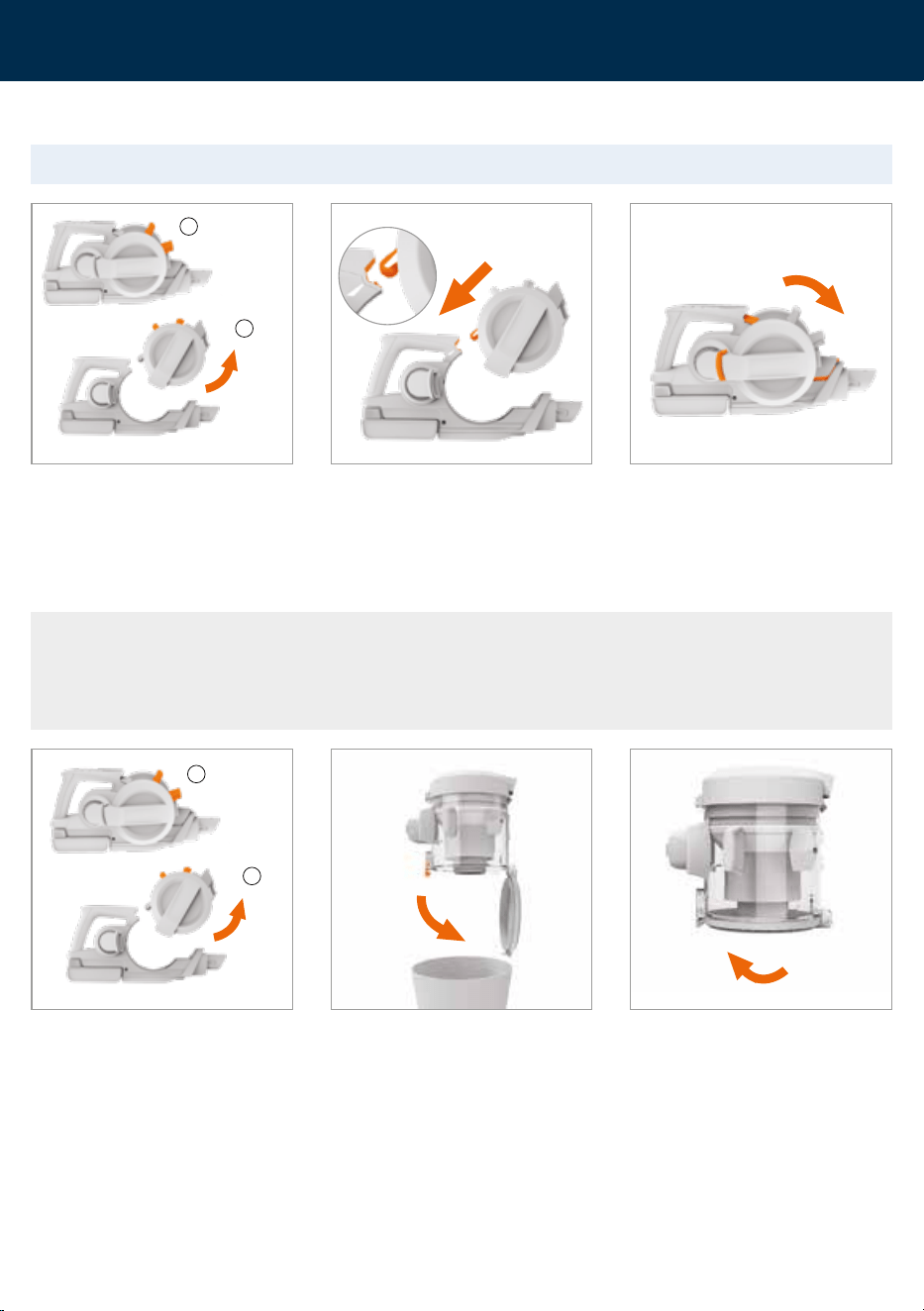
1. Squeeze the latch on the dirt
container to release.
2. Tilt and lift to remove from the
handheld.
1. Squeeze the latch on the dirt
container to release.
2. Tilt and lift to remove from the
handheld.
Hold the dirt container over a bin and
press the dirt release button to allow
dirt and debris to fall out.
To close, push the dirt release door until
it clicks into place.
To assemble align the white arrows.
Rotate the dirt container onto the
handheld. Push until it clicks into place.
When correctly fitted all 3 connection
points will be aligned and will sit flush.
1
1
2
2
Cleaning and maintenance
Removing and refitting the dirt container
Emptying the dirt container
13
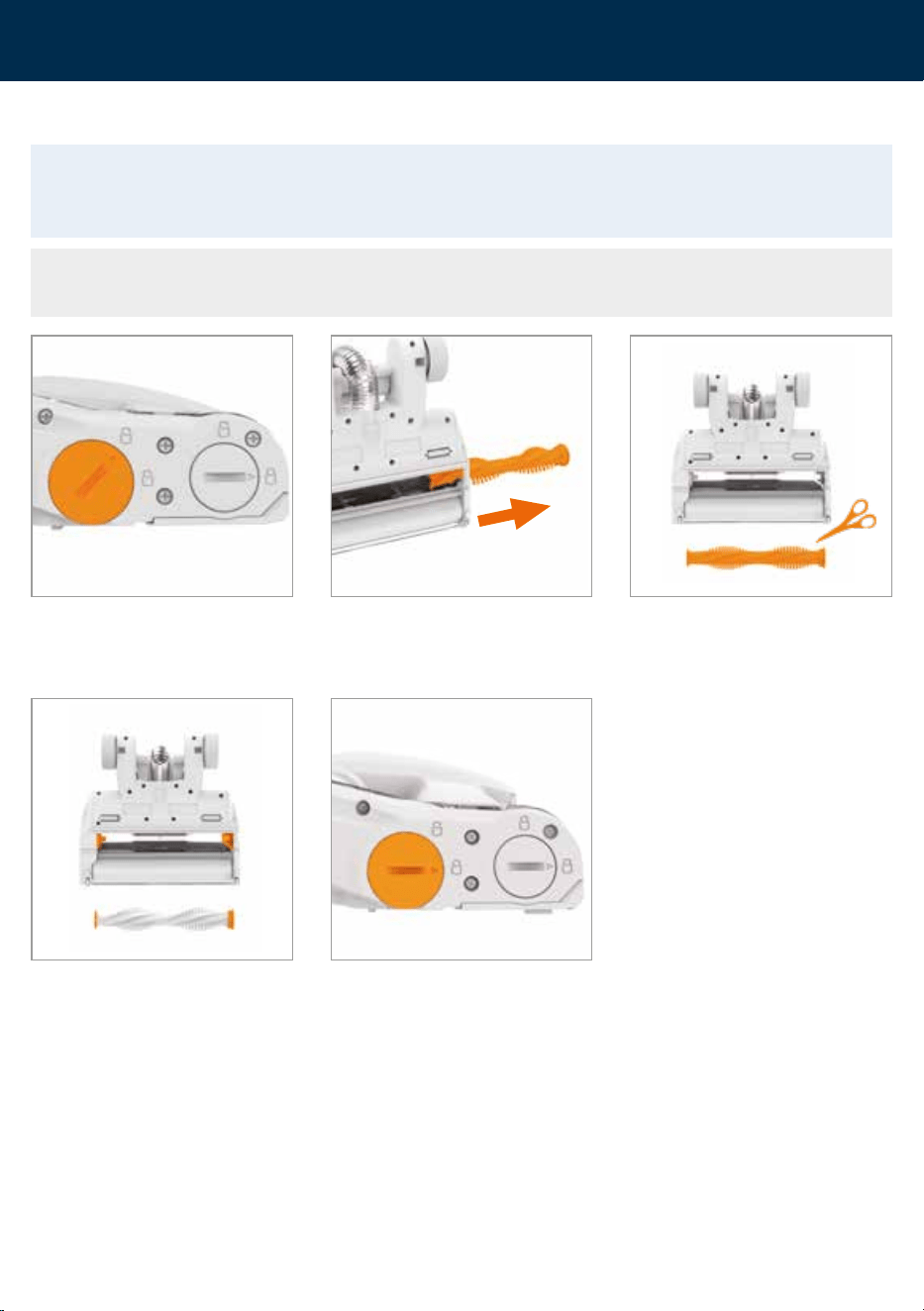
To remove any threads or hair, slide
the blade of a pair of scissors into the
groove on the brushbar and cut along
the groove.
IMPORTANT: If the brushbar or brushroll has been obstructed, the motor protection sensor may
activate. The brushes will stop and the light on the powered floorhead will illuminate red. Switch off
the machine, clear any obstruction and wait 1 minute before reactivating.
NOTE: For best performance and to reduce hair and dirt build up, remove and clean the brushbars
every 1-2 months (depending on the level of use).
Pull the brushbar out from the
brush housing.
Clear any dirt/debris from the end caps
and inside the brush housing.
Using a coin, push and turn the
brushbar cover anticlockwise to the
unlock symbol.
Refit the brushbar into the floorhead.
Align the arrow on the brushbar cover
to the unlock symbol, push firmly until
the cover sits flush and turn to
lock into place.
Cleaning and maintenance
Removing and cleaning the powered floorhead brushbar
14
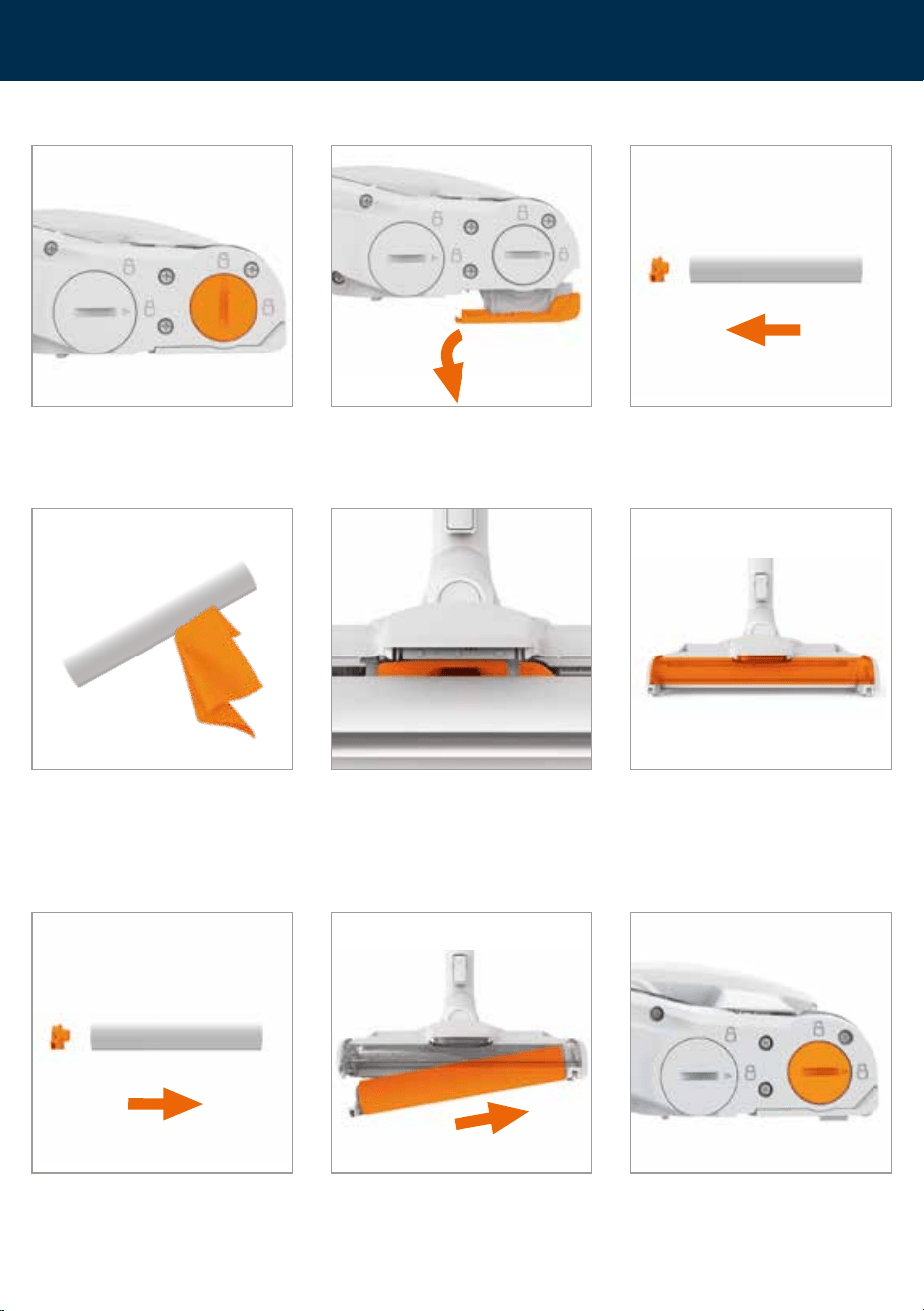
Use a damp cloth to remove any
dirt/debris from the brushroll.
Allow the brushroll to fully dry before
assembling back into the powered
floorhead. DO NOT wash or over
saturate the brushroll.
Check the powered floorhead inlet for
any blockages and use a blunt object to
remove the blockage.
Clear any dirt/debris inside the
brush housing.
Refit the end cap onto the brushroll. With the lock in the unlocked position
slot the brushroll into the right side of
the powered floorhead first and push
the end cap into place.
Using a coin, turn the brushroll cover
clockwise. The cover will sit flush to the
floorhead when locked into place.
Pull to remove the end cap and slide
any hair and threads off the
end of the brushroll.
Using a coin, push and turn the
brushroll cover to the unlock symbol.
NOTE: The brushroll cover cannot be
removed.
Hold the tab and pull away the
brushroll from the brush housing.
Cleaning and maintenance
Removing and cleaning the powered floorhead brushroll
15
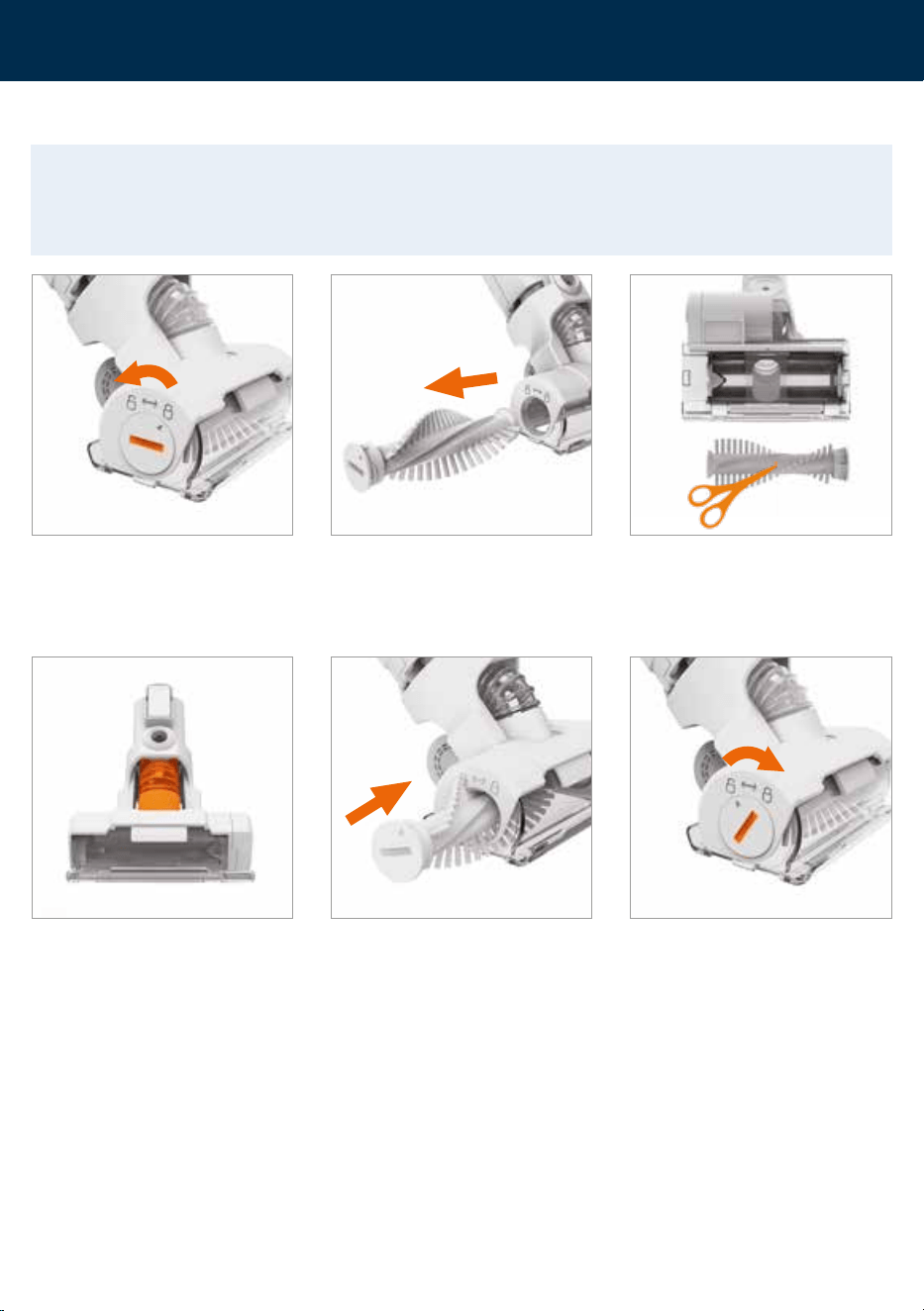
Pull the brushbar out from the
brushbar housing.
Using a coin, turn the brushbar lock
to the unlock symbol to release the
brushbar.
To remove any threads or hair slide
the blade of a pair of scissors into the
groove on the brushbar and cut along
the groove. Clear any dirt/debris inside
the housing of the floorhead.
IMPORTANT: If the brushbar in the mini motorised pet tool has been obstructed, the brushbar motor
protection sensor may activate and the brushbar will stop. Switch off the machine, remove the
tool from the reach wand/handheld/powered hose and clear any obstruction. Wait 1 minute before
refitting the tool, switch the machine on and press the brushbar ON/OFF button.
Check the inlet for any blockages
and use a blunt object to remove
the blockage.
Refit the brushbar and turn the brushbar lock clockwise to lock.
Cleaning and maintenance
Removing and cleaning the mini motorised pet tool brushbar
16
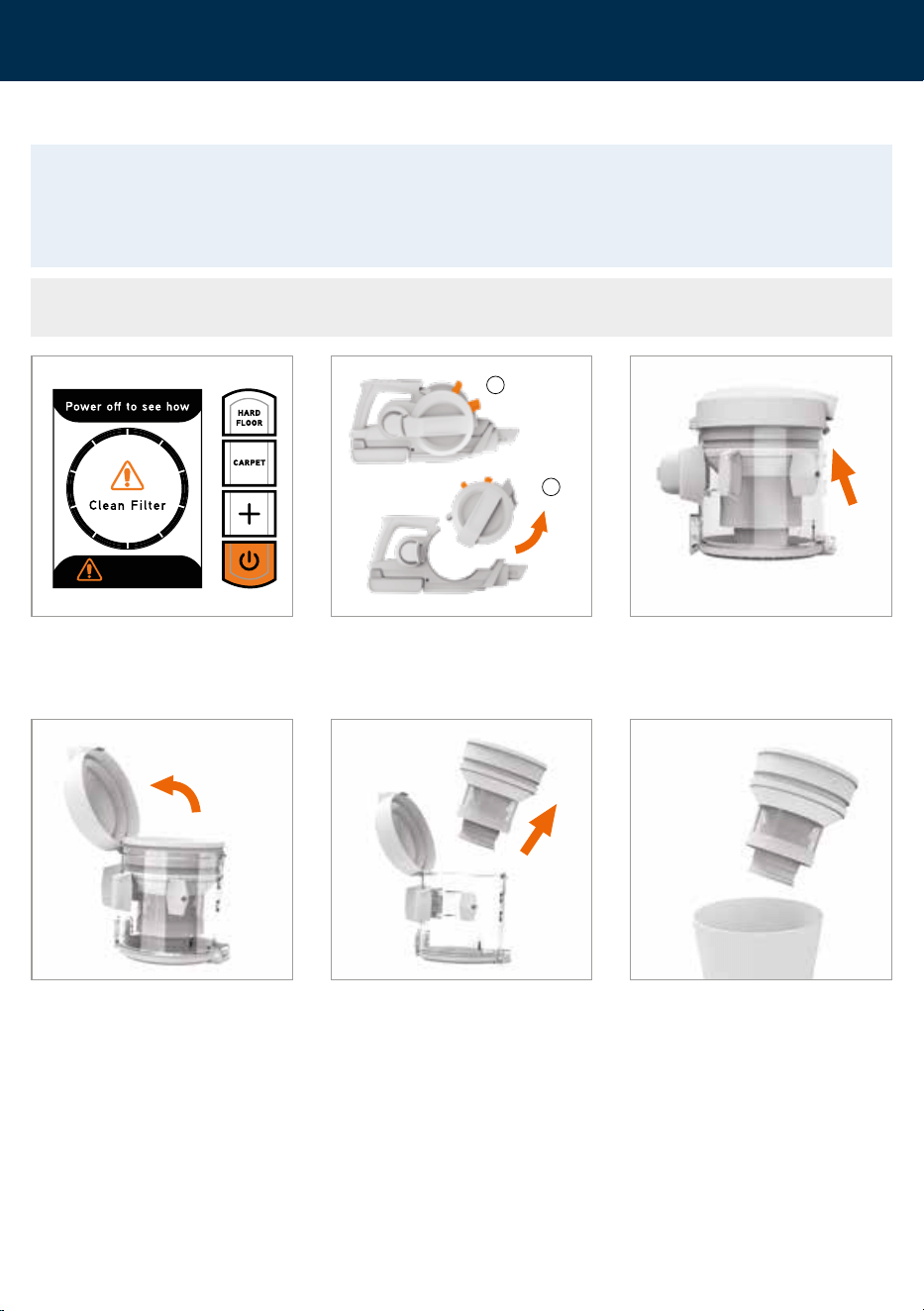
IMPORTANT: Wash the pre-motor filter with warm water (40°C max) and leave for 24 hours or until
fully dry before refitting into the machine. For best cleaning results, filters should be tapped over
a bin every 4-6 uses to remove dirt/debris, washed every 3 months or when the Clean Filter light
illuminates and replaced every 9-12 months. Ensure all filters are in place before using the machine.
NOTE: To reset the Clean Filter warning, clean the filter and then press and hold the Carpet and
Boost buttons together until a green tick mark appears on-screen.
When the filter needs cleaning the Clean
Filter icon will illuminate. Press the
power button and the digital display will
show steps to clean the filter.
Push the tab on the lid of the dirt
container.
Lift the cover to access the filter. Lift the filter and separator from the
dirt container.
Tap the separator over a bin to remove
dirt and debris and wipe over the metal
shroud with a dry cloth.
1. Squeeze the latch on the dirt
container to release.
2. Tilt and lift to remove from the
handheld.
1
2
Cleaning and maintenance
Cleaning the filter and separator
17
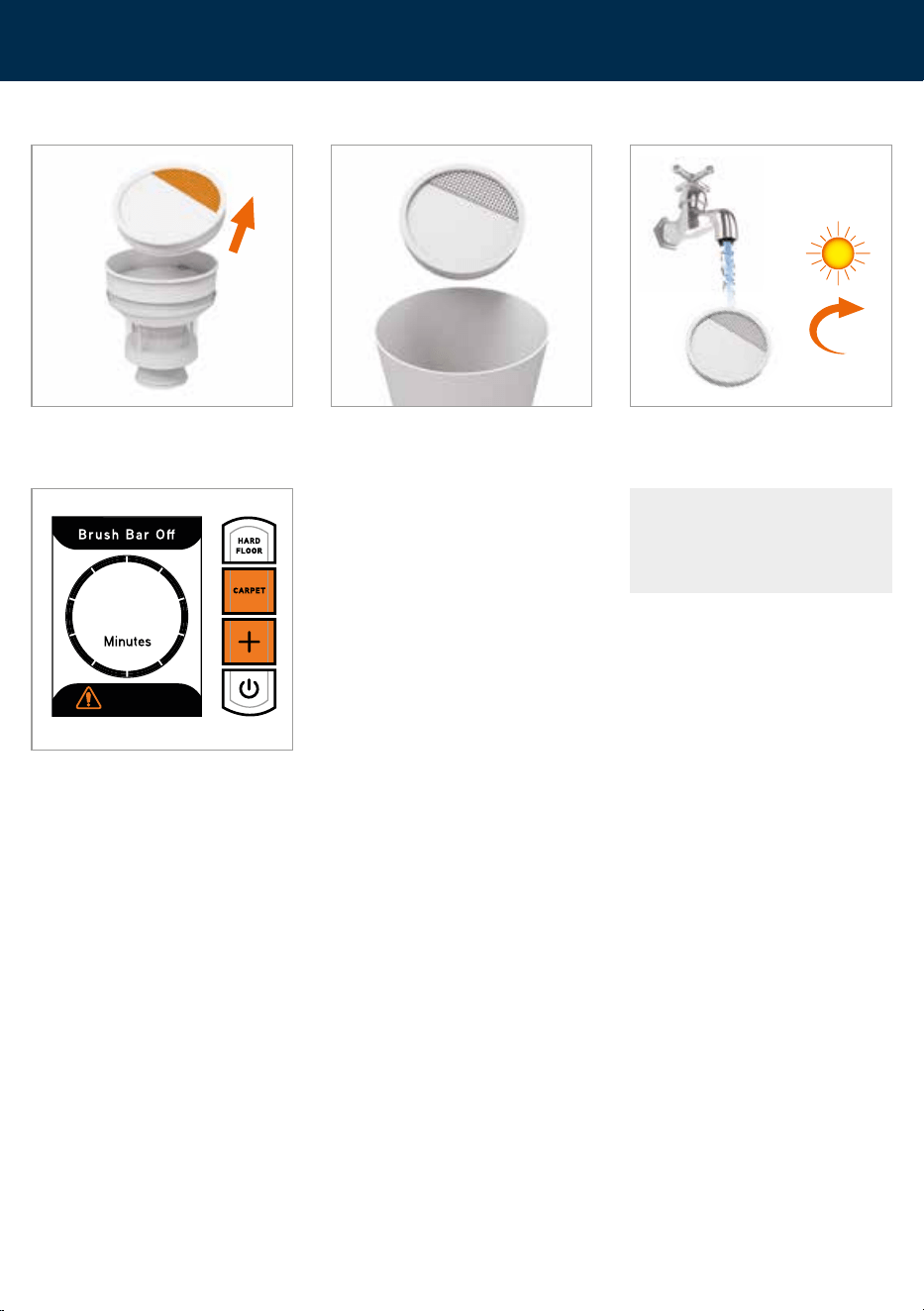
Pull the filter tab and remove the filter
from the separator.
Tap the filter over the bin to remove any
dirt and debris.
Wash the filter under running water
(40°C max). Leave for 24hrs or until
fully dry before replacing.
24hr
40°C
MAX
CAUTION: Ensure both
the filter and separator are
refitted before use.
The filter icon will stay illuminated
until filters are cleaned and reset. To
reset the Clean Filter warning, press
and hold the Carpet and Boost buttons
together until a green tick mark appears
on-screen.
Cleaning and maintenance
Cleaning the filter and separator
45
18
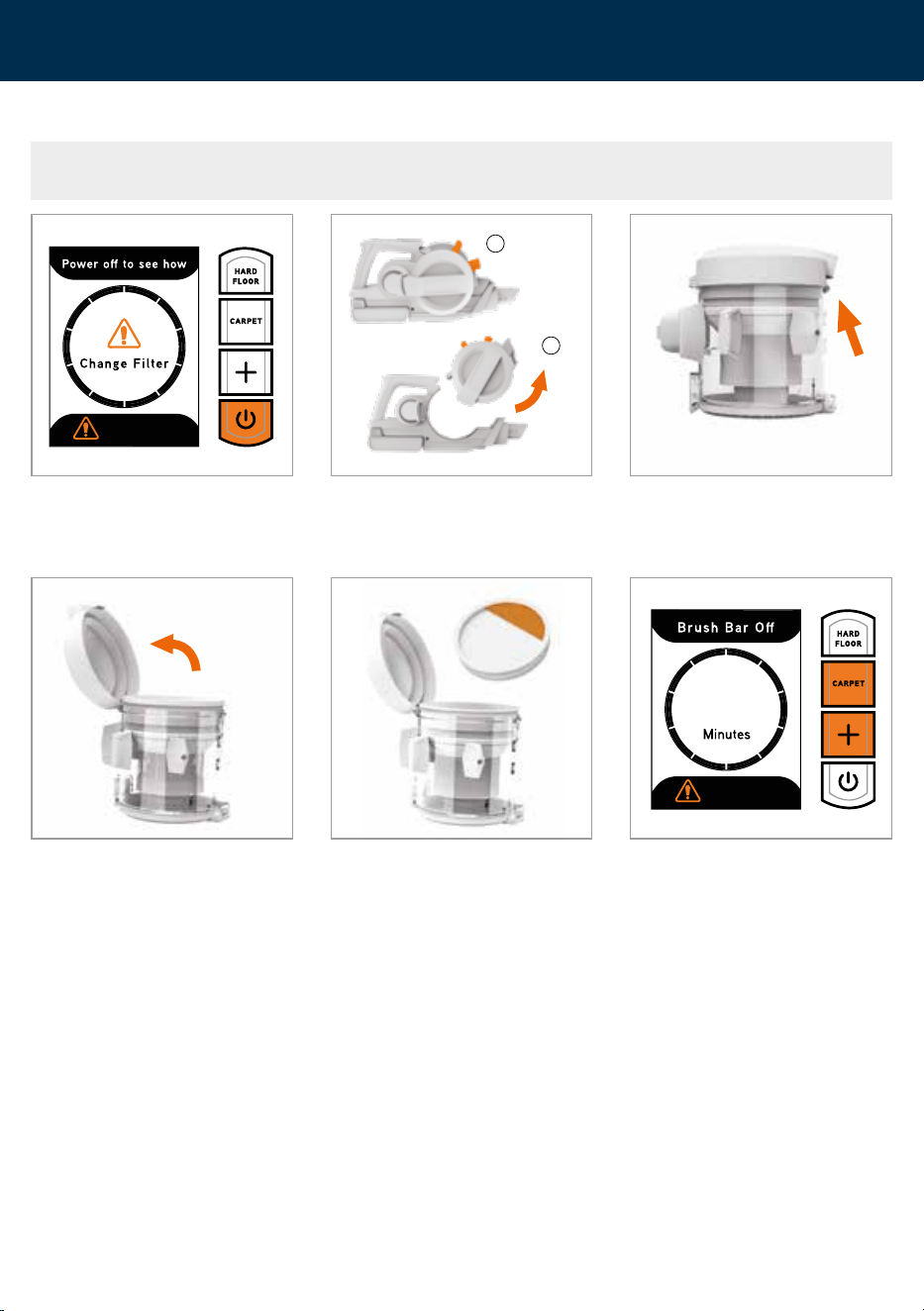
NOTE: To reset the Change Filter warning, change the filter and then press and hold the Carpet and
Boost buttons together until a green tick mark appears on-screen.
When the filter needs changing the
Change Filter icon will illuminate. Press
the power button and the digital display
will show steps to change the filter.
The filter icon will stay illuminated
until filters are cleaned and reset. To
reset the Clean Filter warning, press
and hold the Carpet and Boost buttons
together until a green tick mark appears
on-screen.
Push the tab on the lid of the
dirt container.
Lift the cover to access the filter.
1. Squeeze the latch on the dirt
container to release.
2. Tilt and lift to remove from the
handheld.
Pull the filter tab and remove the filter
from the separator and dirt container.
Refit the new filter.
1
2
Cleaning and maintenance
Removing and changing the filter
45
19
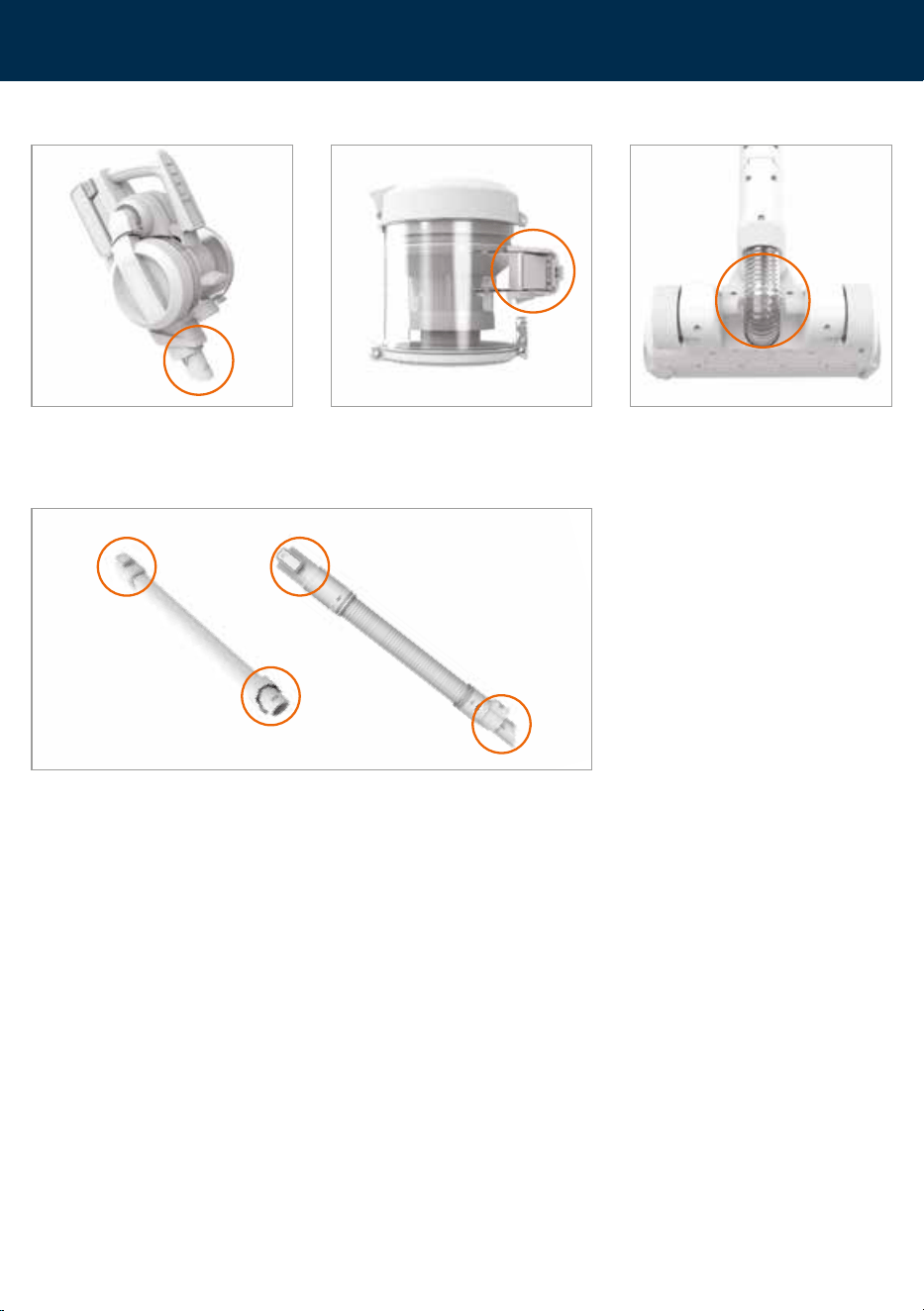
To test for a blockage in the reach wand or powered hose, drop a small ball of paper
into the wand/hose. The paper will drop through if the wand/hose is clear. Use a
broom handle or similar blunt object to remove any blockage.
Press the handheld release button and
remove the reach wand.
Check and clear any dirt and debris
from the handheld connection point.
Press the dirt container release button
and remove the dirt container.
Check and clear any dirt and debris
from behind the dirt container flap.
Check the powered floorhead for any
blockages and use a blunt object to
remove the blockage.
Cleaning and maintenance
Checking for blockages

20
Troubleshooting
There is an accessory missing
• Check the contents on the box to make sure the part is definitely included with your machine.
Why does the machine have no power?
• The battery is not fitted correctly. See Operation page 6.
• The battery has no charge. See Charging the battery page 6.
• The motor thermostat may have tripped. Empty the dirt container and check for blockages. Clean the filters and allow the
machine to cool for approximately 1 hour. If you have washed the filters, wait 24 hours to fully dry before placing back on the
machine. See Cleaning the filter and separator page 16.
• The brushbar motor sensor in the powered floorhead or mini motorised pet tool has been activated. To reset remove the
powered floorhead/tool from the reach wand/handheld/hose and clear any obstruction. Wait 1 minute before refitting the
powered floorhead/tool, switch the machine on and press the brushbar ON/OFF button. See Removing and cleaning the
powered floorhead brushbar page 13 and Removing and cleaning the mini motorised pet tool brushbar page 15.
Why won’t the machine pick up?
• The dirt container may not be fitted correctly. See Removing and refitting the dirt container page 12.
• The dirt container may be blocked. Check the dirt container and handheld inlet for blockages.
See Emptying the dirt container page 12.
• The filters may be clogged or may need changing. See Cleaning the filter and separator page 16.
• There may be a blockage. See Checking for blockages page 19.
• The brushbars on the powered floorhead have not been activated. See Carpet and hard floor modes page 8.
• The powered floorhead may be blocked. See Removing and cleaning the powered floorhead brushbar and brushroll
page 13 and 14.
• The machine, powered floorhead and reach wand may not be correctly fitted. See Assembly page 5.
Why is there a red and orange light?
• Battery charge is running low (<5%). See Charging the battery page 6.
• The filter may need changing. See removing and changing the filter page 18.
Why is there a red light on the powered floorhead?
• The powered floorhead brushes have been obstructed. See Removing and cleaning the powered floorhead brushbar and
brushroll page 13 and 14.
Why won’t the brushbar in the powered floorhead or pet tool turn?
• The brushes in the powered floorhead or mini motorised pet tool have not been activated. See Carpet and hard floor modes
page 8 and Using the mini motorised pet tool page 11
• The tool/brushbar may be obstructed. See Removing and cleaning the powered floorhead brushbar and brushroll page 13, 14
and Removing and cleaning the mini mototrised pet tool brushbar page 15.
• The machine, reach wand, powered hose, powered floorhead and mini motorised pet tool may not be correctly fitted.
See Assembly page 5 and Using the tools page 10.
WARNING: Always switch off and unplug the machine before performing any checks or maintenance.

Notes
21

Notes

Notes

Vax Ltd, Artillery House, Heritage Way, Droitwich, WR9 8YB, UK.
info@vax.co.uk vax.co.uk
For how-to videos and
warranty registration visit
www.vax.co.uk