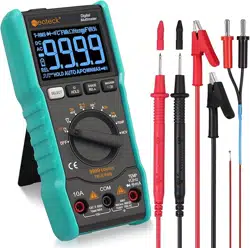

9999counts
Pocket Digital Multimeter User's Manual
Index
1. Overview………………………………………………………………………………………………………………………....1
2. Safety precautions………………………………………………………………………………………………………………..1
3. Operation panel instructions …………………………………………………………………………………………………......3
4. Characteristics……………………………………………………………………………………………………………...……..4
5. Automatic boot…………………………………………………………………………………………………………………..15
6. Troubleshooting………………………………………………………………………………………………………………....15

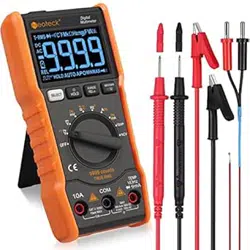
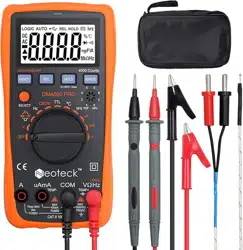
9999counts Handheld multimeter
1/15
1. Overview
The 9999counts is a pocket-sized 3 9/10-bit automatic digital instrument. Is a stable performance, high precision, high reliability clear readings, and
overload protection . With AAA 1.5V battery-driven,the instrument uses a large-screen LCD display, boost power supply, even in the 2.3V low battery
edge, it can guarantee the backlight high brightness, the table is easy to carry, is a vast number of users extremely like the instrument, the backlight can
be bright can be automatically turned off after 15 seconds. This series of instruments can be used to measure the DC voltage and AC voltage DC
current and AC current、resistance、capacitance diode、continuity test, frequency measurement and true RMS measurement and other parameters. Is an
ideal tool for the laboratory, factory, radio enthusiasts and families.
2. Safety precautions
This series of instruments is designed to comply with IEC1010 (International Electron-technical Commission promulgated safety standards), before use,
please read the safety precautions.
1.When measuring the voltage, please input the limit voltage of DC 1000V or AC 750V rms.
2.The voltage below 36V is safe voltage. When measuring above 36V DC and 25V AC voltage, check whether test pen is reliable contact or right
connected or good insulation properly, whether insulation is good and so on, in order to avoid electric shock.
3. When Change function and range, test pen should leave the test point.
4.Select the correct function and range, guard against accidental operation. The series of instruments although there is full-range protection, but for
safety reasons, you still should pay more attention.
5.When measuring current, do not input batteries more than 10A.
6.Safety Symbol Description,“ ”Exist dangerous voltage,“ ” Ground ,“ ” Double insulation,
“ ”Operator must refer to the instruction manual,“ ”Low voltage symbol.
9999counts Handheld multimeter
2/15
3. Operation panel instructions
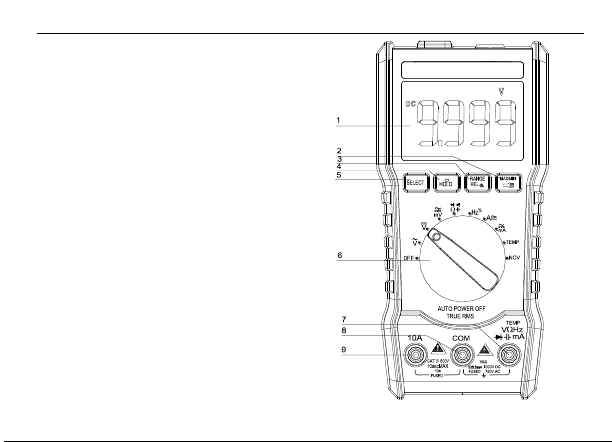
1、LCD display;
2、MAX/MIN measurement key, press and hold for 2 seconds
to turn the flashlight on and off;
3、RANGE is a manual range conversion key, which is a REL
relative measurement function when tested in the capacitance file;
4、HOLD is the data hold button, press for 3 seconds for the backlight to
be turned on and off, the default state is the backlight is on for a long time.
5、Function selection key;
6、Gear function selection keys;
7、Voltage, resistance, diode, capacitance, Temp,frequency, square wave output,
current input port;
8、COM input; negative input, insert black pen;
9、10A input port。

9999counts Handheld multimeter
3/15
4. Characteristics
1. General characteristics
1-1.Display, liquid crystal display (LCD);
1-2.Maximum display:9999 (3 9/10) bits automatic polarity display;
1-3.Measurement: double integral A / D conversion;
1-4.Sampling rate: about 3 times per second;
1-5.Overrange display: the most significant bit was "0L";
1-6.Low voltage display:“ ”symbol appears;
1-7.Working environment:(0~40)℃,relative humidity<80%;
1-8.Power supply: AAA 1.5V battery;
1-9.Volume (size):142×70×32mm(L×W×H);
1-10.Weight:about 205g(including 1.5V battery);
1-11.Attachment: a manual, a certificate, a box, a pair of pen, a K-type thermocouple TP01, two AAA1.5V batteries.
9999counts Handheld multimeter
4/15
2.Technical characteristics
2-1.Accuracy (reading data of a%+ least significant digits), guaranteed accuracy environment temperature (23±5)℃, relative
humidity <75%, calibration guarantee period from the date of manufacture for one year.
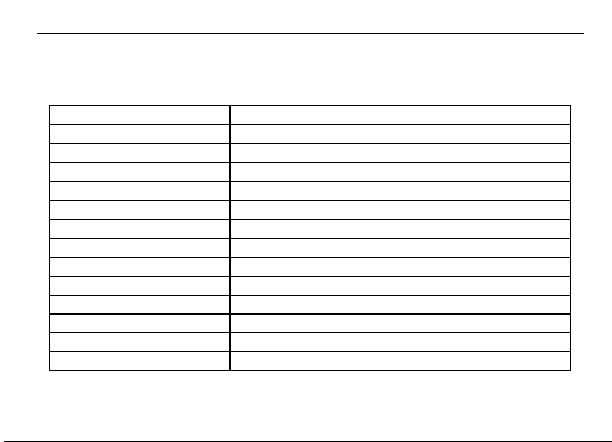
2-2.Performance(Note“▲”Indicates that the instrument has this function.)
Symbol function
DC voltage DCV
▲
AC voltage ACV
▲
DC current DCA
▲
AC current ACA
▲
Resistance\Diode\ On-off
▲
Temp℃/℉
▲
Frequency F
▲
Capacitance C
▲
NCV
▲
Zero line / Fire wire test
▲
Full unit symbol
▲
Backlight manual/auto off
▲
True RMS measurement
▲
9999counts Handheld multimeter
5/15
2-3.Technical specifications
2-3-1.DC voltage(DCV)
Input impedance:10MΩ;
Overload protection:100mV range is 550V DC or AC peak;
the rest is 1000V DC or 750V AC peak.
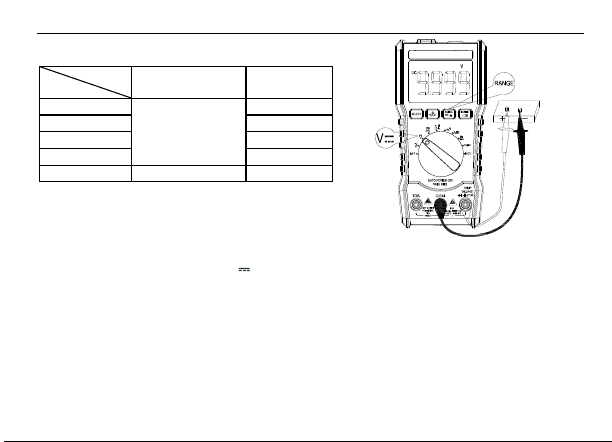
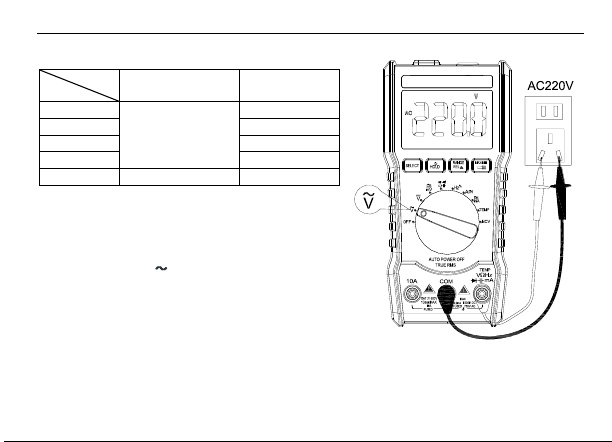
The specific operation is as follows: as shown on the right
1. Insert the black test lead into the "COM" socket. The red test pen into the "V /Ω/ Hz" jack;
2.Turn the range switch to the corresponding:“ ”range and display the DC voltage
measurement mode.
3.The test pen to reliably touch the test point, the screen shows the measured voltage value,
display the DC voltage measured, the red pen is connected to the point of the polarity of the voltage.
Note:
1)Do not input voltage exceed DC1000V or AC750V, if do, there will damage the instrument circuit;
2)When measuring high voltage circuit, pay special attention to avoid electric shock;
3)After completing all measuring operations, disconnect the test leads from the circuit under test.
Accuracy
Range
9999counts
Resolution
100mV
±(0.5%+3)
0.01mV
1V
0.1mV
10V
0.001V
100V
0.01V
1000V
±(0.8%+10)
0.1V
V
9999counts Handheld multimeter
6/15
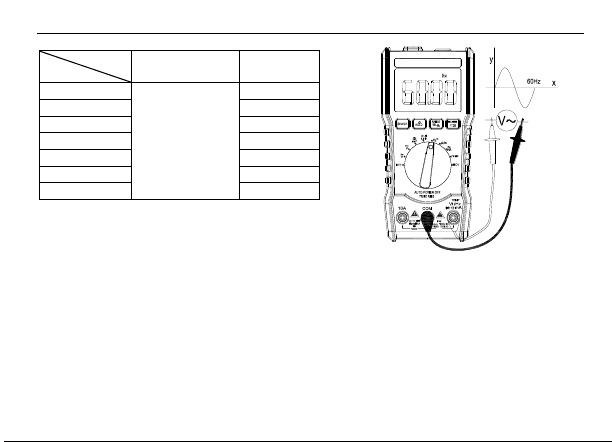
2-3-2.AC current(ACV)
Accuracy
Range
9999counts
Resolution
100mV
±(0.8%+3)
0.01mV
1V
0.1mV
10V
0.001V
100V
0.01V
750V
±(1.2%+10)
0.1V
Input impedance:10MΩ;Standard sine wave and triangular wave
frequency response is 40Hz-1kHz;Other wave forms are: 40Hz-200Hz.
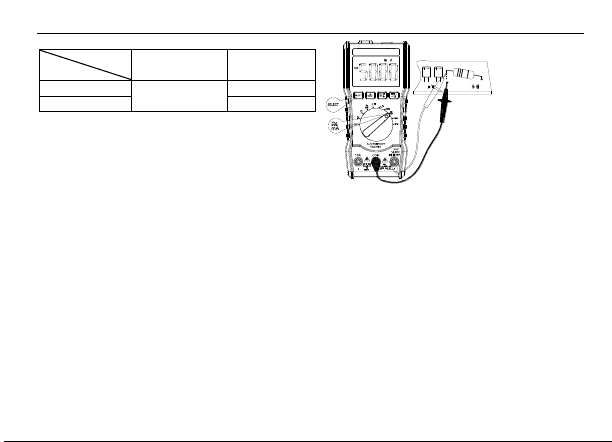
The specific operation is as follows: as shown on the right
1、Insert the black test lead into the "COM" socket while the red test
lead into the "V /Ω/ Hz" jack.
2、Turn the range switch to“ ”, to display the AC voltage
auto measurement mode.
Note:
1)、Before test there exits some residual numbers in the range, but does not
affect the measurement accuracy;
2)、 Do not input voltage exceed 750Vrms, if do, there will damage the instrument circuit;
3)、 When measuring high voltage circuit, pay special attention to avoid electric shock;
4)、After completing all the measuring operations, disconnect the test leads from the circuit under test.
V
9999counts Handheld multimeter
7/15
2-3-3.DC Current (DC m A)
The maximum measured pressure drop:1V;
Overload protection:100mA/1A:1A/250V Speed Glass Fuse;
The specific operation is as follows:
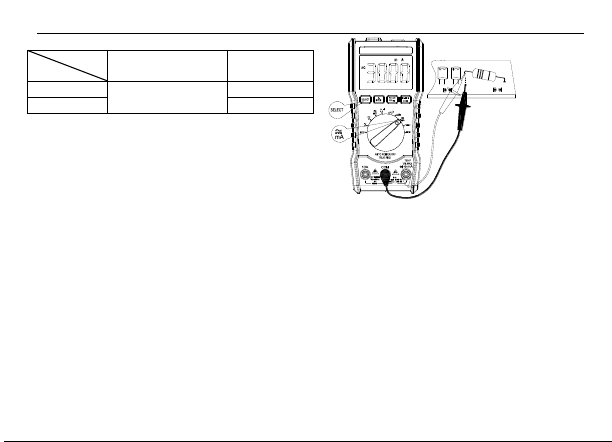
The right figure is DC m A schematic diagram,
1. Insert the black test lead into the "COM" socket, insert the red test
lead into the "m A " jack (max. 1A); "SELECT" key to switch between AC and DC current;
2. Turn the range switch to the corresponding DCA position, then insert the
instrument into the circuit pending to test. The current value of the measured current and the polarity of the red test point will also be displayed on the
screen at the same time.
Note:
1) The instrument series connection to the circuit pending to test before the circuit should be the first power off;
2)If there is no concept of the measured current range in advance, the range switch should be transferred to the highest range, and then according to
the display value to the corresponding file; such as the screen display "0L" that has exceeded the range, needed to turn the range switch to the
appropriate gear ;
3) The maximum input current is 600mA (depending on the location of the red test pen inserted), excessive current will damage the ma file fuse.
4) When the test leads are plugged into the current input terminals, do not connect the test leads to any circuit in parallel or it will damages the fuses
and the instrument.
5) After the completion of all the measurement operation, you should first turn off the power and then disconnect the test leads and the measured
circuit connection, especially to high current measurement.
6) It is forbidden to input more than 36V DC, 25V AC voltage between the current jack and the "COM" jack.
Accuracy
Range
9999counts
Resolution
100mA
±(1.2%+10)
10uA
1000mA
100uA
9999counts Handheld multimeter
8/15
2-3-4.AC Current(AC m A)
The maximum measured pressure drop:1V;Overload protection:
100mA/1A:1A/250V Speed Glass Fuse;
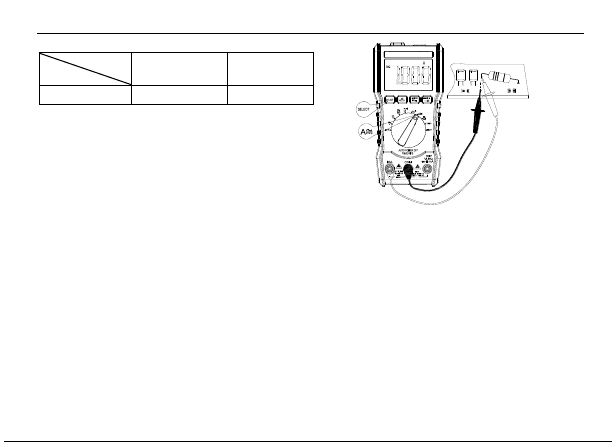
The specific operation is as follows: The diagram on the right
is the DC m A schematic diagram.
1. Insert the black test lead into the "COM" socket, insert the red test
lead into the "m A " jack (max. 1A) "SELECT" key to switch between AC and DC current;
2.Turn the range switch to the corresponding DC/AC m A gear, trigger “SELECT”to select AC m A and then put the meter into the circuit under test.
The measured current value and the current polarity of the red test lead will be displayed at the same time on the screen.
Note:
1)The instrument series connection to the circuit pending to test before the circuit should be the first power off;
2)If there is no concept of the measured current range in advance, the range switch should be transferred to the highest range, and then according to
the display value to the corresponding file; such as the screen display "0L" that has exceeded the range, needed to turn the range switch to the
appropriate gear;
3)The maximum input current is1A (depending on the location of the red test pen inserted), excessive current will damage the m A file fuse.
4) When the test leads are plugged into the current input terminals, do not connect the test leads to any circuit in parallel or it will damages the fuses
and the instrument.
5) After the completion of all the measurement operation, you should first turn off the power and then disconnect the test leads and the measured
circuit connection, especially to high current measurement.
6) It is forbidden to input more than 36V DC, 25V AC voltage between the current jack and the "COM" jack.
Accuracy
Range
9999counts
Resolution
60mA
±(1.2%+10)
10uA
600mA
100uA
9999counts Handheld multimeter
9/15
2-3-5.DC/AC 10A Current (DC/ACA)
The maximum measured pressure drop:600mV;
Overload protection:6A/10A: 10A:10A/250V Speed Glass Fuse;
The specific operation is as follows: The figure on the right shows
AC and DC 6A/10A
1. Insert the black meter pen into the "COM" jack and the red meter pen
into the "V/Ω/Hz" jack; the default value is DC, triggering the
"RANG" button to switch between automatic/manual 10A currents;
2. Turn the range switch to the corresponding DC/ACA position. The default value is AUTO DC10A. Then connect the meter to the circuit under test.
The measured current value and the current polarity of the red test point will be displayed on the screen at the same time. Trigger "SELECT" key to
select AC current AC10A;
Note:
1) The instrument series connection to the circuit pending to test before the circuit should be the first power off;
2)The maximum input current is 10A (depending on the insertion position of the red meter pens), not more than 10 seconds, excessive current will
cause the circuit to heat, or even damage the instrument;
3)When the test leads are plugged into the current input terminals, do not connect the test leads to any circuit in parallel or it will damages the fuses
and the instrument.
5)After the completion of all the measurement operation, you should first turn off the power and then disconnect the test leads and the measured
circuit connection, especially to high current measurement.
6)It is forbidden to input more than 36V DC, 25V AC voltage between the current jack and the "COM" jack.
Accuracy
Range
9999counts
Resolution
10A
±(2.0%+30)
0.01A
9999counts Handheld multimeter
10/15
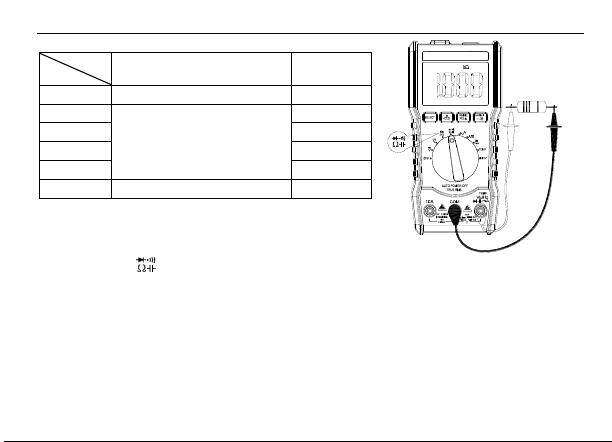
2-3-6.Resistance(Ω)
Open circuit voltage:less than 3V; overload protection: 550V DC or AC peak;
The specific operation is as shown in the right figure;
1.Insert the black test pen into the "COM" socket while the red test pen leads into the "V /Ω/ Hz" jack.
2.Rotate the dial to the“ ”position, trigger the "SELECT" key and select the resistance grade for automatic measurement.
Note:
1) When measuring low resistance, the table will bring the internal resistance, in order to obtain accurate readings, you can firstly record the
short-circuit value of the table pen, by testing value minus the short-circuit value.
2) When measuring the on-line resistance, please make sure that all the circuits under test must be turned off and all capacitors fully discharged in
order to ensure the measured value accurately.
3) Do not enter the voltage in the resistance range, which is absolutely prohibited, although the instrument in the gear on the voltage protection.
Accuracy
Range
9999counts
Resolution
1000Ω
±(0.8%+5)
0.1Ω
10kΩ
±(0.8%+ 3)
1Ω
100kΩ
10Ω
1000kΩ
100Ω
10MΩ
1kΩ
100MΩ
±( 2.5%+3)>60MΩfor reference only
10kΩ
9999counts Handheld multimeter
11/15
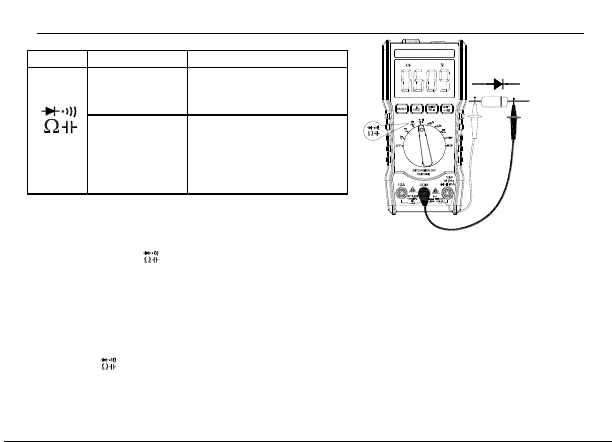
2-3-7.Diodes and on-off test
Overload protection:550V DC or AC peak;
Warning: for safety, disable the input voltage value in this range!
1. Insert the black test lead into the "COM" socket while the red test lead into the "V /Ω/ Hz" jack (note the polarity of the red test pen is "+");
2. Set the range switch to“ ”grade, trigger the "SELECT" key, select the diode measurement, and connect the test leads to the diode was not
tested. The reading is an approximation of forward voltage drop of the diode. For silicon PN junction, 500niV~800niV confirmed as normal; if the
measured diode open circuit or reverse polarity, then display "0L";
3. Trigger the "SELECT" key to select the buzzer measurement and connect the test leads to two points of the circuit pending test. If the built-in
buzzer sounds and the on-off alarm indicator is on, the resistance between the two points is below (50±20)Ω.
Note :
Do not input “ ”voltage symbol, so as not to damage the instrument.
Range
Display value
Test Conditions
Diode forward
voltage drop
Positive DC current of about
1mA, open circuit voltage of
about 3V,
The buzzer
buzzes for a long
time, and the test
resistance is less
than(50±20)Ω
Open circuit voltage is about 3V
Press "SELECT" to switch
between two functions
9999counts Handheld multimeter
12/15
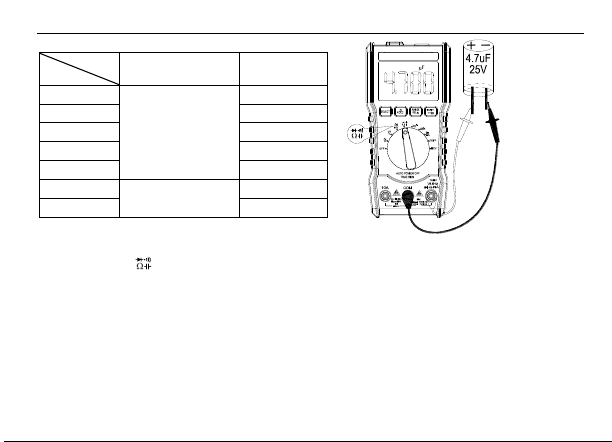
2-3-8.Capacitance(C)
Overload protection: 550V DC or AC peak
1. Insert the black test pen leads into the "COM" socket while the red test pen leads into the "V /Ω/ Hz" jack;
2.Rotate the dial to the“ ”position, trigger the "SELECT" key, and select the capacitance profile for automatic measurement.
3.Then connect the test leads across the measured capacitance.
Note:
1) When measuring the capacitance with 10nF range, there may be residual reading on the screen display value. Which is the distributed capacitance
of the test pen. For an accurate reading, which can be subtracted after measurement.
2)When large capacitance stalls is measuring serious leakage or breakdown capacitor, it will show some unstable values; it is normal that be
measuring large capacitors, the reading takes a few seconds to stabilize.
3) Please test the capacitor capacity before the capacitor should be fully discharged to prevent damage to the fuse and instrumentation.
4) Unit: l F = 1000mF lm F = 1000uF l u F = 1000nF l n F = 1000PF
Accuracy
Range
9999counts
Resolution
100nF
±(3.5%+20)
10pF
1000nF
100pF
10uF
1nF
100uF
10nF
1000uF
100nF
10mF
±(5%+3)
11uF
100mF
10uF
9999counts Handheld multimeter
13/15
2-3-9. Frequency measurement:
Input sensitivity: 1V rms; Overload protection: 550V DC or AC peak (less than 10 seconds)
Frequency measurement:
1. Insert the test leads or shielded cables into the “COM” and “V/Ω/Hz” jacks;
2 Turn the range switch to “Hz” and connect the test leads or cables to the signal source or load under test.
Note:
1) When the input exceeds 10Vrms, it can be read, but it may be out of tolerance;
2) In the noise environment, it is better to use shielded cables when measuring small signals.
3) When measuring high voltage circuits, special attention must be paid to avoid electric shocks;
4) Do not input more than 250V DC or AC peak voltage to avoid damage to the instrument.
Accuracy
Range
9999counts
Resolution
10Hz
±(0.1%+3)
0.01Hz
100Hz
0.1Hz
1kHz
1Hz
10kHZ
10Hz
100kHz
100Hz
1MHz
1kHz
10MHz
10kHz
9999counts Handheld multimeter
14/15
2-3-10. Temperature measurement (°C/°F)
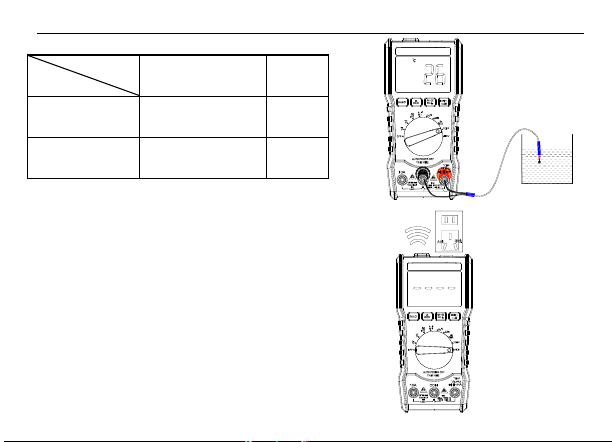
The operation is as follows: (above right figure)
1 Rotate the dial to the "TEMP" position;
2. Insert the two input ends of the temperature probe into the red table pen respectively
"V/Ω/Hz" and "COM" terminals, test probe inductive plug.
When measuring water, the temperature of the measured water will be displayed on the LCD.
3. Press the SELECT key to switch between Celsius degree and Fahrenheit degree (°C/°F).
2-3-13.NCV measurement
The operation is as follows: (lower right figure)
1、Rotate the dial to the "NCV" position (LCD displays "EF" in the absence of measurement);
2、The instrument has the NCV test point at its front end. As long as the point is close to
the AC voltage, the buzzer will emit different continuous sounds according to the signal's
different intensity. At the same time, the LCD will also display different segments according
to the strength of the signal.
Accuracy
Range
9999counts
Resolution
(-20-1000 )℃
±(1.0%+5)<400℃
±(1.5%+15)≥400℃
1℃
(0-1832 )℉
±(0.75%+5)<750℉
±(1.5%+15)≥750℉
1℉
9999counts Handheld multimeter
15/15
5. Automatic Startup & Shutdown
When the instrument stops using for about 15 minutes, the meter will automatically power off to enter the sleep state; to restart the power, dial to the
OFF position, turn the knob to other gears. Hold down the "SELECT" button, and turn on the power switch at the same time, the screen "APO"
symbol disappears, will cancel the automatic shutdown function.
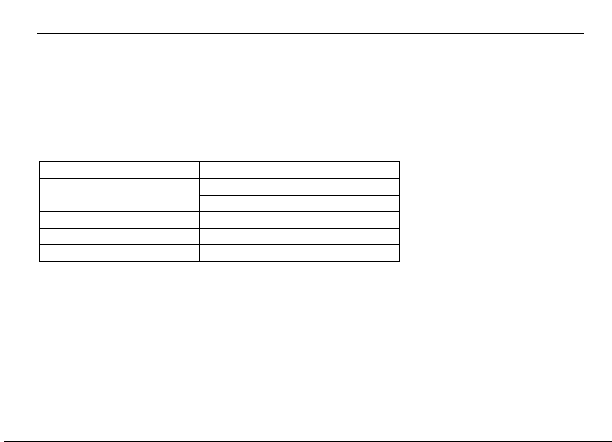
6. Troubleshooting
If your instrument does not work, the following method can help you solve the general problem, if the fault still can not be excluded, please
contact the service center or dealer.
Failure phenomenon
Check the location and methods
Not shown
Battery not connected
Replace the battery
Low battery symbol
Replace the battery
Current is not input
Replace fuse
Resistance display error
The test pen is not in contact
Once this manual is being changed without notice.
These contents of this manual included are considered to be correct, if the user found errors, omissions, etc., please contact the manufacturer directly.
The company does not undertake due to user error operation and the harm caused by the accident
The functions described in this manual are not intended to reasons of the product for special purposes.
6000-MT109-00Z1