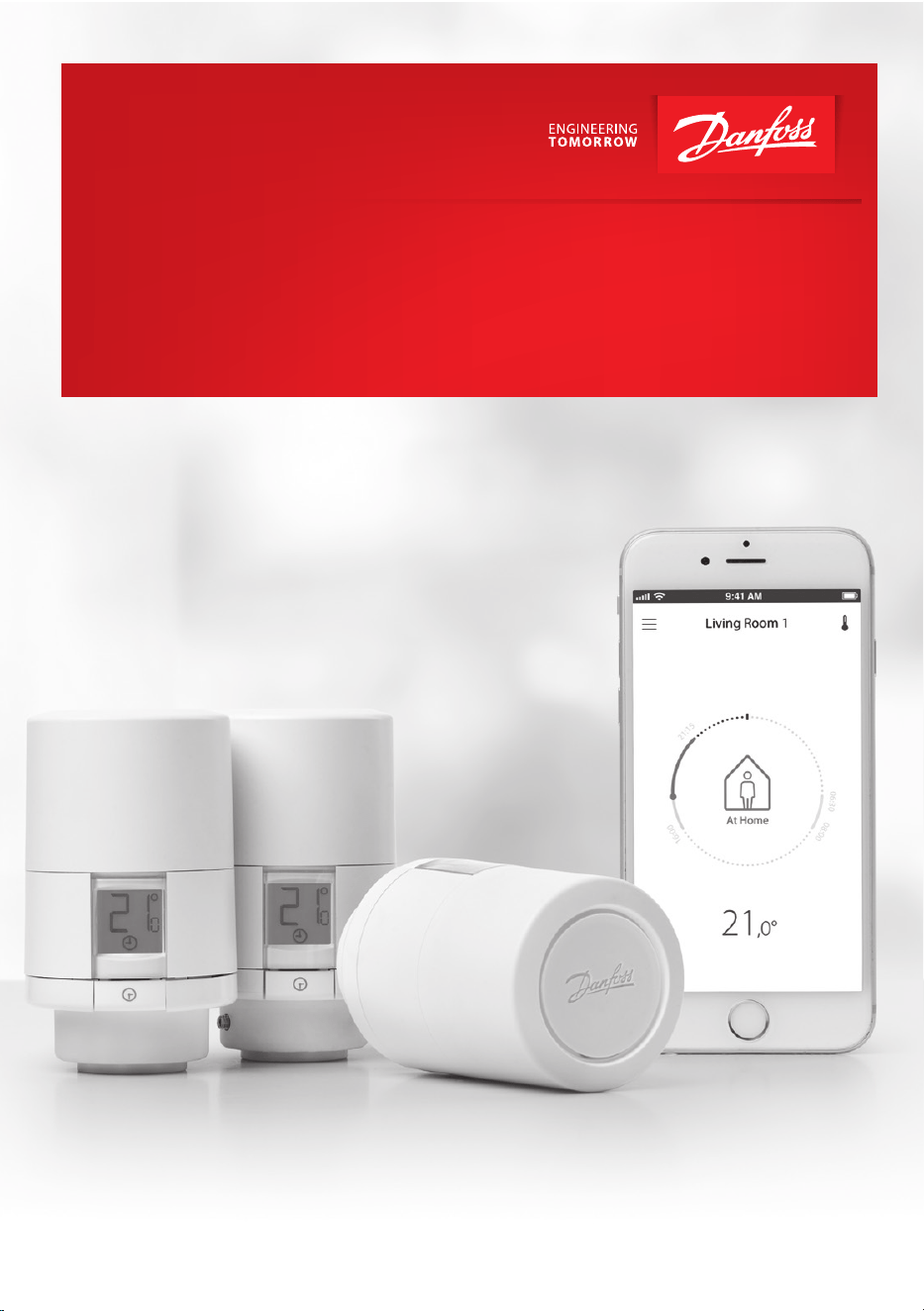
Danfoss Eco™
Electronic Radiator Thermostat
Instruction Manual
www.danfoss.com

2
© Danfoss HS | 01/2022 | VILTH302 | AN235786405824en-010201
Installation Guide Danfoss Eco™ Electronic Radiator Thermostat
Installation Guide
1. Installation
1.1 Identify your Danfoss Eco™ . . . . . . . . . . . . . . . . . . . . . . . . . . . . . . . . . . . . . . . . . . . . . . . . . . . . . . . . . .4
1.2 In the package . . . . . . . . . . . . . . . . . . . . . . . . . . . . . . . . . . . . . . . . . . . . . . . . . . . . . . . . . . . . . . . . . . . . . .5
1.3 Overview of valve adapters . . . . . . . . . . . . . . . . . . . . . . . . . . . . . . . . . . . . . . . . . . . . . . . . . . . . . . . . . .5
1.4 Installing the right adapter . . . . . . . . . . . . . . . . . . . . . . . . . . . . . . . . . . . . . . . . . . . . . . . . . . . . . . . . . .7
1.5 Inserting the batteries. . . . . . . . . . . . . . . . . . . . . . . . . . . . . . . . . . . . . . . . . . . . . . . . . . . . . . . . . . . . . . .8
1.6 Mounting the Danfoss Eco™ . . . . . . . . . . . . . . . . . . . . . . . . . . . . . . . . . . . . . . . . . . . . . . . . . . . . . . . . .9
1.7 Download Danfoss Eco™ App . . . . . . . . . . . . . . . . . . . . . . . . . . . . . . . . . . . . . . . . . . . . . . . . . . . . . . .9
1.8 Pairing Danfoss Eco™ . . . . . . . . . . . . . . . . . . . . . . . . . . . . . . . . . . . . . . . . . . . . . . . . . . . . . . . . . . . . . 10
1.9 Automatic adjustments. . . . . . . . . . . . . . . . . . . . . . . . . . . . . . . . . . . . . . . . . . . . . . . . . . . . . . . . . . . . 10
1.10 Removing Danfoss Eco™ . . . . . . . . . . . . . . . . . . . . . . . . . . . . . . . . . . . . . . . . . . . . . . . . . . . . . . . . . . 11
1.11 Resetting Danfoss Eco™ to default settings. . . . . . . . . . . . . . . . . . . . . . . . . . . . . . . . . . . . . . . . . 11
2. Technical Specications . . . . . . . . . . . . . . . . . . . . . . . . . . . . . . . . . . . . . . . . . . . . . . . . . . . . . . . . . . . . . . . . 12

3
Installation Guide Danfoss Eco™ Electronic Radiator Thermostat
© Danfoss HS | 01/2022 | VILTH302 | AN235786405824en-010201
User Guide
3. Display
3.1 Display screen . . . . . . . . . . . . . . . . . . . . . . . . . . . . . . . . . . . . . . . . . . . . . . . . . . . . . . . . . . . . . . . . . . . . 13
3.2 Red illuminating ring . . . . . . . . . . . . . . . . . . . . . . . . . . . . . . . . . . . . . . . . . . . . . . . . . . . . . . . . . . . . . . 13
3.3 Display rotation . . . . . . . . . . . . . . . . . . . . . . . . . . . . . . . . . . . . . . . . . . . . . . . . . . . . . . . . . . . . . . . . . . . 14
3.4 Manual mode . . . . . . . . . . . . . . . . . . . . . . . . . . . . . . . . . . . . . . . . . . . . . . . . . . . . . . . . . . . . . . . . . . . . . 14
4. Temperature and Programme Settings
4.1 Time . . . . . . . . . . . . . . . . . . . . . . . . . . . . . . . . . . . . . . . . . . . . . . . . . . . . . . . . . . . . . . . . . . . . . . . . . . . . . 15
4.2 Default temperature . . . . . . . . . . . . . . . . . . . . . . . . . . . . . . . . . . . . . . . . . . . . . . . . . . . . . . . . . . . . . . 15
4.3 Setting temperatures . . . . . . . . . . . . . . . . . . . . . . . . . . . . . . . . . . . . . . . . . . . . . . . . . . . . . . . . . . . . . 15
4.4 Create your own schedule . . . . . . . . . . . . . . . . . . . . . . . . . . . . . . . . . . . . . . . . . . . . . . . . . . . . . . . . 16
4.5 Vacation . . . . . . . . . . . . . . . . . . . . . . . . . . . . . . . . . . . . . . . . . . . . . . . . . . . . . . . . . . . . . . . . . . . . . . . . . . 16
4.6 Overrule a vacation . . . . . . . . . . . . . . . . . . . . . . . . . . . . . . . . . . . . . . . . . . . . . . . . . . . . . . . . . . . . . . . 17
4.7 Cancel an existing vacation programme . . . . . . . . . . . . . . . . . . . . . . . . . . . . . . . . . . . . . . . . . . . 17
4.8 Pause . . . . . . . . . . . . . . . . . . . . . . . . . . . . . . . . . . . . . . . . . . . . . . . . . . . . . . . . . . . . . . . . . . . . . . . . . . . . . 17
4.9 Open window setting . . . . . . . . . . . . . . . . . . . . . . . . . . . . . . . . . . . . . . . . . . . . . . . . . . . . . . . . . . . . . 18
5. Additional Settings
5.1 Setting options via the Danfoss Eco™ App. . . . . . . . . . . . . . . . . . . . . . . . . . . . . . . . . . . . . . . . . . 19
5.2 Software updates . . . . . . . . . . . . . . . . . . . . . . . . . . . . . . . . . . . . . . . . . . . . . . . . . . . . . . . . . . . . . . . . . 20
5.3 Data security . . . . . . . . . . . . . . . . . . . . . . . . . . . . . . . . . . . . . . . . . . . . . . . . . . . . . . . . . . . . . . . . . . . . . 21
6. Safety Precautions. . . . . . . . . . . . . . . . . . . . . . . . . . . . . . . . . . . . . . . . . . . . . . . . . . . . . . . . . . . . . . . . . . . . . . 21
7. Disposal . . . . . . . . . . . . . . . . . . . . . . . . . . . . . . . . . . . . . . . . . . . . . . . . . . . . . . . . . . . . . . . . . . . . . . . . . . . . . . . . 21
4
© Danfoss HS | 01/2022 | VILTH302 | AN235786405824en-010201
Installation Guide Danfoss Eco™ Electronic Radiator Thermostat
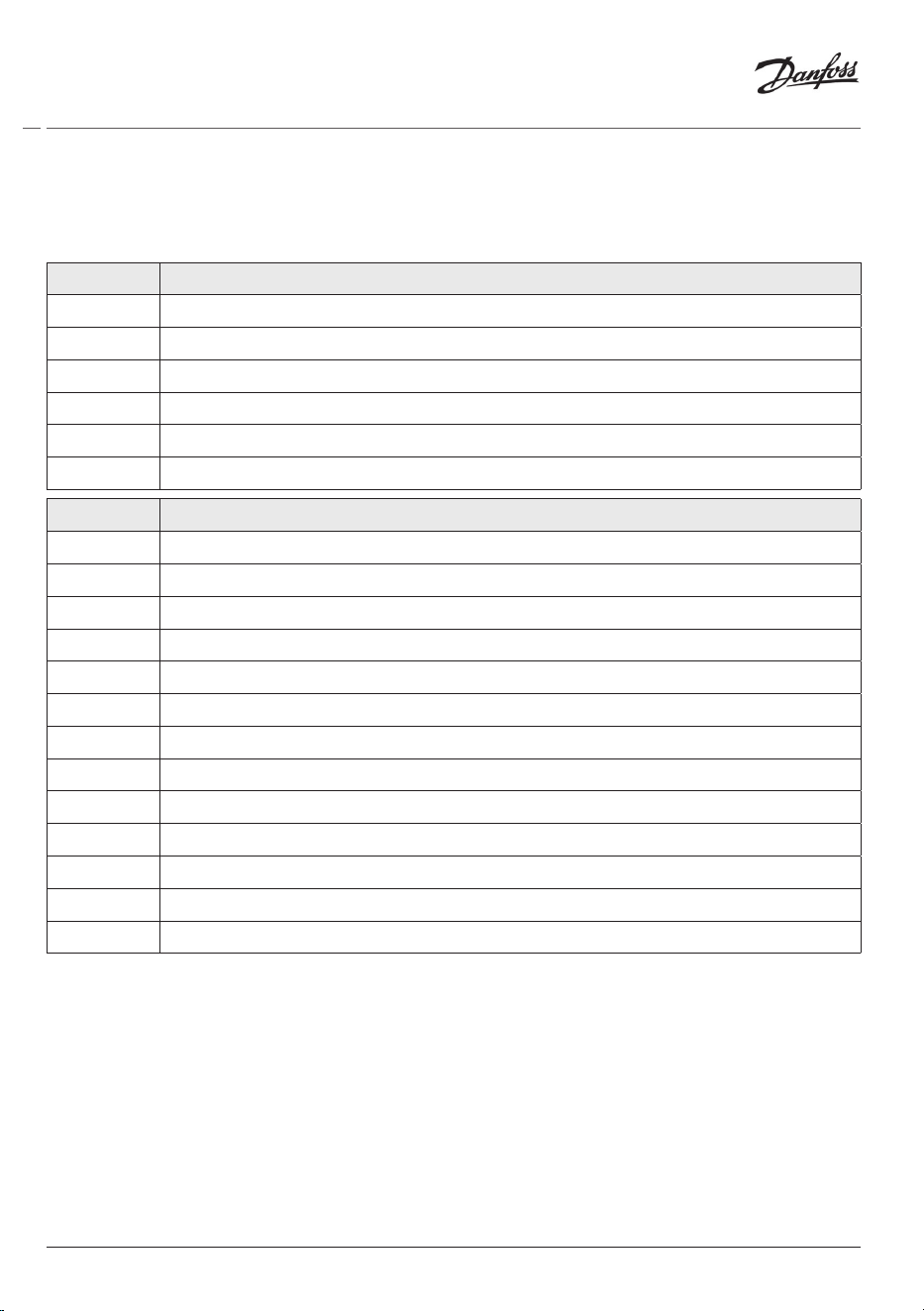
Code no. Version characteristics
014G1000
Adapters included: RA adapter
014G1001
Adapters included: RA, M30 x 1.5 adapters
014G1002
IT - Adapters included RA, M30, Cale & Giacomini
014G1003
RU - Adapters included RA & M30
014G1020
UK (Combi, Bi-Di valve) - RA (Premounted)
014G1021
UK (Combi, Bi-Di valve, RLV-D) - RA (Premounted)
Code no. Version characteristics
014G1100
DK - Adapters included RA, M30, RAV & RAVL
014G1101
DE - Adapters included RA, M30, RAV & RAVL
014G1102
FR - Adapters included RA, M30, M28 Comap
014G1103
HU, HR, RO, SK, UA - Adapters included RA, M30, RTD
014G1104
IT - Adapters included RA, M30, M28 Herz, Cale & Giacomini
014G1105
PL, CZ, LT, EE, LV, SI - Adapters included RA, M30 & RTD
014G1106
NL, BE, NO, FI, IS, TR - Adapters included RA & M30
014G1107
ES, PT - Adapters included RA, M30, M28 Orkli
014G1108
UK - Adapters included RA, M30
014G1109
AT - Adapters included RA, M30 & M28 Herz
014G1110
SE - Adapters included RA, M30 & M28 MMA
014G1111
RU - Adapters Included RA, M30, RTD, M28 Herz & Giacomini
014G1112
CH - Adapters included RA, M30, RAVL & RAV
1. Installation
1.1 Identify your Danfoss Eco™
5
Installation Guide Danfoss Eco™ Electronic Radiator Thermostat
© Danfoss HS | 01/2022 | VILTH302 | AN235786405824en-010201
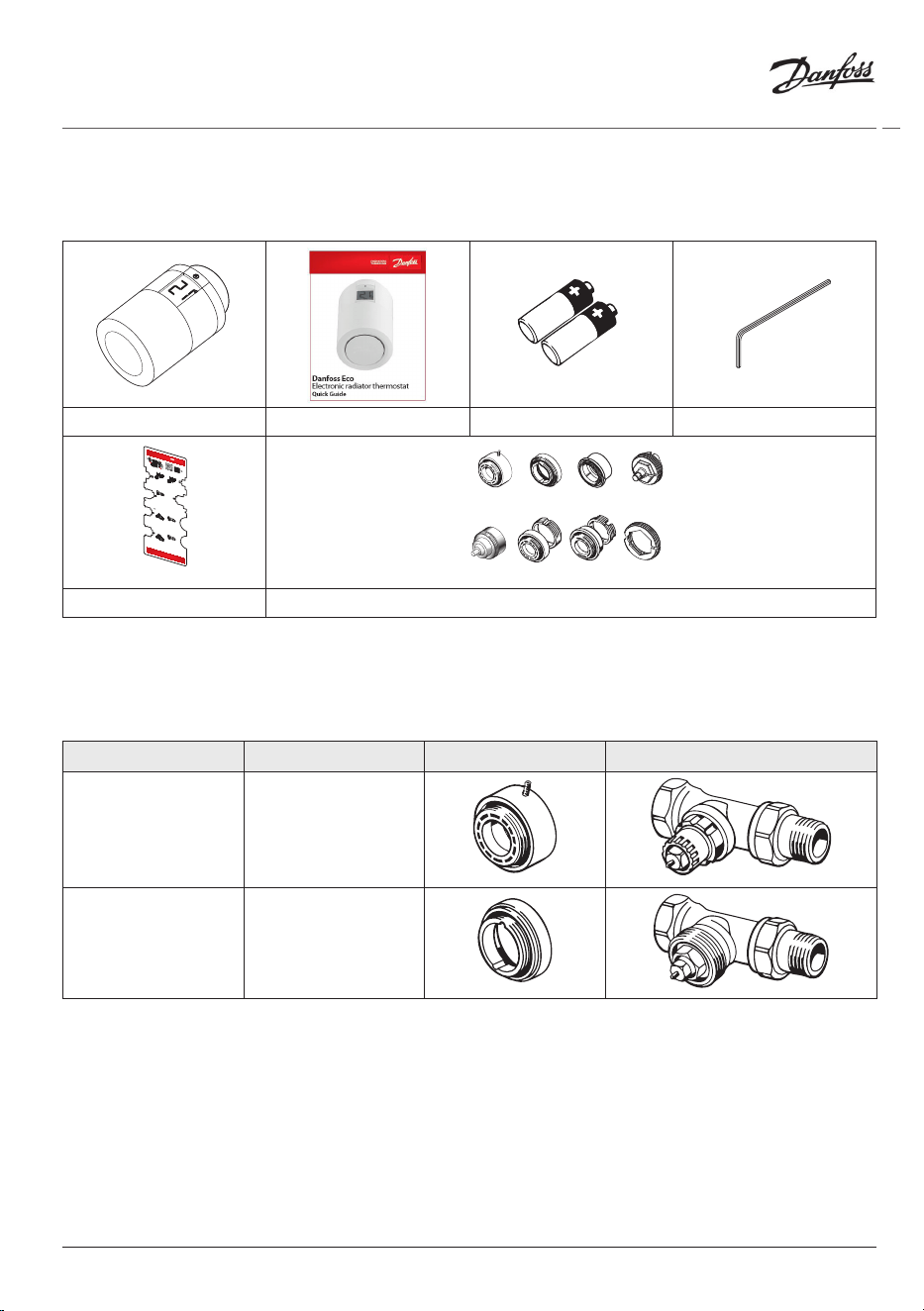
1.2 In the package
Danfoss Eco™ are supplied with the adapters as listed in 1.1. In addition each pack contains:
Danfoss Eco™ Quick Guide Requires 2x AA batteries Allen Key
Adapter
selection guide
RAV
(Ø34 mm)
Danfoss
RAVL
(Ø26 mm)
Danfoss
RTD
Danfoss
RA
Danfoss
M30
Heimeier, TA,
Oventrop,
Honeywell
M28
Orkli, Comap,
Herz, MMA
C
Giacominni
26
34
Adapter selection
Adapter
selection guide
RAV
(Ø34 mm)
Danfoss
RAVL
(Ø26 mm)
Danfoss
RTD
Danfoss
RA
Danfoss
M30
Heimeier, TA,
Oventrop,
Honeywell
M28
Orkli, Comap,
Herz, MMA
Cale
Giacominni
26
34
?
RAV
(Ø34 mm)
Danfoss
RAVL
(Ø26 mm)
Danfoss
RA
Danfoss
M28
Orkli, Comap,
Herz, MMA
013R9633 - VUFQB102
M30
Heimeier, TA,
Oventrop,
Honeywell
Adapter
selection guide
RTD
Danfoss
34
26
Adapter selection
Adapter
selection guide
RAV
(Ø34 mm)
Danfoss
RAVL
(Ø26 mm)
Danfoss
RTD
Danfoss
RA
Danfoss
M30
Heimeier, TA,
Oventrop,
Honeywell
M28
Orkli, Comap,
Herz, MMA
Cal
Giacominni
26
34
?
RAV
(Ø34 mm)
Danfoss
RAVL
(Ø26 mm)
Danfoss
RA
Danfoss
M28
Orkli, Comap,
Herz, MMA
013R9633 - VUFQB102
M30
Heimeier, TA,
Oventrop,
Honeywell
Adapter
selection guide
RTD
Danfoss
34
26
Adapter selection
Adapter Guide Adapters
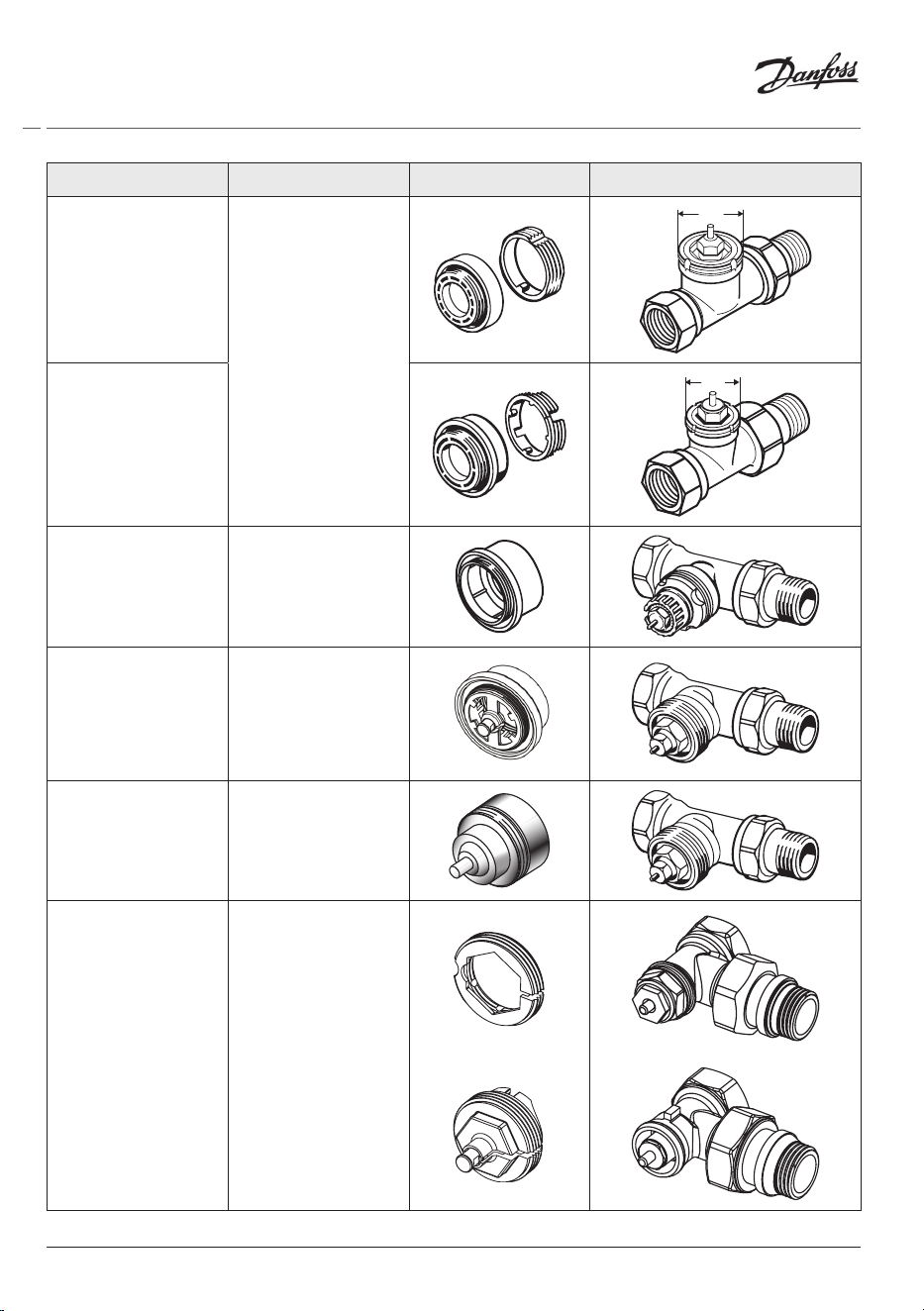
1.3 Overview of Valve Adapters
Adapters for a wide range of dierent valve types are available as accessories.
Adapter type Code no. Adapter Valve
For Danfoss
RA valves
014G0251
For M30 x 1.5 (K)
valves
014G0252
6
© Danfoss HS | 01/2022 | VILTH302 | AN235786405824en-010201
Installation Guide Danfoss Eco™ Electronic Radiator Thermostat
Adapter type Code no. Adapter Valve
For Danfoss
RAV valves
014G0250
34
For Danfoss
RAVL valves
26
For Danfoss
RTD valves
014G0253
For M28 valves:
- MMA
014G0264
- Herz
- Comap
For Orkli valves 014G0257
For Cale
and
Giacomini
valves
(Both adaptors
supplied)
014G0263
7
Installation Guide Danfoss Eco™ Electronic Radiator Thermostat
© Danfoss HS | 01/2022 | VILTH302 | AN235786405824en-010201
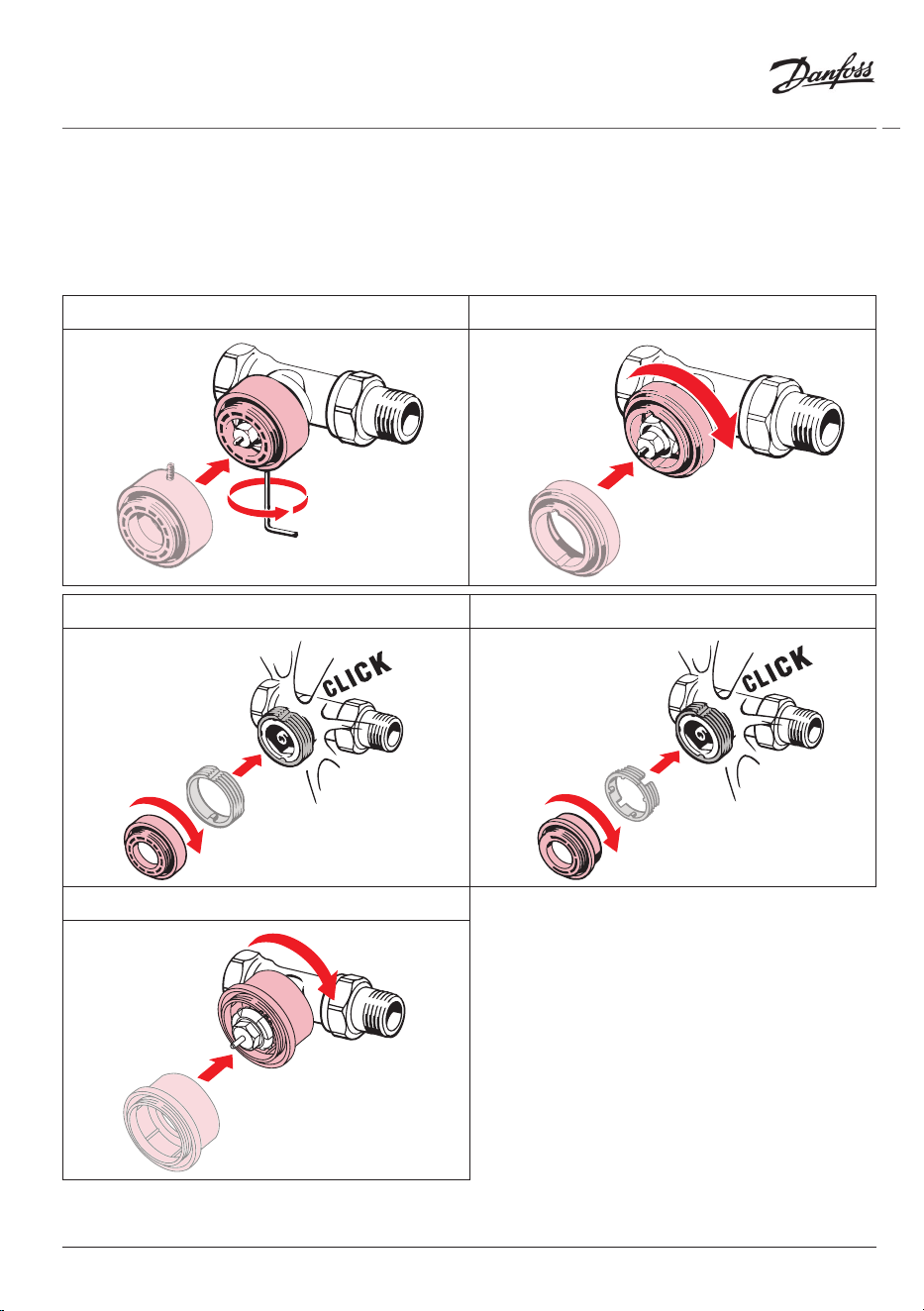
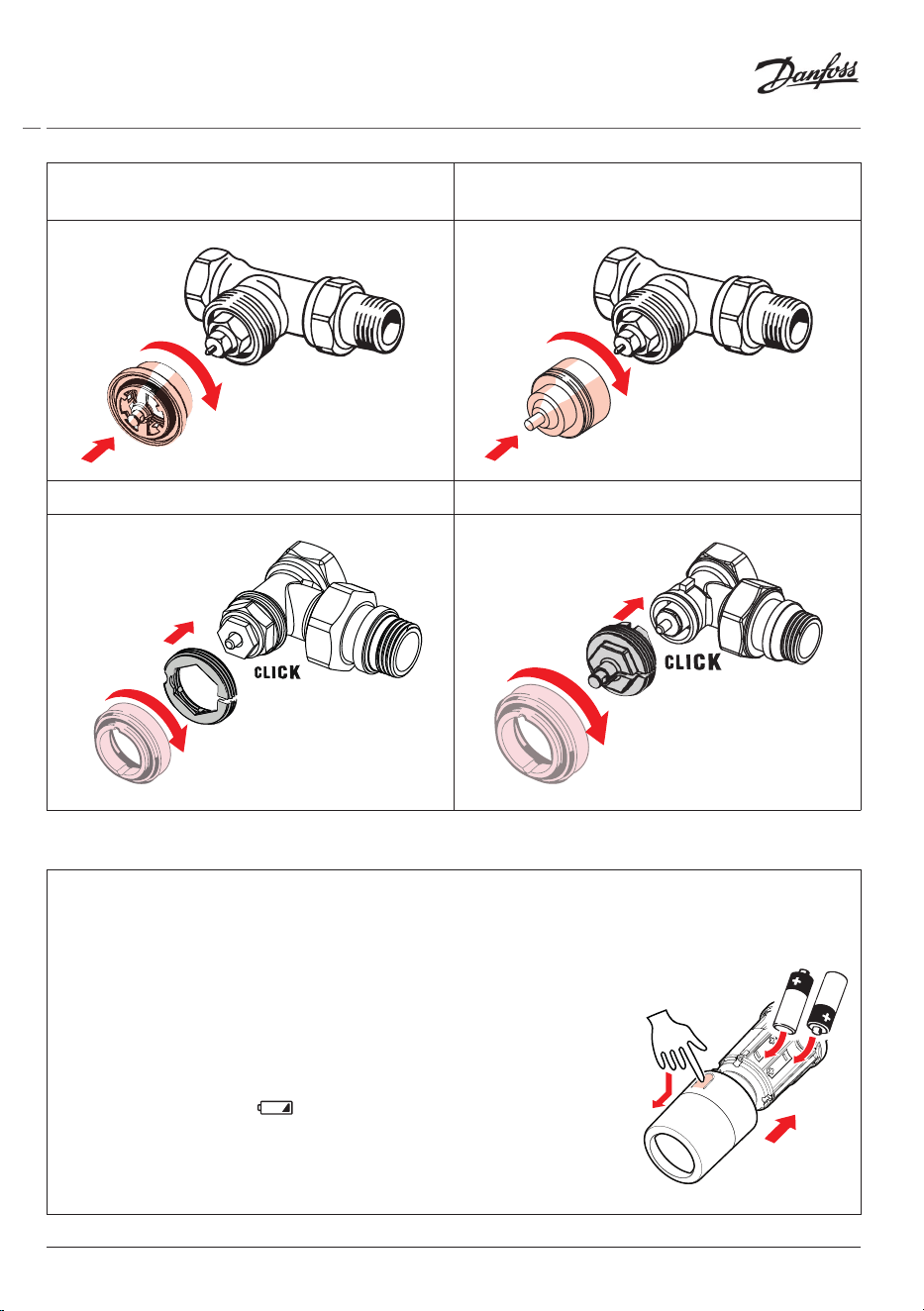
1.4 Installing the right adapter
The Danfoss Eco™ pack contains an adapter guide to help you nd the correct adapter for your
valve. If you need additional help in nding the correct adapter follow the QR code on the guide
and follow the video instruction.
Adapter for RA valves Adapter for M30 x 1.5 (K) valves
Adapter for RAV valves Adapter for RAVL valves
Adapter for RTD valves
8
© Danfoss HS | 01/2022 | VILTH302 | AN235786405824en-010201
Installation Guide Danfoss Eco™ Electronic Radiator Thermostat
Adapters for M28 valves
(MMA, Herz and Comap)
Adapters for M28 valves
(Orkli)
Adapter for Caleffi valves Adapter for Giacomini valves
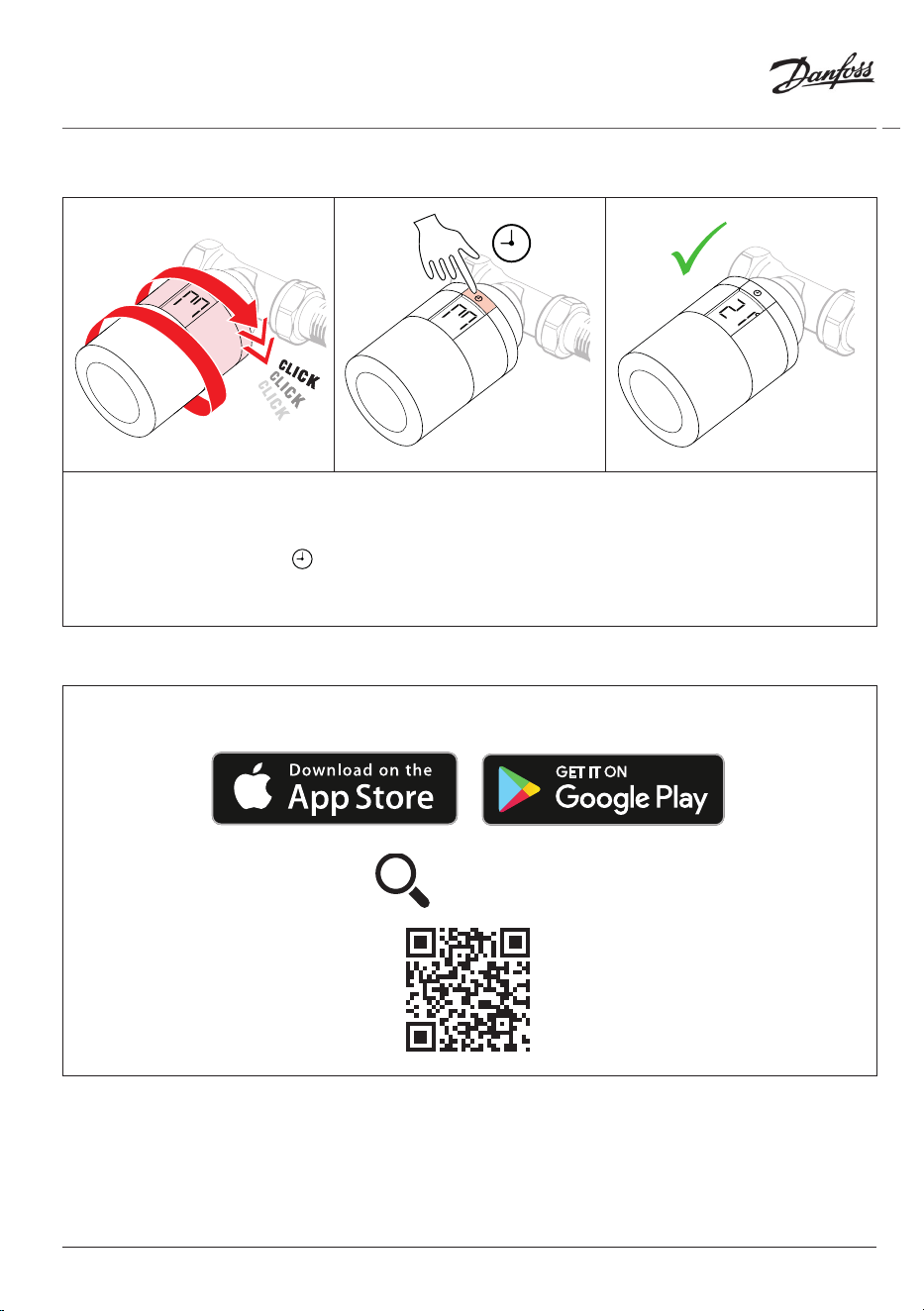
1.5 Inserting the batteries
Remove the battery cover as shown in the diagram and insert two AA batteries.
Make sure the batteries are correctly oriented.
Rechargeable batteries must not be used.
When replacing batteries the time and date settings are lost
immediately. After replacing batteries re-connect to a smartphone
to activate a schedule. The red ring will ash. Re-connect to the App
and the time and date will be restored. If you do not re-connect the
sensor will remain in manual mode.
The low battery symbol is displayed approx. one month before
the batteries run out. Before the batteries run out Danfoss Eco™ will
leave the valve in Frost Protection position to protect the heating
system from damage. Estimated battery life time is up to 2 years.
9
Installation Guide Danfoss Eco™ Electronic Radiator Thermostat
© Danfoss HS | 01/2022 | VILTH302 | AN235786405824en-010201
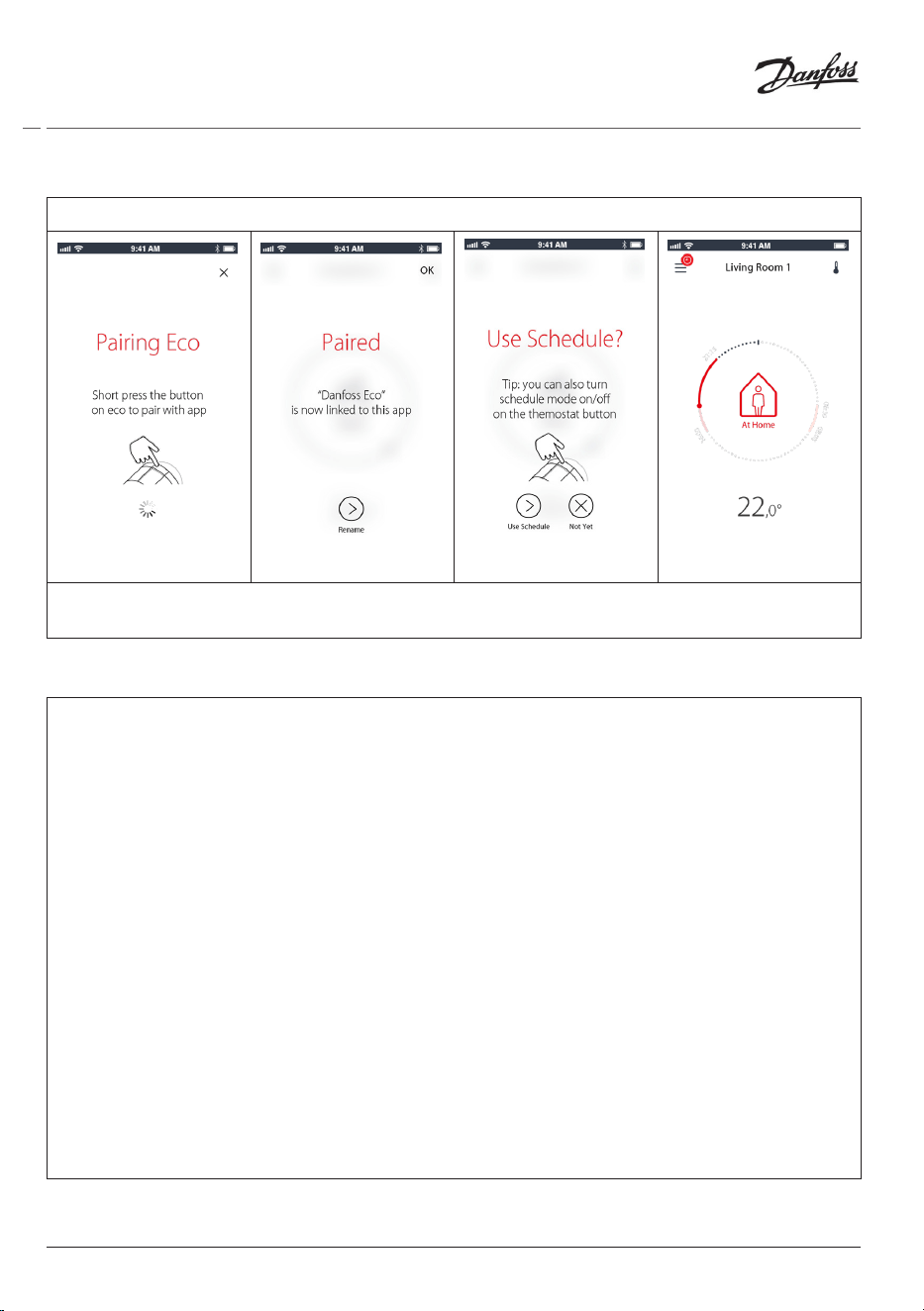
1.6 Mounting the Danfoss Eco™
Screw the Danfoss Eco™ onto the mounted adapter until a click sound is heard. Once the
thermostat is tightened properly, then adjust the display to your preferred display orientation.
A large M is flashing in the display to indicate that Installation Mode is activated.
Press and hold the button for 3 seconds.
The temperature set point will show on the screen once the Danfoss Eco™ is mounted.
1.7 Download Danfoss Eco™ App
Download the Danfoss Eco™ App.
Danfoss Eco™
10
© Danfoss HS | 01/2022 | VILTH302 | AN235786405824en-010201
Installation Guide Danfoss Eco™ Electronic Radiator Thermostat
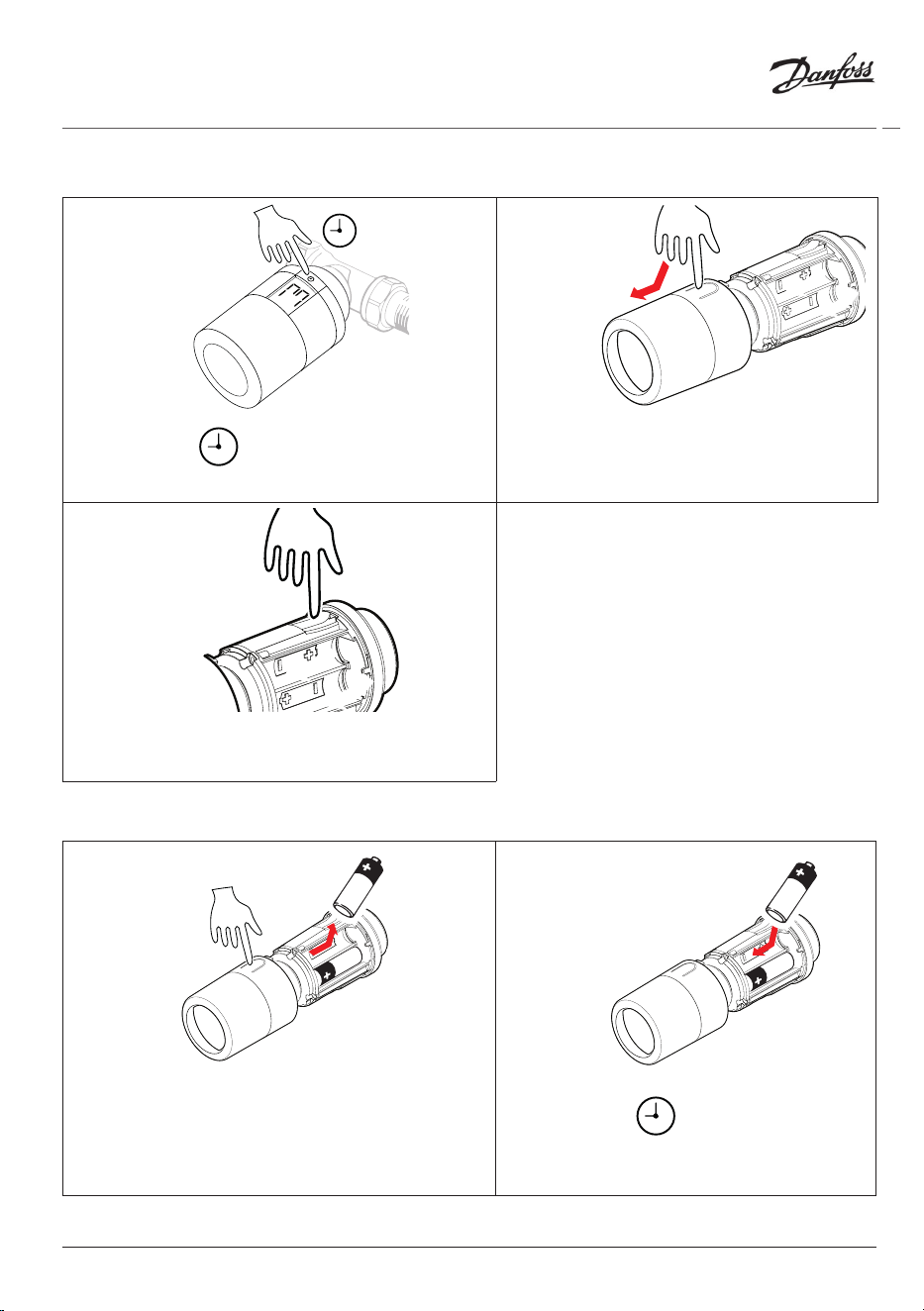
1.8 Pairing Danfoss Eco™
Note: Turn on Bluetooth on your smart phone to connect to the Danfoss Eco™.
Follow the prompts from the Danfoss Eco™ App to pair your Danfoss Eco™.
Bluetooth range is 10m (depending on the building construction and surroundings).
1.9 Automatic adjustments
When Danfoss Eco™ is installed it will automatically begin to adjust itself to your heating
system, during the first week after insallation. During this process you might experience that the
thermostat reacts slowly or turns the heat up and down by itself. This is normal and a necessary
part of the adjustment process.
1. Adjusting to the valve
During the first night of operation Danfoss Eco™ will shut off the radiator heat and then open
again to detect the exact opening point of the valve. This will allow Danfoss Eco™ to control the
heat as efficiently as possible. If necessary, the procedure is repeated once a night for up to a
week.
2. Adaptive Learning
If you activate Adaptive Learning Danfoss Eco™ learns during the first week of operation when
it is necessary to start heating the room in order to reach the correct temperature at the correct
time.
The intelligent control will continuously adjust the heating time compared to seasonal
temperature changes.
Using Saving Program requires that your heating system has enough heat for a short period
during heat up. If you experience problems you should contact your installer.
11
Installation Guide Danfoss Eco™ Electronic Radiator Thermostat
© Danfoss HS | 01/2022 | VILTH302 | AN235786405824en-010201
1.10 Removing Danfoss Eco™
1. 2.
Press and hold until large M flashes.
This indicates you are in mounting mode
Remove the cover.
3.
Press firmly on the tab and unscrew the
thermostat from the adapter.
1.11 Resetting Danfoss Eco™ to default settings
1. 2.
Remove the cover and take out one battery.
Press and hold , keep holding while
reinserting the battery. The screen will go
blank after approx 3 seconds.
12
© Danfoss HS | 01/2022 | VILTH302 | AN235786405824en-010201
Installation Guide Danfoss Eco™ Electronic Radiator Thermostat
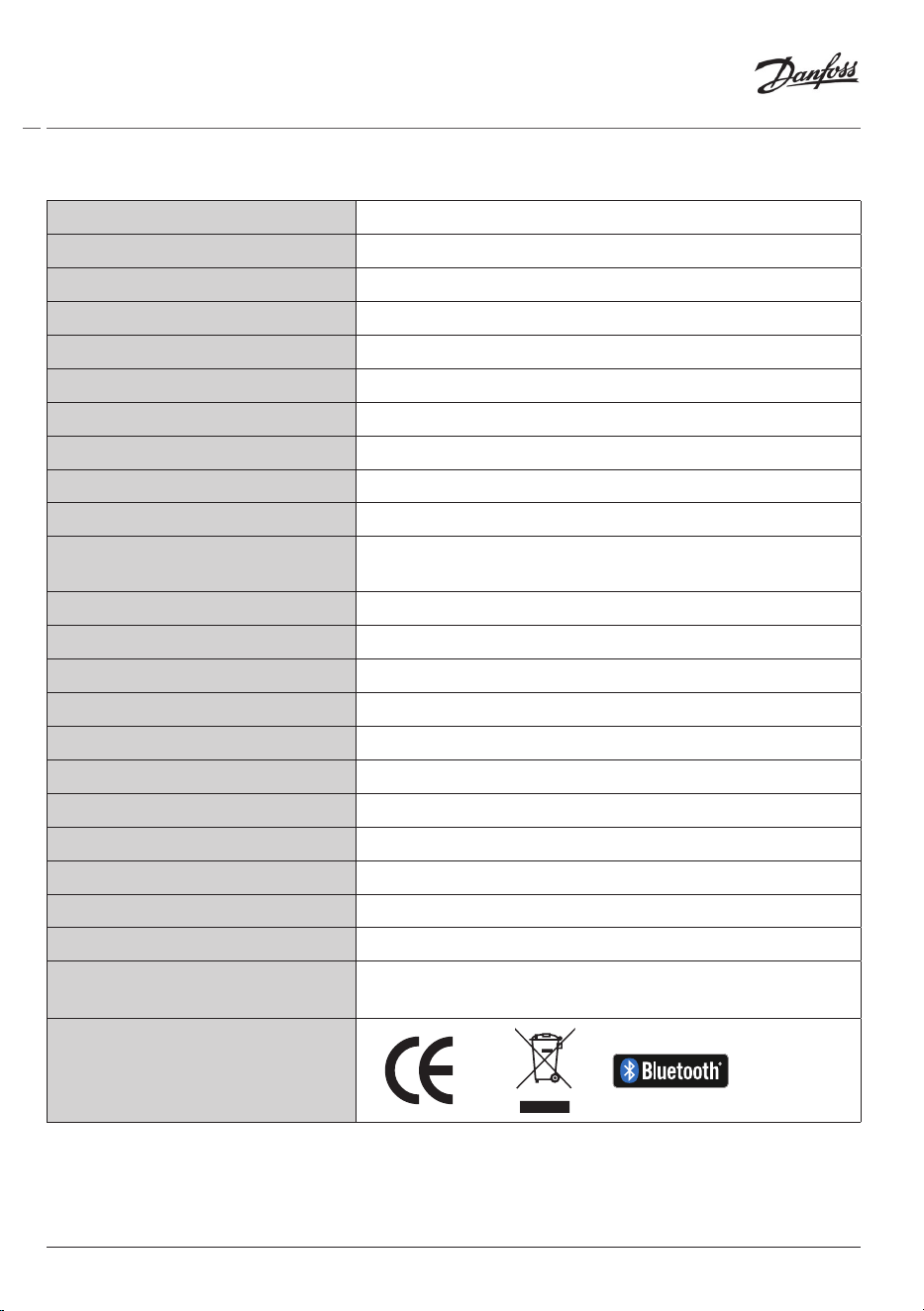
2. Technical specications
Thermostat type Programmable electronic radiator valve controller
Recommended use Residential (pollution degree 2)
Actuator Electromechanical
Display LCD with white backlight
Software classication A
Control PID
Power supply 2 x 1.5 V alkaline AA batteries (not included)
Power consumption 3 μW in standby 1.2 W when active
Transmission Frequency / Power 2,4 GHz / <2,1mW
Battery life Up to 2 years
Low battery signal
Battery icon will ash in display.
If battery level is critical the red ring will ash.
Ambient temperature range 0 to 40 °C
Transportation temperature range -20 to 65 °C
Maximum water temperature 90 °C
Temperature setting range 4 to 28 °C
Measurement interval Measures temperature every minute
Clock accuracy +/- 10 min/year
Spindle movement Linear, up to 4.5 mm, max. 2 mm on valve (1 mm/s)
Noise level <30 dBA
Safety classication Type 1
Open-window function Activated at temperature decrease
Weight (incl. batteries) 198 g (with RA adapter)
IP class
20 (not to be used in hazardous installations or in places
where it will be exposed to water)
Approvals, markings etc.
13
Installation Guide Danfoss Eco™ Electronic Radiator Thermostat
© Danfoss HS | 01/2022 | VILTH302 | AN235786405824en-010201
3. Display
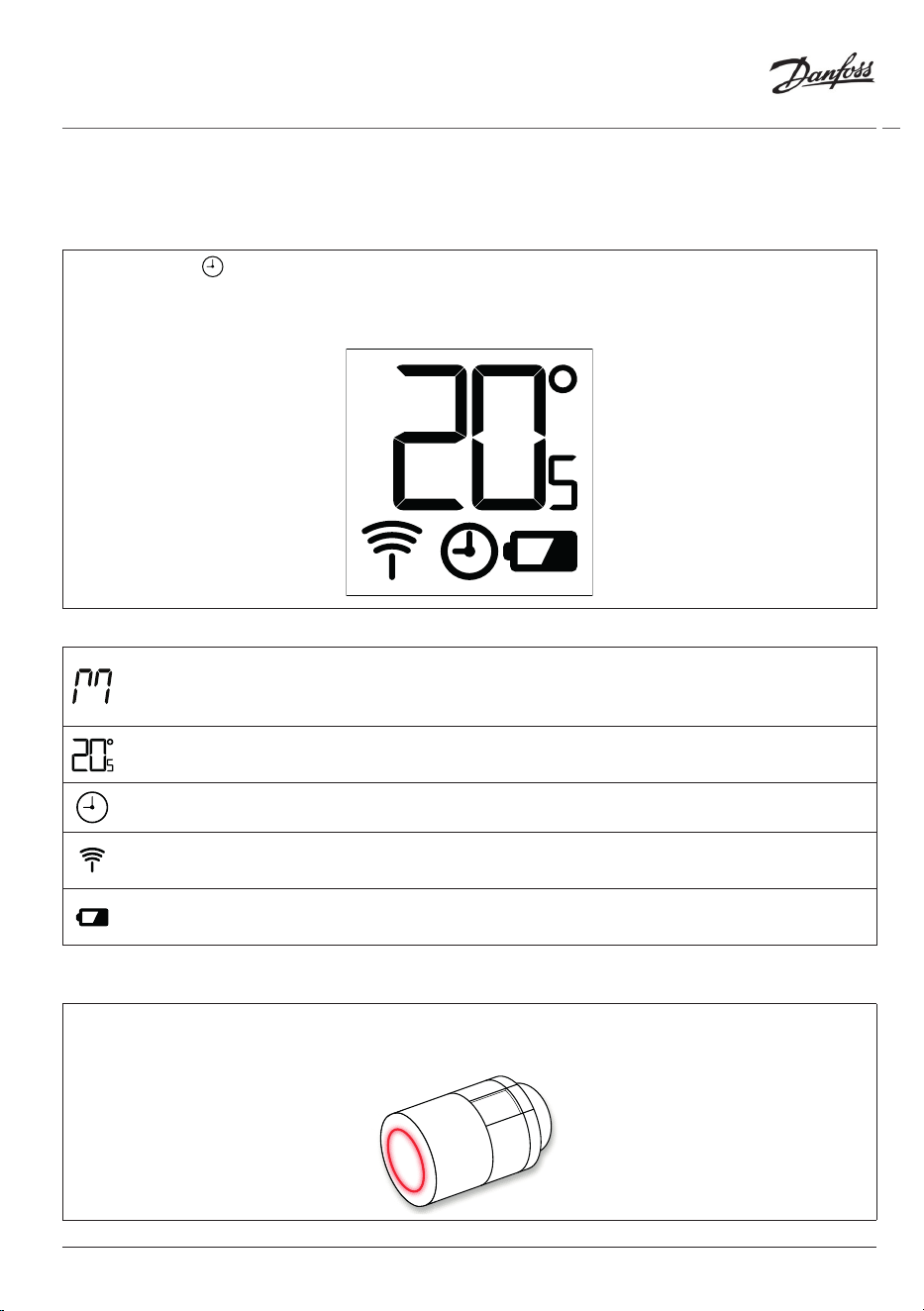
3.1 Display Screen
Short press on and the Display Screen appears.
Danfoss Eco™ is displaying the set temperature, not the measured room temperature.
Display symbols:
Installation Mode must always be activated when installing or removing Danfoss
Eco™. The thermostat may be irreparably damaged if not in the correct position during
installation.
Temperature is shown in degrees Celsius. Danfoss Eco™ is displaying the set temperature,
not the measured room temperature.
Scheduled Mode
The antenna symbol ashes when you need to connect the App to the thermostat.
If you are connected, the red ring will illuminate (the display will be blank).
Low battery. Battery icon will ash in display.
If battery level is critical the red ring will ash.
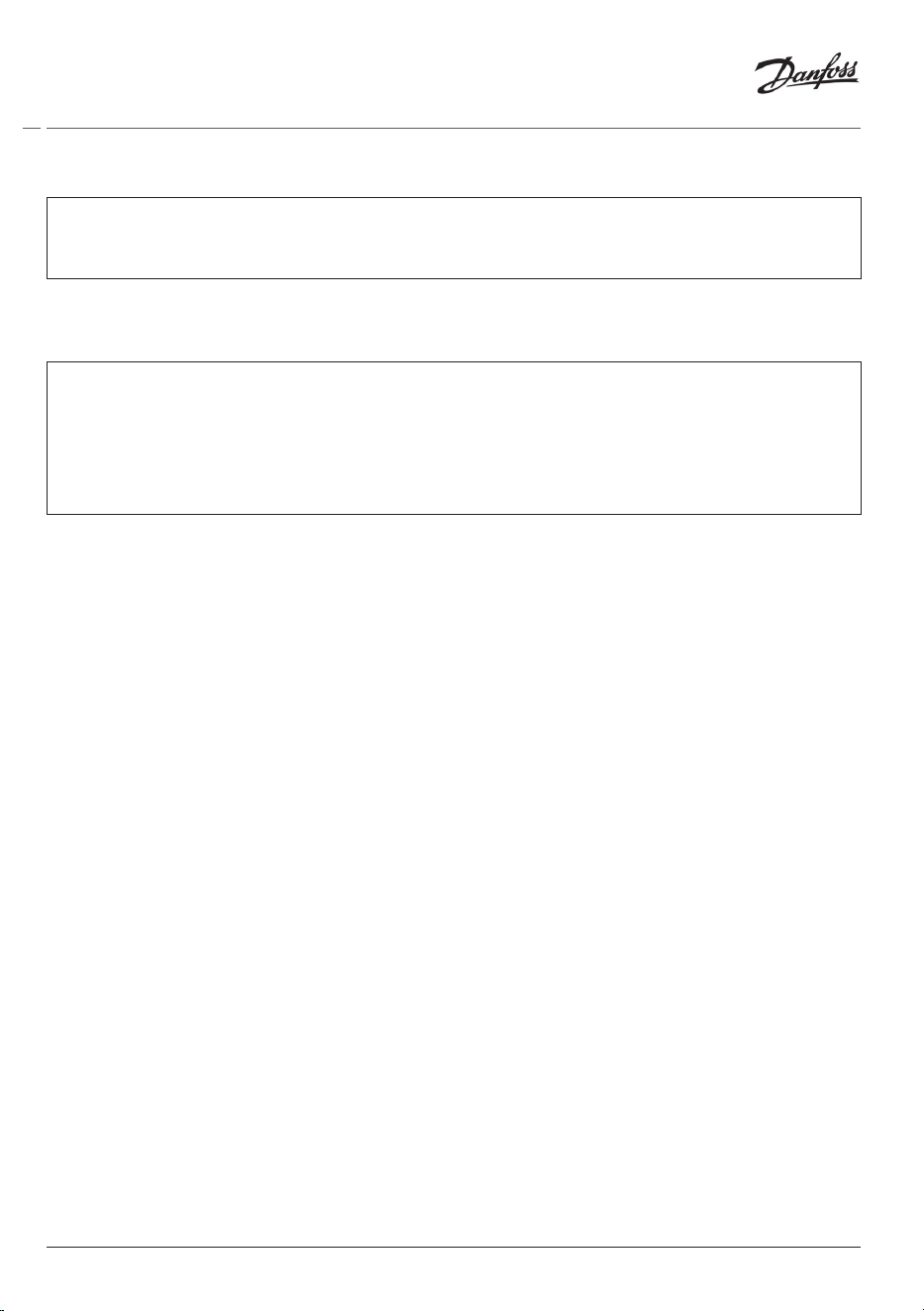
3.2 Red illuminating ring
The red ring will be constantly on when you are connected to the Danfoss Eco™ App.
It also flashes to indicate when the batteries are critically low on power.
14
© Danfoss HS | 01/2022 | VILTH302 | AN235786405824en-010201
Installation Guide Danfoss Eco™ Electronic Radiator Thermostat
3.3 Display rotation
Danfoss Eco™ can be mounted in a horizontal or veritcal position, depending on your radiator
valve. You can set the display rotation to either ‘horizontal’ or ‘vertical’ within the Danfoss Eco™
App under Advanced Settings.
3.4 Manual mode
Danfoss Eco™ can be used without the Danfoss Eco™ App in Manual Mode.
Functionality is reduced.
Use the handwheel to adjust the temperature. The display shows the required temperature and
not the room temperature. In manual mode there are no comfort or setback temperatures or
times set.
15
Installation Guide Danfoss Eco™ Electronic Radiator Thermostat
© Danfoss HS | 01/2022 | VILTH302 | AN235786405824en-010201
4. Schedules and Temperatures
4.1 Time
The device will take the correct time from your smart phone. There is no need to set the time.
Danfoss Eco™ uses a 24 hour time display.
Note. If the batteries have been removed from the Danfoss Eco™ you will need to connect to the
Danfoss Eco™ App to correct the time once the batteries are replaced.
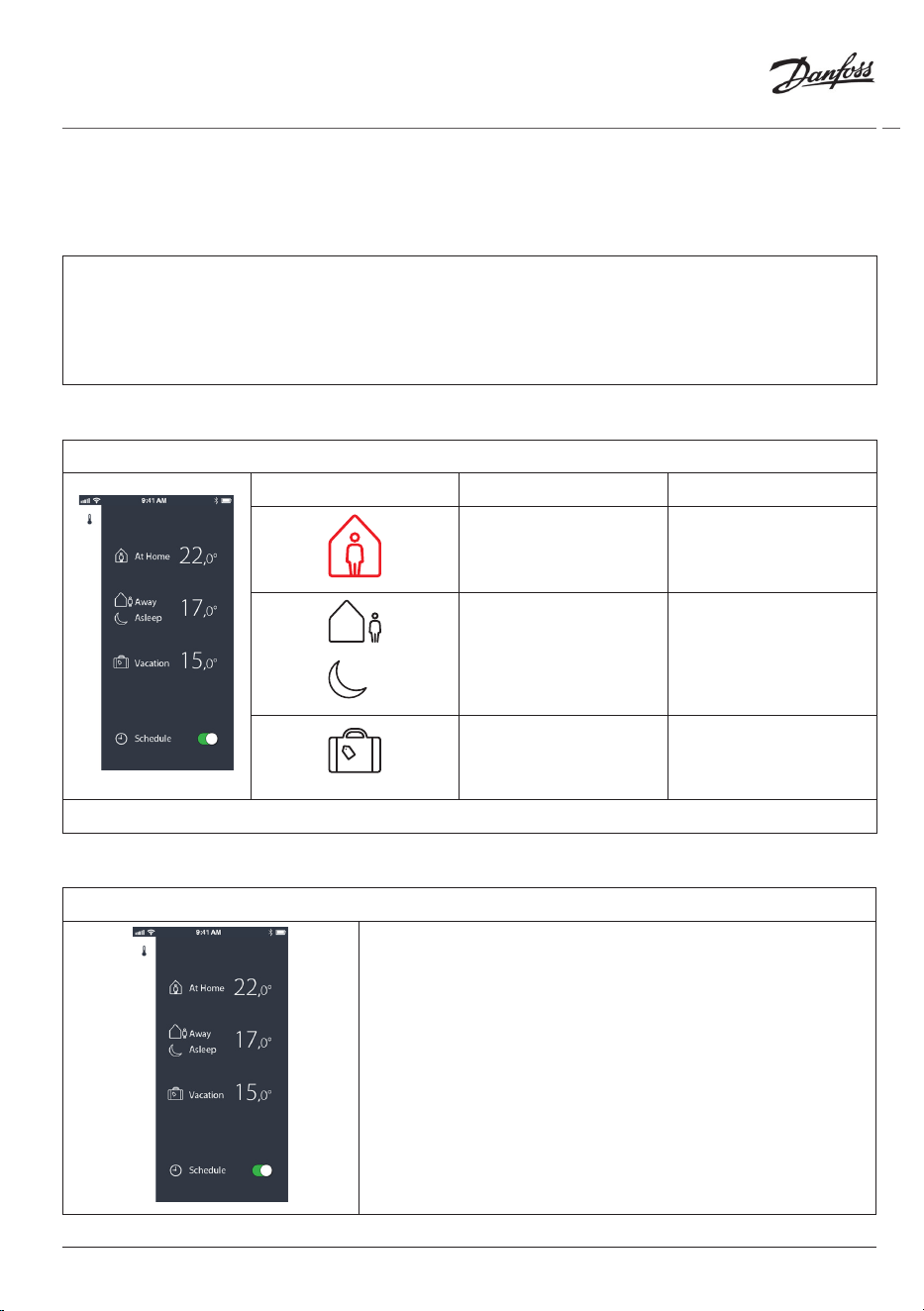
4.2 Default temperature
The default temperatures for Danfoss Eco™ are as below:
Icon Name Default Temperature
At Home 21°C
Away / Asleep 17°C
Vacation 15°C
The default temperatures can be changed in the Danfoss Eco™ App.
4.3 Setting temperatures
Set your own temperatures for your setback periods in the Danfoss Eco™ App.
Scroll on temperatures to set your preferred temperatures.
The Danfoss Eco™ can be set from 5°C to 28°C.
Danfoss recommend a dierence between ‘At Home’
temperature and ‘Away/Asleep’ that does not exceed 4
degrees.
Note:
Changes in temperature from the home screen are
temporary (Until next setback period)
16
© Danfoss HS | 01/2022 | VILTH302 | AN235786405824en-010201
Installation Guide Danfoss Eco™ Electronic Radiator Thermostat
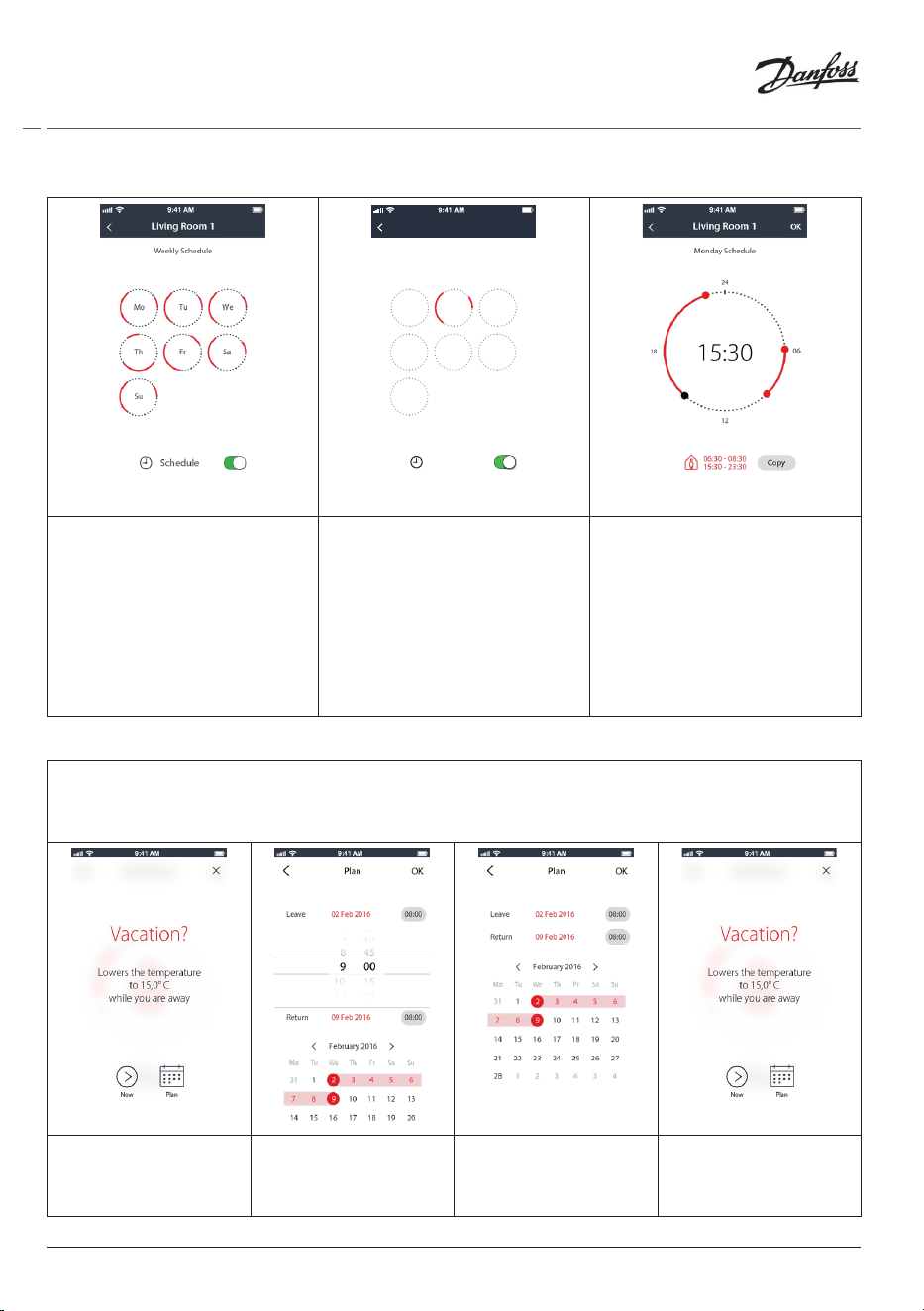
4.4 Create your own schedule
Mo Tu We
Th Fr Sa
Su
Schedule
Weekly Schedule
Living Room 1
Within the Danfoss Eco™ App
you can create your own
schedule. You can choose any
setback times within 24 hours
and a maximum of 3 setback
periods per day.
The weekly schedule shows
the ‘At Home’ periods in
red. The ‘copy’ functionallity
allows you to copy the
schedule you have created to
other days.
The Danfoss Eco™ App
display shows both the 24
hour clock wheel, showing
your At Home time in red and
a summary of your schedule,
with the detailed times set.
The minimum At Home
period is 30 minutes.
4.5 Vacation
A Vacation programme keeps the setback temperature for a period, defined by you.
Use a Vacation programme to save energy, when you are away from home. Vacation programme
is set within the Danfoss Eco™ App.
Vacation mode can
be planned or set
straight away (Now).
Planned Vacations
use a calendar and
time setting.
Schecule your
Vacation in the
Danfoss Eco™ App.
The Danfoss Eco™
App display conrms
your Vacation date.
17
Installation Guide Danfoss Eco™ Electronic Radiator Thermostat
© Danfoss HS | 01/2022 | VILTH302 | AN235786405824en-010201
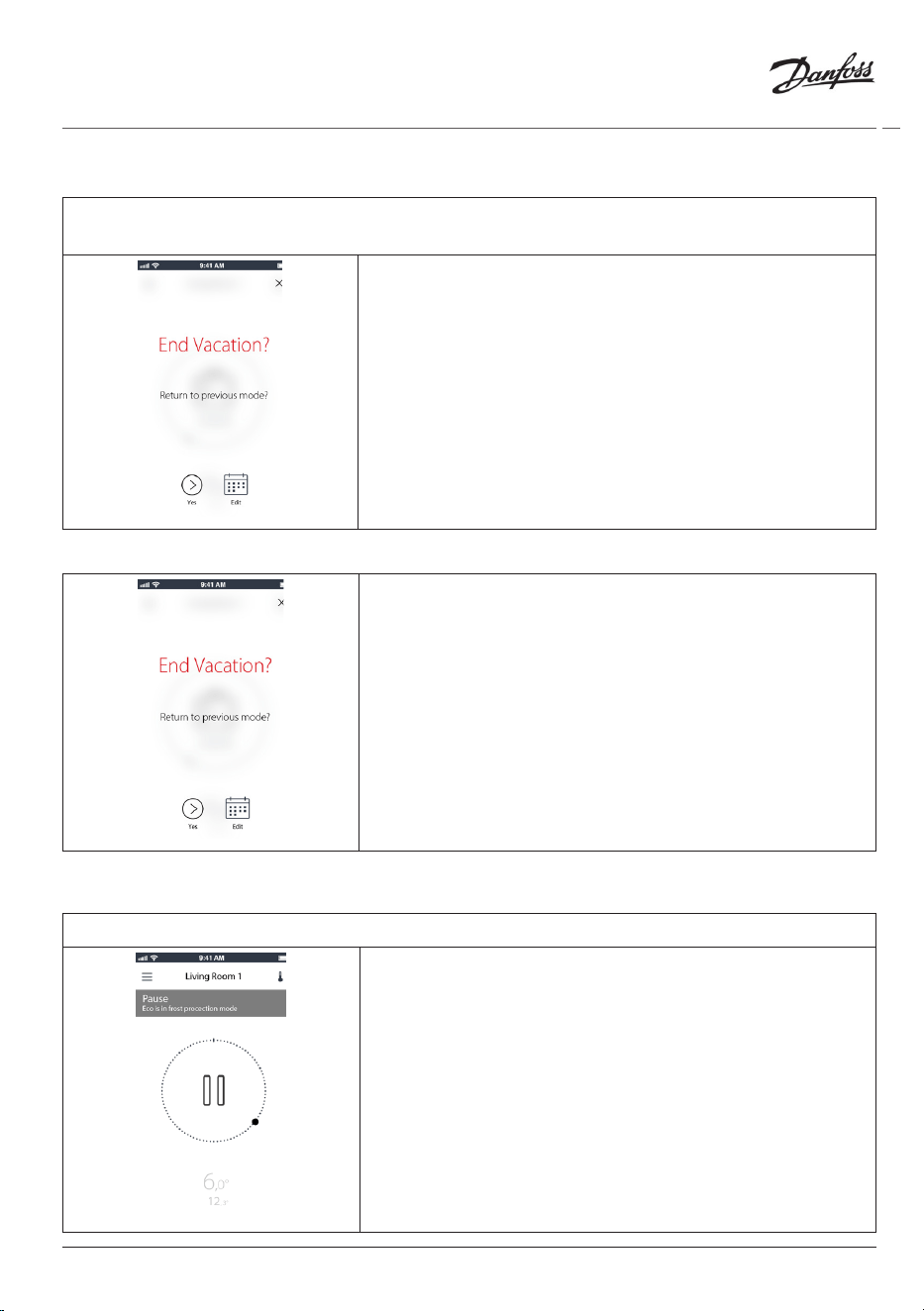
4.6 Overrule a vacation
If returning earlier than expected you might wish to shift from the Vacation programme to
your normal schedule.
When in ‘Vacation’ setting the Danfoss Eco™ App will give
options to end the Vacation period or edit the dates and
times.
4.7 Cancel an existing vacation programme
If the Vacation is planned for the future you can simply edit
the dates or cancel the programme.
4.8 Pause
The Pause programme keeps the setback temperature until another programme is selected.
When Danfoss Eco™ is turned down to Min level manually,
a notication banner is shown, and center icon switches
to ‘Pause’.
To exit Pause click the centre icon on the Danfoss Eco™
App and return to the scheduled or manual setpoint.
18
© Danfoss HS | 01/2022 | VILTH302 | AN235786405824en-010201
Installation Guide Danfoss Eco™ Electronic Radiator Thermostat
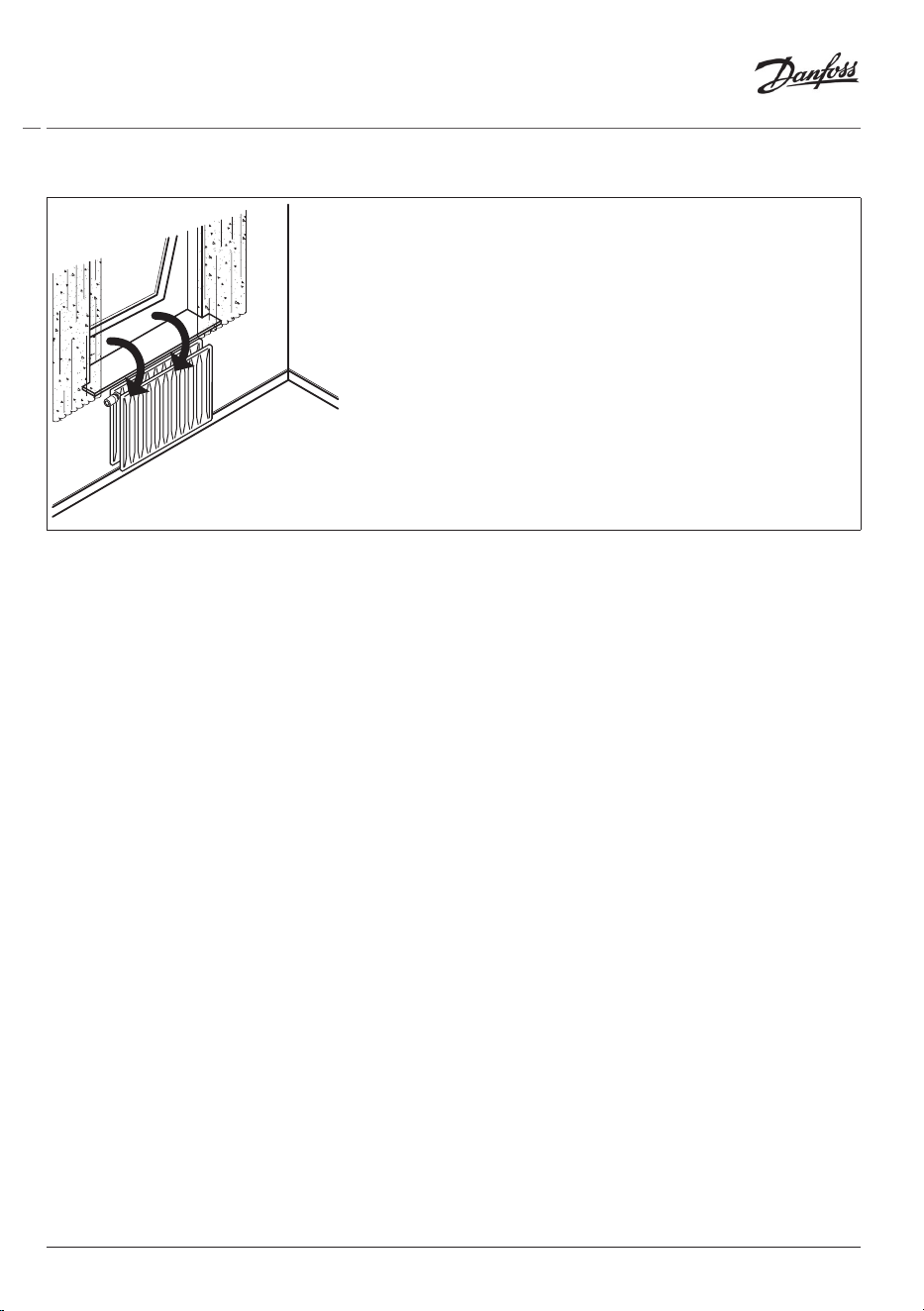
4.9 Open window function
Danfoss Eco™ features an Open-window function, which
closes the valve if the room temperature is falling
dramatically, thus reducing the heat loss.
The heat is turned o for up to 30 minutes, before Danfoss
Eco™ returns to its original settings.
When Open-window has been activated, the function is
quarantined for 45 minutes.
Note! Be aware that the Open-window function will be
aected, if curtains or furniture are covering Danfoss Eco™,
preventing it from detecting the decreasing temperature.
19
Installation Guide Danfoss Eco™ Electronic Radiator Thermostat
© Danfoss HS | 01/2022 | VILTH302 | AN235786405824en-010201
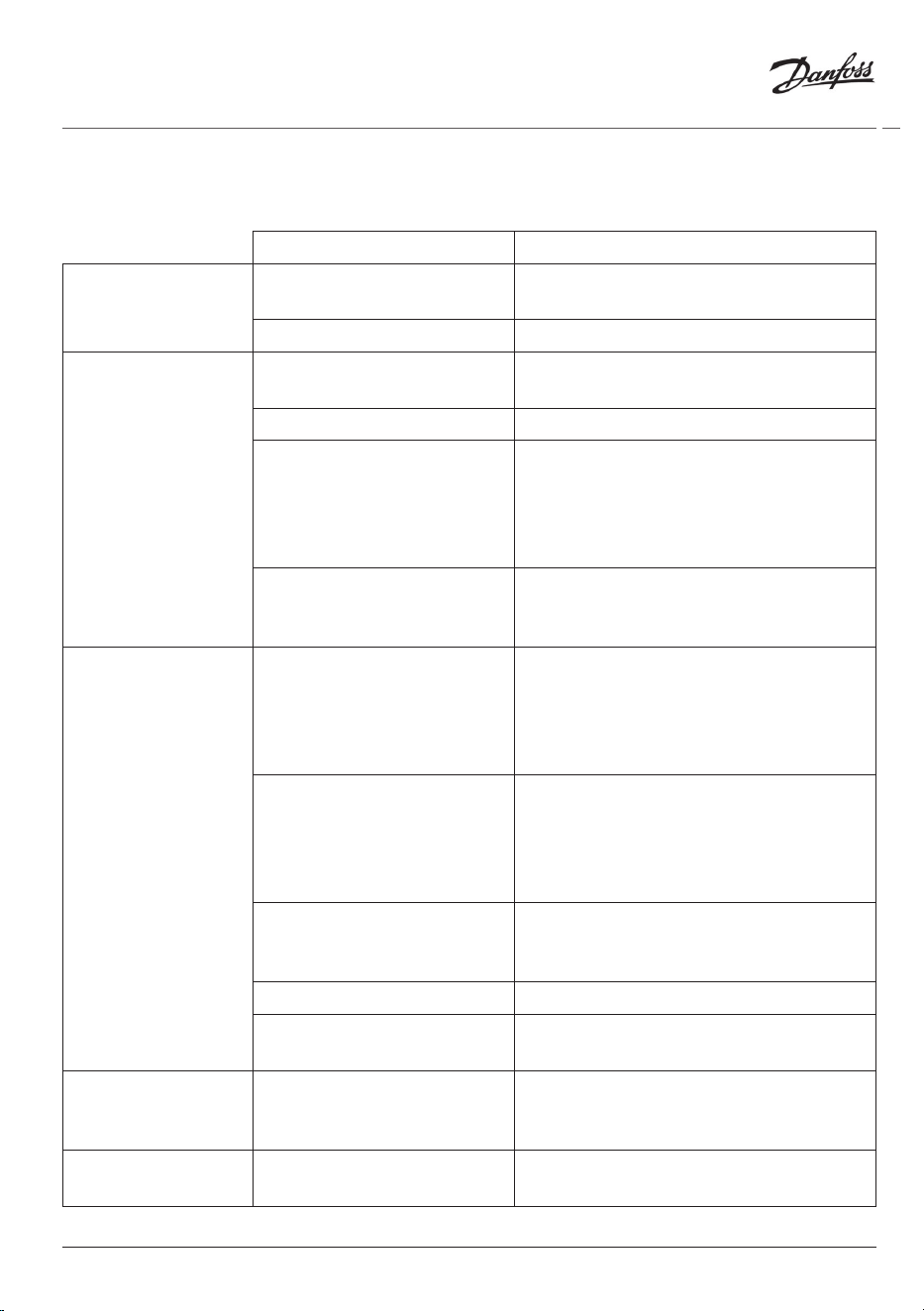
5. Settings & Installation modes
5.1 Setting options via the Danfoss Eco™ App
Command Options
Thermostats
List of the installed Danfoss
Eco™ thermostats (by name)
Option to change the name of the Danfoss
Eco™ or to un-pair an existing Danfoss Eco™.
Add Danfoss Eco™ Option to add another Danfoss Eco™
Restrictions
PIN Code Option to add a PIN code to the Danfoss
Eco™ App
Change PIN Code Option to change PIN code
Child Lock To protect your Danfoss Eco™ activate the
Child Lock, once activated the Danfoss
Eco™ can only be adjusted by the Danfoss
Eco™ App and the Manual function is
overridden.
Min/Max Temperatures Limit the temperature range. The MIN/
MAX settings are adjusted by scrolling the
temperatures in the Danfoss Eco™ App.
Advanced Settings
Adaptive Learning Adaptive Learning ensures you get the
temperature you asked for at the right
time. Adaptive Learning uses historical
data to determine how fast (degrees/hour)
each room can be reheated.
Heat Control The Heat Control ensures that Danfoss
Eco™reaches the comfort temperature on
time, according to the schedule. Options
are for Moderate or Quick. Moderate
ensures sufficient return temperature.
Display Rotation The Danfoss Eco™ display can be rotated
by 180°. This allows the display to be read
from hoziontal and vertical mounting.
Mode Mounting Mode
Frost Protection The minimum temperature to protect your
heating system. Set between 4-10°C.
System Information
Software version information Confirms the latest sofware version of the
Danfoss Eco™ App that is downloaded to
your device.
EULA
Legal information Full terms and conditions of the Danfoss
Eco™ App.
20
© Danfoss HS | 01/2022 | VILTH302 | AN235786405824en-010201
Installation Guide Danfoss Eco™ Electronic Radiator Thermostat
Help
Topics Links to the FAQ site for the main help
topics for troubleshooting issues with your
Danfoss Eco™.
Show Introduction Screens Plays the introduction screens that first
appear when you download the Danfoss
Eco™ App.
Demo Mode Try the Danfoss Eco™ App with the Demo
Mode feature. This will not adjust the
Danfoss Eco™ but will show the screens
and functionallity within the Danfoss
Eco™App.
NB. To exit the Demo Mode double click on
the word ‘Demo’ on the Danfoss Eco™ App
screen.
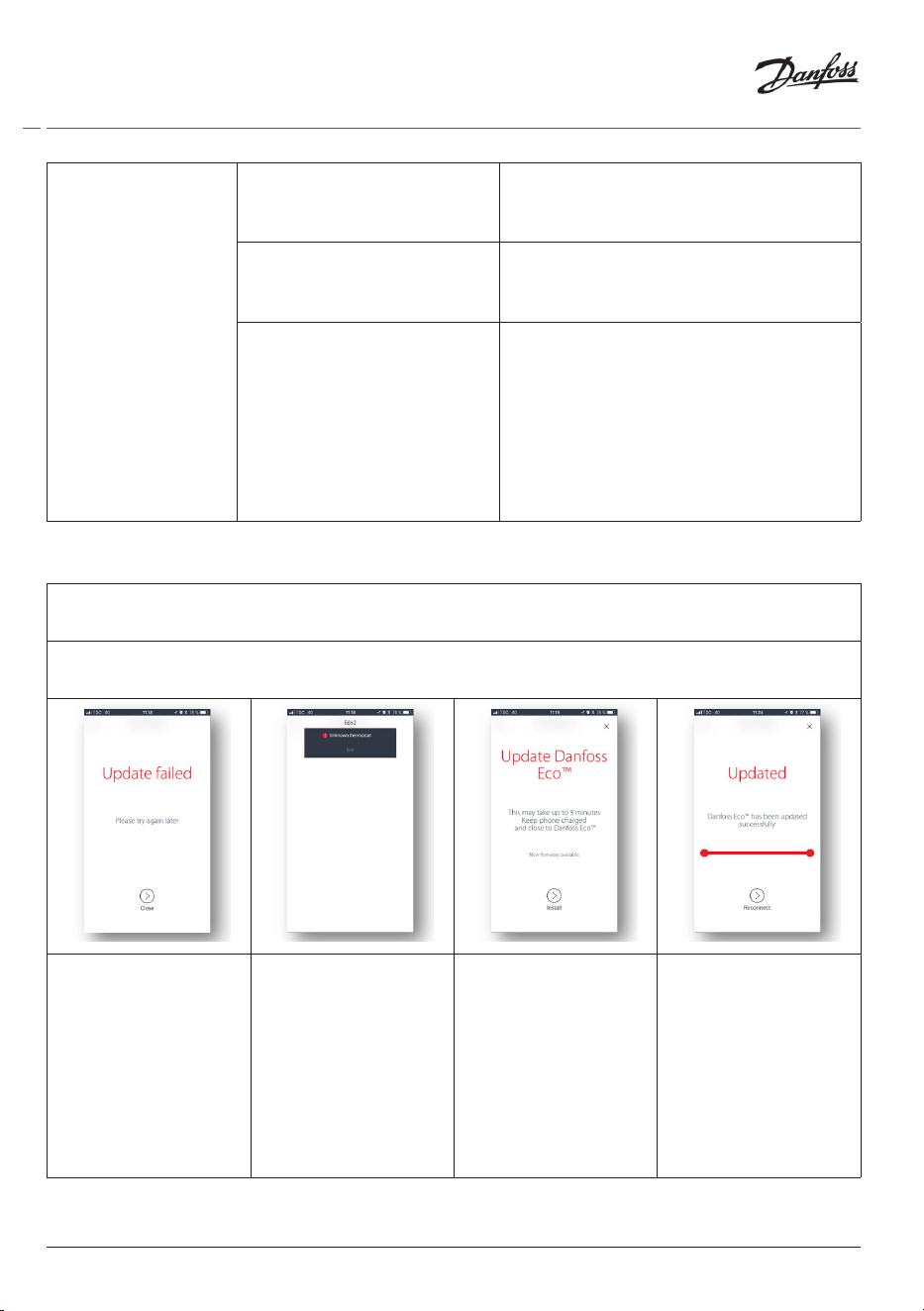
5.2 Software Updates
Danfoss Eco™ thermostat can be updated via the Danfoss Eco™ App
The Danfoss Eco™ App will inform when a new software is available.
Update failed – there is no response from the thermostat. The display is blank and and no
light is illuminating the red ring.
If the update failed,
you have to open
the thermostat list.
Do that by closing
the App completely,
or simply press the
thermostat name in
the top of the home
screen.
‘Unknown
thermostat’ should
appear on the list.
Choose ‘Unknown
device’
Press install Stay close to the
thermostat
21
Installation Guide Danfoss Eco™ Electronic Radiator Thermostat
© Danfoss HS | 01/2022 | VILTH302 | AN235786405824en-010201
5.3 Data Security
The data security for of the Danfoss Eco™ thermostat and Danfoss Eco™ App, that is paired to
your smartphone is guaranteed. The system is tested annually by independent specialists.
Data encryption: The wireless connection to your Danfoss Eco™ thermostat is protected against
threats from unknown devices with latest encryption technology, and first time pairing with the
thermostat can only be done by physically pressing the button on the thermostat.
Security through PIN code: A PIN code assigned by the user ensures that only authorized
persons can make changes to the system.
User Personal data such as temperature or set-points are only stored in the thermostat, so
therefore only your personal App can access this.
In addition to the security functions that ensure data protection at any point during the data
transmission from your smartphone to the Danfoss Eco™ thermostat, we ensure the highest
level of security with further technical and organizational measures. Danfoss continuously
checks and develops these further.
6. Safety precautions
The thermostat is not intended for children and must not be used as a toy.
Do not leave packaging materials where children may be tempted to play with them, as this is
extremely dangerous.
Do not attempt to dismantle the thermostat as it contains no user-serviceable parts.
Do not remove the cover to clean the thermostat. The external cover can be cleaned with a soft
cloth.
7. Disposal
The thermostat must be disposed of as electronic waste.
22
© Danfoss HS | 01/2022 | VILTH302 | AN235786405824en-010201
Installation Guide Danfoss Eco™ Electronic Radiator Thermostat